03Animation thêm/xóa phần tử list
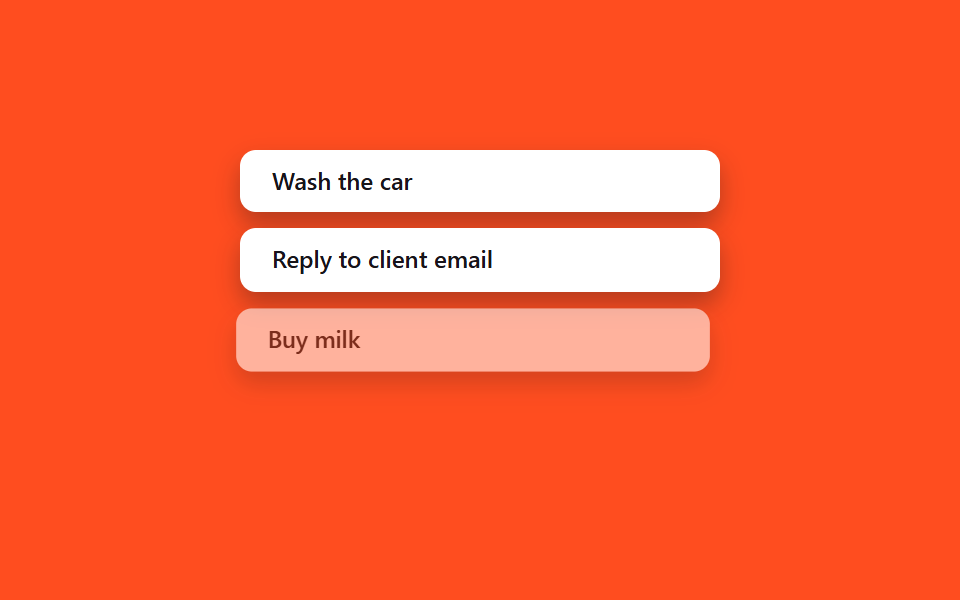
Thêm hay bớt một phần tử trong mảng state: <li> mới vào bằng @starting-style, còn phần tử bị xóa dùng lại đúng pattern exit-class của mục 02 — không thư viện animation mà nhịp vẫn khớp.
Dùng choDanh sách việc cần làm, dòng giỏ hàng, chồng thông báo
key@keyframes la-enter@keyframes la-leave
<main class="stage">
  <ul class="la-list is-demo">
    <li class="la-item">Wash the car</li>
    <li class="la-item">Reply to client email</li>
    <li class="la-item la-item--leave">Buy milk</li>
    <li class="la-item la-item--enter">Book flight tickets</li>
  </ul>
</main>
@use "../../../../site/static/demo-tokens" as *;
// ── 변수 3개 ──────────────────────────────────────────
$duration: $dur-base;
$easing: $ease-spring;
$color: $subject-ink;
@include stage($stage-orange);
.la-list {
width: min(240px, 76vw);
margin: 0;
padding: 0;
list-style: none;
display: flex;
flex-direction: column;
gap: $sp-2;
}
.la-item {
box-sizing: border-box;
padding: $sp-2 $sp-4;
border-radius: $r-sm;
background: $stage-paper;
color: $color;
font: 600 12px/1.3 -apple-system, "Segoe UI", sans-serif;
box-shadow: $shadow-press;
white-space: nowrap;
overflow: hidden;
text-overflow: ellipsis;
}
// 실사용 원리: 배열에서 항목을 지우면 새 <li> 는 @starting-style 로 들어오고,
// 지워지는 항목은 02번 exit 패턴처럼 클래스가 먼저 붙은 뒤 실제로 제거된다.
// 여기서는 둘 다 transform·opacity 로만 움직여 레이아웃 재계산을 피한다.
@keyframes la-leave {
0%, 40% { opacity: 1; transform: none; }
55% { opacity: 0; transform: translateX(-8px) scale(.97); }
100% { opacity: 0; transform: translateX(-8px) scale(.97); }
}
@keyframes la-enter {
0%, 55% { opacity: 0; transform: translateX(8px) scale(.97); }
85%, 100% { opacity: 1; transform: none; }
}
.la-list.is-demo .la-item--leave { animation: la-leave $dur-loop $easing infinite; }
.la-list.is-demo .la-item--enter { animation: la-enter $dur-loop $easing infinite; }
@media (prefers-reduced-motion: reduce) {
.la-list.is-demo .la-item--leave,
.la-list.is-demo .la-item--enter { animation: none !important; opacity: 1; transform: none; }
}html, body {
margin: 0;
overflow: hidden;
}
.stage {
box-sizing: border-box;
min-height: 100vh;
display: grid;
place-items: center;
margin: 0;
background: #ff4d1f;
font-family: -apple-system, "Segoe UI", "Noto Sans KR", sans-serif;
padding: clamp(8px, 4vw, 24px);
}
.la-list {
width: min(240px, 76vw);
margin: 0;
padding: 0;
list-style: none;
display: flex;
flex-direction: column;
gap: 8px;
}
.la-item {
box-sizing: border-box;
padding: 8px 16px;
border-radius: 8px;
background: #ffffff;
color: #17141a;
font: 600 12px/1.3 -apple-system, "Segoe UI", sans-serif;
box-shadow: 0 6px 12px rgba(23, 20, 26, 0.32);
white-space: nowrap;
overflow: hidden;
text-overflow: ellipsis;
}
@keyframes la-leave {
0%, 40% {
opacity: 1;
transform: none;
}
55% {
opacity: 0;
transform: translateX(-8px) scale(0.97);
}
100% {
opacity: 0;
transform: translateX(-8px) scale(0.97);
}
}
@keyframes la-enter {
0%, 55% {
opacity: 0;
transform: translateX(8px) scale(0.97);
}
85%, 100% {
opacity: 1;
transform: none;
}
}
.la-list.is-demo .la-item--leave {
animation: la-leave 2s cubic-bezier(0.2, 0.8, 0.2, 1) infinite;
}
.la-list.is-demo .la-item--enter {
animation: la-enter 2s cubic-bezier(0.2, 0.8, 0.2, 1) infinite;
}
@media (prefers-reduced-motion: reduce) {
.la-list.is-demo .la-item--leave,
.la-list.is-demo .la-item--enter {
animation: none !important;
opacity: 1;
transform: none;
}
}import { CSSProperties, useState } from "react";
import styles from "./ListAddRemove.module.scss";
interface Task {
id: number;
label: string;
leaving?: boolean;
}
let nextId = 3;
export interface ListAddRemoveProps {
duration?: string;
easing?: string;
}
export default function ListAddRemove({
duration = "300ms",
easing = "cubic-bezier(.2, .8, .2, 1)",
}: ListAddRemoveProps) {
const [items, setItems] = useState<Task[]>([
{ id: 1, label: "Wash the car" },
{ id: 2, label: "Reply to client email" },
]);
const add = () => {
const id = nextId++;
setItems((list) => [...list, { id, label: "Book flight tickets" }]);
};
const startRemove = (id: number) => {
// Mark it leaving first (drives the CSS exit transition, styles.leaving below).
// The item keeps rendering — with opacity heading to 0 — until its own
// onTransitionEnd fires, which is when it actually leaves the array.
setItems((list) => list.map((it) => (it.id === id ? { ...it, leaving: true } : it)));
};
const finishRemove = (id: number) => {
setItems((list) => list.filter((it) => it.id !== id));
};
const style: CSSProperties & { "--duration"?: string; "--easing"?: string } = {
"--duration": duration,
"--easing": easing,
};
return (
<div className={styles.wrap} style={style}>
<ul className={styles.list}>
{items.map((it) => (
<li
key={it.id}
className={`${styles.item} ${it.leaving ? styles.leaving : styles.entering}`}
onTransitionEnd={() => it.leaving && finishRemove(it.id)}
>
{it.label}
<button className={styles.remove} onClick={() => startRemove(it.id)}>×</button>
</li>
))}
</ul>
<button className={styles.add} onClick={add}>+ Add task</button>
</div>
);
}03 Animation thêm/xóa phần tử list — Diện tích đo được 14.355% · khung hình chuyển động 10/23Nguyên tác GODRICH · SCSS và React nằm trong tệp zip · 9 hiệu ứng react css animation không cần library
Bài viết chứa demo này
 9 hiệu ứng react css animation không cần libraryReact css animation là cách thêm chuyển động cho component bằng chính CSS, không cần cài library. Chín hiệu ứng dưới đây Xem tất cả demo trong bài này