07startViewTransition + cập nhật state
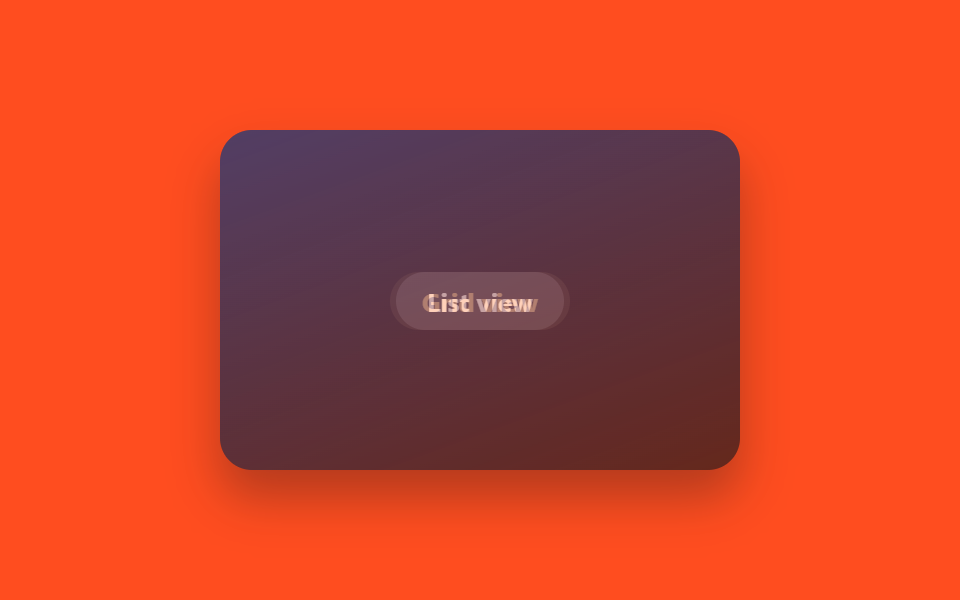
document.startViewTransition() ôm lấy một lần cập nhật state React (qua flushSync), trình duyệt tự cross-fade snapshot DOM trước·sau, khỏi phải tự tay gắn animation cho từng phần tử thay đổi.
Dùng choSắp xếp lại layout dạng lưới·danh sách, đổi lựa chọn trong gallery ảnh
startViewTransitionflushSync@keyframes vt-cross-in
<main class="stage">
  <div class="vt-frame is-demo">
    <div class="vt-layer vt-layer--a">
      <span class="vt-chip">List view</span>
    </div>
    <div class="vt-layer vt-layer--b">
      <span class="vt-chip">Grid view</span>
    </div>
  </div>
</main>
@use "../../../../site/static/demo-tokens" as *;
// ── 변수 3개 ──────────────────────────────────────────
$duration: $dur-enter;
$easing: $ease-spring;
$color: $subject-blue;
@include stage($stage-orange);
.vt-frame {
position: relative;
width: min(260px, 84vw);
aspect-ratio: 260 / 170;
border-radius: $r-card;
overflow: hidden;
box-shadow: $shadow-raised;
}
.vt-layer {
position: absolute;
inset: 0;
display: grid;
place-items: center;
color: $subject-cream;
}
.vt-layer--a { background: linear-gradient(160deg, $subject-ink, rgba(23, 20, 26, .8)); }
.vt-layer--b { background: linear-gradient(160deg, $color, rgba(23, 20, 26, .85)); }
.vt-chip {
padding: $sp-2 $sp-4;
border-radius: $r-pill;
background: rgba(255, 255, 255, .16);
font: 700 13px/1 -apple-system, "Segoe UI", sans-serif;
}
// 실사용 원리: document.startViewTransition() 이 flushSync 로 감싼 상태 갱신을 가로채,
// 바뀌기 전·후 DOM 스냅샷을 브라우저가 자동으로 크로스페이드한다.
.vt-layer--b { opacity: 0; }
// 캡처용 루프: list view ↔ grid view 를 2초 주기로 크로스페이드
@keyframes vt-cross-out { 0%, 20% { opacity: 1; } 80%, 100% { opacity: 0; } }
@keyframes vt-cross-in { 0%, 20% { opacity: 0; } 80%, 100% { opacity: 1; } }
.vt-frame.is-demo .vt-layer--a { animation: vt-cross-out $dur-loop $easing infinite; }
.vt-frame.is-demo .vt-layer--b { animation: vt-cross-in $dur-loop $easing infinite; }
@media (prefers-reduced-motion: reduce) {
.vt-frame.is-demo .vt-layer--a,
.vt-frame.is-demo .vt-layer--b { animation: none !important; }
.vt-layer--a { opacity: 1; }
.vt-layer--b { opacity: 0; }
}html, body {
margin: 0;
overflow: hidden;
}
.stage {
box-sizing: border-box;
min-height: 100vh;
display: grid;
place-items: center;
margin: 0;
background: #ff4d1f;
font-family: -apple-system, "Segoe UI", "Noto Sans KR", sans-serif;
padding: clamp(8px, 4vw, 24px);
}
.vt-frame {
position: relative;
width: min(260px, 84vw);
aspect-ratio: 260/170;
border-radius: 16px;
overflow: hidden;
box-shadow: 0 14px 24px rgba(23, 20, 26, 0.32);
}
.vt-layer {
position: absolute;
inset: 0;
display: grid;
place-items: center;
color: #fff7e6;
}
.vt-layer--a {
background: linear-gradient(160deg, #17141a, rgba(23, 20, 26, 0.8));
}
.vt-layer--b {
background: linear-gradient(160deg, #2f6df6, rgba(23, 20, 26, 0.85));
}
.vt-chip {
padding: 8px 16px;
border-radius: 999px;
background: rgba(255, 255, 255, 0.16);
font: 700 13px/1 -apple-system, "Segoe UI", sans-serif;
}
.vt-layer--b {
opacity: 0;
}
@keyframes vt-cross-out {
0%, 20% {
opacity: 1;
}
80%, 100% {
opacity: 0;
}
}
@keyframes vt-cross-in {
0%, 20% {
opacity: 0;
}
80%, 100% {
opacity: 1;
}
}
.vt-frame.is-demo .vt-layer--a {
animation: vt-cross-out 2s cubic-bezier(0.2, 0.8, 0.2, 1) infinite;
}
.vt-frame.is-demo .vt-layer--b {
animation: vt-cross-in 2s cubic-bezier(0.2, 0.8, 0.2, 1) infinite;
}
@media (prefers-reduced-motion: reduce) {
.vt-frame.is-demo .vt-layer--a,
.vt-frame.is-demo .vt-layer--b {
animation: none !important;
}
.vt-layer--a {
opacity: 1;
}
.vt-layer--b {
opacity: 0;
}
}import { CSSProperties, useState } from "react";
import { flushSync } from "react-dom";
import styles from "./ViewTransitionReactState.module.scss";
type DocWithViewTransition = Document & {
startViewTransition?: (callback: () => void) => void;
};
export interface ViewTransitionReactStateProps {
duration?: string;
easing?: string;
}
export default function ViewTransitionReactState({
duration = "600ms",
easing = "cubic-bezier(.2, .8, .2, 1)",
}: ViewTransitionReactStateProps) {
const [mode, setMode] = useState<"list" | "grid">("list");
const toggle = () => {
const doc = document as DocWithViewTransition;
const next = mode === "list" ? "grid" : "list";
if (doc.startViewTransition) {
// startViewTransition needs the "after" DOM already painted by the time its
// callback returns — flushSync forces that React commit synchronously instead
// of letting React 18's automatic batching defer it past the snapshot.
doc.startViewTransition(() => flushSync(() => setMode(next)));
} else {
setMode(next);
}
};
const style: CSSProperties & { "--duration"?: string; "--easing"?: string } = {
"--duration": duration,
"--easing": easing,
};
return (
<button className={styles.frame} style={style} onClick={toggle}>
<span className={styles.chip}>{mode === "list" ? "List view" : "Grid view"}</span>
</button>
);
}07 startViewTransition + cập nhật state — Diện tích đo được 30.558% · khung hình chuyển động 6/23Nguyên tác GODRICH · SCSS và React nằm trong tệp zip · 9 hiệu ứng react css animation không cần library
Bài viết chứa demo này
 9 hiệu ứng react css animation không cần libraryReact css animation là cách thêm chuyển động cho component bằng chính CSS, không cần cài library. Chín hiệu ứng dưới đây Xem tất cả demo trong bài này