09Animation chuyển route
Lấy tham số URL làm key cho component, hoặc bọc việc đổi route trong startViewTransition, trang đi ra và trang vào sẽ nối nhau bằng CSS transition thay vì một cú cắt chớp nhoáng.
Dùng choChuyển route trong ứng dụng một trang, các trang kiểu tab dùng chung layout
key by routestartViewTransitionexit/enter
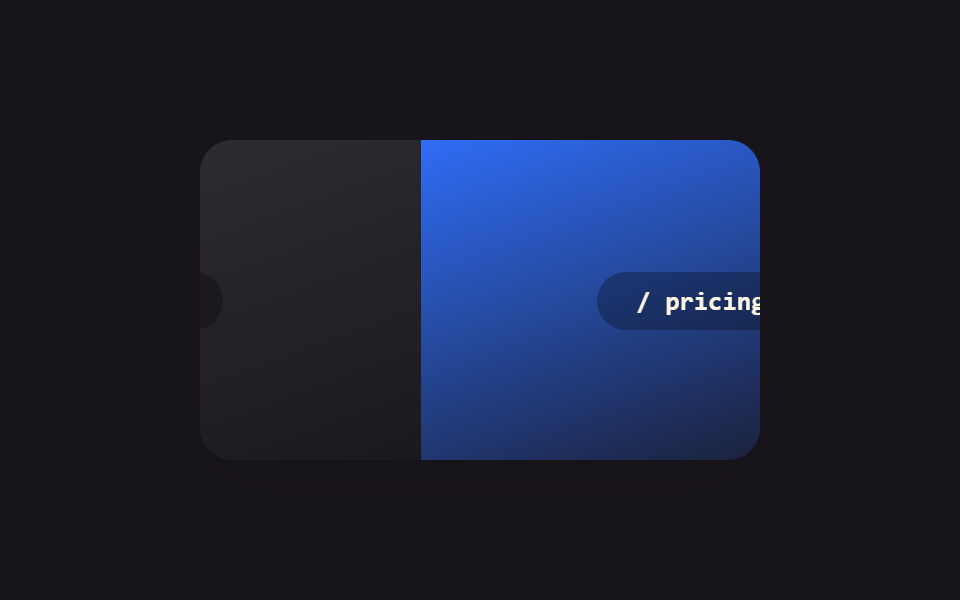
<main class="stage">
  <div class="rt-frame is-demo">
    <div class="rt-page rt-page--out">
      <span class="rt-page__label">/ home</span>
    </div>
    <div class="rt-page rt-page--in">
      <span class="rt-page__label">/ pricing</span>
    </div>
  </div>
</main>
@use "../../../../site/static/demo-tokens" as *;
// ── 변수 3개 ──────────────────────────────────────────
$duration: $dur-base;
$easing: $ease-spring;
$color: $subject-blue;
@include stage($stage-ink);
.rt-frame {
position: relative;
width: min(280px, 88vw);
aspect-ratio: 280 / 160;
border-radius: $r-card;
overflow: hidden;
box-shadow: $shadow-raised;
}
.rt-page {
position: absolute;
inset: 0;
display: grid;
place-items: center;
}
.rt-page--out { background: linear-gradient(160deg, rgba(255, 255, 255, .12), rgba(255, 255, 255, .02)); }
.rt-page--in { background: linear-gradient(160deg, $color, rgba(23, 20, 26, .9)); }
.rt-page__label {
padding: $sp-2 $sp-5;
border-radius: $r-pill;
background: rgba(0, 0, 0, .28);
color: $subject-cream;
font: 700 13px/1 "SFMono-Regular", Consolas, monospace;
}
// 실사용 원리: URL 파라미터를 컴포넌트의 key 로 쓰거나 라우트 전환을 startViewTransition 으로
// 감싸면, 나가는 페이지와 들어오는 페이지가 순간 전환 대신 CSS 트랜지션으로 이어진다.
.rt-page--in { transform: translateX(100%); }
// 캡처용 루프: home 이 왼쪽으로 나가고 pricing 이 오른쪽에서 들어오는 전환을 2초 주기로 반복
@keyframes rt-out { 0%, 15% { transform: none; } 75%, 100% { transform: translateX(-100%); } }
@keyframes rt-in { 0%, 15% { transform: translateX(100%); } 75%, 100% { transform: none; } }
.rt-frame.is-demo .rt-page--out { animation: rt-out $dur-loop $easing infinite; }
.rt-frame.is-demo .rt-page--in { animation: rt-in $dur-loop $easing infinite; }
@media (prefers-reduced-motion: reduce) {
.rt-frame.is-demo .rt-page--out,
.rt-frame.is-demo .rt-page--in { animation: none !important; }
.rt-page--out { transform: none; }
.rt-page--in { transform: translateX(100%); }
}html, body {
margin: 0;
overflow: hidden;
}
.stage {
box-sizing: border-box;
min-height: 100vh;
display: grid;
place-items: center;
margin: 0;
background: #17141a;
font-family: -apple-system, "Segoe UI", "Noto Sans KR", sans-serif;
padding: clamp(8px, 4vw, 24px);
}
.rt-frame {
position: relative;
width: min(280px, 88vw);
aspect-ratio: 280/160;
border-radius: 16px;
overflow: hidden;
box-shadow: 0 14px 24px rgba(23, 20, 26, 0.32);
}
.rt-page {
position: absolute;
inset: 0;
display: grid;
place-items: center;
}
.rt-page--out {
background: linear-gradient(160deg, rgba(255, 255, 255, 0.12), rgba(255, 255, 255, 0.02));
}
.rt-page--in {
background: linear-gradient(160deg, #2f6df6, rgba(23, 20, 26, 0.9));
}
.rt-page__label {
padding: 8px 20px;
border-radius: 999px;
background: rgba(0, 0, 0, 0.28);
color: #fff7e6;
font: 700 13px/1 "SFMono-Regular", Consolas, monospace;
}
.rt-page--in {
transform: translateX(100%);
}
@keyframes rt-out {
0%, 15% {
transform: none;
}
75%, 100% {
transform: translateX(-100%);
}
}
@keyframes rt-in {
0%, 15% {
transform: translateX(100%);
}
75%, 100% {
transform: none;
}
}
.rt-frame.is-demo .rt-page--out {
animation: rt-out 2s cubic-bezier(0.2, 0.8, 0.2, 1) infinite;
}
.rt-frame.is-demo .rt-page--in {
animation: rt-in 2s cubic-bezier(0.2, 0.8, 0.2, 1) infinite;
}
@media (prefers-reduced-motion: reduce) {
.rt-frame.is-demo .rt-page--out,
.rt-frame.is-demo .rt-page--in {
animation: none !important;
}
.rt-page--out {
transform: none;
}
.rt-page--in {
transform: translateX(100%);
}
}import { CSSProperties, useState } from "react";
import styles from "./RouteTransition.module.scss";
const ROUTES = ["/ home", "/ pricing"];
function Page({ label }: { label: string; key?: string }) {
// key={label} on the caller side makes each route its own component instance —
// switching the key unmounts the outgoing page and mounts the incoming one,
// instead of patching one page's content in place.
return (
<div className={styles.page}>
<span className={styles.label}>{label}</span>
</div>
);
}
export interface RouteTransitionProps {
duration?: string;
easing?: string;
}
export default function RouteTransition({
duration = "300ms",
easing = "cubic-bezier(.2, .8, .2, 1)",
}: RouteTransitionProps) {
const [route, setRoute] = useState(0);
const navigate = () => {
const next = (route + 1) % ROUTES.length;
if (typeof document !== "undefined" && "startViewTransition" in document) {
(document as any).startViewTransition(() => setRoute(next));
} else {
setRoute(next);
}
};
const style: CSSProperties & { "--duration"?: string; "--easing"?: string } = {
"--duration": duration,
"--easing": easing,
};
return (
<button className={styles.frame} style={style} onClick={navigate}>
<Page key={ROUTES[route]} label={ROUTES[route]} />
</button>
);
}09 Animation chuyển route — Diện tích đo được 30.983% · khung hình chuyển động 15/23Nguyên tác GODRICH · SCSS và React nằm trong tệp zip · 9 hiệu ứng react css animation không cần library
Bài viết chứa demo này
 9 hiệu ứng react css animation không cần libraryReact css animation là cách thêm chuyển động cho component bằng chính CSS, không cần cài library. Chín hiệu ứng dưới đây Xem tất cả demo trong bài này