02Xuất hiện lần lượt
Các mục trong danh sách hiện ra lần lượt, cách nhau 80ms.
Dùng choDanh sách tính năng, bảng giá, giới thiệu team
80ms빠르게 40ms역순
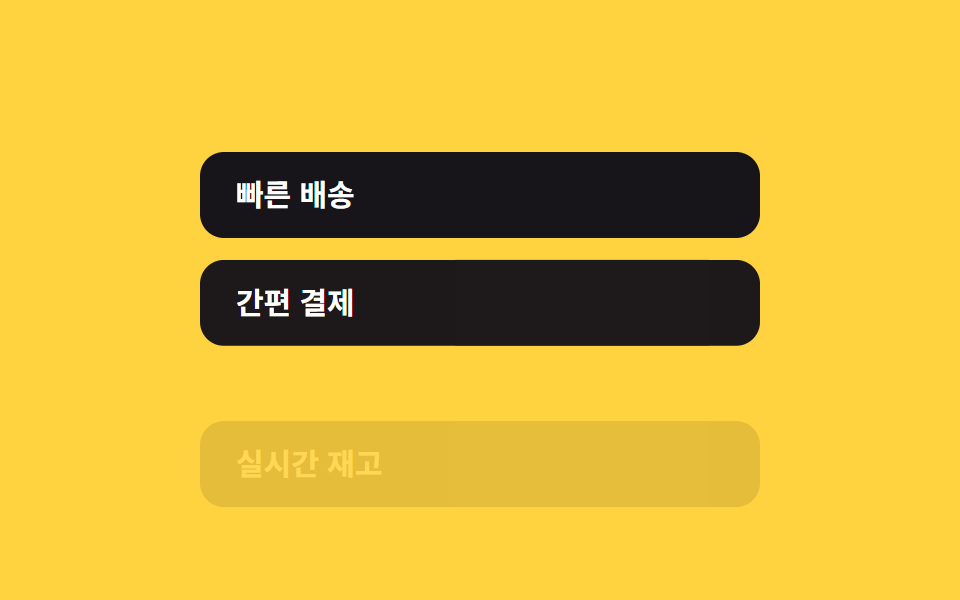
<main class="stage">
  <ul class="list is-demo">
    <li class="list__item" style="--i:0">Giao hàng nhanh</li>
    <li class="list__item" style="--i:1">Thanh toán dễ dàng</li>
    <li class="list__item" style="--i:2">Tồn kho thời gian thực</li>
  </ul>
</main>
@use "../../../../site/static/demo-tokens" as *;
// ── 변수 3개. 변형은 이것만 바꾼다 (값은 토큰에서 받는다) ──────
$stagger: 80ms; // 항목 사이 간격. 빠르게 40ms
$distance: 16px; // 올라오는 거리
$color: $subject-ink; // 항목 배경 (yellow 무대라 ink)
// ── 데모 무대 (zip 에서 지워도 된다) ──────────────────────────
@include stage($stage-yellow);
// ── 목록 ──────────────────────────────────────────────
.list {
margin: 0;
padding: 0;
list-style: none;
width: min(280px, 100%);
display: grid;
gap: clamp(6px, 3vw, 10px); // 320×200 에서도 네 줄이 들어가게 줄인다
}
.list__item {
padding: clamp(8px, 3vw, 14px) clamp(12px, 4vw, 18px);
border-radius: $r-control;
background: $color;
color: #fff;
font-weight: 600;
font-size: clamp(13px, 4vw, 15px);
line-height: 1;
font-family: inherit;
// ── 실제 사용 코드: 세로로 쌓인 항목은 스크롤하면 제 위치에서
// 순서대로 뷰포트에 들어온다 — 항목마다 같은 규칙이면 자동으로 순서대로 보인다.
// JS 지연(setTimeout) 없이, 목록 배치 자체가 시차를 만든다.
@supports (animation-timeline: view()) {
animation: stagger-in $ease-out both;
animation-timeline: view();
animation-range: entry 0% cover 40%;
}
@supports not (animation-timeline: view()) {
opacity: 1;
transform: none;
}
}
@keyframes stagger-in {
from { opacity: 0; transform: translateY($distance); }
to { opacity: 1; transform: translateY(0); }
}
// ── 데모(.is-demo): 항목마다 --i 순서로 지연을 줘 순서대로 등장 흉내 ──
.list.is-demo .list__item {
animation: stagger-loop $dur-loop $ease-out infinite;
animation-delay: calc(var(--i) * #{$stagger} * 4);
}
@keyframes stagger-loop {
0% { opacity: 0; transform: translateY($distance * 2); }
20% { opacity: 1; transform: translateY(0); }
70% { opacity: 1; transform: translateY(0); }
85% { opacity: 0; transform: translateY($distance * 2); }
100% { opacity: 0; transform: translateY($distance * 2); }
}
// ── 접근성: 움직임 줄이기 설정이면 즉시 보여주기만 ────────────
@media (prefers-reduced-motion: reduce) {
.list__item { animation: none !important; opacity: 1; transform: none; }
}html, body {
margin: 0;
overflow: hidden;
}
.stage {
box-sizing: border-box;
min-height: 100vh;
display: grid;
place-items: center;
margin: 0;
background: #ffd23f;
font-family: -apple-system, "Segoe UI", "Noto Sans KR", sans-serif;
padding: clamp(8px, 4vw, 24px);
}
.list {
margin: 0;
padding: 0;
list-style: none;
width: min(280px, 100%);
display: grid;
gap: clamp(6px, 3vw, 10px);
}
.list__item {
padding: clamp(8px, 3vw, 14px) clamp(12px, 4vw, 18px);
border-radius: 12px;
background: #17141a;
color: #fff;
font-weight: 600;
font-size: clamp(13px, 4vw, 15px);
line-height: 1;
font-family: inherit;
}
@supports (animation-timeline: view()) {
.list__item {
animation: stagger-in ease-out both;
animation-timeline: view();
animation-range: entry 0% cover 40%;
}
}
@supports not (animation-timeline: view()) {
.list__item {
opacity: 1;
transform: none;
}
}
@keyframes stagger-in {
from {
opacity: 0;
transform: translateY(16px);
}
to {
opacity: 1;
transform: translateY(0);
}
}
.list.is-demo .list__item {
animation: stagger-loop 2s ease-out infinite;
animation-delay: calc(var(--i) * 80ms * 4);
}
@keyframes stagger-loop {
0% {
opacity: 0;
transform: translateY(32px);
}
20% {
opacity: 1;
transform: translateY(0);
}
70% {
opacity: 1;
transform: translateY(0);
}
85% {
opacity: 0;
transform: translateY(32px);
}
100% {
opacity: 0;
transform: translateY(32px);
}
}
@media (prefers-reduced-motion: reduce) {
.list__item {
animation: none !important;
opacity: 1;
transform: none;
}
}import type { CSSProperties } from "react";
import styles from "./StaggerList.module.scss";
export type StaggerListProps = {
items: string[];
/** 항목 사이 진입 범위 간격 (기본 80ms, 문서용 — 실제 진행은 목록 배치가 만든다) */
stagger?: number;
/** 올라오는 거리 (기본 16px) */
distance?: number;
/** 글자 색 배경 (기본 #17141a) */
color?: string;
className?: string;
};
type ItemVars = CSSProperties & { "--i"?: number };
type ListVars = CSSProperties & { "--stagger"?: string; "--distance"?: string; "--color"?: string };
export default function StaggerList({
items,
stagger = 80,
distance = 16,
color = "#17141a",
className = "",
}: StaggerListProps) {
const vars: ListVars = { "--stagger": `${stagger}ms`, "--distance": `${distance}px`, "--color": color };
return (
<ul className={`${styles.list} ${className}`} style={vars}>
{items.map((label, i) => {
const itemVars: ItemVars = { "--i": i };
return (
<li key={label} className={styles.item} style={itemVars}>
{label}
</li>
);
})}
</ul>
);
}02 Xuất hiện lần lượt — Diện tích đo được 34.529% · khung hình chuyển động 20/23Nguyên tác GODRICH · SCSS và React nằm trong tệp zip · 9 hiệu ứng css scroll animation không cần JS
Bài viết chứa demo này
 9 hiệu ứng css scroll animation không cần JSCss scroll animation là animation gắn liền với vị trí cuộn trang, chạy bằng animation-timeline của CSS thay cho một list Xem tất cả demo trong bài này