07Kiểu dòng lệnh terminal
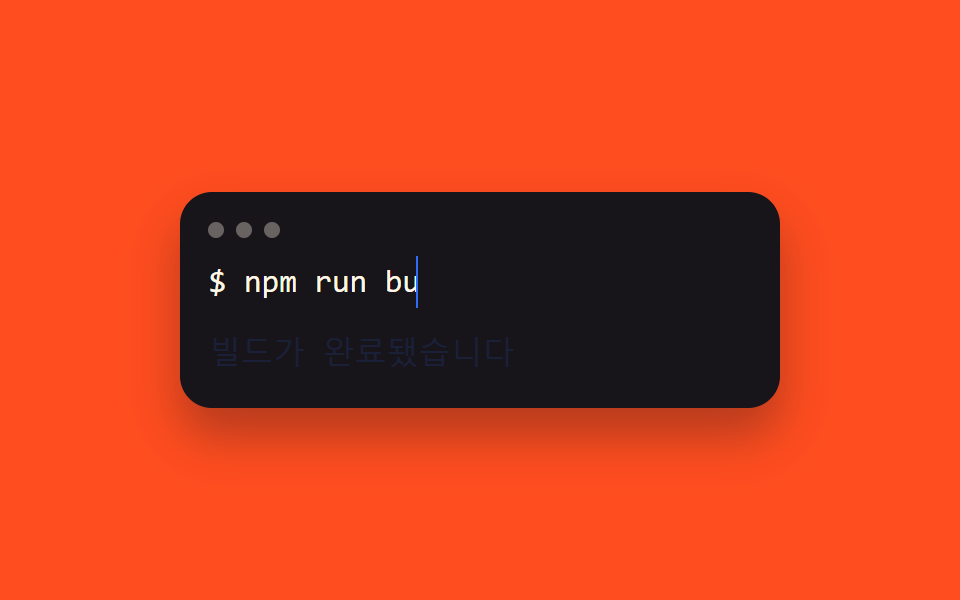
Lệnh gõ ra sau dấu $ bằng steps(), rồi dòng phản hồi hiện dần bằng opacity ngay khi animation đó kết thúc, tạo thành một cửa sổ terminal giả gồm hai giai đoạn.
Dùng choPhần giới thiệu công cụ cho dev, demo hero của sản phẩm CLI
명령어→응답 순서monospace 터미널 폰트트래픽라이트 장식
<main class="stage">
  <div class="term">
    <div class="term__bar"><span class="term__dot"></span><span class="term__dot"></span><span class="term__dot"></span></div>
    <p class="term__line">$ <span class="term__cmd">npm run build</span></p>
    <p class="term__resp">Build đã hoàn tất</p>
  </div>
</main>
@use "../../../../site/static/demo-tokens" as *;
$duration: $dur-loop; // 명령어 → 응답 두 단계를 담는 전체 루프
$easing: steps(13, end); // 명령어 글자 수만큼 뚝뚝 끊어 찍힌다
$color: $subject-blue; // 커서·응답 색
@include stage($stage-orange);
.term {
box-sizing: border-box; // width 와 padding 을 같이 쓰는데 border-box 가 없으면 padding 이 width 위에 더해져 320px 에서 넘친다 (실측 2026-09-10: 314px)
width: min(300px, 92vw);
border-radius: $r-card;
background: $stage-ink;
box-shadow: $shadow-raised;
padding: clamp(10px, 3vw, 16px);
font: 500 clamp(13px, 3.6vw, 16px)/1.6 "Space Mono", ui-monospace, monospace;
color: $subject-cream;
&__bar { display: flex; gap: 6px; margin: 0 0 clamp(6px, 2vw, 10px); }
&__dot { width: 8px; height: 8px; border-radius: $r-pill; background: rgba($subject-cream, .35); }
&__line { margin: 0; }
&__cmd {
display: inline-block;
overflow: hidden;
white-space: nowrap;
vertical-align: bottom;
width: 0;
border-right: .1em solid $color;
animation: cmd-type $duration linear infinite;
}
&__resp {
margin: clamp(6px, 2vw, 10px) 0 0;
color: $color;
animation: resp-fade $duration ease-out infinite;
}
}
@keyframes cmd-type {
0%, 5% { width: 0; animation-timing-function: $easing; }
45% { width: var(--full, 13ch); }
85% { width: var(--full, 13ch); }
95%, 100% { width: 0; }
}
@keyframes resp-fade {
0%, 44% { opacity: 0; }
50% { opacity: 1; }
82% { opacity: 1; }
90%, 100% { opacity: 0; }
}
@media (prefers-reduced-motion: reduce) {
.term__cmd { animation: none; width: var(--full, 13ch); border-right-color: transparent; }
.term__resp { animation: none; opacity: 1; }
}html, body {
margin: 0;
overflow: hidden;
}
.stage {
box-sizing: border-box;
min-height: 100vh;
display: grid;
place-items: center;
margin: 0;
background: #ff4d1f;
font-family: -apple-system, "Segoe UI", "Noto Sans KR", sans-serif;
padding: clamp(8px, 4vw, 24px);
}
.term {
box-sizing: border-box;
width: min(300px, 92vw);
border-radius: 16px;
background: #17141a;
box-shadow: 0 14px 24px rgba(23, 20, 26, 0.32);
padding: clamp(10px, 3vw, 16px);
font: 500 clamp(13px, 3.6vw, 16px)/1.6 "Space Mono", ui-monospace, monospace;
color: #fff7e6;
}
.term__bar {
display: flex;
gap: 6px;
margin: 0 0 clamp(6px, 2vw, 10px);
}
.term__dot {
width: 8px;
height: 8px;
border-radius: 999px;
background: rgba(255, 247, 230, 0.35);
}
.term__line {
margin: 0;
}
.term__cmd {
display: inline-block;
overflow: hidden;
white-space: nowrap;
vertical-align: bottom;
width: 0;
border-right: 0.1em solid #2f6df6;
animation: cmd-type 2s linear infinite;
}
.term__resp {
margin: clamp(6px, 2vw, 10px) 0 0;
color: #2f6df6;
animation: resp-fade 2s ease-out infinite;
}
@keyframes cmd-type {
0%, 5% {
width: 0;
animation-timing-function: steps(13, end);
}
45% {
width: var(--full, 13ch);
}
85% {
width: var(--full, 13ch);
}
95%, 100% {
width: 0;
}
}
@keyframes resp-fade {
0%, 44% {
opacity: 0;
}
50% {
opacity: 1;
}
82% {
opacity: 1;
}
90%, 100% {
opacity: 0;
}
}
@media (prefers-reduced-motion: reduce) {
.term__cmd {
animation: none;
width: var(--full, 13ch);
border-right-color: transparent;
}
.term__resp {
animation: none;
opacity: 1;
}
}(function () {
var el = document.querySelector('.term__cmd'), cv = document.createElement('canvas').getContext('2d');
cv.font = getComputedStyle(el).font;
el.style.setProperty('--full', Math.ceil(cv.measureText(el.textContent).width) + 'px');
})();import { useEffect, useRef } from "react";
import type { CSSProperties } from "react";
import styles from "./TerminalPrompt.module.scss";
export type TerminalPromptProps = {
command: string;
response: string;
/** 명령어→응답 두 단계를 담는 전체 루프 (기본 2000ms) */
duration?: number;
color?: string;
};
export default function TerminalPrompt({ command, response, duration = 2000, color = "#2f6df6" }: TerminalPromptProps) {
const ref = useRef<HTMLSpanElement | null>(null);
useEffect(() => {
const el = ref.current;
const cv = el && document.createElement("canvas").getContext("2d");
if (!el || !cv) return;
cv.font = getComputedStyle(el).font;
el.style.setProperty("--full", Math.ceil(cv.measureText(command).width) + "px");
}, [command]);
const vars = { "--duration": `${duration}ms`, "--color": color, "--easing": `steps(${command.length}, end)` } as CSSProperties;
return (
<div className={styles.term} style={vars}>
<div className={styles.bar}><span className={styles.dot} /><span className={styles.dot} /><span className={styles.dot} /></div>
<p className={styles.line}>$ <span ref={ref} className={styles.cmd}>{command}</span></p>
<p className={styles.resp}>{response}</p>
</div>
);
}07 Kiểu dòng lệnh terminal — Diện tích đo được 1.057% · khung hình chuyển động 15/23Nguyên tác GODRICH · SCSS và React nằm trong tệp zip · 9 kiểu css typing animation, copy dán là chạy
Bài viết chứa demo này
 9 kiểu css typing animation, copy dán là chạyCss typing animation là hiệu ứng mô phỏng việc gõ chữ bằng CSS thuần, dựng bằng steps() và một con trỏ nhấp nháy thay ch Xem tất cả demo trong bài này