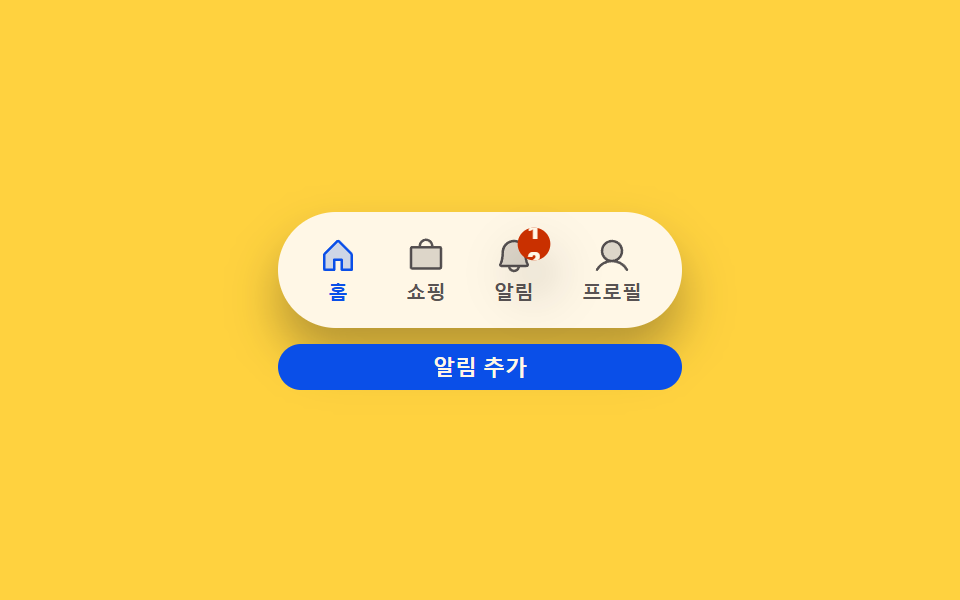
03Badge count-bump toggle — each time a notification count value rises, that display's size value grows once then settles back
The moment the count value rises, that display's size value briefly grows larger, then settles back to its original size.
Best forA tab showing an unread notification count, a display for the number of pending items
BUMP_ZETAtranslateYscale
<main class="stage">
<div class="bg is-demo" id="bg">
  <div class="bg__phone">
    <div class="bg__track">
      <button type="button" class="bg__tab is-active" data-idx="0">
        <svg class="bg__icon" viewBox="0 0 256 256" aria-hidden="true"><g fill="currentColor"><path d="M216 120v96h-64v-64h-48v64H40v-96a8 8 0 0 1 2.34-5.66l80-80a8 8 0 0 1 11.32 0l80 80A8 8 0 0 1 216 120" opacity=".2"/><path d="m219.31 108.68l-80-80a16 16 0 0 0-22.62 0l-80 80A15.87 15.87 0 0 0 32 120v96a8 8 0 0 0 8 8h64a8 8 0 0 0 8-8v-56h32v56a8 8 0 0 0 8 8h64a8 8 0 0 0 8-8v-96a15.87 15.87 0 0 0-4.69-11.32M208 208h-48v-56a8 8 0 0 0-8-8h-48a8 8 0 0 0-8 8v56H48v-88l80-80l80 80Z"/></g></svg>
        <span class="bg__label">Home</span>
      </button>
      <button type="button" class="bg__tab" data-idx="1">
        <svg class="bg__icon" viewBox="0 0 256 256" aria-hidden="true"><g fill="currentColor"><path d="M224 80v120a8 8 0 0 1-8 8H40a8 8 0 0 1-8-8V80a8 8 0 0 1 8-8h176a8 8 0 0 1 8 8" opacity=".2"/><path d="M216 64h-40a48 48 0 0 0-96 0H40a16 16 0 0 0-16 16v120a16 16 0 0 0 16 16h176a16 16 0 0 0 16-16V80a16 16 0 0 0-16-16m-88-32a32 32 0 0 1 32 32H96a32 32 0 0 1 32-32m88 168H40V80h176Z"/></g></svg>
        <span class="bg__label">Shopping</span>
      </button>
      <button type="button" class="bg__tab" data-idx="2" id="bgAlertTab">
        <span class="bg__iconWrap">
          <svg class="bg__icon" viewBox="0 0 256 256" aria-hidden="true"><g fill="currentColor"><path d="M208 192H48a8 8 0 0 1-6.88-12C47.71 168.6 56 139.81 56 104a72 72 0 0 1 144 0c0 35.82 8.3 64.6 14.9 76a8 8 0 0 1-6.9 12" opacity=".2"/><path d="M221.8 175.94c-5.55-9.56-13.8-36.61-13.8-71.94a80 80 0 1 0-160 0c0 35.34-8.26 62.38-13.81 71.94A16 16 0 0 0 48 200h40.81a40 40 0 0 0 78.38 0H208a16 16 0 0 0 13.8-24.06M128 216a24 24 0 0 1-22.62-16h45.24A24 24 0 0 1 128 216m-80-32c7.7-13.24 16-43.92 16-80a64 64 0 1 1 128 0c0 36.05 8.28 66.73 16 80Z"/></g></svg>
          <span class="bg__badge" id="bgBadge">
            <span class="bg__strip" id="bgStrip">
              <span>0</span><span>1</span><span>2</span><span>3</span><span>4</span><span>5</span><span>6</span><span>7</span><span>8</span><span>9</span>
            </span>
          </span>
        </span>
        <span class="bg__label">Notifications</span>
      </button>
      <button type="button" class="bg__tab" data-idx="3">
        <svg class="bg__icon" viewBox="0 0 256 256" aria-hidden="true"><g fill="currentColor"><path d="M192 96a64 64 0 1 1-64-64a64 64 0 0 1 64 64" opacity=".2"/><path d="M230.92 212c-15.23-26.33-38.7-45.21-66.09-54.16a72 72 0 1 0-73.66 0c-27.39 8.94-50.86 27.82-66.09 54.16a8 8 0 1 0 13.85 8c18.84-32.56 52.14-52 89.07-52s70.23 19.44 89.07 52a8 8 0 1 0 13.85-8M72 96a56 56 0 1 1 56 56a56.06 56.06 0 0 1-56-56"/></g></svg>
        <span class="bg__label">Profile</span>
      </button>
    </div>
    <button type="button" class="bg__hit" id="bgAdd">Add notification</button>
  </div>
</div>
</main>@use "../../../../site/static/demo-tokens" as *;
// 계산 겹: index.html increment() 가 카운트를 올릴 때마다 springTo 감쇠 조화진동자가
// 숫자 롤(strip)의 translateY 를 목표 칸으로 당기고(오버슛 포함), badge 자체는
// bumpScale() 감쇠 코사인 진동으로 짧게 튀어올랐다 가라앉는다.
@include stage($stage-yellow);
.bg__phone { width: 100%; max-width: 300px; }
.bg__track {
display: flex; justify-content: space-between; background: $subject-cream; border-radius: $r-pill;
box-shadow: $shadow-raised; padding: $sp-1 $sp-2; box-sizing: border-box;
}
.bg__tab {
position: relative; flex: 0 0 auto; display: flex; flex-direction: column; align-items: center;
gap: $sp-1; border: none; background: transparent; cursor: pointer; padding: $sp-2 $sp-3;
color: rgba($subject-ink, .72);
}
.bg__tab.is-active { color: $subject-blue-deep; }
.bg__icon { width: 20px; height: 20px; }
.bg__label { font-size: 10px; font-weight: 700; line-height: 1; }
.bg__iconWrap { position: relative; display: inline-flex; }
.bg__badge {
position: absolute; top: -4px; right: -8px; min-width: $sp-4; height: $sp-4;
border-radius: $r-pill; background: $subject-orange-deep; color: $subject-cream;
display: none; align-items: center; justify-content: center; overflow: hidden;
box-shadow: $shadow-raised; transform-origin: 50% 50%;
}
.bg__strip {
display: flex; flex-direction: column; align-items: center; line-height: 14px;
font-size: 10px; font-weight: 800;
span { height: 14px; display: block; }
}
.bg__hit {
margin-top: $sp-2; width: 100%; border: none; border-radius: $r-control;
background: $subject-blue-deep; color: $subject-cream; font-weight: 700; font-size: 11px;
padding: $sp-1 0; cursor: pointer;
}
@media (max-width: 340px) {
.bg__phone { max-width: 230px; }
.bg__tab { padding: $sp-1 $sp-2; }
.bg__icon { width: 18px; height: 18px; }
}
@media (prefers-reduced-motion: reduce) {
.bg__badge, .bg__strip { transition: none; }
}html, body {
margin: 0;
overflow: hidden;
}
.stage {
box-sizing: border-box;
min-height: 100vh;
display: grid;
place-items: center;
margin: 0;
background: #ffd23f;
font-family: -apple-system, "Segoe UI", "Noto Sans KR", sans-serif;
padding: clamp(8px, 4vw, 24px);
}
.bg__phone {
width: 100%;
max-width: 300px;
}
.bg__track {
display: flex;
justify-content: space-between;
background: #fff7e6;
border-radius: 999px;
box-shadow: 0 14px 24px rgba(23, 20, 26, 0.32);
padding: 4px 8px;
box-sizing: border-box;
}
.bg__tab {
position: relative;
flex: 0 0 auto;
display: flex;
flex-direction: column;
align-items: center;
gap: 4px;
border: none;
background: transparent;
cursor: pointer;
padding: 8px 12px;
color: rgba(23, 20, 26, 0.72);
}
.bg__tab.is-active {
color: #0a4fe8;
}
.bg__icon {
width: 20px;
height: 20px;
}
.bg__label {
font-size: 10px;
font-weight: 700;
line-height: 1;
}
.bg__iconWrap {
position: relative;
display: inline-flex;
}
.bg__badge {
position: absolute;
top: -4px;
right: -8px;
min-width: 16px;
height: 16px;
border-radius: 999px;
background: #c93000;
color: #fff7e6;
display: none;
align-items: center;
justify-content: center;
overflow: hidden;
box-shadow: 0 14px 24px rgba(23, 20, 26, 0.32);
transform-origin: 50% 50%;
}
.bg__strip {
display: flex;
flex-direction: column;
align-items: center;
line-height: 14px;
font-size: 10px;
font-weight: 800;
}
.bg__strip span {
height: 14px;
display: block;
}
.bg__hit {
margin-top: 8px;
width: 100%;
border: none;
border-radius: 12px;
background: #0a4fe8;
color: #fff7e6;
font-weight: 700;
font-size: 11px;
padding: 4px 0;
cursor: pointer;
}
@media (max-width: 340px) {
.bg__phone {
max-width: 230px;
}
.bg__tab {
padding: 4px 8px;
}
.bg__icon {
width: 18px;
height: 18px;
}
}
@media (prefers-reduced-motion: reduce) {
.bg__badge, .bg__strip {
transition: none;
}
}(function () {
var ROW_H = 14; // px, 숫자 롤 한 칸 높이
var INCR_MS = 520; // 계산 겹 상수: 자동 루프가 수량을 올리는 간격
var SPRING_K = 260; // 계산 겹: 숫자 롤 스프링 상수
var SPRING_C = 22; // 계산 겹: 숫자 롤 감쇠 상수
var BUMP_DUR = 320; // ms, 배지 bump 지속
var BUMP_FREQ = 2 * Math.PI * 1.8 / BUMP_DUR; // 계산 겹: bump 각속도
var BUMP_ZETA = 4.8; // 계산 겹: bump 감쇠 상수
var reduce = window.matchMedia('(prefers-reduced-motion: reduce)').matches;
var bg = document.getElementById('bg');
var badge = document.getElementById('bgBadge');
var strip = document.getElementById('bgStrip');
var addBtn = document.getElementById('bgAdd');
var alertTab = document.getElementById('bgAlertTab');
var isDemo = true;
var count = 0;
var pos = 0, vel = 0;
var bumpStart = -9999;
var lastTs = 0;
var cycleStart = 0;
function bumpScale(t) {
// 계산 겹: 배지 bump — 감쇠 코사인 진동
if (t < 0 || t > BUMP_DUR) return 1;
var amp = Math.exp(-BUMP_ZETA * (t / BUMP_DUR));
return 1 + amp * (1 - Math.cos(BUMP_FREQ * t)) * 0.5;
}
function bump(ts) {
bumpStart = ts;
}
function increment(ts) {
count = (count + 1) % 10;
badge.style.display = 'inline-flex';
bump(ts);
}
function render(ts) {
var s = bumpScale(ts - bumpStart);
badge.style.transform = 'scale(' + s.toFixed(3) + ')';
strip.style.transform = 'translateY(' + (-pos).toFixed(2) + 'px)';
}
function human() {
if (isDemo) { bg.classList.remove('is-demo'); isDemo = false; }
}
addBtn.addEventListener('click', function () { human(); increment(performance.now()); });
addBtn.addEventListener('keydown', function (ev) {
if (ev.key !== 'Enter' && ev.key !== ' ') return;
ev.preventDefault();
addBtn.click();
});
alertTab.addEventListener('click', function () { human(); });
function loop(ts) {
if (!lastTs) { lastTs = ts; cycleStart = ts; }
var dt = Math.min(0.05, (ts - lastTs) / 1000);
lastTs = ts;
if (isDemo) {
var n = Math.floor((ts - cycleStart) / INCR_MS);
if (n > loop._lastN) {
loop._lastN = n;
increment(ts);
}
}
var target = -count * ROW_H;
var acc = (target - pos) * SPRING_K - vel * SPRING_C;
vel += acc * dt;
pos += vel * dt;
render(ts);
requestAnimationFrame(loop);
}
loop._lastN = -1;
render(0);
if (!reduce) {
requestAnimationFrame(loop);
}
})();// BadgeCountBump — vanilla 판(run/367/demo/03-bottom-nav-bar-badge-count-bump/index.html) 의 React 포트.
// increment() 가 카운트를 올릴 때마다 springTo 감쇠 조화진동자가 숫자 롤(strip)의
// translateY 를 목표 칸으로 당기고(오버슛 포함), badge 자체는 bumpScale() 감쇠 코사인
// 진동으로 짧게 튀어올랐다 가라앉는다 — 둘 다 rAF 계산, CSS transition 아님.
import { useEffect, useRef } from "react";
import styles from "./BadgeCountBump.module.scss";
type Box<T> = { current: T };
const ROW_H = 14; // px, 숫자 롤 한 칸 높이
const INCR_MS = 520; // 계산 겹 상수: 자동 루프가 수량을 올리는 간격
const SPRING_K = 260; // 계산 겹: 숫자 롤 스프링 상수
const SPRING_C = 22; // 계산 겹: 숫자 롤 감쇠 상수
const BUMP_DUR = 320; // ms, 배지 bump 지속
const BUMP_FREQ = (2 * Math.PI * 1.8) / BUMP_DUR; // 계산 겹: bump 각속도
const BUMP_ZETA = 4.8; // 계산 겹: bump 감쇠 상수
const TABS = [
{ label: "홈", d: "M216 120v96h-64v-64h-48v64H40v-96a8 8 0 0 1 2.34-5.66l80-80a8 8 0 0 1 11.32 0l80 80A8 8 0 0 1 216 120|.2#m219.31 108.68l-80-80a16 16 0 0 0-22.62 0l-80 80A15.87 15.87 0 0 0 32 120v96a8 8 0 0 0 8 8h64a8 8 0 0 0 8-8v-56h32v56a8 8 0 0 0 8 8h64a8 8 0 0 0 8-8v-96a15.87 15.87 0 0 0-4.69-11.32M208 208h-48v-56a8 8 0 0 0-8-8h-48a8 8 0 0 0-8 8v56H48v-88l80-80l80 80Z" },
{ label: "쇼핑", d: "M224 80v120a8 8 0 0 1-8 8H40a8 8 0 0 1-8-8V80a8 8 0 0 1 8-8h176a8 8 0 0 1 8 8|.2#M216 64h-40a48 48 0 0 0-96 0H40a16 16 0 0 0-16 16v120a16 16 0 0 0 16 16h176a16 16 0 0 0 16-16V80a16 16 0 0 0-16-16m-88-32a32 32 0 0 1 32 32H96a32 32 0 0 1 32-32m88 168H40V80h176Z" },
{ label: "프로필", d: "M192 96a64 64 0 1 1-64-64a64 64 0 0 1 64 64|.2#M230.92 212c-15.23-26.33-38.7-45.21-66.09-54.16a72 72 0 1 0-73.66 0c-27.39 8.94-50.86 27.82-66.09 54.16a8 8 0 1 0 13.85 8c18.84-32.56 52.14-52 89.07-52s70.23 19.44 89.07 52a8 8 0 1 0 13.85-8M72 96a56 56 0 1 1 56 56a56.06 56.06 0 0 1-56-56" },
];
const ALERT_D = "M208 192H48a8 8 0 0 1-6.88-12C47.71 168.6 56 139.81 56 104a72 72 0 0 1 144 0c0 35.82 8.3 64.6 14.9 76a8 8 0 0 1-6.9 12|.2#M221.8 175.94c-5.55-9.56-13.8-36.61-13.8-71.94a80 80 0 1 0-160 0c0 35.34-8.26 62.38-13.81 71.94A16 16 0 0 0 48 200h40.81a40 40 0 0 0 78.38 0H208a16 16 0 0 0 13.8-24.06M128 216a24 24 0 0 1-22.62-16h45.24A24 24 0 0 1 128 216m-80-32c7.7-13.24 16-43.92 16-80a64 64 0 1 1 128 0c0 36.05 8.28 66.73 16 80Z";
function Icon({ spec, className }: { spec: string; className?: string }) {
const [a, b] = spec.split("#");
const [pathA, opacity] = a.split("|");
return (
<svg className={className || styles.icon} viewBox="0 0 256 256" aria-hidden="true">
<g fill="currentColor">
<path d={pathA} opacity={opacity} />
<path d={b} />
</g>
</svg>
);
}
function bumpScale(t: number): number {
if (t < 0 || t > BUMP_DUR) return 1;
const amp = Math.exp(-BUMP_ZETA * (t / BUMP_DUR));
return 1 + amp * (1 - Math.cos(BUMP_FREQ * t)) * 0.5;
}
export default function BadgeCountBump() {
const rootRef = useRef(null) as unknown as Box<HTMLDivElement>;
const badgeRef = useRef(null) as unknown as Box<HTMLSpanElement>;
const stripRef = useRef(null) as unknown as Box<HTMLSpanElement>;
const addRef = useRef(null) as unknown as Box<HTMLButtonElement>;
const alertTabRef = useRef(null) as unknown as Box<HTMLButtonElement>;
const rafRef = useRef(0) as unknown as Box<number>;
useEffect(() => {
const reduce = window.matchMedia("(prefers-reduced-motion: reduce)").matches;
let isDemo = true;
let count = 0;
let pos = 0, vel = 0;
let bumpStart = -9999;
let lastTs = 0, cycleStart = 0;
let lastN = -1;
function bump(ts: number) { bumpStart = ts; }
function increment(ts: number) {
count = (count + 1) % 10;
const badge = badgeRef.current;
if (badge) badge.style.display = "inline-flex";
bump(ts);
}
function render(ts: number) {
const badge = badgeRef.current;
const strip = stripRef.current;
if (!badge || !strip) return;
const s = bumpScale(ts - bumpStart);
badge.style.transform = "scale(" + s.toFixed(3) + ")";
strip.style.transform = "translateY(" + (-pos).toFixed(2) + "px)";
}
function human() {
if (isDemo) { rootRef.current?.classList.remove(styles.isDemo); isDemo = false; }
}
function onAddClick() { human(); increment(performance.now()); }
function onAddKeydown(ev: KeyboardEvent) {
if (ev.key !== "Enter" && ev.key !== " ") return;
ev.preventDefault();
addRef.current?.click();
}
function onAlertClick() { human(); }
addRef.current?.addEventListener("click", onAddClick);
addRef.current?.addEventListener("keydown", onAddKeydown);
alertTabRef.current?.addEventListener("click", onAlertClick);
function loop(ts: number) {
if (!lastTs) { lastTs = ts; cycleStart = ts; }
const dt = Math.min(0.05, (ts - lastTs) / 1000);
lastTs = ts;
if (isDemo) {
const n = Math.floor((ts - cycleStart) / INCR_MS);
if (n > lastN) { lastN = n; increment(ts); }
}
const target = -count * ROW_H;
const acc = (target - pos) * SPRING_K - vel * SPRING_C;
vel += acc * dt;
pos += vel * dt;
render(ts);
rafRef.current = requestAnimationFrame(loop);
}
render(0);
if (!reduce) { rafRef.current = requestAnimationFrame(loop); }
return () => {
cancelAnimationFrame(rafRef.current);
addRef.current?.removeEventListener("click", onAddClick);
addRef.current?.removeEventListener("keydown", onAddKeydown);
alertTabRef.current?.removeEventListener("click", onAlertClick);
};
}, []);
return (
<main className={styles.stage}>
<div className={styles.root + " " + styles.isDemo} ref={rootRef}>
<div className={styles.phone}>
<div className={styles.track}>
{TABS.slice(0, 2).map((t, i) => (
<button key={t.label} type="button"
className={styles.tab + (i === 0 ? " " + styles.isActive : "")}
aria-current={i === 0 ? "true" : undefined}>
<Icon spec={t.d} />
<span className={styles.label}>{t.label}</span>
</button>
))}
<button type="button" className={styles.tab} ref={alertTabRef}>
<span className={styles.iconWrap}>
<Icon spec={ALERT_D} />
<span className={styles.badge} ref={badgeRef}>
<span className={styles.strip} ref={stripRef}>
<span>0</span><span>1</span><span>2</span><span>3</span><span>4</span>
<span>5</span><span>6</span><span>7</span><span>8</span><span>9</span>
</span>
</span>
</span>
<span className={styles.label}>알림</span>
</button>
<button type="button" className={styles.tab}>
<Icon spec={TABS[2].d} />
<span className={styles.label}>{TABS[2].label}</span>
</button>
</div>
<button type="button" className={styles.hit} ref={addRef}>알림 추가</button>
</div>
</div>
</main>
);
}03 Badge count-bump toggle — each time a notification count value rises, that display's size value grows once then settles back — Measured area 0.217% · moving frames 20/23Original by GODRICH · SCSS and React ship in the zip · CSS Bottom Navigation Bar: 9 Transition Patterns
The post this demo lives in
 CSS Bottom Navigation Bar: 9 Transition PatternsCSS Bottom Navigation Bar: One of nine slides the highlight to the new tab as selection changes, one grows a badge brief See all demos in this post
If you like this effect - similar demos
 Transitions04 Elastic quantity bump — a quantity number that grows then eases back by the size of its changeCart Drawer UI Patterns: 9 Motion Techniques
 Transitions08 Mobile bottom toast9 CSS Toast Notifications — No Library, Pure CSS
 Transitions09 Tab count badge9 CSS Tab Switch Animations — No Library, Pure CSS