09Tab count badge
Every role=tablist button carries a number badge, and switching tabs by click or arrow key makes only the newly opened tab's badge pop via scale.
Best forInbox/archive/spam mailbox tabs, tab menus with unread notification counts
role=tablistaria-selectedscale
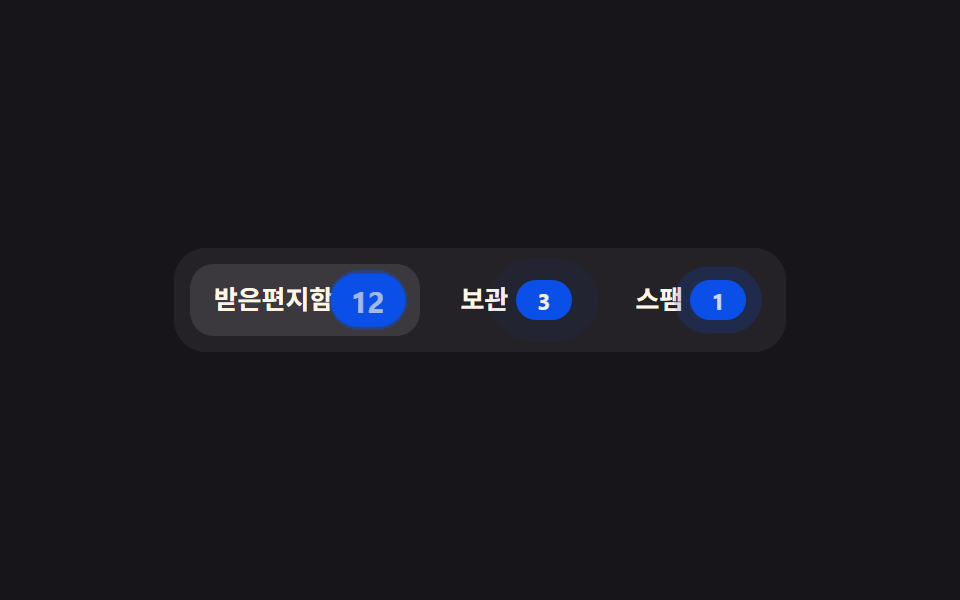
<main class="stage">
  <div class="cb is-demo" role="tablist" aria-label="Mailbox">
    <button class="cb__tab" type="button" role="tab" aria-selected="true" tabindex="0">
      Inbox <span class="cb__badge">12</span>
    </button>
    <button class="cb__tab" type="button" role="tab" aria-selected="false" tabindex="-1">
      Archive <span class="cb__badge">3</span>
    </button>
    <button class="cb__tab" type="button" role="tab" aria-selected="false" tabindex="-1">
      Spam <span class="cb__badge">1</span>
    </button>
  </div>
</main>
@use "../../../../site/static/demo-tokens" as *;
// ── 변수 3개 ──────────────────────────────────────────
$duration: $dur-instant; // 배지가 튀어 오르는 시간
$easing: $ease-lerp-settle; // 관성 lerp — 목표를 12.6% 넘겼다가 정착 (2026-09-15 형태 2차 한 겹)
$color: $subject-blue-deep; // 배지 색 (크림 글자가 얹히므로 진한 파랑)
@include stage($stage-ink);
.cb {
display: flex;
gap: $sp-2;
padding: $sp-2;
border-radius: $r-card;
background: rgba(255, 255, 255, .06);
}
.cb__tab {
border: 0;
border-radius: $r-control;
padding: $sp-2 $sp-3;
background: none;
color: $subject-cream; // 배지(짙은 파랑) 위 5.98:1 · 카드 면 위 14.7:1 — .55 는 2.79 로 미달
font-weight: 600;
font-size: clamp(11px, 3vw, 13px);
line-height: 1;
font-family: inherit;
cursor: pointer;
-webkit-tap-highlight-color: transparent;
}
.cb__tab[aria-selected="true"] { color: $subject-cream; background: rgba(255, 255, 255, .1); }
.cb__badge {
position: relative; // ::before 잔광 고리의 기준점 (2026-09-15 형태 2차)
display: inline-flex;
align-items: center;
justify-content: center;
min-width: $sp-5;
height: $sp-5;
padding: 0 $sp-1;
border-radius: $r-pill;
background: $color;
color: $subject-cream;
font-weight: 700;
font-size: clamp(10px, 2.6vw, 11px);
line-height: 1;
font-family: inherit;
transform: scale(1);
transition: transform $duration $easing;
}
// 스케일 트레일 잔상 — 배지가 튀어오를 때 뒤로 번지는 원형 잔광 고리 (장식, aria 없는 가상요소라 스크린리더 무관)
.cb__badge::before {
content: "";
position: absolute; inset: -3px;
border-radius: $r-pill;
background: $color;
opacity: 0;
pointer-events: none;
}
.cb__tab[aria-selected="true"] .cb__badge::before { animation: cb-ring $duration ease-out; }
@keyframes cb-ring { 0% { transform: scale(.8); opacity: .4; } 100% { transform: scale(1.7); opacity: 0; } }
.cb__tab[aria-selected="true"] .cb__badge { animation: cb-pop $duration $easing; }
@keyframes cb-pop { 0% { transform: scale(1); } 55% { transform: scale(1.35); } 100% { transform: scale(1); } }
// ── 데모 루프: 클릭 전까지 배지를 하나씩 순서대로 튕긴다 ──────────────
.cb.is-demo .cb__tab:nth-child(1) .cb__badge { animation: cb-loop $dur-loop $easing infinite; }
.cb.is-demo .cb__tab:nth-child(2) .cb__badge { animation: cb-loop $dur-loop $easing infinite; animation-delay: calc($dur-loop / 3 * -2); }
.cb.is-demo .cb__tab:nth-child(3) .cb__badge { animation: cb-loop $dur-loop $easing infinite; animation-delay: calc($dur-loop / 3 * -1); }
// 잔광 고리도 같은 박자·같은 nth-child 딜레이로 순서대로 번진다
.cb.is-demo .cb__tab:nth-child(1) .cb__badge::before { animation: cb-ring $dur-loop ease-out infinite; }
.cb.is-demo .cb__tab:nth-child(2) .cb__badge::before { animation: cb-ring $dur-loop ease-out infinite; animation-delay: calc($dur-loop / 3 * -2); }
.cb.is-demo .cb__tab:nth-child(3) .cb__badge::before { animation: cb-ring $dur-loop ease-out infinite; animation-delay: calc($dur-loop / 3 * -1); }
@keyframes cb-loop {
0%, 8%, 100% { transform: scale(1); }
4% { transform: scale(1.35); }
}
@media (prefers-reduced-motion: reduce) {
.cb__badge { transition: none; }
.cb__tab[aria-selected="true"] .cb__badge { animation: none !important; }
.cb.is-demo .cb__tab .cb__badge { animation: none !important; }
.cb__badge::before, .cb__tab[aria-selected="true"] .cb__badge::before,
.cb.is-demo .cb__tab .cb__badge::before { animation: none !important; opacity: 0; } // 잔광 한 겹은 reduced-motion 에서 완전히 꺼진다
}html, body {
margin: 0;
overflow: hidden;
}
.stage {
box-sizing: border-box;
min-height: 100vh;
display: grid;
place-items: center;
margin: 0;
background: #17141a;
font-family: -apple-system, "Segoe UI", "Noto Sans KR", sans-serif;
padding: clamp(8px, 4vw, 24px);
}
.cb {
display: flex;
gap: 8px;
padding: 8px;
border-radius: 16px;
background: rgba(255, 255, 255, 0.06);
}
.cb__tab {
border: 0;
border-radius: 12px;
padding: 8px 12px;
background: none;
color: #fff7e6;
font-weight: 600;
font-size: clamp(11px, 3vw, 13px);
line-height: 1;
font-family: inherit;
cursor: pointer;
-webkit-tap-highlight-color: transparent;
}
.cb__tab[aria-selected=true] {
color: #fff7e6;
background: rgba(255, 255, 255, 0.1);
}
.cb__badge {
position: relative;
display: inline-flex;
align-items: center;
justify-content: center;
min-width: 20px;
height: 20px;
padding: 0 4px;
border-radius: 999px;
background: #0a4fe8;
color: #fff7e6;
font-weight: 700;
font-size: clamp(10px, 2.6vw, 11px);
line-height: 1;
font-family: inherit;
transform: scale(1);
transition: transform 140ms linear(0, 0.051, 0.176, 0.341, 0.518, 0.685, 0.831, 0.947, 1.032, 1.087, 1.117, 1.126, 1.121, 1.105, 1.085, 1.062, 1.041, 1.022, 1.008, 0.997, 1);
}
.cb__badge::before {
content: "";
position: absolute;
inset: -3px;
border-radius: 999px;
background: #0a4fe8;
opacity: 0;
pointer-events: none;
}
.cb__tab[aria-selected=true] .cb__badge::before {
animation: cb-ring 140ms ease-out;
}
@keyframes cb-ring {
0% {
transform: scale(0.8);
opacity: 0.4;
}
100% {
transform: scale(1.7);
opacity: 0;
}
}
.cb__tab[aria-selected=true] .cb__badge {
animation: cb-pop 140ms linear(0, 0.051, 0.176, 0.341, 0.518, 0.685, 0.831, 0.947, 1.032, 1.087, 1.117, 1.126, 1.121, 1.105, 1.085, 1.062, 1.041, 1.022, 1.008, 0.997, 1);
}
@keyframes cb-pop {
0% {
transform: scale(1);
}
55% {
transform: scale(1.35);
}
100% {
transform: scale(1);
}
}
.cb.is-demo .cb__tab:nth-child(1) .cb__badge {
animation: cb-loop 2s linear(0, 0.051, 0.176, 0.341, 0.518, 0.685, 0.831, 0.947, 1.032, 1.087, 1.117, 1.126, 1.121, 1.105, 1.085, 1.062, 1.041, 1.022, 1.008, 0.997, 1) infinite;
}
.cb.is-demo .cb__tab:nth-child(2) .cb__badge {
animation: cb-loop 2s linear(0, 0.051, 0.176, 0.341, 0.518, 0.685, 0.831, 0.947, 1.032, 1.087, 1.117, 1.126, 1.121, 1.105, 1.085, 1.062, 1.041, 1.022, 1.008, 0.997, 1) infinite;
animation-delay: -1.3333333333s;
}
.cb.is-demo .cb__tab:nth-child(3) .cb__badge {
animation: cb-loop 2s linear(0, 0.051, 0.176, 0.341, 0.518, 0.685, 0.831, 0.947, 1.032, 1.087, 1.117, 1.126, 1.121, 1.105, 1.085, 1.062, 1.041, 1.022, 1.008, 0.997, 1) infinite;
animation-delay: -0.6666666667s;
}
.cb.is-demo .cb__tab:nth-child(1) .cb__badge::before {
animation: cb-ring 2s ease-out infinite;
}
.cb.is-demo .cb__tab:nth-child(2) .cb__badge::before {
animation: cb-ring 2s ease-out infinite;
animation-delay: -1.3333333333s;
}
.cb.is-demo .cb__tab:nth-child(3) .cb__badge::before {
animation: cb-ring 2s ease-out infinite;
animation-delay: -0.6666666667s;
}
@keyframes cb-loop {
0%, 8%, 100% {
transform: scale(1);
}
4% {
transform: scale(1.35);
}
}
@media (prefers-reduced-motion: reduce) {
.cb__badge {
transition: none;
}
.cb__tab[aria-selected=true] .cb__badge {
animation: none !important;
}
.cb.is-demo .cb__tab .cb__badge {
animation: none !important;
}
.cb__badge::before, .cb__tab[aria-selected=true] .cb__badge::before,
.cb.is-demo .cb__tab .cb__badge::before {
animation: none !important;
opacity: 0;
}
}// role=tablist 의 실제 접근성 패턴: 클릭·좌우 화살표로 aria-selected 와 포커스를 옮긴다 (9줄).
var root = document.querySelector('.cb'), tabs = [].slice.call(root.querySelectorAll('[role=tab]'));
function select(i) {
tabs.forEach(function (t, j) { var on = j === i; t.setAttribute('aria-selected', on); t.tabIndex = on ? 0 : -1; });
tabs[i].focus({ preventScroll: true }); root.classList.remove('is-demo');
}
tabs.forEach(function (t, i) {
t.addEventListener('click', function () { select(i); });
t.addEventListener('keydown', function (e) {
if (e.key === 'ArrowRight') select((i + 1) % tabs.length);
else if (e.key === 'ArrowLeft') select((i - 1 + tabs.length) % tabs.length);
});
});import { useState } from "react";
import type { CSSProperties } from "react";
import styles from "./CountBadge.module.scss";
const TABS = [
{ label: "받은편지함", count: 12 },
{ label: "보관", count: 3 },
{ label: "스팸", count: 1 },
];
export type CountBadgeProps = {
duration?: number;
easing?: string;
color?: string;
};
type Vars = CSSProperties & { "--duration"?: string; "--easing"?: string; "--color"?: string };
export default function CountBadge({ duration = 140, easing = "cubic-bezier(.2,1.4,.4,1)", color = "#0a4fe8" }: CountBadgeProps) {
const [active, setActive] = useState(0);
const vars: Vars = { "--duration": `${duration}ms`, "--easing": easing, "--color": color };
const move = (dir: 1 | -1) => setActive((active + dir + TABS.length) % TABS.length);
return (
<div className={styles.cb} style={vars} role="tablist">
{TABS.map((t, i) => (
<button key={t.label} type="button" role="tab" aria-selected={i === active} tabIndex={i === active ? 0 : -1}
className={styles.tab} onClick={() => setActive(i)}
onKeyDown={(e: { key: string }) => { if (e.key === "ArrowRight") move(1); if (e.key === "ArrowLeft") move(-1); }}>
{t.label} <span key={i === active ? "on" : "off"} className={styles.badge}>{t.count}</span>
</button>
))}
</div>
);
}09 Tab count badge — Measured area 2.66% · moving frames 23/23Original by GODRICH · SCSS and React ship in the zip · 9 CSS Tab Switch Animations — No Library, Pure CSS
The post this demo lives in
 9 CSS Tab Switch Animations — No Library, Pure CSSA css tab switch animation slides an indicator or swaps a panel when a different tab is picked. Seven of these nine run See all demos in this post
If you like this effect - similar demos
 Transitions03 Mega menu that swaps panels by tab9 mega menu ui patterns, link list to site map
 Transitions03 Badge count-bump toggle — each time a notification count value rises, that display's size value grows once then settles backCSS Bottom Navigation Bar: 9 Transition Patterns
 Transitions09 Notification badge9 CSS Toast Notifications — No Library, Pure CSS