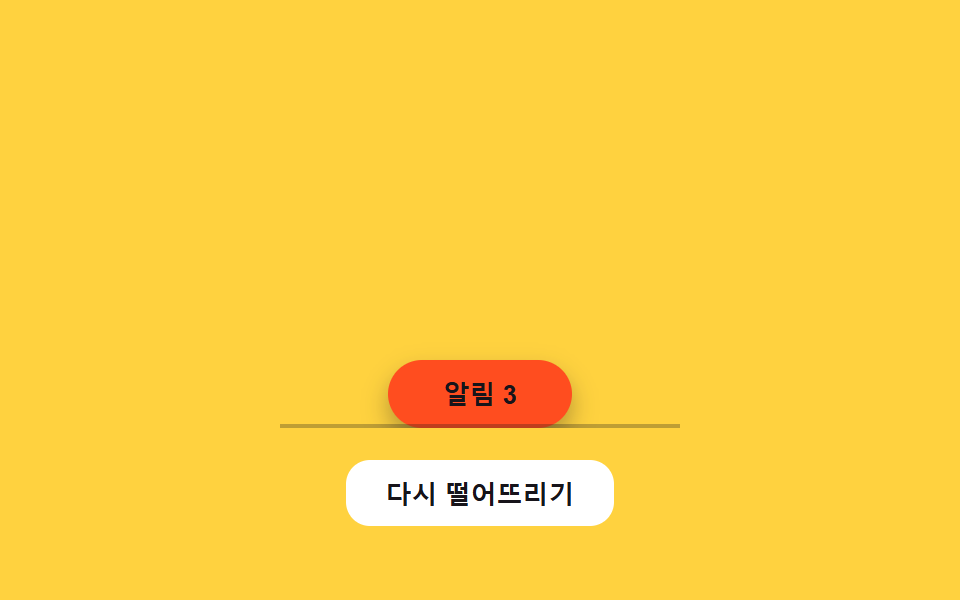
03Drop-and-settle rebound — the position value falls, bounces off a floor value repeatedly, and comes to rest
The position value falls downward, bounces off a floor value again and again, and each bounce's height value shrinks until it stops.
Best forA highlighted button that appears on screen entry, an action button carrying a notification badge
GRAVITYRESTITUTIONSTOP_VEL
<main class="stage">
<div class="bgd is-demo" id="bgd">
  <div class="bgd__field" id="bgdField">
    <button class="bgd__chip" id="bgdChip" type="button">Alerts 3</button>
    <span class="bgd__floor" aria-hidden="true"></span>
  </div>
  <button class="bgd__drop" id="bgdDrop" type="button">Drop again</button>
</div>
</main>
@use "../../../../site/static/demo-tokens" as *;
// 계산 겹(중력 낙하·반동 적분)은 JS 에 있다 — 여기는 정적 배치만.
@include stage($stage-yellow);
.stage { position: relative; }
.bgd {
display: flex;
flex-direction: column;
align-items: center;
gap: $sp-4;
}
.bgd__field {
position: relative;
width: 200px;
height: 176px;
overflow: hidden;
}
.bgd__chip {
position: absolute;
left: 50%;
top: 0;
margin-left: -46px;
width: 92px;
height: 34px;
border: 0;
border-radius: $r-pill;
background: $stage-orange;
color: $subject-ink;
font-size: 13px;
font-weight: 700;
cursor: pointer;
box-shadow: $shadow-press;
}
.bgd__floor {
position: absolute;
left: 0;
right: 0;
bottom: 0;
height: 2px;
background: rgba($subject-ink, .28);
}
.bgd__drop {
border: 0;
border-radius: $r-control;
padding: $sp-2 $sp-5;
background: $stage-paper;
color: $subject-ink;
font-size: 13px;
font-weight: 600;
cursor: pointer;
}
@media (max-width: 340px) {
.bgd__field { width: 150px; height: 108px; }
}
@media (prefers-reduced-motion: reduce) {
.bgd__chip { transition: none !important; }
}html, body {
margin: 0;
overflow: hidden;
}
.stage {
box-sizing: border-box;
min-height: 100vh;
display: grid;
place-items: center;
margin: 0;
background: #ffd23f;
font-family: -apple-system, "Segoe UI", "Noto Sans KR", sans-serif;
padding: clamp(8px, 4vw, 24px);
}
.stage {
position: relative;
}
.bgd {
display: flex;
flex-direction: column;
align-items: center;
gap: 16px;
}
.bgd__field {
position: relative;
width: 200px;
height: 176px;
overflow: hidden;
}
.bgd__chip {
position: absolute;
left: 50%;
top: 0;
margin-left: -46px;
width: 92px;
height: 34px;
border: 0;
border-radius: 999px;
background: #ff4d1f;
color: #17141a;
font-size: 13px;
font-weight: 700;
cursor: pointer;
box-shadow: 0 6px 12px rgba(23, 20, 26, 0.32);
}
.bgd__floor {
position: absolute;
left: 0;
right: 0;
bottom: 0;
height: 2px;
background: rgba(23, 20, 26, 0.28);
}
.bgd__drop {
border: 0;
border-radius: 12px;
padding: 8px 20px;
background: #ffffff;
color: #17141a;
font-size: 13px;
font-weight: 600;
cursor: pointer;
}
@media (max-width: 340px) {
.bgd__field {
width: 150px;
height: 108px;
}
}
@media (prefers-reduced-motion: reduce) {
.bgd__chip {
transition: none !important;
}
}(function () {
var root = document.getElementById('bgd');
var field = document.getElementById('bgdField');
var chip = document.getElementById('bgdChip');
var dropBtn = document.getElementById('bgdDrop');
var reduce = window.matchMedia('(prefers-reduced-motion: reduce)').matches;
// 계산 겹: vel += GRAVITY*dt, y += vel*dt 로 낙하시키다 바닥 값(FLOOR)에 닿으면
// vel 을 -RESTITUTION 배로 뒤집어 반동시킨다. |반동 속도| 가 STOP_VEL 아래로 줄면 정착.
var GRAVITY = 2200, RESTITUTION = 0.52, STOP_VEL = 40, CHIP_H = 34;
var y = 0, vel = 0, last = 0, raf = null, running = false;
function floorY() { return field.clientHeight - CHIP_H; }
function paint() { chip.style.transform = 'translateY(' + y.toFixed(1) + 'px)'; }
function tick(now) {
var dt = Math.min((now - last) / 1000, 0.032);
last = now;
vel += GRAVITY * dt;
y += vel * dt;
var floor = floorY();
if (y >= floor) {
y = floor;
vel = -vel * RESTITUTION;
if (Math.abs(vel) < STOP_VEL) { vel = 0; paint(); running = false; return; }
}
paint();
raf = requestAnimationFrame(tick);
}
function drop() {
if (reduce) { y = floorY(); vel = 0; paint(); return; }
y = 0; vel = 0; last = performance.now();
if (!running) { running = true; raf = requestAnimationFrame(tick); }
}
function wireReal() {
dropBtn.addEventListener('click', function () { root.classList.remove('is-demo'); stopAutoplay(); drop(); });
chip.addEventListener('click', function () { root.classList.remove('is-demo'); stopAutoplay(); drop(); });
}
wireReal();
y = floorY(); paint();
// 자동 루프: 같은 drop() 을 주기적으로 다시 불러 낙하-반동 경로를 반복 재현한다.
var autoTimer = null;
function stopAutoplay() { if (autoTimer) { clearInterval(autoTimer); autoTimer = null; } }
if (!reduce) { drop(); autoTimer = setInterval(drop, 1600); }
})();import { useEffect, useRef } from "react";
import styles from "./ButtonPhysicsGravityDropSettle.module.scss";
export type ButtonPhysicsGravityDropSettleProps = {
color?: string;
};
export default function ButtonPhysicsGravityDropSettle({
color = "#ff4d1f",
}: ButtonPhysicsGravityDropSettleProps) {
const rootRef = useRef<HTMLDivElement | null>(null);
useEffect(() => {
const root = rootRef.current;
if (!root) return;
const field = root.querySelector<HTMLDivElement>(`.${styles.field}`);
const chip = root.querySelector<HTMLButtonElement>(`.${styles.chip}`);
const dropBtn = root.querySelector<HTMLButtonElement>(`.${styles.drop}`);
if (!field || !chip || !dropBtn) return;
const reduce = window.matchMedia("(prefers-reduced-motion: reduce)").matches;
// 계산 겹: vel += GRAVITY*dt, y += vel*dt 로 낙하시키다 바닥 값(FLOOR)에 닿으면
// vel 을 -RESTITUTION 배로 뒤집어 반동시킨다. |반동 속도| 가 STOP_VEL 아래로 줄면 정착.
const GRAVITY = 2200, RESTITUTION = 0.52, STOP_VEL = 40, CHIP_H = 34;
let y = 0, vel = 0, last = 0, raf: number | null = null, running = false;
function floorY() { return field!.clientHeight - CHIP_H; }
function paint() { chip!.style.transform = "translateY(" + y.toFixed(1) + "px)"; }
function tick(now: number) {
const dt = Math.min((now - last) / 1000, 0.032);
last = now;
vel += GRAVITY * dt;
y += vel * dt;
const floor = floorY();
if (y >= floor) {
y = floor;
vel = -vel * RESTITUTION;
if (Math.abs(vel) < STOP_VEL) { vel = 0; paint(); running = false; return; }
}
paint();
raf = requestAnimationFrame(tick);
}
function drop() {
if (reduce) { y = floorY(); vel = 0; paint(); return; }
y = 0; vel = 0; last = performance.now();
if (!running) { running = true; raf = requestAnimationFrame(tick); }
}
function onDropClick() { stopAutoplay(); drop(); }
function onChipClick() { stopAutoplay(); drop(); }
dropBtn.addEventListener("click", onDropClick);
chip.addEventListener("click", onChipClick);
y = floorY(); paint();
let autoTimer: number | null = null;
function stopAutoplay() { if (autoTimer !== null) { window.clearInterval(autoTimer); autoTimer = null; } }
if (!reduce) { drop(); autoTimer = window.setInterval(drop, 1600); }
return () => {
stopAutoplay();
if (raf !== null) cancelAnimationFrame(raf);
dropBtn.removeEventListener("click", onDropClick);
chip.removeEventListener("click", onChipClick);
};
}, []);
return (
<div ref={rootRef} className={styles.stage}>
<div className={styles.bgd}>
<div className={styles.field}>
<button className={styles.chip} type="button" style={{ background: color }}>알림 3</button>
<span className={styles.floor} aria-hidden="true" />
</div>
<button className={styles.drop} type="button">다시 떨어뜨리기</button>
</div>
</div>
);
}03 Drop-and-settle rebound — the position value falls, bounces off a floor value repeatedly, and comes to rest — Measured area 11.576% · moving frames 17/23Original by GODRICH · SCSS and React ship in the zip · Button Press Animation UI: 9 Calculation Patterns
The post this demo lives in
 Button Press Animation UI: 9 Calculation PatternsOne value overshoots its target and swings back before settling, one falls and bounces off a floor value before resting, See all demos in this post
If you like this effect - similar demos
 Buttons01 Accordion-reveal value toggle — when the button's open value changes, its rounding and shadow values change along, presenting the content belowExpanding Button UI: 9 Shape-Morph Patterns
 Buttons02 Active-indicator slide — when the active-button value changes, the highlight background's position value glides to the new button along measured coordinatesButton Group CSS: 9 Adjoined Patterns
 Buttons03 Ember-trail Button Scattered by a Drag-speed ValueButton Click Effect CSS: 9 Canvas Pixel Patterns