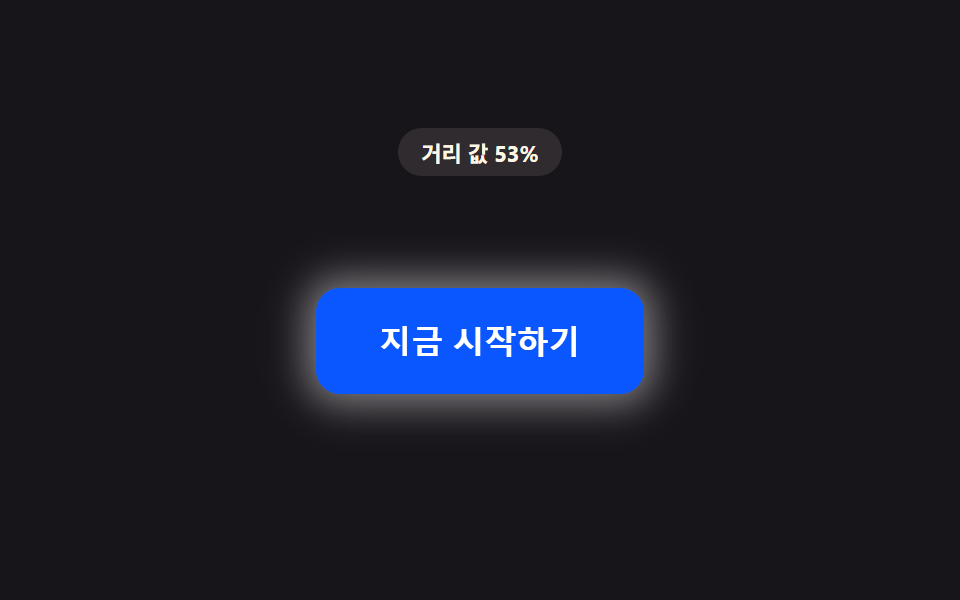
09Button Around Which Particles Gather by the Distance Value
As the distance value shrinks, both the count value and density value of small particles floating around the button increase together.
Best forPremium CTA button emphasis
PROX_PARTICLE_MAX_COUNTdrawglobalAlpha

<main class="stage">
<div class="pd is-demo" id="pd">
  <p class="pd__badge" id="pdBadge">Particle value 0/6</p>
  <div class="pd__scene" id="pdScene">
    <div class="pd__wrap" id="pdWrap">
      <canvas class="pd__canvas" id="pdCanvas" width="280" height="150" aria-hidden="true"></canvas>
      <button class="pd__btn" id="pdBtn" type="button">Sign up</button>
    </div>
  </div>
</div>
</main>
@use "../../../../site/static/demo-tokens" as *;
// 핵심: 거리 값이 줄어드는 동안 캔버스에 그리는 입자 개수 값(count)과 궤도 반경(density) 값이
// 함께 바뀐다. 입자마다 고정된 노이즈 오프셋(각도·주기 지터)을 심어 기계적으로 안 보이게 한다.
$duration: $dur-loop;
$easing: linear;
$color: $subject-blue-deep;
@include stage($stage-ink);
.pd {
display: grid;
gap: $sp-2;
justify-items: center;
}
.pd__badge {
margin: 0;
padding: $sp-1 $sp-3;
border-radius: $r-pill;
background: rgba(255, 247, 230, .1);
color: $subject-cream;
font-weight: 700;
font-size: 11px;
font-variant-numeric: tabular-nums;
}
.pd__scene {
padding: $sp-3;
}
.pd__wrap {
position: relative;
width: 340px;
height: 182px;
display: grid;
place-items: center;
--sw-p: 0;
}
.pd__wrap::before {
content: '';
position: absolute;
inset: -8px;
border-radius: $r-control;
background: radial-gradient(circle, rgba($subject-blue-deep, .5), transparent 60%);
transform: scale(calc(0.65 + var(--sw-p) * 0.35));
opacity: calc(var(--sw-p) * 0.4);
pointer-events: none;
z-index: 0;
}
.pd__canvas {
position: absolute;
inset: 0;
width: 100%;
height: 100%;
pointer-events: none;
}
.pd__btn {
position: relative;
border: 0;
cursor: pointer;
padding: $sp-4 $sp-8;
border-radius: $r-control;
background: $color;
color: $subject-cream;
font-size: 16px;
font-weight: 700;
}
.pd__btn:focus-visible {
outline: 2px solid $subject-cream;
outline-offset: 3px;
}
@media (max-width: 340px) {
.pd__scene { padding: $sp-2; }
.pd__wrap { width: 100%; height: 112px; }
.pd__btn { padding: $sp-3 $sp-6; font-size: 14px; }
}
@media (prefers-reduced-motion: reduce) {
.pd__btn { transition: none; }
}html, body {
margin: 0;
overflow: hidden;
}
.stage {
box-sizing: border-box;
min-height: 100vh;
display: grid;
place-items: center;
margin: 0;
background: #17141a;
font-family: -apple-system, "Segoe UI", "Noto Sans KR", sans-serif;
padding: clamp(8px, 4vw, 24px);
}
.pd {
display: grid;
gap: 8px;
justify-items: center;
}
.pd__badge {
margin: 0;
padding: 4px 12px;
border-radius: 999px;
background: rgba(255, 247, 230, 0.1);
color: #fff7e6;
font-weight: 700;
font-size: 11px;
font-variant-numeric: tabular-nums;
}
.pd__scene {
padding: 12px;
}
.pd__wrap {
position: relative;
width: 340px;
height: 182px;
display: grid;
place-items: center;
--sw-p: 0;
}
.pd__wrap::before {
content: "";
position: absolute;
inset: -8px;
border-radius: 12px;
background: radial-gradient(circle, rgba(10, 79, 232, 0.5), transparent 60%);
transform: scale(calc(0.65 + var(--sw-p) * 0.35));
opacity: calc(var(--sw-p) * 0.4);
pointer-events: none;
z-index: 0;
}
.pd__canvas {
position: absolute;
inset: 0;
width: 100%;
height: 100%;
pointer-events: none;
}
.pd__btn {
position: relative;
border: 0;
cursor: pointer;
padding: 16px 32px;
border-radius: 12px;
background: #0a4fe8;
color: #fff7e6;
font-size: 16px;
font-weight: 700;
}
.pd__btn:focus-visible {
outline: 2px solid #fff7e6;
outline-offset: 3px;
}
@media (max-width: 340px) {
.pd__scene {
padding: 8px;
}
.pd__wrap {
width: 100%;
height: 112px;
}
.pd__btn {
padding: 12px 24px;
font-size: 14px;
}
}
@media (prefers-reduced-motion: reduce) {
.pd__btn {
transition: none;
}
}(function () {
// PROX_PARTICLE_MAX_COUNT — 변형 3: 6 → 14 로 늘리면 입자가 촘촘히 모여 붐비듯 화려해진다.
var PROX_PARTICLE_MAX_COUNT = 6;
var PROX_RADIUS_PX = 170;
var LERP = 0.16;
var RADIUS_FAR_PX = 92;
var RADIUS_NEAR_PX = 46;
var root = document.getElementById('pd');
var scene = document.getElementById('pdScene');
var wrap = document.getElementById('pdWrap');
var btn = document.getElementById('pdBtn');
var canvas = document.getElementById('pdCanvas');
var badge = document.getElementById('pdBadge');
var ctx = canvas.getContext('2d');
var reduce = window.matchMedia('(prefers-reduced-motion: reduce)').matches;
function clamp(v, lo, hi) { return Math.max(lo, Math.min(hi, v)); }
// 캔버스 표시 크기 = 스테이지가 실제로 내준 크기(getBoundingClientRect) — 고정 px 캡을 두지 않는다.
var radiusScale = 1;
function resizeCanvas() {
var r = wrap.getBoundingClientRect();
var w = Math.max(1, Math.round(r.width));
var h = Math.max(1, Math.round(r.height));
if (canvas.width !== w) { canvas.width = w; }
if (canvas.height !== h) { canvas.height = h; }
radiusScale = Math.min(w / 280, h / 150);
}
resizeCanvas();
window.addEventListener('resize', resizeCanvas);
// 입자마다 글자별 노이즈 오프셋과 같은 계열 — 각도·주기에 고정 지터를 심어 기계적으로 안 보이게 한다
var particles = [];
for (var i = 0; i < PROX_PARTICLE_MAX_COUNT; i += 1) {
particles.push({
baseAngle: (i / PROX_PARTICLE_MAX_COUNT) * Math.PI * 2,
noise: ((i * 137) % 23) / 23 - 0.5,
phase: (i * 71) % 100 / 100 * Math.PI * 2,
size: 2.4 + ((i * 53) % 7) / 7 * 1.6
});
}
var targetP = 0;
var curP = 0;
var hasPointer = false;
var TRAIL_STEPS = 7;
var trailHistory = [];
function distanceToButton(x, y) {
var r = btn.getBoundingClientRect();
var cx = r.left + r.width / 2;
var cy = r.top + r.height / 2;
return Math.hypot(x - cx, y - cy);
}
function draw(p, t) {
var w = canvas.width, h = canvas.height;
ctx.clearRect(0, 0, w, h);
var cx = w / 2, cy = h / 2;
var count = p * PROX_PARTICLE_MAX_COUNT;
var radius = (RADIUS_FAR_PX + (RADIUS_NEAR_PX - RADIUS_FAR_PX) * p) * radiusScale;
var positions = [];
particles.forEach(function (pt, i) {
var visible = clamp(count - i, 0, 1);
if (visible <= 0) { return; }
var ang = pt.baseAngle + t * 0.5 + pt.noise * Math.sin(t * 1.3 + pt.phase) * 0.6;
var rad = radius + pt.noise * 10 * radiusScale * Math.sin(t * 0.9 + pt.phase);
var x = cx + Math.cos(ang) * rad;
var y = cy + Math.sin(ang) * rad * 0.72;
positions.push({ x: x, y: y, size: pt.size * radiusScale * 1.3, alpha: (0.4 + p * 0.6) * visible });
});
// 계산 레이어: 최근 몇 프레임의 입자 위치를 옅은 잔상으로 같이 그려 궤적이 남게 한다(전체 캔버스를 덮지 않는다).
trailHistory.push(positions);
if (trailHistory.length > TRAIL_STEPS) { trailHistory.shift(); }
trailHistory.forEach(function (frame, hi) {
var age = trailHistory.length - hi;
var fade = 1 - age / (TRAIL_STEPS + 1);
frame.forEach(function (pos) {
ctx.globalAlpha = pos.alpha * fade;
ctx.beginPath();
ctx.arc(pos.x, pos.y, pos.size * (0.8 + fade * 0.9), 0, Math.PI * 2);
ctx.fillStyle = '#0a4fe8';
ctx.fill();
});
});
positions.forEach(function (pos) {
ctx.globalAlpha = pos.alpha;
ctx.beginPath();
ctx.arc(pos.x, pos.y, pos.size, 0, Math.PI * 2);
ctx.fillStyle = '#fff7e6';
ctx.fill();
});
ctx.globalAlpha = 1;
// 계산 레이어: 같은 진행률(p)을 입자 뒤 글로우 크기·불투명도에도 전파한다 — 배경과 겹치지 않는 색.
wrap.style.setProperty('--sw-p', p.toFixed(3));
badge.textContent = 'Particle value ' + Math.round(count) + '/' + PROX_PARTICLE_MAX_COUNT;
}
function syntheticOffset(t) {
var ang = t * 1.5;
var rad = 110 * (1 + Math.cos(t * Math.PI));
return [Math.cos(ang) * rad, Math.sin(ang) * rad];
}
var startTime = null;
function loop(now) {
if (startTime === null) { startTime = now; }
var t = (now - startTime) / 1000;
if (!hasPointer && !reduce) {
var off = syntheticOffset(t);
var d = Math.hypot(off[0], off[1]);
targetP = clamp(1 - d / PROX_RADIUS_PX, 0, 1);
}
curP += (targetP - curP) * LERP;
draw(curP, t);
requestAnimationFrame(loop);
}
scene.addEventListener('pointermove', function (e) {
hasPointer = true;
root.classList.remove('is-demo');
var d = distanceToButton(e.clientX, e.clientY);
targetP = clamp(1 - d / PROX_RADIUS_PX, 0, 1);
if (reduce) { curP = targetP; draw(curP, 0); }
});
scene.addEventListener('pointerleave', function () {
hasPointer = false;
targetP = 0;
if (reduce) { curP = 0; draw(0, 0); }
});
btn.addEventListener('focus', function () {
hasPointer = true;
targetP = 1;
if (reduce) { curP = 1; draw(1, 0); }
});
btn.addEventListener('blur', function () {
hasPointer = false;
targetP = 0;
if (reduce) { curP = 0; draw(0, 0); }
});
if (reduce) {
draw(0, 0);
} else {
requestAnimationFrame(loop);
}
})();// ProximityParticleSwarmButton — vanilla 판(run/408/demo/09-btn-proximity-particle-density-swarm/index.html) 의 React 포트.
// 거리 값이 줄어드는 동안 캔버스에 그리는 입자 개수 값(count)과 궤도 반경(radius) 값이 함께
// 바뀐다. 입자마다 고정된 노이즈 오프셋(각도·주기 지터)을 심어 기계적으로 안 보이게 한다.
import { useEffect, useRef, useState } from "react";
import type { PointerEvent as ReactPointerEvent } from "react";
import styles from "./ProximityParticleSwarmButton.module.scss";
type Box<T> = { current: T };
type Particle = {
baseAngle: number;
noise: number;
phase: number;
size: number;
};
type TrailPoint = {
x: number;
y: number;
size: number;
alpha: number;
};
// PROX_PARTICLE_MAX_COUNT — 변형 3: 6 → 14 로 늘리면 입자가 촘촘히 모여 붐비듯 화려해진다.
const PROX_PARTICLE_MAX_COUNT = 6;
const PROX_RADIUS_PX = 170;
const LERP = 0.16;
const RADIUS_FAR_PX = 92;
const RADIUS_NEAR_PX = 46;
const TRAIL_STEPS = 7;
function clamp(v: number, lo: number, hi: number): number {
return Math.max(lo, Math.min(hi, v));
}
function makeParticles(): Particle[] {
const list: Particle[] = [];
for (let i = 0; i < PROX_PARTICLE_MAX_COUNT; i += 1) {
list.push({
baseAngle: (i / PROX_PARTICLE_MAX_COUNT) * Math.PI * 2,
noise: ((i * 137) % 23) / 23 - 0.5,
phase: ((i * 71) % 100) / 100 * Math.PI * 2,
size: 2.4 + ((i * 53) % 7) / 7 * 1.6,
});
}
return list;
}
function syntheticOffset(t: number): [number, number] {
const ang = t * 1.5;
const rad = 110 * (1 + Math.cos(t * Math.PI));
return [Math.cos(ang) * rad, Math.sin(ang) * rad];
}
export default function ProximityParticleSwarmButton() {
const sceneRef = useRef<HTMLDivElement | null>(null);
const wrapRef = useRef<HTMLDivElement | null>(null);
const btnRef = useRef<HTMLButtonElement | null>(null);
const canvasRef = useRef<HTMLCanvasElement | null>(null);
const badgeRef = useRef<HTMLParagraphElement | null>(null);
const particlesRef = useRef<Particle[]>(makeParticles()) as Box<Particle[]>;
const targetPRef = useRef<number>(0) as Box<number>;
const curPRef = useRef<number>(0) as Box<number>;
const hasPointerRef = useRef<boolean>(false) as Box<boolean>;
const frameRef = useRef<number>(0) as Box<number>;
const t0Ref = useRef<number>(0) as Box<number>;
const radiusScaleRef = useRef<number>(1) as Box<number>;
const trailHistoryRef = useRef<TrailPoint[][]>([]) as Box<TrailPoint[][]>;
const [demo, setDemo] = useState(true);
const [reduce, setReduce] = useState(false);
function resizeCanvas(): void {
const wrap = wrapRef.current;
const canvas = canvasRef.current;
if (!wrap || !canvas) return;
const r = wrap.getBoundingClientRect();
const w = Math.max(1, Math.round(r.width));
const h = Math.max(1, Math.round(r.height));
if (canvas.width !== w) canvas.width = w;
if (canvas.height !== h) canvas.height = h;
radiusScaleRef.current = Math.min(w / 280, h / 150);
}
function draw(p: number, t: number): void {
const canvas = canvasRef.current;
const badge = badgeRef.current;
const wrap = wrapRef.current;
if (!canvas || !badge || !wrap) return;
const ctx = canvas.getContext("2d");
if (!ctx) return;
const w = canvas.width;
const h = canvas.height;
ctx.clearRect(0, 0, w, h);
const cx = w / 2;
const cy = h / 2;
const radiusScale = radiusScaleRef.current;
const count = p * PROX_PARTICLE_MAX_COUNT;
const radius = (RADIUS_FAR_PX + (RADIUS_NEAR_PX - RADIUS_FAR_PX) * p) * radiusScale;
const positions: TrailPoint[] = [];
particlesRef.current.forEach((pt, i) => {
const visible = clamp(count - i, 0, 1);
if (visible <= 0) return;
const ang = pt.baseAngle + t * 0.5 + pt.noise * Math.sin(t * 1.3 + pt.phase) * 0.6;
const rad = radius + pt.noise * 10 * radiusScale * Math.sin(t * 0.9 + pt.phase);
const x = cx + Math.cos(ang) * rad;
const y = cy + Math.sin(ang) * rad * 0.72;
positions.push({ x, y, size: pt.size * radiusScale, alpha: (0.4 + p * 0.6) * visible });
});
// 계산 레이어: 최근 몇 프레임의 입자 위치를 옅은 잔상으로 같이 그려 궤적이 남게 한다(전체 캔버스를 덮지 않는다).
const trailHistory = trailHistoryRef.current;
trailHistory.push(positions);
if (trailHistory.length > TRAIL_STEPS) trailHistory.shift();
trailHistory.forEach((frame, hi) => {
const age = trailHistory.length - hi;
const fade = 1 - age / (TRAIL_STEPS + 1);
frame.forEach((pos) => {
ctx.globalAlpha = pos.alpha * fade;
ctx.beginPath();
ctx.arc(pos.x, pos.y, pos.size * (0.8 + fade * 0.9), 0, Math.PI * 2);
ctx.fillStyle = "#0a4fe8";
ctx.fill();
});
});
positions.forEach((pos) => {
ctx.globalAlpha = pos.alpha;
ctx.beginPath();
ctx.arc(pos.x, pos.y, pos.size, 0, Math.PI * 2);
ctx.fillStyle = "#fff7e6";
ctx.fill();
});
ctx.globalAlpha = 1;
// 계산 레이어: 같은 진행률(p)을 입자 뒤 글로우 크기·불투명도에도 전파한다 — 배경과 겹치지 않는 색.
wrap.style.setProperty("--sw-p", p.toFixed(3));
badge.textContent = "입자 값 " + Math.round(count) + "/" + PROX_PARTICLE_MAX_COUNT;
}
function distanceToButton(x: number, y: number): number {
const btn = btnRef.current;
if (!btn) return PROX_RADIUS_PX;
const r = btn.getBoundingClientRect();
const cx = r.left + r.width / 2;
const cy = r.top + r.height / 2;
return Math.hypot(x - cx, y - cy);
}
useEffect(() => {
setReduce(window.matchMedia("(prefers-reduced-motion: reduce)").matches);
}, []);
useEffect(() => {
resizeCanvas();
window.addEventListener("resize", resizeCanvas);
return () => window.removeEventListener("resize", resizeCanvas);
}, []);
useEffect(() => {
if (reduce) {
draw(0, 0);
return;
}
function loop(now: number): void {
if (t0Ref.current === 0) t0Ref.current = now;
const t = (now - t0Ref.current) / 1000;
if (!hasPointerRef.current) {
const off = syntheticOffset(t);
const d = Math.hypot(off[0], off[1]);
targetPRef.current = clamp(1 - d / PROX_RADIUS_PX, 0, 1);
}
curPRef.current += (targetPRef.current - curPRef.current) * LERP;
draw(curPRef.current, t);
frameRef.current = requestAnimationFrame(loop);
}
frameRef.current = requestAnimationFrame(loop);
return () => cancelAnimationFrame(frameRef.current);
}, [reduce]);
function onPointerMove(event: ReactPointerEvent<HTMLDivElement>): void {
hasPointerRef.current = true;
setDemo(false);
const d = distanceToButton(event.clientX, event.clientY);
targetPRef.current = clamp(1 - d / PROX_RADIUS_PX, 0, 1);
if (reduce) { curPRef.current = targetPRef.current; draw(curPRef.current, 0); }
}
function onPointerLeave(): void {
hasPointerRef.current = false;
targetPRef.current = 0;
if (reduce) { curPRef.current = 0; draw(0, 0); }
}
function onFocus(): void {
hasPointerRef.current = true;
targetPRef.current = 1;
if (reduce) { curPRef.current = 1; draw(1, 0); }
}
function onBlur(): void {
hasPointerRef.current = false;
targetPRef.current = 0;
if (reduce) { curPRef.current = 0; draw(0, 0); }
}
const cls = [styles.pd, demo ? styles.isDemo : ""].filter(Boolean).join(" ");
return (
<main className={styles.stage}>
<div className={cls}>
<p className={styles.badge} ref={badgeRef}>입자 값 0/6</p>
<div className={styles.scene} ref={sceneRef} onPointerMove={onPointerMove} onPointerLeave={onPointerLeave}>
<div className={styles.wrap} ref={wrapRef}>
<canvas className={styles.canvas} ref={canvasRef} width={280} height={150} aria-hidden="true" />
<button className={styles.btn} ref={btnRef} type="button" onFocus={onFocus} onBlur={onBlur}>가입하기</button>
</div>
</div>
</div>
</main>
);
}09 Button Around Which Particles Gather by the Distance Value — Measured area 11.006% · moving frames 20/23Original by GODRICH · SCSS and React ship in the zip · CSS Button Hover Effects — 9 Proximity Patterns
The post this demo lives in
 CSS Button Hover Effects — 9 Proximity PatternsThese are css button hover effects. If the cursor is still a hand-width away, the distance value stays large. As it shri See all demos in this post
If you like this effect - similar demos
 Buttons04 Pull-distance stretch — the button's shape value stretches by an amount tied to how far the pointer's distance value has moved away, then returns when releasedButton Press Animation UI: 9 Calculation Patterns
 Buttons01 Accordion-reveal value toggle — when the button's open value changes, its rounding and shadow values change along, presenting the content belowExpanding Button UI: 9 Shape-Morph Patterns
 Buttons02 Active-indicator slide — when the active-button value changes, the highlight background's position value glides to the new button along measured coordinatesButton Group CSS: 9 Adjoined Patterns