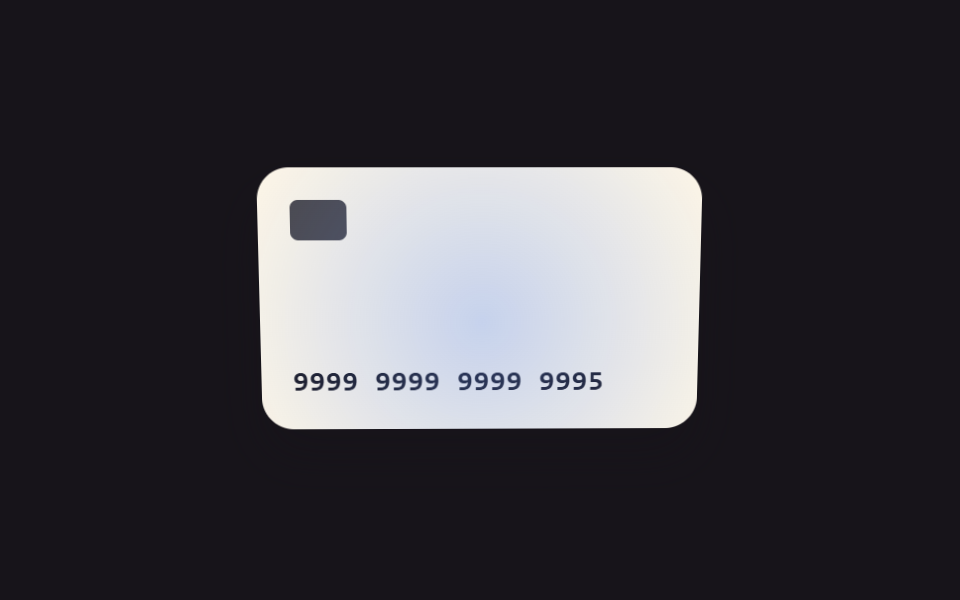
09Focus and tilt values linked — as the field's focus-position value moves, the card visual's tilt value follows along
As the pointer's position value changes, the card visual's tilt value smoothly follows that value.
Best forA dimensional card visual in a card-registration screen, interactive decoration in a checkout form
MAX_DEGLERPsetTargetFromPoint
<main class="stage">
<div class="ct is-demo" id="ct">
  <div class="ct__pad" id="ctPad">
    <div class="ct__card" id="ctCard">
      <span class="ct__chip"></span>
      <span class="ct__num">9999 9999 9999 9995</span>
      <span class="ct__sheen" id="ctSheen"></span>
    </div>
  </div>
</div>
</main>
@use "../../../../site/static/demo-tokens" as *;
// 계산 겹: 포인터 좌표 값 → 목표 기울기 값을 매 프레임 LERP 비율만큼만 따라가는 관성 보간(index.html).
@include stage($stage-ink);
.ct {
width: 100%;
max-width: 300px;
}
.ct__pad {
width: 100%;
height: 168px;
display: grid;
place-items: center;
touch-action: none;
}
.ct__card {
position: relative;
width: 220px;
height: 132px;
border-radius: $r-card;
background: $subject-cream;
box-shadow: $shadow-raised;
display: grid;
align-content: space-between;
padding: $sp-4;
box-sizing: border-box;
overflow: hidden;
will-change: transform;
}
.ct__chip {
width: 28px;
height: 20px;
border-radius: $r-xs;
background: rgba($subject-ink, .78);
}
.ct__num {
font-family: "SFMono-Regular", Consolas, monospace;
font-weight: 600;
font-size: 14px;
letter-spacing: .04em;
color: $subject-ink;
}
.ct__sheen {
position: absolute;
inset: -40%;
background: radial-gradient(circle, rgba($subject-blue-light, .35), transparent 60%);
pointer-events: none;
}
@media (max-width: 340px) {
.ct__card { width: 190px; height: 114px; }
.ct__pad { height: 148px; }
}
@media (prefers-reduced-motion: reduce) {
.ct__card, .ct__sheen { transition: none; }
}html, body {
margin: 0;
overflow: hidden;
}
.stage {
box-sizing: border-box;
min-height: 100vh;
display: grid;
place-items: center;
margin: 0;
background: #17141a;
font-family: -apple-system, "Segoe UI", "Noto Sans KR", sans-serif;
padding: clamp(8px, 4vw, 24px);
}
.ct {
width: 100%;
max-width: 300px;
}
.ct__pad {
width: 100%;
height: 168px;
display: grid;
place-items: center;
touch-action: none;
}
.ct__card {
position: relative;
width: 220px;
height: 132px;
border-radius: 16px;
background: #fff7e6;
box-shadow: 0 14px 24px rgba(23, 20, 26, 0.32);
display: grid;
align-content: space-between;
padding: 16px;
box-sizing: border-box;
overflow: hidden;
will-change: transform;
}
.ct__chip {
width: 28px;
height: 20px;
border-radius: 4px;
background: rgba(23, 20, 26, 0.78);
}
.ct__num {
font-family: "SFMono-Regular", Consolas, monospace;
font-weight: 600;
font-size: 14px;
letter-spacing: 0.04em;
color: #17141a;
}
.ct__sheen {
position: absolute;
inset: -40%;
background: radial-gradient(circle, rgba(91, 140, 248, 0.35), transparent 60%);
pointer-events: none;
}
@media (max-width: 340px) {
.ct__card {
width: 190px;
height: 114px;
}
.ct__pad {
height: 148px;
}
}
@media (prefers-reduced-motion: reduce) {
.ct__card, .ct__sheen {
transition: none;
}
}(function () {
var root = document.getElementById('ct');
var pad = document.getElementById('ctPad');
var card = document.getElementById('ctCard');
var sheen = document.getElementById('ctSheen');
var MAX_DEG = 14;
var LERP = 0.14; // 계산 겹: 목표 기울기 값으로 매 프레임 이 비율만큼만 다가가는 관성 보간
var targetX = 0, targetY = 0, curX = 0, curY = 0;
var raf = null;
function apply() {
curX += (targetX - curX) * LERP;
curY += (targetY - curY) * LERP;
card.style.transform = 'perspective(600px) rotateX(' + curX.toFixed(2) + 'deg) rotateY(' + curY.toFixed(2) + 'deg)';
sheen.style.transform = 'translate(' + (curY * 1.4).toFixed(1) + 'px,' + (curX * -1.4).toFixed(1) + 'px)';
raf = requestAnimationFrame(apply);
}
raf = requestAnimationFrame(apply);
function setTargetFromPoint(px, py) {
var r = pad.getBoundingClientRect();
var nx = (px - r.left) / r.width - 0.5;
var ny = (py - r.top) / r.height - 0.5;
targetY = nx * MAX_DEG * 2;
targetX = -ny * MAX_DEG * 2;
}
pad.addEventListener('pointermove', function (e) {
root.classList.remove('is-demo');
stopAutoplay();
setTargetFromPoint(e.clientX, e.clientY);
});
pad.addEventListener('pointerleave', function () {
if (autoTimer === null) { targetX = 0; targetY = 0; }
});
// 자동 루프: 포인터 좌표 값이 원을 그리며 도는 것을 흉내낸다.
var t = 0;
var autoTimer = null;
function autoTick() {
var r = pad.getBoundingClientRect();
t += 0.12;
var cx = r.left + r.width / 2 + Math.cos(t) * r.width * 0.32;
var cy = r.top + r.height / 2 + Math.sin(t * 1.3) * r.height * 0.32;
setTargetFromPoint(cx, cy);
}
function stopAutoplay() { if (autoTimer) { clearInterval(autoTimer); autoTimer = null; } }
var reduce = window.matchMedia('(prefers-reduced-motion: reduce)').matches;
if (!reduce) { autoTimer = setInterval(autoTick, 60); }
})();import { useEffect, useRef } from "react";
import styles from "./FocusTilt3d.module.scss";
type Box<T> = { current: T };
const MAX_DEG = 14;
const LERP = 0.14; // 계산 겹: 목표 기울기 값으로 매 프레임 이 비율만큼만 다가가는 관성 보간
export default function FocusTilt3d() {
const rootRef = useRef(null) as unknown as Box<HTMLDivElement | null>;
useEffect(() => {
const root = rootRef.current;
if (!root) return;
const pad = root.querySelector(`.${styles.pad}`) as HTMLElement | null;
const card = root.querySelector(`.${styles.card}`) as HTMLElement | null;
const sheen = root.querySelector(`.${styles.sheen}`) as HTMLElement | null;
if (!pad || !card || !sheen) return;
let targetX = 0, targetY = 0, curX = 0, curY = 0;
let raf: number | null = null;
function apply() {
curX += (targetX - curX) * LERP;
curY += (targetY - curY) * LERP;
card!.style.transform = "perspective(600px) rotateX(" + curX.toFixed(2) + "deg) rotateY(" + curY.toFixed(2) + "deg)";
sheen!.style.transform = "translate(" + (curY * 1.4).toFixed(1) + "px," + (curX * -1.4).toFixed(1) + "px)";
raf = requestAnimationFrame(apply);
}
raf = requestAnimationFrame(apply);
function setTargetFromPoint(px: number, py: number) {
const r = pad!.getBoundingClientRect();
const nx = (px - r.left) / r.width - 0.5;
const ny = (py - r.top) / r.height - 0.5;
targetY = nx * MAX_DEG * 2;
targetX = -ny * MAX_DEG * 2;
}
function onPointerMove(e: PointerEvent) {
root!.classList.remove(styles["is-demo"]);
stopAutoplay();
setTargetFromPoint(e.clientX, e.clientY);
}
function onPointerLeave() {
if (autoTimer === null) { targetX = 0; targetY = 0; }
}
pad.addEventListener("pointermove", onPointerMove);
pad.addEventListener("pointerleave", onPointerLeave);
// 자동 루프: 포인터 좌표 값이 원을 그리며 도는 것을 흉내낸다.
let t = 0;
let autoTimer: number | null = null;
function autoTick() {
const r = pad!.getBoundingClientRect();
t += 0.12;
const cx = r.left + r.width / 2 + Math.cos(t) * r.width * 0.32;
const cy = r.top + r.height / 2 + Math.sin(t * 1.3) * r.height * 0.32;
setTargetFromPoint(cx, cy);
}
function stopAutoplay() {
if (autoTimer !== null) { window.clearInterval(autoTimer); autoTimer = null; }
}
const reduce = window.matchMedia("(prefers-reduced-motion: reduce)").matches;
if (!reduce) { autoTimer = window.setInterval(autoTick, 60); }
return () => {
stopAutoplay();
if (raf !== null) cancelAnimationFrame(raf);
pad.removeEventListener("pointermove", onPointerMove);
pad.removeEventListener("pointerleave", onPointerLeave);
};
}, []);
return (
<div ref={rootRef} className={`${styles.stage} ${styles.ct} ${styles["is-demo"]}`}>
<div className={styles.pad}>
<div className={styles.card}>
<span className={styles.chip} />
<span className={styles.num}>9999 9999 9999 9995</span>
<span className={styles.sheen} />
</div>
</div>
</div>
);
}09 Focus and tilt values linked — as the field's focus-position value moves, the card visual's tilt value follows along — Measured area 3.647% · moving frames 23/23Original by GODRICH · SCSS and React ship in the zip · Credit Card Input UI: 9 Patterns
The post this demo lives in
 Credit Card Input UI: 9 PatternsCredit card input UI: One of nine spaces digits into groups of four, one recalculates a validity value live as digits fi See all demos in this post
If you like this effect - similar demos
 Inputs04 Wheel delta — a stepper whose value changes by the amount and direction the wheel moves over itNumber Stepper UI: 9 Interaction Patterns
 Inputs02 Character-class count fill — the strength value is set by how many distinct character-type values are mixed into the inputPassword Strength Meter UI: 9 Calculation Patterns
 Inputs06 Keyboard Nav Where an Arrow-Key Value Moves Focus Across the GridEmoji Picker: 9 Patterns by One Value