03An Hourglass That Counts Time With Grains Squeezing Through the Neck and Piling Up
On a cell grid, grains fall and, when blocked, slide diagonally so the pile settles at its angle of repose. The neck width comes from the flow that the grain count and total time demand, and the allowance through the neck grows with elapsed time.
Best forFocus timers and board-game turn limits
GRAIN_COUNTNECK_WDROP_RATETOTAL_MS
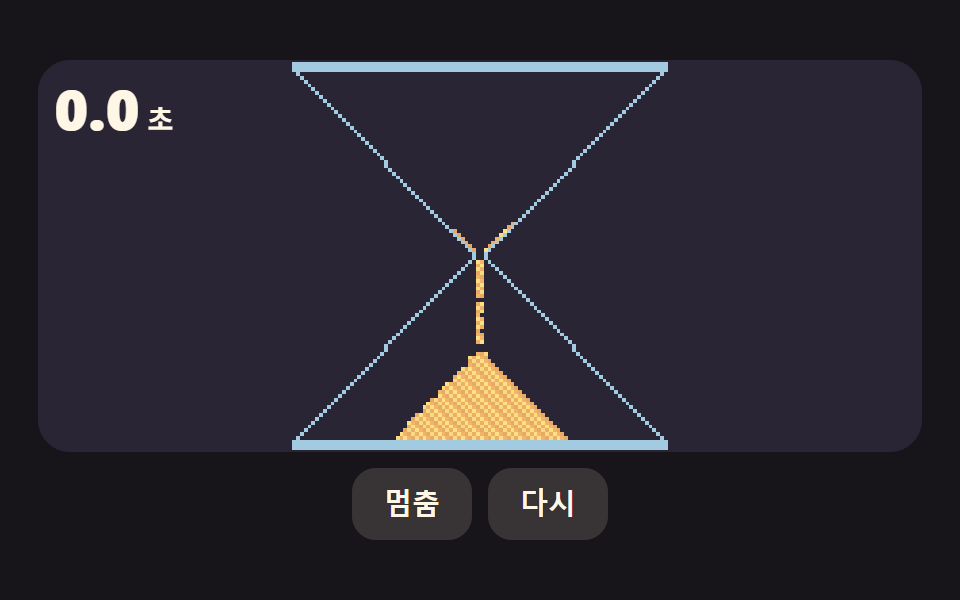
<main class="stage">
  <div class="cd is-demo" id="cd" data-demo="1">
    <div class="cd__view cd__view--scene">
      <canvas class="cd__cv" data-r="cv" role="img" aria-label="An hourglass with grains falling through the neck"></canvas>
      <p class="cd__read cd__read--corner" role="timer"><b data-r="num">1.5</b><span>s</span></p>
    </div>
    <div class="cd__bar">
      <button class="cd__btn" type="button" data-r="toggle">Pause</button>
      <button class="cd__btn" type="button" data-r="reset">Reset</button>
    </div>
    <p class="cd__sr" aria-live="polite" data-r="status"></p>
  </div>
</main>
@use "../../../../site/static/demo-tokens" as *;
// 핵심: 남은 시간 하나(경과는 rAF 타임스탬프 누적)에서 모양을 계산해 그린다. CSS 는 모양과 색만 맡는다.
$bg: $stage-ink;
$fg: $subject-cream;
$btn: rgba($subject-cream, .14);
@include stage($bg);
.cd {
--view-h: min(calc(100vh - 2 * clamp(8px, 4vw, 24px) - 48px), 196px);
position: relative;
box-sizing: border-box;
width: 100%;
display: flex;
flex-direction: column;
align-items: center;
gap: $sp-2;
color: $fg;
font-size: 14px;
line-height: 20px;
font-weight: 600;
}
.cd__view { position: relative; }
.cd__view--scene { width: 100%; height: var(--view-h); overflow: hidden; border-radius: $r-card; background: mix($stage-ink, $subject-lilac, 88%); }
.cd__cv { display: block; width: 100%; height: 100%; }
.cd__read { margin: 0; display: flex; align-items: baseline; gap: $sp-1; font-variant-numeric: tabular-nums; }
.cd__read b { font-size: 28px; line-height: 32px; font-weight: 800; }
.cd__read--center { position: absolute; left: 50%; top: 50%; transform: translate(-50%, -50%); }
.cd__read--corner { position: absolute; left: $sp-2; top: $sp-2; }
.cd__bar { display: flex; gap: $sp-2; }
.cd__btn {
box-sizing: border-box;
height: 36px;
padding: 0 $sp-4;
border: 0;
border-radius: $r-control;
background: $btn;
color: $fg;
font-size: 14px;
line-height: 20px;
font-weight: 700;
cursor: pointer;
}
.cd__btn:focus-visible { outline: 2px solid $subject-lilac; outline-offset: 2px; }
.cd__sr { position: absolute; width: 1px; height: 1px; margin: 0; overflow: hidden; clip: rect(0 0 0 0); white-space: nowrap; }
@media (prefers-reduced-motion: reduce) {
.cd__strip { filter: none !important; }
.cd__leaf { display: none !important; }
}
.cd {
--sand: #{mix($stage-yellow, $subject-cream, 60%)};
--sand2: #{mix($subject-pink, $stage-yellow, 40%)};
--glass: #{mix($subject-sky, $subject-cream, 55%)};
}html, body {
margin: 0;
overflow: hidden;
}
.stage {
box-sizing: border-box;
min-height: 100vh;
display: grid;
place-items: center;
margin: 0;
background: #17141a;
font-family: -apple-system, "Segoe UI", "Noto Sans KR", sans-serif;
padding: clamp(8px, 4vw, 24px);
}
.cd {
--view-h: min(calc(100vh - 2 * clamp(8px, 4vw, 24px) - 48px), 196px);
position: relative;
box-sizing: border-box;
width: 100%;
display: flex;
flex-direction: column;
align-items: center;
gap: 8px;
color: #fff7e6;
font-size: 14px;
line-height: 20px;
font-weight: 600;
}
.cd__view {
position: relative;
}
.cd__view--scene {
width: 100%;
height: var(--view-h);
overflow: hidden;
border-radius: 16px;
background: rgb(16.6431372549%, 14.431372549%, 20.9725490196%);
}
.cd__cv {
display: block;
width: 100%;
height: 100%;
}
.cd__read {
margin: 0;
display: flex;
align-items: baseline;
gap: 4px;
font-variant-numeric: tabular-nums;
}
.cd__read b {
font-size: 28px;
line-height: 32px;
font-weight: 800;
}
.cd__read--center {
position: absolute;
left: 50%;
top: 50%;
transform: translate(-50%, -50%);
}
.cd__read--corner {
position: absolute;
left: 8px;
top: 8px;
}
.cd__bar {
display: flex;
gap: 8px;
}
.cd__btn {
box-sizing: border-box;
height: 36px;
padding: 0 16px;
border: 0;
border-radius: 12px;
background: rgba(255, 247, 230, 0.14);
color: #fff7e6;
font-size: 14px;
line-height: 20px;
font-weight: 700;
cursor: pointer;
}
.cd__btn:focus-visible {
outline: 2px solid #b9a0ff;
outline-offset: 2px;
}
.cd__sr {
position: absolute;
width: 1px;
height: 1px;
margin: 0;
overflow: hidden;
clip: rect(0 0 0 0);
white-space: nowrap;
}
@media (prefers-reduced-motion: reduce) {
.cd__strip {
filter: none !important;
}
.cd__leaf {
display: none !important;
}
}
.cd {
--sand: rgb(100%, 88.1568627451%, 50.9019607843%);
--sand2: rgb(100%, 74.1960784314%, 44.1568627451%);
--glass: rgb(68.7254901961%, 86.7254901961%, 95.5882352941%);
}(function () {
const root = document.getElementById("cd");
if (!root) return;
function cx(s) {
return s;
}
const reduce = window.matchMedia("(prefers-reduced-motion: reduce)").matches;
let demo = !reduce;
let running = demo;
let elapsed = 0;
let lastTs = -1;
let lastDraw = -1e9;
let raf = 0;
const hooks = { stop: () => { } };
const offs = [];
const TOTAL_MS = 1500;
const HOLD_MS = 300;
const GRAIN_COUNT = 600;
const DROP_RATE = 240;
let totalMs = TOTAL_MS;
const cv = q('[data-r="cv"]');
const ctx2d = cv.getContext("2d");
if (!ctx2d)
return () => { };
const g = ctx2d;
let cw = 1;
let ch = 1;
let dpr = 1;
// 캔버스 안쪽 해상도를 화면 크기와 devicePixelRatio 에 맞춘다. 리사이즈마다 Reset 호출된다
function fitCanvas() {
const r = cv.getBoundingClientRect();
dpr = Math.min(2, window.devicePixelRatio || 1);
cw = Math.max(1, Math.round(r.width));
ch = Math.max(1, Math.round(r.height));
cv.width = Math.round(cw * dpr);
cv.height = Math.round(ch * dpr);
g.setTransform(dpr, 0, 0, dpr, 0, 0);
}
function cssVar(name) {
return getComputedStyle(root).getPropertyValue(name).trim();
}
function parseColor(h) {
// CSS 변수 값은 #rrggbb 로도, rgb(r, g, b) 로도, rgb(100%, 50%, 0%) 로도 나올 수 있다
const m6 = /^#([0-9a-f]{6})$/i.exec(h);
if (m6) {
const n = parseInt(m6[1], 16);
return [(n >> 16) & 255, (n >> 8) & 255, n & 255];
}
const m = /([0-9.]+)(%?)[ ,]+([0-9.]+)(%?)[ ,]+([0-9.]+)(%?)/.exec(h);
if (!m)
return [255, 255, 255];
const ch = (v, pct) => Math.round(pct ? (Number(v) * 255) / 100 : Number(v));
return [ch(m[1], m[2]), ch(m[3], m[4]), ch(m[5], m[6])];
}
function rgba(c, a) {
return "rgba(" + c[0] + "," + c[1] + "," + c[2] + "," + a.toFixed(3) + ")";
}
function q(sel) {
return root.querySelector(sel);
}
function on(el, type, fn) {
el.addEventListener(type, fn);
offs.push(() => el.removeEventListener(type, fn));
}
function clamp(v, lo, hi) {
return Math.max(lo, Math.min(hi, v));
}
// 지수 접근: 프레임률이 달라도 같은 속도가 되도록 dt 를 60fps 프레임 수로 환산해 쓴다
function approach(x, target, per, dt) {
return x + (target - x) * (1 - Math.pow(1 - per, dt * 60));
}
const toggle = q('[data-r="toggle"]');
const resetBtn = q('[data-r="reset"]');
const status = q('[data-r="status"]');
// 남은 시간. 경과는 rAF 타임스탬프 차이를 누적한 값이라 시계를 따로 읽지 않는다
function remainMs() {
return clamp(totalMs - elapsed, 0, totalMs);
}
function syncButtons() {
toggle.textContent = running ? "Pause" : "Start";
toggle.setAttribute("aria-pressed", running ? "true" : "false");
}
// 스크린리더 안내는 멈출 때와 끝날 때만 갱신한다. 시연 루프 중에는 읽지 않는다
function say(msg) {
if (!demo)
status.textContent = msg;
}
function stopDemo() {
if (!demo)
return;
demo = false;
root.classList.remove("is-demo");
root.removeAttribute("data-demo");
hooks.stop();
}
function restart() {
elapsed = 0;
resetState();
}
function update(dt) {
tick(dt);
draw();
}
function frame(ts) {
raf = requestAnimationFrame(frame);
const raw = lastTs < 0 ? 0 : ts - lastTs;
lastTs = ts;
if (running) {
elapsed += raw;
if (demo) {
const cycle = totalMs + HOLD_MS;
if (elapsed >= cycle) {
elapsed %= cycle;
resetState();
}
}
else if (elapsed >= totalMs) {
elapsed = totalMs;
running = false;
say("Time is up");
syncButtons();
}
}
if (reduce && ts - lastDraw < 250)
return;
lastDraw = ts;
update(Math.min(raw, 50) / 1000);
}
on(toggle, "click", () => {
stopDemo();
if (!running && elapsed >= totalMs)
restart();
running = !running;
say(running ? "" : "Paused");
syncButtons();
update(0);
});
on(resetBtn, "click", () => {
stopDemo();
running = false;
restart();
say("");
syncButtons();
update(0);
});
const GW = 96;
const GH = 96;
const NECK_TOP = GH / 2 - 1;
// 목 너비(칸 수): 한 칸 열이 초당 DROP_RATE 알갱이를 흘릴 수 있으니, 필요한 유량 = 알갱이 수 / 시간 을 그 값으로 나눠 올림한다
const NECK_W = Math.max(2, 2 * Math.ceil(GRAIN_COUNT / (TOTAL_MS / 1000) / DROP_RATE / 2));
// <sim>
const grid = new Uint8Array(GW * GH);
const wall = new Uint8Array(GW * GH);
let released = 0;
let seed = 12345;
let stepNo = 0;
let acc = 0;
function halfWidth(r) {
const d = Math.abs(r - (GH - 1) / 2) - 0.5;
return NECK_W / 2 + (GW / 2 - 1 - NECK_W / 2) * (d / (GH / 2 - 1));
}
function inside(r, c) {
if (r < 0 || r >= GH || c < 0 || c >= GW)
return false;
return Math.abs(c + 0.5 - GW / 2) <= halfWidth(r);
}
function rand() {
seed = (Math.imul(seed, 1664525) + 1013904223) >>> 0;
return seed / 4294967296;
}
function fillTop() {
grid.fill(0);
released = 0;
let n = 0;
for (let r = NECK_TOP - 1; r >= 0 && n < GRAIN_COUNT; r--) {
for (let c = 0; c < GW && n < GRAIN_COUNT; c++) {
if (inside(r, c)) {
grid[r * GW + c] = 1;
n++;
}
}
}
return n;
}
// 목 위쪽 줄로 들어가는 알갱이는 허용량 allowed 가 남아 있을 때만 통과한다
function canEnter(r, c, allowed) {
if (!inside(r, c) || grid[r * GW + c] !== 0)
return false;
if (r === NECK_TOP && released >= allowed)
return false;
return true;
}
function move(r, c, r2, c2) {
grid[r * GW + c] = 0;
grid[r2 * GW + c2] = 1;
if (r2 === NECK_TOP)
released++;
}
// 한 스텝: 아래 칸이 비면 떨어지고, 막히면 좌우 대각선 아래로 미끄러진다(안식각)
function step(allowed) {
stepNo++;
for (let r = GH - 2; r >= 0; r--) {
const ltr = ((r + stepNo) & 1) === 0;
for (let k = 0; k < GW; k++) {
const c = ltr ? k : GW - 1 - k;
if (grid[r * GW + c] === 0)
continue;
if (canEnter(r + 1, c, allowed)) {
move(r, c, r + 1, c);
continue;
}
const first = rand() < 0.5 ? -1 : 1;
if (canEnter(r + 1, c + first, allowed) && inside(r, c + first))
move(r, c, r + 1, c + first);
else if (canEnter(r + 1, c - first, allowed) && inside(r, c - first))
move(r, c, r + 1, c - first);
}
}
}
function allowedAt(ms) {
return Math.floor(GRAIN_COUNT * clamp(ms / totalMs, 0, 1) + 1e-6);
}
// </sim>
for (let r = 0; r < GH; r++) {
for (let c = 0; c < GW; c++) {
if (inside(r, c))
continue;
if (inside(r - 1, c) || inside(r + 1, c) || inside(r, c - 1) || inside(r, c + 1))
wall[r * GW + c] = 1;
}
}
const off = document.createElement("canvas");
off.width = GW;
off.height = GH;
const offCtx = off.getContext("2d");
if (!offCtx)
return () => { };
const oc = offCtx;
const img = oc.createImageData(GW, GH);
const num = q('[data-r="num"]');
let sand = [255, 233, 159];
let sandB = [255, 200, 150];
let glass = [182, 216, 255];
function resize() {
fitCanvas();
sand = parseColor(cssVar("--sand"));
sandB = parseColor(cssVar("--sand2"));
glass = parseColor(cssVar("--glass"));
}
function resetState() {
seed = 12345;
stepNo = 0;
acc = 0;
fillTop();
}
function tick(dt) {
const allowed = allowedAt(elapsed);
if (reduce) {
// 움직임 줄이기: 낙하 과정 없이 허용량까지 한꺼번에 굴려 결과 모양만 그린다
for (let i = 0; i < 400 && (released < allowed || i < 30); i++)
step(allowed);
return;
}
acc += dt * DROP_RATE;
let n = Math.floor(acc);
acc -= n;
n = Math.min(n, 12);
for (let i = 0; i < n; i++)
step(allowed);
}
function draw() {
const px = img.data;
for (let r = 0; r < GH; r++) {
for (let c = 0; c < GW; c++) {
const i = r * GW + c;
const o = i * 4;
if (grid[i] === 1) {
const m = ((r * 7 + c * 13) % 5) / 4;
const col = m > 0.5 ? sand : sandB;
const sh = 0.9 + 0.1 * m;
px[o] = col[0] * sh;
px[o + 1] = col[1] * sh;
px[o + 2] = col[2] * sh;
px[o + 3] = 255;
}
else if (wall[i] === 1) {
px[o] = glass[0];
px[o + 1] = glass[1];
px[o + 2] = glass[2];
px[o + 3] = 230;
}
else {
px[o + 3] = 0;
}
}
}
oc.putImageData(img, 0, 0);
g.clearRect(0, 0, cw, ch);
const s = Math.min((cw * 0.92) / GW, (ch - 12) / GH);
const w = GW * s;
const h = GH * s;
const ox = (cw - w) / 2;
const oy = (ch - h) / 2;
g.imageSmoothingEnabled = false;
g.drawImage(off, ox, oy, w, h);
// 유리 뚜껑 두 장
g.fillStyle = rgba(glass, 0.9);
g.fillRect(ox - 2, oy - 5, w + 4, 5);
g.fillRect(ox - 2, oy + h, w + 4, 5);
num.textContent = (remainMs() / 1000).toFixed(1);
}
const ro = new ResizeObserver(() => {
resize();
draw();
});
ro.observe(root);
offs.push(() => ro.disconnect());
resize();
resetState();
syncButtons();
update(0);
raf = requestAnimationFrame(frame);
return () => {
cancelAnimationFrame(raf);
offs.forEach((f) => f());
};
})();// HourglassSandGrains - vanilla 판(03-cd-hourglass-sand-grains) 의 React 포트. 같은 계산을 useEffect 안에서 돌린다.
import { useEffect, useRef } from "react";
import styles from "./HourglassSandGrains.module.scss";
const cx = (s: string): string => s.split(" ").map((n) => styles[n] ?? n).join(" ");
export default function HourglassSandGrains() {
const rootRef = useRef<HTMLDivElement | null>(null);
useEffect(() => {
const rootEl = rootRef.current;
if (!rootEl) return;
const root: HTMLElement = rootEl;
const reduce: boolean = window.matchMedia("(prefers-reduced-motion: reduce)").matches;
let demo: boolean = !reduce;
let running: boolean = demo;
let elapsed = 0;
let lastTs = -1;
let lastDraw = -1e9;
let raf = 0;
const hooks: { stop: () => void } = { stop: () => {} };
const offs: Array<() => void> = [];
const TOTAL_MS = 1500;
const HOLD_MS = 300;
const GRAIN_COUNT = 600;
const DROP_RATE = 240;
let totalMs = TOTAL_MS;
const cv = q<HTMLCanvasElement>('[data-r="cv"]');
const ctx2d = cv.getContext("2d");
if (!ctx2d) return () => {};
const g: CanvasRenderingContext2D = ctx2d;
let cw = 1;
let ch = 1;
let dpr = 1;
// 캔버스 안쪽 해상도를 화면 크기와 devicePixelRatio 에 맞춘다. 리사이즈마다 다시 호출된다
function fitCanvas(): void {
const r = cv.getBoundingClientRect();
dpr = Math.min(2, window.devicePixelRatio || 1);
cw = Math.max(1, Math.round(r.width));
ch = Math.max(1, Math.round(r.height));
cv.width = Math.round(cw * dpr);
cv.height = Math.round(ch * dpr);
g.setTransform(dpr, 0, 0, dpr, 0, 0);
}
function cssVar(name: string): string {
return getComputedStyle(root).getPropertyValue(name).trim();
}
function parseColor(h: string): number[] {
// CSS 변수 값은 #rrggbb 로도, rgb(r, g, b) 로도, rgb(100%, 50%, 0%) 로도 나올 수 있다
const m6 = /^#([0-9a-f]{6})$/i.exec(h);
if (m6) {
const n = parseInt(m6[1], 16);
return [(n >> 16) & 255, (n >> 8) & 255, n & 255];
}
const m = /([0-9.]+)(%?)[ ,]+([0-9.]+)(%?)[ ,]+([0-9.]+)(%?)/.exec(h);
if (!m) return [255, 255, 255];
const ch = (v: string, pct: string): number => Math.round(pct ? (Number(v) * 255) / 100 : Number(v));
return [ch(m[1], m[2]), ch(m[3], m[4]), ch(m[5], m[6])];
}
function rgba(c: number[], a: number): string {
return "rgba(" + c[0] + "," + c[1] + "," + c[2] + "," + a.toFixed(3) + ")";
}
function q<T extends Element>(sel: string): T {
return root.querySelector(sel) as T;
}
function on(el: EventTarget, type: string, fn: (e: Event) => void): void {
el.addEventListener(type, fn);
offs.push(() => el.removeEventListener(type, fn));
}
function clamp(v: number, lo: number, hi: number): number {
return Math.max(lo, Math.min(hi, v));
}
// 지수 접근: 프레임률이 달라도 같은 속도가 되도록 dt 를 60fps 프레임 수로 환산해 쓴다
function approach(x: number, target: number, per: number, dt: number): number {
return x + (target - x) * (1 - Math.pow(1 - per, dt * 60));
}
const toggle = q<HTMLButtonElement>('[data-r="toggle"]');
const resetBtn = q<HTMLButtonElement>('[data-r="reset"]');
const status = q<HTMLElement>('[data-r="status"]');
// 남은 시간. 경과는 rAF 타임스탬프 차이를 누적한 값이라 시계를 따로 읽지 않는다
function remainMs(): number {
return clamp(totalMs - elapsed, 0, totalMs);
}
function syncButtons(): void {
toggle.textContent = running ? "멈춤" : "시작";
toggle.setAttribute("aria-pressed", running ? "true" : "false");
}
// 스크린리더 안내는 멈출 때와 끝날 때만 갱신한다. 시연 루프 중에는 읽지 않는다
function say(msg: string): void {
if (!demo) status.textContent = msg;
}
function stopDemo(): void {
if (!demo) return;
demo = false;
root.classList.remove("is-demo");
root.removeAttribute("data-demo");
hooks.stop();
}
function restart(): void {
elapsed = 0;
resetState();
}
function update(dt: number): void {
tick(dt);
draw();
}
function frame(ts: number): void {
raf = requestAnimationFrame(frame);
const raw = lastTs < 0 ? 0 : ts - lastTs;
lastTs = ts;
if (running) {
elapsed += raw;
if (demo) {
const cycle = totalMs + HOLD_MS;
if (elapsed >= cycle) {
elapsed %= cycle;
resetState();
}
} else if (elapsed >= totalMs) {
elapsed = totalMs;
running = false;
say("시간이 다 됐습니다");
syncButtons();
}
}
if (reduce && ts - lastDraw < 250) return;
lastDraw = ts;
update(Math.min(raw, 50) / 1000);
}
on(toggle, "click", () => {
stopDemo();
if (!running && elapsed >= totalMs) restart();
running = !running;
say(running ? "" : "멈췄습니다");
syncButtons();
update(0);
});
on(resetBtn, "click", () => {
stopDemo();
running = false;
restart();
say("");
syncButtons();
update(0);
});
const GW = 96;
const GH = 96;
const NECK_TOP = GH / 2 - 1;
// 목 너비(칸 수): 한 칸 열이 초당 DROP_RATE 알갱이를 흘릴 수 있으니, 필요한 유량 = 알갱이 수 / 시간 을 그 값으로 나눠 올림한다
const NECK_W = Math.max(2, 2 * Math.ceil(GRAIN_COUNT / (TOTAL_MS / 1000) / DROP_RATE / 2));
// <sim>
const grid = new Uint8Array(GW * GH);
const wall = new Uint8Array(GW * GH);
let released = 0;
let seed = 12345;
let stepNo = 0;
let acc = 0;
function halfWidth(r: number): number {
const d = Math.abs(r - (GH - 1) / 2) - 0.5;
return NECK_W / 2 + (GW / 2 - 1 - NECK_W / 2) * (d / (GH / 2 - 1));
}
function inside(r: number, c: number): boolean {
if (r < 0 || r >= GH || c < 0 || c >= GW) return false;
return Math.abs(c + 0.5 - GW / 2) <= halfWidth(r);
}
function rand(): number {
seed = (Math.imul(seed, 1664525) + 1013904223) >>> 0;
return seed / 4294967296;
}
function fillTop(): number {
grid.fill(0);
released = 0;
let n = 0;
for (let r = NECK_TOP - 1; r >= 0 && n < GRAIN_COUNT; r--) {
for (let c = 0; c < GW && n < GRAIN_COUNT; c++) {
if (inside(r, c)) {
grid[r * GW + c] = 1;
n++;
}
}
}
return n;
}
// 목 위쪽 줄로 들어가는 알갱이는 허용량 allowed 가 남아 있을 때만 통과한다
function canEnter(r: number, c: number, allowed: number): boolean {
if (!inside(r, c) || grid[r * GW + c] !== 0) return false;
if (r === NECK_TOP && released >= allowed) return false;
return true;
}
function move(r: number, c: number, r2: number, c2: number): void {
grid[r * GW + c] = 0;
grid[r2 * GW + c2] = 1;
if (r2 === NECK_TOP) released++;
}
// 한 스텝: 아래 칸이 비면 떨어지고, 막히면 좌우 대각선 아래로 미끄러진다(안식각)
function step(allowed: number): void {
stepNo++;
for (let r = GH - 2; r >= 0; r--) {
const ltr = ((r + stepNo) & 1) === 0;
for (let k = 0; k < GW; k++) {
const c = ltr ? k : GW - 1 - k;
if (grid[r * GW + c] === 0) continue;
if (canEnter(r + 1, c, allowed)) {
move(r, c, r + 1, c);
continue;
}
const first = rand() < 0.5 ? -1 : 1;
if (canEnter(r + 1, c + first, allowed) && inside(r, c + first)) move(r, c, r + 1, c + first);
else if (canEnter(r + 1, c - first, allowed) && inside(r, c - first)) move(r, c, r + 1, c - first);
}
}
}
function allowedAt(ms: number): number {
return Math.floor(GRAIN_COUNT * clamp(ms / totalMs, 0, 1) + 1e-6);
}
// </sim>
for (let r = 0; r < GH; r++) {
for (let c = 0; c < GW; c++) {
if (inside(r, c)) continue;
if (inside(r - 1, c) || inside(r + 1, c) || inside(r, c - 1) || inside(r, c + 1)) wall[r * GW + c] = 1;
}
}
const off = document.createElement("canvas");
off.width = GW;
off.height = GH;
const offCtx = off.getContext("2d");
if (!offCtx) return () => {};
const oc: CanvasRenderingContext2D = offCtx;
const img = oc.createImageData(GW, GH);
const num = q<HTMLElement>('[data-r="num"]');
let sand = [255, 233, 159];
let sandB = [255, 200, 150];
let glass = [182, 216, 255];
function resize(): void {
fitCanvas();
sand = parseColor(cssVar("--sand"));
sandB = parseColor(cssVar("--sand2"));
glass = parseColor(cssVar("--glass"));
}
function resetState(): void {
seed = 12345;
stepNo = 0;
acc = 0;
fillTop();
}
function tick(dt: number): void {
const allowed = allowedAt(elapsed);
if (reduce) {
// 움직임 줄이기: 낙하 과정 없이 허용량까지 한꺼번에 굴려 결과 모양만 그린다
for (let i = 0; i < 400 && (released < allowed || i < 30); i++) step(allowed);
return;
}
acc += dt * DROP_RATE;
let n = Math.floor(acc);
acc -= n;
n = Math.min(n, 12);
for (let i = 0; i < n; i++) step(allowed);
}
function draw(): void {
const px = img.data;
for (let r = 0; r < GH; r++) {
for (let c = 0; c < GW; c++) {
const i = r * GW + c;
const o = i * 4;
if (grid[i] === 1) {
const m = ((r * 7 + c * 13) % 5) / 4;
const col = m > 0.5 ? sand : sandB;
const sh = 0.9 + 0.1 * m;
px[o] = col[0] * sh;
px[o + 1] = col[1] * sh;
px[o + 2] = col[2] * sh;
px[o + 3] = 255;
} else if (wall[i] === 1) {
px[o] = glass[0];
px[o + 1] = glass[1];
px[o + 2] = glass[2];
px[o + 3] = 230;
} else {
px[o + 3] = 0;
}
}
}
oc.putImageData(img, 0, 0);
g.clearRect(0, 0, cw, ch);
const s = Math.min((cw * 0.92) / GW, (ch - 12) / GH);
const w = GW * s;
const h = GH * s;
const ox = (cw - w) / 2;
const oy = (ch - h) / 2;
g.imageSmoothingEnabled = false;
g.drawImage(off, ox, oy, w, h);
// 유리 뚜껑 두 장
g.fillStyle = rgba(glass, 0.9);
g.fillRect(ox - 2, oy - 5, w + 4, 5);
g.fillRect(ox - 2, oy + h, w + 4, 5);
num.textContent = (remainMs() / 1000).toFixed(1);
}
const ro = new ResizeObserver(() => {
resize();
draw();
});
ro.observe(root);
offs.push(() => ro.disconnect());
resize();
resetState();
syncButtons();
update(0);
raf = requestAnimationFrame(frame);
return () => {
cancelAnimationFrame(raf);
offs.forEach((f) => f());
};
}, []);
return (
<div className={cx("cd") + " is-demo"} id="cd" data-demo="1" ref={rootRef}>
<div className={cx("cd__view cd__view--scene")}>
<canvas className={cx("cd__cv")} data-r="cv" role="img" aria-label="모래알이 목을 지나 떨어지는 모래시계"></canvas>
<p className={cx("cd__read cd__read--corner")} role="timer"><b data-r="num">1.5</b><span>초</span></p>
</div>
<div className={cx("cd__bar")}>
<button className={cx("cd__btn")} type="button" data-r="toggle">멈춤</button>
<button className={cx("cd__btn")} type="button" data-r="reset">다시</button>
</div>
<p className={cx("cd__sr")} aria-live="polite" data-r="status"></p>
</div>
);
}03 An Hourglass That Counts Time With Grains Squeezing Through the Neck and Piling Up — Measured area 3.686% · moving frames 23/23Original by GODRICH · SCSS and React ship in the zip · CSS Countdown Timer: 9 Clocks That Drain and Flip
The post this demo lives in
 CSS Countdown Timer: 9 Clocks That Drain and FlipA css countdown timer is felt as the speed at which a shape shrinks before the number is read — scene 01's ring and scen See all demos in this post
If you like this effect - similar demos
 Dashboard UI01 A Card That Follows the Cursor and Tilts With Its MotionCSS Kanban Board: 9 Demos With Springs and Lerp
 Dashboard UI05 An Axis That Re-Picks 1-2-5 Ticks and Shrinks Along With the BarsBar Chart Animation: 9 Demos From Spring to Race
 Dashboard UI03 A 3D Pie Chart That Tilts the Disc and Draws Its Side WallPie Chart CSS: 9 Slices That Pop, Tilt and Morph