05A Liquid Level That Rises With Progress
The liquid level inside the button rises with progress, and its surface ripples from summed waves that calm as the level fills.
Best forA CTA that shows progress visually
WAVE_AMPWAVE_FREQLEVEL_LERP
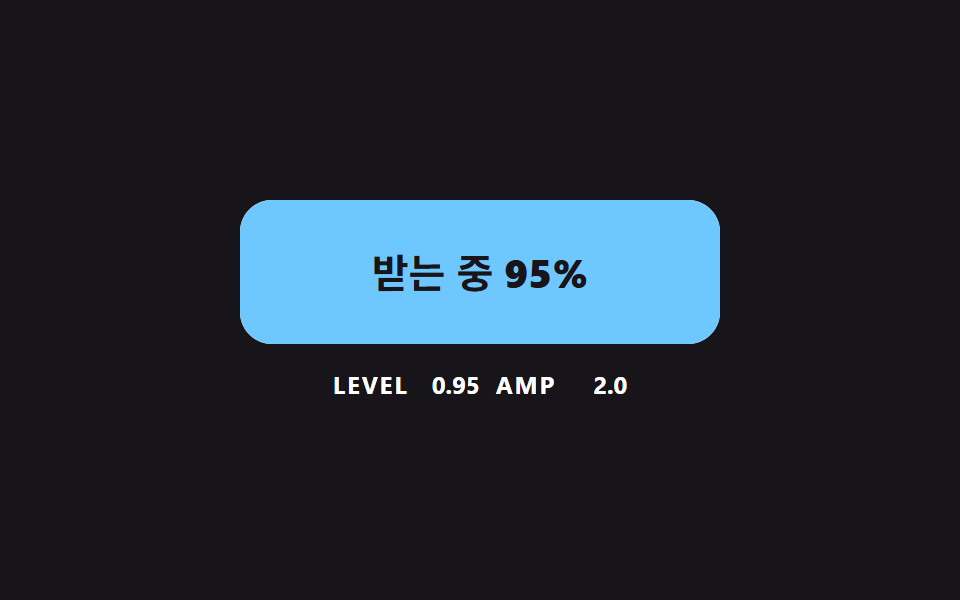
<main class="stage">
<div class="lq is-demo" id="lqRoot">
  <button class="lq__btn" id="lqBtn" type="button">
    <svg class="lq__wave" viewBox="0 0 240 72" preserveAspectRatio="none" aria-hidden="true"><path id="lqPath" d="M0 72H240V72Z"/></svg>
    <span class="lq__text"><span id="lqLabel">Download</span> <b id="lqPct">0%</b></span>
  </button>
  <p class="lq__meta"><span class="lq__tag">LEVEL</span> <b id="lqLevel">0.00</b> <span class="lq__tag">AMP</span> <b id="lqAmp">0.0</b></p>
</div>
</main>
@use "../../../../site/static/demo-tokens" as *;
// 핵심: 수면은 SVG path 의 d 를 JS 가 매 프레임 다시 계산한다. 속성 트윈이 아니라 파동 합성이다.
$lq-face: $subject-cream;
$lq-water: $subject-sky;
@include stage($stage-ink);
.lq {
width: min(100%, 280px);
display: grid;
gap: $sp-3;
justify-items: center;
}
.lq__btn {
position: relative;
box-sizing: border-box;
width: 240px;
max-width: 100%;
height: 72px;
overflow: hidden;
border: 0;
border-radius: $r-card;
background: $lq-face;
color: $subject-ink;
font-family: inherit;
font-size: 20px;
font-weight: 700;
line-height: 24px;
cursor: pointer;
}
.lq__btn:focus-visible { outline: 3px solid $stage-paper; outline-offset: 3px; }
.lq__wave {
position: absolute;
inset: 0;
width: 100%;
height: 100%;
fill: $lq-water;
}
.lq__text { position: relative; }
.lq__text b { font-variant-numeric: tabular-nums; }
.lq__meta {
margin: 0;
display: flex;
align-items: baseline;
gap: $sp-2;
font-size: 12px;
line-height: 16px;
color: $stage-paper;
}
.lq__tag { font-weight: 700; letter-spacing: .08em; }
.lq__meta b { min-width: 4ch; text-align: right; font-variant-numeric: tabular-nums; }
@media (prefers-reduced-motion: reduce) {
.lq__btn { transition: none; }
}html, body {
margin: 0;
overflow: hidden;
}
.stage {
box-sizing: border-box;
min-height: 100vh;
display: grid;
place-items: center;
margin: 0;
background: #17141a;
font-family: -apple-system, "Segoe UI", "Noto Sans KR", sans-serif;
padding: clamp(8px, 4vw, 24px);
}
.lq {
width: min(100%, 280px);
display: grid;
gap: 12px;
justify-items: center;
}
.lq__btn {
position: relative;
box-sizing: border-box;
width: 240px;
max-width: 100%;
height: 72px;
overflow: hidden;
border: 0;
border-radius: 16px;
background: #fff7e6;
color: #17141a;
font-family: inherit;
font-size: 20px;
font-weight: 700;
line-height: 24px;
cursor: pointer;
}
.lq__btn:focus-visible {
outline: 3px solid #ffffff;
outline-offset: 3px;
}
.lq__wave {
position: absolute;
inset: 0;
width: 100%;
height: 100%;
fill: #6ec8ff;
}
.lq__text {
position: relative;
}
.lq__text b {
font-variant-numeric: tabular-nums;
}
.lq__meta {
margin: 0;
display: flex;
align-items: baseline;
gap: 8px;
font-size: 12px;
line-height: 16px;
color: #ffffff;
}
.lq__tag {
font-weight: 700;
letter-spacing: 0.08em;
}
.lq__meta b {
min-width: 4ch;
text-align: right;
font-variant-numeric: tabular-nums;
}
@media (prefers-reduced-motion: reduce) {
.lq__btn {
transition: none;
}
}(function () {
// 기법: 수위는 목표 진행률을 향해 지수 보간(LEVEL_LERP)으로 따라가고, 수면은 사인 두 개를 합성한 곡선이다.
// 파동 진폭에 (1 - 0.7 x 수위) 를 곱해서 물이 찰수록 수면이 가라앉는다.
var WAVE_AMP = 6;
var WAVE_FREQ = 2;
var LEVEL_LERP = 6;
var RUN_MS = 1500;
var START_MS = 200;
var CYCLE_MS = 2000;
var W = 240;
var H = 72;
var POINTS = 48;
var root = document.getElementById('lqRoot');
var btn = document.getElementById('lqBtn');
var pathEl = document.getElementById('lqPath');
var labelEl = document.getElementById('lqLabel');
var pctEl = document.getElementById('lqPct');
var levelEl = document.getElementById('lqLevel');
var ampEl = document.getElementById('lqAmp');
var reduce = window.matchMedia('(prefers-reduced-motion: reduce)').matches;
var clock = 0;
var runStart = null;
var level = 0;
var target = 0;
var t0 = null;
var lastTs = null;
function stopDemo() { root.classList.remove('is-demo'); }
function progressAt(now) {
var s = root.classList.contains('is-demo')
? (now < START_MS ? null : START_MS + Math.floor((now - START_MS) / CYCLE_MS) * CYCLE_MS)
: runStart;
return s === null ? 0 : Math.max(0, Math.min(1, (now - s) / RUN_MS));
}
function draw(phase) {
var reach = WAVE_AMP * 1.5;
var base = -reach + (H + 2 * reach) * (1 - level);
var amp = WAVE_AMP * (1 - 0.7 * level);
var d = 'M0 ' + H;
for (var i = 0; i <= POINTS; i += 1) {
var x = (i / POINTS) * W;
var a = 2 * Math.PI * WAVE_FREQ * (x / W);
var y = base + amp * (Math.sin(a + phase) + 0.5 * Math.sin(2 * a - 1.3 * phase));
d += 'L' + x.toFixed(1) + ' ' + y.toFixed(2);
}
d += 'L' + W + ' ' + H + 'Z';
pathEl.setAttribute('d', d);
var pct = Math.round(level * 100);
pctEl.textContent = pct + '%';
labelEl.textContent = level > 0.995 ? 'Done' : (level > 0.01 ? 'Receiving' : 'Download');
levelEl.textContent = level.toFixed(2);
ampEl.textContent = amp.toFixed(1);
}
function activate() {
stopDemo();
if (reduce) { level = 1; draw(0); return; }
if (runStart !== null && clock - runStart < RUN_MS) return;
runStart = clock;
}
btn.addEventListener('click', activate);
function tick(ts) {
if (t0 === null) t0 = ts;
clock = ts - t0;
var dt = lastTs === null ? 0.016 : Math.min(0.05, (ts - lastTs) / 1000);
lastTs = ts;
target = progressAt(clock);
level += (target - level) * (1 - Math.exp(-dt * LEVEL_LERP));
draw(clock * 0.006);
requestAnimationFrame(tick);
}
if (reduce) {
stopDemo();
draw(0);
} else {
requestAnimationFrame(tick);
}
})();// LiquidLevelButton — vanilla 판(05-dlbtn-liquid-level-wave) 의 React 포트.
// 수위는 목표 진행률을 지수 보간(LEVEL_LERP)으로 따라가고, 수면은 사인 두 개의 합성이며 물이 찰수록 진폭이 줄어든다.
import { useEffect, useRef } from "react";
import styles from "./LiquidLevelButton.module.scss";
const WAVE_AMP = 6;
const WAVE_FREQ = 2;
const LEVEL_LERP = 6;
const RUN_MS = 1500;
const START_MS = 200;
const CYCLE_MS = 2000;
const W = 240;
const H = 72;
const POINTS = 48;
export default function LiquidLevelButton() {
const btnRef = useRef<HTMLButtonElement | null>(null);
const pathRef = useRef<SVGPathElement | null>(null);
const labelRef = useRef<HTMLSpanElement | null>(null);
const pctRef = useRef<HTMLElement | null>(null);
const levelRef = useRef<HTMLElement | null>(null);
const ampRef = useRef<HTMLElement | null>(null);
useEffect(() => {
const btn = btnRef.current;
const pathEl = pathRef.current;
const labelEl = labelRef.current;
const pctEl = pctRef.current;
const levelEl = levelRef.current;
const ampEl = ampRef.current;
if (!btn || !pathEl || !labelEl || !pctEl || !levelEl || !ampEl) return;
const reduce = window.matchMedia("(prefers-reduced-motion: reduce)").matches;
let demo = !reduce;
let clock = 0;
let runStart: number | null = null;
let level = 0;
let t0: number | null = null;
let lastTs: number | null = null;
let raf = 0;
const progressAt = (now: number): number => {
const s = demo
? now < START_MS ? null : START_MS + Math.floor((now - START_MS) / CYCLE_MS) * CYCLE_MS
: runStart;
return s === null ? 0 : Math.max(0, Math.min(1, (now - s) / RUN_MS));
};
const draw = (phase: number): void => {
const reach = WAVE_AMP * 1.5;
const base = -reach + (H + 2 * reach) * (1 - level);
const amp = WAVE_AMP * (1 - 0.7 * level);
let d = "M0 " + H;
for (let i = 0; i <= POINTS; i += 1) {
const x = (i / POINTS) * W;
const a = 2 * Math.PI * WAVE_FREQ * (x / W);
const y = base + amp * (Math.sin(a + phase) + 0.5 * Math.sin(2 * a - 1.3 * phase));
d += "L" + x.toFixed(1) + " " + y.toFixed(2);
}
d += "L" + W + " " + H + "Z";
pathEl.setAttribute("d", d);
pctEl.textContent = Math.round(level * 100) + "%";
labelEl.textContent = level > 0.995 ? "완료" : level > 0.01 ? "받는 중" : "내려받기";
levelEl.textContent = level.toFixed(2);
ampEl.textContent = amp.toFixed(1);
};
const activate = (): void => {
demo = false;
if (reduce) { level = 1; draw(0); return; }
if (runStart !== null && clock - runStart < RUN_MS) return;
runStart = clock;
};
btn.addEventListener("click", activate);
function tick(ts: number): void {
if (t0 === null) t0 = ts;
clock = ts - t0;
const dt = lastTs === null ? 0.016 : Math.min(0.05, (ts - lastTs) / 1000);
lastTs = ts;
level += (progressAt(clock) - level) * (1 - Math.exp(-dt * LEVEL_LERP));
draw(clock * 0.006);
raf = requestAnimationFrame(tick);
}
if (reduce) draw(0);
else raf = requestAnimationFrame(tick);
return () => {
cancelAnimationFrame(raf);
btn.removeEventListener("click", activate);
};
}, []);
return (
<main className={styles.stage}>
<div className={styles.lq}>
<button className={styles.lq__btn} type="button" ref={btnRef}>
<svg className={styles.lq__wave} viewBox="0 0 240 72" preserveAspectRatio="none" aria-hidden="true">
<path d="M0 72H240V72Z" ref={pathRef} />
</svg>
<span className={styles.lq__text}>
<span ref={labelRef}>내려받기</span> <b ref={pctRef}>0%</b>
</span>
</button>
<p className={styles.lq__meta}>
<span className={styles.lq__tag}>LEVEL</span> <b ref={levelRef}>0.00</b> <span className={styles.lq__tag}>AMP</span> <b ref={ampRef}>0.0</b>
</p>
</div>
</main>
);
}05 A Liquid Level That Rises With Progress — Measured area 12.04% · moving frames 23/23Original by GODRICH · SCSS and React ship in the zip · CSS Download Button: 9 Demos With Springs and Arcs
The post this demo lives in
 CSS Download Button: 9 Demos With Springs and ArcsA css download button that only swaps its label leaves a stiff arrow, steps in progress and no sign of where the file we See all demos in this post
If you like this effect - similar demos
 Buttons04 Liquid fill with a wave line9 button hover effects css that award sites reuse
 Buttons04 Liquid-metal Button That Merges and Spreads With a Pointer-distance ValueButton Click Effect CSS: 9 Canvas Pixel Patterns
 Buttons06 Close button with a ring that keeps circling9 Icon Button CSS Patterns — Press, Drag, Expand