04A FLIP Reflow Where Cards Spring Into Place When Columns Change
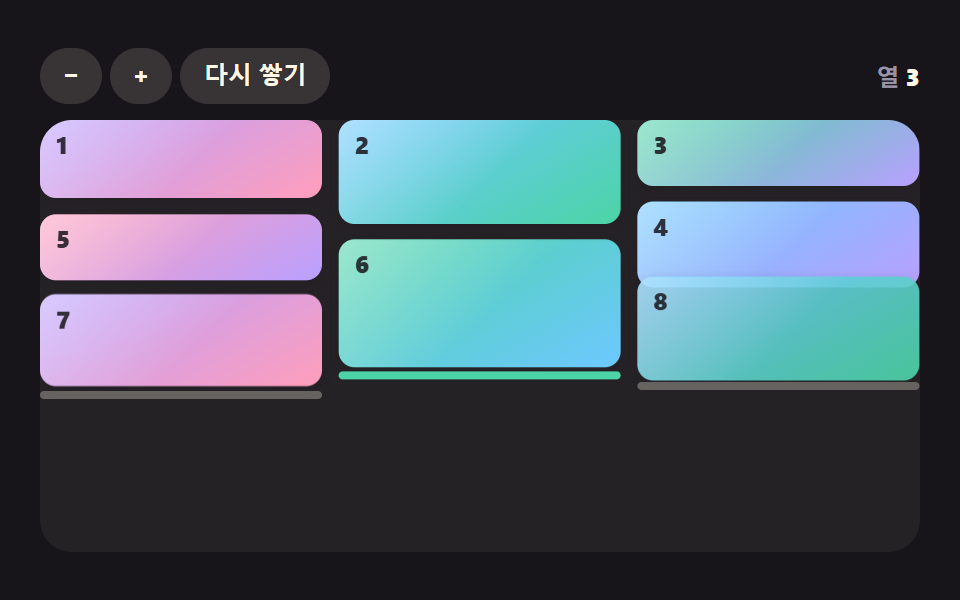
It measures the position difference before and after the reflow, inverts it and relaxes it to zero with velocity and stiffness, so cards glide instead of teleporting when the width changes.
Best forResponsive gallery transitions
STIFFNESSDAMPINGSTAGGERAREA
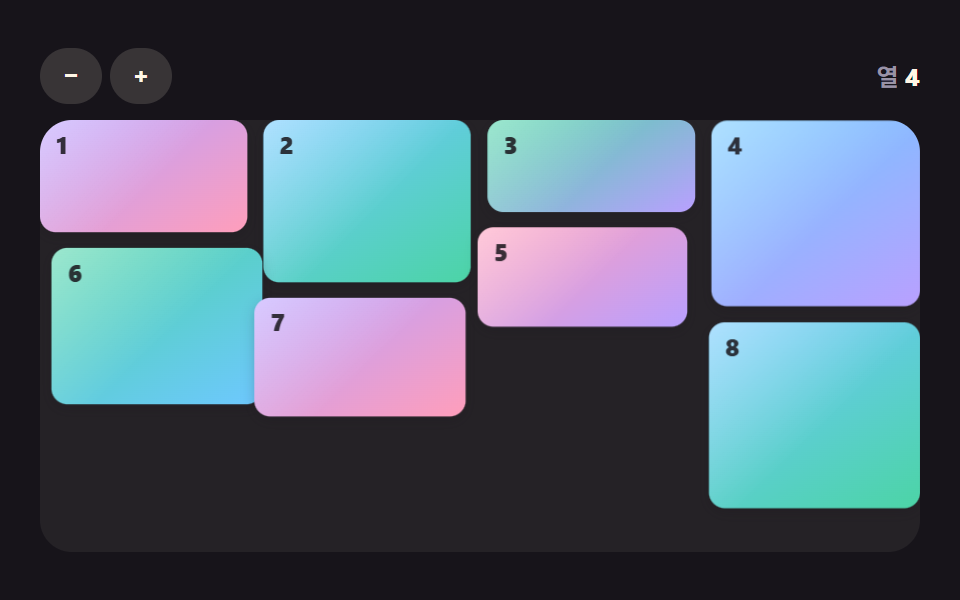
<main class="stage">
<div class="mr is-demo" id="mr" data-demo="1">
  <div class="mr__bar">
    <div class="mr__btns"><button class="mr__btn" type="button" data-r="less" aria-label="Fewer columns">−</button><button class="mr__btn" type="button" data-r="more" aria-label="More columns">+</button></div>
    <p class="mr__live" data-r="live" aria-live="off" aria-atomic="true"><span class="mr__k">Columns</span> <b data-r="cols">3</b></p>
  </div>
  <div class="mr__wall" data-r="wall"></div>
</div>
</main>
@use "../../../../site/static/demo-tokens" as *;
// 핵심: 새 자리를 계산하고 옛 자리와의 차이를 오프셋으로 되돌린 뒤 스프링으로 0 에 수렴시킨다. 배치는 JS 가 계산하고 CSS 는 모양만 맡는다.
@include stage($stage-ink);
$fg: $subject-cream;
$mute: $tick-mute;
$btn-bg: rgba($subject-cream, .14);
$wall-bg: rgba($subject-cream, .06);
$focus: $subject-pink;
$on: $stage-ink;
.mr {
position: relative;
box-sizing: border-box;
width: min(100%, 440px);
height: min(252px, calc(100vh - 2 * clamp(8px, 4vw, 24px)));
display: flex;
flex-direction: column;
gap: $sp-2;
color: $fg;
font-size: 12px;
line-height: 16px;
font-weight: 600;
user-select: none;
}
.mr b { font-weight: 800; font-variant-numeric: tabular-nums; }
.mr__bar {
display: flex;
flex-wrap: wrap;
align-items: center;
justify-content: space-between;
gap: $sp-2;
min-height: 28px;
}
.mr__btns {
display: flex;
flex-wrap: wrap;
gap: $sp-1;
}
.mr__btn {
box-sizing: border-box;
min-width: 28px;
height: 28px;
padding: 0 $sp-3;
border: 0;
border-radius: $r-pill;
background: $btn-bg;
color: $fg;
font-size: 12px;
line-height: 16px;
font-weight: 700;
white-space: nowrap;
cursor: pointer;
}
.mr__btn[aria-pressed="true"] { background: $fg; color: $on; }
.mr__btn:focus-visible { outline: 3px solid $focus; outline-offset: 2px; }
.mr__live { margin: 0; color: $mute; white-space: nowrap; }
.mr__live b { color: $fg; }
.mr__wall {
position: relative;
flex: 1 1 auto;
min-height: 0;
overflow: hidden;
border-radius: $r-card;
background: $wall-bg;
}
.mr__card {
position: absolute;
left: 0;
top: 0;
box-sizing: border-box;
overflow: hidden;
border-radius: $r-sm;
background: linear-gradient(150deg, $subject-lilac, $subject-pink);
color: $subject-ink;
will-change: transform;
box-shadow: 0 calc(2px + var(--lift, 0) * 10px) calc(6px + var(--lift, 0) * 14px) rgba($subject-ink, .22);
}
.mr__card::after {
content: "";
position: absolute;
inset: 0;
background: linear-gradient(135deg, rgba($stage-paper, .45), rgba($stage-paper, 0) 55%);
pointer-events: none;
}
.mr__card[data-c="1"] { background: linear-gradient(150deg, $subject-sky, $subject-mint); }
.mr__card[data-c="2"] { background: linear-gradient(150deg, $subject-mint, $subject-lilac); }
.mr__card[data-c="3"] { background: linear-gradient(150deg, $subject-sky, $subject-lilac); }
.mr__card[data-c="4"] { background: linear-gradient(150deg, $subject-pink, $subject-lilac); }
.mr__card[data-c="5"] { background: linear-gradient(150deg, $subject-mint, $subject-sky); }
.mr__card i {
position: absolute;
left: $sp-2;
top: $sp-1;
font-style: normal;
font-size: 12px;
line-height: 16px;
font-weight: 800;
z-index: 1;
opacity: .85;
}
.mr__card { transform-origin: 0 0; }
.mr__mark {
position: absolute;
left: 0;
top: 0;
height: $sp-1;
border-radius: $r-pill;
background: rgba($fg, .3);
z-index: 3;
pointer-events: none;
}
.mr__mark[data-low] { background: $subject-mint; }
@media (prefers-reduced-motion: reduce) {
.mr__cursor, .mr__ring { display: none; }
.mr__card { will-change: auto; }
}html, body {
margin: 0;
overflow: hidden;
}
.stage {
box-sizing: border-box;
min-height: 100vh;
display: grid;
place-items: center;
margin: 0;
background: #17141a;
font-family: -apple-system, "Segoe UI", "Noto Sans KR", sans-serif;
padding: clamp(8px, 4vw, 24px);
}
.mr {
position: relative;
box-sizing: border-box;
width: min(100%, 440px);
height: min(252px, 100vh - 2 * clamp(8px, 4vw, 24px));
display: flex;
flex-direction: column;
gap: 8px;
color: #fff7e6;
font-size: 12px;
line-height: 16px;
font-weight: 600;
user-select: none;
}
.mr b {
font-weight: 800;
font-variant-numeric: tabular-nums;
}
.mr__bar {
display: flex;
flex-wrap: wrap;
align-items: center;
justify-content: space-between;
gap: 8px;
min-height: 28px;
}
.mr__btns {
display: flex;
flex-wrap: wrap;
gap: 4px;
}
.mr__btn {
box-sizing: border-box;
min-width: 28px;
height: 28px;
padding: 0 12px;
border: 0;
border-radius: 999px;
background: rgba(255, 247, 230, 0.14);
color: #fff7e6;
font-size: 12px;
line-height: 16px;
font-weight: 700;
white-space: nowrap;
cursor: pointer;
}
.mr__btn[aria-pressed=true] {
background: #fff7e6;
color: #17141a;
}
.mr__btn:focus-visible {
outline: 3px solid #ff9ebb;
outline-offset: 2px;
}
.mr__live {
margin: 0;
color: #9a93a6;
white-space: nowrap;
}
.mr__live b {
color: #fff7e6;
}
.mr__wall {
position: relative;
flex: 1 1 auto;
min-height: 0;
overflow: hidden;
border-radius: 16px;
background: rgba(255, 247, 230, 0.06);
}
.mr__card {
position: absolute;
left: 0;
top: 0;
box-sizing: border-box;
overflow: hidden;
border-radius: 8px;
background: linear-gradient(150deg, #b9a0ff, #ff9ebb);
color: #17141a;
will-change: transform;
box-shadow: 0 calc(2px + var(--lift, 0) * 10px) calc(6px + var(--lift, 0) * 14px) rgba(23, 20, 26, 0.22);
}
.mr__card::after {
content: "";
position: absolute;
inset: 0;
background: linear-gradient(135deg, rgba(255, 255, 255, 0.45), rgba(255, 255, 255, 0) 55%);
pointer-events: none;
}
.mr__card[data-c="1"] {
background: linear-gradient(150deg, #6ec8ff, #4cd4a6);
}
.mr__card[data-c="2"] {
background: linear-gradient(150deg, #4cd4a6, #b9a0ff);
}
.mr__card[data-c="3"] {
background: linear-gradient(150deg, #6ec8ff, #b9a0ff);
}
.mr__card[data-c="4"] {
background: linear-gradient(150deg, #ff9ebb, #b9a0ff);
}
.mr__card[data-c="5"] {
background: linear-gradient(150deg, #4cd4a6, #6ec8ff);
}
.mr__card i {
position: absolute;
left: 8px;
top: 4px;
font-style: normal;
font-size: 12px;
line-height: 16px;
font-weight: 800;
z-index: 1;
opacity: 0.85;
}
.mr__card {
transform-origin: 0 0;
}
.mr__mark {
position: absolute;
left: 0;
top: 0;
height: 4px;
border-radius: 999px;
background: rgba(255, 247, 230, 0.3);
z-index: 3;
pointer-events: none;
}
.mr__mark[data-low] {
background: #4cd4a6;
}
@media (prefers-reduced-motion: reduce) {
.mr__cursor, .mr__ring {
display: none;
}
.mr__card {
will-change: auto;
}
}(function () {
const root = document.getElementById("mr");
const CLS = { card: "mr__card" };
const reduce = window.matchMedia("(prefers-reduced-motion: reduce)").matches;
let demo = !reduce;
let raf = 0;
let last = -1;
let ready = false;
const offs = [];
function q(sel) {
return root.querySelector(sel);
}
const wall = q("[data-r=wall]");
const live = q("[data-r=live]");
function clamp(v, lo, hi) {
return Math.max(lo, Math.min(hi, v));
}
function makeRng(seed) {
let s = seed >>> 0;
return function () {
s = (Math.imul(s, 1664525) + 1013904223) >>> 0;
return s / 4294967296;
};
}
function on(el, type, fn) {
el.addEventListener(type, fn);
offs.push(function () {
el.removeEventListener(type, fn);
});
}
function stopDemo() {
if (!demo) return;
demo = false;
root.removeAttribute("data-demo");
root.classList.remove("is-demo");
live.setAttribute("aria-live", "polite");
}
if (reduce) live.setAttribute("aria-live", "polite");
// Cards: 시드 LCG 로 비율을 뽑는다. 이미지 파일은 없고 그라디언트와 번호만 있다.
function makeCards(n, seed, lo, hi) {
const rng = makeRng(seed);
const list = [];
for (let i = 0; i < n; i += 1) {
const el = document.createElement("div");
el.className = CLS.card;
el.setAttribute("data-c", String(i % 6));
el.innerHTML = "<i>" + (i + 1) + "</i>";
wall.appendChild(el);
list.push({
el: el, ratio: lo + rng() * (hi - lo), cat: Math.floor(rng() * 3),
x: 0, y: 0, w: 0, h: 0, tx: 0, ty: 0, tw: 0, th: 0,
s: 1, ds: 1, o: 1, dop: 1, vx: 0, vy: 0,
ox: 0, oy: 0, osx: 0, osy: 0, ovx: 0, ovy: 0, ovsx: 0, ovsy: 0,
fx: 0, fy: 0, fs: 1, fo: 1, t0: 0, sq: 0, rest: 0, wait: 0
});
}
return list;
}
function colW(cols, gap) {
return (wall.clientWidth - gap * (cols - 1)) / cols;
}
// 최단 Columns 배치: 카드를 순서대로 읽으며 지금 가장 낮은 Columns 끝에 얹고 그 Columns 높이에 Cards 높이와 간격을 더한다.
function pack(hs, cols, cw, gap) {
const colH = [];
for (let k = 0; k < cols; k += 1) colH.push(0);
const out = [];
for (let i = 0; i < hs.length; i += 1) {
let best = 0;
for (let k = 1; k < cols; k += 1) {
if (colH[k] < colH[best] - 0.5) best = k;
}
out.push({ x: best * (cw + gap), y: colH[best] });
colH[best] += hs[i] + gap;
}
return out;
}
function put(c, x, y, sx, sy) {
const st = c.el.style;
st.width = c.w.toFixed(1) + "px";
st.height = c.h.toFixed(1) + "px";
st.transform = "translate3d(" + x.toFixed(2) + "px," + y.toFixed(2) + "px,0) scale(" + sx.toFixed(3) + "," + sy.toFixed(3) + ")";
}
function frame(ts) {
const dt = last < 0 ? 0.016 : Math.min(0.05, (ts - last) / 1000);
last = ts;
if (demo) script(ts);
step(dt, ts);
render();
raf = requestAnimationFrame(frame);
}
const ro = new ResizeObserver(function () {
relayout();
});
ro.observe(root);
// 기법: FLIP. 새 자리를 먼저 계산하고(Last), 옛 자리와의 차이를 오프셋으로 되돌려 놓은(Invert) 뒤, 오프셋이 0 이 되도록 스프링을 푼다(Play).
const STIFFNESS = 0.12;
const DAMPING = 0.75;
const STAGGER = 0.03;
const GAP = 8;
const AREA = 15000;
const SEED = 13;
const COUNT = 8;
const SEQUENCE = [3, 4, 2];
const cards = makeCards(COUNT, SEED, 0.3, 0.66);
const colsEl = q("[data-r=cols]");
let cols = 3;
// 스프링 한 칸: 속도에 -강성 × 오프셋을 더하고 감쇠를 곱한 뒤 오프셋에 속도를 더한다. f 는 60fps 기준 프레임 수.
function kick(o, v, f) {
const nv = (v - STIFFNESS * o * f) * Math.pow(DAMPING, f);
return [o + nv * f, nv];
}
function setCols(n) {
if (n === cols && ready) return;
cols = n;
relayout();
}
function relayout() {
const cw = colW(cols, GAP);
const hs = cards.map(function (c) {
return (c.ratio * AREA) / cw;
});
const at = pack(hs, cols, cw, GAP);
for (let i = 0; i < cards.length; i += 1) {
const c = cards[i];
if (ready && !reduce) {
// First: 지금 화면에 보이는 자리와 크기에서 새 자리와 크기를 뺀 값이 오프셋이 된다.
c.ox = c.tx + c.ox - at[i].x;
c.oy = c.ty + c.oy - at[i].y;
c.osx = (c.tw * (1 + c.osx)) / cw - 1;
c.osy = (c.th * (1 + c.osy)) / hs[i] - 1;
c.wait = i * STAGGER;
}
c.tx = at[i].x;
c.ty = at[i].y;
c.tw = cw;
c.th = hs[i];
c.w = cw;
c.h = hs[i];
if (!ready || reduce) {
c.ox = 0;
c.oy = 0;
c.osx = 0;
c.osy = 0;
}
}
ready = true;
colsEl.textContent = String(cols);
if (reduce) render();
}
function script(ts) {
setCols(SEQUENCE[Math.floor((ts % 2000) / 667)]);
}
function step(dt, ts) {
const f = dt * 60;
for (let i = 0; i < cards.length; i += 1) {
const c = cards[i];
if (c.wait > 0) {
c.wait -= dt;
continue;
}
const a = kick(c.ox, c.ovx, f);
const b = kick(c.oy, c.ovy, f);
const d = kick(c.osx, c.ovsx, f);
const e = kick(c.osy, c.ovsy, f);
c.ox = a[0];
c.ovx = a[1];
c.oy = b[0];
c.ovy = b[1];
c.osx = d[0];
c.ovsx = d[1];
c.osy = e[0];
c.ovsy = e[1];
}
}
function render() {
for (let i = 0; i < cards.length; i += 1) {
const c = cards[i];
put(c, c.tx + c.ox, c.ty + c.oy, 1 + c.osx, 1 + c.osy);
}
}
on(q("[data-r=less]"), "click", function () {
stopDemo();
setCols(clamp(cols - 1, 2, 5));
});
on(q("[data-r=more]"), "click", function () {
stopDemo();
setCols(clamp(cols + 1, 2, 5));
});
relayout();
if (reduce) {
render();
} else {
raf = requestAnimationFrame(frame);
}
})();// FlipReflowSpring - vanilla 판(04-mr-flip-reflow-spring) 의 React 포트. 같은 계산을 useEffect 안에서 돌린다.
import { useEffect, useRef } from "react";
import styles from "./FlipReflowSpring.module.scss";
type Card = {
el: HTMLElement; ratio: number; cat: number;
x: number; y: number; w: number; h: number; tx: number; ty: number; tw: number; th: number;
s: number; ds: number; o: number; dop: number; vx: number; vy: number;
ox: number; oy: number; osx: number; osy: number; ovx: number; ovy: number; ovsx: number; ovsy: number;
fx: number; fy: number; fs: number; fo: number; t0: number; sq: number; rest: number; wait: number;
};
export default function FlipReflowSpring() {
const rootRef = useRef<HTMLDivElement | null>(null);
useEffect(() => {
const rootEl = rootRef.current;
if (!rootEl) return;
const root: HTMLElement = rootEl;
const CLS = { card: styles["mr__card"] };
const reduce = window.matchMedia("(prefers-reduced-motion: reduce)").matches;
let demo = !reduce;
let raf: number = 0;
let last: number = -1;
let ready = false;
const offs: Array<() => void> = [];
function q(sel: string): HTMLElement {
return root.querySelector(sel) as HTMLElement;
}
const wall = q("[data-r=wall]");
const live = q("[data-r=live]");
function clamp(v: number, lo: number, hi: number): number {
return Math.max(lo, Math.min(hi, v));
}
function makeRng(seed: number): () => number {
let s = seed >>> 0;
return function (): number {
s = (Math.imul(s, 1664525) + 1013904223) >>> 0;
return s / 4294967296;
};
}
function on(el: EventTarget, type: string, fn: (e: any) => void): void {
el.addEventListener(type, fn);
offs.push(function (): void {
el.removeEventListener(type, fn);
});
}
function stopDemo(): void {
if (!demo) return;
demo = false;
root.removeAttribute("data-demo");
root.classList.remove("is-demo");
live.setAttribute("aria-live", "polite");
}
if (reduce) live.setAttribute("aria-live", "polite");
// 카드: 시드 LCG 로 비율을 뽑는다. 이미지 파일은 없고 그라디언트와 번호만 있다.
function makeCards(n: number, seed: number, lo: number, hi: number): Card[] {
const rng = makeRng(seed);
const list: Card[] = [];
for (let i = 0; i < n; i += 1) {
const el = document.createElement("div");
el.className = CLS.card;
el.setAttribute("data-c", String(i % 6));
el.innerHTML = "<i>" + (i + 1) + "</i>";
wall.appendChild(el);
list.push({
el: el, ratio: lo + rng() * (hi - lo), cat: Math.floor(rng() * 3),
x: 0, y: 0, w: 0, h: 0, tx: 0, ty: 0, tw: 0, th: 0,
s: 1, ds: 1, o: 1, dop: 1, vx: 0, vy: 0,
ox: 0, oy: 0, osx: 0, osy: 0, ovx: 0, ovy: 0, ovsx: 0, ovsy: 0,
fx: 0, fy: 0, fs: 1, fo: 1, t0: 0, sq: 0, rest: 0, wait: 0
});
}
return list;
}
function colW(cols: number, gap: number): number {
return (wall.clientWidth - gap * (cols - 1)) / cols;
}
// 최단 열 배치: 카드를 순서대로 읽으며 지금 가장 낮은 열 끝에 얹고 그 열 높이에 카드 높이와 간격을 더한다.
function pack(hs: number[], cols: number, cw: number, gap: number): Array<{ x: number; y: number }> {
const colH: number[] = [];
for (let k = 0; k < cols; k += 1) colH.push(0);
const out: Array<{ x: number; y: number }> = [];
for (let i = 0; i < hs.length; i += 1) {
let best = 0;
for (let k = 1; k < cols; k += 1) {
if (colH[k] < colH[best] - 0.5) best = k;
}
out.push({ x: best * (cw + gap), y: colH[best] });
colH[best] += hs[i] + gap;
}
return out;
}
function put(c: Card, x: number, y: number, sx: number, sy: number): void {
const st = c.el.style;
st.width = c.w.toFixed(1) + "px";
st.height = c.h.toFixed(1) + "px";
st.transform = "translate3d(" + x.toFixed(2) + "px," + y.toFixed(2) + "px,0) scale(" + sx.toFixed(3) + "," + sy.toFixed(3) + ")";
}
function frame(ts: number): void {
const dt = last < 0 ? 0.016 : Math.min(0.05, (ts - last) / 1000);
last = ts;
if (demo) script(ts);
step(dt, ts);
render();
raf = requestAnimationFrame(frame);
}
const ro = new ResizeObserver(function (): void {
relayout();
});
ro.observe(root);
// 기법: FLIP. 새 자리를 먼저 계산하고(Last), 옛 자리와의 차이를 오프셋으로 되돌려 놓은(Invert) 뒤, 오프셋이 0 이 되도록 스프링을 푼다(Play).
const STIFFNESS = 0.12;
const DAMPING = 0.75;
const STAGGER = 0.03;
const GAP = 8;
const AREA = 15000;
const SEED = 13;
const COUNT = 8;
const SEQUENCE = [3, 4, 2];
const cards = makeCards(COUNT, SEED, 0.3, 0.66);
const colsEl = q("[data-r=cols]");
let cols: number = 3;
// 스프링 한 칸: 속도에 -강성 × 오프셋을 더하고 감쇠를 곱한 뒤 오프셋에 속도를 더한다. f 는 60fps 기준 프레임 수.
function kick(o: number, v: number, f: number): number[] {
const nv = (v - STIFFNESS * o * f) * Math.pow(DAMPING, f);
return [o + nv * f, nv];
}
function setCols(n: number): void {
if (n === cols && ready) return;
cols = n;
relayout();
}
function relayout(): void {
const cw = colW(cols, GAP);
const hs = cards.map(function (c: Card): number {
return (c.ratio * AREA) / cw;
});
const at = pack(hs, cols, cw, GAP);
for (let i = 0; i < cards.length; i += 1) {
const c = cards[i];
if (ready && !reduce) {
// First: 지금 화면에 보이는 자리와 크기에서 새 자리와 크기를 뺀 값이 오프셋이 된다.
c.ox = c.tx + c.ox - at[i].x;
c.oy = c.ty + c.oy - at[i].y;
c.osx = (c.tw * (1 + c.osx)) / cw - 1;
c.osy = (c.th * (1 + c.osy)) / hs[i] - 1;
c.wait = i * STAGGER;
}
c.tx = at[i].x;
c.ty = at[i].y;
c.tw = cw;
c.th = hs[i];
c.w = cw;
c.h = hs[i];
if (!ready || reduce) {
c.ox = 0;
c.oy = 0;
c.osx = 0;
c.osy = 0;
}
}
ready = true;
colsEl.textContent = String(cols);
if (reduce) render();
}
function script(ts: number): void {
setCols(SEQUENCE[Math.floor((ts % 2000) / 667)]);
}
function step(dt: number, ts: number): void {
const f = dt * 60;
for (let i = 0; i < cards.length; i += 1) {
const c = cards[i];
if (c.wait > 0) {
c.wait -= dt;
continue;
}
const a = kick(c.ox, c.ovx, f);
const b = kick(c.oy, c.ovy, f);
const d = kick(c.osx, c.ovsx, f);
const e = kick(c.osy, c.ovsy, f);
c.ox = a[0];
c.ovx = a[1];
c.oy = b[0];
c.ovy = b[1];
c.osx = d[0];
c.ovsx = d[1];
c.osy = e[0];
c.ovsy = e[1];
}
}
function render(): void {
for (let i = 0; i < cards.length; i += 1) {
const c = cards[i];
put(c, c.tx + c.ox, c.ty + c.oy, 1 + c.osx, 1 + c.osy);
}
}
on(q("[data-r=less]"), "click", function (): void {
stopDemo();
setCols(clamp(cols - 1, 2, 5));
});
on(q("[data-r=more]"), "click", function (): void {
stopDemo();
setCols(clamp(cols + 1, 2, 5));
});
relayout();
if (reduce) {
render();
} else {
raf = requestAnimationFrame(frame);
}
return () => {
cancelAnimationFrame(raf);
offs.forEach((f) => f());
ro.disconnect();
};
}, []);
return (
<main className={styles["stage"]}>
<div ref={rootRef} className={styles["mr"] + " is-demo"} data-demo="1">
<div className={styles["mr__bar"]}>
<div className={styles["mr__btns"]}><button className={styles["mr__btn"]} type="button" data-r="less" aria-label="열 줄이기">−</button><button className={styles["mr__btn"]} type="button" data-r="more" aria-label="열 늘리기">+</button></div>
<p className={styles["mr__live"]} data-r="live" aria-live="off" aria-atomic="true"><span className={styles["mr__k"]}>열</span> <b data-r="cols">3</b></p>
</div>
<div className={styles["mr__wall"]} data-r="wall"></div>
</div>
</main>
);
}04 A FLIP Reflow Where Cards Spring Into Place When Columns Change — Measured area 48.372% · moving frames 19/23Original by GODRICH · SCSS and React ship in the zip · CSS Masonry Layout: 9 Ways to Pack Uneven Cards
The post this demo lives in
 CSS Masonry Layout: 9 Ways to Pack Uneven CardsA css masonry layout of one columns or grid line scrambles order and teleports cards on resize — scenes 01, 02 and 04 fi See all demos in this post