09Focus outline that walks cells with arrow keys
Press an arrow key inside the table and a thick outline slides to the neighboring cell, while Home and End carry it to the start and the end of that row in one move.
Best forEntry tables scanned with the keyboard and no mouse
role="grid"tabindextranslate
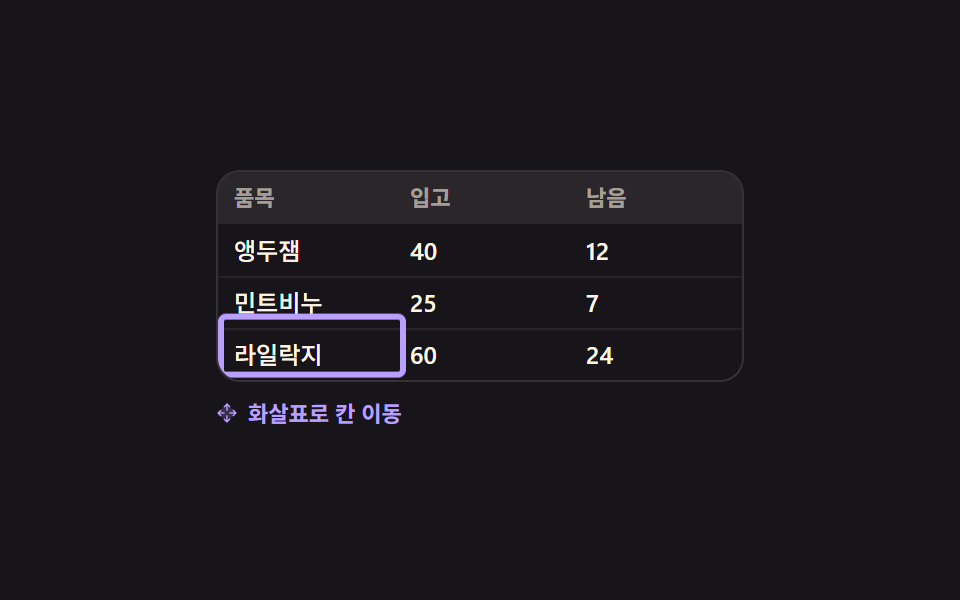
<main class="stage">
  <div class="kg is-demo" id="kg">
    <div class="kg__grid" id="kg-grid" role="grid" aria-label="Stock table">
      <div class="kg__row" role="row">
        <span class="kg__h" role="columnheader">Item</span><span class="kg__h" role="columnheader">In</span><span class="kg__h" role="columnheader">Left</span>
      </div>
      <div class="kg__body" role="rowgroup">
        <div class="kg__row" role="row">
          <span class="kg__c" role="gridcell" tabindex="0">Cherry jam</span><span class="kg__c" role="gridcell" tabindex="-1">40</span><span class="kg__c" role="gridcell" tabindex="-1">12</span>
        </div>
        <div class="kg__row" role="row">
          <span class="kg__c" role="gridcell" tabindex="-1">Mint soap</span><span class="kg__c" role="gridcell" tabindex="-1">25</span><span class="kg__c" role="gridcell" tabindex="-1">7</span>
        </div>
        <div class="kg__row" role="row">
          <span class="kg__c" role="gridcell" tabindex="-1">Lilac paper</span><span class="kg__c" role="gridcell" tabindex="-1">60</span><span class="kg__c" role="gridcell" tabindex="-1">24</span>
        </div>
      </div>
      <span class="kg__ring" id="kg-ring" aria-hidden="true"></span>
    </div>
    <p class="kg__hint">
      <span class="kg__kic" aria-hidden="true"><svg viewBox="0 0 256 256" width="1em" height="1em" fill="currentColor"><g><path d="M232 128L128 232L24 128L128 24Z" opacity=".2"/><path d="M90.34 61.66a8 8 0 0 1 0-11.32l32-32a8 8 0 0 1 11.32 0l32 32a8 8 0 0 1-11.32 11.32L136 43.31V96a8 8 0 0 1-16 0V43.31l-18.34 18.35a8 8 0 0 1-11.32 0m64 132.68L136 212.69V160a8 8 0 0 0-16 0v52.69l-18.34-18.35a8 8 0 0 0-11.32 11.32l32 32a8 8 0 0 0 11.32 0l32-32a8 8 0 0 0-11.32-11.32m83.32-72l-32-32a8 8 0 0 0-11.32 11.32L212.69 120H160a8 8 0 0 0 0 16h52.69l-18.35 18.34a8 8 0 0 0 11.32 11.32l32-32a8 8 0 0 0 0-11.32M43.31 136H96a8 8 0 0 0 0-16H43.31l18.35-18.34a8 8 0 0 0-11.32-11.32l-32 32a8 8 0 0 0 0 11.32l32 32a8 8 0 0 0 11.32-11.32Z"/></g></svg></span>Arrow keys move cells
    </p>
  </div>
</main>
@use "sass:color";
@use "../../../../site/static/demo-tokens" as *;
$duration: $dur-quick;
$easing: $ease-spring;
$color: $subject-lilac;
@include stage($stage-ink);
$cell-w: 88px;
$cell-h: 26px;
$line: color.mix($subject-cream, $stage-ink, 13%);
.kg {
box-sizing: border-box;
width: 264px;
color: $subject-cream;
font-family: -apple-system, "Segoe UI", "Noto Sans KR", sans-serif;
}
.kg__grid {
position: relative;
border: 1px solid $line;
border-radius: $r-control;
background: $stage-ink;
overflow: hidden;
}
.kg__row {
display: grid;
grid-template-columns: repeat(3, $cell-w);
height: $cell-h;
}
.kg__body .kg__row + .kg__row { box-shadow: inset 0 1px 0 rgba(255, 247, 230, .07); }
.kg__h, .kg__c {
padding: 0 $sp-2;
font-size: 12px;
line-height: $cell-h;
font-weight: 500;
white-space: nowrap;
overflow: hidden;
}
.kg__h {
background: color.mix($subject-cream, $stage-ink, 8%);
color: rgba(255, 247, 230, .58);
font-size: 11px;
font-weight: 700;
}
.kg__c { outline: none; cursor: pointer; }
// ── 옮겨 다니는 테두리 — 칸 하나 크기를 그대로 옮긴다 ──
.kg__ring {
position: absolute;
left: 0; top: 0;
z-index: 2;
width: $cell-w;
height: $cell-h;
border: 3px solid $color;
border-radius: $r-xs;
opacity: 0;
transform: translate(0, $cell-h);
pointer-events: none;
}
.kg__hint {
display: flex;
align-items: center;
gap: $sp-1;
margin: $sp-2 0 0;
color: rgba(255, 247, 230, .5);
font-size: 11px;
line-height: 16px;
font-weight: 600;
}
.kg__kic { display: inline-flex; width: 12px; height: 12px; }
// ── 자동 루프 (2s) ───────────────────────────────────
// 오른쪽 두 번 → 아래 → Home(그 줄 맨 앞) → 아래 → 처음 칸으로. 칸과 칸 사이를 끊지 않고
// 이어서 지나가므로 순간이동처럼 보이지 않는다. 복귀는 88% 에 끝난다.
.kg.is-demo .kg__ring {
animation-name: kg-walk;
animation-duration: $dur-loop;
animation-timing-function: $easing;
animation-iteration-count: infinite;
}
.kg.is-demo .kg__hint {
animation-name: kg-hint;
animation-duration: $dur-loop;
animation-timing-function: steps(1, end);
animation-iteration-count: infinite;
}
@keyframes kg-walk {
0% { opacity: 1; transform: translate(0, $cell-h); }
8% { opacity: 1; transform: translate(0, $cell-h); }
22% { opacity: 1; transform: translate($cell-w, $cell-h); }
36% { opacity: 1; transform: translate($cell-w * 2, $cell-h); }
50% { opacity: 1; transform: translate($cell-w * 2, $cell-h * 2); }
64% { opacity: 1; transform: translate(0, $cell-h * 2); }
76% { opacity: 1; transform: translate(0, $cell-h * 3); }
88% { opacity: 1; transform: translate(0, $cell-h); }
100% { opacity: 1; transform: translate(0, $cell-h); }
}
@keyframes kg-hint {
0% { color: rgba(255, 247, 230, .5); }
50% { color: $color; }
88% { color: rgba(255, 247, 230, .5); }
100% { color: rgba(255, 247, 230, .5); }
}
// 320×200 — 264px 격자가 그대로 들어간다. 안내 줄 여백만 줄인다
@media (max-width: 340px) {
.kg__hint { margin-top: $sp-1; }
.kg__h, .kg__c { padding: 0 $sp-1; }
}
@media (prefers-reduced-motion: reduce) {
.kg.is-demo .kg__ring,
.kg.is-demo .kg__hint { animation: none !important; }
.kg.is-demo .kg__ring { opacity: 1; transform: translate(0, $cell-h); }
}html, body {
margin: 0;
overflow: hidden;
}
.stage {
box-sizing: border-box;
min-height: 100vh;
display: grid;
place-items: center;
margin: 0;
background: #17141a;
font-family: -apple-system, "Segoe UI", "Noto Sans KR", sans-serif;
padding: clamp(8px, 4vw, 24px);
}
.kg {
box-sizing: border-box;
width: 264px;
color: #fff7e6;
font-family: -apple-system, "Segoe UI", "Noto Sans KR", sans-serif;
}
.kg__grid {
position: relative;
border: 1px solid rgb(20.8470588235%, 19.4156862745%, 20.5960784314%);
border-radius: 12px;
background: #17141a;
overflow: hidden;
}
.kg__row {
display: grid;
grid-template-columns: repeat(3, 88px);
height: 26px;
}
.kg__body .kg__row + .kg__row {
box-shadow: inset 0 1px 0 rgba(255, 247, 230, 0.07);
}
.kg__h, .kg__c {
padding: 0 8px;
font-size: 12px;
line-height: 26px;
font-weight: 500;
white-space: nowrap;
overflow: hidden;
}
.kg__h {
background: rgb(16.2980392157%, 14.9647058824%, 16.5960784314%);
color: rgba(255, 247, 230, 0.58);
font-size: 11px;
font-weight: 700;
}
.kg__c {
outline: none;
cursor: pointer;
}
.kg__ring {
position: absolute;
left: 0;
top: 0;
z-index: 2;
width: 88px;
height: 26px;
border: 3px solid #b9a0ff;
border-radius: 4px;
opacity: 0;
transform: translate(0, 26px);
pointer-events: none;
}
.kg__hint {
display: flex;
align-items: center;
gap: 4px;
margin: 8px 0 0;
color: rgba(255, 247, 230, 0.5);
font-size: 11px;
line-height: 16px;
font-weight: 600;
}
.kg__kic {
display: inline-flex;
width: 12px;
height: 12px;
}
.kg.is-demo .kg__ring {
animation-name: kg-walk;
animation-duration: 2s;
animation-timing-function: cubic-bezier(0.2, 0.8, 0.2, 1);
animation-iteration-count: infinite;
}
.kg.is-demo .kg__hint {
animation-name: kg-hint;
animation-duration: 2s;
animation-timing-function: steps(1, end);
animation-iteration-count: infinite;
}
@keyframes kg-walk {
0% {
opacity: 1;
transform: translate(0, 26px);
}
8% {
opacity: 1;
transform: translate(0, 26px);
}
22% {
opacity: 1;
transform: translate(88px, 26px);
}
36% {
opacity: 1;
transform: translate(176px, 26px);
}
50% {
opacity: 1;
transform: translate(176px, 52px);
}
64% {
opacity: 1;
transform: translate(0, 52px);
}
76% {
opacity: 1;
transform: translate(0, 78px);
}
88% {
opacity: 1;
transform: translate(0, 26px);
}
100% {
opacity: 1;
transform: translate(0, 26px);
}
}
@keyframes kg-hint {
0% {
color: rgba(255, 247, 230, 0.5);
}
50% {
color: #b9a0ff;
}
88% {
color: rgba(255, 247, 230, 0.5);
}
100% {
color: rgba(255, 247, 230, 0.5);
}
}
@media (max-width: 340px) {
.kg__hint {
margin-top: 4px;
}
.kg__h, .kg__c {
padding: 0 4px;
}
}
@media (prefers-reduced-motion: reduce) {
.kg.is-demo .kg__ring,
.kg.is-demo .kg__hint {
animation: none !important;
}
.kg.is-demo .kg__ring {
opacity: 1;
transform: translate(0, 26px);
}
}// 실제 동작: 표 안에서 탭 정지점은 늘 하나뿐이고(roving tabindex) 나머지 칸은 화살표로 옮겨 다닌다.
var kg = document.getElementById('kg');
var kgGrid = document.getElementById('kg-grid');
var kgRing = document.getElementById('kg-ring');
var KG_W = 88, KG_H = 26;
var kgAt = { r: 0, c: 0 };
function kgCells() { return [].slice.call(kgGrid.querySelectorAll('.kg__c')); }
function kgGo(r, c) {
kg.classList.remove('is-demo');
kgAt = { r: Math.max(0, Math.min(2, r)), c: Math.max(0, Math.min(2, c)) };
var i = kgAt.r * 3 + kgAt.c;
kgCells().forEach(function (el, n) { el.tabIndex = n === i ? 0 : -1; });
kgRing.style.transform = 'translate(' + (kgAt.c * KG_W) + 'px, ' + ((kgAt.r + 1) * KG_H) + 'px)';
kgRing.style.opacity = '1';
kgCells()[i].focus({ preventScroll: true }); // iframe 안이라 스크롤을 일으키면 부모가 끌려간다
}
kgGrid.addEventListener('keydown', function (e) {
var K = { ArrowRight: [0, 1], ArrowLeft: [0, -1], ArrowDown: [1, 0], ArrowUp: [-1, 0] }[e.key];
if (K) { e.preventDefault(); kgGo(kgAt.r + K[0], kgAt.c + K[1]); return; }
if (e.key === 'Home') { e.preventDefault(); kgGo(kgAt.r, 0); }
if (e.key === 'End') { e.preventDefault(); kgGo(kgAt.r, 2); }
});
kgCells().forEach(function (el, n) {
el.addEventListener('click', function () { kgGo(Math.floor(n / 3), n % 3); });
});import { useRef, useState } from "react";
import type { CSSProperties } from "react";
import styles from "./KeyboardGridNav.module.scss";
export type KeyboardGridNavProps = {
gridLabel?: string;
headers?: string[];
rows?: string[][];
hint?: string;
/** 자동 재생 루프 (갤러리용). 사람이 손대면 꺼진다 */
demo?: boolean;
duration?: number;
easing?: string;
color?: string;
};
type Vars = CSSProperties & { "--duration"?: string; "--easing"?: string; "--color"?: string };
type KeyEvt = { key: string; preventDefault: () => void };
const HEADERS = ["Item", "In", "Left"];
const ROWS: string[][] = [
["Cherry jam", "40", "12"],
["Mint soap", "25", "7"],
["Lilac paper", "60", "24"],
];
const CELL_W = 88;
const CELL_H = 26;
export default function KeyboardGridNav({
gridLabel = "Stock table",
headers = HEADERS,
rows = ROWS,
hint = "Arrow keys move cells",
demo = true,
duration = 220,
easing = "cubic-bezier(.2,.8,.2,1)",
color = "#b9a0ff",
}: KeyboardGridNavProps) {
const [at, setAt] = useState({ r: 0, c: 0 });
const [live, setLive] = useState(demo);
const cells = useRef<(HTMLSpanElement | null)[]>([]);
const vars: Vars = { "--duration": `${duration}ms`, "--easing": easing, "--color": color };
const last = rows.length - 1;
const lastCol = headers.length - 1;
// 표 안에서 탭 정지점은 늘 하나뿐이고(roving tabindex) 나머지 칸은 화살표로 옮겨 다닌다
const go = (r: number, c: number) => {
const rr = Math.max(0, Math.min(last, r));
const cc = Math.max(0, Math.min(lastCol, c));
setLive(false);
setAt({ r: rr, c: cc });
const el = cells.current ? cells.current[rr * headers.length + cc] : null;
if (el) el.focus({ preventScroll: true }); // iframe 안이라 스크롤을 일으키면 부모가 끌려간다
};
const onKey = (e: KeyEvt) => {
const map: { [k: string]: number[] } = {
ArrowRight: [0, 1], ArrowLeft: [0, -1], ArrowDown: [1, 0], ArrowUp: [-1, 0],
};
const step = map[e.key];
if (step) { e.preventDefault(); go(at.r + step[0], at.c + step[1]); return; }
if (e.key === "Home") { e.preventDefault(); go(at.r, 0); }
if (e.key === "End") { e.preventDefault(); go(at.r, lastCol); }
};
const active = at.r * headers.length + at.c;
const ringStyle: CSSProperties | undefined = live
? undefined
: { transform: `translate(${at.c * CELL_W}px, ${(at.r + 1) * CELL_H}px)`, opacity: 1 };
return (
<div className={[styles.root, live ? styles.isDemo : ""].join(" ")} style={vars}>
<div className={styles.grid} role="grid" aria-label={gridLabel} onKeyDown={onKey}>
<div className={styles.row} role="row">
{headers.map((h) => (
<span className={styles.h} role="columnheader" key={h}>{h}</span>
))}
</div>
<div className={styles.body} role="rowgroup">
{rows.map((row, r) => (
<div className={styles.row} role="row" key={row[0]}>
{row.map((cell, c) => {
const n = r * headers.length + c;
return (
<span
className={styles.c}
role="gridcell"
key={cell + String(c)}
tabIndex={n === active ? 0 : -1}
ref={(el: HTMLSpanElement | null) => { if (cells.current) cells.current[n] = el; }}
onClick={() => go(r, c)}
>
{cell}
</span>
);
})}
</div>
))}
</div>
<span className={styles.ring} style={ringStyle} aria-hidden="true" />
</div>
<p className={styles.hint}>
<span className={styles.kic} aria-hidden="true">
<svg viewBox="0 0 256 256" width="1em" height="1em" fill="currentColor">
<g>
<path d="M232 128L128 232L24 128L128 24Z" opacity=".2" />
<path d="M90.34 61.66a8 8 0 0 1 0-11.32l32-32a8 8 0 0 1 11.32 0l32 32a8 8 0 0 1-11.32 11.32L136 43.31V96a8 8 0 0 1-16 0V43.31l-18.34 18.35a8 8 0 0 1-11.32 0m64 132.68L136 212.69V160a8 8 0 0 0-16 0v52.69l-18.34-18.35a8 8 0 0 0-11.32 11.32l32 32a8 8 0 0 0 11.32 0l32-32a8 8 0 0 0-11.32-11.32m83.32-72l-32-32a8 8 0 0 0-11.32 11.32L212.69 120H160a8 8 0 0 0 0 16h52.69l-18.35 18.34a8 8 0 0 0 11.32 11.32l32-32a8 8 0 0 0 0-11.32M43.31 136H96a8 8 0 0 0 0-16H43.31l18.35-18.34a8 8 0 0 0-11.32-11.32l-32 32a8 8 0 0 0 0 11.32l32 32a8 8 0 0 0 11.32-11.32Z" />
</g>
</svg>
</span>
{hint}
</p>
</div>
);
}09 Focus outline that walks cells with arrow keys — Measured area 5.625% · moving frames 21/23Original by GODRICH · SCSS and React ship in the zip · 9 Data Table UI Patterns — Drag, Resize, Select
The post this demo lives in
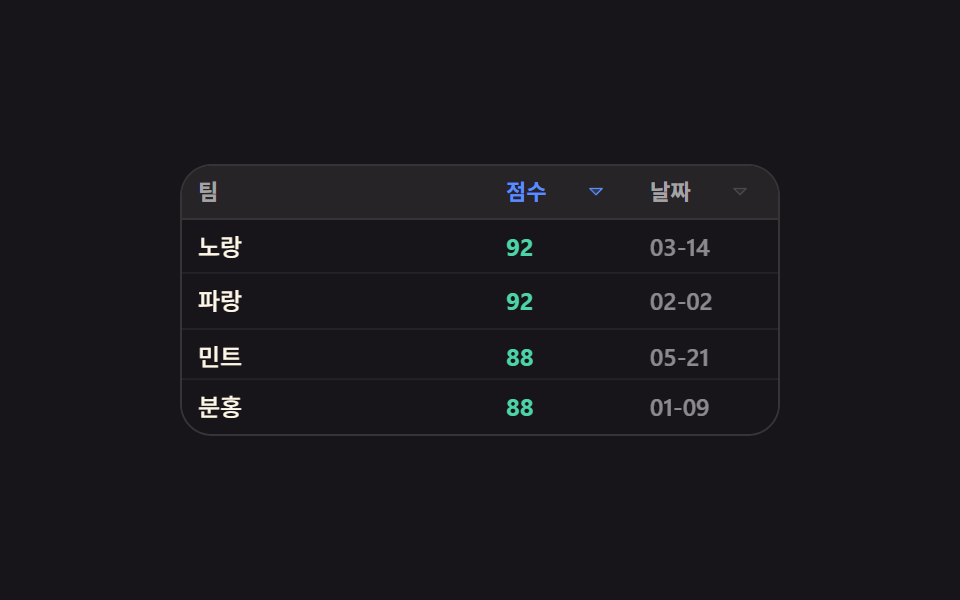 9 Data Table UI Patterns — Drag, Resize, SelectA data table ui is a grid of rows and columns you can reorder, narrow, and pull values out of by hand. All nine sort a r See all demos in this post
If you like this effect - similar demos
 Lists & tables09 All-done card with rising confetti9 Empty State UI Design Cards Drawn in Pure CSS
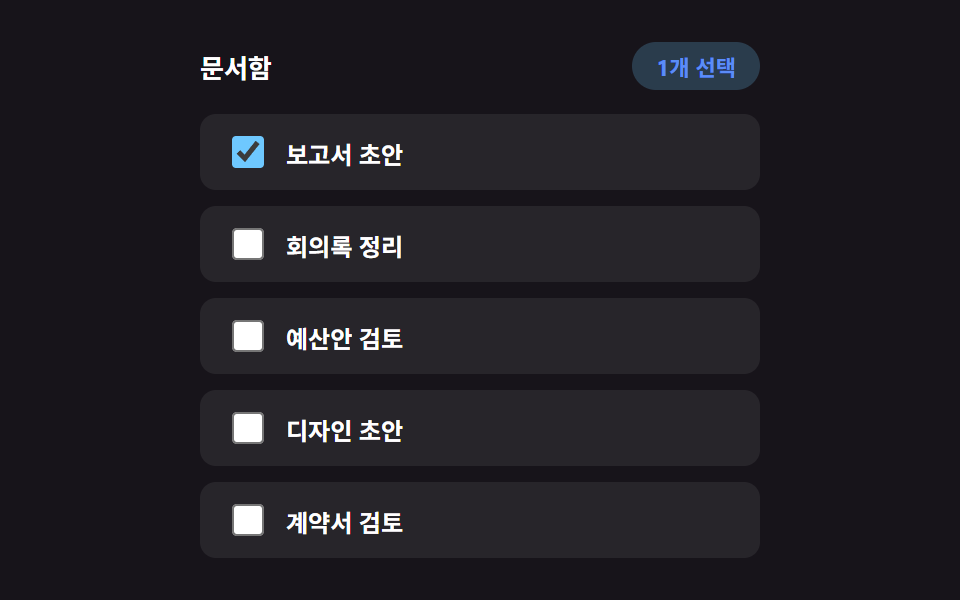 Lists & tables05 Bulk Select That Counts With a Badge, No ToolbarInfinite Scroll Implementation — 9 List UI Basics
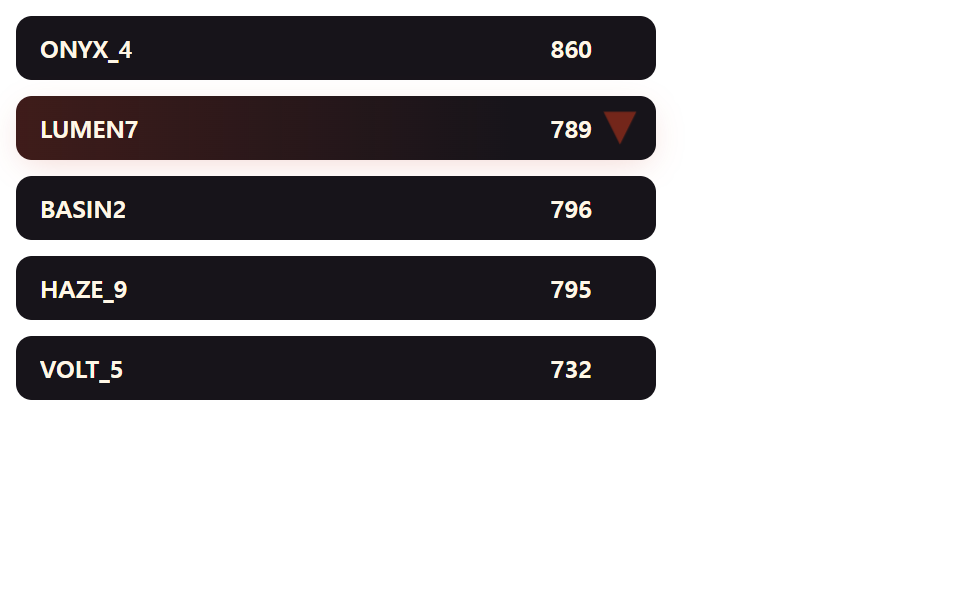 Lists & tables07 Arrow Badge That Flashes the Rank DeltaLeaderboard UI Design: 9 Rank-Change List Patterns