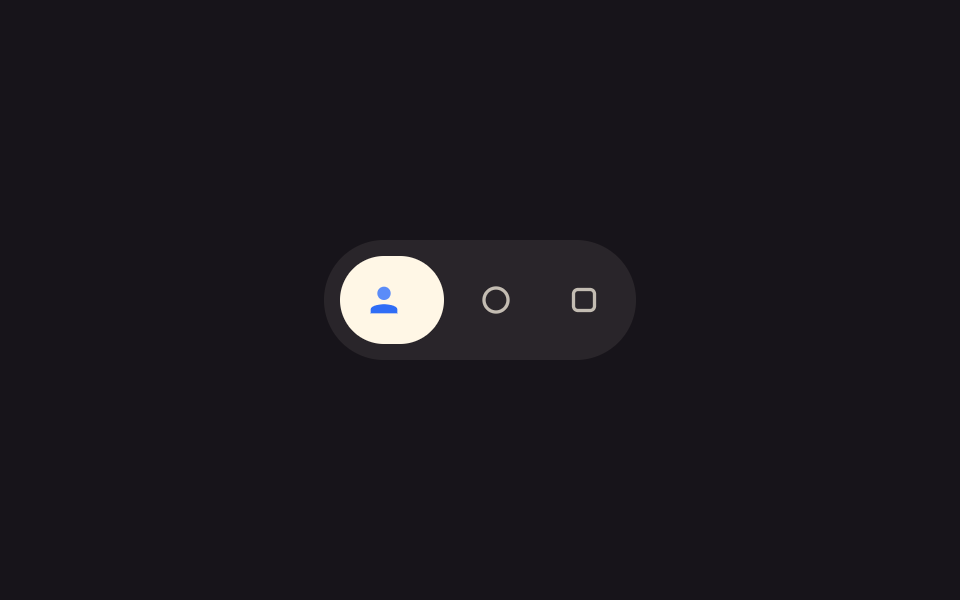
08Icon-grow label value toggle — when a focus value turns on, an icon's size value grows and a label's width value stretches
When the focus value turns on, the icon's size value grows and the label's width value stretches after it; turning it off shrinks both.
Best forA round tool button, an action bar with appearing labels
ICON_ONICON_OFFmeasure
<main class="stage">
<div class="ig is-demo" id="ig">
  <div class="ig__bar" role="toolbar" aria-label="Action value set">
    <button type="button" class="ig__tool" id="igTool" aria-pressed="false">
      <span class="ig__ic" aria-hidden="true">
        <svg viewBox="0 0 24 24" width="20" height="20">
          <path class="ig__body" d="M4 20h16v-2.2c0-1.9-3.6-3.3-8-3.3s-8 1.4-8 3.3V20z" />
          <circle class="ig__head" cx="12" cy="8" r="4" />
        </svg>
      </span>
      <span class="ig__label" id="igLabel">Profile value</span>
    </button>
    <span class="ig__peer" aria-hidden="true">
      <svg viewBox="0 0 24 24" width="18" height="18"><circle cx="12" cy="12" r="8" fill="none" stroke="currentColor" stroke-width="2.2"/></svg>
    </span>
    <span class="ig__peer" aria-hidden="true">
      <svg viewBox="0 0 24 24" width="18" height="18"><rect x="5" y="5" width="14" height="14" rx="3" fill="none" stroke="currentColor" stroke-width="2.2"/></svg>
    </span>
  </div>
</div>
</main>
@use "../../../../site/static/demo-tokens" as *;
// 계산 겹: 표시 스케일(ICON_ON 1.25 곱)과 라벨 폭(실측 --label-w)이 초점 값에 따라
// 같은 easing 으로 이어져 늘어난다(index.html). 라벨은 폭 안에서 mask 로 밀려난다.
@include stage($stage-ink);
.ig {
display: grid;
justify-items: center;
}
.ig__bar {
display: inline-flex;
align-items: center;
gap: $sp-2;
padding: $sp-2;
border-radius: $r-pill;
background: rgba($subject-cream, .08);
}
.ig__tool {
display: inline-flex;
align-items: center;
gap: $sp-2;
border: 0;
border-radius: $r-pill;
background: $subject-cream;
color: $subject-ink;
padding: $sp-2;
cursor: pointer;
transition: padding $dur-enter $ease-elastic, background-color $dur-quick $ease-out;
}
.ig__ic {
display: grid;
place-items: center;
width: 28px;
height: 28px;
transition: transform $dur-base $ease-elastic;
}
.ig--on .ig__ic { transform: scale(1.25); }
.ig__body { fill: $subject-blue; }
.ig__head { fill: $subject-blue-light; }
.ig__label {
max-width: 0;
overflow: hidden;
white-space: nowrap;
font-weight: 600;
font-size: 13px;
opacity: 0;
transition: max-width $dur-enter $ease-elastic, opacity $dur-quick $ease-out, padding $dur-enter $ease-elastic;
}
.ig--on .ig__label {
max-width: var(--label-w, 96px);
opacity: 1;
padding-right: $sp-2;
}
.ig__peer {
display: grid;
place-items: center;
width: 36px;
height: 36px;
border-radius: 50%;
color: rgba($subject-cream, .72);
}
@media (max-width: 340px) {
.ig__bar { gap: $sp-1; }
}
@media (prefers-reduced-motion: reduce) {
.ig__tool, .ig__ic, .ig__label { transition: none; }
}html, body {
margin: 0;
overflow: hidden;
}
.stage {
box-sizing: border-box;
min-height: 100vh;
display: grid;
place-items: center;
margin: 0;
background: #17141a;
font-family: -apple-system, "Segoe UI", "Noto Sans KR", sans-serif;
padding: clamp(8px, 4vw, 24px);
}
.ig {
display: grid;
justify-items: center;
}
.ig__bar {
display: inline-flex;
align-items: center;
gap: 8px;
padding: 8px;
border-radius: 999px;
background: rgba(255, 247, 230, 0.08);
}
.ig__tool {
display: inline-flex;
align-items: center;
gap: 8px;
border: 0;
border-radius: 999px;
background: #fff7e6;
color: #17141a;
padding: 8px;
cursor: pointer;
transition: padding 600ms cubic-bezier(0.34, 1.56, 0.64, 1), background-color 220ms ease-out;
}
.ig__ic {
display: grid;
place-items: center;
width: 28px;
height: 28px;
transition: transform 300ms cubic-bezier(0.34, 1.56, 0.64, 1);
}
.ig--on .ig__ic {
transform: scale(1.25);
}
.ig__body {
fill: #2f6df6;
}
.ig__head {
fill: #5b8cf8;
}
.ig__label {
max-width: 0;
overflow: hidden;
white-space: nowrap;
font-weight: 600;
font-size: 13px;
opacity: 0;
transition: max-width 600ms cubic-bezier(0.34, 1.56, 0.64, 1), opacity 220ms ease-out, padding 600ms cubic-bezier(0.34, 1.56, 0.64, 1);
}
.ig--on .ig__label {
max-width: var(--label-w, 96px);
opacity: 1;
padding-right: 8px;
}
.ig__peer {
display: grid;
place-items: center;
width: 36px;
height: 36px;
border-radius: 50%;
color: rgba(255, 247, 230, 0.72);
}
@media (max-width: 340px) {
.ig__bar {
gap: 4px;
}
}
@media (prefers-reduced-motion: reduce) {
.ig__tool, .ig__ic, .ig__label {
transition: none;
}
}(function () {
var root = document.getElementById('ig');
var tool = document.getElementById('igTool');
var label = document.getElementById('igLabel');
var ICON_ON = 1.25, ICON_OFF = 1; // 계산 겹: 표시 스케일 값 — 초점 값에 따라 곱해진다
// 계산 겹: 라벨 폭을 getBoundingClientRect 로 실측해 --label-w 로 넘긴다.
// max-width 전환은 실측 폭과 짝이어야 글자가 중간에 잘리지 않는다.
function measure() {
var prev = label.style.maxWidth;
label.style.maxWidth = 'none';
var w = Math.ceil(label.getBoundingClientRect().width);
label.style.maxWidth = prev || '0px';
tool.style.setProperty('--label-w', w + 'px');
}
var on = false;
function paint() {
measure();
root.classList.toggle('ig--on', on);
tool.setAttribute('aria-pressed', String(on));
}
function toggle() {
on = !on;
paint();
}
tool.addEventListener('pointerenter', function () {
root.classList.remove('is-demo');
stopAutoplay();
if (!on) toggle();
});
tool.addEventListener('pointerleave', function () {
if (autoTimer === null && on) toggle();
});
tool.addEventListener('click', function () {
root.classList.remove('is-demo');
stopAutoplay();
toggle();
});
tool.addEventListener('focus', function () {
root.classList.remove('is-demo');
stopAutoplay();
});
var autoTimer = null;
function stopAutoplay() { if (autoTimer) { clearInterval(autoTimer); autoTimer = null; } }
var reduce = window.matchMedia('(prefers-reduced-motion: reduce)').matches;
if (!reduce) { autoTimer = setInterval(toggle, 1300); }
else { on = true; paint(); }
})();import { useEffect, useRef } from "react";
import styles from "./IconGrowLabel.module.scss";
type Box<T> = { current: T };
const ICON_ON = 1.25, ICON_OFF = 1; // 계산 겹: 표시 스케일 값 — 초점 값에 따라 곱해진다
export default function IconGrowLabel() {
const rootRef = useRef(null) as unknown as Box<HTMLDivElement | null>;
useEffect(() => {
const root = rootRef.current;
if (!root) return;
const tool = root.querySelector(`.${styles.tool}`) as HTMLButtonElement | null;
const label = root.querySelector(`.${styles.label}`) as HTMLElement | null;
if (!tool || !label) return;
function measure() {
const prev = label!.style.maxWidth;
label!.style.maxWidth = "none";
const w = Math.ceil(label!.getBoundingClientRect().width);
label!.style.maxWidth = prev || "0px";
tool!.style.setProperty("--label-w", w + "px");
}
let on = false;
function paint() {
measure();
root!.classList.toggle(styles["root--on"], on);
tool!.setAttribute("aria-pressed", String(on));
}
function toggle() {
on = !on;
paint();
}
function onEnter() {
root!.classList.remove(styles["is-demo"]);
stopAutoplay();
if (!on) toggle();
}
function onLeave() {
if (autoTimer === null && on) toggle();
}
function onClick() {
root!.classList.remove(styles["is-demo"]);
stopAutoplay();
toggle();
}
function onFocus() {
root!.classList.remove(styles["is-demo"]);
stopAutoplay();
}
tool.addEventListener("pointerenter", onEnter);
tool.addEventListener("pointerleave", onLeave);
tool.addEventListener("click", onClick);
tool.addEventListener("focus", onFocus);
let autoTimer: number | null = null;
function stopAutoplay() { if (autoTimer !== null) { window.clearInterval(autoTimer); autoTimer = null; } }
const reduce = window.matchMedia("(prefers-reduced-motion: reduce)").matches;
if (!reduce) { autoTimer = window.setInterval(toggle, 1300); }
else { on = true; paint(); }
return () => {
stopAutoplay();
tool.removeEventListener("pointerenter", onEnter);
tool.removeEventListener("pointerleave", onLeave);
tool.removeEventListener("click", onClick);
tool.removeEventListener("focus", onFocus);
};
}, []);
return (
<div ref={rootRef} className={`${styles.stage} ${styles.ig} ${styles["is-demo"]}`}>
<div className={styles.bar} role="toolbar" aria-label="동작 값 모음">
<button type="button" className={styles.tool} aria-pressed="false">
<span className={styles.ic} aria-hidden="true">
<svg viewBox="0 0 24 24" width="20" height="20">
<path className={styles.body} d="M4 20h16v-2.2c0-1.9-3.6-3.3-8-3.3s-8 1.4-8 3.3V20z" />
<circle className={styles.head} cx="12" cy="8" r="4" />
</svg>
</span>
<span className={styles.label}>프로필 값</span>
</button>
<span className={styles.peer} aria-hidden="true">
<svg viewBox="0 0 24 24" width="18" height="18"><circle cx="12" cy="12" r="8" fill="none" stroke="currentColor" strokeWidth="2.2" /></svg>
</span>
<span className={styles.peer} aria-hidden="true">
<svg viewBox="0 0 24 24" width="18" height="18"><rect x="5" y="5" width="14" height="14" rx="3" fill="none" stroke="currentColor" strokeWidth="2.2" /></svg>
</span>
</div>
</div>
);
}08 Icon-grow label value toggle — when a focus value turns on, an icon's size value grows and a label's width value stretches — Measured area 1.013% · moving frames 8/23Original by GODRICH · SCSS and React ship in the zip · Expanding Button UI: 9 Shape-Morph Patterns
The post this demo lives in
 Expanding Button UI: 9 Shape-Morph PatternsExpanding button UI: One of nine grows corner rounding as its open value changes, one spins a plus into a close mark as See all demos in this post
If you like this effect - similar demos
 Buttons07 Icon-label combo reveal — as the container-width value widens, an icon button's text-label width value grows from zero into viewButton Group CSS: 9 Adjoined Patterns
 Buttons04 Pull-distance stretch — the button's shape value stretches by an amount tied to how far the pointer's distance value has moved away, then returns when releasedButton Press Animation UI: 9 Calculation Patterns
 Buttons06 Button That Dissolves Into Smoke When a Disabled Value Turns OnButton Click Effect CSS: 9 Canvas Pixel Patterns