08Drop cap and quote styling
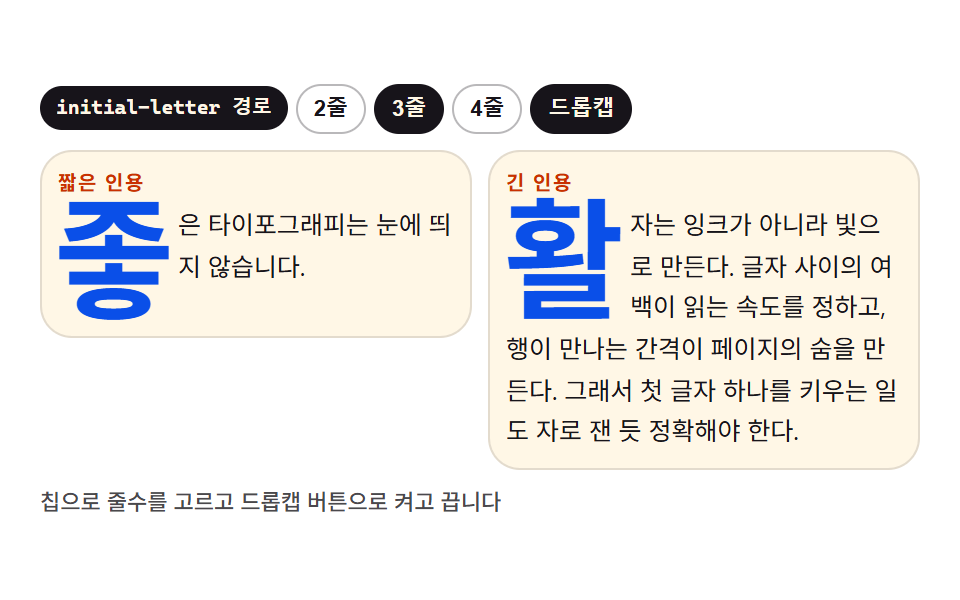
::first-letter is floated large to open the paragraph while browsers that understand initial-letter take that path instead, and a short quote and a long quote sit side by side for comparison.
Best forMagazine-style blog body dressing
::first-letterfloatinitial-letter
<main class="stage">
<div class="dq is-demo is-cap" id="dq">
  <div class="dq__bar">
    <span class="dq__badge" id="badge">float path</span>
    <div class="dq__sizes" role="group" aria-label="Drop cap line count">
      <button class="dq__size" type="button" data-lines="2" aria-pressed="false">2 lines</button>
      <button class="dq__size is-on" type="button" data-lines="3" aria-pressed="true">3 lines</button>
      <button class="dq__size" type="button" data-lines="4" aria-pressed="false">4 lines</button>
    </div>
    <button class="dq__cap" id="capBtn" type="button" aria-pressed="true">Drop cap</button>
  </div>
  <div class="dq__board">
    <article class="dq__card dq__card--short">
      <span class="dq__label">Short quote</span>
      <p class="dq__text">Good typography goes unseen.</p>
    </article>
    <article class="dq__card">
      <span class="dq__label">Long quote</span>
      <p class="dq__text">Type is made of light, not ink. The space between letters sets reading speed, the gap between lines gives the page its breath. That is why enlarging a single first letter must stay measured to the pixel.</p>
    </article>
  </div>
  <p class="dq__note">Pick the line count with chips and toggle the drop cap button</p>
</div>
</main>
@use "../../../../site/static/demo-tokens" as *;
// 드롭캡과 인용문 꾸미기 — ::first-letter 를 float 으로 띄워 첫 글자를 키우고,
// initial-letter 를 아는 브라우저에서는 @supports 안에서 그 경로로 넘어간다.
// 줄수는 --cap-lines 하나로 양쪽 경로가 같이 받는다: float 길은 calc(1.65em * 줄수),
// initial-letter 길은 initial-letter: 줄수. @property 에 숫자로 등록했으므로
// 미리보기 루프에서 2줄 → 3줄 → 4줄 로 부드럽게 자란다 (이산 컷이 아니다).
// 실측 2026-09-13: Chrome 152 는 initial-letter: var(--cap-lines) 를 그대로 계산한다.
$duration: $dur-base;
$easing: $ease-spring;
$color: $subject-ink;
$mono: ui-monospace, "Cascadia Mono", Consolas, "Courier New", monospace;
$chip-line: rgba(23, 20, 26, .30);
@property --cap-lines {
syntax: "<number>";
inherits: true;
initial-value: 3;
}
@include stage($stage-paper);
.dq {
--cap-lines: 3;
display: flex; flex-direction: column; gap: $sp-2;
box-sizing: border-box; width: min(100%, 440px);
}
// ── 도구 막대: 경로 배지 + 줄수 침 + 드롭캡 토글
.dq__bar { display: flex; flex-wrap: wrap; align-items: center; gap: $sp-1; }
.dq__badge {
padding: $sp-1 $sp-2; border-radius: $r-pill;
background: $color; color: $subject-cream;
font-family: $mono; font-weight: 700; font-size: 10px; line-height: 1.4;
}
.dq__sizes { display: flex; gap: $sp-1; }
.dq__size, .dq__cap {
flex: 0 0 auto; padding: $sp-1 $sp-2; border: 1px solid $chip-line; border-radius: $r-pill;
background: transparent; color: $subject-ink; cursor: pointer;
font-weight: 600; font-size: 11px; line-height: 1.4;
}
.dq__size.is-on, .dq__cap[aria-pressed="true"] {
background: $color; border-color: $color; color: $subject-cream;
}
.dq__size:focus-visible, .dq__cap:focus-visible { outline: 2px solid $subject-blue; outline-offset: 2px; }
// ── 견준 판: 짧은 인용과 긴 인용 두 벌
.dq__board { display: grid; grid-template-columns: 1fr 1fr; gap: $sp-2; align-items: start; }
.dq__card {
padding: $sp-2; border: 1px solid rgba(23, 20, 26, .12); border-radius: $r-card;
background: $subject-cream;
}
.dq__label { display: block; margin-bottom: $sp-1; color: $subject-orange-deep; font-weight: 700; font-size: 10px; line-height: 1.4; letter-spacing: .08em; }
.dq__text { margin: 0; color: $subject-ink; font-weight: 400; font-size: 12.5px; line-height: 1.65; }
// ── 드롭캡 두 경로. 기본은 float 길(모든 브라우저), 아는 브라우저는 initial-letter 길
.dq.is-cap .dq__text::first-letter {
float: left;
padding-right: $sp-1; padding-top: $sp-1;
line-height: .82;
font-weight: 700;
font-size: calc(1.65em * var(--cap-lines));
color: $subject-blue-deep;
}
@supports (initial-letter: 3) {
.dq.is-cap .dq__text::first-letter {
initial-letter: var(--cap-lines);
float: none;
padding-top: 0;
}
}
.dq__note { margin: 0; color: rgba(23, 20, 26, .78); font-weight: 500; font-size: 11px; line-height: 1.4; }
// ── 격자 미리보기 루프 (2초)
// 줄수가 2 → 3(30%) → 4(70%) 로 자랐다가 100% 에서 2 로 되돌아와 루프가 이어진다.
// 등록된 숫자 속성이라 매 프레임 보간된다 — 첫 글자와 그 주위로 다시 앉는 줄이 함께 움직인다.
.dq.is-demo {
animation-name: dqLines; animation-duration: $dur-loop; animation-timing-function: $easing;
animation-iteration-count: infinite;
}
@keyframes dqLines {
0% { --cap-lines: 2; }
30%, 40% { --cap-lines: 3; }
70%, 80% { --cap-lines: 4; }
100% { --cap-lines: 2; }
}
// ── 좁은 화면: 긴 인용 한 벌만 남기고 판을 한 줄로 펴 여백을 줄인다 (값을 올리지 않고 내린다)
@media (max-width: 340px) {
.dq { gap: $sp-1; }
.dq__board { grid-template-columns: 1fr; }
.dq__card--short, .dq__note { display: none; }
.dq__card { padding: $sp-1; }
.dq__text { font-size: 11px; }
}
@media (prefers-reduced-motion: reduce) {
.dq.is-demo {
animation: none !important;
}
}@property --cap-lines {
syntax: "<number>";
inherits: true;
initial-value: 3;
}
html, body {
margin: 0;
overflow: hidden;
}
.stage {
box-sizing: border-box;
min-height: 100vh;
display: grid;
place-items: center;
margin: 0;
background: #ffffff;
font-family: -apple-system, "Segoe UI", "Noto Sans KR", sans-serif;
padding: clamp(8px, 4vw, 24px);
}
.dq {
--cap-lines: 3;
display: flex;
flex-direction: column;
gap: 8px;
box-sizing: border-box;
width: min(100%, 440px);
}
.dq__bar {
display: flex;
flex-wrap: wrap;
align-items: center;
gap: 4px;
}
.dq__badge {
padding: 4px 8px;
border-radius: 999px;
background: #17141a;
color: #fff7e6;
font-family: ui-monospace, "Cascadia Mono", Consolas, "Courier New", monospace;
font-weight: 700;
font-size: 10px;
line-height: 1.4;
}
.dq__sizes {
display: flex;
gap: 4px;
}
.dq__size, .dq__cap {
flex: 0 0 auto;
padding: 4px 8px;
border: 1px solid rgba(23, 20, 26, 0.3);
border-radius: 999px;
background: transparent;
color: #17141a;
cursor: pointer;
font-weight: 600;
font-size: 11px;
line-height: 1.4;
}
.dq__size.is-on, .dq__cap[aria-pressed=true] {
background: #17141a;
border-color: #17141a;
color: #fff7e6;
}
.dq__size:focus-visible, .dq__cap:focus-visible {
outline: 2px solid #2f6df6;
outline-offset: 2px;
}
.dq__board {
display: grid;
grid-template-columns: 1fr 1fr;
gap: 8px;
align-items: start;
}
.dq__card {
padding: 8px;
border: 1px solid rgba(23, 20, 26, 0.12);
border-radius: 16px;
background: #fff7e6;
}
.dq__label {
display: block;
margin-bottom: 4px;
color: #c93000;
font-weight: 700;
font-size: 10px;
line-height: 1.4;
letter-spacing: 0.08em;
}
.dq__text {
margin: 0;
color: #17141a;
font-weight: 400;
font-size: 12.5px;
line-height: 1.65;
}
.dq.is-cap .dq__text::first-letter {
float: left;
padding-right: 4px;
padding-top: 4px;
line-height: 0.82;
font-weight: 700;
font-size: calc(1.65em * var(--cap-lines));
color: #0a4fe8;
}
@supports (initial-letter: 3) {
.dq.is-cap .dq__text::first-letter {
initial-letter: var(--cap-lines);
float: none;
padding-top: 0;
}
}
.dq__note {
margin: 0;
color: rgba(23, 20, 26, 0.78);
font-weight: 500;
font-size: 11px;
line-height: 1.4;
}
.dq.is-demo {
animation-name: dqLines;
animation-duration: 2s;
animation-timing-function: cubic-bezier(0.2, 0.8, 0.2, 1);
animation-iteration-count: infinite;
}
@keyframes dqLines {
0% {
--cap-lines: 2;
}
30%, 40% {
--cap-lines: 3;
}
70%, 80% {
--cap-lines: 4;
}
100% {
--cap-lines: 2;
}
}
@media (max-width: 340px) {
.dq {
gap: 4px;
}
.dq__board {
grid-template-columns: 1fr;
}
.dq__card--short, .dq__note {
display: none;
}
.dq__card {
padding: 4px;
}
.dq__text {
font-size: 11px;
}
}
@media (prefers-reduced-motion: reduce) {
.dq.is-demo {
animation: none !important;
}
}var dq = document.getElementById('dq');
var capBtn = document.getElementById('capBtn');
var badge = document.getElementById('badge');
// initial-letter 를 아는 브라우저는 그 경로로 넘어간다 — 배지가 어느 쪽인지 알려 준다
if (window.CSS && CSS.supports && CSS.supports('(initial-letter: 3)')) {
badge.textContent = 'initial-letter path';
}
capBtn.addEventListener('click', function () {
dq.classList.remove('is-demo');
var on = dq.classList.toggle('is-cap');
capBtn.setAttribute('aria-pressed', on ? 'true' : 'false');
});
var sizes = document.querySelectorAll('.dq__size');
for (var i = 0; i < sizes.length; i++) {
sizes[i].addEventListener('click', function () {
dq.classList.remove('is-demo');
dq.style.setProperty('--cap-lines', this.getAttribute('data-lines'));
for (var j = 0; j < sizes.length; j++) {
var on = sizes[j] === this;
sizes[j].classList.toggle('is-on', on);
sizes[j].setAttribute('aria-pressed', on ? 'true' : 'false');
}
});
}// DropcapQuote — vanilla 판(run/074/demo/08-dropcap-quote/index.html) 의 React 포트.
// ::first-letter 를 float 으로 띄우고 initial-letter 를 아는 브라우저에서는 @supports 경로로 넘어간다.
// 줄수는 --cap-lines 하나로 양쪽 경로가 같이 받는다 — @property 등록 덕에 부드럽게 보간된다.
import { useEffect, useState } from "react";
import type { CSSProperties } from "react";
import styles from "./DropcapQuote.module.scss";
export type DropcapQuoteProps = {
duration?: number;
easing?: string;
color?: string;
};
type Vars = CSSProperties & { "--duration"?: string; "--easing"?: string; "--color"?: string; "--cap-lines"?: number };
const BADGE_FALLBACK = "float 경로";
const BADGE_INITIAL = "initial-letter 경로";
const SIZES = [2, 3, 4] as const;
const SHORT_LABEL = "짧은 인용";
const LONG_LABEL = "긴 인용";
const SHORT_TEXT = "좋은 타이포그래피는 눈에 띄지 않습니다.";
const LONG_TEXT = "활자는 잉크가 아니라 빛으로 만든다. 글자 사이의 여백이 읽는 속도를 정하고, 행이 만나는 간격이 페이지의 숨을 만든다. 그래서 첫 글자 하나를 키우는 일도 자로 잰 듯 정확해야 한다.";
const NOTE = "칩으로 줄수를 고르고 드롭캡 버튼으로 켜고 끕니다";
const CAP_LABEL = "드롭캡";
const SIZES_ARIA = "드롭캡 줄수";
export default function DropcapQuote(props: DropcapQuoteProps) {
const duration = props.duration ?? 300;
const easing = props.easing ?? "cubic-bezier(.2, .8, .2, 1)";
const color = props.color ?? "#17141a";
const [preview, setPreview] = useState<boolean>(true);
const [cap, setCap] = useState<boolean>(true);
const [lines, setLines] = useState<number>(3);
const [badge, setBadge] = useState<string>(BADGE_FALLBACK);
useEffect(() => {
// initial-letter 를 아는 브라우저는 그 경로로 넘어간다 — 배지가 어느 쪽인지 알려 준다
if (typeof CSS !== "undefined" && CSS.supports && CSS.supports("(initial-letter: 3)")) {
setBadge(BADGE_INITIAL);
}
}, []);
const vars: Vars = {
"--duration": duration + "ms",
"--easing": easing,
"--color": color,
"--cap-lines": lines,
};
return (
<main className={styles.stage}>
<div
className={[styles.root, preview ? " " + styles.isDemo : "", cap ? " " + styles.isCap : ""].filter(Boolean).join("")}
style={vars}
>
<div className={styles.bar}>
<span className={styles.badge}>{badge}</span>
<div className={styles.sizes} role="group" aria-label={SIZES_ARIA}>
{SIZES.map((n) => (
<button
key={n}
className={styles.size + (lines === n ? " " + styles.ison : "")}
type="button"
data-lines={n}
aria-pressed={lines === n ? "true" : "false"}
onClick={() => { setPreview(false); setLines(n); }}
>
{n + "줄"}
</button>
))}
</div>
<button
className={styles.capBtn}
type="button"
aria-pressed={cap ? "true" : "false"}
onClick={() => { setPreview(false); setCap(!cap); }}
>
{CAP_LABEL}
</button>
</div>
<div className={styles.board}>
<article className={styles.card + " " + styles.cardShort}>
<span className={styles.label}>{SHORT_LABEL}</span>
<p className={styles.text}>{SHORT_TEXT}</p>
</article>
<article className={styles.card}>
<span className={styles.label}>{LONG_LABEL}</span>
<p className={styles.text}>{LONG_TEXT}</p>
</article>
</div>
<p className={styles.note}>{NOTE}</p>
</div>
</main>
);
}08 Drop cap and quote styling — Measured area 48.323% · moving frames 20/23Original by GODRICH · SCSS and React ship in the zip · CSS Typography Playground: 9 Demos, No Webfonts
The post this demo lives in
 CSS Typography Playground: 9 Demos, No Webfontscss typography is setting type with CSS: which family, how heavy, how far apart, how large. These nine playgrounds do al See all demos in this post
If you like this effect - similar demos
 base01 Squircle card — a superellipse exponent value flows between circle and square while the card's corner ridge changesCSS corner-shape: 9 Corner Cutting Patterns
 base01 Browser default reset — a starting point that unifies inconsistent spacing and list markersCSS Reset: 9 Patterns From Basics to Safe-Area
 Dashboard UI08 Falling Dots That Pile Into Bins and Become a HistogramBar Chart Animation: 9 Demos From Spring to Race