07Rangoli grid — weaving symmetric wreaths from dots
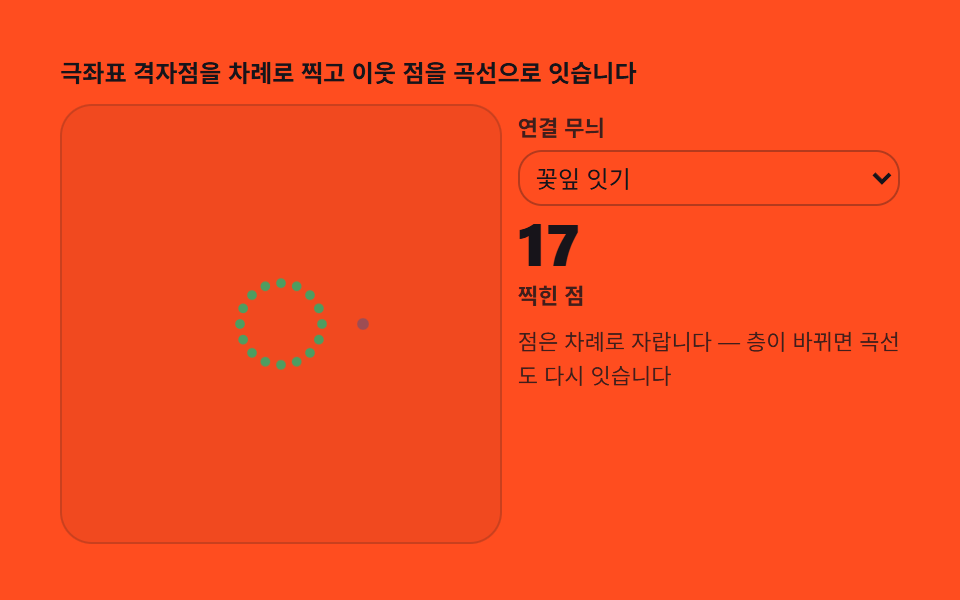
Dropping dots on a polar grid computes the full symmetric placement automatically. Curves connecting them settle into hand-drawn garland patterns.
Best forFestival graphics, color palette play
arcchange
<main class="stage">
<div class="kr" id="kr">
  <p class="kr__hint">Polar grid points are placed one by one, then neighbors are joined with curves</p>
  <div class="kr__row">
    <div class="kr__field" id="field" role="application" aria-label="Rangoli grid lab" tabindex="0">
      <canvas class="kr__cv" id="cv"></canvas>
    </div>
    <div class="kr__side">
      <label class="kr__lab" for="link">Link pattern</label>
      <select class="kr__sel" id="link" aria-label="Link pattern">
        <option value="0">Petal link</option>
        <option value="1">Zigzag</option>
        <option value="2">Star mesh</option>
      </select>
      <b class="kr__num" id="dots">0</b>
      <span class="kr__unit">dots placed</span>
      <p class="kr__meta">Dots grow ring by ring — a new layer relinks the curves</p>
    </div>
  </div>
</div>
</main>
@use "../../../../site/static/demo-tokens" as *;
// 랑골 격자(07) — rAF 캔버스 데모. 극좌표 격자 점을 하나씩 찍고 곡선으로 잇는다.
// 주황 무대 위 짙은 파스텔 점·선. select 변경(change)이 무늬 층을 갈아끼운다.
$duration: $dur-loop;
$easing: $ease-out;
$color: $subject-ink;
@include stage($stage-orange);
.kr {
--c1: #9d4d54; // 붉은기 파스텔 짙음 — 점
--c2: #854d9d; // 보라 파스텔 짙음 — 연결 곡선
--c3: #4d9d61; // 연두 파스텔 짙음 — 씨앗 점
--grid: #{rgba($subject-ink, .12)};
display: flex; flex-direction: column; gap: $sp-2;
width: 100%; max-width: 420px;
}
.kr__hint {
margin: 0; font-weight: 700; font-size: clamp(10px, 2.8vw, 12px); line-height: 1.35;
color: $subject-ink;
}
.kr__row { display: flex; gap: $sp-2; align-items: stretch; }
.kr__field {
position: relative; overflow: hidden;
flex: 0 0 auto;
width: clamp(176px, 46vw, 232px);
height: clamp(176px, 46vw, 232px);
border-radius: $r-card;
background: rgba($subject-ink, .06);
box-shadow: inset 0 0 0 1px rgba($subject-ink, .18);
cursor: crosshair; touch-action: none;
}
.kr__field:focus-visible { outline: 2px solid $color; outline-offset: 2px; }
.kr__cv { display: block; width: 100%; height: 100%; }
.kr__side {
flex: 1; min-width: 0;
display: flex; flex-direction: column; gap: $sp-1;
padding-top: $sp-1;
}
.kr__lab { font-weight: 600; font-size: clamp(9px, 2.4vw, 11px); line-height: 1.4; color: rgba($subject-ink, .82); }
.kr__sel {
width: 100%; margin: 0; padding: $sp-1;
font-family: inherit; font-size: clamp(10px, 2.6vw, 12px); line-height: 1.4;
color: $subject-ink;
background: transparent;
border: 1px solid rgba($subject-ink, .32); border-radius: $r-control;
}
.kr__sel:focus-visible { outline: 2px solid $color; outline-offset: 2px; }
.kr__num {
font-weight: 800; font-size: clamp(20px, 6vw, 30px); line-height: 1;
color: $subject-ink; font-variant-numeric: tabular-nums;
}
.kr__unit { font-weight: 600; font-size: clamp(9px, 2.4vw, 11px); line-height: 1.4; color: rgba($subject-ink, .82); }
.kr__meta { margin: $sp-1 0 0; font-size: clamp(9px, 2.4vw, 11px); line-height: 1.5; color: rgba($subject-ink, .82); }
@media (max-width: 340px) {
.kr { gap: $sp-1; }
.kr__field { width: 150px; height: 150px; }
.kr__num { font-size: 16px; }
.kr__meta { margin-top: 0; font-size: 8px; }
}
// reduce — 루프가 안 돈다. 완성 랑골 한 장이 남는다.
@media (prefers-reduced-motion: reduce) {
.kr.is-still .kr__field { cursor: default !important; }
.kr.is-still .kr__sel { pointer-events: none !important; }
}html, body {
margin: 0;
overflow: hidden;
}
.stage {
box-sizing: border-box;
min-height: 100vh;
display: grid;
place-items: center;
margin: 0;
background: #ff4d1f;
font-family: -apple-system, "Segoe UI", "Noto Sans KR", sans-serif;
padding: clamp(8px, 4vw, 24px);
}
.kr {
--c1: #9d4d54;
--c2: #854d9d;
--c3: #4d9d61;
--grid: rgba(23, 20, 26, 0.12);
display: flex;
flex-direction: column;
gap: 8px;
width: 100%;
max-width: 420px;
}
.kr__hint {
margin: 0;
font-weight: 700;
font-size: clamp(10px, 2.8vw, 12px);
line-height: 1.35;
color: #17141a;
}
.kr__row {
display: flex;
gap: 8px;
align-items: stretch;
}
.kr__field {
position: relative;
overflow: hidden;
flex: 0 0 auto;
width: clamp(176px, 46vw, 232px);
height: clamp(176px, 46vw, 232px);
border-radius: 16px;
background: rgba(23, 20, 26, 0.06);
box-shadow: inset 0 0 0 1px rgba(23, 20, 26, 0.18);
cursor: crosshair;
touch-action: none;
}
.kr__field:focus-visible {
outline: 2px solid #17141a;
outline-offset: 2px;
}
.kr__cv {
display: block;
width: 100%;
height: 100%;
}
.kr__side {
flex: 1;
min-width: 0;
display: flex;
flex-direction: column;
gap: 4px;
padding-top: 4px;
}
.kr__lab {
font-weight: 600;
font-size: clamp(9px, 2.4vw, 11px);
line-height: 1.4;
color: rgba(23, 20, 26, 0.82);
}
.kr__sel {
width: 100%;
margin: 0;
padding: 4px;
font-family: inherit;
font-size: clamp(10px, 2.6vw, 12px);
line-height: 1.4;
color: #17141a;
background: transparent;
border: 1px solid rgba(23, 20, 26, 0.32);
border-radius: 12px;
}
.kr__sel:focus-visible {
outline: 2px solid #17141a;
outline-offset: 2px;
}
.kr__num {
font-weight: 800;
font-size: clamp(20px, 6vw, 30px);
line-height: 1;
color: #17141a;
font-variant-numeric: tabular-nums;
}
.kr__unit {
font-weight: 600;
font-size: clamp(9px, 2.4vw, 11px);
line-height: 1.4;
color: rgba(23, 20, 26, 0.82);
}
.kr__meta {
margin: 4px 0 0;
font-size: clamp(9px, 2.4vw, 11px);
line-height: 1.5;
color: rgba(23, 20, 26, 0.82);
}
@media (max-width: 340px) {
.kr {
gap: 4px;
}
.kr__field {
width: 150px;
height: 150px;
}
.kr__num {
font-size: 16px;
}
.kr__meta {
margin-top: 0;
font-size: 8px;
}
}
@media (prefers-reduced-motion: reduce) {
.kr.is-still .kr__field {
cursor: default !important;
}
.kr.is-still .kr__sel {
pointer-events: none !important;
}
}// 랑골 격자 — 인도 랑골(바닥 그림)의 극좌표 점 배치를 재현한다. 링 r 개 × 스포크 N 개
// 격자점을 안쪽 링부터 바깥까지 나선 순서로 찍는다. 점을 다 찍은 뒤엔 이웃 링의 점을
// quadraticCurveTo 로 잇는 곡선 층을 올린다. 무늬(꽃잎·Zigzag·별그물)는 링 간
// 스포크 오프셋으로 만든다 — change 이벤트로 갈아끼운다.
(function () {
var root = document.getElementById('kr');
var field = document.getElementById('field');
var cv = document.getElementById('cv');
var link = document.getElementById('link');
var dots = document.getElementById('dots');
if (!root || !field || !cv || !link || !dots) return;
var ctx = cv.getContext('2d');
var css = getComputedStyle(root);
var C1 = css.getPropertyValue('--c1').trim();
var C2 = css.getPropertyValue('--c2').trim();
var C3 = css.getPropertyValue('--c3').trim();
var GRID = css.getPropertyValue('--grid').trim();
var N = 16; // 스포크 수
var RINGS = 4; // 링 수
var pattern = 0; // 0 꽃잎 · 1 Zigzag · 2 별그물
var W = 0, H = 0, dpr = 1, cx = 0, cy = 0, R = 0;
function fit() {
W = field.clientWidth; H = field.clientHeight;
dpr = Math.min(2, window.devicePixelRatio || 1);
cv.width = Math.round(W * dpr); cv.height = Math.round(H * dpr);
cx = W / 2; cy = H / 2; R = Math.min(W, H) / 2 - 8;
}
function pt(ring, k) {
var off = (pattern === 1 && ring % 2 === 1) ? 0.5 : 0; // 지그재그는 링마다 반 cells
var r = R * (ring + 1) / (RINGS + 1);
var a = (k + off) * 2 * Math.PI / N;
return [cx + r * Math.cos(a), cy + r * Math.sin(a)];
}
function drawDot(x, y, s, col) {
ctx.setTransform(dpr, 0, 0, dpr, 0, 0);
ctx.fillStyle = col;
ctx.beginPath(); ctx.arc(x, y, s, 0, 2 * Math.PI); ctx.fill();
}
// 곡선 연결 — 링 ring 과 ring+1 사이. 무늬별로 잇는 상대 스포크가 다르다
function drawLink(ring, k) {
var a0 = pt(ring, k), a1;
var step = pattern === 2 ? Math.round(N / 5) : (pattern === 1 ? 0.5 : (ring % 2 === 0 ? 1 : -1));
if (pattern === 1) {
a1 = pt(ring + 1, k + ((k % 2 === 0) ? 0.5 : -0.5));
} else {
a1 = pt(ring + 1, k + step);
}
ctx.setTransform(dpr, 0, 0, dpr, 0, 0);
ctx.strokeStyle = C2; ctx.lineWidth = 1.4;
ctx.beginPath();
ctx.moveTo(a0[0], a0[1]);
var mx = (a0[0] + a1[0]) / 2 + (a1[1] - a0[1]) * 0.35;
var my = (a0[1] + a1[1]) / 2 - (a1[0] - a0[0]) * 0.35;
ctx.quadraticCurveTo(mx, my, a1[0], a1[1]);
ctx.stroke();
}
// 격자 안내 — 옅은 링
function drawGrid() {
ctx.setTransform(dpr, 0, 0, dpr, 0, 0);
ctx.strokeStyle = GRID; ctx.lineWidth = 1;
for (var g = 1; g <= RINGS; g++) {
ctx.beginPath(); ctx.arc(cx, cy, R * g / (RINGS + 1), 0, 2 * Math.PI); ctx.stroke();
}
}
var reduce = window.matchMedia('(prefers-reduced-motion: reduce)').matches;
var total = RINGS * N;
var t = 0, last = 0, fired = 0, phase2 = false, linked = 0;
link.addEventListener('change', function () {
pattern = parseInt(link.value, 10) || 0;
redrawAll();
});
function redrawAll() {
ctx.setTransform(dpr, 0, 0, dpr, 0, 0);
ctx.clearRect(0, 0, W, H);
drawGrid();
for (var i = 0; i < fired; i++) placeDot(i);
for (var j = 0; j < linked; j++) placeLink(j);
}
function placeDot(i) {
var ring = Math.floor(i / N), k = i % N;
var p = pt(ring, k);
drawDot(p[0], p[1], 2.4 + ring * 0.5, ring === 0 ? C3 : C1);
}
function placeLink(j) {
var ring = Math.floor(j / N), k = j % N;
if (ring < RINGS - 1) drawLink(ring, k);
}
function step(now) {
var dt = Math.min(64, now - last) / 1000; last = now;
t += dt;
if (!phase2) {
var want = Math.min(total, Math.floor(t / 0.045)); // 점 성상 속도
while (fired < want) { placeDot(fired); fired += 1; }
dots.textContent = String(fired);
if (fired >= total) phase2 = true;
} else {
var want2 = Math.floor((t - total * 0.045) / 0.06); // 곡선 연결 속도
while (linked < Math.min(want2, (RINGS - 1) * N)) { placeLink(linked); linked += 1; }
if (linked >= (RINGS - 1) * N) {
// 한 바퀴 끝 — 2초 쉬고 다음 무늬로
t = -2; fired = 0; linked = 0; phase2 = false;
pattern = (pattern + 1) % 3;
link.value = String(pattern);
ctx.setTransform(dpr, 0, 0, dpr, 0, 0);
ctx.clearRect(0, 0, W, H);
drawGrid();
dots.textContent = '0';
}
}
requestAnimationFrame(step);
}
fit();
window.addEventListener('resize', fit);
if (reduce) {
// 정지 한 장 — 점·곡선 전부 완성된 랑골
for (var i2 = 0; i2 < total; i2++) placeDot(i2);
for (var j2 = 0; j2 < (RINGS - 1) * N; j2++) placeLink(j2);
dots.textContent = String(total);
root.classList.add('is-still');
} else {
last = performance.now();
requestAnimationFrame(step);
}
})();// KaleidoRangoliDotGrid — vanilla 판(run/331/demo/07-kaleido-rangoli-dot-grid/index.html) 의 React 포트.
// 인도 랑골(바닥 그림)의 극좌표 점 배치를 재현한다. 링 r 개 × 스포크 N 개 격자점을
// 안쪽 링부터 바깥까지 나선 순서로 찍는다. 점을 다 찍은 뒤엔 이웃 링의 점을
// quadraticCurveTo 로 잇는 곡선 층을 올린다. 무늬(꽃잎·지그재그·별그물)는 링 간
// 스포크 오프셋으로 만든다 — change 이벤트로 갈아끼운다. 값·수치는 vanilla 와 같다.
// 움직임은 전부 캔버스 rAF 루프가 그리므로 CSS 애니메이션이 없다.
// reduce 에서는 루프를 돌리지 않고 점·곡선 전부 완성된 한 장만 남긴다(.isStill).
import { useEffect, useRef, useState } from "react";
import type { CSSProperties } from "react";
import styles from "./KaleidoRangoliDotGrid.module.scss";
export type KaleidoRangoliDotGridProps = {
duration?: string;
easing?: string;
color?: string;
};
type Vars = CSSProperties & { "--duration"?: string; "--easing"?: string; "--color"?: string };
// useRef 는 T | null 을 돌려준다. 처음부터 값이 있고 절대 비지 않는 상자는 이렇게 좁혀 쓴다
type Box<T> = { current: T };
const N = 16; // 스포크 수
const RINGS = 4; // 링 수
const C1 = "#9d4d54"; // 붉은기 파스텔 짙음 — 점
const C2 = "#854d9d"; // 보라 파스텔 짙음 — 연결 곡선
const C3 = "#4d9d61"; // 연두 파스텔 짙음 — 씨앗 점
const GRID = "rgba(23, 20, 26, 0.12)"; // 옅은 링 안내선
const HINT = "극좌표 격자점을 차례로 찍고 이웃 점을 곡선으로 잇습니다";
const ARIA_FIELD = "랑골 격자 실험판";
const LINK_LABEL = "연결 무늬";
const PATTERNS = ["꽃잎 잇기", "지그재그", "별 그물"];
const LINK_ARIA = "연결 무늬";
const DOTS_UNIT = "찍힌 점";
const GROW_TEXT = "점은 차례로 자랍니다 — 층이 바뀌면 곡선도 다시 잇습니다";
export default function KaleidoRangoliDotGrid({
duration = "2s",
easing = "ease-out",
color = "#17141a"
}: KaleidoRangoliDotGridProps) {
const fieldRef = useRef<HTMLDivElement | null>(null);
const cvRef = useRef<HTMLCanvasElement | null>(null);
const selRef = useRef<HTMLSelectElement | null>(null);
const dotsRef = useRef<HTMLSpanElement | null>(null);
const ctxRef = useRef<CanvasRenderingContext2D | null>(null);
const stRef = useRef({
W: 0, H: 0, dpr: 1, cx: 0, cy: 0, R: 0,
pattern: 0, t: 0, fired: 0, phase2: false, linked: 0
}) as Box<{
W: number; H: number; dpr: number; cx: number; cy: number; R: number;
pattern: number; t: number; fired: number; phase2: boolean; linked: number;
}>;
const lastRef = useRef(0) as Box<number>;
const rafRef = useRef(0) as Box<number>;
const [still, setStill] = useState(false);
const total = RINGS * N;
function reduced(): boolean {
return window.matchMedia("(prefers-reduced-motion: reduce)").matches;
}
function fit(): void {
const st = stRef.current;
const field = fieldRef.current, cv = cvRef.current;
if (!field || !cv) return;
const ctx = cv.getContext("2d");
if (!ctx) return;
st.W = field.clientWidth; st.H = field.clientHeight;
st.dpr = Math.min(2, window.devicePixelRatio || 1);
cv.width = Math.round(st.W * st.dpr); cv.height = Math.round(st.H * st.dpr);
st.cx = st.W / 2; st.cy = st.H / 2; st.R = Math.min(st.W, st.H) / 2 - 8;
ctxRef.current = ctx;
}
function pt(ring: number, k: number): [number, number] {
const st = stRef.current;
const off = (st.pattern === 1 && ring % 2 === 1) ? 0.5 : 0; // 지그재그는 링마다 반 칸
const r = st.R * (ring + 1) / (RINGS + 1);
const a = (k + off) * 2 * Math.PI / N;
return [st.cx + r * Math.cos(a), st.cy + r * Math.sin(a)];
}
function drawDot(x: number, y: number, s: number, col: string): void {
const st = stRef.current;
const ctx = ctxRef.current;
if (!ctx) return;
ctx.setTransform(st.dpr, 0, 0, st.dpr, 0, 0);
ctx.fillStyle = col;
ctx.beginPath(); ctx.arc(x, y, s, 0, 2 * Math.PI); ctx.fill();
}
// 곡선 연결 — 링 ring 과 ring+1 사이. 무늬별로 잇는 상대 스포크가 다르다
function drawLink(ring: number, k: number): void {
const st = stRef.current;
const ctx = ctxRef.current;
if (!ctx) return;
const a0 = pt(ring, k);
const step = st.pattern === 2 ? Math.round(N / 5) : (st.pattern === 1 ? 0.5 : (ring % 2 === 0 ? 1 : -1));
let a1: [number, number];
if (st.pattern === 1) {
a1 = pt(ring + 1, k + ((k % 2 === 0) ? 0.5 : -0.5));
} else {
a1 = pt(ring + 1, k + step);
}
ctx.setTransform(st.dpr, 0, 0, st.dpr, 0, 0);
ctx.strokeStyle = C2; ctx.lineWidth = 1.4;
ctx.beginPath();
ctx.moveTo(a0[0], a0[1]);
const mx = (a0[0] + a1[0]) / 2 + (a1[1] - a0[1]) * 0.35;
const my = (a0[1] + a1[1]) / 2 - (a1[0] - a0[0]) * 0.35;
ctx.quadraticCurveTo(mx, my, a1[0], a1[1]);
ctx.stroke();
}
// 격자 안내 — 옅은 링
function drawGrid(): void {
const st = stRef.current;
const ctx = ctxRef.current;
if (!ctx) return;
ctx.setTransform(st.dpr, 0, 0, st.dpr, 0, 0);
ctx.strokeStyle = GRID; ctx.lineWidth = 1;
for (let g = 1; g <= RINGS; g++) {
ctx.beginPath(); ctx.arc(st.cx, st.cy, st.R * g / (RINGS + 1), 0, 2 * Math.PI); ctx.stroke();
}
}
function redrawAll(): void {
const st = stRef.current;
const ctx = ctxRef.current;
if (!ctx) return;
ctx.setTransform(st.dpr, 0, 0, st.dpr, 0, 0);
ctx.clearRect(0, 0, st.W, st.H);
drawGrid();
for (let i = 0; i < st.fired; i++) placeDot(i);
for (let j = 0; j < st.linked; j++) placeLink(j);
}
function placeDot(i: number): void {
const ring = Math.floor(i / N), k = i % N;
const p = pt(ring, k);
drawDot(p[0], p[1], 2.4 + ring * 0.5, ring === 0 ? C3 : C1);
}
function placeLink(j: number): void {
const ring = Math.floor(j / N), k = j % N;
if (ring < RINGS - 1) drawLink(ring, k);
}
function step(now: number): void {
const st = stRef.current;
const dt = Math.min(64, now - lastRef.current) / 1000; lastRef.current = now;
st.t += dt;
const out = dotsRef.current;
if (!st.phase2) {
const want = Math.min(total, Math.floor(st.t / 0.045)); // 점 성상 속도
while (st.fired < want) { placeDot(st.fired); st.fired += 1; }
if (out) out.textContent = String(st.fired);
if (st.fired >= total) st.phase2 = true;
} else {
const want2 = Math.floor((st.t - total * 0.045) / 0.06); // 곡선 연결 속도
while (st.linked < Math.min(want2, (RINGS - 1) * N)) { placeLink(st.linked); st.linked += 1; }
if (st.linked >= (RINGS - 1) * N) {
// 한 바퀴 끝 — 2초 쉬고 다음 무늬로
st.t = -2; st.fired = 0; st.linked = 0; st.phase2 = false;
st.pattern = (st.pattern + 1) % 3;
const sel = selRef.current;
if (sel) sel.value = String(st.pattern);
const ctx = ctxRef.current;
if (ctx) {
ctx.setTransform(st.dpr, 0, 0, st.dpr, 0, 0);
ctx.clearRect(0, 0, st.W, st.H);
}
drawGrid();
if (out) out.textContent = "0";
}
}
rafRef.current = requestAnimationFrame(step);
}
function onSelectChange(): void {
const st = stRef.current;
const sel = selRef.current;
if (!sel) return;
st.pattern = parseInt(sel.value, 10) || 0;
redrawAll();
}
useEffect(() => {
fit();
function onResize(): void { fit(); }
window.addEventListener("resize", onResize);
if (reduced()) {
// 정지 한 장 — 점·곡선 전부 완성된 랑골
for (let i = 0; i < total; i++) placeDot(i);
for (let j = 0; j < (RINGS - 1) * N; j++) placeLink(j);
const out = dotsRef.current;
if (out) out.textContent = String(total);
setStill(true);
} else {
lastRef.current = performance.now();
rafRef.current = requestAnimationFrame(step);
}
return () => {
window.removeEventListener("resize", onResize);
cancelAnimationFrame(rafRef.current);
};
// eslint-disable-next-line react-hooks/exhaustive-deps
}, []);
const rootCls = still ? styles.kr + " " + styles.isStill : styles.kr;
return (
<main className={styles.stage}>
<div className={rootCls} style={{ "--duration": duration, "--easing": easing, "--color": color } as Vars}>
<p className={styles.hint}>{HINT}</p>
<div className={styles.row}>
<div
className={styles.field}
ref={fieldRef}
role="application"
aria-label={ARIA_FIELD}
tabIndex={0}
>
<canvas className={styles.cv} ref={cvRef}></canvas>
</div>
<div className={styles.side}>
<label className={styles.lab} htmlFor="link">{LINK_LABEL}</label>
<select className={styles.sel} id="link" ref={selRef} aria-label={LINK_ARIA} defaultValue="0" onChange={onSelectChange}>
<option value="0">{PATTERNS[0]}</option>
<option value="1">{PATTERNS[1]}</option>
<option value="2">{PATTERNS[2]}</option>
</select>
<b className={styles.num}><span ref={dotsRef}>0</span></b>
<span className={styles.unit}>{DOTS_UNIT}</span>
<p className={styles.meta}>{GROW_TEXT}</p>
</div>
</div>
</div>
</main>
);
}07 Rangoli grid — weaving symmetric wreaths from dots — Measured area 2.192% · moving frames 23/23Original by GODRICH · SCSS and React ship in the zip · Kaleidoscope Drawing: 9 Canvas Symmetry Tools
The post this demo lives in
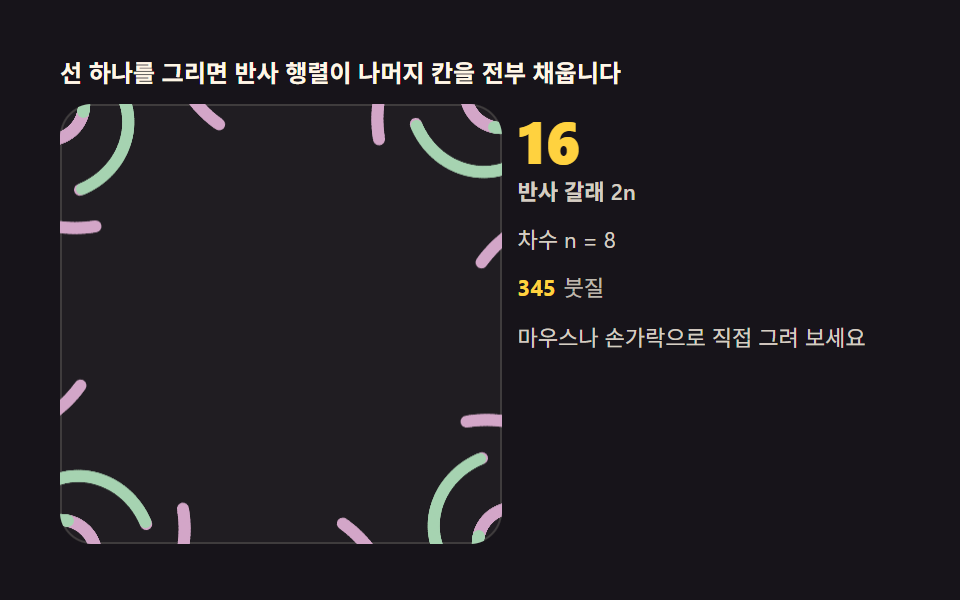 Kaleidoscope Drawing: 9 Canvas Symmetry ToolsDraw one stroke and reflection matrices fill every remaining wedge. Mirror angle, symmetry order and hue cycling are you See all demos in this post
If you like this effect - similar demos
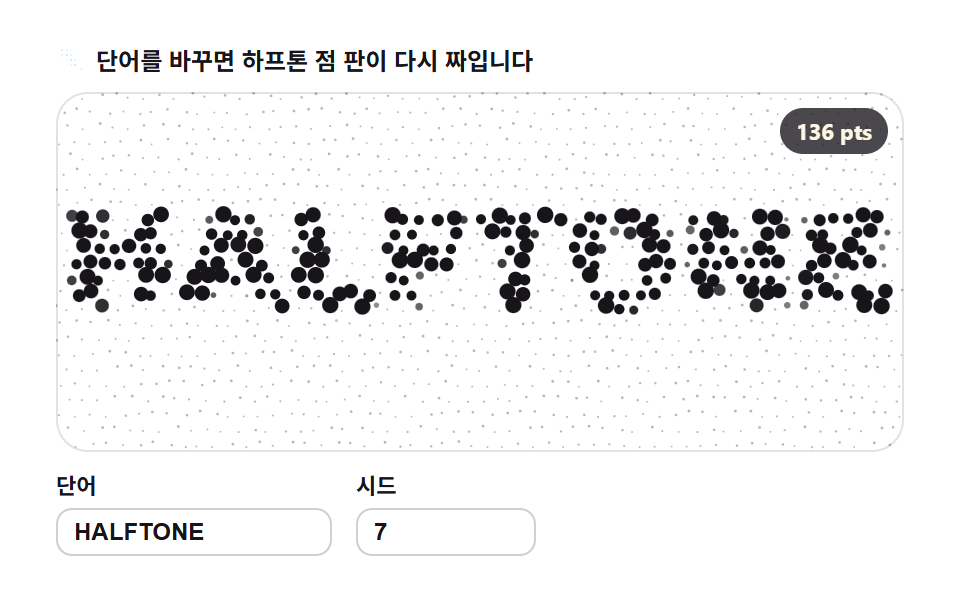 Creative UI02 Grid dot halftone — letters made of sample spacing9 Text Particle Effect CSS Ideas From Pixels
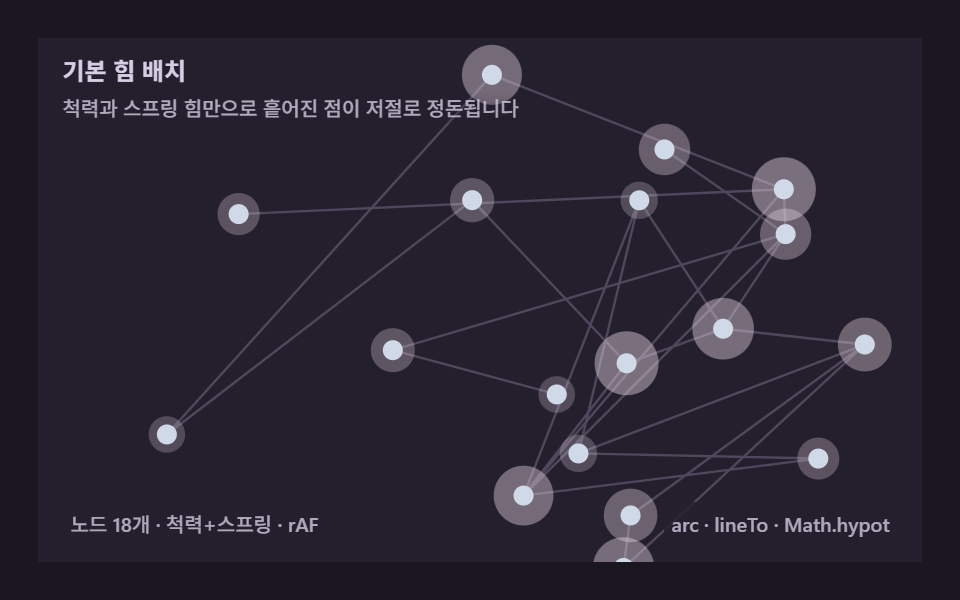 Creative UI01 Basic force layout — repulsion and springs alone tidy scattered dotsForce Directed Graph: 9 Network Layout Demos
 Creative UI07 Scattered Dots Bleeding and Stretching Into Mottled SpecklesMarble Effect CSS: 9 Ink, Comb and Agate Patterns