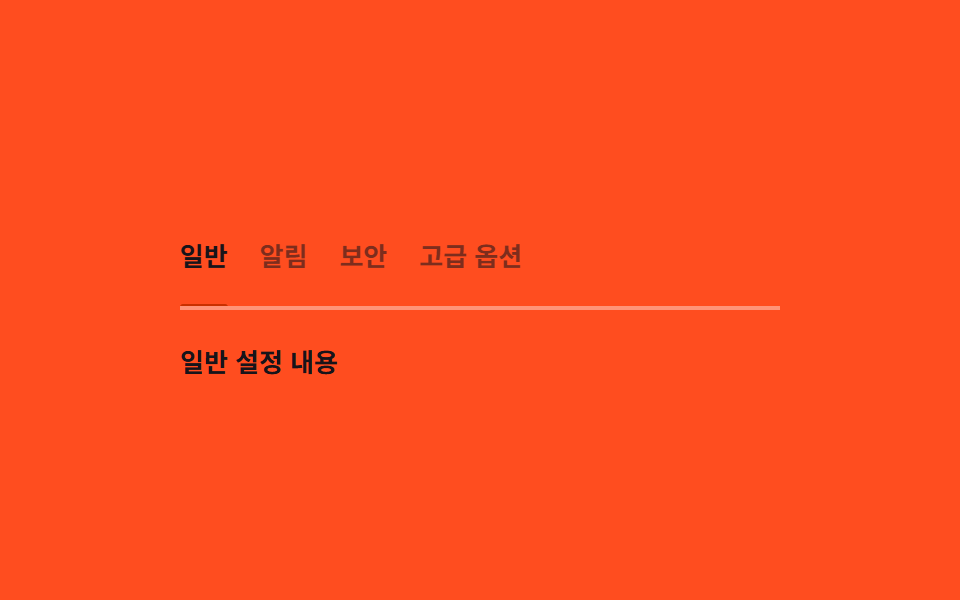
03Keyboard tabs — a tab list recomputing its underline position from the active value
Once the arrow keys change the active tab, that tab's horizontal position and width are recomputed and the underline moves to those values, while a tab sitting off-screen shifts the list sideways by that same amount.
Best forCategory tabs in a settings screen, a top tab menu in a dashboard
getBoundingClientRect--x--w
<main class="stage">
<div class="tk is-demo" id="tk">
  <div class="tk__tabs" id="tkTabs" role="tablist" aria-label="Settings category">
    <div class="tk__underline" id="tkUnderline" aria-hidden="true"></div>
    <button class="tk__tab" role="tab" data-t type="button" tabindex="0" aria-selected="true">General</button>
    <button class="tk__tab" role="tab" data-t type="button" tabindex="-1" aria-selected="false">Notifications</button>
    <button class="tk__tab" role="tab" data-t type="button" tabindex="-1" aria-selected="false">Security</button>
    <button class="tk__tab" role="tab" data-t type="button" tabindex="-1" aria-selected="false">Advanced options</button>
  </div>
  <p class="tk__panel" id="tkPanel">General settings content</p>
</div>
</main>
@use "../../../../site/static/demo-tokens" as *;
// 키보드 탭 — 밑줄은 --x·--w(getBoundingClientRect 실측 px) 로만 움직인다.
// 화면 밖 탭은 JS 가 스크롤 값을 같은 실측으로 계산해 컨테이너를 움직인다.
$duration: $dur-enter;
$easing: $ease-spring;
$color: $subject-orange-deep;
@include stage($stage-orange);
.tk {
width: min(100%, 300px);
display: flex;
flex-direction: column;
gap: $sp-4;
}
.tk__tabs {
position: relative;
display: flex;
gap: $sp-4;
overflow-x: auto;
scrollbar-width: none;
padding-bottom: $sp-2;
border-bottom: 2px solid rgba(255, 255, 255, .4);
}
.tk__tabs::-webkit-scrollbar { display: none; }
.tk__underline {
position: absolute;
left: 0;
bottom: -2px;
height: 3px;
border-radius: $r-xs;
background: $color;
transform: translateX(var(--x, 0px));
width: var(--w, 40px);
transition: transform $duration $easing, width $duration $easing;
}
.tk__tab {
flex: 0 0 auto;
border: 0;
background: transparent;
padding: $sp-2 0;
font-family: inherit;
font-weight: 700;
font-size: 13px;
white-space: nowrap;
color: rgba(23, 20, 26, .56);
cursor: pointer;
}
.tk__tab[aria-selected="true"] { color: $subject-ink; }
.tk__tab:focus-visible { outline: 2px solid $subject-ink; outline-offset: 2px; }
.tk__panel {
margin: 0;
font-weight: 600;
font-size: 13px;
color: $subject-ink;
}
@media (max-width: 340px) {
.tk__tabs { gap: $sp-3; }
}
@media (prefers-reduced-motion: reduce) {
.tk__underline { transition: none !important; }
}html, body {
margin: 0;
overflow: hidden;
}
.stage {
box-sizing: border-box;
min-height: 100vh;
display: grid;
place-items: center;
margin: 0;
background: #ff4d1f;
font-family: -apple-system, "Segoe UI", "Noto Sans KR", sans-serif;
padding: clamp(8px, 4vw, 24px);
}
.tk {
width: min(100%, 300px);
display: flex;
flex-direction: column;
gap: 16px;
}
.tk__tabs {
position: relative;
display: flex;
gap: 16px;
overflow-x: auto;
scrollbar-width: none;
padding-bottom: 8px;
border-bottom: 2px solid rgba(255, 255, 255, 0.4);
}
.tk__tabs::-webkit-scrollbar {
display: none;
}
.tk__underline {
position: absolute;
left: 0;
bottom: -2px;
height: 3px;
border-radius: 4px;
background: #c93000;
transform: translateX(var(--x, 0px));
width: var(--w, 40px);
transition: transform 600ms cubic-bezier(0.2, 0.8, 0.2, 1), width 600ms cubic-bezier(0.2, 0.8, 0.2, 1);
}
.tk__tab {
flex: 0 0 auto;
border: 0;
background: transparent;
padding: 8px 0;
font-family: inherit;
font-weight: 700;
font-size: 13px;
white-space: nowrap;
color: rgba(23, 20, 26, 0.56);
cursor: pointer;
}
.tk__tab[aria-selected=true] {
color: #17141a;
}
.tk__tab:focus-visible {
outline: 2px solid #17141a;
outline-offset: 2px;
}
.tk__panel {
margin: 0;
font-weight: 600;
font-size: 13px;
color: #17141a;
}
@media (max-width: 340px) {
.tk__tabs {
gap: 12px;
}
}
@media (prefers-reduced-motion: reduce) {
.tk__underline {
transition: none !important;
}
}(function () {
var root = document.getElementById('tk');
var tabsEl = document.getElementById('tkTabs');
var underline = document.getElementById('tkUnderline');
var panel = document.getElementById('tkPanel');
var tabs = Array.prototype.slice.call(document.querySelectorAll('[data-t]'));
var TEXTS = ['General settings content', 'Notification settings content', 'Security settings content', 'Advanced options content'];
var index = 0;
var autoplay = null;
// 계산 겹: 탭이 바뀔 때마다 그 탭의 실제 렌더 위치·폭을 getBoundingClientRect 로 다시 재서
// 밑줄 이동 값을 만들고, 탭이 컨테이너 밖에 있으면 스크롤 값도 같은 실측으로 계산한다.
function place(i) {
var tab = tabs[i];
var containerRect = tabsEl.getBoundingClientRect();
var rect = tab.getBoundingClientRect();
var x = rect.left - containerRect.left + tabsEl.scrollLeft;
var w = rect.width;
underline.style.setProperty('--x', x.toFixed(1) + 'px');
underline.style.setProperty('--w', w.toFixed(1) + 'px');
var left = x;
var right = x + w;
if (left < tabsEl.scrollLeft) { tabsEl.scrollLeft = left; }
else if (right > tabsEl.scrollLeft + tabsEl.clientWidth) { tabsEl.scrollLeft = right - tabsEl.clientWidth; }
}
function select(i) {
var len = tabs.length;
index = ((i % len) + len) % len;
tabs.forEach(function (t, k) {
t.setAttribute('aria-selected', k === index ? 'true' : 'false');
t.setAttribute('tabindex', k === index ? '0' : '-1');
});
panel.textContent = TEXTS[index];
place(index);
}
tabs.forEach(function (t, i) {
t.addEventListener('click', function () {
root.classList.remove('is-demo');
stopAutoplay();
select(i);
t.focus({ preventScroll: true });
});
});
tabsEl.addEventListener('keydown', function (e) {
if (e.key !== 'ArrowRight' && e.key !== 'ArrowLeft' && e.key !== 'Home' && e.key !== 'End') { return; }
e.preventDefault();
root.classList.remove('is-demo');
stopAutoplay();
if (e.key === 'ArrowRight') { select(index + 1); }
if (e.key === 'ArrowLeft') { select(index - 1); }
if (e.key === 'Home') { select(0); }
if (e.key === 'End') { select(tabs.length - 1); }
tabs[index].focus({ preventScroll: true });
});
function stopAutoplay() {
if (autoplay) { clearInterval(autoplay); autoplay = null; }
}
select(0);
var reduce = window.matchMedia('(prefers-reduced-motion: reduce)').matches;
if (!reduce) {
autoplay = setInterval(function () { select(index + 1); }, 480);
}
})();import { useEffect, useRef, useState } from "react";
import styles from "./TabsKeyboard.module.scss";
// 키보드 탭 — 탭이 바뀔 때마다 실제 렌더 위치·폭을 getBoundingClientRect 로 다시 재서 밑줄 이동 값을 만든다.
// 계산 겹: 화면 밖 탭은 같은 실측으로 스크롤 값도 계산한다. 실사용 click/keydown 리스너 있음.
const LABELS = ["일반", "알림", "보안", "고급 옵션"];
const TEXTS = ["일반 설정 내용", "알림 설정 내용", "보안 설정 내용", "고급 옵션 내용"];
export default function TabsKeyboard() {
const rootRef = useRef<HTMLDivElement>(null);
const tabsElRef = useRef<HTMLDivElement>(null);
const underlineRef = useRef<HTMLDivElement>(null);
const tabRefs = useRef<(HTMLButtonElement | null)[]>([]);
const [index, setIndexState] = useState(0);
const indexRef = useRef(0);
const autoplayRef = useRef<number | null>(null);
function place(i: number) {
const tabsEl = tabsElRef.current;
const underline = underlineRef.current;
const tab = (tabRefs.current ?? [])[i];
if (!tabsEl || !underline || !tab) return;
const containerRect = tabsEl.getBoundingClientRect();
const rect = tab.getBoundingClientRect();
const x = rect.left - containerRect.left + tabsEl.scrollLeft;
const w = rect.width;
underline.style.setProperty("--x", x.toFixed(1) + "px");
underline.style.setProperty("--w", w.toFixed(1) + "px");
const left = x;
const right = x + w;
if (left < tabsEl.scrollLeft) { tabsEl.scrollLeft = left; }
else if (right > tabsEl.scrollLeft + tabsEl.clientWidth) { tabsEl.scrollLeft = right - tabsEl.clientWidth; }
}
function select(i: number) {
const len = LABELS.length;
const next = ((i % len) + len) % len;
indexRef.current = next;
setIndexState(next);
window.setTimeout(() => place(next), 0);
}
function stopAutoplay() {
if (autoplayRef.current) {
window.clearInterval(autoplayRef.current);
autoplayRef.current = null;
}
}
useEffect(() => {
place(0);
const reduce = window.matchMedia("(prefers-reduced-motion: reduce)").matches;
if (!reduce) {
autoplayRef.current = window.setInterval(() => select((indexRef.current ?? 0) + 1), 480);
}
return () => stopAutoplay();
// eslint-disable-next-line react-hooks/exhaustive-deps
}, []);
function onKeyDown(e: KeyboardEvent) {
if (e.key !== "ArrowRight" && e.key !== "ArrowLeft" && e.key !== "Home" && e.key !== "End") return;
e.preventDefault();
rootRef.current?.classList.remove(styles["is-demo"]);
stopAutoplay();
if (e.key === "ArrowRight") select((indexRef.current ?? 0) + 1);
if (e.key === "ArrowLeft") select((indexRef.current ?? 0) - 1);
if (e.key === "Home") select(0);
if (e.key === "End") select(LABELS.length - 1);
(tabRefs.current ?? [])[indexRef.current ?? 0]?.focus({ preventScroll: true });
}
return (
<main className={styles.stage}>
<div ref={rootRef} className={`${styles.tk} ${styles["is-demo"]}`}>
<div ref={tabsElRef} className={styles.tk__tabs} role="tablist" aria-label="설정 카테고리" onKeyDown={onKeyDown}>
<div ref={underlineRef} className={styles.tk__underline} aria-hidden="true" />
{LABELS.map((label, i) => (
<button
key={label}
ref={(el: HTMLButtonElement | null) => { if (tabRefs.current) tabRefs.current[i] = el; }}
className={styles.tk__tab}
role="tab"
type="button"
tabIndex={i === index ? 0 : -1}
aria-selected={i === index}
onClick={() => {
rootRef.current?.classList.remove(styles["is-demo"]);
stopAutoplay();
select(i);
(tabRefs.current ?? [])[i]?.focus({ preventScroll: true });
}}
>
{label}
</button>
))}
</div>
<p className={styles.tk__panel}>{TEXTS[index]}</p>
</div>
</main>
);
}03 Keyboard tabs — a tab list recomputing its underline position from the active value — Measured area 0.953% · moving frames 8/23Original by GODRICH · SCSS and React ship in the zip · Micro Interactions: 9 Essential UI Patterns
The post this demo lives in
 Micro Interactions: 9 Essential UI PatternsMicro interactions: One toast recomputes its dismiss time from its stack order; one compares each heading's viewport ove See all demos in this post
If you like this effect - similar demos
 Interactions03 Fallback selection — a card that leaves a manual path when the fast one fails9 Copy Button CSS UI Patterns (Copy to Clipboard)
 Interactions06 Nav cursor effect — a sliding pillMouse Follow Effect CSS — 9 Cursor Chasers
 Interactions07 The room diorama — a finished scene assembled from 01-04Isometric CSS: 9 True-Projection 3D Dioramas