04Swipe tab switcher
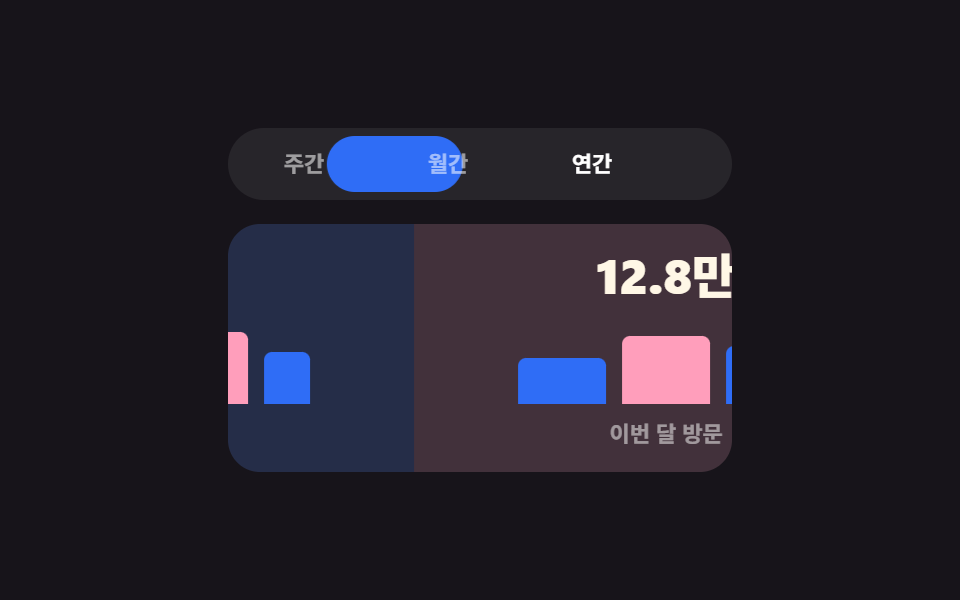
The panel follows the finger delta live, then on release either commits or returns based on remaining distance and speed, while the tab pills and arrow keys select the same panels.
Best forMobile stat screens (weekly, monthly, yearly) where flipping between views should feel like one stack
translateXthresholdroving tabindex
<main class="stage">
  <div class="wt is-demo" id="wt-root">
    <div class="wt__tabs" role="tablist" aria-label="Stats period">
      <span class="wt__pill" id="wt-pill" aria-hidden="true"></span>
      <button class="wt__tab is-on" type="button" role="tab" id="wt-t0" aria-selected="true" aria-controls="wt-p0">Weekly</button>
      <button class="wt__tab" type="button" role="tab" id="wt-t1" aria-selected="false" aria-controls="wt-p1" tabindex="-1">Monthly</button>
      <button class="wt__tab" type="button" role="tab" id="wt-t2" aria-selected="false" aria-controls="wt-p2" tabindex="-1">Yearly</button>
    </div>
    <div class="wt__view" id="wt-view">
      <div class="wt__track" id="wt-track">
        <section class="wt__panel" role="tabpanel" id="wt-p0" aria-labelledby="wt-t0">
          <strong class="wt__num">32K</strong>
          <div class="wt__bars"><i style="height:34%"></i><i style="height:64%"></i><i style="height:48%"></i><i style="height:82%"></i><i style="height:58%"></i></div>
          <span class="wt__cap">Visits this week</span>
        </section>
        <section class="wt__panel" role="tabpanel" id="wt-p1" aria-labelledby="wt-t1">
          <strong class="wt__num">128K</strong>
          <div class="wt__bars"><i style="height:52%"></i><i style="height:78%"></i><i style="height:66%"></i></div>
          <span class="wt__cap">Visits this month</span>
        </section>
        <section class="wt__panel" role="tabpanel" id="wt-p2" aria-labelledby="wt-t2">
          <strong class="wt__num">1.48M</strong>
          <div class="wt__bars"><i style="height:40%"></i><i style="height:88%"></i><i style="height:60%"></i><i style="height:74%"></i></div>
          <span class="wt__cap">Visits this year</span>
        </section>
      </div>
    </div>
  </div>
</main>@use "../../../../site/static/demo-tokens" as *;
$duration: $dur-base;
$easing: $ease-spring;
$color: $subject-blue;
@include stage($stage-ink);
.wt { width: min(252px, 86vw); }
.wt__tabs {
position: relative;
display: flex;
gap: $sp-1;
padding: $sp-1;
background: rgba(255, 255, 255, .07);
border-radius: $r-pill;
}
.wt__pill {
position: absolute;
top: $sp-1;
left: $sp-1;
width: 68px;
height: 28px;
background: $color;
border-radius: $r-pill;
transform: translateX(0);
transition: transform $duration $easing;
}
.wt__tab {
position: relative;
z-index: 1;
flex: 0 0 auto;
box-sizing: border-box;
width: 68px;
height: 28px;
padding: 0;
border: 0;
background: none;
border-radius: $r-pill;
font-family: inherit;
font-size: 11px; line-height: 28px; font-weight: 700;
color: rgba(255, 255, 255, .55);
cursor: pointer;
transition: color $dur-quick steps(1, end);
}
.wt__tab.is-on { color: #fff; }
.wt__tab:focus-visible { outline: 2px solid $subject-cream; outline-offset: -3px; }
.wt__view {
margin-top: $sp-3;
overflow: hidden;
border-radius: $r-card;
background: rgba(255, 255, 255, .05);
touch-action: pan-y;
}
.wt__track {
display: flex;
width: 100%;
transition: transform $duration $easing;
}
// 패널마다 바탕을 달리한다 — 같은 색이면 미는 중에 두 패널이 한 장처럼 뒤섞여 보인다
.wt__panel:nth-child(1) { background: rgba(47, 109, 246, .16); }
.wt__panel:nth-child(2) { background: rgba(255, 158, 187, .14); }
.wt__panel:nth-child(3) { background: rgba(76, 212, 166, .14); }
.wt__panel {
box-sizing: border-box;
flex: 0 0 100%;
display: flex;
flex-direction: column;
align-items: center;
gap: $sp-2;
padding: $sp-3;
}
.wt__num {
font-size: 24px; line-height: 26px; font-weight: 800;
color: $subject-cream;
font-variant-numeric: tabular-nums;
}
.wt__bars {
display: flex;
align-items: flex-end;
gap: $sp-2;
width: 148px;
height: 44px;
}
.wt__bars i {
display: block;
flex: 1;
background: $color;
border-radius: $r-xs $r-xs 0 0;
}
.wt__bars i:nth-child(2n) { background: $subject-pink; }
.wt__cap {
font-size: 11px; line-height: 14px; font-weight: 600;
color: rgba(255, 255, 255, .5);
}
// ── 자동 루프: 주간 → 월간 → 연간 → 되돌아오기. 패널·알약·탭색이 같은 박자 ──
.wt.is-demo .wt__track { animation: wt-slide $dur-loop $easing infinite; }
@keyframes wt-slide {
0%, 14% { transform: translateX(0); }
24%, 40% { transform: translateX(-100%); }
50%, 66% { transform: translateX(-200%); }
90%, 100% { transform: translateX(0); }
}
.wt.is-demo .wt__pill { animation: wt-pill $dur-loop $easing infinite; }
@keyframes wt-pill {
0%, 14% { transform: translateX(0); }
24%, 40% { transform: translateX(72px); }
50%, 66% { transform: translateX(144px); }
90%, 100% { transform: translateX(0); }
}
.wt.is-demo .wt__tab { transition: none; }
.wt.is-demo .wt__tab:nth-child(2) { animation: wt-t0 $dur-loop steps(1, end) infinite; }
.wt.is-demo .wt__tab:nth-child(3) { animation: wt-t1 $dur-loop steps(1, end) infinite; }
.wt.is-demo .wt__tab:nth-child(4) { animation: wt-t2 $dur-loop steps(1, end) infinite; }
@keyframes wt-t0 { 0%, 23% { color: #fff; } 24%, 89% { color: rgba(255, 255, 255, .55); } 90%, 100% { color: #fff; } }
@keyframes wt-t1 { 0%, 23% { color: rgba(255, 255, 255, .55); } 24%, 49% { color: #fff; } 50%, 100% { color: rgba(255, 255, 255, .55); } }
@media (prefers-reduced-motion: reduce) {
.wt.is-demo .wt__track,
.wt.is-demo .wt__pill,
.wt.is-demo .wt__tab { animation: none !important; }
.wt__track, .wt__pill { transition: none; }
}
@keyframes wt-t2 { 0%, 49% { color: rgba(255, 255, 255, .55); } 50%, 89% { color: #fff; } 90%, 100% { color: rgba(255, 255, 255, .55); } }html, body {
margin: 0;
overflow: hidden;
}
.stage {
box-sizing: border-box;
min-height: 100vh;
display: grid;
place-items: center;
margin: 0;
background: #17141a;
font-family: -apple-system, "Segoe UI", "Noto Sans KR", sans-serif;
padding: clamp(8px, 4vw, 24px);
}
.wt {
width: min(252px, 86vw);
}
.wt__tabs {
position: relative;
display: flex;
gap: 4px;
padding: 4px;
background: rgba(255, 255, 255, 0.07);
border-radius: 999px;
}
.wt__pill {
position: absolute;
top: 4px;
left: 4px;
width: 68px;
height: 28px;
background: #2f6df6;
border-radius: 999px;
transform: translateX(0);
transition: transform 300ms cubic-bezier(0.2, 0.8, 0.2, 1);
}
.wt__tab {
position: relative;
z-index: 1;
flex: 0 0 auto;
box-sizing: border-box;
width: 68px;
height: 28px;
padding: 0;
border: 0;
background: none;
border-radius: 999px;
font-family: inherit;
font-size: 11px;
line-height: 28px;
font-weight: 700;
color: rgba(255, 255, 255, 0.55);
cursor: pointer;
transition: color 220ms steps(1, end);
}
.wt__tab.is-on {
color: #fff;
}
.wt__tab:focus-visible {
outline: 2px solid #fff7e6;
outline-offset: -3px;
}
.wt__view {
margin-top: 12px;
overflow: hidden;
border-radius: 16px;
background: rgba(255, 255, 255, 0.05);
touch-action: pan-y;
}
.wt__track {
display: flex;
width: 100%;
transition: transform 300ms cubic-bezier(0.2, 0.8, 0.2, 1);
}
.wt__panel:nth-child(1) {
background: rgba(47, 109, 246, 0.16);
}
.wt__panel:nth-child(2) {
background: rgba(255, 158, 187, 0.14);
}
.wt__panel:nth-child(3) {
background: rgba(76, 212, 166, 0.14);
}
.wt__panel {
box-sizing: border-box;
flex: 0 0 100%;
display: flex;
flex-direction: column;
align-items: center;
gap: 8px;
padding: 12px;
}
.wt__num {
font-size: 24px;
line-height: 26px;
font-weight: 800;
color: #fff7e6;
font-variant-numeric: tabular-nums;
}
.wt__bars {
display: flex;
align-items: flex-end;
gap: 8px;
width: 148px;
height: 44px;
}
.wt__bars i {
display: block;
flex: 1;
background: #2f6df6;
border-radius: 4px 4px 0 0;
}
.wt__bars i:nth-child(2n) {
background: #ff9ebb;
}
.wt__cap {
font-size: 11px;
line-height: 14px;
font-weight: 600;
color: rgba(255, 255, 255, 0.5);
}
.wt.is-demo .wt__track {
animation: wt-slide 2s cubic-bezier(0.2, 0.8, 0.2, 1) infinite;
}
@keyframes wt-slide {
0%, 14% {
transform: translateX(0);
}
24%, 40% {
transform: translateX(-100%);
}
50%, 66% {
transform: translateX(-200%);
}
90%, 100% {
transform: translateX(0);
}
}
.wt.is-demo .wt__pill {
animation: wt-pill 2s cubic-bezier(0.2, 0.8, 0.2, 1) infinite;
}
@keyframes wt-pill {
0%, 14% {
transform: translateX(0);
}
24%, 40% {
transform: translateX(72px);
}
50%, 66% {
transform: translateX(144px);
}
90%, 100% {
transform: translateX(0);
}
}
.wt.is-demo .wt__tab {
transition: none;
}
.wt.is-demo .wt__tab:nth-child(2) {
animation: wt-t0 2s steps(1, end) infinite;
}
.wt.is-demo .wt__tab:nth-child(3) {
animation: wt-t1 2s steps(1, end) infinite;
}
.wt.is-demo .wt__tab:nth-child(4) {
animation: wt-t2 2s steps(1, end) infinite;
}
@keyframes wt-t0 {
0%, 23% {
color: #fff;
}
24%, 89% {
color: rgba(255, 255, 255, 0.55);
}
90%, 100% {
color: #fff;
}
}
@keyframes wt-t1 {
0%, 23% {
color: rgba(255, 255, 255, 0.55);
}
24%, 49% {
color: #fff;
}
50%, 100% {
color: rgba(255, 255, 255, 0.55);
}
}
@media (prefers-reduced-motion: reduce) {
.wt.is-demo .wt__track,
.wt.is-demo .wt__pill,
.wt.is-demo .wt__tab {
animation: none !important;
}
.wt__track, .wt__pill {
transition: none;
}
}
@keyframes wt-t2 {
0%, 49% {
color: rgba(255, 255, 255, 0.55);
}
50%, 89% {
color: #fff;
}
90%, 100% {
color: rgba(255, 255, 255, 0.55);
}
}// 실제 동작: 패널이 손가락을 따라오다가 놓으면 거리·속도로 확정. 탭·화살표 키도 같은 인덱스를 고른다.
var root = document.getElementById('wt-root');
var view = document.getElementById('wt-view');
var track = document.getElementById('wt-track');
var pill = document.getElementById('wt-pill');
var tabs = [].slice.call(document.querySelectorAll('.wt__tab'));
var W, at = 0;
function end() { W = view.clientWidth; }
end();
window.addEventListener('resize', end);
function paint(i, dx) {
track.style.transform = 'translateX(' + (-i * W + (dx || 0)) + 'px)';
pill.style.transform = 'translateX(' + (i * 72) + 'px)';
tabs.forEach(function (t, k) {
var on = k === i;
t.classList.toggle('is-on', on);
t.setAttribute('aria-selected', String(on));
t.tabIndex = on ? 0 : -1;
});
}
function go(i) { at = Math.max(0, Math.min(i, tabs.length - 1)); paint(at, 0); }
tabs.forEach(function (t, i) {
t.addEventListener('click', function () { root.classList.remove('is-demo'); go(i); });
});
document.querySelector('.wt__tabs').addEventListener('keydown', function (e) {
var k = e.key === 'ArrowRight' ? at + 1 : e.key === 'ArrowLeft' ? at - 1 : e.key === 'Home' ? 0 : e.key === 'End' ? tabs.length - 1 : at;
if (k !== at) {
root.classList.remove('is-demo');
go(k);
tabs[k].focus({ preventScroll: true });
e.preventDefault();
}
});
var x0 = 0, v = 0, lastX = 0, lastT = 0, dragging = false;
view.addEventListener('pointerdown', function (e) {
if (e.target.closest('.wt__tabs')) return;
root.classList.remove('is-demo');
dragging = true; x0 = e.clientX; lastX = e.clientX; lastT = Date.now(); v = 0;
view.setPointerCapture(e.pointerId);
track.style.transition = 'none';
});
view.addEventListener('pointermove', function (e) {
if (!dragging) return;
var dx = e.clientX - x0;
var now = Date.now();
if (now - lastT > 0) { v = (e.clientX - lastX) / Math.max(1, now - lastT); lastX = e.clientX; lastT = now; }
if ((at === 0 && dx > 0) || (at === tabs.length - 1 && dx < 0)) dx *= .3; // 끝에서는 저항
paint(at, dx);
});
function drop() {
if (!dragging) return;
dragging = false;
track.style.transition = '';
var dx = lastX - x0;
if (dx < -44 || v < -.45) go(at + 1);
else if (dx > 44 || v > .45) go(at - 1);
else go(at);
}
view.addEventListener('pointerup', drop);
view.addEventListener('pointercancel', drop);
paint(0, 0);import { useEffect, useRef, useState } from "react";
import type { CSSProperties } from "react";
import styles from "./SwipeTabs.module.scss";
export type SwipeTabsProps = {
tabs?: string[];
duration?: number;
easing?: string;
color?: string;
};
type PEvt = { clientX: number; clientY: number; pointerId: number; preventDefault(): void; currentTarget: { setPointerCapture(id: number): void } };
type KeyEvt = { key: string; preventDefault(): void };
type Box<T> = { current: T };
type Vars = CSSProperties & { "--duration"?: string; "--easing"?: string; "--color"?: string };
export default function SwipeTabs({
tabs = ["Weekly", "Monthly", "Yearly"],
duration = 300,
easing = "cubic-bezier(.2,.8,.2,1)",
color = "#2f6df6",
}: SwipeTabsProps) {
const [at, setAt] = useState(0);
const [dx, setDx] = useState(0);
const viewRef = useRef<HTMLDivElement>(null);
const drag = useRef({ on: false, x0: 0, lastX: 0, lastT: 0, v: 0 }) as Box<{ on: boolean; x0: number; lastX: number; lastT: number; v: number }>;
const vars: Vars = { "--duration": `${duration}ms`, "--easing": easing, "--color": color };
function go(i: number) {
setAt(Math.max(0, Math.min(i, tabs.length - 1)));
setDx(0);
}
function onDown(e: PEvt) {
drag.current = { on: true, x0: e.clientX, lastX: e.clientX, lastT: Date.now(), v: 0 };
e.currentTarget.setPointerCapture(e.pointerId);
}
function onMove(e: PEvt) {
if (!drag.current.on) return;
const now = Date.now();
if (now - drag.current.lastT > 0) {
drag.current.v = (e.clientX - drag.current.lastX) / Math.max(1, now - drag.current.lastT);
drag.current.lastX = e.clientX;
drag.current.lastT = now;
}
let d = e.clientX - drag.current.x0;
if ((at === 0 && d > 0) || (at === tabs.length - 1 && d < 0)) d *= 0.3;
setDx(d);
}
function onUp() {
if (!drag.current.on) return;
drag.current.on = false;
const d = drag.current.lastX - drag.current.x0;
if (d < -44 || drag.current.v < -0.45) go(at + 1);
else if (d > 44 || drag.current.v > 0.45) go(at - 1);
else setDx(0);
}
function onKey(e: KeyEvt) {
const k = e.key === "ArrowRight" ? at + 1
: e.key === "ArrowLeft" ? at - 1
: e.key === "Home" ? 0
: e.key === "End" ? tabs.length - 1
: at;
if (k !== at) { go(k); e.preventDefault(); }
}
useEffect(() => {
const el = viewRef.current;
if (!el) return;
function wheel(e: WheelEvent) { e.preventDefault(); }
el.addEventListener("wheel", wheel, { passive: false });
return () => el.removeEventListener("wheel", wheel);
}, []);
return (
<div className={styles.wt} style={vars}>
<div className={styles.tabs} role="tablist" aria-label="Stats period" onKeyDown={onKey}>
<span className={styles.pill} style={{ transform: `translateX(${at * 72}px)` }} aria-hidden="true" />
{tabs.map((t, i) => (
<button
key={t}
type="button"
role="tab"
className={i === at ? styles.tabOn : styles.tab}
aria-selected={i === at}
aria-controls={`wt-p${i}`}
tabIndex={i === at ? 0 : -1}
onClick={(): void => go(i)}
>
{t}
</button>
))}
</div>
<div
ref={viewRef}
className={styles.view}
onPointerDown={onDown}
onPointerMove={onMove}
onPointerUp={onUp}
onPointerCancel={onUp}
>
<div
className={styles.track}
style={{ transform: `translateX(calc(${-at * 100}% + ${dx}px))` }}
>
{tabs.map((t, i) => (
<section key={t} role="tabpanel" id={`wt-p${i}`} className={styles.panel}>
<strong className={styles.num}>{[32000, 128000, 1480000][i].toLocaleString("en-US")}</strong>
<span className={styles.cap}>{`Visits ${t.toLowerCase()}`}</span>
</section>
))}
</div>
</div>
</div>
);
}04 Swipe tab switcher — Measured area 25.581% · moving frames 13/23Original by GODRICH · SCSS and React ship in the zip · 9 Mobile Touch Gestures That Follow Your Finger
The post this demo lives in
 9 Mobile Touch Gestures That Follow Your FingerMobile touch gestures turn the distance and speed of a finger on glass into a change on screen. Nine of them are below, See all demos in this post