07Slide-across mute switch
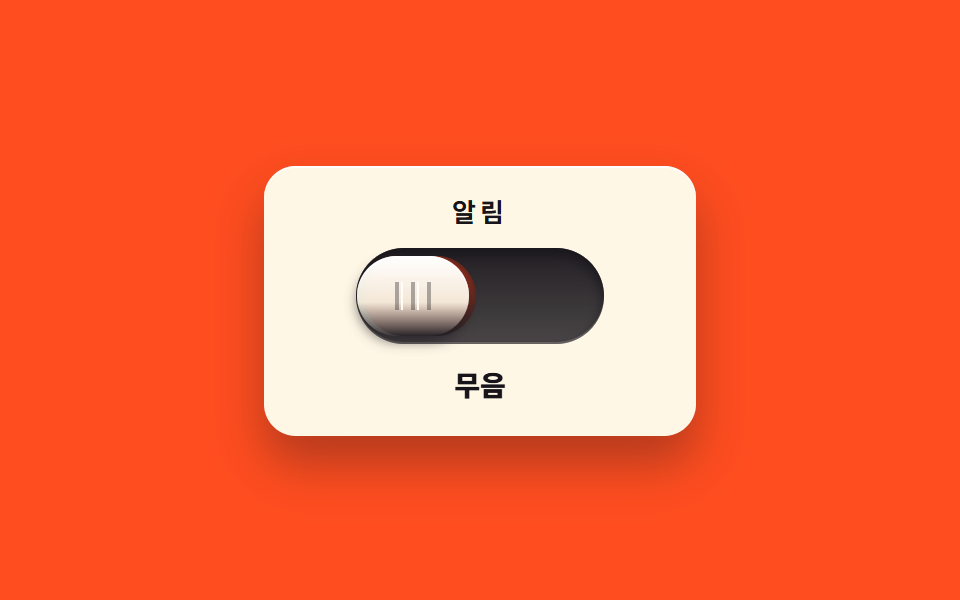
Pushing the handle to the end reveals an orange band hidden inside the groove so the state reads at a glance, and it never rests midway but snaps to the end slot.
Best forAn easily reversible block such as muting alerts
insettranslateXsteps(1, end)
<main class="stage">
<div class="sm is-demo" id="sm">
  <section class="sm__panel">
    <p class="sm__label">Alerts</p>
    <div class="sm__rail">
      <span class="sm__band" aria-hidden="true"></span>
      <button class="sm__handle" id="smHandle" type="button" role="switch" aria-checked="false" aria-label="Mute alerts">
        <span class="sm__grip" aria-hidden="true"></span>
      </button>
    </div>
    <p class="sm__state" role="status"><span class="sm__wordOn">Sound on</span><span class="sm__wordOff">Muted</span></p>
  </section>
</div>
</main>
@use "../../../../site/static/demo-tokens" as *;
// 밀어 젖히는 무음 스위치 — 레일 안쪽에 숨어 있던 띠가, 손잡이가 비켜난 만큼 드러난다.
// 손잡이는 중간에 서지 않는다: transition 한 번으로 반대쪽 끝까지 가고 $easing 이 끝에서 한 번 튕긴다.
// 색만으로 상태를 말하지 않는다 — 띠가 드러나는 것과 상태 글자가 함께 바뀐다. role="switch" + aria-checked.
// 미리보기(.is-demo)는 손잡이가 좌우로 왕복하고 상태 글자는 steps(1, end) 로 컷으로 갈린다.
$duration: $dur-base;
$easing: $ease-pop;
$color: $error;
@include stage($stage-orange);
.sm { display: grid; place-items: center; width: 100%; }
.sm__panel {
box-sizing: border-box; width: clamp(184px, 58vw, 216px);
display: flex; flex-direction: column; align-items: center; gap: $sp-3;
padding: $sp-4; border-radius: $r-card;
background: $subject-cream;
box-shadow: $shadow-raised, inset 0 1px 0 rgba($stage-paper, .9);
}
.sm__label {
margin: 0; font-weight: 700; font-size: clamp(11px, 2.8vw, 13px); line-height: 1;
letter-spacing: .16em; color: $subject-ink;
}
// ── 레일과 손잡이 ────────────────────────────────────────────
.sm__rail {
position: relative; box-sizing: border-box;
width: 124px; height: 48px; border-radius: $r-pill;
background: linear-gradient(180deg, rgba($subject-ink, .95), rgba($subject-ink, .78));
box-shadow: inset 0 3px 6px rgba($stage-ink, .9), inset 0 -1px 0 rgba($subject-cream, .22);
}
// 숨어 있는 띠 — 손잡이가 오른쪽으로 가면 이 자리가 드러난다
.sm__band {
position: absolute; left: 4px; top: 4px; width: 56px; height: 40px;
border-radius: $r-pill;
background: linear-gradient(180deg, $color, rgba($stage-ink, .55));
box-shadow: inset 0 2px 3px rgba($stage-ink, .5);
}
.sm__handle {
--travel: 56px; // 손잡이가 반대쪽 끝 칸까지 가는 거리. 좁은 화면에서는 아래 미디어쿼리가 줄인다
position: absolute; left: 4px; top: 4px; z-index: 2;
box-sizing: border-box; width: 56px; height: 40px;
margin: 0; padding: 0; border: 0; cursor: pointer;
border-radius: $r-pill;
background: linear-gradient(180deg, $stage-paper, rgba($subject-cream, .92) 58%, rgba($subject-ink, .22));
box-shadow: 0 3px 6px rgba($stage-ink, .55), inset 0 1px 0 rgba($stage-paper, .95);
transform: translateX(0);
transition: transform $duration $easing;
}
.sm__handle:focus-visible { outline: 2px solid $stage-yellow; outline-offset: 2px; }
// 손잡이 위 미끄럼 방지 눈금 — 음각 느낌의 세 줄
.sm__grip {
position: absolute; left: calc(50% - 9px); top: calc(50% - 7px); width: 18px; height: 14px;
background:
linear-gradient(90deg, rgba($subject-ink, .34) 2px, transparent 2px) 0 0 / 8px 100% repeat-x,
linear-gradient(90deg, rgba($stage-paper, .9) 1px, transparent 1px) 3px 0 / 8px 100% repeat-x;
}
// ── 상태 ─────────────────────────────────────────────────────
.sm__state { position: relative; margin: 0; width: 108px; height: 18px; }
.sm__wordOn, .sm__wordOff {
position: absolute; inset: 0; display: flex; align-items: center; justify-content: center;
font-weight: 800; font-size: clamp(12px, 3vw, 14px); line-height: 1;
color: $subject-ink;
}
.sm__wordOff { display: none; }
// 무음 — 손잡이가 끝 칸으로 붙고 띠가 드러난다
.sm.is-muted .sm__handle { transform: translateX(var(--travel)); }
.sm.is-muted .sm__wordOn { display: none; }
.sm.is-muted .sm__wordOff { display: flex; }
// ── 미리보기 루프(2초 한 바퀴) ────────────────────────────────
// 손잡이는 끝에서 한 번 튕겼다가 붙는다. 상태 글자는 steps(1, end) 컷이라 반투명하게 겹치지 않는다.
.sm.is-demo .sm__handle {
animation-name: smSlide; animation-duration: $dur-loop;
animation-timing-function: $easing; animation-iteration-count: infinite;
}
@keyframes smSlide {
0% { transform: translateX(0); }
8% { transform: translateX(0); }
36% { transform: translateX(calc(var(--travel) + 4px)); }
42% { transform: translateX(calc(var(--travel) - 2px)); }
46% { transform: translateX(var(--travel)); }
72% { transform: translateX(var(--travel)); }
82% { transform: translateX(-4px); }
86% { transform: translateX(2px); }
90% { transform: translateX(0); }
100% { transform: translateX(0); }
}
// 루프에서는 두 글자를 둘 다 띄워 두고 opacity 로 컷한다(정적 규칙의 display 는 건드리지 않는다)
.sm.is-demo .sm__wordOff { display: flex; opacity: 0; }
.sm.is-demo .sm__wordOn { opacity: 1; }
.sm.is-demo .sm__wordOff {
animation-name: smWordOff; animation-duration: $dur-loop;
animation-timing-function: steps(1, end); animation-iteration-count: infinite;
}
@keyframes smWordOff {
0% { opacity: 0; }
40% { opacity: 1; }
84% { opacity: 0; }
100% { opacity: 0; }
}
.sm.is-demo .sm__wordOn {
animation-name: smWordOn; animation-duration: $dur-loop;
animation-timing-function: steps(1, end); animation-iteration-count: infinite;
}
@keyframes smWordOn {
0% { opacity: 1; }
40% { opacity: 0; }
84% { opacity: 1; }
100% { opacity: 1; }
}
@media (max-width: 340px) {
.sm__panel { gap: $sp-2; padding: $sp-3; width: clamp(160px, 82vw, 184px); }
.sm__rail { width: 108px; height: 40px; }
.sm__band { width: 48px; height: 32px; }
.sm__handle { --travel: 52px; width: 48px; height: 32px; }
.sm__state { width: 96px; height: 16px; }
}
@media (prefers-reduced-motion: reduce) {
.sm .sm__handle { transition: none !important; }
.sm.is-demo .sm__handle { animation: none !important; transform: translateX(0) !important; }
.sm.is-demo .sm__wordOff { animation: none !important; opacity: 0 !important; }
.sm.is-demo .sm__wordOn { animation: none !important; opacity: 1 !important; }
}html, body {
margin: 0;
overflow: hidden;
}
.stage {
box-sizing: border-box;
min-height: 100vh;
display: grid;
place-items: center;
margin: 0;
background: #ff4d1f;
font-family: -apple-system, "Segoe UI", "Noto Sans KR", sans-serif;
padding: clamp(8px, 4vw, 24px);
}
.sm {
display: grid;
place-items: center;
width: 100%;
}
.sm__panel {
box-sizing: border-box;
width: clamp(184px, 58vw, 216px);
display: flex;
flex-direction: column;
align-items: center;
gap: 12px;
padding: 16px;
border-radius: 16px;
background: #fff7e6;
box-shadow: 0 14px 24px rgba(23, 20, 26, 0.32), inset 0 1px 0 rgba(255, 255, 255, 0.9);
}
.sm__label {
margin: 0;
font-weight: 700;
font-size: clamp(11px, 2.8vw, 13px);
line-height: 1;
letter-spacing: 0.16em;
color: #17141a;
}
.sm__rail {
position: relative;
box-sizing: border-box;
width: 124px;
height: 48px;
border-radius: 999px;
background: linear-gradient(180deg, rgba(23, 20, 26, 0.95), rgba(23, 20, 26, 0.78));
box-shadow: inset 0 3px 6px rgba(23, 20, 26, 0.9), inset 0 -1px 0 rgba(255, 247, 230, 0.22);
}
.sm__band {
position: absolute;
left: 4px;
top: 4px;
width: 56px;
height: 40px;
border-radius: 999px;
background: linear-gradient(180deg, #c2361a, rgba(23, 20, 26, 0.55));
box-shadow: inset 0 2px 3px rgba(23, 20, 26, 0.5);
}
.sm__handle {
--travel: 56px;
position: absolute;
left: 4px;
top: 4px;
z-index: 2;
box-sizing: border-box;
width: 56px;
height: 40px;
margin: 0;
padding: 0;
border: 0;
cursor: pointer;
border-radius: 999px;
background: linear-gradient(180deg, #ffffff, rgba(255, 247, 230, 0.92) 58%, rgba(23, 20, 26, 0.22));
box-shadow: 0 3px 6px rgba(23, 20, 26, 0.55), inset 0 1px 0 rgba(255, 255, 255, 0.95);
transform: translateX(0);
transition: transform 300ms cubic-bezier(0.2, 1.4, 0.4, 1);
}
.sm__handle:focus-visible {
outline: 2px solid #ffd23f;
outline-offset: 2px;
}
.sm__grip {
position: absolute;
left: calc(50% - 9px);
top: calc(50% - 7px);
width: 18px;
height: 14px;
background: linear-gradient(90deg, rgba(23, 20, 26, 0.34) 2px, transparent 2px) 0 0/8px 100% repeat-x, linear-gradient(90deg, rgba(255, 255, 255, 0.9) 1px, transparent 1px) 3px 0/8px 100% repeat-x;
}
.sm__state {
position: relative;
margin: 0;
width: 108px;
height: 18px;
}
.sm__wordOn, .sm__wordOff {
position: absolute;
inset: 0;
display: flex;
align-items: center;
justify-content: center;
font-weight: 800;
font-size: clamp(12px, 3vw, 14px);
line-height: 1;
color: #17141a;
}
.sm__wordOff {
display: none;
}
.sm.is-muted .sm__handle {
transform: translateX(var(--travel));
}
.sm.is-muted .sm__wordOn {
display: none;
}
.sm.is-muted .sm__wordOff {
display: flex;
}
.sm.is-demo .sm__handle {
animation-name: smSlide;
animation-duration: 2s;
animation-timing-function: cubic-bezier(0.2, 1.4, 0.4, 1);
animation-iteration-count: infinite;
}
@keyframes smSlide {
0% {
transform: translateX(0);
}
8% {
transform: translateX(0);
}
36% {
transform: translateX(calc(var(--travel) + 4px));
}
42% {
transform: translateX(calc(var(--travel) - 2px));
}
46% {
transform: translateX(var(--travel));
}
72% {
transform: translateX(var(--travel));
}
82% {
transform: translateX(-4px);
}
86% {
transform: translateX(2px);
}
90% {
transform: translateX(0);
}
100% {
transform: translateX(0);
}
}
.sm.is-demo .sm__wordOff {
display: flex;
opacity: 0;
}
.sm.is-demo .sm__wordOn {
opacity: 1;
}
.sm.is-demo .sm__wordOff {
animation-name: smWordOff;
animation-duration: 2s;
animation-timing-function: steps(1, end);
animation-iteration-count: infinite;
}
@keyframes smWordOff {
0% {
opacity: 0;
}
40% {
opacity: 1;
}
84% {
opacity: 0;
}
100% {
opacity: 0;
}
}
.sm.is-demo .sm__wordOn {
animation-name: smWordOn;
animation-duration: 2s;
animation-timing-function: steps(1, end);
animation-iteration-count: infinite;
}
@keyframes smWordOn {
0% {
opacity: 1;
}
40% {
opacity: 0;
}
84% {
opacity: 1;
}
100% {
opacity: 1;
}
}
@media (max-width: 340px) {
.sm__panel {
gap: 8px;
padding: 12px;
width: clamp(160px, 82vw, 184px);
}
.sm__rail {
width: 108px;
height: 40px;
}
.sm__band {
width: 48px;
height: 32px;
}
.sm__handle {
--travel: 52px;
width: 48px;
height: 32px;
}
.sm__state {
width: 96px;
height: 16px;
}
}
@media (prefers-reduced-motion: reduce) {
.sm .sm__handle {
transition: none !important;
}
.sm.is-demo .sm__handle {
animation: none !important;
transform: translateX(0) !important;
}
.sm.is-demo .sm__wordOff {
animation: none !important;
opacity: 0 !important;
}
.sm.is-demo .sm__wordOn {
animation: none !important;
opacity: 1 !important;
}
}var smRoot = document.getElementById('sm');
var smHandle = document.getElementById('smHandle');
function smSet(muted) {
smHandle.setAttribute('aria-checked', muted ? 'true' : 'false');
smRoot.classList.toggle('is-muted', muted);
}
smHandle.addEventListener('pointerdown', function () { smRoot.classList.remove('is-demo'); });
smHandle.addEventListener('click', function () {
smRoot.classList.remove('is-demo');
smSet(smHandle.getAttribute('aria-checked') !== 'true');
});// SlideMuteSwitch — vanilla 판(run/076/demo/07-real-slide-mute-switch/index.html) 의 React 포트.
// 레일 안쪽에 숨어 있던 띠가 손잡이가 비켜난 만큼 드러나고, 손잡이는 중간에 서지 않는다.
// 값·키프레임은 vanilla 와 같다(다시 타이핑하지 않는다). 클릭하면 미리보기 루프를 뗀다.
import { useState } from "react";
import styles from "./SlideMuteSwitch.module.scss";
export type SlideMuteSwitchProps = {
duration?: number;
easing?: string;
color?: string;
};
type Vars = { [k: string]: any };
const LABEL_TEXT = "알림";
const HANDLE_LABEL = "알림 무음";
const STATE_ON = "소리 켜짐";
const STATE_OFF = "무음";
export default function SlideMuteSwitch({
duration = 300,
easing = "cubic-bezier(.2, 1.4, .4, 1)", // = $ease-pop
color = "#c2361a",
}: SlideMuteSwitchProps) {
const [muted, setMuted] = useState(false);
const [demo, setDemo] = useState(true);
const vars: Vars = {
"--duration": `${duration}ms`,
"--easing": easing,
"--color": color,
};
const cls = [styles.root, demo ? styles.isDemo : "", muted ? styles.isMuted : ""].filter(Boolean).join(" ");
function toggle() {
setDemo(false);
setMuted((prev) => !prev);
}
function wake() {
setDemo(false);
}
return (
<main className={styles.stage}>
<div className={cls} style={vars}>
<section className={styles.panel}>
<p className={styles.label}>{LABEL_TEXT}</p>
<div className={styles.rail}>
<span className={styles.band} aria-hidden="true"></span>
<button
className={styles.handle}
type="button"
role="switch"
aria-checked={muted}
aria-label={HANDLE_LABEL}
onPointerDown={wake}
onClick={toggle}
>
<span className={styles.grip} aria-hidden="true"></span>
</button>
</div>
<p className={styles.state} role="status">
<span className={styles.wordOn}>{STATE_ON}</span>
<span className={styles.wordOff}>{STATE_OFF}</span>
</p>
</section>
</div>
</main>
);
}07 Slide-across mute switch — Measured area 4.199% · moving frames 15/23Original by GODRICH · SCSS and React ship in the zip · CSS Toggle Switch: 9 Realistic Switches to Paste
The post this demo lives in
 CSS Toggle Switch: 9 Realistic Switches to PasteA css toggle switch is the small on-off control visitors flip without thinking, and here are nine built with no library, See all demos in this post