01A Soap Bubble Whose Rainbow Is Computed From Film Thickness
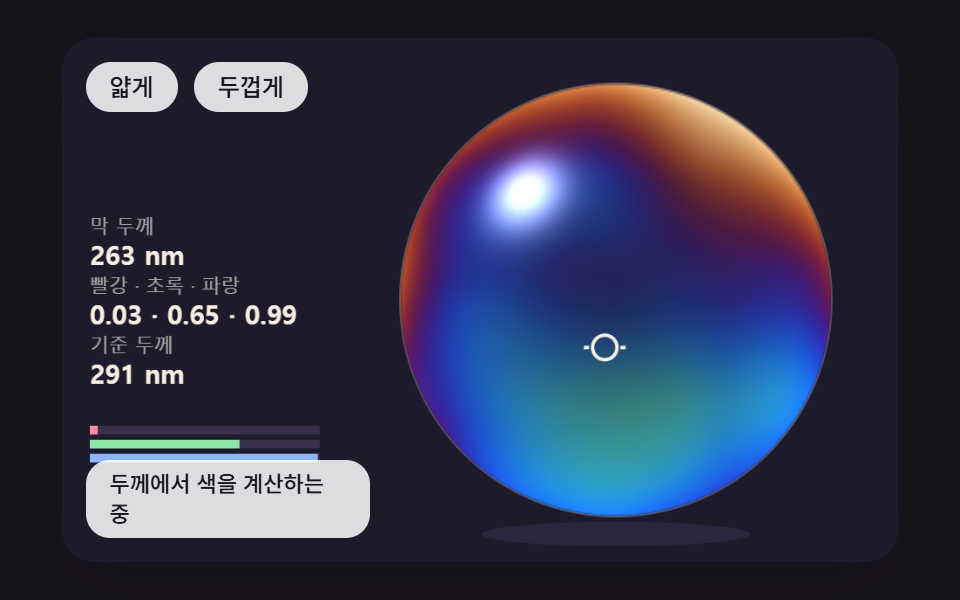
For every pixel it finds how far light bouncing off the film's front and back faces drifts apart over the thickness, then adds how much survives at red, green and blue wavelengths. The same bubble shows a different color wherever the thickness changes.
Best forBrand hero backdrops and product packaging mockups
FILM_NFILM_D_NMWAVE_RGB_NM

<main class="stage">
<div class="hs is-demo" id="hs">
  <canvas class="hs__canvas" data-role="canvas" width="480" height="300" tabindex="0" aria-label="A soap bubble that computes, pixel by pixel, how much of the red, green and blue wavelengths survives at each film thickness. Press or drag to read the thickness and the three values at that spot"></canvas>
  <p class="hs__status" data-role="status" aria-live="off">Computing color from thickness</p>
  <div class="hs__tools">
    <button class="hs__btn" data-role="thin" type="button">Thinner</button>
    <button class="hs__btn" data-role="thick" type="button">Thicker</button>
  </div>
</div>
</main>
@use "../../../../site/static/demo-tokens" as *;
@include stage($stage-ink);
.hs {
position: relative;
width: min(92vw, calc(160vh - 12.8vw));
aspect-ratio: 480 / 300;
margin: 0 auto;
border-radius: $r-card;
overflow: hidden;
box-shadow: $shadow-raised;
background: $subject-ink;
}
.hs__canvas {
display: block;
width: 100%;
height: 100%;
cursor: crosshair;
}
.hs__canvas:focus-visible {
outline: 2px solid rgba(255, 255, 255, .85);
outline-offset: -6px;
}
.hs__status {
position: absolute;
left: $sp-3;
bottom: $sp-3;
box-sizing: border-box;
max-width: 34%;
margin: 0;
padding: $sp-1 $sp-3;
border-radius: $r-control;
background: rgba(255, 255, 255, .85);
color: $subject-ink;
font-weight: 500;
font-size: 11px;
line-height: 1.4;
pointer-events: none;
}
// 판은 오른쪽에 있다 — 버튼은 왼쪽 위 칸에 두고, 좁으면 줄을 바꿔 판을 덮지 않는다
.hs__tools {
position: absolute;
left: $sp-3;
top: $sp-3;
box-sizing: border-box;
max-width: 34%;
display: flex;
flex-wrap: wrap;
gap: $sp-2;
}
.hs__btn {
margin: 0;
padding: $sp-1 $sp-3;
border: 0;
border-radius: $r-pill;
background: rgba(255, 255, 255, .85);
color: $subject-ink;
font: inherit;
font-weight: 500;
font-size: 12px;
line-height: 1.4;
cursor: pointer;
transition: background-color $dur-quick ease-out;
}
.hs__btn:hover {
background: $subject-cream;
}
.hs__btn[aria-pressed="true"] {
background: $subject-mint;
}
.hs__btn:focus-visible {
outline: 2px solid rgba(255, 255, 255, .95);
outline-offset: 2px;
}
// 손가락 가로 끌기는 이 캔버스가 받고, 세로 쓸기는 브라우저에 남겨 페이지 스크롤이 막히지 않게 한다
.hs__canvas { touch-action: pan-y; }
@media (max-width: 340px) {
.hs__btn { font-size: 10px; padding: $sp-1 $sp-2; }
.hs__status { font-size: 10px; padding: $sp-1 $sp-2; }
}
@media (prefers-reduced-motion: reduce) {
.hs__btn { transition: none; }
}html, body {
margin: 0;
overflow: hidden;
}
.stage {
box-sizing: border-box;
min-height: 100vh;
display: grid;
place-items: center;
margin: 0;
background: #17141a;
font-family: -apple-system, "Segoe UI", "Noto Sans KR", sans-serif;
padding: clamp(8px, 4vw, 24px);
}
.hs {
position: relative;
width: min(92vw, 160vh - 12.8vw);
aspect-ratio: 480/300;
margin: 0 auto;
border-radius: 16px;
overflow: hidden;
box-shadow: 0 14px 24px rgba(23, 20, 26, 0.32);
background: #17141a;
}
.hs__canvas {
display: block;
width: 100%;
height: 100%;
cursor: crosshair;
}
.hs__canvas:focus-visible {
outline: 2px solid rgba(255, 255, 255, 0.85);
outline-offset: -6px;
}
.hs__status {
position: absolute;
left: 12px;
bottom: 12px;
box-sizing: border-box;
max-width: 34%;
margin: 0;
padding: 4px 12px;
border-radius: 12px;
background: rgba(255, 255, 255, 0.85);
color: #17141a;
font-weight: 500;
font-size: 11px;
line-height: 1.4;
pointer-events: none;
}
.hs__tools {
position: absolute;
left: 12px;
top: 12px;
box-sizing: border-box;
max-width: 34%;
display: flex;
flex-wrap: wrap;
gap: 8px;
}
.hs__btn {
margin: 0;
padding: 4px 12px;
border: 0;
border-radius: 999px;
background: rgba(255, 255, 255, 0.85);
color: #17141a;
font: inherit;
font-weight: 500;
font-size: 12px;
line-height: 1.4;
cursor: pointer;
transition: background-color 220ms ease-out;
}
.hs__btn:hover {
background: #fff7e6;
}
.hs__btn[aria-pressed=true] {
background: #4cd4a6;
}
.hs__btn:focus-visible {
outline: 2px solid rgba(255, 255, 255, 0.95);
outline-offset: 2px;
}
.hs__canvas {
touch-action: pan-y;
}
@media (max-width: 340px) {
.hs__btn {
font-size: 10px;
padding: 4px 8px;
}
.hs__status {
font-size: 10px;
padding: 4px 8px;
}
}
@media (prefers-reduced-motion: reduce) {
.hs__btn {
transition: none;
}
}(function () {
const root = document.getElementById("hs");
if (!root) return;
const W = 480;
const H = 300;
const FIXED_DT = 16;
// 파스텔 팔레트 — 어두운 무대 위에 밝은 막을 얹어 명도 차로 방울이 읽힌다 (막의 무지갯빛은 이 표가 아니라 두께 계산에서 나온다)
const BG = [29, 26, 44];
const DEEP = [44, 39, 64];
const PAPER = [255, 248, 234];
const INK = [58, 48, 76];
const MINT = [126, 226, 192];
const SKY = [124, 196, 255];
const LILAC = [190, 164, 255];
const PINK = [255, 160, 190];
const PEACH = [255, 208, 168];
function clamp(v, lo, hi) { return v < lo ? lo : (v > hi ? hi : v); }
function lerp(a, b, k) { return a + (b - a) * k; }
function smooth(x) { const c = clamp(x, 0, 1); return c * c * (3 - 2 * c); }
function rgba(c, a) {
return 'rgba(' + Math.round(c[0]) + ',' + Math.round(c[1]) + ',' + Math.round(c[2]) + ',' + clamp(a, 0, 1).toFixed(3) + ')';
}
function mix(a, b, k) { return [lerp(a[0], b[0], k), lerp(a[1], b[1], k), lerp(a[2], b[2], k)]; }
const canvasEl = root.querySelector('[data-role="canvas"]');
const statusEl = root.querySelector('[data-role="status"]');
const ctxRaw = canvasEl ? canvasEl.getContext('2d') : null;
if (!canvasEl || !ctxRaw || !statusEl) {
return;
}
const cv = canvasEl;
const ctx = ctxRaw;
const status = statusEl;
const reduceQuery = window.matchMedia('(prefers-reduced-motion: reduce)');
let still = reduceQuery.matches;
// 자동 시연 중인가 — 사람이 처음 만지는 순간 시연을 멈추고 상태 줄을 읽어 주기 시작한다
let demo = root.classList.contains('is-demo');
function wake() {
if (!demo) {
return;
}
demo = false;
root.classList.remove('is-demo');
status.setAttribute('aria-live', 'polite');
}
function say(text) {
if (status.textContent !== text) {
status.textContent = text;
}
}
function fitCanvas() {
// 배율은 2 에서 자른다 — 배율 3 기기에서 화소가 2.25배로 늘어 프레임마다 일이 그만큼 커지지 않게
const dpr = Math.min(window.devicePixelRatio || 1, 2);
cv.width = Math.round(W * dpr);
cv.height = Math.round(H * dpr);
ctx.setTransform(dpr, 0, 0, dpr, 0, 0);
}
function onResize() {
fitCanvas();
draw();
}
fitCanvas();
window.addEventListener('resize', onResize);
// 화면 좌표(CSS px) → 장면 좌표(480x300). 리사이즈 뒤에도 늘 현재 크기로 다시 잰다
function toScene(ev) {
const r = cv.getBoundingClientRect();
return [((ev.clientX - r.left) / r.width) * W, ((ev.clientY - r.top) / r.height) * H];
}
// 시드 고정 난수 — 같은 시드면 같은 장면이 다시 나온다 (32비트 정수 섞기)
function makeRng(seed) {
let s = seed >>> 0;
return function () {
s = (s + 0x6d2b79f5) >>> 0;
let t = s;
t = Math.imul(t ^ (t >>> 15), t | 1);
t ^= t + Math.imul(t ^ (t >>> 7), t | 61);
return ((t ^ (t >>> 14)) >>> 0) / 4294967296;
};
}
// 왼쪽 칸의 수치 — 이름표 한 줄 + 값 한 줄
function panelRow(row, label, value) {
const y = 112 + row * 34;
ctx.textAlign = 'left';
ctx.textBaseline = 'alphabetic';
ctx.fillStyle = rgba(PAPER, 0.62);
ctx.font = '500 11px sans-serif';
ctx.fillText(label, 16, y);
ctx.fillStyle = rgba(PAPER, 0.96);
ctx.font = '700 15px sans-serif';
ctx.fillText(value, 16, y + 18);
}
function clearStage() {
ctx.fillStyle = rgba(BG, 1);
ctx.fillRect(0, 0, W, H);
}
// 2D 값 노이즈 — 정수 격자 꼭짓점마다 시드 난수 값(−1~1)을 두고 그 사이를 부드러운 곡선으로 잇는다
const NOISE_SEED = 465;
const noisePerm = new Uint8Array(512);
const noiseVal = new Float32Array(256);
{
const nr = makeRng(NOISE_SEED);
for (let i = 0; i < 256; i += 1) {
noisePerm[i] = i;
noiseVal[i] = nr() * 2 - 1;
}
for (let i = 255; i > 0; i -= 1) {
const j = Math.floor(nr() * (i + 1));
const t = noisePerm[i];
noisePerm[i] = noisePerm[j];
noisePerm[j] = t;
}
for (let i = 0; i < 256; i += 1) {
noisePerm[i + 256] = noisePerm[i];
}
}
function noiseHash(ix, iy) {
return noiseVal[noisePerm[noisePerm[ix & 255] + (iy & 255)]];
}
function noise2(x, y) {
const xi = Math.floor(x);
const yi = Math.floor(y);
const fx = x - xi;
const fy = y - yi;
const u = fx * fx * (3 - 2 * fx);
const v = fy * fy * (3 - 2 * fy);
const a = noiseHash(xi, yi);
const b = noiseHash(xi + 1, yi);
const c = noiseHash(xi, yi + 1);
const d = noiseHash(xi + 1, yi + 1);
return lerp(lerp(a, b, u), lerp(c, d, u), v);
}
// 막의 굴절률 — 비눗물 막을 물과 같은 값으로 둔다
const FILM_N = 1.33;
// 세 파장(nm) — 화면의 빨강·초록·파랑 채널을 이 파장 하나씩으로 대신한다
const WAVE_RGB_NM = [650, 530, 450];
// 표를 만들 두께 범위(nm) — 1nm 눈금마다 세 채널 값을 미리 구해 둔다
const LUT_D_MAX = 1600;
const filmLut = new Float32Array((LUT_D_MAX + 1) * 3);
// 막 앞면과 뒷면에서 튕긴 두 빛이 두께만큼 어긋나 파장마다 남는 몫 — sin²(2π·n·d/λ).
// 앞면에서 튕긴 빛만 위상이 뒤집히므로 두께 0 이면 세 채널이 모두 0(검은 막). 값은 0~1 로 맞춘 비율이지 실제 반사율(몇 %)이 아니다
function reflectRGB(dNm) {
const out = [0, 0, 0];
for (let c = 0; c < 3; c += 1) {
const s = Math.sin(2 * Math.PI * FILM_N * dNm / WAVE_RGB_NM[c]);
out[c] = s * s;
}
return out;
}
for (let d = 0; d <= LUT_D_MAX; d += 1) {
const r = reflectRGB(d);
filmLut[d * 3] = r[0];
filmLut[d * 3 + 1] = r[1];
filmLut[d * 3 + 2] = r[2];
}
// 비스듬히 보면 빛이 막 안에서 꺾여 지나므로 어긋남이 cos(꺾인 각)배로 줄어든다 — cosView 는 시선과 법선 사이 각의 cos
function insideCos(cosView) {
const s2 = (1 - cosView * cosView) / (FILM_N * FILM_N);
return Math.sqrt(1 - s2);
}
// 두께 d(nm) 에서 채널 c 의 몫 — 표를 1nm 사이에서 선형 보간해 읽는다
function filmAt(dNm, c) {
const d = clamp(dNm, 0, LUT_D_MAX - 1);
const i = Math.floor(d);
const f = d - i;
return filmLut[i * 3 + c] * (1 - f) + filmLut[(i + 1) * 3 + c] * f;
}
// 캔버스 선·면에 쓸 막 색 — 어두운 무대 위에 세 채널 몫을 밝기로 얹는다
function filmColor(dNm, gain) {
return [BG[0] + filmAt(dNm, 0) * 235 * gain, BG[1] + filmAt(dNm, 1) * 235 * gain, BG[2] + filmAt(dNm, 2) * 235 * gain];
}
// 화소 하나를 막 색으로 — under 는 방울 뒤 바탕색, nx·ny·z 는 구면 위 법선(z 는 시선 쪽 성분)
function shadeFilm(px, o, dNm, nx, ny, z, under, alpha) {
const dEff = dNm * insideCos(z);
// 가장자리일수록 시선이 막을 비스듬히 지나 색이 진하다 — 가운데는 뒤 바탕이 비쳐 보이게 낮춘다
const amp = 0.22 + 0.78 * Math.pow(1 - z, 0.6);
// 왼쪽 위에서 오는 빛 하나의 반짝임
const hl = Math.pow(Math.max(0, nx * -0.42 + ny * -0.5 + z * 0.76), 60);
for (let c = 0; c < 3; c += 1) {
const v = under[c] + filmAt(dEff, c) * 235 * amp + hl * 220;
px[o + c] = under[c] + (v - under[c]) * alpha;
}
px[o + 3] = 255;
}
function makePix(w, h) {
const c = document.createElement('canvas');
c.width = w;
c.height = h;
const pc = c.getContext('2d');
if (!pc) {
return null;
}
const img = pc.createImageData(w, h);
return { cvs: c, pc: pc, img: img, px: img.data, w: w, h: h };
}
// putImageData 는 캔버스 변환(배율)을 무시한다 — 작은 캔버스에 올린 뒤 drawImage 로 장면 좌표에 그린다
function showPix(p, x, y) {
p.pc.putImageData(p.img, 0, 0);
ctx.drawImage(p.cvs, x, y, p.w, p.h);
}
// 01 — Film thickness 하나에서 화소마다 무지갯빛을 계산한다
// 가운데 높이의 기준 Film thickness(nm) — 위로 갈수록 얇고 아래로 갈수록 Thicker 기울인다
const FILM_D_NM = 380;
// 위아래 두께 기울기 — 꼭대기는 (1 − 0.32)배, 바닥은 (1 + 0.32)배
const TILT_K = 0.32;
// 노이즈 소용돌이가 두께를 흔드는 폭(배율)
const SWIRL_K = 0.22;
// 소용돌이 무늬가 흘러가는 빠르기(노이즈 칸/초)
const SWIRL_FLOW = 0.21;
// 방울 중심·반지름(장면 px)
const BCX = 318;
const BCY = 150;
const BR = 124;
// 버튼·키 한 번에 옮기는 Base thickness(nm)와 그 범위
const SHIFT_STEP = 40;
const SHIFT_MIN = -300;
const SHIFT_MAX = 600;
const TXT_RUN = 'Computing color from thickness';
const TXT_SHIFT = 'Base thickness shifted';
const TXT_PROBE = 'Thickness and three wavelength values at the probe';
const thinBtn = root.querySelector('[data-role="thin"]');
const thickBtn = root.querySelector('[data-role="thick"]');
const BOX = BR * 2 + 2;
const PX0 = BCX - BR - 1;
const PY0 = BCY - BR - 1;
const pix = makePix(BOX, BOX);
const under = [BG[0], BG[1], BG[2]];
let shift = 0;
let filmT = 0;
let probeX = BCX - 34;
let probeY = BCY + 26;
let dragging = false;
let lastText = TXT_RUN;
// nx·ny 는 방울 중심 기준 −1~1, 아래가 +ny. 반환은 그 자리 Film thickness(nm)
function thicknessAt(nx, ny, t) {
const base = Math.max(FILM_D_NM + shift, 0);
const swirl = noise2(nx * 1.7 + t * SWIRL_FLOW, ny * 1.7 - t * SWIRL_FLOW * 0.8 + 9.3);
return Math.max(base * (1 + TILT_K * ny) * (1 + SWIRL_K * swirl), 0);
}
// 방울 안 화소마다 — 두께 → 비스듬한 만큼 줄인 어긋남 → 세 파장 몫 → 색
function paintFilm() {
if (!pix) {
return;
}
const px = pix.px;
for (let j = 0; j < BOX; j += 1) {
const ny = (PY0 + j + 0.5 - BCY) / BR;
for (let i = 0; i < BOX; i += 1) {
const nx = (PX0 + i + 0.5 - BCX) / BR;
const r2 = nx * nx + ny * ny;
const o = (j * BOX + i) * 4;
if (r2 >= 1) {
px[o + 3] = 0;
continue;
}
const z = Math.sqrt(1 - r2);
// 테두리 한 화소는 반쯤 비쳐 계단이 덜 보이게
const edge = clamp((1 - Math.sqrt(r2)) * BR, 0, 1);
shadeFilm(px, o, thicknessAt(nx, ny, filmT), nx, ny, z, under, 1);
px[o + 3] = 255 * edge;
}
}
showPix(pix, PX0, PY0);
}
function setProbe(x, y) {
const dx = x - BCX;
const dy = y - BCY;
const r = Math.hypot(dx, dy);
const lim = BR * 0.94;
if (r > lim) {
probeX = BCX + dx / r * lim;
probeY = BCY + dy / r * lim;
}
else {
probeX = x;
probeY = y;
}
}
function probeValues() {
const nx = (probeX - BCX) / BR;
const ny = (probeY - BCY) / BR;
const z = Math.sqrt(Math.max(1 - nx * nx - ny * ny, 0));
const d = thicknessAt(nx, ny, filmT);
return [d, reflectRGB(d * insideCos(z))];
}
const BAR_RGB = [[255, 140, 160], [140, 230, 170], [140, 180, 255]];
function draw() {
clearStage();
// 방울 뒤 그림자 — 무대 바닥에 옅게
ctx.fillStyle = rgba(DEEP, 0.9);
ctx.beginPath();
ctx.ellipse(BCX, BCY + BR + 10, BR * 0.62, 7, 0, 0, Math.PI * 2);
ctx.fill();
paintFilm();
ctx.strokeStyle = rgba(PAPER, 0.22);
ctx.lineWidth = 1;
ctx.beginPath();
ctx.arc(BCX, BCY, BR, 0, Math.PI * 2);
ctx.stroke();
const pv = probeValues();
ctx.strokeStyle = rgba(PAPER, 0.95);
ctx.lineWidth = 2;
ctx.beginPath();
ctx.arc(probeX, probeY, 7, 0, Math.PI * 2);
ctx.stroke();
ctx.beginPath();
ctx.moveTo(probeX - 12, probeY);
ctx.lineTo(probeX - 9, probeY);
ctx.moveTo(probeX + 9, probeY);
ctx.lineTo(probeX + 12, probeY);
ctx.stroke();
panelRow(0, 'Film thickness', String(Math.round(pv[0])) + ' nm');
panelRow(1, 'Red · Green · Blue', pv[1][0].toFixed(2) + ' · ' + pv[1][1].toFixed(2) + ' · ' + pv[1][2].toFixed(2));
panelRow(2, 'Base thickness', String(Math.max(FILM_D_NM + shift, 0)) + ' nm');
for (let c = 0; c < 3; c += 1) {
ctx.fillStyle = rgba(INK, 1);
ctx.fillRect(16, 222 + c * 8, 132, 5);
ctx.fillStyle = rgba(BAR_RGB[c], 1);
ctx.fillRect(16, 222 + c * 8, 132 * pv[1][c], 5);
}
}
function step() {
filmT += FIXED_DT / 1000;
}
function settle() {
say(lastText);
}
function demoTick(t) {
const a = t / 1000;
// 찍는 자리를 방울 안에서 쉬지 않고 옮기고, 기준 두께를 0 → −90nm 로 천천히 오르내린다
setProbe(BCX + Math.cos(a * 1.3) * BR * 0.55, BCY + Math.sin(a * 2.1) * BR * 0.5);
shift = Math.round(-45 * (1 - Math.cos(a * 2.6)));
}
function after(text) {
lastText = text;
say(text);
draw();
}
function nudge(dir) {
shift = clamp(shift + dir * SHIFT_STEP, SHIFT_MIN, SHIFT_MAX);
after(TXT_SHIFT);
}
cv.addEventListener('pointerdown', function (ev) {
wake();
dragging = true;
cv.setPointerCapture(ev.pointerId);
const p = toScene(ev);
setProbe(p[0], p[1]);
after(TXT_PROBE);
});
cv.addEventListener('pointermove', function (ev) {
if (!dragging) {
return;
}
const p = toScene(ev);
setProbe(p[0], p[1]);
after(TXT_PROBE);
});
function endDrag() { dragging = false; }
cv.addEventListener('pointerup', endDrag);
cv.addEventListener('pointercancel', endDrag);
cv.addEventListener('keydown', function (ev) {
const k = ev.key;
if (k === 'ArrowLeft' || k === 'ArrowRight' || k === 'ArrowUp' || k === 'ArrowDown') {
ev.preventDefault();
wake();
const dx = k === 'ArrowLeft' ? -8 : (k === 'ArrowRight' ? 8 : 0);
const dy = k === 'ArrowUp' ? -8 : (k === 'ArrowDown' ? 8 : 0);
setProbe(probeX + dx, probeY + dy);
after(TXT_PROBE);
}
else if (k === '-' || k === 'PageDown') {
ev.preventDefault();
wake();
nudge(-1);
}
else if (k === '+' || k === '=' || k === 'PageUp') {
ev.preventDefault();
wake();
nudge(1);
}
else if (k === 'Home') {
ev.preventDefault();
wake();
shift = 0;
setProbe(BCX - 34, BCY + 26);
after(TXT_RUN);
}
});
if (thinBtn) {
thinBtn.addEventListener('click', function () { wake(); nudge(-1); });
}
if (thickBtn) {
thickBtn.addEventListener('click', function () { wake(); nudge(1); });
}
say(TXT_RUN);
let rafId = 0;
let lastTs = -1;
let acc = 0;
let clock = 0;
let looping = false;
function frame(ts) {
if (!looping) {
return;
}
if (lastTs < 0) {
lastTs = ts;
}
// 탭이 숨었다 돌아와도 한 번에 100ms 까지만 따라잡는다 — 순간이동 대신 이어서 움직인다
acc += Math.min(ts - lastTs, 100);
lastTs = ts;
let n = 0;
while (acc >= FIXED_DT && n < 6) {
clock += FIXED_DT;
if (demo) {
demoTick(clock);
}
step();
acc -= FIXED_DT;
n += 1;
}
draw();
rafId = window.requestAnimationFrame(frame);
}
function startLoop() {
if (looping) {
return;
}
looping = true;
lastTs = -1;
acc = 0;
rafId = window.requestAnimationFrame(frame);
}
function stopLoop() {
looping = false;
window.cancelAnimationFrame(rafId);
}
// 움직임 줄이기 설정을 페이지를 연 채로 바꿔도 바로 따른다 — 켜면 루프를 멈추고 끝난 장면 한 장, 끄면 다시 돈다
function applyMotion() {
still = reduceQuery.matches;
if (still) {
stopLoop();
settle();
draw();
}
else {
startLoop();
}
}
reduceQuery.addEventListener('change', applyMotion);
applyMotion();
return function () {
stopLoop();
reduceQuery.removeEventListener('change', applyMotion);
window.removeEventListener('resize', onResize);
};
})();// SbFilmThicknessInterferenceHue - vanilla 판(01-sb-film-thickness-interference-hue) 의 React 포트. 같은 계산을 useEffect 안에서 돌린다.
import { useEffect, useRef } from "react";
import styles from "./SbFilmThicknessInterferenceHue.module.scss";
const cx = (s: string): string => s.split(" ").map((n) => styles[n] ?? n).join(" ");
export default function SbFilmThicknessInterferenceHue() {
const rootRef = useRef<HTMLDivElement | null>(null);
useEffect(() => {
const rootEl = rootRef.current;
if (!rootEl) return;
const root: HTMLElement = rootEl;
type RGB = [number, number, number];
const W = 480;
const H = 300;
const FIXED_DT = 16;
// 파스텔 팔레트 — 어두운 무대 위에 밝은 막을 얹어 명도 차로 방울이 읽힌다 (막의 무지갯빛은 이 표가 아니라 두께 계산에서 나온다)
const BG: RGB = [29, 26, 44];
const DEEP: RGB = [44, 39, 64];
const PAPER: RGB = [255, 248, 234];
const INK: RGB = [58, 48, 76];
const MINT: RGB = [126, 226, 192];
const SKY: RGB = [124, 196, 255];
const LILAC: RGB = [190, 164, 255];
const PINK: RGB = [255, 160, 190];
const PEACH: RGB = [255, 208, 168];
function clamp(v: number, lo: number, hi: number): number { return v < lo ? lo : (v > hi ? hi : v); }
function lerp(a: number, b: number, k: number): number { return a + (b - a) * k; }
function smooth(x: number): number { const c = clamp(x, 0, 1); return c * c * (3 - 2 * c); }
function rgba(c: RGB, a: number): string {
return 'rgba(' + Math.round(c[0]) + ',' + Math.round(c[1]) + ',' + Math.round(c[2]) + ',' + clamp(a, 0, 1).toFixed(3) + ')';
}
function mix(a: RGB, b: RGB, k: number): RGB { return [lerp(a[0], b[0], k), lerp(a[1], b[1], k), lerp(a[2], b[2], k)]; }
const canvasEl = root.querySelector('[data-role="canvas"]') as HTMLCanvasElement | null;
const statusEl = root.querySelector('[data-role="status"]') as HTMLElement | null;
const ctxRaw = canvasEl ? canvasEl.getContext('2d') : null;
if (!canvasEl || !ctxRaw || !statusEl) { return; }
const cv: HTMLCanvasElement = canvasEl;
const ctx: CanvasRenderingContext2D = ctxRaw;
const status: HTMLElement = statusEl;
const reduceQuery = window.matchMedia('(prefers-reduced-motion: reduce)');
let still = reduceQuery.matches;
// 자동 시연 중인가 — 사람이 처음 만지는 순간 시연을 멈추고 상태 줄을 읽어 주기 시작한다
let demo = root.classList.contains('is-demo');
function wake(): void {
if (!demo) { return; }
demo = false;
root.classList.remove('is-demo');
status.setAttribute('aria-live', 'polite');
}
function say(text: string): void {
if (status.textContent !== text) { status.textContent = text; }
}
function fitCanvas(): void {
// 배율은 2 에서 자른다 — 배율 3 기기에서 화소가 2.25배로 늘어 프레임마다 일이 그만큼 커지지 않게
const dpr = Math.min(window.devicePixelRatio || 1, 2);
cv.width = Math.round(W * dpr);
cv.height = Math.round(H * dpr);
ctx.setTransform(dpr, 0, 0, dpr, 0, 0);
}
function onResize(): void {
fitCanvas();
draw();
}
fitCanvas();
window.addEventListener('resize', onResize);
// 화면 좌표(CSS px) → 장면 좌표(480x300). 리사이즈 뒤에도 늘 현재 크기로 다시 잰다
function toScene(ev: PointerEvent): [number, number] {
const r = cv.getBoundingClientRect();
return [((ev.clientX - r.left) / r.width) * W, ((ev.clientY - r.top) / r.height) * H];
}
// 시드 고정 난수 — 같은 시드면 같은 장면이 다시 나온다 (32비트 정수 섞기)
function makeRng(seed: number): () => number {
let s = seed >>> 0;
return function (): number {
s = (s + 0x6d2b79f5) >>> 0;
let t = s;
t = Math.imul(t ^ (t >>> 15), t | 1);
t ^= t + Math.imul(t ^ (t >>> 7), t | 61);
return ((t ^ (t >>> 14)) >>> 0) / 4294967296;
};
}
// 왼쪽 칸의 수치 — 이름표 한 줄 + 값 한 줄
function panelRow(row: number, label: string, value: string): void {
const y = 112 + row * 34;
ctx.textAlign = 'left';
ctx.textBaseline = 'alphabetic';
ctx.fillStyle = rgba(PAPER, 0.62);
ctx.font = '500 11px sans-serif';
ctx.fillText(label, 16, y);
ctx.fillStyle = rgba(PAPER, 0.96);
ctx.font = '700 15px sans-serif';
ctx.fillText(value, 16, y + 18);
}
function clearStage(): void {
ctx.fillStyle = rgba(BG, 1);
ctx.fillRect(0, 0, W, H);
}
// 2D 값 노이즈 — 정수 격자 꼭짓점마다 시드 난수 값(−1~1)을 두고 그 사이를 부드러운 곡선으로 잇는다
const NOISE_SEED = 465;
const noisePerm = new Uint8Array(512);
const noiseVal = new Float32Array(256);
{
const nr = makeRng(NOISE_SEED);
for (let i = 0; i < 256; i += 1) {
noisePerm[i] = i;
noiseVal[i] = nr() * 2 - 1;
}
for (let i = 255; i > 0; i -= 1) {
const j = Math.floor(nr() * (i + 1));
const t = noisePerm[i];
noisePerm[i] = noisePerm[j];
noisePerm[j] = t;
}
for (let i = 0; i < 256; i += 1) { noisePerm[i + 256] = noisePerm[i]; }
}
function noiseHash(ix: number, iy: number): number {
return noiseVal[noisePerm[noisePerm[ix & 255] + (iy & 255)]];
}
function noise2(x: number, y: number): number {
const xi = Math.floor(x);
const yi = Math.floor(y);
const fx = x - xi;
const fy = y - yi;
const u = fx * fx * (3 - 2 * fx);
const v = fy * fy * (3 - 2 * fy);
const a = noiseHash(xi, yi);
const b = noiseHash(xi + 1, yi);
const c = noiseHash(xi, yi + 1);
const d = noiseHash(xi + 1, yi + 1);
return lerp(lerp(a, b, u), lerp(c, d, u), v);
}
// 막의 굴절률 — 비눗물 막을 물과 같은 값으로 둔다
const FILM_N = 1.33;
// 세 파장(nm) — 화면의 빨강·초록·파랑 채널을 이 파장 하나씩으로 대신한다
const WAVE_RGB_NM: RGB = [650, 530, 450];
// 표를 만들 두께 범위(nm) — 1nm 눈금마다 세 채널 값을 미리 구해 둔다
const LUT_D_MAX = 1600;
const filmLut = new Float32Array((LUT_D_MAX + 1) * 3);
// 막 앞면과 뒷면에서 튕긴 두 빛이 두께만큼 어긋나 파장마다 남는 몫 — sin²(2π·n·d/λ).
// 앞면에서 튕긴 빛만 위상이 뒤집히므로 두께 0 이면 세 채널이 모두 0(검은 막). 값은 0~1 로 맞춘 비율이지 실제 반사율(몇 %)이 아니다
function reflectRGB(dNm: number): RGB {
const out: RGB = [0, 0, 0];
for (let c = 0; c < 3; c += 1) {
const s = Math.sin(2 * Math.PI * FILM_N * dNm / WAVE_RGB_NM[c]);
out[c] = s * s;
}
return out;
}
for (let d = 0; d <= LUT_D_MAX; d += 1) {
const r = reflectRGB(d);
filmLut[d * 3] = r[0];
filmLut[d * 3 + 1] = r[1];
filmLut[d * 3 + 2] = r[2];
}
// 비스듬히 보면 빛이 막 안에서 꺾여 지나므로 어긋남이 cos(꺾인 각)배로 줄어든다 — cosView 는 시선과 법선 사이 각의 cos
function insideCos(cosView: number): number {
const s2 = (1 - cosView * cosView) / (FILM_N * FILM_N);
return Math.sqrt(1 - s2);
}
// 두께 d(nm) 에서 채널 c 의 몫 — 표를 1nm 사이에서 선형 보간해 읽는다
function filmAt(dNm: number, c: number): number {
const d = clamp(dNm, 0, LUT_D_MAX - 1);
const i = Math.floor(d);
const f = d - i;
return filmLut[i * 3 + c] * (1 - f) + filmLut[(i + 1) * 3 + c] * f;
}
// 캔버스 선·면에 쓸 막 색 — 어두운 무대 위에 세 채널 몫을 밝기로 얹는다
function filmColor(dNm: number, gain: number): RGB {
return [BG[0] + filmAt(dNm, 0) * 235 * gain, BG[1] + filmAt(dNm, 1) * 235 * gain, BG[2] + filmAt(dNm, 2) * 235 * gain];
}
// 화소 하나를 막 색으로 — under 는 방울 뒤 바탕색, nx·ny·z 는 구면 위 법선(z 는 시선 쪽 성분)
function shadeFilm(px: Uint8ClampedArray, o: number, dNm: number, nx: number, ny: number, z: number, under: RGB, alpha: number): void {
const dEff = dNm * insideCos(z);
// 가장자리일수록 시선이 막을 비스듬히 지나 색이 진하다 — 가운데는 뒤 바탕이 비쳐 보이게 낮춘다
const amp = 0.22 + 0.78 * Math.pow(1 - z, 0.6);
// 왼쪽 위에서 오는 빛 하나의 반짝임
const hl = Math.pow(Math.max(0, nx * -0.42 + ny * -0.5 + z * 0.76), 60);
for (let c = 0; c < 3; c += 1) {
const v = under[c] + filmAt(dEff, c) * 235 * amp + hl * 220;
px[o + c] = under[c] + (v - under[c]) * alpha;
}
px[o + 3] = 255;
}
// 화소 계산판 — 작은 캔버스 하나에 ImageData 를 붙여 두고 화소를 직접 채운다
type Pix = { cvs: HTMLCanvasElement; pc: CanvasRenderingContext2D; img: ImageData; px: Uint8ClampedArray; w: number; h: number };
function makePix(w: number, h: number): Pix | null {
const c = document.createElement('canvas');
c.width = w;
c.height = h;
const pc = c.getContext('2d');
if (!pc) { return null; }
const img = pc.createImageData(w, h);
return { cvs: c, pc: pc, img: img, px: img.data, w: w, h: h };
}
// putImageData 는 캔버스 변환(배율)을 무시한다 — 작은 캔버스에 올린 뒤 drawImage 로 장면 좌표에 그린다
function showPix(p: Pix, x: number, y: number): void {
p.pc.putImageData(p.img, 0, 0);
ctx.drawImage(p.cvs, x, y, p.w, p.h);
}
// 01 — 막 두께 하나에서 화소마다 무지갯빛을 계산한다
// 가운데 높이의 기준 막 두께(nm) — 위로 갈수록 얇고 아래로 갈수록 두껍게 기울인다
const FILM_D_NM = 380;
// 위아래 두께 기울기 — 꼭대기는 (1 − 0.32)배, 바닥은 (1 + 0.32)배
const TILT_K = 0.32;
// 노이즈 소용돌이가 두께를 흔드는 폭(배율)
const SWIRL_K = 0.22;
// 소용돌이 무늬가 흘러가는 빠르기(노이즈 칸/초)
const SWIRL_FLOW = 0.21;
// 방울 중심·반지름(장면 px)
const BCX = 318;
const BCY = 150;
const BR = 124;
// 버튼·키 한 번에 옮기는 기준 두께(nm)와 그 범위
const SHIFT_STEP = 40;
const SHIFT_MIN = -300;
const SHIFT_MAX = 600;
const TXT_RUN = '두께에서 색을 계산하는 중';
const TXT_SHIFT = '기준 두께를 옮김';
const TXT_PROBE = '찍은 자리의 두께와 세 파장 값';
const thinBtn = root.querySelector('[data-role="thin"]') as HTMLButtonElement | null;
const thickBtn = root.querySelector('[data-role="thick"]') as HTMLButtonElement | null;
const BOX = BR * 2 + 2;
const PX0 = BCX - BR - 1;
const PY0 = BCY - BR - 1;
const pix = makePix(BOX, BOX);
const under: RGB = [BG[0], BG[1], BG[2]];
let shift = 0;
let filmT = 0;
let probeX = BCX - 34;
let probeY = BCY + 26;
let dragging = false;
let lastText = TXT_RUN;
// nx·ny 는 방울 중심 기준 −1~1, 아래가 +ny. 반환은 그 자리 막 두께(nm)
function thicknessAt(nx: number, ny: number, t: number): number {
const base = Math.max(FILM_D_NM + shift, 0);
const swirl = noise2(nx * 1.7 + t * SWIRL_FLOW, ny * 1.7 - t * SWIRL_FLOW * 0.8 + 9.3);
return Math.max(base * (1 + TILT_K * ny) * (1 + SWIRL_K * swirl), 0);
}
// 방울 안 화소마다 — 두께 → 비스듬한 만큼 줄인 어긋남 → 세 파장 몫 → 색
function paintFilm(): void {
if (!pix) { return; }
const px = pix.px;
for (let j = 0; j < BOX; j += 1) {
const ny = (PY0 + j + 0.5 - BCY) / BR;
for (let i = 0; i < BOX; i += 1) {
const nx = (PX0 + i + 0.5 - BCX) / BR;
const r2 = nx * nx + ny * ny;
const o = (j * BOX + i) * 4;
if (r2 >= 1) { px[o + 3] = 0; continue; }
const z = Math.sqrt(1 - r2);
// 테두리 한 화소는 반쯤 비쳐 계단이 덜 보이게
const edge = clamp((1 - Math.sqrt(r2)) * BR, 0, 1);
shadeFilm(px, o, thicknessAt(nx, ny, filmT), nx, ny, z, under, 1);
px[o + 3] = 255 * edge;
}
}
showPix(pix, PX0, PY0);
}
function setProbe(x: number, y: number): void {
const dx = x - BCX;
const dy = y - BCY;
const r = Math.hypot(dx, dy);
const lim = BR * 0.94;
if (r > lim) {
probeX = BCX + dx / r * lim;
probeY = BCY + dy / r * lim;
} else {
probeX = x;
probeY = y;
}
}
function probeValues(): [number, RGB] {
const nx = (probeX - BCX) / BR;
const ny = (probeY - BCY) / BR;
const z = Math.sqrt(Math.max(1 - nx * nx - ny * ny, 0));
const d = thicknessAt(nx, ny, filmT);
return [d, reflectRGB(d * insideCos(z))];
}
const BAR_RGB: RGB[] = [[255, 140, 160], [140, 230, 170], [140, 180, 255]];
function draw(): void {
clearStage();
// 방울 뒤 그림자 — 무대 바닥에 옅게
ctx.fillStyle = rgba(DEEP, 0.9);
ctx.beginPath();
ctx.ellipse(BCX, BCY + BR + 10, BR * 0.62, 7, 0, 0, Math.PI * 2);
ctx.fill();
paintFilm();
ctx.strokeStyle = rgba(PAPER, 0.22);
ctx.lineWidth = 1;
ctx.beginPath();
ctx.arc(BCX, BCY, BR, 0, Math.PI * 2);
ctx.stroke();
const pv = probeValues();
ctx.strokeStyle = rgba(PAPER, 0.95);
ctx.lineWidth = 2;
ctx.beginPath();
ctx.arc(probeX, probeY, 7, 0, Math.PI * 2);
ctx.stroke();
ctx.beginPath();
ctx.moveTo(probeX - 12, probeY);
ctx.lineTo(probeX - 9, probeY);
ctx.moveTo(probeX + 9, probeY);
ctx.lineTo(probeX + 12, probeY);
ctx.stroke();
panelRow(0, '막 두께', String(Math.round(pv[0])) + ' nm');
panelRow(1, '빨강 · 초록 · 파랑', pv[1][0].toFixed(2) + ' · ' + pv[1][1].toFixed(2) + ' · ' + pv[1][2].toFixed(2));
panelRow(2, '기준 두께', String(Math.max(FILM_D_NM + shift, 0)) + ' nm');
for (let c = 0; c < 3; c += 1) {
ctx.fillStyle = rgba(INK, 1);
ctx.fillRect(16, 222 + c * 8, 132, 5);
ctx.fillStyle = rgba(BAR_RGB[c], 1);
ctx.fillRect(16, 222 + c * 8, 132 * pv[1][c], 5);
}
}
function step(): void {
filmT += FIXED_DT / 1000;
}
function settle(): void {
say(lastText);
}
function demoTick(t: number): void {
const a = t / 1000;
// 찍는 자리를 방울 안에서 쉬지 않고 옮기고, 기준 두께를 0 → −90nm 로 천천히 오르내린다
setProbe(BCX + Math.cos(a * 1.3) * BR * 0.55, BCY + Math.sin(a * 2.1) * BR * 0.5);
shift = Math.round(-45 * (1 - Math.cos(a * 2.6)));
}
function after(text: string): void {
lastText = text;
say(text);
draw();
}
function nudge(dir: number): void {
shift = clamp(shift + dir * SHIFT_STEP, SHIFT_MIN, SHIFT_MAX);
after(TXT_SHIFT);
}
cv.addEventListener('pointerdown', function (ev: PointerEvent): void {
wake();
dragging = true;
cv.setPointerCapture(ev.pointerId);
const p = toScene(ev);
setProbe(p[0], p[1]);
after(TXT_PROBE);
});
cv.addEventListener('pointermove', function (ev: PointerEvent): void {
if (!dragging) { return; }
const p = toScene(ev);
setProbe(p[0], p[1]);
after(TXT_PROBE);
});
function endDrag(): void { dragging = false; }
cv.addEventListener('pointerup', endDrag);
cv.addEventListener('pointercancel', endDrag);
cv.addEventListener('keydown', function (ev: KeyboardEvent): void {
const k = ev.key;
if (k === 'ArrowLeft' || k === 'ArrowRight' || k === 'ArrowUp' || k === 'ArrowDown') {
ev.preventDefault();
wake();
const dx = k === 'ArrowLeft' ? -8 : (k === 'ArrowRight' ? 8 : 0);
const dy = k === 'ArrowUp' ? -8 : (k === 'ArrowDown' ? 8 : 0);
setProbe(probeX + dx, probeY + dy);
after(TXT_PROBE);
} else if (k === '-' || k === 'PageDown') {
ev.preventDefault();
wake();
nudge(-1);
} else if (k === '+' || k === '=' || k === 'PageUp') {
ev.preventDefault();
wake();
nudge(1);
} else if (k === 'Home') {
ev.preventDefault();
wake();
shift = 0;
setProbe(BCX - 34, BCY + 26);
after(TXT_RUN);
}
});
if (thinBtn) { thinBtn.addEventListener('click', function (): void { wake(); nudge(-1); }); }
if (thickBtn) { thickBtn.addEventListener('click', function (): void { wake(); nudge(1); }); }
say(TXT_RUN);
let rafId = 0;
let lastTs = -1;
let acc = 0;
let clock = 0;
let looping = false;
function frame(ts: number): void {
if (!looping) { return; }
if (lastTs < 0) { lastTs = ts; }
// 탭이 숨었다 돌아와도 한 번에 100ms 까지만 따라잡는다 — 순간이동 대신 이어서 움직인다
acc += Math.min(ts - lastTs, 100);
lastTs = ts;
let n = 0;
while (acc >= FIXED_DT && n < 6) {
clock += FIXED_DT;
if (demo) { demoTick(clock); }
step();
acc -= FIXED_DT;
n += 1;
}
draw();
rafId = window.requestAnimationFrame(frame);
}
function startLoop(): void {
if (looping) { return; }
looping = true;
lastTs = -1;
acc = 0;
rafId = window.requestAnimationFrame(frame);
}
function stopLoop(): void {
looping = false;
window.cancelAnimationFrame(rafId);
}
// 움직임 줄이기 설정을 페이지를 연 채로 바꿔도 바로 따른다 — 켜면 루프를 멈추고 끝난 장면 한 장, 끄면 다시 돈다
function applyMotion(): void {
still = reduceQuery.matches;
if (still) {
stopLoop();
settle();
draw();
} else {
startLoop();
}
}
reduceQuery.addEventListener('change', applyMotion);
applyMotion();
return function (): void {
stopLoop();
reduceQuery.removeEventListener('change', applyMotion);
window.removeEventListener('resize', onResize);
};
}, []);
return (
<div className={cx("hs") + " is-demo"} ref={rootRef}>
<canvas className={cx("hs__canvas")} data-role="canvas" width={480} height={300} tabIndex={0} aria-label="화소마다 막 두께에서 빨강·초록·파랑 세 파장의 남는 몫을 계산해 칠하는 비눗방울. 누르거나 끌면 그 자리의 두께와 세 값을 읽는다"></canvas>
<p className={cx("hs__status")} data-role="status" aria-live="off">두께에서 색을 계산하는 중</p>
<div className={cx("hs__tools")}>
<button className={cx("hs__btn")} data-role="thin" type="button">얇게</button>
<button className={cx("hs__btn")} data-role="thick" type="button">두껍게</button>
</div>
</div>
);
}01 A Soap Bubble Whose Rainbow Is Computed From Film Thickness — Measured area 27.32% · moving frames 23/23Original by GODRICH · SCSS and React ship in the zip · Bubble Animation CSS: 9 Soap-Film Scenes That Pop
The post this demo lives in
 Bubble Animation CSS: 9 Soap-Film Scenes That PopA soap bubble's rainbow is not painted on — 01 computes color from film thickness, 04 pops from a poked rim that peels b See all demos in this post
If you like this effect - similar demos
 Interactions02 A Metal Rim Painted From Edge Thickness and Light DirectionCoin Flip: 9 Canvas Toss Scenes
 Interactions04 Character whose eyes chase the cursor3D Hover Effect CSS: 9 Pointer-Following Scenes
 Interactions03 Face shading — computing three faces' brightness from a light angleIsometric CSS: 9 True-Projection 3D Dioramas