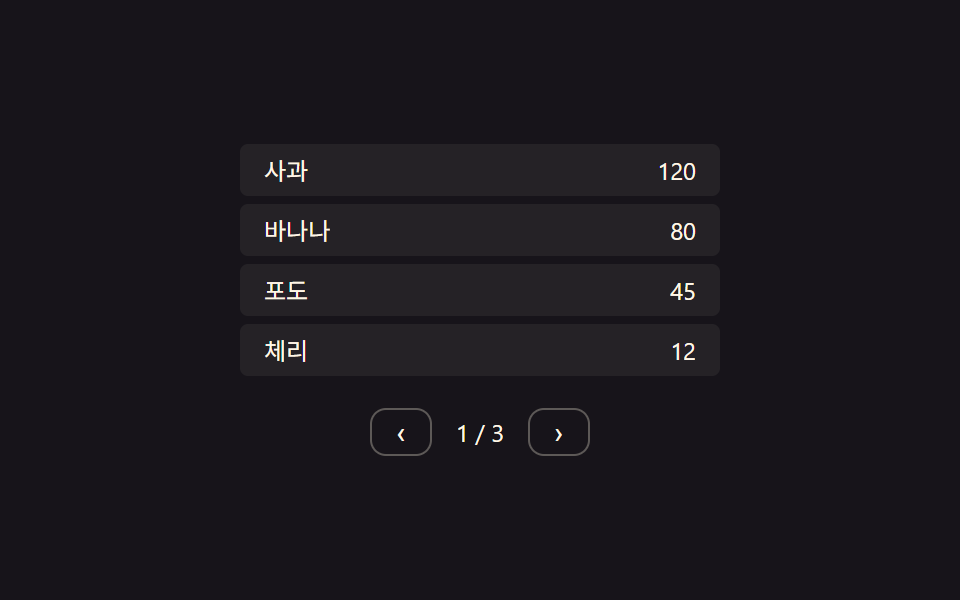
07Page value change and row-position value shift — when the page value changes, previous rows' position values exit and new rows' position values enter
When the page value moves to the next number, the current rows' position values exit to one side while the new page's rows fill in their position values from the other side.
Best forA data table split into pages, a list showing search results page by page
STAGGER_MS 60delayUntil.tps__row
<main class="stage">
<div class="tps">
  <div class="tps__viewport is-demo" id="tpsViewport"></div>
  <div class="tps__nav">
    <button class="tps__btn" id="tpsPrev" type="button" aria-label="Previous page">‹</button>
    <span class="tps__page" id="tpsPageLabel">1 / 3</span>
    <button class="tps__btn" id="tpsNext" type="button" aria-label="Next page">›</button>
  </div>
</div>
</main>
@use "../../../../site/static/demo-tokens" as *;
// 계산 겹: 페이지 전환 방향(dir) 값에 따라 나가는/들어오는 행에 순서×STAGGER_MS 시작 지연을 걸고
// 남은 거리의 28%씩 다가가는 보간(lerp)으로 x 를 움직인다 — index.html goTo()/tick() 참조
@include stage($stage-ink);
.tps {
width: 100%;
max-width: 240px;
}
.tps__viewport {
position: relative;
overflow: hidden;
width: 100%;
}
.tps__row {
position: absolute;
left: 0;
width: 100%;
height: 26px;
box-sizing: border-box;
display: flex;
align-items: center;
justify-content: space-between;
padding: 0 $sp-3;
background: rgba(255, 247, 230, .06);
border-radius: $r-xs;
color: $subject-cream;
font: 400 12px/1 -apple-system, "Segoe UI", "Noto Sans KR", sans-serif;
}
.tps__cell--num {
font-variant-numeric: tabular-nums;
}
.tps__nav {
display: flex;
align-items: center;
justify-content: center;
gap: $sp-3;
margin-top: $sp-3;
}
.tps__btn {
border: 1px solid rgba(255, 247, 230, .3);
background: transparent;
color: $subject-cream;
border-radius: $r-sm;
padding: $sp-1 $sp-3;
cursor: pointer;
font-size: 14px;
line-height: 1;
}
.tps__page {
color: $subject-cream;
font-size: 12px;
font-variant-numeric: tabular-nums;
}
@media (max-width: 340px) {
.tps { max-width: 200px; }
.tps__row { height: 24px; font-size: 11px; }
}
@media (prefers-reduced-motion: reduce) {
.tps__row { transition: none; }
}html, body {
margin: 0;
overflow: hidden;
}
.stage {
box-sizing: border-box;
min-height: 100vh;
display: grid;
place-items: center;
margin: 0;
background: #17141a;
font-family: -apple-system, "Segoe UI", "Noto Sans KR", sans-serif;
padding: clamp(8px, 4vw, 24px);
}
.tps {
width: 100%;
max-width: 240px;
}
.tps__viewport {
position: relative;
overflow: hidden;
width: 100%;
}
.tps__row {
position: absolute;
left: 0;
width: 100%;
height: 26px;
box-sizing: border-box;
display: flex;
align-items: center;
justify-content: space-between;
padding: 0 12px;
background: rgba(255, 247, 230, 0.06);
border-radius: 4px;
color: #fff7e6;
font: 400 12px/1 -apple-system, "Segoe UI", "Noto Sans KR", sans-serif;
}
.tps__cell--num {
font-variant-numeric: tabular-nums;
}
.tps__nav {
display: flex;
align-items: center;
justify-content: center;
gap: 12px;
margin-top: 12px;
}
.tps__btn {
border: 1px solid rgba(255, 247, 230, 0.3);
background: transparent;
color: #fff7e6;
border-radius: 8px;
padding: 4px 12px;
cursor: pointer;
font-size: 14px;
line-height: 1;
}
.tps__page {
color: #fff7e6;
font-size: 12px;
font-variant-numeric: tabular-nums;
}
@media (max-width: 340px) {
.tps {
max-width: 200px;
}
.tps__row {
height: 24px;
font-size: 11px;
}
}
@media (prefers-reduced-motion: reduce) {
.tps__row {
transition: none;
}
}(function () {
var root = document.querySelector('.tps');
var viewport = document.getElementById('tpsViewport');
var pageLabel = document.getElementById('tpsPageLabel');
// 상수: 컨테이너 폭(px) · 행 높이(px) · stagger 간격(ms) · 보간 속도 · 자동 전환 간격
var W = 240;
var ROW_H = 30;
var STAGGER_MS = 60;
var LERP = 0.28;
var AUTO_PAGE_MS = 1600;
var pages = [
[['Apple', 120], ['Banana', 80], ['Grape', 45], ['Cherry', 12]],
[['Pear', 33], ['Plum', 21], ['Watermelon', 5], ['Korean melon', 18]],
[['Kiwi', 60], ['Mango', 40], ['Strawberry', 90], ['Blueberry', 27]]
];
var pageIndex = 0;
var live = []; // 현재 화면에 존재하는 모든 행 {el, x, targetX, delayUntil}
var transitioning = false;
function makeRow(item) {
var el = document.createElement('div');
el.className = 'tps__row';
el.innerHTML = '<span class="tps__cell">' + item[0] + '</span><span class="tps__cell tps__cell--num">' + item[1] + '</span>';
viewport.appendChild(el);
return el;
}
function renderInitial() {
pages[pageIndex].forEach(function (item) {
var el = makeRow(item);
live.push({ el: el, x: 0, targetX: 0, delayUntil: 0, role: 'stay' });
});
layoutStay();
pageLabel.textContent = (pageIndex + 1) + ' / ' + pages.length;
}
function layoutStay() {
var i = 0;
live.forEach(function (r) {
r.el.style.top = (i * ROW_H) + 'px';
i++;
});
}
// 계산 겹: 페이지 값이 바뀌면 방향 값(dir)에 따라 나가는 행·들어오는 행에 행 순서 × STAGGER_MS 만큼
// 시작 시각을 다르게 걸어(stagger) 목표 x 로 보간한다
function goTo(newIndex) {
if (transitioning || newIndex < 0 || newIndex >= pages.length || newIndex === pageIndex) return;
transitioning = true;
var dir = newIndex > pageIndex ? 1 : -1;
var now = performance.now();
var outgoing = live.slice();
outgoing.forEach(function (r, i) {
r.role = 'out';
r.targetX = -dir * W;
r.delayUntil = now + i * STAGGER_MS;
});
var incoming = pages[newIndex].map(function (item, i) {
var el = makeRow(item);
el.style.top = (i * ROW_H) + 'px';
el.style.transform = 'translateX(' + (dir * W) + 'px)';
return { el: el, x: dir * W, targetX: 0, delayUntil: now + i * STAGGER_MS, role: 'in' };
});
live = outgoing.concat(incoming);
pageIndex = newIndex;
pageLabel.textContent = (pageIndex + 1) + ' / ' + pages.length;
setTimeout(function () {
outgoing.forEach(function (r) { r.el.remove(); });
live = live.filter(function (r) { return r.role !== 'out'; });
live.forEach(function (r) { r.role = 'stay'; });
transitioning = false;
}, 900);
}
function tick() {
var now = performance.now();
live.forEach(function (r) {
if (now < r.delayUntil) return;
r.x += (r.targetX - r.x) * LERP;
r.el.style.transform = 'translateX(' + r.x.toFixed(1) + 'px)';
r.el.style.opacity = String(Math.max(0, 1 - Math.abs(r.x) / W));
});
requestAnimationFrame(tick);
}
requestAnimationFrame(tick);
renderInitial();
viewport.style.height = (4 * ROW_H) + 'px';
document.getElementById('tpsPrev').addEventListener('click', function () {
viewport.classList.remove('is-demo');
goTo(pageIndex - 1);
});
document.getElementById('tpsNext').addEventListener('click', function () {
viewport.classList.remove('is-demo');
goTo(pageIndex + 1);
});
// 자동 루프: 페이지 값을 순환하며 다음으로 넘긴다
function autoStep() {
if (viewport.classList.contains('is-demo')) {
goTo((pageIndex + 1) % pages.length);
}
setTimeout(autoStep, AUTO_PAGE_MS);
}
setTimeout(autoStep, AUTO_PAGE_MS);
})();import { useEffect, useRef } from "react";
import styles from "./TableRowPaginationSlide.module.scss";
type Box<T> = { current: T };
type LiveRow = { el: HTMLDivElement; x: number; targetX: number; delayUntil: number; role: "stay" | "out" | "in" };
export default function TableRowPaginationSlide() {
const rootRef = useRef(null) as unknown as Box<HTMLDivElement | null>;
const viewportRef = useRef(null) as unknown as Box<HTMLDivElement | null>;
const labelRef = useRef(null) as unknown as Box<HTMLSpanElement | null>;
useEffect(() => {
const root = rootRef.current;
const viewport = viewportRef.current;
const pageLabel = labelRef.current;
if (!root || !viewport || !pageLabel) return;
// 상수: 컨테이너 폭(px) · 행 높이(px) · stagger 간격(ms) · 보간 속도 · 자동 전환 간격
const W = 240;
const ROW_H = 30;
const STAGGER_MS = 60;
const LERP = 0.28;
const AUTO_PAGE_MS = 1600;
const pages: [string, number][][] = [
[["사과", 120], ["바나나", 80], ["포도", 45], ["체리", 12]],
[["배", 33], ["자두", 21], ["수박", 5], ["참외", 18]],
[["키위", 60], ["망고", 40], ["딸기", 90], ["블루베리", 27]],
];
let pageIndex = 0;
let live: LiveRow[] = [];
let transitioning = false;
let stopped = false;
let rafId = 0;
const timers: number[] = [];
function makeRow(item: [string, number]) {
const el = document.createElement("div");
el.className = styles.row;
el.innerHTML = `<span class="${styles.cell}">${item[0]}</span><span class="${styles.cell} ${styles.cellNum}">${item[1]}</span>`;
viewport!.appendChild(el);
return el;
}
function renderInitial() {
pages[pageIndex].forEach((item) => {
const el = makeRow(item);
live.push({ el, x: 0, targetX: 0, delayUntil: 0, role: "stay" });
});
layoutStay();
pageLabel!.textContent = (pageIndex + 1) + " / " + pages.length;
}
function layoutStay() {
let i = 0;
live.forEach((r) => {
r.el.style.top = (i * ROW_H) + "px";
i++;
});
}
// 계산 겹: 페이지 값이 바뀌면 방향 값(dir)에 따라 나가는 행·들어오는 행에 행 순서 × STAGGER_MS 만큼
// 시작 시각을 다르게 걸어(stagger) 목표 x 로 보간한다
function goTo(newIndex: number) {
if (transitioning || newIndex < 0 || newIndex >= pages.length || newIndex === pageIndex) return;
transitioning = true;
const dir = newIndex > pageIndex ? 1 : -1;
const now = performance.now();
const outgoing = live.slice();
outgoing.forEach((r, i) => {
r.role = "out";
r.targetX = -dir * W;
r.delayUntil = now + i * STAGGER_MS;
});
const incoming: LiveRow[] = pages[newIndex].map((item, i) => {
const el = makeRow(item);
el.style.top = (i * ROW_H) + "px";
el.style.transform = "translateX(" + (dir * W) + "px)";
return { el, x: dir * W, targetX: 0, delayUntil: now + i * STAGGER_MS, role: "in" };
});
live = outgoing.concat(incoming);
pageIndex = newIndex;
pageLabel!.textContent = (pageIndex + 1) + " / " + pages.length;
const tid = window.setTimeout(() => {
outgoing.forEach((r) => r.el.remove());
live = live.filter((r) => r.role !== "out");
live.forEach((r) => { r.role = "stay"; });
transitioning = false;
}, 900);
timers.push(tid);
}
function tick() {
if (stopped) return;
const now = performance.now();
live.forEach((r) => {
if (now < r.delayUntil) return;
r.x += (r.targetX - r.x) * LERP;
r.el.style.transform = "translateX(" + r.x.toFixed(1) + "px)";
r.el.style.opacity = String(Math.max(0, 1 - Math.abs(r.x) / W));
});
rafId = requestAnimationFrame(tick);
}
rafId = requestAnimationFrame(tick);
renderInitial();
viewport.style.height = (4 * ROW_H) + "px";
const prevBtn = root.querySelector(`.${styles.btn}[data-dir="prev"]`) as HTMLButtonElement;
const nextBtn = root.querySelector(`.${styles.btn}[data-dir="next"]`) as HTMLButtonElement;
function onPrev() {
viewport!.classList.remove(styles["is-demo"]);
goTo(pageIndex - 1);
}
function onNext() {
viewport!.classList.remove(styles["is-demo"]);
goTo(pageIndex + 1);
}
prevBtn.addEventListener("click", onPrev);
nextBtn.addEventListener("click", onNext);
function autoStep() {
if (stopped) return;
if (viewport!.classList.contains(styles["is-demo"])) {
goTo((pageIndex + 1) % pages.length);
}
const tid = window.setTimeout(autoStep, AUTO_PAGE_MS);
timers.push(tid);
}
const firstTid = window.setTimeout(autoStep, AUTO_PAGE_MS);
timers.push(firstTid);
return () => {
stopped = true;
cancelAnimationFrame(rafId);
timers.forEach((t) => window.clearTimeout(t));
prevBtn.removeEventListener("click", onPrev);
nextBtn.removeEventListener("click", onNext);
live.forEach((r) => r.el.remove());
};
}, []);
return (
<div className={styles.stage}>
<div ref={rootRef} className={styles.tps}>
<div ref={viewportRef} className={`${styles.viewport} ${styles["is-demo"]}`} />
<div className={styles.nav}>
<button className={styles.btn} data-dir="prev" type="button" aria-label="이전 페이지">‹</button>
<span ref={labelRef} className={styles.page}>1 / 3</span>
<button className={styles.btn} data-dir="next" type="button" aria-label="다음 페이지">›</button>
</div>
</div>
</div>
);
}07 Page value change and row-position value shift — when the page value changes, previous rows' position values exit and new rows' position values enter — Measured area 2.208% · moving frames 6/23Original by GODRICH · SCSS and React ship in the zip · Collapsible Table Row: 9 UI Patterns
The post this demo lives in
 Collapsible Table Row: 9 UI PatternsCollapsible table row: One of nine grows a detail height as a row's expand value changes, one shrinks a removed row to z See all demos in this post
If you like this effect - similar demos
 Transitions01 Active-indicator slide-morph toggle — when the selected tab changes, the highlight's position and width values shift together from the old spot to the new oneCSS Bottom Navigation Bar: 9 Transition Patterns
 Transitions03 Item stagger cascade — each row's delay grows with its position value in the listCart Drawer UI Patterns: 9 Motion Techniques
 Transitions03 Result count morph — a number interpolating between its old and new value9 Filter UI Patterns (Panel Slide to Chip Remove)