08Countdown whose ring starts when you dial minutes
Arrow keys raise the minute and second fields, pressing start drains the ring around them, and that ring angle only animates smoothly because the custom property is registered.
Best forTimer and break screens that set how long from now rather than when
@propertyconic-gradientaria-valuenow
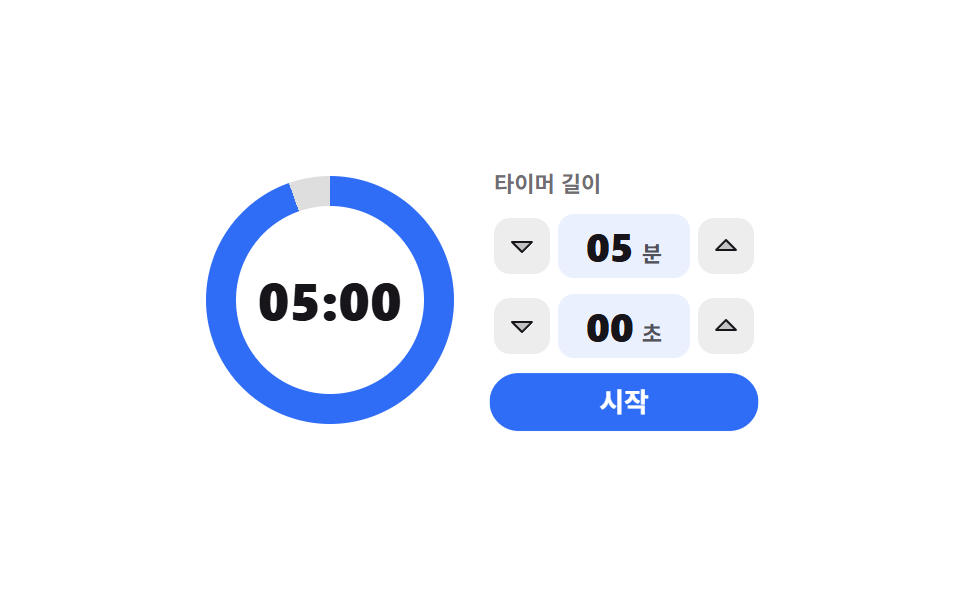
<main class="stage">
  <div class="cd is-demo">
    <div class="cd__ring" id="cd-ring">
      <span class="cd__hole">
        <span class="cd__num" id="cd-num">05:00</span>
        <span class="cd__f" data-k="1">05:00</span>
        <span class="cd__f" data-k="2">03:45</span>
        <span class="cd__f" data-k="3">02:30</span>
      </span>
    </div>

    <div class="cd__side">
      <span class="cd__cap">Timer length</span>

      <div class="cd__field">
        <button class="cd__step" type="button" data-t="min" data-d="-1" aria-label="minutes down"><svg viewBox="0 0 256 256" width="16" height="16" aria-hidden="true"><g fill="currentColor"><path d="m208 96l-80 80l-80-80Z" opacity=".2"/><path d="M215.39 92.94A8 8 0 0 0 208 88H48a8 8 0 0 0-5.66 13.66l80 80a8 8 0 0 0 11.32 0l80-80a8 8 0 0 0 1.73-8.72M128 164.69L67.31 104h121.38Z"/></g></svg></button>
        <span class="cd__val" role="spinbutton" tabindex="0" id="cd-min" data-t="min" aria-label="min" aria-valuemin="0" aria-valuemax="59" aria-valuenow="5" aria-valuetext="5min"><b class="cd__n" id="cd-min-n">05</b><i class="cd__u">min</i></span>
        <button class="cd__step" type="button" data-t="min" data-d="1" aria-label="minutes up"><svg viewBox="0 0 256 256" width="16" height="16" aria-hidden="true"><g fill="currentColor"><path d="M208 160H48l80-80Z" opacity=".2"/><path d="m213.66 154.34l-80-80a8 8 0 0 0-11.32 0l-80 80A8 8 0 0 0 48 168h160a8 8 0 0 0 5.66-13.66M67.31 152L128 91.31L188.69 152Z"/></g></svg></button>
      </div>

      <div class="cd__field">
        <button class="cd__step" type="button" data-t="sec" data-d="-1" aria-label="seconds down"><svg viewBox="0 0 256 256" width="16" height="16" aria-hidden="true"><g fill="currentColor"><path d="m208 96l-80 80l-80-80Z" opacity=".2"/><path d="M215.39 92.94A8 8 0 0 0 208 88H48a8 8 0 0 0-5.66 13.66l80 80a8 8 0 0 0 11.32 0l80-80a8 8 0 0 0 1.73-8.72M128 164.69L67.31 104h121.38Z"/></g></svg></button>
        <span class="cd__val" role="spinbutton" tabindex="0" id="cd-sec" data-t="sec" aria-label="sec" aria-valuemin="0" aria-valuemax="55" aria-valuenow="0" aria-valuetext="0sec"><b class="cd__n" id="cd-sec-n">00</b><i class="cd__u">sec</i></span>
        <button class="cd__step" type="button" data-t="sec" data-d="1" aria-label="seconds up"><svg viewBox="0 0 256 256" width="16" height="16" aria-hidden="true"><g fill="currentColor"><path d="M208 160H48l80-80Z" opacity=".2"/><path d="m213.66 154.34l-80-80a8 8 0 0 0-11.32 0l-80 80A8 8 0 0 0 48 168h160a8 8 0 0 0 5.66-13.66M67.31 152L128 91.31L188.69 152Z"/></g></svg></button>
      </div>

      <button class="cd__go" type="button" id="cd-go">Start</button>
    </div>

    <span class="cd__tpl" data-k="min" hidden>{n} minutes</span>
    <span class="cd__tpl" data-k="sec" hidden>{n} seconds</span>
  </div>
</main>@use "../../../../site/static/demo-tokens" as *;
$duration: $dur-base;
$easing: $ease-spring;
$color: $subject-blue;
@include stage($stage-paper);
// 등록하지 않은 커스텀 속성은 보간되지 않는다 — 각도를 애니메이션하려면 이 선언이 먼저다
@property --ring-angle {
syntax: "<angle>";
inherits: false;
initial-value: 360deg;
}
.cd {
box-sizing: border-box;
display: flex;
align-items: center;
gap: $sp-5;
color: $subject-ink;
font-family: -apple-system, "Segoe UI", "Noto Sans KR", sans-serif;
}
// ── 둘레 링: conic-gradient 한 장 + 가운데 구멍 ──────────
.cd__ring {
position: relative;
flex: 0 0 auto;
display: grid;
place-items: center;
width: 124px;
height: 124px;
border-radius: 50%;
background: conic-gradient($color 0deg var(--ring-angle), rgba($subject-ink, .14) var(--ring-angle) 360deg);
}
.cd__hole {
display: grid;
place-items: center;
width: 94px;
height: 94px;
border-radius: 50%;
background-color: $stage-paper;
}
.cd__num,
.cd__f {
grid-area: 1 / 1;
font-size: 26px;
line-height: 30px;
font-weight: 800;
letter-spacing: .01em;
font-variant-numeric: tabular-nums;
}
// 루프 전용 숫자 석 장 — 사람이 조작하면 위의 실제 값이 다시 보인다
.cd__f { display: none; }
.cd.is-demo .cd__f { display: block; }
.cd.is-demo .cd__num { display: none; }
// ── 분·초 칸 ────────────────────────────────────────────
.cd__side {
display: flex;
flex-direction: column;
gap: $sp-2;
}
.cd__cap {
font-size: 11px;
line-height: 14px;
font-weight: 600;
color: rgba($subject-ink, .62);
}
.cd__field {
display: flex;
align-items: center;
gap: $sp-1;
}
.cd__step {
box-sizing: border-box;
display: inline-flex;
align-items: center;
justify-content: center;
margin: 0;
padding: 0;
width: 28px;
height: 28px;
border: 0;
border-radius: $r-sm;
background-color: rgba($subject-ink, .08);
color: $subject-ink;
cursor: pointer;
}
.cd__step:focus-visible,
.cd__val:focus-visible,
.cd__go:focus-visible { outline: 3px solid $color; outline-offset: 2px; }
.cd__step svg { display: block; }
.cd__val {
box-sizing: border-box;
display: inline-flex;
align-items: baseline;
justify-content: center;
gap: $sp-1;
padding: $sp-1 $sp-2;
min-width: 66px;
border-radius: $r-sm;
background-color: rgba($color, .1);
cursor: ns-resize;
}
.cd__n {
font-size: 20px;
line-height: 24px;
font-weight: 800;
font-variant-numeric: tabular-nums;
}
.cd__u {
font-size: 11px;
line-height: 14px;
font-weight: 700;
font-style: normal;
color: rgba($subject-ink, .72);
}
.cd__go {
box-sizing: border-box;
margin: 0;
padding: $sp-1 $sp-4;
border: 0;
border-radius: $r-pill;
background-color: $color;
color: $stage-paper;
font-family: inherit;
font-size: 13px;
line-height: 20px;
font-weight: 700;
cursor: pointer;
}
.cd__tpl { display: none; }
// ── 자동 루프: 링은 이어서 줄고, 숫자는 한 프레임에 컷 ──
// 다 닳아서 비는 프레임이 없도록 72deg 에서 멈추고, 되감기는 여러 프레임으로 나눠 돌린다
.cd.is-demo .cd__ring {
animation-name: cd-drain;
animation-duration: $dur-loop;
animation-timing-function: linear;
animation-iteration-count: infinite;
animation-fill-mode: backwards;
}
@keyframes cd-drain {
0% { --ring-angle: 360deg; }
62% { --ring-angle: 72deg; }
86% { --ring-angle: 360deg; }
100% { --ring-angle: 360deg; }
}
.cd.is-demo .cd__f {
animation-duration: $dur-loop;
animation-timing-function: steps(1, end);
animation-iteration-count: infinite;
animation-fill-mode: backwards;
}
.cd.is-demo .cd__f[data-k="1"] { animation-name: cd-n1; }
.cd.is-demo .cd__f[data-k="2"] { animation-name: cd-n2; }
.cd.is-demo .cd__f[data-k="3"] { animation-name: cd-n3; }
@keyframes cd-n1 {
0% { opacity: 1; }
21% { opacity: 0; }
62% { opacity: 1; }
100% { opacity: 1; }
}
@keyframes cd-n2 {
0% { opacity: 0; }
21% { opacity: 1; }
41% { opacity: 0; }
100% { opacity: 0; }
}
@keyframes cd-n3 {
0% { opacity: 0; }
41% { opacity: 1; }
62% { opacity: 0; }
100% { opacity: 0; }
}
// 시작 버튼이 한 번 눌렸다 펴지며 루프의 출발을 알린다
.cd.is-demo .cd__go {
animation-name: cd-press;
animation-duration: $dur-loop;
animation-timing-function: $easing;
animation-iteration-count: infinite;
animation-fill-mode: backwards;
}
@keyframes cd-press {
0% { transform: scale(.92); }
8% { transform: scale(1.04); }
16% { transform: scale(1); }
100% { transform: scale(1); }
}
@media (max-width: 340px) {
.cd { gap: $sp-3; }
.cd__ring { width: 100px; height: 100px; }
.cd__hole { width: 76px; height: 76px; }
.cd__num,
.cd__f { font-size: 20px; line-height: 24px; }
.cd__val { min-width: 56px; padding: 0 $sp-1; gap: 0; }
.cd__n { font-size: 17px; line-height: 22px; }
.cd__step { width: 24px; height: 24px; }
.cd__go { padding: $sp-1 $sp-3; font-size: 12px; line-height: 18px; }
}
@media (prefers-reduced-motion: reduce) {
.cd.is-demo .cd__ring,
.cd.is-demo .cd__f,
.cd.is-demo .cd__go { animation: none !important; }
.cd.is-demo .cd__f[data-k="2"],
.cd.is-demo .cd__f[data-k="3"] { display: none; }
}html, body {
margin: 0;
overflow: hidden;
}
.stage {
box-sizing: border-box;
min-height: 100vh;
display: grid;
place-items: center;
margin: 0;
background: #ffffff;
font-family: -apple-system, "Segoe UI", "Noto Sans KR", sans-serif;
padding: clamp(8px, 4vw, 24px);
}
@property --ring-angle {
syntax: "<angle>";
inherits: false;
initial-value: 360deg;
}
.cd {
box-sizing: border-box;
display: flex;
align-items: center;
gap: 20px;
color: #17141a;
font-family: -apple-system, "Segoe UI", "Noto Sans KR", sans-serif;
}
.cd__ring {
position: relative;
flex: 0 0 auto;
display: grid;
place-items: center;
width: 124px;
height: 124px;
border-radius: 50%;
background: conic-gradient(#2f6df6 0deg var(--ring-angle), rgba(23, 20, 26, 0.14) var(--ring-angle) 360deg);
}
.cd__hole {
display: grid;
place-items: center;
width: 94px;
height: 94px;
border-radius: 50%;
background-color: #ffffff;
}
.cd__num,
.cd__f {
grid-area: 1/1;
font-size: 26px;
line-height: 30px;
font-weight: 800;
letter-spacing: 0.01em;
font-variant-numeric: tabular-nums;
}
.cd__f {
display: none;
}
.cd.is-demo .cd__f {
display: block;
}
.cd.is-demo .cd__num {
display: none;
}
.cd__side {
display: flex;
flex-direction: column;
gap: 8px;
}
.cd__cap {
font-size: 11px;
line-height: 14px;
font-weight: 600;
color: rgba(23, 20, 26, 0.62);
}
.cd__field {
display: flex;
align-items: center;
gap: 4px;
}
.cd__step {
box-sizing: border-box;
display: inline-flex;
align-items: center;
justify-content: center;
margin: 0;
padding: 0;
width: 28px;
height: 28px;
border: 0;
border-radius: 8px;
background-color: rgba(23, 20, 26, 0.08);
color: #17141a;
cursor: pointer;
}
.cd__step:focus-visible,
.cd__val:focus-visible,
.cd__go:focus-visible {
outline: 3px solid #2f6df6;
outline-offset: 2px;
}
.cd__step svg {
display: block;
}
.cd__val {
box-sizing: border-box;
display: inline-flex;
align-items: baseline;
justify-content: center;
gap: 4px;
padding: 4px 8px;
min-width: 66px;
border-radius: 8px;
background-color: rgba(47, 109, 246, 0.1);
cursor: ns-resize;
}
.cd__n {
font-size: 20px;
line-height: 24px;
font-weight: 800;
font-variant-numeric: tabular-nums;
}
.cd__u {
font-size: 11px;
line-height: 14px;
font-weight: 700;
font-style: normal;
color: rgba(23, 20, 26, 0.72);
}
.cd__go {
box-sizing: border-box;
margin: 0;
padding: 4px 16px;
border: 0;
border-radius: 999px;
background-color: #2f6df6;
color: #ffffff;
font-family: inherit;
font-size: 13px;
line-height: 20px;
font-weight: 700;
cursor: pointer;
}
.cd__tpl {
display: none;
}
.cd.is-demo .cd__ring {
animation-name: cd-drain;
animation-duration: 2s;
animation-timing-function: linear;
animation-iteration-count: infinite;
animation-fill-mode: backwards;
}
@keyframes cd-drain {
0% {
--ring-angle: 360deg;
}
62% {
--ring-angle: 72deg;
}
86% {
--ring-angle: 360deg;
}
100% {
--ring-angle: 360deg;
}
}
.cd.is-demo .cd__f {
animation-duration: 2s;
animation-timing-function: steps(1, end);
animation-iteration-count: infinite;
animation-fill-mode: backwards;
}
.cd.is-demo .cd__f[data-k="1"] {
animation-name: cd-n1;
}
.cd.is-demo .cd__f[data-k="2"] {
animation-name: cd-n2;
}
.cd.is-demo .cd__f[data-k="3"] {
animation-name: cd-n3;
}
@keyframes cd-n1 {
0% {
opacity: 1;
}
21% {
opacity: 0;
}
62% {
opacity: 1;
}
100% {
opacity: 1;
}
}
@keyframes cd-n2 {
0% {
opacity: 0;
}
21% {
opacity: 1;
}
41% {
opacity: 0;
}
100% {
opacity: 0;
}
}
@keyframes cd-n3 {
0% {
opacity: 0;
}
41% {
opacity: 1;
}
62% {
opacity: 0;
}
100% {
opacity: 0;
}
}
.cd.is-demo .cd__go {
animation-name: cd-press;
animation-duration: 2s;
animation-timing-function: cubic-bezier(0.2, 0.8, 0.2, 1);
animation-iteration-count: infinite;
animation-fill-mode: backwards;
}
@keyframes cd-press {
0% {
transform: scale(0.92);
}
8% {
transform: scale(1.04);
}
16% {
transform: scale(1);
}
100% {
transform: scale(1);
}
}
@media (max-width: 340px) {
.cd {
gap: 12px;
}
.cd__ring {
width: 100px;
height: 100px;
}
.cd__hole {
width: 76px;
height: 76px;
}
.cd__num,
.cd__f {
font-size: 20px;
line-height: 24px;
}
.cd__val {
min-width: 56px;
padding: 0 4px;
gap: 0;
}
.cd__n {
font-size: 17px;
line-height: 22px;
}
.cd__step {
width: 24px;
height: 24px;
}
.cd__go {
padding: 4px 12px;
font-size: 12px;
line-height: 18px;
}
}
@media (prefers-reduced-motion: reduce) {
.cd.is-demo .cd__ring,
.cd.is-demo .cd__f,
.cd.is-demo .cd__go {
animation: none !important;
}
.cd.is-demo .cd__f[data-k="2"],
.cd.is-demo .cd__f[data-k="3"] {
display: none;
}
}// 실제 동작: min·sec 칸은 진짜 spinbutton 이라 ↑↓ 로 값이 오르내리고(min 1, sec 5), 시작을 누르면
// 남은 비율이 --ring-angle 로 나간다. 이 커스텀 속성은 @property 로 등록돼 있어야 각도가 보간된다
var root = document.querySelector('.cd');
var ringEl = document.getElementById('cd-ring');
var num = document.getElementById('cd-num');
var V = { min: 5, sec: 0 }, STEP = { min: 1, sec: 5 }, MAX = { min: 59, sec: 55 };
var timer = null;
function pad(n) { return (n < 10 ? '0' : '') + n; }
function tpl(k, n) { return root.querySelector('.cd__tpl[data-k="' + k + '"]').textContent.replace('{n}', String(n)); }
function show(s) { num.textContent = pad(Math.floor(s / 60)) + ':' + pad(s % 60); }
function ring(f) { ringEl.style.setProperty('--ring-angle', (360 * f).toFixed(1) + 'deg'); }
function stop() { if (timer) { clearInterval(timer); timer = null; } }
function paint() {
['min', 'sec'].forEach(function (k) {
var el = document.getElementById('cd-' + k);
el.setAttribute('aria-valuenow', String(V[k]));
el.setAttribute('aria-valuetext', tpl(k, V[k])); // 읽히는 값은 숫자가 아니라 사람 말이다
document.getElementById('cd-' + k + '-n').textContent = pad(V[k]);
});
show(V.min * 60 + V.sec);
ring(1);
}
function bump(k, d) {
root.classList.remove('is-demo'); stop();
V[k] = Math.max(0, Math.min(MAX[k], V[k] + d * STEP[k]));
paint();
}
function start() {
root.classList.remove('is-demo'); stop();
var total = V.min * 60 + V.sec, left = total;
if (!total) return;
timer = setInterval(function () {
left -= 1; show(left); ring(left / total);
if (left <= 0) stop();
}, 1000);
}
root.addEventListener('click', function (e) {
var b = e.target.closest('.cd__step');
if (b) { bump(b.getAttribute('data-t'), Number(b.getAttribute('data-d'))); return; }
if (e.target.closest('.cd__go')) start();
});
root.addEventListener('keydown', function (e) {
var s = e.target.closest('[role="spinbutton"]');
if (!s) return;
var k = s.getAttribute('data-t');
var d = e.key === 'ArrowUp' ? 1 : e.key === 'ArrowDown' ? -1 : 0;
if (d) { e.preventDefault(); bump(k, d); return; }
if (e.key === 'Home' || e.key === 'End') {
e.preventDefault(); root.classList.remove('is-demo'); stop();
V[k] = e.key === 'Home' ? 0 : MAX[k]; paint();
}
});import { useRef, useState } from "react";
import type { CSSProperties } from "react";
import styles from "./CountdownRingSetter.module.scss";
type KeyEvt = { key: string; preventDefault(): void };
type Box<T> = { current: T };
type Vars = CSSProperties & { "--duration"?: string; "--easing"?: string; "--color"?: string };
type RingVars = CSSProperties & { "--ring-angle"?: string };
type Unit = "min" | "sec";
export type CountdownRingSetterProps = {
minutes?: number;
seconds?: number;
labels?: {
cap: string;
start: string;
min: string;
sec: string;
minUp: string;
minDown: string;
secUp: string;
secDown: string;
minUnit: string;
secUnit: string;
};
/** {n} 자리에 값이 들어가는 aria-valuetext 틀 */
valueText?: { min: string; sec: string };
/** 격자 미리보기(.isDemo) 루프에서만 보이는 숫자 석 장 */
demoFrames?: [string, string, string];
duration?: number;
easing?: string;
color?: string;
};
const STEP: { min: number; sec: number } = { min: 1, sec: 5 };
const MAX: { min: number; sec: number } = { min: 59, sec: 55 };
const CARET_DOWN = (
<g fill="currentColor">
<path d="m208 96l-80 80l-80-80Z" opacity=".2" />
<path d="M215.39 92.94A8 8 0 0 0 208 88H48a8 8 0 0 0-5.66 13.66l80 80a8 8 0 0 0 11.32 0l80-80a8 8 0 0 0 1.73-8.72M128 164.69L67.31 104h121.38Z" />
</g>
);
const CARET_UP = (
<g fill="currentColor">
<path d="M208 160H48l80-80Z" opacity=".2" />
<path d="m213.66 154.34l-80-80a8 8 0 0 0-11.32 0l-80 80A8 8 0 0 0 48 168h160a8 8 0 0 0 5.66-13.66M67.31 152L128 91.31L188.69 152Z" />
</g>
);
function pad(n: number) {
return (n < 10 ? "0" : "") + n;
}
export default function CountdownRingSetter({
minutes = 5,
seconds = 0,
labels = {
cap: "Timer length",
start: "Start",
min: "minutes",
sec: "seconds",
minUp: "minutes up",
minDown: "minutes down",
secUp: "seconds up",
secDown: "seconds down",
minUnit: "m",
secUnit: "s",
},
valueText = { min: "{n} minutes", sec: "{n} seconds" },
demoFrames = ["05:00", "03:45", "02:30"],
duration = 300,
easing = "cubic-bezier(.2,.8,.2,1)",
color = "#2f6df6",
}: CountdownRingSetterProps) {
const [demo, setDemo] = useState(true);
const [v, setV] = useState({ min: minutes, sec: seconds });
const [left, setLeft] = useState<number | null>(null);
const timer = useRef<number | null>(null) as Box<number | null>;
const total = v.min * 60 + v.sec;
const shown = left === null ? total : left;
// 남은 비율이 그대로 각도가 된다 — @property 로 등록된 값이라야 이 각도가 보간된다
const angle = left === null || total === 0 ? 360 : (left / total) * 360;
const vars: Vars = { "--duration": `${duration}ms`, "--easing": easing, "--color": color };
const ringVars: RingVars = { "--ring-angle": `${angle.toFixed(1)}deg` };
function stop() {
if (timer.current !== null) {
window.clearInterval(timer.current);
timer.current = null;
}
}
function set(k: Unit, n: number) {
setDemo(false);
stop();
setLeft(null);
const c = Math.max(0, Math.min(MAX[k], n));
setV((p) => (k === "min" ? { min: c, sec: p.sec } : { min: p.min, sec: c }));
}
function bump(k: Unit, d: number) {
set(k, v[k] + d * STEP[k]);
}
function start() {
setDemo(false);
stop();
if (!total) return;
setLeft(total);
timer.current = window.setInterval(() => {
setLeft((p) => {
const n = (p === null ? total : p) - 1;
if (n <= 0) stop();
return n < 0 ? 0 : n;
});
}, 1000);
}
function onKey(e: KeyEvt, k: Unit) {
const d = e.key === "ArrowUp" ? 1 : e.key === "ArrowDown" ? -1 : 0;
if (d) {
e.preventDefault();
bump(k, d);
return;
}
if (e.key === "Home" || e.key === "End") {
e.preventDefault();
set(k, e.key === "Home" ? 0 : MAX[k]);
}
}
function field(k: Unit, lab: string, unit: string, up: string, down: string) {
return (
<div className={styles.field}>
<button className={styles.step} type="button" aria-label={down} onClick={() => bump(k, -1)}>
<svg viewBox="0 0 256 256" width="16" height="16" aria-hidden="true">{CARET_DOWN}</svg>
</button>
<span
className={styles.val}
role="spinbutton"
tabIndex={0}
aria-label={lab}
aria-valuemin={0}
aria-valuemax={MAX[k]}
aria-valuenow={v[k]}
aria-valuetext={valueText[k].replace("{n}", String(v[k]))}
onKeyDown={(e: KeyEvt) => onKey(e, k)}
>
<b className={styles.n}>{pad(v[k])}</b>
<i className={styles.u}>{unit}</i>
</span>
<button className={styles.step} type="button" aria-label={up} onClick={() => bump(k, 1)}>
<svg viewBox="0 0 256 256" width="16" height="16" aria-hidden="true">{CARET_UP}</svg>
</button>
</div>
);
}
return (
<div className={`${styles.cd} ${demo ? styles.isDemo : ""}`} style={vars}>
<div className={styles.ring} style={ringVars}>
<span className={styles.hole}>
<span className={styles.num}>{pad(Math.floor(shown / 60))}:{pad(shown % 60)}</span>
{demoFrames.map((t, i) => (
<span className={styles.f} data-k={i + 1} key={t}>{t}</span>
))}
</span>
</div>
<div className={styles.side}>
<span className={styles.cap}>{labels.cap}</span>
{field("min", labels.min, labels.minUnit, labels.minUp, labels.minDown)}
{field("sec", labels.sec, labels.secUnit, labels.secUp, labels.secDown)}
<button className={styles.go} type="button" onClick={start}>{labels.start}</button>
</div>
</div>
);
}08 Countdown whose ring starts when you dial minutes — Measured area 4.353% · moving frames 21/23Original by GODRICH · SCSS and React ship in the zip · 9 time picker ui patterns, from a point to a span
The post this demo lives in
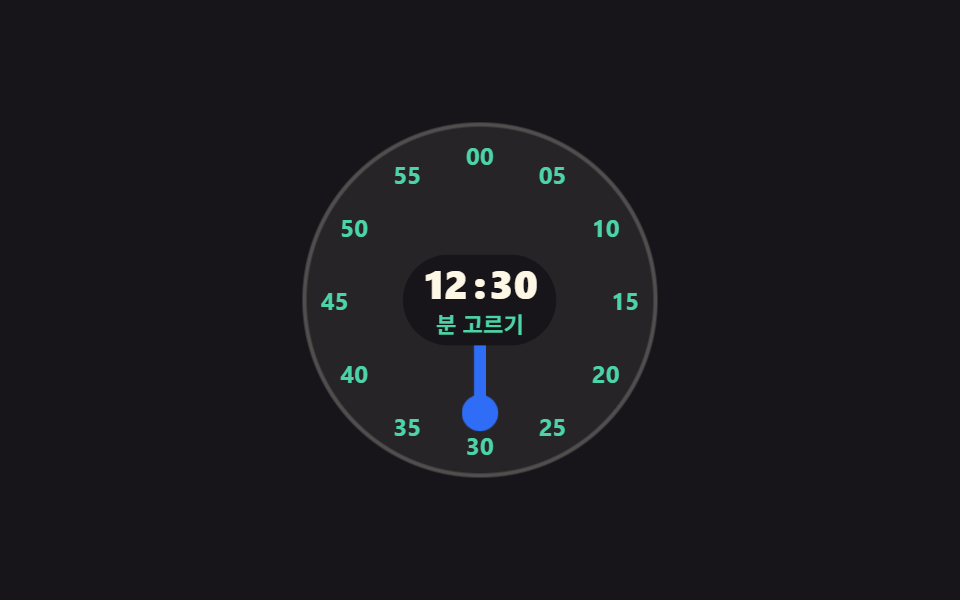 9 time picker ui patterns, from a point to a spanA time picker ui is the part of a screen where someone sets a time without typing it. These nine go past a single time o See all demos in this post
If you like this effect - similar demos
 Pickers01 Saturation and brightness square you dragCustom Color Picker: 9 JS Parts, No Library
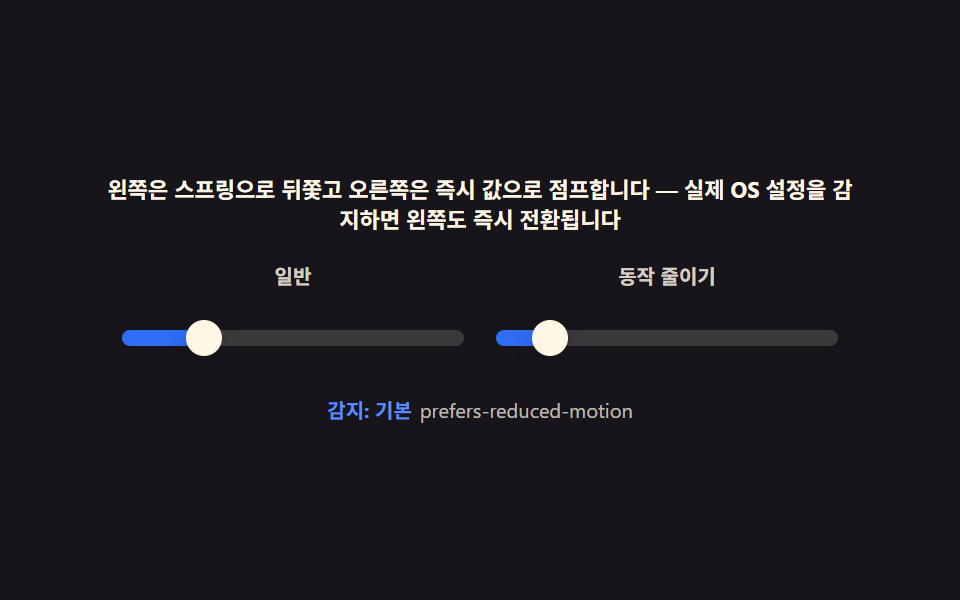 Pickers09 Reduced motion — turning inertia and springs off for instant, static valuesCSS Range Slider: 9 Physics-Grade Custom Sliders
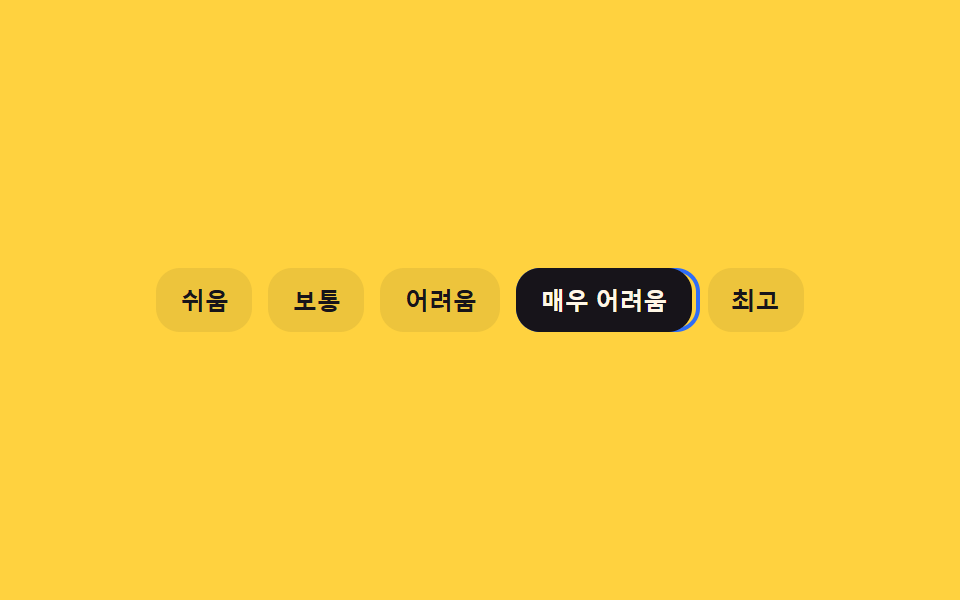 Pickers06 Keyboard Difficulty Selector Whose Focus Ring Trails With InertiaDifficulty Selector UI — 9 Computed Patterns