01子要素でもちらつかないドロップゾーンハイライト
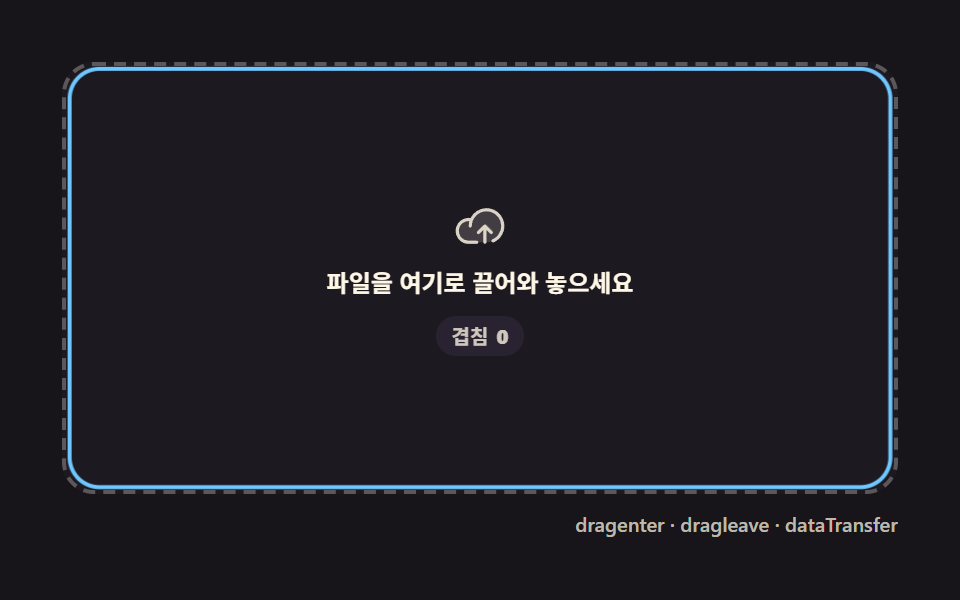
dragenter·dragleave が子ノードをまたぐたびに重複発生する分をカウンター1つで相殺し、ファイルを乗せている間は枠が一度だけ広がり一度だけ戻ります。
使いどころ添付フォーム、ダッシュボードのアップロードカード
dragenterdragleavedataTransfer
<main class="stage">
<div class="dz is-demo" id="dzRoot">
  <div class="dz__zone" id="dzZone" role="button" tabindex="0" aria-label="ファイルをここにドラッグ">
    <span class="dz__ring" aria-hidden="true"></span>
    <span class="dz__icon" aria-hidden="true">
      <svg viewBox="0 0 256 256" width="26" height="26"><g fill="currentColor"><path d="M240 128a80 80 0 0 1-80 80H72A56 56 0 1 1 85.92 97.74v.1A80 80 0 0 1 240 128" opacity=".2"/><path d="M178.34 165.66L160 147.31V208a8 8 0 0 1-16 0v-60.69l-18.34 18.35a8 8 0 0 1-11.32-11.32l32-32a8 8 0 0 1 11.32 0l32 32a8 8 0 0 1-11.32 11.32M160 40a88.08 88.08 0 0 0-78.71 48.68A64 64 0 1 0 72 216h40a8 8 0 0 0 0-16H72a48 48 0 0 1 0-96c1.1 0 2.2 0 3.29.12A88 88 0 0 0 72 128a8 8 0 0 0 16 0a72 72 0 1 1 100.8 66a8 8 0 0 0 3.2 15.34a7.9 7.9 0 0 0 3.2-.68A88 88 0 0 0 160 40"/></g></svg>
    </span>
    <span class="dz__label">ファイルをここにドラッグ</span>
    <span class="dz__badge" id="dzBadge" aria-hidden="true">重なり <b class="dz__n"></b></span>
  </div>
  <div class="dz__bar">
    <span class="dz__meta">dragenter · dragleave · dataTransfer</span>
  </div>
</div>
</main>
@use "../../../../site/static/demo-tokens" as *;
// 드롭존 하이라이트(01) — 움직임은 CSS keyframes 두 개뿐이다(링 opacity·scale / 카운터 정수).
// 실사용 경로는 JS 가 depth 카운터로 --n 을 직접 setProperty 한다 — 데모 루프와 같은 변수를 공유한다.
@property --n {
syntax: "<integer>";
inherits: false;
initial-value: 0;
}
@include stage($stage-ink);
$dz-panel: #211d26;
$dz-text: $subject-cream;
$dz-ring: $subject-sky;
$dz-badge: #2a2432;
$duration: $dur-loop;
$easing: $ease-out;
$color: $dz-ring;
.dz {
--dz-ring: #{$dz-ring};
position: relative;
display: flex; flex-direction: column;
width: 100%; height: 100%; min-height: 164px;
overflow: hidden;
}
.dz__zone {
position: relative;
margin: $sp-3 $sp-3 0;
flex: 1;
display: flex; flex-direction: column; align-items: center; justify-content: center;
gap: $sp-2;
border-radius: $r-card;
border: 2px dashed rgba($dz-text, .28);
background: rgba($dz-panel, .6);
cursor: pointer;
}
.dz__zone:focus-visible { outline: 2px solid $dz-ring; outline-offset: 2px; }
.dz__ring {
position: absolute; inset: 0;
border-radius: $r-card;
border: 2px solid $dz-ring;
opacity: 0;
transform: scale(.94);
pointer-events: none;
}
.dz__zone.is-over .dz__ring {
opacity: 1;
transform: scale(1);
transition: opacity $dur-quick $easing, transform $dur-quick $ease-elastic;
}
.dz__zone.is-dropped .dz__ring {
opacity: 1;
transform: scale(1.08);
transition: opacity $dur-quick $easing, transform $dur-instant $ease-elastic;
}
.dz__icon {
position: relative; z-index: 1;
display: flex;
color: rgba($dz-text, .82);
}
.dz__label {
position: relative; z-index: 1;
font-weight: 600; font-size: clamp(10px, 2.6vw, 12px); line-height: 1.3;
color: $dz-text;
text-align: center;
padding: 0 $sp-3;
}
.dz__badge {
position: relative; z-index: 1;
display: inline-flex; align-items: center; gap: 4px;
padding: $sp-1 $sp-2;
border-radius: $r-pill;
background: rgba($dz-badge, .92);
font-weight: 600; font-size: 10px; line-height: 1.2;
color: rgba($dz-text, .82);
opacity: 0;
--n: 0;
}
.dz__zone.is-over .dz__badge { opacity: 1; transition: opacity $dur-quick $easing; }
.dz__n { counter-reset: dzn var(--n); }
.dz__n::before { content: counter(dzn); }
.dz__bar {
display: flex; justify-content: flex-end;
padding: $sp-2 $sp-3 $sp-3;
}
.dz__meta {
font-size: 10px; font-weight: 500; color: rgba($dz-text, .72);
}
// ── 데모 루프 — 진입 깊이(depth)가 0→3 을 오르내리는 동안 테두리는 한 번만 켜지고 한 번만 꺼진다 ──
@keyframes dzRing {
0% { opacity: 0; transform: scale(.94); }
8% { opacity: 1; transform: scale(1.06); animation-timing-function: $ease-elastic; }
18% { transform: scale(1); animation-timing-function: $easing; }
54% { opacity: 1; transform: scale(1); }
60% { opacity: 1; transform: scale(1.08); }
70% { opacity: 0; transform: scale(.96); }
100% { opacity: 0; transform: scale(.94); }
}
@keyframes dzCount {
0%, 6% { --n: 0; opacity: 0; }
10% { --n: 1; opacity: 1; }
22% { --n: 2; }
34% { --n: 3; }
44% { --n: 2; }
52% { --n: 1; }
58%, 100% { --n: 0; opacity: 0; }
}
.is-demo .dz__ring {
animation-name: dzRing;
animation-duration: $duration;
animation-timing-function: $easing;
animation-iteration-count: infinite;
}
.is-demo .dz__badge {
animation-name: dzCount;
animation-duration: $duration;
animation-timing-function: linear;
animation-iteration-count: infinite;
}
@media (max-width: 340px) {
.dz__label { font-size: 10px; }
}
@media (prefers-reduced-motion: reduce) {
.is-demo .dz__ring, .is-demo .dz__badge { animation: none !important; opacity: 0 !important; }
}@property --n {
syntax: "<integer>";
inherits: false;
initial-value: 0;
}
html, body {
margin: 0;
overflow: hidden;
}
.stage {
box-sizing: border-box;
min-height: 100vh;
display: grid;
place-items: center;
margin: 0;
background: #17141a;
font-family: -apple-system, "Segoe UI", "Noto Sans KR", sans-serif;
padding: clamp(8px, 4vw, 24px);
}
.dz {
--dz-ring: #6ec8ff;
position: relative;
display: flex;
flex-direction: column;
width: 100%;
height: 100%;
min-height: 164px;
overflow: hidden;
}
.dz__zone {
position: relative;
margin: 12px 12px 0;
flex: 1;
display: flex;
flex-direction: column;
align-items: center;
justify-content: center;
gap: 8px;
border-radius: 16px;
border: 2px dashed rgba(255, 247, 230, 0.28);
background: rgba(33, 29, 38, 0.6);
cursor: pointer;
}
.dz__zone:focus-visible {
outline: 2px solid #6ec8ff;
outline-offset: 2px;
}
.dz__ring {
position: absolute;
inset: 0;
border-radius: 16px;
border: 2px solid #6ec8ff;
opacity: 0;
transform: scale(0.94);
pointer-events: none;
}
.dz__zone.is-over .dz__ring {
opacity: 1;
transform: scale(1);
transition: opacity 220ms ease-out, transform 220ms cubic-bezier(0.34, 1.56, 0.64, 1);
}
.dz__zone.is-dropped .dz__ring {
opacity: 1;
transform: scale(1.08);
transition: opacity 220ms ease-out, transform 140ms cubic-bezier(0.34, 1.56, 0.64, 1);
}
.dz__icon {
position: relative;
z-index: 1;
display: flex;
color: rgba(255, 247, 230, 0.82);
}
.dz__label {
position: relative;
z-index: 1;
font-weight: 600;
font-size: clamp(10px, 2.6vw, 12px);
line-height: 1.3;
color: #fff7e6;
text-align: center;
padding: 0 12px;
}
.dz__badge {
position: relative;
z-index: 1;
display: inline-flex;
align-items: center;
gap: 4px;
padding: 4px 8px;
border-radius: 999px;
background: rgba(42, 36, 50, 0.92);
font-weight: 600;
font-size: 10px;
line-height: 1.2;
color: rgba(255, 247, 230, 0.82);
opacity: 0;
--n: 0;
}
.dz__zone.is-over .dz__badge {
opacity: 1;
transition: opacity 220ms ease-out;
}
.dz__n {
counter-reset: dzn var(--n);
}
.dz__n::before {
content: counter(dzn);
}
.dz__bar {
display: flex;
justify-content: flex-end;
padding: 8px 12px 12px;
}
.dz__meta {
font-size: 10px;
font-weight: 500;
color: rgba(255, 247, 230, 0.72);
}
@keyframes dzRing {
0% {
opacity: 0;
transform: scale(0.94);
}
8% {
opacity: 1;
transform: scale(1.06);
animation-timing-function: cubic-bezier(0.34, 1.56, 0.64, 1);
}
18% {
transform: scale(1);
animation-timing-function: ease-out;
}
54% {
opacity: 1;
transform: scale(1);
}
60% {
opacity: 1;
transform: scale(1.08);
}
70% {
opacity: 0;
transform: scale(0.96);
}
100% {
opacity: 0;
transform: scale(0.94);
}
}
@keyframes dzCount {
0%, 6% {
--n: 0;
opacity: 0;
}
10% {
--n: 1;
opacity: 1;
}
22% {
--n: 2;
}
34% {
--n: 3;
}
44% {
--n: 2;
}
52% {
--n: 1;
}
58%, 100% {
--n: 0;
opacity: 0;
}
}
.is-demo .dz__ring {
animation-name: dzRing;
animation-duration: 2s;
animation-timing-function: ease-out;
animation-iteration-count: infinite;
}
.is-demo .dz__badge {
animation-name: dzCount;
animation-duration: 2s;
animation-timing-function: linear;
animation-iteration-count: infinite;
}
@media (max-width: 340px) {
.dz__label {
font-size: 10px;
}
}
@media (prefers-reduced-motion: reduce) {
.is-demo .dz__ring, .is-demo .dz__badge {
animation: none !important;
opacity: 0 !important;
}
}// 드롭존 하이라이트 — 자식 요소를 넘나드는 dragenter·dragleave 쌍은 한 번의 진입에 여러 번 발생한다.
// 카운터 depth 를 두어 depth 가 0보다 클 때만 하이라이트하면 자식 경계를 넘어도 테두리가 깜빡이지 않는다.
(function () {
var root = document.getElementById('dzRoot');
var zone = document.getElementById('dzZone');
var badge = document.getElementById('dzBadge');
if (!root || !zone || !badge) return;
var depth = 0;
function paint() {
zone.classList.toggle('is-over', depth > 0);
badge.style.setProperty('--n', depth);
}
function enter(e) { e.preventDefault(); depth += 1; paint(); }
function leave(e) { e.preventDefault(); depth = Math.max(0, depth - 1); paint(); }
function over(e) { e.preventDefault(); }
function drop(e) {
e.preventDefault();
var fileCount = (e.dataTransfer && e.dataTransfer.files) ? e.dataTransfer.files.length : 0;
depth = 0; paint();
zone.setAttribute('data-drop-count', String(fileCount));
zone.classList.add('is-dropped');
setTimeout(function () { zone.classList.remove('is-dropped'); }, 640);
}
function live() { root.classList.remove('is-demo'); }
zone.addEventListener('dragenter', enter);
zone.addEventListener('dragleave', leave);
zone.addEventListener('dragover', over);
zone.addEventListener('drop', drop);
['pointerdown', 'focusin'].forEach(function (ev) { zone.addEventListener(ev, live); });
})();// UploadProgressDropzoneHighlight — vanilla 판(run/329/demo/01-upload-progress-dropzone-highlight/index.html) 의 React 포트.
// 자식 요소를 넘나드는 dragenter·dragleave 쌍은 한 번의 진입에 여러 번 발생한다. 카운터 depth 를 두어
// depth 가 0보다 클 때만 하이라이트하면 자식 경계를 넘어도 테두리가 깜빡이지 않는다.
import { useRef, useState } from "react";
import type { CSSProperties } from "react";
import styles from "./UploadProgressDropzoneHighlight.module.scss";
export type UploadProgressDropzoneHighlightProps = {
duration?: string;
easing?: string;
color?: string;
};
type Vars = CSSProperties & { "--duration"?: string; "--easing"?: string; "--color"?: string };
type NVars = CSSProperties & { "--n"?: number };
type Box<T> = { current: T };
type DragEvt = { preventDefault: () => void; dataTransfer?: { files?: { length: number } } | null };
const LABEL = "파일을 여기로 끌어와 놓으세요";
const BADGE_PREFIX = "겹침";
const META = "dragenter · dragleave · dataTransfer";
export default function UploadProgressDropzoneHighlight({
duration = "2s",
easing = "ease-out",
color = "#6ec8ff"
}: UploadProgressDropzoneHighlightProps) {
const [demo, setDemo] = useState(true);
const [depth, setDepth] = useState(0);
const [dropped, setDropped] = useState(false);
const dropTimer = useRef(0) as Box<number>;
const vars: Vars = { "--duration": duration, "--easing": easing, "--color": color };
const badgeVars: NVars = { "--n": depth };
function live(): void {
setDemo(false);
}
function enter(e: DragEvt): void {
e.preventDefault();
setDepth((d) => d + 1);
}
function leave(e: DragEvt): void {
e.preventDefault();
setDepth((d) => Math.max(0, d - 1));
}
function over(e: DragEvt): void {
e.preventDefault();
}
function drop(e: DragEvt): void {
e.preventDefault();
setDepth(0);
setDropped(true);
window.clearTimeout(dropTimer.current);
dropTimer.current = window.setTimeout(() => setDropped(false), 640);
}
const rootCls = demo ? `${styles.dz} ${styles.isDemo}` : styles.dz;
const zoneCls = [styles.zone, depth > 0 ? styles.isOver : "", dropped ? styles.isDropped : ""].filter(Boolean).join(" ");
return (
<main className={styles.stage}>
<div className={rootCls} style={vars}>
<div
className={zoneCls}
role="button"
tabIndex={0}
aria-label={LABEL}
onDragEnter={enter}
onDragLeave={leave}
onDragOver={over}
onDrop={drop}
onPointerDown={live}
onFocus={live}
>
<span className={styles.ring} aria-hidden="true"></span>
<span className={styles.icon} aria-hidden="true">
<svg viewBox="0 0 256 256" width="26" height="26"><g fill="currentColor"><path d="M240 128a80 80 0 0 1-80 80H72A56 56 0 1 1 85.92 97.74v.1A80 80 0 0 1 240 128" opacity=".2"/><path d="M178.34 165.66L160 147.31V208a8 8 0 0 1-16 0v-60.69l-18.34 18.35a8 8 0 0 1-11.32-11.32l32-32a8 8 0 0 1 11.32 0l32 32a8 8 0 0 1-11.32 11.32M160 40a88.08 88.08 0 0 0-78.71 48.68A64 64 0 1 0 72 216h40a8 8 0 0 0 0-16H72a48 48 0 0 1 0-96c1.1 0 2.2 0 3.29.12A88 88 0 0 0 72 128a8 8 0 0 0 16 0a72 72 0 1 1 100.8 66a8 8 0 0 0 3.2 15.34a7.9 7.9 0 0 0 3.2-.68A88 88 0 0 0 160 40"/></g></svg>
</span>
<span className={styles.label}>{LABEL}</span>
<span className={styles.badge} style={badgeVars} aria-hidden="true">{BADGE_PREFIX} <b className={styles.n}></b></span>
</div>
<div className={styles.bar}>
<span className={styles.meta}>{META}</span>
</div>
</div>
</main>
);
}01 子要素でもちらつかないドロップゾーンハイライト — 計測 累積面積 13.246% · 動いたフレーム 17/23GODRICH オリジナル · SCSS と React は zip に同梱 · アップロード プログレスバー ローダー9種 — 計算するUI
このデモが属する記事
 アップロード プログレスバー ローダー9種 — 計算するUIアップロード プログレスバーは、バイトと時間の実測値からリング・速度・チェックの動きを計算して描く部品です。ファイルをドロップすると、バイトと時間から速度を計算してリングが回り、完了するとチェックに変わります。9つの状態をライブラリなしで計 この記事のデモをすべて見る