CSS 테두리 애니메이션 9종 — 한 줄 복붙으로
CSS 테두리 애니메이션은 카드나 입력창의 가장자리를 움직여 지금 상태를 알리는 기법입니다. 아홉 개를 한 번에 모았고, 대각선 줄무늬가 흐르는 것부터 SVG로 그려지는 것, 필터로 색이 순환하는 것까지 전부 다른 재료(마스크·필터·아웃라인·@property)를 씁니다.
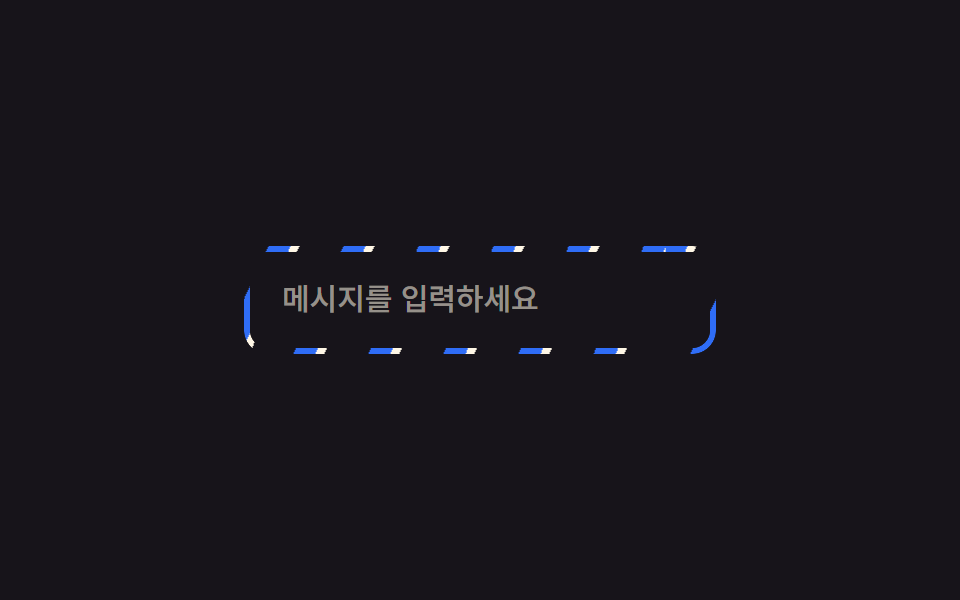 01 border-animation-rotating-gradient-border
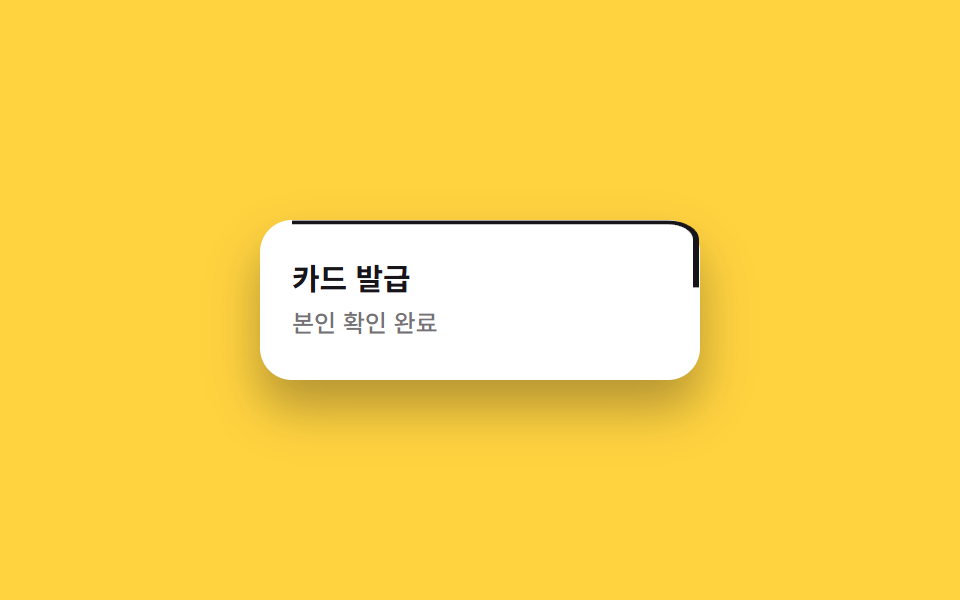 02 border-animation-draw-border-svg
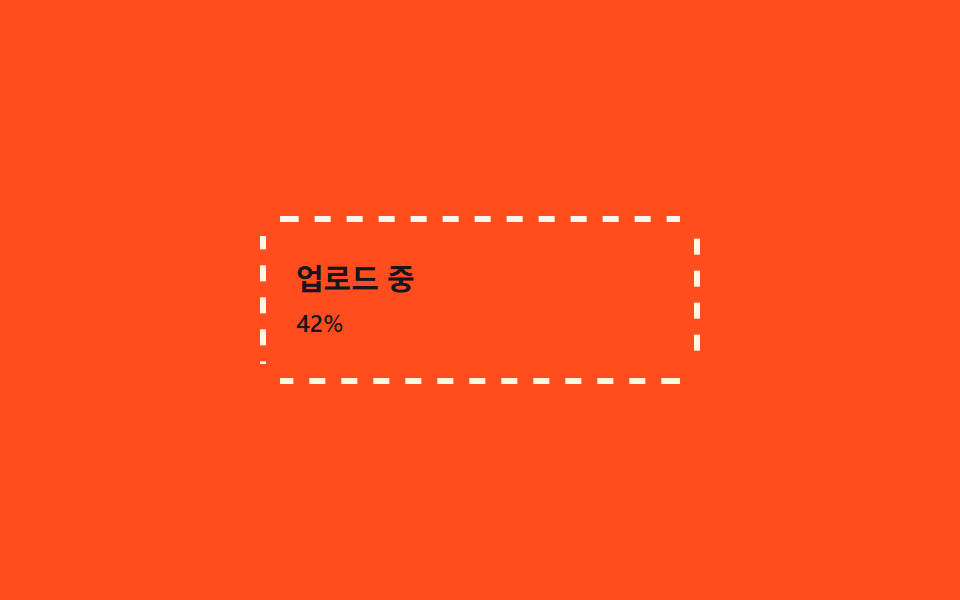 03 border-animation-dashed-run
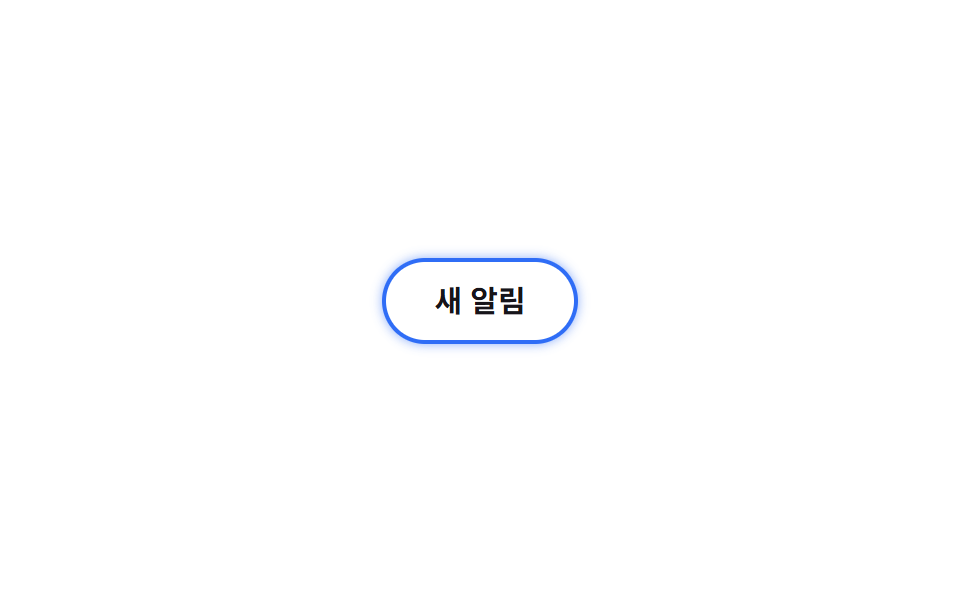 04 border-animation-glow-pulse-border
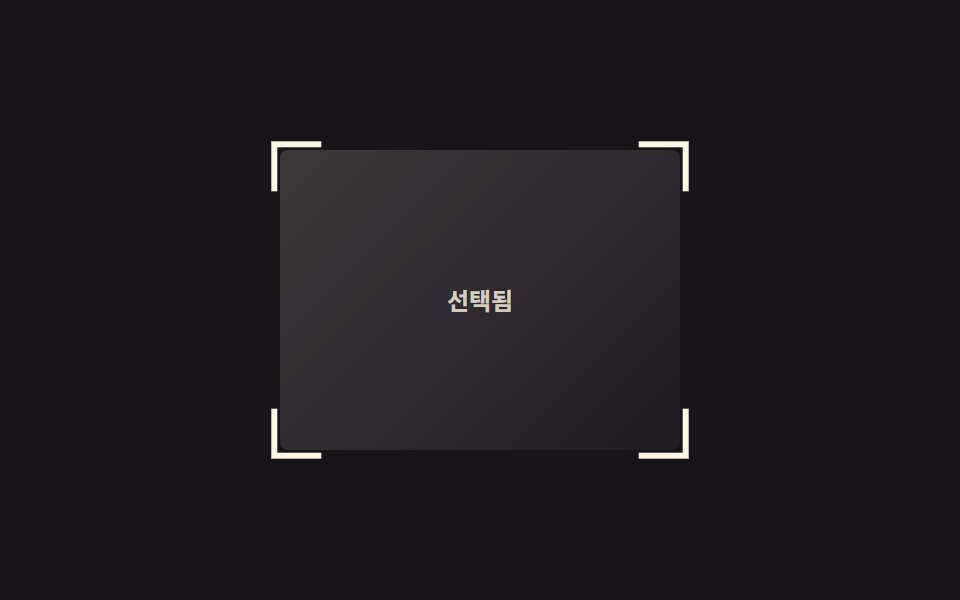 05 border-animation-corner-brackets
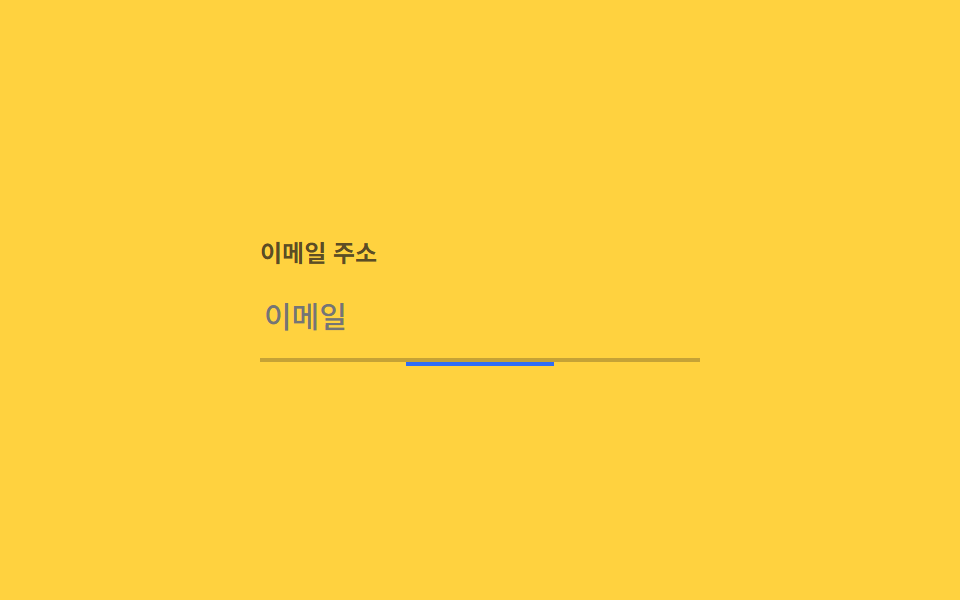 06 border-animation-underline-grow
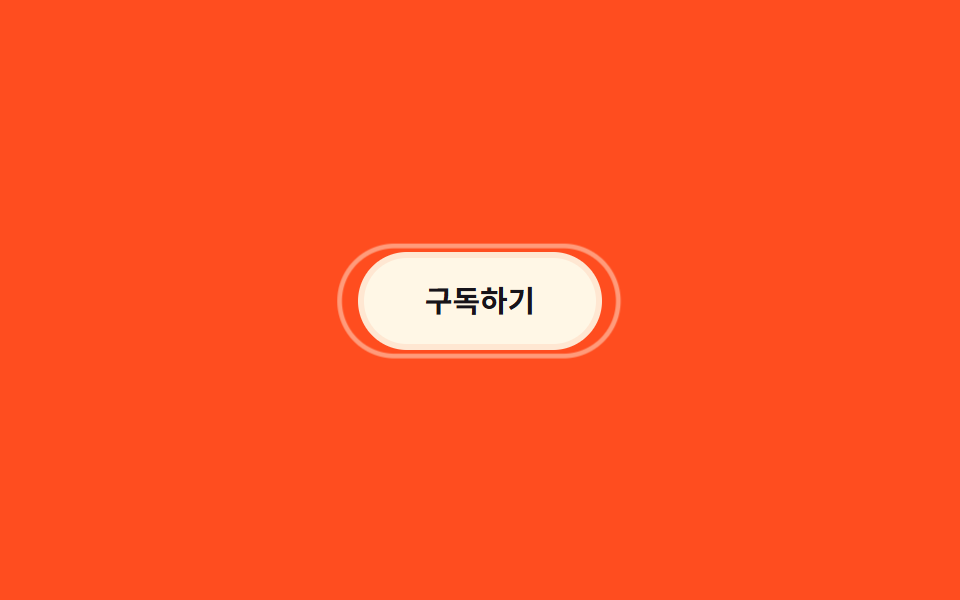 07 border-animation-double-ring
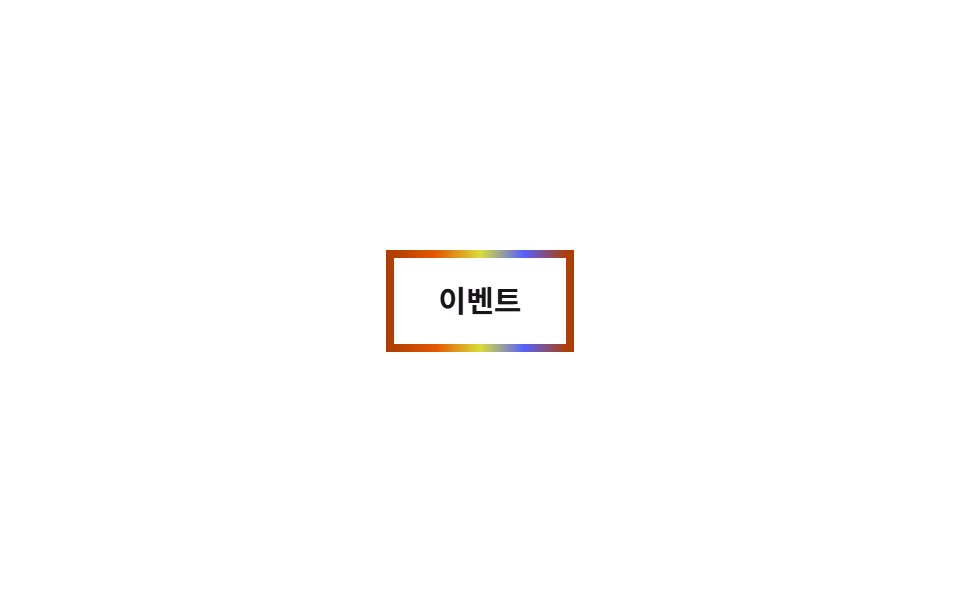 08 border-animation-rainbow-border
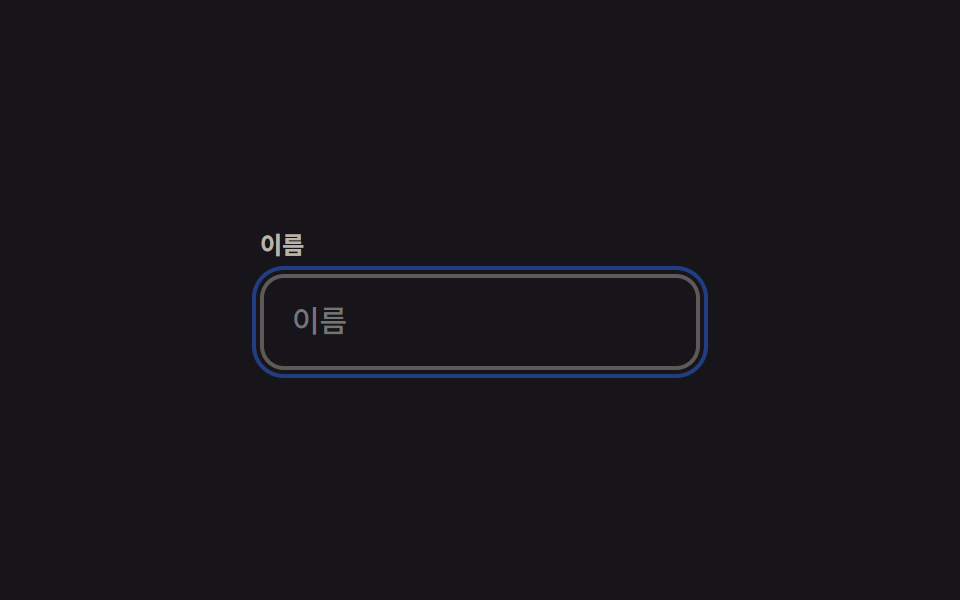 09 border-animation-focus-ring-animate
자동 재생 · 눌러서 해당 항목으로 · 전부 한 zip
- 01 대각선 하이라이트 스윕 보더
- 02 SVG 보더 그리기
- 03 점선 이동
- 04 글로우 펄스 보더
- 05 코너 브래킷
- 06 밑줄 확장
- 07 이중 링 보더
- 08 무지개 보더
- 09 포커스 링 애니메이션
아홉 개는 테두리가 상태를 알리는 순서로 놓았습니다. 무언가 입력 중이거나 진행 중임을 보여주고(01~04), css 입력창 디자인에서 포커스나 선택을 표시하고(05~06), 호버로 강조하고(07), 특별한 순간을 알리고(08), 마지막은 키보드 접근성입니다(09). 각 항목의 코드는 동작을 결정하는 조각만 잘라 보여드리고, 나머지 셋업까지 다 있는 파일은 zip 안에 들어 있습니다. 테두리가 아니라 눌린 그 한 박자를 알려야 하는 자리라면 CSS 버튼 눌림 효과가 맡고, 01의 스윕처럼 테두리를 넘어 요소 전체를 움직이는 기본기는 CSS 키프레임 애니메이션에 따로 정리해 두었습니다.
01대각선 하이라이트 스윕 보더
대각선 줄무늬가 흐르는 원리
테두리 모양으로 잘라낸 얇은 링 위에 대각선 줄무늬 그러데이션을 깔고 계속 흘려보내 테두리 전체가 한꺼번에 빛나며 흐르는 것처럼 보입니다.
<main class="stage">
  <div class="frame is-demo">
    <input class="frame__input" type="text" placeholder="메시지를 입력하세요" readonly>
  </div>
</main>
@use "../../../../site/static/demo-tokens" as *;
$duration: $dur-loop; // 줄무늬가 한 바퀴 흐르는 시간
$easing: linear; // 흐름은 일정 속도로
$color: $subject-blue; // 줄무늬 색
@include stage($stage-ink);
.stage { padding: clamp(6px, 2.4vw, 16px); }
.frame {
position: relative;
width: min(230px, 74vw);
border-radius: $r-control;
padding: 3px;
isolation: isolate;
}
// 테두리 자리에만 보이게 잘라낸 링 위에 대각선 줄무늬를 흘려보낸다
.frame::before {
content: "";
position: absolute;
inset: 0;
border-radius: $r-control;
padding: 3px;
background: repeating-linear-gradient(115deg, $color 0 10px, $subject-cream 10px 14px, transparent 14px 34px);
-webkit-mask: linear-gradient(#000 0 0) content-box, linear-gradient(#000 0 0);
-webkit-mask-composite: xor; // 옛 사파리
mask-composite: exclude; // 표준 (mask 무접두사 지원표: blog-topic 편브리프)
}
.frame.is-demo::before,
.frame:focus-within::before { animation: sweep $duration $easing infinite; }
.frame__input {
position: relative;
display: block;
box-sizing: border-box;
width: 100%;
border: 0;
border-radius: $r-control - 3px;
padding: 14px 16px;
font-weight: 500; font-size: clamp(13px, 3.6vw, 15px); line-height: 1.3; font-family: inherit;
color: $subject-cream;
background: $stage-ink;
}
.frame__input::placeholder { color: rgba($subject-cream, .55); }
@keyframes sweep { to { background-position: 220px 0; } }
@media (prefers-reduced-motion: reduce) {
.frame.is-demo::before, .frame:focus-within::before { animation: none; }
}html, body {
margin: 0;
overflow: hidden;
}
.stage {
box-sizing: border-box;
min-height: 100vh;
display: grid;
place-items: center;
margin: 0;
background: #17141a;
font-family: -apple-system, "Segoe UI", "Noto Sans KR", sans-serif;
padding: clamp(8px, 4vw, 24px);
}
.stage {
padding: clamp(6px, 2.4vw, 16px);
}
.frame {
position: relative;
width: min(230px, 74vw);
border-radius: 12px;
padding: 3px;
isolation: isolate;
}
.frame::before {
content: "";
position: absolute;
inset: 0;
border-radius: 12px;
padding: 3px;
background: repeating-linear-gradient(115deg, #2f6df6 0 10px, #fff7e6 10px 14px, transparent 14px 34px);
-webkit-mask: linear-gradient(#000 0 0) content-box, linear-gradient(#000 0 0);
-webkit-mask-composite: xor;
mask-composite: exclude;
}
.frame.is-demo::before,
.frame:focus-within::before {
animation: sweep 2s linear infinite;
}
.frame__input {
position: relative;
display: block;
box-sizing: border-box;
width: 100%;
border: 0;
border-radius: 9px;
padding: 14px 16px;
font-weight: 500;
font-size: clamp(13px, 3.6vw, 15px);
line-height: 1.3;
font-family: inherit;
color: #fff7e6;
background: #17141a;
}
.frame__input::placeholder {
color: rgba(255, 247, 230, 0.55);
}
@keyframes sweep {
to {
background-position: 220px 0;
}
}
@media (prefers-reduced-motion: reduce) {
.frame.is-demo::before, .frame:focus-within::before {
animation: none;
}
}import type { CSSProperties } from "react";
import styles from "./SweepBorderInput.module.scss";
export type SweepBorderInputProps = {
placeholder: string;
/** 줄무늬가 한 바퀴 흐르는 시간 (기본 2000ms) */
duration?: number;
easing?: string;
/** 줄무늬 색 */
color?: string;
};
type Vars = CSSProperties & { "--duration"?: string; "--easing"?: string; "--color"?: string };
export default function SweepBorderInput({
placeholder,
duration = 2000,
easing = "linear",
color = "#2f6df6",
}: SweepBorderInputProps) {
const vars: Vars = { "--duration": `${duration}ms`, "--easing": easing, "--color": color };
return (
<div className={styles.frame} style={vars}>
<input className={styles.input} type="text" placeholder={placeholder} readOnly />
</div>
);
}01 · 대각선 하이라이트 스윕 보더 — 측정 누적면적 1.167% · 움직인 프레임 23/23GODRICH 원작 · zip 에 SCSS·React 포함 · 비밀번호 보기
AI 응답 중인 입력창에
AI가 응답을 만드는 동안의 입력창 같은 곳에 씁니다.
.frame::before {
  content: "";
  position: absolute; inset: 0; padding: 3px;
  background: repeating-linear-gradient(115deg, $color 0 10px, $subject-cream 10px 14px, transparent 14px 34px);
  -webkit-mask: linear-gradient(#000 0 0) content-box, linear-gradient(#000 0 0);
  -webkit-mask-composite: xor;
  mask-composite: exclude;
  animation: sweep $duration linear infinite;
}
@keyframes sweep { to { background-position: 220px 0; } }
02SVG 보더 그리기
pathLength 100 으로 단위 맞추기
카드 테두리를 SVG rect로 그리고 pathLength="100"을 줘서 실제 둘레 길이와 무관하게 0~100 단위로 다룹니다.
<main class="stage">
  <div class="card is-demo">
    <svg class="card__svg" viewBox="0 0 220 130" preserveAspectRatio="none" aria-hidden="true">
      <rect class="card__rect" x="2" y="2" width="216" height="126" rx="14" pathLength="100"></rect>
    </svg>
    <div class="card__body">
      <h3 class="card__title">카드 발급</h3>
      <p class="card__meta">본인 확인 완료</p>
    </div>
  </div>
</main>
@use "../../../../site/static/demo-tokens" as *;
$duration: $dur-enter; // 실제 트리거(등장) 시 테두리가 다 그려지는 시간
$easing: $ease-out;
$color: $subject-ink; // 선 색
@include stage($stage-yellow);
.stage { padding: clamp(6px, 2.4vw, 16px); }
.card {
position: relative;
width: min(220px, 70vw);
border-radius: $r-card;
background: $stage-paper;
box-shadow: $shadow-raised;
}
.card__svg { position: absolute; inset: 0; width: 100%; height: 100%; overflow: visible; }
.card__rect {
fill: none;
stroke: $color;
stroke-width: 3;
stroke-dasharray: 100; // pathLength="100" 이라 둘레와 무관하게 0~100 단위로 잰다
stroke-dashoffset: 100;
}
// 등장 시 1회는 이 값으로 (예: 카드가 로드된 직후 JS 로 .is-drawn 을 붙인다)
.card.is-drawn .card__rect { animation: draw $duration $easing forwards; }
// 데모 · 문서용 루프: 2초 안에 그려짐 → 유지 → 지워짐을 반복
.card.is-demo .card__rect { animation: draw-loop $dur-loop $easing infinite; }
.card__body { position: relative; padding: 20px 16px; }
.card__title { margin: 0 0 4px; font-weight: 700; font-size: clamp(13px, 3.6vw, 15px); line-height: 1.3; font-family: inherit; color: $stage-ink; }
.card__meta { margin: 0; font-weight: 500; font-size: clamp(11px, 3vw, 12px); line-height: 1.3; font-family: inherit; color: rgba($stage-ink, .6); }
@keyframes draw { to { stroke-dashoffset: 0; } }
@keyframes draw-loop {
0%, 5% { stroke-dashoffset: 100; }
35%, 60% { stroke-dashoffset: 0; }
100% { stroke-dashoffset: -100; }
}
@media (prefers-reduced-motion: reduce) {
.card.is-drawn .card__rect, .card.is-demo .card__rect { animation: none; stroke-dashoffset: 0; }
}html, body {
margin: 0;
overflow: hidden;
}
.stage {
box-sizing: border-box;
min-height: 100vh;
display: grid;
place-items: center;
margin: 0;
background: #ffd23f;
font-family: -apple-system, "Segoe UI", "Noto Sans KR", sans-serif;
padding: clamp(8px, 4vw, 24px);
}
.stage {
padding: clamp(6px, 2.4vw, 16px);
}
.card {
position: relative;
width: min(220px, 70vw);
border-radius: 16px;
background: #ffffff;
box-shadow: 0 14px 24px rgba(23, 20, 26, 0.32);
}
.card__svg {
position: absolute;
inset: 0;
width: 100%;
height: 100%;
overflow: visible;
}
.card__rect {
fill: none;
stroke: #17141a;
stroke-width: 3;
stroke-dasharray: 100;
stroke-dashoffset: 100;
}
.card.is-drawn .card__rect {
animation: draw 600ms ease-out forwards;
}
.card.is-demo .card__rect {
animation: draw-loop 2s ease-out infinite;
}
.card__body {
position: relative;
padding: 20px 16px;
}
.card__title {
margin: 0 0 4px;
font-weight: 700;
font-size: clamp(13px, 3.6vw, 15px);
line-height: 1.3;
font-family: inherit;
color: #17141a;
}
.card__meta {
margin: 0;
font-weight: 500;
font-size: clamp(11px, 3vw, 12px);
line-height: 1.3;
font-family: inherit;
color: rgba(23, 20, 26, 0.6);
}
@keyframes draw {
to {
stroke-dashoffset: 0;
}
}
@keyframes draw-loop {
0%, 5% {
stroke-dashoffset: 100;
}
35%, 60% {
stroke-dashoffset: 0;
}
100% {
stroke-dashoffset: -100;
}
}
@media (prefers-reduced-motion: reduce) {
.card.is-drawn .card__rect, .card.is-demo .card__rect {
animation: none;
stroke-dashoffset: 0;
}
}import type { CSSProperties } from "react";
import styles from "./DrawBorderCard.module.scss";
export type DrawBorderCardProps = {
title: string;
meta: string;
/** 테두리가 다 그려지는 시간 (기본 2000ms, 루프용) */
duration?: number;
easing?: string;
/** 선 색 */
color?: string;
};
type Vars = CSSProperties & { "--duration"?: string; "--easing"?: string; "--color"?: string };
export default function DrawBorderCard({
title,
meta,
duration = 2000,
easing = "ease-out",
color = "#17141a",
}: DrawBorderCardProps) {
const vars: Vars = { "--duration": `${duration}ms`, "--easing": easing, "--color": color };
return (
<div className={styles.card} style={vars}>
<svg className={styles.svg} viewBox="0 0 220 130" preserveAspectRatio="none" aria-hidden="true">
<rect className={styles.rect} x="2" y="2" width="216" height="126" rx="14" pathLength={100} />
</svg>
<div className={styles.body}>
<h3 className={styles.title}>{title}</h3>
<p className={styles.meta}>{meta}</p>
</div>
</div>
);
}02 · SVG 보더 그리기 — 측정 누적면적 1.148% · 움직인 프레임 17/23GODRICH 원작 · zip 에 SCSS·React 포함 · 비밀번호 보기
펜으로 그리듯 이어지는 값
stroke-dashoffset을 100에서 0으로 줄이면 펜으로 그리듯 이어지고, 카드가 로드되며 테두리가 그려지는 연출에 씁니다.
// pathLength="100" 인 rect 에 건다 — 실제 둘레 픽셀과 무관하게 0~100 단위로 잰다
.card__rect {
  stroke-dasharray: 100;
  stroke-dashoffset: 100;
  animation: draw-loop $dur-loop $easing infinite;
}
@keyframes draw-loop {
  0%, 5%   { stroke-dashoffset: 100; }
  35%, 60% { stroke-dashoffset: 0; }
  100%     { stroke-dashoffset: -100; }
}
03점선 이동
네 변을 따로 움직이는 법
네 변에 각각 점선 모양 그러데이션 배경을 깔고, 변의 방향을 따라 background-position을 계속 옮기면 점선이 시계 방향으로 도는 것처럼 보입니다.
<main class="stage">
  <div class="frame is-demo">
    <span class="frame__edge frame__edge--top" aria-hidden="true"></span>
    <span class="frame__edge frame__edge--right" aria-hidden="true"></span>
    <span class="frame__edge frame__edge--bottom" aria-hidden="true"></span>
    <span class="frame__edge frame__edge--left" aria-hidden="true"></span>
    <div class="frame__body">
      <p class="frame__label">업로드 중</p>
      <p class="frame__pct">42%</p>
    </div>
  </div>
</main>
@use "../../../../site/static/demo-tokens" as *;
$duration: $dur-loop; // 한 바퀴 도는 시간
$easing: linear;
$color: $subject-cream; // 점선 색
@include stage($stage-orange);
.stage { padding: clamp(6px, 2.4vw, 16px); }
.frame {
position: relative;
width: min(220px, 70vw);
border-radius: 10px;
}
// 네 변을 따로 두고 각자의 방향으로 점선 배경을 흘려보낸다 — 한꺼번에 돌면 시계 방향으로 도는 것처럼 보인다
.frame__edge { position: absolute; }
.frame__edge--top, .frame__edge--bottom {
left: 10px; right: 10px; height: 3px;
background-image: repeating-linear-gradient(90deg, $color 0 8px, transparent 8px 16px);
}
.frame__edge--left, .frame__edge--right {
top: 10px; bottom: 10px; width: 3px;
background-image: repeating-linear-gradient(180deg, $color 0 8px, transparent 8px 16px);
}
.frame__edge--top { top: 0; }
.frame__edge--bottom { bottom: 0; }
.frame__edge--left { left: 0; }
.frame__edge--right { right: 0; }
.frame.is-demo .frame__edge--top { animation: run-x $duration $easing infinite; }
.frame.is-demo .frame__edge--bottom { animation: run-x-rev $duration $easing infinite; }
.frame.is-demo .frame__edge--left { animation: run-y-rev $duration $easing infinite; }
.frame.is-demo .frame__edge--right { animation: run-y $duration $easing infinite; }
@keyframes run-x { to { background-position: 32px 0; } }
@keyframes run-x-rev { to { background-position: -32px 0; } }
@keyframes run-y { to { background-position: 0 32px; } }
@keyframes run-y-rev { to { background-position: 0 -32px; } }
.frame__body { padding: 22px 18px; }
.frame__label { margin: 0 0 4px; font-weight: 700; font-size: clamp(13px, 3.6vw, 15px); line-height: 1.3; font-family: inherit; color: $subject-ink; }
.frame__pct { margin: 0; font-weight: 500; font-size: clamp(11px, 3vw, 12px); line-height: 1.3; font-family: inherit; color: $subject-ink; }
@media (prefers-reduced-motion: reduce) {
.frame.is-demo .frame__edge { animation: none; }
}html, body {
margin: 0;
overflow: hidden;
}
.stage {
box-sizing: border-box;
min-height: 100vh;
display: grid;
place-items: center;
margin: 0;
background: #ff4d1f;
font-family: -apple-system, "Segoe UI", "Noto Sans KR", sans-serif;
padding: clamp(8px, 4vw, 24px);
}
.stage {
padding: clamp(6px, 2.4vw, 16px);
}
.frame {
position: relative;
width: min(220px, 70vw);
border-radius: 10px;
}
.frame__edge {
position: absolute;
}
.frame__edge--top, .frame__edge--bottom {
left: 10px;
right: 10px;
height: 3px;
background-image: repeating-linear-gradient(90deg, #fff7e6 0 8px, transparent 8px 16px);
}
.frame__edge--left, .frame__edge--right {
top: 10px;
bottom: 10px;
width: 3px;
background-image: repeating-linear-gradient(180deg, #fff7e6 0 8px, transparent 8px 16px);
}
.frame__edge--top {
top: 0;
}
.frame__edge--bottom {
bottom: 0;
}
.frame__edge--left {
left: 0;
}
.frame__edge--right {
right: 0;
}
.frame.is-demo .frame__edge--top {
animation: run-x 2s linear infinite;
}
.frame.is-demo .frame__edge--bottom {
animation: run-x-rev 2s linear infinite;
}
.frame.is-demo .frame__edge--left {
animation: run-y-rev 2s linear infinite;
}
.frame.is-demo .frame__edge--right {
animation: run-y 2s linear infinite;
}
@keyframes run-x {
to {
background-position: 32px 0;
}
}
@keyframes run-x-rev {
to {
background-position: -32px 0;
}
}
@keyframes run-y {
to {
background-position: 0 32px;
}
}
@keyframes run-y-rev {
to {
background-position: 0 -32px;
}
}
.frame__body {
padding: 22px 18px;
}
.frame__label {
margin: 0 0 4px;
font-weight: 700;
font-size: clamp(13px, 3.6vw, 15px);
line-height: 1.3;
font-family: inherit;
color: #17141a;
}
.frame__pct {
margin: 0;
font-weight: 500;
font-size: clamp(11px, 3vw, 12px);
line-height: 1.3;
font-family: inherit;
color: #17141a;
}
@media (prefers-reduced-motion: reduce) {
.frame.is-demo .frame__edge {
animation: none;
}
}import type { CSSProperties } from "react";
import styles from "./DashedRunFrame.module.scss";
export type DashedRunFrameProps = {
label: string;
pct: string;
/** 한 바퀴 도는 시간 (기본 2000ms) */
duration?: number;
easing?: string;
/** 점선 색 */
color?: string;
};
type Vars = CSSProperties & { "--duration"?: string; "--easing"?: string; "--color"?: string };
export default function DashedRunFrame({
label,
pct,
duration = 2000,
easing = "linear",
color = "#fff7e6",
}: DashedRunFrameProps) {
const vars: Vars = { "--duration": `${duration}ms`, "--easing": easing, "--color": color };
return (
<div className={styles.frame} style={vars}>
<span className={`${styles.edge} ${styles.top}`} aria-hidden="true" />
<span className={`${styles.edge} ${styles.right}`} aria-hidden="true" />
<span className={`${styles.edge} ${styles.bottom}`} aria-hidden="true" />
<span className={`${styles.edge} ${styles.left}`} aria-hidden="true" />
<div className={styles.body}>
<p className={styles.label}>{label}</p>
<p className={styles.pct}>{pct}</p>
</div>
</div>
);
}03 · 점선 이동 — 측정 누적면적 1.1% · 움직인 프레임 23/23GODRICH 원작 · zip 에 SCSS·React 포함 · 비밀번호 보기
업로드 중인 카드에
업로드나 처리 중인 카드 테두리에 씁니다.
.frame__edge--top, .frame__edge--bottom {
  background-image: repeating-linear-gradient(90deg, $color 0 8px, transparent 8px 16px);
}
.frame__edge--left, .frame__edge--right {
  background-image: repeating-linear-gradient(180deg, $color 0 8px, transparent 8px 16px);
}
.frame.is-demo .frame__edge--top    { animation: run-x $duration linear infinite; }
.frame.is-demo .frame__edge--bottom { animation: run-x-rev $duration linear infinite; }
@keyframes run-x     { to { background-position: 32px 0; } }
@keyframes run-x-rev { to { background-position: -32px 0; } }
04글로우 펄스 보더
번짐 반경을 부드럽게 키우기
@property로 등록한 길이 값을 box-shadow의 번짐 반경에 걸면, 0에서 16px까지 중간값을 거치며 부드럽게 커졌다 작아집니다.
<main class="stage">
  <span class="badge is-demo">새 알림</span>
</main>
@use "../../../../site/static/demo-tokens" as *;
$duration: $dur-loop; // 한 번 번졌다 가라앉는 시간
$easing: $ease-spring;
$color: $subject-blue; // 번짐 색
@include stage($stage-paper);
.stage { padding: clamp(6px, 2.4vw, 16px); }
// @property 로 길이를 등록해야 box-shadow 번짐 반경이 중간값을 거치며 부드럽게 바뀐다
@property --glow {
syntax: "<length>";
inherits: false;
initial-value: 0px;
}
.badge {
display: inline-block;
border: 2px solid $color;
border-radius: $r-pill;
padding: 12px 24px;
font-weight: 700; font-size: clamp(13px, 3.6vw, 15px); line-height: 1; font-family: inherit;
color: $stage-ink;
background: $stage-paper;
box-shadow: 0 0 var(--glow) 0 rgba($color, .55);
}
.badge.is-demo { animation: glow $duration $easing infinite; }
@keyframes glow {
0%, 100% { --glow: 0px; }
50% { --glow: 16px; }
}
@media (prefers-reduced-motion: reduce) {
.badge.is-demo { animation: none; --glow: 8px; }
}html, body {
margin: 0;
overflow: hidden;
}
.stage {
box-sizing: border-box;
min-height: 100vh;
display: grid;
place-items: center;
margin: 0;
background: #ffffff;
font-family: -apple-system, "Segoe UI", "Noto Sans KR", sans-serif;
padding: clamp(8px, 4vw, 24px);
}
.stage {
padding: clamp(6px, 2.4vw, 16px);
}
@property --glow {
syntax: "<length>";
inherits: false;
initial-value: 0px;
}
.badge {
display: inline-block;
border: 2px solid #2f6df6;
border-radius: 999px;
padding: 12px 24px;
font-weight: 700;
font-size: clamp(13px, 3.6vw, 15px);
line-height: 1;
font-family: inherit;
color: #17141a;
background: #ffffff;
box-shadow: 0 0 var(--glow) 0 rgba(47, 109, 246, 0.55);
}
.badge.is-demo {
animation: glow 2s cubic-bezier(0.2, 0.8, 0.2, 1) infinite;
}
@keyframes glow {
0%, 100% {
--glow: 0px;
}
50% {
--glow: 16px;
}
}
@media (prefers-reduced-motion: reduce) {
.badge.is-demo {
animation: none;
--glow: 8px;
}
}import type { CSSProperties } from "react";
import styles from "./GlowPulseBadge.module.scss";
export type GlowPulseBadgeProps = {
label: string;
/** 번졌다 가라앉는 한 번의 시간 (기본 2000ms) */
duration?: number;
easing?: string;
/** 번짐 색 */
color?: string;
};
type Vars = CSSProperties & { "--duration"?: string; "--easing"?: string; "--color"?: string };
export default function GlowPulseBadge({
label,
duration = 2000,
easing = "cubic-bezier(.2,.8,.2,1)",
color = "#2f6df6",
}: GlowPulseBadgeProps) {
const vars: Vars = { "--duration": `${duration}ms`, "--easing": easing, "--color": color };
return <span className={styles.badge} style={vars}>{label}</span>;
}04 · 글로우 펄스 보더 — 측정 누적면적 1.765% · 움직인 프레임 8/23GODRICH 원작 · zip 에 SCSS·React 포함 · 비밀번호 보기
실시간 알림 배지에
실시간으로 갱신되는 알림 배지에 씁니다.
@property --glow {
  syntax: "<length>";
  inherits: false;
  initial-value: 0px;
}
.badge {
  box-shadow: 0 0 var(--glow) 0 rgba($color, .55);
  animation: glow $duration $easing infinite;
}
@keyframes glow { 0%, 100% { --glow: 0px; } 50% { --glow: 16px; } }
05코너 브래킷
네 모서리가 벌어지는 방향
네 모서리에 L자 브래킷을 따로 두고, 호버하거나 포커스를 받으면 각자 대각선 방향으로 벌어져 카메라 초점 프레임처럼 보이게 합니다.
<main class="stage">
  <div class="frame is-demo" tabindex="0">
    <span class="frame__bracket frame__bracket--tl" aria-hidden="true"></span>
    <span class="frame__bracket frame__bracket--tr" aria-hidden="true"></span>
    <span class="frame__bracket frame__bracket--bl" aria-hidden="true"></span>
    <span class="frame__bracket frame__bracket--br" aria-hidden="true"></span>
    <span class="frame__label">선택됨</span>
  </div>
</main>
@use "../../../../site/static/demo-tokens" as *;
$duration: $dur-base; // 실제 호버 시 브래킷이 벌어지는 시간
$easing: $ease-pop;
$color: $subject-cream; // 브래킷 색
@include stage($stage-ink);
.stage { padding: clamp(6px, 2.4vw, 16px); }
.frame {
position: relative;
width: min(200px, 64vw);
aspect-ratio: 4 / 3;
border-radius: 4px;
background: linear-gradient(135deg, rgba($color, .16), rgba($color, .04));
display: grid;
place-items: center;
outline: none;
}
.frame__bracket {
position: absolute;
width: 22px;
height: 22px;
border: 3px solid $color;
transition: transform $duration $easing;
}
.frame__bracket--tl { top: -3px; left: -3px; border-right: 0; border-bottom: 0; }
.frame__bracket--tr { top: -3px; right: -3px; border-left: 0; border-bottom: 0; }
.frame__bracket--bl { bottom: -3px; left: -3px; border-right: 0; border-top: 0; }
.frame__bracket--br { bottom: -3px; right: -3px; border-left: 0; border-top: 0; }
.frame:hover .frame__bracket--tl, .frame:focus-visible .frame__bracket--tl { transform: translate(-6px, -6px); }
.frame:hover .frame__bracket--tr, .frame:focus-visible .frame__bracket--tr { transform: translate(6px, -6px); }
.frame:hover .frame__bracket--bl, .frame:focus-visible .frame__bracket--bl { transform: translate(-6px, 6px); }
.frame:hover .frame__bracket--br, .frame:focus-visible .frame__bracket--br { transform: translate(6px, 6px); }
// 데모 루프: 2초 안에서 벌어짐 → 유지 → 되돌아옴
.frame.is-demo .frame__bracket--tl { animation: open-tl $dur-loop $easing infinite; }
.frame.is-demo .frame__bracket--tr { animation: open-tr $dur-loop $easing infinite; }
.frame.is-demo .frame__bracket--bl { animation: open-bl $dur-loop $easing infinite; }
.frame.is-demo .frame__bracket--br { animation: open-br $dur-loop $easing infinite; }
@keyframes open-tl { 0%, 15% { transform: translate(0, 0); } 50%, 70% { transform: translate(-6px, -6px); } 100% { transform: translate(0, 0); } }
@keyframes open-tr { 0%, 15% { transform: translate(0, 0); } 50%, 70% { transform: translate(6px, -6px); } 100% { transform: translate(0, 0); } }
@keyframes open-bl { 0%, 15% { transform: translate(0, 0); } 50%, 70% { transform: translate(-6px, 6px); } 100% { transform: translate(0, 0); } }
@keyframes open-br { 0%, 15% { transform: translate(0, 0); } 50%, 70% { transform: translate(6px, 6px); } 100% { transform: translate(0, 0); } }
.frame__label { font-weight: 600; font-size: clamp(11px, 3vw, 12px); line-height: 1; font-family: inherit; color: rgba($color, .8); }
@media (prefers-reduced-motion: reduce) {
.frame.is-demo .frame__bracket { animation: none; }
}html, body {
margin: 0;
overflow: hidden;
}
.stage {
box-sizing: border-box;
min-height: 100vh;
display: grid;
place-items: center;
margin: 0;
background: #17141a;
font-family: -apple-system, "Segoe UI", "Noto Sans KR", sans-serif;
padding: clamp(8px, 4vw, 24px);
}
.stage {
padding: clamp(6px, 2.4vw, 16px);
}
.frame {
position: relative;
width: min(200px, 64vw);
aspect-ratio: 4/3;
border-radius: 4px;
background: linear-gradient(135deg, rgba(255, 247, 230, 0.16), rgba(255, 247, 230, 0.04));
display: grid;
place-items: center;
outline: none;
}
.frame__bracket {
position: absolute;
width: 22px;
height: 22px;
border: 3px solid #fff7e6;
transition: transform 300ms cubic-bezier(0.2, 1.4, 0.4, 1);
}
.frame__bracket--tl {
top: -3px;
left: -3px;
border-right: 0;
border-bottom: 0;
}
.frame__bracket--tr {
top: -3px;
right: -3px;
border-left: 0;
border-bottom: 0;
}
.frame__bracket--bl {
bottom: -3px;
left: -3px;
border-right: 0;
border-top: 0;
}
.frame__bracket--br {
bottom: -3px;
right: -3px;
border-left: 0;
border-top: 0;
}
.frame:hover .frame__bracket--tl, .frame:focus-visible .frame__bracket--tl {
transform: translate(-6px, -6px);
}
.frame:hover .frame__bracket--tr, .frame:focus-visible .frame__bracket--tr {
transform: translate(6px, -6px);
}
.frame:hover .frame__bracket--bl, .frame:focus-visible .frame__bracket--bl {
transform: translate(-6px, 6px);
}
.frame:hover .frame__bracket--br, .frame:focus-visible .frame__bracket--br {
transform: translate(6px, 6px);
}
.frame.is-demo .frame__bracket--tl {
animation: open-tl 2s cubic-bezier(0.2, 1.4, 0.4, 1) infinite;
}
.frame.is-demo .frame__bracket--tr {
animation: open-tr 2s cubic-bezier(0.2, 1.4, 0.4, 1) infinite;
}
.frame.is-demo .frame__bracket--bl {
animation: open-bl 2s cubic-bezier(0.2, 1.4, 0.4, 1) infinite;
}
.frame.is-demo .frame__bracket--br {
animation: open-br 2s cubic-bezier(0.2, 1.4, 0.4, 1) infinite;
}
@keyframes open-tl {
0%, 15% {
transform: translate(0, 0);
}
50%, 70% {
transform: translate(-6px, -6px);
}
100% {
transform: translate(0, 0);
}
}
@keyframes open-tr {
0%, 15% {
transform: translate(0, 0);
}
50%, 70% {
transform: translate(6px, -6px);
}
100% {
transform: translate(0, 0);
}
}
@keyframes open-bl {
0%, 15% {
transform: translate(0, 0);
}
50%, 70% {
transform: translate(-6px, 6px);
}
100% {
transform: translate(0, 0);
}
}
@keyframes open-br {
0%, 15% {
transform: translate(0, 0);
}
50%, 70% {
transform: translate(6px, 6px);
}
100% {
transform: translate(0, 0);
}
}
.frame__label {
font-weight: 600;
font-size: clamp(11px, 3vw, 12px);
line-height: 1;
font-family: inherit;
color: rgba(255, 247, 230, 0.8);
}
@media (prefers-reduced-motion: reduce) {
.frame.is-demo .frame__bracket {
animation: none;
}
}import type { CSSProperties } from "react";
import styles from "./CornerBracketsFrame.module.scss";
export type CornerBracketsFrameProps = {
label: string;
/** 브래킷이 벌어지는 시간 (기본 2000ms, 루프용) */
duration?: number;
easing?: string;
/** 브래킷 색 */
color?: string;
};
type Vars = CSSProperties & { "--duration"?: string; "--easing"?: string; "--color"?: string };
export default function CornerBracketsFrame({
label,
duration = 2000,
easing = "cubic-bezier(.2,1.4,.4,1)",
color = "#fff7e6",
}: CornerBracketsFrameProps) {
const vars: Vars = { "--duration": `${duration}ms`, "--easing": easing, "--color": color };
return (
<div className={styles.frame} style={vars} tabIndex={0}>
<span className={`${styles.bracket} ${styles.tl}`} aria-hidden="true" />
<span className={`${styles.bracket} ${styles.tr}`} aria-hidden="true" />
<span className={`${styles.bracket} ${styles.bl}`} aria-hidden="true" />
<span className={`${styles.bracket} ${styles.br}`} aria-hidden="true" />
<span className={styles.label}>{label}</span>
</div>
);
}05 · 코너 브래킷 — 측정 누적면적 1.503% · 움직인 프레임 15/23GODRICH 원작 · zip 에 SCSS·React 포함 · 비밀번호 보기
갤러리에서 고른 항목에
이미지 갤러리에서 고른 항목을 표시할 때 씁니다.
.frame__bracket--tl { top: -3px; left: -3px; border-right: 0; border-bottom: 0; }
.frame__bracket--tr { top: -3px; right: -3px; border-left: 0; border-bottom: 0; }
.frame.is-demo .frame__bracket--tl { animation: open-tl $dur-loop $easing infinite; }
@keyframes open-tl {
  0%, 15%  { transform: translate(0, 0); }
  50%, 70% { transform: translate(-6px, -6px); }
  100%     { transform: translate(0, 0); }
}
06밑줄 확장
가운데서 양쪽으로 벌어지는 밑줄
입력 필드 아래 인디케이터를 left: 50%; right: 50%로 가운데 접어 두고, 포커스를 받으면 둘 다 0으로 트랜지션해 양쪽으로 벌어지며 채워집니다.
<main class="stage">
  <div class="field is-demo">
    <label class="field__label" for="email">이메일 주소</label>
    <input class="field__input" id="email" type="email" placeholder="이메일">
    <span class="field__bar" aria-hidden="true"></span>
  </div>
</main>
@use "../../../../site/static/demo-tokens" as *;
$duration: $dur-quick; // 실제 포커스 시 밑줄이 벌어지는 시간
$easing: $ease-out;
$color: $subject-blue; // 밑줄 색
@include stage($stage-yellow);
.stage { padding: clamp(6px, 2.4vw, 16px); }
.field {
position: relative;
width: min(220px, 70vw);
}
.field__label {
display: block;
margin-bottom: 4px;
font-weight: 600; font-size: clamp(11px, 3vw, 12px); line-height: 1.3; font-family: inherit;
color: rgba($stage-ink, .7);
}
.field__input {
box-sizing: border-box;
width: 100%;
border: 0;
border-bottom: 2px solid rgba($stage-ink, .25);
background: transparent;
padding: 10px 2px;
font-weight: 500; font-size: clamp(13px, 3.6vw, 15px); line-height: 1.3; font-family: inherit;
color: $stage-ink;
}
.field__bar {
position: absolute;
left: 50%; right: 50%; bottom: -2px;
height: 2px;
background: $color;
transition: left $duration $easing, right $duration $easing;
}
.field__input:focus + .field__bar { left: 0; right: 0; }
// 데모 루프: 가운데서 시작 → 양쪽으로 채워짐 → 다시 가운데로
.field.is-demo .field__bar { animation: grow $dur-loop $easing infinite; }
@keyframes grow {
0%, 10% { left: 50%; right: 50%; }
40%, 60% { left: 0; right: 0; }
100% { left: 50%; right: 50%; }
}
@media (prefers-reduced-motion: reduce) {
.field__bar { transition: none; }
.field.is-demo .field__bar { animation: none; left: 0; right: 0; }
}html, body {
margin: 0;
overflow: hidden;
}
.stage {
box-sizing: border-box;
min-height: 100vh;
display: grid;
place-items: center;
margin: 0;
background: #ffd23f;
font-family: -apple-system, "Segoe UI", "Noto Sans KR", sans-serif;
padding: clamp(8px, 4vw, 24px);
}
.stage {
padding: clamp(6px, 2.4vw, 16px);
}
.field {
position: relative;
width: min(220px, 70vw);
}
.field__label {
display: block;
margin-bottom: 4px;
font-weight: 600;
font-size: clamp(11px, 3vw, 12px);
line-height: 1.3;
font-family: inherit;
color: rgba(23, 20, 26, 0.7);
}
.field__input {
box-sizing: border-box;
width: 100%;
border: 0;
border-bottom: 2px solid rgba(23, 20, 26, 0.25);
background: transparent;
padding: 10px 2px;
font-weight: 500;
font-size: clamp(13px, 3.6vw, 15px);
line-height: 1.3;
font-family: inherit;
color: #17141a;
}
.field__bar {
position: absolute;
left: 50%;
right: 50%;
bottom: -2px;
height: 2px;
background: #2f6df6;
transition: left 220ms ease-out, right 220ms ease-out;
}
.field__input:focus + .field__bar {
left: 0;
right: 0;
}
.field.is-demo .field__bar {
animation: grow 2s ease-out infinite;
}
@keyframes grow {
0%, 10% {
left: 50%;
right: 50%;
}
40%, 60% {
left: 0;
right: 0;
}
100% {
left: 50%;
right: 50%;
}
}
@media (prefers-reduced-motion: reduce) {
.field__bar {
transition: none;
}
.field.is-demo .field__bar {
animation: none;
left: 0;
right: 0;
}
}import type { CSSProperties } from "react";
import styles from "./UnderlineGrowField.module.scss";
export type UnderlineGrowFieldProps = {
label: string;
placeholder: string;
/** 실제 포커스 시 밑줄이 벌어지는 시간 (기본 220ms) */
duration?: number;
easing?: string;
/** 밑줄 색 */
color?: string;
};
type Vars = CSSProperties & { "--duration"?: string; "--easing"?: string; "--color"?: string };
export default function UnderlineGrowField({
label,
placeholder,
duration = 220,
easing = "ease-out",
color = "#2f6df6",
}: UnderlineGrowFieldProps) {
const vars: Vars = { "--duration": `${duration}ms`, "--easing": easing, "--color": color };
const id = "field-" + label.replace(/\s+/g, "-").toLowerCase();
return (
<div className={styles.field} style={vars}>
<label className={styles.label} htmlFor={id}>{label}</label>
<input className={styles.input} id={id} type="text" placeholder={placeholder} />
<span className={styles.bar} aria-hidden="true" />
</div>
);
}06 · 밑줄 확장 — 측정 누적면적 0.306% · 움직인 프레임 17/23GODRICH 원작 · zip 에 SCSS·React 포함 · 비밀번호 보기
scaleX 를 쓰지 않은 까닭
scaleX가 아니라 left·right를 쓴 건 별도의 transform-origin 없이도 가운데 기준 확장이 나오기 때문입니다.
.field__bar {
  position: absolute;
  left: 50%; right: 50%; bottom: -2px;
  background: $color;
  transition: left $duration $easing, right $duration $easing;
}
.field__input:focus + .field__bar { left: 0; right: 0; }
07이중 링 보더
두 번째 링이 퍼지는 방식
box-shadow로 안쪽 고정 링을 두고, ::after로 만든 두 번째 링은 평소엔 숨겨 뒀다가 호버·포커스에 scale로 커지며 opacity가 0에서 1로 올라가 파문처럼 퍼지게 합니다.
<main class="stage">
  <button class="btn is-demo" type="button">구독하기</button>
</main>
@use "../../../../site/static/demo-tokens" as *;
$duration: $dur-base; // 실제 호버 시 바깥 링이 퍼지는 시간
$easing: $ease-out;
$color: $subject-cream; // 링 색
@include stage($stage-orange);
.stage { padding: clamp(6px, 2.4vw, 16px); }
.btn {
position: relative;
border: 0;
border-radius: $r-pill;
padding: 14px 30px;
font-weight: 700; font-size: clamp(13px, 3.6vw, 15px); line-height: 1; font-family: inherit;
color: $stage-ink;
background: $color;
cursor: pointer;
box-shadow: 0 0 0 3px rgba($color, .9); // 안쪽 고정 링
}
.btn::after { // 바깥 링 — 평소엔 숨어 있다
content: "";
position: absolute;
inset: -3px;
border-radius: inherit;
border: 2px solid $color;
opacity: 0;
transform: scale(1);
transition: transform $duration $easing, opacity $duration $easing;
}
.btn:hover::after, .btn:focus-visible::after { opacity: 1; transform: scale(1.3); }
.btn.is-demo::after { animation: ring-pulse $dur-loop $easing infinite; }
@keyframes ring-pulse {
0%, 15% { transform: scale(1); opacity: .9; }
70% { transform: scale(1.35); opacity: 0; }
100% { transform: scale(1.35); opacity: 0; }
}
@media (prefers-reduced-motion: reduce) {
.btn::after { transition: none; }
.btn.is-demo::after { animation: none; opacity: 0; }
}html, body {
margin: 0;
overflow: hidden;
}
.stage {
box-sizing: border-box;
min-height: 100vh;
display: grid;
place-items: center;
margin: 0;
background: #ff4d1f;
font-family: -apple-system, "Segoe UI", "Noto Sans KR", sans-serif;
padding: clamp(8px, 4vw, 24px);
}
.stage {
padding: clamp(6px, 2.4vw, 16px);
}
.btn {
position: relative;
border: 0;
border-radius: 999px;
padding: 14px 30px;
font-weight: 700;
font-size: clamp(13px, 3.6vw, 15px);
line-height: 1;
font-family: inherit;
color: #17141a;
background: #fff7e6;
cursor: pointer;
box-shadow: 0 0 0 3px rgba(255, 247, 230, 0.9);
}
.btn::after {
content: "";
position: absolute;
inset: -3px;
border-radius: inherit;
border: 2px solid #fff7e6;
opacity: 0;
transform: scale(1);
transition: transform 300ms ease-out, opacity 300ms ease-out;
}
.btn:hover::after, .btn:focus-visible::after {
opacity: 1;
transform: scale(1.3);
}
.btn.is-demo::after {
animation: ring-pulse 2s ease-out infinite;
}
@keyframes ring-pulse {
0%, 15% {
transform: scale(1);
opacity: 0.9;
}
70% {
transform: scale(1.35);
opacity: 0;
}
100% {
transform: scale(1.35);
opacity: 0;
}
}
@media (prefers-reduced-motion: reduce) {
.btn::after {
transition: none;
}
.btn.is-demo::after {
animation: none;
opacity: 0;
}
}import type { CSSProperties } from "react";
import styles from "./DoubleRingButton.module.scss";
export type DoubleRingButtonProps = {
label: string;
/** 실제 호버 시 바깥 링이 퍼지는 시간 (기본 300ms) */
duration?: number;
easing?: string;
/** 링 색 */
color?: string;
};
type Vars = CSSProperties & { "--duration"?: string; "--easing"?: string; "--color"?: string };
export default function DoubleRingButton({
label,
duration = 300,
easing = "ease-out",
color = "#fff7e6",
}: DoubleRingButtonProps) {
const vars: Vars = { "--duration": `${duration}ms`, "--easing": easing, "--color": color };
return (
<button className={styles.btn} style={vars} type="button">
{label}
</button>
);
}07 · 이중 링 보더 — 측정 누적면적 2.954% · 움직인 프레임 12/23GODRICH 원작 · zip 에 SCSS·React 포함 · 비밀번호 보기
버튼 호버 강조에
버튼 호버 강조에 씁니다.
.btn::after {
  content: "";
  position: absolute; inset: -3px;
  border: 2px solid $color;
  opacity: 0;
  transform: scale(1);
  transition: transform $duration $easing, opacity $duration $easing;
}
.btn:hover::after, .btn:focus-visible::after { opacity: 1; transform: scale(1.3); }
08무지개 보더
css 테두리 그라데이션이 제자리에서 도는 원리
border-image-source에 여러 색을 이은 고정 그러데이션을 걸어 두고, filter: hue-rotate 값만 0deg에서 360deg로 계속 돌립니다. 그러데이션 자체는 움직이지 않고 색만 자리에서 순환하는 게 01의 스윕과 다른 점입니다.
<main class="stage">
  <span class="badge is-demo">이벤트</span>
</main>
@use "../../../../site/static/demo-tokens" as *;
$duration: $dur-loop; // 색이 한 바퀴 도는 시간
$easing: linear;
$color: $stage-orange; // (참고용, 실제 색은 아래 무지개 그라데이션)
@include stage($stage-paper);
.stage { padding: clamp(6px, 2.4vw, 16px); }
.badge {
display: inline-block;
border: 4px solid;
border-image-slice: 1;
// 토큰 4색으로 이은 그라데이션 — 팔레트 밖 hex 를 새로 쓰지 않는다 (blog-design)
border-image-source: linear-gradient(90deg, $error, $stage-orange, $stage-yellow, $subject-blue, $error);
border-radius: 4px;
padding: 14px 22px;
font-weight: 700; font-size: clamp(13px, 3.6vw, 15px); line-height: 1; font-family: inherit;
color: $stage-ink;
background: $stage-paper;
}
// 그라데이션 각도는 그대로 두고 filter: hue-rotate 만 돌려 색만 자리에서 순환시킨다
.badge.is-demo { animation: hue $duration $easing infinite; }
@keyframes hue { to { filter: hue-rotate(360deg); } }
@media (prefers-reduced-motion: reduce) {
.badge.is-demo { animation: none; filter: none; }
}html, body {
margin: 0;
overflow: hidden;
}
.stage {
box-sizing: border-box;
min-height: 100vh;
display: grid;
place-items: center;
margin: 0;
background: #ffffff;
font-family: -apple-system, "Segoe UI", "Noto Sans KR", sans-serif;
padding: clamp(8px, 4vw, 24px);
}
.stage {
padding: clamp(6px, 2.4vw, 16px);
}
.badge {
display: inline-block;
border: 4px solid;
border-image-slice: 1;
border-image-source: linear-gradient(90deg, #c2361a, #ff4d1f, #ffd23f, #2f6df6, #c2361a);
border-radius: 4px;
padding: 14px 22px;
font-weight: 700;
font-size: clamp(13px, 3.6vw, 15px);
line-height: 1;
font-family: inherit;
color: #17141a;
background: #ffffff;
}
.badge.is-demo {
animation: hue 2s linear infinite;
}
@keyframes hue {
to {
filter: hue-rotate(360deg);
}
}
@media (prefers-reduced-motion: reduce) {
.badge.is-demo {
animation: none;
filter: none;
}
}import type { CSSProperties } from "react";
import styles from "./RainbowBorderBadge.module.scss";
export type RainbowBorderBadgeProps = {
label: string;
/** 색이 한 바퀴 도는 시간 (기본 2000ms) */
duration?: number;
};
type Vars = CSSProperties & { "--duration"?: string };
export default function RainbowBorderBadge({ label, duration = 2000 }: RainbowBorderBadgeProps) {
const vars: Vars = { "--duration": `${duration}ms` };
return <span className={styles.badge} style={vars}>{label}</span>;
}08 · 무지개 보더 — 측정 누적면적 0.761% · 움직인 프레임 23/23GODRICH 원작 · zip 에 SCSS·React 포함 · 비밀번호 보기
이벤트 배너와 축하 카드에
이벤트 배너나 축하 카드에 씁니다.
.badge {
  border: 4px solid;
  border-image-slice: 1;
  border-image-source: linear-gradient(90deg, $error, $stage-orange, $stage-yellow, $subject-blue, $error);
  animation: hue $duration linear infinite;
}
@keyframes hue { to { filter: hue-rotate(360deg); } }
09포커스 링 애니메이션
outline 이 벌어지는 값
outline을 평소엔 투명으로 두고 :focus-visible에서만 outline-color와 outline-offset(0→4px)을 함께 트랜지션해 링이 튀어나오듯 벌어지게 합니다.
<main class="stage">
  <div class="field">
    <label class="field__label" for="name">이름</label>
    <input class="field__input is-demo" id="name" type="text" placeholder="이름">
  </div>
</main>
@use "../../../../site/static/demo-tokens" as *;
$duration: $dur-quick; // 실제 포커스 시 링이 벌어지는 시간
$easing: $ease-out;
$color: $subject-blue; // 링 색
@include stage($stage-ink);
.stage { padding: clamp(6px, 2.4vw, 16px); }
.field { width: min(220px, 70vw); }
.field__label {
display: block;
margin-bottom: 6px;
font-weight: 600; font-size: clamp(11px, 3vw, 12px); line-height: 1.3; font-family: inherit;
color: rgba($subject-cream, .7);
}
.field__input {
box-sizing: border-box;
width: 100%;
border: 2px solid rgba($subject-cream, .3);
border-radius: $r-control;
padding: 12px 14px;
font-weight: 500; font-size: clamp(13px, 3.6vw, 15px); line-height: 1.3; font-family: inherit;
color: $subject-cream;
background: transparent;
outline: 2px solid transparent;
outline-offset: 0;
transition: outline-color $duration $easing, outline-offset $duration $easing;
}
.field__input:focus-visible { outline-color: $color; outline-offset: 4px; }
// 데모 루프: 링이 붙어 있다가 튀어나오듯 벌어지고 다시 붙는다
.field__input.is-demo { animation: ring $dur-loop $easing infinite; }
@keyframes ring {
0%, 10% { outline-offset: 0; outline-color: rgba($color, .9); }
45%, 65% { outline-offset: 4px; outline-color: rgba($color, .2); }
100% { outline-offset: 0; outline-color: rgba($color, .9); }
}
@media (prefers-reduced-motion: reduce) {
.field__input { transition: none; }
.field__input.is-demo { animation: none; outline-color: rgba($color, .9); }
}html, body {
margin: 0;
overflow: hidden;
}
.stage {
box-sizing: border-box;
min-height: 100vh;
display: grid;
place-items: center;
margin: 0;
background: #17141a;
font-family: -apple-system, "Segoe UI", "Noto Sans KR", sans-serif;
padding: clamp(8px, 4vw, 24px);
}
.stage {
padding: clamp(6px, 2.4vw, 16px);
}
.field {
width: min(220px, 70vw);
}
.field__label {
display: block;
margin-bottom: 6px;
font-weight: 600;
font-size: clamp(11px, 3vw, 12px);
line-height: 1.3;
font-family: inherit;
color: rgba(255, 247, 230, 0.7);
}
.field__input {
box-sizing: border-box;
width: 100%;
border: 2px solid rgba(255, 247, 230, 0.3);
border-radius: 12px;
padding: 12px 14px;
font-weight: 500;
font-size: clamp(13px, 3.6vw, 15px);
line-height: 1.3;
font-family: inherit;
color: #fff7e6;
background: transparent;
outline: 2px solid transparent;
outline-offset: 0;
transition: outline-color 220ms ease-out, outline-offset 220ms ease-out;
}
.field__input:focus-visible {
outline-color: #2f6df6;
outline-offset: 4px;
}
.field__input.is-demo {
animation: ring 2s ease-out infinite;
}
@keyframes ring {
0%, 10% {
outline-offset: 0;
outline-color: rgba(47, 109, 246, 0.9);
}
45%, 65% {
outline-offset: 4px;
outline-color: rgba(47, 109, 246, 0.2);
}
100% {
outline-offset: 0;
outline-color: rgba(47, 109, 246, 0.9);
}
}
@media (prefers-reduced-motion: reduce) {
.field__input {
transition: none;
}
.field__input.is-demo {
animation: none;
outline-color: rgba(47, 109, 246, 0.9);
}
}import type { CSSProperties } from "react";
import styles from "./FocusRingField.module.scss";
export type FocusRingFieldProps = {
label: string;
placeholder: string;
/** 실제 포커스 시 링이 벌어지는 시간 (기본 220ms) */
duration?: number;
easing?: string;
/** 링 색 */
color?: string;
};
type Vars = CSSProperties & { "--duration"?: string; "--easing"?: string; "--color"?: string };
export default function FocusRingField({
label,
placeholder,
duration = 220,
easing = "ease-out",
color = "#2f6df6",
}: FocusRingFieldProps) {
const vars: Vars = { "--duration": `${duration}ms`, "--easing": easing, "--color": color };
const id = "focus-" + label.replace(/\s+/g, "-").toLowerCase();
return (
<div className={styles.field} style={vars}>
<label className={styles.label} htmlFor={id}>{label}</label>
<input className={styles.input} id={id} type="text" placeholder={placeholder} />
</div>
);
}09 · 포커스 링 애니메이션 — 측정 누적면적 2.264% · 움직인 프레임 15/23GODRICH 원작 · zip 에 SCSS·React 포함 · 비밀번호 보기
마우스에는 반응하지 않는다
마우스 클릭에는 반응하지 않고 키보드 포커스에만 반응합니다.
.field__input {
  outline: 2px solid transparent;
  outline-offset: 0;
  transition: outline-color $duration $easing, outline-offset $duration $easing;
}
.field__input:focus-visible { outline-color: $color; outline-offset: 4px; }
어디서 깨지는가 — 함정 셋
mask-composite 는 두 줄을 같이 적는다
01은 mask-composite로 테두리 자리만 남기고 안쪽을 파냅니다. 이 속성은 접두사 없이 쓰면 Chrome·Edge 120 이상, Safari 15.4 이상, Firefox 53 이상에서만 동작합니다(MDN mask-composite). 그보다 오래된 Chrome은 -webkit-mask-composite: xor만 읽으므로, 두 선언을 같이 적어야 구형 브라우저에서도 안쪽이 파입니다. 하나만 적으면 최신 브라우저에서 만들고 테스트할 때는 멀쩡한데 구형 환경에서는 테두리가 통째로 채워진 사각형으로 보입니다.
08 무지개 보더처럼 색 자체가 주인공인 테두리를 더 순한 색조로 옮기고 싶다면, 파스텔 톤 디자인 랜딩 UI 키트의 섹션별 색 조합을 그대로 가져다 값만 바꿔 끼우면 됩니다.
property 등록 없이는 보간되지 않는다
이번 함정 말고도 짚어 둘 만한 지점이 두 곳 더 있습니다. 먼저 04의 @property입니다. 등록 없이 커스텀 프로퍼티만 애니메이션하면 브라우저가 시작값과 끝값 사이를 보간하지 못하고 중간 프레임 없이 뚝 바뀝니다. @property로 타입(<length>)을 선언해야 04의 번짐 반경이 부드럽게 커지고, 이 등록은 Chrome·Edge 85 이상, Safari 16.4 이상, Firefox 128 이상에서 지원합니다. 지금 설명한 조합을 그대로 반영해 둔 파일 묶음은 압축돼 있고, 열 때 묻는 암호는 4vruzyhz입니다. 아래 버튼을 누르면 내려받습니다.
filter 는 자식까지 다시 그린다
다른 하나는 08의 filter입니다. filter는 자식 요소까지 통째로 다시 그리므로, 배지 안에 글자나 아이콘이 많으면 hue-rotate가 돌 때마다 그 영역 전체가 다시 합성됩니다. 무지개 보더는 배지처럼 작은 요소에만 쓰고, 카드 전체나 큰 컨테이너에는 붙이지 않는 게 안전합니다.
접근성
동작 줄이기에서 무엇이 멈추나
운영체제의 동작 줄이기 설정을 감지하는 prefers-reduced-motion: reduce를 아홉 항목 모두에 걸어 뒀습니다. 01·03·08은 흐르던 배경이 멈춰 정지된 무늬로 남고, 04는 번짐 반경이 중간값에서 고정됩니다. 09는 예외입니다. 키보드 포커스 링은 장식이 아니라 "지금 여기 있다"는 신호라서 트랜지션만 끄고 색은 그대로 유지합니다.
@media (prefers-reduced-motion: reduce) {
  .frame.is-demo::before, .badge.is-demo, .field__bar { animation: none; transition: none; }
}
이어서 볼 글
다른 CSS 애니메이션 주제는 CSS 카테고리에 모여 있고, 이 사이트가 무엇을 다루는지는 소개 페이지에서 볼 수 있습니다.
FAQ
아홉 개 중 하나를 실제 서비스에 그대로 써도 되나요?
되지만 01·03·08처럼 계속 움직이는 것은 화면에 하나만 두는 걸 권합니다. 여러 개가 동시에 흐르면 어디를 봐야 할지 알 수 없어지고, 배터리를 쓰는 기기에서는 불필요한 리페인트가 쌓입니다. 09 포커스 링처럼 입력 중인 칸만 표시하는 용도라면 CSS 입력창 검색창 포커스 애니메이션 아홉 개가 그 상황만 따로 다룹니다.
css 박스 테두리 애니메이션을 mask-composite 대신 border-image로 만들어도 되나요?
부분적으로 됩니다. 08처럼 색만 있는 고정 그러데이션은 border-image로 깔끔하지만, 01처럼 배경을 흘려보내는 애니메이션은 border-image에 background-position 같은 위치 속성이 없어서 mask-composite나 SVG 쪽이 더 맞습니다.
React 버전에서 CSS 변수는 어떻게 넘기나요?
zip의 react/ 폴더는 duration·easing·color를 props로 받아 인라인 style의 CSS 변수로 넘깁니다. SCSS 모듈은 var(--duration)처럼 그 변수만 읽으므로, 값을 바꾸려면 컴포넌트를 쓰는 쪽에서 props만 바꾸면 됩니다.
이런 글이랑 어울려요
 피드백CSS 다크모드 토글 애니메이션 9종 — 한 줄 복붙으로
 피드백바이브코딩 마이크로 인터랙션 9종 — 한 줄 복붙으로
 피드백CSS 하트 애니메이션 좋아요·별점 9종 — 한 줄 복붙으로
 피드백CSS 글로우 효과 9종 — 네온사인처럼 빛나는 버튼과 텍스트
 피드백컨페티 효과 축하 애니메이션 CSS 9종
 피드백CSS 통통 튀는 애니메이션 9종 — 한 줄 복붙으로
 피드백CSS 화살표 애니메이션 9종
 피드백CSS 툴팁 말풍선 9종 — 한 줄 복붙으로
 피드백CSS 마우스 커서 효과 9종 — 한 줄 복붙으로
 피드백CSS 타이핑 효과 9종 — 한 줄 복붙으로