09Glitch
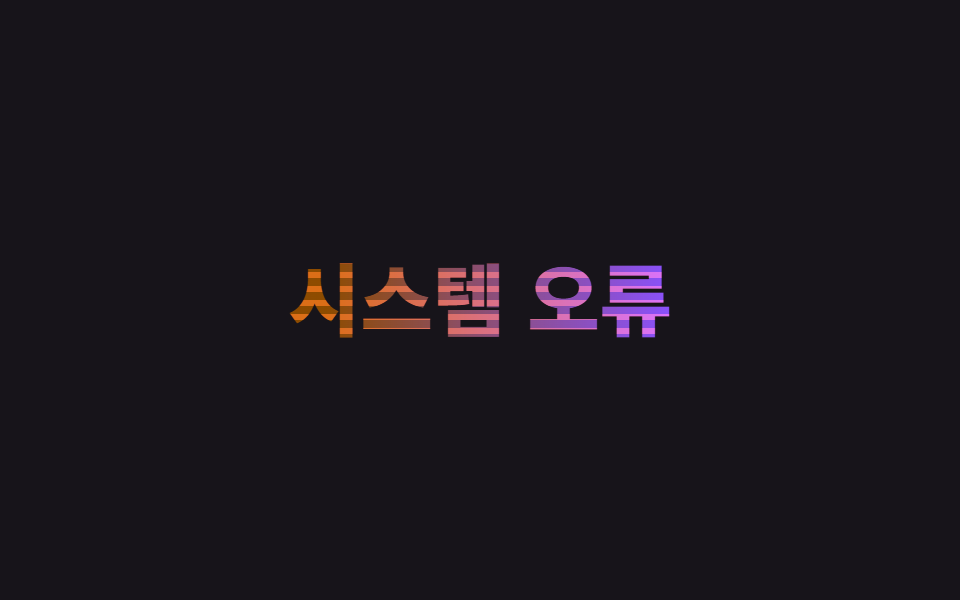
Cùng một câu chữ chồng hai lớp khác màu bị clip-path cắt thành từng dải mỏng, mỗi lớp lệch translateX vài pixel trong chốc lát rồi trả lại đúng vị trí cũ. Độ lệch lặp lại hai lượt trong một vòng thay vì chỉ một lần.
Dùng choTiêu đề trạng thái lỗi/cảnh báo, hiệu ứng logo thương hiệu game/tech
clip-path 슬라이스translateX 어긋남색 분리

<main class="stage">
  <div class="glitch">
    <span class="glitch__base" data-split>Đã xảy ra lỗi</span>
    <span class="glitch__r" aria-hidden="true" data-split>Đã xảy ra lỗi</span>
    <span class="glitch__b" aria-hidden="true" data-split>Đã xảy ra lỗi</span>
  </div>
</main>
@use "../../../../site/static/demo-tokens" as *;
$duration: $dur-loop; // 글리치 두 번이 도는 한 주기
$easing: linear;
$base: $subject-cream;
@include stage($stage-ink);
.glitch {
position: relative;
font-weight: 800; font-size: clamp(26px, 8.4vw, 42px); line-height: 1.2; font-family: inherit;
text-align: center;
}
.glitch__base, .glitch__r, .glitch__b {
display: block;
margin: 0;
}
.glitch__base { color: $base; }
.glitch__r, .glitch__b {
position: absolute;
inset: 0;
mix-blend-mode: screen;
}
.glitch__r { color: $error; animation: glitch-r $duration $easing infinite; }
.glitch__b { color: $subject-blue; animation: glitch-b $duration $easing infinite; }
.glitch .letter {
display: inline-block;
animation: letter-blur-in $duration $ease-out infinite;
animation-delay: calc(var(--i) * 25ms + var(--n) * 50ms);
}
@keyframes glitch-r {
0% { transform: translateX(0); clip-path: inset(0 0 0 0); }
8% { transform: translateX(-6px); clip-path: inset(12% 0 58% 0); }
16% { transform: translateX(4px); clip-path: inset(48% 0 14% 0); }
24% { transform: translateX(0); clip-path: inset(0 0 0 0); }
50% { transform: translateX(-4px); clip-path: inset(20% 0 40% 0); }
58% { transform: translateX(5px); clip-path: inset(55% 0 8% 0); }
66% { transform: translateX(0); clip-path: inset(0 0 0 0); }
100% { transform: translateX(0); clip-path: inset(0 0 0 0); }
}
@keyframes glitch-b {
0% { transform: translateX(0); clip-path: inset(0 0 0 0); }
8% { transform: translateX(6px); clip-path: inset(58% 0 10% 0); }
16% { transform: translateX(-4px); clip-path: inset(14% 0 48% 0); }
24% { transform: translateX(0); clip-path: inset(0 0 0 0); }
50% { transform: translateX(4px); clip-path: inset(40% 0 22% 0); }
58% { transform: translateX(-5px); clip-path: inset(8% 0 55% 0); }
66% { transform: translateX(0); clip-path: inset(0 0 0 0); }
100% { transform: translateX(0); clip-path: inset(0 0 0 0); }
}
@keyframes letter-blur-in {
0%, 2% { filter: blur(8px); }
10%, 100% { filter: blur(0); }
}
@media (prefers-reduced-motion: reduce) {
.glitch__r, .glitch__b { animation: none; opacity: 0; }
.glitch .letter { animation: none; filter: none; }
}html, body {
margin: 0;
overflow: hidden;
}
.stage {
box-sizing: border-box;
min-height: 100vh;
display: grid;
place-items: center;
margin: 0;
background: #17141a;
font-family: -apple-system, "Segoe UI", "Noto Sans KR", sans-serif;
padding: clamp(8px, 4vw, 24px);
}
.glitch {
position: relative;
font-weight: 800;
font-size: clamp(26px, 8.4vw, 42px);
line-height: 1.2;
font-family: inherit;
text-align: center;
}
.glitch__base, .glitch__r, .glitch__b {
display: block;
margin: 0;
}
.glitch__base {
color: #fff7e6;
}
.glitch__r, .glitch__b {
position: absolute;
inset: 0;
mix-blend-mode: screen;
}
.glitch__r {
color: #c2361a;
animation: glitch-r 2s linear infinite;
}
.glitch__b {
color: #2f6df6;
animation: glitch-b 2s linear infinite;
}
.glitch .letter {
display: inline-block;
animation: letter-blur-in 2s ease-out infinite;
animation-delay: calc(var(--i) * 25ms + var(--n) * 50ms);
}
@keyframes glitch-r {
0% {
transform: translateX(0);
clip-path: inset(0 0 0 0);
}
8% {
transform: translateX(-6px);
clip-path: inset(12% 0 58% 0);
}
16% {
transform: translateX(4px);
clip-path: inset(48% 0 14% 0);
}
24% {
transform: translateX(0);
clip-path: inset(0 0 0 0);
}
50% {
transform: translateX(-4px);
clip-path: inset(20% 0 40% 0);
}
58% {
transform: translateX(5px);
clip-path: inset(55% 0 8% 0);
}
66% {
transform: translateX(0);
clip-path: inset(0 0 0 0);
}
100% {
transform: translateX(0);
clip-path: inset(0 0 0 0);
}
}
@keyframes glitch-b {
0% {
transform: translateX(0);
clip-path: inset(0 0 0 0);
}
8% {
transform: translateX(6px);
clip-path: inset(58% 0 10% 0);
}
16% {
transform: translateX(-4px);
clip-path: inset(14% 0 48% 0);
}
24% {
transform: translateX(0);
clip-path: inset(0 0 0 0);
}
50% {
transform: translateX(4px);
clip-path: inset(40% 0 22% 0);
}
58% {
transform: translateX(-5px);
clip-path: inset(8% 0 55% 0);
}
66% {
transform: translateX(0);
clip-path: inset(0 0 0 0);
}
100% {
transform: translateX(0);
clip-path: inset(0 0 0 0);
}
}
@keyframes letter-blur-in {
0%, 2% {
filter: blur(8px);
}
10%, 100% {
filter: blur(0);
}
}
@media (prefers-reduced-motion: reduce) {
.glitch__r, .glitch__b {
animation: none;
opacity: 0;
}
.glitch .letter {
animation: none;
filter: none;
}
}(function(){
function splitLetters(el){
var text = el.textContent;
el.textContent = "";
Array.from(text).forEach(function(ch, i){
var span = document.createElement("span");
span.className = "letter";
var seed = Math.sin((i + 1) * 12.9898) * 43758.5453;
var noise = seed - Math.floor(seed);
span.style.setProperty("--i", i);
span.style.setProperty("--n", noise.toFixed(3));
span.textContent = ch === " " ? " " : ch;
el.appendChild(span);
});
}
document.querySelectorAll("[data-split]").forEach(splitLetters);
})();import type { CSSProperties } from "react";
import { useEffect, useRef } from "react";
import styles from "./GlitchText.module.scss";
type Vars = CSSProperties & { "--i"?: number; "--n"?: number };
function noise(i: number): number {
const s = Math.sin((i + 1) * 12.9898) * 43758.5453;
return Number((s - Math.floor(s)).toFixed(3));
}
export type GlitchTextProps = {
text: string;
/** 글리치 두 번이 도는 한 주기 (기본 2000ms) */
duration?: number;
color?: string;
};
export default function GlitchText({ text, duration = 2000, color = "#fff7e6" }: GlitchTextProps) {
const ref = useRef<HTMLDivElement | null>(null);
useEffect(() => {
// reduced-motion 이면 재생 자체를 걸지 않는다 (el.animate() 를 쓰는 항목의 정리 규칙과 같다)
return () => ref.current?.getAnimations().forEach((a) => a.cancel());
}, []);
const vars = { "--duration": `${duration}ms`, "--color": color } as CSSProperties;
const chars = Array.from(text);
const renderLetters = () =>
chars.map((ch, i) => (
<span key={i} className={styles.letter} style={{ "--i": i, "--n": noise(i) } as Vars}>
{ch === " " ? " " : ch}
</span>
));
return (
<div ref={ref} className={styles.glitch} style={vars}>
<span className={styles.base}>{renderLetters()}</span>
<span className={styles.r} aria-hidden="true">{renderLetters()}</span>
<span className={styles.b} aria-hidden="true">{renderLetters()}</span>
</div>
);
}09 Glitch — Diện tích đo được 6.18% · khung hình chuyển động 16/23Nguyên tác GODRICH · SCSS và React nằm trong tệp zip · 9 CSS Text Animation Effects — dán 1 dòng là chạy
Bài viết chứa demo này
 9 CSS Text Animation Effects — dán 1 dòng là chạyCSS text animation effects là các chuyển động chữ dựng thuần bằng CSS, không cần JavaScript, giúp tiêu đề hay câu chữ xu Xem tất cả demo trong bài này