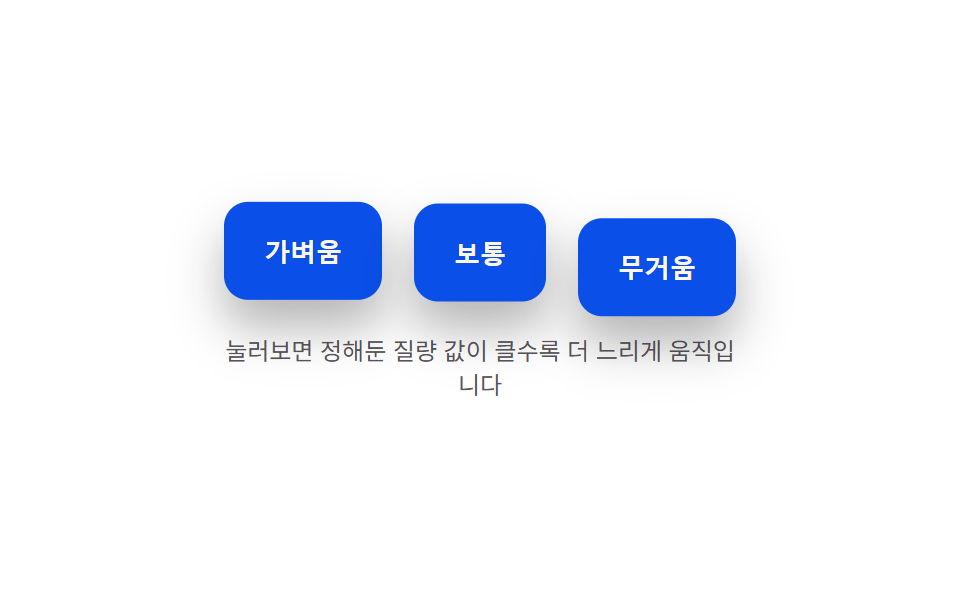
06Mass-value press-speed difference — the larger a preset mass value is, the slower the pressed-and-return speed value becomes
The larger the preset mass value, the slower the speed value at which the button presses in and returns to its original value.
Best forA delete button designed to feel heavy, a payment button meant to encourage a deliberate action
MASSKPRESS_DEPTH
<main class="stage">
<div class="bwm is-demo" id="bwm">
  <div class="bwm__row">
    <button class="bwm__btn" id="bwmLight" data-mass="light" type="button">Light</button>
    <button class="bwm__btn" id="bwmMedium" data-mass="medium" type="button">Medium</button>
    <button class="bwm__btn" id="bwmHeavy" data-mass="heavy" type="button">Heavy</button>
  </div>
  <p class="bwm__hint">Press each one — the larger the preset mass value, the slower it moves</p>
</div>
</main>
@use "../../../../site/static/demo-tokens" as *;
// 계산 겹(질량별 스프링 적분)은 JS 에 있다 — 여기는 정적 배치만.
@include stage($stage-paper);
.stage { position: relative; }
.bwm {
display: flex;
flex-direction: column;
align-items: center;
gap: $sp-4;
}
.bwm__row {
display: flex;
gap: $sp-4;
}
.bwm__btn {
border: 0;
border-radius: $r-control;
padding: $sp-4 $sp-5;
background: $subject-blue-deep;
color: $subject-cream;
font-size: 13px;
font-weight: 700;
cursor: pointer;
box-shadow: $shadow-raised;
}
.bwm__hint {
color: rgba($subject-ink, .72);
font-size: 12px;
text-align: center;
max-width: 260px;
}
@media (max-width: 340px) {
.bwm__row { gap: $sp-2; }
.bwm__btn { padding: $sp-3 $sp-3; font-size: 12px; }
}
@media (prefers-reduced-motion: reduce) {
.bwm__btn { transition: none !important; }
}html, body {
margin: 0;
overflow: hidden;
}
.stage {
box-sizing: border-box;
min-height: 100vh;
display: grid;
place-items: center;
margin: 0;
background: #ffffff;
font-family: -apple-system, "Segoe UI", "Noto Sans KR", sans-serif;
padding: clamp(8px, 4vw, 24px);
}
.stage {
position: relative;
}
.bwm {
display: flex;
flex-direction: column;
align-items: center;
gap: 16px;
}
.bwm__row {
display: flex;
gap: 16px;
}
.bwm__btn {
border: 0;
border-radius: 12px;
padding: 16px 20px;
background: #0a4fe8;
color: #fff7e6;
font-size: 13px;
font-weight: 700;
cursor: pointer;
box-shadow: 0 14px 24px rgba(23, 20, 26, 0.32);
}
.bwm__hint {
color: rgba(23, 20, 26, 0.72);
font-size: 12px;
text-align: center;
max-width: 260px;
}
@media (max-width: 340px) {
.bwm__row {
gap: 8px;
}
.bwm__btn {
padding: 12px 12px;
font-size: 12px;
}
}
@media (prefers-reduced-motion: reduce) {
.bwm__btn {
transition: none !important;
}
}(function () {
var root = document.getElementById('bwm');
var reduce = window.matchMedia('(prefers-reduced-motion: reduce)').matches;
// 계산 겹: 세 버튼은 같은 스프링 상수 K·감쇠 C 를 쓰지만 질량 값(MASS)이 다르다.
// accel = -(K/MASS)*(depth-target) - (C/MASS)*vel — MASS 가 클수록 같은 힘에서 가속도가
// 작아져(뉴턴 F=ma) 눌리고 돌아오는 속도가 함께 느려진다.
var K = 320, C = 8, PRESS_DEPTH = 12;
var MASS = { light: 0.5, medium: 1.4, heavy: 3.6 };
function makeBtn(el, key) {
return { el: el, mass: MASS[key], depth: 0, vel: 0, target: 0 };
}
var items = [
makeBtn(document.getElementById('bwmLight'), 'light'),
makeBtn(document.getElementById('bwmMedium'), 'medium'),
makeBtn(document.getElementById('bwmHeavy'), 'heavy')
];
var last = 0, raf = null;
function paint(it) { it.el.style.transform = 'translateY(' + it.depth.toFixed(2) + 'px)'; }
function tick(now) {
var dt = Math.min((now - last) / 1000, 0.032);
last = now;
for (var i = 0; i < items.length; i++) {
var it = items[i];
var accel = (-K * (it.depth - it.target) - C * it.vel) / it.mass;
it.vel += accel * dt;
it.depth += it.vel * dt;
paint(it);
}
raf = requestAnimationFrame(tick);
}
function start() { if (raf === null) { last = performance.now(); raf = requestAnimationFrame(tick); } }
function press(it, p) {
if (reduce) { it.depth = p; it.vel = 0; it.target = p; paint(it); return; }
it.target = p;
start();
}
function wireReal() {
items.forEach(function (it) {
it.el.addEventListener('pointerdown', function () { root.classList.remove('is-demo'); stopAutoplay(); press(it, PRESS_DEPTH); });
it.el.addEventListener('pointerup', function () { press(it, 0); });
it.el.addEventListener('pointercancel', function () { press(it, 0); });
});
}
wireReal();
items.forEach(paint);
// 자동 루프: 세 버튼을 동시에 눌렀다 동시에 떼어, 같은 힘에서 질량별 속도 차이를 나란히 보여준다.
var autoTimer = null, autoDown = null;
function autoTick() {
items.forEach(function (it) { press(it, PRESS_DEPTH); });
autoDown = setTimeout(function () { items.forEach(function (it) { press(it, 0); }); }, 300);
}
function stopAutoplay() {
if (autoTimer) { clearInterval(autoTimer); autoTimer = null; }
if (autoDown) { clearTimeout(autoDown); autoDown = null; }
}
if (!reduce) { autoTick(); autoTimer = setInterval(autoTick, 1700); }
})();import { useEffect, useRef } from "react";
import styles from "./ButtonPhysicsWeightMassPressDepth.module.scss";
export type ButtonPhysicsWeightMassPressDepthProps = {
color?: string;
};
type MassKey = "light" | "medium" | "heavy";
type MassItem = { el: HTMLButtonElement; mass: number; depth: number; vel: number; target: number };
export default function ButtonPhysicsWeightMassPressDepth({
color = "#0a4fe8",
}: ButtonPhysicsWeightMassPressDepthProps) {
const rootRef = useRef<HTMLDivElement | null>(null);
useEffect(() => {
const root = rootRef.current;
if (!root) return;
const lightEl = root.querySelector<HTMLButtonElement>(`.${styles.light}`);
const mediumEl = root.querySelector<HTMLButtonElement>(`.${styles.medium}`);
const heavyEl = root.querySelector<HTMLButtonElement>(`.${styles.heavy}`);
if (!lightEl || !mediumEl || !heavyEl) return;
const reduce = window.matchMedia("(prefers-reduced-motion: reduce)").matches;
// 계산 겹: 세 버튼은 같은 스프링 상수 K·감쇠 C 를 쓰지만 질량 값(MASS)이 다르다.
// accel = -(K/MASS)*(depth-target) - (C/MASS)*vel — MASS 가 클수록 같은 힘에서 가속도가
// 작아져(뉴턴 F=ma) 눌리고 돌아오는 속도가 함께 느려진다.
const K = 320, C = 8, PRESS_DEPTH = 12;
const MASS: Record<MassKey, number> = { light: 0.5, medium: 1.4, heavy: 3.6 };
function makeBtn(el: HTMLButtonElement, key: MassKey): MassItem {
return { el, mass: MASS[key], depth: 0, vel: 0, target: 0 };
}
const items: MassItem[] = [
makeBtn(lightEl, "light"),
makeBtn(mediumEl, "medium"),
makeBtn(heavyEl, "heavy"),
];
let last = 0, raf: number | null = null;
function paint(it: MassItem) { it.el.style.transform = "translateY(" + it.depth.toFixed(2) + "px)"; }
function tick(now: number) {
const dt = Math.min((now - last) / 1000, 0.032);
last = now;
for (let i = 0; i < items.length; i++) {
const it = items[i];
const accel = (-K * (it.depth - it.target) - C * it.vel) / it.mass;
it.vel += accel * dt;
it.depth += it.vel * dt;
paint(it);
}
raf = requestAnimationFrame(tick);
}
function start() { if (raf === null) { last = performance.now(); raf = requestAnimationFrame(tick); } }
function press(it: MassItem, p: number) {
if (reduce) { it.depth = p; it.vel = 0; it.target = p; paint(it); return; }
it.target = p;
start();
}
const cleanups: Array<() => void> = [];
items.forEach((it) => {
const onDown = () => { stopAutoplay(); press(it, PRESS_DEPTH); };
const onUp = () => { press(it, 0); };
it.el.addEventListener("pointerdown", onDown);
it.el.addEventListener("pointerup", onUp);
it.el.addEventListener("pointercancel", onUp);
cleanups.push(() => {
it.el.removeEventListener("pointerdown", onDown);
it.el.removeEventListener("pointerup", onUp);
it.el.removeEventListener("pointercancel", onUp);
});
});
items.forEach(paint);
let autoTimer: number | null = null, autoDown: number | null = null;
function autoTick() {
items.forEach((it) => { press(it, PRESS_DEPTH); });
autoDown = window.setTimeout(() => { items.forEach((it) => { press(it, 0); }); }, 300);
}
function stopAutoplay() {
if (autoTimer !== null) { window.clearInterval(autoTimer); autoTimer = null; }
if (autoDown !== null) { window.clearTimeout(autoDown); autoDown = null; }
}
if (!reduce) { autoTick(); autoTimer = window.setInterval(autoTick, 1700); }
return () => {
stopAutoplay();
if (raf !== null) cancelAnimationFrame(raf);
cleanups.forEach((fn) => fn());
};
}, []);
return (
<div ref={rootRef} className={styles.stage}>
<div className={styles.bwm}>
<div className={styles.row}>
<button className={`${styles.btn} ${styles.light}`} type="button" style={{ background: color }}>가벼움</button>
<button className={`${styles.btn} ${styles.medium}`} type="button" style={{ background: color }}>보통</button>
<button className={`${styles.btn} ${styles.heavy}`} type="button" style={{ background: color }}>무거움</button>
</div>
<p className={styles.hint}>눌러보면 정해둔 질량 값이 클수록 더 느리게 움직입니다</p>
</div>
</div>
);
}06 Mass-value press-speed difference — the larger a preset mass value is, the slower the pressed-and-return speed value becomes — Measured area 14.093% · moving frames 23/23Original by GODRICH · SCSS and React ship in the zip · Button Press Animation UI: 9 Calculation Patterns
The post this demo lives in
 Button Press Animation UI: 9 Calculation PatternsOne value overshoots its target and swings back before settling, one falls and bounces off a floor value before resting, See all demos in this post
If you like this effect - similar demos
 Buttons04 Exclusive pressed state — when one button's pressed value turns on, every other button's pressed value turns off at the same instantButton Group CSS: 9 Adjoined Patterns
 Buttons01 Accordion-reveal value toggle — when the button's open value changes, its rounding and shadow values change along, presenting the content belowExpanding Button UI: 9 Shape-Morph Patterns
 Buttons04 Button a Depth Value Pushes Only the Icon Apart9 CSS 3D Button Effects — Copy-paste Ready