03Response Curve Crosshair That Refines Small Tilts
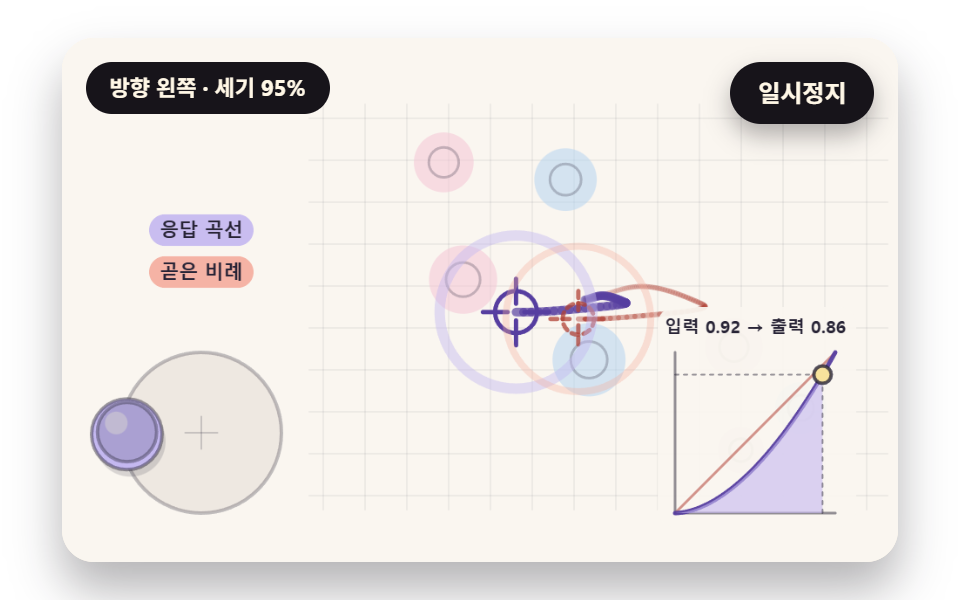
The output strength is raised to an exponent so the crosshair crawls at small tilts and moves quickly at full tilt, while a dot on the curve graph in the corner follows the current input and output together.
Best forFine aiming pad on a remote camera screen
RESPONSE_EXPAIM_SPEEDAIM_DEADZONE
<main class="stage">
<div class="vj is-demo" id="vj">
  <div class="vj__pad" data-role="pad" tabindex="0" role="application" aria-label="Virtual joystick stage: click it, then tilt with the arrow keys">
    <canvas class="vj__canvas" data-role="canvas" width="480" height="300" role="img" aria-label="A crosshair driven through the response curve and a faint crosshair moving in straight proportion share one stick value among the targets, while a dot on the corner graph follows input and output"></canvas>
  </div>
  <p class="vj__status" data-role="status" aria-live="off">Direction center · strength 0%</p>
  <button class="vj__pause" data-role="pause" type="button" aria-pressed="false">Pause</button>
</div>
</main>
@use "../../../../site/static/demo-tokens" as *;
@include stage($stage-paper);
.vj {
position: relative;
width: min(92vw, calc(160vh - 12.8vw));
aspect-ratio: 480 / 300;
margin: 0 auto;
border-radius: $r-card;
overflow: hidden;
box-shadow: $shadow-raised;
background: $subject-cream;
}
// 무대 상자 — 여기서 시작한 터치만 스틱이 가져간다(touch-action: none 은 이 상자에만). 무대 밖 터치는 페이지 스크롤 그대로
.vj__pad {
position: absolute;
inset: 0;
border-radius: inherit;
outline: none;
touch-action: none;
cursor: grab;
}
// 바깥 .vj 가 넘침을 자르므로 포커스 테두리는 안쪽으로 들인다
.vj__pad:focus-visible {
outline: 3px solid $subject-ink;
outline-offset: -3px;
}
.vj__canvas {
position: absolute;
inset: 0;
display: block;
width: 100%;
height: 100%;
}
.vj__pause {
position: absolute;
right: $sp-3;
top: $sp-3;
padding: $sp-1 $sp-3;
border: 2px solid $subject-ink;
border-radius: $r-pill;
background: $subject-ink;
color: $subject-cream;
font-family: inherit;
font-weight: 700;
font-size: 12px;
line-height: 1.6;
cursor: pointer;
box-shadow: $shadow-press;
transition: transform $dur-quick $ease-spring;
}
// 눌린 상태(멈춤) — 바탕과 글자색을 뒤집어 aria-pressed 가 눈에도 보이게
.vj__pause[aria-pressed="true"] {
background: $subject-cream;
color: $subject-ink;
}
.vj__pause:hover {
transform: translateY(-2px);
}
.vj__pause:active {
transform: translateY(1px);
}
.vj__pause:focus-visible {
outline: 3px solid $subject-ink;
outline-offset: 3px;
}
// 상태 줄 — 지금 스틱 방향·세기를 글자로. 시연 중에는 aria-live off, 사람이 처음 손대면 polite
.vj__status {
position: absolute;
left: $sp-3;
top: $sp-3;
max-width: calc(100% - 120px);
margin: 0;
padding: $sp-1 $sp-3;
border-radius: $r-pill;
background: $subject-ink;
color: $subject-cream;
font-weight: 700;
font-size: 11px;
line-height: 1.6;
white-space: nowrap;
overflow: hidden;
text-overflow: ellipsis;
pointer-events: none;
}
@media (max-width: 340px) {
.vj__pause,
.vj__status { font-size: 10px; padding: 0 $sp-2; }
}
// 움직임 줄이기 — 장면은 스크립트가 정지 장면 한 장으로 멈춘다. 버튼도 떠오르지 않게
@media (prefers-reduced-motion: reduce) {
.vj__pause { transition: none !important; }
.vj__pause:hover,
.vj__pause:active { transform: none !important; }
}html, body {
margin: 0;
overflow: hidden;
}
.stage {
box-sizing: border-box;
min-height: 100vh;
display: grid;
place-items: center;
margin: 0;
background: #ffffff;
font-family: -apple-system, "Segoe UI", "Noto Sans KR", sans-serif;
padding: clamp(8px, 4vw, 24px);
}
.vj {
position: relative;
width: min(92vw, 160vh - 12.8vw);
aspect-ratio: 480/300;
margin: 0 auto;
border-radius: 16px;
overflow: hidden;
box-shadow: 0 14px 24px rgba(23, 20, 26, 0.32);
background: #fff7e6;
}
.vj__pad {
position: absolute;
inset: 0;
border-radius: inherit;
outline: none;
touch-action: none;
cursor: grab;
}
.vj__pad:focus-visible {
outline: 3px solid #17141a;
outline-offset: -3px;
}
.vj__canvas {
position: absolute;
inset: 0;
display: block;
width: 100%;
height: 100%;
}
.vj__pause {
position: absolute;
right: 12px;
top: 12px;
padding: 4px 12px;
border: 2px solid #17141a;
border-radius: 999px;
background: #17141a;
color: #fff7e6;
font-family: inherit;
font-weight: 700;
font-size: 12px;
line-height: 1.6;
cursor: pointer;
box-shadow: 0 6px 12px rgba(23, 20, 26, 0.32);
transition: transform 220ms cubic-bezier(0.2, 0.8, 0.2, 1);
}
.vj__pause[aria-pressed=true] {
background: #fff7e6;
color: #17141a;
}
.vj__pause:hover {
transform: translateY(-2px);
}
.vj__pause:active {
transform: translateY(1px);
}
.vj__pause:focus-visible {
outline: 3px solid #17141a;
outline-offset: 3px;
}
.vj__status {
position: absolute;
left: 12px;
top: 12px;
max-width: calc(100% - 120px);
margin: 0;
padding: 4px 12px;
border-radius: 999px;
background: #17141a;
color: #fff7e6;
font-weight: 700;
font-size: 11px;
line-height: 1.6;
white-space: nowrap;
overflow: hidden;
text-overflow: ellipsis;
pointer-events: none;
}
@media (max-width: 340px) {
.vj__pause,
.vj__status {
font-size: 10px;
padding: 0 8px;
}
}
@media (prefers-reduced-motion: reduce) {
.vj__pause {
transition: none !important;
}
.vj__pause:hover,
.vj__pause:active {
transform: none !important;
}
}(function () {
const root = document.getElementById("vj");
if (!root) return;
// 무대 좌표 — 캔버스 안 계산은 늘 480×300. 화면에 보이는 크기와 상관없다
const W = 480;
const H = 300;
const TAU = Math.PI * 2;
function clamp(v, lo, hi) { return v < lo ? lo : (v > hi ? hi : v); }
function lerp(a, b, k) { return a + (b - a) * k; }
function ease(x) { const c = clamp(x, 0, 1); return c * c * (3 - 2 * c); }
// 따라가기 몫 — 1 − e^(−rate·dt). 프레임 시간이 달라도 1초 동안 다가가는 양이 같다
function follow(rate, dt) { return 1 - Math.exp(-rate * dt); }
// 시드 고정 난수 — 같은 시드면 같은 시연 (32비트 xorshift 에 곱셈 섞기 한 번)
function seeded(seed) {
let s = (seed * 2654435761) >>> 0 || 1;
return function () {
s ^= s << 13;
s >>>= 0;
s ^= s >>> 17;
s ^= s << 5;
s >>>= 0;
return (Math.imul(s, 0x9e3779b1) >>> 0) / 4294967296;
};
}
// 각도 차를 −π~π 로 감는다 — 350° 와 10° 의 차는 −340° 가 아니라 20°
function wrapAngle(a) {
let r = (a + Math.PI) % TAU;
if (r < 0) {
r += TAU;
}
return r - Math.PI;
}
function toDeg(rad) { return rad * 180 / Math.PI; }
function makeStick(bx, by, R) {
return { bx: bx, by: by, R: R, tx: bx, ty: by, down: false, rx: 0, ry: 0, kx: 0, ky: 0, hx: bx, hy: by, hdown: false };
}
function readRaw(s) {
if (!s.down) {
s.rx = 0;
s.ry = 0;
return;
}
let x = (s.tx - s.bx) / s.R;
let y = (s.ty - s.by) / s.R;
const m = Math.hypot(x, y);
if (m > 1) {
x /= m;
y /= m;
}
s.rx = x;
s.ry = y;
}
// Round deadzone — 길이 m 이 dz 안이면 0, 밖이면 (m − dz)/(1 − dz) 로 0~1 을 다시 펴고 방향은 그대로
function radialDeadzone(x, y, dz) {
const m = Math.hypot(x, y);
if (m <= dz || m === 0) {
return [0, 0];
}
const k = clamp((m - dz) / (1 - dz), 0, 1) / m;
return [x * k, y * k];
}
// 화면에 보이는 손잡이(kx, ky) — raw 를 빠르게 따라간다(02 는 스프링으로 따로)
const KNOB_FOLLOW_RATE = 28;
function followKnob(s, dt) {
const f = follow(KNOB_FOLLOW_RATE, dt);
s.kx += (s.rx - s.kx) * f;
s.ky += (s.ry - s.ky) * f;
}
function snapKnob(s) { s.kx = s.rx; s.ky = s.ry; }
// ── 방향 이름 ────────────────────────────────────────────────
// 0 = right, 화면 시계 방향(아래가 +y)으로 45° 씩
const DIR_NAMES = ['right', 'down-right', 'down', 'down-left', 'left', 'up-left', 'up', 'up-right'];
const CENTER_NAME = 'center';
function sectorOf(x, y) {
const k = Math.round(Math.atan2(y, x) / (Math.PI / 4));
return ((k % 8) + 8) % 8;
}
// 상태 줄 한 마디 — 세기는 5% 단위로 반올림해 글자가 매 프레임 바뀌지 않게
function dirText(x, y) {
const m = Math.hypot(x, y);
const pct = Math.round(clamp(m, 0, 1) * 20) * 5;
if (pct === 0) {
return 'Direction {d} · strength {s}%'.replace('{d}', CENTER_NAME).replace('{s}', '0');
}
return 'Direction {d} · strength {s}%'.replace('{d}', DIR_NAMES[sectorOf(x, y)]).replace('{s}', String(pct));
}
function pathAt(keys, t) {
if (t <= keys[0][0]) {
return { x: keys[0][1], y: keys[0][2], down: keys[0][3] > 0 };
}
for (let k = 0; k < keys.length - 1; k += 1) {
const a = keys[k];
const b = keys[k + 1];
if (t < b[0]) {
const u = ease((t - a[0]) / (b[0] - a[0]));
return { x: lerp(a[1], b[1], u), y: lerp(a[2], b[2], u), down: a[3] > 0 };
}
}
const z = keys[keys.length - 1];
return { x: z[1], y: z[2], down: z[3] > 0 };
}
// 손떨림 — 시드로 뽑은 주파수·위상의 사인 셋을 더한 값(크기 amp 안팎). 같은 시드면 같은 떨림
function makeTremor(seed) {
const r = seeded(seed);
const f = [];
const p = [];
for (let k = 0; k < 6; k += 1) {
f.push(5 + r() * 9);
p.push(r() * TAU);
}
return function (t, amp) {
const x = Math.sin(t * f[0] + p[0]) * 0.5 + Math.sin(t * f[1] + p[1]) * 0.3 + Math.sin(t * f[2] + p[2]) * 0.2;
const y = Math.sin(t * f[3] + p[3]) * 0.5 + Math.sin(t * f[4] + p[4]) * 0.3 + Math.sin(t * f[5] + p[5]) * 0.2;
return [x * amp, y * amp];
};
}
// 장면 시계(초) — 장면 계산이 고치고 화면 쪽이 읽는다
let sceneT = 0;
// 자동 시연이 스틱을 움직이는가 — 사람이 무대에서 처음 손대면 꺼진다
let autoOn = true;
// 방향키 스틱 값(스틱마다) — 화면 쪽이 눌린 키로 고친다
const keyX = [0, 0];
const keyY = [0, 0];
const keyOn = [false, false];
// 스틱 입력원 고르기 — 자동 시연 → 방향키 → 포인터 순
function driveSticks(list, auto) {
for (let i = 0; i < list.length; i += 1) {
const s = list[i];
if (autoOn) {
const p = auto(i, sceneT);
s.tx = p.x;
s.ty = p.y;
s.down = p.down;
}
else if (keyOn[i]) {
s.tx = s.bx + keyX[i] * s.R;
s.ty = s.by + keyY[i] * s.R;
s.down = true;
}
else {
s.tx = s.hx;
s.ty = s.hy;
s.down = s.hdown;
}
readRaw(s);
}
}
// 파스텔 팔레트 — 글자·선은 진한 쪽으로 명도 차를 둔다
const PAPER = [250, 246, 240];
const PAPER_DIM = [234, 228, 220];
const INK = [40, 36, 54];
const INK_SOFT = [110, 102, 124];
const LAVENDER = [196, 184, 240];
const MINT = [166, 220, 200];
const BUTTER = [247, 226, 156];
const CORAL = [244, 174, 158];
const SKY = [180, 212, 240];
const PINK = [244, 196, 214];
const VIOLET_DEEP = [86, 62, 160];
const MINT_DEEP = [32, 110, 86];
const CORAL_DEEP = [176, 66, 54];
function mix(a, b, k) { return [lerp(a[0], b[0], k), lerp(a[1], b[1], k), lerp(a[2], b[2], k)]; }
function rgba(c, a) {
return 'rgba(' + Math.round(clamp(c[0], 0, 255)) + ',' + Math.round(clamp(c[1], 0, 255)) + ',' + Math.round(clamp(c[2], 0, 255)) + ',' + clamp(a, 0, 1).toFixed(3) + ')';
}
const canvasEl = root.querySelector('[data-role="canvas"]');
const padEl = root.querySelector('[data-role="pad"]');
const pauseEl = root.querySelector('[data-role="pause"]');
const statusEl = root.querySelector('[data-role="status"]');
const ctxRaw = canvasEl ? canvasEl.getContext('2d') : null;
if (!canvasEl || !ctxRaw || !pauseEl || !padEl) {
return;
}
const cv = canvasEl;
const ctx = ctxRaw;
const pauseBtn = pauseEl;
const pad = padEl;
// 외부 웹폰트는 부르지 않는다 — 기기에 있는 글꼴 목록만
const FONT_STACK = 'system-ui, -apple-system, "Segoe UI", "Noto Sans KR", sans-serif';
let dpr = 1;
function fitCanvas() {
// 배율은 2 에서 자른다 — 배율 3 기기에서 화소가 2.25배로 늘지 않게
dpr = Math.min(window.devicePixelRatio || 1, 2);
cv.width = Math.round(W * dpr);
cv.height = Math.round(H * dpr);
ctx.setTransform(dpr, 0, 0, dpr, 0, 0);
}
function fillAll(c) {
ctx.fillStyle = rgba(c, 1);
ctx.fillRect(0, 0, W, H);
}
function disc(x, y, r, c, a) {
if (r <= 0.2 || a <= 0) {
return;
}
ctx.beginPath();
ctx.arc(x, y, r, 0, TAU);
ctx.fillStyle = rgba(c, a);
ctx.fill();
}
function ring(x, y, r, width, c, a) {
if (r <= 0.2 || a <= 0) {
return;
}
ctx.beginPath();
ctx.arc(x, y, r, 0, TAU);
ctx.lineWidth = width;
ctx.strokeStyle = rgba(c, a);
ctx.stroke();
}
function seg(x1, y1, x2, y2, width, c, a) {
if (a <= 0) {
return;
}
ctx.beginPath();
ctx.moveTo(x1, y1);
ctx.lineTo(x2, y2);
ctx.lineWidth = width;
ctx.lineCap = 'round';
ctx.strokeStyle = rgba(c, a);
ctx.stroke();
}
function box(x, y, w, h, r, c, a) {
if (w <= 0.2 || h <= 0.2 || a <= 0) {
return;
}
ctx.beginPath();
ctx.roundRect(x, y, w, h, Math.max(0, Math.min(r, w / 2, h / 2)));
ctx.fillStyle = rgba(c, a);
ctx.fill();
}
function text(s, x, y, c, a, px, weight, align) {
ctx.font = weight + ' ' + px + 'px ' + FONT_STACK;
ctx.textAlign = align;
ctx.textBaseline = 'middle';
ctx.fillStyle = rgba(c, a);
ctx.fillText(s, x, y);
}
// 글자 이름표 — 바탕 알약 위에 진한 글자
function tag(s, x, y, bg, fg, px, align) {
ctx.font = '700 ' + px + 'px ' + FONT_STACK;
const w = ctx.measureText(s).width + px * 1.1;
const left = align === 'center' ? x - w / 2 : (align === 'right' ? x - w : x);
box(left, y - px * 0.82, w, px * 1.64, px * 0.82, bg, 0.92);
text(s, left + w / 2, y + 0.5, fg, 1, px, 700, 'center');
}
// 화살표 — 끝에 작은 머리
function arrow(x1, y1, x2, y2, width, c, a) {
const len = Math.hypot(x2 - x1, y2 - y1);
if (len < 2) {
return;
}
seg(x1, y1, x2, y2, width, c, a);
const ang = Math.atan2(y2 - y1, x2 - x1);
const hl = Math.min(10, len * 0.5);
seg(x2, y2, x2 - Math.cos(ang - 0.5) * hl, y2 - Math.sin(ang - 0.5) * hl, width, c, a);
seg(x2, y2, x2 - Math.cos(ang + 0.5) * hl, y2 - Math.sin(ang + 0.5) * hl, width, c, a);
}
// 받침 — 옅은 원판과 테두리
function drawBase(x, y, R, a) {
disc(x, y, R, PAPER_DIM, 0.78 * a);
ring(x, y, R, 2, INK, 0.28 * a);
seg(x - R * 0.2, y, x + R * 0.2, y, 1, INK, 0.2 * a);
seg(x, y - R * 0.2, x, y + R * 0.2, 1, INK, 0.2 * a);
}
// 손잡이 — 받침 가운데에서 (kx, ky)·R 만큼 떨어진 자리
function drawKnob(s, c, a) {
const x = s.bx + s.kx * s.R;
const y = s.by + s.ky * s.R;
const r = s.R * 0.44;
disc(x + 2, y + 4, r, INK, 0.16 * a);
disc(x, y, r, c, a);
ring(x, y, r, 2, INK, 0.45 * a);
disc(x - r * 0.3, y - r * 0.32, r * 0.32, PAPER, 0.5 * a);
}
// 가상 엄지 — 닿아 있는 동안 반투명 원
function drawThumb(x, y, on) {
if (!on) {
return;
}
disc(x, y, 17, INK, 0.16);
ring(x, y, 17, 2, INK, 0.38);
}
// 상태 줄 — 글자가 바뀔 때만 고친다
let shownStatus = '';
function pushStatus(s) {
if (!statusEl || s === shownStatus) {
return;
}
shownStatus = s;
statusEl.textContent = s;
}
// ── 03 작은 기울기를 섬세하게 바꾸는 Response curve 조준점 ──────────
// 데드존을 거친 세기 m 을 RESPONSE_EXP 제곱 — 데드존 뒤 0.3 은 0.3^1.8 ≈ 0.11 로 줄고 1 은 그대로 1
const RESPONSE_EXP = 1.8;
const AIM_DEADZONE = 0.08;
// 출력 1 일 때 조준점 빠르기(px/초)
const AIM_SPEED = 300;
const LOOP_S = 5;
const FIELD_L = 150;
const FIELD_R = 466;
const FIELD_T = 46;
const FIELD_B = 262;
const sticks = [makeStick(80, 226, 46)];
const PATH_03 = [
[0, 0, 0, 0], [0.22, 0, 0, 1], [0.5, 0.3, -0.1, 1], [1.2, 0.34, 0.14, 1], [1.5, -0.96, 0.08, 1], [1.9, -0.9, -0.3, 1],
[2.2, 0.24, 0.22, 1], [2.9, 0.3, -0.12, 1], [3.2, 0.96, 0.2, 1], [3.6, 0.9, 0.08, 1], [3.9, -0.3, -0.24, 1],
[4.5, -0.26, 0.06, 1], [4.8, 0, 0, 1], [5, 0, 0, 0]
];
const tremor03 = makeTremor(303);
function autoPose(i, t) {
const s = sticks[i];
const p = pathAt(PATH_03, t);
const w = tremor03(t, 0.02);
return { x: s.bx + (p.x + w[0]) * s.R, y: s.by + (p.y + w[1]) * s.R, down: p.down };
}
// Response curve — 방향은 두고 세기만 휜다
function responseCurve(x, y) {
const o = radialDeadzone(x, y, AIM_DEADZONE);
const m = Math.hypot(o[0], o[1]);
if (m === 0) {
return [0, 0, 0];
}
const c = Math.pow(m, RESPONSE_EXP);
return [o[0] / m * c, o[1] / m * c, m];
}
const aim = { x: 300, y: 150, trail: [] };
const aimLinear = { x: 300, y: 150, trail: [] };
let inM = 0;
let outM = 0;
// 과녁 — 시드로 뽑은 자리 일곱 개, 조준점이 안에 들면 잠깐 빛난다
const targets = [];
const glow = [];
(function () {
const r = seeded(33);
for (let k = 0; k < 7; k += 1) {
targets.push(FIELD_L + 30 + r() * (FIELD_R - FIELD_L - 60), FIELD_T + 24 + r() * (FIELD_B - FIELD_T - 48), 13 + r() * 9);
glow.push(0);
}
})();
const TRAIL_03 = 90;
function moveAim(a, vx, vy, dt) {
a.x = clamp(a.x + vx * dt, FIELD_L, FIELD_R);
a.y = clamp(a.y + vy * dt, FIELD_T, FIELD_B);
a.trail.push(a.x, a.y);
while (a.trail.length > TRAIL_03 * 2) {
a.trail.splice(0, 2);
}
}
function reset() {
const s = sticks[0];
s.kx = 0;
s.ky = 0;
s.rx = 0;
s.ry = 0;
s.down = false;
aim.x = 300;
aim.y = 150;
aim.trail.length = 0;
aimLinear.x = 300;
aimLinear.y = 150;
aimLinear.trail.length = 0;
for (let k = 0; k < glow.length; k += 1) {
glow[k] = 0;
}
inM = 0;
outM = 0;
}
function update(dt) {
const s = sticks[0];
driveSticks(sticks, autoPose);
followKnob(s, dt);
const c = responseCurve(s.rx, s.ry);
inM = c[2];
outM = Math.hypot(c[0], c[1]);
const lin = radialDeadzone(s.rx, s.ry, AIM_DEADZONE);
moveAim(aim, c[0] * AIM_SPEED, c[1] * AIM_SPEED, dt);
moveAim(aimLinear, lin[0] * AIM_SPEED, lin[1] * AIM_SPEED, dt);
for (let k = 0; k < glow.length; k += 1) {
const hit = Math.hypot(aim.x - targets[k * 3], aim.y - targets[k * 3 + 1]) < targets[k * 3 + 2];
glow[k] = hit ? Math.min(1, glow[k] + dt * 6) : Math.max(0, glow[k] - dt * 2);
}
}
function restPose() {
const s = sticks[0];
s.down = true;
s.tx = s.bx + 0.34 * s.R;
s.ty = s.by + 0.14 * s.R;
readRaw(s);
snapKnob(s);
const c = responseCurve(s.rx, s.ry);
inM = c[2];
outM = Math.hypot(c[0], c[1]);
aim.x = targets[0];
aim.y = targets[1];
aim.trail.length = 0;
aimLinear.x = targets[0] + 60;
aimLinear.y = targets[1];
aimLinear.trail.length = 0;
}
// 멈춘 화면에서는 지금 출력으로 0.25초 걸은 자리로 바로 옮긴다
const SETTLE_STEP_S = 0.25;
function settle() {
const s = sticks[0];
driveSticks(sticks, autoPose);
snapKnob(s);
const c = responseCurve(s.rx, s.ry);
inM = c[2];
outM = Math.hypot(c[0], c[1]);
const lin = radialDeadzone(s.rx, s.ry, AIM_DEADZONE);
moveAim(aim, c[0] * AIM_SPEED, c[1] * AIM_SPEED, SETTLE_STEP_S);
moveAim(aimLinear, lin[0] * AIM_SPEED, lin[1] * AIM_SPEED, SETTLE_STEP_S);
}
function mapPointer(x, y) {
const s = sticks[0];
return Math.hypot(x - s.bx, y - s.by) < s.R * 2 ? [0, x, y] : [-1, x, y];
}
function statusText() { return dirText(sticks[0].rx, sticks[0].ry); }
const CURVE_X = 352;
const CURVE_Y = 272;
const CURVE_S = 92;
function drawTrail(tr, c, width, a) {
const n = tr.length / 2;
for (let k = 1; k < n; k += 1) {
seg(tr[k * 2 - 2], tr[k * 2 - 1], tr[k * 2], tr[k * 2 + 1], width, c, a * k / n);
}
}
function crosshair(x, y, c, a, r) {
ring(x, y, r, 2.5, c, a);
seg(x - r - 7, y, x - r * 0.4, y, 2.5, c, a);
seg(x + r * 0.4, y, x + r + 7, y, 2.5, c, a);
seg(x, y - r - 7, x, y - r * 0.4, 2.5, c, a);
seg(x, y + r * 0.4, x, y + r + 7, 2.5, c, a);
}
function draw() {
fillAll(PAPER);
// 바닥 격자
for (let gx = FIELD_L; gx <= FIELD_R; gx += 24) {
seg(gx, FIELD_T - 8, gx, FIELD_B + 8, 1, INK, 0.06);
}
for (let gy = FIELD_T; gy <= FIELD_B; gy += 24) {
seg(FIELD_L - 8, gy, FIELD_R + 8, gy, 1, INK, 0.06);
}
for (let k = 0; k < glow.length; k += 1) {
const tx = targets[k * 3];
const ty = targets[k * 3 + 1];
const tr = targets[k * 3 + 2];
disc(tx, ty, tr * (1 + 0.25 * glow[k]), k % 2 ? SKY : PINK, 0.55 + 0.4 * glow[k]);
ring(tx, ty, tr * 0.5, 1.5, INK, 0.25);
if (glow[k] > 0) {
ring(tx, ty, tr * (1.3 + 0.4 * glow[k]), 3, BUTTER, glow[k]);
}
}
drawTrail(aimLinear.trail, CORAL_DEEP, 3, 0.45);
drawTrail(aim.trail, VIOLET_DEEP, 5, 0.7);
ctx.setLineDash([4, 3]);
crosshair(aimLinear.x, aimLinear.y, CORAL_DEEP, 0.75, 9);
ctx.setLineDash([]);
crosshair(aim.x, aim.y, VIOLET_DEEP, 1, 12);
// 빠르기 고리 — 출력 세기(= 빠르기 / AIM_SPEED)만큼 반지름이 커진다
ring(aim.x, aim.y, 18 + outM * 30, 6, LAVENDER, 0.45);
ring(aimLinear.x, aimLinear.y, 14 + inM * 30, 4, CORAL, 0.35);
// 스틱
const s = sticks[0];
drawBase(s.bx, s.by, s.R, 1);
drawKnob(s, LAVENDER, 1);
drawThumb(s.tx, s.ty, s.down);
tag('Response curve', 80, 110, LAVENDER, INK, 11, 'center');
tag('Straight ratio', 80, 134, CORAL, INK, 11, 'center');
// 구석 곡선 그래프 — x = 입력 세기, y = 출력 세기
box(CURVE_X - 10, CURVE_Y - CURVE_S - 26, CURVE_S + 22, CURVE_S + 34, 10, PAPER, 0.92);
seg(CURVE_X, CURVE_Y, CURVE_X + CURVE_S, CURVE_Y, 1.5, INK, 0.5);
seg(CURVE_X, CURVE_Y, CURVE_X, CURVE_Y - CURVE_S, 1.5, INK, 0.5);
seg(CURVE_X, CURVE_Y, CURVE_X + CURVE_S, CURVE_Y - CURVE_S, 1.5, CORAL_DEEP, 0.55);
ctx.beginPath();
for (let k = 0; k <= 40; k += 1) {
const u = k / 40;
const px = CURVE_X + u * CURVE_S;
const py = CURVE_Y - Math.pow(u, RESPONSE_EXP) * CURVE_S;
if (k === 0) {
ctx.moveTo(px, py);
}
else {
ctx.lineTo(px, py);
}
}
ctx.lineWidth = 2.5;
ctx.strokeStyle = rgba(VIOLET_DEEP, 0.95);
ctx.stroke();
// 지금 입력까지 곡선 아래를 칠한다 — 곧은 비례와 곡선 사이가 작은 기울기에서 덜어 낸 빠르기
ctx.beginPath();
ctx.moveTo(CURVE_X, CURVE_Y);
for (let k = 0; k <= 24; k += 1) {
const u = inM * k / 24;
ctx.lineTo(CURVE_X + u * CURVE_S, CURVE_Y - Math.pow(u, RESPONSE_EXP) * CURVE_S);
}
ctx.lineTo(CURVE_X + inM * CURVE_S, CURVE_Y);
ctx.closePath();
ctx.fillStyle = rgba(LAVENDER, 0.6);
ctx.fill();
const dx = CURVE_X + inM * CURVE_S;
const dy = CURVE_Y - outM * CURVE_S;
ctx.setLineDash([2, 3]);
seg(dx, CURVE_Y, dx, dy, 1, INK, 0.5);
seg(CURVE_X, dy, dx, dy, 1, INK, 0.5);
ctx.setLineDash([]);
disc(dx, dy, 5, BUTTER, 1);
ring(dx, dy, 5, 2, INK, 0.8);
text('In {i} → out {o}'.replace('{i}', inM.toFixed(2)).replace('{o}', outM.toFixed(2)), CURVE_X + CURVE_S / 2, CURVE_Y - CURVE_S - 14, INK, 1, 10, 700, 'center');
}
let paused = false;
const reduceQuery = window.matchMedia('(prefers-reduced-motion: reduce)');
// 페이지를 연 채 움직임 줄이기 설정을 바꿔도 change 리스너가 다시 읽는다
let still = reduceQuery.matches;
// 자동 시연 표시 — 사람이 처음 손대면 떼고 상태 줄을 polite 로 켠다
let demo = root.classList.contains('is-demo');
const off = new AbortController();
function wake() {
if (!demo) {
return;
}
demo = false;
root.classList.remove('is-demo');
if (statusEl) {
statusEl.setAttribute('aria-live', 'polite');
}
}
// 사람이 스틱을 잡으면 자동 시연은 손을 뗀다
function takeOver() {
wake();
autoOn = false;
}
// 멈춘 화면(움직임 줄이기·Pause)에서 들어온 입력은 넘침·관성 없이 결과 자리로 바로 그린다
function showNow() {
if (still || paused) {
settle();
draw();
pushStatus(statusText());
}
}
// 한 프레임에 넘기는 시간 상한(초) — 오래 숨었다 돌아온 첫 프레임도 50ms 까지만 계산에 넣는다
const DT_MAX = 0.05;
// 방향키를 누르고 있으면 스틱 값이 이 빠르기로 끝까지 차오른다 — 짧게 톡 치면 작은 기울기
const KEY_RAMP_RATE = 7;
const held = {};
let keyStick = 0;
function keyTarget() {
let x = (held.ArrowRight ? 1 : 0) - (held.ArrowLeft ? 1 : 0);
let y = (held.ArrowDown ? 1 : 0) - (held.ArrowUp ? 1 : 0);
const m = Math.hypot(x, y);
if (m > 0) {
x /= m;
y /= m;
}
return [x, y];
}
function anyHeld() { return !!(held.ArrowRight || held.ArrowLeft || held.ArrowDown || held.ArrowUp); }
function rampKeys(dt) {
const t = keyTarget();
for (let i = 0; i < keyOn.length; i += 1) {
const tx = i === keyStick ? t[0] : 0;
const ty = i === keyStick ? t[1] : 0;
if (dt <= 0) {
keyX[i] = tx;
keyY[i] = ty;
}
else {
const f = follow(KEY_RAMP_RATE, dt);
keyX[i] += (tx - keyX[i]) * f;
keyY[i] += (ty - keyY[i]) * f;
}
keyOn[i] = (i === keyStick && anyHeld()) || Math.hypot(keyX[i], keyY[i]) > 0.02;
if (!keyOn[i] && !(i === keyStick && anyHeld())) {
keyX[i] = 0;
keyY[i] = 0;
}
}
}
function advance(dt) {
sceneT += dt;
if (autoOn && sceneT >= LOOP_S) {
sceneT -= LOOP_S;
reset();
}
update(dt);
}
let rafId = 0;
let lastTs = -1;
function frame(ts) {
if (still || paused) {
rafId = 0;
return;
}
if (lastTs < 0) {
lastTs = ts;
}
const dt = Math.min((ts - lastTs) / 1000, DT_MAX);
lastTs = ts;
if (dt > 0) {
rampKeys(dt);
advance(dt);
}
draw();
pushStatus(statusText());
rafId = window.requestAnimationFrame(frame);
}
function startLoop() {
if (rafId) {
return;
}
// 멈췄던 사이의 시간을 첫 프레임 dt 로 넘기지 않는다
lastTs = -1;
rafId = window.requestAnimationFrame(frame);
}
function stopLoop() {
if (rafId) {
window.cancelAnimationFrame(rafId);
rafId = 0;
}
}
// 움직임 줄이기 — 루프 없이 손잡이와 대상이 목표 자리에 놓인 정지 장면 한 장
function showRest() {
stopLoop();
if (autoOn) {
sceneT = 0;
reset();
restPose();
}
else {
settle();
}
draw();
pushStatus(statusText());
}
function play() {
if (autoOn) {
sceneT = 0;
reset();
}
draw();
pushStatus(statusText());
if (!paused) {
startLoop();
}
}
pauseBtn.addEventListener('click', function () {
paused = !paused;
pauseBtn.setAttribute('aria-pressed', paused ? 'true' : 'false');
wake();
if (paused) {
stopLoop();
}
else if (!still) {
startLoop();
}
}, { signal: off.signal });
// 방향키 — 무대에 포커스가 있을 때만. 무대 밖에서는 화살표가 원래대로 페이지를 스크롤한다.
// Shift 를 함께 누르면 둘째 스틱(있을 때)
const ARROWS = { ArrowLeft: true, ArrowUp: true, ArrowRight: true, ArrowDown: true };
pad.addEventListener('keydown', function (e) {
if (!ARROWS[e.key] || e.altKey || e.ctrlKey || e.metaKey) {
return;
}
e.preventDefault();
takeOver();
const want = e.shiftKey && sticks.length > 1 ? 1 : 0;
if (want !== keyStick) {
for (const k of Object.keys(held)) {
held[k] = false;
}
keyStick = want;
}
held[e.key] = true;
if (still || paused) {
rampKeys(0);
}
showNow();
}, { signal: off.signal });
pad.addEventListener('keyup', function (e) {
if (!ARROWS[e.key]) {
return;
}
held[e.key] = false;
if (still || paused) {
rampKeys(0);
showNow();
}
}, { signal: off.signal });
pad.addEventListener('blur', function () {
for (const k of Object.keys(held)) {
held[k] = false;
}
}, { signal: off.signal });
// 포인터 — 무대 안에서 누른 손가락만 잡는다(포인터 캡처: 무대 밖으로 나가도 그 손가락을 놓치지 않는다).
// 스크롤 가로채기는 무대 상자에만 건 touch-action: none 으로 끝난다 — 무대 밖 터치는 페이지 스크롤 그대로
const grabbed = {};
function toStage(e) {
const r = pad.getBoundingClientRect();
return [(e.clientX - r.left) / r.width * W, (e.clientY - r.top) / r.height * H];
}
pad.addEventListener('pointerdown', function (e) {
const p = toStage(e);
const g = mapPointer(p[0], p[1]);
if (g[0] < 0) {
return;
}
const s = sticks[g[0]];
takeOver();
pad.setPointerCapture(e.pointerId);
grabbed[String(e.pointerId)] = g[0];
s.hdown = true;
s.hx = g[1];
s.hy = g[2];
showNow();
}, { signal: off.signal });
pad.addEventListener('pointermove', function (e) {
const i = grabbed[String(e.pointerId)];
if (i === undefined) {
return;
}
const p = toStage(e);
const g = mapPointer(p[0], p[1]);
sticks[i].hx = g[0] === i ? g[1] : p[0];
sticks[i].hy = g[0] === i ? g[2] : p[1];
showNow();
}, { signal: off.signal });
function release(e) {
const i = grabbed[String(e.pointerId)];
if (i === undefined) {
return;
}
delete grabbed[String(e.pointerId)];
sticks[i].hdown = false;
showNow();
}
pad.addEventListener('pointerup', release, { signal: off.signal });
pad.addEventListener('pointercancel', release, { signal: off.signal });
// 탭이 숨으면 멈추고, 돌아오면 시계를 다시 맞춰 시작 — 숨은 동안의 몇 초가 한 프레임에 몰리지 않게
document.addEventListener('visibilitychange', function () {
if (document.hidden) {
stopLoop();
}
else if (!paused && !still) {
startLoop();
}
}, { signal: off.signal });
// 설정이 바뀌면 — 켜지면 정지 장면, 꺼지면 다시 움직인다
reduceQuery.addEventListener('change', function () {
still = reduceQuery.matches;
if (still) {
showRest();
}
else {
play();
}
}, { signal: off.signal });
window.addEventListener('resize', function () {
fitCanvas();
draw();
}, { signal: off.signal });
fitCanvas();
if (still) {
showRest();
}
else {
play();
}
return function () {
stopLoop();
off.abort();
};
})();// ResponseCurveAim - 같은 항목 vanilla index.html 의 React 판. 같은 계산을 useEffect 안에서 돌린다
import { useEffect, useRef } from "react";
import styles from "./ResponseCurveAim.module.scss";
const cx = (s: string): string => s.split(" ").map((n) => styles[n] ?? n).join(" ");
export default function ResponseCurveAim() {
const rootRef = useRef<HTMLDivElement | null>(null);
useEffect(() => {
const rootEl = rootRef.current;
if (!rootEl) return;
const root: HTMLElement = rootEl;
type RGB = [number, number, number];
// 무대 좌표 — 캔버스 안 계산은 늘 480×300. 화면에 보이는 크기와 상관없다
const W = 480;
const H = 300;
const TAU = Math.PI * 2;
function clamp(v: number, lo: number, hi: number): number { return v < lo ? lo : (v > hi ? hi : v); }
function lerp(a: number, b: number, k: number): number { return a + (b - a) * k; }
function ease(x: number): number { const c = clamp(x, 0, 1); return c * c * (3 - 2 * c); }
// 따라가기 몫 — 1 − e^(−rate·dt). 프레임 시간이 달라도 1초 동안 다가가는 양이 같다
function follow(rate: number, dt: number): number { return 1 - Math.exp(-rate * dt); }
// 시드 고정 난수 — 같은 시드면 같은 시연 (32비트 xorshift 에 곱셈 섞기 한 번)
function seeded(seed: number): () => number {
let s = (seed * 2654435761) >>> 0 || 1;
return function (): number {
s ^= s << 13; s >>>= 0;
s ^= s >>> 17;
s ^= s << 5; s >>>= 0;
return (Math.imul(s, 0x9e3779b1) >>> 0) / 4294967296;
};
}
// 각도 차를 −π~π 로 감는다 — 350° 와 10° 의 차는 −340° 가 아니라 20°
function wrapAngle(a: number): number {
let r = (a + Math.PI) % TAU;
if (r < 0) { r += TAU; }
return r - Math.PI;
}
function toDeg(rad: number): number { return rad * 180 / Math.PI; }
// ── 스틱 ─────────────────────────────────────────────────────
// 받침 가운데(bx, by)·반지름 R 은 캔버스 px. 엄지(tx, ty)도 px.
// raw 는 엄지 위치를 반지름으로 나눈 값 — 길이 1 을 넘으면 1 로 자른다(손잡이는 테두리까지만 간다)
// 화면 y 는 아래가 + 라서 raw y 도 아래가 + 다
type Stick = {
bx: number; by: number; R: number;
tx: number; ty: number; down: boolean;
rx: number; ry: number;
kx: number; ky: number;
hx: number; hy: number; hdown: boolean;
};
function makeStick(bx: number, by: number, R: number): Stick {
return { bx: bx, by: by, R: R, tx: bx, ty: by, down: false, rx: 0, ry: 0, kx: 0, ky: 0, hx: bx, hy: by, hdown: false };
}
function readRaw(s: Stick): void {
if (!s.down) { s.rx = 0; s.ry = 0; return; }
let x = (s.tx - s.bx) / s.R;
let y = (s.ty - s.by) / s.R;
const m = Math.hypot(x, y);
if (m > 1) { x /= m; y /= m; }
s.rx = x;
s.ry = y;
}
// 원형 데드존 — 길이 m 이 dz 안이면 0, 밖이면 (m − dz)/(1 − dz) 로 0~1 을 다시 펴고 방향은 그대로
function radialDeadzone(x: number, y: number, dz: number): [number, number] {
const m = Math.hypot(x, y);
if (m <= dz || m === 0) { return [0, 0]; }
const k = clamp((m - dz) / (1 - dz), 0, 1) / m;
return [x * k, y * k];
}
// 화면에 보이는 손잡이(kx, ky) — raw 를 빠르게 따라간다(02 는 스프링으로 따로)
const KNOB_FOLLOW_RATE = 28;
function followKnob(s: Stick, dt: number): void {
const f = follow(KNOB_FOLLOW_RATE, dt);
s.kx += (s.rx - s.kx) * f;
s.ky += (s.ry - s.ky) * f;
}
function snapKnob(s: Stick): void { s.kx = s.rx; s.ky = s.ry; }
// ── 방향 이름 ────────────────────────────────────────────────
// 0 = 오른쪽, 화면 시계 방향(아래가 +y)으로 45° 씩
const DIR_NAMES = ['오른쪽', '오른쪽 아래', '아래', '왼쪽 아래', '왼쪽', '왼쪽 위', '위', '오른쪽 위'];
const CENTER_NAME = '가운데';
function sectorOf(x: number, y: number): number {
const k = Math.round(Math.atan2(y, x) / (Math.PI / 4));
return ((k % 8) + 8) % 8;
}
// 상태 줄 한 마디 — 세기는 5% 단위로 반올림해 글자가 매 프레임 바뀌지 않게
function dirText(x: number, y: number): string {
const m = Math.hypot(x, y);
const pct = Math.round(clamp(m, 0, 1) * 20) * 5;
if (pct === 0) { return '방향 {d} · 세기 {s}%'.replace('{d}', CENTER_NAME).replace('{s}', '0'); }
return '방향 {d} · 세기 {s}%'.replace('{d}', DIR_NAMES[sectorOf(x, y)]).replace('{s}', String(pct));
}
// ── 가상 엄지의 길 ───────────────────────────────────────────
// 열쇠 [시각 s, x, y, 닿음 1/0] 사이를 부드럽게 잇는다. 닿음은 지난 열쇠의 값
type PathKey = [number, number, number, number];
type Pose = { x: number; y: number; down: boolean };
function pathAt(keys: PathKey[], t: number): Pose {
if (t <= keys[0][0]) { return { x: keys[0][1], y: keys[0][2], down: keys[0][3] > 0 }; }
for (let k = 0; k < keys.length - 1; k += 1) {
const a = keys[k];
const b = keys[k + 1];
if (t < b[0]) {
const u = ease((t - a[0]) / (b[0] - a[0]));
return { x: lerp(a[1], b[1], u), y: lerp(a[2], b[2], u), down: a[3] > 0 };
}
}
const z = keys[keys.length - 1];
return { x: z[1], y: z[2], down: z[3] > 0 };
}
// 손떨림 — 시드로 뽑은 주파수·위상의 사인 셋을 더한 값(크기 amp 안팎). 같은 시드면 같은 떨림
function makeTremor(seed: number): (t: number, amp: number) => [number, number] {
const r = seeded(seed);
const f: number[] = [];
const p: number[] = [];
for (let k = 0; k < 6; k += 1) { f.push(5 + r() * 9); p.push(r() * TAU); }
return function (t: number, amp: number): [number, number] {
const x = Math.sin(t * f[0] + p[0]) * 0.5 + Math.sin(t * f[1] + p[1]) * 0.3 + Math.sin(t * f[2] + p[2]) * 0.2;
const y = Math.sin(t * f[3] + p[3]) * 0.5 + Math.sin(t * f[4] + p[4]) * 0.3 + Math.sin(t * f[5] + p[5]) * 0.2;
return [x * amp, y * amp];
};
}
// 장면 시계(초) — 장면 계산이 고치고 화면 쪽이 읽는다
let sceneT = 0;
// 자동 시연이 스틱을 움직이는가 — 사람이 무대에서 처음 손대면 꺼진다
let autoOn = true;
// 방향키 스틱 값(스틱마다) — 화면 쪽이 눌린 키로 고친다
const keyX: number[] = [0, 0];
const keyY: number[] = [0, 0];
const keyOn: boolean[] = [false, false];
// 스틱 입력원 고르기 — 자동 시연 → 방향키 → 포인터 순
function driveSticks(list: Stick[], auto: (i: number, t: number) => Pose): void {
for (let i = 0; i < list.length; i += 1) {
const s = list[i];
if (autoOn) {
const p = auto(i, sceneT);
s.tx = p.x; s.ty = p.y; s.down = p.down;
} else if (keyOn[i]) {
s.tx = s.bx + keyX[i] * s.R; s.ty = s.by + keyY[i] * s.R; s.down = true;
} else {
s.tx = s.hx; s.ty = s.hy; s.down = s.hdown;
}
readRaw(s);
}
}
// 파스텔 팔레트 — 글자·선은 진한 쪽으로 명도 차를 둔다
const PAPER: RGB = [250, 246, 240];
const PAPER_DIM: RGB = [234, 228, 220];
const INK: RGB = [40, 36, 54];
const INK_SOFT: RGB = [110, 102, 124];
const LAVENDER: RGB = [196, 184, 240];
const MINT: RGB = [166, 220, 200];
const BUTTER: RGB = [247, 226, 156];
const CORAL: RGB = [244, 174, 158];
const SKY: RGB = [180, 212, 240];
const PINK: RGB = [244, 196, 214];
const VIOLET_DEEP: RGB = [86, 62, 160];
const MINT_DEEP: RGB = [32, 110, 86];
const CORAL_DEEP: RGB = [176, 66, 54];
function mix(a: RGB, b: RGB, k: number): RGB { return [lerp(a[0], b[0], k), lerp(a[1], b[1], k), lerp(a[2], b[2], k)]; }
function rgba(c: RGB, a: number): string {
return 'rgba(' + Math.round(clamp(c[0], 0, 255)) + ',' + Math.round(clamp(c[1], 0, 255)) + ',' + Math.round(clamp(c[2], 0, 255)) + ',' + clamp(a, 0, 1).toFixed(3) + ')';
}
const canvasEl = root.querySelector('[data-role="canvas"]') as HTMLCanvasElement | null;
const padEl = root.querySelector('[data-role="pad"]') as HTMLElement | null;
const pauseEl = root.querySelector('[data-role="pause"]') as HTMLButtonElement | null;
const statusEl = root.querySelector('[data-role="status"]') as HTMLElement | null;
const ctxRaw = canvasEl ? canvasEl.getContext('2d') : null;
if (!canvasEl || !ctxRaw || !pauseEl || !padEl) { return; }
const cv: HTMLCanvasElement = canvasEl;
const ctx: CanvasRenderingContext2D = ctxRaw;
const pauseBtn: HTMLButtonElement = pauseEl;
const pad: HTMLElement = padEl;
// 외부 웹폰트는 부르지 않는다 — 기기에 있는 글꼴 목록만
const FONT_STACK = 'system-ui, -apple-system, "Segoe UI", "Noto Sans KR", sans-serif';
let dpr = 1;
function fitCanvas(): void {
// 배율은 2 에서 자른다 — 배율 3 기기에서 화소가 2.25배로 늘지 않게
dpr = Math.min(window.devicePixelRatio || 1, 2);
cv.width = Math.round(W * dpr);
cv.height = Math.round(H * dpr);
ctx.setTransform(dpr, 0, 0, dpr, 0, 0);
}
function fillAll(c: RGB): void {
ctx.fillStyle = rgba(c, 1);
ctx.fillRect(0, 0, W, H);
}
function disc(x: number, y: number, r: number, c: RGB, a: number): void {
if (r <= 0.2 || a <= 0) { return; }
ctx.beginPath();
ctx.arc(x, y, r, 0, TAU);
ctx.fillStyle = rgba(c, a);
ctx.fill();
}
function ring(x: number, y: number, r: number, width: number, c: RGB, a: number): void {
if (r <= 0.2 || a <= 0) { return; }
ctx.beginPath();
ctx.arc(x, y, r, 0, TAU);
ctx.lineWidth = width;
ctx.strokeStyle = rgba(c, a);
ctx.stroke();
}
function seg(x1: number, y1: number, x2: number, y2: number, width: number, c: RGB, a: number): void {
if (a <= 0) { return; }
ctx.beginPath();
ctx.moveTo(x1, y1);
ctx.lineTo(x2, y2);
ctx.lineWidth = width;
ctx.lineCap = 'round';
ctx.strokeStyle = rgba(c, a);
ctx.stroke();
}
function box(x: number, y: number, w: number, h: number, r: number, c: RGB, a: number): void {
if (w <= 0.2 || h <= 0.2 || a <= 0) { return; }
ctx.beginPath();
ctx.roundRect(x, y, w, h, Math.max(0, Math.min(r, w / 2, h / 2)));
ctx.fillStyle = rgba(c, a);
ctx.fill();
}
function text(s: string, x: number, y: number, c: RGB, a: number, px: number, weight: number, align: CanvasTextAlign): void {
ctx.font = weight + ' ' + px + 'px ' + FONT_STACK;
ctx.textAlign = align;
ctx.textBaseline = 'middle';
ctx.fillStyle = rgba(c, a);
ctx.fillText(s, x, y);
}
// 글자 이름표 — 바탕 알약 위에 진한 글자
function tag(s: string, x: number, y: number, bg: RGB, fg: RGB, px: number, align: CanvasTextAlign): void {
ctx.font = '700 ' + px + 'px ' + FONT_STACK;
const w = ctx.measureText(s).width + px * 1.1;
const left = align === 'center' ? x - w / 2 : (align === 'right' ? x - w : x);
box(left, y - px * 0.82, w, px * 1.64, px * 0.82, bg, 0.92);
text(s, left + w / 2, y + 0.5, fg, 1, px, 700, 'center');
}
// 화살표 — 끝에 작은 머리
function arrow(x1: number, y1: number, x2: number, y2: number, width: number, c: RGB, a: number): void {
const len = Math.hypot(x2 - x1, y2 - y1);
if (len < 2) { return; }
seg(x1, y1, x2, y2, width, c, a);
const ang = Math.atan2(y2 - y1, x2 - x1);
const hl = Math.min(10, len * 0.5);
seg(x2, y2, x2 - Math.cos(ang - 0.5) * hl, y2 - Math.sin(ang - 0.5) * hl, width, c, a);
seg(x2, y2, x2 - Math.cos(ang + 0.5) * hl, y2 - Math.sin(ang + 0.5) * hl, width, c, a);
}
// 받침 — 옅은 원판과 테두리
function drawBase(x: number, y: number, R: number, a: number): void {
disc(x, y, R, PAPER_DIM, 0.78 * a);
ring(x, y, R, 2, INK, 0.28 * a);
seg(x - R * 0.2, y, x + R * 0.2, y, 1, INK, 0.2 * a);
seg(x, y - R * 0.2, x, y + R * 0.2, 1, INK, 0.2 * a);
}
// 손잡이 — 받침 가운데에서 (kx, ky)·R 만큼 떨어진 자리
function drawKnob(s: Stick, c: RGB, a: number): void {
const x = s.bx + s.kx * s.R;
const y = s.by + s.ky * s.R;
const r = s.R * 0.44;
disc(x + 2, y + 4, r, INK, 0.16 * a);
disc(x, y, r, c, a);
ring(x, y, r, 2, INK, 0.45 * a);
disc(x - r * 0.3, y - r * 0.32, r * 0.32, PAPER, 0.5 * a);
}
// 가상 엄지 — 닿아 있는 동안 반투명 원
function drawThumb(x: number, y: number, on: boolean): void {
if (!on) { return; }
disc(x, y, 17, INK, 0.16);
ring(x, y, 17, 2, INK, 0.38);
}
// 상태 줄 — 글자가 바뀔 때만 고친다
let shownStatus = '';
function pushStatus(s: string): void {
if (!statusEl || s === shownStatus) { return; }
shownStatus = s;
statusEl.textContent = s;
}
// ── 03 작은 기울기를 섬세하게 바꾸는 응답 곡선 조준점 ──────────
// 데드존을 거친 세기 m 을 RESPONSE_EXP 제곱 — 데드존 뒤 0.3 은 0.3^1.8 ≈ 0.11 로 줄고 1 은 그대로 1
const RESPONSE_EXP = 1.8;
const AIM_DEADZONE = 0.08;
// 출력 1 일 때 조준점 빠르기(px/초)
const AIM_SPEED = 300;
const LOOP_S = 5;
const FIELD_L = 150;
const FIELD_R = 466;
const FIELD_T = 46;
const FIELD_B = 262;
const sticks: Stick[] = [makeStick(80, 226, 46)];
const PATH_03: PathKey[] = [
[0, 0, 0, 0], [0.22, 0, 0, 1], [0.5, 0.3, -0.1, 1], [1.2, 0.34, 0.14, 1], [1.5, -0.96, 0.08, 1], [1.9, -0.9, -0.3, 1],
[2.2, 0.24, 0.22, 1], [2.9, 0.3, -0.12, 1], [3.2, 0.96, 0.2, 1], [3.6, 0.9, 0.08, 1], [3.9, -0.3, -0.24, 1],
[4.5, -0.26, 0.06, 1], [4.8, 0, 0, 1], [5, 0, 0, 0]
];
const tremor03 = makeTremor(303);
function autoPose(i: number, t: number): Pose {
const s = sticks[i];
const p = pathAt(PATH_03, t);
const w = tremor03(t, 0.02);
return { x: s.bx + (p.x + w[0]) * s.R, y: s.by + (p.y + w[1]) * s.R, down: p.down };
}
// 응답 곡선 — 방향은 두고 세기만 휜다
function responseCurve(x: number, y: number): [number, number, number] {
const o = radialDeadzone(x, y, AIM_DEADZONE);
const m = Math.hypot(o[0], o[1]);
if (m === 0) { return [0, 0, 0]; }
const c = Math.pow(m, RESPONSE_EXP);
return [o[0] / m * c, o[1] / m * c, m];
}
type Aim = { x: number; y: number; trail: number[] };
const aim: Aim = { x: 300, y: 150, trail: [] };
const aimLinear: Aim = { x: 300, y: 150, trail: [] };
let inM = 0;
let outM = 0;
// 과녁 — 시드로 뽑은 자리 일곱 개, 조준점이 안에 들면 잠깐 빛난다
const targets: number[] = [];
const glow: number[] = [];
(function (): void {
const r = seeded(33);
for (let k = 0; k < 7; k += 1) {
targets.push(FIELD_L + 30 + r() * (FIELD_R - FIELD_L - 60), FIELD_T + 24 + r() * (FIELD_B - FIELD_T - 48), 13 + r() * 9);
glow.push(0);
}
})();
const TRAIL_03 = 90;
function moveAim(a: Aim, vx: number, vy: number, dt: number): void {
a.x = clamp(a.x + vx * dt, FIELD_L, FIELD_R);
a.y = clamp(a.y + vy * dt, FIELD_T, FIELD_B);
a.trail.push(a.x, a.y);
while (a.trail.length > TRAIL_03 * 2) { a.trail.splice(0, 2); }
}
function reset(): void {
const s = sticks[0];
s.kx = 0; s.ky = 0; s.rx = 0; s.ry = 0; s.down = false;
aim.x = 300; aim.y = 150; aim.trail.length = 0;
aimLinear.x = 300; aimLinear.y = 150; aimLinear.trail.length = 0;
for (let k = 0; k < glow.length; k += 1) { glow[k] = 0; }
inM = 0; outM = 0;
}
function update(dt: number): void {
const s = sticks[0];
driveSticks(sticks, autoPose);
followKnob(s, dt);
const c = responseCurve(s.rx, s.ry);
inM = c[2];
outM = Math.hypot(c[0], c[1]);
const lin = radialDeadzone(s.rx, s.ry, AIM_DEADZONE);
moveAim(aim, c[0] * AIM_SPEED, c[1] * AIM_SPEED, dt);
moveAim(aimLinear, lin[0] * AIM_SPEED, lin[1] * AIM_SPEED, dt);
for (let k = 0; k < glow.length; k += 1) {
const hit = Math.hypot(aim.x - targets[k * 3], aim.y - targets[k * 3 + 1]) < targets[k * 3 + 2];
glow[k] = hit ? Math.min(1, glow[k] + dt * 6) : Math.max(0, glow[k] - dt * 2);
}
}
function restPose(): void {
const s = sticks[0];
s.down = true;
s.tx = s.bx + 0.34 * s.R;
s.ty = s.by + 0.14 * s.R;
readRaw(s);
snapKnob(s);
const c = responseCurve(s.rx, s.ry);
inM = c[2];
outM = Math.hypot(c[0], c[1]);
aim.x = targets[0]; aim.y = targets[1]; aim.trail.length = 0;
aimLinear.x = targets[0] + 60; aimLinear.y = targets[1]; aimLinear.trail.length = 0;
}
// 멈춘 화면에서는 지금 출력으로 0.25초 걸은 자리로 바로 옮긴다
const SETTLE_STEP_S = 0.25;
function settle(): void {
const s = sticks[0];
driveSticks(sticks, autoPose);
snapKnob(s);
const c = responseCurve(s.rx, s.ry);
inM = c[2];
outM = Math.hypot(c[0], c[1]);
const lin = radialDeadzone(s.rx, s.ry, AIM_DEADZONE);
moveAim(aim, c[0] * AIM_SPEED, c[1] * AIM_SPEED, SETTLE_STEP_S);
moveAim(aimLinear, lin[0] * AIM_SPEED, lin[1] * AIM_SPEED, SETTLE_STEP_S);
}
function mapPointer(x: number, y: number): [number, number, number] {
const s = sticks[0];
return Math.hypot(x - s.bx, y - s.by) < s.R * 2 ? [0, x, y] : [-1, x, y];
}
function statusText(): string { return dirText(sticks[0].rx, sticks[0].ry); }
const CURVE_X = 352;
const CURVE_Y = 272;
const CURVE_S = 92;
function drawTrail(tr: number[], c: RGB, width: number, a: number): void {
const n = tr.length / 2;
for (let k = 1; k < n; k += 1) {
seg(tr[k * 2 - 2], tr[k * 2 - 1], tr[k * 2], tr[k * 2 + 1], width, c, a * k / n);
}
}
function crosshair(x: number, y: number, c: RGB, a: number, r: number): void {
ring(x, y, r, 2.5, c, a);
seg(x - r - 7, y, x - r * 0.4, y, 2.5, c, a);
seg(x + r * 0.4, y, x + r + 7, y, 2.5, c, a);
seg(x, y - r - 7, x, y - r * 0.4, 2.5, c, a);
seg(x, y + r * 0.4, x, y + r + 7, 2.5, c, a);
}
function draw(): void {
fillAll(PAPER);
// 바닥 격자
for (let gx = FIELD_L; gx <= FIELD_R; gx += 24) { seg(gx, FIELD_T - 8, gx, FIELD_B + 8, 1, INK, 0.06); }
for (let gy = FIELD_T; gy <= FIELD_B; gy += 24) { seg(FIELD_L - 8, gy, FIELD_R + 8, gy, 1, INK, 0.06); }
for (let k = 0; k < glow.length; k += 1) {
const tx = targets[k * 3];
const ty = targets[k * 3 + 1];
const tr = targets[k * 3 + 2];
disc(tx, ty, tr * (1 + 0.25 * glow[k]), k % 2 ? SKY : PINK, 0.55 + 0.4 * glow[k]);
ring(tx, ty, tr * 0.5, 1.5, INK, 0.25);
if (glow[k] > 0) { ring(tx, ty, tr * (1.3 + 0.4 * glow[k]), 3, BUTTER, glow[k]); }
}
drawTrail(aimLinear.trail, CORAL_DEEP, 3, 0.45);
drawTrail(aim.trail, VIOLET_DEEP, 5, 0.7);
ctx.setLineDash([4, 3]);
crosshair(aimLinear.x, aimLinear.y, CORAL_DEEP, 0.75, 9);
ctx.setLineDash([]);
crosshair(aim.x, aim.y, VIOLET_DEEP, 1, 12);
// 빠르기 고리 — 출력 세기(= 빠르기 / AIM_SPEED)만큼 반지름이 커진다
ring(aim.x, aim.y, 18 + outM * 30, 6, LAVENDER, 0.45);
ring(aimLinear.x, aimLinear.y, 14 + inM * 30, 4, CORAL, 0.35);
// 스틱
const s = sticks[0];
drawBase(s.bx, s.by, s.R, 1);
drawKnob(s, LAVENDER, 1);
drawThumb(s.tx, s.ty, s.down);
tag('응답 곡선', 80, 110, LAVENDER, INK, 11, 'center');
tag('곧은 비례', 80, 134, CORAL, INK, 11, 'center');
// 구석 곡선 그래프 — x = 입력 세기, y = 출력 세기
box(CURVE_X - 10, CURVE_Y - CURVE_S - 26, CURVE_S + 22, CURVE_S + 34, 10, PAPER, 0.92);
seg(CURVE_X, CURVE_Y, CURVE_X + CURVE_S, CURVE_Y, 1.5, INK, 0.5);
seg(CURVE_X, CURVE_Y, CURVE_X, CURVE_Y - CURVE_S, 1.5, INK, 0.5);
seg(CURVE_X, CURVE_Y, CURVE_X + CURVE_S, CURVE_Y - CURVE_S, 1.5, CORAL_DEEP, 0.55);
ctx.beginPath();
for (let k = 0; k <= 40; k += 1) {
const u = k / 40;
const px = CURVE_X + u * CURVE_S;
const py = CURVE_Y - Math.pow(u, RESPONSE_EXP) * CURVE_S;
if (k === 0) { ctx.moveTo(px, py); } else { ctx.lineTo(px, py); }
}
ctx.lineWidth = 2.5;
ctx.strokeStyle = rgba(VIOLET_DEEP, 0.95);
ctx.stroke();
// 지금 입력까지 곡선 아래를 칠한다 — 곧은 비례와 곡선 사이가 작은 기울기에서 덜어 낸 빠르기
ctx.beginPath();
ctx.moveTo(CURVE_X, CURVE_Y);
for (let k = 0; k <= 24; k += 1) {
const u = inM * k / 24;
ctx.lineTo(CURVE_X + u * CURVE_S, CURVE_Y - Math.pow(u, RESPONSE_EXP) * CURVE_S);
}
ctx.lineTo(CURVE_X + inM * CURVE_S, CURVE_Y);
ctx.closePath();
ctx.fillStyle = rgba(LAVENDER, 0.6);
ctx.fill();
const dx = CURVE_X + inM * CURVE_S;
const dy = CURVE_Y - outM * CURVE_S;
ctx.setLineDash([2, 3]);
seg(dx, CURVE_Y, dx, dy, 1, INK, 0.5);
seg(CURVE_X, dy, dx, dy, 1, INK, 0.5);
ctx.setLineDash([]);
disc(dx, dy, 5, BUTTER, 1);
ring(dx, dy, 5, 2, INK, 0.8);
text('입력 {i} → 출력 {o}'.replace('{i}', inM.toFixed(2)).replace('{o}', outM.toFixed(2)), CURVE_X + CURVE_S / 2, CURVE_Y - CURVE_S - 14, INK, 1, 10, 700, 'center');
}
let paused = false;
const reduceQuery = window.matchMedia('(prefers-reduced-motion: reduce)');
// 페이지를 연 채 움직임 줄이기 설정을 바꿔도 change 리스너가 다시 읽는다
let still = reduceQuery.matches;
// 자동 시연 표시 — 사람이 처음 손대면 떼고 상태 줄을 polite 로 켠다
let demo = root.classList.contains('is-demo');
const off = new AbortController();
function wake(): void {
if (!demo) { return; }
demo = false;
root.classList.remove('is-demo');
if (statusEl) { statusEl.setAttribute('aria-live', 'polite'); }
}
// 사람이 스틱을 잡으면 자동 시연은 손을 뗀다
function takeOver(): void {
wake();
autoOn = false;
}
// 멈춘 화면(움직임 줄이기·일시정지)에서 들어온 입력은 넘침·관성 없이 결과 자리로 바로 그린다
function showNow(): void {
if (still || paused) {
settle();
draw();
pushStatus(statusText());
}
}
// 한 프레임에 넘기는 시간 상한(초) — 오래 숨었다 돌아온 첫 프레임도 50ms 까지만 계산에 넣는다
const DT_MAX = 0.05;
// 방향키를 누르고 있으면 스틱 값이 이 빠르기로 끝까지 차오른다 — 짧게 톡 치면 작은 기울기
const KEY_RAMP_RATE = 7;
const held: { [key: string]: boolean } = {};
let keyStick = 0;
function keyTarget(): [number, number] {
let x = (held.ArrowRight ? 1 : 0) - (held.ArrowLeft ? 1 : 0);
let y = (held.ArrowDown ? 1 : 0) - (held.ArrowUp ? 1 : 0);
const m = Math.hypot(x, y);
if (m > 0) { x /= m; y /= m; }
return [x, y];
}
function anyHeld(): boolean { return !!(held.ArrowRight || held.ArrowLeft || held.ArrowDown || held.ArrowUp); }
function rampKeys(dt: number): void {
const t = keyTarget();
for (let i = 0; i < keyOn.length; i += 1) {
const tx = i === keyStick ? t[0] : 0;
const ty = i === keyStick ? t[1] : 0;
if (dt <= 0) { keyX[i] = tx; keyY[i] = ty; } else {
const f = follow(KEY_RAMP_RATE, dt);
keyX[i] += (tx - keyX[i]) * f;
keyY[i] += (ty - keyY[i]) * f;
}
keyOn[i] = (i === keyStick && anyHeld()) || Math.hypot(keyX[i], keyY[i]) > 0.02;
if (!keyOn[i] && !(i === keyStick && anyHeld())) { keyX[i] = 0; keyY[i] = 0; }
}
}
function advance(dt: number): void {
sceneT += dt;
if (autoOn && sceneT >= LOOP_S) {
sceneT -= LOOP_S;
reset();
}
update(dt);
}
let rafId = 0;
let lastTs = -1;
function frame(ts: number): void {
if (still || paused) { rafId = 0; return; }
if (lastTs < 0) { lastTs = ts; }
const dt = Math.min((ts - lastTs) / 1000, DT_MAX);
lastTs = ts;
if (dt > 0) {
rampKeys(dt);
advance(dt);
}
draw();
pushStatus(statusText());
rafId = window.requestAnimationFrame(frame);
}
function startLoop(): void {
if (rafId) { return; }
// 멈췄던 사이의 시간을 첫 프레임 dt 로 넘기지 않는다
lastTs = -1;
rafId = window.requestAnimationFrame(frame);
}
function stopLoop(): void {
if (rafId) { window.cancelAnimationFrame(rafId); rafId = 0; }
}
// 움직임 줄이기 — 루프 없이 손잡이와 대상이 목표 자리에 놓인 정지 장면 한 장
function showRest(): void {
stopLoop();
if (autoOn) {
sceneT = 0;
reset();
restPose();
} else {
settle();
}
draw();
pushStatus(statusText());
}
function play(): void {
if (autoOn) {
sceneT = 0;
reset();
}
draw();
pushStatus(statusText());
if (!paused) { startLoop(); }
}
pauseBtn.addEventListener('click', function (): void {
paused = !paused;
pauseBtn.setAttribute('aria-pressed', paused ? 'true' : 'false');
wake();
if (paused) { stopLoop(); } else if (!still) { startLoop(); }
}, { signal: off.signal });
// 방향키 — 무대에 포커스가 있을 때만. 무대 밖에서는 화살표가 원래대로 페이지를 스크롤한다.
// Shift 를 함께 누르면 둘째 스틱(있을 때)
const ARROWS: { [key: string]: boolean } = { ArrowLeft: true, ArrowUp: true, ArrowRight: true, ArrowDown: true };
pad.addEventListener('keydown', function (e: KeyboardEvent): void {
if (!ARROWS[e.key] || e.altKey || e.ctrlKey || e.metaKey) { return; }
e.preventDefault();
takeOver();
const want = e.shiftKey && sticks.length > 1 ? 1 : 0;
if (want !== keyStick) {
for (const k of Object.keys(held)) { held[k] = false; }
keyStick = want;
}
held[e.key] = true;
if (still || paused) { rampKeys(0); }
showNow();
}, { signal: off.signal });
pad.addEventListener('keyup', function (e: KeyboardEvent): void {
if (!ARROWS[e.key]) { return; }
held[e.key] = false;
if (still || paused) { rampKeys(0); showNow(); }
}, { signal: off.signal });
pad.addEventListener('blur', function (): void {
for (const k of Object.keys(held)) { held[k] = false; }
}, { signal: off.signal });
// 포인터 — 무대 안에서 누른 손가락만 잡는다(포인터 캡처: 무대 밖으로 나가도 그 손가락을 놓치지 않는다).
// 스크롤 가로채기는 무대 상자에만 건 touch-action: none 으로 끝난다 — 무대 밖 터치는 페이지 스크롤 그대로
const grabbed: { [id: string]: number } = {};
function toStage(e: PointerEvent): [number, number] {
const r = pad.getBoundingClientRect();
return [(e.clientX - r.left) / r.width * W, (e.clientY - r.top) / r.height * H];
}
pad.addEventListener('pointerdown', function (e: PointerEvent): void {
const p = toStage(e);
const g = mapPointer(p[0], p[1]);
if (g[0] < 0) { return; }
const s = sticks[g[0]];
takeOver();
pad.setPointerCapture(e.pointerId);
grabbed[String(e.pointerId)] = g[0];
s.hdown = true;
s.hx = g[1];
s.hy = g[2];
showNow();
}, { signal: off.signal });
pad.addEventListener('pointermove', function (e: PointerEvent): void {
const i = grabbed[String(e.pointerId)];
if (i === undefined) { return; }
const p = toStage(e);
const g = mapPointer(p[0], p[1]);
sticks[i].hx = g[0] === i ? g[1] : p[0];
sticks[i].hy = g[0] === i ? g[2] : p[1];
showNow();
}, { signal: off.signal });
function release(e: PointerEvent): void {
const i = grabbed[String(e.pointerId)];
if (i === undefined) { return; }
delete grabbed[String(e.pointerId)];
sticks[i].hdown = false;
showNow();
}
pad.addEventListener('pointerup', release, { signal: off.signal });
pad.addEventListener('pointercancel', release, { signal: off.signal });
// 탭이 숨으면 멈추고, 돌아오면 시계를 다시 맞춰 시작 — 숨은 동안의 몇 초가 한 프레임에 몰리지 않게
document.addEventListener('visibilitychange', function (): void {
if (document.hidden) { stopLoop(); } else if (!paused && !still) { startLoop(); }
}, { signal: off.signal });
// 설정이 바뀌면 — 켜지면 정지 장면, 꺼지면 다시 움직인다
reduceQuery.addEventListener('change', function (): void {
still = reduceQuery.matches;
if (still) { showRest(); } else { play(); }
}, { signal: off.signal });
window.addEventListener('resize', function (): void {
fitCanvas();
draw();
}, { signal: off.signal });
fitCanvas();
if (still) { showRest(); } else { play(); }
return function (): void {
stopLoop();
off.abort();
};
}, []);
return (
<div className={cx("vj") + " is-demo"} ref={rootRef}>
<div className={cx("vj__pad")} data-role="pad" tabIndex={0} role="application" aria-label={'가상 조이스틱 무대 — 누른 뒤 방향키로 기울이기'}>
<canvas className={cx("vj__canvas")} data-role="canvas" width={480} height={300} role="img" aria-label={'응답 곡선을 거친 조준점과 곧은 비례로 움직이는 옅은 조준점이 같은 스틱 값으로 과녁 사이를 움직이고, 구석 그래프의 점이 입력과 출력을 따라간다'}></canvas>
</div>
<p className={cx("vj__status")} data-role="status" aria-live="off">{'방향 가운데 · 세기 0%'}</p>
<button className={cx("vj__pause")} data-role="pause" type="button" aria-pressed="false">{'일시정지'}</button>
</div>
);
}03 Response Curve Crosshair That Refines Small Tilts — Measured area 15.269% · moving frames 23/23Original by GODRICH · SCSS and React ship in the zip · Virtual Joystick JavaScript: 9 Touch Scenes
The post this demo lives in
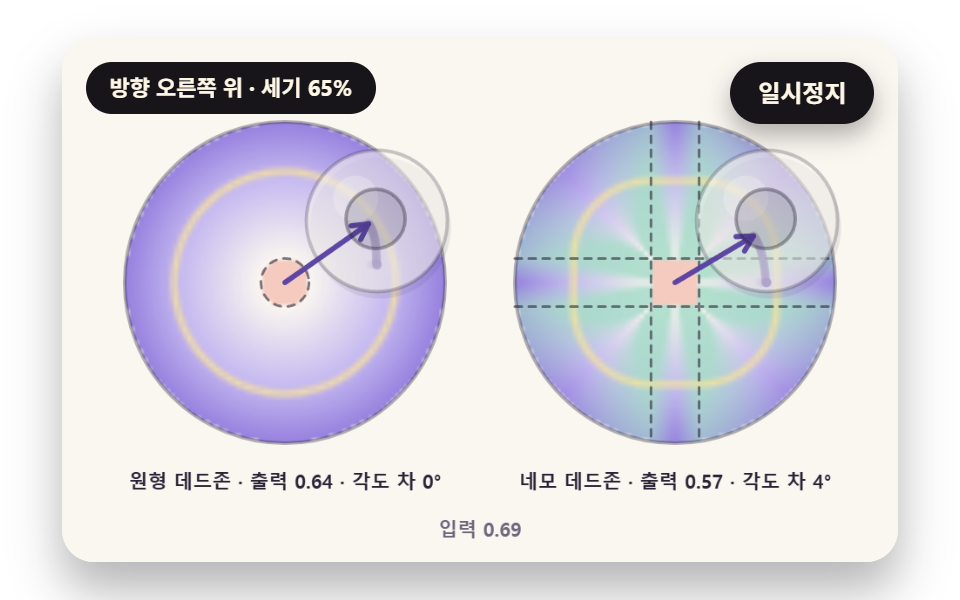 Virtual Joystick JavaScript: 9 Touch ScenesVirtual joystick javascript: A character that moves at the slightest tilt shows hand tremor. 01 rescales output past a r See all demos in this post
If you like this effect - similar demos
 Inputs03 Limit bounce — a stepper value that overshoots its min or max slightly before settling along a spring curveNumber Stepper UI: 9 Interaction Patterns
 Inputs03 Inline hint that flips while you type9 Form Validation UI Patterns — As You Type
 Inputs01 Next button that stays locked until the rules are met9 Multi Step Form UI Patterns — Branch and Resume