css 텍스트 그림자 효과 9가지 — 층 값이 입체를 만든다
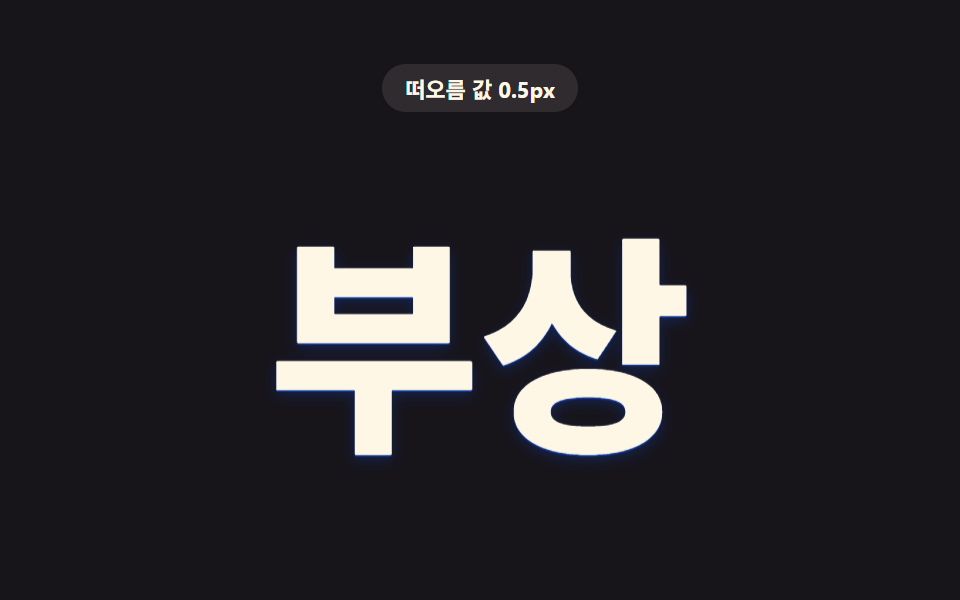
css 텍스트 그림자 효과는 text-shadow 값 하나를 층 문자열로 계산해 조립하는 아홉 가지 패턴이다. 그림자는 빛이 사라진 자리인데, 이 아홉 글자는 그림자만으로 빛을 대신한다 — 01번은 겹친 층 값으로 입체를 세우고, 05번은 어긋난 색 값으로 흔들리게 하며, 09번은
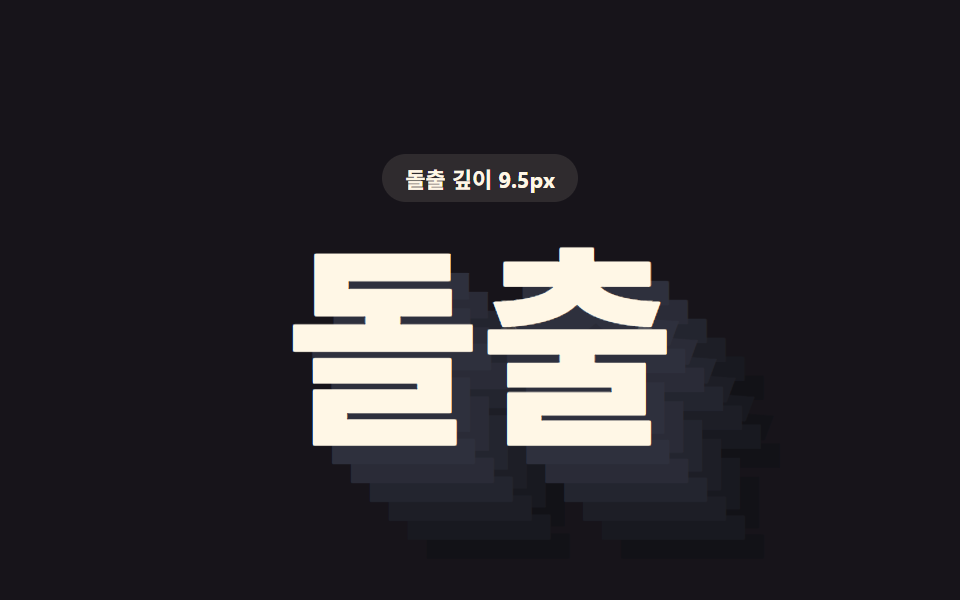 01 text-shadow-stack-extrude-3d
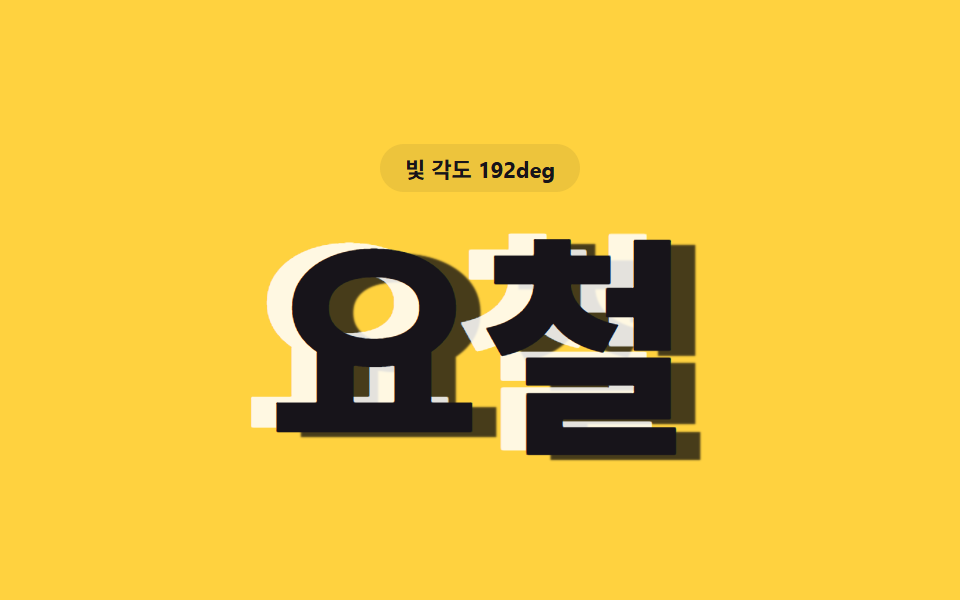 02 text-shadow-emboss-engrave-dual
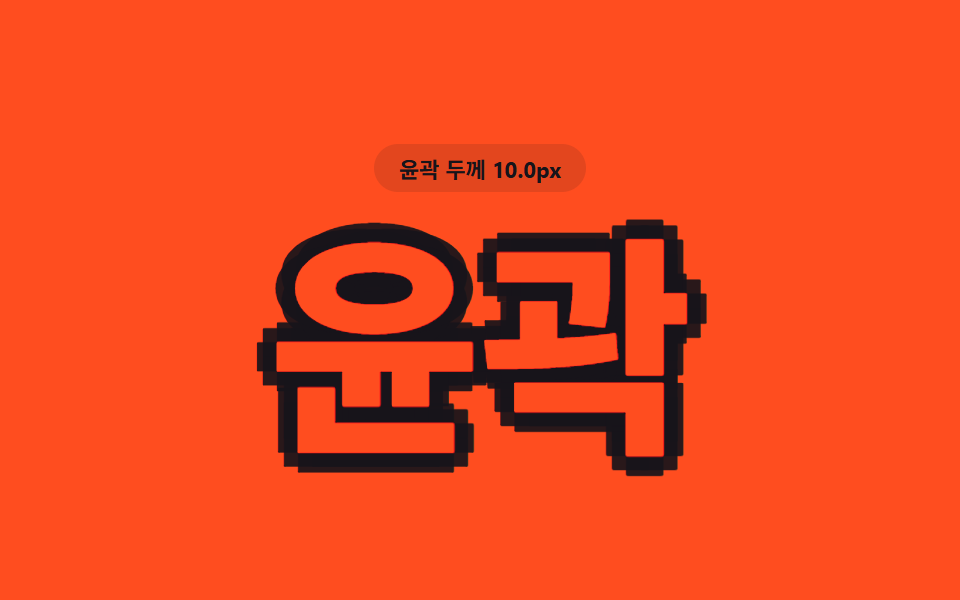 03 text-shadow-stroke-outline-multi
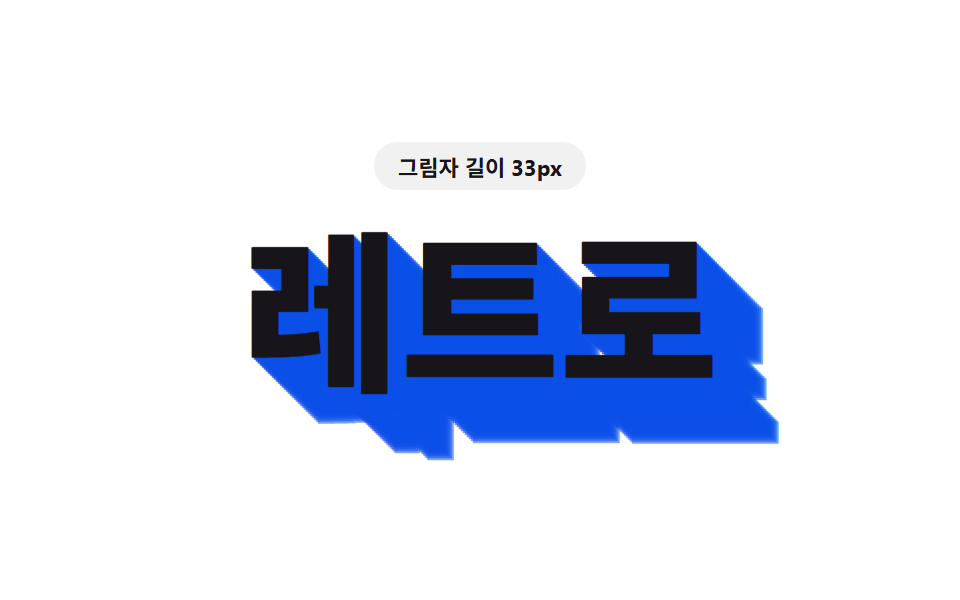 04 text-shadow-long-diagonal-retro
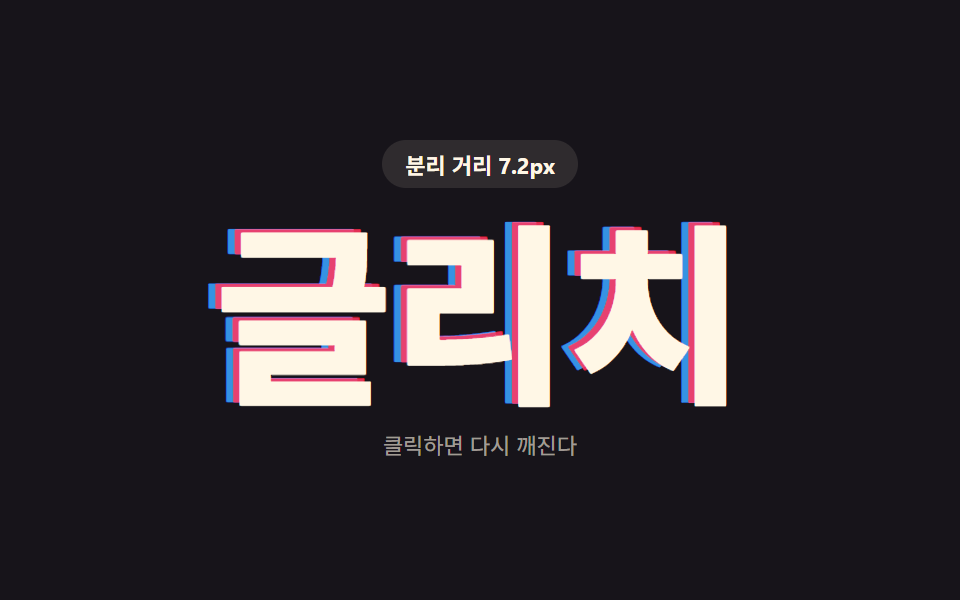 05 text-shadow-glitch-rgb-split
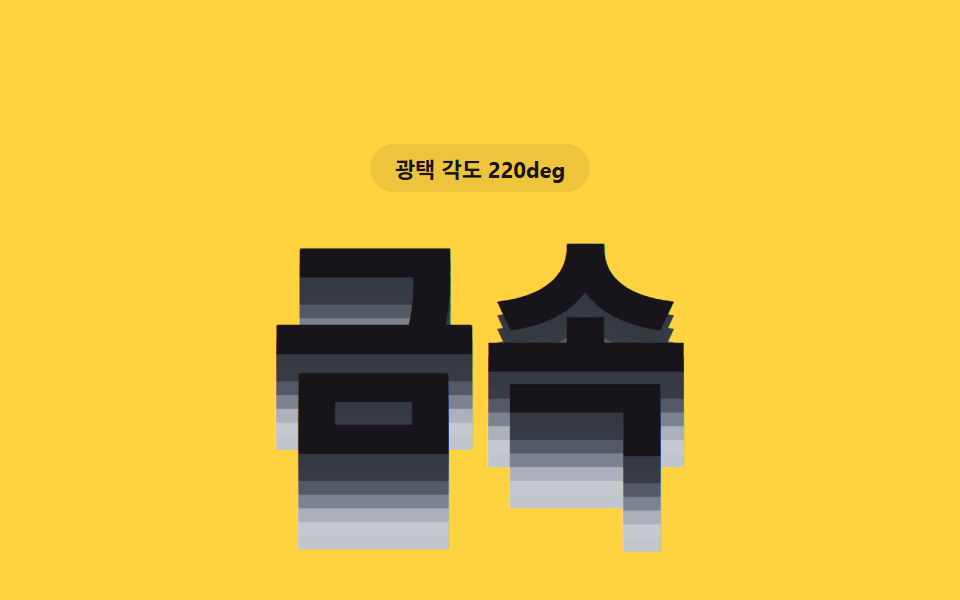 06 text-shadow-metal-sheen-layer
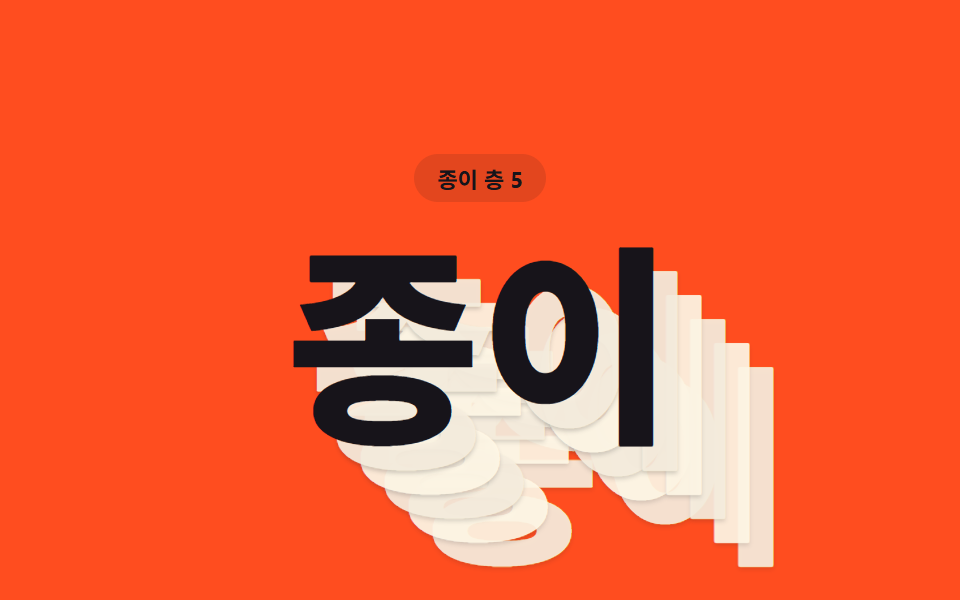 07 text-shadow-paper-stack-layer
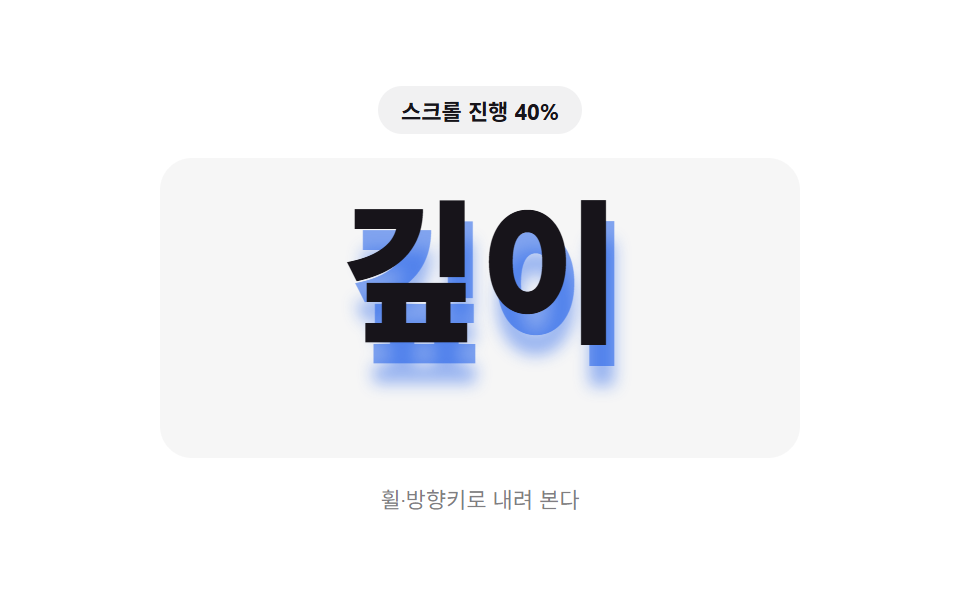 08 text-shadow-scroll-depth-grow
 09 text-shadow-hover-depth-lift
자동 재생 · 눌러서 해당 항목으로 · 전부 한 zip
- 01 층 값이 쌓여 입체가 되는 돌출 글자
- 02 밝은 값과 어두운 값이 반대로 겹쳐 도드라지는 글자
- 03 여덟 방향 값이 겹쳐 윤곽선이 되는 글자
- 04 대각선 길이 값만큼 길게 늘어지는 복고풍 글자
- 05 색 분리 값만큼 어긋나며 깨지는 글리치 글자
- 06 밝기 값이 층마다 달라 광택이 도는 금속 글자
- 07 층 값마다 종이 한 장씩 겹친 듯한 글자
- 08 스크롤 값만큼 그림자가 자라나는 글자
- 09 커서가 오르면 깊이 값이 밀려 올라오는 글자
css 텍스트 그림자 효과 9가지 — 값 하나가 그림자를 어떻게 바꾸는가
아홉 글자 모두 CSS 속성 자체는 text-shadow 하나뿐이다. 화면에 남는 인상을 가르는 건 그 뒤에서 도는 JS 값 하나 — 층 개수·오프셋 거리·색 분리 폭·스크롤 진행률 같은 수치가 프레임마다 그림자 문자열을 다시 조립한다. 아래 아홉 개는 그 값이 어디에 꽂히는지를 하나씩 다르게 보여준다.
01층 값이 쌓여 입체가 되는 돌출 글자
제목처럼 쓰는 글자가 대각선 아래로 층을 매달고 텍스트 3d 효과처럼 두꺼워 보인다. buildExtrudeShadow 함수는 SHADOW_LAYER_COUNT(6)개의 그림자를 step×층 번호만큼 쌓고 extrudeColor 로 층마다 명도를 24%에서 6%까지 낮춰, 1px~15px 사이를 오가는 step 값이 돌출 깊이를 정한다.
<main class="stage">
<div class="ex is-demo" id="ex">
  <p class="ex__badge"><span class="ex__badgeLabel">돌출 깊이</span> <span class="ex__badgeValue" id="exValue">1.0px</span></p>
  <h1 class="ex__word" id="exWord">돌출</h1>
</div>
</main>
@use "../../../../site/static/demo-tokens" as *;
// 핵심: step 값 하나로 SHADOW_LAYER_COUNT 층의 그림자를 조립한다. step 이 작을 때는
// 얇고 납작한 입체, 클 때는 층이 겹겹이 쌓여 두꺼운 입체로 보인다.
$duration: $dur-loop;
$easing: linear;
$color: $subject-cream;
@include stage($stage-ink);
.ex {
display: grid;
gap: $sp-4;
justify-items: center;
text-align: center;
}
.ex__badge {
margin: 0;
padding: $sp-1 $sp-3;
border-radius: $r-pill;
background: rgba(255, 247, 230, .1);
color: $subject-cream;
font-weight: 700;
font-size: 11px;
font-variant-numeric: tabular-nums;
}
.ex__word {
margin: 0;
font-weight: 800;
font-size: clamp(64px, 22vw, 132px);
line-height: 1;
white-space: nowrap;
color: $color;
will-change: text-shadow;
}
@media (max-width: 340px) {
.ex__word { font-size: clamp(48px, 24vw, 88px); }
}
@media (prefers-reduced-motion: reduce) {
.ex__word { transition: none; }
}html, body {
margin: 0;
overflow: hidden;
}
.stage {
box-sizing: border-box;
min-height: 100vh;
display: grid;
place-items: center;
margin: 0;
background: #17141a;
font-family: -apple-system, "Segoe UI", "Noto Sans KR", sans-serif;
padding: clamp(8px, 4vw, 24px);
}
.ex {
display: grid;
gap: 16px;
justify-items: center;
text-align: center;
}
.ex__badge {
margin: 0;
padding: 4px 12px;
border-radius: 999px;
background: rgba(255, 247, 230, 0.1);
color: #fff7e6;
font-weight: 700;
font-size: 11px;
font-variant-numeric: tabular-nums;
}
.ex__word {
margin: 0;
font-weight: 800;
font-size: clamp(64px, 22vw, 132px);
line-height: 1;
white-space: nowrap;
color: #fff7e6;
will-change: text-shadow;
}
@media (max-width: 340px) {
.ex__word {
font-size: clamp(48px, 24vw, 88px);
}
}
@media (prefers-reduced-motion: reduce) {
.ex__word {
transition: none;
}
}(function () {
var SHADOW_LAYER_COUNT = 6;
var STEP_MIN_PX = 1;
var STEP_MAX_PX = 15;
var PERIOD_MS = 1000;
var word = document.getElementById('exWord');
var value = document.getElementById('exValue');
var reduce = window.matchMedia('(prefers-reduced-motion: reduce)').matches;
  // 계산 레이어: 층 번호(i)가 깊어질수록 명도를 낮춰 아래로 갈수록 어두워지는 입체감을 만든다
  function extrudeColor(i, n) {
    var t = i / n;
    var l = Math.max(6, Math.round(24 - t * 16));
    return 'hsl(232 14% ' + l + '%)';
  }

  // 값(step) 하나로 SHADOW_LAYER_COUNT 개의 그림자를 문자열로 조립한다
  function buildExtrudeShadow(step) {
    var parts = [];
    for (var i = 1; i <= SHADOW_LAYER_COUNT; i++) {
      var d = (i * step).toFixed(2);
      parts.push(d + 'px ' + d + 'px 0 ' + extrudeColor(i, SHADOW_LAYER_COUNT));
    }
    return parts.join(', ');
  }
function renderExtrude(step) {
word.style.textShadow = buildExtrudeShadow(step);
value.textContent = step.toFixed(1) + 'px';
}
var startTime = null;
function loop(now) {
if (startTime === null) startTime = now;
var t = (now - startTime) % PERIOD_MS;
var phase = (Math.sin((t / PERIOD_MS) * Math.PI * 2 - Math.PI / 2) + 1) / 2;
renderExtrude(STEP_MIN_PX + (STEP_MAX_PX - STEP_MIN_PX) * phase);
requestAnimationFrame(loop);
}
if (reduce) {
renderExtrude(STEP_MAX_PX);
} else {
requestAnimationFrame(loop);
}
})();// TextShadowStackExtrude3D — vanilla 판(run/412/demo/01-text-shadow-stack-extrude-3d/index.html) 의 React 포트.
// 값(step) 하나로 SHADOW_LAYER_COUNT 층의 그림자를 조립한다. step 이 작을 때는 얇은 입체,
// 클 때는 층이 겹겹이 쌓여 두꺼운 입체로 보인다.
import { useEffect, useRef, useState } from "react";
import styles from "./TextShadowStackExtrude3D.module.scss";
type Box<T> = { current: T };
const SHADOW_LAYER_COUNT = 6;
const STEP_MIN_PX = 1;
const STEP_MAX_PX = 15;
const PERIOD_MS = 1000;
function extrudeColor(i: number, n: number): string {
const t = i / n;
const l = Math.max(6, Math.round(24 - t * 16));
return "hsl(232 14% " + l + "%)";
}
function buildExtrudeShadow(step: number): string {
const parts: string[] = [];
for (let i = 1; i <= SHADOW_LAYER_COUNT; i++) {
const d = (i * step).toFixed(2);
parts.push(d + "px " + d + "px 0 " + extrudeColor(i, SHADOW_LAYER_COUNT));
}
return parts.join(", ");
}
export default function TextShadowStackExtrude3D() {
const wordRef = useRef<HTMLHeadingElement | null>(null);
const valueRef = useRef<HTMLSpanElement | null>(null);
const t0Ref = useRef<number>(0) as Box<number>;
const frameRef = useRef<number>(0) as Box<number>;
const [demo] = useState(true);
const [reduce, setReduce] = useState(false);
function render(step: number): void {
const word = wordRef.current;
const value = valueRef.current;
if (!word || !value) return;
word.style.textShadow = buildExtrudeShadow(step);
value.textContent = step.toFixed(1) + "px";
}
useEffect(() => {
setReduce(window.matchMedia("(prefers-reduced-motion: reduce)").matches);
}, []);
useEffect(() => {
if (reduce) {
render(STEP_MAX_PX);
return;
}
function loop(now: number): void {
if (t0Ref.current === 0) t0Ref.current = now;
const t = (now - t0Ref.current) % PERIOD_MS;
const phase = (Math.sin((t / PERIOD_MS) * Math.PI * 2 - Math.PI / 2) + 1) / 2;
render(STEP_MIN_PX + (STEP_MAX_PX - STEP_MIN_PX) * phase);
frameRef.current = requestAnimationFrame(loop);
}
frameRef.current = requestAnimationFrame(loop);
return () => cancelAnimationFrame(frameRef.current);
}, [reduce]);
const cls = [styles.ex, demo ? styles.isDemo : ""].filter(Boolean).join(" ");
return (
<main className={styles.stage}>
<div className={cls}>
<p className={styles.badge}><span>돌출 깊이</span> <span ref={valueRef}>1.0px</span></p>
<h1 className={styles.word} ref={wordRef}>돌출</h1>
</div>
</main>
);
}01 · 층 값이 쌓여 입체가 되는 돌출 글자 — 측정 누적면적 10.384% · 움직인 프레임 22/23GODRICH 원작 · zip 에 SCSS·React 포함 · 비밀번호 보기
// 계산 레이어: 층 번호(i)가 깊어질수록 명도를 낮춰 아래로 갈수록 어두워지는 입체감을 만든다
function extrudeColor(i, n) {
var t = i / n;
var l = Math.max(6, Math.round(24 - t * 16));
return 'hsl(232 14% ' + l + '%)';
}
// 값(step) 하나로 SHADOW_LAYER_COUNT 개의 그림자를 문자열로 조립한다
function buildExtrudeShadow(step) {
var parts = [];
for (var i = 1; i <= SHADOW_LAYER_COUNT; i++) {
var d = (i * step).toFixed(2);
parts.push(d + 'px ' + d + 'px 0 ' + extrudeColor(i, SHADOW_LAYER_COUNT));
}
return parts.join(', ');
}
01 항목은 누적면적 10.4%·강도 평균 26.0·23프레임 중 22프레임에서 움직였다.
02밝은 값과 어두운 값이 반대로 겹쳐 도드라지는 글자
글자 엠보싱처럼 둘레에 흰 그림자와 검은 그림자가 서로 반대편에 붙어, 같은 배경 위에서 도드라지거나 파인 듯 보인다. buildEmbossShadow 함수는 각도 값(angleDeg) 하나로 코사인·사인을 구해 EMBOSS_DEPTH_PX(12.5px)만큼 밝은 그림자와 어두운 그림자를 정반대 쪽에 배치하고, 각도가 0~360도로 도는 동안 요철 방향도 함께 돈다.
<main class="stage">
<div class="em is-demo" id="em">
  <p class="em__badge"><span class="em__badgeLabel">빛 각도</span> <span class="em__badgeValue" id="emValue">0deg</span></p>
  <h1 class="em__word" id="emWord">요철</h1>
</div>
</main>
@use "../../../../site/static/demo-tokens" as *;
// 핵심: 각도 값(angleDeg) 하나로 밝은 그림자와 어두운 그림자를 서로 반대 방향에 배치한다.
// 각도가 돌면 빛이 도는 것처럼 도드라짐과 파임이 자리를 바꾼다.
$duration: $dur-loop;
$easing: linear;
$color: $subject-ink;
@include stage($stage-yellow);
.em {
display: grid;
gap: $sp-4;
justify-items: center;
text-align: center;
}
.em__badge {
margin: 0;
padding: $sp-1 $sp-3;
border-radius: $r-pill;
background: rgba(23, 20, 26, .08);
color: $subject-ink;
font-weight: 700;
font-size: 11px;
font-variant-numeric: tabular-nums;
}
.em__word {
margin: 0;
font-weight: 800;
font-size: clamp(72px, 24vw, 140px);
line-height: 1;
white-space: nowrap;
color: $color;
will-change: text-shadow;
}
@media (max-width: 340px) {
.em__word { font-size: clamp(52px, 26vw, 92px); }
}
@media (prefers-reduced-motion: reduce) {
.em__word { transition: none; }
}html, body {
margin: 0;
overflow: hidden;
}
.stage {
box-sizing: border-box;
min-height: 100vh;
display: grid;
place-items: center;
margin: 0;
background: #ffd23f;
font-family: -apple-system, "Segoe UI", "Noto Sans KR", sans-serif;
padding: clamp(8px, 4vw, 24px);
}
.em {
display: grid;
gap: 16px;
justify-items: center;
text-align: center;
}
.em__badge {
margin: 0;
padding: 4px 12px;
border-radius: 999px;
background: rgba(23, 20, 26, 0.08);
color: #17141a;
font-weight: 700;
font-size: 11px;
font-variant-numeric: tabular-nums;
}
.em__word {
margin: 0;
font-weight: 800;
font-size: clamp(72px, 24vw, 140px);
line-height: 1;
white-space: nowrap;
color: #17141a;
will-change: text-shadow;
}
@media (max-width: 340px) {
.em__word {
font-size: clamp(52px, 26vw, 92px);
}
}
@media (prefers-reduced-motion: reduce) {
.em__word {
transition: none;
}
}(function () {
var EMBOSS_DEPTH_PX = 12.5;
var PERIOD_MS = 1000;
var word = document.getElementById('emWord');
var value = document.getElementById('emValue');
var reduce = window.matchMedia('(prefers-reduced-motion: reduce)').matches;
  // 값(angleDeg) 하나로 밝은 그림자·어두운 그림자를 서로 반대 방향에 배치한다
  function buildEmbossShadow(angleDeg) {
    var rad = (angleDeg * Math.PI) / 180;
    var lx = (Math.cos(rad) * EMBOSS_DEPTH_PX).toFixed(2);
    var ly = (Math.sin(rad) * EMBOSS_DEPTH_PX).toFixed(2);
    var dx = (-Math.cos(rad) * EMBOSS_DEPTH_PX).toFixed(2);
    var dy = (-Math.sin(rad) * EMBOSS_DEPTH_PX).toFixed(2);
    return [
      lx + 'px ' + ly + 'px 0 rgba(255,255,255,.85)',
      dx + 'px ' + dy + 'px 1px rgba(10,10,14,.75)'
    ].join(', ');
  }
function renderEmboss(angleDeg) {
word.style.textShadow = buildEmbossShadow(angleDeg);
value.textContent = Math.round(angleDeg % 360) + 'deg';
}
var startTime = null;
function loop(now) {
if (startTime === null) startTime = now;
var t = (now - startTime) % PERIOD_MS;
var angle = (t / PERIOD_MS) * 360;
renderEmboss(angle);
requestAnimationFrame(loop);
}
if (reduce) {
renderEmboss(45);
} else {
requestAnimationFrame(loop);
}
})();// TextShadowEmbossEngraveDual — vanilla 판(run/412/demo/02-text-shadow-emboss-engrave-dual/index.html) 의 React 포트.
// 각도 값(angleDeg) 하나로 밝은 그림자와 어두운 그림자를 서로 반대 방향에 배치한다.
// 각도가 돌면 빛이 도는 것처럼 도드라짐과 파임이 자리를 바꾼다.
import { useEffect, useRef, useState } from "react";
import styles from "./TextShadowEmbossEngraveDual.module.scss";
type Box<T> = { current: T };
const EMBOSS_DEPTH_PX = 12.5;
const PERIOD_MS = 1000;
function buildEmbossShadow(angleDeg: number): string {
const rad = (angleDeg * Math.PI) / 180;
const lx = (Math.cos(rad) * EMBOSS_DEPTH_PX).toFixed(2);
const ly = (Math.sin(rad) * EMBOSS_DEPTH_PX).toFixed(2);
const dx = (-Math.cos(rad) * EMBOSS_DEPTH_PX).toFixed(2);
const dy = (-Math.sin(rad) * EMBOSS_DEPTH_PX).toFixed(2);
return [
lx + "px " + ly + "px 0 rgba(255,255,255,.85)",
dx + "px " + dy + "px 1px rgba(10,10,14,.75)"
].join(", ");
}
export default function TextShadowEmbossEngraveDual() {
const wordRef = useRef<HTMLHeadingElement | null>(null);
const valueRef = useRef<HTMLSpanElement | null>(null);
const t0Ref = useRef<number>(0) as Box<number>;
const frameRef = useRef<number>(0) as Box<number>;
const [demo] = useState(true);
const [reduce, setReduce] = useState(false);
function render(angleDeg: number): void {
const word = wordRef.current;
const value = valueRef.current;
if (!word || !value) return;
word.style.textShadow = buildEmbossShadow(angleDeg);
value.textContent = Math.round(angleDeg % 360) + "deg";
}
useEffect(() => {
setReduce(window.matchMedia("(prefers-reduced-motion: reduce)").matches);
}, []);
useEffect(() => {
if (reduce) {
render(45);
return;
}
function loop(now: number): void {
if (t0Ref.current === 0) t0Ref.current = now;
const t = (now - t0Ref.current) % PERIOD_MS;
const angle = (t / PERIOD_MS) * 360;
render(angle);
frameRef.current = requestAnimationFrame(loop);
}
frameRef.current = requestAnimationFrame(loop);
return () => cancelAnimationFrame(frameRef.current);
}, [reduce]);
const cls = [styles.em, demo ? styles.isDemo : ""].filter(Boolean).join(" ");
return (
<main className={styles.stage}>
<div className={cls}>
<p className={styles.badge}><span>빛 각도</span> <span ref={valueRef}>0deg</span></p>
<h1 className={styles.word} ref={wordRef}>요철</h1>
</div>
</main>
);
}02 · 밝은 값과 어두운 값이 반대로 겹쳐 도드라지는 글자 — 측정 누적면적 10.903% · 움직인 프레임 23/23GODRICH 원작 · zip 에 SCSS·React 포함 · 비밀번호 보기
// 값(angleDeg) 하나로 밝은 그림자·어두운 그림자를 서로 반대 방향에 배치한다
function buildEmbossShadow(angleDeg) {
var rad = (angleDeg * Math.PI) / 180;
var lx = (Math.cos(rad) * EMBOSS_DEPTH_PX).toFixed(2);
var ly = (Math.sin(rad) * EMBOSS_DEPTH_PX).toFixed(2);
var dx = (-Math.cos(rad) * EMBOSS_DEPTH_PX).toFixed(2);
var dy = (-Math.sin(rad) * EMBOSS_DEPTH_PX).toFixed(2);
return [
lx + 'px ' + ly + 'px 0 rgba(255,255,255,.85)',
dx + 'px ' + dy + 'px 1px rgba(10,10,14,.75)'
].join(', ');
}
02 항목은 누적면적 10.9%·강도 평균 129.2·23프레임 중 23프레임에서 움직였다.
03여덟 방향 값이 겹쳐 윤곽선이 되는 글자
채움 없는 숫자 둘레에 그림자만 여덟 방향으로 퍼져 윤곽선처럼 보인다. buildOutlineShadow 함수는 값(d) 하나를 DIRS 배열의 여덟 방향 벡터에 곱해 상하좌우·대각선에 같은 거리만큼 겹치고, d 가 0.4px~15px 사이를 오가며 윤곽 두께를 바꾼다.
<main class="stage">
<div class="ol is-demo" id="ol">
  <p class="ol__badge"><span class="ol__badgeLabel">윤곽 두께</span> <span class="ol__badgeValue" id="olValue">0.5px</span></p>
  <h1 class="ol__word" id="olWord">윤곽</h1>
</div>
</main>
@use "../../../../site/static/demo-tokens" as *;
// 핵심: 값 d 하나를 여덟 방향(상하좌우+대각선)에 같은 거리만큼 겹쳐, 글자 채움 없이도
// 둘레에 윤곽선만 남는다. d 가 커질수록 윤곽선이 두꺼워진다.
$duration: $dur-loop;
$easing: linear;
$color: $stage-orange;
@include stage($stage-orange);
.ol {
display: grid;
gap: $sp-4;
justify-items: center;
text-align: center;
}
.ol__badge {
margin: 0;
padding: $sp-1 $sp-3;
border-radius: $r-pill;
background: rgba(23, 20, 26, .12);
color: $subject-ink;
font-weight: 700;
font-size: 11px;
font-variant-numeric: tabular-nums;
}
.ol__word {
margin: 0;
font-weight: 800;
font-size: clamp(72px, 24vw, 140px);
line-height: 1;
white-space: nowrap;
color: $color;
will-change: text-shadow;
}
@media (max-width: 340px) {
.ol__word { font-size: clamp(52px, 26vw, 92px); }
}
@media (prefers-reduced-motion: reduce) {
.ol__word { transition: none; }
}html, body {
margin: 0;
overflow: hidden;
}
.stage {
box-sizing: border-box;
min-height: 100vh;
display: grid;
place-items: center;
margin: 0;
background: #ff4d1f;
font-family: -apple-system, "Segoe UI", "Noto Sans KR", sans-serif;
padding: clamp(8px, 4vw, 24px);
}
.ol {
display: grid;
gap: 16px;
justify-items: center;
text-align: center;
}
.ol__badge {
margin: 0;
padding: 4px 12px;
border-radius: 999px;
background: rgba(23, 20, 26, 0.12);
color: #17141a;
font-weight: 700;
font-size: 11px;
font-variant-numeric: tabular-nums;
}
.ol__word {
margin: 0;
font-weight: 800;
font-size: clamp(72px, 24vw, 140px);
line-height: 1;
white-space: nowrap;
color: #ff4d1f;
will-change: text-shadow;
}
@media (max-width: 340px) {
.ol__word {
font-size: clamp(52px, 26vw, 92px);
}
}
@media (prefers-reduced-motion: reduce) {
.ol__word {
transition: none;
}
}(function () {
var OUTLINE_MAX_PX = 15;
var PERIOD_MS = 1000;
  var DIRS = [
    [1, 0], [-1, 0], [0, 1], [0, -1],
    [0.7071, 0.7071], [-0.7071, 0.7071], [0.7071, -0.7071], [-0.7071, -0.7071]
  ];

  var word = document.getElementById('olWord');
  var value = document.getElementById('olValue');
  var reduce = window.matchMedia('(prefers-reduced-motion: reduce)').matches;

  // 값(d) 하나를 여덟 방향에 같은 거리만큼 겹쳐 채움 없이도 윤곽선만 남긴다
  function buildOutlineShadow(d) {
    var parts = [];
    for (var i = 0; i < DIRS.length; i++) {
      var x = (DIRS[i][0] * d).toFixed(2);
      var y = (DIRS[i][1] * d).toFixed(2);
      parts.push(x + 'px ' + y + 'px 0 rgba(23,20,26,.92)');
    }
    return parts.join(', ');
  }
function renderOutline(d) {
word.style.textShadow = buildOutlineShadow(d);
value.textContent = d.toFixed(1) + 'px';
}
var startTime = null;
function loop(now) {
if (startTime === null) startTime = now;
var t = (now - startTime) % PERIOD_MS;
var phase = (Math.sin((t / PERIOD_MS) * Math.PI * 2 - Math.PI / 2) + 1) / 2;
renderOutline(0.4 + (OUTLINE_MAX_PX - 0.4) * phase);
requestAnimationFrame(loop);
}
if (reduce) {
renderOutline(OUTLINE_MAX_PX);
} else {
requestAnimationFrame(loop);
}
})();// TextShadowStrokeOutlineMulti — vanilla 판(run/412/demo/03-text-shadow-stroke-outline-multi/index.html) 의 React 포트.
// 값 d 하나를 여덟 방향(상하좌우+대각선)에 같은 거리만큼 겹쳐, 글자 채움 없이도
// 둘레에 윤곽선만 남는다. d 가 커질수록 윤곽선이 두꺼워진다.
import { useEffect, useRef, useState } from "react";
import styles from "./TextShadowStrokeOutlineMulti.module.scss";
type Box<T> = { current: T };
const OUTLINE_MAX_PX = 15;
const PERIOD_MS = 1000;
const DIRS: [number, number][] = [
[1, 0], [-1, 0], [0, 1], [0, -1],
[0.7071, 0.7071], [-0.7071, 0.7071], [0.7071, -0.7071], [-0.7071, -0.7071]
];
function buildOutlineShadow(d: number): string {
const parts: string[] = [];
for (let i = 0; i < DIRS.length; i++) {
const x = (DIRS[i][0] * d).toFixed(2);
const y = (DIRS[i][1] * d).toFixed(2);
parts.push(x + "px " + y + "px 0 rgba(23,20,26,.92)");
}
return parts.join(", ");
}
export default function TextShadowStrokeOutlineMulti() {
const wordRef = useRef<HTMLHeadingElement | null>(null);
const valueRef = useRef<HTMLSpanElement | null>(null);
const t0Ref = useRef<number>(0) as Box<number>;
const frameRef = useRef<number>(0) as Box<number>;
const [demo] = useState(true);
const [reduce, setReduce] = useState(false);
function render(d: number): void {
const word = wordRef.current;
const value = valueRef.current;
if (!word || !value) return;
word.style.textShadow = buildOutlineShadow(d);
value.textContent = d.toFixed(1) + "px";
}
useEffect(() => {
setReduce(window.matchMedia("(prefers-reduced-motion: reduce)").matches);
}, []);
useEffect(() => {
if (reduce) {
render(OUTLINE_MAX_PX);
return;
}
function loop(now: number): void {
if (t0Ref.current === 0) t0Ref.current = now;
const t = (now - t0Ref.current) % PERIOD_MS;
const phase = (Math.sin((t / PERIOD_MS) * Math.PI * 2 - Math.PI / 2) + 1) / 2;
render(0.4 + (OUTLINE_MAX_PX - 0.4) * phase);
frameRef.current = requestAnimationFrame(loop);
}
frameRef.current = requestAnimationFrame(loop);
return () => cancelAnimationFrame(frameRef.current);
}, [reduce]);
const cls = [styles.ol, demo ? styles.isDemo : ""].filter(Boolean).join(" ");
return (
<main className={styles.stage}>
<div className={cls}>
<p className={styles.badge}><span>윤곽 두께</span> <span ref={valueRef}>0.5px</span></p>
<h1 className={styles.word} ref={wordRef}>윤곽</h1>
</div>
</main>
);
}03 · 여덟 방향 값이 겹쳐 윤곽선이 되는 글자 — 측정 누적면적 10.6% · 움직인 프레임 21/23GODRICH 원작 · zip 에 SCSS·React 포함 · 비밀번호 보기
var DIRS = [
[1, 0], [-1, 0], [0, 1], [0, -1],
[0.7071, 0.7071], [-0.7071, 0.7071], [0.7071, -0.7071], [-0.7071, -0.7071]
];
var word = document.getElementById('olWord');
var value = document.getElementById('olValue');
var reduce = window.matchMedia('(prefers-reduced-motion: reduce)').matches;
// 값(d) 하나를 여덟 방향에 같은 거리만큼 겹쳐 채움 없이도 윤곽선만 남긴다
function buildOutlineShadow(d) {
var parts = [];
for (var i = 0; i < DIRS.length; i++) {
var x = (DIRS[i][0] * d).toFixed(2);
var y = (DIRS[i][1] * d).toFixed(2);
parts.push(x + 'px ' + y + 'px 0 rgba(23,20,26,.92)');
}
return parts.join(', ');
}
03 항목은 누적면적 10.6%·강도 평균 140.2·23프레임 중 21프레임에서 움직였다.
04대각선 길이 값만큼 길게 늘어지는 복고풍 글자
레트로 포스터에서 보던 것처럼 글자 오른쪽 아래로 그림자가 길게 늘어진다. buildRetroShadow 함수는 값(len)을 반올림한 정수만큼 1px씩 대각선으로 쌓고 층마다 투명도를 0.9에서 0.35만큼 낮춰, 4px~34px 사이를 오가는 len 값이 그림자 길이를 정한다.
<main class="stage">
<div class="rt is-demo" id="rt">
  <p class="rt__badge"><span class="rt__badgeLabel">그림자 길이</span> <span class="rt__badgeValue" id="rtValue">4px</span></p>
  <h1 class="rt__word" id="rtWord">레트로</h1>
</div>
</main>
@use "../../../../site/static/demo-tokens" as *;
// 핵심: 길이 값(len) 하나를 대각선 방향으로 1px 씩 반복해 그 값만큼 길게 늘어뜨린다.
// 복고 포스터에서 보던 긴 그림자 글자 — 값이 커질수록 그림자가 길어진다.
$duration: $dur-loop;
$easing: linear;
$color: $subject-ink;
@include stage($stage-paper);
.rt {
display: grid;
gap: $sp-4;
justify-items: center;
text-align: center;
padding-bottom: $sp-8;
}
.rt__badge {
margin: 0;
padding: $sp-1 $sp-3;
border-radius: $r-pill;
background: rgba(23, 20, 26, .06);
color: $subject-ink;
font-weight: 700;
font-size: 11px;
font-variant-numeric: tabular-nums;
}
.rt__word {
margin: 0;
font-weight: 800;
font-size: clamp(56px, 18vw, 104px);
line-height: 1;
white-space: nowrap;
color: $color;
will-change: text-shadow;
}
@media (max-width: 340px) {
.rt__word { font-size: clamp(40px, 20vw, 68px); }
}
@media (prefers-reduced-motion: reduce) {
.rt__word { transition: none; }
}html, body {
margin: 0;
overflow: hidden;
}
.stage {
box-sizing: border-box;
min-height: 100vh;
display: grid;
place-items: center;
margin: 0;
background: #ffffff;
font-family: -apple-system, "Segoe UI", "Noto Sans KR", sans-serif;
padding: clamp(8px, 4vw, 24px);
}
.rt {
display: grid;
gap: 16px;
justify-items: center;
text-align: center;
padding-bottom: 32px;
}
.rt__badge {
margin: 0;
padding: 4px 12px;
border-radius: 999px;
background: rgba(23, 20, 26, 0.06);
color: #17141a;
font-weight: 700;
font-size: 11px;
font-variant-numeric: tabular-nums;
}
.rt__word {
margin: 0;
font-weight: 800;
font-size: clamp(56px, 18vw, 104px);
line-height: 1;
white-space: nowrap;
color: #17141a;
will-change: text-shadow;
}
@media (max-width: 340px) {
.rt__word {
font-size: clamp(40px, 20vw, 68px);
}
}
@media (prefers-reduced-motion: reduce) {
.rt__word {
transition: none;
}
}(function () {
var RETRO_MAX_LEN = 34;
var RETRO_MIN_LEN = 4;
var PERIOD_MS = 1000;
var word = document.getElementById('rtWord');
var value = document.getElementById('rtValue');
var reduce = window.matchMedia('(prefers-reduced-motion: reduce)').matches;
  // 값(len) 하나를 대각선 방향으로 한 칸(1px)씩 반복해 길이만큼 길게 늘어뜨린다
  function buildRetroShadow(len) {
    var parts = [];
    var n = Math.round(len);
    for (var i = 1; i <= n; i++) {
      parts.push(i + 'px ' + i + 'px 0 rgba(10,79,232,' + (0.9 - (i / n) * 0.35).toFixed(2) + ')');
    }
    return parts.join(', ');
  }
function renderRetro(len) {
word.style.textShadow = buildRetroShadow(len);
value.textContent = Math.round(len) + 'px';
}
var startTime = null;
function loop(now) {
if (startTime === null) startTime = now;
var t = (now - startTime) % PERIOD_MS;
var phase = (Math.sin((t / PERIOD_MS) * Math.PI * 2 - Math.PI / 2) + 1) / 2;
renderRetro(RETRO_MIN_LEN + (RETRO_MAX_LEN - RETRO_MIN_LEN) * phase);
requestAnimationFrame(loop);
}
if (reduce) {
renderRetro(RETRO_MAX_LEN);
} else {
requestAnimationFrame(loop);
}
})();// TextShadowLongDiagonalRetro — vanilla 판(run/412/demo/04-text-shadow-long-diagonal-retro/index.html) 의 React 포트.
// 길이 값(len) 하나를 대각선 방향으로 1px 씩 반복해 그 값만큼 길게 늘어뜨린다.
import { useEffect, useRef, useState } from "react";
import styles from "./TextShadowLongDiagonalRetro.module.scss";
type Box<T> = { current: T };
const RETRO_MAX_LEN = 34;
const RETRO_MIN_LEN = 4;
const PERIOD_MS = 1000;
function buildRetroShadow(len: number): string {
const parts: string[] = [];
const n = Math.round(len);
for (let i = 1; i <= n; i++) {
parts.push(i + "px " + i + "px 0 rgba(10,79,232," + (0.9 - (i / n) * 0.35).toFixed(2) + ")");
}
return parts.join(", ");
}
export default function TextShadowLongDiagonalRetro() {
const wordRef = useRef<HTMLHeadingElement | null>(null);
const valueRef = useRef<HTMLSpanElement | null>(null);
const t0Ref = useRef<number>(0) as Box<number>;
const frameRef = useRef<number>(0) as Box<number>;
const [demo] = useState(true);
const [reduce, setReduce] = useState(false);
function render(len: number): void {
const word = wordRef.current;
const value = valueRef.current;
if (!word || !value) return;
word.style.textShadow = buildRetroShadow(len);
value.textContent = Math.round(len) + "px";
}
useEffect(() => {
setReduce(window.matchMedia("(prefers-reduced-motion: reduce)").matches);
}, []);
useEffect(() => {
if (reduce) {
render(RETRO_MAX_LEN);
return;
}
function loop(now: number): void {
if (t0Ref.current === 0) t0Ref.current = now;
const t = (now - t0Ref.current) % PERIOD_MS;
const phase = (Math.sin((t / PERIOD_MS) * Math.PI * 2 - Math.PI / 2) + 1) / 2;
render(RETRO_MIN_LEN + (RETRO_MAX_LEN - RETRO_MIN_LEN) * phase);
frameRef.current = requestAnimationFrame(loop);
}
frameRef.current = requestAnimationFrame(loop);
return () => cancelAnimationFrame(frameRef.current);
}, [reduce]);
const cls = [styles.rt, demo ? styles.isDemo : ""].filter(Boolean).join(" ");
return (
<main className={styles.stage}>
<div className={cls}>
<p className={styles.badge}><span>그림자 길이</span> <span ref={valueRef}>4px</span></p>
<h1 className={styles.word} ref={wordRef}>레트로</h1>
</div>
</main>
);
}04 · 대각선 길이 값만큼 길게 늘어지는 복고풍 글자 — 측정 누적면적 10.081% · 움직인 프레임 22/23GODRICH 원작 · zip 에 SCSS·React 포함 · 비밀번호 보기
// 값(len) 하나를 대각선 방향으로 한 칸(1px)씩 반복해 길이만큼 길게 늘어뜨린다
function buildRetroShadow(len) {
var parts = [];
var n = Math.round(len);
for (var i = 1; i <= n; i++) {
parts.push(i + 'px ' + i + 'px 0 rgba(10,79,232,' + (0.9 - (i / n) * 0.35).toFixed(2) + ')');
}
return parts.join(', ');
}
04 항목은 누적면적 10.1%·강도 평균 140.3·23프레임 중 22프레임에서 움직였다.
05색 분리 값만큼 어긋나며 깨지는 글리치 글자
빨간 그림자와 파란 그림자가 서로 반대 방향으로 벌어져 방송 신호가 어긋난 것처럼 보인다. buildGlitchShadow 함수는 값(mag)을 seedRand 고정 시드 난수에 곱해 두 색을 반대로 흔들고, GLITCH_SPLIT_PX(2px) 기준 0.3배~9.8배로 커지는 mag 값이 클릭마다 시드를 바꿔 다시 깨진다.
<main class="stage">
<div class="gl is-demo" id="gl">
  <p class="gl__badge"><span class="gl__badgeLabel">분리 거리</span> <span class="gl__badgeValue" id="glValue">0.0px</span></p>
  <button type="button" class="gl__word" id="glWord">글리치</button>
  <p class="gl__hint">클릭하면 다시 깨진다</p>
</div>
</main>
@use "../../../../site/static/demo-tokens" as *;
// 핵심: 값(mag) 하나를 고정 시드 PRNG 로 흔들어 빨강·파랑 그림자를 반대 방향으로 벌린다.
// mag 가 커질수록 화면이 어긋난 신호처럼 거칠게 깨진다. 클릭하면 시드를 새로 돌려 다시 깨진다.
$duration: $dur-instant;
$easing: linear;
$color: $subject-cream;
@include stage($stage-ink);
.gl {
display: grid;
gap: $sp-3;
justify-items: center;
text-align: center;
}
.gl__badge {
margin: 0;
padding: $sp-1 $sp-3;
border-radius: $r-pill;
background: rgba(255, 247, 230, .1);
color: $subject-cream;
font-weight: 700;
font-size: 11px;
font-variant-numeric: tabular-nums;
}
.gl__word {
margin: 0;
border: 0;
background: none;
padding: 0;
cursor: pointer;
font-weight: 800;
font-size: clamp(60px, 20vw, 116px);
line-height: 1;
white-space: nowrap;
color: $color;
font-family: inherit;
will-change: text-shadow;
}
.gl__word:focus-visible {
outline: 2px solid $subject-cream;
outline-offset: 6px;
}
.gl__hint {
margin: 0;
color: rgba(255, 247, 230, .6);
font-size: 11px;
}
@media (max-width: 340px) {
.gl__word { font-size: clamp(44px, 22vw, 76px); }
}
@media (prefers-reduced-motion: reduce) {
.gl__word { transition: none; }
}html, body {
margin: 0;
overflow: hidden;
}
.stage {
box-sizing: border-box;
min-height: 100vh;
display: grid;
place-items: center;
margin: 0;
background: #17141a;
font-family: -apple-system, "Segoe UI", "Noto Sans KR", sans-serif;
padding: clamp(8px, 4vw, 24px);
}
.gl {
display: grid;
gap: 12px;
justify-items: center;
text-align: center;
}
.gl__badge {
margin: 0;
padding: 4px 12px;
border-radius: 999px;
background: rgba(255, 247, 230, 0.1);
color: #fff7e6;
font-weight: 700;
font-size: 11px;
font-variant-numeric: tabular-nums;
}
.gl__word {
margin: 0;
border: 0;
background: none;
padding: 0;
cursor: pointer;
font-weight: 800;
font-size: clamp(60px, 20vw, 116px);
line-height: 1;
white-space: nowrap;
color: #fff7e6;
font-family: inherit;
will-change: text-shadow;
}
.gl__word:focus-visible {
outline: 2px solid #fff7e6;
outline-offset: 6px;
}
.gl__hint {
margin: 0;
color: rgba(255, 247, 230, 0.6);
font-size: 11px;
}
@media (max-width: 340px) {
.gl__word {
font-size: clamp(44px, 22vw, 76px);
}
}
@media (prefers-reduced-motion: reduce) {
.gl__word {
transition: none;
}
}(function () {
var GLITCH_SPLIT_PX = 2;
var BURST_PX = GLITCH_SPLIT_PX * 14;
var PULSE_MS = 480;
var word = document.getElementById('glWord');
var value = document.getElementById('glValue');
var reduce = window.matchMedia('(prefers-reduced-motion: reduce)').matches;
var seed = 11;
  // 고정 시드 PRNG — Math.random 대신 프레임마다 같은 규칙으로 다음 값을 만든다
  function seedRand(s) {
    return function () {
      s = (s * 1103515245 + 12345) & 0x7fffffff;
      return s / 0x7fffffff;
    };
  }
  var rnd = seedRand(seed);

  // 값(mag) 하나를 시드 노이즈로 흔들어 빨강·파랑 그림자를 반대 방향으로 어긋나게 한다
  function buildGlitchShadow(mag) {
    var rx = (mag * (rnd() * 2 - 1)).toFixed(2);
    var ry = (mag * 0.28 * (rnd() * 2 - 1)).toFixed(2);
    var bx = (-mag * (rnd() * 2 - 1)).toFixed(2);
    var by = (-mag * 0.28 * (rnd() * 2 - 1)).toFixed(2);
    return [
      rx + 'px ' + ry + 'px 0 rgba(255,54,96,.88)',
      bx + 'px ' + by + 'px 0 rgba(58,164,255,.88)'
    ].join(', ');
  }
function renderGlitch(mag) {
word.style.textShadow = buildGlitchShadow(mag);
value.textContent = mag.toFixed(1) + 'px';
}
var burstUntil = 0;
var startTime = null;
function loop(now) {
if (startTime === null) startTime = now;
var t = (now - startTime) % PULSE_MS;
var tri = Math.abs((t / PULSE_MS) * 2 - 1);
var mag = GLITCH_SPLIT_PX * (0.3 + tri * 9.5);
if (now < burstUntil) mag = BURST_PX;
renderGlitch(mag);
requestAnimationFrame(loop);
}
word.addEventListener('click', function () {
seed = (seed * 977 + 313) & 0x7fffffff;
rnd = seedRand(seed || 1);
burstUntil = performance.now() + 220;
if (reduce) renderGlitch(BURST_PX);
});
if (reduce) {
renderGlitch(GLITCH_SPLIT_PX);
} else {
requestAnimationFrame(loop);
}
})();// TextShadowGlitchRgbSplit — vanilla 판(run/412/demo/05-text-shadow-glitch-rgb-split/index.html) 의 React 포트.
// 값(mag) 하나를 고정 시드 PRNG 로 흔들어 빨강·파랑 그림자를 반대 방향으로 벌린다.
// 클릭하면 시드를 새로 돌려 다시 깨진다.
import { useEffect, useRef, useState } from "react";
import styles from "./TextShadowGlitchRgbSplit.module.scss";
type Box<T> = { current: T };
const GLITCH_SPLIT_PX = 2;
const BURST_PX = GLITCH_SPLIT_PX * 14;
const PULSE_MS = 480;
function seedRand(s: number): () => number {
let state = s;
return function () {
state = (state * 1103515245 + 12345) & 0x7fffffff;
return state / 0x7fffffff;
};
}
function buildGlitchShadow(mag: number, rnd: () => number): string {
const rx = (mag * (rnd() * 2 - 1)).toFixed(2);
const ry = (mag * 0.28 * (rnd() * 2 - 1)).toFixed(2);
const bx = (-mag * (rnd() * 2 - 1)).toFixed(2);
const by = (-mag * 0.28 * (rnd() * 2 - 1)).toFixed(2);
return [
rx + "px " + ry + "px 0 rgba(255,54,96,.88)",
bx + "px " + by + "px 0 rgba(58,164,255,.88)"
].join(", ");
}
export default function TextShadowGlitchRgbSplit() {
const wordRef = useRef<HTMLButtonElement | null>(null);
const valueRef = useRef<HTMLSpanElement | null>(null);
const t0Ref = useRef<number>(0) as Box<number>;
const frameRef = useRef<number>(0) as Box<number>;
const seedRef = useRef<number>(11) as Box<number>;
const rndRef = useRef<() => number>(seedRand(11)) as Box<() => number>;
const burstUntilRef = useRef<number>(0) as Box<number>;
const [reduce, setReduce] = useState(false);
function render(mag: number): void {
const word = wordRef.current;
const value = valueRef.current;
if (!word || !value) return;
word.style.textShadow = buildGlitchShadow(mag, rndRef.current);
value.textContent = mag.toFixed(1) + "px";
}
useEffect(() => {
setReduce(window.matchMedia("(prefers-reduced-motion: reduce)").matches);
}, []);
useEffect(() => {
if (reduce) {
render(GLITCH_SPLIT_PX);
return;
}
function loop(now: number): void {
if (t0Ref.current === 0) t0Ref.current = now;
const t = (now - t0Ref.current) % PULSE_MS;
const tri = Math.abs((t / PULSE_MS) * 2 - 1);
let mag = GLITCH_SPLIT_PX * (0.3 + tri * 9.5);
if (now < burstUntilRef.current) mag = BURST_PX;
render(mag);
frameRef.current = requestAnimationFrame(loop);
}
frameRef.current = requestAnimationFrame(loop);
return () => cancelAnimationFrame(frameRef.current);
}, [reduce]);
function onClick(): void {
seedRef.current = (seedRef.current * 977 + 313) & 0x7fffffff;
rndRef.current = seedRand(seedRef.current || 1);
burstUntilRef.current = performance.now() + 220;
if (reduce) render(BURST_PX);
}
return (
<main className={styles.stage}>
<div className={[styles.gl, styles.isDemo].join(" ")}>
<p className={styles.badge}><span>분리 거리</span> <span ref={valueRef}>0.0px</span></p>
<button type="button" className={styles.word} ref={wordRef} onClick={onClick}>글리치</button>
<p className={styles.hint}>클릭하면 다시 깨진다</p>
</div>
</main>
);
}05 · 색 분리 값만큼 어긋나며 깨지는 글리치 글자 — 측정 누적면적 10.158% · 움직인 프레임 23/23GODRICH 원작 · zip 에 SCSS·React 포함 · 비밀번호 보기
// 고정 시드 PRNG — Math.random 대신 프레임마다 같은 규칙으로 다음 값을 만든다
function seedRand(s) {
return function () {
s = (s * 1103515245 + 12345) & 0x7fffffff;
return s / 0x7fffffff;
};
}
var rnd = seedRand(seed);
// 값(mag) 하나를 시드 노이즈로 흔들어 빨강·파랑 그림자를 반대 방향으로 어긋나게 한다
function buildGlitchShadow(mag) {
var rx = (mag * (rnd() * 2 - 1)).toFixed(2);
var ry = (mag * 0.28 * (rnd() * 2 - 1)).toFixed(2);
var bx = (-mag * (rnd() * 2 - 1)).toFixed(2);
var by = (-mag * 0.28 * (rnd() * 2 - 1)).toFixed(2);
return [
rx + 'px ' + ry + 'px 0 rgba(255,54,96,.88)',
bx + 'px ' + by + 'px 0 rgba(58,164,255,.88)'
].join(', ');
}
05 항목은 누적면적 10.2%·강도 평균 144.0·23프레임 중 23프레임에서 움직였다.
06밝기 값이 층마다 달라 광택이 도는 금속 글자
위는 밝고 아래는 어두운 금속 글자 표면에 빛 띠가 위아래로 흐른다. buildSheenShadow 함수는 각도 값에 층 번호(SHEEN_LAYER_COUNT=7)를 더한 위상을 사인 함수에 넣어 층마다 밝기를 22%~80%로 다르게 겹치고, 각도가 도는 동안 밝은 띠가 층을 타고 흐른다.
<main class="stage">
<div class="mt is-demo" id="mt">
  <p class="mt__badge"><span class="mt__badgeLabel">광택 각도</span> <span class="mt__badgeValue" id="mtValue">0deg</span></p>
  <h1 class="mt__word" id="mtWord">금속</h1>
</div>
</main>
@use "../../../../site/static/demo-tokens" as *;
// 핵심: 각도 값 하나로 SHEEN_LAYER_COUNT 층마다 밝기를 사인 곡선을 따라 다르게 겹친다.
// 각도가 돌면 밝은 띠가 층을 타고 흘러 금속 표면에 빛이 지나가는 것처럼 보인다.
// 상표명 없이 「금속 광택」이라고만 부른다.
$duration: $dur-loop;
$easing: linear;
$color: $subject-ink;
@include stage($stage-yellow);
.mt {
display: grid;
gap: $sp-4;
justify-items: center;
text-align: center;
}
.mt__badge {
margin: 0;
padding: $sp-1 $sp-3;
border-radius: $r-pill;
background: rgba(23, 20, 26, .08);
color: $subject-ink;
font-weight: 700;
font-size: 11px;
font-variant-numeric: tabular-nums;
}
.mt__word {
margin: 0;
font-weight: 800;
font-size: clamp(72px, 24vw, 140px);
line-height: 1;
white-space: nowrap;
color: $color;
will-change: text-shadow;
}
@media (max-width: 340px) {
.mt__word { font-size: clamp(52px, 26vw, 92px); }
}
@media (prefers-reduced-motion: reduce) {
.mt__word { transition: none; }
}html, body {
margin: 0;
overflow: hidden;
}
.stage {
box-sizing: border-box;
min-height: 100vh;
display: grid;
place-items: center;
margin: 0;
background: #ffd23f;
font-family: -apple-system, "Segoe UI", "Noto Sans KR", sans-serif;
padding: clamp(8px, 4vw, 24px);
}
.mt {
display: grid;
gap: 16px;
justify-items: center;
text-align: center;
}
.mt__badge {
margin: 0;
padding: 4px 12px;
border-radius: 999px;
background: rgba(23, 20, 26, 0.08);
color: #17141a;
font-weight: 700;
font-size: 11px;
font-variant-numeric: tabular-nums;
}
.mt__word {
margin: 0;
font-weight: 800;
font-size: clamp(72px, 24vw, 140px);
line-height: 1;
white-space: nowrap;
color: #17141a;
will-change: text-shadow;
}
@media (max-width: 340px) {
.mt__word {
font-size: clamp(52px, 26vw, 92px);
}
}
@media (prefers-reduced-motion: reduce) {
.mt__word {
transition: none;
}
}(function () {
var SHEEN_LAYER_COUNT = 7;
var PERIOD_MS = 900;
var word = document.getElementById('mtWord');
var value = document.getElementById('mtValue');
var reduce = window.matchMedia('(prefers-reduced-motion: reduce)').matches;
  // 각도 값 하나로 층마다 밝기를 사인 곡선을 따라 다르게 겹쳐, 위·아래가 서로 다르게 빛나는
  // 금속 광택을 만든다. 층 위상(phase)이 갈릴수록 밝은 띠가 층을 타고 흐른다
  function buildSheenShadow(angleDeg) {
    var rad = (angleDeg * Math.PI) / 180;
    var parts = [];
    for (var i = 1; i <= SHEEN_LAYER_COUNT; i++) {
      var phase = rad + (i / SHEEN_LAYER_COUNT) * Math.PI * 1.4;
      var bright = (Math.sin(phase) + 1) / 2;
      var l = Math.round(22 + bright * 58);
      var y = (i * 6.8).toFixed(2);
      parts.push('0px ' + y + 'px 0 hsl(220 10% ' + l + '%)');
    }
    return parts.join(', ');
  }
function renderSheen(angleDeg) {
word.style.textShadow = buildSheenShadow(angleDeg);
value.textContent = Math.round(angleDeg % 360) + 'deg';
}
var startTime = null;
function loop(now) {
if (startTime === null) startTime = now;
var t = (now - startTime) % PERIOD_MS;
var angle = (t / PERIOD_MS) * 360;
renderSheen(angle);
requestAnimationFrame(loop);
}
if (reduce) {
renderSheen(90);
} else {
requestAnimationFrame(loop);
}
})();// TextShadowMetalSheenLayer — vanilla 판(run/412/demo/06-text-shadow-metal-sheen-layer/index.html) 의 React 포트.
// 각도 값 하나로 SHEEN_LAYER_COUNT 층마다 밝기를 사인 곡선을 따라 다르게 겹친다.
// 각도가 돌면 밝은 띠가 층을 타고 흘러 금속 표면에 빛이 지나가는 것처럼 보인다.
import { useEffect, useRef, useState } from "react";
import styles from "./TextShadowMetalSheenLayer.module.scss";
type Box<T> = { current: T };
const SHEEN_LAYER_COUNT = 7;
const PERIOD_MS = 900;
function buildSheenShadow(angleDeg: number): string {
const rad = (angleDeg * Math.PI) / 180;
const parts: string[] = [];
for (let i = 1; i <= SHEEN_LAYER_COUNT; i++) {
const phase = rad + (i / SHEEN_LAYER_COUNT) * Math.PI * 1.4;
const bright = (Math.sin(phase) + 1) / 2;
const l = Math.round(22 + bright * 58);
const y = (i * 6.8).toFixed(2);
parts.push("0px " + y + "px 0 hsl(220 10% " + l + "%)");
}
return parts.join(", ");
}
export default function TextShadowMetalSheenLayer() {
const wordRef = useRef<HTMLHeadingElement | null>(null);
const valueRef = useRef<HTMLSpanElement | null>(null);
const t0Ref = useRef<number>(0) as Box<number>;
const frameRef = useRef<number>(0) as Box<number>;
const [demo] = useState(true);
const [reduce, setReduce] = useState(false);
function render(angleDeg: number): void {
const word = wordRef.current;
const value = valueRef.current;
if (!word || !value) return;
word.style.textShadow = buildSheenShadow(angleDeg);
value.textContent = Math.round(angleDeg % 360) + "deg";
}
useEffect(() => {
setReduce(window.matchMedia("(prefers-reduced-motion: reduce)").matches);
}, []);
useEffect(() => {
if (reduce) {
render(90);
return;
}
function loop(now: number): void {
if (t0Ref.current === 0) t0Ref.current = now;
const t = (now - t0Ref.current) % PERIOD_MS;
const angle = (t / PERIOD_MS) * 360;
render(angle);
frameRef.current = requestAnimationFrame(loop);
}
frameRef.current = requestAnimationFrame(loop);
return () => cancelAnimationFrame(frameRef.current);
}, [reduce]);
const cls = [styles.mt, demo ? styles.isDemo : ""].filter(Boolean).join(" ");
return (
<main className={styles.stage}>
<div className={cls}>
<p className={styles.badge}><span>광택 각도</span> <span ref={valueRef}>0deg</span></p>
<h1 className={styles.word} ref={wordRef}>금속</h1>
</div>
</main>
);
}06 · 밝기 값이 층마다 달라 광택이 도는 금속 글자 — 측정 누적면적 10.386% · 움직인 프레임 23/23GODRICH 원작 · zip 에 SCSS·React 포함 · 비밀번호 보기
// 각도 값 하나로 층마다 밝기를 사인 곡선을 따라 다르게 겹쳐, 위·아래가 서로 다르게 빛나는
// 금속 광택을 만든다. 층 위상(phase)이 갈릴수록 밝은 띠가 층을 타고 흐른다
function buildSheenShadow(angleDeg) {
var rad = (angleDeg * Math.PI) / 180;
var parts = [];
for (var i = 1; i <= SHEEN_LAYER_COUNT; i++) {
var phase = rad + (i / SHEEN_LAYER_COUNT) * Math.PI * 1.4;
var bright = (Math.sin(phase) + 1) / 2;
var l = Math.round(22 + bright * 58);
var y = (i * 6.8).toFixed(2);
parts.push('0px ' + y + 'px 0 hsl(220 10% ' + l + '%)');
}
return parts.join(', ');
}
06 항목은 누적면적 10.4%·강도 평균 43.9·23프레임 중 23프레임에서 움직였다.
07층 값마다 종이 한 장씩 겹친 듯한 글자
글자 아래로 크림색 그림자가 겹쳐 종이를 여러 장 쌓아 놓은 듯 보인다. buildPaperShadow 함수는 층 값(n)만큼 짝수·홀수 층 색을 다르게 OFFSET_STEP_PX(12px)씩 쌓고 옅은 그림자 한 겹을 더해, 1~6 사이를 오가는 n 값이 종이 장 수를 정한다.
<main class="stage">
<div class="pp is-demo" id="pp">
  <p class="pp__badge"><span class="pp__badgeLabel">종이 층</span> <span class="pp__badgeValue" id="ppValue">1</span></p>
  <h1 class="pp__word" id="ppWord">종이</h1>
</div>
</main>
@use "../../../../site/static/demo-tokens" as *;
// 핵심: 층 값(n) 하나로 색·거리 값이 다른 종이 층을 n 장 쌓는다. n 이 늘수록 종이를
// 여러 장 겹쳐 놓은 것처럼 보이고, 줄면 한두 장만 남은 듯 보인다.
$duration: $dur-loop;
$easing: linear;
$color: $subject-ink;
@include stage($stage-orange);
.pp {
display: grid;
gap: $sp-4;
justify-items: center;
text-align: center;
}
.pp__badge {
margin: 0;
padding: $sp-1 $sp-3;
border-radius: $r-pill;
background: rgba(23, 20, 26, .12);
color: $subject-ink;
font-weight: 700;
font-size: 11px;
font-variant-numeric: tabular-nums;
}
.pp__word {
margin: 0;
font-weight: 800;
font-size: clamp(68px, 22vw, 128px);
line-height: 1;
white-space: nowrap;
color: $color;
will-change: text-shadow;
}
@media (max-width: 340px) {
.pp__word { font-size: clamp(48px, 24vw, 84px); }
}
@media (prefers-reduced-motion: reduce) {
.pp__word { transition: none; }
}html, body {
margin: 0;
overflow: hidden;
}
.stage {
box-sizing: border-box;
min-height: 100vh;
display: grid;
place-items: center;
margin: 0;
background: #ff4d1f;
font-family: -apple-system, "Segoe UI", "Noto Sans KR", sans-serif;
padding: clamp(8px, 4vw, 24px);
}
.pp {
display: grid;
gap: 16px;
justify-items: center;
text-align: center;
}
.pp__badge {
margin: 0;
padding: 4px 12px;
border-radius: 999px;
background: rgba(23, 20, 26, 0.12);
color: #17141a;
font-weight: 700;
font-size: 11px;
font-variant-numeric: tabular-nums;
}
.pp__word {
margin: 0;
font-weight: 800;
font-size: clamp(68px, 22vw, 128px);
line-height: 1;
white-space: nowrap;
color: #17141a;
will-change: text-shadow;
}
@media (max-width: 340px) {
.pp__word {
font-size: clamp(48px, 24vw, 84px);
}
}
@media (prefers-reduced-motion: reduce) {
.pp__word {
transition: none;
}
}(function () {
var PAPER_LAYER_COUNT = 6;
var OFFSET_STEP_PX = 12;
var PERIOD_MS = 1000;
var word = document.getElementById('ppWord');
var value = document.getElementById('ppValue');
var reduce = window.matchMedia('(prefers-reduced-motion: reduce)').matches;
  // 층 값(n) 하나로 색·거리 값이 다른 종이 층을 n 장 쌓는다 — n 이 늘수록 종이가
  // 여러 장 겹친 것처럼 보인다
  function buildPaperShadow(n) {
    var parts = [];
    for (var i = 1; i <= n; i++) {
      var d = (i * OFFSET_STEP_PX).toFixed(2);
      var warm = i % 2 === 0;
      var sheet = warm ? 'rgba(255,247,230,.92)' : 'rgba(246,238,222,.92)';
      parts.push(d + 'px ' + d + 'px 0 ' + sheet);
      parts.push(d + 'px ' + (Number(d) + 1.4).toFixed(2) + 'px 2px rgba(23,20,26,' + (0.22 - i * 0.02).toFixed(2) + ')');
    }
    return parts.join(', ');
  }
function renderPaper(n) {
word.style.textShadow = buildPaperShadow(n);
value.textContent = String(n);
}
var startTime = null;
function loop(now) {
if (startTime === null) startTime = now;
var t = (now - startTime) % PERIOD_MS;
var phase = (Math.sin((t / PERIOD_MS) * Math.PI * 2 - Math.PI / 2) + 1) / 2;
var n = 1 + Math.round(phase * (PAPER_LAYER_COUNT - 1));
renderPaper(n);
requestAnimationFrame(loop);
}
if (reduce) {
renderPaper(PAPER_LAYER_COUNT);
} else {
requestAnimationFrame(loop);
}
})();// TextShadowPaperStackLayer — vanilla 판(run/412/demo/07-text-shadow-paper-stack-layer/index.html) 의 React 포트.
// 층 값(n) 하나로 색·거리 값이 다른 종이 층을 n 장 쌓는다 — n 이 늘수록 종이가
// 여러 장 겹친 것처럼 보인다.
import { useEffect, useRef, useState } from "react";
import styles from "./TextShadowPaperStackLayer.module.scss";
type Box<T> = { current: T };
const PAPER_LAYER_COUNT = 6;
const OFFSET_STEP_PX = 12;
const PERIOD_MS = 1000;
function buildPaperShadow(n: number): string {
const parts: string[] = [];
for (let i = 1; i <= n; i++) {
const d = (i * OFFSET_STEP_PX).toFixed(2);
const warm = i % 2 === 0;
const sheet = warm ? "rgba(255,247,230,.92)" : "rgba(246,238,222,.92)";
parts.push(d + "px " + d + "px 0 " + sheet);
parts.push(d + "px " + (Number(d) + 1.4).toFixed(2) + "px 2px rgba(23,20,26," + (0.22 - i * 0.02).toFixed(2) + ")");
}
return parts.join(", ");
}
export default function TextShadowPaperStackLayer() {
const wordRef = useRef<HTMLHeadingElement | null>(null);
const valueRef = useRef<HTMLSpanElement | null>(null);
const t0Ref = useRef<number>(0) as Box<number>;
const frameRef = useRef<number>(0) as Box<number>;
const [demo] = useState(true);
const [reduce, setReduce] = useState(false);
function render(n: number): void {
const word = wordRef.current;
const value = valueRef.current;
if (!word || !value) return;
word.style.textShadow = buildPaperShadow(n);
value.textContent = String(n);
}
useEffect(() => {
setReduce(window.matchMedia("(prefers-reduced-motion: reduce)").matches);
}, []);
useEffect(() => {
if (reduce) {
render(PAPER_LAYER_COUNT);
return;
}
function loop(now: number): void {
if (t0Ref.current === 0) t0Ref.current = now;
const t = (now - t0Ref.current) % PERIOD_MS;
const phase = (Math.sin((t / PERIOD_MS) * Math.PI * 2 - Math.PI / 2) + 1) / 2;
const n = 1 + Math.round(phase * (PAPER_LAYER_COUNT - 1));
render(n);
frameRef.current = requestAnimationFrame(loop);
}
frameRef.current = requestAnimationFrame(loop);
return () => cancelAnimationFrame(frameRef.current);
}, [reduce]);
const cls = [styles.pp, demo ? styles.isDemo : ""].filter(Boolean).join(" ");
return (
<main className={styles.stage}>
<div className={cls}>
<p className={styles.badge}><span>종이 층</span> <span ref={valueRef}>1</span></p>
<h1 className={styles.word} ref={wordRef}>종이</h1>
</div>
</main>
);
}07 · 층 값마다 종이 한 장씩 겹친 듯한 글자 — 측정 누적면적 11.642% · 움직인 프레임 18/23GODRICH 원작 · zip 에 SCSS·React 포함 · 비밀번호 보기
// 층 값(n) 하나로 색·거리 값이 다른 종이 층을 n 장 쌓는다 — n 이 늘수록 종이가
// 여러 장 겹친 것처럼 보인다
function buildPaperShadow(n) {
var parts = [];
for (var i = 1; i <= n; i++) {
var d = (i * OFFSET_STEP_PX).toFixed(2);
var warm = i % 2 === 0;
var sheet = warm ? 'rgba(255,247,230,.92)' : 'rgba(246,238,222,.92)';
parts.push(d + 'px ' + d + 'px 0 ' + sheet);
parts.push(d + 'px ' + (Number(d) + 1.4).toFixed(2) + 'px 2px rgba(23,20,26,' + (0.22 - i * 0.02).toFixed(2) + ')');
}
return parts.join(', ');
}
07 항목은 누적면적 11.6%·강도 평균 145.0·23프레임 중 18프레임에서 움직였다.
08스크롤 값만큼 그림자가 자라나는 글자
페이지를 내리는 동안 글자 아래 그림자가 점점 길고 흐릿하게 자라난다. buildScrollShadow 함수는 스크롤 진행 값(ratio 0~1)을 SCROLL_MAX_PX(26px)에 곱해 그림자 거리와 번짐을 함께 키우고, 조작 전까지는 진행 값을 자동으로 오르내리며 시연한다.
<main class="stage">
<div class="sc is-demo" id="sc">
  <p class="sc__badge"><span class="sc__badgeLabel">스크롤 진행</span> <span class="sc__badgeValue" id="scValue">0%</span></p>
  <div class="sc__viewport" id="scViewport" tabindex="0">
    <div class="sc__track" id="scTrack">
      <h1 class="sc__word" id="scWord">깊이</h1>
      <div class="sc__spacer" aria-hidden="true"></div>
    </div>
  </div>
  <p class="sc__hint">휠·방향키로 내려 본다</p>
</div>
</main>
@use "../../../../site/static/demo-tokens" as *;
// 핵심: 스크롤 진행 값(ratio 0~1) 하나를 그림자 거리 값에 그대로 이어 붙인다.
// 컨테이너를 내릴수록 진행 값이 커지고 그림자가 그만큼 자란다.
$duration: $dur-loop;
$easing: linear;
$color: $subject-ink;
@include stage($stage-paper);
.sc {
display: grid;
gap: $sp-3;
justify-items: center;
text-align: center;
width: 100%;
}
.sc__badge {
margin: 0;
padding: $sp-1 $sp-3;
border-radius: $r-pill;
background: rgba(23, 20, 26, .06);
color: $subject-ink;
font-weight: 700;
font-size: 11px;
font-variant-numeric: tabular-nums;
}
.sc__viewport {
width: min(100%, 320px);
height: 150px;
overflow-y: auto;
overflow-x: hidden;
border-radius: $r-card;
background: rgba(23, 20, 26, .04);
scrollbar-width: thin;
}
.sc__viewport:focus-visible {
outline: 2px solid $subject-blue-deep;
outline-offset: 2px;
}
.sc__track {
display: grid;
justify-items: center;
padding-top: $sp-6;
}
.sc__word {
position: sticky;
top: $sp-4;
margin: 0;
font-weight: 800;
font-size: clamp(48px, 16vw, 80px);
line-height: 1;
white-space: nowrap;
color: $color;
will-change: text-shadow;
}
.sc__spacer {
height: 260px;
width: 1px;
}
.sc__hint {
margin: 0;
color: rgba(23, 20, 26, .55);
font-size: 11px;
}
@media (max-width: 340px) {
.sc { gap: $sp-1; }
.sc__word { font-size: clamp(32px, 18vw, 48px); }
.sc__viewport { height: 84px; }
.sc__hint { font-size: 10px; }
}
@media (prefers-reduced-motion: reduce) {
.sc__word { transition: none; }
}html, body {
margin: 0;
overflow: hidden;
}
.stage {
box-sizing: border-box;
min-height: 100vh;
display: grid;
place-items: center;
margin: 0;
background: #ffffff;
font-family: -apple-system, "Segoe UI", "Noto Sans KR", sans-serif;
padding: clamp(8px, 4vw, 24px);
}
.sc {
display: grid;
gap: 12px;
justify-items: center;
text-align: center;
width: 100%;
}
.sc__badge {
margin: 0;
padding: 4px 12px;
border-radius: 999px;
background: rgba(23, 20, 26, 0.06);
color: #17141a;
font-weight: 700;
font-size: 11px;
font-variant-numeric: tabular-nums;
}
.sc__viewport {
width: min(100%, 320px);
height: 150px;
overflow-y: auto;
overflow-x: hidden;
border-radius: 16px;
background: rgba(23, 20, 26, 0.04);
scrollbar-width: thin;
}
.sc__viewport:focus-visible {
outline: 2px solid #0a4fe8;
outline-offset: 2px;
}
.sc__track {
display: grid;
justify-items: center;
padding-top: 24px;
}
.sc__word {
position: sticky;
top: 16px;
margin: 0;
font-weight: 800;
font-size: clamp(48px, 16vw, 80px);
line-height: 1;
white-space: nowrap;
color: #17141a;
will-change: text-shadow;
}
.sc__spacer {
height: 260px;
width: 1px;
}
.sc__hint {
margin: 0;
color: rgba(23, 20, 26, 0.55);
font-size: 11px;
}
@media (max-width: 340px) {
.sc {
gap: 4px;
}
.sc__word {
font-size: clamp(32px, 18vw, 48px);
}
.sc__viewport {
height: 84px;
}
.sc__hint {
font-size: 10px;
}
}
@media (prefers-reduced-motion: reduce) {
.sc__word {
transition: none;
}
}(function () {
var SCROLL_MAX_PX = 26;
var PERIOD_MS = 1000;
var viewport = document.getElementById('scViewport');
var word = document.getElementById('scWord');
var value = document.getElementById('scValue');
var reduce = window.matchMedia('(prefers-reduced-motion: reduce)').matches;
var hasUser = false;
  // 스크롤 진행 값(ratio 0~1) 하나를 그림자 거리 값에 그대로 이어, 내려갈수록 그림자가 자란다
  function buildScrollShadow(ratio) {
    var d = (ratio * SCROLL_MAX_PX).toFixed(2);
    return [
      (d * 0.4).toFixed(2) + 'px ' + d + 'px 0 rgba(10,79,232,.5)',
      (d * 0.4).toFixed(2) + 'px ' + (d * 2).toFixed(2) + 'px ' + (4 + ratio * 10).toFixed(1) + 'px rgba(10,79,232,' + (0.28 + ratio * 0.3).toFixed(2) + ')'
    ].join(', ');
  }
function renderScroll(ratio) {
word.style.textShadow = buildScrollShadow(ratio);
value.textContent = Math.round(ratio * 100) + '%';
}
function ratioFromScroll() {
var max = viewport.scrollHeight - viewport.clientHeight;
return max > 0 ? Math.max(0, Math.min(1, viewport.scrollTop / max)) : 0;
}
viewport.addEventListener('scroll', function () {
renderScroll(ratioFromScroll());
});
['wheel', 'touchstart', 'keydown'].forEach(function (ev) {
viewport.addEventListener(ev, function () { hasUser = true; }, { passive: true });
});
var startTime = null;
function loop(now) {
if (startTime === null) startTime = now;
if (!hasUser) {
var t = (now - startTime) % PERIOD_MS;
var phase = (Math.sin((t / PERIOD_MS) * Math.PI * 2 - Math.PI / 2) + 1) / 2;
var max = viewport.scrollHeight - viewport.clientHeight;
viewport.scrollTop = phase * max;
}
requestAnimationFrame(loop);
}
renderScroll(0);
if (!reduce) requestAnimationFrame(loop);
})();// TextShadowScrollDepthGrow — vanilla 판(run/412/demo/08-text-shadow-scroll-depth-grow/index.html) 의 React 포트.
// 스크롤 진행 값(ratio 0~1) 하나를 그림자 거리 값에 그대로 이어, 내려갈수록 그림자가 자란다.
import { useEffect, useRef, useState } from "react";
import styles from "./TextShadowScrollDepthGrow.module.scss";
type Box<T> = { current: T };
const SCROLL_MAX_PX = 26;
const PERIOD_MS = 1000;
function buildScrollShadow(ratio: number): string {
const d = (ratio * SCROLL_MAX_PX).toFixed(2);
return [
(Number(d) * 0.4).toFixed(2) + "px " + d + "px 0 rgba(10,79,232,.5)",
(Number(d) * 0.4).toFixed(2) + "px " + (Number(d) * 2).toFixed(2) + "px " + (4 + ratio * 10).toFixed(1) + "px rgba(10,79,232," + (0.28 + ratio * 0.3).toFixed(2) + ")"
].join(", ");
}
export default function TextShadowScrollDepthGrow() {
const viewportRef = useRef<HTMLDivElement | null>(null);
const wordRef = useRef<HTMLHeadingElement | null>(null);
const valueRef = useRef<HTMLSpanElement | null>(null);
const t0Ref = useRef<number>(0) as Box<number>;
const frameRef = useRef<number>(0) as Box<number>;
const hasUserRef = useRef<boolean>(false) as Box<boolean>;
const [demo] = useState(true);
const [reduce, setReduce] = useState(false);
function render(ratio: number): void {
const word = wordRef.current;
const value = valueRef.current;
if (!word || !value) return;
word.style.textShadow = buildScrollShadow(ratio);
value.textContent = Math.round(ratio * 100) + "%";
}
function ratioFromScroll(): number {
const viewport = viewportRef.current;
if (!viewport) return 0;
const max = viewport.scrollHeight - viewport.clientHeight;
return max > 0 ? Math.max(0, Math.min(1, viewport.scrollTop / max)) : 0;
}
useEffect(() => {
setReduce(window.matchMedia("(prefers-reduced-motion: reduce)").matches);
render(0);
}, []);
useEffect(() => {
const viewport = viewportRef.current;
if (!viewport) return;
function onScroll(): void {
render(ratioFromScroll());
}
function onUser(): void {
hasUserRef.current = true;
}
viewport.addEventListener("scroll", onScroll);
viewport.addEventListener("wheel", onUser, { passive: true });
viewport.addEventListener("touchstart", onUser, { passive: true });
viewport.addEventListener("keydown", onUser);
return () => {
viewport.removeEventListener("scroll", onScroll);
viewport.removeEventListener("wheel", onUser);
viewport.removeEventListener("touchstart", onUser);
viewport.removeEventListener("keydown", onUser);
};
}, []);
useEffect(() => {
if (reduce) return;
function loop(now: number): void {
if (t0Ref.current === 0) t0Ref.current = now;
const viewport = viewportRef.current;
if (viewport && !hasUserRef.current) {
const t = (now - t0Ref.current) % PERIOD_MS;
const phase = (Math.sin((t / PERIOD_MS) * Math.PI * 2 - Math.PI / 2) + 1) / 2;
const max = viewport.scrollHeight - viewport.clientHeight;
viewport.scrollTop = phase * max;
}
frameRef.current = requestAnimationFrame(loop);
}
frameRef.current = requestAnimationFrame(loop);
return () => cancelAnimationFrame(frameRef.current);
}, [reduce]);
const cls = [styles.sc, demo ? styles.isDemo : ""].filter(Boolean).join(" ");
return (
<main className={styles.stage}>
<div className={cls}>
<p className={styles.badge}><span>스크롤 진행</span> <span ref={valueRef}>0%</span></p>
<div className={styles.viewport} ref={viewportRef} tabIndex={0}>
<div className={styles.track}>
<h1 className={styles.word} ref={wordRef}>깊이</h1>
<div className={styles.spacer} aria-hidden="true" />
</div>
</div>
<p className={styles.hint}>휠·방향키로 내려 본다</p>
</div>
</main>
);
}08 · 스크롤 값만큼 그림자가 자라나는 글자 — 측정 누적면적 9.894% · 움직인 프레임 23/23GODRICH 원작 · zip 에 SCSS·React 포함 · 비밀번호 보기
// 스크롤 진행 값(ratio 0~1) 하나를 그림자 거리 값에 그대로 이어, 내려갈수록 그림자가 자란다
function buildScrollShadow(ratio) {
var d = (ratio * SCROLL_MAX_PX).toFixed(2);
return [
(d * 0.4).toFixed(2) + 'px ' + d + 'px 0 rgba(10,79,232,.5)',
(d * 0.4).toFixed(2) + 'px ' + (d * 2).toFixed(2) + 'px ' + (4 + ratio * 10).toFixed(1) + 'px rgba(10,79,232,' + (0.28 + ratio * 0.3).toFixed(2) + ')'
].join(', ');
}
08 항목은 누적면적 9.9%·강도 평균 66.5·23프레임 중 23프레임에서 움직였다.
09커서가 오르면 깊이 값이 밀려 올라오는 글자
포인터가 글자 위에 오르면 글자가 배경에서 떠오르듯 움직이고 그림자가 길어진다. buildLiftShadow 함수는 근접도 값(p 0~1)을 HOVER_LIFT_PX(4px)에 곱해 오프셋·번짐을 함께 밀어 올리고, curP 값이 LERP(0.18) 비율로 목표를 부드럽게 뒤따른다.
<main class="stage">
<div class="hv is-demo" id="hv">
  <p class="hv__badge"><span class="hv__badgeLabel">떠오름 값</span> <span class="hv__badgeValue" id="hvValue">0.0px</span></p>
  <div class="hv__scene" id="hvScene">
    <h1 class="hv__word" id="hvWord" tabindex="0">부상</h1>
  </div>
</div>
</main>
@use "../../../../site/static/demo-tokens" as *;
// 핵심: 근접도 값(p 0~1) 하나로 그림자 오프셋·번짐 값을 함께 밀어 올린다.
// 포인터가 글자 위에 오르면 p 가 커지며 그림자 깊이가 늘고 글자가 살짝 떠오른다.
$duration: $dur-quick;
$easing: $ease-out;
$color: $subject-cream;
@include stage($stage-ink);
.hv {
display: grid;
gap: $sp-4;
justify-items: center;
text-align: center;
}
.hv__badge {
margin: 0;
padding: $sp-1 $sp-3;
border-radius: $r-pill;
background: rgba(255, 247, 230, .1);
color: $subject-cream;
font-weight: 700;
font-size: 11px;
font-variant-numeric: tabular-nums;
}
.hv__scene {
padding: $sp-10;
}
.hv__word {
margin: 0;
font-weight: 800;
font-size: clamp(72px, 24vw, 140px);
line-height: 1;
white-space: nowrap;
color: $color;
cursor: pointer;
will-change: text-shadow, transform;
}
.hv__word:focus-visible {
outline: 2px solid $subject-cream;
outline-offset: 8px;
}
@media (max-width: 340px) {
.hv__scene { padding: $sp-6; }
.hv__word { font-size: clamp(52px, 26vw, 92px); }
}
@media (prefers-reduced-motion: reduce) {
.hv__word { transition: none; }
}html, body {
margin: 0;
overflow: hidden;
}
.stage {
box-sizing: border-box;
min-height: 100vh;
display: grid;
place-items: center;
margin: 0;
background: #17141a;
font-family: -apple-system, "Segoe UI", "Noto Sans KR", sans-serif;
padding: clamp(8px, 4vw, 24px);
}
.hv {
display: grid;
gap: 16px;
justify-items: center;
text-align: center;
}
.hv__badge {
margin: 0;
padding: 4px 12px;
border-radius: 999px;
background: rgba(255, 247, 230, 0.1);
color: #fff7e6;
font-weight: 700;
font-size: 11px;
font-variant-numeric: tabular-nums;
}
.hv__scene {
padding: 40px;
}
.hv__word {
margin: 0;
font-weight: 800;
font-size: clamp(72px, 24vw, 140px);
line-height: 1;
white-space: nowrap;
color: #fff7e6;
cursor: pointer;
will-change: text-shadow, transform;
}
.hv__word:focus-visible {
outline: 2px solid #fff7e6;
outline-offset: 8px;
}
@media (max-width: 340px) {
.hv__scene {
padding: 24px;
}
.hv__word {
font-size: clamp(52px, 26vw, 92px);
}
}
@media (prefers-reduced-motion: reduce) {
.hv__word {
transition: none;
}
}(function () {
var HOVER_LIFT_PX = 4;
var LIFT_MULTIPLIER = 5;
var LERP = 0.18;
var PERIOD_MS = 1000;
var scene = document.getElementById('hvScene');
var word = document.getElementById('hvWord');
var value = document.getElementById('hvValue');
var reduce = window.matchMedia('(prefers-reduced-motion: reduce)').matches;
var targetP = 0;
var curP = 0;
var hasPointer = false;
  // 근접도 값(p 0~1) 하나로 그림자 오프셋·번짐 값을 함께 밀어 올려, 글자가 배경에서
  // 떠오르는 것처럼 보인다. 깊이 기본 단위는 HOVER_LIFT_PX
  function buildLiftShadow(p) {
    var y = (p * HOVER_LIFT_PX * 1.6).toFixed(2);
    var y2 = (p * HOVER_LIFT_PX * LIFT_MULTIPLIER).toFixed(2);
    var blur = (4 + p * HOVER_LIFT_PX * 6.5).toFixed(1);
    return [
      '0px ' + y + 'px 0 rgba(10,79,232,' + (0.55 + p * 0.3).toFixed(2) + ')',
      '0px ' + y2 + 'px ' + blur + 'px rgba(10,79,232,' + (0.22 + p * 0.36).toFixed(2) + ')'
    ].join(', ');
  }
function renderLift(p) {
word.style.textShadow = buildLiftShadow(p);
word.style.transform = 'translateY(' + (-(p * HOVER_LIFT_PX * 1.2)).toFixed(2) + 'px)';
value.textContent = (p * HOVER_LIFT_PX).toFixed(1) + 'px';
}
function clamp(v, lo, hi) { return Math.max(lo, Math.min(hi, v)); }
var startTime = null;
function loop(now) {
if (startTime === null) startTime = now;
if (!hasPointer && !reduce) {
var t = (now - startTime) % PERIOD_MS;
var phase = (Math.sin((t / PERIOD_MS) * Math.PI * 2 - Math.PI / 2) + 1) / 2;
targetP = phase;
}
curP += (targetP - curP) * LERP;
renderLift(curP);
requestAnimationFrame(loop);
}
scene.addEventListener('pointerenter', function () {
hasPointer = true;
targetP = 1;
if (reduce) { curP = 1; renderLift(1); }
});
scene.addEventListener('pointerleave', function () {
hasPointer = false;
targetP = 0;
if (reduce) { curP = 0; renderLift(0); }
});
word.addEventListener('focus', function () {
hasPointer = true;
targetP = 1;
if (reduce) { curP = 1; renderLift(1); }
});
word.addEventListener('blur', function () {
hasPointer = false;
targetP = 0;
if (reduce) { curP = 0; renderLift(0); }
});
if (reduce) {
renderLift(0);
} else {
requestAnimationFrame(loop);
}
})();// TextShadowHoverDepthLift — vanilla 판(run/412/demo/09-text-shadow-hover-depth-lift/index.html) 의 React 포트.
// 근접도 값(p 0~1) 하나로 그림자 오프셋·번짐 값을 함께 밀어 올린다. 포인터가 글자 위에
// 오르면 p 가 커지며 그림자 깊이가 늘고 글자가 살짝 떠오른다.
import { useEffect, useRef, useState } from "react";
import styles from "./TextShadowHoverDepthLift.module.scss";
type Box<T> = { current: T };
const HOVER_LIFT_PX = 4;
const LIFT_MULTIPLIER = 5;
const LERP = 0.18;
const PERIOD_MS = 1000;
function buildLiftShadow(p: number): string {
const y = (p * HOVER_LIFT_PX * 1.6).toFixed(2);
const y2 = (p * HOVER_LIFT_PX * LIFT_MULTIPLIER).toFixed(2);
const blur = (4 + p * HOVER_LIFT_PX * 6.5).toFixed(1);
return [
"0px " + y + "px 0 rgba(10,79,232," + (0.55 + p * 0.3).toFixed(2) + ")",
"0px " + y2 + "px " + blur + "px rgba(10,79,232," + (0.22 + p * 0.36).toFixed(2) + ")"
].join(", ");
}
export default function TextShadowHoverDepthLift() {
const sceneRef = useRef<HTMLDivElement | null>(null);
const wordRef = useRef<HTMLHeadingElement | null>(null);
const valueRef = useRef<HTMLSpanElement | null>(null);
const targetPRef = useRef<number>(0) as Box<number>;
const curPRef = useRef<number>(0) as Box<number>;
const hasPointerRef = useRef<boolean>(false) as Box<boolean>;
const t0Ref = useRef<number>(0) as Box<number>;
const frameRef = useRef<number>(0) as Box<number>;
const [demo] = useState(true);
const [reduce, setReduce] = useState(false);
function render(p: number): void {
const word = wordRef.current;
const value = valueRef.current;
if (!word || !value) return;
word.style.textShadow = buildLiftShadow(p);
word.style.transform = "translateY(" + (-(p * HOVER_LIFT_PX * 1.2)).toFixed(2) + "px)";
value.textContent = (p * HOVER_LIFT_PX).toFixed(1) + "px";
}
useEffect(() => {
setReduce(window.matchMedia("(prefers-reduced-motion: reduce)").matches);
}, []);
useEffect(() => {
if (reduce) {
render(0);
return;
}
function loop(now: number): void {
if (t0Ref.current === 0) t0Ref.current = now;
if (!hasPointerRef.current) {
const t = (now - t0Ref.current) % PERIOD_MS;
const phase = (Math.sin((t / PERIOD_MS) * Math.PI * 2 - Math.PI / 2) + 1) / 2;
targetPRef.current = phase;
}
curPRef.current += (targetPRef.current - curPRef.current) * LERP;
render(curPRef.current);
frameRef.current = requestAnimationFrame(loop);
}
frameRef.current = requestAnimationFrame(loop);
return () => cancelAnimationFrame(frameRef.current);
}, [reduce]);
function onPointerEnter(): void {
hasPointerRef.current = true;
targetPRef.current = 1;
if (reduce) { curPRef.current = 1; render(1); }
}
function onPointerLeave(): void {
hasPointerRef.current = false;
targetPRef.current = 0;
if (reduce) { curPRef.current = 0; render(0); }
}
function onFocus(): void {
hasPointerRef.current = true;
targetPRef.current = 1;
if (reduce) { curPRef.current = 1; render(1); }
}
function onBlur(): void {
hasPointerRef.current = false;
targetPRef.current = 0;
if (reduce) { curPRef.current = 0; render(0); }
}
const cls = [styles.hv, demo ? styles.isDemo : ""].filter(Boolean).join(" ");
return (
<main className={styles.stage}>
<div className={cls}>
<p className={styles.badge}><span>떠오름 값</span> <span ref={valueRef}>0.0px</span></p>
<div className={styles.scene} ref={sceneRef} onPointerEnter={onPointerEnter} onPointerLeave={onPointerLeave}>
<h1 className={styles.word} ref={wordRef} tabIndex={0} onFocus={onFocus} onBlur={onBlur}>부상</h1>
</div>
</div>
</main>
);
}09 · 커서가 오르면 깊이 값이 밀려 올라오는 글자 — 측정 누적면적 11.546% · 움직인 프레임 23/23GODRICH 원작 · zip 에 SCSS·React 포함 · 비밀번호 보기
// 근접도 값(p 0~1) 하나로 그림자 오프셋·번짐 값을 함께 밀어 올려, 글자가 배경에서
// 떠오르는 것처럼 보인다. 깊이 기본 단위는 HOVER_LIFT_PX
function buildLiftShadow(p) {
var y = (p * HOVER_LIFT_PX * 1.6).toFixed(2);
var y2 = (p * HOVER_LIFT_PX * LIFT_MULTIPLIER).toFixed(2);
var blur = (4 + p * HOVER_LIFT_PX * 6.5).toFixed(1);
return [
'0px ' + y + 'px 0 rgba(10,79,232,' + (0.55 + p * 0.3).toFixed(2) + ')',
'0px ' + y2 + 'px ' + blur + 'px rgba(10,79,232,' + (0.22 + p * 0.36).toFixed(2) + ')'
].join(', ');
}
09 항목은 누적면적 11.5%·강도 평균 48.3·23프레임 중 23프레임에서 움직였다.
css 텍스트 애니메이션 효과를 실제로 쓰는 화면 — 히어로 타이틀부터 카드 배지까지
01 돌출 입체는 랜딩 페이지 히어로 타이틀에, 02 엠보싱은 카드 배지 라벨에 붙는다. 03 윤곽선은 채움 없이도 눈에 띄어야 하는 이벤트 포스터 숫자에, 04 레트로 그림자는 빈티지 캠페인 헤드라인에 쓴다.
05 글리치는 오류 화면 헤드라인처럼 일부러 불안정해 보여야 하는 자리에, 06 금속 광택은 프리미엄 브랜드 로고 타입에 맞다. 07 종이 층은 카드뉴스 타이틀 그래픽에, 08 스크롤 그림자는 긴 소개 페이지의 섹션 제목에, 09 호버 부상은 포트폴리오 프로젝트 카드 제목에 자리 잡는다.
값이 그림자 모양을 바꾸는 곳 — 층 개수·오프셋 거리·색 분리
값이 꽂히는 자리는 세 갈래다. 01·06·07은 층 개수(SHADOW_LAYER_COUNT·SHEEN_LAYER_COUNT·PAPER_LAYER_COUNT)를 늘리거나 줄여 겹치는 그림자 장 수를 바꾸고, 02·03·04·08·09는 오프셋 거리(EMBOSS_DEPTH_PX·OUTLINE_MAX_PX·RETRO_MAX_LEN·SCROLL_MAX_PX·HOVER_LIFT_PX)를 늘려 그림자가 뻗는 길이를 바꾼다. 05만 색 분리 거리(GLITCH_SPLIT_PX)를 다뤄 두 색 그림자가 벌어지는 폭을 바꾼다.
| NN 이름 | 누적면적 % | 강도 평균 | x/23 |
|---|---|---|---|
| 01 돌출 입체 | 10.4 | 26.0 | 22/23 |
| 02 엠보싱 | 10.9 | 129.2 | 23/23 |
| 03 윤곽선 | 10.6 | 140.2 | 21/23 |
| 04 레트로 그림자 | 10.1 | 140.3 | 22/23 |
| 05 글리치 분리 | 10.2 | 144.0 | 23/23 |
| 06 금속 광택 | 10.4 | 43.9 | 23/23 |
| 07 종이 층 | 11.6 | 145.0 | 18/23 |
| 08 스크롤 그림자 | 9.9 | 66.5 | 23/23 |
| 09 호버 부상 | 11.5 | 48.3 | 23/23 |
어디서 깨지는가 — 동작 줄임 설정·저사양 기기·긴 텍스트 줄바꿈
데모 아홉 개는 전부 white-space: nowrap 으로 한 줄을 강제해 둔다. 실제 페이지에서 이 규칙을 빼고 글자가 두 줄로 꺾이면, 대각선으로 쌓은 01·04·07의 층 그림자는 줄마다 따로 계산되지 않고 같은 오프셋을 그대로 반복해 두 줄 사이에서 층이 어긋나 보인다 — 한 줄짜리 제목·배지에만 붙이는 게 안전하다. zip 을 열어 코드를 그대로 붙였을 때 압축 비밀번호 kdbb8nch 로 폴더를 풀면 이 nowrap 줄도 그대로 들어 있어 원본 레이아웃과 다른 곳에 옮겨 붙일 때 무엇을 지웠는지 확인할 수 있다.
층이 많은 항목일수록 저사양 기기에서 부담이 커진다. 03은 여덟 방향, 07은 층마다 그림자 두 겹씩 최대 열두 겹을 매 프레임 style.textShadow 문자열로 다시 만든다 — text-shadow 는 transform 과 달리 합성(compositing)이 아니라 매번 다시 칠해야(paint) 해서, 층 수가 늘수록 저사양 기기의 프레임이 먼저 떨어진다. prefers-reduced-motion: reduce 를 확인하지 않고 requestAnimationFrame 루프를 그대로 돌리면 이 비용이 계속 쌓인다.
값 세 가지만 바꿔보는 변형과 접근성
| 변형 | 바꾼 값 | 느낌 |
|---|---|---|
| 입체 층 개수 값 조정 | 01 SHADOW_LAYER_COUNT 6 → 14 | 층이 절반이면 얇은 카드처럼 납작해지고, 14층이면 겹이 빽빽해져 블록 글자에 가까워진다 |
| 글리치 색 분리 거리 값 조정 | 05 GLITCH_SPLIT_PX 2 → 6 | 2px 는 화질이 나쁜 방송처럼 살짝만 어긋나고, 6px 는 색이 완전히 갈라져 판독이 어려운 수준까지 깨진다 |
| 호버 깊이 상승 값 조정 | 09 HOVER_LIFT_PX 4 → 12 | 4px 는 커서를 올려도 눈치채기 힘들고, 12px 는 글자가 카드 위로 튀어 오른 듯 그림자가 크게 벌어진다 |
아홉 항목 모두 window.matchMedia('(prefers-reduced-motion: reduce)').matches 값을 시작할 때 한 번 읽어, 참이면 루프를 아예 돌리지 않고 각 renderX 함수를 값 하나로 한 번만 호출해 둔다 — 01·03은 최대값(돌출·윤곽 최대치)에, 09는 근접도 0에 멈춘다. 글자 자체의 색($subject-ink·$subject-cream)은 애니메이션 대상이 아니라 textShadow 만 바뀌므로, 동작을 줄여도 배경 위 글자 대비는 움직이는 상태와 똑같이 유지된다.
css 텍스트 그림자 효과는 text-shadow 기본값과 뭐가 다른가?
text-shadow: 2px 2px 4px #000 한 줄만 쓰면 오프셋·번짐·색이 고정돼, 페이지를 새로고침해도 그림자는 늘 같은 모양이다. 이 아홉 개는 그 세 값을 JS 함수가 매 프레임 다시 계산해 넣는다는 점이 다르다 — 정적인 장식이 아니라 시간·스크롤·포인터 위치 같은 입력 하나로 그림자 자체가 움직이는 계산 결과다. 네온처럼 색을 발광시키는 CSS 글로우 효과 9종이 주로 filter: drop-shadow 확산에 집중한다면, 이 편은 그림자를 겹쳐 입체·질감을 만든다는 점에서 갈라지고, 밑줄·배경으로 강조하는 CSS 텍스트 강조 애니메이션 9종이나 등장 타이밍이 핵심인 CSS 텍스트 애니메이션 9종과도 다루는 속성 자체가 다르다. text-shadow 문법 자체의 기본값과 다중 그림자 표기법은 MDN text-shadow 문서에 정리돼 있다.
층을 몇 겹까지 쌓아도 되나 — 자주 묻는 것 셋
text-shadow 는 몇 겹까지 쓸 수 있나요?
문법상 개수 제한은 없다 — 쉼표로 이어 붙인 만큼 그림자가 쌓인다. 다만 07처럼 열두 겹을 매 프레임 새 문자열로 만들면 저사양 기기에서 다시 칠하는 비용이 커지므로, 정적인 장식이라면 값을 고정하고 JS 로 계산하는 건 애니메이션이 필요한 항목에만 남기는 편이 낫다.
텍스트 올라 오는 효과 css 도 이 방식으로 만들 수 있나요?
09 호버 부상이 그 방식이다 — transform: translateY 로 글자를 살짝 밀어 올리면서 같은 근접도 값(p)으로 그림자 오프셋과 번짐을 함께 키워, 이동과 그림자가 한 값에서 나오게 맞췄다. transform 만 쓰면 그림자가 따로 놀아 뜨는 느낌이 약해진다.
CSS 만으로 색 분리(글리치)가 되나요, JS 가 꼭 필요한가요?
text-shadow 두 겹을 고정값으로 넣으면 CSS 만으로도 되지만, 05처럼 매 클릭마다 다른 시드로 어긋나는 빈도까지 바꾸려면 계산이 필요하다. seedRand 는 Math.random 대신 정해진 규칙으로 다음 값을 만들어, 같은 시드에서는 항상 같은 결과가 나오게 해 둔 것뿐이다.
이런 글이랑 어울려요
 피드백글자 떨어지는 효과 9종 — 쌓이고 매달리고 물에 뜨는 글자
 피드백CSS 마우스 커서 효과 9종 — 한 줄 복붙으로
 피드백CSS 타이핑 효과 9종 — 한 줄 복붙으로
 피드백CSS 텍스트 애니메이션 효과 9종 — 한 줄 복붙으로
 피드백CSS 카드 애니메이션 호버 효과 9종 — 한 줄 복붙으로
 피드백CSS 입력창 검색창 포커스 애니메이션 9종 — 한 줄 복붙으로
 피드백원형 텍스트 만들기 9종 — css 원형 텍스트를 글자 폭으로 계산하기
 피드백숫자 롤링 애니메이션 9종 — 굴러서 멈추는 계수기부터 올림이 이어지는 전광판까지
 피드백LED 전광판 9종 — 5x7 점 글꼴부터 잔광과 행 스캔까지
 피드백CSS 다크모드 토글 애니메이션 9종 — 한 줄 복붙으로