원형 텍스트 만들기 9종 — css 원형 텍스트를 글자 폭으로 계산하기
원형 텍스트 만들기는 글자를 원 둘레를 따라 하나씩 돌려 세워 배지나 도장처럼 보이게 하는 일이다. 글자 열두 개를 30도씩 놓으면 i 옆은 비고 W 옆은 붙는다. 01번이 각도 대신 글자 폭÷반지름으로 자리를 나누는 이유다.
같은 각도로 놓으면 글자 사이가 들쭉날쭉하다 — 원형 텍스트를 정하는 것은 글자 폭과 반지름
 01 circtx-glyph-width-angle-badge
 02 circtx-scroll-velocity-spin-badge
 03 circtx-line-curl-constant-length
 04 circtx-cylinder-band-depth-mirror
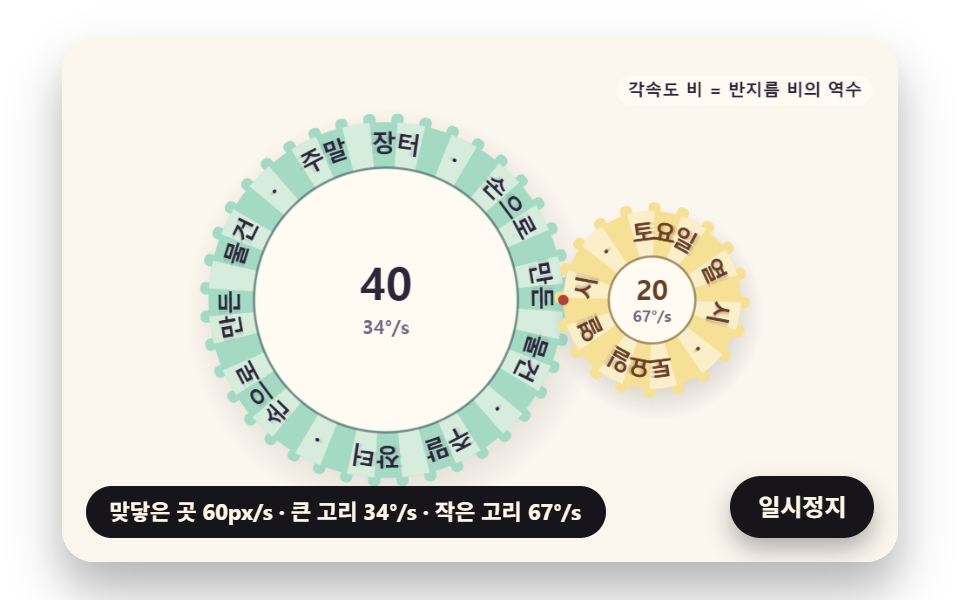 05 circtx-tangent-rings-gear-mesh
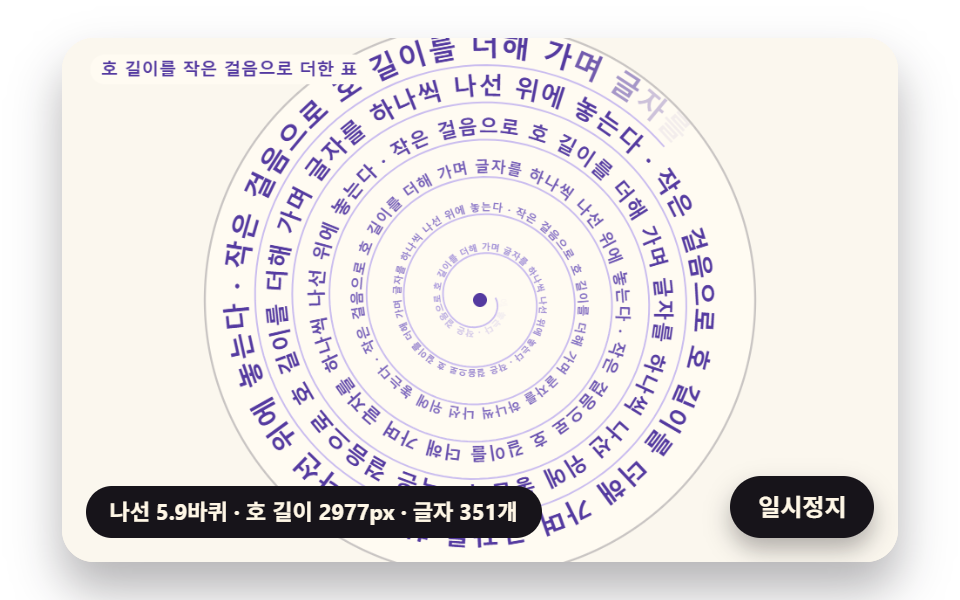 06 circtx-spiral-arclength-flow
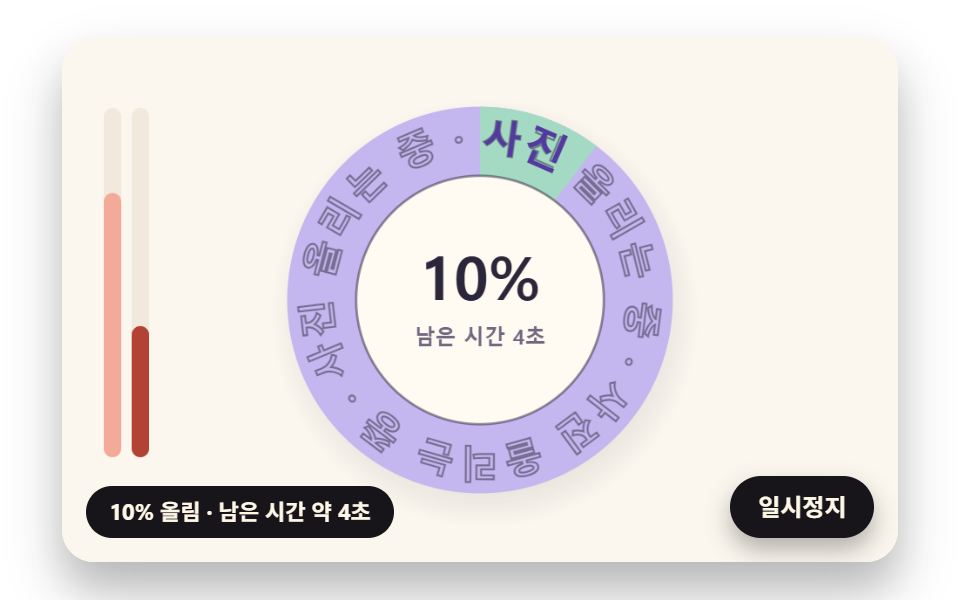 07 circtx-progress-ring-partial-letter-fill
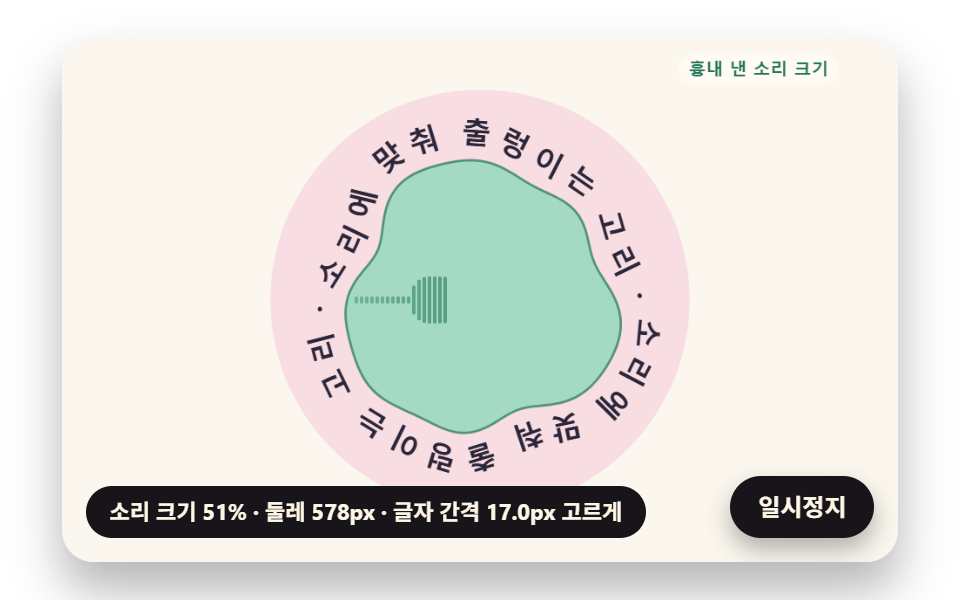 08 circtx-sound-ripple-normal-letters
 09 circtx-hero-seal-stamp-scene
자동 재생 · 눌러서 해당 항목으로 · 전부 한 zip
- 01 글자 폭으로 각도를 나누는 원형 배지
- 02 스크롤 속도만큼 빨라지는 회전 배지
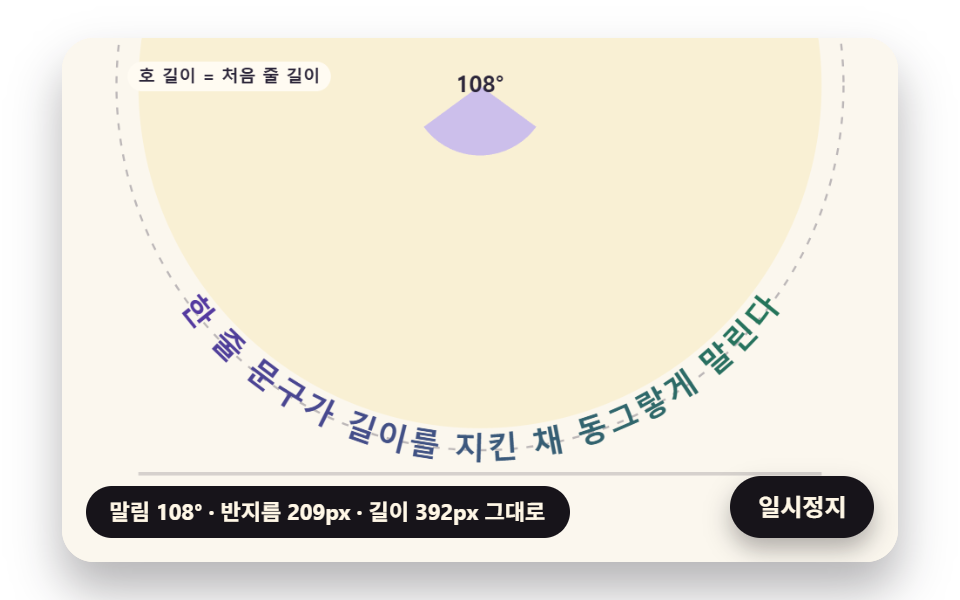
- 03 길이를 지킨 채 원으로 말리는 한 줄 문구
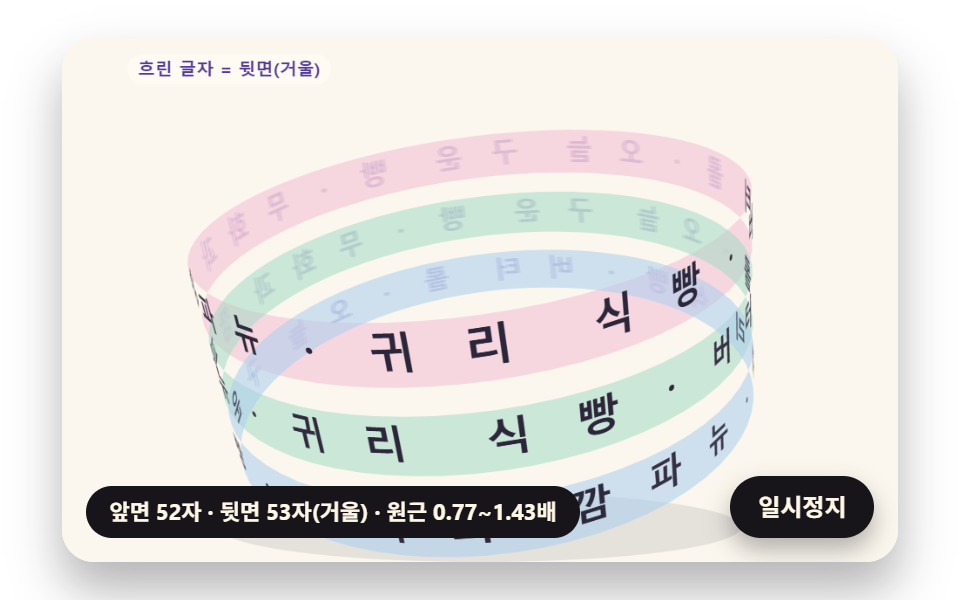
- 04 원통을 감고 도는 띠 문구
- 05 맞닿아 톱니처럼 도는 두 글자 고리
- 06 호 길이로 글자를 놓는 나선 문구
- 07 진행률만큼 글자가 차오르는 원형 진행 고리
- 08 소리 크기에 출렁이는 고리와 법선을 따르는 글자
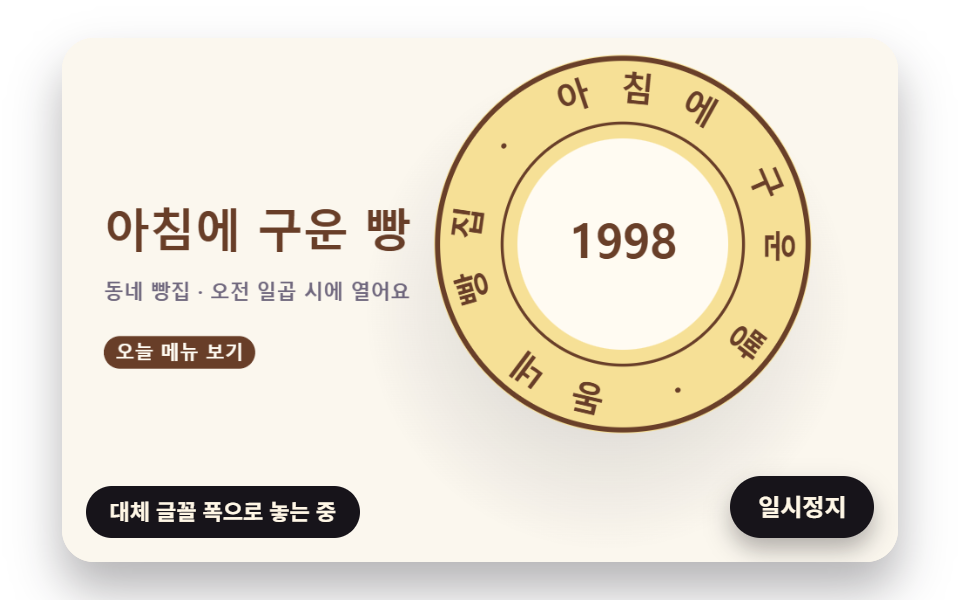
- 09 베이커리 첫 화면의 도장 장면
원 둘레에 글자를 두르는 가장 쉬운 방법은 문구가 차지할 전체 각을 글자 수로 똑같이 나누는 것이다. 그런데 한글 한 자, 띄어쓰기 한 칸, 가운뎃점 하나는 폭이 서로 달라서, 같은 몫의 각을 받으면 넓은 글자는 이웃에 붙고 좁은 글자 옆은 빈다. 01 배지는 그 비교판을 바깥에 흐린 줄로 함께 그려 두었다.
같은 각도 판과 폭 배치 판의 틈
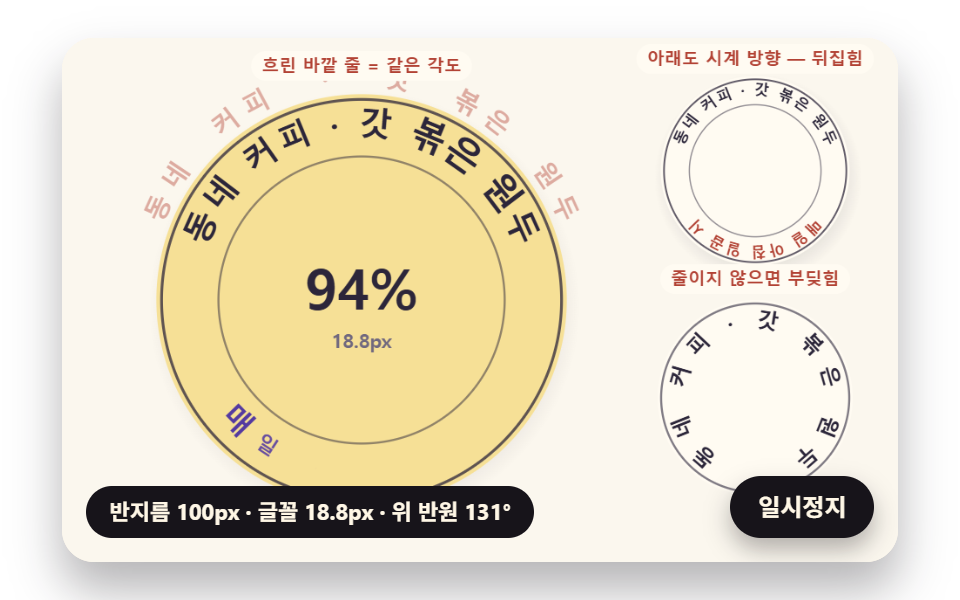
반지름 100px 배지의 위 반원 「동네 커피 · 갓 볶은 원두」 15자를 같은 각도로 놓으면 이웃 글자 사이 틈이 −2.4px(겹침)에서 10.6px 까지 갈린다. 각 글자에 제 폭만큼의 호를 주면 틈은 2.15~3.5px 로 고르게 모인다. 두 판에서 같은 글자의 각이 가장 크게 다른 곳은 5.8° 이고, 영어 문구에서는 4.9° 다. 일본어 문구는 글자 폭이 모두 같아 두 판이 똑같이 나온다.
반지름이 줄면 글자도 줄어야 하는 까닭
01 의 반지름은 100px 에서 58px 로 좁아졌다가 돌아온다. 반지름 100px 에서 글꼴은 원래 20px 의 93.8% 인 18.77px 이고, 58px 에서는 54.4% 인 10.89px 까지 줄어든다. 위 반원 문구가 차지하는 각은 두 반지름에서 똑같이 131.4° 다. 줄어드는 몫은 문구 글자에 따라 달라서 같은 58px 에서 영어 문구는 71.8%, 일본어 문구는 83.3% 에 멈춘다. 그래서 언어를 바꿀 때마다 폭을 다시 재야 한다.
각도는 폭÷반지름, 속도는 반지름에 반비례, 나선은 호 길이 적분 — 원 위 글자를 받치는 수식
아홉 장면을 보기 전에 계산 셋을 먼저 짚는다. 셋 다 반지름 r 인 원에서 호 길이 s 와 각 θ 가 s = rθ 로 이어진다는 한 줄에서 나온다.
폭÷반지름이 각인 까닭
글자 하나가 원 위에서 차지하는 각은 그 글자 폭을 글자를 놓는 반지름으로 나눈 값이다. 01 의 placeArc 는 글자 i 의 각을 「가운데 각 + 방향 × (앞 글자 폭 합 + 제 폭의 절반 − 전체 폭의 절반) × 축소 몫 ÷ 놓는 반지름」으로 정한다. 놓는 반지름은 원 반지름에서 글자 높이의 절반(INNER_FIT 0.5)을 뺀 값이라 글자 높이 가운데에서 폭을 맞춘다. 전체 각이 정해 둔 범위 span 을 넘으면 글꼴을 줄여야 하는데, 줄이면 글자 높이도 줄어 놓는 반지름이 커진다. 전체 폭 T 에 몫 k 를 곱하고 반지름 r − 0.5·px·k 로 나눈 각이 span 과 같아지는 k 를 풀면 k = span·r ÷ (T + span·0.5·px) 이고, arcScale 이 쓰는 식이 바로 이것이다.
맞물린 두 고리의 각속도
두 고리가 맞닿은 곳에서 미끄러지지 않으려면 두 표면이 같은 빠르기 v 로 지나가야 한다. 각속도는 ω = v ÷ r 이니 반지름이 절반인 고리는 두 배로 돈다. 05 는 이 비가 소수점 아래까지 맞도록 칸 길이부터 정하고 반지름을 거기에 맞춘다.
나선의 호 길이를 작은 걸음으로 더하기
반지름이 각에 따라 r = a + bθ 로 일정하게 벌어지는 나선에서는 s = rθ 가 그대로 통하지 않는다. 작은 각 dθ 동안 지나는 길이는 √(r² + (dr/dθ)²)·dθ 이고, 06 은 이 값을 걸음마다 걸음 가운데의 r 로 재어 누적표를 만든다. 06 의 나선(한 바퀴에 23px)에서 √ 안의 (dr/dθ)² 를 빼고 더하면 2,972.22px 로, 제대로 더한 2,976.8px 보다 4.6px 짧다. 걸음을 0.004rad 에서 0.5rad 로 크게 키워도 차이는 −0.002px 였다.
원형 텍스트 만들기 9종 — 폭 맞춤 원형 배지·스크롤 속도 회전 배지·원으로 말리는 한 줄·원통 띠 문구·맞물려 도는 두 고리·나선 문구·글자 진행 고리·출렁이는 고리·베이커리 도장 장면
01·02 는 로고 옆에 붙는 원형 배지, 03·09 는 한 줄 문구가 원으로 말리는 움직임, 04~06 은 원을 원통·톱니·나선으로 넓힌 모양, 07·08 은 고리가 진행률과 소리 크기를 나타내는 쓰임이다. 아홉 장면은 캔버스 2D 하나에 그리고 외부 웹폰트·라이브러리·이미지 파일 없이 기기 글꼴만 쓰며, 난수는 시드를 고정해 몇 번을 열어도 같은 시연이 나온다.
480×300 캔버스에서 2초 동안 잰 움직임
2초에 24장을 찍어 이웃한 두 장의 차이 23개를 센 값이다. 한 줄 문구가 판을 가로질러 말리는 03 이 39.9% 로 가장 넓고, 진행 고리 하나뿐인 07 과 고리 두 개의 글자만 도는 05 는 15% 안팎에 머문다.
| 장면 | 누적면적 | 움직인 프레임 | 강도 평균 |
|---|---|---|---|
| 01 폭 맞춤 원형 배지 | 25.6% | 23/23 | 58.0 |
| 02 스크롤 속도 회전 배지 | 22.1% | 23/23 | 79.1 |
| 03 원으로 말리는 한 줄 | 39.9% | 23/23 | 66.5 |
| 04 원통 띠 문구 | 33.8% | 23/23 | 57.0 |
| 05 맞물려 도는 두 고리 | 15.2% | 23/23 | 58.9 |
| 06 나선 문구 | 28.3% | 23/23 | 74.9 |
| 07 글자 진행 고리 | 15.0% | 23/23 | 67.9 |
| 08 출렁이는 고리 | 20.6% | 23/23 | 71.3 |
| 09 베이커리 도장 장면 | 30.0% | 23/23 | 79.2 |
아홉 장면 모두 23/23 이라 2초 안에 멈춰 선 순간이 없다. 05 의 면적이 작은 것은 두 고리 안쪽이 비어 있고 글자 띠만 돌기 때문으로 보인다.
01글자 폭으로 각도를 나누는 원형 배지
카페 로고 배지처럼 위 반원에 가게 이름, 아래 반원에 「매일 아침 일곱 시」 를 두른 배지이고, 반지름이 스프링(단단함 70·감쇠 11)을 타고 100px → 58px → 100px 로 오가는 동안 badgeAt 이 위·아래 문구의 몫을 arcScale 로 따로 구해 작은 몫 하나로 두 placeArc 의 글꼴을 함께 줄인다(펜스 가운데 fitArc 는 정의만 있고 아홉 파일 어디서도 부르지 않는다). 아래 반원은 가운데 각 +π/2 에서 반대 방향(−1)으로 놓고 글자를 θ − π/2 만큼 돌려 아래쪽 글자도 바로 선다. 바깥 흐린 줄은 같은 각도 판, 오른쪽 위는 아래 반원까지 시계 방향으로 이은 실패판, 오른쪽 아래는 줄이지 않은 판이고 부딪힌 자리에 산호 점이 찍힌다.
<main class="stage">
<div class="cf is-demo" id="cf">
  <canvas class="cf__canvas" data-role="canvas" width="480" height="300" aria-hidden="true"></canvas>
  <p class="cf__sr">동네 커피 · 갓 볶은 원두 — 매일 아침 일곱 시</p>
  <p class="cf__status" data-role="status" aria-live="off">글자 폭을 재는 중</p>
  <button class="cf__pause" data-role="pause" type="button" aria-pressed="false">일시정지</button>
</div>
</main>
@use "../../../../site/static/demo-tokens" as *;
@include stage($stage-paper);
.cf {
position: relative;
width: min(92vw, calc(160vh - 12.8vw));
aspect-ratio: 480 / 300;
margin: 0 auto;
border-radius: $r-card;
overflow: hidden;
box-shadow: $shadow-raised;
background: $subject-cream;
}
.cf__canvas {
position: absolute;
inset: 0;
display: block;
width: 100%;
height: 100%;
}
.cf__pause {
position: absolute;
right: $sp-3;
bottom: $sp-3;
padding: $sp-1 $sp-3;
border: 2px solid $subject-ink;
border-radius: $r-pill;
background: $subject-ink;
color: $subject-cream;
font-family: inherit;
font-weight: 700;
font-size: 12px;
line-height: 1.6;
cursor: pointer;
box-shadow: $shadow-press;
transition: transform $dur-quick $ease-spring;
}
// 눌린 상태(멈춤) — 바탕과 글자색을 뒤집어 aria-pressed 가 눈에도 보이게
.cf__pause[aria-pressed="true"] {
background: $subject-cream;
color: $subject-ink;
}
.cf__pause:hover {
transform: translateY(-2px);
}
.cf__pause:active {
transform: translateY(1px);
}
.cf__pause:focus-visible {
outline: 3px solid $subject-ink;
outline-offset: 3px;
}
// 상태 줄 — 지금 고리에서 무슨 계산이 일어났는지 글자로. 시연 중에는 aria-live off, 사람이 처음 손대면 polite
.cf__status {
position: absolute;
left: $sp-3;
bottom: $sp-3;
max-width: calc(100% - 120px);
margin: 0;
padding: $sp-1 $sp-3;
border-radius: $r-pill;
background: $subject-ink;
color: $subject-cream;
font-weight: 700;
font-size: 11px;
line-height: 1.6;
white-space: nowrap;
overflow: hidden;
text-overflow: ellipsis;
pointer-events: none;
}
// 낭독용 원문 한 줄 — 화면에서는 숨기고 낭독기에만 읽힌다(원 위 글자는 캔버스라 aria-hidden)
.cf__sr {
position: absolute;
width: 1px;
height: 1px;
margin: -1px;
padding: 0;
overflow: hidden;
clip-path: inset(50%);
white-space: nowrap;
border: 0;
}
@media (max-width: 340px) {
.cf__pause,
.cf__status { font-size: 10px; padding: $sp-1 $sp-2; }
}
// 동작 줄이기 — 장면은 스크립트가 최종 배치 한 장으로 멈춘다. 버튼도 떠오르지 않게
@media (prefers-reduced-motion: reduce) {
.cf__pause { transition: none !important; }
.cf__pause:hover,
.cf__pause:active { transform: none !important; }
}html, body {
margin: 0;
overflow: hidden;
}
.stage {
box-sizing: border-box;
min-height: 100vh;
display: grid;
place-items: center;
margin: 0;
background: #ffffff;
font-family: -apple-system, "Segoe UI", "Noto Sans KR", sans-serif;
padding: clamp(8px, 4vw, 24px);
}
.cf {
position: relative;
width: min(92vw, 160vh - 12.8vw);
aspect-ratio: 480/300;
margin: 0 auto;
border-radius: 16px;
overflow: hidden;
box-shadow: 0 14px 24px rgba(23, 20, 26, 0.32);
background: #fff7e6;
}
.cf__canvas {
position: absolute;
inset: 0;
display: block;
width: 100%;
height: 100%;
}
.cf__pause {
position: absolute;
right: 12px;
bottom: 12px;
padding: 4px 12px;
border: 2px solid #17141a;
border-radius: 999px;
background: #17141a;
color: #fff7e6;
font-family: inherit;
font-weight: 700;
font-size: 12px;
line-height: 1.6;
cursor: pointer;
box-shadow: 0 6px 12px rgba(23, 20, 26, 0.32);
transition: transform 220ms cubic-bezier(0.2, 0.8, 0.2, 1);
}
.cf__pause[aria-pressed=true] {
background: #fff7e6;
color: #17141a;
}
.cf__pause:hover {
transform: translateY(-2px);
}
.cf__pause:active {
transform: translateY(1px);
}
.cf__pause:focus-visible {
outline: 3px solid #17141a;
outline-offset: 3px;
}
.cf__status {
position: absolute;
left: 12px;
bottom: 12px;
max-width: calc(100% - 120px);
margin: 0;
padding: 4px 12px;
border-radius: 999px;
background: #17141a;
color: #fff7e6;
font-weight: 700;
font-size: 11px;
line-height: 1.6;
white-space: nowrap;
overflow: hidden;
text-overflow: ellipsis;
pointer-events: none;
}
.cf__sr {
position: absolute;
width: 1px;
height: 1px;
margin: -1px;
padding: 0;
overflow: hidden;
clip-path: inset(50%);
white-space: nowrap;
border: 0;
}
@media (max-width: 340px) {
.cf__pause,
.cf__status {
font-size: 10px;
padding: 4px 8px;
}
}
@media (prefers-reduced-motion: reduce) {
.cf__pause {
transition: none !important;
}
.cf__pause:hover,
.cf__pause:active {
transform: none !important;
}
}(function () {
const root = document.getElementById("cf");
if (!root) return;
// 판 좌표 — 캔버스 안은 늘 480×300. 화면에 보이는 크기와 상관없이 계산은 이 좌표로 한다
const W = 480;
const H = 300;
const TAU = Math.PI * 2;
function clamp(v, lo, hi) { return v < lo ? lo : (v > hi ? hi : v); }
function lerp(a, b, k) { return a + (b - a) * k; }
function smooth(x) { const c = clamp(x, 0, 1); return c * c * (3 - 2 * c); }
// 따라가기 비율 — 1 − e^(−rate·dt). 프레임 시간이 달라도 1초에 같은 만큼 다가간다
function follow(rate, dt) { return 1 - Math.exp(-rate * dt); }
// 1/60초마다 ease 만큼 다가가는 비율을 dt 초로 환산 — 1 − (1 − ease)^(dt × 60)
function easeStep(ease, dt) { return 1 - Math.pow(1 - ease, dt * 60); }
// 시드 고정 난수 — 같은 시드면 같은 시연이 다시 나온다 (32비트 정수 섞기)
function makeRng(seed) {
let s = seed >>> 0;
return function () {
s = (s + 0x6d2b79f5) >>> 0;
let t = s;
t = Math.imul(t ^ (t >>> 15), t | 1);
t ^= t + Math.imul(t ^ (t >>> 7), t | 61);
return ((t ^ (t >>> 14)) >>> 0) / 4294967296;
};
}
function deg(rad) { return rad * 180 / Math.PI; }
function makeSpring(x) { return { x: x, v: 0, to: x }; }
const SPRING_SUBSTEP = 1 / 240;
function stepSpring(s, stiffness, damping, dt) {
let left = dt;
while (left > 1e-9) {
const h = Math.min(SPRING_SUBSTEP, left);
s.v += (stiffness * (s.to - s.x) - damping * s.v) * h;
s.x += s.v * h;
left -= h;
}
}
function snapSpring(s, x) { s.x = x; s.v = 0; s.to = x; }
function roughWidth(ch, px, weight) {
const wide = ch.charCodeAt(0) >= 0x1100;
const base = ch === ' ' ? 0.28 : (wide ? 0.95 : 0.6);
return px * base * (weight >= 700 ? 1.06 : 1);
}
// 글꼴이 다 온 뒤 잰 폭
let glyphWidth = roughWidth;
// 대체 글꼴로 잰 폭 — 09 가 「글꼴이 오기 전에 잰 폭」 을 흉내 낼 때만 쓴다
let fallbackWidth = roughWidth;
// 글자 나누기 — 한 글자씩(서로게이트 쌍도 한 글자)
function glyphsOf(s) { return Array.from(s); }
function widthsOf(gs, px, weight, m) {
return gs.map(function (g) { return m(g, px, weight); });
}
function sum(xs) { let s = 0; for (const x of xs) {
s += x;
} return s; }
function arcTotal(ws, tracking) { return sum(ws) + tracking * Math.max(0, ws.length - 1); }
    // 글꼴 축소 몫 — 줄이지 않아도 들어가면 1
    function arcScale(ws, px, tracking, r, inner, span) {
        const total = arcTotal(ws, tracking);
        const need = total / Math.max(1, r - inner * px);
        return need > span ? span * r / (total + span * inner * px) : 1;
    }
    function fitArc(ws, px, tracking, r, inner, span, center, dir, allowShrink) {
        return placeArc(ws, px, tracking, r, inner, allowShrink ? arcScale(ws, px, tracking, r, inner, span) : 1, center, dir);
    }
    // 정한 축소 몫으로 놓기 — 위·아래 반원이 같은 글꼴 크기를 쓰도록 둘 중 작은 몫을 넘겨받는다
    function placeArc(ws, px, tracking, r, inner, scale, center, dir) {
        const n = ws.length;
        const total = arcTotal(ws, tracking);
        const need = total / Math.max(1, r - inner * px);
        const layR = Math.max(1, r - inner * px * scale);
        const theta = [];
        let acc = 0;
        for (let i = 0; i < n; i += 1) {
            theta.push(center + dir * (acc + ws[i] / 2 - total / 2) * scale / layR);
            acc += ws[i] + tracking;
        }
        return { theta: theta, px: px * scale, scale: scale, total: total, layR: layR, need: need };
    }
// 같은 각도로 놓기(비교판) — 폭은 보지 않고 전체 각을 글자 수로 똑같이 나눈다
function equalArc(n, spanUsed, center, dir) {
const out = [];
const step = spanUsed / Math.max(1, n);
for (let i = 0; i < n; i += 1) {
out.push(center + dir * (i + 0.5 - n / 2) * step);
}
return out;
}
// 이웃 두 글자가 글자 아래 모서리(반지름 r − 0.5·글자 높이)에서 겹친 길이(px). 양수면 부딪힌다.
// 각 간격 × 아래 모서리 반지름 − 두 글자 반폭 합 이 음수인 만큼이 겹침
const GLYPH_DROP = 0.5;
function innerOverlaps(theta, ws, scale, r, px) {
const rin = r - GLYPH_DROP * px;
const out = [];
for (let i = 0; i + 1 < theta.length; i += 1) {
const room = Math.abs(theta[i + 1] - theta[i]) * rin;
out.push((ws[i] + ws[i + 1]) / 2 * scale - room);
}
return out;
}
function arcTable(rf, drf, th0, th1, step) {
const th = [th0];
const s = [0];
let acc = 0;
const n = Math.max(1, Math.ceil((th1 - th0) / step));
const h = (th1 - th0) / n;
for (let i = 0; i < n; i += 1) {
// 걸음 가운데의 값으로 더한다 — 걸음 끝 값보다 같은 걸음에서 오차가 작다
const m = th0 + (i + 0.5) * h;
const r = rf(m);
const dr = drf(m);
acc += Math.sqrt(r * r + dr * dr) * h;
th.push(th0 + (i + 1) * h);
s.push(acc);
}
return { th: th, s: s };
}
function thetaAt(t, s) {
const last = t.s.length - 1;
if (s <= 0) {
return t.th[0];
}
if (s >= t.s[last]) {
return t.th[last];
}
let lo = 0;
let hi = last;
while (hi - lo > 1) {
const mid = (lo + hi) >> 1;
if (t.s[mid] <= s) {
lo = mid;
}
else {
hi = mid;
}
}
const k = (s - t.s[lo]) / Math.max(1e-9, t.s[hi] - t.s[lo]);
return lerp(t.th[lo], t.th[hi], k);
}
function arcLength(t) { return t.s[t.s.length - 1]; }
// 극좌표 곡선의 접선 각(화면 좌표, y 아래) — 점 (r cosθ, r sinθ) 을 θ 로 미분한 방향
function tangentAngle(r, dr, th) {
return Math.atan2(dr * Math.sin(th) + r * Math.cos(th), dr * Math.cos(th) - r * Math.sin(th));
}
// 장면 시계(초)와 상태 줄 글자 — 장면 계산이 고치고, 화면 쪽이 읽어 그린다
let sceneT = 0;
let simStatus = '';
// 파스텔 팔레트 — 크림 바탕 위 라벤더·민트·버터·산호. 글자는 진한 쪽으로 명도 차를 둔다
const PAPER = [251, 247, 238];
const PAPER_DIM = [241, 234, 220];
const INK = [44, 38, 58];
const INK_SOFT = [112, 104, 126];
const CREAM = [255, 251, 242];
const LAVENDER = [196, 182, 238];
const MINT = [164, 218, 196];
const BUTTER = [246, 224, 150];
const CORAL = [244, 170, 152];
const SKY = [170, 206, 238];
const PINK = [244, 190, 212];
const MINT_DEEP = [36, 116, 90];
const CORAL_DEEP = [178, 66, 52];
const VIOLET_DEEP = [84, 58, 160];
const BROWN_DEEP = [104, 62, 40];
function mix(a, b, k) { return [lerp(a[0], b[0], k), lerp(a[1], b[1], k), lerp(a[2], b[2], k)]; }
function rgba(c, a) {
return 'rgba(' + Math.round(clamp(c[0], 0, 255)) + ',' + Math.round(clamp(c[1], 0, 255)) + ',' + Math.round(clamp(c[2], 0, 255)) + ',' + clamp(a, 0, 1).toFixed(3) + ')';
}
const canvasEl = root.querySelector('[data-role="canvas"]');
const pauseEl = root.querySelector('[data-role="pause"]');
const statusEl = root.querySelector('[data-role="status"]');
const ctxRaw = canvasEl ? canvasEl.getContext('2d') : null;
if (!canvasEl || !ctxRaw || !pauseEl) {
return;
}
const cv = canvasEl;
const ctx = ctxRaw;
const pauseBtn = pauseEl;
// 외부 웹폰트는 부르지 않는다 — 기기에 있는 글꼴 목록만
const FONT_STACK = 'system-ui, -apple-system, "Segoe UI", "Noto Sans KR", sans-serif';
// 대체 글꼴 — 09 가 「글꼴이 오기 전에 잰 폭」 을 흉내 낼 때만 쓴다
const FALLBACK_STACK = 'monospace';
// 잰 폭은 100px 기준으로 한 번만 재 두고 크기에 비례해 쓴다. 글꼴이 새로 오면 통째로 비운다
const widthCache = {};
function measureWith(stack) {
return function (ch, px, weight) {
const key = stack + '|' + weight + '|' + ch;
let w = widthCache[key];
if (w === undefined) {
ctx.font = weight + ' 100px ' + stack;
w = ctx.measureText(ch).width;
widthCache[key] = w;
}
return w * px / 100;
};
}
function remeasure() {
for (const k of Object.keys(widthCache)) {
delete widthCache[k];
}
glyphWidth = measureWith(FONT_STACK);
fallbackWidth = measureWith(FALLBACK_STACK);
relayout();
}
function fitCanvas() {
// 배율은 2 에서 자른다 — 배율 3 기기에서 화소가 2.25배로 늘어 프레임마다 일이 그만큼 커지지 않게
const dpr = Math.min(window.devicePixelRatio || 1, 2);
cv.width = Math.round(W * dpr);
cv.height = Math.round(H * dpr);
ctx.setTransform(dpr, 0, 0, dpr, 0, 0);
}
function clearStage(c) {
ctx.fillStyle = rgba(c, 1);
ctx.fillRect(0, 0, W, H);
}
function setFont(px, weight, stack) {
ctx.font = weight + ' ' + px.toFixed(2) + 'px ' + stack;
}
function label(s, x, y, c, a, px, weight, align) {
setFont(px, weight, FONT_STACK);
ctx.textAlign = align;
ctx.textBaseline = 'middle';
ctx.fillStyle = rgba(c, a);
ctx.fillText(s, x, y);
}
// 글자 하나를 (x, y) 가운데에 rot 라디안 돌려 찍는다. sx·sy 는 가로·세로 배율(음수 sx 는 거울)
function glyphAt(ch, x, y, rot, px, weight, c, a, sx, sy) {
if (a <= 0.01 || px < 0.5) {
return;
}
ctx.save();
ctx.translate(x, y);
ctx.rotate(rot);
ctx.scale(sx, sy);
setFont(px, weight, FONT_STACK);
ctx.textAlign = 'center';
ctx.textBaseline = 'middle';
ctx.fillStyle = rgba(c, a);
ctx.fillText(ch, 0, 0);
ctx.restore();
}
// 기울인 글자 — 글자 자기 좌표에서 가로로 skew(라디안)만큼 민다(윗부분이 앞으로)
function glyphLean(ch, x, y, rot, px, weight, c, a, skew) {
if (a <= 0.01 || px < 0.5) {
return;
}
ctx.save();
ctx.translate(x, y);
ctx.rotate(rot);
ctx.transform(1, 0, -Math.tan(skew), 1, 0, 0);
setFont(px, weight, FONT_STACK);
ctx.textAlign = 'center';
ctx.textBaseline = 'middle';
ctx.fillStyle = rgba(c, a);
ctx.fillText(ch, 0, 0);
ctx.restore();
}
// 원 위 글자 — 중심 (cx, cy), 반지름 r, 각 th. turn 은 글자를 원에 맞춰 세우는 각(위 반원 +π/2, 아래 반원 −π/2)
function ringGlyph(ch, cx, cy, r, th, turn, px, weight, c, a) {
glyphAt(ch, cx + r * Math.cos(th), cy + r * Math.sin(th), th + turn, px, weight, c, a, 1, 1);
}
function roundRectPath(x, y, w, h, r) {
const rr = Math.max(0, Math.min(r, w / 2, h / 2));
ctx.beginPath();
ctx.moveTo(x + rr, y);
ctx.lineTo(x + w - rr, y);
ctx.arcTo(x + w, y, x + w, y + rr, rr);
ctx.lineTo(x + w, y + h - rr);
ctx.arcTo(x + w, y + h, x + w - rr, y + h, rr);
ctx.lineTo(x + rr, y + h);
ctx.arcTo(x, y + h, x, y + h - rr, rr);
ctx.lineTo(x, y + rr);
ctx.arcTo(x, y, x + rr, y, rr);
ctx.closePath();
}
function fillRound(x, y, w, h, r, c, a) {
if (w <= 0.2 || h <= 0.2 || a <= 0) {
return;
}
roundRectPath(x, y, w, h, r);
ctx.fillStyle = rgba(c, a);
ctx.fill();
}
function disc(x, y, r, c, a) {
if (r <= 0.2 || a <= 0) {
return;
}
ctx.beginPath();
ctx.arc(x, y, r, 0, TAU);
ctx.fillStyle = rgba(c, a);
ctx.fill();
}
function ring(x, y, r, width, c, a) {
if (r <= 0.2 || a <= 0) {
return;
}
ctx.beginPath();
ctx.arc(x, y, r, 0, TAU);
ctx.lineWidth = width;
ctx.strokeStyle = rgba(c, a);
ctx.stroke();
}
// 그림자 — 떠 있는 높이 lift(0~1)가 클수록 멀리·흐리게·넓게 떨어진다
function softShadow(x, y, r, lift) {
const off = 4 + 14 * lift;
const g = ctx.createRadialGradient(x + off * 0.4, y + off, r * 0.6, x + off * 0.4, y + off, r * (1.05 + 0.25 * lift));
g.addColorStop(0, rgba(INK, 0.26 - 0.14 * lift));
g.addColorStop(1, rgba(INK, 0));
ctx.fillStyle = g;
ctx.beginPath();
ctx.arc(x + off * 0.4, y + off, r * (1.05 + 0.25 * lift), 0, TAU);
ctx.fill();
}
// 작은 알약 이름표
function pill(s, x, y, bg, fg, a, px) {
setFont(px, 700, FONT_STACK);
const w = ctx.measureText(s).width + px * 1.2;
fillRound(x - w / 2, y - px * 0.85, w, px * 1.7, px * 0.85, bg, a);
label(s, x, y + 0.5, fg, a, px, 700, 'center');
}
// 상태 줄 — 바뀔 때만 글자를 고친다
let shownStatus = '';
function pushStatus() {
if (!statusEl || simStatus === shownStatus) {
return;
}
shownStatus = simStatus;
statusEl.textContent = simStatus;
}
// 01 — 글자 폭으로 각도를 나누는 원형 배지. 위 반원은 시계 방향, 아래 반원은 반대 방향으로 놓아 둘 다 바로 읽힌다.
// 배지 반지름이 좁아지면(좁은 칸에 들어간 배지) 글자 아래 모서리가 부딪히기 전에 글꼴을 줄인다
const TOP_TEXT = '동네 커피 · 갓 볶은 원두';
const BOTTOM_TEXT = '매일 아침 일곱 시';
const BADGE_PX = 20;
const BADGE_WEIGHT = 800;
const TRACKING = 1.5;
// 글자 높이 가운데 이만큼 안쪽(원 중심 쪽) 반지름에서 폭을 맞춘다
const INNER_FIT = 0.5;
// 위·아래 반원이 쓸 수 있는 가장 큰 각(라디안) — 둘 사이에 남는 틈이 양옆 여백
const TOP_SPAN = 2.5;
const BOTTOM_SPAN = 1.9;
const RADIUS_WIDE = 100;
const RADIUS_NARROW = 58;
const RADIUS_STIFFNESS = 70;
const RADIUS_DAMPING = 11;
const NARROW_AT_S = 0.95;
const WIDE_AT_S = 2.6;
const LOOP_S = 3.8;
// 글자가 하나씩 튀어 오르는 간격과 스프링
const POP_START_S = 0.2;
const POP_STAGGER_S = 0.03;
const POP_STIFFNESS = 300;
const POP_DAMPING = 16;
const STATUS_FIT = '반지름 {r}px · 글꼴 {p}px · 위 반원 {a}°';
const topGlyphs = glyphsOf(TOP_TEXT);
const bottomGlyphs = glyphsOf(BOTTOM_TEXT);
let topWidths = [];
let bottomWidths = [];
const radius01 = makeSpring(RADIUS_WIDE);
const pops01 = topGlyphs.concat(bottomGlyphs).map(function () { return makeSpring(0); });
function relayout() {
topWidths = widthsOf(topGlyphs, BADGE_PX, BADGE_WEIGHT, glyphWidth);
bottomWidths = widthsOf(bottomGlyphs, BADGE_PX, BADGE_WEIGHT, glyphWidth);
}
function badgeAt(r) {
const s = Math.min(arcScale(topWidths, BADGE_PX, TRACKING, r, INNER_FIT, TOP_SPAN), arcScale(bottomWidths, BADGE_PX, TRACKING, r, INNER_FIT, BOTTOM_SPAN));
return {
top: placeArc(topWidths, BADGE_PX, TRACKING, r, INNER_FIT, s, -Math.PI / 2, 1),
bottom: placeArc(bottomWidths, BADGE_PX, TRACKING, r, INNER_FIT, s, Math.PI / 2, -1),
scale: s
};
}
function radiusTarget01(t) { return t >= NARROW_AT_S && t < WIDE_AT_S ? RADIUS_NARROW : RADIUS_WIDE; }
function reset() {
snapSpring(radius01, RADIUS_WIDE);
for (const p of pops01) {
snapSpring(p, 0);
}
}
function statusFor01() {
const b = badgeAt(radius01.x);
const a = b.top.theta.length ? deg(b.top.theta[b.top.theta.length - 1] - b.top.theta[0]) : 0;
simStatus = STATUS_FIT.replace('{r}', String(Math.round(radius01.x))).replace('{p}', (BADGE_PX * b.scale).toFixed(1)).replace('{a}', String(Math.round(a)));
}
function update(dt) {
radius01.to = radiusTarget01(sceneT);
stepSpring(radius01, RADIUS_STIFFNESS, RADIUS_DAMPING, dt);
pops01.forEach(function (p, i) {
p.to = sceneT >= POP_START_S + i * POP_STAGGER_S ? 1 : 0;
stepSpring(p, POP_STIFFNESS, POP_DAMPING, dt);
});
statusFor01();
}
function restPose() {
snapSpring(radius01, RADIUS_WIDE);
for (const p of pops01) {
snapSpring(p, 1);
}
statusFor01();
}
// 01 화면 — 왼쪽 큰 배지(바깥 흐린 줄 = 같은 각도로 놓은 비교판), 오른쪽 위 = 아래 반원도 시계 방향으로 이어 놓은 실패판(뒤집힘),
// 오른쪽 아래 = 좁은 고리에서 줄이지 않고 놓은 실패판(글자 아래 모서리가 부딪힌 자리에 산호 점)
const B_CX = 172;
const B_CY = 150;
const LABEL_EQUAL = '흐린 바깥 줄 = 같은 각도';
const LABEL_FLIP = '아래도 시계 방향 — 뒤집힘';
const LABEL_CLASH = '줄이지 않으면 부딪힘';
function bindInput(signal) { void signal; }
function drawBadgeText(cx, cy, r, b, popBase, flipBottom) {
const px = BADGE_PX * b.scale;
b.top.theta.forEach(function (th, i) {
const k = popBase >= 0 ? pops01[i].x : 1;
const rr = b.top.layR + INNER_FIT * px;
glyphAt(topGlyphs[i], cx + rr * Math.cos(th), cy + rr * Math.sin(th), th + Math.PI / 2, px, BADGE_WEIGHT, INK, clamp(k * 1.4, 0, 1), k, k);
});
b.bottom.theta.forEach(function (th, i) {
const k = popBase >= 0 ? pops01[topGlyphs.length + i].x : 1;
const rr = b.bottom.layR + INNER_FIT * px;
// 아래 반원 — 글자 머리를 원 중심 쪽으로(−π/2). 실패판은 위 반원처럼 +π/2 로 돌려 거꾸로 선다
const th2 = flipBottom ? Math.PI - th : th;
glyphAt(bottomGlyphs[i], cx + rr * Math.cos(th2), cy + rr * Math.sin(th2), th2 + (flipBottom ? Math.PI / 2 : -Math.PI / 2), px, BADGE_WEIGHT, flipBottom ? CORAL_DEEP : VIOLET_DEEP, clamp(k * 1.4, 0, 1), k, k);
});
}
function badgeDisc(cx, cy, r, px, lift, face) {
const outer = r + px * 0.95;
softShadow(cx, cy, outer, lift);
disc(cx, cy, outer, face, 1);
ring(cx, cy, outer - 3, 1.6, INK, 0.75);
ring(cx, cy, r - px * 0.95, 1.2, INK, 0.5);
}
function draw() {
clearStage(PAPER);
const r = radius01.x;
const b = badgeAt(r);
const px = BADGE_PX * b.scale;
// 반지름이 움직이는 빠르기만큼 배지가 떠오른다 — 그림자가 멀어지고 흐려진다
badgeDisc(B_CX, B_CY, r, px, clamp(Math.abs(radius01.v) / 260, 0, 1), BUTTER);
// 같은 각도 비교판 — 위 반원과 같은 전체 각을 글자 수로 똑같이 나눠 바깥 줄에 흐리게
const used = b.top.theta.length > 1 ? (b.top.theta[b.top.theta.length - 1] - b.top.theta[0]) * topGlyphs.length / (topGlyphs.length - 1) : 0;
const eq = equalArc(topGlyphs.length, used, -Math.PI / 2, 1);
eq.forEach(function (th, i) {
ringGlyph(topGlyphs[i], B_CX, B_CY, r + px * 1.45, th, Math.PI / 2, px * 0.8, 700, CORAL_DEEP, 0.42 * clamp(pops01[i].x, 0, 1));
});
drawBadgeText(B_CX, B_CY, r, b, 0, false);
label(Math.round(b.scale * 100) + '%', B_CX, B_CY - 4, INK, 1, clamp(r * 0.36, 14, 32), 800, 'center');
label(px.toFixed(1) + 'px', B_CX, B_CY + clamp(r * 0.26, 12, 24), INK_SOFT, 1, 11, 700, 'center');
// 실패판 1 — 아래 반원도 위처럼 시계 방향
const mr = 46;
const fb = (function () {
const s = Math.min(arcScale(topWidths, BADGE_PX, TRACKING, mr / 0.62, INNER_FIT, TOP_SPAN), arcScale(bottomWidths, BADGE_PX, TRACKING, mr / 0.62, INNER_FIT, BOTTOM_SPAN));
return { top: placeArc(topWidths, BADGE_PX, TRACKING, mr / 0.62, INNER_FIT, s, -Math.PI / 2, 1), bottom: placeArc(bottomWidths, BADGE_PX, TRACKING, mr / 0.62, INNER_FIT, s, Math.PI / 2, -1), scale: s };
})();
ctx.save();
ctx.translate(398, 76);
ctx.scale(0.62, 0.62);
badgeDisc(0, 0, mr / 0.62, BADGE_PX * fb.scale, 0.2, CREAM);
drawBadgeText(0, 0, mr / 0.62, fb, -1, true);
ctx.restore();
pill(LABEL_FLIP, 398, 12, CREAM, CORAL_DEEP, 1, 10);
// 실패판 2 — 지금 반지름의 0.44배 고리에 줄이지 않고, 폭도 글자 가운데 반지름에서 맞춘 판
const cr = r * 0.44;
const ctop = placeArc(topWidths, BADGE_PX * 0.62, TRACKING * 0.62, cr, 0, 1, -Math.PI / 2, 1);
const cws = topWidths.map(function (w) { return w * 0.62; });
disc(398, 206, cr + 12, CREAM, 1);
ring(398, 206, cr + 10, 1.2, INK, 0.6);
ctop.theta.forEach(function (th, i) {
ringGlyph(topGlyphs[i], 398, 206, cr, th, Math.PI / 2, BADGE_PX * 0.62, BADGE_WEIGHT, INK, clamp(pops01[i].x * 1.4, 0, 1));
});
innerOverlaps(ctop.theta, cws, 1, cr, BADGE_PX * 0.62).forEach(function (o, i) {
if (o <= 0) {
return;
}
const th = (ctop.theta[i] + ctop.theta[i + 1]) / 2;
const rin = cr - GLYPH_DROP * BADGE_PX * 0.62;
disc(398 + rin * Math.cos(th), 206 + rin * Math.sin(th), clamp(1.5 + o, 1.5, 4), CORAL_DEEP, 0.9);
});
pill(LABEL_CLASH, 398, 138, CREAM, CORAL_DEEP, 1, 10);
pill(LABEL_EQUAL, B_CX, 16, CREAM, CORAL_DEEP, 1, 10);
}
let paused = false;
const reduceQuery = window.matchMedia('(prefers-reduced-motion: reduce)');
// 페이지를 연 채 동작 줄이기 설정을 바꿔도 change 리스너가 이 값을 다시 읽는다
let still = reduceQuery.matches;
// 자동 시연 중인가 — 사람이 처음 손대면 시연 표시를 떼고 상태 줄을 polite 로 켠다
let demo = root.classList.contains('is-demo');
// 리스너는 한 묶음으로 달고 정리할 때 한 번에 뗀다
const off = new AbortController();
function wake() {
if (!demo) {
return;
}
demo = false;
root.classList.remove('is-demo');
if (statusEl) {
statusEl.setAttribute('aria-live', 'polite');
}
}
// 한 프레임에 넘기는 시간 상한(초) — 탭을 오래 숨겼다 돌아온 첫 프레임에도 50ms 까지만 계산에 넣는다
const DT_MAX = 0.05;
// 장면 시계를 dt 만큼 — 한 바퀴(LOOP_S)를 넘으면 처음 배치로 되돌려 다시 시연한다
function advance(dt) {
sceneT += dt;
if (sceneT >= LOOP_S) {
sceneT -= LOOP_S;
reset();
}
update(dt);
}
let rafId = 0;
let lastTs = -1;
function frame(ts) {
if (still || paused) {
rafId = 0;
return;
}
if (lastTs < 0) {
lastTs = ts;
}
const dt = Math.min((ts - lastTs) / 1000, DT_MAX);
lastTs = ts;
if (dt > 0) {
advance(dt);
}
draw();
pushStatus();
rafId = window.requestAnimationFrame(frame);
}
function startLoop() {
if (rafId) {
return;
}
// 시계 다시 맞추기 — 멈췄던 사이의 시간을 첫 프레임 dt 로 넘기지 않는다
lastTs = -1;
rafId = window.requestAnimationFrame(frame);
}
function stopLoop() {
if (rafId) {
window.cancelAnimationFrame(rafId);
rafId = 0;
}
}
// 동작 줄이기 — 루프를 돌리지 않고 시연이 끝난 최종 배치 한 장만 그린다
function showRest() {
stopLoop();
sceneT = 0;
reset();
restPose();
draw();
pushStatus();
}
function play() {
sceneT = 0;
reset();
draw();
pushStatus();
if (!paused) {
startLoop();
}
}
pauseBtn.addEventListener('click', function () {
paused = !paused;
pauseBtn.setAttribute('aria-pressed', paused ? 'true' : 'false');
wake();
if (paused) {
stopLoop();
}
else if (!still) {
startLoop();
}
}, { signal: off.signal });
// 탭이 숨으면 루프를 멈추고, 돌아오면 시계를 다시 맞춰 시작한다 — 숨은 동안의 몇 초가 한 프레임에 몰리지 않게
document.addEventListener('visibilitychange', function () {
if (document.hidden) {
stopLoop();
}
else if (!paused && !still && fontsReady) {
startLoop();
}
}, { signal: off.signal });
// 설정이 페이지를 연 채 바뀌면 — 켜지면 최종 배치로 멈추고, 꺼지면 시연을 처음부터
reduceQuery.addEventListener('change', function () {
still = reduceQuery.matches;
if (still) {
showRest();
}
else {
play();
}
}, { signal: off.signal });
window.addEventListener('resize', function () {
fitCanvas();
draw();
}, { signal: off.signal });
bindInput(off.signal);
fitCanvas();
// 글자 폭은 글꼴이 다 온 뒤에 잰다 — 그 전에 잰 폭은 대체 글꼴의 폭이라 글꼴이 바뀌는 순간 자리가 틀어진다.
// 나중에 다른 글꼴이 더 오면(loadingdone) 다시 잰다
let fontsReady = false;
document.fonts.addEventListener('loadingdone', function () {
if (!fontsReady) {
return;
}
remeasure();
draw();
}, { signal: off.signal });
document.fonts.ready.then(function () {
if (off.signal.aborted) {
return;
}
fontsReady = true;
remeasure();
if (still) {
showRest();
}
else {
play();
}
});
return function () {
stopLoop();
off.abort();
};
})();// GlyphWidthBadge - 같은 항목 vanilla 판 index.html 의 React 포트. 같은 계산을 useEffect 안에서 돌린다.
import { useEffect, useRef } from "react";
import styles from "./GlyphWidthBadge.module.scss";
const cx = (s: string): string => s.split(" ").map((n) => styles[n] ?? n).join(" ");
export default function GlyphWidthBadge() {
const rootRef = useRef<HTMLDivElement | null>(null);
useEffect(() => {
const rootEl = rootRef.current;
if (!rootEl) return;
const root: HTMLElement = rootEl;
type RGB = [number, number, number];
// 판 좌표 — 캔버스 안은 늘 480×300. 화면에 보이는 크기와 상관없이 계산은 이 좌표로 한다
const W = 480;
const H = 300;
const TAU = Math.PI * 2;
function clamp(v: number, lo: number, hi: number): number { return v < lo ? lo : (v > hi ? hi : v); }
function lerp(a: number, b: number, k: number): number { return a + (b - a) * k; }
function smooth(x: number): number { const c = clamp(x, 0, 1); return c * c * (3 - 2 * c); }
// 따라가기 비율 — 1 − e^(−rate·dt). 프레임 시간이 달라도 1초에 같은 만큼 다가간다
function follow(rate: number, dt: number): number { return 1 - Math.exp(-rate * dt); }
// 1/60초마다 ease 만큼 다가가는 비율을 dt 초로 환산 — 1 − (1 − ease)^(dt × 60)
function easeStep(ease: number, dt: number): number { return 1 - Math.pow(1 - ease, dt * 60); }
// 시드 고정 난수 — 같은 시드면 같은 시연이 다시 나온다 (32비트 정수 섞기)
function makeRng(seed: number): () => number {
let s = seed >>> 0;
return function (): number {
s = (s + 0x6d2b79f5) >>> 0;
let t = s;
t = Math.imul(t ^ (t >>> 15), t | 1);
t ^= t + Math.imul(t ^ (t >>> 7), t | 61);
return ((t ^ (t >>> 14)) >>> 0) / 4294967296;
};
}
function deg(rad: number): number { return rad * 180 / Math.PI; }
// ── 감쇠 스프링 ──────────────────────────────────────────────
// 가속 = 단단함 × (목표 − 위치) − 감쇠 × 속도. 속도를 먼저 고친 뒤 위치를 옮기는 적분을 1/240초 잔걸음으로 나눠 돌린다
type Spring = { x: number; v: number; to: number };
function makeSpring(x: number): Spring { return { x: x, v: 0, to: x }; }
const SPRING_SUBSTEP = 1 / 240;
function stepSpring(s: Spring, stiffness: number, damping: number, dt: number): void {
let left = dt;
while (left > 1e-9) {
const h = Math.min(SPRING_SUBSTEP, left);
s.v += (stiffness * (s.to - s.x) - damping * s.v) * h;
s.x += s.v * h;
left -= h;
}
}
function snapSpring(s: Spring, x: number): void { s.x = x; s.v = 0; s.to = x; }
// ── 글자 폭 ──────────────────────────────────────────────────
// 글자 하나의 가로 폭(px) — 글꼴 크기 px, 굵기 weight. 화면에서는 캔버스 measureText 로 잰 값으로 바뀐다(dom 쪽).
// 아래 대략 모형은 재기 전 자리 채움일 뿐 — 글자 폭은 반드시 글꼴이 다 온 뒤 다시 잰다
type Measure = (ch: string, px: number, weight: number) => number;
function roughWidth(ch: string, px: number, weight: number): number {
const wide = ch.charCodeAt(0) >= 0x1100;
const base = ch === ' ' ? 0.28 : (wide ? 0.95 : 0.6);
return px * base * (weight >= 700 ? 1.06 : 1);
}
// 글꼴이 다 온 뒤 잰 폭
let glyphWidth: Measure = roughWidth;
// 대체 글꼴로 잰 폭 — 09 가 「글꼴이 오기 전에 잰 폭」 을 흉내 낼 때만 쓴다
let fallbackWidth: Measure = roughWidth;
// 글자 나누기 — 한 글자씩(서로게이트 쌍도 한 글자)
function glyphsOf(s: string): string[] { return Array.from(s); }
function widthsOf(gs: string[], px: number, weight: number, m: Measure): number[] {
return gs.map(function (g: string): number { return m(g, px, weight); });
}
function sum(xs: number[]): number { let s = 0; for (const x of xs) { s += x; } return s; }
// ── 원 위에 글자 놓기 ────────────────────────────────────────
// 글자 i 의 각 = 가운데 각 + 방향 × (앞 글자 폭 합 + 자기 폭/2 − 전체/2) × 축소 / 놓는 반지름.
// 놓는 반지름은 글자 높이의 inner 몫만큼 안쪽 — 글자 아래 모서리(원 중심 쪽)에서 폭이 맞으면 바깥은 저절로 벌어진다.
// 전체 각이 span 을 넘으면 글꼴을 줄인다. 줄이면 글자 높이도 줄어 놓는 반지름이 커지므로
// 축소 = span·r / (전체 폭 + span·inner·px) 로 한 번에 푼다 (전체 폭 × 축소 = span × (r − inner·px·축소))
type ArcFit = { theta: number[]; px: number; scale: number; total: number; layR: number; need: number };
function arcTotal(ws: number[], tracking: number): number { return sum(ws) + tracking * Math.max(0, ws.length - 1); }
// 글꼴 축소 몫 — 줄이지 않아도 들어가면 1
function arcScale(ws: number[], px: number, tracking: number, r: number, inner: number, span: number): number {
const total = arcTotal(ws, tracking);
const need = total / Math.max(1, r - inner * px);
return need > span ? span * r / (total + span * inner * px) : 1;
}
function fitArc(ws: number[], px: number, tracking: number, r: number, inner: number, span: number, center: number, dir: number, allowShrink: boolean): ArcFit {
return placeArc(ws, px, tracking, r, inner, allowShrink ? arcScale(ws, px, tracking, r, inner, span) : 1, center, dir);
}
// 정한 축소 몫으로 놓기 — 위·아래 반원이 같은 글꼴 크기를 쓰도록 둘 중 작은 몫을 넘겨받는다
function placeArc(ws: number[], px: number, tracking: number, r: number, inner: number, scale: number, center: number, dir: number): ArcFit {
const n = ws.length;
const total = arcTotal(ws, tracking);
const need = total / Math.max(1, r - inner * px);
const layR = Math.max(1, r - inner * px * scale);
const theta: number[] = [];
let acc = 0;
for (let i = 0; i < n; i += 1) {
theta.push(center + dir * (acc + ws[i] / 2 - total / 2) * scale / layR);
acc += ws[i] + tracking;
}
return { theta: theta, px: px * scale, scale: scale, total: total, layR: layR, need: need };
}
// 같은 각도로 놓기(비교판) — 폭은 보지 않고 전체 각을 글자 수로 똑같이 나눈다
function equalArc(n: number, spanUsed: number, center: number, dir: number): number[] {
const out: number[] = [];
const step = spanUsed / Math.max(1, n);
for (let i = 0; i < n; i += 1) { out.push(center + dir * (i + 0.5 - n / 2) * step); }
return out;
}
// 이웃 두 글자가 글자 아래 모서리(반지름 r − 0.5·글자 높이)에서 겹친 길이(px). 양수면 부딪힌다.
// 각 간격 × 아래 모서리 반지름 − 두 글자 반폭 합 이 음수인 만큼이 겹침
const GLYPH_DROP = 0.5;
function innerOverlaps(theta: number[], ws: number[], scale: number, r: number, px: number): number[] {
const rin = r - GLYPH_DROP * px;
const out: number[] = [];
for (let i = 0; i + 1 < theta.length; i += 1) {
const room = Math.abs(theta[i + 1] - theta[i]) * rin;
out.push((ws[i] + ws[i + 1]) / 2 * scale - room);
}
return out;
}
// ── 곡선의 호 길이 표 ────────────────────────────────────────
// 극좌표 곡선 r(θ) 의 호 길이 ds = √(r² + (dr/dθ)²) dθ 를 θ 의 작은 걸음 step 으로 더해 누적표를 만든다.
// 거꾸로 「호 길이 s 인 자리의 θ」 는 표를 둘로 나눠 찾고 두 칸 사이를 곧게 잇는다
type ArcTable = { th: number[]; s: number[] };
function arcTable(rf: (th: number) => number, drf: (th: number) => number, th0: number, th1: number, step: number): ArcTable {
const th: number[] = [th0];
const s: number[] = [0];
let acc = 0;
const n = Math.max(1, Math.ceil((th1 - th0) / step));
const h = (th1 - th0) / n;
for (let i = 0; i < n; i += 1) {
// 걸음 가운데의 값으로 더한다 — 걸음 끝 값보다 같은 걸음에서 오차가 작다
const m = th0 + (i + 0.5) * h;
const r = rf(m);
const dr = drf(m);
acc += Math.sqrt(r * r + dr * dr) * h;
th.push(th0 + (i + 1) * h);
s.push(acc);
}
return { th: th, s: s };
}
function thetaAt(t: ArcTable, s: number): number {
const last = t.s.length - 1;
if (s <= 0) { return t.th[0]; }
if (s >= t.s[last]) { return t.th[last]; }
let lo = 0;
let hi = last;
while (hi - lo > 1) {
const mid = (lo + hi) >> 1;
if (t.s[mid] <= s) { lo = mid; } else { hi = mid; }
}
const k = (s - t.s[lo]) / Math.max(1e-9, t.s[hi] - t.s[lo]);
return lerp(t.th[lo], t.th[hi], k);
}
function arcLength(t: ArcTable): number { return t.s[t.s.length - 1]; }
// 극좌표 곡선의 접선 각(화면 좌표, y 아래) — 점 (r cosθ, r sinθ) 을 θ 로 미분한 방향
function tangentAngle(r: number, dr: number, th: number): number {
return Math.atan2(dr * Math.sin(th) + r * Math.cos(th), dr * Math.cos(th) - r * Math.sin(th));
}
// 장면 시계(초)와 상태 줄 글자 — 장면 계산이 고치고, 화면 쪽이 읽어 그린다
let sceneT = 0;
let simStatus = '';
// 파스텔 팔레트 — 크림 바탕 위 라벤더·민트·버터·산호. 글자는 진한 쪽으로 명도 차를 둔다
const PAPER: RGB = [251, 247, 238];
const PAPER_DIM: RGB = [241, 234, 220];
const INK: RGB = [44, 38, 58];
const INK_SOFT: RGB = [112, 104, 126];
const CREAM: RGB = [255, 251, 242];
const LAVENDER: RGB = [196, 182, 238];
const MINT: RGB = [164, 218, 196];
const BUTTER: RGB = [246, 224, 150];
const CORAL: RGB = [244, 170, 152];
const SKY: RGB = [170, 206, 238];
const PINK: RGB = [244, 190, 212];
const MINT_DEEP: RGB = [36, 116, 90];
const CORAL_DEEP: RGB = [178, 66, 52];
const VIOLET_DEEP: RGB = [84, 58, 160];
const BROWN_DEEP: RGB = [104, 62, 40];
function mix(a: RGB, b: RGB, k: number): RGB { return [lerp(a[0], b[0], k), lerp(a[1], b[1], k), lerp(a[2], b[2], k)]; }
function rgba(c: RGB, a: number): string {
return 'rgba(' + Math.round(clamp(c[0], 0, 255)) + ',' + Math.round(clamp(c[1], 0, 255)) + ',' + Math.round(clamp(c[2], 0, 255)) + ',' + clamp(a, 0, 1).toFixed(3) + ')';
}
const canvasEl = root.querySelector('[data-role="canvas"]') as HTMLCanvasElement | null;
const pauseEl = root.querySelector('[data-role="pause"]') as HTMLButtonElement | null;
const statusEl = root.querySelector('[data-role="status"]') as HTMLElement | null;
const ctxRaw = canvasEl ? canvasEl.getContext('2d') : null;
if (!canvasEl || !ctxRaw || !pauseEl) { return; }
const cv: HTMLCanvasElement = canvasEl;
const ctx: CanvasRenderingContext2D = ctxRaw;
const pauseBtn: HTMLButtonElement = pauseEl;
// 외부 웹폰트는 부르지 않는다 — 기기에 있는 글꼴 목록만
const FONT_STACK = 'system-ui, -apple-system, "Segoe UI", "Noto Sans KR", sans-serif';
// 대체 글꼴 — 09 가 「글꼴이 오기 전에 잰 폭」 을 흉내 낼 때만 쓴다
const FALLBACK_STACK = 'monospace';
// 잰 폭은 100px 기준으로 한 번만 재 두고 크기에 비례해 쓴다. 글꼴이 새로 오면 통째로 비운다
const widthCache: { [key: string]: number } = {};
function measureWith(stack: string): Measure {
return function (ch: string, px: number, weight: number): number {
const key = stack + '|' + weight + '|' + ch;
let w = widthCache[key];
if (w === undefined) {
ctx.font = weight + ' 100px ' + stack;
w = ctx.measureText(ch).width;
widthCache[key] = w;
}
return w * px / 100;
};
}
function remeasure(): void {
for (const k of Object.keys(widthCache)) { delete widthCache[k]; }
glyphWidth = measureWith(FONT_STACK);
fallbackWidth = measureWith(FALLBACK_STACK);
relayout();
}
function fitCanvas(): void {
// 배율은 2 에서 자른다 — 배율 3 기기에서 화소가 2.25배로 늘어 프레임마다 일이 그만큼 커지지 않게
const dpr = Math.min(window.devicePixelRatio || 1, 2);
cv.width = Math.round(W * dpr);
cv.height = Math.round(H * dpr);
ctx.setTransform(dpr, 0, 0, dpr, 0, 0);
}
function clearStage(c: RGB): void {
ctx.fillStyle = rgba(c, 1);
ctx.fillRect(0, 0, W, H);
}
function setFont(px: number, weight: number, stack: string): void {
ctx.font = weight + ' ' + px.toFixed(2) + 'px ' + stack;
}
function label(s: string, x: number, y: number, c: RGB, a: number, px: number, weight: number, align: CanvasTextAlign): void {
setFont(px, weight, FONT_STACK);
ctx.textAlign = align;
ctx.textBaseline = 'middle';
ctx.fillStyle = rgba(c, a);
ctx.fillText(s, x, y);
}
// 글자 하나를 (x, y) 가운데에 rot 라디안 돌려 찍는다. sx·sy 는 가로·세로 배율(음수 sx 는 거울)
function glyphAt(ch: string, x: number, y: number, rot: number, px: number, weight: number, c: RGB, a: number, sx: number, sy: number): void {
if (a <= 0.01 || px < 0.5) { return; }
ctx.save();
ctx.translate(x, y);
ctx.rotate(rot);
ctx.scale(sx, sy);
setFont(px, weight, FONT_STACK);
ctx.textAlign = 'center';
ctx.textBaseline = 'middle';
ctx.fillStyle = rgba(c, a);
ctx.fillText(ch, 0, 0);
ctx.restore();
}
// 기울인 글자 — 글자 자기 좌표에서 가로로 skew(라디안)만큼 민다(윗부분이 앞으로)
function glyphLean(ch: string, x: number, y: number, rot: number, px: number, weight: number, c: RGB, a: number, skew: number): void {
if (a <= 0.01 || px < 0.5) { return; }
ctx.save();
ctx.translate(x, y);
ctx.rotate(rot);
ctx.transform(1, 0, -Math.tan(skew), 1, 0, 0);
setFont(px, weight, FONT_STACK);
ctx.textAlign = 'center';
ctx.textBaseline = 'middle';
ctx.fillStyle = rgba(c, a);
ctx.fillText(ch, 0, 0);
ctx.restore();
}
// 원 위 글자 — 중심 (cx, cy), 반지름 r, 각 th. turn 은 글자를 원에 맞춰 세우는 각(위 반원 +π/2, 아래 반원 −π/2)
function ringGlyph(ch: string, cx: number, cy: number, r: number, th: number, turn: number, px: number, weight: number, c: RGB, a: number): void {
glyphAt(ch, cx + r * Math.cos(th), cy + r * Math.sin(th), th + turn, px, weight, c, a, 1, 1);
}
function roundRectPath(x: number, y: number, w: number, h: number, r: number): void {
const rr = Math.max(0, Math.min(r, w / 2, h / 2));
ctx.beginPath();
ctx.moveTo(x + rr, y);
ctx.lineTo(x + w - rr, y);
ctx.arcTo(x + w, y, x + w, y + rr, rr);
ctx.lineTo(x + w, y + h - rr);
ctx.arcTo(x + w, y + h, x + w - rr, y + h, rr);
ctx.lineTo(x + rr, y + h);
ctx.arcTo(x, y + h, x, y + h - rr, rr);
ctx.lineTo(x, y + rr);
ctx.arcTo(x, y, x + rr, y, rr);
ctx.closePath();
}
function fillRound(x: number, y: number, w: number, h: number, r: number, c: RGB, a: number): void {
if (w <= 0.2 || h <= 0.2 || a <= 0) { return; }
roundRectPath(x, y, w, h, r);
ctx.fillStyle = rgba(c, a);
ctx.fill();
}
function disc(x: number, y: number, r: number, c: RGB, a: number): void {
if (r <= 0.2 || a <= 0) { return; }
ctx.beginPath();
ctx.arc(x, y, r, 0, TAU);
ctx.fillStyle = rgba(c, a);
ctx.fill();
}
function ring(x: number, y: number, r: number, width: number, c: RGB, a: number): void {
if (r <= 0.2 || a <= 0) { return; }
ctx.beginPath();
ctx.arc(x, y, r, 0, TAU);
ctx.lineWidth = width;
ctx.strokeStyle = rgba(c, a);
ctx.stroke();
}
// 그림자 — 떠 있는 높이 lift(0~1)가 클수록 멀리·흐리게·넓게 떨어진다
function softShadow(x: number, y: number, r: number, lift: number): void {
const off = 4 + 14 * lift;
const g = ctx.createRadialGradient(x + off * 0.4, y + off, r * 0.6, x + off * 0.4, y + off, r * (1.05 + 0.25 * lift));
g.addColorStop(0, rgba(INK, 0.26 - 0.14 * lift));
g.addColorStop(1, rgba(INK, 0));
ctx.fillStyle = g;
ctx.beginPath();
ctx.arc(x + off * 0.4, y + off, r * (1.05 + 0.25 * lift), 0, TAU);
ctx.fill();
}
// 작은 알약 이름표
function pill(s: string, x: number, y: number, bg: RGB, fg: RGB, a: number, px: number): void {
setFont(px, 700, FONT_STACK);
const w = ctx.measureText(s).width + px * 1.2;
fillRound(x - w / 2, y - px * 0.85, w, px * 1.7, px * 0.85, bg, a);
label(s, x, y + 0.5, fg, a, px, 700, 'center');
}
// 상태 줄 — 바뀔 때만 글자를 고친다
let shownStatus = '';
function pushStatus(): void {
if (!statusEl || simStatus === shownStatus) { return; }
shownStatus = simStatus;
statusEl.textContent = simStatus;
}
// 01 — 글자 폭으로 각도를 나누는 원형 배지. 위 반원은 시계 방향, 아래 반원은 반대 방향으로 놓아 둘 다 바로 읽힌다.
// 배지 반지름이 좁아지면(좁은 칸에 들어간 배지) 글자 아래 모서리가 부딪히기 전에 글꼴을 줄인다
const TOP_TEXT = '동네 커피 · 갓 볶은 원두';
const BOTTOM_TEXT = '매일 아침 일곱 시';
const BADGE_PX = 20;
const BADGE_WEIGHT = 800;
const TRACKING = 1.5;
// 글자 높이 가운데 이만큼 안쪽(원 중심 쪽) 반지름에서 폭을 맞춘다
const INNER_FIT = 0.5;
// 위·아래 반원이 쓸 수 있는 가장 큰 각(라디안) — 둘 사이에 남는 틈이 양옆 여백
const TOP_SPAN = 2.5;
const BOTTOM_SPAN = 1.9;
const RADIUS_WIDE = 100;
const RADIUS_NARROW = 58;
const RADIUS_STIFFNESS = 70;
const RADIUS_DAMPING = 11;
const NARROW_AT_S = 0.95;
const WIDE_AT_S = 2.6;
const LOOP_S = 3.8;
// 글자가 하나씩 튀어 오르는 간격과 스프링
const POP_START_S = 0.2;
const POP_STAGGER_S = 0.03;
const POP_STIFFNESS = 300;
const POP_DAMPING = 16;
const STATUS_FIT = '반지름 {r}px · 글꼴 {p}px · 위 반원 {a}°';
const topGlyphs = glyphsOf(TOP_TEXT);
const bottomGlyphs = glyphsOf(BOTTOM_TEXT);
let topWidths: number[] = [];
let bottomWidths: number[] = [];
const radius01 = makeSpring(RADIUS_WIDE);
const pops01: Spring[] = topGlyphs.concat(bottomGlyphs).map(function (): Spring { return makeSpring(0); });
function relayout(): void {
topWidths = widthsOf(topGlyphs, BADGE_PX, BADGE_WEIGHT, glyphWidth);
bottomWidths = widthsOf(bottomGlyphs, BADGE_PX, BADGE_WEIGHT, glyphWidth);
}
// 배지 배치 — 위·아래 중 더 많이 줄여야 하는 쪽의 몫을 둘 다 쓴다(한 배지 안 글꼴 크기는 하나)
type Badge = { top: ArcFit; bottom: ArcFit; scale: number };
function badgeAt(r: number): Badge {
const s = Math.min(arcScale(topWidths, BADGE_PX, TRACKING, r, INNER_FIT, TOP_SPAN), arcScale(bottomWidths, BADGE_PX, TRACKING, r, INNER_FIT, BOTTOM_SPAN));
return {
top: placeArc(topWidths, BADGE_PX, TRACKING, r, INNER_FIT, s, -Math.PI / 2, 1),
bottom: placeArc(bottomWidths, BADGE_PX, TRACKING, r, INNER_FIT, s, Math.PI / 2, -1),
scale: s
};
}
function radiusTarget01(t: number): number { return t >= NARROW_AT_S && t < WIDE_AT_S ? RADIUS_NARROW : RADIUS_WIDE; }
function reset(): void {
snapSpring(radius01, RADIUS_WIDE);
for (const p of pops01) { snapSpring(p, 0); }
}
function statusFor01(): void {
const b = badgeAt(radius01.x);
const a = b.top.theta.length ? deg(b.top.theta[b.top.theta.length - 1] - b.top.theta[0]) : 0;
simStatus = STATUS_FIT.replace('{r}', String(Math.round(radius01.x))).replace('{p}', (BADGE_PX * b.scale).toFixed(1)).replace('{a}', String(Math.round(a)));
}
function update(dt: number): void {
radius01.to = radiusTarget01(sceneT);
stepSpring(radius01, RADIUS_STIFFNESS, RADIUS_DAMPING, dt);
pops01.forEach(function (p: Spring, i: number): void {
p.to = sceneT >= POP_START_S + i * POP_STAGGER_S ? 1 : 0;
stepSpring(p, POP_STIFFNESS, POP_DAMPING, dt);
});
statusFor01();
}
function restPose(): void {
snapSpring(radius01, RADIUS_WIDE);
for (const p of pops01) { snapSpring(p, 1); }
statusFor01();
}
// 01 화면 — 왼쪽 큰 배지(바깥 흐린 줄 = 같은 각도로 놓은 비교판), 오른쪽 위 = 아래 반원도 시계 방향으로 이어 놓은 실패판(뒤집힘),
// 오른쪽 아래 = 좁은 고리에서 줄이지 않고 놓은 실패판(글자 아래 모서리가 부딪힌 자리에 산호 점)
const B_CX = 172;
const B_CY = 150;
const LABEL_EQUAL = '흐린 바깥 줄 = 같은 각도';
const LABEL_FLIP = '아래도 시계 방향 — 뒤집힘';
const LABEL_CLASH = '줄이지 않으면 부딪힘';
function bindInput(signal: AbortSignal): void { void signal; }
function drawBadgeText(cx: number, cy: number, r: number, b: Badge, popBase: number, flipBottom: boolean): void {
const px = BADGE_PX * b.scale;
b.top.theta.forEach(function (th: number, i: number): void {
const k = popBase >= 0 ? pops01[i].x : 1;
const rr = b.top.layR + INNER_FIT * px;
glyphAt(topGlyphs[i], cx + rr * Math.cos(th), cy + rr * Math.sin(th), th + Math.PI / 2, px, BADGE_WEIGHT, INK, clamp(k * 1.4, 0, 1), k, k);
});
b.bottom.theta.forEach(function (th: number, i: number): void {
const k = popBase >= 0 ? pops01[topGlyphs.length + i].x : 1;
const rr = b.bottom.layR + INNER_FIT * px;
// 아래 반원 — 글자 머리를 원 중심 쪽으로(−π/2). 실패판은 위 반원처럼 +π/2 로 돌려 거꾸로 선다
const th2 = flipBottom ? Math.PI - th : th;
glyphAt(bottomGlyphs[i], cx + rr * Math.cos(th2), cy + rr * Math.sin(th2), th2 + (flipBottom ? Math.PI / 2 : -Math.PI / 2), px, BADGE_WEIGHT, flipBottom ? CORAL_DEEP : VIOLET_DEEP, clamp(k * 1.4, 0, 1), k, k);
});
}
function badgeDisc(cx: number, cy: number, r: number, px: number, lift: number, face: RGB): void {
const outer = r + px * 0.95;
softShadow(cx, cy, outer, lift);
disc(cx, cy, outer, face, 1);
ring(cx, cy, outer - 3, 1.6, INK, 0.75);
ring(cx, cy, r - px * 0.95, 1.2, INK, 0.5);
}
function draw(): void {
clearStage(PAPER);
const r = radius01.x;
const b = badgeAt(r);
const px = BADGE_PX * b.scale;
// 반지름이 움직이는 빠르기만큼 배지가 떠오른다 — 그림자가 멀어지고 흐려진다
badgeDisc(B_CX, B_CY, r, px, clamp(Math.abs(radius01.v) / 260, 0, 1), BUTTER);
// 같은 각도 비교판 — 위 반원과 같은 전체 각을 글자 수로 똑같이 나눠 바깥 줄에 흐리게
const used = b.top.theta.length > 1 ? (b.top.theta[b.top.theta.length - 1] - b.top.theta[0]) * topGlyphs.length / (topGlyphs.length - 1) : 0;
const eq = equalArc(topGlyphs.length, used, -Math.PI / 2, 1);
eq.forEach(function (th: number, i: number): void {
ringGlyph(topGlyphs[i], B_CX, B_CY, r + px * 1.45, th, Math.PI / 2, px * 0.8, 700, CORAL_DEEP, 0.42 * clamp(pops01[i].x, 0, 1));
});
drawBadgeText(B_CX, B_CY, r, b, 0, false);
label(Math.round(b.scale * 100) + '%', B_CX, B_CY - 4, INK, 1, clamp(r * 0.36, 14, 32), 800, 'center');
label(px.toFixed(1) + 'px', B_CX, B_CY + clamp(r * 0.26, 12, 24), INK_SOFT, 1, 11, 700, 'center');
// 실패판 1 — 아래 반원도 위처럼 시계 방향
const mr = 46;
const fb = (function (): Badge {
const s = Math.min(arcScale(topWidths, BADGE_PX, TRACKING, mr / 0.62, INNER_FIT, TOP_SPAN), arcScale(bottomWidths, BADGE_PX, TRACKING, mr / 0.62, INNER_FIT, BOTTOM_SPAN));
return { top: placeArc(topWidths, BADGE_PX, TRACKING, mr / 0.62, INNER_FIT, s, -Math.PI / 2, 1), bottom: placeArc(bottomWidths, BADGE_PX, TRACKING, mr / 0.62, INNER_FIT, s, Math.PI / 2, -1), scale: s };
})();
ctx.save();
ctx.translate(398, 76);
ctx.scale(0.62, 0.62);
badgeDisc(0, 0, mr / 0.62, BADGE_PX * fb.scale, 0.2, CREAM);
drawBadgeText(0, 0, mr / 0.62, fb, -1, true);
ctx.restore();
pill(LABEL_FLIP, 398, 12, CREAM, CORAL_DEEP, 1, 10);
// 실패판 2 — 지금 반지름의 0.44배 고리에 줄이지 않고, 폭도 글자 가운데 반지름에서 맞춘 판
const cr = r * 0.44;
const ctop = placeArc(topWidths, BADGE_PX * 0.62, TRACKING * 0.62, cr, 0, 1, -Math.PI / 2, 1);
const cws = topWidths.map(function (w: number): number { return w * 0.62; });
disc(398, 206, cr + 12, CREAM, 1);
ring(398, 206, cr + 10, 1.2, INK, 0.6);
ctop.theta.forEach(function (th: number, i: number): void {
ringGlyph(topGlyphs[i], 398, 206, cr, th, Math.PI / 2, BADGE_PX * 0.62, BADGE_WEIGHT, INK, clamp(pops01[i].x * 1.4, 0, 1));
});
innerOverlaps(ctop.theta, cws, 1, cr, BADGE_PX * 0.62).forEach(function (o: number, i: number): void {
if (o <= 0) { return; }
const th = (ctop.theta[i] + ctop.theta[i + 1]) / 2;
const rin = cr - GLYPH_DROP * BADGE_PX * 0.62;
disc(398 + rin * Math.cos(th), 206 + rin * Math.sin(th), clamp(1.5 + o, 1.5, 4), CORAL_DEEP, 0.9);
});
pill(LABEL_CLASH, 398, 138, CREAM, CORAL_DEEP, 1, 10);
pill(LABEL_EQUAL, B_CX, 16, CREAM, CORAL_DEEP, 1, 10);
}
let paused = false;
const reduceQuery = window.matchMedia('(prefers-reduced-motion: reduce)');
// 페이지를 연 채 동작 줄이기 설정을 바꿔도 change 리스너가 이 값을 다시 읽는다
let still = reduceQuery.matches;
// 자동 시연 중인가 — 사람이 처음 손대면 시연 표시를 떼고 상태 줄을 polite 로 켠다
let demo = root.classList.contains('is-demo');
// 리스너는 한 묶음으로 달고 정리할 때 한 번에 뗀다
const off = new AbortController();
function wake(): void {
if (!demo) { return; }
demo = false;
root.classList.remove('is-demo');
if (statusEl) { statusEl.setAttribute('aria-live', 'polite'); }
}
// 한 프레임에 넘기는 시간 상한(초) — 탭을 오래 숨겼다 돌아온 첫 프레임에도 50ms 까지만 계산에 넣는다
const DT_MAX = 0.05;
// 장면 시계를 dt 만큼 — 한 바퀴(LOOP_S)를 넘으면 처음 배치로 되돌려 다시 시연한다
function advance(dt: number): void {
sceneT += dt;
if (sceneT >= LOOP_S) {
sceneT -= LOOP_S;
reset();
}
update(dt);
}
let rafId = 0;
let lastTs = -1;
function frame(ts: number): void {
if (still || paused) { rafId = 0; return; }
if (lastTs < 0) { lastTs = ts; }
const dt = Math.min((ts - lastTs) / 1000, DT_MAX);
lastTs = ts;
if (dt > 0) { advance(dt); }
draw();
pushStatus();
rafId = window.requestAnimationFrame(frame);
}
function startLoop(): void {
if (rafId) { return; }
// 시계 다시 맞추기 — 멈췄던 사이의 시간을 첫 프레임 dt 로 넘기지 않는다
lastTs = -1;
rafId = window.requestAnimationFrame(frame);
}
function stopLoop(): void {
if (rafId) { window.cancelAnimationFrame(rafId); rafId = 0; }
}
// 동작 줄이기 — 루프를 돌리지 않고 시연이 끝난 최종 배치 한 장만 그린다
function showRest(): void {
stopLoop();
sceneT = 0;
reset();
restPose();
draw();
pushStatus();
}
function play(): void {
sceneT = 0;
reset();
draw();
pushStatus();
if (!paused) { startLoop(); }
}
pauseBtn.addEventListener('click', function (): void {
paused = !paused;
pauseBtn.setAttribute('aria-pressed', paused ? 'true' : 'false');
wake();
if (paused) { stopLoop(); } else if (!still) { startLoop(); }
}, { signal: off.signal });
// 탭이 숨으면 루프를 멈추고, 돌아오면 시계를 다시 맞춰 시작한다 — 숨은 동안의 몇 초가 한 프레임에 몰리지 않게
document.addEventListener('visibilitychange', function (): void {
if (document.hidden) { stopLoop(); } else if (!paused && !still && fontsReady) { startLoop(); }
}, { signal: off.signal });
// 설정이 페이지를 연 채 바뀌면 — 켜지면 최종 배치로 멈추고, 꺼지면 시연을 처음부터
reduceQuery.addEventListener('change', function (): void {
still = reduceQuery.matches;
if (still) { showRest(); } else { play(); }
}, { signal: off.signal });
window.addEventListener('resize', function (): void {
fitCanvas();
draw();
}, { signal: off.signal });
bindInput(off.signal);
fitCanvas();
// 글자 폭은 글꼴이 다 온 뒤에 잰다 — 그 전에 잰 폭은 대체 글꼴의 폭이라 글꼴이 바뀌는 순간 자리가 틀어진다.
// 나중에 다른 글꼴이 더 오면(loadingdone) 다시 잰다
let fontsReady = false;
document.fonts.addEventListener('loadingdone', function (): void {
if (!fontsReady) { return; }
remeasure();
draw();
}, { signal: off.signal });
document.fonts.ready.then(function (): void {
if (off.signal.aborted) { return; }
fontsReady = true;
remeasure();
if (still) { showRest(); } else { play(); }
});
return function (): void {
stopLoop();
off.abort();
};
}, []);
return (
<div className={cx("cf") + " is-demo"} ref={rootRef}>
<canvas className={cx("cf__canvas")} data-role="canvas" width={480} height={300} aria-hidden={true}></canvas>
<p className={cx("cf__sr")}>{'동네 커피 · 갓 볶은 원두 — 매일 아침 일곱 시'}</p>
<p className={cx("cf__status")} data-role="status" aria-live="off">{'글자 폭을 재는 중'}</p>
<button className={cx("cf__pause")} data-role="pause" type="button" aria-pressed="false">{'일시정지'}</button>
</div>
);
}01 · 글자 폭으로 각도를 나누는 원형 배지 — 측정 누적면적 25.592% · 움직인 프레임 23/23GODRICH 원작 · zip 에 SCSS·React 포함 · 비밀번호 보기
// 글꼴 축소 몫 — 줄이지 않아도 들어가면 1
function arcScale(ws, px, tracking, r, inner, span) {
const total = arcTotal(ws, tracking);
const need = total / Math.max(1, r - inner * px);
return need > span ? span * r / (total + span * inner * px) : 1;
}
function fitArc(ws, px, tracking, r, inner, span, center, dir, allowShrink) {
return placeArc(ws, px, tracking, r, inner, allowShrink ? arcScale(ws, px, tracking, r, inner, span) : 1, center, dir);
}
// 정한 축소 몫으로 놓기 — 위·아래 반원이 같은 글꼴 크기를 쓰도록 둘 중 작은 몫을 넘겨받는다
function placeArc(ws, px, tracking, r, inner, scale, center, dir) {
const n = ws.length;
const total = arcTotal(ws, tracking);
const need = total / Math.max(1, r - inner * px);
const layR = Math.max(1, r - inner * px * scale);
const theta = [];
let acc = 0;
for (let i = 0; i < n; i += 1) {
theta.push(center + dir * (acc + ws[i] / 2 - total / 2) * scale / layR);
acc += ws[i] + tracking;
}
return { theta: theta, px: px * scale, scale: scale, total: total, layR: layR, need: need };
}
02스크롤 속도만큼 빨라지는 회전 배지
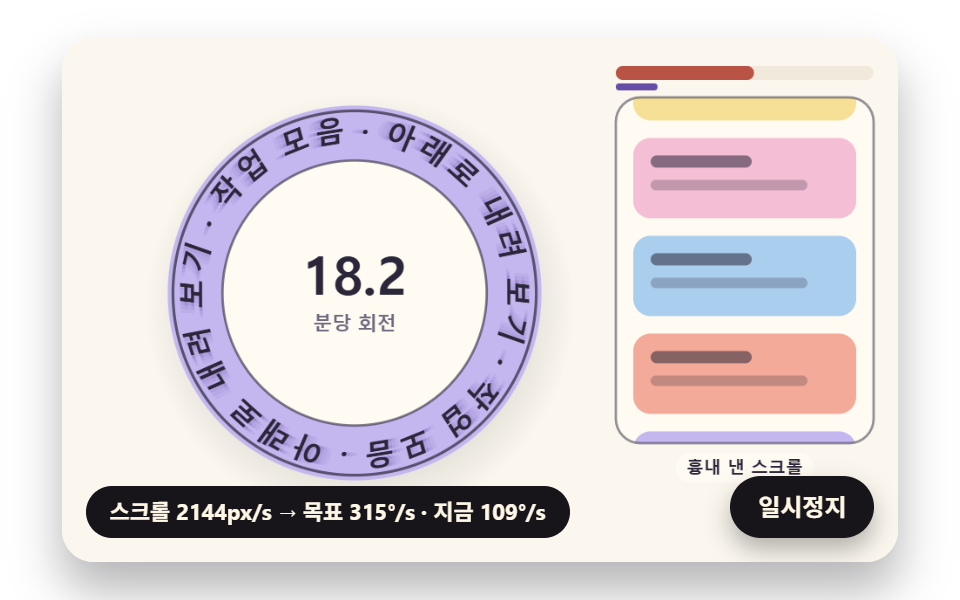
작업 모음 페이지 구석에서 스크롤을 빨리 내릴수록 빨리 도는 배지로, 목표 각속도는 쉴 때 0.35rad/s 에 스크롤 속도 × 0.0024 를 더한 값이고 지금 각속도는 1/60초마다 차이의 8%(SPIN_EASE 0.08)씩 따라간다. 시연 일정표의 첫 튕김 0.1초 뒤 목표의 47%, 0.25초 뒤 96% 까지 붙고, 최고 306.4°/s 로 돌 때 글자가 18.4° 기울며 잔상 3장이 뒤에 남는다. 휠은 { passive: true } 로만 들어 페이지 스크롤을 막지 않고, 스크롤 속도는 e^(−2.6t) 로 줄어 쉴 때 20.1°/s 로 돌아온다.
<main class="stage">
<div class="cf is-demo" id="cf">
  <canvas class="cf__canvas" data-role="canvas" width="480" height="300" aria-hidden="true"></canvas>
  <p class="cf__sr">아래로 내려 보기 · 작업 모음</p>
  <p class="cf__status" data-role="status" aria-live="off">스크롤을 기다리는 중</p>
  <button class="cf__pause" data-role="pause" type="button" aria-pressed="false">일시정지</button>
</div>
</main>
@use "../../../../site/static/demo-tokens" as *;
@include stage($stage-paper);
.cf {
position: relative;
width: min(92vw, calc(160vh - 12.8vw));
aspect-ratio: 480 / 300;
margin: 0 auto;
border-radius: $r-card;
overflow: hidden;
box-shadow: $shadow-raised;
background: $subject-cream;
}
.cf__canvas {
position: absolute;
inset: 0;
display: block;
width: 100%;
height: 100%;
}
.cf__pause {
position: absolute;
right: $sp-3;
bottom: $sp-3;
padding: $sp-1 $sp-3;
border: 2px solid $subject-ink;
border-radius: $r-pill;
background: $subject-ink;
color: $subject-cream;
font-family: inherit;
font-weight: 700;
font-size: 12px;
line-height: 1.6;
cursor: pointer;
box-shadow: $shadow-press;
transition: transform $dur-quick $ease-spring;
}
// 눌린 상태(멈춤) — 바탕과 글자색을 뒤집어 aria-pressed 가 눈에도 보이게
.cf__pause[aria-pressed="true"] {
background: $subject-cream;
color: $subject-ink;
}
.cf__pause:hover {
transform: translateY(-2px);
}
.cf__pause:active {
transform: translateY(1px);
}
.cf__pause:focus-visible {
outline: 3px solid $subject-ink;
outline-offset: 3px;
}
// 상태 줄 — 지금 고리에서 무슨 계산이 일어났는지 글자로. 시연 중에는 aria-live off, 사람이 처음 손대면 polite
.cf__status {
position: absolute;
left: $sp-3;
bottom: $sp-3;
max-width: calc(100% - 120px);
margin: 0;
padding: $sp-1 $sp-3;
border-radius: $r-pill;
background: $subject-ink;
color: $subject-cream;
font-weight: 700;
font-size: 11px;
line-height: 1.6;
white-space: nowrap;
overflow: hidden;
text-overflow: ellipsis;
pointer-events: none;
}
// 낭독용 원문 한 줄 — 화면에서는 숨기고 낭독기에만 읽힌다(원 위 글자는 캔버스라 aria-hidden)
.cf__sr {
position: absolute;
width: 1px;
height: 1px;
margin: -1px;
padding: 0;
overflow: hidden;
clip-path: inset(50%);
white-space: nowrap;
border: 0;
}
@media (max-width: 340px) {
.cf__pause,
.cf__status { font-size: 10px; padding: $sp-1 $sp-2; }
}
// 동작 줄이기 — 장면은 스크립트가 최종 배치 한 장으로 멈춘다. 버튼도 떠오르지 않게
@media (prefers-reduced-motion: reduce) {
.cf__pause { transition: none !important; }
.cf__pause:hover,
.cf__pause:active { transform: none !important; }
}html, body {
margin: 0;
overflow: hidden;
}
.stage {
box-sizing: border-box;
min-height: 100vh;
display: grid;
place-items: center;
margin: 0;
background: #ffffff;
font-family: -apple-system, "Segoe UI", "Noto Sans KR", sans-serif;
padding: clamp(8px, 4vw, 24px);
}
.cf {
position: relative;
width: min(92vw, 160vh - 12.8vw);
aspect-ratio: 480/300;
margin: 0 auto;
border-radius: 16px;
overflow: hidden;
box-shadow: 0 14px 24px rgba(23, 20, 26, 0.32);
background: #fff7e6;
}
.cf__canvas {
position: absolute;
inset: 0;
display: block;
width: 100%;
height: 100%;
}
.cf__pause {
position: absolute;
right: 12px;
bottom: 12px;
padding: 4px 12px;
border: 2px solid #17141a;
border-radius: 999px;
background: #17141a;
color: #fff7e6;
font-family: inherit;
font-weight: 700;
font-size: 12px;
line-height: 1.6;
cursor: pointer;
box-shadow: 0 6px 12px rgba(23, 20, 26, 0.32);
transition: transform 220ms cubic-bezier(0.2, 0.8, 0.2, 1);
}
.cf__pause[aria-pressed=true] {
background: #fff7e6;
color: #17141a;
}
.cf__pause:hover {
transform: translateY(-2px);
}
.cf__pause:active {
transform: translateY(1px);
}
.cf__pause:focus-visible {
outline: 3px solid #17141a;
outline-offset: 3px;
}
.cf__status {
position: absolute;
left: 12px;
bottom: 12px;
max-width: calc(100% - 120px);
margin: 0;
padding: 4px 12px;
border-radius: 999px;
background: #17141a;
color: #fff7e6;
font-weight: 700;
font-size: 11px;
line-height: 1.6;
white-space: nowrap;
overflow: hidden;
text-overflow: ellipsis;
pointer-events: none;
}
.cf__sr {
position: absolute;
width: 1px;
height: 1px;
margin: -1px;
padding: 0;
overflow: hidden;
clip-path: inset(50%);
white-space: nowrap;
border: 0;
}
@media (max-width: 340px) {
.cf__pause,
.cf__status {
font-size: 10px;
padding: 4px 8px;
}
}
@media (prefers-reduced-motion: reduce) {
.cf__pause {
transition: none !important;
}
.cf__pause:hover,
.cf__pause:active {
transform: none !important;
}
}(function () {
const root = document.getElementById("cf");
if (!root) return;
// 판 좌표 — 캔버스 안은 늘 480×300. 화면에 보이는 크기와 상관없이 계산은 이 좌표로 한다
const W = 480;
const H = 300;
const TAU = Math.PI * 2;
function clamp(v, lo, hi) { return v < lo ? lo : (v > hi ? hi : v); }
function lerp(a, b, k) { return a + (b - a) * k; }
function smooth(x) { const c = clamp(x, 0, 1); return c * c * (3 - 2 * c); }
// 따라가기 비율 — 1 − e^(−rate·dt). 프레임 시간이 달라도 1초에 같은 만큼 다가간다
function follow(rate, dt) { return 1 - Math.exp(-rate * dt); }
// 1/60초마다 ease 만큼 다가가는 비율을 dt 초로 환산 — 1 − (1 − ease)^(dt × 60)
function easeStep(ease, dt) { return 1 - Math.pow(1 - ease, dt * 60); }
// 시드 고정 난수 — 같은 시드면 같은 시연이 다시 나온다 (32비트 정수 섞기)
function makeRng(seed) {
let s = seed >>> 0;
return function () {
s = (s + 0x6d2b79f5) >>> 0;
let t = s;
t = Math.imul(t ^ (t >>> 15), t | 1);
t ^= t + Math.imul(t ^ (t >>> 7), t | 61);
return ((t ^ (t >>> 14)) >>> 0) / 4294967296;
};
}
function deg(rad) { return rad * 180 / Math.PI; }
function makeSpring(x) { return { x: x, v: 0, to: x }; }
const SPRING_SUBSTEP = 1 / 240;
function stepSpring(s, stiffness, damping, dt) {
let left = dt;
while (left > 1e-9) {
const h = Math.min(SPRING_SUBSTEP, left);
s.v += (stiffness * (s.to - s.x) - damping * s.v) * h;
s.x += s.v * h;
left -= h;
}
}
function snapSpring(s, x) { s.x = x; s.v = 0; s.to = x; }
function roughWidth(ch, px, weight) {
const wide = ch.charCodeAt(0) >= 0x1100;
const base = ch === ' ' ? 0.28 : (wide ? 0.95 : 0.6);
return px * base * (weight >= 700 ? 1.06 : 1);
}
// 글꼴이 다 온 뒤 잰 폭
let glyphWidth = roughWidth;
// 대체 글꼴로 잰 폭 — 09 가 「글꼴이 오기 전에 잰 폭」 을 흉내 낼 때만 쓴다
let fallbackWidth = roughWidth;
// 글자 나누기 — 한 글자씩(서로게이트 쌍도 한 글자)
function glyphsOf(s) { return Array.from(s); }
function widthsOf(gs, px, weight, m) {
return gs.map(function (g) { return m(g, px, weight); });
}
function sum(xs) { let s = 0; for (const x of xs) {
s += x;
} return s; }
function arcTotal(ws, tracking) { return sum(ws) + tracking * Math.max(0, ws.length - 1); }
// 글꼴 축소 몫 — 줄이지 않아도 들어가면 1
function arcScale(ws, px, tracking, r, inner, span) {
const total = arcTotal(ws, tracking);
const need = total / Math.max(1, r - inner * px);
return need > span ? span * r / (total + span * inner * px) : 1;
}
function fitArc(ws, px, tracking, r, inner, span, center, dir, allowShrink) {
return placeArc(ws, px, tracking, r, inner, allowShrink ? arcScale(ws, px, tracking, r, inner, span) : 1, center, dir);
}
// 정한 축소 몫으로 놓기 — 위·아래 반원이 같은 글꼴 크기를 쓰도록 둘 중 작은 몫을 넘겨받는다
function placeArc(ws, px, tracking, r, inner, scale, center, dir) {
const n = ws.length;
const total = arcTotal(ws, tracking);
const need = total / Math.max(1, r - inner * px);
const layR = Math.max(1, r - inner * px * scale);
const theta = [];
let acc = 0;
for (let i = 0; i < n; i += 1) {
theta.push(center + dir * (acc + ws[i] / 2 - total / 2) * scale / layR);
acc += ws[i] + tracking;
}
return { theta: theta, px: px * scale, scale: scale, total: total, layR: layR, need: need };
}
// 같은 각도로 놓기(비교판) — 폭은 보지 않고 전체 각을 글자 수로 똑같이 나눈다
function equalArc(n, spanUsed, center, dir) {
const out = [];
const step = spanUsed / Math.max(1, n);
for (let i = 0; i < n; i += 1) {
out.push(center + dir * (i + 0.5 - n / 2) * step);
}
return out;
}
// 이웃 두 글자가 글자 아래 모서리(반지름 r − 0.5·글자 높이)에서 겹친 길이(px). 양수면 부딪힌다.
// 각 간격 × 아래 모서리 반지름 − 두 글자 반폭 합 이 음수인 만큼이 겹침
const GLYPH_DROP = 0.5;
function innerOverlaps(theta, ws, scale, r, px) {
const rin = r - GLYPH_DROP * px;
const out = [];
for (let i = 0; i + 1 < theta.length; i += 1) {
const room = Math.abs(theta[i + 1] - theta[i]) * rin;
out.push((ws[i] + ws[i + 1]) / 2 * scale - room);
}
return out;
}
function arcTable(rf, drf, th0, th1, step) {
const th = [th0];
const s = [0];
let acc = 0;
const n = Math.max(1, Math.ceil((th1 - th0) / step));
const h = (th1 - th0) / n;
for (let i = 0; i < n; i += 1) {
// 걸음 가운데의 값으로 더한다 — 걸음 끝 값보다 같은 걸음에서 오차가 작다
const m = th0 + (i + 0.5) * h;
const r = rf(m);
const dr = drf(m);
acc += Math.sqrt(r * r + dr * dr) * h;
th.push(th0 + (i + 1) * h);
s.push(acc);
}
return { th: th, s: s };
}
function thetaAt(t, s) {
const last = t.s.length - 1;
if (s <= 0) {
return t.th[0];
}
if (s >= t.s[last]) {
return t.th[last];
}
let lo = 0;
let hi = last;
while (hi - lo > 1) {
const mid = (lo + hi) >> 1;
if (t.s[mid] <= s) {
lo = mid;
}
else {
hi = mid;
}
}
const k = (s - t.s[lo]) / Math.max(1e-9, t.s[hi] - t.s[lo]);
return lerp(t.th[lo], t.th[hi], k);
}
function arcLength(t) { return t.s[t.s.length - 1]; }
// 극좌표 곡선의 접선 각(화면 좌표, y 아래) — 점 (r cosθ, r sinθ) 을 θ 로 미분한 방향
function tangentAngle(r, dr, th) {
return Math.atan2(dr * Math.sin(th) + r * Math.cos(th), dr * Math.cos(th) - r * Math.sin(th));
}
// 장면 시계(초)와 상태 줄 글자 — 장면 계산이 고치고, 화면 쪽이 읽어 그린다
let sceneT = 0;
let simStatus = '';
// 파스텔 팔레트 — 크림 바탕 위 라벤더·민트·버터·산호. 글자는 진한 쪽으로 명도 차를 둔다
const PAPER = [251, 247, 238];
const PAPER_DIM = [241, 234, 220];
const INK = [44, 38, 58];
const INK_SOFT = [112, 104, 126];
const CREAM = [255, 251, 242];
const LAVENDER = [196, 182, 238];
const MINT = [164, 218, 196];
const BUTTER = [246, 224, 150];
const CORAL = [244, 170, 152];
const SKY = [170, 206, 238];
const PINK = [244, 190, 212];
const MINT_DEEP = [36, 116, 90];
const CORAL_DEEP = [178, 66, 52];
const VIOLET_DEEP = [84, 58, 160];
const BROWN_DEEP = [104, 62, 40];
function mix(a, b, k) { return [lerp(a[0], b[0], k), lerp(a[1], b[1], k), lerp(a[2], b[2], k)]; }
function rgba(c, a) {
return 'rgba(' + Math.round(clamp(c[0], 0, 255)) + ',' + Math.round(clamp(c[1], 0, 255)) + ',' + Math.round(clamp(c[2], 0, 255)) + ',' + clamp(a, 0, 1).toFixed(3) + ')';
}
const canvasEl = root.querySelector('[data-role="canvas"]');
const pauseEl = root.querySelector('[data-role="pause"]');
const statusEl = root.querySelector('[data-role="status"]');
const ctxRaw = canvasEl ? canvasEl.getContext('2d') : null;
if (!canvasEl || !ctxRaw || !pauseEl) {
return;
}
const cv = canvasEl;
const ctx = ctxRaw;
const pauseBtn = pauseEl;
// 외부 웹폰트는 부르지 않는다 — 기기에 있는 글꼴 목록만
const FONT_STACK = 'system-ui, -apple-system, "Segoe UI", "Noto Sans KR", sans-serif';
// 대체 글꼴 — 09 가 「글꼴이 오기 전에 잰 폭」 을 흉내 낼 때만 쓴다
const FALLBACK_STACK = 'monospace';
// 잰 폭은 100px 기준으로 한 번만 재 두고 크기에 비례해 쓴다. 글꼴이 새로 오면 통째로 비운다
const widthCache = {};
function measureWith(stack) {
return function (ch, px, weight) {
const key = stack + '|' + weight + '|' + ch;
let w = widthCache[key];
if (w === undefined) {
ctx.font = weight + ' 100px ' + stack;
w = ctx.measureText(ch).width;
widthCache[key] = w;
}
return w * px / 100;
};
}
function remeasure() {
for (const k of Object.keys(widthCache)) {
delete widthCache[k];
}
glyphWidth = measureWith(FONT_STACK);
fallbackWidth = measureWith(FALLBACK_STACK);
relayout();
}
function fitCanvas() {
// 배율은 2 에서 자른다 — 배율 3 기기에서 화소가 2.25배로 늘어 프레임마다 일이 그만큼 커지지 않게
const dpr = Math.min(window.devicePixelRatio || 1, 2);
cv.width = Math.round(W * dpr);
cv.height = Math.round(H * dpr);
ctx.setTransform(dpr, 0, 0, dpr, 0, 0);
}
function clearStage(c) {
ctx.fillStyle = rgba(c, 1);
ctx.fillRect(0, 0, W, H);
}
function setFont(px, weight, stack) {
ctx.font = weight + ' ' + px.toFixed(2) + 'px ' + stack;
}
function label(s, x, y, c, a, px, weight, align) {
setFont(px, weight, FONT_STACK);
ctx.textAlign = align;
ctx.textBaseline = 'middle';
ctx.fillStyle = rgba(c, a);
ctx.fillText(s, x, y);
}
// 글자 하나를 (x, y) 가운데에 rot 라디안 돌려 찍는다. sx·sy 는 가로·세로 배율(음수 sx 는 거울)
function glyphAt(ch, x, y, rot, px, weight, c, a, sx, sy) {
if (a <= 0.01 || px < 0.5) {
return;
}
ctx.save();
ctx.translate(x, y);
ctx.rotate(rot);
ctx.scale(sx, sy);
setFont(px, weight, FONT_STACK);
ctx.textAlign = 'center';
ctx.textBaseline = 'middle';
ctx.fillStyle = rgba(c, a);
ctx.fillText(ch, 0, 0);
ctx.restore();
}
// 기울인 글자 — 글자 자기 좌표에서 가로로 skew(라디안)만큼 민다(윗부분이 앞으로)
function glyphLean(ch, x, y, rot, px, weight, c, a, skew) {
if (a <= 0.01 || px < 0.5) {
return;
}
ctx.save();
ctx.translate(x, y);
ctx.rotate(rot);
ctx.transform(1, 0, -Math.tan(skew), 1, 0, 0);
setFont(px, weight, FONT_STACK);
ctx.textAlign = 'center';
ctx.textBaseline = 'middle';
ctx.fillStyle = rgba(c, a);
ctx.fillText(ch, 0, 0);
ctx.restore();
}
// 원 위 글자 — 중심 (cx, cy), 반지름 r, 각 th. turn 은 글자를 원에 맞춰 세우는 각(위 반원 +π/2, 아래 반원 −π/2)
function ringGlyph(ch, cx, cy, r, th, turn, px, weight, c, a) {
glyphAt(ch, cx + r * Math.cos(th), cy + r * Math.sin(th), th + turn, px, weight, c, a, 1, 1);
}
function roundRectPath(x, y, w, h, r) {
const rr = Math.max(0, Math.min(r, w / 2, h / 2));
ctx.beginPath();
ctx.moveTo(x + rr, y);
ctx.lineTo(x + w - rr, y);
ctx.arcTo(x + w, y, x + w, y + rr, rr);
ctx.lineTo(x + w, y + h - rr);
ctx.arcTo(x + w, y + h, x + w - rr, y + h, rr);
ctx.lineTo(x + rr, y + h);
ctx.arcTo(x, y + h, x, y + h - rr, rr);
ctx.lineTo(x, y + rr);
ctx.arcTo(x, y, x + rr, y, rr);
ctx.closePath();
}
function fillRound(x, y, w, h, r, c, a) {
if (w <= 0.2 || h <= 0.2 || a <= 0) {
return;
}
roundRectPath(x, y, w, h, r);
ctx.fillStyle = rgba(c, a);
ctx.fill();
}
function disc(x, y, r, c, a) {
if (r <= 0.2 || a <= 0) {
return;
}
ctx.beginPath();
ctx.arc(x, y, r, 0, TAU);
ctx.fillStyle = rgba(c, a);
ctx.fill();
}
function ring(x, y, r, width, c, a) {
if (r <= 0.2 || a <= 0) {
return;
}
ctx.beginPath();
ctx.arc(x, y, r, 0, TAU);
ctx.lineWidth = width;
ctx.strokeStyle = rgba(c, a);
ctx.stroke();
}
// 그림자 — 떠 있는 높이 lift(0~1)가 클수록 멀리·흐리게·넓게 떨어진다
function softShadow(x, y, r, lift) {
const off = 4 + 14 * lift;
const g = ctx.createRadialGradient(x + off * 0.4, y + off, r * 0.6, x + off * 0.4, y + off, r * (1.05 + 0.25 * lift));
g.addColorStop(0, rgba(INK, 0.26 - 0.14 * lift));
g.addColorStop(1, rgba(INK, 0));
ctx.fillStyle = g;
ctx.beginPath();
ctx.arc(x + off * 0.4, y + off, r * (1.05 + 0.25 * lift), 0, TAU);
ctx.fill();
}
// 작은 알약 이름표
function pill(s, x, y, bg, fg, a, px) {
setFont(px, 700, FONT_STACK);
const w = ctx.measureText(s).width + px * 1.2;
fillRound(x - w / 2, y - px * 0.85, w, px * 1.7, px * 0.85, bg, a);
label(s, x, y + 0.5, fg, a, px, 700, 'center');
}
// 상태 줄 — 바뀔 때만 글자를 고친다
let shownStatus = '';
function pushStatus() {
if (!statusEl || simStatus === shownStatus) {
return;
}
shownStatus = simStatus;
statusEl.textContent = simStatus;
}
// 02 — 스크롤 속도만큼 빨라지는 회전 배지. 무대 안에서 흉내 낸 스크롤 속도 v 를 목표 각속도 ω* = IDLE_SPIN + SPIN_GAIN·v 로 바꾸고,
// 지금 각속도 ω 가 1/60초마다 남은 차이의 SPIN_EASE 만큼 따라붙는다. 스크롤이 멎으면 v 가 마찰로 줄어 ω 도 관성으로 잦아든다.
// 페이지 스크롤은 가로채지 않는다 — 시연은 시드 일정표, 사람 입력은 무대 위 휠(passive)만 더한다
const RING_TEXT = '아래로 내려 보기 · 작업 모음 · ';
const RING_PX = 17;
const RING_WEIGHT = 800;
const RING_R = 92;
const INNER_FIT = 0.5;
const IDLE_SPIN = 0.35;
// 스크롤 1px/s 가 보태는 각속도(rad/s)
const SPIN_GAIN = 0.0024;
const SPIN_EASE = 0.08;
// 튕긴 스크롤 속도가 1초에 줄어드는 몫 — v(t) = v0 · e^(−SCROLL_FRICTION·t)
const SCROLL_FRICTION = 2.6;
// 글자 기울기 — 각속도 1rad/s 마다 이만큼(라디안) 앞으로 숙인다, 상한 LEAN_MAX
const LEAN_PER_SPIN = 0.06;
const LEAN_MAX = 0.42;
const WHEEL_GAIN = 9;
// 시연 일정표 — [시각(초), 튕긴 속도(px/s)]. 시드 난수로 속도만 조금 흔든다
const FLICK_PLAN = [[0.25, 2600], [0.9, 1500], [1.4, 3200], [2.9, 1100]];
const FLICK_SEED = 485;
const LOOP_S = 5;
const STATUS_SPIN = '스크롤 {v}px/s → 목표 {t}°/s · 지금 {w}°/s';
const ringGlyphs02 = glyphsOf(RING_TEXT);
let ringWidths02 = [];
let repeat02 = 1;
let flicks02 = [];
let flickNext02 = 0;
let scrollV02 = 0;
let scrollY02 = 0;
let spin02 = IDLE_SPIN;
let angle02 = 0;
function relayout() {
ringWidths02 = widthsOf(ringGlyphs02, RING_PX, RING_WEIGHT, glyphWidth);
// 둘레를 문구 길이로 나눈 몫만큼 되풀이 — 남는 길이는 글자 사이에 고르게 나눈다(아래 ringAngles02)
const layR = RING_R - INNER_FIT * RING_PX;
repeat02 = Math.max(1, Math.floor(TAU * layR / sum(ringWidths02)));
}
// 되풀이한 글자 i 의 각 — 폭 누적을 둘레에 정확히 닫히게 늘린다
function ringAngles02() {
const n = ringGlyphs02.length;
const total = sum(ringWidths02) * repeat02;
const out = [];
let acc = 0;
for (let k = 0; k < n * repeat02; k += 1) {
const w = ringWidths02[k % n];
out.push(-Math.PI / 2 + angle02 + (acc + w / 2) / total * TAU);
acc += w;
}
return out;
}
function plan02() {
const rng = makeRng(FLICK_SEED);
return FLICK_PLAN.map(function (f) { return [f[0], f[1] * (0.85 + 0.3 * rng())]; });
}
function reset() {
flicks02 = plan02();
flickNext02 = 0;
scrollV02 = 0;
scrollY02 = 0;
spin02 = IDLE_SPIN;
angle02 = 0;
}
    function flick02(v0) { scrollV02 += v0; }
    function spinTarget02() { return IDLE_SPIN + SPIN_GAIN * scrollV02; }
    function lean02() { return clamp(spin02 * LEAN_PER_SPIN, -LEAN_MAX, LEAN_MAX); }
    function statusFor02() {
        simStatus = STATUS_SPIN.replace('{v}', String(Math.round(scrollV02))).replace('{t}', String(Math.round(deg(spinTarget02())))).replace('{w}', String(Math.round(deg(spin02))));
    }
    function update(dt) {
        while (flickNext02 < flicks02.length && sceneT >= flicks02[flickNext02][0]) {
            flick02(flicks02[flickNext02][1]);
            flickNext02 += 1;
        }
        scrollV02 *= Math.exp(-SCROLL_FRICTION * dt);
        if (Math.abs(scrollV02) < 1) {
            scrollV02 = 0;
        }
        scrollY02 += scrollV02 * dt;
        spin02 += (spinTarget02() - spin02) * easeStep(SPIN_EASE, dt);
        angle02 += spin02 * dt;
        statusFor02();
    }
function restPose() {
scrollV02 = 0;
spin02 = IDLE_SPIN;
angle02 = 0;
statusFor02();
}
// 02 화면 — 왼쪽 회전 배지(가운데 = 지금 분당 회전수), 오른쪽 = 흉내 낸 스크롤로 올라가는 작업 목록과 속도 막대.
// 빨리 돌수록 글자가 기울고 지나온 자리에 잔상이 남는다(잔상 간격 = 각속도 × 12ms)
const S_CX = 168;
const S_CY = 146;
const LIST_X = 318;
const LIST_W = 148;
const CARD_H = 46;
const CARD_GAP = 10;
const CARD_COLORS = [LAVENDER, MINT, BUTTER, PINK, SKY, CORAL];
const LABEL_RPM = '분당 회전';
const LABEL_SCROLL = '흉내 낸 스크롤';
function bindInput(signal) {
// 무대 위 휠 — passive 라 페이지 스크롤을 막지 않는다. 휠 한 칸이 그만큼 튕긴 스크롤 속도가 된다
cv.addEventListener('wheel', function (e) {
wake();
if (still) {
angle02 += e.deltaY * 0.002;
draw();
return;
}
flick02(e.deltaY * WHEEL_GAIN);
}, { passive: true, signal: signal });
}
function draw() {
clearStage(PAPER);
const lean = lean02();
const lift = clamp(spin02 / 6, 0, 1);
softShadow(S_CX, S_CY, RING_R + RING_PX, lift);
disc(S_CX, S_CY, RING_R + RING_PX * 0.9, LAVENDER, 1);
ring(S_CX, S_CY, RING_R + RING_PX * 0.9 - 3, 1.6, INK, 0.7);
disc(S_CX, S_CY, RING_R - RING_PX * 0.95, CREAM, 1);
ring(S_CX, S_CY, RING_R - RING_PX * 0.95, 1.4, INK, 0.6);
const th = ringAngles02();
const n = ringGlyphs02.length;
// 잔상 — 지나온 각에 흐린 사본 셋
for (let g = 3; g >= 0; g -= 1) {
const back = g * spin02 * 0.012;
const a = g === 0 ? 1 : clamp(spin02 / 8, 0, 0.5) * (1 - g / 4);
if (a <= 0.02) {
continue;
}
th.forEach(function (t, k) {
const tt = t - back;
glyphLean(ringGlyphs02[k % n], S_CX + RING_R * Math.cos(tt), S_CY + RING_R * Math.sin(tt), tt + Math.PI / 2, RING_PX, RING_WEIGHT, g === 0 ? INK : VIOLET_DEEP, a, lean);
});
}
const rpm = spin02 / TAU * 60;
label(rpm.toFixed(1), S_CX, S_CY - 8, INK, 1, 30, 800, 'center');
label(LABEL_RPM, S_CX, S_CY + 18, INK_SOFT, 1, 11, 700, 'center');
// 작업 목록 — 흉내 낸 스크롤만큼 위로 올라간다(한 장 높이 단위로 되풀이)
ctx.save();
roundRectPath(LIST_X, 34, LIST_W, 198, 14);
ctx.fillStyle = rgba(CREAM, 1);
ctx.fill();
ctx.clip();
const step = CARD_H + CARD_GAP;
const offset = scrollY02 % (step * CARD_COLORS.length);
for (let k = -1; k < 6; k += 1) {
const y = 42 + k * step - (offset % step);
const idx = (Math.floor(offset / step) + k + CARD_COLORS.length * 4) % CARD_COLORS.length;
fillRound(LIST_X + 10, y, LIST_W - 20, CARD_H, 10, CARD_COLORS[idx], 1);
fillRound(LIST_X + 20, y + 10, 58, 7, 3.5, INK, 0.55);
fillRound(LIST_X + 20, y + 24, 90, 6, 3, INK, 0.25);
}
ctx.restore();
roundRectPath(LIST_X, 34, LIST_W, 198, 14);
ctx.lineWidth = 1.4;
ctx.strokeStyle = rgba(INK, 0.5);
ctx.stroke();
// 속도 막대 — 지금 스크롤 속도(위 굵은 막대, 산호)와 각속도가 따라간 정도(아래 가는 막대, 보라)
const vk = clamp(scrollV02 / 4000, 0, 1);
const wk = clamp((spin02 - IDLE_SPIN) / (SPIN_GAIN * 4000), 0, 1);
fillRound(LIST_X, 16, LIST_W, 8, 4, PAPER_DIM, 1);
fillRound(LIST_X, 16, LIST_W * vk, 8, 4, CORAL_DEEP, 0.9);
fillRound(LIST_X, 26, LIST_W * wk, 4, 2, VIOLET_DEEP, 0.9);
pill(LABEL_SCROLL, LIST_X + LIST_W / 2, 246, CREAM, INK, 1, 10);
}
let paused = false;
const reduceQuery = window.matchMedia('(prefers-reduced-motion: reduce)');
// 페이지를 연 채 동작 줄이기 설정을 바꿔도 change 리스너가 이 값을 다시 읽는다
let still = reduceQuery.matches;
// 자동 시연 중인가 — 사람이 처음 손대면 시연 표시를 떼고 상태 줄을 polite 로 켠다
let demo = root.classList.contains('is-demo');
// 리스너는 한 묶음으로 달고 정리할 때 한 번에 뗀다
const off = new AbortController();
function wake() {
if (!demo) {
return;
}
demo = false;
root.classList.remove('is-demo');
if (statusEl) {
statusEl.setAttribute('aria-live', 'polite');
}
}
// 한 프레임에 넘기는 시간 상한(초) — 탭을 오래 숨겼다 돌아온 첫 프레임에도 50ms 까지만 계산에 넣는다
const DT_MAX = 0.05;
// 장면 시계를 dt 만큼 — 한 바퀴(LOOP_S)를 넘으면 처음 배치로 되돌려 다시 시연한다
function advance(dt) {
sceneT += dt;
if (sceneT >= LOOP_S) {
sceneT -= LOOP_S;
reset();
}
update(dt);
}
let rafId = 0;
let lastTs = -1;
function frame(ts) {
if (still || paused) {
rafId = 0;
return;
}
if (lastTs < 0) {
lastTs = ts;
}
const dt = Math.min((ts - lastTs) / 1000, DT_MAX);
lastTs = ts;
if (dt > 0) {
advance(dt);
}
draw();
pushStatus();
rafId = window.requestAnimationFrame(frame);
}
function startLoop() {
if (rafId) {
return;
}
// 시계 다시 맞추기 — 멈췄던 사이의 시간을 첫 프레임 dt 로 넘기지 않는다
lastTs = -1;
rafId = window.requestAnimationFrame(frame);
}
function stopLoop() {
if (rafId) {
window.cancelAnimationFrame(rafId);
rafId = 0;
}
}
// 동작 줄이기 — 루프를 돌리지 않고 시연이 끝난 최종 배치 한 장만 그린다
function showRest() {
stopLoop();
sceneT = 0;
reset();
restPose();
draw();
pushStatus();
}
function play() {
sceneT = 0;
reset();
draw();
pushStatus();
if (!paused) {
startLoop();
}
}
pauseBtn.addEventListener('click', function () {
paused = !paused;
pauseBtn.setAttribute('aria-pressed', paused ? 'true' : 'false');
wake();
if (paused) {
stopLoop();
}
else if (!still) {
startLoop();
}
}, { signal: off.signal });
// 탭이 숨으면 루프를 멈추고, 돌아오면 시계를 다시 맞춰 시작한다 — 숨은 동안의 몇 초가 한 프레임에 몰리지 않게
document.addEventListener('visibilitychange', function () {
if (document.hidden) {
stopLoop();
}
else if (!paused && !still && fontsReady) {
startLoop();
}
}, { signal: off.signal });
// 설정이 페이지를 연 채 바뀌면 — 켜지면 최종 배치로 멈추고, 꺼지면 시연을 처음부터
reduceQuery.addEventListener('change', function () {
still = reduceQuery.matches;
if (still) {
showRest();
}
else {
play();
}
}, { signal: off.signal });
window.addEventListener('resize', function () {
fitCanvas();
draw();
}, { signal: off.signal });
bindInput(off.signal);
fitCanvas();
// 글자 폭은 글꼴이 다 온 뒤에 잰다 — 그 전에 잰 폭은 대체 글꼴의 폭이라 글꼴이 바뀌는 순간 자리가 틀어진다.
// 나중에 다른 글꼴이 더 오면(loadingdone) 다시 잰다
let fontsReady = false;
document.fonts.addEventListener('loadingdone', function () {
if (!fontsReady) {
return;
}
remeasure();
draw();
}, { signal: off.signal });
document.fonts.ready.then(function () {
if (off.signal.aborted) {
return;
}
fontsReady = true;
remeasure();
if (still) {
showRest();
}
else {
play();
}
});
return function () {
stopLoop();
off.abort();
};
})();// ScrollSpinBadge - 같은 항목 vanilla 판 index.html 의 React 포트. 같은 계산을 useEffect 안에서 돌린다.
import { useEffect, useRef } from "react";
import styles from "./ScrollSpinBadge.module.scss";
const cx = (s: string): string => s.split(" ").map((n) => styles[n] ?? n).join(" ");
export default function ScrollSpinBadge() {
const rootRef = useRef<HTMLDivElement | null>(null);
useEffect(() => {
const rootEl = rootRef.current;
if (!rootEl) return;
const root: HTMLElement = rootEl;
type RGB = [number, number, number];
// 판 좌표 — 캔버스 안은 늘 480×300. 화면에 보이는 크기와 상관없이 계산은 이 좌표로 한다
const W = 480;
const H = 300;
const TAU = Math.PI * 2;
function clamp(v: number, lo: number, hi: number): number { return v < lo ? lo : (v > hi ? hi : v); }
function lerp(a: number, b: number, k: number): number { return a + (b - a) * k; }
function smooth(x: number): number { const c = clamp(x, 0, 1); return c * c * (3 - 2 * c); }
// 따라가기 비율 — 1 − e^(−rate·dt). 프레임 시간이 달라도 1초에 같은 만큼 다가간다
function follow(rate: number, dt: number): number { return 1 - Math.exp(-rate * dt); }
// 1/60초마다 ease 만큼 다가가는 비율을 dt 초로 환산 — 1 − (1 − ease)^(dt × 60)
function easeStep(ease: number, dt: number): number { return 1 - Math.pow(1 - ease, dt * 60); }
// 시드 고정 난수 — 같은 시드면 같은 시연이 다시 나온다 (32비트 정수 섞기)
function makeRng(seed: number): () => number {
let s = seed >>> 0;
return function (): number {
s = (s + 0x6d2b79f5) >>> 0;
let t = s;
t = Math.imul(t ^ (t >>> 15), t | 1);
t ^= t + Math.imul(t ^ (t >>> 7), t | 61);
return ((t ^ (t >>> 14)) >>> 0) / 4294967296;
};
}
function deg(rad: number): number { return rad * 180 / Math.PI; }
// ── 감쇠 스프링 ──────────────────────────────────────────────
// 가속 = 단단함 × (목표 − 위치) − 감쇠 × 속도. 속도를 먼저 고친 뒤 위치를 옮기는 적분을 1/240초 잔걸음으로 나눠 돌린다
type Spring = { x: number; v: number; to: number };
function makeSpring(x: number): Spring { return { x: x, v: 0, to: x }; }
const SPRING_SUBSTEP = 1 / 240;
function stepSpring(s: Spring, stiffness: number, damping: number, dt: number): void {
let left = dt;
while (left > 1e-9) {
const h = Math.min(SPRING_SUBSTEP, left);
s.v += (stiffness * (s.to - s.x) - damping * s.v) * h;
s.x += s.v * h;
left -= h;
}
}
function snapSpring(s: Spring, x: number): void { s.x = x; s.v = 0; s.to = x; }
// ── 글자 폭 ──────────────────────────────────────────────────
// 글자 하나의 가로 폭(px) — 글꼴 크기 px, 굵기 weight. 화면에서는 캔버스 measureText 로 잰 값으로 바뀐다(dom 쪽).
// 아래 대략 모형은 재기 전 자리 채움일 뿐 — 글자 폭은 반드시 글꼴이 다 온 뒤 다시 잰다
type Measure = (ch: string, px: number, weight: number) => number;
function roughWidth(ch: string, px: number, weight: number): number {
const wide = ch.charCodeAt(0) >= 0x1100;
const base = ch === ' ' ? 0.28 : (wide ? 0.95 : 0.6);
return px * base * (weight >= 700 ? 1.06 : 1);
}
// 글꼴이 다 온 뒤 잰 폭
let glyphWidth: Measure = roughWidth;
// 대체 글꼴로 잰 폭 — 09 가 「글꼴이 오기 전에 잰 폭」 을 흉내 낼 때만 쓴다
let fallbackWidth: Measure = roughWidth;
// 글자 나누기 — 한 글자씩(서로게이트 쌍도 한 글자)
function glyphsOf(s: string): string[] { return Array.from(s); }
function widthsOf(gs: string[], px: number, weight: number, m: Measure): number[] {
return gs.map(function (g: string): number { return m(g, px, weight); });
}
function sum(xs: number[]): number { let s = 0; for (const x of xs) { s += x; } return s; }
// ── 원 위에 글자 놓기 ────────────────────────────────────────
// 글자 i 의 각 = 가운데 각 + 방향 × (앞 글자 폭 합 + 자기 폭/2 − 전체/2) × 축소 / 놓는 반지름.
// 놓는 반지름은 글자 높이의 inner 몫만큼 안쪽 — 글자 아래 모서리(원 중심 쪽)에서 폭이 맞으면 바깥은 저절로 벌어진다.
// 전체 각이 span 을 넘으면 글꼴을 줄인다. 줄이면 글자 높이도 줄어 놓는 반지름이 커지므로
// 축소 = span·r / (전체 폭 + span·inner·px) 로 한 번에 푼다 (전체 폭 × 축소 = span × (r − inner·px·축소))
type ArcFit = { theta: number[]; px: number; scale: number; total: number; layR: number; need: number };
function arcTotal(ws: number[], tracking: number): number { return sum(ws) + tracking * Math.max(0, ws.length - 1); }
// 글꼴 축소 몫 — 줄이지 않아도 들어가면 1
function arcScale(ws: number[], px: number, tracking: number, r: number, inner: number, span: number): number {
const total = arcTotal(ws, tracking);
const need = total / Math.max(1, r - inner * px);
return need > span ? span * r / (total + span * inner * px) : 1;
}
function fitArc(ws: number[], px: number, tracking: number, r: number, inner: number, span: number, center: number, dir: number, allowShrink: boolean): ArcFit {
return placeArc(ws, px, tracking, r, inner, allowShrink ? arcScale(ws, px, tracking, r, inner, span) : 1, center, dir);
}
// 정한 축소 몫으로 놓기 — 위·아래 반원이 같은 글꼴 크기를 쓰도록 둘 중 작은 몫을 넘겨받는다
function placeArc(ws: number[], px: number, tracking: number, r: number, inner: number, scale: number, center: number, dir: number): ArcFit {
const n = ws.length;
const total = arcTotal(ws, tracking);
const need = total / Math.max(1, r - inner * px);
const layR = Math.max(1, r - inner * px * scale);
const theta: number[] = [];
let acc = 0;
for (let i = 0; i < n; i += 1) {
theta.push(center + dir * (acc + ws[i] / 2 - total / 2) * scale / layR);
acc += ws[i] + tracking;
}
return { theta: theta, px: px * scale, scale: scale, total: total, layR: layR, need: need };
}
// 같은 각도로 놓기(비교판) — 폭은 보지 않고 전체 각을 글자 수로 똑같이 나눈다
function equalArc(n: number, spanUsed: number, center: number, dir: number): number[] {
const out: number[] = [];
const step = spanUsed / Math.max(1, n);
for (let i = 0; i < n; i += 1) { out.push(center + dir * (i + 0.5 - n / 2) * step); }
return out;
}
// 이웃 두 글자가 글자 아래 모서리(반지름 r − 0.5·글자 높이)에서 겹친 길이(px). 양수면 부딪힌다.
// 각 간격 × 아래 모서리 반지름 − 두 글자 반폭 합 이 음수인 만큼이 겹침
const GLYPH_DROP = 0.5;
function innerOverlaps(theta: number[], ws: number[], scale: number, r: number, px: number): number[] {
const rin = r - GLYPH_DROP * px;
const out: number[] = [];
for (let i = 0; i + 1 < theta.length; i += 1) {
const room = Math.abs(theta[i + 1] - theta[i]) * rin;
out.push((ws[i] + ws[i + 1]) / 2 * scale - room);
}
return out;
}
// ── 곡선의 호 길이 표 ────────────────────────────────────────
// 극좌표 곡선 r(θ) 의 호 길이 ds = √(r² + (dr/dθ)²) dθ 를 θ 의 작은 걸음 step 으로 더해 누적표를 만든다.
// 거꾸로 「호 길이 s 인 자리의 θ」 는 표를 둘로 나눠 찾고 두 칸 사이를 곧게 잇는다
type ArcTable = { th: number[]; s: number[] };
function arcTable(rf: (th: number) => number, drf: (th: number) => number, th0: number, th1: number, step: number): ArcTable {
const th: number[] = [th0];
const s: number[] = [0];
let acc = 0;
const n = Math.max(1, Math.ceil((th1 - th0) / step));
const h = (th1 - th0) / n;
for (let i = 0; i < n; i += 1) {
// 걸음 가운데의 값으로 더한다 — 걸음 끝 값보다 같은 걸음에서 오차가 작다
const m = th0 + (i + 0.5) * h;
const r = rf(m);
const dr = drf(m);
acc += Math.sqrt(r * r + dr * dr) * h;
th.push(th0 + (i + 1) * h);
s.push(acc);
}
return { th: th, s: s };
}
function thetaAt(t: ArcTable, s: number): number {
const last = t.s.length - 1;
if (s <= 0) { return t.th[0]; }
if (s >= t.s[last]) { return t.th[last]; }
let lo = 0;
let hi = last;
while (hi - lo > 1) {
const mid = (lo + hi) >> 1;
if (t.s[mid] <= s) { lo = mid; } else { hi = mid; }
}
const k = (s - t.s[lo]) / Math.max(1e-9, t.s[hi] - t.s[lo]);
return lerp(t.th[lo], t.th[hi], k);
}
function arcLength(t: ArcTable): number { return t.s[t.s.length - 1]; }
// 극좌표 곡선의 접선 각(화면 좌표, y 아래) — 점 (r cosθ, r sinθ) 을 θ 로 미분한 방향
function tangentAngle(r: number, dr: number, th: number): number {
return Math.atan2(dr * Math.sin(th) + r * Math.cos(th), dr * Math.cos(th) - r * Math.sin(th));
}
// 장면 시계(초)와 상태 줄 글자 — 장면 계산이 고치고, 화면 쪽이 읽어 그린다
let sceneT = 0;
let simStatus = '';
// 파스텔 팔레트 — 크림 바탕 위 라벤더·민트·버터·산호. 글자는 진한 쪽으로 명도 차를 둔다
const PAPER: RGB = [251, 247, 238];
const PAPER_DIM: RGB = [241, 234, 220];
const INK: RGB = [44, 38, 58];
const INK_SOFT: RGB = [112, 104, 126];
const CREAM: RGB = [255, 251, 242];
const LAVENDER: RGB = [196, 182, 238];
const MINT: RGB = [164, 218, 196];
const BUTTER: RGB = [246, 224, 150];
const CORAL: RGB = [244, 170, 152];
const SKY: RGB = [170, 206, 238];
const PINK: RGB = [244, 190, 212];
const MINT_DEEP: RGB = [36, 116, 90];
const CORAL_DEEP: RGB = [178, 66, 52];
const VIOLET_DEEP: RGB = [84, 58, 160];
const BROWN_DEEP: RGB = [104, 62, 40];
function mix(a: RGB, b: RGB, k: number): RGB { return [lerp(a[0], b[0], k), lerp(a[1], b[1], k), lerp(a[2], b[2], k)]; }
function rgba(c: RGB, a: number): string {
return 'rgba(' + Math.round(clamp(c[0], 0, 255)) + ',' + Math.round(clamp(c[1], 0, 255)) + ',' + Math.round(clamp(c[2], 0, 255)) + ',' + clamp(a, 0, 1).toFixed(3) + ')';
}
const canvasEl = root.querySelector('[data-role="canvas"]') as HTMLCanvasElement | null;
const pauseEl = root.querySelector('[data-role="pause"]') as HTMLButtonElement | null;
const statusEl = root.querySelector('[data-role="status"]') as HTMLElement | null;
const ctxRaw = canvasEl ? canvasEl.getContext('2d') : null;
if (!canvasEl || !ctxRaw || !pauseEl) { return; }
const cv: HTMLCanvasElement = canvasEl;
const ctx: CanvasRenderingContext2D = ctxRaw;
const pauseBtn: HTMLButtonElement = pauseEl;
// 외부 웹폰트는 부르지 않는다 — 기기에 있는 글꼴 목록만
const FONT_STACK = 'system-ui, -apple-system, "Segoe UI", "Noto Sans KR", sans-serif';
// 대체 글꼴 — 09 가 「글꼴이 오기 전에 잰 폭」 을 흉내 낼 때만 쓴다
const FALLBACK_STACK = 'monospace';
// 잰 폭은 100px 기준으로 한 번만 재 두고 크기에 비례해 쓴다. 글꼴이 새로 오면 통째로 비운다
const widthCache: { [key: string]: number } = {};
function measureWith(stack: string): Measure {
return function (ch: string, px: number, weight: number): number {
const key = stack + '|' + weight + '|' + ch;
let w = widthCache[key];
if (w === undefined) {
ctx.font = weight + ' 100px ' + stack;
w = ctx.measureText(ch).width;
widthCache[key] = w;
}
return w * px / 100;
};
}
function remeasure(): void {
for (const k of Object.keys(widthCache)) { delete widthCache[k]; }
glyphWidth = measureWith(FONT_STACK);
fallbackWidth = measureWith(FALLBACK_STACK);
relayout();
}
function fitCanvas(): void {
// 배율은 2 에서 자른다 — 배율 3 기기에서 화소가 2.25배로 늘어 프레임마다 일이 그만큼 커지지 않게
const dpr = Math.min(window.devicePixelRatio || 1, 2);
cv.width = Math.round(W * dpr);
cv.height = Math.round(H * dpr);
ctx.setTransform(dpr, 0, 0, dpr, 0, 0);
}
function clearStage(c: RGB): void {
ctx.fillStyle = rgba(c, 1);
ctx.fillRect(0, 0, W, H);
}
function setFont(px: number, weight: number, stack: string): void {
ctx.font = weight + ' ' + px.toFixed(2) + 'px ' + stack;
}
function label(s: string, x: number, y: number, c: RGB, a: number, px: number, weight: number, align: CanvasTextAlign): void {
setFont(px, weight, FONT_STACK);
ctx.textAlign = align;
ctx.textBaseline = 'middle';
ctx.fillStyle = rgba(c, a);
ctx.fillText(s, x, y);
}
// 글자 하나를 (x, y) 가운데에 rot 라디안 돌려 찍는다. sx·sy 는 가로·세로 배율(음수 sx 는 거울)
function glyphAt(ch: string, x: number, y: number, rot: number, px: number, weight: number, c: RGB, a: number, sx: number, sy: number): void {
if (a <= 0.01 || px < 0.5) { return; }
ctx.save();
ctx.translate(x, y);
ctx.rotate(rot);
ctx.scale(sx, sy);
setFont(px, weight, FONT_STACK);
ctx.textAlign = 'center';
ctx.textBaseline = 'middle';
ctx.fillStyle = rgba(c, a);
ctx.fillText(ch, 0, 0);
ctx.restore();
}
// 기울인 글자 — 글자 자기 좌표에서 가로로 skew(라디안)만큼 민다(윗부분이 앞으로)
function glyphLean(ch: string, x: number, y: number, rot: number, px: number, weight: number, c: RGB, a: number, skew: number): void {
if (a <= 0.01 || px < 0.5) { return; }
ctx.save();
ctx.translate(x, y);
ctx.rotate(rot);
ctx.transform(1, 0, -Math.tan(skew), 1, 0, 0);
setFont(px, weight, FONT_STACK);
ctx.textAlign = 'center';
ctx.textBaseline = 'middle';
ctx.fillStyle = rgba(c, a);
ctx.fillText(ch, 0, 0);
ctx.restore();
}
// 원 위 글자 — 중심 (cx, cy), 반지름 r, 각 th. turn 은 글자를 원에 맞춰 세우는 각(위 반원 +π/2, 아래 반원 −π/2)
function ringGlyph(ch: string, cx: number, cy: number, r: number, th: number, turn: number, px: number, weight: number, c: RGB, a: number): void {
glyphAt(ch, cx + r * Math.cos(th), cy + r * Math.sin(th), th + turn, px, weight, c, a, 1, 1);
}
function roundRectPath(x: number, y: number, w: number, h: number, r: number): void {
const rr = Math.max(0, Math.min(r, w / 2, h / 2));
ctx.beginPath();
ctx.moveTo(x + rr, y);
ctx.lineTo(x + w - rr, y);
ctx.arcTo(x + w, y, x + w, y + rr, rr);
ctx.lineTo(x + w, y + h - rr);
ctx.arcTo(x + w, y + h, x + w - rr, y + h, rr);
ctx.lineTo(x + rr, y + h);
ctx.arcTo(x, y + h, x, y + h - rr, rr);
ctx.lineTo(x, y + rr);
ctx.arcTo(x, y, x + rr, y, rr);
ctx.closePath();
}
function fillRound(x: number, y: number, w: number, h: number, r: number, c: RGB, a: number): void {
if (w <= 0.2 || h <= 0.2 || a <= 0) { return; }
roundRectPath(x, y, w, h, r);
ctx.fillStyle = rgba(c, a);
ctx.fill();
}
function disc(x: number, y: number, r: number, c: RGB, a: number): void {
if (r <= 0.2 || a <= 0) { return; }
ctx.beginPath();
ctx.arc(x, y, r, 0, TAU);
ctx.fillStyle = rgba(c, a);
ctx.fill();
}
function ring(x: number, y: number, r: number, width: number, c: RGB, a: number): void {
if (r <= 0.2 || a <= 0) { return; }
ctx.beginPath();
ctx.arc(x, y, r, 0, TAU);
ctx.lineWidth = width;
ctx.strokeStyle = rgba(c, a);
ctx.stroke();
}
// 그림자 — 떠 있는 높이 lift(0~1)가 클수록 멀리·흐리게·넓게 떨어진다
function softShadow(x: number, y: number, r: number, lift: number): void {
const off = 4 + 14 * lift;
const g = ctx.createRadialGradient(x + off * 0.4, y + off, r * 0.6, x + off * 0.4, y + off, r * (1.05 + 0.25 * lift));
g.addColorStop(0, rgba(INK, 0.26 - 0.14 * lift));
g.addColorStop(1, rgba(INK, 0));
ctx.fillStyle = g;
ctx.beginPath();
ctx.arc(x + off * 0.4, y + off, r * (1.05 + 0.25 * lift), 0, TAU);
ctx.fill();
}
// 작은 알약 이름표
function pill(s: string, x: number, y: number, bg: RGB, fg: RGB, a: number, px: number): void {
setFont(px, 700, FONT_STACK);
const w = ctx.measureText(s).width + px * 1.2;
fillRound(x - w / 2, y - px * 0.85, w, px * 1.7, px * 0.85, bg, a);
label(s, x, y + 0.5, fg, a, px, 700, 'center');
}
// 상태 줄 — 바뀔 때만 글자를 고친다
let shownStatus = '';
function pushStatus(): void {
if (!statusEl || simStatus === shownStatus) { return; }
shownStatus = simStatus;
statusEl.textContent = simStatus;
}
// 02 — 스크롤 속도만큼 빨라지는 회전 배지. 무대 안에서 흉내 낸 스크롤 속도 v 를 목표 각속도 ω* = IDLE_SPIN + SPIN_GAIN·v 로 바꾸고,
// 지금 각속도 ω 가 1/60초마다 남은 차이의 SPIN_EASE 만큼 따라붙는다. 스크롤이 멎으면 v 가 마찰로 줄어 ω 도 관성으로 잦아든다.
// 페이지 스크롤은 가로채지 않는다 — 시연은 시드 일정표, 사람 입력은 무대 위 휠(passive)만 더한다
const RING_TEXT = '아래로 내려 보기 · 작업 모음 · ';
const RING_PX = 17;
const RING_WEIGHT = 800;
const RING_R = 92;
const INNER_FIT = 0.5;
const IDLE_SPIN = 0.35;
// 스크롤 1px/s 가 보태는 각속도(rad/s)
const SPIN_GAIN = 0.0024;
const SPIN_EASE = 0.08;
// 튕긴 스크롤 속도가 1초에 줄어드는 몫 — v(t) = v0 · e^(−SCROLL_FRICTION·t)
const SCROLL_FRICTION = 2.6;
// 글자 기울기 — 각속도 1rad/s 마다 이만큼(라디안) 앞으로 숙인다, 상한 LEAN_MAX
const LEAN_PER_SPIN = 0.06;
const LEAN_MAX = 0.42;
const WHEEL_GAIN = 9;
// 시연 일정표 — [시각(초), 튕긴 속도(px/s)]. 시드 난수로 속도만 조금 흔든다
const FLICK_PLAN: [number, number][] = [[0.25, 2600], [0.9, 1500], [1.4, 3200], [2.9, 1100]];
const FLICK_SEED = 485;
const LOOP_S = 5;
const STATUS_SPIN = '스크롤 {v}px/s → 목표 {t}°/s · 지금 {w}°/s';
const ringGlyphs02 = glyphsOf(RING_TEXT);
let ringWidths02: number[] = [];
let repeat02 = 1;
let flicks02: [number, number][] = [];
let flickNext02 = 0;
let scrollV02 = 0;
let scrollY02 = 0;
let spin02 = IDLE_SPIN;
let angle02 = 0;
function relayout(): void {
ringWidths02 = widthsOf(ringGlyphs02, RING_PX, RING_WEIGHT, glyphWidth);
// 둘레를 문구 길이로 나눈 몫만큼 되풀이 — 남는 길이는 글자 사이에 고르게 나눈다(아래 ringAngles02)
const layR = RING_R - INNER_FIT * RING_PX;
repeat02 = Math.max(1, Math.floor(TAU * layR / sum(ringWidths02)));
}
// 되풀이한 글자 i 의 각 — 폭 누적을 둘레에 정확히 닫히게 늘린다
function ringAngles02(): number[] {
const n = ringGlyphs02.length;
const total = sum(ringWidths02) * repeat02;
const out: number[] = [];
let acc = 0;
for (let k = 0; k < n * repeat02; k += 1) {
const w = ringWidths02[k % n];
out.push(-Math.PI / 2 + angle02 + (acc + w / 2) / total * TAU);
acc += w;
}
return out;
}
function plan02(): [number, number][] {
const rng = makeRng(FLICK_SEED);
return FLICK_PLAN.map(function (f: [number, number]): [number, number] { return [f[0], f[1] * (0.85 + 0.3 * rng())]; });
}
function reset(): void {
flicks02 = plan02();
flickNext02 = 0;
scrollV02 = 0;
scrollY02 = 0;
spin02 = IDLE_SPIN;
angle02 = 0;
}
function flick02(v0: number): void { scrollV02 += v0; }
function spinTarget02(): number { return IDLE_SPIN + SPIN_GAIN * scrollV02; }
function lean02(): number { return clamp(spin02 * LEAN_PER_SPIN, -LEAN_MAX, LEAN_MAX); }
function statusFor02(): void {
simStatus = STATUS_SPIN.replace('{v}', String(Math.round(scrollV02))).replace('{t}', String(Math.round(deg(spinTarget02())))).replace('{w}', String(Math.round(deg(spin02))));
}
function update(dt: number): void {
while (flickNext02 < flicks02.length && sceneT >= flicks02[flickNext02][0]) {
flick02(flicks02[flickNext02][1]);
flickNext02 += 1;
}
scrollV02 *= Math.exp(-SCROLL_FRICTION * dt);
if (Math.abs(scrollV02) < 1) { scrollV02 = 0; }
scrollY02 += scrollV02 * dt;
spin02 += (spinTarget02() - spin02) * easeStep(SPIN_EASE, dt);
angle02 += spin02 * dt;
statusFor02();
}
function restPose(): void {
scrollV02 = 0;
spin02 = IDLE_SPIN;
angle02 = 0;
statusFor02();
}
// 02 화면 — 왼쪽 회전 배지(가운데 = 지금 분당 회전수), 오른쪽 = 흉내 낸 스크롤로 올라가는 작업 목록과 속도 막대.
// 빨리 돌수록 글자가 기울고 지나온 자리에 잔상이 남는다(잔상 간격 = 각속도 × 12ms)
const S_CX = 168;
const S_CY = 146;
const LIST_X = 318;
const LIST_W = 148;
const CARD_H = 46;
const CARD_GAP = 10;
const CARD_COLORS: RGB[] = [LAVENDER, MINT, BUTTER, PINK, SKY, CORAL];
const LABEL_RPM = '분당 회전';
const LABEL_SCROLL = '흉내 낸 스크롤';
function bindInput(signal: AbortSignal): void {
// 무대 위 휠 — passive 라 페이지 스크롤을 막지 않는다. 휠 한 칸이 그만큼 튕긴 스크롤 속도가 된다
cv.addEventListener('wheel', function (e: WheelEvent): void {
wake();
if (still) {
angle02 += e.deltaY * 0.002;
draw();
return;
}
flick02(e.deltaY * WHEEL_GAIN);
}, { passive: true, signal: signal });
}
function draw(): void {
clearStage(PAPER);
const lean = lean02();
const lift = clamp(spin02 / 6, 0, 1);
softShadow(S_CX, S_CY, RING_R + RING_PX, lift);
disc(S_CX, S_CY, RING_R + RING_PX * 0.9, LAVENDER, 1);
ring(S_CX, S_CY, RING_R + RING_PX * 0.9 - 3, 1.6, INK, 0.7);
disc(S_CX, S_CY, RING_R - RING_PX * 0.95, CREAM, 1);
ring(S_CX, S_CY, RING_R - RING_PX * 0.95, 1.4, INK, 0.6);
const th = ringAngles02();
const n = ringGlyphs02.length;
// 잔상 — 지나온 각에 흐린 사본 셋
for (let g = 3; g >= 0; g -= 1) {
const back = g * spin02 * 0.012;
const a = g === 0 ? 1 : clamp(spin02 / 8, 0, 0.5) * (1 - g / 4);
if (a <= 0.02) { continue; }
th.forEach(function (t: number, k: number): void {
const tt = t - back;
glyphLean(ringGlyphs02[k % n], S_CX + RING_R * Math.cos(tt), S_CY + RING_R * Math.sin(tt), tt + Math.PI / 2, RING_PX, RING_WEIGHT, g === 0 ? INK : VIOLET_DEEP, a, lean);
});
}
const rpm = spin02 / TAU * 60;
label(rpm.toFixed(1), S_CX, S_CY - 8, INK, 1, 30, 800, 'center');
label(LABEL_RPM, S_CX, S_CY + 18, INK_SOFT, 1, 11, 700, 'center');
// 작업 목록 — 흉내 낸 스크롤만큼 위로 올라간다(한 장 높이 단위로 되풀이)
ctx.save();
roundRectPath(LIST_X, 34, LIST_W, 198, 14);
ctx.fillStyle = rgba(CREAM, 1);
ctx.fill();
ctx.clip();
const step = CARD_H + CARD_GAP;
const offset = scrollY02 % (step * CARD_COLORS.length);
for (let k = -1; k < 6; k += 1) {
const y = 42 + k * step - (offset % step);
const idx = (Math.floor(offset / step) + k + CARD_COLORS.length * 4) % CARD_COLORS.length;
fillRound(LIST_X + 10, y, LIST_W - 20, CARD_H, 10, CARD_COLORS[idx], 1);
fillRound(LIST_X + 20, y + 10, 58, 7, 3.5, INK, 0.55);
fillRound(LIST_X + 20, y + 24, 90, 6, 3, INK, 0.25);
}
ctx.restore();
roundRectPath(LIST_X, 34, LIST_W, 198, 14);
ctx.lineWidth = 1.4;
ctx.strokeStyle = rgba(INK, 0.5);
ctx.stroke();
// 속도 막대 — 지금 스크롤 속도(위 굵은 막대, 산호)와 각속도가 따라간 정도(아래 가는 막대, 보라)
const vk = clamp(scrollV02 / 4000, 0, 1);
const wk = clamp((spin02 - IDLE_SPIN) / (SPIN_GAIN * 4000), 0, 1);
fillRound(LIST_X, 16, LIST_W, 8, 4, PAPER_DIM, 1);
fillRound(LIST_X, 16, LIST_W * vk, 8, 4, CORAL_DEEP, 0.9);
fillRound(LIST_X, 26, LIST_W * wk, 4, 2, VIOLET_DEEP, 0.9);
pill(LABEL_SCROLL, LIST_X + LIST_W / 2, 246, CREAM, INK, 1, 10);
}
let paused = false;
const reduceQuery = window.matchMedia('(prefers-reduced-motion: reduce)');
// 페이지를 연 채 동작 줄이기 설정을 바꿔도 change 리스너가 이 값을 다시 읽는다
let still = reduceQuery.matches;
// 자동 시연 중인가 — 사람이 처음 손대면 시연 표시를 떼고 상태 줄을 polite 로 켠다
let demo = root.classList.contains('is-demo');
// 리스너는 한 묶음으로 달고 정리할 때 한 번에 뗀다
const off = new AbortController();
function wake(): void {
if (!demo) { return; }
demo = false;
root.classList.remove('is-demo');
if (statusEl) { statusEl.setAttribute('aria-live', 'polite'); }
}
// 한 프레임에 넘기는 시간 상한(초) — 탭을 오래 숨겼다 돌아온 첫 프레임에도 50ms 까지만 계산에 넣는다
const DT_MAX = 0.05;
// 장면 시계를 dt 만큼 — 한 바퀴(LOOP_S)를 넘으면 처음 배치로 되돌려 다시 시연한다
function advance(dt: number): void {
sceneT += dt;
if (sceneT >= LOOP_S) {
sceneT -= LOOP_S;
reset();
}
update(dt);
}
let rafId = 0;
let lastTs = -1;
function frame(ts: number): void {
if (still || paused) { rafId = 0; return; }
if (lastTs < 0) { lastTs = ts; }
const dt = Math.min((ts - lastTs) / 1000, DT_MAX);
lastTs = ts;
if (dt > 0) { advance(dt); }
draw();
pushStatus();
rafId = window.requestAnimationFrame(frame);
}
function startLoop(): void {
if (rafId) { return; }
// 시계 다시 맞추기 — 멈췄던 사이의 시간을 첫 프레임 dt 로 넘기지 않는다
lastTs = -1;
rafId = window.requestAnimationFrame(frame);
}
function stopLoop(): void {
if (rafId) { window.cancelAnimationFrame(rafId); rafId = 0; }
}
// 동작 줄이기 — 루프를 돌리지 않고 시연이 끝난 최종 배치 한 장만 그린다
function showRest(): void {
stopLoop();
sceneT = 0;
reset();
restPose();
draw();
pushStatus();
}
function play(): void {
sceneT = 0;
reset();
draw();
pushStatus();
if (!paused) { startLoop(); }
}
pauseBtn.addEventListener('click', function (): void {
paused = !paused;
pauseBtn.setAttribute('aria-pressed', paused ? 'true' : 'false');
wake();
if (paused) { stopLoop(); } else if (!still) { startLoop(); }
}, { signal: off.signal });
// 탭이 숨으면 루프를 멈추고, 돌아오면 시계를 다시 맞춰 시작한다 — 숨은 동안의 몇 초가 한 프레임에 몰리지 않게
document.addEventListener('visibilitychange', function (): void {
if (document.hidden) { stopLoop(); } else if (!paused && !still && fontsReady) { startLoop(); }
}, { signal: off.signal });
// 설정이 페이지를 연 채 바뀌면 — 켜지면 최종 배치로 멈추고, 꺼지면 시연을 처음부터
reduceQuery.addEventListener('change', function (): void {
still = reduceQuery.matches;
if (still) { showRest(); } else { play(); }
}, { signal: off.signal });
window.addEventListener('resize', function (): void {
fitCanvas();
draw();
}, { signal: off.signal });
bindInput(off.signal);
fitCanvas();
// 글자 폭은 글꼴이 다 온 뒤에 잰다 — 그 전에 잰 폭은 대체 글꼴의 폭이라 글꼴이 바뀌는 순간 자리가 틀어진다.
// 나중에 다른 글꼴이 더 오면(loadingdone) 다시 잰다
let fontsReady = false;
document.fonts.addEventListener('loadingdone', function (): void {
if (!fontsReady) { return; }
remeasure();
draw();
}, { signal: off.signal });
document.fonts.ready.then(function (): void {
if (off.signal.aborted) { return; }
fontsReady = true;
remeasure();
if (still) { showRest(); } else { play(); }
});
return function (): void {
stopLoop();
off.abort();
};
}, []);
return (
<div className={cx("cf") + " is-demo"} ref={rootRef}>
<canvas className={cx("cf__canvas")} data-role="canvas" width={480} height={300} aria-hidden={true}></canvas>
<p className={cx("cf__sr")}>{'아래로 내려 보기 · 작업 모음'}</p>
<p className={cx("cf__status")} data-role="status" aria-live="off">{'스크롤을 기다리는 중'}</p>
<button className={cx("cf__pause")} data-role="pause" type="button" aria-pressed="false">{'일시정지'}</button>
</div>
);
}02 · 스크롤 속도만큼 빨라지는 회전 배지 — 측정 누적면적 22.098% · 움직인 프레임 23/23GODRICH 원작 · zip 에 SCSS·React 포함 · 비밀번호 보기
function flick02(v0) { scrollV02 += v0; }
function spinTarget02() { return IDLE_SPIN + SPIN_GAIN * scrollV02; }
function lean02() { return clamp(spin02 * LEAN_PER_SPIN, -LEAN_MAX, LEAN_MAX); }
function statusFor02() {
simStatus = STATUS_SPIN.replace('{v}', String(Math.round(scrollV02))).replace('{t}', String(Math.round(deg(spinTarget02())))).replace('{w}', String(Math.round(deg(spin02))));
}
function update(dt) {
while (flickNext02 < flicks02.length && sceneT >= flicks02[flickNext02][0]) {
flick02(flicks02[flickNext02][1]);
flickNext02 += 1;
}
scrollV02 *= Math.exp(-SCROLL_FRICTION * dt);
if (Math.abs(scrollV02) < 1) {
scrollV02 = 0;
}
scrollY02 += scrollV02 * dt;
spin02 += (spinTarget02() - spin02) * easeStep(SPIN_EASE, dt);
angle02 += spin02 * dt;
statusFor02();
}
03길이를 지킨 채 원으로 말리는 한 줄 문구
행사 배너의 제목 한 줄이 제 길이 392.3px 를 그대로 지킨 채 고리로 말렸다가 풀리는 장면으로, 말림 각 φ 가 정해지면 반지름은 R = L ÷ φ, 글자 자리는 α = s ÷ R 이다. 그래서 첫 글자와 끝 글자 가운데 사이의 호 길이는 곧은 줄일 때, φ 가 π 일 때, 331° 일 때 모두 374.3px 로 같다. φ 는 단단함 120·감쇠 9 스프링으로 목표 331.2° 를 향해 말기 시작 0.196초 뒤 처음 닿고 410.3° 까지 넘쳤다가 말기 시작 1.054초 뒤 ±2° 안으로 자리 잡으며, 다 말린 반지름은 67.9px 다.
<main class="stage">
<div class="cf is-demo" id="cf">
  <canvas class="cf__canvas" data-role="canvas" width="480" height="300" aria-hidden="true"></canvas>
  <p class="cf__sr">한 줄 문구가 길이를 지킨 채 동그랗게 말린다</p>
  <p class="cf__status" data-role="status" aria-live="off">한 줄을 마는 중</p>
  <button class="cf__pause" data-role="pause" type="button" aria-pressed="false">일시정지</button>
</div>
</main>
@use "../../../../site/static/demo-tokens" as *;
@include stage($stage-paper);
.cf {
position: relative;
width: min(92vw, calc(160vh - 12.8vw));
aspect-ratio: 480 / 300;
margin: 0 auto;
border-radius: $r-card;
overflow: hidden;
box-shadow: $shadow-raised;
background: $subject-cream;
}
.cf__canvas {
position: absolute;
inset: 0;
display: block;
width: 100%;
height: 100%;
}
.cf__pause {
position: absolute;
right: $sp-3;
bottom: $sp-3;
padding: $sp-1 $sp-3;
border: 2px solid $subject-ink;
border-radius: $r-pill;
background: $subject-ink;
color: $subject-cream;
font-family: inherit;
font-weight: 700;
font-size: 12px;
line-height: 1.6;
cursor: pointer;
box-shadow: $shadow-press;
transition: transform $dur-quick $ease-spring;
}
// 눌린 상태(멈춤) — 바탕과 글자색을 뒤집어 aria-pressed 가 눈에도 보이게
.cf__pause[aria-pressed="true"] {
background: $subject-cream;
color: $subject-ink;
}
.cf__pause:hover {
transform: translateY(-2px);
}
.cf__pause:active {
transform: translateY(1px);
}
.cf__pause:focus-visible {
outline: 3px solid $subject-ink;
outline-offset: 3px;
}
// 상태 줄 — 지금 고리에서 무슨 계산이 일어났는지 글자로. 시연 중에는 aria-live off, 사람이 처음 손대면 polite
.cf__status {
position: absolute;
left: $sp-3;
bottom: $sp-3;
max-width: calc(100% - 120px);
margin: 0;
padding: $sp-1 $sp-3;
border-radius: $r-pill;
background: $subject-ink;
color: $subject-cream;
font-weight: 700;
font-size: 11px;
line-height: 1.6;
white-space: nowrap;
overflow: hidden;
text-overflow: ellipsis;
pointer-events: none;
}
// 낭독용 원문 한 줄 — 화면에서는 숨기고 낭독기에만 읽힌다(원 위 글자는 캔버스라 aria-hidden)
.cf__sr {
position: absolute;
width: 1px;
height: 1px;
margin: -1px;
padding: 0;
overflow: hidden;
clip-path: inset(50%);
white-space: nowrap;
border: 0;
}
@media (max-width: 340px) {
.cf__pause,
.cf__status { font-size: 10px; padding: $sp-1 $sp-2; }
}
// 동작 줄이기 — 장면은 스크립트가 최종 배치 한 장으로 멈춘다. 버튼도 떠오르지 않게
@media (prefers-reduced-motion: reduce) {
.cf__pause { transition: none !important; }
.cf__pause:hover,
.cf__pause:active { transform: none !important; }
}html, body {
margin: 0;
overflow: hidden;
}
.stage {
box-sizing: border-box;
min-height: 100vh;
display: grid;
place-items: center;
margin: 0;
background: #ffffff;
font-family: -apple-system, "Segoe UI", "Noto Sans KR", sans-serif;
padding: clamp(8px, 4vw, 24px);
}
.cf {
position: relative;
width: min(92vw, 160vh - 12.8vw);
aspect-ratio: 480/300;
margin: 0 auto;
border-radius: 16px;
overflow: hidden;
box-shadow: 0 14px 24px rgba(23, 20, 26, 0.32);
background: #fff7e6;
}
.cf__canvas {
position: absolute;
inset: 0;
display: block;
width: 100%;
height: 100%;
}
.cf__pause {
position: absolute;
right: 12px;
bottom: 12px;
padding: 4px 12px;
border: 2px solid #17141a;
border-radius: 999px;
background: #17141a;
color: #fff7e6;
font-family: inherit;
font-weight: 700;
font-size: 12px;
line-height: 1.6;
cursor: pointer;
box-shadow: 0 6px 12px rgba(23, 20, 26, 0.32);
transition: transform 220ms cubic-bezier(0.2, 0.8, 0.2, 1);
}
.cf__pause[aria-pressed=true] {
background: #fff7e6;
color: #17141a;
}
.cf__pause:hover {
transform: translateY(-2px);
}
.cf__pause:active {
transform: translateY(1px);
}
.cf__pause:focus-visible {
outline: 3px solid #17141a;
outline-offset: 3px;
}
.cf__status {
position: absolute;
left: 12px;
bottom: 12px;
max-width: calc(100% - 120px);
margin: 0;
padding: 4px 12px;
border-radius: 999px;
background: #17141a;
color: #fff7e6;
font-weight: 700;
font-size: 11px;
line-height: 1.6;
white-space: nowrap;
overflow: hidden;
text-overflow: ellipsis;
pointer-events: none;
}
.cf__sr {
position: absolute;
width: 1px;
height: 1px;
margin: -1px;
padding: 0;
overflow: hidden;
clip-path: inset(50%);
white-space: nowrap;
border: 0;
}
@media (max-width: 340px) {
.cf__pause,
.cf__status {
font-size: 10px;
padding: 4px 8px;
}
}
@media (prefers-reduced-motion: reduce) {
.cf__pause {
transition: none !important;
}
.cf__pause:hover,
.cf__pause:active {
transform: none !important;
}
}(function () {
const root = document.getElementById("cf");
if (!root) return;
// 판 좌표 — 캔버스 안은 늘 480×300. 화면에 보이는 크기와 상관없이 계산은 이 좌표로 한다
const W = 480;
const H = 300;
const TAU = Math.PI * 2;
function clamp(v, lo, hi) { return v < lo ? lo : (v > hi ? hi : v); }
function lerp(a, b, k) { return a + (b - a) * k; }
function smooth(x) { const c = clamp(x, 0, 1); return c * c * (3 - 2 * c); }
// 따라가기 비율 — 1 − e^(−rate·dt). 프레임 시간이 달라도 1초에 같은 만큼 다가간다
function follow(rate, dt) { return 1 - Math.exp(-rate * dt); }
// 1/60초마다 ease 만큼 다가가는 비율을 dt 초로 환산 — 1 − (1 − ease)^(dt × 60)
function easeStep(ease, dt) { return 1 - Math.pow(1 - ease, dt * 60); }
// 시드 고정 난수 — 같은 시드면 같은 시연이 다시 나온다 (32비트 정수 섞기)
function makeRng(seed) {
let s = seed >>> 0;
return function () {
s = (s + 0x6d2b79f5) >>> 0;
let t = s;
t = Math.imul(t ^ (t >>> 15), t | 1);
t ^= t + Math.imul(t ^ (t >>> 7), t | 61);
return ((t ^ (t >>> 14)) >>> 0) / 4294967296;
};
}
function deg(rad) { return rad * 180 / Math.PI; }
function makeSpring(x) { return { x: x, v: 0, to: x }; }
const SPRING_SUBSTEP = 1 / 240;
function stepSpring(s, stiffness, damping, dt) {
let left = dt;
while (left > 1e-9) {
const h = Math.min(SPRING_SUBSTEP, left);
s.v += (stiffness * (s.to - s.x) - damping * s.v) * h;
s.x += s.v * h;
left -= h;
}
}
function snapSpring(s, x) { s.x = x; s.v = 0; s.to = x; }
function roughWidth(ch, px, weight) {
const wide = ch.charCodeAt(0) >= 0x1100;
const base = ch === ' ' ? 0.28 : (wide ? 0.95 : 0.6);
return px * base * (weight >= 700 ? 1.06 : 1);
}
// 글꼴이 다 온 뒤 잰 폭
let glyphWidth = roughWidth;
// 대체 글꼴로 잰 폭 — 09 가 「글꼴이 오기 전에 잰 폭」 을 흉내 낼 때만 쓴다
let fallbackWidth = roughWidth;
// 글자 나누기 — 한 글자씩(서로게이트 쌍도 한 글자)
function glyphsOf(s) { return Array.from(s); }
function widthsOf(gs, px, weight, m) {
return gs.map(function (g) { return m(g, px, weight); });
}
function sum(xs) { let s = 0; for (const x of xs) {
s += x;
} return s; }
function arcTotal(ws, tracking) { return sum(ws) + tracking * Math.max(0, ws.length - 1); }
// 글꼴 축소 몫 — 줄이지 않아도 들어가면 1
function arcScale(ws, px, tracking, r, inner, span) {
const total = arcTotal(ws, tracking);
const need = total / Math.max(1, r - inner * px);
return need > span ? span * r / (total + span * inner * px) : 1;
}
function fitArc(ws, px, tracking, r, inner, span, center, dir, allowShrink) {
return placeArc(ws, px, tracking, r, inner, allowShrink ? arcScale(ws, px, tracking, r, inner, span) : 1, center, dir);
}
// 정한 축소 몫으로 놓기 — 위·아래 반원이 같은 글꼴 크기를 쓰도록 둘 중 작은 몫을 넘겨받는다
function placeArc(ws, px, tracking, r, inner, scale, center, dir) {
const n = ws.length;
const total = arcTotal(ws, tracking);
const need = total / Math.max(1, r - inner * px);
const layR = Math.max(1, r - inner * px * scale);
const theta = [];
let acc = 0;
for (let i = 0; i < n; i += 1) {
theta.push(center + dir * (acc + ws[i] / 2 - total / 2) * scale / layR);
acc += ws[i] + tracking;
}
return { theta: theta, px: px * scale, scale: scale, total: total, layR: layR, need: need };
}
// 같은 각도로 놓기(비교판) — 폭은 보지 않고 전체 각을 글자 수로 똑같이 나눈다
function equalArc(n, spanUsed, center, dir) {
const out = [];
const step = spanUsed / Math.max(1, n);
for (let i = 0; i < n; i += 1) {
out.push(center + dir * (i + 0.5 - n / 2) * step);
}
return out;
}
// 이웃 두 글자가 글자 아래 모서리(반지름 r − 0.5·글자 높이)에서 겹친 길이(px). 양수면 부딪힌다.
// 각 간격 × 아래 모서리 반지름 − 두 글자 반폭 합 이 음수인 만큼이 겹침
const GLYPH_DROP = 0.5;
function innerOverlaps(theta, ws, scale, r, px) {
const rin = r - GLYPH_DROP * px;
const out = [];
for (let i = 0; i + 1 < theta.length; i += 1) {
const room = Math.abs(theta[i + 1] - theta[i]) * rin;
out.push((ws[i] + ws[i + 1]) / 2 * scale - room);
}
return out;
}
function arcTable(rf, drf, th0, th1, step) {
const th = [th0];
const s = [0];
let acc = 0;
const n = Math.max(1, Math.ceil((th1 - th0) / step));
const h = (th1 - th0) / n;
for (let i = 0; i < n; i += 1) {
// 걸음 가운데의 값으로 더한다 — 걸음 끝 값보다 같은 걸음에서 오차가 작다
const m = th0 + (i + 0.5) * h;
const r = rf(m);
const dr = drf(m);
acc += Math.sqrt(r * r + dr * dr) * h;
th.push(th0 + (i + 1) * h);
s.push(acc);
}
return { th: th, s: s };
}
function thetaAt(t, s) {
const last = t.s.length - 1;
if (s <= 0) {
return t.th[0];
}
if (s >= t.s[last]) {
return t.th[last];
}
let lo = 0;
let hi = last;
while (hi - lo > 1) {
const mid = (lo + hi) >> 1;
if (t.s[mid] <= s) {
lo = mid;
}
else {
hi = mid;
}
}
const k = (s - t.s[lo]) / Math.max(1e-9, t.s[hi] - t.s[lo]);
return lerp(t.th[lo], t.th[hi], k);
}
function arcLength(t) { return t.s[t.s.length - 1]; }
// 극좌표 곡선의 접선 각(화면 좌표, y 아래) — 점 (r cosθ, r sinθ) 을 θ 로 미분한 방향
function tangentAngle(r, dr, th) {
return Math.atan2(dr * Math.sin(th) + r * Math.cos(th), dr * Math.cos(th) - r * Math.sin(th));
}
// 장면 시계(초)와 상태 줄 글자 — 장면 계산이 고치고, 화면 쪽이 읽어 그린다
let sceneT = 0;
let simStatus = '';
// 파스텔 팔레트 — 크림 바탕 위 라벤더·민트·버터·산호. 글자는 진한 쪽으로 명도 차를 둔다
const PAPER = [251, 247, 238];
const PAPER_DIM = [241, 234, 220];
const INK = [44, 38, 58];
const INK_SOFT = [112, 104, 126];
const CREAM = [255, 251, 242];
const LAVENDER = [196, 182, 238];
const MINT = [164, 218, 196];
const BUTTER = [246, 224, 150];
const CORAL = [244, 170, 152];
const SKY = [170, 206, 238];
const PINK = [244, 190, 212];
const MINT_DEEP = [36, 116, 90];
const CORAL_DEEP = [178, 66, 52];
const VIOLET_DEEP = [84, 58, 160];
const BROWN_DEEP = [104, 62, 40];
function mix(a, b, k) { return [lerp(a[0], b[0], k), lerp(a[1], b[1], k), lerp(a[2], b[2], k)]; }
function rgba(c, a) {
return 'rgba(' + Math.round(clamp(c[0], 0, 255)) + ',' + Math.round(clamp(c[1], 0, 255)) + ',' + Math.round(clamp(c[2], 0, 255)) + ',' + clamp(a, 0, 1).toFixed(3) + ')';
}
const canvasEl = root.querySelector('[data-role="canvas"]');
const pauseEl = root.querySelector('[data-role="pause"]');
const statusEl = root.querySelector('[data-role="status"]');
const ctxRaw = canvasEl ? canvasEl.getContext('2d') : null;
if (!canvasEl || !ctxRaw || !pauseEl) {
return;
}
const cv = canvasEl;
const ctx = ctxRaw;
const pauseBtn = pauseEl;
// 외부 웹폰트는 부르지 않는다 — 기기에 있는 글꼴 목록만
const FONT_STACK = 'system-ui, -apple-system, "Segoe UI", "Noto Sans KR", sans-serif';
// 대체 글꼴 — 09 가 「글꼴이 오기 전에 잰 폭」 을 흉내 낼 때만 쓴다
const FALLBACK_STACK = 'monospace';
// 잰 폭은 100px 기준으로 한 번만 재 두고 크기에 비례해 쓴다. 글꼴이 새로 오면 통째로 비운다
const widthCache = {};
function measureWith(stack) {
return function (ch, px, weight) {
const key = stack + '|' + weight + '|' + ch;
let w = widthCache[key];
if (w === undefined) {
ctx.font = weight + ' 100px ' + stack;
w = ctx.measureText(ch).width;
widthCache[key] = w;
}
return w * px / 100;
};
}
function remeasure() {
for (const k of Object.keys(widthCache)) {
delete widthCache[k];
}
glyphWidth = measureWith(FONT_STACK);
fallbackWidth = measureWith(FALLBACK_STACK);
relayout();
}
function fitCanvas() {
// 배율은 2 에서 자른다 — 배율 3 기기에서 화소가 2.25배로 늘어 프레임마다 일이 그만큼 커지지 않게
const dpr = Math.min(window.devicePixelRatio || 1, 2);
cv.width = Math.round(W * dpr);
cv.height = Math.round(H * dpr);
ctx.setTransform(dpr, 0, 0, dpr, 0, 0);
}
function clearStage(c) {
ctx.fillStyle = rgba(c, 1);
ctx.fillRect(0, 0, W, H);
}
function setFont(px, weight, stack) {
ctx.font = weight + ' ' + px.toFixed(2) + 'px ' + stack;
}
function label(s, x, y, c, a, px, weight, align) {
setFont(px, weight, FONT_STACK);
ctx.textAlign = align;
ctx.textBaseline = 'middle';
ctx.fillStyle = rgba(c, a);
ctx.fillText(s, x, y);
}
// 글자 하나를 (x, y) 가운데에 rot 라디안 돌려 찍는다. sx·sy 는 가로·세로 배율(음수 sx 는 거울)
function glyphAt(ch, x, y, rot, px, weight, c, a, sx, sy) {
if (a <= 0.01 || px < 0.5) {
return;
}
ctx.save();
ctx.translate(x, y);
ctx.rotate(rot);
ctx.scale(sx, sy);
setFont(px, weight, FONT_STACK);
ctx.textAlign = 'center';
ctx.textBaseline = 'middle';
ctx.fillStyle = rgba(c, a);
ctx.fillText(ch, 0, 0);
ctx.restore();
}
// 기울인 글자 — 글자 자기 좌표에서 가로로 skew(라디안)만큼 민다(윗부분이 앞으로)
function glyphLean(ch, x, y, rot, px, weight, c, a, skew) {
if (a <= 0.01 || px < 0.5) {
return;
}
ctx.save();
ctx.translate(x, y);
ctx.rotate(rot);
ctx.transform(1, 0, -Math.tan(skew), 1, 0, 0);
setFont(px, weight, FONT_STACK);
ctx.textAlign = 'center';
ctx.textBaseline = 'middle';
ctx.fillStyle = rgba(c, a);
ctx.fillText(ch, 0, 0);
ctx.restore();
}
// 원 위 글자 — 중심 (cx, cy), 반지름 r, 각 th. turn 은 글자를 원에 맞춰 세우는 각(위 반원 +π/2, 아래 반원 −π/2)
function ringGlyph(ch, cx, cy, r, th, turn, px, weight, c, a) {
glyphAt(ch, cx + r * Math.cos(th), cy + r * Math.sin(th), th + turn, px, weight, c, a, 1, 1);
}
function roundRectPath(x, y, w, h, r) {
const rr = Math.max(0, Math.min(r, w / 2, h / 2));
ctx.beginPath();
ctx.moveTo(x + rr, y);
ctx.lineTo(x + w - rr, y);
ctx.arcTo(x + w, y, x + w, y + rr, rr);
ctx.lineTo(x + w, y + h - rr);
ctx.arcTo(x + w, y + h, x + w - rr, y + h, rr);
ctx.lineTo(x + rr, y + h);
ctx.arcTo(x, y + h, x, y + h - rr, rr);
ctx.lineTo(x, y + rr);
ctx.arcTo(x, y, x + rr, y, rr);
ctx.closePath();
}
function fillRound(x, y, w, h, r, c, a) {
if (w <= 0.2 || h <= 0.2 || a <= 0) {
return;
}
roundRectPath(x, y, w, h, r);
ctx.fillStyle = rgba(c, a);
ctx.fill();
}
function disc(x, y, r, c, a) {
if (r <= 0.2 || a <= 0) {
return;
}
ctx.beginPath();
ctx.arc(x, y, r, 0, TAU);
ctx.fillStyle = rgba(c, a);
ctx.fill();
}
function ring(x, y, r, width, c, a) {
if (r <= 0.2 || a <= 0) {
return;
}
ctx.beginPath();
ctx.arc(x, y, r, 0, TAU);
ctx.lineWidth = width;
ctx.strokeStyle = rgba(c, a);
ctx.stroke();
}
// 그림자 — 떠 있는 높이 lift(0~1)가 클수록 멀리·흐리게·넓게 떨어진다
function softShadow(x, y, r, lift) {
const off = 4 + 14 * lift;
const g = ctx.createRadialGradient(x + off * 0.4, y + off, r * 0.6, x + off * 0.4, y + off, r * (1.05 + 0.25 * lift));
g.addColorStop(0, rgba(INK, 0.26 - 0.14 * lift));
g.addColorStop(1, rgba(INK, 0));
ctx.fillStyle = g;
ctx.beginPath();
ctx.arc(x + off * 0.4, y + off, r * (1.05 + 0.25 * lift), 0, TAU);
ctx.fill();
}
// 작은 알약 이름표
function pill(s, x, y, bg, fg, a, px) {
setFont(px, 700, FONT_STACK);
const w = ctx.measureText(s).width + px * 1.2;
fillRound(x - w / 2, y - px * 0.85, w, px * 1.7, px * 0.85, bg, a);
label(s, x, y + 0.5, fg, a, px, 700, 'center');
}
// 상태 줄 — 바뀔 때만 글자를 고친다
let shownStatus = '';
function pushStatus() {
if (!statusEl || simStatus === shownStatus) {
return;
}
shownStatus = simStatus;
statusEl.textContent = simStatus;
}
// 03 — 길이를 지킨 채 원으로 말리는 한 줄. 말림 각 φ 가 스프링으로 0 → CURL_TARGET 으로 가고, 반지름 R = 문구 길이 L / φ 라
// 어느 순간에도 호 길이가 L 그대로다. 원 중심은 문구 가운데 점의 위쪽 법선 위 R 거리.
// φ 가 STRAIGHT_EPS 보다 작으면 R 이 무한대로 커지므로 0 으로 나누지 않고 곧은 줄로 그린다
const LINE_TEXT = '한 줄 문구가 길이를 지킨 채 동그랗게 말린다';
const LINE_PX = 18;
const LINE_WEIGHT = 800;
const LINE_TRACKING = 1;
const LINE_CX = 240;
const LINE_Y = 236;
const CURL_TARGET = TAU * 0.92;
const CURL_STIFFNESS = 120;
const CURL_DAMPING = 9;
const STRAIGHT_EPS = 1e-3;
const CURL_AT_S = 0.2;
const UNCURL_AT_S = 1.9;
const LOOP_S = 3.2;
const STATUS_CURL = '말림 {p}° · 반지름 {r}px · 길이 {l}px 그대로';
const lineGlyphs03 = glyphsOf(LINE_TEXT);
let lineWidths03 = [];
let lineLen03 = 1;
// 글자 i 의 가운데가 문구 가운데에서 떨어진 호 길이
let lineS03 = [];
const curl03 = makeSpring(0);
function relayout() {
lineWidths03 = widthsOf(lineGlyphs03, LINE_PX, LINE_WEIGHT, glyphWidth);
lineLen03 = arcTotal(lineWidths03, LINE_TRACKING);
lineS03 = [];
let acc = 0;
for (const w of lineWidths03) {
lineS03.push(acc + w / 2 - lineLen03 / 2);
acc += w + LINE_TRACKING;
}
}
    // 호 길이 s 인 자리 — 곧은 줄이면 (가운데 + s, 바닥 줄), 말렸으면 반지름 R 원 위 각 α = s / R 자리
    function curlPoint(s, phi, len, cx, y0) {
        if (Math.abs(phi) < STRAIGHT_EPS) {
            return { x: cx + s, y: y0, rot: 0 };
        }
        const r = len / phi;
        const a = s / r;
        return { x: cx + r * Math.sin(a), y: y0 - r + r * Math.cos(a), rot: -a };
    }
    function curlTarget03(t) { return t >= CURL_AT_S && t < UNCURL_AT_S ? CURL_TARGET : 0; }
function reset() { snapSpring(curl03, 0); }
function statusFor03() {
const phi = curl03.x;
const r = Math.abs(phi) < STRAIGHT_EPS ? 0 : lineLen03 / phi;
simStatus = STATUS_CURL.replace('{p}', String(Math.round(deg(phi)))).replace('{r}', r ? String(Math.round(r)) : '∞').replace('{l}', String(Math.round(lineLen03)));
}
function update(dt) {
curl03.to = curlTarget03(sceneT);
stepSpring(curl03, CURL_STIFFNESS, CURL_DAMPING, dt);
statusFor03();
}
function restPose() {
snapSpring(curl03, CURL_TARGET);
statusFor03();
}
// 03 화면 — 흐린 곧은 줄(처음 자리)과 지금 반지름의 안내 원, 가운데 말림 각 부채꼴. 글자 색은 문구 앞에서 뒤로 보라 → 초록
const LABEL_SAME = '호 길이 = 처음 줄 길이';
function bindInput(signal) { void signal; }
function draw() {
clearStage(PAPER);
const phi = curl03.x;
// 처음 자리 — 곧은 줄의 흐린 바닥 선
ctx.beginPath();
ctx.moveTo(LINE_CX - lineLen03 / 2, LINE_Y + LINE_PX * 0.75);
ctx.lineTo(LINE_CX + lineLen03 / 2, LINE_Y + LINE_PX * 0.75);
ctx.lineWidth = 2;
ctx.strokeStyle = rgba(INK, 0.18);
ctx.stroke();
if (Math.abs(phi) > 0.15) {
const r = lineLen03 / phi;
const cy = LINE_Y - r;
// 안내 원 — 말린 문구가 그 위에 놓이는 원. 반지름이 줄수록 안쪽 면이 진해진다
disc(LINE_CX, cy, Math.abs(r) - LINE_PX * 0.7, BUTTER, clamp(Math.abs(phi) / CURL_TARGET, 0, 1) * 0.9);
ctx.setLineDash([4, 5]);
ring(LINE_CX, cy, Math.abs(r), 1.2, INK, 0.3);
ctx.setLineDash([]);
// 말림 각 부채꼴 — 원 중심에서 문구 양 끝까지
const a0 = Math.PI / 2 - phi / 2;
ctx.beginPath();
ctx.moveTo(LINE_CX, cy);
ctx.arc(LINE_CX, cy, clamp(Math.abs(r) * 0.42, 10, 40), phi > 0 ? a0 : a0 + phi, phi > 0 ? a0 + phi : a0);
ctx.closePath();
ctx.fillStyle = rgba(LAVENDER, 0.85);
ctx.fill();
label(Math.round(deg(phi)) + '°', LINE_CX, cy, INK, 1, 13, 800, 'center');
}
const n = lineGlyphs03.length;
lineGlyphs03.forEach(function (g, i) {
const p = curlPoint(lineS03[i], phi, lineLen03, LINE_CX, LINE_Y);
glyphAt(g, p.x, p.y, p.rot, LINE_PX, LINE_WEIGHT, mix(VIOLET_DEEP, MINT_DEEP, i / Math.max(1, n - 1)), 1, 1, 1);
});
pill(LABEL_SAME, 96, 22, CREAM, INK, 1, 10);
}
let paused = false;
const reduceQuery = window.matchMedia('(prefers-reduced-motion: reduce)');
// 페이지를 연 채 동작 줄이기 설정을 바꿔도 change 리스너가 이 값을 다시 읽는다
let still = reduceQuery.matches;
// 자동 시연 중인가 — 사람이 처음 손대면 시연 표시를 떼고 상태 줄을 polite 로 켠다
let demo = root.classList.contains('is-demo');
// 리스너는 한 묶음으로 달고 정리할 때 한 번에 뗀다
const off = new AbortController();
function wake() {
if (!demo) {
return;
}
demo = false;
root.classList.remove('is-demo');
if (statusEl) {
statusEl.setAttribute('aria-live', 'polite');
}
}
// 한 프레임에 넘기는 시간 상한(초) — 탭을 오래 숨겼다 돌아온 첫 프레임에도 50ms 까지만 계산에 넣는다
const DT_MAX = 0.05;
// 장면 시계를 dt 만큼 — 한 바퀴(LOOP_S)를 넘으면 처음 배치로 되돌려 다시 시연한다
function advance(dt) {
sceneT += dt;
if (sceneT >= LOOP_S) {
sceneT -= LOOP_S;
reset();
}
update(dt);
}
let rafId = 0;
let lastTs = -1;
function frame(ts) {
if (still || paused) {
rafId = 0;
return;
}
if (lastTs < 0) {
lastTs = ts;
}
const dt = Math.min((ts - lastTs) / 1000, DT_MAX);
lastTs = ts;
if (dt > 0) {
advance(dt);
}
draw();
pushStatus();
rafId = window.requestAnimationFrame(frame);
}
function startLoop() {
if (rafId) {
return;
}
// 시계 다시 맞추기 — 멈췄던 사이의 시간을 첫 프레임 dt 로 넘기지 않는다
lastTs = -1;
rafId = window.requestAnimationFrame(frame);
}
function stopLoop() {
if (rafId) {
window.cancelAnimationFrame(rafId);
rafId = 0;
}
}
// 동작 줄이기 — 루프를 돌리지 않고 시연이 끝난 최종 배치 한 장만 그린다
function showRest() {
stopLoop();
sceneT = 0;
reset();
restPose();
draw();
pushStatus();
}
function play() {
sceneT = 0;
reset();
draw();
pushStatus();
if (!paused) {
startLoop();
}
}
pauseBtn.addEventListener('click', function () {
paused = !paused;
pauseBtn.setAttribute('aria-pressed', paused ? 'true' : 'false');
wake();
if (paused) {
stopLoop();
}
else if (!still) {
startLoop();
}
}, { signal: off.signal });
// 탭이 숨으면 루프를 멈추고, 돌아오면 시계를 다시 맞춰 시작한다 — 숨은 동안의 몇 초가 한 프레임에 몰리지 않게
document.addEventListener('visibilitychange', function () {
if (document.hidden) {
stopLoop();
}
else if (!paused && !still && fontsReady) {
startLoop();
}
}, { signal: off.signal });
// 설정이 페이지를 연 채 바뀌면 — 켜지면 최종 배치로 멈추고, 꺼지면 시연을 처음부터
reduceQuery.addEventListener('change', function () {
still = reduceQuery.matches;
if (still) {
showRest();
}
else {
play();
}
}, { signal: off.signal });
window.addEventListener('resize', function () {
fitCanvas();
draw();
}, { signal: off.signal });
bindInput(off.signal);
fitCanvas();
// 글자 폭은 글꼴이 다 온 뒤에 잰다 — 그 전에 잰 폭은 대체 글꼴의 폭이라 글꼴이 바뀌는 순간 자리가 틀어진다.
// 나중에 다른 글꼴이 더 오면(loadingdone) 다시 잰다
let fontsReady = false;
document.fonts.addEventListener('loadingdone', function () {
if (!fontsReady) {
return;
}
remeasure();
draw();
}, { signal: off.signal });
document.fonts.ready.then(function () {
if (off.signal.aborted) {
return;
}
fontsReady = true;
remeasure();
if (still) {
showRest();
}
else {
play();
}
});
return function () {
stopLoop();
off.abort();
};
})();// LineCurlRing - 같은 항목 vanilla 판 index.html 의 React 포트. 같은 계산을 useEffect 안에서 돌린다.
import { useEffect, useRef } from "react";
import styles from "./LineCurlRing.module.scss";
const cx = (s: string): string => s.split(" ").map((n) => styles[n] ?? n).join(" ");
export default function LineCurlRing() {
const rootRef = useRef<HTMLDivElement | null>(null);
useEffect(() => {
const rootEl = rootRef.current;
if (!rootEl) return;
const root: HTMLElement = rootEl;
type RGB = [number, number, number];
// 판 좌표 — 캔버스 안은 늘 480×300. 화면에 보이는 크기와 상관없이 계산은 이 좌표로 한다
const W = 480;
const H = 300;
const TAU = Math.PI * 2;
function clamp(v: number, lo: number, hi: number): number { return v < lo ? lo : (v > hi ? hi : v); }
function lerp(a: number, b: number, k: number): number { return a + (b - a) * k; }
function smooth(x: number): number { const c = clamp(x, 0, 1); return c * c * (3 - 2 * c); }
// 따라가기 비율 — 1 − e^(−rate·dt). 프레임 시간이 달라도 1초에 같은 만큼 다가간다
function follow(rate: number, dt: number): number { return 1 - Math.exp(-rate * dt); }
// 1/60초마다 ease 만큼 다가가는 비율을 dt 초로 환산 — 1 − (1 − ease)^(dt × 60)
function easeStep(ease: number, dt: number): number { return 1 - Math.pow(1 - ease, dt * 60); }
// 시드 고정 난수 — 같은 시드면 같은 시연이 다시 나온다 (32비트 정수 섞기)
function makeRng(seed: number): () => number {
let s = seed >>> 0;
return function (): number {
s = (s + 0x6d2b79f5) >>> 0;
let t = s;
t = Math.imul(t ^ (t >>> 15), t | 1);
t ^= t + Math.imul(t ^ (t >>> 7), t | 61);
return ((t ^ (t >>> 14)) >>> 0) / 4294967296;
};
}
function deg(rad: number): number { return rad * 180 / Math.PI; }
// ── 감쇠 스프링 ──────────────────────────────────────────────
// 가속 = 단단함 × (목표 − 위치) − 감쇠 × 속도. 속도를 먼저 고친 뒤 위치를 옮기는 적분을 1/240초 잔걸음으로 나눠 돌린다
type Spring = { x: number; v: number; to: number };
function makeSpring(x: number): Spring { return { x: x, v: 0, to: x }; }
const SPRING_SUBSTEP = 1 / 240;
function stepSpring(s: Spring, stiffness: number, damping: number, dt: number): void {
let left = dt;
while (left > 1e-9) {
const h = Math.min(SPRING_SUBSTEP, left);
s.v += (stiffness * (s.to - s.x) - damping * s.v) * h;
s.x += s.v * h;
left -= h;
}
}
function snapSpring(s: Spring, x: number): void { s.x = x; s.v = 0; s.to = x; }
// ── 글자 폭 ──────────────────────────────────────────────────
// 글자 하나의 가로 폭(px) — 글꼴 크기 px, 굵기 weight. 화면에서는 캔버스 measureText 로 잰 값으로 바뀐다(dom 쪽).
// 아래 대략 모형은 재기 전 자리 채움일 뿐 — 글자 폭은 반드시 글꼴이 다 온 뒤 다시 잰다
type Measure = (ch: string, px: number, weight: number) => number;
function roughWidth(ch: string, px: number, weight: number): number {
const wide = ch.charCodeAt(0) >= 0x1100;
const base = ch === ' ' ? 0.28 : (wide ? 0.95 : 0.6);
return px * base * (weight >= 700 ? 1.06 : 1);
}
// 글꼴이 다 온 뒤 잰 폭
let glyphWidth: Measure = roughWidth;
// 대체 글꼴로 잰 폭 — 09 가 「글꼴이 오기 전에 잰 폭」 을 흉내 낼 때만 쓴다
let fallbackWidth: Measure = roughWidth;
// 글자 나누기 — 한 글자씩(서로게이트 쌍도 한 글자)
function glyphsOf(s: string): string[] { return Array.from(s); }
function widthsOf(gs: string[], px: number, weight: number, m: Measure): number[] {
return gs.map(function (g: string): number { return m(g, px, weight); });
}
function sum(xs: number[]): number { let s = 0; for (const x of xs) { s += x; } return s; }
// ── 원 위에 글자 놓기 ────────────────────────────────────────
// 글자 i 의 각 = 가운데 각 + 방향 × (앞 글자 폭 합 + 자기 폭/2 − 전체/2) × 축소 / 놓는 반지름.
// 놓는 반지름은 글자 높이의 inner 몫만큼 안쪽 — 글자 아래 모서리(원 중심 쪽)에서 폭이 맞으면 바깥은 저절로 벌어진다.
// 전체 각이 span 을 넘으면 글꼴을 줄인다. 줄이면 글자 높이도 줄어 놓는 반지름이 커지므로
// 축소 = span·r / (전체 폭 + span·inner·px) 로 한 번에 푼다 (전체 폭 × 축소 = span × (r − inner·px·축소))
type ArcFit = { theta: number[]; px: number; scale: number; total: number; layR: number; need: number };
function arcTotal(ws: number[], tracking: number): number { return sum(ws) + tracking * Math.max(0, ws.length - 1); }
// 글꼴 축소 몫 — 줄이지 않아도 들어가면 1
function arcScale(ws: number[], px: number, tracking: number, r: number, inner: number, span: number): number {
const total = arcTotal(ws, tracking);
const need = total / Math.max(1, r - inner * px);
return need > span ? span * r / (total + span * inner * px) : 1;
}
function fitArc(ws: number[], px: number, tracking: number, r: number, inner: number, span: number, center: number, dir: number, allowShrink: boolean): ArcFit {
return placeArc(ws, px, tracking, r, inner, allowShrink ? arcScale(ws, px, tracking, r, inner, span) : 1, center, dir);
}
// 정한 축소 몫으로 놓기 — 위·아래 반원이 같은 글꼴 크기를 쓰도록 둘 중 작은 몫을 넘겨받는다
function placeArc(ws: number[], px: number, tracking: number, r: number, inner: number, scale: number, center: number, dir: number): ArcFit {
const n = ws.length;
const total = arcTotal(ws, tracking);
const need = total / Math.max(1, r - inner * px);
const layR = Math.max(1, r - inner * px * scale);
const theta: number[] = [];
let acc = 0;
for (let i = 0; i < n; i += 1) {
theta.push(center + dir * (acc + ws[i] / 2 - total / 2) * scale / layR);
acc += ws[i] + tracking;
}
return { theta: theta, px: px * scale, scale: scale, total: total, layR: layR, need: need };
}
// 같은 각도로 놓기(비교판) — 폭은 보지 않고 전체 각을 글자 수로 똑같이 나눈다
function equalArc(n: number, spanUsed: number, center: number, dir: number): number[] {
const out: number[] = [];
const step = spanUsed / Math.max(1, n);
for (let i = 0; i < n; i += 1) { out.push(center + dir * (i + 0.5 - n / 2) * step); }
return out;
}
// 이웃 두 글자가 글자 아래 모서리(반지름 r − 0.5·글자 높이)에서 겹친 길이(px). 양수면 부딪힌다.
// 각 간격 × 아래 모서리 반지름 − 두 글자 반폭 합 이 음수인 만큼이 겹침
const GLYPH_DROP = 0.5;
function innerOverlaps(theta: number[], ws: number[], scale: number, r: number, px: number): number[] {
const rin = r - GLYPH_DROP * px;
const out: number[] = [];
for (let i = 0; i + 1 < theta.length; i += 1) {
const room = Math.abs(theta[i + 1] - theta[i]) * rin;
out.push((ws[i] + ws[i + 1]) / 2 * scale - room);
}
return out;
}
// ── 곡선의 호 길이 표 ────────────────────────────────────────
// 극좌표 곡선 r(θ) 의 호 길이 ds = √(r² + (dr/dθ)²) dθ 를 θ 의 작은 걸음 step 으로 더해 누적표를 만든다.
// 거꾸로 「호 길이 s 인 자리의 θ」 는 표를 둘로 나눠 찾고 두 칸 사이를 곧게 잇는다
type ArcTable = { th: number[]; s: number[] };
function arcTable(rf: (th: number) => number, drf: (th: number) => number, th0: number, th1: number, step: number): ArcTable {
const th: number[] = [th0];
const s: number[] = [0];
let acc = 0;
const n = Math.max(1, Math.ceil((th1 - th0) / step));
const h = (th1 - th0) / n;
for (let i = 0; i < n; i += 1) {
// 걸음 가운데의 값으로 더한다 — 걸음 끝 값보다 같은 걸음에서 오차가 작다
const m = th0 + (i + 0.5) * h;
const r = rf(m);
const dr = drf(m);
acc += Math.sqrt(r * r + dr * dr) * h;
th.push(th0 + (i + 1) * h);
s.push(acc);
}
return { th: th, s: s };
}
function thetaAt(t: ArcTable, s: number): number {
const last = t.s.length - 1;
if (s <= 0) { return t.th[0]; }
if (s >= t.s[last]) { return t.th[last]; }
let lo = 0;
let hi = last;
while (hi - lo > 1) {
const mid = (lo + hi) >> 1;
if (t.s[mid] <= s) { lo = mid; } else { hi = mid; }
}
const k = (s - t.s[lo]) / Math.max(1e-9, t.s[hi] - t.s[lo]);
return lerp(t.th[lo], t.th[hi], k);
}
function arcLength(t: ArcTable): number { return t.s[t.s.length - 1]; }
// 극좌표 곡선의 접선 각(화면 좌표, y 아래) — 점 (r cosθ, r sinθ) 을 θ 로 미분한 방향
function tangentAngle(r: number, dr: number, th: number): number {
return Math.atan2(dr * Math.sin(th) + r * Math.cos(th), dr * Math.cos(th) - r * Math.sin(th));
}
// 장면 시계(초)와 상태 줄 글자 — 장면 계산이 고치고, 화면 쪽이 읽어 그린다
let sceneT = 0;
let simStatus = '';
// 파스텔 팔레트 — 크림 바탕 위 라벤더·민트·버터·산호. 글자는 진한 쪽으로 명도 차를 둔다
const PAPER: RGB = [251, 247, 238];
const PAPER_DIM: RGB = [241, 234, 220];
const INK: RGB = [44, 38, 58];
const INK_SOFT: RGB = [112, 104, 126];
const CREAM: RGB = [255, 251, 242];
const LAVENDER: RGB = [196, 182, 238];
const MINT: RGB = [164, 218, 196];
const BUTTER: RGB = [246, 224, 150];
const CORAL: RGB = [244, 170, 152];
const SKY: RGB = [170, 206, 238];
const PINK: RGB = [244, 190, 212];
const MINT_DEEP: RGB = [36, 116, 90];
const CORAL_DEEP: RGB = [178, 66, 52];
const VIOLET_DEEP: RGB = [84, 58, 160];
const BROWN_DEEP: RGB = [104, 62, 40];
function mix(a: RGB, b: RGB, k: number): RGB { return [lerp(a[0], b[0], k), lerp(a[1], b[1], k), lerp(a[2], b[2], k)]; }
function rgba(c: RGB, a: number): string {
return 'rgba(' + Math.round(clamp(c[0], 0, 255)) + ',' + Math.round(clamp(c[1], 0, 255)) + ',' + Math.round(clamp(c[2], 0, 255)) + ',' + clamp(a, 0, 1).toFixed(3) + ')';
}
const canvasEl = root.querySelector('[data-role="canvas"]') as HTMLCanvasElement | null;
const pauseEl = root.querySelector('[data-role="pause"]') as HTMLButtonElement | null;
const statusEl = root.querySelector('[data-role="status"]') as HTMLElement | null;
const ctxRaw = canvasEl ? canvasEl.getContext('2d') : null;
if (!canvasEl || !ctxRaw || !pauseEl) { return; }
const cv: HTMLCanvasElement = canvasEl;
const ctx: CanvasRenderingContext2D = ctxRaw;
const pauseBtn: HTMLButtonElement = pauseEl;
// 외부 웹폰트는 부르지 않는다 — 기기에 있는 글꼴 목록만
const FONT_STACK = 'system-ui, -apple-system, "Segoe UI", "Noto Sans KR", sans-serif';
// 대체 글꼴 — 09 가 「글꼴이 오기 전에 잰 폭」 을 흉내 낼 때만 쓴다
const FALLBACK_STACK = 'monospace';
// 잰 폭은 100px 기준으로 한 번만 재 두고 크기에 비례해 쓴다. 글꼴이 새로 오면 통째로 비운다
const widthCache: { [key: string]: number } = {};
function measureWith(stack: string): Measure {
return function (ch: string, px: number, weight: number): number {
const key = stack + '|' + weight + '|' + ch;
let w = widthCache[key];
if (w === undefined) {
ctx.font = weight + ' 100px ' + stack;
w = ctx.measureText(ch).width;
widthCache[key] = w;
}
return w * px / 100;
};
}
function remeasure(): void {
for (const k of Object.keys(widthCache)) { delete widthCache[k]; }
glyphWidth = measureWith(FONT_STACK);
fallbackWidth = measureWith(FALLBACK_STACK);
relayout();
}
function fitCanvas(): void {
// 배율은 2 에서 자른다 — 배율 3 기기에서 화소가 2.25배로 늘어 프레임마다 일이 그만큼 커지지 않게
const dpr = Math.min(window.devicePixelRatio || 1, 2);
cv.width = Math.round(W * dpr);
cv.height = Math.round(H * dpr);
ctx.setTransform(dpr, 0, 0, dpr, 0, 0);
}
function clearStage(c: RGB): void {
ctx.fillStyle = rgba(c, 1);
ctx.fillRect(0, 0, W, H);
}
function setFont(px: number, weight: number, stack: string): void {
ctx.font = weight + ' ' + px.toFixed(2) + 'px ' + stack;
}
function label(s: string, x: number, y: number, c: RGB, a: number, px: number, weight: number, align: CanvasTextAlign): void {
setFont(px, weight, FONT_STACK);
ctx.textAlign = align;
ctx.textBaseline = 'middle';
ctx.fillStyle = rgba(c, a);
ctx.fillText(s, x, y);
}
// 글자 하나를 (x, y) 가운데에 rot 라디안 돌려 찍는다. sx·sy 는 가로·세로 배율(음수 sx 는 거울)
function glyphAt(ch: string, x: number, y: number, rot: number, px: number, weight: number, c: RGB, a: number, sx: number, sy: number): void {
if (a <= 0.01 || px < 0.5) { return; }
ctx.save();
ctx.translate(x, y);
ctx.rotate(rot);
ctx.scale(sx, sy);
setFont(px, weight, FONT_STACK);
ctx.textAlign = 'center';
ctx.textBaseline = 'middle';
ctx.fillStyle = rgba(c, a);
ctx.fillText(ch, 0, 0);
ctx.restore();
}
// 기울인 글자 — 글자 자기 좌표에서 가로로 skew(라디안)만큼 민다(윗부분이 앞으로)
function glyphLean(ch: string, x: number, y: number, rot: number, px: number, weight: number, c: RGB, a: number, skew: number): void {
if (a <= 0.01 || px < 0.5) { return; }
ctx.save();
ctx.translate(x, y);
ctx.rotate(rot);
ctx.transform(1, 0, -Math.tan(skew), 1, 0, 0);
setFont(px, weight, FONT_STACK);
ctx.textAlign = 'center';
ctx.textBaseline = 'middle';
ctx.fillStyle = rgba(c, a);
ctx.fillText(ch, 0, 0);
ctx.restore();
}
// 원 위 글자 — 중심 (cx, cy), 반지름 r, 각 th. turn 은 글자를 원에 맞춰 세우는 각(위 반원 +π/2, 아래 반원 −π/2)
function ringGlyph(ch: string, cx: number, cy: number, r: number, th: number, turn: number, px: number, weight: number, c: RGB, a: number): void {
glyphAt(ch, cx + r * Math.cos(th), cy + r * Math.sin(th), th + turn, px, weight, c, a, 1, 1);
}
function roundRectPath(x: number, y: number, w: number, h: number, r: number): void {
const rr = Math.max(0, Math.min(r, w / 2, h / 2));
ctx.beginPath();
ctx.moveTo(x + rr, y);
ctx.lineTo(x + w - rr, y);
ctx.arcTo(x + w, y, x + w, y + rr, rr);
ctx.lineTo(x + w, y + h - rr);
ctx.arcTo(x + w, y + h, x + w - rr, y + h, rr);
ctx.lineTo(x + rr, y + h);
ctx.arcTo(x, y + h, x, y + h - rr, rr);
ctx.lineTo(x, y + rr);
ctx.arcTo(x, y, x + rr, y, rr);
ctx.closePath();
}
function fillRound(x: number, y: number, w: number, h: number, r: number, c: RGB, a: number): void {
if (w <= 0.2 || h <= 0.2 || a <= 0) { return; }
roundRectPath(x, y, w, h, r);
ctx.fillStyle = rgba(c, a);
ctx.fill();
}
function disc(x: number, y: number, r: number, c: RGB, a: number): void {
if (r <= 0.2 || a <= 0) { return; }
ctx.beginPath();
ctx.arc(x, y, r, 0, TAU);
ctx.fillStyle = rgba(c, a);
ctx.fill();
}
function ring(x: number, y: number, r: number, width: number, c: RGB, a: number): void {
if (r <= 0.2 || a <= 0) { return; }
ctx.beginPath();
ctx.arc(x, y, r, 0, TAU);
ctx.lineWidth = width;
ctx.strokeStyle = rgba(c, a);
ctx.stroke();
}
// 그림자 — 떠 있는 높이 lift(0~1)가 클수록 멀리·흐리게·넓게 떨어진다
function softShadow(x: number, y: number, r: number, lift: number): void {
const off = 4 + 14 * lift;
const g = ctx.createRadialGradient(x + off * 0.4, y + off, r * 0.6, x + off * 0.4, y + off, r * (1.05 + 0.25 * lift));
g.addColorStop(0, rgba(INK, 0.26 - 0.14 * lift));
g.addColorStop(1, rgba(INK, 0));
ctx.fillStyle = g;
ctx.beginPath();
ctx.arc(x + off * 0.4, y + off, r * (1.05 + 0.25 * lift), 0, TAU);
ctx.fill();
}
// 작은 알약 이름표
function pill(s: string, x: number, y: number, bg: RGB, fg: RGB, a: number, px: number): void {
setFont(px, 700, FONT_STACK);
const w = ctx.measureText(s).width + px * 1.2;
fillRound(x - w / 2, y - px * 0.85, w, px * 1.7, px * 0.85, bg, a);
label(s, x, y + 0.5, fg, a, px, 700, 'center');
}
// 상태 줄 — 바뀔 때만 글자를 고친다
let shownStatus = '';
function pushStatus(): void {
if (!statusEl || simStatus === shownStatus) { return; }
shownStatus = simStatus;
statusEl.textContent = simStatus;
}
// 03 — 길이를 지킨 채 원으로 말리는 한 줄. 말림 각 φ 가 스프링으로 0 → CURL_TARGET 으로 가고, 반지름 R = 문구 길이 L / φ 라
// 어느 순간에도 호 길이가 L 그대로다. 원 중심은 문구 가운데 점의 위쪽 법선 위 R 거리.
// φ 가 STRAIGHT_EPS 보다 작으면 R 이 무한대로 커지므로 0 으로 나누지 않고 곧은 줄로 그린다
const LINE_TEXT = '한 줄 문구가 길이를 지킨 채 동그랗게 말린다';
const LINE_PX = 18;
const LINE_WEIGHT = 800;
const LINE_TRACKING = 1;
const LINE_CX = 240;
const LINE_Y = 236;
const CURL_TARGET = TAU * 0.92;
const CURL_STIFFNESS = 120;
const CURL_DAMPING = 9;
const STRAIGHT_EPS = 1e-3;
const CURL_AT_S = 0.2;
const UNCURL_AT_S = 1.9;
const LOOP_S = 3.2;
const STATUS_CURL = '말림 {p}° · 반지름 {r}px · 길이 {l}px 그대로';
const lineGlyphs03 = glyphsOf(LINE_TEXT);
let lineWidths03: number[] = [];
let lineLen03 = 1;
// 글자 i 의 가운데가 문구 가운데에서 떨어진 호 길이
let lineS03: number[] = [];
const curl03 = makeSpring(0);
function relayout(): void {
lineWidths03 = widthsOf(lineGlyphs03, LINE_PX, LINE_WEIGHT, glyphWidth);
lineLen03 = arcTotal(lineWidths03, LINE_TRACKING);
lineS03 = [];
let acc = 0;
for (const w of lineWidths03) {
lineS03.push(acc + w / 2 - lineLen03 / 2);
acc += w + LINE_TRACKING;
}
}
type Placed = { x: number; y: number; rot: number };
// 호 길이 s 인 자리 — 곧은 줄이면 (가운데 + s, 바닥 줄), 말렸으면 반지름 R 원 위 각 α = s / R 자리
function curlPoint(s: number, phi: number, len: number, cx: number, y0: number): Placed {
if (Math.abs(phi) < STRAIGHT_EPS) { return { x: cx + s, y: y0, rot: 0 }; }
const r = len / phi;
const a = s / r;
return { x: cx + r * Math.sin(a), y: y0 - r + r * Math.cos(a), rot: -a };
}
function curlTarget03(t: number): number { return t >= CURL_AT_S && t < UNCURL_AT_S ? CURL_TARGET : 0; }
function reset(): void { snapSpring(curl03, 0); }
function statusFor03(): void {
const phi = curl03.x;
const r = Math.abs(phi) < STRAIGHT_EPS ? 0 : lineLen03 / phi;
simStatus = STATUS_CURL.replace('{p}', String(Math.round(deg(phi)))).replace('{r}', r ? String(Math.round(r)) : '∞').replace('{l}', String(Math.round(lineLen03)));
}
function update(dt: number): void {
curl03.to = curlTarget03(sceneT);
stepSpring(curl03, CURL_STIFFNESS, CURL_DAMPING, dt);
statusFor03();
}
function restPose(): void {
snapSpring(curl03, CURL_TARGET);
statusFor03();
}
// 03 화면 — 흐린 곧은 줄(처음 자리)과 지금 반지름의 안내 원, 가운데 말림 각 부채꼴. 글자 색은 문구 앞에서 뒤로 보라 → 초록
const LABEL_SAME = '호 길이 = 처음 줄 길이';
function bindInput(signal: AbortSignal): void { void signal; }
function draw(): void {
clearStage(PAPER);
const phi = curl03.x;
// 처음 자리 — 곧은 줄의 흐린 바닥 선
ctx.beginPath();
ctx.moveTo(LINE_CX - lineLen03 / 2, LINE_Y + LINE_PX * 0.75);
ctx.lineTo(LINE_CX + lineLen03 / 2, LINE_Y + LINE_PX * 0.75);
ctx.lineWidth = 2;
ctx.strokeStyle = rgba(INK, 0.18);
ctx.stroke();
if (Math.abs(phi) > 0.15) {
const r = lineLen03 / phi;
const cy = LINE_Y - r;
// 안내 원 — 말린 문구가 그 위에 놓이는 원. 반지름이 줄수록 안쪽 면이 진해진다
disc(LINE_CX, cy, Math.abs(r) - LINE_PX * 0.7, BUTTER, clamp(Math.abs(phi) / CURL_TARGET, 0, 1) * 0.9);
ctx.setLineDash([4, 5]);
ring(LINE_CX, cy, Math.abs(r), 1.2, INK, 0.3);
ctx.setLineDash([]);
// 말림 각 부채꼴 — 원 중심에서 문구 양 끝까지
const a0 = Math.PI / 2 - phi / 2;
ctx.beginPath();
ctx.moveTo(LINE_CX, cy);
ctx.arc(LINE_CX, cy, clamp(Math.abs(r) * 0.42, 10, 40), phi > 0 ? a0 : a0 + phi, phi > 0 ? a0 + phi : a0);
ctx.closePath();
ctx.fillStyle = rgba(LAVENDER, 0.85);
ctx.fill();
label(Math.round(deg(phi)) + '°', LINE_CX, cy, INK, 1, 13, 800, 'center');
}
const n = lineGlyphs03.length;
lineGlyphs03.forEach(function (g: string, i: number): void {
const p = curlPoint(lineS03[i], phi, lineLen03, LINE_CX, LINE_Y);
glyphAt(g, p.x, p.y, p.rot, LINE_PX, LINE_WEIGHT, mix(VIOLET_DEEP, MINT_DEEP, i / Math.max(1, n - 1)), 1, 1, 1);
});
pill(LABEL_SAME, 96, 22, CREAM, INK, 1, 10);
}
let paused = false;
const reduceQuery = window.matchMedia('(prefers-reduced-motion: reduce)');
// 페이지를 연 채 동작 줄이기 설정을 바꿔도 change 리스너가 이 값을 다시 읽는다
let still = reduceQuery.matches;
// 자동 시연 중인가 — 사람이 처음 손대면 시연 표시를 떼고 상태 줄을 polite 로 켠다
let demo = root.classList.contains('is-demo');
// 리스너는 한 묶음으로 달고 정리할 때 한 번에 뗀다
const off = new AbortController();
function wake(): void {
if (!demo) { return; }
demo = false;
root.classList.remove('is-demo');
if (statusEl) { statusEl.setAttribute('aria-live', 'polite'); }
}
// 한 프레임에 넘기는 시간 상한(초) — 탭을 오래 숨겼다 돌아온 첫 프레임에도 50ms 까지만 계산에 넣는다
const DT_MAX = 0.05;
// 장면 시계를 dt 만큼 — 한 바퀴(LOOP_S)를 넘으면 처음 배치로 되돌려 다시 시연한다
function advance(dt: number): void {
sceneT += dt;
if (sceneT >= LOOP_S) {
sceneT -= LOOP_S;
reset();
}
update(dt);
}
let rafId = 0;
let lastTs = -1;
function frame(ts: number): void {
if (still || paused) { rafId = 0; return; }
if (lastTs < 0) { lastTs = ts; }
const dt = Math.min((ts - lastTs) / 1000, DT_MAX);
lastTs = ts;
if (dt > 0) { advance(dt); }
draw();
pushStatus();
rafId = window.requestAnimationFrame(frame);
}
function startLoop(): void {
if (rafId) { return; }
// 시계 다시 맞추기 — 멈췄던 사이의 시간을 첫 프레임 dt 로 넘기지 않는다
lastTs = -1;
rafId = window.requestAnimationFrame(frame);
}
function stopLoop(): void {
if (rafId) { window.cancelAnimationFrame(rafId); rafId = 0; }
}
// 동작 줄이기 — 루프를 돌리지 않고 시연이 끝난 최종 배치 한 장만 그린다
function showRest(): void {
stopLoop();
sceneT = 0;
reset();
restPose();
draw();
pushStatus();
}
function play(): void {
sceneT = 0;
reset();
draw();
pushStatus();
if (!paused) { startLoop(); }
}
pauseBtn.addEventListener('click', function (): void {
paused = !paused;
pauseBtn.setAttribute('aria-pressed', paused ? 'true' : 'false');
wake();
if (paused) { stopLoop(); } else if (!still) { startLoop(); }
}, { signal: off.signal });
// 탭이 숨으면 루프를 멈추고, 돌아오면 시계를 다시 맞춰 시작한다 — 숨은 동안의 몇 초가 한 프레임에 몰리지 않게
document.addEventListener('visibilitychange', function (): void {
if (document.hidden) { stopLoop(); } else if (!paused && !still && fontsReady) { startLoop(); }
}, { signal: off.signal });
// 설정이 페이지를 연 채 바뀌면 — 켜지면 최종 배치로 멈추고, 꺼지면 시연을 처음부터
reduceQuery.addEventListener('change', function (): void {
still = reduceQuery.matches;
if (still) { showRest(); } else { play(); }
}, { signal: off.signal });
window.addEventListener('resize', function (): void {
fitCanvas();
draw();
}, { signal: off.signal });
bindInput(off.signal);
fitCanvas();
// 글자 폭은 글꼴이 다 온 뒤에 잰다 — 그 전에 잰 폭은 대체 글꼴의 폭이라 글꼴이 바뀌는 순간 자리가 틀어진다.
// 나중에 다른 글꼴이 더 오면(loadingdone) 다시 잰다
let fontsReady = false;
document.fonts.addEventListener('loadingdone', function (): void {
if (!fontsReady) { return; }
remeasure();
draw();
}, { signal: off.signal });
document.fonts.ready.then(function (): void {
if (off.signal.aborted) { return; }
fontsReady = true;
remeasure();
if (still) { showRest(); } else { play(); }
});
return function (): void {
stopLoop();
off.abort();
};
}, []);
return (
<div className={cx("cf") + " is-demo"} ref={rootRef}>
<canvas className={cx("cf__canvas")} data-role="canvas" width={480} height={300} aria-hidden={true}></canvas>
<p className={cx("cf__sr")}>{'한 줄 문구가 길이를 지킨 채 동그랗게 말린다'}</p>
<p className={cx("cf__status")} data-role="status" aria-live="off">{'한 줄을 마는 중'}</p>
<button className={cx("cf__pause")} data-role="pause" type="button" aria-pressed="false">{'일시정지'}</button>
</div>
);
}03 · 길이를 지킨 채 원으로 말리는 한 줄 문구 — 측정 누적면적 39.885% · 움직인 프레임 23/23GODRICH 원작 · zip 에 SCSS·React 포함 · 비밀번호 보기
// 호 길이 s 인 자리 — 곧은 줄이면 (가운데 + s, 바닥 줄), 말렸으면 반지름 R 원 위 각 α = s / R 자리
function curlPoint(s, phi, len, cx, y0) {
if (Math.abs(phi) < STRAIGHT_EPS) {
return { x: cx + s, y: y0, rot: 0 };
}
const r = len / phi;
const a = s / r;
return { x: cx + r * Math.sin(a), y: y0 - r + r * Math.cos(a), rot: -a };
}
function curlTarget03(t) { return t >= CURL_AT_S && t < UNCURL_AT_S ? CURL_TARGET : 0; }
04원통을 감고 도는 띠 문구
원통형 포장이나 컵 홍보 화면처럼 띠 문구 세 줄이 반지름 150 원통을 감고 각자 0.75·−0.55·0.95 rad/s 로 돌고, 원통은 12.6°~26.4° 사이로 끄덕이며 원근 배율 s = 520 ÷ (520 + z) 에 따라 글자가 0.77~1.43배로 바뀐다. 글자 판은 원통 둘레 1px 과 축 1px 이 화면에서 가는 두 벡터로 세워, 0초 판 105자 가운데 뒷면 54자는 54/54 가 판 넓이 부호가 음수인 거울 글자로 비친다. 먼 것부터 정렬해 뒷면 글자, 반투명 띠 몸통, 앞면 글자 순으로 그린다.
<main class="stage">
<div class="cf is-demo" id="cf">
  <canvas class="cf__canvas" data-role="canvas" width="480" height="300" aria-hidden="true"></canvas>
  <p class="cf__sr">오늘 구운 빵 · 무화과 깜파뉴 · 귀리 식빵 · 버터 롤</p>
  <p class="cf__status" data-role="status" aria-live="off">원통을 돌리는 중</p>
  <button class="cf__pause" data-role="pause" type="button" aria-pressed="false">일시정지</button>
</div>
</main>
@use "../../../../site/static/demo-tokens" as *;
@include stage($stage-paper);
.cf {
position: relative;
width: min(92vw, calc(160vh - 12.8vw));
aspect-ratio: 480 / 300;
margin: 0 auto;
border-radius: $r-card;
overflow: hidden;
box-shadow: $shadow-raised;
background: $subject-cream;
}
.cf__canvas {
position: absolute;
inset: 0;
display: block;
width: 100%;
height: 100%;
}
.cf__pause {
position: absolute;
right: $sp-3;
bottom: $sp-3;
padding: $sp-1 $sp-3;
border: 2px solid $subject-ink;
border-radius: $r-pill;
background: $subject-ink;
color: $subject-cream;
font-family: inherit;
font-weight: 700;
font-size: 12px;
line-height: 1.6;
cursor: pointer;
box-shadow: $shadow-press;
transition: transform $dur-quick $ease-spring;
}
// 눌린 상태(멈춤) — 바탕과 글자색을 뒤집어 aria-pressed 가 눈에도 보이게
.cf__pause[aria-pressed="true"] {
background: $subject-cream;
color: $subject-ink;
}
.cf__pause:hover {
transform: translateY(-2px);
}
.cf__pause:active {
transform: translateY(1px);
}
.cf__pause:focus-visible {
outline: 3px solid $subject-ink;
outline-offset: 3px;
}
// 상태 줄 — 지금 고리에서 무슨 계산이 일어났는지 글자로. 시연 중에는 aria-live off, 사람이 처음 손대면 polite
.cf__status {
position: absolute;
left: $sp-3;
bottom: $sp-3;
max-width: calc(100% - 120px);
margin: 0;
padding: $sp-1 $sp-3;
border-radius: $r-pill;
background: $subject-ink;
color: $subject-cream;
font-weight: 700;
font-size: 11px;
line-height: 1.6;
white-space: nowrap;
overflow: hidden;
text-overflow: ellipsis;
pointer-events: none;
}
// 낭독용 원문 한 줄 — 화면에서는 숨기고 낭독기에만 읽힌다(원 위 글자는 캔버스라 aria-hidden)
.cf__sr {
position: absolute;
width: 1px;
height: 1px;
margin: -1px;
padding: 0;
overflow: hidden;
clip-path: inset(50%);
white-space: nowrap;
border: 0;
}
@media (max-width: 340px) {
.cf__pause,
.cf__status { font-size: 10px; padding: $sp-1 $sp-2; }
}
// 동작 줄이기 — 장면은 스크립트가 최종 배치 한 장으로 멈춘다. 버튼도 떠오르지 않게
@media (prefers-reduced-motion: reduce) {
.cf__pause { transition: none !important; }
.cf__pause:hover,
.cf__pause:active { transform: none !important; }
}html, body {
margin: 0;
overflow: hidden;
}
.stage {
box-sizing: border-box;
min-height: 100vh;
display: grid;
place-items: center;
margin: 0;
background: #ffffff;
font-family: -apple-system, "Segoe UI", "Noto Sans KR", sans-serif;
padding: clamp(8px, 4vw, 24px);
}
.cf {
position: relative;
width: min(92vw, 160vh - 12.8vw);
aspect-ratio: 480/300;
margin: 0 auto;
border-radius: 16px;
overflow: hidden;
box-shadow: 0 14px 24px rgba(23, 20, 26, 0.32);
background: #fff7e6;
}
.cf__canvas {
position: absolute;
inset: 0;
display: block;
width: 100%;
height: 100%;
}
.cf__pause {
position: absolute;
right: 12px;
bottom: 12px;
padding: 4px 12px;
border: 2px solid #17141a;
border-radius: 999px;
background: #17141a;
color: #fff7e6;
font-family: inherit;
font-weight: 700;
font-size: 12px;
line-height: 1.6;
cursor: pointer;
box-shadow: 0 6px 12px rgba(23, 20, 26, 0.32);
transition: transform 220ms cubic-bezier(0.2, 0.8, 0.2, 1);
}
.cf__pause[aria-pressed=true] {
background: #fff7e6;
color: #17141a;
}
.cf__pause:hover {
transform: translateY(-2px);
}
.cf__pause:active {
transform: translateY(1px);
}
.cf__pause:focus-visible {
outline: 3px solid #17141a;
outline-offset: 3px;
}
.cf__status {
position: absolute;
left: 12px;
bottom: 12px;
max-width: calc(100% - 120px);
margin: 0;
padding: 4px 12px;
border-radius: 999px;
background: #17141a;
color: #fff7e6;
font-weight: 700;
font-size: 11px;
line-height: 1.6;
white-space: nowrap;
overflow: hidden;
text-overflow: ellipsis;
pointer-events: none;
}
.cf__sr {
position: absolute;
width: 1px;
height: 1px;
margin: -1px;
padding: 0;
overflow: hidden;
clip-path: inset(50%);
white-space: nowrap;
border: 0;
}
@media (max-width: 340px) {
.cf__pause,
.cf__status {
font-size: 10px;
padding: 4px 8px;
}
}
@media (prefers-reduced-motion: reduce) {
.cf__pause {
transition: none !important;
}
.cf__pause:hover,
.cf__pause:active {
transform: none !important;
}
}(function () {
const root = document.getElementById("cf");
if (!root) return;
// 판 좌표 — 캔버스 안은 늘 480×300. 화면에 보이는 크기와 상관없이 계산은 이 좌표로 한다
const W = 480;
const H = 300;
const TAU = Math.PI * 2;
function clamp(v, lo, hi) { return v < lo ? lo : (v > hi ? hi : v); }
function lerp(a, b, k) { return a + (b - a) * k; }
function smooth(x) { const c = clamp(x, 0, 1); return c * c * (3 - 2 * c); }
// 따라가기 비율 — 1 − e^(−rate·dt). 프레임 시간이 달라도 1초에 같은 만큼 다가간다
function follow(rate, dt) { return 1 - Math.exp(-rate * dt); }
// 1/60초마다 ease 만큼 다가가는 비율을 dt 초로 환산 — 1 − (1 − ease)^(dt × 60)
function easeStep(ease, dt) { return 1 - Math.pow(1 - ease, dt * 60); }
// 시드 고정 난수 — 같은 시드면 같은 시연이 다시 나온다 (32비트 정수 섞기)
function makeRng(seed) {
let s = seed >>> 0;
return function () {
s = (s + 0x6d2b79f5) >>> 0;
let t = s;
t = Math.imul(t ^ (t >>> 15), t | 1);
t ^= t + Math.imul(t ^ (t >>> 7), t | 61);
return ((t ^ (t >>> 14)) >>> 0) / 4294967296;
};
}
function deg(rad) { return rad * 180 / Math.PI; }
function makeSpring(x) { return { x: x, v: 0, to: x }; }
const SPRING_SUBSTEP = 1 / 240;
function stepSpring(s, stiffness, damping, dt) {
let left = dt;
while (left > 1e-9) {
const h = Math.min(SPRING_SUBSTEP, left);
s.v += (stiffness * (s.to - s.x) - damping * s.v) * h;
s.x += s.v * h;
left -= h;
}
}
function snapSpring(s, x) { s.x = x; s.v = 0; s.to = x; }
function roughWidth(ch, px, weight) {
const wide = ch.charCodeAt(0) >= 0x1100;
const base = ch === ' ' ? 0.28 : (wide ? 0.95 : 0.6);
return px * base * (weight >= 700 ? 1.06 : 1);
}
// 글꼴이 다 온 뒤 잰 폭
let glyphWidth = roughWidth;
// 대체 글꼴로 잰 폭 — 09 가 「글꼴이 오기 전에 잰 폭」 을 흉내 낼 때만 쓴다
let fallbackWidth = roughWidth;
// 글자 나누기 — 한 글자씩(서로게이트 쌍도 한 글자)
function glyphsOf(s) { return Array.from(s); }
function widthsOf(gs, px, weight, m) {
return gs.map(function (g) { return m(g, px, weight); });
}
function sum(xs) { let s = 0; for (const x of xs) {
s += x;
} return s; }
function arcTotal(ws, tracking) { return sum(ws) + tracking * Math.max(0, ws.length - 1); }
// 글꼴 축소 몫 — 줄이지 않아도 들어가면 1
function arcScale(ws, px, tracking, r, inner, span) {
const total = arcTotal(ws, tracking);
const need = total / Math.max(1, r - inner * px);
return need > span ? span * r / (total + span * inner * px) : 1;
}
function fitArc(ws, px, tracking, r, inner, span, center, dir, allowShrink) {
return placeArc(ws, px, tracking, r, inner, allowShrink ? arcScale(ws, px, tracking, r, inner, span) : 1, center, dir);
}
// 정한 축소 몫으로 놓기 — 위·아래 반원이 같은 글꼴 크기를 쓰도록 둘 중 작은 몫을 넘겨받는다
function placeArc(ws, px, tracking, r, inner, scale, center, dir) {
const n = ws.length;
const total = arcTotal(ws, tracking);
const need = total / Math.max(1, r - inner * px);
const layR = Math.max(1, r - inner * px * scale);
const theta = [];
let acc = 0;
for (let i = 0; i < n; i += 1) {
theta.push(center + dir * (acc + ws[i] / 2 - total / 2) * scale / layR);
acc += ws[i] + tracking;
}
return { theta: theta, px: px * scale, scale: scale, total: total, layR: layR, need: need };
}
// 같은 각도로 놓기(비교판) — 폭은 보지 않고 전체 각을 글자 수로 똑같이 나눈다
function equalArc(n, spanUsed, center, dir) {
const out = [];
const step = spanUsed / Math.max(1, n);
for (let i = 0; i < n; i += 1) {
out.push(center + dir * (i + 0.5 - n / 2) * step);
}
return out;
}
// 이웃 두 글자가 글자 아래 모서리(반지름 r − 0.5·글자 높이)에서 겹친 길이(px). 양수면 부딪힌다.
// 각 간격 × 아래 모서리 반지름 − 두 글자 반폭 합 이 음수인 만큼이 겹침
const GLYPH_DROP = 0.5;
function innerOverlaps(theta, ws, scale, r, px) {
const rin = r - GLYPH_DROP * px;
const out = [];
for (let i = 0; i + 1 < theta.length; i += 1) {
const room = Math.abs(theta[i + 1] - theta[i]) * rin;
out.push((ws[i] + ws[i + 1]) / 2 * scale - room);
}
return out;
}
function arcTable(rf, drf, th0, th1, step) {
const th = [th0];
const s = [0];
let acc = 0;
const n = Math.max(1, Math.ceil((th1 - th0) / step));
const h = (th1 - th0) / n;
for (let i = 0; i < n; i += 1) {
// 걸음 가운데의 값으로 더한다 — 걸음 끝 값보다 같은 걸음에서 오차가 작다
const m = th0 + (i + 0.5) * h;
const r = rf(m);
const dr = drf(m);
acc += Math.sqrt(r * r + dr * dr) * h;
th.push(th0 + (i + 1) * h);
s.push(acc);
}
return { th: th, s: s };
}
function thetaAt(t, s) {
const last = t.s.length - 1;
if (s <= 0) {
return t.th[0];
}
if (s >= t.s[last]) {
return t.th[last];
}
let lo = 0;
let hi = last;
while (hi - lo > 1) {
const mid = (lo + hi) >> 1;
if (t.s[mid] <= s) {
lo = mid;
}
else {
hi = mid;
}
}
const k = (s - t.s[lo]) / Math.max(1e-9, t.s[hi] - t.s[lo]);
return lerp(t.th[lo], t.th[hi], k);
}
function arcLength(t) { return t.s[t.s.length - 1]; }
// 극좌표 곡선의 접선 각(화면 좌표, y 아래) — 점 (r cosθ, r sinθ) 을 θ 로 미분한 방향
function tangentAngle(r, dr, th) {
return Math.atan2(dr * Math.sin(th) + r * Math.cos(th), dr * Math.cos(th) - r * Math.sin(th));
}
// 장면 시계(초)와 상태 줄 글자 — 장면 계산이 고치고, 화면 쪽이 읽어 그린다
let sceneT = 0;
let simStatus = '';
// 파스텔 팔레트 — 크림 바탕 위 라벤더·민트·버터·산호. 글자는 진한 쪽으로 명도 차를 둔다
const PAPER = [251, 247, 238];
const PAPER_DIM = [241, 234, 220];
const INK = [44, 38, 58];
const INK_SOFT = [112, 104, 126];
const CREAM = [255, 251, 242];
const LAVENDER = [196, 182, 238];
const MINT = [164, 218, 196];
const BUTTER = [246, 224, 150];
const CORAL = [244, 170, 152];
const SKY = [170, 206, 238];
const PINK = [244, 190, 212];
const MINT_DEEP = [36, 116, 90];
const CORAL_DEEP = [178, 66, 52];
const VIOLET_DEEP = [84, 58, 160];
const BROWN_DEEP = [104, 62, 40];
function mix(a, b, k) { return [lerp(a[0], b[0], k), lerp(a[1], b[1], k), lerp(a[2], b[2], k)]; }
function rgba(c, a) {
return 'rgba(' + Math.round(clamp(c[0], 0, 255)) + ',' + Math.round(clamp(c[1], 0, 255)) + ',' + Math.round(clamp(c[2], 0, 255)) + ',' + clamp(a, 0, 1).toFixed(3) + ')';
}
const canvasEl = root.querySelector('[data-role="canvas"]');
const pauseEl = root.querySelector('[data-role="pause"]');
const statusEl = root.querySelector('[data-role="status"]');
const ctxRaw = canvasEl ? canvasEl.getContext('2d') : null;
if (!canvasEl || !ctxRaw || !pauseEl) {
return;
}
const cv = canvasEl;
const ctx = ctxRaw;
const pauseBtn = pauseEl;
// 외부 웹폰트는 부르지 않는다 — 기기에 있는 글꼴 목록만
const FONT_STACK = 'system-ui, -apple-system, "Segoe UI", "Noto Sans KR", sans-serif';
// 대체 글꼴 — 09 가 「글꼴이 오기 전에 잰 폭」 을 흉내 낼 때만 쓴다
const FALLBACK_STACK = 'monospace';
// 잰 폭은 100px 기준으로 한 번만 재 두고 크기에 비례해 쓴다. 글꼴이 새로 오면 통째로 비운다
const widthCache = {};
function measureWith(stack) {
return function (ch, px, weight) {
const key = stack + '|' + weight + '|' + ch;
let w = widthCache[key];
if (w === undefined) {
ctx.font = weight + ' 100px ' + stack;
w = ctx.measureText(ch).width;
widthCache[key] = w;
}
return w * px / 100;
};
}
function remeasure() {
for (const k of Object.keys(widthCache)) {
delete widthCache[k];
}
glyphWidth = measureWith(FONT_STACK);
fallbackWidth = measureWith(FALLBACK_STACK);
relayout();
}
function fitCanvas() {
// 배율은 2 에서 자른다 — 배율 3 기기에서 화소가 2.25배로 늘어 프레임마다 일이 그만큼 커지지 않게
const dpr = Math.min(window.devicePixelRatio || 1, 2);
cv.width = Math.round(W * dpr);
cv.height = Math.round(H * dpr);
ctx.setTransform(dpr, 0, 0, dpr, 0, 0);
}
function clearStage(c) {
ctx.fillStyle = rgba(c, 1);
ctx.fillRect(0, 0, W, H);
}
function setFont(px, weight, stack) {
ctx.font = weight + ' ' + px.toFixed(2) + 'px ' + stack;
}
function label(s, x, y, c, a, px, weight, align) {
setFont(px, weight, FONT_STACK);
ctx.textAlign = align;
ctx.textBaseline = 'middle';
ctx.fillStyle = rgba(c, a);
ctx.fillText(s, x, y);
}
// 글자 하나를 (x, y) 가운데에 rot 라디안 돌려 찍는다. sx·sy 는 가로·세로 배율(음수 sx 는 거울)
function glyphAt(ch, x, y, rot, px, weight, c, a, sx, sy) {
if (a <= 0.01 || px < 0.5) {
return;
}
ctx.save();
ctx.translate(x, y);
ctx.rotate(rot);
ctx.scale(sx, sy);
setFont(px, weight, FONT_STACK);
ctx.textAlign = 'center';
ctx.textBaseline = 'middle';
ctx.fillStyle = rgba(c, a);
ctx.fillText(ch, 0, 0);
ctx.restore();
}
// 기울인 글자 — 글자 자기 좌표에서 가로로 skew(라디안)만큼 민다(윗부분이 앞으로)
function glyphLean(ch, x, y, rot, px, weight, c, a, skew) {
if (a <= 0.01 || px < 0.5) {
return;
}
ctx.save();
ctx.translate(x, y);
ctx.rotate(rot);
ctx.transform(1, 0, -Math.tan(skew), 1, 0, 0);
setFont(px, weight, FONT_STACK);
ctx.textAlign = 'center';
ctx.textBaseline = 'middle';
ctx.fillStyle = rgba(c, a);
ctx.fillText(ch, 0, 0);
ctx.restore();
}
// 원 위 글자 — 중심 (cx, cy), 반지름 r, 각 th. turn 은 글자를 원에 맞춰 세우는 각(위 반원 +π/2, 아래 반원 −π/2)
function ringGlyph(ch, cx, cy, r, th, turn, px, weight, c, a) {
glyphAt(ch, cx + r * Math.cos(th), cy + r * Math.sin(th), th + turn, px, weight, c, a, 1, 1);
}
function roundRectPath(x, y, w, h, r) {
const rr = Math.max(0, Math.min(r, w / 2, h / 2));
ctx.beginPath();
ctx.moveTo(x + rr, y);
ctx.lineTo(x + w - rr, y);
ctx.arcTo(x + w, y, x + w, y + rr, rr);
ctx.lineTo(x + w, y + h - rr);
ctx.arcTo(x + w, y + h, x + w - rr, y + h, rr);
ctx.lineTo(x + rr, y + h);
ctx.arcTo(x, y + h, x, y + h - rr, rr);
ctx.lineTo(x, y + rr);
ctx.arcTo(x, y, x + rr, y, rr);
ctx.closePath();
}
function fillRound(x, y, w, h, r, c, a) {
if (w <= 0.2 || h <= 0.2 || a <= 0) {
return;
}
roundRectPath(x, y, w, h, r);
ctx.fillStyle = rgba(c, a);
ctx.fill();
}
function disc(x, y, r, c, a) {
if (r <= 0.2 || a <= 0) {
return;
}
ctx.beginPath();
ctx.arc(x, y, r, 0, TAU);
ctx.fillStyle = rgba(c, a);
ctx.fill();
}
function ring(x, y, r, width, c, a) {
if (r <= 0.2 || a <= 0) {
return;
}
ctx.beginPath();
ctx.arc(x, y, r, 0, TAU);
ctx.lineWidth = width;
ctx.strokeStyle = rgba(c, a);
ctx.stroke();
}
// 그림자 — 떠 있는 높이 lift(0~1)가 클수록 멀리·흐리게·넓게 떨어진다
function softShadow(x, y, r, lift) {
const off = 4 + 14 * lift;
const g = ctx.createRadialGradient(x + off * 0.4, y + off, r * 0.6, x + off * 0.4, y + off, r * (1.05 + 0.25 * lift));
g.addColorStop(0, rgba(INK, 0.26 - 0.14 * lift));
g.addColorStop(1, rgba(INK, 0));
ctx.fillStyle = g;
ctx.beginPath();
ctx.arc(x + off * 0.4, y + off, r * (1.05 + 0.25 * lift), 0, TAU);
ctx.fill();
}
// 작은 알약 이름표
function pill(s, x, y, bg, fg, a, px) {
setFont(px, 700, FONT_STACK);
const w = ctx.measureText(s).width + px * 1.2;
fillRound(x - w / 2, y - px * 0.85, w, px * 1.7, px * 0.85, bg, a);
label(s, x, y + 0.5, fg, a, px, 700, 'center');
}
// 상태 줄 — 바뀔 때만 글자를 고친다
let shownStatus = '';
function pushStatus() {
if (!statusEl || simStatus === shownStatus) {
return;
}
shownStatus = simStatus;
statusEl.textContent = simStatus;
}
// 04 — 원통을 감고 도는 띠 문구. 글자 자리 (R cos a, y, R sin a) 를 원통 축 기울기(x 축 둘레 TILT, 화면 둘레 ROLL)로 돌린 뒤
// 원근 투영 s = FOCAL / (FOCAL + z) 로 화면에 놓는다. 먼 글자부터 그리고(깊이 z 큰 것 먼저),
// 바깥 법선이 화면 반대쪽을 보는 뒷면 글자는 좌우가 뒤집혀(거울) 보이므로 흐리게 그린다
const BAND_TEXT = '오늘 구운 빵 · 무화과 깜파뉴 · 귀리 식빵 · 버터 롤 · ';
const BAND_PX = 20;
const BAND_WEIGHT = 800;
const CYL_R = 150;
const FOCAL = 520;
const TILT = 0.34;
const TILT_SWAY = 0.12;
const TILT_SWAY_HZ = 0.5;
const ROLL = -0.14;
// 띠 세 줄 — 원통 축 방향 높이(px)와 각속도(rad/s, 음수는 반대 방향)
const BAND_ROWS = [[-44, 0.75], [0, -0.55], [44, 0.95]];
const BACK_ALPHA = 0.32;
const LOOP_S = 6;
const STATUS_BAND = '앞면 {f}자 · 뒷면 {b}자(거울) · 원근 {n}~{x}배';
const bandGlyphs04 = glyphsOf(BAND_TEXT);
let bandWidths04 = [];
let bandRepeat04 = 1;
let bandAngles04 = [];
let spinT04 = 0;
function relayout() {
bandWidths04 = widthsOf(bandGlyphs04, BAND_PX, BAND_WEIGHT, glyphWidth);
// 둘레에 문구를 되풀이해 채우고 남는 길이는 글자 사이에 고르게 — 글자 i 의 가운데 각
bandRepeat04 = Math.max(1, Math.floor(TAU * CYL_R / sum(bandWidths04)));
const total = sum(bandWidths04) * bandRepeat04;
bandAngles04 = [];
let acc = 0;
for (let k = 0; k < bandGlyphs04.length * bandRepeat04; k += 1) {
const w = bandWidths04[k % bandGlyphs04.length];
bandAngles04.push((acc + w / 2) / total * TAU);
acc += w;
}
}
// 원통 좌표 → 돌린 공간 좌표(화면 가운데 원점, y 아래, z 화면 안쪽)
function cylPoint(a, y, tilt) {
const x = CYL_R * Math.cos(a);
const z = CYL_R * Math.sin(a);
const y1 = y * Math.cos(tilt) - z * Math.sin(tilt);
const z1 = y * Math.sin(tilt) + z * Math.cos(tilt);
return [x * Math.cos(ROLL) - y1 * Math.sin(ROLL), x * Math.sin(ROLL) + y1 * Math.cos(ROLL), z1];
}
// 원근 투영 — 화면 (240 + x·s, 150 + y·s), s = FOCAL / (FOCAL + z)
function project04(p) {
const s = FOCAL / (FOCAL + p[2]);
return [240 + p[0] * s, 150 + p[1] * s, s];
}
function tiltAt04(t) { return TILT + TILT_SWAY * Math.sin(TAU * TILT_SWAY_HZ * t); }
    // 이번 장면의 글자 전부 — 깊이 큰(먼) 것부터 정렬해 돌려준다
    function bandGlyphs(t) {
        const tilt = tiltAt04(t);
        const out = [];
        const n = bandGlyphs04.length;
        BAND_ROWS.forEach(function (row, ri) {
            const turn = row[1] * spinT04 + ri * 0.7;
            bandAngles04.forEach(function (a0, k) {
                const a = a0 + turn;
                const p = cylPoint(a, row[0], tilt);
                const sp = project04(p);
                // 글자 가로 = 원통 둘레 방향 1px 이 화면에서 가는 벡터, 세로 = 축 방향 1px 이 가는 벡터
                const pa = project04(cylPoint(a + 1 / CYL_R, row[0], tilt));
                const py = project04(cylPoint(a, row[0] + 1, tilt));
                // 바깥 법선 (cos a, 0, sin a) 을 같은 기울기로 돌린 z — 0 보다 크면 화면 반대쪽을 본다(뒷면)
                const nz = Math.sin(a) * Math.cos(tilt);
                out.push({ ch: bandGlyphs04[k % n], x: sp[0], y: sp[1], z: p[2], s: sp[2], tx: pa[0] - sp[0], ty: pa[1] - sp[1], ux: py[0] - sp[0], uy: py[1] - sp[1], back: nz > 0, row: ri });
            });
        });
        out.sort(function (p, q) { return q.z - p.z; });
        return out;
    }
let front04 = 0;
let back04 = 0;
let sMin04 = 1;
let sMax04 = 1;
function statusFor04(gs) {
front04 = 0;
back04 = 0;
sMin04 = 9;
sMax04 = 0;
for (const g of gs) {
if (g.back) {
back04 += 1;
}
else {
front04 += 1;
}
sMin04 = Math.min(sMin04, g.s);
sMax04 = Math.max(sMax04, g.s);
}
simStatus = STATUS_BAND.replace('{f}', String(front04)).replace('{b}', String(back04)).replace('{n}', sMin04.toFixed(2)).replace('{x}', sMax04.toFixed(2));
}
function reset() { spinT04 = 0; }
function update(dt) {
spinT04 += dt;
statusFor04(bandGlyphs(sceneT));
}
function restPose() {
spinT04 = 0;
statusFor04(bandGlyphs(0));
}
// 04 화면 — 원통 몸통(줄마다 투영한 띠 바탕)을 먼저 깔고, 글자를 먼 것부터 차례로 그린다.
// 글자 하나 = 둘레 방향 벡터(가로)와 축 방향 벡터(세로)로 만든 기울어진 판 — 뒷면에서는 가로 벡터가 거꾸로라 저절로 거울이 된다
const ROW_FILLS = [PINK, MINT, SKY];
const LABEL_BACK = '흐린 글자 = 뒷면(거울)';
function bindInput(signal) { void signal; }
// 띠 바탕 — 줄 높이 ±BAND_PX·0.75 의 두 테두리를 투영해 잇는다. 뒷면 쪽은 옅게
function bandBody(row, tilt, c) {
const y = BAND_ROWS[row][0];
const steps = 72;
ctx.beginPath();
for (let k = 0; k <= steps; k += 1) {
const p = project04(cylPoint(k / steps * TAU, y - BAND_PX * 0.75, tilt));
if (k === 0) {
ctx.moveTo(p[0], p[1]);
}
else {
ctx.lineTo(p[0], p[1]);
}
}
for (let k = steps; k >= 0; k -= 1) {
const p = project04(cylPoint(k / steps * TAU, y + BAND_PX * 0.75, tilt));
ctx.lineTo(p[0], p[1]);
}
ctx.closePath();
ctx.fillStyle = rgba(c, 0.55);
ctx.fill('evenodd');
}
function bandGlyph(g, c, a, dx) {
ctx.save();
ctx.transform(g.tx, g.ty, g.ux, g.uy, g.x + dx, g.y);
setFont(BAND_PX, BAND_WEIGHT, FONT_STACK);
ctx.textAlign = 'center';
ctx.textBaseline = 'middle';
ctx.fillStyle = rgba(c, a);
ctx.fillText(g.ch, 0, 0);
ctx.restore();
}
function draw() {
clearStage(PAPER);
const tilt = tiltAt04(sceneT);
// 원통 그림자 — 기울기가 클수록 바닥 타원이 납작해진다
ctx.beginPath();
ctx.ellipse(240, 280, 150, 12 + 20 * Math.sin(tilt), 0, 0, TAU);
ctx.fillStyle = rgba(INK, 0.1);
ctx.fill();
const gs = bandGlyphs(sceneT);
// 뒷면 글자 → 반투명 띠 몸통 → 앞면 글자 순서. 먼 것부터 그리므로 앞면 띠가 뒷면 글자를 덮는다
for (const g of gs) {
if (g.back) {
// 뒷면 — 흐림 대신 좌우로 0.8px 어긋난 두 장을 옅게 겹친다(필터 없이 번진 느낌)
bandGlyph(g, VIOLET_DEEP, BACK_ALPHA * 0.6, -0.8);
bandGlyph(g, VIOLET_DEEP, BACK_ALPHA * 0.6, 0.8);
}
}
for (let r = 0; r < BAND_ROWS.length; r += 1) {
bandBody(r, tilt, ROW_FILLS[r]);
}
for (const g of gs) {
if (!g.back) {
// 앞면 — 가까울수록(투영 배율 큼) 진하게
bandGlyph(g, INK, clamp(0.55 + (g.s - 0.8) * 0.9, 0.55, 1), 0);
}
}
pill(LABEL_BACK, 96, 18, CREAM, VIOLET_DEEP, 1, 10);
}
let paused = false;
const reduceQuery = window.matchMedia('(prefers-reduced-motion: reduce)');
// 페이지를 연 채 동작 줄이기 설정을 바꿔도 change 리스너가 이 값을 다시 읽는다
let still = reduceQuery.matches;
// 자동 시연 중인가 — 사람이 처음 손대면 시연 표시를 떼고 상태 줄을 polite 로 켠다
let demo = root.classList.contains('is-demo');
// 리스너는 한 묶음으로 달고 정리할 때 한 번에 뗀다
const off = new AbortController();
function wake() {
if (!demo) {
return;
}
demo = false;
root.classList.remove('is-demo');
if (statusEl) {
statusEl.setAttribute('aria-live', 'polite');
}
}
// 한 프레임에 넘기는 시간 상한(초) — 탭을 오래 숨겼다 돌아온 첫 프레임에도 50ms 까지만 계산에 넣는다
const DT_MAX = 0.05;
// 장면 시계를 dt 만큼 — 한 바퀴(LOOP_S)를 넘으면 처음 배치로 되돌려 다시 시연한다
function advance(dt) {
sceneT += dt;
if (sceneT >= LOOP_S) {
sceneT -= LOOP_S;
reset();
}
update(dt);
}
let rafId = 0;
let lastTs = -1;
function frame(ts) {
if (still || paused) {
rafId = 0;
return;
}
if (lastTs < 0) {
lastTs = ts;
}
const dt = Math.min((ts - lastTs) / 1000, DT_MAX);
lastTs = ts;
if (dt > 0) {
advance(dt);
}
draw();
pushStatus();
rafId = window.requestAnimationFrame(frame);
}
function startLoop() {
if (rafId) {
return;
}
// 시계 다시 맞추기 — 멈췄던 사이의 시간을 첫 프레임 dt 로 넘기지 않는다
lastTs = -1;
rafId = window.requestAnimationFrame(frame);
}
function stopLoop() {
if (rafId) {
window.cancelAnimationFrame(rafId);
rafId = 0;
}
}
// 동작 줄이기 — 루프를 돌리지 않고 시연이 끝난 최종 배치 한 장만 그린다
function showRest() {
stopLoop();
sceneT = 0;
reset();
restPose();
draw();
pushStatus();
}
function play() {
sceneT = 0;
reset();
draw();
pushStatus();
if (!paused) {
startLoop();
}
}
pauseBtn.addEventListener('click', function () {
paused = !paused;
pauseBtn.setAttribute('aria-pressed', paused ? 'true' : 'false');
wake();
if (paused) {
stopLoop();
}
else if (!still) {
startLoop();
}
}, { signal: off.signal });
// 탭이 숨으면 루프를 멈추고, 돌아오면 시계를 다시 맞춰 시작한다 — 숨은 동안의 몇 초가 한 프레임에 몰리지 않게
document.addEventListener('visibilitychange', function () {
if (document.hidden) {
stopLoop();
}
else if (!paused && !still && fontsReady) {
startLoop();
}
}, { signal: off.signal });
// 설정이 페이지를 연 채 바뀌면 — 켜지면 최종 배치로 멈추고, 꺼지면 시연을 처음부터
reduceQuery.addEventListener('change', function () {
still = reduceQuery.matches;
if (still) {
showRest();
}
else {
play();
}
}, { signal: off.signal });
window.addEventListener('resize', function () {
fitCanvas();
draw();
}, { signal: off.signal });
bindInput(off.signal);
fitCanvas();
// 글자 폭은 글꼴이 다 온 뒤에 잰다 — 그 전에 잰 폭은 대체 글꼴의 폭이라 글꼴이 바뀌는 순간 자리가 틀어진다.
// 나중에 다른 글꼴이 더 오면(loadingdone) 다시 잰다
let fontsReady = false;
document.fonts.addEventListener('loadingdone', function () {
if (!fontsReady) {
return;
}
remeasure();
draw();
}, { signal: off.signal });
document.fonts.ready.then(function () {
if (off.signal.aborted) {
return;
}
fontsReady = true;
remeasure();
if (still) {
showRest();
}
else {
play();
}
});
return function () {
stopLoop();
off.abort();
};
})();// CylinderBandText - 같은 항목 vanilla 판 index.html 의 React 포트. 같은 계산을 useEffect 안에서 돌린다.
import { useEffect, useRef } from "react";
import styles from "./CylinderBandText.module.scss";
const cx = (s: string): string => s.split(" ").map((n) => styles[n] ?? n).join(" ");
export default function CylinderBandText() {
const rootRef = useRef<HTMLDivElement | null>(null);
useEffect(() => {
const rootEl = rootRef.current;
if (!rootEl) return;
const root: HTMLElement = rootEl;
type RGB = [number, number, number];
// 판 좌표 — 캔버스 안은 늘 480×300. 화면에 보이는 크기와 상관없이 계산은 이 좌표로 한다
const W = 480;
const H = 300;
const TAU = Math.PI * 2;
function clamp(v: number, lo: number, hi: number): number { return v < lo ? lo : (v > hi ? hi : v); }
function lerp(a: number, b: number, k: number): number { return a + (b - a) * k; }
function smooth(x: number): number { const c = clamp(x, 0, 1); return c * c * (3 - 2 * c); }
// 따라가기 비율 — 1 − e^(−rate·dt). 프레임 시간이 달라도 1초에 같은 만큼 다가간다
function follow(rate: number, dt: number): number { return 1 - Math.exp(-rate * dt); }
// 1/60초마다 ease 만큼 다가가는 비율을 dt 초로 환산 — 1 − (1 − ease)^(dt × 60)
function easeStep(ease: number, dt: number): number { return 1 - Math.pow(1 - ease, dt * 60); }
// 시드 고정 난수 — 같은 시드면 같은 시연이 다시 나온다 (32비트 정수 섞기)
function makeRng(seed: number): () => number {
let s = seed >>> 0;
return function (): number {
s = (s + 0x6d2b79f5) >>> 0;
let t = s;
t = Math.imul(t ^ (t >>> 15), t | 1);
t ^= t + Math.imul(t ^ (t >>> 7), t | 61);
return ((t ^ (t >>> 14)) >>> 0) / 4294967296;
};
}
function deg(rad: number): number { return rad * 180 / Math.PI; }
// ── 감쇠 스프링 ──────────────────────────────────────────────
// 가속 = 단단함 × (목표 − 위치) − 감쇠 × 속도. 속도를 먼저 고친 뒤 위치를 옮기는 적분을 1/240초 잔걸음으로 나눠 돌린다
type Spring = { x: number; v: number; to: number };
function makeSpring(x: number): Spring { return { x: x, v: 0, to: x }; }
const SPRING_SUBSTEP = 1 / 240;
function stepSpring(s: Spring, stiffness: number, damping: number, dt: number): void {
let left = dt;
while (left > 1e-9) {
const h = Math.min(SPRING_SUBSTEP, left);
s.v += (stiffness * (s.to - s.x) - damping * s.v) * h;
s.x += s.v * h;
left -= h;
}
}
function snapSpring(s: Spring, x: number): void { s.x = x; s.v = 0; s.to = x; }
// ── 글자 폭 ──────────────────────────────────────────────────
// 글자 하나의 가로 폭(px) — 글꼴 크기 px, 굵기 weight. 화면에서는 캔버스 measureText 로 잰 값으로 바뀐다(dom 쪽).
// 아래 대략 모형은 재기 전 자리 채움일 뿐 — 글자 폭은 반드시 글꼴이 다 온 뒤 다시 잰다
type Measure = (ch: string, px: number, weight: number) => number;
function roughWidth(ch: string, px: number, weight: number): number {
const wide = ch.charCodeAt(0) >= 0x1100;
const base = ch === ' ' ? 0.28 : (wide ? 0.95 : 0.6);
return px * base * (weight >= 700 ? 1.06 : 1);
}
// 글꼴이 다 온 뒤 잰 폭
let glyphWidth: Measure = roughWidth;
// 대체 글꼴로 잰 폭 — 09 가 「글꼴이 오기 전에 잰 폭」 을 흉내 낼 때만 쓴다
let fallbackWidth: Measure = roughWidth;
// 글자 나누기 — 한 글자씩(서로게이트 쌍도 한 글자)
function glyphsOf(s: string): string[] { return Array.from(s); }
function widthsOf(gs: string[], px: number, weight: number, m: Measure): number[] {
return gs.map(function (g: string): number { return m(g, px, weight); });
}
function sum(xs: number[]): number { let s = 0; for (const x of xs) { s += x; } return s; }
// ── 원 위에 글자 놓기 ────────────────────────────────────────
// 글자 i 의 각 = 가운데 각 + 방향 × (앞 글자 폭 합 + 자기 폭/2 − 전체/2) × 축소 / 놓는 반지름.
// 놓는 반지름은 글자 높이의 inner 몫만큼 안쪽 — 글자 아래 모서리(원 중심 쪽)에서 폭이 맞으면 바깥은 저절로 벌어진다.
// 전체 각이 span 을 넘으면 글꼴을 줄인다. 줄이면 글자 높이도 줄어 놓는 반지름이 커지므로
// 축소 = span·r / (전체 폭 + span·inner·px) 로 한 번에 푼다 (전체 폭 × 축소 = span × (r − inner·px·축소))
type ArcFit = { theta: number[]; px: number; scale: number; total: number; layR: number; need: number };
function arcTotal(ws: number[], tracking: number): number { return sum(ws) + tracking * Math.max(0, ws.length - 1); }
// 글꼴 축소 몫 — 줄이지 않아도 들어가면 1
function arcScale(ws: number[], px: number, tracking: number, r: number, inner: number, span: number): number {
const total = arcTotal(ws, tracking);
const need = total / Math.max(1, r - inner * px);
return need > span ? span * r / (total + span * inner * px) : 1;
}
function fitArc(ws: number[], px: number, tracking: number, r: number, inner: number, span: number, center: number, dir: number, allowShrink: boolean): ArcFit {
return placeArc(ws, px, tracking, r, inner, allowShrink ? arcScale(ws, px, tracking, r, inner, span) : 1, center, dir);
}
// 정한 축소 몫으로 놓기 — 위·아래 반원이 같은 글꼴 크기를 쓰도록 둘 중 작은 몫을 넘겨받는다
function placeArc(ws: number[], px: number, tracking: number, r: number, inner: number, scale: number, center: number, dir: number): ArcFit {
const n = ws.length;
const total = arcTotal(ws, tracking);
const need = total / Math.max(1, r - inner * px);
const layR = Math.max(1, r - inner * px * scale);
const theta: number[] = [];
let acc = 0;
for (let i = 0; i < n; i += 1) {
theta.push(center + dir * (acc + ws[i] / 2 - total / 2) * scale / layR);
acc += ws[i] + tracking;
}
return { theta: theta, px: px * scale, scale: scale, total: total, layR: layR, need: need };
}
// 같은 각도로 놓기(비교판) — 폭은 보지 않고 전체 각을 글자 수로 똑같이 나눈다
function equalArc(n: number, spanUsed: number, center: number, dir: number): number[] {
const out: number[] = [];
const step = spanUsed / Math.max(1, n);
for (let i = 0; i < n; i += 1) { out.push(center + dir * (i + 0.5 - n / 2) * step); }
return out;
}
// 이웃 두 글자가 글자 아래 모서리(반지름 r − 0.5·글자 높이)에서 겹친 길이(px). 양수면 부딪힌다.
// 각 간격 × 아래 모서리 반지름 − 두 글자 반폭 합 이 음수인 만큼이 겹침
const GLYPH_DROP = 0.5;
function innerOverlaps(theta: number[], ws: number[], scale: number, r: number, px: number): number[] {
const rin = r - GLYPH_DROP * px;
const out: number[] = [];
for (let i = 0; i + 1 < theta.length; i += 1) {
const room = Math.abs(theta[i + 1] - theta[i]) * rin;
out.push((ws[i] + ws[i + 1]) / 2 * scale - room);
}
return out;
}
// ── 곡선의 호 길이 표 ────────────────────────────────────────
// 극좌표 곡선 r(θ) 의 호 길이 ds = √(r² + (dr/dθ)²) dθ 를 θ 의 작은 걸음 step 으로 더해 누적표를 만든다.
// 거꾸로 「호 길이 s 인 자리의 θ」 는 표를 둘로 나눠 찾고 두 칸 사이를 곧게 잇는다
type ArcTable = { th: number[]; s: number[] };
function arcTable(rf: (th: number) => number, drf: (th: number) => number, th0: number, th1: number, step: number): ArcTable {
const th: number[] = [th0];
const s: number[] = [0];
let acc = 0;
const n = Math.max(1, Math.ceil((th1 - th0) / step));
const h = (th1 - th0) / n;
for (let i = 0; i < n; i += 1) {
// 걸음 가운데의 값으로 더한다 — 걸음 끝 값보다 같은 걸음에서 오차가 작다
const m = th0 + (i + 0.5) * h;
const r = rf(m);
const dr = drf(m);
acc += Math.sqrt(r * r + dr * dr) * h;
th.push(th0 + (i + 1) * h);
s.push(acc);
}
return { th: th, s: s };
}
function thetaAt(t: ArcTable, s: number): number {
const last = t.s.length - 1;
if (s <= 0) { return t.th[0]; }
if (s >= t.s[last]) { return t.th[last]; }
let lo = 0;
let hi = last;
while (hi - lo > 1) {
const mid = (lo + hi) >> 1;
if (t.s[mid] <= s) { lo = mid; } else { hi = mid; }
}
const k = (s - t.s[lo]) / Math.max(1e-9, t.s[hi] - t.s[lo]);
return lerp(t.th[lo], t.th[hi], k);
}
function arcLength(t: ArcTable): number { return t.s[t.s.length - 1]; }
// 극좌표 곡선의 접선 각(화면 좌표, y 아래) — 점 (r cosθ, r sinθ) 을 θ 로 미분한 방향
function tangentAngle(r: number, dr: number, th: number): number {
return Math.atan2(dr * Math.sin(th) + r * Math.cos(th), dr * Math.cos(th) - r * Math.sin(th));
}
// 장면 시계(초)와 상태 줄 글자 — 장면 계산이 고치고, 화면 쪽이 읽어 그린다
let sceneT = 0;
let simStatus = '';
// 파스텔 팔레트 — 크림 바탕 위 라벤더·민트·버터·산호. 글자는 진한 쪽으로 명도 차를 둔다
const PAPER: RGB = [251, 247, 238];
const PAPER_DIM: RGB = [241, 234, 220];
const INK: RGB = [44, 38, 58];
const INK_SOFT: RGB = [112, 104, 126];
const CREAM: RGB = [255, 251, 242];
const LAVENDER: RGB = [196, 182, 238];
const MINT: RGB = [164, 218, 196];
const BUTTER: RGB = [246, 224, 150];
const CORAL: RGB = [244, 170, 152];
const SKY: RGB = [170, 206, 238];
const PINK: RGB = [244, 190, 212];
const MINT_DEEP: RGB = [36, 116, 90];
const CORAL_DEEP: RGB = [178, 66, 52];
const VIOLET_DEEP: RGB = [84, 58, 160];
const BROWN_DEEP: RGB = [104, 62, 40];
function mix(a: RGB, b: RGB, k: number): RGB { return [lerp(a[0], b[0], k), lerp(a[1], b[1], k), lerp(a[2], b[2], k)]; }
function rgba(c: RGB, a: number): string {
return 'rgba(' + Math.round(clamp(c[0], 0, 255)) + ',' + Math.round(clamp(c[1], 0, 255)) + ',' + Math.round(clamp(c[2], 0, 255)) + ',' + clamp(a, 0, 1).toFixed(3) + ')';
}
const canvasEl = root.querySelector('[data-role="canvas"]') as HTMLCanvasElement | null;
const pauseEl = root.querySelector('[data-role="pause"]') as HTMLButtonElement | null;
const statusEl = root.querySelector('[data-role="status"]') as HTMLElement | null;
const ctxRaw = canvasEl ? canvasEl.getContext('2d') : null;
if (!canvasEl || !ctxRaw || !pauseEl) { return; }
const cv: HTMLCanvasElement = canvasEl;
const ctx: CanvasRenderingContext2D = ctxRaw;
const pauseBtn: HTMLButtonElement = pauseEl;
// 외부 웹폰트는 부르지 않는다 — 기기에 있는 글꼴 목록만
const FONT_STACK = 'system-ui, -apple-system, "Segoe UI", "Noto Sans KR", sans-serif';
// 대체 글꼴 — 09 가 「글꼴이 오기 전에 잰 폭」 을 흉내 낼 때만 쓴다
const FALLBACK_STACK = 'monospace';
// 잰 폭은 100px 기준으로 한 번만 재 두고 크기에 비례해 쓴다. 글꼴이 새로 오면 통째로 비운다
const widthCache: { [key: string]: number } = {};
function measureWith(stack: string): Measure {
return function (ch: string, px: number, weight: number): number {
const key = stack + '|' + weight + '|' + ch;
let w = widthCache[key];
if (w === undefined) {
ctx.font = weight + ' 100px ' + stack;
w = ctx.measureText(ch).width;
widthCache[key] = w;
}
return w * px / 100;
};
}
function remeasure(): void {
for (const k of Object.keys(widthCache)) { delete widthCache[k]; }
glyphWidth = measureWith(FONT_STACK);
fallbackWidth = measureWith(FALLBACK_STACK);
relayout();
}
function fitCanvas(): void {
// 배율은 2 에서 자른다 — 배율 3 기기에서 화소가 2.25배로 늘어 프레임마다 일이 그만큼 커지지 않게
const dpr = Math.min(window.devicePixelRatio || 1, 2);
cv.width = Math.round(W * dpr);
cv.height = Math.round(H * dpr);
ctx.setTransform(dpr, 0, 0, dpr, 0, 0);
}
function clearStage(c: RGB): void {
ctx.fillStyle = rgba(c, 1);
ctx.fillRect(0, 0, W, H);
}
function setFont(px: number, weight: number, stack: string): void {
ctx.font = weight + ' ' + px.toFixed(2) + 'px ' + stack;
}
function label(s: string, x: number, y: number, c: RGB, a: number, px: number, weight: number, align: CanvasTextAlign): void {
setFont(px, weight, FONT_STACK);
ctx.textAlign = align;
ctx.textBaseline = 'middle';
ctx.fillStyle = rgba(c, a);
ctx.fillText(s, x, y);
}
// 글자 하나를 (x, y) 가운데에 rot 라디안 돌려 찍는다. sx·sy 는 가로·세로 배율(음수 sx 는 거울)
function glyphAt(ch: string, x: number, y: number, rot: number, px: number, weight: number, c: RGB, a: number, sx: number, sy: number): void {
if (a <= 0.01 || px < 0.5) { return; }
ctx.save();
ctx.translate(x, y);
ctx.rotate(rot);
ctx.scale(sx, sy);
setFont(px, weight, FONT_STACK);
ctx.textAlign = 'center';
ctx.textBaseline = 'middle';
ctx.fillStyle = rgba(c, a);
ctx.fillText(ch, 0, 0);
ctx.restore();
}
// 기울인 글자 — 글자 자기 좌표에서 가로로 skew(라디안)만큼 민다(윗부분이 앞으로)
function glyphLean(ch: string, x: number, y: number, rot: number, px: number, weight: number, c: RGB, a: number, skew: number): void {
if (a <= 0.01 || px < 0.5) { return; }
ctx.save();
ctx.translate(x, y);
ctx.rotate(rot);
ctx.transform(1, 0, -Math.tan(skew), 1, 0, 0);
setFont(px, weight, FONT_STACK);
ctx.textAlign = 'center';
ctx.textBaseline = 'middle';
ctx.fillStyle = rgba(c, a);
ctx.fillText(ch, 0, 0);
ctx.restore();
}
// 원 위 글자 — 중심 (cx, cy), 반지름 r, 각 th. turn 은 글자를 원에 맞춰 세우는 각(위 반원 +π/2, 아래 반원 −π/2)
function ringGlyph(ch: string, cx: number, cy: number, r: number, th: number, turn: number, px: number, weight: number, c: RGB, a: number): void {
glyphAt(ch, cx + r * Math.cos(th), cy + r * Math.sin(th), th + turn, px, weight, c, a, 1, 1);
}
function roundRectPath(x: number, y: number, w: number, h: number, r: number): void {
const rr = Math.max(0, Math.min(r, w / 2, h / 2));
ctx.beginPath();
ctx.moveTo(x + rr, y);
ctx.lineTo(x + w - rr, y);
ctx.arcTo(x + w, y, x + w, y + rr, rr);
ctx.lineTo(x + w, y + h - rr);
ctx.arcTo(x + w, y + h, x + w - rr, y + h, rr);
ctx.lineTo(x + rr, y + h);
ctx.arcTo(x, y + h, x, y + h - rr, rr);
ctx.lineTo(x, y + rr);
ctx.arcTo(x, y, x + rr, y, rr);
ctx.closePath();
}
function fillRound(x: number, y: number, w: number, h: number, r: number, c: RGB, a: number): void {
if (w <= 0.2 || h <= 0.2 || a <= 0) { return; }
roundRectPath(x, y, w, h, r);
ctx.fillStyle = rgba(c, a);
ctx.fill();
}
function disc(x: number, y: number, r: number, c: RGB, a: number): void {
if (r <= 0.2 || a <= 0) { return; }
ctx.beginPath();
ctx.arc(x, y, r, 0, TAU);
ctx.fillStyle = rgba(c, a);
ctx.fill();
}
function ring(x: number, y: number, r: number, width: number, c: RGB, a: number): void {
if (r <= 0.2 || a <= 0) { return; }
ctx.beginPath();
ctx.arc(x, y, r, 0, TAU);
ctx.lineWidth = width;
ctx.strokeStyle = rgba(c, a);
ctx.stroke();
}
// 그림자 — 떠 있는 높이 lift(0~1)가 클수록 멀리·흐리게·넓게 떨어진다
function softShadow(x: number, y: number, r: number, lift: number): void {
const off = 4 + 14 * lift;
const g = ctx.createRadialGradient(x + off * 0.4, y + off, r * 0.6, x + off * 0.4, y + off, r * (1.05 + 0.25 * lift));
g.addColorStop(0, rgba(INK, 0.26 - 0.14 * lift));
g.addColorStop(1, rgba(INK, 0));
ctx.fillStyle = g;
ctx.beginPath();
ctx.arc(x + off * 0.4, y + off, r * (1.05 + 0.25 * lift), 0, TAU);
ctx.fill();
}
// 작은 알약 이름표
function pill(s: string, x: number, y: number, bg: RGB, fg: RGB, a: number, px: number): void {
setFont(px, 700, FONT_STACK);
const w = ctx.measureText(s).width + px * 1.2;
fillRound(x - w / 2, y - px * 0.85, w, px * 1.7, px * 0.85, bg, a);
label(s, x, y + 0.5, fg, a, px, 700, 'center');
}
// 상태 줄 — 바뀔 때만 글자를 고친다
let shownStatus = '';
function pushStatus(): void {
if (!statusEl || simStatus === shownStatus) { return; }
shownStatus = simStatus;
statusEl.textContent = simStatus;
}
// 04 — 원통을 감고 도는 띠 문구. 글자 자리 (R cos a, y, R sin a) 를 원통 축 기울기(x 축 둘레 TILT, 화면 둘레 ROLL)로 돌린 뒤
// 원근 투영 s = FOCAL / (FOCAL + z) 로 화면에 놓는다. 먼 글자부터 그리고(깊이 z 큰 것 먼저),
// 바깥 법선이 화면 반대쪽을 보는 뒷면 글자는 좌우가 뒤집혀(거울) 보이므로 흐리게 그린다
const BAND_TEXT = '오늘 구운 빵 · 무화과 깜파뉴 · 귀리 식빵 · 버터 롤 · ';
const BAND_PX = 20;
const BAND_WEIGHT = 800;
const CYL_R = 150;
const FOCAL = 520;
const TILT = 0.34;
const TILT_SWAY = 0.12;
const TILT_SWAY_HZ = 0.5;
const ROLL = -0.14;
// 띠 세 줄 — 원통 축 방향 높이(px)와 각속도(rad/s, 음수는 반대 방향)
const BAND_ROWS: [number, number][] = [[-44, 0.75], [0, -0.55], [44, 0.95]];
const BACK_ALPHA = 0.32;
const LOOP_S = 6;
const STATUS_BAND = '앞면 {f}자 · 뒷면 {b}자(거울) · 원근 {n}~{x}배';
const bandGlyphs04 = glyphsOf(BAND_TEXT);
let bandWidths04: number[] = [];
let bandRepeat04 = 1;
let bandAngles04: number[] = [];
let spinT04 = 0;
function relayout(): void {
bandWidths04 = widthsOf(bandGlyphs04, BAND_PX, BAND_WEIGHT, glyphWidth);
// 둘레에 문구를 되풀이해 채우고 남는 길이는 글자 사이에 고르게 — 글자 i 의 가운데 각
bandRepeat04 = Math.max(1, Math.floor(TAU * CYL_R / sum(bandWidths04)));
const total = sum(bandWidths04) * bandRepeat04;
bandAngles04 = [];
let acc = 0;
for (let k = 0; k < bandGlyphs04.length * bandRepeat04; k += 1) {
const w = bandWidths04[k % bandGlyphs04.length];
bandAngles04.push((acc + w / 2) / total * TAU);
acc += w;
}
}
type P3 = [number, number, number];
// 원통 좌표 → 돌린 공간 좌표(화면 가운데 원점, y 아래, z 화면 안쪽)
function cylPoint(a: number, y: number, tilt: number): P3 {
const x = CYL_R * Math.cos(a);
const z = CYL_R * Math.sin(a);
const y1 = y * Math.cos(tilt) - z * Math.sin(tilt);
const z1 = y * Math.sin(tilt) + z * Math.cos(tilt);
return [x * Math.cos(ROLL) - y1 * Math.sin(ROLL), x * Math.sin(ROLL) + y1 * Math.cos(ROLL), z1];
}
// 원근 투영 — 화면 (240 + x·s, 150 + y·s), s = FOCAL / (FOCAL + z)
function project04(p: P3): P3 {
const s = FOCAL / (FOCAL + p[2]);
return [240 + p[0] * s, 150 + p[1] * s, s];
}
type BandGlyph = { ch: string; x: number; y: number; z: number; s: number; tx: number; ty: number; ux: number; uy: number; back: boolean; row: number };
function tiltAt04(t: number): number { return TILT + TILT_SWAY * Math.sin(TAU * TILT_SWAY_HZ * t); }
// 이번 장면의 글자 전부 — 깊이 큰(먼) 것부터 정렬해 돌려준다
function bandGlyphs(t: number): BandGlyph[] {
const tilt = tiltAt04(t);
const out: BandGlyph[] = [];
const n = bandGlyphs04.length;
BAND_ROWS.forEach(function (row: [number, number], ri: number): void {
const turn = row[1] * spinT04 + ri * 0.7;
bandAngles04.forEach(function (a0: number, k: number): void {
const a = a0 + turn;
const p = cylPoint(a, row[0], tilt);
const sp = project04(p);
// 글자 가로 = 원통 둘레 방향 1px 이 화면에서 가는 벡터, 세로 = 축 방향 1px 이 가는 벡터
const pa = project04(cylPoint(a + 1 / CYL_R, row[0], tilt));
const py = project04(cylPoint(a, row[0] + 1, tilt));
// 바깥 법선 (cos a, 0, sin a) 을 같은 기울기로 돌린 z — 0 보다 크면 화면 반대쪽을 본다(뒷면)
const nz = Math.sin(a) * Math.cos(tilt);
out.push({ ch: bandGlyphs04[k % n], x: sp[0], y: sp[1], z: p[2], s: sp[2], tx: pa[0] - sp[0], ty: pa[1] - sp[1], ux: py[0] - sp[0], uy: py[1] - sp[1], back: nz > 0, row: ri });
});
});
out.sort(function (p: BandGlyph, q: BandGlyph): number { return q.z - p.z; });
return out;
}
let front04 = 0;
let back04 = 0;
let sMin04 = 1;
let sMax04 = 1;
function statusFor04(gs: BandGlyph[]): void {
front04 = 0; back04 = 0; sMin04 = 9; sMax04 = 0;
for (const g of gs) {
if (g.back) { back04 += 1; } else { front04 += 1; }
sMin04 = Math.min(sMin04, g.s);
sMax04 = Math.max(sMax04, g.s);
}
simStatus = STATUS_BAND.replace('{f}', String(front04)).replace('{b}', String(back04)).replace('{n}', sMin04.toFixed(2)).replace('{x}', sMax04.toFixed(2));
}
function reset(): void { spinT04 = 0; }
function update(dt: number): void {
spinT04 += dt;
statusFor04(bandGlyphs(sceneT));
}
function restPose(): void {
spinT04 = 0;
statusFor04(bandGlyphs(0));
}
// 04 화면 — 원통 몸통(줄마다 투영한 띠 바탕)을 먼저 깔고, 글자를 먼 것부터 차례로 그린다.
// 글자 하나 = 둘레 방향 벡터(가로)와 축 방향 벡터(세로)로 만든 기울어진 판 — 뒷면에서는 가로 벡터가 거꾸로라 저절로 거울이 된다
const ROW_FILLS: RGB[] = [PINK, MINT, SKY];
const LABEL_BACK = '흐린 글자 = 뒷면(거울)';
function bindInput(signal: AbortSignal): void { void signal; }
// 띠 바탕 — 줄 높이 ±BAND_PX·0.75 의 두 테두리를 투영해 잇는다. 뒷면 쪽은 옅게
function bandBody(row: number, tilt: number, c: RGB): void {
const y = BAND_ROWS[row][0];
const steps = 72;
ctx.beginPath();
for (let k = 0; k <= steps; k += 1) {
const p = project04(cylPoint(k / steps * TAU, y - BAND_PX * 0.75, tilt));
if (k === 0) { ctx.moveTo(p[0], p[1]); } else { ctx.lineTo(p[0], p[1]); }
}
for (let k = steps; k >= 0; k -= 1) {
const p = project04(cylPoint(k / steps * TAU, y + BAND_PX * 0.75, tilt));
ctx.lineTo(p[0], p[1]);
}
ctx.closePath();
ctx.fillStyle = rgba(c, 0.55);
ctx.fill('evenodd');
}
function bandGlyph(g: BandGlyph, c: RGB, a: number, dx: number): void {
ctx.save();
ctx.transform(g.tx, g.ty, g.ux, g.uy, g.x + dx, g.y);
setFont(BAND_PX, BAND_WEIGHT, FONT_STACK);
ctx.textAlign = 'center';
ctx.textBaseline = 'middle';
ctx.fillStyle = rgba(c, a);
ctx.fillText(g.ch, 0, 0);
ctx.restore();
}
function draw(): void {
clearStage(PAPER);
const tilt = tiltAt04(sceneT);
// 원통 그림자 — 기울기가 클수록 바닥 타원이 납작해진다
ctx.beginPath();
ctx.ellipse(240, 280, 150, 12 + 20 * Math.sin(tilt), 0, 0, TAU);
ctx.fillStyle = rgba(INK, 0.1);
ctx.fill();
const gs = bandGlyphs(sceneT);
// 뒷면 글자 → 반투명 띠 몸통 → 앞면 글자 순서. 먼 것부터 그리므로 앞면 띠가 뒷면 글자를 덮는다
for (const g of gs) {
if (g.back) {
// 뒷면 — 흐림 대신 좌우로 0.8px 어긋난 두 장을 옅게 겹친다(필터 없이 번진 느낌)
bandGlyph(g, VIOLET_DEEP, BACK_ALPHA * 0.6, -0.8);
bandGlyph(g, VIOLET_DEEP, BACK_ALPHA * 0.6, 0.8);
}
}
for (let r = 0; r < BAND_ROWS.length; r += 1) { bandBody(r, tilt, ROW_FILLS[r]); }
for (const g of gs) {
if (!g.back) {
// 앞면 — 가까울수록(투영 배율 큼) 진하게
bandGlyph(g, INK, clamp(0.55 + (g.s - 0.8) * 0.9, 0.55, 1), 0);
}
}
pill(LABEL_BACK, 96, 18, CREAM, VIOLET_DEEP, 1, 10);
}
let paused = false;
const reduceQuery = window.matchMedia('(prefers-reduced-motion: reduce)');
// 페이지를 연 채 동작 줄이기 설정을 바꿔도 change 리스너가 이 값을 다시 읽는다
let still = reduceQuery.matches;
// 자동 시연 중인가 — 사람이 처음 손대면 시연 표시를 떼고 상태 줄을 polite 로 켠다
let demo = root.classList.contains('is-demo');
// 리스너는 한 묶음으로 달고 정리할 때 한 번에 뗀다
const off = new AbortController();
function wake(): void {
if (!demo) { return; }
demo = false;
root.classList.remove('is-demo');
if (statusEl) { statusEl.setAttribute('aria-live', 'polite'); }
}
// 한 프레임에 넘기는 시간 상한(초) — 탭을 오래 숨겼다 돌아온 첫 프레임에도 50ms 까지만 계산에 넣는다
const DT_MAX = 0.05;
// 장면 시계를 dt 만큼 — 한 바퀴(LOOP_S)를 넘으면 처음 배치로 되돌려 다시 시연한다
function advance(dt: number): void {
sceneT += dt;
if (sceneT >= LOOP_S) {
sceneT -= LOOP_S;
reset();
}
update(dt);
}
let rafId = 0;
let lastTs = -1;
function frame(ts: number): void {
if (still || paused) { rafId = 0; return; }
if (lastTs < 0) { lastTs = ts; }
const dt = Math.min((ts - lastTs) / 1000, DT_MAX);
lastTs = ts;
if (dt > 0) { advance(dt); }
draw();
pushStatus();
rafId = window.requestAnimationFrame(frame);
}
function startLoop(): void {
if (rafId) { return; }
// 시계 다시 맞추기 — 멈췄던 사이의 시간을 첫 프레임 dt 로 넘기지 않는다
lastTs = -1;
rafId = window.requestAnimationFrame(frame);
}
function stopLoop(): void {
if (rafId) { window.cancelAnimationFrame(rafId); rafId = 0; }
}
// 동작 줄이기 — 루프를 돌리지 않고 시연이 끝난 최종 배치 한 장만 그린다
function showRest(): void {
stopLoop();
sceneT = 0;
reset();
restPose();
draw();
pushStatus();
}
function play(): void {
sceneT = 0;
reset();
draw();
pushStatus();
if (!paused) { startLoop(); }
}
pauseBtn.addEventListener('click', function (): void {
paused = !paused;
pauseBtn.setAttribute('aria-pressed', paused ? 'true' : 'false');
wake();
if (paused) { stopLoop(); } else if (!still) { startLoop(); }
}, { signal: off.signal });
// 탭이 숨으면 루프를 멈추고, 돌아오면 시계를 다시 맞춰 시작한다 — 숨은 동안의 몇 초가 한 프레임에 몰리지 않게
document.addEventListener('visibilitychange', function (): void {
if (document.hidden) { stopLoop(); } else if (!paused && !still && fontsReady) { startLoop(); }
}, { signal: off.signal });
// 설정이 페이지를 연 채 바뀌면 — 켜지면 최종 배치로 멈추고, 꺼지면 시연을 처음부터
reduceQuery.addEventListener('change', function (): void {
still = reduceQuery.matches;
if (still) { showRest(); } else { play(); }
}, { signal: off.signal });
window.addEventListener('resize', function (): void {
fitCanvas();
draw();
}, { signal: off.signal });
bindInput(off.signal);
fitCanvas();
// 글자 폭은 글꼴이 다 온 뒤에 잰다 — 그 전에 잰 폭은 대체 글꼴의 폭이라 글꼴이 바뀌는 순간 자리가 틀어진다.
// 나중에 다른 글꼴이 더 오면(loadingdone) 다시 잰다
let fontsReady = false;
document.fonts.addEventListener('loadingdone', function (): void {
if (!fontsReady) { return; }
remeasure();
draw();
}, { signal: off.signal });
document.fonts.ready.then(function (): void {
if (off.signal.aborted) { return; }
fontsReady = true;
remeasure();
if (still) { showRest(); } else { play(); }
});
return function (): void {
stopLoop();
off.abort();
};
}, []);
return (
<div className={cx("cf") + " is-demo"} ref={rootRef}>
<canvas className={cx("cf__canvas")} data-role="canvas" width={480} height={300} aria-hidden={true}></canvas>
<p className={cx("cf__sr")}>{'오늘 구운 빵 · 무화과 깜파뉴 · 귀리 식빵 · 버터 롤'}</p>
<p className={cx("cf__status")} data-role="status" aria-live="off">{'원통을 돌리는 중'}</p>
<button className={cx("cf__pause")} data-role="pause" type="button" aria-pressed="false">{'일시정지'}</button>
</div>
);
}04 · 원통을 감고 도는 띠 문구 — 측정 누적면적 33.824% · 움직인 프레임 23/23GODRICH 원작 · zip 에 SCSS·React 포함 · 비밀번호 보기
// 이번 장면의 글자 전부 — 깊이 큰(먼) 것부터 정렬해 돌려준다
function bandGlyphs(t) {
const tilt = tiltAt04(t);
const out = [];
const n = bandGlyphs04.length;
BAND_ROWS.forEach(function (row, ri) {
const turn = row[1] * spinT04 + ri * 0.7;
bandAngles04.forEach(function (a0, k) {
const a = a0 + turn;
const p = cylPoint(a, row[0], tilt);
const sp = project04(p);
// 글자 가로 = 원통 둘레 방향 1px 이 화면에서 가는 벡터, 세로 = 축 방향 1px 이 가는 벡터
const pa = project04(cylPoint(a + 1 / CYL_R, row[0], tilt));
const py = project04(cylPoint(a, row[0] + 1, tilt));
// 바깥 법선 (cos a, 0, sin a) 을 같은 기울기로 돌린 z — 0 보다 크면 화면 반대쪽을 본다(뒷면)
const nz = Math.sin(a) * Math.cos(tilt);
out.push({ ch: bandGlyphs04[k % n], x: sp[0], y: sp[1], z: p[2], s: sp[2], tx: pa[0] - sp[0], ty: pa[1] - sp[1], ux: py[0] - sp[0], uy: py[1] - sp[1], back: nz > 0, row: ri });
});
});
out.sort(function (p, q) { return q.z - p.z; });
return out;
}
05맞닿아 톱니처럼 도는 두 글자 고리
주말 장터 안내처럼 큰 문구 고리와 작은 문구 고리가 맞물려 도는 장면으로, 두 고리의 칸 길이를 16px 로 같게 두고 칸 수 40·20 에서 반지름을 101.86·50.93px 로 고쳐 중심 거리를 두 반지름 합 152.79px 로 맞춘다. 맞닿은 곳 빠르기 60px/s 에서 큰 고리는 시계 방향 33.8°/s, 작은 고리는 반대로 67.5°/s 이고 비는 정확히 2.000 이다. 작은 고리의 처음 각을 반 칸 돌려 두어 맞닿은 곳에 큰 고리는 칸 경계, 작은 고리는 칸 가운데가 오고, 2.5초 뒤에도 위상이 0.719 와 0.219 로 반 칸 차를 지킨다.
<main class="stage">
<div class="cf is-demo" id="cf">
  <canvas class="cf__canvas" data-role="canvas" width="480" height="300" aria-hidden="true"></canvas>
  <p class="cf__sr">주말 장터 · 손으로 만든 물건 — 토요일 열 시</p>
  <p class="cf__status" data-role="status" aria-live="off">두 고리를 맞물리는 중</p>
  <button class="cf__pause" data-role="pause" type="button" aria-pressed="false">일시정지</button>
</div>
</main>
@use "../../../../site/static/demo-tokens" as *;
@include stage($stage-paper);
.cf {
position: relative;
width: min(92vw, calc(160vh - 12.8vw));
aspect-ratio: 480 / 300;
margin: 0 auto;
border-radius: $r-card;
overflow: hidden;
box-shadow: $shadow-raised;
background: $subject-cream;
}
.cf__canvas {
position: absolute;
inset: 0;
display: block;
width: 100%;
height: 100%;
}
.cf__pause {
position: absolute;
right: $sp-3;
bottom: $sp-3;
padding: $sp-1 $sp-3;
border: 2px solid $subject-ink;
border-radius: $r-pill;
background: $subject-ink;
color: $subject-cream;
font-family: inherit;
font-weight: 700;
font-size: 12px;
line-height: 1.6;
cursor: pointer;
box-shadow: $shadow-press;
transition: transform $dur-quick $ease-spring;
}
// 눌린 상태(멈춤) — 바탕과 글자색을 뒤집어 aria-pressed 가 눈에도 보이게
.cf__pause[aria-pressed="true"] {
background: $subject-cream;
color: $subject-ink;
}
.cf__pause:hover {
transform: translateY(-2px);
}
.cf__pause:active {
transform: translateY(1px);
}
.cf__pause:focus-visible {
outline: 3px solid $subject-ink;
outline-offset: 3px;
}
// 상태 줄 — 지금 고리에서 무슨 계산이 일어났는지 글자로. 시연 중에는 aria-live off, 사람이 처음 손대면 polite
.cf__status {
position: absolute;
left: $sp-3;
bottom: $sp-3;
max-width: calc(100% - 120px);
margin: 0;
padding: $sp-1 $sp-3;
border-radius: $r-pill;
background: $subject-ink;
color: $subject-cream;
font-weight: 700;
font-size: 11px;
line-height: 1.6;
white-space: nowrap;
overflow: hidden;
text-overflow: ellipsis;
pointer-events: none;
}
// 낭독용 원문 한 줄 — 화면에서는 숨기고 낭독기에만 읽힌다(원 위 글자는 캔버스라 aria-hidden)
.cf__sr {
position: absolute;
width: 1px;
height: 1px;
margin: -1px;
padding: 0;
overflow: hidden;
clip-path: inset(50%);
white-space: nowrap;
border: 0;
}
@media (max-width: 340px) {
.cf__pause,
.cf__status { font-size: 10px; padding: $sp-1 $sp-2; }
}
// 동작 줄이기 — 장면은 스크립트가 최종 배치 한 장으로 멈춘다. 버튼도 떠오르지 않게
@media (prefers-reduced-motion: reduce) {
.cf__pause { transition: none !important; }
.cf__pause:hover,
.cf__pause:active { transform: none !important; }
}html, body {
margin: 0;
overflow: hidden;
}
.stage {
box-sizing: border-box;
min-height: 100vh;
display: grid;
place-items: center;
margin: 0;
background: #ffffff;
font-family: -apple-system, "Segoe UI", "Noto Sans KR", sans-serif;
padding: clamp(8px, 4vw, 24px);
}
.cf {
position: relative;
width: min(92vw, 160vh - 12.8vw);
aspect-ratio: 480/300;
margin: 0 auto;
border-radius: 16px;
overflow: hidden;
box-shadow: 0 14px 24px rgba(23, 20, 26, 0.32);
background: #fff7e6;
}
.cf__canvas {
position: absolute;
inset: 0;
display: block;
width: 100%;
height: 100%;
}
.cf__pause {
position: absolute;
right: 12px;
bottom: 12px;
padding: 4px 12px;
border: 2px solid #17141a;
border-radius: 999px;
background: #17141a;
color: #fff7e6;
font-family: inherit;
font-weight: 700;
font-size: 12px;
line-height: 1.6;
cursor: pointer;
box-shadow: 0 6px 12px rgba(23, 20, 26, 0.32);
transition: transform 220ms cubic-bezier(0.2, 0.8, 0.2, 1);
}
.cf__pause[aria-pressed=true] {
background: #fff7e6;
color: #17141a;
}
.cf__pause:hover {
transform: translateY(-2px);
}
.cf__pause:active {
transform: translateY(1px);
}
.cf__pause:focus-visible {
outline: 3px solid #17141a;
outline-offset: 3px;
}
.cf__status {
position: absolute;
left: 12px;
bottom: 12px;
max-width: calc(100% - 120px);
margin: 0;
padding: 4px 12px;
border-radius: 999px;
background: #17141a;
color: #fff7e6;
font-weight: 700;
font-size: 11px;
line-height: 1.6;
white-space: nowrap;
overflow: hidden;
text-overflow: ellipsis;
pointer-events: none;
}
.cf__sr {
position: absolute;
width: 1px;
height: 1px;
margin: -1px;
padding: 0;
overflow: hidden;
clip-path: inset(50%);
white-space: nowrap;
border: 0;
}
@media (max-width: 340px) {
.cf__pause,
.cf__status {
font-size: 10px;
padding: 4px 8px;
}
}
@media (prefers-reduced-motion: reduce) {
.cf__pause {
transition: none !important;
}
.cf__pause:hover,
.cf__pause:active {
transform: none !important;
}
}(function () {
const root = document.getElementById("cf");
if (!root) return;
// 판 좌표 — 캔버스 안은 늘 480×300. 화면에 보이는 크기와 상관없이 계산은 이 좌표로 한다
const W = 480;
const H = 300;
const TAU = Math.PI * 2;
function clamp(v, lo, hi) { return v < lo ? lo : (v > hi ? hi : v); }
function lerp(a, b, k) { return a + (b - a) * k; }
function smooth(x) { const c = clamp(x, 0, 1); return c * c * (3 - 2 * c); }
// 따라가기 비율 — 1 − e^(−rate·dt). 프레임 시간이 달라도 1초에 같은 만큼 다가간다
function follow(rate, dt) { return 1 - Math.exp(-rate * dt); }
// 1/60초마다 ease 만큼 다가가는 비율을 dt 초로 환산 — 1 − (1 − ease)^(dt × 60)
function easeStep(ease, dt) { return 1 - Math.pow(1 - ease, dt * 60); }
// 시드 고정 난수 — 같은 시드면 같은 시연이 다시 나온다 (32비트 정수 섞기)
function makeRng(seed) {
let s = seed >>> 0;
return function () {
s = (s + 0x6d2b79f5) >>> 0;
let t = s;
t = Math.imul(t ^ (t >>> 15), t | 1);
t ^= t + Math.imul(t ^ (t >>> 7), t | 61);
return ((t ^ (t >>> 14)) >>> 0) / 4294967296;
};
}
function deg(rad) { return rad * 180 / Math.PI; }
function makeSpring(x) { return { x: x, v: 0, to: x }; }
const SPRING_SUBSTEP = 1 / 240;
function stepSpring(s, stiffness, damping, dt) {
let left = dt;
while (left > 1e-9) {
const h = Math.min(SPRING_SUBSTEP, left);
s.v += (stiffness * (s.to - s.x) - damping * s.v) * h;
s.x += s.v * h;
left -= h;
}
}
function snapSpring(s, x) { s.x = x; s.v = 0; s.to = x; }
function roughWidth(ch, px, weight) {
const wide = ch.charCodeAt(0) >= 0x1100;
const base = ch === ' ' ? 0.28 : (wide ? 0.95 : 0.6);
return px * base * (weight >= 700 ? 1.06 : 1);
}
// 글꼴이 다 온 뒤 잰 폭
let glyphWidth = roughWidth;
// 대체 글꼴로 잰 폭 — 09 가 「글꼴이 오기 전에 잰 폭」 을 흉내 낼 때만 쓴다
let fallbackWidth = roughWidth;
// 글자 나누기 — 한 글자씩(서로게이트 쌍도 한 글자)
function glyphsOf(s) { return Array.from(s); }
function widthsOf(gs, px, weight, m) {
return gs.map(function (g) { return m(g, px, weight); });
}
function sum(xs) { let s = 0; for (const x of xs) {
s += x;
} return s; }
function arcTotal(ws, tracking) { return sum(ws) + tracking * Math.max(0, ws.length - 1); }
// 글꼴 축소 몫 — 줄이지 않아도 들어가면 1
function arcScale(ws, px, tracking, r, inner, span) {
const total = arcTotal(ws, tracking);
const need = total / Math.max(1, r - inner * px);
return need > span ? span * r / (total + span * inner * px) : 1;
}
function fitArc(ws, px, tracking, r, inner, span, center, dir, allowShrink) {
return placeArc(ws, px, tracking, r, inner, allowShrink ? arcScale(ws, px, tracking, r, inner, span) : 1, center, dir);
}
// 정한 축소 몫으로 놓기 — 위·아래 반원이 같은 글꼴 크기를 쓰도록 둘 중 작은 몫을 넘겨받는다
function placeArc(ws, px, tracking, r, inner, scale, center, dir) {
const n = ws.length;
const total = arcTotal(ws, tracking);
const need = total / Math.max(1, r - inner * px);
const layR = Math.max(1, r - inner * px * scale);
const theta = [];
let acc = 0;
for (let i = 0; i < n; i += 1) {
theta.push(center + dir * (acc + ws[i] / 2 - total / 2) * scale / layR);
acc += ws[i] + tracking;
}
return { theta: theta, px: px * scale, scale: scale, total: total, layR: layR, need: need };
}
// 같은 각도로 놓기(비교판) — 폭은 보지 않고 전체 각을 글자 수로 똑같이 나눈다
function equalArc(n, spanUsed, center, dir) {
const out = [];
const step = spanUsed / Math.max(1, n);
for (let i = 0; i < n; i += 1) {
out.push(center + dir * (i + 0.5 - n / 2) * step);
}
return out;
}
// 이웃 두 글자가 글자 아래 모서리(반지름 r − 0.5·글자 높이)에서 겹친 길이(px). 양수면 부딪힌다.
// 각 간격 × 아래 모서리 반지름 − 두 글자 반폭 합 이 음수인 만큼이 겹침
const GLYPH_DROP = 0.5;
function innerOverlaps(theta, ws, scale, r, px) {
const rin = r - GLYPH_DROP * px;
const out = [];
for (let i = 0; i + 1 < theta.length; i += 1) {
const room = Math.abs(theta[i + 1] - theta[i]) * rin;
out.push((ws[i] + ws[i + 1]) / 2 * scale - room);
}
return out;
}
function arcTable(rf, drf, th0, th1, step) {
const th = [th0];
const s = [0];
let acc = 0;
const n = Math.max(1, Math.ceil((th1 - th0) / step));
const h = (th1 - th0) / n;
for (let i = 0; i < n; i += 1) {
// 걸음 가운데의 값으로 더한다 — 걸음 끝 값보다 같은 걸음에서 오차가 작다
const m = th0 + (i + 0.5) * h;
const r = rf(m);
const dr = drf(m);
acc += Math.sqrt(r * r + dr * dr) * h;
th.push(th0 + (i + 1) * h);
s.push(acc);
}
return { th: th, s: s };
}
function thetaAt(t, s) {
const last = t.s.length - 1;
if (s <= 0) {
return t.th[0];
}
if (s >= t.s[last]) {
return t.th[last];
}
let lo = 0;
let hi = last;
while (hi - lo > 1) {
const mid = (lo + hi) >> 1;
if (t.s[mid] <= s) {
lo = mid;
}
else {
hi = mid;
}
}
const k = (s - t.s[lo]) / Math.max(1e-9, t.s[hi] - t.s[lo]);
return lerp(t.th[lo], t.th[hi], k);
}
function arcLength(t) { return t.s[t.s.length - 1]; }
// 극좌표 곡선의 접선 각(화면 좌표, y 아래) — 점 (r cosθ, r sinθ) 을 θ 로 미분한 방향
function tangentAngle(r, dr, th) {
return Math.atan2(dr * Math.sin(th) + r * Math.cos(th), dr * Math.cos(th) - r * Math.sin(th));
}
// 장면 시계(초)와 상태 줄 글자 — 장면 계산이 고치고, 화면 쪽이 읽어 그린다
let sceneT = 0;
let simStatus = '';
// 파스텔 팔레트 — 크림 바탕 위 라벤더·민트·버터·산호. 글자는 진한 쪽으로 명도 차를 둔다
const PAPER = [251, 247, 238];
const PAPER_DIM = [241, 234, 220];
const INK = [44, 38, 58];
const INK_SOFT = [112, 104, 126];
const CREAM = [255, 251, 242];
const LAVENDER = [196, 182, 238];
const MINT = [164, 218, 196];
const BUTTER = [246, 224, 150];
const CORAL = [244, 170, 152];
const SKY = [170, 206, 238];
const PINK = [244, 190, 212];
const MINT_DEEP = [36, 116, 90];
const CORAL_DEEP = [178, 66, 52];
const VIOLET_DEEP = [84, 58, 160];
const BROWN_DEEP = [104, 62, 40];
function mix(a, b, k) { return [lerp(a[0], b[0], k), lerp(a[1], b[1], k), lerp(a[2], b[2], k)]; }
function rgba(c, a) {
return 'rgba(' + Math.round(clamp(c[0], 0, 255)) + ',' + Math.round(clamp(c[1], 0, 255)) + ',' + Math.round(clamp(c[2], 0, 255)) + ',' + clamp(a, 0, 1).toFixed(3) + ')';
}
const canvasEl = root.querySelector('[data-role="canvas"]');
const pauseEl = root.querySelector('[data-role="pause"]');
const statusEl = root.querySelector('[data-role="status"]');
const ctxRaw = canvasEl ? canvasEl.getContext('2d') : null;
if (!canvasEl || !ctxRaw || !pauseEl) {
return;
}
const cv = canvasEl;
const ctx = ctxRaw;
const pauseBtn = pauseEl;
// 외부 웹폰트는 부르지 않는다 — 기기에 있는 글꼴 목록만
const FONT_STACK = 'system-ui, -apple-system, "Segoe UI", "Noto Sans KR", sans-serif';
// 대체 글꼴 — 09 가 「글꼴이 오기 전에 잰 폭」 을 흉내 낼 때만 쓴다
const FALLBACK_STACK = 'monospace';
// 잰 폭은 100px 기준으로 한 번만 재 두고 크기에 비례해 쓴다. 글꼴이 새로 오면 통째로 비운다
const widthCache = {};
function measureWith(stack) {
return function (ch, px, weight) {
const key = stack + '|' + weight + '|' + ch;
let w = widthCache[key];
if (w === undefined) {
ctx.font = weight + ' 100px ' + stack;
w = ctx.measureText(ch).width;
widthCache[key] = w;
}
return w * px / 100;
};
}
function remeasure() {
for (const k of Object.keys(widthCache)) {
delete widthCache[k];
}
glyphWidth = measureWith(FONT_STACK);
fallbackWidth = measureWith(FALLBACK_STACK);
relayout();
}
function fitCanvas() {
// 배율은 2 에서 자른다 — 배율 3 기기에서 화소가 2.25배로 늘어 프레임마다 일이 그만큼 커지지 않게
const dpr = Math.min(window.devicePixelRatio || 1, 2);
cv.width = Math.round(W * dpr);
cv.height = Math.round(H * dpr);
ctx.setTransform(dpr, 0, 0, dpr, 0, 0);
}
function clearStage(c) {
ctx.fillStyle = rgba(c, 1);
ctx.fillRect(0, 0, W, H);
}
function setFont(px, weight, stack) {
ctx.font = weight + ' ' + px.toFixed(2) + 'px ' + stack;
}
function label(s, x, y, c, a, px, weight, align) {
setFont(px, weight, FONT_STACK);
ctx.textAlign = align;
ctx.textBaseline = 'middle';
ctx.fillStyle = rgba(c, a);
ctx.fillText(s, x, y);
}
// 글자 하나를 (x, y) 가운데에 rot 라디안 돌려 찍는다. sx·sy 는 가로·세로 배율(음수 sx 는 거울)
function glyphAt(ch, x, y, rot, px, weight, c, a, sx, sy) {
if (a <= 0.01 || px < 0.5) {
return;
}
ctx.save();
ctx.translate(x, y);
ctx.rotate(rot);
ctx.scale(sx, sy);
setFont(px, weight, FONT_STACK);
ctx.textAlign = 'center';
ctx.textBaseline = 'middle';
ctx.fillStyle = rgba(c, a);
ctx.fillText(ch, 0, 0);
ctx.restore();
}
// 기울인 글자 — 글자 자기 좌표에서 가로로 skew(라디안)만큼 민다(윗부분이 앞으로)
function glyphLean(ch, x, y, rot, px, weight, c, a, skew) {
if (a <= 0.01 || px < 0.5) {
return;
}
ctx.save();
ctx.translate(x, y);
ctx.rotate(rot);
ctx.transform(1, 0, -Math.tan(skew), 1, 0, 0);
setFont(px, weight, FONT_STACK);
ctx.textAlign = 'center';
ctx.textBaseline = 'middle';
ctx.fillStyle = rgba(c, a);
ctx.fillText(ch, 0, 0);
ctx.restore();
}
// 원 위 글자 — 중심 (cx, cy), 반지름 r, 각 th. turn 은 글자를 원에 맞춰 세우는 각(위 반원 +π/2, 아래 반원 −π/2)
function ringGlyph(ch, cx, cy, r, th, turn, px, weight, c, a) {
glyphAt(ch, cx + r * Math.cos(th), cy + r * Math.sin(th), th + turn, px, weight, c, a, 1, 1);
}
function roundRectPath(x, y, w, h, r) {
const rr = Math.max(0, Math.min(r, w / 2, h / 2));
ctx.beginPath();
ctx.moveTo(x + rr, y);
ctx.lineTo(x + w - rr, y);
ctx.arcTo(x + w, y, x + w, y + rr, rr);
ctx.lineTo(x + w, y + h - rr);
ctx.arcTo(x + w, y + h, x + w - rr, y + h, rr);
ctx.lineTo(x + rr, y + h);
ctx.arcTo(x, y + h, x, y + h - rr, rr);
ctx.lineTo(x, y + rr);
ctx.arcTo(x, y, x + rr, y, rr);
ctx.closePath();
}
function fillRound(x, y, w, h, r, c, a) {
if (w <= 0.2 || h <= 0.2 || a <= 0) {
return;
}
roundRectPath(x, y, w, h, r);
ctx.fillStyle = rgba(c, a);
ctx.fill();
}
function disc(x, y, r, c, a) {
if (r <= 0.2 || a <= 0) {
return;
}
ctx.beginPath();
ctx.arc(x, y, r, 0, TAU);
ctx.fillStyle = rgba(c, a);
ctx.fill();
}
function ring(x, y, r, width, c, a) {
if (r <= 0.2 || a <= 0) {
return;
}
ctx.beginPath();
ctx.arc(x, y, r, 0, TAU);
ctx.lineWidth = width;
ctx.strokeStyle = rgba(c, a);
ctx.stroke();
}
// 그림자 — 떠 있는 높이 lift(0~1)가 클수록 멀리·흐리게·넓게 떨어진다
function softShadow(x, y, r, lift) {
const off = 4 + 14 * lift;
const g = ctx.createRadialGradient(x + off * 0.4, y + off, r * 0.6, x + off * 0.4, y + off, r * (1.05 + 0.25 * lift));
g.addColorStop(0, rgba(INK, 0.26 - 0.14 * lift));
g.addColorStop(1, rgba(INK, 0));
ctx.fillStyle = g;
ctx.beginPath();
ctx.arc(x + off * 0.4, y + off, r * (1.05 + 0.25 * lift), 0, TAU);
ctx.fill();
}
// 작은 알약 이름표
function pill(s, x, y, bg, fg, a, px) {
setFont(px, 700, FONT_STACK);
const w = ctx.measureText(s).width + px * 1.2;
fillRound(x - w / 2, y - px * 0.85, w, px * 1.7, px * 0.85, bg, a);
label(s, x, y + 0.5, fg, a, px, 700, 'center');
}
// 상태 줄 — 바뀔 때만 글자를 고친다
let shownStatus = '';
function pushStatus() {
if (!statusEl || simStatus === shownStatus) {
return;
}
shownStatus = simStatus;
statusEl.textContent = simStatus;
}
// 05 — 맞닿아 톱니처럼 도는 두 글자 고리. 두 고리의 맞닿은 원(피치원)이 미끄러지지 않으려면 맞닿은 곳의 빠르기가 같아야 한다:
// ω1·R1 = ω2·R2 = EDGE_SPEED, 방향은 반대. 글자는 이 한 칸(TOOTH_PITCH)에 하나 — 칸 수 n ≈ 2πR / TOOTH_PITCH 를 문구 글자 수의 배수로 정하고
// 반지름을 n·TOOTH_PITCH / 2π 로 고쳐 두 고리의 칸 길이를 똑같이 맞춘다. 작은 고리는 맞닿은 곳에 이가 아니라 틈이 오도록 반 칸 돌려 둔다
const BIG_TEXT = '주말 장터 · 손으로 만든 물건 · ';
const SMALL_TEXT = '토요일 열 시 · ';
const MESH_PX = 14;
const MESH_WEIGHT = 800;
const TOOTH_PITCH = 16;
// 피치원 바로 안쪽에 글자 줄 — 피치원에서 글자 가운데까지
const TEXT_INSET = 13;
const BIG_R_WANT = 96;
const SMALL_R_WANT = 54;
const EDGE_SPEED = 60;
const EDGE_STIFFNESS = 40;
const EDGE_DAMPING = 10;
const SPIN_UP_S = 0.2;
const LOOP_S = 6;
const STATUS_MESH = '맞닿은 곳 {v}px/s · 큰 고리 {a}°/s · 작은 고리 {b}°/s';
    // 칸 수 = 문구 글자 수 × 되풀이 수(둘레가 바라는 반지름에 가장 가깝게) — 문구가 고리를 딱 맞게 한 바퀴 이상 돈다.
    // 반지름은 칸 수 × TOOTH_PITCH / 2π 로 고친다(두 고리의 칸 길이가 같아야 이가 맞물린다)
    function meshRing(text, rWant) {
        const src = glyphsOf(text);
        const reps = Math.max(1, Math.round(TAU * rWant / (TOOTH_PITCH * src.length)));
        const slots = src.length * reps;
        const gs = [];
        for (let k = 0; k < slots; k += 1) {
            gs.push(src[k % src.length]);
        }
        return { slots: slots, r: slots * TOOTH_PITCH / TAU, glyphs: gs, turn: 0 };
    }
    const bigRing05 = meshRing(BIG_TEXT, BIG_R_WANT);
    const smallRing05 = meshRing(SMALL_TEXT, SMALL_R_WANT);
    const edge05 = makeSpring(0);
    // 큰 고리 중심과 작은 고리 중심 — 두 피치원이 맞닿게 중심 거리 = R1 + R2
    const BIG_CX = 186;
    const BIG_CY = 150;
    const SMALL_CX = BIG_CX + bigRing05.r + smallRing05.r;
    const SMALL_CY = BIG_CY;
    // 작은 고리의 처음 각 — 맞닿은 곳(각 π)에 칸 경계가 아니라 칸 가운데가 오게
    const SMALL_PHASE = Math.PI + Math.PI / smallRing05.slots;
// 칸에 한 글자씩 가운데 맞춰 놓는다 — 칸 길이가 곧 글자 간격. 칸의 SLOT_FILL 몫보다 넓은 글자(영문 W·M 류)만 가로로 눌러 담는다
const SLOT_FILL = 0.9;
let bigSquash05 = [];
let smallSquash05 = [];
function squashOf(gs) {
return gs.map(function (g) { return Math.min(1, TOOTH_PITCH * SLOT_FILL / Math.max(0.01, glyphWidth(g, MESH_PX, MESH_WEIGHT))); });
}
function relayout() {
bigSquash05 = squashOf(bigRing05.glyphs);
smallSquash05 = squashOf(smallRing05.glyphs);
}
function omegas05(v) { return [v / bigRing05.r, v / smallRing05.r]; }
function reset() {
snapSpring(edge05, 0);
bigRing05.turn = 0;
smallRing05.turn = SMALL_PHASE;
}
function statusFor05() {
const w = omegas05(edge05.x);
simStatus = STATUS_MESH.replace('{v}', String(Math.round(edge05.x))).replace('{a}', String(Math.round(deg(w[0])))).replace('{b}', String(Math.round(deg(w[1]))));
}
function update(dt) {
edge05.to = sceneT >= SPIN_UP_S ? EDGE_SPEED : 0;
stepSpring(edge05, EDGE_STIFFNESS, EDGE_DAMPING, dt);
const w = omegas05(edge05.x);
// 큰 고리는 시계 방향(+), 작은 고리는 반대(−) — 맞닿은 곳 두 표면이 같은 쪽(아래)으로 간다
bigRing05.turn += w[0] * dt;
smallRing05.turn -= w[1] * dt;
statusFor05();
}
function restPose() {
snapSpring(edge05, 0);
bigRing05.turn = 0;
smallRing05.turn = SMALL_PHASE;
statusFor05();
}
// 05 화면 — 두 고리 바탕, 피치원 바깥의 이(칸 경계마다 둥근 돌기), 칸마다 글자 하나. 빨리 도는 쪽일수록 지나온 각에 잔상이 남는다
const LABEL_RATIO = '각속도 비 = 반지름 비의 역수';
function bindInput(signal) { void signal; }
function meshDraw(m, cx, cy, face, ink, squash, omega, dir) {
const slotA = TAU / m.slots;
softShadow(cx, cy, m.r + 4, 0.25);
disc(cx, cy, m.r, face, 1);
// 이 — 칸 경계마다 피치원 밖으로 둥근 돌기
for (let k = 0; k < m.slots; k += 1) {
const a = m.turn + k * slotA;
ctx.save();
ctx.translate(cx + m.r * Math.cos(a), cy + m.r * Math.sin(a));
ctx.rotate(a);
fillRound(-2, -TOOTH_PITCH * 0.22, 7, TOOTH_PITCH * 0.44, 3, face, 1);
ctx.restore();
}
// 칸마다 번갈아 옅은 띠 — 칸이 곧 이 하나라 도는 모습이 띠 전체에 보인다
for (let k = 0; k < m.slots; k += 2) {
const a = m.turn + k * slotA;
ctx.beginPath();
ctx.arc(cx, cy, m.r, a, a + slotA);
ctx.arc(cx, cy, m.r - TEXT_INSET * 2, a + slotA, a, true);
ctx.closePath();
ctx.fillStyle = rgba(CREAM, 0.55);
ctx.fill();
}
ring(cx, cy, m.r - TEXT_INSET * 2, 1.2, INK, 0.45);
disc(cx, cy, m.r - TEXT_INSET * 2 - 1, CREAM, 1);
const tr = m.r - TEXT_INSET;
// 잔상 — 1.5 프레임(1.5/60초)에 도는 각씩 뒤로 두 장(1.5 · 3 프레임 뒤)
for (let g = 2; g >= 0; g -= 1) {
const back = -dir * g * omega / 60 * 1.5;
const a = g === 0 ? 1 : clamp(omega * 0.25, 0, 0.45) * (1 - g / 3);
if (a <= 0.02) {
continue;
}
m.glyphs.forEach(function (ch, k) {
const th = m.turn + (k + 0.5) * slotA + back;
glyphAt(ch, cx + tr * Math.cos(th), cy + tr * Math.sin(th), th + Math.PI / 2, MESH_PX, MESH_WEIGHT, ink, a, squash[k] || 1, 1);
});
}
}
function draw() {
clearStage(PAPER);
const w = omegas05(edge05.x);
meshDraw(bigRing05, BIG_CX, BIG_CY, MINT, INK, bigSquash05, w[0], 1);
meshDraw(smallRing05, SMALL_CX, SMALL_CY, BUTTER, BROWN_DEEP, smallSquash05, w[1], -1);
label(bigRing05.slots + '', BIG_CX, BIG_CY - 8, INK, 1, 26, 800, 'center');
label(Math.round(deg(w[0])) + '°/s', BIG_CX, BIG_CY + 16, INK_SOFT, 1, 11, 700, 'center');
label(smallRing05.slots + '', SMALL_CX, SMALL_CY - 5, BROWN_DEEP, 1, 16, 800, 'center');
label(Math.round(deg(w[1])) + '°/s', SMALL_CX, SMALL_CY + 10, INK_SOFT, 1, 9, 700, 'center');
// 맞닿은 곳 — 두 표면이 같은 빠르기로 아래로 지나간다는 표시
const cx = BIG_CX + bigRing05.r;
disc(cx, BIG_CY, 3, CORAL_DEEP, 1);
pill(LABEL_RATIO, 392, 30, CREAM, INK, 1, 10);
}
let paused = false;
const reduceQuery = window.matchMedia('(prefers-reduced-motion: reduce)');
// 페이지를 연 채 동작 줄이기 설정을 바꿔도 change 리스너가 이 값을 다시 읽는다
let still = reduceQuery.matches;
// 자동 시연 중인가 — 사람이 처음 손대면 시연 표시를 떼고 상태 줄을 polite 로 켠다
let demo = root.classList.contains('is-demo');
// 리스너는 한 묶음으로 달고 정리할 때 한 번에 뗀다
const off = new AbortController();
function wake() {
if (!demo) {
return;
}
demo = false;
root.classList.remove('is-demo');
if (statusEl) {
statusEl.setAttribute('aria-live', 'polite');
}
}
// 한 프레임에 넘기는 시간 상한(초) — 탭을 오래 숨겼다 돌아온 첫 프레임에도 50ms 까지만 계산에 넣는다
const DT_MAX = 0.05;
// 장면 시계를 dt 만큼 — 한 바퀴(LOOP_S)를 넘으면 처음 배치로 되돌려 다시 시연한다
function advance(dt) {
sceneT += dt;
if (sceneT >= LOOP_S) {
sceneT -= LOOP_S;
reset();
}
update(dt);
}
let rafId = 0;
let lastTs = -1;
function frame(ts) {
if (still || paused) {
rafId = 0;
return;
}
if (lastTs < 0) {
lastTs = ts;
}
const dt = Math.min((ts - lastTs) / 1000, DT_MAX);
lastTs = ts;
if (dt > 0) {
advance(dt);
}
draw();
pushStatus();
rafId = window.requestAnimationFrame(frame);
}
function startLoop() {
if (rafId) {
return;
}
// 시계 다시 맞추기 — 멈췄던 사이의 시간을 첫 프레임 dt 로 넘기지 않는다
lastTs = -1;
rafId = window.requestAnimationFrame(frame);
}
function stopLoop() {
if (rafId) {
window.cancelAnimationFrame(rafId);
rafId = 0;
}
}
// 동작 줄이기 — 루프를 돌리지 않고 시연이 끝난 최종 배치 한 장만 그린다
function showRest() {
stopLoop();
sceneT = 0;
reset();
restPose();
draw();
pushStatus();
}
function play() {
sceneT = 0;
reset();
draw();
pushStatus();
if (!paused) {
startLoop();
}
}
pauseBtn.addEventListener('click', function () {
paused = !paused;
pauseBtn.setAttribute('aria-pressed', paused ? 'true' : 'false');
wake();
if (paused) {
stopLoop();
}
else if (!still) {
startLoop();
}
}, { signal: off.signal });
// 탭이 숨으면 루프를 멈추고, 돌아오면 시계를 다시 맞춰 시작한다 — 숨은 동안의 몇 초가 한 프레임에 몰리지 않게
document.addEventListener('visibilitychange', function () {
if (document.hidden) {
stopLoop();
}
else if (!paused && !still && fontsReady) {
startLoop();
}
}, { signal: off.signal });
// 설정이 페이지를 연 채 바뀌면 — 켜지면 최종 배치로 멈추고, 꺼지면 시연을 처음부터
reduceQuery.addEventListener('change', function () {
still = reduceQuery.matches;
if (still) {
showRest();
}
else {
play();
}
}, { signal: off.signal });
window.addEventListener('resize', function () {
fitCanvas();
draw();
}, { signal: off.signal });
bindInput(off.signal);
fitCanvas();
// 글자 폭은 글꼴이 다 온 뒤에 잰다 — 그 전에 잰 폭은 대체 글꼴의 폭이라 글꼴이 바뀌는 순간 자리가 틀어진다.
// 나중에 다른 글꼴이 더 오면(loadingdone) 다시 잰다
let fontsReady = false;
document.fonts.addEventListener('loadingdone', function () {
if (!fontsReady) {
return;
}
remeasure();
draw();
}, { signal: off.signal });
document.fonts.ready.then(function () {
if (off.signal.aborted) {
return;
}
fontsReady = true;
remeasure();
if (still) {
showRest();
}
else {
play();
}
});
return function () {
stopLoop();
off.abort();
};
})();// MeshingTextRings - 같은 항목 vanilla 판 index.html 의 React 포트. 같은 계산을 useEffect 안에서 돌린다.
import { useEffect, useRef } from "react";
import styles from "./MeshingTextRings.module.scss";
const cx = (s: string): string => s.split(" ").map((n) => styles[n] ?? n).join(" ");
export default function MeshingTextRings() {
const rootRef = useRef<HTMLDivElement | null>(null);
useEffect(() => {
const rootEl = rootRef.current;
if (!rootEl) return;
const root: HTMLElement = rootEl;
type RGB = [number, number, number];
// 판 좌표 — 캔버스 안은 늘 480×300. 화면에 보이는 크기와 상관없이 계산은 이 좌표로 한다
const W = 480;
const H = 300;
const TAU = Math.PI * 2;
function clamp(v: number, lo: number, hi: number): number { return v < lo ? lo : (v > hi ? hi : v); }
function lerp(a: number, b: number, k: number): number { return a + (b - a) * k; }
function smooth(x: number): number { const c = clamp(x, 0, 1); return c * c * (3 - 2 * c); }
// 따라가기 비율 — 1 − e^(−rate·dt). 프레임 시간이 달라도 1초에 같은 만큼 다가간다
function follow(rate: number, dt: number): number { return 1 - Math.exp(-rate * dt); }
// 1/60초마다 ease 만큼 다가가는 비율을 dt 초로 환산 — 1 − (1 − ease)^(dt × 60)
function easeStep(ease: number, dt: number): number { return 1 - Math.pow(1 - ease, dt * 60); }
// 시드 고정 난수 — 같은 시드면 같은 시연이 다시 나온다 (32비트 정수 섞기)
function makeRng(seed: number): () => number {
let s = seed >>> 0;
return function (): number {
s = (s + 0x6d2b79f5) >>> 0;
let t = s;
t = Math.imul(t ^ (t >>> 15), t | 1);
t ^= t + Math.imul(t ^ (t >>> 7), t | 61);
return ((t ^ (t >>> 14)) >>> 0) / 4294967296;
};
}
function deg(rad: number): number { return rad * 180 / Math.PI; }
// ── 감쇠 스프링 ──────────────────────────────────────────────
// 가속 = 단단함 × (목표 − 위치) − 감쇠 × 속도. 속도를 먼저 고친 뒤 위치를 옮기는 적분을 1/240초 잔걸음으로 나눠 돌린다
type Spring = { x: number; v: number; to: number };
function makeSpring(x: number): Spring { return { x: x, v: 0, to: x }; }
const SPRING_SUBSTEP = 1 / 240;
function stepSpring(s: Spring, stiffness: number, damping: number, dt: number): void {
let left = dt;
while (left > 1e-9) {
const h = Math.min(SPRING_SUBSTEP, left);
s.v += (stiffness * (s.to - s.x) - damping * s.v) * h;
s.x += s.v * h;
left -= h;
}
}
function snapSpring(s: Spring, x: number): void { s.x = x; s.v = 0; s.to = x; }
// ── 글자 폭 ──────────────────────────────────────────────────
// 글자 하나의 가로 폭(px) — 글꼴 크기 px, 굵기 weight. 화면에서는 캔버스 measureText 로 잰 값으로 바뀐다(dom 쪽).
// 아래 대략 모형은 재기 전 자리 채움일 뿐 — 글자 폭은 반드시 글꼴이 다 온 뒤 다시 잰다
type Measure = (ch: string, px: number, weight: number) => number;
function roughWidth(ch: string, px: number, weight: number): number {
const wide = ch.charCodeAt(0) >= 0x1100;
const base = ch === ' ' ? 0.28 : (wide ? 0.95 : 0.6);
return px * base * (weight >= 700 ? 1.06 : 1);
}
// 글꼴이 다 온 뒤 잰 폭
let glyphWidth: Measure = roughWidth;
// 대체 글꼴로 잰 폭 — 09 가 「글꼴이 오기 전에 잰 폭」 을 흉내 낼 때만 쓴다
let fallbackWidth: Measure = roughWidth;
// 글자 나누기 — 한 글자씩(서로게이트 쌍도 한 글자)
function glyphsOf(s: string): string[] { return Array.from(s); }
function widthsOf(gs: string[], px: number, weight: number, m: Measure): number[] {
return gs.map(function (g: string): number { return m(g, px, weight); });
}
function sum(xs: number[]): number { let s = 0; for (const x of xs) { s += x; } return s; }
// ── 원 위에 글자 놓기 ────────────────────────────────────────
// 글자 i 의 각 = 가운데 각 + 방향 × (앞 글자 폭 합 + 자기 폭/2 − 전체/2) × 축소 / 놓는 반지름.
// 놓는 반지름은 글자 높이의 inner 몫만큼 안쪽 — 글자 아래 모서리(원 중심 쪽)에서 폭이 맞으면 바깥은 저절로 벌어진다.
// 전체 각이 span 을 넘으면 글꼴을 줄인다. 줄이면 글자 높이도 줄어 놓는 반지름이 커지므로
// 축소 = span·r / (전체 폭 + span·inner·px) 로 한 번에 푼다 (전체 폭 × 축소 = span × (r − inner·px·축소))
type ArcFit = { theta: number[]; px: number; scale: number; total: number; layR: number; need: number };
function arcTotal(ws: number[], tracking: number): number { return sum(ws) + tracking * Math.max(0, ws.length - 1); }
// 글꼴 축소 몫 — 줄이지 않아도 들어가면 1
function arcScale(ws: number[], px: number, tracking: number, r: number, inner: number, span: number): number {
const total = arcTotal(ws, tracking);
const need = total / Math.max(1, r - inner * px);
return need > span ? span * r / (total + span * inner * px) : 1;
}
function fitArc(ws: number[], px: number, tracking: number, r: number, inner: number, span: number, center: number, dir: number, allowShrink: boolean): ArcFit {
return placeArc(ws, px, tracking, r, inner, allowShrink ? arcScale(ws, px, tracking, r, inner, span) : 1, center, dir);
}
// 정한 축소 몫으로 놓기 — 위·아래 반원이 같은 글꼴 크기를 쓰도록 둘 중 작은 몫을 넘겨받는다
function placeArc(ws: number[], px: number, tracking: number, r: number, inner: number, scale: number, center: number, dir: number): ArcFit {
const n = ws.length;
const total = arcTotal(ws, tracking);
const need = total / Math.max(1, r - inner * px);
const layR = Math.max(1, r - inner * px * scale);
const theta: number[] = [];
let acc = 0;
for (let i = 0; i < n; i += 1) {
theta.push(center + dir * (acc + ws[i] / 2 - total / 2) * scale / layR);
acc += ws[i] + tracking;
}
return { theta: theta, px: px * scale, scale: scale, total: total, layR: layR, need: need };
}
// 같은 각도로 놓기(비교판) — 폭은 보지 않고 전체 각을 글자 수로 똑같이 나눈다
function equalArc(n: number, spanUsed: number, center: number, dir: number): number[] {
const out: number[] = [];
const step = spanUsed / Math.max(1, n);
for (let i = 0; i < n; i += 1) { out.push(center + dir * (i + 0.5 - n / 2) * step); }
return out;
}
// 이웃 두 글자가 글자 아래 모서리(반지름 r − 0.5·글자 높이)에서 겹친 길이(px). 양수면 부딪힌다.
// 각 간격 × 아래 모서리 반지름 − 두 글자 반폭 합 이 음수인 만큼이 겹침
const GLYPH_DROP = 0.5;
function innerOverlaps(theta: number[], ws: number[], scale: number, r: number, px: number): number[] {
const rin = r - GLYPH_DROP * px;
const out: number[] = [];
for (let i = 0; i + 1 < theta.length; i += 1) {
const room = Math.abs(theta[i + 1] - theta[i]) * rin;
out.push((ws[i] + ws[i + 1]) / 2 * scale - room);
}
return out;
}
// ── 곡선의 호 길이 표 ────────────────────────────────────────
// 극좌표 곡선 r(θ) 의 호 길이 ds = √(r² + (dr/dθ)²) dθ 를 θ 의 작은 걸음 step 으로 더해 누적표를 만든다.
// 거꾸로 「호 길이 s 인 자리의 θ」 는 표를 둘로 나눠 찾고 두 칸 사이를 곧게 잇는다
type ArcTable = { th: number[]; s: number[] };
function arcTable(rf: (th: number) => number, drf: (th: number) => number, th0: number, th1: number, step: number): ArcTable {
const th: number[] = [th0];
const s: number[] = [0];
let acc = 0;
const n = Math.max(1, Math.ceil((th1 - th0) / step));
const h = (th1 - th0) / n;
for (let i = 0; i < n; i += 1) {
// 걸음 가운데의 값으로 더한다 — 걸음 끝 값보다 같은 걸음에서 오차가 작다
const m = th0 + (i + 0.5) * h;
const r = rf(m);
const dr = drf(m);
acc += Math.sqrt(r * r + dr * dr) * h;
th.push(th0 + (i + 1) * h);
s.push(acc);
}
return { th: th, s: s };
}
function thetaAt(t: ArcTable, s: number): number {
const last = t.s.length - 1;
if (s <= 0) { return t.th[0]; }
if (s >= t.s[last]) { return t.th[last]; }
let lo = 0;
let hi = last;
while (hi - lo > 1) {
const mid = (lo + hi) >> 1;
if (t.s[mid] <= s) { lo = mid; } else { hi = mid; }
}
const k = (s - t.s[lo]) / Math.max(1e-9, t.s[hi] - t.s[lo]);
return lerp(t.th[lo], t.th[hi], k);
}
function arcLength(t: ArcTable): number { return t.s[t.s.length - 1]; }
// 극좌표 곡선의 접선 각(화면 좌표, y 아래) — 점 (r cosθ, r sinθ) 을 θ 로 미분한 방향
function tangentAngle(r: number, dr: number, th: number): number {
return Math.atan2(dr * Math.sin(th) + r * Math.cos(th), dr * Math.cos(th) - r * Math.sin(th));
}
// 장면 시계(초)와 상태 줄 글자 — 장면 계산이 고치고, 화면 쪽이 읽어 그린다
let sceneT = 0;
let simStatus = '';
// 파스텔 팔레트 — 크림 바탕 위 라벤더·민트·버터·산호. 글자는 진한 쪽으로 명도 차를 둔다
const PAPER: RGB = [251, 247, 238];
const PAPER_DIM: RGB = [241, 234, 220];
const INK: RGB = [44, 38, 58];
const INK_SOFT: RGB = [112, 104, 126];
const CREAM: RGB = [255, 251, 242];
const LAVENDER: RGB = [196, 182, 238];
const MINT: RGB = [164, 218, 196];
const BUTTER: RGB = [246, 224, 150];
const CORAL: RGB = [244, 170, 152];
const SKY: RGB = [170, 206, 238];
const PINK: RGB = [244, 190, 212];
const MINT_DEEP: RGB = [36, 116, 90];
const CORAL_DEEP: RGB = [178, 66, 52];
const VIOLET_DEEP: RGB = [84, 58, 160];
const BROWN_DEEP: RGB = [104, 62, 40];
function mix(a: RGB, b: RGB, k: number): RGB { return [lerp(a[0], b[0], k), lerp(a[1], b[1], k), lerp(a[2], b[2], k)]; }
function rgba(c: RGB, a: number): string {
return 'rgba(' + Math.round(clamp(c[0], 0, 255)) + ',' + Math.round(clamp(c[1], 0, 255)) + ',' + Math.round(clamp(c[2], 0, 255)) + ',' + clamp(a, 0, 1).toFixed(3) + ')';
}
const canvasEl = root.querySelector('[data-role="canvas"]') as HTMLCanvasElement | null;
const pauseEl = root.querySelector('[data-role="pause"]') as HTMLButtonElement | null;
const statusEl = root.querySelector('[data-role="status"]') as HTMLElement | null;
const ctxRaw = canvasEl ? canvasEl.getContext('2d') : null;
if (!canvasEl || !ctxRaw || !pauseEl) { return; }
const cv: HTMLCanvasElement = canvasEl;
const ctx: CanvasRenderingContext2D = ctxRaw;
const pauseBtn: HTMLButtonElement = pauseEl;
// 외부 웹폰트는 부르지 않는다 — 기기에 있는 글꼴 목록만
const FONT_STACK = 'system-ui, -apple-system, "Segoe UI", "Noto Sans KR", sans-serif';
// 대체 글꼴 — 09 가 「글꼴이 오기 전에 잰 폭」 을 흉내 낼 때만 쓴다
const FALLBACK_STACK = 'monospace';
// 잰 폭은 100px 기준으로 한 번만 재 두고 크기에 비례해 쓴다. 글꼴이 새로 오면 통째로 비운다
const widthCache: { [key: string]: number } = {};
function measureWith(stack: string): Measure {
return function (ch: string, px: number, weight: number): number {
const key = stack + '|' + weight + '|' + ch;
let w = widthCache[key];
if (w === undefined) {
ctx.font = weight + ' 100px ' + stack;
w = ctx.measureText(ch).width;
widthCache[key] = w;
}
return w * px / 100;
};
}
function remeasure(): void {
for (const k of Object.keys(widthCache)) { delete widthCache[k]; }
glyphWidth = measureWith(FONT_STACK);
fallbackWidth = measureWith(FALLBACK_STACK);
relayout();
}
function fitCanvas(): void {
// 배율은 2 에서 자른다 — 배율 3 기기에서 화소가 2.25배로 늘어 프레임마다 일이 그만큼 커지지 않게
const dpr = Math.min(window.devicePixelRatio || 1, 2);
cv.width = Math.round(W * dpr);
cv.height = Math.round(H * dpr);
ctx.setTransform(dpr, 0, 0, dpr, 0, 0);
}
function clearStage(c: RGB): void {
ctx.fillStyle = rgba(c, 1);
ctx.fillRect(0, 0, W, H);
}
function setFont(px: number, weight: number, stack: string): void {
ctx.font = weight + ' ' + px.toFixed(2) + 'px ' + stack;
}
function label(s: string, x: number, y: number, c: RGB, a: number, px: number, weight: number, align: CanvasTextAlign): void {
setFont(px, weight, FONT_STACK);
ctx.textAlign = align;
ctx.textBaseline = 'middle';
ctx.fillStyle = rgba(c, a);
ctx.fillText(s, x, y);
}
// 글자 하나를 (x, y) 가운데에 rot 라디안 돌려 찍는다. sx·sy 는 가로·세로 배율(음수 sx 는 거울)
function glyphAt(ch: string, x: number, y: number, rot: number, px: number, weight: number, c: RGB, a: number, sx: number, sy: number): void {
if (a <= 0.01 || px < 0.5) { return; }
ctx.save();
ctx.translate(x, y);
ctx.rotate(rot);
ctx.scale(sx, sy);
setFont(px, weight, FONT_STACK);
ctx.textAlign = 'center';
ctx.textBaseline = 'middle';
ctx.fillStyle = rgba(c, a);
ctx.fillText(ch, 0, 0);
ctx.restore();
}
// 기울인 글자 — 글자 자기 좌표에서 가로로 skew(라디안)만큼 민다(윗부분이 앞으로)
function glyphLean(ch: string, x: number, y: number, rot: number, px: number, weight: number, c: RGB, a: number, skew: number): void {
if (a <= 0.01 || px < 0.5) { return; }
ctx.save();
ctx.translate(x, y);
ctx.rotate(rot);
ctx.transform(1, 0, -Math.tan(skew), 1, 0, 0);
setFont(px, weight, FONT_STACK);
ctx.textAlign = 'center';
ctx.textBaseline = 'middle';
ctx.fillStyle = rgba(c, a);
ctx.fillText(ch, 0, 0);
ctx.restore();
}
// 원 위 글자 — 중심 (cx, cy), 반지름 r, 각 th. turn 은 글자를 원에 맞춰 세우는 각(위 반원 +π/2, 아래 반원 −π/2)
function ringGlyph(ch: string, cx: number, cy: number, r: number, th: number, turn: number, px: number, weight: number, c: RGB, a: number): void {
glyphAt(ch, cx + r * Math.cos(th), cy + r * Math.sin(th), th + turn, px, weight, c, a, 1, 1);
}
function roundRectPath(x: number, y: number, w: number, h: number, r: number): void {
const rr = Math.max(0, Math.min(r, w / 2, h / 2));
ctx.beginPath();
ctx.moveTo(x + rr, y);
ctx.lineTo(x + w - rr, y);
ctx.arcTo(x + w, y, x + w, y + rr, rr);
ctx.lineTo(x + w, y + h - rr);
ctx.arcTo(x + w, y + h, x + w - rr, y + h, rr);
ctx.lineTo(x + rr, y + h);
ctx.arcTo(x, y + h, x, y + h - rr, rr);
ctx.lineTo(x, y + rr);
ctx.arcTo(x, y, x + rr, y, rr);
ctx.closePath();
}
function fillRound(x: number, y: number, w: number, h: number, r: number, c: RGB, a: number): void {
if (w <= 0.2 || h <= 0.2 || a <= 0) { return; }
roundRectPath(x, y, w, h, r);
ctx.fillStyle = rgba(c, a);
ctx.fill();
}
function disc(x: number, y: number, r: number, c: RGB, a: number): void {
if (r <= 0.2 || a <= 0) { return; }
ctx.beginPath();
ctx.arc(x, y, r, 0, TAU);
ctx.fillStyle = rgba(c, a);
ctx.fill();
}
function ring(x: number, y: number, r: number, width: number, c: RGB, a: number): void {
if (r <= 0.2 || a <= 0) { return; }
ctx.beginPath();
ctx.arc(x, y, r, 0, TAU);
ctx.lineWidth = width;
ctx.strokeStyle = rgba(c, a);
ctx.stroke();
}
// 그림자 — 떠 있는 높이 lift(0~1)가 클수록 멀리·흐리게·넓게 떨어진다
function softShadow(x: number, y: number, r: number, lift: number): void {
const off = 4 + 14 * lift;
const g = ctx.createRadialGradient(x + off * 0.4, y + off, r * 0.6, x + off * 0.4, y + off, r * (1.05 + 0.25 * lift));
g.addColorStop(0, rgba(INK, 0.26 - 0.14 * lift));
g.addColorStop(1, rgba(INK, 0));
ctx.fillStyle = g;
ctx.beginPath();
ctx.arc(x + off * 0.4, y + off, r * (1.05 + 0.25 * lift), 0, TAU);
ctx.fill();
}
// 작은 알약 이름표
function pill(s: string, x: number, y: number, bg: RGB, fg: RGB, a: number, px: number): void {
setFont(px, 700, FONT_STACK);
const w = ctx.measureText(s).width + px * 1.2;
fillRound(x - w / 2, y - px * 0.85, w, px * 1.7, px * 0.85, bg, a);
label(s, x, y + 0.5, fg, a, px, 700, 'center');
}
// 상태 줄 — 바뀔 때만 글자를 고친다
let shownStatus = '';
function pushStatus(): void {
if (!statusEl || simStatus === shownStatus) { return; }
shownStatus = simStatus;
statusEl.textContent = simStatus;
}
// 05 — 맞닿아 톱니처럼 도는 두 글자 고리. 두 고리의 맞닿은 원(피치원)이 미끄러지지 않으려면 맞닿은 곳의 빠르기가 같아야 한다:
// ω1·R1 = ω2·R2 = EDGE_SPEED, 방향은 반대. 글자는 이 한 칸(TOOTH_PITCH)에 하나 — 칸 수 n ≈ 2πR / TOOTH_PITCH 를 문구 글자 수의 배수로 정하고
// 반지름을 n·TOOTH_PITCH / 2π 로 고쳐 두 고리의 칸 길이를 똑같이 맞춘다. 작은 고리는 맞닿은 곳에 이가 아니라 틈이 오도록 반 칸 돌려 둔다
const BIG_TEXT = '주말 장터 · 손으로 만든 물건 · ';
const SMALL_TEXT = '토요일 열 시 · ';
const MESH_PX = 14;
const MESH_WEIGHT = 800;
const TOOTH_PITCH = 16;
// 피치원 바로 안쪽에 글자 줄 — 피치원에서 글자 가운데까지
const TEXT_INSET = 13;
const BIG_R_WANT = 96;
const SMALL_R_WANT = 54;
const EDGE_SPEED = 60;
const EDGE_STIFFNESS = 40;
const EDGE_DAMPING = 10;
const SPIN_UP_S = 0.2;
const LOOP_S = 6;
const STATUS_MESH = '맞닿은 곳 {v}px/s · 큰 고리 {a}°/s · 작은 고리 {b}°/s';
type MeshRing = { slots: number; r: number; glyphs: string[]; turn: number };
// 칸 수 = 문구 글자 수 × 되풀이 수(둘레가 바라는 반지름에 가장 가깝게) — 문구가 고리를 딱 맞게 한 바퀴 이상 돈다.
// 반지름은 칸 수 × TOOTH_PITCH / 2π 로 고친다(두 고리의 칸 길이가 같아야 이가 맞물린다)
function meshRing(text: string, rWant: number): MeshRing {
const src = glyphsOf(text);
const reps = Math.max(1, Math.round(TAU * rWant / (TOOTH_PITCH * src.length)));
const slots = src.length * reps;
const gs: string[] = [];
for (let k = 0; k < slots; k += 1) { gs.push(src[k % src.length]); }
return { slots: slots, r: slots * TOOTH_PITCH / TAU, glyphs: gs, turn: 0 };
}
const bigRing05 = meshRing(BIG_TEXT, BIG_R_WANT);
const smallRing05 = meshRing(SMALL_TEXT, SMALL_R_WANT);
const edge05 = makeSpring(0);
// 큰 고리 중심과 작은 고리 중심 — 두 피치원이 맞닿게 중심 거리 = R1 + R2
const BIG_CX = 186;
const BIG_CY = 150;
const SMALL_CX = BIG_CX + bigRing05.r + smallRing05.r;
const SMALL_CY = BIG_CY;
// 작은 고리의 처음 각 — 맞닿은 곳(각 π)에 칸 경계가 아니라 칸 가운데가 오게
const SMALL_PHASE = Math.PI + Math.PI / smallRing05.slots;
// 칸에 한 글자씩 가운데 맞춰 놓는다 — 칸 길이가 곧 글자 간격. 칸의 SLOT_FILL 몫보다 넓은 글자(영문 W·M 류)만 가로로 눌러 담는다
const SLOT_FILL = 0.9;
let bigSquash05: number[] = [];
let smallSquash05: number[] = [];
function squashOf(gs: string[]): number[] {
return gs.map(function (g: string): number { return Math.min(1, TOOTH_PITCH * SLOT_FILL / Math.max(0.01, glyphWidth(g, MESH_PX, MESH_WEIGHT))); });
}
function relayout(): void {
bigSquash05 = squashOf(bigRing05.glyphs);
smallSquash05 = squashOf(smallRing05.glyphs);
}
function omegas05(v: number): [number, number] { return [v / bigRing05.r, v / smallRing05.r]; }
function reset(): void {
snapSpring(edge05, 0);
bigRing05.turn = 0;
smallRing05.turn = SMALL_PHASE;
}
function statusFor05(): void {
const w = omegas05(edge05.x);
simStatus = STATUS_MESH.replace('{v}', String(Math.round(edge05.x))).replace('{a}', String(Math.round(deg(w[0])))).replace('{b}', String(Math.round(deg(w[1]))));
}
function update(dt: number): void {
edge05.to = sceneT >= SPIN_UP_S ? EDGE_SPEED : 0;
stepSpring(edge05, EDGE_STIFFNESS, EDGE_DAMPING, dt);
const w = omegas05(edge05.x);
// 큰 고리는 시계 방향(+), 작은 고리는 반대(−) — 맞닿은 곳 두 표면이 같은 쪽(아래)으로 간다
bigRing05.turn += w[0] * dt;
smallRing05.turn -= w[1] * dt;
statusFor05();
}
function restPose(): void {
snapSpring(edge05, 0);
bigRing05.turn = 0;
smallRing05.turn = SMALL_PHASE;
statusFor05();
}
// 05 화면 — 두 고리 바탕, 피치원 바깥의 이(칸 경계마다 둥근 돌기), 칸마다 글자 하나. 빨리 도는 쪽일수록 지나온 각에 잔상이 남는다
const LABEL_RATIO = '각속도 비 = 반지름 비의 역수';
function bindInput(signal: AbortSignal): void { void signal; }
function meshDraw(m: MeshRing, cx: number, cy: number, face: RGB, ink: RGB, squash: number[], omega: number, dir: number): void {
const slotA = TAU / m.slots;
softShadow(cx, cy, m.r + 4, 0.25);
disc(cx, cy, m.r, face, 1);
// 이 — 칸 경계마다 피치원 밖으로 둥근 돌기
for (let k = 0; k < m.slots; k += 1) {
const a = m.turn + k * slotA;
ctx.save();
ctx.translate(cx + m.r * Math.cos(a), cy + m.r * Math.sin(a));
ctx.rotate(a);
fillRound(-2, -TOOTH_PITCH * 0.22, 7, TOOTH_PITCH * 0.44, 3, face, 1);
ctx.restore();
}
// 칸마다 번갈아 옅은 띠 — 칸이 곧 이 하나라 도는 모습이 띠 전체에 보인다
for (let k = 0; k < m.slots; k += 2) {
const a = m.turn + k * slotA;
ctx.beginPath();
ctx.arc(cx, cy, m.r, a, a + slotA);
ctx.arc(cx, cy, m.r - TEXT_INSET * 2, a + slotA, a, true);
ctx.closePath();
ctx.fillStyle = rgba(CREAM, 0.55);
ctx.fill();
}
ring(cx, cy, m.r - TEXT_INSET * 2, 1.2, INK, 0.45);
disc(cx, cy, m.r - TEXT_INSET * 2 - 1, CREAM, 1);
const tr = m.r - TEXT_INSET;
// 잔상 — 1.5 프레임(1.5/60초)에 도는 각씩 뒤로 두 장(1.5 · 3 프레임 뒤)
for (let g = 2; g >= 0; g -= 1) {
const back = -dir * g * omega / 60 * 1.5;
const a = g === 0 ? 1 : clamp(omega * 0.25, 0, 0.45) * (1 - g / 3);
if (a <= 0.02) { continue; }
m.glyphs.forEach(function (ch: string, k: number): void {
const th = m.turn + (k + 0.5) * slotA + back;
glyphAt(ch, cx + tr * Math.cos(th), cy + tr * Math.sin(th), th + Math.PI / 2, MESH_PX, MESH_WEIGHT, ink, a, squash[k] || 1, 1);
});
}
}
function draw(): void {
clearStage(PAPER);
const w = omegas05(edge05.x);
meshDraw(bigRing05, BIG_CX, BIG_CY, MINT, INK, bigSquash05, w[0], 1);
meshDraw(smallRing05, SMALL_CX, SMALL_CY, BUTTER, BROWN_DEEP, smallSquash05, w[1], -1);
label(bigRing05.slots + '', BIG_CX, BIG_CY - 8, INK, 1, 26, 800, 'center');
label(Math.round(deg(w[0])) + '°/s', BIG_CX, BIG_CY + 16, INK_SOFT, 1, 11, 700, 'center');
label(smallRing05.slots + '', SMALL_CX, SMALL_CY - 5, BROWN_DEEP, 1, 16, 800, 'center');
label(Math.round(deg(w[1])) + '°/s', SMALL_CX, SMALL_CY + 10, INK_SOFT, 1, 9, 700, 'center');
// 맞닿은 곳 — 두 표면이 같은 빠르기로 아래로 지나간다는 표시
const cx = BIG_CX + bigRing05.r;
disc(cx, BIG_CY, 3, CORAL_DEEP, 1);
pill(LABEL_RATIO, 392, 30, CREAM, INK, 1, 10);
}
let paused = false;
const reduceQuery = window.matchMedia('(prefers-reduced-motion: reduce)');
// 페이지를 연 채 동작 줄이기 설정을 바꿔도 change 리스너가 이 값을 다시 읽는다
let still = reduceQuery.matches;
// 자동 시연 중인가 — 사람이 처음 손대면 시연 표시를 떼고 상태 줄을 polite 로 켠다
let demo = root.classList.contains('is-demo');
// 리스너는 한 묶음으로 달고 정리할 때 한 번에 뗀다
const off = new AbortController();
function wake(): void {
if (!demo) { return; }
demo = false;
root.classList.remove('is-demo');
if (statusEl) { statusEl.setAttribute('aria-live', 'polite'); }
}
// 한 프레임에 넘기는 시간 상한(초) — 탭을 오래 숨겼다 돌아온 첫 프레임에도 50ms 까지만 계산에 넣는다
const DT_MAX = 0.05;
// 장면 시계를 dt 만큼 — 한 바퀴(LOOP_S)를 넘으면 처음 배치로 되돌려 다시 시연한다
function advance(dt: number): void {
sceneT += dt;
if (sceneT >= LOOP_S) {
sceneT -= LOOP_S;
reset();
}
update(dt);
}
let rafId = 0;
let lastTs = -1;
function frame(ts: number): void {
if (still || paused) { rafId = 0; return; }
if (lastTs < 0) { lastTs = ts; }
const dt = Math.min((ts - lastTs) / 1000, DT_MAX);
lastTs = ts;
if (dt > 0) { advance(dt); }
draw();
pushStatus();
rafId = window.requestAnimationFrame(frame);
}
function startLoop(): void {
if (rafId) { return; }
// 시계 다시 맞추기 — 멈췄던 사이의 시간을 첫 프레임 dt 로 넘기지 않는다
lastTs = -1;
rafId = window.requestAnimationFrame(frame);
}
function stopLoop(): void {
if (rafId) { window.cancelAnimationFrame(rafId); rafId = 0; }
}
// 동작 줄이기 — 루프를 돌리지 않고 시연이 끝난 최종 배치 한 장만 그린다
function showRest(): void {
stopLoop();
sceneT = 0;
reset();
restPose();
draw();
pushStatus();
}
function play(): void {
sceneT = 0;
reset();
draw();
pushStatus();
if (!paused) { startLoop(); }
}
pauseBtn.addEventListener('click', function (): void {
paused = !paused;
pauseBtn.setAttribute('aria-pressed', paused ? 'true' : 'false');
wake();
if (paused) { stopLoop(); } else if (!still) { startLoop(); }
}, { signal: off.signal });
// 탭이 숨으면 루프를 멈추고, 돌아오면 시계를 다시 맞춰 시작한다 — 숨은 동안의 몇 초가 한 프레임에 몰리지 않게
document.addEventListener('visibilitychange', function (): void {
if (document.hidden) { stopLoop(); } else if (!paused && !still && fontsReady) { startLoop(); }
}, { signal: off.signal });
// 설정이 페이지를 연 채 바뀌면 — 켜지면 최종 배치로 멈추고, 꺼지면 시연을 처음부터
reduceQuery.addEventListener('change', function (): void {
still = reduceQuery.matches;
if (still) { showRest(); } else { play(); }
}, { signal: off.signal });
window.addEventListener('resize', function (): void {
fitCanvas();
draw();
}, { signal: off.signal });
bindInput(off.signal);
fitCanvas();
// 글자 폭은 글꼴이 다 온 뒤에 잰다 — 그 전에 잰 폭은 대체 글꼴의 폭이라 글꼴이 바뀌는 순간 자리가 틀어진다.
// 나중에 다른 글꼴이 더 오면(loadingdone) 다시 잰다
let fontsReady = false;
document.fonts.addEventListener('loadingdone', function (): void {
if (!fontsReady) { return; }
remeasure();
draw();
}, { signal: off.signal });
document.fonts.ready.then(function (): void {
if (off.signal.aborted) { return; }
fontsReady = true;
remeasure();
if (still) { showRest(); } else { play(); }
});
return function (): void {
stopLoop();
off.abort();
};
}, []);
return (
<div className={cx("cf") + " is-demo"} ref={rootRef}>
<canvas className={cx("cf__canvas")} data-role="canvas" width={480} height={300} aria-hidden={true}></canvas>
<p className={cx("cf__sr")}>{'주말 장터 · 손으로 만든 물건 — 토요일 열 시'}</p>
<p className={cx("cf__status")} data-role="status" aria-live="off">{'두 고리를 맞물리는 중'}</p>
<button className={cx("cf__pause")} data-role="pause" type="button" aria-pressed="false">{'일시정지'}</button>
</div>
);
}05 · 맞닿아 톱니처럼 도는 두 글자 고리 — 측정 누적면적 15.189% · 움직인 프레임 23/23GODRICH 원작 · zip 에 SCSS·React 포함 · 비밀번호 보기
// 칸 수 = 문구 글자 수 × 되풀이 수(둘레가 바라는 반지름에 가장 가깝게) — 문구가 고리를 딱 맞게 한 바퀴 이상 돈다.
// 반지름은 칸 수 × TOOTH_PITCH / 2π 로 고친다(두 고리의 칸 길이가 같아야 이가 맞물린다)
function meshRing(text, rWant) {
const src = glyphsOf(text);
const reps = Math.max(1, Math.round(TAU * rWant / (TOOTH_PITCH * src.length)));
const slots = src.length * reps;
const gs = [];
for (let k = 0; k < slots; k += 1) {
gs.push(src[k % src.length]);
}
return { slots: slots, r: slots * TOOTH_PITCH / TAU, glyphs: gs, turn: 0 };
}
const bigRing05 = meshRing(BIG_TEXT, BIG_R_WANT);
const smallRing05 = meshRing(SMALL_TEXT, SMALL_R_WANT);
const edge05 = makeSpring(0);
// 큰 고리 중심과 작은 고리 중심 — 두 피치원이 맞닿게 중심 거리 = R1 + R2
const BIG_CX = 186;
const BIG_CY = 150;
const SMALL_CX = BIG_CX + bigRing05.r + smallRing05.r;
const SMALL_CY = BIG_CY;
// 작은 고리의 처음 각 — 맞닿은 곳(각 π)에 칸 경계가 아니라 칸 가운데가 오게
const SMALL_PHASE = Math.PI + Math.PI / smallRing05.slots;
06호 길이로 글자를 놓는 나선 문구
공연 포스터 가운데를 채우는 장식처럼 글자가 나선을 따라 바깥으로 흘러 나가는 장면으로, r = 12 + bθ(한 바퀴에 23px)를 r 148 까지 5.91바퀴 그리고 0.004rad 걸음 9,289칸으로 호 길이 2,976.8px 표를 만든다. 글자 350개는 이 표에서 제 폭만큼씩 호 길이를 받아 놓이고, 크기는 반지름 × 0.115 라 안쪽 5px 에서 바깥 16.99px 까지 커지며 폭은 크기마다 다시 잰다. 머리 글자가 46px/s 로 바깥으로 밀리면서 앞에 한 글자 틈이 생길 때마다 글자가 하나씩 끼어들고, 나선 전체는 −0.22rad/s 로 돈다.
<main class="stage">
<div class="cf is-demo" id="cf">
  <canvas class="cf__canvas" data-role="canvas" width="480" height="300" aria-hidden="true"></canvas>
  <p class="cf__sr">작은 걸음으로 호 길이를 더해 가며 글자를 하나씩 나선 위에 놓는다</p>
  <p class="cf__status" data-role="status" aria-live="off">나선 길이를 재는 중</p>
  <button class="cf__pause" data-role="pause" type="button" aria-pressed="false">일시정지</button>
</div>
</main>
@use "../../../../site/static/demo-tokens" as *;
@include stage($stage-paper);
.cf {
position: relative;
width: min(92vw, calc(160vh - 12.8vw));
aspect-ratio: 480 / 300;
margin: 0 auto;
border-radius: $r-card;
overflow: hidden;
box-shadow: $shadow-raised;
background: $subject-cream;
}
.cf__canvas {
position: absolute;
inset: 0;
display: block;
width: 100%;
height: 100%;
}
.cf__pause {
position: absolute;
right: $sp-3;
bottom: $sp-3;
padding: $sp-1 $sp-3;
border: 2px solid $subject-ink;
border-radius: $r-pill;
background: $subject-ink;
color: $subject-cream;
font-family: inherit;
font-weight: 700;
font-size: 12px;
line-height: 1.6;
cursor: pointer;
box-shadow: $shadow-press;
transition: transform $dur-quick $ease-spring;
}
// 눌린 상태(멈춤) — 바탕과 글자색을 뒤집어 aria-pressed 가 눈에도 보이게
.cf__pause[aria-pressed="true"] {
background: $subject-cream;
color: $subject-ink;
}
.cf__pause:hover {
transform: translateY(-2px);
}
.cf__pause:active {
transform: translateY(1px);
}
.cf__pause:focus-visible {
outline: 3px solid $subject-ink;
outline-offset: 3px;
}
// 상태 줄 — 지금 고리에서 무슨 계산이 일어났는지 글자로. 시연 중에는 aria-live off, 사람이 처음 손대면 polite
.cf__status {
position: absolute;
left: $sp-3;
bottom: $sp-3;
max-width: calc(100% - 120px);
margin: 0;
padding: $sp-1 $sp-3;
border-radius: $r-pill;
background: $subject-ink;
color: $subject-cream;
font-weight: 700;
font-size: 11px;
line-height: 1.6;
white-space: nowrap;
overflow: hidden;
text-overflow: ellipsis;
pointer-events: none;
}
// 낭독용 원문 한 줄 — 화면에서는 숨기고 낭독기에만 읽힌다(원 위 글자는 캔버스라 aria-hidden)
.cf__sr {
position: absolute;
width: 1px;
height: 1px;
margin: -1px;
padding: 0;
overflow: hidden;
clip-path: inset(50%);
white-space: nowrap;
border: 0;
}
@media (max-width: 340px) {
.cf__pause,
.cf__status { font-size: 10px; padding: $sp-1 $sp-2; }
}
// 동작 줄이기 — 장면은 스크립트가 최종 배치 한 장으로 멈춘다. 버튼도 떠오르지 않게
@media (prefers-reduced-motion: reduce) {
.cf__pause { transition: none !important; }
.cf__pause:hover,
.cf__pause:active { transform: none !important; }
}html, body {
margin: 0;
overflow: hidden;
}
.stage {
box-sizing: border-box;
min-height: 100vh;
display: grid;
place-items: center;
margin: 0;
background: #ffffff;
font-family: -apple-system, "Segoe UI", "Noto Sans KR", sans-serif;
padding: clamp(8px, 4vw, 24px);
}
.cf {
position: relative;
width: min(92vw, 160vh - 12.8vw);
aspect-ratio: 480/300;
margin: 0 auto;
border-radius: 16px;
overflow: hidden;
box-shadow: 0 14px 24px rgba(23, 20, 26, 0.32);
background: #fff7e6;
}
.cf__canvas {
position: absolute;
inset: 0;
display: block;
width: 100%;
height: 100%;
}
.cf__pause {
position: absolute;
right: 12px;
bottom: 12px;
padding: 4px 12px;
border: 2px solid #17141a;
border-radius: 999px;
background: #17141a;
color: #fff7e6;
font-family: inherit;
font-weight: 700;
font-size: 12px;
line-height: 1.6;
cursor: pointer;
box-shadow: 0 6px 12px rgba(23, 20, 26, 0.32);
transition: transform 220ms cubic-bezier(0.2, 0.8, 0.2, 1);
}
.cf__pause[aria-pressed=true] {
background: #fff7e6;
color: #17141a;
}
.cf__pause:hover {
transform: translateY(-2px);
}
.cf__pause:active {
transform: translateY(1px);
}
.cf__pause:focus-visible {
outline: 3px solid #17141a;
outline-offset: 3px;
}
.cf__status {
position: absolute;
left: 12px;
bottom: 12px;
max-width: calc(100% - 120px);
margin: 0;
padding: 4px 12px;
border-radius: 999px;
background: #17141a;
color: #fff7e6;
font-weight: 700;
font-size: 11px;
line-height: 1.6;
white-space: nowrap;
overflow: hidden;
text-overflow: ellipsis;
pointer-events: none;
}
.cf__sr {
position: absolute;
width: 1px;
height: 1px;
margin: -1px;
padding: 0;
overflow: hidden;
clip-path: inset(50%);
white-space: nowrap;
border: 0;
}
@media (max-width: 340px) {
.cf__pause,
.cf__status {
font-size: 10px;
padding: 4px 8px;
}
}
@media (prefers-reduced-motion: reduce) {
.cf__pause {
transition: none !important;
}
.cf__pause:hover,
.cf__pause:active {
transform: none !important;
}
}(function () {
const root = document.getElementById("cf");
if (!root) return;
// 판 좌표 — 캔버스 안은 늘 480×300. 화면에 보이는 크기와 상관없이 계산은 이 좌표로 한다
const W = 480;
const H = 300;
const TAU = Math.PI * 2;
function clamp(v, lo, hi) { return v < lo ? lo : (v > hi ? hi : v); }
function lerp(a, b, k) { return a + (b - a) * k; }
function smooth(x) { const c = clamp(x, 0, 1); return c * c * (3 - 2 * c); }
// 따라가기 비율 — 1 − e^(−rate·dt). 프레임 시간이 달라도 1초에 같은 만큼 다가간다
function follow(rate, dt) { return 1 - Math.exp(-rate * dt); }
// 1/60초마다 ease 만큼 다가가는 비율을 dt 초로 환산 — 1 − (1 − ease)^(dt × 60)
function easeStep(ease, dt) { return 1 - Math.pow(1 - ease, dt * 60); }
// 시드 고정 난수 — 같은 시드면 같은 시연이 다시 나온다 (32비트 정수 섞기)
function makeRng(seed) {
let s = seed >>> 0;
return function () {
s = (s + 0x6d2b79f5) >>> 0;
let t = s;
t = Math.imul(t ^ (t >>> 15), t | 1);
t ^= t + Math.imul(t ^ (t >>> 7), t | 61);
return ((t ^ (t >>> 14)) >>> 0) / 4294967296;
};
}
function deg(rad) { return rad * 180 / Math.PI; }
function makeSpring(x) { return { x: x, v: 0, to: x }; }
const SPRING_SUBSTEP = 1 / 240;
function stepSpring(s, stiffness, damping, dt) {
let left = dt;
while (left > 1e-9) {
const h = Math.min(SPRING_SUBSTEP, left);
s.v += (stiffness * (s.to - s.x) - damping * s.v) * h;
s.x += s.v * h;
left -= h;
}
}
function snapSpring(s, x) { s.x = x; s.v = 0; s.to = x; }
function roughWidth(ch, px, weight) {
const wide = ch.charCodeAt(0) >= 0x1100;
const base = ch === ' ' ? 0.28 : (wide ? 0.95 : 0.6);
return px * base * (weight >= 700 ? 1.06 : 1);
}
// 글꼴이 다 온 뒤 잰 폭
let glyphWidth = roughWidth;
// 대체 글꼴로 잰 폭 — 09 가 「글꼴이 오기 전에 잰 폭」 을 흉내 낼 때만 쓴다
let fallbackWidth = roughWidth;
// 글자 나누기 — 한 글자씩(서로게이트 쌍도 한 글자)
function glyphsOf(s) { return Array.from(s); }
function widthsOf(gs, px, weight, m) {
return gs.map(function (g) { return m(g, px, weight); });
}
function sum(xs) { let s = 0; for (const x of xs) {
s += x;
} return s; }
function arcTotal(ws, tracking) { return sum(ws) + tracking * Math.max(0, ws.length - 1); }
// 글꼴 축소 몫 — 줄이지 않아도 들어가면 1
function arcScale(ws, px, tracking, r, inner, span) {
const total = arcTotal(ws, tracking);
const need = total / Math.max(1, r - inner * px);
return need > span ? span * r / (total + span * inner * px) : 1;
}
function fitArc(ws, px, tracking, r, inner, span, center, dir, allowShrink) {
return placeArc(ws, px, tracking, r, inner, allowShrink ? arcScale(ws, px, tracking, r, inner, span) : 1, center, dir);
}
// 정한 축소 몫으로 놓기 — 위·아래 반원이 같은 글꼴 크기를 쓰도록 둘 중 작은 몫을 넘겨받는다
function placeArc(ws, px, tracking, r, inner, scale, center, dir) {
const n = ws.length;
const total = arcTotal(ws, tracking);
const need = total / Math.max(1, r - inner * px);
const layR = Math.max(1, r - inner * px * scale);
const theta = [];
let acc = 0;
for (let i = 0; i < n; i += 1) {
theta.push(center + dir * (acc + ws[i] / 2 - total / 2) * scale / layR);
acc += ws[i] + tracking;
}
return { theta: theta, px: px * scale, scale: scale, total: total, layR: layR, need: need };
}
// 같은 각도로 놓기(비교판) — 폭은 보지 않고 전체 각을 글자 수로 똑같이 나눈다
function equalArc(n, spanUsed, center, dir) {
const out = [];
const step = spanUsed / Math.max(1, n);
for (let i = 0; i < n; i += 1) {
out.push(center + dir * (i + 0.5 - n / 2) * step);
}
return out;
}
// 이웃 두 글자가 글자 아래 모서리(반지름 r − 0.5·글자 높이)에서 겹친 길이(px). 양수면 부딪힌다.
// 각 간격 × 아래 모서리 반지름 − 두 글자 반폭 합 이 음수인 만큼이 겹침
const GLYPH_DROP = 0.5;
function innerOverlaps(theta, ws, scale, r, px) {
const rin = r - GLYPH_DROP * px;
const out = [];
for (let i = 0; i + 1 < theta.length; i += 1) {
const room = Math.abs(theta[i + 1] - theta[i]) * rin;
out.push((ws[i] + ws[i + 1]) / 2 * scale - room);
}
return out;
}
    function arcTable(rf, drf, th0, th1, step) {
        const th = [th0];
        const s = [0];
        let acc = 0;
        const n = Math.max(1, Math.ceil((th1 - th0) / step));
        const h = (th1 - th0) / n;
        for (let i = 0; i < n; i += 1) {
            // 걸음 가운데의 값으로 더한다 — 걸음 끝 값보다 같은 걸음에서 오차가 작다
            const m = th0 + (i + 0.5) * h;
            const r = rf(m);
            const dr = drf(m);
            acc += Math.sqrt(r * r + dr * dr) * h;
            th.push(th0 + (i + 1) * h);
            s.push(acc);
        }
        return { th: th, s: s };
    }
function thetaAt(t, s) {
const last = t.s.length - 1;
if (s <= 0) {
return t.th[0];
}
if (s >= t.s[last]) {
return t.th[last];
}
let lo = 0;
let hi = last;
while (hi - lo > 1) {
const mid = (lo + hi) >> 1;
if (t.s[mid] <= s) {
lo = mid;
}
else {
hi = mid;
}
}
const k = (s - t.s[lo]) / Math.max(1e-9, t.s[hi] - t.s[lo]);
return lerp(t.th[lo], t.th[hi], k);
}
function arcLength(t) { return t.s[t.s.length - 1]; }
// 극좌표 곡선의 접선 각(화면 좌표, y 아래) — 점 (r cosθ, r sinθ) 을 θ 로 미분한 방향
function tangentAngle(r, dr, th) {
return Math.atan2(dr * Math.sin(th) + r * Math.cos(th), dr * Math.cos(th) - r * Math.sin(th));
}
// 장면 시계(초)와 상태 줄 글자 — 장면 계산이 고치고, 화면 쪽이 읽어 그린다
let sceneT = 0;
let simStatus = '';
// 파스텔 팔레트 — 크림 바탕 위 라벤더·민트·버터·산호. 글자는 진한 쪽으로 명도 차를 둔다
const PAPER = [251, 247, 238];
const PAPER_DIM = [241, 234, 220];
const INK = [44, 38, 58];
const INK_SOFT = [112, 104, 126];
const CREAM = [255, 251, 242];
const LAVENDER = [196, 182, 238];
const MINT = [164, 218, 196];
const BUTTER = [246, 224, 150];
const CORAL = [244, 170, 152];
const SKY = [170, 206, 238];
const PINK = [244, 190, 212];
const MINT_DEEP = [36, 116, 90];
const CORAL_DEEP = [178, 66, 52];
const VIOLET_DEEP = [84, 58, 160];
const BROWN_DEEP = [104, 62, 40];
function mix(a, b, k) { return [lerp(a[0], b[0], k), lerp(a[1], b[1], k), lerp(a[2], b[2], k)]; }
function rgba(c, a) {
return 'rgba(' + Math.round(clamp(c[0], 0, 255)) + ',' + Math.round(clamp(c[1], 0, 255)) + ',' + Math.round(clamp(c[2], 0, 255)) + ',' + clamp(a, 0, 1).toFixed(3) + ')';
}
const canvasEl = root.querySelector('[data-role="canvas"]');
const pauseEl = root.querySelector('[data-role="pause"]');
const statusEl = root.querySelector('[data-role="status"]');
const ctxRaw = canvasEl ? canvasEl.getContext('2d') : null;
if (!canvasEl || !ctxRaw || !pauseEl) {
return;
}
const cv = canvasEl;
const ctx = ctxRaw;
const pauseBtn = pauseEl;
// 외부 웹폰트는 부르지 않는다 — 기기에 있는 글꼴 목록만
const FONT_STACK = 'system-ui, -apple-system, "Segoe UI", "Noto Sans KR", sans-serif';
// 대체 글꼴 — 09 가 「글꼴이 오기 전에 잰 폭」 을 흉내 낼 때만 쓴다
const FALLBACK_STACK = 'monospace';
// 잰 폭은 100px 기준으로 한 번만 재 두고 크기에 비례해 쓴다. 글꼴이 새로 오면 통째로 비운다
const widthCache = {};
function measureWith(stack) {
return function (ch, px, weight) {
const key = stack + '|' + weight + '|' + ch;
let w = widthCache[key];
if (w === undefined) {
ctx.font = weight + ' 100px ' + stack;
w = ctx.measureText(ch).width;
widthCache[key] = w;
}
return w * px / 100;
};
}
function remeasure() {
for (const k of Object.keys(widthCache)) {
delete widthCache[k];
}
glyphWidth = measureWith(FONT_STACK);
fallbackWidth = measureWith(FALLBACK_STACK);
relayout();
}
function fitCanvas() {
// 배율은 2 에서 자른다 — 배율 3 기기에서 화소가 2.25배로 늘어 프레임마다 일이 그만큼 커지지 않게
const dpr = Math.min(window.devicePixelRatio || 1, 2);
cv.width = Math.round(W * dpr);
cv.height = Math.round(H * dpr);
ctx.setTransform(dpr, 0, 0, dpr, 0, 0);
}
function clearStage(c) {
ctx.fillStyle = rgba(c, 1);
ctx.fillRect(0, 0, W, H);
}
function setFont(px, weight, stack) {
ctx.font = weight + ' ' + px.toFixed(2) + 'px ' + stack;
}
function label(s, x, y, c, a, px, weight, align) {
setFont(px, weight, FONT_STACK);
ctx.textAlign = align;
ctx.textBaseline = 'middle';
ctx.fillStyle = rgba(c, a);
ctx.fillText(s, x, y);
}
// 글자 하나를 (x, y) 가운데에 rot 라디안 돌려 찍는다. sx·sy 는 가로·세로 배율(음수 sx 는 거울)
function glyphAt(ch, x, y, rot, px, weight, c, a, sx, sy) {
if (a <= 0.01 || px < 0.5) {
return;
}
ctx.save();
ctx.translate(x, y);
ctx.rotate(rot);
ctx.scale(sx, sy);
setFont(px, weight, FONT_STACK);
ctx.textAlign = 'center';
ctx.textBaseline = 'middle';
ctx.fillStyle = rgba(c, a);
ctx.fillText(ch, 0, 0);
ctx.restore();
}
// 기울인 글자 — 글자 자기 좌표에서 가로로 skew(라디안)만큼 민다(윗부분이 앞으로)
function glyphLean(ch, x, y, rot, px, weight, c, a, skew) {
if (a <= 0.01 || px < 0.5) {
return;
}
ctx.save();
ctx.translate(x, y);
ctx.rotate(rot);
ctx.transform(1, 0, -Math.tan(skew), 1, 0, 0);
setFont(px, weight, FONT_STACK);
ctx.textAlign = 'center';
ctx.textBaseline = 'middle';
ctx.fillStyle = rgba(c, a);
ctx.fillText(ch, 0, 0);
ctx.restore();
}
// 원 위 글자 — 중심 (cx, cy), 반지름 r, 각 th. turn 은 글자를 원에 맞춰 세우는 각(위 반원 +π/2, 아래 반원 −π/2)
function ringGlyph(ch, cx, cy, r, th, turn, px, weight, c, a) {
glyphAt(ch, cx + r * Math.cos(th), cy + r * Math.sin(th), th + turn, px, weight, c, a, 1, 1);
}
function roundRectPath(x, y, w, h, r) {
const rr = Math.max(0, Math.min(r, w / 2, h / 2));
ctx.beginPath();
ctx.moveTo(x + rr, y);
ctx.lineTo(x + w - rr, y);
ctx.arcTo(x + w, y, x + w, y + rr, rr);
ctx.lineTo(x + w, y + h - rr);
ctx.arcTo(x + w, y + h, x + w - rr, y + h, rr);
ctx.lineTo(x + rr, y + h);
ctx.arcTo(x, y + h, x, y + h - rr, rr);
ctx.lineTo(x, y + rr);
ctx.arcTo(x, y, x + rr, y, rr);
ctx.closePath();
}
function fillRound(x, y, w, h, r, c, a) {
if (w <= 0.2 || h <= 0.2 || a <= 0) {
return;
}
roundRectPath(x, y, w, h, r);
ctx.fillStyle = rgba(c, a);
ctx.fill();
}
function disc(x, y, r, c, a) {
if (r <= 0.2 || a <= 0) {
return;
}
ctx.beginPath();
ctx.arc(x, y, r, 0, TAU);
ctx.fillStyle = rgba(c, a);
ctx.fill();
}
function ring(x, y, r, width, c, a) {
if (r <= 0.2 || a <= 0) {
return;
}
ctx.beginPath();
ctx.arc(x, y, r, 0, TAU);
ctx.lineWidth = width;
ctx.strokeStyle = rgba(c, a);
ctx.stroke();
}
// 그림자 — 떠 있는 높이 lift(0~1)가 클수록 멀리·흐리게·넓게 떨어진다
function softShadow(x, y, r, lift) {
const off = 4 + 14 * lift;
const g = ctx.createRadialGradient(x + off * 0.4, y + off, r * 0.6, x + off * 0.4, y + off, r * (1.05 + 0.25 * lift));
g.addColorStop(0, rgba(INK, 0.26 - 0.14 * lift));
g.addColorStop(1, rgba(INK, 0));
ctx.fillStyle = g;
ctx.beginPath();
ctx.arc(x + off * 0.4, y + off, r * (1.05 + 0.25 * lift), 0, TAU);
ctx.fill();
}
// 작은 알약 이름표
function pill(s, x, y, bg, fg, a, px) {
setFont(px, 700, FONT_STACK);
const w = ctx.measureText(s).width + px * 1.2;
fillRound(x - w / 2, y - px * 0.85, w, px * 1.7, px * 0.85, bg, a);
label(s, x, y + 0.5, fg, a, px, 700, 'center');
}
// 상태 줄 — 바뀔 때만 글자를 고친다
let shownStatus = '';
function pushStatus() {
if (!statusEl || simStatus === shownStatus) {
return;
}
shownStatus = simStatus;
statusEl.textContent = simStatus;
}
// 06 — 호 길이로 글자를 놓는 나선 문구. 일정하게 벌어지는 나선 r = SPIRAL_A + bθ (한 바퀴마다 SPIRAL_GAP px 씩 벌어진다, b = GAP / 2π).
// 같은 각도로 놓으면 안쪽은 글자가 겹치고 바깥은 벌어진다 — 그래서 호 길이 ds = √(r² + b²) dθ 를 SPIRAL_STEP 라디안의 작은 걸음으로 더한 표를 만들고,
// 글자마다 「앞 글자 끝 + 자기 폭/2」 호 길이 자리의 θ 를 표에서 찾는다. 글자 크기는 반지름에 비례 — 안쪽은 작게, 바깥은 크게
const SPIRAL_TEXT = '작은 걸음으로 호 길이를 더해 가며 글자를 하나씩 나선 위에 놓는다 · ';
const SPIRAL_A = 12;
const SPIRAL_GAP = 23;
const SPIRAL_B = SPIRAL_GAP / TAU;
const SPIRAL_R_MAX = 148;
const SPIRAL_STEP = 0.004;
const SIZE_PER_R = 0.115;
const SIZE_MIN = 5;
const SPIRAL_WEIGHT = 700;
// 글자가 나선을 따라 바깥으로 흘러가는 빠르기(px/초, 호 길이)
const FLOW_SPEED = 46;
const SPIN_RATE = -0.22;
const SPIRAL_CX = 240;
const SPIRAL_CY = 150;
const LOOP_S = 8;
const STATUS_SPIRAL = '나선 {t}바퀴 · 호 길이 {l}px · 글자 {n}개';
const spiralGlyphs06 = glyphsOf(SPIRAL_TEXT);
const SPIRAL_TH_MAX = (SPIRAL_R_MAX - SPIRAL_A) / SPIRAL_B;
const spiralTable06 = arcTable(function (th) { return SPIRAL_A + SPIRAL_B * th; }, function () { return SPIRAL_B; }, 0, SPIRAL_TH_MAX, SPIRAL_STEP);
function relayout() { }
function sizeAt(r) { return Math.max(SIZE_MIN, r * SIZE_PER_R); }
// 맨 안쪽(머리) 글자의 호 길이 자리와 문구 속 번호 — 머리가 FLOW_SPEED 로 밀려 나가다 그 앞에 한 글자가 들어갈 틈이 생기면 앞 글자를 끼운다
let headS06 = 0;
let headIdx06 = 0;
let spin06 = 0;
function placeSpiral() {
const out = [];
const total = arcLength(spiralTable06);
let s = headS06;
let k = headIdx06;
while (s < total) {
const ch = spiralGlyphs06[k % spiralGlyphs06.length];
// 글자 크기는 글자 시작 자리의 반지름으로
const px = sizeAt(SPIRAL_A + SPIRAL_B * thetaAt(spiralTable06, s));
const w = glyphWidth(ch, px, SPIRAL_WEIGHT) + px * 0.06;
const mid = s + w / 2;
if (mid > total) {
break;
}
const th = thetaAt(spiralTable06, mid);
const r = SPIRAL_A + SPIRAL_B * th;
const a = th + spin06;
out.push({ ch: ch, s: mid, th: th, r: r, px: px, x: SPIRAL_CX + r * Math.cos(a), y: SPIRAL_CY + r * Math.sin(a), rot: tangentAngle(r, SPIRAL_B, a) });
s += w;
k += 1;
}
return out;
}
function flow06(ds) {
headS06 += ds;
// 머리 앞에 한 글자 넣을 틈이 생겼는가 — 앞 글자(문구 번호 −1)의 폭을 머리 자리 크기로 잰다
for (let guard = 0; guard < 8; guard += 1) {
const prev = (headIdx06 - 1 + spiralGlyphs06.length) % spiralGlyphs06.length;
const px = sizeAt(SPIRAL_A + SPIRAL_B * thetaAt(spiralTable06, headS06));
const w = glyphWidth(spiralGlyphs06[prev], px, SPIRAL_WEIGHT) + px * 0.06;
if (headS06 < w) {
break;
}
headS06 -= w;
headIdx06 = prev;
}
}
let count06 = 0;
function statusFor06() {
simStatus = STATUS_SPIRAL.replace('{t}', (SPIRAL_TH_MAX / TAU).toFixed(1)).replace('{l}', String(Math.round(arcLength(spiralTable06)))).replace('{n}', String(count06));
}
function reset() {
headS06 = 0;
headIdx06 = 0;
spin06 = 0;
count06 = placeSpiral().length;
}
function update(dt) {
flow06(FLOW_SPEED * dt);
spin06 += SPIN_RATE * dt;
count06 = placeSpiral().length;
statusFor06();
}
function restPose() {
reset();
statusFor06();
}
// 06 화면 — 흐린 나선 안내선과 글자. 글자 색은 안쪽 라벤더 → 바깥 진한 보라, 양 끝은 옅게 들고 난다
const LABEL_STEP = '호 길이를 작은 걸음으로 더한 표';
function bindInput(signal) { void signal; }
function draw() {
clearStage(PAPER);
// 바탕 원 — 나선 바깥 끝까지
disc(SPIRAL_CX, SPIRAL_CY, SPIRAL_R_MAX + 10, CREAM, 1);
ring(SPIRAL_CX, SPIRAL_CY, SPIRAL_R_MAX + 10, 1.2, INK, 0.25);
// 안내선 — 표의 θ 를 따라 그린 나선(글자 아래쪽 가장자리)
ctx.beginPath();
for (let th = 0; th <= SPIRAL_TH_MAX; th += 0.05) {
const r = SPIRAL_A + SPIRAL_B * th - sizeAt(SPIRAL_A + SPIRAL_B * th) * 0.62;
const a = th + spin06;
const x = SPIRAL_CX + r * Math.cos(a);
const y = SPIRAL_CY + r * Math.sin(a);
if (th === 0) {
ctx.moveTo(x, y);
}
else {
ctx.lineTo(x, y);
}
}
ctx.lineWidth = 1;
ctx.strokeStyle = rgba(LAVENDER, 0.9);
ctx.stroke();
const total = arcLength(spiralTable06);
for (const g of placeSpiral()) {
const k = g.r / SPIRAL_R_MAX;
const fade = clamp(g.s / 60, 0, 1) * clamp((total - g.s) / 80, 0, 1);
glyphAt(g.ch, g.x, g.y, g.rot, g.px, SPIRAL_WEIGHT, mix(LAVENDER, VIOLET_DEEP, clamp(k * 1.4, 0, 1)), fade, 1, 1);
}
disc(SPIRAL_CX, SPIRAL_CY, 4, VIOLET_DEEP, 1);
pill(LABEL_STEP, 96, 18, CREAM, VIOLET_DEEP, 1, 10);
}
let paused = false;
const reduceQuery = window.matchMedia('(prefers-reduced-motion: reduce)');
// 페이지를 연 채 동작 줄이기 설정을 바꿔도 change 리스너가 이 값을 다시 읽는다
let still = reduceQuery.matches;
// 자동 시연 중인가 — 사람이 처음 손대면 시연 표시를 떼고 상태 줄을 polite 로 켠다
let demo = root.classList.contains('is-demo');
// 리스너는 한 묶음으로 달고 정리할 때 한 번에 뗀다
const off = new AbortController();
function wake() {
if (!demo) {
return;
}
demo = false;
root.classList.remove('is-demo');
if (statusEl) {
statusEl.setAttribute('aria-live', 'polite');
}
}
// 한 프레임에 넘기는 시간 상한(초) — 탭을 오래 숨겼다 돌아온 첫 프레임에도 50ms 까지만 계산에 넣는다
const DT_MAX = 0.05;
// 장면 시계를 dt 만큼 — 한 바퀴(LOOP_S)를 넘으면 처음 배치로 되돌려 다시 시연한다
function advance(dt) {
sceneT += dt;
if (sceneT >= LOOP_S) {
sceneT -= LOOP_S;
reset();
}
update(dt);
}
let rafId = 0;
let lastTs = -1;
function frame(ts) {
if (still || paused) {
rafId = 0;
return;
}
if (lastTs < 0) {
lastTs = ts;
}
const dt = Math.min((ts - lastTs) / 1000, DT_MAX);
lastTs = ts;
if (dt > 0) {
advance(dt);
}
draw();
pushStatus();
rafId = window.requestAnimationFrame(frame);
}
function startLoop() {
if (rafId) {
return;
}
// 시계 다시 맞추기 — 멈췄던 사이의 시간을 첫 프레임 dt 로 넘기지 않는다
lastTs = -1;
rafId = window.requestAnimationFrame(frame);
}
function stopLoop() {
if (rafId) {
window.cancelAnimationFrame(rafId);
rafId = 0;
}
}
// 동작 줄이기 — 루프를 돌리지 않고 시연이 끝난 최종 배치 한 장만 그린다
function showRest() {
stopLoop();
sceneT = 0;
reset();
restPose();
draw();
pushStatus();
}
function play() {
sceneT = 0;
reset();
draw();
pushStatus();
if (!paused) {
startLoop();
}
}
pauseBtn.addEventListener('click', function () {
paused = !paused;
pauseBtn.setAttribute('aria-pressed', paused ? 'true' : 'false');
wake();
if (paused) {
stopLoop();
}
else if (!still) {
startLoop();
}
}, { signal: off.signal });
// 탭이 숨으면 루프를 멈추고, 돌아오면 시계를 다시 맞춰 시작한다 — 숨은 동안의 몇 초가 한 프레임에 몰리지 않게
document.addEventListener('visibilitychange', function () {
if (document.hidden) {
stopLoop();
}
else if (!paused && !still && fontsReady) {
startLoop();
}
}, { signal: off.signal });
// 설정이 페이지를 연 채 바뀌면 — 켜지면 최종 배치로 멈추고, 꺼지면 시연을 처음부터
reduceQuery.addEventListener('change', function () {
still = reduceQuery.matches;
if (still) {
showRest();
}
else {
play();
}
}, { signal: off.signal });
window.addEventListener('resize', function () {
fitCanvas();
draw();
}, { signal: off.signal });
bindInput(off.signal);
fitCanvas();
// 글자 폭은 글꼴이 다 온 뒤에 잰다 — 그 전에 잰 폭은 대체 글꼴의 폭이라 글꼴이 바뀌는 순간 자리가 틀어진다.
// 나중에 다른 글꼴이 더 오면(loadingdone) 다시 잰다
let fontsReady = false;
document.fonts.addEventListener('loadingdone', function () {
if (!fontsReady) {
return;
}
remeasure();
draw();
}, { signal: off.signal });
document.fonts.ready.then(function () {
if (off.signal.aborted) {
return;
}
fontsReady = true;
remeasure();
if (still) {
showRest();
}
else {
play();
}
});
return function () {
stopLoop();
off.abort();
};
})();// SpiralArcText - 같은 항목 vanilla 판 index.html 의 React 포트. 같은 계산을 useEffect 안에서 돌린다.
import { useEffect, useRef } from "react";
import styles from "./SpiralArcText.module.scss";
const cx = (s: string): string => s.split(" ").map((n) => styles[n] ?? n).join(" ");
export default function SpiralArcText() {
const rootRef = useRef<HTMLDivElement | null>(null);
useEffect(() => {
const rootEl = rootRef.current;
if (!rootEl) return;
const root: HTMLElement = rootEl;
type RGB = [number, number, number];
// 판 좌표 — 캔버스 안은 늘 480×300. 화면에 보이는 크기와 상관없이 계산은 이 좌표로 한다
const W = 480;
const H = 300;
const TAU = Math.PI * 2;
function clamp(v: number, lo: number, hi: number): number { return v < lo ? lo : (v > hi ? hi : v); }
function lerp(a: number, b: number, k: number): number { return a + (b - a) * k; }
function smooth(x: number): number { const c = clamp(x, 0, 1); return c * c * (3 - 2 * c); }
// 따라가기 비율 — 1 − e^(−rate·dt). 프레임 시간이 달라도 1초에 같은 만큼 다가간다
function follow(rate: number, dt: number): number { return 1 - Math.exp(-rate * dt); }
// 1/60초마다 ease 만큼 다가가는 비율을 dt 초로 환산 — 1 − (1 − ease)^(dt × 60)
function easeStep(ease: number, dt: number): number { return 1 - Math.pow(1 - ease, dt * 60); }
// 시드 고정 난수 — 같은 시드면 같은 시연이 다시 나온다 (32비트 정수 섞기)
function makeRng(seed: number): () => number {
let s = seed >>> 0;
return function (): number {
s = (s + 0x6d2b79f5) >>> 0;
let t = s;
t = Math.imul(t ^ (t >>> 15), t | 1);
t ^= t + Math.imul(t ^ (t >>> 7), t | 61);
return ((t ^ (t >>> 14)) >>> 0) / 4294967296;
};
}
function deg(rad: number): number { return rad * 180 / Math.PI; }
// ── 감쇠 스프링 ──────────────────────────────────────────────
// 가속 = 단단함 × (목표 − 위치) − 감쇠 × 속도. 속도를 먼저 고친 뒤 위치를 옮기는 적분을 1/240초 잔걸음으로 나눠 돌린다
type Spring = { x: number; v: number; to: number };
function makeSpring(x: number): Spring { return { x: x, v: 0, to: x }; }
const SPRING_SUBSTEP = 1 / 240;
function stepSpring(s: Spring, stiffness: number, damping: number, dt: number): void {
let left = dt;
while (left > 1e-9) {
const h = Math.min(SPRING_SUBSTEP, left);
s.v += (stiffness * (s.to - s.x) - damping * s.v) * h;
s.x += s.v * h;
left -= h;
}
}
function snapSpring(s: Spring, x: number): void { s.x = x; s.v = 0; s.to = x; }
// ── 글자 폭 ──────────────────────────────────────────────────
// 글자 하나의 가로 폭(px) — 글꼴 크기 px, 굵기 weight. 화면에서는 캔버스 measureText 로 잰 값으로 바뀐다(dom 쪽).
// 아래 대략 모형은 재기 전 자리 채움일 뿐 — 글자 폭은 반드시 글꼴이 다 온 뒤 다시 잰다
type Measure = (ch: string, px: number, weight: number) => number;
function roughWidth(ch: string, px: number, weight: number): number {
const wide = ch.charCodeAt(0) >= 0x1100;
const base = ch === ' ' ? 0.28 : (wide ? 0.95 : 0.6);
return px * base * (weight >= 700 ? 1.06 : 1);
}
// 글꼴이 다 온 뒤 잰 폭
let glyphWidth: Measure = roughWidth;
// 대체 글꼴로 잰 폭 — 09 가 「글꼴이 오기 전에 잰 폭」 을 흉내 낼 때만 쓴다
let fallbackWidth: Measure = roughWidth;
// 글자 나누기 — 한 글자씩(서로게이트 쌍도 한 글자)
function glyphsOf(s: string): string[] { return Array.from(s); }
function widthsOf(gs: string[], px: number, weight: number, m: Measure): number[] {
return gs.map(function (g: string): number { return m(g, px, weight); });
}
function sum(xs: number[]): number { let s = 0; for (const x of xs) { s += x; } return s; }
// ── 원 위에 글자 놓기 ────────────────────────────────────────
// 글자 i 의 각 = 가운데 각 + 방향 × (앞 글자 폭 합 + 자기 폭/2 − 전체/2) × 축소 / 놓는 반지름.
// 놓는 반지름은 글자 높이의 inner 몫만큼 안쪽 — 글자 아래 모서리(원 중심 쪽)에서 폭이 맞으면 바깥은 저절로 벌어진다.
// 전체 각이 span 을 넘으면 글꼴을 줄인다. 줄이면 글자 높이도 줄어 놓는 반지름이 커지므로
// 축소 = span·r / (전체 폭 + span·inner·px) 로 한 번에 푼다 (전체 폭 × 축소 = span × (r − inner·px·축소))
type ArcFit = { theta: number[]; px: number; scale: number; total: number; layR: number; need: number };
function arcTotal(ws: number[], tracking: number): number { return sum(ws) + tracking * Math.max(0, ws.length - 1); }
// 글꼴 축소 몫 — 줄이지 않아도 들어가면 1
function arcScale(ws: number[], px: number, tracking: number, r: number, inner: number, span: number): number {
const total = arcTotal(ws, tracking);
const need = total / Math.max(1, r - inner * px);
return need > span ? span * r / (total + span * inner * px) : 1;
}
function fitArc(ws: number[], px: number, tracking: number, r: number, inner: number, span: number, center: number, dir: number, allowShrink: boolean): ArcFit {
return placeArc(ws, px, tracking, r, inner, allowShrink ? arcScale(ws, px, tracking, r, inner, span) : 1, center, dir);
}
// 정한 축소 몫으로 놓기 — 위·아래 반원이 같은 글꼴 크기를 쓰도록 둘 중 작은 몫을 넘겨받는다
function placeArc(ws: number[], px: number, tracking: number, r: number, inner: number, scale: number, center: number, dir: number): ArcFit {
const n = ws.length;
const total = arcTotal(ws, tracking);
const need = total / Math.max(1, r - inner * px);
const layR = Math.max(1, r - inner * px * scale);
const theta: number[] = [];
let acc = 0;
for (let i = 0; i < n; i += 1) {
theta.push(center + dir * (acc + ws[i] / 2 - total / 2) * scale / layR);
acc += ws[i] + tracking;
}
return { theta: theta, px: px * scale, scale: scale, total: total, layR: layR, need: need };
}
// 같은 각도로 놓기(비교판) — 폭은 보지 않고 전체 각을 글자 수로 똑같이 나눈다
function equalArc(n: number, spanUsed: number, center: number, dir: number): number[] {
const out: number[] = [];
const step = spanUsed / Math.max(1, n);
for (let i = 0; i < n; i += 1) { out.push(center + dir * (i + 0.5 - n / 2) * step); }
return out;
}
// 이웃 두 글자가 글자 아래 모서리(반지름 r − 0.5·글자 높이)에서 겹친 길이(px). 양수면 부딪힌다.
// 각 간격 × 아래 모서리 반지름 − 두 글자 반폭 합 이 음수인 만큼이 겹침
const GLYPH_DROP = 0.5;
function innerOverlaps(theta: number[], ws: number[], scale: number, r: number, px: number): number[] {
const rin = r - GLYPH_DROP * px;
const out: number[] = [];
for (let i = 0; i + 1 < theta.length; i += 1) {
const room = Math.abs(theta[i + 1] - theta[i]) * rin;
out.push((ws[i] + ws[i + 1]) / 2 * scale - room);
}
return out;
}
// ── 곡선의 호 길이 표 ────────────────────────────────────────
// 극좌표 곡선 r(θ) 의 호 길이 ds = √(r² + (dr/dθ)²) dθ 를 θ 의 작은 걸음 step 으로 더해 누적표를 만든다.
// 거꾸로 「호 길이 s 인 자리의 θ」 는 표를 둘로 나눠 찾고 두 칸 사이를 곧게 잇는다
type ArcTable = { th: number[]; s: number[] };
function arcTable(rf: (th: number) => number, drf: (th: number) => number, th0: number, th1: number, step: number): ArcTable {
const th: number[] = [th0];
const s: number[] = [0];
let acc = 0;
const n = Math.max(1, Math.ceil((th1 - th0) / step));
const h = (th1 - th0) / n;
for (let i = 0; i < n; i += 1) {
// 걸음 가운데의 값으로 더한다 — 걸음 끝 값보다 같은 걸음에서 오차가 작다
const m = th0 + (i + 0.5) * h;
const r = rf(m);
const dr = drf(m);
acc += Math.sqrt(r * r + dr * dr) * h;
th.push(th0 + (i + 1) * h);
s.push(acc);
}
return { th: th, s: s };
}
function thetaAt(t: ArcTable, s: number): number {
const last = t.s.length - 1;
if (s <= 0) { return t.th[0]; }
if (s >= t.s[last]) { return t.th[last]; }
let lo = 0;
let hi = last;
while (hi - lo > 1) {
const mid = (lo + hi) >> 1;
if (t.s[mid] <= s) { lo = mid; } else { hi = mid; }
}
const k = (s - t.s[lo]) / Math.max(1e-9, t.s[hi] - t.s[lo]);
return lerp(t.th[lo], t.th[hi], k);
}
function arcLength(t: ArcTable): number { return t.s[t.s.length - 1]; }
// 극좌표 곡선의 접선 각(화면 좌표, y 아래) — 점 (r cosθ, r sinθ) 을 θ 로 미분한 방향
function tangentAngle(r: number, dr: number, th: number): number {
return Math.atan2(dr * Math.sin(th) + r * Math.cos(th), dr * Math.cos(th) - r * Math.sin(th));
}
// 장면 시계(초)와 상태 줄 글자 — 장면 계산이 고치고, 화면 쪽이 읽어 그린다
let sceneT = 0;
let simStatus = '';
// 파스텔 팔레트 — 크림 바탕 위 라벤더·민트·버터·산호. 글자는 진한 쪽으로 명도 차를 둔다
const PAPER: RGB = [251, 247, 238];
const PAPER_DIM: RGB = [241, 234, 220];
const INK: RGB = [44, 38, 58];
const INK_SOFT: RGB = [112, 104, 126];
const CREAM: RGB = [255, 251, 242];
const LAVENDER: RGB = [196, 182, 238];
const MINT: RGB = [164, 218, 196];
const BUTTER: RGB = [246, 224, 150];
const CORAL: RGB = [244, 170, 152];
const SKY: RGB = [170, 206, 238];
const PINK: RGB = [244, 190, 212];
const MINT_DEEP: RGB = [36, 116, 90];
const CORAL_DEEP: RGB = [178, 66, 52];
const VIOLET_DEEP: RGB = [84, 58, 160];
const BROWN_DEEP: RGB = [104, 62, 40];
function mix(a: RGB, b: RGB, k: number): RGB { return [lerp(a[0], b[0], k), lerp(a[1], b[1], k), lerp(a[2], b[2], k)]; }
function rgba(c: RGB, a: number): string {
return 'rgba(' + Math.round(clamp(c[0], 0, 255)) + ',' + Math.round(clamp(c[1], 0, 255)) + ',' + Math.round(clamp(c[2], 0, 255)) + ',' + clamp(a, 0, 1).toFixed(3) + ')';
}
const canvasEl = root.querySelector('[data-role="canvas"]') as HTMLCanvasElement | null;
const pauseEl = root.querySelector('[data-role="pause"]') as HTMLButtonElement | null;
const statusEl = root.querySelector('[data-role="status"]') as HTMLElement | null;
const ctxRaw = canvasEl ? canvasEl.getContext('2d') : null;
if (!canvasEl || !ctxRaw || !pauseEl) { return; }
const cv: HTMLCanvasElement = canvasEl;
const ctx: CanvasRenderingContext2D = ctxRaw;
const pauseBtn: HTMLButtonElement = pauseEl;
// 외부 웹폰트는 부르지 않는다 — 기기에 있는 글꼴 목록만
const FONT_STACK = 'system-ui, -apple-system, "Segoe UI", "Noto Sans KR", sans-serif';
// 대체 글꼴 — 09 가 「글꼴이 오기 전에 잰 폭」 을 흉내 낼 때만 쓴다
const FALLBACK_STACK = 'monospace';
// 잰 폭은 100px 기준으로 한 번만 재 두고 크기에 비례해 쓴다. 글꼴이 새로 오면 통째로 비운다
const widthCache: { [key: string]: number } = {};
function measureWith(stack: string): Measure {
return function (ch: string, px: number, weight: number): number {
const key = stack + '|' + weight + '|' + ch;
let w = widthCache[key];
if (w === undefined) {
ctx.font = weight + ' 100px ' + stack;
w = ctx.measureText(ch).width;
widthCache[key] = w;
}
return w * px / 100;
};
}
function remeasure(): void {
for (const k of Object.keys(widthCache)) { delete widthCache[k]; }
glyphWidth = measureWith(FONT_STACK);
fallbackWidth = measureWith(FALLBACK_STACK);
relayout();
}
function fitCanvas(): void {
// 배율은 2 에서 자른다 — 배율 3 기기에서 화소가 2.25배로 늘어 프레임마다 일이 그만큼 커지지 않게
const dpr = Math.min(window.devicePixelRatio || 1, 2);
cv.width = Math.round(W * dpr);
cv.height = Math.round(H * dpr);
ctx.setTransform(dpr, 0, 0, dpr, 0, 0);
}
function clearStage(c: RGB): void {
ctx.fillStyle = rgba(c, 1);
ctx.fillRect(0, 0, W, H);
}
function setFont(px: number, weight: number, stack: string): void {
ctx.font = weight + ' ' + px.toFixed(2) + 'px ' + stack;
}
function label(s: string, x: number, y: number, c: RGB, a: number, px: number, weight: number, align: CanvasTextAlign): void {
setFont(px, weight, FONT_STACK);
ctx.textAlign = align;
ctx.textBaseline = 'middle';
ctx.fillStyle = rgba(c, a);
ctx.fillText(s, x, y);
}
// 글자 하나를 (x, y) 가운데에 rot 라디안 돌려 찍는다. sx·sy 는 가로·세로 배율(음수 sx 는 거울)
function glyphAt(ch: string, x: number, y: number, rot: number, px: number, weight: number, c: RGB, a: number, sx: number, sy: number): void {
if (a <= 0.01 || px < 0.5) { return; }
ctx.save();
ctx.translate(x, y);
ctx.rotate(rot);
ctx.scale(sx, sy);
setFont(px, weight, FONT_STACK);
ctx.textAlign = 'center';
ctx.textBaseline = 'middle';
ctx.fillStyle = rgba(c, a);
ctx.fillText(ch, 0, 0);
ctx.restore();
}
// 기울인 글자 — 글자 자기 좌표에서 가로로 skew(라디안)만큼 민다(윗부분이 앞으로)
function glyphLean(ch: string, x: number, y: number, rot: number, px: number, weight: number, c: RGB, a: number, skew: number): void {
if (a <= 0.01 || px < 0.5) { return; }
ctx.save();
ctx.translate(x, y);
ctx.rotate(rot);
ctx.transform(1, 0, -Math.tan(skew), 1, 0, 0);
setFont(px, weight, FONT_STACK);
ctx.textAlign = 'center';
ctx.textBaseline = 'middle';
ctx.fillStyle = rgba(c, a);
ctx.fillText(ch, 0, 0);
ctx.restore();
}
// 원 위 글자 — 중심 (cx, cy), 반지름 r, 각 th. turn 은 글자를 원에 맞춰 세우는 각(위 반원 +π/2, 아래 반원 −π/2)
function ringGlyph(ch: string, cx: number, cy: number, r: number, th: number, turn: number, px: number, weight: number, c: RGB, a: number): void {
glyphAt(ch, cx + r * Math.cos(th), cy + r * Math.sin(th), th + turn, px, weight, c, a, 1, 1);
}
function roundRectPath(x: number, y: number, w: number, h: number, r: number): void {
const rr = Math.max(0, Math.min(r, w / 2, h / 2));
ctx.beginPath();
ctx.moveTo(x + rr, y);
ctx.lineTo(x + w - rr, y);
ctx.arcTo(x + w, y, x + w, y + rr, rr);
ctx.lineTo(x + w, y + h - rr);
ctx.arcTo(x + w, y + h, x + w - rr, y + h, rr);
ctx.lineTo(x + rr, y + h);
ctx.arcTo(x, y + h, x, y + h - rr, rr);
ctx.lineTo(x, y + rr);
ctx.arcTo(x, y, x + rr, y, rr);
ctx.closePath();
}
function fillRound(x: number, y: number, w: number, h: number, r: number, c: RGB, a: number): void {
if (w <= 0.2 || h <= 0.2 || a <= 0) { return; }
roundRectPath(x, y, w, h, r);
ctx.fillStyle = rgba(c, a);
ctx.fill();
}
function disc(x: number, y: number, r: number, c: RGB, a: number): void {
if (r <= 0.2 || a <= 0) { return; }
ctx.beginPath();
ctx.arc(x, y, r, 0, TAU);
ctx.fillStyle = rgba(c, a);
ctx.fill();
}
function ring(x: number, y: number, r: number, width: number, c: RGB, a: number): void {
if (r <= 0.2 || a <= 0) { return; }
ctx.beginPath();
ctx.arc(x, y, r, 0, TAU);
ctx.lineWidth = width;
ctx.strokeStyle = rgba(c, a);
ctx.stroke();
}
// 그림자 — 떠 있는 높이 lift(0~1)가 클수록 멀리·흐리게·넓게 떨어진다
function softShadow(x: number, y: number, r: number, lift: number): void {
const off = 4 + 14 * lift;
const g = ctx.createRadialGradient(x + off * 0.4, y + off, r * 0.6, x + off * 0.4, y + off, r * (1.05 + 0.25 * lift));
g.addColorStop(0, rgba(INK, 0.26 - 0.14 * lift));
g.addColorStop(1, rgba(INK, 0));
ctx.fillStyle = g;
ctx.beginPath();
ctx.arc(x + off * 0.4, y + off, r * (1.05 + 0.25 * lift), 0, TAU);
ctx.fill();
}
// 작은 알약 이름표
function pill(s: string, x: number, y: number, bg: RGB, fg: RGB, a: number, px: number): void {
setFont(px, 700, FONT_STACK);
const w = ctx.measureText(s).width + px * 1.2;
fillRound(x - w / 2, y - px * 0.85, w, px * 1.7, px * 0.85, bg, a);
label(s, x, y + 0.5, fg, a, px, 700, 'center');
}
// 상태 줄 — 바뀔 때만 글자를 고친다
let shownStatus = '';
function pushStatus(): void {
if (!statusEl || simStatus === shownStatus) { return; }
shownStatus = simStatus;
statusEl.textContent = simStatus;
}
// 06 — 호 길이로 글자를 놓는 나선 문구. 일정하게 벌어지는 나선 r = SPIRAL_A + bθ (한 바퀴마다 SPIRAL_GAP px 씩 벌어진다, b = GAP / 2π).
// 같은 각도로 놓으면 안쪽은 글자가 겹치고 바깥은 벌어진다 — 그래서 호 길이 ds = √(r² + b²) dθ 를 SPIRAL_STEP 라디안의 작은 걸음으로 더한 표를 만들고,
// 글자마다 「앞 글자 끝 + 자기 폭/2」 호 길이 자리의 θ 를 표에서 찾는다. 글자 크기는 반지름에 비례 — 안쪽은 작게, 바깥은 크게
const SPIRAL_TEXT = '작은 걸음으로 호 길이를 더해 가며 글자를 하나씩 나선 위에 놓는다 · ';
const SPIRAL_A = 12;
const SPIRAL_GAP = 23;
const SPIRAL_B = SPIRAL_GAP / TAU;
const SPIRAL_R_MAX = 148;
const SPIRAL_STEP = 0.004;
const SIZE_PER_R = 0.115;
const SIZE_MIN = 5;
const SPIRAL_WEIGHT = 700;
// 글자가 나선을 따라 바깥으로 흘러가는 빠르기(px/초, 호 길이)
const FLOW_SPEED = 46;
const SPIN_RATE = -0.22;
const SPIRAL_CX = 240;
const SPIRAL_CY = 150;
const LOOP_S = 8;
const STATUS_SPIRAL = '나선 {t}바퀴 · 호 길이 {l}px · 글자 {n}개';
const spiralGlyphs06 = glyphsOf(SPIRAL_TEXT);
const SPIRAL_TH_MAX = (SPIRAL_R_MAX - SPIRAL_A) / SPIRAL_B;
const spiralTable06 = arcTable(function (th: number): number { return SPIRAL_A + SPIRAL_B * th; }, function (): number { return SPIRAL_B; }, 0, SPIRAL_TH_MAX, SPIRAL_STEP);
function relayout(): void { /* 글자 폭은 크기마다 다르므로 놓을 때마다 glyphWidth 로 잰다(잰 값은 100px 기준 표에서 비례) */ }
function sizeAt(r: number): number { return Math.max(SIZE_MIN, r * SIZE_PER_R); }
// 맨 안쪽(머리) 글자의 호 길이 자리와 문구 속 번호 — 머리가 FLOW_SPEED 로 밀려 나가다 그 앞에 한 글자가 들어갈 틈이 생기면 앞 글자를 끼운다
let headS06 = 0;
let headIdx06 = 0;
let spin06 = 0;
type SpiralGlyph = { ch: string; s: number; th: number; r: number; px: number; x: number; y: number; rot: number };
function placeSpiral(): SpiralGlyph[] {
const out: SpiralGlyph[] = [];
const total = arcLength(spiralTable06);
let s = headS06;
let k = headIdx06;
while (s < total) {
const ch = spiralGlyphs06[k % spiralGlyphs06.length];
// 글자 크기는 글자 시작 자리의 반지름으로
const px = sizeAt(SPIRAL_A + SPIRAL_B * thetaAt(spiralTable06, s));
const w = glyphWidth(ch, px, SPIRAL_WEIGHT) + px * 0.06;
const mid = s + w / 2;
if (mid > total) { break; }
const th = thetaAt(spiralTable06, mid);
const r = SPIRAL_A + SPIRAL_B * th;
const a = th + spin06;
out.push({ ch: ch, s: mid, th: th, r: r, px: px, x: SPIRAL_CX + r * Math.cos(a), y: SPIRAL_CY + r * Math.sin(a), rot: tangentAngle(r, SPIRAL_B, a) });
s += w;
k += 1;
}
return out;
}
function flow06(ds: number): void {
headS06 += ds;
// 머리 앞에 한 글자 넣을 틈이 생겼는가 — 앞 글자(문구 번호 −1)의 폭을 머리 자리 크기로 잰다
for (let guard = 0; guard < 8; guard += 1) {
const prev = (headIdx06 - 1 + spiralGlyphs06.length) % spiralGlyphs06.length;
const px = sizeAt(SPIRAL_A + SPIRAL_B * thetaAt(spiralTable06, headS06));
const w = glyphWidth(spiralGlyphs06[prev], px, SPIRAL_WEIGHT) + px * 0.06;
if (headS06 < w) { break; }
headS06 -= w;
headIdx06 = prev;
}
}
let count06 = 0;
function statusFor06(): void {
simStatus = STATUS_SPIRAL.replace('{t}', (SPIRAL_TH_MAX / TAU).toFixed(1)).replace('{l}', String(Math.round(arcLength(spiralTable06)))).replace('{n}', String(count06));
}
function reset(): void {
headS06 = 0;
headIdx06 = 0;
spin06 = 0;
count06 = placeSpiral().length;
}
function update(dt: number): void {
flow06(FLOW_SPEED * dt);
spin06 += SPIN_RATE * dt;
count06 = placeSpiral().length;
statusFor06();
}
function restPose(): void {
reset();
statusFor06();
}
// 06 화면 — 흐린 나선 안내선과 글자. 글자 색은 안쪽 라벤더 → 바깥 진한 보라, 양 끝은 옅게 들고 난다
const LABEL_STEP = '호 길이를 작은 걸음으로 더한 표';
function bindInput(signal: AbortSignal): void { void signal; }
function draw(): void {
clearStage(PAPER);
// 바탕 원 — 나선 바깥 끝까지
disc(SPIRAL_CX, SPIRAL_CY, SPIRAL_R_MAX + 10, CREAM, 1);
ring(SPIRAL_CX, SPIRAL_CY, SPIRAL_R_MAX + 10, 1.2, INK, 0.25);
// 안내선 — 표의 θ 를 따라 그린 나선(글자 아래쪽 가장자리)
ctx.beginPath();
for (let th = 0; th <= SPIRAL_TH_MAX; th += 0.05) {
const r = SPIRAL_A + SPIRAL_B * th - sizeAt(SPIRAL_A + SPIRAL_B * th) * 0.62;
const a = th + spin06;
const x = SPIRAL_CX + r * Math.cos(a);
const y = SPIRAL_CY + r * Math.sin(a);
if (th === 0) { ctx.moveTo(x, y); } else { ctx.lineTo(x, y); }
}
ctx.lineWidth = 1;
ctx.strokeStyle = rgba(LAVENDER, 0.9);
ctx.stroke();
const total = arcLength(spiralTable06);
for (const g of placeSpiral()) {
const k = g.r / SPIRAL_R_MAX;
const fade = clamp(g.s / 60, 0, 1) * clamp((total - g.s) / 80, 0, 1);
glyphAt(g.ch, g.x, g.y, g.rot, g.px, SPIRAL_WEIGHT, mix(LAVENDER, VIOLET_DEEP, clamp(k * 1.4, 0, 1)), fade, 1, 1);
}
disc(SPIRAL_CX, SPIRAL_CY, 4, VIOLET_DEEP, 1);
pill(LABEL_STEP, 96, 18, CREAM, VIOLET_DEEP, 1, 10);
}
let paused = false;
const reduceQuery = window.matchMedia('(prefers-reduced-motion: reduce)');
// 페이지를 연 채 동작 줄이기 설정을 바꿔도 change 리스너가 이 값을 다시 읽는다
let still = reduceQuery.matches;
// 자동 시연 중인가 — 사람이 처음 손대면 시연 표시를 떼고 상태 줄을 polite 로 켠다
let demo = root.classList.contains('is-demo');
// 리스너는 한 묶음으로 달고 정리할 때 한 번에 뗀다
const off = new AbortController();
function wake(): void {
if (!demo) { return; }
demo = false;
root.classList.remove('is-demo');
if (statusEl) { statusEl.setAttribute('aria-live', 'polite'); }
}
// 한 프레임에 넘기는 시간 상한(초) — 탭을 오래 숨겼다 돌아온 첫 프레임에도 50ms 까지만 계산에 넣는다
const DT_MAX = 0.05;
// 장면 시계를 dt 만큼 — 한 바퀴(LOOP_S)를 넘으면 처음 배치로 되돌려 다시 시연한다
function advance(dt: number): void {
sceneT += dt;
if (sceneT >= LOOP_S) {
sceneT -= LOOP_S;
reset();
}
update(dt);
}
let rafId = 0;
let lastTs = -1;
function frame(ts: number): void {
if (still || paused) { rafId = 0; return; }
if (lastTs < 0) { lastTs = ts; }
const dt = Math.min((ts - lastTs) / 1000, DT_MAX);
lastTs = ts;
if (dt > 0) { advance(dt); }
draw();
pushStatus();
rafId = window.requestAnimationFrame(frame);
}
function startLoop(): void {
if (rafId) { return; }
// 시계 다시 맞추기 — 멈췄던 사이의 시간을 첫 프레임 dt 로 넘기지 않는다
lastTs = -1;
rafId = window.requestAnimationFrame(frame);
}
function stopLoop(): void {
if (rafId) { window.cancelAnimationFrame(rafId); rafId = 0; }
}
// 동작 줄이기 — 루프를 돌리지 않고 시연이 끝난 최종 배치 한 장만 그린다
function showRest(): void {
stopLoop();
sceneT = 0;
reset();
restPose();
draw();
pushStatus();
}
function play(): void {
sceneT = 0;
reset();
draw();
pushStatus();
if (!paused) { startLoop(); }
}
pauseBtn.addEventListener('click', function (): void {
paused = !paused;
pauseBtn.setAttribute('aria-pressed', paused ? 'true' : 'false');
wake();
if (paused) { stopLoop(); } else if (!still) { startLoop(); }
}, { signal: off.signal });
// 탭이 숨으면 루프를 멈추고, 돌아오면 시계를 다시 맞춰 시작한다 — 숨은 동안의 몇 초가 한 프레임에 몰리지 않게
document.addEventListener('visibilitychange', function (): void {
if (document.hidden) { stopLoop(); } else if (!paused && !still && fontsReady) { startLoop(); }
}, { signal: off.signal });
// 설정이 페이지를 연 채 바뀌면 — 켜지면 최종 배치로 멈추고, 꺼지면 시연을 처음부터
reduceQuery.addEventListener('change', function (): void {
still = reduceQuery.matches;
if (still) { showRest(); } else { play(); }
}, { signal: off.signal });
window.addEventListener('resize', function (): void {
fitCanvas();
draw();
}, { signal: off.signal });
bindInput(off.signal);
fitCanvas();
// 글자 폭은 글꼴이 다 온 뒤에 잰다 — 그 전에 잰 폭은 대체 글꼴의 폭이라 글꼴이 바뀌는 순간 자리가 틀어진다.
// 나중에 다른 글꼴이 더 오면(loadingdone) 다시 잰다
let fontsReady = false;
document.fonts.addEventListener('loadingdone', function (): void {
if (!fontsReady) { return; }
remeasure();
draw();
}, { signal: off.signal });
document.fonts.ready.then(function (): void {
if (off.signal.aborted) { return; }
fontsReady = true;
remeasure();
if (still) { showRest(); } else { play(); }
});
return function (): void {
stopLoop();
off.abort();
};
}, []);
return (
<div className={cx("cf") + " is-demo"} ref={rootRef}>
<canvas className={cx("cf__canvas")} data-role="canvas" width={480} height={300} aria-hidden={true}></canvas>
<p className={cx("cf__sr")}>{'작은 걸음으로 호 길이를 더해 가며 글자를 하나씩 나선 위에 놓는다'}</p>
<p className={cx("cf__status")} data-role="status" aria-live="off">{'나선 길이를 재는 중'}</p>
<button className={cx("cf__pause")} data-role="pause" type="button" aria-pressed="false">{'일시정지'}</button>
</div>
);
}06 · 호 길이로 글자를 놓는 나선 문구 — 측정 누적면적 28.308% · 움직인 프레임 23/23GODRICH 원작 · zip 에 SCSS·React 포함 · 비밀번호 보기
function arcTable(rf, drf, th0, th1, step) {
const th = [th0];
const s = [0];
let acc = 0;
const n = Math.max(1, Math.ceil((th1 - th0) / step));
const h = (th1 - th0) / n;
for (let i = 0; i < n; i += 1) {
// 걸음 가운데의 값으로 더한다 — 걸음 끝 값보다 같은 걸음에서 오차가 작다
const m = th0 + (i + 0.5) * h;
const r = rf(m);
const dr = drf(m);
acc += Math.sqrt(r * r + dr * dr) * h;
th.push(th0 + (i + 1) * h);
s.push(acc);
}
return { th: th, s: s };
}
07진행률만큼 글자가 차오르는 원형 진행 고리
사진 업로드 진행 표시를 글자 고리로 바꾼 장면으로, 「사진 올리는 중 · 」 을 세 번 되풀이한 33자가 맨 위에서 시계 방향으로 진행 각만큼 칠해진다. 글자마다 폭 누적 ÷ 전체 폭 × 2π 로 각 구간을 정해 두지만 cover07 은 칠할 글자만 고르고, 실제 칠하기는 원 중심에서 맨 위부터 진행 각까지 그은 부채꼴로 잘라(clip) 그 안쪽만 채우므로 진행 1.8% 에서 「사」 가 0.41 만큼 찬 순간처럼 한 글자 안을 반지름 방향 경계가 지나간다. 남은 시간은 순간 속도(1.01~13.16MB/s)가 아니라 지수 평균(1.1~8.72MB/s)으로 나눠 숫자의 초당 흔들림이 232.72 에서 8.4 로 줄고, 24MB 는 장면 시계로 3.1초에 다 오르는데 올리기가 0.2초(START_S)에 시작하니 실제로 오르는 시간은 약 2.9초(계산)다.
<main class="stage">
<div class="cf is-demo" id="cf">
  <canvas class="cf__canvas" data-role="canvas" width="480" height="300" aria-hidden="true"></canvas>
  <p class="cf__sr">사진 올리는 중</p>
  <p class="cf__status" data-role="status" aria-live="off">올리기 준비</p>
  <button class="cf__pause" data-role="pause" type="button" aria-pressed="false">일시정지</button>
</div>
</main>
@use "../../../../site/static/demo-tokens" as *;
@include stage($stage-paper);
.cf {
position: relative;
width: min(92vw, calc(160vh - 12.8vw));
aspect-ratio: 480 / 300;
margin: 0 auto;
border-radius: $r-card;
overflow: hidden;
box-shadow: $shadow-raised;
background: $subject-cream;
}
.cf__canvas {
position: absolute;
inset: 0;
display: block;
width: 100%;
height: 100%;
}
.cf__pause {
position: absolute;
right: $sp-3;
bottom: $sp-3;
padding: $sp-1 $sp-3;
border: 2px solid $subject-ink;
border-radius: $r-pill;
background: $subject-ink;
color: $subject-cream;
font-family: inherit;
font-weight: 700;
font-size: 12px;
line-height: 1.6;
cursor: pointer;
box-shadow: $shadow-press;
transition: transform $dur-quick $ease-spring;
}
// 눌린 상태(멈춤) — 바탕과 글자색을 뒤집어 aria-pressed 가 눈에도 보이게
.cf__pause[aria-pressed="true"] {
background: $subject-cream;
color: $subject-ink;
}
.cf__pause:hover {
transform: translateY(-2px);
}
.cf__pause:active {
transform: translateY(1px);
}
.cf__pause:focus-visible {
outline: 3px solid $subject-ink;
outline-offset: 3px;
}
// 상태 줄 — 지금 고리에서 무슨 계산이 일어났는지 글자로. 시연 중에는 aria-live off, 사람이 처음 손대면 polite
.cf__status {
position: absolute;
left: $sp-3;
bottom: $sp-3;
max-width: calc(100% - 120px);
margin: 0;
padding: $sp-1 $sp-3;
border-radius: $r-pill;
background: $subject-ink;
color: $subject-cream;
font-weight: 700;
font-size: 11px;
line-height: 1.6;
white-space: nowrap;
overflow: hidden;
text-overflow: ellipsis;
pointer-events: none;
}
// 낭독용 원문 한 줄 — 화면에서는 숨기고 낭독기에만 읽힌다(원 위 글자는 캔버스라 aria-hidden)
.cf__sr {
position: absolute;
width: 1px;
height: 1px;
margin: -1px;
padding: 0;
overflow: hidden;
clip-path: inset(50%);
white-space: nowrap;
border: 0;
}
@media (max-width: 340px) {
.cf__pause,
.cf__status { font-size: 10px; padding: $sp-1 $sp-2; }
}
// 동작 줄이기 — 장면은 스크립트가 최종 배치 한 장으로 멈춘다. 버튼도 떠오르지 않게
@media (prefers-reduced-motion: reduce) {
.cf__pause { transition: none !important; }
.cf__pause:hover,
.cf__pause:active { transform: none !important; }
}html, body {
margin: 0;
overflow: hidden;
}
.stage {
box-sizing: border-box;
min-height: 100vh;
display: grid;
place-items: center;
margin: 0;
background: #ffffff;
font-family: -apple-system, "Segoe UI", "Noto Sans KR", sans-serif;
padding: clamp(8px, 4vw, 24px);
}
.cf {
position: relative;
width: min(92vw, 160vh - 12.8vw);
aspect-ratio: 480/300;
margin: 0 auto;
border-radius: 16px;
overflow: hidden;
box-shadow: 0 14px 24px rgba(23, 20, 26, 0.32);
background: #fff7e6;
}
.cf__canvas {
position: absolute;
inset: 0;
display: block;
width: 100%;
height: 100%;
}
.cf__pause {
position: absolute;
right: 12px;
bottom: 12px;
padding: 4px 12px;
border: 2px solid #17141a;
border-radius: 999px;
background: #17141a;
color: #fff7e6;
font-family: inherit;
font-weight: 700;
font-size: 12px;
line-height: 1.6;
cursor: pointer;
box-shadow: 0 6px 12px rgba(23, 20, 26, 0.32);
transition: transform 220ms cubic-bezier(0.2, 0.8, 0.2, 1);
}
.cf__pause[aria-pressed=true] {
background: #fff7e6;
color: #17141a;
}
.cf__pause:hover {
transform: translateY(-2px);
}
.cf__pause:active {
transform: translateY(1px);
}
.cf__pause:focus-visible {
outline: 3px solid #17141a;
outline-offset: 3px;
}
.cf__status {
position: absolute;
left: 12px;
bottom: 12px;
max-width: calc(100% - 120px);
margin: 0;
padding: 4px 12px;
border-radius: 999px;
background: #17141a;
color: #fff7e6;
font-weight: 700;
font-size: 11px;
line-height: 1.6;
white-space: nowrap;
overflow: hidden;
text-overflow: ellipsis;
pointer-events: none;
}
.cf__sr {
position: absolute;
width: 1px;
height: 1px;
margin: -1px;
padding: 0;
overflow: hidden;
clip-path: inset(50%);
white-space: nowrap;
border: 0;
}
@media (max-width: 340px) {
.cf__pause,
.cf__status {
font-size: 10px;
padding: 4px 8px;
}
}
@media (prefers-reduced-motion: reduce) {
.cf__pause {
transition: none !important;
}
.cf__pause:hover,
.cf__pause:active {
transform: none !important;
}
}(function () {
const root = document.getElementById("cf");
if (!root) return;
// 판 좌표 — 캔버스 안은 늘 480×300. 화면에 보이는 크기와 상관없이 계산은 이 좌표로 한다
const W = 480;
const H = 300;
const TAU = Math.PI * 2;
function clamp(v, lo, hi) { return v < lo ? lo : (v > hi ? hi : v); }
function lerp(a, b, k) { return a + (b - a) * k; }
function smooth(x) { const c = clamp(x, 0, 1); return c * c * (3 - 2 * c); }
// 따라가기 비율 — 1 − e^(−rate·dt). 프레임 시간이 달라도 1초에 같은 만큼 다가간다
function follow(rate, dt) { return 1 - Math.exp(-rate * dt); }
// 1/60초마다 ease 만큼 다가가는 비율을 dt 초로 환산 — 1 − (1 − ease)^(dt × 60)
function easeStep(ease, dt) { return 1 - Math.pow(1 - ease, dt * 60); }
// 시드 고정 난수 — 같은 시드면 같은 시연이 다시 나온다 (32비트 정수 섞기)
function makeRng(seed) {
let s = seed >>> 0;
return function () {
s = (s + 0x6d2b79f5) >>> 0;
let t = s;
t = Math.imul(t ^ (t >>> 15), t | 1);
t ^= t + Math.imul(t ^ (t >>> 7), t | 61);
return ((t ^ (t >>> 14)) >>> 0) / 4294967296;
};
}
function deg(rad) { return rad * 180 / Math.PI; }
function makeSpring(x) { return { x: x, v: 0, to: x }; }
const SPRING_SUBSTEP = 1 / 240;
function stepSpring(s, stiffness, damping, dt) {
let left = dt;
while (left > 1e-9) {
const h = Math.min(SPRING_SUBSTEP, left);
s.v += (stiffness * (s.to - s.x) - damping * s.v) * h;
s.x += s.v * h;
left -= h;
}
}
function snapSpring(s, x) { s.x = x; s.v = 0; s.to = x; }
function roughWidth(ch, px, weight) {
const wide = ch.charCodeAt(0) >= 0x1100;
const base = ch === ' ' ? 0.28 : (wide ? 0.95 : 0.6);
return px * base * (weight >= 700 ? 1.06 : 1);
}
// 글꼴이 다 온 뒤 잰 폭
let glyphWidth = roughWidth;
// 대체 글꼴로 잰 폭 — 09 가 「글꼴이 오기 전에 잰 폭」 을 흉내 낼 때만 쓴다
let fallbackWidth = roughWidth;
// 글자 나누기 — 한 글자씩(서로게이트 쌍도 한 글자)
function glyphsOf(s) { return Array.from(s); }
function widthsOf(gs, px, weight, m) {
return gs.map(function (g) { return m(g, px, weight); });
}
function sum(xs) { let s = 0; for (const x of xs) {
s += x;
} return s; }
function arcTotal(ws, tracking) { return sum(ws) + tracking * Math.max(0, ws.length - 1); }
// 글꼴 축소 몫 — 줄이지 않아도 들어가면 1
function arcScale(ws, px, tracking, r, inner, span) {
const total = arcTotal(ws, tracking);
const need = total / Math.max(1, r - inner * px);
return need > span ? span * r / (total + span * inner * px) : 1;
}
function fitArc(ws, px, tracking, r, inner, span, center, dir, allowShrink) {
return placeArc(ws, px, tracking, r, inner, allowShrink ? arcScale(ws, px, tracking, r, inner, span) : 1, center, dir);
}
// 정한 축소 몫으로 놓기 — 위·아래 반원이 같은 글꼴 크기를 쓰도록 둘 중 작은 몫을 넘겨받는다
function placeArc(ws, px, tracking, r, inner, scale, center, dir) {
const n = ws.length;
const total = arcTotal(ws, tracking);
const need = total / Math.max(1, r - inner * px);
const layR = Math.max(1, r - inner * px * scale);
const theta = [];
let acc = 0;
for (let i = 0; i < n; i += 1) {
theta.push(center + dir * (acc + ws[i] / 2 - total / 2) * scale / layR);
acc += ws[i] + tracking;
}
return { theta: theta, px: px * scale, scale: scale, total: total, layR: layR, need: need };
}
// 같은 각도로 놓기(비교판) — 폭은 보지 않고 전체 각을 글자 수로 똑같이 나눈다
function equalArc(n, spanUsed, center, dir) {
const out = [];
const step = spanUsed / Math.max(1, n);
for (let i = 0; i < n; i += 1) {
out.push(center + dir * (i + 0.5 - n / 2) * step);
}
return out;
}
// 이웃 두 글자가 글자 아래 모서리(반지름 r − 0.5·글자 높이)에서 겹친 길이(px). 양수면 부딪힌다.
// 각 간격 × 아래 모서리 반지름 − 두 글자 반폭 합 이 음수인 만큼이 겹침
const GLYPH_DROP = 0.5;
function innerOverlaps(theta, ws, scale, r, px) {
const rin = r - GLYPH_DROP * px;
const out = [];
for (let i = 0; i + 1 < theta.length; i += 1) {
const room = Math.abs(theta[i + 1] - theta[i]) * rin;
out.push((ws[i] + ws[i + 1]) / 2 * scale - room);
}
return out;
}
function arcTable(rf, drf, th0, th1, step) {
const th = [th0];
const s = [0];
let acc = 0;
const n = Math.max(1, Math.ceil((th1 - th0) / step));
const h = (th1 - th0) / n;
for (let i = 0; i < n; i += 1) {
// 걸음 가운데의 값으로 더한다 — 걸음 끝 값보다 같은 걸음에서 오차가 작다
const m = th0 + (i + 0.5) * h;
const r = rf(m);
const dr = drf(m);
acc += Math.sqrt(r * r + dr * dr) * h;
th.push(th0 + (i + 1) * h);
s.push(acc);
}
return { th: th, s: s };
}
function thetaAt(t, s) {
const last = t.s.length - 1;
if (s <= 0) {
return t.th[0];
}
if (s >= t.s[last]) {
return t.th[last];
}
let lo = 0;
let hi = last;
while (hi - lo > 1) {
const mid = (lo + hi) >> 1;
if (t.s[mid] <= s) {
lo = mid;
}
else {
hi = mid;
}
}
const k = (s - t.s[lo]) / Math.max(1e-9, t.s[hi] - t.s[lo]);
return lerp(t.th[lo], t.th[hi], k);
}
function arcLength(t) { return t.s[t.s.length - 1]; }
// 극좌표 곡선의 접선 각(화면 좌표, y 아래) — 점 (r cosθ, r sinθ) 을 θ 로 미분한 방향
function tangentAngle(r, dr, th) {
return Math.atan2(dr * Math.sin(th) + r * Math.cos(th), dr * Math.cos(th) - r * Math.sin(th));
}
// 장면 시계(초)와 상태 줄 글자 — 장면 계산이 고치고, 화면 쪽이 읽어 그린다
let sceneT = 0;
let simStatus = '';
// 파스텔 팔레트 — 크림 바탕 위 라벤더·민트·버터·산호. 글자는 진한 쪽으로 명도 차를 둔다
const PAPER = [251, 247, 238];
const PAPER_DIM = [241, 234, 220];
const INK = [44, 38, 58];
const INK_SOFT = [112, 104, 126];
const CREAM = [255, 251, 242];
const LAVENDER = [196, 182, 238];
const MINT = [164, 218, 196];
const BUTTER = [246, 224, 150];
const CORAL = [244, 170, 152];
const SKY = [170, 206, 238];
const PINK = [244, 190, 212];
const MINT_DEEP = [36, 116, 90];
const CORAL_DEEP = [178, 66, 52];
const VIOLET_DEEP = [84, 58, 160];
const BROWN_DEEP = [104, 62, 40];
function mix(a, b, k) { return [lerp(a[0], b[0], k), lerp(a[1], b[1], k), lerp(a[2], b[2], k)]; }
function rgba(c, a) {
return 'rgba(' + Math.round(clamp(c[0], 0, 255)) + ',' + Math.round(clamp(c[1], 0, 255)) + ',' + Math.round(clamp(c[2], 0, 255)) + ',' + clamp(a, 0, 1).toFixed(3) + ')';
}
const canvasEl = root.querySelector('[data-role="canvas"]');
const pauseEl = root.querySelector('[data-role="pause"]');
const statusEl = root.querySelector('[data-role="status"]');
const ctxRaw = canvasEl ? canvasEl.getContext('2d') : null;
if (!canvasEl || !ctxRaw || !pauseEl) {
return;
}
const cv = canvasEl;
const ctx = ctxRaw;
const pauseBtn = pauseEl;
// 외부 웹폰트는 부르지 않는다 — 기기에 있는 글꼴 목록만
const FONT_STACK = 'system-ui, -apple-system, "Segoe UI", "Noto Sans KR", sans-serif';
// 대체 글꼴 — 09 가 「글꼴이 오기 전에 잰 폭」 을 흉내 낼 때만 쓴다
const FALLBACK_STACK = 'monospace';
// 잰 폭은 100px 기준으로 한 번만 재 두고 크기에 비례해 쓴다. 글꼴이 새로 오면 통째로 비운다
const widthCache = {};
function measureWith(stack) {
return function (ch, px, weight) {
const key = stack + '|' + weight + '|' + ch;
let w = widthCache[key];
if (w === undefined) {
ctx.font = weight + ' 100px ' + stack;
w = ctx.measureText(ch).width;
widthCache[key] = w;
}
return w * px / 100;
};
}
function remeasure() {
for (const k of Object.keys(widthCache)) {
delete widthCache[k];
}
glyphWidth = measureWith(FONT_STACK);
fallbackWidth = measureWith(FALLBACK_STACK);
relayout();
}
function fitCanvas() {
// 배율은 2 에서 자른다 — 배율 3 기기에서 화소가 2.25배로 늘어 프레임마다 일이 그만큼 커지지 않게
const dpr = Math.min(window.devicePixelRatio || 1, 2);
cv.width = Math.round(W * dpr);
cv.height = Math.round(H * dpr);
ctx.setTransform(dpr, 0, 0, dpr, 0, 0);
}
function clearStage(c) {
ctx.fillStyle = rgba(c, 1);
ctx.fillRect(0, 0, W, H);
}
function setFont(px, weight, stack) {
ctx.font = weight + ' ' + px.toFixed(2) + 'px ' + stack;
}
function label(s, x, y, c, a, px, weight, align) {
setFont(px, weight, FONT_STACK);
ctx.textAlign = align;
ctx.textBaseline = 'middle';
ctx.fillStyle = rgba(c, a);
ctx.fillText(s, x, y);
}
// 글자 하나를 (x, y) 가운데에 rot 라디안 돌려 찍는다. sx·sy 는 가로·세로 배율(음수 sx 는 거울)
function glyphAt(ch, x, y, rot, px, weight, c, a, sx, sy) {
if (a <= 0.01 || px < 0.5) {
return;
}
ctx.save();
ctx.translate(x, y);
ctx.rotate(rot);
ctx.scale(sx, sy);
setFont(px, weight, FONT_STACK);
ctx.textAlign = 'center';
ctx.textBaseline = 'middle';
ctx.fillStyle = rgba(c, a);
ctx.fillText(ch, 0, 0);
ctx.restore();
}
// 기울인 글자 — 글자 자기 좌표에서 가로로 skew(라디안)만큼 민다(윗부분이 앞으로)
function glyphLean(ch, x, y, rot, px, weight, c, a, skew) {
if (a <= 0.01 || px < 0.5) {
return;
}
ctx.save();
ctx.translate(x, y);
ctx.rotate(rot);
ctx.transform(1, 0, -Math.tan(skew), 1, 0, 0);
setFont(px, weight, FONT_STACK);
ctx.textAlign = 'center';
ctx.textBaseline = 'middle';
ctx.fillStyle = rgba(c, a);
ctx.fillText(ch, 0, 0);
ctx.restore();
}
// 원 위 글자 — 중심 (cx, cy), 반지름 r, 각 th. turn 은 글자를 원에 맞춰 세우는 각(위 반원 +π/2, 아래 반원 −π/2)
function ringGlyph(ch, cx, cy, r, th, turn, px, weight, c, a) {
glyphAt(ch, cx + r * Math.cos(th), cy + r * Math.sin(th), th + turn, px, weight, c, a, 1, 1);
}
function roundRectPath(x, y, w, h, r) {
const rr = Math.max(0, Math.min(r, w / 2, h / 2));
ctx.beginPath();
ctx.moveTo(x + rr, y);
ctx.lineTo(x + w - rr, y);
ctx.arcTo(x + w, y, x + w, y + rr, rr);
ctx.lineTo(x + w, y + h - rr);
ctx.arcTo(x + w, y + h, x + w - rr, y + h, rr);
ctx.lineTo(x + rr, y + h);
ctx.arcTo(x, y + h, x, y + h - rr, rr);
ctx.lineTo(x, y + rr);
ctx.arcTo(x, y, x + rr, y, rr);
ctx.closePath();
}
function fillRound(x, y, w, h, r, c, a) {
if (w <= 0.2 || h <= 0.2 || a <= 0) {
return;
}
roundRectPath(x, y, w, h, r);
ctx.fillStyle = rgba(c, a);
ctx.fill();
}
function disc(x, y, r, c, a) {
if (r <= 0.2 || a <= 0) {
return;
}
ctx.beginPath();
ctx.arc(x, y, r, 0, TAU);
ctx.fillStyle = rgba(c, a);
ctx.fill();
}
function ring(x, y, r, width, c, a) {
if (r <= 0.2 || a <= 0) {
return;
}
ctx.beginPath();
ctx.arc(x, y, r, 0, TAU);
ctx.lineWidth = width;
ctx.strokeStyle = rgba(c, a);
ctx.stroke();
}
// 그림자 — 떠 있는 높이 lift(0~1)가 클수록 멀리·흐리게·넓게 떨어진다
function softShadow(x, y, r, lift) {
const off = 4 + 14 * lift;
const g = ctx.createRadialGradient(x + off * 0.4, y + off, r * 0.6, x + off * 0.4, y + off, r * (1.05 + 0.25 * lift));
g.addColorStop(0, rgba(INK, 0.26 - 0.14 * lift));
g.addColorStop(1, rgba(INK, 0));
ctx.fillStyle = g;
ctx.beginPath();
ctx.arc(x + off * 0.4, y + off, r * (1.05 + 0.25 * lift), 0, TAU);
ctx.fill();
}
// 작은 알약 이름표
function pill(s, x, y, bg, fg, a, px) {
setFont(px, 700, FONT_STACK);
const w = ctx.measureText(s).width + px * 1.2;
fillRound(x - w / 2, y - px * 0.85, w, px * 1.7, px * 0.85, bg, a);
label(s, x, y + 0.5, fg, a, px, 700, 'center');
}
// 상태 줄 — 바뀔 때만 글자를 고친다
let shownStatus = '';
function pushStatus() {
if (!statusEl || simStatus === shownStatus) {
return;
}
shownStatus = simStatus;
statusEl.textContent = simStatus;
}
// 07 — 진행률만큼 글자가 차오르는 원형 진행 고리. 흉내 낸 올리기 속도(시드 난수로 흔들림)를 지수 평균으로 다듬어 남은 시간을 내고,
// 진행 각 Θ = 2π·p 가 글자 i 의 각 구간 [a_i, b_i] 를 덮은 비율 clamp((Θ − a_i) / (b_i − a_i), 0, 1) 로 그 글자를 채울지 고르고(0 이면 건너뜀),
// 실제 채움은 원 중심에서 맨 위(−π/2) ~ Θ 부채꼴로 자른(clip) 안쪽만 칠한다 — 경계는 반지름 방향 선
const PROG_TEXT = '사진 올리는 중 · ';
const PROG_PX = 22;
const PROG_WEIGHT = 800;
const PROG_R = 92;
const INNER_FIT = 0.5;
const FILE_MB = 24;
// 올리기 속도(MB/초)의 평균과 흔들림 몫, 지수 평균 몫(1/60초마다 새 값 쪽으로 다가가는 비율)
const RATE_MEAN = 8.5;
const RATE_JITTER = 0.55;
const SPEED_SMOOTH = 0.06;
const RATE_SEED = 7;
const START_S = 0.2;
const LOOP_S = 5.4;
const STATUS_STEP = 10;
const STATUS_PROG = '{p}% 올림 · 남은 시간 약 {s}초';
const STATUS_DONE = '올리기 끝 — 100%';
const progGlyphs07 = glyphsOf(PROG_TEXT);
let progRepeat07 = 1;
// 글자 i 의 각 구간 — 고리 맨 위(−π/2)에서 시계 방향으로 잰 시작·끝 각
let progA07 = [];
let progB07 = [];
let progAll07 = [];
let rng07 = makeRng(RATE_SEED);
let done07 = 0;
let speed07 = 0;
let raw07 = 0;
let doneAt07 = -1;
function relayout() {
const ws = widthsOf(progGlyphs07, PROG_PX, PROG_WEIGHT, glyphWidth);
const layR = PROG_R - INNER_FIT * PROG_PX;
progRepeat07 = Math.max(1, Math.floor(TAU * layR / sum(ws)));
const total = sum(ws) * progRepeat07;
progA07 = [];
progB07 = [];
progAll07 = [];
let acc = 0;
for (let k = 0; k < progGlyphs07.length * progRepeat07; k += 1) {
const w = ws[k % progGlyphs07.length];
progA07.push(acc / total * TAU);
progB07.push((acc + w) / total * TAU);
progAll07.push(progGlyphs07[k % progGlyphs07.length]);
acc += w;
}
}
    function progress07() { return clamp(done07 / FILE_MB, 0, 1); }
    function cover07(i, theta) { return clamp((theta - progA07[i]) / Math.max(1e-6, progB07[i] - progA07[i]), 0, 1); }
    function remain07() { return speed07 > 0.01 ? (FILE_MB - done07) / speed07 : 0; }
    // 상태 줄은 10% 단위가 바뀔 때만 새로 쓴다 — 남은 시간도 그 순간 값으로 굳혀 낭독기가 프레임마다 숫자를 읽지 않게
    let statusStep07 = -1;
    function statusFor07() {
        const p = progress07();
        if (p >= 1) {
            simStatus = STATUS_DONE;
            statusStep07 = 100;
            return;
        }
        const step = Math.floor(p * 100 / STATUS_STEP) * STATUS_STEP;
        if (step === statusStep07) {
            return;
        }
        statusStep07 = step;
        simStatus = STATUS_PROG.replace('{p}', String(step)).replace('{s}', String(Math.ceil(remain07())));
    }
function reset() {
statusStep07 = -1;
rng07 = makeRng(RATE_SEED);
done07 = 0;
speed07 = 0;
raw07 = 0;
doneAt07 = -1;
}
function update(dt) {
if (sceneT >= START_S && done07 < FILE_MB) {
// 새 순간 속도 — 평균 둘레로 흔들리고, 가끔(난수 0.07 미만) 한 박자 크게 떨어진다
const u = rng07();
raw07 = RATE_MEAN * (1 + RATE_JITTER * (rng07() - 0.5) * 2) * (u < 0.07 ? 0.25 : 1);
speed07 = speed07 <= 0 ? raw07 : speed07 + (raw07 - speed07) * easeStep(SPEED_SMOOTH, dt);
done07 = Math.min(FILE_MB, done07 + raw07 * dt);
if (done07 >= FILE_MB && doneAt07 < 0) {
doneAt07 = sceneT;
}
}
statusFor07();
}
function restPose() {
done07 = FILE_MB;
speed07 = RATE_MEAN;
statusFor07();
}
// 07 화면 — 글자 윤곽(빈 글자) 위로 진행 각까지의 부채꼴 안만 채운 글자를 겹친다. 부채꼴 경계는 원 중심에서 뻗은 선이라
// 한 글자 안에서도 경계가 반지름 방향으로 지나간다. 글자 하나가 다 차면 그 글자만 잠깐 부풀었다 돌아온다
const LABEL_LEFT = '남은 시간';
const LABEL_SEC = '초';
const P_CX = 240;
const P_CY = 150;
function bindInput(signal) { void signal; }
function progGlyph(i, filled, bump) {
const px = PROG_PX;
const layR = PROG_R - INNER_FIT * px;
const mid = -Math.PI / 2 + (progA07[i] + progB07[i]) / 2;
const rr = layR + INNER_FIT * px;
const x = P_CX + rr * Math.cos(mid);
const y = P_CY + rr * Math.sin(mid);
ctx.save();
ctx.translate(x, y);
ctx.rotate(mid + Math.PI / 2);
ctx.scale(1 + bump, 1 + bump);
setFont(px, PROG_WEIGHT, FONT_STACK);
ctx.textAlign = 'center';
ctx.textBaseline = 'middle';
if (filled) {
ctx.fillStyle = rgba(VIOLET_DEEP, 1);
ctx.fillText(progAll07[i], 0, 0);
}
else {
ctx.lineWidth = 1.1;
ctx.strokeStyle = rgba(INK, 0.5);
ctx.strokeText(progAll07[i], 0, 0);
}
ctx.restore();
}
function draw() {
clearStage(PAPER);
const p = progress07();
const theta = TAU * p;
const rOut = PROG_R + PROG_PX * 0.85;
const rIn = PROG_R - PROG_PX * 0.95;
softShadow(P_CX, P_CY, rOut, 0.2 + 0.5 * p);
disc(P_CX, P_CY, rOut, LAVENDER, 1);
// 진행 띠 — 맨 위에서 Θ 까지
if (theta > 0.001) {
ctx.beginPath();
ctx.arc(P_CX, P_CY, rOut, -Math.PI / 2, -Math.PI / 2 + theta);
ctx.arc(P_CX, P_CY, rIn, -Math.PI / 2 + theta, -Math.PI / 2, true);
ctx.closePath();
ctx.fillStyle = rgba(MINT, 1);
ctx.fill();
}
disc(P_CX, P_CY, rIn, CREAM, 1);
ring(P_CX, P_CY, rIn, 1.4, INK, 0.5);
for (let i = 0; i < progAll07.length; i += 1) {
progGlyph(i, false, 0);
}
// 부채꼴로 자른 안쪽에만 채운 글자
ctx.save();
ctx.beginPath();
ctx.moveTo(P_CX, P_CY);
ctx.arc(P_CX, P_CY, rOut + 4, -Math.PI / 2, -Math.PI / 2 + theta);
ctx.closePath();
ctx.clip();
for (let i = 0; i < progAll07.length; i += 1) {
if (cover07(i, theta) <= 0) {
continue;
}
// 다 찬 직후 0.25 라디안 동안 부풀었다 돌아온다
const bump = 0.16 * Math.sin(Math.PI * clamp((theta - progB07[i]) / 0.25, 0, 1));
progGlyph(i, true, bump);
}
ctx.restore();
label(Math.floor(p * 100) + '%', P_CX, P_CY - 10, INK, 1, 34, 800, 'center');
label(LABEL_LEFT + ' ' + Math.ceil(remain07()) + LABEL_SEC, P_CX, P_CY + 22, INK_SOFT, 1, 12, 700, 'center');
// 순간 속도(흐린 막대)와 지수 평균(진한 막대) — 남은 시간은 진한 쪽으로 낸다
fillRound(24, 40, 10, 200, 5, PAPER_DIM, 1);
fillRound(24, 240 - 200 * clamp(raw07 / (RATE_MEAN * 2), 0, 1), 10, 200 * clamp(raw07 / (RATE_MEAN * 2), 0, 1), 5, CORAL, 1);
fillRound(40, 40, 10, 200, 5, PAPER_DIM, 1);
fillRound(40, 240 - 200 * clamp(speed07 / (RATE_MEAN * 2), 0, 1), 10, 200 * clamp(speed07 / (RATE_MEAN * 2), 0, 1), 5, CORAL_DEEP, 1);
}
let paused = false;
const reduceQuery = window.matchMedia('(prefers-reduced-motion: reduce)');
// 페이지를 연 채 동작 줄이기 설정을 바꿔도 change 리스너가 이 값을 다시 읽는다
let still = reduceQuery.matches;
// 자동 시연 중인가 — 사람이 처음 손대면 시연 표시를 떼고 상태 줄을 polite 로 켠다
let demo = root.classList.contains('is-demo');
// 리스너는 한 묶음으로 달고 정리할 때 한 번에 뗀다
const off = new AbortController();
function wake() {
if (!demo) {
return;
}
demo = false;
root.classList.remove('is-demo');
if (statusEl) {
statusEl.setAttribute('aria-live', 'polite');
}
}
// 한 프레임에 넘기는 시간 상한(초) — 탭을 오래 숨겼다 돌아온 첫 프레임에도 50ms 까지만 계산에 넣는다
const DT_MAX = 0.05;
// 장면 시계를 dt 만큼 — 한 바퀴(LOOP_S)를 넘으면 처음 배치로 되돌려 다시 시연한다
function advance(dt) {
sceneT += dt;
if (sceneT >= LOOP_S) {
sceneT -= LOOP_S;
reset();
}
update(dt);
}
let rafId = 0;
let lastTs = -1;
function frame(ts) {
if (still || paused) {
rafId = 0;
return;
}
if (lastTs < 0) {
lastTs = ts;
}
const dt = Math.min((ts - lastTs) / 1000, DT_MAX);
lastTs = ts;
if (dt > 0) {
advance(dt);
}
draw();
pushStatus();
rafId = window.requestAnimationFrame(frame);
}
function startLoop() {
if (rafId) {
return;
}
// 시계 다시 맞추기 — 멈췄던 사이의 시간을 첫 프레임 dt 로 넘기지 않는다
lastTs = -1;
rafId = window.requestAnimationFrame(frame);
}
function stopLoop() {
if (rafId) {
window.cancelAnimationFrame(rafId);
rafId = 0;
}
}
// 동작 줄이기 — 루프를 돌리지 않고 시연이 끝난 최종 배치 한 장만 그린다
function showRest() {
stopLoop();
sceneT = 0;
reset();
restPose();
draw();
pushStatus();
}
function play() {
sceneT = 0;
reset();
draw();
pushStatus();
if (!paused) {
startLoop();
}
}
pauseBtn.addEventListener('click', function () {
paused = !paused;
pauseBtn.setAttribute('aria-pressed', paused ? 'true' : 'false');
wake();
if (paused) {
stopLoop();
}
else if (!still) {
startLoop();
}
}, { signal: off.signal });
// 탭이 숨으면 루프를 멈추고, 돌아오면 시계를 다시 맞춰 시작한다 — 숨은 동안의 몇 초가 한 프레임에 몰리지 않게
document.addEventListener('visibilitychange', function () {
if (document.hidden) {
stopLoop();
}
else if (!paused && !still && fontsReady) {
startLoop();
}
}, { signal: off.signal });
// 설정이 페이지를 연 채 바뀌면 — 켜지면 최종 배치로 멈추고, 꺼지면 시연을 처음부터
reduceQuery.addEventListener('change', function () {
still = reduceQuery.matches;
if (still) {
showRest();
}
else {
play();
}
}, { signal: off.signal });
window.addEventListener('resize', function () {
fitCanvas();
draw();
}, { signal: off.signal });
bindInput(off.signal);
fitCanvas();
// 글자 폭은 글꼴이 다 온 뒤에 잰다 — 그 전에 잰 폭은 대체 글꼴의 폭이라 글꼴이 바뀌는 순간 자리가 틀어진다.
// 나중에 다른 글꼴이 더 오면(loadingdone) 다시 잰다
let fontsReady = false;
document.fonts.addEventListener('loadingdone', function () {
if (!fontsReady) {
return;
}
remeasure();
draw();
}, { signal: off.signal });
document.fonts.ready.then(function () {
if (off.signal.aborted) {
return;
}
fontsReady = true;
remeasure();
if (still) {
showRest();
}
else {
play();
}
});
return function () {
stopLoop();
off.abort();
};
})();// LetterProgressRing - 같은 항목 vanilla 판 index.html 의 React 포트. 같은 계산을 useEffect 안에서 돌린다.
import { useEffect, useRef } from "react";
import styles from "./LetterProgressRing.module.scss";
const cx = (s: string): string => s.split(" ").map((n) => styles[n] ?? n).join(" ");
export default function LetterProgressRing() {
const rootRef = useRef<HTMLDivElement | null>(null);
useEffect(() => {
const rootEl = rootRef.current;
if (!rootEl) return;
const root: HTMLElement = rootEl;
type RGB = [number, number, number];
// 판 좌표 — 캔버스 안은 늘 480×300. 화면에 보이는 크기와 상관없이 계산은 이 좌표로 한다
const W = 480;
const H = 300;
const TAU = Math.PI * 2;
function clamp(v: number, lo: number, hi: number): number { return v < lo ? lo : (v > hi ? hi : v); }
function lerp(a: number, b: number, k: number): number { return a + (b - a) * k; }
function smooth(x: number): number { const c = clamp(x, 0, 1); return c * c * (3 - 2 * c); }
// 따라가기 비율 — 1 − e^(−rate·dt). 프레임 시간이 달라도 1초에 같은 만큼 다가간다
function follow(rate: number, dt: number): number { return 1 - Math.exp(-rate * dt); }
// 1/60초마다 ease 만큼 다가가는 비율을 dt 초로 환산 — 1 − (1 − ease)^(dt × 60)
function easeStep(ease: number, dt: number): number { return 1 - Math.pow(1 - ease, dt * 60); }
// 시드 고정 난수 — 같은 시드면 같은 시연이 다시 나온다 (32비트 정수 섞기)
function makeRng(seed: number): () => number {
let s = seed >>> 0;
return function (): number {
s = (s + 0x6d2b79f5) >>> 0;
let t = s;
t = Math.imul(t ^ (t >>> 15), t | 1);
t ^= t + Math.imul(t ^ (t >>> 7), t | 61);
return ((t ^ (t >>> 14)) >>> 0) / 4294967296;
};
}
function deg(rad: number): number { return rad * 180 / Math.PI; }
// ── 감쇠 스프링 ──────────────────────────────────────────────
// 가속 = 단단함 × (목표 − 위치) − 감쇠 × 속도. 속도를 먼저 고친 뒤 위치를 옮기는 적분을 1/240초 잔걸음으로 나눠 돌린다
type Spring = { x: number; v: number; to: number };
function makeSpring(x: number): Spring { return { x: x, v: 0, to: x }; }
const SPRING_SUBSTEP = 1 / 240;
function stepSpring(s: Spring, stiffness: number, damping: number, dt: number): void {
let left = dt;
while (left > 1e-9) {
const h = Math.min(SPRING_SUBSTEP, left);
s.v += (stiffness * (s.to - s.x) - damping * s.v) * h;
s.x += s.v * h;
left -= h;
}
}
function snapSpring(s: Spring, x: number): void { s.x = x; s.v = 0; s.to = x; }
// ── 글자 폭 ──────────────────────────────────────────────────
// 글자 하나의 가로 폭(px) — 글꼴 크기 px, 굵기 weight. 화면에서는 캔버스 measureText 로 잰 값으로 바뀐다(dom 쪽).
// 아래 대략 모형은 재기 전 자리 채움일 뿐 — 글자 폭은 반드시 글꼴이 다 온 뒤 다시 잰다
type Measure = (ch: string, px: number, weight: number) => number;
function roughWidth(ch: string, px: number, weight: number): number {
const wide = ch.charCodeAt(0) >= 0x1100;
const base = ch === ' ' ? 0.28 : (wide ? 0.95 : 0.6);
return px * base * (weight >= 700 ? 1.06 : 1);
}
// 글꼴이 다 온 뒤 잰 폭
let glyphWidth: Measure = roughWidth;
// 대체 글꼴로 잰 폭 — 09 가 「글꼴이 오기 전에 잰 폭」 을 흉내 낼 때만 쓴다
let fallbackWidth: Measure = roughWidth;
// 글자 나누기 — 한 글자씩(서로게이트 쌍도 한 글자)
function glyphsOf(s: string): string[] { return Array.from(s); }
function widthsOf(gs: string[], px: number, weight: number, m: Measure): number[] {
return gs.map(function (g: string): number { return m(g, px, weight); });
}
function sum(xs: number[]): number { let s = 0; for (const x of xs) { s += x; } return s; }
// ── 원 위에 글자 놓기 ────────────────────────────────────────
// 글자 i 의 각 = 가운데 각 + 방향 × (앞 글자 폭 합 + 자기 폭/2 − 전체/2) × 축소 / 놓는 반지름.
// 놓는 반지름은 글자 높이의 inner 몫만큼 안쪽 — 글자 아래 모서리(원 중심 쪽)에서 폭이 맞으면 바깥은 저절로 벌어진다.
// 전체 각이 span 을 넘으면 글꼴을 줄인다. 줄이면 글자 높이도 줄어 놓는 반지름이 커지므로
// 축소 = span·r / (전체 폭 + span·inner·px) 로 한 번에 푼다 (전체 폭 × 축소 = span × (r − inner·px·축소))
type ArcFit = { theta: number[]; px: number; scale: number; total: number; layR: number; need: number };
function arcTotal(ws: number[], tracking: number): number { return sum(ws) + tracking * Math.max(0, ws.length - 1); }
// 글꼴 축소 몫 — 줄이지 않아도 들어가면 1
function arcScale(ws: number[], px: number, tracking: number, r: number, inner: number, span: number): number {
const total = arcTotal(ws, tracking);
const need = total / Math.max(1, r - inner * px);
return need > span ? span * r / (total + span * inner * px) : 1;
}
function fitArc(ws: number[], px: number, tracking: number, r: number, inner: number, span: number, center: number, dir: number, allowShrink: boolean): ArcFit {
return placeArc(ws, px, tracking, r, inner, allowShrink ? arcScale(ws, px, tracking, r, inner, span) : 1, center, dir);
}
// 정한 축소 몫으로 놓기 — 위·아래 반원이 같은 글꼴 크기를 쓰도록 둘 중 작은 몫을 넘겨받는다
function placeArc(ws: number[], px: number, tracking: number, r: number, inner: number, scale: number, center: number, dir: number): ArcFit {
const n = ws.length;
const total = arcTotal(ws, tracking);
const need = total / Math.max(1, r - inner * px);
const layR = Math.max(1, r - inner * px * scale);
const theta: number[] = [];
let acc = 0;
for (let i = 0; i < n; i += 1) {
theta.push(center + dir * (acc + ws[i] / 2 - total / 2) * scale / layR);
acc += ws[i] + tracking;
}
return { theta: theta, px: px * scale, scale: scale, total: total, layR: layR, need: need };
}
// 같은 각도로 놓기(비교판) — 폭은 보지 않고 전체 각을 글자 수로 똑같이 나눈다
function equalArc(n: number, spanUsed: number, center: number, dir: number): number[] {
const out: number[] = [];
const step = spanUsed / Math.max(1, n);
for (let i = 0; i < n; i += 1) { out.push(center + dir * (i + 0.5 - n / 2) * step); }
return out;
}
// 이웃 두 글자가 글자 아래 모서리(반지름 r − 0.5·글자 높이)에서 겹친 길이(px). 양수면 부딪힌다.
// 각 간격 × 아래 모서리 반지름 − 두 글자 반폭 합 이 음수인 만큼이 겹침
const GLYPH_DROP = 0.5;
function innerOverlaps(theta: number[], ws: number[], scale: number, r: number, px: number): number[] {
const rin = r - GLYPH_DROP * px;
const out: number[] = [];
for (let i = 0; i + 1 < theta.length; i += 1) {
const room = Math.abs(theta[i + 1] - theta[i]) * rin;
out.push((ws[i] + ws[i + 1]) / 2 * scale - room);
}
return out;
}
// ── 곡선의 호 길이 표 ────────────────────────────────────────
// 극좌표 곡선 r(θ) 의 호 길이 ds = √(r² + (dr/dθ)²) dθ 를 θ 의 작은 걸음 step 으로 더해 누적표를 만든다.
// 거꾸로 「호 길이 s 인 자리의 θ」 는 표를 둘로 나눠 찾고 두 칸 사이를 곧게 잇는다
type ArcTable = { th: number[]; s: number[] };
function arcTable(rf: (th: number) => number, drf: (th: number) => number, th0: number, th1: number, step: number): ArcTable {
const th: number[] = [th0];
const s: number[] = [0];
let acc = 0;
const n = Math.max(1, Math.ceil((th1 - th0) / step));
const h = (th1 - th0) / n;
for (let i = 0; i < n; i += 1) {
// 걸음 가운데의 값으로 더한다 — 걸음 끝 값보다 같은 걸음에서 오차가 작다
const m = th0 + (i + 0.5) * h;
const r = rf(m);
const dr = drf(m);
acc += Math.sqrt(r * r + dr * dr) * h;
th.push(th0 + (i + 1) * h);
s.push(acc);
}
return { th: th, s: s };
}
function thetaAt(t: ArcTable, s: number): number {
const last = t.s.length - 1;
if (s <= 0) { return t.th[0]; }
if (s >= t.s[last]) { return t.th[last]; }
let lo = 0;
let hi = last;
while (hi - lo > 1) {
const mid = (lo + hi) >> 1;
if (t.s[mid] <= s) { lo = mid; } else { hi = mid; }
}
const k = (s - t.s[lo]) / Math.max(1e-9, t.s[hi] - t.s[lo]);
return lerp(t.th[lo], t.th[hi], k);
}
function arcLength(t: ArcTable): number { return t.s[t.s.length - 1]; }
// 극좌표 곡선의 접선 각(화면 좌표, y 아래) — 점 (r cosθ, r sinθ) 을 θ 로 미분한 방향
function tangentAngle(r: number, dr: number, th: number): number {
return Math.atan2(dr * Math.sin(th) + r * Math.cos(th), dr * Math.cos(th) - r * Math.sin(th));
}
// 장면 시계(초)와 상태 줄 글자 — 장면 계산이 고치고, 화면 쪽이 읽어 그린다
let sceneT = 0;
let simStatus = '';
// 파스텔 팔레트 — 크림 바탕 위 라벤더·민트·버터·산호. 글자는 진한 쪽으로 명도 차를 둔다
const PAPER: RGB = [251, 247, 238];
const PAPER_DIM: RGB = [241, 234, 220];
const INK: RGB = [44, 38, 58];
const INK_SOFT: RGB = [112, 104, 126];
const CREAM: RGB = [255, 251, 242];
const LAVENDER: RGB = [196, 182, 238];
const MINT: RGB = [164, 218, 196];
const BUTTER: RGB = [246, 224, 150];
const CORAL: RGB = [244, 170, 152];
const SKY: RGB = [170, 206, 238];
const PINK: RGB = [244, 190, 212];
const MINT_DEEP: RGB = [36, 116, 90];
const CORAL_DEEP: RGB = [178, 66, 52];
const VIOLET_DEEP: RGB = [84, 58, 160];
const BROWN_DEEP: RGB = [104, 62, 40];
function mix(a: RGB, b: RGB, k: number): RGB { return [lerp(a[0], b[0], k), lerp(a[1], b[1], k), lerp(a[2], b[2], k)]; }
function rgba(c: RGB, a: number): string {
return 'rgba(' + Math.round(clamp(c[0], 0, 255)) + ',' + Math.round(clamp(c[1], 0, 255)) + ',' + Math.round(clamp(c[2], 0, 255)) + ',' + clamp(a, 0, 1).toFixed(3) + ')';
}
const canvasEl = root.querySelector('[data-role="canvas"]') as HTMLCanvasElement | null;
const pauseEl = root.querySelector('[data-role="pause"]') as HTMLButtonElement | null;
const statusEl = root.querySelector('[data-role="status"]') as HTMLElement | null;
const ctxRaw = canvasEl ? canvasEl.getContext('2d') : null;
if (!canvasEl || !ctxRaw || !pauseEl) { return; }
const cv: HTMLCanvasElement = canvasEl;
const ctx: CanvasRenderingContext2D = ctxRaw;
const pauseBtn: HTMLButtonElement = pauseEl;
// 외부 웹폰트는 부르지 않는다 — 기기에 있는 글꼴 목록만
const FONT_STACK = 'system-ui, -apple-system, "Segoe UI", "Noto Sans KR", sans-serif';
// 대체 글꼴 — 09 가 「글꼴이 오기 전에 잰 폭」 을 흉내 낼 때만 쓴다
const FALLBACK_STACK = 'monospace';
// 잰 폭은 100px 기준으로 한 번만 재 두고 크기에 비례해 쓴다. 글꼴이 새로 오면 통째로 비운다
const widthCache: { [key: string]: number } = {};
function measureWith(stack: string): Measure {
return function (ch: string, px: number, weight: number): number {
const key = stack + '|' + weight + '|' + ch;
let w = widthCache[key];
if (w === undefined) {
ctx.font = weight + ' 100px ' + stack;
w = ctx.measureText(ch).width;
widthCache[key] = w;
}
return w * px / 100;
};
}
function remeasure(): void {
for (const k of Object.keys(widthCache)) { delete widthCache[k]; }
glyphWidth = measureWith(FONT_STACK);
fallbackWidth = measureWith(FALLBACK_STACK);
relayout();
}
function fitCanvas(): void {
// 배율은 2 에서 자른다 — 배율 3 기기에서 화소가 2.25배로 늘어 프레임마다 일이 그만큼 커지지 않게
const dpr = Math.min(window.devicePixelRatio || 1, 2);
cv.width = Math.round(W * dpr);
cv.height = Math.round(H * dpr);
ctx.setTransform(dpr, 0, 0, dpr, 0, 0);
}
function clearStage(c: RGB): void {
ctx.fillStyle = rgba(c, 1);
ctx.fillRect(0, 0, W, H);
}
function setFont(px: number, weight: number, stack: string): void {
ctx.font = weight + ' ' + px.toFixed(2) + 'px ' + stack;
}
function label(s: string, x: number, y: number, c: RGB, a: number, px: number, weight: number, align: CanvasTextAlign): void {
setFont(px, weight, FONT_STACK);
ctx.textAlign = align;
ctx.textBaseline = 'middle';
ctx.fillStyle = rgba(c, a);
ctx.fillText(s, x, y);
}
// 글자 하나를 (x, y) 가운데에 rot 라디안 돌려 찍는다. sx·sy 는 가로·세로 배율(음수 sx 는 거울)
function glyphAt(ch: string, x: number, y: number, rot: number, px: number, weight: number, c: RGB, a: number, sx: number, sy: number): void {
if (a <= 0.01 || px < 0.5) { return; }
ctx.save();
ctx.translate(x, y);
ctx.rotate(rot);
ctx.scale(sx, sy);
setFont(px, weight, FONT_STACK);
ctx.textAlign = 'center';
ctx.textBaseline = 'middle';
ctx.fillStyle = rgba(c, a);
ctx.fillText(ch, 0, 0);
ctx.restore();
}
// 기울인 글자 — 글자 자기 좌표에서 가로로 skew(라디안)만큼 민다(윗부분이 앞으로)
function glyphLean(ch: string, x: number, y: number, rot: number, px: number, weight: number, c: RGB, a: number, skew: number): void {
if (a <= 0.01 || px < 0.5) { return; }
ctx.save();
ctx.translate(x, y);
ctx.rotate(rot);
ctx.transform(1, 0, -Math.tan(skew), 1, 0, 0);
setFont(px, weight, FONT_STACK);
ctx.textAlign = 'center';
ctx.textBaseline = 'middle';
ctx.fillStyle = rgba(c, a);
ctx.fillText(ch, 0, 0);
ctx.restore();
}
// 원 위 글자 — 중심 (cx, cy), 반지름 r, 각 th. turn 은 글자를 원에 맞춰 세우는 각(위 반원 +π/2, 아래 반원 −π/2)
function ringGlyph(ch: string, cx: number, cy: number, r: number, th: number, turn: number, px: number, weight: number, c: RGB, a: number): void {
glyphAt(ch, cx + r * Math.cos(th), cy + r * Math.sin(th), th + turn, px, weight, c, a, 1, 1);
}
function roundRectPath(x: number, y: number, w: number, h: number, r: number): void {
const rr = Math.max(0, Math.min(r, w / 2, h / 2));
ctx.beginPath();
ctx.moveTo(x + rr, y);
ctx.lineTo(x + w - rr, y);
ctx.arcTo(x + w, y, x + w, y + rr, rr);
ctx.lineTo(x + w, y + h - rr);
ctx.arcTo(x + w, y + h, x + w - rr, y + h, rr);
ctx.lineTo(x + rr, y + h);
ctx.arcTo(x, y + h, x, y + h - rr, rr);
ctx.lineTo(x, y + rr);
ctx.arcTo(x, y, x + rr, y, rr);
ctx.closePath();
}
function fillRound(x: number, y: number, w: number, h: number, r: number, c: RGB, a: number): void {
if (w <= 0.2 || h <= 0.2 || a <= 0) { return; }
roundRectPath(x, y, w, h, r);
ctx.fillStyle = rgba(c, a);
ctx.fill();
}
function disc(x: number, y: number, r: number, c: RGB, a: number): void {
if (r <= 0.2 || a <= 0) { return; }
ctx.beginPath();
ctx.arc(x, y, r, 0, TAU);
ctx.fillStyle = rgba(c, a);
ctx.fill();
}
function ring(x: number, y: number, r: number, width: number, c: RGB, a: number): void {
if (r <= 0.2 || a <= 0) { return; }
ctx.beginPath();
ctx.arc(x, y, r, 0, TAU);
ctx.lineWidth = width;
ctx.strokeStyle = rgba(c, a);
ctx.stroke();
}
// 그림자 — 떠 있는 높이 lift(0~1)가 클수록 멀리·흐리게·넓게 떨어진다
function softShadow(x: number, y: number, r: number, lift: number): void {
const off = 4 + 14 * lift;
const g = ctx.createRadialGradient(x + off * 0.4, y + off, r * 0.6, x + off * 0.4, y + off, r * (1.05 + 0.25 * lift));
g.addColorStop(0, rgba(INK, 0.26 - 0.14 * lift));
g.addColorStop(1, rgba(INK, 0));
ctx.fillStyle = g;
ctx.beginPath();
ctx.arc(x + off * 0.4, y + off, r * (1.05 + 0.25 * lift), 0, TAU);
ctx.fill();
}
// 작은 알약 이름표
function pill(s: string, x: number, y: number, bg: RGB, fg: RGB, a: number, px: number): void {
setFont(px, 700, FONT_STACK);
const w = ctx.measureText(s).width + px * 1.2;
fillRound(x - w / 2, y - px * 0.85, w, px * 1.7, px * 0.85, bg, a);
label(s, x, y + 0.5, fg, a, px, 700, 'center');
}
// 상태 줄 — 바뀔 때만 글자를 고친다
let shownStatus = '';
function pushStatus(): void {
if (!statusEl || simStatus === shownStatus) { return; }
shownStatus = simStatus;
statusEl.textContent = simStatus;
}
// 07 — 진행률만큼 글자가 차오르는 원형 진행 고리. 흉내 낸 올리기 속도(시드 난수로 흔들림)를 지수 평균으로 다듬어 남은 시간을 내고,
// 진행 각 Θ = 2π·p 가 글자 i 의 각 구간 [a_i, b_i] 를 덮은 비율 clamp((Θ − a_i) / (b_i − a_i), 0, 1) 로 그 글자를 채울지 고르고(0 이면 건너뜀),
// 실제 채움은 원 중심에서 맨 위(−π/2) ~ Θ 부채꼴로 자른(clip) 안쪽만 칠한다 — 경계는 반지름 방향 선
const PROG_TEXT = '사진 올리는 중 · ';
const PROG_PX = 22;
const PROG_WEIGHT = 800;
const PROG_R = 92;
const INNER_FIT = 0.5;
const FILE_MB = 24;
// 올리기 속도(MB/초)의 평균과 흔들림 몫, 지수 평균 몫(1/60초마다 새 값 쪽으로 다가가는 비율)
const RATE_MEAN = 8.5;
const RATE_JITTER = 0.55;
const SPEED_SMOOTH = 0.06;
const RATE_SEED = 7;
const START_S = 0.2;
const LOOP_S = 5.4;
const STATUS_STEP = 10;
const STATUS_PROG = '{p}% 올림 · 남은 시간 약 {s}초';
const STATUS_DONE = '올리기 끝 — 100%';
const progGlyphs07 = glyphsOf(PROG_TEXT);
let progRepeat07 = 1;
// 글자 i 의 각 구간 — 고리 맨 위(−π/2)에서 시계 방향으로 잰 시작·끝 각
let progA07: number[] = [];
let progB07: number[] = [];
let progAll07: string[] = [];
let rng07 = makeRng(RATE_SEED);
let done07 = 0;
let speed07 = 0;
let raw07 = 0;
let doneAt07 = -1;
function relayout(): void {
const ws = widthsOf(progGlyphs07, PROG_PX, PROG_WEIGHT, glyphWidth);
const layR = PROG_R - INNER_FIT * PROG_PX;
progRepeat07 = Math.max(1, Math.floor(TAU * layR / sum(ws)));
const total = sum(ws) * progRepeat07;
progA07 = [];
progB07 = [];
progAll07 = [];
let acc = 0;
for (let k = 0; k < progGlyphs07.length * progRepeat07; k += 1) {
const w = ws[k % progGlyphs07.length];
progA07.push(acc / total * TAU);
progB07.push((acc + w) / total * TAU);
progAll07.push(progGlyphs07[k % progGlyphs07.length]);
acc += w;
}
}
function progress07(): number { return clamp(done07 / FILE_MB, 0, 1); }
function cover07(i: number, theta: number): number { return clamp((theta - progA07[i]) / Math.max(1e-6, progB07[i] - progA07[i]), 0, 1); }
function remain07(): number { return speed07 > 0.01 ? (FILE_MB - done07) / speed07 : 0; }
// 상태 줄은 10% 단위가 바뀔 때만 새로 쓴다 — 남은 시간도 그 순간 값으로 굳혀 낭독기가 프레임마다 숫자를 읽지 않게
let statusStep07 = -1;
function statusFor07(): void {
const p = progress07();
if (p >= 1) { simStatus = STATUS_DONE; statusStep07 = 100; return; }
const step = Math.floor(p * 100 / STATUS_STEP) * STATUS_STEP;
if (step === statusStep07) { return; }
statusStep07 = step;
simStatus = STATUS_PROG.replace('{p}', String(step)).replace('{s}', String(Math.ceil(remain07())));
}
function reset(): void {
statusStep07 = -1;
rng07 = makeRng(RATE_SEED);
done07 = 0;
speed07 = 0;
raw07 = 0;
doneAt07 = -1;
}
function update(dt: number): void {
if (sceneT >= START_S && done07 < FILE_MB) {
// 새 순간 속도 — 평균 둘레로 흔들리고, 가끔(난수 0.07 미만) 한 박자 크게 떨어진다
const u = rng07();
raw07 = RATE_MEAN * (1 + RATE_JITTER * (rng07() - 0.5) * 2) * (u < 0.07 ? 0.25 : 1);
speed07 = speed07 <= 0 ? raw07 : speed07 + (raw07 - speed07) * easeStep(SPEED_SMOOTH, dt);
done07 = Math.min(FILE_MB, done07 + raw07 * dt);
if (done07 >= FILE_MB && doneAt07 < 0) { doneAt07 = sceneT; }
}
statusFor07();
}
function restPose(): void {
done07 = FILE_MB;
speed07 = RATE_MEAN;
statusFor07();
}
// 07 화면 — 글자 윤곽(빈 글자) 위로 진행 각까지의 부채꼴 안만 채운 글자를 겹친다. 부채꼴 경계는 원 중심에서 뻗은 선이라
// 한 글자 안에서도 경계가 반지름 방향으로 지나간다. 글자 하나가 다 차면 그 글자만 잠깐 부풀었다 돌아온다
const LABEL_LEFT = '남은 시간';
const LABEL_SEC = '초';
const P_CX = 240;
const P_CY = 150;
function bindInput(signal: AbortSignal): void { void signal; }
function progGlyph(i: number, filled: boolean, bump: number): void {
const px = PROG_PX;
const layR = PROG_R - INNER_FIT * px;
const mid = -Math.PI / 2 + (progA07[i] + progB07[i]) / 2;
const rr = layR + INNER_FIT * px;
const x = P_CX + rr * Math.cos(mid);
const y = P_CY + rr * Math.sin(mid);
ctx.save();
ctx.translate(x, y);
ctx.rotate(mid + Math.PI / 2);
ctx.scale(1 + bump, 1 + bump);
setFont(px, PROG_WEIGHT, FONT_STACK);
ctx.textAlign = 'center';
ctx.textBaseline = 'middle';
if (filled) {
ctx.fillStyle = rgba(VIOLET_DEEP, 1);
ctx.fillText(progAll07[i], 0, 0);
} else {
ctx.lineWidth = 1.1;
ctx.strokeStyle = rgba(INK, 0.5);
ctx.strokeText(progAll07[i], 0, 0);
}
ctx.restore();
}
function draw(): void {
clearStage(PAPER);
const p = progress07();
const theta = TAU * p;
const rOut = PROG_R + PROG_PX * 0.85;
const rIn = PROG_R - PROG_PX * 0.95;
softShadow(P_CX, P_CY, rOut, 0.2 + 0.5 * p);
disc(P_CX, P_CY, rOut, LAVENDER, 1);
// 진행 띠 — 맨 위에서 Θ 까지
if (theta > 0.001) {
ctx.beginPath();
ctx.arc(P_CX, P_CY, rOut, -Math.PI / 2, -Math.PI / 2 + theta);
ctx.arc(P_CX, P_CY, rIn, -Math.PI / 2 + theta, -Math.PI / 2, true);
ctx.closePath();
ctx.fillStyle = rgba(MINT, 1);
ctx.fill();
}
disc(P_CX, P_CY, rIn, CREAM, 1);
ring(P_CX, P_CY, rIn, 1.4, INK, 0.5);
for (let i = 0; i < progAll07.length; i += 1) { progGlyph(i, false, 0); }
// 부채꼴로 자른 안쪽에만 채운 글자
ctx.save();
ctx.beginPath();
ctx.moveTo(P_CX, P_CY);
ctx.arc(P_CX, P_CY, rOut + 4, -Math.PI / 2, -Math.PI / 2 + theta);
ctx.closePath();
ctx.clip();
for (let i = 0; i < progAll07.length; i += 1) {
if (cover07(i, theta) <= 0) { continue; }
// 다 찬 직후 0.25 라디안 동안 부풀었다 돌아온다
const bump = 0.16 * Math.sin(Math.PI * clamp((theta - progB07[i]) / 0.25, 0, 1));
progGlyph(i, true, bump);
}
ctx.restore();
label(Math.floor(p * 100) + '%', P_CX, P_CY - 10, INK, 1, 34, 800, 'center');
label(LABEL_LEFT + ' ' + Math.ceil(remain07()) + LABEL_SEC, P_CX, P_CY + 22, INK_SOFT, 1, 12, 700, 'center');
// 순간 속도(흐린 막대)와 지수 평균(진한 막대) — 남은 시간은 진한 쪽으로 낸다
fillRound(24, 40, 10, 200, 5, PAPER_DIM, 1);
fillRound(24, 240 - 200 * clamp(raw07 / (RATE_MEAN * 2), 0, 1), 10, 200 * clamp(raw07 / (RATE_MEAN * 2), 0, 1), 5, CORAL, 1);
fillRound(40, 40, 10, 200, 5, PAPER_DIM, 1);
fillRound(40, 240 - 200 * clamp(speed07 / (RATE_MEAN * 2), 0, 1), 10, 200 * clamp(speed07 / (RATE_MEAN * 2), 0, 1), 5, CORAL_DEEP, 1);
}
let paused = false;
const reduceQuery = window.matchMedia('(prefers-reduced-motion: reduce)');
// 페이지를 연 채 동작 줄이기 설정을 바꿔도 change 리스너가 이 값을 다시 읽는다
let still = reduceQuery.matches;
// 자동 시연 중인가 — 사람이 처음 손대면 시연 표시를 떼고 상태 줄을 polite 로 켠다
let demo = root.classList.contains('is-demo');
// 리스너는 한 묶음으로 달고 정리할 때 한 번에 뗀다
const off = new AbortController();
function wake(): void {
if (!demo) { return; }
demo = false;
root.classList.remove('is-demo');
if (statusEl) { statusEl.setAttribute('aria-live', 'polite'); }
}
// 한 프레임에 넘기는 시간 상한(초) — 탭을 오래 숨겼다 돌아온 첫 프레임에도 50ms 까지만 계산에 넣는다
const DT_MAX = 0.05;
// 장면 시계를 dt 만큼 — 한 바퀴(LOOP_S)를 넘으면 처음 배치로 되돌려 다시 시연한다
function advance(dt: number): void {
sceneT += dt;
if (sceneT >= LOOP_S) {
sceneT -= LOOP_S;
reset();
}
update(dt);
}
let rafId = 0;
let lastTs = -1;
function frame(ts: number): void {
if (still || paused) { rafId = 0; return; }
if (lastTs < 0) { lastTs = ts; }
const dt = Math.min((ts - lastTs) / 1000, DT_MAX);
lastTs = ts;
if (dt > 0) { advance(dt); }
draw();
pushStatus();
rafId = window.requestAnimationFrame(frame);
}
function startLoop(): void {
if (rafId) { return; }
// 시계 다시 맞추기 — 멈췄던 사이의 시간을 첫 프레임 dt 로 넘기지 않는다
lastTs = -1;
rafId = window.requestAnimationFrame(frame);
}
function stopLoop(): void {
if (rafId) { window.cancelAnimationFrame(rafId); rafId = 0; }
}
// 동작 줄이기 — 루프를 돌리지 않고 시연이 끝난 최종 배치 한 장만 그린다
function showRest(): void {
stopLoop();
sceneT = 0;
reset();
restPose();
draw();
pushStatus();
}
function play(): void {
sceneT = 0;
reset();
draw();
pushStatus();
if (!paused) { startLoop(); }
}
pauseBtn.addEventListener('click', function (): void {
paused = !paused;
pauseBtn.setAttribute('aria-pressed', paused ? 'true' : 'false');
wake();
if (paused) { stopLoop(); } else if (!still) { startLoop(); }
}, { signal: off.signal });
// 탭이 숨으면 루프를 멈추고, 돌아오면 시계를 다시 맞춰 시작한다 — 숨은 동안의 몇 초가 한 프레임에 몰리지 않게
document.addEventListener('visibilitychange', function (): void {
if (document.hidden) { stopLoop(); } else if (!paused && !still && fontsReady) { startLoop(); }
}, { signal: off.signal });
// 설정이 페이지를 연 채 바뀌면 — 켜지면 최종 배치로 멈추고, 꺼지면 시연을 처음부터
reduceQuery.addEventListener('change', function (): void {
still = reduceQuery.matches;
if (still) { showRest(); } else { play(); }
}, { signal: off.signal });
window.addEventListener('resize', function (): void {
fitCanvas();
draw();
}, { signal: off.signal });
bindInput(off.signal);
fitCanvas();
// 글자 폭은 글꼴이 다 온 뒤에 잰다 — 그 전에 잰 폭은 대체 글꼴의 폭이라 글꼴이 바뀌는 순간 자리가 틀어진다.
// 나중에 다른 글꼴이 더 오면(loadingdone) 다시 잰다
let fontsReady = false;
document.fonts.addEventListener('loadingdone', function (): void {
if (!fontsReady) { return; }
remeasure();
draw();
}, { signal: off.signal });
document.fonts.ready.then(function (): void {
if (off.signal.aborted) { return; }
fontsReady = true;
remeasure();
if (still) { showRest(); } else { play(); }
});
return function (): void {
stopLoop();
off.abort();
};
}, []);
return (
<div className={cx("cf") + " is-demo"} ref={rootRef}>
<canvas className={cx("cf__canvas")} data-role="canvas" width={480} height={300} aria-hidden={true}></canvas>
<p className={cx("cf__sr")}>{'사진 올리는 중'}</p>
<p className={cx("cf__status")} data-role="status" aria-live="off">{'올리기 준비'}</p>
<button className={cx("cf__pause")} data-role="pause" type="button" aria-pressed="false">{'일시정지'}</button>
</div>
);
}07 · 진행률만큼 글자가 차오르는 원형 진행 고리 — 측정 누적면적 14.951% · 움직인 프레임 23/23GODRICH 원작 · zip 에 SCSS·React 포함 · 비밀번호 보기
function progress07() { return clamp(done07 / FILE_MB, 0, 1); }
function cover07(i, theta) { return clamp((theta - progA07[i]) / Math.max(1e-6, progB07[i] - progA07[i]), 0, 1); }
function remain07() { return speed07 > 0.01 ? (FILE_MB - done07) / speed07 : 0; }
// 상태 줄은 10% 단위가 바뀔 때만 새로 쓴다 — 남은 시간도 그 순간 값으로 굳혀 낭독기가 프레임마다 숫자를 읽지 않게
let statusStep07 = -1;
function statusFor07() {
const p = progress07();
if (p >= 1) {
simStatus = STATUS_DONE;
statusStep07 = 100;
return;
}
const step = Math.floor(p * 100 / STATUS_STEP) * STATUS_STEP;
if (step === statusStep07) {
return;
}
statusStep07 = step;
simStatus = STATUS_PROG.replace('{p}', String(step)).replace('{s}', String(Math.ceil(remain07())));
}
08소리 크기에 출렁이는 고리와 법선을 따르는 글자
음악 소개 페이지처럼 소리 크기에 고리가 출렁이고 글자가 그 곡선의 법선을 따라 서는 장면으로, 반지름은 90 에 3·5·8번 물결(진폭 11·6·3.5px)을 소리 크기만큼 더한 r(θ) 다. 매 장면 0.01 걸음 호 길이 표를 다시 만들고 34자 문구의 폭 누적을 지금 둘레에 맞게 늘이므로, 4초 동안 둘레가 565.5px 에서 586.1px 까지 변해도 글자 간격은 16.63~17.24px 에 머물고 글자는 원 접선에서 최대 30.8° 기운다. 소리는 오디오 API 없이 시드 11 로 흉내 낸 박자이고, 4초에 10번 울려 크기가 최고 67% 까지 오른다.
<main class="stage">
<div class="cf is-demo" id="cf">
  <canvas class="cf__canvas" data-role="canvas" width="480" height="300" aria-hidden="true"></canvas>
  <p class="cf__sr">소리에 맞춰 출렁이는 고리</p>
  <p class="cf__status" data-role="status" aria-live="off">소리를 기다리는 중</p>
  <button class="cf__pause" data-role="pause" type="button" aria-pressed="false">일시정지</button>
</div>
</main>
@use "../../../../site/static/demo-tokens" as *;
@include stage($stage-paper);
.cf {
position: relative;
width: min(92vw, calc(160vh - 12.8vw));
aspect-ratio: 480 / 300;
margin: 0 auto;
border-radius: $r-card;
overflow: hidden;
box-shadow: $shadow-raised;
background: $subject-cream;
}
.cf__canvas {
position: absolute;
inset: 0;
display: block;
width: 100%;
height: 100%;
}
.cf__pause {
position: absolute;
right: $sp-3;
bottom: $sp-3;
padding: $sp-1 $sp-3;
border: 2px solid $subject-ink;
border-radius: $r-pill;
background: $subject-ink;
color: $subject-cream;
font-family: inherit;
font-weight: 700;
font-size: 12px;
line-height: 1.6;
cursor: pointer;
box-shadow: $shadow-press;
transition: transform $dur-quick $ease-spring;
}
// 눌린 상태(멈춤) — 바탕과 글자색을 뒤집어 aria-pressed 가 눈에도 보이게
.cf__pause[aria-pressed="true"] {
background: $subject-cream;
color: $subject-ink;
}
.cf__pause:hover {
transform: translateY(-2px);
}
.cf__pause:active {
transform: translateY(1px);
}
.cf__pause:focus-visible {
outline: 3px solid $subject-ink;
outline-offset: 3px;
}
// 상태 줄 — 지금 고리에서 무슨 계산이 일어났는지 글자로. 시연 중에는 aria-live off, 사람이 처음 손대면 polite
.cf__status {
position: absolute;
left: $sp-3;
bottom: $sp-3;
max-width: calc(100% - 120px);
margin: 0;
padding: $sp-1 $sp-3;
border-radius: $r-pill;
background: $subject-ink;
color: $subject-cream;
font-weight: 700;
font-size: 11px;
line-height: 1.6;
white-space: nowrap;
overflow: hidden;
text-overflow: ellipsis;
pointer-events: none;
}
// 낭독용 원문 한 줄 — 화면에서는 숨기고 낭독기에만 읽힌다(원 위 글자는 캔버스라 aria-hidden)
.cf__sr {
position: absolute;
width: 1px;
height: 1px;
margin: -1px;
padding: 0;
overflow: hidden;
clip-path: inset(50%);
white-space: nowrap;
border: 0;
}
@media (max-width: 340px) {
.cf__pause,
.cf__status { font-size: 10px; padding: $sp-1 $sp-2; }
}
// 동작 줄이기 — 장면은 스크립트가 최종 배치 한 장으로 멈춘다. 버튼도 떠오르지 않게
@media (prefers-reduced-motion: reduce) {
.cf__pause { transition: none !important; }
.cf__pause:hover,
.cf__pause:active { transform: none !important; }
}html, body {
margin: 0;
overflow: hidden;
}
.stage {
box-sizing: border-box;
min-height: 100vh;
display: grid;
place-items: center;
margin: 0;
background: #ffffff;
font-family: -apple-system, "Segoe UI", "Noto Sans KR", sans-serif;
padding: clamp(8px, 4vw, 24px);
}
.cf {
position: relative;
width: min(92vw, 160vh - 12.8vw);
aspect-ratio: 480/300;
margin: 0 auto;
border-radius: 16px;
overflow: hidden;
box-shadow: 0 14px 24px rgba(23, 20, 26, 0.32);
background: #fff7e6;
}
.cf__canvas {
position: absolute;
inset: 0;
display: block;
width: 100%;
height: 100%;
}
.cf__pause {
position: absolute;
right: 12px;
bottom: 12px;
padding: 4px 12px;
border: 2px solid #17141a;
border-radius: 999px;
background: #17141a;
color: #fff7e6;
font-family: inherit;
font-weight: 700;
font-size: 12px;
line-height: 1.6;
cursor: pointer;
box-shadow: 0 6px 12px rgba(23, 20, 26, 0.32);
transition: transform 220ms cubic-bezier(0.2, 0.8, 0.2, 1);
}
.cf__pause[aria-pressed=true] {
background: #fff7e6;
color: #17141a;
}
.cf__pause:hover {
transform: translateY(-2px);
}
.cf__pause:active {
transform: translateY(1px);
}
.cf__pause:focus-visible {
outline: 3px solid #17141a;
outline-offset: 3px;
}
.cf__status {
position: absolute;
left: 12px;
bottom: 12px;
max-width: calc(100% - 120px);
margin: 0;
padding: 4px 12px;
border-radius: 999px;
background: #17141a;
color: #fff7e6;
font-weight: 700;
font-size: 11px;
line-height: 1.6;
white-space: nowrap;
overflow: hidden;
text-overflow: ellipsis;
pointer-events: none;
}
.cf__sr {
position: absolute;
width: 1px;
height: 1px;
margin: -1px;
padding: 0;
overflow: hidden;
clip-path: inset(50%);
white-space: nowrap;
border: 0;
}
@media (max-width: 340px) {
.cf__pause,
.cf__status {
font-size: 10px;
padding: 4px 8px;
}
}
@media (prefers-reduced-motion: reduce) {
.cf__pause {
transition: none !important;
}
.cf__pause:hover,
.cf__pause:active {
transform: none !important;
}
}(function () {
const root = document.getElementById("cf");
if (!root) return;
// 판 좌표 — 캔버스 안은 늘 480×300. 화면에 보이는 크기와 상관없이 계산은 이 좌표로 한다
const W = 480;
const H = 300;
const TAU = Math.PI * 2;
function clamp(v, lo, hi) { return v < lo ? lo : (v > hi ? hi : v); }
function lerp(a, b, k) { return a + (b - a) * k; }
function smooth(x) { const c = clamp(x, 0, 1); return c * c * (3 - 2 * c); }
// 따라가기 비율 — 1 − e^(−rate·dt). 프레임 시간이 달라도 1초에 같은 만큼 다가간다
function follow(rate, dt) { return 1 - Math.exp(-rate * dt); }
// 1/60초마다 ease 만큼 다가가는 비율을 dt 초로 환산 — 1 − (1 − ease)^(dt × 60)
function easeStep(ease, dt) { return 1 - Math.pow(1 - ease, dt * 60); }
// 시드 고정 난수 — 같은 시드면 같은 시연이 다시 나온다 (32비트 정수 섞기)
function makeRng(seed) {
let s = seed >>> 0;
return function () {
s = (s + 0x6d2b79f5) >>> 0;
let t = s;
t = Math.imul(t ^ (t >>> 15), t | 1);
t ^= t + Math.imul(t ^ (t >>> 7), t | 61);
return ((t ^ (t >>> 14)) >>> 0) / 4294967296;
};
}
function deg(rad) { return rad * 180 / Math.PI; }
function makeSpring(x) { return { x: x, v: 0, to: x }; }
const SPRING_SUBSTEP = 1 / 240;
function stepSpring(s, stiffness, damping, dt) {
let left = dt;
while (left > 1e-9) {
const h = Math.min(SPRING_SUBSTEP, left);
s.v += (stiffness * (s.to - s.x) - damping * s.v) * h;
s.x += s.v * h;
left -= h;
}
}
function snapSpring(s, x) { s.x = x; s.v = 0; s.to = x; }
function roughWidth(ch, px, weight) {
const wide = ch.charCodeAt(0) >= 0x1100;
const base = ch === ' ' ? 0.28 : (wide ? 0.95 : 0.6);
return px * base * (weight >= 700 ? 1.06 : 1);
}
// 글꼴이 다 온 뒤 잰 폭
let glyphWidth = roughWidth;
// 대체 글꼴로 잰 폭 — 09 가 「글꼴이 오기 전에 잰 폭」 을 흉내 낼 때만 쓴다
let fallbackWidth = roughWidth;
// 글자 나누기 — 한 글자씩(서로게이트 쌍도 한 글자)
function glyphsOf(s) { return Array.from(s); }
function widthsOf(gs, px, weight, m) {
return gs.map(function (g) { return m(g, px, weight); });
}
function sum(xs) { let s = 0; for (const x of xs) {
s += x;
} return s; }
function arcTotal(ws, tracking) { return sum(ws) + tracking * Math.max(0, ws.length - 1); }
// 글꼴 축소 몫 — 줄이지 않아도 들어가면 1
function arcScale(ws, px, tracking, r, inner, span) {
const total = arcTotal(ws, tracking);
const need = total / Math.max(1, r - inner * px);
return need > span ? span * r / (total + span * inner * px) : 1;
}
function fitArc(ws, px, tracking, r, inner, span, center, dir, allowShrink) {
return placeArc(ws, px, tracking, r, inner, allowShrink ? arcScale(ws, px, tracking, r, inner, span) : 1, center, dir);
}
// 정한 축소 몫으로 놓기 — 위·아래 반원이 같은 글꼴 크기를 쓰도록 둘 중 작은 몫을 넘겨받는다
function placeArc(ws, px, tracking, r, inner, scale, center, dir) {
const n = ws.length;
const total = arcTotal(ws, tracking);
const need = total / Math.max(1, r - inner * px);
const layR = Math.max(1, r - inner * px * scale);
const theta = [];
let acc = 0;
for (let i = 0; i < n; i += 1) {
theta.push(center + dir * (acc + ws[i] / 2 - total / 2) * scale / layR);
acc += ws[i] + tracking;
}
return { theta: theta, px: px * scale, scale: scale, total: total, layR: layR, need: need };
}
// 같은 각도로 놓기(비교판) — 폭은 보지 않고 전체 각을 글자 수로 똑같이 나눈다
function equalArc(n, spanUsed, center, dir) {
const out = [];
const step = spanUsed / Math.max(1, n);
for (let i = 0; i < n; i += 1) {
out.push(center + dir * (i + 0.5 - n / 2) * step);
}
return out;
}
// 이웃 두 글자가 글자 아래 모서리(반지름 r − 0.5·글자 높이)에서 겹친 길이(px). 양수면 부딪힌다.
// 각 간격 × 아래 모서리 반지름 − 두 글자 반폭 합 이 음수인 만큼이 겹침
const GLYPH_DROP = 0.5;
function innerOverlaps(theta, ws, scale, r, px) {
const rin = r - GLYPH_DROP * px;
const out = [];
for (let i = 0; i + 1 < theta.length; i += 1) {
const room = Math.abs(theta[i + 1] - theta[i]) * rin;
out.push((ws[i] + ws[i + 1]) / 2 * scale - room);
}
return out;
}
function arcTable(rf, drf, th0, th1, step) {
const th = [th0];
const s = [0];
let acc = 0;
const n = Math.max(1, Math.ceil((th1 - th0) / step));
const h = (th1 - th0) / n;
for (let i = 0; i < n; i += 1) {
// 걸음 가운데의 값으로 더한다 — 걸음 끝 값보다 같은 걸음에서 오차가 작다
const m = th0 + (i + 0.5) * h;
const r = rf(m);
const dr = drf(m);
acc += Math.sqrt(r * r + dr * dr) * h;
th.push(th0 + (i + 1) * h);
s.push(acc);
}
return { th: th, s: s };
}
function thetaAt(t, s) {
const last = t.s.length - 1;
if (s <= 0) {
return t.th[0];
}
if (s >= t.s[last]) {
return t.th[last];
}
let lo = 0;
let hi = last;
while (hi - lo > 1) {
const mid = (lo + hi) >> 1;
if (t.s[mid] <= s) {
lo = mid;
}
else {
hi = mid;
}
}
const k = (s - t.s[lo]) / Math.max(1e-9, t.s[hi] - t.s[lo]);
return lerp(t.th[lo], t.th[hi], k);
}
function arcLength(t) { return t.s[t.s.length - 1]; }
// 극좌표 곡선의 접선 각(화면 좌표, y 아래) — 점 (r cosθ, r sinθ) 을 θ 로 미분한 방향
function tangentAngle(r, dr, th) {
return Math.atan2(dr * Math.sin(th) + r * Math.cos(th), dr * Math.cos(th) - r * Math.sin(th));
}
// 장면 시계(초)와 상태 줄 글자 — 장면 계산이 고치고, 화면 쪽이 읽어 그린다
let sceneT = 0;
let simStatus = '';
// 파스텔 팔레트 — 크림 바탕 위 라벤더·민트·버터·산호. 글자는 진한 쪽으로 명도 차를 둔다
const PAPER = [251, 247, 238];
const PAPER_DIM = [241, 234, 220];
const INK = [44, 38, 58];
const INK_SOFT = [112, 104, 126];
const CREAM = [255, 251, 242];
const LAVENDER = [196, 182, 238];
const MINT = [164, 218, 196];
const BUTTER = [246, 224, 150];
const CORAL = [244, 170, 152];
const SKY = [170, 206, 238];
const PINK = [244, 190, 212];
const MINT_DEEP = [36, 116, 90];
const CORAL_DEEP = [178, 66, 52];
const VIOLET_DEEP = [84, 58, 160];
const BROWN_DEEP = [104, 62, 40];
function mix(a, b, k) { return [lerp(a[0], b[0], k), lerp(a[1], b[1], k), lerp(a[2], b[2], k)]; }
function rgba(c, a) {
return 'rgba(' + Math.round(clamp(c[0], 0, 255)) + ',' + Math.round(clamp(c[1], 0, 255)) + ',' + Math.round(clamp(c[2], 0, 255)) + ',' + clamp(a, 0, 1).toFixed(3) + ')';
}
const canvasEl = root.querySelector('[data-role="canvas"]');
const pauseEl = root.querySelector('[data-role="pause"]');
const statusEl = root.querySelector('[data-role="status"]');
const ctxRaw = canvasEl ? canvasEl.getContext('2d') : null;
if (!canvasEl || !ctxRaw || !pauseEl) {
return;
}
const cv = canvasEl;
const ctx = ctxRaw;
const pauseBtn = pauseEl;
// 외부 웹폰트는 부르지 않는다 — 기기에 있는 글꼴 목록만
const FONT_STACK = 'system-ui, -apple-system, "Segoe UI", "Noto Sans KR", sans-serif';
// 대체 글꼴 — 09 가 「글꼴이 오기 전에 잰 폭」 을 흉내 낼 때만 쓴다
const FALLBACK_STACK = 'monospace';
// 잰 폭은 100px 기준으로 한 번만 재 두고 크기에 비례해 쓴다. 글꼴이 새로 오면 통째로 비운다
const widthCache = {};
function measureWith(stack) {
return function (ch, px, weight) {
const key = stack + '|' + weight + '|' + ch;
let w = widthCache[key];
if (w === undefined) {
ctx.font = weight + ' 100px ' + stack;
w = ctx.measureText(ch).width;
widthCache[key] = w;
}
return w * px / 100;
};
}
function remeasure() {
for (const k of Object.keys(widthCache)) {
delete widthCache[k];
}
glyphWidth = measureWith(FONT_STACK);
fallbackWidth = measureWith(FALLBACK_STACK);
relayout();
}
function fitCanvas() {
// 배율은 2 에서 자른다 — 배율 3 기기에서 화소가 2.25배로 늘어 프레임마다 일이 그만큼 커지지 않게
const dpr = Math.min(window.devicePixelRatio || 1, 2);
cv.width = Math.round(W * dpr);
cv.height = Math.round(H * dpr);
ctx.setTransform(dpr, 0, 0, dpr, 0, 0);
}
function clearStage(c) {
ctx.fillStyle = rgba(c, 1);
ctx.fillRect(0, 0, W, H);
}
function setFont(px, weight, stack) {
ctx.font = weight + ' ' + px.toFixed(2) + 'px ' + stack;
}
function label(s, x, y, c, a, px, weight, align) {
setFont(px, weight, FONT_STACK);
ctx.textAlign = align;
ctx.textBaseline = 'middle';
ctx.fillStyle = rgba(c, a);
ctx.fillText(s, x, y);
}
// 글자 하나를 (x, y) 가운데에 rot 라디안 돌려 찍는다. sx·sy 는 가로·세로 배율(음수 sx 는 거울)
function glyphAt(ch, x, y, rot, px, weight, c, a, sx, sy) {
if (a <= 0.01 || px < 0.5) {
return;
}
ctx.save();
ctx.translate(x, y);
ctx.rotate(rot);
ctx.scale(sx, sy);
setFont(px, weight, FONT_STACK);
ctx.textAlign = 'center';
ctx.textBaseline = 'middle';
ctx.fillStyle = rgba(c, a);
ctx.fillText(ch, 0, 0);
ctx.restore();
}
// 기울인 글자 — 글자 자기 좌표에서 가로로 skew(라디안)만큼 민다(윗부분이 앞으로)
function glyphLean(ch, x, y, rot, px, weight, c, a, skew) {
if (a <= 0.01 || px < 0.5) {
return;
}
ctx.save();
ctx.translate(x, y);
ctx.rotate(rot);
ctx.transform(1, 0, -Math.tan(skew), 1, 0, 0);
setFont(px, weight, FONT_STACK);
ctx.textAlign = 'center';
ctx.textBaseline = 'middle';
ctx.fillStyle = rgba(c, a);
ctx.fillText(ch, 0, 0);
ctx.restore();
}
// 원 위 글자 — 중심 (cx, cy), 반지름 r, 각 th. turn 은 글자를 원에 맞춰 세우는 각(위 반원 +π/2, 아래 반원 −π/2)
function ringGlyph(ch, cx, cy, r, th, turn, px, weight, c, a) {
glyphAt(ch, cx + r * Math.cos(th), cy + r * Math.sin(th), th + turn, px, weight, c, a, 1, 1);
}
function roundRectPath(x, y, w, h, r) {
const rr = Math.max(0, Math.min(r, w / 2, h / 2));
ctx.beginPath();
ctx.moveTo(x + rr, y);
ctx.lineTo(x + w - rr, y);
ctx.arcTo(x + w, y, x + w, y + rr, rr);
ctx.lineTo(x + w, y + h - rr);
ctx.arcTo(x + w, y + h, x + w - rr, y + h, rr);
ctx.lineTo(x + rr, y + h);
ctx.arcTo(x, y + h, x, y + h - rr, rr);
ctx.lineTo(x, y + rr);
ctx.arcTo(x, y, x + rr, y, rr);
ctx.closePath();
}
function fillRound(x, y, w, h, r, c, a) {
if (w <= 0.2 || h <= 0.2 || a <= 0) {
return;
}
roundRectPath(x, y, w, h, r);
ctx.fillStyle = rgba(c, a);
ctx.fill();
}
function disc(x, y, r, c, a) {
if (r <= 0.2 || a <= 0) {
return;
}
ctx.beginPath();
ctx.arc(x, y, r, 0, TAU);
ctx.fillStyle = rgba(c, a);
ctx.fill();
}
function ring(x, y, r, width, c, a) {
if (r <= 0.2 || a <= 0) {
return;
}
ctx.beginPath();
ctx.arc(x, y, r, 0, TAU);
ctx.lineWidth = width;
ctx.strokeStyle = rgba(c, a);
ctx.stroke();
}
// 그림자 — 떠 있는 높이 lift(0~1)가 클수록 멀리·흐리게·넓게 떨어진다
function softShadow(x, y, r, lift) {
const off = 4 + 14 * lift;
const g = ctx.createRadialGradient(x + off * 0.4, y + off, r * 0.6, x + off * 0.4, y + off, r * (1.05 + 0.25 * lift));
g.addColorStop(0, rgba(INK, 0.26 - 0.14 * lift));
g.addColorStop(1, rgba(INK, 0));
ctx.fillStyle = g;
ctx.beginPath();
ctx.arc(x + off * 0.4, y + off, r * (1.05 + 0.25 * lift), 0, TAU);
ctx.fill();
}
// 작은 알약 이름표
function pill(s, x, y, bg, fg, a, px) {
setFont(px, 700, FONT_STACK);
const w = ctx.measureText(s).width + px * 1.2;
fillRound(x - w / 2, y - px * 0.85, w, px * 1.7, px * 0.85, bg, a);
label(s, x, y + 0.5, fg, a, px, 700, 'center');
}
// 상태 줄 — 바뀔 때만 글자를 고친다
let shownStatus = '';
function pushStatus() {
if (!statusEl || simStatus === shownStatus) {
return;
}
shownStatus = simStatus;
statusEl.textContent = simStatus;
}
// 08 — 소리 크기에 출렁이는 고리와 법선을 따르는 글자. 반지름 r(θ) = RIPPLE_R + Σ A_k·level·sin(kθ + ω_k·t) 에서
// dr/dθ = Σ A_k·level·k·cos(kθ + ω_k·t) 로 접선(그리고 그에 수직인 법선) 각을 내고, 글자는 그 법선을 머리 방향으로 선다.
// 고리가 출렁이면 둘레가 늘었다 줄었다 하므로 호 길이 누적표를 매 장면 다시 만들어 글자 간격을 둘레에 고르게 다시 나눈다.
// 소리는 마이크가 아니라 흉내 낸 박자(시드 난수 세기) — 오디오 API 를 쓰지 않는다
const RIPPLE_TEXT = '소리에 맞춰 출렁이는 고리 · ';
const RIPPLE_PX = 17;
const RIPPLE_WEIGHT = 800;
const RIPPLE_R = 90;
const RIPPLE_HARMONICS = [3, 5, 8];
const RIPPLE_AMPS = [11, 6, 3.5];
const RIPPLE_SPEEDS = [1.7, -2.4, 3.3];
const TABLE_STEP = 0.01;
const BEAT_S = 0.4;
const BEAT_DECAY = 5.5;
const BEAT_SEED = 11;
// 소리 크기를 따라가는 비율 — 올라갈 때는 빠르게, 내려갈 때는 천천히(1/초)
const LEVEL_ATTACK = 30;
const LEVEL_RELEASE = 4;
const RIPPLE_SPIN = 0.3;
const R_CX = 240;
const R_CY = 150;
const LOOP_S = 6.4;
const HISTORY = 48;
const STATUS_RIPPLE = '소리 크기 {l}% · 둘레 {c}px · 글자 간격 {g}px 고르게';
const rippleGlyphs08 = glyphsOf(RIPPLE_TEXT);
let rippleWidths08 = [];
let rippleRepeat08 = 1;
let level08 = 0;
let spin08 = 0;
let rngBeat08 = makeRng(BEAT_SEED);
let beatAmp08 = 0;
let beatAt08 = -1;
let nextBeat08 = 0;
const history08 = [];
function relayout() {
rippleWidths08 = widthsOf(rippleGlyphs08, RIPPLE_PX, RIPPLE_WEIGHT, glyphWidth);
rippleRepeat08 = Math.max(1, Math.floor(TAU * RIPPLE_R / sum(rippleWidths08)));
}
function rippleR(th, t, lv) {
let r = RIPPLE_R;
for (let k = 0; k < RIPPLE_HARMONICS.length; k += 1) {
r += RIPPLE_AMPS[k] * lv * Math.sin(RIPPLE_HARMONICS[k] * th + RIPPLE_SPEEDS[k] * t);
}
return r;
}
function rippleDr(th, t, lv) {
let d = 0;
for (let k = 0; k < RIPPLE_HARMONICS.length; k += 1) {
d += RIPPLE_AMPS[k] * lv * RIPPLE_HARMONICS[k] * Math.cos(RIPPLE_HARMONICS[k] * th + RIPPLE_SPEEDS[k] * t);
}
return d;
}
function rippleTable(t, lv) {
return arcTable(function (th) { return rippleR(th, t, lv); }, function (th) { return rippleDr(th, t, lv); }, 0, TAU, TABLE_STEP);
}
    // 글자 자리 — 되풀이한 문구의 폭 누적을 지금 둘레에 맞게 늘이거나 줄여(간격 재분배) 표에서 θ 를 찾는다
    function placeRipple(t, lv) {
        const tab = rippleTable(t, lv);
        const len = arcLength(tab);
        const n = rippleGlyphs08.length;
        const natural = sum(rippleWidths08) * rippleRepeat08;
        const k = len / natural;
        const gs = [];
        let acc = 0;
        const shift = (spin08 / TAU) * len;
        for (let i = 0; i < n * rippleRepeat08; i += 1) {
            const w = rippleWidths08[i % n];
            let s = (acc + w / 2) * k + shift;
            s = ((s % len) + len) % len;
            const th = thetaAt(tab, s);
            const r = rippleR(th, t, lv);
            const dr = rippleDr(th, t, lv);
            gs.push({ ch: rippleGlyphs08[i % n], x: R_CX + r * Math.cos(th), y: R_CY + r * Math.sin(th), rot: tangentAngle(r, dr, th), th: th });
            acc += w;
        }
        return { gs: gs, len: len, gap: (natural / (n * rippleRepeat08)) * k };
    }
function beatLevel08(t) { return beatAt08 < 0 ? 0 : beatAmp08 * Math.exp(-(t - beatAt08) * BEAT_DECAY); }
let len08 = 0;
let gap08 = 0;
function statusFor08() {
simStatus = STATUS_RIPPLE.replace('{l}', String(Math.round(level08 * 100))).replace('{c}', String(Math.round(len08))).replace('{g}', gap08.toFixed(1));
}
function reset() {
rngBeat08 = makeRng(BEAT_SEED);
level08 = 0;
spin08 = 0;
beatAmp08 = 0;
beatAt08 = -1;
nextBeat08 = 0.2;
history08.length = 0;
}
function update(dt) {
if (sceneT >= nextBeat08) {
beatAt08 = nextBeat08;
beatAmp08 = 0.45 + 0.55 * rngBeat08();
nextBeat08 += BEAT_S * (0.75 + 0.5 * rngBeat08());
}
const want = beatLevel08(sceneT);
level08 += (want - level08) * follow(want > level08 ? LEVEL_ATTACK : LEVEL_RELEASE, dt);
spin08 += RIPPLE_SPIN * dt;
history08.push(level08);
if (history08.length > HISTORY) {
history08.shift();
}
const p = placeRipple(sceneT, level08);
len08 = p.len;
gap08 = p.gap;
statusFor08();
}
function restPose() {
level08 = 0;
spin08 = 0;
const p = placeRipple(0, 0);
len08 = p.len;
gap08 = p.gap;
statusFor08();
}
// 08 화면 — 출렁이는 고리 안쪽 면(글자 바로 안쪽 곡선)과 글자, 가운데에 지난 소리 크기 막대
const LABEL_LEVEL = '흉내 낸 소리 크기';
function bindInput(signal) { void signal; }
function draw() {
clearStage(PAPER);
const t = sceneT;
const lv = level08;
// 바깥 번짐 — 소리가 클수록 넓고 진하게
disc(R_CX, R_CY, RIPPLE_R + RIPPLE_PX + 26 * lv, PINK, 0.25 + 0.35 * lv);
// 안쪽 면 — 같은 r(θ) 를 글자 높이만큼 안으로
ctx.beginPath();
for (let k = 0; k <= 180; k += 1) {
const th = k / 180 * TAU;
const r = rippleR(th, t, lv) - RIPPLE_PX * 0.85;
const x = R_CX + r * Math.cos(th);
const y = R_CY + r * Math.sin(th);
if (k === 0) {
ctx.moveTo(x, y);
}
else {
ctx.lineTo(x, y);
}
}
ctx.closePath();
ctx.fillStyle = rgba(MINT, 1);
ctx.fill();
ctx.lineWidth = 1.4;
ctx.strokeStyle = rgba(MINT_DEEP, 0.7);
ctx.stroke();
const p = placeRipple(t, lv);
for (const g of p.gs) {
glyphAt(g.ch, g.x, g.y, g.rot, RIPPLE_PX, RIPPLE_WEIGHT, INK, 1, 1, 1);
}
// 지난 소리 크기 — 가운데 막대
const bw = 2;
const x0 = R_CX - HISTORY * (bw + 1) / 2;
history08.forEach(function (v, i) {
const h = 4 + 44 * v;
fillRound(x0 + i * (bw + 1), R_CY - h / 2, bw, h, 1, MINT_DEEP, 0.4 + 0.6 * (i / HISTORY));
});
pill(LABEL_LEVEL, 400, 18, CREAM, MINT_DEEP, 1, 10);
}
let paused = false;
const reduceQuery = window.matchMedia('(prefers-reduced-motion: reduce)');
// 페이지를 연 채 동작 줄이기 설정을 바꿔도 change 리스너가 이 값을 다시 읽는다
let still = reduceQuery.matches;
// 자동 시연 중인가 — 사람이 처음 손대면 시연 표시를 떼고 상태 줄을 polite 로 켠다
let demo = root.classList.contains('is-demo');
// 리스너는 한 묶음으로 달고 정리할 때 한 번에 뗀다
const off = new AbortController();
function wake() {
if (!demo) {
return;
}
demo = false;
root.classList.remove('is-demo');
if (statusEl) {
statusEl.setAttribute('aria-live', 'polite');
}
}
// 한 프레임에 넘기는 시간 상한(초) — 탭을 오래 숨겼다 돌아온 첫 프레임에도 50ms 까지만 계산에 넣는다
const DT_MAX = 0.05;
// 장면 시계를 dt 만큼 — 한 바퀴(LOOP_S)를 넘으면 처음 배치로 되돌려 다시 시연한다
function advance(dt) {
sceneT += dt;
if (sceneT >= LOOP_S) {
sceneT -= LOOP_S;
reset();
}
update(dt);
}
let rafId = 0;
let lastTs = -1;
function frame(ts) {
if (still || paused) {
rafId = 0;
return;
}
if (lastTs < 0) {
lastTs = ts;
}
const dt = Math.min((ts - lastTs) / 1000, DT_MAX);
lastTs = ts;
if (dt > 0) {
advance(dt);
}
draw();
pushStatus();
rafId = window.requestAnimationFrame(frame);
}
function startLoop() {
if (rafId) {
return;
}
// 시계 다시 맞추기 — 멈췄던 사이의 시간을 첫 프레임 dt 로 넘기지 않는다
lastTs = -1;
rafId = window.requestAnimationFrame(frame);
}
function stopLoop() {
if (rafId) {
window.cancelAnimationFrame(rafId);
rafId = 0;
}
}
// 동작 줄이기 — 루프를 돌리지 않고 시연이 끝난 최종 배치 한 장만 그린다
function showRest() {
stopLoop();
sceneT = 0;
reset();
restPose();
draw();
pushStatus();
}
function play() {
sceneT = 0;
reset();
draw();
pushStatus();
if (!paused) {
startLoop();
}
}
pauseBtn.addEventListener('click', function () {
paused = !paused;
pauseBtn.setAttribute('aria-pressed', paused ? 'true' : 'false');
wake();
if (paused) {
stopLoop();
}
else if (!still) {
startLoop();
}
}, { signal: off.signal });
// 탭이 숨으면 루프를 멈추고, 돌아오면 시계를 다시 맞춰 시작한다 — 숨은 동안의 몇 초가 한 프레임에 몰리지 않게
document.addEventListener('visibilitychange', function () {
if (document.hidden) {
stopLoop();
}
else if (!paused && !still && fontsReady) {
startLoop();
}
}, { signal: off.signal });
// 설정이 페이지를 연 채 바뀌면 — 켜지면 최종 배치로 멈추고, 꺼지면 시연을 처음부터
reduceQuery.addEventListener('change', function () {
still = reduceQuery.matches;
if (still) {
showRest();
}
else {
play();
}
}, { signal: off.signal });
window.addEventListener('resize', function () {
fitCanvas();
draw();
}, { signal: off.signal });
bindInput(off.signal);
fitCanvas();
// 글자 폭은 글꼴이 다 온 뒤에 잰다 — 그 전에 잰 폭은 대체 글꼴의 폭이라 글꼴이 바뀌는 순간 자리가 틀어진다.
// 나중에 다른 글꼴이 더 오면(loadingdone) 다시 잰다
let fontsReady = false;
document.fonts.addEventListener('loadingdone', function () {
if (!fontsReady) {
return;
}
remeasure();
draw();
}, { signal: off.signal });
document.fonts.ready.then(function () {
if (off.signal.aborted) {
return;
}
fontsReady = true;
remeasure();
if (still) {
showRest();
}
else {
play();
}
});
return function () {
stopLoop();
off.abort();
};
})();// RippleRingText - 같은 항목 vanilla 판 index.html 의 React 포트. 같은 계산을 useEffect 안에서 돌린다.
import { useEffect, useRef } from "react";
import styles from "./RippleRingText.module.scss";
const cx = (s: string): string => s.split(" ").map((n) => styles[n] ?? n).join(" ");
export default function RippleRingText() {
const rootRef = useRef<HTMLDivElement | null>(null);
useEffect(() => {
const rootEl = rootRef.current;
if (!rootEl) return;
const root: HTMLElement = rootEl;
type RGB = [number, number, number];
// 판 좌표 — 캔버스 안은 늘 480×300. 화면에 보이는 크기와 상관없이 계산은 이 좌표로 한다
const W = 480;
const H = 300;
const TAU = Math.PI * 2;
function clamp(v: number, lo: number, hi: number): number { return v < lo ? lo : (v > hi ? hi : v); }
function lerp(a: number, b: number, k: number): number { return a + (b - a) * k; }
function smooth(x: number): number { const c = clamp(x, 0, 1); return c * c * (3 - 2 * c); }
// 따라가기 비율 — 1 − e^(−rate·dt). 프레임 시간이 달라도 1초에 같은 만큼 다가간다
function follow(rate: number, dt: number): number { return 1 - Math.exp(-rate * dt); }
// 1/60초마다 ease 만큼 다가가는 비율을 dt 초로 환산 — 1 − (1 − ease)^(dt × 60)
function easeStep(ease: number, dt: number): number { return 1 - Math.pow(1 - ease, dt * 60); }
// 시드 고정 난수 — 같은 시드면 같은 시연이 다시 나온다 (32비트 정수 섞기)
function makeRng(seed: number): () => number {
let s = seed >>> 0;
return function (): number {
s = (s + 0x6d2b79f5) >>> 0;
let t = s;
t = Math.imul(t ^ (t >>> 15), t | 1);
t ^= t + Math.imul(t ^ (t >>> 7), t | 61);
return ((t ^ (t >>> 14)) >>> 0) / 4294967296;
};
}
function deg(rad: number): number { return rad * 180 / Math.PI; }
// ── 감쇠 스프링 ──────────────────────────────────────────────
// 가속 = 단단함 × (목표 − 위치) − 감쇠 × 속도. 속도를 먼저 고친 뒤 위치를 옮기는 적분을 1/240초 잔걸음으로 나눠 돌린다
type Spring = { x: number; v: number; to: number };
function makeSpring(x: number): Spring { return { x: x, v: 0, to: x }; }
const SPRING_SUBSTEP = 1 / 240;
function stepSpring(s: Spring, stiffness: number, damping: number, dt: number): void {
let left = dt;
while (left > 1e-9) {
const h = Math.min(SPRING_SUBSTEP, left);
s.v += (stiffness * (s.to - s.x) - damping * s.v) * h;
s.x += s.v * h;
left -= h;
}
}
function snapSpring(s: Spring, x: number): void { s.x = x; s.v = 0; s.to = x; }
// ── 글자 폭 ──────────────────────────────────────────────────
// 글자 하나의 가로 폭(px) — 글꼴 크기 px, 굵기 weight. 화면에서는 캔버스 measureText 로 잰 값으로 바뀐다(dom 쪽).
// 아래 대략 모형은 재기 전 자리 채움일 뿐 — 글자 폭은 반드시 글꼴이 다 온 뒤 다시 잰다
type Measure = (ch: string, px: number, weight: number) => number;
function roughWidth(ch: string, px: number, weight: number): number {
const wide = ch.charCodeAt(0) >= 0x1100;
const base = ch === ' ' ? 0.28 : (wide ? 0.95 : 0.6);
return px * base * (weight >= 700 ? 1.06 : 1);
}
// 글꼴이 다 온 뒤 잰 폭
let glyphWidth: Measure = roughWidth;
// 대체 글꼴로 잰 폭 — 09 가 「글꼴이 오기 전에 잰 폭」 을 흉내 낼 때만 쓴다
let fallbackWidth: Measure = roughWidth;
// 글자 나누기 — 한 글자씩(서로게이트 쌍도 한 글자)
function glyphsOf(s: string): string[] { return Array.from(s); }
function widthsOf(gs: string[], px: number, weight: number, m: Measure): number[] {
return gs.map(function (g: string): number { return m(g, px, weight); });
}
function sum(xs: number[]): number { let s = 0; for (const x of xs) { s += x; } return s; }
// ── 원 위에 글자 놓기 ────────────────────────────────────────
// 글자 i 의 각 = 가운데 각 + 방향 × (앞 글자 폭 합 + 자기 폭/2 − 전체/2) × 축소 / 놓는 반지름.
// 놓는 반지름은 글자 높이의 inner 몫만큼 안쪽 — 글자 아래 모서리(원 중심 쪽)에서 폭이 맞으면 바깥은 저절로 벌어진다.
// 전체 각이 span 을 넘으면 글꼴을 줄인다. 줄이면 글자 높이도 줄어 놓는 반지름이 커지므로
// 축소 = span·r / (전체 폭 + span·inner·px) 로 한 번에 푼다 (전체 폭 × 축소 = span × (r − inner·px·축소))
type ArcFit = { theta: number[]; px: number; scale: number; total: number; layR: number; need: number };
function arcTotal(ws: number[], tracking: number): number { return sum(ws) + tracking * Math.max(0, ws.length - 1); }
// 글꼴 축소 몫 — 줄이지 않아도 들어가면 1
function arcScale(ws: number[], px: number, tracking: number, r: number, inner: number, span: number): number {
const total = arcTotal(ws, tracking);
const need = total / Math.max(1, r - inner * px);
return need > span ? span * r / (total + span * inner * px) : 1;
}
function fitArc(ws: number[], px: number, tracking: number, r: number, inner: number, span: number, center: number, dir: number, allowShrink: boolean): ArcFit {
return placeArc(ws, px, tracking, r, inner, allowShrink ? arcScale(ws, px, tracking, r, inner, span) : 1, center, dir);
}
// 정한 축소 몫으로 놓기 — 위·아래 반원이 같은 글꼴 크기를 쓰도록 둘 중 작은 몫을 넘겨받는다
function placeArc(ws: number[], px: number, tracking: number, r: number, inner: number, scale: number, center: number, dir: number): ArcFit {
const n = ws.length;
const total = arcTotal(ws, tracking);
const need = total / Math.max(1, r - inner * px);
const layR = Math.max(1, r - inner * px * scale);
const theta: number[] = [];
let acc = 0;
for (let i = 0; i < n; i += 1) {
theta.push(center + dir * (acc + ws[i] / 2 - total / 2) * scale / layR);
acc += ws[i] + tracking;
}
return { theta: theta, px: px * scale, scale: scale, total: total, layR: layR, need: need };
}
// 같은 각도로 놓기(비교판) — 폭은 보지 않고 전체 각을 글자 수로 똑같이 나눈다
function equalArc(n: number, spanUsed: number, center: number, dir: number): number[] {
const out: number[] = [];
const step = spanUsed / Math.max(1, n);
for (let i = 0; i < n; i += 1) { out.push(center + dir * (i + 0.5 - n / 2) * step); }
return out;
}
// 이웃 두 글자가 글자 아래 모서리(반지름 r − 0.5·글자 높이)에서 겹친 길이(px). 양수면 부딪힌다.
// 각 간격 × 아래 모서리 반지름 − 두 글자 반폭 합 이 음수인 만큼이 겹침
const GLYPH_DROP = 0.5;
function innerOverlaps(theta: number[], ws: number[], scale: number, r: number, px: number): number[] {
const rin = r - GLYPH_DROP * px;
const out: number[] = [];
for (let i = 0; i + 1 < theta.length; i += 1) {
const room = Math.abs(theta[i + 1] - theta[i]) * rin;
out.push((ws[i] + ws[i + 1]) / 2 * scale - room);
}
return out;
}
// ── 곡선의 호 길이 표 ────────────────────────────────────────
// 극좌표 곡선 r(θ) 의 호 길이 ds = √(r² + (dr/dθ)²) dθ 를 θ 의 작은 걸음 step 으로 더해 누적표를 만든다.
// 거꾸로 「호 길이 s 인 자리의 θ」 는 표를 둘로 나눠 찾고 두 칸 사이를 곧게 잇는다
type ArcTable = { th: number[]; s: number[] };
function arcTable(rf: (th: number) => number, drf: (th: number) => number, th0: number, th1: number, step: number): ArcTable {
const th: number[] = [th0];
const s: number[] = [0];
let acc = 0;
const n = Math.max(1, Math.ceil((th1 - th0) / step));
const h = (th1 - th0) / n;
for (let i = 0; i < n; i += 1) {
// 걸음 가운데의 값으로 더한다 — 걸음 끝 값보다 같은 걸음에서 오차가 작다
const m = th0 + (i + 0.5) * h;
const r = rf(m);
const dr = drf(m);
acc += Math.sqrt(r * r + dr * dr) * h;
th.push(th0 + (i + 1) * h);
s.push(acc);
}
return { th: th, s: s };
}
function thetaAt(t: ArcTable, s: number): number {
const last = t.s.length - 1;
if (s <= 0) { return t.th[0]; }
if (s >= t.s[last]) { return t.th[last]; }
let lo = 0;
let hi = last;
while (hi - lo > 1) {
const mid = (lo + hi) >> 1;
if (t.s[mid] <= s) { lo = mid; } else { hi = mid; }
}
const k = (s - t.s[lo]) / Math.max(1e-9, t.s[hi] - t.s[lo]);
return lerp(t.th[lo], t.th[hi], k);
}
function arcLength(t: ArcTable): number { return t.s[t.s.length - 1]; }
// 극좌표 곡선의 접선 각(화면 좌표, y 아래) — 점 (r cosθ, r sinθ) 을 θ 로 미분한 방향
function tangentAngle(r: number, dr: number, th: number): number {
return Math.atan2(dr * Math.sin(th) + r * Math.cos(th), dr * Math.cos(th) - r * Math.sin(th));
}
// 장면 시계(초)와 상태 줄 글자 — 장면 계산이 고치고, 화면 쪽이 읽어 그린다
let sceneT = 0;
let simStatus = '';
// 파스텔 팔레트 — 크림 바탕 위 라벤더·민트·버터·산호. 글자는 진한 쪽으로 명도 차를 둔다
const PAPER: RGB = [251, 247, 238];
const PAPER_DIM: RGB = [241, 234, 220];
const INK: RGB = [44, 38, 58];
const INK_SOFT: RGB = [112, 104, 126];
const CREAM: RGB = [255, 251, 242];
const LAVENDER: RGB = [196, 182, 238];
const MINT: RGB = [164, 218, 196];
const BUTTER: RGB = [246, 224, 150];
const CORAL: RGB = [244, 170, 152];
const SKY: RGB = [170, 206, 238];
const PINK: RGB = [244, 190, 212];
const MINT_DEEP: RGB = [36, 116, 90];
const CORAL_DEEP: RGB = [178, 66, 52];
const VIOLET_DEEP: RGB = [84, 58, 160];
const BROWN_DEEP: RGB = [104, 62, 40];
function mix(a: RGB, b: RGB, k: number): RGB { return [lerp(a[0], b[0], k), lerp(a[1], b[1], k), lerp(a[2], b[2], k)]; }
function rgba(c: RGB, a: number): string {
return 'rgba(' + Math.round(clamp(c[0], 0, 255)) + ',' + Math.round(clamp(c[1], 0, 255)) + ',' + Math.round(clamp(c[2], 0, 255)) + ',' + clamp(a, 0, 1).toFixed(3) + ')';
}
const canvasEl = root.querySelector('[data-role="canvas"]') as HTMLCanvasElement | null;
const pauseEl = root.querySelector('[data-role="pause"]') as HTMLButtonElement | null;
const statusEl = root.querySelector('[data-role="status"]') as HTMLElement | null;
const ctxRaw = canvasEl ? canvasEl.getContext('2d') : null;
if (!canvasEl || !ctxRaw || !pauseEl) { return; }
const cv: HTMLCanvasElement = canvasEl;
const ctx: CanvasRenderingContext2D = ctxRaw;
const pauseBtn: HTMLButtonElement = pauseEl;
// 외부 웹폰트는 부르지 않는다 — 기기에 있는 글꼴 목록만
const FONT_STACK = 'system-ui, -apple-system, "Segoe UI", "Noto Sans KR", sans-serif';
// 대체 글꼴 — 09 가 「글꼴이 오기 전에 잰 폭」 을 흉내 낼 때만 쓴다
const FALLBACK_STACK = 'monospace';
// 잰 폭은 100px 기준으로 한 번만 재 두고 크기에 비례해 쓴다. 글꼴이 새로 오면 통째로 비운다
const widthCache: { [key: string]: number } = {};
function measureWith(stack: string): Measure {
return function (ch: string, px: number, weight: number): number {
const key = stack + '|' + weight + '|' + ch;
let w = widthCache[key];
if (w === undefined) {
ctx.font = weight + ' 100px ' + stack;
w = ctx.measureText(ch).width;
widthCache[key] = w;
}
return w * px / 100;
};
}
function remeasure(): void {
for (const k of Object.keys(widthCache)) { delete widthCache[k]; }
glyphWidth = measureWith(FONT_STACK);
fallbackWidth = measureWith(FALLBACK_STACK);
relayout();
}
function fitCanvas(): void {
// 배율은 2 에서 자른다 — 배율 3 기기에서 화소가 2.25배로 늘어 프레임마다 일이 그만큼 커지지 않게
const dpr = Math.min(window.devicePixelRatio || 1, 2);
cv.width = Math.round(W * dpr);
cv.height = Math.round(H * dpr);
ctx.setTransform(dpr, 0, 0, dpr, 0, 0);
}
function clearStage(c: RGB): void {
ctx.fillStyle = rgba(c, 1);
ctx.fillRect(0, 0, W, H);
}
function setFont(px: number, weight: number, stack: string): void {
ctx.font = weight + ' ' + px.toFixed(2) + 'px ' + stack;
}
function label(s: string, x: number, y: number, c: RGB, a: number, px: number, weight: number, align: CanvasTextAlign): void {
setFont(px, weight, FONT_STACK);
ctx.textAlign = align;
ctx.textBaseline = 'middle';
ctx.fillStyle = rgba(c, a);
ctx.fillText(s, x, y);
}
// 글자 하나를 (x, y) 가운데에 rot 라디안 돌려 찍는다. sx·sy 는 가로·세로 배율(음수 sx 는 거울)
function glyphAt(ch: string, x: number, y: number, rot: number, px: number, weight: number, c: RGB, a: number, sx: number, sy: number): void {
if (a <= 0.01 || px < 0.5) { return; }
ctx.save();
ctx.translate(x, y);
ctx.rotate(rot);
ctx.scale(sx, sy);
setFont(px, weight, FONT_STACK);
ctx.textAlign = 'center';
ctx.textBaseline = 'middle';
ctx.fillStyle = rgba(c, a);
ctx.fillText(ch, 0, 0);
ctx.restore();
}
// 기울인 글자 — 글자 자기 좌표에서 가로로 skew(라디안)만큼 민다(윗부분이 앞으로)
function glyphLean(ch: string, x: number, y: number, rot: number, px: number, weight: number, c: RGB, a: number, skew: number): void {
if (a <= 0.01 || px < 0.5) { return; }
ctx.save();
ctx.translate(x, y);
ctx.rotate(rot);
ctx.transform(1, 0, -Math.tan(skew), 1, 0, 0);
setFont(px, weight, FONT_STACK);
ctx.textAlign = 'center';
ctx.textBaseline = 'middle';
ctx.fillStyle = rgba(c, a);
ctx.fillText(ch, 0, 0);
ctx.restore();
}
// 원 위 글자 — 중심 (cx, cy), 반지름 r, 각 th. turn 은 글자를 원에 맞춰 세우는 각(위 반원 +π/2, 아래 반원 −π/2)
function ringGlyph(ch: string, cx: number, cy: number, r: number, th: number, turn: number, px: number, weight: number, c: RGB, a: number): void {
glyphAt(ch, cx + r * Math.cos(th), cy + r * Math.sin(th), th + turn, px, weight, c, a, 1, 1);
}
function roundRectPath(x: number, y: number, w: number, h: number, r: number): void {
const rr = Math.max(0, Math.min(r, w / 2, h / 2));
ctx.beginPath();
ctx.moveTo(x + rr, y);
ctx.lineTo(x + w - rr, y);
ctx.arcTo(x + w, y, x + w, y + rr, rr);
ctx.lineTo(x + w, y + h - rr);
ctx.arcTo(x + w, y + h, x + w - rr, y + h, rr);
ctx.lineTo(x + rr, y + h);
ctx.arcTo(x, y + h, x, y + h - rr, rr);
ctx.lineTo(x, y + rr);
ctx.arcTo(x, y, x + rr, y, rr);
ctx.closePath();
}
function fillRound(x: number, y: number, w: number, h: number, r: number, c: RGB, a: number): void {
if (w <= 0.2 || h <= 0.2 || a <= 0) { return; }
roundRectPath(x, y, w, h, r);
ctx.fillStyle = rgba(c, a);
ctx.fill();
}
function disc(x: number, y: number, r: number, c: RGB, a: number): void {
if (r <= 0.2 || a <= 0) { return; }
ctx.beginPath();
ctx.arc(x, y, r, 0, TAU);
ctx.fillStyle = rgba(c, a);
ctx.fill();
}
function ring(x: number, y: number, r: number, width: number, c: RGB, a: number): void {
if (r <= 0.2 || a <= 0) { return; }
ctx.beginPath();
ctx.arc(x, y, r, 0, TAU);
ctx.lineWidth = width;
ctx.strokeStyle = rgba(c, a);
ctx.stroke();
}
// 그림자 — 떠 있는 높이 lift(0~1)가 클수록 멀리·흐리게·넓게 떨어진다
function softShadow(x: number, y: number, r: number, lift: number): void {
const off = 4 + 14 * lift;
const g = ctx.createRadialGradient(x + off * 0.4, y + off, r * 0.6, x + off * 0.4, y + off, r * (1.05 + 0.25 * lift));
g.addColorStop(0, rgba(INK, 0.26 - 0.14 * lift));
g.addColorStop(1, rgba(INK, 0));
ctx.fillStyle = g;
ctx.beginPath();
ctx.arc(x + off * 0.4, y + off, r * (1.05 + 0.25 * lift), 0, TAU);
ctx.fill();
}
// 작은 알약 이름표
function pill(s: string, x: number, y: number, bg: RGB, fg: RGB, a: number, px: number): void {
setFont(px, 700, FONT_STACK);
const w = ctx.measureText(s).width + px * 1.2;
fillRound(x - w / 2, y - px * 0.85, w, px * 1.7, px * 0.85, bg, a);
label(s, x, y + 0.5, fg, a, px, 700, 'center');
}
// 상태 줄 — 바뀔 때만 글자를 고친다
let shownStatus = '';
function pushStatus(): void {
if (!statusEl || simStatus === shownStatus) { return; }
shownStatus = simStatus;
statusEl.textContent = simStatus;
}
// 08 — 소리 크기에 출렁이는 고리와 법선을 따르는 글자. 반지름 r(θ) = RIPPLE_R + Σ A_k·level·sin(kθ + ω_k·t) 에서
// dr/dθ = Σ A_k·level·k·cos(kθ + ω_k·t) 로 접선(그리고 그에 수직인 법선) 각을 내고, 글자는 그 법선을 머리 방향으로 선다.
// 고리가 출렁이면 둘레가 늘었다 줄었다 하므로 호 길이 누적표를 매 장면 다시 만들어 글자 간격을 둘레에 고르게 다시 나눈다.
// 소리는 마이크가 아니라 흉내 낸 박자(시드 난수 세기) — 오디오 API 를 쓰지 않는다
const RIPPLE_TEXT = '소리에 맞춰 출렁이는 고리 · ';
const RIPPLE_PX = 17;
const RIPPLE_WEIGHT = 800;
const RIPPLE_R = 90;
const RIPPLE_HARMONICS = [3, 5, 8];
const RIPPLE_AMPS = [11, 6, 3.5];
const RIPPLE_SPEEDS = [1.7, -2.4, 3.3];
const TABLE_STEP = 0.01;
const BEAT_S = 0.4;
const BEAT_DECAY = 5.5;
const BEAT_SEED = 11;
// 소리 크기를 따라가는 비율 — 올라갈 때는 빠르게, 내려갈 때는 천천히(1/초)
const LEVEL_ATTACK = 30;
const LEVEL_RELEASE = 4;
const RIPPLE_SPIN = 0.3;
const R_CX = 240;
const R_CY = 150;
const LOOP_S = 6.4;
const HISTORY = 48;
const STATUS_RIPPLE = '소리 크기 {l}% · 둘레 {c}px · 글자 간격 {g}px 고르게';
const rippleGlyphs08 = glyphsOf(RIPPLE_TEXT);
let rippleWidths08: number[] = [];
let rippleRepeat08 = 1;
let level08 = 0;
let spin08 = 0;
let rngBeat08 = makeRng(BEAT_SEED);
let beatAmp08 = 0;
let beatAt08 = -1;
let nextBeat08 = 0;
const history08: number[] = [];
function relayout(): void {
rippleWidths08 = widthsOf(rippleGlyphs08, RIPPLE_PX, RIPPLE_WEIGHT, glyphWidth);
rippleRepeat08 = Math.max(1, Math.floor(TAU * RIPPLE_R / sum(rippleWidths08)));
}
function rippleR(th: number, t: number, lv: number): number {
let r = RIPPLE_R;
for (let k = 0; k < RIPPLE_HARMONICS.length; k += 1) { r += RIPPLE_AMPS[k] * lv * Math.sin(RIPPLE_HARMONICS[k] * th + RIPPLE_SPEEDS[k] * t); }
return r;
}
function rippleDr(th: number, t: number, lv: number): number {
let d = 0;
for (let k = 0; k < RIPPLE_HARMONICS.length; k += 1) { d += RIPPLE_AMPS[k] * lv * RIPPLE_HARMONICS[k] * Math.cos(RIPPLE_HARMONICS[k] * th + RIPPLE_SPEEDS[k] * t); }
return d;
}
function rippleTable(t: number, lv: number): ArcTable {
return arcTable(function (th: number): number { return rippleR(th, t, lv); }, function (th: number): number { return rippleDr(th, t, lv); }, 0, TAU, TABLE_STEP);
}
type RippleGlyph = { ch: string; x: number; y: number; rot: number; th: number };
// 글자 자리 — 되풀이한 문구의 폭 누적을 지금 둘레에 맞게 늘이거나 줄여(간격 재분배) 표에서 θ 를 찾는다
function placeRipple(t: number, lv: number): { gs: RippleGlyph[]; len: number; gap: number } {
const tab = rippleTable(t, lv);
const len = arcLength(tab);
const n = rippleGlyphs08.length;
const natural = sum(rippleWidths08) * rippleRepeat08;
const k = len / natural;
const gs: RippleGlyph[] = [];
let acc = 0;
const shift = (spin08 / TAU) * len;
for (let i = 0; i < n * rippleRepeat08; i += 1) {
const w = rippleWidths08[i % n];
let s = (acc + w / 2) * k + shift;
s = ((s % len) + len) % len;
const th = thetaAt(tab, s);
const r = rippleR(th, t, lv);
const dr = rippleDr(th, t, lv);
gs.push({ ch: rippleGlyphs08[i % n], x: R_CX + r * Math.cos(th), y: R_CY + r * Math.sin(th), rot: tangentAngle(r, dr, th), th: th });
acc += w;
}
return { gs: gs, len: len, gap: (natural / (n * rippleRepeat08)) * k };
}
function beatLevel08(t: number): number { return beatAt08 < 0 ? 0 : beatAmp08 * Math.exp(-(t - beatAt08) * BEAT_DECAY); }
let len08 = 0;
let gap08 = 0;
function statusFor08(): void {
simStatus = STATUS_RIPPLE.replace('{l}', String(Math.round(level08 * 100))).replace('{c}', String(Math.round(len08))).replace('{g}', gap08.toFixed(1));
}
function reset(): void {
rngBeat08 = makeRng(BEAT_SEED);
level08 = 0;
spin08 = 0;
beatAmp08 = 0;
beatAt08 = -1;
nextBeat08 = 0.2;
history08.length = 0;
}
function update(dt: number): void {
if (sceneT >= nextBeat08) {
beatAt08 = nextBeat08;
beatAmp08 = 0.45 + 0.55 * rngBeat08();
nextBeat08 += BEAT_S * (0.75 + 0.5 * rngBeat08());
}
const want = beatLevel08(sceneT);
level08 += (want - level08) * follow(want > level08 ? LEVEL_ATTACK : LEVEL_RELEASE, dt);
spin08 += RIPPLE_SPIN * dt;
history08.push(level08);
if (history08.length > HISTORY) { history08.shift(); }
const p = placeRipple(sceneT, level08);
len08 = p.len;
gap08 = p.gap;
statusFor08();
}
function restPose(): void {
level08 = 0;
spin08 = 0;
const p = placeRipple(0, 0);
len08 = p.len;
gap08 = p.gap;
statusFor08();
}
// 08 화면 — 출렁이는 고리 안쪽 면(글자 바로 안쪽 곡선)과 글자, 가운데에 지난 소리 크기 막대
const LABEL_LEVEL = '흉내 낸 소리 크기';
function bindInput(signal: AbortSignal): void { void signal; }
function draw(): void {
clearStage(PAPER);
const t = sceneT;
const lv = level08;
// 바깥 번짐 — 소리가 클수록 넓고 진하게
disc(R_CX, R_CY, RIPPLE_R + RIPPLE_PX + 26 * lv, PINK, 0.25 + 0.35 * lv);
// 안쪽 면 — 같은 r(θ) 를 글자 높이만큼 안으로
ctx.beginPath();
for (let k = 0; k <= 180; k += 1) {
const th = k / 180 * TAU;
const r = rippleR(th, t, lv) - RIPPLE_PX * 0.85;
const x = R_CX + r * Math.cos(th);
const y = R_CY + r * Math.sin(th);
if (k === 0) { ctx.moveTo(x, y); } else { ctx.lineTo(x, y); }
}
ctx.closePath();
ctx.fillStyle = rgba(MINT, 1);
ctx.fill();
ctx.lineWidth = 1.4;
ctx.strokeStyle = rgba(MINT_DEEP, 0.7);
ctx.stroke();
const p = placeRipple(t, lv);
for (const g of p.gs) { glyphAt(g.ch, g.x, g.y, g.rot, RIPPLE_PX, RIPPLE_WEIGHT, INK, 1, 1, 1); }
// 지난 소리 크기 — 가운데 막대
const bw = 2;
const x0 = R_CX - HISTORY * (bw + 1) / 2;
history08.forEach(function (v: number, i: number): void {
const h = 4 + 44 * v;
fillRound(x0 + i * (bw + 1), R_CY - h / 2, bw, h, 1, MINT_DEEP, 0.4 + 0.6 * (i / HISTORY));
});
pill(LABEL_LEVEL, 400, 18, CREAM, MINT_DEEP, 1, 10);
}
let paused = false;
const reduceQuery = window.matchMedia('(prefers-reduced-motion: reduce)');
// 페이지를 연 채 동작 줄이기 설정을 바꿔도 change 리스너가 이 값을 다시 읽는다
let still = reduceQuery.matches;
// 자동 시연 중인가 — 사람이 처음 손대면 시연 표시를 떼고 상태 줄을 polite 로 켠다
let demo = root.classList.contains('is-demo');
// 리스너는 한 묶음으로 달고 정리할 때 한 번에 뗀다
const off = new AbortController();
function wake(): void {
if (!demo) { return; }
demo = false;
root.classList.remove('is-demo');
if (statusEl) { statusEl.setAttribute('aria-live', 'polite'); }
}
// 한 프레임에 넘기는 시간 상한(초) — 탭을 오래 숨겼다 돌아온 첫 프레임에도 50ms 까지만 계산에 넣는다
const DT_MAX = 0.05;
// 장면 시계를 dt 만큼 — 한 바퀴(LOOP_S)를 넘으면 처음 배치로 되돌려 다시 시연한다
function advance(dt: number): void {
sceneT += dt;
if (sceneT >= LOOP_S) {
sceneT -= LOOP_S;
reset();
}
update(dt);
}
let rafId = 0;
let lastTs = -1;
function frame(ts: number): void {
if (still || paused) { rafId = 0; return; }
if (lastTs < 0) { lastTs = ts; }
const dt = Math.min((ts - lastTs) / 1000, DT_MAX);
lastTs = ts;
if (dt > 0) { advance(dt); }
draw();
pushStatus();
rafId = window.requestAnimationFrame(frame);
}
function startLoop(): void {
if (rafId) { return; }
// 시계 다시 맞추기 — 멈췄던 사이의 시간을 첫 프레임 dt 로 넘기지 않는다
lastTs = -1;
rafId = window.requestAnimationFrame(frame);
}
function stopLoop(): void {
if (rafId) { window.cancelAnimationFrame(rafId); rafId = 0; }
}
// 동작 줄이기 — 루프를 돌리지 않고 시연이 끝난 최종 배치 한 장만 그린다
function showRest(): void {
stopLoop();
sceneT = 0;
reset();
restPose();
draw();
pushStatus();
}
function play(): void {
sceneT = 0;
reset();
draw();
pushStatus();
if (!paused) { startLoop(); }
}
pauseBtn.addEventListener('click', function (): void {
paused = !paused;
pauseBtn.setAttribute('aria-pressed', paused ? 'true' : 'false');
wake();
if (paused) { stopLoop(); } else if (!still) { startLoop(); }
}, { signal: off.signal });
// 탭이 숨으면 루프를 멈추고, 돌아오면 시계를 다시 맞춰 시작한다 — 숨은 동안의 몇 초가 한 프레임에 몰리지 않게
document.addEventListener('visibilitychange', function (): void {
if (document.hidden) { stopLoop(); } else if (!paused && !still && fontsReady) { startLoop(); }
}, { signal: off.signal });
// 설정이 페이지를 연 채 바뀌면 — 켜지면 최종 배치로 멈추고, 꺼지면 시연을 처음부터
reduceQuery.addEventListener('change', function (): void {
still = reduceQuery.matches;
if (still) { showRest(); } else { play(); }
}, { signal: off.signal });
window.addEventListener('resize', function (): void {
fitCanvas();
draw();
}, { signal: off.signal });
bindInput(off.signal);
fitCanvas();
// 글자 폭은 글꼴이 다 온 뒤에 잰다 — 그 전에 잰 폭은 대체 글꼴의 폭이라 글꼴이 바뀌는 순간 자리가 틀어진다.
// 나중에 다른 글꼴이 더 오면(loadingdone) 다시 잰다
let fontsReady = false;
document.fonts.addEventListener('loadingdone', function (): void {
if (!fontsReady) { return; }
remeasure();
draw();
}, { signal: off.signal });
document.fonts.ready.then(function (): void {
if (off.signal.aborted) { return; }
fontsReady = true;
remeasure();
if (still) { showRest(); } else { play(); }
});
return function (): void {
stopLoop();
off.abort();
};
}, []);
return (
<div className={cx("cf") + " is-demo"} ref={rootRef}>
<canvas className={cx("cf__canvas")} data-role="canvas" width={480} height={300} aria-hidden={true}></canvas>
<p className={cx("cf__sr")}>{'소리에 맞춰 출렁이는 고리'}</p>
<p className={cx("cf__status")} data-role="status" aria-live="off">{'소리를 기다리는 중'}</p>
<button className={cx("cf__pause")} data-role="pause" type="button" aria-pressed="false">{'일시정지'}</button>
</div>
);
}08 · 소리 크기에 출렁이는 고리와 법선을 따르는 글자 — 측정 누적면적 20.627% · 움직인 프레임 23/23GODRICH 원작 · zip 에 SCSS·React 포함 · 비밀번호 보기
// 글자 자리 — 되풀이한 문구의 폭 누적을 지금 둘레에 맞게 늘이거나 줄여(간격 재분배) 표에서 θ 를 찾는다
function placeRipple(t, lv) {
const tab = rippleTable(t, lv);
const len = arcLength(tab);
const n = rippleGlyphs08.length;
const natural = sum(rippleWidths08) * rippleRepeat08;
const k = len / natural;
const gs = [];
let acc = 0;
const shift = (spin08 / TAU) * len;
for (let i = 0; i < n * rippleRepeat08; i += 1) {
const w = rippleWidths08[i % n];
let s = (acc + w / 2) * k + shift;
s = ((s % len) + len) % len;
const th = thetaAt(tab, s);
const r = rippleR(th, t, lv);
const dr = rippleDr(th, t, lv);
gs.push({ ch: rippleGlyphs08[i % n], x: R_CX + r * Math.cos(th), y: R_CY + r * Math.sin(th), rot: tangentAngle(r, dr, th), th: th });
acc += w;
}
return { gs: gs, len: len, gap: (natural / (n * rippleRepeat08)) * k };
}
09베이커리 첫 화면의 도장 장면
동네 빵집 첫 화면에서 아치였던 「동네 빵집 · 아침에 구운 빵 · 」 19자가 0.2초부터 아래로 말려 반지름 72px 고리가 되고, 1.15초에 도장 높이 z 가 스프링(260·13)으로 1 에서 내려와 1.275초에 처음 닿으며 종이에 자국을 남기고, 0 을 지나 −0.245 까지 눌렸다가 돌아온다. 0.75초까지 대체 글꼴 폭으로 놓였던 글자는 「글꼴 도착」 뒤 다시 잰 몫을 향해 글자마다 스프링(180·14)으로 옮겨 간다. 1.75초에 떠오른 도장이 28.6°/s 로 돌면 맞닿은 작은 고리 「갓 구움 · 」 은 반지름 비만큼 빠른 68.7°/s 로 따라 돈다.
<main class="stage">
<div class="cf is-demo" id="cf">
  <canvas class="cf__canvas" data-role="canvas" width="480" height="300" aria-hidden="true"></canvas>
  <p class="cf__sr">동네 빵집 · 아침에 구운 빵 — 갓 구움</p>
  <p class="cf__status" data-role="status" aria-live="off">도장을 준비하는 중</p>
  <button class="cf__pause" data-role="pause" type="button" aria-pressed="false">일시정지</button>
</div>
</main>
@use "../../../../site/static/demo-tokens" as *;
@include stage($stage-paper);
.cf {
position: relative;
width: min(92vw, calc(160vh - 12.8vw));
aspect-ratio: 480 / 300;
margin: 0 auto;
border-radius: $r-card;
overflow: hidden;
box-shadow: $shadow-raised;
background: $subject-cream;
}
.cf__canvas {
position: absolute;
inset: 0;
display: block;
width: 100%;
height: 100%;
}
.cf__pause {
position: absolute;
right: $sp-3;
bottom: $sp-3;
padding: $sp-1 $sp-3;
border: 2px solid $subject-ink;
border-radius: $r-pill;
background: $subject-ink;
color: $subject-cream;
font-family: inherit;
font-weight: 700;
font-size: 12px;
line-height: 1.6;
cursor: pointer;
box-shadow: $shadow-press;
transition: transform $dur-quick $ease-spring;
}
// 눌린 상태(멈춤) — 바탕과 글자색을 뒤집어 aria-pressed 가 눈에도 보이게
.cf__pause[aria-pressed="true"] {
background: $subject-cream;
color: $subject-ink;
}
.cf__pause:hover {
transform: translateY(-2px);
}
.cf__pause:active {
transform: translateY(1px);
}
.cf__pause:focus-visible {
outline: 3px solid $subject-ink;
outline-offset: 3px;
}
// 상태 줄 — 지금 고리에서 무슨 계산이 일어났는지 글자로. 시연 중에는 aria-live off, 사람이 처음 손대면 polite
.cf__status {
position: absolute;
left: $sp-3;
bottom: $sp-3;
max-width: calc(100% - 120px);
margin: 0;
padding: $sp-1 $sp-3;
border-radius: $r-pill;
background: $subject-ink;
color: $subject-cream;
font-weight: 700;
font-size: 11px;
line-height: 1.6;
white-space: nowrap;
overflow: hidden;
text-overflow: ellipsis;
pointer-events: none;
}
// 낭독용 원문 한 줄 — 화면에서는 숨기고 낭독기에만 읽힌다(원 위 글자는 캔버스라 aria-hidden)
.cf__sr {
position: absolute;
width: 1px;
height: 1px;
margin: -1px;
padding: 0;
overflow: hidden;
clip-path: inset(50%);
white-space: nowrap;
border: 0;
}
@media (max-width: 340px) {
.cf__pause,
.cf__status { font-size: 10px; padding: $sp-1 $sp-2; }
}
// 동작 줄이기 — 장면은 스크립트가 최종 배치 한 장으로 멈춘다. 버튼도 떠오르지 않게
@media (prefers-reduced-motion: reduce) {
.cf__pause { transition: none !important; }
.cf__pause:hover,
.cf__pause:active { transform: none !important; }
}html, body {
margin: 0;
overflow: hidden;
}
.stage {
box-sizing: border-box;
min-height: 100vh;
display: grid;
place-items: center;
margin: 0;
background: #ffffff;
font-family: -apple-system, "Segoe UI", "Noto Sans KR", sans-serif;
padding: clamp(8px, 4vw, 24px);
}
.cf {
position: relative;
width: min(92vw, 160vh - 12.8vw);
aspect-ratio: 480/300;
margin: 0 auto;
border-radius: 16px;
overflow: hidden;
box-shadow: 0 14px 24px rgba(23, 20, 26, 0.32);
background: #fff7e6;
}
.cf__canvas {
position: absolute;
inset: 0;
display: block;
width: 100%;
height: 100%;
}
.cf__pause {
position: absolute;
right: 12px;
bottom: 12px;
padding: 4px 12px;
border: 2px solid #17141a;
border-radius: 999px;
background: #17141a;
color: #fff7e6;
font-family: inherit;
font-weight: 700;
font-size: 12px;
line-height: 1.6;
cursor: pointer;
box-shadow: 0 6px 12px rgba(23, 20, 26, 0.32);
transition: transform 220ms cubic-bezier(0.2, 0.8, 0.2, 1);
}
.cf__pause[aria-pressed=true] {
background: #fff7e6;
color: #17141a;
}
.cf__pause:hover {
transform: translateY(-2px);
}
.cf__pause:active {
transform: translateY(1px);
}
.cf__pause:focus-visible {
outline: 3px solid #17141a;
outline-offset: 3px;
}
.cf__status {
position: absolute;
left: 12px;
bottom: 12px;
max-width: calc(100% - 120px);
margin: 0;
padding: 4px 12px;
border-radius: 999px;
background: #17141a;
color: #fff7e6;
font-weight: 700;
font-size: 11px;
line-height: 1.6;
white-space: nowrap;
overflow: hidden;
text-overflow: ellipsis;
pointer-events: none;
}
.cf__sr {
position: absolute;
width: 1px;
height: 1px;
margin: -1px;
padding: 0;
overflow: hidden;
clip-path: inset(50%);
white-space: nowrap;
border: 0;
}
@media (max-width: 340px) {
.cf__pause,
.cf__status {
font-size: 10px;
padding: 4px 8px;
}
}
@media (prefers-reduced-motion: reduce) {
.cf__pause {
transition: none !important;
}
.cf__pause:hover,
.cf__pause:active {
transform: none !important;
}
}(function () {
const root = document.getElementById("cf");
if (!root) return;
// 판 좌표 — 캔버스 안은 늘 480×300. 화면에 보이는 크기와 상관없이 계산은 이 좌표로 한다
const W = 480;
const H = 300;
const TAU = Math.PI * 2;
function clamp(v, lo, hi) { return v < lo ? lo : (v > hi ? hi : v); }
function lerp(a, b, k) { return a + (b - a) * k; }
function smooth(x) { const c = clamp(x, 0, 1); return c * c * (3 - 2 * c); }
// 따라가기 비율 — 1 − e^(−rate·dt). 프레임 시간이 달라도 1초에 같은 만큼 다가간다
function follow(rate, dt) { return 1 - Math.exp(-rate * dt); }
// 1/60초마다 ease 만큼 다가가는 비율을 dt 초로 환산 — 1 − (1 − ease)^(dt × 60)
function easeStep(ease, dt) { return 1 - Math.pow(1 - ease, dt * 60); }
// 시드 고정 난수 — 같은 시드면 같은 시연이 다시 나온다 (32비트 정수 섞기)
function makeRng(seed) {
let s = seed >>> 0;
return function () {
s = (s + 0x6d2b79f5) >>> 0;
let t = s;
t = Math.imul(t ^ (t >>> 15), t | 1);
t ^= t + Math.imul(t ^ (t >>> 7), t | 61);
return ((t ^ (t >>> 14)) >>> 0) / 4294967296;
};
}
function deg(rad) { return rad * 180 / Math.PI; }
function makeSpring(x) { return { x: x, v: 0, to: x }; }
const SPRING_SUBSTEP = 1 / 240;
function stepSpring(s, stiffness, damping, dt) {
let left = dt;
while (left > 1e-9) {
const h = Math.min(SPRING_SUBSTEP, left);
s.v += (stiffness * (s.to - s.x) - damping * s.v) * h;
s.x += s.v * h;
left -= h;
}
}
function snapSpring(s, x) { s.x = x; s.v = 0; s.to = x; }
function roughWidth(ch, px, weight) {
const wide = ch.charCodeAt(0) >= 0x1100;
const base = ch === ' ' ? 0.28 : (wide ? 0.95 : 0.6);
return px * base * (weight >= 700 ? 1.06 : 1);
}
// 글꼴이 다 온 뒤 잰 폭
let glyphWidth = roughWidth;
// 대체 글꼴로 잰 폭 — 09 가 「글꼴이 오기 전에 잰 폭」 을 흉내 낼 때만 쓴다
let fallbackWidth = roughWidth;
// 글자 나누기 — 한 글자씩(서로게이트 쌍도 한 글자)
function glyphsOf(s) { return Array.from(s); }
function widthsOf(gs, px, weight, m) {
return gs.map(function (g) { return m(g, px, weight); });
}
function sum(xs) { let s = 0; for (const x of xs) {
s += x;
} return s; }
function arcTotal(ws, tracking) { return sum(ws) + tracking * Math.max(0, ws.length - 1); }
// 글꼴 축소 몫 — 줄이지 않아도 들어가면 1
function arcScale(ws, px, tracking, r, inner, span) {
const total = arcTotal(ws, tracking);
const need = total / Math.max(1, r - inner * px);
return need > span ? span * r / (total + span * inner * px) : 1;
}
function fitArc(ws, px, tracking, r, inner, span, center, dir, allowShrink) {
return placeArc(ws, px, tracking, r, inner, allowShrink ? arcScale(ws, px, tracking, r, inner, span) : 1, center, dir);
}
// 정한 축소 몫으로 놓기 — 위·아래 반원이 같은 글꼴 크기를 쓰도록 둘 중 작은 몫을 넘겨받는다
function placeArc(ws, px, tracking, r, inner, scale, center, dir) {
const n = ws.length;
const total = arcTotal(ws, tracking);
const need = total / Math.max(1, r - inner * px);
const layR = Math.max(1, r - inner * px * scale);
const theta = [];
let acc = 0;
for (let i = 0; i < n; i += 1) {
theta.push(center + dir * (acc + ws[i] / 2 - total / 2) * scale / layR);
acc += ws[i] + tracking;
}
return { theta: theta, px: px * scale, scale: scale, total: total, layR: layR, need: need };
}
// 같은 각도로 놓기(비교판) — 폭은 보지 않고 전체 각을 글자 수로 똑같이 나눈다
function equalArc(n, spanUsed, center, dir) {
const out = [];
const step = spanUsed / Math.max(1, n);
for (let i = 0; i < n; i += 1) {
out.push(center + dir * (i + 0.5 - n / 2) * step);
}
return out;
}
// 이웃 두 글자가 글자 아래 모서리(반지름 r − 0.5·글자 높이)에서 겹친 길이(px). 양수면 부딪힌다.
// 각 간격 × 아래 모서리 반지름 − 두 글자 반폭 합 이 음수인 만큼이 겹침
const GLYPH_DROP = 0.5;
function innerOverlaps(theta, ws, scale, r, px) {
const rin = r - GLYPH_DROP * px;
const out = [];
for (let i = 0; i + 1 < theta.length; i += 1) {
const room = Math.abs(theta[i + 1] - theta[i]) * rin;
out.push((ws[i] + ws[i + 1]) / 2 * scale - room);
}
return out;
}
function arcTable(rf, drf, th0, th1, step) {
const th = [th0];
const s = [0];
let acc = 0;
const n = Math.max(1, Math.ceil((th1 - th0) / step));
const h = (th1 - th0) / n;
for (let i = 0; i < n; i += 1) {
// 걸음 가운데의 값으로 더한다 — 걸음 끝 값보다 같은 걸음에서 오차가 작다
const m = th0 + (i + 0.5) * h;
const r = rf(m);
const dr = drf(m);
acc += Math.sqrt(r * r + dr * dr) * h;
th.push(th0 + (i + 1) * h);
s.push(acc);
}
return { th: th, s: s };
}
function thetaAt(t, s) {
const last = t.s.length - 1;
if (s <= 0) {
return t.th[0];
}
if (s >= t.s[last]) {
return t.th[last];
}
let lo = 0;
let hi = last;
while (hi - lo > 1) {
const mid = (lo + hi) >> 1;
if (t.s[mid] <= s) {
lo = mid;
}
else {
hi = mid;
}
}
const k = (s - t.s[lo]) / Math.max(1e-9, t.s[hi] - t.s[lo]);
return lerp(t.th[lo], t.th[hi], k);
}
function arcLength(t) { return t.s[t.s.length - 1]; }
// 극좌표 곡선의 접선 각(화면 좌표, y 아래) — 점 (r cosθ, r sinθ) 을 θ 로 미분한 방향
function tangentAngle(r, dr, th) {
return Math.atan2(dr * Math.sin(th) + r * Math.cos(th), dr * Math.cos(th) - r * Math.sin(th));
}
// 장면 시계(초)와 상태 줄 글자 — 장면 계산이 고치고, 화면 쪽이 읽어 그린다
let sceneT = 0;
let simStatus = '';
// 파스텔 팔레트 — 크림 바탕 위 라벤더·민트·버터·산호. 글자는 진한 쪽으로 명도 차를 둔다
const PAPER = [251, 247, 238];
const PAPER_DIM = [241, 234, 220];
const INK = [44, 38, 58];
const INK_SOFT = [112, 104, 126];
const CREAM = [255, 251, 242];
const LAVENDER = [196, 182, 238];
const MINT = [164, 218, 196];
const BUTTER = [246, 224, 150];
const CORAL = [244, 170, 152];
const SKY = [170, 206, 238];
const PINK = [244, 190, 212];
const MINT_DEEP = [36, 116, 90];
const CORAL_DEEP = [178, 66, 52];
const VIOLET_DEEP = [84, 58, 160];
const BROWN_DEEP = [104, 62, 40];
function mix(a, b, k) { return [lerp(a[0], b[0], k), lerp(a[1], b[1], k), lerp(a[2], b[2], k)]; }
function rgba(c, a) {
return 'rgba(' + Math.round(clamp(c[0], 0, 255)) + ',' + Math.round(clamp(c[1], 0, 255)) + ',' + Math.round(clamp(c[2], 0, 255)) + ',' + clamp(a, 0, 1).toFixed(3) + ')';
}
const canvasEl = root.querySelector('[data-role="canvas"]');
const pauseEl = root.querySelector('[data-role="pause"]');
const statusEl = root.querySelector('[data-role="status"]');
const ctxRaw = canvasEl ? canvasEl.getContext('2d') : null;
if (!canvasEl || !ctxRaw || !pauseEl) {
return;
}
const cv = canvasEl;
const ctx = ctxRaw;
const pauseBtn = pauseEl;
// 외부 웹폰트는 부르지 않는다 — 기기에 있는 글꼴 목록만
const FONT_STACK = 'system-ui, -apple-system, "Segoe UI", "Noto Sans KR", sans-serif';
// 대체 글꼴 — 09 가 「글꼴이 오기 전에 잰 폭」 을 흉내 낼 때만 쓴다
const FALLBACK_STACK = 'monospace';
// 잰 폭은 100px 기준으로 한 번만 재 두고 크기에 비례해 쓴다. 글꼴이 새로 오면 통째로 비운다
const widthCache = {};
function measureWith(stack) {
return function (ch, px, weight) {
const key = stack + '|' + weight + '|' + ch;
let w = widthCache[key];
if (w === undefined) {
ctx.font = weight + ' 100px ' + stack;
w = ctx.measureText(ch).width;
widthCache[key] = w;
}
return w * px / 100;
};
}
function remeasure() {
for (const k of Object.keys(widthCache)) {
delete widthCache[k];
}
glyphWidth = measureWith(FONT_STACK);
fallbackWidth = measureWith(FALLBACK_STACK);
relayout();
}
function fitCanvas() {
// 배율은 2 에서 자른다 — 배율 3 기기에서 화소가 2.25배로 늘어 프레임마다 일이 그만큼 커지지 않게
const dpr = Math.min(window.devicePixelRatio || 1, 2);
cv.width = Math.round(W * dpr);
cv.height = Math.round(H * dpr);
ctx.setTransform(dpr, 0, 0, dpr, 0, 0);
}
function clearStage(c) {
ctx.fillStyle = rgba(c, 1);
ctx.fillRect(0, 0, W, H);
}
function setFont(px, weight, stack) {
ctx.font = weight + ' ' + px.toFixed(2) + 'px ' + stack;
}
function label(s, x, y, c, a, px, weight, align) {
setFont(px, weight, FONT_STACK);
ctx.textAlign = align;
ctx.textBaseline = 'middle';
ctx.fillStyle = rgba(c, a);
ctx.fillText(s, x, y);
}
// 글자 하나를 (x, y) 가운데에 rot 라디안 돌려 찍는다. sx·sy 는 가로·세로 배율(음수 sx 는 거울)
function glyphAt(ch, x, y, rot, px, weight, c, a, sx, sy) {
if (a <= 0.01 || px < 0.5) {
return;
}
ctx.save();
ctx.translate(x, y);
ctx.rotate(rot);
ctx.scale(sx, sy);
setFont(px, weight, FONT_STACK);
ctx.textAlign = 'center';
ctx.textBaseline = 'middle';
ctx.fillStyle = rgba(c, a);
ctx.fillText(ch, 0, 0);
ctx.restore();
}
// 기울인 글자 — 글자 자기 좌표에서 가로로 skew(라디안)만큼 민다(윗부분이 앞으로)
function glyphLean(ch, x, y, rot, px, weight, c, a, skew) {
if (a <= 0.01 || px < 0.5) {
return;
}
ctx.save();
ctx.translate(x, y);
ctx.rotate(rot);
ctx.transform(1, 0, -Math.tan(skew), 1, 0, 0);
setFont(px, weight, FONT_STACK);
ctx.textAlign = 'center';
ctx.textBaseline = 'middle';
ctx.fillStyle = rgba(c, a);
ctx.fillText(ch, 0, 0);
ctx.restore();
}
// 원 위 글자 — 중심 (cx, cy), 반지름 r, 각 th. turn 은 글자를 원에 맞춰 세우는 각(위 반원 +π/2, 아래 반원 −π/2)
function ringGlyph(ch, cx, cy, r, th, turn, px, weight, c, a) {
glyphAt(ch, cx + r * Math.cos(th), cy + r * Math.sin(th), th + turn, px, weight, c, a, 1, 1);
}
function roundRectPath(x, y, w, h, r) {
const rr = Math.max(0, Math.min(r, w / 2, h / 2));
ctx.beginPath();
ctx.moveTo(x + rr, y);
ctx.lineTo(x + w - rr, y);
ctx.arcTo(x + w, y, x + w, y + rr, rr);
ctx.lineTo(x + w, y + h - rr);
ctx.arcTo(x + w, y + h, x + w - rr, y + h, rr);
ctx.lineTo(x + rr, y + h);
ctx.arcTo(x, y + h, x, y + h - rr, rr);
ctx.lineTo(x, y + rr);
ctx.arcTo(x, y, x + rr, y, rr);
ctx.closePath();
}
function fillRound(x, y, w, h, r, c, a) {
if (w <= 0.2 || h <= 0.2 || a <= 0) {
return;
}
roundRectPath(x, y, w, h, r);
ctx.fillStyle = rgba(c, a);
ctx.fill();
}
function disc(x, y, r, c, a) {
if (r <= 0.2 || a <= 0) {
return;
}
ctx.beginPath();
ctx.arc(x, y, r, 0, TAU);
ctx.fillStyle = rgba(c, a);
ctx.fill();
}
function ring(x, y, r, width, c, a) {
if (r <= 0.2 || a <= 0) {
return;
}
ctx.beginPath();
ctx.arc(x, y, r, 0, TAU);
ctx.lineWidth = width;
ctx.strokeStyle = rgba(c, a);
ctx.stroke();
}
// 그림자 — 떠 있는 높이 lift(0~1)가 클수록 멀리·흐리게·넓게 떨어진다
function softShadow(x, y, r, lift) {
const off = 4 + 14 * lift;
const g = ctx.createRadialGradient(x + off * 0.4, y + off, r * 0.6, x + off * 0.4, y + off, r * (1.05 + 0.25 * lift));
g.addColorStop(0, rgba(INK, 0.26 - 0.14 * lift));
g.addColorStop(1, rgba(INK, 0));
ctx.fillStyle = g;
ctx.beginPath();
ctx.arc(x + off * 0.4, y + off, r * (1.05 + 0.25 * lift), 0, TAU);
ctx.fill();
}
// 작은 알약 이름표
function pill(s, x, y, bg, fg, a, px) {
setFont(px, 700, FONT_STACK);
const w = ctx.measureText(s).width + px * 1.2;
fillRound(x - w / 2, y - px * 0.85, w, px * 1.7, px * 0.85, bg, a);
label(s, x, y + 0.5, fg, a, px, 700, 'center');
}
// 상태 줄 — 바뀔 때만 글자를 고친다
let shownStatus = '';
function pushStatus() {
if (!statusEl || simStatus === shownStatus) {
return;
}
shownStatus = simStatus;
statusEl.textContent = simStatus;
}
// 09 — 베이커리 첫 화면의 도장 장면. 03 말림 → 01 폭 맞춤 → 도장 스프링 → 05 작은 고리 순서.
// ① 곧은 한 줄이 φ 스프링으로 말려 도장 테두리 고리가 된다(호 길이 = 문구 길이)
// ② 그 사이 글자 폭은 대체 글꼴로 잰 값 — FONT_ARRIVE_S 에 「글꼴이 도착」 하면 다시 재고, 글자마다 각이 새 폭 자리로 스프링으로 옮겨 간다(늦게 온 글꼴 함정)
// ③ 도장이 높이 z 스프링으로 내려와 눌린다 — 크기는 1 + STAMP_LIFT_SCALE·z, 그림자는 z 가 클수록 멀고 흐리다. 처음 닿은 순간 종이에 찍힌 자국이 남는다
// ④ 도장이 조금 떠오르면 옆의 작은 고리가 맞닿은 곳 빠르기를 같게(ω·R 같음) 반대로 돈다
const SEAL_TEXT = '동네 빵집 · 아침에 구운 빵 · ';
const BADGE_TEXT = '갓 구움 · ';
const SEAL_PX = 16;
const SEAL_WEIGHT = 800;
const SEAL_R = 72;
const SEAL_CX = 306;
const SEAL_CY = 136;
const CURL_STIFFNESS = 140;
const CURL_DAMPING = 12;
const STRAIGHT_EPS = 1e-3;
// 첫 장면은 곧은 줄이 아니라 이미 조금 휜 아치(φ = CURL_START) — 둘레 길이만 한 곧은 줄은 무대 폭을 넘는다
const CURL_START = 2.6;
const CURL_AT_S = 0.2;
const FONT_ARRIVE_S = 0.75;
const FONT_FIX_STIFFNESS = 180;
const FONT_FIX_DAMPING = 14;
const STAMP_AT_S = 1.15;
const LIFT_AT_S = 1.75;
const STAMP_STIFFNESS = 260;
const STAMP_DAMPING = 13;
const STAMP_LIFT_SCALE = 0.22;
const SEAL_SPIN = 0.5;
const BADGE_PX = 11;
const BADGE_R = 30;
// 도장 바깥 테두리와 작은 고리 바깥 테두리 — 맞닿는 두 원
const SEAL_OUTER = SEAL_R + SEAL_PX * 1.05;
const BADGE_OUTER = BADGE_R + BADGE_PX * 0.9;
const LOOP_S = 4.4;
const STATUS_FALLBACK = '대체 글꼴 폭으로 놓는 중';
const STATUS_ARRIVE = '글꼴 도착 — 다시 잰 폭으로 {d}° 옮김';
const STATUS_STAMP = '도장 높이 {z} · 그림자 {s}px';
const STATUS_RING = '작은 고리 {b}°/s · 도장 {a}°/s — 맞닿은 곳 같은 빠르기';
const sealGlyphs09 = glyphsOf(SEAL_TEXT);
const badgeGlyphs09 = glyphsOf(BADGE_TEXT);
let fallbackS09 = [];
let realS09 = [];
let fallbackLen09 = 1;
let realLen09 = 1;
// 글자마다 고리 위 자리(문구 가운데에서 잰 호 길이를 고리 둘레 몫으로) — 대체 폭 자리에서 진짜 폭 자리로 옮겨 가는 스프링
let slots09 = [];
const curl09 = makeSpring(0);
const stampZ09 = makeSpring(1);
let arrived09 = false;
let imprint09 = 0;
let spin09 = 0;
let maxShift09 = 0;
function centersOf(ws) {
const total = sum(ws);
const out = [];
let acc = 0;
for (const w of ws) {
out.push((acc + w / 2) / total - 0.5);
acc += w;
}
return [out, total];
}
function relayout() {
const a = centersOf(widthsOf(sealGlyphs09, SEAL_PX, SEAL_WEIGHT, fallbackWidth));
const b = centersOf(widthsOf(sealGlyphs09, SEAL_PX, SEAL_WEIGHT, glyphWidth));
fallbackS09 = a[0];
fallbackLen09 = a[1];
realS09 = b[0];
realLen09 = b[1];
maxShift09 = 0;
for (let i = 0; i < realS09.length; i += 1) {
maxShift09 = Math.max(maxShift09, Math.abs(realS09[i] - fallbackS09[i]) * 360);
}
slots09 = fallbackS09.map(function (v, i) { const s = makeSpring(arrived09 ? realS09[i] : v); s.to = arrived09 ? realS09[i] : v; return s; });
}
    function sealPlace(i) {
        const phi = curl09.x;
        const ringLen = TAU * SEAL_R;
        const s = slots09[i].x * ringLen;
        const y0 = SEAL_CY - SEAL_R;
        if (Math.abs(phi) < STRAIGHT_EPS) {
            return { x: SEAL_CX + s, y: y0, rot: 0 };
        }
        const r = ringLen / phi;
        const a = s / r;
        return { x: SEAL_CX + r * Math.sin(a), y: y0 + r - r * Math.cos(a), rot: a };
    }
    // 작은 고리 각속도 = 도장 각속도 × 도장 바깥 반지름(떠 있는 배율 포함) / 작은 고리 바깥 반지름
    function sealScale09() { return 1 + STAMP_LIFT_SCALE * stampZ09.x; }
    function badgeOmega09() { return SEAL_SPIN * SEAL_OUTER * sealScale09() / BADGE_OUTER; }
function reset() {
snapSpring(curl09, CURL_START);
snapSpring(stampZ09, 1);
arrived09 = false;
imprint09 = 0;
spin09 = 0;
relayout();
}
function statusFor09() {
if (!arrived09) {
simStatus = STATUS_FALLBACK;
return;
}
if (sceneT < STAMP_AT_S) {
simStatus = STATUS_ARRIVE.replace('{d}', maxShift09.toFixed(1));
return;
}
if (sceneT < LIFT_AT_S + 0.2) {
simStatus = STATUS_STAMP.replace('{z}', stampZ09.x.toFixed(2)).replace('{s}', String(Math.round(4 + 14 * clamp(stampZ09.x, 0, 1))));
return;
}
simStatus = STATUS_RING.replace('{b}', String(Math.round(deg(badgeOmega09())))).replace('{a}', String(Math.round(deg(SEAL_SPIN))));
}
function update(dt) {
curl09.to = sceneT >= CURL_AT_S ? TAU : CURL_START;
stepSpring(curl09, CURL_STIFFNESS, CURL_DAMPING, dt);
if (!arrived09 && sceneT >= FONT_ARRIVE_S) {
arrived09 = true;
slots09.forEach(function (s, i) { s.to = realS09[i]; });
}
for (const s of slots09) {
stepSpring(s, FONT_FIX_STIFFNESS, FONT_FIX_DAMPING, dt);
}
stampZ09.to = sceneT >= LIFT_AT_S ? 0.35 : (sceneT >= STAMP_AT_S ? 0 : 1);
stepSpring(stampZ09, STAMP_STIFFNESS, STAMP_DAMPING, dt);
if (sceneT >= STAMP_AT_S && stampZ09.x < 0.05) {
imprint09 = 1;
}
if (sceneT >= LIFT_AT_S) {
spin09 += SEAL_SPIN * dt;
}
statusFor09();
}
function restPose() {
snapSpring(curl09, TAU);
arrived09 = true;
relayout();
snapSpring(stampZ09, 0.35);
imprint09 = 1;
spin09 = 0;
sceneT = LIFT_AT_S + 1;
statusFor09();
}
// 09 화면 — 왼쪽 머리글(폭이 HEAD_MAX_W 를 넘으면 글꼴을 줄여 맞춘다), 오른쪽 도장. 도장은 높이 z 만큼 위·오른쪽으로 떠 있고
// 크기·그림자가 z 를 따른다. 처음 닿은 순간의 자국은 종이에 남아 도장이 떠오르면 드러난다
const HEAD_TEXT = '아침에 구운 빵';
const SUB_TEXT = '동네 빵집 · 오전 일곱 시에 열어요';
const CTA_TEXT = '오늘 메뉴 보기';
const HEAD_PX = 28;
const HEAD_MAX_W = 176;
const HEAD_X = 24;
function bindInput(signal) { void signal; }
function fitLabel(s, x, y, px, maxW, weight, c) {
setFont(px, weight, FONT_STACK);
const w = ctx.measureText(s).width;
label(s, x, y, c, 1, w > maxW ? px * maxW / w : px, weight, 'left');
}
function sealText(cx, cy, c, a, spin) {
for (let i = 0; i < sealGlyphs09.length; i += 1) {
const g = sealPlace(i);
// 도장 중심 둘레로 spin 만큼 돌린다
const dx = g.x - SEAL_CX;
const dy = g.y - SEAL_CY;
const cs = Math.cos(spin);
const sn = Math.sin(spin);
glyphAt(sealGlyphs09[i], cx + dx * cs - dy * sn, cy + dx * sn + dy * cs, g.rot + spin, SEAL_PX, SEAL_WEIGHT, c, a, 1, 1);
}
}
function draw() {
clearStage(PAPER);
fitLabel(HEAD_TEXT, HEAD_X, 112, HEAD_PX, HEAD_MAX_W, 800, BROWN_DEEP);
fitLabel(SUB_TEXT, HEAD_X, 146, 12, HEAD_MAX_W, 700, INK_SOFT);
setFont(11, 700, FONT_STACK);
pill(CTA_TEXT, HEAD_X + (ctx.measureText(CTA_TEXT).width + 13.2) / 2, 180, BROWN_DEEP, CREAM, 1, 11);
const z = stampZ09.x;
const closed = smooth((curl09.x - 4.6) / (TAU - 4.6));
// 종이에 찍힌 자국 — 도장이 닿은 자리(높이 0)에 산호빛으로
if (imprint09 > 0) {
ring(SEAL_CX, SEAL_CY, SEAL_R + SEAL_PX * 0.95, 3, CORAL_DEEP, 0.45);
ring(SEAL_CX, SEAL_CY, SEAL_R - SEAL_PX * 0.95, 1.6, CORAL_DEEP, 0.45);
sealText(SEAL_CX, SEAL_CY, CORAL_DEEP, 0.5, 0);
}
// 도장 — 높이 z 만큼 위·오른쪽으로 떠 있고 1 + STAMP_LIFT_SCALE·z 배로 크다
const ox = SEAL_CX + 16 * z;
const oy = SEAL_CY - 18 * z;
const k = sealScale09();
softShadow(ox - 16 * z, oy + 18 * z, (SEAL_R + SEAL_PX) * k, clamp(z, 0, 1));
ctx.save();
ctx.translate(ox, oy);
ctx.scale(k, k);
ctx.translate(-SEAL_CX, -SEAL_CY);
disc(SEAL_CX, SEAL_CY, SEAL_OUTER, BUTTER, closed);
ring(SEAL_CX, SEAL_CY, SEAL_R + SEAL_PX * 0.95, 2.4, BROWN_DEEP, closed);
ring(SEAL_CX, SEAL_CY, SEAL_R - SEAL_PX * 0.95, 1.4, BROWN_DEEP, closed);
disc(SEAL_CX, SEAL_CY, SEAL_R - SEAL_PX * 1.4, CREAM, closed);
label('1998', SEAL_CX, SEAL_CY, BROWN_DEEP, closed, 22, 800, 'center');
sealText(SEAL_CX, SEAL_CY, BROWN_DEEP, 1, spin09);
ctx.restore();
// 작은 고리 — 도장 오른쪽 아래에 맞닿아 반대로 돈다. 맞닿은 곳 빠르기가 같으려면 각속도 = 도장 각속도 × 도장 바깥 반지름 / 작은 고리 반지름
const ba = smooth((sceneT - LIFT_AT_S) / 0.3);
if (ba > 0) {
const d = SEAL_OUTER * k + BADGE_OUTER;
const bx = ox + d * Math.cos(0.62);
const by = oy + d * Math.sin(0.62);
const turn = -spin09 * SEAL_OUTER * k / BADGE_OUTER;
disc(bx, by, BADGE_OUTER, PINK, ba);
ring(bx, by, BADGE_OUTER, 1.4, BROWN_DEEP, ba);
const n = badgeGlyphs09.length;
const ws = widthsOf(badgeGlyphs09, BADGE_PX, 800, glyphWidth);
const reps = Math.max(1, Math.floor(TAU * BADGE_R / sum(ws)));
const total = sum(ws) * reps;
let acc = 0;
for (let i = 0; i < n * reps; i += 1) {
const w = ws[i % n];
const th = -Math.PI / 2 + turn + (acc + w / 2) / total * TAU;
ringGlyph(badgeGlyphs09[i % n], bx, by, BADGE_R, th, Math.PI / 2, BADGE_PX, 800, BROWN_DEEP, ba);
acc += w;
}
}
}
let paused = false;
const reduceQuery = window.matchMedia('(prefers-reduced-motion: reduce)');
// 페이지를 연 채 동작 줄이기 설정을 바꿔도 change 리스너가 이 값을 다시 읽는다
let still = reduceQuery.matches;
// 자동 시연 중인가 — 사람이 처음 손대면 시연 표시를 떼고 상태 줄을 polite 로 켠다
let demo = root.classList.contains('is-demo');
// 리스너는 한 묶음으로 달고 정리할 때 한 번에 뗀다
const off = new AbortController();
function wake() {
if (!demo) {
return;
}
demo = false;
root.classList.remove('is-demo');
if (statusEl) {
statusEl.setAttribute('aria-live', 'polite');
}
}
// 한 프레임에 넘기는 시간 상한(초) — 탭을 오래 숨겼다 돌아온 첫 프레임에도 50ms 까지만 계산에 넣는다
const DT_MAX = 0.05;
// 장면 시계를 dt 만큼 — 한 바퀴(LOOP_S)를 넘으면 처음 배치로 되돌려 다시 시연한다
function advance(dt) {
sceneT += dt;
if (sceneT >= LOOP_S) {
sceneT -= LOOP_S;
reset();
}
update(dt);
}
let rafId = 0;
let lastTs = -1;
function frame(ts) {
if (still || paused) {
rafId = 0;
return;
}
if (lastTs < 0) {
lastTs = ts;
}
const dt = Math.min((ts - lastTs) / 1000, DT_MAX);
lastTs = ts;
if (dt > 0) {
advance(dt);
}
draw();
pushStatus();
rafId = window.requestAnimationFrame(frame);
}
function startLoop() {
if (rafId) {
return;
}
// 시계 다시 맞추기 — 멈췄던 사이의 시간을 첫 프레임 dt 로 넘기지 않는다
lastTs = -1;
rafId = window.requestAnimationFrame(frame);
}
function stopLoop() {
if (rafId) {
window.cancelAnimationFrame(rafId);
rafId = 0;
}
}
// 동작 줄이기 — 루프를 돌리지 않고 시연이 끝난 최종 배치 한 장만 그린다
function showRest() {
stopLoop();
sceneT = 0;
reset();
restPose();
draw();
pushStatus();
}
function play() {
sceneT = 0;
reset();
draw();
pushStatus();
if (!paused) {
startLoop();
}
}
pauseBtn.addEventListener('click', function () {
paused = !paused;
pauseBtn.setAttribute('aria-pressed', paused ? 'true' : 'false');
wake();
if (paused) {
stopLoop();
}
else if (!still) {
startLoop();
}
}, { signal: off.signal });
// 탭이 숨으면 루프를 멈추고, 돌아오면 시계를 다시 맞춰 시작한다 — 숨은 동안의 몇 초가 한 프레임에 몰리지 않게
document.addEventListener('visibilitychange', function () {
if (document.hidden) {
stopLoop();
}
else if (!paused && !still && fontsReady) {
startLoop();
}
}, { signal: off.signal });
// 설정이 페이지를 연 채 바뀌면 — 켜지면 최종 배치로 멈추고, 꺼지면 시연을 처음부터
reduceQuery.addEventListener('change', function () {
still = reduceQuery.matches;
if (still) {
showRest();
}
else {
play();
}
}, { signal: off.signal });
window.addEventListener('resize', function () {
fitCanvas();
draw();
}, { signal: off.signal });
bindInput(off.signal);
fitCanvas();
    // 글자 폭은 글꼴이 다 온 뒤에 잰다 — 그 전에 잰 폭은 대체 글꼴의 폭이라 글꼴이 바뀌는 순간 자리가 틀어진다.
    // 나중에 다른 글꼴이 더 오면(loadingdone) 다시 잰다
    let fontsReady = false;
    document.fonts.addEventListener('loadingdone', function () {
        if (!fontsReady) {
            return;
        }
        remeasure();
        draw();
    }, { signal: off.signal });
    document.fonts.ready.then(function () {
        if (off.signal.aborted) {
            return;
        }
        fontsReady = true;
        remeasure();
        if (still) {
            showRest();
        }
        else {
            play();
        }
    });
return function () {
stopLoop();
off.abort();
};
})();// BakerySealHero - 같은 항목 vanilla 판 index.html 의 React 포트. 같은 계산을 useEffect 안에서 돌린다.
import { useEffect, useRef } from "react";
import styles from "./BakerySealHero.module.scss";
const cx = (s: string): string => s.split(" ").map((n) => styles[n] ?? n).join(" ");
export default function BakerySealHero() {
const rootRef = useRef<HTMLDivElement | null>(null);
useEffect(() => {
const rootEl = rootRef.current;
if (!rootEl) return;
const root: HTMLElement = rootEl;
type RGB = [number, number, number];
// 판 좌표 — 캔버스 안은 늘 480×300. 화면에 보이는 크기와 상관없이 계산은 이 좌표로 한다
const W = 480;
const H = 300;
const TAU = Math.PI * 2;
function clamp(v: number, lo: number, hi: number): number { return v < lo ? lo : (v > hi ? hi : v); }
function lerp(a: number, b: number, k: number): number { return a + (b - a) * k; }
function smooth(x: number): number { const c = clamp(x, 0, 1); return c * c * (3 - 2 * c); }
// 따라가기 비율 — 1 − e^(−rate·dt). 프레임 시간이 달라도 1초에 같은 만큼 다가간다
function follow(rate: number, dt: number): number { return 1 - Math.exp(-rate * dt); }
// 1/60초마다 ease 만큼 다가가는 비율을 dt 초로 환산 — 1 − (1 − ease)^(dt × 60)
function easeStep(ease: number, dt: number): number { return 1 - Math.pow(1 - ease, dt * 60); }
// 시드 고정 난수 — 같은 시드면 같은 시연이 다시 나온다 (32비트 정수 섞기)
function makeRng(seed: number): () => number {
let s = seed >>> 0;
return function (): number {
s = (s + 0x6d2b79f5) >>> 0;
let t = s;
t = Math.imul(t ^ (t >>> 15), t | 1);
t ^= t + Math.imul(t ^ (t >>> 7), t | 61);
return ((t ^ (t >>> 14)) >>> 0) / 4294967296;
};
}
function deg(rad: number): number { return rad * 180 / Math.PI; }
// ── 감쇠 스프링 ──────────────────────────────────────────────
// 가속 = 단단함 × (목표 − 위치) − 감쇠 × 속도. 속도를 먼저 고친 뒤 위치를 옮기는 적분을 1/240초 잔걸음으로 나눠 돌린다
type Spring = { x: number; v: number; to: number };
function makeSpring(x: number): Spring { return { x: x, v: 0, to: x }; }
const SPRING_SUBSTEP = 1 / 240;
function stepSpring(s: Spring, stiffness: number, damping: number, dt: number): void {
let left = dt;
while (left > 1e-9) {
const h = Math.min(SPRING_SUBSTEP, left);
s.v += (stiffness * (s.to - s.x) - damping * s.v) * h;
s.x += s.v * h;
left -= h;
}
}
function snapSpring(s: Spring, x: number): void { s.x = x; s.v = 0; s.to = x; }
// ── 글자 폭 ──────────────────────────────────────────────────
// 글자 하나의 가로 폭(px) — 글꼴 크기 px, 굵기 weight. 화면에서는 캔버스 measureText 로 잰 값으로 바뀐다(dom 쪽).
// 아래 대략 모형은 재기 전 자리 채움일 뿐 — 글자 폭은 반드시 글꼴이 다 온 뒤 다시 잰다
type Measure = (ch: string, px: number, weight: number) => number;
function roughWidth(ch: string, px: number, weight: number): number {
const wide = ch.charCodeAt(0) >= 0x1100;
const base = ch === ' ' ? 0.28 : (wide ? 0.95 : 0.6);
return px * base * (weight >= 700 ? 1.06 : 1);
}
// 글꼴이 다 온 뒤 잰 폭
let glyphWidth: Measure = roughWidth;
// 대체 글꼴로 잰 폭 — 09 가 「글꼴이 오기 전에 잰 폭」 을 흉내 낼 때만 쓴다
let fallbackWidth: Measure = roughWidth;
// 글자 나누기 — 한 글자씩(서로게이트 쌍도 한 글자)
function glyphsOf(s: string): string[] { return Array.from(s); }
function widthsOf(gs: string[], px: number, weight: number, m: Measure): number[] {
return gs.map(function (g: string): number { return m(g, px, weight); });
}
function sum(xs: number[]): number { let s = 0; for (const x of xs) { s += x; } return s; }
// ── 원 위에 글자 놓기 ────────────────────────────────────────
// 글자 i 의 각 = 가운데 각 + 방향 × (앞 글자 폭 합 + 자기 폭/2 − 전체/2) × 축소 / 놓는 반지름.
// 놓는 반지름은 글자 높이의 inner 몫만큼 안쪽 — 글자 아래 모서리(원 중심 쪽)에서 폭이 맞으면 바깥은 저절로 벌어진다.
// 전체 각이 span 을 넘으면 글꼴을 줄인다. 줄이면 글자 높이도 줄어 놓는 반지름이 커지므로
// 축소 = span·r / (전체 폭 + span·inner·px) 로 한 번에 푼다 (전체 폭 × 축소 = span × (r − inner·px·축소))
type ArcFit = { theta: number[]; px: number; scale: number; total: number; layR: number; need: number };
function arcTotal(ws: number[], tracking: number): number { return sum(ws) + tracking * Math.max(0, ws.length - 1); }
// 글꼴 축소 몫 — 줄이지 않아도 들어가면 1
function arcScale(ws: number[], px: number, tracking: number, r: number, inner: number, span: number): number {
const total = arcTotal(ws, tracking);
const need = total / Math.max(1, r - inner * px);
return need > span ? span * r / (total + span * inner * px) : 1;
}
function fitArc(ws: number[], px: number, tracking: number, r: number, inner: number, span: number, center: number, dir: number, allowShrink: boolean): ArcFit {
return placeArc(ws, px, tracking, r, inner, allowShrink ? arcScale(ws, px, tracking, r, inner, span) : 1, center, dir);
}
// 정한 축소 몫으로 놓기 — 위·아래 반원이 같은 글꼴 크기를 쓰도록 둘 중 작은 몫을 넘겨받는다
function placeArc(ws: number[], px: number, tracking: number, r: number, inner: number, scale: number, center: number, dir: number): ArcFit {
const n = ws.length;
const total = arcTotal(ws, tracking);
const need = total / Math.max(1, r - inner * px);
const layR = Math.max(1, r - inner * px * scale);
const theta: number[] = [];
let acc = 0;
for (let i = 0; i < n; i += 1) {
theta.push(center + dir * (acc + ws[i] / 2 - total / 2) * scale / layR);
acc += ws[i] + tracking;
}
return { theta: theta, px: px * scale, scale: scale, total: total, layR: layR, need: need };
}
// 같은 각도로 놓기(비교판) — 폭은 보지 않고 전체 각을 글자 수로 똑같이 나눈다
function equalArc(n: number, spanUsed: number, center: number, dir: number): number[] {
const out: number[] = [];
const step = spanUsed / Math.max(1, n);
for (let i = 0; i < n; i += 1) { out.push(center + dir * (i + 0.5 - n / 2) * step); }
return out;
}
// 이웃 두 글자가 글자 아래 모서리(반지름 r − 0.5·글자 높이)에서 겹친 길이(px). 양수면 부딪힌다.
// 각 간격 × 아래 모서리 반지름 − 두 글자 반폭 합 이 음수인 만큼이 겹침
const GLYPH_DROP = 0.5;
function innerOverlaps(theta: number[], ws: number[], scale: number, r: number, px: number): number[] {
const rin = r - GLYPH_DROP * px;
const out: number[] = [];
for (let i = 0; i + 1 < theta.length; i += 1) {
const room = Math.abs(theta[i + 1] - theta[i]) * rin;
out.push((ws[i] + ws[i + 1]) / 2 * scale - room);
}
return out;
}
// ── 곡선의 호 길이 표 ────────────────────────────────────────
// 극좌표 곡선 r(θ) 의 호 길이 ds = √(r² + (dr/dθ)²) dθ 를 θ 의 작은 걸음 step 으로 더해 누적표를 만든다.
// 거꾸로 「호 길이 s 인 자리의 θ」 는 표를 둘로 나눠 찾고 두 칸 사이를 곧게 잇는다
type ArcTable = { th: number[]; s: number[] };
function arcTable(rf: (th: number) => number, drf: (th: number) => number, th0: number, th1: number, step: number): ArcTable {
const th: number[] = [th0];
const s: number[] = [0];
let acc = 0;
const n = Math.max(1, Math.ceil((th1 - th0) / step));
const h = (th1 - th0) / n;
for (let i = 0; i < n; i += 1) {
// 걸음 가운데의 값으로 더한다 — 걸음 끝 값보다 같은 걸음에서 오차가 작다
const m = th0 + (i + 0.5) * h;
const r = rf(m);
const dr = drf(m);
acc += Math.sqrt(r * r + dr * dr) * h;
th.push(th0 + (i + 1) * h);
s.push(acc);
}
return { th: th, s: s };
}
function thetaAt(t: ArcTable, s: number): number {
const last = t.s.length - 1;
if (s <= 0) { return t.th[0]; }
if (s >= t.s[last]) { return t.th[last]; }
let lo = 0;
let hi = last;
while (hi - lo > 1) {
const mid = (lo + hi) >> 1;
if (t.s[mid] <= s) { lo = mid; } else { hi = mid; }
}
const k = (s - t.s[lo]) / Math.max(1e-9, t.s[hi] - t.s[lo]);
return lerp(t.th[lo], t.th[hi], k);
}
function arcLength(t: ArcTable): number { return t.s[t.s.length - 1]; }
// 극좌표 곡선의 접선 각(화면 좌표, y 아래) — 점 (r cosθ, r sinθ) 을 θ 로 미분한 방향
function tangentAngle(r: number, dr: number, th: number): number {
return Math.atan2(dr * Math.sin(th) + r * Math.cos(th), dr * Math.cos(th) - r * Math.sin(th));
}
// 장면 시계(초)와 상태 줄 글자 — 장면 계산이 고치고, 화면 쪽이 읽어 그린다
let sceneT = 0;
let simStatus = '';
// 파스텔 팔레트 — 크림 바탕 위 라벤더·민트·버터·산호. 글자는 진한 쪽으로 명도 차를 둔다
const PAPER: RGB = [251, 247, 238];
const PAPER_DIM: RGB = [241, 234, 220];
const INK: RGB = [44, 38, 58];
const INK_SOFT: RGB = [112, 104, 126];
const CREAM: RGB = [255, 251, 242];
const LAVENDER: RGB = [196, 182, 238];
const MINT: RGB = [164, 218, 196];
const BUTTER: RGB = [246, 224, 150];
const CORAL: RGB = [244, 170, 152];
const SKY: RGB = [170, 206, 238];
const PINK: RGB = [244, 190, 212];
const MINT_DEEP: RGB = [36, 116, 90];
const CORAL_DEEP: RGB = [178, 66, 52];
const VIOLET_DEEP: RGB = [84, 58, 160];
const BROWN_DEEP: RGB = [104, 62, 40];
function mix(a: RGB, b: RGB, k: number): RGB { return [lerp(a[0], b[0], k), lerp(a[1], b[1], k), lerp(a[2], b[2], k)]; }
function rgba(c: RGB, a: number): string {
return 'rgba(' + Math.round(clamp(c[0], 0, 255)) + ',' + Math.round(clamp(c[1], 0, 255)) + ',' + Math.round(clamp(c[2], 0, 255)) + ',' + clamp(a, 0, 1).toFixed(3) + ')';
}
const canvasEl = root.querySelector('[data-role="canvas"]') as HTMLCanvasElement | null;
const pauseEl = root.querySelector('[data-role="pause"]') as HTMLButtonElement | null;
const statusEl = root.querySelector('[data-role="status"]') as HTMLElement | null;
const ctxRaw = canvasEl ? canvasEl.getContext('2d') : null;
if (!canvasEl || !ctxRaw || !pauseEl) { return; }
const cv: HTMLCanvasElement = canvasEl;
const ctx: CanvasRenderingContext2D = ctxRaw;
const pauseBtn: HTMLButtonElement = pauseEl;
// 외부 웹폰트는 부르지 않는다 — 기기에 있는 글꼴 목록만
const FONT_STACK = 'system-ui, -apple-system, "Segoe UI", "Noto Sans KR", sans-serif';
// 대체 글꼴 — 09 가 「글꼴이 오기 전에 잰 폭」 을 흉내 낼 때만 쓴다
const FALLBACK_STACK = 'monospace';
// 잰 폭은 100px 기준으로 한 번만 재 두고 크기에 비례해 쓴다. 글꼴이 새로 오면 통째로 비운다
const widthCache: { [key: string]: number } = {};
function measureWith(stack: string): Measure {
return function (ch: string, px: number, weight: number): number {
const key = stack + '|' + weight + '|' + ch;
let w = widthCache[key];
if (w === undefined) {
ctx.font = weight + ' 100px ' + stack;
w = ctx.measureText(ch).width;
widthCache[key] = w;
}
return w * px / 100;
};
}
function remeasure(): void {
for (const k of Object.keys(widthCache)) { delete widthCache[k]; }
glyphWidth = measureWith(FONT_STACK);
fallbackWidth = measureWith(FALLBACK_STACK);
relayout();
}
function fitCanvas(): void {
// 배율은 2 에서 자른다 — 배율 3 기기에서 화소가 2.25배로 늘어 프레임마다 일이 그만큼 커지지 않게
const dpr = Math.min(window.devicePixelRatio || 1, 2);
cv.width = Math.round(W * dpr);
cv.height = Math.round(H * dpr);
ctx.setTransform(dpr, 0, 0, dpr, 0, 0);
}
function clearStage(c: RGB): void {
ctx.fillStyle = rgba(c, 1);
ctx.fillRect(0, 0, W, H);
}
function setFont(px: number, weight: number, stack: string): void {
ctx.font = weight + ' ' + px.toFixed(2) + 'px ' + stack;
}
function label(s: string, x: number, y: number, c: RGB, a: number, px: number, weight: number, align: CanvasTextAlign): void {
setFont(px, weight, FONT_STACK);
ctx.textAlign = align;
ctx.textBaseline = 'middle';
ctx.fillStyle = rgba(c, a);
ctx.fillText(s, x, y);
}
// 글자 하나를 (x, y) 가운데에 rot 라디안 돌려 찍는다. sx·sy 는 가로·세로 배율(음수 sx 는 거울)
function glyphAt(ch: string, x: number, y: number, rot: number, px: number, weight: number, c: RGB, a: number, sx: number, sy: number): void {
if (a <= 0.01 || px < 0.5) { return; }
ctx.save();
ctx.translate(x, y);
ctx.rotate(rot);
ctx.scale(sx, sy);
setFont(px, weight, FONT_STACK);
ctx.textAlign = 'center';
ctx.textBaseline = 'middle';
ctx.fillStyle = rgba(c, a);
ctx.fillText(ch, 0, 0);
ctx.restore();
}
// 기울인 글자 — 글자 자기 좌표에서 가로로 skew(라디안)만큼 민다(윗부분이 앞으로)
function glyphLean(ch: string, x: number, y: number, rot: number, px: number, weight: number, c: RGB, a: number, skew: number): void {
if (a <= 0.01 || px < 0.5) { return; }
ctx.save();
ctx.translate(x, y);
ctx.rotate(rot);
ctx.transform(1, 0, -Math.tan(skew), 1, 0, 0);
setFont(px, weight, FONT_STACK);
ctx.textAlign = 'center';
ctx.textBaseline = 'middle';
ctx.fillStyle = rgba(c, a);
ctx.fillText(ch, 0, 0);
ctx.restore();
}
// 원 위 글자 — 중심 (cx, cy), 반지름 r, 각 th. turn 은 글자를 원에 맞춰 세우는 각(위 반원 +π/2, 아래 반원 −π/2)
function ringGlyph(ch: string, cx: number, cy: number, r: number, th: number, turn: number, px: number, weight: number, c: RGB, a: number): void {
glyphAt(ch, cx + r * Math.cos(th), cy + r * Math.sin(th), th + turn, px, weight, c, a, 1, 1);
}
function roundRectPath(x: number, y: number, w: number, h: number, r: number): void {
const rr = Math.max(0, Math.min(r, w / 2, h / 2));
ctx.beginPath();
ctx.moveTo(x + rr, y);
ctx.lineTo(x + w - rr, y);
ctx.arcTo(x + w, y, x + w, y + rr, rr);
ctx.lineTo(x + w, y + h - rr);
ctx.arcTo(x + w, y + h, x + w - rr, y + h, rr);
ctx.lineTo(x + rr, y + h);
ctx.arcTo(x, y + h, x, y + h - rr, rr);
ctx.lineTo(x, y + rr);
ctx.arcTo(x, y, x + rr, y, rr);
ctx.closePath();
}
function fillRound(x: number, y: number, w: number, h: number, r: number, c: RGB, a: number): void {
if (w <= 0.2 || h <= 0.2 || a <= 0) { return; }
roundRectPath(x, y, w, h, r);
ctx.fillStyle = rgba(c, a);
ctx.fill();
}
function disc(x: number, y: number, r: number, c: RGB, a: number): void {
if (r <= 0.2 || a <= 0) { return; }
ctx.beginPath();
ctx.arc(x, y, r, 0, TAU);
ctx.fillStyle = rgba(c, a);
ctx.fill();
}
function ring(x: number, y: number, r: number, width: number, c: RGB, a: number): void {
if (r <= 0.2 || a <= 0) { return; }
ctx.beginPath();
ctx.arc(x, y, r, 0, TAU);
ctx.lineWidth = width;
ctx.strokeStyle = rgba(c, a);
ctx.stroke();
}
// 그림자 — 떠 있는 높이 lift(0~1)가 클수록 멀리·흐리게·넓게 떨어진다
function softShadow(x: number, y: number, r: number, lift: number): void {
const off = 4 + 14 * lift;
const g = ctx.createRadialGradient(x + off * 0.4, y + off, r * 0.6, x + off * 0.4, y + off, r * (1.05 + 0.25 * lift));
g.addColorStop(0, rgba(INK, 0.26 - 0.14 * lift));
g.addColorStop(1, rgba(INK, 0));
ctx.fillStyle = g;
ctx.beginPath();
ctx.arc(x + off * 0.4, y + off, r * (1.05 + 0.25 * lift), 0, TAU);
ctx.fill();
}
// 작은 알약 이름표
function pill(s: string, x: number, y: number, bg: RGB, fg: RGB, a: number, px: number): void {
setFont(px, 700, FONT_STACK);
const w = ctx.measureText(s).width + px * 1.2;
fillRound(x - w / 2, y - px * 0.85, w, px * 1.7, px * 0.85, bg, a);
label(s, x, y + 0.5, fg, a, px, 700, 'center');
}
// 상태 줄 — 바뀔 때만 글자를 고친다
let shownStatus = '';
function pushStatus(): void {
if (!statusEl || simStatus === shownStatus) { return; }
shownStatus = simStatus;
statusEl.textContent = simStatus;
}
// 09 — 베이커리 첫 화면의 도장 장면. 03 말림 → 01 폭 맞춤 → 도장 스프링 → 05 작은 고리 순서.
// ① 곧은 한 줄이 φ 스프링으로 말려 도장 테두리 고리가 된다(호 길이 = 문구 길이)
// ② 그 사이 글자 폭은 대체 글꼴로 잰 값 — FONT_ARRIVE_S 에 「글꼴이 도착」 하면 다시 재고, 글자마다 각이 새 폭 자리로 스프링으로 옮겨 간다(늦게 온 글꼴 함정)
// ③ 도장이 높이 z 스프링으로 내려와 눌린다 — 크기는 1 + STAMP_LIFT_SCALE·z, 그림자는 z 가 클수록 멀고 흐리다. 처음 닿은 순간 종이에 찍힌 자국이 남는다
// ④ 도장이 조금 떠오르면 옆의 작은 고리가 맞닿은 곳 빠르기를 같게(ω·R 같음) 반대로 돈다
const SEAL_TEXT = '동네 빵집 · 아침에 구운 빵 · ';
const BADGE_TEXT = '갓 구움 · ';
const SEAL_PX = 16;
const SEAL_WEIGHT = 800;
const SEAL_R = 72;
const SEAL_CX = 306;
const SEAL_CY = 136;
const CURL_STIFFNESS = 140;
const CURL_DAMPING = 12;
const STRAIGHT_EPS = 1e-3;
// 첫 장면은 곧은 줄이 아니라 이미 조금 휜 아치(φ = CURL_START) — 둘레 길이만 한 곧은 줄은 무대 폭을 넘는다
const CURL_START = 2.6;
const CURL_AT_S = 0.2;
const FONT_ARRIVE_S = 0.75;
const FONT_FIX_STIFFNESS = 180;
const FONT_FIX_DAMPING = 14;
const STAMP_AT_S = 1.15;
const LIFT_AT_S = 1.75;
const STAMP_STIFFNESS = 260;
const STAMP_DAMPING = 13;
const STAMP_LIFT_SCALE = 0.22;
const SEAL_SPIN = 0.5;
const BADGE_PX = 11;
const BADGE_R = 30;
// 도장 바깥 테두리와 작은 고리 바깥 테두리 — 맞닿는 두 원
const SEAL_OUTER = SEAL_R + SEAL_PX * 1.05;
const BADGE_OUTER = BADGE_R + BADGE_PX * 0.9;
const LOOP_S = 4.4;
const STATUS_FALLBACK = '대체 글꼴 폭으로 놓는 중';
const STATUS_ARRIVE = '글꼴 도착 — 다시 잰 폭으로 {d}° 옮김';
const STATUS_STAMP = '도장 높이 {z} · 그림자 {s}px';
const STATUS_RING = '작은 고리 {b}°/s · 도장 {a}°/s — 맞닿은 곳 같은 빠르기';
const sealGlyphs09 = glyphsOf(SEAL_TEXT);
const badgeGlyphs09 = glyphsOf(BADGE_TEXT);
let fallbackS09: number[] = [];
let realS09: number[] = [];
let fallbackLen09 = 1;
let realLen09 = 1;
// 글자마다 고리 위 자리(문구 가운데에서 잰 호 길이를 고리 둘레 몫으로) — 대체 폭 자리에서 진짜 폭 자리로 옮겨 가는 스프링
let slots09: Spring[] = [];
const curl09 = makeSpring(0);
const stampZ09 = makeSpring(1);
let arrived09 = false;
let imprint09 = 0;
let spin09 = 0;
let maxShift09 = 0;
function centersOf(ws: number[]): [number[], number] {
const total = sum(ws);
const out: number[] = [];
let acc = 0;
for (const w of ws) { out.push((acc + w / 2) / total - 0.5); acc += w; }
return [out, total];
}
function relayout(): void {
const a = centersOf(widthsOf(sealGlyphs09, SEAL_PX, SEAL_WEIGHT, fallbackWidth));
const b = centersOf(widthsOf(sealGlyphs09, SEAL_PX, SEAL_WEIGHT, glyphWidth));
fallbackS09 = a[0];
fallbackLen09 = a[1];
realS09 = b[0];
realLen09 = b[1];
maxShift09 = 0;
for (let i = 0; i < realS09.length; i += 1) { maxShift09 = Math.max(maxShift09, Math.abs(realS09[i] - fallbackS09[i]) * 360); }
slots09 = fallbackS09.map(function (v: number, i: number): Spring { const s = makeSpring(arrived09 ? realS09[i] : v); s.to = arrived09 ? realS09[i] : v; return s; });
}
// 글자 i 가 놓일 자리 — 도장 맨 위 점에서 아래로 말린다: 원 중심은 문구 가운데 점(도장 위 끝)에서 아래쪽 법선 위 r = 둘레 길이 / φ.
// φ = 2π 이면 r = SEAL_R 이라 중심이 도장 중심과 같다. 글자 머리는 원 바깥을 본다(도장 글씨)
type SealGlyph = { x: number; y: number; rot: number };
function sealPlace(i: number): SealGlyph {
const phi = curl09.x;
const ringLen = TAU * SEAL_R;
const s = slots09[i].x * ringLen;
const y0 = SEAL_CY - SEAL_R;
if (Math.abs(phi) < STRAIGHT_EPS) { return { x: SEAL_CX + s, y: y0, rot: 0 }; }
const r = ringLen / phi;
const a = s / r;
return { x: SEAL_CX + r * Math.sin(a), y: y0 + r - r * Math.cos(a), rot: a };
}
// 작은 고리 각속도 = 도장 각속도 × 도장 바깥 반지름(떠 있는 배율 포함) / 작은 고리 바깥 반지름
function sealScale09(): number { return 1 + STAMP_LIFT_SCALE * stampZ09.x; }
function badgeOmega09(): number { return SEAL_SPIN * SEAL_OUTER * sealScale09() / BADGE_OUTER; }
function reset(): void {
snapSpring(curl09, CURL_START);
snapSpring(stampZ09, 1);
arrived09 = false;
imprint09 = 0;
spin09 = 0;
relayout();
}
function statusFor09(): void {
if (!arrived09) { simStatus = STATUS_FALLBACK; return; }
if (sceneT < STAMP_AT_S) { simStatus = STATUS_ARRIVE.replace('{d}', maxShift09.toFixed(1)); return; }
if (sceneT < LIFT_AT_S + 0.2) { simStatus = STATUS_STAMP.replace('{z}', stampZ09.x.toFixed(2)).replace('{s}', String(Math.round(4 + 14 * clamp(stampZ09.x, 0, 1)))); return; }
simStatus = STATUS_RING.replace('{b}', String(Math.round(deg(badgeOmega09())))).replace('{a}', String(Math.round(deg(SEAL_SPIN))));
}
function update(dt: number): void {
curl09.to = sceneT >= CURL_AT_S ? TAU : CURL_START;
stepSpring(curl09, CURL_STIFFNESS, CURL_DAMPING, dt);
if (!arrived09 && sceneT >= FONT_ARRIVE_S) {
arrived09 = true;
slots09.forEach(function (s: Spring, i: number): void { s.to = realS09[i]; });
}
for (const s of slots09) { stepSpring(s, FONT_FIX_STIFFNESS, FONT_FIX_DAMPING, dt); }
stampZ09.to = sceneT >= LIFT_AT_S ? 0.35 : (sceneT >= STAMP_AT_S ? 0 : 1);
stepSpring(stampZ09, STAMP_STIFFNESS, STAMP_DAMPING, dt);
if (sceneT >= STAMP_AT_S && stampZ09.x < 0.05) { imprint09 = 1; }
if (sceneT >= LIFT_AT_S) { spin09 += SEAL_SPIN * dt; }
statusFor09();
}
function restPose(): void {
snapSpring(curl09, TAU);
arrived09 = true;
relayout();
snapSpring(stampZ09, 0.35);
imprint09 = 1;
spin09 = 0;
sceneT = LIFT_AT_S + 1;
statusFor09();
}
// 09 화면 — 왼쪽 머리글(폭이 HEAD_MAX_W 를 넘으면 글꼴을 줄여 맞춘다), 오른쪽 도장. 도장은 높이 z 만큼 위·오른쪽으로 떠 있고
// 크기·그림자가 z 를 따른다. 처음 닿은 순간의 자국은 종이에 남아 도장이 떠오르면 드러난다
const HEAD_TEXT = '아침에 구운 빵';
const SUB_TEXT = '동네 빵집 · 오전 일곱 시에 열어요';
const CTA_TEXT = '오늘 메뉴 보기';
const HEAD_PX = 28;
const HEAD_MAX_W = 176;
const HEAD_X = 24;
function bindInput(signal: AbortSignal): void { void signal; }
function fitLabel(s: string, x: number, y: number, px: number, maxW: number, weight: number, c: RGB): void {
setFont(px, weight, FONT_STACK);
const w = ctx.measureText(s).width;
label(s, x, y, c, 1, w > maxW ? px * maxW / w : px, weight, 'left');
}
function sealText(cx: number, cy: number, c: RGB, a: number, spin: number): void {
for (let i = 0; i < sealGlyphs09.length; i += 1) {
const g = sealPlace(i);
// 도장 중심 둘레로 spin 만큼 돌린다
const dx = g.x - SEAL_CX;
const dy = g.y - SEAL_CY;
const cs = Math.cos(spin);
const sn = Math.sin(spin);
glyphAt(sealGlyphs09[i], cx + dx * cs - dy * sn, cy + dx * sn + dy * cs, g.rot + spin, SEAL_PX, SEAL_WEIGHT, c, a, 1, 1);
}
}
function draw(): void {
clearStage(PAPER);
fitLabel(HEAD_TEXT, HEAD_X, 112, HEAD_PX, HEAD_MAX_W, 800, BROWN_DEEP);
fitLabel(SUB_TEXT, HEAD_X, 146, 12, HEAD_MAX_W, 700, INK_SOFT);
setFont(11, 700, FONT_STACK);
pill(CTA_TEXT, HEAD_X + (ctx.measureText(CTA_TEXT).width + 13.2) / 2, 180, BROWN_DEEP, CREAM, 1, 11);
const z = stampZ09.x;
const closed = smooth((curl09.x - 4.6) / (TAU - 4.6));
// 종이에 찍힌 자국 — 도장이 닿은 자리(높이 0)에 산호빛으로
if (imprint09 > 0) {
ring(SEAL_CX, SEAL_CY, SEAL_R + SEAL_PX * 0.95, 3, CORAL_DEEP, 0.45);
ring(SEAL_CX, SEAL_CY, SEAL_R - SEAL_PX * 0.95, 1.6, CORAL_DEEP, 0.45);
sealText(SEAL_CX, SEAL_CY, CORAL_DEEP, 0.5, 0);
}
// 도장 — 높이 z 만큼 위·오른쪽으로 떠 있고 1 + STAMP_LIFT_SCALE·z 배로 크다
const ox = SEAL_CX + 16 * z;
const oy = SEAL_CY - 18 * z;
const k = sealScale09();
softShadow(ox - 16 * z, oy + 18 * z, (SEAL_R + SEAL_PX) * k, clamp(z, 0, 1));
ctx.save();
ctx.translate(ox, oy);
ctx.scale(k, k);
ctx.translate(-SEAL_CX, -SEAL_CY);
disc(SEAL_CX, SEAL_CY, SEAL_OUTER, BUTTER, closed);
ring(SEAL_CX, SEAL_CY, SEAL_R + SEAL_PX * 0.95, 2.4, BROWN_DEEP, closed);
ring(SEAL_CX, SEAL_CY, SEAL_R - SEAL_PX * 0.95, 1.4, BROWN_DEEP, closed);
disc(SEAL_CX, SEAL_CY, SEAL_R - SEAL_PX * 1.4, CREAM, closed);
label('1998', SEAL_CX, SEAL_CY, BROWN_DEEP, closed, 22, 800, 'center');
sealText(SEAL_CX, SEAL_CY, BROWN_DEEP, 1, spin09);
ctx.restore();
// 작은 고리 — 도장 오른쪽 아래에 맞닿아 반대로 돈다. 맞닿은 곳 빠르기가 같으려면 각속도 = 도장 각속도 × 도장 바깥 반지름 / 작은 고리 반지름
const ba = smooth((sceneT - LIFT_AT_S) / 0.3);
if (ba > 0) {
const d = SEAL_OUTER * k + BADGE_OUTER;
const bx = ox + d * Math.cos(0.62);
const by = oy + d * Math.sin(0.62);
const turn = -spin09 * SEAL_OUTER * k / BADGE_OUTER;
disc(bx, by, BADGE_OUTER, PINK, ba);
ring(bx, by, BADGE_OUTER, 1.4, BROWN_DEEP, ba);
const n = badgeGlyphs09.length;
const ws = widthsOf(badgeGlyphs09, BADGE_PX, 800, glyphWidth);
const reps = Math.max(1, Math.floor(TAU * BADGE_R / sum(ws)));
const total = sum(ws) * reps;
let acc = 0;
for (let i = 0; i < n * reps; i += 1) {
const w = ws[i % n];
const th = -Math.PI / 2 + turn + (acc + w / 2) / total * TAU;
ringGlyph(badgeGlyphs09[i % n], bx, by, BADGE_R, th, Math.PI / 2, BADGE_PX, 800, BROWN_DEEP, ba);
acc += w;
}
}
}
let paused = false;
const reduceQuery = window.matchMedia('(prefers-reduced-motion: reduce)');
// 페이지를 연 채 동작 줄이기 설정을 바꿔도 change 리스너가 이 값을 다시 읽는다
let still = reduceQuery.matches;
// 자동 시연 중인가 — 사람이 처음 손대면 시연 표시를 떼고 상태 줄을 polite 로 켠다
let demo = root.classList.contains('is-demo');
// 리스너는 한 묶음으로 달고 정리할 때 한 번에 뗀다
const off = new AbortController();
function wake(): void {
if (!demo) { return; }
demo = false;
root.classList.remove('is-demo');
if (statusEl) { statusEl.setAttribute('aria-live', 'polite'); }
}
// 한 프레임에 넘기는 시간 상한(초) — 탭을 오래 숨겼다 돌아온 첫 프레임에도 50ms 까지만 계산에 넣는다
const DT_MAX = 0.05;
// 장면 시계를 dt 만큼 — 한 바퀴(LOOP_S)를 넘으면 처음 배치로 되돌려 다시 시연한다
function advance(dt: number): void {
sceneT += dt;
if (sceneT >= LOOP_S) {
sceneT -= LOOP_S;
reset();
}
update(dt);
}
let rafId = 0;
let lastTs = -1;
function frame(ts: number): void {
if (still || paused) { rafId = 0; return; }
if (lastTs < 0) { lastTs = ts; }
const dt = Math.min((ts - lastTs) / 1000, DT_MAX);
lastTs = ts;
if (dt > 0) { advance(dt); }
draw();
pushStatus();
rafId = window.requestAnimationFrame(frame);
}
function startLoop(): void {
if (rafId) { return; }
// 시계 다시 맞추기 — 멈췄던 사이의 시간을 첫 프레임 dt 로 넘기지 않는다
lastTs = -1;
rafId = window.requestAnimationFrame(frame);
}
function stopLoop(): void {
if (rafId) { window.cancelAnimationFrame(rafId); rafId = 0; }
}
// 동작 줄이기 — 루프를 돌리지 않고 시연이 끝난 최종 배치 한 장만 그린다
function showRest(): void {
stopLoop();
sceneT = 0;
reset();
restPose();
draw();
pushStatus();
}
function play(): void {
sceneT = 0;
reset();
draw();
pushStatus();
if (!paused) { startLoop(); }
}
pauseBtn.addEventListener('click', function (): void {
paused = !paused;
pauseBtn.setAttribute('aria-pressed', paused ? 'true' : 'false');
wake();
if (paused) { stopLoop(); } else if (!still) { startLoop(); }
}, { signal: off.signal });
// 탭이 숨으면 루프를 멈추고, 돌아오면 시계를 다시 맞춰 시작한다 — 숨은 동안의 몇 초가 한 프레임에 몰리지 않게
document.addEventListener('visibilitychange', function (): void {
if (document.hidden) { stopLoop(); } else if (!paused && !still && fontsReady) { startLoop(); }
}, { signal: off.signal });
// 설정이 페이지를 연 채 바뀌면 — 켜지면 최종 배치로 멈추고, 꺼지면 시연을 처음부터
reduceQuery.addEventListener('change', function (): void {
still = reduceQuery.matches;
if (still) { showRest(); } else { play(); }
}, { signal: off.signal });
window.addEventListener('resize', function (): void {
fitCanvas();
draw();
}, { signal: off.signal });
bindInput(off.signal);
fitCanvas();
// 글자 폭은 글꼴이 다 온 뒤에 잰다 — 그 전에 잰 폭은 대체 글꼴의 폭이라 글꼴이 바뀌는 순간 자리가 틀어진다.
// 나중에 다른 글꼴이 더 오면(loadingdone) 다시 잰다
let fontsReady = false;
document.fonts.addEventListener('loadingdone', function (): void {
if (!fontsReady) { return; }
remeasure();
draw();
}, { signal: off.signal });
document.fonts.ready.then(function (): void {
if (off.signal.aborted) { return; }
fontsReady = true;
remeasure();
if (still) { showRest(); } else { play(); }
});
return function (): void {
stopLoop();
off.abort();
};
}, []);
return (
<div className={cx("cf") + " is-demo"} ref={rootRef}>
<canvas className={cx("cf__canvas")} data-role="canvas" width={480} height={300} aria-hidden={true}></canvas>
<p className={cx("cf__sr")}>{'동네 빵집 · 아침에 구운 빵 — 갓 구움'}</p>
<p className={cx("cf__status")} data-role="status" aria-live="off">{'도장을 준비하는 중'}</p>
<button className={cx("cf__pause")} data-role="pause" type="button" aria-pressed="false">{'일시정지'}</button>
</div>
);
}09 · 베이커리 첫 화면의 도장 장면 — 측정 누적면적 30.042% · 움직인 프레임 23/23GODRICH 원작 · zip 에 SCSS·React 포함 · 비밀번호 보기
function sealPlace(i) {
const phi = curl09.x;
const ringLen = TAU * SEAL_R;
const s = slots09[i].x * ringLen;
const y0 = SEAL_CY - SEAL_R;
if (Math.abs(phi) < STRAIGHT_EPS) {
return { x: SEAL_CX + s, y: y0, rot: 0 };
}
const r = ringLen / phi;
const a = s / r;
return { x: SEAL_CX + r * Math.sin(a), y: y0 + r - r * Math.cos(a), rot: a };
}
// 작은 고리 각속도 = 도장 각속도 × 도장 바깥 반지름(떠 있는 배율 포함) / 작은 고리 바깥 반지름
function sealScale09() { return 1 + STAMP_LIFT_SCALE * stampZ09.x; }
function badgeOmega09() { return SEAL_SPIN * SEAL_OUTER * sealScale09() / BADGE_OUTER; }
글자 원형 배치를 웹 화면에서 하려면 무엇을 계산해야 할까?
텍스트 원형으로 두르는 화면은 쓰임에 따라 계산할 것이 다르다. 가만히 서 있는 배지는 글자 폭과 반지름만, 움직이는 고리는 각속도와 호 길이까지, 진행 표시는 글자 하나 안의 각 구간까지 알아야 한다.
카페 로고 배지와 베이커리 도장
가게 이름과 문구를 원 위아래에 두르는 배지는 이름 길이가 가게마다 달라서 고정 각도로는 맞지 않는다. 01 처럼 폭으로 각을 나누고 넘치면 arcScale 로 글꼴을 줄이면 이름을 바꿔 넣어도 같은 범위에 담긴다. 09 처럼 찍히는 도장이라면 말리는 동안 글자 자리를 직접 알아야 해서 03 과 같은 호 길이 보존 식을 쓴다.
업로드 진행 고리와 소리에 반응하는 고리
진행 표시를 글자로 하면 진행 각이 글자 경계에 딱 맞지 않는다. 07 은 글자마다 각 구간을 들고 있다가 진행 각이 닿은 글자만 골라 부채꼴 안쪽을 칠해, 한 글자가 반쯤 차는 순간까지 보여 준다. 08 처럼 고리 모양이 바뀌는 곡선 텍스트는 둘레가 매 장면 달라지므로 호 길이 표를 다시 만들고 글자 간격을 둘레에 맞게 다시 나눈다.
이웃한 글자 효과와 무엇이 다른가
곡선 위를 옆으로 흐르며 기울기만큼 돌아가는 글자 띠는 가로 스크롤 css 9가지의 09 리본이 다루고, 포인터를 피했다가 돌아오는 글자는 글자 떨어지는 효과 9종의 04 가 다룬다. 단어를 나선 위 빈칸에 하나씩 넣는 배치는 워드 클라우드 만들기 9종의 02 가 맡는다. 이 편은 닫힌 원 둘레를 문구가 정확히 나눠 갖는 쪽에 선다.
원형 텍스트가 깨지는 곳 — 아래 반원에서 뒤집히는 글자·웹폰트가 늦게 와서 틀어진 폭·좁은 고리에서 부딪히는 굵은 글자
아래 반원에서 거꾸로 서는 글자
아래 반원을 위 반원처럼 시계 방향(방향 +1, 회전 θ + π/2)으로 이어 놓으면 아래 가운데 글자 「일」 이 196.4° 돌아 거꾸로 선다. 반대 방향(−1)으로 놓고 회전을 θ − π/2 로 바꾸면 같은 글자가 −16.4° 로 바로 서고, 두 회전의 차는 정확히 180° 다. 고칠 곳은 badgeAt 에서 아래 문구를 부르는 placeArc 의 마지막 두 값 Math.PI / 2, -1 과 그리기의 회전 부호 하나뿐이다.
글꼴이 늦게 와서 밀리는 도장 문구
09 는 첫 0.75초 동안 대체 글꼴(monospace)로 잰 폭을 쓴다. 100px 기준으로 한글 폭은 같지만 띄어쓰기가 35.2 대신 55.0, 가운뎃점이 26.2 대신 55.0 이라 도장 문구 전체 폭이 207.7px 에서 239.2px 로 15.1% 넓어지고, 고리 위 글자가 최대 11.2°(둘레 14.1px) 어긋난다. 영어 문구는 라틴 글자 폭 차이로 11.7°, 일본어 문구는 4.6° 어긋난다. 09 는 이 어긋남을 일부러 흉내 낸 것이지만 외부 웹폰트를 받지 않는 데모라도 글꼴이 준비되기 전에 잰 폭은 대체 글꼴의 폭일 수 있어서, 아홉 장면 모두 document.fonts.ready 뒤에 remeasure() 로 폭을 다시 재고 그다음에 시연을 시작한다.
// 글자 폭은 글꼴이 다 온 뒤에 잰다 — 그 전에 잰 폭은 대체 글꼴의 폭이라 글꼴이 바뀌는 순간 자리가 틀어진다.
// 나중에 다른 글꼴이 더 오면(loadingdone) 다시 잰다
let fontsReady = false;
document.fonts.addEventListener('loadingdone', function () {
if (!fontsReady) {
return;
}
remeasure();
draw();
}, { signal: off.signal });
document.fonts.ready.then(function () {
if (off.signal.aborted) {
return;
}
fontsReady = true;
remeasure();
if (still) {
showRest();
}
else {
play();
}
});
글꼴이 나중에 하나 더 와서 loadingdone 이 울리면 같은 remeasure() 와 draw() 를 한 번 더 부른다. 폭은 measureText 로 글자 하나씩 100px 기준으로 재어 두고 크기에 비례해 쓴다.
좁은 고리에서 부딪히는 굵은 글자
굵기 800 글자를 글자 가운데 반지름에서 폭을 맞추고 줄이지 않으면, 반지름 100px 에서 위 문구 이웃 14쌍 가운데 12쌍이 글자 아래 모서리에서 최대 0.65px 겹친다. 58px 까지 좁히면 겹침이 최대 2.21px 로 커지고 위·아래 문구의 전체 각이 410.9° 로 한 바퀴를 넘어 두 문구가 맞부딪힌다. 01 폴더의 index.html 에서 badgeAt 이 고르는 축소 몫 s 를 1 로 바꿔 이 실패판을 큰 배지로 직접 견주려면, 압축을 풀 때 암호 칸에 b68yeu36 을 넣으면 된다. 글자 높이 가운데(INNER_FIT 0.5)에서 맞추고 arcScale 로 줄이면 58px 에서 54.4%·10.89px 가 되고, 가장 가까운 두 글자 사이에도 0.82px 틈이 남는다. 영어 문구는 58px 에서 12쌍 모두 최대 1.26px 겹치다가 71.8% 로 줄여 풀린다.
회전을 날래게, 고리를 빠르게, 말림을 단단하게 — 상수 하나로 달라지는 원형 문구
| 이름 | 바꾼 값 | 달라지는 것 |
|---|---|---|
| 회전을 날래게 | 02 SPIN_EASE 0.08 → 0.2 |
차이 반감 138.5 → 51.8ms, 첫 튕김 0.1초 뒤 47 → 85%, 최고 306.4 → 379.0°/s, 멈춘 뒤 꼬리 1.90 → 1.78초 |
| 고리를 빠르게 | 05 EDGE_SPEED 60 → 140 |
큰 고리 33.8 → 78.8°/s, 작은 고리 67.5 → 157.5°/s, 비 2 그대로, 맞닿은 곳 글자 한 프레임 1 → 2.33px |
| 말림을 단단하게 | 03 CURL_STIFFNESS 120 → 320 |
처음 닿음 0.196 → 0.100초, 넘침 79.1 → 145.2°, 오가는 횟수 5 → 9, 자리 잡음 1.054 → 1.108초 |
02 는 따라붙는 몫을 키워도 멈춘 뒤 꼬리가 0.12초만 짧아지는데, 꼬리는 스크롤 속도가 줄어드는 빠르기 SCROLL_FRICTION 2.6 이 정하기 때문이다. 05 는 맞닿은 곳 빠르기만 바꿨으니 두 각속도가 함께 2.33배가 되고 작은 고리는 2.29초에 한 바퀴를 돈다. 03 은 단단함만 올리고 감쇠 9 를 그대로 두면 감쇠비가 9 ÷ (2√120) = 0.411 에서 9 ÷ (2√320) = 0.252 로 내려가, 고리가 두 배 빨리 닫히는데도 끝까지 자리 잡는 시각은 오히려 늦어진다. 감쇠비 0.411 을 지키려면 감쇠를 √(320 ÷ 120) ≈ 1.63배인 약 14.7 로 함께 올려야 한다(계산 — 데모로 재지는 않았다).
읽히는 원형 텍스트 — 화면 낭독용 원문 한 줄·멈춤 버튼·움직임 줄이기의 접근성
한 글자씩 끊겨 읽히지 않게
원 위 글자는 캔버스에 그려지고 캔버스는 아홉 장면 모두 aria-hidden="true" 다. 대신 원 위 문구와 같은 글자를 한 줄로 이은 숨긴 문단 cf__sr 를 두어 낭독기가 「동네 커피 · 갓 볶은 원두 — 매일 아침 일곱 시」 를 한 문장으로 읽는다. 상태 줄은 처음에 aria-live="off" 였다가 첫 입력 뒤 polite 로 바뀌고, 07 은 진행률을 10% 단위가 바뀔 때만 문장으로 다시 써 한 번 올리는 동안 11번만 알린다.
멈춤 버튼과 움직임 줄이기
장면마다 진짜 button 요소인 일시정지가 하나씩 있어 Enter·Space 로 누르고, 누르면 aria-pressed 가 true 로 바뀐다. 키보드로 다루는 것은 이 버튼 하나이고 따로 붙인 키 처리기는 없다. 움직임 줄이기 설정에서는 루프를 멈추고 글자가 모두 제자리에 놓인 마지막 한 장만 그려, 0.4초와 1.2초에 찍은 두 장의 화소 차가 아홉 장면 모두 0 이었다. 설정을 풀면 다시 돌고, 탭이 숨으면 멈췄다가 돌아오면 이어 간다.
원형 텍스트를 웹에 만들 때 자주 묻는 질문
css 원형 텍스트는 SVG 경로에 글자를 얹는 방법으로도 되나요
된다. SVG 의 textPath 는 원 경로를 따라 글자를 길이대로 흘려 01 같은 가만히 있는 배지에는 충분하다. 03 의 말리는 도중이나 07 의 글자 반쯤 채우기, 05 의 맞물림처럼 글자 하나하나의 자리와 각을 매 프레임 알아야 하는 장면은 이 편처럼 직접 계산하는 쪽이 다루기 쉽다.
우리 가게 이름으로 01 배지를 바꾸려면 어디를 고치나요
01 의 TOP_TEXT 와 BOTTOM_TEXT 두 줄만 바꾸면 된다. 이름이 길어져 위 반원 범위 TOP_SPAN 2.5rad 를 넘으면 arcScale 이 글꼴을 줄여 담고, 위·아래가 같은 크기를 쓰도록 둘 중 작은 몫을 고른다.
글자 수가 많으면 원 위 글자가 너무 작아지지 않나요
반지름 58px 고리에 15자를 담으면 글꼴이 20px 에서 10.89px 까지 줄어든다. 이보다 작아지면 읽기 어려우니 문구를 줄이거나 06 처럼 나선으로 길이를 늘리는 편이 낫다 — 06 은 같은 화면에 글자 350개를 담는다.
이런 글이랑 어울려요
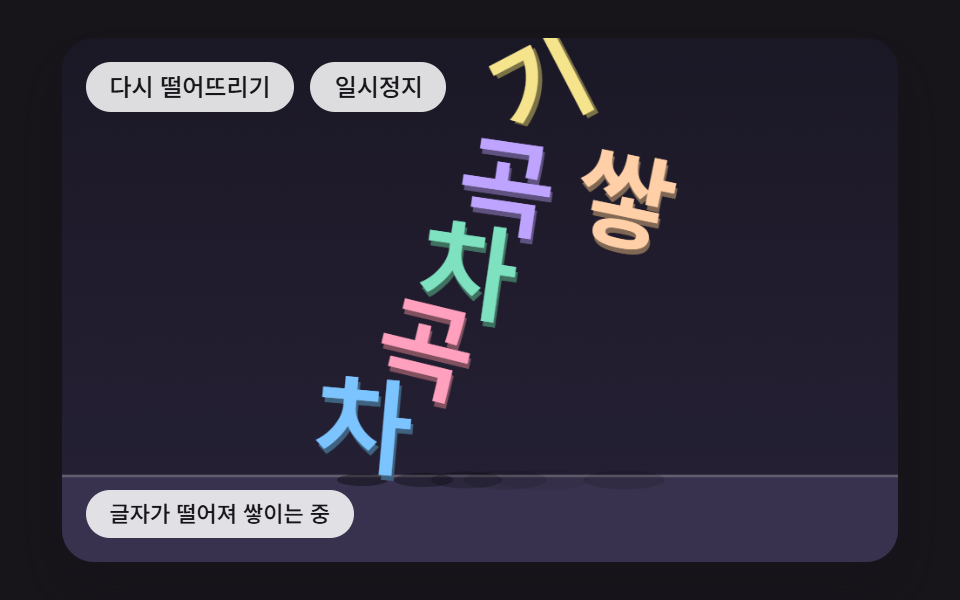 피드백글자 떨어지는 효과 9종 — 쌓이고 매달리고 물에 뜨는 글자
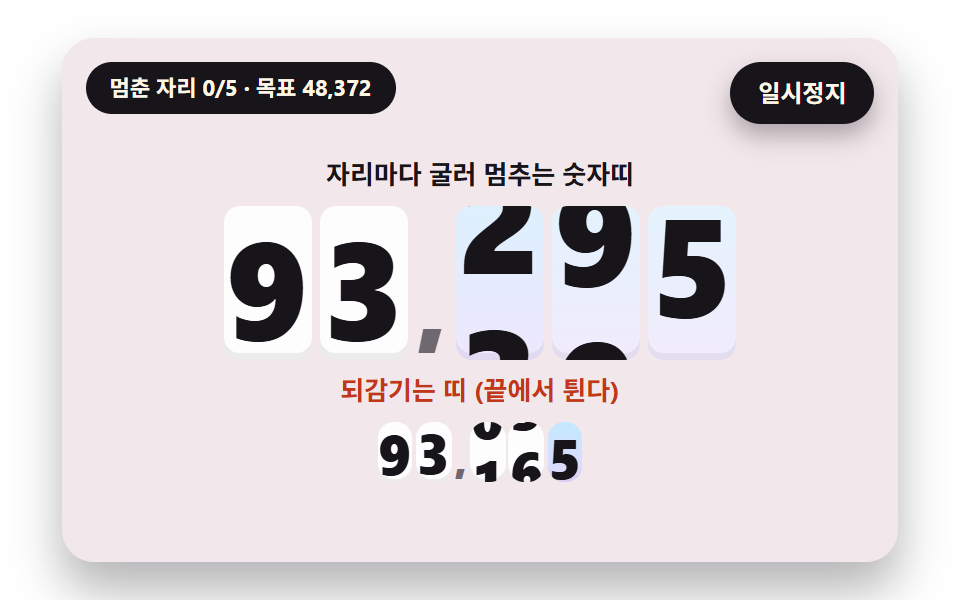 피드백숫자 롤링 애니메이션 9종 — 굴러서 멈추는 계수기부터 올림이 이어지는 전광판까지
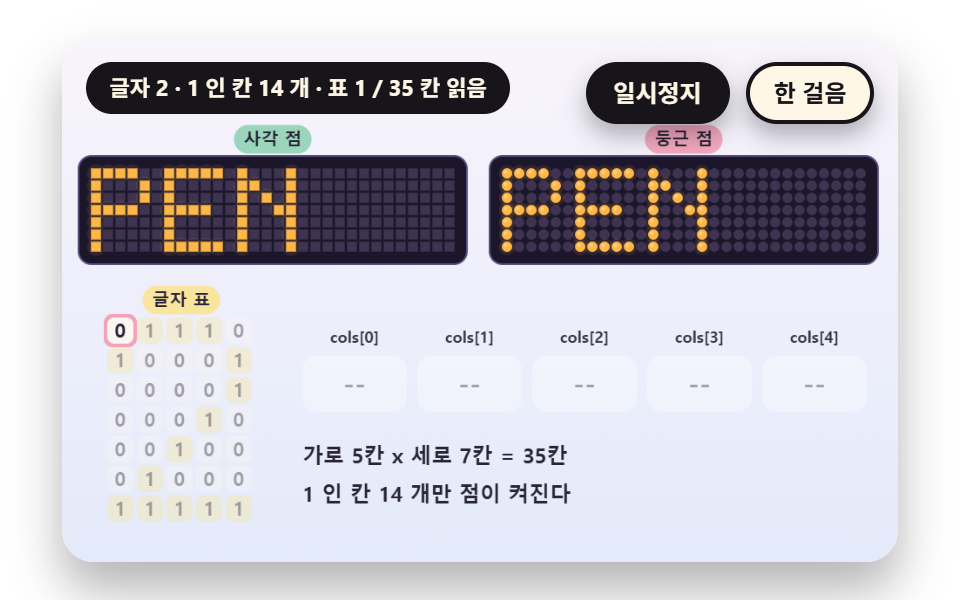 피드백LED 전광판 9종 — 5x7 점 글꼴부터 잔광과 행 스캔까지
 피드백CSS 배경 애니메이션 9종 — 한 줄 복붙으로
 피드백CSS 카드 애니메이션 호버 효과 9종 — 한 줄 복붙으로
 피드백CSS 글자 그라데이션 반짝이는 텍스트 9종 — 한 줄 복붙으로
 피드백CSS 3D 큐브 캐러셀 틸트 9종 — 한 줄 복붙으로
 피드백CSS 배경 애니메이션 효과 모음 9종 — 한 줄 복붙으로
 피드백쿠키 동의 배너 UI 9종 — 그대로 붙이는 동의 관리 코드
 피드백토스트 알림 UI 9종 — 쌓이고 밀리고 사라지는 스택