prefers-reduced-motion: Adapting Motion, 9 Scenes
With prefers-reduced-motion on, remove loops, fade moves, shrink big motion and skip counters.
The prefers-reduced-motion CSS Query
 01 rm-remove
 02 rm-fade
 03 rm-shrink
 04 rm-instant
 05 rm-toggle
 06 rm-watch
 07 rm-autoplay
 08 rm-parallax
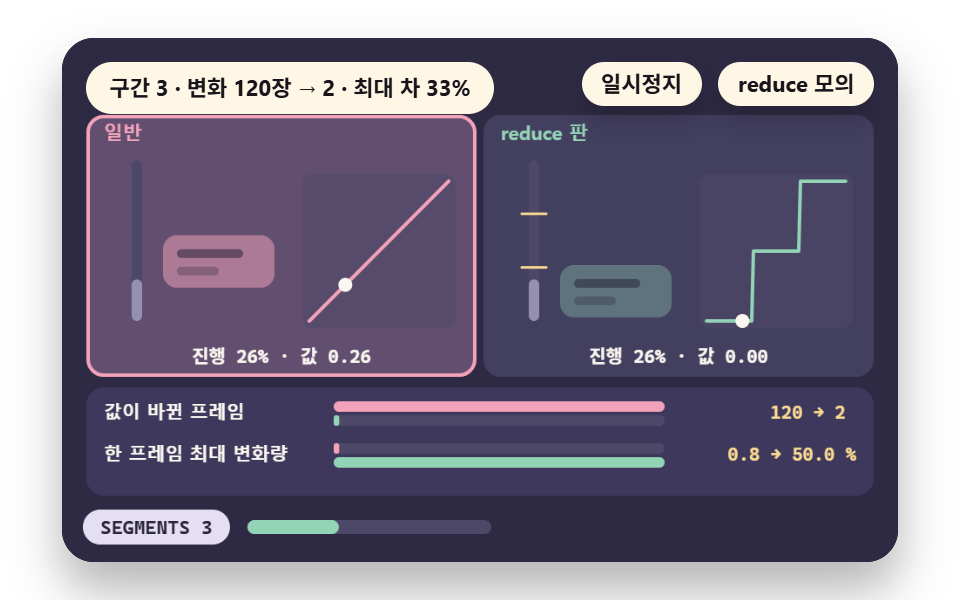 09 rm-scroll
- 01 Remove: A Loop Becomes One Still State
- 02 Replace: Fade Instead of Travel
- 03 Shrink: Scaling Distance and Time Down
- 04 Instant End State: Skip the Transition
- 05 User Toggle: OS Setting Plus a Site Switch
- 06 JS Change Watch: Following a Live Setting Flip
- 07 Autoplay Stop: Pause Slides and Background Video
- 08 Parallax: Flatten Depth Into One Speed
- 09 Scroll-Linked: Turn Progress Into State Changes
This media query lets CSS ask whether the user turned on reduce motion at the operating system level, and the value reduce means the user is asking for less movement.
The prefers reduced motion media query is a signal to cut the motion that causes discomfort, not an order to delete every animation, so what to remove and what to keep stays the author's call in each scene.
The nine scenes of this guide draw the same motion as a normal version and a reduce version side by side, so you can compare those choices.
CSS Reads a Block and JS Reads an Object
CSS reads the setting inside an @media (prefers-reduced-motion: reduce) block, and JS reads the matches value of the object that matchMedia returns together with its change event.
The Demos Read the Same Setting
The demo reads the real matchMedia value, and when the setting is on it runs no loop and draws one frame at the time where the timetable ends. Below is the change listener of scene 06. When the setting turns on, it stops with stopLoop and draws one frame with redraw. When the setting turns off, restart starts the motion again.
    reduceQuery.addEventListener('change', function () {
        still = reduceQuery.matches;
        onSetting(still);
        if (still) {
            stopLoop();
            redraw();
        }
        else {
            restart();
        }
    }, { signal: off.signal });
Measuring Reduced Motion in Nine Scenes
The area, frames and intensity in the table come from the demo.py render tool, which opens Chrome, captures a 480×300 canvas as 24 frames over 2 seconds and compares the 23 pairs of neighboring frames. The exact Chrome build used for the render is unconfirmed.
Cumulative area is the share of the screen whose pixels differed from the first frame in at least one of the 24 captures, and intensity is the mean color difference (0 to 255) inside those pixels. Moved frames counts the frames that differ from the one before, and a pixel counts as changed when a color channel differs by more than 12.
The amount of motion inside each scene — travel length, peak speed, frame counts — is a separate count sampled at 60 frames per second inside the demo itself, and it is given in each scene section. Both versions share one screen, so the area in the table covers the two of them added together.
| Scene | Cumulative area | Moved frames | Mean intensity |
|---|---|---|---|
| 01 Remove | 16.9% | 23/23 | 30.6 |
| 02 Replace | 34.8% | 8/23 | 42.6 |
| 03 Shrink | 33.3% | 17/23 | 57.5 |
| 04 Final state at once | 34.7% | 15/23 | 90.4 |
| 05 User toggle | 13.4% | 23/23 | 91.0 |
| 06 Watching for changes | 13.9% | 23/23 | 133.3 |
| 07 Stop autoplay | 13.6% | 23/23 | 61.8 |
| 08 Parallax | 35.6% | 20/23 | 98.4 |
| 09 Scroll link | 34.5% | 20/23 | 62.8 |
The widest cumulative area is 08 at 35.6% and the narrowest is 05 at 13.4%. Scenes 01, 05, 06 and 07 show the most moved frames at 23/23 and 02 shows the fewest at 8/23.
The highest mean intensity is 06 at 133.3 and the lowest is 01 at 30.6. The scenes fall into three groups by character. Scenes 01 to 03 are the three basics — remove, replace, shrink — and 04 to 06 handle the setting itself by skipping to results, layering a toggle and watching for changes, while 07 to 09 cover motion that starts without a request: autoplay, parallax and scroll-linked values.
01Remove — Loops Down to One Frame
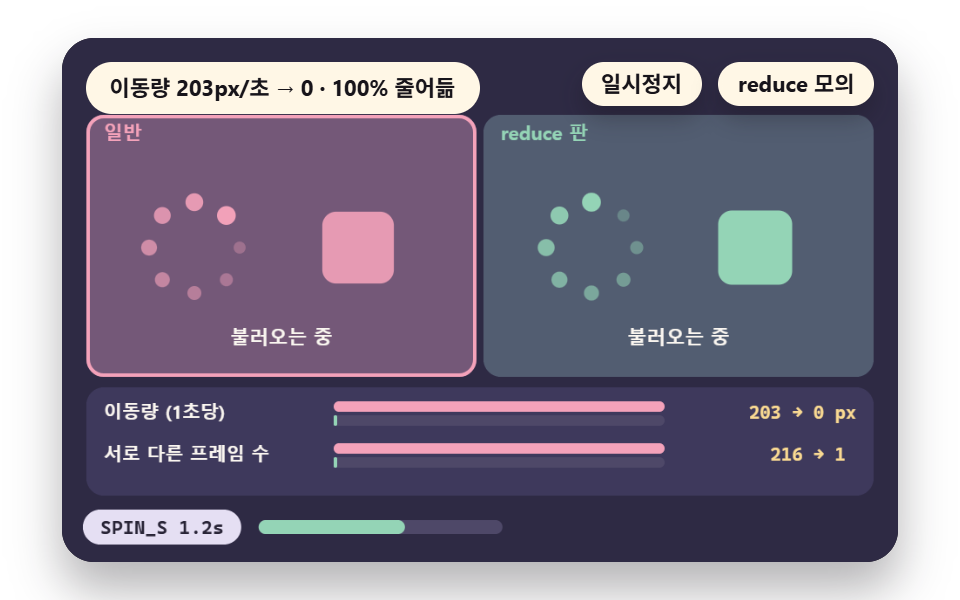
The normal version spins a head dot and pulses a box without end, and the reduce version freezes at the one frame fixed by REST_HEAD and REST_PULSE.
The travel per second MOVE_N falls from 203px to 0, and the normal version keeps changing for 216 frames across its 3.6-second lap. A loading label, a brightness tail on the dots and the box shape (the 3 items of KEEP) survive the freeze, so use this for decorative infinite loops and skip it for a spinner with no other way to report progress, where KEEP would drop to 0.
<main class="stage">
<div class="ez is-demo" id="ez">
  <div class="ez__pad" data-role="pad" tabindex="0" role="application" aria-label="Demo stage: Space or Enter pauses, R restarts, S toggles the reduce simulation">
    <canvas class="ez__canvas" data-role="canvas" width="480" height="300" role="img" aria-label="A spinner and pulse box beside their reduce version with the movement compared"></canvas>
  </div>
  <p class="ez__status" data-role="status" aria-live="off">Scene ready</p>
  <div class="ez__ctrl">
    <button class="ez__pause" data-role="pause" type="button" aria-pressed="false">Pause</button>
    <button class="ez__pause" data-role="sim" type="button" aria-pressed="false">Sim reduce</button>
  </div>
  <p class="ez__done" data-role="done" role="status" aria-live="polite"></p>
</div>
… (총 13줄 — 아래 「전체 코드」에서 원문 전체)
@use "../../../../site/static/demo-tokens" as *;
@include stage($stage-paper);
.ez {
position: relative;
width: min(92vw, calc(160vh - 12.8vw));
aspect-ratio: 480 / 300;
margin: 0 auto;
border-radius: $r-card;
overflow: hidden;
box-shadow: $shadow-raised;
background: $subject-ink;
… (총 122줄 — 아래 「전체 코드」에서 원문 전체)html, body {
margin: 0;
overflow: hidden;
}
.stage {
box-sizing: border-box;
min-height: 100vh;
display: grid;
place-items: center;
margin: 0;
background: #ffffff;
… (총 134줄 — 아래 「전체 코드」에서 원문 전체)(function () {
const rootEl = document.getElementById("ez");
if (!rootEl) return;
main(rootEl);
function main(root) {
// 무대 좌표 — 캔버스 안 계산은 늘 480×300. 화면에 보이는 크기와 상관없다
const W = 480;
const H = 300;
const TAU = Math.PI * 2;
function clamp(v, lo, hi) { return v < lo ? lo : (v > hi ? hi : v); }
function lerp(a, b, k) { return a + (b - a) * k; }
// 파스텔 팔레트 — 바탕은 짙은 자두색, 상자는 연한 색, 글자는 연한 색 또는 짙은 잉크
… (총 560줄 — 아래 「전체 코드」에서 원문 전체)// RemoveStill - 같은 항목 vanilla index.html 의 React 판. 같은 계산을 useEffect 안에서 돌린다
import { useEffect, useRef } from "react";
import styles from "./RemoveStill.module.scss";
const cx = (s: string): string => s.split(" ").map((n) => styles[n] ?? n).join(" ");
function main(root: HTMLElement): () => void {
type RGB = [number, number, number];
type Fn = (p: number) => number;
// 무대 좌표 — 캔버스 안 계산은 늘 480×300. 화면에 보이는 크기와 상관없다
const W = 480;
const H = 300;
… (총 529줄 — 아래 「전체 코드」에서 원문 전체)01 · Remove: A Loop Becomes One Still State — Measured area 16.854% · moving frames 23/23Original by GODRICH · SCSS and React ship in the zip · See the password
    function headAngle(t) { return TAU * (t / SPIN_S); }
    function pulseAt(t) { return 0.5 - 0.5 * Math.cos(TAU * (t / PULSE_S)); }
    // the reduce version shows the same single frame at any time
    const REST_HEAD = 0;
    const REST_PULSE = 1;
    // travel: the length the head dot runs (px) plus the four box sides, converted to per second
    const MOVE_N = (pathLen(function (t) { return headAngle(t) * SPIN_R; }, 0, LAP_S) + pathLen(function (t) { return pulseAt(t) * BOX * GROW * 2; }, 0, LAP_S) * 2) / LAP_S;
    const MOVE_R = 0;
02Replace — Fade Instead of Travel
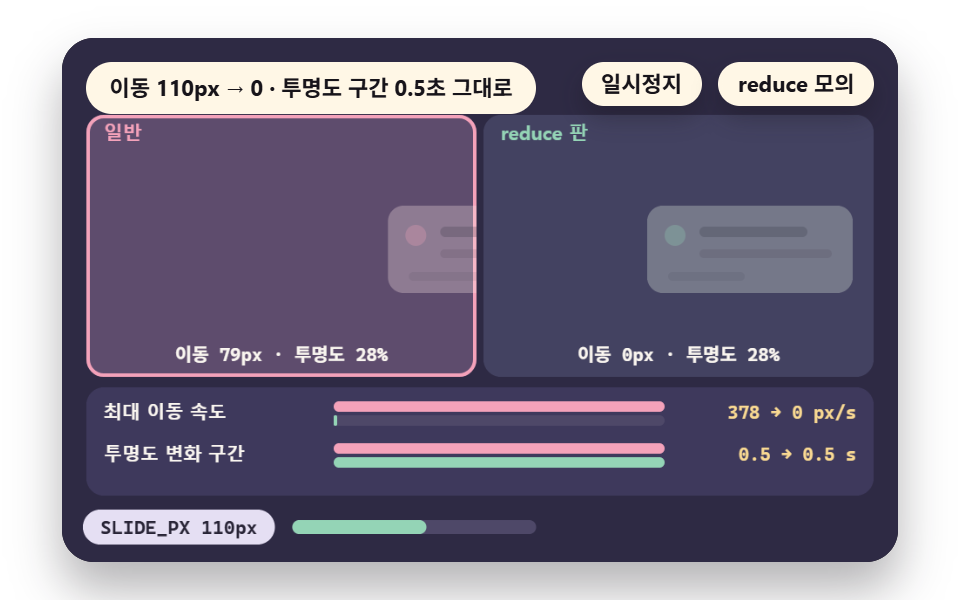
Under reduce, offsetReduce answers 0 for the slide-in panel, so the travel is gone and only the opacity of opacityAt changes.
The peak speed SPEED_N falls from 378px per second to 0, the fade span FADE_S stays 0.5 seconds in both versions, and opacity moves by at most 5.7 percentage points per frame. Use this for entrances of menus, modals and toasts, and skip it where the travel itself carries meaning, because once the 110px of SLIDE_PX becomes a fade, the panel no longer reads as arriving from a direction.
<main class="stage">
<div class="ez is-demo" id="ez">
  <div class="ez__pad" data-role="pad" tabindex="0" role="application" aria-label="Demo stage: Space or Enter pauses, R restarts, S toggles the reduce simulation">
    <canvas class="ez__canvas" data-role="canvas" width="480" height="300" role="img" aria-label="A slide-in panel beside its fade version with travel and opacity change read"></canvas>
  </div>
  <p class="ez__status" data-role="status" aria-live="off">Scene ready</p>
  <div class="ez__ctrl">
    <button class="ez__pause" data-role="pause" type="button" aria-pressed="false">Pause</button>
    <button class="ez__pause" data-role="sim" type="button" aria-pressed="false">Sim reduce</button>
  </div>
  <p class="ez__done" data-role="done" role="status" aria-live="polite"></p>
</div>
… (총 13줄 — 아래 「전체 코드」에서 원문 전체)
@use "../../../../site/static/demo-tokens" as *;
@include stage($stage-paper);
.ez {
position: relative;
width: min(92vw, calc(160vh - 12.8vw));
aspect-ratio: 480 / 300;
margin: 0 auto;
border-radius: $r-card;
overflow: hidden;
box-shadow: $shadow-raised;
background: $subject-ink;
… (총 122줄 — 아래 「전체 코드」에서 원문 전체)html, body {
margin: 0;
overflow: hidden;
}
.stage {
box-sizing: border-box;
min-height: 100vh;
display: grid;
place-items: center;
margin: 0;
background: #ffffff;
… (총 134줄 — 아래 「전체 코드」에서 원문 전체)(function () {
const rootEl = document.getElementById("ez");
if (!rootEl) return;
main(rootEl);
function main(root) {
// 무대 좌표 — 캔버스 안 계산은 늘 480×300. 화면에 보이는 크기와 상관없다
const W = 480;
const H = 300;
const TAU = Math.PI * 2;
function clamp(v, lo, hi) { return v < lo ? lo : (v > hi ? hi : v); }
function lerp(a, b, k) { return a + (b - a) * k; }
// 파스텔 팔레트 — 바탕은 짙은 자두색, 상자는 연한 색, 글자는 연한 색 또는 짙은 잉크
… (총 558줄 — 아래 「전체 코드」에서 원문 전체)// FadeReplace - 같은 항목 vanilla index.html 의 React 판. 같은 계산을 useEffect 안에서 돌린다
import { useEffect, useRef } from "react";
import styles from "./FadeReplace.module.scss";
const cx = (s: string): string => s.split(" ").map((n) => styles[n] ?? n).join(" ");
function main(root: HTMLElement): () => void {
type RGB = [number, number, number];
type Fn = (p: number) => number;
// 무대 좌표 — 캔버스 안 계산은 늘 480×300. 화면에 보이는 크기와 상관없다
const W = 480;
const H = 300;
… (총 529줄 — 아래 「전체 코드」에서 원문 전체)02 · Replace: Fade Instead of Travel — Measured area 34.811% · moving frames 8/23Original by GODRICH · SCSS and React ship in the zip · See the password
    function inP(t) { return EASE_IN_OUT(clamp((t - T_IN) / FADE_S, 0, 1)); }
    function outP(t) { return EASE_IN_OUT(clamp((t - T_OUT) / FADE_S, 0, 1)); }
    function opacityAt(t) { return clamp(inP(t) - outP(t), 0, 1); }
    // horizontal travel (px) of the normal panel: in from the right, out to the right
    function offsetNormal(t) { return SLIDE_PX * (1 - inP(t)) + SLIDE_PX * outP(t); }
    function offsetReduce(t) { void t; return 0; }
    const SPEED_N = peakRate(offsetNormal, 0, LAP_S);
    const SPEED_R = peakRate(offsetReduce, 0, LAP_S);
03Shrink — Cut Distance, Keep Time
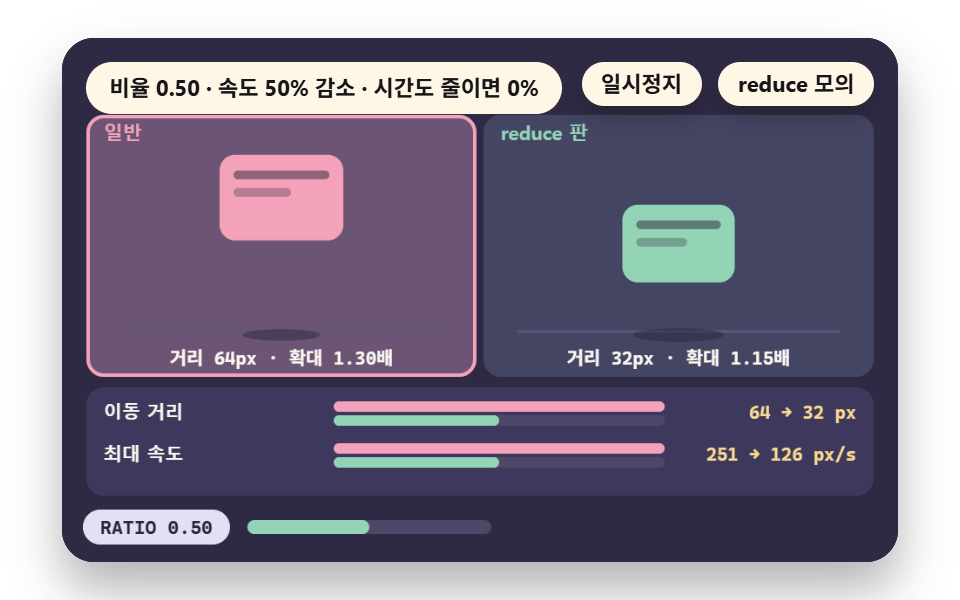
Multiplying the 64px travel TRAVEL and the scale change of the bouncing card by RATIO 0.5 brings the distance to 32px, the scale from 1.30 to 1.15 and the peak speed from 251px per second to 126px, half of what it was.
The duration DURATION is left untouched, because a version like riseRT that shrinks time by the same ratio cuts distance and time together and the peak speed stays nearly where it was. Use this when turning the motion off fully would cost information, and skip the shrink-time variant, since it lowers no speed at all.
<main class="stage">
<div class="ez is-demo" id="ez">
  <div class="ez__pad" data-role="pad" tabindex="0" role="application" aria-label="Demo stage: Space or Enter pauses, R restarts, S toggles the reduce simulation, Left and right arrows change the shrink ratio">
    <canvas class="ez__canvas" data-role="canvas" width="480" height="300" role="img" aria-label="A bouncing card beside its ratio-shrunk version with distance and speed compared"></canvas>
  </div>
  <p class="ez__status" data-role="status" aria-live="off">Scene ready</p>
  <div class="ez__ctrl">
    <button class="ez__pause" data-role="pause" type="button" aria-pressed="false">Pause</button>
    <button class="ez__pause" data-role="sim" type="button" aria-pressed="false">Sim reduce</button>
  </div>
  <p class="ez__done" data-role="done" role="status" aria-live="polite"></p>
</div>
… (총 13줄 — 아래 「전체 코드」에서 원문 전체)
@use "../../../../site/static/demo-tokens" as *;
@include stage($stage-paper);
.ez {
position: relative;
width: min(92vw, calc(160vh - 12.8vw));
aspect-ratio: 480 / 300;
margin: 0 auto;
border-radius: $r-card;
overflow: hidden;
box-shadow: $shadow-raised;
background: $subject-ink;
… (총 122줄 — 아래 「전체 코드」에서 원문 전체)html, body {
margin: 0;
overflow: hidden;
}
.stage {
box-sizing: border-box;
min-height: 100vh;
display: grid;
place-items: center;
margin: 0;
background: #ffffff;
… (총 134줄 — 아래 「전체 코드」에서 원문 전체)(function () {
const rootEl = document.getElementById("ez");
if (!rootEl) return;
main(rootEl);
function main(root) {
// 무대 좌표 — 캔버스 안 계산은 늘 480×300. 화면에 보이는 크기와 상관없다
const W = 480;
const H = 300;
const TAU = Math.PI * 2;
function clamp(v, lo, hi) { return v < lo ? lo : (v > hi ? hi : v); }
function lerp(a, b, k) { return a + (b - a) * k; }
// 파스텔 팔레트 — 바탕은 짙은 자두색, 상자는 연한 색, 글자는 연한 색 또는 짙은 잉크
… (총 588줄 — 아래 「전체 코드」에서 원문 전체)// ShrinkRatio - 같은 항목 vanilla index.html 의 React 판. 같은 계산을 useEffect 안에서 돌린다
import { useEffect, useRef } from "react";
import styles from "./ShrinkRatio.module.scss";
const cx = (s: string): string => s.split(" ").map((n) => styles[n] ?? n).join(" ");
function main(root: HTMLElement): () => void {
type RGB = [number, number, number];
type Fn = (p: number) => number;
// 무대 좌표 — 캔버스 안 계산은 늘 480×300. 화면에 보이는 크기와 상관없다
const W = 480;
const H = 300;
… (총 549줄 — 아래 「전체 코드」에서 원문 전체)03 · Shrink: Scaling Distance and Time Down — Measured area 33.337% · moving frames 17/23Original by GODRICH · SCSS and React ship in the zip · See the password
    // the compared motion: the ratio multiplies distance and scale only, time stays
    function rise(t) { return TRAVEL * lift(t, DURATION); }
    function riseR(t) { return TRAVEL * ratio * lift(t, DURATION); }
    // the case that shrinks time by the same ratio (for the speed comparison)
    function riseRT(t) { return TRAVEL * ratio * lift(t, DURATION * ratio); }
    let speedN = 0;
    let speedR = 0;
    let speedRT = 0;
04Final State at Once — Skip to Result
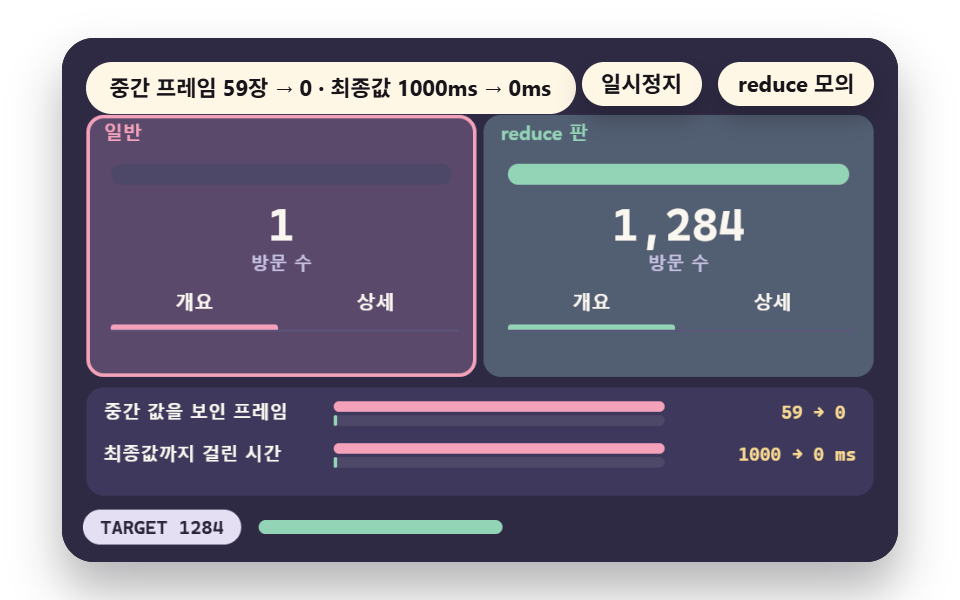
The counter target TARGET 1284 shows intermediate numbers for MID_N 59 frames over MS_N 1000ms in the normal version, and the reduce version stands at 1284 from the first frame, so both counts drop to 0.
framesBefore and msToFinal produce these counts by stepping through the frames of one second at 60 per second. Use this for status and figure displays where the arrived value is what matters, and skip it for a progress bar whose middle values are themselves the message.
<main class="stage">
<div class="ez is-demo" id="ez">
  <div class="ez__pad" data-role="pad" tabindex="0" role="application" aria-label="Demo stage: Space or Enter pauses, R restarts, S toggles the reduce simulation">
    <canvas class="ez__canvas" data-role="canvas" width="480" height="300" role="img" aria-label="A progress bar, counter and tab switch gradual versus instant with intermediate frames counted"></canvas>
  </div>
  <p class="ez__status" data-role="status" aria-live="off">Scene ready</p>
  <div class="ez__ctrl">
    <button class="ez__pause" data-role="pause" type="button" aria-pressed="false">Pause</button>
    <button class="ez__pause" data-role="sim" type="button" aria-pressed="false">Sim reduce</button>
  </div>
  <p class="ez__done" data-role="done" role="status" aria-live="polite"></p>
</div>
… (총 13줄 — 아래 「전체 코드」에서 원문 전체)
@use "../../../../site/static/demo-tokens" as *;
@include stage($stage-paper);
.ez {
position: relative;
width: min(92vw, calc(160vh - 12.8vw));
aspect-ratio: 480 / 300;
margin: 0 auto;
border-radius: $r-card;
overflow: hidden;
box-shadow: $shadow-raised;
background: $subject-ink;
… (총 122줄 — 아래 「전체 코드」에서 원문 전체)html, body {
margin: 0;
overflow: hidden;
}
.stage {
box-sizing: border-box;
min-height: 100vh;
display: grid;
place-items: center;
margin: 0;
background: #ffffff;
… (총 134줄 — 아래 「전체 코드」에서 원문 전체)(function () {
const rootEl = document.getElementById("ez");
if (!rootEl) return;
main(rootEl);
function main(root) {
// 무대 좌표 — 캔버스 안 계산은 늘 480×300. 화면에 보이는 크기와 상관없다
const W = 480;
const H = 300;
const TAU = Math.PI * 2;
function clamp(v, lo, hi) { return v < lo ? lo : (v > hi ? hi : v); }
function lerp(a, b, k) { return a + (b - a) * k; }
// 파스텔 팔레트 — 바탕은 짙은 자두색, 상자는 연한 색, 글자는 연한 색 또는 짙은 잉크
… (총 590줄 — 아래 「전체 코드」에서 원문 전체)// InstantEnd - 같은 항목 vanilla index.html 의 React 판. 같은 계산을 useEffect 안에서 돌린다
import { useEffect, useRef } from "react";
import styles from "./InstantEnd.module.scss";
const cx = (s: string): string => s.split(" ").map((n) => styles[n] ?? n).join(" ");
function main(root: HTMLElement): () => void {
type RGB = [number, number, number];
type Fn = (p: number) => number;
// 무대 좌표 — 캔버스 안 계산은 늘 480×300. 화면에 보이는 크기와 상관없다
const W = 480;
const H = 300;
… (총 555줄 — 아래 「전체 코드」에서 원문 전체)04 · Instant End State: Skip the Transition — Measured area 34.744% · moving frames 15/23Original by GODRICH · SCSS and React ship in the zip · See the password
    function msToFinal(f) {
        for (let t = T0; t < T0 + 2; t += 1 / FPS) {
            if (Math.round(f(t) * TARGET) >= TARGET) {
                return Math.round((t - T0) * 1000);
            }
        }
        return 2000;
    }
    const MID_N = framesBefore(progN);
05User Toggle — OS Setting, Site Switch
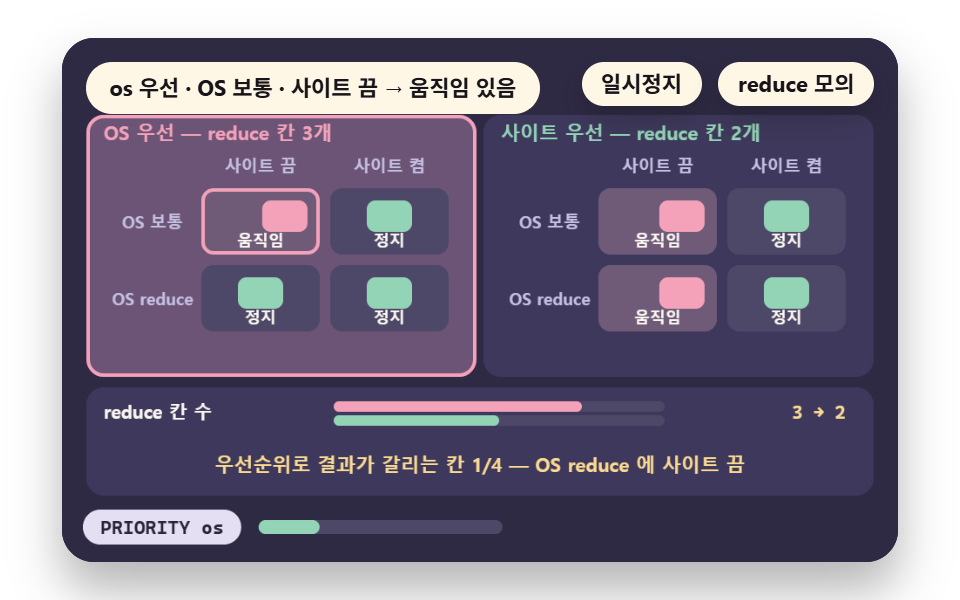
When the OS setting and a site switch overlap, decide reads os || site under OS priority and reads only site under site priority.
Of the four CELLS, reduce wins in 3 cells under OS priority and in 2 under site priority, and the one cell where the outcomes split is OS reduce with the site switch off. Use this for users who cannot change their system settings, and skip site priority, because it can restart motion for a user who already asked the OS for less.
<main class="stage">
<div class="ez is-demo" id="ez">
  <div class="ez__pad" data-role="pad" tabindex="0" role="application" aria-label="Demo stage: Space or Enter pauses, R restarts, S toggles the reduce simulation, Left and right arrows flip the priority and W flips the site switch">
    <canvas class="ez__canvas" data-role="canvas" width="480" height="300" role="img" aria-label="A table compares four combinations of an OS setting and a site switch for each priority"></canvas>
  </div>
  <p class="ez__status" data-role="status" aria-live="off">Scene ready</p>
  <div class="ez__ctrl">
    <button class="ez__pause" data-role="pause" type="button" aria-pressed="false">Pause</button>
    <button class="ez__pause" data-role="sim" type="button" aria-pressed="false">Sim reduce</button>
  </div>
  <p class="ez__done" data-role="done" role="status" aria-live="polite"></p>
</div>
… (총 13줄 — 아래 「전체 코드」에서 원문 전체)
@use "../../../../site/static/demo-tokens" as *;
@include stage($stage-paper);
.ez {
position: relative;
width: min(92vw, calc(160vh - 12.8vw));
aspect-ratio: 480 / 300;
margin: 0 auto;
border-radius: $r-card;
overflow: hidden;
box-shadow: $shadow-raised;
background: $subject-ink;
… (총 122줄 — 아래 「전체 코드」에서 원문 전체)html, body {
margin: 0;
overflow: hidden;
}
.stage {
box-sizing: border-box;
min-height: 100vh;
display: grid;
place-items: center;
margin: 0;
background: #ffffff;
… (총 134줄 — 아래 「전체 코드」에서 원문 전체)(function () {
const rootEl = document.getElementById("ez");
if (!rootEl) return;
main(rootEl);
function main(root) {
// 무대 좌표 — 캔버스 안 계산은 늘 480×300. 화면에 보이는 크기와 상관없다
const W = 480;
const H = 300;
const TAU = Math.PI * 2;
function clamp(v, lo, hi) { return v < lo ? lo : (v > hi ? hi : v); }
function lerp(a, b, k) { return a + (b - a) * k; }
// 파스텔 팔레트 — 바탕은 짙은 자두색, 상자는 연한 색, 글자는 연한 색 또는 짙은 잉크
… (총 599줄 — 아래 「전체 코드」에서 원문 전체)// ToggleOverride - 같은 항목 vanilla index.html 의 React 판. 같은 계산을 useEffect 안에서 돌린다
import { useEffect, useRef } from "react";
import styles from "./ToggleOverride.module.scss";
const cx = (s: string): string => s.split(" ").map((n) => styles[n] ?? n).join(" ");
function main(root: HTMLElement): () => void {
type RGB = [number, number, number];
type Fn = (p: number) => number;
// 무대 좌표 — 캔버스 안 계산은 늘 480×300. 화면에 보이는 크기와 상관없다
const W = 480;
const H = 300;
… (총 551줄 — 아래 「전체 코드」에서 원문 전체)05 · User Toggle: OS Setting Plus a Site Switch — Measured area 13.448% · moving frames 23/23Original by GODRICH · SCSS and React ship in the zip · See the password
    function decide(os, site, prio) {
        return prio === 'os' ? (os || site) : site;
    }
    // run all four combinations and count: [reduce cells under os priority, reduce cells under site priority, cells where the two priorities split]
    function countCells() {
        let a = 0;
        let b = 0;
        let diff = 0;
        for (let o = 0; o < 2; o += 1) {
            for (let s = 0; s < 2; s += 1) {
                const ra = decide(o === 1, s === 1, 'os');
                const rb = decide(o === 1, s === 1, 'site');
06Watching Changes — Follow the Flip
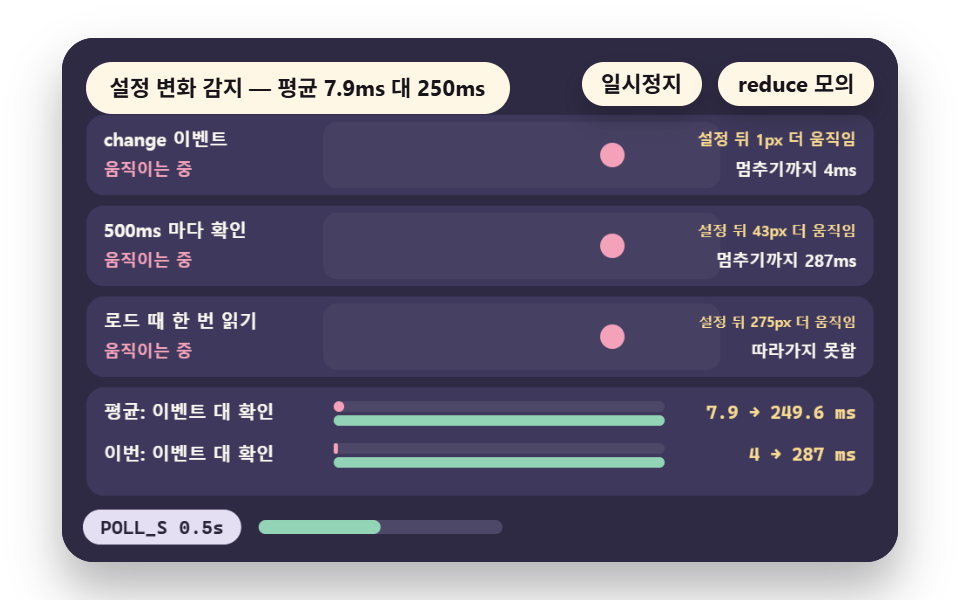
The change event follows a setting flip on the next frame, and a check every POLL_S follows it at the next check time.
Moving the switch-on moment to 1200 places inside one second gives an average delay of AVG_EVENT 7.9ms against AVG_POLL 250ms, and a single read at load follows nothing. This is the scene for canvas and JS animation pages, which must read prefers reduced motion in JavaScript instead of in a CSS block.
<main class="stage">
<div class="ez is-demo" id="ez">
  <div class="ez__pad" data-role="pad" tabindex="0" role="application" aria-label="Demo stage: Space or Enter pauses, R restarts, S toggles the reduce simulation">
    <canvas class="ez__canvas" data-role="canvas" width="480" height="300" role="img" aria-label="Three lanes follow a setting flip by event, by polling and by a single read"></canvas>
  </div>
  <p class="ez__status" data-role="status" aria-live="off">Scene ready</p>
  <div class="ez__ctrl">
    <button class="ez__pause" data-role="pause" type="button" aria-pressed="false">Pause</button>
    <button class="ez__pause" data-role="sim" type="button" aria-pressed="false">Sim reduce</button>
  </div>
  <p class="ez__done" data-role="done" role="status" aria-live="polite"></p>
</div>
… (총 13줄 — 아래 「전체 코드」에서 원문 전체)
@use "../../../../site/static/demo-tokens" as *;
@include stage($stage-paper);
.ez {
position: relative;
width: min(92vw, calc(160vh - 12.8vw));
aspect-ratio: 480 / 300;
margin: 0 auto;
border-radius: $r-card;
overflow: hidden;
box-shadow: $shadow-raised;
background: $subject-ink;
… (총 122줄 — 아래 「전체 코드」에서 원문 전체)html, body {
margin: 0;
overflow: hidden;
}
.stage {
box-sizing: border-box;
min-height: 100vh;
display: grid;
place-items: center;
margin: 0;
background: #ffffff;
… (총 134줄 — 아래 「전체 코드」에서 원문 전체)(function () {
const rootEl = document.getElementById("ez");
if (!rootEl) return;
main(rootEl);
function main(root) {
// 무대 좌표 — 캔버스 안 계산은 늘 480×300. 화면에 보이는 크기와 상관없다
const W = 480;
const H = 300;
const TAU = Math.PI * 2;
function clamp(v, lo, hi) { return v < lo ? lo : (v > hi ? hi : v); }
function lerp(a, b, k) { return a + (b - a) * k; }
// 파스텔 팔레트 — 바탕은 짙은 자두색, 상자는 연한 색, 글자는 연한 색 또는 짙은 잉크
… (총 570줄 — 아래 「전체 코드」에서 원문 전체)// WatchChange - 같은 항목 vanilla index.html 의 React 판. 같은 계산을 useEffect 안에서 돌린다
import { useEffect, useRef } from "react";
import styles from "./WatchChange.module.scss";
const cx = (s: string): string => s.split(" ").map((n) => styles[n] ?? n).join(" ");
function main(root: HTMLElement): () => void {
type RGB = [number, number, number];
type Fn = (p: number) => number;
// 무대 좌표 — 캔버스 안 계산은 늘 480×300. 화면에 보이는 크기와 상관없다
const W = 480;
const H = 300;
… (총 539줄 — 아래 「전체 코드」에서 원문 전체)06 · JS Change Watch: Following a Live Setting Flip — Measured area 13.865% · moving frames 23/23Original by GODRICH · SCSS and React ship in the zip · See the password
    function avgLatency(lane) {
        let sum = 0;
        for (let k = 0; k < 1200; k += 1) {
            const f = k / 1200;
            sum += (lane === 0 ? nextFrame(f) : nextPoll(f)) - f;
        }
        return (sum / 1200) * 1000;
    }
    const AVG_EVENT = avgLatency(0);
    const AVG_POLL = avgLatency(1);
07Stop Autoplay — Pause Slides First
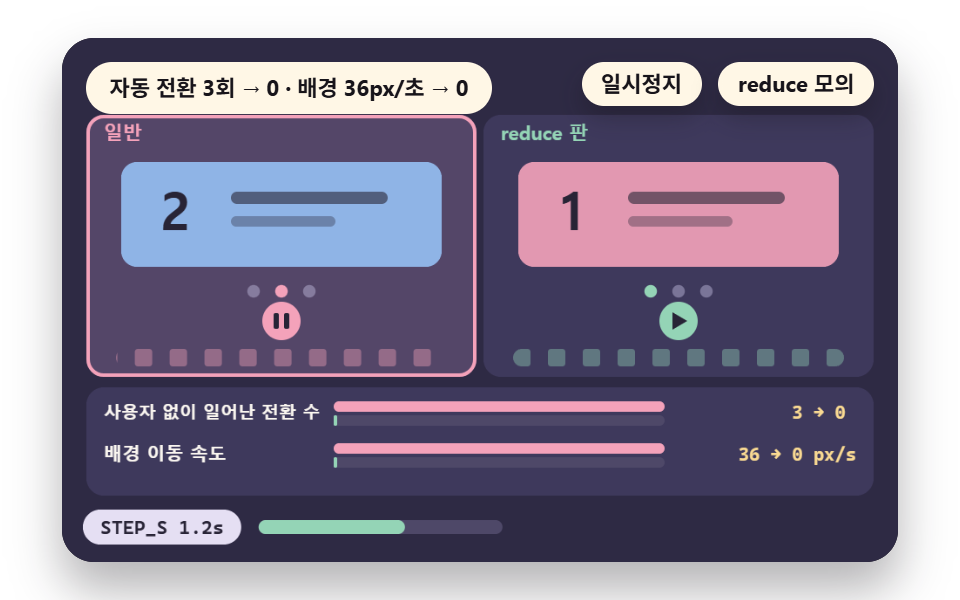
In the normal version the slide advances by itself every STEP_S 1.2 seconds for AUTO_N 3 transitions while the background drifts at 36px per second, and the reduce version rests on the first slide and moves one step only when the user presses at USER_T 2.4 seconds, through posR.
This is the first scene to reach for on carousels, hero backgrounds and autoplay video — motion the user did not request.
<main class="stage">
<div class="ez is-demo" id="ez">
  <div class="ez__pad" data-role="pad" tabindex="0" role="application" aria-label="Demo stage: Space or Enter pauses, R restarts, S toggles the reduce simulation">
    <canvas class="ez__canvas" data-role="canvas" width="480" height="300" role="img" aria-label="An auto-advancing slide beside a version held on the first scene with the transitions counted"></canvas>
  </div>
  <p class="ez__status" data-role="status" aria-live="off">Scene ready</p>
  <div class="ez__ctrl">
    <button class="ez__pause" data-role="pause" type="button" aria-pressed="false">Pause</button>
    <button class="ez__pause" data-role="sim" type="button" aria-pressed="false">Sim reduce</button>
  </div>
  <p class="ez__done" data-role="done" role="status" aria-live="polite"></p>
</div>
… (총 13줄 — 아래 「전체 코드」에서 원문 전체)
@use "../../../../site/static/demo-tokens" as *;
@include stage($stage-paper);
.ez {
position: relative;
width: min(92vw, calc(160vh - 12.8vw));
aspect-ratio: 480 / 300;
margin: 0 auto;
border-radius: $r-card;
overflow: hidden;
box-shadow: $shadow-raised;
background: $subject-ink;
… (총 122줄 — 아래 「전체 코드」에서 원문 전체)html, body {
margin: 0;
overflow: hidden;
}
.stage {
box-sizing: border-box;
min-height: 100vh;
display: grid;
place-items: center;
margin: 0;
background: #ffffff;
… (총 134줄 — 아래 「전체 코드」에서 원문 전체)(function () {
const rootEl = document.getElementById("ez");
if (!rootEl) return;
main(rootEl);
function main(root) {
// 무대 좌표 — 캔버스 안 계산은 늘 480×300. 화면에 보이는 크기와 상관없다
const W = 480;
const H = 300;
const TAU = Math.PI * 2;
function clamp(v, lo, hi) { return v < lo ? lo : (v > hi ? hi : v); }
function lerp(a, b, k) { return a + (b - a) * k; }
// 파스텔 팔레트 — 바탕은 짙은 자두색, 상자는 연한 색, 글자는 연한 색 또는 짙은 잉크
… (총 585줄 — 아래 「전체 코드」에서 원문 전체)// AutoplayStop - 같은 항목 vanilla index.html 의 React 판. 같은 계산을 useEffect 안에서 돌린다
import { useEffect, useRef } from "react";
import styles from "./AutoplayStop.module.scss";
const cx = (s: string): string => s.split(" ").map((n) => styles[n] ?? n).join(" ");
function main(root: HTMLElement): () => void {
type RGB = [number, number, number];
type Fn = (p: number) => number;
// 무대 좌표 — 캔버스 안 계산은 늘 480×300. 화면에 보이는 크기와 상관없다
const W = 480;
const H = 300;
… (총 553줄 — 아래 「전체 코드」에서 원문 전체)07 · Autoplay Stop: Pause Slides and Background Video — Measured area 13.591% · moving frames 23/23Original by GODRICH · SCSS and React ship in the zip · See the password
    const AUTO_AT = [STEP_S, STEP_S * 2, STEP_S * 3];
    // slide position in steps: one step per time in the normal version, one step at the user's press in the reduce version
    function posAt(times, t) {
        let s = 0;
        for (let i = 0; i < times.length; i += 1) {
            s += EASE_IN_OUT(clamp((t - times[i]) / MOVE_S, 0, 1));
        }
        return s;
    }
    function posN(t) { return posAt(AUTO_AT, t); }
    function posR(t) { return posAt([USER_T], t); }
08Parallax — One Speed for Every Layer
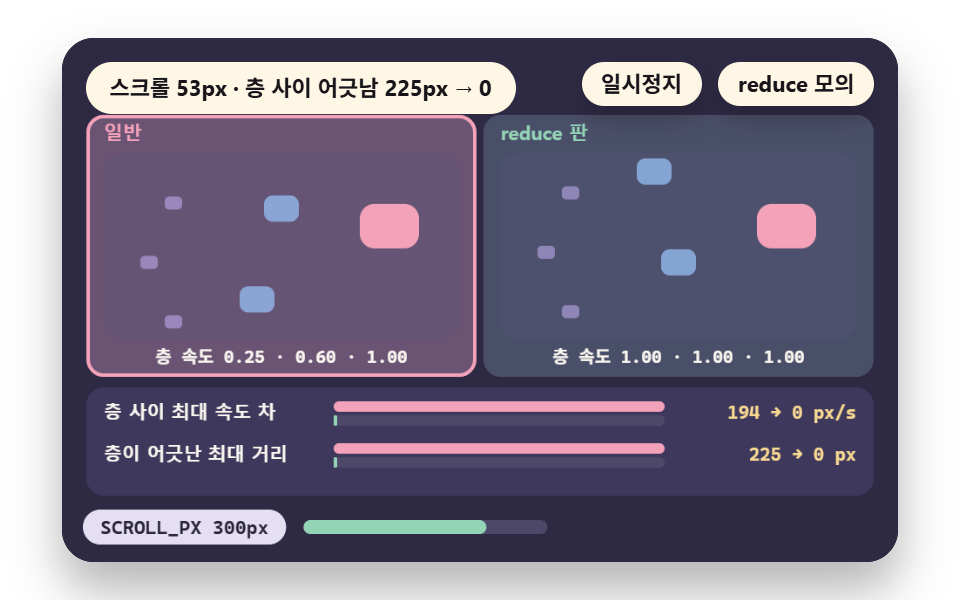
On scroll the normal version moves three layers at the multipliers FAR 0.25, MID 0.6 and NEAR 1, so the layers drift apart by up to GAP_DIST_N 225px with a peak speed gap of 194px per second between them, and the reduce version sets every multiplier to 1, which brings both numbers to 0.
Use this where the depth effect causes vertigo, but note that the surface still travels with the scroll. The way the per-layer multipliers are built is covered in 9 CSS Parallax Scrolling — No JS, Scroll-Driven.
<main class="stage">
<div class="ez is-demo" id="ez">
  <div class="ez__pad" data-role="pad" tabindex="0" role="application" aria-label="Demo stage: Space or Enter pauses, R restarts, S toggles the reduce simulation">
    <canvas class="ez__canvas" data-role="canvas" width="480" height="300" role="img" aria-label="A parallax with per-layer speeds beside a version with one speed and the gap between layers measured"></canvas>
  </div>
  <p class="ez__status" data-role="status" aria-live="off">Scene ready</p>
  <div class="ez__ctrl">
    <button class="ez__pause" data-role="pause" type="button" aria-pressed="false">Pause</button>
    <button class="ez__pause" data-role="sim" type="button" aria-pressed="false">Sim reduce</button>
  </div>
  <p class="ez__done" data-role="done" role="status" aria-live="polite"></p>
</div>
… (총 13줄 — 아래 「전체 코드」에서 원문 전체)
@use "../../../../site/static/demo-tokens" as *;
@include stage($stage-paper);
.ez {
position: relative;
width: min(92vw, calc(160vh - 12.8vw));
aspect-ratio: 480 / 300;
margin: 0 auto;
border-radius: $r-card;
overflow: hidden;
box-shadow: $shadow-raised;
background: $subject-ink;
… (총 122줄 — 아래 「전체 코드」에서 원문 전체)html, body {
margin: 0;
overflow: hidden;
}
.stage {
box-sizing: border-box;
min-height: 100vh;
display: grid;
place-items: center;
margin: 0;
background: #ffffff;
… (총 134줄 — 아래 「전체 코드」에서 원문 전체)(function () {
const rootEl = document.getElementById("ez");
if (!rootEl) return;
main(rootEl);
function main(root) {
// 무대 좌표 — 캔버스 안 계산은 늘 480×300. 화면에 보이는 크기와 상관없다
const W = 480;
const H = 300;
const TAU = Math.PI * 2;
function clamp(v, lo, hi) { return v < lo ? lo : (v > hi ? hi : v); }
function lerp(a, b, k) { return a + (b - a) * k; }
// 파스텔 팔레트 — 바탕은 짙은 자두색, 상자는 연한 색, 글자는 연한 색 또는 짙은 잉크
… (총 569줄 — 아래 「전체 코드」에서 원문 전체)// ParallaxFlat - 같은 항목 vanilla index.html 의 React 판. 같은 계산을 useEffect 안에서 돌린다
import { useEffect, useRef } from "react";
import styles from "./ParallaxFlat.module.scss";
const cx = (s: string): string => s.split(" ").map((n) => styles[n] ?? n).join(" ");
function main(root: HTMLElement): () => void {
type RGB = [number, number, number];
type Fn = (p: number) => number;
// 무대 좌표 — 캔버스 안 계산은 늘 480×300. 화면에 보이는 크기와 상관없다
const W = 480;
const H = 300;
… (총 536줄 — 아래 「전체 코드」에서 원문 전체)08 · Parallax: Flatten Depth Into One Speed — Measured area 35.569% · moving frames 20/23Original by GODRICH · SCSS and React ship in the zip · See the password
    const SPEEDS_N = [FAR, MID, NEAR];
    const SPEEDS_R = [1, 1, 1];
    // speed gap between layers (px/s) and the largest distance they drift apart (px)
    const PEAK = peakRate(scrollAt, 0, LAP_S);
    const GAP_SPEED_N = (Math.max(FAR, MID, NEAR) - Math.min(FAR, MID, NEAR)) * PEAK;
    const GAP_SPEED_R = (1 - 1) * PEAK;
    const GAP_DIST_N = (Math.max(FAR, MID, NEAR) - Math.min(FAR, MID, NEAR)) * SCROLL_PX;
    const GAP_DIST_R = 0;
09Scroll Link — Steps Instead of Ramps
A value tied to scroll progress p changes continuously through contV in the normal version, and the reduce version changes it only at the 3 boundaries of SEGMENTS through stepV.
Frames with a changed value drop from 120 to 2, but the largest single change grows from 0.8% to 50.0% and the largest gap against the continuous value maxGap is 33%. Use this for progress marks and section transitions, and skip it for a visualization the user reads precise values from, because 3 segments flip half the scale in one step.
<main class="stage">
<div class="ez is-demo" id="ez">
  <div class="ez__pad" data-role="pad" tabindex="0" role="application" aria-label="Demo stage: Space or Enter pauses, R restarts, S toggles the reduce simulation, Left and right arrows change the segment count">
    <canvas class="ez__canvas" data-role="canvas" width="480" height="300" role="img" aria-label="A value that changes continuously with scroll beside one that changes once per segment"></canvas>
  </div>
  <p class="ez__status" data-role="status" aria-live="off">Scene ready</p>
  <div class="ez__ctrl">
    <button class="ez__pause" data-role="pause" type="button" aria-pressed="false">Pause</button>
    <button class="ez__pause" data-role="sim" type="button" aria-pressed="false">Sim reduce</button>
  </div>
  <p class="ez__done" data-role="done" role="status" aria-live="polite"></p>
</div>
… (총 13줄 — 아래 「전체 코드」에서 원문 전체)
@use "../../../../site/static/demo-tokens" as *;
@include stage($stage-paper);
.ez {
position: relative;
width: min(92vw, calc(160vh - 12.8vw));
aspect-ratio: 480 / 300;
margin: 0 auto;
border-radius: $r-card;
overflow: hidden;
box-shadow: $shadow-raised;
background: $subject-ink;
… (총 122줄 — 아래 「전체 코드」에서 원문 전체)html, body {
margin: 0;
overflow: hidden;
}
.stage {
box-sizing: border-box;
min-height: 100vh;
display: grid;
place-items: center;
margin: 0;
background: #ffffff;
… (총 134줄 — 아래 「전체 코드」에서 원문 전체)(function () {
const rootEl = document.getElementById("ez");
if (!rootEl) return;
main(rootEl);
function main(root) {
// 무대 좌표 — 캔버스 안 계산은 늘 480×300. 화면에 보이는 크기와 상관없다
const W = 480;
const H = 300;
const TAU = Math.PI * 2;
function clamp(v, lo, hi) { return v < lo ? lo : (v > hi ? hi : v); }
function lerp(a, b, k) { return a + (b - a) * k; }
// 파스텔 팔레트 — 바탕은 짙은 자두색, 상자는 연한 색, 글자는 연한 색 또는 짙은 잉크
… (총 624줄 — 아래 「전체 코드」에서 원문 전체)// ScrollSteps - 같은 항목 vanilla index.html 의 React 판. 같은 계산을 useEffect 안에서 돌린다
import { useEffect, useRef } from "react";
import styles from "./ScrollSteps.module.scss";
const cx = (s: string): string => s.split(" ").map((n) => styles[n] ?? n).join(" ");
function main(root: HTMLElement): () => void {
type RGB = [number, number, number];
type Fn = (p: number) => number;
// 무대 좌표 — 캔버스 안 계산은 늘 480×300. 화면에 보이는 크기와 상관없다
const W = 480;
const H = 300;
… (총 574줄 — 아래 「전체 코드」에서 원문 전체)09 · Scroll-Linked: Turn Progress Into State Changes — Measured area 34.513% · moving frames 20/23Original by GODRICH · SCSS and React ship in the zip · See the password
    // continuous and stepped values: the stepped value divides the segment index by segments minus 1 so the last segment reaches 1
    function contV(p) { return p; }
    function stepV(p) { return Math.floor(Math.min(p, 0.9999) * segs) / (segs - 1); }
    let changedN = 0;
    let changedR = 0;
    let stepPct = 0;
    let maxGap = 0;
    let frameN = 0;
Which Approach Should You Pick?
Start by asking what the motion reports. If it reports nothing, remove it. If only the fact of appearing is the message, replace the move with a fade. If the size carries the meaning, shrink it by a ratio. If only the arrived value matters, show it at once.
| What the motion reports | Approach | Scene |
|---|---|---|
| Nothing (a decorative loop) | Remove | 01 |
| Appearing and disappearing | Replace with a fade | 02 |
| Size or force | Shrink by a ratio | 03 |
| The value arrived at | Final state at once | 04 |
| A sequence that advances by itself | Stop autoplay | 07 |
| Scroll depth or progress | One speed, state changes | 08·09 |
Motion tied to scroll does not settle into one approach. Where the depth gap is the problem, match the layer speeds as in 08, and where a progress value is needed, switch to segment changes as in 09. The wider collection in 9 Website Scroll Effects — Apple-Style, CSS Only lets you hold each effect to the same standard.
How One Setting Value Reaches CSS and JS
The OS Setting Becomes the Media Query Value
When the user turns on reduce motion in the operating system, the browser reports it as prefers-reduced-motion: reduce. The CSS media block reapplies the moment this value changes, and JS has to read matches to see it.
In JS, the Reading Time Decides the Result
One read at load misses every later change, while listening to change or checking on an interval follows it. The average delay gap in 06 shows the size of this choice.
A Site Switch Goes Behind the OS Value
Layering a site switch over the OS value means deciding first who wins, as in 05. The demos here default to OS priority so that a user who asked the OS for less motion does not meet motion again inside the site.
Putting It on a Real Screen, No Library
One Block Is Enough
The demo computes and draws both versions on a canvas, but on a real screen this collapses into one @media (prefers-reduced-motion: reduce) block, the usual CSS media query pattern for reduced motion. Inside it, scene 01 is animation: none, scene 02 is transform: none with transition: opacity, and scene 03 overwrites the travel value with the reduced one.
A User Switch Needs Storage to Survive
If the site has a switch, write the value to localStorage and read it at load so the choice survives a refresh. This demo holds it in the single variable simOn and stores nothing, so the storage code is the part you build yourself.
Decide It Together With the Easing and Duration
Even after the reduce version cuts the travel, the easing curve and the duration remain to be chosen. The way to choose that curve is laid out scene by scene in CSS Easing Functions: Choosing a Curve in 9 Scenes.
Where Reduced Motion Breaks: Three Traps
One Read at Load Misses the Change
In the 06 demo run, stopping after the setting turned on took the change event 4ms and the 500ms check 287ms.
During the 1.834 seconds the setting was on, the load-once approach let the dot travel 275px more, against 1px for the event and 43px for the interval check. These are the values of one demo run. They differ from the averages sampled in scene 06 (7.9ms and 250ms), but in both cases the load-once reading does not follow a change.
Shrinking Time Too Leaves the Speed Alone
In 03, multiplying distance and time by the same ratio leaves the peak speed nearly untouched. Replayed on a 60-frames-per-second sample, the peak speed changed by 0% at a ratio of 0.5 and by 2% at 0.2, so the reduction belongs on distance alone.
One Approach for Everything Loses Information
In 01, a KEEP of 0 makes a frozen spinner indistinguishable from a finished one. In 09, 3 segments flip half the scale at once, so the user misses values in between. In 05, site priority lets an OS setting and a site switch disagree, so a user who turned on reduce meets the motion again.
What Changes When You Turn a Value
The table gathers the result of changing RATIO, PRIORITY and SEGMENTS one at a time. The trap items above hold the other numbers, so none repeat here.
| Name | Changed value | Feel |
|---|---|---|
| A deeper ratio | 03 RATIO 0.5 → 0.2 | Travel drops from 32px to 13px, the scale from 1.15 to 1.06 and the peak speed from 126 to 50px per second, so the cut against the normal version goes from 50% to 80% |
| The priority flipped | 05 PRIORITY os → site | Reduce cells drop from 3 to 2, and the one cell that splits is OS reduce with the site switch off |
| More scroll segments | 09 SEGMENTS 3 → 8 | Frames with a change grow from 2 to 7, one step shrinks from 50.0% to 14.3% and the gap against the continuous value falls from 33% to 13% |
Each of the three values acts on a different part of the motion. RATIO sets how much is cut, PRIORITY whose setting wins and SEGMENTS how coarse the steps are, so change them one at a time to see which one moved the feel.
The nine scenes of this guide are bundled as one set of HTML, CSS and JS, with a react version, in the zip box below, and the password that opens it is dr762e6r.
Browser Compatibility and Support
The demo computes both versions on a canvas, so it runs regardless of this table. The table shows from which version each feature works when you move the scenes into real CSS and JS, as read from the MDN browser compatibility data (mdn/browser-compat-data) JSON.
| Feature | Chrome | Safari | Firefox | Edge |
|---|---|---|---|---|
prefers-reduced-motion media feature |
74 | 10.1 | 63 | Follows Chrome |
change event of MediaQueryList |
39 | 14 | 55 | Follows Chrome |
window.matchMedia() |
9 | 5.1 | 6 | 12 |
CSS animation property |
43 | 9 | 16 | 12 |
Every number is the version in which that browser first supports the feature. A cell marked "Follows Chrome" means the data holds no separate version, only the instruction to mirror the Chrome value.
Footnote: the two rows above where Edge follows Chrome are mirror entries in browser-compat-data.
Sources: MDN prefers-reduced-motion · MDN matchMedia
Sources: MDN MediaQueryList change event · MDN animation
The raw numbers are in css/at-rules/media.json of browser-compat-data.
The change event row was read from api/MediaQueryList.json.
The matchMedia row was read from api/Window.json.
The animation row was read from css/properties/animation.json.
Which Row to Check Before Shipping
Safari 14 in the change event row is the latest version in the table, so before you ship code that listens with addEventListener('change') as in 06, check whether you have visitors on older Safari. The old addListener is listed in the same MDN data as supported from Chrome 9, Safari 5.1, Firefox 6 and Edge 12, so covering Safari below 14 means keeping addListener next to it (source: mdn/browser-compat-data api/MediaQueryList.json).
Reduced Motion Accessibility: Paste CSS
The CSS below is an example readers can paste as is, combining the removal of 01 and the replacement of 02 in one block, and it is not the demo source. Rename the selectors to match your own screen.
@media (prefers-reduced-motion: reduce) {
    .spinner { animation: none; }
    .panel { transform: none; transition: opacity 0.5s; }
    .carousel { scroll-behavior: auto; }
}
The block stops the repeating spin, removes the panel travel while keeping the opacity change, and turns smooth scrolling into an immediate jump.
When Reduce Is On, the Last Frame Is All That Renders
The nine scenes of this demo are auto demonstrations driven by a timetable alone, so they play through without input.
When the setting is on, no loop runs and one frame is drawn at the time REST_S where the timetable ends. That time is 0.9 seconds for 01, 1.6 for 02, 1.7 for 03, 1.9 for 04, 0.3 for 05, 2.0 for 06, 0.2 for 07 and 2.4 for 08 and 09. Chrome's reduce emulation confirmed that two captures of that frame are the same screen, in all nine scenes.
Simulation and Speech
Because reduced motion is the topic, each scene places the normal and reduce versions side by side, and the S key toggles a reduce simulation on and off so both states can be seen without touching the operating system setting. The status line is aria-live="off" so nothing is read out during the run, and a role="status" paragraph holds the state sentence, spoken only when the mode changes.
Pause and Hidden Tabs
Pause is Space, Enter or P and restart is R, with a pause button on screen as well.
A hidden tab stops the loop, flashing stays at 3 per second or less, and the fastest blink runs on a 1.2-second cycle. For the standard to read alongside, see Understanding WCAG Animation from Interactions.
Reduced Motion FAQ: Kill All Animation?
Must every animation be turned off
No. A decorative loop that reports nothing is removed as in 01, an element whose appearing is the information stays as a fade as in 02, and a size with meaning is shrunk as in 03. The points where information is lost are checked in numbers in the trap section.
Can a site change the prefers reduced motion setting
The operating system value can only be read, not changed, by a site. For users who cannot reach that setting, keep a site switch as in 05 and fix who wins at OS priority.
How is it read in JS
Get the object with window.matchMedia('(prefers-reduced-motion: reduce)'), read matches, and listen to the change event for flips while the page is open. The delay gap is checked in numbers in scene 06.
The source documents are the MDN entries for prefers-reduced-motion and matchMedia.
You might also like
 UX principlesCSS Easing Functions: Choosing a Curve in 9 Scenes
 UX principlesCSS Animation Performance: Frame Cost in 9 Scenes
 UX principlesCSS Animation Delay Between Iterations: 9 Scenes
 UX principlesrequestAnimationFrame Delta Time in 9 Scenes
 UX principlesHover on Mobile: Mouse vs Touch, 9 Scenes
 Scroll9 CSS Animation on Scroll Effects, No JavaScript
 Feedback9 CSS Background Animation — One Line, Copy-Paste
 Scroll9 CSS Stagger Animation Demos You Can Copy-Paste
 Feedback9 CSS Text Shine Animation Effects — Copy-Paste
 Feedback9 CSS 3D Cube Effects — One Line, Copy-Paste