CSS Animation Performance: Frame Cost in 9 Scenes
For CSS animation performance, pick transform and opacity first; add hints only after a measured gain.
Compositing Decides CSS Animation Speed
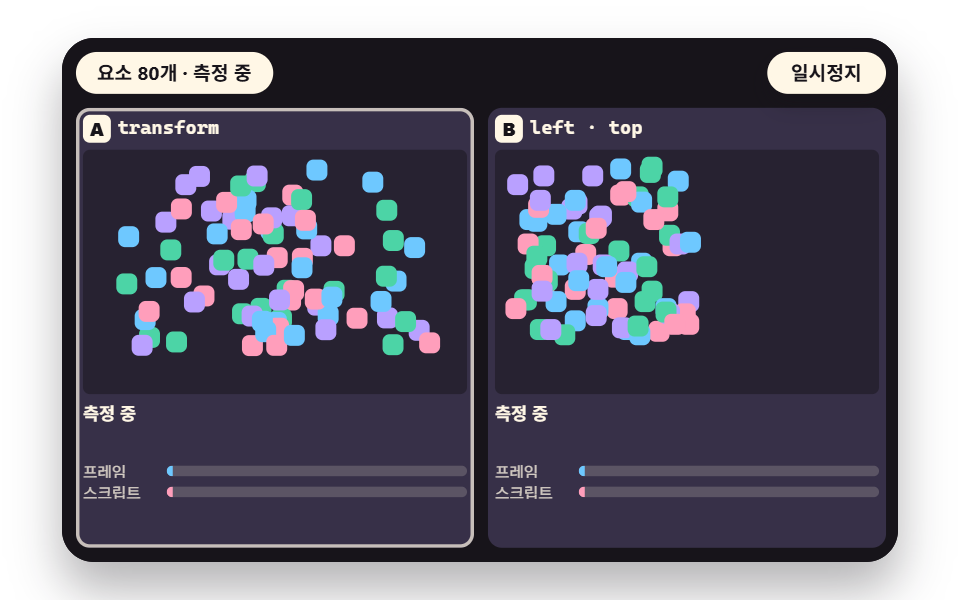 01 pf-transform
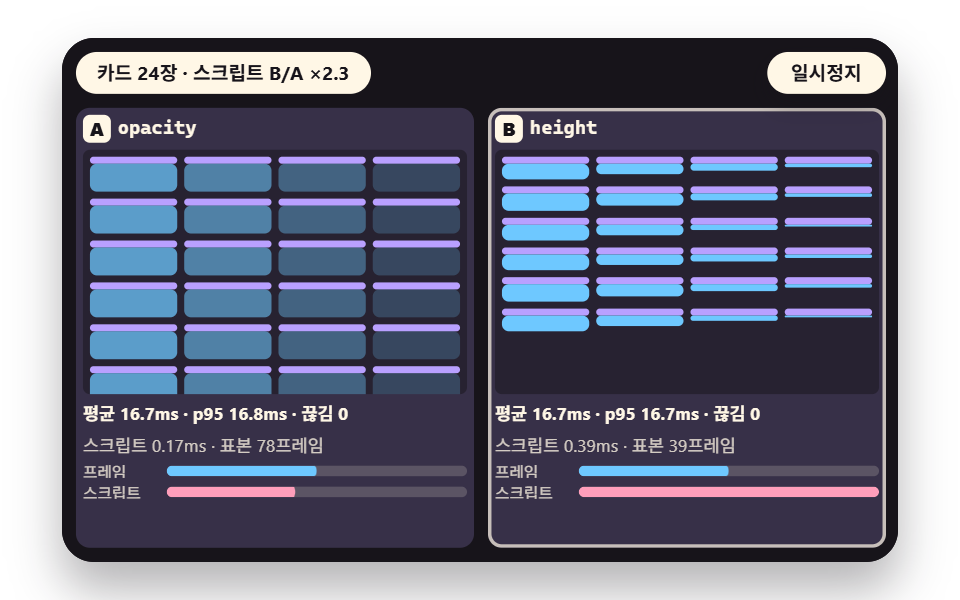 02 pf-opacity
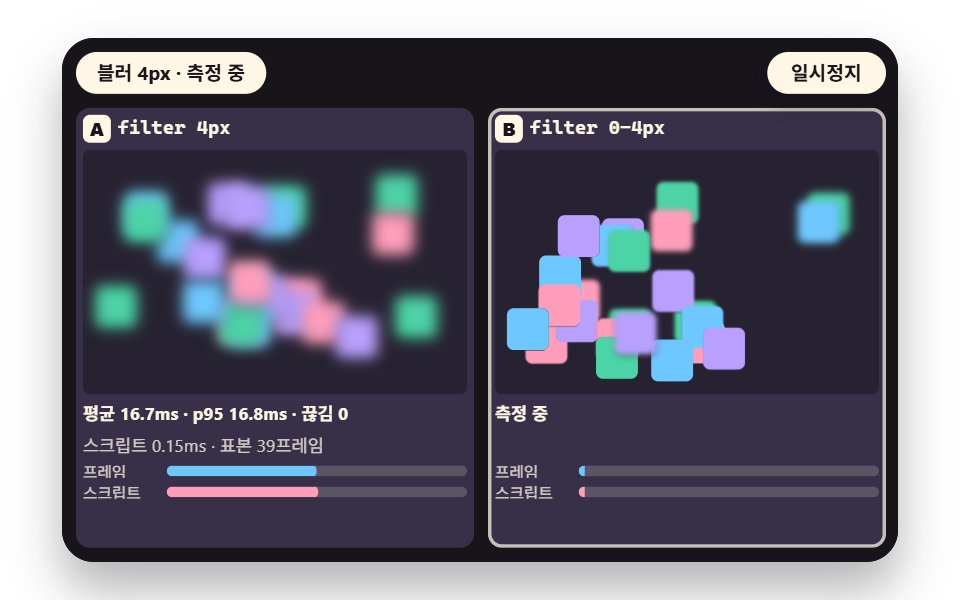 03 pf-paint
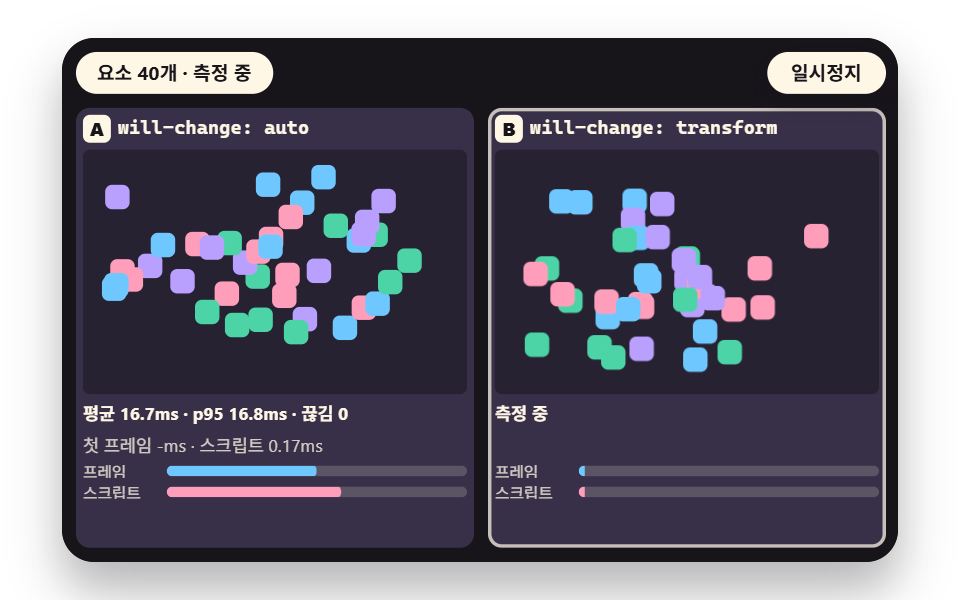 04 pf-willchange
 05 pf-layers
 06 pf-thrash
 07 pf-many
 08 pf-contain
 09 pf-cv
- 01 Position: transform vs left and top Frame Time
- 02 Opacity vs height and visibility Transitions
- 03 Paint Cost: filter blur and box-shadow Animation
- 04 Hint: With and Without will-change
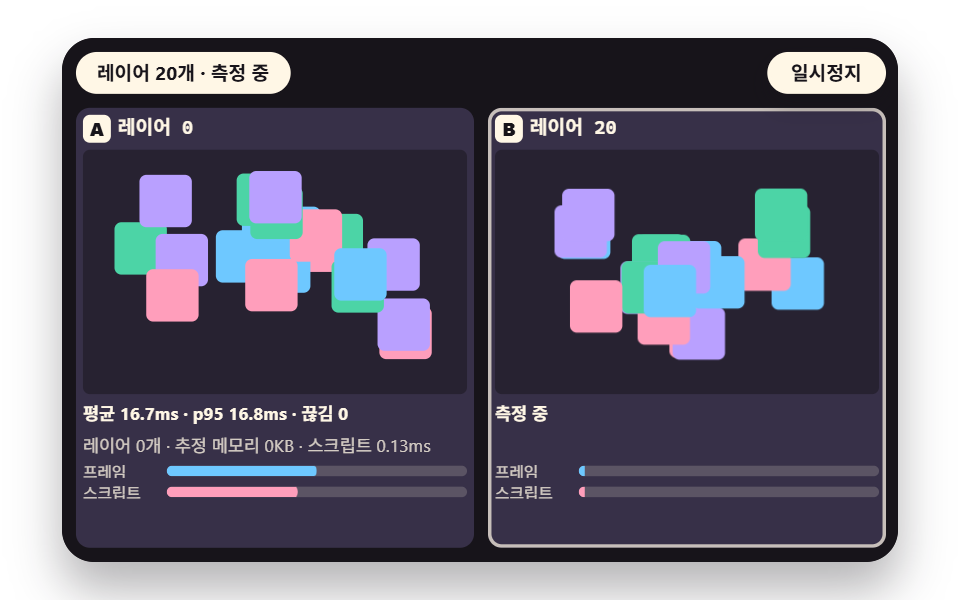
- 05 Layer Count: When Compositing Layers Pile Up
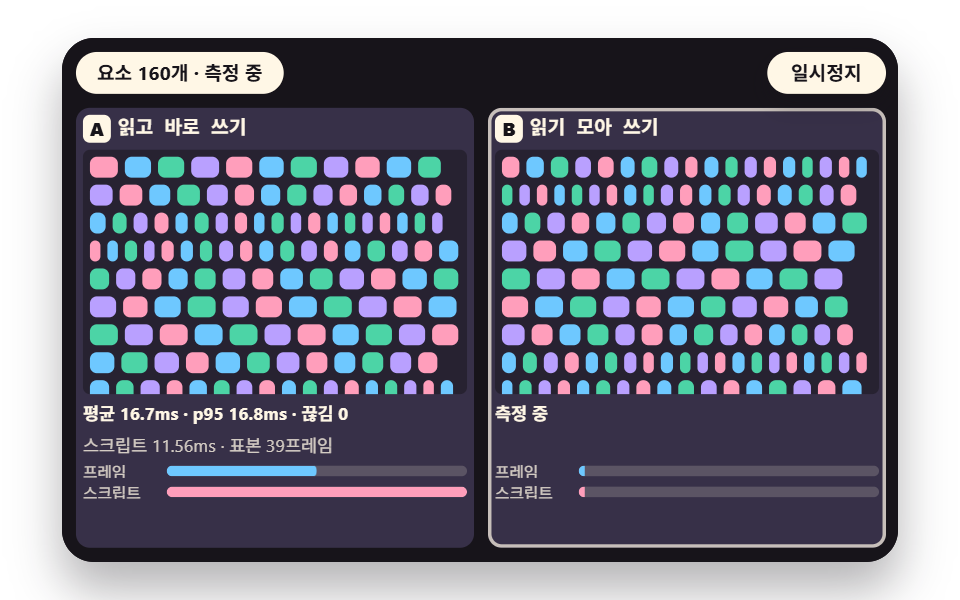
- 06 Layout Thrashing: Mixing Reads and Writes
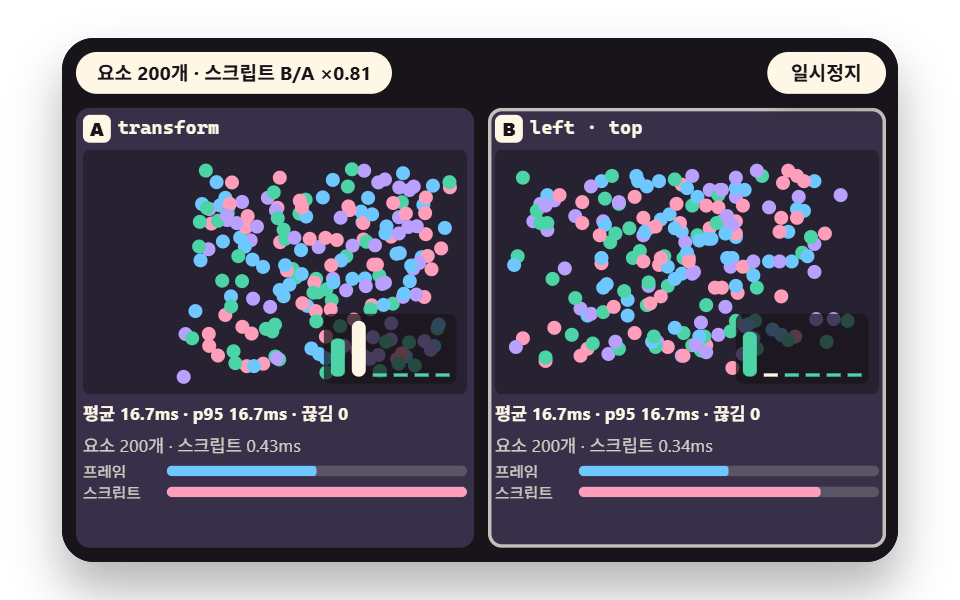
- 07 Element Count: Animating Many at Once
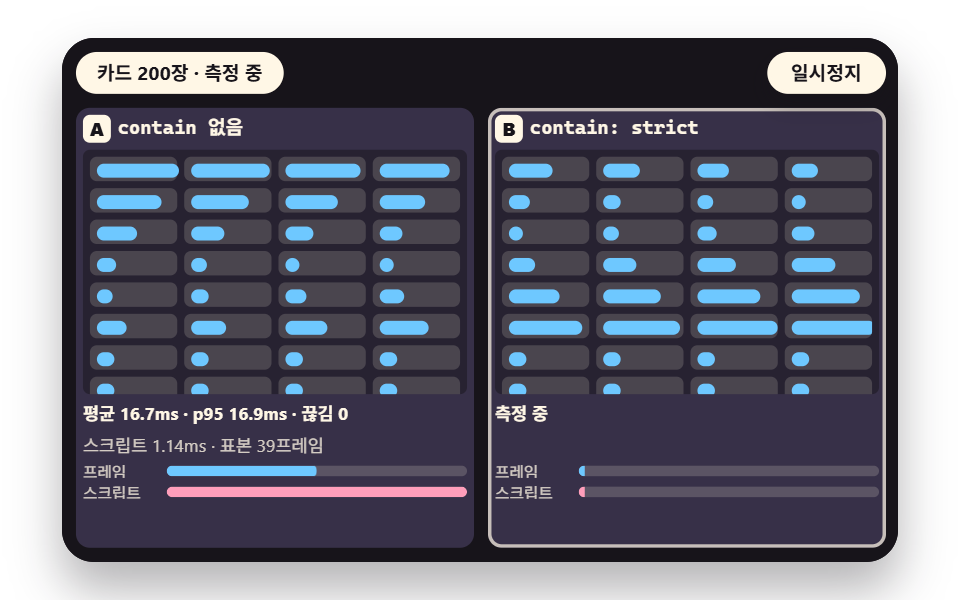
- 08 Isolation: Shrinking Recalculation with contain
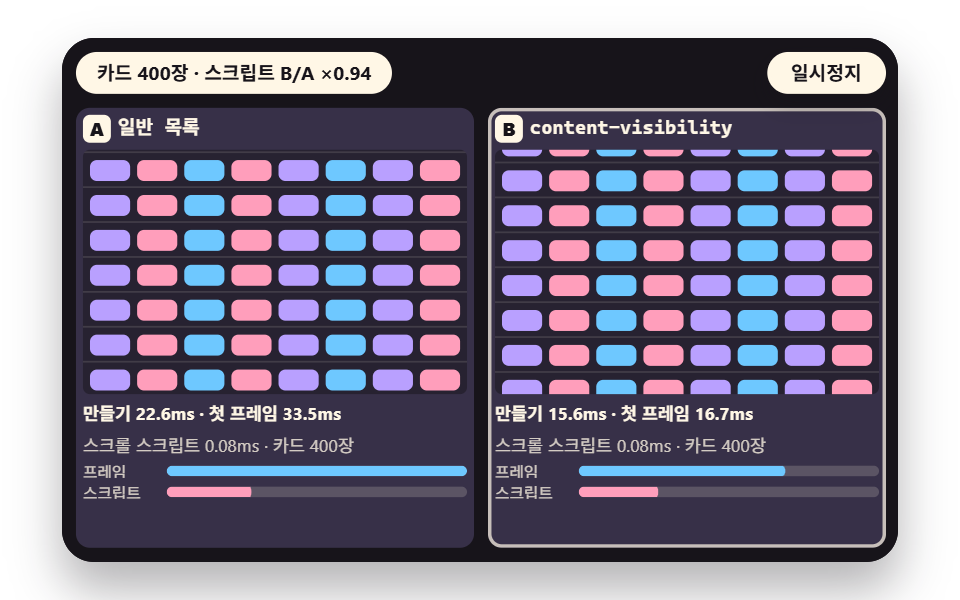
- 09 Offscreen: Skipping Work with content-visibility
A compositing property is one the browser can change by moving or fading a surface it has already painted, without painting that surface again, and the two main ones are transform and opacity.
Left, top and height can force a new layout of the neighboring boxes, while filter and box-shadow enlarge the repainted area. The nine scenes pair two cells on each stage with the same distance, timing and element count, only the property differs, and the frame time is printed under the stage. If you want to improve CSS animation performance, this pairing shows which change is worth making first.
will-change Only Moves Preparation Earlier
In one sentence, will-change transform tells the browser that an element's transform is about to change. A hint does not speed the motion up; it moves preparation to before the motion starts.
How the Demo Measures One Frame
The demo collects, on every rAF callback, how long the write and a forced layout read took, using performance.now(). The getBoundingClientRect() read pulls style calculation and layout into the measured time.
        const t1 = performance.now();
        sceneStep(mode, (clockMs / periodMs) % 1);
        // force a layout read to pull the cost of the write into this script time; both cells make the same read
        void rootEl.getBoundingClientRect().width;
        const t2 = performance.now();
        if (roundIdx > 0) {
            pushCap(stats[mode].sc, t2 - t1);
        }
Both cells make the same read, so any difference comes from the written property. The CSS animation GPU acceleration question usually skips this: paint, raster and compositing are not part of this time, which is the premise of every reading below.
Frame Cost in 9 Scenes: Move to Isolate
Every value here was measured inside the demo. The stage is a fixed 480×300 coordinate space, one round trip lasts 1.2 seconds, and the A and B cells alternate 40-frame rounds, dropping the first frame of each.
The page was rendered in headless Chrome, which may have no GPU. Two sessions ran each control at its minimum, default and maximum for 8 seconds each (scene 07 sweeps once for 16 seconds); the earlier one shared the machine with another render and ran about three times higher. So this guide quotes no absolute milliseconds and uses only relative A to B comparisons that pointed the same way in both sessions. Headless rAF is tied to roughly 60 Hz, so intervals sit near 16.7 ms in this render environment.
The paint, raster and compositing time that compositing properties save is not in the script time, so it stays unverified here. The demo.py render tool captured 24 frames over 2 seconds and compared the 23 neighboring pairs: cumulative area is the share of pixels that ever changed and intensity is their mean color difference (0 to 255), which confirm motion on screen and are not a performance result.
| Scene | Cumulative area | Moved frames | Mean intensity |
|---|---|---|---|
| 01 Position | 30.0% | 23/23 | 155.6 |
| 02 Opacity | 30.6% | 23/23 | 97.9 |
| 03 Paint | 31.9% | 23/23 | 99.5 |
| 04 will-change | 27.6% | 23/23 | 158.6 |
| 05 Layers | 28.1% | 23/23 | 151.3 |
| 06 Thrashing | 30.8% | 23/23 | 135.3 |
| 07 Element count | 32.2% | 23/23 | 141.7 |
| 08 Isolation | 15.1% | 23/23 | 138.5 |
| 09 Offscreen | 37.2% | 23/23 | 140.0 |
| Scene | A cell | B cell | B vs A script time | How to read it |
|---|---|---|---|---|
| 01 Position | transform | left and top | 0.98 to 1.55 times | no large gap |
| 02 Opacity | opacity | height | 2.3 to 2.8 times | height is longer |
| 03 Paint | fixed blur | changing blur and shadow | 1.57 to 1.77 times | the changing cell is longer |
| 04 will-change | auto | transform | ranges overlap at 4, 1.20 to 1.31 times at 40 and 320 | small |
| 05 Layers | no layers | will-change on each | 1.10 to 1.23 times | small |
| 06 Thrashing | read then write at once | reads gathered, then writes | 0.13 to 0.15 (40), 0.04 (160), 0.02 (320) | gathering is far shorter |
| 07 Element count | transform | left and top | up to 1.2 times | small gap through 600 |
| 08 Isolation | no contain | contain strict | 0.93 to 1.04 times | no gain |
| 09 Offscreen | plain | content-visibility | same script time, 8 to 9 dropped frames at 800 cards down to 0 | first render frames split |
In scene 06 the A cell is the slow one, so a smaller ratio means the B cell is shorter.
01Position: transform vs left and top
moveByTransform shifts the box with translate and moveByLeftTop with left and top by the same distance, and across 20 to 240 elements the script time did not separate much. The demo boxes use position: absolute, so left and top push no neighbor; boxes in normal flow were not tested.
<main class="stage">
<div class="pf is-demo" id="pf">
  <div class="pf__fit" data-role="fit">
    <div class="pf__pad" data-role="pad" tabindex="0" role="application" aria-label="Demo stage: Space or Enter pauses, R restarts, Arrow keys change the element count">
      <section class="pf__lane" data-role="laneA">
        <h3 class="pf__tag"><b>A</b><span data-role="tagA"></span></h3>
        <div class="pf__arena" data-role="arenaA"></div>
        <p class="pf__read" data-role="readA">measuring</p>
        <p class="pf__read pf__read--sub" data-role="extraA"></p>
        <div class="pf__bars">
          <div class="pf__bar"><span class="pf__lg">frame</span><span class="pf__trk"><i data-role="barFA"></i></span></div>
          <div class="pf__bar"><span class="pf__lg">script</span><span class="pf__trk pf__trk--s"><i data-role="barSA"></i></span></div>
… (총 33줄 — 아래 「전체 코드」에서 원문 전체)
@use "../../../../site/static/demo-tokens" as *;
@include stage($stage-paper);
// 두 칸 비교 무대 — 480x300 고정 좌표를 JS 가 칸 폭에 맞춰 줄인다
$pf-panel: mix($subject-ink, $subject-lilac, 80%);
$pf-arena: mix($subject-ink, $subject-lilac, 90%);
$pf-text: $subject-cream;
$pf-sub: rgba($subject-cream, .78);
.pf {
position: relative;
width: min(92vw, calc(160vh - 12.8vw));
… (총 368줄 — 아래 「전체 코드」에서 원문 전체)html, body {
margin: 0;
overflow: hidden;
}
.stage {
box-sizing: border-box;
min-height: 100vh;
display: grid;
place-items: center;
margin: 0;
background: #ffffff;
… (총 392줄 — 아래 「전체 코드」에서 원문 전체)(function () {
const rootEl = document.getElementById("pf");
if (!rootEl) return;
function cx(s) { return s; }
main(rootEl);
function main(root) {
const ARENA_W = 220;
const ARENA_H = 140;
const CAP = 240;
function clamp(v, lo, hi) { return v < lo ? lo : (v > hi ? hi : v); }
function f1(v) { return Number.isFinite(v) ? (Math.round(v * 10) / 10).toFixed(1) : '-'; }
function f2(v) { return Number.isFinite(v) ? (Math.round(v * 100) / 100).toFixed(2) : '-'; }
… (총 479줄 — 아래 「전체 코드」에서 원문 전체)// TransformVsLeft - 같은 항목 vanilla index.html 의 React 판. 같은 계산을 useEffect 안에서 돌린다
import { useEffect, useRef } from "react";
import styles from "./TransformVsLeft.module.scss";
const cx = (s: string): string => s.split(" ").map((n) => styles[n] ?? n).join(" ");
function main(root: HTMLElement): () => void {
// 두 칸 비교 장면의 공통 뼈대 — 같은 움직임을 A·B 두 칸에 속성만 바꿔 입히고, 프레임 간격·스크립트 시간을 같은 루프에서 잰다.
// 한 칸씩 번갈아 한 바퀴(ROUND 프레임) 돌리므로 두 칸의 값이 서로 섞이지 않는다. 절대값은 이 기기 값이고 A·B 상대 비교만 읽는다.
type Sum = { n: number; mean: number; p95: number; drops: number; script: number; first: number };
type Stat = { iv: number[]; sc: number[]; first: number[] };
const ARENA_W = 220;
… (총 468줄 — 아래 「전체 코드」에서 원문 전체)01 · Position: transform vs left and top Frame Time — Measured area 30.024% · moving frames 23/23Original by GODRICH · SCSS and React ship in the zip · See the password
    // compositing side: move with transform (left and top stay as they are)
    function moveByTransform(els, ms, ph, tx, ty) {
        for (let i = 0; i < els.length; i += 1) {
            els[i].style.transform = 'translate(' + dxOf(ms[i], ph, tx).toFixed(2) + 'px,' + dyOf(ms[i], ph, ty).toFixed(2) + 'px)';
        }
    }
    // layout side: change left and top to move the same distance
    function moveByLeftTop(els, ms, ph, tx, ty) {
        for (let i = 0; i < els.length; i += 1) {
            els[i].style.left = (ms[i].x + dxOf(ms[i], ph, tx)).toFixed(2) + 'px';
            els[i].style.top = (ms[i].y + dyOf(ms[i], ph, ty)).toFixed(2) + 'px';
        }
    }
02Opacity vs height Transitions
A panel was driven by opacity in one cell and by height in the other, and the height cell took 2.3 to 2.8 times the script time as the card count grew, because layout is recomputed. Skip the swap when the height itself is the content, since the gap was measured only for 8 to 96 cards.
<main class="stage">
<div class="pf is-demo" id="pf">
  <div class="pf__fit" data-role="fit">
    <div class="pf__pad" data-role="pad" tabindex="0" role="application" aria-label="Demo stage: Space or Enter pauses, R restarts, Arrow keys change the card count">
      <section class="pf__lane" data-role="laneA">
        <h3 class="pf__tag"><b>A</b><span data-role="tagA"></span></h3>
        <div class="pf__arena" data-role="arenaA"></div>
        <p class="pf__read" data-role="readA">measuring</p>
        <p class="pf__read pf__read--sub" data-role="extraA"></p>
        <div class="pf__bars">
          <div class="pf__bar"><span class="pf__lg">frame</span><span class="pf__trk"><i data-role="barFA"></i></span></div>
          <div class="pf__bar"><span class="pf__lg">script</span><span class="pf__trk pf__trk--s"><i data-role="barSA"></i></span></div>
… (총 33줄 — 아래 「전체 코드」에서 원문 전체)
@use "../../../../site/static/demo-tokens" as *;
@include stage($stage-paper);
// 두 칸 비교 무대 — 480x300 고정 좌표를 JS 가 칸 폭에 맞춰 줄인다
$pf-panel: mix($subject-ink, $subject-lilac, 80%);
$pf-arena: mix($subject-ink, $subject-lilac, 90%);
$pf-text: $subject-cream;
$pf-sub: rgba($subject-cream, .78);
.pf {
position: relative;
width: min(92vw, calc(160vh - 12.8vw));
… (총 368줄 — 아래 「전체 코드」에서 원문 전체)html, body {
margin: 0;
overflow: hidden;
}
.stage {
box-sizing: border-box;
min-height: 100vh;
display: grid;
place-items: center;
margin: 0;
background: #ffffff;
… (총 392줄 — 아래 「전체 코드」에서 원문 전체)(function () {
const rootEl = document.getElementById("pf");
if (!rootEl) return;
function cx(s) { return s; }
main(rootEl);
function main(root) {
const ARENA_W = 220;
const ARENA_H = 140;
const CAP = 240;
function clamp(v, lo, hi) { return v < lo ? lo : (v > hi ? hi : v); }
function f1(v) { return Number.isFinite(v) ? (Math.round(v * 10) / 10).toFixed(1) : '-'; }
function f2(v) { return Number.isFinite(v) ? (Math.round(v * 100) / 100).toFixed(2) : '-'; }
… (총 493줄 — 아래 「전체 코드」에서 원문 전체)// OpacityVsHeight - 같은 항목 vanilla index.html 의 React 판. 같은 계산을 useEffect 안에서 돌린다
import { useEffect, useRef } from "react";
import styles from "./OpacityVsHeight.module.scss";
const cx = (s: string): string => s.split(" ").map((n) => styles[n] ?? n).join(" ");
function main(root: HTMLElement): () => void {
// 두 칸 비교 장면의 공통 뼈대 — 같은 움직임을 A·B 두 칸에 속성만 바꿔 입히고, 프레임 간격·스크립트 시간을 같은 루프에서 잰다.
// 한 칸씩 번갈아 한 바퀴(ROUND 프레임) 돌리므로 두 칸의 값이 서로 섞이지 않는다. 절대값은 이 기기 값이고 A·B 상대 비교만 읽는다.
type Sum = { n: number; mean: number; p95: number; drops: number; script: number; first: number };
type Stat = { iv: number[]; sc: number[]; first: number[] };
const ARENA_W = 220;
… (총 482줄 — 아래 「전체 코드」에서 원문 전체)02 · Opacity vs height and visibility Transitions — Measured area 30.597% · moving frames 23/23Original by GODRICH · SCSS and React ship in the zip · See the password
    // open amount e (0 to 1): each card is offset a little so they open in a wave
    function openOf(i, ph) { return smooth(tri(ph + (i % 4) * 0.06)); }
    function sceneStep(m, ph) {
        const els = details[m];
        for (let i = 0; i < els.length; i += 1) {
            const e = openOf(i, ph);
            if (m === 0) {
                els[i].style.opacity = e.toFixed(3);
            }
            else {
                els[i].style.height = (DETAIL_H * e).toFixed(2) + 'px';
            }
        }
    }
03Paint Cost: blur and box-shadow
Changing filter: blur() and box-shadow every frame took 1.57 to 1.77 times the script time of the fixed cell, at both 4 px and 24 px. Raster cost is unverified here, so the number covers the style side only. Before animating blur or shadow, check whether you can change the value less often.
<main class="stage">
<div class="pf is-demo" id="pf">
  <div class="pf__fit" data-role="fit">
    <div class="pf__pad" data-role="pad" tabindex="0" role="application" aria-label="Demo stage: Space or Enter pauses, R restarts, Arrow keys change the blur radius">
      <section class="pf__lane" data-role="laneA">
        <h3 class="pf__tag"><b>A</b><span data-role="tagA"></span></h3>
        <div class="pf__arena" data-role="arenaA"></div>
        <p class="pf__read" data-role="readA">measuring</p>
        <p class="pf__read pf__read--sub" data-role="extraA"></p>
        <div class="pf__bars">
          <div class="pf__bar"><span class="pf__lg">frame</span><span class="pf__trk"><i data-role="barFA"></i></span></div>
          <div class="pf__bar"><span class="pf__lg">script</span><span class="pf__trk pf__trk--s"><i data-role="barSA"></i></span></div>
… (총 33줄 — 아래 「전체 코드」에서 원문 전체)
@use "../../../../site/static/demo-tokens" as *;
@include stage($stage-paper);
// 두 칸 비교 무대 — 480x300 고정 좌표를 JS 가 칸 폭에 맞춰 줄인다
$pf-panel: mix($subject-ink, $subject-lilac, 80%);
$pf-arena: mix($subject-ink, $subject-lilac, 90%);
$pf-text: $subject-cream;
$pf-sub: rgba($subject-cream, .78);
.pf {
position: relative;
width: min(92vw, calc(160vh - 12.8vw));
… (총 368줄 — 아래 「전체 코드」에서 원문 전체)html, body {
margin: 0;
overflow: hidden;
}
.stage {
box-sizing: border-box;
min-height: 100vh;
display: grid;
place-items: center;
margin: 0;
background: #ffffff;
… (총 392줄 — 아래 「전체 코드」에서 원문 전체)(function () {
const rootEl = document.getElementById("pf");
if (!rootEl) return;
function cx(s) { return s; }
main(rootEl);
function main(root) {
const ARENA_W = 220;
const ARENA_H = 140;
const CAP = 240;
function clamp(v, lo, hi) { return v < lo ? lo : (v > hi ? hi : v); }
function f1(v) { return Number.isFinite(v) ? (Math.round(v * 10) / 10).toFixed(1) : '-'; }
function f2(v) { return Number.isFinite(v) ? (Math.round(v * 100) / 100).toFixed(2) : '-'; }
… (총 490줄 — 아래 「전체 코드」에서 원문 전체)// BlurPaintCost - 같은 항목 vanilla index.html 의 React 판. 같은 계산을 useEffect 안에서 돌린다
import { useEffect, useRef } from "react";
import styles from "./BlurPaintCost.module.scss";
const cx = (s: string): string => s.split(" ").map((n) => styles[n] ?? n).join(" ");
function main(root: HTMLElement): () => void {
// 두 칸 비교 장면의 공통 뼈대 — 같은 움직임을 A·B 두 칸에 속성만 바꿔 입히고, 프레임 간격·스크립트 시간을 같은 루프에서 잰다.
// 한 칸씩 번갈아 한 바퀴(ROUND 프레임) 돌리므로 두 칸의 값이 서로 섞이지 않는다. 절대값은 이 기기 값이고 A·B 상대 비교만 읽는다.
type Sum = { n: number; mean: number; p95: number; drops: number; script: number; first: number };
type Stat = { iv: number[]; sc: number[]; first: number[] };
const ARENA_W = 220;
… (총 480줄 — 아래 「전체 코드」에서 원문 전체)03 · Paint Cost: filter blur and box-shadow Animation — Measured area 31.885% · moving frames 23/23Original by GODRICH · SCSS and React ship in the zip · See the password
    function sceneStep(m, ph) {
        moveByTransform(boxes[m], movers, ph, TRAVEL_X, TRAVEL_Y);
        if (m === 1) {
            for (let i = 0; i < BOX_N; i += 1) {
                const k = BLUR * smooth(tri(ph * 2 + movers[i].ph));
                boxes[1][i].style.filter = 'blur(' + k.toFixed(2) + 'px)';
                boxes[1][i].style.boxShadow = shadowOf(k);
            }
        }
    }
04Hint: With and Without will-change
sceneRoundStart adds willChange = 'transform' only in the B round. With 4 elements the two ranges overlapped, with 40 and 320 the B cell ran a little longer, and the first frame interval was the same. Skip will-change when only a handful of elements move; the cost of creating a layer is unverified.
<main class="stage">
<div class="pf is-demo" id="pf">
  <div class="pf__fit" data-role="fit">
    <div class="pf__pad" data-role="pad" tabindex="0" role="application" aria-label="Demo stage: Space or Enter pauses, R restarts, Arrow keys change the element count">
      <section class="pf__lane" data-role="laneA">
        <h3 class="pf__tag"><b>A</b><span data-role="tagA"></span></h3>
        <div class="pf__arena" data-role="arenaA"></div>
        <p class="pf__read" data-role="readA">measuring</p>
        <p class="pf__read pf__read--sub" data-role="extraA"></p>
        <div class="pf__bars">
          <div class="pf__bar"><span class="pf__lg">frame</span><span class="pf__trk"><i data-role="barFA"></i></span></div>
          <div class="pf__bar"><span class="pf__lg">script</span><span class="pf__trk pf__trk--s"><i data-role="barSA"></i></span></div>
… (총 33줄 — 아래 「전체 코드」에서 원문 전체)
@use "../../../../site/static/demo-tokens" as *;
@include stage($stage-paper);
// 두 칸 비교 무대 — 480x300 고정 좌표를 JS 가 칸 폭에 맞춰 줄인다
$pf-panel: mix($subject-ink, $subject-lilac, 80%);
$pf-arena: mix($subject-ink, $subject-lilac, 90%);
$pf-text: $subject-cream;
$pf-sub: rgba($subject-cream, .78);
.pf {
position: relative;
width: min(92vw, calc(160vh - 12.8vw));
… (총 368줄 — 아래 「전체 코드」에서 원문 전체)html, body {
margin: 0;
overflow: hidden;
}
.stage {
box-sizing: border-box;
min-height: 100vh;
display: grid;
place-items: center;
margin: 0;
background: #ffffff;
… (총 392줄 — 아래 「전체 코드」에서 원문 전체)(function () {
const rootEl = document.getElementById("pf");
if (!rootEl) return;
function cx(s) { return s; }
main(rootEl);
function main(root) {
const ARENA_W = 220;
const ARENA_H = 140;
const CAP = 240;
function clamp(v, lo, hi) { return v < lo ? lo : (v > hi ? hi : v); }
function f1(v) { return Number.isFinite(v) ? (Math.round(v * 10) / 10).toFixed(1) : '-'; }
function f2(v) { return Number.isFinite(v) ? (Math.round(v * 100) / 100).toFixed(2) : '-'; }
… (총 484줄 — 아래 「전체 코드」에서 원문 전체)// WillChangeHint - 같은 항목 vanilla index.html 의 React 판. 같은 계산을 useEffect 안에서 돌린다
import { useEffect, useRef } from "react";
import styles from "./WillChangeHint.module.scss";
const cx = (s: string): string => s.split(" ").map((n) => styles[n] ?? n).join(" ");
function main(root: HTMLElement): () => void {
// 두 칸 비교 장면의 공통 뼈대 — 같은 움직임을 A·B 두 칸에 속성만 바꿔 입히고, 프레임 간격·스크립트 시간을 같은 루프에서 잰다.
// 한 칸씩 번갈아 한 바퀴(ROUND 프레임) 돌리므로 두 칸의 값이 서로 섞이지 않는다. 절대값은 이 기기 값이고 A·B 상대 비교만 읽는다.
type Sum = { n: number; mean: number; p95: number; drops: number; script: number; first: number };
type Stat = { iv: number[]; sc: number[]; first: number[] };
const ARENA_W = 220;
… (총 474줄 — 아래 「전체 코드」에서 원문 전체)04 · Hint: With and Without will-change — Measured area 27.581% · moving frames 23/23Original by GODRICH · SCSS and React ship in the zip · See the password
    // at round start add the hint only to the B cell and remove it in the A round, so the first frame after the hint is timed separately
    function sceneRoundStart(m) {
        for (let i = 0; i < boxes[1].length; i += 1) {
            boxes[1][i].style.willChange = m === 1 ? 'transform' : 'auto';
        }
    }
05Layer Count: When Layers Pile Up
With will-change: transform on each of LAYERS elements, that many layers are created, and the script time ran a little longer than in the zero-layer cell. The on-screen layer memory is a rough estimate (width × height × 4 bytes). Skip will-change on every element, because no gain showed at 20 or at 200 layers.
<main class="stage">
<div class="pf is-demo" id="pf">
  <div class="pf__fit" data-role="fit">
    <div class="pf__pad" data-role="pad" tabindex="0" role="application" aria-label="Demo stage: Space or Enter pauses, R restarts, Arrow keys change the layer count">
      <section class="pf__lane" data-role="laneA">
        <h3 class="pf__tag"><b>A</b><span data-role="tagA"></span></h3>
        <div class="pf__arena" data-role="arenaA"></div>
        <p class="pf__read" data-role="readA">measuring</p>
        <p class="pf__read pf__read--sub" data-role="extraA"></p>
        <div class="pf__bars">
          <div class="pf__bar"><span class="pf__lg">frame</span><span class="pf__trk"><i data-role="barFA"></i></span></div>
          <div class="pf__bar"><span class="pf__lg">script</span><span class="pf__trk pf__trk--s"><i data-role="barSA"></i></span></div>
… (총 33줄 — 아래 「전체 코드」에서 원문 전체)
@use "../../../../site/static/demo-tokens" as *;
@include stage($stage-paper);
// 두 칸 비교 무대 — 480x300 고정 좌표를 JS 가 칸 폭에 맞춰 줄인다
$pf-panel: mix($subject-ink, $subject-lilac, 80%);
$pf-arena: mix($subject-ink, $subject-lilac, 90%);
$pf-text: $subject-cream;
$pf-sub: rgba($subject-cream, .78);
.pf {
position: relative;
width: min(92vw, calc(160vh - 12.8vw));
… (총 368줄 — 아래 「전체 코드」에서 원문 전체)html, body {
margin: 0;
overflow: hidden;
}
.stage {
box-sizing: border-box;
min-height: 100vh;
display: grid;
place-items: center;
margin: 0;
background: #ffffff;
… (총 392줄 — 아래 「전체 코드」에서 원문 전체)(function () {
const rootEl = document.getElementById("pf");
if (!rootEl) return;
function cx(s) { return s; }
main(rootEl);
function main(root) {
const ARENA_W = 220;
const ARENA_H = 140;
const CAP = 240;
function clamp(v, lo, hi) { return v < lo ? lo : (v > hi ? hi : v); }
function f1(v) { return Number.isFinite(v) ? (Math.round(v * 10) / 10).toFixed(1) : '-'; }
function f2(v) { return Number.isFinite(v) ? (Math.round(v * 100) / 100).toFixed(2) : '-'; }
… (총 486줄 — 아래 「전체 코드」에서 원문 전체)// LayerCount - 같은 항목 vanilla index.html 의 React 판. 같은 계산을 useEffect 안에서 돌린다
import { useEffect, useRef } from "react";
import styles from "./LayerCount.module.scss";
const cx = (s: string): string => s.split(" ").map((n) => styles[n] ?? n).join(" ");
function main(root: HTMLElement): () => void {
// 두 칸 비교 장면의 공통 뼈대 — 같은 움직임을 A·B 두 칸에 속성만 바꿔 입히고, 프레임 간격·스크립트 시간을 같은 루프에서 잰다.
// 한 칸씩 번갈아 한 바퀴(ROUND 프레임) 돌리므로 두 칸의 값이 서로 섞이지 않는다. 절대값은 이 기기 값이고 A·B 상대 비교만 읽는다.
type Sum = { n: number; mean: number; p95: number; drops: number; script: number; first: number };
type Stat = { iv: number[]; sc: number[]; first: number[] };
const ARENA_W = 220;
… (총 476줄 — 아래 「전체 코드」에서 원문 전체)05 · Layer Count: When Compositing Layers Pile Up — Measured area 28.142% · moving frames 23/23Original by GODRICH · SCSS and React ship in the zip · See the password
        tags[0].textContent = 'layers 0';
        tags[1].textContent = fill('layers {a}', String(LAYERS));
        movers = makeMovers(LAYERS, 525, SIZE, TRAVEL_X, TRAVEL_Y);
        boxes = [buildBoxes(arenas[0], movers, SIZE, ''), buildBoxes(arenas[1], movers, SIZE, '')];
        for (let i = 0; i < LAYERS; i += 1) {
            boxes[1][i].style.willChange = 'transform';
        }
    }
06Layout Thrashing: Reads Mixed In
The mixed A cell reads offsetWidth right after each write, forcing a layout per element, while the B cell gathers all reads first and then writes. At 320 elements the A cell's average frame interval rose to about 41 ms in this render environment, against 16.7 ms for B. The css vs js animation performance debate hides here: a loop that mixes reads and writes costs more than the CSS property you pick.
<main class="stage">
<div class="pf is-demo" id="pf">
  <div class="pf__fit" data-role="fit">
    <div class="pf__pad" data-role="pad" tabindex="0" role="application" aria-label="Demo stage: Space or Enter pauses, R restarts, Arrow keys change the element count">
      <section class="pf__lane" data-role="laneA">
        <h3 class="pf__tag"><b>A</b><span data-role="tagA"></span></h3>
        <div class="pf__arena" data-role="arenaA"></div>
        <p class="pf__read" data-role="readA">measuring</p>
        <p class="pf__read pf__read--sub" data-role="extraA"></p>
        <div class="pf__bars">
          <div class="pf__bar"><span class="pf__lg">frame</span><span class="pf__trk"><i data-role="barFA"></i></span></div>
          <div class="pf__bar"><span class="pf__lg">script</span><span class="pf__trk pf__trk--s"><i data-role="barSA"></i></span></div>
… (총 33줄 — 아래 「전체 코드」에서 원문 전체)
@use "../../../../site/static/demo-tokens" as *;
@include stage($stage-paper);
// 두 칸 비교 무대 — 480x300 고정 좌표를 JS 가 칸 폭에 맞춰 줄인다
$pf-panel: mix($subject-ink, $subject-lilac, 80%);
$pf-arena: mix($subject-ink, $subject-lilac, 90%);
$pf-text: $subject-cream;
$pf-sub: rgba($subject-cream, .78);
.pf {
position: relative;
width: min(92vw, calc(160vh - 12.8vw));
… (총 368줄 — 아래 「전체 코드」에서 원문 전체)html, body {
margin: 0;
overflow: hidden;
}
.stage {
box-sizing: border-box;
min-height: 100vh;
display: grid;
place-items: center;
margin: 0;
background: #ffffff;
… (총 392줄 — 아래 「전체 코드」에서 원문 전체)(function () {
const rootEl = document.getElementById("pf");
if (!rootEl) return;
function cx(s) { return s; }
main(rootEl);
function main(root) {
const ARENA_W = 220;
const ARENA_H = 140;
const CAP = 240;
function clamp(v, lo, hi) { return v < lo ? lo : (v > hi ? hi : v); }
function f1(v) { return Number.isFinite(v) ? (Math.round(v * 10) / 10).toFixed(1) : '-'; }
function f2(v) { return Number.isFinite(v) ? (Math.round(v * 100) / 100).toFixed(2) : '-'; }
… (총 501줄 — 아래 「전체 코드」에서 원문 전체)// LayoutThrash - 같은 항목 vanilla index.html 의 React 판. 같은 계산을 useEffect 안에서 돌린다
import { useEffect, useRef } from "react";
import styles from "./LayoutThrash.module.scss";
const cx = (s: string): string => s.split(" ").map((n) => styles[n] ?? n).join(" ");
function main(root: HTMLElement): () => void {
// 두 칸 비교 장면의 공통 뼈대 — 같은 움직임을 A·B 두 칸에 속성만 바꿔 입히고, 프레임 간격·스크립트 시간을 같은 루프에서 잰다.
// 한 칸씩 번갈아 한 바퀴(ROUND 프레임) 돌리므로 두 칸의 값이 서로 섞이지 않는다. 절대값은 이 기기 값이고 A·B 상대 비교만 읽는다.
type Sum = { n: number; mean: number; p95: number; drops: number; script: number; first: number };
type Stat = { iv: number[]; sc: number[]; first: number[] };
const ARENA_W = 220;
… (총 488줄 — 아래 「전체 코드」에서 원문 전체)06 · Layout Thrashing: Mixing Reads and Writes — Measured area 30.819% · moving frames 23/23Original by GODRICH · SCSS and React ship in the zip · See the password
        if (m === 0) {
            // read the width of each element and write at once: every read forces layout again
            for (let i = 0; i < els.length; i += 1) {
                const cur = els[i].offsetWidth;
                els[i].style.width = (targetW(i, ph) + (cur < 0 ? 1 : 0)).toFixed(2) + 'px';
            }
        }
        else {
            // read all widths first, then write all: layout runs once at the end
            const seen = [];
            for (let i = 0; i < els.length; i += 1) {
                seen.push(els[i].offsetWidth);
            }
            for (let i = 0; i < els.length; i += 1) {
                els[i].style.width = (targetW(i, ph) + (seen[i] < 0 ? 1 : 0)).toFixed(2) + 'px';
            }
        }
07Element Count: Many at Once
From 100 to 600 elements the transform cell and the left and top cell grew at the same slope, with left and top at most 1.2 times longer, and the ladders gauge showed no bend. For hundreds of particles or cards choose transform, and treat anything above 600 as unverified.
<main class="stage">
<div class="pf is-demo" id="pf">
  <div class="pf__fit" data-role="fit">
    <div class="pf__pad" data-role="pad" tabindex="0" role="application" aria-label="Demo stage: Space or Enter pauses, R restarts, Arrow keys jump the count step">
      <section class="pf__lane" data-role="laneA">
        <h3 class="pf__tag"><b>A</b><span data-role="tagA"></span></h3>
        <div class="pf__arena" data-role="arenaA"></div>
        <p class="pf__read" data-role="readA">measuring</p>
        <p class="pf__read pf__read--sub" data-role="extraA"></p>
        <div class="pf__bars">
          <div class="pf__bar"><span class="pf__lg">frame</span><span class="pf__trk"><i data-role="barFA"></i></span></div>
          <div class="pf__bar"><span class="pf__lg">script</span><span class="pf__trk pf__trk--s"><i data-role="barSA"></i></span></div>
… (총 33줄 — 아래 「전체 코드」에서 원문 전체)
@use "../../../../site/static/demo-tokens" as *;
@include stage($stage-paper);
// 두 칸 비교 무대 — 480x300 고정 좌표를 JS 가 칸 폭에 맞춰 줄인다
$pf-panel: mix($subject-ink, $subject-lilac, 80%);
$pf-arena: mix($subject-ink, $subject-lilac, 90%);
$pf-text: $subject-cream;
$pf-sub: rgba($subject-cream, .78);
.pf {
position: relative;
width: min(92vw, calc(160vh - 12.8vw));
… (총 368줄 — 아래 「전체 코드」에서 원문 전체)html, body {
margin: 0;
overflow: hidden;
}
.stage {
box-sizing: border-box;
min-height: 100vh;
display: grid;
place-items: center;
margin: 0;
background: #ffffff;
… (총 392줄 — 아래 「전체 코드」에서 원문 전체)(function () {
const rootEl = document.getElementById("pf");
if (!rootEl) return;
function cx(s) { return s; }
main(rootEl);
function main(root) {
const ARENA_W = 220;
const ARENA_H = 140;
const CAP = 240;
function clamp(v, lo, hi) { return v < lo ? lo : (v > hi ? hi : v); }
function f1(v) { return Number.isFinite(v) ? (Math.round(v * 10) / 10).toFixed(1) : '-'; }
function f2(v) { return Number.isFinite(v) ? (Math.round(v * 100) / 100).toFixed(2) : '-'; }
… (총 542줄 — 아래 「전체 코드」에서 원문 전체)// ElementCountSweep - 같은 항목 vanilla index.html 의 React 판. 같은 계산을 useEffect 안에서 돌린다
import { useEffect, useRef } from "react";
import styles from "./ElementCountSweep.module.scss";
const cx = (s: string): string => s.split(" ").map((n) => styles[n] ?? n).join(" ");
function main(root: HTMLElement): () => void {
// 두 칸 비교 장면의 공통 뼈대 — 같은 움직임을 A·B 두 칸에 속성만 바꿔 입히고, 프레임 간격·스크립트 시간을 같은 루프에서 잰다.
// 한 칸씩 번갈아 한 바퀴(ROUND 프레임) 돌리므로 두 칸의 값이 서로 섞이지 않는다. 절대값은 이 기기 값이고 A·B 상대 비교만 읽는다.
type Sum = { n: number; mean: number; p95: number; drops: number; script: number; first: number };
type Stat = { iv: number[]; sc: number[]; first: number[] };
const ARENA_W = 220;
… (총 521줄 — 아래 「전체 코드」에서 원문 전체)07 · Element Count: Animating Many at Once — Measured area 32.174% · moving frames 23/23Original by GODRICH · SCSS and React ship in the zip · See the password
    function build() {
        movers = makeMovers(COUNT, 527, SIZE, TRAVEL_X, TRAVEL_Y);
        for (let k = 0; k < 2; k += 1) {
            boxes[k] = buildBoxes(arenas[k], movers, SIZE, '');
            const lad = mk('div', 'pf__ladder', arenas[k]);
            ladders[k] = [];
            for (let j = 0; j < COUNT_LIST.length; j += 1) {
                ladders[k].push(mk('i', '', lad));
            }
        }
    }
08Isolation with contain
buildCards gives the B cards contain: strict, but for 50 to 400 cards the script time of the two cells was practically equal. Skip contain in that range; screens with far more widgets are unverified.
<main class="stage">
<div class="pf is-demo" id="pf">
  <div class="pf__fit" data-role="fit">
    <div class="pf__pad" data-role="pad" tabindex="0" role="application" aria-label="Demo stage: Space or Enter pauses, R restarts, Arrow keys change the card count">
      <section class="pf__lane" data-role="laneA">
        <h3 class="pf__tag"><b>A</b><span data-role="tagA"></span></h3>
        <div class="pf__arena" data-role="arenaA"></div>
        <p class="pf__read" data-role="readA">measuring</p>
        <p class="pf__read pf__read--sub" data-role="extraA"></p>
        <div class="pf__bars">
          <div class="pf__bar"><span class="pf__lg">frame</span><span class="pf__trk"><i data-role="barFA"></i></span></div>
          <div class="pf__bar"><span class="pf__lg">script</span><span class="pf__trk pf__trk--s"><i data-role="barSA"></i></span></div>
… (총 33줄 — 아래 「전체 코드」에서 원문 전체)
@use "../../../../site/static/demo-tokens" as *;
@include stage($stage-paper);
// 두 칸 비교 무대 — 480x300 고정 좌표를 JS 가 칸 폭에 맞춰 줄인다
$pf-panel: mix($subject-ink, $subject-lilac, 80%);
$pf-arena: mix($subject-ink, $subject-lilac, 90%);
$pf-text: $subject-cream;
$pf-sub: rgba($subject-cream, .78);
.pf {
position: relative;
width: min(92vw, calc(160vh - 12.8vw));
… (총 368줄 — 아래 「전체 코드」에서 원문 전체)html, body {
margin: 0;
overflow: hidden;
}
.stage {
box-sizing: border-box;
min-height: 100vh;
display: grid;
place-items: center;
margin: 0;
background: #ffffff;
… (총 392줄 — 아래 「전체 코드」에서 원문 전체)(function () {
const rootEl = document.getElementById("pf");
if (!rootEl) return;
function cx(s) { return s; }
main(rootEl);
function main(root) {
const ARENA_W = 220;
const ARENA_H = 140;
const CAP = 240;
function clamp(v, lo, hi) { return v < lo ? lo : (v > hi ? hi : v); }
function f1(v) { return Number.isFinite(v) ? (Math.round(v * 10) / 10).toFixed(1) : '-'; }
function f2(v) { return Number.isFinite(v) ? (Math.round(v * 100) / 100).toFixed(2) : '-'; }
… (총 490줄 — 아래 「전체 코드」에서 원문 전체)// ContainScope - 같은 항목 vanilla index.html 의 React 판. 같은 계산을 useEffect 안에서 돌린다
import { useEffect, useRef } from "react";
import styles from "./ContainScope.module.scss";
const cx = (s: string): string => s.split(" ").map((n) => styles[n] ?? n).join(" ");
function main(root: HTMLElement): () => void {
// 두 칸 비교 장면의 공통 뼈대 — 같은 움직임을 A·B 두 칸에 속성만 바꿔 입히고, 프레임 간격·스크립트 시간을 같은 루프에서 잰다.
// 한 칸씩 번갈아 한 바퀴(ROUND 프레임) 돌리므로 두 칸의 값이 서로 섞이지 않는다. 절대값은 이 기기 값이고 A·B 상대 비교만 읽는다.
type Sum = { n: number; mean: number; p95: number; drops: number; script: number; first: number };
type Stat = { iv: number[]; sc: number[]; first: number[] };
const ARENA_W = 220;
… (총 476줄 — 아래 「전체 코드」에서 원문 전체)08 · Isolation: Shrinking Recalculation with contain — Measured area 15.131% · moving frames 23/23Original by GODRICH · SCSS and React ship in the zip · See the password
            const card = mk('div', 'pf__card', grid);
            if (contained) {
                card.style.contain = 'strict';
            }
            const inner = mk('i', 'pf__in', card);
            if (i < LIVE_CARDS) {
                out.push(inner);
            }
09Offscreen: content-visibility
The B list with content-visibility: auto and contain-intrinsic-size skips drawing offscreen cards, and at 800 cards the plain list's dropped frames disappeared. Skip it when the list has 60 cards or fewer, where both had 0 dropped frames.
<main class="stage">
<div class="pf is-demo" id="pf">
  <div class="pf__fit" data-role="fit">
    <div class="pf__pad" data-role="pad" tabindex="0" role="application" aria-label="Demo stage: Space or Enter pauses, R restarts, Arrow keys change the card count">
      <section class="pf__lane" data-role="laneA">
        <h3 class="pf__tag"><b>A</b><span data-role="tagA"></span></h3>
        <div class="pf__arena" data-role="arenaA"></div>
        <p class="pf__read" data-role="readA">measuring</p>
        <p class="pf__read pf__read--sub" data-role="extraA"></p>
        <div class="pf__bars">
          <div class="pf__bar"><span class="pf__lg">frame</span><span class="pf__trk"><i data-role="barFA"></i></span></div>
          <div class="pf__bar"><span class="pf__lg">script</span><span class="pf__trk pf__trk--s"><i data-role="barSA"></i></span></div>
… (총 33줄 — 아래 「전체 코드」에서 원문 전체)
@use "../../../../site/static/demo-tokens" as *;
@include stage($stage-paper);
// 두 칸 비교 무대 — 480x300 고정 좌표를 JS 가 칸 폭에 맞춰 줄인다
$pf-panel: mix($subject-ink, $subject-lilac, 80%);
$pf-arena: mix($subject-ink, $subject-lilac, 90%);
$pf-text: $subject-cream;
$pf-sub: rgba($subject-cream, .78);
.pf {
position: relative;
width: min(92vw, calc(160vh - 12.8vw));
… (총 368줄 — 아래 「전체 코드」에서 원문 전체)html, body {
margin: 0;
overflow: hidden;
}
.stage {
box-sizing: border-box;
min-height: 100vh;
display: grid;
place-items: center;
margin: 0;
background: #ffffff;
… (총 392줄 — 아래 「전체 코드」에서 원문 전체)(function () {
const rootEl = document.getElementById("pf");
if (!rootEl) return;
function cx(s) { return s; }
main(rootEl);
function main(root) {
const ARENA_W = 220;
const ARENA_H = 140;
const CAP = 240;
function clamp(v, lo, hi) { return v < lo ? lo : (v > hi ? hi : v); }
function f1(v) { return Number.isFinite(v) ? (Math.round(v * 10) / 10).toFixed(1) : '-'; }
function f2(v) { return Number.isFinite(v) ? (Math.round(v * 100) / 100).toFixed(2) : '-'; }
… (총 519줄 — 아래 「전체 코드」에서 원문 전체)// ContentVisibilityList - 같은 항목 vanilla index.html 의 React 판. 같은 계산을 useEffect 안에서 돌린다
import { useEffect, useRef } from "react";
import styles from "./ContentVisibilityList.module.scss";
const cx = (s: string): string => s.split(" ").map((n) => styles[n] ?? n).join(" ");
function main(root: HTMLElement): () => void {
// 두 칸 비교 장면의 공통 뼈대 — 같은 움직임을 A·B 두 칸에 속성만 바꿔 입히고, 프레임 간격·스크립트 시간을 같은 루프에서 잰다.
// 한 칸씩 번갈아 한 바퀴(ROUND 프레임) 돌리므로 두 칸의 값이 서로 섞이지 않는다. 절대값은 이 기기 값이고 A·B 상대 비교만 읽는다.
type Sum = { n: number; mean: number; p95: number; drops: number; script: number; first: number };
type Stat = { iv: number[]; sc: number[]; first: number[] };
const ARENA_W = 220;
… (총 503줄 — 아래 「전체 코드」에서 원문 전체)09 · Offscreen: Skipping Work with content-visibility — Measured area 37.237% · moving frames 23/23Original by GODRICH · SCSS and React ship in the zip · See the password
        for (let i = 0; i < CARDS; i += 1) {
            const item = mk('div', 'pf__item', box);
            for (let k = 0; k < CELLS_PER_CARD; k += 1) {
                mk('i', '', item);
            }
            if (m === 1) {
                item.style.setProperty('content-visibility', 'auto');
                item.style.setProperty('contain-intrinsic-size', 'auto 20px');
            }
        }
Which Property Should You Animate?
Start by asking whether the motion changes layout: use transform and opacity for position and appearance, pick size knowing the layout cost, and keep hints and isolation only when a measurement shows a gain.
| Goal | Pick first | Section |
|---|---|---|
| Moving something | transform | 01, 07 |
| Showing and hiding | opacity | 02 |
| Opening where height is the content | height, knowing the cost | 02 |
| Changing blur or shadow | change the value less often | 03 |
| A few elements whose start you know | will-change, after checking the effect | 04, 05 |
| Reading and writing many sizes | gather reads, then write | 06 |
| First render of a long card list | content-visibility | 09 |
| Many independent widgets | contain, after checking the effect | 08 |
Cut the largest cost first: the widest gap here was the mixed read and write of scene 06, then the height change of scene 02. For depth moved with transform, see 9 CSS 3D Cube Effects — One Line, Copy-Paste; for long lists, Lazy Loading Images: 9 CSS Placeholder Patterns.
How a Frame Is Drawn: the Order of Work
Style Calculation and Layout Come First
When a value changes, the browser recomputes which rules apply and, for a size or position change, the layout of that element and its neighbors. The css animation vs transition performance question is settled here: the changed property decides the cost, not the wrapper.
Paint, Raster and Compositing Come Last
The browser turns the painted result into pixels and stacks the surfaces into one screen, where transform and opacity can change without repainting a surface. The filter and box-shadow of scene 03 grow the painting work, but it is not part of script time, so this guide states only the direction.
Putting It on a Real Screen, No Library
Start With Two Animated Properties
Use only transform and opacity in the keyframes, and set the position once with left and top, as in demo 01.
Turn will-change On Just Before and Off After
Switch it on with element.style.willChange = 'transform' when the motion is about to start, such as when a pointer arrives, and reset it to auto on transitionend.
Split Reads and Writes, Size the Skipped Cards
Collect reads such as offsetWidth in a first loop and write in a second, as the B cell of scene 06 does. With content-visibility: auto, give contain-intrinsic-size a rough height as in scene 09 so the scrollbar does not jump.
Traps: will-change Overuse, Layer Bloat
A Hint on Every Element Showed No Gain
In scene 05 the cell with will-change on each element ran slightly longer than the zero-layer cell at both 20 and 200 layers, and scene 04 pointed the same way. Use a hint on a few elements, right before the motion.
Layers Grow Memory With the Element Count
Layer memory is a rough estimate of width × height × 4 bytes per layer, not a value the browser reports: the 200 boxes of 30×30 in demo 05 come to about 703 KB at 1x.
Mixing Reads and Writes Pushes Frames Late
In scene 06 the A cell showed 1 to 2 dropped frames at 160 elements, and at 320 its average interval was more than twice a frame in this render environment; a slower device may overrun at fewer elements.
What Changed When One Value Moved
| Name | Changed value | Feel |
|---|---|---|
| More animated elements | 07 COUNT 100 → 600 | Script time rises about fourfold in both cells at the same slope, and no bend appears through 600 |
| A different layer count | 05 LAYERS 20 → 200 | The ratio rises slightly from 1.10 to 1.20 times to 1.20 to 1.23 times, so the gap grows a little |
| A larger blur radius | 03 BLUR 4px → 24px | The ratio is nearly the same, 1.69 to 1.77 and then 1.67 to 1.71 times, and paint cost at a larger radius is unverified |
The full source and the react version are in the zip below, and the password to open it is 845ng2t7.
Browser Compatibility: Support by Engine
The demo runs whatever this table says; the versions below come from the mdn/browser-compat-data JSON.
| Feature | Chrome | Safari | Firefox | Edge |
|---|---|---|---|---|
will-change |
36 | 9.1 | 36 | Same as Chrome (mirror) |
contain |
52 | 15.4 | 69 | Same as Chrome (mirror) |
content-visibility |
85 | 18 | 125 | Same as Chrome (mirror) |
contain-intrinsic-size |
83 | 17 | 107 | Same as Chrome (mirror) |
Each number is the first supported version, and Edge is a mirror entry that takes the Chrome value in all four rows.
Sources: MDN will-change · MDN contain · MDN content-visibility · MDN contain-intrinsic-size · browser-compat-data
Which Row to Watch
A browser older than Safari 18 or Firefox 125 does not read content-visibility, so only the gain of scene 09 is missing. contain showed no gain in scene 08, so compatibility is no reason to hesitate.
Accessibility: Slow Devices and Motion
Every scene plays without input, and frame time is also shown as numbers. Pause is Space, Enter or P, restart is R, and the loop stops while the tab is hidden. The status line is aria-live="off", and a role="status" paragraph is written only when pause, reduced motion or a control changes.
When reduced motion is on, the loop does not run and the same write is repeated PROBE_N times to fill only the script time. On your own screen you can attach it as below.
@media (prefers-reduced-motion: reduce) {
    .scene * { animation: none; transition: none; }
}
const reduce = window.matchMedia('(prefers-reduced-motion: reduce)');
reduce.addEventListener('change', function () {
    if (reduce.matches) { cancelAnimationFrame(rafId); }
});
The first part is CSS and the second is JS; rename the selector and rafId to fit your screen.
Performance FAQ: Is GPU Always Faster?
Does GPU acceleration make it faster?
This render environment may have no GPU, so a gain from acceleration was not confirmed. The opacity cell had a shorter script side cost than the height cell, while the will-change cell ran slightly longer. Compositing and raster gains are unverified here, so measure on your own screen before you decide.
When should I use will-change?
When the motion starts soon and only a few elements move, on just before and off afterward. In scenes 04 and 05 no gain appeared as elements grew, so do not leave it in the stylesheet without measuring.
Is contain worth using?
In scene 08, across 50 to 400 cards, no gain showed. Screens with far more independent widgets are unverified, so measure the same way on yours.
For the reference pages, see the MDN will-change entry and the contain entry.
You might also like
 UX principlesCSS Easing Functions: Choosing a Curve in 9 Scenes
 UX principlesprefers-reduced-motion: Adapting Motion, 9 Scenes
 UX principlesCSS Animation Delay Between Iterations: 9 Scenes
 UX principlesrequestAnimationFrame Delta Time in 9 Scenes
 UX principlesHover on Mobile: Mouse vs Touch, 9 Scenes
 Scroll9 CSS Animation on Scroll Effects, No JavaScript
 Feedback9 CSS Background Animation — One Line, Copy-Paste
 Scroll9 CSS Stagger Animation Demos You Can Copy-Paste
 Feedback9 CSS Text Shine Animation Effects — Copy-Paste
 Feedback9 CSS 3D Cube Effects — One Line, Copy-Paste