Scroll Path Animation: 9 Scenes Along a Curve
Scroll path animation lurches on bends. Fed straight into a curve, scroll progress makes 01's pen speed vary up to 6.2x; a 200-slice length table keeps it
Nine Scroll Scenes You Can Roll Inside the Stage
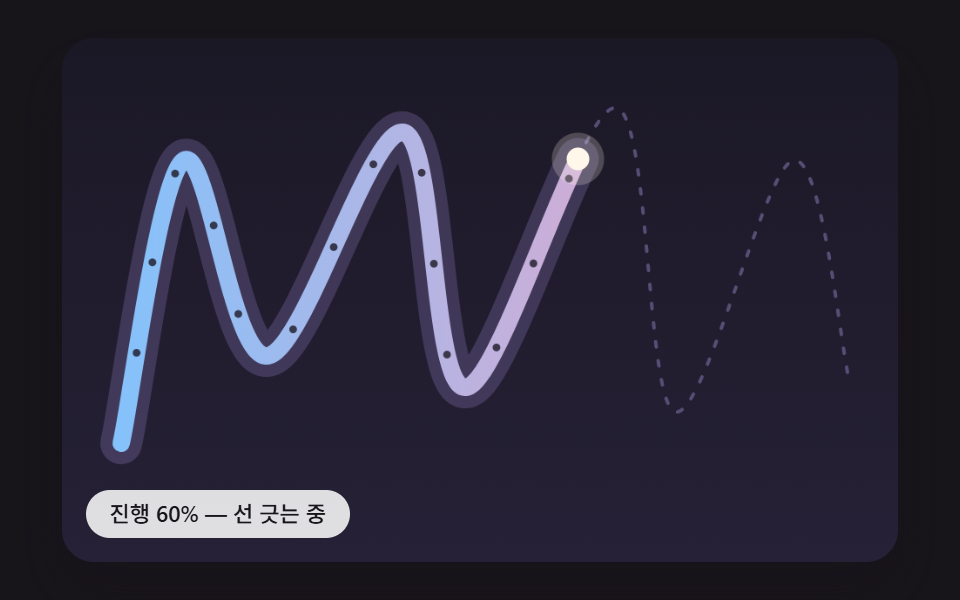 01 spa-arc-length-even-line-draw
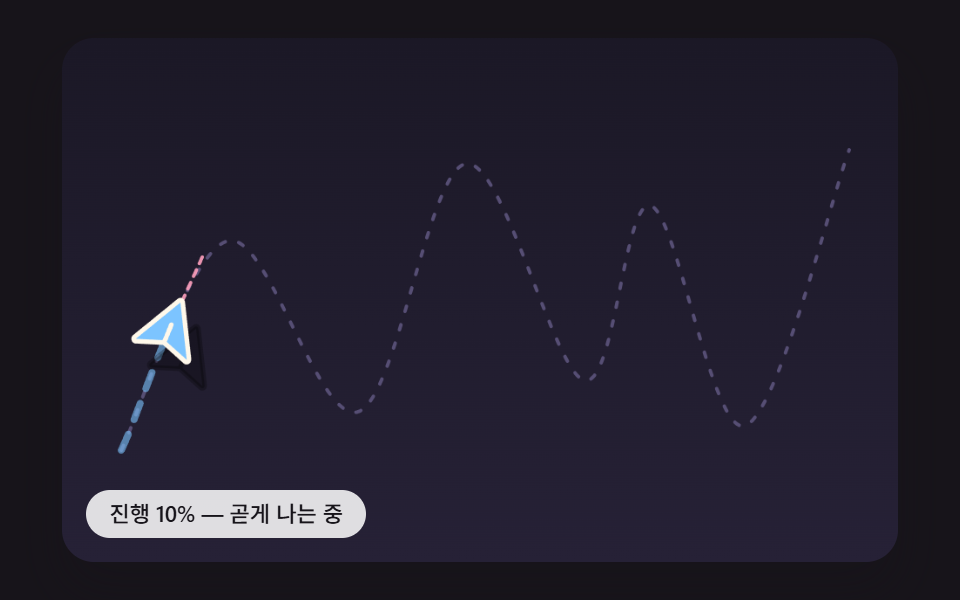 02 spa-tangent-turn-paper-plane
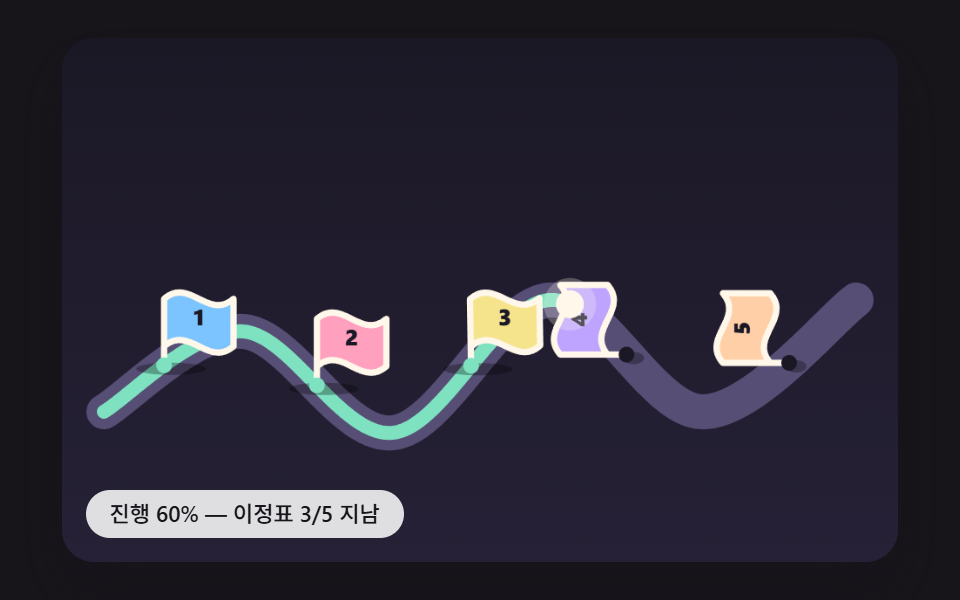 03 spa-milestone-pin-spring-pop
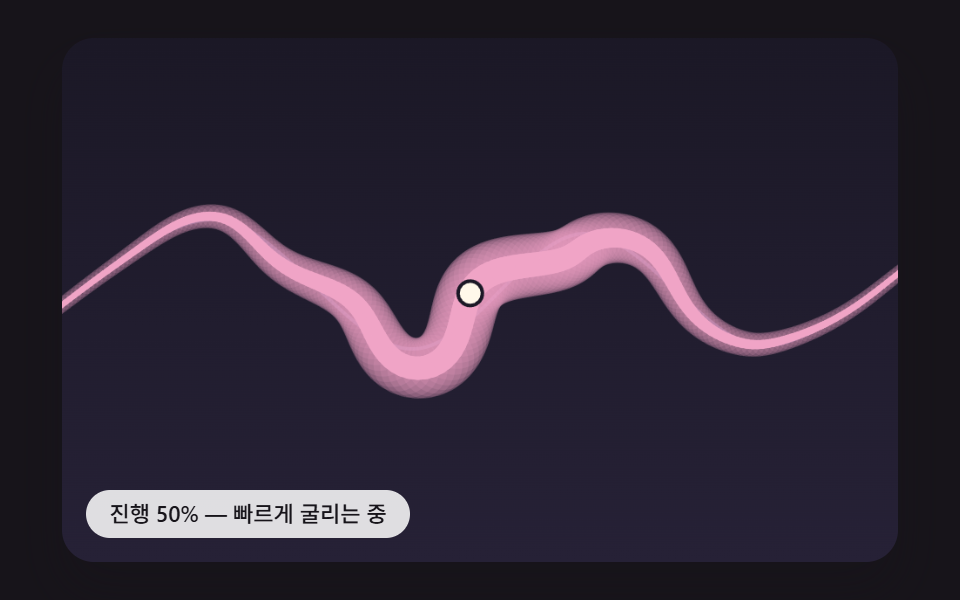 04 spa-velocity-wobble-stroke
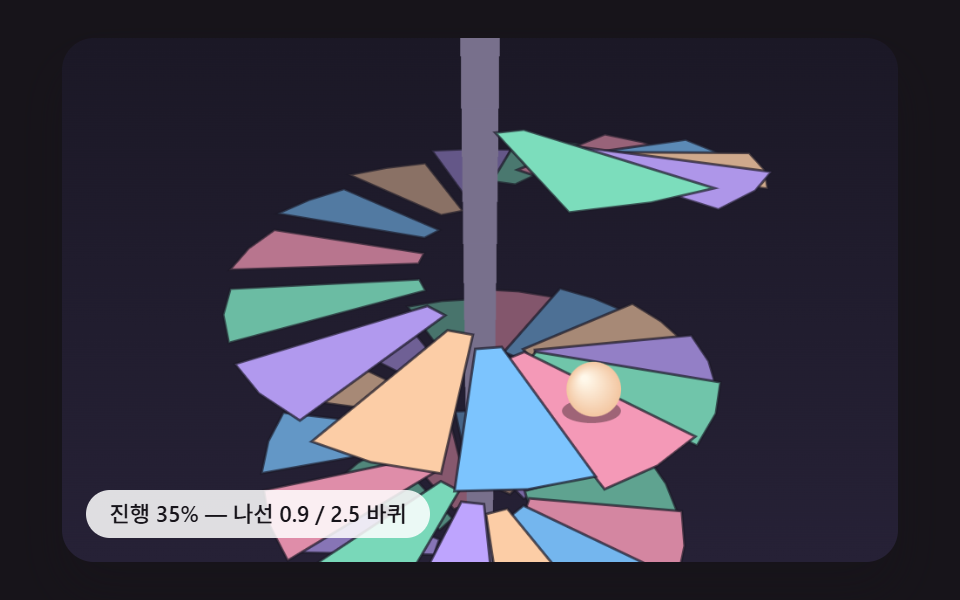 05 spa-helix-perspective-depth-sort
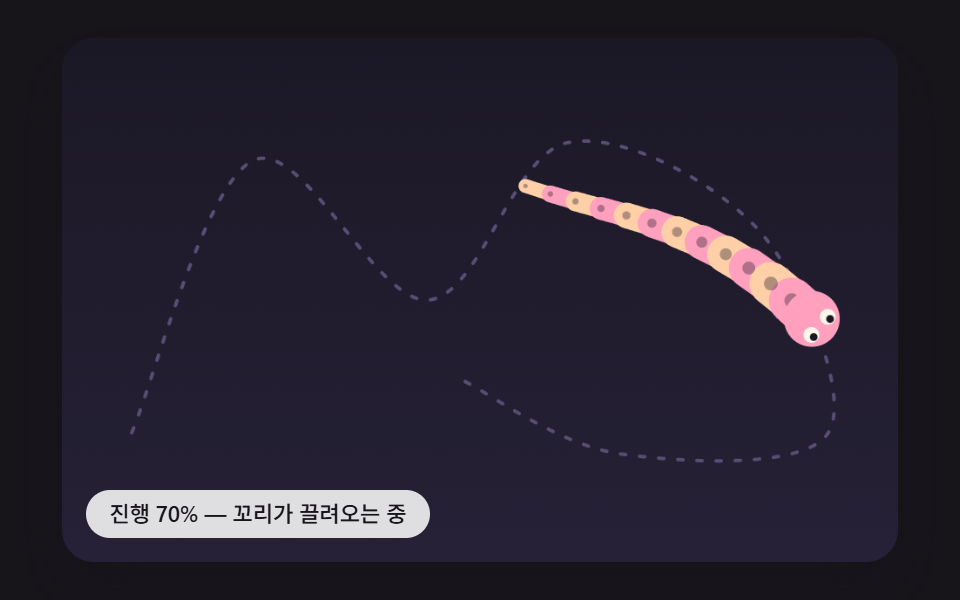 06 spa-chain-tail-length-constraint
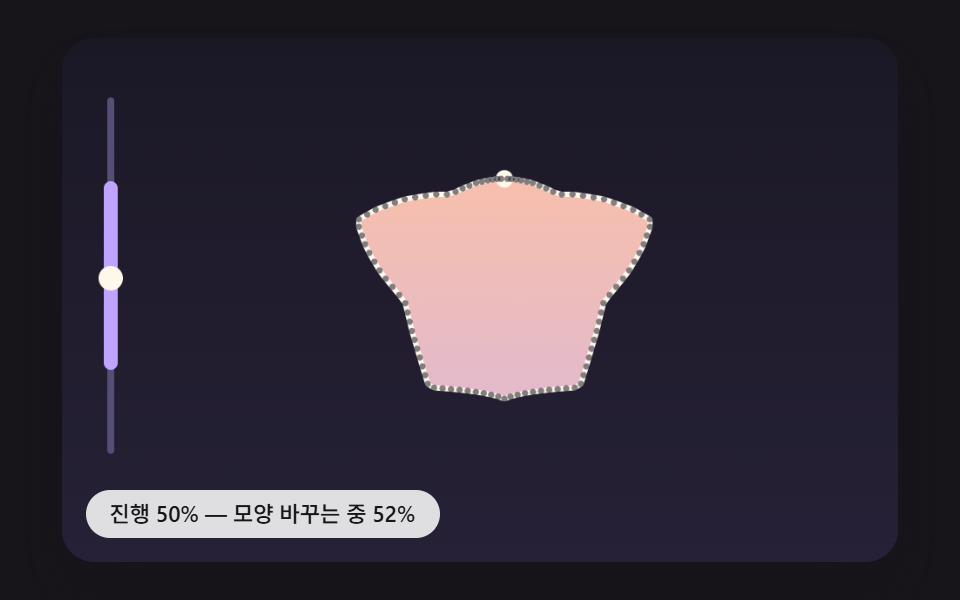 07 spa-shape-morph-arc-resample
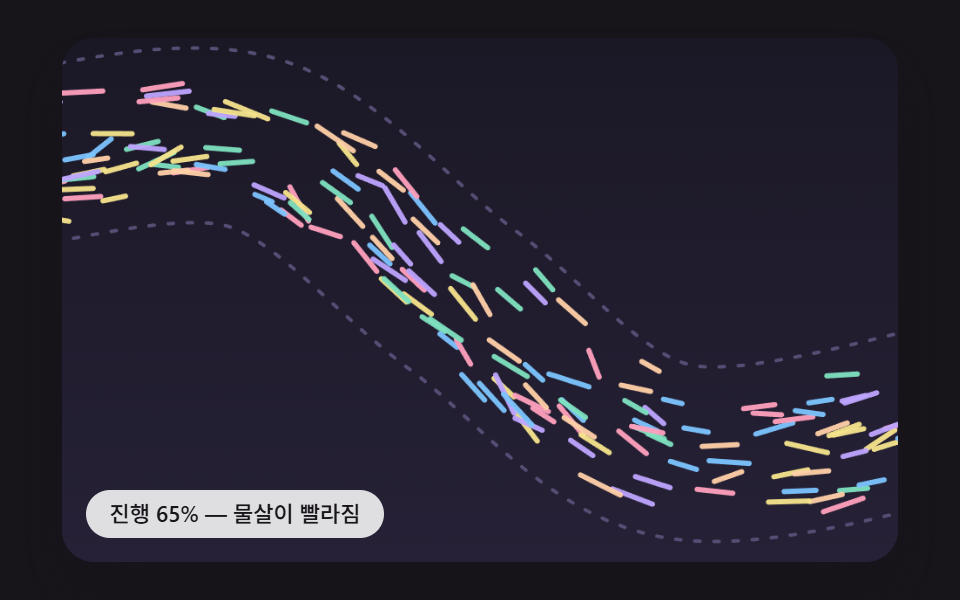 08 spa-flow-dots-speed-gain
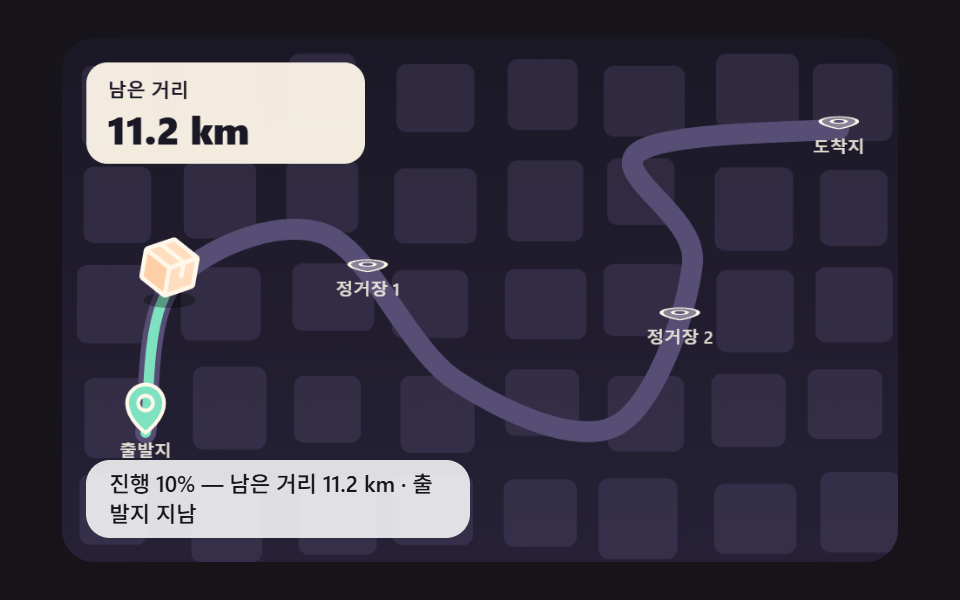 09 spa-delivery-route-journey-hero
Auto-plays · click a tile to jump to its section · all nine in one zip
- 01 A Line That Draws at an Even Pace Around Every Bend
- 02 A Paper Plane That Turns Along the Path's Tangent
- 03 Milestones That Spring Up the Moment You Pass Them
- 04 A Line That Thickens and Wobbles the Faster You Scroll
- 05 A Ball Spiraling Down a Helix in Perspective
- 06 A Tail That Drags Along the Path at a Fixed Link Length
- 07 A Line That Changes Shape by Resampling at Equal Lengths
- 08 A Swarm of Dots That Flows Along the Path With Scroll Speed
- 09 A Delivery Tracking Journey That Counts the Distance Left
Leave a cell alone and it scrolls itself on a seeded back-and-forth schedule. One 5,400 ms loop is a 200 ms wait, 2,600 ms forward, a 500 ms hold at the end, 1,800 ms back and a 300 ms rest; the forward stretch is cut into four legs (five for 04 and 08), and each leg covers a different share in a different time, so the speed keeps changing. Turn the wheel over a cell, press it, or Tab into it, and the demo stops where it is and hands that progress to you.
The order starts with 01, which builds the length table. 02 pulls a tangent from that table, 03 pulls milestone distances, 04 pulls the normal and a speed reading, and 05 steps sideways into a 3D helix that needs no table at all. 06 hangs a tail from a head riding the table again, 07 measures the perimeter of two outlines instead of a curve, 08 shares one table across 160 dots, and 09 folds 01, 02 and 03 into a single delivery route.
Scroll Path Animation: 9 Effects — Even Line Draw, Tangent-Turning Plane, Milestone Pins, Speed Wobble, Helix Projection, Trailing Tail, Shape Morph, Flowing Dots and a Delivery Journey
All nine scenes are drawn on a 2D canvas, and the CSS holds zero @keyframes. Most scroll animation examples fade a card in as it enters the viewport; here a single number, progress, becomes a distance along a curve, and a point, a tangent and a normal are read at that distance. The time requestAnimationFrame hands over is cut into fixed 16 ms steps, up to 6 per frame, and a long gap between frames is only caught up to 100 ms.
A transparent scroll box laid over the canvas
Every cell is built the same way. The drawing belongs to a canvas marked aria-hidden="true", and a .sp__scroller box sits on top of it with position: absolute; inset: 0, invisible, catching the wheel, fingers and keys. Inside it an empty .sp__track is height: 600%, so scrolling five box heights takes progress from 0 to 1, and progress comes from the box's own scrollTop and nothing else.
    // Box progress = distance scrolled / scrollable distance. Reads only the stage box's scrollTop, not the page
    function maxScroll() { return Math.max(1, scroller.scrollHeight - scroller.clientHeight); }
    function readScroll() { return clamp(scroller.scrollTop / maxScroll(), 0, 1); }
    function placeScroll(p) {
        scroller.scrollTop = p * maxScroll();
        expectTop = scroller.scrollTop;
    }
In a 480×300 window the stage measured 418.6×261.6 px, so the scrollable distance was five times that height, 1,307 px. One 300 px wheel turn raised progress by about 23 percentage points while window.scrollY stayed at 0. During the demo the code scrolls the box to match, so the scrollbar moves along, and it writes the spot it set into expectTop so its own scrolling is not mistaken for a person's input.
Twenty-three frame comparisons over two seconds
The capture ran each scene at 480×300 for two seconds and grabbed 24 frames, which gives 23 frame-to-frame comparisons per scene.
| Scene | Cumulative area | Frames that moved | Mean intensity |
|---|---|---|---|
| 01 Even line draw | 18.6% | 21/23 | 82.7 |
| 02 Tangent-turning plane | 11.3% | 23/23 | 112.1 |
| 03 Milestone pins | 15.1% | 23/23 | 97.0 |
| 04 Speed wobble | 17.9% | 23/23 | 80.3 |
| 05 Helix projection | 47.7% | 23/23 | 119.1 |
| 06 Trailing tail | 22.1% | 23/23 | 142.7 |
| 07 Shape morph | 25.6% | 23/23 | 106.7 |
| 08 Flowing dots | 24.6% | 23/23 | 127.8 |
| 09 Delivery journey | 12.9% | 23/23 | 120.4 |
05's 47.7% likely comes from the steps filling the middle of the stage while the camera follows the ball down, which pushes the whole staircase upward. 02 and 09 appear to stay at 11 to 13% because only one line plus a plane, or one parcel, changes the pixels it passes over. 01 alone counts 21/23, likely because the line waits until progress passes 6% and the 200 ms opening wait stacks on top, so the first few frames matched.
Where these scenes fit on a real page
Each scene was given one spot on a real page. 01 is the flow line running down a product intro page, 02 a decoration that leads the eye to a contact section, 03 a company history timeline and 04 a landing page section divider. 05 is a step-by-step app feature tour, 06 a brand mascot guide scene, 07 an icon change in a pricing comparison section and 08 a data flow explainer diagram.
09 imitates an order delivery tracking screen as a made-up scene: no place names or addresses, four stops labeled "Origin", "Stop 1", "Stop 2" and "Destination", and a map of 40 rectangular blocks whose sizes come from a seed. On a real tracking screen the progress slot would more likely take a value computed from the shipping stage rather than from scrolling, and counting the distance left as a share of length would carry over unchanged.
01A Line That Draws at an Even Pace Around Every Bend
The path runs through nine points spaced unevenly on purpose and draws between 6% and 94% progress, but progress does not go into the curve variable u directly: a binary search over a cumulative length table built from PATH_SAMPLES 200 slices finds the u for each length. Raised in 400 equal steps, progress moved the pen tip 3.047 to 3.267 px per step, within 1.07x, and 24 tick marks placed at equal lengths let you see that evenness, which suits a flow line on a product intro page where a line has to grow at a steady rate.
<main class="stage">
<div class="sp is-demo" id="sp">
  <canvas class="sp__canvas" data-role="canvas" width="480" height="300" aria-hidden="true"></canvas>
  <div class="sp__scroller" data-role="scroller" tabindex="0" role="region" aria-label="A line draws along a curved path at an even pace. Scroll inside this box with the wheel or a finger, or use the arrow keys, PageUp, PageDown, Home and End to move through it. The page scroll stays as it is">
    <div class="sp__track"></div>
  </div>
  <p class="sp__status" data-role="status" aria-live="off">Progress 0%</p>
</div>
</main>
@use "../../../../site/static/demo-tokens" as *;
@include stage($stage-ink);
.sp {
position: relative;
width: min(92vw, calc(160vh - 12.8vw));
aspect-ratio: 480 / 300;
margin: 0 auto;
border-radius: $r-card;
overflow: hidden;
box-shadow: $shadow-raised;
background: $subject-ink;
}
.sp__canvas {
position: absolute;
inset: 0;
display: block;
width: 100%;
height: 100%;
}
// 무대 안 스크롤 상자 — 장면 위에 투명하게 겹쳐 휠·손가락·키보드를 받는다.
// overscroll-behavior: contain — 상자 끝에 닿아도 남은 스크롤을 바깥 페이지로 넘기지 않는다
.sp__scroller {
position: absolute;
inset: 0;
overflow-x: hidden;
overflow-y: auto;
overscroll-behavior: contain;
scrollbar-width: thin;
scrollbar-color: rgba(255, 255, 255, .55) transparent;
cursor: ns-resize;
}
.sp__scroller:focus-visible {
outline: 2px solid rgba(255, 255, 255, .85);
outline-offset: -6px;
}
// 굴릴 거리 — 상자 높이의 6배. 상자 높이의 5배를 굴리면 진행률이 0 에서 1 이 된다
.sp__track {
height: 600%;
}
.sp__status {
position: absolute;
left: $sp-3;
bottom: $sp-3;
box-sizing: border-box;
max-width: 46%;
margin: 0;
padding: $sp-1 $sp-3;
border-radius: $r-control;
background: rgba(255, 255, 255, .85);
color: $subject-ink;
font-weight: 500;
font-size: 11px;
line-height: 1.4;
pointer-events: none;
}
@media (max-width: 340px) {
.sp__status { font-size: 10px; padding: $sp-1 $sp-2; }
}
// 동작 줄이기 — 스크립트가 가상 진행을 멈추고 끝 상태 화면을 그린다. 상자 굴림도 부드러운 이동 없이 바로
@media (prefers-reduced-motion: reduce) {
.sp__scroller { scroll-behavior: auto; }
}html, body {
margin: 0;
overflow: hidden;
}
.stage {
box-sizing: border-box;
min-height: 100vh;
display: grid;
place-items: center;
margin: 0;
background: #17141a;
font-family: -apple-system, "Segoe UI", "Noto Sans KR", sans-serif;
padding: clamp(8px, 4vw, 24px);
}
.sp {
position: relative;
width: min(92vw, 160vh - 12.8vw);
aspect-ratio: 480/300;
margin: 0 auto;
border-radius: 16px;
overflow: hidden;
box-shadow: 0 14px 24px rgba(23, 20, 26, 0.32);
background: #17141a;
}
.sp__canvas {
position: absolute;
inset: 0;
display: block;
width: 100%;
height: 100%;
}
.sp__scroller {
position: absolute;
inset: 0;
overflow-x: hidden;
overflow-y: auto;
overscroll-behavior: contain;
scrollbar-width: thin;
scrollbar-color: rgba(255, 255, 255, 0.55) transparent;
cursor: ns-resize;
}
.sp__scroller:focus-visible {
outline: 2px solid rgba(255, 255, 255, 0.85);
outline-offset: -6px;
}
.sp__track {
height: 600%;
}
.sp__status {
position: absolute;
left: 12px;
bottom: 12px;
box-sizing: border-box;
max-width: 46%;
margin: 0;
padding: 4px 12px;
border-radius: 12px;
background: rgba(255, 255, 255, 0.85);
color: #17141a;
font-weight: 500;
font-size: 11px;
line-height: 1.4;
pointer-events: none;
}
@media (max-width: 340px) {
.sp__status {
font-size: 10px;
padding: 4px 8px;
}
}
@media (prefers-reduced-motion: reduce) {
.sp__scroller {
scroll-behavior: auto;
}
}(function () {
const root = document.getElementById("sp");
if (!root) return;
const W = 480;
const H = 300;
const FIXED_DT = 16;
const TAU = Math.PI * 2;
// 파스텔 팔레트 — 어두운 무대 위에 밝은 선·점을 얹어 명도 차로 경계가 읽힌다
const BG = [27, 24, 38];
const BG_LOW = [38, 33, 54];
const GUIDE = [86, 78, 116];
const CREAM = [255, 248, 234];
const SKY = [124, 196, 255];
const PINK = [255, 160, 190];
const MINT = [126, 226, 192];
const LILAC = [190, 164, 255];
const PEACH = [255, 208, 168];
const LEMON = [246, 228, 140];
const FONT_FAMILY = '"Segoe UI", "Malgun Gothic", "Hiragino Sans", "Noto Sans KR", sans-serif';
function clamp(v, lo, hi) { return v < lo ? lo : (v > hi ? hi : v); }
function lerp(a, b, k) { return a + (b - a) * k; }
function smooth(x) { const c = clamp(x, 0, 1); return c * c * (3 - 2 * c); }
function rgba(c, a) {
return 'rgba(' + Math.round(clamp(c[0], 0, 255)) + ',' + Math.round(clamp(c[1], 0, 255)) + ',' + Math.round(clamp(c[2], 0, 255)) + ',' + clamp(a, 0, 1).toFixed(3) + ')';
}
function mixRGB(a, b, k) { return [lerp(a[0], b[0], k), lerp(a[1], b[1], k), lerp(a[2], b[2], k)]; }
// 시드 고정 난수 — 같은 시드면 같은 시간표·배치가 다시 나온다 (32비트 정수 섞기)
function makeRng(seed) {
let s = seed >>> 0;
return function () {
s = (s + 0x6d2b79f5) >>> 0;
let t = s;
t = Math.imul(t ^ (t >>> 15), t | 1);
t ^= t + Math.imul(t ^ (t >>> 7), t | 61);
return ((t ^ (t >>> 14)) >>> 0) / 4294967296;
};
}
// 각도 접기 — 차이를 -180°~180° 로 접어 가장 짧은 방향으로 돌게 한다
function wrapAngle(a) {
let v = a;
while (v > Math.PI) {
v -= TAU;
}
while (v < -Math.PI) {
v += TAU;
}
return v;
}
// 곡선 — 지나는 점들을 잇는 3차 곡선(토막마다 이웃 네 점으로 정한다). u(0~1) 를 넣으면 점이 나온다.
// u 는 토막마다 같은 몫이라, 지나는 점 간격이 다르면 같은 u 차이에 움직이는 거리가 토막마다 달라진다
function makeCurve(pts) {
const n = pts.length - 1;
return function (u) {
const x = clamp(u, 0, 1) * n;
const i = Math.min(Math.floor(x), n - 1);
const t = x - i;
const p0 = pts[Math.max(i - 1, 0)];
const p1 = pts[i];
const p2 = pts[i + 1];
const p3 = pts[Math.min(i + 2, n)];
const t2 = t * t;
const t3 = t2 * t;
const out = [0, 0];
for (let k = 0; k < 2; k += 1) {
out[k] = 0.5 * (2 * p1[k] + (p2[k] - p0[k]) * t + (2 * p0[k] - 5 * p1[k] + 4 * p2[k] - p3[k]) * t2 + (3 * p1[k] - p0[k] - 3 * p2[k] + p3[k]) * t3);
}
return out;
};
}
    function buildLengthTable(curve, samples) {
        const us = [0];
        const lens = [0];
        let prev = curve(0);
        let acc = 0;
        for (let i = 1; i <= samples; i += 1) {
            const u = i / samples;
            const p = curve(u);
            acc += Math.hypot(p[0] - prev[0], p[1] - prev[1]);
            us.push(u);
            lens.push(acc);
            prev = p;
        }
        return { curve: curve, us: us, lens: lens, total: acc };
    }
// 길이 → u — 누적 길이 표에서 s 가 드는 토막을 이분 탐색으로 찾고, 토막 안은 길이에 비례해 나눈다
function uAtLength(tab, s) {
const L = clamp(s, 0, tab.total);
let lo = 0;
let hi = tab.lens.length - 1;
while (hi - lo > 1) {
const mid = (lo + hi) >> 1;
if (tab.lens[mid] < L) {
lo = mid;
}
else {
hi = mid;
}
}
const span = tab.lens[hi] - tab.lens[lo];
const k = span > 0 ? (L - tab.lens[lo]) / span : 0;
return lerp(tab.us[lo], tab.us[hi], k);
}
function pointAtLength(tab, s) { return tab.curve(uAtLength(tab, s)); }
// u → 길이 — milestones·정거장처럼 곡선 위 자리를 먼저 정한 것의 누적 길이를 미리 잰다
function lengthAtU(tab, u) {
const x = clamp(u, 0, 1) * (tab.us.length - 1);
const i = Math.min(Math.floor(x), tab.us.length - 2);
return lerp(tab.lens[i], tab.lens[i + 1], x - i);
}
// 법선 — s 앞뒤 1px 점의 차로 접선을 구해 90° 돌린다
function normalAt(tab, s) {
const a = pointAtLength(tab, s - 1);
const b = pointAtLength(tab, s + 1);
const dx = b[0] - a[0];
const dy = b[1] - a[1];
const d = Math.hypot(dx, dy) || 1;
return [-dy / d, dx / d];
}
// 길 그리기 경로 — 길이 s0 부터 s1 까지를 u 로 잘게(전체 res 걸음 비율) 따라간다. 표의 토막 수와 상관없이 선은 매끈하다
function tracePath(tab, s0, s1, res) {
const u0 = uAtLength(tab, s0);
const u1 = uAtLength(tab, s1);
const steps = Math.max(2, Math.ceil(res * Math.abs(u1 - u0)));
ctx.beginPath();
for (let k = 0; k <= steps; k += 1) {
const p = tab.curve(lerp(u0, u1, k / steps));
if (k === 0) {
ctx.moveTo(p[0], p[1]);
}
else {
ctx.lineTo(p[0], p[1]);
}
}
}
const canvasEl = root.querySelector('[data-role="canvas"]');
const scrollerEl = root.querySelector('[data-role="scroller"]');
const statusEl = root.querySelector('[data-role="status"]');
const ctxRaw = canvasEl ? canvasEl.getContext('2d') : null;
if (!canvasEl || !ctxRaw || !scrollerEl || !statusEl) {
return;
}
const cv = canvasEl;
const ctx = ctxRaw;
const scroller = scrollerEl;
const status = statusEl;
const reduceQuery = window.matchMedia('(prefers-reduced-motion: reduce)');
// 페이지를 연 채 동작 줄이기 설정을 바꿔도 아래 change 리스너가 이 값을 다시 읽는다
let still = reduceQuery.matches;
// 자동 시연 중인가 — 사람이 상자를 처음 만지는 순간 시연을 멈추고 상태 줄을 읽어 주기 시작한다
let demo = root.classList.contains('is-demo');
// 진행률 — prog 는 지금 장면이 쓰는 값, prevProg 는 한 틱 전 값, inputP 는 사람이 상자를 굴려 정한 값
let prog = 0;
let prevProg = 0;
let inputP = 0;
// 코드가 상자를 굴린 자리 — 뒤따라 오는 scroll 이벤트를 사람 입력으로 오인하지 않게 적어 둔다
let expectTop = -1;
function wake() {
if (!demo) {
return;
}
demo = false;
root.classList.remove('is-demo');
status.setAttribute('aria-live', 'polite');
// 시연이 멈춘 그 자리에서 이어 굴린다 — 상자도 시연 내내 같은 자리로 굴려 두었다
inputP = prog;
}
function say(text) {
if (status.textContent !== text) {
status.textContent = text;
}
}
function fitCanvas() {
// 배율은 2 에서 자른다 — 배율 3 기기에서 화소가 2.25배로 늘어 프레임마다 일이 그만큼 커지지 않게
const dpr = Math.min(window.devicePixelRatio || 1, 2);
cv.width = Math.round(W * dpr);
cv.height = Math.round(H * dpr);
ctx.setTransform(dpr, 0, 0, dpr, 0, 0);
}
// 상자 진행률 — 굴린 거리 / 굴릴 수 있는 거리. 페이지가 아니라 무대 안 상자의 scrollTop 만 읽는다
function maxScroll() { return Math.max(1, scroller.scrollHeight - scroller.clientHeight); }
function readScroll() { return clamp(scroller.scrollTop / maxScroll(), 0, 1); }
function placeScroll(p) {
scroller.scrollTop = p * maxScroll();
expectTop = scroller.scrollTop;
}
function clearStage() {
const g = ctx.createLinearGradient(0, 0, 0, H);
g.addColorStop(0, rgba(BG, 1));
g.addColorStop(1, rgba(BG_LOW, 1));
ctx.fillStyle = g;
ctx.fillRect(0, 0, W, H);
}
// Progress 문구 — 5% 단위로 끊는다(굴릴 때마다 화면 낭독기가 숫자를 쏟아내지 않게)
function pctText(p) { return 'Progress ' + Math.round(p * 20) * 5 + '%'; }
// 시연 시간표 — [시각 ms, 진행률] 를 잇는 왕복. 앞으로 가는 길은 토막마다 걸리는 시간과 나아가는 몫이 시드로 달라 빠르기가 바뀐다
const DEMO_LEAD_MS = 200;
const DEMO_FORWARD_MS = 2600;
const DEMO_HOLD_MS = 500;
const DEMO_BACK_MS = 1800;
const DEMO_REST_MS = 300;
const DEMO_LOOP_MS = DEMO_LEAD_MS + DEMO_FORWARD_MS + DEMO_HOLD_MS + DEMO_BACK_MS + DEMO_REST_MS;
function makeSchedule(seed, legs) {
const rng = makeRng(seed);
const ws = [];
const ps = [];
let wSum = 0;
let pSum = 0;
for (let i = 0; i < legs; i += 1) {
const w = 0.45 + rng() * 1.1;
const v = 0.6 + rng() * 0.8;
ws.push(w);
ps.push(v);
wSum += w;
pSum += v;
}
const out = [[0, 0], [DEMO_LEAD_MS, 0]];
let t = DEMO_LEAD_MS;
let p = 0;
for (let i = 0; i < legs; i += 1) {
t += DEMO_FORWARD_MS * ws[i] / wSum;
p += ps[i] / pSum;
out.push([t, i === legs - 1 ? 1 : p]);
}
t += DEMO_HOLD_MS;
out.push([t, 1]);
t += DEMO_BACK_MS;
out.push([t, 0]);
out.push([DEMO_LOOP_MS, 0]);
return out;
}
// 시간표 읽기 — 토막 안은 부드럽게(처음·끝이 느린 곡선) 잇는다
function scheduleAt(sch, t) {
const tt = t % DEMO_LOOP_MS;
for (let i = 0; i < sch.length - 1; i += 1) {
if (tt <= sch[i + 1][0]) {
const span = sch[i + 1][0] - sch[i][0];
const k = span > 0 ? (tt - sch[i][0]) / span : 1;
return lerp(sch[i][1], sch[i + 1][1], smooth(k));
}
}
return 0;
}
// 곡선 토막 수 — 누적 길이 표를 이 개수의 토막으로 만든다. 많을수록 진행률→길이 변환이 실제 곡선 길이에 가깝다
const PATH_SAMPLES = 200;
// 선 긋기 구간 — 진행률이 DRAW_START 에서 DRAW_END 로 가는 동안 길이 0 에서 전체 길이까지 긋는다(앞뒤는 여유)
const DRAW_START = 0.06;
const DRAW_END = 0.94;
const DEMO_SEED = 4741;
const DEMO_LEGS = 4;
// 동작 줄이기에서 멈춰 보일 진행률 — Progress 끝 상태
const STILL_PROGRESS = 1;
// 지나는 점 — 간격을 일부러 고르지 않게 두었다. u 를 그대로 쓰면 긴 토막에서 빨라지고 짧은 토막에서 느려진다
const ROUTE = [[34, 232], [70, 70], [118, 182], [196, 54], [232, 200], [318, 40], [352, 214], [420, 70], [452, 196]];
const TABLE = buildLengthTable(makeCurve(ROUTE), PATH_SAMPLES);
// 같은 길이 눈금 — 그어진 선 위에 전체 길이를 이 수로 나눈 간격마다 점을 찍어 고른 빠르기를 눈으로 보인다
const MARK_COUNT = 24;
// 지금까지 그은 길이(px)
let drawLen = 0;
function drawFraction(p) { return clamp((p - DRAW_START) / (DRAW_END - DRAW_START), 0, 1); }
function onRestart() { drawLen = drawFraction(prog) * TABLE.total; }
// 진행률 → 그을 길이. 길이 → 곡선 위 점은 그릴 때 누적 길이 표의 이분 탐색(uAtLength)이 찾는다
function step(dp) { drawLen = drawFraction(prog) * TABLE.total; }
function draw() {
clearStage();
ctx.lineCap = 'round';
ctx.lineJoin = 'round';
// 아직 안 그은 길 — 점선 안내
ctx.setLineDash([3, 8]);
ctx.lineWidth = 2;
ctx.strokeStyle = rgba(GUIDE, 1);
tracePath(TABLE, 0, TABLE.total, 600);
ctx.stroke();
ctx.setLineDash([]);
if (drawLen > 0.5) {
tracePath(TABLE, 0, drawLen, 600);
ctx.lineWidth = 24;
ctx.strokeStyle = rgba(LILAC, 0.2);
ctx.stroke();
const g = ctx.createLinearGradient(0, 0, W, 0);
g.addColorStop(0, rgba(SKY, 1));
g.addColorStop(1, rgba(PINK, 1));
ctx.lineWidth = 10;
ctx.strokeStyle = g;
ctx.stroke();
const gap = TABLE.total / MARK_COUNT;
ctx.fillStyle = rgba(BG, 0.8);
for (let s = gap; s < drawLen; s += gap) {
const q = pointAtLength(TABLE, s);
ctx.beginPath();
ctx.arc(q[0], q[1], 2.2, 0, TAU);
ctx.fill();
}
}
// 펜 끝
const tip = pointAtLength(TABLE, drawLen);
ctx.fillStyle = rgba(CREAM, 0.22);
ctx.beginPath();
ctx.arc(tip[0], tip[1], 15, 0, TAU);
ctx.fill();
ctx.fillStyle = rgba(CREAM, 1);
ctx.beginPath();
ctx.arc(tip[0], tip[1], 6.5, 0, TAU);
ctx.fill();
}
function stateText() {
const f = drawFraction(prog);
return pctText(prog) + ' — ' + (f <= 0 ? 'before drawing' : (f >= 1 ? 'line complete' : 'drawing the line'));
}
const SCHEDULE = makeSchedule(DEMO_SEED, DEMO_LEGS);
// 시연 시계(ms) — 16ms 고정 스텝으로만 늘어난다
let clock = 0;
// 한 틱 — 시연이면 시간표에서, 아니면 사람이 굴린 상자에서 진행률을 받고, 한 틱 전과의 차를 항목 계산에 넘긴다
function tick() {
prevProg = prog;
prog = demo && !still ? scheduleAt(SCHEDULE, clock) : inputP;
step(prog - prevProg);
}
function render() {
draw();
say(stateText());
}
// 동작 줄이기 — 움직임을 그리지 않고 SETTLE_TICKS 스텝을 한 번에 계산해 자리 잡은 결과만 그린다
const SETTLE_TICKS = 240;
function settle() {
for (let k = 0; k < SETTLE_TICKS; k += 1) {
tick();
}
}
// 입력 한 번 뒤 — 동작 줄이기면 그 입력이 낳은 결과까지 바로 계산해 그린다
function after() {
if (still) {
settle();
}
render();
}
function restart(p) {
prog = p;
prevProg = p;
inputP = p;
onRestart();
}
// 리스너는 한 묶음으로 달고 정리할 때 한 번에 뗀다
const off = new AbortController();
// 상자 스크롤 — 코드가 굴린 자리면 넘기고, 사람이 굴렸으면 시연을 멈추고 그 진행률을 쓴다
scroller.addEventListener('scroll', function () {
if (expectTop >= 0 && Math.abs(scroller.scrollTop - expectTop) <= 1.5) {
return;
}
expectTop = -1;
wake();
inputP = readScroll();
if (still) {
after();
}
}, { signal: off.signal });
// 휠은 듣기만 한다(passive) — 기본 동작을 막지 않으니 굴림은 브라우저가 상자 안에서 한다
scroller.addEventListener('wheel', function () { wake(); }, { passive: true, signal: off.signal });
scroller.addEventListener('pointerdown', function () { wake(); }, { signal: off.signal });
// 키보드로 상자에 들어오면 시연을 멈춘다 — 손대기 전까지 저절로 움직이던 장면을 멈출 방법
scroller.addEventListener('focus', function () { wake(); }, { signal: off.signal });
// 키보드 — 방향키는 KEY_STEP, PageUp·PageDown 은 PAGE_STEP, Home·End 는 처음·끝. 상자 안 진행만 바꾸고 페이지는 그대로
const KEY_STEP = 0.04;
const PAGE_STEP = 0.25;
scroller.addEventListener('keydown', function (ev) {
const k = ev.key;
let d = 0;
let to = -1;
if (k === 'ArrowDown' || k === 'ArrowRight') {
d = KEY_STEP;
}
else if (k === 'ArrowUp' || k === 'ArrowLeft') {
d = -KEY_STEP;
}
else if (k === 'PageDown') {
d = PAGE_STEP;
}
else if (k === 'PageUp') {
d = -PAGE_STEP;
}
else if (k === 'Home') {
to = 0;
}
else if (k === 'End') {
to = 1;
}
else {
return;
}
ev.preventDefault();
wake();
inputP = to >= 0 ? to : clamp(inputP + d, 0, 1);
placeScroll(inputP);
after();
}, { signal: off.signal });
function onResize() {
fitCanvas();
placeScroll(demo && !still ? prog : inputP);
render();
}
fitCanvas();
window.addEventListener('resize', onResize, { signal: off.signal });
let rafId = 0;
let lastTs = -1;
let acc = 0;
function frame(ts) {
if (still) {
rafId = 0;
return;
}
if (lastTs < 0) {
lastTs = ts;
}
// 탭이 숨었다 돌아와도 한 번에 100ms 까지만 따라잡는다 — 순간이동 대신 이어서 움직인다
acc += Math.min(ts - lastTs, 100);
lastTs = ts;
let n = 0;
while (acc >= FIXED_DT && n < 6) {
clock += FIXED_DT;
tick();
acc -= FIXED_DT;
n += 1;
}
// 시연 중에는 상자도 같은 진행률로 굴려 둔다 — 스크롤 막대가 함께 움직이고, 사람이 잡으면 그 자리에서 이어진다
if (demo) {
placeScroll(prog);
}
render();
rafId = window.requestAnimationFrame(frame);
}
function startLoop() {
if (rafId) {
return;
}
lastTs = -1;
acc = 0;
rafId = window.requestAnimationFrame(frame);
}
// 동작 줄이기 설정이 페이지를 연 채 바뀌면 — 켜지면 루프를 멈추고(시연 중이었으면 Progress 끝 화면), 꺼지면 루프를 다시 돈다
function onMotionPref() {
still = reduceQuery.matches;
if (still) {
if (rafId) {
window.cancelAnimationFrame(rafId);
rafId = 0;
}
if (demo) {
inputP = STILL_PROGRESS;
placeScroll(STILL_PROGRESS);
}
after();
}
else {
startLoop();
}
}
reduceQuery.addEventListener('change', onMotionPref, { signal: off.signal });
if (still) {
// 동작 줄이기 — 가상 진행을 돌리지 않고 Progress 끝 상태(STILL_PROGRESS)에서 멈춘 화면. 상자도 끝으로 굴려 둔다
restart(STILL_PROGRESS);
placeScroll(STILL_PROGRESS);
after();
}
else {
restart(scheduleAt(SCHEDULE, 0));
render();
startLoop();
}
return function () {
window.cancelAnimationFrame(rafId);
off.abort();
};
})();// ArcLengthEvenLineDraw - vanilla 판(01-spa-arc-length-even-line-draw) 의 React 포트. 같은 계산을 useEffect 안에서 돌린다.
import { useEffect, useRef } from "react";
import styles from "./ArcLengthEvenLineDraw.module.scss";
const cx = (s: string): string => s.split(" ").map((n) => styles[n] ?? n).join(" ");
export default function ArcLengthEvenLineDraw() {
const rootRef = useRef<HTMLDivElement | null>(null);
useEffect(() => {
const rootEl = rootRef.current;
if (!rootEl) return;
const root: HTMLElement = rootEl;
type RGB = [number, number, number];
type Pt = [number, number];
const W = 480;
const H = 300;
const FIXED_DT = 16;
const TAU = Math.PI * 2;
// 파스텔 팔레트 — 어두운 무대 위에 밝은 선·점을 얹어 명도 차로 경계가 읽힌다
const BG: RGB = [27, 24, 38];
const BG_LOW: RGB = [38, 33, 54];
const GUIDE: RGB = [86, 78, 116];
const CREAM: RGB = [255, 248, 234];
const SKY: RGB = [124, 196, 255];
const PINK: RGB = [255, 160, 190];
const MINT: RGB = [126, 226, 192];
const LILAC: RGB = [190, 164, 255];
const PEACH: RGB = [255, 208, 168];
const LEMON: RGB = [246, 228, 140];
const FONT_FAMILY = '"Segoe UI", "Malgun Gothic", "Hiragino Sans", "Noto Sans KR", sans-serif';
function clamp(v: number, lo: number, hi: number): number { return v < lo ? lo : (v > hi ? hi : v); }
function lerp(a: number, b: number, k: number): number { return a + (b - a) * k; }
function smooth(x: number): number { const c = clamp(x, 0, 1); return c * c * (3 - 2 * c); }
function rgba(c: RGB, a: number): string {
return 'rgba(' + Math.round(clamp(c[0], 0, 255)) + ',' + Math.round(clamp(c[1], 0, 255)) + ',' + Math.round(clamp(c[2], 0, 255)) + ',' + clamp(a, 0, 1).toFixed(3) + ')';
}
function mixRGB(a: RGB, b: RGB, k: number): RGB { return [lerp(a[0], b[0], k), lerp(a[1], b[1], k), lerp(a[2], b[2], k)]; }
// 시드 고정 난수 — 같은 시드면 같은 시간표·배치가 다시 나온다 (32비트 정수 섞기)
function makeRng(seed: number): () => number {
let s = seed >>> 0;
return function (): number {
s = (s + 0x6d2b79f5) >>> 0;
let t = s;
t = Math.imul(t ^ (t >>> 15), t | 1);
t ^= t + Math.imul(t ^ (t >>> 7), t | 61);
return ((t ^ (t >>> 14)) >>> 0) / 4294967296;
};
}
// 각도 접기 — 차이를 -180°~180° 로 접어 가장 짧은 방향으로 돌게 한다
function wrapAngle(a: number): number {
let v = a;
while (v > Math.PI) { v -= TAU; }
while (v < -Math.PI) { v += TAU; }
return v;
}
// 곡선 — 지나는 점들을 잇는 3차 곡선(토막마다 이웃 네 점으로 정한다). u(0~1) 를 넣으면 점이 나온다.
// u 는 토막마다 같은 몫이라, 지나는 점 간격이 다르면 같은 u 차이에 움직이는 거리가 토막마다 달라진다
function makeCurve(pts: Pt[]): (u: number) => Pt {
const n = pts.length - 1;
return function (u: number): Pt {
const x = clamp(u, 0, 1) * n;
const i = Math.min(Math.floor(x), n - 1);
const t = x - i;
const p0 = pts[Math.max(i - 1, 0)];
const p1 = pts[i];
const p2 = pts[i + 1];
const p3 = pts[Math.min(i + 2, n)];
const t2 = t * t;
const t3 = t2 * t;
const out: Pt = [0, 0];
for (let k = 0; k < 2; k += 1) {
out[k] = 0.5 * (2 * p1[k] + (p2[k] - p0[k]) * t + (2 * p0[k] - 5 * p1[k] + 4 * p2[k] - p3[k]) * t2 + (3 * p1[k] - p0[k] - 3 * p2[k] + p3[k]) * t3);
}
return out;
};
}
// 누적 길이 표 — 곡선을 samples 토막으로 잘라, 토막 끝까지의 길이를 차례로 더해 둔다
type LengthTable = { curve: (u: number) => Pt; us: number[]; lens: number[]; total: number };
function buildLengthTable(curve: (u: number) => Pt, samples: number): LengthTable {
const us: number[] = [0];
const lens: number[] = [0];
let prev = curve(0);
let acc = 0;
for (let i = 1; i <= samples; i += 1) {
const u = i / samples;
const p = curve(u);
acc += Math.hypot(p[0] - prev[0], p[1] - prev[1]);
us.push(u);
lens.push(acc);
prev = p;
}
return { curve: curve, us: us, lens: lens, total: acc };
}
// 길이 → u — 누적 길이 표에서 s 가 드는 토막을 이분 탐색으로 찾고, 토막 안은 길이에 비례해 나눈다
function uAtLength(tab: LengthTable, s: number): number {
const L = clamp(s, 0, tab.total);
let lo = 0;
let hi = tab.lens.length - 1;
while (hi - lo > 1) {
const mid = (lo + hi) >> 1;
if (tab.lens[mid] < L) { lo = mid; } else { hi = mid; }
}
const span = tab.lens[hi] - tab.lens[lo];
const k = span > 0 ? (L - tab.lens[lo]) / span : 0;
return lerp(tab.us[lo], tab.us[hi], k);
}
function pointAtLength(tab: LengthTable, s: number): Pt { return tab.curve(uAtLength(tab, s)); }
// u → 길이 — 이정표·정거장처럼 곡선 위 자리를 먼저 정한 것의 누적 길이를 미리 잰다
function lengthAtU(tab: LengthTable, u: number): number {
const x = clamp(u, 0, 1) * (tab.us.length - 1);
const i = Math.min(Math.floor(x), tab.us.length - 2);
return lerp(tab.lens[i], tab.lens[i + 1], x - i);
}
// 법선 — s 앞뒤 1px 점의 차로 접선을 구해 90° 돌린다
function normalAt(tab: LengthTable, s: number): Pt {
const a = pointAtLength(tab, s - 1);
const b = pointAtLength(tab, s + 1);
const dx = b[0] - a[0];
const dy = b[1] - a[1];
const d = Math.hypot(dx, dy) || 1;
return [-dy / d, dx / d];
}
// 길 그리기 경로 — 길이 s0 부터 s1 까지를 u 로 잘게(전체 res 걸음 비율) 따라간다. 표의 토막 수와 상관없이 선은 매끈하다
function tracePath(tab: LengthTable, s0: number, s1: number, res: number): void {
const u0 = uAtLength(tab, s0);
const u1 = uAtLength(tab, s1);
const steps = Math.max(2, Math.ceil(res * Math.abs(u1 - u0)));
ctx.beginPath();
for (let k = 0; k <= steps; k += 1) {
const p = tab.curve(lerp(u0, u1, k / steps));
if (k === 0) { ctx.moveTo(p[0], p[1]); } else { ctx.lineTo(p[0], p[1]); }
}
}
const canvasEl = root.querySelector('[data-role="canvas"]') as HTMLCanvasElement | null;
const scrollerEl = root.querySelector('[data-role="scroller"]') as HTMLElement | null;
const statusEl = root.querySelector('[data-role="status"]') as HTMLElement | null;
const ctxRaw = canvasEl ? canvasEl.getContext('2d') : null;
if (!canvasEl || !ctxRaw || !scrollerEl || !statusEl) { return; }
const cv: HTMLCanvasElement = canvasEl;
const ctx: CanvasRenderingContext2D = ctxRaw;
const scroller: HTMLElement = scrollerEl;
const status: HTMLElement = statusEl;
const reduceQuery = window.matchMedia('(prefers-reduced-motion: reduce)');
// 페이지를 연 채 동작 줄이기 설정을 바꿔도 아래 change 리스너가 이 값을 다시 읽는다
let still = reduceQuery.matches;
// 자동 시연 중인가 — 사람이 상자를 처음 만지는 순간 시연을 멈추고 상태 줄을 읽어 주기 시작한다
let demo = root.classList.contains('is-demo');
// 진행률 — prog 는 지금 장면이 쓰는 값, prevProg 는 한 틱 전 값, inputP 는 사람이 상자를 굴려 정한 값
let prog = 0;
let prevProg = 0;
let inputP = 0;
// 코드가 상자를 굴린 자리 — 뒤따라 오는 scroll 이벤트를 사람 입력으로 오인하지 않게 적어 둔다
let expectTop = -1;
function wake(): void {
if (!demo) { return; }
demo = false;
root.classList.remove('is-demo');
status.setAttribute('aria-live', 'polite');
// 시연이 멈춘 그 자리에서 이어 굴린다 — 상자도 시연 내내 같은 자리로 굴려 두었다
inputP = prog;
}
function say(text: string): void {
if (status.textContent !== text) { status.textContent = text; }
}
function fitCanvas(): void {
// 배율은 2 에서 자른다 — 배율 3 기기에서 화소가 2.25배로 늘어 프레임마다 일이 그만큼 커지지 않게
const dpr = Math.min(window.devicePixelRatio || 1, 2);
cv.width = Math.round(W * dpr);
cv.height = Math.round(H * dpr);
ctx.setTransform(dpr, 0, 0, dpr, 0, 0);
}
// 상자 진행률 — 굴린 거리 / 굴릴 수 있는 거리. 페이지가 아니라 무대 안 상자의 scrollTop 만 읽는다
function maxScroll(): number { return Math.max(1, scroller.scrollHeight - scroller.clientHeight); }
function readScroll(): number { return clamp(scroller.scrollTop / maxScroll(), 0, 1); }
function placeScroll(p: number): void {
scroller.scrollTop = p * maxScroll();
expectTop = scroller.scrollTop;
}
function clearStage(): void {
const g = ctx.createLinearGradient(0, 0, 0, H);
g.addColorStop(0, rgba(BG, 1));
g.addColorStop(1, rgba(BG_LOW, 1));
ctx.fillStyle = g;
ctx.fillRect(0, 0, W, H);
}
// 진행 문구 — 5% 단위로 끊는다(굴릴 때마다 화면 낭독기가 숫자를 쏟아내지 않게)
function pctText(p: number): string { return '진행 ' + Math.round(p * 20) * 5 + '%'; }
// 시연 시간표 — [시각 ms, 진행률] 를 잇는 왕복. 앞으로 가는 길은 토막마다 걸리는 시간과 나아가는 몫이 시드로 달라 빠르기가 바뀐다
const DEMO_LEAD_MS = 200;
const DEMO_FORWARD_MS = 2600;
const DEMO_HOLD_MS = 500;
const DEMO_BACK_MS = 1800;
const DEMO_REST_MS = 300;
const DEMO_LOOP_MS = DEMO_LEAD_MS + DEMO_FORWARD_MS + DEMO_HOLD_MS + DEMO_BACK_MS + DEMO_REST_MS;
function makeSchedule(seed: number, legs: number): Pt[] {
const rng = makeRng(seed);
const ws: number[] = [];
const ps: number[] = [];
let wSum = 0;
let pSum = 0;
for (let i = 0; i < legs; i += 1) {
const w = 0.45 + rng() * 1.1;
const v = 0.6 + rng() * 0.8;
ws.push(w);
ps.push(v);
wSum += w;
pSum += v;
}
const out: Pt[] = [[0, 0], [DEMO_LEAD_MS, 0]];
let t = DEMO_LEAD_MS;
let p = 0;
for (let i = 0; i < legs; i += 1) {
t += DEMO_FORWARD_MS * ws[i] / wSum;
p += ps[i] / pSum;
out.push([t, i === legs - 1 ? 1 : p]);
}
t += DEMO_HOLD_MS;
out.push([t, 1]);
t += DEMO_BACK_MS;
out.push([t, 0]);
out.push([DEMO_LOOP_MS, 0]);
return out;
}
// 시간표 읽기 — 토막 안은 부드럽게(처음·끝이 느린 곡선) 잇는다
function scheduleAt(sch: Pt[], t: number): number {
const tt = t % DEMO_LOOP_MS;
for (let i = 0; i < sch.length - 1; i += 1) {
if (tt <= sch[i + 1][0]) {
const span = sch[i + 1][0] - sch[i][0];
const k = span > 0 ? (tt - sch[i][0]) / span : 1;
return lerp(sch[i][1], sch[i + 1][1], smooth(k));
}
}
return 0;
}
// 곡선 토막 수 — 누적 길이 표를 이 개수의 토막으로 만든다. 많을수록 진행률→길이 변환이 실제 곡선 길이에 가깝다
const PATH_SAMPLES = 200;
// 선 긋기 구간 — 진행률이 DRAW_START 에서 DRAW_END 로 가는 동안 길이 0 에서 전체 길이까지 긋는다(앞뒤는 여유)
const DRAW_START = 0.06;
const DRAW_END = 0.94;
const DEMO_SEED = 4741;
const DEMO_LEGS = 4;
// 동작 줄이기에서 멈춰 보일 진행률 — 진행 끝 상태
const STILL_PROGRESS = 1;
// 지나는 점 — 간격을 일부러 고르지 않게 두었다. u 를 그대로 쓰면 긴 토막에서 빨라지고 짧은 토막에서 느려진다
const ROUTE: Pt[] = [[34, 232], [70, 70], [118, 182], [196, 54], [232, 200], [318, 40], [352, 214], [420, 70], [452, 196]];
const TABLE: LengthTable = buildLengthTable(makeCurve(ROUTE), PATH_SAMPLES);
// 같은 길이 눈금 — 그어진 선 위에 전체 길이를 이 수로 나눈 간격마다 점을 찍어 고른 빠르기를 눈으로 보인다
const MARK_COUNT = 24;
// 지금까지 그은 길이(px)
let drawLen = 0;
function drawFraction(p: number): number { return clamp((p - DRAW_START) / (DRAW_END - DRAW_START), 0, 1); }
function onRestart(): void { drawLen = drawFraction(prog) * TABLE.total; }
// 진행률 → 그을 길이. 길이 → 곡선 위 점은 그릴 때 누적 길이 표의 이분 탐색(uAtLength)이 찾는다
function step(dp: number): void { drawLen = drawFraction(prog) * TABLE.total; }
function draw(): void {
clearStage();
ctx.lineCap = 'round';
ctx.lineJoin = 'round';
// 아직 안 그은 길 — 점선 안내
ctx.setLineDash([3, 8]);
ctx.lineWidth = 2;
ctx.strokeStyle = rgba(GUIDE, 1);
tracePath(TABLE, 0, TABLE.total, 600);
ctx.stroke();
ctx.setLineDash([]);
if (drawLen > 0.5) {
tracePath(TABLE, 0, drawLen, 600);
ctx.lineWidth = 24;
ctx.strokeStyle = rgba(LILAC, 0.2);
ctx.stroke();
const g = ctx.createLinearGradient(0, 0, W, 0);
g.addColorStop(0, rgba(SKY, 1));
g.addColorStop(1, rgba(PINK, 1));
ctx.lineWidth = 10;
ctx.strokeStyle = g;
ctx.stroke();
const gap = TABLE.total / MARK_COUNT;
ctx.fillStyle = rgba(BG, 0.8);
for (let s = gap; s < drawLen; s += gap) {
const q = pointAtLength(TABLE, s);
ctx.beginPath();
ctx.arc(q[0], q[1], 2.2, 0, TAU);
ctx.fill();
}
}
// 펜 끝
const tip = pointAtLength(TABLE, drawLen);
ctx.fillStyle = rgba(CREAM, 0.22);
ctx.beginPath();
ctx.arc(tip[0], tip[1], 15, 0, TAU);
ctx.fill();
ctx.fillStyle = rgba(CREAM, 1);
ctx.beginPath();
ctx.arc(tip[0], tip[1], 6.5, 0, TAU);
ctx.fill();
}
function stateText(): string {
const f = drawFraction(prog);
return pctText(prog) + ' — ' + (f <= 0 ? '선 긋기 전' : (f >= 1 ? '선을 다 그었어요' : '선 긋는 중'));
}
const SCHEDULE: Pt[] = makeSchedule(DEMO_SEED, DEMO_LEGS);
// 시연 시계(ms) — 16ms 고정 스텝으로만 늘어난다
let clock = 0;
// 한 틱 — 시연이면 시간표에서, 아니면 사람이 굴린 상자에서 진행률을 받고, 한 틱 전과의 차를 항목 계산에 넘긴다
function tick(): void {
prevProg = prog;
prog = demo && !still ? scheduleAt(SCHEDULE, clock) : inputP;
step(prog - prevProg);
}
function render(): void {
draw();
say(stateText());
}
// 동작 줄이기 — 움직임을 그리지 않고 SETTLE_TICKS 스텝을 한 번에 계산해 자리 잡은 결과만 그린다
const SETTLE_TICKS = 240;
function settle(): void {
for (let k = 0; k < SETTLE_TICKS; k += 1) { tick(); }
}
// 입력 한 번 뒤 — 동작 줄이기면 그 입력이 낳은 결과까지 바로 계산해 그린다
function after(): void {
if (still) { settle(); }
render();
}
function restart(p: number): void {
prog = p;
prevProg = p;
inputP = p;
onRestart();
}
// 리스너는 한 묶음으로 달고 정리할 때 한 번에 뗀다
const off = new AbortController();
// 상자 스크롤 — 코드가 굴린 자리면 넘기고, 사람이 굴렸으면 시연을 멈추고 그 진행률을 쓴다
scroller.addEventListener('scroll', function (): void {
if (expectTop >= 0 && Math.abs(scroller.scrollTop - expectTop) <= 1.5) { return; }
expectTop = -1;
wake();
inputP = readScroll();
if (still) { after(); }
}, { signal: off.signal });
// 휠은 듣기만 한다(passive) — 기본 동작을 막지 않으니 굴림은 브라우저가 상자 안에서 한다
scroller.addEventListener('wheel', function (): void { wake(); }, { passive: true, signal: off.signal });
scroller.addEventListener('pointerdown', function (): void { wake(); }, { signal: off.signal });
// 키보드로 상자에 들어오면 시연을 멈춘다 — 손대기 전까지 저절로 움직이던 장면을 멈출 방법
scroller.addEventListener('focus', function (): void { wake(); }, { signal: off.signal });
// 키보드 — 방향키는 KEY_STEP, PageUp·PageDown 은 PAGE_STEP, Home·End 는 처음·끝. 상자 안 진행만 바꾸고 페이지는 그대로
const KEY_STEP = 0.04;
const PAGE_STEP = 0.25;
scroller.addEventListener('keydown', function (ev: KeyboardEvent): void {
const k = ev.key;
let d = 0;
let to = -1;
if (k === 'ArrowDown' || k === 'ArrowRight') { d = KEY_STEP; }
else if (k === 'ArrowUp' || k === 'ArrowLeft') { d = -KEY_STEP; }
else if (k === 'PageDown') { d = PAGE_STEP; }
else if (k === 'PageUp') { d = -PAGE_STEP; }
else if (k === 'Home') { to = 0; }
else if (k === 'End') { to = 1; }
else { return; }
ev.preventDefault();
wake();
inputP = to >= 0 ? to : clamp(inputP + d, 0, 1);
placeScroll(inputP);
after();
}, { signal: off.signal });
function onResize(): void {
fitCanvas();
placeScroll(demo && !still ? prog : inputP);
render();
}
fitCanvas();
window.addEventListener('resize', onResize, { signal: off.signal });
let rafId = 0;
let lastTs = -1;
let acc = 0;
function frame(ts: number): void {
if (still) { rafId = 0; return; }
if (lastTs < 0) { lastTs = ts; }
// 탭이 숨었다 돌아와도 한 번에 100ms 까지만 따라잡는다 — 순간이동 대신 이어서 움직인다
acc += Math.min(ts - lastTs, 100);
lastTs = ts;
let n = 0;
while (acc >= FIXED_DT && n < 6) {
clock += FIXED_DT;
tick();
acc -= FIXED_DT;
n += 1;
}
// 시연 중에는 상자도 같은 진행률로 굴려 둔다 — 스크롤 막대가 함께 움직이고, 사람이 잡으면 그 자리에서 이어진다
if (demo) { placeScroll(prog); }
render();
rafId = window.requestAnimationFrame(frame);
}
function startLoop(): void {
if (rafId) { return; }
lastTs = -1;
acc = 0;
rafId = window.requestAnimationFrame(frame);
}
// 동작 줄이기 설정이 페이지를 연 채 바뀌면 — 켜지면 루프를 멈추고(시연 중이었으면 진행 끝 화면), 꺼지면 루프를 다시 돈다
function onMotionPref(): void {
still = reduceQuery.matches;
if (still) {
if (rafId) { window.cancelAnimationFrame(rafId); rafId = 0; }
if (demo) {
inputP = STILL_PROGRESS;
placeScroll(STILL_PROGRESS);
}
after();
} else {
startLoop();
}
}
reduceQuery.addEventListener('change', onMotionPref, { signal: off.signal });
if (still) {
// 동작 줄이기 — 가상 진행을 돌리지 않고 진행 끝 상태(STILL_PROGRESS)에서 멈춘 화면. 상자도 끝으로 굴려 둔다
restart(STILL_PROGRESS);
placeScroll(STILL_PROGRESS);
after();
} else {
restart(scheduleAt(SCHEDULE, 0));
render();
startLoop();
}
return function (): void {
window.cancelAnimationFrame(rafId);
off.abort();
};
}, []);
return (
<div className={cx("sp") + " is-demo"} ref={rootRef}>
<canvas className={cx("sp__canvas")} data-role="canvas" width={480} height={300} aria-hidden="true"></canvas>
<div className={cx("sp__scroller")} data-role="scroller" tabIndex={0} role="region" aria-label="굽은 길을 따라 같은 빠르기로 선이 그어지는 장면. 이 상자 안에서 휠이나 손가락으로 굴리거나, 방향키·PageUp·PageDown·Home·End 로 진행한다. 페이지 스크롤은 그대로다">
<div className={cx("sp__track")}></div>
</div>
<p className={cx("sp__status")} data-role="status" aria-live="off">진행 0%</p>
</div>
);
}01 · A Line That Draws at an Even Pace Around Every Bend — Measured area 18.596% · moving frames 21/23Original by GODRICH · SCSS and React ship in the zip · See the password
function buildLengthTable(curve, samples) {
const us = [0];
const lens = [0];
let prev = curve(0);
let acc = 0;
for (let i = 1; i <= samples; i += 1) {
const u = i / samples;
const p = curve(u);
acc += Math.hypot(p[0] - prev[0], p[1] - prev[1]);
us.push(u);
lens.push(acc);
prev = p;
}
return { curve: curve, us: us, lens: lens, total: acc };
}
    // Length to u: binary-search the slice of the cumulative length table that holds s, then split that slice in proportion to length
    function uAtLength(tab, s) {
        const L = clamp(s, 0, tab.total);
        let lo = 0;
        let hi = tab.lens.length - 1;
        while (hi - lo > 1) {
            const mid = (lo + hi) >> 1;
            if (tab.lens[mid] < L) {
                lo = mid;
            }
            else {
                hi = mid;
            }
        }
        const span = tab.lens[hi] - tab.lens[lo];
        const k = span > 0 ? (L - tab.lens[lo]) / span : 0;
        return lerp(tab.us[lo], tab.us[hi], k);
    }
02A Paper Plane That Turns Along the Path's Tangent
The plane takes its tangent angle from the gap between its current point and one 18 px further along, folds the difference to its heading into -180° to 180°, and turns only TURN_SMOOTH 0.14 of it each tick. Scroll backward and the last-moved direction dir flips to -1, so it looks at the point behind instead; at that moment the target swings 177.6°, and the plane spends 640 ms on the half turn before it is back within 5°. A pink dashed line points at the target first and the plane chases it, a fit for a decoration that pulls attention toward a contact section.
<main class="stage">
<div class="sp is-demo" id="sp">
  <canvas class="sp__canvas" data-role="canvas" width="480" height="300" aria-hidden="true"></canvas>
  <div class="sp__scroller" data-role="scroller" tabindex="0" role="region" aria-label="A paper plane flies along the path, turning its nose toward the tangent. Scroll inside this box with the wheel or a finger, or use the arrow keys, PageUp, PageDown, Home and End to move through it. The page scroll stays as it is">
    <div class="sp__track"></div>
  </div>
  <p class="sp__status" data-role="status" aria-live="off">Progress 0%</p>
</div>
</main>
@use "../../../../site/static/demo-tokens" as *;
@include stage($stage-ink);
.sp {
position: relative;
width: min(92vw, calc(160vh - 12.8vw));
aspect-ratio: 480 / 300;
margin: 0 auto;
border-radius: $r-card;
overflow: hidden;
box-shadow: $shadow-raised;
background: $subject-ink;
}
.sp__canvas {
position: absolute;
inset: 0;
display: block;
width: 100%;
height: 100%;
}
// 무대 안 스크롤 상자 — 장면 위에 투명하게 겹쳐 휠·손가락·키보드를 받는다.
// overscroll-behavior: contain — 상자 끝에 닿아도 남은 스크롤을 바깥 페이지로 넘기지 않는다
.sp__scroller {
position: absolute;
inset: 0;
overflow-x: hidden;
overflow-y: auto;
overscroll-behavior: contain;
scrollbar-width: thin;
scrollbar-color: rgba(255, 255, 255, .55) transparent;
cursor: ns-resize;
}
.sp__scroller:focus-visible {
outline: 2px solid rgba(255, 255, 255, .85);
outline-offset: -6px;
}
// 굴릴 거리 — 상자 높이의 6배. 상자 높이의 5배를 굴리면 진행률이 0 에서 1 이 된다
.sp__track {
height: 600%;
}
.sp__status {
position: absolute;
left: $sp-3;
bottom: $sp-3;
box-sizing: border-box;
max-width: 46%;
margin: 0;
padding: $sp-1 $sp-3;
border-radius: $r-control;
background: rgba(255, 255, 255, .85);
color: $subject-ink;
font-weight: 500;
font-size: 11px;
line-height: 1.4;
pointer-events: none;
}
@media (max-width: 340px) {
.sp__status { font-size: 10px; padding: $sp-1 $sp-2; }
}
// 동작 줄이기 — 스크립트가 가상 진행을 멈추고 끝 상태 화면을 그린다. 상자 굴림도 부드러운 이동 없이 바로
@media (prefers-reduced-motion: reduce) {
.sp__scroller { scroll-behavior: auto; }
}html, body {
margin: 0;
overflow: hidden;
}
.stage {
box-sizing: border-box;
min-height: 100vh;
display: grid;
place-items: center;
margin: 0;
background: #17141a;
font-family: -apple-system, "Segoe UI", "Noto Sans KR", sans-serif;
padding: clamp(8px, 4vw, 24px);
}
.sp {
position: relative;
width: min(92vw, 160vh - 12.8vw);
aspect-ratio: 480/300;
margin: 0 auto;
border-radius: 16px;
overflow: hidden;
box-shadow: 0 14px 24px rgba(23, 20, 26, 0.32);
background: #17141a;
}
.sp__canvas {
position: absolute;
inset: 0;
display: block;
width: 100%;
height: 100%;
}
.sp__scroller {
position: absolute;
inset: 0;
overflow-x: hidden;
overflow-y: auto;
overscroll-behavior: contain;
scrollbar-width: thin;
scrollbar-color: rgba(255, 255, 255, 0.55) transparent;
cursor: ns-resize;
}
.sp__scroller:focus-visible {
outline: 2px solid rgba(255, 255, 255, 0.85);
outline-offset: -6px;
}
.sp__track {
height: 600%;
}
.sp__status {
position: absolute;
left: 12px;
bottom: 12px;
box-sizing: border-box;
max-width: 46%;
margin: 0;
padding: 4px 12px;
border-radius: 12px;
background: rgba(255, 255, 255, 0.85);
color: #17141a;
font-weight: 500;
font-size: 11px;
line-height: 1.4;
pointer-events: none;
}
@media (max-width: 340px) {
.sp__status {
font-size: 10px;
padding: 4px 8px;
}
}
@media (prefers-reduced-motion: reduce) {
.sp__scroller {
scroll-behavior: auto;
}
}(function () {
const root = document.getElementById("sp");
if (!root) return;
const W = 480;
const H = 300;
const FIXED_DT = 16;
const TAU = Math.PI * 2;
// 파스텔 팔레트 — 어두운 무대 위에 밝은 선·점을 얹어 명도 차로 경계가 읽힌다
const BG = [27, 24, 38];
const BG_LOW = [38, 33, 54];
const GUIDE = [86, 78, 116];
const CREAM = [255, 248, 234];
const SKY = [124, 196, 255];
const PINK = [255, 160, 190];
const MINT = [126, 226, 192];
const LILAC = [190, 164, 255];
const PEACH = [255, 208, 168];
const LEMON = [246, 228, 140];
const FONT_FAMILY = '"Segoe UI", "Malgun Gothic", "Hiragino Sans", "Noto Sans KR", sans-serif';
function clamp(v, lo, hi) { return v < lo ? lo : (v > hi ? hi : v); }
function lerp(a, b, k) { return a + (b - a) * k; }
function smooth(x) { const c = clamp(x, 0, 1); return c * c * (3 - 2 * c); }
function rgba(c, a) {
return 'rgba(' + Math.round(clamp(c[0], 0, 255)) + ',' + Math.round(clamp(c[1], 0, 255)) + ',' + Math.round(clamp(c[2], 0, 255)) + ',' + clamp(a, 0, 1).toFixed(3) + ')';
}
function mixRGB(a, b, k) { return [lerp(a[0], b[0], k), lerp(a[1], b[1], k), lerp(a[2], b[2], k)]; }
// 시드 고정 난수 — 같은 시드면 같은 시간표·배치가 다시 나온다 (32비트 정수 섞기)
function makeRng(seed) {
let s = seed >>> 0;
return function () {
s = (s + 0x6d2b79f5) >>> 0;
let t = s;
t = Math.imul(t ^ (t >>> 15), t | 1);
t ^= t + Math.imul(t ^ (t >>> 7), t | 61);
return ((t ^ (t >>> 14)) >>> 0) / 4294967296;
};
}
// 각도 접기 — 차이를 -180°~180° 로 접어 가장 짧은 방향으로 돌게 한다
function wrapAngle(a) {
let v = a;
while (v > Math.PI) {
v -= TAU;
}
while (v < -Math.PI) {
v += TAU;
}
return v;
}
// 곡선 — 지나는 점들을 잇는 3차 곡선(토막마다 이웃 네 점으로 정한다). u(0~1) 를 넣으면 점이 나온다.
// u 는 토막마다 같은 몫이라, 지나는 점 간격이 다르면 같은 u 차이에 움직이는 거리가 토막마다 달라진다
function makeCurve(pts) {
const n = pts.length - 1;
return function (u) {
const x = clamp(u, 0, 1) * n;
const i = Math.min(Math.floor(x), n - 1);
const t = x - i;
const p0 = pts[Math.max(i - 1, 0)];
const p1 = pts[i];
const p2 = pts[i + 1];
const p3 = pts[Math.min(i + 2, n)];
const t2 = t * t;
const t3 = t2 * t;
const out = [0, 0];
for (let k = 0; k < 2; k += 1) {
out[k] = 0.5 * (2 * p1[k] + (p2[k] - p0[k]) * t + (2 * p0[k] - 5 * p1[k] + 4 * p2[k] - p3[k]) * t2 + (3 * p1[k] - p0[k] - 3 * p2[k] + p3[k]) * t3);
}
return out;
};
}
function buildLengthTable(curve, samples) {
const us = [0];
const lens = [0];
let prev = curve(0);
let acc = 0;
for (let i = 1; i <= samples; i += 1) {
const u = i / samples;
const p = curve(u);
acc += Math.hypot(p[0] - prev[0], p[1] - prev[1]);
us.push(u);
lens.push(acc);
prev = p;
}
return { curve: curve, us: us, lens: lens, total: acc };
}
// 길이 → u — 누적 길이 표에서 s 가 드는 토막을 이분 탐색으로 찾고, 토막 안은 길이에 비례해 나눈다
function uAtLength(tab, s) {
const L = clamp(s, 0, tab.total);
let lo = 0;
let hi = tab.lens.length - 1;
while (hi - lo > 1) {
const mid = (lo + hi) >> 1;
if (tab.lens[mid] < L) {
lo = mid;
}
else {
hi = mid;
}
}
const span = tab.lens[hi] - tab.lens[lo];
const k = span > 0 ? (L - tab.lens[lo]) / span : 0;
return lerp(tab.us[lo], tab.us[hi], k);
}
function pointAtLength(tab, s) { return tab.curve(uAtLength(tab, s)); }
// u → 길이 — milestones·정거장처럼 곡선 위 자리를 먼저 정한 것의 누적 길이를 미리 잰다
function lengthAtU(tab, u) {
const x = clamp(u, 0, 1) * (tab.us.length - 1);
const i = Math.min(Math.floor(x), tab.us.length - 2);
return lerp(tab.lens[i], tab.lens[i + 1], x - i);
}
// 법선 — s 앞뒤 1px 점의 차로 접선을 구해 90° 돌린다
function normalAt(tab, s) {
const a = pointAtLength(tab, s - 1);
const b = pointAtLength(tab, s + 1);
const dx = b[0] - a[0];
const dy = b[1] - a[1];
const d = Math.hypot(dx, dy) || 1;
return [-dy / d, dx / d];
}
// 길 그리기 경로 — 길이 s0 부터 s1 까지를 u 로 잘게(전체 res 걸음 비율) 따라간다. 표의 토막 수와 상관없이 선은 매끈하다
function tracePath(tab, s0, s1, res) {
const u0 = uAtLength(tab, s0);
const u1 = uAtLength(tab, s1);
const steps = Math.max(2, Math.ceil(res * Math.abs(u1 - u0)));
ctx.beginPath();
for (let k = 0; k <= steps; k += 1) {
const p = tab.curve(lerp(u0, u1, k / steps));
if (k === 0) {
ctx.moveTo(p[0], p[1]);
}
else {
ctx.lineTo(p[0], p[1]);
}
}
}
const canvasEl = root.querySelector('[data-role="canvas"]');
const scrollerEl = root.querySelector('[data-role="scroller"]');
const statusEl = root.querySelector('[data-role="status"]');
const ctxRaw = canvasEl ? canvasEl.getContext('2d') : null;
if (!canvasEl || !ctxRaw || !scrollerEl || !statusEl) {
return;
}
const cv = canvasEl;
const ctx = ctxRaw;
const scroller = scrollerEl;
const status = statusEl;
const reduceQuery = window.matchMedia('(prefers-reduced-motion: reduce)');
// 페이지를 연 채 동작 줄이기 설정을 바꿔도 아래 change 리스너가 이 값을 다시 읽는다
let still = reduceQuery.matches;
// 자동 시연 중인가 — 사람이 상자를 처음 만지는 순간 시연을 멈추고 상태 줄을 읽어 주기 시작한다
let demo = root.classList.contains('is-demo');
// 진행률 — prog 는 지금 장면이 쓰는 값, prevProg 는 한 틱 전 값, inputP 는 사람이 상자를 굴려 정한 값
let prog = 0;
let prevProg = 0;
let inputP = 0;
// 코드가 상자를 굴린 자리 — 뒤따라 오는 scroll 이벤트를 사람 입력으로 오인하지 않게 적어 둔다
let expectTop = -1;
function wake() {
if (!demo) {
return;
}
demo = false;
root.classList.remove('is-demo');
status.setAttribute('aria-live', 'polite');
// 시연이 멈춘 그 자리에서 이어 굴린다 — 상자도 시연 내내 같은 자리로 굴려 두었다
inputP = prog;
}
function say(text) {
if (status.textContent !== text) {
status.textContent = text;
}
}
function fitCanvas() {
// 배율은 2 에서 자른다 — 배율 3 기기에서 화소가 2.25배로 늘어 프레임마다 일이 그만큼 커지지 않게
const dpr = Math.min(window.devicePixelRatio || 1, 2);
cv.width = Math.round(W * dpr);
cv.height = Math.round(H * dpr);
ctx.setTransform(dpr, 0, 0, dpr, 0, 0);
}
// 상자 진행률 — 굴린 거리 / 굴릴 수 있는 거리. 페이지가 아니라 무대 안 상자의 scrollTop 만 읽는다
function maxScroll() { return Math.max(1, scroller.scrollHeight - scroller.clientHeight); }
function readScroll() { return clamp(scroller.scrollTop / maxScroll(), 0, 1); }
function placeScroll(p) {
scroller.scrollTop = p * maxScroll();
expectTop = scroller.scrollTop;
}
function clearStage() {
const g = ctx.createLinearGradient(0, 0, 0, H);
g.addColorStop(0, rgba(BG, 1));
g.addColorStop(1, rgba(BG_LOW, 1));
ctx.fillStyle = g;
ctx.fillRect(0, 0, W, H);
}
// Progress 문구 — 5% 단위로 끊는다(굴릴 때마다 화면 낭독기가 숫자를 쏟아내지 않게)
function pctText(p) { return 'Progress ' + Math.round(p * 20) * 5 + '%'; }
// 시연 시간표 — [시각 ms, 진행률] 를 잇는 왕복. 앞으로 가는 길은 토막마다 걸리는 시간과 나아가는 몫이 시드로 달라 빠르기가 바뀐다
const DEMO_LEAD_MS = 200;
const DEMO_FORWARD_MS = 2600;
const DEMO_HOLD_MS = 500;
const DEMO_BACK_MS = 1800;
const DEMO_REST_MS = 300;
const DEMO_LOOP_MS = DEMO_LEAD_MS + DEMO_FORWARD_MS + DEMO_HOLD_MS + DEMO_BACK_MS + DEMO_REST_MS;
function makeSchedule(seed, legs) {
const rng = makeRng(seed);
const ws = [];
const ps = [];
let wSum = 0;
let pSum = 0;
for (let i = 0; i < legs; i += 1) {
const w = 0.45 + rng() * 1.1;
const v = 0.6 + rng() * 0.8;
ws.push(w);
ps.push(v);
wSum += w;
pSum += v;
}
const out = [[0, 0], [DEMO_LEAD_MS, 0]];
let t = DEMO_LEAD_MS;
let p = 0;
for (let i = 0; i < legs; i += 1) {
t += DEMO_FORWARD_MS * ws[i] / wSum;
p += ps[i] / pSum;
out.push([t, i === legs - 1 ? 1 : p]);
}
t += DEMO_HOLD_MS;
out.push([t, 1]);
t += DEMO_BACK_MS;
out.push([t, 0]);
out.push([DEMO_LOOP_MS, 0]);
return out;
}
// 시간표 읽기 — 토막 안은 부드럽게(처음·끝이 느린 곡선) 잇는다
function scheduleAt(sch, t) {
const tt = t % DEMO_LOOP_MS;
for (let i = 0; i < sch.length - 1; i += 1) {
if (tt <= sch[i + 1][0]) {
const span = sch[i + 1][0] - sch[i][0];
const k = span > 0 ? (tt - sch[i][0]) / span : 1;
return lerp(sch[i][1], sch[i + 1][1], smooth(k));
}
}
return 0;
}
function makeIcon(back, front, under) {
return { back: new Path2D(back), front: new Path2D(front), under: under ? new Path2D(under) : null };
}
// (x, y) 에 아이콘의 (ox, oy) 점을 붙이고 angle 만큼 돌린 뒤 한 변 size(px) 로 그린다. sy 는 세로 배율, alpha 는 투명도
function drawIcon(icon, x, y, angle, size, ox, oy, back, front, sy, alpha) {
ctx.save();
ctx.translate(x, y);
ctx.rotate(angle);
const k = size / 256;
ctx.scale(k, k * sy);
ctx.translate(-ox, -oy);
if (icon.under) {
ctx.fillStyle = rgba(mixRGB(back, CREAM, 0.35), alpha);
ctx.fill(icon.under);
}
ctx.fillStyle = rgba(back, alpha);
ctx.fill(icon.back);
ctx.fillStyle = rgba(front, alpha);
ctx.fill(icon.front);
ctx.restore();
}
// 앞을 내다보는 거리(px) — 지금 점과 이만큼 앞(거꾸로 굴리면 뒤) 점을 이은 방향이 접선 각
const FOLLOW_LOOKAHEAD = 18;
// 머리 돌리기 감쇠 — 틱마다 남은 각도 차의 이 비율만큼만 돈다(가장 짧은 방향으로)
const TURN_SMOOTH = 0.14;
// 비행기 크기(px) — 아이콘 한 변
const PLANE_SIZE = 44;
const DEMO_SEED = 4742;
const DEMO_LEGS = 4;
// 동작 줄이기에서 멈춰 보일 진행률 — Progress 끝 상태
const STILL_PROGRESS = 1;
// 꺾임이 큰 지그재그 길 — 굽이마다 접선 각이 크게 바뀐다
const ROUTE = [[34, 236], [96, 116], [170, 214], [232, 72], [300, 196], [338, 96], [392, 222], [452, 64]];
const TABLE = buildLengthTable(makeCurve(ROUTE), 200);
const PLANE = makeIcon('M227.91 134.86L59.93 231a8 8 0 0 1-11.44-9.67L80 128L48.49 34.72a8 8 0 0 1 11.44-9.67l168 95.85a8 8 0 0 1-.02 13.96', 'm231.87 114l-168-95.89a16 16 0 0 0-22.95 19.23L71.55 128l-30.63 90.67A16 16 0 0 0 56 240a16.15 16.15 0 0 0 7.93-2.1l167.92-96.05a16 16 0 0 0 .05-27.89ZM56 224a.6.6 0 0 0 0-.12L85.74 136H144a8 8 0 0 0 0-16H85.74L56.06 32.16A.5.5 0 0 0 56 32l168 95.83Z', '');
// heading 은 비행기 머리 각, target 은 접선 각, turn 은 이번 틱에 돈 각(라디안), dir 은 마지막으로 움직인 방향(+1 앞 · -1 뒤)
let heading = 0;
let target = 0;
let turn = 0;
let dir = 1;
function travel() { return prog * TABLE.total; }
// 접선 각 — 앞선 점과 지금 점의 차. 길 끝이라 두 점이 겹치면 이전 각을 그대로 둔다
    function aimAt(s) {
        const a = pointAtLength(TABLE, s);
        const b = pointAtLength(TABLE, s + dir * FOLLOW_LOOKAHEAD);
        const dx = b[0] - a[0];
        const dy = b[1] - a[1];
        if (Math.hypot(dx, dy) < 0.5) {
            return target;
        }
        return Math.atan2(dy, dx);
    }
function onRestart() {
dir = 1;
target = aimAt(travel());
heading = target;
turn = 0;
}
function step(dp) {
if (dp > 1e-6) {
dir = 1;
}
else if (dp < -1e-6) {
dir = -1;
}
target = aimAt(travel());
// 가장 짧은 방향 — 각도 차를 -180°~180° 로 접은 뒤 그 비율만큼만 돈다
turn = wrapAngle(target - heading) * TURN_SMOOTH;
heading = wrapAngle(heading + turn);
}
function draw() {
clearStage();
ctx.lineCap = 'round';
ctx.lineJoin = 'round';
ctx.setLineDash([3, 8]);
ctx.lineWidth = 2;
ctx.strokeStyle = rgba(GUIDE, 1);
tracePath(TABLE, 0, TABLE.total, 600);
ctx.stroke();
const s = travel();
// 지나온 길 — 비행운
if (s > 0.5) {
ctx.setLineDash([10, 9]);
ctx.lineWidth = 4;
ctx.strokeStyle = rgba(SKY, 0.6);
tracePath(TABLE, 0, s, 600);
ctx.stroke();
}
const p = pointAtLength(TABLE, s);
// 목표 방향 — 접선이 가리키는 쪽. 비행기 머리는 이 선을 감쇠로 뒤쫓는다
ctx.setLineDash([4, 4]);
ctx.lineWidth = 2;
ctx.strokeStyle = rgba(PINK, 0.9);
ctx.beginPath();
ctx.moveTo(p[0], p[1]);
ctx.lineTo(p[0] + Math.cos(target) * 46, p[1] + Math.sin(target) * 46);
ctx.stroke();
ctx.setLineDash([]);
// 기울기 — 이번 틱에 돈 각만큼 세로로 눌러 날개를 기울인 것처럼
const bank = 1 - clamp(Math.abs(turn) * 7, 0, 0.5);
drawIcon(PLANE, p[0] + 9, p[1] + 15, heading, PLANE_SIZE, 136, 128, [0, 0, 0], [0, 0, 0], bank, 0.28);
drawIcon(PLANE, p[0], p[1], heading, PLANE_SIZE, 136, 128, SKY, CREAM, bank, 1);
}
function stateText() {
return pctText(prog) + ' — ' + (dir < 0 ? 'flying backward' : (Math.abs(turn) > 0.01 ? 'turning its nose' : 'flying straight'));
}
const SCHEDULE = makeSchedule(DEMO_SEED, DEMO_LEGS);
// 시연 시계(ms) — 16ms 고정 스텝으로만 늘어난다
let clock = 0;
// 한 틱 — 시연이면 시간표에서, 아니면 사람이 굴린 상자에서 진행률을 받고, 한 틱 전과의 차를 항목 계산에 넘긴다
function tick() {
prevProg = prog;
prog = demo && !still ? scheduleAt(SCHEDULE, clock) : inputP;
step(prog - prevProg);
}
function render() {
draw();
say(stateText());
}
// 동작 줄이기 — 움직임을 그리지 않고 SETTLE_TICKS 스텝을 한 번에 계산해 자리 잡은 결과만 그린다
const SETTLE_TICKS = 240;
function settle() {
for (let k = 0; k < SETTLE_TICKS; k += 1) {
tick();
}
}
// 입력 한 번 뒤 — 동작 줄이기면 그 입력이 낳은 결과까지 바로 계산해 그린다
function after() {
if (still) {
settle();
}
render();
}
function restart(p) {
prog = p;
prevProg = p;
inputP = p;
onRestart();
}
// 리스너는 한 묶음으로 달고 정리할 때 한 번에 뗀다
const off = new AbortController();
// 상자 스크롤 — 코드가 굴린 자리면 넘기고, 사람이 굴렸으면 시연을 멈추고 그 진행률을 쓴다
scroller.addEventListener('scroll', function () {
if (expectTop >= 0 && Math.abs(scroller.scrollTop - expectTop) <= 1.5) {
return;
}
expectTop = -1;
wake();
inputP = readScroll();
if (still) {
after();
}
}, { signal: off.signal });
// 휠은 듣기만 한다(passive) — 기본 동작을 막지 않으니 굴림은 브라우저가 상자 안에서 한다
scroller.addEventListener('wheel', function () { wake(); }, { passive: true, signal: off.signal });
scroller.addEventListener('pointerdown', function () { wake(); }, { signal: off.signal });
// 키보드로 상자에 들어오면 시연을 멈춘다 — 손대기 전까지 저절로 움직이던 장면을 멈출 방법
scroller.addEventListener('focus', function () { wake(); }, { signal: off.signal });
// 키보드 — 방향키는 KEY_STEP, PageUp·PageDown 은 PAGE_STEP, Home·End 는 처음·끝. 상자 안 진행만 바꾸고 페이지는 그대로
const KEY_STEP = 0.04;
const PAGE_STEP = 0.25;
scroller.addEventListener('keydown', function (ev) {
const k = ev.key;
let d = 0;
let to = -1;
if (k === 'ArrowDown' || k === 'ArrowRight') {
d = KEY_STEP;
}
else if (k === 'ArrowUp' || k === 'ArrowLeft') {
d = -KEY_STEP;
}
else if (k === 'PageDown') {
d = PAGE_STEP;
}
else if (k === 'PageUp') {
d = -PAGE_STEP;
}
else if (k === 'Home') {
to = 0;
}
else if (k === 'End') {
to = 1;
}
else {
return;
}
ev.preventDefault();
wake();
inputP = to >= 0 ? to : clamp(inputP + d, 0, 1);
placeScroll(inputP);
after();
}, { signal: off.signal });
function onResize() {
fitCanvas();
placeScroll(demo && !still ? prog : inputP);
render();
}
fitCanvas();
window.addEventListener('resize', onResize, { signal: off.signal });
let rafId = 0;
let lastTs = -1;
let acc = 0;
function frame(ts) {
if (still) {
rafId = 0;
return;
}
if (lastTs < 0) {
lastTs = ts;
}
// 탭이 숨었다 돌아와도 한 번에 100ms 까지만 따라잡는다 — 순간이동 대신 이어서 움직인다
acc += Math.min(ts - lastTs, 100);
lastTs = ts;
let n = 0;
while (acc >= FIXED_DT && n < 6) {
clock += FIXED_DT;
tick();
acc -= FIXED_DT;
n += 1;
}
// 시연 중에는 상자도 같은 진행률로 굴려 둔다 — 스크롤 막대가 함께 움직이고, 사람이 잡으면 그 자리에서 이어진다
if (demo) {
placeScroll(prog);
}
render();
rafId = window.requestAnimationFrame(frame);
}
function startLoop() {
if (rafId) {
return;
}
lastTs = -1;
acc = 0;
rafId = window.requestAnimationFrame(frame);
}
// 동작 줄이기 설정이 페이지를 연 채 바뀌면 — 켜지면 루프를 멈추고(시연 중이었으면 Progress 끝 화면), 꺼지면 루프를 다시 돈다
function onMotionPref() {
still = reduceQuery.matches;
if (still) {
if (rafId) {
window.cancelAnimationFrame(rafId);
rafId = 0;
}
if (demo) {
inputP = STILL_PROGRESS;
placeScroll(STILL_PROGRESS);
}
after();
}
else {
startLoop();
}
}
reduceQuery.addEventListener('change', onMotionPref, { signal: off.signal });
if (still) {
// 동작 줄이기 — 가상 진행을 돌리지 않고 Progress 끝 상태(STILL_PROGRESS)에서 멈춘 화면. 상자도 끝으로 굴려 둔다
restart(STILL_PROGRESS);
placeScroll(STILL_PROGRESS);
after();
}
else {
restart(scheduleAt(SCHEDULE, 0));
render();
startLoop();
}
return function () {
window.cancelAnimationFrame(rafId);
off.abort();
};
})();// TangentTurnPaperPlane - vanilla 판(02-spa-tangent-turn-paper-plane) 의 React 포트. 같은 계산을 useEffect 안에서 돌린다.
import { useEffect, useRef } from "react";
import styles from "./TangentTurnPaperPlane.module.scss";
const cx = (s: string): string => s.split(" ").map((n) => styles[n] ?? n).join(" ");
export default function TangentTurnPaperPlane() {
const rootRef = useRef<HTMLDivElement | null>(null);
useEffect(() => {
const rootEl = rootRef.current;
if (!rootEl) return;
const root: HTMLElement = rootEl;
type RGB = [number, number, number];
type Pt = [number, number];
const W = 480;
const H = 300;
const FIXED_DT = 16;
const TAU = Math.PI * 2;
// 파스텔 팔레트 — 어두운 무대 위에 밝은 선·점을 얹어 명도 차로 경계가 읽힌다
const BG: RGB = [27, 24, 38];
const BG_LOW: RGB = [38, 33, 54];
const GUIDE: RGB = [86, 78, 116];
const CREAM: RGB = [255, 248, 234];
const SKY: RGB = [124, 196, 255];
const PINK: RGB = [255, 160, 190];
const MINT: RGB = [126, 226, 192];
const LILAC: RGB = [190, 164, 255];
const PEACH: RGB = [255, 208, 168];
const LEMON: RGB = [246, 228, 140];
const FONT_FAMILY = '"Segoe UI", "Malgun Gothic", "Hiragino Sans", "Noto Sans KR", sans-serif';
function clamp(v: number, lo: number, hi: number): number { return v < lo ? lo : (v > hi ? hi : v); }
function lerp(a: number, b: number, k: number): number { return a + (b - a) * k; }
function smooth(x: number): number { const c = clamp(x, 0, 1); return c * c * (3 - 2 * c); }
function rgba(c: RGB, a: number): string {
return 'rgba(' + Math.round(clamp(c[0], 0, 255)) + ',' + Math.round(clamp(c[1], 0, 255)) + ',' + Math.round(clamp(c[2], 0, 255)) + ',' + clamp(a, 0, 1).toFixed(3) + ')';
}
function mixRGB(a: RGB, b: RGB, k: number): RGB { return [lerp(a[0], b[0], k), lerp(a[1], b[1], k), lerp(a[2], b[2], k)]; }
// 시드 고정 난수 — 같은 시드면 같은 시간표·배치가 다시 나온다 (32비트 정수 섞기)
function makeRng(seed: number): () => number {
let s = seed >>> 0;
return function (): number {
s = (s + 0x6d2b79f5) >>> 0;
let t = s;
t = Math.imul(t ^ (t >>> 15), t | 1);
t ^= t + Math.imul(t ^ (t >>> 7), t | 61);
return ((t ^ (t >>> 14)) >>> 0) / 4294967296;
};
}
// 각도 접기 — 차이를 -180°~180° 로 접어 가장 짧은 방향으로 돌게 한다
function wrapAngle(a: number): number {
let v = a;
while (v > Math.PI) { v -= TAU; }
while (v < -Math.PI) { v += TAU; }
return v;
}
// 곡선 — 지나는 점들을 잇는 3차 곡선(토막마다 이웃 네 점으로 정한다). u(0~1) 를 넣으면 점이 나온다.
// u 는 토막마다 같은 몫이라, 지나는 점 간격이 다르면 같은 u 차이에 움직이는 거리가 토막마다 달라진다
function makeCurve(pts: Pt[]): (u: number) => Pt {
const n = pts.length - 1;
return function (u: number): Pt {
const x = clamp(u, 0, 1) * n;
const i = Math.min(Math.floor(x), n - 1);
const t = x - i;
const p0 = pts[Math.max(i - 1, 0)];
const p1 = pts[i];
const p2 = pts[i + 1];
const p3 = pts[Math.min(i + 2, n)];
const t2 = t * t;
const t3 = t2 * t;
const out: Pt = [0, 0];
for (let k = 0; k < 2; k += 1) {
out[k] = 0.5 * (2 * p1[k] + (p2[k] - p0[k]) * t + (2 * p0[k] - 5 * p1[k] + 4 * p2[k] - p3[k]) * t2 + (3 * p1[k] - p0[k] - 3 * p2[k] + p3[k]) * t3);
}
return out;
};
}
// 누적 길이 표 — 곡선을 samples 토막으로 잘라, 토막 끝까지의 길이를 차례로 더해 둔다
type LengthTable = { curve: (u: number) => Pt; us: number[]; lens: number[]; total: number };
function buildLengthTable(curve: (u: number) => Pt, samples: number): LengthTable {
const us: number[] = [0];
const lens: number[] = [0];
let prev = curve(0);
let acc = 0;
for (let i = 1; i <= samples; i += 1) {
const u = i / samples;
const p = curve(u);
acc += Math.hypot(p[0] - prev[0], p[1] - prev[1]);
us.push(u);
lens.push(acc);
prev = p;
}
return { curve: curve, us: us, lens: lens, total: acc };
}
// 길이 → u — 누적 길이 표에서 s 가 드는 토막을 이분 탐색으로 찾고, 토막 안은 길이에 비례해 나눈다
function uAtLength(tab: LengthTable, s: number): number {
const L = clamp(s, 0, tab.total);
let lo = 0;
let hi = tab.lens.length - 1;
while (hi - lo > 1) {
const mid = (lo + hi) >> 1;
if (tab.lens[mid] < L) { lo = mid; } else { hi = mid; }
}
const span = tab.lens[hi] - tab.lens[lo];
const k = span > 0 ? (L - tab.lens[lo]) / span : 0;
return lerp(tab.us[lo], tab.us[hi], k);
}
function pointAtLength(tab: LengthTable, s: number): Pt { return tab.curve(uAtLength(tab, s)); }
// u → 길이 — 이정표·정거장처럼 곡선 위 자리를 먼저 정한 것의 누적 길이를 미리 잰다
function lengthAtU(tab: LengthTable, u: number): number {
const x = clamp(u, 0, 1) * (tab.us.length - 1);
const i = Math.min(Math.floor(x), tab.us.length - 2);
return lerp(tab.lens[i], tab.lens[i + 1], x - i);
}
// 법선 — s 앞뒤 1px 점의 차로 접선을 구해 90° 돌린다
function normalAt(tab: LengthTable, s: number): Pt {
const a = pointAtLength(tab, s - 1);
const b = pointAtLength(tab, s + 1);
const dx = b[0] - a[0];
const dy = b[1] - a[1];
const d = Math.hypot(dx, dy) || 1;
return [-dy / d, dx / d];
}
// 길 그리기 경로 — 길이 s0 부터 s1 까지를 u 로 잘게(전체 res 걸음 비율) 따라간다. 표의 토막 수와 상관없이 선은 매끈하다
function tracePath(tab: LengthTable, s0: number, s1: number, res: number): void {
const u0 = uAtLength(tab, s0);
const u1 = uAtLength(tab, s1);
const steps = Math.max(2, Math.ceil(res * Math.abs(u1 - u0)));
ctx.beginPath();
for (let k = 0; k <= steps; k += 1) {
const p = tab.curve(lerp(u0, u1, k / steps));
if (k === 0) { ctx.moveTo(p[0], p[1]); } else { ctx.lineTo(p[0], p[1]); }
}
}
const canvasEl = root.querySelector('[data-role="canvas"]') as HTMLCanvasElement | null;
const scrollerEl = root.querySelector('[data-role="scroller"]') as HTMLElement | null;
const statusEl = root.querySelector('[data-role="status"]') as HTMLElement | null;
const ctxRaw = canvasEl ? canvasEl.getContext('2d') : null;
if (!canvasEl || !ctxRaw || !scrollerEl || !statusEl) { return; }
const cv: HTMLCanvasElement = canvasEl;
const ctx: CanvasRenderingContext2D = ctxRaw;
const scroller: HTMLElement = scrollerEl;
const status: HTMLElement = statusEl;
const reduceQuery = window.matchMedia('(prefers-reduced-motion: reduce)');
// 페이지를 연 채 동작 줄이기 설정을 바꿔도 아래 change 리스너가 이 값을 다시 읽는다
let still = reduceQuery.matches;
// 자동 시연 중인가 — 사람이 상자를 처음 만지는 순간 시연을 멈추고 상태 줄을 읽어 주기 시작한다
let demo = root.classList.contains('is-demo');
// 진행률 — prog 는 지금 장면이 쓰는 값, prevProg 는 한 틱 전 값, inputP 는 사람이 상자를 굴려 정한 값
let prog = 0;
let prevProg = 0;
let inputP = 0;
// 코드가 상자를 굴린 자리 — 뒤따라 오는 scroll 이벤트를 사람 입력으로 오인하지 않게 적어 둔다
let expectTop = -1;
function wake(): void {
if (!demo) { return; }
demo = false;
root.classList.remove('is-demo');
status.setAttribute('aria-live', 'polite');
// 시연이 멈춘 그 자리에서 이어 굴린다 — 상자도 시연 내내 같은 자리로 굴려 두었다
inputP = prog;
}
function say(text: string): void {
if (status.textContent !== text) { status.textContent = text; }
}
function fitCanvas(): void {
// 배율은 2 에서 자른다 — 배율 3 기기에서 화소가 2.25배로 늘어 프레임마다 일이 그만큼 커지지 않게
const dpr = Math.min(window.devicePixelRatio || 1, 2);
cv.width = Math.round(W * dpr);
cv.height = Math.round(H * dpr);
ctx.setTransform(dpr, 0, 0, dpr, 0, 0);
}
// 상자 진행률 — 굴린 거리 / 굴릴 수 있는 거리. 페이지가 아니라 무대 안 상자의 scrollTop 만 읽는다
function maxScroll(): number { return Math.max(1, scroller.scrollHeight - scroller.clientHeight); }
function readScroll(): number { return clamp(scroller.scrollTop / maxScroll(), 0, 1); }
function placeScroll(p: number): void {
scroller.scrollTop = p * maxScroll();
expectTop = scroller.scrollTop;
}
function clearStage(): void {
const g = ctx.createLinearGradient(0, 0, 0, H);
g.addColorStop(0, rgba(BG, 1));
g.addColorStop(1, rgba(BG_LOW, 1));
ctx.fillStyle = g;
ctx.fillRect(0, 0, W, H);
}
// 진행 문구 — 5% 단위로 끊는다(굴릴 때마다 화면 낭독기가 숫자를 쏟아내지 않게)
function pctText(p: number): string { return '진행 ' + Math.round(p * 20) * 5 + '%'; }
// 시연 시간표 — [시각 ms, 진행률] 를 잇는 왕복. 앞으로 가는 길은 토막마다 걸리는 시간과 나아가는 몫이 시드로 달라 빠르기가 바뀐다
const DEMO_LEAD_MS = 200;
const DEMO_FORWARD_MS = 2600;
const DEMO_HOLD_MS = 500;
const DEMO_BACK_MS = 1800;
const DEMO_REST_MS = 300;
const DEMO_LOOP_MS = DEMO_LEAD_MS + DEMO_FORWARD_MS + DEMO_HOLD_MS + DEMO_BACK_MS + DEMO_REST_MS;
function makeSchedule(seed: number, legs: number): Pt[] {
const rng = makeRng(seed);
const ws: number[] = [];
const ps: number[] = [];
let wSum = 0;
let pSum = 0;
for (let i = 0; i < legs; i += 1) {
const w = 0.45 + rng() * 1.1;
const v = 0.6 + rng() * 0.8;
ws.push(w);
ps.push(v);
wSum += w;
pSum += v;
}
const out: Pt[] = [[0, 0], [DEMO_LEAD_MS, 0]];
let t = DEMO_LEAD_MS;
let p = 0;
for (let i = 0; i < legs; i += 1) {
t += DEMO_FORWARD_MS * ws[i] / wSum;
p += ps[i] / pSum;
out.push([t, i === legs - 1 ? 1 : p]);
}
t += DEMO_HOLD_MS;
out.push([t, 1]);
t += DEMO_BACK_MS;
out.push([t, 0]);
out.push([DEMO_LOOP_MS, 0]);
return out;
}
// 시간표 읽기 — 토막 안은 부드럽게(처음·끝이 느린 곡선) 잇는다
function scheduleAt(sch: Pt[], t: number): number {
const tt = t % DEMO_LOOP_MS;
for (let i = 0; i < sch.length - 1; i += 1) {
if (tt <= sch[i + 1][0]) {
const span = sch[i + 1][0] - sch[i][0];
const k = span > 0 ? (tt - sch[i][0]) / span : 1;
return lerp(sch[i][1], sch[i + 1][1], smooth(k));
}
}
return 0;
}
// 아이콘 — Phosphor Duotone(MIT) SVG 의 두 경로(옅은 면 back · 윤곽 front)를 그대로 Path2D 로 옮겨 캔버스에 찍는다. 좌표는 256 칸.
// under 는 윤곽 안을 메우는 바탕(그 아이콘의 바깥 꼭짓점을 이은 것) — 옅은 면이 일부만 덮는 아이콘에만 쓴다
type Icon = { back: Path2D; front: Path2D; under: Path2D | null };
function makeIcon(back: string, front: string, under: string): Icon {
return { back: new Path2D(back), front: new Path2D(front), under: under ? new Path2D(under) : null };
}
// (x, y) 에 아이콘의 (ox, oy) 점을 붙이고 angle 만큼 돌린 뒤 한 변 size(px) 로 그린다. sy 는 세로 배율, alpha 는 투명도
function drawIcon(icon: Icon, x: number, y: number, angle: number, size: number, ox: number, oy: number, back: RGB, front: RGB, sy: number, alpha: number): void {
ctx.save();
ctx.translate(x, y);
ctx.rotate(angle);
const k = size / 256;
ctx.scale(k, k * sy);
ctx.translate(-ox, -oy);
if (icon.under) {
ctx.fillStyle = rgba(mixRGB(back, CREAM, 0.35), alpha);
ctx.fill(icon.under);
}
ctx.fillStyle = rgba(back, alpha);
ctx.fill(icon.back);
ctx.fillStyle = rgba(front, alpha);
ctx.fill(icon.front);
ctx.restore();
}
// 앞을 내다보는 거리(px) — 지금 점과 이만큼 앞(거꾸로 굴리면 뒤) 점을 이은 방향이 접선 각
const FOLLOW_LOOKAHEAD = 18;
// 머리 돌리기 감쇠 — 틱마다 남은 각도 차의 이 비율만큼만 돈다(가장 짧은 방향으로)
const TURN_SMOOTH = 0.14;
// 비행기 크기(px) — 아이콘 한 변
const PLANE_SIZE = 44;
const DEMO_SEED = 4742;
const DEMO_LEGS = 4;
// 동작 줄이기에서 멈춰 보일 진행률 — 진행 끝 상태
const STILL_PROGRESS = 1;
// 꺾임이 큰 지그재그 길 — 굽이마다 접선 각이 크게 바뀐다
const ROUTE: Pt[] = [[34, 236], [96, 116], [170, 214], [232, 72], [300, 196], [338, 96], [392, 222], [452, 64]];
const TABLE: LengthTable = buildLengthTable(makeCurve(ROUTE), 200);
const PLANE: Icon = makeIcon(
'M227.91 134.86L59.93 231a8 8 0 0 1-11.44-9.67L80 128L48.49 34.72a8 8 0 0 1 11.44-9.67l168 95.85a8 8 0 0 1-.02 13.96',
'm231.87 114l-168-95.89a16 16 0 0 0-22.95 19.23L71.55 128l-30.63 90.67A16 16 0 0 0 56 240a16.15 16.15 0 0 0 7.93-2.1l167.92-96.05a16 16 0 0 0 .05-27.89ZM56 224a.6.6 0 0 0 0-.12L85.74 136H144a8 8 0 0 0 0-16H85.74L56.06 32.16A.5.5 0 0 0 56 32l168 95.83Z',
'');
// heading 은 비행기 머리 각, target 은 접선 각, turn 은 이번 틱에 돈 각(라디안), dir 은 마지막으로 움직인 방향(+1 앞 · -1 뒤)
let heading = 0;
let target = 0;
let turn = 0;
let dir = 1;
function travel(): number { return prog * TABLE.total; }
// 접선 각 — 앞선 점과 지금 점의 차. 길 끝이라 두 점이 겹치면 이전 각을 그대로 둔다
function aimAt(s: number): number {
const a = pointAtLength(TABLE, s);
const b = pointAtLength(TABLE, s + dir * FOLLOW_LOOKAHEAD);
const dx = b[0] - a[0];
const dy = b[1] - a[1];
if (Math.hypot(dx, dy) < 0.5) { return target; }
return Math.atan2(dy, dx);
}
function onRestart(): void {
dir = 1;
target = aimAt(travel());
heading = target;
turn = 0;
}
function step(dp: number): void {
if (dp > 1e-6) { dir = 1; } else if (dp < -1e-6) { dir = -1; }
target = aimAt(travel());
// 가장 짧은 방향 — 각도 차를 -180°~180° 로 접은 뒤 그 비율만큼만 돈다
turn = wrapAngle(target - heading) * TURN_SMOOTH;
heading = wrapAngle(heading + turn);
}
function draw(): void {
clearStage();
ctx.lineCap = 'round';
ctx.lineJoin = 'round';
ctx.setLineDash([3, 8]);
ctx.lineWidth = 2;
ctx.strokeStyle = rgba(GUIDE, 1);
tracePath(TABLE, 0, TABLE.total, 600);
ctx.stroke();
const s = travel();
// 지나온 길 — 비행운
if (s > 0.5) {
ctx.setLineDash([10, 9]);
ctx.lineWidth = 4;
ctx.strokeStyle = rgba(SKY, 0.6);
tracePath(TABLE, 0, s, 600);
ctx.stroke();
}
const p = pointAtLength(TABLE, s);
// 목표 방향 — 접선이 가리키는 쪽. 비행기 머리는 이 선을 감쇠로 뒤쫓는다
ctx.setLineDash([4, 4]);
ctx.lineWidth = 2;
ctx.strokeStyle = rgba(PINK, 0.9);
ctx.beginPath();
ctx.moveTo(p[0], p[1]);
ctx.lineTo(p[0] + Math.cos(target) * 46, p[1] + Math.sin(target) * 46);
ctx.stroke();
ctx.setLineDash([]);
// 기울기 — 이번 틱에 돈 각만큼 세로로 눌러 날개를 기울인 것처럼
const bank = 1 - clamp(Math.abs(turn) * 7, 0, 0.5);
drawIcon(PLANE, p[0] + 9, p[1] + 15, heading, PLANE_SIZE, 136, 128, [0, 0, 0], [0, 0, 0], bank, 0.28);
drawIcon(PLANE, p[0], p[1], heading, PLANE_SIZE, 136, 128, SKY, CREAM, bank, 1);
}
function stateText(): string {
return pctText(prog) + ' — ' + (dir < 0 ? '거꾸로 나는 중' : (Math.abs(turn) > 0.01 ? '고개를 트는 중' : '곧게 나는 중'));
}
const SCHEDULE: Pt[] = makeSchedule(DEMO_SEED, DEMO_LEGS);
// 시연 시계(ms) — 16ms 고정 스텝으로만 늘어난다
let clock = 0;
// 한 틱 — 시연이면 시간표에서, 아니면 사람이 굴린 상자에서 진행률을 받고, 한 틱 전과의 차를 항목 계산에 넘긴다
function tick(): void {
prevProg = prog;
prog = demo && !still ? scheduleAt(SCHEDULE, clock) : inputP;
step(prog - prevProg);
}
function render(): void {
draw();
say(stateText());
}
// 동작 줄이기 — 움직임을 그리지 않고 SETTLE_TICKS 스텝을 한 번에 계산해 자리 잡은 결과만 그린다
const SETTLE_TICKS = 240;
function settle(): void {
for (let k = 0; k < SETTLE_TICKS; k += 1) { tick(); }
}
// 입력 한 번 뒤 — 동작 줄이기면 그 입력이 낳은 결과까지 바로 계산해 그린다
function after(): void {
if (still) { settle(); }
render();
}
function restart(p: number): void {
prog = p;
prevProg = p;
inputP = p;
onRestart();
}
// 리스너는 한 묶음으로 달고 정리할 때 한 번에 뗀다
const off = new AbortController();
// 상자 스크롤 — 코드가 굴린 자리면 넘기고, 사람이 굴렸으면 시연을 멈추고 그 진행률을 쓴다
scroller.addEventListener('scroll', function (): void {
if (expectTop >= 0 && Math.abs(scroller.scrollTop - expectTop) <= 1.5) { return; }
expectTop = -1;
wake();
inputP = readScroll();
if (still) { after(); }
}, { signal: off.signal });
// 휠은 듣기만 한다(passive) — 기본 동작을 막지 않으니 굴림은 브라우저가 상자 안에서 한다
scroller.addEventListener('wheel', function (): void { wake(); }, { passive: true, signal: off.signal });
scroller.addEventListener('pointerdown', function (): void { wake(); }, { signal: off.signal });
// 키보드로 상자에 들어오면 시연을 멈춘다 — 손대기 전까지 저절로 움직이던 장면을 멈출 방법
scroller.addEventListener('focus', function (): void { wake(); }, { signal: off.signal });
// 키보드 — 방향키는 KEY_STEP, PageUp·PageDown 은 PAGE_STEP, Home·End 는 처음·끝. 상자 안 진행만 바꾸고 페이지는 그대로
const KEY_STEP = 0.04;
const PAGE_STEP = 0.25;
scroller.addEventListener('keydown', function (ev: KeyboardEvent): void {
const k = ev.key;
let d = 0;
let to = -1;
if (k === 'ArrowDown' || k === 'ArrowRight') { d = KEY_STEP; }
else if (k === 'ArrowUp' || k === 'ArrowLeft') { d = -KEY_STEP; }
else if (k === 'PageDown') { d = PAGE_STEP; }
else if (k === 'PageUp') { d = -PAGE_STEP; }
else if (k === 'Home') { to = 0; }
else if (k === 'End') { to = 1; }
else { return; }
ev.preventDefault();
wake();
inputP = to >= 0 ? to : clamp(inputP + d, 0, 1);
placeScroll(inputP);
after();
}, { signal: off.signal });
function onResize(): void {
fitCanvas();
placeScroll(demo && !still ? prog : inputP);
render();
}
fitCanvas();
window.addEventListener('resize', onResize, { signal: off.signal });
let rafId = 0;
let lastTs = -1;
let acc = 0;
function frame(ts: number): void {
if (still) { rafId = 0; return; }
if (lastTs < 0) { lastTs = ts; }
// 탭이 숨었다 돌아와도 한 번에 100ms 까지만 따라잡는다 — 순간이동 대신 이어서 움직인다
acc += Math.min(ts - lastTs, 100);
lastTs = ts;
let n = 0;
while (acc >= FIXED_DT && n < 6) {
clock += FIXED_DT;
tick();
acc -= FIXED_DT;
n += 1;
}
// 시연 중에는 상자도 같은 진행률로 굴려 둔다 — 스크롤 막대가 함께 움직이고, 사람이 잡으면 그 자리에서 이어진다
if (demo) { placeScroll(prog); }
render();
rafId = window.requestAnimationFrame(frame);
}
function startLoop(): void {
if (rafId) { return; }
lastTs = -1;
acc = 0;
rafId = window.requestAnimationFrame(frame);
}
// 동작 줄이기 설정이 페이지를 연 채 바뀌면 — 켜지면 루프를 멈추고(시연 중이었으면 진행 끝 화면), 꺼지면 루프를 다시 돈다
function onMotionPref(): void {
still = reduceQuery.matches;
if (still) {
if (rafId) { window.cancelAnimationFrame(rafId); rafId = 0; }
if (demo) {
inputP = STILL_PROGRESS;
placeScroll(STILL_PROGRESS);
}
after();
} else {
startLoop();
}
}
reduceQuery.addEventListener('change', onMotionPref, { signal: off.signal });
if (still) {
// 동작 줄이기 — 가상 진행을 돌리지 않고 진행 끝 상태(STILL_PROGRESS)에서 멈춘 화면. 상자도 끝으로 굴려 둔다
restart(STILL_PROGRESS);
placeScroll(STILL_PROGRESS);
after();
} else {
restart(scheduleAt(SCHEDULE, 0));
render();
startLoop();
}
return function (): void {
window.cancelAnimationFrame(rafId);
off.abort();
};
}, []);
return (
<div className={cx("sp") + " is-demo"} ref={rootRef}>
<canvas className={cx("sp__canvas")} data-role="canvas" width={480} height={300} aria-hidden="true"></canvas>
<div className={cx("sp__scroller")} data-role="scroller" tabIndex={0} role="region" aria-label="종이비행기가 길의 접선 방향으로 머리를 돌리며 나는 장면. 이 상자 안에서 휠이나 손가락으로 굴리거나, 방향키·PageUp·PageDown·Home·End 로 진행한다. 페이지 스크롤은 그대로다">
<div className={cx("sp__track")}></div>
</div>
<p className={cx("sp__status")} data-role="status" aria-live="off">진행 0%</p>
</div>
);
}02 · A Paper Plane That Turns Along the Path's Tangent — Measured area 11.272% · moving frames 23/23Original by GODRICH · SCSS and React ship in the zip · See the password
function aimAt(s) {
const a = pointAtLength(TABLE, s);
const b = pointAtLength(TABLE, s + dir * FOLLOW_LOOKAHEAD);
const dx = b[0] - a[0];
const dy = b[1] - a[1];
if (Math.hypot(dx, dy) < 0.5) {
return target;
}
return Math.atan2(dy, dx);
}
    function step(dp) {
        if (dp > 1e-6) {
            dir = 1;
        }
        else if (dp < -1e-6) {
            dir = -1;
        }
        target = aimAt(travel());
        // Shortest direction: fold the angle gap into -180° to 180°, then turn only that fraction of it
        turn = wrapAngle(target - heading) * TURN_SMOOTH;
        heading = wrapAngle(heading + turn);
    }
03Milestones That Spring Up the Moment You Pass Them
The five milestones sit at evenly split u values of 0.1, 0.3, 0.5, 0.7 and 0.9, yet measured by length they land at 8.0, 27.1, 48.0, 69.3 and 90.3% of the 543.2 px path, so lengthAtU records each one's distance in advance and the flag's goal switches to 1 the moment progress passes it. With stiffness 0.12 and damping 0.8 the flag overshoots upright by 29.2° and settles in 544 ms, and scrolling back makes it rock the other way for the same 544 ms as it lies down, the kind of marker that stands up year by year on a company history timeline.
<main class="stage">
<div class="sp is-demo" id="sp">
  <canvas class="sp__canvas" data-role="canvas" width="480" height="300" aria-hidden="true"></canvas>
  <div class="sp__scroller" data-role="scroller" tabindex="0" role="region" aria-label="Milestones on the path spring up the moment you pass them and lie back down when you scroll back. Scroll inside this box with the wheel or a finger, or use the arrow keys, PageUp, PageDown, Home and End to move through it. The page scroll stays as it is">
    <div class="sp__track"></div>
  </div>
  <p class="sp__status" data-role="status" aria-live="off">Progress 0%</p>
</div>
</main>
@use "../../../../site/static/demo-tokens" as *;
@include stage($stage-ink);
.sp {
position: relative;
width: min(92vw, calc(160vh - 12.8vw));
aspect-ratio: 480 / 300;
margin: 0 auto;
border-radius: $r-card;
overflow: hidden;
box-shadow: $shadow-raised;
background: $subject-ink;
}
.sp__canvas {
position: absolute;
inset: 0;
display: block;
width: 100%;
height: 100%;
}
// 무대 안 스크롤 상자 — 장면 위에 투명하게 겹쳐 휠·손가락·키보드를 받는다.
// overscroll-behavior: contain — 상자 끝에 닿아도 남은 스크롤을 바깥 페이지로 넘기지 않는다
.sp__scroller {
position: absolute;
inset: 0;
overflow-x: hidden;
overflow-y: auto;
overscroll-behavior: contain;
scrollbar-width: thin;
scrollbar-color: rgba(255, 255, 255, .55) transparent;
cursor: ns-resize;
}
.sp__scroller:focus-visible {
outline: 2px solid rgba(255, 255, 255, .85);
outline-offset: -6px;
}
// 굴릴 거리 — 상자 높이의 6배. 상자 높이의 5배를 굴리면 진행률이 0 에서 1 이 된다
.sp__track {
height: 600%;
}
.sp__status {
position: absolute;
left: $sp-3;
bottom: $sp-3;
box-sizing: border-box;
max-width: 46%;
margin: 0;
padding: $sp-1 $sp-3;
border-radius: $r-control;
background: rgba(255, 255, 255, .85);
color: $subject-ink;
font-weight: 500;
font-size: 11px;
line-height: 1.4;
pointer-events: none;
}
@media (max-width: 340px) {
.sp__status { font-size: 10px; padding: $sp-1 $sp-2; }
}
// 동작 줄이기 — 스크립트가 가상 진행을 멈추고 끝 상태 화면을 그린다. 상자 굴림도 부드러운 이동 없이 바로
@media (prefers-reduced-motion: reduce) {
.sp__scroller { scroll-behavior: auto; }
}html, body {
margin: 0;
overflow: hidden;
}
.stage {
box-sizing: border-box;
min-height: 100vh;
display: grid;
place-items: center;
margin: 0;
background: #17141a;
font-family: -apple-system, "Segoe UI", "Noto Sans KR", sans-serif;
padding: clamp(8px, 4vw, 24px);
}
.sp {
position: relative;
width: min(92vw, 160vh - 12.8vw);
aspect-ratio: 480/300;
margin: 0 auto;
border-radius: 16px;
overflow: hidden;
box-shadow: 0 14px 24px rgba(23, 20, 26, 0.32);
background: #17141a;
}
.sp__canvas {
position: absolute;
inset: 0;
display: block;
width: 100%;
height: 100%;
}
.sp__scroller {
position: absolute;
inset: 0;
overflow-x: hidden;
overflow-y: auto;
overscroll-behavior: contain;
scrollbar-width: thin;
scrollbar-color: rgba(255, 255, 255, 0.55) transparent;
cursor: ns-resize;
}
.sp__scroller:focus-visible {
outline: 2px solid rgba(255, 255, 255, 0.85);
outline-offset: -6px;
}
.sp__track {
height: 600%;
}
.sp__status {
position: absolute;
left: 12px;
bottom: 12px;
box-sizing: border-box;
max-width: 46%;
margin: 0;
padding: 4px 12px;
border-radius: 12px;
background: rgba(255, 255, 255, 0.85);
color: #17141a;
font-weight: 500;
font-size: 11px;
line-height: 1.4;
pointer-events: none;
}
@media (max-width: 340px) {
.sp__status {
font-size: 10px;
padding: 4px 8px;
}
}
@media (prefers-reduced-motion: reduce) {
.sp__scroller {
scroll-behavior: auto;
}
}(function () {
const root = document.getElementById("sp");
if (!root) return;
const W = 480;
const H = 300;
const FIXED_DT = 16;
const TAU = Math.PI * 2;
// 파스텔 팔레트 — 어두운 무대 위에 밝은 선·점을 얹어 명도 차로 경계가 읽힌다
const BG = [27, 24, 38];
const BG_LOW = [38, 33, 54];
const GUIDE = [86, 78, 116];
const CREAM = [255, 248, 234];
const SKY = [124, 196, 255];
const PINK = [255, 160, 190];
const MINT = [126, 226, 192];
const LILAC = [190, 164, 255];
const PEACH = [255, 208, 168];
const LEMON = [246, 228, 140];
const FONT_FAMILY = '"Segoe UI", "Malgun Gothic", "Hiragino Sans", "Noto Sans KR", sans-serif';
function clamp(v, lo, hi) { return v < lo ? lo : (v > hi ? hi : v); }
function lerp(a, b, k) { return a + (b - a) * k; }
function smooth(x) { const c = clamp(x, 0, 1); return c * c * (3 - 2 * c); }
function rgba(c, a) {
return 'rgba(' + Math.round(clamp(c[0], 0, 255)) + ',' + Math.round(clamp(c[1], 0, 255)) + ',' + Math.round(clamp(c[2], 0, 255)) + ',' + clamp(a, 0, 1).toFixed(3) + ')';
}
function mixRGB(a, b, k) { return [lerp(a[0], b[0], k), lerp(a[1], b[1], k), lerp(a[2], b[2], k)]; }
// 시드 고정 난수 — 같은 시드면 같은 시간표·배치가 다시 나온다 (32비트 정수 섞기)
function makeRng(seed) {
let s = seed >>> 0;
return function () {
s = (s + 0x6d2b79f5) >>> 0;
let t = s;
t = Math.imul(t ^ (t >>> 15), t | 1);
t ^= t + Math.imul(t ^ (t >>> 7), t | 61);
return ((t ^ (t >>> 14)) >>> 0) / 4294967296;
};
}
// 각도 접기 — 차이를 -180°~180° 로 접어 가장 짧은 방향으로 돌게 한다
function wrapAngle(a) {
let v = a;
while (v > Math.PI) {
v -= TAU;
}
while (v < -Math.PI) {
v += TAU;
}
return v;
}
// 곡선 — 지나는 점들을 잇는 3차 곡선(토막마다 이웃 네 점으로 정한다). u(0~1) 를 넣으면 점이 나온다.
// u 는 토막마다 같은 몫이라, 지나는 점 간격이 다르면 같은 u 차이에 움직이는 거리가 토막마다 달라진다
function makeCurve(pts) {
const n = pts.length - 1;
return function (u) {
const x = clamp(u, 0, 1) * n;
const i = Math.min(Math.floor(x), n - 1);
const t = x - i;
const p0 = pts[Math.max(i - 1, 0)];
const p1 = pts[i];
const p2 = pts[i + 1];
const p3 = pts[Math.min(i + 2, n)];
const t2 = t * t;
const t3 = t2 * t;
const out = [0, 0];
for (let k = 0; k < 2; k += 1) {
out[k] = 0.5 * (2 * p1[k] + (p2[k] - p0[k]) * t + (2 * p0[k] - 5 * p1[k] + 4 * p2[k] - p3[k]) * t2 + (3 * p1[k] - p0[k] - 3 * p2[k] + p3[k]) * t3);
}
return out;
};
}
function buildLengthTable(curve, samples) {
const us = [0];
const lens = [0];
let prev = curve(0);
let acc = 0;
for (let i = 1; i <= samples; i += 1) {
const u = i / samples;
const p = curve(u);
acc += Math.hypot(p[0] - prev[0], p[1] - prev[1]);
us.push(u);
lens.push(acc);
prev = p;
}
return { curve: curve, us: us, lens: lens, total: acc };
}
// 길이 → u — 누적 길이 표에서 s 가 드는 토막을 이분 탐색으로 찾고, 토막 안은 길이에 비례해 나눈다
function uAtLength(tab, s) {
const L = clamp(s, 0, tab.total);
let lo = 0;
let hi = tab.lens.length - 1;
while (hi - lo > 1) {
const mid = (lo + hi) >> 1;
if (tab.lens[mid] < L) {
lo = mid;
}
else {
hi = mid;
}
}
const span = tab.lens[hi] - tab.lens[lo];
const k = span > 0 ? (L - tab.lens[lo]) / span : 0;
return lerp(tab.us[lo], tab.us[hi], k);
}
function pointAtLength(tab, s) { return tab.curve(uAtLength(tab, s)); }
// u → 길이 — milestones·정거장처럼 곡선 위 자리를 먼저 정한 것의 누적 길이를 미리 잰다
function lengthAtU(tab, u) {
const x = clamp(u, 0, 1) * (tab.us.length - 1);
const i = Math.min(Math.floor(x), tab.us.length - 2);
return lerp(tab.lens[i], tab.lens[i + 1], x - i);
}
// 법선 — s 앞뒤 1px 점의 차로 접선을 구해 90° 돌린다
function normalAt(tab, s) {
const a = pointAtLength(tab, s - 1);
const b = pointAtLength(tab, s + 1);
const dx = b[0] - a[0];
const dy = b[1] - a[1];
const d = Math.hypot(dx, dy) || 1;
return [-dy / d, dx / d];
}
// 길 그리기 경로 — 길이 s0 부터 s1 까지를 u 로 잘게(전체 res 걸음 비율) 따라간다. 표의 토막 수와 상관없이 선은 매끈하다
function tracePath(tab, s0, s1, res) {
const u0 = uAtLength(tab, s0);
const u1 = uAtLength(tab, s1);
const steps = Math.max(2, Math.ceil(res * Math.abs(u1 - u0)));
ctx.beginPath();
for (let k = 0; k <= steps; k += 1) {
const p = tab.curve(lerp(u0, u1, k / steps));
if (k === 0) {
ctx.moveTo(p[0], p[1]);
}
else {
ctx.lineTo(p[0], p[1]);
}
}
}
const canvasEl = root.querySelector('[data-role="canvas"]');
const scrollerEl = root.querySelector('[data-role="scroller"]');
const statusEl = root.querySelector('[data-role="status"]');
const ctxRaw = canvasEl ? canvasEl.getContext('2d') : null;
if (!canvasEl || !ctxRaw || !scrollerEl || !statusEl) {
return;
}
const cv = canvasEl;
const ctx = ctxRaw;
const scroller = scrollerEl;
const status = statusEl;
const reduceQuery = window.matchMedia('(prefers-reduced-motion: reduce)');
// 페이지를 연 채 동작 줄이기 설정을 바꿔도 아래 change 리스너가 이 값을 다시 읽는다
let still = reduceQuery.matches;
// 자동 시연 중인가 — 사람이 상자를 처음 만지는 순간 시연을 멈추고 상태 줄을 읽어 주기 시작한다
let demo = root.classList.contains('is-demo');
// 진행률 — prog 는 지금 장면이 쓰는 값, prevProg 는 한 틱 전 값, inputP 는 사람이 상자를 굴려 정한 값
let prog = 0;
let prevProg = 0;
let inputP = 0;
// 코드가 상자를 굴린 자리 — 뒤따라 오는 scroll 이벤트를 사람 입력으로 오인하지 않게 적어 둔다
let expectTop = -1;
function wake() {
if (!demo) {
return;
}
demo = false;
root.classList.remove('is-demo');
status.setAttribute('aria-live', 'polite');
// 시연이 멈춘 그 자리에서 이어 굴린다 — 상자도 시연 내내 같은 자리로 굴려 두었다
inputP = prog;
}
function say(text) {
if (status.textContent !== text) {
status.textContent = text;
}
}
function fitCanvas() {
// 배율은 2 에서 자른다 — 배율 3 기기에서 화소가 2.25배로 늘어 프레임마다 일이 그만큼 커지지 않게
const dpr = Math.min(window.devicePixelRatio || 1, 2);
cv.width = Math.round(W * dpr);
cv.height = Math.round(H * dpr);
ctx.setTransform(dpr, 0, 0, dpr, 0, 0);
}
// 상자 진행률 — 굴린 거리 / 굴릴 수 있는 거리. 페이지가 아니라 무대 안 상자의 scrollTop 만 읽는다
function maxScroll() { return Math.max(1, scroller.scrollHeight - scroller.clientHeight); }
function readScroll() { return clamp(scroller.scrollTop / maxScroll(), 0, 1); }
function placeScroll(p) {
scroller.scrollTop = p * maxScroll();
expectTop = scroller.scrollTop;
}
function clearStage() {
const g = ctx.createLinearGradient(0, 0, 0, H);
g.addColorStop(0, rgba(BG, 1));
g.addColorStop(1, rgba(BG_LOW, 1));
ctx.fillStyle = g;
ctx.fillRect(0, 0, W, H);
}
// Progress 문구 — 5% 단위로 끊는다(굴릴 때마다 화면 낭독기가 숫자를 쏟아내지 않게)
function pctText(p) { return 'Progress ' + Math.round(p * 20) * 5 + '%'; }
// 시연 시간표 — [시각 ms, 진행률] 를 잇는 왕복. 앞으로 가는 길은 토막마다 걸리는 시간과 나아가는 몫이 시드로 달라 빠르기가 바뀐다
const DEMO_LEAD_MS = 200;
const DEMO_FORWARD_MS = 2600;
const DEMO_HOLD_MS = 500;
const DEMO_BACK_MS = 1800;
const DEMO_REST_MS = 300;
const DEMO_LOOP_MS = DEMO_LEAD_MS + DEMO_FORWARD_MS + DEMO_HOLD_MS + DEMO_BACK_MS + DEMO_REST_MS;
function makeSchedule(seed, legs) {
const rng = makeRng(seed);
const ws = [];
const ps = [];
let wSum = 0;
let pSum = 0;
for (let i = 0; i < legs; i += 1) {
const w = 0.45 + rng() * 1.1;
const v = 0.6 + rng() * 0.8;
ws.push(w);
ps.push(v);
wSum += w;
pSum += v;
}
const out = [[0, 0], [DEMO_LEAD_MS, 0]];
let t = DEMO_LEAD_MS;
let p = 0;
for (let i = 0; i < legs; i += 1) {
t += DEMO_FORWARD_MS * ws[i] / wSum;
p += ps[i] / pSum;
out.push([t, i === legs - 1 ? 1 : p]);
}
t += DEMO_HOLD_MS;
out.push([t, 1]);
t += DEMO_BACK_MS;
out.push([t, 0]);
out.push([DEMO_LOOP_MS, 0]);
return out;
}
// 시간표 읽기 — 토막 안은 부드럽게(처음·끝이 느린 곡선) 잇는다
function scheduleAt(sch, t) {
const tt = t % DEMO_LOOP_MS;
for (let i = 0; i < sch.length - 1; i += 1) {
if (tt <= sch[i + 1][0]) {
const span = sch[i + 1][0] - sch[i][0];
const k = span > 0 ? (tt - sch[i][0]) / span : 1;
return lerp(sch[i][1], sch[i + 1][1], smooth(k));
}
}
return 0;
}
function makeIcon(back, front, under) {
return { back: new Path2D(back), front: new Path2D(front), under: under ? new Path2D(under) : null };
}
// (x, y) 에 아이콘의 (ox, oy) 점을 붙이고 angle 만큼 돌린 뒤 한 변 size(px) 로 그린다. sy 는 세로 배율, alpha 는 투명도
function drawIcon(icon, x, y, angle, size, ox, oy, back, front, sy, alpha) {
ctx.save();
ctx.translate(x, y);
ctx.rotate(angle);
const k = size / 256;
ctx.scale(k, k * sy);
ctx.translate(-ox, -oy);
if (icon.under) {
ctx.fillStyle = rgba(mixRGB(back, CREAM, 0.35), alpha);
ctx.fill(icon.under);
}
ctx.fillStyle = rgba(back, alpha);
ctx.fill(icon.back);
ctx.fillStyle = rgba(front, alpha);
ctx.fill(icon.front);
ctx.restore();
}
// milestones 수 — u 를 고르게 나눈 자리에 세우고, 그 자리의 누적 길이를 미리 재 둔다
const MILESTONE_COUNT = 5;
// 스프링 세기 — 틱마다 (목표 − 지금) 에 곱해 속도에 더한다
const PIN_STIFFNESS = 0.12;
// 감쇠 — 틱마다 속도에 곱한다(1 이면 흔들림이 줄지 않는다)
const PIN_DAMPING = 0.8;
// 깃발 크기(px) — 아이콘 한 변
const FLAG_SIZE = 58;
const DEMO_SEED = 4743;
const DEMO_LEGS = 4;
// 동작 줄이기에서 멈춰 보일 진행률 — Progress 끝 상태
const STILL_PROGRESS = 1;
const ROUTE = [[24, 214], [104, 168], [190, 226], [280, 150], [368, 214], [456, 150]];
const TABLE = buildLengthTable(makeCurve(ROUTE), 200);
const FLAG = makeIcon('M224 56v120c-64 55.43-112-55.43-176 0V56c64-55.43 112 55.43 176 0', 'M42.76 50A8 8 0 0 0 40 56v168a8 8 0 0 0 16 0v-44.23c26.79-21.16 49.87-9.75 76.45 3.41c16.4 8.11 34.06 16.85 53 16.85c13.93 0 28.54-4.75 43.82-18a8 8 0 0 0 2.76-6V56a8 8 0 0 0-13.27-6c-28 24.23-51.72 12.49-79.21-1.12C111.07 34.76 78.78 18.79 42.76 50M216 172.25c-26.79 21.16-49.87 9.74-76.45-3.41c-25-12.35-52.81-26.13-83.55-8.4V59.79c26.79-21.16 49.87-9.75 76.45 3.4c25 12.35 52.82 26.13 83.55 8.4Z', '');
const PIN_COLORS = [SKY, PINK, LEMON, LILAC, PEACH];
const PINS = [];
for (let i = 0; i < MILESTONE_COUNT; i += 1) {
PINS.push({ s: lengthAtU(TABLE, (i + 0.5) / MILESTONE_COUNT), x: 0, v: 0, up: false });
}
function travel() { return prog * TABLE.total; }
function onRestart() {
const s = travel();
for (let i = 0; i < PINS.length; i += 1) {
PINS[i].up = s >= PINS[i].s;
PINS[i].x = PINS[i].up ? 1 : 0;
PINS[i].v = 0;
}
}
// Progress 길이가 milestones 길이를 넘으면 목표 1(서기), 되돌아 못 미치면 목표 0(눕기) — 스프링이 넘쳤다 자리 잡는다
    function step(dp) {
        const s = travel();
        for (let i = 0; i < PINS.length; i += 1) {
            const pin = PINS[i];
            pin.up = s >= pin.s;
            const goal = pin.up ? 1 : 0;
            pin.v += (goal - pin.x) * PIN_STIFFNESS;
            pin.v *= PIN_DAMPING;
            pin.x += pin.v;
        }
    }
function passedCount() {
let n = 0;
for (let i = 0; i < PINS.length; i += 1) {
if (PINS[i].up) {
n += 1;
}
}
return n;
}
function draw() {
clearStage();
ctx.lineCap = 'round';
ctx.lineJoin = 'round';
tracePath(TABLE, 0, TABLE.total, 600);
ctx.lineWidth = 20;
ctx.strokeStyle = rgba(GUIDE, 1);
ctx.stroke();
const s = travel();
if (s > 0.5) {
tracePath(TABLE, 0, s, 600);
ctx.lineWidth = 8;
ctx.strokeStyle = rgba(MINT, 1);
ctx.stroke();
}
for (let i = 0; i < PINS.length; i += 1) {
const pin = PINS[i];
const b = pointAtLength(TABLE, pin.s);
// 누운 각 −90°(장대가 왼쪽으로 누움) → 선 각 0°. 스프링이 1 을 넘으면 오른쪽으로 잠깐 더 젖혀진다
const lean = (1 - pin.x) * (-Math.PI / 2);
ctx.fillStyle = rgba([0, 0, 0], 0.3);
ctx.beginPath();
ctx.ellipse(b[0] + 4, b[1] + 2, 6 + 14 * clamp(pin.x, 0, 1.2), 3.5, 0, 0, TAU);
ctx.fill();
drawIcon(FLAG, b[0], b[1], lean, FLAG_SIZE, 48, 224, PIN_COLORS[i % PIN_COLORS.length], CREAM, 1, 1);
// 번호 — 깃발 천 가운데
const k = FLAG_SIZE / 256;
ctx.save();
ctx.translate(b[0], b[1]);
ctx.rotate(lean);
ctx.fillStyle = rgba(BG, 1);
ctx.font = '800 13px ' + FONT_FAMILY;
ctx.textAlign = 'center';
ctx.textBaseline = 'middle';
ctx.fillText(String(i + 1), (136 - 48) * k, (108 - 224) * k);
ctx.restore();
ctx.fillStyle = rgba(pin.up ? MINT : BG, 1);
ctx.beginPath();
ctx.arc(b[0], b[1], 4.5, 0, TAU);
ctx.fill();
}
// 길을 가는 점
const p = pointAtLength(TABLE, s);
ctx.fillStyle = rgba(CREAM, 0.25);
ctx.beginPath();
ctx.arc(p[0], p[1], 15, 0, TAU);
ctx.fill();
ctx.fillStyle = rgba(CREAM, 1);
ctx.beginPath();
ctx.arc(p[0], p[1], 8, 0, TAU);
ctx.fill();
}
function stateText() {
return pctText(prog) + ' — ' + 'milestones ' + passedCount() + '/' + MILESTONE_COUNT + ' passed';
}
const SCHEDULE = makeSchedule(DEMO_SEED, DEMO_LEGS);
// 시연 시계(ms) — 16ms 고정 스텝으로만 늘어난다
let clock = 0;
// 한 틱 — 시연이면 시간표에서, 아니면 사람이 굴린 상자에서 진행률을 받고, 한 틱 전과의 차를 항목 계산에 넘긴다
function tick() {
prevProg = prog;
prog = demo && !still ? scheduleAt(SCHEDULE, clock) : inputP;
step(prog - prevProg);
}
function render() {
draw();
say(stateText());
}
// 동작 줄이기 — 움직임을 그리지 않고 SETTLE_TICKS 스텝을 한 번에 계산해 자리 잡은 결과만 그린다
const SETTLE_TICKS = 240;
function settle() {
for (let k = 0; k < SETTLE_TICKS; k += 1) {
tick();
}
}
// 입력 한 번 뒤 — 동작 줄이기면 그 입력이 낳은 결과까지 바로 계산해 그린다
function after() {
if (still) {
settle();
}
render();
}
function restart(p) {
prog = p;
prevProg = p;
inputP = p;
onRestart();
}
// 리스너는 한 묶음으로 달고 정리할 때 한 번에 뗀다
const off = new AbortController();
// 상자 스크롤 — 코드가 굴린 자리면 넘기고, 사람이 굴렸으면 시연을 멈추고 그 진행률을 쓴다
scroller.addEventListener('scroll', function () {
if (expectTop >= 0 && Math.abs(scroller.scrollTop - expectTop) <= 1.5) {
return;
}
expectTop = -1;
wake();
inputP = readScroll();
if (still) {
after();
}
}, { signal: off.signal });
// 휠은 듣기만 한다(passive) — 기본 동작을 막지 않으니 굴림은 브라우저가 상자 안에서 한다
scroller.addEventListener('wheel', function () { wake(); }, { passive: true, signal: off.signal });
scroller.addEventListener('pointerdown', function () { wake(); }, { signal: off.signal });
// 키보드로 상자에 들어오면 시연을 멈춘다 — 손대기 전까지 저절로 움직이던 장면을 멈출 방법
scroller.addEventListener('focus', function () { wake(); }, { signal: off.signal });
// 키보드 — 방향키는 KEY_STEP, PageUp·PageDown 은 PAGE_STEP, Home·End 는 처음·끝. 상자 안 진행만 바꾸고 페이지는 그대로
const KEY_STEP = 0.04;
const PAGE_STEP = 0.25;
scroller.addEventListener('keydown', function (ev) {
const k = ev.key;
let d = 0;
let to = -1;
if (k === 'ArrowDown' || k === 'ArrowRight') {
d = KEY_STEP;
}
else if (k === 'ArrowUp' || k === 'ArrowLeft') {
d = -KEY_STEP;
}
else if (k === 'PageDown') {
d = PAGE_STEP;
}
else if (k === 'PageUp') {
d = -PAGE_STEP;
}
else if (k === 'Home') {
to = 0;
}
else if (k === 'End') {
to = 1;
}
else {
return;
}
ev.preventDefault();
wake();
inputP = to >= 0 ? to : clamp(inputP + d, 0, 1);
placeScroll(inputP);
after();
}, { signal: off.signal });
function onResize() {
fitCanvas();
placeScroll(demo && !still ? prog : inputP);
render();
}
fitCanvas();
window.addEventListener('resize', onResize, { signal: off.signal });
let rafId = 0;
let lastTs = -1;
let acc = 0;
function frame(ts) {
if (still) {
rafId = 0;
return;
}
if (lastTs < 0) {
lastTs = ts;
}
// 탭이 숨었다 돌아와도 한 번에 100ms 까지만 따라잡는다 — 순간이동 대신 이어서 움직인다
acc += Math.min(ts - lastTs, 100);
lastTs = ts;
let n = 0;
while (acc >= FIXED_DT && n < 6) {
clock += FIXED_DT;
tick();
acc -= FIXED_DT;
n += 1;
}
// 시연 중에는 상자도 같은 진행률로 굴려 둔다 — 스크롤 막대가 함께 움직이고, 사람이 잡으면 그 자리에서 이어진다
if (demo) {
placeScroll(prog);
}
render();
rafId = window.requestAnimationFrame(frame);
}
function startLoop() {
if (rafId) {
return;
}
lastTs = -1;
acc = 0;
rafId = window.requestAnimationFrame(frame);
}
// 동작 줄이기 설정이 페이지를 연 채 바뀌면 — 켜지면 루프를 멈추고(시연 중이었으면 Progress 끝 화면), 꺼지면 루프를 다시 돈다
function onMotionPref() {
still = reduceQuery.matches;
if (still) {
if (rafId) {
window.cancelAnimationFrame(rafId);
rafId = 0;
}
if (demo) {
inputP = STILL_PROGRESS;
placeScroll(STILL_PROGRESS);
}
after();
}
else {
startLoop();
}
}
reduceQuery.addEventListener('change', onMotionPref, { signal: off.signal });
if (still) {
// 동작 줄이기 — 가상 진행을 돌리지 않고 Progress 끝 상태(STILL_PROGRESS)에서 멈춘 화면. 상자도 끝으로 굴려 둔다
restart(STILL_PROGRESS);
placeScroll(STILL_PROGRESS);
after();
}
else {
restart(scheduleAt(SCHEDULE, 0));
render();
startLoop();
}
return function () {
window.cancelAnimationFrame(rafId);
off.abort();
};
})();// MilestonePinSpringPop - vanilla 판(03-spa-milestone-pin-spring-pop) 의 React 포트. 같은 계산을 useEffect 안에서 돌린다.
import { useEffect, useRef } from "react";
import styles from "./MilestonePinSpringPop.module.scss";
const cx = (s: string): string => s.split(" ").map((n) => styles[n] ?? n).join(" ");
export default function MilestonePinSpringPop() {
const rootRef = useRef<HTMLDivElement | null>(null);
useEffect(() => {
const rootEl = rootRef.current;
if (!rootEl) return;
const root: HTMLElement = rootEl;
type RGB = [number, number, number];
type Pt = [number, number];
const W = 480;
const H = 300;
const FIXED_DT = 16;
const TAU = Math.PI * 2;
// 파스텔 팔레트 — 어두운 무대 위에 밝은 선·점을 얹어 명도 차로 경계가 읽힌다
const BG: RGB = [27, 24, 38];
const BG_LOW: RGB = [38, 33, 54];
const GUIDE: RGB = [86, 78, 116];
const CREAM: RGB = [255, 248, 234];
const SKY: RGB = [124, 196, 255];
const PINK: RGB = [255, 160, 190];
const MINT: RGB = [126, 226, 192];
const LILAC: RGB = [190, 164, 255];
const PEACH: RGB = [255, 208, 168];
const LEMON: RGB = [246, 228, 140];
const FONT_FAMILY = '"Segoe UI", "Malgun Gothic", "Hiragino Sans", "Noto Sans KR", sans-serif';
function clamp(v: number, lo: number, hi: number): number { return v < lo ? lo : (v > hi ? hi : v); }
function lerp(a: number, b: number, k: number): number { return a + (b - a) * k; }
function smooth(x: number): number { const c = clamp(x, 0, 1); return c * c * (3 - 2 * c); }
function rgba(c: RGB, a: number): string {
return 'rgba(' + Math.round(clamp(c[0], 0, 255)) + ',' + Math.round(clamp(c[1], 0, 255)) + ',' + Math.round(clamp(c[2], 0, 255)) + ',' + clamp(a, 0, 1).toFixed(3) + ')';
}
function mixRGB(a: RGB, b: RGB, k: number): RGB { return [lerp(a[0], b[0], k), lerp(a[1], b[1], k), lerp(a[2], b[2], k)]; }
// 시드 고정 난수 — 같은 시드면 같은 시간표·배치가 다시 나온다 (32비트 정수 섞기)
function makeRng(seed: number): () => number {
let s = seed >>> 0;
return function (): number {
s = (s + 0x6d2b79f5) >>> 0;
let t = s;
t = Math.imul(t ^ (t >>> 15), t | 1);
t ^= t + Math.imul(t ^ (t >>> 7), t | 61);
return ((t ^ (t >>> 14)) >>> 0) / 4294967296;
};
}
// 각도 접기 — 차이를 -180°~180° 로 접어 가장 짧은 방향으로 돌게 한다
function wrapAngle(a: number): number {
let v = a;
while (v > Math.PI) { v -= TAU; }
while (v < -Math.PI) { v += TAU; }
return v;
}
// 곡선 — 지나는 점들을 잇는 3차 곡선(토막마다 이웃 네 점으로 정한다). u(0~1) 를 넣으면 점이 나온다.
// u 는 토막마다 같은 몫이라, 지나는 점 간격이 다르면 같은 u 차이에 움직이는 거리가 토막마다 달라진다
function makeCurve(pts: Pt[]): (u: number) => Pt {
const n = pts.length - 1;
return function (u: number): Pt {
const x = clamp(u, 0, 1) * n;
const i = Math.min(Math.floor(x), n - 1);
const t = x - i;
const p0 = pts[Math.max(i - 1, 0)];
const p1 = pts[i];
const p2 = pts[i + 1];
const p3 = pts[Math.min(i + 2, n)];
const t2 = t * t;
const t3 = t2 * t;
const out: Pt = [0, 0];
for (let k = 0; k < 2; k += 1) {
out[k] = 0.5 * (2 * p1[k] + (p2[k] - p0[k]) * t + (2 * p0[k] - 5 * p1[k] + 4 * p2[k] - p3[k]) * t2 + (3 * p1[k] - p0[k] - 3 * p2[k] + p3[k]) * t3);
}
return out;
};
}
// 누적 길이 표 — 곡선을 samples 토막으로 잘라, 토막 끝까지의 길이를 차례로 더해 둔다
type LengthTable = { curve: (u: number) => Pt; us: number[]; lens: number[]; total: number };
function buildLengthTable(curve: (u: number) => Pt, samples: number): LengthTable {
const us: number[] = [0];
const lens: number[] = [0];
let prev = curve(0);
let acc = 0;
for (let i = 1; i <= samples; i += 1) {
const u = i / samples;
const p = curve(u);
acc += Math.hypot(p[0] - prev[0], p[1] - prev[1]);
us.push(u);
lens.push(acc);
prev = p;
}
return { curve: curve, us: us, lens: lens, total: acc };
}
// 길이 → u — 누적 길이 표에서 s 가 드는 토막을 이분 탐색으로 찾고, 토막 안은 길이에 비례해 나눈다
function uAtLength(tab: LengthTable, s: number): number {
const L = clamp(s, 0, tab.total);
let lo = 0;
let hi = tab.lens.length - 1;
while (hi - lo > 1) {
const mid = (lo + hi) >> 1;
if (tab.lens[mid] < L) { lo = mid; } else { hi = mid; }
}
const span = tab.lens[hi] - tab.lens[lo];
const k = span > 0 ? (L - tab.lens[lo]) / span : 0;
return lerp(tab.us[lo], tab.us[hi], k);
}
function pointAtLength(tab: LengthTable, s: number): Pt { return tab.curve(uAtLength(tab, s)); }
// u → 길이 — 이정표·정거장처럼 곡선 위 자리를 먼저 정한 것의 누적 길이를 미리 잰다
function lengthAtU(tab: LengthTable, u: number): number {
const x = clamp(u, 0, 1) * (tab.us.length - 1);
const i = Math.min(Math.floor(x), tab.us.length - 2);
return lerp(tab.lens[i], tab.lens[i + 1], x - i);
}
// 법선 — s 앞뒤 1px 점의 차로 접선을 구해 90° 돌린다
function normalAt(tab: LengthTable, s: number): Pt {
const a = pointAtLength(tab, s - 1);
const b = pointAtLength(tab, s + 1);
const dx = b[0] - a[0];
const dy = b[1] - a[1];
const d = Math.hypot(dx, dy) || 1;
return [-dy / d, dx / d];
}
// 길 그리기 경로 — 길이 s0 부터 s1 까지를 u 로 잘게(전체 res 걸음 비율) 따라간다. 표의 토막 수와 상관없이 선은 매끈하다
function tracePath(tab: LengthTable, s0: number, s1: number, res: number): void {
const u0 = uAtLength(tab, s0);
const u1 = uAtLength(tab, s1);
const steps = Math.max(2, Math.ceil(res * Math.abs(u1 - u0)));
ctx.beginPath();
for (let k = 0; k <= steps; k += 1) {
const p = tab.curve(lerp(u0, u1, k / steps));
if (k === 0) { ctx.moveTo(p[0], p[1]); } else { ctx.lineTo(p[0], p[1]); }
}
}
const canvasEl = root.querySelector('[data-role="canvas"]') as HTMLCanvasElement | null;
const scrollerEl = root.querySelector('[data-role="scroller"]') as HTMLElement | null;
const statusEl = root.querySelector('[data-role="status"]') as HTMLElement | null;
const ctxRaw = canvasEl ? canvasEl.getContext('2d') : null;
if (!canvasEl || !ctxRaw || !scrollerEl || !statusEl) { return; }
const cv: HTMLCanvasElement = canvasEl;
const ctx: CanvasRenderingContext2D = ctxRaw;
const scroller: HTMLElement = scrollerEl;
const status: HTMLElement = statusEl;
const reduceQuery = window.matchMedia('(prefers-reduced-motion: reduce)');
// 페이지를 연 채 동작 줄이기 설정을 바꿔도 아래 change 리스너가 이 값을 다시 읽는다
let still = reduceQuery.matches;
// 자동 시연 중인가 — 사람이 상자를 처음 만지는 순간 시연을 멈추고 상태 줄을 읽어 주기 시작한다
let demo = root.classList.contains('is-demo');
// 진행률 — prog 는 지금 장면이 쓰는 값, prevProg 는 한 틱 전 값, inputP 는 사람이 상자를 굴려 정한 값
let prog = 0;
let prevProg = 0;
let inputP = 0;
// 코드가 상자를 굴린 자리 — 뒤따라 오는 scroll 이벤트를 사람 입력으로 오인하지 않게 적어 둔다
let expectTop = -1;
function wake(): void {
if (!demo) { return; }
demo = false;
root.classList.remove('is-demo');
status.setAttribute('aria-live', 'polite');
// 시연이 멈춘 그 자리에서 이어 굴린다 — 상자도 시연 내내 같은 자리로 굴려 두었다
inputP = prog;
}
function say(text: string): void {
if (status.textContent !== text) { status.textContent = text; }
}
function fitCanvas(): void {
// 배율은 2 에서 자른다 — 배율 3 기기에서 화소가 2.25배로 늘어 프레임마다 일이 그만큼 커지지 않게
const dpr = Math.min(window.devicePixelRatio || 1, 2);
cv.width = Math.round(W * dpr);
cv.height = Math.round(H * dpr);
ctx.setTransform(dpr, 0, 0, dpr, 0, 0);
}
// 상자 진행률 — 굴린 거리 / 굴릴 수 있는 거리. 페이지가 아니라 무대 안 상자의 scrollTop 만 읽는다
function maxScroll(): number { return Math.max(1, scroller.scrollHeight - scroller.clientHeight); }
function readScroll(): number { return clamp(scroller.scrollTop / maxScroll(), 0, 1); }
function placeScroll(p: number): void {
scroller.scrollTop = p * maxScroll();
expectTop = scroller.scrollTop;
}
function clearStage(): void {
const g = ctx.createLinearGradient(0, 0, 0, H);
g.addColorStop(0, rgba(BG, 1));
g.addColorStop(1, rgba(BG_LOW, 1));
ctx.fillStyle = g;
ctx.fillRect(0, 0, W, H);
}
// 진행 문구 — 5% 단위로 끊는다(굴릴 때마다 화면 낭독기가 숫자를 쏟아내지 않게)
function pctText(p: number): string { return '진행 ' + Math.round(p * 20) * 5 + '%'; }
// 시연 시간표 — [시각 ms, 진행률] 를 잇는 왕복. 앞으로 가는 길은 토막마다 걸리는 시간과 나아가는 몫이 시드로 달라 빠르기가 바뀐다
const DEMO_LEAD_MS = 200;
const DEMO_FORWARD_MS = 2600;
const DEMO_HOLD_MS = 500;
const DEMO_BACK_MS = 1800;
const DEMO_REST_MS = 300;
const DEMO_LOOP_MS = DEMO_LEAD_MS + DEMO_FORWARD_MS + DEMO_HOLD_MS + DEMO_BACK_MS + DEMO_REST_MS;
function makeSchedule(seed: number, legs: number): Pt[] {
const rng = makeRng(seed);
const ws: number[] = [];
const ps: number[] = [];
let wSum = 0;
let pSum = 0;
for (let i = 0; i < legs; i += 1) {
const w = 0.45 + rng() * 1.1;
const v = 0.6 + rng() * 0.8;
ws.push(w);
ps.push(v);
wSum += w;
pSum += v;
}
const out: Pt[] = [[0, 0], [DEMO_LEAD_MS, 0]];
let t = DEMO_LEAD_MS;
let p = 0;
for (let i = 0; i < legs; i += 1) {
t += DEMO_FORWARD_MS * ws[i] / wSum;
p += ps[i] / pSum;
out.push([t, i === legs - 1 ? 1 : p]);
}
t += DEMO_HOLD_MS;
out.push([t, 1]);
t += DEMO_BACK_MS;
out.push([t, 0]);
out.push([DEMO_LOOP_MS, 0]);
return out;
}
// 시간표 읽기 — 토막 안은 부드럽게(처음·끝이 느린 곡선) 잇는다
function scheduleAt(sch: Pt[], t: number): number {
const tt = t % DEMO_LOOP_MS;
for (let i = 0; i < sch.length - 1; i += 1) {
if (tt <= sch[i + 1][0]) {
const span = sch[i + 1][0] - sch[i][0];
const k = span > 0 ? (tt - sch[i][0]) / span : 1;
return lerp(sch[i][1], sch[i + 1][1], smooth(k));
}
}
return 0;
}
// 아이콘 — Phosphor Duotone(MIT) SVG 의 두 경로(옅은 면 back · 윤곽 front)를 그대로 Path2D 로 옮겨 캔버스에 찍는다. 좌표는 256 칸.
// under 는 윤곽 안을 메우는 바탕(그 아이콘의 바깥 꼭짓점을 이은 것) — 옅은 면이 일부만 덮는 아이콘에만 쓴다
type Icon = { back: Path2D; front: Path2D; under: Path2D | null };
function makeIcon(back: string, front: string, under: string): Icon {
return { back: new Path2D(back), front: new Path2D(front), under: under ? new Path2D(under) : null };
}
// (x, y) 에 아이콘의 (ox, oy) 점을 붙이고 angle 만큼 돌린 뒤 한 변 size(px) 로 그린다. sy 는 세로 배율, alpha 는 투명도
function drawIcon(icon: Icon, x: number, y: number, angle: number, size: number, ox: number, oy: number, back: RGB, front: RGB, sy: number, alpha: number): void {
ctx.save();
ctx.translate(x, y);
ctx.rotate(angle);
const k = size / 256;
ctx.scale(k, k * sy);
ctx.translate(-ox, -oy);
if (icon.under) {
ctx.fillStyle = rgba(mixRGB(back, CREAM, 0.35), alpha);
ctx.fill(icon.under);
}
ctx.fillStyle = rgba(back, alpha);
ctx.fill(icon.back);
ctx.fillStyle = rgba(front, alpha);
ctx.fill(icon.front);
ctx.restore();
}
// 이정표 수 — u 를 고르게 나눈 자리에 세우고, 그 자리의 누적 길이를 미리 재 둔다
const MILESTONE_COUNT = 5;
// 스프링 세기 — 틱마다 (목표 − 지금) 에 곱해 속도에 더한다
const PIN_STIFFNESS = 0.12;
// 감쇠 — 틱마다 속도에 곱한다(1 이면 흔들림이 줄지 않는다)
const PIN_DAMPING = 0.8;
// 깃발 크기(px) — 아이콘 한 변
const FLAG_SIZE = 58;
const DEMO_SEED = 4743;
const DEMO_LEGS = 4;
// 동작 줄이기에서 멈춰 보일 진행률 — 진행 끝 상태
const STILL_PROGRESS = 1;
const ROUTE: Pt[] = [[24, 214], [104, 168], [190, 226], [280, 150], [368, 214], [456, 150]];
const TABLE: LengthTable = buildLengthTable(makeCurve(ROUTE), 200);
const FLAG: Icon = makeIcon(
'M224 56v120c-64 55.43-112-55.43-176 0V56c64-55.43 112 55.43 176 0',
'M42.76 50A8 8 0 0 0 40 56v168a8 8 0 0 0 16 0v-44.23c26.79-21.16 49.87-9.75 76.45 3.41c16.4 8.11 34.06 16.85 53 16.85c13.93 0 28.54-4.75 43.82-18a8 8 0 0 0 2.76-6V56a8 8 0 0 0-13.27-6c-28 24.23-51.72 12.49-79.21-1.12C111.07 34.76 78.78 18.79 42.76 50M216 172.25c-26.79 21.16-49.87 9.74-76.45-3.41c-25-12.35-52.81-26.13-83.55-8.4V59.79c26.79-21.16 49.87-9.75 76.45 3.4c25 12.35 52.82 26.13 83.55 8.4Z',
'');
const PIN_COLORS: RGB[] = [SKY, PINK, LEMON, LILAC, PEACH];
// 핀 — s 는 미리 잰 누적 길이, x 는 서 있는 정도(0 누움 · 1 섬), v 는 그 속도
type Pin = { s: number; x: number; v: number; up: boolean };
const PINS: Pin[] = [];
for (let i = 0; i < MILESTONE_COUNT; i += 1) {
PINS.push({ s: lengthAtU(TABLE, (i + 0.5) / MILESTONE_COUNT), x: 0, v: 0, up: false });
}
function travel(): number { return prog * TABLE.total; }
function onRestart(): void {
const s = travel();
for (let i = 0; i < PINS.length; i += 1) {
PINS[i].up = s >= PINS[i].s;
PINS[i].x = PINS[i].up ? 1 : 0;
PINS[i].v = 0;
}
}
// 진행 길이가 이정표 길이를 넘으면 목표 1(서기), 되돌아 못 미치면 목표 0(눕기) — 스프링이 넘쳤다 자리 잡는다
function step(dp: number): void {
const s = travel();
for (let i = 0; i < PINS.length; i += 1) {
const pin = PINS[i];
pin.up = s >= pin.s;
const goal = pin.up ? 1 : 0;
pin.v += (goal - pin.x) * PIN_STIFFNESS;
pin.v *= PIN_DAMPING;
pin.x += pin.v;
}
}
function passedCount(): number {
let n = 0;
for (let i = 0; i < PINS.length; i += 1) { if (PINS[i].up) { n += 1; } }
return n;
}
function draw(): void {
clearStage();
ctx.lineCap = 'round';
ctx.lineJoin = 'round';
tracePath(TABLE, 0, TABLE.total, 600);
ctx.lineWidth = 20;
ctx.strokeStyle = rgba(GUIDE, 1);
ctx.stroke();
const s = travel();
if (s > 0.5) {
tracePath(TABLE, 0, s, 600);
ctx.lineWidth = 8;
ctx.strokeStyle = rgba(MINT, 1);
ctx.stroke();
}
for (let i = 0; i < PINS.length; i += 1) {
const pin = PINS[i];
const b = pointAtLength(TABLE, pin.s);
// 누운 각 −90°(장대가 왼쪽으로 누움) → 선 각 0°. 스프링이 1 을 넘으면 오른쪽으로 잠깐 더 젖혀진다
const lean = (1 - pin.x) * (-Math.PI / 2);
ctx.fillStyle = rgba([0, 0, 0], 0.3);
ctx.beginPath();
ctx.ellipse(b[0] + 4, b[1] + 2, 6 + 14 * clamp(pin.x, 0, 1.2), 3.5, 0, 0, TAU);
ctx.fill();
drawIcon(FLAG, b[0], b[1], lean, FLAG_SIZE, 48, 224, PIN_COLORS[i % PIN_COLORS.length], CREAM, 1, 1);
// 번호 — 깃발 천 가운데
const k = FLAG_SIZE / 256;
ctx.save();
ctx.translate(b[0], b[1]);
ctx.rotate(lean);
ctx.fillStyle = rgba(BG, 1);
ctx.font = '800 13px ' + FONT_FAMILY;
ctx.textAlign = 'center';
ctx.textBaseline = 'middle';
ctx.fillText(String(i + 1), (136 - 48) * k, (108 - 224) * k);
ctx.restore();
ctx.fillStyle = rgba(pin.up ? MINT : BG, 1);
ctx.beginPath();
ctx.arc(b[0], b[1], 4.5, 0, TAU);
ctx.fill();
}
// 길을 가는 점
const p = pointAtLength(TABLE, s);
ctx.fillStyle = rgba(CREAM, 0.25);
ctx.beginPath();
ctx.arc(p[0], p[1], 15, 0, TAU);
ctx.fill();
ctx.fillStyle = rgba(CREAM, 1);
ctx.beginPath();
ctx.arc(p[0], p[1], 8, 0, TAU);
ctx.fill();
}
function stateText(): string {
return pctText(prog) + ' — ' + '이정표 ' + passedCount() + '/' + MILESTONE_COUNT + ' 지남';
}
const SCHEDULE: Pt[] = makeSchedule(DEMO_SEED, DEMO_LEGS);
// 시연 시계(ms) — 16ms 고정 스텝으로만 늘어난다
let clock = 0;
// 한 틱 — 시연이면 시간표에서, 아니면 사람이 굴린 상자에서 진행률을 받고, 한 틱 전과의 차를 항목 계산에 넘긴다
function tick(): void {
prevProg = prog;
prog = demo && !still ? scheduleAt(SCHEDULE, clock) : inputP;
step(prog - prevProg);
}
function render(): void {
draw();
say(stateText());
}
// 동작 줄이기 — 움직임을 그리지 않고 SETTLE_TICKS 스텝을 한 번에 계산해 자리 잡은 결과만 그린다
const SETTLE_TICKS = 240;
function settle(): void {
for (let k = 0; k < SETTLE_TICKS; k += 1) { tick(); }
}
// 입력 한 번 뒤 — 동작 줄이기면 그 입력이 낳은 결과까지 바로 계산해 그린다
function after(): void {
if (still) { settle(); }
render();
}
function restart(p: number): void {
prog = p;
prevProg = p;
inputP = p;
onRestart();
}
// 리스너는 한 묶음으로 달고 정리할 때 한 번에 뗀다
const off = new AbortController();
// 상자 스크롤 — 코드가 굴린 자리면 넘기고, 사람이 굴렸으면 시연을 멈추고 그 진행률을 쓴다
scroller.addEventListener('scroll', function (): void {
if (expectTop >= 0 && Math.abs(scroller.scrollTop - expectTop) <= 1.5) { return; }
expectTop = -1;
wake();
inputP = readScroll();
if (still) { after(); }
}, { signal: off.signal });
// 휠은 듣기만 한다(passive) — 기본 동작을 막지 않으니 굴림은 브라우저가 상자 안에서 한다
scroller.addEventListener('wheel', function (): void { wake(); }, { passive: true, signal: off.signal });
scroller.addEventListener('pointerdown', function (): void { wake(); }, { signal: off.signal });
// 키보드로 상자에 들어오면 시연을 멈춘다 — 손대기 전까지 저절로 움직이던 장면을 멈출 방법
scroller.addEventListener('focus', function (): void { wake(); }, { signal: off.signal });
// 키보드 — 방향키는 KEY_STEP, PageUp·PageDown 은 PAGE_STEP, Home·End 는 처음·끝. 상자 안 진행만 바꾸고 페이지는 그대로
const KEY_STEP = 0.04;
const PAGE_STEP = 0.25;
scroller.addEventListener('keydown', function (ev: KeyboardEvent): void {
const k = ev.key;
let d = 0;
let to = -1;
if (k === 'ArrowDown' || k === 'ArrowRight') { d = KEY_STEP; }
else if (k === 'ArrowUp' || k === 'ArrowLeft') { d = -KEY_STEP; }
else if (k === 'PageDown') { d = PAGE_STEP; }
else if (k === 'PageUp') { d = -PAGE_STEP; }
else if (k === 'Home') { to = 0; }
else if (k === 'End') { to = 1; }
else { return; }
ev.preventDefault();
wake();
inputP = to >= 0 ? to : clamp(inputP + d, 0, 1);
placeScroll(inputP);
after();
}, { signal: off.signal });
function onResize(): void {
fitCanvas();
placeScroll(demo && !still ? prog : inputP);
render();
}
fitCanvas();
window.addEventListener('resize', onResize, { signal: off.signal });
let rafId = 0;
let lastTs = -1;
let acc = 0;
function frame(ts: number): void {
if (still) { rafId = 0; return; }
if (lastTs < 0) { lastTs = ts; }
// 탭이 숨었다 돌아와도 한 번에 100ms 까지만 따라잡는다 — 순간이동 대신 이어서 움직인다
acc += Math.min(ts - lastTs, 100);
lastTs = ts;
let n = 0;
while (acc >= FIXED_DT && n < 6) {
clock += FIXED_DT;
tick();
acc -= FIXED_DT;
n += 1;
}
// 시연 중에는 상자도 같은 진행률로 굴려 둔다 — 스크롤 막대가 함께 움직이고, 사람이 잡으면 그 자리에서 이어진다
if (demo) { placeScroll(prog); }
render();
rafId = window.requestAnimationFrame(frame);
}
function startLoop(): void {
if (rafId) { return; }
lastTs = -1;
acc = 0;
rafId = window.requestAnimationFrame(frame);
}
// 동작 줄이기 설정이 페이지를 연 채 바뀌면 — 켜지면 루프를 멈추고(시연 중이었으면 진행 끝 화면), 꺼지면 루프를 다시 돈다
function onMotionPref(): void {
still = reduceQuery.matches;
if (still) {
if (rafId) { window.cancelAnimationFrame(rafId); rafId = 0; }
if (demo) {
inputP = STILL_PROGRESS;
placeScroll(STILL_PROGRESS);
}
after();
} else {
startLoop();
}
}
reduceQuery.addEventListener('change', onMotionPref, { signal: off.signal });
if (still) {
// 동작 줄이기 — 가상 진행을 돌리지 않고 진행 끝 상태(STILL_PROGRESS)에서 멈춘 화면. 상자도 끝으로 굴려 둔다
restart(STILL_PROGRESS);
placeScroll(STILL_PROGRESS);
after();
} else {
restart(scheduleAt(SCHEDULE, 0));
render();
startLoop();
}
return function (): void {
window.cancelAnimationFrame(rafId);
off.abort();
};
}, []);
return (
<div className={cx("sp") + " is-demo"} ref={rootRef}>
<canvas className={cx("sp__canvas")} data-role="canvas" width={480} height={300} aria-hidden="true"></canvas>
<div className={cx("sp__scroller")} data-role="scroller" tabIndex={0} role="region" aria-label="길 위 이정표가 지나는 순간 스프링으로 솟고, 되돌리면 다시 눕는 장면. 이 상자 안에서 휠이나 손가락으로 굴리거나, 방향키·PageUp·PageDown·Home·End 로 진행한다. 페이지 스크롤은 그대로다">
<div className={cx("sp__track")}></div>
</div>
<p className={cx("sp__status")} data-role="status" aria-live="off">진행 0%</p>
</div>
);
}03 · Milestones That Spring Up the Moment You Pass Them — Measured area 15.065% · moving frames 23/23Original by GODRICH · SCSS and React ship in the zip · See the password
function step(dp) {
const s = travel();
for (let i = 0; i < PINS.length; i += 1) {
const pin = PINS[i];
pin.up = s >= pin.s;
const goal = pin.up ? 1 : 0;
pin.v += (goal - pin.x) * PIN_STIFFNESS;
pin.v *= PIN_DAMPING;
pin.x += pin.v;
}
}
04A Line That Thickens and Wobbles the Faster You Scroll
Each tick the absolute change in progress passes through a VELOCITY_SMOOTH 0.08 low-pass filter, the effect reaches full strength at 0.008 progress per tick, and in proportion to it the line around the marker swells from 3 px to 16 px wide while a sine wave pushes it up to 14 px along the normal. Away from the marker both the wave and the width fade inside a 150 px bell curve, and once you stop, the filter falls below 8% in 464 ms and the wave below 1 px in 480 ms, so a landing page section divider holds the momentum of your scroll for a beat and then lets go.
<main class="stage">
<div class="sp is-demo" id="sp">
  <canvas class="sp__canvas" data-role="canvas" width="480" height="300" aria-hidden="true"></canvas>
  <div class="sp__scroller" data-role="scroller" tabindex="0" role="region" aria-label="A line thickens and wobbles with your scroll speed, then calms down when you stop. Scroll inside this box with the wheel or a finger, or use the arrow keys, PageUp, PageDown, Home and End to move through it. The page scroll stays as it is">
    <div class="sp__track"></div>
  </div>
  <p class="sp__status" data-role="status" aria-live="off">Progress 0%</p>
</div>
</main>
@use "../../../../site/static/demo-tokens" as *;
@include stage($stage-ink);
.sp {
position: relative;
width: min(92vw, calc(160vh - 12.8vw));
aspect-ratio: 480 / 300;
margin: 0 auto;
border-radius: $r-card;
overflow: hidden;
box-shadow: $shadow-raised;
background: $subject-ink;
}
.sp__canvas {
position: absolute;
inset: 0;
display: block;
width: 100%;
height: 100%;
}
// 무대 안 스크롤 상자 — 장면 위에 투명하게 겹쳐 휠·손가락·키보드를 받는다.
// overscroll-behavior: contain — 상자 끝에 닿아도 남은 스크롤을 바깥 페이지로 넘기지 않는다
.sp__scroller {
position: absolute;
inset: 0;
overflow-x: hidden;
overflow-y: auto;
overscroll-behavior: contain;
scrollbar-width: thin;
scrollbar-color: rgba(255, 255, 255, .55) transparent;
cursor: ns-resize;
}
.sp__scroller:focus-visible {
outline: 2px solid rgba(255, 255, 255, .85);
outline-offset: -6px;
}
// 굴릴 거리 — 상자 높이의 6배. 상자 높이의 5배를 굴리면 진행률이 0 에서 1 이 된다
.sp__track {
height: 600%;
}
.sp__status {
position: absolute;
left: $sp-3;
bottom: $sp-3;
box-sizing: border-box;
max-width: 46%;
margin: 0;
padding: $sp-1 $sp-3;
border-radius: $r-control;
background: rgba(255, 255, 255, .85);
color: $subject-ink;
font-weight: 500;
font-size: 11px;
line-height: 1.4;
pointer-events: none;
}
@media (max-width: 340px) {
.sp__status { font-size: 10px; padding: $sp-1 $sp-2; }
}
// 동작 줄이기 — 스크립트가 가상 진행을 멈추고 끝 상태 화면을 그린다. 상자 굴림도 부드러운 이동 없이 바로
@media (prefers-reduced-motion: reduce) {
.sp__scroller { scroll-behavior: auto; }
}html, body {
margin: 0;
overflow: hidden;
}
.stage {
box-sizing: border-box;
min-height: 100vh;
display: grid;
place-items: center;
margin: 0;
background: #17141a;
font-family: -apple-system, "Segoe UI", "Noto Sans KR", sans-serif;
padding: clamp(8px, 4vw, 24px);
}
.sp {
position: relative;
width: min(92vw, 160vh - 12.8vw);
aspect-ratio: 480/300;
margin: 0 auto;
border-radius: 16px;
overflow: hidden;
box-shadow: 0 14px 24px rgba(23, 20, 26, 0.32);
background: #17141a;
}
.sp__canvas {
position: absolute;
inset: 0;
display: block;
width: 100%;
height: 100%;
}
.sp__scroller {
position: absolute;
inset: 0;
overflow-x: hidden;
overflow-y: auto;
overscroll-behavior: contain;
scrollbar-width: thin;
scrollbar-color: rgba(255, 255, 255, 0.55) transparent;
cursor: ns-resize;
}
.sp__scroller:focus-visible {
outline: 2px solid rgba(255, 255, 255, 0.85);
outline-offset: -6px;
}
.sp__track {
height: 600%;
}
.sp__status {
position: absolute;
left: 12px;
bottom: 12px;
box-sizing: border-box;
max-width: 46%;
margin: 0;
padding: 4px 12px;
border-radius: 12px;
background: rgba(255, 255, 255, 0.85);
color: #17141a;
font-weight: 500;
font-size: 11px;
line-height: 1.4;
pointer-events: none;
}
@media (max-width: 340px) {
.sp__status {
font-size: 10px;
padding: 4px 8px;
}
}
@media (prefers-reduced-motion: reduce) {
.sp__scroller {
scroll-behavior: auto;
}
}(function () {
const root = document.getElementById("sp");
if (!root) return;
const W = 480;
const H = 300;
const FIXED_DT = 16;
const TAU = Math.PI * 2;
// 파스텔 팔레트 — 어두운 무대 위에 밝은 선·점을 얹어 명도 차로 경계가 읽힌다
const BG = [27, 24, 38];
const BG_LOW = [38, 33, 54];
const GUIDE = [86, 78, 116];
const CREAM = [255, 248, 234];
const SKY = [124, 196, 255];
const PINK = [255, 160, 190];
const MINT = [126, 226, 192];
const LILAC = [190, 164, 255];
const PEACH = [255, 208, 168];
const LEMON = [246, 228, 140];
const FONT_FAMILY = '"Segoe UI", "Malgun Gothic", "Hiragino Sans", "Noto Sans KR", sans-serif';
function clamp(v, lo, hi) { return v < lo ? lo : (v > hi ? hi : v); }
function lerp(a, b, k) { return a + (b - a) * k; }
function smooth(x) { const c = clamp(x, 0, 1); return c * c * (3 - 2 * c); }
function rgba(c, a) {
return 'rgba(' + Math.round(clamp(c[0], 0, 255)) + ',' + Math.round(clamp(c[1], 0, 255)) + ',' + Math.round(clamp(c[2], 0, 255)) + ',' + clamp(a, 0, 1).toFixed(3) + ')';
}
function mixRGB(a, b, k) { return [lerp(a[0], b[0], k), lerp(a[1], b[1], k), lerp(a[2], b[2], k)]; }
// 시드 고정 난수 — 같은 시드면 같은 시간표·배치가 다시 나온다 (32비트 정수 섞기)
function makeRng(seed) {
let s = seed >>> 0;
return function () {
s = (s + 0x6d2b79f5) >>> 0;
let t = s;
t = Math.imul(t ^ (t >>> 15), t | 1);
t ^= t + Math.imul(t ^ (t >>> 7), t | 61);
return ((t ^ (t >>> 14)) >>> 0) / 4294967296;
};
}
// 각도 접기 — 차이를 -180°~180° 로 접어 가장 짧은 방향으로 돌게 한다
function wrapAngle(a) {
let v = a;
while (v > Math.PI) {
v -= TAU;
}
while (v < -Math.PI) {
v += TAU;
}
return v;
}
// 곡선 — 지나는 점들을 잇는 3차 곡선(토막마다 이웃 네 점으로 정한다). u(0~1) 를 넣으면 점이 나온다.
// u 는 토막마다 같은 몫이라, 지나는 점 간격이 다르면 같은 u 차이에 움직이는 거리가 토막마다 달라진다
function makeCurve(pts) {
const n = pts.length - 1;
return function (u) {
const x = clamp(u, 0, 1) * n;
const i = Math.min(Math.floor(x), n - 1);
const t = x - i;
const p0 = pts[Math.max(i - 1, 0)];
const p1 = pts[i];
const p2 = pts[i + 1];
const p3 = pts[Math.min(i + 2, n)];
const t2 = t * t;
const t3 = t2 * t;
const out = [0, 0];
for (let k = 0; k < 2; k += 1) {
out[k] = 0.5 * (2 * p1[k] + (p2[k] - p0[k]) * t + (2 * p0[k] - 5 * p1[k] + 4 * p2[k] - p3[k]) * t2 + (3 * p1[k] - p0[k] - 3 * p2[k] + p3[k]) * t3);
}
return out;
};
}
function buildLengthTable(curve, samples) {
const us = [0];
const lens = [0];
let prev = curve(0);
let acc = 0;
for (let i = 1; i <= samples; i += 1) {
const u = i / samples;
const p = curve(u);
acc += Math.hypot(p[0] - prev[0], p[1] - prev[1]);
us.push(u);
lens.push(acc);
prev = p;
}
return { curve: curve, us: us, lens: lens, total: acc };
}
// 길이 → u — 누적 길이 표에서 s 가 드는 토막을 이분 탐색으로 찾고, 토막 안은 길이에 비례해 나눈다
function uAtLength(tab, s) {
const L = clamp(s, 0, tab.total);
let lo = 0;
let hi = tab.lens.length - 1;
while (hi - lo > 1) {
const mid = (lo + hi) >> 1;
if (tab.lens[mid] < L) {
lo = mid;
}
else {
hi = mid;
}
}
const span = tab.lens[hi] - tab.lens[lo];
const k = span > 0 ? (L - tab.lens[lo]) / span : 0;
return lerp(tab.us[lo], tab.us[hi], k);
}
function pointAtLength(tab, s) { return tab.curve(uAtLength(tab, s)); }
// u → 길이 — milestones·정거장처럼 곡선 위 자리를 먼저 정한 것의 누적 길이를 미리 잰다
function lengthAtU(tab, u) {
const x = clamp(u, 0, 1) * (tab.us.length - 1);
const i = Math.min(Math.floor(x), tab.us.length - 2);
return lerp(tab.lens[i], tab.lens[i + 1], x - i);
}
// 법선 — s 앞뒤 1px 점의 차로 접선을 구해 90° 돌린다
function normalAt(tab, s) {
const a = pointAtLength(tab, s - 1);
const b = pointAtLength(tab, s + 1);
const dx = b[0] - a[0];
const dy = b[1] - a[1];
const d = Math.hypot(dx, dy) || 1;
return [-dy / d, dx / d];
}
// 길 그리기 경로 — 길이 s0 부터 s1 까지를 u 로 잘게(전체 res 걸음 비율) 따라간다. 표의 토막 수와 상관없이 선은 매끈하다
function tracePath(tab, s0, s1, res) {
const u0 = uAtLength(tab, s0);
const u1 = uAtLength(tab, s1);
const steps = Math.max(2, Math.ceil(res * Math.abs(u1 - u0)));
ctx.beginPath();
for (let k = 0; k <= steps; k += 1) {
const p = tab.curve(lerp(u0, u1, k / steps));
if (k === 0) {
ctx.moveTo(p[0], p[1]);
}
else {
ctx.lineTo(p[0], p[1]);
}
}
}
const canvasEl = root.querySelector('[data-role="canvas"]');
const scrollerEl = root.querySelector('[data-role="scroller"]');
const statusEl = root.querySelector('[data-role="status"]');
const ctxRaw = canvasEl ? canvasEl.getContext('2d') : null;
if (!canvasEl || !ctxRaw || !scrollerEl || !statusEl) {
return;
}
const cv = canvasEl;
const ctx = ctxRaw;
const scroller = scrollerEl;
const status = statusEl;
const reduceQuery = window.matchMedia('(prefers-reduced-motion: reduce)');
// 페이지를 연 채 동작 줄이기 설정을 바꿔도 아래 change 리스너가 이 값을 다시 읽는다
let still = reduceQuery.matches;
// 자동 시연 중인가 — 사람이 상자를 처음 만지는 순간 시연을 멈추고 상태 줄을 읽어 주기 시작한다
let demo = root.classList.contains('is-demo');
// 진행률 — prog 는 지금 장면이 쓰는 값, prevProg 는 한 틱 전 값, inputP 는 사람이 상자를 굴려 정한 값
let prog = 0;
let prevProg = 0;
let inputP = 0;
// 코드가 상자를 굴린 자리 — 뒤따라 오는 scroll 이벤트를 사람 입력으로 오인하지 않게 적어 둔다
let expectTop = -1;
function wake() {
if (!demo) {
return;
}
demo = false;
root.classList.remove('is-demo');
status.setAttribute('aria-live', 'polite');
// 시연이 멈춘 그 자리에서 이어 굴린다 — 상자도 시연 내내 같은 자리로 굴려 두었다
inputP = prog;
}
function say(text) {
if (status.textContent !== text) {
status.textContent = text;
}
}
function fitCanvas() {
// 배율은 2 에서 자른다 — 배율 3 기기에서 화소가 2.25배로 늘어 프레임마다 일이 그만큼 커지지 않게
const dpr = Math.min(window.devicePixelRatio || 1, 2);
cv.width = Math.round(W * dpr);
cv.height = Math.round(H * dpr);
ctx.setTransform(dpr, 0, 0, dpr, 0, 0);
}
// 상자 진행률 — 굴린 거리 / 굴릴 수 있는 거리. 페이지가 아니라 무대 안 상자의 scrollTop 만 읽는다
function maxScroll() { return Math.max(1, scroller.scrollHeight - scroller.clientHeight); }
function readScroll() { return clamp(scroller.scrollTop / maxScroll(), 0, 1); }
function placeScroll(p) {
scroller.scrollTop = p * maxScroll();
expectTop = scroller.scrollTop;
}
function clearStage() {
const g = ctx.createLinearGradient(0, 0, 0, H);
g.addColorStop(0, rgba(BG, 1));
g.addColorStop(1, rgba(BG_LOW, 1));
ctx.fillStyle = g;
ctx.fillRect(0, 0, W, H);
}
// Progress 문구 — 5% 단위로 끊는다(굴릴 때마다 화면 낭독기가 숫자를 쏟아내지 않게)
function pctText(p) { return 'Progress ' + Math.round(p * 20) * 5 + '%'; }
// 시연 시간표 — [시각 ms, 진행률] 를 잇는 왕복. 앞으로 가는 길은 토막마다 걸리는 시간과 나아가는 몫이 시드로 달라 빠르기가 바뀐다
const DEMO_LEAD_MS = 200;
const DEMO_FORWARD_MS = 2600;
const DEMO_HOLD_MS = 500;
const DEMO_BACK_MS = 1800;
const DEMO_REST_MS = 300;
const DEMO_LOOP_MS = DEMO_LEAD_MS + DEMO_FORWARD_MS + DEMO_HOLD_MS + DEMO_BACK_MS + DEMO_REST_MS;
function makeSchedule(seed, legs) {
const rng = makeRng(seed);
const ws = [];
const ps = [];
let wSum = 0;
let pSum = 0;
for (let i = 0; i < legs; i += 1) {
const w = 0.45 + rng() * 1.1;
const v = 0.6 + rng() * 0.8;
ws.push(w);
ps.push(v);
wSum += w;
pSum += v;
}
const out = [[0, 0], [DEMO_LEAD_MS, 0]];
let t = DEMO_LEAD_MS;
let p = 0;
for (let i = 0; i < legs; i += 1) {
t += DEMO_FORWARD_MS * ws[i] / wSum;
p += ps[i] / pSum;
out.push([t, i === legs - 1 ? 1 : p]);
}
t += DEMO_HOLD_MS;
out.push([t, 1]);
t += DEMO_BACK_MS;
out.push([t, 0]);
out.push([DEMO_LOOP_MS, 0]);
return out;
}
// 시간표 읽기 — 토막 안은 부드럽게(처음·끝이 느린 곡선) 잇는다
function scheduleAt(sch, t) {
const tt = t % DEMO_LOOP_MS;
for (let i = 0; i < sch.length - 1; i += 1) {
if (tt <= sch[i + 1][0]) {
const span = sch[i + 1][0] - sch[i][0];
const k = span > 0 ? (tt - sch[i][0]) / span : 1;
return lerp(sch[i][1], sch[i + 1][1], smooth(k));
}
}
return 0;
}
// 빠르기 저역 필터 — 틱마다 새 빠르기와의 차에 이 비율만큼만 다가간다(작을수록 느긋하게 오르고 잦아든다)
const VELOCITY_SMOOTH = 0.08;
// 물결 폭 상한(px) — 가장 빠를 때 법선 방향으로 이만큼 비킨다
const WOBBLE_AMP_MAX = 14;
// 선 굵기 상한·하한(px)
const STROKE_WIDTH_MAX = 16;
const STROKE_WIDTH_MIN = 3;
// 이 빠르기(진행률/틱)에서 물결·굵기가 상한에 닿는다
const VELOCITY_FULL = 0.008;
// 물결 — 길이 1px 당 위상(라디안), 진행률 1 당 위상 이동(굴린 만큼 물결이 길을 따라 흐른다)
const WAVE_K = 0.06;
const WAVE_DRIFT = 40;
// 물결이 퍼지는 범위(px) — 표시점에서 멀어질수록 폭·굵기가 종 모양(가우스)으로 줄어든다
const WAVE_REACH = 150;
// 선을 끊어 그리는 간격(px)
const WAVE_STEP = 3;
const DEMO_SEED = 4744;
const DEMO_LEGS = 5;
// 동작 줄이기에서 멈춰 보일 진행률 — Progress 끝 상태
const STILL_PROGRESS = 1;
const ROUTE = [[-10, 160], [90, 104], [200, 178], [300, 112], [400, 176], [490, 128]];
const TABLE = buildLengthTable(makeCurve(ROUTE), 200);
// 고른 빠르기(진행률/틱)
let vel = 0;
function level() { return clamp(vel / VELOCITY_FULL, 0, 1); }
function onRestart() { vel = 0; }
// 빠르기 = 틱마다 진행률 차의 크기. 저역 필터로 고른다
function step(dp) { vel += (Math.abs(dp) - vel) * VELOCITY_SMOOTH; }
// 길이 s 자리의 물결 — 법선 방향 사인 비킴 × 종 모양 감쇠
function waveAt(s, s0, amp) {
const base = pointAtLength(TABLE, s);
const n = normalAt(TABLE, s);
const d = (s - s0) / WAVE_REACH;
const env = Math.exp(-d * d);
const off = Math.sin(s * WAVE_K - prog * WAVE_DRIFT) * amp * env;
return [[base[0] + n[0] * off, base[1] + n[1] * off], env];
}
function draw() {
clearStage();
const lv = level();
const s0 = prog * TABLE.total;
const amp = WOBBLE_AMP_MAX * lv;
const widthPeak = lerp(STROKE_WIDTH_MIN, STROKE_WIDTH_MAX, lv);
// 쉬는 모양 — 물결 없는 원래 길
ctx.lineWidth = 2;
ctx.strokeStyle = rgba(GUIDE, 1);
tracePath(TABLE, 0, TABLE.total, 600);
ctx.stroke();
const pts = [];
const ws = [];
for (let s = 0; s <= TABLE.total; s += WAVE_STEP) {
const w = waveAt(s, s0, amp);
pts.push(w[0]);
ws.push(lerp(STROKE_WIDTH_MIN, widthPeak, w[1]));
}
const col = mixRGB(SKY, PINK, lv);
ctx.lineCap = 'round';
const passes = [[2.6, 0.16], [1, 1]];
for (let q = 0; q < passes.length; q += 1) {
ctx.strokeStyle = rgba(col, passes[q][1]);
for (let i = 0; i < pts.length - 1; i += 1) {
ctx.lineWidth = ws[i] * passes[q][0];
ctx.beginPath();
ctx.moveTo(pts[i][0], pts[i][1]);
ctx.lineTo(pts[i + 1][0], pts[i + 1][1]);
ctx.stroke();
}
}
const m = waveAt(s0, s0, amp)[0];
ctx.fillStyle = rgba(CREAM, 1);
ctx.beginPath();
ctx.arc(m[0], m[1], 7, 0, TAU);
ctx.fill();
ctx.strokeStyle = rgba(BG, 1);
ctx.lineWidth = 2;
ctx.stroke();
}
function stateText() {
const lv = level();
return pctText(prog) + ' — ' + (lv > 0.5 ? 'scrolling fast' : (lv > 0.08 ? 'wobble settling' : 'calm line'));
}
const SCHEDULE = makeSchedule(DEMO_SEED, DEMO_LEGS);
// 시연 시계(ms) — 16ms 고정 스텝으로만 늘어난다
let clock = 0;
// 한 틱 — 시연이면 시간표에서, 아니면 사람이 굴린 상자에서 진행률을 받고, 한 틱 전과의 차를 항목 계산에 넘긴다
function tick() {
prevProg = prog;
prog = demo && !still ? scheduleAt(SCHEDULE, clock) : inputP;
step(prog - prevProg);
}
function render() {
draw();
say(stateText());
}
// 동작 줄이기 — 움직임을 그리지 않고 SETTLE_TICKS 스텝을 한 번에 계산해 자리 잡은 결과만 그린다
const SETTLE_TICKS = 240;
function settle() {
for (let k = 0; k < SETTLE_TICKS; k += 1) {
tick();
}
}
// 입력 한 번 뒤 — 동작 줄이기면 그 입력이 낳은 결과까지 바로 계산해 그린다
function after() {
if (still) {
settle();
}
render();
}
function restart(p) {
prog = p;
prevProg = p;
inputP = p;
onRestart();
}
// 리스너는 한 묶음으로 달고 정리할 때 한 번에 뗀다
const off = new AbortController();
// 상자 스크롤 — 코드가 굴린 자리면 넘기고, 사람이 굴렸으면 시연을 멈추고 그 진행률을 쓴다
scroller.addEventListener('scroll', function () {
if (expectTop >= 0 && Math.abs(scroller.scrollTop - expectTop) <= 1.5) {
return;
}
expectTop = -1;
wake();
inputP = readScroll();
if (still) {
after();
}
}, { signal: off.signal });
// 휠은 듣기만 한다(passive) — 기본 동작을 막지 않으니 굴림은 브라우저가 상자 안에서 한다
scroller.addEventListener('wheel', function () { wake(); }, { passive: true, signal: off.signal });
scroller.addEventListener('pointerdown', function () { wake(); }, { signal: off.signal });
// 키보드로 상자에 들어오면 시연을 멈춘다 — 손대기 전까지 저절로 움직이던 장면을 멈출 방법
scroller.addEventListener('focus', function () { wake(); }, { signal: off.signal });
// 키보드 — 방향키는 KEY_STEP, PageUp·PageDown 은 PAGE_STEP, Home·End 는 처음·끝. 상자 안 진행만 바꾸고 페이지는 그대로
const KEY_STEP = 0.04;
const PAGE_STEP = 0.25;
scroller.addEventListener('keydown', function (ev) {
const k = ev.key;
let d = 0;
let to = -1;
if (k === 'ArrowDown' || k === 'ArrowRight') {
d = KEY_STEP;
}
else if (k === 'ArrowUp' || k === 'ArrowLeft') {
d = -KEY_STEP;
}
else if (k === 'PageDown') {
d = PAGE_STEP;
}
else if (k === 'PageUp') {
d = -PAGE_STEP;
}
else if (k === 'Home') {
to = 0;
}
else if (k === 'End') {
to = 1;
}
else {
return;
}
ev.preventDefault();
wake();
inputP = to >= 0 ? to : clamp(inputP + d, 0, 1);
placeScroll(inputP);
after();
}, { signal: off.signal });
function onResize() {
fitCanvas();
placeScroll(demo && !still ? prog : inputP);
render();
}
fitCanvas();
window.addEventListener('resize', onResize, { signal: off.signal });
let rafId = 0;
let lastTs = -1;
let acc = 0;
function frame(ts) {
if (still) {
rafId = 0;
return;
}
if (lastTs < 0) {
lastTs = ts;
}
// 탭이 숨었다 돌아와도 한 번에 100ms 까지만 따라잡는다 — 순간이동 대신 이어서 움직인다
acc += Math.min(ts - lastTs, 100);
lastTs = ts;
let n = 0;
while (acc >= FIXED_DT && n < 6) {
clock += FIXED_DT;
tick();
acc -= FIXED_DT;
n += 1;
}
// 시연 중에는 상자도 같은 진행률로 굴려 둔다 — 스크롤 막대가 함께 움직이고, 사람이 잡으면 그 자리에서 이어진다
if (demo) {
placeScroll(prog);
}
render();
rafId = window.requestAnimationFrame(frame);
}
function startLoop() {
if (rafId) {
return;
}
lastTs = -1;
acc = 0;
rafId = window.requestAnimationFrame(frame);
}
// 동작 줄이기 설정이 페이지를 연 채 바뀌면 — 켜지면 루프를 멈추고(시연 중이었으면 Progress 끝 화면), 꺼지면 루프를 다시 돈다
function onMotionPref() {
still = reduceQuery.matches;
if (still) {
if (rafId) {
window.cancelAnimationFrame(rafId);
rafId = 0;
}
if (demo) {
inputP = STILL_PROGRESS;
placeScroll(STILL_PROGRESS);
}
after();
}
else {
startLoop();
}
}
reduceQuery.addEventListener('change', onMotionPref, { signal: off.signal });
if (still) {
// 동작 줄이기 — 가상 진행을 돌리지 않고 Progress 끝 상태(STILL_PROGRESS)에서 멈춘 화면. 상자도 끝으로 굴려 둔다
restart(STILL_PROGRESS);
placeScroll(STILL_PROGRESS);
after();
}
else {
restart(scheduleAt(SCHEDULE, 0));
render();
startLoop();
}
return function () {
window.cancelAnimationFrame(rafId);
off.abort();
};
})();// VelocityWobbleStroke - vanilla 판(04-spa-velocity-wobble-stroke) 의 React 포트. 같은 계산을 useEffect 안에서 돌린다.
import { useEffect, useRef } from "react";
import styles from "./VelocityWobbleStroke.module.scss";
const cx = (s: string): string => s.split(" ").map((n) => styles[n] ?? n).join(" ");
export default function VelocityWobbleStroke() {
const rootRef = useRef<HTMLDivElement | null>(null);
useEffect(() => {
const rootEl = rootRef.current;
if (!rootEl) return;
const root: HTMLElement = rootEl;
type RGB = [number, number, number];
type Pt = [number, number];
const W = 480;
const H = 300;
const FIXED_DT = 16;
const TAU = Math.PI * 2;
// 파스텔 팔레트 — 어두운 무대 위에 밝은 선·점을 얹어 명도 차로 경계가 읽힌다
const BG: RGB = [27, 24, 38];
const BG_LOW: RGB = [38, 33, 54];
const GUIDE: RGB = [86, 78, 116];
const CREAM: RGB = [255, 248, 234];
const SKY: RGB = [124, 196, 255];
const PINK: RGB = [255, 160, 190];
const MINT: RGB = [126, 226, 192];
const LILAC: RGB = [190, 164, 255];
const PEACH: RGB = [255, 208, 168];
const LEMON: RGB = [246, 228, 140];
const FONT_FAMILY = '"Segoe UI", "Malgun Gothic", "Hiragino Sans", "Noto Sans KR", sans-serif';
function clamp(v: number, lo: number, hi: number): number { return v < lo ? lo : (v > hi ? hi : v); }
function lerp(a: number, b: number, k: number): number { return a + (b - a) * k; }
function smooth(x: number): number { const c = clamp(x, 0, 1); return c * c * (3 - 2 * c); }
function rgba(c: RGB, a: number): string {
return 'rgba(' + Math.round(clamp(c[0], 0, 255)) + ',' + Math.round(clamp(c[1], 0, 255)) + ',' + Math.round(clamp(c[2], 0, 255)) + ',' + clamp(a, 0, 1).toFixed(3) + ')';
}
function mixRGB(a: RGB, b: RGB, k: number): RGB { return [lerp(a[0], b[0], k), lerp(a[1], b[1], k), lerp(a[2], b[2], k)]; }
// 시드 고정 난수 — 같은 시드면 같은 시간표·배치가 다시 나온다 (32비트 정수 섞기)
function makeRng(seed: number): () => number {
let s = seed >>> 0;
return function (): number {
s = (s + 0x6d2b79f5) >>> 0;
let t = s;
t = Math.imul(t ^ (t >>> 15), t | 1);
t ^= t + Math.imul(t ^ (t >>> 7), t | 61);
return ((t ^ (t >>> 14)) >>> 0) / 4294967296;
};
}
// 각도 접기 — 차이를 -180°~180° 로 접어 가장 짧은 방향으로 돌게 한다
function wrapAngle(a: number): number {
let v = a;
while (v > Math.PI) { v -= TAU; }
while (v < -Math.PI) { v += TAU; }
return v;
}
// 곡선 — 지나는 점들을 잇는 3차 곡선(토막마다 이웃 네 점으로 정한다). u(0~1) 를 넣으면 점이 나온다.
// u 는 토막마다 같은 몫이라, 지나는 점 간격이 다르면 같은 u 차이에 움직이는 거리가 토막마다 달라진다
function makeCurve(pts: Pt[]): (u: number) => Pt {
const n = pts.length - 1;
return function (u: number): Pt {
const x = clamp(u, 0, 1) * n;
const i = Math.min(Math.floor(x), n - 1);
const t = x - i;
const p0 = pts[Math.max(i - 1, 0)];
const p1 = pts[i];
const p2 = pts[i + 1];
const p3 = pts[Math.min(i + 2, n)];
const t2 = t * t;
const t3 = t2 * t;
const out: Pt = [0, 0];
for (let k = 0; k < 2; k += 1) {
out[k] = 0.5 * (2 * p1[k] + (p2[k] - p0[k]) * t + (2 * p0[k] - 5 * p1[k] + 4 * p2[k] - p3[k]) * t2 + (3 * p1[k] - p0[k] - 3 * p2[k] + p3[k]) * t3);
}
return out;
};
}
// 누적 길이 표 — 곡선을 samples 토막으로 잘라, 토막 끝까지의 길이를 차례로 더해 둔다
type LengthTable = { curve: (u: number) => Pt; us: number[]; lens: number[]; total: number };
function buildLengthTable(curve: (u: number) => Pt, samples: number): LengthTable {
const us: number[] = [0];
const lens: number[] = [0];
let prev = curve(0);
let acc = 0;
for (let i = 1; i <= samples; i += 1) {
const u = i / samples;
const p = curve(u);
acc += Math.hypot(p[0] - prev[0], p[1] - prev[1]);
us.push(u);
lens.push(acc);
prev = p;
}
return { curve: curve, us: us, lens: lens, total: acc };
}
// 길이 → u — 누적 길이 표에서 s 가 드는 토막을 이분 탐색으로 찾고, 토막 안은 길이에 비례해 나눈다
function uAtLength(tab: LengthTable, s: number): number {
const L = clamp(s, 0, tab.total);
let lo = 0;
let hi = tab.lens.length - 1;
while (hi - lo > 1) {
const mid = (lo + hi) >> 1;
if (tab.lens[mid] < L) { lo = mid; } else { hi = mid; }
}
const span = tab.lens[hi] - tab.lens[lo];
const k = span > 0 ? (L - tab.lens[lo]) / span : 0;
return lerp(tab.us[lo], tab.us[hi], k);
}
function pointAtLength(tab: LengthTable, s: number): Pt { return tab.curve(uAtLength(tab, s)); }
// u → 길이 — 이정표·정거장처럼 곡선 위 자리를 먼저 정한 것의 누적 길이를 미리 잰다
function lengthAtU(tab: LengthTable, u: number): number {
const x = clamp(u, 0, 1) * (tab.us.length - 1);
const i = Math.min(Math.floor(x), tab.us.length - 2);
return lerp(tab.lens[i], tab.lens[i + 1], x - i);
}
// 법선 — s 앞뒤 1px 점의 차로 접선을 구해 90° 돌린다
function normalAt(tab: LengthTable, s: number): Pt {
const a = pointAtLength(tab, s - 1);
const b = pointAtLength(tab, s + 1);
const dx = b[0] - a[0];
const dy = b[1] - a[1];
const d = Math.hypot(dx, dy) || 1;
return [-dy / d, dx / d];
}
// 길 그리기 경로 — 길이 s0 부터 s1 까지를 u 로 잘게(전체 res 걸음 비율) 따라간다. 표의 토막 수와 상관없이 선은 매끈하다
function tracePath(tab: LengthTable, s0: number, s1: number, res: number): void {
const u0 = uAtLength(tab, s0);
const u1 = uAtLength(tab, s1);
const steps = Math.max(2, Math.ceil(res * Math.abs(u1 - u0)));
ctx.beginPath();
for (let k = 0; k <= steps; k += 1) {
const p = tab.curve(lerp(u0, u1, k / steps));
if (k === 0) { ctx.moveTo(p[0], p[1]); } else { ctx.lineTo(p[0], p[1]); }
}
}
const canvasEl = root.querySelector('[data-role="canvas"]') as HTMLCanvasElement | null;
const scrollerEl = root.querySelector('[data-role="scroller"]') as HTMLElement | null;
const statusEl = root.querySelector('[data-role="status"]') as HTMLElement | null;
const ctxRaw = canvasEl ? canvasEl.getContext('2d') : null;
if (!canvasEl || !ctxRaw || !scrollerEl || !statusEl) { return; }
const cv: HTMLCanvasElement = canvasEl;
const ctx: CanvasRenderingContext2D = ctxRaw;
const scroller: HTMLElement = scrollerEl;
const status: HTMLElement = statusEl;
const reduceQuery = window.matchMedia('(prefers-reduced-motion: reduce)');
// 페이지를 연 채 동작 줄이기 설정을 바꿔도 아래 change 리스너가 이 값을 다시 읽는다
let still = reduceQuery.matches;
// 자동 시연 중인가 — 사람이 상자를 처음 만지는 순간 시연을 멈추고 상태 줄을 읽어 주기 시작한다
let demo = root.classList.contains('is-demo');
// 진행률 — prog 는 지금 장면이 쓰는 값, prevProg 는 한 틱 전 값, inputP 는 사람이 상자를 굴려 정한 값
let prog = 0;
let prevProg = 0;
let inputP = 0;
// 코드가 상자를 굴린 자리 — 뒤따라 오는 scroll 이벤트를 사람 입력으로 오인하지 않게 적어 둔다
let expectTop = -1;
function wake(): void {
if (!demo) { return; }
demo = false;
root.classList.remove('is-demo');
status.setAttribute('aria-live', 'polite');
// 시연이 멈춘 그 자리에서 이어 굴린다 — 상자도 시연 내내 같은 자리로 굴려 두었다
inputP = prog;
}
function say(text: string): void {
if (status.textContent !== text) { status.textContent = text; }
}
function fitCanvas(): void {
// 배율은 2 에서 자른다 — 배율 3 기기에서 화소가 2.25배로 늘어 프레임마다 일이 그만큼 커지지 않게
const dpr = Math.min(window.devicePixelRatio || 1, 2);
cv.width = Math.round(W * dpr);
cv.height = Math.round(H * dpr);
ctx.setTransform(dpr, 0, 0, dpr, 0, 0);
}
// 상자 진행률 — 굴린 거리 / 굴릴 수 있는 거리. 페이지가 아니라 무대 안 상자의 scrollTop 만 읽는다
function maxScroll(): number { return Math.max(1, scroller.scrollHeight - scroller.clientHeight); }
function readScroll(): number { return clamp(scroller.scrollTop / maxScroll(), 0, 1); }
function placeScroll(p: number): void {
scroller.scrollTop = p * maxScroll();
expectTop = scroller.scrollTop;
}
function clearStage(): void {
const g = ctx.createLinearGradient(0, 0, 0, H);
g.addColorStop(0, rgba(BG, 1));
g.addColorStop(1, rgba(BG_LOW, 1));
ctx.fillStyle = g;
ctx.fillRect(0, 0, W, H);
}
// 진행 문구 — 5% 단위로 끊는다(굴릴 때마다 화면 낭독기가 숫자를 쏟아내지 않게)
function pctText(p: number): string { return '진행 ' + Math.round(p * 20) * 5 + '%'; }
// 시연 시간표 — [시각 ms, 진행률] 를 잇는 왕복. 앞으로 가는 길은 토막마다 걸리는 시간과 나아가는 몫이 시드로 달라 빠르기가 바뀐다
const DEMO_LEAD_MS = 200;
const DEMO_FORWARD_MS = 2600;
const DEMO_HOLD_MS = 500;
const DEMO_BACK_MS = 1800;
const DEMO_REST_MS = 300;
const DEMO_LOOP_MS = DEMO_LEAD_MS + DEMO_FORWARD_MS + DEMO_HOLD_MS + DEMO_BACK_MS + DEMO_REST_MS;
function makeSchedule(seed: number, legs: number): Pt[] {
const rng = makeRng(seed);
const ws: number[] = [];
const ps: number[] = [];
let wSum = 0;
let pSum = 0;
for (let i = 0; i < legs; i += 1) {
const w = 0.45 + rng() * 1.1;
const v = 0.6 + rng() * 0.8;
ws.push(w);
ps.push(v);
wSum += w;
pSum += v;
}
const out: Pt[] = [[0, 0], [DEMO_LEAD_MS, 0]];
let t = DEMO_LEAD_MS;
let p = 0;
for (let i = 0; i < legs; i += 1) {
t += DEMO_FORWARD_MS * ws[i] / wSum;
p += ps[i] / pSum;
out.push([t, i === legs - 1 ? 1 : p]);
}
t += DEMO_HOLD_MS;
out.push([t, 1]);
t += DEMO_BACK_MS;
out.push([t, 0]);
out.push([DEMO_LOOP_MS, 0]);
return out;
}
// 시간표 읽기 — 토막 안은 부드럽게(처음·끝이 느린 곡선) 잇는다
function scheduleAt(sch: Pt[], t: number): number {
const tt = t % DEMO_LOOP_MS;
for (let i = 0; i < sch.length - 1; i += 1) {
if (tt <= sch[i + 1][0]) {
const span = sch[i + 1][0] - sch[i][0];
const k = span > 0 ? (tt - sch[i][0]) / span : 1;
return lerp(sch[i][1], sch[i + 1][1], smooth(k));
}
}
return 0;
}
// 빠르기 저역 필터 — 틱마다 새 빠르기와의 차에 이 비율만큼만 다가간다(작을수록 느긋하게 오르고 잦아든다)
const VELOCITY_SMOOTH = 0.08;
// 물결 폭 상한(px) — 가장 빠를 때 법선 방향으로 이만큼 비킨다
const WOBBLE_AMP_MAX = 14;
// 선 굵기 상한·하한(px)
const STROKE_WIDTH_MAX = 16;
const STROKE_WIDTH_MIN = 3;
// 이 빠르기(진행률/틱)에서 물결·굵기가 상한에 닿는다
const VELOCITY_FULL = 0.008;
// 물결 — 길이 1px 당 위상(라디안), 진행률 1 당 위상 이동(굴린 만큼 물결이 길을 따라 흐른다)
const WAVE_K = 0.06;
const WAVE_DRIFT = 40;
// 물결이 퍼지는 범위(px) — 표시점에서 멀어질수록 폭·굵기가 종 모양(가우스)으로 줄어든다
const WAVE_REACH = 150;
// 선을 끊어 그리는 간격(px)
const WAVE_STEP = 3;
const DEMO_SEED = 4744;
const DEMO_LEGS = 5;
// 동작 줄이기에서 멈춰 보일 진행률 — 진행 끝 상태
const STILL_PROGRESS = 1;
const ROUTE: Pt[] = [[-10, 160], [90, 104], [200, 178], [300, 112], [400, 176], [490, 128]];
const TABLE: LengthTable = buildLengthTable(makeCurve(ROUTE), 200);
// 고른 빠르기(진행률/틱)
let vel = 0;
function level(): number { return clamp(vel / VELOCITY_FULL, 0, 1); }
function onRestart(): void { vel = 0; }
// 빠르기 = 틱마다 진행률 차의 크기. 저역 필터로 고른다
function step(dp: number): void { vel += (Math.abs(dp) - vel) * VELOCITY_SMOOTH; }
// 길이 s 자리의 물결 — 법선 방향 사인 비킴 × 종 모양 감쇠
function waveAt(s: number, s0: number, amp: number): [Pt, number] {
const base = pointAtLength(TABLE, s);
const n = normalAt(TABLE, s);
const d = (s - s0) / WAVE_REACH;
const env = Math.exp(-d * d);
const off = Math.sin(s * WAVE_K - prog * WAVE_DRIFT) * amp * env;
return [[base[0] + n[0] * off, base[1] + n[1] * off], env];
}
function draw(): void {
clearStage();
const lv = level();
const s0 = prog * TABLE.total;
const amp = WOBBLE_AMP_MAX * lv;
const widthPeak = lerp(STROKE_WIDTH_MIN, STROKE_WIDTH_MAX, lv);
// 쉬는 모양 — 물결 없는 원래 길
ctx.lineWidth = 2;
ctx.strokeStyle = rgba(GUIDE, 1);
tracePath(TABLE, 0, TABLE.total, 600);
ctx.stroke();
const pts: Pt[] = [];
const ws: number[] = [];
for (let s = 0; s <= TABLE.total; s += WAVE_STEP) {
const w = waveAt(s, s0, amp);
pts.push(w[0]);
ws.push(lerp(STROKE_WIDTH_MIN, widthPeak, w[1]));
}
const col = mixRGB(SKY, PINK, lv);
ctx.lineCap = 'round';
const passes: Pt[] = [[2.6, 0.16], [1, 1]];
for (let q = 0; q < passes.length; q += 1) {
ctx.strokeStyle = rgba(col, passes[q][1]);
for (let i = 0; i < pts.length - 1; i += 1) {
ctx.lineWidth = ws[i] * passes[q][0];
ctx.beginPath();
ctx.moveTo(pts[i][0], pts[i][1]);
ctx.lineTo(pts[i + 1][0], pts[i + 1][1]);
ctx.stroke();
}
}
const m = waveAt(s0, s0, amp)[0];
ctx.fillStyle = rgba(CREAM, 1);
ctx.beginPath();
ctx.arc(m[0], m[1], 7, 0, TAU);
ctx.fill();
ctx.strokeStyle = rgba(BG, 1);
ctx.lineWidth = 2;
ctx.stroke();
}
function stateText(): string {
const lv = level();
return pctText(prog) + ' — ' + (lv > 0.5 ? '빠르게 굴리는 중' : (lv > 0.08 ? '출렁임이 잦아드는 중' : '잔잔한 선'));
}
const SCHEDULE: Pt[] = makeSchedule(DEMO_SEED, DEMO_LEGS);
// 시연 시계(ms) — 16ms 고정 스텝으로만 늘어난다
let clock = 0;
// 한 틱 — 시연이면 시간표에서, 아니면 사람이 굴린 상자에서 진행률을 받고, 한 틱 전과의 차를 항목 계산에 넘긴다
function tick(): void {
prevProg = prog;
prog = demo && !still ? scheduleAt(SCHEDULE, clock) : inputP;
step(prog - prevProg);
}
function render(): void {
draw();
say(stateText());
}
// 동작 줄이기 — 움직임을 그리지 않고 SETTLE_TICKS 스텝을 한 번에 계산해 자리 잡은 결과만 그린다
const SETTLE_TICKS = 240;
function settle(): void {
for (let k = 0; k < SETTLE_TICKS; k += 1) { tick(); }
}
// 입력 한 번 뒤 — 동작 줄이기면 그 입력이 낳은 결과까지 바로 계산해 그린다
function after(): void {
if (still) { settle(); }
render();
}
function restart(p: number): void {
prog = p;
prevProg = p;
inputP = p;
onRestart();
}
// 리스너는 한 묶음으로 달고 정리할 때 한 번에 뗀다
const off = new AbortController();
// 상자 스크롤 — 코드가 굴린 자리면 넘기고, 사람이 굴렸으면 시연을 멈추고 그 진행률을 쓴다
scroller.addEventListener('scroll', function (): void {
if (expectTop >= 0 && Math.abs(scroller.scrollTop - expectTop) <= 1.5) { return; }
expectTop = -1;
wake();
inputP = readScroll();
if (still) { after(); }
}, { signal: off.signal });
// 휠은 듣기만 한다(passive) — 기본 동작을 막지 않으니 굴림은 브라우저가 상자 안에서 한다
scroller.addEventListener('wheel', function (): void { wake(); }, { passive: true, signal: off.signal });
scroller.addEventListener('pointerdown', function (): void { wake(); }, { signal: off.signal });
// 키보드로 상자에 들어오면 시연을 멈춘다 — 손대기 전까지 저절로 움직이던 장면을 멈출 방법
scroller.addEventListener('focus', function (): void { wake(); }, { signal: off.signal });
// 키보드 — 방향키는 KEY_STEP, PageUp·PageDown 은 PAGE_STEP, Home·End 는 처음·끝. 상자 안 진행만 바꾸고 페이지는 그대로
const KEY_STEP = 0.04;
const PAGE_STEP = 0.25;
scroller.addEventListener('keydown', function (ev: KeyboardEvent): void {
const k = ev.key;
let d = 0;
let to = -1;
if (k === 'ArrowDown' || k === 'ArrowRight') { d = KEY_STEP; }
else if (k === 'ArrowUp' || k === 'ArrowLeft') { d = -KEY_STEP; }
else if (k === 'PageDown') { d = PAGE_STEP; }
else if (k === 'PageUp') { d = -PAGE_STEP; }
else if (k === 'Home') { to = 0; }
else if (k === 'End') { to = 1; }
else { return; }
ev.preventDefault();
wake();
inputP = to >= 0 ? to : clamp(inputP + d, 0, 1);
placeScroll(inputP);
after();
}, { signal: off.signal });
function onResize(): void {
fitCanvas();
placeScroll(demo && !still ? prog : inputP);
render();
}
fitCanvas();
window.addEventListener('resize', onResize, { signal: off.signal });
let rafId = 0;
let lastTs = -1;
let acc = 0;
function frame(ts: number): void {
if (still) { rafId = 0; return; }
if (lastTs < 0) { lastTs = ts; }
// 탭이 숨었다 돌아와도 한 번에 100ms 까지만 따라잡는다 — 순간이동 대신 이어서 움직인다
acc += Math.min(ts - lastTs, 100);
lastTs = ts;
let n = 0;
while (acc >= FIXED_DT && n < 6) {
clock += FIXED_DT;
tick();
acc -= FIXED_DT;
n += 1;
}
// 시연 중에는 상자도 같은 진행률로 굴려 둔다 — 스크롤 막대가 함께 움직이고, 사람이 잡으면 그 자리에서 이어진다
if (demo) { placeScroll(prog); }
render();
rafId = window.requestAnimationFrame(frame);
}
function startLoop(): void {
if (rafId) { return; }
lastTs = -1;
acc = 0;
rafId = window.requestAnimationFrame(frame);
}
// 동작 줄이기 설정이 페이지를 연 채 바뀌면 — 켜지면 루프를 멈추고(시연 중이었으면 진행 끝 화면), 꺼지면 루프를 다시 돈다
function onMotionPref(): void {
still = reduceQuery.matches;
if (still) {
if (rafId) { window.cancelAnimationFrame(rafId); rafId = 0; }
if (demo) {
inputP = STILL_PROGRESS;
placeScroll(STILL_PROGRESS);
}
after();
} else {
startLoop();
}
}
reduceQuery.addEventListener('change', onMotionPref, { signal: off.signal });
if (still) {
// 동작 줄이기 — 가상 진행을 돌리지 않고 진행 끝 상태(STILL_PROGRESS)에서 멈춘 화면. 상자도 끝으로 굴려 둔다
restart(STILL_PROGRESS);
placeScroll(STILL_PROGRESS);
after();
} else {
restart(scheduleAt(SCHEDULE, 0));
render();
startLoop();
}
return function (): void {
window.cancelAnimationFrame(rafId);
off.abort();
};
}, []);
return (
<div className={cx("sp") + " is-demo"} ref={rootRef}>
<canvas className={cx("sp__canvas")} data-role="canvas" width={480} height={300} aria-hidden="true"></canvas>
<div className={cx("sp__scroller")} data-role="scroller" tabIndex={0} role="region" aria-label="굴리는 빠르기만큼 선이 굵어지고 출렁이다가, 멈추면 잦아드는 장면. 이 상자 안에서 휠이나 손가락으로 굴리거나, 방향키·PageUp·PageDown·Home·End 로 진행한다. 페이지 스크롤은 그대로다">
<div className={cx("sp__track")}></div>
</div>
<p className={cx("sp__status")} data-role="status" aria-live="off">진행 0%</p>
</div>
);
}04 · A Line That Thickens and Wobbles the Faster You Scroll — Measured area 17.865% · moving frames 23/23Original by GODRICH · SCSS and React ship in the zip · See the password
    function step(dp) { vel += (Math.abs(dp) - vel) * VELOCITY_SMOOTH; }
    // Wave at length s: sine offset along the normal times a bell-shaped falloff
    function waveAt(s, s0, amp) {
        const base = pointAtLength(TABLE, s);
        const n = normalAt(TABLE, s);
        const d = (s - s0) / WAVE_REACH;
        const env = Math.exp(-d * d);
        const off = Math.sin(s * WAVE_K - prog * WAVE_DRIFT) * amp * env;
        return [[base[0] + n[0] * off, base[1] + n[1] * off], env];
    }
05A Ball Spiraling Down a Helix in Perspective
One progress value sets both the helix angle (2.5 turns) and the height (300) in direct proportion, so this scene descends at an even pace with no length table, and each step point reaches the screen by subtracting the camera height, tilting 0.5 rad and scaling by 360 ÷ (360 + depth). That scale runs from 0.751 at the farthest step tip to 1.496 at the nearest, taking the ball from 21.5 px to 34.3 px across, while steps, pillar pieces, the ball shadow and the ball are sorted far to near and the farthest side is mixed 55% toward the background. It reads well as a step-by-step app feature tour where each stage of the descent stands for one feature.
<main class="stage">
<div class="sp is-demo" id="sp">
  <canvas class="sp__canvas" data-role="canvas" width="480" height="300" aria-hidden="true"></canvas>
  <div class="sp__scroller" data-role="scroller" tabindex="0" role="region" aria-label="A ball spirals down a helix staircase while the far steps look smaller and dimmer. Scroll inside this box with the wheel or a finger, or use the arrow keys, PageUp, PageDown, Home and End to move through it. The page scroll stays as it is">
    <div class="sp__track"></div>
  </div>
  <p class="sp__status" data-role="status" aria-live="off">Progress 0%</p>
</div>
</main>
@use "../../../../site/static/demo-tokens" as *;
@include stage($stage-ink);
.sp {
position: relative;
width: min(92vw, calc(160vh - 12.8vw));
aspect-ratio: 480 / 300;
margin: 0 auto;
border-radius: $r-card;
overflow: hidden;
box-shadow: $shadow-raised;
background: $subject-ink;
}
.sp__canvas {
position: absolute;
inset: 0;
display: block;
width: 100%;
height: 100%;
}
// 무대 안 스크롤 상자 — 장면 위에 투명하게 겹쳐 휠·손가락·키보드를 받는다.
// overscroll-behavior: contain — 상자 끝에 닿아도 남은 스크롤을 바깥 페이지로 넘기지 않는다
.sp__scroller {
position: absolute;
inset: 0;
overflow-x: hidden;
overflow-y: auto;
overscroll-behavior: contain;
scrollbar-width: thin;
scrollbar-color: rgba(255, 255, 255, .55) transparent;
cursor: ns-resize;
}
.sp__scroller:focus-visible {
outline: 2px solid rgba(255, 255, 255, .85);
outline-offset: -6px;
}
// 굴릴 거리 — 상자 높이의 6배. 상자 높이의 5배를 굴리면 진행률이 0 에서 1 이 된다
.sp__track {
height: 600%;
}
.sp__status {
position: absolute;
left: $sp-3;
bottom: $sp-3;
box-sizing: border-box;
max-width: 46%;
margin: 0;
padding: $sp-1 $sp-3;
border-radius: $r-control;
background: rgba(255, 255, 255, .85);
color: $subject-ink;
font-weight: 500;
font-size: 11px;
line-height: 1.4;
pointer-events: none;
}
@media (max-width: 340px) {
.sp__status { font-size: 10px; padding: $sp-1 $sp-2; }
}
// 동작 줄이기 — 스크립트가 가상 진행을 멈추고 끝 상태 화면을 그린다. 상자 굴림도 부드러운 이동 없이 바로
@media (prefers-reduced-motion: reduce) {
.sp__scroller { scroll-behavior: auto; }
}html, body {
margin: 0;
overflow: hidden;
}
.stage {
box-sizing: border-box;
min-height: 100vh;
display: grid;
place-items: center;
margin: 0;
background: #17141a;
font-family: -apple-system, "Segoe UI", "Noto Sans KR", sans-serif;
padding: clamp(8px, 4vw, 24px);
}
.sp {
position: relative;
width: min(92vw, 160vh - 12.8vw);
aspect-ratio: 480/300;
margin: 0 auto;
border-radius: 16px;
overflow: hidden;
box-shadow: 0 14px 24px rgba(23, 20, 26, 0.32);
background: #17141a;
}
.sp__canvas {
position: absolute;
inset: 0;
display: block;
width: 100%;
height: 100%;
}
.sp__scroller {
position: absolute;
inset: 0;
overflow-x: hidden;
overflow-y: auto;
overscroll-behavior: contain;
scrollbar-width: thin;
scrollbar-color: rgba(255, 255, 255, 0.55) transparent;
cursor: ns-resize;
}
.sp__scroller:focus-visible {
outline: 2px solid rgba(255, 255, 255, 0.85);
outline-offset: -6px;
}
.sp__track {
height: 600%;
}
.sp__status {
position: absolute;
left: 12px;
bottom: 12px;
box-sizing: border-box;
max-width: 46%;
margin: 0;
padding: 4px 12px;
border-radius: 12px;
background: rgba(255, 255, 255, 0.85);
color: #17141a;
font-weight: 500;
font-size: 11px;
line-height: 1.4;
pointer-events: none;
}
@media (max-width: 340px) {
.sp__status {
font-size: 10px;
padding: 4px 8px;
}
}
@media (prefers-reduced-motion: reduce) {
.sp__scroller {
scroll-behavior: auto;
}
}(function () {
const root = document.getElementById("sp");
if (!root) return;
const W = 480;
const H = 300;
const FIXED_DT = 16;
const TAU = Math.PI * 2;
// 파스텔 팔레트 — 어두운 무대 위에 밝은 선·점을 얹어 명도 차로 경계가 읽힌다
const BG = [27, 24, 38];
const BG_LOW = [38, 33, 54];
const GUIDE = [86, 78, 116];
const CREAM = [255, 248, 234];
const SKY = [124, 196, 255];
const PINK = [255, 160, 190];
const MINT = [126, 226, 192];
const LILAC = [190, 164, 255];
const PEACH = [255, 208, 168];
const LEMON = [246, 228, 140];
const FONT_FAMILY = '"Segoe UI", "Malgun Gothic", "Hiragino Sans", "Noto Sans KR", sans-serif';
function clamp(v, lo, hi) { return v < lo ? lo : (v > hi ? hi : v); }
function lerp(a, b, k) { return a + (b - a) * k; }
function smooth(x) { const c = clamp(x, 0, 1); return c * c * (3 - 2 * c); }
function rgba(c, a) {
return 'rgba(' + Math.round(clamp(c[0], 0, 255)) + ',' + Math.round(clamp(c[1], 0, 255)) + ',' + Math.round(clamp(c[2], 0, 255)) + ',' + clamp(a, 0, 1).toFixed(3) + ')';
}
function mixRGB(a, b, k) { return [lerp(a[0], b[0], k), lerp(a[1], b[1], k), lerp(a[2], b[2], k)]; }
// 시드 고정 난수 — 같은 시드면 같은 시간표·배치가 다시 나온다 (32비트 정수 섞기)
function makeRng(seed) {
let s = seed >>> 0;
return function () {
s = (s + 0x6d2b79f5) >>> 0;
let t = s;
t = Math.imul(t ^ (t >>> 15), t | 1);
t ^= t + Math.imul(t ^ (t >>> 7), t | 61);
return ((t ^ (t >>> 14)) >>> 0) / 4294967296;
};
}
// 각도 접기 — 차이를 -180°~180° 로 접어 가장 짧은 방향으로 돌게 한다
function wrapAngle(a) {
let v = a;
while (v > Math.PI) {
v -= TAU;
}
while (v < -Math.PI) {
v += TAU;
}
return v;
}
// 곡선 — 지나는 점들을 잇는 3차 곡선(토막마다 이웃 네 점으로 정한다). u(0~1) 를 넣으면 점이 나온다.
// u 는 토막마다 같은 몫이라, 지나는 점 간격이 다르면 같은 u 차이에 움직이는 거리가 토막마다 달라진다
function makeCurve(pts) {
const n = pts.length - 1;
return function (u) {
const x = clamp(u, 0, 1) * n;
const i = Math.min(Math.floor(x), n - 1);
const t = x - i;
const p0 = pts[Math.max(i - 1, 0)];
const p1 = pts[i];
const p2 = pts[i + 1];
const p3 = pts[Math.min(i + 2, n)];
const t2 = t * t;
const t3 = t2 * t;
const out = [0, 0];
for (let k = 0; k < 2; k += 1) {
out[k] = 0.5 * (2 * p1[k] + (p2[k] - p0[k]) * t + (2 * p0[k] - 5 * p1[k] + 4 * p2[k] - p3[k]) * t2 + (3 * p1[k] - p0[k] - 3 * p2[k] + p3[k]) * t3);
}
return out;
};
}
function buildLengthTable(curve, samples) {
const us = [0];
const lens = [0];
let prev = curve(0);
let acc = 0;
for (let i = 1; i <= samples; i += 1) {
const u = i / samples;
const p = curve(u);
acc += Math.hypot(p[0] - prev[0], p[1] - prev[1]);
us.push(u);
lens.push(acc);
prev = p;
}
return { curve: curve, us: us, lens: lens, total: acc };
}
// 길이 → u — 누적 길이 표에서 s 가 드는 토막을 이분 탐색으로 찾고, 토막 안은 길이에 비례해 나눈다
function uAtLength(tab, s) {
const L = clamp(s, 0, tab.total);
let lo = 0;
let hi = tab.lens.length - 1;
while (hi - lo > 1) {
const mid = (lo + hi) >> 1;
if (tab.lens[mid] < L) {
lo = mid;
}
else {
hi = mid;
}
}
const span = tab.lens[hi] - tab.lens[lo];
const k = span > 0 ? (L - tab.lens[lo]) / span : 0;
return lerp(tab.us[lo], tab.us[hi], k);
}
function pointAtLength(tab, s) { return tab.curve(uAtLength(tab, s)); }
// u → 길이 — milestones·정거장처럼 곡선 위 자리를 먼저 정한 것의 누적 길이를 미리 잰다
function lengthAtU(tab, u) {
const x = clamp(u, 0, 1) * (tab.us.length - 1);
const i = Math.min(Math.floor(x), tab.us.length - 2);
return lerp(tab.lens[i], tab.lens[i + 1], x - i);
}
// 법선 — s 앞뒤 1px 점의 차로 접선을 구해 90° 돌린다
function normalAt(tab, s) {
const a = pointAtLength(tab, s - 1);
const b = pointAtLength(tab, s + 1);
const dx = b[0] - a[0];
const dy = b[1] - a[1];
const d = Math.hypot(dx, dy) || 1;
return [-dy / d, dx / d];
}
// 길 그리기 경로 — 길이 s0 부터 s1 까지를 u 로 잘게(전체 res 걸음 비율) 따라간다. 표의 토막 수와 상관없이 선은 매끈하다
function tracePath(tab, s0, s1, res) {
const u0 = uAtLength(tab, s0);
const u1 = uAtLength(tab, s1);
const steps = Math.max(2, Math.ceil(res * Math.abs(u1 - u0)));
ctx.beginPath();
for (let k = 0; k <= steps; k += 1) {
const p = tab.curve(lerp(u0, u1, k / steps));
if (k === 0) {
ctx.moveTo(p[0], p[1]);
}
else {
ctx.lineTo(p[0], p[1]);
}
}
}
const canvasEl = root.querySelector('[data-role="canvas"]');
const scrollerEl = root.querySelector('[data-role="scroller"]');
const statusEl = root.querySelector('[data-role="status"]');
const ctxRaw = canvasEl ? canvasEl.getContext('2d') : null;
if (!canvasEl || !ctxRaw || !scrollerEl || !statusEl) {
return;
}
const cv = canvasEl;
const ctx = ctxRaw;
const scroller = scrollerEl;
const status = statusEl;
const reduceQuery = window.matchMedia('(prefers-reduced-motion: reduce)');
// 페이지를 연 채 동작 줄이기 설정을 바꿔도 아래 change 리스너가 이 값을 다시 읽는다
let still = reduceQuery.matches;
// 자동 시연 중인가 — 사람이 상자를 처음 만지는 순간 시연을 멈추고 상태 줄을 읽어 주기 시작한다
let demo = root.classList.contains('is-demo');
// 진행률 — prog 는 지금 장면이 쓰는 값, prevProg 는 한 틱 전 값, inputP 는 사람이 상자를 굴려 정한 값
let prog = 0;
let prevProg = 0;
let inputP = 0;
// 코드가 상자를 굴린 자리 — 뒤따라 오는 scroll 이벤트를 사람 입력으로 오인하지 않게 적어 둔다
let expectTop = -1;
function wake() {
if (!demo) {
return;
}
demo = false;
root.classList.remove('is-demo');
status.setAttribute('aria-live', 'polite');
// 시연이 멈춘 그 자리에서 이어 굴린다 — 상자도 시연 내내 같은 자리로 굴려 두었다
inputP = prog;
}
function say(text) {
if (status.textContent !== text) {
status.textContent = text;
}
}
function fitCanvas() {
// 배율은 2 에서 자른다 — 배율 3 기기에서 화소가 2.25배로 늘어 프레임마다 일이 그만큼 커지지 않게
const dpr = Math.min(window.devicePixelRatio || 1, 2);
cv.width = Math.round(W * dpr);
cv.height = Math.round(H * dpr);
ctx.setTransform(dpr, 0, 0, dpr, 0, 0);
}
// 상자 진행률 — 굴린 거리 / 굴릴 수 있는 거리. 페이지가 아니라 무대 안 상자의 scrollTop 만 읽는다
function maxScroll() { return Math.max(1, scroller.scrollHeight - scroller.clientHeight); }
function readScroll() { return clamp(scroller.scrollTop / maxScroll(), 0, 1); }
function placeScroll(p) {
scroller.scrollTop = p * maxScroll();
expectTop = scroller.scrollTop;
}
function clearStage() {
const g = ctx.createLinearGradient(0, 0, 0, H);
g.addColorStop(0, rgba(BG, 1));
g.addColorStop(1, rgba(BG_LOW, 1));
ctx.fillStyle = g;
ctx.fillRect(0, 0, W, H);
}
// Progress 문구 — 5% 단위로 끊는다(굴릴 때마다 화면 낭독기가 숫자를 쏟아내지 않게)
function pctText(p) { return 'Progress ' + Math.round(p * 20) * 5 + '%'; }
// 시연 시간표 — [시각 ms, 진행률] 를 잇는 왕복. 앞으로 가는 길은 토막마다 걸리는 시간과 나아가는 몫이 시드로 달라 빠르기가 바뀐다
const DEMO_LEAD_MS = 200;
const DEMO_FORWARD_MS = 2600;
const DEMO_HOLD_MS = 500;
const DEMO_BACK_MS = 1800;
const DEMO_REST_MS = 300;
const DEMO_LOOP_MS = DEMO_LEAD_MS + DEMO_FORWARD_MS + DEMO_HOLD_MS + DEMO_BACK_MS + DEMO_REST_MS;
function makeSchedule(seed, legs) {
const rng = makeRng(seed);
const ws = [];
const ps = [];
let wSum = 0;
let pSum = 0;
for (let i = 0; i < legs; i += 1) {
const w = 0.45 + rng() * 1.1;
const v = 0.6 + rng() * 0.8;
ws.push(w);
ps.push(v);
wSum += w;
pSum += v;
}
const out = [[0, 0], [DEMO_LEAD_MS, 0]];
let t = DEMO_LEAD_MS;
let p = 0;
for (let i = 0; i < legs; i += 1) {
t += DEMO_FORWARD_MS * ws[i] / wSum;
p += ps[i] / pSum;
out.push([t, i === legs - 1 ? 1 : p]);
}
t += DEMO_HOLD_MS;
out.push([t, 1]);
t += DEMO_BACK_MS;
out.push([t, 0]);
out.push([DEMO_LOOP_MS, 0]);
return out;
}
// 시간표 읽기 — 토막 안은 부드럽게(처음·끝이 느린 곡선) 잇는다
function scheduleAt(sch, t) {
const tt = t % DEMO_LOOP_MS;
for (let i = 0; i < sch.length - 1; i += 1) {
if (tt <= sch[i + 1][0]) {
const span = sch[i + 1][0] - sch[i][0];
const k = span > 0 ? (tt - sch[i][0]) / span : 1;
return lerp(sch[i][1], sch[i + 1][1], smooth(k));
}
}
return 0;
}
// helix turns 수 — 진행률 0 → 1 동안 공이 이만큼 돈다
const HELIX_TURNS = 2.5;
// helix 반지름(3D 단위, px) — 계단 판 바깥 끝까지
const HELIX_RADIUS = 136;
// 카메라 거리 — 화면 배율 = CAMERA_DISTANCE / (CAMERA_DISTANCE + 깊이). 작을수록 앞뒤 크기 차가 커진다
const CAMERA_DISTANCE = 360;
// 한 바퀴에 내려가는 높이
const TURN_DROP = 120;
// 내려다보는 각(라디안)
const CAMERA_TILT = 0.5;
// 계단 판 수(helix 전체)
const STEP_COUNT = 34;
// 판 안쪽 반지름 · 공이 구르는 반지름 · 공 반지름
const INNER_RADIUS = 34;
const BALL_PATH_RADIUS = 92;
const BALL_RADIUS = 13;
// 카메라가 공 높이를 따라가는 비율(틱마다)
const CAMERA_FOLLOW = 0.1;
const DEMO_SEED = 4745;
const DEMO_LEGS = 4;
// 동작 줄이기에서 멈춰 보일 진행률 — Progress 끝 상태
const STILL_PROGRESS = 1;
const CX = 240;
const CY = 150;
const STEP_COLORS = [SKY, PINK, MINT, LILAC, PEACH];
// 카메라 높이 — 공을 따라 내려간다
let camY = 0;
function ballAngle(p) { return p * HELIX_TURNS * TAU; }
function ballDrop(p) { return p * HELIX_TURNS * TURN_DROP; }
// 원근 투영 — 카메라 높이만큼 빼고 X 축으로 CAMERA_TILT 돌린 뒤, (카메라 거리 + 깊이) 로 나눠 화면에 놓는다
    function project(x, y, z) {
        const yy = y - camY;
        const c = Math.cos(CAMERA_TILT);
        const sn = Math.sin(CAMERA_TILT);
        const y2 = yy * c - z * sn;
        const z2 = yy * sn + z * c;
        const k = CAMERA_DISTANCE / (CAMERA_DISTANCE + z2);
        return { x: CX + x * k, y: CY + y2 * k, z: z2, k: k };
    }
function onRestart() { camY = ballDrop(prog); }
function step(dp) { camY += (ballDrop(prog) - camY) * CAMERA_FOLLOW; }
// 먼 쪽 흐림 — 판 가운데 각의 sin 이 1(가장 먼 쪽)이면 무대 바탕색 쪽으로 55% 섞는다
function fog(c, a) { return mixRGB(c, BG, 0.55 * (Math.sin(a) + 1) / 2); }
function polygon(ps) {
ctx.beginPath();
for (let i = 0; i < ps.length; i += 1) {
if (i === 0) {
ctx.moveTo(ps[i].x, ps[i].y);
}
else {
ctx.lineTo(ps[i].x, ps[i].y);
}
}
ctx.closePath();
}
function draw() {
clearStage();
const items = [];
const span = HELIX_TURNS * TAU / STEP_COUNT;
for (let i = -3; i < STEP_COUNT + 3; i += 1) {
const a = (i + 0.5) * span;
const y = a / TAU * TURN_DROP;
if (Math.abs(y - camY) > 300) {
continue;
}
const h = span * 0.46;
const ps = [];
const outer = [a - h, a, a + h];
for (let j = 0; j < outer.length; j += 1) {
ps.push(project(Math.cos(outer[j]) * HELIX_RADIUS, y, Math.sin(outer[j]) * HELIX_RADIUS));
}
ps.push(project(Math.cos(a + h) * INNER_RADIUS, y, Math.sin(a + h) * INNER_RADIUS));
ps.push(project(Math.cos(a - h) * INNER_RADIUS, y, Math.sin(a - h) * INNER_RADIUS));
let zs = 0;
for (let j = 0; j < ps.length; j += 1) {
zs += ps[j].z;
}
const col = fog(STEP_COLORS[((i % 5) + 5) % 5], a);
items.push({ z: zs / ps.length, paint: function () {
polygon(ps);
ctx.fillStyle = rgba(col, 1);
ctx.fill();
ctx.lineWidth = 1.5;
ctx.strokeStyle = rgba(BG, 0.7);
ctx.stroke();
} });
}
// 가운데 기둥 — 토막으로 나눠 판 사이에 끼워 정렬한다
for (let y = camY - 300; y < camY + 300; y += 24) {
const top = project(0, y, 0);
const bot = project(0, y + 24, 0);
items.push({ z: (top.z + bot.z) / 2, paint: function () {
ctx.fillStyle = rgba(mixRGB(GUIDE, CREAM, 0.2), 1);
ctx.fillRect(top.x - 9 * top.k, top.y, 18 * top.k, bot.y - top.y + 1);
} });
}
// 공과 그 그림자
const ba = ballAngle(prog);
const bx = Math.cos(ba) * BALL_PATH_RADIUS;
const bz = Math.sin(ba) * BALL_PATH_RADIUS;
const by = ballDrop(prog);
const ball = project(bx, by - BALL_RADIUS, bz);
const shade = project(bx, by, bz);
items.push({ z: ball.z + 0.5, paint: function () {
ctx.fillStyle = rgba([0, 0, 0], 0.35);
ctx.beginPath();
ctx.ellipse(shade.x, shade.y, BALL_RADIUS * 1.1 * shade.k, BALL_RADIUS * 0.45 * shade.k, 0, 0, TAU);
ctx.fill();
} });
items.push({ z: ball.z, paint: function () {
const r = BALL_RADIUS * ball.k;
const g = ctx.createRadialGradient(ball.x - r * 0.35, ball.y - r * 0.4, r * 0.1, ball.x, ball.y, r);
g.addColorStop(0, rgba(CREAM, 1));
g.addColorStop(1, rgba(fog(PEACH, ba), 1));
ctx.fillStyle = g;
ctx.beginPath();
ctx.arc(ball.x, ball.y, r, 0, TAU);
ctx.fill();
} });
// 깊이 정렬 — 먼 것(깊이가 큰 것)부터 그려 앞의 것이 덮게 한다
items.sort(function (p, q) { return q.z - p.z; });
for (let i = 0; i < items.length; i += 1) {
items[i].paint();
}
}
function stateText() {
return pctText(prog) + ' — ' + 'helix ' + (prog * HELIX_TURNS).toFixed(1) + ' / ' + HELIX_TURNS + ' turns';
}
const SCHEDULE = makeSchedule(DEMO_SEED, DEMO_LEGS);
// 시연 시계(ms) — 16ms 고정 스텝으로만 늘어난다
let clock = 0;
// 한 틱 — 시연이면 시간표에서, 아니면 사람이 굴린 상자에서 진행률을 받고, 한 틱 전과의 차를 항목 계산에 넘긴다
function tick() {
prevProg = prog;
prog = demo && !still ? scheduleAt(SCHEDULE, clock) : inputP;
step(prog - prevProg);
}
function render() {
draw();
say(stateText());
}
// 동작 줄이기 — 움직임을 그리지 않고 SETTLE_TICKS 스텝을 한 번에 계산해 자리 잡은 결과만 그린다
const SETTLE_TICKS = 240;
function settle() {
for (let k = 0; k < SETTLE_TICKS; k += 1) {
tick();
}
}
// 입력 한 번 뒤 — 동작 줄이기면 그 입력이 낳은 결과까지 바로 계산해 그린다
function after() {
if (still) {
settle();
}
render();
}
function restart(p) {
prog = p;
prevProg = p;
inputP = p;
onRestart();
}
// 리스너는 한 묶음으로 달고 정리할 때 한 번에 뗀다
const off = new AbortController();
// 상자 스크롤 — 코드가 굴린 자리면 넘기고, 사람이 굴렸으면 시연을 멈추고 그 진행률을 쓴다
scroller.addEventListener('scroll', function () {
if (expectTop >= 0 && Math.abs(scroller.scrollTop - expectTop) <= 1.5) {
return;
}
expectTop = -1;
wake();
inputP = readScroll();
if (still) {
after();
}
}, { signal: off.signal });
// 휠은 듣기만 한다(passive) — 기본 동작을 막지 않으니 굴림은 브라우저가 상자 안에서 한다
scroller.addEventListener('wheel', function () { wake(); }, { passive: true, signal: off.signal });
scroller.addEventListener('pointerdown', function () { wake(); }, { signal: off.signal });
// 키보드로 상자에 들어오면 시연을 멈춘다 — 손대기 전까지 저절로 움직이던 장면을 멈출 방법
scroller.addEventListener('focus', function () { wake(); }, { signal: off.signal });
// 키보드 — 방향키는 KEY_STEP, PageUp·PageDown 은 PAGE_STEP, Home·End 는 처음·끝. 상자 안 진행만 바꾸고 페이지는 그대로
const KEY_STEP = 0.04;
const PAGE_STEP = 0.25;
scroller.addEventListener('keydown', function (ev) {
const k = ev.key;
let d = 0;
let to = -1;
if (k === 'ArrowDown' || k === 'ArrowRight') {
d = KEY_STEP;
}
else if (k === 'ArrowUp' || k === 'ArrowLeft') {
d = -KEY_STEP;
}
else if (k === 'PageDown') {
d = PAGE_STEP;
}
else if (k === 'PageUp') {
d = -PAGE_STEP;
}
else if (k === 'Home') {
to = 0;
}
else if (k === 'End') {
to = 1;
}
else {
return;
}
ev.preventDefault();
wake();
inputP = to >= 0 ? to : clamp(inputP + d, 0, 1);
placeScroll(inputP);
after();
}, { signal: off.signal });
function onResize() {
fitCanvas();
placeScroll(demo && !still ? prog : inputP);
render();
}
fitCanvas();
window.addEventListener('resize', onResize, { signal: off.signal });
let rafId = 0;
let lastTs = -1;
let acc = 0;
function frame(ts) {
if (still) {
rafId = 0;
return;
}
if (lastTs < 0) {
lastTs = ts;
}
// 탭이 숨었다 돌아와도 한 번에 100ms 까지만 따라잡는다 — 순간이동 대신 이어서 움직인다
acc += Math.min(ts - lastTs, 100);
lastTs = ts;
let n = 0;
while (acc >= FIXED_DT && n < 6) {
clock += FIXED_DT;
tick();
acc -= FIXED_DT;
n += 1;
}
// 시연 중에는 상자도 같은 진행률로 굴려 둔다 — 스크롤 막대가 함께 움직이고, 사람이 잡으면 그 자리에서 이어진다
if (demo) {
placeScroll(prog);
}
render();
rafId = window.requestAnimationFrame(frame);
}
function startLoop() {
if (rafId) {
return;
}
lastTs = -1;
acc = 0;
rafId = window.requestAnimationFrame(frame);
}
// 동작 줄이기 설정이 페이지를 연 채 바뀌면 — 켜지면 루프를 멈추고(시연 중이었으면 Progress 끝 화면), 꺼지면 루프를 다시 돈다
function onMotionPref() {
still = reduceQuery.matches;
if (still) {
if (rafId) {
window.cancelAnimationFrame(rafId);
rafId = 0;
}
if (demo) {
inputP = STILL_PROGRESS;
placeScroll(STILL_PROGRESS);
}
after();
}
else {
startLoop();
}
}
reduceQuery.addEventListener('change', onMotionPref, { signal: off.signal });
if (still) {
// 동작 줄이기 — 가상 진행을 돌리지 않고 Progress 끝 상태(STILL_PROGRESS)에서 멈춘 화면. 상자도 끝으로 굴려 둔다
restart(STILL_PROGRESS);
placeScroll(STILL_PROGRESS);
after();
}
else {
restart(scheduleAt(SCHEDULE, 0));
render();
startLoop();
}
return function () {
window.cancelAnimationFrame(rafId);
off.abort();
};
})();// HelixPerspectiveDepthSort - vanilla 판(05-spa-helix-perspective-depth-sort) 의 React 포트. 같은 계산을 useEffect 안에서 돌린다.
import { useEffect, useRef } from "react";
import styles from "./HelixPerspectiveDepthSort.module.scss";
const cx = (s: string): string => s.split(" ").map((n) => styles[n] ?? n).join(" ");
export default function HelixPerspectiveDepthSort() {
const rootRef = useRef<HTMLDivElement | null>(null);
useEffect(() => {
const rootEl = rootRef.current;
if (!rootEl) return;
const root: HTMLElement = rootEl;
type RGB = [number, number, number];
type Pt = [number, number];
const W = 480;
const H = 300;
const FIXED_DT = 16;
const TAU = Math.PI * 2;
// 파스텔 팔레트 — 어두운 무대 위에 밝은 선·점을 얹어 명도 차로 경계가 읽힌다
const BG: RGB = [27, 24, 38];
const BG_LOW: RGB = [38, 33, 54];
const GUIDE: RGB = [86, 78, 116];
const CREAM: RGB = [255, 248, 234];
const SKY: RGB = [124, 196, 255];
const PINK: RGB = [255, 160, 190];
const MINT: RGB = [126, 226, 192];
const LILAC: RGB = [190, 164, 255];
const PEACH: RGB = [255, 208, 168];
const LEMON: RGB = [246, 228, 140];
const FONT_FAMILY = '"Segoe UI", "Malgun Gothic", "Hiragino Sans", "Noto Sans KR", sans-serif';
function clamp(v: number, lo: number, hi: number): number { return v < lo ? lo : (v > hi ? hi : v); }
function lerp(a: number, b: number, k: number): number { return a + (b - a) * k; }
function smooth(x: number): number { const c = clamp(x, 0, 1); return c * c * (3 - 2 * c); }
function rgba(c: RGB, a: number): string {
return 'rgba(' + Math.round(clamp(c[0], 0, 255)) + ',' + Math.round(clamp(c[1], 0, 255)) + ',' + Math.round(clamp(c[2], 0, 255)) + ',' + clamp(a, 0, 1).toFixed(3) + ')';
}
function mixRGB(a: RGB, b: RGB, k: number): RGB { return [lerp(a[0], b[0], k), lerp(a[1], b[1], k), lerp(a[2], b[2], k)]; }
// 시드 고정 난수 — 같은 시드면 같은 시간표·배치가 다시 나온다 (32비트 정수 섞기)
function makeRng(seed: number): () => number {
let s = seed >>> 0;
return function (): number {
s = (s + 0x6d2b79f5) >>> 0;
let t = s;
t = Math.imul(t ^ (t >>> 15), t | 1);
t ^= t + Math.imul(t ^ (t >>> 7), t | 61);
return ((t ^ (t >>> 14)) >>> 0) / 4294967296;
};
}
// 각도 접기 — 차이를 -180°~180° 로 접어 가장 짧은 방향으로 돌게 한다
function wrapAngle(a: number): number {
let v = a;
while (v > Math.PI) { v -= TAU; }
while (v < -Math.PI) { v += TAU; }
return v;
}
// 곡선 — 지나는 점들을 잇는 3차 곡선(토막마다 이웃 네 점으로 정한다). u(0~1) 를 넣으면 점이 나온다.
// u 는 토막마다 같은 몫이라, 지나는 점 간격이 다르면 같은 u 차이에 움직이는 거리가 토막마다 달라진다
function makeCurve(pts: Pt[]): (u: number) => Pt {
const n = pts.length - 1;
return function (u: number): Pt {
const x = clamp(u, 0, 1) * n;
const i = Math.min(Math.floor(x), n - 1);
const t = x - i;
const p0 = pts[Math.max(i - 1, 0)];
const p1 = pts[i];
const p2 = pts[i + 1];
const p3 = pts[Math.min(i + 2, n)];
const t2 = t * t;
const t3 = t2 * t;
const out: Pt = [0, 0];
for (let k = 0; k < 2; k += 1) {
out[k] = 0.5 * (2 * p1[k] + (p2[k] - p0[k]) * t + (2 * p0[k] - 5 * p1[k] + 4 * p2[k] - p3[k]) * t2 + (3 * p1[k] - p0[k] - 3 * p2[k] + p3[k]) * t3);
}
return out;
};
}
// 누적 길이 표 — 곡선을 samples 토막으로 잘라, 토막 끝까지의 길이를 차례로 더해 둔다
type LengthTable = { curve: (u: number) => Pt; us: number[]; lens: number[]; total: number };
function buildLengthTable(curve: (u: number) => Pt, samples: number): LengthTable {
const us: number[] = [0];
const lens: number[] = [0];
let prev = curve(0);
let acc = 0;
for (let i = 1; i <= samples; i += 1) {
const u = i / samples;
const p = curve(u);
acc += Math.hypot(p[0] - prev[0], p[1] - prev[1]);
us.push(u);
lens.push(acc);
prev = p;
}
return { curve: curve, us: us, lens: lens, total: acc };
}
// 길이 → u — 누적 길이 표에서 s 가 드는 토막을 이분 탐색으로 찾고, 토막 안은 길이에 비례해 나눈다
function uAtLength(tab: LengthTable, s: number): number {
const L = clamp(s, 0, tab.total);
let lo = 0;
let hi = tab.lens.length - 1;
while (hi - lo > 1) {
const mid = (lo + hi) >> 1;
if (tab.lens[mid] < L) { lo = mid; } else { hi = mid; }
}
const span = tab.lens[hi] - tab.lens[lo];
const k = span > 0 ? (L - tab.lens[lo]) / span : 0;
return lerp(tab.us[lo], tab.us[hi], k);
}
function pointAtLength(tab: LengthTable, s: number): Pt { return tab.curve(uAtLength(tab, s)); }
// u → 길이 — 이정표·정거장처럼 곡선 위 자리를 먼저 정한 것의 누적 길이를 미리 잰다
function lengthAtU(tab: LengthTable, u: number): number {
const x = clamp(u, 0, 1) * (tab.us.length - 1);
const i = Math.min(Math.floor(x), tab.us.length - 2);
return lerp(tab.lens[i], tab.lens[i + 1], x - i);
}
// 법선 — s 앞뒤 1px 점의 차로 접선을 구해 90° 돌린다
function normalAt(tab: LengthTable, s: number): Pt {
const a = pointAtLength(tab, s - 1);
const b = pointAtLength(tab, s + 1);
const dx = b[0] - a[0];
const dy = b[1] - a[1];
const d = Math.hypot(dx, dy) || 1;
return [-dy / d, dx / d];
}
// 길 그리기 경로 — 길이 s0 부터 s1 까지를 u 로 잘게(전체 res 걸음 비율) 따라간다. 표의 토막 수와 상관없이 선은 매끈하다
function tracePath(tab: LengthTable, s0: number, s1: number, res: number): void {
const u0 = uAtLength(tab, s0);
const u1 = uAtLength(tab, s1);
const steps = Math.max(2, Math.ceil(res * Math.abs(u1 - u0)));
ctx.beginPath();
for (let k = 0; k <= steps; k += 1) {
const p = tab.curve(lerp(u0, u1, k / steps));
if (k === 0) { ctx.moveTo(p[0], p[1]); } else { ctx.lineTo(p[0], p[1]); }
}
}
const canvasEl = root.querySelector('[data-role="canvas"]') as HTMLCanvasElement | null;
const scrollerEl = root.querySelector('[data-role="scroller"]') as HTMLElement | null;
const statusEl = root.querySelector('[data-role="status"]') as HTMLElement | null;
const ctxRaw = canvasEl ? canvasEl.getContext('2d') : null;
if (!canvasEl || !ctxRaw || !scrollerEl || !statusEl) { return; }
const cv: HTMLCanvasElement = canvasEl;
const ctx: CanvasRenderingContext2D = ctxRaw;
const scroller: HTMLElement = scrollerEl;
const status: HTMLElement = statusEl;
const reduceQuery = window.matchMedia('(prefers-reduced-motion: reduce)');
// 페이지를 연 채 동작 줄이기 설정을 바꿔도 아래 change 리스너가 이 값을 다시 읽는다
let still = reduceQuery.matches;
// 자동 시연 중인가 — 사람이 상자를 처음 만지는 순간 시연을 멈추고 상태 줄을 읽어 주기 시작한다
let demo = root.classList.contains('is-demo');
// 진행률 — prog 는 지금 장면이 쓰는 값, prevProg 는 한 틱 전 값, inputP 는 사람이 상자를 굴려 정한 값
let prog = 0;
let prevProg = 0;
let inputP = 0;
// 코드가 상자를 굴린 자리 — 뒤따라 오는 scroll 이벤트를 사람 입력으로 오인하지 않게 적어 둔다
let expectTop = -1;
function wake(): void {
if (!demo) { return; }
demo = false;
root.classList.remove('is-demo');
status.setAttribute('aria-live', 'polite');
// 시연이 멈춘 그 자리에서 이어 굴린다 — 상자도 시연 내내 같은 자리로 굴려 두었다
inputP = prog;
}
function say(text: string): void {
if (status.textContent !== text) { status.textContent = text; }
}
function fitCanvas(): void {
// 배율은 2 에서 자른다 — 배율 3 기기에서 화소가 2.25배로 늘어 프레임마다 일이 그만큼 커지지 않게
const dpr = Math.min(window.devicePixelRatio || 1, 2);
cv.width = Math.round(W * dpr);
cv.height = Math.round(H * dpr);
ctx.setTransform(dpr, 0, 0, dpr, 0, 0);
}
// 상자 진행률 — 굴린 거리 / 굴릴 수 있는 거리. 페이지가 아니라 무대 안 상자의 scrollTop 만 읽는다
function maxScroll(): number { return Math.max(1, scroller.scrollHeight - scroller.clientHeight); }
function readScroll(): number { return clamp(scroller.scrollTop / maxScroll(), 0, 1); }
function placeScroll(p: number): void {
scroller.scrollTop = p * maxScroll();
expectTop = scroller.scrollTop;
}
function clearStage(): void {
const g = ctx.createLinearGradient(0, 0, 0, H);
g.addColorStop(0, rgba(BG, 1));
g.addColorStop(1, rgba(BG_LOW, 1));
ctx.fillStyle = g;
ctx.fillRect(0, 0, W, H);
}
// 진행 문구 — 5% 단위로 끊는다(굴릴 때마다 화면 낭독기가 숫자를 쏟아내지 않게)
function pctText(p: number): string { return '진행 ' + Math.round(p * 20) * 5 + '%'; }
// 시연 시간표 — [시각 ms, 진행률] 를 잇는 왕복. 앞으로 가는 길은 토막마다 걸리는 시간과 나아가는 몫이 시드로 달라 빠르기가 바뀐다
const DEMO_LEAD_MS = 200;
const DEMO_FORWARD_MS = 2600;
const DEMO_HOLD_MS = 500;
const DEMO_BACK_MS = 1800;
const DEMO_REST_MS = 300;
const DEMO_LOOP_MS = DEMO_LEAD_MS + DEMO_FORWARD_MS + DEMO_HOLD_MS + DEMO_BACK_MS + DEMO_REST_MS;
function makeSchedule(seed: number, legs: number): Pt[] {
const rng = makeRng(seed);
const ws: number[] = [];
const ps: number[] = [];
let wSum = 0;
let pSum = 0;
for (let i = 0; i < legs; i += 1) {
const w = 0.45 + rng() * 1.1;
const v = 0.6 + rng() * 0.8;
ws.push(w);
ps.push(v);
wSum += w;
pSum += v;
}
const out: Pt[] = [[0, 0], [DEMO_LEAD_MS, 0]];
let t = DEMO_LEAD_MS;
let p = 0;
for (let i = 0; i < legs; i += 1) {
t += DEMO_FORWARD_MS * ws[i] / wSum;
p += ps[i] / pSum;
out.push([t, i === legs - 1 ? 1 : p]);
}
t += DEMO_HOLD_MS;
out.push([t, 1]);
t += DEMO_BACK_MS;
out.push([t, 0]);
out.push([DEMO_LOOP_MS, 0]);
return out;
}
// 시간표 읽기 — 토막 안은 부드럽게(처음·끝이 느린 곡선) 잇는다
function scheduleAt(sch: Pt[], t: number): number {
const tt = t % DEMO_LOOP_MS;
for (let i = 0; i < sch.length - 1; i += 1) {
if (tt <= sch[i + 1][0]) {
const span = sch[i + 1][0] - sch[i][0];
const k = span > 0 ? (tt - sch[i][0]) / span : 1;
return lerp(sch[i][1], sch[i + 1][1], smooth(k));
}
}
return 0;
}
// 나선 바퀴 수 — 진행률 0 → 1 동안 공이 이만큼 돈다
const HELIX_TURNS = 2.5;
// 나선 반지름(3D 단위, px) — 계단 판 바깥 끝까지
const HELIX_RADIUS = 136;
// 카메라 거리 — 화면 배율 = CAMERA_DISTANCE / (CAMERA_DISTANCE + 깊이). 작을수록 앞뒤 크기 차가 커진다
const CAMERA_DISTANCE = 360;
// 한 바퀴에 내려가는 높이
const TURN_DROP = 120;
// 내려다보는 각(라디안)
const CAMERA_TILT = 0.5;
// 계단 판 수(나선 전체)
const STEP_COUNT = 34;
// 판 안쪽 반지름 · 공이 구르는 반지름 · 공 반지름
const INNER_RADIUS = 34;
const BALL_PATH_RADIUS = 92;
const BALL_RADIUS = 13;
// 카메라가 공 높이를 따라가는 비율(틱마다)
const CAMERA_FOLLOW = 0.1;
const DEMO_SEED = 4745;
const DEMO_LEGS = 4;
// 동작 줄이기에서 멈춰 보일 진행률 — 진행 끝 상태
const STILL_PROGRESS = 1;
const CX = 240;
const CY = 150;
const STEP_COLORS: RGB[] = [SKY, PINK, MINT, LILAC, PEACH];
// 카메라 높이 — 공을 따라 내려간다
let camY = 0;
type Proj = { x: number; y: number; z: number; k: number };
type Paint = { z: number; paint: () => void };
function ballAngle(p: number): number { return p * HELIX_TURNS * TAU; }
function ballDrop(p: number): number { return p * HELIX_TURNS * TURN_DROP; }
// 원근 투영 — 카메라 높이만큼 빼고 X 축으로 CAMERA_TILT 돌린 뒤, (카메라 거리 + 깊이) 로 나눠 화면에 놓는다
function project(x: number, y: number, z: number): Proj {
const yy = y - camY;
const c = Math.cos(CAMERA_TILT);
const sn = Math.sin(CAMERA_TILT);
const y2 = yy * c - z * sn;
const z2 = yy * sn + z * c;
const k = CAMERA_DISTANCE / (CAMERA_DISTANCE + z2);
return { x: CX + x * k, y: CY + y2 * k, z: z2, k: k };
}
function onRestart(): void { camY = ballDrop(prog); }
function step(dp: number): void { camY += (ballDrop(prog) - camY) * CAMERA_FOLLOW; }
// 먼 쪽 흐림 — 판 가운데 각의 sin 이 1(가장 먼 쪽)이면 무대 바탕색 쪽으로 55% 섞는다
function fog(c: RGB, a: number): RGB { return mixRGB(c, BG, 0.55 * (Math.sin(a) + 1) / 2); }
function polygon(ps: Proj[]): void {
ctx.beginPath();
for (let i = 0; i < ps.length; i += 1) {
if (i === 0) { ctx.moveTo(ps[i].x, ps[i].y); } else { ctx.lineTo(ps[i].x, ps[i].y); }
}
ctx.closePath();
}
function draw(): void {
clearStage();
const items: Paint[] = [];
const span = HELIX_TURNS * TAU / STEP_COUNT;
for (let i = -3; i < STEP_COUNT + 3; i += 1) {
const a = (i + 0.5) * span;
const y = a / TAU * TURN_DROP;
if (Math.abs(y - camY) > 300) { continue; }
const h = span * 0.46;
const ps: Proj[] = [];
const outer = [a - h, a, a + h];
for (let j = 0; j < outer.length; j += 1) { ps.push(project(Math.cos(outer[j]) * HELIX_RADIUS, y, Math.sin(outer[j]) * HELIX_RADIUS)); }
ps.push(project(Math.cos(a + h) * INNER_RADIUS, y, Math.sin(a + h) * INNER_RADIUS));
ps.push(project(Math.cos(a - h) * INNER_RADIUS, y, Math.sin(a - h) * INNER_RADIUS));
let zs = 0;
for (let j = 0; j < ps.length; j += 1) { zs += ps[j].z; }
const col = fog(STEP_COLORS[((i % 5) + 5) % 5], a);
items.push({ z: zs / ps.length, paint: function (): void {
polygon(ps);
ctx.fillStyle = rgba(col, 1);
ctx.fill();
ctx.lineWidth = 1.5;
ctx.strokeStyle = rgba(BG, 0.7);
ctx.stroke();
} });
}
// 가운데 기둥 — 토막으로 나눠 판 사이에 끼워 정렬한다
for (let y = camY - 300; y < camY + 300; y += 24) {
const top = project(0, y, 0);
const bot = project(0, y + 24, 0);
items.push({ z: (top.z + bot.z) / 2, paint: function (): void {
ctx.fillStyle = rgba(mixRGB(GUIDE, CREAM, 0.2), 1);
ctx.fillRect(top.x - 9 * top.k, top.y, 18 * top.k, bot.y - top.y + 1);
} });
}
// 공과 그 그림자
const ba = ballAngle(prog);
const bx = Math.cos(ba) * BALL_PATH_RADIUS;
const bz = Math.sin(ba) * BALL_PATH_RADIUS;
const by = ballDrop(prog);
const ball = project(bx, by - BALL_RADIUS, bz);
const shade = project(bx, by, bz);
items.push({ z: ball.z + 0.5, paint: function (): void {
ctx.fillStyle = rgba([0, 0, 0], 0.35);
ctx.beginPath();
ctx.ellipse(shade.x, shade.y, BALL_RADIUS * 1.1 * shade.k, BALL_RADIUS * 0.45 * shade.k, 0, 0, TAU);
ctx.fill();
} });
items.push({ z: ball.z, paint: function (): void {
const r = BALL_RADIUS * ball.k;
const g = ctx.createRadialGradient(ball.x - r * 0.35, ball.y - r * 0.4, r * 0.1, ball.x, ball.y, r);
g.addColorStop(0, rgba(CREAM, 1));
g.addColorStop(1, rgba(fog(PEACH, ba), 1));
ctx.fillStyle = g;
ctx.beginPath();
ctx.arc(ball.x, ball.y, r, 0, TAU);
ctx.fill();
} });
// 깊이 정렬 — 먼 것(깊이가 큰 것)부터 그려 앞의 것이 덮게 한다
items.sort(function (p: Paint, q: Paint): number { return q.z - p.z; });
for (let i = 0; i < items.length; i += 1) { items[i].paint(); }
}
function stateText(): string {
return pctText(prog) + ' — ' + '나선 ' + (prog * HELIX_TURNS).toFixed(1) + ' / ' + HELIX_TURNS + ' 바퀴';
}
const SCHEDULE: Pt[] = makeSchedule(DEMO_SEED, DEMO_LEGS);
// 시연 시계(ms) — 16ms 고정 스텝으로만 늘어난다
let clock = 0;
// 한 틱 — 시연이면 시간표에서, 아니면 사람이 굴린 상자에서 진행률을 받고, 한 틱 전과의 차를 항목 계산에 넘긴다
function tick(): void {
prevProg = prog;
prog = demo && !still ? scheduleAt(SCHEDULE, clock) : inputP;
step(prog - prevProg);
}
function render(): void {
draw();
say(stateText());
}
// 동작 줄이기 — 움직임을 그리지 않고 SETTLE_TICKS 스텝을 한 번에 계산해 자리 잡은 결과만 그린다
const SETTLE_TICKS = 240;
function settle(): void {
for (let k = 0; k < SETTLE_TICKS; k += 1) { tick(); }
}
// 입력 한 번 뒤 — 동작 줄이기면 그 입력이 낳은 결과까지 바로 계산해 그린다
function after(): void {
if (still) { settle(); }
render();
}
function restart(p: number): void {
prog = p;
prevProg = p;
inputP = p;
onRestart();
}
// 리스너는 한 묶음으로 달고 정리할 때 한 번에 뗀다
const off = new AbortController();
// 상자 스크롤 — 코드가 굴린 자리면 넘기고, 사람이 굴렸으면 시연을 멈추고 그 진행률을 쓴다
scroller.addEventListener('scroll', function (): void {
if (expectTop >= 0 && Math.abs(scroller.scrollTop - expectTop) <= 1.5) { return; }
expectTop = -1;
wake();
inputP = readScroll();
if (still) { after(); }
}, { signal: off.signal });
// 휠은 듣기만 한다(passive) — 기본 동작을 막지 않으니 굴림은 브라우저가 상자 안에서 한다
scroller.addEventListener('wheel', function (): void { wake(); }, { passive: true, signal: off.signal });
scroller.addEventListener('pointerdown', function (): void { wake(); }, { signal: off.signal });
// 키보드로 상자에 들어오면 시연을 멈춘다 — 손대기 전까지 저절로 움직이던 장면을 멈출 방법
scroller.addEventListener('focus', function (): void { wake(); }, { signal: off.signal });
// 키보드 — 방향키는 KEY_STEP, PageUp·PageDown 은 PAGE_STEP, Home·End 는 처음·끝. 상자 안 진행만 바꾸고 페이지는 그대로
const KEY_STEP = 0.04;
const PAGE_STEP = 0.25;
scroller.addEventListener('keydown', function (ev: KeyboardEvent): void {
const k = ev.key;
let d = 0;
let to = -1;
if (k === 'ArrowDown' || k === 'ArrowRight') { d = KEY_STEP; }
else if (k === 'ArrowUp' || k === 'ArrowLeft') { d = -KEY_STEP; }
else if (k === 'PageDown') { d = PAGE_STEP; }
else if (k === 'PageUp') { d = -PAGE_STEP; }
else if (k === 'Home') { to = 0; }
else if (k === 'End') { to = 1; }
else { return; }
ev.preventDefault();
wake();
inputP = to >= 0 ? to : clamp(inputP + d, 0, 1);
placeScroll(inputP);
after();
}, { signal: off.signal });
function onResize(): void {
fitCanvas();
placeScroll(demo && !still ? prog : inputP);
render();
}
fitCanvas();
window.addEventListener('resize', onResize, { signal: off.signal });
let rafId = 0;
let lastTs = -1;
let acc = 0;
function frame(ts: number): void {
if (still) { rafId = 0; return; }
if (lastTs < 0) { lastTs = ts; }
// 탭이 숨었다 돌아와도 한 번에 100ms 까지만 따라잡는다 — 순간이동 대신 이어서 움직인다
acc += Math.min(ts - lastTs, 100);
lastTs = ts;
let n = 0;
while (acc >= FIXED_DT && n < 6) {
clock += FIXED_DT;
tick();
acc -= FIXED_DT;
n += 1;
}
// 시연 중에는 상자도 같은 진행률로 굴려 둔다 — 스크롤 막대가 함께 움직이고, 사람이 잡으면 그 자리에서 이어진다
if (demo) { placeScroll(prog); }
render();
rafId = window.requestAnimationFrame(frame);
}
function startLoop(): void {
if (rafId) { return; }
lastTs = -1;
acc = 0;
rafId = window.requestAnimationFrame(frame);
}
// 동작 줄이기 설정이 페이지를 연 채 바뀌면 — 켜지면 루프를 멈추고(시연 중이었으면 진행 끝 화면), 꺼지면 루프를 다시 돈다
function onMotionPref(): void {
still = reduceQuery.matches;
if (still) {
if (rafId) { window.cancelAnimationFrame(rafId); rafId = 0; }
if (demo) {
inputP = STILL_PROGRESS;
placeScroll(STILL_PROGRESS);
}
after();
} else {
startLoop();
}
}
reduceQuery.addEventListener('change', onMotionPref, { signal: off.signal });
if (still) {
// 동작 줄이기 — 가상 진행을 돌리지 않고 진행 끝 상태(STILL_PROGRESS)에서 멈춘 화면. 상자도 끝으로 굴려 둔다
restart(STILL_PROGRESS);
placeScroll(STILL_PROGRESS);
after();
} else {
restart(scheduleAt(SCHEDULE, 0));
render();
startLoop();
}
return function (): void {
window.cancelAnimationFrame(rafId);
off.abort();
};
}, []);
return (
<div className={cx("sp") + " is-demo"} ref={rootRef}>
<canvas className={cx("sp__canvas")} data-role="canvas" width={480} height={300} aria-hidden="true"></canvas>
<div className={cx("sp__scroller")} data-role="scroller" tabIndex={0} role="region" aria-label="공이 나선 계단을 돌아 내려가고, 먼 쪽 계단은 작고 흐리게 보이는 장면. 이 상자 안에서 휠이나 손가락으로 굴리거나, 방향키·PageUp·PageDown·Home·End 로 진행한다. 페이지 스크롤은 그대로다">
<div className={cx("sp__track")}></div>
</div>
<p className={cx("sp__status")} data-role="status" aria-live="off">진행 0%</p>
</div>
);
}05 · A Ball Spiraling Down a Helix in Perspective — Measured area 47.66% · moving frames 23/23Original by GODRICH · SCSS and React ship in the zip · See the password
function project(x, y, z) {
const yy = y - camY;
const c = Math.cos(CAMERA_TILT);
const sn = Math.sin(CAMERA_TILT);
const y2 = yy * c - z * sn;
const z2 = yy * sn + z * c;
const k = CAMERA_DISTANCE / (CAMERA_DISTANCE + z2);
return { x: CX + x * k, y: CY + y2 * k, z: z2, k: k };
}
06A Tail That Drags Along the Path at a Fixed Link Length
The head is pinned to the progress distance on the path, while each of the 12 links moves again by 0.9 times what it moved last tick and is then pulled back to 15 px from its neighbor in 6 correction passes. Over one demo loop the link length error peaked at 18.3%, but with a single pass it climbed to 88.1% and the tail stretched like a rubber band, so for a brand mascot guide scene where the tail is part of the character, the extra passes are worth their cost.
<main class="stage">
<div class="sp is-demo" id="sp">
  <canvas class="sp__canvas" data-role="canvas" width="480" height="300" aria-hidden="true"></canvas>
  <div class="sp__scroller" data-role="scroller" tabindex="0" role="region" aria-label="A tail drags along the path while keeping its link length. Scroll inside this box with the wheel or a finger, or use the arrow keys, PageUp, PageDown, Home and End to move through it. The page scroll stays as it is">
    <div class="sp__track"></div>
  </div>
  <p class="sp__status" data-role="status" aria-live="off">Progress 0%</p>
</div>
</main>
@use "../../../../site/static/demo-tokens" as *;
@include stage($stage-ink);
.sp {
position: relative;
width: min(92vw, calc(160vh - 12.8vw));
aspect-ratio: 480 / 300;
margin: 0 auto;
border-radius: $r-card;
overflow: hidden;
box-shadow: $shadow-raised;
background: $subject-ink;
}
.sp__canvas {
position: absolute;
inset: 0;
display: block;
width: 100%;
height: 100%;
}
// 무대 안 스크롤 상자 — 장면 위에 투명하게 겹쳐 휠·손가락·키보드를 받는다.
// overscroll-behavior: contain — 상자 끝에 닿아도 남은 스크롤을 바깥 페이지로 넘기지 않는다
.sp__scroller {
position: absolute;
inset: 0;
overflow-x: hidden;
overflow-y: auto;
overscroll-behavior: contain;
scrollbar-width: thin;
scrollbar-color: rgba(255, 255, 255, .55) transparent;
cursor: ns-resize;
}
.sp__scroller:focus-visible {
outline: 2px solid rgba(255, 255, 255, .85);
outline-offset: -6px;
}
// 굴릴 거리 — 상자 높이의 6배. 상자 높이의 5배를 굴리면 진행률이 0 에서 1 이 된다
.sp__track {
height: 600%;
}
.sp__status {
position: absolute;
left: $sp-3;
bottom: $sp-3;
box-sizing: border-box;
max-width: 46%;
margin: 0;
padding: $sp-1 $sp-3;
border-radius: $r-control;
background: rgba(255, 255, 255, .85);
color: $subject-ink;
font-weight: 500;
font-size: 11px;
line-height: 1.4;
pointer-events: none;
}
@media (max-width: 340px) {
.sp__status { font-size: 10px; padding: $sp-1 $sp-2; }
}
// 동작 줄이기 — 스크립트가 가상 진행을 멈추고 끝 상태 화면을 그린다. 상자 굴림도 부드러운 이동 없이 바로
@media (prefers-reduced-motion: reduce) {
.sp__scroller { scroll-behavior: auto; }
}html, body {
margin: 0;
overflow: hidden;
}
.stage {
box-sizing: border-box;
min-height: 100vh;
display: grid;
place-items: center;
margin: 0;
background: #17141a;
font-family: -apple-system, "Segoe UI", "Noto Sans KR", sans-serif;
padding: clamp(8px, 4vw, 24px);
}
.sp {
position: relative;
width: min(92vw, 160vh - 12.8vw);
aspect-ratio: 480/300;
margin: 0 auto;
border-radius: 16px;
overflow: hidden;
box-shadow: 0 14px 24px rgba(23, 20, 26, 0.32);
background: #17141a;
}
.sp__canvas {
position: absolute;
inset: 0;
display: block;
width: 100%;
height: 100%;
}
.sp__scroller {
position: absolute;
inset: 0;
overflow-x: hidden;
overflow-y: auto;
overscroll-behavior: contain;
scrollbar-width: thin;
scrollbar-color: rgba(255, 255, 255, 0.55) transparent;
cursor: ns-resize;
}
.sp__scroller:focus-visible {
outline: 2px solid rgba(255, 255, 255, 0.85);
outline-offset: -6px;
}
.sp__track {
height: 600%;
}
.sp__status {
position: absolute;
left: 12px;
bottom: 12px;
box-sizing: border-box;
max-width: 46%;
margin: 0;
padding: 4px 12px;
border-radius: 12px;
background: rgba(255, 255, 255, 0.85);
color: #17141a;
font-weight: 500;
font-size: 11px;
line-height: 1.4;
pointer-events: none;
}
@media (max-width: 340px) {
.sp__status {
font-size: 10px;
padding: 4px 8px;
}
}
@media (prefers-reduced-motion: reduce) {
.sp__scroller {
scroll-behavior: auto;
}
}(function () {
const root = document.getElementById("sp");
if (!root) return;
const W = 480;
const H = 300;
const FIXED_DT = 16;
const TAU = Math.PI * 2;
// 파스텔 팔레트 — 어두운 무대 위에 밝은 선·점을 얹어 명도 차로 경계가 읽힌다
const BG = [27, 24, 38];
const BG_LOW = [38, 33, 54];
const GUIDE = [86, 78, 116];
const CREAM = [255, 248, 234];
const SKY = [124, 196, 255];
const PINK = [255, 160, 190];
const MINT = [126, 226, 192];
const LILAC = [190, 164, 255];
const PEACH = [255, 208, 168];
const LEMON = [246, 228, 140];
const FONT_FAMILY = '"Segoe UI", "Malgun Gothic", "Hiragino Sans", "Noto Sans KR", sans-serif';
function clamp(v, lo, hi) { return v < lo ? lo : (v > hi ? hi : v); }
function lerp(a, b, k) { return a + (b - a) * k; }
function smooth(x) { const c = clamp(x, 0, 1); return c * c * (3 - 2 * c); }
function rgba(c, a) {
return 'rgba(' + Math.round(clamp(c[0], 0, 255)) + ',' + Math.round(clamp(c[1], 0, 255)) + ',' + Math.round(clamp(c[2], 0, 255)) + ',' + clamp(a, 0, 1).toFixed(3) + ')';
}
function mixRGB(a, b, k) { return [lerp(a[0], b[0], k), lerp(a[1], b[1], k), lerp(a[2], b[2], k)]; }
// 시드 고정 난수 — 같은 시드면 같은 시간표·배치가 다시 나온다 (32비트 정수 섞기)
function makeRng(seed) {
let s = seed >>> 0;
return function () {
s = (s + 0x6d2b79f5) >>> 0;
let t = s;
t = Math.imul(t ^ (t >>> 15), t | 1);
t ^= t + Math.imul(t ^ (t >>> 7), t | 61);
return ((t ^ (t >>> 14)) >>> 0) / 4294967296;
};
}
// 각도 접기 — 차이를 -180°~180° 로 접어 가장 짧은 방향으로 돌게 한다
function wrapAngle(a) {
let v = a;
while (v > Math.PI) {
v -= TAU;
}
while (v < -Math.PI) {
v += TAU;
}
return v;
}
// 곡선 — 지나는 점들을 잇는 3차 곡선(토막마다 이웃 네 점으로 정한다). u(0~1) 를 넣으면 점이 나온다.
// u 는 토막마다 같은 몫이라, 지나는 점 간격이 다르면 같은 u 차이에 움직이는 거리가 토막마다 달라진다
function makeCurve(pts) {
const n = pts.length - 1;
return function (u) {
const x = clamp(u, 0, 1) * n;
const i = Math.min(Math.floor(x), n - 1);
const t = x - i;
const p0 = pts[Math.max(i - 1, 0)];
const p1 = pts[i];
const p2 = pts[i + 1];
const p3 = pts[Math.min(i + 2, n)];
const t2 = t * t;
const t3 = t2 * t;
const out = [0, 0];
for (let k = 0; k < 2; k += 1) {
out[k] = 0.5 * (2 * p1[k] + (p2[k] - p0[k]) * t + (2 * p0[k] - 5 * p1[k] + 4 * p2[k] - p3[k]) * t2 + (3 * p1[k] - p0[k] - 3 * p2[k] + p3[k]) * t3);
}
return out;
};
}
function buildLengthTable(curve, samples) {
const us = [0];
const lens = [0];
let prev = curve(0);
let acc = 0;
for (let i = 1; i <= samples; i += 1) {
const u = i / samples;
const p = curve(u);
acc += Math.hypot(p[0] - prev[0], p[1] - prev[1]);
us.push(u);
lens.push(acc);
prev = p;
}
return { curve: curve, us: us, lens: lens, total: acc };
}
// 길이 → u — 누적 길이 표에서 s 가 드는 토막을 이분 탐색으로 찾고, 토막 안은 길이에 비례해 나눈다
function uAtLength(tab, s) {
const L = clamp(s, 0, tab.total);
let lo = 0;
let hi = tab.lens.length - 1;
while (hi - lo > 1) {
const mid = (lo + hi) >> 1;
if (tab.lens[mid] < L) {
lo = mid;
}
else {
hi = mid;
}
}
const span = tab.lens[hi] - tab.lens[lo];
const k = span > 0 ? (L - tab.lens[lo]) / span : 0;
return lerp(tab.us[lo], tab.us[hi], k);
}
function pointAtLength(tab, s) { return tab.curve(uAtLength(tab, s)); }
// u → 길이 — milestones·정거장처럼 곡선 위 자리를 먼저 정한 것의 누적 길이를 미리 잰다
function lengthAtU(tab, u) {
const x = clamp(u, 0, 1) * (tab.us.length - 1);
const i = Math.min(Math.floor(x), tab.us.length - 2);
return lerp(tab.lens[i], tab.lens[i + 1], x - i);
}
// 법선 — s 앞뒤 1px 점의 차로 접선을 구해 90° 돌린다
function normalAt(tab, s) {
const a = pointAtLength(tab, s - 1);
const b = pointAtLength(tab, s + 1);
const dx = b[0] - a[0];
const dy = b[1] - a[1];
const d = Math.hypot(dx, dy) || 1;
return [-dy / d, dx / d];
}
// 길 그리기 경로 — 길이 s0 부터 s1 까지를 u 로 잘게(전체 res 걸음 비율) 따라간다. 표의 토막 수와 상관없이 선은 매끈하다
function tracePath(tab, s0, s1, res) {
const u0 = uAtLength(tab, s0);
const u1 = uAtLength(tab, s1);
const steps = Math.max(2, Math.ceil(res * Math.abs(u1 - u0)));
ctx.beginPath();
for (let k = 0; k <= steps; k += 1) {
const p = tab.curve(lerp(u0, u1, k / steps));
if (k === 0) {
ctx.moveTo(p[0], p[1]);
}
else {
ctx.lineTo(p[0], p[1]);
}
}
}
const canvasEl = root.querySelector('[data-role="canvas"]');
const scrollerEl = root.querySelector('[data-role="scroller"]');
const statusEl = root.querySelector('[data-role="status"]');
const ctxRaw = canvasEl ? canvasEl.getContext('2d') : null;
if (!canvasEl || !ctxRaw || !scrollerEl || !statusEl) {
return;
}
const cv = canvasEl;
const ctx = ctxRaw;
const scroller = scrollerEl;
const status = statusEl;
const reduceQuery = window.matchMedia('(prefers-reduced-motion: reduce)');
// 페이지를 연 채 동작 줄이기 설정을 바꿔도 아래 change 리스너가 이 값을 다시 읽는다
let still = reduceQuery.matches;
// 자동 시연 중인가 — 사람이 상자를 처음 만지는 순간 시연을 멈추고 상태 줄을 읽어 주기 시작한다
let demo = root.classList.contains('is-demo');
// 진행률 — prog 는 지금 장면이 쓰는 값, prevProg 는 한 틱 전 값, inputP 는 사람이 상자를 굴려 정한 값
let prog = 0;
let prevProg = 0;
let inputP = 0;
// 코드가 상자를 굴린 자리 — 뒤따라 오는 scroll 이벤트를 사람 입력으로 오인하지 않게 적어 둔다
let expectTop = -1;
function wake() {
if (!demo) {
return;
}
demo = false;
root.classList.remove('is-demo');
status.setAttribute('aria-live', 'polite');
// 시연이 멈춘 그 자리에서 이어 굴린다 — 상자도 시연 내내 같은 자리로 굴려 두었다
inputP = prog;
}
function say(text) {
if (status.textContent !== text) {
status.textContent = text;
}
}
function fitCanvas() {
// 배율은 2 에서 자른다 — 배율 3 기기에서 화소가 2.25배로 늘어 프레임마다 일이 그만큼 커지지 않게
const dpr = Math.min(window.devicePixelRatio || 1, 2);
cv.width = Math.round(W * dpr);
cv.height = Math.round(H * dpr);
ctx.setTransform(dpr, 0, 0, dpr, 0, 0);
}
// 상자 진행률 — 굴린 거리 / 굴릴 수 있는 거리. 페이지가 아니라 무대 안 상자의 scrollTop 만 읽는다
function maxScroll() { return Math.max(1, scroller.scrollHeight - scroller.clientHeight); }
function readScroll() { return clamp(scroller.scrollTop / maxScroll(), 0, 1); }
function placeScroll(p) {
scroller.scrollTop = p * maxScroll();
expectTop = scroller.scrollTop;
}
function clearStage() {
const g = ctx.createLinearGradient(0, 0, 0, H);
g.addColorStop(0, rgba(BG, 1));
g.addColorStop(1, rgba(BG_LOW, 1));
ctx.fillStyle = g;
ctx.fillRect(0, 0, W, H);
}
// Progress 문구 — 5% 단위로 끊는다(굴릴 때마다 화면 낭독기가 숫자를 쏟아내지 않게)
function pctText(p) { return 'Progress ' + Math.round(p * 20) * 5 + '%'; }
// 시연 시간표 — [시각 ms, 진행률] 를 잇는 왕복. 앞으로 가는 길은 토막마다 걸리는 시간과 나아가는 몫이 시드로 달라 빠르기가 바뀐다
const DEMO_LEAD_MS = 200;
const DEMO_FORWARD_MS = 2600;
const DEMO_HOLD_MS = 500;
const DEMO_BACK_MS = 1800;
const DEMO_REST_MS = 300;
const DEMO_LOOP_MS = DEMO_LEAD_MS + DEMO_FORWARD_MS + DEMO_HOLD_MS + DEMO_BACK_MS + DEMO_REST_MS;
function makeSchedule(seed, legs) {
const rng = makeRng(seed);
const ws = [];
const ps = [];
let wSum = 0;
let pSum = 0;
for (let i = 0; i < legs; i += 1) {
const w = 0.45 + rng() * 1.1;
const v = 0.6 + rng() * 0.8;
ws.push(w);
ps.push(v);
wSum += w;
pSum += v;
}
const out = [[0, 0], [DEMO_LEAD_MS, 0]];
let t = DEMO_LEAD_MS;
let p = 0;
for (let i = 0; i < legs; i += 1) {
t += DEMO_FORWARD_MS * ws[i] / wSum;
p += ps[i] / pSum;
out.push([t, i === legs - 1 ? 1 : p]);
}
t += DEMO_HOLD_MS;
out.push([t, 1]);
t += DEMO_BACK_MS;
out.push([t, 0]);
out.push([DEMO_LOOP_MS, 0]);
return out;
}
// 시간표 읽기 — 토막 안은 부드럽게(처음·끝이 느린 곡선) 잇는다
function scheduleAt(sch, t) {
const tt = t % DEMO_LOOP_MS;
for (let i = 0; i < sch.length - 1; i += 1) {
if (tt <= sch[i + 1][0]) {
const span = sch[i + 1][0] - sch[i][0];
const k = span > 0 ? (tt - sch[i][0]) / span : 1;
return lerp(sch[i][1], sch[i + 1][1], smooth(k));
}
}
return 0;
}
// 꼬리 마디 수 — 머리 뒤에 이어지는 점 개수
const TAIL_SEGMENTS = 12;
// 마디 길이(px) — 이웃 점 사이 거리를 이 값으로 되맞춘다
const SEGMENT_LENGTH = 15;
// 되맞춤 반복 — 틱마다 모든 마디 거리를 이 횟수만큼 다시 맞춘다(많을수록 덜 늘어난다)
const CONSTRAINT_ITERATIONS = 6;
// 끌림 — 이전 위치와의 차(= 지난 틱에 움직인 만큼)에 틱마다 곱한다
const TAIL_DRAG = 0.9;
const DEMO_SEED = 4746;
const DEMO_LEGS = 4;
// 동작 줄이기에서 멈춰 보일 진행률 — Progress 끝 상태
const STILL_PROGRESS = 1;
const ROUTE = [[40, 226], [110, 70], [210, 150], [290, 60], [400, 110], [440, 226], [320, 238], [230, 196]];
const TABLE = buildLengthTable(makeCurve(ROUTE), 200);
// 마디 위치(xs·ys)와 한 틱 전 위치(pxs·pys). 0 번이 머리
const xs = [];
const ys = [];
const pxs = [];
const pys = [];
function head() { return pointAtLength(TABLE, prog * TABLE.total); }
// 처음 자리 — 머리 뒤쪽 길 위에 마디 길이 간격으로 늘어놓는다. 길 시작보다 뒤면 시작점 접선 반대쪽으로 곧게
function onRestart() {
const s = prog * TABLE.total;
const a = pointAtLength(TABLE, 0);
const b = pointAtLength(TABLE, 4);
const d = Math.hypot(b[0] - a[0], b[1] - a[1]) || 1;
for (let i = 0; i <= TAIL_SEGMENTS; i += 1) {
const back = s - i * SEGMENT_LENGTH;
const q = back >= 0 ? pointAtLength(TABLE, back) : [a[0] + (a[0] - b[0]) / d * -back, a[1] + (a[1] - b[1]) / d * -back];
xs[i] = q[0];
ys[i] = q[1];
pxs[i] = q[0];
pys[i] = q[1];
}
}
function step(dp) {
const h = head();
xs[0] = h[0];
ys[0] = h[1];
// 이전 위치와의 차로 움직이기 — 지난 틱에 간 만큼(끌림을 곱해) 이번 틱에도 간다
for (let i = 1; i <= TAIL_SEGMENTS; i += 1) {
const vx = (xs[i] - pxs[i]) * TAIL_DRAG;
const vy = (ys[i] - pys[i]) * TAIL_DRAG;
pxs[i] = xs[i];
pys[i] = ys[i];
xs[i] += vx;
ys[i] += vy;
}
// 마디 거리 되맞춤 — 머리(0)는 길 위에 고정, 1 번은 혼자 다 움직이고 나머지 이웃 쌍은 반씩 나눠 움직인다
for (let it = 0; it < CONSTRAINT_ITERATIONS; it += 1) {
for (let i = 1; i <= TAIL_SEGMENTS; i += 1) {
const dx = xs[i] - xs[i - 1];
const dy = ys[i] - ys[i - 1];
const d = Math.hypot(dx, dy) || 1e-6;
const diff = (d - SEGMENT_LENGTH) / d;
if (i === 1) {
xs[i] -= dx * diff;
ys[i] -= dy * diff;
}
else {
xs[i] -= dx * diff * 0.5;
ys[i] -= dy * diff * 0.5;
xs[i - 1] += dx * diff * 0.5;
ys[i - 1] += dy * diff * 0.5;
}
}
}
}
function draw() {
clearStage();
ctx.lineCap = 'round';
ctx.lineJoin = 'round';
ctx.setLineDash([3, 8]);
ctx.lineWidth = 2;
ctx.strokeStyle = rgba(GUIDE, 1);
tracePath(TABLE, 0, TABLE.total, 600);
ctx.stroke();
ctx.setLineDash([]);
// 몸통 — 꼬리 끝(가늘게)부터 머리(굵게) 쪽으로, 마디 사이를 굵은 선으로 이어 칠한다
for (let i = TAIL_SEGMENTS; i >= 1; i -= 1) {
const r = lerp(14, 4, i / TAIL_SEGMENTS);
ctx.strokeStyle = rgba(i % 2 ? PINK : PEACH, 1);
ctx.lineWidth = r * 2;
ctx.beginPath();
ctx.moveTo(xs[i], ys[i]);
ctx.lineTo(xs[i - 1], ys[i - 1]);
ctx.stroke();
}
for (let i = TAIL_SEGMENTS; i >= 1; i -= 1) {
const r = lerp(14, 4, i / TAIL_SEGMENTS);
ctx.fillStyle = rgba(BG, 0.35);
ctx.beginPath();
ctx.arc(xs[i], ys[i], r * 0.32, 0, TAU);
ctx.fill();
}
// 머리 — 1 번 마디에서 머리로 향하는 쪽을 본다
const ax = xs[0] - xs[1];
const ay = ys[0] - ys[1];
const ad = Math.hypot(ax, ay) || 1;
const fx = ax / ad;
const fy = ay / ad;
ctx.fillStyle = rgba(PINK, 1);
ctx.beginPath();
ctx.arc(xs[0], ys[0], 16, 0, TAU);
ctx.fill();
for (let e = -1; e <= 1; e += 2) {
const ex = xs[0] + fx * 6 - fy * 7 * e;
const ey = ys[0] + fy * 6 + fx * 7 * e;
ctx.fillStyle = rgba(CREAM, 1);
ctx.beginPath();
ctx.arc(ex, ey, 4.5, 0, TAU);
ctx.fill();
ctx.fillStyle = rgba(BG, 1);
ctx.beginPath();
ctx.arc(ex + fx * 1.8, ey + fy * 1.8, 2.2, 0, TAU);
ctx.fill();
}
}
function stateText() {
const moving = Math.hypot(xs[TAIL_SEGMENTS] - pxs[TAIL_SEGMENTS], ys[TAIL_SEGMENTS] - pys[TAIL_SEGMENTS]) > 0.05;
return pctText(prog) + ' — ' + (moving ? 'tail following' : 'tail at rest');
}
const SCHEDULE = makeSchedule(DEMO_SEED, DEMO_LEGS);
// 시연 시계(ms) — 16ms 고정 스텝으로만 늘어난다
let clock = 0;
// 한 틱 — 시연이면 시간표에서, 아니면 사람이 굴린 상자에서 진행률을 받고, 한 틱 전과의 차를 항목 계산에 넘긴다
function tick() {
prevProg = prog;
prog = demo && !still ? scheduleAt(SCHEDULE, clock) : inputP;
step(prog - prevProg);
}
function render() {
draw();
say(stateText());
}
// 동작 줄이기 — 움직임을 그리지 않고 SETTLE_TICKS 스텝을 한 번에 계산해 자리 잡은 결과만 그린다
const SETTLE_TICKS = 240;
function settle() {
for (let k = 0; k < SETTLE_TICKS; k += 1) {
tick();
}
}
// 입력 한 번 뒤 — 동작 줄이기면 그 입력이 낳은 결과까지 바로 계산해 그린다
function after() {
if (still) {
settle();
}
render();
}
function restart(p) {
prog = p;
prevProg = p;
inputP = p;
onRestart();
}
// 리스너는 한 묶음으로 달고 정리할 때 한 번에 뗀다
const off = new AbortController();
// 상자 스크롤 — 코드가 굴린 자리면 넘기고, 사람이 굴렸으면 시연을 멈추고 그 진행률을 쓴다
scroller.addEventListener('scroll', function () {
if (expectTop >= 0 && Math.abs(scroller.scrollTop - expectTop) <= 1.5) {
return;
}
expectTop = -1;
wake();
inputP = readScroll();
if (still) {
after();
}
}, { signal: off.signal });
// 휠은 듣기만 한다(passive) — 기본 동작을 막지 않으니 굴림은 브라우저가 상자 안에서 한다
scroller.addEventListener('wheel', function () { wake(); }, { passive: true, signal: off.signal });
scroller.addEventListener('pointerdown', function () { wake(); }, { signal: off.signal });
// 키보드로 상자에 들어오면 시연을 멈춘다 — 손대기 전까지 저절로 움직이던 장면을 멈출 방법
scroller.addEventListener('focus', function () { wake(); }, { signal: off.signal });
// 키보드 — 방향키는 KEY_STEP, PageUp·PageDown 은 PAGE_STEP, Home·End 는 처음·끝. 상자 안 진행만 바꾸고 페이지는 그대로
const KEY_STEP = 0.04;
const PAGE_STEP = 0.25;
scroller.addEventListener('keydown', function (ev) {
const k = ev.key;
let d = 0;
let to = -1;
if (k === 'ArrowDown' || k === 'ArrowRight') {
d = KEY_STEP;
}
else if (k === 'ArrowUp' || k === 'ArrowLeft') {
d = -KEY_STEP;
}
else if (k === 'PageDown') {
d = PAGE_STEP;
}
else if (k === 'PageUp') {
d = -PAGE_STEP;
}
else if (k === 'Home') {
to = 0;
}
else if (k === 'End') {
to = 1;
}
else {
return;
}
ev.preventDefault();
wake();
inputP = to >= 0 ? to : clamp(inputP + d, 0, 1);
placeScroll(inputP);
after();
}, { signal: off.signal });
function onResize() {
fitCanvas();
placeScroll(demo && !still ? prog : inputP);
render();
}
fitCanvas();
window.addEventListener('resize', onResize, { signal: off.signal });
let rafId = 0;
let lastTs = -1;
let acc = 0;
function frame(ts) {
if (still) {
rafId = 0;
return;
}
if (lastTs < 0) {
lastTs = ts;
}
// 탭이 숨었다 돌아와도 한 번에 100ms 까지만 따라잡는다 — 순간이동 대신 이어서 움직인다
acc += Math.min(ts - lastTs, 100);
lastTs = ts;
let n = 0;
while (acc >= FIXED_DT && n < 6) {
clock += FIXED_DT;
tick();
acc -= FIXED_DT;
n += 1;
}
// 시연 중에는 상자도 같은 진행률로 굴려 둔다 — 스크롤 막대가 함께 움직이고, 사람이 잡으면 그 자리에서 이어진다
if (demo) {
placeScroll(prog);
}
render();
rafId = window.requestAnimationFrame(frame);
}
function startLoop() {
if (rafId) {
return;
}
lastTs = -1;
acc = 0;
rafId = window.requestAnimationFrame(frame);
}
// 동작 줄이기 설정이 페이지를 연 채 바뀌면 — 켜지면 루프를 멈추고(시연 중이었으면 Progress 끝 화면), 꺼지면 루프를 다시 돈다
function onMotionPref() {
still = reduceQuery.matches;
if (still) {
if (rafId) {
window.cancelAnimationFrame(rafId);
rafId = 0;
}
if (demo) {
inputP = STILL_PROGRESS;
placeScroll(STILL_PROGRESS);
}
after();
}
else {
startLoop();
}
}
reduceQuery.addEventListener('change', onMotionPref, { signal: off.signal });
if (still) {
// 동작 줄이기 — 가상 진행을 돌리지 않고 Progress 끝 상태(STILL_PROGRESS)에서 멈춘 화면. 상자도 끝으로 굴려 둔다
restart(STILL_PROGRESS);
placeScroll(STILL_PROGRESS);
after();
}
else {
restart(scheduleAt(SCHEDULE, 0));
render();
startLoop();
}
return function () {
window.cancelAnimationFrame(rafId);
off.abort();
};
})();// ChainTailLengthConstraint - vanilla 판(06-spa-chain-tail-length-constraint) 의 React 포트. 같은 계산을 useEffect 안에서 돌린다.
import { useEffect, useRef } from "react";
import styles from "./ChainTailLengthConstraint.module.scss";
const cx = (s: string): string => s.split(" ").map((n) => styles[n] ?? n).join(" ");
export default function ChainTailLengthConstraint() {
const rootRef = useRef<HTMLDivElement | null>(null);
useEffect(() => {
const rootEl = rootRef.current;
if (!rootEl) return;
const root: HTMLElement = rootEl;
type RGB = [number, number, number];
type Pt = [number, number];
const W = 480;
const H = 300;
const FIXED_DT = 16;
const TAU = Math.PI * 2;
// 파스텔 팔레트 — 어두운 무대 위에 밝은 선·점을 얹어 명도 차로 경계가 읽힌다
const BG: RGB = [27, 24, 38];
const BG_LOW: RGB = [38, 33, 54];
const GUIDE: RGB = [86, 78, 116];
const CREAM: RGB = [255, 248, 234];
const SKY: RGB = [124, 196, 255];
const PINK: RGB = [255, 160, 190];
const MINT: RGB = [126, 226, 192];
const LILAC: RGB = [190, 164, 255];
const PEACH: RGB = [255, 208, 168];
const LEMON: RGB = [246, 228, 140];
const FONT_FAMILY = '"Segoe UI", "Malgun Gothic", "Hiragino Sans", "Noto Sans KR", sans-serif';
function clamp(v: number, lo: number, hi: number): number { return v < lo ? lo : (v > hi ? hi : v); }
function lerp(a: number, b: number, k: number): number { return a + (b - a) * k; }
function smooth(x: number): number { const c = clamp(x, 0, 1); return c * c * (3 - 2 * c); }
function rgba(c: RGB, a: number): string {
return 'rgba(' + Math.round(clamp(c[0], 0, 255)) + ',' + Math.round(clamp(c[1], 0, 255)) + ',' + Math.round(clamp(c[2], 0, 255)) + ',' + clamp(a, 0, 1).toFixed(3) + ')';
}
function mixRGB(a: RGB, b: RGB, k: number): RGB { return [lerp(a[0], b[0], k), lerp(a[1], b[1], k), lerp(a[2], b[2], k)]; }
// 시드 고정 난수 — 같은 시드면 같은 시간표·배치가 다시 나온다 (32비트 정수 섞기)
function makeRng(seed: number): () => number {
let s = seed >>> 0;
return function (): number {
s = (s + 0x6d2b79f5) >>> 0;
let t = s;
t = Math.imul(t ^ (t >>> 15), t | 1);
t ^= t + Math.imul(t ^ (t >>> 7), t | 61);
return ((t ^ (t >>> 14)) >>> 0) / 4294967296;
};
}
// 각도 접기 — 차이를 -180°~180° 로 접어 가장 짧은 방향으로 돌게 한다
function wrapAngle(a: number): number {
let v = a;
while (v > Math.PI) { v -= TAU; }
while (v < -Math.PI) { v += TAU; }
return v;
}
// 곡선 — 지나는 점들을 잇는 3차 곡선(토막마다 이웃 네 점으로 정한다). u(0~1) 를 넣으면 점이 나온다.
// u 는 토막마다 같은 몫이라, 지나는 점 간격이 다르면 같은 u 차이에 움직이는 거리가 토막마다 달라진다
function makeCurve(pts: Pt[]): (u: number) => Pt {
const n = pts.length - 1;
return function (u: number): Pt {
const x = clamp(u, 0, 1) * n;
const i = Math.min(Math.floor(x), n - 1);
const t = x - i;
const p0 = pts[Math.max(i - 1, 0)];
const p1 = pts[i];
const p2 = pts[i + 1];
const p3 = pts[Math.min(i + 2, n)];
const t2 = t * t;
const t3 = t2 * t;
const out: Pt = [0, 0];
for (let k = 0; k < 2; k += 1) {
out[k] = 0.5 * (2 * p1[k] + (p2[k] - p0[k]) * t + (2 * p0[k] - 5 * p1[k] + 4 * p2[k] - p3[k]) * t2 + (3 * p1[k] - p0[k] - 3 * p2[k] + p3[k]) * t3);
}
return out;
};
}
// 누적 길이 표 — 곡선을 samples 토막으로 잘라, 토막 끝까지의 길이를 차례로 더해 둔다
type LengthTable = { curve: (u: number) => Pt; us: number[]; lens: number[]; total: number };
function buildLengthTable(curve: (u: number) => Pt, samples: number): LengthTable {
const us: number[] = [0];
const lens: number[] = [0];
let prev = curve(0);
let acc = 0;
for (let i = 1; i <= samples; i += 1) {
const u = i / samples;
const p = curve(u);
acc += Math.hypot(p[0] - prev[0], p[1] - prev[1]);
us.push(u);
lens.push(acc);
prev = p;
}
return { curve: curve, us: us, lens: lens, total: acc };
}
// 길이 → u — 누적 길이 표에서 s 가 드는 토막을 이분 탐색으로 찾고, 토막 안은 길이에 비례해 나눈다
function uAtLength(tab: LengthTable, s: number): number {
const L = clamp(s, 0, tab.total);
let lo = 0;
let hi = tab.lens.length - 1;
while (hi - lo > 1) {
const mid = (lo + hi) >> 1;
if (tab.lens[mid] < L) { lo = mid; } else { hi = mid; }
}
const span = tab.lens[hi] - tab.lens[lo];
const k = span > 0 ? (L - tab.lens[lo]) / span : 0;
return lerp(tab.us[lo], tab.us[hi], k);
}
function pointAtLength(tab: LengthTable, s: number): Pt { return tab.curve(uAtLength(tab, s)); }
// u → 길이 — 이정표·정거장처럼 곡선 위 자리를 먼저 정한 것의 누적 길이를 미리 잰다
function lengthAtU(tab: LengthTable, u: number): number {
const x = clamp(u, 0, 1) * (tab.us.length - 1);
const i = Math.min(Math.floor(x), tab.us.length - 2);
return lerp(tab.lens[i], tab.lens[i + 1], x - i);
}
// 법선 — s 앞뒤 1px 점의 차로 접선을 구해 90° 돌린다
function normalAt(tab: LengthTable, s: number): Pt {
const a = pointAtLength(tab, s - 1);
const b = pointAtLength(tab, s + 1);
const dx = b[0] - a[0];
const dy = b[1] - a[1];
const d = Math.hypot(dx, dy) || 1;
return [-dy / d, dx / d];
}
// 길 그리기 경로 — 길이 s0 부터 s1 까지를 u 로 잘게(전체 res 걸음 비율) 따라간다. 표의 토막 수와 상관없이 선은 매끈하다
function tracePath(tab: LengthTable, s0: number, s1: number, res: number): void {
const u0 = uAtLength(tab, s0);
const u1 = uAtLength(tab, s1);
const steps = Math.max(2, Math.ceil(res * Math.abs(u1 - u0)));
ctx.beginPath();
for (let k = 0; k <= steps; k += 1) {
const p = tab.curve(lerp(u0, u1, k / steps));
if (k === 0) { ctx.moveTo(p[0], p[1]); } else { ctx.lineTo(p[0], p[1]); }
}
}
const canvasEl = root.querySelector('[data-role="canvas"]') as HTMLCanvasElement | null;
const scrollerEl = root.querySelector('[data-role="scroller"]') as HTMLElement | null;
const statusEl = root.querySelector('[data-role="status"]') as HTMLElement | null;
const ctxRaw = canvasEl ? canvasEl.getContext('2d') : null;
if (!canvasEl || !ctxRaw || !scrollerEl || !statusEl) { return; }
const cv: HTMLCanvasElement = canvasEl;
const ctx: CanvasRenderingContext2D = ctxRaw;
const scroller: HTMLElement = scrollerEl;
const status: HTMLElement = statusEl;
const reduceQuery = window.matchMedia('(prefers-reduced-motion: reduce)');
// 페이지를 연 채 동작 줄이기 설정을 바꿔도 아래 change 리스너가 이 값을 다시 읽는다
let still = reduceQuery.matches;
// 자동 시연 중인가 — 사람이 상자를 처음 만지는 순간 시연을 멈추고 상태 줄을 읽어 주기 시작한다
let demo = root.classList.contains('is-demo');
// 진행률 — prog 는 지금 장면이 쓰는 값, prevProg 는 한 틱 전 값, inputP 는 사람이 상자를 굴려 정한 값
let prog = 0;
let prevProg = 0;
let inputP = 0;
// 코드가 상자를 굴린 자리 — 뒤따라 오는 scroll 이벤트를 사람 입력으로 오인하지 않게 적어 둔다
let expectTop = -1;
function wake(): void {
if (!demo) { return; }
demo = false;
root.classList.remove('is-demo');
status.setAttribute('aria-live', 'polite');
// 시연이 멈춘 그 자리에서 이어 굴린다 — 상자도 시연 내내 같은 자리로 굴려 두었다
inputP = prog;
}
function say(text: string): void {
if (status.textContent !== text) { status.textContent = text; }
}
function fitCanvas(): void {
// 배율은 2 에서 자른다 — 배율 3 기기에서 화소가 2.25배로 늘어 프레임마다 일이 그만큼 커지지 않게
const dpr = Math.min(window.devicePixelRatio || 1, 2);
cv.width = Math.round(W * dpr);
cv.height = Math.round(H * dpr);
ctx.setTransform(dpr, 0, 0, dpr, 0, 0);
}
// 상자 진행률 — 굴린 거리 / 굴릴 수 있는 거리. 페이지가 아니라 무대 안 상자의 scrollTop 만 읽는다
function maxScroll(): number { return Math.max(1, scroller.scrollHeight - scroller.clientHeight); }
function readScroll(): number { return clamp(scroller.scrollTop / maxScroll(), 0, 1); }
function placeScroll(p: number): void {
scroller.scrollTop = p * maxScroll();
expectTop = scroller.scrollTop;
}
function clearStage(): void {
const g = ctx.createLinearGradient(0, 0, 0, H);
g.addColorStop(0, rgba(BG, 1));
g.addColorStop(1, rgba(BG_LOW, 1));
ctx.fillStyle = g;
ctx.fillRect(0, 0, W, H);
}
// 진행 문구 — 5% 단위로 끊는다(굴릴 때마다 화면 낭독기가 숫자를 쏟아내지 않게)
function pctText(p: number): string { return '진행 ' + Math.round(p * 20) * 5 + '%'; }
// 시연 시간표 — [시각 ms, 진행률] 를 잇는 왕복. 앞으로 가는 길은 토막마다 걸리는 시간과 나아가는 몫이 시드로 달라 빠르기가 바뀐다
const DEMO_LEAD_MS = 200;
const DEMO_FORWARD_MS = 2600;
const DEMO_HOLD_MS = 500;
const DEMO_BACK_MS = 1800;
const DEMO_REST_MS = 300;
const DEMO_LOOP_MS = DEMO_LEAD_MS + DEMO_FORWARD_MS + DEMO_HOLD_MS + DEMO_BACK_MS + DEMO_REST_MS;
function makeSchedule(seed: number, legs: number): Pt[] {
const rng = makeRng(seed);
const ws: number[] = [];
const ps: number[] = [];
let wSum = 0;
let pSum = 0;
for (let i = 0; i < legs; i += 1) {
const w = 0.45 + rng() * 1.1;
const v = 0.6 + rng() * 0.8;
ws.push(w);
ps.push(v);
wSum += w;
pSum += v;
}
const out: Pt[] = [[0, 0], [DEMO_LEAD_MS, 0]];
let t = DEMO_LEAD_MS;
let p = 0;
for (let i = 0; i < legs; i += 1) {
t += DEMO_FORWARD_MS * ws[i] / wSum;
p += ps[i] / pSum;
out.push([t, i === legs - 1 ? 1 : p]);
}
t += DEMO_HOLD_MS;
out.push([t, 1]);
t += DEMO_BACK_MS;
out.push([t, 0]);
out.push([DEMO_LOOP_MS, 0]);
return out;
}
// 시간표 읽기 — 토막 안은 부드럽게(처음·끝이 느린 곡선) 잇는다
function scheduleAt(sch: Pt[], t: number): number {
const tt = t % DEMO_LOOP_MS;
for (let i = 0; i < sch.length - 1; i += 1) {
if (tt <= sch[i + 1][0]) {
const span = sch[i + 1][0] - sch[i][0];
const k = span > 0 ? (tt - sch[i][0]) / span : 1;
return lerp(sch[i][1], sch[i + 1][1], smooth(k));
}
}
return 0;
}
// 꼬리 마디 수 — 머리 뒤에 이어지는 점 개수
const TAIL_SEGMENTS = 12;
// 마디 길이(px) — 이웃 점 사이 거리를 이 값으로 되맞춘다
const SEGMENT_LENGTH = 15;
// 되맞춤 반복 — 틱마다 모든 마디 거리를 이 횟수만큼 다시 맞춘다(많을수록 덜 늘어난다)
const CONSTRAINT_ITERATIONS = 6;
// 끌림 — 이전 위치와의 차(= 지난 틱에 움직인 만큼)에 틱마다 곱한다
const TAIL_DRAG = 0.9;
const DEMO_SEED = 4746;
const DEMO_LEGS = 4;
// 동작 줄이기에서 멈춰 보일 진행률 — 진행 끝 상태
const STILL_PROGRESS = 1;
const ROUTE: Pt[] = [[40, 226], [110, 70], [210, 150], [290, 60], [400, 110], [440, 226], [320, 238], [230, 196]];
const TABLE: LengthTable = buildLengthTable(makeCurve(ROUTE), 200);
// 마디 위치(xs·ys)와 한 틱 전 위치(pxs·pys). 0 번이 머리
const xs: number[] = [];
const ys: number[] = [];
const pxs: number[] = [];
const pys: number[] = [];
function head(): Pt { return pointAtLength(TABLE, prog * TABLE.total); }
// 처음 자리 — 머리 뒤쪽 길 위에 마디 길이 간격으로 늘어놓는다. 길 시작보다 뒤면 시작점 접선 반대쪽으로 곧게
function onRestart(): void {
const s = prog * TABLE.total;
const a = pointAtLength(TABLE, 0);
const b = pointAtLength(TABLE, 4);
const d = Math.hypot(b[0] - a[0], b[1] - a[1]) || 1;
for (let i = 0; i <= TAIL_SEGMENTS; i += 1) {
const back = s - i * SEGMENT_LENGTH;
const q: Pt = back >= 0 ? pointAtLength(TABLE, back) : [a[0] + (a[0] - b[0]) / d * -back, a[1] + (a[1] - b[1]) / d * -back];
xs[i] = q[0];
ys[i] = q[1];
pxs[i] = q[0];
pys[i] = q[1];
}
}
function step(dp: number): void {
const h = head();
xs[0] = h[0];
ys[0] = h[1];
// 이전 위치와의 차로 움직이기 — 지난 틱에 간 만큼(끌림을 곱해) 이번 틱에도 간다
for (let i = 1; i <= TAIL_SEGMENTS; i += 1) {
const vx = (xs[i] - pxs[i]) * TAIL_DRAG;
const vy = (ys[i] - pys[i]) * TAIL_DRAG;
pxs[i] = xs[i];
pys[i] = ys[i];
xs[i] += vx;
ys[i] += vy;
}
// 마디 거리 되맞춤 — 머리(0)는 길 위에 고정, 1 번은 혼자 다 움직이고 나머지 이웃 쌍은 반씩 나눠 움직인다
for (let it = 0; it < CONSTRAINT_ITERATIONS; it += 1) {
for (let i = 1; i <= TAIL_SEGMENTS; i += 1) {
const dx = xs[i] - xs[i - 1];
const dy = ys[i] - ys[i - 1];
const d = Math.hypot(dx, dy) || 1e-6;
const diff = (d - SEGMENT_LENGTH) / d;
if (i === 1) {
xs[i] -= dx * diff;
ys[i] -= dy * diff;
} else {
xs[i] -= dx * diff * 0.5;
ys[i] -= dy * diff * 0.5;
xs[i - 1] += dx * diff * 0.5;
ys[i - 1] += dy * diff * 0.5;
}
}
}
}
function draw(): void {
clearStage();
ctx.lineCap = 'round';
ctx.lineJoin = 'round';
ctx.setLineDash([3, 8]);
ctx.lineWidth = 2;
ctx.strokeStyle = rgba(GUIDE, 1);
tracePath(TABLE, 0, TABLE.total, 600);
ctx.stroke();
ctx.setLineDash([]);
// 몸통 — 꼬리 끝(가늘게)부터 머리(굵게) 쪽으로, 마디 사이를 굵은 선으로 이어 칠한다
for (let i = TAIL_SEGMENTS; i >= 1; i -= 1) {
const r = lerp(14, 4, i / TAIL_SEGMENTS);
ctx.strokeStyle = rgba(i % 2 ? PINK : PEACH, 1);
ctx.lineWidth = r * 2;
ctx.beginPath();
ctx.moveTo(xs[i], ys[i]);
ctx.lineTo(xs[i - 1], ys[i - 1]);
ctx.stroke();
}
for (let i = TAIL_SEGMENTS; i >= 1; i -= 1) {
const r = lerp(14, 4, i / TAIL_SEGMENTS);
ctx.fillStyle = rgba(BG, 0.35);
ctx.beginPath();
ctx.arc(xs[i], ys[i], r * 0.32, 0, TAU);
ctx.fill();
}
// 머리 — 1 번 마디에서 머리로 향하는 쪽을 본다
const ax = xs[0] - xs[1];
const ay = ys[0] - ys[1];
const ad = Math.hypot(ax, ay) || 1;
const fx = ax / ad;
const fy = ay / ad;
ctx.fillStyle = rgba(PINK, 1);
ctx.beginPath();
ctx.arc(xs[0], ys[0], 16, 0, TAU);
ctx.fill();
for (let e = -1; e <= 1; e += 2) {
const ex = xs[0] + fx * 6 - fy * 7 * e;
const ey = ys[0] + fy * 6 + fx * 7 * e;
ctx.fillStyle = rgba(CREAM, 1);
ctx.beginPath();
ctx.arc(ex, ey, 4.5, 0, TAU);
ctx.fill();
ctx.fillStyle = rgba(BG, 1);
ctx.beginPath();
ctx.arc(ex + fx * 1.8, ey + fy * 1.8, 2.2, 0, TAU);
ctx.fill();
}
}
function stateText(): string {
const moving = Math.hypot(xs[TAIL_SEGMENTS] - pxs[TAIL_SEGMENTS], ys[TAIL_SEGMENTS] - pys[TAIL_SEGMENTS]) > 0.05;
return pctText(prog) + ' — ' + (moving ? '꼬리가 끌려오는 중' : '꼬리가 멈춤');
}
const SCHEDULE: Pt[] = makeSchedule(DEMO_SEED, DEMO_LEGS);
// 시연 시계(ms) — 16ms 고정 스텝으로만 늘어난다
let clock = 0;
// 한 틱 — 시연이면 시간표에서, 아니면 사람이 굴린 상자에서 진행률을 받고, 한 틱 전과의 차를 항목 계산에 넘긴다
function tick(): void {
prevProg = prog;
prog = demo && !still ? scheduleAt(SCHEDULE, clock) : inputP;
step(prog - prevProg);
}
function render(): void {
draw();
say(stateText());
}
// 동작 줄이기 — 움직임을 그리지 않고 SETTLE_TICKS 스텝을 한 번에 계산해 자리 잡은 결과만 그린다
const SETTLE_TICKS = 240;
function settle(): void {
for (let k = 0; k < SETTLE_TICKS; k += 1) { tick(); }
}
// 입력 한 번 뒤 — 동작 줄이기면 그 입력이 낳은 결과까지 바로 계산해 그린다
function after(): void {
if (still) { settle(); }
render();
}
function restart(p: number): void {
prog = p;
prevProg = p;
inputP = p;
onRestart();
}
// 리스너는 한 묶음으로 달고 정리할 때 한 번에 뗀다
const off = new AbortController();
// 상자 스크롤 — 코드가 굴린 자리면 넘기고, 사람이 굴렸으면 시연을 멈추고 그 진행률을 쓴다
scroller.addEventListener('scroll', function (): void {
if (expectTop >= 0 && Math.abs(scroller.scrollTop - expectTop) <= 1.5) { return; }
expectTop = -1;
wake();
inputP = readScroll();
if (still) { after(); }
}, { signal: off.signal });
// 휠은 듣기만 한다(passive) — 기본 동작을 막지 않으니 굴림은 브라우저가 상자 안에서 한다
scroller.addEventListener('wheel', function (): void { wake(); }, { passive: true, signal: off.signal });
scroller.addEventListener('pointerdown', function (): void { wake(); }, { signal: off.signal });
// 키보드로 상자에 들어오면 시연을 멈춘다 — 손대기 전까지 저절로 움직이던 장면을 멈출 방법
scroller.addEventListener('focus', function (): void { wake(); }, { signal: off.signal });
// 키보드 — 방향키는 KEY_STEP, PageUp·PageDown 은 PAGE_STEP, Home·End 는 처음·끝. 상자 안 진행만 바꾸고 페이지는 그대로
const KEY_STEP = 0.04;
const PAGE_STEP = 0.25;
scroller.addEventListener('keydown', function (ev: KeyboardEvent): void {
const k = ev.key;
let d = 0;
let to = -1;
if (k === 'ArrowDown' || k === 'ArrowRight') { d = KEY_STEP; }
else if (k === 'ArrowUp' || k === 'ArrowLeft') { d = -KEY_STEP; }
else if (k === 'PageDown') { d = PAGE_STEP; }
else if (k === 'PageUp') { d = -PAGE_STEP; }
else if (k === 'Home') { to = 0; }
else if (k === 'End') { to = 1; }
else { return; }
ev.preventDefault();
wake();
inputP = to >= 0 ? to : clamp(inputP + d, 0, 1);
placeScroll(inputP);
after();
}, { signal: off.signal });
function onResize(): void {
fitCanvas();
placeScroll(demo && !still ? prog : inputP);
render();
}
fitCanvas();
window.addEventListener('resize', onResize, { signal: off.signal });
let rafId = 0;
let lastTs = -1;
let acc = 0;
function frame(ts: number): void {
if (still) { rafId = 0; return; }
if (lastTs < 0) { lastTs = ts; }
// 탭이 숨었다 돌아와도 한 번에 100ms 까지만 따라잡는다 — 순간이동 대신 이어서 움직인다
acc += Math.min(ts - lastTs, 100);
lastTs = ts;
let n = 0;
while (acc >= FIXED_DT && n < 6) {
clock += FIXED_DT;
tick();
acc -= FIXED_DT;
n += 1;
}
// 시연 중에는 상자도 같은 진행률로 굴려 둔다 — 스크롤 막대가 함께 움직이고, 사람이 잡으면 그 자리에서 이어진다
if (demo) { placeScroll(prog); }
render();
rafId = window.requestAnimationFrame(frame);
}
function startLoop(): void {
if (rafId) { return; }
lastTs = -1;
acc = 0;
rafId = window.requestAnimationFrame(frame);
}
// 동작 줄이기 설정이 페이지를 연 채 바뀌면 — 켜지면 루프를 멈추고(시연 중이었으면 진행 끝 화면), 꺼지면 루프를 다시 돈다
function onMotionPref(): void {
still = reduceQuery.matches;
if (still) {
if (rafId) { window.cancelAnimationFrame(rafId); rafId = 0; }
if (demo) {
inputP = STILL_PROGRESS;
placeScroll(STILL_PROGRESS);
}
after();
} else {
startLoop();
}
}
reduceQuery.addEventListener('change', onMotionPref, { signal: off.signal });
if (still) {
// 동작 줄이기 — 가상 진행을 돌리지 않고 진행 끝 상태(STILL_PROGRESS)에서 멈춘 화면. 상자도 끝으로 굴려 둔다
restart(STILL_PROGRESS);
placeScroll(STILL_PROGRESS);
after();
} else {
restart(scheduleAt(SCHEDULE, 0));
render();
startLoop();
}
return function (): void {
window.cancelAnimationFrame(rafId);
off.abort();
};
}, []);
return (
<div className={cx("sp") + " is-demo"} ref={rootRef}>
<canvas className={cx("sp__canvas")} data-role="canvas" width={480} height={300} aria-hidden="true"></canvas>
<div className={cx("sp__scroller")} data-role="scroller" tabIndex={0} role="region" aria-label="꼬리가 마디 길이를 지키며 길을 따라 끌려오는 장면. 이 상자 안에서 휠이나 손가락으로 굴리거나, 방향키·PageUp·PageDown·Home·End 로 진행한다. 페이지 스크롤은 그대로다">
<div className={cx("sp__track")}></div>
</div>
<p className={cx("sp__status")} data-role="status" aria-live="off">진행 0%</p>
</div>
);
}06 · A Tail That Drags Along the Path at a Fixed Link Length — Measured area 22.145% · moving frames 23/23Original by GODRICH · SCSS and React ship in the zip · See the password
        // Move by the difference from the previous position: travel again what was traveled last tick, times the drag
        for (let i = 1; i <= TAIL_SEGMENTS; i += 1) {
            const vx = (xs[i] - pxs[i]) * TAIL_DRAG;
            const vy = (ys[i] - pys[i]) * TAIL_DRAG;
            pxs[i] = xs[i];
            pys[i] = ys[i];
            xs[i] += vx;
            ys[i] += vy;
        }
        // Link distance correction: the head (0) stays on the path, link 1 moves the full amount alone, other neighbor pairs move half each
        for (let it = 0; it < CONSTRAINT_ITERATIONS; it += 1) {
            for (let i = 1; i <= TAIL_SEGMENTS; i += 1) {
                const dx = xs[i] - xs[i - 1];
                const dy = ys[i] - ys[i - 1];
                const d = Math.hypot(dx, dy) || 1e-6;
                const diff = (d - SEGMENT_LENGTH) / d;
                if (i === 1) {
                    xs[i] -= dx * diff;
                    ys[i] -= dy * diff;
                }
                else {
                    xs[i] -= dx * diff * 0.5;
                    ys[i] -= dy * diff * 0.5;
                    xs[i - 1] += dx * diff * 0.5;
                    ys[i - 1] += dy * diff * 0.5;
                }
            }
        }
07A Line That Changes Shape by Resampling at Equal Lengths
The star's 10 points and the heart's 40 points are spaced unevenly (2.07 to 20.71 px apart on the heart), so both outlines are resampled to 96 points at equal perimeter spacing, and out of 96 possible rotations the 48-slot shift with the smallest sum of squared distances lines up their start points. Without that alignment each point crosses an average of 137.6 px through the shape, against 34.4 px with the shift, and between progress 0.25 and 0.75 the shape stays pinned at the center of the stage while it blends, which suits an icon change in a pricing comparison section.
<main class="stage">
<div class="sp is-demo" id="sp">
  <canvas class="sp__canvas" data-role="canvas" width="480" height="300" aria-hidden="true"></canvas>
  <div class="sp__scroller" data-role="scroller" tabindex="0" role="region" aria-label="A star slides in, turns into a heart while pinned in the middle, then slides out. Scroll inside this box with the wheel or a finger, or use the arrow keys, PageUp, PageDown, Home and End to move through it. The page scroll stays as it is">
    <div class="sp__track"></div>
  </div>
  <p class="sp__status" data-role="status" aria-live="off">Progress 0%</p>
</div>
</main>
@use "../../../../site/static/demo-tokens" as *;
@include stage($stage-ink);
.sp {
position: relative;
width: min(92vw, calc(160vh - 12.8vw));
aspect-ratio: 480 / 300;
margin: 0 auto;
border-radius: $r-card;
overflow: hidden;
box-shadow: $shadow-raised;
background: $subject-ink;
}
.sp__canvas {
position: absolute;
inset: 0;
display: block;
width: 100%;
height: 100%;
}
// 무대 안 스크롤 상자 — 장면 위에 투명하게 겹쳐 휠·손가락·키보드를 받는다.
// overscroll-behavior: contain — 상자 끝에 닿아도 남은 스크롤을 바깥 페이지로 넘기지 않는다
.sp__scroller {
position: absolute;
inset: 0;
overflow-x: hidden;
overflow-y: auto;
overscroll-behavior: contain;
scrollbar-width: thin;
scrollbar-color: rgba(255, 255, 255, .55) transparent;
cursor: ns-resize;
}
.sp__scroller:focus-visible {
outline: 2px solid rgba(255, 255, 255, .85);
outline-offset: -6px;
}
// 굴릴 거리 — 상자 높이의 6배. 상자 높이의 5배를 굴리면 진행률이 0 에서 1 이 된다
.sp__track {
height: 600%;
}
.sp__status {
position: absolute;
left: $sp-3;
bottom: $sp-3;
box-sizing: border-box;
max-width: 46%;
margin: 0;
padding: $sp-1 $sp-3;
border-radius: $r-control;
background: rgba(255, 255, 255, .85);
color: $subject-ink;
font-weight: 500;
font-size: 11px;
line-height: 1.4;
pointer-events: none;
}
@media (max-width: 340px) {
.sp__status { font-size: 10px; padding: $sp-1 $sp-2; }
}
// 동작 줄이기 — 스크립트가 가상 진행을 멈추고 끝 상태 화면을 그린다. 상자 굴림도 부드러운 이동 없이 바로
@media (prefers-reduced-motion: reduce) {
.sp__scroller { scroll-behavior: auto; }
}html, body {
margin: 0;
overflow: hidden;
}
.stage {
box-sizing: border-box;
min-height: 100vh;
display: grid;
place-items: center;
margin: 0;
background: #17141a;
font-family: -apple-system, "Segoe UI", "Noto Sans KR", sans-serif;
padding: clamp(8px, 4vw, 24px);
}
.sp {
position: relative;
width: min(92vw, 160vh - 12.8vw);
aspect-ratio: 480/300;
margin: 0 auto;
border-radius: 16px;
overflow: hidden;
box-shadow: 0 14px 24px rgba(23, 20, 26, 0.32);
background: #17141a;
}
.sp__canvas {
position: absolute;
inset: 0;
display: block;
width: 100%;
height: 100%;
}
.sp__scroller {
position: absolute;
inset: 0;
overflow-x: hidden;
overflow-y: auto;
overscroll-behavior: contain;
scrollbar-width: thin;
scrollbar-color: rgba(255, 255, 255, 0.55) transparent;
cursor: ns-resize;
}
.sp__scroller:focus-visible {
outline: 2px solid rgba(255, 255, 255, 0.85);
outline-offset: -6px;
}
.sp__track {
height: 600%;
}
.sp__status {
position: absolute;
left: 12px;
bottom: 12px;
box-sizing: border-box;
max-width: 46%;
margin: 0;
padding: 4px 12px;
border-radius: 12px;
background: rgba(255, 255, 255, 0.85);
color: #17141a;
font-weight: 500;
font-size: 11px;
line-height: 1.4;
pointer-events: none;
}
@media (max-width: 340px) {
.sp__status {
font-size: 10px;
padding: 4px 8px;
}
}
@media (prefers-reduced-motion: reduce) {
.sp__scroller {
scroll-behavior: auto;
}
}(function () {
const root = document.getElementById("sp");
if (!root) return;
const W = 480;
const H = 300;
const FIXED_DT = 16;
const TAU = Math.PI * 2;
// 파스텔 팔레트 — 어두운 무대 위에 밝은 선·점을 얹어 명도 차로 경계가 읽힌다
const BG = [27, 24, 38];
const BG_LOW = [38, 33, 54];
const GUIDE = [86, 78, 116];
const CREAM = [255, 248, 234];
const SKY = [124, 196, 255];
const PINK = [255, 160, 190];
const MINT = [126, 226, 192];
const LILAC = [190, 164, 255];
const PEACH = [255, 208, 168];
const LEMON = [246, 228, 140];
const FONT_FAMILY = '"Segoe UI", "Malgun Gothic", "Hiragino Sans", "Noto Sans KR", sans-serif';
function clamp(v, lo, hi) { return v < lo ? lo : (v > hi ? hi : v); }
function lerp(a, b, k) { return a + (b - a) * k; }
function smooth(x) { const c = clamp(x, 0, 1); return c * c * (3 - 2 * c); }
function rgba(c, a) {
return 'rgba(' + Math.round(clamp(c[0], 0, 255)) + ',' + Math.round(clamp(c[1], 0, 255)) + ',' + Math.round(clamp(c[2], 0, 255)) + ',' + clamp(a, 0, 1).toFixed(3) + ')';
}
function mixRGB(a, b, k) { return [lerp(a[0], b[0], k), lerp(a[1], b[1], k), lerp(a[2], b[2], k)]; }
// 시드 고정 난수 — 같은 시드면 같은 시간표·배치가 다시 나온다 (32비트 정수 섞기)
function makeRng(seed) {
let s = seed >>> 0;
return function () {
s = (s + 0x6d2b79f5) >>> 0;
let t = s;
t = Math.imul(t ^ (t >>> 15), t | 1);
t ^= t + Math.imul(t ^ (t >>> 7), t | 61);
return ((t ^ (t >>> 14)) >>> 0) / 4294967296;
};
}
// 각도 접기 — 차이를 -180°~180° 로 접어 가장 짧은 방향으로 돌게 한다
function wrapAngle(a) {
let v = a;
while (v > Math.PI) {
v -= TAU;
}
while (v < -Math.PI) {
v += TAU;
}
return v;
}
// 곡선 — 지나는 점들을 잇는 3차 곡선(토막마다 이웃 네 점으로 정한다). u(0~1) 를 넣으면 점이 나온다.
// u 는 토막마다 같은 몫이라, 지나는 점 간격이 다르면 같은 u 차이에 움직이는 거리가 토막마다 달라진다
function makeCurve(pts) {
const n = pts.length - 1;
return function (u) {
const x = clamp(u, 0, 1) * n;
const i = Math.min(Math.floor(x), n - 1);
const t = x - i;
const p0 = pts[Math.max(i - 1, 0)];
const p1 = pts[i];
const p2 = pts[i + 1];
const p3 = pts[Math.min(i + 2, n)];
const t2 = t * t;
const t3 = t2 * t;
const out = [0, 0];
for (let k = 0; k < 2; k += 1) {
out[k] = 0.5 * (2 * p1[k] + (p2[k] - p0[k]) * t + (2 * p0[k] - 5 * p1[k] + 4 * p2[k] - p3[k]) * t2 + (3 * p1[k] - p0[k] - 3 * p2[k] + p3[k]) * t3);
}
return out;
};
}
function buildLengthTable(curve, samples) {
const us = [0];
const lens = [0];
let prev = curve(0);
let acc = 0;
for (let i = 1; i <= samples; i += 1) {
const u = i / samples;
const p = curve(u);
acc += Math.hypot(p[0] - prev[0], p[1] - prev[1]);
us.push(u);
lens.push(acc);
prev = p;
}
return { curve: curve, us: us, lens: lens, total: acc };
}
// 길이 → u — 누적 길이 표에서 s 가 드는 토막을 이분 탐색으로 찾고, 토막 안은 길이에 비례해 나눈다
function uAtLength(tab, s) {
const L = clamp(s, 0, tab.total);
let lo = 0;
let hi = tab.lens.length - 1;
while (hi - lo > 1) {
const mid = (lo + hi) >> 1;
if (tab.lens[mid] < L) {
lo = mid;
}
else {
hi = mid;
}
}
const span = tab.lens[hi] - tab.lens[lo];
const k = span > 0 ? (L - tab.lens[lo]) / span : 0;
return lerp(tab.us[lo], tab.us[hi], k);
}
function pointAtLength(tab, s) { return tab.curve(uAtLength(tab, s)); }
// u → 길이 — milestones·정거장처럼 곡선 위 자리를 먼저 정한 것의 누적 길이를 미리 잰다
function lengthAtU(tab, u) {
const x = clamp(u, 0, 1) * (tab.us.length - 1);
const i = Math.min(Math.floor(x), tab.us.length - 2);
return lerp(tab.lens[i], tab.lens[i + 1], x - i);
}
// 법선 — s 앞뒤 1px 점의 차로 접선을 구해 90° 돌린다
function normalAt(tab, s) {
const a = pointAtLength(tab, s - 1);
const b = pointAtLength(tab, s + 1);
const dx = b[0] - a[0];
const dy = b[1] - a[1];
const d = Math.hypot(dx, dy) || 1;
return [-dy / d, dx / d];
}
// 길 그리기 경로 — 길이 s0 부터 s1 까지를 u 로 잘게(전체 res 걸음 비율) 따라간다. 표의 토막 수와 상관없이 선은 매끈하다
function tracePath(tab, s0, s1, res) {
const u0 = uAtLength(tab, s0);
const u1 = uAtLength(tab, s1);
const steps = Math.max(2, Math.ceil(res * Math.abs(u1 - u0)));
ctx.beginPath();
for (let k = 0; k <= steps; k += 1) {
const p = tab.curve(lerp(u0, u1, k / steps));
if (k === 0) {
ctx.moveTo(p[0], p[1]);
}
else {
ctx.lineTo(p[0], p[1]);
}
}
}
const canvasEl = root.querySelector('[data-role="canvas"]');
const scrollerEl = root.querySelector('[data-role="scroller"]');
const statusEl = root.querySelector('[data-role="status"]');
const ctxRaw = canvasEl ? canvasEl.getContext('2d') : null;
if (!canvasEl || !ctxRaw || !scrollerEl || !statusEl) {
return;
}
const cv = canvasEl;
const ctx = ctxRaw;
const scroller = scrollerEl;
const status = statusEl;
const reduceQuery = window.matchMedia('(prefers-reduced-motion: reduce)');
// 페이지를 연 채 동작 줄이기 설정을 바꿔도 아래 change 리스너가 이 값을 다시 읽는다
let still = reduceQuery.matches;
// 자동 시연 중인가 — 사람이 상자를 처음 만지는 순간 시연을 멈추고 상태 줄을 읽어 주기 시작한다
let demo = root.classList.contains('is-demo');
// 진행률 — prog 는 지금 장면이 쓰는 값, prevProg 는 한 틱 전 값, inputP 는 사람이 상자를 굴려 정한 값
let prog = 0;
let prevProg = 0;
let inputP = 0;
// 코드가 상자를 굴린 자리 — 뒤따라 오는 scroll 이벤트를 사람 입력으로 오인하지 않게 적어 둔다
let expectTop = -1;
function wake() {
if (!demo) {
return;
}
demo = false;
root.classList.remove('is-demo');
status.setAttribute('aria-live', 'polite');
// 시연이 멈춘 그 자리에서 이어 굴린다 — 상자도 시연 내내 같은 자리로 굴려 두었다
inputP = prog;
}
function say(text) {
if (status.textContent !== text) {
status.textContent = text;
}
}
function fitCanvas() {
// 배율은 2 에서 자른다 — 배율 3 기기에서 화소가 2.25배로 늘어 프레임마다 일이 그만큼 커지지 않게
const dpr = Math.min(window.devicePixelRatio || 1, 2);
cv.width = Math.round(W * dpr);
cv.height = Math.round(H * dpr);
ctx.setTransform(dpr, 0, 0, dpr, 0, 0);
}
// 상자 진행률 — 굴린 거리 / 굴릴 수 있는 거리. 페이지가 아니라 무대 안 상자의 scrollTop 만 읽는다
function maxScroll() { return Math.max(1, scroller.scrollHeight - scroller.clientHeight); }
function readScroll() { return clamp(scroller.scrollTop / maxScroll(), 0, 1); }
function placeScroll(p) {
scroller.scrollTop = p * maxScroll();
expectTop = scroller.scrollTop;
}
function clearStage() {
const g = ctx.createLinearGradient(0, 0, 0, H);
g.addColorStop(0, rgba(BG, 1));
g.addColorStop(1, rgba(BG_LOW, 1));
ctx.fillStyle = g;
ctx.fillRect(0, 0, W, H);
}
// Progress 문구 — 5% 단위로 끊는다(굴릴 때마다 화면 낭독기가 숫자를 쏟아내지 않게)
function pctText(p) { return 'Progress ' + Math.round(p * 20) * 5 + '%'; }
// 시연 시간표 — [시각 ms, 진행률] 를 잇는 왕복. 앞으로 가는 길은 토막마다 걸리는 시간과 나아가는 몫이 시드로 달라 빠르기가 바뀐다
const DEMO_LEAD_MS = 200;
const DEMO_FORWARD_MS = 2600;
const DEMO_HOLD_MS = 500;
const DEMO_BACK_MS = 1800;
const DEMO_REST_MS = 300;
const DEMO_LOOP_MS = DEMO_LEAD_MS + DEMO_FORWARD_MS + DEMO_HOLD_MS + DEMO_BACK_MS + DEMO_REST_MS;
function makeSchedule(seed, legs) {
const rng = makeRng(seed);
const ws = [];
const ps = [];
let wSum = 0;
let pSum = 0;
for (let i = 0; i < legs; i += 1) {
const w = 0.45 + rng() * 1.1;
const v = 0.6 + rng() * 0.8;
ws.push(w);
ps.push(v);
wSum += w;
pSum += v;
}
const out = [[0, 0], [DEMO_LEAD_MS, 0]];
let t = DEMO_LEAD_MS;
let p = 0;
for (let i = 0; i < legs; i += 1) {
t += DEMO_FORWARD_MS * ws[i] / wSum;
p += ps[i] / pSum;
out.push([t, i === legs - 1 ? 1 : p]);
}
t += DEMO_HOLD_MS;
out.push([t, 1]);
t += DEMO_BACK_MS;
out.push([t, 0]);
out.push([DEMO_LOOP_MS, 0]);
return out;
}
// 시간표 읽기 — 토막 안은 부드럽게(처음·끝이 느린 곡선) 잇는다
function scheduleAt(sch, t) {
const tt = t % DEMO_LOOP_MS;
for (let i = 0; i < sch.length - 1; i += 1) {
if (tt <= sch[i + 1][0]) {
const span = sch[i + 1][0] - sch[i][0];
const k = span > 0 ? (tt - sch[i][0]) / span : 1;
return lerp(sch[i][1], sch[i + 1][1], smooth(k));
}
}
return 0;
}
// 다시 찍는 점 수 — 두 외곽선을 둘 다 이 개수로, 같은 길이 간격마다 다시 찍는다
const MORPH_POINTS = 96;
// 고정 구간 — 진행률이 이 사이에 있는 동안 모양이 가운데 고정된 채 바뀐다(앞은 들어오기, 뒤는 빠져나가기)
const PIN_RANGE_START = 0.25;
const PIN_RANGE_END = 0.75;
// 모양 크기(px) — 별 바깥 꼭짓점까지
const SHAPE_R = 92;
const SHAPE_X = 254;
const DEMO_SEED = 4747;
const DEMO_LEGS = 4;
// 동작 줄이기에서 멈춰 보일 진행률 — 모양 바꾸기가 끝난 고정 구간 끝(1 이면 모양이 화면 밖으로 빠져나가 빈 무대만 남는다)
const STILL_PROGRESS = PIN_RANGE_END;
// 별 — 꼭짓점 10개(바깥·안쪽 번갈아), 위 꼭짓점에서 시작해 화면에서 시계 방향
function starOutline() {
const out = [];
for (let i = 0; i < 10; i += 1) {
const a = -Math.PI / 2 + i * Math.PI / 5;
const r = i % 2 ? SHAPE_R * 0.45 : SHAPE_R;
out.push([Math.cos(a) * r, Math.sin(a) * r]);
}
return out;
}
// 하트 — 매개변수 곡선을 40점으로. 점 간격이 고르지 않다(위 오목한 곳은 촘촘하고 옆구리는 성기다). 화면에서 시계 방향.
// 첫 점은 아래 꼭짓점(t = 180°)이라 별의 첫 점(위 꼭짓점)과 반대편이다 — 그대로 짝지으면 점들이 모양을 가로질러 엇갈린다
function heartOutline() {
const out = [];
const k = SHAPE_R / 17;
for (let i = 0; i < 40; i += 1) {
const t = (i / 40 + 0.5) * TAU;
const x = 16 * Math.pow(Math.sin(t), 3);
const y = -(13 * Math.cos(t) - 5 * Math.cos(2 * t) - 2 * Math.cos(3 * t) - Math.cos(4 * t));
out.push([x * k, (y - 4) * k]);
}
return out;
}
// 같은 길이 간격 다시 찍기 — 닫힌 외곽선의 누적 길이를 재고 전체 길이 / n 마다 점을 놓는다
function resample(poly, n) {
const m = poly.length;
const seg = [];
let total = 0;
for (let i = 0; i < m; i += 1) {
const a = poly[i];
const b = poly[(i + 1) % m];
const d = Math.hypot(b[0] - a[0], b[1] - a[1]);
seg.push(d);
total += d;
}
const out = [];
let i = 0;
let walked = 0;
for (let j = 0; j < n; j += 1) {
const want = j * total / n;
while (walked + seg[i] < want && i < m - 1) {
walked += seg[i];
i += 1;
}
const k = seg[i] > 0 ? (want - walked) / seg[i] : 0;
const a = poly[i];
const b = poly[(i + 1) % m];
out.push([lerp(a[0], b[0], k), lerp(a[1], b[1], k)]);
}
return out;
}
// 시작점 맞춤 — b 를 k 칸 돌려 짝지었을 때 거리 제곱 합이 가장 작은 k 를 고른다
function bestShift(a, b) {
const n = a.length;
let best = 0;
let bestCost = Infinity;
for (let k = 0; k < n; k += 1) {
let cost = 0;
for (let i = 0; i < n; i += 1) {
const q = b[(i + k) % n];
cost += (a[i][0] - q[0]) * (a[i][0] - q[0]) + (a[i][1] - q[1]) * (a[i][1] - q[1]);
}
if (cost < bestCost) {
bestCost = cost;
best = k;
}
}
return best;
}
function rotateBy(b, k) {
const out = [];
for (let i = 0; i < b.length; i += 1) {
out.push(b[(i + k) % b.length]);
}
return out;
}
const SHAPE_A = resample(starOutline(), MORPH_POINTS);
const SHAPE_B_RAW = resample(heartOutline(), MORPH_POINTS);
const SHIFT = bestShift(SHAPE_A, SHAPE_B_RAW);
const SHAPE_B = rotateBy(SHAPE_B_RAW, SHIFT);
// 고정 구간 진행률 → 모양 섞는 비율
function morphT(p) { return smooth((p - PIN_RANGE_START) / (PIN_RANGE_END - PIN_RANGE_START)); }
// 세로 자리 — 고정 구간 앞에서는 아래에서 들어오고, 뒤에서는 위로 빠져나간다
function centerY(p) {
if (p < PIN_RANGE_START) {
return lerp(H + SHAPE_R + 20, H / 2, smooth(p / PIN_RANGE_START));
}
if (p > PIN_RANGE_END) {
return lerp(H / 2, -SHAPE_R - 20, smooth((p - PIN_RANGE_END) / (1 - PIN_RANGE_END)));
}
return H / 2;
}
function onRestart() { }
function step(dp) { }
function draw() {
clearStage();
const t = morphT(prog);
const cy = centerY(prog);
// 고정 구간 막대 — 왼쪽 세로 막대에 고정 구간을 칠하고 지금 진행률을 점으로
const top = 36;
const bot = 236;
ctx.lineCap = 'round';
ctx.lineWidth = 4;
ctx.strokeStyle = rgba(GUIDE, 1);
ctx.beginPath();
ctx.moveTo(28, top);
ctx.lineTo(28, bot);
ctx.stroke();
ctx.lineWidth = 8;
ctx.strokeStyle = rgba(LILAC, 1);
ctx.beginPath();
ctx.moveTo(28, lerp(top, bot, PIN_RANGE_START));
ctx.lineTo(28, lerp(top, bot, PIN_RANGE_END));
ctx.stroke();
ctx.fillStyle = rgba(CREAM, 1);
ctx.beginPath();
ctx.arc(28, lerp(top, bot, prog), 7, 0, TAU);
ctx.fill();
// 모양 — 짝지은 점끼리 섞는다
ctx.beginPath();
for (let i = 0; i < MORPH_POINTS; i += 1) {
const x = SHAPE_X + lerp(SHAPE_A[i][0], SHAPE_B[i][0], t);
const y = cy + lerp(SHAPE_A[i][1], SHAPE_B[i][1], t);
if (i === 0) {
ctx.moveTo(x, y);
}
else {
ctx.lineTo(x, y);
}
}
ctx.closePath();
const g = ctx.createLinearGradient(SHAPE_X, cy - SHAPE_R, SHAPE_X, cy + SHAPE_R);
g.addColorStop(0, rgba(mixRGB(LEMON, PINK, t), 1));
g.addColorStop(1, rgba(mixRGB(PEACH, LILAC, t), 1));
ctx.fillStyle = g;
ctx.fill();
ctx.lineJoin = 'round';
ctx.lineWidth = 3;
ctx.strokeStyle = rgba(CREAM, 1);
ctx.stroke();
// 다시 찍은 점 — 같은 길이 간격. 0 번 점(시작점)은 크게
for (let i = 0; i < MORPH_POINTS; i += 1) {
const x = SHAPE_X + lerp(SHAPE_A[i][0], SHAPE_B[i][0], t);
const y = cy + lerp(SHAPE_A[i][1], SHAPE_B[i][1], t);
ctx.fillStyle = rgba(i === 0 ? CREAM : BG, i === 0 ? 1 : 0.55);
ctx.beginPath();
ctx.arc(x, y, i === 0 ? 5 : 1.8, 0, TAU);
ctx.fill();
}
}
function stateText() {
let phase = 'sliding in';
if (prog > PIN_RANGE_END) {
phase = 'sliding out';
}
else if (prog >= PIN_RANGE_START) {
phase = 'changing shape ' + Math.round(morphT(prog) * 100) + '%';
}
return pctText(prog) + ' — ' + phase;
}
const SCHEDULE = makeSchedule(DEMO_SEED, DEMO_LEGS);
// 시연 시계(ms) — 16ms 고정 스텝으로만 늘어난다
let clock = 0;
// 한 틱 — 시연이면 시간표에서, 아니면 사람이 굴린 상자에서 진행률을 받고, 한 틱 전과의 차를 항목 계산에 넘긴다
function tick() {
prevProg = prog;
prog = demo && !still ? scheduleAt(SCHEDULE, clock) : inputP;
step(prog - prevProg);
}
function render() {
draw();
say(stateText());
}
// 동작 줄이기 — 움직임을 그리지 않고 SETTLE_TICKS 스텝을 한 번에 계산해 자리 잡은 결과만 그린다
const SETTLE_TICKS = 240;
function settle() {
for (let k = 0; k < SETTLE_TICKS; k += 1) {
tick();
}
}
// 입력 한 번 뒤 — 동작 줄이기면 그 입력이 낳은 결과까지 바로 계산해 그린다
function after() {
if (still) {
settle();
}
render();
}
function restart(p) {
prog = p;
prevProg = p;
inputP = p;
onRestart();
}
// 리스너는 한 묶음으로 달고 정리할 때 한 번에 뗀다
const off = new AbortController();
// 상자 스크롤 — 코드가 굴린 자리면 넘기고, 사람이 굴렸으면 시연을 멈추고 그 진행률을 쓴다
scroller.addEventListener('scroll', function () {
if (expectTop >= 0 && Math.abs(scroller.scrollTop - expectTop) <= 1.5) {
return;
}
expectTop = -1;
wake();
inputP = readScroll();
if (still) {
after();
}
}, { signal: off.signal });
// 휠은 듣기만 한다(passive) — 기본 동작을 막지 않으니 굴림은 브라우저가 상자 안에서 한다
scroller.addEventListener('wheel', function () { wake(); }, { passive: true, signal: off.signal });
scroller.addEventListener('pointerdown', function () { wake(); }, { signal: off.signal });
// 키보드로 상자에 들어오면 시연을 멈춘다 — 손대기 전까지 저절로 움직이던 장면을 멈출 방법
scroller.addEventListener('focus', function () { wake(); }, { signal: off.signal });
// 키보드 — 방향키는 KEY_STEP, PageUp·PageDown 은 PAGE_STEP, Home·End 는 처음·끝. 상자 안 진행만 바꾸고 페이지는 그대로
const KEY_STEP = 0.04;
const PAGE_STEP = 0.25;
scroller.addEventListener('keydown', function (ev) {
const k = ev.key;
let d = 0;
let to = -1;
if (k === 'ArrowDown' || k === 'ArrowRight') {
d = KEY_STEP;
}
else if (k === 'ArrowUp' || k === 'ArrowLeft') {
d = -KEY_STEP;
}
else if (k === 'PageDown') {
d = PAGE_STEP;
}
else if (k === 'PageUp') {
d = -PAGE_STEP;
}
else if (k === 'Home') {
to = 0;
}
else if (k === 'End') {
to = 1;
}
else {
return;
}
ev.preventDefault();
wake();
inputP = to >= 0 ? to : clamp(inputP + d, 0, 1);
placeScroll(inputP);
after();
}, { signal: off.signal });
function onResize() {
fitCanvas();
placeScroll(demo && !still ? prog : inputP);
render();
}
fitCanvas();
window.addEventListener('resize', onResize, { signal: off.signal });
let rafId = 0;
let lastTs = -1;
let acc = 0;
function frame(ts) {
if (still) {
rafId = 0;
return;
}
if (lastTs < 0) {
lastTs = ts;
}
// 탭이 숨었다 돌아와도 한 번에 100ms 까지만 따라잡는다 — 순간이동 대신 이어서 움직인다
acc += Math.min(ts - lastTs, 100);
lastTs = ts;
let n = 0;
while (acc >= FIXED_DT && n < 6) {
clock += FIXED_DT;
tick();
acc -= FIXED_DT;
n += 1;
}
// 시연 중에는 상자도 같은 진행률로 굴려 둔다 — 스크롤 막대가 함께 움직이고, 사람이 잡으면 그 자리에서 이어진다
if (demo) {
placeScroll(prog);
}
render();
rafId = window.requestAnimationFrame(frame);
}
function startLoop() {
if (rafId) {
return;
}
lastTs = -1;
acc = 0;
rafId = window.requestAnimationFrame(frame);
}
// 동작 줄이기 설정이 페이지를 연 채 바뀌면 — 켜지면 루프를 멈추고(시연 중이었으면 Progress 끝 화면), 꺼지면 루프를 다시 돈다
function onMotionPref() {
still = reduceQuery.matches;
if (still) {
if (rafId) {
window.cancelAnimationFrame(rafId);
rafId = 0;
}
if (demo) {
inputP = STILL_PROGRESS;
placeScroll(STILL_PROGRESS);
}
after();
}
else {
startLoop();
}
}
reduceQuery.addEventListener('change', onMotionPref, { signal: off.signal });
if (still) {
// 동작 줄이기 — 가상 진행을 돌리지 않고 Progress 끝 상태(STILL_PROGRESS)에서 멈춘 화면. 상자도 끝으로 굴려 둔다
restart(STILL_PROGRESS);
placeScroll(STILL_PROGRESS);
after();
}
else {
restart(scheduleAt(SCHEDULE, 0));
render();
startLoop();
}
return function () {
window.cancelAnimationFrame(rafId);
off.abort();
};
})();// ShapeMorphArcResample - vanilla 판(07-spa-shape-morph-arc-resample) 의 React 포트. 같은 계산을 useEffect 안에서 돌린다.
import { useEffect, useRef } from "react";
import styles from "./ShapeMorphArcResample.module.scss";
const cx = (s: string): string => s.split(" ").map((n) => styles[n] ?? n).join(" ");
export default function ShapeMorphArcResample() {
const rootRef = useRef<HTMLDivElement | null>(null);
useEffect(() => {
const rootEl = rootRef.current;
if (!rootEl) return;
const root: HTMLElement = rootEl;
type RGB = [number, number, number];
type Pt = [number, number];
const W = 480;
const H = 300;
const FIXED_DT = 16;
const TAU = Math.PI * 2;
// 파스텔 팔레트 — 어두운 무대 위에 밝은 선·점을 얹어 명도 차로 경계가 읽힌다
const BG: RGB = [27, 24, 38];
const BG_LOW: RGB = [38, 33, 54];
const GUIDE: RGB = [86, 78, 116];
const CREAM: RGB = [255, 248, 234];
const SKY: RGB = [124, 196, 255];
const PINK: RGB = [255, 160, 190];
const MINT: RGB = [126, 226, 192];
const LILAC: RGB = [190, 164, 255];
const PEACH: RGB = [255, 208, 168];
const LEMON: RGB = [246, 228, 140];
const FONT_FAMILY = '"Segoe UI", "Malgun Gothic", "Hiragino Sans", "Noto Sans KR", sans-serif';
function clamp(v: number, lo: number, hi: number): number { return v < lo ? lo : (v > hi ? hi : v); }
function lerp(a: number, b: number, k: number): number { return a + (b - a) * k; }
function smooth(x: number): number { const c = clamp(x, 0, 1); return c * c * (3 - 2 * c); }
function rgba(c: RGB, a: number): string {
return 'rgba(' + Math.round(clamp(c[0], 0, 255)) + ',' + Math.round(clamp(c[1], 0, 255)) + ',' + Math.round(clamp(c[2], 0, 255)) + ',' + clamp(a, 0, 1).toFixed(3) + ')';
}
function mixRGB(a: RGB, b: RGB, k: number): RGB { return [lerp(a[0], b[0], k), lerp(a[1], b[1], k), lerp(a[2], b[2], k)]; }
// 시드 고정 난수 — 같은 시드면 같은 시간표·배치가 다시 나온다 (32비트 정수 섞기)
function makeRng(seed: number): () => number {
let s = seed >>> 0;
return function (): number {
s = (s + 0x6d2b79f5) >>> 0;
let t = s;
t = Math.imul(t ^ (t >>> 15), t | 1);
t ^= t + Math.imul(t ^ (t >>> 7), t | 61);
return ((t ^ (t >>> 14)) >>> 0) / 4294967296;
};
}
// 각도 접기 — 차이를 -180°~180° 로 접어 가장 짧은 방향으로 돌게 한다
function wrapAngle(a: number): number {
let v = a;
while (v > Math.PI) { v -= TAU; }
while (v < -Math.PI) { v += TAU; }
return v;
}
// 곡선 — 지나는 점들을 잇는 3차 곡선(토막마다 이웃 네 점으로 정한다). u(0~1) 를 넣으면 점이 나온다.
// u 는 토막마다 같은 몫이라, 지나는 점 간격이 다르면 같은 u 차이에 움직이는 거리가 토막마다 달라진다
function makeCurve(pts: Pt[]): (u: number) => Pt {
const n = pts.length - 1;
return function (u: number): Pt {
const x = clamp(u, 0, 1) * n;
const i = Math.min(Math.floor(x), n - 1);
const t = x - i;
const p0 = pts[Math.max(i - 1, 0)];
const p1 = pts[i];
const p2 = pts[i + 1];
const p3 = pts[Math.min(i + 2, n)];
const t2 = t * t;
const t3 = t2 * t;
const out: Pt = [0, 0];
for (let k = 0; k < 2; k += 1) {
out[k] = 0.5 * (2 * p1[k] + (p2[k] - p0[k]) * t + (2 * p0[k] - 5 * p1[k] + 4 * p2[k] - p3[k]) * t2 + (3 * p1[k] - p0[k] - 3 * p2[k] + p3[k]) * t3);
}
return out;
};
}
// 누적 길이 표 — 곡선을 samples 토막으로 잘라, 토막 끝까지의 길이를 차례로 더해 둔다
type LengthTable = { curve: (u: number) => Pt; us: number[]; lens: number[]; total: number };
function buildLengthTable(curve: (u: number) => Pt, samples: number): LengthTable {
const us: number[] = [0];
const lens: number[] = [0];
let prev = curve(0);
let acc = 0;
for (let i = 1; i <= samples; i += 1) {
const u = i / samples;
const p = curve(u);
acc += Math.hypot(p[0] - prev[0], p[1] - prev[1]);
us.push(u);
lens.push(acc);
prev = p;
}
return { curve: curve, us: us, lens: lens, total: acc };
}
// 길이 → u — 누적 길이 표에서 s 가 드는 토막을 이분 탐색으로 찾고, 토막 안은 길이에 비례해 나눈다
function uAtLength(tab: LengthTable, s: number): number {
const L = clamp(s, 0, tab.total);
let lo = 0;
let hi = tab.lens.length - 1;
while (hi - lo > 1) {
const mid = (lo + hi) >> 1;
if (tab.lens[mid] < L) { lo = mid; } else { hi = mid; }
}
const span = tab.lens[hi] - tab.lens[lo];
const k = span > 0 ? (L - tab.lens[lo]) / span : 0;
return lerp(tab.us[lo], tab.us[hi], k);
}
function pointAtLength(tab: LengthTable, s: number): Pt { return tab.curve(uAtLength(tab, s)); }
// u → 길이 — 이정표·정거장처럼 곡선 위 자리를 먼저 정한 것의 누적 길이를 미리 잰다
function lengthAtU(tab: LengthTable, u: number): number {
const x = clamp(u, 0, 1) * (tab.us.length - 1);
const i = Math.min(Math.floor(x), tab.us.length - 2);
return lerp(tab.lens[i], tab.lens[i + 1], x - i);
}
// 법선 — s 앞뒤 1px 점의 차로 접선을 구해 90° 돌린다
function normalAt(tab: LengthTable, s: number): Pt {
const a = pointAtLength(tab, s - 1);
const b = pointAtLength(tab, s + 1);
const dx = b[0] - a[0];
const dy = b[1] - a[1];
const d = Math.hypot(dx, dy) || 1;
return [-dy / d, dx / d];
}
// 길 그리기 경로 — 길이 s0 부터 s1 까지를 u 로 잘게(전체 res 걸음 비율) 따라간다. 표의 토막 수와 상관없이 선은 매끈하다
function tracePath(tab: LengthTable, s0: number, s1: number, res: number): void {
const u0 = uAtLength(tab, s0);
const u1 = uAtLength(tab, s1);
const steps = Math.max(2, Math.ceil(res * Math.abs(u1 - u0)));
ctx.beginPath();
for (let k = 0; k <= steps; k += 1) {
const p = tab.curve(lerp(u0, u1, k / steps));
if (k === 0) { ctx.moveTo(p[0], p[1]); } else { ctx.lineTo(p[0], p[1]); }
}
}
const canvasEl = root.querySelector('[data-role="canvas"]') as HTMLCanvasElement | null;
const scrollerEl = root.querySelector('[data-role="scroller"]') as HTMLElement | null;
const statusEl = root.querySelector('[data-role="status"]') as HTMLElement | null;
const ctxRaw = canvasEl ? canvasEl.getContext('2d') : null;
if (!canvasEl || !ctxRaw || !scrollerEl || !statusEl) { return; }
const cv: HTMLCanvasElement = canvasEl;
const ctx: CanvasRenderingContext2D = ctxRaw;
const scroller: HTMLElement = scrollerEl;
const status: HTMLElement = statusEl;
const reduceQuery = window.matchMedia('(prefers-reduced-motion: reduce)');
// 페이지를 연 채 동작 줄이기 설정을 바꿔도 아래 change 리스너가 이 값을 다시 읽는다
let still = reduceQuery.matches;
// 자동 시연 중인가 — 사람이 상자를 처음 만지는 순간 시연을 멈추고 상태 줄을 읽어 주기 시작한다
let demo = root.classList.contains('is-demo');
// 진행률 — prog 는 지금 장면이 쓰는 값, prevProg 는 한 틱 전 값, inputP 는 사람이 상자를 굴려 정한 값
let prog = 0;
let prevProg = 0;
let inputP = 0;
// 코드가 상자를 굴린 자리 — 뒤따라 오는 scroll 이벤트를 사람 입력으로 오인하지 않게 적어 둔다
let expectTop = -1;
function wake(): void {
if (!demo) { return; }
demo = false;
root.classList.remove('is-demo');
status.setAttribute('aria-live', 'polite');
// 시연이 멈춘 그 자리에서 이어 굴린다 — 상자도 시연 내내 같은 자리로 굴려 두었다
inputP = prog;
}
function say(text: string): void {
if (status.textContent !== text) { status.textContent = text; }
}
function fitCanvas(): void {
// 배율은 2 에서 자른다 — 배율 3 기기에서 화소가 2.25배로 늘어 프레임마다 일이 그만큼 커지지 않게
const dpr = Math.min(window.devicePixelRatio || 1, 2);
cv.width = Math.round(W * dpr);
cv.height = Math.round(H * dpr);
ctx.setTransform(dpr, 0, 0, dpr, 0, 0);
}
// 상자 진행률 — 굴린 거리 / 굴릴 수 있는 거리. 페이지가 아니라 무대 안 상자의 scrollTop 만 읽는다
function maxScroll(): number { return Math.max(1, scroller.scrollHeight - scroller.clientHeight); }
function readScroll(): number { return clamp(scroller.scrollTop / maxScroll(), 0, 1); }
function placeScroll(p: number): void {
scroller.scrollTop = p * maxScroll();
expectTop = scroller.scrollTop;
}
function clearStage(): void {
const g = ctx.createLinearGradient(0, 0, 0, H);
g.addColorStop(0, rgba(BG, 1));
g.addColorStop(1, rgba(BG_LOW, 1));
ctx.fillStyle = g;
ctx.fillRect(0, 0, W, H);
}
// 진행 문구 — 5% 단위로 끊는다(굴릴 때마다 화면 낭독기가 숫자를 쏟아내지 않게)
function pctText(p: number): string { return '진행 ' + Math.round(p * 20) * 5 + '%'; }
// 시연 시간표 — [시각 ms, 진행률] 를 잇는 왕복. 앞으로 가는 길은 토막마다 걸리는 시간과 나아가는 몫이 시드로 달라 빠르기가 바뀐다
const DEMO_LEAD_MS = 200;
const DEMO_FORWARD_MS = 2600;
const DEMO_HOLD_MS = 500;
const DEMO_BACK_MS = 1800;
const DEMO_REST_MS = 300;
const DEMO_LOOP_MS = DEMO_LEAD_MS + DEMO_FORWARD_MS + DEMO_HOLD_MS + DEMO_BACK_MS + DEMO_REST_MS;
function makeSchedule(seed: number, legs: number): Pt[] {
const rng = makeRng(seed);
const ws: number[] = [];
const ps: number[] = [];
let wSum = 0;
let pSum = 0;
for (let i = 0; i < legs; i += 1) {
const w = 0.45 + rng() * 1.1;
const v = 0.6 + rng() * 0.8;
ws.push(w);
ps.push(v);
wSum += w;
pSum += v;
}
const out: Pt[] = [[0, 0], [DEMO_LEAD_MS, 0]];
let t = DEMO_LEAD_MS;
let p = 0;
for (let i = 0; i < legs; i += 1) {
t += DEMO_FORWARD_MS * ws[i] / wSum;
p += ps[i] / pSum;
out.push([t, i === legs - 1 ? 1 : p]);
}
t += DEMO_HOLD_MS;
out.push([t, 1]);
t += DEMO_BACK_MS;
out.push([t, 0]);
out.push([DEMO_LOOP_MS, 0]);
return out;
}
// 시간표 읽기 — 토막 안은 부드럽게(처음·끝이 느린 곡선) 잇는다
function scheduleAt(sch: Pt[], t: number): number {
const tt = t % DEMO_LOOP_MS;
for (let i = 0; i < sch.length - 1; i += 1) {
if (tt <= sch[i + 1][0]) {
const span = sch[i + 1][0] - sch[i][0];
const k = span > 0 ? (tt - sch[i][0]) / span : 1;
return lerp(sch[i][1], sch[i + 1][1], smooth(k));
}
}
return 0;
}
// 다시 찍는 점 수 — 두 외곽선을 둘 다 이 개수로, 같은 길이 간격마다 다시 찍는다
const MORPH_POINTS = 96;
// 고정 구간 — 진행률이 이 사이에 있는 동안 모양이 가운데 고정된 채 바뀐다(앞은 들어오기, 뒤는 빠져나가기)
const PIN_RANGE_START = 0.25;
const PIN_RANGE_END = 0.75;
// 모양 크기(px) — 별 바깥 꼭짓점까지
const SHAPE_R = 92;
const SHAPE_X = 254;
const DEMO_SEED = 4747;
const DEMO_LEGS = 4;
// 동작 줄이기에서 멈춰 보일 진행률 — 모양 바꾸기가 끝난 고정 구간 끝(1 이면 모양이 화면 밖으로 빠져나가 빈 무대만 남는다)
const STILL_PROGRESS = PIN_RANGE_END;
// 별 — 꼭짓점 10개(바깥·안쪽 번갈아), 위 꼭짓점에서 시작해 화면에서 시계 방향
function starOutline(): Pt[] {
const out: Pt[] = [];
for (let i = 0; i < 10; i += 1) {
const a = -Math.PI / 2 + i * Math.PI / 5;
const r = i % 2 ? SHAPE_R * 0.45 : SHAPE_R;
out.push([Math.cos(a) * r, Math.sin(a) * r]);
}
return out;
}
// 하트 — 매개변수 곡선을 40점으로. 점 간격이 고르지 않다(위 오목한 곳은 촘촘하고 옆구리는 성기다). 화면에서 시계 방향.
// 첫 점은 아래 꼭짓점(t = 180°)이라 별의 첫 점(위 꼭짓점)과 반대편이다 — 그대로 짝지으면 점들이 모양을 가로질러 엇갈린다
function heartOutline(): Pt[] {
const out: Pt[] = [];
const k = SHAPE_R / 17;
for (let i = 0; i < 40; i += 1) {
const t = (i / 40 + 0.5) * TAU;
const x = 16 * Math.pow(Math.sin(t), 3);
const y = -(13 * Math.cos(t) - 5 * Math.cos(2 * t) - 2 * Math.cos(3 * t) - Math.cos(4 * t));
out.push([x * k, (y - 4) * k]);
}
return out;
}
// 같은 길이 간격 다시 찍기 — 닫힌 외곽선의 누적 길이를 재고 전체 길이 / n 마다 점을 놓는다
function resample(poly: Pt[], n: number): Pt[] {
const m = poly.length;
const seg: number[] = [];
let total = 0;
for (let i = 0; i < m; i += 1) {
const a = poly[i];
const b = poly[(i + 1) % m];
const d = Math.hypot(b[0] - a[0], b[1] - a[1]);
seg.push(d);
total += d;
}
const out: Pt[] = [];
let i = 0;
let walked = 0;
for (let j = 0; j < n; j += 1) {
const want = j * total / n;
while (walked + seg[i] < want && i < m - 1) { walked += seg[i]; i += 1; }
const k = seg[i] > 0 ? (want - walked) / seg[i] : 0;
const a = poly[i];
const b = poly[(i + 1) % m];
out.push([lerp(a[0], b[0], k), lerp(a[1], b[1], k)]);
}
return out;
}
// 시작점 맞춤 — b 를 k 칸 돌려 짝지었을 때 거리 제곱 합이 가장 작은 k 를 고른다
function bestShift(a: Pt[], b: Pt[]): number {
const n = a.length;
let best = 0;
let bestCost = Infinity;
for (let k = 0; k < n; k += 1) {
let cost = 0;
for (let i = 0; i < n; i += 1) {
const q = b[(i + k) % n];
cost += (a[i][0] - q[0]) * (a[i][0] - q[0]) + (a[i][1] - q[1]) * (a[i][1] - q[1]);
}
if (cost < bestCost) { bestCost = cost; best = k; }
}
return best;
}
function rotateBy(b: Pt[], k: number): Pt[] {
const out: Pt[] = [];
for (let i = 0; i < b.length; i += 1) { out.push(b[(i + k) % b.length]); }
return out;
}
const SHAPE_A: Pt[] = resample(starOutline(), MORPH_POINTS);
const SHAPE_B_RAW: Pt[] = resample(heartOutline(), MORPH_POINTS);
const SHIFT = bestShift(SHAPE_A, SHAPE_B_RAW);
const SHAPE_B: Pt[] = rotateBy(SHAPE_B_RAW, SHIFT);
// 고정 구간 진행률 → 모양 섞는 비율
function morphT(p: number): number { return smooth((p - PIN_RANGE_START) / (PIN_RANGE_END - PIN_RANGE_START)); }
// 세로 자리 — 고정 구간 앞에서는 아래에서 들어오고, 뒤에서는 위로 빠져나간다
function centerY(p: number): number {
if (p < PIN_RANGE_START) { return lerp(H + SHAPE_R + 20, H / 2, smooth(p / PIN_RANGE_START)); }
if (p > PIN_RANGE_END) { return lerp(H / 2, -SHAPE_R - 20, smooth((p - PIN_RANGE_END) / (1 - PIN_RANGE_END))); }
return H / 2;
}
function onRestart(): void { /* 진행률만으로 정해지는 장면 — 따로 쥐고 있는 상태가 없다 */ }
function step(dp: number): void { /* 같은 이유로 틱마다 할 일이 없다 */ }
function draw(): void {
clearStage();
const t = morphT(prog);
const cy = centerY(prog);
// 고정 구간 막대 — 왼쪽 세로 막대에 고정 구간을 칠하고 지금 진행률을 점으로
const top = 36;
const bot = 236;
ctx.lineCap = 'round';
ctx.lineWidth = 4;
ctx.strokeStyle = rgba(GUIDE, 1);
ctx.beginPath();
ctx.moveTo(28, top);
ctx.lineTo(28, bot);
ctx.stroke();
ctx.lineWidth = 8;
ctx.strokeStyle = rgba(LILAC, 1);
ctx.beginPath();
ctx.moveTo(28, lerp(top, bot, PIN_RANGE_START));
ctx.lineTo(28, lerp(top, bot, PIN_RANGE_END));
ctx.stroke();
ctx.fillStyle = rgba(CREAM, 1);
ctx.beginPath();
ctx.arc(28, lerp(top, bot, prog), 7, 0, TAU);
ctx.fill();
// 모양 — 짝지은 점끼리 섞는다
ctx.beginPath();
for (let i = 0; i < MORPH_POINTS; i += 1) {
const x = SHAPE_X + lerp(SHAPE_A[i][0], SHAPE_B[i][0], t);
const y = cy + lerp(SHAPE_A[i][1], SHAPE_B[i][1], t);
if (i === 0) { ctx.moveTo(x, y); } else { ctx.lineTo(x, y); }
}
ctx.closePath();
const g = ctx.createLinearGradient(SHAPE_X, cy - SHAPE_R, SHAPE_X, cy + SHAPE_R);
g.addColorStop(0, rgba(mixRGB(LEMON, PINK, t), 1));
g.addColorStop(1, rgba(mixRGB(PEACH, LILAC, t), 1));
ctx.fillStyle = g;
ctx.fill();
ctx.lineJoin = 'round';
ctx.lineWidth = 3;
ctx.strokeStyle = rgba(CREAM, 1);
ctx.stroke();
// 다시 찍은 점 — 같은 길이 간격. 0 번 점(시작점)은 크게
for (let i = 0; i < MORPH_POINTS; i += 1) {
const x = SHAPE_X + lerp(SHAPE_A[i][0], SHAPE_B[i][0], t);
const y = cy + lerp(SHAPE_A[i][1], SHAPE_B[i][1], t);
ctx.fillStyle = rgba(i === 0 ? CREAM : BG, i === 0 ? 1 : 0.55);
ctx.beginPath();
ctx.arc(x, y, i === 0 ? 5 : 1.8, 0, TAU);
ctx.fill();
}
}
function stateText(): string {
let phase = '들어오는 중';
if (prog > PIN_RANGE_END) { phase = '빠져나가는 중'; }
else if (prog >= PIN_RANGE_START) { phase = '모양 바꾸는 중 ' + Math.round(morphT(prog) * 100) + '%'; }
return pctText(prog) + ' — ' + phase;
}
const SCHEDULE: Pt[] = makeSchedule(DEMO_SEED, DEMO_LEGS);
// 시연 시계(ms) — 16ms 고정 스텝으로만 늘어난다
let clock = 0;
// 한 틱 — 시연이면 시간표에서, 아니면 사람이 굴린 상자에서 진행률을 받고, 한 틱 전과의 차를 항목 계산에 넘긴다
function tick(): void {
prevProg = prog;
prog = demo && !still ? scheduleAt(SCHEDULE, clock) : inputP;
step(prog - prevProg);
}
function render(): void {
draw();
say(stateText());
}
// 동작 줄이기 — 움직임을 그리지 않고 SETTLE_TICKS 스텝을 한 번에 계산해 자리 잡은 결과만 그린다
const SETTLE_TICKS = 240;
function settle(): void {
for (let k = 0; k < SETTLE_TICKS; k += 1) { tick(); }
}
// 입력 한 번 뒤 — 동작 줄이기면 그 입력이 낳은 결과까지 바로 계산해 그린다
function after(): void {
if (still) { settle(); }
render();
}
function restart(p: number): void {
prog = p;
prevProg = p;
inputP = p;
onRestart();
}
// 리스너는 한 묶음으로 달고 정리할 때 한 번에 뗀다
const off = new AbortController();
// 상자 스크롤 — 코드가 굴린 자리면 넘기고, 사람이 굴렸으면 시연을 멈추고 그 진행률을 쓴다
scroller.addEventListener('scroll', function (): void {
if (expectTop >= 0 && Math.abs(scroller.scrollTop - expectTop) <= 1.5) { return; }
expectTop = -1;
wake();
inputP = readScroll();
if (still) { after(); }
}, { signal: off.signal });
// 휠은 듣기만 한다(passive) — 기본 동작을 막지 않으니 굴림은 브라우저가 상자 안에서 한다
scroller.addEventListener('wheel', function (): void { wake(); }, { passive: true, signal: off.signal });
scroller.addEventListener('pointerdown', function (): void { wake(); }, { signal: off.signal });
// 키보드로 상자에 들어오면 시연을 멈춘다 — 손대기 전까지 저절로 움직이던 장면을 멈출 방법
scroller.addEventListener('focus', function (): void { wake(); }, { signal: off.signal });
// 키보드 — 방향키는 KEY_STEP, PageUp·PageDown 은 PAGE_STEP, Home·End 는 처음·끝. 상자 안 진행만 바꾸고 페이지는 그대로
const KEY_STEP = 0.04;
const PAGE_STEP = 0.25;
scroller.addEventListener('keydown', function (ev: KeyboardEvent): void {
const k = ev.key;
let d = 0;
let to = -1;
if (k === 'ArrowDown' || k === 'ArrowRight') { d = KEY_STEP; }
else if (k === 'ArrowUp' || k === 'ArrowLeft') { d = -KEY_STEP; }
else if (k === 'PageDown') { d = PAGE_STEP; }
else if (k === 'PageUp') { d = -PAGE_STEP; }
else if (k === 'Home') { to = 0; }
else if (k === 'End') { to = 1; }
else { return; }
ev.preventDefault();
wake();
inputP = to >= 0 ? to : clamp(inputP + d, 0, 1);
placeScroll(inputP);
after();
}, { signal: off.signal });
function onResize(): void {
fitCanvas();
placeScroll(demo && !still ? prog : inputP);
render();
}
fitCanvas();
window.addEventListener('resize', onResize, { signal: off.signal });
let rafId = 0;
let lastTs = -1;
let acc = 0;
function frame(ts: number): void {
if (still) { rafId = 0; return; }
if (lastTs < 0) { lastTs = ts; }
// 탭이 숨었다 돌아와도 한 번에 100ms 까지만 따라잡는다 — 순간이동 대신 이어서 움직인다
acc += Math.min(ts - lastTs, 100);
lastTs = ts;
let n = 0;
while (acc >= FIXED_DT && n < 6) {
clock += FIXED_DT;
tick();
acc -= FIXED_DT;
n += 1;
}
// 시연 중에는 상자도 같은 진행률로 굴려 둔다 — 스크롤 막대가 함께 움직이고, 사람이 잡으면 그 자리에서 이어진다
if (demo) { placeScroll(prog); }
render();
rafId = window.requestAnimationFrame(frame);
}
function startLoop(): void {
if (rafId) { return; }
lastTs = -1;
acc = 0;
rafId = window.requestAnimationFrame(frame);
}
// 동작 줄이기 설정이 페이지를 연 채 바뀌면 — 켜지면 루프를 멈추고(시연 중이었으면 진행 끝 화면), 꺼지면 루프를 다시 돈다
function onMotionPref(): void {
still = reduceQuery.matches;
if (still) {
if (rafId) { window.cancelAnimationFrame(rafId); rafId = 0; }
if (demo) {
inputP = STILL_PROGRESS;
placeScroll(STILL_PROGRESS);
}
after();
} else {
startLoop();
}
}
reduceQuery.addEventListener('change', onMotionPref, { signal: off.signal });
if (still) {
// 동작 줄이기 — 가상 진행을 돌리지 않고 진행 끝 상태(STILL_PROGRESS)에서 멈춘 화면. 상자도 끝으로 굴려 둔다
restart(STILL_PROGRESS);
placeScroll(STILL_PROGRESS);
after();
} else {
restart(scheduleAt(SCHEDULE, 0));
render();
startLoop();
}
return function (): void {
window.cancelAnimationFrame(rafId);
off.abort();
};
}, []);
return (
<div className={cx("sp") + " is-demo"} ref={rootRef}>
<canvas className={cx("sp__canvas")} data-role="canvas" width={480} height={300} aria-hidden="true"></canvas>
<div className={cx("sp__scroller")} data-role="scroller" tabIndex={0} role="region" aria-label="별 모양이 들어와 가운데 고정된 채 하트로 바뀌고 빠져나가는 장면. 이 상자 안에서 휠이나 손가락으로 굴리거나, 방향키·PageUp·PageDown·Home·End 로 진행한다. 페이지 스크롤은 그대로다">
<div className={cx("sp__track")}></div>
</div>
<p className={cx("sp__status")} data-role="status" aria-live="off">진행 0%</p>
</div>
);
}07 · A Line That Changes Shape by Resampling at Equal Lengths — Measured area 25.627% · moving frames 23/23Original by GODRICH · SCSS and React ship in the zip · See the password
    // Start-point alignment: rotate b by k slots and keep the k with the smallest sum of squared distances
    function bestShift(a, b) {
        const n = a.length;
        let best = 0;
        let bestCost = Infinity;
        for (let k = 0; k < n; k += 1) {
            let cost = 0;
            for (let i = 0; i < n; i += 1) {
                const q = b[(i + k) % n];
                cost += (a[i][0] - q[0]) * (a[i][0] - q[0]) + (a[i][1] - q[1]) * (a[i][1] - q[1]);
            }
            if (cost < bestCost) {
                bestCost = cost;
                best = k;
            }
        }
        return best;
    }
08A Swarm of Dots That Flows Along the Path With Scroll Speed
Each of the 160 dots keeps its own distance along the path and its own sideways offset, and every tick it moves the base flow of 0.5 px plus a gain of 2.4 times the scrolled distance, smoothed at a 0.2 rate. The sideways offset wobbles within ±40 px through a seeded 256-cell value noise so the swarm reads like a current, and during the demo the largest single-tick advance reached 20.01 px, 40 times the base, before dropping to −18.71 px as it flowed backward on the return, which makes the direction visible on a data flow explainer diagram.
<main class="stage">
<div class="sp is-demo" id="sp">
  <canvas class="sp__canvas" data-role="canvas" width="480" height="300" aria-hidden="true"></canvas>
  <div class="sp__scroller" data-role="scroller" tabindex="0" role="region" aria-label="A swarm of dots flows along the path as fast as you scroll. Scroll inside this box with the wheel or a finger, or use the arrow keys, PageUp, PageDown, Home and End to move through it. The page scroll stays as it is">
    <div class="sp__track"></div>
  </div>
  <p class="sp__status" data-role="status" aria-live="off">Progress 0%</p>
</div>
</main>
@use "../../../../site/static/demo-tokens" as *;
@include stage($stage-ink);
.sp {
position: relative;
width: min(92vw, calc(160vh - 12.8vw));
aspect-ratio: 480 / 300;
margin: 0 auto;
border-radius: $r-card;
overflow: hidden;
box-shadow: $shadow-raised;
background: $subject-ink;
}
.sp__canvas {
position: absolute;
inset: 0;
display: block;
width: 100%;
height: 100%;
}
// 무대 안 스크롤 상자 — 장면 위에 투명하게 겹쳐 휠·손가락·키보드를 받는다.
// overscroll-behavior: contain — 상자 끝에 닿아도 남은 스크롤을 바깥 페이지로 넘기지 않는다
.sp__scroller {
position: absolute;
inset: 0;
overflow-x: hidden;
overflow-y: auto;
overscroll-behavior: contain;
scrollbar-width: thin;
scrollbar-color: rgba(255, 255, 255, .55) transparent;
cursor: ns-resize;
}
.sp__scroller:focus-visible {
outline: 2px solid rgba(255, 255, 255, .85);
outline-offset: -6px;
}
// 굴릴 거리 — 상자 높이의 6배. 상자 높이의 5배를 굴리면 진행률이 0 에서 1 이 된다
.sp__track {
height: 600%;
}
.sp__status {
position: absolute;
left: $sp-3;
bottom: $sp-3;
box-sizing: border-box;
max-width: 46%;
margin: 0;
padding: $sp-1 $sp-3;
border-radius: $r-control;
background: rgba(255, 255, 255, .85);
color: $subject-ink;
font-weight: 500;
font-size: 11px;
line-height: 1.4;
pointer-events: none;
}
@media (max-width: 340px) {
.sp__status { font-size: 10px; padding: $sp-1 $sp-2; }
}
// 동작 줄이기 — 스크립트가 가상 진행을 멈추고 끝 상태 화면을 그린다. 상자 굴림도 부드러운 이동 없이 바로
@media (prefers-reduced-motion: reduce) {
.sp__scroller { scroll-behavior: auto; }
}html, body {
margin: 0;
overflow: hidden;
}
.stage {
box-sizing: border-box;
min-height: 100vh;
display: grid;
place-items: center;
margin: 0;
background: #17141a;
font-family: -apple-system, "Segoe UI", "Noto Sans KR", sans-serif;
padding: clamp(8px, 4vw, 24px);
}
.sp {
position: relative;
width: min(92vw, 160vh - 12.8vw);
aspect-ratio: 480/300;
margin: 0 auto;
border-radius: 16px;
overflow: hidden;
box-shadow: 0 14px 24px rgba(23, 20, 26, 0.32);
background: #17141a;
}
.sp__canvas {
position: absolute;
inset: 0;
display: block;
width: 100%;
height: 100%;
}
.sp__scroller {
position: absolute;
inset: 0;
overflow-x: hidden;
overflow-y: auto;
overscroll-behavior: contain;
scrollbar-width: thin;
scrollbar-color: rgba(255, 255, 255, 0.55) transparent;
cursor: ns-resize;
}
.sp__scroller:focus-visible {
outline: 2px solid rgba(255, 255, 255, 0.85);
outline-offset: -6px;
}
.sp__track {
height: 600%;
}
.sp__status {
position: absolute;
left: 12px;
bottom: 12px;
box-sizing: border-box;
max-width: 46%;
margin: 0;
padding: 4px 12px;
border-radius: 12px;
background: rgba(255, 255, 255, 0.85);
color: #17141a;
font-weight: 500;
font-size: 11px;
line-height: 1.4;
pointer-events: none;
}
@media (max-width: 340px) {
.sp__status {
font-size: 10px;
padding: 4px 8px;
}
}
@media (prefers-reduced-motion: reduce) {
.sp__scroller {
scroll-behavior: auto;
}
}(function () {
const root = document.getElementById("sp");
if (!root) return;
const W = 480;
const H = 300;
const FIXED_DT = 16;
const TAU = Math.PI * 2;
// 파스텔 팔레트 — 어두운 무대 위에 밝은 선·점을 얹어 명도 차로 경계가 읽힌다
const BG = [27, 24, 38];
const BG_LOW = [38, 33, 54];
const GUIDE = [86, 78, 116];
const CREAM = [255, 248, 234];
const SKY = [124, 196, 255];
const PINK = [255, 160, 190];
const MINT = [126, 226, 192];
const LILAC = [190, 164, 255];
const PEACH = [255, 208, 168];
const LEMON = [246, 228, 140];
const FONT_FAMILY = '"Segoe UI", "Malgun Gothic", "Hiragino Sans", "Noto Sans KR", sans-serif';
function clamp(v, lo, hi) { return v < lo ? lo : (v > hi ? hi : v); }
function lerp(a, b, k) { return a + (b - a) * k; }
function smooth(x) { const c = clamp(x, 0, 1); return c * c * (3 - 2 * c); }
function rgba(c, a) {
return 'rgba(' + Math.round(clamp(c[0], 0, 255)) + ',' + Math.round(clamp(c[1], 0, 255)) + ',' + Math.round(clamp(c[2], 0, 255)) + ',' + clamp(a, 0, 1).toFixed(3) + ')';
}
function mixRGB(a, b, k) { return [lerp(a[0], b[0], k), lerp(a[1], b[1], k), lerp(a[2], b[2], k)]; }
// 시드 고정 난수 — 같은 시드면 같은 시간표·배치가 다시 나온다 (32비트 정수 섞기)
function makeRng(seed) {
let s = seed >>> 0;
return function () {
s = (s + 0x6d2b79f5) >>> 0;
let t = s;
t = Math.imul(t ^ (t >>> 15), t | 1);
t ^= t + Math.imul(t ^ (t >>> 7), t | 61);
return ((t ^ (t >>> 14)) >>> 0) / 4294967296;
};
}
// 각도 접기 — 차이를 -180°~180° 로 접어 가장 짧은 방향으로 돌게 한다
function wrapAngle(a) {
let v = a;
while (v > Math.PI) {
v -= TAU;
}
while (v < -Math.PI) {
v += TAU;
}
return v;
}
// 곡선 — 지나는 점들을 잇는 3차 곡선(토막마다 이웃 네 점으로 정한다). u(0~1) 를 넣으면 점이 나온다.
// u 는 토막마다 같은 몫이라, 지나는 점 간격이 다르면 같은 u 차이에 움직이는 거리가 토막마다 달라진다
function makeCurve(pts) {
const n = pts.length - 1;
return function (u) {
const x = clamp(u, 0, 1) * n;
const i = Math.min(Math.floor(x), n - 1);
const t = x - i;
const p0 = pts[Math.max(i - 1, 0)];
const p1 = pts[i];
const p2 = pts[i + 1];
const p3 = pts[Math.min(i + 2, n)];
const t2 = t * t;
const t3 = t2 * t;
const out = [0, 0];
for (let k = 0; k < 2; k += 1) {
out[k] = 0.5 * (2 * p1[k] + (p2[k] - p0[k]) * t + (2 * p0[k] - 5 * p1[k] + 4 * p2[k] - p3[k]) * t2 + (3 * p1[k] - p0[k] - 3 * p2[k] + p3[k]) * t3);
}
return out;
};
}
function buildLengthTable(curve, samples) {
const us = [0];
const lens = [0];
let prev = curve(0);
let acc = 0;
for (let i = 1; i <= samples; i += 1) {
const u = i / samples;
const p = curve(u);
acc += Math.hypot(p[0] - prev[0], p[1] - prev[1]);
us.push(u);
lens.push(acc);
prev = p;
}
return { curve: curve, us: us, lens: lens, total: acc };
}
// 길이 → u — 누적 길이 표에서 s 가 드는 토막을 이분 탐색으로 찾고, 토막 안은 길이에 비례해 나눈다
function uAtLength(tab, s) {
const L = clamp(s, 0, tab.total);
let lo = 0;
let hi = tab.lens.length - 1;
while (hi - lo > 1) {
const mid = (lo + hi) >> 1;
if (tab.lens[mid] < L) {
lo = mid;
}
else {
hi = mid;
}
}
const span = tab.lens[hi] - tab.lens[lo];
const k = span > 0 ? (L - tab.lens[lo]) / span : 0;
return lerp(tab.us[lo], tab.us[hi], k);
}
function pointAtLength(tab, s) { return tab.curve(uAtLength(tab, s)); }
// u → 길이 — milestones·정거장처럼 곡선 위 자리를 먼저 정한 것의 누적 길이를 미리 잰다
function lengthAtU(tab, u) {
const x = clamp(u, 0, 1) * (tab.us.length - 1);
const i = Math.min(Math.floor(x), tab.us.length - 2);
return lerp(tab.lens[i], tab.lens[i + 1], x - i);
}
// 법선 — s 앞뒤 1px 점의 차로 접선을 구해 90° 돌린다
function normalAt(tab, s) {
const a = pointAtLength(tab, s - 1);
const b = pointAtLength(tab, s + 1);
const dx = b[0] - a[0];
const dy = b[1] - a[1];
const d = Math.hypot(dx, dy) || 1;
return [-dy / d, dx / d];
}
// 길 그리기 경로 — 길이 s0 부터 s1 까지를 u 로 잘게(전체 res 걸음 비율) 따라간다. 표의 토막 수와 상관없이 선은 매끈하다
function tracePath(tab, s0, s1, res) {
const u0 = uAtLength(tab, s0);
const u1 = uAtLength(tab, s1);
const steps = Math.max(2, Math.ceil(res * Math.abs(u1 - u0)));
ctx.beginPath();
for (let k = 0; k <= steps; k += 1) {
const p = tab.curve(lerp(u0, u1, k / steps));
if (k === 0) {
ctx.moveTo(p[0], p[1]);
}
else {
ctx.lineTo(p[0], p[1]);
}
}
}
const canvasEl = root.querySelector('[data-role="canvas"]');
const scrollerEl = root.querySelector('[data-role="scroller"]');
const statusEl = root.querySelector('[data-role="status"]');
const ctxRaw = canvasEl ? canvasEl.getContext('2d') : null;
if (!canvasEl || !ctxRaw || !scrollerEl || !statusEl) {
return;
}
const cv = canvasEl;
const ctx = ctxRaw;
const scroller = scrollerEl;
const status = statusEl;
const reduceQuery = window.matchMedia('(prefers-reduced-motion: reduce)');
// 페이지를 연 채 동작 줄이기 설정을 바꿔도 아래 change 리스너가 이 값을 다시 읽는다
let still = reduceQuery.matches;
// 자동 시연 중인가 — 사람이 상자를 처음 만지는 순간 시연을 멈추고 상태 줄을 읽어 주기 시작한다
let demo = root.classList.contains('is-demo');
// 진행률 — prog 는 지금 장면이 쓰는 값, prevProg 는 한 틱 전 값, inputP 는 사람이 상자를 굴려 정한 값
let prog = 0;
let prevProg = 0;
let inputP = 0;
// 코드가 상자를 굴린 자리 — 뒤따라 오는 scroll 이벤트를 사람 입력으로 오인하지 않게 적어 둔다
let expectTop = -1;
function wake() {
if (!demo) {
return;
}
demo = false;
root.classList.remove('is-demo');
status.setAttribute('aria-live', 'polite');
// 시연이 멈춘 그 자리에서 이어 굴린다 — 상자도 시연 내내 같은 자리로 굴려 두었다
inputP = prog;
}
function say(text) {
if (status.textContent !== text) {
status.textContent = text;
}
}
function fitCanvas() {
// 배율은 2 에서 자른다 — 배율 3 기기에서 화소가 2.25배로 늘어 프레임마다 일이 그만큼 커지지 않게
const dpr = Math.min(window.devicePixelRatio || 1, 2);
cv.width = Math.round(W * dpr);
cv.height = Math.round(H * dpr);
ctx.setTransform(dpr, 0, 0, dpr, 0, 0);
}
// 상자 진행률 — 굴린 거리 / 굴릴 수 있는 거리. 페이지가 아니라 무대 안 상자의 scrollTop 만 읽는다
function maxScroll() { return Math.max(1, scroller.scrollHeight - scroller.clientHeight); }
function readScroll() { return clamp(scroller.scrollTop / maxScroll(), 0, 1); }
function placeScroll(p) {
scroller.scrollTop = p * maxScroll();
expectTop = scroller.scrollTop;
}
function clearStage() {
const g = ctx.createLinearGradient(0, 0, 0, H);
g.addColorStop(0, rgba(BG, 1));
g.addColorStop(1, rgba(BG_LOW, 1));
ctx.fillStyle = g;
ctx.fillRect(0, 0, W, H);
}
// Progress 문구 — 5% 단위로 끊는다(굴릴 때마다 화면 낭독기가 숫자를 쏟아내지 않게)
function pctText(p) { return 'Progress ' + Math.round(p * 20) * 5 + '%'; }
// 시연 시간표 — [시각 ms, 진행률] 를 잇는 왕복. 앞으로 가는 길은 토막마다 걸리는 시간과 나아가는 몫이 시드로 달라 빠르기가 바뀐다
const DEMO_LEAD_MS = 200;
const DEMO_FORWARD_MS = 2600;
const DEMO_HOLD_MS = 500;
const DEMO_BACK_MS = 1800;
const DEMO_REST_MS = 300;
const DEMO_LOOP_MS = DEMO_LEAD_MS + DEMO_FORWARD_MS + DEMO_HOLD_MS + DEMO_BACK_MS + DEMO_REST_MS;
function makeSchedule(seed, legs) {
const rng = makeRng(seed);
const ws = [];
const ps = [];
let wSum = 0;
let pSum = 0;
for (let i = 0; i < legs; i += 1) {
const w = 0.45 + rng() * 1.1;
const v = 0.6 + rng() * 0.8;
ws.push(w);
ps.push(v);
wSum += w;
pSum += v;
}
const out = [[0, 0], [DEMO_LEAD_MS, 0]];
let t = DEMO_LEAD_MS;
let p = 0;
for (let i = 0; i < legs; i += 1) {
t += DEMO_FORWARD_MS * ws[i] / wSum;
p += ps[i] / pSum;
out.push([t, i === legs - 1 ? 1 : p]);
}
t += DEMO_HOLD_MS;
out.push([t, 1]);
t += DEMO_BACK_MS;
out.push([t, 0]);
out.push([DEMO_LOOP_MS, 0]);
return out;
}
// 시간표 읽기 — 토막 안은 부드럽게(처음·끝이 느린 곡선) 잇는다
function scheduleAt(sch, t) {
const tt = t % DEMO_LOOP_MS;
for (let i = 0; i < sch.length - 1; i += 1) {
if (tt <= sch[i + 1][0]) {
const span = sch[i + 1][0] - sch[i][0];
const k = span > 0 ? (tt - sch[i][0]) / span : 1;
return lerp(sch[i][1], sch[i + 1][1], smooth(k));
}
}
return 0;
}
// 점 수
const FLOW_DOTS = 160;
// 빠르기 이득 — 굴려서 길을 따라 움직인 거리(px/틱)에 곱해 점이 그만큼 더 간다(거꾸로 굴리면 거꾸로)
const FLOW_SPEED_GAIN = 2.4;
// 옆 퍼짐(px) — 길 가운데에서 양옆으로 이만큼까지
const FLOW_SPREAD = 40;
// 기본 흐름(px/틱) — 굴리지 않아도 이만큼은 흐른다
const BASE_FLOW = 0.5;
// 빠르기 저역 필터 — 틱마다 새 값과의 차에 이 비율만큼 다가간다
const FLOW_SMOOTH = 0.2;
// 옆 흔들림 노이즈 — 길이 1px 당·틱 1 당 노이즈 좌표 증가, 흔들림 폭(FLOW_SPREAD 에 대한 비율)
const JITTER_SCALE = 0.012;
const JITTER_TIME = 0.01;
const JITTER_AMP = 0.45;
const DEMO_SEED = 4748;
const DEMO_LEGS = 5;
// 동작 줄이기에서 멈춰 보일 진행률 — Progress 끝 상태
const STILL_PROGRESS = 1;
const ROUTE = [[-30, 70], [110, 60], [230, 150], [350, 236], [510, 214]];
const TABLE = buildLengthTable(makeCurve(ROUTE), 200);
const DOT_COLORS = [SKY, PINK, MINT, LILAC, PEACH, LEMON];
// 값 노이즈 — 시드로 만든 256 칸 값 사이를 부드럽게 이어 −1~1 로 낸다
const NOISE = [];
{
const rng = makeRng(4880);
for (let i = 0; i < 256; i += 1) {
NOISE.push(rng() * 2 - 1);
}
}
function noise1(x) {
const f = Math.floor(x);
const i = ((f % 256) + 256) % 256;
return lerp(NOISE[i], NOISE[(i + 1) % 256], smooth(x - f));
}
const dots = [];
// 흐름 빠르기(px/틱, 부호 있음)와 노이즈 시계
let flow = 0;
let age = 0;
function onRestart() {
const rng = makeRng(4881);
dots.length = 0;
for (let i = 0; i < FLOW_DOTS; i += 1) {
dots.push({ s: rng() * TABLE.total, lane: rng() * 2 - 1, pace: 0.7 + rng() * 0.6, seed: rng() * 200, col: DOT_COLORS[i % DOT_COLORS.length] });
}
flow = 0;
age = 0;
}
// 한 틱에 가는 거리 = 기본 흐름 + 굴린 거리 × 이득
function advance() { return BASE_FLOW + flow * FLOW_SPEED_GAIN; }
    function step(dp) {
        flow += (dp * TABLE.total - flow) * FLOW_SMOOTH;
        age += 1;
        const adv = advance();
        for (let i = 0; i < dots.length; i += 1) {
            const d = dots[i];
            d.s = ((d.s + adv * d.pace) % TABLE.total + TABLE.total) % TABLE.total;
        }
    }
    function sideOf(d, s) {
        return clamp(d.lane * FLOW_SPREAD * 0.75 + noise1(s * JITTER_SCALE + age * JITTER_TIME + d.seed) * FLOW_SPREAD * JITTER_AMP, -FLOW_SPREAD, FLOW_SPREAD);
    }
function placeAt(s, side) {
const p = pointAtLength(TABLE, s);
const n = normalAt(TABLE, s);
return [p[0] + n[0] * side, p[1] + n[1] * side];
}
function draw() {
clearStage();
// 물길 가장자리 — 길에서 양옆으로 (퍼짐 + 10px)
ctx.setLineDash([3, 8]);
ctx.lineWidth = 2;
ctx.strokeStyle = rgba(GUIDE, 1);
for (let e = -1; e <= 1; e += 2) {
ctx.beginPath();
for (let s = 0; s <= TABLE.total; s += 8) {
const q = placeAt(s, e * (FLOW_SPREAD + 10));
if (s === 0) {
ctx.moveTo(q[0], q[1]);
}
else {
ctx.lineTo(q[0], q[1]);
}
}
ctx.stroke();
}
ctx.setLineDash([]);
ctx.lineCap = 'round';
ctx.lineWidth = 3;
const adv = advance();
for (let i = 0; i < dots.length; i += 1) {
const d = dots[i];
// 꼬리 — 한 틱에 가는 거리에 비례해 뒤로 늘인다(거꾸로 흐르면 앞으로)
const streak = clamp(adv * d.pace * 2.2, -40, 40);
const s1 = d.s;
const s0 = clamp(s1 - streak - (streak >= 0 ? 2 : -2), 0, TABLE.total);
const a = placeAt(s0, sideOf(d, s0));
const b = placeAt(s1, sideOf(d, s1));
ctx.strokeStyle = rgba(d.col, 0.95);
ctx.beginPath();
ctx.moveTo(a[0], a[1]);
ctx.lineTo(b[0], b[1]);
ctx.stroke();
}
}
function stateText() {
return pctText(prog) + ' — ' + (Math.abs(flow) > 1 ? (flow > 0 ? 'current speeding up' : 'flowing backward') : 'gentle flow');
}
const SCHEDULE = makeSchedule(DEMO_SEED, DEMO_LEGS);
// 시연 시계(ms) — 16ms 고정 스텝으로만 늘어난다
let clock = 0;
// 한 틱 — 시연이면 시간표에서, 아니면 사람이 굴린 상자에서 진행률을 받고, 한 틱 전과의 차를 항목 계산에 넘긴다
function tick() {
prevProg = prog;
prog = demo && !still ? scheduleAt(SCHEDULE, clock) : inputP;
step(prog - prevProg);
}
function render() {
draw();
say(stateText());
}
// 동작 줄이기 — 움직임을 그리지 않고 SETTLE_TICKS 스텝을 한 번에 계산해 자리 잡은 결과만 그린다
const SETTLE_TICKS = 240;
function settle() {
for (let k = 0; k < SETTLE_TICKS; k += 1) {
tick();
}
}
// 입력 한 번 뒤 — 동작 줄이기면 그 입력이 낳은 결과까지 바로 계산해 그린다
function after() {
if (still) {
settle();
}
render();
}
function restart(p) {
prog = p;
prevProg = p;
inputP = p;
onRestart();
}
// 리스너는 한 묶음으로 달고 정리할 때 한 번에 뗀다
const off = new AbortController();
// 상자 스크롤 — 코드가 굴린 자리면 넘기고, 사람이 굴렸으면 시연을 멈추고 그 진행률을 쓴다
scroller.addEventListener('scroll', function () {
if (expectTop >= 0 && Math.abs(scroller.scrollTop - expectTop) <= 1.5) {
return;
}
expectTop = -1;
wake();
inputP = readScroll();
if (still) {
after();
}
}, { signal: off.signal });
// 휠은 듣기만 한다(passive) — 기본 동작을 막지 않으니 굴림은 브라우저가 상자 안에서 한다
scroller.addEventListener('wheel', function () { wake(); }, { passive: true, signal: off.signal });
scroller.addEventListener('pointerdown', function () { wake(); }, { signal: off.signal });
// 키보드로 상자에 들어오면 시연을 멈춘다 — 손대기 전까지 저절로 움직이던 장면을 멈출 방법
scroller.addEventListener('focus', function () { wake(); }, { signal: off.signal });
// 키보드 — 방향키는 KEY_STEP, PageUp·PageDown 은 PAGE_STEP, Home·End 는 처음·끝. 상자 안 진행만 바꾸고 페이지는 그대로
const KEY_STEP = 0.04;
const PAGE_STEP = 0.25;
scroller.addEventListener('keydown', function (ev) {
const k = ev.key;
let d = 0;
let to = -1;
if (k === 'ArrowDown' || k === 'ArrowRight') {
d = KEY_STEP;
}
else if (k === 'ArrowUp' || k === 'ArrowLeft') {
d = -KEY_STEP;
}
else if (k === 'PageDown') {
d = PAGE_STEP;
}
else if (k === 'PageUp') {
d = -PAGE_STEP;
}
else if (k === 'Home') {
to = 0;
}
else if (k === 'End') {
to = 1;
}
else {
return;
}
ev.preventDefault();
wake();
inputP = to >= 0 ? to : clamp(inputP + d, 0, 1);
placeScroll(inputP);
after();
}, { signal: off.signal });
function onResize() {
fitCanvas();
placeScroll(demo && !still ? prog : inputP);
render();
}
fitCanvas();
window.addEventListener('resize', onResize, { signal: off.signal });
let rafId = 0;
let lastTs = -1;
let acc = 0;
function frame(ts) {
if (still) {
rafId = 0;
return;
}
if (lastTs < 0) {
lastTs = ts;
}
// 탭이 숨었다 돌아와도 한 번에 100ms 까지만 따라잡는다 — 순간이동 대신 이어서 움직인다
acc += Math.min(ts - lastTs, 100);
lastTs = ts;
let n = 0;
while (acc >= FIXED_DT && n < 6) {
clock += FIXED_DT;
tick();
acc -= FIXED_DT;
n += 1;
}
// 시연 중에는 상자도 같은 진행률로 굴려 둔다 — 스크롤 막대가 함께 움직이고, 사람이 잡으면 그 자리에서 이어진다
if (demo) {
placeScroll(prog);
}
render();
rafId = window.requestAnimationFrame(frame);
}
function startLoop() {
if (rafId) {
return;
}
lastTs = -1;
acc = 0;
rafId = window.requestAnimationFrame(frame);
}
// 동작 줄이기 설정이 페이지를 연 채 바뀌면 — 켜지면 루프를 멈추고(시연 중이었으면 Progress 끝 화면), 꺼지면 루프를 다시 돈다
function onMotionPref() {
still = reduceQuery.matches;
if (still) {
if (rafId) {
window.cancelAnimationFrame(rafId);
rafId = 0;
}
if (demo) {
inputP = STILL_PROGRESS;
placeScroll(STILL_PROGRESS);
}
after();
}
else {
startLoop();
}
}
reduceQuery.addEventListener('change', onMotionPref, { signal: off.signal });
if (still) {
// 동작 줄이기 — 가상 진행을 돌리지 않고 Progress 끝 상태(STILL_PROGRESS)에서 멈춘 화면. 상자도 끝으로 굴려 둔다
restart(STILL_PROGRESS);
placeScroll(STILL_PROGRESS);
after();
}
else {
restart(scheduleAt(SCHEDULE, 0));
render();
startLoop();
}
return function () {
window.cancelAnimationFrame(rafId);
off.abort();
};
})();// FlowDotsSpeedGain - vanilla 판(08-spa-flow-dots-speed-gain) 의 React 포트. 같은 계산을 useEffect 안에서 돌린다.
import { useEffect, useRef } from "react";
import styles from "./FlowDotsSpeedGain.module.scss";
const cx = (s: string): string => s.split(" ").map((n) => styles[n] ?? n).join(" ");
export default function FlowDotsSpeedGain() {
const rootRef = useRef<HTMLDivElement | null>(null);
useEffect(() => {
const rootEl = rootRef.current;
if (!rootEl) return;
const root: HTMLElement = rootEl;
type RGB = [number, number, number];
type Pt = [number, number];
const W = 480;
const H = 300;
const FIXED_DT = 16;
const TAU = Math.PI * 2;
// 파스텔 팔레트 — 어두운 무대 위에 밝은 선·점을 얹어 명도 차로 경계가 읽힌다
const BG: RGB = [27, 24, 38];
const BG_LOW: RGB = [38, 33, 54];
const GUIDE: RGB = [86, 78, 116];
const CREAM: RGB = [255, 248, 234];
const SKY: RGB = [124, 196, 255];
const PINK: RGB = [255, 160, 190];
const MINT: RGB = [126, 226, 192];
const LILAC: RGB = [190, 164, 255];
const PEACH: RGB = [255, 208, 168];
const LEMON: RGB = [246, 228, 140];
const FONT_FAMILY = '"Segoe UI", "Malgun Gothic", "Hiragino Sans", "Noto Sans KR", sans-serif';
function clamp(v: number, lo: number, hi: number): number { return v < lo ? lo : (v > hi ? hi : v); }
function lerp(a: number, b: number, k: number): number { return a + (b - a) * k; }
function smooth(x: number): number { const c = clamp(x, 0, 1); return c * c * (3 - 2 * c); }
function rgba(c: RGB, a: number): string {
return 'rgba(' + Math.round(clamp(c[0], 0, 255)) + ',' + Math.round(clamp(c[1], 0, 255)) + ',' + Math.round(clamp(c[2], 0, 255)) + ',' + clamp(a, 0, 1).toFixed(3) + ')';
}
function mixRGB(a: RGB, b: RGB, k: number): RGB { return [lerp(a[0], b[0], k), lerp(a[1], b[1], k), lerp(a[2], b[2], k)]; }
// 시드 고정 난수 — 같은 시드면 같은 시간표·배치가 다시 나온다 (32비트 정수 섞기)
function makeRng(seed: number): () => number {
let s = seed >>> 0;
return function (): number {
s = (s + 0x6d2b79f5) >>> 0;
let t = s;
t = Math.imul(t ^ (t >>> 15), t | 1);
t ^= t + Math.imul(t ^ (t >>> 7), t | 61);
return ((t ^ (t >>> 14)) >>> 0) / 4294967296;
};
}
// 각도 접기 — 차이를 -180°~180° 로 접어 가장 짧은 방향으로 돌게 한다
function wrapAngle(a: number): number {
let v = a;
while (v > Math.PI) { v -= TAU; }
while (v < -Math.PI) { v += TAU; }
return v;
}
// 곡선 — 지나는 점들을 잇는 3차 곡선(토막마다 이웃 네 점으로 정한다). u(0~1) 를 넣으면 점이 나온다.
// u 는 토막마다 같은 몫이라, 지나는 점 간격이 다르면 같은 u 차이에 움직이는 거리가 토막마다 달라진다
function makeCurve(pts: Pt[]): (u: number) => Pt {
const n = pts.length - 1;
return function (u: number): Pt {
const x = clamp(u, 0, 1) * n;
const i = Math.min(Math.floor(x), n - 1);
const t = x - i;
const p0 = pts[Math.max(i - 1, 0)];
const p1 = pts[i];
const p2 = pts[i + 1];
const p3 = pts[Math.min(i + 2, n)];
const t2 = t * t;
const t3 = t2 * t;
const out: Pt = [0, 0];
for (let k = 0; k < 2; k += 1) {
out[k] = 0.5 * (2 * p1[k] + (p2[k] - p0[k]) * t + (2 * p0[k] - 5 * p1[k] + 4 * p2[k] - p3[k]) * t2 + (3 * p1[k] - p0[k] - 3 * p2[k] + p3[k]) * t3);
}
return out;
};
}
// 누적 길이 표 — 곡선을 samples 토막으로 잘라, 토막 끝까지의 길이를 차례로 더해 둔다
type LengthTable = { curve: (u: number) => Pt; us: number[]; lens: number[]; total: number };
function buildLengthTable(curve: (u: number) => Pt, samples: number): LengthTable {
const us: number[] = [0];
const lens: number[] = [0];
let prev = curve(0);
let acc = 0;
for (let i = 1; i <= samples; i += 1) {
const u = i / samples;
const p = curve(u);
acc += Math.hypot(p[0] - prev[0], p[1] - prev[1]);
us.push(u);
lens.push(acc);
prev = p;
}
return { curve: curve, us: us, lens: lens, total: acc };
}
// 길이 → u — 누적 길이 표에서 s 가 드는 토막을 이분 탐색으로 찾고, 토막 안은 길이에 비례해 나눈다
function uAtLength(tab: LengthTable, s: number): number {
const L = clamp(s, 0, tab.total);
let lo = 0;
let hi = tab.lens.length - 1;
while (hi - lo > 1) {
const mid = (lo + hi) >> 1;
if (tab.lens[mid] < L) { lo = mid; } else { hi = mid; }
}
const span = tab.lens[hi] - tab.lens[lo];
const k = span > 0 ? (L - tab.lens[lo]) / span : 0;
return lerp(tab.us[lo], tab.us[hi], k);
}
function pointAtLength(tab: LengthTable, s: number): Pt { return tab.curve(uAtLength(tab, s)); }
// u → 길이 — 이정표·정거장처럼 곡선 위 자리를 먼저 정한 것의 누적 길이를 미리 잰다
function lengthAtU(tab: LengthTable, u: number): number {
const x = clamp(u, 0, 1) * (tab.us.length - 1);
const i = Math.min(Math.floor(x), tab.us.length - 2);
return lerp(tab.lens[i], tab.lens[i + 1], x - i);
}
// 법선 — s 앞뒤 1px 점의 차로 접선을 구해 90° 돌린다
function normalAt(tab: LengthTable, s: number): Pt {
const a = pointAtLength(tab, s - 1);
const b = pointAtLength(tab, s + 1);
const dx = b[0] - a[0];
const dy = b[1] - a[1];
const d = Math.hypot(dx, dy) || 1;
return [-dy / d, dx / d];
}
// 길 그리기 경로 — 길이 s0 부터 s1 까지를 u 로 잘게(전체 res 걸음 비율) 따라간다. 표의 토막 수와 상관없이 선은 매끈하다
function tracePath(tab: LengthTable, s0: number, s1: number, res: number): void {
const u0 = uAtLength(tab, s0);
const u1 = uAtLength(tab, s1);
const steps = Math.max(2, Math.ceil(res * Math.abs(u1 - u0)));
ctx.beginPath();
for (let k = 0; k <= steps; k += 1) {
const p = tab.curve(lerp(u0, u1, k / steps));
if (k === 0) { ctx.moveTo(p[0], p[1]); } else { ctx.lineTo(p[0], p[1]); }
}
}
const canvasEl = root.querySelector('[data-role="canvas"]') as HTMLCanvasElement | null;
const scrollerEl = root.querySelector('[data-role="scroller"]') as HTMLElement | null;
const statusEl = root.querySelector('[data-role="status"]') as HTMLElement | null;
const ctxRaw = canvasEl ? canvasEl.getContext('2d') : null;
if (!canvasEl || !ctxRaw || !scrollerEl || !statusEl) { return; }
const cv: HTMLCanvasElement = canvasEl;
const ctx: CanvasRenderingContext2D = ctxRaw;
const scroller: HTMLElement = scrollerEl;
const status: HTMLElement = statusEl;
const reduceQuery = window.matchMedia('(prefers-reduced-motion: reduce)');
// 페이지를 연 채 동작 줄이기 설정을 바꿔도 아래 change 리스너가 이 값을 다시 읽는다
let still = reduceQuery.matches;
// 자동 시연 중인가 — 사람이 상자를 처음 만지는 순간 시연을 멈추고 상태 줄을 읽어 주기 시작한다
let demo = root.classList.contains('is-demo');
// 진행률 — prog 는 지금 장면이 쓰는 값, prevProg 는 한 틱 전 값, inputP 는 사람이 상자를 굴려 정한 값
let prog = 0;
let prevProg = 0;
let inputP = 0;
// 코드가 상자를 굴린 자리 — 뒤따라 오는 scroll 이벤트를 사람 입력으로 오인하지 않게 적어 둔다
let expectTop = -1;
function wake(): void {
if (!demo) { return; }
demo = false;
root.classList.remove('is-demo');
status.setAttribute('aria-live', 'polite');
// 시연이 멈춘 그 자리에서 이어 굴린다 — 상자도 시연 내내 같은 자리로 굴려 두었다
inputP = prog;
}
function say(text: string): void {
if (status.textContent !== text) { status.textContent = text; }
}
function fitCanvas(): void {
// 배율은 2 에서 자른다 — 배율 3 기기에서 화소가 2.25배로 늘어 프레임마다 일이 그만큼 커지지 않게
const dpr = Math.min(window.devicePixelRatio || 1, 2);
cv.width = Math.round(W * dpr);
cv.height = Math.round(H * dpr);
ctx.setTransform(dpr, 0, 0, dpr, 0, 0);
}
// 상자 진행률 — 굴린 거리 / 굴릴 수 있는 거리. 페이지가 아니라 무대 안 상자의 scrollTop 만 읽는다
function maxScroll(): number { return Math.max(1, scroller.scrollHeight - scroller.clientHeight); }
function readScroll(): number { return clamp(scroller.scrollTop / maxScroll(), 0, 1); }
function placeScroll(p: number): void {
scroller.scrollTop = p * maxScroll();
expectTop = scroller.scrollTop;
}
function clearStage(): void {
const g = ctx.createLinearGradient(0, 0, 0, H);
g.addColorStop(0, rgba(BG, 1));
g.addColorStop(1, rgba(BG_LOW, 1));
ctx.fillStyle = g;
ctx.fillRect(0, 0, W, H);
}
// 진행 문구 — 5% 단위로 끊는다(굴릴 때마다 화면 낭독기가 숫자를 쏟아내지 않게)
function pctText(p: number): string { return '진행 ' + Math.round(p * 20) * 5 + '%'; }
// 시연 시간표 — [시각 ms, 진행률] 를 잇는 왕복. 앞으로 가는 길은 토막마다 걸리는 시간과 나아가는 몫이 시드로 달라 빠르기가 바뀐다
const DEMO_LEAD_MS = 200;
const DEMO_FORWARD_MS = 2600;
const DEMO_HOLD_MS = 500;
const DEMO_BACK_MS = 1800;
const DEMO_REST_MS = 300;
const DEMO_LOOP_MS = DEMO_LEAD_MS + DEMO_FORWARD_MS + DEMO_HOLD_MS + DEMO_BACK_MS + DEMO_REST_MS;
function makeSchedule(seed: number, legs: number): Pt[] {
const rng = makeRng(seed);
const ws: number[] = [];
const ps: number[] = [];
let wSum = 0;
let pSum = 0;
for (let i = 0; i < legs; i += 1) {
const w = 0.45 + rng() * 1.1;
const v = 0.6 + rng() * 0.8;
ws.push(w);
ps.push(v);
wSum += w;
pSum += v;
}
const out: Pt[] = [[0, 0], [DEMO_LEAD_MS, 0]];
let t = DEMO_LEAD_MS;
let p = 0;
for (let i = 0; i < legs; i += 1) {
t += DEMO_FORWARD_MS * ws[i] / wSum;
p += ps[i] / pSum;
out.push([t, i === legs - 1 ? 1 : p]);
}
t += DEMO_HOLD_MS;
out.push([t, 1]);
t += DEMO_BACK_MS;
out.push([t, 0]);
out.push([DEMO_LOOP_MS, 0]);
return out;
}
// 시간표 읽기 — 토막 안은 부드럽게(처음·끝이 느린 곡선) 잇는다
function scheduleAt(sch: Pt[], t: number): number {
const tt = t % DEMO_LOOP_MS;
for (let i = 0; i < sch.length - 1; i += 1) {
if (tt <= sch[i + 1][0]) {
const span = sch[i + 1][0] - sch[i][0];
const k = span > 0 ? (tt - sch[i][0]) / span : 1;
return lerp(sch[i][1], sch[i + 1][1], smooth(k));
}
}
return 0;
}
// 점 수
const FLOW_DOTS = 160;
// 빠르기 이득 — 굴려서 길을 따라 움직인 거리(px/틱)에 곱해 점이 그만큼 더 간다(거꾸로 굴리면 거꾸로)
const FLOW_SPEED_GAIN = 2.4;
// 옆 퍼짐(px) — 길 가운데에서 양옆으로 이만큼까지
const FLOW_SPREAD = 40;
// 기본 흐름(px/틱) — 굴리지 않아도 이만큼은 흐른다
const BASE_FLOW = 0.5;
// 빠르기 저역 필터 — 틱마다 새 값과의 차에 이 비율만큼 다가간다
const FLOW_SMOOTH = 0.2;
// 옆 흔들림 노이즈 — 길이 1px 당·틱 1 당 노이즈 좌표 증가, 흔들림 폭(FLOW_SPREAD 에 대한 비율)
const JITTER_SCALE = 0.012;
const JITTER_TIME = 0.01;
const JITTER_AMP = 0.45;
const DEMO_SEED = 4748;
const DEMO_LEGS = 5;
// 동작 줄이기에서 멈춰 보일 진행률 — 진행 끝 상태
const STILL_PROGRESS = 1;
const ROUTE: Pt[] = [[-30, 70], [110, 60], [230, 150], [350, 236], [510, 214]];
const TABLE: LengthTable = buildLengthTable(makeCurve(ROUTE), 200);
const DOT_COLORS: RGB[] = [SKY, PINK, MINT, LILAC, PEACH, LEMON];
// 값 노이즈 — 시드로 만든 256 칸 값 사이를 부드럽게 이어 −1~1 로 낸다
const NOISE: number[] = [];
{
const rng = makeRng(4880);
for (let i = 0; i < 256; i += 1) { NOISE.push(rng() * 2 - 1); }
}
function noise1(x: number): number {
const f = Math.floor(x);
const i = ((f % 256) + 256) % 256;
return lerp(NOISE[i], NOISE[(i + 1) % 256], smooth(x - f));
}
// 점 — s 는 길 위 길이, lane 은 옆 자리(−1~1), pace 는 점마다 다른 빠르기 배율, seed 는 노이즈 자리
type Dot = { s: number; lane: number; pace: number; seed: number; col: RGB };
const dots: Dot[] = [];
// 흐름 빠르기(px/틱, 부호 있음)와 노이즈 시계
let flow = 0;
let age = 0;
function onRestart(): void {
const rng = makeRng(4881);
dots.length = 0;
for (let i = 0; i < FLOW_DOTS; i += 1) {
dots.push({ s: rng() * TABLE.total, lane: rng() * 2 - 1, pace: 0.7 + rng() * 0.6, seed: rng() * 200, col: DOT_COLORS[i % DOT_COLORS.length] });
}
flow = 0;
age = 0;
}
// 한 틱에 가는 거리 = 기본 흐름 + 굴린 거리 × 이득
function advance(): number { return BASE_FLOW + flow * FLOW_SPEED_GAIN; }
function step(dp: number): void {
flow += (dp * TABLE.total - flow) * FLOW_SMOOTH;
age += 1;
const adv = advance();
for (let i = 0; i < dots.length; i += 1) {
const d = dots[i];
d.s = ((d.s + adv * d.pace) % TABLE.total + TABLE.total) % TABLE.total;
}
}
function sideOf(d: Dot, s: number): number {
return clamp(d.lane * FLOW_SPREAD * 0.75 + noise1(s * JITTER_SCALE + age * JITTER_TIME + d.seed) * FLOW_SPREAD * JITTER_AMP, -FLOW_SPREAD, FLOW_SPREAD);
}
function placeAt(s: number, side: number): Pt {
const p = pointAtLength(TABLE, s);
const n = normalAt(TABLE, s);
return [p[0] + n[0] * side, p[1] + n[1] * side];
}
function draw(): void {
clearStage();
// 물길 가장자리 — 길에서 양옆으로 (퍼짐 + 10px)
ctx.setLineDash([3, 8]);
ctx.lineWidth = 2;
ctx.strokeStyle = rgba(GUIDE, 1);
for (let e = -1; e <= 1; e += 2) {
ctx.beginPath();
for (let s = 0; s <= TABLE.total; s += 8) {
const q = placeAt(s, e * (FLOW_SPREAD + 10));
if (s === 0) { ctx.moveTo(q[0], q[1]); } else { ctx.lineTo(q[0], q[1]); }
}
ctx.stroke();
}
ctx.setLineDash([]);
ctx.lineCap = 'round';
ctx.lineWidth = 3;
const adv = advance();
for (let i = 0; i < dots.length; i += 1) {
const d = dots[i];
// 꼬리 — 한 틱에 가는 거리에 비례해 뒤로 늘인다(거꾸로 흐르면 앞으로)
const streak = clamp(adv * d.pace * 2.2, -40, 40);
const s1 = d.s;
const s0 = clamp(s1 - streak - (streak >= 0 ? 2 : -2), 0, TABLE.total);
const a = placeAt(s0, sideOf(d, s0));
const b = placeAt(s1, sideOf(d, s1));
ctx.strokeStyle = rgba(d.col, 0.95);
ctx.beginPath();
ctx.moveTo(a[0], a[1]);
ctx.lineTo(b[0], b[1]);
ctx.stroke();
}
}
function stateText(): string {
return pctText(prog) + ' — ' + (Math.abs(flow) > 1 ? (flow > 0 ? '물살이 빨라짐' : '거꾸로 흐름') : '잔잔히 흐름');
}
const SCHEDULE: Pt[] = makeSchedule(DEMO_SEED, DEMO_LEGS);
// 시연 시계(ms) — 16ms 고정 스텝으로만 늘어난다
let clock = 0;
// 한 틱 — 시연이면 시간표에서, 아니면 사람이 굴린 상자에서 진행률을 받고, 한 틱 전과의 차를 항목 계산에 넘긴다
function tick(): void {
prevProg = prog;
prog = demo && !still ? scheduleAt(SCHEDULE, clock) : inputP;
step(prog - prevProg);
}
function render(): void {
draw();
say(stateText());
}
// 동작 줄이기 — 움직임을 그리지 않고 SETTLE_TICKS 스텝을 한 번에 계산해 자리 잡은 결과만 그린다
const SETTLE_TICKS = 240;
function settle(): void {
for (let k = 0; k < SETTLE_TICKS; k += 1) { tick(); }
}
// 입력 한 번 뒤 — 동작 줄이기면 그 입력이 낳은 결과까지 바로 계산해 그린다
function after(): void {
if (still) { settle(); }
render();
}
function restart(p: number): void {
prog = p;
prevProg = p;
inputP = p;
onRestart();
}
// 리스너는 한 묶음으로 달고 정리할 때 한 번에 뗀다
const off = new AbortController();
// 상자 스크롤 — 코드가 굴린 자리면 넘기고, 사람이 굴렸으면 시연을 멈추고 그 진행률을 쓴다
scroller.addEventListener('scroll', function (): void {
if (expectTop >= 0 && Math.abs(scroller.scrollTop - expectTop) <= 1.5) { return; }
expectTop = -1;
wake();
inputP = readScroll();
if (still) { after(); }
}, { signal: off.signal });
// 휠은 듣기만 한다(passive) — 기본 동작을 막지 않으니 굴림은 브라우저가 상자 안에서 한다
scroller.addEventListener('wheel', function (): void { wake(); }, { passive: true, signal: off.signal });
scroller.addEventListener('pointerdown', function (): void { wake(); }, { signal: off.signal });
// 키보드로 상자에 들어오면 시연을 멈춘다 — 손대기 전까지 저절로 움직이던 장면을 멈출 방법
scroller.addEventListener('focus', function (): void { wake(); }, { signal: off.signal });
// 키보드 — 방향키는 KEY_STEP, PageUp·PageDown 은 PAGE_STEP, Home·End 는 처음·끝. 상자 안 진행만 바꾸고 페이지는 그대로
const KEY_STEP = 0.04;
const PAGE_STEP = 0.25;
scroller.addEventListener('keydown', function (ev: KeyboardEvent): void {
const k = ev.key;
let d = 0;
let to = -1;
if (k === 'ArrowDown' || k === 'ArrowRight') { d = KEY_STEP; }
else if (k === 'ArrowUp' || k === 'ArrowLeft') { d = -KEY_STEP; }
else if (k === 'PageDown') { d = PAGE_STEP; }
else if (k === 'PageUp') { d = -PAGE_STEP; }
else if (k === 'Home') { to = 0; }
else if (k === 'End') { to = 1; }
else { return; }
ev.preventDefault();
wake();
inputP = to >= 0 ? to : clamp(inputP + d, 0, 1);
placeScroll(inputP);
after();
}, { signal: off.signal });
function onResize(): void {
fitCanvas();
placeScroll(demo && !still ? prog : inputP);
render();
}
fitCanvas();
window.addEventListener('resize', onResize, { signal: off.signal });
let rafId = 0;
let lastTs = -1;
let acc = 0;
function frame(ts: number): void {
if (still) { rafId = 0; return; }
if (lastTs < 0) { lastTs = ts; }
// 탭이 숨었다 돌아와도 한 번에 100ms 까지만 따라잡는다 — 순간이동 대신 이어서 움직인다
acc += Math.min(ts - lastTs, 100);
lastTs = ts;
let n = 0;
while (acc >= FIXED_DT && n < 6) {
clock += FIXED_DT;
tick();
acc -= FIXED_DT;
n += 1;
}
// 시연 중에는 상자도 같은 진행률로 굴려 둔다 — 스크롤 막대가 함께 움직이고, 사람이 잡으면 그 자리에서 이어진다
if (demo) { placeScroll(prog); }
render();
rafId = window.requestAnimationFrame(frame);
}
function startLoop(): void {
if (rafId) { return; }
lastTs = -1;
acc = 0;
rafId = window.requestAnimationFrame(frame);
}
// 동작 줄이기 설정이 페이지를 연 채 바뀌면 — 켜지면 루프를 멈추고(시연 중이었으면 진행 끝 화면), 꺼지면 루프를 다시 돈다
function onMotionPref(): void {
still = reduceQuery.matches;
if (still) {
if (rafId) { window.cancelAnimationFrame(rafId); rafId = 0; }
if (demo) {
inputP = STILL_PROGRESS;
placeScroll(STILL_PROGRESS);
}
after();
} else {
startLoop();
}
}
reduceQuery.addEventListener('change', onMotionPref, { signal: off.signal });
if (still) {
// 동작 줄이기 — 가상 진행을 돌리지 않고 진행 끝 상태(STILL_PROGRESS)에서 멈춘 화면. 상자도 끝으로 굴려 둔다
restart(STILL_PROGRESS);
placeScroll(STILL_PROGRESS);
after();
} else {
restart(scheduleAt(SCHEDULE, 0));
render();
startLoop();
}
return function (): void {
window.cancelAnimationFrame(rafId);
off.abort();
};
}, []);
return (
<div className={cx("sp") + " is-demo"} ref={rootRef}>
<canvas className={cx("sp__canvas")} data-role="canvas" width={480} height={300} aria-hidden="true"></canvas>
<div className={cx("sp__scroller")} data-role="scroller" tabIndex={0} role="region" aria-label="점 무리가 굴리는 빠르기만큼 길 위를 흘러가는 장면. 이 상자 안에서 휠이나 손가락으로 굴리거나, 방향키·PageUp·PageDown·Home·End 로 진행한다. 페이지 스크롤은 그대로다">
<div className={cx("sp__track")}></div>
</div>
<p className={cx("sp__status")} data-role="status" aria-live="off">진행 0%</p>
</div>
);
}08 · A Swarm of Dots That Flows Along the Path With Scroll Speed — Measured area 24.613% · moving frames 23/23Original by GODRICH · SCSS and React ship in the zip · See the password
function step(dp) {
flow += (dp * TABLE.total - flow) * FLOW_SMOOTH;
age += 1;
const adv = advance();
for (let i = 0; i < dots.length; i += 1) {
const d = dots[i];
d.s = ((d.s + adv * d.pace) % TABLE.total + TABLE.total) % TABLE.total;
}
}
function sideOf(d, s) {
return clamp(d.lane * FLOW_SPREAD * 0.75 + noise1(s * JITTER_SCALE + age * JITTER_TIME + d.seed) * FLOW_SPREAD * JITTER_AMP, -FLOW_SPREAD, FLOW_SPREAD);
}
09A Delivery Tracking Journey That Counts the Distance Left
This scene ties 01's line draw, 02's tangent chase and 03's spring pins onto one 695.1 px route. The parcel does not rotate to face the tangent; it only tilts toward the inside of each bend by 8 times this tick's turn of the damped tangent angle, and the tilt stops at ±0.35 rad (20.1°). The distance left is 12.6 km × (1 − distance traveled ÷ total length), so the four stops placed at even u values pass at uneven readings of 12.6, 8.66, 4.10 and 0 km, while the status line moves from "ready to depart" through stop names followed by "passed", such as "Origin passed" and "Stop 1 passed", to "arrived", the arc of an order delivery tracking screen.
<main class="stage">
<div class="sp is-demo" id="sp">
  <canvas class="sp__canvas" data-role="canvas" width="480" height="300" aria-hidden="true"></canvas>
  <div class="sp__scroller" data-role="scroller" tabindex="0" role="region" aria-label="A delivery tracking scene where a parcel runs along a map route, counts the distance left, and a pin pops up at each stop. Scroll inside this box with the wheel or a finger, or use the arrow keys, PageUp, PageDown, Home and End to move through it. The page scroll stays as it is">
    <div class="sp__track"></div>
  </div>
  <p class="sp__status" data-role="status" aria-live="off">Progress 0%</p>
</div>
</main>
@use "../../../../site/static/demo-tokens" as *;
@include stage($stage-ink);
.sp {
position: relative;
width: min(92vw, calc(160vh - 12.8vw));
aspect-ratio: 480 / 300;
margin: 0 auto;
border-radius: $r-card;
overflow: hidden;
box-shadow: $shadow-raised;
background: $subject-ink;
}
.sp__canvas {
position: absolute;
inset: 0;
display: block;
width: 100%;
height: 100%;
}
// 무대 안 스크롤 상자 — 장면 위에 투명하게 겹쳐 휠·손가락·키보드를 받는다.
// overscroll-behavior: contain — 상자 끝에 닿아도 남은 스크롤을 바깥 페이지로 넘기지 않는다
.sp__scroller {
position: absolute;
inset: 0;
overflow-x: hidden;
overflow-y: auto;
overscroll-behavior: contain;
scrollbar-width: thin;
scrollbar-color: rgba(255, 255, 255, .55) transparent;
cursor: ns-resize;
}
.sp__scroller:focus-visible {
outline: 2px solid rgba(255, 255, 255, .85);
outline-offset: -6px;
}
// 굴릴 거리 — 상자 높이의 6배. 상자 높이의 5배를 굴리면 진행률이 0 에서 1 이 된다
.sp__track {
height: 600%;
}
.sp__status {
position: absolute;
left: $sp-3;
bottom: $sp-3;
box-sizing: border-box;
max-width: 46%;
margin: 0;
padding: $sp-1 $sp-3;
border-radius: $r-control;
background: rgba(255, 255, 255, .85);
color: $subject-ink;
font-weight: 500;
font-size: 11px;
line-height: 1.4;
pointer-events: none;
}
@media (max-width: 340px) {
.sp__status { font-size: 10px; padding: $sp-1 $sp-2; }
}
// 동작 줄이기 — 스크립트가 가상 진행을 멈추고 끝 상태 화면을 그린다. 상자 굴림도 부드러운 이동 없이 바로
@media (prefers-reduced-motion: reduce) {
.sp__scroller { scroll-behavior: auto; }
}html, body {
margin: 0;
overflow: hidden;
}
.stage {
box-sizing: border-box;
min-height: 100vh;
display: grid;
place-items: center;
margin: 0;
background: #17141a;
font-family: -apple-system, "Segoe UI", "Noto Sans KR", sans-serif;
padding: clamp(8px, 4vw, 24px);
}
.sp {
position: relative;
width: min(92vw, 160vh - 12.8vw);
aspect-ratio: 480/300;
margin: 0 auto;
border-radius: 16px;
overflow: hidden;
box-shadow: 0 14px 24px rgba(23, 20, 26, 0.32);
background: #17141a;
}
.sp__canvas {
position: absolute;
inset: 0;
display: block;
width: 100%;
height: 100%;
}
.sp__scroller {
position: absolute;
inset: 0;
overflow-x: hidden;
overflow-y: auto;
overscroll-behavior: contain;
scrollbar-width: thin;
scrollbar-color: rgba(255, 255, 255, 0.55) transparent;
cursor: ns-resize;
}
.sp__scroller:focus-visible {
outline: 2px solid rgba(255, 255, 255, 0.85);
outline-offset: -6px;
}
.sp__track {
height: 600%;
}
.sp__status {
position: absolute;
left: 12px;
bottom: 12px;
box-sizing: border-box;
max-width: 46%;
margin: 0;
padding: 4px 12px;
border-radius: 12px;
background: rgba(255, 255, 255, 0.85);
color: #17141a;
font-weight: 500;
font-size: 11px;
line-height: 1.4;
pointer-events: none;
}
@media (max-width: 340px) {
.sp__status {
font-size: 10px;
padding: 4px 8px;
}
}
@media (prefers-reduced-motion: reduce) {
.sp__scroller {
scroll-behavior: auto;
}
}(function () {
const root = document.getElementById("sp");
if (!root) return;
const W = 480;
const H = 300;
const FIXED_DT = 16;
const TAU = Math.PI * 2;
// 파스텔 팔레트 — 어두운 무대 위에 밝은 선·점을 얹어 명도 차로 경계가 읽힌다
const BG = [27, 24, 38];
const BG_LOW = [38, 33, 54];
const GUIDE = [86, 78, 116];
const CREAM = [255, 248, 234];
const SKY = [124, 196, 255];
const PINK = [255, 160, 190];
const MINT = [126, 226, 192];
const LILAC = [190, 164, 255];
const PEACH = [255, 208, 168];
const LEMON = [246, 228, 140];
const FONT_FAMILY = '"Segoe UI", "Malgun Gothic", "Hiragino Sans", "Noto Sans KR", sans-serif';
function clamp(v, lo, hi) { return v < lo ? lo : (v > hi ? hi : v); }
function lerp(a, b, k) { return a + (b - a) * k; }
function smooth(x) { const c = clamp(x, 0, 1); return c * c * (3 - 2 * c); }
function rgba(c, a) {
return 'rgba(' + Math.round(clamp(c[0], 0, 255)) + ',' + Math.round(clamp(c[1], 0, 255)) + ',' + Math.round(clamp(c[2], 0, 255)) + ',' + clamp(a, 0, 1).toFixed(3) + ')';
}
function mixRGB(a, b, k) { return [lerp(a[0], b[0], k), lerp(a[1], b[1], k), lerp(a[2], b[2], k)]; }
// 시드 고정 난수 — 같은 시드면 같은 시간표·배치가 다시 나온다 (32비트 정수 섞기)
function makeRng(seed) {
let s = seed >>> 0;
return function () {
s = (s + 0x6d2b79f5) >>> 0;
let t = s;
t = Math.imul(t ^ (t >>> 15), t | 1);
t ^= t + Math.imul(t ^ (t >>> 7), t | 61);
return ((t ^ (t >>> 14)) >>> 0) / 4294967296;
};
}
// 각도 접기 — 차이를 -180°~180° 로 접어 가장 짧은 방향으로 돌게 한다
function wrapAngle(a) {
let v = a;
while (v > Math.PI) {
v -= TAU;
}
while (v < -Math.PI) {
v += TAU;
}
return v;
}
// 곡선 — 지나는 점들을 잇는 3차 곡선(토막마다 이웃 네 점으로 정한다). u(0~1) 를 넣으면 점이 나온다.
// u 는 토막마다 같은 몫이라, 지나는 점 간격이 다르면 같은 u 차이에 움직이는 거리가 토막마다 달라진다
function makeCurve(pts) {
const n = pts.length - 1;
return function (u) {
const x = clamp(u, 0, 1) * n;
const i = Math.min(Math.floor(x), n - 1);
const t = x - i;
const p0 = pts[Math.max(i - 1, 0)];
const p1 = pts[i];
const p2 = pts[i + 1];
const p3 = pts[Math.min(i + 2, n)];
const t2 = t * t;
const t3 = t2 * t;
const out = [0, 0];
for (let k = 0; k < 2; k += 1) {
out[k] = 0.5 * (2 * p1[k] + (p2[k] - p0[k]) * t + (2 * p0[k] - 5 * p1[k] + 4 * p2[k] - p3[k]) * t2 + (3 * p1[k] - p0[k] - 3 * p2[k] + p3[k]) * t3);
}
return out;
};
}
function buildLengthTable(curve, samples) {
const us = [0];
const lens = [0];
let prev = curve(0);
let acc = 0;
for (let i = 1; i <= samples; i += 1) {
const u = i / samples;
const p = curve(u);
acc += Math.hypot(p[0] - prev[0], p[1] - prev[1]);
us.push(u);
lens.push(acc);
prev = p;
}
return { curve: curve, us: us, lens: lens, total: acc };
}
// 길이 → u — 누적 길이 표에서 s 가 드는 토막을 이분 탐색으로 찾고, 토막 안은 길이에 비례해 나눈다
function uAtLength(tab, s) {
const L = clamp(s, 0, tab.total);
let lo = 0;
let hi = tab.lens.length - 1;
while (hi - lo > 1) {
const mid = (lo + hi) >> 1;
if (tab.lens[mid] < L) {
lo = mid;
}
else {
hi = mid;
}
}
const span = tab.lens[hi] - tab.lens[lo];
const k = span > 0 ? (L - tab.lens[lo]) / span : 0;
return lerp(tab.us[lo], tab.us[hi], k);
}
function pointAtLength(tab, s) { return tab.curve(uAtLength(tab, s)); }
// u → 길이 — milestones·정거장처럼 곡선 위 자리를 먼저 정한 것의 누적 길이를 미리 잰다
function lengthAtU(tab, u) {
const x = clamp(u, 0, 1) * (tab.us.length - 1);
const i = Math.min(Math.floor(x), tab.us.length - 2);
return lerp(tab.lens[i], tab.lens[i + 1], x - i);
}
// 법선 — s 앞뒤 1px 점의 차로 접선을 구해 90° 돌린다
function normalAt(tab, s) {
const a = pointAtLength(tab, s - 1);
const b = pointAtLength(tab, s + 1);
const dx = b[0] - a[0];
const dy = b[1] - a[1];
const d = Math.hypot(dx, dy) || 1;
return [-dy / d, dx / d];
}
// 길 그리기 경로 — 길이 s0 부터 s1 까지를 u 로 잘게(전체 res 걸음 비율) 따라간다. 표의 토막 수와 상관없이 선은 매끈하다
function tracePath(tab, s0, s1, res) {
const u0 = uAtLength(tab, s0);
const u1 = uAtLength(tab, s1);
const steps = Math.max(2, Math.ceil(res * Math.abs(u1 - u0)));
ctx.beginPath();
for (let k = 0; k <= steps; k += 1) {
const p = tab.curve(lerp(u0, u1, k / steps));
if (k === 0) {
ctx.moveTo(p[0], p[1]);
}
else {
ctx.lineTo(p[0], p[1]);
}
}
}
const canvasEl = root.querySelector('[data-role="canvas"]');
const scrollerEl = root.querySelector('[data-role="scroller"]');
const statusEl = root.querySelector('[data-role="status"]');
const ctxRaw = canvasEl ? canvasEl.getContext('2d') : null;
if (!canvasEl || !ctxRaw || !scrollerEl || !statusEl) {
return;
}
const cv = canvasEl;
const ctx = ctxRaw;
const scroller = scrollerEl;
const status = statusEl;
const reduceQuery = window.matchMedia('(prefers-reduced-motion: reduce)');
// 페이지를 연 채 동작 줄이기 설정을 바꿔도 아래 change 리스너가 이 값을 다시 읽는다
let still = reduceQuery.matches;
// 자동 시연 중인가 — 사람이 상자를 처음 만지는 순간 시연을 멈추고 상태 줄을 읽어 주기 시작한다
let demo = root.classList.contains('is-demo');
// 진행률 — prog 는 지금 장면이 쓰는 값, prevProg 는 한 틱 전 값, inputP 는 사람이 상자를 굴려 정한 값
let prog = 0;
let prevProg = 0;
let inputP = 0;
// 코드가 상자를 굴린 자리 — 뒤따라 오는 scroll 이벤트를 사람 입력으로 오인하지 않게 적어 둔다
let expectTop = -1;
function wake() {
if (!demo) {
return;
}
demo = false;
root.classList.remove('is-demo');
status.setAttribute('aria-live', 'polite');
// 시연이 멈춘 그 자리에서 이어 굴린다 — 상자도 시연 내내 같은 자리로 굴려 두었다
inputP = prog;
}
function say(text) {
if (status.textContent !== text) {
status.textContent = text;
}
}
function fitCanvas() {
// 배율은 2 에서 자른다 — 배율 3 기기에서 화소가 2.25배로 늘어 프레임마다 일이 그만큼 커지지 않게
const dpr = Math.min(window.devicePixelRatio || 1, 2);
cv.width = Math.round(W * dpr);
cv.height = Math.round(H * dpr);
ctx.setTransform(dpr, 0, 0, dpr, 0, 0);
}
// 상자 진행률 — 굴린 거리 / 굴릴 수 있는 거리. 페이지가 아니라 무대 안 상자의 scrollTop 만 읽는다
function maxScroll() { return Math.max(1, scroller.scrollHeight - scroller.clientHeight); }
function readScroll() { return clamp(scroller.scrollTop / maxScroll(), 0, 1); }
function placeScroll(p) {
scroller.scrollTop = p * maxScroll();
expectTop = scroller.scrollTop;
}
function clearStage() {
const g = ctx.createLinearGradient(0, 0, 0, H);
g.addColorStop(0, rgba(BG, 1));
g.addColorStop(1, rgba(BG_LOW, 1));
ctx.fillStyle = g;
ctx.fillRect(0, 0, W, H);
}
// Progress 문구 — 5% 단위로 끊는다(굴릴 때마다 화면 낭독기가 숫자를 쏟아내지 않게)
function pctText(p) { return 'Progress ' + Math.round(p * 20) * 5 + '%'; }
// 시연 시간표 — [시각 ms, 진행률] 를 잇는 왕복. 앞으로 가는 길은 토막마다 걸리는 시간과 나아가는 몫이 시드로 달라 빠르기가 바뀐다
const DEMO_LEAD_MS = 200;
const DEMO_FORWARD_MS = 2600;
const DEMO_HOLD_MS = 500;
const DEMO_BACK_MS = 1800;
const DEMO_REST_MS = 300;
const DEMO_LOOP_MS = DEMO_LEAD_MS + DEMO_FORWARD_MS + DEMO_HOLD_MS + DEMO_BACK_MS + DEMO_REST_MS;
function makeSchedule(seed, legs) {
const rng = makeRng(seed);
const ws = [];
const ps = [];
let wSum = 0;
let pSum = 0;
for (let i = 0; i < legs; i += 1) {
const w = 0.45 + rng() * 1.1;
const v = 0.6 + rng() * 0.8;
ws.push(w);
ps.push(v);
wSum += w;
pSum += v;
}
const out = [[0, 0], [DEMO_LEAD_MS, 0]];
let t = DEMO_LEAD_MS;
let p = 0;
for (let i = 0; i < legs; i += 1) {
t += DEMO_FORWARD_MS * ws[i] / wSum;
p += ps[i] / pSum;
out.push([t, i === legs - 1 ? 1 : p]);
}
t += DEMO_HOLD_MS;
out.push([t, 1]);
t += DEMO_BACK_MS;
out.push([t, 0]);
out.push([DEMO_LOOP_MS, 0]);
return out;
}
// 시간표 읽기 — 토막 안은 부드럽게(처음·끝이 느린 곡선) 잇는다
function scheduleAt(sch, t) {
const tt = t % DEMO_LOOP_MS;
for (let i = 0; i < sch.length - 1; i += 1) {
if (tt <= sch[i + 1][0]) {
const span = sch[i + 1][0] - sch[i][0];
const k = span > 0 ? (tt - sch[i][0]) / span : 1;
return lerp(sch[i][1], sch[i + 1][1], smooth(k));
}
}
return 0;
}
function makeIcon(back, front, under) {
return { back: new Path2D(back), front: new Path2D(front), under: under ? new Path2D(under) : null };
}
// (x, y) 에 아이콘의 (ox, oy) 점을 붙이고 angle 만큼 돌린 뒤 한 변 size(px) 로 그린다. sy 는 세로 배율, alpha 는 투명도
function drawIcon(icon, x, y, angle, size, ox, oy, back, front, sy, alpha) {
ctx.save();
ctx.translate(x, y);
ctx.rotate(angle);
const k = size / 256;
ctx.scale(k, k * sy);
ctx.translate(-ox, -oy);
if (icon.under) {
ctx.fillStyle = rgba(mixRGB(back, CREAM, 0.35), alpha);
ctx.fill(icon.under);
}
ctx.fillStyle = rgba(back, alpha);
ctx.fill(icon.back);
ctx.fillStyle = rgba(front, alpha);
ctx.fill(icon.front);
ctx.restore();
}
// 경로 전체 거리(km) — Distance left 숫자 = 이 값 × (1 − 간 길이 / 전체 길이)
const ROUTE_TOTAL_KM = 12.6;
// Stop 수 — Origin·Destination 포함. u 를 고르게 나눈 자리에 두고 그 자리의 누적 길이를 미리 잰다
const STOP_COUNT = 4;
// 상자 기울기 상한(라디안) — 도는 빠르기에 비례해 굽이 안쪽으로 기울되 이 값을 넘지 않는다
const BOX_TILT_MAX = 0.35;
// 도는 빠르기(라디안/틱) → 기울기 배율
const TILT_GAIN = 8;
// 01·02·03 의 계산을 한 길에 — 길이 표 토막 수 · 앞을 내다보는 거리 · 방향 감쇠 · 핀 스프링 세기·감쇠
const ROUTE_SAMPLES = 200;
const ROUTE_LOOKAHEAD = 16;
const ROUTE_TURN_SMOOTH = 0.14;
const STOP_STIFFNESS = 0.12;
const STOP_DAMPING = 0.8;
const BOX_SIZE = 40;
const PIN_SIZE = 34;
const DEMO_SEED = 4749;
const DEMO_LEGS = 4;
// 동작 줄이기에서 멈춰 보일 진행률 — Progress 끝 상태
const STILL_PROGRESS = 1;
const ROUTE = [[48, 226], [64, 140], [150, 112], [226, 196], [318, 222], [362, 128], [330, 66], [446, 52]];
const TABLE = buildLengthTable(makeCurve(ROUTE), ROUTE_SAMPLES);
const BOX = makeIcon('M128 129.09V232a8 8 0 0 1-3.84-1l-88-48.18a8 8 0 0 1-4.16-7V80.18a8 8 0 0 1 .7-3.25Z', 'm223.68 66.15l-88-48.15a15.88 15.88 0 0 0-15.36 0l-88 48.17a16 16 0 0 0-8.32 14v95.64a16 16 0 0 0 8.32 14l88 48.17a15.88 15.88 0 0 0 15.36 0l88-48.17a16 16 0 0 0 8.32-14V80.18a16 16 0 0 0-8.32-14.03M128 32l80.34 44l-29.77 16.3l-80.35-44Zm0 88L47.66 76l33.9-18.56l80.34 44ZM40 90l80 43.78v85.79l-80-43.75Zm176 85.78l-80 43.79v-85.75l32-17.51V152a8 8 0 0 0 16 0v-44.45L216 90v85.77Z', 'M128 24L224 76V180L128 236L32 180V76Z');
const PIN = makeIcon('M128 24a80 80 0 0 0-80 80c0 72 80 128 80 128s80-56 80-128a80 80 0 0 0-80-80m0 112a32 32 0 1 1 32-32a32 32 0 0 1-32 32', 'M128 64a40 40 0 1 0 40 40a40 40 0 0 0-40-40m0 64a24 24 0 1 1 24-24a24 24 0 0 1-24 24m0-112a88.1 88.1 0 0 0-88 88c0 31.4 14.51 64.68 42 96.25a254.2 254.2 0 0 0 41.45 38.3a8 8 0 0 0 9.18 0a254.2 254.2 0 0 0 41.37-38.3c27.45-31.57 42-64.85 42-96.25a88.1 88.1 0 0 0-88-88m0 206c-16.53-13-72-60.75-72-118a72 72 0 0 1 144 0c0 57.23-55.47 105-72 118', '');
const STOPS = [];
for (let i = 0; i < STOP_COUNT; i += 1) {
const s = lengthAtU(TABLE, i / (STOP_COUNT - 1));
STOPS.push({ s: s, km: ROUTE_TOTAL_KM * s / TABLE.total, x: 0, v: 0, up: false });
}
const BLOCKS = [];
{
const rng = makeRng(4790);
for (let gx = 0; gx < 8; gx += 1) {
for (let gy = 0; gy < 5; gy += 1) {
BLOCKS.push([8 + gx * 60 + rng() * 8, 8 + gy * 60 + rng() * 8, 38 + rng() * 10, 38 + rng() * 10]);
}
}
}
function stopName(i) {
if (i === 0) {
return 'Origin';
}
if (i === STOP_COUNT - 1) {
return 'Destination';
}
return 'Stop ' + i;
}
let heading = 0;
let target = 0;
let turn = 0;
let dir = 1;
let tilt = 0;
function travel() { return prog * TABLE.total; }
function remainingKm() { return ROUTE_TOTAL_KM * (1 - travel() / TABLE.total); }
function aimAt(s) {
const a = pointAtLength(TABLE, s);
const b = pointAtLength(TABLE, s + dir * ROUTE_LOOKAHEAD);
const dx = b[0] - a[0];
const dy = b[1] - a[1];
if (Math.hypot(dx, dy) < 0.5) {
return target;
}
return Math.atan2(dy, dx);
}
function onRestart() {
dir = 1;
target = aimAt(travel());
heading = target;
turn = 0;
tilt = 0;
const s = travel();
for (let i = 0; i < STOPS.length; i += 1) {
STOPS[i].up = s >= STOPS[i].s;
STOPS[i].x = STOPS[i].up ? 1 : 0;
STOPS[i].v = 0;
}
}
function step(dp) {
if (dp > 1e-6) {
dir = 1;
}
else if (dp < -1e-6) {
dir = -1;
}
// 02 — 접선 각을 가장 짧은 방향으로 감쇠해 쫓고, 이번 틱에 돈 각에 비례해 상자를 굽이 안쪽으로 기울인다
target = aimAt(travel());
turn = wrapAngle(target - heading) * ROUTE_TURN_SMOOTH;
heading = wrapAngle(heading + turn);
tilt += (clamp(turn * TILT_GAIN, -BOX_TILT_MAX, BOX_TILT_MAX) - tilt) * 0.2;
// 03 — Stop 길이를 넘으면 핀이 스프링으로 솟고, 되돌리면 다시 눌린다
const s = travel();
for (let i = 0; i < STOPS.length; i += 1) {
const st = STOPS[i];
st.up = s >= st.s;
st.v += ((st.up ? 1 : 0) - st.x) * STOP_STIFFNESS;
st.v *= STOP_DAMPING;
st.x += st.v;
}
}
function phase() {
const s = travel();
if (s < 1) {
return 'ready to depart';
}
if (s >= TABLE.total - 1) {
return 'arrived';
}
let last = 0;
for (let i = 0; i < STOPS.length; i += 1) {
if (STOPS[i].up) {
last = i;
}
}
return stopName(last) + ' passed';
}
function roundRectPath(x, y, w, h, r) {
ctx.beginPath();
ctx.moveTo(x + r, y);
ctx.arcTo(x + w, y, x + w, y + h, r);
ctx.arcTo(x + w, y + h, x, y + h, r);
ctx.arcTo(x, y + h, x, y, r);
ctx.arcTo(x, y, x + w, y, r);
ctx.closePath();
}
function draw() {
clearStage();
ctx.fillStyle = rgba(GUIDE, 0.32);
for (let i = 0; i < BLOCKS.length; i += 1) {
const b = BLOCKS[i];
roundRectPath(b[0], b[1], b[2], b[3], 6);
ctx.fill();
}
ctx.lineCap = 'round';
ctx.lineJoin = 'round';
// 01 — 전체 길은 흐리게, 간 길이까지만 진하게 긋는다
tracePath(TABLE, 0, TABLE.total, 600);
ctx.lineWidth = 12;
ctx.strokeStyle = rgba(GUIDE, 1);
ctx.stroke();
const s = travel();
if (s > 0.5) {
tracePath(TABLE, 0, s, 600);
ctx.lineWidth = 6;
ctx.strokeStyle = rgba(MINT, 1);
ctx.stroke();
}
for (let i = 0; i < STOPS.length; i += 1) {
const st = STOPS[i];
const q = pointAtLength(TABLE, st.s);
const sy = clamp(0.25 + 0.75 * st.x, 0.1, 1.4);
drawIcon(PIN, q[0], q[1], 0, PIN_SIZE, 128, 232, st.up ? MINT : mixRGB(GUIDE, CREAM, 0.3), CREAM, sy, 1);
ctx.fillStyle = rgba(CREAM, 0.85);
ctx.font = '600 10px ' + FONT_FAMILY;
ctx.textAlign = 'center';
ctx.textBaseline = 'top';
ctx.fillText(stopName(i), q[0], q[1] + 6);
}
// 상자 — 길 위 점에 바닥을 붙이고 기울기만큼 돌린다(방향은 서 있는 그대로)
const p = pointAtLength(TABLE, s);
ctx.fillStyle = rgba([0, 0, 0], 0.32);
ctx.beginPath();
ctx.ellipse(p[0] + 3, p[1] + 2, 15, 4.5, 0, 0, TAU);
ctx.fill();
drawIcon(BOX, p[0], p[1], tilt, BOX_SIZE, 128, 236, PEACH, CREAM, 1, 1);
// Distance left 판
roundRectPath(14, 14, 160, 58, 12);
ctx.fillStyle = rgba(CREAM, 0.94);
ctx.fill();
ctx.fillStyle = rgba(BG, 1);
ctx.textAlign = 'left';
ctx.textBaseline = 'alphabetic';
ctx.font = '600 11px ' + FONT_FAMILY;
ctx.fillText('Distance left', 26, 34);
ctx.font = '800 22px ' + FONT_FAMILY;
ctx.fillText(remainingKm().toFixed(1) + ' km', 26, 61);
}
function stateText() {
return pctText(prog) + ' — ' + 'Distance left ' + remainingKm().toFixed(1) + ' km · ' + phase();
}
const SCHEDULE = makeSchedule(DEMO_SEED, DEMO_LEGS);
// 시연 시계(ms) — 16ms 고정 스텝으로만 늘어난다
let clock = 0;
// 한 틱 — 시연이면 시간표에서, 아니면 사람이 굴린 상자에서 진행률을 받고, 한 틱 전과의 차를 항목 계산에 넘긴다
function tick() {
prevProg = prog;
prog = demo && !still ? scheduleAt(SCHEDULE, clock) : inputP;
step(prog - prevProg);
}
function render() {
draw();
say(stateText());
}
// 동작 줄이기 — 움직임을 그리지 않고 SETTLE_TICKS 스텝을 한 번에 계산해 자리 잡은 결과만 그린다
const SETTLE_TICKS = 240;
function settle() {
for (let k = 0; k < SETTLE_TICKS; k += 1) {
tick();
}
}
// 입력 한 번 뒤 — 동작 줄이기면 그 입력이 낳은 결과까지 바로 계산해 그린다
function after() {
if (still) {
settle();
}
render();
}
function restart(p) {
prog = p;
prevProg = p;
inputP = p;
onRestart();
}
// 리스너는 한 묶음으로 달고 정리할 때 한 번에 뗀다
const off = new AbortController();
// 상자 스크롤 — 코드가 굴린 자리면 넘기고, 사람이 굴렸으면 시연을 멈추고 그 진행률을 쓴다
scroller.addEventListener('scroll', function () {
if (expectTop >= 0 && Math.abs(scroller.scrollTop - expectTop) <= 1.5) {
return;
}
expectTop = -1;
wake();
inputP = readScroll();
if (still) {
after();
}
}, { signal: off.signal });
// 휠은 듣기만 한다(passive) — 기본 동작을 막지 않으니 굴림은 브라우저가 상자 안에서 한다
scroller.addEventListener('wheel', function () { wake(); }, { passive: true, signal: off.signal });
scroller.addEventListener('pointerdown', function () { wake(); }, { signal: off.signal });
// 키보드로 상자에 들어오면 시연을 멈춘다 — 손대기 전까지 저절로 움직이던 장면을 멈출 방법
scroller.addEventListener('focus', function () { wake(); }, { signal: off.signal });
// 키보드 — 방향키는 KEY_STEP, PageUp·PageDown 은 PAGE_STEP, Home·End 는 처음·끝. 상자 안 진행만 바꾸고 페이지는 그대로
const KEY_STEP = 0.04;
const PAGE_STEP = 0.25;
scroller.addEventListener('keydown', function (ev) {
const k = ev.key;
let d = 0;
let to = -1;
if (k === 'ArrowDown' || k === 'ArrowRight') {
d = KEY_STEP;
}
else if (k === 'ArrowUp' || k === 'ArrowLeft') {
d = -KEY_STEP;
}
else if (k === 'PageDown') {
d = PAGE_STEP;
}
else if (k === 'PageUp') {
d = -PAGE_STEP;
}
else if (k === 'Home') {
to = 0;
}
else if (k === 'End') {
to = 1;
}
else {
return;
}
ev.preventDefault();
wake();
inputP = to >= 0 ? to : clamp(inputP + d, 0, 1);
placeScroll(inputP);
after();
}, { signal: off.signal });
function onResize() {
fitCanvas();
placeScroll(demo && !still ? prog : inputP);
render();
}
fitCanvas();
window.addEventListener('resize', onResize, { signal: off.signal });
let rafId = 0;
let lastTs = -1;
let acc = 0;
function frame(ts) {
if (still) {
rafId = 0;
return;
}
if (lastTs < 0) {
lastTs = ts;
}
// 탭이 숨었다 돌아와도 한 번에 100ms 까지만 따라잡는다 — 순간이동 대신 이어서 움직인다
acc += Math.min(ts - lastTs, 100);
lastTs = ts;
let n = 0;
while (acc >= FIXED_DT && n < 6) {
clock += FIXED_DT;
tick();
acc -= FIXED_DT;
n += 1;
}
// 시연 중에는 상자도 같은 진행률로 굴려 둔다 — 스크롤 막대가 함께 움직이고, 사람이 잡으면 그 자리에서 이어진다
if (demo) {
placeScroll(prog);
}
render();
rafId = window.requestAnimationFrame(frame);
}
function startLoop() {
if (rafId) {
return;
}
lastTs = -1;
acc = 0;
rafId = window.requestAnimationFrame(frame);
}
// 동작 줄이기 설정이 페이지를 연 채 바뀌면 — 켜지면 루프를 멈추고(시연 중이었으면 Progress 끝 화면), 꺼지면 루프를 다시 돈다
function onMotionPref() {
still = reduceQuery.matches;
if (still) {
if (rafId) {
window.cancelAnimationFrame(rafId);
rafId = 0;
}
if (demo) {
inputP = STILL_PROGRESS;
placeScroll(STILL_PROGRESS);
}
after();
}
else {
startLoop();
}
}
reduceQuery.addEventListener('change', onMotionPref, { signal: off.signal });
if (still) {
// 동작 줄이기 — 가상 진행을 돌리지 않고 Progress 끝 상태(STILL_PROGRESS)에서 멈춘 화면. 상자도 끝으로 굴려 둔다
restart(STILL_PROGRESS);
placeScroll(STILL_PROGRESS);
after();
}
else {
restart(scheduleAt(SCHEDULE, 0));
render();
startLoop();
}
return function () {
window.cancelAnimationFrame(rafId);
off.abort();
};
})();// DeliveryRouteJourneyHero - vanilla 판(09-spa-delivery-route-journey-hero) 의 React 포트. 같은 계산을 useEffect 안에서 돌린다.
import { useEffect, useRef } from "react";
import styles from "./DeliveryRouteJourneyHero.module.scss";
const cx = (s: string): string => s.split(" ").map((n) => styles[n] ?? n).join(" ");
export default function DeliveryRouteJourneyHero() {
const rootRef = useRef<HTMLDivElement | null>(null);
useEffect(() => {
const rootEl = rootRef.current;
if (!rootEl) return;
const root: HTMLElement = rootEl;
type RGB = [number, number, number];
type Pt = [number, number];
const W = 480;
const H = 300;
const FIXED_DT = 16;
const TAU = Math.PI * 2;
// 파스텔 팔레트 — 어두운 무대 위에 밝은 선·점을 얹어 명도 차로 경계가 읽힌다
const BG: RGB = [27, 24, 38];
const BG_LOW: RGB = [38, 33, 54];
const GUIDE: RGB = [86, 78, 116];
const CREAM: RGB = [255, 248, 234];
const SKY: RGB = [124, 196, 255];
const PINK: RGB = [255, 160, 190];
const MINT: RGB = [126, 226, 192];
const LILAC: RGB = [190, 164, 255];
const PEACH: RGB = [255, 208, 168];
const LEMON: RGB = [246, 228, 140];
const FONT_FAMILY = '"Segoe UI", "Malgun Gothic", "Hiragino Sans", "Noto Sans KR", sans-serif';
function clamp(v: number, lo: number, hi: number): number { return v < lo ? lo : (v > hi ? hi : v); }
function lerp(a: number, b: number, k: number): number { return a + (b - a) * k; }
function smooth(x: number): number { const c = clamp(x, 0, 1); return c * c * (3 - 2 * c); }
function rgba(c: RGB, a: number): string {
return 'rgba(' + Math.round(clamp(c[0], 0, 255)) + ',' + Math.round(clamp(c[1], 0, 255)) + ',' + Math.round(clamp(c[2], 0, 255)) + ',' + clamp(a, 0, 1).toFixed(3) + ')';
}
function mixRGB(a: RGB, b: RGB, k: number): RGB { return [lerp(a[0], b[0], k), lerp(a[1], b[1], k), lerp(a[2], b[2], k)]; }
// 시드 고정 난수 — 같은 시드면 같은 시간표·배치가 다시 나온다 (32비트 정수 섞기)
function makeRng(seed: number): () => number {
let s = seed >>> 0;
return function (): number {
s = (s + 0x6d2b79f5) >>> 0;
let t = s;
t = Math.imul(t ^ (t >>> 15), t | 1);
t ^= t + Math.imul(t ^ (t >>> 7), t | 61);
return ((t ^ (t >>> 14)) >>> 0) / 4294967296;
};
}
// 각도 접기 — 차이를 -180°~180° 로 접어 가장 짧은 방향으로 돌게 한다
function wrapAngle(a: number): number {
let v = a;
while (v > Math.PI) { v -= TAU; }
while (v < -Math.PI) { v += TAU; }
return v;
}
// 곡선 — 지나는 점들을 잇는 3차 곡선(토막마다 이웃 네 점으로 정한다). u(0~1) 를 넣으면 점이 나온다.
// u 는 토막마다 같은 몫이라, 지나는 점 간격이 다르면 같은 u 차이에 움직이는 거리가 토막마다 달라진다
function makeCurve(pts: Pt[]): (u: number) => Pt {
const n = pts.length - 1;
return function (u: number): Pt {
const x = clamp(u, 0, 1) * n;
const i = Math.min(Math.floor(x), n - 1);
const t = x - i;
const p0 = pts[Math.max(i - 1, 0)];
const p1 = pts[i];
const p2 = pts[i + 1];
const p3 = pts[Math.min(i + 2, n)];
const t2 = t * t;
const t3 = t2 * t;
const out: Pt = [0, 0];
for (let k = 0; k < 2; k += 1) {
out[k] = 0.5 * (2 * p1[k] + (p2[k] - p0[k]) * t + (2 * p0[k] - 5 * p1[k] + 4 * p2[k] - p3[k]) * t2 + (3 * p1[k] - p0[k] - 3 * p2[k] + p3[k]) * t3);
}
return out;
};
}
// 누적 길이 표 — 곡선을 samples 토막으로 잘라, 토막 끝까지의 길이를 차례로 더해 둔다
type LengthTable = { curve: (u: number) => Pt; us: number[]; lens: number[]; total: number };
function buildLengthTable(curve: (u: number) => Pt, samples: number): LengthTable {
const us: number[] = [0];
const lens: number[] = [0];
let prev = curve(0);
let acc = 0;
for (let i = 1; i <= samples; i += 1) {
const u = i / samples;
const p = curve(u);
acc += Math.hypot(p[0] - prev[0], p[1] - prev[1]);
us.push(u);
lens.push(acc);
prev = p;
}
return { curve: curve, us: us, lens: lens, total: acc };
}
// 길이 → u — 누적 길이 표에서 s 가 드는 토막을 이분 탐색으로 찾고, 토막 안은 길이에 비례해 나눈다
function uAtLength(tab: LengthTable, s: number): number {
const L = clamp(s, 0, tab.total);
let lo = 0;
let hi = tab.lens.length - 1;
while (hi - lo > 1) {
const mid = (lo + hi) >> 1;
if (tab.lens[mid] < L) { lo = mid; } else { hi = mid; }
}
const span = tab.lens[hi] - tab.lens[lo];
const k = span > 0 ? (L - tab.lens[lo]) / span : 0;
return lerp(tab.us[lo], tab.us[hi], k);
}
function pointAtLength(tab: LengthTable, s: number): Pt { return tab.curve(uAtLength(tab, s)); }
// u → 길이 — 이정표·정거장처럼 곡선 위 자리를 먼저 정한 것의 누적 길이를 미리 잰다
function lengthAtU(tab: LengthTable, u: number): number {
const x = clamp(u, 0, 1) * (tab.us.length - 1);
const i = Math.min(Math.floor(x), tab.us.length - 2);
return lerp(tab.lens[i], tab.lens[i + 1], x - i);
}
// 법선 — s 앞뒤 1px 점의 차로 접선을 구해 90° 돌린다
function normalAt(tab: LengthTable, s: number): Pt {
const a = pointAtLength(tab, s - 1);
const b = pointAtLength(tab, s + 1);
const dx = b[0] - a[0];
const dy = b[1] - a[1];
const d = Math.hypot(dx, dy) || 1;
return [-dy / d, dx / d];
}
// 길 그리기 경로 — 길이 s0 부터 s1 까지를 u 로 잘게(전체 res 걸음 비율) 따라간다. 표의 토막 수와 상관없이 선은 매끈하다
function tracePath(tab: LengthTable, s0: number, s1: number, res: number): void {
const u0 = uAtLength(tab, s0);
const u1 = uAtLength(tab, s1);
const steps = Math.max(2, Math.ceil(res * Math.abs(u1 - u0)));
ctx.beginPath();
for (let k = 0; k <= steps; k += 1) {
const p = tab.curve(lerp(u0, u1, k / steps));
if (k === 0) { ctx.moveTo(p[0], p[1]); } else { ctx.lineTo(p[0], p[1]); }
}
}
const canvasEl = root.querySelector('[data-role="canvas"]') as HTMLCanvasElement | null;
const scrollerEl = root.querySelector('[data-role="scroller"]') as HTMLElement | null;
const statusEl = root.querySelector('[data-role="status"]') as HTMLElement | null;
const ctxRaw = canvasEl ? canvasEl.getContext('2d') : null;
if (!canvasEl || !ctxRaw || !scrollerEl || !statusEl) { return; }
const cv: HTMLCanvasElement = canvasEl;
const ctx: CanvasRenderingContext2D = ctxRaw;
const scroller: HTMLElement = scrollerEl;
const status: HTMLElement = statusEl;
const reduceQuery = window.matchMedia('(prefers-reduced-motion: reduce)');
// 페이지를 연 채 동작 줄이기 설정을 바꿔도 아래 change 리스너가 이 값을 다시 읽는다
let still = reduceQuery.matches;
// 자동 시연 중인가 — 사람이 상자를 처음 만지는 순간 시연을 멈추고 상태 줄을 읽어 주기 시작한다
let demo = root.classList.contains('is-demo');
// 진행률 — prog 는 지금 장면이 쓰는 값, prevProg 는 한 틱 전 값, inputP 는 사람이 상자를 굴려 정한 값
let prog = 0;
let prevProg = 0;
let inputP = 0;
// 코드가 상자를 굴린 자리 — 뒤따라 오는 scroll 이벤트를 사람 입력으로 오인하지 않게 적어 둔다
let expectTop = -1;
function wake(): void {
if (!demo) { return; }
demo = false;
root.classList.remove('is-demo');
status.setAttribute('aria-live', 'polite');
// 시연이 멈춘 그 자리에서 이어 굴린다 — 상자도 시연 내내 같은 자리로 굴려 두었다
inputP = prog;
}
function say(text: string): void {
if (status.textContent !== text) { status.textContent = text; }
}
function fitCanvas(): void {
// 배율은 2 에서 자른다 — 배율 3 기기에서 화소가 2.25배로 늘어 프레임마다 일이 그만큼 커지지 않게
const dpr = Math.min(window.devicePixelRatio || 1, 2);
cv.width = Math.round(W * dpr);
cv.height = Math.round(H * dpr);
ctx.setTransform(dpr, 0, 0, dpr, 0, 0);
}
// 상자 진행률 — 굴린 거리 / 굴릴 수 있는 거리. 페이지가 아니라 무대 안 상자의 scrollTop 만 읽는다
function maxScroll(): number { return Math.max(1, scroller.scrollHeight - scroller.clientHeight); }
function readScroll(): number { return clamp(scroller.scrollTop / maxScroll(), 0, 1); }
function placeScroll(p: number): void {
scroller.scrollTop = p * maxScroll();
expectTop = scroller.scrollTop;
}
function clearStage(): void {
const g = ctx.createLinearGradient(0, 0, 0, H);
g.addColorStop(0, rgba(BG, 1));
g.addColorStop(1, rgba(BG_LOW, 1));
ctx.fillStyle = g;
ctx.fillRect(0, 0, W, H);
}
// 진행 문구 — 5% 단위로 끊는다(굴릴 때마다 화면 낭독기가 숫자를 쏟아내지 않게)
function pctText(p: number): string { return '진행 ' + Math.round(p * 20) * 5 + '%'; }
// 시연 시간표 — [시각 ms, 진행률] 를 잇는 왕복. 앞으로 가는 길은 토막마다 걸리는 시간과 나아가는 몫이 시드로 달라 빠르기가 바뀐다
const DEMO_LEAD_MS = 200;
const DEMO_FORWARD_MS = 2600;
const DEMO_HOLD_MS = 500;
const DEMO_BACK_MS = 1800;
const DEMO_REST_MS = 300;
const DEMO_LOOP_MS = DEMO_LEAD_MS + DEMO_FORWARD_MS + DEMO_HOLD_MS + DEMO_BACK_MS + DEMO_REST_MS;
function makeSchedule(seed: number, legs: number): Pt[] {
const rng = makeRng(seed);
const ws: number[] = [];
const ps: number[] = [];
let wSum = 0;
let pSum = 0;
for (let i = 0; i < legs; i += 1) {
const w = 0.45 + rng() * 1.1;
const v = 0.6 + rng() * 0.8;
ws.push(w);
ps.push(v);
wSum += w;
pSum += v;
}
const out: Pt[] = [[0, 0], [DEMO_LEAD_MS, 0]];
let t = DEMO_LEAD_MS;
let p = 0;
for (let i = 0; i < legs; i += 1) {
t += DEMO_FORWARD_MS * ws[i] / wSum;
p += ps[i] / pSum;
out.push([t, i === legs - 1 ? 1 : p]);
}
t += DEMO_HOLD_MS;
out.push([t, 1]);
t += DEMO_BACK_MS;
out.push([t, 0]);
out.push([DEMO_LOOP_MS, 0]);
return out;
}
// 시간표 읽기 — 토막 안은 부드럽게(처음·끝이 느린 곡선) 잇는다
function scheduleAt(sch: Pt[], t: number): number {
const tt = t % DEMO_LOOP_MS;
for (let i = 0; i < sch.length - 1; i += 1) {
if (tt <= sch[i + 1][0]) {
const span = sch[i + 1][0] - sch[i][0];
const k = span > 0 ? (tt - sch[i][0]) / span : 1;
return lerp(sch[i][1], sch[i + 1][1], smooth(k));
}
}
return 0;
}
// 아이콘 — Phosphor Duotone(MIT) SVG 의 두 경로(옅은 면 back · 윤곽 front)를 그대로 Path2D 로 옮겨 캔버스에 찍는다. 좌표는 256 칸.
// under 는 윤곽 안을 메우는 바탕(그 아이콘의 바깥 꼭짓점을 이은 것) — 옅은 면이 일부만 덮는 아이콘에만 쓴다
type Icon = { back: Path2D; front: Path2D; under: Path2D | null };
function makeIcon(back: string, front: string, under: string): Icon {
return { back: new Path2D(back), front: new Path2D(front), under: under ? new Path2D(under) : null };
}
// (x, y) 에 아이콘의 (ox, oy) 점을 붙이고 angle 만큼 돌린 뒤 한 변 size(px) 로 그린다. sy 는 세로 배율, alpha 는 투명도
function drawIcon(icon: Icon, x: number, y: number, angle: number, size: number, ox: number, oy: number, back: RGB, front: RGB, sy: number, alpha: number): void {
ctx.save();
ctx.translate(x, y);
ctx.rotate(angle);
const k = size / 256;
ctx.scale(k, k * sy);
ctx.translate(-ox, -oy);
if (icon.under) {
ctx.fillStyle = rgba(mixRGB(back, CREAM, 0.35), alpha);
ctx.fill(icon.under);
}
ctx.fillStyle = rgba(back, alpha);
ctx.fill(icon.back);
ctx.fillStyle = rgba(front, alpha);
ctx.fill(icon.front);
ctx.restore();
}
// 경로 전체 거리(km) — 남은 거리 숫자 = 이 값 × (1 − 간 길이 / 전체 길이)
const ROUTE_TOTAL_KM = 12.6;
// 정거장 수 — 출발지·도착지 포함. u 를 고르게 나눈 자리에 두고 그 자리의 누적 길이를 미리 잰다
const STOP_COUNT = 4;
// 상자 기울기 상한(라디안) — 도는 빠르기에 비례해 굽이 안쪽으로 기울되 이 값을 넘지 않는다
const BOX_TILT_MAX = 0.35;
// 도는 빠르기(라디안/틱) → 기울기 배율
const TILT_GAIN = 8;
// 01·02·03 의 계산을 한 길에 — 길이 표 토막 수 · 앞을 내다보는 거리 · 방향 감쇠 · 핀 스프링 세기·감쇠
const ROUTE_SAMPLES = 200;
const ROUTE_LOOKAHEAD = 16;
const ROUTE_TURN_SMOOTH = 0.14;
const STOP_STIFFNESS = 0.12;
const STOP_DAMPING = 0.8;
const BOX_SIZE = 40;
const PIN_SIZE = 34;
const DEMO_SEED = 4749;
const DEMO_LEGS = 4;
// 동작 줄이기에서 멈춰 보일 진행률 — 진행 끝 상태
const STILL_PROGRESS = 1;
const ROUTE: Pt[] = [[48, 226], [64, 140], [150, 112], [226, 196], [318, 222], [362, 128], [330, 66], [446, 52]];
const TABLE: LengthTable = buildLengthTable(makeCurve(ROUTE), ROUTE_SAMPLES);
const BOX: Icon = makeIcon(
'M128 129.09V232a8 8 0 0 1-3.84-1l-88-48.18a8 8 0 0 1-4.16-7V80.18a8 8 0 0 1 .7-3.25Z',
'm223.68 66.15l-88-48.15a15.88 15.88 0 0 0-15.36 0l-88 48.17a16 16 0 0 0-8.32 14v95.64a16 16 0 0 0 8.32 14l88 48.17a15.88 15.88 0 0 0 15.36 0l88-48.17a16 16 0 0 0 8.32-14V80.18a16 16 0 0 0-8.32-14.03M128 32l80.34 44l-29.77 16.3l-80.35-44Zm0 88L47.66 76l33.9-18.56l80.34 44ZM40 90l80 43.78v85.79l-80-43.75Zm176 85.78l-80 43.79v-85.75l32-17.51V152a8 8 0 0 0 16 0v-44.45L216 90v85.77Z',
'M128 24L224 76V180L128 236L32 180V76Z');
const PIN: Icon = makeIcon(
'M128 24a80 80 0 0 0-80 80c0 72 80 128 80 128s80-56 80-128a80 80 0 0 0-80-80m0 112a32 32 0 1 1 32-32a32 32 0 0 1-32 32',
'M128 64a40 40 0 1 0 40 40a40 40 0 0 0-40-40m0 64a24 24 0 1 1 24-24a24 24 0 0 1-24 24m0-112a88.1 88.1 0 0 0-88 88c0 31.4 14.51 64.68 42 96.25a254.2 254.2 0 0 0 41.45 38.3a8 8 0 0 0 9.18 0a254.2 254.2 0 0 0 41.37-38.3c27.45-31.57 42-64.85 42-96.25a88.1 88.1 0 0 0-88-88m0 206c-16.53-13-72-60.75-72-118a72 72 0 0 1 144 0c0 57.23-55.47 105-72 118',
'');
// 정거장 — s 는 미리 잰 누적 길이, km 는 그 자리까지의 거리, x·v 는 핀 스프링(0 눌림 · 1 솟음)
type Stop = { s: number; km: number; x: number; v: number; up: boolean };
const STOPS: Stop[] = [];
for (let i = 0; i < STOP_COUNT; i += 1) {
const s = lengthAtU(TABLE, i / (STOP_COUNT - 1));
STOPS.push({ s: s, km: ROUTE_TOTAL_KM * s / TABLE.total, x: 0, v: 0, up: false });
}
// 지도 구역 — 시드로 크기만 조금씩 다른 네모 블록(길 이름·지명 없음)
type Block = [number, number, number, number];
const BLOCKS: Block[] = [];
{
const rng = makeRng(4790);
for (let gx = 0; gx < 8; gx += 1) {
for (let gy = 0; gy < 5; gy += 1) {
BLOCKS.push([8 + gx * 60 + rng() * 8, 8 + gy * 60 + rng() * 8, 38 + rng() * 10, 38 + rng() * 10]);
}
}
}
function stopName(i: number): string {
if (i === 0) { return '출발지'; }
if (i === STOP_COUNT - 1) { return '도착지'; }
return '정거장 ' + i;
}
let heading = 0;
let target = 0;
let turn = 0;
let dir = 1;
let tilt = 0;
function travel(): number { return prog * TABLE.total; }
function remainingKm(): number { return ROUTE_TOTAL_KM * (1 - travel() / TABLE.total); }
function aimAt(s: number): number {
const a = pointAtLength(TABLE, s);
const b = pointAtLength(TABLE, s + dir * ROUTE_LOOKAHEAD);
const dx = b[0] - a[0];
const dy = b[1] - a[1];
if (Math.hypot(dx, dy) < 0.5) { return target; }
return Math.atan2(dy, dx);
}
function onRestart(): void {
dir = 1;
target = aimAt(travel());
heading = target;
turn = 0;
tilt = 0;
const s = travel();
for (let i = 0; i < STOPS.length; i += 1) {
STOPS[i].up = s >= STOPS[i].s;
STOPS[i].x = STOPS[i].up ? 1 : 0;
STOPS[i].v = 0;
}
}
function step(dp: number): void {
if (dp > 1e-6) { dir = 1; } else if (dp < -1e-6) { dir = -1; }
// 02 — 접선 각을 가장 짧은 방향으로 감쇠해 쫓고, 이번 틱에 돈 각에 비례해 상자를 굽이 안쪽으로 기울인다
target = aimAt(travel());
turn = wrapAngle(target - heading) * ROUTE_TURN_SMOOTH;
heading = wrapAngle(heading + turn);
tilt += (clamp(turn * TILT_GAIN, -BOX_TILT_MAX, BOX_TILT_MAX) - tilt) * 0.2;
// 03 — 정거장 길이를 넘으면 핀이 스프링으로 솟고, 되돌리면 다시 눌린다
const s = travel();
for (let i = 0; i < STOPS.length; i += 1) {
const st = STOPS[i];
st.up = s >= st.s;
st.v += ((st.up ? 1 : 0) - st.x) * STOP_STIFFNESS;
st.v *= STOP_DAMPING;
st.x += st.v;
}
}
function phase(): string {
const s = travel();
if (s < 1) { return '출발 준비'; }
if (s >= TABLE.total - 1) { return '도착했어요'; }
let last = 0;
for (let i = 0; i < STOPS.length; i += 1) { if (STOPS[i].up) { last = i; } }
return stopName(last) + ' 지남';
}
function roundRectPath(x: number, y: number, w: number, h: number, r: number): void {
ctx.beginPath();
ctx.moveTo(x + r, y);
ctx.arcTo(x + w, y, x + w, y + h, r);
ctx.arcTo(x + w, y + h, x, y + h, r);
ctx.arcTo(x, y + h, x, y, r);
ctx.arcTo(x, y, x + w, y, r);
ctx.closePath();
}
function draw(): void {
clearStage();
ctx.fillStyle = rgba(GUIDE, 0.32);
for (let i = 0; i < BLOCKS.length; i += 1) {
const b = BLOCKS[i];
roundRectPath(b[0], b[1], b[2], b[3], 6);
ctx.fill();
}
ctx.lineCap = 'round';
ctx.lineJoin = 'round';
// 01 — 전체 길은 흐리게, 간 길이까지만 진하게 긋는다
tracePath(TABLE, 0, TABLE.total, 600);
ctx.lineWidth = 12;
ctx.strokeStyle = rgba(GUIDE, 1);
ctx.stroke();
const s = travel();
if (s > 0.5) {
tracePath(TABLE, 0, s, 600);
ctx.lineWidth = 6;
ctx.strokeStyle = rgba(MINT, 1);
ctx.stroke();
}
for (let i = 0; i < STOPS.length; i += 1) {
const st = STOPS[i];
const q = pointAtLength(TABLE, st.s);
const sy = clamp(0.25 + 0.75 * st.x, 0.1, 1.4);
drawIcon(PIN, q[0], q[1], 0, PIN_SIZE, 128, 232, st.up ? MINT : mixRGB(GUIDE, CREAM, 0.3), CREAM, sy, 1);
ctx.fillStyle = rgba(CREAM, 0.85);
ctx.font = '600 10px ' + FONT_FAMILY;
ctx.textAlign = 'center';
ctx.textBaseline = 'top';
ctx.fillText(stopName(i), q[0], q[1] + 6);
}
// 상자 — 길 위 점에 바닥을 붙이고 기울기만큼 돌린다(방향은 서 있는 그대로)
const p = pointAtLength(TABLE, s);
ctx.fillStyle = rgba([0, 0, 0], 0.32);
ctx.beginPath();
ctx.ellipse(p[0] + 3, p[1] + 2, 15, 4.5, 0, 0, TAU);
ctx.fill();
drawIcon(BOX, p[0], p[1], tilt, BOX_SIZE, 128, 236, PEACH, CREAM, 1, 1);
// 남은 거리 판
roundRectPath(14, 14, 160, 58, 12);
ctx.fillStyle = rgba(CREAM, 0.94);
ctx.fill();
ctx.fillStyle = rgba(BG, 1);
ctx.textAlign = 'left';
ctx.textBaseline = 'alphabetic';
ctx.font = '600 11px ' + FONT_FAMILY;
ctx.fillText('남은 거리', 26, 34);
ctx.font = '800 22px ' + FONT_FAMILY;
ctx.fillText(remainingKm().toFixed(1) + ' km', 26, 61);
}
function stateText(): string {
return pctText(prog) + ' — ' + '남은 거리 ' + remainingKm().toFixed(1) + ' km · ' + phase();
}
const SCHEDULE: Pt[] = makeSchedule(DEMO_SEED, DEMO_LEGS);
// 시연 시계(ms) — 16ms 고정 스텝으로만 늘어난다
let clock = 0;
// 한 틱 — 시연이면 시간표에서, 아니면 사람이 굴린 상자에서 진행률을 받고, 한 틱 전과의 차를 항목 계산에 넘긴다
function tick(): void {
prevProg = prog;
prog = demo && !still ? scheduleAt(SCHEDULE, clock) : inputP;
step(prog - prevProg);
}
function render(): void {
draw();
say(stateText());
}
// 동작 줄이기 — 움직임을 그리지 않고 SETTLE_TICKS 스텝을 한 번에 계산해 자리 잡은 결과만 그린다
const SETTLE_TICKS = 240;
function settle(): void {
for (let k = 0; k < SETTLE_TICKS; k += 1) { tick(); }
}
// 입력 한 번 뒤 — 동작 줄이기면 그 입력이 낳은 결과까지 바로 계산해 그린다
function after(): void {
if (still) { settle(); }
render();
}
function restart(p: number): void {
prog = p;
prevProg = p;
inputP = p;
onRestart();
}
// 리스너는 한 묶음으로 달고 정리할 때 한 번에 뗀다
const off = new AbortController();
// 상자 스크롤 — 코드가 굴린 자리면 넘기고, 사람이 굴렸으면 시연을 멈추고 그 진행률을 쓴다
scroller.addEventListener('scroll', function (): void {
if (expectTop >= 0 && Math.abs(scroller.scrollTop - expectTop) <= 1.5) { return; }
expectTop = -1;
wake();
inputP = readScroll();
if (still) { after(); }
}, { signal: off.signal });
// 휠은 듣기만 한다(passive) — 기본 동작을 막지 않으니 굴림은 브라우저가 상자 안에서 한다
scroller.addEventListener('wheel', function (): void { wake(); }, { passive: true, signal: off.signal });
scroller.addEventListener('pointerdown', function (): void { wake(); }, { signal: off.signal });
// 키보드로 상자에 들어오면 시연을 멈춘다 — 손대기 전까지 저절로 움직이던 장면을 멈출 방법
scroller.addEventListener('focus', function (): void { wake(); }, { signal: off.signal });
// 키보드 — 방향키는 KEY_STEP, PageUp·PageDown 은 PAGE_STEP, Home·End 는 처음·끝. 상자 안 진행만 바꾸고 페이지는 그대로
const KEY_STEP = 0.04;
const PAGE_STEP = 0.25;
scroller.addEventListener('keydown', function (ev: KeyboardEvent): void {
const k = ev.key;
let d = 0;
let to = -1;
if (k === 'ArrowDown' || k === 'ArrowRight') { d = KEY_STEP; }
else if (k === 'ArrowUp' || k === 'ArrowLeft') { d = -KEY_STEP; }
else if (k === 'PageDown') { d = PAGE_STEP; }
else if (k === 'PageUp') { d = -PAGE_STEP; }
else if (k === 'Home') { to = 0; }
else if (k === 'End') { to = 1; }
else { return; }
ev.preventDefault();
wake();
inputP = to >= 0 ? to : clamp(inputP + d, 0, 1);
placeScroll(inputP);
after();
}, { signal: off.signal });
function onResize(): void {
fitCanvas();
placeScroll(demo && !still ? prog : inputP);
render();
}
fitCanvas();
window.addEventListener('resize', onResize, { signal: off.signal });
let rafId = 0;
let lastTs = -1;
let acc = 0;
function frame(ts: number): void {
if (still) { rafId = 0; return; }
if (lastTs < 0) { lastTs = ts; }
// 탭이 숨었다 돌아와도 한 번에 100ms 까지만 따라잡는다 — 순간이동 대신 이어서 움직인다
acc += Math.min(ts - lastTs, 100);
lastTs = ts;
let n = 0;
while (acc >= FIXED_DT && n < 6) {
clock += FIXED_DT;
tick();
acc -= FIXED_DT;
n += 1;
}
// 시연 중에는 상자도 같은 진행률로 굴려 둔다 — 스크롤 막대가 함께 움직이고, 사람이 잡으면 그 자리에서 이어진다
if (demo) { placeScroll(prog); }
render();
rafId = window.requestAnimationFrame(frame);
}
function startLoop(): void {
if (rafId) { return; }
lastTs = -1;
acc = 0;
rafId = window.requestAnimationFrame(frame);
}
// 동작 줄이기 설정이 페이지를 연 채 바뀌면 — 켜지면 루프를 멈추고(시연 중이었으면 진행 끝 화면), 꺼지면 루프를 다시 돈다
function onMotionPref(): void {
still = reduceQuery.matches;
if (still) {
if (rafId) { window.cancelAnimationFrame(rafId); rafId = 0; }
if (demo) {
inputP = STILL_PROGRESS;
placeScroll(STILL_PROGRESS);
}
after();
} else {
startLoop();
}
}
reduceQuery.addEventListener('change', onMotionPref, { signal: off.signal });
if (still) {
// 동작 줄이기 — 가상 진행을 돌리지 않고 진행 끝 상태(STILL_PROGRESS)에서 멈춘 화면. 상자도 끝으로 굴려 둔다
restart(STILL_PROGRESS);
placeScroll(STILL_PROGRESS);
after();
} else {
restart(scheduleAt(SCHEDULE, 0));
render();
startLoop();
}
return function (): void {
window.cancelAnimationFrame(rafId);
off.abort();
};
}, []);
return (
<div className={cx("sp") + " is-demo"} ref={rootRef}>
<canvas className={cx("sp__canvas")} data-role="canvas" width={480} height={300} aria-hidden="true"></canvas>
<div className={cx("sp__scroller")} data-role="scroller" tabIndex={0} role="region" aria-label="상자가 지도 위 경로를 달리며 남은 거리를 세고, 정거장마다 핀이 솟는 배송 추적 장면. 이 상자 안에서 휠이나 손가락으로 굴리거나, 방향키·PageUp·PageDown·Home·End 로 진행한다. 페이지 스크롤은 그대로다">
<div className={cx("sp__track")}></div>
</div>
<p className={cx("sp__status")} data-role="status" aria-live="off">진행 0%</p>
</div>
);
}09 · A Delivery Tracking Journey That Counts the Distance Left — Measured area 12.894% · moving frames 23/23Original by GODRICH · SCSS and React ship in the zip · See the password
    function step(dp) {
        if (dp > 1e-6) {
            dir = 1;
        }
        else if (dp < -1e-6) {
            dir = -1;
        }
        // 02: chase the tangent angle with damping along the shortest direction, and tilt the box toward the inside of the bend by this tick's turn
        target = aimAt(travel());
        turn = wrapAngle(target - heading) * ROUTE_TURN_SMOOTH;
        heading = wrapAngle(heading + turn);
        tilt += (clamp(turn * TILT_GAIN, -BOX_TILT_MAX, BOX_TILT_MAX) - tilt) * 0.2;
        // 03: once a stop's length is passed its pin springs up, and scrolling back presses it down again
        const s = travel();
        for (let i = 0; i < STOPS.length; i += 1) {
            const st = STOPS[i];
            st.up = s >= st.s;
            st.v += ((st.up ? 1 : 0) - st.x) * STOP_STIFFNESS;
            st.v *= STOP_DAMPING;
            st.x += st.v;
        }
    }
Why Does Feeding Scroll Progress Straight Into a Curve Speed Up and Slow Down at the Bends?
Every slice of the curve gets the same share of u
The paths here are cubic curves that makeCurve builds through a list of points. The shape of each slice between two points comes from its four neighbors, and the curve variable u hands every slice the same share no matter how long that slice is. On a long slice a small change in u carries the pen tip far, and on a short or sharply bending one the same change covers only a few pixels, so steady progress turns into uneven speed on screen.
Pen tip speed measured over 400 steps
On 01's path, progress was raised in 400 equal steps, and the distance the pen tip covered per step was compared against a true length measured with 4,000 slices. The full path is 1,261.8 px, and the 200-slice table records 1,261.1 px.
| Mapping from progress to position | Min per step | Max per step | Max ÷ min | Coefficient of variation |
|---|---|---|---|---|
| Raw u | 0.842 px | 5.191 px | 6.16x | 36.49% |
| 24-slice length table | 1.252 px | 5.365 px | 4.29x | 25.24% |
| 200-slice length table | 3.047 px | 3.267 px | 1.07x | 1.12% |
Even with raw u, the values 0.25, 0.5 and 0.75 land at 23.3%, 47.7% and 76.6% of the path, so the overall picture looks close. The trouble is the individual steps in between, which spread more than sixfold, and the eye catches that jolt well before it registers any average. A typical path animation example in SVG sidesteps the problem by measuring length with getTotalLength and getPointAtLength; on a canvas, the table in the next section does that job.
Slicing the Curve Into a Cumulative Length Table, Then Turning Progress Into Distance, Point and Tangent
Build the table once, binary-search it every tick
buildLengthTable cuts u into 200 slices and adds up the straight-line distance to the end of each one. That happens once when the scene starts; after that, the only per-tick work is uAtLength finding, by binary search, the slice that contains a length s. The table has 201 entries, so the search finishes within 8 comparisons, and inside the slice u is split in proportion to length. 01 clamps progress between DRAW_START and DRAW_END, stretches it back to 0 to 1 and multiplies by the total length to get the length to draw, and tracePath then follows u in fine steps, 600 for the full path, so the drawn line stays smooth whatever the table's slice count.
Pulling the tangent and the normal from the same table
With the table, the point at any length s is one lookup away, so direction is measured by length too. 02 and 09 feed the difference between the points at s and s + 18 px (16 px for 09) into atan2 for the tangent angle, and at the end of the path, where the two points come within 0.5 px, they keep the previous angle. 04's normalAt turns the difference between points 1 px either side of s by 90° to get the normal, and the wave pushes along it. 03 and 09 go the other way with lengthAtU, measuring in advance how many pixels along the path each milestone and stop sits.
The two scenes that skip the table
05's helix has its angle and height both in direct proportion to progress, so there is no length to correct. 07 works on polygon outlines rather than a curve, so resample adds up edge lengths directly to get the perimeter and drops new points at equal spacing. The other seven, 01 to 04, 06, 08 and 09, share the same table building and lookup.
Three Variations: Fewer Slices, a Bigger Wobble, a Longer Tail
| Name | Value | Feel |
|---|---|---|
| Use fewer length-table slices | 01 PATH_SAMPLES 200 → 24 | At 200, raising progress in equal steps moves the pen tip 3.05 to 3.27 px per step, within 1.07x; at 24 each table slice is longer, the step spreads to 1.25 to 5.37 px (4.3x), and on tight bends the line briefly races ahead and then hesitates |
| Raise the wobble amplitude | 04 WOBBLE_AMP_MAX 14 → 36 | At 14 the wave around the marker swings 14 px along the normal at top speed; at 36 it swings 36 px, and although the speed filter calms in the same 464 ms after you stop, the wave takes 656 ms instead of 480 ms to drop below 1 px |
| Add more tail links | 06 TAIL_SEGMENTS 12 → 30 | At 12 a 180 px tail follows the head and the link length error peaks at 18.3% in the demo; at 30 the tail grows to 450 px, its end strays up to 447.5 px from the path as it cuts across the inside of the bends, and the same 6 passes leave up to 36.4% link error |
Each value trades one thing for another. Fewer slices save work building the table and give up even speed, and a bigger wobble shows the force of a scroll more boldly but takes longer to calm after you stop. A longer tail drifts further from the path, so when raising the link count to something like 30, raise CONSTRAINT_ITERATIONS with it and measure the error again.
Sharp Corners, Scrolling Backward, One Huge Wheel Jump — Where Path Following Breaks
Too few slices on a tight bend
Dropping to a 24-slice table spreads pen speed to 4.29x and also makes the table's total 1,242.9 px, 18.9 px short of the true length. The straight chord between slice ends cuts across the curve's belly, and the tighter the bend, the less u and length stay proportional inside one slice, so the speed wobbles again within it.
The tangent flips the moment you scroll back
In 02 and 09, the point ahead jumps behind the moment direction reverses, and the tangent target turns 177.6°. With TURN_SMOOTH at 1 the plane spins the half turn in a single 16 ms tick, while 0.14 spreads it over 640 ms. Shortening FOLLOW_LOOKAHEAD to 4 px stretched the return to within 5° out to 1,680 ms, so looking closer ahead does not make the heading correct itself faster.
When one wheel turn moves progress a long way
When progress lands in one big jump, as with the End key, 04's speed level goes straight to the cap and the status line reads "scrolling fast". 06's head jumps ahead in a single tick, the 6 correction passes cannot keep up, and the links arrive stretched. In 03, passing several milestones at once sets each flag rocking on its own, and raising damping from 0.8 to 0.95 pushes the overshoot from 29.2° to 71.7° and the settle time from 544 ms to 2,368 ms.
The zip has every scene as a standalone index.html with the length table, tangent chase and link correction intact, plus nine React ports that run the same math, and it opens with the password tmvtd6sv.
A wheel over the stage stays in the stage
The box carries overscroll-behavior: contain, so while the pointer is over the stage the wheel scrolls only the box, and reaching its end does not pass the leftover scroll to the page. No code intercepts the wheel, but a wheel over the stage belongs to the box, and a reader who scrolls there mid-article may feel the page has stalled. To keep scrolling the page they have to move the pointer off the stage, so on a real page it seems safer to keep the stage to a fraction of the screen height. Progress is also tied to box height: the scrollable distance is 5 × the box height, so on a smaller stage, such as at 320 px wide, one wheel notch moves progress further, and on resize placeScroll scrolls the box back to the same progress.
Points pressed up against the camera
05 scales by 360 ÷ (360 + depth), so as depth approaches −360 the divisor nears 0 and a step balloons. In the current layout the nearest depth is −119, which caps the scale at 1.496. Steps are sorted by one average depth each, so where steps overlap over a long stretch, front and back would likely swap, though with steps that do not pass through each other, as here, no misordering was visible.
Leaving the Page Scroll Alone — a Stage-Only Scroll Box and Reduced-Motion Accessibility
In all nine scenes the only listener attached to window is resize; the scroll and wheel listeners go on the box inside the stage. The wheel listener is { passive: true } and only stops the demo, with no preventDefault, and no position: sticky stretch pins the page. Hijacking the wheel to turn vertical scrolling into horizontal travel is the route the horizontal scroll scenes took; this post goes the opposite way.
Keyboard progress and the status line
The box has tabindex="0", role="region" and an aria-label describing the scene and how to operate it. With focus on it, ↓ and → move progress 4% forward, ↑ and ← move it 4% back, PageDown and PageUp move it 25% forward or back, Home goes to the start and End to the finish; preventDefault covers only those keys, so Space and the rest behave normally inside the box. The status line stays at aria-live="off" during the demo, switches to polite on the first input, and updates only in 5% steps, such as "Progress 30%", so scrolling does not flood a screen reader. Listeners are attached through one AbortController and removed together in the cleanup function, which is also how the React ports unmount.
What reduced motion leaves on screen
With prefers-reduced-motion: reduce on, the demo schedule and animation loop do not run; instead settle() computes 240 steps in one go without drawing them and leaves a single settled frame. 01 to 06, 08 and 09 open at the end of progress (1), so 01 starts on "line complete" and 09 on a distance left of 0.0 km and "arrived". 07 alone stops at 0.75, the end of its pinned range, because at 1 the shape has slid out of the stage and only an empty stage would remain. Scrolling the box or pressing a key still runs the same calculation through after() and draws the settled frame for that progress at once, and a change listener on the media query picks up a setting changed while the page is open.
SVG Path Scroll Animation in Practice: Common Questions
Can a scroll line animation css setup draw a line along a curve without JavaScript?
Drawing the line itself, yes. The route map item in the scroll storytelling sections post draws it with a CSS scroll timeline and an SVG path, and the SVG side handles the length. Movement that has to remember the previous tick, such as 02's tangent chase, 03's spring settle or 06's link correction, cannot be derived from progress alone and needs a script.
How do I tie these scenes to the page's own scroll instead of the box?
Progress is read in one place, readScroll, so swapping the box's scrollTop for the share of a page section that has scrolled past would likely leave the rest of the math untouched. In that case remove the overlaid scroll box and its overscroll-behavior: contain as well, or the wheel stays trapped. If all you need is a page depth number or badge, the scroll position indicators are lighter.
Does a fast wheel flick make the math fall behind?
Each frame runs at most 6 steps, and a long frame gap is only caught up to 100 ms, so returning to a tab left idle does not trigger hundreds of steps in a burst. The length table is built once when the scene starts, each tick only runs a binary search, and the canvas pixel ratio is capped at 2 with Math.min(window.devicePixelRatio || 1, 2).
You might also like
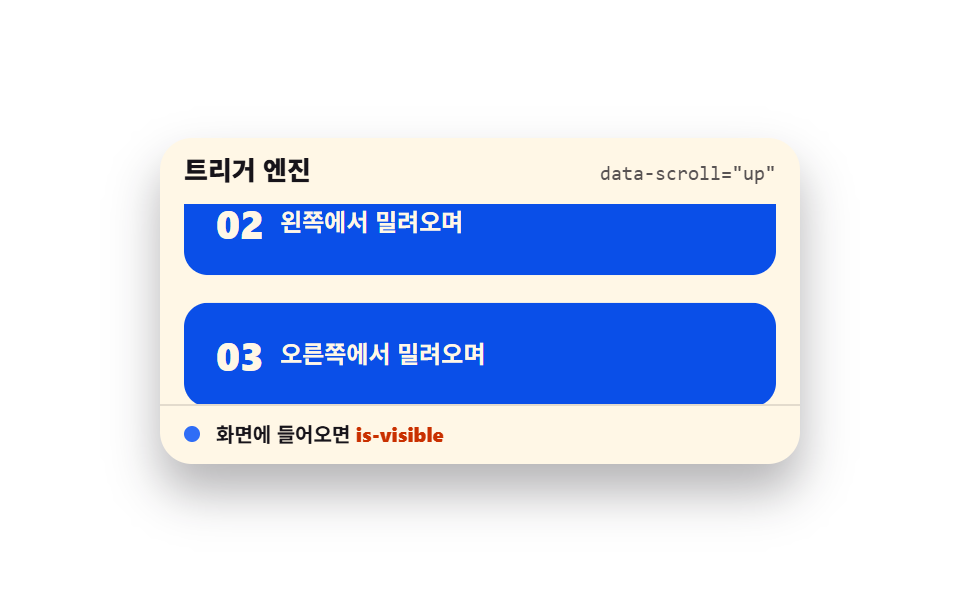 ScrollScroll Trigger Animation: 9 Engines, No GSAP
 ScrollHorizontal Scroll Animation CSS: 9 Inertia Scenes
 Scroll9 CSS Animation on Scroll Effects, No JavaScript
 Scroll9 Scrollytelling CSS Section Patterns, Copy-Paste
 Scroll9 CSS Marquee Infinite Loop — No JS, Scroll-Driven
 Scroll9 CSS Stagger Animation Demos You Can Copy-Paste
 Scroll9 CSS Scroll Progress Bar Ideas, Copy-Paste
 Scroll9 CSS Only Carousels You Can Copy-Paste
 Scroll9 CSS Timeline Animation Ideas, Copy-Paste
 Scroll9 CSS Only Carousel Slider Recipes to Copy-Paste