css floating label 9パターン — ばねと慣性でラベルが動く入力欄
入力欄を押してからの0.3秒、css floating label がどう上がるかがフォームの第一印象を決める — 01番のばねと02番のノッチがその0.3秒を計算で満たす。九つの場面はどれも CSS の transition を使わず、JavaScript で計算した値だけで動きます。
九つのフローティングラベルを画面でそのまま押してみる
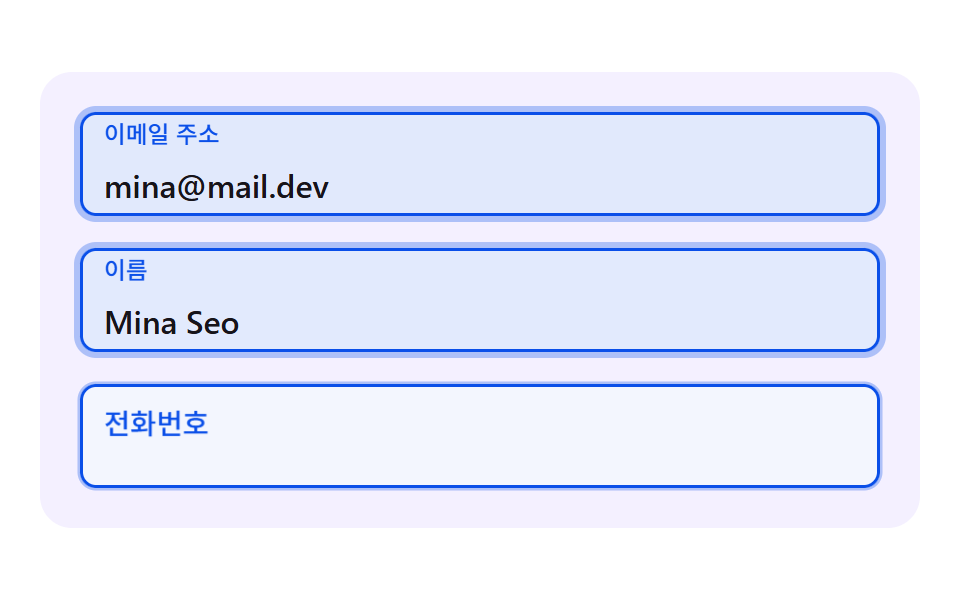 01 fl-spring-rise-label
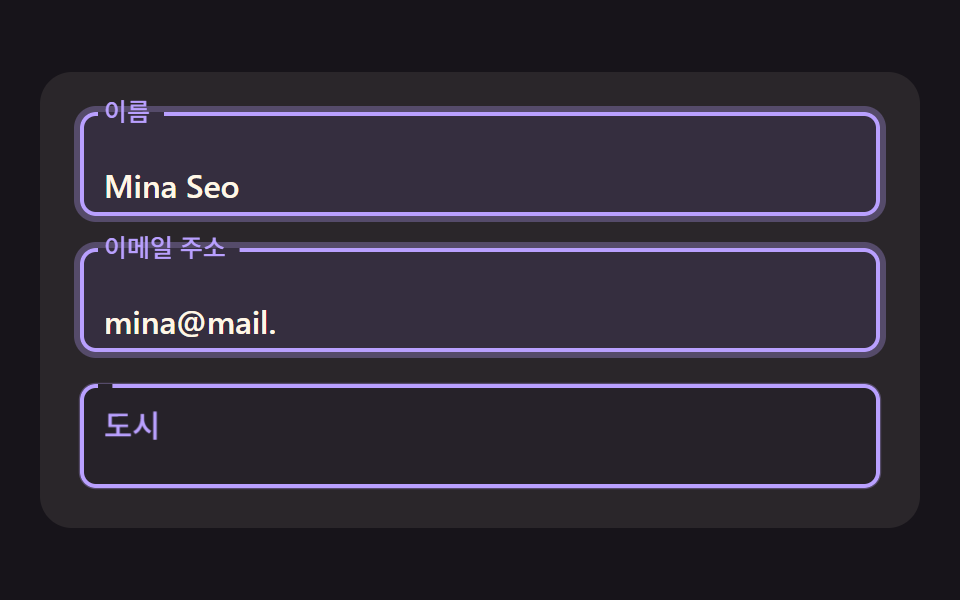 02 fl-outline-notch-gap
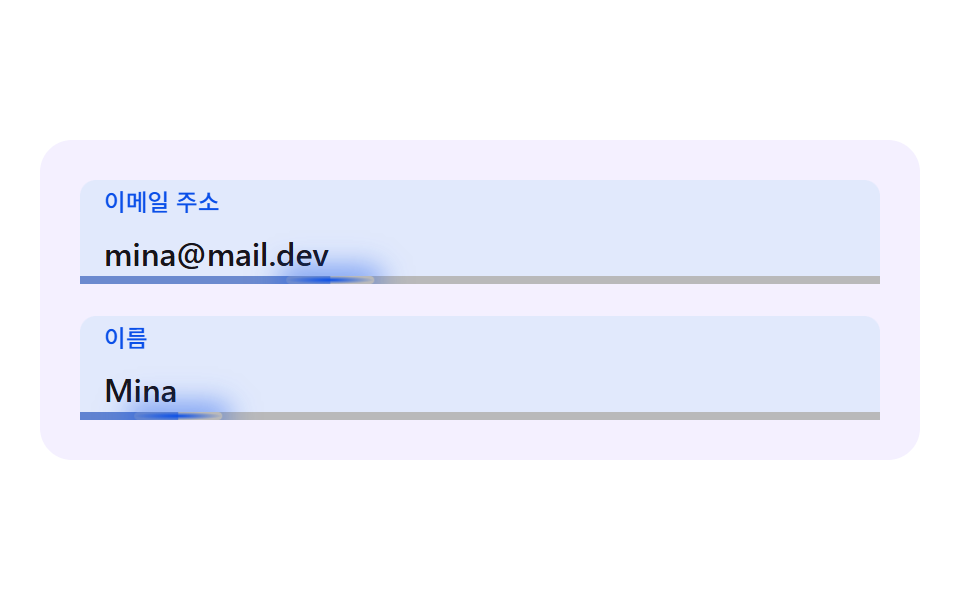 03 fl-inertia-caret-underline
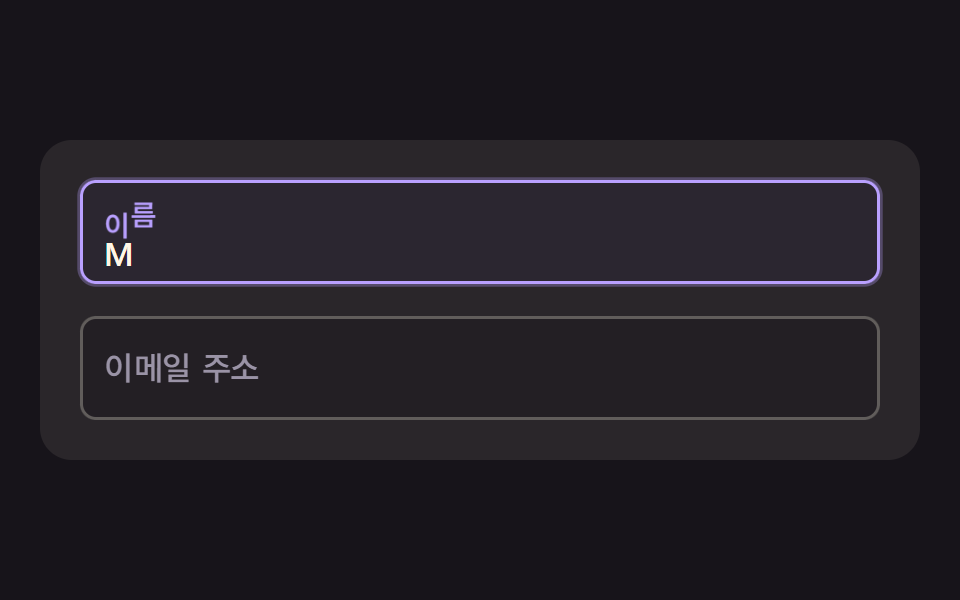 04 fl-char-wave-label
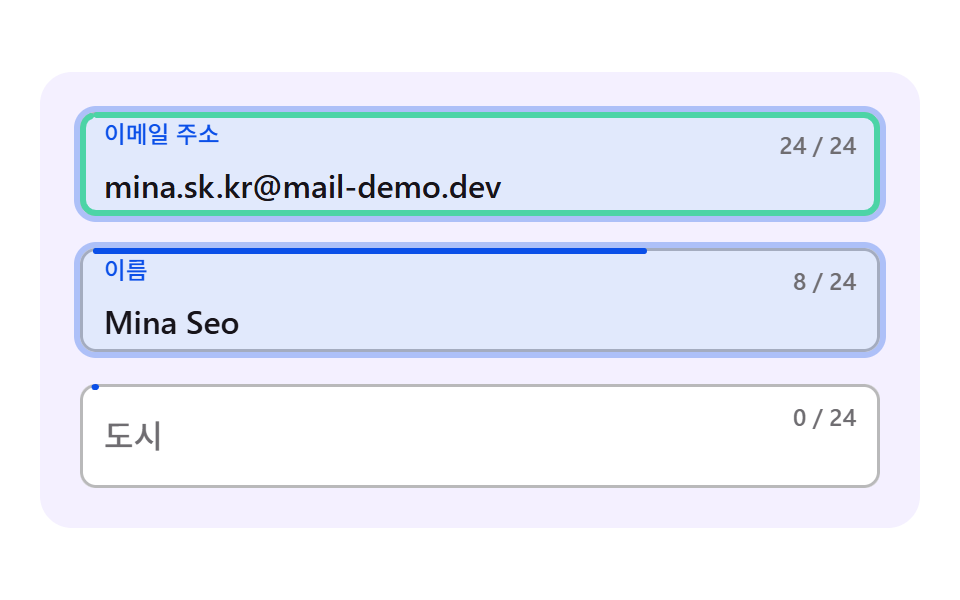 05 fl-fill-ring-progress
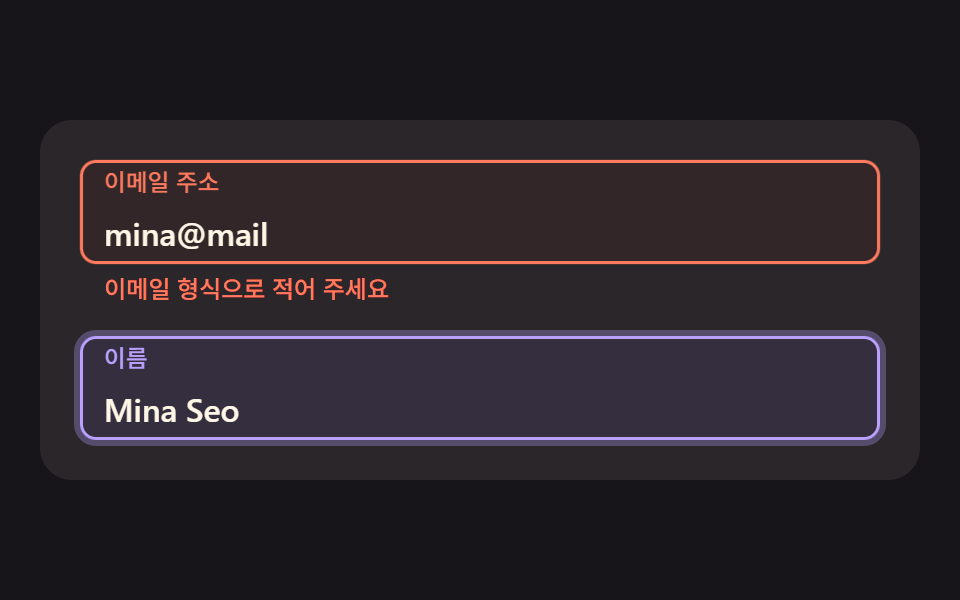 06 fl-error-damped-shake
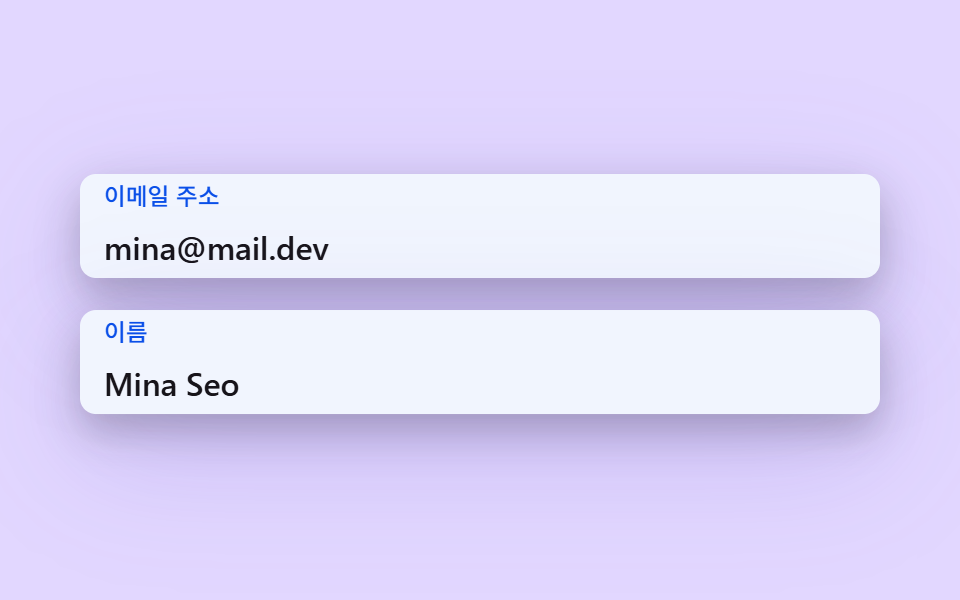 07 fl-shadow-elevation-lift
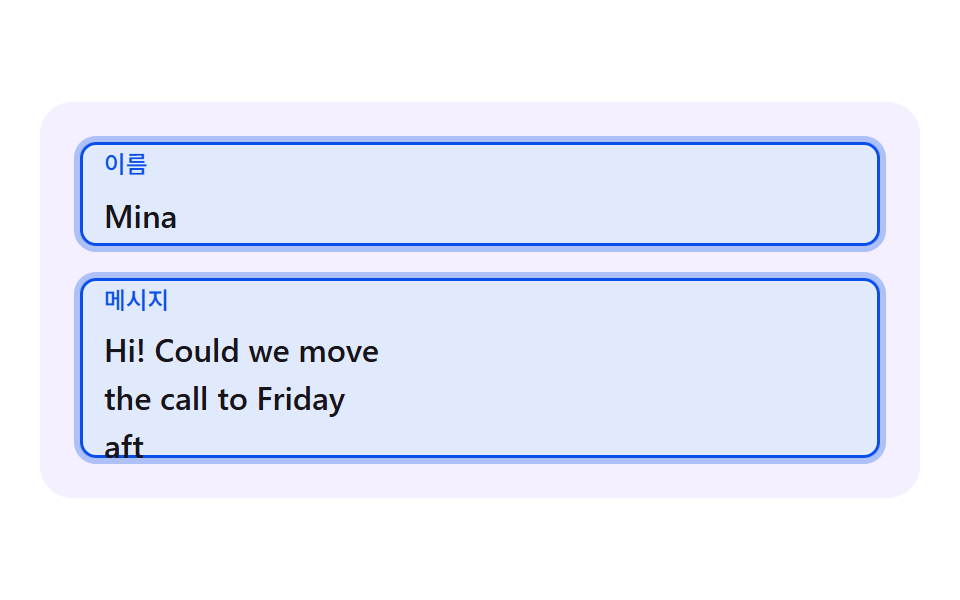 08 fl-textarea-grow-label
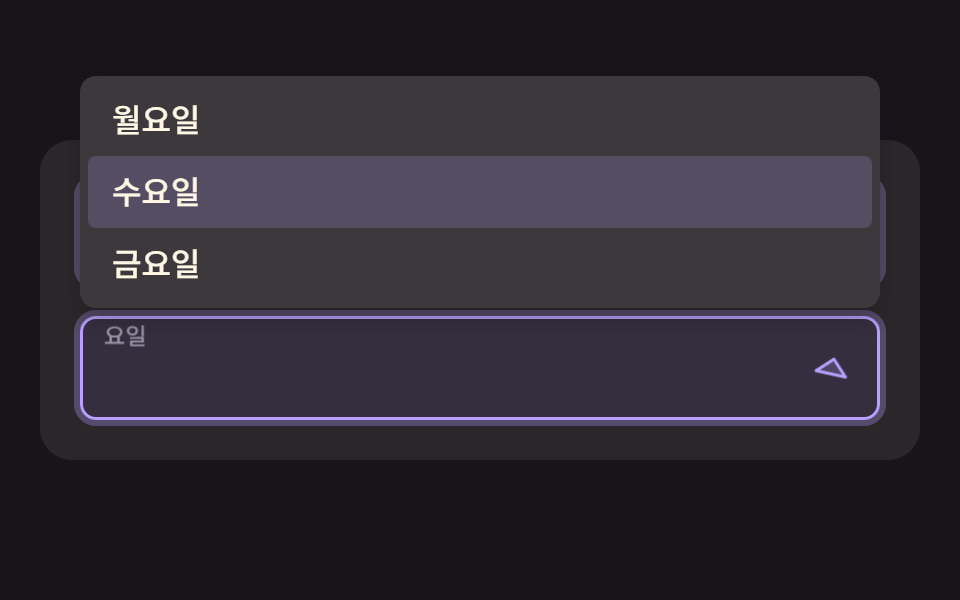 09 fl-select-chevron-float
自動再生 · タイルを押すとその項目へ · すべて1つのzip
- 01 ラベルが減衰ばねで上がり、少し行き過ぎて落ち着くフローティングラベル
- 02 枠線がラベルの実測幅だけ開くノッチ型ラベル
- 03 下線がキャレットの位置を慣性で追う入力欄
- 04 ラベルの文字がハッシュ遅延で一文字ずつ浮かぶ波ラベル
- 05 入力の長さに応じて枠線が一周分埋まる進行リング欄
- 06 エラー時に減衰する正弦で揺れ、ラベルが案内色に変わる欄
- 07 フォーカスで影の高さがばねで立ち上がるカード型入力欄
- 08 行数に応じてなめらかに伸び、ラベルは欄の上部に浮かぶテキストエリア
- 09 シェブロンがばねで回り、選ぶとラベルが上がるセレクト欄
css floating label 9パターン — ばね・測定・補間でラベルが生きる
一つの場面は、幅が最大440pxのカードに入力欄を二つか三つ縦に積んだ形です。欄の高さは52px、欄どうしの間は16px、カードの内側の余白は20pxなので、欄が三つの場面はカードの高さが228px、二つの場面は160pxになります。480×300のステージではカードが中央に置かれ、高さ250px以下の携帯向けの画面では3番目の欄(06は2番目の欄)を隠します。
九つの場面には CSS の transition も @keyframes もありません。ラベルの移動・枠線の隙間・影はすべて requestAnimationFrame の中で計算した値で、自動の実演は2秒周期の予定表が欄に文字を入れていき、最初の変化は200msで起きます。人が欄に最初のフォーカスを置くと実演は止まり、本物のフォーカスと input イベントが引き継ぎます。
並べた順番は、ラベルを動かす力がどこから来るかで決めました。01・04・07・09 は速度を持つばねで、02・03・05・08 は目標へフレームごとに一定の割合で近づく指数接近(approach)です。06 はラベルが指数接近で、揺れだけは振幅の縮む正弦を直接計算します。ラベルが15px上がって倍率0.74まで縮む基本の動きはどの場面も同じで(02だけは26pxと0.78)、その上に重ねた一層が場面ごとに違います。
会員登録フォームなら 01 から、枠線の上辺にラベルを乗せる形なら 02 から、入力の検証結果を見せたいなら 06 から開くのが近道です。入力欄そのものの形が知りたいときは 入力欄 デザイン 9選 — コピペで動くフォーム部品 を、エラー文を出すタイミングは フォーム バリデーション UI 9選 — 打ち込んだ瞬間に判定するエラー表示 を、横に開いておくと読み進めやすくなります。
css floating label input を技法別のコードで見る
ここに載せるのは各場面の index.html の <script> の中で途切れず続く行だけで、断片は25行以内です。css floating label input と呼ばれる動きの多くは、ここにある計算の上にラベルを一枚重ねたものなので、値の出どころから読むと直す場所が見つかります。
01行き過ぎてから落ち着く減衰ばねのラベル
フォーカスが入った瞬間、ラベルの位置をばねの方程式で積分するので、トゥイーン曲線がなくても目標を少し行き過ぎて戻る動きが出ます。ラベルの高さと縮小率が同じ x から出るため、行き過ぎたときはラベルがさらに高く小さくなり、メールや名前の欄が並ぶ会員登録フォームに合います。累積面積は48.9%、平均の強さは76.0で、23/23フレームが動きました。
<main class="stage">
  <div class="fl is-demo" id="fl" data-demo="1">
    <div class="fl__field">
      <div class="fl__box" data-r="box">
        <input class="fl__input" id="f1" data-r="input" type="email" autocomplete="email">
        <label class="fl__label" for="f1" data-r="label">メールアドレス</label>
      </div>
    </div>
    <div class="fl__field">
      <div class="fl__box" data-r="box">
        <input class="fl__input" id="f2" data-r="input" type="text" autocomplete="name">
        <label class="fl__label" for="f2" data-r="label">お名前</label>
      </div>
    </div>
    <div class="fl__field">
      <div class="fl__box" data-r="box">
        <input class="fl__input" id="f3" data-r="input" type="tel" autocomplete="tel">
        <label class="fl__label" for="f3" data-r="label">電話番号</label>
      </div>
    </div>
  </div>
</main>
@use "../../../../site/static/demo-tokens" as *;
// 핵심: 포커스 순간 라벨 위치를 감쇠 스프링으로 적분해 오버슛과 되돌림을 만든다. 라벨은 진짜 <label for> 이고 칸은 진짜 입력 요소다. 움직임 값은 JS 가 계산하고 CSS 는 모양만 맡는다.
@include stage($stage-paper);
$panel: mix($subject-lilac, $stage-paper, 16%);
$box-bg: $stage-paper;
$fg: $subject-ink;
$mute: mix($subject-ink, $stage-paper, 62%);
$line: mix($subject-ink, $stage-paper, 30%);
$accent: $subject-blue-deep;
$err: $error;
$menu-bg: $stage-paper;
$box-h: 52px;
.fl {
position: relative;
box-sizing: border-box;
width: min(100%, 440px);
padding: $sp-5;
display: flex;
flex-direction: column;
gap: $sp-4;
border-radius: $r-card;
background: $panel;
color: $fg;
font-size: 16px;
line-height: 24px;
font-weight: 500;
}
.fl__field { position: relative; }
.fl__box {
--ln: #{$line};
position: relative;
z-index: 1;
height: $box-h;
border-radius: $r-sm;
background: $box-bg;
box-shadow: inset 0 0 0 1.5px var(--ln), 0 0 0 calc(var(--p, 0) * 3px) rgba($accent, .3);
}
.fl__box[data-up] { --ln: #{$accent}; }
.fl__box::after {
content: "";
position: absolute;
inset: 0;
z-index: 0;
border-radius: inherit;
background: $accent;
opacity: calc(var(--p, 0) * .12);
pointer-events: none;
}
.fl__input {
position: relative;
z-index: 1;
box-sizing: border-box;
display: block;
width: 100%;
height: 100%;
margin: 0;
padding: $sp-6 $sp-3 $sp-1;
border: 0;
border-radius: inherit;
background: transparent;
color: $fg;
font-family: inherit;
font-size: 16px;
line-height: 24px;
font-weight: 500;
outline: none;
}
.fl__input:focus-visible { outline: 2px solid $accent; outline-offset: 2px; }
.fl__label {
position: absolute;
left: $sp-3;
top: 0;
z-index: 2;
line-height: $box-h;
font-size: 16px;
font-weight: 500;
color: $mute;
white-space: nowrap;
transform-origin: 0 50%;
pointer-events: none;
will-change: transform;
}
.fl__box[data-up] .fl__label { color: $accent; }
@media (max-height: 250px) {
.fl__field:nth-child(n + 3) { display: none; }
}
@media (prefers-reduced-motion: reduce) {
.fl__label, .fl__box { will-change: auto; }
}html, body {
margin: 0;
overflow: hidden;
}
.stage {
box-sizing: border-box;
min-height: 100vh;
display: grid;
place-items: center;
margin: 0;
background: #ffffff;
font-family: -apple-system, "Segoe UI", "Noto Sans KR", sans-serif;
padding: clamp(8px, 4vw, 24px);
}
.fl {
position: relative;
box-sizing: border-box;
width: min(100%, 440px);
padding: 20px;
display: flex;
flex-direction: column;
gap: 16px;
border-radius: 16px;
background: rgb(95.6078431373%, 94.0392156863%, 100%);
color: #17141a;
font-size: 16px;
line-height: 24px;
font-weight: 500;
}
.fl__field {
position: relative;
}
.fl__box {
--ln: rgb(72.7058823529%, 72.3529411765%, 73.0588235294%);
position: relative;
z-index: 1;
height: 52px;
border-radius: 8px;
background: #ffffff;
box-shadow: inset 0 0 0 1.5px var(--ln), 0 0 0 calc(var(--p, 0) * 3px) rgba(10, 79, 232, 0.3);
}
.fl__box[data-up] {
--ln: #0a4fe8;
}
.fl__box::after {
content: "";
position: absolute;
inset: 0;
z-index: 0;
border-radius: inherit;
background: #0a4fe8;
opacity: calc(var(--p, 0) * 0.12);
pointer-events: none;
}
.fl__input {
position: relative;
z-index: 1;
box-sizing: border-box;
display: block;
width: 100%;
height: 100%;
margin: 0;
padding: 24px 12px 4px;
border: 0;
border-radius: inherit;
background: transparent;
color: #17141a;
font-family: inherit;
font-size: 16px;
line-height: 24px;
font-weight: 500;
outline: none;
}
.fl__input:focus-visible {
outline: 2px solid #0a4fe8;
outline-offset: 2px;
}
.fl__label {
position: absolute;
left: 12px;
top: 0;
z-index: 2;
line-height: 52px;
font-size: 16px;
font-weight: 500;
color: rgb(43.5921568627%, 42.862745098%, 44.3215686275%);
white-space: nowrap;
transform-origin: 0 50%;
pointer-events: none;
will-change: transform;
}
.fl__box[data-up] .fl__label {
color: #0a4fe8;
}
@media (max-height: 250px) {
.fl__field:nth-child(n+3) {
display: none;
}
}
@media (prefers-reduced-motion: reduce) {
.fl__label, .fl__box {
will-change: auto;
}
}(function () {
const root = document.getElementById("fl");
const CLS = {};
const reduce = window.matchMedia("(prefers-reduced-motion: reduce)").matches;
let demo = !reduce;
let raf = 0;
let last = -1;
const offs = [];
function q(sel) {
return root.querySelector(sel);
}
function qa(sel) {
const list = Array.prototype.slice.call(root.querySelectorAll(sel));
return list;
}
function clamp(v, lo, hi) {
return Math.max(lo, Math.min(hi, v));
}
function on(el, type, fn) {
el.addEventListener(type, fn);
offs.push(function () {
el.removeEventListener(type, fn);
});
}
// 좌표 해시: 같은 입력이면 같은 값 0~1. 난수 함수를 쓰지 않고 사인의 소수부만 쓴다.
function hash(x) {
const s = Math.sin(x * 127.1 + 311.7) * 43758.5453;
return s - Math.floor(s);
}
// 지수 접근: 프레임당 비율 per 만큼 목표에 다가간다. f 는 60fps 기준 프레임 수(dt * 60)라 프레임률이 달라도 같은 속도다.
function approach(x, target, per, f) {
return x + (target - x) * (1 - Math.pow(1 - per, f));
}
// 스프링 한 칸: 가속도 = -k (x - 목표) - c v. 반암시적 오일러를 1/120초 이하 부분 스텝으로 쪼갠다.
    function springStep(s, target, k, c, dt) {
        let left = dt;
        while (left > 0) {
            const h = Math.min(left, 1 / 120);
            s.v += (-k * (s.x - target) - c * s.v) * h;
            s.x += s.v * h;
            left -= h;
        }
    }
// 값이 있으면 라벨은 올라가 있어야 한다. 브라우저 자동완성이 값을 채우면 input 이벤트가 없을 수 있어 :autofill 도 함께 본다.
function isFilled(el) {
if (el.value !== "") return true;
try {
return el.matches(":-webkit-autofill");
} catch (err) {
return false;
}
}
let leaveHook = null;
function stopDemo() {
if (!demo) return;
demo = false;
root.removeAttribute("data-demo");
root.classList.remove("is-demo");
resetFields();
}
function frame(ts) {
const dt = last < 0 ? 0.016 : Math.min(0.05, (ts - last) / 1000);
last = ts;
if (demo) script(ts);
step(dt, ts);
render();
raf = requestAnimationFrame(frame);
}
const ro = new ResizeObserver(function () {
relayout();
});
ro.observe(root);
if (document.fonts) {
document.fonts.ready.then(function () {
relayout();
});
}
// 시연 계획: 칸마다 포커스 구간(a~b), 타이핑 시작(s)·글자당 ms(rate)·글. 2초 주기로 되풀이하고 주기 첫머리엔 모두 비운다.
function runPlan(ts) {
const t = ts % 2000;
let changed = false;
for (let i = 0; i < PLAN.length; i += 1) {
const p = PLAN[i];
const f = fields[i];
const isOn = t >= p.a && t < p.b;
const n = t < p.s ? 0 : Math.min(p.text.length, Math.floor((t - p.s) / p.rate) + 1);
const v = p.text.slice(0, n);
if (f.input.value !== v) {
f.input.value = v;
changed = true;
}
if (f.focus !== isOn) {
f.focus = isOn;
changed = true;
if (!isOn && leaveHook) leaveHook(i);
}
}
if (changed) retarget();
}
function resetFields() {
for (let i = 0; i < fields.length; i += 1) {
fields[i].input.value = "";
fields[i].focus = false;
}
retarget();
}
function wire() {
fields.forEach(function (f, i) {
on(f.input, "focus", function () {
stopDemo();
f.focus = true;
retarget();
});
on(f.input, "blur", function () {
f.focus = false;
if (leaveHook) leaveHook(i);
retarget();
});
on(f.input, "input", function () {
retarget();
});
});
}
// 기법: 라벨 위치를 스프링 방정식으로 적분한다. 트윈 곡선이 없어도 오버슛과 되돌림이 생긴다.
const STIFFNESS = 170;
const DAMPING = 14;
const RISE_PX = 15;
const LABEL_SCALE = 0.74;
const fields = qa("[data-r=box]").map(function (box) {
return {
box: box,
input: box.querySelector("input"),
label: box.querySelector("label"),
focus: false, up: false, sp: { x: 0, v: 0 }
};
});
const PLAN = [
{ a: 200, b: 900, s: 380, rate: 55, text: "[email protected]" },
{ a: 900, b: 1500, s: 1000, rate: 70, text: "Mina Seo" },
{ a: 1500, b: 1950, s: 1600, rate: 60, text: "010 2222" }
];
function retarget() {
fields.forEach(function (f) {
f.up = f.focus || isFilled(f.input);
if (f.up) f.box.setAttribute("data-up", "");
else f.box.removeAttribute("data-up");
if (reduce) {
f.sp.x = f.up ? -RISE_PX : 0;
f.sp.v = 0;
}
});
if (reduce) render();
}
function relayout() {
retarget();
}
function script(ts) {
runPlan(ts);
}
function step(dt, ts) {
fields.forEach(function (f) {
springStep(f.sp, f.up ? -RISE_PX : 0, STIFFNESS, DAMPING, dt);
});
}
function render() {
fields.forEach(function (f) {
const y = f.sp.x;
const r = y / -RISE_PX;
const s = 1 - (1 - LABEL_SCALE) * r;
f.label.style.transform = "translate3d(0," + y.toFixed(2) + "px,0) scale(" + s.toFixed(3) + ")";
f.box.style.setProperty("--p", clamp(r, 0, 1).toFixed(3));
});
}
wire();
relayout();
if (reduce) {
render();
} else {
raf = requestAnimationFrame(frame);
}
})();// SpringRiseLabel - vanilla 판(01-fl-spring-rise-label) 의 React 포트. 같은 계산을 useEffect 안에서 돌린다.
import { useEffect, useRef } from "react";
import styles from "./SpringRiseLabel.module.scss";
type Spring = { x: number; v: number };
type Plan = { a: number; b: number; s: number; rate: number; text: string };
type Base = { input: HTMLInputElement | HTMLTextAreaElement; focus: boolean; up: boolean };
type F = Base & { box: HTMLElement; label: HTMLElement; sp: Spring };
export default function SpringRiseLabel() {
const rootRef = useRef<HTMLDivElement | null>(null);
useEffect(() => {
const rootEl = rootRef.current;
if (!rootEl) return;
const root: HTMLElement = rootEl;
const CLS = { };
const reduce = window.matchMedia("(prefers-reduced-motion: reduce)").matches;
let demo = !reduce;
let raf: number = 0;
let last: number = -1;
const offs: Array<() => void> = [];
function q(sel: string): HTMLElement {
return root.querySelector(sel) as HTMLElement;
}
function qa(sel: string): HTMLElement[] {
const list: HTMLElement[] = Array.prototype.slice.call(root.querySelectorAll(sel));
return list;
}
function clamp(v: number, lo: number, hi: number): number {
return Math.max(lo, Math.min(hi, v));
}
function on(el: EventTarget, type: string, fn: (e: any) => void): void {
el.addEventListener(type, fn);
offs.push(function (): void {
el.removeEventListener(type, fn);
});
}
// 좌표 해시: 같은 입력이면 같은 값 0~1. 난수 함수를 쓰지 않고 사인의 소수부만 쓴다.
function hash(x: number): number {
const s = Math.sin(x * 127.1 + 311.7) * 43758.5453;
return s - Math.floor(s);
}
// 지수 접근: 프레임당 비율 per 만큼 목표에 다가간다. f 는 60fps 기준 프레임 수(dt * 60)라 프레임률이 달라도 같은 속도다.
function approach(x: number, target: number, per: number, f: number): number {
return x + (target - x) * (1 - Math.pow(1 - per, f));
}
// 스프링 한 칸: 가속도 = -k (x - 목표) - c v. 반암시적 오일러를 1/120초 이하 부분 스텝으로 쪼갠다.
function springStep(s: Spring, target: number, k: number, c: number, dt: number): void {
let left = dt;
while (left > 0) {
const h = Math.min(left, 1 / 120);
s.v += (-k * (s.x - target) - c * s.v) * h;
s.x += s.v * h;
left -= h;
}
}
// 값이 있으면 라벨은 올라가 있어야 한다. 브라우저 자동완성이 값을 채우면 input 이벤트가 없을 수 있어 :autofill 도 함께 본다.
function isFilled(el: HTMLInputElement | HTMLTextAreaElement): boolean {
if (el.value !== "") return true;
try {
return el.matches(":-webkit-autofill");
} catch (err) {
return false;
}
}
let leaveHook: ((i: number) => void) | null = null;
function stopDemo(): void {
if (!demo) return;
demo = false;
root.removeAttribute("data-demo");
root.classList.remove("is-demo");
resetFields();
}
function frame(ts: number): void {
const dt = last < 0 ? 0.016 : Math.min(0.05, (ts - last) / 1000);
last = ts;
if (demo) script(ts);
step(dt, ts);
render();
raf = requestAnimationFrame(frame);
}
const ro = new ResizeObserver(function (): void {
relayout();
});
ro.observe(root);
if (document.fonts) {
document.fonts.ready.then(function (): void {
relayout();
});
}
// 시연 계획: 칸마다 포커스 구간(a~b), 타이핑 시작(s)·글자당 ms(rate)·글. 2초 주기로 되풀이하고 주기 첫머리엔 모두 비운다.
function runPlan(ts: number): void {
const t = ts % 2000;
let changed = false;
for (let i = 0; i < PLAN.length; i += 1) {
const p = PLAN[i];
const f = fields[i];
const isOn = t >= p.a && t < p.b;
const n = t < p.s ? 0 : Math.min(p.text.length, Math.floor((t - p.s) / p.rate) + 1);
const v = p.text.slice(0, n);
if (f.input.value !== v) {
f.input.value = v;
changed = true;
}
if (f.focus !== isOn) {
f.focus = isOn;
changed = true;
if (!isOn && leaveHook) leaveHook(i);
}
}
if (changed) retarget();
}
function resetFields(): void {
for (let i = 0; i < fields.length; i += 1) {
fields[i].input.value = "";
fields[i].focus = false;
}
retarget();
}
function wire(): void {
fields.forEach(function (f: F, i: number): void {
on(f.input, "focus", function (): void {
stopDemo();
f.focus = true;
retarget();
});
on(f.input, "blur", function (): void {
f.focus = false;
if (leaveHook) leaveHook(i);
retarget();
});
on(f.input, "input", function (): void {
retarget();
});
});
}
// 기법: 라벨 위치를 스프링 방정식으로 적분한다. 트윈 곡선이 없어도 오버슛과 되돌림이 생긴다.
const STIFFNESS = 170;
const DAMPING = 14;
const RISE_PX = 15;
const LABEL_SCALE = 0.74;
const fields: F[] = qa("[data-r=box]").map(function (box: HTMLElement): F {
return {
box: box,
input: box.querySelector("input") as HTMLInputElement,
label: box.querySelector("label") as HTMLElement,
focus: false, up: false, sp: { x: 0, v: 0 }
};
});
const PLAN: Plan[] = [
{ a: 200, b: 900, s: 380, rate: 55, text: "[email protected]" },
{ a: 900, b: 1500, s: 1000, rate: 70, text: "Mina Seo" },
{ a: 1500, b: 1950, s: 1600, rate: 60, text: "010 2222" }
];
function retarget(): void {
fields.forEach(function (f: F): void {
f.up = f.focus || isFilled(f.input);
if (f.up) f.box.setAttribute("data-up", "");
else f.box.removeAttribute("data-up");
if (reduce) {
f.sp.x = f.up ? -RISE_PX : 0;
f.sp.v = 0;
}
});
if (reduce) render();
}
function relayout(): void {
retarget();
}
function script(ts: number): void {
runPlan(ts);
}
function step(dt: number, ts: number): void {
fields.forEach(function (f: F): void {
springStep(f.sp, f.up ? -RISE_PX : 0, STIFFNESS, DAMPING, dt);
});
}
function render(): void {
fields.forEach(function (f: F): void {
const y = f.sp.x;
const r = y / -RISE_PX;
const s = 1 - (1 - LABEL_SCALE) * r;
f.label.style.transform = "translate3d(0," + y.toFixed(2) + "px,0) scale(" + s.toFixed(3) + ")";
f.box.style.setProperty("--p", clamp(r, 0, 1).toFixed(3));
});
}
wire();
relayout();
if (reduce) {
render();
} else {
raf = requestAnimationFrame(frame);
}
return () => {
cancelAnimationFrame(raf);
offs.forEach((f) => f());
ro.disconnect();
};
}, []);
return (
<main className={styles["stage"]}>
<div ref={rootRef} className={styles["fl"] + " is-demo"} data-demo="1">
<div className={styles["fl__field"]}>
<div className={styles["fl__box"]} data-r="box">
<input className={styles["fl__input"]} id="f1" data-r="input" type="email" autoComplete="email" />
<label className={styles["fl__label"]} htmlFor="f1" data-r="label">이메일 주소</label>
</div>
</div>
<div className={styles["fl__field"]}>
<div className={styles["fl__box"]} data-r="box">
<input className={styles["fl__input"]} id="f2" data-r="input" type="text" autoComplete="name" />
<label className={styles["fl__label"]} htmlFor="f2" data-r="label">이름</label>
</div>
</div>
<div className={styles["fl__field"]}>
<div className={styles["fl__box"]} data-r="box">
<input className={styles["fl__input"]} id="f3" data-r="input" type="tel" autoComplete="tel" />
<label className={styles["fl__label"]} htmlFor="f3" data-r="label">전화번호</label>
</div>
</div>
</div>
</main>
);
}01 · ラベルが減衰ばねで上がり、少し行き過ぎて落ち着くフローティングラベル — 計測 累積面積 48.867% · 動いたフレーム 23/23GODRICH オリジナル · SCSS と React は zip に同梱 · パスワードを見る
function springStep(s, target, k, c, dt) {
let left = dt;
while (left > 0) {
const h = Math.min(left, 1 / 120);
s.v += (-k * (s.x - target) - c * s.v) * h;
s.x += s.v * h;
left -= h;
}
}
02枠線がラベルの幅だけ開くノッチ型のラベル
ラベルを getBoundingClientRect で測り、枠線の上辺の隙間をその幅に合わせて clip-path で切り抜くので、文字が長くても短くても隙間がぴったり合います。隙間の目標はラベルの実測幅に0.78を掛けて左右の余白5pxずつを足した値で、枠線の上にラベルが乗る設定・プロフィールのフォームに向きます。累積面積は49.0%、平均の強さは83.6で、23/23フレームが動きました。
<main class="stage">
  <div class="fl is-demo" id="fl" data-demo="1">
    <div class="fl__field">
      <div class="fl__box" data-r="box">
        <i class="fl__outline" data-r="outline" aria-hidden="true"></i>
        <input class="fl__input" id="f1" data-r="input" type="text" autocomplete="name">
        <label class="fl__label" for="f1" data-r="label">お名前</label>
      </div>
    </div>
    <div class="fl__field">
      <div class="fl__box" data-r="box">
        <i class="fl__outline" data-r="outline" aria-hidden="true"></i>
        <input class="fl__input" id="f2" data-r="input" type="email" autocomplete="email">
        <label class="fl__label" for="f2" data-r="label">メールアドレス</label>
      </div>
    </div>
    <div class="fl__field">
      <div class="fl__box" data-r="box">
        <i class="fl__outline" data-r="outline" aria-hidden="true"></i>
        <input class="fl__input" id="f3" data-r="input" type="text" autocomplete="off">
        <label class="fl__label" for="f3" data-r="label">市区町村</label>
      </div>
    </div>
  </div>
</main>@use "../../../../site/static/demo-tokens" as *;
// 핵심: 라벨의 실측 폭만큼만 윤곽선 윗변의 틈을 연다. 라벨은 진짜 <label for> 이고 칸은 진짜 입력 요소다. 움직임 값은 JS 가 계산하고 CSS 는 모양만 맡는다.
@include stage($stage-ink);
$panel: mix($subject-cream, $stage-ink, 8%);
$box-bg: mix($subject-cream, $stage-ink, 5%);
$fg: $subject-cream;
$mute: $tick-mute;
$line: mix($subject-cream, $stage-ink, 32%);
$accent: $subject-lilac;
$err: $tick-down;
$menu-bg: mix($subject-cream, $stage-ink, 16%);
$box-h: 52px;
.fl {
position: relative;
box-sizing: border-box;
width: min(100%, 440px);
padding: $sp-5;
display: flex;
flex-direction: column;
gap: $sp-4;
border-radius: $r-card;
background: $panel;
color: $fg;
font-size: 16px;
line-height: 24px;
font-weight: 500;
}
.fl__field { position: relative; }
.fl__box {
--ln: #{$line};
position: relative;
z-index: 1;
height: $box-h;
border-radius: $r-sm;
background: $box-bg;
box-shadow: inset 0 0 0 1.5px var(--ln), 0 0 0 calc(var(--p, 0) * 3px) rgba($accent, .3);
}
.fl__box[data-up] { --ln: #{$accent}; }
.fl__box::after {
content: "";
position: absolute;
inset: 0;
z-index: 0;
border-radius: inherit;
background: $accent;
opacity: calc(var(--p, 0) * .12);
pointer-events: none;
}
.fl__input {
position: relative;
z-index: 1;
box-sizing: border-box;
display: block;
width: 100%;
height: 100%;
margin: 0;
padding: $sp-6 $sp-3 $sp-1;
border: 0;
border-radius: inherit;
background: transparent;
color: $fg;
font-family: inherit;
font-size: 16px;
line-height: 24px;
font-weight: 500;
outline: none;
}
.fl__input:focus-visible { outline: 2px solid $accent; outline-offset: 2px; }
.fl__label {
position: absolute;
left: $sp-3;
top: 0;
z-index: 2;
line-height: $box-h;
font-size: 16px;
font-weight: 500;
color: $mute;
white-space: nowrap;
transform-origin: 0 50%;
pointer-events: none;
will-change: transform;
}
.fl__box[data-up] .fl__label { color: $accent; }
.fl__box { box-shadow: 0 0 0 calc(var(--p, 0) * 3px) rgba($accent, .3); }
.fl__outline {
position: absolute;
inset: 0;
z-index: 2;
box-sizing: border-box;
border: 2px solid var(--ln);
border-radius: $r-sm;
pointer-events: none;
}
.fl__label { z-index: 3; }
@media (max-height: 250px) {
.fl__field:nth-child(n + 3) { display: none; }
}
@media (prefers-reduced-motion: reduce) {
.fl__label, .fl__box { will-change: auto; }
}html, body {
margin: 0;
overflow: hidden;
}
.stage {
box-sizing: border-box;
min-height: 100vh;
display: grid;
place-items: center;
margin: 0;
background: #17141a;
font-family: -apple-system, "Segoe UI", "Noto Sans KR", sans-serif;
padding: clamp(8px, 4vw, 24px);
}
.fl {
position: relative;
box-sizing: border-box;
width: min(100%, 440px);
padding: 20px;
display: flex;
flex-direction: column;
gap: 16px;
border-radius: 16px;
background: rgb(16.2980392157%, 14.9647058824%, 16.5960784314%);
color: #fff7e6;
font-size: 16px;
line-height: 24px;
font-weight: 500;
}
.fl__field {
position: relative;
}
.fl__box {
--ln: rgb(38.1333333333%, 36.3294117647%, 35.7960784314%);
position: relative;
z-index: 1;
height: 52px;
border-radius: 8px;
background: rgb(13.568627451%, 12.2941176471%, 14.1960784314%);
box-shadow: inset 0 0 0 1.5px var(--ln), 0 0 0 calc(var(--p, 0) * 3px) rgba(185, 160, 255, 0.3);
}
.fl__box[data-up] {
--ln: #b9a0ff;
}
.fl__box::after {
content: "";
position: absolute;
inset: 0;
z-index: 0;
border-radius: inherit;
background: #b9a0ff;
opacity: calc(var(--p, 0) * 0.12);
pointer-events: none;
}
.fl__input {
position: relative;
z-index: 1;
box-sizing: border-box;
display: block;
width: 100%;
height: 100%;
margin: 0;
padding: 24px 12px 4px;
border: 0;
border-radius: inherit;
background: transparent;
color: #fff7e6;
font-family: inherit;
font-size: 16px;
line-height: 24px;
font-weight: 500;
outline: none;
}
.fl__input:focus-visible {
outline: 2px solid #b9a0ff;
outline-offset: 2px;
}
.fl__label {
position: absolute;
left: 12px;
top: 0;
z-index: 2;
line-height: 52px;
font-size: 16px;
font-weight: 500;
color: #9a93a6;
white-space: nowrap;
transform-origin: 0 50%;
pointer-events: none;
will-change: transform;
}
.fl__box[data-up] .fl__label {
color: #b9a0ff;
}
.fl__box {
box-shadow: 0 0 0 calc(var(--p, 0) * 3px) rgba(185, 160, 255, 0.3);
}
.fl__outline {
position: absolute;
inset: 0;
z-index: 2;
box-sizing: border-box;
border: 2px solid var(--ln);
border-radius: 8px;
pointer-events: none;
}
.fl__label {
z-index: 3;
}
@media (max-height: 250px) {
.fl__field:nth-child(n+3) {
display: none;
}
}
@media (prefers-reduced-motion: reduce) {
.fl__label, .fl__box {
will-change: auto;
}
}(function () {
const root = document.getElementById("fl");
const CLS = {};
const reduce = window.matchMedia("(prefers-reduced-motion: reduce)").matches;
let demo = !reduce;
let raf = 0;
let last = -1;
const offs = [];
function q(sel) {
return root.querySelector(sel);
}
function qa(sel) {
const list = Array.prototype.slice.call(root.querySelectorAll(sel));
return list;
}
function clamp(v, lo, hi) {
return Math.max(lo, Math.min(hi, v));
}
function on(el, type, fn) {
el.addEventListener(type, fn);
offs.push(function () {
el.removeEventListener(type, fn);
});
}
// 좌표 해시: 같은 입력이면 같은 값 0~1. 난수 함수를 쓰지 않고 사인의 소수부만 쓴다.
function hash(x) {
const s = Math.sin(x * 127.1 + 311.7) * 43758.5453;
return s - Math.floor(s);
}
// 지수 접근: 프레임당 비율 per 만큼 목표에 다가간다. f 는 60fps 기준 프레임 수(dt * 60)라 프레임률이 달라도 같은 속도다.
function approach(x, target, per, f) {
return x + (target - x) * (1 - Math.pow(1 - per, f));
}
// 스프링 한 칸: 가속도 = -k (x - 목표) - c v. 반암시적 오일러를 1/120초 이하 부분 스텝으로 쪼갠다.
function springStep(s, target, k, c, dt) {
let left = dt;
while (left > 0) {
const h = Math.min(left, 1 / 120);
s.v += (-k * (s.x - target) - c * s.v) * h;
s.x += s.v * h;
left -= h;
}
}
// 값이 있으면 라벨은 올라가 있어야 한다. 브라우저 자동완성이 값을 채우면 input 이벤트가 없을 수 있어 :autofill 도 함께 본다.
function isFilled(el) {
if (el.value !== "") return true;
try {
return el.matches(":-webkit-autofill");
} catch (err) {
return false;
}
}
let leaveHook = null;
function stopDemo() {
if (!demo) return;
demo = false;
root.removeAttribute("data-demo");
root.classList.remove("is-demo");
resetFields();
}
function frame(ts) {
const dt = last < 0 ? 0.016 : Math.min(0.05, (ts - last) / 1000);
last = ts;
if (demo) script(ts);
step(dt, ts);
render();
raf = requestAnimationFrame(frame);
}
const ro = new ResizeObserver(function () {
relayout();
});
ro.observe(root);
if (document.fonts) {
document.fonts.ready.then(function () {
relayout();
});
}
// 시연 계획: 칸마다 포커스 구간(a~b), 타이핑 시작(s)·글자당 ms(rate)·글. 2초 주기로 되풀이하고 주기 첫머리엔 모두 비운다.
function runPlan(ts) {
const t = ts % 2000;
let changed = false;
for (let i = 0; i < PLAN.length; i += 1) {
const p = PLAN[i];
const f = fields[i];
const isOn = t >= p.a && t < p.b;
const n = t < p.s ? 0 : Math.min(p.text.length, Math.floor((t - p.s) / p.rate) + 1);
const v = p.text.slice(0, n);
if (f.input.value !== v) {
f.input.value = v;
changed = true;
}
if (f.focus !== isOn) {
f.focus = isOn;
changed = true;
if (!isOn && leaveHook) leaveHook(i);
}
}
if (changed) retarget();
}
function resetFields() {
for (let i = 0; i < fields.length; i += 1) {
fields[i].input.value = "";
fields[i].focus = false;
}
retarget();
}
function wire() {
fields.forEach(function (f, i) {
on(f.input, "focus", function () {
stopDemo();
f.focus = true;
retarget();
});
on(f.input, "blur", function () {
f.focus = false;
if (leaveHook) leaveHook(i);
retarget();
});
on(f.input, "input", function () {
retarget();
});
});
}
// 기법: 라벨의 실측 폭을 getBoundingClientRect 로 재서 윗변 틈을 그 폭만큼만 보간해서 연다.
const NOTCH_PAD = 5;
const GAP_LERP = 0.22;
const RADIUS = 8;
const BORDER_W = 2;
const LABEL_X = 14;
const LABEL_SCALE = 0.78;
const LABEL_LERP = 0.2;
const RISE_PX = 26;
const fields = qa("[data-r=box]").map(function (box) {
const outline = box.querySelector("[data-r=outline]");
outline.style.borderRadius = RADIUS + "px";
outline.style.borderWidth = BORDER_W + "px";
return {
box: box,
input: box.querySelector("input"),
label: box.querySelector("label"),
outline: outline,
focus: false, up: false, p: 0, gap: 0, natW: 60
};
});
const PLAN = [
{ a: 200, b: 950, s: 420, rate: 60, text: "Mina Seo" },
{ a: 950, b: 1650, s: 1100, rate: 60, text: "[email protected]" },
{ a: 1650, b: 1980, s: 1750, rate: 60, text: "seoul" }
];
// 라벨 자연 폭 = 지금 그려진 폭 ÷ 지금 배율. 폰트가 늦게 들어오거나 창이 바뀌면 다시 잰다.
function measure() {
fields.forEach(function (f) {
const s = 1 - (1 - LABEL_SCALE) * f.p;
f.natW = f.label.getBoundingClientRect().width / s;
});
}
function targetGap(f) {
return f.up ? f.natW * LABEL_SCALE + 2 * NOTCH_PAD : 0;
}
function retarget() {
fields.forEach(function (f) {
f.up = f.focus || isFilled(f.input);
if (f.up) f.box.setAttribute("data-up", "");
else f.box.removeAttribute("data-up");
if (reduce) {
f.p = f.up ? 1 : 0;
f.gap = targetGap(f);
}
});
if (reduce) render();
}
function relayout() {
measure();
retarget();
}
function script(ts) {
runPlan(ts);
}
function step(dt, ts) {
const fr = dt * 60;
fields.forEach(function (f) {
f.p = approach(f.p, f.up ? 1 : 0, LABEL_LERP, fr);
f.gap = approach(f.gap, targetGap(f), GAP_LERP, fr);
});
}
    function render() {
        fields.forEach(function (f) {
            const s = 1 - (1 - LABEL_SCALE) * f.p;
            f.label.style.transform = "translate3d(0," + (-RISE_PX * f.p).toFixed(2) + "px,0) scale(" + s.toFixed(3) + ")";
            f.box.style.setProperty("--p", f.p.toFixed(3));
            const x0 = LABEL_X - NOTCH_PAD;
            const x1 = x0 + f.gap;
            const cut = f.gap > 0.5 ? "polygon(0 0," + x0.toFixed(1) + "px 0," + x0.toFixed(1) + "px " + (BORDER_W + 1) + "px," + x1.toFixed(1) + "px " + (BORDER_W + 1) + "px," + x1.toFixed(1) + "px 0,100% 0,100% 100%,0 100%)" : "none";
            f.outline.style.clipPath = cut;
        });
    }
wire();
relayout();
if (reduce) {
render();
} else {
raf = requestAnimationFrame(frame);
}
})();// OutlineNotchGap - vanilla 판(02-fl-outline-notch-gap) 의 React 포트. 같은 계산을 useEffect 안에서 돌린다.
import { useEffect, useRef } from "react";
import styles from "./OutlineNotchGap.module.scss";
type Spring = { x: number; v: number };
type Plan = { a: number; b: number; s: number; rate: number; text: string };
type Base = { input: HTMLInputElement | HTMLTextAreaElement; focus: boolean; up: boolean };
type F = Base & { box: HTMLElement; label: HTMLElement; outline: HTMLElement; p: number; gap: number; natW: number };
export default function OutlineNotchGap() {
const rootRef = useRef<HTMLDivElement | null>(null);
useEffect(() => {
const rootEl = rootRef.current;
if (!rootEl) return;
const root: HTMLElement = rootEl;
const CLS = { };
const reduce = window.matchMedia("(prefers-reduced-motion: reduce)").matches;
let demo = !reduce;
let raf: number = 0;
let last: number = -1;
const offs: Array<() => void> = [];
function q(sel: string): HTMLElement {
return root.querySelector(sel) as HTMLElement;
}
function qa(sel: string): HTMLElement[] {
const list: HTMLElement[] = Array.prototype.slice.call(root.querySelectorAll(sel));
return list;
}
function clamp(v: number, lo: number, hi: number): number {
return Math.max(lo, Math.min(hi, v));
}
function on(el: EventTarget, type: string, fn: (e: any) => void): void {
el.addEventListener(type, fn);
offs.push(function (): void {
el.removeEventListener(type, fn);
});
}
// 좌표 해시: 같은 입력이면 같은 값 0~1. 난수 함수를 쓰지 않고 사인의 소수부만 쓴다.
function hash(x: number): number {
const s = Math.sin(x * 127.1 + 311.7) * 43758.5453;
return s - Math.floor(s);
}
// 지수 접근: 프레임당 비율 per 만큼 목표에 다가간다. f 는 60fps 기준 프레임 수(dt * 60)라 프레임률이 달라도 같은 속도다.
function approach(x: number, target: number, per: number, f: number): number {
return x + (target - x) * (1 - Math.pow(1 - per, f));
}
// 스프링 한 칸: 가속도 = -k (x - 목표) - c v. 반암시적 오일러를 1/120초 이하 부분 스텝으로 쪼갠다.
function springStep(s: Spring, target: number, k: number, c: number, dt: number): void {
let left = dt;
while (left > 0) {
const h = Math.min(left, 1 / 120);
s.v += (-k * (s.x - target) - c * s.v) * h;
s.x += s.v * h;
left -= h;
}
}
// 값이 있으면 라벨은 올라가 있어야 한다. 브라우저 자동완성이 값을 채우면 input 이벤트가 없을 수 있어 :autofill 도 함께 본다.
function isFilled(el: HTMLInputElement | HTMLTextAreaElement): boolean {
if (el.value !== "") return true;
try {
return el.matches(":-webkit-autofill");
} catch (err) {
return false;
}
}
let leaveHook: ((i: number) => void) | null = null;
function stopDemo(): void {
if (!demo) return;
demo = false;
root.removeAttribute("data-demo");
root.classList.remove("is-demo");
resetFields();
}
function frame(ts: number): void {
const dt = last < 0 ? 0.016 : Math.min(0.05, (ts - last) / 1000);
last = ts;
if (demo) script(ts);
step(dt, ts);
render();
raf = requestAnimationFrame(frame);
}
const ro = new ResizeObserver(function (): void {
relayout();
});
ro.observe(root);
if (document.fonts) {
document.fonts.ready.then(function (): void {
relayout();
});
}
// 시연 계획: 칸마다 포커스 구간(a~b), 타이핑 시작(s)·글자당 ms(rate)·글. 2초 주기로 되풀이하고 주기 첫머리엔 모두 비운다.
function runPlan(ts: number): void {
const t = ts % 2000;
let changed = false;
for (let i = 0; i < PLAN.length; i += 1) {
const p = PLAN[i];
const f = fields[i];
const isOn = t >= p.a && t < p.b;
const n = t < p.s ? 0 : Math.min(p.text.length, Math.floor((t - p.s) / p.rate) + 1);
const v = p.text.slice(0, n);
if (f.input.value !== v) {
f.input.value = v;
changed = true;
}
if (f.focus !== isOn) {
f.focus = isOn;
changed = true;
if (!isOn && leaveHook) leaveHook(i);
}
}
if (changed) retarget();
}
function resetFields(): void {
for (let i = 0; i < fields.length; i += 1) {
fields[i].input.value = "";
fields[i].focus = false;
}
retarget();
}
function wire(): void {
fields.forEach(function (f: F, i: number): void {
on(f.input, "focus", function (): void {
stopDemo();
f.focus = true;
retarget();
});
on(f.input, "blur", function (): void {
f.focus = false;
if (leaveHook) leaveHook(i);
retarget();
});
on(f.input, "input", function (): void {
retarget();
});
});
}
// 기법: 라벨의 실측 폭을 getBoundingClientRect 로 재서 윗변 틈을 그 폭만큼만 보간해서 연다.
const NOTCH_PAD = 5;
const GAP_LERP = 0.22;
const RADIUS = 8;
const BORDER_W = 2;
const LABEL_X = 14;
const LABEL_SCALE = 0.78;
const LABEL_LERP = 0.2;
const RISE_PX = 26;
const fields: F[] = qa("[data-r=box]").map(function (box: HTMLElement): F {
const outline = box.querySelector("[data-r=outline]") as HTMLElement;
outline.style.borderRadius = RADIUS + "px";
outline.style.borderWidth = BORDER_W + "px";
return {
box: box,
input: box.querySelector("input") as HTMLInputElement,
label: box.querySelector("label") as HTMLElement,
outline: outline,
focus: false, up: false, p: 0, gap: 0, natW: 60
};
});
const PLAN: Plan[] = [
{ a: 200, b: 950, s: 420, rate: 60, text: "Mina Seo" },
{ a: 950, b: 1650, s: 1100, rate: 60, text: "[email protected]" },
{ a: 1650, b: 1980, s: 1750, rate: 60, text: "seoul" }
];
// 라벨 자연 폭 = 지금 그려진 폭 ÷ 지금 배율. 폰트가 늦게 들어오거나 창이 바뀌면 다시 잰다.
function measure(): void {
fields.forEach(function (f: F): void {
const s = 1 - (1 - LABEL_SCALE) * f.p;
f.natW = f.label.getBoundingClientRect().width / s;
});
}
function targetGap(f: F): number {
return f.up ? f.natW * LABEL_SCALE + 2 * NOTCH_PAD : 0;
}
function retarget(): void {
fields.forEach(function (f: F): void {
f.up = f.focus || isFilled(f.input);
if (f.up) f.box.setAttribute("data-up", "");
else f.box.removeAttribute("data-up");
if (reduce) {
f.p = f.up ? 1 : 0;
f.gap = targetGap(f);
}
});
if (reduce) render();
}
function relayout(): void {
measure();
retarget();
}
function script(ts: number): void {
runPlan(ts);
}
function step(dt: number, ts: number): void {
const fr = dt * 60;
fields.forEach(function (f: F): void {
f.p = approach(f.p, f.up ? 1 : 0, LABEL_LERP, fr);
f.gap = approach(f.gap, targetGap(f), GAP_LERP, fr);
});
}
function render(): void {
fields.forEach(function (f: F): void {
const s = 1 - (1 - LABEL_SCALE) * f.p;
f.label.style.transform = "translate3d(0," + (-RISE_PX * f.p).toFixed(2) + "px,0) scale(" + s.toFixed(3) + ")";
f.box.style.setProperty("--p", f.p.toFixed(3));
const x0 = LABEL_X - NOTCH_PAD;
const x1 = x0 + f.gap;
const cut = f.gap > 0.5 ? "polygon(0 0," + x0.toFixed(1) + "px 0," + x0.toFixed(1) + "px " + (BORDER_W + 1) + "px," + x1.toFixed(1) + "px " + (BORDER_W + 1) + "px," + x1.toFixed(1) + "px 0,100% 0,100% 100%,0 100%)" : "none";
f.outline.style.clipPath = cut;
});
}
wire();
relayout();
if (reduce) {
render();
} else {
raf = requestAnimationFrame(frame);
}
return () => {
cancelAnimationFrame(raf);
offs.forEach((f) => f());
ro.disconnect();
};
}, []);
return (
<main className={styles["stage"]}>
<div ref={rootRef} className={styles["fl"] + " is-demo"} data-demo="1">
<div className={styles["fl__field"]}>
<div className={styles["fl__box"]} data-r="box">
<i className={styles["fl__outline"]} data-r="outline" aria-hidden="true" />
<input className={styles["fl__input"]} id="f1" data-r="input" type="text" autoComplete="name" />
<label className={styles["fl__label"]} htmlFor="f1" data-r="label">이름</label>
</div>
</div>
<div className={styles["fl__field"]}>
<div className={styles["fl__box"]} data-r="box">
<i className={styles["fl__outline"]} data-r="outline" aria-hidden="true" />
<input className={styles["fl__input"]} id="f2" data-r="input" type="email" autoComplete="email" />
<label className={styles["fl__label"]} htmlFor="f2" data-r="label">이메일 주소</label>
</div>
</div>
<div className={styles["fl__field"]}>
<div className={styles["fl__box"]} data-r="box">
<i className={styles["fl__outline"]} data-r="outline" aria-hidden="true" />
<input className={styles["fl__input"]} id="f3" data-r="input" type="text" autoComplete="off" />
<label className={styles["fl__label"]} htmlFor="f3" data-r="label">도시</label>
</div>
</div>
</div>
</main>
);
}02 · 枠線がラベルの実測幅だけ開くノッチ型ラベル — 計測 累積面積 48.998% · 動いたフレーム 23/23GODRICH オリジナル · SCSS と React は zip に同梱 · パスワードを見る
function render() {
fields.forEach(function (f) {
const s = 1 - (1 - LABEL_SCALE) * f.p;
f.label.style.transform = "translate3d(0," + (-RISE_PX * f.p).toFixed(2) + "px,0) scale(" + s.toFixed(3) + ")";
f.box.style.setProperty("--p", f.p.toFixed(3));
const x0 = LABEL_X - NOTCH_PAD;
const x1 = x0 + f.gap;
const cut = f.gap > 0.5 ? "polygon(0 0," + x0.toFixed(1) + "px 0," + x0.toFixed(1) + "px " + (BORDER_W + 1) + "px," + x1.toFixed(1) + "px " + (BORDER_W + 1) + "px," + x1.toFixed(1) + "px 0,100% 0,100% 100%,0 100%)" : "none";
f.outline.style.clipPath = cut;
});
}
03下線の光る点がキャレットを慣性で追う入力欄
キャレットより前の文字の幅を、隠した鏡の要素に入れて測り、下線の上の光る点がそのx座標へ指数減衰で追いかけるので、速く打つほど点が遅れるのが見えます。点が遠く遅れるほど下線の尾の不透明度が上がる作りで、検索窓や一行メモの入力に載せやすい形です。累積面積は27.3%で九つのうち最小、平均の強さは43.0、23/23フレームで動きが検出されました。
<main class="stage">
  <div class="fl is-demo" id="fl" data-demo="1">
    <div class="fl__field">
      <div class="fl__box" data-r="box">
        <input class="fl__input" id="f1" data-r="input" type="text" autocomplete="email" inputmode="email">
        <label class="fl__label" for="f1" data-r="label">メールアドレス</label>
        <span class="fl__mirror" data-r="mirror" aria-hidden="true"></span>
        <i class="fl__line" aria-hidden="true"></i>
        <i class="fl__trail" data-r="trail" aria-hidden="true"></i>
        <i class="fl__dot" data-r="dot" aria-hidden="true"></i>
      </div>
    </div>
    <div class="fl__field">
      <div class="fl__box" data-r="box">
        <input class="fl__input" id="f2" data-r="input" type="text" autocomplete="name">
        <label class="fl__label" for="f2" data-r="label">お名前</label>
        <span class="fl__mirror" data-r="mirror" aria-hidden="true"></span>
        <i class="fl__line" aria-hidden="true"></i>
        <i class="fl__trail" data-r="trail" aria-hidden="true"></i>
        <i class="fl__dot" data-r="dot" aria-hidden="true"></i>
      </div>
    </div>
  </div>
</main>
@use "../../../../site/static/demo-tokens" as *;
// 핵심: 캐럿 앞 글자의 폭을 재서 밑줄 빛 점이 그 x 로 관성 있게 따라간다. 라벨은 진짜 <label for> 이고 칸은 진짜 입력 요소다. 움직임 값은 JS 가 계산하고 CSS 는 모양만 맡는다.
@include stage($stage-paper);
$panel: mix($subject-lilac, $stage-paper, 16%);
$box-bg: $stage-paper;
$fg: $subject-ink;
$mute: mix($subject-ink, $stage-paper, 62%);
$line: mix($subject-ink, $stage-paper, 30%);
$accent: $subject-blue-deep;
$err: $error;
$menu-bg: $stage-paper;
$box-h: 52px;
.fl {
position: relative;
box-sizing: border-box;
width: min(100%, 440px);
padding: $sp-5;
display: flex;
flex-direction: column;
gap: $sp-4;
border-radius: $r-card;
background: $panel;
color: $fg;
font-size: 16px;
line-height: 24px;
font-weight: 500;
}
.fl__field { position: relative; }
.fl__box {
--ln: #{$line};
position: relative;
z-index: 1;
height: $box-h;
border-radius: $r-sm;
background: $box-bg;
box-shadow: inset 0 0 0 1.5px var(--ln), 0 0 0 calc(var(--p, 0) * 3px) rgba($accent, .3);
}
.fl__box[data-up] { --ln: #{$accent}; }
.fl__box::after {
content: "";
position: absolute;
inset: 0;
z-index: 0;
border-radius: inherit;
background: $accent;
opacity: calc(var(--p, 0) * .12);
pointer-events: none;
}
.fl__input {
position: relative;
z-index: 1;
box-sizing: border-box;
display: block;
width: 100%;
height: 100%;
margin: 0;
padding: $sp-6 $sp-3 $sp-1;
border: 0;
border-radius: inherit;
background: transparent;
color: $fg;
font-family: inherit;
font-size: 16px;
line-height: 24px;
font-weight: 500;
outline: none;
}
.fl__input:focus-visible { outline: 2px solid $accent; outline-offset: 2px; }
.fl__label {
position: absolute;
left: $sp-3;
top: 0;
z-index: 2;
line-height: $box-h;
font-size: 16px;
font-weight: 500;
color: $mute;
white-space: nowrap;
transform-origin: 0 50%;
pointer-events: none;
will-change: transform;
}
.fl__box[data-up] .fl__label { color: $accent; }
.fl__box { box-shadow: none; border-radius: $r-sm $r-sm 0 0; overflow: hidden; }
.fl__line { position: absolute; left: 0; right: 0; bottom: 0; height: 4px; background: $line; z-index: 2; }
.fl__trail { position: absolute; left: 0; bottom: 0; width: 100%; height: 4px; background: $accent; z-index: 3; opacity: 0; transform: scaleX(0); transform-origin: 0 50%; will-change: transform; }
.fl__dot {
position: absolute;
left: 0;
bottom: 0;
width: 44px;
height: 4px;
z-index: 4;
border-radius: $r-pill;
background: radial-gradient(closest-side, $accent, rgba($accent, 0));
box-shadow: 0 0 14px 4px rgba($accent, .6);
opacity: 0;
will-change: transform;
}
.fl__mirror {
position: absolute;
left: 0;
top: 0;
visibility: hidden;
white-space: pre;
font-family: inherit;
font-size: 16px;
line-height: 24px;
font-weight: 500;
pointer-events: none;
}
@media (max-height: 250px) {
.fl__field:nth-child(n + 3) { display: none; }
}
@media (prefers-reduced-motion: reduce) {
.fl__label, .fl__box { will-change: auto; }
}html, body {
margin: 0;
overflow: hidden;
}
.stage {
box-sizing: border-box;
min-height: 100vh;
display: grid;
place-items: center;
margin: 0;
background: #ffffff;
font-family: -apple-system, "Segoe UI", "Noto Sans KR", sans-serif;
padding: clamp(8px, 4vw, 24px);
}
.fl {
position: relative;
box-sizing: border-box;
width: min(100%, 440px);
padding: 20px;
display: flex;
flex-direction: column;
gap: 16px;
border-radius: 16px;
background: rgb(95.6078431373%, 94.0392156863%, 100%);
color: #17141a;
font-size: 16px;
line-height: 24px;
font-weight: 500;
}
.fl__field {
position: relative;
}
.fl__box {
--ln: rgb(72.7058823529%, 72.3529411765%, 73.0588235294%);
position: relative;
z-index: 1;
height: 52px;
border-radius: 8px;
background: #ffffff;
box-shadow: inset 0 0 0 1.5px var(--ln), 0 0 0 calc(var(--p, 0) * 3px) rgba(10, 79, 232, 0.3);
}
.fl__box[data-up] {
--ln: #0a4fe8;
}
.fl__box::after {
content: "";
position: absolute;
inset: 0;
z-index: 0;
border-radius: inherit;
background: #0a4fe8;
opacity: calc(var(--p, 0) * 0.12);
pointer-events: none;
}
.fl__input {
position: relative;
z-index: 1;
box-sizing: border-box;
display: block;
width: 100%;
height: 100%;
margin: 0;
padding: 24px 12px 4px;
border: 0;
border-radius: inherit;
background: transparent;
color: #17141a;
font-family: inherit;
font-size: 16px;
line-height: 24px;
font-weight: 500;
outline: none;
}
.fl__input:focus-visible {
outline: 2px solid #0a4fe8;
outline-offset: 2px;
}
.fl__label {
position: absolute;
left: 12px;
top: 0;
z-index: 2;
line-height: 52px;
font-size: 16px;
font-weight: 500;
color: rgb(43.5921568627%, 42.862745098%, 44.3215686275%);
white-space: nowrap;
transform-origin: 0 50%;
pointer-events: none;
will-change: transform;
}
.fl__box[data-up] .fl__label {
color: #0a4fe8;
}
.fl__box {
box-shadow: none;
border-radius: 8px 8px 0 0;
overflow: hidden;
}
.fl__line {
position: absolute;
left: 0;
right: 0;
bottom: 0;
height: 4px;
background: rgb(72.7058823529%, 72.3529411765%, 73.0588235294%);
z-index: 2;
}
.fl__trail {
position: absolute;
left: 0;
bottom: 0;
width: 100%;
height: 4px;
background: #0a4fe8;
z-index: 3;
opacity: 0;
transform: scaleX(0);
transform-origin: 0 50%;
will-change: transform;
}
.fl__dot {
position: absolute;
left: 0;
bottom: 0;
width: 44px;
height: 4px;
z-index: 4;
border-radius: 999px;
background: radial-gradient(closest-side, #0a4fe8, rgba(10, 79, 232, 0));
box-shadow: 0 0 14px 4px rgba(10, 79, 232, 0.6);
opacity: 0;
will-change: transform;
}
.fl__mirror {
position: absolute;
left: 0;
top: 0;
visibility: hidden;
white-space: pre;
font-family: inherit;
font-size: 16px;
line-height: 24px;
font-weight: 500;
pointer-events: none;
}
@media (max-height: 250px) {
.fl__field:nth-child(n+3) {
display: none;
}
}
@media (prefers-reduced-motion: reduce) {
.fl__label, .fl__box {
will-change: auto;
}
}(function () {
const root = document.getElementById("fl");
const CLS = {};
const reduce = window.matchMedia("(prefers-reduced-motion: reduce)").matches;
let demo = !reduce;
let raf = 0;
let last = -1;
const offs = [];
function q(sel) {
return root.querySelector(sel);
}
function qa(sel) {
const list = Array.prototype.slice.call(root.querySelectorAll(sel));
return list;
}
function clamp(v, lo, hi) {
return Math.max(lo, Math.min(hi, v));
}
function on(el, type, fn) {
el.addEventListener(type, fn);
offs.push(function () {
el.removeEventListener(type, fn);
});
}
// 좌표 해시: 같은 입력이면 같은 값 0~1. 난수 함수를 쓰지 않고 사인의 소수부만 쓴다.
function hash(x) {
const s = Math.sin(x * 127.1 + 311.7) * 43758.5453;
return s - Math.floor(s);
}
// 지수 접근: 프레임당 비율 per 만큼 목표에 다가간다. f 는 60fps 기준 프레임 수(dt * 60)라 프레임률이 달라도 같은 속도다.
function approach(x, target, per, f) {
return x + (target - x) * (1 - Math.pow(1 - per, f));
}
// 스프링 한 칸: 가속도 = -k (x - 목표) - c v. 반암시적 오일러를 1/120초 이하 부분 스텝으로 쪼갠다.
function springStep(s, target, k, c, dt) {
let left = dt;
while (left > 0) {
const h = Math.min(left, 1 / 120);
s.v += (-k * (s.x - target) - c * s.v) * h;
s.x += s.v * h;
left -= h;
}
}
// 값이 있으면 라벨은 올라가 있어야 한다. 브라우저 자동완성이 값을 채우면 input 이벤트가 없을 수 있어 :autofill 도 함께 본다.
function isFilled(el) {
if (el.value !== "") return true;
try {
return el.matches(":-webkit-autofill");
} catch (err) {
return false;
}
}
let leaveHook = null;
function stopDemo() {
if (!demo) return;
demo = false;
root.removeAttribute("data-demo");
root.classList.remove("is-demo");
resetFields();
}
function frame(ts) {
const dt = last < 0 ? 0.016 : Math.min(0.05, (ts - last) / 1000);
last = ts;
if (demo) script(ts);
step(dt, ts);
render();
raf = requestAnimationFrame(frame);
}
const ro = new ResizeObserver(function () {
relayout();
});
ro.observe(root);
if (document.fonts) {
document.fonts.ready.then(function () {
relayout();
});
}
// 시연 계획: 칸마다 포커스 구간(a~b), 타이핑 시작(s)·글자당 ms(rate)·글. 2초 주기로 되풀이하고 주기 첫머리엔 모두 비운다.
function runPlan(ts) {
const t = ts % 2000;
let changed = false;
for (let i = 0; i < PLAN.length; i += 1) {
const p = PLAN[i];
const f = fields[i];
const isOn = t >= p.a && t < p.b;
const n = t < p.s ? 0 : Math.min(p.text.length, Math.floor((t - p.s) / p.rate) + 1);
const v = p.text.slice(0, n);
if (f.input.value !== v) {
f.input.value = v;
changed = true;
}
if (f.focus !== isOn) {
f.focus = isOn;
changed = true;
if (!isOn && leaveHook) leaveHook(i);
}
}
if (changed) retarget();
}
function resetFields() {
for (let i = 0; i < fields.length; i += 1) {
fields[i].input.value = "";
fields[i].focus = false;
}
retarget();
}
function wire() {
fields.forEach(function (f, i) {
on(f.input, "focus", function () {
stopDemo();
f.focus = true;
retarget();
});
on(f.input, "blur", function () {
f.focus = false;
if (leaveHook) leaveHook(i);
retarget();
});
on(f.input, "input", function () {
retarget();
});
});
}
// 기법: 캐럿 앞 글자의 폭을 거울 span 으로 재서 밑줄 빛 점이 그 x 로 지수 접근한다. 타이핑이 빠르면 점이 뒤처진다.
const LERP = 0.18;
const UNDERLINE_H = 4;
const CARET_OFFSET = 1;
const TRAIL_FADE = 0.45;
const INPUT_PAD = 12;
const RISE_PX = 15;
const LABEL_SCALE = 0.74;
const DOT_W = 44;
const fields = qa("[data-r=box]").map(function (box) {
const trail = box.querySelector("[data-r=trail]");
const dot = box.querySelector("[data-r=dot]");
trail.style.height = UNDERLINE_H + "px";
dot.style.height = UNDERLINE_H + "px";
dot.style.width = DOT_W + "px";
return {
box: box,
input: box.querySelector("input"),
label: box.querySelector("label"),
mirror: box.querySelector("[data-r=mirror]"),
trail: trail, dot: dot,
focus: false, up: false, p: 0, x: INPUT_PAD, tx: INPUT_PAD, w: 400
};
});
const PLAN = [
{ a: 200, b: 1150, s: 250, rate: 60, text: "[email protected]" },
{ a: 1150, b: 1980, s: 1250, rate: 90, text: "Mina Seo" }
];
// 주의: type="email" 칸은 selectionStart 가 null 이고 setSelectionRange 가 예외를 던진다. 그래서 이메일 칸도 type="text" + inputmode="email" 로 둔다.
// 캐럿 x = 안쪽 여백 + 캐럿 앞 글자 폭 + 보정. 글자 폭은 input 과 같은 글꼴의 거울 span 으로 잰다.
    function caretX(f) {
        const at = f.input.selectionStart;
        const n = at === null ? f.input.value.length : at;
        f.mirror.textContent = f.input.value.slice(0, n);
        return INPUT_PAD + f.mirror.getBoundingClientRect().width + CARET_OFFSET;
    }
function retarget() {
fields.forEach(function (f) {
f.up = f.focus || isFilled(f.input);
if (f.up) f.box.setAttribute("data-up", "");
else f.box.removeAttribute("data-up");
f.tx = caretX(f);
if (reduce) {
f.p = f.up ? 1 : 0;
f.x = f.tx;
}
});
if (reduce) render();
}
function relayout() {
fields.forEach(function (f) {
f.w = f.box.clientWidth;
});
retarget();
}
let jumped = false;
function script(ts) {
runPlan(ts);
const t = ts % 2000;
const f = fields[0];
const want = t >= 1040 && t < 1150;
if (want !== jumped) {
jumped = want;
const to = want ? 3 : f.input.value.length;
f.input.setSelectionRange(to, to);
retarget();
}
}
function step(dt, ts) {
const fr = dt * 60;
fields.forEach(function (f) {
f.p = approach(f.p, f.up ? 1 : 0, 0.22, fr);
f.x = approach(f.x, f.tx, LERP, fr);
});
}
function render() {
fields.forEach(function (f) {
const s = 1 - (1 - LABEL_SCALE) * f.p;
f.label.style.transform = "translate3d(0," + (-RISE_PX * f.p).toFixed(2) + "px,0) scale(" + s.toFixed(3) + ")";
f.box.style.setProperty("--p", f.p.toFixed(3));
const lag = Math.abs(f.tx - f.x);
const glow = clamp(TRAIL_FADE + lag / 80, 0, 1) * f.p;
f.trail.style.transform = "scaleX(" + clamp(f.x / f.w, 0, 1).toFixed(4) + ")";
f.trail.style.opacity = glow.toFixed(3);
f.dot.style.transform = "translate3d(" + (f.x - DOT_W / 2).toFixed(2) + "px,0,0)";
f.dot.style.opacity = f.p.toFixed(3);
});
}
wire();
relayout();
if (reduce) {
render();
} else {
raf = requestAnimationFrame(frame);
}
})();// InertiaCaretUnderline - vanilla 판(03-fl-inertia-caret-underline) 의 React 포트. 같은 계산을 useEffect 안에서 돌린다.
import { useEffect, useRef } from "react";
import styles from "./InertiaCaretUnderline.module.scss";
type Spring = { x: number; v: number };
type Plan = { a: number; b: number; s: number; rate: number; text: string };
type Base = { input: HTMLInputElement | HTMLTextAreaElement; focus: boolean; up: boolean };
type F = Base & { box: HTMLElement; label: HTMLElement; mirror: HTMLElement; trail: HTMLElement; dot: HTMLElement; p: number; x: number; tx: number; w: number };
export default function InertiaCaretUnderline() {
const rootRef = useRef<HTMLDivElement | null>(null);
useEffect(() => {
const rootEl = rootRef.current;
if (!rootEl) return;
const root: HTMLElement = rootEl;
const CLS = { };
const reduce = window.matchMedia("(prefers-reduced-motion: reduce)").matches;
let demo = !reduce;
let raf: number = 0;
let last: number = -1;
const offs: Array<() => void> = [];
function q(sel: string): HTMLElement {
return root.querySelector(sel) as HTMLElement;
}
function qa(sel: string): HTMLElement[] {
const list: HTMLElement[] = Array.prototype.slice.call(root.querySelectorAll(sel));
return list;
}
function clamp(v: number, lo: number, hi: number): number {
return Math.max(lo, Math.min(hi, v));
}
function on(el: EventTarget, type: string, fn: (e: any) => void): void {
el.addEventListener(type, fn);
offs.push(function (): void {
el.removeEventListener(type, fn);
});
}
// 좌표 해시: 같은 입력이면 같은 값 0~1. 난수 함수를 쓰지 않고 사인의 소수부만 쓴다.
function hash(x: number): number {
const s = Math.sin(x * 127.1 + 311.7) * 43758.5453;
return s - Math.floor(s);
}
// 지수 접근: 프레임당 비율 per 만큼 목표에 다가간다. f 는 60fps 기준 프레임 수(dt * 60)라 프레임률이 달라도 같은 속도다.
function approach(x: number, target: number, per: number, f: number): number {
return x + (target - x) * (1 - Math.pow(1 - per, f));
}
// 스프링 한 칸: 가속도 = -k (x - 목표) - c v. 반암시적 오일러를 1/120초 이하 부분 스텝으로 쪼갠다.
function springStep(s: Spring, target: number, k: number, c: number, dt: number): void {
let left = dt;
while (left > 0) {
const h = Math.min(left, 1 / 120);
s.v += (-k * (s.x - target) - c * s.v) * h;
s.x += s.v * h;
left -= h;
}
}
// 값이 있으면 라벨은 올라가 있어야 한다. 브라우저 자동완성이 값을 채우면 input 이벤트가 없을 수 있어 :autofill 도 함께 본다.
function isFilled(el: HTMLInputElement | HTMLTextAreaElement): boolean {
if (el.value !== "") return true;
try {
return el.matches(":-webkit-autofill");
} catch (err) {
return false;
}
}
let leaveHook: ((i: number) => void) | null = null;
function stopDemo(): void {
if (!demo) return;
demo = false;
root.removeAttribute("data-demo");
root.classList.remove("is-demo");
resetFields();
}
function frame(ts: number): void {
const dt = last < 0 ? 0.016 : Math.min(0.05, (ts - last) / 1000);
last = ts;
if (demo) script(ts);
step(dt, ts);
render();
raf = requestAnimationFrame(frame);
}
const ro = new ResizeObserver(function (): void {
relayout();
});
ro.observe(root);
if (document.fonts) {
document.fonts.ready.then(function (): void {
relayout();
});
}
// 시연 계획: 칸마다 포커스 구간(a~b), 타이핑 시작(s)·글자당 ms(rate)·글. 2초 주기로 되풀이하고 주기 첫머리엔 모두 비운다.
function runPlan(ts: number): void {
const t = ts % 2000;
let changed = false;
for (let i = 0; i < PLAN.length; i += 1) {
const p = PLAN[i];
const f = fields[i];
const isOn = t >= p.a && t < p.b;
const n = t < p.s ? 0 : Math.min(p.text.length, Math.floor((t - p.s) / p.rate) + 1);
const v = p.text.slice(0, n);
if (f.input.value !== v) {
f.input.value = v;
changed = true;
}
if (f.focus !== isOn) {
f.focus = isOn;
changed = true;
if (!isOn && leaveHook) leaveHook(i);
}
}
if (changed) retarget();
}
function resetFields(): void {
for (let i = 0; i < fields.length; i += 1) {
fields[i].input.value = "";
fields[i].focus = false;
}
retarget();
}
function wire(): void {
fields.forEach(function (f: F, i: number): void {
on(f.input, "focus", function (): void {
stopDemo();
f.focus = true;
retarget();
});
on(f.input, "blur", function (): void {
f.focus = false;
if (leaveHook) leaveHook(i);
retarget();
});
on(f.input, "input", function (): void {
retarget();
});
});
}
// 기법: 캐럿 앞 글자의 폭을 거울 span 으로 재서 밑줄 빛 점이 그 x 로 지수 접근한다. 타이핑이 빠르면 점이 뒤처진다.
const LERP = 0.18;
const UNDERLINE_H = 4;
const CARET_OFFSET = 1;
const TRAIL_FADE = 0.45;
const INPUT_PAD = 12;
const RISE_PX = 15;
const LABEL_SCALE = 0.74;
const DOT_W = 44;
const fields: F[] = qa("[data-r=box]").map(function (box: HTMLElement): F {
const trail = box.querySelector("[data-r=trail]") as HTMLElement;
const dot = box.querySelector("[data-r=dot]") as HTMLElement;
trail.style.height = UNDERLINE_H + "px";
dot.style.height = UNDERLINE_H + "px";
dot.style.width = DOT_W + "px";
return {
box: box,
input: box.querySelector("input") as HTMLInputElement,
label: box.querySelector("label") as HTMLElement,
mirror: box.querySelector("[data-r=mirror]") as HTMLElement,
trail: trail, dot: dot,
focus: false, up: false, p: 0, x: INPUT_PAD, tx: INPUT_PAD, w: 400
};
});
const PLAN: Plan[] = [
{ a: 200, b: 1150, s: 250, rate: 60, text: "[email protected]" },
{ a: 1150, b: 1980, s: 1250, rate: 90, text: "Mina Seo" }
];
// 주의: type="email" 칸은 selectionStart 가 null 이고 setSelectionRange 가 예외를 던진다. 그래서 이메일 칸도 type="text" + inputmode="email" 로 둔다.
// 캐럿 x = 안쪽 여백 + 캐럿 앞 글자 폭 + 보정. 글자 폭은 input 과 같은 글꼴의 거울 span 으로 잰다.
function caretX(f: F): number {
const at = f.input.selectionStart;
const n = at === null ? f.input.value.length : at;
f.mirror.textContent = f.input.value.slice(0, n);
return INPUT_PAD + f.mirror.getBoundingClientRect().width + CARET_OFFSET;
}
function retarget(): void {
fields.forEach(function (f: F): void {
f.up = f.focus || isFilled(f.input);
if (f.up) f.box.setAttribute("data-up", "");
else f.box.removeAttribute("data-up");
f.tx = caretX(f);
if (reduce) {
f.p = f.up ? 1 : 0;
f.x = f.tx;
}
});
if (reduce) render();
}
function relayout(): void {
fields.forEach(function (f: F): void {
f.w = f.box.clientWidth;
});
retarget();
}
let jumped = false;
function script(ts: number): void {
runPlan(ts);
const t = ts % 2000;
const f = fields[0];
const want = t >= 1040 && t < 1150;
if (want !== jumped) {
jumped = want;
const to = want ? 3 : f.input.value.length;
f.input.setSelectionRange(to, to);
retarget();
}
}
function step(dt: number, ts: number): void {
const fr = dt * 60;
fields.forEach(function (f: F): void {
f.p = approach(f.p, f.up ? 1 : 0, 0.22, fr);
f.x = approach(f.x, f.tx, LERP, fr);
});
}
function render(): void {
fields.forEach(function (f: F): void {
const s = 1 - (1 - LABEL_SCALE) * f.p;
f.label.style.transform = "translate3d(0," + (-RISE_PX * f.p).toFixed(2) + "px,0) scale(" + s.toFixed(3) + ")";
f.box.style.setProperty("--p", f.p.toFixed(3));
const lag = Math.abs(f.tx - f.x);
const glow = clamp(TRAIL_FADE + lag / 80, 0, 1) * f.p;
f.trail.style.transform = "scaleX(" + clamp(f.x / f.w, 0, 1).toFixed(4) + ")";
f.trail.style.opacity = glow.toFixed(3);
f.dot.style.transform = "translate3d(" + (f.x - DOT_W / 2).toFixed(2) + "px,0,0)";
f.dot.style.opacity = f.p.toFixed(3);
});
}
wire();
relayout();
if (reduce) {
render();
} else {
raf = requestAnimationFrame(frame);
}
return () => {
cancelAnimationFrame(raf);
offs.forEach((f) => f());
ro.disconnect();
};
}, []);
return (
<main className={styles["stage"]}>
<div ref={rootRef} className={styles["fl"] + " is-demo"} data-demo="1">
<div className={styles["fl__field"]}>
<div className={styles["fl__box"]} data-r="box">
<input className={styles["fl__input"]} id="f1" data-r="input" type="text" autoComplete="email" inputMode="email" />
<label className={styles["fl__label"]} htmlFor="f1" data-r="label">이메일 주소</label>
<span className={styles["fl__mirror"]} data-r="mirror" aria-hidden="true" />
<i className={styles["fl__line"]} aria-hidden="true" />
<i className={styles["fl__trail"]} data-r="trail" aria-hidden="true" />
<i className={styles["fl__dot"]} data-r="dot" aria-hidden="true" />
</div>
</div>
<div className={styles["fl__field"]}>
<div className={styles["fl__box"]} data-r="box">
<input className={styles["fl__input"]} id="f2" data-r="input" type="text" autoComplete="name" />
<label className={styles["fl__label"]} htmlFor="f2" data-r="label">이름</label>
<span className={styles["fl__mirror"]} data-r="mirror" aria-hidden="true" />
<i className={styles["fl__line"]} aria-hidden="true" />
<i className={styles["fl__trail"]} data-r="trail" aria-hidden="true" />
<i className={styles["fl__dot"]} data-r="dot" aria-hidden="true" />
</div>
</div>
</div>
</main>
);
}03 · 下線がキャレットの位置を慣性で追う入力欄 — 計測 累積面積 27.345% · 動いたフレーム 23/23GODRICH オリジナル · SCSS と React は zip に同梱 · パスワードを見る
function caretX(f) {
const at = f.input.selectionStart;
const n = at === null ? f.input.value.length : at;
f.mirror.textContent = f.input.value.slice(0, n);
return INPUT_PAD + f.mirror.getBoundingClientRect().width + CARET_OFFSET;
}
04ラベルの文字がハッシュの遅れで一文字ずつ浮かぶ波
ラベルを文字ごとの <span> に分け、各文字に hash(i × 17.3 + fi × 91.7 + 7) から作った遅れ(260ms未満)を与えて、それぞれがばねで上がるので、ラベルが一塊ではなく波のように立ち上がります。ラベルの要素そのものは <label for> のままなので、ランディングページのニュースレター欄に使ってもアクセシブルな名前は一続きの文字列として残ります。累積面積は32.6%、平均の強さは66.7、動いたフレームは23/23でした。
<main class="stage">
  <div class="fl is-demo" id="fl" data-demo="1">
    <div class="fl__field">
      <div class="fl__box" data-r="box">
        <input class="fl__input" id="f1" data-r="input" type="text" autocomplete="name">
        <label class="fl__label" for="f1" data-r="label">お名前</label>
      </div>
    </div>
    <div class="fl__field">
      <div class="fl__box" data-r="box">
        <input class="fl__input" id="f2" data-r="input" type="email" autocomplete="email">
        <label class="fl__label" for="f2" data-r="label">メールアドレス</label>
      </div>
    </div>
  </div>
</main>
@use "../../../../site/static/demo-tokens" as *;
// 핵심: 글자마다 좌표 해시 지연과 스프링으로 라벨이 물결처럼 올라간다. 라벨은 진짜 <label for> 이고 칸은 진짜 입력 요소다. 움직임 값은 JS 가 계산하고 CSS 는 모양만 맡는다.
@include stage($stage-ink);
$panel: mix($subject-cream, $stage-ink, 8%);
$box-bg: mix($subject-cream, $stage-ink, 5%);
$fg: $subject-cream;
$mute: $tick-mute;
$line: mix($subject-cream, $stage-ink, 32%);
$accent: $subject-lilac;
$err: $tick-down;
$menu-bg: mix($subject-cream, $stage-ink, 16%);
$box-h: 52px;
.fl {
position: relative;
box-sizing: border-box;
width: min(100%, 440px);
padding: $sp-5;
display: flex;
flex-direction: column;
gap: $sp-4;
border-radius: $r-card;
background: $panel;
color: $fg;
font-size: 16px;
line-height: 24px;
font-weight: 500;
}
.fl__field { position: relative; }
.fl__box {
--ln: #{$line};
position: relative;
z-index: 1;
height: $box-h;
border-radius: $r-sm;
background: $box-bg;
box-shadow: inset 0 0 0 1.5px var(--ln), 0 0 0 calc(var(--p, 0) * 3px) rgba($accent, .3);
}
.fl__box[data-up] { --ln: #{$accent}; }
.fl__box::after {
content: "";
position: absolute;
inset: 0;
z-index: 0;
border-radius: inherit;
background: $accent;
opacity: calc(var(--p, 0) * .12);
pointer-events: none;
}
.fl__input {
position: relative;
z-index: 1;
box-sizing: border-box;
display: block;
width: 100%;
height: 100%;
margin: 0;
padding: $sp-6 $sp-3 $sp-1;
border: 0;
border-radius: inherit;
background: transparent;
color: $fg;
font-family: inherit;
font-size: 16px;
line-height: 24px;
font-weight: 500;
outline: none;
}
.fl__input:focus-visible { outline: 2px solid $accent; outline-offset: 2px; }
.fl__label {
position: absolute;
left: $sp-3;
top: 0;
z-index: 2;
line-height: $box-h;
font-size: 16px;
font-weight: 500;
color: $mute;
white-space: nowrap;
transform-origin: 0 50%;
pointer-events: none;
will-change: transform;
}
.fl__box[data-up] .fl__label { color: $accent; }
.fl__ch { display: inline-block; white-space: pre; will-change: transform; }
@media (max-height: 250px) {
.fl__field:nth-child(n + 3) { display: none; }
}
@media (prefers-reduced-motion: reduce) {
.fl__label, .fl__box { will-change: auto; }
}html, body {
margin: 0;
overflow: hidden;
}
.stage {
box-sizing: border-box;
min-height: 100vh;
display: grid;
place-items: center;
margin: 0;
background: #17141a;
font-family: -apple-system, "Segoe UI", "Noto Sans KR", sans-serif;
padding: clamp(8px, 4vw, 24px);
}
.fl {
position: relative;
box-sizing: border-box;
width: min(100%, 440px);
padding: 20px;
display: flex;
flex-direction: column;
gap: 16px;
border-radius: 16px;
background: rgb(16.2980392157%, 14.9647058824%, 16.5960784314%);
color: #fff7e6;
font-size: 16px;
line-height: 24px;
font-weight: 500;
}
.fl__field {
position: relative;
}
.fl__box {
--ln: rgb(38.1333333333%, 36.3294117647%, 35.7960784314%);
position: relative;
z-index: 1;
height: 52px;
border-radius: 8px;
background: rgb(13.568627451%, 12.2941176471%, 14.1960784314%);
box-shadow: inset 0 0 0 1.5px var(--ln), 0 0 0 calc(var(--p, 0) * 3px) rgba(185, 160, 255, 0.3);
}
.fl__box[data-up] {
--ln: #b9a0ff;
}
.fl__box::after {
content: "";
position: absolute;
inset: 0;
z-index: 0;
border-radius: inherit;
background: #b9a0ff;
opacity: calc(var(--p, 0) * 0.12);
pointer-events: none;
}
.fl__input {
position: relative;
z-index: 1;
box-sizing: border-box;
display: block;
width: 100%;
height: 100%;
margin: 0;
padding: 24px 12px 4px;
border: 0;
border-radius: inherit;
background: transparent;
color: #fff7e6;
font-family: inherit;
font-size: 16px;
line-height: 24px;
font-weight: 500;
outline: none;
}
.fl__input:focus-visible {
outline: 2px solid #b9a0ff;
outline-offset: 2px;
}
.fl__label {
position: absolute;
left: 12px;
top: 0;
z-index: 2;
line-height: 52px;
font-size: 16px;
font-weight: 500;
color: #9a93a6;
white-space: nowrap;
transform-origin: 0 50%;
pointer-events: none;
will-change: transform;
}
.fl__box[data-up] .fl__label {
color: #b9a0ff;
}
.fl__ch {
display: inline-block;
white-space: pre;
will-change: transform;
}
@media (max-height: 250px) {
.fl__field:nth-child(n+3) {
display: none;
}
}
@media (prefers-reduced-motion: reduce) {
.fl__label, .fl__box {
will-change: auto;
}
}(function () {
const root = document.getElementById("fl");
const CLS = { ch: "fl__ch" };
const reduce = window.matchMedia("(prefers-reduced-motion: reduce)").matches;
let demo = !reduce;
let raf = 0;
let last = -1;
const offs = [];
function q(sel) {
return root.querySelector(sel);
}
function qa(sel) {
const list = Array.prototype.slice.call(root.querySelectorAll(sel));
return list;
}
function clamp(v, lo, hi) {
return Math.max(lo, Math.min(hi, v));
}
function on(el, type, fn) {
el.addEventListener(type, fn);
offs.push(function () {
el.removeEventListener(type, fn);
});
}
// 좌표 해시: 같은 입력이면 같은 값 0~1. 난수 함수를 쓰지 않고 사인의 소수부만 쓴다.
function hash(x) {
const s = Math.sin(x * 127.1 + 311.7) * 43758.5453;
return s - Math.floor(s);
}
// 지수 접근: 프레임당 비율 per 만큼 목표에 다가간다. f 는 60fps 기준 프레임 수(dt * 60)라 프레임률이 달라도 같은 속도다.
function approach(x, target, per, f) {
return x + (target - x) * (1 - Math.pow(1 - per, f));
}
// 스프링 한 칸: 가속도 = -k (x - 목표) - c v. 반암시적 오일러를 1/120초 이하 부분 스텝으로 쪼갠다.
function springStep(s, target, k, c, dt) {
let left = dt;
while (left > 0) {
const h = Math.min(left, 1 / 120);
s.v += (-k * (s.x - target) - c * s.v) * h;
s.x += s.v * h;
left -= h;
}
}
// 값이 있으면 라벨은 올라가 있어야 한다. 브라우저 자동완성이 값을 채우면 input 이벤트가 없을 수 있어 :autofill 도 함께 본다.
function isFilled(el) {
if (el.value !== "") return true;
try {
return el.matches(":-webkit-autofill");
} catch (err) {
return false;
}
}
let leaveHook = null;
function stopDemo() {
if (!demo) return;
demo = false;
root.removeAttribute("data-demo");
root.classList.remove("is-demo");
resetFields();
}
function frame(ts) {
const dt = last < 0 ? 0.016 : Math.min(0.05, (ts - last) / 1000);
last = ts;
if (demo) script(ts);
step(dt, ts);
render();
raf = requestAnimationFrame(frame);
}
const ro = new ResizeObserver(function () {
relayout();
});
ro.observe(root);
if (document.fonts) {
document.fonts.ready.then(function () {
relayout();
});
}
// 시연 계획: 칸마다 포커스 구간(a~b), 타이핑 시작(s)·글자당 ms(rate)·글. 2초 주기로 되풀이하고 주기 첫머리엔 모두 비운다.
function runPlan(ts) {
const t = ts % 2000;
let changed = false;
for (let i = 0; i < PLAN.length; i += 1) {
const p = PLAN[i];
const f = fields[i];
const isOn = t >= p.a && t < p.b;
const n = t < p.s ? 0 : Math.min(p.text.length, Math.floor((t - p.s) / p.rate) + 1);
const v = p.text.slice(0, n);
if (f.input.value !== v) {
f.input.value = v;
changed = true;
}
if (f.focus !== isOn) {
f.focus = isOn;
changed = true;
if (!isOn && leaveHook) leaveHook(i);
}
}
if (changed) retarget();
}
function resetFields() {
for (let i = 0; i < fields.length; i += 1) {
fields[i].input.value = "";
fields[i].focus = false;
}
retarget();
}
function wire() {
fields.forEach(function (f, i) {
on(f.input, "focus", function () {
stopDemo();
f.focus = true;
retarget();
});
on(f.input, "blur", function () {
f.focus = false;
if (leaveHook) leaveHook(i);
retarget();
});
on(f.input, "input", function () {
retarget();
});
});
}
// 기법: 글자마다 좌표 해시로 출발 지연을 주고, 각자 스프링으로 올라간다. 라벨 전체가 아니라 글자 하나하나가 물결처럼 일어난다.
const STAGGER_MS = 260;
const WAVE_AMP = 90;
const NOISE_SEED = 7;
const SETTLE = 150;
const DAMP = 11;
const RISE_PX = 15;
const LABEL_SCALE = 0.74;
const fields = qa("[data-r=box]").map(function (box) {
const label = box.querySelector("label");
const text = label.textContent || "";
label.textContent = "";
const chars = [];
for (let i = 0; i < text.length; i += 1) {
const el = document.createElement("span");
el.className = CLS.ch;
el.textContent = text.charAt(i);
label.appendChild(el);
chars.push({ el: el, sp: { x: 0, v: 0 }, wait: 0, t: 0, fired: true, goal: 0 });
}
return { box: box, input: box.querySelector("input"), label: label, chars: chars, focus: false, up: false, dir: -1 };
});
const PLAN = [
{ a: 200, b: 950, s: 420, rate: 60, text: "Mina Seo" },
{ a: 950, b: 1700, s: 1050, rate: 60, text: "[email protected]" }
];
// 글자 i 의 출발 지연(초) = 좌표 해시 × STAGGER_MS. 같은 칸·같은 자리면 항상 같은 지연이라 되풀이해도 같은 물결이다.
function delayOf(fi, i) {
return hash(i * 17.3 + fi * 91.7 + NOISE_SEED) * STAGGER_MS / 1000;
}
function retarget() {
fields.forEach(function (f, fi) {
f.up = f.focus || isFilled(f.input);
if (f.up) f.box.setAttribute("data-up", "");
else f.box.removeAttribute("data-up");
const dir = f.up ? 1 : -1;
if (dir === f.dir) return;
f.dir = dir;
f.chars.forEach(function (c, i) {
c.wait = delayOf(fi, i);
c.t = 0;
c.fired = false;
if (reduce) {
c.sp.x = f.up ? -RISE_PX : 0;
c.sp.v = 0;
c.goal = c.sp.x;
c.fired = true;
}
});
});
if (reduce) render();
}
function relayout() {
retarget();
}
function script(ts) {
runPlan(ts);
}
    function step(dt, ts) {
        fields.forEach(function (f) {
            f.chars.forEach(function (c) {
                c.t += dt;
                if (!c.fired && c.t >= c.wait) {
                    c.fired = true;
                    c.goal = f.up ? -RISE_PX : 0;
                    c.sp.v += (f.up ? -1 : 1) * WAVE_AMP;
                }
                springStep(c.sp, c.goal, SETTLE, DAMP, dt);
            });
        });
    }
function render() {
fields.forEach(function (f) {
let mean = 0;
f.chars.forEach(function (c) {
c.el.style.transform = "translate3d(0," + c.sp.x.toFixed(2) + "px,0)";
mean += clamp(c.sp.x / -RISE_PX, 0, 1);
});
const r = mean / f.chars.length;
const s = 1 - (1 - LABEL_SCALE) * r;
f.label.style.transform = "scale(" + s.toFixed(3) + ")";
f.box.style.setProperty("--p", r.toFixed(3));
});
}
wire();
relayout();
if (reduce) {
render();
} else {
raf = requestAnimationFrame(frame);
}
})();// CharWaveLabel - vanilla 판(04-fl-char-wave-label) 의 React 포트. 같은 계산을 useEffect 안에서 돌린다.
import { useEffect, useRef } from "react";
import styles from "./CharWaveLabel.module.scss";
type Spring = { x: number; v: number };
type Plan = { a: number; b: number; s: number; rate: number; text: string };
type Base = { input: HTMLInputElement | HTMLTextAreaElement; focus: boolean; up: boolean };
type Ch = { el: HTMLElement; sp: Spring; wait: number; t: number; fired: boolean; goal: number };
type F = Base & { box: HTMLElement; label: HTMLElement; chars: Ch[]; dir: number };
export default function CharWaveLabel() {
const rootRef = useRef<HTMLDivElement | null>(null);
useEffect(() => {
const rootEl = rootRef.current;
if (!rootEl) return;
const root: HTMLElement = rootEl;
const CLS = { ch: styles["fl__ch"] };
const reduce = window.matchMedia("(prefers-reduced-motion: reduce)").matches;
let demo = !reduce;
let raf: number = 0;
let last: number = -1;
const offs: Array<() => void> = [];
function q(sel: string): HTMLElement {
return root.querySelector(sel) as HTMLElement;
}
function qa(sel: string): HTMLElement[] {
const list: HTMLElement[] = Array.prototype.slice.call(root.querySelectorAll(sel));
return list;
}
function clamp(v: number, lo: number, hi: number): number {
return Math.max(lo, Math.min(hi, v));
}
function on(el: EventTarget, type: string, fn: (e: any) => void): void {
el.addEventListener(type, fn);
offs.push(function (): void {
el.removeEventListener(type, fn);
});
}
// 좌표 해시: 같은 입력이면 같은 값 0~1. 난수 함수를 쓰지 않고 사인의 소수부만 쓴다.
function hash(x: number): number {
const s = Math.sin(x * 127.1 + 311.7) * 43758.5453;
return s - Math.floor(s);
}
// 지수 접근: 프레임당 비율 per 만큼 목표에 다가간다. f 는 60fps 기준 프레임 수(dt * 60)라 프레임률이 달라도 같은 속도다.
function approach(x: number, target: number, per: number, f: number): number {
return x + (target - x) * (1 - Math.pow(1 - per, f));
}
// 스프링 한 칸: 가속도 = -k (x - 목표) - c v. 반암시적 오일러를 1/120초 이하 부분 스텝으로 쪼갠다.
function springStep(s: Spring, target: number, k: number, c: number, dt: number): void {
let left = dt;
while (left > 0) {
const h = Math.min(left, 1 / 120);
s.v += (-k * (s.x - target) - c * s.v) * h;
s.x += s.v * h;
left -= h;
}
}
// 값이 있으면 라벨은 올라가 있어야 한다. 브라우저 자동완성이 값을 채우면 input 이벤트가 없을 수 있어 :autofill 도 함께 본다.
function isFilled(el: HTMLInputElement | HTMLTextAreaElement): boolean {
if (el.value !== "") return true;
try {
return el.matches(":-webkit-autofill");
} catch (err) {
return false;
}
}
let leaveHook: ((i: number) => void) | null = null;
function stopDemo(): void {
if (!demo) return;
demo = false;
root.removeAttribute("data-demo");
root.classList.remove("is-demo");
resetFields();
}
function frame(ts: number): void {
const dt = last < 0 ? 0.016 : Math.min(0.05, (ts - last) / 1000);
last = ts;
if (demo) script(ts);
step(dt, ts);
render();
raf = requestAnimationFrame(frame);
}
const ro = new ResizeObserver(function (): void {
relayout();
});
ro.observe(root);
if (document.fonts) {
document.fonts.ready.then(function (): void {
relayout();
});
}
// 시연 계획: 칸마다 포커스 구간(a~b), 타이핑 시작(s)·글자당 ms(rate)·글. 2초 주기로 되풀이하고 주기 첫머리엔 모두 비운다.
function runPlan(ts: number): void {
const t = ts % 2000;
let changed = false;
for (let i = 0; i < PLAN.length; i += 1) {
const p = PLAN[i];
const f = fields[i];
const isOn = t >= p.a && t < p.b;
const n = t < p.s ? 0 : Math.min(p.text.length, Math.floor((t - p.s) / p.rate) + 1);
const v = p.text.slice(0, n);
if (f.input.value !== v) {
f.input.value = v;
changed = true;
}
if (f.focus !== isOn) {
f.focus = isOn;
changed = true;
if (!isOn && leaveHook) leaveHook(i);
}
}
if (changed) retarget();
}
function resetFields(): void {
for (let i = 0; i < fields.length; i += 1) {
fields[i].input.value = "";
fields[i].focus = false;
}
retarget();
}
function wire(): void {
fields.forEach(function (f: F, i: number): void {
on(f.input, "focus", function (): void {
stopDemo();
f.focus = true;
retarget();
});
on(f.input, "blur", function (): void {
f.focus = false;
if (leaveHook) leaveHook(i);
retarget();
});
on(f.input, "input", function (): void {
retarget();
});
});
}
// 기법: 글자마다 좌표 해시로 출발 지연을 주고, 각자 스프링으로 올라간다. 라벨 전체가 아니라 글자 하나하나가 물결처럼 일어난다.
const STAGGER_MS = 260;
const WAVE_AMP = 90;
const NOISE_SEED = 7;
const SETTLE = 150;
const DAMP = 11;
const RISE_PX = 15;
const LABEL_SCALE = 0.74;
const fields: F[] = qa("[data-r=box]").map(function (box: HTMLElement): F {
const label = box.querySelector("label") as HTMLElement;
const text = label.textContent || "";
label.textContent = "";
const chars: Ch[] = [];
for (let i = 0; i < text.length; i += 1) {
const el = document.createElement("span");
el.className = CLS.ch;
el.textContent = text.charAt(i);
label.appendChild(el);
chars.push({ el: el, sp: { x: 0, v: 0 }, wait: 0, t: 0, fired: true, goal: 0 });
}
return { box: box, input: box.querySelector("input") as HTMLInputElement, label: label, chars: chars, focus: false, up: false, dir: -1 };
});
const PLAN: Plan[] = [
{ a: 200, b: 950, s: 420, rate: 60, text: "Mina Seo" },
{ a: 950, b: 1700, s: 1050, rate: 60, text: "[email protected]" }
];
// 글자 i 의 출발 지연(초) = 좌표 해시 × STAGGER_MS. 같은 칸·같은 자리면 항상 같은 지연이라 되풀이해도 같은 물결이다.
function delayOf(fi: number, i: number): number {
return hash(i * 17.3 + fi * 91.7 + NOISE_SEED) * STAGGER_MS / 1000;
}
function retarget(): void {
fields.forEach(function (f: F, fi: number): void {
f.up = f.focus || isFilled(f.input);
if (f.up) f.box.setAttribute("data-up", "");
else f.box.removeAttribute("data-up");
const dir = f.up ? 1 : -1;
if (dir === f.dir) return;
f.dir = dir;
f.chars.forEach(function (c: Ch, i: number): void {
c.wait = delayOf(fi, i);
c.t = 0;
c.fired = false;
if (reduce) {
c.sp.x = f.up ? -RISE_PX : 0;
c.sp.v = 0;
c.goal = c.sp.x;
c.fired = true;
}
});
});
if (reduce) render();
}
function relayout(): void {
retarget();
}
function script(ts: number): void {
runPlan(ts);
}
function step(dt: number, ts: number): void {
fields.forEach(function (f: F): void {
f.chars.forEach(function (c: Ch): void {
c.t += dt;
if (!c.fired && c.t >= c.wait) {
c.fired = true;
c.goal = f.up ? -RISE_PX : 0;
c.sp.v += (f.up ? -1 : 1) * WAVE_AMP;
}
springStep(c.sp, c.goal, SETTLE, DAMP, dt);
});
});
}
function render(): void {
fields.forEach(function (f: F): void {
let mean = 0;
f.chars.forEach(function (c: Ch): void {
c.el.style.transform = "translate3d(0," + c.sp.x.toFixed(2) + "px,0)";
mean += clamp(c.sp.x / -RISE_PX, 0, 1);
});
const r = mean / f.chars.length;
const s = 1 - (1 - LABEL_SCALE) * r;
f.label.style.transform = "scale(" + s.toFixed(3) + ")";
f.box.style.setProperty("--p", r.toFixed(3));
});
}
wire();
relayout();
if (reduce) {
render();
} else {
raf = requestAnimationFrame(frame);
}
return () => {
cancelAnimationFrame(raf);
offs.forEach((f) => f());
ro.disconnect();
};
}, []);
return (
<main className={styles["stage"]}>
<div ref={rootRef} className={styles["fl"] + " is-demo"} data-demo="1">
<div className={styles["fl__field"]}>
<div className={styles["fl__box"]} data-r="box">
<input className={styles["fl__input"]} id="f1" data-r="input" type="text" autoComplete="name" />
<label className={styles["fl__label"]} htmlFor="f1" data-r="label">이름</label>
</div>
</div>
<div className={styles["fl__field"]}>
<div className={styles["fl__box"]} data-r="box">
<input className={styles["fl__input"]} id="f2" data-r="input" type="email" autoComplete="email" />
<label className={styles["fl__label"]} htmlFor="f2" data-r="label">이메일 주소</label>
</div>
</div>
</div>
</main>
);
}04 · ラベルの文字がハッシュ遅延で一文字ずつ浮かぶ波ラベル — 計測 累積面積 32.578% · 動いたフレーム 23/23GODRICH オリジナル · SCSS と React は zip に同梱 · パスワードを見る
function step(dt, ts) {
fields.forEach(function (f) {
f.chars.forEach(function (c) {
c.t += dt;
if (!c.fired && c.t >= c.wait) {
c.fired = true;
c.goal = f.up ? -RISE_PX : 0;
c.sp.v += (f.up ? -1 : 1) * WAVE_AMP;
}
springStep(c.sp, c.goal, SETTLE, DAMP, dt);
});
});
}
05入力の長さだけ枠線が一周ぶん埋まる進行リング
<svg> の中の rect の周長を getTotalLength で測り、stroke-dashoffset を文字数の割合で補間するので、上限までの残りが枠線そのものに見えます。欄の幅400pxで周長は約880.8px、カードが縮んで254pxになると約589.6pxで、24文字に達すると縁の色が変わるため、ニックネームや一行紹介のような字数制限のある欄に合います。累積面積は48.7%、平均の強さは102.0で九つのうち最大、23/23フレームが動きました。
<main class="stage">
  <div class="fl is-demo" id="fl" data-demo="1">
    <div class="fl__field">
      <div class="fl__box" data-r="box">
        <input class="fl__input" id="f1" data-r="input" type="email" autocomplete="email">
        <label class="fl__label" for="f1" data-r="label">メールアドレス</label>
        <svg class="fl__ring" data-r="ring" aria-hidden="true">
          <rect data-r="rect" />
        </svg>
        <span class="fl__count" data-r="count" aria-hidden="true">0 / 24</span>
      </div>
    </div>
    <div class="fl__field">
      <div class="fl__box" data-r="box">
        <input class="fl__input" id="f2" data-r="input" type="text" autocomplete="name">
        <label class="fl__label" for="f2" data-r="label">お名前</label>
        <svg class="fl__ring" data-r="ring" aria-hidden="true">
          <rect data-r="rect" />
        </svg>
        <span class="fl__count" data-r="count" aria-hidden="true">0 / 24</span>
      </div>
    </div>
    <div class="fl__field">
      <div class="fl__box" data-r="box">
        <input class="fl__input" id="f3" data-r="input" type="text" autocomplete="off">
        <label class="fl__label" for="f3" data-r="label">市区町村</label>
        <svg class="fl__ring" data-r="ring" aria-hidden="true">
          <rect data-r="rect" />
        </svg>
        <span class="fl__count" data-r="count" aria-hidden="true">0 / 24</span>
      </div>
    </div>
  </div>
</main>@use "../../../../site/static/demo-tokens" as *;
// 핵심: 테두리 둘레를 재서 stroke-dashoffset 을 글자 수 비율로 보간한다. 라벨은 진짜 <label for> 이고 칸은 진짜 입력 요소다. 움직임 값은 JS 가 계산하고 CSS 는 모양만 맡는다.
@include stage($stage-paper);
$panel: mix($subject-lilac, $stage-paper, 16%);
$box-bg: $stage-paper;
$fg: $subject-ink;
$mute: mix($subject-ink, $stage-paper, 62%);
$line: mix($subject-ink, $stage-paper, 30%);
$accent: $subject-blue-deep;
$err: $error;
$menu-bg: $stage-paper;
$box-h: 52px;
.fl {
position: relative;
box-sizing: border-box;
width: min(100%, 440px);
padding: $sp-5;
display: flex;
flex-direction: column;
gap: $sp-4;
border-radius: $r-card;
background: $panel;
color: $fg;
font-size: 16px;
line-height: 24px;
font-weight: 500;
}
.fl__field { position: relative; }
.fl__box {
--ln: #{$line};
position: relative;
z-index: 1;
height: $box-h;
border-radius: $r-sm;
background: $box-bg;
box-shadow: inset 0 0 0 1.5px var(--ln), 0 0 0 calc(var(--p, 0) * 3px) rgba($accent, .3);
}
.fl__box[data-up] { --ln: #{$accent}; }
.fl__box::after {
content: "";
position: absolute;
inset: 0;
z-index: 0;
border-radius: inherit;
background: $accent;
opacity: calc(var(--p, 0) * .12);
pointer-events: none;
}
.fl__input {
position: relative;
z-index: 1;
box-sizing: border-box;
display: block;
width: 100%;
height: 100%;
margin: 0;
padding: $sp-6 $sp-3 $sp-1;
border: 0;
border-radius: inherit;
background: transparent;
color: $fg;
font-family: inherit;
font-size: 16px;
line-height: 24px;
font-weight: 500;
outline: none;
}
.fl__input:focus-visible { outline: 2px solid $accent; outline-offset: 2px; }
.fl__label {
position: absolute;
left: $sp-3;
top: 0;
z-index: 2;
line-height: $box-h;
font-size: 16px;
font-weight: 500;
color: $mute;
white-space: nowrap;
transform-origin: 0 50%;
pointer-events: none;
will-change: transform;
}
.fl__box[data-up] .fl__label { color: $accent; }
.fl__box[data-up] { --ln: #{$line}; }
.fl__input { padding-right: 64px; }
.fl__ring { position: absolute; inset: 0; z-index: 2; width: 100%; height: 100%; overflow: visible; pointer-events: none; }
.fl__ring rect { fill: none; stroke: $accent; stroke-linecap: round; }
.fl__box[data-full] .fl__ring rect { stroke: $subject-mint; }
.fl__count {
position: absolute;
right: $sp-3;
top: $sp-2;
z-index: 2;
font-size: 12px;
line-height: 16px;
color: $mute;
font-variant-numeric: tabular-nums;
pointer-events: none;
}
@media (max-height: 250px) {
.fl__field:nth-child(n + 3) { display: none; }
}
@media (prefers-reduced-motion: reduce) {
.fl__label, .fl__box { will-change: auto; }
}html, body {
margin: 0;
overflow: hidden;
}
.stage {
box-sizing: border-box;
min-height: 100vh;
display: grid;
place-items: center;
margin: 0;
background: #ffffff;
font-family: -apple-system, "Segoe UI", "Noto Sans KR", sans-serif;
padding: clamp(8px, 4vw, 24px);
}
.fl {
position: relative;
box-sizing: border-box;
width: min(100%, 440px);
padding: 20px;
display: flex;
flex-direction: column;
gap: 16px;
border-radius: 16px;
background: rgb(95.6078431373%, 94.0392156863%, 100%);
color: #17141a;
font-size: 16px;
line-height: 24px;
font-weight: 500;
}
.fl__field {
position: relative;
}
.fl__box {
--ln: rgb(72.7058823529%, 72.3529411765%, 73.0588235294%);
position: relative;
z-index: 1;
height: 52px;
border-radius: 8px;
background: #ffffff;
box-shadow: inset 0 0 0 1.5px var(--ln), 0 0 0 calc(var(--p, 0) * 3px) rgba(10, 79, 232, 0.3);
}
.fl__box[data-up] {
--ln: #0a4fe8;
}
.fl__box::after {
content: "";
position: absolute;
inset: 0;
z-index: 0;
border-radius: inherit;
background: #0a4fe8;
opacity: calc(var(--p, 0) * 0.12);
pointer-events: none;
}
.fl__input {
position: relative;
z-index: 1;
box-sizing: border-box;
display: block;
width: 100%;
height: 100%;
margin: 0;
padding: 24px 12px 4px;
border: 0;
border-radius: inherit;
background: transparent;
color: #17141a;
font-family: inherit;
font-size: 16px;
line-height: 24px;
font-weight: 500;
outline: none;
}
.fl__input:focus-visible {
outline: 2px solid #0a4fe8;
outline-offset: 2px;
}
.fl__label {
position: absolute;
left: 12px;
top: 0;
z-index: 2;
line-height: 52px;
font-size: 16px;
font-weight: 500;
color: rgb(43.5921568627%, 42.862745098%, 44.3215686275%);
white-space: nowrap;
transform-origin: 0 50%;
pointer-events: none;
will-change: transform;
}
.fl__box[data-up] .fl__label {
color: #0a4fe8;
}
.fl__box[data-up] {
--ln: rgb(72.7058823529%, 72.3529411765%, 73.0588235294%);
}
.fl__input {
padding-right: 64px;
}
.fl__ring {
position: absolute;
inset: 0;
z-index: 2;
width: 100%;
height: 100%;
overflow: visible;
pointer-events: none;
}
.fl__ring rect {
fill: none;
stroke: #0a4fe8;
stroke-linecap: round;
}
.fl__box[data-full] .fl__ring rect {
stroke: #4cd4a6;
}
.fl__count {
position: absolute;
right: 12px;
top: 8px;
z-index: 2;
font-size: 12px;
line-height: 16px;
color: rgb(43.5921568627%, 42.862745098%, 44.3215686275%);
font-variant-numeric: tabular-nums;
pointer-events: none;
}
@media (max-height: 250px) {
.fl__field:nth-child(n+3) {
display: none;
}
}
@media (prefers-reduced-motion: reduce) {
.fl__label, .fl__box {
will-change: auto;
}
}(function () {
const root = document.getElementById("fl");
const CLS = {};
const reduce = window.matchMedia("(prefers-reduced-motion: reduce)").matches;
let demo = !reduce;
let raf = 0;
let last = -1;
const offs = [];
function q(sel) {
return root.querySelector(sel);
}
function qa(sel) {
const list = Array.prototype.slice.call(root.querySelectorAll(sel));
return list;
}
function clamp(v, lo, hi) {
return Math.max(lo, Math.min(hi, v));
}
function on(el, type, fn) {
el.addEventListener(type, fn);
offs.push(function () {
el.removeEventListener(type, fn);
});
}
// 좌표 해시: 같은 입력이면 같은 값 0~1. 난수 함수를 쓰지 않고 사인의 소수부만 쓴다.
function hash(x) {
const s = Math.sin(x * 127.1 + 311.7) * 43758.5453;
return s - Math.floor(s);
}
// 지수 접근: 프레임당 비율 per 만큼 목표에 다가간다. f 는 60fps 기준 프레임 수(dt * 60)라 프레임률이 달라도 같은 속도다.
function approach(x, target, per, f) {
return x + (target - x) * (1 - Math.pow(1 - per, f));
}
// 스프링 한 칸: 가속도 = -k (x - 목표) - c v. 반암시적 오일러를 1/120초 이하 부분 스텝으로 쪼갠다.
function springStep(s, target, k, c, dt) {
let left = dt;
while (left > 0) {
const h = Math.min(left, 1 / 120);
s.v += (-k * (s.x - target) - c * s.v) * h;
s.x += s.v * h;
left -= h;
}
}
// 값이 있으면 라벨은 올라가 있어야 한다. 브라우저 자동완성이 값을 채우면 input 이벤트가 없을 수 있어 :autofill 도 함께 본다.
function isFilled(el) {
if (el.value !== "") return true;
try {
return el.matches(":-webkit-autofill");
} catch (err) {
return false;
}
}
let leaveHook = null;
function stopDemo() {
if (!demo) return;
demo = false;
root.removeAttribute("data-demo");
root.classList.remove("is-demo");
resetFields();
}
function frame(ts) {
const dt = last < 0 ? 0.016 : Math.min(0.05, (ts - last) / 1000);
last = ts;
if (demo) script(ts);
step(dt, ts);
render();
raf = requestAnimationFrame(frame);
}
const ro = new ResizeObserver(function () {
relayout();
});
ro.observe(root);
if (document.fonts) {
document.fonts.ready.then(function () {
relayout();
});
}
// 시연 계획: 칸마다 포커스 구간(a~b), 타이핑 시작(s)·글자당 ms(rate)·글. 2초 주기로 되풀이하고 주기 첫머리엔 모두 비운다.
function runPlan(ts) {
const t = ts % 2000;
let changed = false;
for (let i = 0; i < PLAN.length; i += 1) {
const p = PLAN[i];
const f = fields[i];
const isOn = t >= p.a && t < p.b;
const n = t < p.s ? 0 : Math.min(p.text.length, Math.floor((t - p.s) / p.rate) + 1);
const v = p.text.slice(0, n);
if (f.input.value !== v) {
f.input.value = v;
changed = true;
}
if (f.focus !== isOn) {
f.focus = isOn;
changed = true;
if (!isOn && leaveHook) leaveHook(i);
}
}
if (changed) retarget();
}
function resetFields() {
for (let i = 0; i < fields.length; i += 1) {
fields[i].input.value = "";
fields[i].focus = false;
}
retarget();
}
function wire() {
fields.forEach(function (f, i) {
on(f.input, "focus", function () {
stopDemo();
f.focus = true;
retarget();
});
on(f.input, "blur", function () {
f.focus = false;
if (leaveHook) leaveHook(i);
retarget();
});
on(f.input, "input", function () {
retarget();
});
});
}
// 기법: 테두리 사각형의 둘레를 getTotalLength 로 재서 stroke-dashoffset 을 글자 수 비율만큼 보간한다.
const MAX_LEN = 24;
const RING_LERP = 0.14;
const STROKE_W = 3;
const START_FILL = 0.06;
const RISE_PX = 15;
const LABEL_SCALE = 0.74;
const fields = qa("[data-r=box]").map(function (box) {
const input = box.querySelector("input");
input.maxLength = MAX_LEN;
return {
box: box, input: input,
label: box.querySelector("label"),
count: box.querySelector("[data-r=count]"),
rect: box.querySelector("[data-r=rect]"),
focus: false, up: false, p: 0, fill: 0, perimeter: 1
};
});
const PLAN = [
{ a: 200, b: 1000, s: 300, rate: 38, text: "[email protected]" },
{ a: 1000, b: 1700, s: 1100, rate: 55, text: "Mina Seo" },
{ a: 1700, b: 1990, s: 1750, rate: 60, text: "seoul" }
];
function fillTarget(f) {
const len = f.input.value.length;
if (len > 0) return clamp(len / MAX_LEN, START_FILL, 1);
return f.focus ? START_FILL : 0;
}
function retarget() {
fields.forEach(function (f) {
f.up = f.focus || isFilled(f.input);
if (f.up) f.box.setAttribute("data-up", "");
else f.box.removeAttribute("data-up");
f.count.textContent = f.input.value.length + " / " + MAX_LEN;
if (reduce) {
f.p = f.up ? 1 : 0;
f.fill = fillTarget(f);
}
});
if (reduce) render();
}
// 둘레는 테두리 사각형의 실제 크기에서 다시 잰다. 칸 폭이 바뀌면 dasharray 도 새 둘레로 간다.
function relayout() {
fields.forEach(function (f) {
const w = f.box.clientWidth;
const h = f.box.clientHeight;
const inset = STROKE_W / 2;
f.rect.setAttribute("x", String(inset));
f.rect.setAttribute("y", String(inset));
f.rect.setAttribute("width", String(Math.max(1, w - STROKE_W)));
f.rect.setAttribute("height", String(Math.max(1, h - STROKE_W)));
f.rect.setAttribute("rx", String(8 - inset));
f.rect.setAttribute("stroke-width", String(STROKE_W));
f.perimeter = f.rect.getTotalLength();
f.rect.style.strokeDasharray = f.perimeter.toFixed(2);
});
retarget();
}
function script(ts) {
runPlan(ts);
}
function step(dt, ts) {
const fr = dt * 60;
fields.forEach(function (f) {
f.p = approach(f.p, f.up ? 1 : 0, 0.22, fr);
f.fill = approach(f.fill, fillTarget(f), RING_LERP, fr);
});
}
    function render() {
        fields.forEach(function (f) {
            const s = 1 - (1 - LABEL_SCALE) * f.p;
            f.label.style.transform = "translate3d(0," + (-RISE_PX * f.p).toFixed(2) + "px,0) scale(" + s.toFixed(3) + ")";
            f.box.style.setProperty("--p", f.p.toFixed(3));
            f.rect.style.strokeDashoffset = (f.perimeter * (1 - f.fill)).toFixed(2);
            if (f.fill > 0.995) f.box.setAttribute("data-full", "");
            else f.box.removeAttribute("data-full");
        });
    }
wire();
relayout();
if (reduce) {
render();
} else {
raf = requestAnimationFrame(frame);
}
})();// FillRingProgress - vanilla 판(05-fl-fill-ring-progress) 의 React 포트. 같은 계산을 useEffect 안에서 돌린다.
import { useEffect, useRef } from "react";
import styles from "./FillRingProgress.module.scss";
type Spring = { x: number; v: number };
type Plan = { a: number; b: number; s: number; rate: number; text: string };
type Base = { input: HTMLInputElement | HTMLTextAreaElement; focus: boolean; up: boolean };
type F = Base & { box: HTMLElement; label: HTMLElement; count: HTMLElement; rect: SVGGeometryElement; p: number; fill: number; perimeter: number };
export default function FillRingProgress() {
const rootRef = useRef<HTMLDivElement | null>(null);
useEffect(() => {
const rootEl = rootRef.current;
if (!rootEl) return;
const root: HTMLElement = rootEl;
const CLS = { };
const reduce = window.matchMedia("(prefers-reduced-motion: reduce)").matches;
let demo = !reduce;
let raf: number = 0;
let last: number = -1;
const offs: Array<() => void> = [];
function q(sel: string): HTMLElement {
return root.querySelector(sel) as HTMLElement;
}
function qa(sel: string): HTMLElement[] {
const list: HTMLElement[] = Array.prototype.slice.call(root.querySelectorAll(sel));
return list;
}
function clamp(v: number, lo: number, hi: number): number {
return Math.max(lo, Math.min(hi, v));
}
function on(el: EventTarget, type: string, fn: (e: any) => void): void {
el.addEventListener(type, fn);
offs.push(function (): void {
el.removeEventListener(type, fn);
});
}
// 좌표 해시: 같은 입력이면 같은 값 0~1. 난수 함수를 쓰지 않고 사인의 소수부만 쓴다.
function hash(x: number): number {
const s = Math.sin(x * 127.1 + 311.7) * 43758.5453;
return s - Math.floor(s);
}
// 지수 접근: 프레임당 비율 per 만큼 목표에 다가간다. f 는 60fps 기준 프레임 수(dt * 60)라 프레임률이 달라도 같은 속도다.
function approach(x: number, target: number, per: number, f: number): number {
return x + (target - x) * (1 - Math.pow(1 - per, f));
}
// 스프링 한 칸: 가속도 = -k (x - 목표) - c v. 반암시적 오일러를 1/120초 이하 부분 스텝으로 쪼갠다.
function springStep(s: Spring, target: number, k: number, c: number, dt: number): void {
let left = dt;
while (left > 0) {
const h = Math.min(left, 1 / 120);
s.v += (-k * (s.x - target) - c * s.v) * h;
s.x += s.v * h;
left -= h;
}
}
// 값이 있으면 라벨은 올라가 있어야 한다. 브라우저 자동완성이 값을 채우면 input 이벤트가 없을 수 있어 :autofill 도 함께 본다.
function isFilled(el: HTMLInputElement | HTMLTextAreaElement): boolean {
if (el.value !== "") return true;
try {
return el.matches(":-webkit-autofill");
} catch (err) {
return false;
}
}
let leaveHook: ((i: number) => void) | null = null;
function stopDemo(): void {
if (!demo) return;
demo = false;
root.removeAttribute("data-demo");
root.classList.remove("is-demo");
resetFields();
}
function frame(ts: number): void {
const dt = last < 0 ? 0.016 : Math.min(0.05, (ts - last) / 1000);
last = ts;
if (demo) script(ts);
step(dt, ts);
render();
raf = requestAnimationFrame(frame);
}
const ro = new ResizeObserver(function (): void {
relayout();
});
ro.observe(root);
if (document.fonts) {
document.fonts.ready.then(function (): void {
relayout();
});
}
// 시연 계획: 칸마다 포커스 구간(a~b), 타이핑 시작(s)·글자당 ms(rate)·글. 2초 주기로 되풀이하고 주기 첫머리엔 모두 비운다.
function runPlan(ts: number): void {
const t = ts % 2000;
let changed = false;
for (let i = 0; i < PLAN.length; i += 1) {
const p = PLAN[i];
const f = fields[i];
const isOn = t >= p.a && t < p.b;
const n = t < p.s ? 0 : Math.min(p.text.length, Math.floor((t - p.s) / p.rate) + 1);
const v = p.text.slice(0, n);
if (f.input.value !== v) {
f.input.value = v;
changed = true;
}
if (f.focus !== isOn) {
f.focus = isOn;
changed = true;
if (!isOn && leaveHook) leaveHook(i);
}
}
if (changed) retarget();
}
function resetFields(): void {
for (let i = 0; i < fields.length; i += 1) {
fields[i].input.value = "";
fields[i].focus = false;
}
retarget();
}
function wire(): void {
fields.forEach(function (f: F, i: number): void {
on(f.input, "focus", function (): void {
stopDemo();
f.focus = true;
retarget();
});
on(f.input, "blur", function (): void {
f.focus = false;
if (leaveHook) leaveHook(i);
retarget();
});
on(f.input, "input", function (): void {
retarget();
});
});
}
// 기법: 테두리 사각형의 둘레를 getTotalLength 로 재서 stroke-dashoffset 을 글자 수 비율만큼 보간한다.
const MAX_LEN = 24;
const RING_LERP = 0.14;
const STROKE_W = 3;
const START_FILL = 0.06;
const RISE_PX = 15;
const LABEL_SCALE = 0.74;
const fields: F[] = qa("[data-r=box]").map(function (box: HTMLElement): F {
const input = box.querySelector("input") as HTMLInputElement;
input.maxLength = MAX_LEN;
return {
box: box, input: input,
label: box.querySelector("label") as HTMLElement,
count: box.querySelector("[data-r=count]") as HTMLElement,
rect: box.querySelector("[data-r=rect]") as unknown as SVGGeometryElement,
focus: false, up: false, p: 0, fill: 0, perimeter: 1
};
});
const PLAN: Plan[] = [
{ a: 200, b: 1000, s: 300, rate: 38, text: "[email protected]" },
{ a: 1000, b: 1700, s: 1100, rate: 55, text: "Mina Seo" },
{ a: 1700, b: 1990, s: 1750, rate: 60, text: "seoul" }
];
function fillTarget(f: F): number {
const len = f.input.value.length;
if (len > 0) return clamp(len / MAX_LEN, START_FILL, 1);
return f.focus ? START_FILL : 0;
}
function retarget(): void {
fields.forEach(function (f: F): void {
f.up = f.focus || isFilled(f.input);
if (f.up) f.box.setAttribute("data-up", "");
else f.box.removeAttribute("data-up");
f.count.textContent = f.input.value.length + " / " + MAX_LEN;
if (reduce) {
f.p = f.up ? 1 : 0;
f.fill = fillTarget(f);
}
});
if (reduce) render();
}
// 둘레는 테두리 사각형의 실제 크기에서 다시 잰다. 칸 폭이 바뀌면 dasharray 도 새 둘레로 간다.
function relayout(): void {
fields.forEach(function (f: F): void {
const w = f.box.clientWidth;
const h = f.box.clientHeight;
const inset = STROKE_W / 2;
f.rect.setAttribute("x", String(inset));
f.rect.setAttribute("y", String(inset));
f.rect.setAttribute("width", String(Math.max(1, w - STROKE_W)));
f.rect.setAttribute("height", String(Math.max(1, h - STROKE_W)));
f.rect.setAttribute("rx", String(8 - inset));
f.rect.setAttribute("stroke-width", String(STROKE_W));
f.perimeter = f.rect.getTotalLength();
f.rect.style.strokeDasharray = f.perimeter.toFixed(2);
});
retarget();
}
function script(ts: number): void {
runPlan(ts);
}
function step(dt: number, ts: number): void {
const fr = dt * 60;
fields.forEach(function (f: F): void {
f.p = approach(f.p, f.up ? 1 : 0, 0.22, fr);
f.fill = approach(f.fill, fillTarget(f), RING_LERP, fr);
});
}
function render(): void {
fields.forEach(function (f: F): void {
const s = 1 - (1 - LABEL_SCALE) * f.p;
f.label.style.transform = "translate3d(0," + (-RISE_PX * f.p).toFixed(2) + "px,0) scale(" + s.toFixed(3) + ")";
f.box.style.setProperty("--p", f.p.toFixed(3));
f.rect.style.strokeDashoffset = (f.perimeter * (1 - f.fill)).toFixed(2);
if (f.fill > 0.995) f.box.setAttribute("data-full", "");
else f.box.removeAttribute("data-full");
});
}
wire();
relayout();
if (reduce) {
render();
} else {
raf = requestAnimationFrame(frame);
}
return () => {
cancelAnimationFrame(raf);
offs.forEach((f) => f());
ro.disconnect();
};
}, []);
return (
<main className={styles["stage"]}>
<div ref={rootRef} className={styles["fl"] + " is-demo"} data-demo="1">
<div className={styles["fl__field"]}>
<div className={styles["fl__box"]} data-r="box">
<input className={styles["fl__input"]} id="f1" data-r="input" type="email" autoComplete="email" />
<label className={styles["fl__label"]} htmlFor="f1" data-r="label">이메일 주소</label>
<svg className={styles["fl__ring"]} data-r="ring" aria-hidden="true">
<rect data-r="rect" />
</svg>
<span className={styles["fl__count"]} data-r="count" aria-hidden="true">0 / 24</span>
</div>
</div>
<div className={styles["fl__field"]}>
<div className={styles["fl__box"]} data-r="box">
<input className={styles["fl__input"]} id="f2" data-r="input" type="text" autoComplete="name" />
<label className={styles["fl__label"]} htmlFor="f2" data-r="label">이름</label>
<svg className={styles["fl__ring"]} data-r="ring" aria-hidden="true">
<rect data-r="rect" />
</svg>
<span className={styles["fl__count"]} data-r="count" aria-hidden="true">0 / 24</span>
</div>
</div>
<div className={styles["fl__field"]}>
<div className={styles["fl__box"]} data-r="box">
<input className={styles["fl__input"]} id="f3" data-r="input" type="text" autoComplete="off" />
<label className={styles["fl__label"]} htmlFor="f3" data-r="label">도시</label>
<svg className={styles["fl__ring"]} data-r="ring" aria-hidden="true">
<rect data-r="rect" />
</svg>
<span className={styles["fl__count"]} data-r="count" aria-hidden="true">0 / 24</span>
</div>
</div>
</div>
</main>
);
}05 · 入力の長さに応じて枠線が一周分埋まる進行リング欄 — 計測 累積面積 48.748% · 動いたフレーム 23/23GODRICH オリジナル · SCSS と React は zip に同梱 · パスワードを見る
function render() {
fields.forEach(function (f) {
const s = 1 - (1 - LABEL_SCALE) * f.p;
f.label.style.transform = "translate3d(0," + (-RISE_PX * f.p).toFixed(2) + "px,0) scale(" + s.toFixed(3) + ")";
f.box.style.setProperty("--p", f.p.toFixed(3));
f.rect.style.strokeDashoffset = (f.perimeter * (1 - f.fill)).toFixed(2);
if (f.fill > 0.995) f.box.setAttribute("data-full", "");
else f.box.removeAttribute("data-full");
});
}
06エラーで減衰する正弦に揺れて案内色が点く欄
欄を離れたとき、値が空でなくメールの形に合わなければ aria-invalid と aria-describedby を付け、振幅9pxの正弦の揺れをフレームごとに0.9のべき乗で小さくして、一度はじかれた感触を出します。ラベルの色とエラー文が同じ瞬間に切り替わり、正しく直すと両方とも外れるので、ログインや決済フォームの検証フィードバックに使えます。累積面積は34.0%、平均の強さは57.2で、動いたフレームは22/23にとどまり、理由は確かめていません。
<main class="stage">
  <div class="fl is-demo" id="fl" data-demo="1">
    <div class="fl__field">
      <div class="fl__box" data-r="box">
        <input class="fl__input" id="f1" data-r="input" type="email" autocomplete="email">
        <label class="fl__label" for="f1" data-r="label">メールアドレス</label>
      </div>
      <p class="fl__msg" id="m1" data-r="msg">メールアドレスの形式で入力してください</p>
    </div>
    <div class="fl__field">
      <div class="fl__box" data-r="box">
        <input class="fl__input" id="f2" data-r="input" type="text" autocomplete="name">
        <label class="fl__label" for="f2" data-r="label">お名前</label>
      </div>
    </div>
  </div>
</main>
@use "../../../../site/static/demo-tokens" as *;
// 핵심: 진폭이 지수로 줄어드는 감쇠 사인으로 칸을 흔들고 라벨 색을 바꾼다. 라벨은 진짜 <label for> 이고 칸은 진짜 입력 요소다. 움직임 값은 JS 가 계산하고 CSS 는 모양만 맡는다.
@include stage($stage-ink);
$panel: mix($subject-cream, $stage-ink, 8%);
$box-bg: mix($subject-cream, $stage-ink, 5%);
$fg: $subject-cream;
$mute: $tick-mute;
$line: mix($subject-cream, $stage-ink, 32%);
$accent: $subject-lilac;
$err: $tick-down;
$menu-bg: mix($subject-cream, $stage-ink, 16%);
$box-h: 52px;
.fl {
position: relative;
box-sizing: border-box;
width: min(100%, 440px);
padding: $sp-5;
display: flex;
flex-direction: column;
gap: $sp-4;
border-radius: $r-card;
background: $panel;
color: $fg;
font-size: 16px;
line-height: 24px;
font-weight: 500;
}
.fl__field { position: relative; }
.fl__box {
--ln: #{$line};
position: relative;
z-index: 1;
height: $box-h;
border-radius: $r-sm;
background: $box-bg;
box-shadow: inset 0 0 0 1.5px var(--ln), 0 0 0 calc(var(--p, 0) * 3px) rgba($accent, .3);
}
.fl__box[data-up] { --ln: #{$accent}; }
.fl__box::after {
content: "";
position: absolute;
inset: 0;
z-index: 0;
border-radius: inherit;
background: $accent;
opacity: calc(var(--p, 0) * .12);
pointer-events: none;
}
.fl__input {
position: relative;
z-index: 1;
box-sizing: border-box;
display: block;
width: 100%;
height: 100%;
margin: 0;
padding: $sp-6 $sp-3 $sp-1;
border: 0;
border-radius: inherit;
background: transparent;
color: $fg;
font-family: inherit;
font-size: 16px;
line-height: 24px;
font-weight: 500;
outline: none;
}
.fl__input:focus-visible { outline: 2px solid $accent; outline-offset: 2px; }
.fl__label {
position: absolute;
left: $sp-3;
top: 0;
z-index: 2;
line-height: $box-h;
font-size: 16px;
font-weight: 500;
color: $mute;
white-space: nowrap;
transform-origin: 0 50%;
pointer-events: none;
will-change: transform;
}
.fl__box[data-up] .fl__label { color: $accent; }
.fl__msg { margin: $sp-1 0 0; padding-left: $sp-3; font-size: 12px; line-height: 16px; color: $err; opacity: 0; }
.fl__field:has(.fl__box[data-err]) .fl__msg { opacity: 1; }
.fl__box { will-change: transform; }
.fl__box[data-err] { --ln: #{$err}; box-shadow: inset 0 0 0 1.5px var(--ln), 0 0 0 calc(var(--e, 0) * 4px) rgba($err, .3); }
.fl__box[data-err]::after { background: $err; opacity: calc(.06 + var(--e, 0) * .2); }
.fl__box[data-err] .fl__label { color: $err; }
@media (max-height: 250px) {
.fl__field:nth-child(n + 2) { display: none; }
}
@media (prefers-reduced-motion: reduce) {
.fl__label, .fl__box { will-change: auto; }
}html, body {
margin: 0;
overflow: hidden;
}
.stage {
box-sizing: border-box;
min-height: 100vh;
display: grid;
place-items: center;
margin: 0;
background: #17141a;
font-family: -apple-system, "Segoe UI", "Noto Sans KR", sans-serif;
padding: clamp(8px, 4vw, 24px);
}
.fl {
position: relative;
box-sizing: border-box;
width: min(100%, 440px);
padding: 20px;
display: flex;
flex-direction: column;
gap: 16px;
border-radius: 16px;
background: rgb(16.2980392157%, 14.9647058824%, 16.5960784314%);
color: #fff7e6;
font-size: 16px;
line-height: 24px;
font-weight: 500;
}
.fl__field {
position: relative;
}
.fl__box {
--ln: rgb(38.1333333333%, 36.3294117647%, 35.7960784314%);
position: relative;
z-index: 1;
height: 52px;
border-radius: 8px;
background: rgb(13.568627451%, 12.2941176471%, 14.1960784314%);
box-shadow: inset 0 0 0 1.5px var(--ln), 0 0 0 calc(var(--p, 0) * 3px) rgba(185, 160, 255, 0.3);
}
.fl__box[data-up] {
--ln: #b9a0ff;
}
.fl__box::after {
content: "";
position: absolute;
inset: 0;
z-index: 0;
border-radius: inherit;
background: #b9a0ff;
opacity: calc(var(--p, 0) * 0.12);
pointer-events: none;
}
.fl__input {
position: relative;
z-index: 1;
box-sizing: border-box;
display: block;
width: 100%;
height: 100%;
margin: 0;
padding: 24px 12px 4px;
border: 0;
border-radius: inherit;
background: transparent;
color: #fff7e6;
font-family: inherit;
font-size: 16px;
line-height: 24px;
font-weight: 500;
outline: none;
}
.fl__input:focus-visible {
outline: 2px solid #b9a0ff;
outline-offset: 2px;
}
.fl__label {
position: absolute;
left: 12px;
top: 0;
z-index: 2;
line-height: 52px;
font-size: 16px;
font-weight: 500;
color: #9a93a6;
white-space: nowrap;
transform-origin: 0 50%;
pointer-events: none;
will-change: transform;
}
.fl__box[data-up] .fl__label {
color: #b9a0ff;
}
.fl__msg {
margin: 4px 0 0;
padding-left: 12px;
font-size: 12px;
line-height: 16px;
color: #ff7a5e;
opacity: 0;
}
.fl__field:has(.fl__box[data-err]) .fl__msg {
opacity: 1;
}
.fl__box {
will-change: transform;
}
.fl__box[data-err] {
--ln: #ff7a5e;
box-shadow: inset 0 0 0 1.5px var(--ln), 0 0 0 calc(var(--e, 0) * 4px) rgba(255, 122, 94, 0.3);
}
.fl__box[data-err]::after {
background: #ff7a5e;
opacity: calc(0.06 + var(--e, 0) * 0.2);
}
.fl__box[data-err] .fl__label {
color: #ff7a5e;
}
@media (max-height: 250px) {
.fl__field:nth-child(n+2) {
display: none;
}
}
@media (prefers-reduced-motion: reduce) {
.fl__label, .fl__box {
will-change: auto;
}
}(function () {
const root = document.getElementById("fl");
const CLS = {};
const reduce = window.matchMedia("(prefers-reduced-motion: reduce)").matches;
let demo = !reduce;
let raf = 0;
let last = -1;
const offs = [];
function q(sel) {
return root.querySelector(sel);
}
function qa(sel) {
const list = Array.prototype.slice.call(root.querySelectorAll(sel));
return list;
}
function clamp(v, lo, hi) {
return Math.max(lo, Math.min(hi, v));
}
function on(el, type, fn) {
el.addEventListener(type, fn);
offs.push(function () {
el.removeEventListener(type, fn);
});
}
// 좌표 해시: 같은 입력이면 같은 값 0~1. 난수 함수를 쓰지 않고 사인의 소수부만 쓴다.
function hash(x) {
const s = Math.sin(x * 127.1 + 311.7) * 43758.5453;
return s - Math.floor(s);
}
// 지수 접근: 프레임당 비율 per 만큼 목표에 다가간다. f 는 60fps 기준 프레임 수(dt * 60)라 프레임률이 달라도 같은 속도다.
function approach(x, target, per, f) {
return x + (target - x) * (1 - Math.pow(1 - per, f));
}
// 스프링 한 칸: 가속도 = -k (x - 목표) - c v. 반암시적 오일러를 1/120초 이하 부분 스텝으로 쪼갠다.
function springStep(s, target, k, c, dt) {
let left = dt;
while (left > 0) {
const h = Math.min(left, 1 / 120);
s.v += (-k * (s.x - target) - c * s.v) * h;
s.x += s.v * h;
left -= h;
}
}
// 값이 있으면 라벨은 올라가 있어야 한다. 브라우저 자동완성이 값을 채우면 input 이벤트가 없을 수 있어 :autofill 도 함께 본다.
function isFilled(el) {
if (el.value !== "") return true;
try {
return el.matches(":-webkit-autofill");
} catch (err) {
return false;
}
}
let leaveHook = null;
function stopDemo() {
if (!demo) return;
demo = false;
root.removeAttribute("data-demo");
root.classList.remove("is-demo");
resetFields();
}
function frame(ts) {
const dt = last < 0 ? 0.016 : Math.min(0.05, (ts - last) / 1000);
last = ts;
if (demo) script(ts);
step(dt, ts);
render();
raf = requestAnimationFrame(frame);
}
const ro = new ResizeObserver(function () {
relayout();
});
ro.observe(root);
if (document.fonts) {
document.fonts.ready.then(function () {
relayout();
});
}
// 시연 계획: 칸마다 포커스 구간(a~b), 타이핑 시작(s)·글자당 ms(rate)·글. 2초 주기로 되풀이하고 주기 첫머리엔 모두 비운다.
function runPlan(ts) {
const t = ts % 2000;
let changed = false;
for (let i = 0; i < PLAN.length; i += 1) {
const p = PLAN[i];
const f = fields[i];
const isOn = t >= p.a && t < p.b;
const n = t < p.s ? 0 : Math.min(p.text.length, Math.floor((t - p.s) / p.rate) + 1);
const v = p.text.slice(0, n);
if (f.input.value !== v) {
f.input.value = v;
changed = true;
}
if (f.focus !== isOn) {
f.focus = isOn;
changed = true;
if (!isOn && leaveHook) leaveHook(i);
}
}
if (changed) retarget();
}
function resetFields() {
for (let i = 0; i < fields.length; i += 1) {
fields[i].input.value = "";
fields[i].focus = false;
}
retarget();
}
function wire() {
fields.forEach(function (f, i) {
on(f.input, "focus", function () {
stopDemo();
f.focus = true;
retarget();
});
on(f.input, "blur", function () {
f.focus = false;
if (leaveHook) leaveHook(i);
retarget();
});
on(f.input, "input", function () {
retarget();
});
});
}
// 기법: 흔들림 진폭에 프레임마다 SHAKE_DECAY 를 곱해 지수로 줄이고, 사인 위상을 SHAKE_FREQ 로 돌린다. 감쇠 사인 하나가 흔들림의 전부다.
const SHAKE_AMP = 9;
const SHAKE_DECAY = 0.9;
const SHAKE_FREQ = 52;
const ERR_HOLD = 0.9;
const RISE_PX = 15;
const LABEL_SCALE = 0.74;
const EMAIL = /^[^\s@]+@[^\s@]+\.[^\s@]+$/;
const fields = qa("[data-r=box]").map(function (box) {
return {
box: box,
input: box.querySelector("input"),
label: box.querySelector("label"),
msg: box.parentElement ? box.parentElement.querySelector("[data-r=msg]") : null,
focus: false, up: false, err: false, p: 0, amp: 0, phase: 0, x: 0, flash: 0
};
});
const PLAN = [
{ a: 200, b: 800, s: 260, rate: 60, text: "mina@mail" },
{ a: 1000, b: 1750, s: 1100, rate: 70, text: "Mina Seo" }
];
// 한 프레임의 흔들림: 진폭을 줄이고 위상을 돌려 가로 오프셋을 돌려준다. dt 는 초 단위 간격이다.
    function shakeStep(s, dt) {
        s.amp *= Math.pow(SHAKE_DECAY, dt * 60);
        s.phase += SHAKE_FREQ * dt;
        return s.amp * Math.sin(s.phase);
    }
    function setErr(f, bad) {
        if (f.err === bad) return;
        f.err = bad;
        if (bad) {
            f.amp = SHAKE_AMP;
            f.phase = 0;
            f.flash = 1;
            f.box.setAttribute("data-err", "");
            f.input.setAttribute("aria-invalid", "true");
            if (f.msg) f.input.setAttribute("aria-describedby", f.msg.id);
        } else {
            f.box.removeAttribute("data-err");
            f.input.removeAttribute("aria-invalid");
            f.input.removeAttribute("aria-describedby");
            f.flash = 0;
        }
        if (reduce) render();
    }
// 칸을 떠날 때 값이 비어 있지 않고 이메일 모양이 아니면 오류. 입력 중에는 올바르게 고쳐진 순간 오류를 거둔다.
leaveHook = function (i) {
const f = fields[i];
if (i === 0 && f.input.value !== "") setErr(f, !EMAIL.test(f.input.value));
};
function retarget() {
fields.forEach(function (f, i) {
f.up = f.focus || isFilled(f.input);
if (f.up) f.box.setAttribute("data-up", "");
else f.box.removeAttribute("data-up");
if (f.err && (i !== 0 || f.input.value === "" || EMAIL.test(f.input.value))) setErr(f, false);
if (reduce) f.p = f.up ? 1 : 0;
});
if (reduce) render();
}
function relayout() {
retarget();
}
function script(ts) {
runPlan(ts);
}
function step(dt, ts) {
const fr = dt * 60;
fields.forEach(function (f) {
f.p = approach(f.p, f.up ? 1 : 0, 0.22, fr);
f.x = f.err ? shakeStep(f, dt) : approach(f.x, 0, 0.3, fr);
f.flash = Math.max(0, f.flash - dt / ERR_HOLD);
});
}
function render() {
fields.forEach(function (f) {
const s = 1 - (1 - LABEL_SCALE) * f.p;
f.label.style.transform = "translate3d(0," + (-RISE_PX * f.p).toFixed(2) + "px,0) scale(" + s.toFixed(3) + ")";
f.box.style.setProperty("--p", f.p.toFixed(3));
f.box.style.setProperty("--e", f.flash.toFixed(3));
f.box.style.transform = "translate3d(" + (reduce ? 0 : f.x).toFixed(2) + "px,0,0)";
});
}
wire();
relayout();
if (reduce) {
render();
} else {
raf = requestAnimationFrame(frame);
}
})();// ErrorDampedShake - vanilla 판(06-fl-error-damped-shake) 의 React 포트. 같은 계산을 useEffect 안에서 돌린다.
import { useEffect, useRef } from "react";
import styles from "./ErrorDampedShake.module.scss";
type Spring = { x: number; v: number };
type Plan = { a: number; b: number; s: number; rate: number; text: string };
type Base = { input: HTMLInputElement | HTMLTextAreaElement; focus: boolean; up: boolean };
type F = Base & { box: HTMLElement; label: HTMLElement; msg: HTMLElement | null; err: boolean; p: number; amp: number; phase: number; x: number; flash: number };
export default function ErrorDampedShake() {
const rootRef = useRef<HTMLDivElement | null>(null);
useEffect(() => {
const rootEl = rootRef.current;
if (!rootEl) return;
const root: HTMLElement = rootEl;
const CLS = { };
const reduce = window.matchMedia("(prefers-reduced-motion: reduce)").matches;
let demo = !reduce;
let raf: number = 0;
let last: number = -1;
const offs: Array<() => void> = [];
function q(sel: string): HTMLElement {
return root.querySelector(sel) as HTMLElement;
}
function qa(sel: string): HTMLElement[] {
const list: HTMLElement[] = Array.prototype.slice.call(root.querySelectorAll(sel));
return list;
}
function clamp(v: number, lo: number, hi: number): number {
return Math.max(lo, Math.min(hi, v));
}
function on(el: EventTarget, type: string, fn: (e: any) => void): void {
el.addEventListener(type, fn);
offs.push(function (): void {
el.removeEventListener(type, fn);
});
}
// 좌표 해시: 같은 입력이면 같은 값 0~1. 난수 함수를 쓰지 않고 사인의 소수부만 쓴다.
function hash(x: number): number {
const s = Math.sin(x * 127.1 + 311.7) * 43758.5453;
return s - Math.floor(s);
}
// 지수 접근: 프레임당 비율 per 만큼 목표에 다가간다. f 는 60fps 기준 프레임 수(dt * 60)라 프레임률이 달라도 같은 속도다.
function approach(x: number, target: number, per: number, f: number): number {
return x + (target - x) * (1 - Math.pow(1 - per, f));
}
// 스프링 한 칸: 가속도 = -k (x - 목표) - c v. 반암시적 오일러를 1/120초 이하 부분 스텝으로 쪼갠다.
function springStep(s: Spring, target: number, k: number, c: number, dt: number): void {
let left = dt;
while (left > 0) {
const h = Math.min(left, 1 / 120);
s.v += (-k * (s.x - target) - c * s.v) * h;
s.x += s.v * h;
left -= h;
}
}
// 값이 있으면 라벨은 올라가 있어야 한다. 브라우저 자동완성이 값을 채우면 input 이벤트가 없을 수 있어 :autofill 도 함께 본다.
function isFilled(el: HTMLInputElement | HTMLTextAreaElement): boolean {
if (el.value !== "") return true;
try {
return el.matches(":-webkit-autofill");
} catch (err) {
return false;
}
}
let leaveHook: ((i: number) => void) | null = null;
function stopDemo(): void {
if (!demo) return;
demo = false;
root.removeAttribute("data-demo");
root.classList.remove("is-demo");
resetFields();
}
function frame(ts: number): void {
const dt = last < 0 ? 0.016 : Math.min(0.05, (ts - last) / 1000);
last = ts;
if (demo) script(ts);
step(dt, ts);
render();
raf = requestAnimationFrame(frame);
}
const ro = new ResizeObserver(function (): void {
relayout();
});
ro.observe(root);
if (document.fonts) {
document.fonts.ready.then(function (): void {
relayout();
});
}
// 시연 계획: 칸마다 포커스 구간(a~b), 타이핑 시작(s)·글자당 ms(rate)·글. 2초 주기로 되풀이하고 주기 첫머리엔 모두 비운다.
function runPlan(ts: number): void {
const t = ts % 2000;
let changed = false;
for (let i = 0; i < PLAN.length; i += 1) {
const p = PLAN[i];
const f = fields[i];
const isOn = t >= p.a && t < p.b;
const n = t < p.s ? 0 : Math.min(p.text.length, Math.floor((t - p.s) / p.rate) + 1);
const v = p.text.slice(0, n);
if (f.input.value !== v) {
f.input.value = v;
changed = true;
}
if (f.focus !== isOn) {
f.focus = isOn;
changed = true;
if (!isOn && leaveHook) leaveHook(i);
}
}
if (changed) retarget();
}
function resetFields(): void {
for (let i = 0; i < fields.length; i += 1) {
fields[i].input.value = "";
fields[i].focus = false;
}
retarget();
}
function wire(): void {
fields.forEach(function (f: F, i: number): void {
on(f.input, "focus", function (): void {
stopDemo();
f.focus = true;
retarget();
});
on(f.input, "blur", function (): void {
f.focus = false;
if (leaveHook) leaveHook(i);
retarget();
});
on(f.input, "input", function (): void {
retarget();
});
});
}
// 기법: 흔들림 진폭에 프레임마다 SHAKE_DECAY 를 곱해 지수로 줄이고, 사인 위상을 SHAKE_FREQ 로 돌린다. 감쇠 사인 하나가 흔들림의 전부다.
const SHAKE_AMP = 9;
const SHAKE_DECAY = 0.9;
const SHAKE_FREQ = 52;
const ERR_HOLD = 0.9;
const RISE_PX = 15;
const LABEL_SCALE = 0.74;
const EMAIL = /^[^\s@]+@[^\s@]+\.[^\s@]+$/;
const fields: F[] = qa("[data-r=box]").map(function (box: HTMLElement): F {
return {
box: box,
input: box.querySelector("input") as HTMLInputElement,
label: box.querySelector("label") as HTMLElement,
msg: box.parentElement ? box.parentElement.querySelector("[data-r=msg]") as HTMLElement | null : null,
focus: false, up: false, err: false, p: 0, amp: 0, phase: 0, x: 0, flash: 0
};
});
const PLAN: Plan[] = [
{ a: 200, b: 800, s: 260, rate: 60, text: "mina@mail" },
{ a: 1000, b: 1750, s: 1100, rate: 70, text: "Mina Seo" }
];
// 한 프레임의 흔들림: 진폭을 줄이고 위상을 돌려 가로 오프셋을 돌려준다. dt 는 초 단위 간격이다.
function shakeStep(s: { amp: number; phase: number }, dt: number): number {
s.amp *= Math.pow(SHAKE_DECAY, dt * 60);
s.phase += SHAKE_FREQ * dt;
return s.amp * Math.sin(s.phase);
}
function setErr(f: F, bad: boolean): void {
if (f.err === bad) return;
f.err = bad;
if (bad) {
f.amp = SHAKE_AMP;
f.phase = 0;
f.flash = 1;
f.box.setAttribute("data-err", "");
f.input.setAttribute("aria-invalid", "true");
if (f.msg) f.input.setAttribute("aria-describedby", f.msg.id);
} else {
f.box.removeAttribute("data-err");
f.input.removeAttribute("aria-invalid");
f.input.removeAttribute("aria-describedby");
f.flash = 0;
}
if (reduce) render();
}
// 칸을 떠날 때 값이 비어 있지 않고 이메일 모양이 아니면 오류. 입력 중에는 올바르게 고쳐진 순간 오류를 거둔다.
leaveHook = function (i: number): void {
const f = fields[i];
if (i === 0 && f.input.value !== "") setErr(f, !EMAIL.test(f.input.value));
};
function retarget(): void {
fields.forEach(function (f: F, i: number): void {
f.up = f.focus || isFilled(f.input);
if (f.up) f.box.setAttribute("data-up", "");
else f.box.removeAttribute("data-up");
if (f.err && (i !== 0 || f.input.value === "" || EMAIL.test(f.input.value))) setErr(f, false);
if (reduce) f.p = f.up ? 1 : 0;
});
if (reduce) render();
}
function relayout(): void {
retarget();
}
function script(ts: number): void {
runPlan(ts);
}
function step(dt: number, ts: number): void {
const fr = dt * 60;
fields.forEach(function (f: F): void {
f.p = approach(f.p, f.up ? 1 : 0, 0.22, fr);
f.x = f.err ? shakeStep(f, dt) : approach(f.x, 0, 0.3, fr);
f.flash = Math.max(0, f.flash - dt / ERR_HOLD);
});
}
function render(): void {
fields.forEach(function (f: F): void {
const s = 1 - (1 - LABEL_SCALE) * f.p;
f.label.style.transform = "translate3d(0," + (-RISE_PX * f.p).toFixed(2) + "px,0) scale(" + s.toFixed(3) + ")";
f.box.style.setProperty("--p", f.p.toFixed(3));
f.box.style.setProperty("--e", f.flash.toFixed(3));
f.box.style.transform = "translate3d(" + (reduce ? 0 : f.x).toFixed(2) + "px,0,0)";
});
}
wire();
relayout();
if (reduce) {
render();
} else {
raf = requestAnimationFrame(frame);
}
return () => {
cancelAnimationFrame(raf);
offs.forEach((f) => f());
ro.disconnect();
};
}, []);
return (
<main className={styles["stage"]}>
<div ref={rootRef} className={styles["fl"] + " is-demo"} data-demo="1">
<div className={styles["fl__field"]}>
<div className={styles["fl__box"]} data-r="box">
<input className={styles["fl__input"]} id="f1" data-r="input" type="email" autoComplete="email" />
<label className={styles["fl__label"]} htmlFor="f1" data-r="label">이메일 주소</label>
</div>
<p className={styles["fl__msg"]} id="m1" data-r="msg">이메일 형식으로 적어 주세요</p>
</div>
<div className={styles["fl__field"]}>
<div className={styles["fl__box"]} data-r="box">
<input className={styles["fl__input"]} id="f2" data-r="input" type="text" autoComplete="name" />
<label className={styles["fl__label"]} htmlFor="f2" data-r="label">이름</label>
</div>
</div>
</div>
</main>
);
}06 · エラー時に減衰する正弦で揺れ、ラベルが案内色に変わる欄 — 計測 累積面積 34.009% · 動いたフレーム 22/23GODRICH オリジナル · SCSS と React は zip に同梱 · パスワードを見る
function shakeStep(s, dt) {
s.amp *= Math.pow(SHAKE_DECAY, dt * 60);
s.phase += SHAKE_FREQ * dt;
return s.amp * Math.sin(s.phase);
}
function setErr(f, bad) {
if (f.err === bad) return;
f.err = bad;
if (bad) {
f.amp = SHAKE_AMP;
f.phase = 0;
f.flash = 1;
f.box.setAttribute("data-err", "");
f.input.setAttribute("aria-invalid", "true");
if (f.msg) f.input.setAttribute("aria-describedby", f.msg.id);
} else {
f.box.removeAttribute("data-err");
f.input.removeAttribute("aria-invalid");
f.input.removeAttribute("aria-describedby");
f.flash = 0;
}
if (reduce) render();
}
07フォーカスで影がばねで立ち上がるカード型の欄
高さの値 e 一つで二重の box-shadow のオフセット・ぼかし・不透明度をまとめて計算し、ラベルの上昇と欄が3px浮く量も同じ e から出します。e が0なら1.0px/2.0px/0.10の一重(縦のオフセット・ぼかし・不透明度の順)で、1なら8.2px/20.4px/0.26に18.0px/61.2px/0.224を重ねた二重になり、ダッシュボードの設定や絞り込みの入力に載せやすい形です。累積面積は45.4%、平均の強さは54.7、23/23フレームが動きました。
<main class="stage">
  <div class="fl is-demo" id="fl" data-demo="1">
    <div class="fl__field">
      <div class="fl__box" data-r="box">
        <input class="fl__input" id="f1" data-r="input" type="email" autocomplete="email">
        <label class="fl__label" for="f1" data-r="label">メールアドレス</label>
      </div>
    </div>
    <div class="fl__field">
      <div class="fl__box" data-r="box">
        <input class="fl__input" id="f2" data-r="input" type="text" autocomplete="name">
        <label class="fl__label" for="f2" data-r="label">お名前</label>
      </div>
    </div>
  </div>
</main>
@use "../../../../site/static/demo-tokens" as *;
// 핵심: 높이 값 하나로 두 겹 그림자의 오프셋·번짐·불투명도를 계산해 스프링으로 띄운다. 라벨은 진짜 <label for> 이고 칸은 진짜 입력 요소다. 움직임 값은 JS 가 계산하고 CSS 는 모양만 맡는다.
@include stage(mix($subject-lilac, $stage-paper, 42%));
$panel: transparent;
$box-bg: $stage-paper;
$fg: $subject-ink;
$mute: mix($subject-ink, $stage-paper, 62%);
$line: mix($subject-ink, $stage-paper, 30%);
$accent: $subject-blue-deep;
$err: $error;
$menu-bg: $stage-paper;
$box-h: 52px;
.fl {
position: relative;
box-sizing: border-box;
width: min(100%, 440px);
padding: $sp-5;
display: flex;
flex-direction: column;
gap: $sp-4;
border-radius: $r-card;
background: $panel;
color: $fg;
font-size: 16px;
line-height: 24px;
font-weight: 500;
}
.fl__field { position: relative; }
.fl__box {
--ln: #{$line};
position: relative;
z-index: 1;
height: $box-h;
border-radius: $r-sm;
background: $box-bg;
box-shadow: inset 0 0 0 1.5px var(--ln), 0 0 0 calc(var(--p, 0) * 3px) rgba($accent, .3);
}
.fl__box[data-up] { --ln: #{$accent}; }
.fl__box::after {
content: "";
position: absolute;
inset: 0;
z-index: 0;
border-radius: inherit;
background: $accent;
opacity: calc(var(--p, 0) * .12);
pointer-events: none;
}
.fl__input {
position: relative;
z-index: 1;
box-sizing: border-box;
display: block;
width: 100%;
height: 100%;
margin: 0;
padding: $sp-6 $sp-3 $sp-1;
border: 0;
border-radius: inherit;
background: transparent;
color: $fg;
font-family: inherit;
font-size: 16px;
line-height: 24px;
font-weight: 500;
outline: none;
}
.fl__input:focus-visible { outline: 2px solid $accent; outline-offset: 2px; }
.fl__label {
position: absolute;
left: $sp-3;
top: 0;
z-index: 2;
line-height: $box-h;
font-size: 16px;
font-weight: 500;
color: $mute;
white-space: nowrap;
transform-origin: 0 50%;
pointer-events: none;
will-change: transform;
}
.fl__box[data-up] .fl__label { color: $accent; }
.fl__box { box-shadow: 0 1px 2px rgba($subject-ink, .1); will-change: transform; }
.fl__box::after { opacity: calc(var(--p, 0) * .06); }
.fl__box[data-up] { --ln: #{$accent}; }
@media (max-height: 250px) {
.fl__field:nth-child(n + 3) { display: none; }
}
@media (prefers-reduced-motion: reduce) {
.fl__label, .fl__box { will-change: auto; }
}html, body {
margin: 0;
overflow: hidden;
}
.stage {
box-sizing: border-box;
min-height: 100vh;
display: grid;
place-items: center;
margin: 0;
background: rgb(88.4705882353%, 84.3529411765%, 100%);
font-family: -apple-system, "Segoe UI", "Noto Sans KR", sans-serif;
padding: clamp(8px, 4vw, 24px);
}
.fl {
position: relative;
box-sizing: border-box;
width: min(100%, 440px);
padding: 20px;
display: flex;
flex-direction: column;
gap: 16px;
border-radius: 16px;
background: transparent;
color: #17141a;
font-size: 16px;
line-height: 24px;
font-weight: 500;
}
.fl__field {
position: relative;
}
.fl__box {
--ln: rgb(72.7058823529%, 72.3529411765%, 73.0588235294%);
position: relative;
z-index: 1;
height: 52px;
border-radius: 8px;
background: #ffffff;
box-shadow: inset 0 0 0 1.5px var(--ln), 0 0 0 calc(var(--p, 0) * 3px) rgba(10, 79, 232, 0.3);
}
.fl__box[data-up] {
--ln: #0a4fe8;
}
.fl__box::after {
content: "";
position: absolute;
inset: 0;
z-index: 0;
border-radius: inherit;
background: #0a4fe8;
opacity: calc(var(--p, 0) * 0.12);
pointer-events: none;
}
.fl__input {
position: relative;
z-index: 1;
box-sizing: border-box;
display: block;
width: 100%;
height: 100%;
margin: 0;
padding: 24px 12px 4px;
border: 0;
border-radius: inherit;
background: transparent;
color: #17141a;
font-family: inherit;
font-size: 16px;
line-height: 24px;
font-weight: 500;
outline: none;
}
.fl__input:focus-visible {
outline: 2px solid #0a4fe8;
outline-offset: 2px;
}
.fl__label {
position: absolute;
left: 12px;
top: 0;
z-index: 2;
line-height: 52px;
font-size: 16px;
font-weight: 500;
color: rgb(43.5921568627%, 42.862745098%, 44.3215686275%);
white-space: nowrap;
transform-origin: 0 50%;
pointer-events: none;
will-change: transform;
}
.fl__box[data-up] .fl__label {
color: #0a4fe8;
}
.fl__box {
box-shadow: 0 1px 2px rgba(23, 20, 26, 0.1);
will-change: transform;
}
.fl__box::after {
opacity: calc(var(--p, 0) * 0.06);
}
.fl__box[data-up] {
--ln: #0a4fe8;
}
@media (max-height: 250px) {
.fl__field:nth-child(n+3) {
display: none;
}
}
@media (prefers-reduced-motion: reduce) {
.fl__label, .fl__box {
will-change: auto;
}
}(function () {
const root = document.getElementById("fl");
const CLS = {};
const reduce = window.matchMedia("(prefers-reduced-motion: reduce)").matches;
let demo = !reduce;
let raf = 0;
let last = -1;
const offs = [];
function q(sel) {
return root.querySelector(sel);
}
function qa(sel) {
const list = Array.prototype.slice.call(root.querySelectorAll(sel));
return list;
}
function clamp(v, lo, hi) {
return Math.max(lo, Math.min(hi, v));
}
function on(el, type, fn) {
el.addEventListener(type, fn);
offs.push(function () {
el.removeEventListener(type, fn);
});
}
// 좌표 해시: 같은 입력이면 같은 값 0~1. 난수 함수를 쓰지 않고 사인의 소수부만 쓴다.
function hash(x) {
const s = Math.sin(x * 127.1 + 311.7) * 43758.5453;
return s - Math.floor(s);
}
// 지수 접근: 프레임당 비율 per 만큼 목표에 다가간다. f 는 60fps 기준 프레임 수(dt * 60)라 프레임률이 달라도 같은 속도다.
function approach(x, target, per, f) {
return x + (target - x) * (1 - Math.pow(1 - per, f));
}
// 스프링 한 칸: 가속도 = -k (x - 목표) - c v. 반암시적 오일러를 1/120초 이하 부분 스텝으로 쪼갠다.
function springStep(s, target, k, c, dt) {
let left = dt;
while (left > 0) {
const h = Math.min(left, 1 / 120);
s.v += (-k * (s.x - target) - c * s.v) * h;
s.x += s.v * h;
left -= h;
}
}
// 값이 있으면 라벨은 올라가 있어야 한다. 브라우저 자동완성이 값을 채우면 input 이벤트가 없을 수 있어 :autofill 도 함께 본다.
function isFilled(el) {
if (el.value !== "") return true;
try {
return el.matches(":-webkit-autofill");
} catch (err) {
return false;
}
}
let leaveHook = null;
function stopDemo() {
if (!demo) return;
demo = false;
root.removeAttribute("data-demo");
root.classList.remove("is-demo");
resetFields();
}
function frame(ts) {
const dt = last < 0 ? 0.016 : Math.min(0.05, (ts - last) / 1000);
last = ts;
if (demo) script(ts);
step(dt, ts);
render();
raf = requestAnimationFrame(frame);
}
const ro = new ResizeObserver(function () {
relayout();
});
ro.observe(root);
if (document.fonts) {
document.fonts.ready.then(function () {
relayout();
});
}
// 시연 계획: 칸마다 포커스 구간(a~b), 타이핑 시작(s)·글자당 ms(rate)·글. 2초 주기로 되풀이하고 주기 첫머리엔 모두 비운다.
function runPlan(ts) {
const t = ts % 2000;
let changed = false;
for (let i = 0; i < PLAN.length; i += 1) {
const p = PLAN[i];
const f = fields[i];
const isOn = t >= p.a && t < p.b;
const n = t < p.s ? 0 : Math.min(p.text.length, Math.floor((t - p.s) / p.rate) + 1);
const v = p.text.slice(0, n);
if (f.input.value !== v) {
f.input.value = v;
changed = true;
}
if (f.focus !== isOn) {
f.focus = isOn;
changed = true;
if (!isOn && leaveHook) leaveHook(i);
}
}
if (changed) retarget();
}
function resetFields() {
for (let i = 0; i < fields.length; i += 1) {
fields[i].input.value = "";
fields[i].focus = false;
}
retarget();
}
function wire() {
fields.forEach(function (f, i) {
on(f.input, "focus", function () {
stopDemo();
f.focus = true;
retarget();
});
on(f.input, "blur", function () {
f.focus = false;
if (leaveHook) leaveHook(i);
retarget();
});
on(f.input, "input", function () {
retarget();
});
});
}
// 기법: 높이 값 e 하나로 두 겹 그림자의 오프셋·번짐·불투명도를 모두 계산하고, e 를 스프링으로 띄운다. 라벨 상승도 같은 e 에서 나온다.
const ELEVATION = 18;
const SHADOW_BLUR_K = 1.7;
const SPRING_K = 150;
const TINT_ALPHA = 0.16;
const SPRING_C = 15;
const RISE_PX = 15;
const LABEL_SCALE = 0.74;
const fields = qa("[data-r=box]").map(function (box) {
return {
box: box,
input: box.querySelector("input"),
label: box.querySelector("label"),
focus: false, up: false, sp: { x: 0, v: 0 }
};
});
const PLAN = [
{ a: 200, b: 1000, s: 420, rate: 60, text: "[email protected]" },
{ a: 1000, b: 1700, s: 1100, rate: 70, text: "Mina Seo" }
];
// 높이 e(0 이면 바닥, 1 이면 ELEVATION 만큼 뜸) 에서 그림자 두 겹을 만든다. 가까운 겹은 짧고 진하고, 먼 겹은 길고 흐리다.
    function shadowOf(e) {
        const h = clamp(e, 0, 1.4);
        const y1 = 1 + h * ELEVATION * 0.4;
        const b1 = 2 + h * ELEVATION * 0.6 * SHADOW_BLUR_K;
        const a1 = 0.1 + h * TINT_ALPHA;
        const y2 = h * ELEVATION;
        const b2 = h * ELEVATION * 2 * SHADOW_BLUR_K;
        const a2 = h * TINT_ALPHA * 1.4;
        return "0 " + y1.toFixed(1) + "px " + b1.toFixed(1) + "px rgba(23,20,26," + a1.toFixed(3) + "), 0 " + y2.toFixed(1) + "px " + b2.toFixed(1) + "px rgba(95,70,200," + a2.toFixed(3) + ")";
    }
function retarget() {
fields.forEach(function (f) {
f.up = f.focus || isFilled(f.input);
if (f.up) f.box.setAttribute("data-up", "");
else f.box.removeAttribute("data-up");
if (reduce) {
f.sp.x = f.up ? 1 : 0;
f.sp.v = 0;
}
});
if (reduce) render();
}
function relayout() {
retarget();
}
function script(ts) {
runPlan(ts);
}
function step(dt, ts) {
fields.forEach(function (f) {
springStep(f.sp, f.up ? 1 : 0, SPRING_K, SPRING_C, dt);
});
}
function render() {
fields.forEach(function (f) {
const e = f.sp.x;
const r = clamp(e, 0, 1.4);
const s = 1 - (1 - LABEL_SCALE) * r;
f.label.style.transform = "translate3d(0," + (-RISE_PX * r).toFixed(2) + "px,0) scale(" + s.toFixed(3) + ")";
f.box.style.setProperty("--p", clamp(r, 0, 1).toFixed(3));
f.box.style.boxShadow = shadowOf(e);
f.box.style.transform = "translate3d(0," + (-3 * r).toFixed(2) + "px,0)";
});
}
wire();
relayout();
if (reduce) {
render();
} else {
raf = requestAnimationFrame(frame);
}
})();// ShadowElevationLift - vanilla 판(07-fl-shadow-elevation-lift) 의 React 포트. 같은 계산을 useEffect 안에서 돌린다.
import { useEffect, useRef } from "react";
import styles from "./ShadowElevationLift.module.scss";
type Spring = { x: number; v: number };
type Plan = { a: number; b: number; s: number; rate: number; text: string };
type Base = { input: HTMLInputElement | HTMLTextAreaElement; focus: boolean; up: boolean };
type F = Base & { box: HTMLElement; label: HTMLElement; sp: Spring };
export default function ShadowElevationLift() {
const rootRef = useRef<HTMLDivElement | null>(null);
useEffect(() => {
const rootEl = rootRef.current;
if (!rootEl) return;
const root: HTMLElement = rootEl;
const CLS = { };
const reduce = window.matchMedia("(prefers-reduced-motion: reduce)").matches;
let demo = !reduce;
let raf: number = 0;
let last: number = -1;
const offs: Array<() => void> = [];
function q(sel: string): HTMLElement {
return root.querySelector(sel) as HTMLElement;
}
function qa(sel: string): HTMLElement[] {
const list: HTMLElement[] = Array.prototype.slice.call(root.querySelectorAll(sel));
return list;
}
function clamp(v: number, lo: number, hi: number): number {
return Math.max(lo, Math.min(hi, v));
}
function on(el: EventTarget, type: string, fn: (e: any) => void): void {
el.addEventListener(type, fn);
offs.push(function (): void {
el.removeEventListener(type, fn);
});
}
// 좌표 해시: 같은 입력이면 같은 값 0~1. 난수 함수를 쓰지 않고 사인의 소수부만 쓴다.
function hash(x: number): number {
const s = Math.sin(x * 127.1 + 311.7) * 43758.5453;
return s - Math.floor(s);
}
// 지수 접근: 프레임당 비율 per 만큼 목표에 다가간다. f 는 60fps 기준 프레임 수(dt * 60)라 프레임률이 달라도 같은 속도다.
function approach(x: number, target: number, per: number, f: number): number {
return x + (target - x) * (1 - Math.pow(1 - per, f));
}
// 스프링 한 칸: 가속도 = -k (x - 목표) - c v. 반암시적 오일러를 1/120초 이하 부분 스텝으로 쪼갠다.
function springStep(s: Spring, target: number, k: number, c: number, dt: number): void {
let left = dt;
while (left > 0) {
const h = Math.min(left, 1 / 120);
s.v += (-k * (s.x - target) - c * s.v) * h;
s.x += s.v * h;
left -= h;
}
}
// 값이 있으면 라벨은 올라가 있어야 한다. 브라우저 자동완성이 값을 채우면 input 이벤트가 없을 수 있어 :autofill 도 함께 본다.
function isFilled(el: HTMLInputElement | HTMLTextAreaElement): boolean {
if (el.value !== "") return true;
try {
return el.matches(":-webkit-autofill");
} catch (err) {
return false;
}
}
let leaveHook: ((i: number) => void) | null = null;
function stopDemo(): void {
if (!demo) return;
demo = false;
root.removeAttribute("data-demo");
root.classList.remove("is-demo");
resetFields();
}
function frame(ts: number): void {
const dt = last < 0 ? 0.016 : Math.min(0.05, (ts - last) / 1000);
last = ts;
if (demo) script(ts);
step(dt, ts);
render();
raf = requestAnimationFrame(frame);
}
const ro = new ResizeObserver(function (): void {
relayout();
});
ro.observe(root);
if (document.fonts) {
document.fonts.ready.then(function (): void {
relayout();
});
}
// 시연 계획: 칸마다 포커스 구간(a~b), 타이핑 시작(s)·글자당 ms(rate)·글. 2초 주기로 되풀이하고 주기 첫머리엔 모두 비운다.
function runPlan(ts: number): void {
const t = ts % 2000;
let changed = false;
for (let i = 0; i < PLAN.length; i += 1) {
const p = PLAN[i];
const f = fields[i];
const isOn = t >= p.a && t < p.b;
const n = t < p.s ? 0 : Math.min(p.text.length, Math.floor((t - p.s) / p.rate) + 1);
const v = p.text.slice(0, n);
if (f.input.value !== v) {
f.input.value = v;
changed = true;
}
if (f.focus !== isOn) {
f.focus = isOn;
changed = true;
if (!isOn && leaveHook) leaveHook(i);
}
}
if (changed) retarget();
}
function resetFields(): void {
for (let i = 0; i < fields.length; i += 1) {
fields[i].input.value = "";
fields[i].focus = false;
}
retarget();
}
function wire(): void {
fields.forEach(function (f: F, i: number): void {
on(f.input, "focus", function (): void {
stopDemo();
f.focus = true;
retarget();
});
on(f.input, "blur", function (): void {
f.focus = false;
if (leaveHook) leaveHook(i);
retarget();
});
on(f.input, "input", function (): void {
retarget();
});
});
}
// 기법: 높이 값 e 하나로 두 겹 그림자의 오프셋·번짐·불투명도를 모두 계산하고, e 를 스프링으로 띄운다. 라벨 상승도 같은 e 에서 나온다.
const ELEVATION = 18;
const SHADOW_BLUR_K = 1.7;
const SPRING_K = 150;
const TINT_ALPHA = 0.16;
const SPRING_C = 15;
const RISE_PX = 15;
const LABEL_SCALE = 0.74;
const fields: F[] = qa("[data-r=box]").map(function (box: HTMLElement): F {
return {
box: box,
input: box.querySelector("input") as HTMLInputElement,
label: box.querySelector("label") as HTMLElement,
focus: false, up: false, sp: { x: 0, v: 0 }
};
});
const PLAN: Plan[] = [
{ a: 200, b: 1000, s: 420, rate: 60, text: "[email protected]" },
{ a: 1000, b: 1700, s: 1100, rate: 70, text: "Mina Seo" }
];
// 높이 e(0 이면 바닥, 1 이면 ELEVATION 만큼 뜸) 에서 그림자 두 겹을 만든다. 가까운 겹은 짧고 진하고, 먼 겹은 길고 흐리다.
function shadowOf(e: number): string {
const h = clamp(e, 0, 1.4);
const y1 = 1 + h * ELEVATION * 0.4;
const b1 = 2 + h * ELEVATION * 0.6 * SHADOW_BLUR_K;
const a1 = 0.1 + h * TINT_ALPHA;
const y2 = h * ELEVATION;
const b2 = h * ELEVATION * 2 * SHADOW_BLUR_K;
const a2 = h * TINT_ALPHA * 1.4;
return "0 " + y1.toFixed(1) + "px " + b1.toFixed(1) + "px rgba(23,20,26," + a1.toFixed(3) + "), 0 " + y2.toFixed(1) + "px " + b2.toFixed(1) + "px rgba(95,70,200," + a2.toFixed(3) + ")";
}
function retarget(): void {
fields.forEach(function (f: F): void {
f.up = f.focus || isFilled(f.input);
if (f.up) f.box.setAttribute("data-up", "");
else f.box.removeAttribute("data-up");
if (reduce) {
f.sp.x = f.up ? 1 : 0;
f.sp.v = 0;
}
});
if (reduce) render();
}
function relayout(): void {
retarget();
}
function script(ts: number): void {
runPlan(ts);
}
function step(dt: number, ts: number): void {
fields.forEach(function (f: F): void {
springStep(f.sp, f.up ? 1 : 0, SPRING_K, SPRING_C, dt);
});
}
function render(): void {
fields.forEach(function (f: F): void {
const e = f.sp.x;
const r = clamp(e, 0, 1.4);
const s = 1 - (1 - LABEL_SCALE) * r;
f.label.style.transform = "translate3d(0," + (-RISE_PX * r).toFixed(2) + "px,0) scale(" + s.toFixed(3) + ")";
f.box.style.setProperty("--p", clamp(r, 0, 1).toFixed(3));
f.box.style.boxShadow = shadowOf(e);
f.box.style.transform = "translate3d(0," + (-3 * r).toFixed(2) + "px,0)";
});
}
wire();
relayout();
if (reduce) {
render();
} else {
raf = requestAnimationFrame(frame);
}
return () => {
cancelAnimationFrame(raf);
offs.forEach((f) => f());
ro.disconnect();
};
}, []);
return (
<main className={styles["stage"]}>
<div ref={rootRef} className={styles["fl"] + " is-demo"} data-demo="1">
<div className={styles["fl__field"]}>
<div className={styles["fl__box"]} data-r="box">
<input className={styles["fl__input"]} id="f1" data-r="input" type="email" autoComplete="email" />
<label className={styles["fl__label"]} htmlFor="f1" data-r="label">이메일 주소</label>
</div>
</div>
<div className={styles["fl__field"]}>
<div className={styles["fl__box"]} data-r="box">
<input className={styles["fl__input"]} id="f2" data-r="input" type="text" autoComplete="name" />
<label className={styles["fl__label"]} htmlFor="f2" data-r="label">이름</label>
</div>
</div>
</div>
</main>
);
}07 · フォーカスで影の高さがばねで立ち上がるカード型入力欄 — 計測 累積面積 45.378% · 動いたフレーム 23/23GODRICH オリジナル · SCSS と React は zip に同梱 · パスワードを見る
function shadowOf(e) {
const h = clamp(e, 0, 1.4);
const y1 = 1 + h * ELEVATION * 0.4;
const b1 = 2 + h * ELEVATION * 0.6 * SHADOW_BLUR_K;
const a1 = 0.1 + h * TINT_ALPHA;
const y2 = h * ELEVATION;
const b2 = h * ELEVATION * 2 * SHADOW_BLUR_K;
const a2 = h * TINT_ALPHA * 1.4;
return "0 " + y1.toFixed(1) + "px " + b1.toFixed(1) + "px rgba(23,20,26," + a1.toFixed(3) + "), 0 " + y2.toFixed(1) + "px " + b2.toFixed(1) + "px rgba(95,70,200," + a2.toFixed(3) + ")";
}
08行が増えるとなめらかに伸び、ラベルは上に浮くテキストエリア
scrollHeight で必要な高さを測って目標を決め、今の高さがそこへ慣性で補間されるので、行が増えても画面ががくっと跳ねません。欄は52pxから4行が上限の124pxまで伸び、それを超えるとスクロールが出るので、お問い合わせやレビュー投稿のフォームに合います。累積面積は59.7%、平均の強さは71.6、動いたフレームは23/23でした。
<main class="stage">
  <div class="fl is-demo" id="fl" data-demo="1">
    <div class="fl__field">
      <div class="fl__box" data-r="box">
        <input class="fl__input" id="f1" data-r="input" type="text" autocomplete="name">
        <label class="fl__label" for="f1" data-r="label">お名前</label>
      </div>
    </div>
    <div class="fl__field">
      <div class="fl__box" data-r="box">
        <textarea class="fl__input fl__area" id="f2" data-r="input" rows="1" autocomplete="off"></textarea>
        <label class="fl__label" for="f2" data-r="label">メッセージ</label>
      </div>
    </div>
  </div>
</main>
@use "../../../../site/static/demo-tokens" as *;
// 핵심: scrollHeight 로 목표 높이를 재고 실제 높이를 관성 있게 따라가게 한다. 라벨은 진짜 <label for> 이고 칸은 진짜 입력 요소다. 움직임 값은 JS 가 계산하고 CSS 는 모양만 맡는다.
@include stage($stage-paper);
$panel: mix($subject-lilac, $stage-paper, 16%);
$box-bg: $stage-paper;
$fg: $subject-ink;
$mute: mix($subject-ink, $stage-paper, 62%);
$line: mix($subject-ink, $stage-paper, 30%);
$accent: $subject-blue-deep;
$err: $error;
$menu-bg: $stage-paper;
$box-h: 52px;
.fl {
position: relative;
box-sizing: border-box;
width: min(100%, 440px);
padding: $sp-5;
display: flex;
flex-direction: column;
gap: $sp-4;
border-radius: $r-card;
background: $panel;
color: $fg;
font-size: 16px;
line-height: 24px;
font-weight: 500;
}
.fl__field { position: relative; }
.fl__box {
--ln: #{$line};
position: relative;
z-index: 1;
height: $box-h;
border-radius: $r-sm;
background: $box-bg;
box-shadow: inset 0 0 0 1.5px var(--ln), 0 0 0 calc(var(--p, 0) * 3px) rgba($accent, .3);
}
.fl__box[data-up] { --ln: #{$accent}; }
.fl__box::after {
content: "";
position: absolute;
inset: 0;
z-index: 0;
border-radius: inherit;
background: $accent;
opacity: calc(var(--p, 0) * .12);
pointer-events: none;
}
.fl__input {
position: relative;
z-index: 1;
box-sizing: border-box;
display: block;
width: 100%;
height: 100%;
margin: 0;
padding: $sp-6 $sp-3 $sp-1;
border: 0;
border-radius: inherit;
background: transparent;
color: $fg;
font-family: inherit;
font-size: 16px;
line-height: 24px;
font-weight: 500;
outline: none;
}
.fl__input:focus-visible { outline: 2px solid $accent; outline-offset: 2px; }
.fl__label {
position: absolute;
left: $sp-3;
top: 0;
z-index: 2;
line-height: $box-h;
font-size: 16px;
font-weight: 500;
color: $mute;
white-space: nowrap;
transform-origin: 0 50%;
pointer-events: none;
will-change: transform;
}
.fl__box[data-up] .fl__label { color: $accent; }
.fl__area { resize: none; overflow: hidden; white-space: pre-wrap; }
.fl__box { min-height: $box-h; }
@media (max-height: 250px) {
.fl__field:nth-child(n + 3) { display: none; }
}
@media (prefers-reduced-motion: reduce) {
.fl__label, .fl__box { will-change: auto; }
}html, body {
margin: 0;
overflow: hidden;
}
.stage {
box-sizing: border-box;
min-height: 100vh;
display: grid;
place-items: center;
margin: 0;
background: #ffffff;
font-family: -apple-system, "Segoe UI", "Noto Sans KR", sans-serif;
padding: clamp(8px, 4vw, 24px);
}
.fl {
position: relative;
box-sizing: border-box;
width: min(100%, 440px);
padding: 20px;
display: flex;
flex-direction: column;
gap: 16px;
border-radius: 16px;
background: rgb(95.6078431373%, 94.0392156863%, 100%);
color: #17141a;
font-size: 16px;
line-height: 24px;
font-weight: 500;
}
.fl__field {
position: relative;
}
.fl__box {
--ln: rgb(72.7058823529%, 72.3529411765%, 73.0588235294%);
position: relative;
z-index: 1;
height: 52px;
border-radius: 8px;
background: #ffffff;
box-shadow: inset 0 0 0 1.5px var(--ln), 0 0 0 calc(var(--p, 0) * 3px) rgba(10, 79, 232, 0.3);
}
.fl__box[data-up] {
--ln: #0a4fe8;
}
.fl__box::after {
content: "";
position: absolute;
inset: 0;
z-index: 0;
border-radius: inherit;
background: #0a4fe8;
opacity: calc(var(--p, 0) * 0.12);
pointer-events: none;
}
.fl__input {
position: relative;
z-index: 1;
box-sizing: border-box;
display: block;
width: 100%;
height: 100%;
margin: 0;
padding: 24px 12px 4px;
border: 0;
border-radius: inherit;
background: transparent;
color: #17141a;
font-family: inherit;
font-size: 16px;
line-height: 24px;
font-weight: 500;
outline: none;
}
.fl__input:focus-visible {
outline: 2px solid #0a4fe8;
outline-offset: 2px;
}
.fl__label {
position: absolute;
left: 12px;
top: 0;
z-index: 2;
line-height: 52px;
font-size: 16px;
font-weight: 500;
color: rgb(43.5921568627%, 42.862745098%, 44.3215686275%);
white-space: nowrap;
transform-origin: 0 50%;
pointer-events: none;
will-change: transform;
}
.fl__box[data-up] .fl__label {
color: #0a4fe8;
}
.fl__area {
resize: none;
overflow: hidden;
white-space: pre-wrap;
}
.fl__box {
min-height: 52px;
}
@media (max-height: 250px) {
.fl__field:nth-child(n+3) {
display: none;
}
}
@media (prefers-reduced-motion: reduce) {
.fl__label, .fl__box {
will-change: auto;
}
}(function () {
const root = document.getElementById("fl");
const CLS = {};
const reduce = window.matchMedia("(prefers-reduced-motion: reduce)").matches;
let demo = !reduce;
let raf = 0;
let last = -1;
const offs = [];
function q(sel) {
return root.querySelector(sel);
}
function qa(sel) {
const list = Array.prototype.slice.call(root.querySelectorAll(sel));
return list;
}
function clamp(v, lo, hi) {
return Math.max(lo, Math.min(hi, v));
}
function on(el, type, fn) {
el.addEventListener(type, fn);
offs.push(function () {
el.removeEventListener(type, fn);
});
}
// 좌표 해시: 같은 입력이면 같은 값 0~1. 난수 함수를 쓰지 않고 사인의 소수부만 쓴다.
function hash(x) {
const s = Math.sin(x * 127.1 + 311.7) * 43758.5453;
return s - Math.floor(s);
}
// 지수 접근: 프레임당 비율 per 만큼 목표에 다가간다. f 는 60fps 기준 프레임 수(dt * 60)라 프레임률이 달라도 같은 속도다.
function approach(x, target, per, f) {
return x + (target - x) * (1 - Math.pow(1 - per, f));
}
// 스프링 한 칸: 가속도 = -k (x - 목표) - c v. 반암시적 오일러를 1/120초 이하 부분 스텝으로 쪼갠다.
function springStep(s, target, k, c, dt) {
let left = dt;
while (left > 0) {
const h = Math.min(left, 1 / 120);
s.v += (-k * (s.x - target) - c * s.v) * h;
s.x += s.v * h;
left -= h;
}
}
// 값이 있으면 라벨은 올라가 있어야 한다. 브라우저 자동완성이 값을 채우면 input 이벤트가 없을 수 있어 :autofill 도 함께 본다.
function isFilled(el) {
if (el.value !== "") return true;
try {
return el.matches(":-webkit-autofill");
} catch (err) {
return false;
}
}
let leaveHook = null;
function stopDemo() {
if (!demo) return;
demo = false;
root.removeAttribute("data-demo");
root.classList.remove("is-demo");
resetFields();
}
function frame(ts) {
const dt = last < 0 ? 0.016 : Math.min(0.05, (ts - last) / 1000);
last = ts;
if (demo) script(ts);
step(dt, ts);
render();
raf = requestAnimationFrame(frame);
}
const ro = new ResizeObserver(function () {
relayout();
});
ro.observe(root);
if (document.fonts) {
document.fonts.ready.then(function () {
relayout();
});
}
// 시연 계획: 칸마다 포커스 구간(a~b), 타이핑 시작(s)·글자당 ms(rate)·글. 2초 주기로 되풀이하고 주기 첫머리엔 모두 비운다.
function runPlan(ts) {
const t = ts % 2000;
let changed = false;
for (let i = 0; i < PLAN.length; i += 1) {
const p = PLAN[i];
const f = fields[i];
const isOn = t >= p.a && t < p.b;
const n = t < p.s ? 0 : Math.min(p.text.length, Math.floor((t - p.s) / p.rate) + 1);
const v = p.text.slice(0, n);
if (f.input.value !== v) {
f.input.value = v;
changed = true;
}
if (f.focus !== isOn) {
f.focus = isOn;
changed = true;
if (!isOn && leaveHook) leaveHook(i);
}
}
if (changed) retarget();
}
function resetFields() {
for (let i = 0; i < fields.length; i += 1) {
fields[i].input.value = "";
fields[i].focus = false;
}
retarget();
}
function wire() {
fields.forEach(function (f, i) {
on(f.input, "focus", function () {
stopDemo();
f.focus = true;
retarget();
});
on(f.input, "blur", function () {
f.focus = false;
if (leaveHook) leaveHook(i);
retarget();
});
on(f.input, "input", function () {
retarget();
});
});
}
// 기법: scrollHeight 로 글이 차지할 목표 높이를 재고, 칸의 실제 높이가 그 값으로 지수 접근한다. 줄이 늘 때 한 번에 튀지 않는다.
const MAX_ROWS = 4;
const GROW_LERP = 0.16;
const LINE_H = 24;
const PAD_TOP = 24;
const PAD_BOTTOM = 4;
const MIN_H = 52;
const RISE_PX = 15;
const LABEL_SCALE = 0.74;
const fields = qa("[data-r=box]").map(function (box) {
const input = box.querySelector("textarea") || box.querySelector("input");
const grow = input !== null && input.tagName === "TEXTAREA";
if (input === null) throw new Error("input missing");
if (grow) {
input.style.lineHeight = LINE_H + "px";
input.style.paddingTop = PAD_TOP + "px";
input.style.paddingBottom = PAD_BOTTOM + "px";
}
return {
box: box,
input: input,
label: box.querySelector("label"),
focus: false, up: false, p: 0, h: MIN_H, th: MIN_H, grow: grow
};
});
const PLAN = [
{ a: 200, b: 560, s: 250, rate: 60, text: "Mina" },
{ a: 560, b: 1990, s: 640, rate: 26, text: "Hi! Could we move\nthe call to Friday\nafternoon? Thanks\nMina" }
];
// 글을 끝까지 담는 데 필요한 높이: 높이를 0 으로 눌러 scrollHeight 를 읽는다. 입력이 있을 때와 칸 폭이 바뀔 때만 부른다.
    function wanted(f) {
        if (!f.grow) return MIN_H;
        const ta = f.input;
        ta.style.height = "0px";
        const need = ta.scrollHeight;
        ta.style.height = "";
        const cap = PAD_TOP + PAD_BOTTOM + MAX_ROWS * LINE_H;
        ta.style.overflowY = need > cap ? "auto" : "hidden";
        return clamp(need, MIN_H, cap);
    }
function retarget() {
fields.forEach(function (f) {
f.up = f.focus || isFilled(f.input);
if (f.up) f.box.setAttribute("data-up", "");
else f.box.removeAttribute("data-up");
f.th = wanted(f);
if (reduce) {
f.p = f.up ? 1 : 0;
f.h = f.th;
}
});
if (reduce) render();
}
function relayout() {
retarget();
}
function script(ts) {
runPlan(ts);
}
function step(dt, ts) {
const fr = dt * 60;
fields.forEach(function (f) {
f.p = approach(f.p, f.up ? 1 : 0, 0.22, fr);
f.h = approach(f.h, f.th, GROW_LERP, fr);
});
}
function render() {
fields.forEach(function (f) {
const s = 1 - (1 - LABEL_SCALE) * f.p;
f.label.style.transform = "translate3d(0," + (-RISE_PX * f.p).toFixed(2) + "px,0) scale(" + s.toFixed(3) + ")";
f.box.style.setProperty("--p", f.p.toFixed(3));
if (f.grow) f.box.style.height = f.h.toFixed(1) + "px";
});
}
wire();
relayout();
if (reduce) {
render();
} else {
raf = requestAnimationFrame(frame);
}
})();// TextareaGrowLabel - vanilla 판(08-fl-textarea-grow-label) 의 React 포트. 같은 계산을 useEffect 안에서 돌린다.
import { useEffect, useRef } from "react";
import styles from "./TextareaGrowLabel.module.scss";
type Spring = { x: number; v: number };
type Plan = { a: number; b: number; s: number; rate: number; text: string };
type Base = { input: HTMLInputElement | HTMLTextAreaElement; focus: boolean; up: boolean };
type F = Base & { box: HTMLElement; label: HTMLElement; p: number; h: number; th: number; grow: boolean };
export default function TextareaGrowLabel() {
const rootRef = useRef<HTMLDivElement | null>(null);
useEffect(() => {
const rootEl = rootRef.current;
if (!rootEl) return;
const root: HTMLElement = rootEl;
const CLS = { };
const reduce = window.matchMedia("(prefers-reduced-motion: reduce)").matches;
let demo = !reduce;
let raf: number = 0;
let last: number = -1;
const offs: Array<() => void> = [];
function q(sel: string): HTMLElement {
return root.querySelector(sel) as HTMLElement;
}
function qa(sel: string): HTMLElement[] {
const list: HTMLElement[] = Array.prototype.slice.call(root.querySelectorAll(sel));
return list;
}
function clamp(v: number, lo: number, hi: number): number {
return Math.max(lo, Math.min(hi, v));
}
function on(el: EventTarget, type: string, fn: (e: any) => void): void {
el.addEventListener(type, fn);
offs.push(function (): void {
el.removeEventListener(type, fn);
});
}
// 좌표 해시: 같은 입력이면 같은 값 0~1. 난수 함수를 쓰지 않고 사인의 소수부만 쓴다.
function hash(x: number): number {
const s = Math.sin(x * 127.1 + 311.7) * 43758.5453;
return s - Math.floor(s);
}
// 지수 접근: 프레임당 비율 per 만큼 목표에 다가간다. f 는 60fps 기준 프레임 수(dt * 60)라 프레임률이 달라도 같은 속도다.
function approach(x: number, target: number, per: number, f: number): number {
return x + (target - x) * (1 - Math.pow(1 - per, f));
}
// 스프링 한 칸: 가속도 = -k (x - 목표) - c v. 반암시적 오일러를 1/120초 이하 부분 스텝으로 쪼갠다.
function springStep(s: Spring, target: number, k: number, c: number, dt: number): void {
let left = dt;
while (left > 0) {
const h = Math.min(left, 1 / 120);
s.v += (-k * (s.x - target) - c * s.v) * h;
s.x += s.v * h;
left -= h;
}
}
// 값이 있으면 라벨은 올라가 있어야 한다. 브라우저 자동완성이 값을 채우면 input 이벤트가 없을 수 있어 :autofill 도 함께 본다.
function isFilled(el: HTMLInputElement | HTMLTextAreaElement): boolean {
if (el.value !== "") return true;
try {
return el.matches(":-webkit-autofill");
} catch (err) {
return false;
}
}
let leaveHook: ((i: number) => void) | null = null;
function stopDemo(): void {
if (!demo) return;
demo = false;
root.removeAttribute("data-demo");
root.classList.remove("is-demo");
resetFields();
}
function frame(ts: number): void {
const dt = last < 0 ? 0.016 : Math.min(0.05, (ts - last) / 1000);
last = ts;
if (demo) script(ts);
step(dt, ts);
render();
raf = requestAnimationFrame(frame);
}
const ro = new ResizeObserver(function (): void {
relayout();
});
ro.observe(root);
if (document.fonts) {
document.fonts.ready.then(function (): void {
relayout();
});
}
// 시연 계획: 칸마다 포커스 구간(a~b), 타이핑 시작(s)·글자당 ms(rate)·글. 2초 주기로 되풀이하고 주기 첫머리엔 모두 비운다.
function runPlan(ts: number): void {
const t = ts % 2000;
let changed = false;
for (let i = 0; i < PLAN.length; i += 1) {
const p = PLAN[i];
const f = fields[i];
const isOn = t >= p.a && t < p.b;
const n = t < p.s ? 0 : Math.min(p.text.length, Math.floor((t - p.s) / p.rate) + 1);
const v = p.text.slice(0, n);
if (f.input.value !== v) {
f.input.value = v;
changed = true;
}
if (f.focus !== isOn) {
f.focus = isOn;
changed = true;
if (!isOn && leaveHook) leaveHook(i);
}
}
if (changed) retarget();
}
function resetFields(): void {
for (let i = 0; i < fields.length; i += 1) {
fields[i].input.value = "";
fields[i].focus = false;
}
retarget();
}
function wire(): void {
fields.forEach(function (f: F, i: number): void {
on(f.input, "focus", function (): void {
stopDemo();
f.focus = true;
retarget();
});
on(f.input, "blur", function (): void {
f.focus = false;
if (leaveHook) leaveHook(i);
retarget();
});
on(f.input, "input", function (): void {
retarget();
});
});
}
// 기법: scrollHeight 로 글이 차지할 목표 높이를 재고, 칸의 실제 높이가 그 값으로 지수 접근한다. 줄이 늘 때 한 번에 튀지 않는다.
const MAX_ROWS = 4;
const GROW_LERP = 0.16;
const LINE_H = 24;
const PAD_TOP = 24;
const PAD_BOTTOM = 4;
const MIN_H = 52;
const RISE_PX = 15;
const LABEL_SCALE = 0.74;
const fields: F[] = qa("[data-r=box]").map(function (box: HTMLElement): F {
const input = box.querySelector("textarea") || box.querySelector("input");
const grow = input !== null && input.tagName === "TEXTAREA";
if (input === null) throw new Error("input missing");
if (grow) {
input.style.lineHeight = LINE_H + "px";
input.style.paddingTop = PAD_TOP + "px";
input.style.paddingBottom = PAD_BOTTOM + "px";
}
return {
box: box,
input: input,
label: box.querySelector("label") as HTMLElement,
focus: false, up: false, p: 0, h: MIN_H, th: MIN_H, grow: grow
};
});
const PLAN: Plan[] = [
{ a: 200, b: 560, s: 250, rate: 60, text: "Mina" },
{ a: 560, b: 1990, s: 640, rate: 26, text: "Hi! Could we move\nthe call to Friday\nafternoon? Thanks\nMina" }
];
// 글을 끝까지 담는 데 필요한 높이: 높이를 0 으로 눌러 scrollHeight 를 읽는다. 입력이 있을 때와 칸 폭이 바뀔 때만 부른다.
function wanted(f: F): number {
if (!f.grow) return MIN_H;
const ta = f.input;
ta.style.height = "0px";
const need = ta.scrollHeight;
ta.style.height = "";
const cap = PAD_TOP + PAD_BOTTOM + MAX_ROWS * LINE_H;
ta.style.overflowY = need > cap ? "auto" : "hidden";
return clamp(need, MIN_H, cap);
}
function retarget(): void {
fields.forEach(function (f: F): void {
f.up = f.focus || isFilled(f.input);
if (f.up) f.box.setAttribute("data-up", "");
else f.box.removeAttribute("data-up");
f.th = wanted(f);
if (reduce) {
f.p = f.up ? 1 : 0;
f.h = f.th;
}
});
if (reduce) render();
}
function relayout(): void {
retarget();
}
function script(ts: number): void {
runPlan(ts);
}
function step(dt: number, ts: number): void {
const fr = dt * 60;
fields.forEach(function (f: F): void {
f.p = approach(f.p, f.up ? 1 : 0, 0.22, fr);
f.h = approach(f.h, f.th, GROW_LERP, fr);
});
}
function render(): void {
fields.forEach(function (f: F): void {
const s = 1 - (1 - LABEL_SCALE) * f.p;
f.label.style.transform = "translate3d(0," + (-RISE_PX * f.p).toFixed(2) + "px,0) scale(" + s.toFixed(3) + ")";
f.box.style.setProperty("--p", f.p.toFixed(3));
if (f.grow) f.box.style.height = f.h.toFixed(1) + "px";
});
}
wire();
relayout();
if (reduce) {
render();
} else {
raf = requestAnimationFrame(frame);
}
return () => {
cancelAnimationFrame(raf);
offs.forEach((f) => f());
ro.disconnect();
};
}, []);
return (
<main className={styles["stage"]}>
<div ref={rootRef} className={styles["fl"] + " is-demo"} data-demo="1">
<div className={styles["fl__field"]}>
<div className={styles["fl__box"]} data-r="box">
<input className={styles["fl__input"]} id="f1" data-r="input" type="text" autoComplete="name" />
<label className={styles["fl__label"]} htmlFor="f1" data-r="label">이름</label>
</div>
</div>
<div className={styles["fl__field"]}>
<div className={styles["fl__box"]} data-r="box">
<textarea className={styles["fl__input"] + " " + styles["fl__area"]} id="f2" data-r="input" rows="1" autoComplete="off"></textarea>
<label className={styles["fl__label"]} htmlFor="f2" data-r="label">메시지</label>
</div>
</div>
</div>
</main>
);
}08 · 行数に応じてなめらかに伸び、ラベルは欄の上部に浮かぶテキストエリア — 計測 累積面積 59.731% · 動いたフレーム 23/23GODRICH オリジナル · SCSS と React は zip に同梱 · パスワードを見る
function wanted(f) {
if (!f.grow) return MIN_H;
const ta = f.input;
ta.style.height = "0px";
const need = ta.scrollHeight;
ta.style.height = "";
const cap = PAD_TOP + PAD_BOTTOM + MAX_ROWS * LINE_H;
ta.style.overflowY = need > cap ? "auto" : "hidden";
return clamp(need, MIN_H, cap);
}
09シェブロンがばねで回り、選ぶとラベルが上がるセレクト欄
開き具合 x 一つからシェブロンの角度・リストの高さ・ラベルの上昇がすべて導かれるので、開閉とラベルが一つの状態で噛み合います。本物の <select> ではなく <button role="combobox"> と role="listbox" のリストで作ってあり、国や職種を選ぶ欄に使え、キーボードは矢印キーとEscape(keydown)、EnterとSpace(ボタン標準の click)で動きます。累積面積は62.6%で九つのうち最大、平均の強さは44.0、動いたフレームは21/23でした。
<main class="stage">
  <div class="fl is-demo" id="fl" data-demo="1">
    <div class="fl__field">
      <div class="fl__box" data-r="box">
        <button class="fl__input fl__select" id="c1" data-r="btn" type="button" role="combobox" aria-haspopup="listbox" aria-expanded="false" aria-controls="m1">
          <span class="fl__val" data-r="val"></span>
        </button>
        <label class="fl__label" for="c1" id="l1" data-r="label">市区町村</label>
        <svg class="fl__chev" data-r="chev" aria-hidden="true" width="24" height="24" viewBox="0 0 256 256"><g fill="currentColor"><path d="m208 96l-80 80l-80-80Z" opacity=".2"/><path d="M215.39 92.94A8 8 0 0 0 208 88H48a8 8 0 0 0-5.66 13.66l80 80a8 8 0 0 0 11.32 0l80-80a8 8 0 0 0 1.73-8.72M128 164.69L67.31 104h121.38Z"/></g></svg>
        <ul class="fl__menu" id="m1" role="listbox" aria-labelledby="l1" data-r="menu">
          <li class="fl__opt" role="option" id="m1o0" data-r="opt" aria-selected="false">ソウル</li>
          <li class="fl__opt" role="option" id="m1o1" data-r="opt" aria-selected="false">釜山</li>
          <li class="fl__opt" role="option" id="m1o2" data-r="opt" aria-selected="false">済州</li>
        </ul>
      </div>
    </div>
    <div class="fl__field">
      <div class="fl__box" data-r="box">
        <button class="fl__input fl__select" id="c2" data-r="btn" type="button" role="combobox" aria-haspopup="listbox" aria-expanded="false" aria-controls="m2">
          <span class="fl__val" data-r="val"></span>
        </button>
        <label class="fl__label" for="c2" id="l2" data-r="label">曜日</label>
        <svg class="fl__chev" data-r="chev" aria-hidden="true" width="24" height="24" viewBox="0 0 256 256"><g fill="currentColor"><path d="m208 96l-80 80l-80-80Z" opacity=".2"/><path d="M215.39 92.94A8 8 0 0 0 208 88H48a8 8 0 0 0-5.66 13.66l80 80a8 8 0 0 0 11.32 0l80-80a8 8 0 0 0 1.73-8.72M128 164.69L67.31 104h121.38Z"/></g></svg>
        <ul class="fl__menu fl__menu--up" id="m2" role="listbox" aria-labelledby="l2" data-r="menu">
          <li class="fl__opt" role="option" id="m2o0" data-r="opt" aria-selected="false">月曜日</li>
          <li class="fl__opt" role="option" id="m2o1" data-r="opt" aria-selected="false">水曜日</li>
          <li class="fl__opt" role="option" id="m2o2" data-r="opt" aria-selected="false">金曜日</li>
        </ul>
      </div>
    </div>
  </div>
</main>@use "../../../../site/static/demo-tokens" as *;
// 핵심: 열림 각도 스프링 하나에서 쉐브론·목록 높이·라벨 상승을 모두 파생한다. 라벨은 진짜 <label for> 이고 칸은 진짜 입력 요소다. 움직임 값은 JS 가 계산하고 CSS 는 모양만 맡는다.
@include stage($stage-ink);
$panel: mix($subject-cream, $stage-ink, 8%);
$box-bg: mix($subject-cream, $stage-ink, 5%);
$fg: $subject-cream;
$mute: $tick-mute;
$line: mix($subject-cream, $stage-ink, 32%);
$accent: $subject-lilac;
$err: $tick-down;
$menu-bg: mix($subject-cream, $stage-ink, 16%);
$box-h: 52px;
.fl {
position: relative;
box-sizing: border-box;
width: min(100%, 440px);
padding: $sp-5;
display: flex;
flex-direction: column;
gap: $sp-4;
border-radius: $r-card;
background: $panel;
color: $fg;
font-size: 16px;
line-height: 24px;
font-weight: 500;
}
.fl__field { position: relative; }
.fl__box {
--ln: #{$line};
position: relative;
z-index: 1;
height: $box-h;
border-radius: $r-sm;
background: $box-bg;
box-shadow: inset 0 0 0 1.5px var(--ln), 0 0 0 calc(var(--p, 0) * 3px) rgba($accent, .3);
}
.fl__box[data-up] { --ln: #{$accent}; }
.fl__box::after {
content: "";
position: absolute;
inset: 0;
z-index: 0;
border-radius: inherit;
background: $accent;
opacity: calc(var(--p, 0) * .12);
pointer-events: none;
}
.fl__input {
position: relative;
z-index: 1;
box-sizing: border-box;
display: block;
width: 100%;
height: 100%;
margin: 0;
padding: $sp-6 $sp-3 $sp-1;
border: 0;
border-radius: inherit;
background: transparent;
color: $fg;
font-family: inherit;
font-size: 16px;
line-height: 24px;
font-weight: 500;
outline: none;
}
.fl__input:focus-visible { outline: 2px solid $accent; outline-offset: 2px; }
.fl__label {
position: absolute;
left: $sp-3;
top: 0;
z-index: 2;
line-height: $box-h;
font-size: 16px;
font-weight: 500;
color: $mute;
white-space: nowrap;
transform-origin: 0 50%;
pointer-events: none;
will-change: transform;
}
.fl__box[data-up] .fl__label { color: $accent; }
.fl__box { --ln: #{$line}; }
.fl__box[data-open] { z-index: 6; --ln: #{$accent}; }
.fl__select { padding-right: 48px; text-align: left; cursor: pointer; }
.fl__val { display: block; white-space: nowrap; overflow: hidden; text-overflow: ellipsis; }
.fl__chev { position: absolute; right: $sp-3; top: calc(50% - #{$sp-3}); z-index: 2; width: 24px; height: 24px; color: $mute; pointer-events: none; will-change: transform; }
.fl__box[data-open] .fl__chev { color: $accent; }
.fl__menu {
position: absolute;
left: 0;
right: 0;
top: calc(100% + #{$sp-1});
z-index: 5;
box-sizing: border-box;
height: 0;
margin: 0;
padding: $sp-1;
overflow: hidden;
list-style: none;
border-radius: $r-sm;
background: $menu-bg;
box-shadow: $shadow-press;
opacity: 0;
visibility: hidden;
}
.fl__menu--up { top: auto; bottom: calc(100% + #{$sp-1}); }
.fl__opt {
box-sizing: border-box;
height: 36px;
padding: 0 $sp-3;
border-radius: $r-xs;
font-size: 16px;
line-height: 36px;
color: $fg;
cursor: pointer;
}
.fl__opt[data-hi] { background: rgba($accent, .2); }
.fl__opt[aria-selected="true"] { font-weight: 700; }
@media (max-height: 250px) {
.fl__field:nth-child(n + 3) { display: none; }
}
@media (prefers-reduced-motion: reduce) {
.fl__label, .fl__box { will-change: auto; }
}html, body {
margin: 0;
overflow: hidden;
}
.stage {
box-sizing: border-box;
min-height: 100vh;
display: grid;
place-items: center;
margin: 0;
background: #17141a;
font-family: -apple-system, "Segoe UI", "Noto Sans KR", sans-serif;
padding: clamp(8px, 4vw, 24px);
}
.fl {
position: relative;
box-sizing: border-box;
width: min(100%, 440px);
padding: 20px;
display: flex;
flex-direction: column;
gap: 16px;
border-radius: 16px;
background: rgb(16.2980392157%, 14.9647058824%, 16.5960784314%);
color: #fff7e6;
font-size: 16px;
line-height: 24px;
font-weight: 500;
}
.fl__field {
position: relative;
}
.fl__box {
--ln: rgb(38.1333333333%, 36.3294117647%, 35.7960784314%);
position: relative;
z-index: 1;
height: 52px;
border-radius: 8px;
background: rgb(13.568627451%, 12.2941176471%, 14.1960784314%);
box-shadow: inset 0 0 0 1.5px var(--ln), 0 0 0 calc(var(--p, 0) * 3px) rgba(185, 160, 255, 0.3);
}
.fl__box[data-up] {
--ln: #b9a0ff;
}
.fl__box::after {
content: "";
position: absolute;
inset: 0;
z-index: 0;
border-radius: inherit;
background: #b9a0ff;
opacity: calc(var(--p, 0) * 0.12);
pointer-events: none;
}
.fl__input {
position: relative;
z-index: 1;
box-sizing: border-box;
display: block;
width: 100%;
height: 100%;
margin: 0;
padding: 24px 12px 4px;
border: 0;
border-radius: inherit;
background: transparent;
color: #fff7e6;
font-family: inherit;
font-size: 16px;
line-height: 24px;
font-weight: 500;
outline: none;
}
.fl__input:focus-visible {
outline: 2px solid #b9a0ff;
outline-offset: 2px;
}
.fl__label {
position: absolute;
left: 12px;
top: 0;
z-index: 2;
line-height: 52px;
font-size: 16px;
font-weight: 500;
color: #9a93a6;
white-space: nowrap;
transform-origin: 0 50%;
pointer-events: none;
will-change: transform;
}
.fl__box[data-up] .fl__label {
color: #b9a0ff;
}
.fl__box {
--ln: rgb(38.1333333333%, 36.3294117647%, 35.7960784314%);
}
.fl__box[data-open] {
z-index: 6;
--ln: #b9a0ff;
}
.fl__select {
padding-right: 48px;
text-align: left;
cursor: pointer;
}
.fl__val {
display: block;
white-space: nowrap;
overflow: hidden;
text-overflow: ellipsis;
}
.fl__chev {
position: absolute;
right: 12px;
top: calc(50% - 12px);
z-index: 2;
width: 24px;
height: 24px;
color: #9a93a6;
pointer-events: none;
will-change: transform;
}
.fl__box[data-open] .fl__chev {
color: #b9a0ff;
}
.fl__menu {
position: absolute;
left: 0;
right: 0;
top: calc(100% + 4px);
z-index: 5;
box-sizing: border-box;
height: 0;
margin: 0;
padding: 4px;
overflow: hidden;
list-style: none;
border-radius: 8px;
background: rgb(23.5764705882%, 22.0862745098%, 22.9960784314%);
box-shadow: 0 6px 12px rgba(23, 20, 26, 0.32);
opacity: 0;
visibility: hidden;
}
.fl__menu--up {
top: auto;
bottom: calc(100% + 4px);
}
.fl__opt {
box-sizing: border-box;
height: 36px;
padding: 0 12px;
border-radius: 4px;
font-size: 16px;
line-height: 36px;
color: #fff7e6;
cursor: pointer;
}
.fl__opt[data-hi] {
background: rgba(185, 160, 255, 0.2);
}
.fl__opt[aria-selected=true] {
font-weight: 700;
}
@media (max-height: 250px) {
.fl__field:nth-child(n+3) {
display: none;
}
}
@media (prefers-reduced-motion: reduce) {
.fl__label, .fl__box {
will-change: auto;
}
}(function () {
const root = document.getElementById("fl");
const CLS = {};
const reduce = window.matchMedia("(prefers-reduced-motion: reduce)").matches;
let demo = !reduce;
let raf = 0;
let last = -1;
const offs = [];
function q(sel) {
return root.querySelector(sel);
}
function qa(sel) {
const list = Array.prototype.slice.call(root.querySelectorAll(sel));
return list;
}
function clamp(v, lo, hi) {
return Math.max(lo, Math.min(hi, v));
}
function on(el, type, fn) {
el.addEventListener(type, fn);
offs.push(function () {
el.removeEventListener(type, fn);
});
}
// 좌표 해시: 같은 입력이면 같은 값 0~1. 난수 함수를 쓰지 않고 사인의 소수부만 쓴다.
function hash(x) {
const s = Math.sin(x * 127.1 + 311.7) * 43758.5453;
return s - Math.floor(s);
}
// 지수 접근: 프레임당 비율 per 만큼 목표에 다가간다. f 는 60fps 기준 프레임 수(dt * 60)라 프레임률이 달라도 같은 속도다.
function approach(x, target, per, f) {
return x + (target - x) * (1 - Math.pow(1 - per, f));
}
// 스프링 한 칸: 가속도 = -k (x - 목표) - c v. 반암시적 오일러를 1/120초 이하 부분 스텝으로 쪼갠다.
function springStep(s, target, k, c, dt) {
let left = dt;
while (left > 0) {
const h = Math.min(left, 1 / 120);
s.v += (-k * (s.x - target) - c * s.v) * h;
s.x += s.v * h;
left -= h;
}
}
// 값이 있으면 라벨은 올라가 있어야 한다. 브라우저 자동완성이 값을 채우면 input 이벤트가 없을 수 있어 :autofill 도 함께 본다.
function isFilled(el) {
if (el.value !== "") return true;
try {
return el.matches(":-webkit-autofill");
} catch (err) {
return false;
}
}
let leaveHook = null;
function stopDemo() {
if (!demo) return;
demo = false;
root.removeAttribute("data-demo");
root.classList.remove("is-demo");
resetFields();
}
function frame(ts) {
const dt = last < 0 ? 0.016 : Math.min(0.05, (ts - last) / 1000);
last = ts;
if (demo) script(ts);
step(dt, ts);
render();
raf = requestAnimationFrame(frame);
}
const ro = new ResizeObserver(function () {
relayout();
});
ro.observe(root);
if (document.fonts) {
document.fonts.ready.then(function () {
relayout();
});
}
// 기법: 열림 정도 x 하나를 스프링으로 돌리고, 쉐브론 각도·목록 높이·라벨 상승을 전부 그 x 에서 파생한다. 값이 하나라 셋이 어긋날 수 없다.
const CHEV_STIFF = 160;
const CHEV_DAMP = 13;
const OPEN_DEG = 180;
const PICK_DELAY = 220;
const OPT_H = 36;
const MENU_PAD = 4;
const RISE_PX = 15;
const LABEL_SCALE = 0.74;
const fields = qa("[data-r=box]").map(function (box) {
const menu = box.querySelector("[data-r=menu]");
const opts = Array.prototype.slice.call(menu.querySelectorAll("[data-r=opt]"));
return {
box: box,
btn: box.querySelector("[data-r=btn]"),
val: box.querySelector("[data-r=val]"),
label: box.querySelector("[data-r=label]"),
chev: box.querySelector("[data-r=chev]"),
menu: menu, opts: opts,
open: false, hi: 0, sel: -1, sp: { x: 0, v: 0 }, closeIn: 0
};
});
// 이벤트 표: [시각(ms), 칸, 동작, 값]. 2초 주기로 되풀이한다.
const EVENTS = [
[200, 0, "open", 0],
[480, 0, "hi", 1],
[720, 0, "hi", 2],
[980, 0, "pick", 2],
[1250, 1, "open", 0],
[1500, 1, "hi", 1],
[1720, 1, "pick", 1]
];
let lastT = -1;
function syncAria(f) {
f.btn.setAttribute("aria-expanded", String(f.open));
if (f.open) {
f.btn.setAttribute("aria-activedescendant", f.opts[f.hi].id);
f.box.setAttribute("data-open", "");
} else {
f.btn.removeAttribute("aria-activedescendant");
f.box.removeAttribute("data-open");
}
f.opts.forEach(function (o, i) {
if (i === f.hi && f.open) o.setAttribute("data-hi", "");
else o.removeAttribute("data-hi");
o.setAttribute("aria-selected", String(i === f.sel));
});
f.val.textContent = f.sel >= 0 ? f.opts[f.sel].textContent : "";
if (reduce) {
f.sp.x = f.open ? 1 : 0;
f.sp.v = 0;
render();
}
}
function setOpen(f, v) {
f.open = v;
f.closeIn = 0;
if (v && f.sel >= 0) f.hi = f.sel;
syncAria(f);
}
function pick(f, idx) {
f.sel = idx;
f.hi = idx;
if (reduce) setOpen(f, false);
else {
f.closeIn = PICK_DELAY / 1000;
syncAria(f);
}
}
function move(f, to) {
f.hi = clamp(to, 0, f.opts.length - 1);
syncAria(f);
}
function resetFields() {
fields.forEach(function (f) {
f.sel = -1;
f.hi = 0;
setOpen(f, false);
});
}
function relayout() {
fields.forEach(syncAria);
}
function script(ts) {
const t = ts % 2000;
if (lastT < 0) lastT = t;
if (t < lastT) resetFields();
EVENTS.forEach(function (e) {
if (e[0] <= lastT || e[0] > t) return;
const f = fields[e[1]];
if (e[2] === "open") setOpen(f, true);
else if (e[2] === "hi") move(f, e[3]);
else pick(f, e[3]);
});
lastT = t;
}
function step(dt, ts) {
fields.forEach(function (f) {
springStep(f.sp, f.open ? 1 : 0, CHEV_STIFF, CHEV_DAMP, dt);
if (f.closeIn > 0) {
f.closeIn -= dt;
if (f.closeIn <= 0) setOpen(f, false);
}
});
}
    function render() {
        fields.forEach(function (f) {
            const x = f.sp.x;
            const o = clamp(x, 0, 1);
            const r = f.sel >= 0 ? Math.max(1, clamp(x, 0, 1.25)) : clamp(x, 0, 1.25);
            const s = 1 - (1 - LABEL_SCALE) * r;
            f.label.style.transform = "translate3d(0," + (-RISE_PX * r).toFixed(2) + "px,0) scale(" + s.toFixed(3) + ")";
            f.chev.style.transform = "rotate(" + (OPEN_DEG * x).toFixed(1) + "deg)";
            f.box.style.setProperty("--p", clamp(r, 0, 1).toFixed(3));
            const h = (OPT_H * f.opts.length + 2 * MENU_PAD) * o;
            f.menu.style.height = h.toFixed(1) + "px";
            f.menu.style.opacity = clamp(o * 1.6, 0, 1).toFixed(3);
            f.menu.style.visibility = h < 1 ? "hidden" : "visible";
        });
    }
fields.forEach(function (f) {
f.opts.forEach(function (o, k) {
on(o, "pointerenter", function () {
if (f.open) move(f, k);
});
on(o, "click", function () {
stopDemo();
pick(f, k);
});
});
// 목록을 누를 때 버튼이 포커스를 잃어 닫히지 않게 한다.
on(f.menu, "mousedown", function (e) {
e.preventDefault();
});
on(f.btn, "click", function (e) {
stopDemo();
if (e.detail === 0 && f.open) pick(f, f.hi);
else setOpen(f, !f.open);
});
on(f.btn, "keydown", function (e) {
if (e.key === "ArrowDown" || e.key === "ArrowUp") {
e.preventDefault();
stopDemo();
if (!f.open) setOpen(f, true);
else move(f, f.hi + (e.key === "ArrowDown" ? 1 : -1));
} else if (e.key === "Escape" && f.open) {
setOpen(f, false);
}
});
on(f.btn, "blur", function () {
if (f.open) setOpen(f, false);
});
});
on(document, "pointerdown", function (e) {
fields.forEach(function (f) {
if (f.open && !f.box.contains(e.target)) setOpen(f, false);
});
});
relayout();
if (reduce) {
render();
} else {
raf = requestAnimationFrame(frame);
}
})();// SelectChevronFloat - vanilla 판(09-fl-select-chevron-float) 의 React 포트. 같은 계산을 useEffect 안에서 돌린다.
import { useEffect, useRef } from "react";
import styles from "./SelectChevronFloat.module.scss";
type Spring = { x: number; v: number };
type Plan = { a: number; b: number; s: number; rate: number; text: string };
type Base = { input: HTMLInputElement | HTMLTextAreaElement; focus: boolean; up: boolean };
type F = { box: HTMLElement; btn: HTMLElement; val: HTMLElement; label: HTMLElement; chev: HTMLElement; menu: HTMLElement; opts: HTMLElement[]; open: boolean; hi: number; sel: number; sp: Spring; closeIn: number };
export default function SelectChevronFloat() {
const rootRef = useRef<HTMLDivElement | null>(null);
useEffect(() => {
const rootEl = rootRef.current;
if (!rootEl) return;
const root: HTMLElement = rootEl;
const CLS = { };
const reduce = window.matchMedia("(prefers-reduced-motion: reduce)").matches;
let demo = !reduce;
let raf: number = 0;
let last: number = -1;
const offs: Array<() => void> = [];
function q(sel: string): HTMLElement {
return root.querySelector(sel) as HTMLElement;
}
function qa(sel: string): HTMLElement[] {
const list: HTMLElement[] = Array.prototype.slice.call(root.querySelectorAll(sel));
return list;
}
function clamp(v: number, lo: number, hi: number): number {
return Math.max(lo, Math.min(hi, v));
}
function on(el: EventTarget, type: string, fn: (e: any) => void): void {
el.addEventListener(type, fn);
offs.push(function (): void {
el.removeEventListener(type, fn);
});
}
// 좌표 해시: 같은 입력이면 같은 값 0~1. 난수 함수를 쓰지 않고 사인의 소수부만 쓴다.
function hash(x: number): number {
const s = Math.sin(x * 127.1 + 311.7) * 43758.5453;
return s - Math.floor(s);
}
// 지수 접근: 프레임당 비율 per 만큼 목표에 다가간다. f 는 60fps 기준 프레임 수(dt * 60)라 프레임률이 달라도 같은 속도다.
function approach(x: number, target: number, per: number, f: number): number {
return x + (target - x) * (1 - Math.pow(1 - per, f));
}
// 스프링 한 칸: 가속도 = -k (x - 목표) - c v. 반암시적 오일러를 1/120초 이하 부분 스텝으로 쪼갠다.
function springStep(s: Spring, target: number, k: number, c: number, dt: number): void {
let left = dt;
while (left > 0) {
const h = Math.min(left, 1 / 120);
s.v += (-k * (s.x - target) - c * s.v) * h;
s.x += s.v * h;
left -= h;
}
}
// 값이 있으면 라벨은 올라가 있어야 한다. 브라우저 자동완성이 값을 채우면 input 이벤트가 없을 수 있어 :autofill 도 함께 본다.
function isFilled(el: HTMLInputElement | HTMLTextAreaElement): boolean {
if (el.value !== "") return true;
try {
return el.matches(":-webkit-autofill");
} catch (err) {
return false;
}
}
let leaveHook: ((i: number) => void) | null = null;
function stopDemo(): void {
if (!demo) return;
demo = false;
root.removeAttribute("data-demo");
root.classList.remove("is-demo");
resetFields();
}
function frame(ts: number): void {
const dt = last < 0 ? 0.016 : Math.min(0.05, (ts - last) / 1000);
last = ts;
if (demo) script(ts);
step(dt, ts);
render();
raf = requestAnimationFrame(frame);
}
const ro = new ResizeObserver(function (): void {
relayout();
});
ro.observe(root);
if (document.fonts) {
document.fonts.ready.then(function (): void {
relayout();
});
}
// 기법: 열림 정도 x 하나를 스프링으로 돌리고, 쉐브론 각도·목록 높이·라벨 상승을 전부 그 x 에서 파생한다. 값이 하나라 셋이 어긋날 수 없다.
const CHEV_STIFF = 160;
const CHEV_DAMP = 13;
const OPEN_DEG = 180;
const PICK_DELAY = 220;
const OPT_H = 36;
const MENU_PAD = 4;
const RISE_PX = 15;
const LABEL_SCALE = 0.74;
const fields: F[] = qa("[data-r=box]").map(function (box: HTMLElement): F {
const menu = box.querySelector("[data-r=menu]") as HTMLElement;
const opts: HTMLElement[] = Array.prototype.slice.call(menu.querySelectorAll("[data-r=opt]"));
return {
box: box,
btn: box.querySelector("[data-r=btn]") as HTMLElement,
val: box.querySelector("[data-r=val]") as HTMLElement,
label: box.querySelector("[data-r=label]") as HTMLElement,
chev: box.querySelector("[data-r=chev]") as HTMLElement,
menu: menu, opts: opts,
open: false, hi: 0, sel: -1, sp: { x: 0, v: 0 }, closeIn: 0
};
});
// 이벤트 표: [시각(ms), 칸, 동작, 값]. 2초 주기로 되풀이한다.
const EVENTS: Array<[number, number, string, number]> = [
[200, 0, "open", 0],
[480, 0, "hi", 1],
[720, 0, "hi", 2],
[980, 0, "pick", 2],
[1250, 1, "open", 0],
[1500, 1, "hi", 1],
[1720, 1, "pick", 1]
];
let lastT = -1;
function syncAria(f: F): void {
f.btn.setAttribute("aria-expanded", String(f.open));
if (f.open) {
f.btn.setAttribute("aria-activedescendant", f.opts[f.hi].id);
f.box.setAttribute("data-open", "");
} else {
f.btn.removeAttribute("aria-activedescendant");
f.box.removeAttribute("data-open");
}
f.opts.forEach(function (o: HTMLElement, i: number): void {
if (i === f.hi && f.open) o.setAttribute("data-hi", "");
else o.removeAttribute("data-hi");
o.setAttribute("aria-selected", String(i === f.sel));
});
f.val.textContent = f.sel >= 0 ? f.opts[f.sel].textContent : "";
if (reduce) {
f.sp.x = f.open ? 1 : 0;
f.sp.v = 0;
render();
}
}
function setOpen(f: F, v: boolean): void {
f.open = v;
f.closeIn = 0;
if (v && f.sel >= 0) f.hi = f.sel;
syncAria(f);
}
function pick(f: F, idx: number): void {
f.sel = idx;
f.hi = idx;
if (reduce) setOpen(f, false);
else {
f.closeIn = PICK_DELAY / 1000;
syncAria(f);
}
}
function move(f: F, to: number): void {
f.hi = clamp(to, 0, f.opts.length - 1);
syncAria(f);
}
function resetFields(): void {
fields.forEach(function (f: F): void {
f.sel = -1;
f.hi = 0;
setOpen(f, false);
});
}
function relayout(): void {
fields.forEach(syncAria);
}
function script(ts: number): void {
const t = ts % 2000;
if (lastT < 0) lastT = t;
if (t < lastT) resetFields();
EVENTS.forEach(function (e: [number, number, string, number]): void {
if (e[0] <= lastT || e[0] > t) return;
const f = fields[e[1]];
if (e[2] === "open") setOpen(f, true);
else if (e[2] === "hi") move(f, e[3]);
else pick(f, e[3]);
});
lastT = t;
}
function step(dt: number, ts: number): void {
fields.forEach(function (f: F): void {
springStep(f.sp, f.open ? 1 : 0, CHEV_STIFF, CHEV_DAMP, dt);
if (f.closeIn > 0) {
f.closeIn -= dt;
if (f.closeIn <= 0) setOpen(f, false);
}
});
}
function render(): void {
fields.forEach(function (f: F): void {
const x = f.sp.x;
const o = clamp(x, 0, 1);
const r = f.sel >= 0 ? Math.max(1, clamp(x, 0, 1.25)) : clamp(x, 0, 1.25);
const s = 1 - (1 - LABEL_SCALE) * r;
f.label.style.transform = "translate3d(0," + (-RISE_PX * r).toFixed(2) + "px,0) scale(" + s.toFixed(3) + ")";
f.chev.style.transform = "rotate(" + (OPEN_DEG * x).toFixed(1) + "deg)";
f.box.style.setProperty("--p", clamp(r, 0, 1).toFixed(3));
const h = (OPT_H * f.opts.length + 2 * MENU_PAD) * o;
f.menu.style.height = h.toFixed(1) + "px";
f.menu.style.opacity = clamp(o * 1.6, 0, 1).toFixed(3);
f.menu.style.visibility = h < 1 ? "hidden" : "visible";
});
}
fields.forEach(function (f: F): void {
f.opts.forEach(function (o: HTMLElement, k: number): void {
on(o, "pointerenter", function (): void {
if (f.open) move(f, k);
});
on(o, "click", function (): void {
stopDemo();
pick(f, k);
});
});
// 목록을 누를 때 버튼이 포커스를 잃어 닫히지 않게 한다.
on(f.menu, "mousedown", function (e: MouseEvent): void {
e.preventDefault();
});
on(f.btn, "click", function (e: MouseEvent): void {
stopDemo();
if (e.detail === 0 && f.open) pick(f, f.hi);
else setOpen(f, !f.open);
});
on(f.btn, "keydown", function (e: KeyboardEvent): void {
if (e.key === "ArrowDown" || e.key === "ArrowUp") {
e.preventDefault();
stopDemo();
if (!f.open) setOpen(f, true);
else move(f, f.hi + (e.key === "ArrowDown" ? 1 : -1));
} else if (e.key === "Escape" && f.open) {
setOpen(f, false);
}
});
on(f.btn, "blur", function (): void {
if (f.open) setOpen(f, false);
});
});
on(document, "pointerdown", function (e: PointerEvent): void {
fields.forEach(function (f: F): void {
if (f.open && !f.box.contains(e.target as Node)) setOpen(f, false);
});
});
relayout();
if (reduce) {
render();
} else {
raf = requestAnimationFrame(frame);
}
return () => {
cancelAnimationFrame(raf);
offs.forEach((f) => f());
ro.disconnect();
};
}, []);
return (
<main className={styles["stage"]}>
<div ref={rootRef} className={styles["fl"] + " is-demo"} data-demo="1">
<div className={styles["fl__field"]}>
<div className={styles["fl__box"]} data-r="box">
<button className={styles["fl__input"] + " " + styles["fl__select"]} id="c1" data-r="btn" type="button" role="combobox" aria-haspopup="listbox" aria-expanded="false" aria-controls="m1">
<span className={styles["fl__val"]} data-r="val" />
</button>
<label className={styles["fl__label"]} htmlFor="c1" id="l1" data-r="label">도시</label>
<svg className={styles["fl__chev"]} data-r="chev" aria-hidden="true" width="24" height="24" viewBox="0 0 256 256"><g fill="currentColor"><path d="m208 96l-80 80l-80-80Z" opacity=".2"/><path d="M215.39 92.94A8 8 0 0 0 208 88H48a8 8 0 0 0-5.66 13.66l80 80a8 8 0 0 0 11.32 0l80-80a8 8 0 0 0 1.73-8.72M128 164.69L67.31 104h121.38Z"/></g></svg>
<ul className={styles["fl__menu"]} id="m1" role="listbox" aria-labelledby="l1" data-r="menu">
<li className={styles["fl__opt"]} role="option" id="m1o0" data-r="opt" aria-selected="false">서울</li>
<li className={styles["fl__opt"]} role="option" id="m1o1" data-r="opt" aria-selected="false">부산</li>
<li className={styles["fl__opt"]} role="option" id="m1o2" data-r="opt" aria-selected="false">제주</li>
</ul>
</div>
</div>
<div className={styles["fl__field"]}>
<div className={styles["fl__box"]} data-r="box">
<button className={styles["fl__input"] + " " + styles["fl__select"]} id="c2" data-r="btn" type="button" role="combobox" aria-haspopup="listbox" aria-expanded="false" aria-controls="m2">
<span className={styles["fl__val"]} data-r="val" />
</button>
<label className={styles["fl__label"]} htmlFor="c2" id="l2" data-r="label">요일</label>
<svg className={styles["fl__chev"]} data-r="chev" aria-hidden="true" width="24" height="24" viewBox="0 0 256 256"><g fill="currentColor"><path d="m208 96l-80 80l-80-80Z" opacity=".2"/><path d="M215.39 92.94A8 8 0 0 0 208 88H48a8 8 0 0 0-5.66 13.66l80 80a8 8 0 0 0 11.32 0l80-80a8 8 0 0 0 1.73-8.72M128 164.69L67.31 104h121.38Z"/></g></svg>
<ul className={styles["fl__menu"] + " " + styles["fl__menu--up"]} id="m2" role="listbox" aria-labelledby="l2" data-r="menu">
<li className={styles["fl__opt"]} role="option" id="m2o0" data-r="opt" aria-selected="false">월요일</li>
<li className={styles["fl__opt"]} role="option" id="m2o1" data-r="opt" aria-selected="false">수요일</li>
<li className={styles["fl__opt"]} role="option" id="m2o2" data-r="opt" aria-selected="false">금요일</li>
</ul>
</div>
</div>
</div>
</main>
);
}09 · シェブロンがばねで回り、選ぶとラベルが上がるセレクト欄 — 計測 累積面積 62.578% · 動いたフレーム 21/23GODRICH オリジナル · SCSS と React は zip に同梱 · パスワードを見る
function render() {
fields.forEach(function (f) {
const x = f.sp.x;
const o = clamp(x, 0, 1);
const r = f.sel >= 0 ? Math.max(1, clamp(x, 0, 1.25)) : clamp(x, 0, 1.25);
const s = 1 - (1 - LABEL_SCALE) * r;
f.label.style.transform = "translate3d(0," + (-RISE_PX * r).toFixed(2) + "px,0) scale(" + s.toFixed(3) + ")";
f.chev.style.transform = "rotate(" + (OPEN_DEG * x).toFixed(1) + "deg)";
f.box.style.setProperty("--p", clamp(r, 0, 1).toFixed(3));
const h = (OPT_H * f.opts.length + 2 * MENU_PAD) * o;
f.menu.style.height = h.toFixed(1) + "px";
f.menu.style.opacity = clamp(o * 1.6, 0, 1).toFixed(3);
f.menu.style.visibility = h < 1 ? "hidden" : "visible";
});
}
値がラベルの印象を変えるところ — 剛性・減衰・補間の割合
値一つで印象が大きく変わる場所は三つあります。次の三つの数字は、ソースの springStep・approach・shakeStep をノードから60fps固定で直接呼んで得た値であり、ブラウザで撮影して測った表とは別物です。
剛性を上げると速くなる代わりに行き過ぎが倍になる
01 の STIFFNESS を170から320へ上げると(減衰は14のまま、減衰比は0.54から0.39)、ラベルが15px上に初めて届く時刻は200msから117msへ早まります。一方で行き過ぎは12.4%(最高点16.9px)から25.1%(18.8px)に広がり、目標の0.3px以内に収まる時刻は約433msから約467msへ、むしろ遅れます。
補間の割合を下げると点の尾が長くなる
03 の LERP を0.18から0.06へ下げると、120pxのジャンプの中間点までが67msから200ms、1px以内に収まる時刻が417msから1300msへ延びます。速く打つと点が文字よりかなり遅れて残ります。
減衰を上げると揺れが入力の邪魔になるほど長引く
06 の SHAKE_DECAY を0.9から0.97へ上げると、振幅が1px未満になる時刻は350msから1217msへ、1pxを超える左右の揺れは5回から19回へ増えます。はじかれた感触は強まりますが、そのぶん長く画面に残ります。
九つの場面を撮影して数えた値は次の表のとおりで、面積がいちばん小さいのは03の27.3%、いちばん大きいのは09の62.6%です。動いたフレームが23に届かなかった場面は06と09の二つだけでした。
| 項目 | 累積面積 | 平均の強さ | 動いたフレーム |
|---|---|---|---|
| 01 ばねのラベル | 48.9% | 76.0 | 23/23 |
| 02 ノッチの隙間 | 49.0% | 83.6 | 23/23 |
| 03 キャレットの下線 | 27.3% | 43.0 | 23/23 |
| 04 文字の波 | 32.6% | 66.7 | 23/23 |
| 05 進行リング | 48.7% | 102.0 | 23/23 |
| 06 エラーの揺れ | 34.0% | 57.2 | 22/23 |
| 07 影の高さ | 45.4% | 54.7 | 23/23 |
| 08 伸びる欄 | 59.7% | 71.6 | 23/23 |
| 09 セレクト | 62.6% | 44.0 | 21/23 |
どこで壊れるか — オートフィル・長いラベル・動きを減らす設定
自動入力が値を入れてもラベルが上がらないことがある
isFilled() の定義は九つすべてにあり、呼んでいるのは01〜08です。この関数は、value が空かどうかに加えて :-webkit-autofill というセレクターも try/catch の中で確かめます。ソースのコメントは、自動入力が値を入れるときに input イベントが出ない場合があるためだと書いています。ただし確認が走るのは、フォーカス・入力・サイズの変化で retarget() が呼ばれたときだけで、ポーリングはありません。読み込み後に値が入る場合の挙動までは確かめていません。
ラベルが長いと02の隙間が欄を越える
隙間はラベルの実測幅に0.78を掛けて10pxを足した値なので、翻訳でラベルが長くなると隙間が欄の幅を超え、枠線がほとんど消えます。フォントが遅れて入ると measure() の時点の幅がずれるため、document.fonts.ready と ResizeObserver が幅を測り直します。
メール欄の type が03を止める
type="email" の欄は selectionStart が null になり、setSelectionRange は例外を投げます。最初にメール欄をそのまま type="email" にしたところ、実演のループがこの例外で止まりました。今は type="text" に inputmode="email" を添えていて、キャレットの位置を読む欄には同じ処方が要ります。
文字数はUTF-16の長さで数える
05 の塗りはソースが value.length だけで数えていて、絵文字などの数え方は、調査メモによるとUTF-16の長さに従うとされています。変換中の文字も value に入っているため幅や文字数に含まれ、上限は本物の maxLength 属性が受け持ちます。
動きを減らす設定ではエラーを色と文が担う
06 は prefers-reduced-motion のとき揺れのオフセットだけを0にし、data-err と aria-* はそのまま切り替えます。色だけでエラーを伝えないよう、文も一緒に変わります。
height を直接補間すると下の欄が押される
height を直接補間するのは、08の箱と09のリストの二つです。08 はカードが160pxから232pxへ伸びて下を押すので、scrollHeight は入力と幅の変化のときだけ測り、その間のフレームは数字の計算だけで進みます。09 のリストは position: absolute なので下を押しません。
上辺にかかるラベルではばねの行き過ぎが線の外へ出る
01 はラベルが最高16.9pxまで上がっても、上の余白24pxの中に収まります。02 のようにラベルが枠線の上辺にかかる構成にばねを使うと行き過ぎが線の外へ出るので、02 は指数接近で動かしています。
リストの mousedown を止めないとクリックが届かない
09 はリスト上の mousedown の preventDefault を外すと、ボタンがフォーカスを失って blur でリストが閉じ、クリックが項目に届きません。九つのファイルのうち preventDefault を使うのは09だけです。
自分で値を変えて境界を確かめる
01 の STIFFNESS、03 の LERP、06 の SHAKE_DECAY を一つずつ書き換えれば、上の数字が切り替わる位置を手元で確かめられます。下の圧縮ファイルのパスワードは f8c3a4n6 で、中に九つの場面の HTML・SCSS と React 版が入っています。
変形三つとアクセシビリティ
| 名前 | 値 | 感触 |
|---|---|---|
| ばねの剛性を変える | 01 STIFFNESS 170 → 320 | 初めて届く時刻が200msから117msへ早まるが、行き過ぎが12.4%から25.1%へ倍になる。 |
| 下線の補間割合を変える | 03 LERP 0.18 → 0.06 | 1px以内に収まる時刻が417msから1300msへ延び、点が文字を長く追いかける。 |
| 揺れの減衰を変える | 06 SHAKE_DECAY 0.9 → 0.97 | 1px未満までが350msから1217msへ、1pxを超える揺れは5回から19回へ増える。 |
この三行の数字は、上で見た三つの節をそのまま一行に縮めたものです。
入力のある 01〜08 は本物の <input>(08 は <textarea>)で、keydown のハンドラも preventDefault もないため、打鍵を止めるキーがありません。keydown は09に一つだけあり、ArrowDown と ArrowUp のときだけ preventDefault を呼び、aria-expanded・aria-activedescendant・aria-selected も09にしかありません。九つのラベルはすべて <label for> で欄につながり、aria-live はどのファイルにもなく、フォーカスの表示は :focus-visible の2pxの外枠です。
prefers-reduced-motion が有効なら、九つの場面すべてで requestAnimationFrame のループを始めず、入力が来ると補間せずに目標の値をそのまま描きます。09 は x を0か1に直接置き、閉じるときも即座に閉じます。
pure css floating label だけで足りるか?
ラベルが空のときと値があるときの二つの状態を行き来するだけの欄なら、この編の計算は大げさです。九つの場面が CSS の transition と @keyframes をゼロにして JavaScript で計算したのは、長さを測る必要があるか、一つの値から複数の属性を導く必要があったからで、02 の隙間にはラベルの実測幅、03 にはキャレット前の文字幅、05 には周長、08 には scrollHeight が要ります。
floating label css codepen で見つけた断片とこの編のコードを見比べるときは、欄が空かどうかを判断する isFilled() と、ラベルを動かす render() が分かれているかを見てください。分かれていれば、右側の計算だけを差し替えられます。入力した文字数を数える側が目的なら テキストエリア 文字数カウント 9パターン — 書記素で数えて上限をリングで見せる が、値の良し悪しを伝える側なら パスワード強度チェック UI 9選 — 強度の値が計算される仕組み が続きます。
css form floating label を使い回す前によくある質問
css floating label input のラベルが上がる高さと大きさはどこで変えますか
値は場面ごとの <script> の const の行にまとまっているので、その数字を書き換えるだけです。上がる高さは RISE_PX(02 だけ26)、縮む倍率は LABEL_SCALE で、各場面の項目に挙げた名前がその場面で試せる値です。
キーボードや動きを減らす設定でも使えますか
入力欄は打鍵を止めず、09 のリストだけが動きます。矢印キーとEscapeは keydown で、EnterとSpaceはボタンの標準の click で処理されます。動きを減らす設定が有効だとループは始まらず結果だけが描かれ、06 のエラーは色と文で残ります。
ラベルがずっと長くなるとどうなりますか
02 は隙間がラベルの幅に合わせて広がり、欄の幅を超えると枠線がほとんど消えます。04 は文字の数だけ遅れが生まれて波が長くなるので、翻訳したラベルを使う予定なら、いちばん長い文言で一度開いてから組み込んでください。
こんな記事もどうぞ
 入力UIcss 電卓 デザイン9種 — 入力フォーム デザインが値を描く
 入力UIjavascript ジョイスティック 9種 — デッドゾーンから慣性まで
 入力UIフォーム バリデーション UI 9選 — 打ち込んだ瞬間に判定するエラー表示
 入力UIフォーム ステップ ui 9選 — 分岐と再開まで
 入力UI決済画面 デザイン 9選 — カートから支払いまでコピペOK
 入力UIオートコンプリート 実装 — ハイライト・デバウンス・編集距離を重ねた9種
 入力UI数値ステッパー UI 9選 — 長押しから目盛りスナップまで
 入力UIパスワード強度チェック UI 9選 — 強度の値が計算される仕組み
 入力UIカード番号 入力 UI 9選 — 桁ごとに反応が変わる9つの方式
 入力UIチェックボックス ui 9選 — チェック値で変わる9つの方式