아스키 아트 9종 — 밝기를 글자로 바꾸는 램프부터 가장자리 기호까지
아스키 아트는 그림을 어떻게 글자로 바꿀까 — 01번은 칸의 평균 밝기를 글자 농도 줄에서 골라 찍고, 05번은 밝기가 변하는 방향에 맞춰 슬래시와 세로선을 고르며, 06번은 움직이는 무늬를 프레임마다 글자로 다시 읽는다.
아스키 아트는 글자를 그리는 일이 아니라 칸마다 밝기를 읽어 글자 하나로 답하는 계산이다 — 아스키 아트 만들기는 그림을 격자로 나누는 데서 시작한다
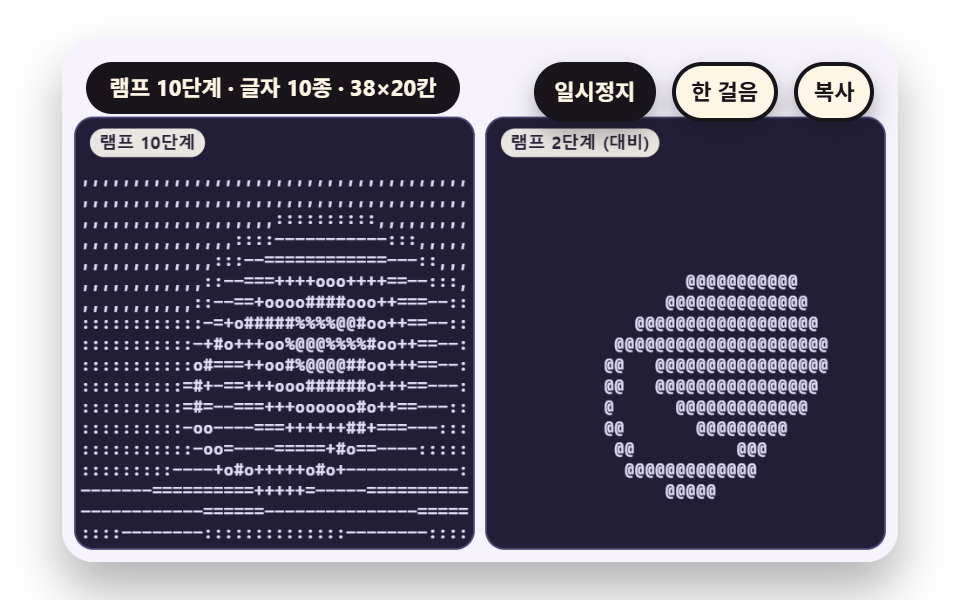 01 sc-ascii-ramp-brightness-glyph-density
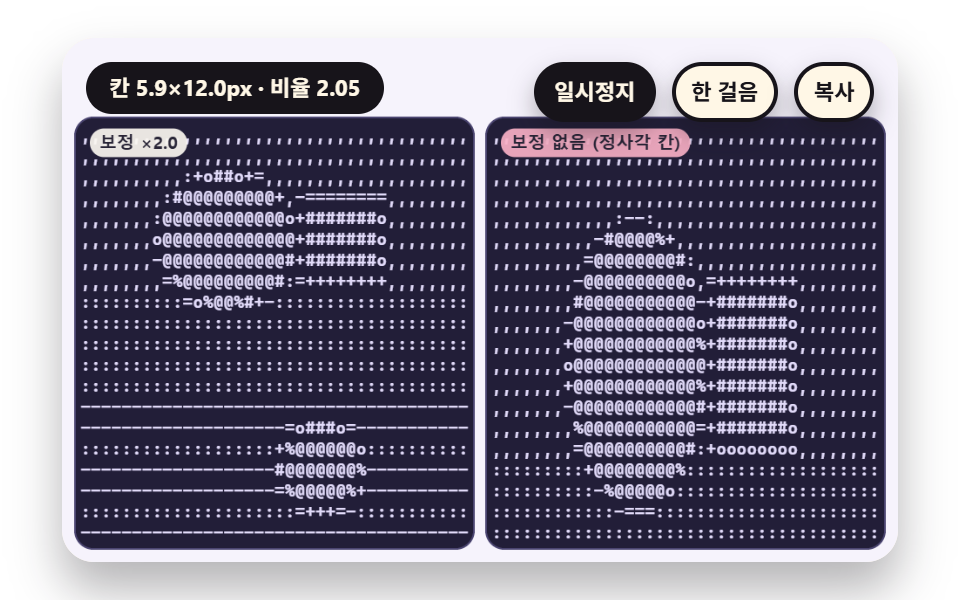 02 sc-ascii-glyph-cell-aspect-correct
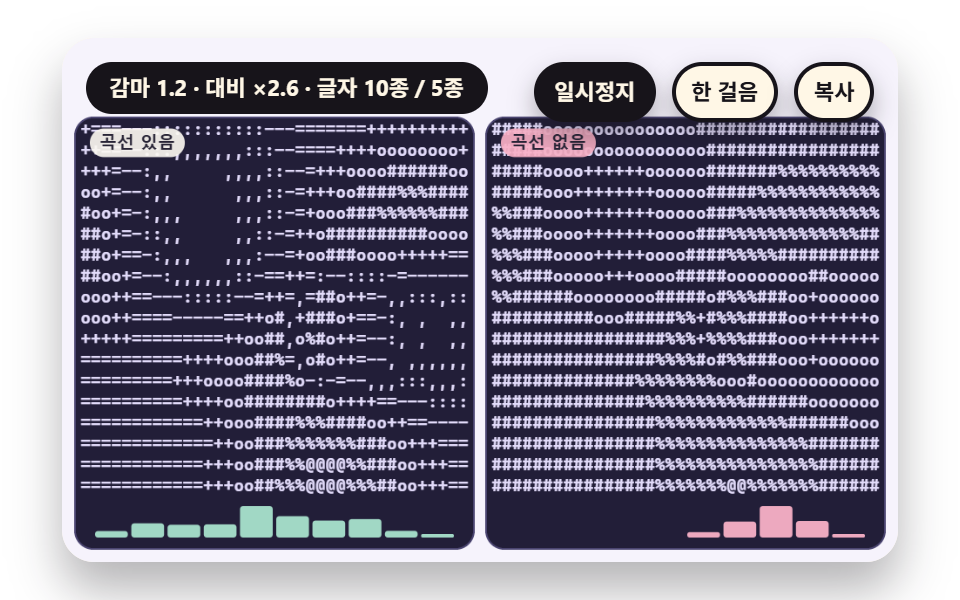 03 sc-ascii-gamma-contrast-curve-tune
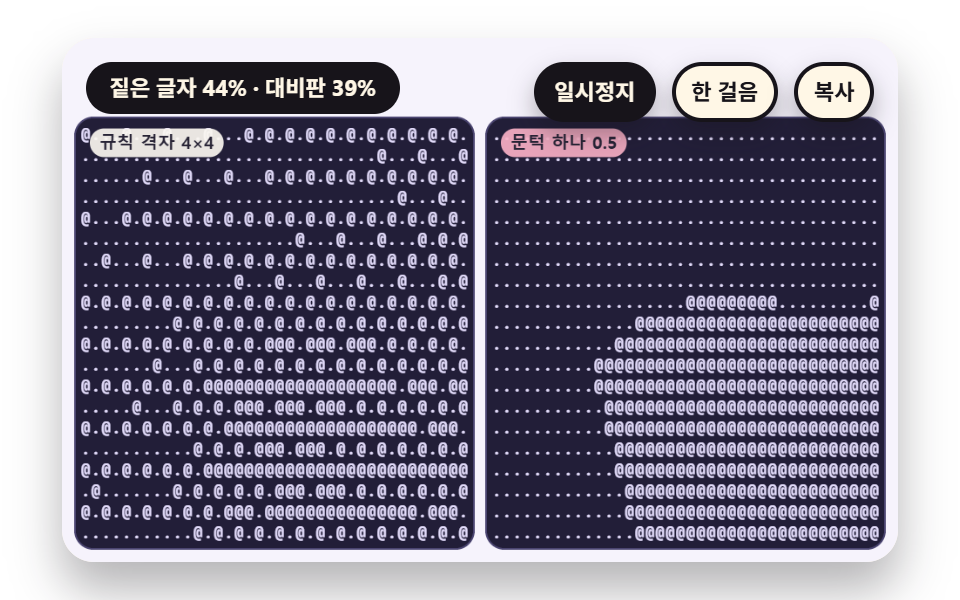 04 sc-ascii-ordered-matrix-dither-two-glyph
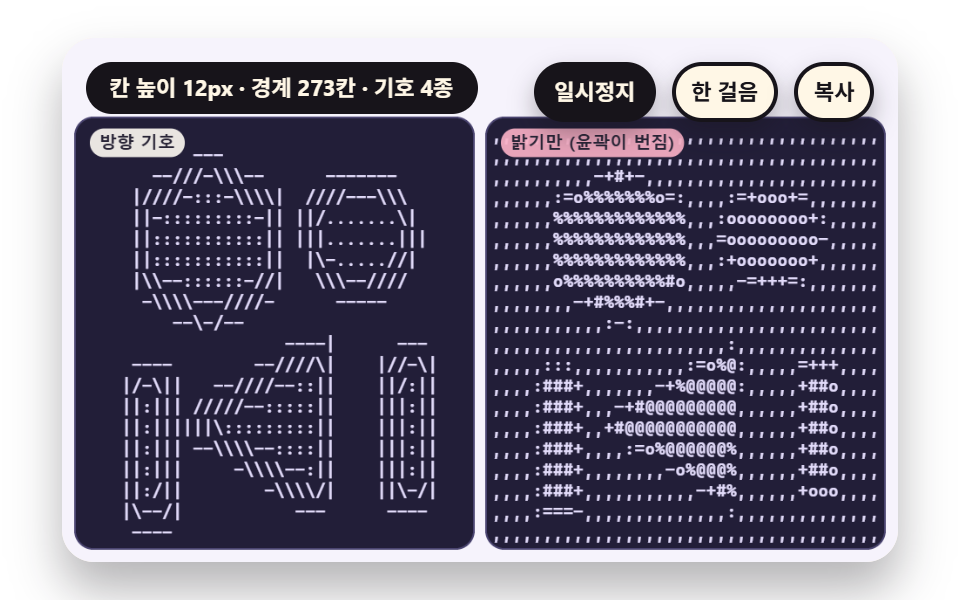 05 sc-ascii-gradient-edge-direction-slash-bar
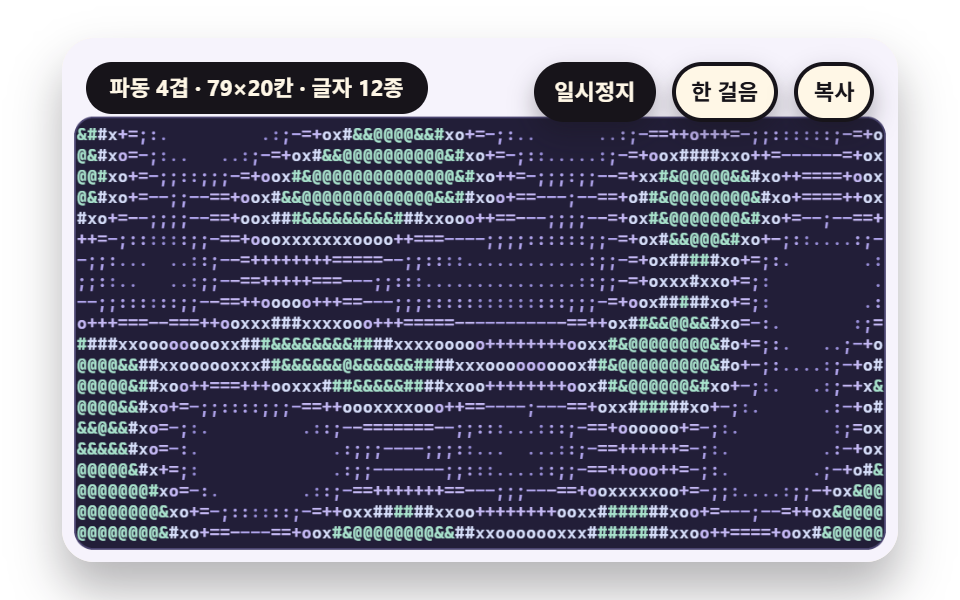 06 sc-ascii-plasma-wave-glyph-field-live
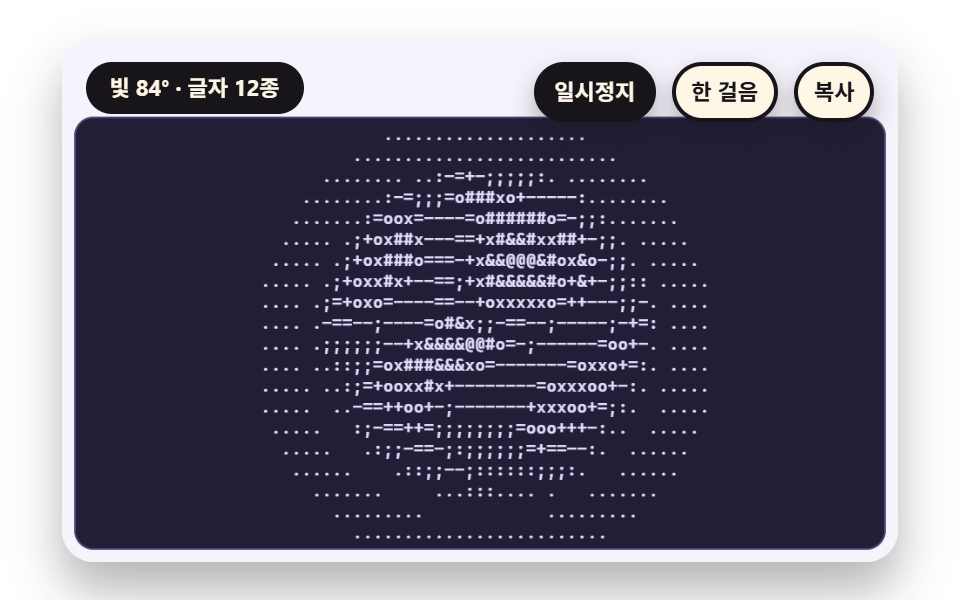 07 sc-ascii-sphere-diffuse-shade-rotate
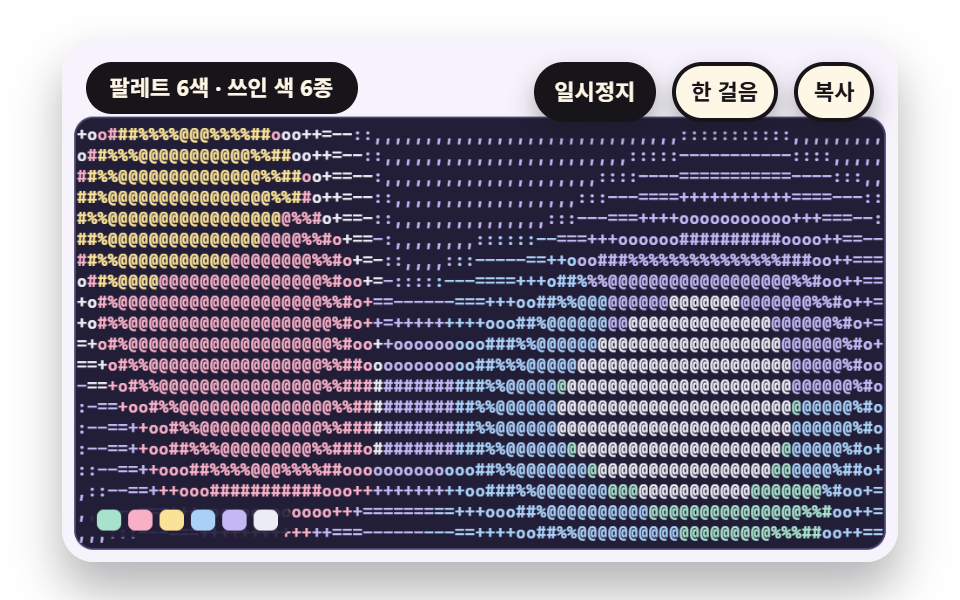 08 sc-ascii-per-glyph-color-palette-tint
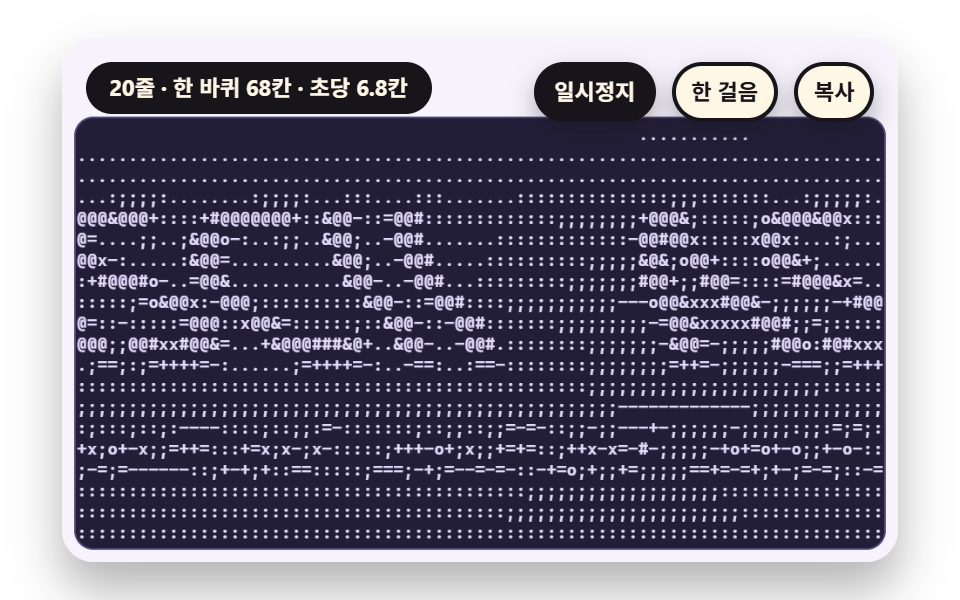 09 sc-ascii-hero-wave-banner-scroll-scene
자동 재생 · 눌러서 해당 항목으로 · 전부 한 zip
- 01 칸의 밝기를 글자 농도 줄에서 골라 찍는 램프
- 02 글자 칸이 세로로 긴 비율을 맞춰 원형을 지키는 보정
- 03 감마와 대비 곡선으로 글자 분포를 고르게 펴는 조정
- 04 두 글자만으로 명암을 표현하는 순서 디더
- 05 밝기가 변하는 방향을 읽어 슬래시와 세로선을 고르는 가장자리
- 06 움직이는 플라즈마를 프레임마다 글자로 다시 읽는 글자 판
- 07 구 표면의 빛과 그림자를 글자 농도로 옮기는 음영
- 08 칸의 평균 색을 글자마다 입히는 팔레트 틴트
- 09 파도치는 글자 배너로 이어지는 히어로
아홉 장면은 같은 뼈대를 쓴다. 장면은 화면에 붙이지 않는 두 번째 캔버스에 그리고, 화면에 찍히는 글자는 그 화소를 칸마다 평균 낸 값에서만 나온다. 라이브러리·WebGL·CDN 은 쓰지 않고 난수도 없으며, 장면 시계에서 나온 위상으로만 움직여 LAP_S 10초가 지나면 이음매 없이 되풀이된다.
장면은 숨은 캔버스에 그리고 글자는 읽은 값으로만 찍는다
setSrc 가 원본 캔버스의 크기와 배율을 정하고, readGrid 가 getImageData 를 한 번 불러 칸마다 원본 화소의 평균 r·g·b 와 밝기를 구한다. 밝기는 (0.2126 r + 0.7152 g + 0.0722 b) / 255 이고, 글자 판은 칸마다 fillText 를 부르지 않고 줄마다 같은 색이 이어지는 조각을 한 번에 찍는다. 글꼴은 고정폭 시스템 글꼴 묶음이고 글자 폭은 100px 글꼴에서 M 의 폭을 재서 비율로 둔다.
한 판은 시간표로 흘러간다
시연은 장면 시계 0.6초에서 시작하고 프레임 간격은 0.05초로 잘라 탭이 숨었다 돌아와도 한꺼번에 튀지 않는다. 글자 판은 캔버스에 그려지므로 아스키 아트 복사는 복사 단추나 C 키로 줄 끝 공백을 지운 평문을 클립보드에 넣는 방식이고, 그렇게 얻은 아스키 아트 텍스트는 고정폭 글꼴에 붙여 넣어야 칸이 맞는다. 한 판이 끝나기 0.6초 전에는 role="status" 문단에 상태 문장이 한 번만 쓰인다.
장면마다 얹은 계산 한 겹
속성 하나를 트윈하는 대신 계산을 한 겹씩 얹었다. 01 은 밝기를 램프 번호로, 02 는 칸의 가로세로 비를, 03 은 감마와 대비 곡선을, 04 는 규칙 격자 문턱을, 05 는 밝기 기울기의 방향을, 06 은 사인 네 개의 합을, 07 은 확산 음영을, 08 은 평균 색과 팔레트의 거리를, 09 는 줄마다 어긋난 위상을 계산한다. CSS 디더 편은 CSS 로 화소를 찍고 제너러티브 아트 편은 선과 타일을 그리며 떨어지는 글자 편은 글자의 물리를 다루는데, 이 편은 그림의 화소를 읽어 글자를 고르는 계산이 주제다.
아스키 아트 9종 — 밝기를 글자 농도로 옮기는 램프·글자 칸의 가로세로 비 보정·감마와 대비 곡선·두 글자만 쓰는 순서 디더·밝기 방향을 읽는 가장자리 기호·움직이는 플라즈마 글자 판·구 표면 음영 글자·글자마다 색을 입히는 팔레트·파도치는 글자 배너 히어로
아홉 장면을 렌더해서 얻은 면적·프레임·강도
| 장면 | 누적면적 | 움직인 프레임 | 강도 평균 |
|---|---|---|---|
| 01 램프 | 18.8% | 23/23 | 78.5 |
| 02 칸 비율 | 10.9% | 23/23 | 67.1 |
| 03 감마 곡선 | 32.5% | 23/23 | 65.5 |
| 04 순서 디더 | 13.0% | 23/23 | 103.3 |
| 05 방향 기호 | 15.0% | 23/23 | 75.2 |
| 06 플라즈마 | 39.8% | 23/23 | 60.9 |
| 07 구 음영 | 15.6% | 23/23 | 73.9 |
| 08 색 틴트 | 45.1% | 23/23 | 61.2 |
| 09 파도 배너 | 28.8% | 23/23 | 72.4 |
08 이 45.1% 로 가장 넓고 02 가 10.9% 로 가장 좁으며, 두 글자만 쓰는 04 는 면적이 13.0% 인데도 강도 평균이 103.3 으로 가장 높다. 아홉 장면이 매 프레임 움직여 23/23 이라, 정지 화면으로 읽히는 장면은 없다.
01칸의 밝기를 글자 농도 줄에서 골라 찍는 램프
이미지를 글자로 바꾸는 변환 화면의 기본 틀로, readGrid 가 38×20 칸마다 평균 밝기를 구하고 glyphIndex 가 그 밝기를 램프 번호로 바꿔 글자 하나를 고른다. 왼쪽은 10단계 램프, 오른쪽은 rampOf(2) 로 공백과 @ 만 남겨 중간 밝기가 사라지는 대비판이다. 램프를 5단계로 줄이면 한 장면에서 평균 5종, 10단계는 10종, 16단계는 15종의 글자가 쓰인다.
<main class="stage">
<div class="vj is-demo" id="vj">
  <div class="vj__pad" data-role="pad" tabindex="0" role="application" aria-label="아스키 아트 시연 무대 — Enter 나 Space 로 일시정지, N 으로 한 걸음, R 로 처음부터, C 로 글자 판 복사">
    <canvas class="vj__canvas" data-role="canvas" width="480" height="300" role="img" aria-label="해가 호를 그리며 지나가고 고리가 숨 쉬며 아래에 물결 띠가 흐르는 장면을 격자 칸으로 나눠 칸의 평균 밝기를 열 단계 글자 램프로 찍은 왼쪽 판과, 같은 칸 평균을 두 글자로만 읽어 중간 밝기가 사라진 오른쪽 판"></canvas>
  </div>
  <p class="vj__status" data-role="status" aria-live="off">아스키 아트 시연</p>
  <div class="vj__ctrl">
    <button class="vj__pause" data-role="pause" type="button" aria-pressed="false">일시정지</button>
    <button class="vj__step" data-role="step" type="button">한 걸음</button>
    <button class="vj__copy" data-role="copy" type="button">복사</button>
  </div>
  <p class="vj__done" data-role="done" role="status" aria-live="polite"></p>
</div>
</main>
@use "../../../../site/static/demo-tokens" as *;
@include stage($stage-paper);
.vj {
position: relative;
width: min(92vw, calc(160vh - 12.8vw));
aspect-ratio: 480 / 300;
margin: 0 auto;
border-radius: $r-card;
overflow: hidden;
box-shadow: $shadow-raised;
background: $subject-cream;
}
// 무대 상자 — 여기서 시작한 터치만 칸 누르기로 읽는다(touch-action: none 은 이 상자에만). 무대 밖 터치는 페이지 스크롤 그대로
.vj__pad {
position: absolute;
inset: 0;
border-radius: inherit;
outline: none;
touch-action: none;
cursor: pointer;
}
// 바깥 .vj 가 넘침을 자르므로 포커스 테두리는 안쪽으로 들인다
.vj__pad:focus-visible {
outline: 3px solid $subject-ink;
outline-offset: -3px;
}
.vj__canvas {
position: absolute;
inset: 0;
display: block;
width: 100%;
height: 100%;
}
.vj__ctrl {
position: absolute;
right: $sp-3;
top: $sp-3;
display: flex;
gap: $sp-2;
}
.vj__pause,
.vj__step,
.vj__copy {
padding: $sp-1 $sp-2;
border: 2px solid $subject-ink;
border-radius: $r-pill;
background: $subject-ink;
color: $subject-cream;
font-family: inherit;
font-weight: 700;
font-size: 11px;
line-height: 1.6;
cursor: pointer;
box-shadow: $shadow-press;
transition: transform $dur-quick $ease-spring;
}
.vj__step,
.vj__copy {
background: $subject-cream;
color: $subject-ink;
}
// 스크린리더에만 읽히는 완료 알림
.vj__done {
position: absolute;
width: 1px;
height: 1px;
margin: 0;
overflow: hidden;
clip-path: inset(50%);
white-space: nowrap;
}
// 눌린 상태(멈춤) — 바탕과 글자색을 뒤집어 aria-pressed 가 눈에도 보이게
.vj__pause[aria-pressed="true"] {
background: $subject-cream;
color: $subject-ink;
}
.vj__pause:hover,
.vj__step:hover,
.vj__copy:hover {
transform: translateY(-2px);
}
.vj__pause:active,
.vj__step:active,
.vj__copy:active {
transform: translateY(1px);
}
.vj__pause:focus-visible,
.vj__step:focus-visible,
.vj__copy:focus-visible {
outline: 3px solid $subject-ink;
outline-offset: 3px;
}
// 상태 줄 — 지금 장면의 수치를 글자로. 시연 중에는 aria-live off, 사람이 처음 손대면 polite
.vj__status {
position: absolute;
left: $sp-3;
top: $sp-3;
max-width: calc(100% - 214px);
margin: 0;
padding: $sp-1 $sp-3;
border-radius: $r-pill;
background: $subject-ink;
color: $subject-cream;
font-weight: 700;
font-size: 11px;
line-height: 1.6;
white-space: nowrap;
overflow: hidden;
text-overflow: ellipsis;
pointer-events: none;
}
@media (max-width: 340px) {
.vj__pause,
.vj__step,
.vj__copy,
.vj__status { font-size: 10px; padding: 0 $sp-2; }
}
// 움직임 줄이기 — 장면은 스크립트가 정지 장면 한 장으로 멈춘다. 버튼도 떠오르지 않게
@media (prefers-reduced-motion: reduce) {
.vj__pause,
.vj__step,
.vj__copy { transition: none !important; }
.vj__pause:hover,
.vj__pause:active,
.vj__step:hover,
.vj__step:active,
.vj__copy:hover,
.vj__copy:active { transform: none !important; }
}html, body {
margin: 0;
overflow: hidden;
}
.stage {
box-sizing: border-box;
min-height: 100vh;
display: grid;
place-items: center;
margin: 0;
background: #ffffff;
font-family: -apple-system, "Segoe UI", "Noto Sans KR", sans-serif;
padding: clamp(8px, 4vw, 24px);
}
.vj {
position: relative;
width: min(92vw, 160vh - 12.8vw);
aspect-ratio: 480/300;
margin: 0 auto;
border-radius: 16px;
overflow: hidden;
box-shadow: 0 14px 24px rgba(23, 20, 26, 0.32);
background: #fff7e6;
}
.vj__pad {
position: absolute;
inset: 0;
border-radius: inherit;
outline: none;
touch-action: none;
cursor: pointer;
}
.vj__pad:focus-visible {
outline: 3px solid #17141a;
outline-offset: -3px;
}
.vj__canvas {
position: absolute;
inset: 0;
display: block;
width: 100%;
height: 100%;
}
.vj__ctrl {
position: absolute;
right: 12px;
top: 12px;
display: flex;
gap: 8px;
}
.vj__pause,
.vj__step,
.vj__copy {
padding: 4px 8px;
border: 2px solid #17141a;
border-radius: 999px;
background: #17141a;
color: #fff7e6;
font-family: inherit;
font-weight: 700;
font-size: 11px;
line-height: 1.6;
cursor: pointer;
box-shadow: 0 6px 12px rgba(23, 20, 26, 0.32);
transition: transform 220ms cubic-bezier(0.2, 0.8, 0.2, 1);
}
.vj__step,
.vj__copy {
background: #fff7e6;
color: #17141a;
}
.vj__done {
position: absolute;
width: 1px;
height: 1px;
margin: 0;
overflow: hidden;
clip-path: inset(50%);
white-space: nowrap;
}
.vj__pause[aria-pressed=true] {
background: #fff7e6;
color: #17141a;
}
.vj__pause:hover,
.vj__step:hover,
.vj__copy:hover {
transform: translateY(-2px);
}
.vj__pause:active,
.vj__step:active,
.vj__copy:active {
transform: translateY(1px);
}
.vj__pause:focus-visible,
.vj__step:focus-visible,
.vj__copy:focus-visible {
outline: 3px solid #17141a;
outline-offset: 3px;
}
.vj__status {
position: absolute;
left: 12px;
top: 12px;
max-width: calc(100% - 214px);
margin: 0;
padding: 4px 12px;
border-radius: 999px;
background: #17141a;
color: #fff7e6;
font-weight: 700;
font-size: 11px;
line-height: 1.6;
white-space: nowrap;
overflow: hidden;
text-overflow: ellipsis;
pointer-events: none;
}
@media (max-width: 340px) {
.vj__pause,
.vj__step,
.vj__copy,
.vj__status {
font-size: 10px;
padding: 0 8px;
}
}
@media (prefers-reduced-motion: reduce) {
.vj__pause,
.vj__step,
.vj__copy {
transition: none !important;
}
.vj__pause:hover,
.vj__pause:active,
.vj__step:hover,
.vj__step:active,
.vj__copy:hover,
.vj__copy:active {
transform: none !important;
}
}(function () {
const root = document.getElementById("vj");
if (!root) return;
// 무대 좌표 — 캔버스 안 계산은 늘 480×300. 화면에 보이는 크기와 상관없다
const W = 480;
const H = 300;
const TAU = Math.PI * 2;
function clamp(v, lo, hi) { return v < lo ? lo : (v > hi ? hi : v); }
function lerp(a, b, k) { return a + (b - a) * k; }
function smooth(a, b, v) { const k = clamp((v - a) / (b - a), 0, 1); return k * k * (3 - 2 * k); }
// 파스텔 팔레트 — 글자 판은 짙은 남보라 바탕 위에 옅은 라벤더 글자(대비 12 이상), 바깥 무대는 크림 라벤더
const PAGE = [246, 243, 252];
const BOARD = [34, 30, 56];
const BOARD_EDGE = [74, 68, 112];
const GLYPH = [226, 219, 250];
const MINT = [168, 226, 204];
const ROSE = [248, 176, 198];
const BUTTER = [250, 226, 150];
const SKY = [170, 208, 248];
const LAV = [196, 184, 244];
const INK = [40, 36, 54];
const PAPER = [250, 246, 240];
function rgba(c, a) {
return 'rgba(' + Math.round(clamp(c[0], 0, 255)) + ',' + Math.round(clamp(c[1], 0, 255)) + ',' + Math.round(clamp(c[2], 0, 255)) + ',' + clamp(a, 0, 1).toFixed(3) + ')';
}
function grayStr(l, a) {
const v = Math.round(clamp(l, 0, 1) * 255);
return 'rgba(' + v + ',' + v + ',' + v + ',' + clamp(a, 0, 1).toFixed(3) + ')';
}
// 장면 시계(초) — 한 바퀴 LAP_S 초이고 장면의 모든 움직임은 위상 ph = sceneT / LAP_S 의 정수배라 바퀴 끝에서 이음매가 없다
let sceneT = 0;
let lap = 0;
// 외부 웹폰트는 부르지 않는다 — 기기에 있는 고정폭 글꼴 목록만
const MONO = 'ui-monospace, "Cascadia Mono", Consolas, Menlo, "DejaVu Sans Mono", "Courier New", monospace';
const FONT_STACK = 'system-ui, -apple-system, "Segoe UI", "Noto Sans KR", sans-serif';
// 글자 한 줄 높이 = 글자 크기의 1.2 배. 폭은 글꼴에서 잰 값(advRatio)을 쓴다
const LINE_K = 1.2;
let advRatio = 0.6;
// ── 원본 장면 캔버스 — 화면에 붙이지 않는 두 번째 캔버스. 장면은 여기 그리고 화소를 읽는다 ──
const srcCv = document.createElement('canvas');
const srcRaw = srcCv.getContext('2d', { willReadFrequently: true });
if (!srcRaw) {
return;
}
const sctx = srcRaw;
// ss = 원본 화소 / 판 화소. 1 이면 판 크기 그대로, 0.5 면 가로세로 절반 해상도로 계산해 읽는다
let srcSs = 1;
function setSrc(w, h, ss) {
const sw = Math.round(w * ss);
const sh = Math.round(h * ss);
if (srcCv.width !== sw || srcCv.height !== sh) {
srcCv.width = sw;
srcCv.height = sh;
}
srcSs = ss;
sctx.setTransform(ss, 0, 0, ss, 0, 0);
}
// cols×rows 칸을 왼쪽 위부터 읽는다. 칸 하나가 원본에서 덮는 영역은 가로 cw, 세로 sh (판 화소 단위)
function readGrid(cols, rows, cw, sh) {
const sw = srcCv.width;
const shp = srcCv.height;
const data = sctx.getImageData(0, 0, sw, shp).data;
const grid = { cols: cols, rows: rows, cw: cw, sh: sh, lum: [], r: [], g: [], b: [] };
for (let cy = 0; cy < rows; cy += 1) {
const y0 = Math.min(shp - 1, Math.floor(cy * sh * srcSs));
const y1 = Math.max(y0 + 1, Math.min(shp, Math.floor((cy + 1) * sh * srcSs)));
for (let cx = 0; cx < cols; cx += 1) {
const x0 = Math.min(sw - 1, Math.floor(cx * cw * srcSs));
const x1 = Math.max(x0 + 1, Math.min(sw, Math.floor((cx + 1) * cw * srcSs)));
let sr = 0;
let sg = 0;
let sb = 0;
let n = 0;
for (let y = y0; y < y1; y += 1) {
let p = (y * sw + x0) * 4;
for (let x = x0; x < x1; x += 1) {
sr += data[p];
sg += data[p + 1];
sb += data[p + 2];
n += 1;
p += 4;
}
}
const mr = sr / n;
const mg = sg / n;
const mb = sb / n;
grid.r.push(mr);
grid.g.push(mg);
grid.b.push(mb);
grid.lum.push((0.2126 * mr + 0.7152 * mg + 0.0722 * mb) / 255);
}
}
return grid;
}
// ── 글자 램프 — 성긴 글자에서 짙은 글자 순서 열여섯 개. n 단계 램프는 이 줄에서 고르게 n 개를 뽑는다 ──
const RAMP_FULL = ' .,:;-~=+*ox#%&@';
function rampOf(n) {
let s = '';
for (let i = 0; i < n; i += 1) {
s += RAMP_FULL.charAt(Math.round(i * (RAMP_FULL.length - 1) / (n - 1)));
}
return s;
}
// 밝기 v(0 에서 1)를 램프 번호로 — 단계 폭 1/n 으로 나눠 내림
function glyphIndex(v, n) { return Math.min(n - 1, Math.max(0, Math.floor(v * n))); }
// 칸 크기 — 글자 크기 fp 를 주면 폭은 글꼴에서 잰 글자 폭, 높이는 줄 높이
function cellW(fp) { return advRatio * fp; }
function cellH(fp) { return LINE_K * fp; }
function measureAdv() {
ctx.font = '100px ' + MONO;
const m = ctx.measureText('M').width / 100;
advRatio = m > 0.3 && m < 0.9 ? m : 0.6;
}
// ── 그리기 도구 ──
function box(x, y, w, h, r, c, a) {
if (w <= 0.2 || h <= 0.2 || a <= 0) {
return;
}
ctx.beginPath();
ctx.roundRect(x, y, w, h, Math.max(0, Math.min(r, w / 2, h / 2)));
ctx.fillStyle = rgba(c, a);
ctx.fill();
}
function text(s, x, y, c, a, px, weight, align) {
ctx.font = weight + ' ' + px + 'px ' + FONT_STACK;
ctx.textAlign = align;
ctx.textBaseline = 'middle';
ctx.fillStyle = rgba(c, a);
ctx.fillText(s, x, y);
}
// 글자 이름표 — 바탕 알약 위에 글자
function tag(s, x, y, bg, fg, px, align) {
ctx.font = '700 ' + px + 'px ' + FONT_STACK;
const w = ctx.measureText(s).width + px * 1.1;
const left = align === 'center' ? x - w / 2 : (align === 'right' ? x - w : x);
box(left, y - px * 0.82, w, px * 1.64, px * 0.82, bg, 0.92);
text(s, left + w / 2, y + 0.5, fg, 1, px, 700, 'center');
}
function paintPage() {
ctx.fillStyle = rgba(PAGE, 1);
ctx.fillRect(0, 0, W, H);
}
// 글자 판 바탕 — 짙은 남보라 둥근 사각형
function panel(x, y, w, h) {
box(x - 1, y - 1, w + 2, h + 2, 11, BOARD_EDGE, 1);
box(x, y, w, h, 10, BOARD, 1);
}
// 글자 판 그리기 — chars 는 칸마다 글자 하나(왼쪽 위부터 줄 순서). colorIdx 가 있으면 칸마다 팔레트 번호, 없으면 모두 pal[0].
// 같은 색이 이어지는 칸은 한 번에 찍어 한 판에 fillText 가 줄 수 × 색 조각 수만큼만 불린다
function drawGlyphs(x, y, fp, g, chars, colorIdx, pal) {
const cw = cellW(fp);
const ch = cellH(fp);
ctx.font = '600 ' + fp + 'px ' + MONO;
ctx.textAlign = 'left';
ctx.textBaseline = 'middle';
for (let r = 0; r < g.rows; r += 1) {
let c = 0;
while (c < g.cols) {
const ci = colorIdx ? colorIdx[r * g.cols + c] : 0;
let run = '';
let e = c;
while (e < g.cols && (colorIdx ? colorIdx[r * g.cols + e] : 0) === ci) {
run += chars[r * g.cols + e];
e += 1;
}
if (run.trim().length > 0) {
ctx.fillStyle = rgba(pal[ci], 1);
ctx.fillText(run, x + c * cw, y + (r + 0.5) * ch + 0.5);
}
c = e;
}
}
}
// 판의 글자를 줄바꿈으로 이은 텍스트 — 복사 단추가 이 글을 클립보드에 넣는다
function plainOf(g, chars) {
const lines = [];
for (let r = 0; r < g.rows; r += 1) {
lines.push(chars.slice(r * g.cols, (r + 1) * g.cols).join('').replace(/\s+$/, ''));
}
return lines.join('\n');
}
// 쓰인 서로 다른 글자 수(공백 포함)와 글자별 횟수
function usage(chars, ramp) {
const out = [];
for (let i = 0; i < ramp.length; i += 1) {
out.push(0);
}
for (const c of chars) {
const k = ramp.indexOf(c);
if (k >= 0) {
out[k] += 1;
}
}
return out;
}
function kinds(u) {
let n = 0;
for (const v of u) {
if (v > 0) {
n += 1;
}
}
return n;
}
// 글자별 사용 횟수 막대 — 판 아래 띠에 램프 순서대로
function usageBars(x, y, w, h, u, c) {
let mx = 1;
for (const v of u) {
if (v > mx) {
mx = v;
}
}
const bw = w / u.length;
for (let i = 0; i < u.length; i += 1) {
const bh = Math.max(u[i] > 0 ? 2 : 0, h * u[i] / mx);
box(x + i * bw + 1, y + h - bh, bw - 2, bh, 2, c, 0.95);
}
}
// 두 번째 캔버스에 쓰는 회색 장면 도구 — 중심에서 번지는 둥근 빛
function glow(x, y, r, l, a) {
const g = sctx.createRadialGradient(x, y, 0, x, y, r);
g.addColorStop(0, grayStr(l, a));
g.addColorStop(1, grayStr(l, 0));
sctx.fillStyle = g;
sctx.fillRect(x - r, y - r, r * 2, r * 2);
}
function vgrad(w, h, l0, l1) {
const g = sctx.createLinearGradient(0, 0, 0, h);
g.addColorStop(0, grayStr(l0, 1));
g.addColorStop(1, grayStr(l1, 1));
sctx.fillStyle = g;
sctx.fillRect(0, 0, w, h);
}
// 판 배치 — 위 46 은 상태 줄·단추 자리. 판 둘이면 가로 228, 하나면 464
const PY = 46;
const PH = 246;
const PW2 = 228;
const PW1 = 464;
const PX_L = 8;
const PX_R = 244;
// 복사 단추를 누른 뒤 상태 줄에 잠깐 뜨는 말
const COPY_OK = '글자 판을 텍스트로 복사했다';
const COPY_FAIL = '복사하지 못했다 — 글자 판을 직접 선택해 복사';
const canvasEl = root.querySelector('[data-role="canvas"]');
const padEl = root.querySelector('[data-role="pad"]');
const pauseEl = root.querySelector('[data-role="pause"]');
const statusEl = root.querySelector('[data-role="status"]');
const stepEl = root.querySelector('[data-role="step"]');
const copyEl = root.querySelector('[data-role="copy"]');
const doneEl = root.querySelector('[data-role="done"]');
const ctxRaw = canvasEl ? canvasEl.getContext('2d') : null;
if (!canvasEl || !ctxRaw || !pauseEl || !padEl || !stepEl || !copyEl || !doneEl) {
return;
}
const cv = canvasEl;
const ctx = ctxRaw;
const pauseBtn = pauseEl;
const stepBtn = stepEl;
const copyBtn = copyEl;
const doneP = doneEl;
const pad = padEl;
let dpr = 1;
function fitCanvas() {
// 배율은 2 에서 자른다 — 배율 3 기기에서 화소가 2.25배로 늘지 않게
dpr = Math.min(window.devicePixelRatio || 1, 2);
cv.width = Math.round(W * dpr);
cv.height = Math.round(H * dpr);
ctx.setTransform(dpr, 0, 0, dpr, 0, 0);
measureAdv();
}
// 지금 화면에 찍힌 글자 판 — 복사 단추가 이 텍스트를 넣는다
let plainText = '';
let copyFlash = 0;
let shownStatus = '';
function pushStatus(s) {
if (!statusEl || s === shownStatus) {
return;
}
shownStatus = s;
statusEl.textContent = s;
}
let paused = false;
const reduceQuery = window.matchMedia('(prefers-reduced-motion: reduce)');
// 페이지를 연 채 움직임 줄이기 설정을 바꿔도 change 리스너가 다시 읽는다
let still = reduceQuery.matches;
// 자동 시연 표시 — 사람이 처음 손대면 떼고 상태 줄을 polite 로 켠다
let demo = root.classList.contains('is-demo');
const off = new AbortController();
function wake() {
if (!demo) {
return;
}
demo = false;
root.classList.remove('is-demo');
if (statusEl) {
statusEl.setAttribute('aria-live', 'polite');
}
}
// 한 판 시연이 끝났음을 스크린리더에 한 번만 알린다 — 판이 되풀이돼도 다시 읽지 않는다
let doneSaid = false;
function checkDone() {
if (!doneSaid && sceneT >= LAP_S - 0.6) {
doneSaid = true;
doneP.textContent = statusText();
}
}
function advance(dt) {
sceneT += dt;
if (copyFlash > 0) {
copyFlash = Math.max(0, copyFlash - dt);
}
if (sceneT >= LAP_S) {
sceneT -= LAP_S;
lap += 1;
}
}
const DT_MAX = 0.05;
const STEP_S = 0.4;
function showNow() {
draw();
pushStatus(copyFlash > 0 ? copyNote : statusText());
checkDone();
}
let copyNote = '';
let rafId = 0;
let lastTs = -1;
function frame(ts) {
if (still || paused) {
rafId = 0;
return;
}
if (lastTs < 0) {
lastTs = ts;
}
const dt = Math.min((ts - lastTs) / 1000, DT_MAX);
lastTs = ts;
if (dt > 0) {
advance(dt);
}
showNow();
rafId = window.requestAnimationFrame(frame);
}
function startLoop() {
if (rafId) {
return;
}
// 멈췄던 사이의 시간을 첫 프레임 dt 로 넘기지 않는다
lastTs = -1;
rafId = window.requestAnimationFrame(frame);
}
function stopLoop() {
if (rafId) {
window.cancelAnimationFrame(rafId);
rafId = 0;
}
}
// 움직임 줄이기 — 루프 없이 장면이 한창인 순간의 정지 장면 한 장
function showRest() {
stopLoop();
sceneT = REST_S;
showNow();
}
function togglePause() {
paused = !paused;
pauseBtn.setAttribute('aria-pressed', paused ? 'true' : 'false');
wake();
if (paused) {
stopLoop();
}
else if (!still) {
startLoop();
}
}
function restart() {
wake();
sceneT = START_S;
lap = 0;
doneSaid = false;
showNow();
}
// 한 걸음 — 멈춘 채 장면 시계를 0.4 초 앞으로
function stepOnce() {
wake();
if (!paused) {
paused = true;
pauseBtn.setAttribute('aria-pressed', 'true');
stopLoop();
}
advance(STEP_S);
showNow();
}
// 복사 — 화면에 있는 글자 판을 텍스트로 클립보드에. 임시 입력칸을 만들어 선택하고 복사 명령을 부른다
function copyBoard() {
wake();
const ta = document.createElement('textarea');
ta.value = plainText;
ta.setAttribute('readonly', '');
ta.style.position = 'fixed';
ta.style.left = '-9999px';
ta.style.opacity = '0';
document.body.appendChild(ta);
ta.select();
let ok = false;
try {
ok = document.execCommand('copy');
}
catch (err) {
ok = false;
}
document.body.removeChild(ta);
copyNote = ok ? COPY_OK : COPY_FAIL;
copyFlash = 1.6;
pushStatus(copyNote);
}
pauseBtn.addEventListener('click', togglePause, { signal: off.signal });
stepBtn.addEventListener('click', stepOnce, { signal: off.signal });
copyBtn.addEventListener('click', copyBoard, { signal: off.signal });
// 키보드 — 무대에 포커스가 있을 때만. Enter·Space·P 는 일시정지, N 은 한 걸음, R 은 처음부터, C 는 글자 판 복사
pad.addEventListener('keydown', function (e) {
if (e.altKey || e.ctrlKey || e.metaKey) {
return;
}
const k = e.key;
if (k === 'Enter' || k === ' ' || k === 'p' || k === 'P') {
e.preventDefault();
togglePause();
}
else if (k === 'n' || k === 'N') {
e.preventDefault();
stepOnce();
}
else if (k === 'r' || k === 'R') {
e.preventDefault();
restart();
}
else if (k === 'c' || k === 'C') {
e.preventDefault();
copyBoard();
}
}, { signal: off.signal });
// 마우스·터치 — 무대를 누르면 일시정지 토글
pad.addEventListener('click', function () { togglePause(); }, { signal: off.signal });
// 탭이 숨으면 멈추고, 돌아오면 시계를 다시 맞춰 시작 — 숨은 동안의 몇 초가 한 프레임에 몰리지 않게
document.addEventListener('visibilitychange', function () {
if (document.hidden) {
stopLoop();
}
else if (!paused && !still) {
startLoop();
}
}, { signal: off.signal });
// 설정이 바뀌면 — 켜지면 정지 장면 한 장, 꺼지면 다시 움직인다
reduceQuery.addEventListener('change', function () {
still = reduceQuery.matches;
if (still) {
showRest();
}
else {
sceneT = START_S;
showNow();
if (!paused) {
startLoop();
}
}
}, { signal: off.signal });
window.addEventListener('resize', function () {
fitCanvas();
showNow();
}, { signal: off.signal });
// ── 01 칸의 밝기를 글자 농도 줄에서 골라 찍는 램프 ───────────────────────
const LAP_S = 10;
const START_S = 0.6;
const REST_S = 3.1;
// 램프 길이 — 왼쪽 판이 쓰는 글자 수. 오른쪽 판은 같은 칸 평균을 두 글자 램프로 읽는 대비판이다
const RAMP_LEN = 10;
const FONT_PX = 10;
const RAMP = rampOf(RAMP_LEN);
const RAMP_2 = rampOf(2);
let lastKinds = 0;
let lastKinds2 = 0;
let lastCols = 0;
let lastRows = 0;
// 원본 장면 — 해가 호를 그리며 지나가고 고리가 숨 쉬며 아래에 물결 띠가 흐른다. 밝기 범위 전체를 쓴다
function paintScene(w, h, a) {
vgrad(w, h, 0.08, 0.34);
glow(w * (0.5 + 0.3 * Math.cos(a)), h * (0.36 + 0.16 * Math.sin(a)), 84, 1, 0.9);
sctx.beginPath();
sctx.arc(w * (0.5 + 0.3 * Math.cos(a)), h * (0.36 + 0.16 * Math.sin(a)), 21, 0, TAU);
sctx.fillStyle = grayStr(0.97, 1);
sctx.fill();
sctx.beginPath();
sctx.arc(w * 0.5, h * 0.64, 40 + 10 * Math.sin(2 * a), 0, TAU);
sctx.lineWidth = 11;
sctx.strokeStyle = grayStr(0.78, 0.9);
sctx.stroke();
for (let k = 0; k < 3; k += 1) {
sctx.beginPath();
for (let x = 0; x <= w; x += 4) {
const y = h * 0.84 + k * 13 + 6 * Math.sin(x * 0.05 + a * (k + 1) + k);
if (x === 0) {
sctx.moveTo(x, y);
}
else {
sctx.lineTo(x, y);
}
}
sctx.lineTo(w, h);
sctx.lineTo(0, h);
sctx.closePath();
sctx.fillStyle = grayStr(0.46 - 0.12 * k, 0.9);
sctx.fill();
}
}
function draw() {
paintPage();
const a = sceneT / LAP_S * TAU;
setSrc(PW2, PH, 1);
paintScene(PW2, PH, a);
        const cw = cellW(FONT_PX);
        const ch = cellH(FONT_PX);
        const cols = Math.floor(PW2 / cw);
        const rows = Math.floor(PH / ch);
        const g = readGrid(cols, rows, cw, ch);
        const c1 = [];
        const c2 = [];
        for (let i = 0; i < g.lum.length; i += 1) {
            c1.push(RAMP.charAt(glyphIndex(g.lum[i], RAMP_LEN)));
            c2.push(RAMP_2.charAt(glyphIndex(g.lum[i], 2)));
        }
        lastKinds = kinds(usage(c1, RAMP));
        lastKinds2 = kinds(usage(c2, RAMP_2));
        lastCols = cols;
        lastRows = rows;
        plainText = plainOf(g, c1);
const ox = (PW2 - cols * cw) / 2;
const oy = (PH - rows * ch) / 2;
panel(PX_L, PY, PW2, PH);
drawGlyphs(PX_L + ox, PY + oy, FONT_PX, g, c1, null, [GLYPH]);
panel(PX_R, PY, PW2, PH);
drawGlyphs(PX_R + ox, PY + oy, FONT_PX, g, c2, null, [GLYPH]);
tag('램프 {n}단계'.replace('{n}', String(RAMP_LEN)), PX_L + 8, PY + 14, PAPER, INK, 10, 'left');
tag('램프 {n}단계 (대비)'.replace('{n}', '2'), PX_R + 8, PY + 14, PAPER, INK, 10, 'left');
}
function statusText() {
return '램프 {n}단계 · 글자 {k}종 · {c}×{r}칸'.replace('{n}', String(RAMP_LEN)).replace('{k}', String(lastKinds)).replace('{c}', String(lastCols)).replace('{r}', String(lastRows));
}
fitCanvas();
if (still) {
showRest();
}
else {
sceneT = START_S;
showNow();
startLoop();
}
return function () {
stopLoop();
off.abort();
};
})();// RampBrightnessGlyph - 같은 항목 vanilla index.html 의 React 판. 같은 계산을 useEffect 안에서 돌린다
import { useEffect, useRef } from "react";
import styles from "./RampBrightnessGlyph.module.scss";
const cx = (s: string): string => s.split(" ").map((n) => styles[n] ?? n).join(" ");
export default function RampBrightnessGlyph() {
const rootRef = useRef<HTMLDivElement | null>(null);
useEffect(() => {
const rootEl = rootRef.current;
if (!rootEl) return;
const root: HTMLElement = rootEl;
type RGB = [number, number, number];
// 무대 좌표 — 캔버스 안 계산은 늘 480×300. 화면에 보이는 크기와 상관없다
const W = 480;
const H = 300;
const TAU = Math.PI * 2;
function clamp(v: number, lo: number, hi: number): number { return v < lo ? lo : (v > hi ? hi : v); }
function lerp(a: number, b: number, k: number): number { return a + (b - a) * k; }
function smooth(a: number, b: number, v: number): number { const k = clamp((v - a) / (b - a), 0, 1); return k * k * (3 - 2 * k); }
// 파스텔 팔레트 — 글자 판은 짙은 남보라 바탕 위에 옅은 라벤더 글자(대비 12 이상), 바깥 무대는 크림 라벤더
const PAGE: RGB = [246, 243, 252];
const BOARD: RGB = [34, 30, 56];
const BOARD_EDGE: RGB = [74, 68, 112];
const GLYPH: RGB = [226, 219, 250];
const MINT: RGB = [168, 226, 204];
const ROSE: RGB = [248, 176, 198];
const BUTTER: RGB = [250, 226, 150];
const SKY: RGB = [170, 208, 248];
const LAV: RGB = [196, 184, 244];
const INK: RGB = [40, 36, 54];
const PAPER: RGB = [250, 246, 240];
function rgba(c: RGB, a: number): string {
return 'rgba(' + Math.round(clamp(c[0], 0, 255)) + ',' + Math.round(clamp(c[1], 0, 255)) + ',' + Math.round(clamp(c[2], 0, 255)) + ',' + clamp(a, 0, 1).toFixed(3) + ')';
}
function grayStr(l: number, a: number): string {
const v = Math.round(clamp(l, 0, 1) * 255);
return 'rgba(' + v + ',' + v + ',' + v + ',' + clamp(a, 0, 1).toFixed(3) + ')';
}
// 장면 시계(초) — 한 바퀴 LAP_S 초이고 장면의 모든 움직임은 위상 ph = sceneT / LAP_S 의 정수배라 바퀴 끝에서 이음매가 없다
let sceneT = 0;
let lap = 0;
// 외부 웹폰트는 부르지 않는다 — 기기에 있는 고정폭 글꼴 목록만
const MONO = 'ui-monospace, "Cascadia Mono", Consolas, Menlo, "DejaVu Sans Mono", "Courier New", monospace';
const FONT_STACK = 'system-ui, -apple-system, "Segoe UI", "Noto Sans KR", sans-serif';
// 글자 한 줄 높이 = 글자 크기의 1.2 배. 폭은 글꼴에서 잰 값(advRatio)을 쓴다
const LINE_K = 1.2;
let advRatio = 0.6;
// ── 원본 장면 캔버스 — 화면에 붙이지 않는 두 번째 캔버스. 장면은 여기 그리고 화소를 읽는다 ──
const srcCv: HTMLCanvasElement = document.createElement('canvas');
const srcRaw = srcCv.getContext('2d', { willReadFrequently: true });
if (!srcRaw) { return; }
const sctx: CanvasRenderingContext2D = srcRaw;
// ss = 원본 화소 / 판 화소. 1 이면 판 크기 그대로, 0.5 면 가로세로 절반 해상도로 계산해 읽는다
let srcSs = 1;
function setSrc(w: number, h: number, ss: number): void {
const sw = Math.round(w * ss);
const sh = Math.round(h * ss);
if (srcCv.width !== sw || srcCv.height !== sh) {
srcCv.width = sw;
srcCv.height = sh;
}
srcSs = ss;
sctx.setTransform(ss, 0, 0, ss, 0, 0);
}
// 칸 격자 — 칸마다 원본 화소의 평균 밝기(lum, 0 에서 1)와 평균 색을 담는다
type Grid = { cols: number; rows: number; cw: number; sh: number; lum: number[]; r: number[]; g: number[]; b: number[] };
// cols×rows 칸을 왼쪽 위부터 읽는다. 칸 하나가 원본에서 덮는 영역은 가로 cw, 세로 sh (판 화소 단위)
function readGrid(cols: number, rows: number, cw: number, sh: number): Grid {
const sw = srcCv.width;
const shp = srcCv.height;
const data = sctx.getImageData(0, 0, sw, shp).data;
const grid: Grid = { cols: cols, rows: rows, cw: cw, sh: sh, lum: [], r: [], g: [], b: [] };
for (let cy = 0; cy < rows; cy += 1) {
const y0 = Math.min(shp - 1, Math.floor(cy * sh * srcSs));
const y1 = Math.max(y0 + 1, Math.min(shp, Math.floor((cy + 1) * sh * srcSs)));
for (let cx = 0; cx < cols; cx += 1) {
const x0 = Math.min(sw - 1, Math.floor(cx * cw * srcSs));
const x1 = Math.max(x0 + 1, Math.min(sw, Math.floor((cx + 1) * cw * srcSs)));
let sr = 0;
let sg = 0;
let sb = 0;
let n = 0;
for (let y = y0; y < y1; y += 1) {
let p = (y * sw + x0) * 4;
for (let x = x0; x < x1; x += 1) {
sr += data[p];
sg += data[p + 1];
sb += data[p + 2];
n += 1;
p += 4;
}
}
const mr = sr / n;
const mg = sg / n;
const mb = sb / n;
grid.r.push(mr);
grid.g.push(mg);
grid.b.push(mb);
grid.lum.push((0.2126 * mr + 0.7152 * mg + 0.0722 * mb) / 255);
}
}
return grid;
}
// ── 글자 램프 — 성긴 글자에서 짙은 글자 순서 열여섯 개. n 단계 램프는 이 줄에서 고르게 n 개를 뽑는다 ──
const RAMP_FULL = ' .,:;-~=+*ox#%&@';
function rampOf(n: number): string {
let s = '';
for (let i = 0; i < n; i += 1) { s += RAMP_FULL.charAt(Math.round(i * (RAMP_FULL.length - 1) / (n - 1))); }
return s;
}
// 밝기 v(0 에서 1)를 램프 번호로 — 단계 폭 1/n 으로 나눠 내림
function glyphIndex(v: number, n: number): number { return Math.min(n - 1, Math.max(0, Math.floor(v * n))); }
// 칸 크기 — 글자 크기 fp 를 주면 폭은 글꼴에서 잰 글자 폭, 높이는 줄 높이
function cellW(fp: number): number { return advRatio * fp; }
function cellH(fp: number): number { return LINE_K * fp; }
function measureAdv(): void {
ctx.font = '100px ' + MONO;
const m = ctx.measureText('M').width / 100;
advRatio = m > 0.3 && m < 0.9 ? m : 0.6;
}
// ── 그리기 도구 ──
function box(x: number, y: number, w: number, h: number, r: number, c: RGB, a: number): void {
if (w <= 0.2 || h <= 0.2 || a <= 0) { return; }
ctx.beginPath();
ctx.roundRect(x, y, w, h, Math.max(0, Math.min(r, w / 2, h / 2)));
ctx.fillStyle = rgba(c, a);
ctx.fill();
}
function text(s: string, x: number, y: number, c: RGB, a: number, px: number, weight: number, align: CanvasTextAlign): void {
ctx.font = weight + ' ' + px + 'px ' + FONT_STACK;
ctx.textAlign = align;
ctx.textBaseline = 'middle';
ctx.fillStyle = rgba(c, a);
ctx.fillText(s, x, y);
}
// 글자 이름표 — 바탕 알약 위에 글자
function tag(s: string, x: number, y: number, bg: RGB, fg: RGB, px: number, align: CanvasTextAlign): void {
ctx.font = '700 ' + px + 'px ' + FONT_STACK;
const w = ctx.measureText(s).width + px * 1.1;
const left = align === 'center' ? x - w / 2 : (align === 'right' ? x - w : x);
box(left, y - px * 0.82, w, px * 1.64, px * 0.82, bg, 0.92);
text(s, left + w / 2, y + 0.5, fg, 1, px, 700, 'center');
}
function paintPage(): void {
ctx.fillStyle = rgba(PAGE, 1);
ctx.fillRect(0, 0, W, H);
}
// 글자 판 바탕 — 짙은 남보라 둥근 사각형
function panel(x: number, y: number, w: number, h: number): void {
box(x - 1, y - 1, w + 2, h + 2, 11, BOARD_EDGE, 1);
box(x, y, w, h, 10, BOARD, 1);
}
// 글자 판 그리기 — chars 는 칸마다 글자 하나(왼쪽 위부터 줄 순서). colorIdx 가 있으면 칸마다 팔레트 번호, 없으면 모두 pal[0].
// 같은 색이 이어지는 칸은 한 번에 찍어 한 판에 fillText 가 줄 수 × 색 조각 수만큼만 불린다
function drawGlyphs(x: number, y: number, fp: number, g: Grid, chars: string[], colorIdx: number[] | null, pal: RGB[]): void {
const cw = cellW(fp);
const ch = cellH(fp);
ctx.font = '600 ' + fp + 'px ' + MONO;
ctx.textAlign = 'left';
ctx.textBaseline = 'middle';
for (let r = 0; r < g.rows; r += 1) {
let c = 0;
while (c < g.cols) {
const ci = colorIdx ? colorIdx[r * g.cols + c] : 0;
let run = '';
let e = c;
while (e < g.cols && (colorIdx ? colorIdx[r * g.cols + e] : 0) === ci) { run += chars[r * g.cols + e]; e += 1; }
if (run.trim().length > 0) {
ctx.fillStyle = rgba(pal[ci], 1);
ctx.fillText(run, x + c * cw, y + (r + 0.5) * ch + 0.5);
}
c = e;
}
}
}
// 판의 글자를 줄바꿈으로 이은 텍스트 — 복사 단추가 이 글을 클립보드에 넣는다
function plainOf(g: Grid, chars: string[]): string {
const lines: string[] = [];
for (let r = 0; r < g.rows; r += 1) {
lines.push(chars.slice(r * g.cols, (r + 1) * g.cols).join('').replace(/\s+$/, ''));
}
return lines.join('\n');
}
// 쓰인 서로 다른 글자 수(공백 포함)와 글자별 횟수
function usage(chars: string[], ramp: string): number[] {
const out: number[] = [];
for (let i = 0; i < ramp.length; i += 1) { out.push(0); }
for (const c of chars) {
const k = ramp.indexOf(c);
if (k >= 0) { out[k] += 1; }
}
return out;
}
function kinds(u: number[]): number {
let n = 0;
for (const v of u) { if (v > 0) { n += 1; } }
return n;
}
// 글자별 사용 횟수 막대 — 판 아래 띠에 램프 순서대로
function usageBars(x: number, y: number, w: number, h: number, u: number[], c: RGB): void {
let mx = 1;
for (const v of u) { if (v > mx) { mx = v; } }
const bw = w / u.length;
for (let i = 0; i < u.length; i += 1) {
const bh = Math.max(u[i] > 0 ? 2 : 0, h * u[i] / mx);
box(x + i * bw + 1, y + h - bh, bw - 2, bh, 2, c, 0.95);
}
}
// 두 번째 캔버스에 쓰는 회색 장면 도구 — 중심에서 번지는 둥근 빛
function glow(x: number, y: number, r: number, l: number, a: number): void {
const g = sctx.createRadialGradient(x, y, 0, x, y, r);
g.addColorStop(0, grayStr(l, a));
g.addColorStop(1, grayStr(l, 0));
sctx.fillStyle = g;
sctx.fillRect(x - r, y - r, r * 2, r * 2);
}
function vgrad(w: number, h: number, l0: number, l1: number): void {
const g = sctx.createLinearGradient(0, 0, 0, h);
g.addColorStop(0, grayStr(l0, 1));
g.addColorStop(1, grayStr(l1, 1));
sctx.fillStyle = g;
sctx.fillRect(0, 0, w, h);
}
// 판 배치 — 위 46 은 상태 줄·단추 자리. 판 둘이면 가로 228, 하나면 464
const PY = 46;
const PH = 246;
const PW2 = 228;
const PW1 = 464;
const PX_L = 8;
const PX_R = 244;
// 복사 단추를 누른 뒤 상태 줄에 잠깐 뜨는 말
const COPY_OK = '글자 판을 텍스트로 복사했다';
const COPY_FAIL = '복사하지 못했다 — 글자 판을 직접 선택해 복사';
const canvasEl = root.querySelector('[data-role="canvas"]') as HTMLCanvasElement | null;
const padEl = root.querySelector('[data-role="pad"]') as HTMLElement | null;
const pauseEl = root.querySelector('[data-role="pause"]') as HTMLButtonElement | null;
const statusEl = root.querySelector('[data-role="status"]') as HTMLElement | null;
const stepEl = root.querySelector('[data-role="step"]') as HTMLButtonElement | null;
const copyEl = root.querySelector('[data-role="copy"]') as HTMLButtonElement | null;
const doneEl = root.querySelector('[data-role="done"]') as HTMLElement | null;
const ctxRaw = canvasEl ? canvasEl.getContext('2d') : null;
if (!canvasEl || !ctxRaw || !pauseEl || !padEl || !stepEl || !copyEl || !doneEl) { return; }
const cv: HTMLCanvasElement = canvasEl;
const ctx: CanvasRenderingContext2D = ctxRaw;
const pauseBtn: HTMLButtonElement = pauseEl;
const stepBtn: HTMLButtonElement = stepEl;
const copyBtn: HTMLButtonElement = copyEl;
const doneP: HTMLElement = doneEl;
const pad: HTMLElement = padEl;
let dpr = 1;
function fitCanvas(): void {
// 배율은 2 에서 자른다 — 배율 3 기기에서 화소가 2.25배로 늘지 않게
dpr = Math.min(window.devicePixelRatio || 1, 2);
cv.width = Math.round(W * dpr);
cv.height = Math.round(H * dpr);
ctx.setTransform(dpr, 0, 0, dpr, 0, 0);
measureAdv();
}
// 지금 화면에 찍힌 글자 판 — 복사 단추가 이 텍스트를 넣는다
let plainText = '';
let copyFlash = 0;
let shownStatus = '';
function pushStatus(s: string): void {
if (!statusEl || s === shownStatus) { return; }
shownStatus = s;
statusEl.textContent = s;
}
let paused = false;
const reduceQuery = window.matchMedia('(prefers-reduced-motion: reduce)');
// 페이지를 연 채 움직임 줄이기 설정을 바꿔도 change 리스너가 다시 읽는다
let still = reduceQuery.matches;
// 자동 시연 표시 — 사람이 처음 손대면 떼고 상태 줄을 polite 로 켠다
let demo = root.classList.contains('is-demo');
const off = new AbortController();
function wake(): void {
if (!demo) { return; }
demo = false;
root.classList.remove('is-demo');
if (statusEl) { statusEl.setAttribute('aria-live', 'polite'); }
}
// 한 판 시연이 끝났음을 스크린리더에 한 번만 알린다 — 판이 되풀이돼도 다시 읽지 않는다
let doneSaid = false;
function checkDone(): void {
if (!doneSaid && sceneT >= LAP_S - 0.6) {
doneSaid = true;
doneP.textContent = statusText();
}
}
function advance(dt: number): void {
sceneT += dt;
if (copyFlash > 0) { copyFlash = Math.max(0, copyFlash - dt); }
if (sceneT >= LAP_S) { sceneT -= LAP_S; lap += 1; }
}
const DT_MAX = 0.05;
const STEP_S = 0.4;
function showNow(): void {
draw();
pushStatus(copyFlash > 0 ? copyNote : statusText());
checkDone();
}
let copyNote = '';
let rafId = 0;
let lastTs = -1;
function frame(ts: number): void {
if (still || paused) { rafId = 0; return; }
if (lastTs < 0) { lastTs = ts; }
const dt = Math.min((ts - lastTs) / 1000, DT_MAX);
lastTs = ts;
if (dt > 0) { advance(dt); }
showNow();
rafId = window.requestAnimationFrame(frame);
}
function startLoop(): void {
if (rafId) { return; }
// 멈췄던 사이의 시간을 첫 프레임 dt 로 넘기지 않는다
lastTs = -1;
rafId = window.requestAnimationFrame(frame);
}
function stopLoop(): void {
if (rafId) { window.cancelAnimationFrame(rafId); rafId = 0; }
}
// 움직임 줄이기 — 루프 없이 장면이 한창인 순간의 정지 장면 한 장
function showRest(): void {
stopLoop();
sceneT = REST_S;
showNow();
}
function togglePause(): void {
paused = !paused;
pauseBtn.setAttribute('aria-pressed', paused ? 'true' : 'false');
wake();
if (paused) { stopLoop(); } else if (!still) { startLoop(); }
}
function restart(): void {
wake();
sceneT = START_S;
lap = 0;
doneSaid = false;
showNow();
}
// 한 걸음 — 멈춘 채 장면 시계를 0.4 초 앞으로
function stepOnce(): void {
wake();
if (!paused) {
paused = true;
pauseBtn.setAttribute('aria-pressed', 'true');
stopLoop();
}
advance(STEP_S);
showNow();
}
// 복사 — 화면에 있는 글자 판을 텍스트로 클립보드에. 임시 입력칸을 만들어 선택하고 복사 명령을 부른다
function copyBoard(): void {
wake();
const ta = document.createElement('textarea');
ta.value = plainText;
ta.setAttribute('readonly', '');
ta.style.position = 'fixed';
ta.style.left = '-9999px';
ta.style.opacity = '0';
document.body.appendChild(ta);
ta.select();
let ok = false;
try { ok = document.execCommand('copy'); } catch (err) { ok = false; }
document.body.removeChild(ta);
copyNote = ok ? COPY_OK : COPY_FAIL;
copyFlash = 1.6;
pushStatus(copyNote);
}
pauseBtn.addEventListener('click', togglePause, { signal: off.signal });
stepBtn.addEventListener('click', stepOnce, { signal: off.signal });
copyBtn.addEventListener('click', copyBoard, { signal: off.signal });
// 키보드 — 무대에 포커스가 있을 때만. Enter·Space·P 는 일시정지, N 은 한 걸음, R 은 처음부터, C 는 글자 판 복사
pad.addEventListener('keydown', function (e: KeyboardEvent): void {
if (e.altKey || e.ctrlKey || e.metaKey) { return; }
const k = e.key;
if (k === 'Enter' || k === ' ' || k === 'p' || k === 'P') {
e.preventDefault();
togglePause();
} else if (k === 'n' || k === 'N') {
e.preventDefault();
stepOnce();
} else if (k === 'r' || k === 'R') {
e.preventDefault();
restart();
} else if (k === 'c' || k === 'C') {
e.preventDefault();
copyBoard();
}
}, { signal: off.signal });
// 마우스·터치 — 무대를 누르면 일시정지 토글
pad.addEventListener('click', function (): void { togglePause(); }, { signal: off.signal });
// 탭이 숨으면 멈추고, 돌아오면 시계를 다시 맞춰 시작 — 숨은 동안의 몇 초가 한 프레임에 몰리지 않게
document.addEventListener('visibilitychange', function (): void {
if (document.hidden) { stopLoop(); } else if (!paused && !still) { startLoop(); }
}, { signal: off.signal });
// 설정이 바뀌면 — 켜지면 정지 장면 한 장, 꺼지면 다시 움직인다
reduceQuery.addEventListener('change', function (): void {
still = reduceQuery.matches;
if (still) { showRest(); } else { sceneT = START_S; showNow(); if (!paused) { startLoop(); } }
}, { signal: off.signal });
window.addEventListener('resize', function (): void {
fitCanvas();
showNow();
}, { signal: off.signal });
// ── 01 칸의 밝기를 글자 농도 줄에서 골라 찍는 램프 ───────────────────────
const LAP_S = 10;
const START_S = 0.6;
const REST_S = 3.1;
// 램프 길이 — 왼쪽 판이 쓰는 글자 수. 오른쪽 판은 같은 칸 평균을 두 글자 램프로 읽는 대비판이다
const RAMP_LEN = 10;
const FONT_PX = 10;
const RAMP = rampOf(RAMP_LEN);
const RAMP_2 = rampOf(2);
let lastKinds = 0;
let lastKinds2 = 0;
let lastCols = 0;
let lastRows = 0;
// 원본 장면 — 해가 호를 그리며 지나가고 고리가 숨 쉬며 아래에 물결 띠가 흐른다. 밝기 범위 전체를 쓴다
function paintScene(w: number, h: number, a: number): void {
vgrad(w, h, 0.08, 0.34);
glow(w * (0.5 + 0.3 * Math.cos(a)), h * (0.36 + 0.16 * Math.sin(a)), 84, 1, 0.9);
sctx.beginPath();
sctx.arc(w * (0.5 + 0.3 * Math.cos(a)), h * (0.36 + 0.16 * Math.sin(a)), 21, 0, TAU);
sctx.fillStyle = grayStr(0.97, 1);
sctx.fill();
sctx.beginPath();
sctx.arc(w * 0.5, h * 0.64, 40 + 10 * Math.sin(2 * a), 0, TAU);
sctx.lineWidth = 11;
sctx.strokeStyle = grayStr(0.78, 0.9);
sctx.stroke();
for (let k = 0; k < 3; k += 1) {
sctx.beginPath();
for (let x = 0; x <= w; x += 4) {
const y = h * 0.84 + k * 13 + 6 * Math.sin(x * 0.05 + a * (k + 1) + k);
if (x === 0) { sctx.moveTo(x, y); } else { sctx.lineTo(x, y); }
}
sctx.lineTo(w, h);
sctx.lineTo(0, h);
sctx.closePath();
sctx.fillStyle = grayStr(0.46 - 0.12 * k, 0.9);
sctx.fill();
}
}
function draw(): void {
paintPage();
const a = sceneT / LAP_S * TAU;
setSrc(PW2, PH, 1);
paintScene(PW2, PH, a);
const cw = cellW(FONT_PX);
const ch = cellH(FONT_PX);
const cols = Math.floor(PW2 / cw);
const rows = Math.floor(PH / ch);
const g = readGrid(cols, rows, cw, ch);
const c1: string[] = [];
const c2: string[] = [];
for (let i = 0; i < g.lum.length; i += 1) {
c1.push(RAMP.charAt(glyphIndex(g.lum[i], RAMP_LEN)));
c2.push(RAMP_2.charAt(glyphIndex(g.lum[i], 2)));
}
lastKinds = kinds(usage(c1, RAMP));
lastKinds2 = kinds(usage(c2, RAMP_2));
lastCols = cols;
lastRows = rows;
plainText = plainOf(g, c1);
const ox = (PW2 - cols * cw) / 2;
const oy = (PH - rows * ch) / 2;
panel(PX_L, PY, PW2, PH);
drawGlyphs(PX_L + ox, PY + oy, FONT_PX, g, c1, null, [GLYPH]);
panel(PX_R, PY, PW2, PH);
drawGlyphs(PX_R + ox, PY + oy, FONT_PX, g, c2, null, [GLYPH]);
tag('램프 {n}단계'.replace('{n}', String(RAMP_LEN)), PX_L + 8, PY + 14, PAPER, INK, 10, 'left');
tag('램프 {n}단계 (대비)'.replace('{n}', '2'), PX_R + 8, PY + 14, PAPER, INK, 10, 'left');
}
function statusText(): string {
return '램프 {n}단계 · 글자 {k}종 · {c}×{r}칸'.replace('{n}', String(RAMP_LEN)).replace('{k}', String(lastKinds)).replace('{c}', String(lastCols)).replace('{r}', String(lastRows));
}
fitCanvas();
if (still) { showRest(); } else { sceneT = START_S; showNow(); startLoop(); }
return function (): void {
stopLoop();
off.abort();
};
}, []);
return (
<div className={cx("vj") + " is-demo"} ref={rootRef}>
<div className={cx("vj__pad")} data-role="pad" tabIndex={0} role="application" aria-label={'아스키 아트 시연 무대 — Enter 나 Space 로 일시정지, N 으로 한 걸음, R 로 처음부터, C 로 글자 판 복사'}>
<canvas className={cx("vj__canvas")} data-role="canvas" width={480} height={300} role="img" aria-label={'해가 호를 그리며 지나가고 고리가 숨 쉬며 아래에 물결 띠가 흐르는 장면을 격자 칸으로 나눠 칸의 평균 밝기를 열 단계 글자 램프로 찍은 왼쪽 판과, 같은 칸 평균을 두 글자로만 읽어 중간 밝기가 사라진 오른쪽 판'}></canvas>
</div>
<p className={cx("vj__status")} data-role="status" aria-live="off">{'아스키 아트 시연'}</p>
<div className={cx("vj__ctrl")}>
<button className={cx("vj__pause")} data-role="pause" type="button" aria-pressed="false">{'일시정지'}</button>
<button className={cx("vj__step")} data-role="step" type="button">{'한 걸음'}</button>
<button className={cx("vj__copy")} data-role="copy" type="button">{'복사'}</button>
</div>
<p className={cx("vj__done")} data-role="done" role="status" aria-live="polite"></p>
</div>
);
}01 · 칸의 밝기를 글자 농도 줄에서 골라 찍는 램프 — 측정 누적면적 18.842% · 움직인 프레임 23/23GODRICH 원작 · zip 에 SCSS·React 포함 · 비밀번호 보기
const cw = cellW(FONT_PX);
const ch = cellH(FONT_PX);
const cols = Math.floor(PW2 / cw);
const rows = Math.floor(PH / ch);
const g = readGrid(cols, rows, cw, ch);
const c1 = [];
const c2 = [];
for (let i = 0; i < g.lum.length; i += 1) {
c1.push(RAMP.charAt(glyphIndex(g.lum[i], RAMP_LEN)));
c2.push(RAMP_2.charAt(glyphIndex(g.lum[i], 2)));
}
lastKinds = kinds(usage(c1, RAMP));
lastKinds2 = kinds(usage(c2, RAMP_2));
lastCols = cols;
lastRows = rows;
plainText = plainOf(g, c1);
02글자 칸이 세로로 긴 비율을 맞춰 원형을 지키는 보정
비율이 맞아야 하는 로고·얼굴·원형 도안을 글자로 바꿀 때 먼저 걸리는 것이 글자 칸의 모양이다. 칸은 가로 5.9px 세로 12.0px 로 세로가 약 2.05배 길어서 읽는 칸을 정사각형으로 잡으면 그림이 세로로 늘어나고, 보정 판은 읽는 칸의 세로를 GLYPH_RATIO 배로 잡아 반지름 40px 원을 80px × 80px 로 찍는다. 오른쪽 실패판은 같은 줄 수 20 로 원본의 위쪽 절반만 읽어 같은 원이 80px × 약 164px 타원이 된다.
<main class="stage">
<div class="vj is-demo" id="vj">
  <div class="vj__pad" data-role="pad" tabindex="0" role="application" aria-label="아스키 아트 시연 무대 — Enter 나 Space 로 일시정지, N 으로 한 걸음, R 로 처음부터, C 로 글자 판 복사">
    <canvas class="vj__canvas" data-role="canvas" width="480" height="300" role="img" aria-label="위쪽에 원과 정사각형이 좌우로 흔들리는 장면을 글자 칸의 가로세로 비만큼 세로를 늘려 읽은 왼쪽 판에서는 원이 둥글고, 정사각형 칸으로 읽은 오른쪽 판에서는 같은 원이 세로로 길어진 타원이 된다"></canvas>
  </div>
  <p class="vj__status" data-role="status" aria-live="off">아스키 아트 시연</p>
  <div class="vj__ctrl">
    <button class="vj__pause" data-role="pause" type="button" aria-pressed="false">일시정지</button>
    <button class="vj__step" data-role="step" type="button">한 걸음</button>
    <button class="vj__copy" data-role="copy" type="button">복사</button>
  </div>
  <p class="vj__done" data-role="done" role="status" aria-live="polite"></p>
</div>
</main>
@use "../../../../site/static/demo-tokens" as *;
@include stage($stage-paper);
.vj {
position: relative;
width: min(92vw, calc(160vh - 12.8vw));
aspect-ratio: 480 / 300;
margin: 0 auto;
border-radius: $r-card;
overflow: hidden;
box-shadow: $shadow-raised;
background: $subject-cream;
}
// 무대 상자 — 여기서 시작한 터치만 칸 누르기로 읽는다(touch-action: none 은 이 상자에만). 무대 밖 터치는 페이지 스크롤 그대로
.vj__pad {
position: absolute;
inset: 0;
border-radius: inherit;
outline: none;
touch-action: none;
cursor: pointer;
}
// 바깥 .vj 가 넘침을 자르므로 포커스 테두리는 안쪽으로 들인다
.vj__pad:focus-visible {
outline: 3px solid $subject-ink;
outline-offset: -3px;
}
.vj__canvas {
position: absolute;
inset: 0;
display: block;
width: 100%;
height: 100%;
}
.vj__ctrl {
position: absolute;
right: $sp-3;
top: $sp-3;
display: flex;
gap: $sp-2;
}
.vj__pause,
.vj__step,
.vj__copy {
padding: $sp-1 $sp-2;
border: 2px solid $subject-ink;
border-radius: $r-pill;
background: $subject-ink;
color: $subject-cream;
font-family: inherit;
font-weight: 700;
font-size: 11px;
line-height: 1.6;
cursor: pointer;
box-shadow: $shadow-press;
transition: transform $dur-quick $ease-spring;
}
.vj__step,
.vj__copy {
background: $subject-cream;
color: $subject-ink;
}
// 스크린리더에만 읽히는 완료 알림
.vj__done {
position: absolute;
width: 1px;
height: 1px;
margin: 0;
overflow: hidden;
clip-path: inset(50%);
white-space: nowrap;
}
// 눌린 상태(멈춤) — 바탕과 글자색을 뒤집어 aria-pressed 가 눈에도 보이게
.vj__pause[aria-pressed="true"] {
background: $subject-cream;
color: $subject-ink;
}
.vj__pause:hover,
.vj__step:hover,
.vj__copy:hover {
transform: translateY(-2px);
}
.vj__pause:active,
.vj__step:active,
.vj__copy:active {
transform: translateY(1px);
}
.vj__pause:focus-visible,
.vj__step:focus-visible,
.vj__copy:focus-visible {
outline: 3px solid $subject-ink;
outline-offset: 3px;
}
// 상태 줄 — 지금 장면의 수치를 글자로. 시연 중에는 aria-live off, 사람이 처음 손대면 polite
.vj__status {
position: absolute;
left: $sp-3;
top: $sp-3;
max-width: calc(100% - 214px);
margin: 0;
padding: $sp-1 $sp-3;
border-radius: $r-pill;
background: $subject-ink;
color: $subject-cream;
font-weight: 700;
font-size: 11px;
line-height: 1.6;
white-space: nowrap;
overflow: hidden;
text-overflow: ellipsis;
pointer-events: none;
}
@media (max-width: 340px) {
.vj__pause,
.vj__step,
.vj__copy,
.vj__status { font-size: 10px; padding: 0 $sp-2; }
}
// 움직임 줄이기 — 장면은 스크립트가 정지 장면 한 장으로 멈춘다. 버튼도 떠오르지 않게
@media (prefers-reduced-motion: reduce) {
.vj__pause,
.vj__step,
.vj__copy { transition: none !important; }
.vj__pause:hover,
.vj__pause:active,
.vj__step:hover,
.vj__step:active,
.vj__copy:hover,
.vj__copy:active { transform: none !important; }
}html, body {
margin: 0;
overflow: hidden;
}
.stage {
box-sizing: border-box;
min-height: 100vh;
display: grid;
place-items: center;
margin: 0;
background: #ffffff;
font-family: -apple-system, "Segoe UI", "Noto Sans KR", sans-serif;
padding: clamp(8px, 4vw, 24px);
}
.vj {
position: relative;
width: min(92vw, 160vh - 12.8vw);
aspect-ratio: 480/300;
margin: 0 auto;
border-radius: 16px;
overflow: hidden;
box-shadow: 0 14px 24px rgba(23, 20, 26, 0.32);
background: #fff7e6;
}
.vj__pad {
position: absolute;
inset: 0;
border-radius: inherit;
outline: none;
touch-action: none;
cursor: pointer;
}
.vj__pad:focus-visible {
outline: 3px solid #17141a;
outline-offset: -3px;
}
.vj__canvas {
position: absolute;
inset: 0;
display: block;
width: 100%;
height: 100%;
}
.vj__ctrl {
position: absolute;
right: 12px;
top: 12px;
display: flex;
gap: 8px;
}
.vj__pause,
.vj__step,
.vj__copy {
padding: 4px 8px;
border: 2px solid #17141a;
border-radius: 999px;
background: #17141a;
color: #fff7e6;
font-family: inherit;
font-weight: 700;
font-size: 11px;
line-height: 1.6;
cursor: pointer;
box-shadow: 0 6px 12px rgba(23, 20, 26, 0.32);
transition: transform 220ms cubic-bezier(0.2, 0.8, 0.2, 1);
}
.vj__step,
.vj__copy {
background: #fff7e6;
color: #17141a;
}
.vj__done {
position: absolute;
width: 1px;
height: 1px;
margin: 0;
overflow: hidden;
clip-path: inset(50%);
white-space: nowrap;
}
.vj__pause[aria-pressed=true] {
background: #fff7e6;
color: #17141a;
}
.vj__pause:hover,
.vj__step:hover,
.vj__copy:hover {
transform: translateY(-2px);
}
.vj__pause:active,
.vj__step:active,
.vj__copy:active {
transform: translateY(1px);
}
.vj__pause:focus-visible,
.vj__step:focus-visible,
.vj__copy:focus-visible {
outline: 3px solid #17141a;
outline-offset: 3px;
}
.vj__status {
position: absolute;
left: 12px;
top: 12px;
max-width: calc(100% - 214px);
margin: 0;
padding: 4px 12px;
border-radius: 999px;
background: #17141a;
color: #fff7e6;
font-weight: 700;
font-size: 11px;
line-height: 1.6;
white-space: nowrap;
overflow: hidden;
text-overflow: ellipsis;
pointer-events: none;
}
@media (max-width: 340px) {
.vj__pause,
.vj__step,
.vj__copy,
.vj__status {
font-size: 10px;
padding: 0 8px;
}
}
@media (prefers-reduced-motion: reduce) {
.vj__pause,
.vj__step,
.vj__copy {
transition: none !important;
}
.vj__pause:hover,
.vj__pause:active,
.vj__step:hover,
.vj__step:active,
.vj__copy:hover,
.vj__copy:active {
transform: none !important;
}
}(function () {
const root = document.getElementById("vj");
if (!root) return;
// 무대 좌표 — 캔버스 안 계산은 늘 480×300. 화면에 보이는 크기와 상관없다
const W = 480;
const H = 300;
const TAU = Math.PI * 2;
function clamp(v, lo, hi) { return v < lo ? lo : (v > hi ? hi : v); }
function lerp(a, b, k) { return a + (b - a) * k; }
function smooth(a, b, v) { const k = clamp((v - a) / (b - a), 0, 1); return k * k * (3 - 2 * k); }
// 파스텔 팔레트 — 글자 판은 짙은 남보라 바탕 위에 옅은 라벤더 글자(대비 12 이상), 바깥 무대는 크림 라벤더
const PAGE = [246, 243, 252];
const BOARD = [34, 30, 56];
const BOARD_EDGE = [74, 68, 112];
const GLYPH = [226, 219, 250];
const MINT = [168, 226, 204];
const ROSE = [248, 176, 198];
const BUTTER = [250, 226, 150];
const SKY = [170, 208, 248];
const LAV = [196, 184, 244];
const INK = [40, 36, 54];
const PAPER = [250, 246, 240];
function rgba(c, a) {
return 'rgba(' + Math.round(clamp(c[0], 0, 255)) + ',' + Math.round(clamp(c[1], 0, 255)) + ',' + Math.round(clamp(c[2], 0, 255)) + ',' + clamp(a, 0, 1).toFixed(3) + ')';
}
function grayStr(l, a) {
const v = Math.round(clamp(l, 0, 1) * 255);
return 'rgba(' + v + ',' + v + ',' + v + ',' + clamp(a, 0, 1).toFixed(3) + ')';
}
// 장면 시계(초) — 한 바퀴 LAP_S 초이고 장면의 모든 움직임은 위상 ph = sceneT / LAP_S 의 정수배라 바퀴 끝에서 이음매가 없다
let sceneT = 0;
let lap = 0;
// 외부 웹폰트는 부르지 않는다 — 기기에 있는 고정폭 글꼴 목록만
const MONO = 'ui-monospace, "Cascadia Mono", Consolas, Menlo, "DejaVu Sans Mono", "Courier New", monospace';
const FONT_STACK = 'system-ui, -apple-system, "Segoe UI", "Noto Sans KR", sans-serif';
// 글자 한 줄 높이 = 글자 크기의 1.2 배. 폭은 글꼴에서 잰 값(advRatio)을 쓴다
const LINE_K = 1.2;
let advRatio = 0.6;
// ── 원본 장면 캔버스 — 화면에 붙이지 않는 두 번째 캔버스. 장면은 여기 그리고 화소를 읽는다 ──
const srcCv = document.createElement('canvas');
const srcRaw = srcCv.getContext('2d', { willReadFrequently: true });
if (!srcRaw) {
return;
}
const sctx = srcRaw;
// ss = 원본 화소 / 판 화소. 1 이면 판 크기 그대로, 0.5 면 가로세로 절반 해상도로 계산해 읽는다
let srcSs = 1;
function setSrc(w, h, ss) {
const sw = Math.round(w * ss);
const sh = Math.round(h * ss);
if (srcCv.width !== sw || srcCv.height !== sh) {
srcCv.width = sw;
srcCv.height = sh;
}
srcSs = ss;
sctx.setTransform(ss, 0, 0, ss, 0, 0);
}
// cols×rows 칸을 왼쪽 위부터 읽는다. 칸 하나가 원본에서 덮는 영역은 가로 cw, 세로 sh (판 화소 단위)
function readGrid(cols, rows, cw, sh) {
const sw = srcCv.width;
const shp = srcCv.height;
const data = sctx.getImageData(0, 0, sw, shp).data;
const grid = { cols: cols, rows: rows, cw: cw, sh: sh, lum: [], r: [], g: [], b: [] };
for (let cy = 0; cy < rows; cy += 1) {
const y0 = Math.min(shp - 1, Math.floor(cy * sh * srcSs));
const y1 = Math.max(y0 + 1, Math.min(shp, Math.floor((cy + 1) * sh * srcSs)));
for (let cx = 0; cx < cols; cx += 1) {
const x0 = Math.min(sw - 1, Math.floor(cx * cw * srcSs));
const x1 = Math.max(x0 + 1, Math.min(sw, Math.floor((cx + 1) * cw * srcSs)));
let sr = 0;
let sg = 0;
let sb = 0;
let n = 0;
for (let y = y0; y < y1; y += 1) {
let p = (y * sw + x0) * 4;
for (let x = x0; x < x1; x += 1) {
sr += data[p];
sg += data[p + 1];
sb += data[p + 2];
n += 1;
p += 4;
}
}
const mr = sr / n;
const mg = sg / n;
const mb = sb / n;
grid.r.push(mr);
grid.g.push(mg);
grid.b.push(mb);
grid.lum.push((0.2126 * mr + 0.7152 * mg + 0.0722 * mb) / 255);
}
}
return grid;
}
// ── 글자 램프 — 성긴 글자에서 짙은 글자 순서 열여섯 개. n 단계 램프는 이 줄에서 고르게 n 개를 뽑는다 ──
const RAMP_FULL = ' .,:;-~=+*ox#%&@';
function rampOf(n) {
let s = '';
for (let i = 0; i < n; i += 1) {
s += RAMP_FULL.charAt(Math.round(i * (RAMP_FULL.length - 1) / (n - 1)));
}
return s;
}
// 밝기 v(0 에서 1)를 램프 번호로 — 단계 폭 1/n 으로 나눠 내림
function glyphIndex(v, n) { return Math.min(n - 1, Math.max(0, Math.floor(v * n))); }
// 칸 크기 — 글자 크기 fp 를 주면 폭은 글꼴에서 잰 글자 폭, 높이는 줄 높이
function cellW(fp) { return advRatio * fp; }
function cellH(fp) { return LINE_K * fp; }
function measureAdv() {
ctx.font = '100px ' + MONO;
const m = ctx.measureText('M').width / 100;
advRatio = m > 0.3 && m < 0.9 ? m : 0.6;
}
// ── 그리기 도구 ──
function box(x, y, w, h, r, c, a) {
if (w <= 0.2 || h <= 0.2 || a <= 0) {
return;
}
ctx.beginPath();
ctx.roundRect(x, y, w, h, Math.max(0, Math.min(r, w / 2, h / 2)));
ctx.fillStyle = rgba(c, a);
ctx.fill();
}
function text(s, x, y, c, a, px, weight, align) {
ctx.font = weight + ' ' + px + 'px ' + FONT_STACK;
ctx.textAlign = align;
ctx.textBaseline = 'middle';
ctx.fillStyle = rgba(c, a);
ctx.fillText(s, x, y);
}
// 글자 이름표 — 바탕 알약 위에 글자
function tag(s, x, y, bg, fg, px, align) {
ctx.font = '700 ' + px + 'px ' + FONT_STACK;
const w = ctx.measureText(s).width + px * 1.1;
const left = align === 'center' ? x - w / 2 : (align === 'right' ? x - w : x);
box(left, y - px * 0.82, w, px * 1.64, px * 0.82, bg, 0.92);
text(s, left + w / 2, y + 0.5, fg, 1, px, 700, 'center');
}
function paintPage() {
ctx.fillStyle = rgba(PAGE, 1);
ctx.fillRect(0, 0, W, H);
}
// 글자 판 바탕 — 짙은 남보라 둥근 사각형
function panel(x, y, w, h) {
box(x - 1, y - 1, w + 2, h + 2, 11, BOARD_EDGE, 1);
box(x, y, w, h, 10, BOARD, 1);
}
// 글자 판 그리기 — chars 는 칸마다 글자 하나(왼쪽 위부터 줄 순서). colorIdx 가 있으면 칸마다 팔레트 번호, 없으면 모두 pal[0].
// 같은 색이 이어지는 칸은 한 번에 찍어 한 판에 fillText 가 줄 수 × 색 조각 수만큼만 불린다
function drawGlyphs(x, y, fp, g, chars, colorIdx, pal) {
const cw = cellW(fp);
const ch = cellH(fp);
ctx.font = '600 ' + fp + 'px ' + MONO;
ctx.textAlign = 'left';
ctx.textBaseline = 'middle';
for (let r = 0; r < g.rows; r += 1) {
let c = 0;
while (c < g.cols) {
const ci = colorIdx ? colorIdx[r * g.cols + c] : 0;
let run = '';
let e = c;
while (e < g.cols && (colorIdx ? colorIdx[r * g.cols + e] : 0) === ci) {
run += chars[r * g.cols + e];
e += 1;
}
if (run.trim().length > 0) {
ctx.fillStyle = rgba(pal[ci], 1);
ctx.fillText(run, x + c * cw, y + (r + 0.5) * ch + 0.5);
}
c = e;
}
}
}
// 판의 글자를 줄바꿈으로 이은 텍스트 — 복사 단추가 이 글을 클립보드에 넣는다
function plainOf(g, chars) {
const lines = [];
for (let r = 0; r < g.rows; r += 1) {
lines.push(chars.slice(r * g.cols, (r + 1) * g.cols).join('').replace(/\s+$/, ''));
}
return lines.join('\n');
}
// 쓰인 서로 다른 글자 수(공백 포함)와 글자별 횟수
function usage(chars, ramp) {
const out = [];
for (let i = 0; i < ramp.length; i += 1) {
out.push(0);
}
for (const c of chars) {
const k = ramp.indexOf(c);
if (k >= 0) {
out[k] += 1;
}
}
return out;
}
function kinds(u) {
let n = 0;
for (const v of u) {
if (v > 0) {
n += 1;
}
}
return n;
}
// 글자별 사용 횟수 막대 — 판 아래 띠에 램프 순서대로
function usageBars(x, y, w, h, u, c) {
let mx = 1;
for (const v of u) {
if (v > mx) {
mx = v;
}
}
const bw = w / u.length;
for (let i = 0; i < u.length; i += 1) {
const bh = Math.max(u[i] > 0 ? 2 : 0, h * u[i] / mx);
box(x + i * bw + 1, y + h - bh, bw - 2, bh, 2, c, 0.95);
}
}
// 두 번째 캔버스에 쓰는 회색 장면 도구 — 중심에서 번지는 둥근 빛
function glow(x, y, r, l, a) {
const g = sctx.createRadialGradient(x, y, 0, x, y, r);
g.addColorStop(0, grayStr(l, a));
g.addColorStop(1, grayStr(l, 0));
sctx.fillStyle = g;
sctx.fillRect(x - r, y - r, r * 2, r * 2);
}
function vgrad(w, h, l0, l1) {
const g = sctx.createLinearGradient(0, 0, 0, h);
g.addColorStop(0, grayStr(l0, 1));
g.addColorStop(1, grayStr(l1, 1));
sctx.fillStyle = g;
sctx.fillRect(0, 0, w, h);
}
// 판 배치 — 위 46 은 상태 줄·단추 자리. 판 둘이면 가로 228, 하나면 464
const PY = 46;
const PH = 246;
const PW2 = 228;
const PW1 = 464;
const PX_L = 8;
const PX_R = 244;
// 복사 단추를 누른 뒤 상태 줄에 잠깐 뜨는 말
const COPY_OK = '글자 판을 텍스트로 복사했다';
const COPY_FAIL = '복사하지 못했다 — 글자 판을 직접 선택해 복사';
const canvasEl = root.querySelector('[data-role="canvas"]');
const padEl = root.querySelector('[data-role="pad"]');
const pauseEl = root.querySelector('[data-role="pause"]');
const statusEl = root.querySelector('[data-role="status"]');
const stepEl = root.querySelector('[data-role="step"]');
const copyEl = root.querySelector('[data-role="copy"]');
const doneEl = root.querySelector('[data-role="done"]');
const ctxRaw = canvasEl ? canvasEl.getContext('2d') : null;
if (!canvasEl || !ctxRaw || !pauseEl || !padEl || !stepEl || !copyEl || !doneEl) {
return;
}
const cv = canvasEl;
const ctx = ctxRaw;
const pauseBtn = pauseEl;
const stepBtn = stepEl;
const copyBtn = copyEl;
const doneP = doneEl;
const pad = padEl;
let dpr = 1;
function fitCanvas() {
// 배율은 2 에서 자른다 — 배율 3 기기에서 화소가 2.25배로 늘지 않게
dpr = Math.min(window.devicePixelRatio || 1, 2);
cv.width = Math.round(W * dpr);
cv.height = Math.round(H * dpr);
ctx.setTransform(dpr, 0, 0, dpr, 0, 0);
measureAdv();
}
// 지금 화면에 찍힌 글자 판 — 복사 단추가 이 텍스트를 넣는다
let plainText = '';
let copyFlash = 0;
let shownStatus = '';
function pushStatus(s) {
if (!statusEl || s === shownStatus) {
return;
}
shownStatus = s;
statusEl.textContent = s;
}
let paused = false;
const reduceQuery = window.matchMedia('(prefers-reduced-motion: reduce)');
// 페이지를 연 채 움직임 줄이기 설정을 바꿔도 change 리스너가 다시 읽는다
let still = reduceQuery.matches;
// 자동 시연 표시 — 사람이 처음 손대면 떼고 상태 줄을 polite 로 켠다
let demo = root.classList.contains('is-demo');
const off = new AbortController();
function wake() {
if (!demo) {
return;
}
demo = false;
root.classList.remove('is-demo');
if (statusEl) {
statusEl.setAttribute('aria-live', 'polite');
}
}
// 한 판 시연이 끝났음을 스크린리더에 한 번만 알린다 — 판이 되풀이돼도 다시 읽지 않는다
let doneSaid = false;
function checkDone() {
if (!doneSaid && sceneT >= LAP_S - 0.6) {
doneSaid = true;
doneP.textContent = statusText();
}
}
function advance(dt) {
sceneT += dt;
if (copyFlash > 0) {
copyFlash = Math.max(0, copyFlash - dt);
}
if (sceneT >= LAP_S) {
sceneT -= LAP_S;
lap += 1;
}
}
const DT_MAX = 0.05;
const STEP_S = 0.4;
function showNow() {
draw();
pushStatus(copyFlash > 0 ? copyNote : statusText());
checkDone();
}
let copyNote = '';
let rafId = 0;
let lastTs = -1;
function frame(ts) {
if (still || paused) {
rafId = 0;
return;
}
if (lastTs < 0) {
lastTs = ts;
}
const dt = Math.min((ts - lastTs) / 1000, DT_MAX);
lastTs = ts;
if (dt > 0) {
advance(dt);
}
showNow();
rafId = window.requestAnimationFrame(frame);
}
function startLoop() {
if (rafId) {
return;
}
// 멈췄던 사이의 시간을 첫 프레임 dt 로 넘기지 않는다
lastTs = -1;
rafId = window.requestAnimationFrame(frame);
}
function stopLoop() {
if (rafId) {
window.cancelAnimationFrame(rafId);
rafId = 0;
}
}
// 움직임 줄이기 — 루프 없이 장면이 한창인 순간의 정지 장면 한 장
function showRest() {
stopLoop();
sceneT = REST_S;
showNow();
}
function togglePause() {
paused = !paused;
pauseBtn.setAttribute('aria-pressed', paused ? 'true' : 'false');
wake();
if (paused) {
stopLoop();
}
else if (!still) {
startLoop();
}
}
function restart() {
wake();
sceneT = START_S;
lap = 0;
doneSaid = false;
showNow();
}
// 한 걸음 — 멈춘 채 장면 시계를 0.4 초 앞으로
function stepOnce() {
wake();
if (!paused) {
paused = true;
pauseBtn.setAttribute('aria-pressed', 'true');
stopLoop();
}
advance(STEP_S);
showNow();
}
// 복사 — 화면에 있는 글자 판을 텍스트로 클립보드에. 임시 입력칸을 만들어 선택하고 복사 명령을 부른다
function copyBoard() {
wake();
const ta = document.createElement('textarea');
ta.value = plainText;
ta.setAttribute('readonly', '');
ta.style.position = 'fixed';
ta.style.left = '-9999px';
ta.style.opacity = '0';
document.body.appendChild(ta);
ta.select();
let ok = false;
try {
ok = document.execCommand('copy');
}
catch (err) {
ok = false;
}
document.body.removeChild(ta);
copyNote = ok ? COPY_OK : COPY_FAIL;
copyFlash = 1.6;
pushStatus(copyNote);
}
pauseBtn.addEventListener('click', togglePause, { signal: off.signal });
stepBtn.addEventListener('click', stepOnce, { signal: off.signal });
copyBtn.addEventListener('click', copyBoard, { signal: off.signal });
// 키보드 — 무대에 포커스가 있을 때만. Enter·Space·P 는 일시정지, N 은 한 걸음, R 은 처음부터, C 는 글자 판 복사
pad.addEventListener('keydown', function (e) {
if (e.altKey || e.ctrlKey || e.metaKey) {
return;
}
const k = e.key;
if (k === 'Enter' || k === ' ' || k === 'p' || k === 'P') {
e.preventDefault();
togglePause();
}
else if (k === 'n' || k === 'N') {
e.preventDefault();
stepOnce();
}
else if (k === 'r' || k === 'R') {
e.preventDefault();
restart();
}
else if (k === 'c' || k === 'C') {
e.preventDefault();
copyBoard();
}
}, { signal: off.signal });
// 마우스·터치 — 무대를 누르면 일시정지 토글
pad.addEventListener('click', function () { togglePause(); }, { signal: off.signal });
// 탭이 숨으면 멈추고, 돌아오면 시계를 다시 맞춰 시작 — 숨은 동안의 몇 초가 한 프레임에 몰리지 않게
document.addEventListener('visibilitychange', function () {
if (document.hidden) {
stopLoop();
}
else if (!paused && !still) {
startLoop();
}
}, { signal: off.signal });
// 설정이 바뀌면 — 켜지면 정지 장면 한 장, 꺼지면 다시 움직인다
reduceQuery.addEventListener('change', function () {
still = reduceQuery.matches;
if (still) {
showRest();
}
else {
sceneT = START_S;
showNow();
if (!paused) {
startLoop();
}
}
}, { signal: off.signal });
window.addEventListener('resize', function () {
fitCanvas();
showNow();
}, { signal: off.signal });
// ── 02 글자 칸이 세로로 긴 비율을 맞춰 원형을 지키는 보정 ─────────────────
const LAP_S = 10;
const START_S = 0.6;
const REST_S = 2.4;
const FONT_PX = 10;
const RAMP_LEN = 10;
const RAMP = rampOf(RAMP_LEN);
// 글자 한 칸의 잰 값 — MEASURE_W 는 글꼴에서 잰 글자 폭, SAMPLE_H 는 읽는 칸의 세로(줄 높이), GLYPH_RATIO 는 둘의 비
let MEASURE_W = 6;
let SAMPLE_H = 12;
let GLYPH_RATIO = 2;
let lastCols = 0;
let lastRows = 0;
// 원본 장면 — 위쪽 절반에 원과 정사각형이 좌우로 흔들리고, 아래쪽 절반에는 바닥 줄무늬와 작은 원이 있다.
// 보정 없는 판은 위쪽 절반만 읽어 세로로 두 배 늘려 찍는다
function paintScene(w, h, a) {
vgrad(w, h, 0.14, 0.3);
sctx.beginPath();
sctx.arc(w * 0.3 + 16 * Math.sin(a), 64 + 8 * Math.cos(a), 40, 0, TAU);
sctx.fillStyle = grayStr(0.96, 1);
sctx.fill();
sctx.fillStyle = grayStr(0.74, 1);
sctx.fillRect(w * 0.72 - 25 - 16 * Math.sin(a), 64 + 8 * Math.cos(a) - 25, 50, 50);
for (let k = 0; k < 7; k += 1) {
sctx.fillStyle = grayStr(0.5, 0.5);
sctx.fillRect(0, h * 0.54 + k * 20 + 3 * Math.sin(a + k), w, 6);
}
sctx.beginPath();
sctx.arc(w * 0.5 + 60 * Math.cos(a), 196, 26, 0, TAU);
sctx.fillStyle = grayStr(0.9, 1);
sctx.fill();
}
function draw() {
paintPage();
const a = sceneT / LAP_S * TAU;
        MEASURE_W = cellW(FONT_PX);
        SAMPLE_H = cellH(FONT_PX);
        GLYPH_RATIO = SAMPLE_H / MEASURE_W;
        setSrc(PW2, PH, 1);
        paintScene(PW2, PH, a);
        const cols = Math.floor(PW2 / MEASURE_W);
        const rows = Math.floor(PH / SAMPLE_H);
        // 보정: 읽는 칸의 세로를 줄 높이만큼(가로의 GLYPH_RATIO 배) 잡는다. 보정 없음: 읽는 칸을 정사각형(가로 = 세로)으로 잡는다
        const gA = readGrid(cols, rows, MEASURE_W, SAMPLE_H);
        const gB = readGrid(cols, rows, MEASURE_W, MEASURE_W);
        const cA = [];
        const cB = [];
        for (let i = 0; i < gA.lum.length; i += 1) {
            cA.push(RAMP.charAt(glyphIndex(gA.lum[i], RAMP_LEN)));
            cB.push(RAMP.charAt(glyphIndex(gB.lum[i], RAMP_LEN)));
        }
lastCols = cols;
lastRows = rows;
plainText = plainOf(gA, cA);
const ox = (PW2 - cols * MEASURE_W) / 2;
const oy = (PH - rows * SAMPLE_H) / 2;
panel(PX_L, PY, PW2, PH);
drawGlyphs(PX_L + ox, PY + oy, FONT_PX, gA, cA, null, [GLYPH]);
panel(PX_R, PY, PW2, PH);
drawGlyphs(PX_R + ox, PY + oy, FONT_PX, gB, cB, null, [GLYPH]);
tag('보정 ×{q}'.replace('{q}', GLYPH_RATIO.toFixed(1)), PX_L + 8, PY + 14, PAPER, INK, 10, 'left');
tag('보정 없음 (정사각 칸)', PX_R + 8, PY + 14, ROSE, INK, 10, 'left');
}
function statusText() {
return '칸 {w}×{h}px · 비율 {q}'.replace('{w}', MEASURE_W.toFixed(1)).replace('{h}', SAMPLE_H.toFixed(1)).replace('{q}', GLYPH_RATIO.toFixed(2));
}
fitCanvas();
if (still) {
showRest();
}
else {
sceneT = START_S;
showNow();
startLoop();
}
return function () {
stopLoop();
off.abort();
};
})();// GlyphCellAspect - 같은 항목 vanilla index.html 의 React 판. 같은 계산을 useEffect 안에서 돌린다
import { useEffect, useRef } from "react";
import styles from "./GlyphCellAspect.module.scss";
const cx = (s: string): string => s.split(" ").map((n) => styles[n] ?? n).join(" ");
export default function GlyphCellAspect() {
const rootRef = useRef<HTMLDivElement | null>(null);
useEffect(() => {
const rootEl = rootRef.current;
if (!rootEl) return;
const root: HTMLElement = rootEl;
type RGB = [number, number, number];
// 무대 좌표 — 캔버스 안 계산은 늘 480×300. 화면에 보이는 크기와 상관없다
const W = 480;
const H = 300;
const TAU = Math.PI * 2;
function clamp(v: number, lo: number, hi: number): number { return v < lo ? lo : (v > hi ? hi : v); }
function lerp(a: number, b: number, k: number): number { return a + (b - a) * k; }
function smooth(a: number, b: number, v: number): number { const k = clamp((v - a) / (b - a), 0, 1); return k * k * (3 - 2 * k); }
// 파스텔 팔레트 — 글자 판은 짙은 남보라 바탕 위에 옅은 라벤더 글자(대비 12 이상), 바깥 무대는 크림 라벤더
const PAGE: RGB = [246, 243, 252];
const BOARD: RGB = [34, 30, 56];
const BOARD_EDGE: RGB = [74, 68, 112];
const GLYPH: RGB = [226, 219, 250];
const MINT: RGB = [168, 226, 204];
const ROSE: RGB = [248, 176, 198];
const BUTTER: RGB = [250, 226, 150];
const SKY: RGB = [170, 208, 248];
const LAV: RGB = [196, 184, 244];
const INK: RGB = [40, 36, 54];
const PAPER: RGB = [250, 246, 240];
function rgba(c: RGB, a: number): string {
return 'rgba(' + Math.round(clamp(c[0], 0, 255)) + ',' + Math.round(clamp(c[1], 0, 255)) + ',' + Math.round(clamp(c[2], 0, 255)) + ',' + clamp(a, 0, 1).toFixed(3) + ')';
}
function grayStr(l: number, a: number): string {
const v = Math.round(clamp(l, 0, 1) * 255);
return 'rgba(' + v + ',' + v + ',' + v + ',' + clamp(a, 0, 1).toFixed(3) + ')';
}
// 장면 시계(초) — 한 바퀴 LAP_S 초이고 장면의 모든 움직임은 위상 ph = sceneT / LAP_S 의 정수배라 바퀴 끝에서 이음매가 없다
let sceneT = 0;
let lap = 0;
// 외부 웹폰트는 부르지 않는다 — 기기에 있는 고정폭 글꼴 목록만
const MONO = 'ui-monospace, "Cascadia Mono", Consolas, Menlo, "DejaVu Sans Mono", "Courier New", monospace';
const FONT_STACK = 'system-ui, -apple-system, "Segoe UI", "Noto Sans KR", sans-serif';
// 글자 한 줄 높이 = 글자 크기의 1.2 배. 폭은 글꼴에서 잰 값(advRatio)을 쓴다
const LINE_K = 1.2;
let advRatio = 0.6;
// ── 원본 장면 캔버스 — 화면에 붙이지 않는 두 번째 캔버스. 장면은 여기 그리고 화소를 읽는다 ──
const srcCv: HTMLCanvasElement = document.createElement('canvas');
const srcRaw = srcCv.getContext('2d', { willReadFrequently: true });
if (!srcRaw) { return; }
const sctx: CanvasRenderingContext2D = srcRaw;
// ss = 원본 화소 / 판 화소. 1 이면 판 크기 그대로, 0.5 면 가로세로 절반 해상도로 계산해 읽는다
let srcSs = 1;
function setSrc(w: number, h: number, ss: number): void {
const sw = Math.round(w * ss);
const sh = Math.round(h * ss);
if (srcCv.width !== sw || srcCv.height !== sh) {
srcCv.width = sw;
srcCv.height = sh;
}
srcSs = ss;
sctx.setTransform(ss, 0, 0, ss, 0, 0);
}
// 칸 격자 — 칸마다 원본 화소의 평균 밝기(lum, 0 에서 1)와 평균 색을 담는다
type Grid = { cols: number; rows: number; cw: number; sh: number; lum: number[]; r: number[]; g: number[]; b: number[] };
// cols×rows 칸을 왼쪽 위부터 읽는다. 칸 하나가 원본에서 덮는 영역은 가로 cw, 세로 sh (판 화소 단위)
function readGrid(cols: number, rows: number, cw: number, sh: number): Grid {
const sw = srcCv.width;
const shp = srcCv.height;
const data = sctx.getImageData(0, 0, sw, shp).data;
const grid: Grid = { cols: cols, rows: rows, cw: cw, sh: sh, lum: [], r: [], g: [], b: [] };
for (let cy = 0; cy < rows; cy += 1) {
const y0 = Math.min(shp - 1, Math.floor(cy * sh * srcSs));
const y1 = Math.max(y0 + 1, Math.min(shp, Math.floor((cy + 1) * sh * srcSs)));
for (let cx = 0; cx < cols; cx += 1) {
const x0 = Math.min(sw - 1, Math.floor(cx * cw * srcSs));
const x1 = Math.max(x0 + 1, Math.min(sw, Math.floor((cx + 1) * cw * srcSs)));
let sr = 0;
let sg = 0;
let sb = 0;
let n = 0;
for (let y = y0; y < y1; y += 1) {
let p = (y * sw + x0) * 4;
for (let x = x0; x < x1; x += 1) {
sr += data[p];
sg += data[p + 1];
sb += data[p + 2];
n += 1;
p += 4;
}
}
const mr = sr / n;
const mg = sg / n;
const mb = sb / n;
grid.r.push(mr);
grid.g.push(mg);
grid.b.push(mb);
grid.lum.push((0.2126 * mr + 0.7152 * mg + 0.0722 * mb) / 255);
}
}
return grid;
}
// ── 글자 램프 — 성긴 글자에서 짙은 글자 순서 열여섯 개. n 단계 램프는 이 줄에서 고르게 n 개를 뽑는다 ──
const RAMP_FULL = ' .,:;-~=+*ox#%&@';
function rampOf(n: number): string {
let s = '';
for (let i = 0; i < n; i += 1) { s += RAMP_FULL.charAt(Math.round(i * (RAMP_FULL.length - 1) / (n - 1))); }
return s;
}
// 밝기 v(0 에서 1)를 램프 번호로 — 단계 폭 1/n 으로 나눠 내림
function glyphIndex(v: number, n: number): number { return Math.min(n - 1, Math.max(0, Math.floor(v * n))); }
// 칸 크기 — 글자 크기 fp 를 주면 폭은 글꼴에서 잰 글자 폭, 높이는 줄 높이
function cellW(fp: number): number { return advRatio * fp; }
function cellH(fp: number): number { return LINE_K * fp; }
function measureAdv(): void {
ctx.font = '100px ' + MONO;
const m = ctx.measureText('M').width / 100;
advRatio = m > 0.3 && m < 0.9 ? m : 0.6;
}
// ── 그리기 도구 ──
function box(x: number, y: number, w: number, h: number, r: number, c: RGB, a: number): void {
if (w <= 0.2 || h <= 0.2 || a <= 0) { return; }
ctx.beginPath();
ctx.roundRect(x, y, w, h, Math.max(0, Math.min(r, w / 2, h / 2)));
ctx.fillStyle = rgba(c, a);
ctx.fill();
}
function text(s: string, x: number, y: number, c: RGB, a: number, px: number, weight: number, align: CanvasTextAlign): void {
ctx.font = weight + ' ' + px + 'px ' + FONT_STACK;
ctx.textAlign = align;
ctx.textBaseline = 'middle';
ctx.fillStyle = rgba(c, a);
ctx.fillText(s, x, y);
}
// 글자 이름표 — 바탕 알약 위에 글자
function tag(s: string, x: number, y: number, bg: RGB, fg: RGB, px: number, align: CanvasTextAlign): void {
ctx.font = '700 ' + px + 'px ' + FONT_STACK;
const w = ctx.measureText(s).width + px * 1.1;
const left = align === 'center' ? x - w / 2 : (align === 'right' ? x - w : x);
box(left, y - px * 0.82, w, px * 1.64, px * 0.82, bg, 0.92);
text(s, left + w / 2, y + 0.5, fg, 1, px, 700, 'center');
}
function paintPage(): void {
ctx.fillStyle = rgba(PAGE, 1);
ctx.fillRect(0, 0, W, H);
}
// 글자 판 바탕 — 짙은 남보라 둥근 사각형
function panel(x: number, y: number, w: number, h: number): void {
box(x - 1, y - 1, w + 2, h + 2, 11, BOARD_EDGE, 1);
box(x, y, w, h, 10, BOARD, 1);
}
// 글자 판 그리기 — chars 는 칸마다 글자 하나(왼쪽 위부터 줄 순서). colorIdx 가 있으면 칸마다 팔레트 번호, 없으면 모두 pal[0].
// 같은 색이 이어지는 칸은 한 번에 찍어 한 판에 fillText 가 줄 수 × 색 조각 수만큼만 불린다
function drawGlyphs(x: number, y: number, fp: number, g: Grid, chars: string[], colorIdx: number[] | null, pal: RGB[]): void {
const cw = cellW(fp);
const ch = cellH(fp);
ctx.font = '600 ' + fp + 'px ' + MONO;
ctx.textAlign = 'left';
ctx.textBaseline = 'middle';
for (let r = 0; r < g.rows; r += 1) {
let c = 0;
while (c < g.cols) {
const ci = colorIdx ? colorIdx[r * g.cols + c] : 0;
let run = '';
let e = c;
while (e < g.cols && (colorIdx ? colorIdx[r * g.cols + e] : 0) === ci) { run += chars[r * g.cols + e]; e += 1; }
if (run.trim().length > 0) {
ctx.fillStyle = rgba(pal[ci], 1);
ctx.fillText(run, x + c * cw, y + (r + 0.5) * ch + 0.5);
}
c = e;
}
}
}
// 판의 글자를 줄바꿈으로 이은 텍스트 — 복사 단추가 이 글을 클립보드에 넣는다
function plainOf(g: Grid, chars: string[]): string {
const lines: string[] = [];
for (let r = 0; r < g.rows; r += 1) {
lines.push(chars.slice(r * g.cols, (r + 1) * g.cols).join('').replace(/\s+$/, ''));
}
return lines.join('\n');
}
// 쓰인 서로 다른 글자 수(공백 포함)와 글자별 횟수
function usage(chars: string[], ramp: string): number[] {
const out: number[] = [];
for (let i = 0; i < ramp.length; i += 1) { out.push(0); }
for (const c of chars) {
const k = ramp.indexOf(c);
if (k >= 0) { out[k] += 1; }
}
return out;
}
function kinds(u: number[]): number {
let n = 0;
for (const v of u) { if (v > 0) { n += 1; } }
return n;
}
// 글자별 사용 횟수 막대 — 판 아래 띠에 램프 순서대로
function usageBars(x: number, y: number, w: number, h: number, u: number[], c: RGB): void {
let mx = 1;
for (const v of u) { if (v > mx) { mx = v; } }
const bw = w / u.length;
for (let i = 0; i < u.length; i += 1) {
const bh = Math.max(u[i] > 0 ? 2 : 0, h * u[i] / mx);
box(x + i * bw + 1, y + h - bh, bw - 2, bh, 2, c, 0.95);
}
}
// 두 번째 캔버스에 쓰는 회색 장면 도구 — 중심에서 번지는 둥근 빛
function glow(x: number, y: number, r: number, l: number, a: number): void {
const g = sctx.createRadialGradient(x, y, 0, x, y, r);
g.addColorStop(0, grayStr(l, a));
g.addColorStop(1, grayStr(l, 0));
sctx.fillStyle = g;
sctx.fillRect(x - r, y - r, r * 2, r * 2);
}
function vgrad(w: number, h: number, l0: number, l1: number): void {
const g = sctx.createLinearGradient(0, 0, 0, h);
g.addColorStop(0, grayStr(l0, 1));
g.addColorStop(1, grayStr(l1, 1));
sctx.fillStyle = g;
sctx.fillRect(0, 0, w, h);
}
// 판 배치 — 위 46 은 상태 줄·단추 자리. 판 둘이면 가로 228, 하나면 464
const PY = 46;
const PH = 246;
const PW2 = 228;
const PW1 = 464;
const PX_L = 8;
const PX_R = 244;
// 복사 단추를 누른 뒤 상태 줄에 잠깐 뜨는 말
const COPY_OK = '글자 판을 텍스트로 복사했다';
const COPY_FAIL = '복사하지 못했다 — 글자 판을 직접 선택해 복사';
const canvasEl = root.querySelector('[data-role="canvas"]') as HTMLCanvasElement | null;
const padEl = root.querySelector('[data-role="pad"]') as HTMLElement | null;
const pauseEl = root.querySelector('[data-role="pause"]') as HTMLButtonElement | null;
const statusEl = root.querySelector('[data-role="status"]') as HTMLElement | null;
const stepEl = root.querySelector('[data-role="step"]') as HTMLButtonElement | null;
const copyEl = root.querySelector('[data-role="copy"]') as HTMLButtonElement | null;
const doneEl = root.querySelector('[data-role="done"]') as HTMLElement | null;
const ctxRaw = canvasEl ? canvasEl.getContext('2d') : null;
if (!canvasEl || !ctxRaw || !pauseEl || !padEl || !stepEl || !copyEl || !doneEl) { return; }
const cv: HTMLCanvasElement = canvasEl;
const ctx: CanvasRenderingContext2D = ctxRaw;
const pauseBtn: HTMLButtonElement = pauseEl;
const stepBtn: HTMLButtonElement = stepEl;
const copyBtn: HTMLButtonElement = copyEl;
const doneP: HTMLElement = doneEl;
const pad: HTMLElement = padEl;
let dpr = 1;
function fitCanvas(): void {
// 배율은 2 에서 자른다 — 배율 3 기기에서 화소가 2.25배로 늘지 않게
dpr = Math.min(window.devicePixelRatio || 1, 2);
cv.width = Math.round(W * dpr);
cv.height = Math.round(H * dpr);
ctx.setTransform(dpr, 0, 0, dpr, 0, 0);
measureAdv();
}
// 지금 화면에 찍힌 글자 판 — 복사 단추가 이 텍스트를 넣는다
let plainText = '';
let copyFlash = 0;
let shownStatus = '';
function pushStatus(s: string): void {
if (!statusEl || s === shownStatus) { return; }
shownStatus = s;
statusEl.textContent = s;
}
let paused = false;
const reduceQuery = window.matchMedia('(prefers-reduced-motion: reduce)');
// 페이지를 연 채 움직임 줄이기 설정을 바꿔도 change 리스너가 다시 읽는다
let still = reduceQuery.matches;
// 자동 시연 표시 — 사람이 처음 손대면 떼고 상태 줄을 polite 로 켠다
let demo = root.classList.contains('is-demo');
const off = new AbortController();
function wake(): void {
if (!demo) { return; }
demo = false;
root.classList.remove('is-demo');
if (statusEl) { statusEl.setAttribute('aria-live', 'polite'); }
}
// 한 판 시연이 끝났음을 스크린리더에 한 번만 알린다 — 판이 되풀이돼도 다시 읽지 않는다
let doneSaid = false;
function checkDone(): void {
if (!doneSaid && sceneT >= LAP_S - 0.6) {
doneSaid = true;
doneP.textContent = statusText();
}
}
function advance(dt: number): void {
sceneT += dt;
if (copyFlash > 0) { copyFlash = Math.max(0, copyFlash - dt); }
if (sceneT >= LAP_S) { sceneT -= LAP_S; lap += 1; }
}
const DT_MAX = 0.05;
const STEP_S = 0.4;
function showNow(): void {
draw();
pushStatus(copyFlash > 0 ? copyNote : statusText());
checkDone();
}
let copyNote = '';
let rafId = 0;
let lastTs = -1;
function frame(ts: number): void {
if (still || paused) { rafId = 0; return; }
if (lastTs < 0) { lastTs = ts; }
const dt = Math.min((ts - lastTs) / 1000, DT_MAX);
lastTs = ts;
if (dt > 0) { advance(dt); }
showNow();
rafId = window.requestAnimationFrame(frame);
}
function startLoop(): void {
if (rafId) { return; }
// 멈췄던 사이의 시간을 첫 프레임 dt 로 넘기지 않는다
lastTs = -1;
rafId = window.requestAnimationFrame(frame);
}
function stopLoop(): void {
if (rafId) { window.cancelAnimationFrame(rafId); rafId = 0; }
}
// 움직임 줄이기 — 루프 없이 장면이 한창인 순간의 정지 장면 한 장
function showRest(): void {
stopLoop();
sceneT = REST_S;
showNow();
}
function togglePause(): void {
paused = !paused;
pauseBtn.setAttribute('aria-pressed', paused ? 'true' : 'false');
wake();
if (paused) { stopLoop(); } else if (!still) { startLoop(); }
}
function restart(): void {
wake();
sceneT = START_S;
lap = 0;
doneSaid = false;
showNow();
}
// 한 걸음 — 멈춘 채 장면 시계를 0.4 초 앞으로
function stepOnce(): void {
wake();
if (!paused) {
paused = true;
pauseBtn.setAttribute('aria-pressed', 'true');
stopLoop();
}
advance(STEP_S);
showNow();
}
// 복사 — 화면에 있는 글자 판을 텍스트로 클립보드에. 임시 입력칸을 만들어 선택하고 복사 명령을 부른다
function copyBoard(): void {
wake();
const ta = document.createElement('textarea');
ta.value = plainText;
ta.setAttribute('readonly', '');
ta.style.position = 'fixed';
ta.style.left = '-9999px';
ta.style.opacity = '0';
document.body.appendChild(ta);
ta.select();
let ok = false;
try { ok = document.execCommand('copy'); } catch (err) { ok = false; }
document.body.removeChild(ta);
copyNote = ok ? COPY_OK : COPY_FAIL;
copyFlash = 1.6;
pushStatus(copyNote);
}
pauseBtn.addEventListener('click', togglePause, { signal: off.signal });
stepBtn.addEventListener('click', stepOnce, { signal: off.signal });
copyBtn.addEventListener('click', copyBoard, { signal: off.signal });
// 키보드 — 무대에 포커스가 있을 때만. Enter·Space·P 는 일시정지, N 은 한 걸음, R 은 처음부터, C 는 글자 판 복사
pad.addEventListener('keydown', function (e: KeyboardEvent): void {
if (e.altKey || e.ctrlKey || e.metaKey) { return; }
const k = e.key;
if (k === 'Enter' || k === ' ' || k === 'p' || k === 'P') {
e.preventDefault();
togglePause();
} else if (k === 'n' || k === 'N') {
e.preventDefault();
stepOnce();
} else if (k === 'r' || k === 'R') {
e.preventDefault();
restart();
} else if (k === 'c' || k === 'C') {
e.preventDefault();
copyBoard();
}
}, { signal: off.signal });
// 마우스·터치 — 무대를 누르면 일시정지 토글
pad.addEventListener('click', function (): void { togglePause(); }, { signal: off.signal });
// 탭이 숨으면 멈추고, 돌아오면 시계를 다시 맞춰 시작 — 숨은 동안의 몇 초가 한 프레임에 몰리지 않게
document.addEventListener('visibilitychange', function (): void {
if (document.hidden) { stopLoop(); } else if (!paused && !still) { startLoop(); }
}, { signal: off.signal });
// 설정이 바뀌면 — 켜지면 정지 장면 한 장, 꺼지면 다시 움직인다
reduceQuery.addEventListener('change', function (): void {
still = reduceQuery.matches;
if (still) { showRest(); } else { sceneT = START_S; showNow(); if (!paused) { startLoop(); } }
}, { signal: off.signal });
window.addEventListener('resize', function (): void {
fitCanvas();
showNow();
}, { signal: off.signal });
// ── 02 글자 칸이 세로로 긴 비율을 맞춰 원형을 지키는 보정 ─────────────────
const LAP_S = 10;
const START_S = 0.6;
const REST_S = 2.4;
const FONT_PX = 10;
const RAMP_LEN = 10;
const RAMP = rampOf(RAMP_LEN);
// 글자 한 칸의 잰 값 — MEASURE_W 는 글꼴에서 잰 글자 폭, SAMPLE_H 는 읽는 칸의 세로(줄 높이), GLYPH_RATIO 는 둘의 비
let MEASURE_W = 6;
let SAMPLE_H = 12;
let GLYPH_RATIO = 2;
let lastCols = 0;
let lastRows = 0;
// 원본 장면 — 위쪽 절반에 원과 정사각형이 좌우로 흔들리고, 아래쪽 절반에는 바닥 줄무늬와 작은 원이 있다.
// 보정 없는 판은 위쪽 절반만 읽어 세로로 두 배 늘려 찍는다
function paintScene(w: number, h: number, a: number): void {
vgrad(w, h, 0.14, 0.3);
sctx.beginPath();
sctx.arc(w * 0.3 + 16 * Math.sin(a), 64 + 8 * Math.cos(a), 40, 0, TAU);
sctx.fillStyle = grayStr(0.96, 1);
sctx.fill();
sctx.fillStyle = grayStr(0.74, 1);
sctx.fillRect(w * 0.72 - 25 - 16 * Math.sin(a), 64 + 8 * Math.cos(a) - 25, 50, 50);
for (let k = 0; k < 7; k += 1) {
sctx.fillStyle = grayStr(0.5, 0.5);
sctx.fillRect(0, h * 0.54 + k * 20 + 3 * Math.sin(a + k), w, 6);
}
sctx.beginPath();
sctx.arc(w * 0.5 + 60 * Math.cos(a), 196, 26, 0, TAU);
sctx.fillStyle = grayStr(0.9, 1);
sctx.fill();
}
function draw(): void {
paintPage();
const a = sceneT / LAP_S * TAU;
MEASURE_W = cellW(FONT_PX);
SAMPLE_H = cellH(FONT_PX);
GLYPH_RATIO = SAMPLE_H / MEASURE_W;
setSrc(PW2, PH, 1);
paintScene(PW2, PH, a);
const cols = Math.floor(PW2 / MEASURE_W);
const rows = Math.floor(PH / SAMPLE_H);
// 보정: 읽는 칸의 세로를 줄 높이만큼(가로의 GLYPH_RATIO 배) 잡는다. 보정 없음: 읽는 칸을 정사각형(가로 = 세로)으로 잡는다
const gA = readGrid(cols, rows, MEASURE_W, SAMPLE_H);
const gB = readGrid(cols, rows, MEASURE_W, MEASURE_W);
const cA: string[] = [];
const cB: string[] = [];
for (let i = 0; i < gA.lum.length; i += 1) {
cA.push(RAMP.charAt(glyphIndex(gA.lum[i], RAMP_LEN)));
cB.push(RAMP.charAt(glyphIndex(gB.lum[i], RAMP_LEN)));
}
lastCols = cols;
lastRows = rows;
plainText = plainOf(gA, cA);
const ox = (PW2 - cols * MEASURE_W) / 2;
const oy = (PH - rows * SAMPLE_H) / 2;
panel(PX_L, PY, PW2, PH);
drawGlyphs(PX_L + ox, PY + oy, FONT_PX, gA, cA, null, [GLYPH]);
panel(PX_R, PY, PW2, PH);
drawGlyphs(PX_R + ox, PY + oy, FONT_PX, gB, cB, null, [GLYPH]);
tag('보정 ×{q}'.replace('{q}', GLYPH_RATIO.toFixed(1)), PX_L + 8, PY + 14, PAPER, INK, 10, 'left');
tag('보정 없음 (정사각 칸)', PX_R + 8, PY + 14, ROSE, INK, 10, 'left');
}
function statusText(): string {
return '칸 {w}×{h}px · 비율 {q}'.replace('{w}', MEASURE_W.toFixed(1)).replace('{h}', SAMPLE_H.toFixed(1)).replace('{q}', GLYPH_RATIO.toFixed(2));
}
fitCanvas();
if (still) { showRest(); } else { sceneT = START_S; showNow(); startLoop(); }
return function (): void {
stopLoop();
off.abort();
};
}, []);
return (
<div className={cx("vj") + " is-demo"} ref={rootRef}>
<div className={cx("vj__pad")} data-role="pad" tabIndex={0} role="application" aria-label={'아스키 아트 시연 무대 — Enter 나 Space 로 일시정지, N 으로 한 걸음, R 로 처음부터, C 로 글자 판 복사'}>
<canvas className={cx("vj__canvas")} data-role="canvas" width={480} height={300} role="img" aria-label={'위쪽에 원과 정사각형이 좌우로 흔들리는 장면을 글자 칸의 가로세로 비만큼 세로를 늘려 읽은 왼쪽 판에서는 원이 둥글고, 정사각형 칸으로 읽은 오른쪽 판에서는 같은 원이 세로로 길어진 타원이 된다'}></canvas>
</div>
<p className={cx("vj__status")} data-role="status" aria-live="off">{'아스키 아트 시연'}</p>
<div className={cx("vj__ctrl")}>
<button className={cx("vj__pause")} data-role="pause" type="button" aria-pressed="false">{'일시정지'}</button>
<button className={cx("vj__step")} data-role="step" type="button">{'한 걸음'}</button>
<button className={cx("vj__copy")} data-role="copy" type="button">{'복사'}</button>
</div>
<p className={cx("vj__done")} data-role="done" role="status" aria-live="polite"></p>
</div>
);
}02 · 글자 칸이 세로로 긴 비율을 맞춰 원형을 지키는 보정 — 측정 누적면적 10.906% · 움직인 프레임 23/23GODRICH 원작 · zip 에 SCSS·React 포함 · 비밀번호 보기
MEASURE_W = cellW(FONT_PX);
SAMPLE_H = cellH(FONT_PX);
GLYPH_RATIO = SAMPLE_H / MEASURE_W;
setSrc(PW2, PH, 1);
paintScene(PW2, PH, a);
const cols = Math.floor(PW2 / MEASURE_W);
const rows = Math.floor(PH / SAMPLE_H);
// 보정: 읽는 칸의 세로를 줄 높이만큼(가로의 GLYPH_RATIO 배) 잡는다. 보정 없음: 읽는 칸을 정사각형(가로 = 세로)으로 잡는다
const gA = readGrid(cols, rows, MEASURE_W, SAMPLE_H);
const gB = readGrid(cols, rows, MEASURE_W, MEASURE_W);
const cA = [];
const cB = [];
for (let i = 0; i < gA.lum.length; i += 1) {
cA.push(RAMP.charAt(glyphIndex(gA.lum[i], RAMP_LEN)));
cB.push(RAMP.charAt(glyphIndex(gB.lum[i], RAMP_LEN)));
}
03감마와 대비 곡선으로 글자 분포를 고르게 펴는 조정
사진 노출이 한쪽으로 치우쳐도 글자 그림이 뭉치지 않게 하는 전처리다. curve 는 밝기를 PIVOT 0.72 둘레로 CONTRAST 2.6 배 늘린 뒤 GAMMA 1.2 제곱으로 구부려서, 0.5 에서 0.95 사이 좁은 띠에 몰린 안개 장면을 램프 전체로 펼친다. 곡선이 있으면 평균 10종이 쓰이고 없으면 4.9종이며, 가장 많이 쓰인 글자의 몫은 21% 와 42% 로 갈린다.
<main class="stage">
<div class="vj is-demo" id="vj">
  <div class="vj__pad" data-role="pad" tabindex="0" role="application" aria-label="아스키 아트 시연 무대 — Enter 나 Space 로 일시정지, N 으로 한 걸음, R 로 처음부터, C 로 글자 판 복사">
    <canvas class="vj__canvas" data-role="canvas" width="480" height="300" role="img" aria-label="안개 낀 사진처럼 밝기가 좁은 띠에 몰린 장면을 대비와 감마 곡선을 거쳐 열 단계 글자 전체에 고르게 편 왼쪽 판과, 곡선 없이 읽어 몇 글자만 쓰는 오른쪽 판, 판마다 글자별 사용 횟수 막대"></canvas>
  </div>
  <p class="vj__status" data-role="status" aria-live="off">아스키 아트 시연</p>
  <div class="vj__ctrl">
    <button class="vj__pause" data-role="pause" type="button" aria-pressed="false">일시정지</button>
    <button class="vj__step" data-role="step" type="button">한 걸음</button>
    <button class="vj__copy" data-role="copy" type="button">복사</button>
  </div>
  <p class="vj__done" data-role="done" role="status" aria-live="polite"></p>
</div>
</main>
@use "../../../../site/static/demo-tokens" as *;
@include stage($stage-paper);
.vj {
position: relative;
width: min(92vw, calc(160vh - 12.8vw));
aspect-ratio: 480 / 300;
margin: 0 auto;
border-radius: $r-card;
overflow: hidden;
box-shadow: $shadow-raised;
background: $subject-cream;
}
// 무대 상자 — 여기서 시작한 터치만 칸 누르기로 읽는다(touch-action: none 은 이 상자에만). 무대 밖 터치는 페이지 스크롤 그대로
.vj__pad {
position: absolute;
inset: 0;
border-radius: inherit;
outline: none;
touch-action: none;
cursor: pointer;
}
// 바깥 .vj 가 넘침을 자르므로 포커스 테두리는 안쪽으로 들인다
.vj__pad:focus-visible {
outline: 3px solid $subject-ink;
outline-offset: -3px;
}
.vj__canvas {
position: absolute;
inset: 0;
display: block;
width: 100%;
height: 100%;
}
.vj__ctrl {
position: absolute;
right: $sp-3;
top: $sp-3;
display: flex;
gap: $sp-2;
}
.vj__pause,
.vj__step,
.vj__copy {
padding: $sp-1 $sp-2;
border: 2px solid $subject-ink;
border-radius: $r-pill;
background: $subject-ink;
color: $subject-cream;
font-family: inherit;
font-weight: 700;
font-size: 11px;
line-height: 1.6;
cursor: pointer;
box-shadow: $shadow-press;
transition: transform $dur-quick $ease-spring;
}
.vj__step,
.vj__copy {
background: $subject-cream;
color: $subject-ink;
}
// 스크린리더에만 읽히는 완료 알림
.vj__done {
position: absolute;
width: 1px;
height: 1px;
margin: 0;
overflow: hidden;
clip-path: inset(50%);
white-space: nowrap;
}
// 눌린 상태(멈춤) — 바탕과 글자색을 뒤집어 aria-pressed 가 눈에도 보이게
.vj__pause[aria-pressed="true"] {
background: $subject-cream;
color: $subject-ink;
}
.vj__pause:hover,
.vj__step:hover,
.vj__copy:hover {
transform: translateY(-2px);
}
.vj__pause:active,
.vj__step:active,
.vj__copy:active {
transform: translateY(1px);
}
.vj__pause:focus-visible,
.vj__step:focus-visible,
.vj__copy:focus-visible {
outline: 3px solid $subject-ink;
outline-offset: 3px;
}
// 상태 줄 — 지금 장면의 수치를 글자로. 시연 중에는 aria-live off, 사람이 처음 손대면 polite
.vj__status {
position: absolute;
left: $sp-3;
top: $sp-3;
max-width: calc(100% - 214px);
margin: 0;
padding: $sp-1 $sp-3;
border-radius: $r-pill;
background: $subject-ink;
color: $subject-cream;
font-weight: 700;
font-size: 11px;
line-height: 1.6;
white-space: nowrap;
overflow: hidden;
text-overflow: ellipsis;
pointer-events: none;
}
@media (max-width: 340px) {
.vj__pause,
.vj__step,
.vj__copy,
.vj__status { font-size: 10px; padding: 0 $sp-2; }
}
// 움직임 줄이기 — 장면은 스크립트가 정지 장면 한 장으로 멈춘다. 버튼도 떠오르지 않게
@media (prefers-reduced-motion: reduce) {
.vj__pause,
.vj__step,
.vj__copy { transition: none !important; }
.vj__pause:hover,
.vj__pause:active,
.vj__step:hover,
.vj__step:active,
.vj__copy:hover,
.vj__copy:active { transform: none !important; }
}html, body {
margin: 0;
overflow: hidden;
}
.stage {
box-sizing: border-box;
min-height: 100vh;
display: grid;
place-items: center;
margin: 0;
background: #ffffff;
font-family: -apple-system, "Segoe UI", "Noto Sans KR", sans-serif;
padding: clamp(8px, 4vw, 24px);
}
.vj {
position: relative;
width: min(92vw, 160vh - 12.8vw);
aspect-ratio: 480/300;
margin: 0 auto;
border-radius: 16px;
overflow: hidden;
box-shadow: 0 14px 24px rgba(23, 20, 26, 0.32);
background: #fff7e6;
}
.vj__pad {
position: absolute;
inset: 0;
border-radius: inherit;
outline: none;
touch-action: none;
cursor: pointer;
}
.vj__pad:focus-visible {
outline: 3px solid #17141a;
outline-offset: -3px;
}
.vj__canvas {
position: absolute;
inset: 0;
display: block;
width: 100%;
height: 100%;
}
.vj__ctrl {
position: absolute;
right: 12px;
top: 12px;
display: flex;
gap: 8px;
}
.vj__pause,
.vj__step,
.vj__copy {
padding: 4px 8px;
border: 2px solid #17141a;
border-radius: 999px;
background: #17141a;
color: #fff7e6;
font-family: inherit;
font-weight: 700;
font-size: 11px;
line-height: 1.6;
cursor: pointer;
box-shadow: 0 6px 12px rgba(23, 20, 26, 0.32);
transition: transform 220ms cubic-bezier(0.2, 0.8, 0.2, 1);
}
.vj__step,
.vj__copy {
background: #fff7e6;
color: #17141a;
}
.vj__done {
position: absolute;
width: 1px;
height: 1px;
margin: 0;
overflow: hidden;
clip-path: inset(50%);
white-space: nowrap;
}
.vj__pause[aria-pressed=true] {
background: #fff7e6;
color: #17141a;
}
.vj__pause:hover,
.vj__step:hover,
.vj__copy:hover {
transform: translateY(-2px);
}
.vj__pause:active,
.vj__step:active,
.vj__copy:active {
transform: translateY(1px);
}
.vj__pause:focus-visible,
.vj__step:focus-visible,
.vj__copy:focus-visible {
outline: 3px solid #17141a;
outline-offset: 3px;
}
.vj__status {
position: absolute;
left: 12px;
top: 12px;
max-width: calc(100% - 214px);
margin: 0;
padding: 4px 12px;
border-radius: 999px;
background: #17141a;
color: #fff7e6;
font-weight: 700;
font-size: 11px;
line-height: 1.6;
white-space: nowrap;
overflow: hidden;
text-overflow: ellipsis;
pointer-events: none;
}
@media (max-width: 340px) {
.vj__pause,
.vj__step,
.vj__copy,
.vj__status {
font-size: 10px;
padding: 0 8px;
}
}
@media (prefers-reduced-motion: reduce) {
.vj__pause,
.vj__step,
.vj__copy {
transition: none !important;
}
.vj__pause:hover,
.vj__pause:active,
.vj__step:hover,
.vj__step:active,
.vj__copy:hover,
.vj__copy:active {
transform: none !important;
}
}(function () {
const root = document.getElementById("vj");
if (!root) return;
// 무대 좌표 — 캔버스 안 계산은 늘 480×300. 화면에 보이는 크기와 상관없다
const W = 480;
const H = 300;
const TAU = Math.PI * 2;
function clamp(v, lo, hi) { return v < lo ? lo : (v > hi ? hi : v); }
function lerp(a, b, k) { return a + (b - a) * k; }
function smooth(a, b, v) { const k = clamp((v - a) / (b - a), 0, 1); return k * k * (3 - 2 * k); }
// 파스텔 팔레트 — 글자 판은 짙은 남보라 바탕 위에 옅은 라벤더 글자(대비 12 이상), 바깥 무대는 크림 라벤더
const PAGE = [246, 243, 252];
const BOARD = [34, 30, 56];
const BOARD_EDGE = [74, 68, 112];
const GLYPH = [226, 219, 250];
const MINT = [168, 226, 204];
const ROSE = [248, 176, 198];
const BUTTER = [250, 226, 150];
const SKY = [170, 208, 248];
const LAV = [196, 184, 244];
const INK = [40, 36, 54];
const PAPER = [250, 246, 240];
function rgba(c, a) {
return 'rgba(' + Math.round(clamp(c[0], 0, 255)) + ',' + Math.round(clamp(c[1], 0, 255)) + ',' + Math.round(clamp(c[2], 0, 255)) + ',' + clamp(a, 0, 1).toFixed(3) + ')';
}
function grayStr(l, a) {
const v = Math.round(clamp(l, 0, 1) * 255);
return 'rgba(' + v + ',' + v + ',' + v + ',' + clamp(a, 0, 1).toFixed(3) + ')';
}
// 장면 시계(초) — 한 바퀴 LAP_S 초이고 장면의 모든 움직임은 위상 ph = sceneT / LAP_S 의 정수배라 바퀴 끝에서 이음매가 없다
let sceneT = 0;
let lap = 0;
// 외부 웹폰트는 부르지 않는다 — 기기에 있는 고정폭 글꼴 목록만
const MONO = 'ui-monospace, "Cascadia Mono", Consolas, Menlo, "DejaVu Sans Mono", "Courier New", monospace';
const FONT_STACK = 'system-ui, -apple-system, "Segoe UI", "Noto Sans KR", sans-serif';
// 글자 한 줄 높이 = 글자 크기의 1.2 배. 폭은 글꼴에서 잰 값(advRatio)을 쓴다
const LINE_K = 1.2;
let advRatio = 0.6;
// ── 원본 장면 캔버스 — 화면에 붙이지 않는 두 번째 캔버스. 장면은 여기 그리고 화소를 읽는다 ──
const srcCv = document.createElement('canvas');
const srcRaw = srcCv.getContext('2d', { willReadFrequently: true });
if (!srcRaw) {
return;
}
const sctx = srcRaw;
// ss = 원본 화소 / 판 화소. 1 이면 판 크기 그대로, 0.5 면 가로세로 절반 해상도로 계산해 읽는다
let srcSs = 1;
function setSrc(w, h, ss) {
const sw = Math.round(w * ss);
const sh = Math.round(h * ss);
if (srcCv.width !== sw || srcCv.height !== sh) {
srcCv.width = sw;
srcCv.height = sh;
}
srcSs = ss;
sctx.setTransform(ss, 0, 0, ss, 0, 0);
}
// cols×rows 칸을 왼쪽 위부터 읽는다. 칸 하나가 원본에서 덮는 영역은 가로 cw, 세로 sh (판 화소 단위)
function readGrid(cols, rows, cw, sh) {
const sw = srcCv.width;
const shp = srcCv.height;
const data = sctx.getImageData(0, 0, sw, shp).data;
const grid = { cols: cols, rows: rows, cw: cw, sh: sh, lum: [], r: [], g: [], b: [] };
for (let cy = 0; cy < rows; cy += 1) {
const y0 = Math.min(shp - 1, Math.floor(cy * sh * srcSs));
const y1 = Math.max(y0 + 1, Math.min(shp, Math.floor((cy + 1) * sh * srcSs)));
for (let cx = 0; cx < cols; cx += 1) {
const x0 = Math.min(sw - 1, Math.floor(cx * cw * srcSs));
const x1 = Math.max(x0 + 1, Math.min(sw, Math.floor((cx + 1) * cw * srcSs)));
let sr = 0;
let sg = 0;
let sb = 0;
let n = 0;
for (let y = y0; y < y1; y += 1) {
let p = (y * sw + x0) * 4;
for (let x = x0; x < x1; x += 1) {
sr += data[p];
sg += data[p + 1];
sb += data[p + 2];
n += 1;
p += 4;
}
}
const mr = sr / n;
const mg = sg / n;
const mb = sb / n;
grid.r.push(mr);
grid.g.push(mg);
grid.b.push(mb);
grid.lum.push((0.2126 * mr + 0.7152 * mg + 0.0722 * mb) / 255);
}
}
return grid;
}
// ── 글자 램프 — 성긴 글자에서 짙은 글자 순서 열여섯 개. n 단계 램프는 이 줄에서 고르게 n 개를 뽑는다 ──
const RAMP_FULL = ' .,:;-~=+*ox#%&@';
function rampOf(n) {
let s = '';
for (let i = 0; i < n; i += 1) {
s += RAMP_FULL.charAt(Math.round(i * (RAMP_FULL.length - 1) / (n - 1)));
}
return s;
}
// 밝기 v(0 에서 1)를 램프 번호로 — 단계 폭 1/n 으로 나눠 내림
function glyphIndex(v, n) { return Math.min(n - 1, Math.max(0, Math.floor(v * n))); }
// 칸 크기 — 글자 크기 fp 를 주면 폭은 글꼴에서 잰 글자 폭, 높이는 줄 높이
function cellW(fp) { return advRatio * fp; }
function cellH(fp) { return LINE_K * fp; }
function measureAdv() {
ctx.font = '100px ' + MONO;
const m = ctx.measureText('M').width / 100;
advRatio = m > 0.3 && m < 0.9 ? m : 0.6;
}
// ── 그리기 도구 ──
function box(x, y, w, h, r, c, a) {
if (w <= 0.2 || h <= 0.2 || a <= 0) {
return;
}
ctx.beginPath();
ctx.roundRect(x, y, w, h, Math.max(0, Math.min(r, w / 2, h / 2)));
ctx.fillStyle = rgba(c, a);
ctx.fill();
}
function text(s, x, y, c, a, px, weight, align) {
ctx.font = weight + ' ' + px + 'px ' + FONT_STACK;
ctx.textAlign = align;
ctx.textBaseline = 'middle';
ctx.fillStyle = rgba(c, a);
ctx.fillText(s, x, y);
}
// 글자 이름표 — 바탕 알약 위에 글자
function tag(s, x, y, bg, fg, px, align) {
ctx.font = '700 ' + px + 'px ' + FONT_STACK;
const w = ctx.measureText(s).width + px * 1.1;
const left = align === 'center' ? x - w / 2 : (align === 'right' ? x - w : x);
box(left, y - px * 0.82, w, px * 1.64, px * 0.82, bg, 0.92);
text(s, left + w / 2, y + 0.5, fg, 1, px, 700, 'center');
}
function paintPage() {
ctx.fillStyle = rgba(PAGE, 1);
ctx.fillRect(0, 0, W, H);
}
// 글자 판 바탕 — 짙은 남보라 둥근 사각형
function panel(x, y, w, h) {
box(x - 1, y - 1, w + 2, h + 2, 11, BOARD_EDGE, 1);
box(x, y, w, h, 10, BOARD, 1);
}
// 글자 판 그리기 — chars 는 칸마다 글자 하나(왼쪽 위부터 줄 순서). colorIdx 가 있으면 칸마다 팔레트 번호, 없으면 모두 pal[0].
// 같은 색이 이어지는 칸은 한 번에 찍어 한 판에 fillText 가 줄 수 × 색 조각 수만큼만 불린다
function drawGlyphs(x, y, fp, g, chars, colorIdx, pal) {
const cw = cellW(fp);
const ch = cellH(fp);
ctx.font = '600 ' + fp + 'px ' + MONO;
ctx.textAlign = 'left';
ctx.textBaseline = 'middle';
for (let r = 0; r < g.rows; r += 1) {
let c = 0;
while (c < g.cols) {
const ci = colorIdx ? colorIdx[r * g.cols + c] : 0;
let run = '';
let e = c;
while (e < g.cols && (colorIdx ? colorIdx[r * g.cols + e] : 0) === ci) {
run += chars[r * g.cols + e];
e += 1;
}
if (run.trim().length > 0) {
ctx.fillStyle = rgba(pal[ci], 1);
ctx.fillText(run, x + c * cw, y + (r + 0.5) * ch + 0.5);
}
c = e;
}
}
}
// 판의 글자를 줄바꿈으로 이은 텍스트 — 복사 단추가 이 글을 클립보드에 넣는다
function plainOf(g, chars) {
const lines = [];
for (let r = 0; r < g.rows; r += 1) {
lines.push(chars.slice(r * g.cols, (r + 1) * g.cols).join('').replace(/\s+$/, ''));
}
return lines.join('\n');
}
// 쓰인 서로 다른 글자 수(공백 포함)와 글자별 횟수
function usage(chars, ramp) {
const out = [];
for (let i = 0; i < ramp.length; i += 1) {
out.push(0);
}
for (const c of chars) {
const k = ramp.indexOf(c);
if (k >= 0) {
out[k] += 1;
}
}
return out;
}
function kinds(u) {
let n = 0;
for (const v of u) {
if (v > 0) {
n += 1;
}
}
return n;
}
// 글자별 사용 횟수 막대 — 판 아래 띠에 램프 순서대로
function usageBars(x, y, w, h, u, c) {
let mx = 1;
for (const v of u) {
if (v > mx) {
mx = v;
}
}
const bw = w / u.length;
for (let i = 0; i < u.length; i += 1) {
const bh = Math.max(u[i] > 0 ? 2 : 0, h * u[i] / mx);
box(x + i * bw + 1, y + h - bh, bw - 2, bh, 2, c, 0.95);
}
}
// 두 번째 캔버스에 쓰는 회색 장면 도구 — 중심에서 번지는 둥근 빛
function glow(x, y, r, l, a) {
const g = sctx.createRadialGradient(x, y, 0, x, y, r);
g.addColorStop(0, grayStr(l, a));
g.addColorStop(1, grayStr(l, 0));
sctx.fillStyle = g;
sctx.fillRect(x - r, y - r, r * 2, r * 2);
}
function vgrad(w, h, l0, l1) {
const g = sctx.createLinearGradient(0, 0, 0, h);
g.addColorStop(0, grayStr(l0, 1));
g.addColorStop(1, grayStr(l1, 1));
sctx.fillStyle = g;
sctx.fillRect(0, 0, w, h);
}
// 판 배치 — 위 46 은 상태 줄·단추 자리. 판 둘이면 가로 228, 하나면 464
const PY = 46;
const PH = 246;
const PW2 = 228;
const PW1 = 464;
const PX_L = 8;
const PX_R = 244;
// 복사 단추를 누른 뒤 상태 줄에 잠깐 뜨는 말
const COPY_OK = '글자 판을 텍스트로 복사했다';
const COPY_FAIL = '복사하지 못했다 — 글자 판을 직접 선택해 복사';
const canvasEl = root.querySelector('[data-role="canvas"]');
const padEl = root.querySelector('[data-role="pad"]');
const pauseEl = root.querySelector('[data-role="pause"]');
const statusEl = root.querySelector('[data-role="status"]');
const stepEl = root.querySelector('[data-role="step"]');
const copyEl = root.querySelector('[data-role="copy"]');
const doneEl = root.querySelector('[data-role="done"]');
const ctxRaw = canvasEl ? canvasEl.getContext('2d') : null;
if (!canvasEl || !ctxRaw || !pauseEl || !padEl || !stepEl || !copyEl || !doneEl) {
return;
}
const cv = canvasEl;
const ctx = ctxRaw;
const pauseBtn = pauseEl;
const stepBtn = stepEl;
const copyBtn = copyEl;
const doneP = doneEl;
const pad = padEl;
let dpr = 1;
function fitCanvas() {
// 배율은 2 에서 자른다 — 배율 3 기기에서 화소가 2.25배로 늘지 않게
dpr = Math.min(window.devicePixelRatio || 1, 2);
cv.width = Math.round(W * dpr);
cv.height = Math.round(H * dpr);
ctx.setTransform(dpr, 0, 0, dpr, 0, 0);
measureAdv();
}
// 지금 화면에 찍힌 글자 판 — 복사 단추가 이 텍스트를 넣는다
let plainText = '';
let copyFlash = 0;
let shownStatus = '';
function pushStatus(s) {
if (!statusEl || s === shownStatus) {
return;
}
shownStatus = s;
statusEl.textContent = s;
}
let paused = false;
const reduceQuery = window.matchMedia('(prefers-reduced-motion: reduce)');
// 페이지를 연 채 움직임 줄이기 설정을 바꿔도 change 리스너가 다시 읽는다
let still = reduceQuery.matches;
// 자동 시연 표시 — 사람이 처음 손대면 떼고 상태 줄을 polite 로 켠다
let demo = root.classList.contains('is-demo');
const off = new AbortController();
function wake() {
if (!demo) {
return;
}
demo = false;
root.classList.remove('is-demo');
if (statusEl) {
statusEl.setAttribute('aria-live', 'polite');
}
}
// 한 판 시연이 끝났음을 스크린리더에 한 번만 알린다 — 판이 되풀이돼도 다시 읽지 않는다
let doneSaid = false;
function checkDone() {
if (!doneSaid && sceneT >= LAP_S - 0.6) {
doneSaid = true;
doneP.textContent = statusText();
}
}
function advance(dt) {
sceneT += dt;
if (copyFlash > 0) {
copyFlash = Math.max(0, copyFlash - dt);
}
if (sceneT >= LAP_S) {
sceneT -= LAP_S;
lap += 1;
}
}
const DT_MAX = 0.05;
const STEP_S = 0.4;
function showNow() {
draw();
pushStatus(copyFlash > 0 ? copyNote : statusText());
checkDone();
}
let copyNote = '';
let rafId = 0;
let lastTs = -1;
function frame(ts) {
if (still || paused) {
rafId = 0;
return;
}
if (lastTs < 0) {
lastTs = ts;
}
const dt = Math.min((ts - lastTs) / 1000, DT_MAX);
lastTs = ts;
if (dt > 0) {
advance(dt);
}
showNow();
rafId = window.requestAnimationFrame(frame);
}
function startLoop() {
if (rafId) {
return;
}
// 멈췄던 사이의 시간을 첫 프레임 dt 로 넘기지 않는다
lastTs = -1;
rafId = window.requestAnimationFrame(frame);
}
function stopLoop() {
if (rafId) {
window.cancelAnimationFrame(rafId);
rafId = 0;
}
}
// 움직임 줄이기 — 루프 없이 장면이 한창인 순간의 정지 장면 한 장
function showRest() {
stopLoop();
sceneT = REST_S;
showNow();
}
function togglePause() {
paused = !paused;
pauseBtn.setAttribute('aria-pressed', paused ? 'true' : 'false');
wake();
if (paused) {
stopLoop();
}
else if (!still) {
startLoop();
}
}
function restart() {
wake();
sceneT = START_S;
lap = 0;
doneSaid = false;
showNow();
}
// 한 걸음 — 멈춘 채 장면 시계를 0.4 초 앞으로
function stepOnce() {
wake();
if (!paused) {
paused = true;
pauseBtn.setAttribute('aria-pressed', 'true');
stopLoop();
}
advance(STEP_S);
showNow();
}
// 복사 — 화면에 있는 글자 판을 텍스트로 클립보드에. 임시 입력칸을 만들어 선택하고 복사 명령을 부른다
function copyBoard() {
wake();
const ta = document.createElement('textarea');
ta.value = plainText;
ta.setAttribute('readonly', '');
ta.style.position = 'fixed';
ta.style.left = '-9999px';
ta.style.opacity = '0';
document.body.appendChild(ta);
ta.select();
let ok = false;
try {
ok = document.execCommand('copy');
}
catch (err) {
ok = false;
}
document.body.removeChild(ta);
copyNote = ok ? COPY_OK : COPY_FAIL;
copyFlash = 1.6;
pushStatus(copyNote);
}
pauseBtn.addEventListener('click', togglePause, { signal: off.signal });
stepBtn.addEventListener('click', stepOnce, { signal: off.signal });
copyBtn.addEventListener('click', copyBoard, { signal: off.signal });
// 키보드 — 무대에 포커스가 있을 때만. Enter·Space·P 는 일시정지, N 은 한 걸음, R 은 처음부터, C 는 글자 판 복사
pad.addEventListener('keydown', function (e) {
if (e.altKey || e.ctrlKey || e.metaKey) {
return;
}
const k = e.key;
if (k === 'Enter' || k === ' ' || k === 'p' || k === 'P') {
e.preventDefault();
togglePause();
}
else if (k === 'n' || k === 'N') {
e.preventDefault();
stepOnce();
}
else if (k === 'r' || k === 'R') {
e.preventDefault();
restart();
}
else if (k === 'c' || k === 'C') {
e.preventDefault();
copyBoard();
}
}, { signal: off.signal });
// 마우스·터치 — 무대를 누르면 일시정지 토글
pad.addEventListener('click', function () { togglePause(); }, { signal: off.signal });
// 탭이 숨으면 멈추고, 돌아오면 시계를 다시 맞춰 시작 — 숨은 동안의 몇 초가 한 프레임에 몰리지 않게
document.addEventListener('visibilitychange', function () {
if (document.hidden) {
stopLoop();
}
else if (!paused && !still) {
startLoop();
}
}, { signal: off.signal });
// 설정이 바뀌면 — 켜지면 정지 장면 한 장, 꺼지면 다시 움직인다
reduceQuery.addEventListener('change', function () {
still = reduceQuery.matches;
if (still) {
showRest();
}
else {
sceneT = START_S;
showNow();
if (!paused) {
startLoop();
}
}
}, { signal: off.signal });
window.addEventListener('resize', function () {
fitCanvas();
showNow();
}, { signal: off.signal });
// ── 03 감마와 대비 곡선으로 글자 분포를 고르게 펴는 조정 ───────────────────
const LAP_S = 10;
const START_S = 0.6;
const REST_S = 2.7;
const FONT_PX = 10;
const RAMP_LEN = 10;
const RAMP = rampOf(RAMP_LEN);
// 곡선 — 밝기 v 를 PIVOT 둘레로 CONTRAST 배 늘린 뒤 GAMMA 제곱으로 구부린다
const PIVOT = 0.72;
const CONTRAST = 2.6;
const GAMMA = 1.2;
function curve(v) {
return Math.pow(clamp((v - PIVOT) * CONTRAST + 0.5, 0, 1), GAMMA);
}
let useA = [];
let useB = [];
// 원본 장면 — 안개 낀 사진. 밝기가 0.5 에서 0.95 사이 좁은 띠에 몰려 있다
function paintScene(w, h, a) {
sctx.fillStyle = grayStr(0.72, 1);
sctx.fillRect(0, 0, w, h);
for (let k = 0; k < 4; k += 1) {
glow(w * (0.5 + 0.38 * Math.cos(a + k * 1.7)), h * (0.5 + 0.34 * Math.sin(2 * a + k * 2.3)), 78, 0.95, 0.85);
}
for (let k = 0; k < 3; k += 1) {
glow(w * (0.5 + 0.4 * Math.sin(a + k * 2.1)), h * (0.5 + 0.36 * Math.cos(a + k * 1.3)), 70, 0.5, 0.8);
}
sctx.beginPath();
sctx.arc(w * 0.5 + 40 * Math.sin(a), h * 0.5 + 30 * Math.cos(a), 34, 0, TAU);
sctx.lineWidth = 7;
sctx.strokeStyle = grayStr(0.55, 0.9);
sctx.stroke();
}
function draw() {
paintPage();
const a = sceneT / LAP_S * TAU;
setSrc(PW2, PH, 1);
paintScene(PW2, PH, a);
const cw = cellW(FONT_PX);
const ch = cellH(FONT_PX);
const boardH = PH - 30;
const cols = Math.floor(PW2 / cw);
const rows = Math.floor(boardH / ch);
        const g = readGrid(cols, rows, cw, ch);
        const cA = [];
        const cB = [];
        for (let i = 0; i < g.lum.length; i += 1) {
            cA.push(RAMP.charAt(glyphIndex(curve(g.lum[i]), RAMP_LEN)));
            cB.push(RAMP.charAt(glyphIndex(g.lum[i], RAMP_LEN)));
        }
        useA = usage(cA, RAMP);
        useB = usage(cB, RAMP);
plainText = plainOf(g, cA);
const ox = (PW2 - cols * cw) / 2;
const oy = (boardH - rows * ch) / 2;
panel(PX_L, PY, PW2, PH);
drawGlyphs(PX_L + ox, PY + oy, FONT_PX, g, cA, null, [GLYPH]);
usageBars(PX_L + 10, PY + PH - 24, PW2 - 20, 18, useA, MINT);
panel(PX_R, PY, PW2, PH);
drawGlyphs(PX_R + ox, PY + oy, FONT_PX, g, cB, null, [GLYPH]);
usageBars(PX_R + 10, PY + PH - 24, PW2 - 20, 18, useB, ROSE);
tag('곡선 있음', PX_L + 8, PY + 14, PAPER, INK, 10, 'left');
tag('곡선 없음', PX_R + 8, PY + 14, ROSE, INK, 10, 'left');
}
function statusText() {
return '감마 {g} · 대비 ×{c} · 글자 {k}종 / {j}종'.replace('{g}', GAMMA.toFixed(1)).replace('{c}', CONTRAST.toFixed(1)).replace('{k}', String(kinds(useA))).replace('{j}', String(kinds(useB)));
}
fitCanvas();
if (still) {
showRest();
}
else {
sceneT = START_S;
showNow();
startLoop();
}
return function () {
stopLoop();
off.abort();
};
})();// GammaContrastCurve - 같은 항목 vanilla index.html 의 React 판. 같은 계산을 useEffect 안에서 돌린다
import { useEffect, useRef } from "react";
import styles from "./GammaContrastCurve.module.scss";
const cx = (s: string): string => s.split(" ").map((n) => styles[n] ?? n).join(" ");
export default function GammaContrastCurve() {
const rootRef = useRef<HTMLDivElement | null>(null);
useEffect(() => {
const rootEl = rootRef.current;
if (!rootEl) return;
const root: HTMLElement = rootEl;
type RGB = [number, number, number];
// 무대 좌표 — 캔버스 안 계산은 늘 480×300. 화면에 보이는 크기와 상관없다
const W = 480;
const H = 300;
const TAU = Math.PI * 2;
function clamp(v: number, lo: number, hi: number): number { return v < lo ? lo : (v > hi ? hi : v); }
function lerp(a: number, b: number, k: number): number { return a + (b - a) * k; }
function smooth(a: number, b: number, v: number): number { const k = clamp((v - a) / (b - a), 0, 1); return k * k * (3 - 2 * k); }
// 파스텔 팔레트 — 글자 판은 짙은 남보라 바탕 위에 옅은 라벤더 글자(대비 12 이상), 바깥 무대는 크림 라벤더
const PAGE: RGB = [246, 243, 252];
const BOARD: RGB = [34, 30, 56];
const BOARD_EDGE: RGB = [74, 68, 112];
const GLYPH: RGB = [226, 219, 250];
const MINT: RGB = [168, 226, 204];
const ROSE: RGB = [248, 176, 198];
const BUTTER: RGB = [250, 226, 150];
const SKY: RGB = [170, 208, 248];
const LAV: RGB = [196, 184, 244];
const INK: RGB = [40, 36, 54];
const PAPER: RGB = [250, 246, 240];
function rgba(c: RGB, a: number): string {
return 'rgba(' + Math.round(clamp(c[0], 0, 255)) + ',' + Math.round(clamp(c[1], 0, 255)) + ',' + Math.round(clamp(c[2], 0, 255)) + ',' + clamp(a, 0, 1).toFixed(3) + ')';
}
function grayStr(l: number, a: number): string {
const v = Math.round(clamp(l, 0, 1) * 255);
return 'rgba(' + v + ',' + v + ',' + v + ',' + clamp(a, 0, 1).toFixed(3) + ')';
}
// 장면 시계(초) — 한 바퀴 LAP_S 초이고 장면의 모든 움직임은 위상 ph = sceneT / LAP_S 의 정수배라 바퀴 끝에서 이음매가 없다
let sceneT = 0;
let lap = 0;
// 외부 웹폰트는 부르지 않는다 — 기기에 있는 고정폭 글꼴 목록만
const MONO = 'ui-monospace, "Cascadia Mono", Consolas, Menlo, "DejaVu Sans Mono", "Courier New", monospace';
const FONT_STACK = 'system-ui, -apple-system, "Segoe UI", "Noto Sans KR", sans-serif';
// 글자 한 줄 높이 = 글자 크기의 1.2 배. 폭은 글꼴에서 잰 값(advRatio)을 쓴다
const LINE_K = 1.2;
let advRatio = 0.6;
// ── 원본 장면 캔버스 — 화면에 붙이지 않는 두 번째 캔버스. 장면은 여기 그리고 화소를 읽는다 ──
const srcCv: HTMLCanvasElement = document.createElement('canvas');
const srcRaw = srcCv.getContext('2d', { willReadFrequently: true });
if (!srcRaw) { return; }
const sctx: CanvasRenderingContext2D = srcRaw;
// ss = 원본 화소 / 판 화소. 1 이면 판 크기 그대로, 0.5 면 가로세로 절반 해상도로 계산해 읽는다
let srcSs = 1;
function setSrc(w: number, h: number, ss: number): void {
const sw = Math.round(w * ss);
const sh = Math.round(h * ss);
if (srcCv.width !== sw || srcCv.height !== sh) {
srcCv.width = sw;
srcCv.height = sh;
}
srcSs = ss;
sctx.setTransform(ss, 0, 0, ss, 0, 0);
}
// 칸 격자 — 칸마다 원본 화소의 평균 밝기(lum, 0 에서 1)와 평균 색을 담는다
type Grid = { cols: number; rows: number; cw: number; sh: number; lum: number[]; r: number[]; g: number[]; b: number[] };
// cols×rows 칸을 왼쪽 위부터 읽는다. 칸 하나가 원본에서 덮는 영역은 가로 cw, 세로 sh (판 화소 단위)
function readGrid(cols: number, rows: number, cw: number, sh: number): Grid {
const sw = srcCv.width;
const shp = srcCv.height;
const data = sctx.getImageData(0, 0, sw, shp).data;
const grid: Grid = { cols: cols, rows: rows, cw: cw, sh: sh, lum: [], r: [], g: [], b: [] };
for (let cy = 0; cy < rows; cy += 1) {
const y0 = Math.min(shp - 1, Math.floor(cy * sh * srcSs));
const y1 = Math.max(y0 + 1, Math.min(shp, Math.floor((cy + 1) * sh * srcSs)));
for (let cx = 0; cx < cols; cx += 1) {
const x0 = Math.min(sw - 1, Math.floor(cx * cw * srcSs));
const x1 = Math.max(x0 + 1, Math.min(sw, Math.floor((cx + 1) * cw * srcSs)));
let sr = 0;
let sg = 0;
let sb = 0;
let n = 0;
for (let y = y0; y < y1; y += 1) {
let p = (y * sw + x0) * 4;
for (let x = x0; x < x1; x += 1) {
sr += data[p];
sg += data[p + 1];
sb += data[p + 2];
n += 1;
p += 4;
}
}
const mr = sr / n;
const mg = sg / n;
const mb = sb / n;
grid.r.push(mr);
grid.g.push(mg);
grid.b.push(mb);
grid.lum.push((0.2126 * mr + 0.7152 * mg + 0.0722 * mb) / 255);
}
}
return grid;
}
// ── 글자 램프 — 성긴 글자에서 짙은 글자 순서 열여섯 개. n 단계 램프는 이 줄에서 고르게 n 개를 뽑는다 ──
const RAMP_FULL = ' .,:;-~=+*ox#%&@';
function rampOf(n: number): string {
let s = '';
for (let i = 0; i < n; i += 1) { s += RAMP_FULL.charAt(Math.round(i * (RAMP_FULL.length - 1) / (n - 1))); }
return s;
}
// 밝기 v(0 에서 1)를 램프 번호로 — 단계 폭 1/n 으로 나눠 내림
function glyphIndex(v: number, n: number): number { return Math.min(n - 1, Math.max(0, Math.floor(v * n))); }
// 칸 크기 — 글자 크기 fp 를 주면 폭은 글꼴에서 잰 글자 폭, 높이는 줄 높이
function cellW(fp: number): number { return advRatio * fp; }
function cellH(fp: number): number { return LINE_K * fp; }
function measureAdv(): void {
ctx.font = '100px ' + MONO;
const m = ctx.measureText('M').width / 100;
advRatio = m > 0.3 && m < 0.9 ? m : 0.6;
}
// ── 그리기 도구 ──
function box(x: number, y: number, w: number, h: number, r: number, c: RGB, a: number): void {
if (w <= 0.2 || h <= 0.2 || a <= 0) { return; }
ctx.beginPath();
ctx.roundRect(x, y, w, h, Math.max(0, Math.min(r, w / 2, h / 2)));
ctx.fillStyle = rgba(c, a);
ctx.fill();
}
function text(s: string, x: number, y: number, c: RGB, a: number, px: number, weight: number, align: CanvasTextAlign): void {
ctx.font = weight + ' ' + px + 'px ' + FONT_STACK;
ctx.textAlign = align;
ctx.textBaseline = 'middle';
ctx.fillStyle = rgba(c, a);
ctx.fillText(s, x, y);
}
// 글자 이름표 — 바탕 알약 위에 글자
function tag(s: string, x: number, y: number, bg: RGB, fg: RGB, px: number, align: CanvasTextAlign): void {
ctx.font = '700 ' + px + 'px ' + FONT_STACK;
const w = ctx.measureText(s).width + px * 1.1;
const left = align === 'center' ? x - w / 2 : (align === 'right' ? x - w : x);
box(left, y - px * 0.82, w, px * 1.64, px * 0.82, bg, 0.92);
text(s, left + w / 2, y + 0.5, fg, 1, px, 700, 'center');
}
function paintPage(): void {
ctx.fillStyle = rgba(PAGE, 1);
ctx.fillRect(0, 0, W, H);
}
// 글자 판 바탕 — 짙은 남보라 둥근 사각형
function panel(x: number, y: number, w: number, h: number): void {
box(x - 1, y - 1, w + 2, h + 2, 11, BOARD_EDGE, 1);
box(x, y, w, h, 10, BOARD, 1);
}
// 글자 판 그리기 — chars 는 칸마다 글자 하나(왼쪽 위부터 줄 순서). colorIdx 가 있으면 칸마다 팔레트 번호, 없으면 모두 pal[0].
// 같은 색이 이어지는 칸은 한 번에 찍어 한 판에 fillText 가 줄 수 × 색 조각 수만큼만 불린다
function drawGlyphs(x: number, y: number, fp: number, g: Grid, chars: string[], colorIdx: number[] | null, pal: RGB[]): void {
const cw = cellW(fp);
const ch = cellH(fp);
ctx.font = '600 ' + fp + 'px ' + MONO;
ctx.textAlign = 'left';
ctx.textBaseline = 'middle';
for (let r = 0; r < g.rows; r += 1) {
let c = 0;
while (c < g.cols) {
const ci = colorIdx ? colorIdx[r * g.cols + c] : 0;
let run = '';
let e = c;
while (e < g.cols && (colorIdx ? colorIdx[r * g.cols + e] : 0) === ci) { run += chars[r * g.cols + e]; e += 1; }
if (run.trim().length > 0) {
ctx.fillStyle = rgba(pal[ci], 1);
ctx.fillText(run, x + c * cw, y + (r + 0.5) * ch + 0.5);
}
c = e;
}
}
}
// 판의 글자를 줄바꿈으로 이은 텍스트 — 복사 단추가 이 글을 클립보드에 넣는다
function plainOf(g: Grid, chars: string[]): string {
const lines: string[] = [];
for (let r = 0; r < g.rows; r += 1) {
lines.push(chars.slice(r * g.cols, (r + 1) * g.cols).join('').replace(/\s+$/, ''));
}
return lines.join('\n');
}
// 쓰인 서로 다른 글자 수(공백 포함)와 글자별 횟수
function usage(chars: string[], ramp: string): number[] {
const out: number[] = [];
for (let i = 0; i < ramp.length; i += 1) { out.push(0); }
for (const c of chars) {
const k = ramp.indexOf(c);
if (k >= 0) { out[k] += 1; }
}
return out;
}
function kinds(u: number[]): number {
let n = 0;
for (const v of u) { if (v > 0) { n += 1; } }
return n;
}
// 글자별 사용 횟수 막대 — 판 아래 띠에 램프 순서대로
function usageBars(x: number, y: number, w: number, h: number, u: number[], c: RGB): void {
let mx = 1;
for (const v of u) { if (v > mx) { mx = v; } }
const bw = w / u.length;
for (let i = 0; i < u.length; i += 1) {
const bh = Math.max(u[i] > 0 ? 2 : 0, h * u[i] / mx);
box(x + i * bw + 1, y + h - bh, bw - 2, bh, 2, c, 0.95);
}
}
// 두 번째 캔버스에 쓰는 회색 장면 도구 — 중심에서 번지는 둥근 빛
function glow(x: number, y: number, r: number, l: number, a: number): void {
const g = sctx.createRadialGradient(x, y, 0, x, y, r);
g.addColorStop(0, grayStr(l, a));
g.addColorStop(1, grayStr(l, 0));
sctx.fillStyle = g;
sctx.fillRect(x - r, y - r, r * 2, r * 2);
}
function vgrad(w: number, h: number, l0: number, l1: number): void {
const g = sctx.createLinearGradient(0, 0, 0, h);
g.addColorStop(0, grayStr(l0, 1));
g.addColorStop(1, grayStr(l1, 1));
sctx.fillStyle = g;
sctx.fillRect(0, 0, w, h);
}
// 판 배치 — 위 46 은 상태 줄·단추 자리. 판 둘이면 가로 228, 하나면 464
const PY = 46;
const PH = 246;
const PW2 = 228;
const PW1 = 464;
const PX_L = 8;
const PX_R = 244;
// 복사 단추를 누른 뒤 상태 줄에 잠깐 뜨는 말
const COPY_OK = '글자 판을 텍스트로 복사했다';
const COPY_FAIL = '복사하지 못했다 — 글자 판을 직접 선택해 복사';
const canvasEl = root.querySelector('[data-role="canvas"]') as HTMLCanvasElement | null;
const padEl = root.querySelector('[data-role="pad"]') as HTMLElement | null;
const pauseEl = root.querySelector('[data-role="pause"]') as HTMLButtonElement | null;
const statusEl = root.querySelector('[data-role="status"]') as HTMLElement | null;
const stepEl = root.querySelector('[data-role="step"]') as HTMLButtonElement | null;
const copyEl = root.querySelector('[data-role="copy"]') as HTMLButtonElement | null;
const doneEl = root.querySelector('[data-role="done"]') as HTMLElement | null;
const ctxRaw = canvasEl ? canvasEl.getContext('2d') : null;
if (!canvasEl || !ctxRaw || !pauseEl || !padEl || !stepEl || !copyEl || !doneEl) { return; }
const cv: HTMLCanvasElement = canvasEl;
const ctx: CanvasRenderingContext2D = ctxRaw;
const pauseBtn: HTMLButtonElement = pauseEl;
const stepBtn: HTMLButtonElement = stepEl;
const copyBtn: HTMLButtonElement = copyEl;
const doneP: HTMLElement = doneEl;
const pad: HTMLElement = padEl;
let dpr = 1;
function fitCanvas(): void {
// 배율은 2 에서 자른다 — 배율 3 기기에서 화소가 2.25배로 늘지 않게
dpr = Math.min(window.devicePixelRatio || 1, 2);
cv.width = Math.round(W * dpr);
cv.height = Math.round(H * dpr);
ctx.setTransform(dpr, 0, 0, dpr, 0, 0);
measureAdv();
}
// 지금 화면에 찍힌 글자 판 — 복사 단추가 이 텍스트를 넣는다
let plainText = '';
let copyFlash = 0;
let shownStatus = '';
function pushStatus(s: string): void {
if (!statusEl || s === shownStatus) { return; }
shownStatus = s;
statusEl.textContent = s;
}
let paused = false;
const reduceQuery = window.matchMedia('(prefers-reduced-motion: reduce)');
// 페이지를 연 채 움직임 줄이기 설정을 바꿔도 change 리스너가 다시 읽는다
let still = reduceQuery.matches;
// 자동 시연 표시 — 사람이 처음 손대면 떼고 상태 줄을 polite 로 켠다
let demo = root.classList.contains('is-demo');
const off = new AbortController();
function wake(): void {
if (!demo) { return; }
demo = false;
root.classList.remove('is-demo');
if (statusEl) { statusEl.setAttribute('aria-live', 'polite'); }
}
// 한 판 시연이 끝났음을 스크린리더에 한 번만 알린다 — 판이 되풀이돼도 다시 읽지 않는다
let doneSaid = false;
function checkDone(): void {
if (!doneSaid && sceneT >= LAP_S - 0.6) {
doneSaid = true;
doneP.textContent = statusText();
}
}
function advance(dt: number): void {
sceneT += dt;
if (copyFlash > 0) { copyFlash = Math.max(0, copyFlash - dt); }
if (sceneT >= LAP_S) { sceneT -= LAP_S; lap += 1; }
}
const DT_MAX = 0.05;
const STEP_S = 0.4;
function showNow(): void {
draw();
pushStatus(copyFlash > 0 ? copyNote : statusText());
checkDone();
}
let copyNote = '';
let rafId = 0;
let lastTs = -1;
function frame(ts: number): void {
if (still || paused) { rafId = 0; return; }
if (lastTs < 0) { lastTs = ts; }
const dt = Math.min((ts - lastTs) / 1000, DT_MAX);
lastTs = ts;
if (dt > 0) { advance(dt); }
showNow();
rafId = window.requestAnimationFrame(frame);
}
function startLoop(): void {
if (rafId) { return; }
// 멈췄던 사이의 시간을 첫 프레임 dt 로 넘기지 않는다
lastTs = -1;
rafId = window.requestAnimationFrame(frame);
}
function stopLoop(): void {
if (rafId) { window.cancelAnimationFrame(rafId); rafId = 0; }
}
// 움직임 줄이기 — 루프 없이 장면이 한창인 순간의 정지 장면 한 장
function showRest(): void {
stopLoop();
sceneT = REST_S;
showNow();
}
function togglePause(): void {
paused = !paused;
pauseBtn.setAttribute('aria-pressed', paused ? 'true' : 'false');
wake();
if (paused) { stopLoop(); } else if (!still) { startLoop(); }
}
function restart(): void {
wake();
sceneT = START_S;
lap = 0;
doneSaid = false;
showNow();
}
// 한 걸음 — 멈춘 채 장면 시계를 0.4 초 앞으로
function stepOnce(): void {
wake();
if (!paused) {
paused = true;
pauseBtn.setAttribute('aria-pressed', 'true');
stopLoop();
}
advance(STEP_S);
showNow();
}
// 복사 — 화면에 있는 글자 판을 텍스트로 클립보드에. 임시 입력칸을 만들어 선택하고 복사 명령을 부른다
function copyBoard(): void {
wake();
const ta = document.createElement('textarea');
ta.value = plainText;
ta.setAttribute('readonly', '');
ta.style.position = 'fixed';
ta.style.left = '-9999px';
ta.style.opacity = '0';
document.body.appendChild(ta);
ta.select();
let ok = false;
try { ok = document.execCommand('copy'); } catch (err) { ok = false; }
document.body.removeChild(ta);
copyNote = ok ? COPY_OK : COPY_FAIL;
copyFlash = 1.6;
pushStatus(copyNote);
}
pauseBtn.addEventListener('click', togglePause, { signal: off.signal });
stepBtn.addEventListener('click', stepOnce, { signal: off.signal });
copyBtn.addEventListener('click', copyBoard, { signal: off.signal });
// 키보드 — 무대에 포커스가 있을 때만. Enter·Space·P 는 일시정지, N 은 한 걸음, R 은 처음부터, C 는 글자 판 복사
pad.addEventListener('keydown', function (e: KeyboardEvent): void {
if (e.altKey || e.ctrlKey || e.metaKey) { return; }
const k = e.key;
if (k === 'Enter' || k === ' ' || k === 'p' || k === 'P') {
e.preventDefault();
togglePause();
} else if (k === 'n' || k === 'N') {
e.preventDefault();
stepOnce();
} else if (k === 'r' || k === 'R') {
e.preventDefault();
restart();
} else if (k === 'c' || k === 'C') {
e.preventDefault();
copyBoard();
}
}, { signal: off.signal });
// 마우스·터치 — 무대를 누르면 일시정지 토글
pad.addEventListener('click', function (): void { togglePause(); }, { signal: off.signal });
// 탭이 숨으면 멈추고, 돌아오면 시계를 다시 맞춰 시작 — 숨은 동안의 몇 초가 한 프레임에 몰리지 않게
document.addEventListener('visibilitychange', function (): void {
if (document.hidden) { stopLoop(); } else if (!paused && !still) { startLoop(); }
}, { signal: off.signal });
// 설정이 바뀌면 — 켜지면 정지 장면 한 장, 꺼지면 다시 움직인다
reduceQuery.addEventListener('change', function (): void {
still = reduceQuery.matches;
if (still) { showRest(); } else { sceneT = START_S; showNow(); if (!paused) { startLoop(); } }
}, { signal: off.signal });
window.addEventListener('resize', function (): void {
fitCanvas();
showNow();
}, { signal: off.signal });
// ── 03 감마와 대비 곡선으로 글자 분포를 고르게 펴는 조정 ───────────────────
const LAP_S = 10;
const START_S = 0.6;
const REST_S = 2.7;
const FONT_PX = 10;
const RAMP_LEN = 10;
const RAMP = rampOf(RAMP_LEN);
// 곡선 — 밝기 v 를 PIVOT 둘레로 CONTRAST 배 늘린 뒤 GAMMA 제곱으로 구부린다
const PIVOT = 0.72;
const CONTRAST = 2.6;
const GAMMA = 1.2;
function curve(v: number): number {
return Math.pow(clamp((v - PIVOT) * CONTRAST + 0.5, 0, 1), GAMMA);
}
let useA: number[] = [];
let useB: number[] = [];
// 원본 장면 — 안개 낀 사진. 밝기가 0.5 에서 0.95 사이 좁은 띠에 몰려 있다
function paintScene(w: number, h: number, a: number): void {
sctx.fillStyle = grayStr(0.72, 1);
sctx.fillRect(0, 0, w, h);
for (let k = 0; k < 4; k += 1) {
glow(w * (0.5 + 0.38 * Math.cos(a + k * 1.7)), h * (0.5 + 0.34 * Math.sin(2 * a + k * 2.3)), 78, 0.95, 0.85);
}
for (let k = 0; k < 3; k += 1) {
glow(w * (0.5 + 0.4 * Math.sin(a + k * 2.1)), h * (0.5 + 0.36 * Math.cos(a + k * 1.3)), 70, 0.5, 0.8);
}
sctx.beginPath();
sctx.arc(w * 0.5 + 40 * Math.sin(a), h * 0.5 + 30 * Math.cos(a), 34, 0, TAU);
sctx.lineWidth = 7;
sctx.strokeStyle = grayStr(0.55, 0.9);
sctx.stroke();
}
function draw(): void {
paintPage();
const a = sceneT / LAP_S * TAU;
setSrc(PW2, PH, 1);
paintScene(PW2, PH, a);
const cw = cellW(FONT_PX);
const ch = cellH(FONT_PX);
const boardH = PH - 30;
const cols = Math.floor(PW2 / cw);
const rows = Math.floor(boardH / ch);
const g = readGrid(cols, rows, cw, ch);
const cA: string[] = [];
const cB: string[] = [];
for (let i = 0; i < g.lum.length; i += 1) {
cA.push(RAMP.charAt(glyphIndex(curve(g.lum[i]), RAMP_LEN)));
cB.push(RAMP.charAt(glyphIndex(g.lum[i], RAMP_LEN)));
}
useA = usage(cA, RAMP);
useB = usage(cB, RAMP);
plainText = plainOf(g, cA);
const ox = (PW2 - cols * cw) / 2;
const oy = (boardH - rows * ch) / 2;
panel(PX_L, PY, PW2, PH);
drawGlyphs(PX_L + ox, PY + oy, FONT_PX, g, cA, null, [GLYPH]);
usageBars(PX_L + 10, PY + PH - 24, PW2 - 20, 18, useA, MINT);
panel(PX_R, PY, PW2, PH);
drawGlyphs(PX_R + ox, PY + oy, FONT_PX, g, cB, null, [GLYPH]);
usageBars(PX_R + 10, PY + PH - 24, PW2 - 20, 18, useB, ROSE);
tag('곡선 있음', PX_L + 8, PY + 14, PAPER, INK, 10, 'left');
tag('곡선 없음', PX_R + 8, PY + 14, ROSE, INK, 10, 'left');
}
function statusText(): string {
return '감마 {g} · 대비 ×{c} · 글자 {k}종 / {j}종'.replace('{g}', GAMMA.toFixed(1)).replace('{c}', CONTRAST.toFixed(1)).replace('{k}', String(kinds(useA))).replace('{j}', String(kinds(useB)));
}
fitCanvas();
if (still) { showRest(); } else { sceneT = START_S; showNow(); startLoop(); }
return function (): void {
stopLoop();
off.abort();
};
}, []);
return (
<div className={cx("vj") + " is-demo"} ref={rootRef}>
<div className={cx("vj__pad")} data-role="pad" tabIndex={0} role="application" aria-label={'아스키 아트 시연 무대 — Enter 나 Space 로 일시정지, N 으로 한 걸음, R 로 처음부터, C 로 글자 판 복사'}>
<canvas className={cx("vj__canvas")} data-role="canvas" width={480} height={300} role="img" aria-label={'안개 낀 사진처럼 밝기가 좁은 띠에 몰린 장면을 대비와 감마 곡선을 거쳐 열 단계 글자 전체에 고르게 편 왼쪽 판과, 곡선 없이 읽어 몇 글자만 쓰는 오른쪽 판, 판마다 글자별 사용 횟수 막대'}></canvas>
</div>
<p className={cx("vj__status")} data-role="status" aria-live="off">{'아스키 아트 시연'}</p>
<div className={cx("vj__ctrl")}>
<button className={cx("vj__pause")} data-role="pause" type="button" aria-pressed="false">{'일시정지'}</button>
<button className={cx("vj__step")} data-role="step" type="button">{'한 걸음'}</button>
<button className={cx("vj__copy")} data-role="copy" type="button">{'복사'}</button>
</div>
<p className={cx("vj__done")} data-role="done" role="status" aria-live="polite"></p>
</div>
);
}03 · 감마와 대비 곡선으로 글자 분포를 고르게 펴는 조정 — 측정 누적면적 32.474% · 움직인 프레임 23/23GODRICH 원작 · zip 에 SCSS·React 포함 · 비밀번호 보기
const g = readGrid(cols, rows, cw, ch);
const cA = [];
const cB = [];
for (let i = 0; i < g.lum.length; i += 1) {
cA.push(RAMP.charAt(glyphIndex(curve(g.lum[i]), RAMP_LEN)));
cB.push(RAMP.charAt(glyphIndex(g.lum[i], RAMP_LEN)));
}
useA = usage(cA, RAMP);
useB = usage(cB, RAMP);
04두 글자만으로 명암을 표현하는 순서 디더
글자 종류를 늘릴 수 없는 환경에서 흑백 글자 그림을 만들 때 쓴다. 칸 밝기를 칸 위치 (r % 4, c % 4) 로 고른 ORDER_4 문턱 (값 + 0.5) / 16 과 견줘 @ 와 . 둘 중 하나만 찍고, 오른쪽 판은 문턱 THRESHOLD 0.5 하나로 자른다. 짙은 글자 @ 의 몫은 규칙 격자가 평균 45.8%, 문턱 하나가 40.4% 다.
<main class="stage">
<div class="vj is-demo" id="vj">
  <div class="vj__pad" data-role="pad" tabindex="0" role="application" aria-label="아스키 아트 시연 무대 — Enter 나 Space 로 일시정지, N 으로 한 걸음, R 로 처음부터, C 로 글자 판 복사">
    <canvas class="vj__canvas" data-role="canvas" width="480" height="300" role="img" aria-label="부드럽게 이어지는 명암 장면을 점과 채운 글자 두 개로만 찍는다. 왼쪽 판은 4×4 문턱 표를 칸 위치로 되풀이해 비교해 밝기가 점의 밀도로 읽히고, 오른쪽 판은 문턱 하나로 잘라 경계만 남는다"></canvas>
  </div>
  <p class="vj__status" data-role="status" aria-live="off">아스키 아트 시연</p>
  <div class="vj__ctrl">
    <button class="vj__pause" data-role="pause" type="button" aria-pressed="false">일시정지</button>
    <button class="vj__step" data-role="step" type="button">한 걸음</button>
    <button class="vj__copy" data-role="copy" type="button">복사</button>
  </div>
  <p class="vj__done" data-role="done" role="status" aria-live="polite"></p>
</div>
</main>
@use "../../../../site/static/demo-tokens" as *;
@include stage($stage-paper);
.vj {
position: relative;
width: min(92vw, calc(160vh - 12.8vw));
aspect-ratio: 480 / 300;
margin: 0 auto;
border-radius: $r-card;
overflow: hidden;
box-shadow: $shadow-raised;
background: $subject-cream;
}
// 무대 상자 — 여기서 시작한 터치만 칸 누르기로 읽는다(touch-action: none 은 이 상자에만). 무대 밖 터치는 페이지 스크롤 그대로
.vj__pad {
position: absolute;
inset: 0;
border-radius: inherit;
outline: none;
touch-action: none;
cursor: pointer;
}
// 바깥 .vj 가 넘침을 자르므로 포커스 테두리는 안쪽으로 들인다
.vj__pad:focus-visible {
outline: 3px solid $subject-ink;
outline-offset: -3px;
}
.vj__canvas {
position: absolute;
inset: 0;
display: block;
width: 100%;
height: 100%;
}
.vj__ctrl {
position: absolute;
right: $sp-3;
top: $sp-3;
display: flex;
gap: $sp-2;
}
.vj__pause,
.vj__step,
.vj__copy {
padding: $sp-1 $sp-2;
border: 2px solid $subject-ink;
border-radius: $r-pill;
background: $subject-ink;
color: $subject-cream;
font-family: inherit;
font-weight: 700;
font-size: 11px;
line-height: 1.6;
cursor: pointer;
box-shadow: $shadow-press;
transition: transform $dur-quick $ease-spring;
}
.vj__step,
.vj__copy {
background: $subject-cream;
color: $subject-ink;
}
// 스크린리더에만 읽히는 완료 알림
.vj__done {
position: absolute;
width: 1px;
height: 1px;
margin: 0;
overflow: hidden;
clip-path: inset(50%);
white-space: nowrap;
}
// 눌린 상태(멈춤) — 바탕과 글자색을 뒤집어 aria-pressed 가 눈에도 보이게
.vj__pause[aria-pressed="true"] {
background: $subject-cream;
color: $subject-ink;
}
.vj__pause:hover,
.vj__step:hover,
.vj__copy:hover {
transform: translateY(-2px);
}
.vj__pause:active,
.vj__step:active,
.vj__copy:active {
transform: translateY(1px);
}
.vj__pause:focus-visible,
.vj__step:focus-visible,
.vj__copy:focus-visible {
outline: 3px solid $subject-ink;
outline-offset: 3px;
}
// 상태 줄 — 지금 장면의 수치를 글자로. 시연 중에는 aria-live off, 사람이 처음 손대면 polite
.vj__status {
position: absolute;
left: $sp-3;
top: $sp-3;
max-width: calc(100% - 214px);
margin: 0;
padding: $sp-1 $sp-3;
border-radius: $r-pill;
background: $subject-ink;
color: $subject-cream;
font-weight: 700;
font-size: 11px;
line-height: 1.6;
white-space: nowrap;
overflow: hidden;
text-overflow: ellipsis;
pointer-events: none;
}
@media (max-width: 340px) {
.vj__pause,
.vj__step,
.vj__copy,
.vj__status { font-size: 10px; padding: 0 $sp-2; }
}
// 움직임 줄이기 — 장면은 스크립트가 정지 장면 한 장으로 멈춘다. 버튼도 떠오르지 않게
@media (prefers-reduced-motion: reduce) {
.vj__pause,
.vj__step,
.vj__copy { transition: none !important; }
.vj__pause:hover,
.vj__pause:active,
.vj__step:hover,
.vj__step:active,
.vj__copy:hover,
.vj__copy:active { transform: none !important; }
}html, body {
margin: 0;
overflow: hidden;
}
.stage {
box-sizing: border-box;
min-height: 100vh;
display: grid;
place-items: center;
margin: 0;
background: #ffffff;
font-family: -apple-system, "Segoe UI", "Noto Sans KR", sans-serif;
padding: clamp(8px, 4vw, 24px);
}
.vj {
position: relative;
width: min(92vw, 160vh - 12.8vw);
aspect-ratio: 480/300;
margin: 0 auto;
border-radius: 16px;
overflow: hidden;
box-shadow: 0 14px 24px rgba(23, 20, 26, 0.32);
background: #fff7e6;
}
.vj__pad {
position: absolute;
inset: 0;
border-radius: inherit;
outline: none;
touch-action: none;
cursor: pointer;
}
.vj__pad:focus-visible {
outline: 3px solid #17141a;
outline-offset: -3px;
}
.vj__canvas {
position: absolute;
inset: 0;
display: block;
width: 100%;
height: 100%;
}
.vj__ctrl {
position: absolute;
right: 12px;
top: 12px;
display: flex;
gap: 8px;
}
.vj__pause,
.vj__step,
.vj__copy {
padding: 4px 8px;
border: 2px solid #17141a;
border-radius: 999px;
background: #17141a;
color: #fff7e6;
font-family: inherit;
font-weight: 700;
font-size: 11px;
line-height: 1.6;
cursor: pointer;
box-shadow: 0 6px 12px rgba(23, 20, 26, 0.32);
transition: transform 220ms cubic-bezier(0.2, 0.8, 0.2, 1);
}
.vj__step,
.vj__copy {
background: #fff7e6;
color: #17141a;
}
.vj__done {
position: absolute;
width: 1px;
height: 1px;
margin: 0;
overflow: hidden;
clip-path: inset(50%);
white-space: nowrap;
}
.vj__pause[aria-pressed=true] {
background: #fff7e6;
color: #17141a;
}
.vj__pause:hover,
.vj__step:hover,
.vj__copy:hover {
transform: translateY(-2px);
}
.vj__pause:active,
.vj__step:active,
.vj__copy:active {
transform: translateY(1px);
}
.vj__pause:focus-visible,
.vj__step:focus-visible,
.vj__copy:focus-visible {
outline: 3px solid #17141a;
outline-offset: 3px;
}
.vj__status {
position: absolute;
left: 12px;
top: 12px;
max-width: calc(100% - 214px);
margin: 0;
padding: 4px 12px;
border-radius: 999px;
background: #17141a;
color: #fff7e6;
font-weight: 700;
font-size: 11px;
line-height: 1.6;
white-space: nowrap;
overflow: hidden;
text-overflow: ellipsis;
pointer-events: none;
}
@media (max-width: 340px) {
.vj__pause,
.vj__step,
.vj__copy,
.vj__status {
font-size: 10px;
padding: 0 8px;
}
}
@media (prefers-reduced-motion: reduce) {
.vj__pause,
.vj__step,
.vj__copy {
transition: none !important;
}
.vj__pause:hover,
.vj__pause:active,
.vj__step:hover,
.vj__step:active,
.vj__copy:hover,
.vj__copy:active {
transform: none !important;
}
}(function () {
const root = document.getElementById("vj");
if (!root) return;
// 무대 좌표 — 캔버스 안 계산은 늘 480×300. 화면에 보이는 크기와 상관없다
const W = 480;
const H = 300;
const TAU = Math.PI * 2;
function clamp(v, lo, hi) { return v < lo ? lo : (v > hi ? hi : v); }
function lerp(a, b, k) { return a + (b - a) * k; }
function smooth(a, b, v) { const k = clamp((v - a) / (b - a), 0, 1); return k * k * (3 - 2 * k); }
// 파스텔 팔레트 — 글자 판은 짙은 남보라 바탕 위에 옅은 라벤더 글자(대비 12 이상), 바깥 무대는 크림 라벤더
const PAGE = [246, 243, 252];
const BOARD = [34, 30, 56];
const BOARD_EDGE = [74, 68, 112];
const GLYPH = [226, 219, 250];
const MINT = [168, 226, 204];
const ROSE = [248, 176, 198];
const BUTTER = [250, 226, 150];
const SKY = [170, 208, 248];
const LAV = [196, 184, 244];
const INK = [40, 36, 54];
const PAPER = [250, 246, 240];
function rgba(c, a) {
return 'rgba(' + Math.round(clamp(c[0], 0, 255)) + ',' + Math.round(clamp(c[1], 0, 255)) + ',' + Math.round(clamp(c[2], 0, 255)) + ',' + clamp(a, 0, 1).toFixed(3) + ')';
}
function grayStr(l, a) {
const v = Math.round(clamp(l, 0, 1) * 255);
return 'rgba(' + v + ',' + v + ',' + v + ',' + clamp(a, 0, 1).toFixed(3) + ')';
}
// 장면 시계(초) — 한 바퀴 LAP_S 초이고 장면의 모든 움직임은 위상 ph = sceneT / LAP_S 의 정수배라 바퀴 끝에서 이음매가 없다
let sceneT = 0;
let lap = 0;
// 외부 웹폰트는 부르지 않는다 — 기기에 있는 고정폭 글꼴 목록만
const MONO = 'ui-monospace, "Cascadia Mono", Consolas, Menlo, "DejaVu Sans Mono", "Courier New", monospace';
const FONT_STACK = 'system-ui, -apple-system, "Segoe UI", "Noto Sans KR", sans-serif';
// 글자 한 줄 높이 = 글자 크기의 1.2 배. 폭은 글꼴에서 잰 값(advRatio)을 쓴다
const LINE_K = 1.2;
let advRatio = 0.6;
// ── 원본 장면 캔버스 — 화면에 붙이지 않는 두 번째 캔버스. 장면은 여기 그리고 화소를 읽는다 ──
const srcCv = document.createElement('canvas');
const srcRaw = srcCv.getContext('2d', { willReadFrequently: true });
if (!srcRaw) {
return;
}
const sctx = srcRaw;
// ss = 원본 화소 / 판 화소. 1 이면 판 크기 그대로, 0.5 면 가로세로 절반 해상도로 계산해 읽는다
let srcSs = 1;
function setSrc(w, h, ss) {
const sw = Math.round(w * ss);
const sh = Math.round(h * ss);
if (srcCv.width !== sw || srcCv.height !== sh) {
srcCv.width = sw;
srcCv.height = sh;
}
srcSs = ss;
sctx.setTransform(ss, 0, 0, ss, 0, 0);
}
// cols×rows 칸을 왼쪽 위부터 읽는다. 칸 하나가 원본에서 덮는 영역은 가로 cw, 세로 sh (판 화소 단위)
function readGrid(cols, rows, cw, sh) {
const sw = srcCv.width;
const shp = srcCv.height;
const data = sctx.getImageData(0, 0, sw, shp).data;
const grid = { cols: cols, rows: rows, cw: cw, sh: sh, lum: [], r: [], g: [], b: [] };
for (let cy = 0; cy < rows; cy += 1) {
const y0 = Math.min(shp - 1, Math.floor(cy * sh * srcSs));
const y1 = Math.max(y0 + 1, Math.min(shp, Math.floor((cy + 1) * sh * srcSs)));
for (let cx = 0; cx < cols; cx += 1) {
const x0 = Math.min(sw - 1, Math.floor(cx * cw * srcSs));
const x1 = Math.max(x0 + 1, Math.min(sw, Math.floor((cx + 1) * cw * srcSs)));
let sr = 0;
let sg = 0;
let sb = 0;
let n = 0;
for (let y = y0; y < y1; y += 1) {
let p = (y * sw + x0) * 4;
for (let x = x0; x < x1; x += 1) {
sr += data[p];
sg += data[p + 1];
sb += data[p + 2];
n += 1;
p += 4;
}
}
const mr = sr / n;
const mg = sg / n;
const mb = sb / n;
grid.r.push(mr);
grid.g.push(mg);
grid.b.push(mb);
grid.lum.push((0.2126 * mr + 0.7152 * mg + 0.0722 * mb) / 255);
}
}
return grid;
}
// ── 글자 램프 — 성긴 글자에서 짙은 글자 순서 열여섯 개. n 단계 램프는 이 줄에서 고르게 n 개를 뽑는다 ──
const RAMP_FULL = ' .,:;-~=+*ox#%&@';
function rampOf(n) {
let s = '';
for (let i = 0; i < n; i += 1) {
s += RAMP_FULL.charAt(Math.round(i * (RAMP_FULL.length - 1) / (n - 1)));
}
return s;
}
// 밝기 v(0 에서 1)를 램프 번호로 — 단계 폭 1/n 으로 나눠 내림
function glyphIndex(v, n) { return Math.min(n - 1, Math.max(0, Math.floor(v * n))); }
// 칸 크기 — 글자 크기 fp 를 주면 폭은 글꼴에서 잰 글자 폭, 높이는 줄 높이
function cellW(fp) { return advRatio * fp; }
function cellH(fp) { return LINE_K * fp; }
function measureAdv() {
ctx.font = '100px ' + MONO;
const m = ctx.measureText('M').width / 100;
advRatio = m > 0.3 && m < 0.9 ? m : 0.6;
}
// ── 그리기 도구 ──
function box(x, y, w, h, r, c, a) {
if (w <= 0.2 || h <= 0.2 || a <= 0) {
return;
}
ctx.beginPath();
ctx.roundRect(x, y, w, h, Math.max(0, Math.min(r, w / 2, h / 2)));
ctx.fillStyle = rgba(c, a);
ctx.fill();
}
function text(s, x, y, c, a, px, weight, align) {
ctx.font = weight + ' ' + px + 'px ' + FONT_STACK;
ctx.textAlign = align;
ctx.textBaseline = 'middle';
ctx.fillStyle = rgba(c, a);
ctx.fillText(s, x, y);
}
// 글자 이름표 — 바탕 알약 위에 글자
function tag(s, x, y, bg, fg, px, align) {
ctx.font = '700 ' + px + 'px ' + FONT_STACK;
const w = ctx.measureText(s).width + px * 1.1;
const left = align === 'center' ? x - w / 2 : (align === 'right' ? x - w : x);
box(left, y - px * 0.82, w, px * 1.64, px * 0.82, bg, 0.92);
text(s, left + w / 2, y + 0.5, fg, 1, px, 700, 'center');
}
function paintPage() {
ctx.fillStyle = rgba(PAGE, 1);
ctx.fillRect(0, 0, W, H);
}
// 글자 판 바탕 — 짙은 남보라 둥근 사각형
function panel(x, y, w, h) {
box(x - 1, y - 1, w + 2, h + 2, 11, BOARD_EDGE, 1);
box(x, y, w, h, 10, BOARD, 1);
}
// 글자 판 그리기 — chars 는 칸마다 글자 하나(왼쪽 위부터 줄 순서). colorIdx 가 있으면 칸마다 팔레트 번호, 없으면 모두 pal[0].
// 같은 색이 이어지는 칸은 한 번에 찍어 한 판에 fillText 가 줄 수 × 색 조각 수만큼만 불린다
function drawGlyphs(x, y, fp, g, chars, colorIdx, pal) {
const cw = cellW(fp);
const ch = cellH(fp);
ctx.font = '600 ' + fp + 'px ' + MONO;
ctx.textAlign = 'left';
ctx.textBaseline = 'middle';
for (let r = 0; r < g.rows; r += 1) {
let c = 0;
while (c < g.cols) {
const ci = colorIdx ? colorIdx[r * g.cols + c] : 0;
let run = '';
let e = c;
while (e < g.cols && (colorIdx ? colorIdx[r * g.cols + e] : 0) === ci) {
run += chars[r * g.cols + e];
e += 1;
}
if (run.trim().length > 0) {
ctx.fillStyle = rgba(pal[ci], 1);
ctx.fillText(run, x + c * cw, y + (r + 0.5) * ch + 0.5);
}
c = e;
}
}
}
// 판의 글자를 줄바꿈으로 이은 텍스트 — 복사 단추가 이 글을 클립보드에 넣는다
function plainOf(g, chars) {
const lines = [];
for (let r = 0; r < g.rows; r += 1) {
lines.push(chars.slice(r * g.cols, (r + 1) * g.cols).join('').replace(/\s+$/, ''));
}
return lines.join('\n');
}
// 쓰인 서로 다른 글자 수(공백 포함)와 글자별 횟수
function usage(chars, ramp) {
const out = [];
for (let i = 0; i < ramp.length; i += 1) {
out.push(0);
}
for (const c of chars) {
const k = ramp.indexOf(c);
if (k >= 0) {
out[k] += 1;
}
}
return out;
}
function kinds(u) {
let n = 0;
for (const v of u) {
if (v > 0) {
n += 1;
}
}
return n;
}
// 글자별 사용 횟수 막대 — 판 아래 띠에 램프 순서대로
function usageBars(x, y, w, h, u, c) {
let mx = 1;
for (const v of u) {
if (v > mx) {
mx = v;
}
}
const bw = w / u.length;
for (let i = 0; i < u.length; i += 1) {
const bh = Math.max(u[i] > 0 ? 2 : 0, h * u[i] / mx);
box(x + i * bw + 1, y + h - bh, bw - 2, bh, 2, c, 0.95);
}
}
// 두 번째 캔버스에 쓰는 회색 장면 도구 — 중심에서 번지는 둥근 빛
function glow(x, y, r, l, a) {
const g = sctx.createRadialGradient(x, y, 0, x, y, r);
g.addColorStop(0, grayStr(l, a));
g.addColorStop(1, grayStr(l, 0));
sctx.fillStyle = g;
sctx.fillRect(x - r, y - r, r * 2, r * 2);
}
function vgrad(w, h, l0, l1) {
const g = sctx.createLinearGradient(0, 0, 0, h);
g.addColorStop(0, grayStr(l0, 1));
g.addColorStop(1, grayStr(l1, 1));
sctx.fillStyle = g;
sctx.fillRect(0, 0, w, h);
}
// 판 배치 — 위 46 은 상태 줄·단추 자리. 판 둘이면 가로 228, 하나면 464
const PY = 46;
const PH = 246;
const PW2 = 228;
const PW1 = 464;
const PX_L = 8;
const PX_R = 244;
// 복사 단추를 누른 뒤 상태 줄에 잠깐 뜨는 말
const COPY_OK = '글자 판을 텍스트로 복사했다';
const COPY_FAIL = '복사하지 못했다 — 글자 판을 직접 선택해 복사';
const canvasEl = root.querySelector('[data-role="canvas"]');
const padEl = root.querySelector('[data-role="pad"]');
const pauseEl = root.querySelector('[data-role="pause"]');
const statusEl = root.querySelector('[data-role="status"]');
const stepEl = root.querySelector('[data-role="step"]');
const copyEl = root.querySelector('[data-role="copy"]');
const doneEl = root.querySelector('[data-role="done"]');
const ctxRaw = canvasEl ? canvasEl.getContext('2d') : null;
if (!canvasEl || !ctxRaw || !pauseEl || !padEl || !stepEl || !copyEl || !doneEl) {
return;
}
const cv = canvasEl;
const ctx = ctxRaw;
const pauseBtn = pauseEl;
const stepBtn = stepEl;
const copyBtn = copyEl;
const doneP = doneEl;
const pad = padEl;
let dpr = 1;
function fitCanvas() {
// 배율은 2 에서 자른다 — 배율 3 기기에서 화소가 2.25배로 늘지 않게
dpr = Math.min(window.devicePixelRatio || 1, 2);
cv.width = Math.round(W * dpr);
cv.height = Math.round(H * dpr);
ctx.setTransform(dpr, 0, 0, dpr, 0, 0);
measureAdv();
}
// 지금 화면에 찍힌 글자 판 — 복사 단추가 이 텍스트를 넣는다
let plainText = '';
let copyFlash = 0;
let shownStatus = '';
function pushStatus(s) {
if (!statusEl || s === shownStatus) {
return;
}
shownStatus = s;
statusEl.textContent = s;
}
let paused = false;
const reduceQuery = window.matchMedia('(prefers-reduced-motion: reduce)');
// 페이지를 연 채 움직임 줄이기 설정을 바꿔도 change 리스너가 다시 읽는다
let still = reduceQuery.matches;
// 자동 시연 표시 — 사람이 처음 손대면 떼고 상태 줄을 polite 로 켠다
let demo = root.classList.contains('is-demo');
const off = new AbortController();
function wake() {
if (!demo) {
return;
}
demo = false;
root.classList.remove('is-demo');
if (statusEl) {
statusEl.setAttribute('aria-live', 'polite');
}
}
// 한 판 시연이 끝났음을 스크린리더에 한 번만 알린다 — 판이 되풀이돼도 다시 읽지 않는다
let doneSaid = false;
function checkDone() {
if (!doneSaid && sceneT >= LAP_S - 0.6) {
doneSaid = true;
doneP.textContent = statusText();
}
}
function advance(dt) {
sceneT += dt;
if (copyFlash > 0) {
copyFlash = Math.max(0, copyFlash - dt);
}
if (sceneT >= LAP_S) {
sceneT -= LAP_S;
lap += 1;
}
}
const DT_MAX = 0.05;
const STEP_S = 0.4;
function showNow() {
draw();
pushStatus(copyFlash > 0 ? copyNote : statusText());
checkDone();
}
let copyNote = '';
let rafId = 0;
let lastTs = -1;
function frame(ts) {
if (still || paused) {
rafId = 0;
return;
}
if (lastTs < 0) {
lastTs = ts;
}
const dt = Math.min((ts - lastTs) / 1000, DT_MAX);
lastTs = ts;
if (dt > 0) {
advance(dt);
}
showNow();
rafId = window.requestAnimationFrame(frame);
}
function startLoop() {
if (rafId) {
return;
}
// 멈췄던 사이의 시간을 첫 프레임 dt 로 넘기지 않는다
lastTs = -1;
rafId = window.requestAnimationFrame(frame);
}
function stopLoop() {
if (rafId) {
window.cancelAnimationFrame(rafId);
rafId = 0;
}
}
// 움직임 줄이기 — 루프 없이 장면이 한창인 순간의 정지 장면 한 장
function showRest() {
stopLoop();
sceneT = REST_S;
showNow();
}
function togglePause() {
paused = !paused;
pauseBtn.setAttribute('aria-pressed', paused ? 'true' : 'false');
wake();
if (paused) {
stopLoop();
}
else if (!still) {
startLoop();
}
}
function restart() {
wake();
sceneT = START_S;
lap = 0;
doneSaid = false;
showNow();
}
// 한 걸음 — 멈춘 채 장면 시계를 0.4 초 앞으로
function stepOnce() {
wake();
if (!paused) {
paused = true;
pauseBtn.setAttribute('aria-pressed', 'true');
stopLoop();
}
advance(STEP_S);
showNow();
}
// 복사 — 화면에 있는 글자 판을 텍스트로 클립보드에. 임시 입력칸을 만들어 선택하고 복사 명령을 부른다
function copyBoard() {
wake();
const ta = document.createElement('textarea');
ta.value = plainText;
ta.setAttribute('readonly', '');
ta.style.position = 'fixed';
ta.style.left = '-9999px';
ta.style.opacity = '0';
document.body.appendChild(ta);
ta.select();
let ok = false;
try {
ok = document.execCommand('copy');
}
catch (err) {
ok = false;
}
document.body.removeChild(ta);
copyNote = ok ? COPY_OK : COPY_FAIL;
copyFlash = 1.6;
pushStatus(copyNote);
}
pauseBtn.addEventListener('click', togglePause, { signal: off.signal });
stepBtn.addEventListener('click', stepOnce, { signal: off.signal });
copyBtn.addEventListener('click', copyBoard, { signal: off.signal });
// 키보드 — 무대에 포커스가 있을 때만. Enter·Space·P 는 일시정지, N 은 한 걸음, R 은 처음부터, C 는 글자 판 복사
pad.addEventListener('keydown', function (e) {
if (e.altKey || e.ctrlKey || e.metaKey) {
return;
}
const k = e.key;
if (k === 'Enter' || k === ' ' || k === 'p' || k === 'P') {
e.preventDefault();
togglePause();
}
else if (k === 'n' || k === 'N') {
e.preventDefault();
stepOnce();
}
else if (k === 'r' || k === 'R') {
e.preventDefault();
restart();
}
else if (k === 'c' || k === 'C') {
e.preventDefault();
copyBoard();
}
}, { signal: off.signal });
// 마우스·터치 — 무대를 누르면 일시정지 토글
pad.addEventListener('click', function () { togglePause(); }, { signal: off.signal });
// 탭이 숨으면 멈추고, 돌아오면 시계를 다시 맞춰 시작 — 숨은 동안의 몇 초가 한 프레임에 몰리지 않게
document.addEventListener('visibilitychange', function () {
if (document.hidden) {
stopLoop();
}
else if (!paused && !still) {
startLoop();
}
}, { signal: off.signal });
// 설정이 바뀌면 — 켜지면 정지 장면 한 장, 꺼지면 다시 움직인다
reduceQuery.addEventListener('change', function () {
still = reduceQuery.matches;
if (still) {
showRest();
}
else {
sceneT = START_S;
showNow();
if (!paused) {
startLoop();
}
}
}, { signal: off.signal });
window.addEventListener('resize', function () {
fitCanvas();
showNow();
}, { signal: off.signal });
// ── 04 두 글자만으로 명암을 표현하는 순서 디더 ────────────────────────────
const LAP_S = 10;
const START_S = 0.6;
const REST_S = 3.4;
const FONT_PX = 10;
// 규칙 격자 — ORDER_N×ORDER_N 문턱 표를 칸 위치로 되풀이해 깐다. 값 0 에서 15 가 한 번씩, 문턱은 (값 + 0.5) / 16
const ORDER_N = 4;
const ORDER_4 = [0, 8, 2, 10, 12, 4, 14, 6, 3, 11, 1, 9, 15, 7, 13, 5];
// 대비판은 문턱 하나로만 자른다
const THRESHOLD = 0.5;
// 쓰는 두 글자 — 옅은 점과 채운 글자
const TWO_GLYPH = '.@';
let inkA = 0;
let inkB = 0;
// 원본 장면 — 부드럽게 이어지는 명암: 대각 그라데이션 위로 빛 셋이 떠다닌다
function paintScene(w, h, a) {
const g = sctx.createLinearGradient(0, 0, w, h);
g.addColorStop(0, grayStr(0.02, 1));
g.addColorStop(1, grayStr(0.75, 1));
sctx.fillStyle = g;
sctx.fillRect(0, 0, w, h);
glow(w * (0.5 + 0.34 * Math.cos(a)), h * (0.4 + 0.3 * Math.sin(a)), 100, 1, 0.8);
glow(w * (0.5 - 0.3 * Math.sin(a)), h * (0.6 - 0.28 * Math.cos(2 * a)), 80, 0.2, 0.9);
glow(w * (0.5 + 0.36 * Math.sin(2 * a)), h * (0.78 + 0.1 * Math.cos(a)), 70, 0.95, 0.7);
}
function draw() {
paintPage();
const a = sceneT / LAP_S * TAU;
setSrc(PW2, PH, 1);
paintScene(PW2, PH, a);
const cw = cellW(FONT_PX);
const ch = cellH(FONT_PX);
const cols = Math.floor(PW2 / cw);
const rows = Math.floor(PH / ch);
const g = readGrid(cols, rows, cw, ch);
const cA = [];
const cB = [];
let nA = 0;
let nB = 0;
        for (let r = 0; r < rows; r += 1) {
            for (let c = 0; c < cols; c += 1) {
                const v = g.lum[r * cols + c];
                const t = (ORDER_4[(r % ORDER_N) * ORDER_N + (c % ORDER_N)] + 0.5) / (ORDER_N * ORDER_N);
                if (v > t) {
                    cA.push(TWO_GLYPH.charAt(1));
                    nA += 1;
                }
                else {
                    cA.push(TWO_GLYPH.charAt(0));
                }
                if (v > THRESHOLD) {
                    cB.push(TWO_GLYPH.charAt(1));
                    nB += 1;
                }
                else {
                    cB.push(TWO_GLYPH.charAt(0));
                }
            }
        }
inkA = Math.round(100 * nA / (rows * cols));
inkB = Math.round(100 * nB / (rows * cols));
plainText = plainOf(g, cA);
const ox = (PW2 - cols * cw) / 2;
const oy = (PH - rows * ch) / 2;
panel(PX_L, PY, PW2, PH);
drawGlyphs(PX_L + ox, PY + oy, FONT_PX, g, cA, null, [GLYPH]);
panel(PX_R, PY, PW2, PH);
drawGlyphs(PX_R + ox, PY + oy, FONT_PX, g, cB, null, [GLYPH]);
tag('규칙 격자 {n}×{n}'.replace('{n}', String(ORDER_N)).replace('{n}', String(ORDER_N)), PX_L + 8, PY + 14, PAPER, INK, 10, 'left');
tag('문턱 하나 {t}'.replace('{t}', THRESHOLD.toFixed(1)), PX_R + 8, PY + 14, ROSE, INK, 10, 'left');
}
function statusText() {
return '짙은 글자 {a}% · 대비판 {b}%'.replace('{a}', String(inkA)).replace('{b}', String(inkB));
}
fitCanvas();
if (still) {
showRest();
}
else {
sceneT = START_S;
showNow();
startLoop();
}
return function () {
stopLoop();
off.abort();
};
})();// OrderedMatrixDither - 같은 항목 vanilla index.html 의 React 판. 같은 계산을 useEffect 안에서 돌린다
import { useEffect, useRef } from "react";
import styles from "./OrderedMatrixDither.module.scss";
const cx = (s: string): string => s.split(" ").map((n) => styles[n] ?? n).join(" ");
export default function OrderedMatrixDither() {
const rootRef = useRef<HTMLDivElement | null>(null);
useEffect(() => {
const rootEl = rootRef.current;
if (!rootEl) return;
const root: HTMLElement = rootEl;
type RGB = [number, number, number];
// 무대 좌표 — 캔버스 안 계산은 늘 480×300. 화면에 보이는 크기와 상관없다
const W = 480;
const H = 300;
const TAU = Math.PI * 2;
function clamp(v: number, lo: number, hi: number): number { return v < lo ? lo : (v > hi ? hi : v); }
function lerp(a: number, b: number, k: number): number { return a + (b - a) * k; }
function smooth(a: number, b: number, v: number): number { const k = clamp((v - a) / (b - a), 0, 1); return k * k * (3 - 2 * k); }
// 파스텔 팔레트 — 글자 판은 짙은 남보라 바탕 위에 옅은 라벤더 글자(대비 12 이상), 바깥 무대는 크림 라벤더
const PAGE: RGB = [246, 243, 252];
const BOARD: RGB = [34, 30, 56];
const BOARD_EDGE: RGB = [74, 68, 112];
const GLYPH: RGB = [226, 219, 250];
const MINT: RGB = [168, 226, 204];
const ROSE: RGB = [248, 176, 198];
const BUTTER: RGB = [250, 226, 150];
const SKY: RGB = [170, 208, 248];
const LAV: RGB = [196, 184, 244];
const INK: RGB = [40, 36, 54];
const PAPER: RGB = [250, 246, 240];
function rgba(c: RGB, a: number): string {
return 'rgba(' + Math.round(clamp(c[0], 0, 255)) + ',' + Math.round(clamp(c[1], 0, 255)) + ',' + Math.round(clamp(c[2], 0, 255)) + ',' + clamp(a, 0, 1).toFixed(3) + ')';
}
function grayStr(l: number, a: number): string {
const v = Math.round(clamp(l, 0, 1) * 255);
return 'rgba(' + v + ',' + v + ',' + v + ',' + clamp(a, 0, 1).toFixed(3) + ')';
}
// 장면 시계(초) — 한 바퀴 LAP_S 초이고 장면의 모든 움직임은 위상 ph = sceneT / LAP_S 의 정수배라 바퀴 끝에서 이음매가 없다
let sceneT = 0;
let lap = 0;
// 외부 웹폰트는 부르지 않는다 — 기기에 있는 고정폭 글꼴 목록만
const MONO = 'ui-monospace, "Cascadia Mono", Consolas, Menlo, "DejaVu Sans Mono", "Courier New", monospace';
const FONT_STACK = 'system-ui, -apple-system, "Segoe UI", "Noto Sans KR", sans-serif';
// 글자 한 줄 높이 = 글자 크기의 1.2 배. 폭은 글꼴에서 잰 값(advRatio)을 쓴다
const LINE_K = 1.2;
let advRatio = 0.6;
// ── 원본 장면 캔버스 — 화면에 붙이지 않는 두 번째 캔버스. 장면은 여기 그리고 화소를 읽는다 ──
const srcCv: HTMLCanvasElement = document.createElement('canvas');
const srcRaw = srcCv.getContext('2d', { willReadFrequently: true });
if (!srcRaw) { return; }
const sctx: CanvasRenderingContext2D = srcRaw;
// ss = 원본 화소 / 판 화소. 1 이면 판 크기 그대로, 0.5 면 가로세로 절반 해상도로 계산해 읽는다
let srcSs = 1;
function setSrc(w: number, h: number, ss: number): void {
const sw = Math.round(w * ss);
const sh = Math.round(h * ss);
if (srcCv.width !== sw || srcCv.height !== sh) {
srcCv.width = sw;
srcCv.height = sh;
}
srcSs = ss;
sctx.setTransform(ss, 0, 0, ss, 0, 0);
}
// 칸 격자 — 칸마다 원본 화소의 평균 밝기(lum, 0 에서 1)와 평균 색을 담는다
type Grid = { cols: number; rows: number; cw: number; sh: number; lum: number[]; r: number[]; g: number[]; b: number[] };
// cols×rows 칸을 왼쪽 위부터 읽는다. 칸 하나가 원본에서 덮는 영역은 가로 cw, 세로 sh (판 화소 단위)
function readGrid(cols: number, rows: number, cw: number, sh: number): Grid {
const sw = srcCv.width;
const shp = srcCv.height;
const data = sctx.getImageData(0, 0, sw, shp).data;
const grid: Grid = { cols: cols, rows: rows, cw: cw, sh: sh, lum: [], r: [], g: [], b: [] };
for (let cy = 0; cy < rows; cy += 1) {
const y0 = Math.min(shp - 1, Math.floor(cy * sh * srcSs));
const y1 = Math.max(y0 + 1, Math.min(shp, Math.floor((cy + 1) * sh * srcSs)));
for (let cx = 0; cx < cols; cx += 1) {
const x0 = Math.min(sw - 1, Math.floor(cx * cw * srcSs));
const x1 = Math.max(x0 + 1, Math.min(sw, Math.floor((cx + 1) * cw * srcSs)));
let sr = 0;
let sg = 0;
let sb = 0;
let n = 0;
for (let y = y0; y < y1; y += 1) {
let p = (y * sw + x0) * 4;
for (let x = x0; x < x1; x += 1) {
sr += data[p];
sg += data[p + 1];
sb += data[p + 2];
n += 1;
p += 4;
}
}
const mr = sr / n;
const mg = sg / n;
const mb = sb / n;
grid.r.push(mr);
grid.g.push(mg);
grid.b.push(mb);
grid.lum.push((0.2126 * mr + 0.7152 * mg + 0.0722 * mb) / 255);
}
}
return grid;
}
// ── 글자 램프 — 성긴 글자에서 짙은 글자 순서 열여섯 개. n 단계 램프는 이 줄에서 고르게 n 개를 뽑는다 ──
const RAMP_FULL = ' .,:;-~=+*ox#%&@';
function rampOf(n: number): string {
let s = '';
for (let i = 0; i < n; i += 1) { s += RAMP_FULL.charAt(Math.round(i * (RAMP_FULL.length - 1) / (n - 1))); }
return s;
}
// 밝기 v(0 에서 1)를 램프 번호로 — 단계 폭 1/n 으로 나눠 내림
function glyphIndex(v: number, n: number): number { return Math.min(n - 1, Math.max(0, Math.floor(v * n))); }
// 칸 크기 — 글자 크기 fp 를 주면 폭은 글꼴에서 잰 글자 폭, 높이는 줄 높이
function cellW(fp: number): number { return advRatio * fp; }
function cellH(fp: number): number { return LINE_K * fp; }
function measureAdv(): void {
ctx.font = '100px ' + MONO;
const m = ctx.measureText('M').width / 100;
advRatio = m > 0.3 && m < 0.9 ? m : 0.6;
}
// ── 그리기 도구 ──
function box(x: number, y: number, w: number, h: number, r: number, c: RGB, a: number): void {
if (w <= 0.2 || h <= 0.2 || a <= 0) { return; }
ctx.beginPath();
ctx.roundRect(x, y, w, h, Math.max(0, Math.min(r, w / 2, h / 2)));
ctx.fillStyle = rgba(c, a);
ctx.fill();
}
function text(s: string, x: number, y: number, c: RGB, a: number, px: number, weight: number, align: CanvasTextAlign): void {
ctx.font = weight + ' ' + px + 'px ' + FONT_STACK;
ctx.textAlign = align;
ctx.textBaseline = 'middle';
ctx.fillStyle = rgba(c, a);
ctx.fillText(s, x, y);
}
// 글자 이름표 — 바탕 알약 위에 글자
function tag(s: string, x: number, y: number, bg: RGB, fg: RGB, px: number, align: CanvasTextAlign): void {
ctx.font = '700 ' + px + 'px ' + FONT_STACK;
const w = ctx.measureText(s).width + px * 1.1;
const left = align === 'center' ? x - w / 2 : (align === 'right' ? x - w : x);
box(left, y - px * 0.82, w, px * 1.64, px * 0.82, bg, 0.92);
text(s, left + w / 2, y + 0.5, fg, 1, px, 700, 'center');
}
function paintPage(): void {
ctx.fillStyle = rgba(PAGE, 1);
ctx.fillRect(0, 0, W, H);
}
// 글자 판 바탕 — 짙은 남보라 둥근 사각형
function panel(x: number, y: number, w: number, h: number): void {
box(x - 1, y - 1, w + 2, h + 2, 11, BOARD_EDGE, 1);
box(x, y, w, h, 10, BOARD, 1);
}
// 글자 판 그리기 — chars 는 칸마다 글자 하나(왼쪽 위부터 줄 순서). colorIdx 가 있으면 칸마다 팔레트 번호, 없으면 모두 pal[0].
// 같은 색이 이어지는 칸은 한 번에 찍어 한 판에 fillText 가 줄 수 × 색 조각 수만큼만 불린다
function drawGlyphs(x: number, y: number, fp: number, g: Grid, chars: string[], colorIdx: number[] | null, pal: RGB[]): void {
const cw = cellW(fp);
const ch = cellH(fp);
ctx.font = '600 ' + fp + 'px ' + MONO;
ctx.textAlign = 'left';
ctx.textBaseline = 'middle';
for (let r = 0; r < g.rows; r += 1) {
let c = 0;
while (c < g.cols) {
const ci = colorIdx ? colorIdx[r * g.cols + c] : 0;
let run = '';
let e = c;
while (e < g.cols && (colorIdx ? colorIdx[r * g.cols + e] : 0) === ci) { run += chars[r * g.cols + e]; e += 1; }
if (run.trim().length > 0) {
ctx.fillStyle = rgba(pal[ci], 1);
ctx.fillText(run, x + c * cw, y + (r + 0.5) * ch + 0.5);
}
c = e;
}
}
}
// 판의 글자를 줄바꿈으로 이은 텍스트 — 복사 단추가 이 글을 클립보드에 넣는다
function plainOf(g: Grid, chars: string[]): string {
const lines: string[] = [];
for (let r = 0; r < g.rows; r += 1) {
lines.push(chars.slice(r * g.cols, (r + 1) * g.cols).join('').replace(/\s+$/, ''));
}
return lines.join('\n');
}
// 쓰인 서로 다른 글자 수(공백 포함)와 글자별 횟수
function usage(chars: string[], ramp: string): number[] {
const out: number[] = [];
for (let i = 0; i < ramp.length; i += 1) { out.push(0); }
for (const c of chars) {
const k = ramp.indexOf(c);
if (k >= 0) { out[k] += 1; }
}
return out;
}
function kinds(u: number[]): number {
let n = 0;
for (const v of u) { if (v > 0) { n += 1; } }
return n;
}
// 글자별 사용 횟수 막대 — 판 아래 띠에 램프 순서대로
function usageBars(x: number, y: number, w: number, h: number, u: number[], c: RGB): void {
let mx = 1;
for (const v of u) { if (v > mx) { mx = v; } }
const bw = w / u.length;
for (let i = 0; i < u.length; i += 1) {
const bh = Math.max(u[i] > 0 ? 2 : 0, h * u[i] / mx);
box(x + i * bw + 1, y + h - bh, bw - 2, bh, 2, c, 0.95);
}
}
// 두 번째 캔버스에 쓰는 회색 장면 도구 — 중심에서 번지는 둥근 빛
function glow(x: number, y: number, r: number, l: number, a: number): void {
const g = sctx.createRadialGradient(x, y, 0, x, y, r);
g.addColorStop(0, grayStr(l, a));
g.addColorStop(1, grayStr(l, 0));
sctx.fillStyle = g;
sctx.fillRect(x - r, y - r, r * 2, r * 2);
}
function vgrad(w: number, h: number, l0: number, l1: number): void {
const g = sctx.createLinearGradient(0, 0, 0, h);
g.addColorStop(0, grayStr(l0, 1));
g.addColorStop(1, grayStr(l1, 1));
sctx.fillStyle = g;
sctx.fillRect(0, 0, w, h);
}
// 판 배치 — 위 46 은 상태 줄·단추 자리. 판 둘이면 가로 228, 하나면 464
const PY = 46;
const PH = 246;
const PW2 = 228;
const PW1 = 464;
const PX_L = 8;
const PX_R = 244;
// 복사 단추를 누른 뒤 상태 줄에 잠깐 뜨는 말
const COPY_OK = '글자 판을 텍스트로 복사했다';
const COPY_FAIL = '복사하지 못했다 — 글자 판을 직접 선택해 복사';
const canvasEl = root.querySelector('[data-role="canvas"]') as HTMLCanvasElement | null;
const padEl = root.querySelector('[data-role="pad"]') as HTMLElement | null;
const pauseEl = root.querySelector('[data-role="pause"]') as HTMLButtonElement | null;
const statusEl = root.querySelector('[data-role="status"]') as HTMLElement | null;
const stepEl = root.querySelector('[data-role="step"]') as HTMLButtonElement | null;
const copyEl = root.querySelector('[data-role="copy"]') as HTMLButtonElement | null;
const doneEl = root.querySelector('[data-role="done"]') as HTMLElement | null;
const ctxRaw = canvasEl ? canvasEl.getContext('2d') : null;
if (!canvasEl || !ctxRaw || !pauseEl || !padEl || !stepEl || !copyEl || !doneEl) { return; }
const cv: HTMLCanvasElement = canvasEl;
const ctx: CanvasRenderingContext2D = ctxRaw;
const pauseBtn: HTMLButtonElement = pauseEl;
const stepBtn: HTMLButtonElement = stepEl;
const copyBtn: HTMLButtonElement = copyEl;
const doneP: HTMLElement = doneEl;
const pad: HTMLElement = padEl;
let dpr = 1;
function fitCanvas(): void {
// 배율은 2 에서 자른다 — 배율 3 기기에서 화소가 2.25배로 늘지 않게
dpr = Math.min(window.devicePixelRatio || 1, 2);
cv.width = Math.round(W * dpr);
cv.height = Math.round(H * dpr);
ctx.setTransform(dpr, 0, 0, dpr, 0, 0);
measureAdv();
}
// 지금 화면에 찍힌 글자 판 — 복사 단추가 이 텍스트를 넣는다
let plainText = '';
let copyFlash = 0;
let shownStatus = '';
function pushStatus(s: string): void {
if (!statusEl || s === shownStatus) { return; }
shownStatus = s;
statusEl.textContent = s;
}
let paused = false;
const reduceQuery = window.matchMedia('(prefers-reduced-motion: reduce)');
// 페이지를 연 채 움직임 줄이기 설정을 바꿔도 change 리스너가 다시 읽는다
let still = reduceQuery.matches;
// 자동 시연 표시 — 사람이 처음 손대면 떼고 상태 줄을 polite 로 켠다
let demo = root.classList.contains('is-demo');
const off = new AbortController();
function wake(): void {
if (!demo) { return; }
demo = false;
root.classList.remove('is-demo');
if (statusEl) { statusEl.setAttribute('aria-live', 'polite'); }
}
// 한 판 시연이 끝났음을 스크린리더에 한 번만 알린다 — 판이 되풀이돼도 다시 읽지 않는다
let doneSaid = false;
function checkDone(): void {
if (!doneSaid && sceneT >= LAP_S - 0.6) {
doneSaid = true;
doneP.textContent = statusText();
}
}
function advance(dt: number): void {
sceneT += dt;
if (copyFlash > 0) { copyFlash = Math.max(0, copyFlash - dt); }
if (sceneT >= LAP_S) { sceneT -= LAP_S; lap += 1; }
}
const DT_MAX = 0.05;
const STEP_S = 0.4;
function showNow(): void {
draw();
pushStatus(copyFlash > 0 ? copyNote : statusText());
checkDone();
}
let copyNote = '';
let rafId = 0;
let lastTs = -1;
function frame(ts: number): void {
if (still || paused) { rafId = 0; return; }
if (lastTs < 0) { lastTs = ts; }
const dt = Math.min((ts - lastTs) / 1000, DT_MAX);
lastTs = ts;
if (dt > 0) { advance(dt); }
showNow();
rafId = window.requestAnimationFrame(frame);
}
function startLoop(): void {
if (rafId) { return; }
// 멈췄던 사이의 시간을 첫 프레임 dt 로 넘기지 않는다
lastTs = -1;
rafId = window.requestAnimationFrame(frame);
}
function stopLoop(): void {
if (rafId) { window.cancelAnimationFrame(rafId); rafId = 0; }
}
// 움직임 줄이기 — 루프 없이 장면이 한창인 순간의 정지 장면 한 장
function showRest(): void {
stopLoop();
sceneT = REST_S;
showNow();
}
function togglePause(): void {
paused = !paused;
pauseBtn.setAttribute('aria-pressed', paused ? 'true' : 'false');
wake();
if (paused) { stopLoop(); } else if (!still) { startLoop(); }
}
function restart(): void {
wake();
sceneT = START_S;
lap = 0;
doneSaid = false;
showNow();
}
// 한 걸음 — 멈춘 채 장면 시계를 0.4 초 앞으로
function stepOnce(): void {
wake();
if (!paused) {
paused = true;
pauseBtn.setAttribute('aria-pressed', 'true');
stopLoop();
}
advance(STEP_S);
showNow();
}
// 복사 — 화면에 있는 글자 판을 텍스트로 클립보드에. 임시 입력칸을 만들어 선택하고 복사 명령을 부른다
function copyBoard(): void {
wake();
const ta = document.createElement('textarea');
ta.value = plainText;
ta.setAttribute('readonly', '');
ta.style.position = 'fixed';
ta.style.left = '-9999px';
ta.style.opacity = '0';
document.body.appendChild(ta);
ta.select();
let ok = false;
try { ok = document.execCommand('copy'); } catch (err) { ok = false; }
document.body.removeChild(ta);
copyNote = ok ? COPY_OK : COPY_FAIL;
copyFlash = 1.6;
pushStatus(copyNote);
}
pauseBtn.addEventListener('click', togglePause, { signal: off.signal });
stepBtn.addEventListener('click', stepOnce, { signal: off.signal });
copyBtn.addEventListener('click', copyBoard, { signal: off.signal });
// 키보드 — 무대에 포커스가 있을 때만. Enter·Space·P 는 일시정지, N 은 한 걸음, R 은 처음부터, C 는 글자 판 복사
pad.addEventListener('keydown', function (e: KeyboardEvent): void {
if (e.altKey || e.ctrlKey || e.metaKey) { return; }
const k = e.key;
if (k === 'Enter' || k === ' ' || k === 'p' || k === 'P') {
e.preventDefault();
togglePause();
} else if (k === 'n' || k === 'N') {
e.preventDefault();
stepOnce();
} else if (k === 'r' || k === 'R') {
e.preventDefault();
restart();
} else if (k === 'c' || k === 'C') {
e.preventDefault();
copyBoard();
}
}, { signal: off.signal });
// 마우스·터치 — 무대를 누르면 일시정지 토글
pad.addEventListener('click', function (): void { togglePause(); }, { signal: off.signal });
// 탭이 숨으면 멈추고, 돌아오면 시계를 다시 맞춰 시작 — 숨은 동안의 몇 초가 한 프레임에 몰리지 않게
document.addEventListener('visibilitychange', function (): void {
if (document.hidden) { stopLoop(); } else if (!paused && !still) { startLoop(); }
}, { signal: off.signal });
// 설정이 바뀌면 — 켜지면 정지 장면 한 장, 꺼지면 다시 움직인다
reduceQuery.addEventListener('change', function (): void {
still = reduceQuery.matches;
if (still) { showRest(); } else { sceneT = START_S; showNow(); if (!paused) { startLoop(); } }
}, { signal: off.signal });
window.addEventListener('resize', function (): void {
fitCanvas();
showNow();
}, { signal: off.signal });
// ── 04 두 글자만으로 명암을 표현하는 순서 디더 ────────────────────────────
const LAP_S = 10;
const START_S = 0.6;
const REST_S = 3.4;
const FONT_PX = 10;
// 규칙 격자 — ORDER_N×ORDER_N 문턱 표를 칸 위치로 되풀이해 깐다. 값 0 에서 15 가 한 번씩, 문턱은 (값 + 0.5) / 16
const ORDER_N = 4;
const ORDER_4 = [0, 8, 2, 10, 12, 4, 14, 6, 3, 11, 1, 9, 15, 7, 13, 5];
// 대비판은 문턱 하나로만 자른다
const THRESHOLD = 0.5;
// 쓰는 두 글자 — 옅은 점과 채운 글자
const TWO_GLYPH = '.@';
let inkA = 0;
let inkB = 0;
// 원본 장면 — 부드럽게 이어지는 명암: 대각 그라데이션 위로 빛 셋이 떠다닌다
function paintScene(w: number, h: number, a: number): void {
const g = sctx.createLinearGradient(0, 0, w, h);
g.addColorStop(0, grayStr(0.02, 1));
g.addColorStop(1, grayStr(0.75, 1));
sctx.fillStyle = g;
sctx.fillRect(0, 0, w, h);
glow(w * (0.5 + 0.34 * Math.cos(a)), h * (0.4 + 0.3 * Math.sin(a)), 100, 1, 0.8);
glow(w * (0.5 - 0.3 * Math.sin(a)), h * (0.6 - 0.28 * Math.cos(2 * a)), 80, 0.2, 0.9);
glow(w * (0.5 + 0.36 * Math.sin(2 * a)), h * (0.78 + 0.1 * Math.cos(a)), 70, 0.95, 0.7);
}
function draw(): void {
paintPage();
const a = sceneT / LAP_S * TAU;
setSrc(PW2, PH, 1);
paintScene(PW2, PH, a);
const cw = cellW(FONT_PX);
const ch = cellH(FONT_PX);
const cols = Math.floor(PW2 / cw);
const rows = Math.floor(PH / ch);
const g = readGrid(cols, rows, cw, ch);
const cA: string[] = [];
const cB: string[] = [];
let nA = 0;
let nB = 0;
for (let r = 0; r < rows; r += 1) {
for (let c = 0; c < cols; c += 1) {
const v = g.lum[r * cols + c];
const t = (ORDER_4[(r % ORDER_N) * ORDER_N + (c % ORDER_N)] + 0.5) / (ORDER_N * ORDER_N);
if (v > t) { cA.push(TWO_GLYPH.charAt(1)); nA += 1; } else { cA.push(TWO_GLYPH.charAt(0)); }
if (v > THRESHOLD) { cB.push(TWO_GLYPH.charAt(1)); nB += 1; } else { cB.push(TWO_GLYPH.charAt(0)); }
}
}
inkA = Math.round(100 * nA / (rows * cols));
inkB = Math.round(100 * nB / (rows * cols));
plainText = plainOf(g, cA);
const ox = (PW2 - cols * cw) / 2;
const oy = (PH - rows * ch) / 2;
panel(PX_L, PY, PW2, PH);
drawGlyphs(PX_L + ox, PY + oy, FONT_PX, g, cA, null, [GLYPH]);
panel(PX_R, PY, PW2, PH);
drawGlyphs(PX_R + ox, PY + oy, FONT_PX, g, cB, null, [GLYPH]);
tag('규칙 격자 {n}×{n}'.replace('{n}', String(ORDER_N)).replace('{n}', String(ORDER_N)), PX_L + 8, PY + 14, PAPER, INK, 10, 'left');
tag('문턱 하나 {t}'.replace('{t}', THRESHOLD.toFixed(1)), PX_R + 8, PY + 14, ROSE, INK, 10, 'left');
}
function statusText(): string {
return '짙은 글자 {a}% · 대비판 {b}%'.replace('{a}', String(inkA)).replace('{b}', String(inkB));
}
fitCanvas();
if (still) { showRest(); } else { sceneT = START_S; showNow(); startLoop(); }
return function (): void {
stopLoop();
off.abort();
};
}, []);
return (
<div className={cx("vj") + " is-demo"} ref={rootRef}>
<div className={cx("vj__pad")} data-role="pad" tabIndex={0} role="application" aria-label={'아스키 아트 시연 무대 — Enter 나 Space 로 일시정지, N 으로 한 걸음, R 로 처음부터, C 로 글자 판 복사'}>
<canvas className={cx("vj__canvas")} data-role="canvas" width={480} height={300} role="img" aria-label={'부드럽게 이어지는 명암 장면을 점과 채운 글자 두 개로만 찍는다. 왼쪽 판은 4×4 문턱 표를 칸 위치로 되풀이해 비교해 밝기가 점의 밀도로 읽히고, 오른쪽 판은 문턱 하나로 잘라 경계만 남는다'}></canvas>
</div>
<p className={cx("vj__status")} data-role="status" aria-live="off">{'아스키 아트 시연'}</p>
<div className={cx("vj__ctrl")}>
<button className={cx("vj__pause")} data-role="pause" type="button" aria-pressed="false">{'일시정지'}</button>
<button className={cx("vj__step")} data-role="step" type="button">{'한 걸음'}</button>
<button className={cx("vj__copy")} data-role="copy" type="button">{'복사'}</button>
</div>
<p className={cx("vj__done")} data-role="done" role="status" aria-live="polite"></p>
</div>
);
}04 · 두 글자만으로 명암을 표현하는 순서 디더 — 측정 누적면적 13.044% · 움직인 프레임 23/23GODRICH 원작 · zip 에 SCSS·React 포함 · 비밀번호 보기
for (let r = 0; r < rows; r += 1) {
for (let c = 0; c < cols; c += 1) {
const v = g.lum[r * cols + c];
const t = (ORDER_4[(r % ORDER_N) * ORDER_N + (c % ORDER_N)] + 0.5) / (ORDER_N * ORDER_N);
if (v > t) {
cA.push(TWO_GLYPH.charAt(1));
nA += 1;
}
else {
cA.push(TWO_GLYPH.charAt(0));
}
if (v > THRESHOLD) {
cB.push(TWO_GLYPH.charAt(1));
nB += 1;
}
else {
cB.push(TWO_GLYPH.charAt(0));
}
}
}
05밝기가 변하는 방향을 읽어 슬래시와 세로선을 고르는 가장자리
윤곽선이 또렷해야 하는 로고·도형을 글자로 바꿀 때 쓴다. gradientAt 이 좌우 칸의 밝기 차와 위아래 칸의 밝기 차로 기울기를 구하고, 세기가 EDGE_MIN 0.012 를 넘는 칸은 접선 각을 4구간으로 나눠 가로선·역슬래시·세로선·슬래시 중 하나를 찍는다. 칸 760개 가운데 경계 기호가 평균 275칸이고 기호 4종이 모두 나오며, 오른쪽 판은 밝기 램프만 읽어 윤곽이 번진다.
<main class="stage">
<div class="vj is-demo" id="vj">
  <div class="vj__pad" data-role="pad" tabindex="0" role="application" aria-label="아스키 아트 시연 무대 — Enter 나 Space 로 일시정지, N 으로 한 걸음, R 로 처음부터, C 로 글자 판 복사">
    <canvas class="vj__canvas" data-role="canvas" width="480" height="300" role="img" aria-label="회전하는 육각형과 삼각형, 움직이는 원과 막대가 있는 장면에서 이웃 칸과의 밝기 차 방향을 읽어 윤곽에 가로선, 세로선, 슬래시, 역슬래시 기호를 찍은 왼쪽 판과 밝기만 읽어 윤곽이 번진 오른쪽 판"></canvas>
  </div>
  <p class="vj__status" data-role="status" aria-live="off">아스키 아트 시연</p>
  <div class="vj__ctrl">
    <button class="vj__pause" data-role="pause" type="button" aria-pressed="false">일시정지</button>
    <button class="vj__step" data-role="step" type="button">한 걸음</button>
    <button class="vj__copy" data-role="copy" type="button">복사</button>
  </div>
  <p class="vj__done" data-role="done" role="status" aria-live="polite"></p>
</div>
</main>
@use "../../../../site/static/demo-tokens" as *;
@include stage($stage-paper);
.vj {
position: relative;
width: min(92vw, calc(160vh - 12.8vw));
aspect-ratio: 480 / 300;
margin: 0 auto;
border-radius: $r-card;
overflow: hidden;
box-shadow: $shadow-raised;
background: $subject-cream;
}
// 무대 상자 — 여기서 시작한 터치만 칸 누르기로 읽는다(touch-action: none 은 이 상자에만). 무대 밖 터치는 페이지 스크롤 그대로
.vj__pad {
position: absolute;
inset: 0;
border-radius: inherit;
outline: none;
touch-action: none;
cursor: pointer;
}
// 바깥 .vj 가 넘침을 자르므로 포커스 테두리는 안쪽으로 들인다
.vj__pad:focus-visible {
outline: 3px solid $subject-ink;
outline-offset: -3px;
}
.vj__canvas {
position: absolute;
inset: 0;
display: block;
width: 100%;
height: 100%;
}
.vj__ctrl {
position: absolute;
right: $sp-3;
top: $sp-3;
display: flex;
gap: $sp-2;
}
.vj__pause,
.vj__step,
.vj__copy {
padding: $sp-1 $sp-2;
border: 2px solid $subject-ink;
border-radius: $r-pill;
background: $subject-ink;
color: $subject-cream;
font-family: inherit;
font-weight: 700;
font-size: 11px;
line-height: 1.6;
cursor: pointer;
box-shadow: $shadow-press;
transition: transform $dur-quick $ease-spring;
}
.vj__step,
.vj__copy {
background: $subject-cream;
color: $subject-ink;
}
// 스크린리더에만 읽히는 완료 알림
.vj__done {
position: absolute;
width: 1px;
height: 1px;
margin: 0;
overflow: hidden;
clip-path: inset(50%);
white-space: nowrap;
}
// 눌린 상태(멈춤) — 바탕과 글자색을 뒤집어 aria-pressed 가 눈에도 보이게
.vj__pause[aria-pressed="true"] {
background: $subject-cream;
color: $subject-ink;
}
.vj__pause:hover,
.vj__step:hover,
.vj__copy:hover {
transform: translateY(-2px);
}
.vj__pause:active,
.vj__step:active,
.vj__copy:active {
transform: translateY(1px);
}
.vj__pause:focus-visible,
.vj__step:focus-visible,
.vj__copy:focus-visible {
outline: 3px solid $subject-ink;
outline-offset: 3px;
}
// 상태 줄 — 지금 장면의 수치를 글자로. 시연 중에는 aria-live off, 사람이 처음 손대면 polite
.vj__status {
position: absolute;
left: $sp-3;
top: $sp-3;
max-width: calc(100% - 214px);
margin: 0;
padding: $sp-1 $sp-3;
border-radius: $r-pill;
background: $subject-ink;
color: $subject-cream;
font-weight: 700;
font-size: 11px;
line-height: 1.6;
white-space: nowrap;
overflow: hidden;
text-overflow: ellipsis;
pointer-events: none;
}
@media (max-width: 340px) {
.vj__pause,
.vj__step,
.vj__copy,
.vj__status { font-size: 10px; padding: 0 $sp-2; }
}
// 움직임 줄이기 — 장면은 스크립트가 정지 장면 한 장으로 멈춘다. 버튼도 떠오르지 않게
@media (prefers-reduced-motion: reduce) {
.vj__pause,
.vj__step,
.vj__copy { transition: none !important; }
.vj__pause:hover,
.vj__pause:active,
.vj__step:hover,
.vj__step:active,
.vj__copy:hover,
.vj__copy:active { transform: none !important; }
}html, body {
margin: 0;
overflow: hidden;
}
.stage {
box-sizing: border-box;
min-height: 100vh;
display: grid;
place-items: center;
margin: 0;
background: #ffffff;
font-family: -apple-system, "Segoe UI", "Noto Sans KR", sans-serif;
padding: clamp(8px, 4vw, 24px);
}
.vj {
position: relative;
width: min(92vw, 160vh - 12.8vw);
aspect-ratio: 480/300;
margin: 0 auto;
border-radius: 16px;
overflow: hidden;
box-shadow: 0 14px 24px rgba(23, 20, 26, 0.32);
background: #fff7e6;
}
.vj__pad {
position: absolute;
inset: 0;
border-radius: inherit;
outline: none;
touch-action: none;
cursor: pointer;
}
.vj__pad:focus-visible {
outline: 3px solid #17141a;
outline-offset: -3px;
}
.vj__canvas {
position: absolute;
inset: 0;
display: block;
width: 100%;
height: 100%;
}
.vj__ctrl {
position: absolute;
right: 12px;
top: 12px;
display: flex;
gap: 8px;
}
.vj__pause,
.vj__step,
.vj__copy {
padding: 4px 8px;
border: 2px solid #17141a;
border-radius: 999px;
background: #17141a;
color: #fff7e6;
font-family: inherit;
font-weight: 700;
font-size: 11px;
line-height: 1.6;
cursor: pointer;
box-shadow: 0 6px 12px rgba(23, 20, 26, 0.32);
transition: transform 220ms cubic-bezier(0.2, 0.8, 0.2, 1);
}
.vj__step,
.vj__copy {
background: #fff7e6;
color: #17141a;
}
.vj__done {
position: absolute;
width: 1px;
height: 1px;
margin: 0;
overflow: hidden;
clip-path: inset(50%);
white-space: nowrap;
}
.vj__pause[aria-pressed=true] {
background: #fff7e6;
color: #17141a;
}
.vj__pause:hover,
.vj__step:hover,
.vj__copy:hover {
transform: translateY(-2px);
}
.vj__pause:active,
.vj__step:active,
.vj__copy:active {
transform: translateY(1px);
}
.vj__pause:focus-visible,
.vj__step:focus-visible,
.vj__copy:focus-visible {
outline: 3px solid #17141a;
outline-offset: 3px;
}
.vj__status {
position: absolute;
left: 12px;
top: 12px;
max-width: calc(100% - 214px);
margin: 0;
padding: 4px 12px;
border-radius: 999px;
background: #17141a;
color: #fff7e6;
font-weight: 700;
font-size: 11px;
line-height: 1.6;
white-space: nowrap;
overflow: hidden;
text-overflow: ellipsis;
pointer-events: none;
}
@media (max-width: 340px) {
.vj__pause,
.vj__step,
.vj__copy,
.vj__status {
font-size: 10px;
padding: 0 8px;
}
}
@media (prefers-reduced-motion: reduce) {
.vj__pause,
.vj__step,
.vj__copy {
transition: none !important;
}
.vj__pause:hover,
.vj__pause:active,
.vj__step:hover,
.vj__step:active,
.vj__copy:hover,
.vj__copy:active {
transform: none !important;
}
}(function () {
const root = document.getElementById("vj");
if (!root) return;
// 무대 좌표 — 캔버스 안 계산은 늘 480×300. 화면에 보이는 크기와 상관없다
const W = 480;
const H = 300;
const TAU = Math.PI * 2;
function clamp(v, lo, hi) { return v < lo ? lo : (v > hi ? hi : v); }
function lerp(a, b, k) { return a + (b - a) * k; }
function smooth(a, b, v) { const k = clamp((v - a) / (b - a), 0, 1); return k * k * (3 - 2 * k); }
// 파스텔 팔레트 — 글자 판은 짙은 남보라 바탕 위에 옅은 라벤더 글자(대비 12 이상), 바깥 무대는 크림 라벤더
const PAGE = [246, 243, 252];
const BOARD = [34, 30, 56];
const BOARD_EDGE = [74, 68, 112];
const GLYPH = [226, 219, 250];
const MINT = [168, 226, 204];
const ROSE = [248, 176, 198];
const BUTTER = [250, 226, 150];
const SKY = [170, 208, 248];
const LAV = [196, 184, 244];
const INK = [40, 36, 54];
const PAPER = [250, 246, 240];
function rgba(c, a) {
return 'rgba(' + Math.round(clamp(c[0], 0, 255)) + ',' + Math.round(clamp(c[1], 0, 255)) + ',' + Math.round(clamp(c[2], 0, 255)) + ',' + clamp(a, 0, 1).toFixed(3) + ')';
}
function grayStr(l, a) {
const v = Math.round(clamp(l, 0, 1) * 255);
return 'rgba(' + v + ',' + v + ',' + v + ',' + clamp(a, 0, 1).toFixed(3) + ')';
}
// 장면 시계(초) — 한 바퀴 LAP_S 초이고 장면의 모든 움직임은 위상 ph = sceneT / LAP_S 의 정수배라 바퀴 끝에서 이음매가 없다
let sceneT = 0;
let lap = 0;
// 외부 웹폰트는 부르지 않는다 — 기기에 있는 고정폭 글꼴 목록만
const MONO = 'ui-monospace, "Cascadia Mono", Consolas, Menlo, "DejaVu Sans Mono", "Courier New", monospace';
const FONT_STACK = 'system-ui, -apple-system, "Segoe UI", "Noto Sans KR", sans-serif';
// 글자 한 줄 높이 = 글자 크기의 1.2 배. 폭은 글꼴에서 잰 값(advRatio)을 쓴다
const LINE_K = 1.2;
let advRatio = 0.6;
// ── 원본 장면 캔버스 — 화면에 붙이지 않는 두 번째 캔버스. 장면은 여기 그리고 화소를 읽는다 ──
const srcCv = document.createElement('canvas');
const srcRaw = srcCv.getContext('2d', { willReadFrequently: true });
if (!srcRaw) {
return;
}
const sctx = srcRaw;
// ss = 원본 화소 / 판 화소. 1 이면 판 크기 그대로, 0.5 면 가로세로 절반 해상도로 계산해 읽는다
let srcSs = 1;
function setSrc(w, h, ss) {
const sw = Math.round(w * ss);
const sh = Math.round(h * ss);
if (srcCv.width !== sw || srcCv.height !== sh) {
srcCv.width = sw;
srcCv.height = sh;
}
srcSs = ss;
sctx.setTransform(ss, 0, 0, ss, 0, 0);
}
// cols×rows 칸을 왼쪽 위부터 읽는다. 칸 하나가 원본에서 덮는 영역은 가로 cw, 세로 sh (판 화소 단위)
function readGrid(cols, rows, cw, sh) {
const sw = srcCv.width;
const shp = srcCv.height;
const data = sctx.getImageData(0, 0, sw, shp).data;
const grid = { cols: cols, rows: rows, cw: cw, sh: sh, lum: [], r: [], g: [], b: [] };
for (let cy = 0; cy < rows; cy += 1) {
const y0 = Math.min(shp - 1, Math.floor(cy * sh * srcSs));
const y1 = Math.max(y0 + 1, Math.min(shp, Math.floor((cy + 1) * sh * srcSs)));
for (let cx = 0; cx < cols; cx += 1) {
const x0 = Math.min(sw - 1, Math.floor(cx * cw * srcSs));
const x1 = Math.max(x0 + 1, Math.min(sw, Math.floor((cx + 1) * cw * srcSs)));
let sr = 0;
let sg = 0;
let sb = 0;
let n = 0;
for (let y = y0; y < y1; y += 1) {
let p = (y * sw + x0) * 4;
for (let x = x0; x < x1; x += 1) {
sr += data[p];
sg += data[p + 1];
sb += data[p + 2];
n += 1;
p += 4;
}
}
const mr = sr / n;
const mg = sg / n;
const mb = sb / n;
grid.r.push(mr);
grid.g.push(mg);
grid.b.push(mb);
grid.lum.push((0.2126 * mr + 0.7152 * mg + 0.0722 * mb) / 255);
}
}
return grid;
}
// ── 글자 램프 — 성긴 글자에서 짙은 글자 순서 열여섯 개. n 단계 램프는 이 줄에서 고르게 n 개를 뽑는다 ──
const RAMP_FULL = ' .,:;-~=+*ox#%&@';
function rampOf(n) {
let s = '';
for (let i = 0; i < n; i += 1) {
s += RAMP_FULL.charAt(Math.round(i * (RAMP_FULL.length - 1) / (n - 1)));
}
return s;
}
// 밝기 v(0 에서 1)를 램프 번호로 — 단계 폭 1/n 으로 나눠 내림
function glyphIndex(v, n) { return Math.min(n - 1, Math.max(0, Math.floor(v * n))); }
// 칸 크기 — 글자 크기 fp 를 주면 폭은 글꼴에서 잰 글자 폭, 높이는 줄 높이
function cellW(fp) { return advRatio * fp; }
function cellH(fp) { return LINE_K * fp; }
function measureAdv() {
ctx.font = '100px ' + MONO;
const m = ctx.measureText('M').width / 100;
advRatio = m > 0.3 && m < 0.9 ? m : 0.6;
}
// ── 그리기 도구 ──
function box(x, y, w, h, r, c, a) {
if (w <= 0.2 || h <= 0.2 || a <= 0) {
return;
}
ctx.beginPath();
ctx.roundRect(x, y, w, h, Math.max(0, Math.min(r, w / 2, h / 2)));
ctx.fillStyle = rgba(c, a);
ctx.fill();
}
function text(s, x, y, c, a, px, weight, align) {
ctx.font = weight + ' ' + px + 'px ' + FONT_STACK;
ctx.textAlign = align;
ctx.textBaseline = 'middle';
ctx.fillStyle = rgba(c, a);
ctx.fillText(s, x, y);
}
// 글자 이름표 — 바탕 알약 위에 글자
function tag(s, x, y, bg, fg, px, align) {
ctx.font = '700 ' + px + 'px ' + FONT_STACK;
const w = ctx.measureText(s).width + px * 1.1;
const left = align === 'center' ? x - w / 2 : (align === 'right' ? x - w : x);
box(left, y - px * 0.82, w, px * 1.64, px * 0.82, bg, 0.92);
text(s, left + w / 2, y + 0.5, fg, 1, px, 700, 'center');
}
function paintPage() {
ctx.fillStyle = rgba(PAGE, 1);
ctx.fillRect(0, 0, W, H);
}
// 글자 판 바탕 — 짙은 남보라 둥근 사각형
function panel(x, y, w, h) {
box(x - 1, y - 1, w + 2, h + 2, 11, BOARD_EDGE, 1);
box(x, y, w, h, 10, BOARD, 1);
}
// 글자 판 그리기 — chars 는 칸마다 글자 하나(왼쪽 위부터 줄 순서). colorIdx 가 있으면 칸마다 팔레트 번호, 없으면 모두 pal[0].
// 같은 색이 이어지는 칸은 한 번에 찍어 한 판에 fillText 가 줄 수 × 색 조각 수만큼만 불린다
function drawGlyphs(x, y, fp, g, chars, colorIdx, pal) {
const cw = cellW(fp);
const ch = cellH(fp);
ctx.font = '600 ' + fp + 'px ' + MONO;
ctx.textAlign = 'left';
ctx.textBaseline = 'middle';
for (let r = 0; r < g.rows; r += 1) {
let c = 0;
while (c < g.cols) {
const ci = colorIdx ? colorIdx[r * g.cols + c] : 0;
let run = '';
let e = c;
while (e < g.cols && (colorIdx ? colorIdx[r * g.cols + e] : 0) === ci) {
run += chars[r * g.cols + e];
e += 1;
}
if (run.trim().length > 0) {
ctx.fillStyle = rgba(pal[ci], 1);
ctx.fillText(run, x + c * cw, y + (r + 0.5) * ch + 0.5);
}
c = e;
}
}
}
// 판의 글자를 줄바꿈으로 이은 텍스트 — 복사 단추가 이 글을 클립보드에 넣는다
function plainOf(g, chars) {
const lines = [];
for (let r = 0; r < g.rows; r += 1) {
lines.push(chars.slice(r * g.cols, (r + 1) * g.cols).join('').replace(/\s+$/, ''));
}
return lines.join('\n');
}
// 쓰인 서로 다른 글자 수(공백 포함)와 글자별 횟수
function usage(chars, ramp) {
const out = [];
for (let i = 0; i < ramp.length; i += 1) {
out.push(0);
}
for (const c of chars) {
const k = ramp.indexOf(c);
if (k >= 0) {
out[k] += 1;
}
}
return out;
}
function kinds(u) {
let n = 0;
for (const v of u) {
if (v > 0) {
n += 1;
}
}
return n;
}
// 글자별 사용 횟수 막대 — 판 아래 띠에 램프 순서대로
function usageBars(x, y, w, h, u, c) {
let mx = 1;
for (const v of u) {
if (v > mx) {
mx = v;
}
}
const bw = w / u.length;
for (let i = 0; i < u.length; i += 1) {
const bh = Math.max(u[i] > 0 ? 2 : 0, h * u[i] / mx);
box(x + i * bw + 1, y + h - bh, bw - 2, bh, 2, c, 0.95);
}
}
// 두 번째 캔버스에 쓰는 회색 장면 도구 — 중심에서 번지는 둥근 빛
function glow(x, y, r, l, a) {
const g = sctx.createRadialGradient(x, y, 0, x, y, r);
g.addColorStop(0, grayStr(l, a));
g.addColorStop(1, grayStr(l, 0));
sctx.fillStyle = g;
sctx.fillRect(x - r, y - r, r * 2, r * 2);
}
function vgrad(w, h, l0, l1) {
const g = sctx.createLinearGradient(0, 0, 0, h);
g.addColorStop(0, grayStr(l0, 1));
g.addColorStop(1, grayStr(l1, 1));
sctx.fillStyle = g;
sctx.fillRect(0, 0, w, h);
}
// 판 배치 — 위 46 은 상태 줄·단추 자리. 판 둘이면 가로 228, 하나면 464
const PY = 46;
const PH = 246;
const PW2 = 228;
const PW1 = 464;
const PX_L = 8;
const PX_R = 244;
// 복사 단추를 누른 뒤 상태 줄에 잠깐 뜨는 말
const COPY_OK = '글자 판을 텍스트로 복사했다';
const COPY_FAIL = '복사하지 못했다 — 글자 판을 직접 선택해 복사';
const canvasEl = root.querySelector('[data-role="canvas"]');
const padEl = root.querySelector('[data-role="pad"]');
const pauseEl = root.querySelector('[data-role="pause"]');
const statusEl = root.querySelector('[data-role="status"]');
const stepEl = root.querySelector('[data-role="step"]');
const copyEl = root.querySelector('[data-role="copy"]');
const doneEl = root.querySelector('[data-role="done"]');
const ctxRaw = canvasEl ? canvasEl.getContext('2d') : null;
if (!canvasEl || !ctxRaw || !pauseEl || !padEl || !stepEl || !copyEl || !doneEl) {
return;
}
const cv = canvasEl;
const ctx = ctxRaw;
const pauseBtn = pauseEl;
const stepBtn = stepEl;
const copyBtn = copyEl;
const doneP = doneEl;
const pad = padEl;
let dpr = 1;
function fitCanvas() {
// 배율은 2 에서 자른다 — 배율 3 기기에서 화소가 2.25배로 늘지 않게
dpr = Math.min(window.devicePixelRatio || 1, 2);
cv.width = Math.round(W * dpr);
cv.height = Math.round(H * dpr);
ctx.setTransform(dpr, 0, 0, dpr, 0, 0);
measureAdv();
}
// 지금 화면에 찍힌 글자 판 — 복사 단추가 이 텍스트를 넣는다
let plainText = '';
let copyFlash = 0;
let shownStatus = '';
function pushStatus(s) {
if (!statusEl || s === shownStatus) {
return;
}
shownStatus = s;
statusEl.textContent = s;
}
let paused = false;
const reduceQuery = window.matchMedia('(prefers-reduced-motion: reduce)');
// 페이지를 연 채 움직임 줄이기 설정을 바꿔도 change 리스너가 다시 읽는다
let still = reduceQuery.matches;
// 자동 시연 표시 — 사람이 처음 손대면 떼고 상태 줄을 polite 로 켠다
let demo = root.classList.contains('is-demo');
const off = new AbortController();
function wake() {
if (!demo) {
return;
}
demo = false;
root.classList.remove('is-demo');
if (statusEl) {
statusEl.setAttribute('aria-live', 'polite');
}
}
// 한 판 시연이 끝났음을 스크린리더에 한 번만 알린다 — 판이 되풀이돼도 다시 읽지 않는다
let doneSaid = false;
function checkDone() {
if (!doneSaid && sceneT >= LAP_S - 0.6) {
doneSaid = true;
doneP.textContent = statusText();
}
}
function advance(dt) {
sceneT += dt;
if (copyFlash > 0) {
copyFlash = Math.max(0, copyFlash - dt);
}
if (sceneT >= LAP_S) {
sceneT -= LAP_S;
lap += 1;
}
}
const DT_MAX = 0.05;
const STEP_S = 0.4;
function showNow() {
draw();
pushStatus(copyFlash > 0 ? copyNote : statusText());
checkDone();
}
let copyNote = '';
let rafId = 0;
let lastTs = -1;
function frame(ts) {
if (still || paused) {
rafId = 0;
return;
}
if (lastTs < 0) {
lastTs = ts;
}
const dt = Math.min((ts - lastTs) / 1000, DT_MAX);
lastTs = ts;
if (dt > 0) {
advance(dt);
}
showNow();
rafId = window.requestAnimationFrame(frame);
}
function startLoop() {
if (rafId) {
return;
}
// 멈췄던 사이의 시간을 첫 프레임 dt 로 넘기지 않는다
lastTs = -1;
rafId = window.requestAnimationFrame(frame);
}
function stopLoop() {
if (rafId) {
window.cancelAnimationFrame(rafId);
rafId = 0;
}
}
// 움직임 줄이기 — 루프 없이 장면이 한창인 순간의 정지 장면 한 장
function showRest() {
stopLoop();
sceneT = REST_S;
showNow();
}
function togglePause() {
paused = !paused;
pauseBtn.setAttribute('aria-pressed', paused ? 'true' : 'false');
wake();
if (paused) {
stopLoop();
}
else if (!still) {
startLoop();
}
}
function restart() {
wake();
sceneT = START_S;
lap = 0;
doneSaid = false;
showNow();
}
// 한 걸음 — 멈춘 채 장면 시계를 0.4 초 앞으로
function stepOnce() {
wake();
if (!paused) {
paused = true;
pauseBtn.setAttribute('aria-pressed', 'true');
stopLoop();
}
advance(STEP_S);
showNow();
}
// 복사 — 화면에 있는 글자 판을 텍스트로 클립보드에. 임시 입력칸을 만들어 선택하고 복사 명령을 부른다
function copyBoard() {
wake();
const ta = document.createElement('textarea');
ta.value = plainText;
ta.setAttribute('readonly', '');
ta.style.position = 'fixed';
ta.style.left = '-9999px';
ta.style.opacity = '0';
document.body.appendChild(ta);
ta.select();
let ok = false;
try {
ok = document.execCommand('copy');
}
catch (err) {
ok = false;
}
document.body.removeChild(ta);
copyNote = ok ? COPY_OK : COPY_FAIL;
copyFlash = 1.6;
pushStatus(copyNote);
}
pauseBtn.addEventListener('click', togglePause, { signal: off.signal });
stepBtn.addEventListener('click', stepOnce, { signal: off.signal });
copyBtn.addEventListener('click', copyBoard, { signal: off.signal });
// 키보드 — 무대에 포커스가 있을 때만. Enter·Space·P 는 일시정지, N 은 한 걸음, R 은 처음부터, C 는 글자 판 복사
pad.addEventListener('keydown', function (e) {
if (e.altKey || e.ctrlKey || e.metaKey) {
return;
}
const k = e.key;
if (k === 'Enter' || k === ' ' || k === 'p' || k === 'P') {
e.preventDefault();
togglePause();
}
else if (k === 'n' || k === 'N') {
e.preventDefault();
stepOnce();
}
else if (k === 'r' || k === 'R') {
e.preventDefault();
restart();
}
else if (k === 'c' || k === 'C') {
e.preventDefault();
copyBoard();
}
}, { signal: off.signal });
// 마우스·터치 — 무대를 누르면 일시정지 토글
pad.addEventListener('click', function () { togglePause(); }, { signal: off.signal });
// 탭이 숨으면 멈추고, 돌아오면 시계를 다시 맞춰 시작 — 숨은 동안의 몇 초가 한 프레임에 몰리지 않게
document.addEventListener('visibilitychange', function () {
if (document.hidden) {
stopLoop();
}
else if (!paused && !still) {
startLoop();
}
}, { signal: off.signal });
// 설정이 바뀌면 — 켜지면 정지 장면 한 장, 꺼지면 다시 움직인다
reduceQuery.addEventListener('change', function () {
still = reduceQuery.matches;
if (still) {
showRest();
}
else {
sceneT = START_S;
showNow();
if (!paused) {
startLoop();
}
}
}, { signal: off.signal });
window.addEventListener('resize', function () {
fitCanvas();
showNow();
}, { signal: off.signal });
// ── 05 밝기가 변하는 방향을 읽어 슬래시와 세로선을 고르는 가장자리 ───────────
const LAP_S = 10;
const START_S = 0.6;
const REST_S = 2.9;
// 칸 크기 — 글자 한 줄의 높이(px). 글자 크기는 이 값을 줄 높이 비율로 나눈 값이고 칸 폭은 글꼴에서 잰다
const CELL_PX = 12;
const FONT_PX = CELL_PX / LINE_K;
// 경계로 치는 최소 세기 — 픽셀 하나당 밝기 변화량
const EDGE_MIN = 0.012;
// 방향 구간 수 — 접선 방향을 180°를 4 등분해 가로선 · 역슬래시 · 세로선 · 슬래시 중 하나로
const ANGLE_BIN = 4;
const EDGE_SYMBOLS = '-\\|/';
const FILL_RAMP = ' .:';
const RAMP = rampOf(10);
let edgeCount = 0;
let symbolKinds = 0;
let cellPx = CELL_PX;
// 이웃 칸과의 밝기 차 — 가로는 좌우 칸, 세로는 위아래 칸의 평균 밝기 차를 칸의 화소 거리로 나눈다(칸이 가로세로 다르므로 따로)
function gradientAt(g, c, r, ch) {
const x0 = Math.max(0, c - 1);
const x1 = Math.min(g.cols - 1, c + 1);
const y0 = Math.max(0, r - 1);
const y1 = Math.min(g.rows - 1, r + 1);
const gx = (g.lum[r * g.cols + x1] - g.lum[r * g.cols + x0]) / ((x1 - x0) * g.cw);
const gy = (g.lum[y1 * g.cols + c] - g.lum[y0 * g.cols + c]) / ((y1 - y0) * ch);
return [gx, gy];
}
function polygon(cx, cy, rad, n, rot) {
sctx.beginPath();
for (let k = 0; k < n; k += 1) {
const an = rot + k * TAU / n;
if (k === 0) {
sctx.moveTo(cx + rad * Math.cos(an), cy + rad * Math.sin(an));
}
else {
sctx.lineTo(cx + rad * Math.cos(an), cy + rad * Math.sin(an));
}
}
sctx.closePath();
}
// 원본 장면 — 어두운 바탕 위 육각형·삼각형·원·막대. 윤곽 방향이 모든 각도로 나온다
function paintScene(w, h, a) {
vgrad(w, h, 0.1, 0.2);
polygon(w * 0.32, h * 0.28, 44, 6, a);
sctx.fillStyle = grayStr(0.82, 1);
sctx.fill();
sctx.beginPath();
sctx.arc(w * 0.7 + 16 * Math.cos(a), h * 0.26 + 14 * Math.sin(2 * a), 30, 0, TAU);
sctx.fillStyle = grayStr(0.62, 1);
sctx.fill();
polygon(w * 0.5, h * 0.7, 52, 3, -a * 2);
sctx.fillStyle = grayStr(0.92, 1);
sctx.fill();
sctx.fillStyle = grayStr(0.7, 1);
sctx.fillRect(w * 0.08 + 10 * Math.sin(a), h * 0.58, 22, 80);
sctx.fillRect(w * 0.82 - 10 * Math.sin(a), h * 0.55, 22, 80);
}
function draw() {
paintPage();
const a = sceneT / LAP_S * TAU;
setSrc(PW2, PH, 1);
paintScene(PW2, PH, a);
const cw = cellW(FONT_PX);
const ch = cellH(FONT_PX);
cellPx = ch;
const cols = Math.floor(PW2 / cw);
const rows = Math.floor(PH / ch);
const g = readGrid(cols, rows, cw, ch);
const cA = [];
const cB = [];
let edges = 0;
const seen = [false, false, false, false];
        for (let r = 0; r < rows; r += 1) {
            for (let c = 0; c < cols; c += 1) {
                const v = g.lum[r * cols + c];
                const gr = gradientAt(g, c, r, ch);
                const mag = Math.hypot(gr[0], gr[1]);
                if (mag > EDGE_MIN) {
                    // 접선 = 기울기 방향 + 90°. 0 에서 180° 로 접어 구간 번호를 구한다
                    let phi = Math.atan2(gr[1], gr[0]) + Math.PI / 2;
                    phi = ((phi % Math.PI) + Math.PI) % Math.PI;
                    const bin = Math.floor((phi + Math.PI / (2 * ANGLE_BIN)) / (Math.PI / ANGLE_BIN)) % ANGLE_BIN;
                    cA.push(EDGE_SYMBOLS.charAt(bin));
                    seen[bin] = true;
                    edges += 1;
                }
                else {
                    cA.push(FILL_RAMP.charAt(glyphIndex(v, FILL_RAMP.length)));
                }
                cB.push(RAMP.charAt(glyphIndex(v, RAMP.length)));
            }
        }
edgeCount = edges;
symbolKinds = 0;
for (const s of seen) {
if (s) {
symbolKinds += 1;
}
}
plainText = plainOf(g, cA);
const ox = (PW2 - cols * cw) / 2;
const oy = (PH - rows * ch) / 2;
panel(PX_L, PY, PW2, PH);
drawGlyphs(PX_L + ox, PY + oy, FONT_PX, g, cA, null, [GLYPH]);
panel(PX_R, PY, PW2, PH);
drawGlyphs(PX_R + ox, PY + oy, FONT_PX, g, cB, null, [GLYPH]);
tag('방향 기호', PX_L + 8, PY + 14, PAPER, INK, 10, 'left');
tag('밝기만 (윤곽이 번짐)', PX_R + 8, PY + 14, ROSE, INK, 10, 'left');
}
function statusText() {
return '칸 높이 {c}px · 경계 {e}칸 · 기호 {k}종'.replace('{c}', cellPx.toFixed(0)).replace('{e}', String(edgeCount)).replace('{k}', String(symbolKinds));
}
fitCanvas();
if (still) {
showRest();
}
else {
sceneT = START_S;
showNow();
startLoop();
}
return function () {
stopLoop();
off.abort();
};
})();// GradientEdgeSlash - 같은 항목 vanilla index.html 의 React 판. 같은 계산을 useEffect 안에서 돌린다
import { useEffect, useRef } from "react";
import styles from "./GradientEdgeSlash.module.scss";
const cx = (s: string): string => s.split(" ").map((n) => styles[n] ?? n).join(" ");
export default function GradientEdgeSlash() {
const rootRef = useRef<HTMLDivElement | null>(null);
useEffect(() => {
const rootEl = rootRef.current;
if (!rootEl) return;
const root: HTMLElement = rootEl;
type RGB = [number, number, number];
// 무대 좌표 — 캔버스 안 계산은 늘 480×300. 화면에 보이는 크기와 상관없다
const W = 480;
const H = 300;
const TAU = Math.PI * 2;
function clamp(v: number, lo: number, hi: number): number { return v < lo ? lo : (v > hi ? hi : v); }
function lerp(a: number, b: number, k: number): number { return a + (b - a) * k; }
function smooth(a: number, b: number, v: number): number { const k = clamp((v - a) / (b - a), 0, 1); return k * k * (3 - 2 * k); }
// 파스텔 팔레트 — 글자 판은 짙은 남보라 바탕 위에 옅은 라벤더 글자(대비 12 이상), 바깥 무대는 크림 라벤더
const PAGE: RGB = [246, 243, 252];
const BOARD: RGB = [34, 30, 56];
const BOARD_EDGE: RGB = [74, 68, 112];
const GLYPH: RGB = [226, 219, 250];
const MINT: RGB = [168, 226, 204];
const ROSE: RGB = [248, 176, 198];
const BUTTER: RGB = [250, 226, 150];
const SKY: RGB = [170, 208, 248];
const LAV: RGB = [196, 184, 244];
const INK: RGB = [40, 36, 54];
const PAPER: RGB = [250, 246, 240];
function rgba(c: RGB, a: number): string {
return 'rgba(' + Math.round(clamp(c[0], 0, 255)) + ',' + Math.round(clamp(c[1], 0, 255)) + ',' + Math.round(clamp(c[2], 0, 255)) + ',' + clamp(a, 0, 1).toFixed(3) + ')';
}
function grayStr(l: number, a: number): string {
const v = Math.round(clamp(l, 0, 1) * 255);
return 'rgba(' + v + ',' + v + ',' + v + ',' + clamp(a, 0, 1).toFixed(3) + ')';
}
// 장면 시계(초) — 한 바퀴 LAP_S 초이고 장면의 모든 움직임은 위상 ph = sceneT / LAP_S 의 정수배라 바퀴 끝에서 이음매가 없다
let sceneT = 0;
let lap = 0;
// 외부 웹폰트는 부르지 않는다 — 기기에 있는 고정폭 글꼴 목록만
const MONO = 'ui-monospace, "Cascadia Mono", Consolas, Menlo, "DejaVu Sans Mono", "Courier New", monospace';
const FONT_STACK = 'system-ui, -apple-system, "Segoe UI", "Noto Sans KR", sans-serif';
// 글자 한 줄 높이 = 글자 크기의 1.2 배. 폭은 글꼴에서 잰 값(advRatio)을 쓴다
const LINE_K = 1.2;
let advRatio = 0.6;
// ── 원본 장면 캔버스 — 화면에 붙이지 않는 두 번째 캔버스. 장면은 여기 그리고 화소를 읽는다 ──
const srcCv: HTMLCanvasElement = document.createElement('canvas');
const srcRaw = srcCv.getContext('2d', { willReadFrequently: true });
if (!srcRaw) { return; }
const sctx: CanvasRenderingContext2D = srcRaw;
// ss = 원본 화소 / 판 화소. 1 이면 판 크기 그대로, 0.5 면 가로세로 절반 해상도로 계산해 읽는다
let srcSs = 1;
function setSrc(w: number, h: number, ss: number): void {
const sw = Math.round(w * ss);
const sh = Math.round(h * ss);
if (srcCv.width !== sw || srcCv.height !== sh) {
srcCv.width = sw;
srcCv.height = sh;
}
srcSs = ss;
sctx.setTransform(ss, 0, 0, ss, 0, 0);
}
// 칸 격자 — 칸마다 원본 화소의 평균 밝기(lum, 0 에서 1)와 평균 색을 담는다
type Grid = { cols: number; rows: number; cw: number; sh: number; lum: number[]; r: number[]; g: number[]; b: number[] };
// cols×rows 칸을 왼쪽 위부터 읽는다. 칸 하나가 원본에서 덮는 영역은 가로 cw, 세로 sh (판 화소 단위)
function readGrid(cols: number, rows: number, cw: number, sh: number): Grid {
const sw = srcCv.width;
const shp = srcCv.height;
const data = sctx.getImageData(0, 0, sw, shp).data;
const grid: Grid = { cols: cols, rows: rows, cw: cw, sh: sh, lum: [], r: [], g: [], b: [] };
for (let cy = 0; cy < rows; cy += 1) {
const y0 = Math.min(shp - 1, Math.floor(cy * sh * srcSs));
const y1 = Math.max(y0 + 1, Math.min(shp, Math.floor((cy + 1) * sh * srcSs)));
for (let cx = 0; cx < cols; cx += 1) {
const x0 = Math.min(sw - 1, Math.floor(cx * cw * srcSs));
const x1 = Math.max(x0 + 1, Math.min(sw, Math.floor((cx + 1) * cw * srcSs)));
let sr = 0;
let sg = 0;
let sb = 0;
let n = 0;
for (let y = y0; y < y1; y += 1) {
let p = (y * sw + x0) * 4;
for (let x = x0; x < x1; x += 1) {
sr += data[p];
sg += data[p + 1];
sb += data[p + 2];
n += 1;
p += 4;
}
}
const mr = sr / n;
const mg = sg / n;
const mb = sb / n;
grid.r.push(mr);
grid.g.push(mg);
grid.b.push(mb);
grid.lum.push((0.2126 * mr + 0.7152 * mg + 0.0722 * mb) / 255);
}
}
return grid;
}
// ── 글자 램프 — 성긴 글자에서 짙은 글자 순서 열여섯 개. n 단계 램프는 이 줄에서 고르게 n 개를 뽑는다 ──
const RAMP_FULL = ' .,:;-~=+*ox#%&@';
function rampOf(n: number): string {
let s = '';
for (let i = 0; i < n; i += 1) { s += RAMP_FULL.charAt(Math.round(i * (RAMP_FULL.length - 1) / (n - 1))); }
return s;
}
// 밝기 v(0 에서 1)를 램프 번호로 — 단계 폭 1/n 으로 나눠 내림
function glyphIndex(v: number, n: number): number { return Math.min(n - 1, Math.max(0, Math.floor(v * n))); }
// 칸 크기 — 글자 크기 fp 를 주면 폭은 글꼴에서 잰 글자 폭, 높이는 줄 높이
function cellW(fp: number): number { return advRatio * fp; }
function cellH(fp: number): number { return LINE_K * fp; }
function measureAdv(): void {
ctx.font = '100px ' + MONO;
const m = ctx.measureText('M').width / 100;
advRatio = m > 0.3 && m < 0.9 ? m : 0.6;
}
// ── 그리기 도구 ──
function box(x: number, y: number, w: number, h: number, r: number, c: RGB, a: number): void {
if (w <= 0.2 || h <= 0.2 || a <= 0) { return; }
ctx.beginPath();
ctx.roundRect(x, y, w, h, Math.max(0, Math.min(r, w / 2, h / 2)));
ctx.fillStyle = rgba(c, a);
ctx.fill();
}
function text(s: string, x: number, y: number, c: RGB, a: number, px: number, weight: number, align: CanvasTextAlign): void {
ctx.font = weight + ' ' + px + 'px ' + FONT_STACK;
ctx.textAlign = align;
ctx.textBaseline = 'middle';
ctx.fillStyle = rgba(c, a);
ctx.fillText(s, x, y);
}
// 글자 이름표 — 바탕 알약 위에 글자
function tag(s: string, x: number, y: number, bg: RGB, fg: RGB, px: number, align: CanvasTextAlign): void {
ctx.font = '700 ' + px + 'px ' + FONT_STACK;
const w = ctx.measureText(s).width + px * 1.1;
const left = align === 'center' ? x - w / 2 : (align === 'right' ? x - w : x);
box(left, y - px * 0.82, w, px * 1.64, px * 0.82, bg, 0.92);
text(s, left + w / 2, y + 0.5, fg, 1, px, 700, 'center');
}
function paintPage(): void {
ctx.fillStyle = rgba(PAGE, 1);
ctx.fillRect(0, 0, W, H);
}
// 글자 판 바탕 — 짙은 남보라 둥근 사각형
function panel(x: number, y: number, w: number, h: number): void {
box(x - 1, y - 1, w + 2, h + 2, 11, BOARD_EDGE, 1);
box(x, y, w, h, 10, BOARD, 1);
}
// 글자 판 그리기 — chars 는 칸마다 글자 하나(왼쪽 위부터 줄 순서). colorIdx 가 있으면 칸마다 팔레트 번호, 없으면 모두 pal[0].
// 같은 색이 이어지는 칸은 한 번에 찍어 한 판에 fillText 가 줄 수 × 색 조각 수만큼만 불린다
function drawGlyphs(x: number, y: number, fp: number, g: Grid, chars: string[], colorIdx: number[] | null, pal: RGB[]): void {
const cw = cellW(fp);
const ch = cellH(fp);
ctx.font = '600 ' + fp + 'px ' + MONO;
ctx.textAlign = 'left';
ctx.textBaseline = 'middle';
for (let r = 0; r < g.rows; r += 1) {
let c = 0;
while (c < g.cols) {
const ci = colorIdx ? colorIdx[r * g.cols + c] : 0;
let run = '';
let e = c;
while (e < g.cols && (colorIdx ? colorIdx[r * g.cols + e] : 0) === ci) { run += chars[r * g.cols + e]; e += 1; }
if (run.trim().length > 0) {
ctx.fillStyle = rgba(pal[ci], 1);
ctx.fillText(run, x + c * cw, y + (r + 0.5) * ch + 0.5);
}
c = e;
}
}
}
// 판의 글자를 줄바꿈으로 이은 텍스트 — 복사 단추가 이 글을 클립보드에 넣는다
function plainOf(g: Grid, chars: string[]): string {
const lines: string[] = [];
for (let r = 0; r < g.rows; r += 1) {
lines.push(chars.slice(r * g.cols, (r + 1) * g.cols).join('').replace(/\s+$/, ''));
}
return lines.join('\n');
}
// 쓰인 서로 다른 글자 수(공백 포함)와 글자별 횟수
function usage(chars: string[], ramp: string): number[] {
const out: number[] = [];
for (let i = 0; i < ramp.length; i += 1) { out.push(0); }
for (const c of chars) {
const k = ramp.indexOf(c);
if (k >= 0) { out[k] += 1; }
}
return out;
}
function kinds(u: number[]): number {
let n = 0;
for (const v of u) { if (v > 0) { n += 1; } }
return n;
}
// 글자별 사용 횟수 막대 — 판 아래 띠에 램프 순서대로
function usageBars(x: number, y: number, w: number, h: number, u: number[], c: RGB): void {
let mx = 1;
for (const v of u) { if (v > mx) { mx = v; } }
const bw = w / u.length;
for (let i = 0; i < u.length; i += 1) {
const bh = Math.max(u[i] > 0 ? 2 : 0, h * u[i] / mx);
box(x + i * bw + 1, y + h - bh, bw - 2, bh, 2, c, 0.95);
}
}
// 두 번째 캔버스에 쓰는 회색 장면 도구 — 중심에서 번지는 둥근 빛
function glow(x: number, y: number, r: number, l: number, a: number): void {
const g = sctx.createRadialGradient(x, y, 0, x, y, r);
g.addColorStop(0, grayStr(l, a));
g.addColorStop(1, grayStr(l, 0));
sctx.fillStyle = g;
sctx.fillRect(x - r, y - r, r * 2, r * 2);
}
function vgrad(w: number, h: number, l0: number, l1: number): void {
const g = sctx.createLinearGradient(0, 0, 0, h);
g.addColorStop(0, grayStr(l0, 1));
g.addColorStop(1, grayStr(l1, 1));
sctx.fillStyle = g;
sctx.fillRect(0, 0, w, h);
}
// 판 배치 — 위 46 은 상태 줄·단추 자리. 판 둘이면 가로 228, 하나면 464
const PY = 46;
const PH = 246;
const PW2 = 228;
const PW1 = 464;
const PX_L = 8;
const PX_R = 244;
// 복사 단추를 누른 뒤 상태 줄에 잠깐 뜨는 말
const COPY_OK = '글자 판을 텍스트로 복사했다';
const COPY_FAIL = '복사하지 못했다 — 글자 판을 직접 선택해 복사';
const canvasEl = root.querySelector('[data-role="canvas"]') as HTMLCanvasElement | null;
const padEl = root.querySelector('[data-role="pad"]') as HTMLElement | null;
const pauseEl = root.querySelector('[data-role="pause"]') as HTMLButtonElement | null;
const statusEl = root.querySelector('[data-role="status"]') as HTMLElement | null;
const stepEl = root.querySelector('[data-role="step"]') as HTMLButtonElement | null;
const copyEl = root.querySelector('[data-role="copy"]') as HTMLButtonElement | null;
const doneEl = root.querySelector('[data-role="done"]') as HTMLElement | null;
const ctxRaw = canvasEl ? canvasEl.getContext('2d') : null;
if (!canvasEl || !ctxRaw || !pauseEl || !padEl || !stepEl || !copyEl || !doneEl) { return; }
const cv: HTMLCanvasElement = canvasEl;
const ctx: CanvasRenderingContext2D = ctxRaw;
const pauseBtn: HTMLButtonElement = pauseEl;
const stepBtn: HTMLButtonElement = stepEl;
const copyBtn: HTMLButtonElement = copyEl;
const doneP: HTMLElement = doneEl;
const pad: HTMLElement = padEl;
let dpr = 1;
function fitCanvas(): void {
// 배율은 2 에서 자른다 — 배율 3 기기에서 화소가 2.25배로 늘지 않게
dpr = Math.min(window.devicePixelRatio || 1, 2);
cv.width = Math.round(W * dpr);
cv.height = Math.round(H * dpr);
ctx.setTransform(dpr, 0, 0, dpr, 0, 0);
measureAdv();
}
// 지금 화면에 찍힌 글자 판 — 복사 단추가 이 텍스트를 넣는다
let plainText = '';
let copyFlash = 0;
let shownStatus = '';
function pushStatus(s: string): void {
if (!statusEl || s === shownStatus) { return; }
shownStatus = s;
statusEl.textContent = s;
}
let paused = false;
const reduceQuery = window.matchMedia('(prefers-reduced-motion: reduce)');
// 페이지를 연 채 움직임 줄이기 설정을 바꿔도 change 리스너가 다시 읽는다
let still = reduceQuery.matches;
// 자동 시연 표시 — 사람이 처음 손대면 떼고 상태 줄을 polite 로 켠다
let demo = root.classList.contains('is-demo');
const off = new AbortController();
function wake(): void {
if (!demo) { return; }
demo = false;
root.classList.remove('is-demo');
if (statusEl) { statusEl.setAttribute('aria-live', 'polite'); }
}
// 한 판 시연이 끝났음을 스크린리더에 한 번만 알린다 — 판이 되풀이돼도 다시 읽지 않는다
let doneSaid = false;
function checkDone(): void {
if (!doneSaid && sceneT >= LAP_S - 0.6) {
doneSaid = true;
doneP.textContent = statusText();
}
}
function advance(dt: number): void {
sceneT += dt;
if (copyFlash > 0) { copyFlash = Math.max(0, copyFlash - dt); }
if (sceneT >= LAP_S) { sceneT -= LAP_S; lap += 1; }
}
const DT_MAX = 0.05;
const STEP_S = 0.4;
function showNow(): void {
draw();
pushStatus(copyFlash > 0 ? copyNote : statusText());
checkDone();
}
let copyNote = '';
let rafId = 0;
let lastTs = -1;
function frame(ts: number): void {
if (still || paused) { rafId = 0; return; }
if (lastTs < 0) { lastTs = ts; }
const dt = Math.min((ts - lastTs) / 1000, DT_MAX);
lastTs = ts;
if (dt > 0) { advance(dt); }
showNow();
rafId = window.requestAnimationFrame(frame);
}
function startLoop(): void {
if (rafId) { return; }
// 멈췄던 사이의 시간을 첫 프레임 dt 로 넘기지 않는다
lastTs = -1;
rafId = window.requestAnimationFrame(frame);
}
function stopLoop(): void {
if (rafId) { window.cancelAnimationFrame(rafId); rafId = 0; }
}
// 움직임 줄이기 — 루프 없이 장면이 한창인 순간의 정지 장면 한 장
function showRest(): void {
stopLoop();
sceneT = REST_S;
showNow();
}
function togglePause(): void {
paused = !paused;
pauseBtn.setAttribute('aria-pressed', paused ? 'true' : 'false');
wake();
if (paused) { stopLoop(); } else if (!still) { startLoop(); }
}
function restart(): void {
wake();
sceneT = START_S;
lap = 0;
doneSaid = false;
showNow();
}
// 한 걸음 — 멈춘 채 장면 시계를 0.4 초 앞으로
function stepOnce(): void {
wake();
if (!paused) {
paused = true;
pauseBtn.setAttribute('aria-pressed', 'true');
stopLoop();
}
advance(STEP_S);
showNow();
}
// 복사 — 화면에 있는 글자 판을 텍스트로 클립보드에. 임시 입력칸을 만들어 선택하고 복사 명령을 부른다
function copyBoard(): void {
wake();
const ta = document.createElement('textarea');
ta.value = plainText;
ta.setAttribute('readonly', '');
ta.style.position = 'fixed';
ta.style.left = '-9999px';
ta.style.opacity = '0';
document.body.appendChild(ta);
ta.select();
let ok = false;
try { ok = document.execCommand('copy'); } catch (err) { ok = false; }
document.body.removeChild(ta);
copyNote = ok ? COPY_OK : COPY_FAIL;
copyFlash = 1.6;
pushStatus(copyNote);
}
pauseBtn.addEventListener('click', togglePause, { signal: off.signal });
stepBtn.addEventListener('click', stepOnce, { signal: off.signal });
copyBtn.addEventListener('click', copyBoard, { signal: off.signal });
// 키보드 — 무대에 포커스가 있을 때만. Enter·Space·P 는 일시정지, N 은 한 걸음, R 은 처음부터, C 는 글자 판 복사
pad.addEventListener('keydown', function (e: KeyboardEvent): void {
if (e.altKey || e.ctrlKey || e.metaKey) { return; }
const k = e.key;
if (k === 'Enter' || k === ' ' || k === 'p' || k === 'P') {
e.preventDefault();
togglePause();
} else if (k === 'n' || k === 'N') {
e.preventDefault();
stepOnce();
} else if (k === 'r' || k === 'R') {
e.preventDefault();
restart();
} else if (k === 'c' || k === 'C') {
e.preventDefault();
copyBoard();
}
}, { signal: off.signal });
// 마우스·터치 — 무대를 누르면 일시정지 토글
pad.addEventListener('click', function (): void { togglePause(); }, { signal: off.signal });
// 탭이 숨으면 멈추고, 돌아오면 시계를 다시 맞춰 시작 — 숨은 동안의 몇 초가 한 프레임에 몰리지 않게
document.addEventListener('visibilitychange', function (): void {
if (document.hidden) { stopLoop(); } else if (!paused && !still) { startLoop(); }
}, { signal: off.signal });
// 설정이 바뀌면 — 켜지면 정지 장면 한 장, 꺼지면 다시 움직인다
reduceQuery.addEventListener('change', function (): void {
still = reduceQuery.matches;
if (still) { showRest(); } else { sceneT = START_S; showNow(); if (!paused) { startLoop(); } }
}, { signal: off.signal });
window.addEventListener('resize', function (): void {
fitCanvas();
showNow();
}, { signal: off.signal });
// ── 05 밝기가 변하는 방향을 읽어 슬래시와 세로선을 고르는 가장자리 ───────────
const LAP_S = 10;
const START_S = 0.6;
const REST_S = 2.9;
// 칸 크기 — 글자 한 줄의 높이(px). 글자 크기는 이 값을 줄 높이 비율로 나눈 값이고 칸 폭은 글꼴에서 잰다
const CELL_PX = 12;
const FONT_PX = CELL_PX / LINE_K;
// 경계로 치는 최소 세기 — 픽셀 하나당 밝기 변화량
const EDGE_MIN = 0.012;
// 방향 구간 수 — 접선 방향을 180°를 4 등분해 가로선 · 역슬래시 · 세로선 · 슬래시 중 하나로
const ANGLE_BIN = 4;
const EDGE_SYMBOLS = '-\\|/';
const FILL_RAMP = ' .:';
const RAMP = rampOf(10);
let edgeCount = 0;
let symbolKinds = 0;
let cellPx = CELL_PX;
// 이웃 칸과의 밝기 차 — 가로는 좌우 칸, 세로는 위아래 칸의 평균 밝기 차를 칸의 화소 거리로 나눈다(칸이 가로세로 다르므로 따로)
function gradientAt(g: Grid, c: number, r: number, ch: number): number[] {
const x0 = Math.max(0, c - 1);
const x1 = Math.min(g.cols - 1, c + 1);
const y0 = Math.max(0, r - 1);
const y1 = Math.min(g.rows - 1, r + 1);
const gx = (g.lum[r * g.cols + x1] - g.lum[r * g.cols + x0]) / ((x1 - x0) * g.cw);
const gy = (g.lum[y1 * g.cols + c] - g.lum[y0 * g.cols + c]) / ((y1 - y0) * ch);
return [gx, gy];
}
function polygon(cx: number, cy: number, rad: number, n: number, rot: number): void {
sctx.beginPath();
for (let k = 0; k < n; k += 1) {
const an = rot + k * TAU / n;
if (k === 0) { sctx.moveTo(cx + rad * Math.cos(an), cy + rad * Math.sin(an)); } else { sctx.lineTo(cx + rad * Math.cos(an), cy + rad * Math.sin(an)); }
}
sctx.closePath();
}
// 원본 장면 — 어두운 바탕 위 육각형·삼각형·원·막대. 윤곽 방향이 모든 각도로 나온다
function paintScene(w: number, h: number, a: number): void {
vgrad(w, h, 0.1, 0.2);
polygon(w * 0.32, h * 0.28, 44, 6, a);
sctx.fillStyle = grayStr(0.82, 1);
sctx.fill();
sctx.beginPath();
sctx.arc(w * 0.7 + 16 * Math.cos(a), h * 0.26 + 14 * Math.sin(2 * a), 30, 0, TAU);
sctx.fillStyle = grayStr(0.62, 1);
sctx.fill();
polygon(w * 0.5, h * 0.7, 52, 3, -a * 2);
sctx.fillStyle = grayStr(0.92, 1);
sctx.fill();
sctx.fillStyle = grayStr(0.7, 1);
sctx.fillRect(w * 0.08 + 10 * Math.sin(a), h * 0.58, 22, 80);
sctx.fillRect(w * 0.82 - 10 * Math.sin(a), h * 0.55, 22, 80);
}
function draw(): void {
paintPage();
const a = sceneT / LAP_S * TAU;
setSrc(PW2, PH, 1);
paintScene(PW2, PH, a);
const cw = cellW(FONT_PX);
const ch = cellH(FONT_PX);
cellPx = ch;
const cols = Math.floor(PW2 / cw);
const rows = Math.floor(PH / ch);
const g = readGrid(cols, rows, cw, ch);
const cA: string[] = [];
const cB: string[] = [];
let edges = 0;
const seen: boolean[] = [false, false, false, false];
for (let r = 0; r < rows; r += 1) {
for (let c = 0; c < cols; c += 1) {
const v = g.lum[r * cols + c];
const gr = gradientAt(g, c, r, ch);
const mag = Math.hypot(gr[0], gr[1]);
if (mag > EDGE_MIN) {
// 접선 = 기울기 방향 + 90°. 0 에서 180° 로 접어 구간 번호를 구한다
let phi = Math.atan2(gr[1], gr[0]) + Math.PI / 2;
phi = ((phi % Math.PI) + Math.PI) % Math.PI;
const bin = Math.floor((phi + Math.PI / (2 * ANGLE_BIN)) / (Math.PI / ANGLE_BIN)) % ANGLE_BIN;
cA.push(EDGE_SYMBOLS.charAt(bin));
seen[bin] = true;
edges += 1;
} else {
cA.push(FILL_RAMP.charAt(glyphIndex(v, FILL_RAMP.length)));
}
cB.push(RAMP.charAt(glyphIndex(v, RAMP.length)));
}
}
edgeCount = edges;
symbolKinds = 0;
for (const s of seen) { if (s) { symbolKinds += 1; } }
plainText = plainOf(g, cA);
const ox = (PW2 - cols * cw) / 2;
const oy = (PH - rows * ch) / 2;
panel(PX_L, PY, PW2, PH);
drawGlyphs(PX_L + ox, PY + oy, FONT_PX, g, cA, null, [GLYPH]);
panel(PX_R, PY, PW2, PH);
drawGlyphs(PX_R + ox, PY + oy, FONT_PX, g, cB, null, [GLYPH]);
tag('방향 기호', PX_L + 8, PY + 14, PAPER, INK, 10, 'left');
tag('밝기만 (윤곽이 번짐)', PX_R + 8, PY + 14, ROSE, INK, 10, 'left');
}
function statusText(): string {
return '칸 높이 {c}px · 경계 {e}칸 · 기호 {k}종'.replace('{c}', cellPx.toFixed(0)).replace('{e}', String(edgeCount)).replace('{k}', String(symbolKinds));
}
fitCanvas();
if (still) { showRest(); } else { sceneT = START_S; showNow(); startLoop(); }
return function (): void {
stopLoop();
off.abort();
};
}, []);
return (
<div className={cx("vj") + " is-demo"} ref={rootRef}>
<div className={cx("vj__pad")} data-role="pad" tabIndex={0} role="application" aria-label={'아스키 아트 시연 무대 — Enter 나 Space 로 일시정지, N 으로 한 걸음, R 로 처음부터, C 로 글자 판 복사'}>
<canvas className={cx("vj__canvas")} data-role="canvas" width={480} height={300} role="img" aria-label={'회전하는 육각형과 삼각형, 움직이는 원과 막대가 있는 장면에서 이웃 칸과의 밝기 차 방향을 읽어 윤곽에 가로선, 세로선, 슬래시, 역슬래시 기호를 찍은 왼쪽 판과 밝기만 읽어 윤곽이 번진 오른쪽 판'}></canvas>
</div>
<p className={cx("vj__status")} data-role="status" aria-live="off">{'아스키 아트 시연'}</p>
<div className={cx("vj__ctrl")}>
<button className={cx("vj__pause")} data-role="pause" type="button" aria-pressed="false">{'일시정지'}</button>
<button className={cx("vj__step")} data-role="step" type="button">{'한 걸음'}</button>
<button className={cx("vj__copy")} data-role="copy" type="button">{'복사'}</button>
</div>
<p className={cx("vj__done")} data-role="done" role="status" aria-live="polite"></p>
</div>
);
}05 · 밝기가 변하는 방향을 읽어 슬래시와 세로선을 고르는 가장자리 — 측정 누적면적 15.004% · 움직인 프레임 23/23GODRICH 원작 · zip 에 SCSS·React 포함 · 비밀번호 보기
for (let r = 0; r < rows; r += 1) {
for (let c = 0; c < cols; c += 1) {
const v = g.lum[r * cols + c];
const gr = gradientAt(g, c, r, ch);
const mag = Math.hypot(gr[0], gr[1]);
if (mag > EDGE_MIN) {
// 접선 = 기울기 방향 + 90°. 0 에서 180° 로 접어 구간 번호를 구한다
let phi = Math.atan2(gr[1], gr[0]) + Math.PI / 2;
phi = ((phi % Math.PI) + Math.PI) % Math.PI;
const bin = Math.floor((phi + Math.PI / (2 * ANGLE_BIN)) / (Math.PI / ANGLE_BIN)) % ANGLE_BIN;
cA.push(EDGE_SYMBOLS.charAt(bin));
seen[bin] = true;
edges += 1;
}
else {
cA.push(FILL_RAMP.charAt(glyphIndex(v, FILL_RAMP.length)));
}
cB.push(RAMP.charAt(glyphIndex(v, RAMP.length)));
}
}
06움직이는 플라즈마를 프레임마다 글자로 다시 읽는 글자 판
터미널 느낌의 랜딩 배경이나 로딩 화면에 쓴다. sineSum 이 가로·세로·대각 사인과 움직이는 중심에서 퍼지는 고리 사인을 더한 값을 절반 해상도 원본에 쓰고, readGrid 가 그것을 다시 읽어 79×20 칸의 12단계 글자로 바꾼다. 12단계 램프의 글자가 평균 12종 모두 쓰였고 한 프레임 draw 는 이 PC 의 Chrome 에서 평균 약 2.1ms 걸렸다.
<main class="stage">
<div class="vj is-demo" id="vj">
  <div class="vj__pad" data-role="pad" tabindex="0" role="application" aria-label="아스키 아트 시연 무대 — Enter 나 Space 로 일시정지, N 으로 한 걸음, R 로 처음부터, C 로 글자 판 복사">
    <canvas class="vj__canvas" data-role="canvas" width="480" height="300" role="img" aria-label="가로, 세로, 대각 물결과 움직이는 중심에서 퍼지는 고리 네 겹의 사인을 더한 플라즈마 장을 프레임마다 다시 읽어 열두 단계 글자로 찍고 밝기 구간마다 글자 색을 올린 판 하나"></canvas>
  </div>
  <p class="vj__status" data-role="status" aria-live="off">아스키 아트 시연</p>
  <div class="vj__ctrl">
    <button class="vj__pause" data-role="pause" type="button" aria-pressed="false">일시정지</button>
    <button class="vj__step" data-role="step" type="button">한 걸음</button>
    <button class="vj__copy" data-role="copy" type="button">복사</button>
  </div>
  <p class="vj__done" data-role="done" role="status" aria-live="polite"></p>
</div>
</main>
@use "../../../../site/static/demo-tokens" as *;
@include stage($stage-paper);
.vj {
position: relative;
width: min(92vw, calc(160vh - 12.8vw));
aspect-ratio: 480 / 300;
margin: 0 auto;
border-radius: $r-card;
overflow: hidden;
box-shadow: $shadow-raised;
background: $subject-cream;
}
// 무대 상자 — 여기서 시작한 터치만 칸 누르기로 읽는다(touch-action: none 은 이 상자에만). 무대 밖 터치는 페이지 스크롤 그대로
.vj__pad {
position: absolute;
inset: 0;
border-radius: inherit;
outline: none;
touch-action: none;
cursor: pointer;
}
// 바깥 .vj 가 넘침을 자르므로 포커스 테두리는 안쪽으로 들인다
.vj__pad:focus-visible {
outline: 3px solid $subject-ink;
outline-offset: -3px;
}
.vj__canvas {
position: absolute;
inset: 0;
display: block;
width: 100%;
height: 100%;
}
.vj__ctrl {
position: absolute;
right: $sp-3;
top: $sp-3;
display: flex;
gap: $sp-2;
}
.vj__pause,
.vj__step,
.vj__copy {
padding: $sp-1 $sp-2;
border: 2px solid $subject-ink;
border-radius: $r-pill;
background: $subject-ink;
color: $subject-cream;
font-family: inherit;
font-weight: 700;
font-size: 11px;
line-height: 1.6;
cursor: pointer;
box-shadow: $shadow-press;
transition: transform $dur-quick $ease-spring;
}
.vj__step,
.vj__copy {
background: $subject-cream;
color: $subject-ink;
}
// 스크린리더에만 읽히는 완료 알림
.vj__done {
position: absolute;
width: 1px;
height: 1px;
margin: 0;
overflow: hidden;
clip-path: inset(50%);
white-space: nowrap;
}
// 눌린 상태(멈춤) — 바탕과 글자색을 뒤집어 aria-pressed 가 눈에도 보이게
.vj__pause[aria-pressed="true"] {
background: $subject-cream;
color: $subject-ink;
}
.vj__pause:hover,
.vj__step:hover,
.vj__copy:hover {
transform: translateY(-2px);
}
.vj__pause:active,
.vj__step:active,
.vj__copy:active {
transform: translateY(1px);
}
.vj__pause:focus-visible,
.vj__step:focus-visible,
.vj__copy:focus-visible {
outline: 3px solid $subject-ink;
outline-offset: 3px;
}
// 상태 줄 — 지금 장면의 수치를 글자로. 시연 중에는 aria-live off, 사람이 처음 손대면 polite
.vj__status {
position: absolute;
left: $sp-3;
top: $sp-3;
max-width: calc(100% - 214px);
margin: 0;
padding: $sp-1 $sp-3;
border-radius: $r-pill;
background: $subject-ink;
color: $subject-cream;
font-weight: 700;
font-size: 11px;
line-height: 1.6;
white-space: nowrap;
overflow: hidden;
text-overflow: ellipsis;
pointer-events: none;
}
@media (max-width: 340px) {
.vj__pause,
.vj__step,
.vj__copy,
.vj__status { font-size: 10px; padding: 0 $sp-2; }
}
// 움직임 줄이기 — 장면은 스크립트가 정지 장면 한 장으로 멈춘다. 버튼도 떠오르지 않게
@media (prefers-reduced-motion: reduce) {
.vj__pause,
.vj__step,
.vj__copy { transition: none !important; }
.vj__pause:hover,
.vj__pause:active,
.vj__step:hover,
.vj__step:active,
.vj__copy:hover,
.vj__copy:active { transform: none !important; }
}html, body {
margin: 0;
overflow: hidden;
}
.stage {
box-sizing: border-box;
min-height: 100vh;
display: grid;
place-items: center;
margin: 0;
background: #ffffff;
font-family: -apple-system, "Segoe UI", "Noto Sans KR", sans-serif;
padding: clamp(8px, 4vw, 24px);
}
.vj {
position: relative;
width: min(92vw, 160vh - 12.8vw);
aspect-ratio: 480/300;
margin: 0 auto;
border-radius: 16px;
overflow: hidden;
box-shadow: 0 14px 24px rgba(23, 20, 26, 0.32);
background: #fff7e6;
}
.vj__pad {
position: absolute;
inset: 0;
border-radius: inherit;
outline: none;
touch-action: none;
cursor: pointer;
}
.vj__pad:focus-visible {
outline: 3px solid #17141a;
outline-offset: -3px;
}
.vj__canvas {
position: absolute;
inset: 0;
display: block;
width: 100%;
height: 100%;
}
.vj__ctrl {
position: absolute;
right: 12px;
top: 12px;
display: flex;
gap: 8px;
}
.vj__pause,
.vj__step,
.vj__copy {
padding: 4px 8px;
border: 2px solid #17141a;
border-radius: 999px;
background: #17141a;
color: #fff7e6;
font-family: inherit;
font-weight: 700;
font-size: 11px;
line-height: 1.6;
cursor: pointer;
box-shadow: 0 6px 12px rgba(23, 20, 26, 0.32);
transition: transform 220ms cubic-bezier(0.2, 0.8, 0.2, 1);
}
.vj__step,
.vj__copy {
background: #fff7e6;
color: #17141a;
}
.vj__done {
position: absolute;
width: 1px;
height: 1px;
margin: 0;
overflow: hidden;
clip-path: inset(50%);
white-space: nowrap;
}
.vj__pause[aria-pressed=true] {
background: #fff7e6;
color: #17141a;
}
.vj__pause:hover,
.vj__step:hover,
.vj__copy:hover {
transform: translateY(-2px);
}
.vj__pause:active,
.vj__step:active,
.vj__copy:active {
transform: translateY(1px);
}
.vj__pause:focus-visible,
.vj__step:focus-visible,
.vj__copy:focus-visible {
outline: 3px solid #17141a;
outline-offset: 3px;
}
.vj__status {
position: absolute;
left: 12px;
top: 12px;
max-width: calc(100% - 214px);
margin: 0;
padding: 4px 12px;
border-radius: 999px;
background: #17141a;
color: #fff7e6;
font-weight: 700;
font-size: 11px;
line-height: 1.6;
white-space: nowrap;
overflow: hidden;
text-overflow: ellipsis;
pointer-events: none;
}
@media (max-width: 340px) {
.vj__pause,
.vj__step,
.vj__copy,
.vj__status {
font-size: 10px;
padding: 0 8px;
}
}
@media (prefers-reduced-motion: reduce) {
.vj__pause,
.vj__step,
.vj__copy {
transition: none !important;
}
.vj__pause:hover,
.vj__pause:active,
.vj__step:hover,
.vj__step:active,
.vj__copy:hover,
.vj__copy:active {
transform: none !important;
}
}(function () {
const root = document.getElementById("vj");
if (!root) return;
// 무대 좌표 — 캔버스 안 계산은 늘 480×300. 화면에 보이는 크기와 상관없다
const W = 480;
const H = 300;
const TAU = Math.PI * 2;
function clamp(v, lo, hi) { return v < lo ? lo : (v > hi ? hi : v); }
function lerp(a, b, k) { return a + (b - a) * k; }
function smooth(a, b, v) { const k = clamp((v - a) / (b - a), 0, 1); return k * k * (3 - 2 * k); }
// 파스텔 팔레트 — 글자 판은 짙은 남보라 바탕 위에 옅은 라벤더 글자(대비 12 이상), 바깥 무대는 크림 라벤더
const PAGE = [246, 243, 252];
const BOARD = [34, 30, 56];
const BOARD_EDGE = [74, 68, 112];
const GLYPH = [226, 219, 250];
const MINT = [168, 226, 204];
const ROSE = [248, 176, 198];
const BUTTER = [250, 226, 150];
const SKY = [170, 208, 248];
const LAV = [196, 184, 244];
const INK = [40, 36, 54];
const PAPER = [250, 246, 240];
function rgba(c, a) {
return 'rgba(' + Math.round(clamp(c[0], 0, 255)) + ',' + Math.round(clamp(c[1], 0, 255)) + ',' + Math.round(clamp(c[2], 0, 255)) + ',' + clamp(a, 0, 1).toFixed(3) + ')';
}
function grayStr(l, a) {
const v = Math.round(clamp(l, 0, 1) * 255);
return 'rgba(' + v + ',' + v + ',' + v + ',' + clamp(a, 0, 1).toFixed(3) + ')';
}
// 장면 시계(초) — 한 바퀴 LAP_S 초이고 장면의 모든 움직임은 위상 ph = sceneT / LAP_S 의 정수배라 바퀴 끝에서 이음매가 없다
let sceneT = 0;
let lap = 0;
// 외부 웹폰트는 부르지 않는다 — 기기에 있는 고정폭 글꼴 목록만
const MONO = 'ui-monospace, "Cascadia Mono", Consolas, Menlo, "DejaVu Sans Mono", "Courier New", monospace';
const FONT_STACK = 'system-ui, -apple-system, "Segoe UI", "Noto Sans KR", sans-serif';
// 글자 한 줄 높이 = 글자 크기의 1.2 배. 폭은 글꼴에서 잰 값(advRatio)을 쓴다
const LINE_K = 1.2;
let advRatio = 0.6;
// ── 원본 장면 캔버스 — 화면에 붙이지 않는 두 번째 캔버스. 장면은 여기 그리고 화소를 읽는다 ──
const srcCv = document.createElement('canvas');
const srcRaw = srcCv.getContext('2d', { willReadFrequently: true });
if (!srcRaw) {
return;
}
const sctx = srcRaw;
// ss = 원본 화소 / 판 화소. 1 이면 판 크기 그대로, 0.5 면 가로세로 절반 해상도로 계산해 읽는다
let srcSs = 1;
function setSrc(w, h, ss) {
const sw = Math.round(w * ss);
const sh = Math.round(h * ss);
if (srcCv.width !== sw || srcCv.height !== sh) {
srcCv.width = sw;
srcCv.height = sh;
}
srcSs = ss;
sctx.setTransform(ss, 0, 0, ss, 0, 0);
}
// cols×rows 칸을 왼쪽 위부터 읽는다. 칸 하나가 원본에서 덮는 영역은 가로 cw, 세로 sh (판 화소 단위)
function readGrid(cols, rows, cw, sh) {
const sw = srcCv.width;
const shp = srcCv.height;
const data = sctx.getImageData(0, 0, sw, shp).data;
const grid = { cols: cols, rows: rows, cw: cw, sh: sh, lum: [], r: [], g: [], b: [] };
for (let cy = 0; cy < rows; cy += 1) {
const y0 = Math.min(shp - 1, Math.floor(cy * sh * srcSs));
const y1 = Math.max(y0 + 1, Math.min(shp, Math.floor((cy + 1) * sh * srcSs)));
for (let cx = 0; cx < cols; cx += 1) {
const x0 = Math.min(sw - 1, Math.floor(cx * cw * srcSs));
const x1 = Math.max(x0 + 1, Math.min(sw, Math.floor((cx + 1) * cw * srcSs)));
let sr = 0;
let sg = 0;
let sb = 0;
let n = 0;
for (let y = y0; y < y1; y += 1) {
let p = (y * sw + x0) * 4;
for (let x = x0; x < x1; x += 1) {
sr += data[p];
sg += data[p + 1];
sb += data[p + 2];
n += 1;
p += 4;
}
}
const mr = sr / n;
const mg = sg / n;
const mb = sb / n;
grid.r.push(mr);
grid.g.push(mg);
grid.b.push(mb);
grid.lum.push((0.2126 * mr + 0.7152 * mg + 0.0722 * mb) / 255);
}
}
return grid;
}
// ── 글자 램프 — 성긴 글자에서 짙은 글자 순서 열여섯 개. n 단계 램프는 이 줄에서 고르게 n 개를 뽑는다 ──
const RAMP_FULL = ' .,:;-~=+*ox#%&@';
function rampOf(n) {
let s = '';
for (let i = 0; i < n; i += 1) {
s += RAMP_FULL.charAt(Math.round(i * (RAMP_FULL.length - 1) / (n - 1)));
}
return s;
}
// 밝기 v(0 에서 1)를 램프 번호로 — 단계 폭 1/n 으로 나눠 내림
function glyphIndex(v, n) { return Math.min(n - 1, Math.max(0, Math.floor(v * n))); }
// 칸 크기 — 글자 크기 fp 를 주면 폭은 글꼴에서 잰 글자 폭, 높이는 줄 높이
function cellW(fp) { return advRatio * fp; }
function cellH(fp) { return LINE_K * fp; }
function measureAdv() {
ctx.font = '100px ' + MONO;
const m = ctx.measureText('M').width / 100;
advRatio = m > 0.3 && m < 0.9 ? m : 0.6;
}
// ── 그리기 도구 ──
function box(x, y, w, h, r, c, a) {
if (w <= 0.2 || h <= 0.2 || a <= 0) {
return;
}
ctx.beginPath();
ctx.roundRect(x, y, w, h, Math.max(0, Math.min(r, w / 2, h / 2)));
ctx.fillStyle = rgba(c, a);
ctx.fill();
}
function text(s, x, y, c, a, px, weight, align) {
ctx.font = weight + ' ' + px + 'px ' + FONT_STACK;
ctx.textAlign = align;
ctx.textBaseline = 'middle';
ctx.fillStyle = rgba(c, a);
ctx.fillText(s, x, y);
}
// 글자 이름표 — 바탕 알약 위에 글자
function tag(s, x, y, bg, fg, px, align) {
ctx.font = '700 ' + px + 'px ' + FONT_STACK;
const w = ctx.measureText(s).width + px * 1.1;
const left = align === 'center' ? x - w / 2 : (align === 'right' ? x - w : x);
box(left, y - px * 0.82, w, px * 1.64, px * 0.82, bg, 0.92);
text(s, left + w / 2, y + 0.5, fg, 1, px, 700, 'center');
}
function paintPage() {
ctx.fillStyle = rgba(PAGE, 1);
ctx.fillRect(0, 0, W, H);
}
// 글자 판 바탕 — 짙은 남보라 둥근 사각형
function panel(x, y, w, h) {
box(x - 1, y - 1, w + 2, h + 2, 11, BOARD_EDGE, 1);
box(x, y, w, h, 10, BOARD, 1);
}
// 글자 판 그리기 — chars 는 칸마다 글자 하나(왼쪽 위부터 줄 순서). colorIdx 가 있으면 칸마다 팔레트 번호, 없으면 모두 pal[0].
// 같은 색이 이어지는 칸은 한 번에 찍어 한 판에 fillText 가 줄 수 × 색 조각 수만큼만 불린다
function drawGlyphs(x, y, fp, g, chars, colorIdx, pal) {
const cw = cellW(fp);
const ch = cellH(fp);
ctx.font = '600 ' + fp + 'px ' + MONO;
ctx.textAlign = 'left';
ctx.textBaseline = 'middle';
for (let r = 0; r < g.rows; r += 1) {
let c = 0;
while (c < g.cols) {
const ci = colorIdx ? colorIdx[r * g.cols + c] : 0;
let run = '';
let e = c;
while (e < g.cols && (colorIdx ? colorIdx[r * g.cols + e] : 0) === ci) {
run += chars[r * g.cols + e];
e += 1;
}
if (run.trim().length > 0) {
ctx.fillStyle = rgba(pal[ci], 1);
ctx.fillText(run, x + c * cw, y + (r + 0.5) * ch + 0.5);
}
c = e;
}
}
}
// 판의 글자를 줄바꿈으로 이은 텍스트 — 복사 단추가 이 글을 클립보드에 넣는다
function plainOf(g, chars) {
const lines = [];
for (let r = 0; r < g.rows; r += 1) {
lines.push(chars.slice(r * g.cols, (r + 1) * g.cols).join('').replace(/\s+$/, ''));
}
return lines.join('\n');
}
// 쓰인 서로 다른 글자 수(공백 포함)와 글자별 횟수
function usage(chars, ramp) {
const out = [];
for (let i = 0; i < ramp.length; i += 1) {
out.push(0);
}
for (const c of chars) {
const k = ramp.indexOf(c);
if (k >= 0) {
out[k] += 1;
}
}
return out;
}
function kinds(u) {
let n = 0;
for (const v of u) {
if (v > 0) {
n += 1;
}
}
return n;
}
// 글자별 사용 횟수 막대 — 판 아래 띠에 램프 순서대로
function usageBars(x, y, w, h, u, c) {
let mx = 1;
for (const v of u) {
if (v > mx) {
mx = v;
}
}
const bw = w / u.length;
for (let i = 0; i < u.length; i += 1) {
const bh = Math.max(u[i] > 0 ? 2 : 0, h * u[i] / mx);
box(x + i * bw + 1, y + h - bh, bw - 2, bh, 2, c, 0.95);
}
}
// 두 번째 캔버스에 쓰는 회색 장면 도구 — 중심에서 번지는 둥근 빛
function glow(x, y, r, l, a) {
const g = sctx.createRadialGradient(x, y, 0, x, y, r);
g.addColorStop(0, grayStr(l, a));
g.addColorStop(1, grayStr(l, 0));
sctx.fillStyle = g;
sctx.fillRect(x - r, y - r, r * 2, r * 2);
}
function vgrad(w, h, l0, l1) {
const g = sctx.createLinearGradient(0, 0, 0, h);
g.addColorStop(0, grayStr(l0, 1));
g.addColorStop(1, grayStr(l1, 1));
sctx.fillStyle = g;
sctx.fillRect(0, 0, w, h);
}
// 판 배치 — 위 46 은 상태 줄·단추 자리. 판 둘이면 가로 228, 하나면 464
const PY = 46;
const PH = 246;
const PW2 = 228;
const PW1 = 464;
const PX_L = 8;
const PX_R = 244;
// 복사 단추를 누른 뒤 상태 줄에 잠깐 뜨는 말
const COPY_OK = '글자 판을 텍스트로 복사했다';
const COPY_FAIL = '복사하지 못했다 — 글자 판을 직접 선택해 복사';
const canvasEl = root.querySelector('[data-role="canvas"]');
const padEl = root.querySelector('[data-role="pad"]');
const pauseEl = root.querySelector('[data-role="pause"]');
const statusEl = root.querySelector('[data-role="status"]');
const stepEl = root.querySelector('[data-role="step"]');
const copyEl = root.querySelector('[data-role="copy"]');
const doneEl = root.querySelector('[data-role="done"]');
const ctxRaw = canvasEl ? canvasEl.getContext('2d') : null;
if (!canvasEl || !ctxRaw || !pauseEl || !padEl || !stepEl || !copyEl || !doneEl) {
return;
}
const cv = canvasEl;
const ctx = ctxRaw;
const pauseBtn = pauseEl;
const stepBtn = stepEl;
const copyBtn = copyEl;
const doneP = doneEl;
const pad = padEl;
let dpr = 1;
function fitCanvas() {
// 배율은 2 에서 자른다 — 배율 3 기기에서 화소가 2.25배로 늘지 않게
dpr = Math.min(window.devicePixelRatio || 1, 2);
cv.width = Math.round(W * dpr);
cv.height = Math.round(H * dpr);
ctx.setTransform(dpr, 0, 0, dpr, 0, 0);
measureAdv();
}
// 지금 화면에 찍힌 글자 판 — 복사 단추가 이 텍스트를 넣는다
let plainText = '';
let copyFlash = 0;
let shownStatus = '';
function pushStatus(s) {
if (!statusEl || s === shownStatus) {
return;
}
shownStatus = s;
statusEl.textContent = s;
}
let paused = false;
const reduceQuery = window.matchMedia('(prefers-reduced-motion: reduce)');
// 페이지를 연 채 움직임 줄이기 설정을 바꿔도 change 리스너가 다시 읽는다
let still = reduceQuery.matches;
// 자동 시연 표시 — 사람이 처음 손대면 떼고 상태 줄을 polite 로 켠다
let demo = root.classList.contains('is-demo');
const off = new AbortController();
function wake() {
if (!demo) {
return;
}
demo = false;
root.classList.remove('is-demo');
if (statusEl) {
statusEl.setAttribute('aria-live', 'polite');
}
}
// 한 판 시연이 끝났음을 스크린리더에 한 번만 알린다 — 판이 되풀이돼도 다시 읽지 않는다
let doneSaid = false;
function checkDone() {
if (!doneSaid && sceneT >= LAP_S - 0.6) {
doneSaid = true;
doneP.textContent = statusText();
}
}
function advance(dt) {
sceneT += dt;
if (copyFlash > 0) {
copyFlash = Math.max(0, copyFlash - dt);
}
if (sceneT >= LAP_S) {
sceneT -= LAP_S;
lap += 1;
}
}
const DT_MAX = 0.05;
const STEP_S = 0.4;
function showNow() {
draw();
pushStatus(copyFlash > 0 ? copyNote : statusText());
checkDone();
}
let copyNote = '';
let rafId = 0;
let lastTs = -1;
function frame(ts) {
if (still || paused) {
rafId = 0;
return;
}
if (lastTs < 0) {
lastTs = ts;
}
const dt = Math.min((ts - lastTs) / 1000, DT_MAX);
lastTs = ts;
if (dt > 0) {
advance(dt);
}
showNow();
rafId = window.requestAnimationFrame(frame);
}
function startLoop() {
if (rafId) {
return;
}
// 멈췄던 사이의 시간을 첫 프레임 dt 로 넘기지 않는다
lastTs = -1;
rafId = window.requestAnimationFrame(frame);
}
function stopLoop() {
if (rafId) {
window.cancelAnimationFrame(rafId);
rafId = 0;
}
}
// 움직임 줄이기 — 루프 없이 장면이 한창인 순간의 정지 장면 한 장
function showRest() {
stopLoop();
sceneT = REST_S;
showNow();
}
function togglePause() {
paused = !paused;
pauseBtn.setAttribute('aria-pressed', paused ? 'true' : 'false');
wake();
if (paused) {
stopLoop();
}
else if (!still) {
startLoop();
}
}
function restart() {
wake();
sceneT = START_S;
lap = 0;
doneSaid = false;
showNow();
}
// 한 걸음 — 멈춘 채 장면 시계를 0.4 초 앞으로
function stepOnce() {
wake();
if (!paused) {
paused = true;
pauseBtn.setAttribute('aria-pressed', 'true');
stopLoop();
}
advance(STEP_S);
showNow();
}
// 복사 — 화면에 있는 글자 판을 텍스트로 클립보드에. 임시 입력칸을 만들어 선택하고 복사 명령을 부른다
function copyBoard() {
wake();
const ta = document.createElement('textarea');
ta.value = plainText;
ta.setAttribute('readonly', '');
ta.style.position = 'fixed';
ta.style.left = '-9999px';
ta.style.opacity = '0';
document.body.appendChild(ta);
ta.select();
let ok = false;
try {
ok = document.execCommand('copy');
}
catch (err) {
ok = false;
}
document.body.removeChild(ta);
copyNote = ok ? COPY_OK : COPY_FAIL;
copyFlash = 1.6;
pushStatus(copyNote);
}
pauseBtn.addEventListener('click', togglePause, { signal: off.signal });
stepBtn.addEventListener('click', stepOnce, { signal: off.signal });
copyBtn.addEventListener('click', copyBoard, { signal: off.signal });
// 키보드 — 무대에 포커스가 있을 때만. Enter·Space·P 는 일시정지, N 은 한 걸음, R 은 처음부터, C 는 글자 판 복사
pad.addEventListener('keydown', function (e) {
if (e.altKey || e.ctrlKey || e.metaKey) {
return;
}
const k = e.key;
if (k === 'Enter' || k === ' ' || k === 'p' || k === 'P') {
e.preventDefault();
togglePause();
}
else if (k === 'n' || k === 'N') {
e.preventDefault();
stepOnce();
}
else if (k === 'r' || k === 'R') {
e.preventDefault();
restart();
}
else if (k === 'c' || k === 'C') {
e.preventDefault();
copyBoard();
}
}, { signal: off.signal });
// 마우스·터치 — 무대를 누르면 일시정지 토글
pad.addEventListener('click', function () { togglePause(); }, { signal: off.signal });
// 탭이 숨으면 멈추고, 돌아오면 시계를 다시 맞춰 시작 — 숨은 동안의 몇 초가 한 프레임에 몰리지 않게
document.addEventListener('visibilitychange', function () {
if (document.hidden) {
stopLoop();
}
else if (!paused && !still) {
startLoop();
}
}, { signal: off.signal });
// 설정이 바뀌면 — 켜지면 정지 장면 한 장, 꺼지면 다시 움직인다
reduceQuery.addEventListener('change', function () {
still = reduceQuery.matches;
if (still) {
showRest();
}
else {
sceneT = START_S;
showNow();
if (!paused) {
startLoop();
}
}
}, { signal: off.signal });
window.addEventListener('resize', function () {
fitCanvas();
showNow();
}, { signal: off.signal });
// ── 06 움직이는 플라즈마를 프레임마다 글자로 다시 읽는 파동 장 ───────────────
const LAP_S = 10;
const START_S = 0.6;
const REST_S = 3.6;
const FONT_PX = 10;
const RAMP_LEN = 12;
const RAMP = rampOf(RAMP_LEN);
// 원본 장면은 절반 해상도로 계산해 읽는다 — 화소 수가 4분의 1
const FIELD_SS = 0.5;
// 파동 겹 수 — sineSum 이 더하는 사인 항의 개수
const SINE_TERMS = 4;
// 색 단계 — 밝기를 다섯 구간으로 나눠 구간마다 글자 색을 올린다(어두운 구간도 판 바탕 대비 4.5 이상)
const SHADES = [[150, 140, 214], [176, 164, 236], [196, 184, 244], [214, 222, 250], [168, 226, 204]];
let img = null;
let lastCols = 0;
let lastRows = 0;
let lastKinds = 0;
// 판 좌표 (x, y) 와 위상 a 에서의 플라즈마 값 — 가로 물결·세로 물결·대각 물결·움직이는 중심에서 퍼지는 고리의 합, 0 에서 1
    function sineSum(x, y, a) {
        const s1 = Math.sin(x * 0.04 + a);
        const s2 = Math.sin(y * 0.065 - a);
        const s3 = Math.sin((x + y) * 0.028 + 2 * a);
        const s4 = Math.sin(Math.hypot(x - 232 + 120 * Math.cos(a), y - 126 + 60 * Math.sin(a)) * 0.05 - 2 * a);
        return clamp(((s1 + s2 + s3 + s4) / SINE_TERMS) * 0.5 * 1.7 + 0.5, 0, 1);
    }
function draw() {
paintPage();
const a = sceneT / LAP_S * TAU;
setSrc(PW1, PH, FIELD_SS);
const sw = srcCv.width;
const sh = srcCv.height;
if (!img || img.width !== sw || img.height !== sh) {
img = sctx.createImageData(sw, sh);
}
const d = img.data;
for (let py = 0; py < sh; py += 1) {
for (let px = 0; px < sw; px += 1) {
const v = Math.round(sineSum(px / FIELD_SS, py / FIELD_SS, a) * 255);
const p = (py * sw + px) * 4;
d[p] = v;
d[p + 1] = v;
d[p + 2] = v;
d[p + 3] = 255;
}
}
sctx.putImageData(img, 0, 0);
const cw = cellW(FONT_PX);
const ch = cellH(FONT_PX);
const cols = Math.floor(PW1 / cw);
const rows = Math.floor(PH / ch);
const g = readGrid(cols, rows, cw, ch);
const cA = [];
const col = [];
for (let i = 0; i < g.lum.length; i += 1) {
cA.push(RAMP.charAt(glyphIndex(g.lum[i], RAMP_LEN)));
col.push(Math.min(SHADES.length - 1, Math.floor(g.lum[i] * SHADES.length)));
}
lastCols = cols;
lastRows = rows;
lastKinds = kinds(usage(cA, RAMP));
plainText = plainOf(g, cA);
panel(PX_L, PY, PW1, PH);
drawGlyphs(PX_L + (PW1 - cols * cw) / 2, PY + (PH - rows * ch) / 2, FONT_PX, g, cA, col, SHADES);
}
function statusText() {
return '파동 {n}겹 · {c}×{r}칸 · 글자 {k}종'.replace('{n}', String(SINE_TERMS)).replace('{c}', String(lastCols)).replace('{r}', String(lastRows)).replace('{k}', String(lastKinds));
}
fitCanvas();
if (still) {
showRest();
}
else {
sceneT = START_S;
showNow();
startLoop();
}
return function () {
stopLoop();
off.abort();
};
})();// PlasmaWaveGlyphField - 같은 항목 vanilla index.html 의 React 판. 같은 계산을 useEffect 안에서 돌린다
import { useEffect, useRef } from "react";
import styles from "./PlasmaWaveGlyphField.module.scss";
const cx = (s: string): string => s.split(" ").map((n) => styles[n] ?? n).join(" ");
export default function PlasmaWaveGlyphField() {
const rootRef = useRef<HTMLDivElement | null>(null);
useEffect(() => {
const rootEl = rootRef.current;
if (!rootEl) return;
const root: HTMLElement = rootEl;
type RGB = [number, number, number];
// 무대 좌표 — 캔버스 안 계산은 늘 480×300. 화면에 보이는 크기와 상관없다
const W = 480;
const H = 300;
const TAU = Math.PI * 2;
function clamp(v: number, lo: number, hi: number): number { return v < lo ? lo : (v > hi ? hi : v); }
function lerp(a: number, b: number, k: number): number { return a + (b - a) * k; }
function smooth(a: number, b: number, v: number): number { const k = clamp((v - a) / (b - a), 0, 1); return k * k * (3 - 2 * k); }
// 파스텔 팔레트 — 글자 판은 짙은 남보라 바탕 위에 옅은 라벤더 글자(대비 12 이상), 바깥 무대는 크림 라벤더
const PAGE: RGB = [246, 243, 252];
const BOARD: RGB = [34, 30, 56];
const BOARD_EDGE: RGB = [74, 68, 112];
const GLYPH: RGB = [226, 219, 250];
const MINT: RGB = [168, 226, 204];
const ROSE: RGB = [248, 176, 198];
const BUTTER: RGB = [250, 226, 150];
const SKY: RGB = [170, 208, 248];
const LAV: RGB = [196, 184, 244];
const INK: RGB = [40, 36, 54];
const PAPER: RGB = [250, 246, 240];
function rgba(c: RGB, a: number): string {
return 'rgba(' + Math.round(clamp(c[0], 0, 255)) + ',' + Math.round(clamp(c[1], 0, 255)) + ',' + Math.round(clamp(c[2], 0, 255)) + ',' + clamp(a, 0, 1).toFixed(3) + ')';
}
function grayStr(l: number, a: number): string {
const v = Math.round(clamp(l, 0, 1) * 255);
return 'rgba(' + v + ',' + v + ',' + v + ',' + clamp(a, 0, 1).toFixed(3) + ')';
}
// 장면 시계(초) — 한 바퀴 LAP_S 초이고 장면의 모든 움직임은 위상 ph = sceneT / LAP_S 의 정수배라 바퀴 끝에서 이음매가 없다
let sceneT = 0;
let lap = 0;
// 외부 웹폰트는 부르지 않는다 — 기기에 있는 고정폭 글꼴 목록만
const MONO = 'ui-monospace, "Cascadia Mono", Consolas, Menlo, "DejaVu Sans Mono", "Courier New", monospace';
const FONT_STACK = 'system-ui, -apple-system, "Segoe UI", "Noto Sans KR", sans-serif';
// 글자 한 줄 높이 = 글자 크기의 1.2 배. 폭은 글꼴에서 잰 값(advRatio)을 쓴다
const LINE_K = 1.2;
let advRatio = 0.6;
// ── 원본 장면 캔버스 — 화면에 붙이지 않는 두 번째 캔버스. 장면은 여기 그리고 화소를 읽는다 ──
const srcCv: HTMLCanvasElement = document.createElement('canvas');
const srcRaw = srcCv.getContext('2d', { willReadFrequently: true });
if (!srcRaw) { return; }
const sctx: CanvasRenderingContext2D = srcRaw;
// ss = 원본 화소 / 판 화소. 1 이면 판 크기 그대로, 0.5 면 가로세로 절반 해상도로 계산해 읽는다
let srcSs = 1;
function setSrc(w: number, h: number, ss: number): void {
const sw = Math.round(w * ss);
const sh = Math.round(h * ss);
if (srcCv.width !== sw || srcCv.height !== sh) {
srcCv.width = sw;
srcCv.height = sh;
}
srcSs = ss;
sctx.setTransform(ss, 0, 0, ss, 0, 0);
}
// 칸 격자 — 칸마다 원본 화소의 평균 밝기(lum, 0 에서 1)와 평균 색을 담는다
type Grid = { cols: number; rows: number; cw: number; sh: number; lum: number[]; r: number[]; g: number[]; b: number[] };
// cols×rows 칸을 왼쪽 위부터 읽는다. 칸 하나가 원본에서 덮는 영역은 가로 cw, 세로 sh (판 화소 단위)
function readGrid(cols: number, rows: number, cw: number, sh: number): Grid {
const sw = srcCv.width;
const shp = srcCv.height;
const data = sctx.getImageData(0, 0, sw, shp).data;
const grid: Grid = { cols: cols, rows: rows, cw: cw, sh: sh, lum: [], r: [], g: [], b: [] };
for (let cy = 0; cy < rows; cy += 1) {
const y0 = Math.min(shp - 1, Math.floor(cy * sh * srcSs));
const y1 = Math.max(y0 + 1, Math.min(shp, Math.floor((cy + 1) * sh * srcSs)));
for (let cx = 0; cx < cols; cx += 1) {
const x0 = Math.min(sw - 1, Math.floor(cx * cw * srcSs));
const x1 = Math.max(x0 + 1, Math.min(sw, Math.floor((cx + 1) * cw * srcSs)));
let sr = 0;
let sg = 0;
let sb = 0;
let n = 0;
for (let y = y0; y < y1; y += 1) {
let p = (y * sw + x0) * 4;
for (let x = x0; x < x1; x += 1) {
sr += data[p];
sg += data[p + 1];
sb += data[p + 2];
n += 1;
p += 4;
}
}
const mr = sr / n;
const mg = sg / n;
const mb = sb / n;
grid.r.push(mr);
grid.g.push(mg);
grid.b.push(mb);
grid.lum.push((0.2126 * mr + 0.7152 * mg + 0.0722 * mb) / 255);
}
}
return grid;
}
// ── 글자 램프 — 성긴 글자에서 짙은 글자 순서 열여섯 개. n 단계 램프는 이 줄에서 고르게 n 개를 뽑는다 ──
const RAMP_FULL = ' .,:;-~=+*ox#%&@';
function rampOf(n: number): string {
let s = '';
for (let i = 0; i < n; i += 1) { s += RAMP_FULL.charAt(Math.round(i * (RAMP_FULL.length - 1) / (n - 1))); }
return s;
}
// 밝기 v(0 에서 1)를 램프 번호로 — 단계 폭 1/n 으로 나눠 내림
function glyphIndex(v: number, n: number): number { return Math.min(n - 1, Math.max(0, Math.floor(v * n))); }
// 칸 크기 — 글자 크기 fp 를 주면 폭은 글꼴에서 잰 글자 폭, 높이는 줄 높이
function cellW(fp: number): number { return advRatio * fp; }
function cellH(fp: number): number { return LINE_K * fp; }
function measureAdv(): void {
ctx.font = '100px ' + MONO;
const m = ctx.measureText('M').width / 100;
advRatio = m > 0.3 && m < 0.9 ? m : 0.6;
}
// ── 그리기 도구 ──
function box(x: number, y: number, w: number, h: number, r: number, c: RGB, a: number): void {
if (w <= 0.2 || h <= 0.2 || a <= 0) { return; }
ctx.beginPath();
ctx.roundRect(x, y, w, h, Math.max(0, Math.min(r, w / 2, h / 2)));
ctx.fillStyle = rgba(c, a);
ctx.fill();
}
function text(s: string, x: number, y: number, c: RGB, a: number, px: number, weight: number, align: CanvasTextAlign): void {
ctx.font = weight + ' ' + px + 'px ' + FONT_STACK;
ctx.textAlign = align;
ctx.textBaseline = 'middle';
ctx.fillStyle = rgba(c, a);
ctx.fillText(s, x, y);
}
// 글자 이름표 — 바탕 알약 위에 글자
function tag(s: string, x: number, y: number, bg: RGB, fg: RGB, px: number, align: CanvasTextAlign): void {
ctx.font = '700 ' + px + 'px ' + FONT_STACK;
const w = ctx.measureText(s).width + px * 1.1;
const left = align === 'center' ? x - w / 2 : (align === 'right' ? x - w : x);
box(left, y - px * 0.82, w, px * 1.64, px * 0.82, bg, 0.92);
text(s, left + w / 2, y + 0.5, fg, 1, px, 700, 'center');
}
function paintPage(): void {
ctx.fillStyle = rgba(PAGE, 1);
ctx.fillRect(0, 0, W, H);
}
// 글자 판 바탕 — 짙은 남보라 둥근 사각형
function panel(x: number, y: number, w: number, h: number): void {
box(x - 1, y - 1, w + 2, h + 2, 11, BOARD_EDGE, 1);
box(x, y, w, h, 10, BOARD, 1);
}
// 글자 판 그리기 — chars 는 칸마다 글자 하나(왼쪽 위부터 줄 순서). colorIdx 가 있으면 칸마다 팔레트 번호, 없으면 모두 pal[0].
// 같은 색이 이어지는 칸은 한 번에 찍어 한 판에 fillText 가 줄 수 × 색 조각 수만큼만 불린다
function drawGlyphs(x: number, y: number, fp: number, g: Grid, chars: string[], colorIdx: number[] | null, pal: RGB[]): void {
const cw = cellW(fp);
const ch = cellH(fp);
ctx.font = '600 ' + fp + 'px ' + MONO;
ctx.textAlign = 'left';
ctx.textBaseline = 'middle';
for (let r = 0; r < g.rows; r += 1) {
let c = 0;
while (c < g.cols) {
const ci = colorIdx ? colorIdx[r * g.cols + c] : 0;
let run = '';
let e = c;
while (e < g.cols && (colorIdx ? colorIdx[r * g.cols + e] : 0) === ci) { run += chars[r * g.cols + e]; e += 1; }
if (run.trim().length > 0) {
ctx.fillStyle = rgba(pal[ci], 1);
ctx.fillText(run, x + c * cw, y + (r + 0.5) * ch + 0.5);
}
c = e;
}
}
}
// 판의 글자를 줄바꿈으로 이은 텍스트 — 복사 단추가 이 글을 클립보드에 넣는다
function plainOf(g: Grid, chars: string[]): string {
const lines: string[] = [];
for (let r = 0; r < g.rows; r += 1) {
lines.push(chars.slice(r * g.cols, (r + 1) * g.cols).join('').replace(/\s+$/, ''));
}
return lines.join('\n');
}
// 쓰인 서로 다른 글자 수(공백 포함)와 글자별 횟수
function usage(chars: string[], ramp: string): number[] {
const out: number[] = [];
for (let i = 0; i < ramp.length; i += 1) { out.push(0); }
for (const c of chars) {
const k = ramp.indexOf(c);
if (k >= 0) { out[k] += 1; }
}
return out;
}
function kinds(u: number[]): number {
let n = 0;
for (const v of u) { if (v > 0) { n += 1; } }
return n;
}
// 글자별 사용 횟수 막대 — 판 아래 띠에 램프 순서대로
function usageBars(x: number, y: number, w: number, h: number, u: number[], c: RGB): void {
let mx = 1;
for (const v of u) { if (v > mx) { mx = v; } }
const bw = w / u.length;
for (let i = 0; i < u.length; i += 1) {
const bh = Math.max(u[i] > 0 ? 2 : 0, h * u[i] / mx);
box(x + i * bw + 1, y + h - bh, bw - 2, bh, 2, c, 0.95);
}
}
// 두 번째 캔버스에 쓰는 회색 장면 도구 — 중심에서 번지는 둥근 빛
function glow(x: number, y: number, r: number, l: number, a: number): void {
const g = sctx.createRadialGradient(x, y, 0, x, y, r);
g.addColorStop(0, grayStr(l, a));
g.addColorStop(1, grayStr(l, 0));
sctx.fillStyle = g;
sctx.fillRect(x - r, y - r, r * 2, r * 2);
}
function vgrad(w: number, h: number, l0: number, l1: number): void {
const g = sctx.createLinearGradient(0, 0, 0, h);
g.addColorStop(0, grayStr(l0, 1));
g.addColorStop(1, grayStr(l1, 1));
sctx.fillStyle = g;
sctx.fillRect(0, 0, w, h);
}
// 판 배치 — 위 46 은 상태 줄·단추 자리. 판 둘이면 가로 228, 하나면 464
const PY = 46;
const PH = 246;
const PW2 = 228;
const PW1 = 464;
const PX_L = 8;
const PX_R = 244;
// 복사 단추를 누른 뒤 상태 줄에 잠깐 뜨는 말
const COPY_OK = '글자 판을 텍스트로 복사했다';
const COPY_FAIL = '복사하지 못했다 — 글자 판을 직접 선택해 복사';
const canvasEl = root.querySelector('[data-role="canvas"]') as HTMLCanvasElement | null;
const padEl = root.querySelector('[data-role="pad"]') as HTMLElement | null;
const pauseEl = root.querySelector('[data-role="pause"]') as HTMLButtonElement | null;
const statusEl = root.querySelector('[data-role="status"]') as HTMLElement | null;
const stepEl = root.querySelector('[data-role="step"]') as HTMLButtonElement | null;
const copyEl = root.querySelector('[data-role="copy"]') as HTMLButtonElement | null;
const doneEl = root.querySelector('[data-role="done"]') as HTMLElement | null;
const ctxRaw = canvasEl ? canvasEl.getContext('2d') : null;
if (!canvasEl || !ctxRaw || !pauseEl || !padEl || !stepEl || !copyEl || !doneEl) { return; }
const cv: HTMLCanvasElement = canvasEl;
const ctx: CanvasRenderingContext2D = ctxRaw;
const pauseBtn: HTMLButtonElement = pauseEl;
const stepBtn: HTMLButtonElement = stepEl;
const copyBtn: HTMLButtonElement = copyEl;
const doneP: HTMLElement = doneEl;
const pad: HTMLElement = padEl;
let dpr = 1;
function fitCanvas(): void {
// 배율은 2 에서 자른다 — 배율 3 기기에서 화소가 2.25배로 늘지 않게
dpr = Math.min(window.devicePixelRatio || 1, 2);
cv.width = Math.round(W * dpr);
cv.height = Math.round(H * dpr);
ctx.setTransform(dpr, 0, 0, dpr, 0, 0);
measureAdv();
}
// 지금 화면에 찍힌 글자 판 — 복사 단추가 이 텍스트를 넣는다
let plainText = '';
let copyFlash = 0;
let shownStatus = '';
function pushStatus(s: string): void {
if (!statusEl || s === shownStatus) { return; }
shownStatus = s;
statusEl.textContent = s;
}
let paused = false;
const reduceQuery = window.matchMedia('(prefers-reduced-motion: reduce)');
// 페이지를 연 채 움직임 줄이기 설정을 바꿔도 change 리스너가 다시 읽는다
let still = reduceQuery.matches;
// 자동 시연 표시 — 사람이 처음 손대면 떼고 상태 줄을 polite 로 켠다
let demo = root.classList.contains('is-demo');
const off = new AbortController();
function wake(): void {
if (!demo) { return; }
demo = false;
root.classList.remove('is-demo');
if (statusEl) { statusEl.setAttribute('aria-live', 'polite'); }
}
// 한 판 시연이 끝났음을 스크린리더에 한 번만 알린다 — 판이 되풀이돼도 다시 읽지 않는다
let doneSaid = false;
function checkDone(): void {
if (!doneSaid && sceneT >= LAP_S - 0.6) {
doneSaid = true;
doneP.textContent = statusText();
}
}
function advance(dt: number): void {
sceneT += dt;
if (copyFlash > 0) { copyFlash = Math.max(0, copyFlash - dt); }
if (sceneT >= LAP_S) { sceneT -= LAP_S; lap += 1; }
}
const DT_MAX = 0.05;
const STEP_S = 0.4;
function showNow(): void {
draw();
pushStatus(copyFlash > 0 ? copyNote : statusText());
checkDone();
}
let copyNote = '';
let rafId = 0;
let lastTs = -1;
function frame(ts: number): void {
if (still || paused) { rafId = 0; return; }
if (lastTs < 0) { lastTs = ts; }
const dt = Math.min((ts - lastTs) / 1000, DT_MAX);
lastTs = ts;
if (dt > 0) { advance(dt); }
showNow();
rafId = window.requestAnimationFrame(frame);
}
function startLoop(): void {
if (rafId) { return; }
// 멈췄던 사이의 시간을 첫 프레임 dt 로 넘기지 않는다
lastTs = -1;
rafId = window.requestAnimationFrame(frame);
}
function stopLoop(): void {
if (rafId) { window.cancelAnimationFrame(rafId); rafId = 0; }
}
// 움직임 줄이기 — 루프 없이 장면이 한창인 순간의 정지 장면 한 장
function showRest(): void {
stopLoop();
sceneT = REST_S;
showNow();
}
function togglePause(): void {
paused = !paused;
pauseBtn.setAttribute('aria-pressed', paused ? 'true' : 'false');
wake();
if (paused) { stopLoop(); } else if (!still) { startLoop(); }
}
function restart(): void {
wake();
sceneT = START_S;
lap = 0;
doneSaid = false;
showNow();
}
// 한 걸음 — 멈춘 채 장면 시계를 0.4 초 앞으로
function stepOnce(): void {
wake();
if (!paused) {
paused = true;
pauseBtn.setAttribute('aria-pressed', 'true');
stopLoop();
}
advance(STEP_S);
showNow();
}
// 복사 — 화면에 있는 글자 판을 텍스트로 클립보드에. 임시 입력칸을 만들어 선택하고 복사 명령을 부른다
function copyBoard(): void {
wake();
const ta = document.createElement('textarea');
ta.value = plainText;
ta.setAttribute('readonly', '');
ta.style.position = 'fixed';
ta.style.left = '-9999px';
ta.style.opacity = '0';
document.body.appendChild(ta);
ta.select();
let ok = false;
try { ok = document.execCommand('copy'); } catch (err) { ok = false; }
document.body.removeChild(ta);
copyNote = ok ? COPY_OK : COPY_FAIL;
copyFlash = 1.6;
pushStatus(copyNote);
}
pauseBtn.addEventListener('click', togglePause, { signal: off.signal });
stepBtn.addEventListener('click', stepOnce, { signal: off.signal });
copyBtn.addEventListener('click', copyBoard, { signal: off.signal });
// 키보드 — 무대에 포커스가 있을 때만. Enter·Space·P 는 일시정지, N 은 한 걸음, R 은 처음부터, C 는 글자 판 복사
pad.addEventListener('keydown', function (e: KeyboardEvent): void {
if (e.altKey || e.ctrlKey || e.metaKey) { return; }
const k = e.key;
if (k === 'Enter' || k === ' ' || k === 'p' || k === 'P') {
e.preventDefault();
togglePause();
} else if (k === 'n' || k === 'N') {
e.preventDefault();
stepOnce();
} else if (k === 'r' || k === 'R') {
e.preventDefault();
restart();
} else if (k === 'c' || k === 'C') {
e.preventDefault();
copyBoard();
}
}, { signal: off.signal });
// 마우스·터치 — 무대를 누르면 일시정지 토글
pad.addEventListener('click', function (): void { togglePause(); }, { signal: off.signal });
// 탭이 숨으면 멈추고, 돌아오면 시계를 다시 맞춰 시작 — 숨은 동안의 몇 초가 한 프레임에 몰리지 않게
document.addEventListener('visibilitychange', function (): void {
if (document.hidden) { stopLoop(); } else if (!paused && !still) { startLoop(); }
}, { signal: off.signal });
// 설정이 바뀌면 — 켜지면 정지 장면 한 장, 꺼지면 다시 움직인다
reduceQuery.addEventListener('change', function (): void {
still = reduceQuery.matches;
if (still) { showRest(); } else { sceneT = START_S; showNow(); if (!paused) { startLoop(); } }
}, { signal: off.signal });
window.addEventListener('resize', function (): void {
fitCanvas();
showNow();
}, { signal: off.signal });
// ── 06 움직이는 플라즈마를 프레임마다 글자로 다시 읽는 파동 장 ───────────────
const LAP_S = 10;
const START_S = 0.6;
const REST_S = 3.6;
const FONT_PX = 10;
const RAMP_LEN = 12;
const RAMP = rampOf(RAMP_LEN);
// 원본 장면은 절반 해상도로 계산해 읽는다 — 화소 수가 4분의 1
const FIELD_SS = 0.5;
// 파동 겹 수 — sineSum 이 더하는 사인 항의 개수
const SINE_TERMS = 4;
// 색 단계 — 밝기를 다섯 구간으로 나눠 구간마다 글자 색을 올린다(어두운 구간도 판 바탕 대비 4.5 이상)
const SHADES: RGB[] = [[150, 140, 214], [176, 164, 236], [196, 184, 244], [214, 222, 250], [168, 226, 204]];
let img: ImageData | null = null;
let lastCols = 0;
let lastRows = 0;
let lastKinds = 0;
// 판 좌표 (x, y) 와 위상 a 에서의 플라즈마 값 — 가로 물결·세로 물결·대각 물결·움직이는 중심에서 퍼지는 고리의 합, 0 에서 1
function sineSum(x: number, y: number, a: number): number {
const s1 = Math.sin(x * 0.04 + a);
const s2 = Math.sin(y * 0.065 - a);
const s3 = Math.sin((x + y) * 0.028 + 2 * a);
const s4 = Math.sin(Math.hypot(x - 232 + 120 * Math.cos(a), y - 126 + 60 * Math.sin(a)) * 0.05 - 2 * a);
return clamp(((s1 + s2 + s3 + s4) / SINE_TERMS) * 0.5 * 1.7 + 0.5, 0, 1);
}
function draw(): void {
paintPage();
const a = sceneT / LAP_S * TAU;
setSrc(PW1, PH, FIELD_SS);
const sw = srcCv.width;
const sh = srcCv.height;
if (!img || img.width !== sw || img.height !== sh) { img = sctx.createImageData(sw, sh); }
const d = img.data;
for (let py = 0; py < sh; py += 1) {
for (let px = 0; px < sw; px += 1) {
const v = Math.round(sineSum(px / FIELD_SS, py / FIELD_SS, a) * 255);
const p = (py * sw + px) * 4;
d[p] = v;
d[p + 1] = v;
d[p + 2] = v;
d[p + 3] = 255;
}
}
sctx.putImageData(img, 0, 0);
const cw = cellW(FONT_PX);
const ch = cellH(FONT_PX);
const cols = Math.floor(PW1 / cw);
const rows = Math.floor(PH / ch);
const g = readGrid(cols, rows, cw, ch);
const cA: string[] = [];
const col: number[] = [];
for (let i = 0; i < g.lum.length; i += 1) {
cA.push(RAMP.charAt(glyphIndex(g.lum[i], RAMP_LEN)));
col.push(Math.min(SHADES.length - 1, Math.floor(g.lum[i] * SHADES.length)));
}
lastCols = cols;
lastRows = rows;
lastKinds = kinds(usage(cA, RAMP));
plainText = plainOf(g, cA);
panel(PX_L, PY, PW1, PH);
drawGlyphs(PX_L + (PW1 - cols * cw) / 2, PY + (PH - rows * ch) / 2, FONT_PX, g, cA, col, SHADES);
}
function statusText(): string {
return '파동 {n}겹 · {c}×{r}칸 · 글자 {k}종'.replace('{n}', String(SINE_TERMS)).replace('{c}', String(lastCols)).replace('{r}', String(lastRows)).replace('{k}', String(lastKinds));
}
fitCanvas();
if (still) { showRest(); } else { sceneT = START_S; showNow(); startLoop(); }
return function (): void {
stopLoop();
off.abort();
};
}, []);
return (
<div className={cx("vj") + " is-demo"} ref={rootRef}>
<div className={cx("vj__pad")} data-role="pad" tabIndex={0} role="application" aria-label={'아스키 아트 시연 무대 — Enter 나 Space 로 일시정지, N 으로 한 걸음, R 로 처음부터, C 로 글자 판 복사'}>
<canvas className={cx("vj__canvas")} data-role="canvas" width={480} height={300} role="img" aria-label={'가로, 세로, 대각 물결과 움직이는 중심에서 퍼지는 고리 네 겹의 사인을 더한 플라즈마 장을 프레임마다 다시 읽어 열두 단계 글자로 찍고 밝기 구간마다 글자 색을 올린 판 하나'}></canvas>
</div>
<p className={cx("vj__status")} data-role="status" aria-live="off">{'아스키 아트 시연'}</p>
<div className={cx("vj__ctrl")}>
<button className={cx("vj__pause")} data-role="pause" type="button" aria-pressed="false">{'일시정지'}</button>
<button className={cx("vj__step")} data-role="step" type="button">{'한 걸음'}</button>
<button className={cx("vj__copy")} data-role="copy" type="button">{'복사'}</button>
</div>
<p className={cx("vj__done")} data-role="done" role="status" aria-live="polite"></p>
</div>
);
}06 · 움직이는 플라즈마를 프레임마다 글자로 다시 읽는 글자 판 — 측정 누적면적 39.769% · 움직인 프레임 23/23GODRICH 원작 · zip 에 SCSS·React 포함 · 비밀번호 보기
function sineSum(x, y, a) {
const s1 = Math.sin(x * 0.04 + a);
const s2 = Math.sin(y * 0.065 - a);
const s3 = Math.sin((x + y) * 0.028 + 2 * a);
const s4 = Math.sin(Math.hypot(x - 232 + 120 * Math.cos(a), y - 126 + 60 * Math.sin(a)) * 0.05 - 2 * a);
return clamp(((s1 + s2 + s3 + s4) / SINE_TERMS) * 0.5 * 1.7 + 0.5, 0, 1);
}
07구 표면의 빛과 그림자를 글자 농도로 옮기는 음영
입체감 있는 글자 로고나 히어로 오브젝트에 쓴다. 화소마다 구 위의 한 점으로 보고 normalDot 이 법선과 빛 방향의 내적이 양수일 때만 밝기를 주며, 줄무늬 구는 한 바퀴에 2번 자전하고 달은 mz + nz > zBest 일 때만 구 앞에 그려져 구 뒤로 돌면 가려진다. 12단계 램프에서 평균 11.6종이 쓰이고 한 프레임은 이 PC 의 Chrome 에서 평균 약 1.6ms 다.
<main class="stage">
<div class="vj is-demo" id="vj">
  <div class="vj__pad" data-role="pad" tabindex="0" role="application" aria-label="아스키 아트 시연 무대 — Enter 나 Space 로 일시정지, N 으로 한 걸음, R 로 처음부터, C 로 글자 판 복사">
    <canvas class="vj__canvas" data-role="canvas" width="480" height="300" role="img" aria-label="줄무늬가 자전하는 구와 그 둘레를 도는 작은 달에 도는 빛이 비추는 확산 음영을 열두 단계 글자 농도로 찍은 판. 빛이 닿지 않는 면은 성긴 글자로 가라앉고 바탕에는 옅은 파문이 퍼진다"></canvas>
  </div>
  <p class="vj__status" data-role="status" aria-live="off">아스키 아트 시연</p>
  <div class="vj__ctrl">
    <button class="vj__pause" data-role="pause" type="button" aria-pressed="false">일시정지</button>
    <button class="vj__step" data-role="step" type="button">한 걸음</button>
    <button class="vj__copy" data-role="copy" type="button">복사</button>
  </div>
  <p class="vj__done" data-role="done" role="status" aria-live="polite"></p>
</div>
</main>
@use "../../../../site/static/demo-tokens" as *;
@include stage($stage-paper);
.vj {
position: relative;
width: min(92vw, calc(160vh - 12.8vw));
aspect-ratio: 480 / 300;
margin: 0 auto;
border-radius: $r-card;
overflow: hidden;
box-shadow: $shadow-raised;
background: $subject-cream;
}
// 무대 상자 — 여기서 시작한 터치만 칸 누르기로 읽는다(touch-action: none 은 이 상자에만). 무대 밖 터치는 페이지 스크롤 그대로
.vj__pad {
position: absolute;
inset: 0;
border-radius: inherit;
outline: none;
touch-action: none;
cursor: pointer;
}
// 바깥 .vj 가 넘침을 자르므로 포커스 테두리는 안쪽으로 들인다
.vj__pad:focus-visible {
outline: 3px solid $subject-ink;
outline-offset: -3px;
}
.vj__canvas {
position: absolute;
inset: 0;
display: block;
width: 100%;
height: 100%;
}
.vj__ctrl {
position: absolute;
right: $sp-3;
top: $sp-3;
display: flex;
gap: $sp-2;
}
.vj__pause,
.vj__step,
.vj__copy {
padding: $sp-1 $sp-2;
border: 2px solid $subject-ink;
border-radius: $r-pill;
background: $subject-ink;
color: $subject-cream;
font-family: inherit;
font-weight: 700;
font-size: 11px;
line-height: 1.6;
cursor: pointer;
box-shadow: $shadow-press;
transition: transform $dur-quick $ease-spring;
}
.vj__step,
.vj__copy {
background: $subject-cream;
color: $subject-ink;
}
// 스크린리더에만 읽히는 완료 알림
.vj__done {
position: absolute;
width: 1px;
height: 1px;
margin: 0;
overflow: hidden;
clip-path: inset(50%);
white-space: nowrap;
}
// 눌린 상태(멈춤) — 바탕과 글자색을 뒤집어 aria-pressed 가 눈에도 보이게
.vj__pause[aria-pressed="true"] {
background: $subject-cream;
color: $subject-ink;
}
.vj__pause:hover,
.vj__step:hover,
.vj__copy:hover {
transform: translateY(-2px);
}
.vj__pause:active,
.vj__step:active,
.vj__copy:active {
transform: translateY(1px);
}
.vj__pause:focus-visible,
.vj__step:focus-visible,
.vj__copy:focus-visible {
outline: 3px solid $subject-ink;
outline-offset: 3px;
}
// 상태 줄 — 지금 장면의 수치를 글자로. 시연 중에는 aria-live off, 사람이 처음 손대면 polite
.vj__status {
position: absolute;
left: $sp-3;
top: $sp-3;
max-width: calc(100% - 214px);
margin: 0;
padding: $sp-1 $sp-3;
border-radius: $r-pill;
background: $subject-ink;
color: $subject-cream;
font-weight: 700;
font-size: 11px;
line-height: 1.6;
white-space: nowrap;
overflow: hidden;
text-overflow: ellipsis;
pointer-events: none;
}
@media (max-width: 340px) {
.vj__pause,
.vj__step,
.vj__copy,
.vj__status { font-size: 10px; padding: 0 $sp-2; }
}
// 움직임 줄이기 — 장면은 스크립트가 정지 장면 한 장으로 멈춘다. 버튼도 떠오르지 않게
@media (prefers-reduced-motion: reduce) {
.vj__pause,
.vj__step,
.vj__copy { transition: none !important; }
.vj__pause:hover,
.vj__pause:active,
.vj__step:hover,
.vj__step:active,
.vj__copy:hover,
.vj__copy:active { transform: none !important; }
}html, body {
margin: 0;
overflow: hidden;
}
.stage {
box-sizing: border-box;
min-height: 100vh;
display: grid;
place-items: center;
margin: 0;
background: #ffffff;
font-family: -apple-system, "Segoe UI", "Noto Sans KR", sans-serif;
padding: clamp(8px, 4vw, 24px);
}
.vj {
position: relative;
width: min(92vw, 160vh - 12.8vw);
aspect-ratio: 480/300;
margin: 0 auto;
border-radius: 16px;
overflow: hidden;
box-shadow: 0 14px 24px rgba(23, 20, 26, 0.32);
background: #fff7e6;
}
.vj__pad {
position: absolute;
inset: 0;
border-radius: inherit;
outline: none;
touch-action: none;
cursor: pointer;
}
.vj__pad:focus-visible {
outline: 3px solid #17141a;
outline-offset: -3px;
}
.vj__canvas {
position: absolute;
inset: 0;
display: block;
width: 100%;
height: 100%;
}
.vj__ctrl {
position: absolute;
right: 12px;
top: 12px;
display: flex;
gap: 8px;
}
.vj__pause,
.vj__step,
.vj__copy {
padding: 4px 8px;
border: 2px solid #17141a;
border-radius: 999px;
background: #17141a;
color: #fff7e6;
font-family: inherit;
font-weight: 700;
font-size: 11px;
line-height: 1.6;
cursor: pointer;
box-shadow: 0 6px 12px rgba(23, 20, 26, 0.32);
transition: transform 220ms cubic-bezier(0.2, 0.8, 0.2, 1);
}
.vj__step,
.vj__copy {
background: #fff7e6;
color: #17141a;
}
.vj__done {
position: absolute;
width: 1px;
height: 1px;
margin: 0;
overflow: hidden;
clip-path: inset(50%);
white-space: nowrap;
}
.vj__pause[aria-pressed=true] {
background: #fff7e6;
color: #17141a;
}
.vj__pause:hover,
.vj__step:hover,
.vj__copy:hover {
transform: translateY(-2px);
}
.vj__pause:active,
.vj__step:active,
.vj__copy:active {
transform: translateY(1px);
}
.vj__pause:focus-visible,
.vj__step:focus-visible,
.vj__copy:focus-visible {
outline: 3px solid #17141a;
outline-offset: 3px;
}
.vj__status {
position: absolute;
left: 12px;
top: 12px;
max-width: calc(100% - 214px);
margin: 0;
padding: 4px 12px;
border-radius: 999px;
background: #17141a;
color: #fff7e6;
font-weight: 700;
font-size: 11px;
line-height: 1.6;
white-space: nowrap;
overflow: hidden;
text-overflow: ellipsis;
pointer-events: none;
}
@media (max-width: 340px) {
.vj__pause,
.vj__step,
.vj__copy,
.vj__status {
font-size: 10px;
padding: 0 8px;
}
}
@media (prefers-reduced-motion: reduce) {
.vj__pause,
.vj__step,
.vj__copy {
transition: none !important;
}
.vj__pause:hover,
.vj__pause:active,
.vj__step:hover,
.vj__step:active,
.vj__copy:hover,
.vj__copy:active {
transform: none !important;
}
}(function () {
const root = document.getElementById("vj");
if (!root) return;
// 무대 좌표 — 캔버스 안 계산은 늘 480×300. 화면에 보이는 크기와 상관없다
const W = 480;
const H = 300;
const TAU = Math.PI * 2;
function clamp(v, lo, hi) { return v < lo ? lo : (v > hi ? hi : v); }
function lerp(a, b, k) { return a + (b - a) * k; }
function smooth(a, b, v) { const k = clamp((v - a) / (b - a), 0, 1); return k * k * (3 - 2 * k); }
// 파스텔 팔레트 — 글자 판은 짙은 남보라 바탕 위에 옅은 라벤더 글자(대비 12 이상), 바깥 무대는 크림 라벤더
const PAGE = [246, 243, 252];
const BOARD = [34, 30, 56];
const BOARD_EDGE = [74, 68, 112];
const GLYPH = [226, 219, 250];
const MINT = [168, 226, 204];
const ROSE = [248, 176, 198];
const BUTTER = [250, 226, 150];
const SKY = [170, 208, 248];
const LAV = [196, 184, 244];
const INK = [40, 36, 54];
const PAPER = [250, 246, 240];
function rgba(c, a) {
return 'rgba(' + Math.round(clamp(c[0], 0, 255)) + ',' + Math.round(clamp(c[1], 0, 255)) + ',' + Math.round(clamp(c[2], 0, 255)) + ',' + clamp(a, 0, 1).toFixed(3) + ')';
}
function grayStr(l, a) {
const v = Math.round(clamp(l, 0, 1) * 255);
return 'rgba(' + v + ',' + v + ',' + v + ',' + clamp(a, 0, 1).toFixed(3) + ')';
}
// 장면 시계(초) — 한 바퀴 LAP_S 초이고 장면의 모든 움직임은 위상 ph = sceneT / LAP_S 의 정수배라 바퀴 끝에서 이음매가 없다
let sceneT = 0;
let lap = 0;
// 외부 웹폰트는 부르지 않는다 — 기기에 있는 고정폭 글꼴 목록만
const MONO = 'ui-monospace, "Cascadia Mono", Consolas, Menlo, "DejaVu Sans Mono", "Courier New", monospace';
const FONT_STACK = 'system-ui, -apple-system, "Segoe UI", "Noto Sans KR", sans-serif';
// 글자 한 줄 높이 = 글자 크기의 1.2 배. 폭은 글꼴에서 잰 값(advRatio)을 쓴다
const LINE_K = 1.2;
let advRatio = 0.6;
// ── 원본 장면 캔버스 — 화면에 붙이지 않는 두 번째 캔버스. 장면은 여기 그리고 화소를 읽는다 ──
const srcCv = document.createElement('canvas');
const srcRaw = srcCv.getContext('2d', { willReadFrequently: true });
if (!srcRaw) {
return;
}
const sctx = srcRaw;
// ss = 원본 화소 / 판 화소. 1 이면 판 크기 그대로, 0.5 면 가로세로 절반 해상도로 계산해 읽는다
let srcSs = 1;
function setSrc(w, h, ss) {
const sw = Math.round(w * ss);
const sh = Math.round(h * ss);
if (srcCv.width !== sw || srcCv.height !== sh) {
srcCv.width = sw;
srcCv.height = sh;
}
srcSs = ss;
sctx.setTransform(ss, 0, 0, ss, 0, 0);
}
// cols×rows 칸을 왼쪽 위부터 읽는다. 칸 하나가 원본에서 덮는 영역은 가로 cw, 세로 sh (판 화소 단위)
function readGrid(cols, rows, cw, sh) {
const sw = srcCv.width;
const shp = srcCv.height;
const data = sctx.getImageData(0, 0, sw, shp).data;
const grid = { cols: cols, rows: rows, cw: cw, sh: sh, lum: [], r: [], g: [], b: [] };
for (let cy = 0; cy < rows; cy += 1) {
const y0 = Math.min(shp - 1, Math.floor(cy * sh * srcSs));
const y1 = Math.max(y0 + 1, Math.min(shp, Math.floor((cy + 1) * sh * srcSs)));
for (let cx = 0; cx < cols; cx += 1) {
const x0 = Math.min(sw - 1, Math.floor(cx * cw * srcSs));
const x1 = Math.max(x0 + 1, Math.min(sw, Math.floor((cx + 1) * cw * srcSs)));
let sr = 0;
let sg = 0;
let sb = 0;
let n = 0;
for (let y = y0; y < y1; y += 1) {
let p = (y * sw + x0) * 4;
for (let x = x0; x < x1; x += 1) {
sr += data[p];
sg += data[p + 1];
sb += data[p + 2];
n += 1;
p += 4;
}
}
const mr = sr / n;
const mg = sg / n;
const mb = sb / n;
grid.r.push(mr);
grid.g.push(mg);
grid.b.push(mb);
grid.lum.push((0.2126 * mr + 0.7152 * mg + 0.0722 * mb) / 255);
}
}
return grid;
}
// ── 글자 램프 — 성긴 글자에서 짙은 글자 순서 열여섯 개. n 단계 램프는 이 줄에서 고르게 n 개를 뽑는다 ──
const RAMP_FULL = ' .,:;-~=+*ox#%&@';
function rampOf(n) {
let s = '';
for (let i = 0; i < n; i += 1) {
s += RAMP_FULL.charAt(Math.round(i * (RAMP_FULL.length - 1) / (n - 1)));
}
return s;
}
// 밝기 v(0 에서 1)를 램프 번호로 — 단계 폭 1/n 으로 나눠 내림
function glyphIndex(v, n) { return Math.min(n - 1, Math.max(0, Math.floor(v * n))); }
// 칸 크기 — 글자 크기 fp 를 주면 폭은 글꼴에서 잰 글자 폭, 높이는 줄 높이
function cellW(fp) { return advRatio * fp; }
function cellH(fp) { return LINE_K * fp; }
function measureAdv() {
ctx.font = '100px ' + MONO;
const m = ctx.measureText('M').width / 100;
advRatio = m > 0.3 && m < 0.9 ? m : 0.6;
}
// ── 그리기 도구 ──
function box(x, y, w, h, r, c, a) {
if (w <= 0.2 || h <= 0.2 || a <= 0) {
return;
}
ctx.beginPath();
ctx.roundRect(x, y, w, h, Math.max(0, Math.min(r, w / 2, h / 2)));
ctx.fillStyle = rgba(c, a);
ctx.fill();
}
function text(s, x, y, c, a, px, weight, align) {
ctx.font = weight + ' ' + px + 'px ' + FONT_STACK;
ctx.textAlign = align;
ctx.textBaseline = 'middle';
ctx.fillStyle = rgba(c, a);
ctx.fillText(s, x, y);
}
// 글자 이름표 — 바탕 알약 위에 글자
function tag(s, x, y, bg, fg, px, align) {
ctx.font = '700 ' + px + 'px ' + FONT_STACK;
const w = ctx.measureText(s).width + px * 1.1;
const left = align === 'center' ? x - w / 2 : (align === 'right' ? x - w : x);
box(left, y - px * 0.82, w, px * 1.64, px * 0.82, bg, 0.92);
text(s, left + w / 2, y + 0.5, fg, 1, px, 700, 'center');
}
function paintPage() {
ctx.fillStyle = rgba(PAGE, 1);
ctx.fillRect(0, 0, W, H);
}
// 글자 판 바탕 — 짙은 남보라 둥근 사각형
function panel(x, y, w, h) {
box(x - 1, y - 1, w + 2, h + 2, 11, BOARD_EDGE, 1);
box(x, y, w, h, 10, BOARD, 1);
}
// 글자 판 그리기 — chars 는 칸마다 글자 하나(왼쪽 위부터 줄 순서). colorIdx 가 있으면 칸마다 팔레트 번호, 없으면 모두 pal[0].
// 같은 색이 이어지는 칸은 한 번에 찍어 한 판에 fillText 가 줄 수 × 색 조각 수만큼만 불린다
function drawGlyphs(x, y, fp, g, chars, colorIdx, pal) {
const cw = cellW(fp);
const ch = cellH(fp);
ctx.font = '600 ' + fp + 'px ' + MONO;
ctx.textAlign = 'left';
ctx.textBaseline = 'middle';
for (let r = 0; r < g.rows; r += 1) {
let c = 0;
while (c < g.cols) {
const ci = colorIdx ? colorIdx[r * g.cols + c] : 0;
let run = '';
let e = c;
while (e < g.cols && (colorIdx ? colorIdx[r * g.cols + e] : 0) === ci) {
run += chars[r * g.cols + e];
e += 1;
}
if (run.trim().length > 0) {
ctx.fillStyle = rgba(pal[ci], 1);
ctx.fillText(run, x + c * cw, y + (r + 0.5) * ch + 0.5);
}
c = e;
}
}
}
// 판의 글자를 줄바꿈으로 이은 텍스트 — 복사 단추가 이 글을 클립보드에 넣는다
function plainOf(g, chars) {
const lines = [];
for (let r = 0; r < g.rows; r += 1) {
lines.push(chars.slice(r * g.cols, (r + 1) * g.cols).join('').replace(/\s+$/, ''));
}
return lines.join('\n');
}
// 쓰인 서로 다른 글자 수(공백 포함)와 글자별 횟수
function usage(chars, ramp) {
const out = [];
for (let i = 0; i < ramp.length; i += 1) {
out.push(0);
}
for (const c of chars) {
const k = ramp.indexOf(c);
if (k >= 0) {
out[k] += 1;
}
}
return out;
}
function kinds(u) {
let n = 0;
for (const v of u) {
if (v > 0) {
n += 1;
}
}
return n;
}
// 글자별 사용 횟수 막대 — 판 아래 띠에 램프 순서대로
function usageBars(x, y, w, h, u, c) {
let mx = 1;
for (const v of u) {
if (v > mx) {
mx = v;
}
}
const bw = w / u.length;
for (let i = 0; i < u.length; i += 1) {
const bh = Math.max(u[i] > 0 ? 2 : 0, h * u[i] / mx);
box(x + i * bw + 1, y + h - bh, bw - 2, bh, 2, c, 0.95);
}
}
// 두 번째 캔버스에 쓰는 회색 장면 도구 — 중심에서 번지는 둥근 빛
function glow(x, y, r, l, a) {
const g = sctx.createRadialGradient(x, y, 0, x, y, r);
g.addColorStop(0, grayStr(l, a));
g.addColorStop(1, grayStr(l, 0));
sctx.fillStyle = g;
sctx.fillRect(x - r, y - r, r * 2, r * 2);
}
function vgrad(w, h, l0, l1) {
const g = sctx.createLinearGradient(0, 0, 0, h);
g.addColorStop(0, grayStr(l0, 1));
g.addColorStop(1, grayStr(l1, 1));
sctx.fillStyle = g;
sctx.fillRect(0, 0, w, h);
}
// 판 배치 — 위 46 은 상태 줄·단추 자리. 판 둘이면 가로 228, 하나면 464
const PY = 46;
const PH = 246;
const PW2 = 228;
const PW1 = 464;
const PX_L = 8;
const PX_R = 244;
// 복사 단추를 누른 뒤 상태 줄에 잠깐 뜨는 말
const COPY_OK = '글자 판을 텍스트로 복사했다';
const COPY_FAIL = '복사하지 못했다 — 글자 판을 직접 선택해 복사';
const canvasEl = root.querySelector('[data-role="canvas"]');
const padEl = root.querySelector('[data-role="pad"]');
const pauseEl = root.querySelector('[data-role="pause"]');
const statusEl = root.querySelector('[data-role="status"]');
const stepEl = root.querySelector('[data-role="step"]');
const copyEl = root.querySelector('[data-role="copy"]');
const doneEl = root.querySelector('[data-role="done"]');
const ctxRaw = canvasEl ? canvasEl.getContext('2d') : null;
if (!canvasEl || !ctxRaw || !pauseEl || !padEl || !stepEl || !copyEl || !doneEl) {
return;
}
const cv = canvasEl;
const ctx = ctxRaw;
const pauseBtn = pauseEl;
const stepBtn = stepEl;
const copyBtn = copyEl;
const doneP = doneEl;
const pad = padEl;
let dpr = 1;
function fitCanvas() {
// 배율은 2 에서 자른다 — 배율 3 기기에서 화소가 2.25배로 늘지 않게
dpr = Math.min(window.devicePixelRatio || 1, 2);
cv.width = Math.round(W * dpr);
cv.height = Math.round(H * dpr);
ctx.setTransform(dpr, 0, 0, dpr, 0, 0);
measureAdv();
}
// 지금 화면에 찍힌 글자 판 — 복사 단추가 이 텍스트를 넣는다
let plainText = '';
let copyFlash = 0;
let shownStatus = '';
function pushStatus(s) {
if (!statusEl || s === shownStatus) {
return;
}
shownStatus = s;
statusEl.textContent = s;
}
let paused = false;
const reduceQuery = window.matchMedia('(prefers-reduced-motion: reduce)');
// 페이지를 연 채 움직임 줄이기 설정을 바꿔도 change 리스너가 다시 읽는다
let still = reduceQuery.matches;
// 자동 시연 표시 — 사람이 처음 손대면 떼고 상태 줄을 polite 로 켠다
let demo = root.classList.contains('is-demo');
const off = new AbortController();
function wake() {
if (!demo) {
return;
}
demo = false;
root.classList.remove('is-demo');
if (statusEl) {
statusEl.setAttribute('aria-live', 'polite');
}
}
// 한 판 시연이 끝났음을 스크린리더에 한 번만 알린다 — 판이 되풀이돼도 다시 읽지 않는다
let doneSaid = false;
function checkDone() {
if (!doneSaid && sceneT >= LAP_S - 0.6) {
doneSaid = true;
doneP.textContent = statusText();
}
}
function advance(dt) {
sceneT += dt;
if (copyFlash > 0) {
copyFlash = Math.max(0, copyFlash - dt);
}
if (sceneT >= LAP_S) {
sceneT -= LAP_S;
lap += 1;
}
}
const DT_MAX = 0.05;
const STEP_S = 0.4;
function showNow() {
draw();
pushStatus(copyFlash > 0 ? copyNote : statusText());
checkDone();
}
let copyNote = '';
let rafId = 0;
let lastTs = -1;
function frame(ts) {
if (still || paused) {
rafId = 0;
return;
}
if (lastTs < 0) {
lastTs = ts;
}
const dt = Math.min((ts - lastTs) / 1000, DT_MAX);
lastTs = ts;
if (dt > 0) {
advance(dt);
}
showNow();
rafId = window.requestAnimationFrame(frame);
}
function startLoop() {
if (rafId) {
return;
}
// 멈췄던 사이의 시간을 첫 프레임 dt 로 넘기지 않는다
lastTs = -1;
rafId = window.requestAnimationFrame(frame);
}
function stopLoop() {
if (rafId) {
window.cancelAnimationFrame(rafId);
rafId = 0;
}
}
// 움직임 줄이기 — 루프 없이 장면이 한창인 순간의 정지 장면 한 장
function showRest() {
stopLoop();
sceneT = REST_S;
showNow();
}
function togglePause() {
paused = !paused;
pauseBtn.setAttribute('aria-pressed', paused ? 'true' : 'false');
wake();
if (paused) {
stopLoop();
}
else if (!still) {
startLoop();
}
}
function restart() {
wake();
sceneT = START_S;
lap = 0;
doneSaid = false;
showNow();
}
// 한 걸음 — 멈춘 채 장면 시계를 0.4 초 앞으로
function stepOnce() {
wake();
if (!paused) {
paused = true;
pauseBtn.setAttribute('aria-pressed', 'true');
stopLoop();
}
advance(STEP_S);
showNow();
}
// 복사 — 화면에 있는 글자 판을 텍스트로 클립보드에. 임시 입력칸을 만들어 선택하고 복사 명령을 부른다
function copyBoard() {
wake();
const ta = document.createElement('textarea');
ta.value = plainText;
ta.setAttribute('readonly', '');
ta.style.position = 'fixed';
ta.style.left = '-9999px';
ta.style.opacity = '0';
document.body.appendChild(ta);
ta.select();
let ok = false;
try {
ok = document.execCommand('copy');
}
catch (err) {
ok = false;
}
document.body.removeChild(ta);
copyNote = ok ? COPY_OK : COPY_FAIL;
copyFlash = 1.6;
pushStatus(copyNote);
}
pauseBtn.addEventListener('click', togglePause, { signal: off.signal });
stepBtn.addEventListener('click', stepOnce, { signal: off.signal });
copyBtn.addEventListener('click', copyBoard, { signal: off.signal });
// 키보드 — 무대에 포커스가 있을 때만. Enter·Space·P 는 일시정지, N 은 한 걸음, R 은 처음부터, C 는 글자 판 복사
pad.addEventListener('keydown', function (e) {
if (e.altKey || e.ctrlKey || e.metaKey) {
return;
}
const k = e.key;
if (k === 'Enter' || k === ' ' || k === 'p' || k === 'P') {
e.preventDefault();
togglePause();
}
else if (k === 'n' || k === 'N') {
e.preventDefault();
stepOnce();
}
else if (k === 'r' || k === 'R') {
e.preventDefault();
restart();
}
else if (k === 'c' || k === 'C') {
e.preventDefault();
copyBoard();
}
}, { signal: off.signal });
// 마우스·터치 — 무대를 누르면 일시정지 토글
pad.addEventListener('click', function () { togglePause(); }, { signal: off.signal });
// 탭이 숨으면 멈추고, 돌아오면 시계를 다시 맞춰 시작 — 숨은 동안의 몇 초가 한 프레임에 몰리지 않게
document.addEventListener('visibilitychange', function () {
if (document.hidden) {
stopLoop();
}
else if (!paused && !still) {
startLoop();
}
}, { signal: off.signal });
// 설정이 바뀌면 — 켜지면 정지 장면 한 장, 꺼지면 다시 움직인다
reduceQuery.addEventListener('change', function () {
still = reduceQuery.matches;
if (still) {
showRest();
}
else {
sceneT = START_S;
showNow();
if (!paused) {
startLoop();
}
}
}, { signal: off.signal });
window.addEventListener('resize', function () {
fitCanvas();
showNow();
}, { signal: off.signal });
// ── 07 구 표면의 빛과 그림자를 글자 농도로 옮기는 음영 ───────────────────────
const LAP_S = 10;
const START_S = 0.6;
const REST_S = 3.3;
const FONT_PX = 10;
// 음영 램프 — 어두운 쪽부터 열두 글자
const RAMP_SHADE = rampOf(12);
const FIELD_SS = 0.5;
// 구 반지름(판 화소)과 달 반지름
const SPHERE_R = 98;
const MOON_R = 34;
// 빛 방향이 한 바퀴 도는 각도(도) — 한 바퀴 시연 동안 빛은 이만큼 돌고 구는 두 바퀴 자전한다
const LIGHT_ANGLE = 360;
let img = null;
let lastKinds = 0;
let lightDeg = 0;
// 확산 음영 — 면의 법선과 빛 방향의 내적이 양수일 때만 그 크기만큼 밝다
function normalDot(nx, ny, nz, lx, ly, lz) {
return Math.max(0, nx * lx + ny * ly + nz * lz);
}
function draw() {
paintPage();
const ph = sceneT / LAP_S;
const a = ph * TAU;
lightDeg = ph * LIGHT_ANGLE;
setSrc(PW1, PH, FIELD_SS);
const sw = srcCv.width;
const sh = srcCv.height;
if (!img || img.width !== sw || img.height !== sh) {
img = sctx.createImageData(sw, sh);
}
const d = img.data;
// 빛 방향(길이 1) — 위쪽에서 가로로 한 바퀴 돌며 앞뒤로 기운다
let lx = Math.cos(a) * 0.8;
let ly = -0.35;
let lz = 0.45 + 0.55 * Math.sin(a);
const ln = Math.hypot(lx, ly, lz);
lx /= ln;
ly /= ln;
lz /= ln;
const cx = PW1 / 2;
const cy = PH / 2;
const mx = cx + 168 * Math.cos(a);
const my = cy - 34 * Math.sin(a);
const mz = 170 * Math.sin(a);
const rot = 2 * a;
for (let py = 0; py < sh; py += 1) {
for (let px = 0; px < sw; px += 1) {
const x = px / FIELD_SS;
const y = py / FIELD_SS;
const dist = Math.hypot(x - cx, y - cy);
// 바탕 — 구 둘레로 퍼지는 옅은 파문
let v = (0.05 + 0.12 * (0.5 + 0.5 * Math.sin(dist * 0.09 - 2 * a))) * (1 - clamp(dist / 330, 0, 1));
let zBest = -1e9;
const dx = x - cx;
const dy = y - cy;
const r2 = dx * dx + dy * dy;
                if (r2 < SPHERE_R * SPHERE_R) {
                    const nz = Math.sqrt(SPHERE_R * SPHERE_R - r2);
                    const nx = dx / SPHERE_R;
                    const ny = dy / SPHERE_R;
                    const nzn = nz / SPHERE_R;
                    // 자전 — 법선을 세로축 둘레로 돌려 위도·경도를 구하고 줄무늬 무늬를 입힌다
                    const rx = nx * Math.cos(rot) + nzn * Math.sin(rot);
                    const rz = -nx * Math.sin(rot) + nzn * Math.cos(rot);
                    const lon = Math.atan2(rx, rz);
                    const lat = Math.asin(clamp(ny, -1, 1));
                    const tex = 0.5 + 0.5 * Math.sin(5 * lon + 3 * Math.sin(lat * 3));
                    const alb = 0.42 + 0.58 * smooth(0.35, 0.65, tex);
                    v = 0.05 + 0.95 * normalDot(nx, ny, nzn, lx, ly, lz) * alb;
                    zBest = nz;
                }
const ex = x - mx;
const ey = y - my;
const e2 = ex * ex + ey * ey;
if (e2 < MOON_R * MOON_R) {
const nz = Math.sqrt(MOON_R * MOON_R - e2);
if (mz + nz > zBest) {
v = 0.05 + 0.95 * normalDot(ex / MOON_R, ey / MOON_R, nz / MOON_R, lx, ly, lz) * 0.95;
}
}
const g8 = Math.round(clamp(v, 0, 1) * 255);
const p = (py * sw + px) * 4;
d[p] = g8;
d[p + 1] = g8;
d[p + 2] = g8;
d[p + 3] = 255;
}
}
sctx.putImageData(img, 0, 0);
const cw = cellW(FONT_PX);
const ch = cellH(FONT_PX);
const cols = Math.floor(PW1 / cw);
const rows = Math.floor(PH / ch);
const g = readGrid(cols, rows, cw, ch);
const cA = [];
for (let i = 0; i < g.lum.length; i += 1) {
cA.push(RAMP_SHADE.charAt(glyphIndex(g.lum[i], RAMP_SHADE.length)));
}
lastKinds = kinds(usage(cA, RAMP_SHADE));
plainText = plainOf(g, cA);
panel(PX_L, PY, PW1, PH);
drawGlyphs(PX_L + (PW1 - cols * cw) / 2, PY + (PH - rows * ch) / 2, FONT_PX, g, cA, null, [GLYPH]);
}
function statusText() {
return '빛 {a}° · 글자 {k}종'.replace('{a}', String(Math.round(lightDeg))).replace('{k}', String(lastKinds));
}
fitCanvas();
if (still) {
showRest();
}
else {
sceneT = START_S;
showNow();
startLoop();
}
return function () {
stopLoop();
off.abort();
};
})();// SphereDiffuseShade - 같은 항목 vanilla index.html 의 React 판. 같은 계산을 useEffect 안에서 돌린다
import { useEffect, useRef } from "react";
import styles from "./SphereDiffuseShade.module.scss";
const cx = (s: string): string => s.split(" ").map((n) => styles[n] ?? n).join(" ");
export default function SphereDiffuseShade() {
const rootRef = useRef<HTMLDivElement | null>(null);
useEffect(() => {
const rootEl = rootRef.current;
if (!rootEl) return;
const root: HTMLElement = rootEl;
type RGB = [number, number, number];
// 무대 좌표 — 캔버스 안 계산은 늘 480×300. 화면에 보이는 크기와 상관없다
const W = 480;
const H = 300;
const TAU = Math.PI * 2;
function clamp(v: number, lo: number, hi: number): number { return v < lo ? lo : (v > hi ? hi : v); }
function lerp(a: number, b: number, k: number): number { return a + (b - a) * k; }
function smooth(a: number, b: number, v: number): number { const k = clamp((v - a) / (b - a), 0, 1); return k * k * (3 - 2 * k); }
// 파스텔 팔레트 — 글자 판은 짙은 남보라 바탕 위에 옅은 라벤더 글자(대비 12 이상), 바깥 무대는 크림 라벤더
const PAGE: RGB = [246, 243, 252];
const BOARD: RGB = [34, 30, 56];
const BOARD_EDGE: RGB = [74, 68, 112];
const GLYPH: RGB = [226, 219, 250];
const MINT: RGB = [168, 226, 204];
const ROSE: RGB = [248, 176, 198];
const BUTTER: RGB = [250, 226, 150];
const SKY: RGB = [170, 208, 248];
const LAV: RGB = [196, 184, 244];
const INK: RGB = [40, 36, 54];
const PAPER: RGB = [250, 246, 240];
function rgba(c: RGB, a: number): string {
return 'rgba(' + Math.round(clamp(c[0], 0, 255)) + ',' + Math.round(clamp(c[1], 0, 255)) + ',' + Math.round(clamp(c[2], 0, 255)) + ',' + clamp(a, 0, 1).toFixed(3) + ')';
}
function grayStr(l: number, a: number): string {
const v = Math.round(clamp(l, 0, 1) * 255);
return 'rgba(' + v + ',' + v + ',' + v + ',' + clamp(a, 0, 1).toFixed(3) + ')';
}
// 장면 시계(초) — 한 바퀴 LAP_S 초이고 장면의 모든 움직임은 위상 ph = sceneT / LAP_S 의 정수배라 바퀴 끝에서 이음매가 없다
let sceneT = 0;
let lap = 0;
// 외부 웹폰트는 부르지 않는다 — 기기에 있는 고정폭 글꼴 목록만
const MONO = 'ui-monospace, "Cascadia Mono", Consolas, Menlo, "DejaVu Sans Mono", "Courier New", monospace';
const FONT_STACK = 'system-ui, -apple-system, "Segoe UI", "Noto Sans KR", sans-serif';
// 글자 한 줄 높이 = 글자 크기의 1.2 배. 폭은 글꼴에서 잰 값(advRatio)을 쓴다
const LINE_K = 1.2;
let advRatio = 0.6;
// ── 원본 장면 캔버스 — 화면에 붙이지 않는 두 번째 캔버스. 장면은 여기 그리고 화소를 읽는다 ──
const srcCv: HTMLCanvasElement = document.createElement('canvas');
const srcRaw = srcCv.getContext('2d', { willReadFrequently: true });
if (!srcRaw) { return; }
const sctx: CanvasRenderingContext2D = srcRaw;
// ss = 원본 화소 / 판 화소. 1 이면 판 크기 그대로, 0.5 면 가로세로 절반 해상도로 계산해 읽는다
let srcSs = 1;
function setSrc(w: number, h: number, ss: number): void {
const sw = Math.round(w * ss);
const sh = Math.round(h * ss);
if (srcCv.width !== sw || srcCv.height !== sh) {
srcCv.width = sw;
srcCv.height = sh;
}
srcSs = ss;
sctx.setTransform(ss, 0, 0, ss, 0, 0);
}
// 칸 격자 — 칸마다 원본 화소의 평균 밝기(lum, 0 에서 1)와 평균 색을 담는다
type Grid = { cols: number; rows: number; cw: number; sh: number; lum: number[]; r: number[]; g: number[]; b: number[] };
// cols×rows 칸을 왼쪽 위부터 읽는다. 칸 하나가 원본에서 덮는 영역은 가로 cw, 세로 sh (판 화소 단위)
function readGrid(cols: number, rows: number, cw: number, sh: number): Grid {
const sw = srcCv.width;
const shp = srcCv.height;
const data = sctx.getImageData(0, 0, sw, shp).data;
const grid: Grid = { cols: cols, rows: rows, cw: cw, sh: sh, lum: [], r: [], g: [], b: [] };
for (let cy = 0; cy < rows; cy += 1) {
const y0 = Math.min(shp - 1, Math.floor(cy * sh * srcSs));
const y1 = Math.max(y0 + 1, Math.min(shp, Math.floor((cy + 1) * sh * srcSs)));
for (let cx = 0; cx < cols; cx += 1) {
const x0 = Math.min(sw - 1, Math.floor(cx * cw * srcSs));
const x1 = Math.max(x0 + 1, Math.min(sw, Math.floor((cx + 1) * cw * srcSs)));
let sr = 0;
let sg = 0;
let sb = 0;
let n = 0;
for (let y = y0; y < y1; y += 1) {
let p = (y * sw + x0) * 4;
for (let x = x0; x < x1; x += 1) {
sr += data[p];
sg += data[p + 1];
sb += data[p + 2];
n += 1;
p += 4;
}
}
const mr = sr / n;
const mg = sg / n;
const mb = sb / n;
grid.r.push(mr);
grid.g.push(mg);
grid.b.push(mb);
grid.lum.push((0.2126 * mr + 0.7152 * mg + 0.0722 * mb) / 255);
}
}
return grid;
}
// ── 글자 램프 — 성긴 글자에서 짙은 글자 순서 열여섯 개. n 단계 램프는 이 줄에서 고르게 n 개를 뽑는다 ──
const RAMP_FULL = ' .,:;-~=+*ox#%&@';
function rampOf(n: number): string {
let s = '';
for (let i = 0; i < n; i += 1) { s += RAMP_FULL.charAt(Math.round(i * (RAMP_FULL.length - 1) / (n - 1))); }
return s;
}
// 밝기 v(0 에서 1)를 램프 번호로 — 단계 폭 1/n 으로 나눠 내림
function glyphIndex(v: number, n: number): number { return Math.min(n - 1, Math.max(0, Math.floor(v * n))); }
// 칸 크기 — 글자 크기 fp 를 주면 폭은 글꼴에서 잰 글자 폭, 높이는 줄 높이
function cellW(fp: number): number { return advRatio * fp; }
function cellH(fp: number): number { return LINE_K * fp; }
function measureAdv(): void {
ctx.font = '100px ' + MONO;
const m = ctx.measureText('M').width / 100;
advRatio = m > 0.3 && m < 0.9 ? m : 0.6;
}
// ── 그리기 도구 ──
function box(x: number, y: number, w: number, h: number, r: number, c: RGB, a: number): void {
if (w <= 0.2 || h <= 0.2 || a <= 0) { return; }
ctx.beginPath();
ctx.roundRect(x, y, w, h, Math.max(0, Math.min(r, w / 2, h / 2)));
ctx.fillStyle = rgba(c, a);
ctx.fill();
}
function text(s: string, x: number, y: number, c: RGB, a: number, px: number, weight: number, align: CanvasTextAlign): void {
ctx.font = weight + ' ' + px + 'px ' + FONT_STACK;
ctx.textAlign = align;
ctx.textBaseline = 'middle';
ctx.fillStyle = rgba(c, a);
ctx.fillText(s, x, y);
}
// 글자 이름표 — 바탕 알약 위에 글자
function tag(s: string, x: number, y: number, bg: RGB, fg: RGB, px: number, align: CanvasTextAlign): void {
ctx.font = '700 ' + px + 'px ' + FONT_STACK;
const w = ctx.measureText(s).width + px * 1.1;
const left = align === 'center' ? x - w / 2 : (align === 'right' ? x - w : x);
box(left, y - px * 0.82, w, px * 1.64, px * 0.82, bg, 0.92);
text(s, left + w / 2, y + 0.5, fg, 1, px, 700, 'center');
}
function paintPage(): void {
ctx.fillStyle = rgba(PAGE, 1);
ctx.fillRect(0, 0, W, H);
}
// 글자 판 바탕 — 짙은 남보라 둥근 사각형
function panel(x: number, y: number, w: number, h: number): void {
box(x - 1, y - 1, w + 2, h + 2, 11, BOARD_EDGE, 1);
box(x, y, w, h, 10, BOARD, 1);
}
// 글자 판 그리기 — chars 는 칸마다 글자 하나(왼쪽 위부터 줄 순서). colorIdx 가 있으면 칸마다 팔레트 번호, 없으면 모두 pal[0].
// 같은 색이 이어지는 칸은 한 번에 찍어 한 판에 fillText 가 줄 수 × 색 조각 수만큼만 불린다
function drawGlyphs(x: number, y: number, fp: number, g: Grid, chars: string[], colorIdx: number[] | null, pal: RGB[]): void {
const cw = cellW(fp);
const ch = cellH(fp);
ctx.font = '600 ' + fp + 'px ' + MONO;
ctx.textAlign = 'left';
ctx.textBaseline = 'middle';
for (let r = 0; r < g.rows; r += 1) {
let c = 0;
while (c < g.cols) {
const ci = colorIdx ? colorIdx[r * g.cols + c] : 0;
let run = '';
let e = c;
while (e < g.cols && (colorIdx ? colorIdx[r * g.cols + e] : 0) === ci) { run += chars[r * g.cols + e]; e += 1; }
if (run.trim().length > 0) {
ctx.fillStyle = rgba(pal[ci], 1);
ctx.fillText(run, x + c * cw, y + (r + 0.5) * ch + 0.5);
}
c = e;
}
}
}
// 판의 글자를 줄바꿈으로 이은 텍스트 — 복사 단추가 이 글을 클립보드에 넣는다
function plainOf(g: Grid, chars: string[]): string {
const lines: string[] = [];
for (let r = 0; r < g.rows; r += 1) {
lines.push(chars.slice(r * g.cols, (r + 1) * g.cols).join('').replace(/\s+$/, ''));
}
return lines.join('\n');
}
// 쓰인 서로 다른 글자 수(공백 포함)와 글자별 횟수
function usage(chars: string[], ramp: string): number[] {
const out: number[] = [];
for (let i = 0; i < ramp.length; i += 1) { out.push(0); }
for (const c of chars) {
const k = ramp.indexOf(c);
if (k >= 0) { out[k] += 1; }
}
return out;
}
function kinds(u: number[]): number {
let n = 0;
for (const v of u) { if (v > 0) { n += 1; } }
return n;
}
// 글자별 사용 횟수 막대 — 판 아래 띠에 램프 순서대로
function usageBars(x: number, y: number, w: number, h: number, u: number[], c: RGB): void {
let mx = 1;
for (const v of u) { if (v > mx) { mx = v; } }
const bw = w / u.length;
for (let i = 0; i < u.length; i += 1) {
const bh = Math.max(u[i] > 0 ? 2 : 0, h * u[i] / mx);
box(x + i * bw + 1, y + h - bh, bw - 2, bh, 2, c, 0.95);
}
}
// 두 번째 캔버스에 쓰는 회색 장면 도구 — 중심에서 번지는 둥근 빛
function glow(x: number, y: number, r: number, l: number, a: number): void {
const g = sctx.createRadialGradient(x, y, 0, x, y, r);
g.addColorStop(0, grayStr(l, a));
g.addColorStop(1, grayStr(l, 0));
sctx.fillStyle = g;
sctx.fillRect(x - r, y - r, r * 2, r * 2);
}
function vgrad(w: number, h: number, l0: number, l1: number): void {
const g = sctx.createLinearGradient(0, 0, 0, h);
g.addColorStop(0, grayStr(l0, 1));
g.addColorStop(1, grayStr(l1, 1));
sctx.fillStyle = g;
sctx.fillRect(0, 0, w, h);
}
// 판 배치 — 위 46 은 상태 줄·단추 자리. 판 둘이면 가로 228, 하나면 464
const PY = 46;
const PH = 246;
const PW2 = 228;
const PW1 = 464;
const PX_L = 8;
const PX_R = 244;
// 복사 단추를 누른 뒤 상태 줄에 잠깐 뜨는 말
const COPY_OK = '글자 판을 텍스트로 복사했다';
const COPY_FAIL = '복사하지 못했다 — 글자 판을 직접 선택해 복사';
const canvasEl = root.querySelector('[data-role="canvas"]') as HTMLCanvasElement | null;
const padEl = root.querySelector('[data-role="pad"]') as HTMLElement | null;
const pauseEl = root.querySelector('[data-role="pause"]') as HTMLButtonElement | null;
const statusEl = root.querySelector('[data-role="status"]') as HTMLElement | null;
const stepEl = root.querySelector('[data-role="step"]') as HTMLButtonElement | null;
const copyEl = root.querySelector('[data-role="copy"]') as HTMLButtonElement | null;
const doneEl = root.querySelector('[data-role="done"]') as HTMLElement | null;
const ctxRaw = canvasEl ? canvasEl.getContext('2d') : null;
if (!canvasEl || !ctxRaw || !pauseEl || !padEl || !stepEl || !copyEl || !doneEl) { return; }
const cv: HTMLCanvasElement = canvasEl;
const ctx: CanvasRenderingContext2D = ctxRaw;
const pauseBtn: HTMLButtonElement = pauseEl;
const stepBtn: HTMLButtonElement = stepEl;
const copyBtn: HTMLButtonElement = copyEl;
const doneP: HTMLElement = doneEl;
const pad: HTMLElement = padEl;
let dpr = 1;
function fitCanvas(): void {
// 배율은 2 에서 자른다 — 배율 3 기기에서 화소가 2.25배로 늘지 않게
dpr = Math.min(window.devicePixelRatio || 1, 2);
cv.width = Math.round(W * dpr);
cv.height = Math.round(H * dpr);
ctx.setTransform(dpr, 0, 0, dpr, 0, 0);
measureAdv();
}
// 지금 화면에 찍힌 글자 판 — 복사 단추가 이 텍스트를 넣는다
let plainText = '';
let copyFlash = 0;
let shownStatus = '';
function pushStatus(s: string): void {
if (!statusEl || s === shownStatus) { return; }
shownStatus = s;
statusEl.textContent = s;
}
let paused = false;
const reduceQuery = window.matchMedia('(prefers-reduced-motion: reduce)');
// 페이지를 연 채 움직임 줄이기 설정을 바꿔도 change 리스너가 다시 읽는다
let still = reduceQuery.matches;
// 자동 시연 표시 — 사람이 처음 손대면 떼고 상태 줄을 polite 로 켠다
let demo = root.classList.contains('is-demo');
const off = new AbortController();
function wake(): void {
if (!demo) { return; }
demo = false;
root.classList.remove('is-demo');
if (statusEl) { statusEl.setAttribute('aria-live', 'polite'); }
}
// 한 판 시연이 끝났음을 스크린리더에 한 번만 알린다 — 판이 되풀이돼도 다시 읽지 않는다
let doneSaid = false;
function checkDone(): void {
if (!doneSaid && sceneT >= LAP_S - 0.6) {
doneSaid = true;
doneP.textContent = statusText();
}
}
function advance(dt: number): void {
sceneT += dt;
if (copyFlash > 0) { copyFlash = Math.max(0, copyFlash - dt); }
if (sceneT >= LAP_S) { sceneT -= LAP_S; lap += 1; }
}
const DT_MAX = 0.05;
const STEP_S = 0.4;
function showNow(): void {
draw();
pushStatus(copyFlash > 0 ? copyNote : statusText());
checkDone();
}
let copyNote = '';
let rafId = 0;
let lastTs = -1;
function frame(ts: number): void {
if (still || paused) { rafId = 0; return; }
if (lastTs < 0) { lastTs = ts; }
const dt = Math.min((ts - lastTs) / 1000, DT_MAX);
lastTs = ts;
if (dt > 0) { advance(dt); }
showNow();
rafId = window.requestAnimationFrame(frame);
}
function startLoop(): void {
if (rafId) { return; }
// 멈췄던 사이의 시간을 첫 프레임 dt 로 넘기지 않는다
lastTs = -1;
rafId = window.requestAnimationFrame(frame);
}
function stopLoop(): void {
if (rafId) { window.cancelAnimationFrame(rafId); rafId = 0; }
}
// 움직임 줄이기 — 루프 없이 장면이 한창인 순간의 정지 장면 한 장
function showRest(): void {
stopLoop();
sceneT = REST_S;
showNow();
}
function togglePause(): void {
paused = !paused;
pauseBtn.setAttribute('aria-pressed', paused ? 'true' : 'false');
wake();
if (paused) { stopLoop(); } else if (!still) { startLoop(); }
}
function restart(): void {
wake();
sceneT = START_S;
lap = 0;
doneSaid = false;
showNow();
}
// 한 걸음 — 멈춘 채 장면 시계를 0.4 초 앞으로
function stepOnce(): void {
wake();
if (!paused) {
paused = true;
pauseBtn.setAttribute('aria-pressed', 'true');
stopLoop();
}
advance(STEP_S);
showNow();
}
// 복사 — 화면에 있는 글자 판을 텍스트로 클립보드에. 임시 입력칸을 만들어 선택하고 복사 명령을 부른다
function copyBoard(): void {
wake();
const ta = document.createElement('textarea');
ta.value = plainText;
ta.setAttribute('readonly', '');
ta.style.position = 'fixed';
ta.style.left = '-9999px';
ta.style.opacity = '0';
document.body.appendChild(ta);
ta.select();
let ok = false;
try { ok = document.execCommand('copy'); } catch (err) { ok = false; }
document.body.removeChild(ta);
copyNote = ok ? COPY_OK : COPY_FAIL;
copyFlash = 1.6;
pushStatus(copyNote);
}
pauseBtn.addEventListener('click', togglePause, { signal: off.signal });
stepBtn.addEventListener('click', stepOnce, { signal: off.signal });
copyBtn.addEventListener('click', copyBoard, { signal: off.signal });
// 키보드 — 무대에 포커스가 있을 때만. Enter·Space·P 는 일시정지, N 은 한 걸음, R 은 처음부터, C 는 글자 판 복사
pad.addEventListener('keydown', function (e: KeyboardEvent): void {
if (e.altKey || e.ctrlKey || e.metaKey) { return; }
const k = e.key;
if (k === 'Enter' || k === ' ' || k === 'p' || k === 'P') {
e.preventDefault();
togglePause();
} else if (k === 'n' || k === 'N') {
e.preventDefault();
stepOnce();
} else if (k === 'r' || k === 'R') {
e.preventDefault();
restart();
} else if (k === 'c' || k === 'C') {
e.preventDefault();
copyBoard();
}
}, { signal: off.signal });
// 마우스·터치 — 무대를 누르면 일시정지 토글
pad.addEventListener('click', function (): void { togglePause(); }, { signal: off.signal });
// 탭이 숨으면 멈추고, 돌아오면 시계를 다시 맞춰 시작 — 숨은 동안의 몇 초가 한 프레임에 몰리지 않게
document.addEventListener('visibilitychange', function (): void {
if (document.hidden) { stopLoop(); } else if (!paused && !still) { startLoop(); }
}, { signal: off.signal });
// 설정이 바뀌면 — 켜지면 정지 장면 한 장, 꺼지면 다시 움직인다
reduceQuery.addEventListener('change', function (): void {
still = reduceQuery.matches;
if (still) { showRest(); } else { sceneT = START_S; showNow(); if (!paused) { startLoop(); } }
}, { signal: off.signal });
window.addEventListener('resize', function (): void {
fitCanvas();
showNow();
}, { signal: off.signal });
// ── 07 구 표면의 빛과 그림자를 글자 농도로 옮기는 음영 ───────────────────────
const LAP_S = 10;
const START_S = 0.6;
const REST_S = 3.3;
const FONT_PX = 10;
// 음영 램프 — 어두운 쪽부터 열두 글자
const RAMP_SHADE = rampOf(12);
const FIELD_SS = 0.5;
// 구 반지름(판 화소)과 달 반지름
const SPHERE_R = 98;
const MOON_R = 34;
// 빛 방향이 한 바퀴 도는 각도(도) — 한 바퀴 시연 동안 빛은 이만큼 돌고 구는 두 바퀴 자전한다
const LIGHT_ANGLE = 360;
let img: ImageData | null = null;
let lastKinds = 0;
let lightDeg = 0;
// 확산 음영 — 면의 법선과 빛 방향의 내적이 양수일 때만 그 크기만큼 밝다
function normalDot(nx: number, ny: number, nz: number, lx: number, ly: number, lz: number): number {
return Math.max(0, nx * lx + ny * ly + nz * lz);
}
function draw(): void {
paintPage();
const ph = sceneT / LAP_S;
const a = ph * TAU;
lightDeg = ph * LIGHT_ANGLE;
setSrc(PW1, PH, FIELD_SS);
const sw = srcCv.width;
const sh = srcCv.height;
if (!img || img.width !== sw || img.height !== sh) { img = sctx.createImageData(sw, sh); }
const d = img.data;
// 빛 방향(길이 1) — 위쪽에서 가로로 한 바퀴 돌며 앞뒤로 기운다
let lx = Math.cos(a) * 0.8;
let ly = -0.35;
let lz = 0.45 + 0.55 * Math.sin(a);
const ln = Math.hypot(lx, ly, lz);
lx /= ln;
ly /= ln;
lz /= ln;
const cx = PW1 / 2;
const cy = PH / 2;
const mx = cx + 168 * Math.cos(a);
const my = cy - 34 * Math.sin(a);
const mz = 170 * Math.sin(a);
const rot = 2 * a;
for (let py = 0; py < sh; py += 1) {
for (let px = 0; px < sw; px += 1) {
const x = px / FIELD_SS;
const y = py / FIELD_SS;
const dist = Math.hypot(x - cx, y - cy);
// 바탕 — 구 둘레로 퍼지는 옅은 파문
let v = (0.05 + 0.12 * (0.5 + 0.5 * Math.sin(dist * 0.09 - 2 * a))) * (1 - clamp(dist / 330, 0, 1));
let zBest = -1e9;
const dx = x - cx;
const dy = y - cy;
const r2 = dx * dx + dy * dy;
if (r2 < SPHERE_R * SPHERE_R) {
const nz = Math.sqrt(SPHERE_R * SPHERE_R - r2);
const nx = dx / SPHERE_R;
const ny = dy / SPHERE_R;
const nzn = nz / SPHERE_R;
// 자전 — 법선을 세로축 둘레로 돌려 위도·경도를 구하고 줄무늬 무늬를 입힌다
const rx = nx * Math.cos(rot) + nzn * Math.sin(rot);
const rz = -nx * Math.sin(rot) + nzn * Math.cos(rot);
const lon = Math.atan2(rx, rz);
const lat = Math.asin(clamp(ny, -1, 1));
const tex = 0.5 + 0.5 * Math.sin(5 * lon + 3 * Math.sin(lat * 3));
const alb = 0.42 + 0.58 * smooth(0.35, 0.65, tex);
v = 0.05 + 0.95 * normalDot(nx, ny, nzn, lx, ly, lz) * alb;
zBest = nz;
}
const ex = x - mx;
const ey = y - my;
const e2 = ex * ex + ey * ey;
if (e2 < MOON_R * MOON_R) {
const nz = Math.sqrt(MOON_R * MOON_R - e2);
if (mz + nz > zBest) {
v = 0.05 + 0.95 * normalDot(ex / MOON_R, ey / MOON_R, nz / MOON_R, lx, ly, lz) * 0.95;
}
}
const g8 = Math.round(clamp(v, 0, 1) * 255);
const p = (py * sw + px) * 4;
d[p] = g8;
d[p + 1] = g8;
d[p + 2] = g8;
d[p + 3] = 255;
}
}
sctx.putImageData(img, 0, 0);
const cw = cellW(FONT_PX);
const ch = cellH(FONT_PX);
const cols = Math.floor(PW1 / cw);
const rows = Math.floor(PH / ch);
const g = readGrid(cols, rows, cw, ch);
const cA: string[] = [];
for (let i = 0; i < g.lum.length; i += 1) { cA.push(RAMP_SHADE.charAt(glyphIndex(g.lum[i], RAMP_SHADE.length))); }
lastKinds = kinds(usage(cA, RAMP_SHADE));
plainText = plainOf(g, cA);
panel(PX_L, PY, PW1, PH);
drawGlyphs(PX_L + (PW1 - cols * cw) / 2, PY + (PH - rows * ch) / 2, FONT_PX, g, cA, null, [GLYPH]);
}
function statusText(): string {
return '빛 {a}° · 글자 {k}종'.replace('{a}', String(Math.round(lightDeg))).replace('{k}', String(lastKinds));
}
fitCanvas();
if (still) { showRest(); } else { sceneT = START_S; showNow(); startLoop(); }
return function (): void {
stopLoop();
off.abort();
};
}, []);
return (
<div className={cx("vj") + " is-demo"} ref={rootRef}>
<div className={cx("vj__pad")} data-role="pad" tabIndex={0} role="application" aria-label={'아스키 아트 시연 무대 — Enter 나 Space 로 일시정지, N 으로 한 걸음, R 로 처음부터, C 로 글자 판 복사'}>
<canvas className={cx("vj__canvas")} data-role="canvas" width={480} height={300} role="img" aria-label={'줄무늬가 자전하는 구와 그 둘레를 도는 작은 달에 도는 빛이 비추는 확산 음영을 열두 단계 글자 농도로 찍은 판. 빛이 닿지 않는 면은 성긴 글자로 가라앉고 바탕에는 옅은 파문이 퍼진다'}></canvas>
</div>
<p className={cx("vj__status")} data-role="status" aria-live="off">{'아스키 아트 시연'}</p>
<div className={cx("vj__ctrl")}>
<button className={cx("vj__pause")} data-role="pause" type="button" aria-pressed="false">{'일시정지'}</button>
<button className={cx("vj__step")} data-role="step" type="button">{'한 걸음'}</button>
<button className={cx("vj__copy")} data-role="copy" type="button">{'복사'}</button>
</div>
<p className={cx("vj__done")} data-role="done" role="status" aria-live="polite"></p>
</div>
);
}07 · 구 표면의 빛과 그림자를 글자 농도로 옮기는 음영 — 측정 누적면적 15.562% · 움직인 프레임 23/23GODRICH 원작 · zip 에 SCSS·React 포함 · 비밀번호 보기
if (r2 < SPHERE_R * SPHERE_R) {
const nz = Math.sqrt(SPHERE_R * SPHERE_R - r2);
const nx = dx / SPHERE_R;
const ny = dy / SPHERE_R;
const nzn = nz / SPHERE_R;
// 자전 — 법선을 세로축 둘레로 돌려 위도·경도를 구하고 줄무늬 무늬를 입힌다
const rx = nx * Math.cos(rot) + nzn * Math.sin(rot);
const rz = -nx * Math.sin(rot) + nzn * Math.cos(rot);
const lon = Math.atan2(rx, rz);
const lat = Math.asin(clamp(ny, -1, 1));
const tex = 0.5 + 0.5 * Math.sin(5 * lon + 3 * Math.sin(lat * 3));
const alb = 0.42 + 0.58 * smooth(0.35, 0.65, tex);
v = 0.05 + 0.95 * normalDot(nx, ny, nzn, lx, ly, lz) * alb;
zBest = nz;
}
08칸의 평균 색을 글자마다 입히는 팔레트 틴트
글자 그림에 색을 더한 포스터나 프로필 이미지에 쓴다. chroma 로 칸 평균 색에서 밝기를 덜어 낸 색 방향을 만들고 nearestColor 가 파스텔 여섯 색 PALETTE 중 가장 가까운 번호를 골라서, 빛 덩어리가 겹쳐 섞인 색도 여섯 색 안으로 떨어진다. 평균 5.6색이 쓰이고, 예를 들어 한 시각에는 민트 169·분홍 153·버터 0·하늘 341·라벤더 533·회백 384칸이 찍혔다.
<main class="stage">
<div class="vj is-demo" id="vj">
  <div class="vj__pad" data-role="pad" tabindex="0" role="application" aria-label="아스키 아트 시연 무대 — Enter 나 Space 로 일시정지, N 으로 한 걸음, R 로 처음부터, C 로 글자 판 복사">
    <canvas class="vj__canvas" data-role="canvas" width="480" height="300" role="img" aria-label="어두운 바탕 위에 다섯 빛 덩어리가 떠다니며 겹치는 장면의 칸마다 평균 색을 구해, 파스텔 여섯 색 가운데 가장 가까운 색을 그 칸의 글자에 입힌 판. 밝기는 글자 농도로, 색은 글자 색으로 읽힌다"></canvas>
  </div>
  <p class="vj__status" data-role="status" aria-live="off">아스키 아트 시연</p>
  <div class="vj__ctrl">
    <button class="vj__pause" data-role="pause" type="button" aria-pressed="false">일시정지</button>
    <button class="vj__step" data-role="step" type="button">한 걸음</button>
    <button class="vj__copy" data-role="copy" type="button">복사</button>
  </div>
  <p class="vj__done" data-role="done" role="status" aria-live="polite"></p>
</div>
</main>
@use "../../../../site/static/demo-tokens" as *;
@include stage($stage-paper);
.vj {
position: relative;
width: min(92vw, calc(160vh - 12.8vw));
aspect-ratio: 480 / 300;
margin: 0 auto;
border-radius: $r-card;
overflow: hidden;
box-shadow: $shadow-raised;
background: $subject-cream;
}
// 무대 상자 — 여기서 시작한 터치만 칸 누르기로 읽는다(touch-action: none 은 이 상자에만). 무대 밖 터치는 페이지 스크롤 그대로
.vj__pad {
position: absolute;
inset: 0;
border-radius: inherit;
outline: none;
touch-action: none;
cursor: pointer;
}
// 바깥 .vj 가 넘침을 자르므로 포커스 테두리는 안쪽으로 들인다
.vj__pad:focus-visible {
outline: 3px solid $subject-ink;
outline-offset: -3px;
}
.vj__canvas {
position: absolute;
inset: 0;
display: block;
width: 100%;
height: 100%;
}
.vj__ctrl {
position: absolute;
right: $sp-3;
top: $sp-3;
display: flex;
gap: $sp-2;
}
.vj__pause,
.vj__step,
.vj__copy {
padding: $sp-1 $sp-2;
border: 2px solid $subject-ink;
border-radius: $r-pill;
background: $subject-ink;
color: $subject-cream;
font-family: inherit;
font-weight: 700;
font-size: 11px;
line-height: 1.6;
cursor: pointer;
box-shadow: $shadow-press;
transition: transform $dur-quick $ease-spring;
}
.vj__step,
.vj__copy {
background: $subject-cream;
color: $subject-ink;
}
// 스크린리더에만 읽히는 완료 알림
.vj__done {
position: absolute;
width: 1px;
height: 1px;
margin: 0;
overflow: hidden;
clip-path: inset(50%);
white-space: nowrap;
}
// 눌린 상태(멈춤) — 바탕과 글자색을 뒤집어 aria-pressed 가 눈에도 보이게
.vj__pause[aria-pressed="true"] {
background: $subject-cream;
color: $subject-ink;
}
.vj__pause:hover,
.vj__step:hover,
.vj__copy:hover {
transform: translateY(-2px);
}
.vj__pause:active,
.vj__step:active,
.vj__copy:active {
transform: translateY(1px);
}
.vj__pause:focus-visible,
.vj__step:focus-visible,
.vj__copy:focus-visible {
outline: 3px solid $subject-ink;
outline-offset: 3px;
}
// 상태 줄 — 지금 장면의 수치를 글자로. 시연 중에는 aria-live off, 사람이 처음 손대면 polite
.vj__status {
position: absolute;
left: $sp-3;
top: $sp-3;
max-width: calc(100% - 214px);
margin: 0;
padding: $sp-1 $sp-3;
border-radius: $r-pill;
background: $subject-ink;
color: $subject-cream;
font-weight: 700;
font-size: 11px;
line-height: 1.6;
white-space: nowrap;
overflow: hidden;
text-overflow: ellipsis;
pointer-events: none;
}
@media (max-width: 340px) {
.vj__pause,
.vj__step,
.vj__copy,
.vj__status { font-size: 10px; padding: 0 $sp-2; }
}
// 움직임 줄이기 — 장면은 스크립트가 정지 장면 한 장으로 멈춘다. 버튼도 떠오르지 않게
@media (prefers-reduced-motion: reduce) {
.vj__pause,
.vj__step,
.vj__copy { transition: none !important; }
.vj__pause:hover,
.vj__pause:active,
.vj__step:hover,
.vj__step:active,
.vj__copy:hover,
.vj__copy:active { transform: none !important; }
}html, body {
margin: 0;
overflow: hidden;
}
.stage {
box-sizing: border-box;
min-height: 100vh;
display: grid;
place-items: center;
margin: 0;
background: #ffffff;
font-family: -apple-system, "Segoe UI", "Noto Sans KR", sans-serif;
padding: clamp(8px, 4vw, 24px);
}
.vj {
position: relative;
width: min(92vw, 160vh - 12.8vw);
aspect-ratio: 480/300;
margin: 0 auto;
border-radius: 16px;
overflow: hidden;
box-shadow: 0 14px 24px rgba(23, 20, 26, 0.32);
background: #fff7e6;
}
.vj__pad {
position: absolute;
inset: 0;
border-radius: inherit;
outline: none;
touch-action: none;
cursor: pointer;
}
.vj__pad:focus-visible {
outline: 3px solid #17141a;
outline-offset: -3px;
}
.vj__canvas {
position: absolute;
inset: 0;
display: block;
width: 100%;
height: 100%;
}
.vj__ctrl {
position: absolute;
right: 12px;
top: 12px;
display: flex;
gap: 8px;
}
.vj__pause,
.vj__step,
.vj__copy {
padding: 4px 8px;
border: 2px solid #17141a;
border-radius: 999px;
background: #17141a;
color: #fff7e6;
font-family: inherit;
font-weight: 700;
font-size: 11px;
line-height: 1.6;
cursor: pointer;
box-shadow: 0 6px 12px rgba(23, 20, 26, 0.32);
transition: transform 220ms cubic-bezier(0.2, 0.8, 0.2, 1);
}
.vj__step,
.vj__copy {
background: #fff7e6;
color: #17141a;
}
.vj__done {
position: absolute;
width: 1px;
height: 1px;
margin: 0;
overflow: hidden;
clip-path: inset(50%);
white-space: nowrap;
}
.vj__pause[aria-pressed=true] {
background: #fff7e6;
color: #17141a;
}
.vj__pause:hover,
.vj__step:hover,
.vj__copy:hover {
transform: translateY(-2px);
}
.vj__pause:active,
.vj__step:active,
.vj__copy:active {
transform: translateY(1px);
}
.vj__pause:focus-visible,
.vj__step:focus-visible,
.vj__copy:focus-visible {
outline: 3px solid #17141a;
outline-offset: 3px;
}
.vj__status {
position: absolute;
left: 12px;
top: 12px;
max-width: calc(100% - 214px);
margin: 0;
padding: 4px 12px;
border-radius: 999px;
background: #17141a;
color: #fff7e6;
font-weight: 700;
font-size: 11px;
line-height: 1.6;
white-space: nowrap;
overflow: hidden;
text-overflow: ellipsis;
pointer-events: none;
}
@media (max-width: 340px) {
.vj__pause,
.vj__step,
.vj__copy,
.vj__status {
font-size: 10px;
padding: 0 8px;
}
}
@media (prefers-reduced-motion: reduce) {
.vj__pause,
.vj__step,
.vj__copy {
transition: none !important;
}
.vj__pause:hover,
.vj__pause:active,
.vj__step:hover,
.vj__step:active,
.vj__copy:hover,
.vj__copy:active {
transform: none !important;
}
}(function () {
const root = document.getElementById("vj");
if (!root) return;
// 무대 좌표 — 캔버스 안 계산은 늘 480×300. 화면에 보이는 크기와 상관없다
const W = 480;
const H = 300;
const TAU = Math.PI * 2;
function clamp(v, lo, hi) { return v < lo ? lo : (v > hi ? hi : v); }
function lerp(a, b, k) { return a + (b - a) * k; }
function smooth(a, b, v) { const k = clamp((v - a) / (b - a), 0, 1); return k * k * (3 - 2 * k); }
// 파스텔 팔레트 — 글자 판은 짙은 남보라 바탕 위에 옅은 라벤더 글자(대비 12 이상), 바깥 무대는 크림 라벤더
const PAGE = [246, 243, 252];
const BOARD = [34, 30, 56];
const BOARD_EDGE = [74, 68, 112];
const GLYPH = [226, 219, 250];
const MINT = [168, 226, 204];
const ROSE = [248, 176, 198];
const BUTTER = [250, 226, 150];
const SKY = [170, 208, 248];
const LAV = [196, 184, 244];
const INK = [40, 36, 54];
const PAPER = [250, 246, 240];
function rgba(c, a) {
return 'rgba(' + Math.round(clamp(c[0], 0, 255)) + ',' + Math.round(clamp(c[1], 0, 255)) + ',' + Math.round(clamp(c[2], 0, 255)) + ',' + clamp(a, 0, 1).toFixed(3) + ')';
}
function grayStr(l, a) {
const v = Math.round(clamp(l, 0, 1) * 255);
return 'rgba(' + v + ',' + v + ',' + v + ',' + clamp(a, 0, 1).toFixed(3) + ')';
}
// 장면 시계(초) — 한 바퀴 LAP_S 초이고 장면의 모든 움직임은 위상 ph = sceneT / LAP_S 의 정수배라 바퀴 끝에서 이음매가 없다
let sceneT = 0;
let lap = 0;
// 외부 웹폰트는 부르지 않는다 — 기기에 있는 고정폭 글꼴 목록만
const MONO = 'ui-monospace, "Cascadia Mono", Consolas, Menlo, "DejaVu Sans Mono", "Courier New", monospace';
const FONT_STACK = 'system-ui, -apple-system, "Segoe UI", "Noto Sans KR", sans-serif';
// 글자 한 줄 높이 = 글자 크기의 1.2 배. 폭은 글꼴에서 잰 값(advRatio)을 쓴다
const LINE_K = 1.2;
let advRatio = 0.6;
// ── 원본 장면 캔버스 — 화면에 붙이지 않는 두 번째 캔버스. 장면은 여기 그리고 화소를 읽는다 ──
const srcCv = document.createElement('canvas');
const srcRaw = srcCv.getContext('2d', { willReadFrequently: true });
if (!srcRaw) {
return;
}
const sctx = srcRaw;
// ss = 원본 화소 / 판 화소. 1 이면 판 크기 그대로, 0.5 면 가로세로 절반 해상도로 계산해 읽는다
let srcSs = 1;
function setSrc(w, h, ss) {
const sw = Math.round(w * ss);
const sh = Math.round(h * ss);
if (srcCv.width !== sw || srcCv.height !== sh) {
srcCv.width = sw;
srcCv.height = sh;
}
srcSs = ss;
sctx.setTransform(ss, 0, 0, ss, 0, 0);
}
// cols×rows 칸을 왼쪽 위부터 읽는다. 칸 하나가 원본에서 덮는 영역은 가로 cw, 세로 sh (판 화소 단위)
function readGrid(cols, rows, cw, sh) {
const sw = srcCv.width;
const shp = srcCv.height;
const data = sctx.getImageData(0, 0, sw, shp).data;
const grid = { cols: cols, rows: rows, cw: cw, sh: sh, lum: [], r: [], g: [], b: [] };
for (let cy = 0; cy < rows; cy += 1) {
const y0 = Math.min(shp - 1, Math.floor(cy * sh * srcSs));
const y1 = Math.max(y0 + 1, Math.min(shp, Math.floor((cy + 1) * sh * srcSs)));
for (let cx = 0; cx < cols; cx += 1) {
const x0 = Math.min(sw - 1, Math.floor(cx * cw * srcSs));
const x1 = Math.max(x0 + 1, Math.min(sw, Math.floor((cx + 1) * cw * srcSs)));
let sr = 0;
let sg = 0;
let sb = 0;
let n = 0;
for (let y = y0; y < y1; y += 1) {
let p = (y * sw + x0) * 4;
for (let x = x0; x < x1; x += 1) {
sr += data[p];
sg += data[p + 1];
sb += data[p + 2];
n += 1;
p += 4;
}
}
const mr = sr / n;
const mg = sg / n;
const mb = sb / n;
grid.r.push(mr);
grid.g.push(mg);
grid.b.push(mb);
grid.lum.push((0.2126 * mr + 0.7152 * mg + 0.0722 * mb) / 255);
}
}
return grid;
}
// ── 글자 램프 — 성긴 글자에서 짙은 글자 순서 열여섯 개. n 단계 램프는 이 줄에서 고르게 n 개를 뽑는다 ──
const RAMP_FULL = ' .,:;-~=+*ox#%&@';
function rampOf(n) {
let s = '';
for (let i = 0; i < n; i += 1) {
s += RAMP_FULL.charAt(Math.round(i * (RAMP_FULL.length - 1) / (n - 1)));
}
return s;
}
// 밝기 v(0 에서 1)를 램프 번호로 — 단계 폭 1/n 으로 나눠 내림
function glyphIndex(v, n) { return Math.min(n - 1, Math.max(0, Math.floor(v * n))); }
// 칸 크기 — 글자 크기 fp 를 주면 폭은 글꼴에서 잰 글자 폭, 높이는 줄 높이
function cellW(fp) { return advRatio * fp; }
function cellH(fp) { return LINE_K * fp; }
function measureAdv() {
ctx.font = '100px ' + MONO;
const m = ctx.measureText('M').width / 100;
advRatio = m > 0.3 && m < 0.9 ? m : 0.6;
}
// ── 그리기 도구 ──
function box(x, y, w, h, r, c, a) {
if (w <= 0.2 || h <= 0.2 || a <= 0) {
return;
}
ctx.beginPath();
ctx.roundRect(x, y, w, h, Math.max(0, Math.min(r, w / 2, h / 2)));
ctx.fillStyle = rgba(c, a);
ctx.fill();
}
function text(s, x, y, c, a, px, weight, align) {
ctx.font = weight + ' ' + px + 'px ' + FONT_STACK;
ctx.textAlign = align;
ctx.textBaseline = 'middle';
ctx.fillStyle = rgba(c, a);
ctx.fillText(s, x, y);
}
// 글자 이름표 — 바탕 알약 위에 글자
function tag(s, x, y, bg, fg, px, align) {
ctx.font = '700 ' + px + 'px ' + FONT_STACK;
const w = ctx.measureText(s).width + px * 1.1;
const left = align === 'center' ? x - w / 2 : (align === 'right' ? x - w : x);
box(left, y - px * 0.82, w, px * 1.64, px * 0.82, bg, 0.92);
text(s, left + w / 2, y + 0.5, fg, 1, px, 700, 'center');
}
function paintPage() {
ctx.fillStyle = rgba(PAGE, 1);
ctx.fillRect(0, 0, W, H);
}
// 글자 판 바탕 — 짙은 남보라 둥근 사각형
function panel(x, y, w, h) {
box(x - 1, y - 1, w + 2, h + 2, 11, BOARD_EDGE, 1);
box(x, y, w, h, 10, BOARD, 1);
}
// 글자 판 그리기 — chars 는 칸마다 글자 하나(왼쪽 위부터 줄 순서). colorIdx 가 있으면 칸마다 팔레트 번호, 없으면 모두 pal[0].
// 같은 색이 이어지는 칸은 한 번에 찍어 한 판에 fillText 가 줄 수 × 색 조각 수만큼만 불린다
function drawGlyphs(x, y, fp, g, chars, colorIdx, pal) {
const cw = cellW(fp);
const ch = cellH(fp);
ctx.font = '600 ' + fp + 'px ' + MONO;
ctx.textAlign = 'left';
ctx.textBaseline = 'middle';
for (let r = 0; r < g.rows; r += 1) {
let c = 0;
while (c < g.cols) {
const ci = colorIdx ? colorIdx[r * g.cols + c] : 0;
let run = '';
let e = c;
while (e < g.cols && (colorIdx ? colorIdx[r * g.cols + e] : 0) === ci) {
run += chars[r * g.cols + e];
e += 1;
}
if (run.trim().length > 0) {
ctx.fillStyle = rgba(pal[ci], 1);
ctx.fillText(run, x + c * cw, y + (r + 0.5) * ch + 0.5);
}
c = e;
}
}
}
// 판의 글자를 줄바꿈으로 이은 텍스트 — 복사 단추가 이 글을 클립보드에 넣는다
function plainOf(g, chars) {
const lines = [];
for (let r = 0; r < g.rows; r += 1) {
lines.push(chars.slice(r * g.cols, (r + 1) * g.cols).join('').replace(/\s+$/, ''));
}
return lines.join('\n');
}
// 쓰인 서로 다른 글자 수(공백 포함)와 글자별 횟수
function usage(chars, ramp) {
const out = [];
for (let i = 0; i < ramp.length; i += 1) {
out.push(0);
}
for (const c of chars) {
const k = ramp.indexOf(c);
if (k >= 0) {
out[k] += 1;
}
}
return out;
}
function kinds(u) {
let n = 0;
for (const v of u) {
if (v > 0) {
n += 1;
}
}
return n;
}
// 글자별 사용 횟수 막대 — 판 아래 띠에 램프 순서대로
function usageBars(x, y, w, h, u, c) {
let mx = 1;
for (const v of u) {
if (v > mx) {
mx = v;
}
}
const bw = w / u.length;
for (let i = 0; i < u.length; i += 1) {
const bh = Math.max(u[i] > 0 ? 2 : 0, h * u[i] / mx);
box(x + i * bw + 1, y + h - bh, bw - 2, bh, 2, c, 0.95);
}
}
// 두 번째 캔버스에 쓰는 회색 장면 도구 — 중심에서 번지는 둥근 빛
function glow(x, y, r, l, a) {
const g = sctx.createRadialGradient(x, y, 0, x, y, r);
g.addColorStop(0, grayStr(l, a));
g.addColorStop(1, grayStr(l, 0));
sctx.fillStyle = g;
sctx.fillRect(x - r, y - r, r * 2, r * 2);
}
function vgrad(w, h, l0, l1) {
const g = sctx.createLinearGradient(0, 0, 0, h);
g.addColorStop(0, grayStr(l0, 1));
g.addColorStop(1, grayStr(l1, 1));
sctx.fillStyle = g;
sctx.fillRect(0, 0, w, h);
}
// 판 배치 — 위 46 은 상태 줄·단추 자리. 판 둘이면 가로 228, 하나면 464
const PY = 46;
const PH = 246;
const PW2 = 228;
const PW1 = 464;
const PX_L = 8;
const PX_R = 244;
// 복사 단추를 누른 뒤 상태 줄에 잠깐 뜨는 말
const COPY_OK = '글자 판을 텍스트로 복사했다';
const COPY_FAIL = '복사하지 못했다 — 글자 판을 직접 선택해 복사';
const canvasEl = root.querySelector('[data-role="canvas"]');
const padEl = root.querySelector('[data-role="pad"]');
const pauseEl = root.querySelector('[data-role="pause"]');
const statusEl = root.querySelector('[data-role="status"]');
const stepEl = root.querySelector('[data-role="step"]');
const copyEl = root.querySelector('[data-role="copy"]');
const doneEl = root.querySelector('[data-role="done"]');
const ctxRaw = canvasEl ? canvasEl.getContext('2d') : null;
if (!canvasEl || !ctxRaw || !pauseEl || !padEl || !stepEl || !copyEl || !doneEl) {
return;
}
const cv = canvasEl;
const ctx = ctxRaw;
const pauseBtn = pauseEl;
const stepBtn = stepEl;
const copyBtn = copyEl;
const doneP = doneEl;
const pad = padEl;
let dpr = 1;
function fitCanvas() {
// 배율은 2 에서 자른다 — 배율 3 기기에서 화소가 2.25배로 늘지 않게
dpr = Math.min(window.devicePixelRatio || 1, 2);
cv.width = Math.round(W * dpr);
cv.height = Math.round(H * dpr);
ctx.setTransform(dpr, 0, 0, dpr, 0, 0);
measureAdv();
}
// 지금 화면에 찍힌 글자 판 — 복사 단추가 이 텍스트를 넣는다
let plainText = '';
let copyFlash = 0;
let shownStatus = '';
function pushStatus(s) {
if (!statusEl || s === shownStatus) {
return;
}
shownStatus = s;
statusEl.textContent = s;
}
let paused = false;
const reduceQuery = window.matchMedia('(prefers-reduced-motion: reduce)');
// 페이지를 연 채 움직임 줄이기 설정을 바꿔도 change 리스너가 다시 읽는다
let still = reduceQuery.matches;
// 자동 시연 표시 — 사람이 처음 손대면 떼고 상태 줄을 polite 로 켠다
let demo = root.classList.contains('is-demo');
const off = new AbortController();
function wake() {
if (!demo) {
return;
}
demo = false;
root.classList.remove('is-demo');
if (statusEl) {
statusEl.setAttribute('aria-live', 'polite');
}
}
// 한 판 시연이 끝났음을 스크린리더에 한 번만 알린다 — 판이 되풀이돼도 다시 읽지 않는다
let doneSaid = false;
function checkDone() {
if (!doneSaid && sceneT >= LAP_S - 0.6) {
doneSaid = true;
doneP.textContent = statusText();
}
}
function advance(dt) {
sceneT += dt;
if (copyFlash > 0) {
copyFlash = Math.max(0, copyFlash - dt);
}
if (sceneT >= LAP_S) {
sceneT -= LAP_S;
lap += 1;
}
}
const DT_MAX = 0.05;
const STEP_S = 0.4;
function showNow() {
draw();
pushStatus(copyFlash > 0 ? copyNote : statusText());
checkDone();
}
let copyNote = '';
let rafId = 0;
let lastTs = -1;
function frame(ts) {
if (still || paused) {
rafId = 0;
return;
}
if (lastTs < 0) {
lastTs = ts;
}
const dt = Math.min((ts - lastTs) / 1000, DT_MAX);
lastTs = ts;
if (dt > 0) {
advance(dt);
}
showNow();
rafId = window.requestAnimationFrame(frame);
}
function startLoop() {
if (rafId) {
return;
}
// 멈췄던 사이의 시간을 첫 프레임 dt 로 넘기지 않는다
lastTs = -1;
rafId = window.requestAnimationFrame(frame);
}
function stopLoop() {
if (rafId) {
window.cancelAnimationFrame(rafId);
rafId = 0;
}
}
// 움직임 줄이기 — 루프 없이 장면이 한창인 순간의 정지 장면 한 장
function showRest() {
stopLoop();
sceneT = REST_S;
showNow();
}
function togglePause() {
paused = !paused;
pauseBtn.setAttribute('aria-pressed', paused ? 'true' : 'false');
wake();
if (paused) {
stopLoop();
}
else if (!still) {
startLoop();
}
}
function restart() {
wake();
sceneT = START_S;
lap = 0;
doneSaid = false;
showNow();
}
// 한 걸음 — 멈춘 채 장면 시계를 0.4 초 앞으로
function stepOnce() {
wake();
if (!paused) {
paused = true;
pauseBtn.setAttribute('aria-pressed', 'true');
stopLoop();
}
advance(STEP_S);
showNow();
}
// 복사 — 화면에 있는 글자 판을 텍스트로 클립보드에. 임시 입력칸을 만들어 선택하고 복사 명령을 부른다
function copyBoard() {
wake();
const ta = document.createElement('textarea');
ta.value = plainText;
ta.setAttribute('readonly', '');
ta.style.position = 'fixed';
ta.style.left = '-9999px';
ta.style.opacity = '0';
document.body.appendChild(ta);
ta.select();
let ok = false;
try {
ok = document.execCommand('copy');
}
catch (err) {
ok = false;
}
document.body.removeChild(ta);
copyNote = ok ? COPY_OK : COPY_FAIL;
copyFlash = 1.6;
pushStatus(copyNote);
}
pauseBtn.addEventListener('click', togglePause, { signal: off.signal });
stepBtn.addEventListener('click', stepOnce, { signal: off.signal });
copyBtn.addEventListener('click', copyBoard, { signal: off.signal });
// 키보드 — 무대에 포커스가 있을 때만. Enter·Space·P 는 일시정지, N 은 한 걸음, R 은 처음부터, C 는 글자 판 복사
pad.addEventListener('keydown', function (e) {
if (e.altKey || e.ctrlKey || e.metaKey) {
return;
}
const k = e.key;
if (k === 'Enter' || k === ' ' || k === 'p' || k === 'P') {
e.preventDefault();
togglePause();
}
else if (k === 'n' || k === 'N') {
e.preventDefault();
stepOnce();
}
else if (k === 'r' || k === 'R') {
e.preventDefault();
restart();
}
else if (k === 'c' || k === 'C') {
e.preventDefault();
copyBoard();
}
}, { signal: off.signal });
// 마우스·터치 — 무대를 누르면 일시정지 토글
pad.addEventListener('click', function () { togglePause(); }, { signal: off.signal });
// 탭이 숨으면 멈추고, 돌아오면 시계를 다시 맞춰 시작 — 숨은 동안의 몇 초가 한 프레임에 몰리지 않게
document.addEventListener('visibilitychange', function () {
if (document.hidden) {
stopLoop();
}
else if (!paused && !still) {
startLoop();
}
}, { signal: off.signal });
// 설정이 바뀌면 — 켜지면 정지 장면 한 장, 꺼지면 다시 움직인다
reduceQuery.addEventListener('change', function () {
still = reduceQuery.matches;
if (still) {
showRest();
}
else {
sceneT = START_S;
showNow();
if (!paused) {
startLoop();
}
}
}, { signal: off.signal });
window.addEventListener('resize', function () {
fitCanvas();
showNow();
}, { signal: off.signal });
// ── 08 칸의 평균 색에 가장 가까운 팔레트 색을 글자마다 입히는 틴트 ───────────────
const LAP_S = 10;
const START_S = 0.6;
const REST_S = 2.6;
const FONT_PX = 10;
const RAMP = rampOf(10);
// 글자 색 팔레트 — 파스텔 여섯 색. 칸의 평균 색에서 밝기를 덜어 낸 색 방향이 가장 가까운 것을 고른다
const PALETTE = [MINT, ROSE, BUTTER, SKY, LAV, [236, 236, 244]];
const PALETTE_N = PALETTE.length;
let colorUse = [0, 0, 0, 0, 0, 0];
let lastKinds = 0;
    // 색 방향 — 가장 큰 채널이 255 가 되게 맞춘 색
    function chroma(r, g, b) {
        const m = Math.max(r, g, b, 1);
        return [r * 255 / m, g * 255 / m, b * 255 / m];
    }
    const PAL_DIR = PALETTE.map(function (c) { return chroma(c[0], c[1], c[2]); });
    function nearestColor(r, g, b) {
        const c = chroma(r, g, b);
        let best = 0;
        let bd = 1e9;
        for (let i = 0; i < PALETTE_N; i += 1) {
            const dr = c[0] - PAL_DIR[i][0];
            const dg = c[1] - PAL_DIR[i][1];
            const db = c[2] - PAL_DIR[i][2];
            const dd = dr * dr + dg * dg + db * db;
            if (dd < bd) {
                bd = dd;
                best = i;
            }
        }
        return best;
    }
// 원본 장면 — 어두운 바탕 위에 다섯 가지 빛 덩어리가 떠다니며 겹친다(겹치면 색이 섞인다)
function paintScene(w, h, a) {
sctx.globalCompositeOperation = 'source-over';
sctx.fillStyle = 'rgb(26,24,42)';
sctx.fillRect(0, 0, w, h);
sctx.globalCompositeOperation = 'lighter';
for (let k = 0; k < PALETTE_N - 1; k += 1) {
const c = PALETTE[k];
const x = w * (0.5 + 0.36 * Math.cos(a * (1 + (k % 2)) + k * 1.3));
const y = h * (0.5 + 0.34 * Math.sin(a * (1 + ((k + 1) % 2)) + k * 2.1));
const g = sctx.createRadialGradient(x, y, 0, x, y, 120);
g.addColorStop(0, 'rgba(' + c[0] + ',' + c[1] + ',' + c[2] + ',0.95)');
g.addColorStop(1, 'rgba(' + c[0] + ',' + c[1] + ',' + c[2] + ',0)');
sctx.fillStyle = g;
sctx.fillRect(x - 120, y - 120, 240, 240);
}
sctx.globalCompositeOperation = 'source-over';
}
function draw() {
paintPage();
const a = sceneT / LAP_S * TAU;
setSrc(PW1, PH, 1);
paintScene(PW1, PH, a);
const cw = cellW(FONT_PX);
const ch = cellH(FONT_PX);
const cols = Math.floor(PW1 / cw);
const rows = Math.floor(PH / ch);
const g = readGrid(cols, rows, cw, ch);
const cA = [];
const col = [];
colorUse = [0, 0, 0, 0, 0, 0];
for (let i = 0; i < g.lum.length; i += 1) {
const gi = glyphIndex(Math.min(1, g.lum[i] * 1.5), RAMP.length);
cA.push(RAMP.charAt(gi));
const ci = nearestColor(g.r[i], g.g[i], g.b[i]);
col.push(ci);
if (gi > 0) {
colorUse[ci] += 1;
}
}
lastKinds = 0;
for (const n of colorUse) {
if (n > 0) {
lastKinds += 1;
}
}
plainText = plainOf(g, cA);
panel(PX_L, PY, PW1, PH);
drawGlyphs(PX_L + (PW1 - cols * cw) / 2, PY + (PH - rows * ch) / 2, FONT_PX, g, cA, col, PALETTE);
// 범례 — 팔레트 여섯 칸
box(PX_L + 8, PY + PH - 26, PALETTE_N * 18 + 8, 20, 10, BOARD, 0.9);
for (let k = 0; k < PALETTE_N; k += 1) {
box(PX_L + 12 + k * 18, PY + PH - 22, 14, 12, 4, PALETTE[k], 1);
}
}
function statusText() {
return '팔레트 {n}색 · 쓰인 색 {k}종'.replace('{n}', String(PALETTE_N)).replace('{k}', String(lastKinds));
}
fitCanvas();
if (still) {
showRest();
}
else {
sceneT = START_S;
showNow();
startLoop();
}
return function () {
stopLoop();
off.abort();
};
})();// PerGlyphColorTint - 같은 항목 vanilla index.html 의 React 판. 같은 계산을 useEffect 안에서 돌린다
import { useEffect, useRef } from "react";
import styles from "./PerGlyphColorTint.module.scss";
const cx = (s: string): string => s.split(" ").map((n) => styles[n] ?? n).join(" ");
export default function PerGlyphColorTint() {
const rootRef = useRef<HTMLDivElement | null>(null);
useEffect(() => {
const rootEl = rootRef.current;
if (!rootEl) return;
const root: HTMLElement = rootEl;
type RGB = [number, number, number];
// 무대 좌표 — 캔버스 안 계산은 늘 480×300. 화면에 보이는 크기와 상관없다
const W = 480;
const H = 300;
const TAU = Math.PI * 2;
function clamp(v: number, lo: number, hi: number): number { return v < lo ? lo : (v > hi ? hi : v); }
function lerp(a: number, b: number, k: number): number { return a + (b - a) * k; }
function smooth(a: number, b: number, v: number): number { const k = clamp((v - a) / (b - a), 0, 1); return k * k * (3 - 2 * k); }
// 파스텔 팔레트 — 글자 판은 짙은 남보라 바탕 위에 옅은 라벤더 글자(대비 12 이상), 바깥 무대는 크림 라벤더
const PAGE: RGB = [246, 243, 252];
const BOARD: RGB = [34, 30, 56];
const BOARD_EDGE: RGB = [74, 68, 112];
const GLYPH: RGB = [226, 219, 250];
const MINT: RGB = [168, 226, 204];
const ROSE: RGB = [248, 176, 198];
const BUTTER: RGB = [250, 226, 150];
const SKY: RGB = [170, 208, 248];
const LAV: RGB = [196, 184, 244];
const INK: RGB = [40, 36, 54];
const PAPER: RGB = [250, 246, 240];
function rgba(c: RGB, a: number): string {
return 'rgba(' + Math.round(clamp(c[0], 0, 255)) + ',' + Math.round(clamp(c[1], 0, 255)) + ',' + Math.round(clamp(c[2], 0, 255)) + ',' + clamp(a, 0, 1).toFixed(3) + ')';
}
function grayStr(l: number, a: number): string {
const v = Math.round(clamp(l, 0, 1) * 255);
return 'rgba(' + v + ',' + v + ',' + v + ',' + clamp(a, 0, 1).toFixed(3) + ')';
}
// 장면 시계(초) — 한 바퀴 LAP_S 초이고 장면의 모든 움직임은 위상 ph = sceneT / LAP_S 의 정수배라 바퀴 끝에서 이음매가 없다
let sceneT = 0;
let lap = 0;
// 외부 웹폰트는 부르지 않는다 — 기기에 있는 고정폭 글꼴 목록만
const MONO = 'ui-monospace, "Cascadia Mono", Consolas, Menlo, "DejaVu Sans Mono", "Courier New", monospace';
const FONT_STACK = 'system-ui, -apple-system, "Segoe UI", "Noto Sans KR", sans-serif';
// 글자 한 줄 높이 = 글자 크기의 1.2 배. 폭은 글꼴에서 잰 값(advRatio)을 쓴다
const LINE_K = 1.2;
let advRatio = 0.6;
// ── 원본 장면 캔버스 — 화면에 붙이지 않는 두 번째 캔버스. 장면은 여기 그리고 화소를 읽는다 ──
const srcCv: HTMLCanvasElement = document.createElement('canvas');
const srcRaw = srcCv.getContext('2d', { willReadFrequently: true });
if (!srcRaw) { return; }
const sctx: CanvasRenderingContext2D = srcRaw;
// ss = 원본 화소 / 판 화소. 1 이면 판 크기 그대로, 0.5 면 가로세로 절반 해상도로 계산해 읽는다
let srcSs = 1;
function setSrc(w: number, h: number, ss: number): void {
const sw = Math.round(w * ss);
const sh = Math.round(h * ss);
if (srcCv.width !== sw || srcCv.height !== sh) {
srcCv.width = sw;
srcCv.height = sh;
}
srcSs = ss;
sctx.setTransform(ss, 0, 0, ss, 0, 0);
}
// 칸 격자 — 칸마다 원본 화소의 평균 밝기(lum, 0 에서 1)와 평균 색을 담는다
type Grid = { cols: number; rows: number; cw: number; sh: number; lum: number[]; r: number[]; g: number[]; b: number[] };
// cols×rows 칸을 왼쪽 위부터 읽는다. 칸 하나가 원본에서 덮는 영역은 가로 cw, 세로 sh (판 화소 단위)
function readGrid(cols: number, rows: number, cw: number, sh: number): Grid {
const sw = srcCv.width;
const shp = srcCv.height;
const data = sctx.getImageData(0, 0, sw, shp).data;
const grid: Grid = { cols: cols, rows: rows, cw: cw, sh: sh, lum: [], r: [], g: [], b: [] };
for (let cy = 0; cy < rows; cy += 1) {
const y0 = Math.min(shp - 1, Math.floor(cy * sh * srcSs));
const y1 = Math.max(y0 + 1, Math.min(shp, Math.floor((cy + 1) * sh * srcSs)));
for (let cx = 0; cx < cols; cx += 1) {
const x0 = Math.min(sw - 1, Math.floor(cx * cw * srcSs));
const x1 = Math.max(x0 + 1, Math.min(sw, Math.floor((cx + 1) * cw * srcSs)));
let sr = 0;
let sg = 0;
let sb = 0;
let n = 0;
for (let y = y0; y < y1; y += 1) {
let p = (y * sw + x0) * 4;
for (let x = x0; x < x1; x += 1) {
sr += data[p];
sg += data[p + 1];
sb += data[p + 2];
n += 1;
p += 4;
}
}
const mr = sr / n;
const mg = sg / n;
const mb = sb / n;
grid.r.push(mr);
grid.g.push(mg);
grid.b.push(mb);
grid.lum.push((0.2126 * mr + 0.7152 * mg + 0.0722 * mb) / 255);
}
}
return grid;
}
// ── 글자 램프 — 성긴 글자에서 짙은 글자 순서 열여섯 개. n 단계 램프는 이 줄에서 고르게 n 개를 뽑는다 ──
const RAMP_FULL = ' .,:;-~=+*ox#%&@';
function rampOf(n: number): string {
let s = '';
for (let i = 0; i < n; i += 1) { s += RAMP_FULL.charAt(Math.round(i * (RAMP_FULL.length - 1) / (n - 1))); }
return s;
}
// 밝기 v(0 에서 1)를 램프 번호로 — 단계 폭 1/n 으로 나눠 내림
function glyphIndex(v: number, n: number): number { return Math.min(n - 1, Math.max(0, Math.floor(v * n))); }
// 칸 크기 — 글자 크기 fp 를 주면 폭은 글꼴에서 잰 글자 폭, 높이는 줄 높이
function cellW(fp: number): number { return advRatio * fp; }
function cellH(fp: number): number { return LINE_K * fp; }
function measureAdv(): void {
ctx.font = '100px ' + MONO;
const m = ctx.measureText('M').width / 100;
advRatio = m > 0.3 && m < 0.9 ? m : 0.6;
}
// ── 그리기 도구 ──
function box(x: number, y: number, w: number, h: number, r: number, c: RGB, a: number): void {
if (w <= 0.2 || h <= 0.2 || a <= 0) { return; }
ctx.beginPath();
ctx.roundRect(x, y, w, h, Math.max(0, Math.min(r, w / 2, h / 2)));
ctx.fillStyle = rgba(c, a);
ctx.fill();
}
function text(s: string, x: number, y: number, c: RGB, a: number, px: number, weight: number, align: CanvasTextAlign): void {
ctx.font = weight + ' ' + px + 'px ' + FONT_STACK;
ctx.textAlign = align;
ctx.textBaseline = 'middle';
ctx.fillStyle = rgba(c, a);
ctx.fillText(s, x, y);
}
// 글자 이름표 — 바탕 알약 위에 글자
function tag(s: string, x: number, y: number, bg: RGB, fg: RGB, px: number, align: CanvasTextAlign): void {
ctx.font = '700 ' + px + 'px ' + FONT_STACK;
const w = ctx.measureText(s).width + px * 1.1;
const left = align === 'center' ? x - w / 2 : (align === 'right' ? x - w : x);
box(left, y - px * 0.82, w, px * 1.64, px * 0.82, bg, 0.92);
text(s, left + w / 2, y + 0.5, fg, 1, px, 700, 'center');
}
function paintPage(): void {
ctx.fillStyle = rgba(PAGE, 1);
ctx.fillRect(0, 0, W, H);
}
// 글자 판 바탕 — 짙은 남보라 둥근 사각형
function panel(x: number, y: number, w: number, h: number): void {
box(x - 1, y - 1, w + 2, h + 2, 11, BOARD_EDGE, 1);
box(x, y, w, h, 10, BOARD, 1);
}
// 글자 판 그리기 — chars 는 칸마다 글자 하나(왼쪽 위부터 줄 순서). colorIdx 가 있으면 칸마다 팔레트 번호, 없으면 모두 pal[0].
// 같은 색이 이어지는 칸은 한 번에 찍어 한 판에 fillText 가 줄 수 × 색 조각 수만큼만 불린다
function drawGlyphs(x: number, y: number, fp: number, g: Grid, chars: string[], colorIdx: number[] | null, pal: RGB[]): void {
const cw = cellW(fp);
const ch = cellH(fp);
ctx.font = '600 ' + fp + 'px ' + MONO;
ctx.textAlign = 'left';
ctx.textBaseline = 'middle';
for (let r = 0; r < g.rows; r += 1) {
let c = 0;
while (c < g.cols) {
const ci = colorIdx ? colorIdx[r * g.cols + c] : 0;
let run = '';
let e = c;
while (e < g.cols && (colorIdx ? colorIdx[r * g.cols + e] : 0) === ci) { run += chars[r * g.cols + e]; e += 1; }
if (run.trim().length > 0) {
ctx.fillStyle = rgba(pal[ci], 1);
ctx.fillText(run, x + c * cw, y + (r + 0.5) * ch + 0.5);
}
c = e;
}
}
}
// 판의 글자를 줄바꿈으로 이은 텍스트 — 복사 단추가 이 글을 클립보드에 넣는다
function plainOf(g: Grid, chars: string[]): string {
const lines: string[] = [];
for (let r = 0; r < g.rows; r += 1) {
lines.push(chars.slice(r * g.cols, (r + 1) * g.cols).join('').replace(/\s+$/, ''));
}
return lines.join('\n');
}
// 쓰인 서로 다른 글자 수(공백 포함)와 글자별 횟수
function usage(chars: string[], ramp: string): number[] {
const out: number[] = [];
for (let i = 0; i < ramp.length; i += 1) { out.push(0); }
for (const c of chars) {
const k = ramp.indexOf(c);
if (k >= 0) { out[k] += 1; }
}
return out;
}
function kinds(u: number[]): number {
let n = 0;
for (const v of u) { if (v > 0) { n += 1; } }
return n;
}
// 글자별 사용 횟수 막대 — 판 아래 띠에 램프 순서대로
function usageBars(x: number, y: number, w: number, h: number, u: number[], c: RGB): void {
let mx = 1;
for (const v of u) { if (v > mx) { mx = v; } }
const bw = w / u.length;
for (let i = 0; i < u.length; i += 1) {
const bh = Math.max(u[i] > 0 ? 2 : 0, h * u[i] / mx);
box(x + i * bw + 1, y + h - bh, bw - 2, bh, 2, c, 0.95);
}
}
// 두 번째 캔버스에 쓰는 회색 장면 도구 — 중심에서 번지는 둥근 빛
function glow(x: number, y: number, r: number, l: number, a: number): void {
const g = sctx.createRadialGradient(x, y, 0, x, y, r);
g.addColorStop(0, grayStr(l, a));
g.addColorStop(1, grayStr(l, 0));
sctx.fillStyle = g;
sctx.fillRect(x - r, y - r, r * 2, r * 2);
}
function vgrad(w: number, h: number, l0: number, l1: number): void {
const g = sctx.createLinearGradient(0, 0, 0, h);
g.addColorStop(0, grayStr(l0, 1));
g.addColorStop(1, grayStr(l1, 1));
sctx.fillStyle = g;
sctx.fillRect(0, 0, w, h);
}
// 판 배치 — 위 46 은 상태 줄·단추 자리. 판 둘이면 가로 228, 하나면 464
const PY = 46;
const PH = 246;
const PW2 = 228;
const PW1 = 464;
const PX_L = 8;
const PX_R = 244;
// 복사 단추를 누른 뒤 상태 줄에 잠깐 뜨는 말
const COPY_OK = '글자 판을 텍스트로 복사했다';
const COPY_FAIL = '복사하지 못했다 — 글자 판을 직접 선택해 복사';
const canvasEl = root.querySelector('[data-role="canvas"]') as HTMLCanvasElement | null;
const padEl = root.querySelector('[data-role="pad"]') as HTMLElement | null;
const pauseEl = root.querySelector('[data-role="pause"]') as HTMLButtonElement | null;
const statusEl = root.querySelector('[data-role="status"]') as HTMLElement | null;
const stepEl = root.querySelector('[data-role="step"]') as HTMLButtonElement | null;
const copyEl = root.querySelector('[data-role="copy"]') as HTMLButtonElement | null;
const doneEl = root.querySelector('[data-role="done"]') as HTMLElement | null;
const ctxRaw = canvasEl ? canvasEl.getContext('2d') : null;
if (!canvasEl || !ctxRaw || !pauseEl || !padEl || !stepEl || !copyEl || !doneEl) { return; }
const cv: HTMLCanvasElement = canvasEl;
const ctx: CanvasRenderingContext2D = ctxRaw;
const pauseBtn: HTMLButtonElement = pauseEl;
const stepBtn: HTMLButtonElement = stepEl;
const copyBtn: HTMLButtonElement = copyEl;
const doneP: HTMLElement = doneEl;
const pad: HTMLElement = padEl;
let dpr = 1;
function fitCanvas(): void {
// 배율은 2 에서 자른다 — 배율 3 기기에서 화소가 2.25배로 늘지 않게
dpr = Math.min(window.devicePixelRatio || 1, 2);
cv.width = Math.round(W * dpr);
cv.height = Math.round(H * dpr);
ctx.setTransform(dpr, 0, 0, dpr, 0, 0);
measureAdv();
}
// 지금 화면에 찍힌 글자 판 — 복사 단추가 이 텍스트를 넣는다
let plainText = '';
let copyFlash = 0;
let shownStatus = '';
function pushStatus(s: string): void {
if (!statusEl || s === shownStatus) { return; }
shownStatus = s;
statusEl.textContent = s;
}
let paused = false;
const reduceQuery = window.matchMedia('(prefers-reduced-motion: reduce)');
// 페이지를 연 채 움직임 줄이기 설정을 바꿔도 change 리스너가 다시 읽는다
let still = reduceQuery.matches;
// 자동 시연 표시 — 사람이 처음 손대면 떼고 상태 줄을 polite 로 켠다
let demo = root.classList.contains('is-demo');
const off = new AbortController();
function wake(): void {
if (!demo) { return; }
demo = false;
root.classList.remove('is-demo');
if (statusEl) { statusEl.setAttribute('aria-live', 'polite'); }
}
// 한 판 시연이 끝났음을 스크린리더에 한 번만 알린다 — 판이 되풀이돼도 다시 읽지 않는다
let doneSaid = false;
function checkDone(): void {
if (!doneSaid && sceneT >= LAP_S - 0.6) {
doneSaid = true;
doneP.textContent = statusText();
}
}
function advance(dt: number): void {
sceneT += dt;
if (copyFlash > 0) { copyFlash = Math.max(0, copyFlash - dt); }
if (sceneT >= LAP_S) { sceneT -= LAP_S; lap += 1; }
}
const DT_MAX = 0.05;
const STEP_S = 0.4;
function showNow(): void {
draw();
pushStatus(copyFlash > 0 ? copyNote : statusText());
checkDone();
}
let copyNote = '';
let rafId = 0;
let lastTs = -1;
function frame(ts: number): void {
if (still || paused) { rafId = 0; return; }
if (lastTs < 0) { lastTs = ts; }
const dt = Math.min((ts - lastTs) / 1000, DT_MAX);
lastTs = ts;
if (dt > 0) { advance(dt); }
showNow();
rafId = window.requestAnimationFrame(frame);
}
function startLoop(): void {
if (rafId) { return; }
// 멈췄던 사이의 시간을 첫 프레임 dt 로 넘기지 않는다
lastTs = -1;
rafId = window.requestAnimationFrame(frame);
}
function stopLoop(): void {
if (rafId) { window.cancelAnimationFrame(rafId); rafId = 0; }
}
// 움직임 줄이기 — 루프 없이 장면이 한창인 순간의 정지 장면 한 장
function showRest(): void {
stopLoop();
sceneT = REST_S;
showNow();
}
function togglePause(): void {
paused = !paused;
pauseBtn.setAttribute('aria-pressed', paused ? 'true' : 'false');
wake();
if (paused) { stopLoop(); } else if (!still) { startLoop(); }
}
function restart(): void {
wake();
sceneT = START_S;
lap = 0;
doneSaid = false;
showNow();
}
// 한 걸음 — 멈춘 채 장면 시계를 0.4 초 앞으로
function stepOnce(): void {
wake();
if (!paused) {
paused = true;
pauseBtn.setAttribute('aria-pressed', 'true');
stopLoop();
}
advance(STEP_S);
showNow();
}
// 복사 — 화면에 있는 글자 판을 텍스트로 클립보드에. 임시 입력칸을 만들어 선택하고 복사 명령을 부른다
function copyBoard(): void {
wake();
const ta = document.createElement('textarea');
ta.value = plainText;
ta.setAttribute('readonly', '');
ta.style.position = 'fixed';
ta.style.left = '-9999px';
ta.style.opacity = '0';
document.body.appendChild(ta);
ta.select();
let ok = false;
try { ok = document.execCommand('copy'); } catch (err) { ok = false; }
document.body.removeChild(ta);
copyNote = ok ? COPY_OK : COPY_FAIL;
copyFlash = 1.6;
pushStatus(copyNote);
}
pauseBtn.addEventListener('click', togglePause, { signal: off.signal });
stepBtn.addEventListener('click', stepOnce, { signal: off.signal });
copyBtn.addEventListener('click', copyBoard, { signal: off.signal });
// 키보드 — 무대에 포커스가 있을 때만. Enter·Space·P 는 일시정지, N 은 한 걸음, R 은 처음부터, C 는 글자 판 복사
pad.addEventListener('keydown', function (e: KeyboardEvent): void {
if (e.altKey || e.ctrlKey || e.metaKey) { return; }
const k = e.key;
if (k === 'Enter' || k === ' ' || k === 'p' || k === 'P') {
e.preventDefault();
togglePause();
} else if (k === 'n' || k === 'N') {
e.preventDefault();
stepOnce();
} else if (k === 'r' || k === 'R') {
e.preventDefault();
restart();
} else if (k === 'c' || k === 'C') {
e.preventDefault();
copyBoard();
}
}, { signal: off.signal });
// 마우스·터치 — 무대를 누르면 일시정지 토글
pad.addEventListener('click', function (): void { togglePause(); }, { signal: off.signal });
// 탭이 숨으면 멈추고, 돌아오면 시계를 다시 맞춰 시작 — 숨은 동안의 몇 초가 한 프레임에 몰리지 않게
document.addEventListener('visibilitychange', function (): void {
if (document.hidden) { stopLoop(); } else if (!paused && !still) { startLoop(); }
}, { signal: off.signal });
// 설정이 바뀌면 — 켜지면 정지 장면 한 장, 꺼지면 다시 움직인다
reduceQuery.addEventListener('change', function (): void {
still = reduceQuery.matches;
if (still) { showRest(); } else { sceneT = START_S; showNow(); if (!paused) { startLoop(); } }
}, { signal: off.signal });
window.addEventListener('resize', function (): void {
fitCanvas();
showNow();
}, { signal: off.signal });
// ── 08 칸의 평균 색에 가장 가까운 팔레트 색을 글자마다 입히는 틴트 ───────────────
const LAP_S = 10;
const START_S = 0.6;
const REST_S = 2.6;
const FONT_PX = 10;
const RAMP = rampOf(10);
// 글자 색 팔레트 — 파스텔 여섯 색. 칸의 평균 색에서 밝기를 덜어 낸 색 방향이 가장 가까운 것을 고른다
const PALETTE: RGB[] = [MINT, ROSE, BUTTER, SKY, LAV, [236, 236, 244]];
const PALETTE_N = PALETTE.length;
let colorUse: number[] = [0, 0, 0, 0, 0, 0];
let lastKinds = 0;
// 색 방향 — 가장 큰 채널이 255 가 되게 맞춘 색
function chroma(r: number, g: number, b: number): RGB {
const m = Math.max(r, g, b, 1);
return [r * 255 / m, g * 255 / m, b * 255 / m];
}
const PAL_DIR: RGB[] = PALETTE.map(function (c: RGB): RGB { return chroma(c[0], c[1], c[2]); });
function nearestColor(r: number, g: number, b: number): number {
const c = chroma(r, g, b);
let best = 0;
let bd = 1e9;
for (let i = 0; i < PALETTE_N; i += 1) {
const dr = c[0] - PAL_DIR[i][0];
const dg = c[1] - PAL_DIR[i][1];
const db = c[2] - PAL_DIR[i][2];
const dd = dr * dr + dg * dg + db * db;
if (dd < bd) { bd = dd; best = i; }
}
return best;
}
// 원본 장면 — 어두운 바탕 위에 다섯 가지 빛 덩어리가 떠다니며 겹친다(겹치면 색이 섞인다)
function paintScene(w: number, h: number, a: number): void {
sctx.globalCompositeOperation = 'source-over';
sctx.fillStyle = 'rgb(26,24,42)';
sctx.fillRect(0, 0, w, h);
sctx.globalCompositeOperation = 'lighter';
for (let k = 0; k < PALETTE_N - 1; k += 1) {
const c = PALETTE[k];
const x = w * (0.5 + 0.36 * Math.cos(a * (1 + (k % 2)) + k * 1.3));
const y = h * (0.5 + 0.34 * Math.sin(a * (1 + ((k + 1) % 2)) + k * 2.1));
const g = sctx.createRadialGradient(x, y, 0, x, y, 120);
g.addColorStop(0, 'rgba(' + c[0] + ',' + c[1] + ',' + c[2] + ',0.95)');
g.addColorStop(1, 'rgba(' + c[0] + ',' + c[1] + ',' + c[2] + ',0)');
sctx.fillStyle = g;
sctx.fillRect(x - 120, y - 120, 240, 240);
}
sctx.globalCompositeOperation = 'source-over';
}
function draw(): void {
paintPage();
const a = sceneT / LAP_S * TAU;
setSrc(PW1, PH, 1);
paintScene(PW1, PH, a);
const cw = cellW(FONT_PX);
const ch = cellH(FONT_PX);
const cols = Math.floor(PW1 / cw);
const rows = Math.floor(PH / ch);
const g = readGrid(cols, rows, cw, ch);
const cA: string[] = [];
const col: number[] = [];
colorUse = [0, 0, 0, 0, 0, 0];
for (let i = 0; i < g.lum.length; i += 1) {
const gi = glyphIndex(Math.min(1, g.lum[i] * 1.5), RAMP.length);
cA.push(RAMP.charAt(gi));
const ci = nearestColor(g.r[i], g.g[i], g.b[i]);
col.push(ci);
if (gi > 0) { colorUse[ci] += 1; }
}
lastKinds = 0;
for (const n of colorUse) { if (n > 0) { lastKinds += 1; } }
plainText = plainOf(g, cA);
panel(PX_L, PY, PW1, PH);
drawGlyphs(PX_L + (PW1 - cols * cw) / 2, PY + (PH - rows * ch) / 2, FONT_PX, g, cA, col, PALETTE);
// 범례 — 팔레트 여섯 칸
box(PX_L + 8, PY + PH - 26, PALETTE_N * 18 + 8, 20, 10, BOARD, 0.9);
for (let k = 0; k < PALETTE_N; k += 1) { box(PX_L + 12 + k * 18, PY + PH - 22, 14, 12, 4, PALETTE[k], 1); }
}
function statusText(): string {
return '팔레트 {n}색 · 쓰인 색 {k}종'.replace('{n}', String(PALETTE_N)).replace('{k}', String(lastKinds));
}
fitCanvas();
if (still) { showRest(); } else { sceneT = START_S; showNow(); startLoop(); }
return function (): void {
stopLoop();
off.abort();
};
}, []);
return (
<div className={cx("vj") + " is-demo"} ref={rootRef}>
<div className={cx("vj__pad")} data-role="pad" tabIndex={0} role="application" aria-label={'아스키 아트 시연 무대 — Enter 나 Space 로 일시정지, N 으로 한 걸음, R 로 처음부터, C 로 글자 판 복사'}>
<canvas className={cx("vj__canvas")} data-role="canvas" width={480} height={300} role="img" aria-label={'어두운 바탕 위에 다섯 빛 덩어리가 떠다니며 겹치는 장면의 칸마다 평균 색을 구해, 파스텔 여섯 색 가운데 가장 가까운 색을 그 칸의 글자에 입힌 판. 밝기는 글자 농도로, 색은 글자 색으로 읽힌다'}></canvas>
</div>
<p className={cx("vj__status")} data-role="status" aria-live="off">{'아스키 아트 시연'}</p>
<div className={cx("vj__ctrl")}>
<button className={cx("vj__pause")} data-role="pause" type="button" aria-pressed="false">{'일시정지'}</button>
<button className={cx("vj__step")} data-role="step" type="button">{'한 걸음'}</button>
<button className={cx("vj__copy")} data-role="copy" type="button">{'복사'}</button>
</div>
<p className={cx("vj__done")} data-role="done" role="status" aria-live="polite"></p>
</div>
);
}08 · 칸의 평균 색을 글자마다 입히는 팔레트 틴트 — 측정 누적면적 45.06% · 움직인 프레임 23/23GODRICH 원작 · zip 에 SCSS·React 포함 · 비밀번호 보기
// 색 방향 — 가장 큰 채널이 255 가 되게 맞춘 색
function chroma(r, g, b) {
const m = Math.max(r, g, b, 1);
return [r * 255 / m, g * 255 / m, b * 255 / m];
}
const PAL_DIR = PALETTE.map(function (c) { return chroma(c[0], c[1], c[2]); });
function nearestColor(r, g, b) {
const c = chroma(r, g, b);
let best = 0;
let bd = 1e9;
for (let i = 0; i < PALETTE_N; i += 1) {
const dr = c[0] - PAL_DIR[i][0];
const dg = c[1] - PAL_DIR[i][1];
const db = c[2] - PAL_DIR[i][2];
const dd = dr * dr + dg * dg + db * db;
if (dd < bd) {
bd = dd;
best = i;
}
}
return best;
}
09파도치는 글자 배너로 이어지는 히어로
소개 화면이나 행사 안내 상단에 놓는 글자 배너에 쓴다. 줄마다 위상이 ROW_PHASE 0.5 씩 어긋난 사인에 WAVE_COLS 4칸을 곱해 반올림한 만큼 가로로 밀어 읽어 파도가 치고, 원본 양쪽에 PAD_COLS 5칸을 덧대 밀린 줄이 가장자리에서 끊기지 않는다. 20줄 판에서 한 바퀴 loopCols 68칸이 10초에 흘러 driftX 는 초당 6.8칸이다.
<main class="stage">
<div class="vj is-demo" id="vj">
  <div class="vj__pad" data-role="pad" tabindex="0" role="application" aria-label="아스키 아트 시연 무대 — Enter 나 Space 로 일시정지, N 으로 한 걸음, R 로 처음부터, C 로 글자 판 복사">
    <canvas class="vj__canvas" data-role="canvas" width="480" height="300" role="img" aria-label="큰 글자 줄 ASCII 와 작은 글자 줄 ascii art 가 서로 반대 방향으로 흘러가는 배너를 글자로 찍고, 글자 줄마다 위상이 어긋난 사인으로 가로로 밀어 파도가 치게 한 히어로 판"></canvas>
  </div>
  <p class="vj__status" data-role="status" aria-live="off">아스키 아트 시연</p>
  <div class="vj__ctrl">
    <button class="vj__pause" data-role="pause" type="button" aria-pressed="false">일시정지</button>
    <button class="vj__step" data-role="step" type="button">한 걸음</button>
    <button class="vj__copy" data-role="copy" type="button">복사</button>
  </div>
  <p class="vj__done" data-role="done" role="status" aria-live="polite"></p>
</div>
</main>
@use "../../../../site/static/demo-tokens" as *;
@include stage($stage-paper);
.vj {
position: relative;
width: min(92vw, calc(160vh - 12.8vw));
aspect-ratio: 480 / 300;
margin: 0 auto;
border-radius: $r-card;
overflow: hidden;
box-shadow: $shadow-raised;
background: $subject-cream;
}
// 무대 상자 — 여기서 시작한 터치만 칸 누르기로 읽는다(touch-action: none 은 이 상자에만). 무대 밖 터치는 페이지 스크롤 그대로
.vj__pad {
position: absolute;
inset: 0;
border-radius: inherit;
outline: none;
touch-action: none;
cursor: pointer;
}
// 바깥 .vj 가 넘침을 자르므로 포커스 테두리는 안쪽으로 들인다
.vj__pad:focus-visible {
outline: 3px solid $subject-ink;
outline-offset: -3px;
}
.vj__canvas {
position: absolute;
inset: 0;
display: block;
width: 100%;
height: 100%;
}
.vj__ctrl {
position: absolute;
right: $sp-3;
top: $sp-3;
display: flex;
gap: $sp-2;
}
.vj__pause,
.vj__step,
.vj__copy {
padding: $sp-1 $sp-2;
border: 2px solid $subject-ink;
border-radius: $r-pill;
background: $subject-ink;
color: $subject-cream;
font-family: inherit;
font-weight: 700;
font-size: 11px;
line-height: 1.6;
cursor: pointer;
box-shadow: $shadow-press;
transition: transform $dur-quick $ease-spring;
}
.vj__step,
.vj__copy {
background: $subject-cream;
color: $subject-ink;
}
// 스크린리더에만 읽히는 완료 알림
.vj__done {
position: absolute;
width: 1px;
height: 1px;
margin: 0;
overflow: hidden;
clip-path: inset(50%);
white-space: nowrap;
}
// 눌린 상태(멈춤) — 바탕과 글자색을 뒤집어 aria-pressed 가 눈에도 보이게
.vj__pause[aria-pressed="true"] {
background: $subject-cream;
color: $subject-ink;
}
.vj__pause:hover,
.vj__step:hover,
.vj__copy:hover {
transform: translateY(-2px);
}
.vj__pause:active,
.vj__step:active,
.vj__copy:active {
transform: translateY(1px);
}
.vj__pause:focus-visible,
.vj__step:focus-visible,
.vj__copy:focus-visible {
outline: 3px solid $subject-ink;
outline-offset: 3px;
}
// 상태 줄 — 지금 장면의 수치를 글자로. 시연 중에는 aria-live off, 사람이 처음 손대면 polite
.vj__status {
position: absolute;
left: $sp-3;
top: $sp-3;
max-width: calc(100% - 214px);
margin: 0;
padding: $sp-1 $sp-3;
border-radius: $r-pill;
background: $subject-ink;
color: $subject-cream;
font-weight: 700;
font-size: 11px;
line-height: 1.6;
white-space: nowrap;
overflow: hidden;
text-overflow: ellipsis;
pointer-events: none;
}
@media (max-width: 340px) {
.vj__pause,
.vj__step,
.vj__copy,
.vj__status { font-size: 10px; padding: 0 $sp-2; }
}
// 움직임 줄이기 — 장면은 스크립트가 정지 장면 한 장으로 멈춘다. 버튼도 떠오르지 않게
@media (prefers-reduced-motion: reduce) {
.vj__pause,
.vj__step,
.vj__copy { transition: none !important; }
.vj__pause:hover,
.vj__pause:active,
.vj__step:hover,
.vj__step:active,
.vj__copy:hover,
.vj__copy:active { transform: none !important; }
}html, body {
margin: 0;
overflow: hidden;
}
.stage {
box-sizing: border-box;
min-height: 100vh;
display: grid;
place-items: center;
margin: 0;
background: #ffffff;
font-family: -apple-system, "Segoe UI", "Noto Sans KR", sans-serif;
padding: clamp(8px, 4vw, 24px);
}
.vj {
position: relative;
width: min(92vw, 160vh - 12.8vw);
aspect-ratio: 480/300;
margin: 0 auto;
border-radius: 16px;
overflow: hidden;
box-shadow: 0 14px 24px rgba(23, 20, 26, 0.32);
background: #fff7e6;
}
.vj__pad {
position: absolute;
inset: 0;
border-radius: inherit;
outline: none;
touch-action: none;
cursor: pointer;
}
.vj__pad:focus-visible {
outline: 3px solid #17141a;
outline-offset: -3px;
}
.vj__canvas {
position: absolute;
inset: 0;
display: block;
width: 100%;
height: 100%;
}
.vj__ctrl {
position: absolute;
right: 12px;
top: 12px;
display: flex;
gap: 8px;
}
.vj__pause,
.vj__step,
.vj__copy {
padding: 4px 8px;
border: 2px solid #17141a;
border-radius: 999px;
background: #17141a;
color: #fff7e6;
font-family: inherit;
font-weight: 700;
font-size: 11px;
line-height: 1.6;
cursor: pointer;
box-shadow: 0 6px 12px rgba(23, 20, 26, 0.32);
transition: transform 220ms cubic-bezier(0.2, 0.8, 0.2, 1);
}
.vj__step,
.vj__copy {
background: #fff7e6;
color: #17141a;
}
.vj__done {
position: absolute;
width: 1px;
height: 1px;
margin: 0;
overflow: hidden;
clip-path: inset(50%);
white-space: nowrap;
}
.vj__pause[aria-pressed=true] {
background: #fff7e6;
color: #17141a;
}
.vj__pause:hover,
.vj__step:hover,
.vj__copy:hover {
transform: translateY(-2px);
}
.vj__pause:active,
.vj__step:active,
.vj__copy:active {
transform: translateY(1px);
}
.vj__pause:focus-visible,
.vj__step:focus-visible,
.vj__copy:focus-visible {
outline: 3px solid #17141a;
outline-offset: 3px;
}
.vj__status {
position: absolute;
left: 12px;
top: 12px;
max-width: calc(100% - 214px);
margin: 0;
padding: 4px 12px;
border-radius: 999px;
background: #17141a;
color: #fff7e6;
font-weight: 700;
font-size: 11px;
line-height: 1.6;
white-space: nowrap;
overflow: hidden;
text-overflow: ellipsis;
pointer-events: none;
}
@media (max-width: 340px) {
.vj__pause,
.vj__step,
.vj__copy,
.vj__status {
font-size: 10px;
padding: 0 8px;
}
}
@media (prefers-reduced-motion: reduce) {
.vj__pause,
.vj__step,
.vj__copy {
transition: none !important;
}
.vj__pause:hover,
.vj__pause:active,
.vj__step:hover,
.vj__step:active,
.vj__copy:hover,
.vj__copy:active {
transform: none !important;
}
}(function () {
const root = document.getElementById("vj");
if (!root) return;
// 무대 좌표 — 캔버스 안 계산은 늘 480×300. 화면에 보이는 크기와 상관없다
const W = 480;
const H = 300;
const TAU = Math.PI * 2;
function clamp(v, lo, hi) { return v < lo ? lo : (v > hi ? hi : v); }
function lerp(a, b, k) { return a + (b - a) * k; }
function smooth(a, b, v) { const k = clamp((v - a) / (b - a), 0, 1); return k * k * (3 - 2 * k); }
// 파스텔 팔레트 — 글자 판은 짙은 남보라 바탕 위에 옅은 라벤더 글자(대비 12 이상), 바깥 무대는 크림 라벤더
const PAGE = [246, 243, 252];
const BOARD = [34, 30, 56];
const BOARD_EDGE = [74, 68, 112];
const GLYPH = [226, 219, 250];
const MINT = [168, 226, 204];
const ROSE = [248, 176, 198];
const BUTTER = [250, 226, 150];
const SKY = [170, 208, 248];
const LAV = [196, 184, 244];
const INK = [40, 36, 54];
const PAPER = [250, 246, 240];
function rgba(c, a) {
return 'rgba(' + Math.round(clamp(c[0], 0, 255)) + ',' + Math.round(clamp(c[1], 0, 255)) + ',' + Math.round(clamp(c[2], 0, 255)) + ',' + clamp(a, 0, 1).toFixed(3) + ')';
}
function grayStr(l, a) {
const v = Math.round(clamp(l, 0, 1) * 255);
return 'rgba(' + v + ',' + v + ',' + v + ',' + clamp(a, 0, 1).toFixed(3) + ')';
}
// 장면 시계(초) — 한 바퀴 LAP_S 초이고 장면의 모든 움직임은 위상 ph = sceneT / LAP_S 의 정수배라 바퀴 끝에서 이음매가 없다
let sceneT = 0;
let lap = 0;
// 외부 웹폰트는 부르지 않는다 — 기기에 있는 고정폭 글꼴 목록만
const MONO = 'ui-monospace, "Cascadia Mono", Consolas, Menlo, "DejaVu Sans Mono", "Courier New", monospace';
const FONT_STACK = 'system-ui, -apple-system, "Segoe UI", "Noto Sans KR", sans-serif';
// 글자 한 줄 높이 = 글자 크기의 1.2 배. 폭은 글꼴에서 잰 값(advRatio)을 쓴다
const LINE_K = 1.2;
let advRatio = 0.6;
// ── 원본 장면 캔버스 — 화면에 붙이지 않는 두 번째 캔버스. 장면은 여기 그리고 화소를 읽는다 ──
const srcCv = document.createElement('canvas');
const srcRaw = srcCv.getContext('2d', { willReadFrequently: true });
if (!srcRaw) {
return;
}
const sctx = srcRaw;
// ss = 원본 화소 / 판 화소. 1 이면 판 크기 그대로, 0.5 면 가로세로 절반 해상도로 계산해 읽는다
let srcSs = 1;
function setSrc(w, h, ss) {
const sw = Math.round(w * ss);
const sh = Math.round(h * ss);
if (srcCv.width !== sw || srcCv.height !== sh) {
srcCv.width = sw;
srcCv.height = sh;
}
srcSs = ss;
sctx.setTransform(ss, 0, 0, ss, 0, 0);
}
// cols×rows 칸을 왼쪽 위부터 읽는다. 칸 하나가 원본에서 덮는 영역은 가로 cw, 세로 sh (판 화소 단위)
function readGrid(cols, rows, cw, sh) {
const sw = srcCv.width;
const shp = srcCv.height;
const data = sctx.getImageData(0, 0, sw, shp).data;
const grid = { cols: cols, rows: rows, cw: cw, sh: sh, lum: [], r: [], g: [], b: [] };
for (let cy = 0; cy < rows; cy += 1) {
const y0 = Math.min(shp - 1, Math.floor(cy * sh * srcSs));
const y1 = Math.max(y0 + 1, Math.min(shp, Math.floor((cy + 1) * sh * srcSs)));
for (let cx = 0; cx < cols; cx += 1) {
const x0 = Math.min(sw - 1, Math.floor(cx * cw * srcSs));
const x1 = Math.max(x0 + 1, Math.min(sw, Math.floor((cx + 1) * cw * srcSs)));
let sr = 0;
let sg = 0;
let sb = 0;
let n = 0;
for (let y = y0; y < y1; y += 1) {
let p = (y * sw + x0) * 4;
for (let x = x0; x < x1; x += 1) {
sr += data[p];
sg += data[p + 1];
sb += data[p + 2];
n += 1;
p += 4;
}
}
const mr = sr / n;
const mg = sg / n;
const mb = sb / n;
grid.r.push(mr);
grid.g.push(mg);
grid.b.push(mb);
grid.lum.push((0.2126 * mr + 0.7152 * mg + 0.0722 * mb) / 255);
}
}
return grid;
}
// ── 글자 램프 — 성긴 글자에서 짙은 글자 순서 열여섯 개. n 단계 램프는 이 줄에서 고르게 n 개를 뽑는다 ──
const RAMP_FULL = ' .,:;-~=+*ox#%&@';
function rampOf(n) {
let s = '';
for (let i = 0; i < n; i += 1) {
s += RAMP_FULL.charAt(Math.round(i * (RAMP_FULL.length - 1) / (n - 1)));
}
return s;
}
// 밝기 v(0 에서 1)를 램프 번호로 — 단계 폭 1/n 으로 나눠 내림
function glyphIndex(v, n) { return Math.min(n - 1, Math.max(0, Math.floor(v * n))); }
// 칸 크기 — 글자 크기 fp 를 주면 폭은 글꼴에서 잰 글자 폭, 높이는 줄 높이
function cellW(fp) { return advRatio * fp; }
function cellH(fp) { return LINE_K * fp; }
function measureAdv() {
ctx.font = '100px ' + MONO;
const m = ctx.measureText('M').width / 100;
advRatio = m > 0.3 && m < 0.9 ? m : 0.6;
}
// ── 그리기 도구 ──
function box(x, y, w, h, r, c, a) {
if (w <= 0.2 || h <= 0.2 || a <= 0) {
return;
}
ctx.beginPath();
ctx.roundRect(x, y, w, h, Math.max(0, Math.min(r, w / 2, h / 2)));
ctx.fillStyle = rgba(c, a);
ctx.fill();
}
function text(s, x, y, c, a, px, weight, align) {
ctx.font = weight + ' ' + px + 'px ' + FONT_STACK;
ctx.textAlign = align;
ctx.textBaseline = 'middle';
ctx.fillStyle = rgba(c, a);
ctx.fillText(s, x, y);
}
// 글자 이름표 — 바탕 알약 위에 글자
function tag(s, x, y, bg, fg, px, align) {
ctx.font = '700 ' + px + 'px ' + FONT_STACK;
const w = ctx.measureText(s).width + px * 1.1;
const left = align === 'center' ? x - w / 2 : (align === 'right' ? x - w : x);
box(left, y - px * 0.82, w, px * 1.64, px * 0.82, bg, 0.92);
text(s, left + w / 2, y + 0.5, fg, 1, px, 700, 'center');
}
function paintPage() {
ctx.fillStyle = rgba(PAGE, 1);
ctx.fillRect(0, 0, W, H);
}
// 글자 판 바탕 — 짙은 남보라 둥근 사각형
function panel(x, y, w, h) {
box(x - 1, y - 1, w + 2, h + 2, 11, BOARD_EDGE, 1);
box(x, y, w, h, 10, BOARD, 1);
}
// 글자 판 그리기 — chars 는 칸마다 글자 하나(왼쪽 위부터 줄 순서). colorIdx 가 있으면 칸마다 팔레트 번호, 없으면 모두 pal[0].
// 같은 색이 이어지는 칸은 한 번에 찍어 한 판에 fillText 가 줄 수 × 색 조각 수만큼만 불린다
function drawGlyphs(x, y, fp, g, chars, colorIdx, pal) {
const cw = cellW(fp);
const ch = cellH(fp);
ctx.font = '600 ' + fp + 'px ' + MONO;
ctx.textAlign = 'left';
ctx.textBaseline = 'middle';
for (let r = 0; r < g.rows; r += 1) {
let c = 0;
while (c < g.cols) {
const ci = colorIdx ? colorIdx[r * g.cols + c] : 0;
let run = '';
let e = c;
while (e < g.cols && (colorIdx ? colorIdx[r * g.cols + e] : 0) === ci) {
run += chars[r * g.cols + e];
e += 1;
}
if (run.trim().length > 0) {
ctx.fillStyle = rgba(pal[ci], 1);
ctx.fillText(run, x + c * cw, y + (r + 0.5) * ch + 0.5);
}
c = e;
}
}
}
// 판의 글자를 줄바꿈으로 이은 텍스트 — 복사 단추가 이 글을 클립보드에 넣는다
function plainOf(g, chars) {
const lines = [];
for (let r = 0; r < g.rows; r += 1) {
lines.push(chars.slice(r * g.cols, (r + 1) * g.cols).join('').replace(/\s+$/, ''));
}
return lines.join('\n');
}
// 쓰인 서로 다른 글자 수(공백 포함)와 글자별 횟수
function usage(chars, ramp) {
const out = [];
for (let i = 0; i < ramp.length; i += 1) {
out.push(0);
}
for (const c of chars) {
const k = ramp.indexOf(c);
if (k >= 0) {
out[k] += 1;
}
}
return out;
}
function kinds(u) {
let n = 0;
for (const v of u) {
if (v > 0) {
n += 1;
}
}
return n;
}
// 글자별 사용 횟수 막대 — 판 아래 띠에 램프 순서대로
function usageBars(x, y, w, h, u, c) {
let mx = 1;
for (const v of u) {
if (v > mx) {
mx = v;
}
}
const bw = w / u.length;
for (let i = 0; i < u.length; i += 1) {
const bh = Math.max(u[i] > 0 ? 2 : 0, h * u[i] / mx);
box(x + i * bw + 1, y + h - bh, bw - 2, bh, 2, c, 0.95);
}
}
// 두 번째 캔버스에 쓰는 회색 장면 도구 — 중심에서 번지는 둥근 빛
function glow(x, y, r, l, a) {
const g = sctx.createRadialGradient(x, y, 0, x, y, r);
g.addColorStop(0, grayStr(l, a));
g.addColorStop(1, grayStr(l, 0));
sctx.fillStyle = g;
sctx.fillRect(x - r, y - r, r * 2, r * 2);
}
function vgrad(w, h, l0, l1) {
const g = sctx.createLinearGradient(0, 0, 0, h);
g.addColorStop(0, grayStr(l0, 1));
g.addColorStop(1, grayStr(l1, 1));
sctx.fillStyle = g;
sctx.fillRect(0, 0, w, h);
}
// 판 배치 — 위 46 은 상태 줄·단추 자리. 판 둘이면 가로 228, 하나면 464
const PY = 46;
const PH = 246;
const PW2 = 228;
const PW1 = 464;
const PX_L = 8;
const PX_R = 244;
// 복사 단추를 누른 뒤 상태 줄에 잠깐 뜨는 말
const COPY_OK = '글자 판을 텍스트로 복사했다';
const COPY_FAIL = '복사하지 못했다 — 글자 판을 직접 선택해 복사';
const canvasEl = root.querySelector('[data-role="canvas"]');
const padEl = root.querySelector('[data-role="pad"]');
const pauseEl = root.querySelector('[data-role="pause"]');
const statusEl = root.querySelector('[data-role="status"]');
const stepEl = root.querySelector('[data-role="step"]');
const copyEl = root.querySelector('[data-role="copy"]');
const doneEl = root.querySelector('[data-role="done"]');
const ctxRaw = canvasEl ? canvasEl.getContext('2d') : null;
if (!canvasEl || !ctxRaw || !pauseEl || !padEl || !stepEl || !copyEl || !doneEl) {
return;
}
const cv = canvasEl;
const ctx = ctxRaw;
const pauseBtn = pauseEl;
const stepBtn = stepEl;
const copyBtn = copyEl;
const doneP = doneEl;
const pad = padEl;
let dpr = 1;
function fitCanvas() {
// 배율은 2 에서 자른다 — 배율 3 기기에서 화소가 2.25배로 늘지 않게
dpr = Math.min(window.devicePixelRatio || 1, 2);
cv.width = Math.round(W * dpr);
cv.height = Math.round(H * dpr);
ctx.setTransform(dpr, 0, 0, dpr, 0, 0);
measureAdv();
}
// 지금 화면에 찍힌 글자 판 — 복사 단추가 이 텍스트를 넣는다
let plainText = '';
let copyFlash = 0;
let shownStatus = '';
function pushStatus(s) {
if (!statusEl || s === shownStatus) {
return;
}
shownStatus = s;
statusEl.textContent = s;
}
let paused = false;
const reduceQuery = window.matchMedia('(prefers-reduced-motion: reduce)');
// 페이지를 연 채 움직임 줄이기 설정을 바꿔도 change 리스너가 다시 읽는다
let still = reduceQuery.matches;
// 자동 시연 표시 — 사람이 처음 손대면 떼고 상태 줄을 polite 로 켠다
let demo = root.classList.contains('is-demo');
const off = new AbortController();
function wake() {
if (!demo) {
return;
}
demo = false;
root.classList.remove('is-demo');
if (statusEl) {
statusEl.setAttribute('aria-live', 'polite');
}
}
// 한 판 시연이 끝났음을 스크린리더에 한 번만 알린다 — 판이 되풀이돼도 다시 읽지 않는다
let doneSaid = false;
function checkDone() {
if (!doneSaid && sceneT >= LAP_S - 0.6) {
doneSaid = true;
doneP.textContent = statusText();
}
}
function advance(dt) {
sceneT += dt;
if (copyFlash > 0) {
copyFlash = Math.max(0, copyFlash - dt);
}
if (sceneT >= LAP_S) {
sceneT -= LAP_S;
lap += 1;
}
}
const DT_MAX = 0.05;
const STEP_S = 0.4;
function showNow() {
draw();
pushStatus(copyFlash > 0 ? copyNote : statusText());
checkDone();
}
let copyNote = '';
let rafId = 0;
let lastTs = -1;
function frame(ts) {
if (still || paused) {
rafId = 0;
return;
}
if (lastTs < 0) {
lastTs = ts;
}
const dt = Math.min((ts - lastTs) / 1000, DT_MAX);
lastTs = ts;
if (dt > 0) {
advance(dt);
}
showNow();
rafId = window.requestAnimationFrame(frame);
}
function startLoop() {
if (rafId) {
return;
}
// 멈췄던 사이의 시간을 첫 프레임 dt 로 넘기지 않는다
lastTs = -1;
rafId = window.requestAnimationFrame(frame);
}
function stopLoop() {
if (rafId) {
window.cancelAnimationFrame(rafId);
rafId = 0;
}
}
// 움직임 줄이기 — 루프 없이 장면이 한창인 순간의 정지 장면 한 장
function showRest() {
stopLoop();
sceneT = REST_S;
showNow();
}
function togglePause() {
paused = !paused;
pauseBtn.setAttribute('aria-pressed', paused ? 'true' : 'false');
wake();
if (paused) {
stopLoop();
}
else if (!still) {
startLoop();
}
}
function restart() {
wake();
sceneT = START_S;
lap = 0;
doneSaid = false;
showNow();
}
// 한 걸음 — 멈춘 채 장면 시계를 0.4 초 앞으로
function stepOnce() {
wake();
if (!paused) {
paused = true;
pauseBtn.setAttribute('aria-pressed', 'true');
stopLoop();
}
advance(STEP_S);
showNow();
}
// 복사 — 화면에 있는 글자 판을 텍스트로 클립보드에. 임시 입력칸을 만들어 선택하고 복사 명령을 부른다
function copyBoard() {
wake();
const ta = document.createElement('textarea');
ta.value = plainText;
ta.setAttribute('readonly', '');
ta.style.position = 'fixed';
ta.style.left = '-9999px';
ta.style.opacity = '0';
document.body.appendChild(ta);
ta.select();
let ok = false;
try {
ok = document.execCommand('copy');
}
catch (err) {
ok = false;
}
document.body.removeChild(ta);
copyNote = ok ? COPY_OK : COPY_FAIL;
copyFlash = 1.6;
pushStatus(copyNote);
}
pauseBtn.addEventListener('click', togglePause, { signal: off.signal });
stepBtn.addEventListener('click', stepOnce, { signal: off.signal });
copyBtn.addEventListener('click', copyBoard, { signal: off.signal });
// 키보드 — 무대에 포커스가 있을 때만. Enter·Space·P 는 일시정지, N 은 한 걸음, R 은 처음부터, C 는 글자 판 복사
pad.addEventListener('keydown', function (e) {
if (e.altKey || e.ctrlKey || e.metaKey) {
return;
}
const k = e.key;
if (k === 'Enter' || k === ' ' || k === 'p' || k === 'P') {
e.preventDefault();
togglePause();
}
else if (k === 'n' || k === 'N') {
e.preventDefault();
stepOnce();
}
else if (k === 'r' || k === 'R') {
e.preventDefault();
restart();
}
else if (k === 'c' || k === 'C') {
e.preventDefault();
copyBoard();
}
}, { signal: off.signal });
// 마우스·터치 — 무대를 누르면 일시정지 토글
pad.addEventListener('click', function () { togglePause(); }, { signal: off.signal });
// 탭이 숨으면 멈추고, 돌아오면 시계를 다시 맞춰 시작 — 숨은 동안의 몇 초가 한 프레임에 몰리지 않게
document.addEventListener('visibilitychange', function () {
if (document.hidden) {
stopLoop();
}
else if (!paused && !still) {
startLoop();
}
}, { signal: off.signal });
// 설정이 바뀌면 — 켜지면 정지 장면 한 장, 꺼지면 다시 움직인다
reduceQuery.addEventListener('change', function () {
still = reduceQuery.matches;
if (still) {
showRest();
}
else {
sceneT = START_S;
showNow();
if (!paused) {
startLoop();
}
}
}, { signal: off.signal });
window.addEventListener('resize', function () {
fitCanvas();
showNow();
}, { signal: off.signal });
// ── 09 파도치는 글자 배너가 히어로 위로 흘러가는 장면 ─────────────────────────
const LAP_S = 10;
const START_S = 0.6;
const REST_S = 3.0;
const FONT_PX = 10;
const RAMP = rampOf(12);
// 글자 줄마다 이어지는 파도 위상(라디안/줄)과 파도 폭(칸)
const ROW_PHASE = 0.5;
const WAVE_COLS = 4;
// 원본 양쪽에 덧대는 칸 수 — 파도로 줄이 밀려도 읽을 칸이 모자라지 않게
const PAD_COLS = WAVE_COLS + 1;
const BANNER = 'ASCII ';
const BANNER_SMALL = 'ascii art ';
let loopCols = 0;
let driftX = 0;
let lastRows = 0;
function bannerFont(px) { return '800 ' + px + 'px ' + FONT_STACK; }
// 원본 장면 — 옅은 띠가 흐르는 바탕에 큰 글자 줄과 작은 글자 줄이 서로 반대로 흐른다. 한 바퀴에 글자 줄 한 마디만큼 흘러 이음매가 없다
function paintScene(w, h, ph) {
const a = ph * TAU;
vgrad(w, h, 0.08, 0.22);
for (let k = 0; k < 5; k += 1) {
sctx.fillStyle = grayStr(0.34, 0.5);
sctx.fillRect(0, ((k * 56 + ph * 56) % 280) - 20, w, 12);
}
glow(w * (0.5 + 0.3 * Math.cos(a)), h * 0.5, 120, 0.5, 0.6);
sctx.textBaseline = 'middle';
sctx.textAlign = 'left';
sctx.font = bannerFont(124);
const u1 = sctx.measureText(BANNER).width;
sctx.fillStyle = grayStr(0.96, 1);
for (let i = -1; i < Math.ceil(w / u1) + 1; i += 1) {
sctx.fillText(BANNER, i * u1 - ph * u1, h * 0.4);
}
sctx.font = bannerFont(42);
const u2 = sctx.measureText(BANNER_SMALL).width;
sctx.fillStyle = grayStr(0.78, 1);
for (let i = -1; i < Math.ceil(w / u2) + 2; i += 1) {
sctx.fillText(BANNER_SMALL, i * u2 + ph * u2, h * 0.76);
}
loopCols = Math.round(u1 / cellW(FONT_PX));
}
function draw() {
paintPage();
const ph = sceneT / LAP_S;
const a = ph * TAU;
const cw = cellW(FONT_PX);
const ch = cellH(FONT_PX);
const cols = Math.floor(PW1 / cw);
const rows = Math.floor(PH / ch);
        const sCols = cols + 2 * PAD_COLS;
        setSrc(sCols * cw, PH, 1);
        paintScene(sCols * cw, PH, ph);
        const g = readGrid(sCols, rows, cw, ch);
        const cA = [];
        for (let r = 0; r < rows; r += 1) {
            // 줄마다 위상이 ROW_PHASE 씩 어긋난 사인으로 가로로 밀린다(칸 단위로 반올림)
            const off = Math.round(WAVE_COLS * Math.sin(ROW_PHASE * r - a));
            for (let c = 0; c < cols; c += 1) {
                cA.push(RAMP.charAt(glyphIndex(g.lum[r * sCols + c + PAD_COLS + off], RAMP.length)));
            }
        }
lastRows = rows;
driftX = loopCols / LAP_S;
const gv = { cols: cols, rows: rows, cw: cw, sh: ch, lum: [], r: [], g: [], b: [] };
plainText = plainOf(gv, cA);
panel(PX_L, PY, PW1, PH);
drawGlyphs(PX_L + (PW1 - cols * cw) / 2, PY + (PH - rows * ch) / 2, FONT_PX, gv, cA, null, [GLYPH]);
}
function statusText() {
return '{r}줄 · 한 바퀴 {c}칸 · 초당 {d}칸'.replace('{r}', String(lastRows)).replace('{c}', String(loopCols)).replace('{d}', driftX.toFixed(1));
}
fitCanvas();
if (still) {
showRest();
}
else {
sceneT = START_S;
showNow();
startLoop();
}
return function () {
stopLoop();
off.abort();
};
})();// WaveBannerScroll - 같은 항목 vanilla index.html 의 React 판. 같은 계산을 useEffect 안에서 돌린다
import { useEffect, useRef } from "react";
import styles from "./WaveBannerScroll.module.scss";
const cx = (s: string): string => s.split(" ").map((n) => styles[n] ?? n).join(" ");
export default function WaveBannerScroll() {
const rootRef = useRef<HTMLDivElement | null>(null);
useEffect(() => {
const rootEl = rootRef.current;
if (!rootEl) return;
const root: HTMLElement = rootEl;
type RGB = [number, number, number];
// 무대 좌표 — 캔버스 안 계산은 늘 480×300. 화면에 보이는 크기와 상관없다
const W = 480;
const H = 300;
const TAU = Math.PI * 2;
function clamp(v: number, lo: number, hi: number): number { return v < lo ? lo : (v > hi ? hi : v); }
function lerp(a: number, b: number, k: number): number { return a + (b - a) * k; }
function smooth(a: number, b: number, v: number): number { const k = clamp((v - a) / (b - a), 0, 1); return k * k * (3 - 2 * k); }
// 파스텔 팔레트 — 글자 판은 짙은 남보라 바탕 위에 옅은 라벤더 글자(대비 12 이상), 바깥 무대는 크림 라벤더
const PAGE: RGB = [246, 243, 252];
const BOARD: RGB = [34, 30, 56];
const BOARD_EDGE: RGB = [74, 68, 112];
const GLYPH: RGB = [226, 219, 250];
const MINT: RGB = [168, 226, 204];
const ROSE: RGB = [248, 176, 198];
const BUTTER: RGB = [250, 226, 150];
const SKY: RGB = [170, 208, 248];
const LAV: RGB = [196, 184, 244];
const INK: RGB = [40, 36, 54];
const PAPER: RGB = [250, 246, 240];
function rgba(c: RGB, a: number): string {
return 'rgba(' + Math.round(clamp(c[0], 0, 255)) + ',' + Math.round(clamp(c[1], 0, 255)) + ',' + Math.round(clamp(c[2], 0, 255)) + ',' + clamp(a, 0, 1).toFixed(3) + ')';
}
function grayStr(l: number, a: number): string {
const v = Math.round(clamp(l, 0, 1) * 255);
return 'rgba(' + v + ',' + v + ',' + v + ',' + clamp(a, 0, 1).toFixed(3) + ')';
}
// 장면 시계(초) — 한 바퀴 LAP_S 초이고 장면의 모든 움직임은 위상 ph = sceneT / LAP_S 의 정수배라 바퀴 끝에서 이음매가 없다
let sceneT = 0;
let lap = 0;
// 외부 웹폰트는 부르지 않는다 — 기기에 있는 고정폭 글꼴 목록만
const MONO = 'ui-monospace, "Cascadia Mono", Consolas, Menlo, "DejaVu Sans Mono", "Courier New", monospace';
const FONT_STACK = 'system-ui, -apple-system, "Segoe UI", "Noto Sans KR", sans-serif';
// 글자 한 줄 높이 = 글자 크기의 1.2 배. 폭은 글꼴에서 잰 값(advRatio)을 쓴다
const LINE_K = 1.2;
let advRatio = 0.6;
// ── 원본 장면 캔버스 — 화면에 붙이지 않는 두 번째 캔버스. 장면은 여기 그리고 화소를 읽는다 ──
const srcCv: HTMLCanvasElement = document.createElement('canvas');
const srcRaw = srcCv.getContext('2d', { willReadFrequently: true });
if (!srcRaw) { return; }
const sctx: CanvasRenderingContext2D = srcRaw;
// ss = 원본 화소 / 판 화소. 1 이면 판 크기 그대로, 0.5 면 가로세로 절반 해상도로 계산해 읽는다
let srcSs = 1;
function setSrc(w: number, h: number, ss: number): void {
const sw = Math.round(w * ss);
const sh = Math.round(h * ss);
if (srcCv.width !== sw || srcCv.height !== sh) {
srcCv.width = sw;
srcCv.height = sh;
}
srcSs = ss;
sctx.setTransform(ss, 0, 0, ss, 0, 0);
}
// 칸 격자 — 칸마다 원본 화소의 평균 밝기(lum, 0 에서 1)와 평균 색을 담는다
type Grid = { cols: number; rows: number; cw: number; sh: number; lum: number[]; r: number[]; g: number[]; b: number[] };
// cols×rows 칸을 왼쪽 위부터 읽는다. 칸 하나가 원본에서 덮는 영역은 가로 cw, 세로 sh (판 화소 단위)
function readGrid(cols: number, rows: number, cw: number, sh: number): Grid {
const sw = srcCv.width;
const shp = srcCv.height;
const data = sctx.getImageData(0, 0, sw, shp).data;
const grid: Grid = { cols: cols, rows: rows, cw: cw, sh: sh, lum: [], r: [], g: [], b: [] };
for (let cy = 0; cy < rows; cy += 1) {
const y0 = Math.min(shp - 1, Math.floor(cy * sh * srcSs));
const y1 = Math.max(y0 + 1, Math.min(shp, Math.floor((cy + 1) * sh * srcSs)));
for (let cx = 0; cx < cols; cx += 1) {
const x0 = Math.min(sw - 1, Math.floor(cx * cw * srcSs));
const x1 = Math.max(x0 + 1, Math.min(sw, Math.floor((cx + 1) * cw * srcSs)));
let sr = 0;
let sg = 0;
let sb = 0;
let n = 0;
for (let y = y0; y < y1; y += 1) {
let p = (y * sw + x0) * 4;
for (let x = x0; x < x1; x += 1) {
sr += data[p];
sg += data[p + 1];
sb += data[p + 2];
n += 1;
p += 4;
}
}
const mr = sr / n;
const mg = sg / n;
const mb = sb / n;
grid.r.push(mr);
grid.g.push(mg);
grid.b.push(mb);
grid.lum.push((0.2126 * mr + 0.7152 * mg + 0.0722 * mb) / 255);
}
}
return grid;
}
// ── 글자 램프 — 성긴 글자에서 짙은 글자 순서 열여섯 개. n 단계 램프는 이 줄에서 고르게 n 개를 뽑는다 ──
const RAMP_FULL = ' .,:;-~=+*ox#%&@';
function rampOf(n: number): string {
let s = '';
for (let i = 0; i < n; i += 1) { s += RAMP_FULL.charAt(Math.round(i * (RAMP_FULL.length - 1) / (n - 1))); }
return s;
}
// 밝기 v(0 에서 1)를 램프 번호로 — 단계 폭 1/n 으로 나눠 내림
function glyphIndex(v: number, n: number): number { return Math.min(n - 1, Math.max(0, Math.floor(v * n))); }
// 칸 크기 — 글자 크기 fp 를 주면 폭은 글꼴에서 잰 글자 폭, 높이는 줄 높이
function cellW(fp: number): number { return advRatio * fp; }
function cellH(fp: number): number { return LINE_K * fp; }
function measureAdv(): void {
ctx.font = '100px ' + MONO;
const m = ctx.measureText('M').width / 100;
advRatio = m > 0.3 && m < 0.9 ? m : 0.6;
}
// ── 그리기 도구 ──
function box(x: number, y: number, w: number, h: number, r: number, c: RGB, a: number): void {
if (w <= 0.2 || h <= 0.2 || a <= 0) { return; }
ctx.beginPath();
ctx.roundRect(x, y, w, h, Math.max(0, Math.min(r, w / 2, h / 2)));
ctx.fillStyle = rgba(c, a);
ctx.fill();
}
function text(s: string, x: number, y: number, c: RGB, a: number, px: number, weight: number, align: CanvasTextAlign): void {
ctx.font = weight + ' ' + px + 'px ' + FONT_STACK;
ctx.textAlign = align;
ctx.textBaseline = 'middle';
ctx.fillStyle = rgba(c, a);
ctx.fillText(s, x, y);
}
// 글자 이름표 — 바탕 알약 위에 글자
function tag(s: string, x: number, y: number, bg: RGB, fg: RGB, px: number, align: CanvasTextAlign): void {
ctx.font = '700 ' + px + 'px ' + FONT_STACK;
const w = ctx.measureText(s).width + px * 1.1;
const left = align === 'center' ? x - w / 2 : (align === 'right' ? x - w : x);
box(left, y - px * 0.82, w, px * 1.64, px * 0.82, bg, 0.92);
text(s, left + w / 2, y + 0.5, fg, 1, px, 700, 'center');
}
function paintPage(): void {
ctx.fillStyle = rgba(PAGE, 1);
ctx.fillRect(0, 0, W, H);
}
// 글자 판 바탕 — 짙은 남보라 둥근 사각형
function panel(x: number, y: number, w: number, h: number): void {
box(x - 1, y - 1, w + 2, h + 2, 11, BOARD_EDGE, 1);
box(x, y, w, h, 10, BOARD, 1);
}
// 글자 판 그리기 — chars 는 칸마다 글자 하나(왼쪽 위부터 줄 순서). colorIdx 가 있으면 칸마다 팔레트 번호, 없으면 모두 pal[0].
// 같은 색이 이어지는 칸은 한 번에 찍어 한 판에 fillText 가 줄 수 × 색 조각 수만큼만 불린다
function drawGlyphs(x: number, y: number, fp: number, g: Grid, chars: string[], colorIdx: number[] | null, pal: RGB[]): void {
const cw = cellW(fp);
const ch = cellH(fp);
ctx.font = '600 ' + fp + 'px ' + MONO;
ctx.textAlign = 'left';
ctx.textBaseline = 'middle';
for (let r = 0; r < g.rows; r += 1) {
let c = 0;
while (c < g.cols) {
const ci = colorIdx ? colorIdx[r * g.cols + c] : 0;
let run = '';
let e = c;
while (e < g.cols && (colorIdx ? colorIdx[r * g.cols + e] : 0) === ci) { run += chars[r * g.cols + e]; e += 1; }
if (run.trim().length > 0) {
ctx.fillStyle = rgba(pal[ci], 1);
ctx.fillText(run, x + c * cw, y + (r + 0.5) * ch + 0.5);
}
c = e;
}
}
}
// 판의 글자를 줄바꿈으로 이은 텍스트 — 복사 단추가 이 글을 클립보드에 넣는다
function plainOf(g: Grid, chars: string[]): string {
const lines: string[] = [];
for (let r = 0; r < g.rows; r += 1) {
lines.push(chars.slice(r * g.cols, (r + 1) * g.cols).join('').replace(/\s+$/, ''));
}
return lines.join('\n');
}
// 쓰인 서로 다른 글자 수(공백 포함)와 글자별 횟수
function usage(chars: string[], ramp: string): number[] {
const out: number[] = [];
for (let i = 0; i < ramp.length; i += 1) { out.push(0); }
for (const c of chars) {
const k = ramp.indexOf(c);
if (k >= 0) { out[k] += 1; }
}
return out;
}
function kinds(u: number[]): number {
let n = 0;
for (const v of u) { if (v > 0) { n += 1; } }
return n;
}
// 글자별 사용 횟수 막대 — 판 아래 띠에 램프 순서대로
function usageBars(x: number, y: number, w: number, h: number, u: number[], c: RGB): void {
let mx = 1;
for (const v of u) { if (v > mx) { mx = v; } }
const bw = w / u.length;
for (let i = 0; i < u.length; i += 1) {
const bh = Math.max(u[i] > 0 ? 2 : 0, h * u[i] / mx);
box(x + i * bw + 1, y + h - bh, bw - 2, bh, 2, c, 0.95);
}
}
// 두 번째 캔버스에 쓰는 회색 장면 도구 — 중심에서 번지는 둥근 빛
function glow(x: number, y: number, r: number, l: number, a: number): void {
const g = sctx.createRadialGradient(x, y, 0, x, y, r);
g.addColorStop(0, grayStr(l, a));
g.addColorStop(1, grayStr(l, 0));
sctx.fillStyle = g;
sctx.fillRect(x - r, y - r, r * 2, r * 2);
}
function vgrad(w: number, h: number, l0: number, l1: number): void {
const g = sctx.createLinearGradient(0, 0, 0, h);
g.addColorStop(0, grayStr(l0, 1));
g.addColorStop(1, grayStr(l1, 1));
sctx.fillStyle = g;
sctx.fillRect(0, 0, w, h);
}
// 판 배치 — 위 46 은 상태 줄·단추 자리. 판 둘이면 가로 228, 하나면 464
const PY = 46;
const PH = 246;
const PW2 = 228;
const PW1 = 464;
const PX_L = 8;
const PX_R = 244;
// 복사 단추를 누른 뒤 상태 줄에 잠깐 뜨는 말
const COPY_OK = '글자 판을 텍스트로 복사했다';
const COPY_FAIL = '복사하지 못했다 — 글자 판을 직접 선택해 복사';
const canvasEl = root.querySelector('[data-role="canvas"]') as HTMLCanvasElement | null;
const padEl = root.querySelector('[data-role="pad"]') as HTMLElement | null;
const pauseEl = root.querySelector('[data-role="pause"]') as HTMLButtonElement | null;
const statusEl = root.querySelector('[data-role="status"]') as HTMLElement | null;
const stepEl = root.querySelector('[data-role="step"]') as HTMLButtonElement | null;
const copyEl = root.querySelector('[data-role="copy"]') as HTMLButtonElement | null;
const doneEl = root.querySelector('[data-role="done"]') as HTMLElement | null;
const ctxRaw = canvasEl ? canvasEl.getContext('2d') : null;
if (!canvasEl || !ctxRaw || !pauseEl || !padEl || !stepEl || !copyEl || !doneEl) { return; }
const cv: HTMLCanvasElement = canvasEl;
const ctx: CanvasRenderingContext2D = ctxRaw;
const pauseBtn: HTMLButtonElement = pauseEl;
const stepBtn: HTMLButtonElement = stepEl;
const copyBtn: HTMLButtonElement = copyEl;
const doneP: HTMLElement = doneEl;
const pad: HTMLElement = padEl;
let dpr = 1;
function fitCanvas(): void {
// 배율은 2 에서 자른다 — 배율 3 기기에서 화소가 2.25배로 늘지 않게
dpr = Math.min(window.devicePixelRatio || 1, 2);
cv.width = Math.round(W * dpr);
cv.height = Math.round(H * dpr);
ctx.setTransform(dpr, 0, 0, dpr, 0, 0);
measureAdv();
}
// 지금 화면에 찍힌 글자 판 — 복사 단추가 이 텍스트를 넣는다
let plainText = '';
let copyFlash = 0;
let shownStatus = '';
function pushStatus(s: string): void {
if (!statusEl || s === shownStatus) { return; }
shownStatus = s;
statusEl.textContent = s;
}
let paused = false;
const reduceQuery = window.matchMedia('(prefers-reduced-motion: reduce)');
// 페이지를 연 채 움직임 줄이기 설정을 바꿔도 change 리스너가 다시 읽는다
let still = reduceQuery.matches;
// 자동 시연 표시 — 사람이 처음 손대면 떼고 상태 줄을 polite 로 켠다
let demo = root.classList.contains('is-demo');
const off = new AbortController();
function wake(): void {
if (!demo) { return; }
demo = false;
root.classList.remove('is-demo');
if (statusEl) { statusEl.setAttribute('aria-live', 'polite'); }
}
// 한 판 시연이 끝났음을 스크린리더에 한 번만 알린다 — 판이 되풀이돼도 다시 읽지 않는다
let doneSaid = false;
function checkDone(): void {
if (!doneSaid && sceneT >= LAP_S - 0.6) {
doneSaid = true;
doneP.textContent = statusText();
}
}
function advance(dt: number): void {
sceneT += dt;
if (copyFlash > 0) { copyFlash = Math.max(0, copyFlash - dt); }
if (sceneT >= LAP_S) { sceneT -= LAP_S; lap += 1; }
}
const DT_MAX = 0.05;
const STEP_S = 0.4;
function showNow(): void {
draw();
pushStatus(copyFlash > 0 ? copyNote : statusText());
checkDone();
}
let copyNote = '';
let rafId = 0;
let lastTs = -1;
function frame(ts: number): void {
if (still || paused) { rafId = 0; return; }
if (lastTs < 0) { lastTs = ts; }
const dt = Math.min((ts - lastTs) / 1000, DT_MAX);
lastTs = ts;
if (dt > 0) { advance(dt); }
showNow();
rafId = window.requestAnimationFrame(frame);
}
function startLoop(): void {
if (rafId) { return; }
// 멈췄던 사이의 시간을 첫 프레임 dt 로 넘기지 않는다
lastTs = -1;
rafId = window.requestAnimationFrame(frame);
}
function stopLoop(): void {
if (rafId) { window.cancelAnimationFrame(rafId); rafId = 0; }
}
// 움직임 줄이기 — 루프 없이 장면이 한창인 순간의 정지 장면 한 장
function showRest(): void {
stopLoop();
sceneT = REST_S;
showNow();
}
function togglePause(): void {
paused = !paused;
pauseBtn.setAttribute('aria-pressed', paused ? 'true' : 'false');
wake();
if (paused) { stopLoop(); } else if (!still) { startLoop(); }
}
function restart(): void {
wake();
sceneT = START_S;
lap = 0;
doneSaid = false;
showNow();
}
// 한 걸음 — 멈춘 채 장면 시계를 0.4 초 앞으로
function stepOnce(): void {
wake();
if (!paused) {
paused = true;
pauseBtn.setAttribute('aria-pressed', 'true');
stopLoop();
}
advance(STEP_S);
showNow();
}
// 복사 — 화면에 있는 글자 판을 텍스트로 클립보드에. 임시 입력칸을 만들어 선택하고 복사 명령을 부른다
function copyBoard(): void {
wake();
const ta = document.createElement('textarea');
ta.value = plainText;
ta.setAttribute('readonly', '');
ta.style.position = 'fixed';
ta.style.left = '-9999px';
ta.style.opacity = '0';
document.body.appendChild(ta);
ta.select();
let ok = false;
try { ok = document.execCommand('copy'); } catch (err) { ok = false; }
document.body.removeChild(ta);
copyNote = ok ? COPY_OK : COPY_FAIL;
copyFlash = 1.6;
pushStatus(copyNote);
}
pauseBtn.addEventListener('click', togglePause, { signal: off.signal });
stepBtn.addEventListener('click', stepOnce, { signal: off.signal });
copyBtn.addEventListener('click', copyBoard, { signal: off.signal });
// 키보드 — 무대에 포커스가 있을 때만. Enter·Space·P 는 일시정지, N 은 한 걸음, R 은 처음부터, C 는 글자 판 복사
pad.addEventListener('keydown', function (e: KeyboardEvent): void {
if (e.altKey || e.ctrlKey || e.metaKey) { return; }
const k = e.key;
if (k === 'Enter' || k === ' ' || k === 'p' || k === 'P') {
e.preventDefault();
togglePause();
} else if (k === 'n' || k === 'N') {
e.preventDefault();
stepOnce();
} else if (k === 'r' || k === 'R') {
e.preventDefault();
restart();
} else if (k === 'c' || k === 'C') {
e.preventDefault();
copyBoard();
}
}, { signal: off.signal });
// 마우스·터치 — 무대를 누르면 일시정지 토글
pad.addEventListener('click', function (): void { togglePause(); }, { signal: off.signal });
// 탭이 숨으면 멈추고, 돌아오면 시계를 다시 맞춰 시작 — 숨은 동안의 몇 초가 한 프레임에 몰리지 않게
document.addEventListener('visibilitychange', function (): void {
if (document.hidden) { stopLoop(); } else if (!paused && !still) { startLoop(); }
}, { signal: off.signal });
// 설정이 바뀌면 — 켜지면 정지 장면 한 장, 꺼지면 다시 움직인다
reduceQuery.addEventListener('change', function (): void {
still = reduceQuery.matches;
if (still) { showRest(); } else { sceneT = START_S; showNow(); if (!paused) { startLoop(); } }
}, { signal: off.signal });
window.addEventListener('resize', function (): void {
fitCanvas();
showNow();
}, { signal: off.signal });
// ── 09 파도치는 글자 배너가 히어로 위로 흘러가는 장면 ─────────────────────────
const LAP_S = 10;
const START_S = 0.6;
const REST_S = 3.0;
const FONT_PX = 10;
const RAMP = rampOf(12);
// 글자 줄마다 이어지는 파도 위상(라디안/줄)과 파도 폭(칸)
const ROW_PHASE = 0.5;
const WAVE_COLS = 4;
// 원본 양쪽에 덧대는 칸 수 — 파도로 줄이 밀려도 읽을 칸이 모자라지 않게
const PAD_COLS = WAVE_COLS + 1;
const BANNER = 'ASCII ';
const BANNER_SMALL = 'ascii art ';
let loopCols = 0;
let driftX = 0;
let lastRows = 0;
function bannerFont(px: number): string { return '800 ' + px + 'px ' + FONT_STACK; }
// 원본 장면 — 옅은 띠가 흐르는 바탕에 큰 글자 줄과 작은 글자 줄이 서로 반대로 흐른다. 한 바퀴에 글자 줄 한 마디만큼 흘러 이음매가 없다
function paintScene(w: number, h: number, ph: number): void {
const a = ph * TAU;
vgrad(w, h, 0.08, 0.22);
for (let k = 0; k < 5; k += 1) {
sctx.fillStyle = grayStr(0.34, 0.5);
sctx.fillRect(0, ((k * 56 + ph * 56) % 280) - 20, w, 12);
}
glow(w * (0.5 + 0.3 * Math.cos(a)), h * 0.5, 120, 0.5, 0.6);
sctx.textBaseline = 'middle';
sctx.textAlign = 'left';
sctx.font = bannerFont(124);
const u1 = sctx.measureText(BANNER).width;
sctx.fillStyle = grayStr(0.96, 1);
for (let i = -1; i < Math.ceil(w / u1) + 1; i += 1) { sctx.fillText(BANNER, i * u1 - ph * u1, h * 0.4); }
sctx.font = bannerFont(42);
const u2 = sctx.measureText(BANNER_SMALL).width;
sctx.fillStyle = grayStr(0.78, 1);
for (let i = -1; i < Math.ceil(w / u2) + 2; i += 1) { sctx.fillText(BANNER_SMALL, i * u2 + ph * u2, h * 0.76); }
loopCols = Math.round(u1 / cellW(FONT_PX));
}
function draw(): void {
paintPage();
const ph = sceneT / LAP_S;
const a = ph * TAU;
const cw = cellW(FONT_PX);
const ch = cellH(FONT_PX);
const cols = Math.floor(PW1 / cw);
const rows = Math.floor(PH / ch);
const sCols = cols + 2 * PAD_COLS;
setSrc(sCols * cw, PH, 1);
paintScene(sCols * cw, PH, ph);
const g = readGrid(sCols, rows, cw, ch);
const cA: string[] = [];
for (let r = 0; r < rows; r += 1) {
// 줄마다 위상이 ROW_PHASE 씩 어긋난 사인으로 가로로 밀린다(칸 단위로 반올림)
const off = Math.round(WAVE_COLS * Math.sin(ROW_PHASE * r - a));
for (let c = 0; c < cols; c += 1) {
cA.push(RAMP.charAt(glyphIndex(g.lum[r * sCols + c + PAD_COLS + off], RAMP.length)));
}
}
lastRows = rows;
driftX = loopCols / LAP_S;
const gv: Grid = { cols: cols, rows: rows, cw: cw, sh: ch, lum: [], r: [], g: [], b: [] };
plainText = plainOf(gv, cA);
panel(PX_L, PY, PW1, PH);
drawGlyphs(PX_L + (PW1 - cols * cw) / 2, PY + (PH - rows * ch) / 2, FONT_PX, gv, cA, null, [GLYPH]);
}
function statusText(): string {
return '{r}줄 · 한 바퀴 {c}칸 · 초당 {d}칸'.replace('{r}', String(lastRows)).replace('{c}', String(loopCols)).replace('{d}', driftX.toFixed(1));
}
fitCanvas();
if (still) { showRest(); } else { sceneT = START_S; showNow(); startLoop(); }
return function (): void {
stopLoop();
off.abort();
};
}, []);
return (
<div className={cx("vj") + " is-demo"} ref={rootRef}>
<div className={cx("vj__pad")} data-role="pad" tabIndex={0} role="application" aria-label={'아스키 아트 시연 무대 — Enter 나 Space 로 일시정지, N 으로 한 걸음, R 로 처음부터, C 로 글자 판 복사'}>
<canvas className={cx("vj__canvas")} data-role="canvas" width={480} height={300} role="img" aria-label={'큰 글자 줄 ASCII 와 작은 글자 줄 ascii art 가 서로 반대 방향으로 흘러가는 배너를 글자로 찍고, 글자 줄마다 위상이 어긋난 사인으로 가로로 밀어 파도가 치게 한 히어로 판'}></canvas>
</div>
<p className={cx("vj__status")} data-role="status" aria-live="off">{'아스키 아트 시연'}</p>
<div className={cx("vj__ctrl")}>
<button className={cx("vj__pause")} data-role="pause" type="button" aria-pressed="false">{'일시정지'}</button>
<button className={cx("vj__step")} data-role="step" type="button">{'한 걸음'}</button>
<button className={cx("vj__copy")} data-role="copy" type="button">{'복사'}</button>
</div>
<p className={cx("vj__done")} data-role="done" role="status" aria-live="polite"></p>
</div>
);
}09 · 파도치는 글자 배너로 이어지는 히어로 — 측정 누적면적 28.763% · 움직인 프레임 23/23GODRICH 원작 · zip 에 SCSS·React 포함 · 비밀번호 보기
const sCols = cols + 2 * PAD_COLS;
setSrc(sCols * cw, PH, 1);
paintScene(sCols * cw, PH, ph);
const g = readGrid(sCols, rows, cw, ch);
const cA = [];
for (let r = 0; r < rows; r += 1) {
// 줄마다 위상이 ROW_PHASE 씩 어긋난 사인으로 가로로 밀린다(칸 단위로 반올림)
const off = Math.round(WAVE_COLS * Math.sin(ROW_PHASE * r - a));
for (let c = 0; c < cols; c += 1) {
cA.push(RAMP.charAt(glyphIndex(g.lum[r * sCols + c + PAD_COLS + off], RAMP.length)));
}
}
아스키 아트 변환을 코드로 짜면 글자 하나는 어떤 값 몇 개로 정해질까?
글자 하나는 칸의 평균 밝기 하나와 램프 줄 하나로 정해지고, 나머지 계산은 이 밝기를 글자 번호로 옮기기 전에 고치는 일이다. 그래서 아홉 장면은 glyphIndex 한 함수를 공유하고 장면마다 그 앞의 값만 다르게 만든다.
칸이 가진 값과 하는 일
| 값 | 만들어지는 곳 | 하는 일 |
|---|---|---|
lum |
readGrid |
칸 원본 화소의 평균 밝기 0 에서 1 |
RAMP_FULL |
소스 상수 | 성긴 글자에서 짙은 글자까지 16자 |
glyphIndex |
공용 함수 | 밝기를 램프 번호로 내림 |
GLYPH_RATIO |
02 | 글자 칸 세로 ÷ 가로 비 약 2.05 |
curve |
03 | 밝기를 늘리고 구부려 번호를 고르게 함 |
램프 줄은 RAMP_FULL 열여섯 글자이고 rampOf(10) 은 그 가운데 열 개를 고르게 뽑아 공백과 , : - = + o # % @ 순서가 된다.
터미널 느낌의 랜딩 배경과 로딩 장면
06 과 09 는 글자 판이 계속 흘러서 터미널 화면 같은 배경이나 로딩 장면에 그대로 얹을 수 있다. 06 은 한 줄 79칸에 20줄이라 가로로 긴 영역에, 09 는 줄 20개가 배너 글자를 파도로 밀어 소개 문구 영역에 맞는다. 글자 판 아래에 문구를 올릴 때는 판 바탕 #221e38 위 기본 글자 대비가 12.0:1 이라 겹쳐 두어도 읽힌다.
이미지를 글자로 바꾸는 변환 화면
변환 화면은 01 의 램프, 02 의 비율 보정, 03 의 곡선이 한 줄로 이어진 것이다. 사진을 올리면 비율이 틀어지지 않도록 02 를 먼저 맞추고, 노출이 한쪽으로 몰린 사진은 03 의 곡선을 거쳐 글자를 고른 뒤, 04 로 두 글자만 쓰거나 05 로 윤곽만 따로 찍는 선택지를 두면 된다.
그림을 칸으로 나누고, 칸의 평균 밝기를 구하고, 곡선으로 밝기를 고치고, 글자 줄에서 한 글자를 골라 찍기까지 — 아스키 아트 한 프레임이 계산되는 순서
한 프레임이 지나가는 다섯 걸음
- 장면을 원본 캔버스에 그린다. 06·07 은 화소를 직접 써서 절반 해상도(
FIELD_SS0.5)로 계산한다. cellW·cellH로 글자 칸 크기를 잰 뒤 칸 수를 정한다. 판 하나는 79×20, 판 둘은 38×20 칸이다.readGrid가 칸마다 평균 밝기와 평균 색을 읽는다.- 03 의 곡선이나 04 의 문턱, 05 의 기울기처럼 장면이 얹은 계산을 거친다.
glyphIndex로 글자를 고르고drawGlyphs가 줄마다 같은 색 조각을 한 번에 찍는다.
판이 둘인 장면은 두 판을 나란히 비교한다
01~05 는 왼쪽 판과 오른쪽 대비판이 나란히 놓인다. 01·03·04·05 는 readGrid 한 번의 결과를 두 판이 나눠 쓰고 글자 고르는 방식만 다르며, 02 는 칸의 읽는 모양이 달라 readGrid 를 두 번 부른다. 두 판의 차이가 곧 그 장면이 얹은 계산의 효과라서 값을 바꿔 볼 때도 한 화면에서 비교된다.
아스키 아트가 어긋나는 순간 — 글자 칸이 세로로 길어 세로로 늘어나 보이는 그림·밝기 곡선이 없어 한쪽으로 몰린 글자·칸이 너무 커서 윤곽이 뭉개진 가장자리
정사각 칸으로 읽으면 세로로 늘어나는 그림
02 의 오른쪽 판이 그 사례다. 글자 칸 하나가 5.9px × 12.0px 이라 정사각 칸으로 읽으면 같은 20줄이 원본의 위쪽 절반만 덮고, 원은 80px 폭에 세로 약 164px 로 길어진다.
곡선 없이 읽으면 몇 글자만 남는다
03 의 곡선 없는 판은 밝기가 좁은 띠에 몰려 글자가 평균 4.9종만 쓰이고, 가장 많이 쓰인 글자 하나가 칸의 42% 를 차지한다. 곡선을 거치면 같은 장면이 평균 10종으로 펼쳐지고 그 몫은 21% 로 줄어든다.
칸이 크면 윤곽 기호가 닿는 칸이 적다
05 의 칸 높이 12px 에서는 칸 760개 가운데 경계 기호가 평균 275칸이다. 칸을 6px 로 줄이면 3,157칸 가운데 645칸이 경계 기호로 바뀌어 같은 도형의 선이 더 또렷하게 이어진다.
이 편의 코드를 파일로 가져가려면 아래 zip 을 내려받아 amzukyh6 으로 열면 되고, 안에는 아홉 장면의 완성 소스가 들어 있다.
칸 크기와 글자 단계 수와 감마를 바꾸면 모양과 읽힘은 얼마나 달라질까 — 칸 크기·단계 수·감마를 바꿔 본 차이
| 이름 | 바꾼 값 | 느낌 |
|---|---|---|
| 글자 단계를 더 촘촘히 | 01 RAMP_LEN 10 → 16 |
같은 장면에서 쓰이는 글자가 평균 10종에서 15종으로 늘어 음영이 더 잘게 나뉘지만 이웃 단계끼리 농도 차가 작아 작은 칸에서는 구분이 어렵다. 칸 수는 38×20 = 760 그대로다 |
| 감마를 더 세게 | 03 GAMMA 1.2 → 2.2 |
곡선을 거친 칸 가운데 가장 어두운 다섯 글자의 몫이 평균 55%에서 77%로 늘어 중간 밝기가 어두운 글자로 내려가고 그림자가 짙어진다 |
| 칸을 더 작게 | 05 CELL_PX 12 → 6 |
칸 수가 760개에서 3,157개로 약 4배가 되고 경계 기호 칸도 평균 275개에서 645개로 늘어 선이 또렷해지며, 한 프레임 draw 는 이 PC 의 Chrome 에서 평균 0.64ms 에서 1.04ms 로 늘었다 |
값을 바꾸기 전에 볼 것
램프 단계를 늘릴수록 좋아지는 것은 아니다. 16단계에서 쓰이는 글자는 15종이라 한 글자는 이 장면에서 한 번도 안 쓰이고, 인접 단계가 닮아 작은 칸에서 구분이 흐려진다.
감마는 0.6 에서 17.7%, 1.2 에서 약 55%, 1.8 에서 70.4%, 2.2 에서 약 77% 로 어두운 다섯 글자의 몫이 올라가 숫자만으로 판을 고를 수 있다. 칸을 6px 로 줄여도 계산 시간은 4배가 아니라 1.6배쯤 늘었는데, 이 값은 이 PC 의 헤드리스 Chrome 에서 20프레임을 평균한 것이라 기기마다 다르다.
움직임 줄이기에서는 한 장으로 멈춘 글자 판 — 장면 설명과 상태 줄의 수치를 문장으로 읽어 주고 복사 단추로 글자 판을 텍스트로 가져가는 접근성
키보드로 멈추고 한 걸음씩 보고 복사한다
무대는 role="application" 이고 포커스를 주면 Enter·Space·P 가 일시정지, N 이 장면 시계 0.4초 앞으로 한 걸음, R 이 처음부터, C 가 글자 판 복사다. 단추는 일시정지(aria-pressed)·한 걸음·복사 셋이고 무대를 누르면 일시정지가 토글된다. 복사는 navigator 를 쓰지 않고 임시 textarea 와 execCommand('copy') 로 하며, 성공하면 상태 줄에 1.6초 동안 알린다.
글자 판은 낭독기에 읽히지 않으므로 수치를 문장으로 준다
캔버스는 role="img" 에 장면 설명 aria-label 이 있지만 글자 판의 글자는 그림이라 낭독기에 읽히지 않는다. 그래서 상태 줄이 칸 수와 글자 종 수를 문장으로 알리며, 시연 중에는 aria-live="off" 이고 사용자가 손대면 polite 로 바뀐다. 판 바탕 #221e38 위 기본 글자 대비는 12.0:1 이고 06 의 가장 어두운 글자 단계는 5.4:1, 08 팔레트는 8.8 에서 13.6:1 이다.
움직임 줄이기와 숨은 탭
prefers-reduced-motion 이 켜져 있으면 루프 없이 showRest 가 REST_S 초 지점의 장면 한 장만 그리고, 설정이 바뀌면 change 리스너가 다시 읽는다. 탭이 숨으면 루프를 멈추고 돌아오면 첫 프레임 간격을 버리며, 이 경우에도 일시정지·한 걸음·복사·R 은 화면에 반영된다.
    document.addEventListener('visibilitychange', function () {
        if (document.hidden) {
            stopLoop();
        }
        else if (!paused && !still) {
            startLoop();
        }
    }, { signal: off.signal });
    // 설정이 바뀌면 — 켜지면 정지 장면 한 장, 꺼지면 다시 움직인다
    reduceQuery.addEventListener('change', function () {
        still = reduceQuery.matches;
        if (still) {
            showRest();
        }
        else {
            sceneT = START_S;
            showNow();
            if (!paused) {
                startLoop();
            }
        }
    }, { signal: off.signal });
아스키 아트 FAQ — 라이브러리 없이 만들기·글자 폭이 다른 글꼴에서 깨지는 이유·한글이나 이모지를 램프에 넣어도 되는지
아스키 아트 변환에 라이브러리가 필요한가요
필요 없다. 외부 코드 없이 브라우저 캔버스 2D 만 쓰고, 화소를 읽는 getImageData 와 글자를 찍는 fillText 두 호출이 일을 나눠 맡는다.
글자 폭이 다른 글꼴에서는 왜 그림이 깨지나요
칸 격자는 글자 하나의 폭이 같다는 가정으로 짠 것이라 비례 글꼴에서는 줄마다 글자 폭이 달라 열이 어긋난다. 이 편은 고정폭 글꼴 묶음을 쓰고 100px 에서 M 의 폭을 재서 비율로 두며, 칸 높이는 글자 크기의 1.2배인 LINE_K 로 잡는다.
한글이나 이모지를 램프에 넣어도 되나요
이 편은 ASCII 16자만 썼고 한글이나 이모지는 돌려 보지 않았다. 글자 하나가 영문 한 칸보다 넓으면 격자와 어긋나고, 이모지는 charAt 으로 뽑으면 반쪽이 나오므로 쓰려면 rampOf 를 글자 단위 배열로 바꾸고 폭을 다시 재야 한다.
MDN 의 fillText 문서와 measureText 문서, requestAnimationFrame 문서, 움직임 줄이기 설정은 prefers-reduced-motion 문서가 기준이다. 캔버스로 지형을 만드는 값 노이즈는 캔버스 노이즈 지형 편을 이어서 보면 된다.
이런 글이랑 어울려요
 크리에이티브 UICSS 배경 패턴 9종 — 시드 하나로 다시 그리기
 크리에이티브 UI3D 지구본 캔버스 장면 9종 — Three.js 없이
 크리에이티브 UI자바스크립트 물리엔진 원리 9종 — Verlet 로프부터 래그돌까지
 크리에이티브 UI메쉬 그라데이션 애니메이션 9가지 — 색점 보간부터 노이즈 비틀기까지 JS 계산 장면
 크리에이티브 UIcss 그림자 효과 9가지 — 광원 위치에서 그림자를 계산하는 장면
 크리에이티브 UI마블링 효과 css 9가지 — 잉크 확산·빗 결·돌 결의 흐르는 배경
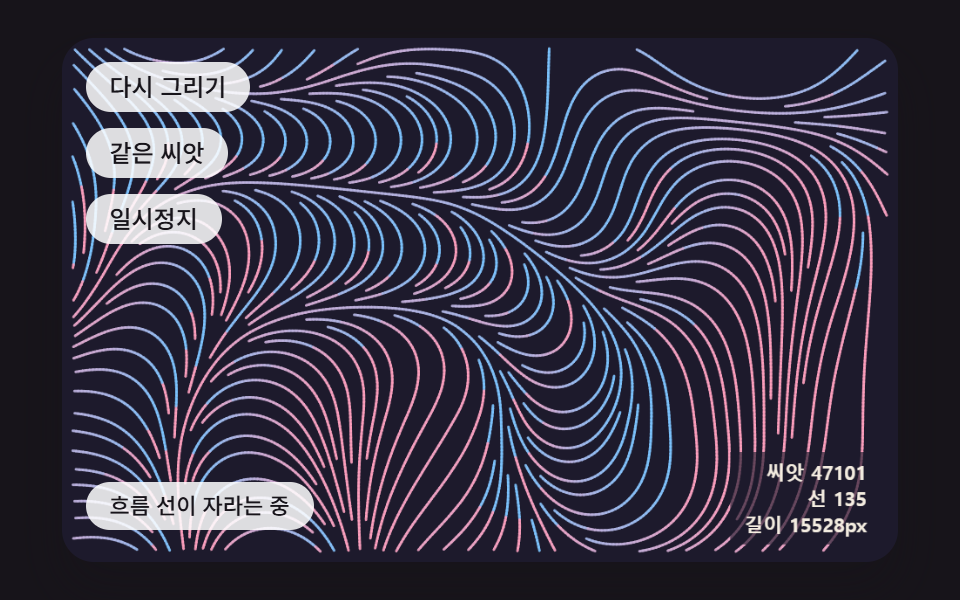 크리에이티브 UI제너레이티브 아트 9종 — 랜덤 패턴 만들기에서 자라는 그림까지
 크리에이티브 UI오로라 배경 9종 — 커튼·세로 광선·호수 반사·산 능선 히어로
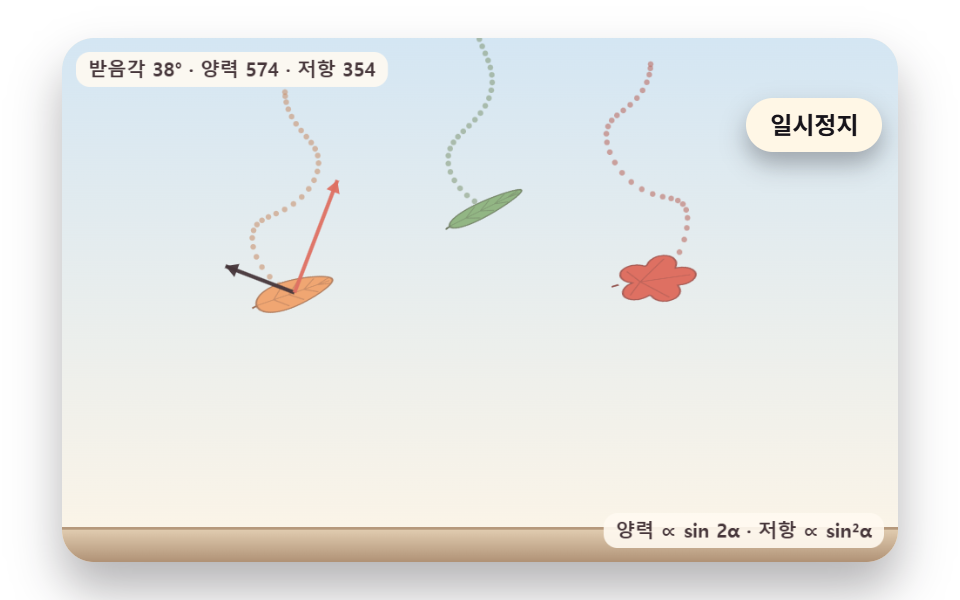 크리에이티브 UI낙엽 떨어지는 효과 9종 — 흔들림·바람·단풍 물듦·쌓이는 더미
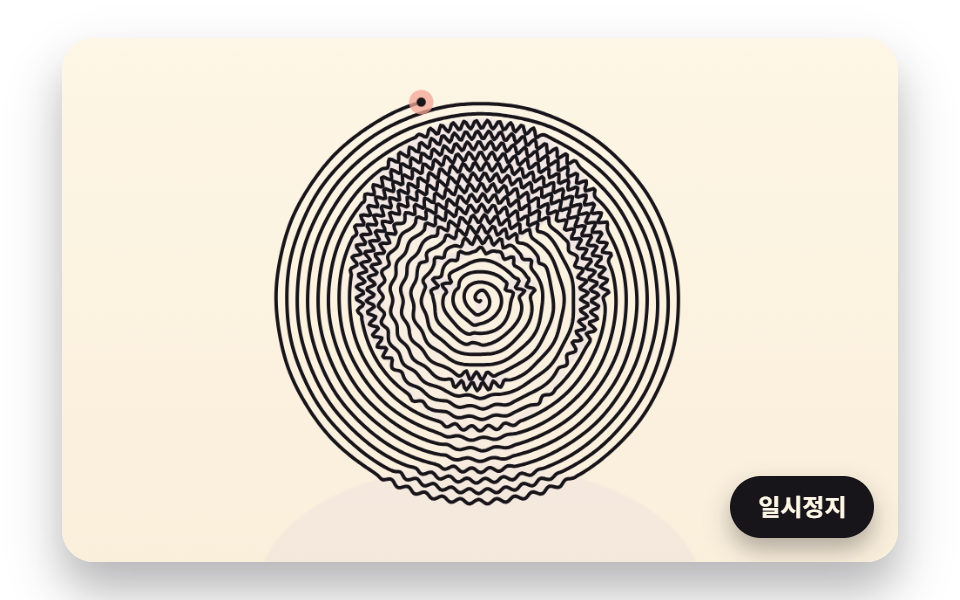 크리에이티브 UI라인 드로잉 9종 — 점 순서와 선 길이를 계산해 한 줄로 그리는 캔버스