グラフ アニメーション css ピッカー9パターン
バーをピクセル位置だけで動かすとグラフが値とずれる — だから値ひとつで棒の高さを再計算するピッカー、比率で弧の長さを満たすゲージピッカー、通った値を折れ線に残すスパークラインピッカーまで九つを見る。これが グラフ アニメーション css の実例です。
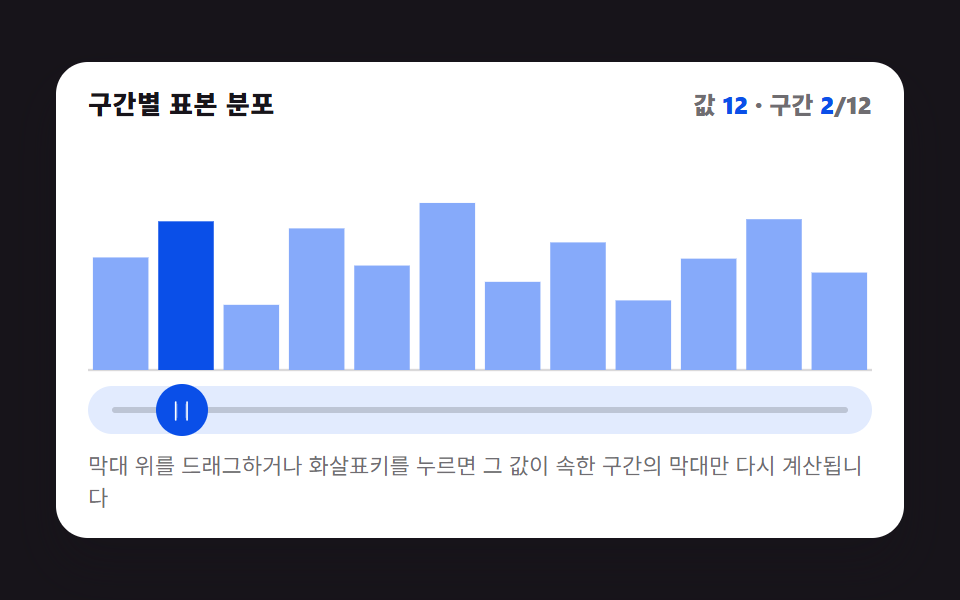 01 picker-graph-histogram-bars-live
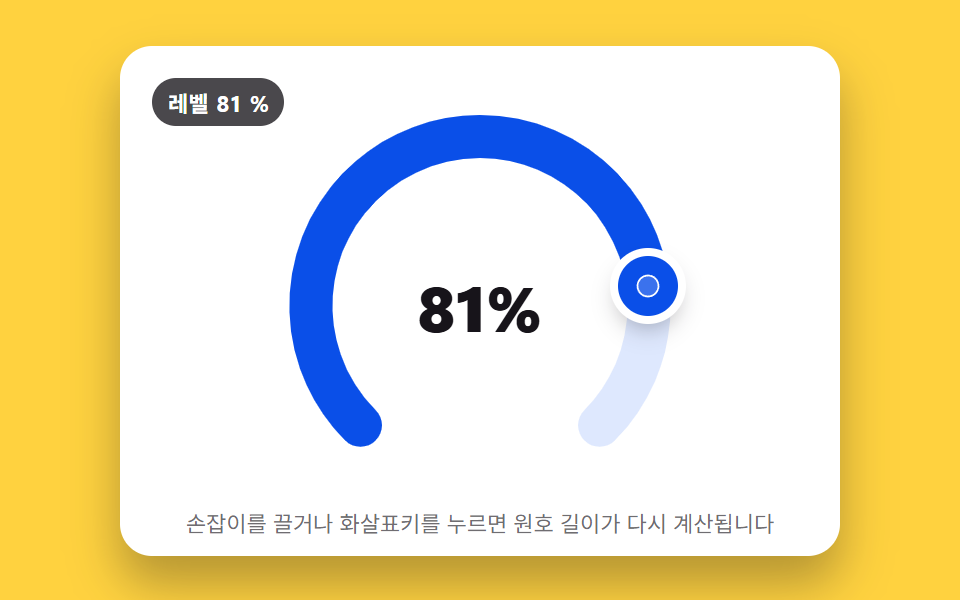 02 picker-graph-radial-gauge-arc-fill
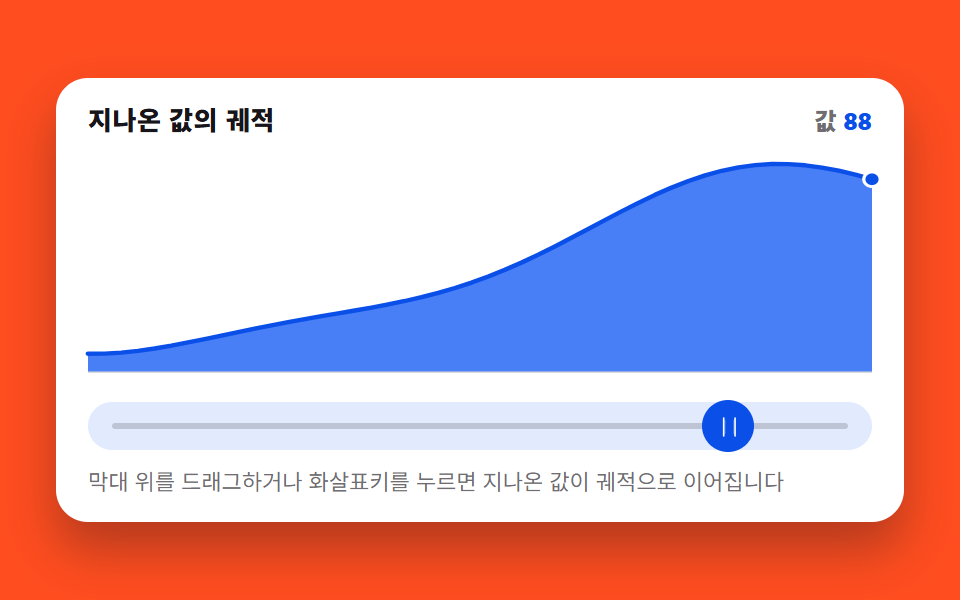 03 picker-graph-sparkline-trail-drag
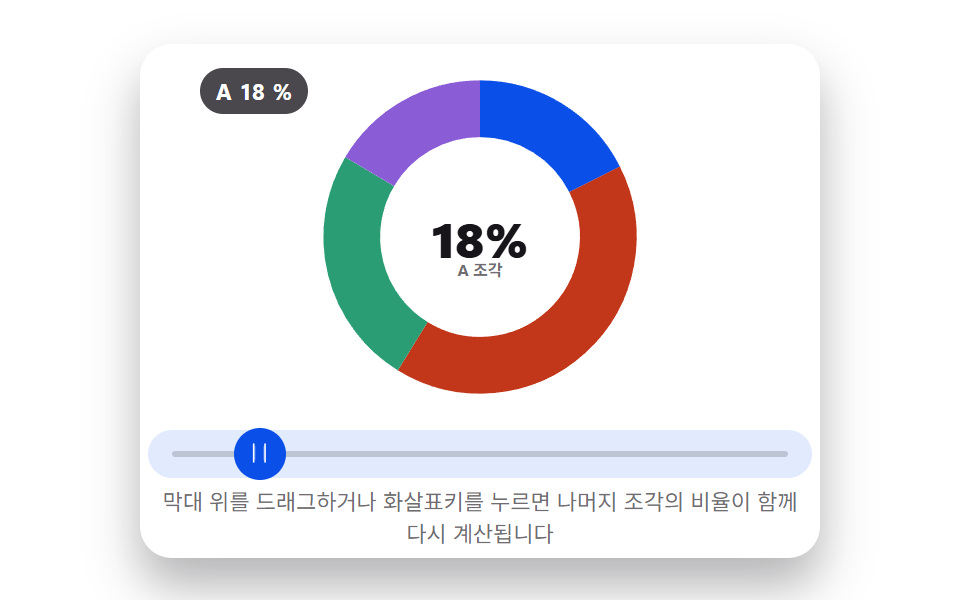 04 picker-graph-donut-segment-resize
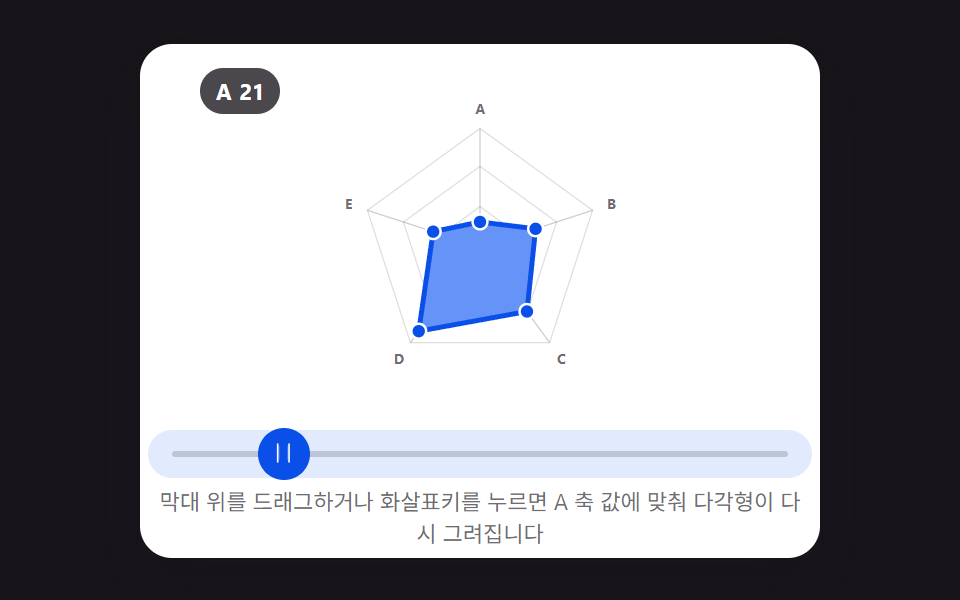 05 picker-graph-radar-multi-axis-drag
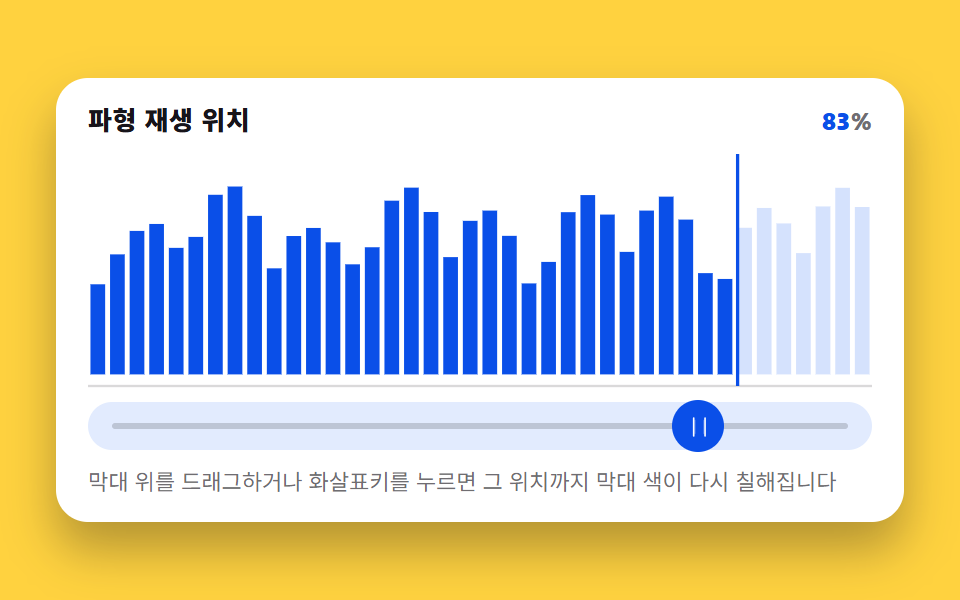 06 picker-graph-waveform-bar-scrub
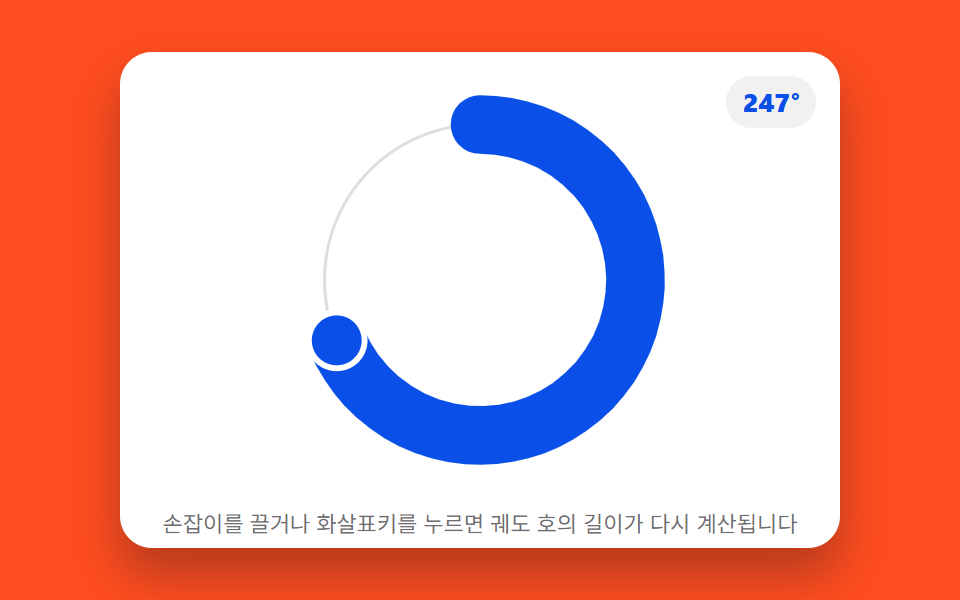 07 picker-graph-orbit-dial-arc-length
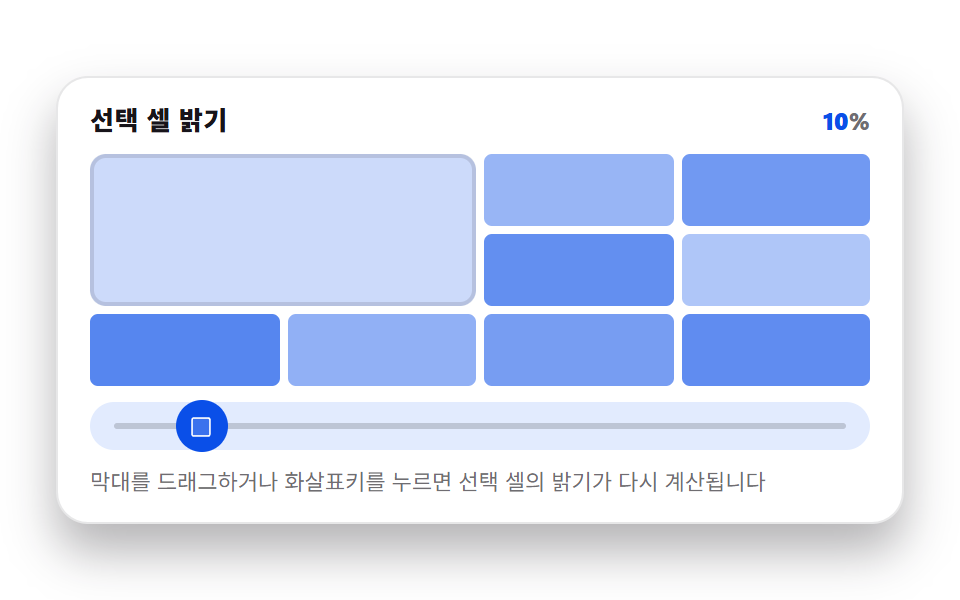 08 picker-graph-heatmap-cell-intensity
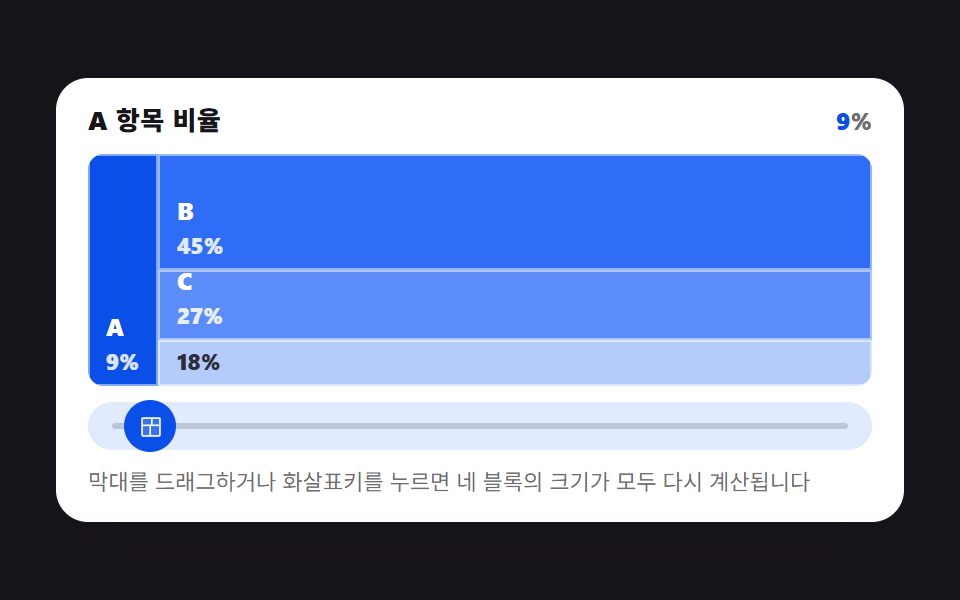 09 picker-graph-treemap-block-resize
自動再生 · タイルを押すとその項目へ · すべて1つのzip
- 01 ドラッグごとに棒の高さが再計算されるヒストグラムピッカー
- 02 値の分だけ弧が満ちる放射状ゲージピッカー
- 03 ドラッグの軌跡が折れ線として残るスパークラインピッカー
- 04 値の比率だけ断片が伸びるドーナツピッカー
- 05 軸ごとに点を引くと形が再描画されるレーダーピッカー
- 06 スクラブした位置までバーが満ちる波形ピッカー
- 07 値が軌道を回る長さに変わるオービットダイヤルピッカー
- 08 値がセルの明るさに変わるヒートマップピッカー
- 09 値の大きさだけブロックが分割し直されるツリーマップピッカー
九つとも、サーバーからも時計からも localStorage からも値を読みません。ライブラリもWebGLもCDNも読み込みません。ヒストグラムの十二本の基準高さ、レーダーの五軸の基準値、波形の四十本のバーまで、すべて読み込み時に一度だけ決まる固定配列で、ドラッグで動くのはその配列と現在値から導かれる形だけです。軸やレジェンドのラベルもわざと中立的(Axis 1〜Axis 5、バケット番号)にしてあるので、これは グラフ アニメーション 作り方 を探していてダッシュボード用でも設定パネル用でも同じように読めます。
ダッシュボードの再生・値だけのピッカーと、何が違うか
264番のダッシュボードグラフは読み込み時やデータ更新時にアニメーションしますが、数値はすでに存在していて、アニメーションはそれを見せているだけです。224番のピッカーはつまみやスウォッチを動かして数値や色を更新しますが、ページ上にグラフそのものはありません。この記事の九つはその中間にあります — つまみをドラッグするのが唯一の入力で、グラフそのもの(棒の高さ、弧の長さ、折れ線の頂点)がその一つの数値から毎フレーム再計算されます。ドラッグの前には何も存在しないので、見せるものではなく作るものです。
ポインターが動くたびに何が再計算されるか
九つとも同じ入力面を持ちます — ドラッグ用の pointerdown/pointermove/pointerup、矢印キーで動かす keydown、描画枠とドラッグ帯を合わせ続ける resize です。移動が受理されるたびに requestAnimationFrame のコールバックが現在値を読み、そのパターン専用の再計算関数を一つ呼びます — ヒストグラムならバケット番号と充填率、ゲージとオービットダイヤルなら弧の角度、スパークラインならトレイル配列のシフト、ドーナツとツリーマップならセグメントの再分割、レーダーなら五本の軸長、波形ならアクティブなバーの境界、ヒートマップなら色の比率です。続くDOM更新は常に数値を反映する最小限のもの — <rect> の高さを数本、<path d> を一本、クラスの切り替えを数個で、SVGやcanvas全体を描き直すことはありません。
九パターンを、動いた面積とフレーム数で比べる
以下の数値はデモを見た印象ではなく、run/398/demo/0N-*/측정.json に書かれた実測値です — このピラーの他の記事と同じピクセル差分パスで、各パターンのドラッグ範囲全体を描画し、連続するフレームを差分して480×300のキャンバスのうち変化した割合と、変化した箇所の平均強度を出しています。スパークライン(チャート幅のほとんどで折れ線が描き直る)とレーダー(中心付近の短いセグメントだけ)でこれほど差が出るのは、CSSから推測しているのではなく、実際に動いたピクセルを測っているからです。
| # | パターン | 累積面積 | 平均強度 | 動いたフレーム |
|---|---|---|---|---|
| 01 | ヒストグラムのバケット | 23.2% | 145.2 | 23/23 |
| 02 | ラジアルゲージの弧 | 10.0% | 137.6 | 23/23 |
| 03 | スパークライン折れ線 | 32.8% | 167.5 | 23/23 |
| 04 | ドーナツ再分割 | 12.2% | 150.1 | 23/23 |
| 05 | レーダー多角形 | 9.6% | 155.4 | 23/23 |
| 06 | 波形スクラブ | 23.1% | 174.5 | 23/23 |
| 07 | オービットダイヤルの弧 | 9.6% | 187.7 | 23/23 |
| 08 | ヒートマップのセル | 15.6% | 73.7 | 23/23 |
| 09 | ツリーマップのブロック | 24.6% | 117.4 | 23/23 |
九つとも、ドラッグ範囲を通した23回のフレーム比較すべてで動いています — トラックの端だけでアニメーションするパターンはありません。
パターン別コード — index.htmlからそのまま切り出したもの
以下の各ブロックは、その項目の index.html からそのまま取り出したもので、簡略化した書き直しではありません — ライブデモのコードパン式タブ(HTML・CSS・JS)が見せているのと同じコードです。グラフ アニメーション web の実装を探しているなら、CSSトランジションだけでなく再計算関数まで含めて確認できます。
01ヒストグラムのバケットが一つの値の周りで再分配される
ドラッグで0〜100の値が動き、ピッカーはそれを十個あるバケットのどれかに割り当て、そのバケットの目標高さだけが変わります — 残り九個は基準の高さのままです。
<main class="stage">
<figure class="hg is-demo" id="hg">
  <figcaption class="hg__head">
    <span class="hg__title">区間別サンプル分布</span>
    <span class="hg__stat" aria-hidden="true">値 <b class="hg__n" id="hg-val">50</b> ・区間 <b class="hg__n" id="hg-bucket">6</b>/12</span>
  </figcaption>

  <div class="hg__zone">
    <svg class="hg__chart" id="chart" viewBox="0 0 480 200" preserveAspectRatio="none" role="img" aria-label="12個の区間のサンプル分布を示す棒グラフ。値が属する区間の棒だけが再計算されて上がる。">
      <line class="hg__base" x1="0" y1="200" x2="480" y2="200"></line>
    </svg>
  </div>

  <div class="hg__track" id="track">
    <span class="hg__rail" aria-hidden="true"></span>
    <button class="hg__grab" id="grab" type="button" role="slider" aria-orientation="horizontal"
            aria-label="値を選ぶ" aria-valuemin="0" aria-valuemax="100"
            aria-valuenow="50" aria-valuetext="値 50、区間 6/12">
      <svg class="hg__ic" viewBox="0 0 256 256" aria-hidden="true"><g fill="currentColor"><path d="M96 64v128a8 8 0 0 1-16 0V64a8 8 0 0 1 16 0m88 0v128a8 8 0 0 1-16 0V64a8 8 0 0 1 16 0" opacity=".2"/><path d="M188 32a8 8 0 0 0-8 8v176a8 8 0 0 0 16 0V40a8 8 0 0 0-8-8M76 32a8 8 0 0 0-8 8v176a8 8 0 0 0 16 0V40a8 8 0 0 0-8-8"/></g></svg>
    </button>
  </div>

  <p class="hg__hint">棒の上をドラッグするか矢印キーを押すと、その値が属する区間の棒だけが再計算されます。</p>

  <div class="sr">
    <span aria-live="polite" id="hg-live"></span>
    <table>
      <caption>区間別基準の高さ</caption>
      <thead><tr><th>区間</th><th>基準の高さ</th></tr></thead>
      <tbody id="hg-table"></tbody>
    </table>
  </div>
</figure>
</main>@use "../../../../site/static/demo-tokens" as *;
// 히스토그램 피커 — 드래그·키보드로 값(0~100)을 정하면 그 값이 속한 구간 하나만
// 목표 높이를 다시 계산해 올리고 나머지 11개는 기준 높이로 낮춘다. 어느 구간이
// 활성인지는 매 순간 바뀌는 정수라 선언형 keyframes 로 표현할 수 없어 rAF 루프가
// 직접 SVG rect 의 y·height 를 계산해 찍는다(@keyframes 0개, 395 캔버스 선례와 같은 이유).
// picker-graph-histogram-bucket-count(JS, BUCKET_COUNT)가 구간 개수를 정한다 — 변형 01 의 조정 대상.
$duration: $dur-loop;
$easing: $ease-lerp-settle;
$color: $subject-blue;
@include stage($stage-ink);
.sr {
position: absolute; width: 1px; height: 1px; overflow: hidden;
clip-path: inset(50%); white-space: nowrap;
}
.hg {
box-sizing: border-box;
width: min(424px, 92vw);
margin: 0; padding: $sp-3;
display: flex; flex-direction: column; gap: $sp-2;
border-radius: $r-card;
background: $stage-paper;
box-shadow: $shadow-raised;
color: $subject-ink;
}
.hg__head { display: flex; align-items: baseline; justify-content: space-between; gap: $sp-2; padding: 0 $sp-1; }
.hg__title { font-size: 13px; line-height: 18px; font-weight: 800; letter-spacing: .02em; }
.hg__stat { font-size: 12px; line-height: 18px; font-weight: 800; font-variant-numeric: tabular-nums; color: rgba($subject-ink, .62); }
.hg__n { color: $subject-blue-deep; }
.hg__zone { padding: 0 $sp-1; }
.hg__chart { display: block; width: 100%; height: 116px; overflow: visible; }
.hg__base { stroke: rgba($subject-ink, .16); stroke-width: 2; }
.hg__bar {
fill: mix($subject-blue, $stage-paper, 58%);
transition: none;
}
.hg__bar.is-active { fill: $subject-blue-deep; }
.hg__track {
position: relative;
height: 24px;
margin: 0 $sp-1;
border-radius: $r-pill;
background: mix($subject-blue, $stage-paper, 14%);
}
.hg__rail {
position: absolute; left: $sp-3; right: $sp-3; top: 50%;
height: 3px; transform: translateY(-50%);
border-radius: $r-pill;
background: rgba($subject-ink, .18);
}
.hg__grab {
position: absolute; top: 50%; left: 50%;
width: 26px; height: 26px;
margin: 0; padding: 0; border: 0; border-radius: 50%;
display: grid; place-items: center;
background: $subject-blue-deep;
color: $stage-paper;
transform: translate(-50%, -50%);
cursor: ew-resize;
touch-action: none;
}
.hg__grab:focus-visible { outline: 2px solid $subject-blue-deep; outline-offset: 2px; }
.hg__ic { width: 13px; height: 13px; }
.hg__hint { margin: 0; padding: 0 $sp-1; font-size: 11px; line-height: 16px; color: rgba($subject-ink, .62); }
@media (max-width: 340px) {
.hg { padding: $sp-2; gap: $sp-1; }
.hg__hint { display: none; }
.hg__title { font-size: 12px; line-height: 16px; }
.hg__stat { font-size: 11px; line-height: 16px; }
.hg__chart { height: 108px; }
.hg__grab { width: 22px; height: 22px; }
}
// reduce — rAF 루프를 시작하지 않는다. 드래그·키 입력은 여전히 currentH=targetH 를
// 즉시 맞추고 paint() 를 그 자리에서 한 번 호출해 화면에 반영한다(관성 lerp만 생략).
@media (prefers-reduced-motion: reduce) {
.hg.is-still .hg__bar { transition: none !important; }
}html, body {
margin: 0;
overflow: hidden;
}
.stage {
box-sizing: border-box;
min-height: 100vh;
display: grid;
place-items: center;
margin: 0;
background: #17141a;
font-family: -apple-system, "Segoe UI", "Noto Sans KR", sans-serif;
padding: clamp(8px, 4vw, 24px);
}
.sr {
position: absolute;
width: 1px;
height: 1px;
overflow: hidden;
clip-path: inset(50%);
white-space: nowrap;
}
.hg {
box-sizing: border-box;
width: min(424px, 92vw);
margin: 0;
padding: 12px;
display: flex;
flex-direction: column;
gap: 8px;
border-radius: 16px;
background: #ffffff;
box-shadow: 0 14px 24px rgba(23, 20, 26, 0.32);
color: #17141a;
}
.hg__head {
display: flex;
align-items: baseline;
justify-content: space-between;
gap: 8px;
padding: 0 4px;
}
.hg__title {
font-size: 13px;
line-height: 18px;
font-weight: 800;
letter-spacing: 0.02em;
}
.hg__stat {
font-size: 12px;
line-height: 18px;
font-weight: 800;
font-variant-numeric: tabular-nums;
color: rgba(23, 20, 26, 0.62);
}
.hg__n {
color: #0a4fe8;
}
.hg__zone {
padding: 0 4px;
}
.hg__chart {
display: block;
width: 100%;
height: 116px;
overflow: visible;
}
.hg__base {
stroke: rgba(23, 20, 26, 0.16);
stroke-width: 2;
}
.hg__bar {
fill: rgb(52.6901960784%, 66.7921568627%, 97.9529411765%);
transition: none;
}
.hg__bar.is-active {
fill: #0a4fe8;
}
.hg__track {
position: relative;
height: 24px;
margin: 0 4px;
border-radius: 999px;
background: rgb(88.5803921569%, 91.9843137255%, 99.5058823529%);
}
.hg__rail {
position: absolute;
left: 12px;
right: 12px;
top: 50%;
height: 3px;
transform: translateY(-50%);
border-radius: 999px;
background: rgba(23, 20, 26, 0.18);
}
.hg__grab {
position: absolute;
top: 50%;
left: 50%;
width: 26px;
height: 26px;
margin: 0;
padding: 0;
border: 0;
border-radius: 50%;
display: grid;
place-items: center;
background: #0a4fe8;
color: #ffffff;
transform: translate(-50%, -50%);
cursor: ew-resize;
touch-action: none;
}
.hg__grab:focus-visible {
outline: 2px solid #0a4fe8;
outline-offset: 2px;
}
.hg__ic {
width: 13px;
height: 13px;
}
.hg__hint {
margin: 0;
padding: 0 4px;
font-size: 11px;
line-height: 16px;
color: rgba(23, 20, 26, 0.62);
}
@media (max-width: 340px) {
.hg {
padding: 8px;
gap: 4px;
}
.hg__hint {
display: none;
}
.hg__title {
font-size: 12px;
line-height: 16px;
}
.hg__stat {
font-size: 11px;
line-height: 16px;
}
.hg__chart {
height: 108px;
}
.hg__grab {
width: 22px;
height: 22px;
}
}
@media (prefers-reduced-motion: reduce) {
.hg.is-still .hg__bar {
transition: none !important;
}
}// 실제 동작: pointerdown/move/up 과 keydown(화살표·Home·End) 이 値(0~100)을 바꾸면
// 그 값이 속한 区間 하나만 목표 높이를 다시 계산해 올리고 나머지 11개는 기준 높이로 낮춘다.
// 매 프레임 rAF 루프가 현재 높이를 목표 높이로 관성 보간(lerp)한다 — CSS @keyframes 는
// 0개(어떤 구간이 지금 활성인지는 매 순간 바뀌는 정수라 선언형 keyframes 로 표현할 수 없다,
// 395 의 캔버스 rAF 선례와 같은 이유로 실시간 캡처 경로를 그대로 쓴다).
var root = document.getElementById('hg');
var chart = document.getElementById('chart');
var track = document.getElementById('track');
var grab = document.getElementById('grab');
var valEl = document.getElementById('hg-val');
var bucketEl = document.getElementById('hg-bucket');
var live = document.getElementById('hg-live');
var tableBody = document.getElementById('hg-table');
var BUCKET_COUNT = 12; // picker-graph-histogram-bucket-count — 변형 01 의 조정 대상
var BASE = [0.34, 0.52, 0.28, 0.61, 0.45, 0.72, 0.38, 0.55, 0.30, 0.48, 0.65, 0.42]; // 고정 표본(0~1, RNG 없음)
var PEAK_BOOST = 0.40; // 활성 구간에 더해지는 최대 여유 높이(0~1)
var LERP_RATE = 0.22; // 프레임마다 목표에 다가가는 比率 — 관성
var AUTO_PERIOD = 1.5; // 자동 시연 한 바퀴(초)
var STEP = 5; // 키보드 한 번에 움직이는 値
var CHART_H = 200;
var css = getComputedStyle(root);
function cssv(name) { return css.getPropertyValue(name).trim(); }
var currentH = BASE.slice();
var targetH = BASE.slice();
var value = 50;
var manual = false;
var autoT = 0;
var lastTs = 0;
var trackRect = null;
var rafId = 0;
function reduced() {
return window.matchMedia && window.matchMedia('(prefers-reduced-motion: reduce)').matches;
}
function bucketOf(v) {
var idx = Math.floor(v / 100 * BUCKET_COUNT);
return Math.max(0, Math.min(BUCKET_COUNT - 1, idx));
}
function fracIn(v, bucket) {
var raw = v / 100 * BUCKET_COUNT - bucket;
return Math.max(0, Math.min(1, raw));
}
// 区間 하나만 목표 높이를 다시 계산한다 — 나머지는 基準の高さ 그대로
function recompute() {
var b = bucketOf(value);
var f = fracIn(value, b);
for (var i = 0; i < BUCKET_COUNT; i++) {
targetH[i] = BASE[i];
}
targetH[b] = Math.min(0.96, BASE[b] + PEAK_BOOST * (0.4 + 0.6 * f));
return b;
}
function buildBars() {
var gap = 6;
var w = 480 / BUCKET_COUNT;
for (var i = 0; i < BUCKET_COUNT; i++) {
var r = document.createElementNS('http://www.w3.org/2000/svg', 'rect');
r.setAttribute('class', 'hg__bar');
r.setAttribute('x', String(i * w + gap / 2));
r.setAttribute('width', String(Math.max(1, w - gap)));
r.dataset.i = String(i);
chart.appendChild(r);
var tr = document.createElement('tr');
var th = document.createElement('th');
th.textContent = String(i + 1);
var td = document.createElement('td');
td.textContent = Math.round(BASE[i] * 100) + '%';
tr.appendChild(th); tr.appendChild(td);
tableBody.appendChild(tr);
}
}
function paint() {
var bars = chart.querySelectorAll('.hg__bar');
var activeIdx = bucketOf(value);
for (var i = 0; i < bars.length; i++) {
var h = currentH[i] * CHART_H;
bars[i].setAttribute('y', String(CHART_H - h));
bars[i].setAttribute('height', String(h));
bars[i].classList.toggle('is-active', i === activeIdx);
}
var rv = Math.round(value);
valEl.textContent = String(rv);
bucketEl.textContent = String(activeIdx + 1);
grab.style.left = value + '%';
grab.setAttribute('aria-valuenow', String(rv));
var text = '値 ' + rv + '、区間 ' + (activeIdx + 1) + '/12';
grab.setAttribute('aria-valuetext', text);
}
function announce() {
var activeIdx = bucketOf(value);
live.textContent = '値 ' + Math.round(value) + '、区間 ' + (activeIdx + 1) + '/12 に再計算されました';
}
function setValue(v, isManual) {
value = Math.max(0, Math.min(100, v));
if (isManual) {
manual = true;
root.classList.remove('is-demo');
}
recompute();
}
function fromPointer(clientX) {
if (!trackRect) trackRect = track.getBoundingClientRect();
var ratio = (clientX - trackRect.left) / trackRect.width;
setValue(ratio * 100, true);
}
function onDown(e) {
trackRect = track.getBoundingClientRect();
if (grab.setPointerCapture) { try { grab.setPointerCapture(e.pointerId); } catch (err) {} }
fromPointer(e.clientX);
if (reduced()) { currentH = targetH.slice(); paint(); announce(); }
}
function onMove(e) {
if (e.buttons === 0 && e.pointerType !== 'touch') { /* 버튼 안 눌렸으면 무시 */ }
fromPointer(e.clientX);
if (reduced()) { currentH = targetH.slice(); paint(); announce(); }
}
function onUp() { announce(); }
function onKey(e) {
var map = { ArrowLeft: -STEP, ArrowDown: -STEP, ArrowRight: STEP, ArrowUp: STEP };
if (e.key === 'Home') { setValue(0, true); e.preventDefault(); }
else if (e.key === 'End') { setValue(100, true); e.preventDefault(); }
else if (map[e.key] !== undefined) { setValue(value + map[e.key], true); e.preventDefault(); }
else { return; }
if (reduced()) { currentH = targetH.slice(); paint(); announce(); }
}
function onResize() {
trackRect = track.getBoundingClientRect();
if (reduced()) { paint(); }
}
function autoStep(dt) {
autoT += dt;
var omega = 2 * Math.PI / AUTO_PERIOD;
var v = 50 + 46 * Math.sin(autoT * omega);
value = v;
recompute();
}
function frame(ts) {
if (!lastTs) lastTs = ts;
var dt = Math.min(0.05, (ts - lastTs) / 1000);
lastTs = ts;
if (!manual) { autoStep(dt); }
for (var i = 0; i < BUCKET_COUNT; i++) {
currentH[i] += (targetH[i] - currentH[i]) * LERP_RATE;
}
paint();
rafId = requestAnimationFrame(frame);
}
buildBars();
recompute();
grab.addEventListener('pointerdown', onDown);
grab.addEventListener('pointermove', onMove);
grab.addEventListener('pointerup', onUp);
track.addEventListener('pointerdown', function (e) {
trackRect = track.getBoundingClientRect();
fromPointer(e.clientX);
if (reduced()) { currentH = targetH.slice(); paint(); announce(); }
});
grab.addEventListener('keydown', onKey);
window.addEventListener('resize', onResize);
if (reduced()) {
root.classList.add('is-still');
currentH = targetH.slice();
paint();
} else {
rafId = requestAnimationFrame(frame);
}// HistogramBarsLive — vanilla 판(run/398/demo/01-picker-graph-histogram-bars-live/index.html) 의 React 포트.
// 드래그·키보드로 값(0~100)을 정하면 그 값이 속한 구간 하나만 목표 높이를 다시 계산해 올리고
// 나머지 11개는 기준 높이로 낮춘다. 매 프레임 rAF 루프가 현재 높이를 목표 높이로 관성 보간(lerp)한다.
import { useEffect, useRef } from "react";
import styles from "./HistogramBarsLive.module.scss";
type Box<T> = { current: T };
type KeyEvt = { key: string; preventDefault(): void };
type PtrEvt = { clientX: number; clientY: number; pointerId: number; buttons?: number; pointerType?: string };
const BUCKET_COUNT = 12; // picker-graph-histogram-bucket-count — 변형 01 의 조정 대상
const BASE = [0.34, 0.52, 0.28, 0.61, 0.45, 0.72, 0.38, 0.55, 0.30, 0.48, 0.65, 0.42]; // 고정 표본(0~1, RNG 없음)
const PEAK_BOOST = 0.40;
const LERP_RATE = 0.22;
const AUTO_PERIOD = 1.5;
const STEP = 5;
const CHART_H = 200;
const GAP = 6;
const BAR_W = 480 / BUCKET_COUNT;
export default function HistogramBarsLive() {
const rootRef = useRef<HTMLElement | null>(null);
const chartRef = useRef<SVGSVGElement | null>(null);
const trackRef = useRef<HTMLDivElement | null>(null);
const grabRef = useRef<HTMLButtonElement | null>(null);
const valRef = useRef<HTMLElement | null>(null);
const bucketRef = useRef<HTMLElement | null>(null);
const liveRef = useRef<HTMLSpanElement | null>(null);
const barRefs = useRef(new Array(BUCKET_COUNT).fill(null)) as Box<(SVGRectElement | null)[]>;
const currentH = useRef(BASE.slice()) as Box<number[]>;
const targetH = useRef(BASE.slice()) as Box<number[]>;
const value = useRef(50) as Box<number>;
const manual = useRef(false) as Box<boolean>;
const autoT = useRef(0) as Box<number>;
const lastTs = useRef(0) as Box<number>;
const trackRect = useRef<DOMRect | null>(null) as Box<DOMRect | null>;
const rafId = useRef(0) as Box<number>;
function reduced(): boolean {
return window.matchMedia("(prefers-reduced-motion: reduce)").matches;
}
function bucketOf(v: number): number {
const idx = Math.floor((v / 100) * BUCKET_COUNT);
return Math.max(0, Math.min(BUCKET_COUNT - 1, idx));
}
function fracIn(v: number, bucket: number): number {
const raw = (v / 100) * BUCKET_COUNT - bucket;
return Math.max(0, Math.min(1, raw));
}
function recompute(): number {
const b = bucketOf(value.current);
const f = fracIn(value.current, b);
for (let i = 0; i < BUCKET_COUNT; i++) targetH.current[i] = BASE[i];
targetH.current[b] = Math.min(0.96, BASE[b] + PEAK_BOOST * (0.4 + 0.6 * f));
return b;
}
function paint(): void {
const activeIdx = bucketOf(value.current);
const bars = barRefs.current;
for (let i = 0; i < bars.length; i++) {
const r = bars[i];
if (!r) continue;
const h = currentH.current[i] * CHART_H;
r.setAttribute("y", String(CHART_H - h));
r.setAttribute("height", String(h));
r.classList.toggle("is-active", i === activeIdx);
}
const rv = Math.round(value.current);
if (valRef.current) valRef.current.textContent = String(rv);
if (bucketRef.current) bucketRef.current.textContent = String(activeIdx + 1);
const grab = grabRef.current;
if (grab) {
grab.style.left = value.current + "%";
grab.setAttribute("aria-valuenow", String(rv));
grab.setAttribute("aria-valuetext", "값 " + rv + ", 구간 " + (activeIdx + 1) + "/12");
}
}
function announce(): void {
const activeIdx = bucketOf(value.current);
if (liveRef.current) {
liveRef.current.textContent = "값 " + Math.round(value.current) + ", 구간 " + (activeIdx + 1) + "/12로 다시 계산됨";
}
}
function setValue(v: number, isManual: boolean): void {
value.current = Math.max(0, Math.min(100, v));
if (isManual) {
manual.current = true;
rootRef.current?.classList.remove("is-demo");
}
recompute();
}
function fromPointer(clientX: number): void {
if (!trackRect.current && trackRef.current) trackRect.current = trackRef.current.getBoundingClientRect();
const rect = trackRect.current;
if (!rect) return;
const ratio = (clientX - rect.left) / rect.width;
setValue(ratio * 100, true);
}
function reflectNow(): void {
currentH.current = targetH.current.slice();
paint();
announce();
}
function onDown(e: PtrEvt): void {
if (trackRef.current) trackRect.current = trackRef.current.getBoundingClientRect();
const grab = grabRef.current;
if (grab && typeof grab.setPointerCapture === "function") {
try { grab.setPointerCapture(e.pointerId); } catch { /* 캡처 실패는 치명적이지 않다 */ }
}
fromPointer(e.clientX);
if (reduced()) reflectNow();
}
function onMove(e: PtrEvt): void {
fromPointer(e.clientX);
if (reduced()) reflectNow();
}
function onUp(): void {
announce();
}
function onTrackDown(e: PtrEvt): void {
if (trackRef.current) trackRect.current = trackRef.current.getBoundingClientRect();
fromPointer(e.clientX);
if (reduced()) reflectNow();
}
function onKey(e: KeyEvt): void {
const map: Record<string, number> = { ArrowLeft: -STEP, ArrowDown: -STEP, ArrowRight: STEP, ArrowUp: STEP };
if (e.key === "Home") { setValue(0, true); e.preventDefault(); }
else if (e.key === "End") { setValue(100, true); e.preventDefault(); }
else if (map[e.key] !== undefined) { setValue(value.current + map[e.key], true); e.preventDefault(); }
else { return; }
if (reduced()) reflectNow();
}
function onResize(): void {
if (trackRef.current) trackRect.current = trackRef.current.getBoundingClientRect();
if (reduced()) paint();
}
function autoStep(dt: number): void {
autoT.current += dt;
const omega = (2 * Math.PI) / AUTO_PERIOD;
value.current = 50 + 46 * Math.sin(autoT.current * omega);
recompute();
}
function frame(ts: number): void {
if (!lastTs.current) lastTs.current = ts;
const dt = Math.min(0.05, (ts - lastTs.current) / 1000);
lastTs.current = ts;
if (!manual.current) autoStep(dt);
for (let i = 0; i < BUCKET_COUNT; i++) {
currentH.current[i] += (targetH.current[i] - currentH.current[i]) * LERP_RATE;
}
paint();
rafId.current = requestAnimationFrame(frame);
}
useEffect(() => {
recompute();
window.addEventListener("resize", onResize);
if (reduced()) {
rootRef.current?.classList.add("is-still");
reflectNow();
} else {
rafId.current = requestAnimationFrame(frame);
}
return () => {
window.removeEventListener("resize", onResize);
cancelAnimationFrame(rafId.current);
};
// eslint-disable-next-line react-hooks/exhaustive-deps
}, []);
return (
<main className={styles.stage}>
<figure className={styles.hg + " is-demo"} ref={rootRef}>
<figcaption className={styles.head}>
<span className={styles.title}>구간별 표본 분포</span>
<span className={styles.stat} aria-hidden="true">값 <b className={styles.n} ref={valRef}>50</b> · 구간 <b className={styles.n} ref={bucketRef}>6</b>/12</span>
</figcaption>
<div className={styles.zone}>
<svg
className={styles.chart}
ref={chartRef}
viewBox="0 0 480 200"
preserveAspectRatio="none"
role="img"
aria-label="구간 12개 표본 분포 막대그래프, 값이 속한 구간의 막대만 다시 계산되어 올라간다"
>
<line className={styles.base} x1="0" y1="200" x2="480" y2="200" />
{BASE.map((_, i) => (
<rect
key={i}
className={styles.bar}
ref={(el: SVGRectElement | null) => { barRefs.current[i] = el; }}
x={i * BAR_W + GAP / 2}
width={Math.max(1, BAR_W - GAP)}
/>
))}
</svg>
</div>
<div className={styles.track} ref={trackRef} onPointerDown={onTrackDown}>
<span className={styles.rail} aria-hidden="true" />
<button
className={styles.grab}
ref={grabRef}
type="button"
role="slider"
aria-orientation="horizontal"
aria-label="값 고르기"
aria-valuemin={0}
aria-valuemax={100}
aria-valuenow={50}
aria-valuetext="값 50, 구간 6/12"
onPointerDown={onDown}
onPointerMove={onMove}
onPointerUp={onUp}
onKeyDown={onKey}
>
<svg className={styles.ic} viewBox="0 0 256 256" aria-hidden="true"><g fill="currentColor"><path d="M96 64v128a8 8 0 0 1-16 0V64a8 8 0 0 1 16 0m88 0v128a8 8 0 0 1-16 0V64a8 8 0 0 1 16 0" opacity=".2" /><path d="M188 32a8 8 0 0 0-8 8v176a8 8 0 0 0 16 0V40a8 8 0 0 0-8-8M76 32a8 8 0 0 0-8 8v176a8 8 0 0 0 16 0V40a8 8 0 0 0-8-8" /></g></svg>
</button>
</div>
<p className={styles.hint}>막대 위를 드래그하거나 화살표키를 누르면 그 값이 속한 구간의 막대만 다시 계산됩니다</p>
<div className={styles.sr}>
<span aria-live="polite" ref={liveRef} />
<table>
<caption>구간별 기준 높이</caption>
<thead><tr><th>구간</th><th>기준 높이</th></tr></thead>
<tbody>
{BASE.map((b, i) => (
<tr key={i}><th>{i + 1}</th><td>{Math.round(b * 100)}%</td></tr>
))}
</tbody>
</table>
</div>
</figure>
</main>
);
}01 · ドラッグごとに棒の高さが再計算されるヒストグラムピッカー — 計測 累積面積 23.203% · 動いたフレーム 23/23GODRICH オリジナル · SCSS と React は zip に同梱 · パスワードを見る
function bucketOf(v) {
  var idx = Math.floor(v / 100 * BUCKET_COUNT);
  return Math.max(0, Math.min(BUCKET_COUNT - 1, idx));
}

function fracIn(v, bucket) {
  var raw = v / 100 * BUCKET_COUNT - bucket;
  return Math.max(0, Math.min(1, raw));
}

// 値が属する区間だけ目標の高さを再計算する — 残りは基準の高さのまま
function recompute() {
  var b = bucketOf(value);
  var f = fracIn(value, b);
  for (var i = 0; i < BUCKET_COUNT; i++) {
    targetH[i] = BASE[i];
  }
  targetH[b] = Math.min(0.96, BASE[b] + PEAK_BOOST * (0.4 + 0.6 * f));
  return b;
}
02ラジアルゲージの弧の長さが比率を追う
塗りつぶし弧の終端角度は比率の一次関数なので、ドラッグで変わるのは弧の回転ではなく弧の長さそのものです。
<main class="stage">
<figure class="rg is-demo" id="rg">
  <div class="rg__zone" id="zone">
    <svg class="rg__chart" id="chart" viewBox="0 0 480 300" role="img" aria-label="値の比率だけ弧が満ちる放射状ゲージ。つまみを回すと弧が毎瞬間描き直される。">
      <path class="rg__track" id="track"></path>
      <path class="rg__fill" id="fill"></path>
      <text class="rg__num" id="num" x="240" y="170" text-anchor="middle" dominant-baseline="central">62%</text>
    </svg>
    <button class="rg__grab" id="grab" type="button" role="slider" aria-orientation="horizontal"
            aria-label="レベルを選ぶ" aria-valuemin="0" aria-valuemax="100"
            aria-valuenow="62" aria-valuetext="レベル 62%">
      <svg class="rg__ic" viewBox="0 0 256 256" aria-hidden="true"><g fill="currentColor"><circle cx="128" cy="128" r="96" opacity=".2"/><path d="M128 24a104 104 0 1 0 104 104A104.11 104.11 0 0 0 128 24m0 192a88 88 0 1 1 88-88 88.1 88.1 0 0 1-88 88"/></g></svg>
    </button>
    <b class="rg__badge" aria-hidden="true">レベル <span id="rg-val">62</span>%</b>
  </div>

  <p class="rg__hint">つまみを引くか矢印キーを押すと弧の長さが再計算されます。</p>

  <div class="sr">
    <span aria-live="polite" id="rg-live"></span>
  </div>
</figure>
</main>
@use "../../../../site/static/demo-tokens" as *;
// 방사형 게이지 피커 — 손잡이를 끌거나 화살표키로 값(0~100)을 정하면 원호 경로(d 속성)를
// 시작각→현재각으로 매 프레임 다시 그린다. 관성 lerp 로 값이 목표를 뒤따른다.
// CSS @keyframes 는 0개(각도가 매 순간 바뀌는 실수라 선언형으로 못 담는다, 398-01 과 같은 이유).
// picker-graph-gauge-radius(JS, R)가 게이지 반지름을 정한다.
$duration: $dur-loop;
$easing: $ease-lerp-settle;
$color: $subject-blue;
@include stage($stage-yellow);
.sr {
position: absolute; width: 1px; height: 1px; overflow: hidden;
clip-path: inset(50%); white-space: nowrap;
}
.rg {
box-sizing: border-box;
width: min(360px, 92vw);
margin: 0; padding: $sp-2;
display: flex; flex-direction: column; gap: $sp-2; align-items: center;
border-radius: $r-card;
background: $stage-paper;
box-shadow: $shadow-raised;
color: $subject-ink;
}
.rg__zone {
position: relative;
width: min(352px, 100%);
aspect-ratio: 480 / 300;
}
.rg__chart { display: block; width: 100%; height: 100%; overflow: visible; }
.rg__track {
fill: none;
stroke: mix($subject-blue, $stage-paper, 16%);
stroke-width: 30;
stroke-linecap: round;
}
.rg__fill {
fill: none;
stroke: $subject-blue-deep;
stroke-width: 30;
stroke-linecap: round;
}
.rg__num {
font-size: 44px;
font-weight: 800;
font-variant-numeric: tabular-nums;
fill: $subject-ink;
}
.rg__grab {
position: absolute; top: 0; left: 0;
width: 30px; height: 30px;
margin: 0; padding: 0; border: 0; border-radius: 50%;
display: grid; place-items: center;
background: $subject-blue-deep;
color: $stage-paper;
box-shadow: 0 0 0 4px $stage-paper, $shadow-press;
transform: translate(-50%, -50%);
cursor: grab;
touch-action: none;
}
.rg__grab:focus-visible { outline: 2px solid $subject-blue-deep; outline-offset: 3px; }
.rg__ic { width: 14px; height: 14px; }
.rg__badge {
position: absolute; left: $sp-2; top: $sp-2;
display: flex; align-items: baseline; gap: $sp-1;
padding: $sp-1 $sp-2; border-radius: $r-pill;
background: rgba($subject-ink, .78);
color: $stage-paper; font-weight: 700; font-size: 11px;
font-variant-numeric: tabular-nums;
}
.rg__hint { margin: 0; padding: 0 $sp-1; font-size: 11px; line-height: 16px; color: rgba($subject-ink, .62); text-align: center; }
@media (max-width: 340px) {
.rg { padding: $sp-2; gap: $sp-1; }
.rg__hint { display: none; }
.rg__zone { width: min(240px, 100%); }
.rg__num { font-size: 32px; }
.rg__track, .rg__fill { stroke-width: 16; }
.rg__grab { width: 24px; height: 24px; }
.rg__badge { font-size: 10px; padding: 0 $sp-1; }
}
// reduce — rAF 루프를 시작하지 않는다. 입력은 current=value 즉시 반영 후 paint() 1회.
@media (prefers-reduced-motion: reduce) {
.rg.is-still .rg__fill { transition: none !important; }
}html, body {
margin: 0;
overflow: hidden;
}
.stage {
box-sizing: border-box;
min-height: 100vh;
display: grid;
place-items: center;
margin: 0;
background: #ffd23f;
font-family: -apple-system, "Segoe UI", "Noto Sans KR", sans-serif;
padding: clamp(8px, 4vw, 24px);
}
.sr {
position: absolute;
width: 1px;
height: 1px;
overflow: hidden;
clip-path: inset(50%);
white-space: nowrap;
}
.rg {
box-sizing: border-box;
width: min(360px, 92vw);
margin: 0;
padding: 8px;
display: flex;
flex-direction: column;
gap: 8px;
align-items: center;
border-radius: 16px;
background: #ffffff;
box-shadow: 0 14px 24px rgba(23, 20, 26, 0.32);
color: #17141a;
}
.rg__zone {
position: relative;
width: min(352px, 100%);
aspect-ratio: 480/300;
}
.rg__chart {
display: block;
width: 100%;
height: 100%;
overflow: visible;
}
.rg__track {
fill: none;
stroke: rgb(86.9490196078%, 90.8392156863%, 99.4352941176%);
stroke-width: 30;
stroke-linecap: round;
}
.rg__fill {
fill: none;
stroke: #0a4fe8;
stroke-width: 30;
stroke-linecap: round;
}
.rg__num {
font-size: 44px;
font-weight: 800;
font-variant-numeric: tabular-nums;
fill: #17141a;
}
.rg__grab {
position: absolute;
top: 0;
left: 0;
width: 30px;
height: 30px;
margin: 0;
padding: 0;
border: 0;
border-radius: 50%;
display: grid;
place-items: center;
background: #0a4fe8;
color: #ffffff;
box-shadow: 0 0 0 4px #ffffff, 0 6px 12px rgba(23, 20, 26, 0.32);
transform: translate(-50%, -50%);
cursor: grab;
touch-action: none;
}
.rg__grab:focus-visible {
outline: 2px solid #0a4fe8;
outline-offset: 3px;
}
.rg__ic {
width: 14px;
height: 14px;
}
.rg__badge {
position: absolute;
left: 8px;
top: 8px;
display: flex;
align-items: baseline;
gap: 4px;
padding: 4px 8px;
border-radius: 999px;
background: rgba(23, 20, 26, 0.78);
color: #ffffff;
font-weight: 700;
font-size: 11px;
font-variant-numeric: tabular-nums;
}
.rg__hint {
margin: 0;
padding: 0 4px;
font-size: 11px;
line-height: 16px;
color: rgba(23, 20, 26, 0.62);
text-align: center;
}
@media (max-width: 340px) {
.rg {
padding: 8px;
gap: 4px;
}
.rg__hint {
display: none;
}
.rg__zone {
width: min(240px, 100%);
}
.rg__num {
font-size: 32px;
}
.rg__track, .rg__fill {
stroke-width: 16;
}
.rg__grab {
width: 24px;
height: 24px;
}
.rg__badge {
font-size: 10px;
padding: 0 4px;
}
}
@media (prefers-reduced-motion: reduce) {
.rg.is-still .rg__fill {
transition: none !important;
}
}// 실제 동작: pointerdown/move/up 과 keydown(화살표·Home·End) 이 値(0~100)을 바꾸면
// 손잡이 각도가 다시 계산되고, 원호 경로(d 속성)를 시작각→현재각으로 매 프레임 다시 그린다.
// 값은 매 프레임 목표값으로 관성 보간(lerp)된다 — CSS @keyframes 없음(어느 각도인지 매 순간
// 바뀌는 실수라 선언형으로 못 담는다, 395·398-01 과 같은 이유로 실시간 캡처 경로를 쓴다).
var root = document.getElementById('rg');
var zone = document.getElementById('zone');
var chart = document.getElementById('chart');
var track = document.getElementById('track');
var fill = document.getElementById('fill');
var numEl = document.getElementById('num');
var valEl = document.getElementById('rg-val');
var grab = document.getElementById('grab');
var live = document.getElementById('rg-live');
var CX = 240, CY = 170, R = 118; // picker-graph-gauge-radius — 게이지 반지름
var START = 135, SWEEP = 270; // 시작각(度)·전체 스윕각 — END = START + SWEEP
var END = START + SWEEP;
var LERP_RATE = 0.20;
var AUTO_PERIOD = 1.7;
var STEP = 5;
var value = 62;
var current = 62;
var manual = false;
var autoT = 0;
var lastTs = 0;
var zoneRect = null;
var rafId = 0;
function reduced() {
return window.matchMedia && window.matchMedia('(prefers-reduced-motion: reduce)').matches;
}
function polar(cx, cy, r, deg) {
var rad = deg * Math.PI / 180;
return { x: cx + r * Math.cos(rad), y: cy + r * Math.sin(rad) };
}
function arcPath(cx, cy, r, a0, a1) {
  if (Math.abs(a1 - a0) < 0.5) return '';
  var s = polar(cx, cy, r, a0), e = polar(cx, cy, r, a1);
  var large = (a1 - a0) > 180 ? 1 : 0;
  return 'M ' + s.x + ' ' + s.y + ' A ' + r + ' ' + r + ' 0 ' + large + ' 1 ' + e.x + ' ' + e.y;
}

function angleOf(v) { return START + (SWEEP * v) / 100; }

function paint() {
  track.setAttribute('d', arcPath(CX, CY, R, START, END));
  fill.setAttribute('d', arcPath(CX, CY, R, START, angleOf(current)));
  var p = polar(CX, CY, R, angleOf(current));
  grab.style.left = (p.x / 480 * 100) + '%';
  grab.style.top = (p.y / 300 * 100) + '%';
  var rv = Math.round(current);
  numEl.textContent = rv + '%';
  valEl.textContent = String(rv);
  grab.setAttribute('aria-valuenow', String(rv));
  grab.setAttribute('aria-valuetext', 'レベル ' + rv + '%');
}
function announce() {
live.textContent = 'レベル ' + Math.round(current) + '% に再計算されました';
}
function setValue(v, isManual) {
value = Math.max(0, Math.min(100, v));
if (isManual) { manual = true; root.classList.remove('is-demo'); }
}
function angleFromPointer(clientX, clientY) {
if (!zoneRect) zoneRect = zone.getBoundingClientRect();
var cx = zoneRect.left + zoneRect.width * (CX / 480);
var cy = zoneRect.top + zoneRect.height * (CY / 300);
var deg = Math.atan2(clientY - cy, clientX - cx) * 180 / Math.PI;
while (deg < START) deg += 360;
while (deg > START + 360) deg -= 360;
if (deg > END) deg = (deg - END < START + 360 - deg) ? END : START;
return deg;
}
function fromPointer(clientX, clientY) {
var deg = angleFromPointer(clientX, clientY);
var v = (deg - START) / SWEEP * 100;
setValue(v, true);
}
function onDown(e) {
zoneRect = zone.getBoundingClientRect();
if (grab.setPointerCapture) { try { grab.setPointerCapture(e.pointerId); } catch (err) {} }
fromPointer(e.clientX, e.clientY);
if (reduced()) { current = value; paint(); announce(); }
}
function onMove(e) {
fromPointer(e.clientX, e.clientY);
if (reduced()) { current = value; paint(); announce(); }
}
function onUp() { announce(); }
function onZoneDown(e) {
zoneRect = zone.getBoundingClientRect();
fromPointer(e.clientX, e.clientY);
if (reduced()) { current = value; paint(); announce(); }
}
function onKey(e) {
var map = { ArrowLeft: -STEP, ArrowDown: -STEP, ArrowRight: STEP, ArrowUp: STEP };
if (e.key === 'Home') { setValue(0, true); e.preventDefault(); }
else if (e.key === 'End') { setValue(100, true); e.preventDefault(); }
else if (map[e.key] !== undefined) { setValue(value + map[e.key], true); e.preventDefault(); }
else { return; }
if (reduced()) { current = value; paint(); announce(); }
}
function onResize() {
zoneRect = zone.getBoundingClientRect();
if (reduced()) paint();
}
function autoStep(dt) {
autoT += dt;
var omega = 2 * Math.PI / AUTO_PERIOD;
value = 50 + 48 * Math.sin(autoT * omega);
}
function frame(ts) {
if (!lastTs) lastTs = ts;
var dt = Math.min(0.05, (ts - lastTs) / 1000);
lastTs = ts;
if (!manual) autoStep(dt);
current += (value - current) * LERP_RATE;
paint();
rafId = requestAnimationFrame(frame);
}
grab.addEventListener('pointerdown', onDown);
grab.addEventListener('pointermove', onMove);
grab.addEventListener('pointerup', onUp);
grab.addEventListener('keydown', onKey);
zone.addEventListener('pointerdown', onZoneDown);
window.addEventListener('resize', onResize);
if (reduced()) {
root.classList.add('is-still');
current = value;
paint();
} else {
paint();
rafId = requestAnimationFrame(frame);
}// RadialGaugeArcFill — vanilla 판(run/398/demo/02-picker-graph-radial-gauge-arc-fill/index.html) 의 React 포트.
// 손잡이를 끌거나 화살표키로 값(0~100)을 정하면 원호 경로(d 속성)를 시작각→현재각으로
// 매 프레임 다시 그린다. 값은 관성 lerp 로 목표를 뒤따른다. CSS @keyframes 는 0개(vanilla 와 같은 이유).
import { useEffect, useRef } from "react";
import styles from "./RadialGaugeArcFill.module.scss";
type Box<T> = { current: T };
type KeyEvt = { key: string; preventDefault(): void };
type PtrEvt = { clientX: number; clientY: number; pointerId: number };
const CX = 240, CY = 170, R = 118; // picker-graph-gauge-radius — 게이지 반지름
const START = 135, SWEEP = 270;
const END = START + SWEEP;
const LERP_RATE = 0.20;
const AUTO_PERIOD = 1.7;
const STEP = 5;
function polar(cx: number, cy: number, r: number, deg: number) {
const rad = (deg * Math.PI) / 180;
return { x: cx + r * Math.cos(rad), y: cy + r * Math.sin(rad) };
}
function arcPath(cx: number, cy: number, r: number, a0: number, a1: number): string {
if (Math.abs(a1 - a0) < 0.5) return "";
const s = polar(cx, cy, r, a0), e = polar(cx, cy, r, a1);
const large = a1 - a0 > 180 ? 1 : 0;
return "M " + s.x + " " + s.y + " A " + r + " " + r + " 0 " + large + " 1 " + e.x + " " + e.y;
}
function angleOf(v: number): number {
return START + (SWEEP * v) / 100;
}
export default function RadialGaugeArcFill() {
const rootRef = useRef<HTMLElement | null>(null);
const zoneRef = useRef<HTMLDivElement | null>(null);
const trackRef = useRef<SVGPathElement | null>(null);
const fillRef = useRef<SVGPathElement | null>(null);
const numRef = useRef<SVGTextElement | null>(null);
const grabRef = useRef<HTMLButtonElement | null>(null);
const valRef = useRef<HTMLElement | null>(null);
const liveRef = useRef<HTMLSpanElement | null>(null);
const value = useRef(62) as Box<number>;
const current = useRef(62) as Box<number>;
const manual = useRef(false) as Box<boolean>;
const autoT = useRef(0) as Box<number>;
const lastTs = useRef(0) as Box<number>;
const zoneRect = useRef<DOMRect | null>(null) as Box<DOMRect | null>;
const rafId = useRef(0) as Box<number>;
function reduced(): boolean {
return window.matchMedia("(prefers-reduced-motion: reduce)").matches;
}
function paint(): void {
trackRef.current?.setAttribute("d", arcPath(CX, CY, R, START, END));
fillRef.current?.setAttribute("d", arcPath(CX, CY, R, START, angleOf(current.current)));
const p = polar(CX, CY, R, angleOf(current.current));
const grab = grabRef.current;
if (grab) {
grab.style.left = (p.x / 480) * 100 + "%";
grab.style.top = (p.y / 300) * 100 + "%";
}
const rv = Math.round(current.current);
if (numRef.current) numRef.current.textContent = rv + "%";
if (valRef.current) valRef.current.textContent = String(rv);
if (grab) {
grab.setAttribute("aria-valuenow", String(rv));
grab.setAttribute("aria-valuetext", "레벨 " + rv + "%");
}
}
function announce(): void {
if (liveRef.current) liveRef.current.textContent = "레벨 " + Math.round(current.current) + "%로 다시 계산됨";
}
function setValue(v: number, isManual: boolean): void {
value.current = Math.max(0, Math.min(100, v));
if (isManual) {
manual.current = true;
rootRef.current?.classList.remove("is-demo");
}
}
function angleFromPointer(clientX: number, clientY: number): number {
if (!zoneRect.current && zoneRef.current) zoneRect.current = zoneRef.current.getBoundingClientRect();
const rect = zoneRect.current;
if (!rect) return START;
const cx = rect.left + rect.width * (CX / 480);
const cy = rect.top + rect.height * (CY / 300);
let deg = (Math.atan2(clientY - cy, clientX - cx) * 180) / Math.PI;
while (deg < START) deg += 360;
while (deg > START + 360) deg -= 360;
if (deg > END) deg = deg - END < START + 360 - deg ? END : START;
return deg;
}
function fromPointer(clientX: number, clientY: number): void {
const deg = angleFromPointer(clientX, clientY);
const v = ((deg - START) / SWEEP) * 100;
setValue(v, true);
}
function reflectNow(): void {
current.current = value.current;
paint();
announce();
}
function onDown(e: PtrEvt): void {
if (zoneRef.current) zoneRect.current = zoneRef.current.getBoundingClientRect();
const grab = grabRef.current;
if (grab && typeof grab.setPointerCapture === "function") {
try { grab.setPointerCapture(e.pointerId); } catch { /* 캡처 실패는 치명적이지 않다 */ }
}
fromPointer(e.clientX, e.clientY);
if (reduced()) reflectNow();
}
function onMove(e: PtrEvt): void {
fromPointer(e.clientX, e.clientY);
if (reduced()) reflectNow();
}
function onUp(): void {
announce();
}
function onZoneDown(e: PtrEvt): void {
if (zoneRef.current) zoneRect.current = zoneRef.current.getBoundingClientRect();
fromPointer(e.clientX, e.clientY);
if (reduced()) reflectNow();
}
function onKey(e: KeyEvt): void {
const map: Record<string, number> = { ArrowLeft: -STEP, ArrowDown: -STEP, ArrowRight: STEP, ArrowUp: STEP };
if (e.key === "Home") { setValue(0, true); e.preventDefault(); }
else if (e.key === "End") { setValue(100, true); e.preventDefault(); }
else if (map[e.key] !== undefined) { setValue(value.current + map[e.key], true); e.preventDefault(); }
else { return; }
if (reduced()) reflectNow();
}
function onResize(): void {
if (zoneRef.current) zoneRect.current = zoneRef.current.getBoundingClientRect();
if (reduced()) paint();
}
function autoStep(dt: number): void {
autoT.current += dt;
const omega = (2 * Math.PI) / AUTO_PERIOD;
value.current = 50 + 48 * Math.sin(autoT.current * omega);
}
function frame(ts: number): void {
if (!lastTs.current) lastTs.current = ts;
const dt = Math.min(0.05, (ts - lastTs.current) / 1000);
lastTs.current = ts;
if (!manual.current) autoStep(dt);
current.current += (value.current - current.current) * LERP_RATE;
paint();
rafId.current = requestAnimationFrame(frame);
}
useEffect(() => {
window.addEventListener("resize", onResize);
if (reduced()) {
rootRef.current?.classList.add("is-still");
reflectNow();
} else {
paint();
rafId.current = requestAnimationFrame(frame);
}
return () => {
window.removeEventListener("resize", onResize);
cancelAnimationFrame(rafId.current);
};
// eslint-disable-next-line react-hooks/exhaustive-deps
}, []);
return (
<main className={styles.stage}>
<figure className={styles.rg + " is-demo"} ref={rootRef}>
<div className={styles.zone} ref={zoneRef} onPointerDown={onZoneDown}>
<svg
className={styles.chart}
viewBox="0 0 480 300"
role="img"
aria-label="값의 비율만큼 원호가 채워지는 방사형 게이지, 손잡이를 돌리면 원호가 매 순간 다시 그려진다"
>
<path className={styles.track} ref={trackRef} />
<path className={styles.fill} ref={fillRef} />
<text className={styles.num} ref={numRef} x={240} y={170} textAnchor="middle" dominantBaseline="central">62%</text>
</svg>
<button
className={styles.grab}
ref={grabRef}
type="button"
role="slider"
aria-orientation="horizontal"
aria-label="레벨 고르기"
aria-valuemin={0}
aria-valuemax={100}
aria-valuenow={62}
aria-valuetext="레벨 62%"
onPointerDown={onDown}
onPointerMove={onMove}
onPointerUp={onUp}
onKeyDown={onKey}
>
<svg className={styles.ic} viewBox="0 0 256 256" aria-hidden="true"><g fill="currentColor"><circle cx="128" cy="128" r="96" opacity=".2" /><path d="M128 24a104 104 0 1 0 104 104A104.11 104.11 0 0 0 128 24m0 192a88 88 0 1 1 88-88 88.1 88.1 0 0 1-88 88" /></g></svg>
</button>
<b className={styles.badge} aria-hidden="true">레벨 <span ref={valRef}>62</span>%</b>
</div>
<p className={styles.hint}>손잡이를 끌거나 화살표키를 누르면 원호 길이가 다시 계산됩니다</p>
<div className={styles.sr}>
<span aria-live="polite" ref={liveRef} />
</div>
</figure>
</main>
);
}02 · 値の分だけ弧が満ちる放射状ゲージピッカー — 計測 累積面積 9.973% · 動いたフレーム 23/23GODRICH オリジナル · SCSS と React は zip に同梱 · パスワードを見る
function arcPath(cx, cy, r, a0, a1) {
if (Math.abs(a1 - a0) < 0.5) return '';
var s = polar(cx, cy, r, a0), e = polar(cx, cy, r, a1);
var large = (a1 - a0) > 180 ? 1 : 0;
return 'M ' + s.x + ' ' + s.y + ' A ' + r + ' ' + r + ' 0 ' + large + ' 1 ' + e.x + ' ' + e.y;
}
function angleOf(v) { return START + (SWEEP * v) / 100; }
function paint() {
track.setAttribute('d', arcPath(CX, CY, R, START, END));
fill.setAttribute('d', arcPath(CX, CY, R, START, angleOf(current)));
var p = polar(CX, CY, R, angleOf(current));
grab.style.left = (p.x / 480 * 100) + '%';
grab.style.top = (p.y / 300 * 100) + '%';
var rv = Math.round(current);
numEl.textContent = rv + '%';
valEl.textContent = String(rv);
grab.setAttribute('aria-valuenow', String(rv));
grab.setAttribute('aria-valuetext', 'レベル ' + rv + '%');
}
03スパークラインの折れ線が通った値をすべて残す
受理されたドラッグ位置は毎回固定長のトレイル配列に積まれ、折れ線は毎フレームその配列から組み立て直されます — 一点だけでなく短い履歴が線の形になります。この グラフ アニメーション 折れ線 の作り方は、単に点を打つのではなく配列全体を引き直す点が要です。
<main class="stage">
<figure class="spk is-demo" id="spk">
  <div class="spk__head">
    <span class="spk__title">通過した値の軌跡</span>
    <span class="spk__stat" aria-hidden="true">値 <b class="spk__n" id="spk-val">50</b></span>
  </div>

  <div class="spk__zone">
    <svg class="spk__chart" id="chart" viewBox="0 0 480 160" preserveAspectRatio="none" role="img" aria-label="通過した48個の値を結んだ折れ線グラフ。値が変わるたびに古い点は左へ押し出され、新しい点が右に加わる。">
      <line class="spk__base" x1="0" y1="150" x2="480" y2="150"></line>
      <path class="spk__area" id="area"></path>
      <path class="spk__line" id="line"></path>
      <circle class="spk__dot" id="dot" r="5"></circle>
    </svg>
  </div>

  <div class="spk__track" id="track">
    <span class="spk__rail" aria-hidden="true"></span>
    <button class="spk__grab" id="grab" type="button" role="slider" aria-orientation="horizontal"
            aria-label="値を選ぶ" aria-valuemin="0" aria-valuemax="100"
            aria-valuenow="50" aria-valuetext="値 50">
      <svg class="spk__ic" viewBox="0 0 256 256" aria-hidden="true"><g fill="currentColor"><path d="M96 64v128a8 8 0 0 1-16 0V64a8 8 0 0 1 16 0m88 0v128a8 8 0 0 1-16 0V64a8 8 0 0 1 16 0" opacity=".2"/><path d="M188 32a8 8 0 0 0-8 8v176a8 8 0 0 0 16 0V40a8 8 0 0 0-8-8M76 32a8 8 0 0 0-8 8v176a8 8 0 0 0 16 0V40a8 8 0 0 0-8-8"/></g></svg>
    </button>
  </div>

  <p class="spk__hint">棒の上をドラッグするか矢印キーを押すと、通過した値が軌跡としてつながります。</p>

  <div class="sr">
    <span aria-live="polite" id="spk-live"></span>
  </div>
</figure>
</main>@use "../../../../site/static/demo-tokens" as *;
// 스파크라인 궤적 피커 — 드래그·키보드로 값(0~100)을 정하면 매 프레임 관성 보간된
// 현재값을 좌표 배열(trail) 끝에 쌓고 맨 앞 값을 버려 고정 길이(48)를 유지한 채
// 그 배열 전체를 꺾은선 경로(d 속성)로 다시 그린다. CSS @keyframes 는 0개
// (궤적이 매 프레임 배열 연산으로 바뀌는 실수라 선언형으로 못 담는다, 398-01/02 와 같은 이유).
// picker-graph-sparkline-trail-length(JS, TRAIL_LENGTH)가 궤적 점 개수를 정한다 — 변형 03 의 조정 대상.
$duration: $dur-loop;
$easing: $ease-lerp-settle;
$color: $subject-blue;
@include stage($stage-orange);
.sr {
position: absolute; width: 1px; height: 1px; overflow: hidden;
clip-path: inset(50%); white-space: nowrap;
}
.spk {
box-sizing: border-box;
width: min(424px, 92vw);
margin: 0; padding: $sp-3;
display: flex; flex-direction: column; gap: $sp-2;
border-radius: $r-card;
background: $stage-paper;
box-shadow: $shadow-raised;
color: $subject-ink;
}
.spk__head { display: flex; align-items: baseline; justify-content: space-between; gap: $sp-2; padding: 0 $sp-1; }
.spk__title { font-size: 13px; line-height: 18px; font-weight: 800; letter-spacing: .02em; }
.spk__stat { font-size: 12px; line-height: 18px; font-weight: 800; font-variant-numeric: tabular-nums; color: rgba($subject-ink, .62); }
.spk__n { color: $subject-blue-deep; }
.spk__zone { padding: 0 $sp-1; }
.spk__chart { display: block; width: 100%; height: 116px; overflow: visible; }
.spk__base { stroke: rgba($subject-ink, .16); stroke-width: 2; }
.spk__area { fill: mix($subject-blue, $stage-paper, 88%); stroke: none; }
.spk__line { fill: none; stroke: $subject-blue-deep; stroke-width: 3; stroke-linejoin: round; stroke-linecap: round; }
.spk__dot { fill: $subject-blue-deep; stroke: $stage-paper; stroke-width: 2; }
.spk__track {
position: relative;
height: 24px;
margin: 0 $sp-1;
border-radius: $r-pill;
background: mix($subject-blue, $stage-paper, 14%);
}
.spk__rail {
position: absolute; left: $sp-3; right: $sp-3; top: 50%;
height: 3px; transform: translateY(-50%);
border-radius: $r-pill;
background: rgba($subject-ink, .18);
}
.spk__grab {
position: absolute; top: 50%; left: 50%;
width: 26px; height: 26px;
margin: 0; padding: 0; border: 0; border-radius: 50%;
display: grid; place-items: center;
background: $subject-blue-deep;
color: $stage-paper;
transform: translate(-50%, -50%);
cursor: ew-resize;
touch-action: none;
}
.spk__grab:focus-visible { outline: 2px solid $subject-blue-deep; outline-offset: 2px; }
.spk__ic { width: 13px; height: 13px; }
.spk__hint { margin: 0; padding: 0 $sp-1; font-size: 11px; line-height: 16px; color: rgba($subject-ink, .62); }
@media (max-width: 340px) {
.spk { padding: $sp-2; gap: $sp-1; }
.spk__hint { display: none; }
.spk__title { font-size: 12px; line-height: 16px; }
.spk__stat { font-size: 11px; line-height: 16px; }
.spk__chart { height: 108px; }
.spk__grab { width: 22px; height: 22px; }
}
// reduce — rAF 루프를 시작하지 않는다. 드래그·키 입력은 current=value 를 즉시 맞추고
// trail 에 한 번 push 한 뒤 paint() 를 그 자리에서 호출해 화면에 반영한다.
@media (prefers-reduced-motion: reduce) {
.spk.is-still .spk__line { transition: none !important; }
}html, body {
margin: 0;
overflow: hidden;
}
.stage {
box-sizing: border-box;
min-height: 100vh;
display: grid;
place-items: center;
margin: 0;
background: #ff4d1f;
font-family: -apple-system, "Segoe UI", "Noto Sans KR", sans-serif;
padding: clamp(8px, 4vw, 24px);
}
.sr {
position: absolute;
width: 1px;
height: 1px;
overflow: hidden;
clip-path: inset(50%);
white-space: nowrap;
}
.spk {
box-sizing: border-box;
width: min(424px, 92vw);
margin: 0;
padding: 12px;
display: flex;
flex-direction: column;
gap: 8px;
border-radius: 16px;
background: #ffffff;
box-shadow: 0 14px 24px rgba(23, 20, 26, 0.32);
color: #17141a;
}
.spk__head {
display: flex;
align-items: baseline;
justify-content: space-between;
gap: 8px;
padding: 0 4px;
}
.spk__title {
font-size: 13px;
line-height: 18px;
font-weight: 800;
letter-spacing: 0.02em;
}
.spk__stat {
font-size: 12px;
line-height: 18px;
font-weight: 800;
font-variant-numeric: tabular-nums;
color: rgba(23, 20, 26, 0.62);
}
.spk__n {
color: #0a4fe8;
}
.spk__zone {
padding: 0 4px;
}
.spk__chart {
display: block;
width: 100%;
height: 116px;
overflow: visible;
}
.spk__base {
stroke: rgba(23, 20, 26, 0.16);
stroke-width: 2;
}
.spk__area {
fill: rgb(28.2196078431%, 49.6156862745%, 96.8941176471%);
stroke: none;
}
.spk__line {
fill: none;
stroke: #0a4fe8;
stroke-width: 3;
stroke-linejoin: round;
stroke-linecap: round;
}
.spk__dot {
fill: #0a4fe8;
stroke: #ffffff;
stroke-width: 2;
}
.spk__track {
position: relative;
height: 24px;
margin: 0 4px;
border-radius: 999px;
background: rgb(88.5803921569%, 91.9843137255%, 99.5058823529%);
}
.spk__rail {
position: absolute;
left: 12px;
right: 12px;
top: 50%;
height: 3px;
transform: translateY(-50%);
border-radius: 999px;
background: rgba(23, 20, 26, 0.18);
}
.spk__grab {
position: absolute;
top: 50%;
left: 50%;
width: 26px;
height: 26px;
margin: 0;
padding: 0;
border: 0;
border-radius: 50%;
display: grid;
place-items: center;
background: #0a4fe8;
color: #ffffff;
transform: translate(-50%, -50%);
cursor: ew-resize;
touch-action: none;
}
.spk__grab:focus-visible {
outline: 2px solid #0a4fe8;
outline-offset: 2px;
}
.spk__ic {
width: 13px;
height: 13px;
}
.spk__hint {
margin: 0;
padding: 0 4px;
font-size: 11px;
line-height: 16px;
color: rgba(23, 20, 26, 0.62);
}
@media (max-width: 340px) {
.spk {
padding: 8px;
gap: 4px;
}
.spk__hint {
display: none;
}
.spk__title {
font-size: 12px;
line-height: 16px;
}
.spk__stat {
font-size: 11px;
line-height: 16px;
}
.spk__chart {
height: 108px;
}
.spk__grab {
width: 22px;
height: 22px;
}
}
@media (prefers-reduced-motion: reduce) {
.spk.is-still .spk__line {
transition: none !important;
}
}// 실제 동작: pointerdown/move/up 과 keydown(화살표·Home·End) 이 値(0~100)을 바꾸면,
// 매 프레임 현재(관성 보간) 값을 좌표 배열(trail) 끝에 쌓고 맨 앞 값은 버려
// 고정 길이를 유지한 채 그 배열 전체를 꺾은선 경로(d 속성)로 다시 그린다.
// CSS @keyframes 없음(궤적이 매 프레임 배열 연산으로 바뀌는 실수라 선언형으로 못 담는다, 398-01/02 와 같은 이유).
var root = document.getElementById('spk');
var track = document.getElementById('track');
var grab = document.getElementById('grab');
var lineEl = document.getElementById('line');
var areaEl = document.getElementById('area');
var dotEl = document.getElementById('dot');
var valEl = document.getElementById('spk-val');
var live = document.getElementById('spk-live');
var TRAIL_LENGTH = 48; // picker-graph-sparkline-trail-length — 변형 03 의 조정 대상
var CHART_W = 480, CHART_H = 150;
var LERP_RATE = 0.24;
var AUTO_PERIOD = 1.3;
var STEP = 5;
var trail = [];
for (var i = 0; i < TRAIL_LENGTH; i++) trail.push(50);
var value = 50;
var current = 50;
var manual = false;
var autoT = 0;
var lastTs = 0;
var trackRect = null;
var rafId = 0;
function reduced() {
return window.matchMedia && window.matchMedia('(prefers-reduced-motion: reduce)').matches;
}
function yOf(v) { return CHART_H - (v / 100) * CHART_H; }
function buildPoints() {
  var step = CHART_W / (TRAIL_LENGTH - 1);
  var pts = [];
  for (var i = 0; i < TRAIL_LENGTH; i++) pts.push([i * step, yOf(trail[i])]);
  return pts;
}

function paint() {
  var pts = buildPoints();
  var d = 'M ' + pts[0][0] + ' ' + pts[0][1];
  for (var i = 1; i < pts.length; i++) d += ' L ' + pts[i][0] + ' ' + pts[i][1];
  lineEl.setAttribute('d', d);
  areaEl.setAttribute('d', d + ' L ' + pts[pts.length - 1][0] + ' ' + CHART_H + ' L ' + pts[0][0] + ' ' + CHART_H + ' Z');
  var last = pts[pts.length - 1];
  dotEl.setAttribute('cx', String(last[0]));
  dotEl.setAttribute('cy', String(last[1]));
  var rv = Math.round(current);
  valEl.textContent = String(rv);
  grab.style.left = value + '%';
  grab.setAttribute('aria-valuenow', String(Math.round(value)));
  grab.setAttribute('aria-valuetext', '値 ' + Math.round(value));
}
function announce() {
live.textContent = '値 ' + Math.round(current) + 'が軌跡に追加されました';
}
function setValue(v, isManual) {
value = Math.max(0, Math.min(100, v));
if (isManual) { manual = true; root.classList.remove('is-demo'); }
}
function fromPointer(clientX) {
if (!trackRect) trackRect = track.getBoundingClientRect();
var ratio = (clientX - trackRect.left) / trackRect.width;
setValue(ratio * 100, true);
}
function pushTrail() {
trail.shift();
trail.push(current);
}
function reflectNow() {
current = value;
pushTrail();
paint();
announce();
}
function onDown(e) {
trackRect = track.getBoundingClientRect();
if (grab.setPointerCapture) { try { grab.setPointerCapture(e.pointerId); } catch (err) {} }
fromPointer(e.clientX);
if (reduced()) reflectNow();
}
function onMove(e) { fromPointer(e.clientX); if (reduced()) reflectNow(); }
function onUp() { announce(); }
function onTrackDown(e) { trackRect = track.getBoundingClientRect(); fromPointer(e.clientX); if (reduced()) reflectNow(); }
function onKey(e) {
var map = { ArrowLeft: -STEP, ArrowDown: -STEP, ArrowRight: STEP, ArrowUp: STEP };
if (e.key === 'Home') { setValue(0, true); e.preventDefault(); }
else if (e.key === 'End') { setValue(100, true); e.preventDefault(); }
else if (map[e.key] !== undefined) { setValue(value + map[e.key], true); e.preventDefault(); }
else { return; }
if (reduced()) reflectNow();
}
function onResize() { trackRect = track.getBoundingClientRect(); if (reduced()) paint(); }
function autoStep(dt) {
autoT += dt;
var omega = 2 * Math.PI / AUTO_PERIOD;
value = 50 + 42 * Math.sin(autoT * omega) + 8 * Math.sin(autoT * omega * 2.7);
}
function frame(ts) {
if (!lastTs) lastTs = ts;
var dt = Math.min(0.05, (ts - lastTs) / 1000);
lastTs = ts;
if (!manual) autoStep(dt);
current += (value - current) * LERP_RATE;
pushTrail();
paint();
rafId = requestAnimationFrame(frame);
}
grab.addEventListener('pointerdown', onDown);
grab.addEventListener('pointermove', onMove);
grab.addEventListener('pointerup', onUp);
grab.addEventListener('keydown', onKey);
track.addEventListener('pointerdown', onTrackDown);
window.addEventListener('resize', onResize);
if (reduced()) {
root.classList.add('is-still');
current = value;
paint();
} else {
paint();
rafId = requestAnimationFrame(frame);
}// SparklineTrailDrag — vanilla 판(run/398/demo/03-picker-graph-sparkline-trail-drag/index.html) 의 React 포트.
// 드래그·키보드로 값(0~100)을 정하면 매 프레임 관성 보간된 현재값을 좌표 배열(trail) 끝에
// 쌓고 맨 앞 값을 버려 고정 길이를 유지한 채 그 배열 전체를 꺾은선 경로로 다시 그린다.
import { useEffect, useRef } from "react";
import styles from "./SparklineTrailDrag.module.scss";
type Box<T> = { current: T };
type KeyEvt = { key: string; preventDefault(): void };
type PtrEvt = { clientX: number; clientY: number; pointerId: number };
const TRAIL_LENGTH = 48; // picker-graph-sparkline-trail-length — 변형 03 의 조정 대상
const CHART_W = 480, CHART_H = 150;
const LERP_RATE = 0.24;
const AUTO_PERIOD = 1.3;
const STEP = 5;
function yOf(v: number): number {
return CHART_H - (v / 100) * CHART_H;
}
export default function SparklineTrailDrag() {
const rootRef = useRef<HTMLElement | null>(null);
const trackRef = useRef<HTMLDivElement | null>(null);
const grabRef = useRef<HTMLButtonElement | null>(null);
const lineRef = useRef<SVGPathElement | null>(null);
const areaRef = useRef<SVGPathElement | null>(null);
const dotRef = useRef<SVGCircleElement | null>(null);
const valRef = useRef<HTMLElement | null>(null);
const liveRef = useRef<HTMLSpanElement | null>(null);
const trail = useRef(new Array(TRAIL_LENGTH).fill(50)) as Box<number[]>;
const value = useRef(50) as Box<number>;
const current = useRef(50) as Box<number>;
const manual = useRef(false) as Box<boolean>;
const autoT = useRef(0) as Box<number>;
const lastTs = useRef(0) as Box<number>;
const trackRect = useRef<DOMRect | null>(null) as Box<DOMRect | null>;
const rafId = useRef(0) as Box<number>;
function reduced(): boolean {
return window.matchMedia("(prefers-reduced-motion: reduce)").matches;
}
function buildPoints(): [number, number][] {
const step = CHART_W / (TRAIL_LENGTH - 1);
const pts: [number, number][] = [];
for (let i = 0; i < TRAIL_LENGTH; i++) pts.push([i * step, yOf(trail.current[i])]);
return pts;
}
function paint(): void {
const pts = buildPoints();
let d = "M " + pts[0][0] + " " + pts[0][1];
for (let i = 1; i < pts.length; i++) d += " L " + pts[i][0] + " " + pts[i][1];
lineRef.current?.setAttribute("d", d);
areaRef.current?.setAttribute(
"d",
d + " L " + pts[pts.length - 1][0] + " " + CHART_H + " L " + pts[0][0] + " " + CHART_H + " Z"
);
const last = pts[pts.length - 1];
dotRef.current?.setAttribute("cx", String(last[0]));
dotRef.current?.setAttribute("cy", String(last[1]));
const rv = Math.round(current.current);
if (valRef.current) valRef.current.textContent = String(rv);
const grab = grabRef.current;
if (grab) {
grab.style.left = value.current + "%";
grab.setAttribute("aria-valuenow", String(Math.round(value.current)));
grab.setAttribute("aria-valuetext", "값 " + Math.round(value.current));
}
}
function announce(): void {
if (liveRef.current) liveRef.current.textContent = "값 " + Math.round(current.current) + "이(가) 궤적에 더해짐";
}
function setValue(v: number, isManual: boolean): void {
value.current = Math.max(0, Math.min(100, v));
if (isManual) {
manual.current = true;
rootRef.current?.classList.remove("is-demo");
}
}
function fromPointer(clientX: number): void {
if (!trackRect.current && trackRef.current) trackRect.current = trackRef.current.getBoundingClientRect();
const rect = trackRect.current;
if (!rect) return;
const ratio = (clientX - rect.left) / rect.width;
setValue(ratio * 100, true);
}
function pushTrail(): void {
trail.current.shift();
trail.current.push(current.current);
}
function reflectNow(): void {
current.current = value.current;
pushTrail();
paint();
announce();
}
function onDown(e: PtrEvt): void {
if (trackRef.current) trackRect.current = trackRef.current.getBoundingClientRect();
const grab = grabRef.current;
if (grab && typeof grab.setPointerCapture === "function") {
try { grab.setPointerCapture(e.pointerId); } catch { /* 캡처 실패는 치명적이지 않다 */ }
}
fromPointer(e.clientX);
if (reduced()) reflectNow();
}
function onMove(e: PtrEvt): void {
fromPointer(e.clientX);
if (reduced()) reflectNow();
}
function onUp(): void {
announce();
}
function onTrackDown(e: PtrEvt): void {
if (trackRef.current) trackRect.current = trackRef.current.getBoundingClientRect();
fromPointer(e.clientX);
if (reduced()) reflectNow();
}
function onKey(e: KeyEvt): void {
const map: Record<string, number> = { ArrowLeft: -STEP, ArrowDown: -STEP, ArrowRight: STEP, ArrowUp: STEP };
if (e.key === "Home") { setValue(0, true); e.preventDefault(); }
else if (e.key === "End") { setValue(100, true); e.preventDefault(); }
else if (map[e.key] !== undefined) { setValue(value.current + map[e.key], true); e.preventDefault(); }
else { return; }
if (reduced()) reflectNow();
}
function onResize(): void {
if (trackRef.current) trackRect.current = trackRef.current.getBoundingClientRect();
if (reduced()) paint();
}
function autoStep(dt: number): void {
autoT.current += dt;
const omega = (2 * Math.PI) / AUTO_PERIOD;
value.current = 50 + 42 * Math.sin(autoT.current * omega) + 8 * Math.sin(autoT.current * omega * 2.7);
}
function frame(ts: number): void {
if (!lastTs.current) lastTs.current = ts;
const dt = Math.min(0.05, (ts - lastTs.current) / 1000);
lastTs.current = ts;
if (!manual.current) autoStep(dt);
current.current += (value.current - current.current) * LERP_RATE;
pushTrail();
paint();
rafId.current = requestAnimationFrame(frame);
}
useEffect(() => {
window.addEventListener("resize", onResize);
if (reduced()) {
rootRef.current?.classList.add("is-still");
reflectNow();
} else {
paint();
rafId.current = requestAnimationFrame(frame);
}
return () => {
window.removeEventListener("resize", onResize);
cancelAnimationFrame(rafId.current);
};
// eslint-disable-next-line react-hooks/exhaustive-deps
}, []);
return (
<main className={styles.stage}>
<figure className={styles.spk + " is-demo"} ref={rootRef}>
<div className={styles.head}>
<span className={styles.title}>지나온 값의 궤적</span>
<span className={styles.stat} aria-hidden="true">값 <b className={styles.n} ref={valRef}>50</b></span>
</div>
<div className={styles.zone}>
<svg
className={styles.chart}
viewBox="0 0 480 160"
preserveAspectRatio="none"
role="img"
aria-label="지나온 48개 값을 이은 꺾은선 그래프, 값이 바뀔 때마다 오래된 점은 왼쪽으로 밀려나고 새 점이 오른쪽에 더해진다"
>
<line className={styles.base} x1={0} y1={150} x2={480} y2={150} />
<path className={styles.area} ref={areaRef} />
<path className={styles.line} ref={lineRef} />
<circle className={styles.dot} ref={dotRef} r={5} />
</svg>
</div>
<div className={styles.track} ref={trackRef} onPointerDown={onTrackDown}>
<span className={styles.rail} aria-hidden="true" />
<button
className={styles.grab}
ref={grabRef}
type="button"
role="slider"
aria-orientation="horizontal"
aria-label="값 고르기"
aria-valuemin={0}
aria-valuemax={100}
aria-valuenow={50}
aria-valuetext="값 50"
onPointerDown={onDown}
onPointerMove={onMove}
onPointerUp={onUp}
onKeyDown={onKey}
>
<svg className={styles.ic} viewBox="0 0 256 256" aria-hidden="true"><g fill="currentColor"><path d="M96 64v128a8 8 0 0 1-16 0V64a8 8 0 0 1 16 0m88 0v128a8 8 0 0 1-16 0V64a8 8 0 0 1 16 0" opacity=".2" /><path d="M188 32a8 8 0 0 0-8 8v176a8 8 0 0 0 16 0V40a8 8 0 0 0-8-8M76 32a8 8 0 0 0-8 8v176a8 8 0 0 0 16 0V40a8 8 0 0 0-8-8" /></g></svg>
</button>
</div>
<p className={styles.hint}>막대 위를 드래그하거나 화살표키를 누르면 지나온 값이 궤적으로 이어집니다</p>
<div className={styles.sr}>
<span aria-live="polite" ref={liveRef} />
</div>
</figure>
</main>
);
}03 · ドラッグの軌跡が折れ線として残るスパークラインピッカー — 計測 累積面積 32.755% · 動いたフレーム 23/23GODRICH オリジナル · SCSS と React は zip に同梱 · パスワードを見る
function buildPoints() {
var step = CHART_W / (TRAIL_LENGTH - 1);
var pts = [];
for (var i = 0; i < TRAIL_LENGTH; i++) pts.push([i * step, yOf(trail[i])]);
return pts;
}
function paint() {
var pts = buildPoints();
var d = 'M ' + pts[0][0] + ' ' + pts[0][1];
for (var i = 1; i < pts.length; i++) d += ' L ' + pts[i][0] + ' ' + pts[i][1];
lineEl.setAttribute('d', d);
areaEl.setAttribute('d', d + ' L ' + pts[pts.length - 1][0] + ' ' + CHART_H + ' L ' + pts[0][0] + ' ' + CHART_H + ' Z');
var last = pts[pts.length - 1];
dotEl.setAttribute('cx', String(last[0]));
dotEl.setAttribute('cy', String(last[1]));
var rv = Math.round(current);
valEl.textContent = String(rv);
grab.style.left = value + '%';
grab.setAttribute('aria-valuenow', String(Math.round(value)));
grab.setAttribute('aria-valuetext', '値 ' + Math.round(value));
}
04ドーナツの再分割が三つのセグメントの比率を保つ
一つのセグメントがドラッグした比率まで伸びると、残り三つは縮みますが、固定の比率配列を使って互いの相対サイズは保たれます。
<main class="stage">
<figure class="dn is-demo" id="dn">
  <div class="dn__zone" id="zone">
    <svg class="dn__chart" id="chart" viewBox="0 0 480 300" role="img" aria-label="4つの断片に分かれたドーナツグラフ。最初の断片の比率を調整すると、残り3つの断片も余った比率に合わせて再計算される。">
      <path class="dn__seg dn__seg--0" id="seg0"></path>
      <path class="dn__seg dn__seg--1" id="seg1"></path>
      <path class="dn__seg dn__seg--2" id="seg2"></path>
      <path class="dn__seg dn__seg--3" id="seg3"></path>
      <text class="dn__num" id="num" x="240" y="150" text-anchor="middle" dominant-baseline="central">40%</text>
      <text class="dn__cap" id="cap" x="240" y="176" text-anchor="middle" dominant-baseline="central">セグメントA</text>
    </svg>
    <b class="dn__badge" aria-hidden="true">A <span id="dn-val">40</span>%</b>
  </div>

  <div class="dn__track" id="track">
    <span class="dn__rail" aria-hidden="true"></span>
    <button class="dn__grab" id="grab" type="button" role="slider" aria-orientation="horizontal"
            aria-label="セグメントAの比率を選ぶ" aria-valuemin="10" aria-valuemax="70"
            aria-valuenow="40" aria-valuetext="セグメントA 40%">
      <svg class="dn__ic" viewBox="0 0 256 256" aria-hidden="true"><g fill="currentColor"><path d="M96 64v128a8 8 0 0 1-16 0V64a8 8 0 0 1 16 0m88 0v128a8 8 0 0 1-16 0V64a8 8 0 0 1 16 0" opacity=".2"/><path d="M188 32a8 8 0 0 0-8 8v176a8 8 0 0 0 16 0V40a8 8 0 0 0-8-8M76 32a8 8 0 0 0-8 8v176a8 8 0 0 0 16 0V40a8 8 0 0 0-8-8"/></g></svg>
    </button>
  </div>

  <p class="dn__hint">棒の上をドラッグするか矢印キーを押すと、残りの断片の比率も一緒に再計算されます。</p>

  <div class="sr">
    <span aria-live="polite" id="dn-live"></span>
    <table>
      <caption>断片別の比率</caption>
      <thead><tr><th>断片</th><th>比率</th></tr></thead>
      <tbody id="sr-body"></tbody>
    </table>
  </div>
</figure>
</main>@use "../../../../site/static/demo-tokens" as *;
// 도넛 세그먼트 피커 — 드래그·키보드로 A 조각 비율(10~70)을 정하면 남는 비율을
// B·C·D 조각이 고정 가중치로 나눠 갖고, 4개 조각의 시작각~끝각(path d 속성)을
// 매 프레임 다시 계산해 그린다. 관성 lerp 로 값이 목표를 뒤따른다.
// CSS @keyframes 는 0개(네 조각 모두 매 프레임 실수 각도로 바뀌어 선언형으로 못 담는다,
// 398-01/02/03 과 같은 이유).
// picker-graph-donut-radius(JS, R)가 도넛 반지름을 정한다.
$duration: $dur-loop;
$easing: $ease-lerp-settle;
$color: $subject-blue;
@include stage($stage-paper);
.sr {
position: absolute; width: 1px; height: 1px; overflow: hidden;
clip-path: inset(50%); white-space: nowrap;
}
.dn {
box-sizing: border-box;
width: min(340px, 92vw);
margin: 0; padding: $sp-1;
display: flex; flex-direction: column; gap: $sp-1; align-items: center;
border-radius: $r-card;
background: $stage-paper;
box-shadow: $shadow-raised;
color: $subject-ink;
}
.dn__zone {
position: relative;
width: min(296px, 100%);
aspect-ratio: 480 / 300;
}
.dn__chart { display: block; width: 100%; height: 100%; overflow: visible; }
.dn__seg { fill: none; stroke-width: 46; stroke-linecap: butt; }
.dn__seg--0 { stroke: $subject-blue-deep; }
.dn__seg--1 { stroke: $chart-2; }
.dn__seg--2 { stroke: $chart-3; }
.dn__seg--3 { stroke: $chart-4; }
.dn__num { font-size: 40px; font-weight: 800; font-variant-numeric: tabular-nums; fill: $subject-ink; }
.dn__cap { font-size: 13px; font-weight: 700; fill: rgba($subject-ink, .62); }
.dn__badge {
position: absolute; left: $sp-2; top: $sp-2;
display: flex; align-items: baseline; gap: $sp-1;
padding: $sp-1 $sp-2; border-radius: $r-pill;
background: rgba($subject-ink, .78);
color: $stage-paper; font-weight: 700; font-size: 11px;
font-variant-numeric: tabular-nums;
}
.dn__track {
position: relative;
width: 100%;
height: 24px;
margin: 0 $sp-1;
border-radius: $r-pill;
background: mix($subject-blue, $stage-paper, 14%);
}
.dn__rail {
position: absolute; left: $sp-3; right: $sp-3; top: 50%;
height: 3px; transform: translateY(-50%);
border-radius: $r-pill;
background: rgba($subject-ink, .18);
}
.dn__grab {
position: absolute; top: 50%; left: 50%;
width: 26px; height: 26px;
margin: 0; padding: 0; border: 0; border-radius: 50%;
display: grid; place-items: center;
background: $subject-blue-deep;
color: $stage-paper;
transform: translate(-50%, -50%);
cursor: ew-resize;
touch-action: none;
}
.dn__grab:focus-visible { outline: 2px solid $subject-blue-deep; outline-offset: 2px; }
.dn__ic { width: 13px; height: 13px; }
.dn__hint { margin: 0; padding: 0 $sp-1; font-size: 11px; line-height: 16px; color: rgba($subject-ink, .62); text-align: center; }
@media (max-width: 340px) {
.dn { padding: $sp-2; gap: $sp-1; }
.dn__hint { display: none; }
.dn__zone { width: min(200px, 100%); }
.dn__num { font-size: 30px; }
.dn__seg { stroke-width: 30; }
.dn__grab { width: 22px; height: 22px; }
.dn__badge { font-size: 10px; padding: 0 $sp-1; }
}
// reduce — rAF 루프를 시작하지 않는다. 입력은 current=value 즉시 반영 후 paint() 1회.
@media (prefers-reduced-motion: reduce) {
.dn.is-still .dn__seg { transition: none !important; }
}html, body {
margin: 0;
overflow: hidden;
}
.stage {
box-sizing: border-box;
min-height: 100vh;
display: grid;
place-items: center;
margin: 0;
background: #ffffff;
font-family: -apple-system, "Segoe UI", "Noto Sans KR", sans-serif;
padding: clamp(8px, 4vw, 24px);
}
.sr {
position: absolute;
width: 1px;
height: 1px;
overflow: hidden;
clip-path: inset(50%);
white-space: nowrap;
}
.dn {
box-sizing: border-box;
width: min(340px, 92vw);
margin: 0;
padding: 4px;
display: flex;
flex-direction: column;
gap: 4px;
align-items: center;
border-radius: 16px;
background: #ffffff;
box-shadow: 0 14px 24px rgba(23, 20, 26, 0.32);
color: #17141a;
}
.dn__zone {
position: relative;
width: min(296px, 100%);
aspect-ratio: 480/300;
}
.dn__chart {
display: block;
width: 100%;
height: 100%;
overflow: visible;
}
.dn__seg {
fill: none;
stroke-width: 46;
stroke-linecap: butt;
}
.dn__seg--0 {
stroke: #0a4fe8;
}
.dn__seg--1 {
stroke: #c2361a;
}
.dn__seg--2 {
stroke: #2b9d74;
}
.dn__seg--3 {
stroke: #8a5cd6;
}
.dn__num {
font-size: 40px;
font-weight: 800;
font-variant-numeric: tabular-nums;
fill: #17141a;
}
.dn__cap {
font-size: 13px;
font-weight: 700;
fill: rgba(23, 20, 26, 0.62);
}
.dn__badge {
position: absolute;
left: 8px;
top: 8px;
display: flex;
align-items: baseline;
gap: 4px;
padding: 4px 8px;
border-radius: 999px;
background: rgba(23, 20, 26, 0.78);
color: #ffffff;
font-weight: 700;
font-size: 11px;
font-variant-numeric: tabular-nums;
}
.dn__track {
position: relative;
width: 100%;
height: 24px;
margin: 0 4px;
border-radius: 999px;
background: rgb(88.5803921569%, 91.9843137255%, 99.5058823529%);
}
.dn__rail {
position: absolute;
left: 12px;
right: 12px;
top: 50%;
height: 3px;
transform: translateY(-50%);
border-radius: 999px;
background: rgba(23, 20, 26, 0.18);
}
.dn__grab {
position: absolute;
top: 50%;
left: 50%;
width: 26px;
height: 26px;
margin: 0;
padding: 0;
border: 0;
border-radius: 50%;
display: grid;
place-items: center;
background: #0a4fe8;
color: #ffffff;
transform: translate(-50%, -50%);
cursor: ew-resize;
touch-action: none;
}
.dn__grab:focus-visible {
outline: 2px solid #0a4fe8;
outline-offset: 2px;
}
.dn__ic {
width: 13px;
height: 13px;
}
.dn__hint {
margin: 0;
padding: 0 4px;
font-size: 11px;
line-height: 16px;
color: rgba(23, 20, 26, 0.62);
text-align: center;
}
@media (max-width: 340px) {
.dn {
padding: 8px;
gap: 4px;
}
.dn__hint {
display: none;
}
.dn__zone {
width: min(200px, 100%);
}
.dn__num {
font-size: 30px;
}
.dn__seg {
stroke-width: 30;
}
.dn__grab {
width: 22px;
height: 22px;
}
.dn__badge {
font-size: 10px;
padding: 0 4px;
}
}
@media (prefers-reduced-motion: reduce) {
.dn.is-still .dn__seg {
transition: none !important;
}
}// 실제 동작: pointerdown/move/up 과 keydown 이 セグメントA 比率(10~70)을 바꾸면, 남는 比率
// (100-A)을 B·C·D 조각의 고정 가중치로 나눠 각 조각의 시작각~끝각을 다시 계산하고
// 4개 도넛 断片(path d 속성)을 매 프레임 새로 그린다. 값은 관성 lerp 로 목표를 뒤따른다.
// CSS @keyframes 없음(네 断片 모두가 매 프레임 실수 각도로 바뀌어 선언형으로 못 담는다,
// 398-01/02/03 과 같은 이유).
var root = document.getElementById('dn');
var zone = document.getElementById('zone');
var track = document.getElementById('track');
var grab = document.getElementById('grab');
var segEls = [document.getElementById('seg0'), document.getElementById('seg1'), document.getElementById('seg2'), document.getElementById('seg3')];
var numEl = document.getElementById('num');
var capEl = document.getElementById('cap');
var valEl = document.getElementById('dn-val');
var live = document.getElementById('dn-live');
var srBody = document.getElementById('sr-body');
var CX = 240, CY = 150, R = 104; // picker-graph-donut-radius — 도넛 반지름
var STROKE = 46;
var OTHER_RATIO = [0.5, 0.3, 0.2]; // B·C·D 가 남는 비율을 나누는 고정 가중치
var LABELS = ['セグメントA', 'セグメントB', 'セグメントC', 'セグメントD'];
var MIN_V = 10, MAX_V = 70;
var LERP_RATE = 0.20;
var AUTO_PERIOD = 1.8;
var STEP = 5;
var value = 40;
var current = 40;
var manual = false;
var autoT = 0;
var lastTs = 0;
var zoneRect = null;
var rafId = 0;
var pct = [40, 30, 18, 12];
function reduced() {
return window.matchMedia && window.matchMedia('(prefers-reduced-motion: reduce)').matches;
}
function polar(cx, cy, r, deg) {
  var rad = deg * Math.PI / 180;
  return { x: cx + r * Math.cos(rad), y: cy + r * Math.sin(rad) };
}

function arcPath(cx, cy, r, a0, a1) {
  if (a1 - a0 < 0.6) return '';
  var s = polar(cx, cy, r, a0), e = polar(cx, cy, r, a1);
  var large = (a1 - a0) > 180 ? 1 : 0;
  return 'M ' + s.x + ' ' + s.y + ' A ' + r + ' ' + r + ' 0 ' + large + ' 1 ' + e.x + ' ' + e.y;
}

function recompute(v) {
  var rest = 100 - v;
  pct = [v, rest * OTHER_RATIO[0], rest * OTHER_RATIO[1], rest * OTHER_RATIO[2]];
}
function paint() {
recompute(current);
var start = -90, a = start;
for (var i = 0; i < 4; i++) {
var sweep = pct[i] * 3.6;
var a1 = a + sweep;
segEls[i].setAttribute('d', arcPath(CX, CY, R, a, a1));
a = a1;
}
var rv = Math.round(current);
numEl.textContent = rv + '%';
capEl.textContent = LABELS[0];
valEl.textContent = String(rv);
grab.style.left = ((value - MIN_V) / (MAX_V - MIN_V) * 100) + '%';
grab.setAttribute('aria-valuenow', String(rv));
grab.setAttribute('aria-valuetext', 'セグメントA ' + rv + '%');
var rows = '';
for (var j = 0; j < 4; j++) rows += '<tr><th>' + LABELS[j] + '</th><td>' + Math.round(pct[j]) + '%</td></tr>';
srBody.innerHTML = rows;
}
function announce() {
live.textContent = 'セグメントA ' + Math.round(current) + '% に再計算されました';
}
function setValue(v, isManual) {
value = Math.max(MIN_V, Math.min(MAX_V, v));
if (isManual) { manual = true; root.classList.remove('is-demo'); }
}
function fromPointer(clientX) {
if (!zoneRect) zoneRect = track.getBoundingClientRect();
var ratio = (clientX - zoneRect.left) / zoneRect.width;
setValue(MIN_V + ratio * (MAX_V - MIN_V), true);
}
function onDown(e) {
zoneRect = track.getBoundingClientRect();
if (grab.setPointerCapture) { try { grab.setPointerCapture(e.pointerId); } catch (err) {} }
fromPointer(e.clientX);
if (reduced()) { current = value; paint(); announce(); }
}
function onMove(e) { fromPointer(e.clientX); if (reduced()) { current = value; paint(); announce(); } }
function onUp() { announce(); }
function onTrackDown(e) { zoneRect = track.getBoundingClientRect(); fromPointer(e.clientX); if (reduced()) { current = value; paint(); announce(); } }
function onKey(e) {
var map = { ArrowLeft: -STEP, ArrowDown: -STEP, ArrowRight: STEP, ArrowUp: STEP };
if (e.key === 'Home') { setValue(MIN_V, true); e.preventDefault(); }
else if (e.key === 'End') { setValue(MAX_V, true); e.preventDefault(); }
else if (map[e.key] !== undefined) { setValue(value + map[e.key], true); e.preventDefault(); }
else { return; }
if (reduced()) { current = value; paint(); announce(); }
}
function onResize() { zoneRect = track.getBoundingClientRect(); if (reduced()) paint(); }
function autoStep(dt) {
autoT += dt;
var omega = 2 * Math.PI / AUTO_PERIOD;
value = 40 + 26 * Math.sin(autoT * omega);
}
function frame(ts) {
if (!lastTs) lastTs = ts;
var dt = Math.min(0.05, (ts - lastTs) / 1000);
lastTs = ts;
if (!manual) autoStep(dt);
current += (value - current) * LERP_RATE;
paint();
rafId = requestAnimationFrame(frame);
}
grab.addEventListener('pointerdown', onDown);
grab.addEventListener('pointermove', onMove);
grab.addEventListener('pointerup', onUp);
grab.addEventListener('keydown', onKey);
track.addEventListener('pointerdown', onTrackDown);
window.addEventListener('resize', onResize);
if (reduced()) {
root.classList.add('is-still');
current = value;
paint();
} else {
paint();
rafId = requestAnimationFrame(frame);
}// DonutSegmentResize — vanilla 판(run/398/demo/04-picker-graph-donut-segment-resize/index.html) 의 React 포트.
// A 조각 비율(10~70)을 드래그·키보드로 정하면 남는 비율을 B·C·D 조각이 고정 가중치로
// 나눠 갖고, 4개 조각의 시작각~끝각(path d 속성)을 매 프레임 다시 계산해 그린다.
import { useEffect, useRef } from "react";
import styles from "./DonutSegmentResize.module.scss";
type Box<T> = { current: T };
type KeyEvt = { key: string; preventDefault(): void };
type PtrEvt = { clientX: number; clientY: number; pointerId: number };
const CX = 240, CY = 150, R = 104; // picker-graph-donut-radius — 도넛 반지름
const OTHER_RATIO = [0.5, 0.3, 0.2];
const LABELS = ["A 조각", "B 조각", "C 조각", "D 조각"];
const MIN_V = 10, MAX_V = 70;
const LERP_RATE = 0.20;
const AUTO_PERIOD = 1.8;
const STEP = 5;
function polar(cx: number, cy: number, r: number, deg: number) {
const rad = (deg * Math.PI) / 180;
return { x: cx + r * Math.cos(rad), y: cy + r * Math.sin(rad) };
}
function arcPath(cx: number, cy: number, r: number, a0: number, a1: number): string {
if (a1 - a0 < 0.6) return "";
const s = polar(cx, cy, r, a0), e = polar(cx, cy, r, a1);
const large = a1 - a0 > 180 ? 1 : 0;
return "M " + s.x + " " + s.y + " A " + r + " " + r + " 0 " + large + " 1 " + e.x + " " + e.y;
}
export default function DonutSegmentResize() {
const rootRef = useRef<HTMLElement | null>(null);
const trackRef = useRef<HTMLDivElement | null>(null);
const grabRef = useRef<HTMLButtonElement | null>(null);
const segRefs = useRef(new Array(4).fill(null)) as Box<(SVGPathElement | null)[]>;
const numRef = useRef<SVGTextElement | null>(null);
const capRef = useRef<SVGTextElement | null>(null);
const valRef = useRef<HTMLElement | null>(null);
const liveRef = useRef<HTMLSpanElement | null>(null);
const srBodyRef = useRef<HTMLTableSectionElement | null>(null);
const value = useRef(40) as Box<number>;
const current = useRef(40) as Box<number>;
const manual = useRef(false) as Box<boolean>;
const autoT = useRef(0) as Box<number>;
const lastTs = useRef(0) as Box<number>;
const trackRect = useRef<DOMRect | null>(null) as Box<DOMRect | null>;
const rafId = useRef(0) as Box<number>;
const pct = useRef([40, 30, 18, 12]) as Box<number[]>;
function reduced(): boolean {
return window.matchMedia("(prefers-reduced-motion: reduce)").matches;
}
function recompute(v: number): void {
const rest = 100 - v;
pct.current = [v, rest * OTHER_RATIO[0], rest * OTHER_RATIO[1], rest * OTHER_RATIO[2]];
}
function paint(): void {
recompute(current.current);
const start = -90;
let a = start;
for (let i = 0; i < 4; i++) {
const sweep = pct.current[i] * 3.6;
const a1 = a + sweep;
segRefs.current[i]?.setAttribute("d", arcPath(CX, CY, R, a, a1));
a = a1;
}
const rv = Math.round(current.current);
if (numRef.current) numRef.current.textContent = rv + "%";
if (capRef.current) capRef.current.textContent = LABELS[0];
if (valRef.current) valRef.current.textContent = String(rv);
const grab = grabRef.current;
if (grab) {
grab.style.left = ((value.current - MIN_V) / (MAX_V - MIN_V)) * 100 + "%";
grab.setAttribute("aria-valuenow", String(rv));
grab.setAttribute("aria-valuetext", "A 조각 " + rv + "%");
}
if (srBodyRef.current) {
let rows = "";
for (let j = 0; j < 4; j++) rows += "<tr><th>" + LABELS[j] + "</th><td>" + Math.round(pct.current[j]) + "%</td></tr>";
srBodyRef.current.innerHTML = rows;
}
}
function announce(): void {
if (liveRef.current) liveRef.current.textContent = "A 조각 " + Math.round(current.current) + "%로 다시 계산됨";
}
function setValue(v: number, isManual: boolean): void {
value.current = Math.max(MIN_V, Math.min(MAX_V, v));
if (isManual) {
manual.current = true;
rootRef.current?.classList.remove("is-demo");
}
}
function fromPointer(clientX: number): void {
if (!trackRect.current && trackRef.current) trackRect.current = trackRef.current.getBoundingClientRect();
const rect = trackRect.current;
if (!rect) return;
const ratio = (clientX - rect.left) / rect.width;
setValue(MIN_V + ratio * (MAX_V - MIN_V), true);
}
function reflectNow(): void {
current.current = value.current;
paint();
announce();
}
function onDown(e: PtrEvt): void {
if (trackRef.current) trackRect.current = trackRef.current.getBoundingClientRect();
const grab = grabRef.current;
if (grab && typeof grab.setPointerCapture === "function") {
try { grab.setPointerCapture(e.pointerId); } catch { /* 캡처 실패는 치명적이지 않다 */ }
}
fromPointer(e.clientX);
if (reduced()) reflectNow();
}
function onMove(e: PtrEvt): void {
fromPointer(e.clientX);
if (reduced()) reflectNow();
}
function onUp(): void {
announce();
}
function onTrackDown(e: PtrEvt): void {
if (trackRef.current) trackRect.current = trackRef.current.getBoundingClientRect();
fromPointer(e.clientX);
if (reduced()) reflectNow();
}
function onKey(e: KeyEvt): void {
const map: Record<string, number> = { ArrowLeft: -STEP, ArrowDown: -STEP, ArrowRight: STEP, ArrowUp: STEP };
if (e.key === "Home") { setValue(MIN_V, true); e.preventDefault(); }
else if (e.key === "End") { setValue(MAX_V, true); e.preventDefault(); }
else if (map[e.key] !== undefined) { setValue(value.current + map[e.key], true); e.preventDefault(); }
else { return; }
if (reduced()) reflectNow();
}
function onResize(): void {
if (trackRef.current) trackRect.current = trackRef.current.getBoundingClientRect();
if (reduced()) paint();
}
function autoStep(dt: number): void {
autoT.current += dt;
const omega = (2 * Math.PI) / AUTO_PERIOD;
value.current = 40 + 26 * Math.sin(autoT.current * omega);
}
function frame(ts: number): void {
if (!lastTs.current) lastTs.current = ts;
const dt = Math.min(0.05, (ts - lastTs.current) / 1000);
lastTs.current = ts;
if (!manual.current) autoStep(dt);
current.current += (value.current - current.current) * LERP_RATE;
paint();
rafId.current = requestAnimationFrame(frame);
}
useEffect(() => {
window.addEventListener("resize", onResize);
if (reduced()) {
rootRef.current?.classList.add("is-still");
reflectNow();
} else {
paint();
rafId.current = requestAnimationFrame(frame);
}
return () => {
window.removeEventListener("resize", onResize);
cancelAnimationFrame(rafId.current);
};
// eslint-disable-next-line react-hooks/exhaustive-deps
}, []);
return (
<main className={styles.stage}>
<figure className={styles.dn + " is-demo"} ref={rootRef}>
<div className={styles.zone}>
<svg
className={styles.chart}
viewBox="0 0 480 300"
role="img"
aria-label="네 조각으로 나뉜 도넛 그래프, 첫 조각의 비율을 조정하면 나머지 세 조각도 남는 비율에 맞춰 함께 다시 계산된다"
>
{[0, 1, 2, 3].map((i) => (
<path
key={i}
className={styles.seg + " " + (styles as Record<string, string>)["seg" + i]}
ref={(el: SVGPathElement | null) => { segRefs.current[i] = el; }}
/>
))}
<text className={styles.num} ref={numRef} x={240} y={150} textAnchor="middle" dominantBaseline="central">40%</text>
<text className={styles.cap} ref={capRef} x={240} y={176} textAnchor="middle" dominantBaseline="central">A 조각</text>
</svg>
<b className={styles.badge} aria-hidden="true">A <span ref={valRef}>40</span>%</b>
</div>
<div className={styles.track} ref={trackRef} onPointerDown={onTrackDown}>
<span className={styles.rail} aria-hidden="true" />
<button
className={styles.grab}
ref={grabRef}
type="button"
role="slider"
aria-orientation="horizontal"
aria-label="A 조각 비율 고르기"
aria-valuemin={MIN_V}
aria-valuemax={MAX_V}
aria-valuenow={40}
aria-valuetext="A 조각 40%"
onPointerDown={onDown}
onPointerMove={onMove}
onPointerUp={onUp}
onKeyDown={onKey}
>
<svg className={styles.ic} viewBox="0 0 256 256" aria-hidden="true"><g fill="currentColor"><path d="M96 64v128a8 8 0 0 1-16 0V64a8 8 0 0 1 16 0m88 0v128a8 8 0 0 1-16 0V64a8 8 0 0 1 16 0" opacity=".2" /><path d="M188 32a8 8 0 0 0-8 8v176a8 8 0 0 0 16 0V40a8 8 0 0 0-8-8M76 32a8 8 0 0 0-8 8v176a8 8 0 0 0 16 0V40a8 8 0 0 0-8-8" /></g></svg>
</button>
</div>
<p className={styles.hint}>막대 위를 드래그하거나 화살표키를 누르면 나머지 조각의 비율이 함께 다시 계산됩니다</p>
<div className={styles.sr}>
<span aria-live="polite" ref={liveRef} />
<table>
<caption>조각별 비율</caption>
<thead><tr><th>조각</th><th>비율</th></tr></thead>
<tbody ref={srBodyRef} />
</table>
</div>
</figure>
</main>
);
}04 · 値の比率だけ断片が伸びるドーナツピッカー — 計測 累積面積 12.204% · 動いたフレーム 23/23GODRICH オリジナル · SCSS と React は zip に同梱 · パスワードを見る
function polar(cx, cy, r, deg) {
var rad = deg * Math.PI / 180;
return { x: cx + r * Math.cos(rad), y: cy + r * Math.sin(rad) };
}
function arcPath(cx, cy, r, a0, a1) {
if (a1 - a0 < 0.6) return '';
var s = polar(cx, cy, r, a0), e = polar(cx, cy, r, a1);
var large = (a1 - a0) > 180 ? 1 : 0;
return 'M ' + s.x + ' ' + s.y + ' A ' + r + ' ' + r + ' 0 ' + large + ' 1 ' + e.x + ' ' + e.y;
}
function recompute(v) {
var rest = 100 - v;
pct = [v, rest * OTHER_RATIO[0], rest * OTHER_RATIO[1], rest * OTHER_RATIO[2]];
}
05レーダーの多角形が五軸まとめて描き直される
ポインターが触れているのは一軸だけですが、多角形のパスは毎フレーム五軸すべての長さから組み立て直されるので、形全体が一点の変化を中心に目に見えて動きます。
<main class="stage">
<figure class="rd is-demo" id="rd">
  <div class="rd__zone" id="zone">
    <svg class="rd__chart" id="chart" viewBox="0 0 480 300" role="img" aria-label="5つの軸の値を結んだレーダーグラフ。A軸の値を調整すると多角形の経路全体が再計算される。">
      <g class="rd__grid" id="grid"></g>
      <g class="rd__axes" id="axes"></g>
      <path class="rd__poly" id="poly"></path>
      <g class="rd__pts" id="pts"></g>
    </svg>
    <b class="rd__badge" aria-hidden="true">A <span id="rd-val">60</span></b>
  </div>

  <div class="rd__track" id="track">
    <span class="rd__rail" aria-hidden="true"></span>
    <button class="rd__grab" id="grab" type="button" role="slider" aria-orientation="horizontal"
            aria-label="A軸の値を選ぶ" aria-valuemin="5" aria-valuemax="100"
            aria-valuenow="60" aria-valuetext="A軸 60">
      <svg class="rd__ic" viewBox="0 0 256 256" aria-hidden="true"><g fill="currentColor"><path d="M96 64v128a8 8 0 0 1-16 0V64a8 8 0 0 1 16 0m88 0v128a8 8 0 0 1-16 0V64a8 8 0 0 1 16 0" opacity=".2"/><path d="M188 32a8 8 0 0 0-8 8v176a8 8 0 0 0 16 0V40a8 8 0 0 0-8-8M76 32a8 8 0 0 0-8 8v176a8 8 0 0 0 16 0V40a8 8 0 0 0-8-8"/></g></svg>
    </button>
  </div>

  <p class="rd__hint">棒の上をドラッグするか矢印キーを押すと、A軸の値に合わせて多角形が描き直されます。</p>

  <div class="sr">
    <span aria-live="polite" id="rd-live"></span>
    <table>
      <caption>軸別の値</caption>
      <thead><tr><th>軸</th><th>値</th></tr></thead>
      <tbody id="sr-body"></tbody>
    </table>
  </div>
</figure>
</main>@use "../../../../site/static/demo-tokens" as *;
// 레이더 피커 — A 축 값(5~100)을 드래그·키보드로 정하면 B~E 축은 각자 독립된 사인 곡선으로
// 계속 움직이며, 5개 값을 극좌표 점으로 바꿔 이은 다각형 경로(path d 속성)를 매 프레임
// 다시 계산해 그린다. CSS @keyframes 는 0개(다섯 축 모두 매 프레임 실수 값으로 바뀌어
// 선언형으로 못 담는다, 398-01~04 와 같은 이유).
// picker-graph-radar-radius(JS, R)가 레이더 반지름을 정한다.
$duration: $dur-loop;
$easing: $ease-lerp-settle;
$color: $subject-blue;
@include stage($stage-ink);
.sr {
position: absolute; width: 1px; height: 1px; overflow: hidden;
clip-path: inset(50%); white-space: nowrap;
}
.rd {
box-sizing: border-box;
width: min(340px, 92vw);
margin: 0; padding: $sp-1;
display: flex; flex-direction: column; gap: $sp-1; align-items: center;
border-radius: $r-card;
background: $stage-paper;
box-shadow: $shadow-raised;
color: $subject-ink;
}
.rd__zone {
position: relative;
width: min(296px, 100%);
aspect-ratio: 480 / 300;
}
.rd__chart { display: block; width: 100%; height: 100%; overflow: visible; }
.rd__ring { fill: none; stroke: rgba($subject-ink, .14); stroke-width: 1; }
.rd__axis { stroke: rgba($subject-ink, .22); stroke-width: 1; }
.rd__label { font-size: 11px; font-weight: 700; fill: rgba($subject-ink, .62); }
.rd__poly { fill: mix($subject-blue, $stage-paper, 74%); stroke: $subject-blue-deep; stroke-width: 4; stroke-linejoin: round; }
.rd__pt { fill: $subject-blue-deep; stroke: $stage-paper; stroke-width: 2; r: 6; }
.rd__badge {
position: absolute; left: $sp-2; top: $sp-2;
display: flex; align-items: baseline; gap: $sp-1;
padding: $sp-1 $sp-2; border-radius: $r-pill;
background: rgba($subject-ink, .78);
color: $stage-paper; font-weight: 700; font-size: 11px;
font-variant-numeric: tabular-nums;
}
.rd__track {
position: relative;
width: 100%;
height: 24px;
margin: 0 $sp-1;
border-radius: $r-pill;
background: mix($subject-blue, $stage-paper, 14%);
}
.rd__rail {
position: absolute; left: $sp-3; right: $sp-3; top: 50%;
height: 3px; transform: translateY(-50%);
border-radius: $r-pill;
background: rgba($subject-ink, .18);
}
.rd__grab {
position: absolute; top: 50%; left: 50%;
width: 26px; height: 26px;
margin: 0; padding: 0; border: 0; border-radius: 50%;
display: grid; place-items: center;
background: $subject-blue-deep;
color: $stage-paper;
transform: translate(-50%, -50%);
cursor: ew-resize;
touch-action: none;
}
.rd__grab:focus-visible { outline: 2px solid $subject-blue-deep; outline-offset: 2px; }
.rd__ic { width: 13px; height: 13px; }
.rd__hint { margin: 0; padding: 0 $sp-1; font-size: 11px; line-height: 16px; color: rgba($subject-ink, .62); text-align: center; }
@media (max-width: 340px) {
.rd { padding: $sp-2; gap: $sp-1; }
.rd__hint { display: none; }
.rd__zone { width: min(200px, 100%); }
.rd__label { font-size: 9px; }
.rd__grab { width: 22px; height: 22px; }
.rd__badge { font-size: 10px; padding: 0 $sp-1; }
}
// reduce — rAF 루프를 시작하지 않는다. 입력은 current=value 즉시 반영 후 paint() 1회.
@media (prefers-reduced-motion: reduce) {
.rd.is-still .rd__poly { transition: none !important; }
}html, body {
margin: 0;
overflow: hidden;
}
.stage {
box-sizing: border-box;
min-height: 100vh;
display: grid;
place-items: center;
margin: 0;
background: #17141a;
font-family: -apple-system, "Segoe UI", "Noto Sans KR", sans-serif;
padding: clamp(8px, 4vw, 24px);
}
.sr {
position: absolute;
width: 1px;
height: 1px;
overflow: hidden;
clip-path: inset(50%);
white-space: nowrap;
}
.rd {
box-sizing: border-box;
width: min(340px, 92vw);
margin: 0;
padding: 4px;
display: flex;
flex-direction: column;
gap: 4px;
align-items: center;
border-radius: 16px;
background: #ffffff;
box-shadow: 0 14px 24px rgba(23, 20, 26, 0.32);
color: #17141a;
}
.rd__zone {
position: relative;
width: min(296px, 100%);
aspect-ratio: 480/300;
}
.rd__chart {
display: block;
width: 100%;
height: 100%;
overflow: visible;
}
.rd__ring {
fill: none;
stroke: rgba(23, 20, 26, 0.14);
stroke-width: 1;
}
.rd__axis {
stroke: rgba(23, 20, 26, 0.22);
stroke-width: 1;
}
.rd__label {
font-size: 11px;
font-weight: 700;
fill: rgba(23, 20, 26, 0.62);
}
.rd__poly {
fill: rgb(39.6392156863%, 57.631372549%, 97.3882352941%);
stroke: #0a4fe8;
stroke-width: 4;
stroke-linejoin: round;
}
.rd__pt {
fill: #0a4fe8;
stroke: #ffffff;
stroke-width: 2;
r: 6;
}
.rd__badge {
position: absolute;
left: 8px;
top: 8px;
display: flex;
align-items: baseline;
gap: 4px;
padding: 4px 8px;
border-radius: 999px;
background: rgba(23, 20, 26, 0.78);
color: #ffffff;
font-weight: 700;
font-size: 11px;
font-variant-numeric: tabular-nums;
}
.rd__track {
position: relative;
width: 100%;
height: 24px;
margin: 0 4px;
border-radius: 999px;
background: rgb(88.5803921569%, 91.9843137255%, 99.5058823529%);
}
.rd__rail {
position: absolute;
left: 12px;
right: 12px;
top: 50%;
height: 3px;
transform: translateY(-50%);
border-radius: 999px;
background: rgba(23, 20, 26, 0.18);
}
.rd__grab {
position: absolute;
top: 50%;
left: 50%;
width: 26px;
height: 26px;
margin: 0;
padding: 0;
border: 0;
border-radius: 50%;
display: grid;
place-items: center;
background: #0a4fe8;
color: #ffffff;
transform: translate(-50%, -50%);
cursor: ew-resize;
touch-action: none;
}
.rd__grab:focus-visible {
outline: 2px solid #0a4fe8;
outline-offset: 2px;
}
.rd__ic {
width: 13px;
height: 13px;
}
.rd__hint {
margin: 0;
padding: 0 4px;
font-size: 11px;
line-height: 16px;
color: rgba(23, 20, 26, 0.62);
text-align: center;
}
@media (max-width: 340px) {
.rd {
padding: 8px;
gap: 4px;
}
.rd__hint {
display: none;
}
.rd__zone {
width: min(200px, 100%);
}
.rd__label {
font-size: 9px;
}
.rd__grab {
width: 22px;
height: 22px;
}
.rd__badge {
font-size: 10px;
padding: 0 4px;
}
}
@media (prefers-reduced-motion: reduce) {
.rd.is-still .rd__poly {
transition: none !important;
}
}// 실제 동작: pointerdown/move/up 과 keydown 이 A軸 値(5~100)을 바꾸면, 나머지 B~E 축은
// 각자 독립된 사인 곡선으로 계속 움직이며, 5개 値 전부를 극좌표 점으로 바꿔 그 점들을
// 순서대로 이은 다각형 경로(path d 속성)를 매 프레임 다시 계산해 그린다.
// CSS @keyframes 없음(다섯 軸 모두 매 프레임 실수 값으로 바뀌어 선언형으로 못 담는다,
// 398-01~04 와 같은 이유).
var root = document.getElementById('rd');
var zone = document.getElementById('zone');
var track = document.getElementById('track');
var grab = document.getElementById('grab');
var gridG = document.getElementById('grid');
var axesG = document.getElementById('axes');
var polyEl = document.getElementById('poly');
var ptsG = document.getElementById('pts');
var valEl = document.getElementById('rd-val');
var live = document.getElementById('rd-live');
var srBody = document.getElementById('sr-body');
var CX = 240, CY = 158, R = 96; // picker-graph-radar-radius — 레이더 반지름
var AXIS_COUNT = 5;
var LABELS = ['A', 'B', 'C', 'D', 'E'];
var MIN_V = 5, MAX_V = 100;
var LERP_RATE = 0.20;
var STEP = 5;
var PERIODS = [0, 1.5, 1.2, 1.8, 1.4];
var PHASES = [0, 1.1, 2.4, 0.4, 3.3];
var BASE_V = [55, 52, 55, 50, 52];
var AMP_V = [0, 44, 42, 44, 40];
var values = BASE_V.slice();
var current = BASE_V.slice();
var manual = false;
var autoT = 0;
var lastTs = 0;
var trackRect = null;
var rafId = 0;
var pointEls = [];
function reduced() {
return window.matchMedia && window.matchMedia('(prefers-reduced-motion: reduce)').matches;
}
function angleOf(i) { return -90 + (360 / AXIS_COUNT) * i; }
function polar(cx, cy, r, deg) {
var rad = deg * Math.PI / 180;
return { x: cx + r * Math.cos(rad), y: cy + r * Math.sin(rad) };
}
function buildStaticParts() {
var gridHtml = '';
[0.34, 0.68, 1].forEach(function (f) {
var d = '';
for (var i = 0; i < AXIS_COUNT; i++) {
var p = polar(CX, CY, R * f, angleOf(i));
d += (i === 0 ? 'M ' : 'L ') + p.x + ' ' + p.y;
}
gridHtml += '<path class="rd__ring" d="' + d + ' Z"></path>';
});
gridG.innerHTML = gridHtml;
var axesHtml = '';
for (var j = 0; j < AXIS_COUNT; j++) {
var e = polar(CX, CY, R, angleOf(j));
axesHtml += '<line class="rd__axis" x1="' + CX + '" y1="' + CY + '" x2="' + e.x + '" y2="' + e.y + '"></line>';
var lp = polar(CX, CY, R + 16, angleOf(j));
axesHtml += '<text class="rd__label" x="' + lp.x + '" y="' + lp.y + '" text-anchor="middle" dominant-baseline="central">' + LABELS[j] + '</text>';
}
axesG.innerHTML = axesHtml;
var ptsHtml = '';
for (var k = 0; k < AXIS_COUNT; k++) ptsHtml += '<circle class="rd__pt" id="pt' + k + '" r="5"></circle>';
ptsG.innerHTML = ptsHtml;
for (var m = 0; m < AXIS_COUNT; m++) pointEls.push(document.getElementById('pt' + m));
}
function paint() {
  var d = '';
  for (var i = 0; i < AXIS_COUNT; i++) {
    var p = polar(CX, CY, R * (current[i] / 100), angleOf(i));
    d += (i === 0 ? 'M ' : 'L ') + p.x + ' ' + p.y;
    pointEls[i].setAttribute('cx', String(p.x));
    pointEls[i].setAttribute('cy', String(p.y));
  }
  polyEl.setAttribute('d', d + ' Z');
  var rv = Math.round(current[0]);
  valEl.textContent = String(rv);
  grab.style.left = ((values[0] - MIN_V) / (MAX_V - MIN_V) * 100) + '%';
  grab.setAttribute('aria-valuenow', String(Math.round(values[0])));
  grab.setAttribute('aria-valuetext', 'A軸 ' + Math.round(values[0]));
  var rows = '';
  for (var j = 0; j < AXIS_COUNT; j++) rows += '<tr><th>' + LABELS[j] + '</th><td>' + Math.round(current[j]) + '</td></tr>';
  srBody.innerHTML = rows;
}
function announce() {
live.textContent = 'A軸 ' + Math.round(current[0]) + 'に再計算されました';
}
function setValue(v, isManual) {
values[0] = Math.max(MIN_V, Math.min(MAX_V, v));
if (isManual) { manual = true; root.classList.remove('is-demo'); }
}
function fromPointer(clientX) {
if (!trackRect) trackRect = track.getBoundingClientRect();
var ratio = (clientX - trackRect.left) / trackRect.width;
setValue(MIN_V + ratio * (MAX_V - MIN_V), true);
}
function reflectNow() {
current[0] = values[0];
paint();
announce();
}
function onDown(e) {
trackRect = track.getBoundingClientRect();
if (grab.setPointerCapture) { try { grab.setPointerCapture(e.pointerId); } catch (err) {} }
fromPointer(e.clientX);
if (reduced()) reflectNow();
}
function onMove(e) { fromPointer(e.clientX); if (reduced()) reflectNow(); }
function onUp() { announce(); }
function onTrackDown(e) { trackRect = track.getBoundingClientRect(); fromPointer(e.clientX); if (reduced()) reflectNow(); }
function onKey(e) {
var map = { ArrowLeft: -STEP, ArrowDown: -STEP, ArrowRight: STEP, ArrowUp: STEP };
if (e.key === 'Home') { setValue(MIN_V, true); e.preventDefault(); }
else if (e.key === 'End') { setValue(MAX_V, true); e.preventDefault(); }
else if (map[e.key] !== undefined) { setValue(values[0] + map[e.key], true); e.preventDefault(); }
else { return; }
if (reduced()) reflectNow();
}
function onResize() { trackRect = track.getBoundingClientRect(); if (reduced()) paint(); }
function autoStep(dt) {
autoT += dt;
if (!manual) {
var omega0 = 2 * Math.PI / 2.4;
values[0] = 55 + 40 * Math.sin(autoT * omega0);
}
for (var i = 1; i < AXIS_COUNT; i++) {
var omega = 2 * Math.PI / PERIODS[i];
values[i] = BASE_V[i] + AMP_V[i] * Math.sin(autoT * omega + PHASES[i]);
}
}
function frame(ts) {
if (!lastTs) lastTs = ts;
var dt = Math.min(0.05, (ts - lastTs) / 1000);
lastTs = ts;
autoStep(dt);
for (var i = 0; i < AXIS_COUNT; i++) current[i] += (values[i] - current[i]) * LERP_RATE;
paint();
rafId = requestAnimationFrame(frame);
}
buildStaticParts();
grab.addEventListener('pointerdown', onDown);
grab.addEventListener('pointermove', onMove);
grab.addEventListener('pointerup', onUp);
grab.addEventListener('keydown', onKey);
track.addEventListener('pointerdown', onTrackDown);
window.addEventListener('resize', onResize);
if (reduced()) {
root.classList.add('is-still');
current = values.slice();
paint();
} else {
paint();
rafId = requestAnimationFrame(frame);
}// RadarMultiAxisDrag — vanilla 판(run/398/demo/05-picker-graph-radar-multi-axis-drag/index.html) 의 React 포트.
// A 축 값(5~100)을 드래그·키보드로 정하면 B~E 축은 각자 독립된 사인 곡선으로 계속
// 움직이며, 5개 값을 극좌표 점으로 바꿔 이은 다각형 경로를 매 프레임 다시 계산해 그린다.
import { useEffect, useRef } from "react";
import styles from "./RadarMultiAxisDrag.module.scss";
type Box<T> = { current: T };
type KeyEvt = { key: string; preventDefault(): void };
type PtrEvt = { clientX: number; clientY: number; pointerId: number };
const CX = 240, CY = 158, R = 96; // picker-graph-radar-radius — 레이더 반지름
const AXIS_COUNT = 5;
const LABELS = ["A", "B", "C", "D", "E"];
const MIN_V = 5, MAX_V = 100;
const LERP_RATE = 0.20;
const STEP = 5;
const PERIODS = [0, 1.5, 1.2, 1.8, 1.4];
const PHASES = [0, 1.1, 2.4, 0.4, 3.3];
const BASE_V = [55, 52, 55, 50, 52];
const AMP_V = [0, 44, 42, 44, 40];
function angleOf(i: number): number {
return -90 + (360 / AXIS_COUNT) * i;
}
function polar(cx: number, cy: number, r: number, deg: number) {
const rad = (deg * Math.PI) / 180;
return { x: cx + r * Math.cos(rad), y: cy + r * Math.sin(rad) };
}
export default function RadarMultiAxisDrag() {
const rootRef = useRef<HTMLElement | null>(null);
const trackRef = useRef<HTMLDivElement | null>(null);
const grabRef = useRef<HTMLButtonElement | null>(null);
const polyRef = useRef<SVGPathElement | null>(null);
const ptRefs = useRef(new Array(AXIS_COUNT).fill(null)) as Box<(SVGCircleElement | null)[]>;
const valRef = useRef<HTMLElement | null>(null);
const liveRef = useRef<HTMLSpanElement | null>(null);
const srBodyRef = useRef<HTMLTableSectionElement | null>(null);
const values = useRef(BASE_V.slice()) as Box<number[]>;
const current = useRef(BASE_V.slice()) as Box<number[]>;
const manual = useRef(false) as Box<boolean>;
const autoT = useRef(0) as Box<number>;
const lastTs = useRef(0) as Box<number>;
const trackRect = useRef<DOMRect | null>(null) as Box<DOMRect | null>;
const rafId = useRef(0) as Box<number>;
function reduced(): boolean {
return window.matchMedia("(prefers-reduced-motion: reduce)").matches;
}
function paint(): void {
let d = "";
for (let i = 0; i < AXIS_COUNT; i++) {
const p = polar(CX, CY, R * (current.current[i] / 100), angleOf(i));
d += (i === 0 ? "M " : "L ") + p.x + " " + p.y;
ptRefs.current[i]?.setAttribute("cx", String(p.x));
ptRefs.current[i]?.setAttribute("cy", String(p.y));
}
polyRef.current?.setAttribute("d", d + " Z");
const rv = Math.round(current.current[0]);
if (valRef.current) valRef.current.textContent = String(rv);
const grab = grabRef.current;
if (grab) {
grab.style.left = ((values.current[0] - MIN_V) / (MAX_V - MIN_V)) * 100 + "%";
grab.setAttribute("aria-valuenow", String(Math.round(values.current[0])));
grab.setAttribute("aria-valuetext", "A 축 " + Math.round(values.current[0]));
}
if (srBodyRef.current) {
let rows = "";
for (let j = 0; j < AXIS_COUNT; j++) rows += "<tr><th>" + LABELS[j] + "</th><td>" + Math.round(current.current[j]) + "</td></tr>";
srBodyRef.current.innerHTML = rows;
}
}
function announce(): void {
if (liveRef.current) liveRef.current.textContent = "A 축 " + Math.round(current.current[0]) + "로 다시 계산됨";
}
function setValue(v: number, isManual: boolean): void {
values.current[0] = Math.max(MIN_V, Math.min(MAX_V, v));
if (isManual) {
manual.current = true;
rootRef.current?.classList.remove("is-demo");
}
}
function fromPointer(clientX: number): void {
if (!trackRect.current && trackRef.current) trackRect.current = trackRef.current.getBoundingClientRect();
const rect = trackRect.current;
if (!rect) return;
const ratio = (clientX - rect.left) / rect.width;
setValue(MIN_V + ratio * (MAX_V - MIN_V), true);
}
function reflectNow(): void {
current.current[0] = values.current[0];
paint();
announce();
}
function onDown(e: PtrEvt): void {
if (trackRef.current) trackRect.current = trackRef.current.getBoundingClientRect();
const grab = grabRef.current;
if (grab && typeof grab.setPointerCapture === "function") {
try { grab.setPointerCapture(e.pointerId); } catch { /* 캡처 실패는 치명적이지 않다 */ }
}
fromPointer(e.clientX);
if (reduced()) reflectNow();
}
function onMove(e: PtrEvt): void {
fromPointer(e.clientX);
if (reduced()) reflectNow();
}
function onUp(): void {
announce();
}
function onTrackDown(e: PtrEvt): void {
if (trackRef.current) trackRect.current = trackRef.current.getBoundingClientRect();
fromPointer(e.clientX);
if (reduced()) reflectNow();
}
function onKey(e: KeyEvt): void {
const map: Record<string, number> = { ArrowLeft: -STEP, ArrowDown: -STEP, ArrowRight: STEP, ArrowUp: STEP };
if (e.key === "Home") { setValue(MIN_V, true); e.preventDefault(); }
else if (e.key === "End") { setValue(MAX_V, true); e.preventDefault(); }
else if (map[e.key] !== undefined) { setValue(values.current[0] + map[e.key], true); e.preventDefault(); }
else { return; }
if (reduced()) reflectNow();
}
function onResize(): void {
if (trackRef.current) trackRect.current = trackRef.current.getBoundingClientRect();
if (reduced()) paint();
}
function autoStep(dt: number): void {
autoT.current += dt;
if (!manual.current) {
const omega0 = (2 * Math.PI) / 2.4;
values.current[0] = 55 + 40 * Math.sin(autoT.current * omega0);
}
for (let i = 1; i < AXIS_COUNT; i++) {
const omega = (2 * Math.PI) / PERIODS[i];
values.current[i] = BASE_V[i] + AMP_V[i] * Math.sin(autoT.current * omega + PHASES[i]);
}
}
function frame(ts: number): void {
if (!lastTs.current) lastTs.current = ts;
const dt = Math.min(0.05, (ts - lastTs.current) / 1000);
lastTs.current = ts;
autoStep(dt);
for (let i = 0; i < AXIS_COUNT; i++) current.current[i] += (values.current[i] - current.current[i]) * LERP_RATE;
paint();
rafId.current = requestAnimationFrame(frame);
}
useEffect(() => {
window.addEventListener("resize", onResize);
if (reduced()) {
rootRef.current?.classList.add("is-still");
current.current = values.current.slice();
paint();
} else {
paint();
rafId.current = requestAnimationFrame(frame);
}
return () => {
window.removeEventListener("resize", onResize);
cancelAnimationFrame(rafId.current);
};
// eslint-disable-next-line react-hooks/exhaustive-deps
}, []);
const rings = [0.34, 0.68, 1];
return (
<main className={styles.stage}>
<figure className={styles.rd + " is-demo"} ref={rootRef}>
<div className={styles.zone}>
<svg
className={styles.chart}
viewBox="0 0 480 300"
role="img"
aria-label="다섯 축의 값을 이은 레이더 그래프, A 축 값을 조정하면 다각형 경로 전체가 다시 계산된다"
>
<g>
{rings.map((f, ri) => {
let d = "";
for (let i = 0; i < AXIS_COUNT; i++) {
const p = polar(CX, CY, R * f, angleOf(i));
d += (i === 0 ? "M " : "L ") + p.x + " " + p.y;
}
return <path key={ri} className={styles.ring} d={d + " Z"} />;
})}
</g>
<g>
{Array.from({ length: AXIS_COUNT }).map((_, i) => {
const e = polar(CX, CY, R, angleOf(i));
const lp = polar(CX, CY, R + 16, angleOf(i));
return (
<g key={i}>
<line className={styles.axis} x1={CX} y1={CY} x2={e.x} y2={e.y} />
<text className={styles.label} x={lp.x} y={lp.y} textAnchor="middle" dominantBaseline="central">{LABELS[i]}</text>
</g>
);
})}
</g>
<path className={styles.poly} ref={polyRef} />
<g>
{Array.from({ length: AXIS_COUNT }).map((_, i) => (
<circle key={i} className={styles.pt} ref={(el: SVGCircleElement | null) => { ptRefs.current[i] = el; }} r={6} />
))}
</g>
</svg>
<b className={styles.badge} aria-hidden="true">A <span ref={valRef}>55</span></b>
</div>
<div className={styles.track} ref={trackRef} onPointerDown={onTrackDown}>
<span className={styles.rail} aria-hidden="true" />
<button
className={styles.grab}
ref={grabRef}
type="button"
role="slider"
aria-orientation="horizontal"
aria-label="A 축 값 고르기"
aria-valuemin={MIN_V}
aria-valuemax={MAX_V}
aria-valuenow={55}
aria-valuetext="A 축 55"
onPointerDown={onDown}
onPointerMove={onMove}
onPointerUp={onUp}
onKeyDown={onKey}
>
<svg className={styles.ic} viewBox="0 0 256 256" aria-hidden="true"><g fill="currentColor"><path d="M96 64v128a8 8 0 0 1-16 0V64a8 8 0 0 1 16 0m88 0v128a8 8 0 0 1-16 0V64a8 8 0 0 1 16 0" opacity=".2" /><path d="M188 32a8 8 0 0 0-8 8v176a8 8 0 0 0 16 0V40a8 8 0 0 0-8-8M76 32a8 8 0 0 0-8 8v176a8 8 0 0 0 16 0V40a8 8 0 0 0-8-8" /></g></svg>
</button>
</div>
<p className={styles.hint}>막대 위를 드래그하거나 화살표키를 누르면 A 축 값에 맞춰 다각형이 다시 그려집니다</p>
<div className={styles.sr}>
<span aria-live="polite" ref={liveRef} />
<table>
<caption>축별 값</caption>
<thead><tr><th>축</th><th>값</th></tr></thead>
<tbody ref={srBodyRef} />
</table>
</div>
</figure>
</main>
);
}05 · 軸ごとに点を引くと形が再描画されるレーダーピッカー — 計測 累積面積 9.604% · 動いたフレーム 23/23GODRICH オリジナル · SCSS と React は zip に同梱 · パスワードを見る
function paint() {
var d = '';
for (var i = 0; i < AXIS_COUNT; i++) {
var p = polar(CX, CY, R * (current[i] / 100), angleOf(i));
d += (i === 0 ? 'M ' : 'L ') + p.x + ' ' + p.y;
pointEls[i].setAttribute('cx', String(p.x));
pointEls[i].setAttribute('cy', String(p.y));
}
polyEl.setAttribute('d', d + ' Z');
var rv = Math.round(current[0]);
valEl.textContent = String(rv);
grab.style.left = ((values[0] - MIN_V) / (MAX_V - MIN_V) * 100) + '%';
grab.setAttribute('aria-valuenow', String(Math.round(values[0])));
grab.setAttribute('aria-valuetext', 'A軸 ' + Math.round(values[0]));
var rows = '';
for (var j = 0; j < AXIS_COUNT; j++) rows += '<tr><th>' + LABELS[j] + '</th><td>' + Math.round(current[j]) + '</td></tr>';
srBody.innerHTML = rows;
}
06波形スクラブが再生済みのバーに印をつける
ドラッグ位置はバー番号に対応し、その番号より前のバーはすべて is-past クラスがつきます — バーが伸び縮みするのではなく、固定された波形の上を再生ヘッドが動くように見えます。
<main class="stage">
<figure class="wf is-demo" id="wf">
  <div class="wf__head">
    <span class="wf__title">波形再生位置</span>
    <span class="wf__stat" aria-hidden="true"><b class="wf__n" id="wf-val">50</b>%</span>
  </div>

  <div class="wf__zone">
    <svg class="wf__chart" id="chart" viewBox="0 0 480 200" preserveAspectRatio="none" role="img" aria-label="40本の棒で描いた波形。スクラブ位置より前の棒は塗った色に、後ろの棒は薄い色に塗り直される。">
      <line class="wf__base" x1="0" y1="200" x2="480" y2="200"></line>
      <g id="bars"></g>
      <line class="wf__head-line" id="headline" x1="0" y1="0" x2="0" y2="200"></line>
    </svg>
  </div>

  <div class="wf__track" id="track">
    <span class="wf__rail" aria-hidden="true"></span>
    <button class="wf__grab" id="grab" type="button" role="slider" aria-orientation="horizontal"
            aria-label="再生位置を選ぶ" aria-valuemin="0" aria-valuemax="100"
            aria-valuenow="50" aria-valuetext="再生位置 50%">
      <svg class="wf__ic" viewBox="0 0 256 256" aria-hidden="true"><g fill="currentColor"><path d="M96 64v128a8 8 0 0 1-16 0V64a8 8 0 0 1 16 0m88 0v128a8 8 0 0 1-16 0V64a8 8 0 0 1 16 0" opacity=".2"/><path d="M188 32a8 8 0 0 0-8 8v176a8 8 0 0 0 16 0V40a8 8 0 0 0-8-8M76 32a8 8 0 0 0-8 8v176a8 8 0 0 0 16 0V40a8 8 0 0 0-8-8"/></g></svg>
    </button>
  </div>

  <p class="wf__hint">棒の上をドラッグするか矢印キーを押すと、その位置まで棒の色が塗り直されます。</p>

  <div class="sr">
    <span aria-live="polite" id="wf-live"></span>
  </div>
</figure>
</main>@use "../../../../site/static/demo-tokens" as *;
// 파형 스크럽 피커 — 재생 위치(0~100)를 드래그·키보드로 정하면 그 값을 인덱스로 바꿔
// 인덱스 이전 막대와 이후 막대를 서로 다른 색으로 매 프레임 다시 칠하고, 재생선(x 좌표)도
// 같은 값으로 다시 그린다. 값은 관성 lerp 로 목표를 뒤따른다.
// CSS @keyframes 는 0개(재생 위치가 매 프레임 실수로 바뀌어 선언형으로 못 담는다,
// 398-01~05 와 같은 이유).
// picker-graph-waveform-bar-count(JS, N)가 막대 개수를 정한다.
$duration: $dur-loop;
$easing: $ease-lerp-settle;
$color: $subject-blue;
@include stage($stage-yellow);
.sr {
position: absolute; width: 1px; height: 1px; overflow: hidden;
clip-path: inset(50%); white-space: nowrap;
}
.wf {
box-sizing: border-box;
width: min(424px, 92vw);
margin: 0; padding: $sp-3;
display: flex; flex-direction: column; gap: $sp-2;
border-radius: $r-card;
background: $stage-paper;
box-shadow: $shadow-raised;
color: $subject-ink;
}
.wf__head { display: flex; align-items: baseline; justify-content: flex-end; gap: $sp-2; padding: 0 $sp-1; }
.wf__title { font-size: 13px; line-height: 18px; font-weight: 800; letter-spacing: .02em; margin-right: auto; }
.wf__stat { font-size: 12px; line-height: 18px; font-weight: 800; font-variant-numeric: tabular-nums; color: rgba($subject-ink, .62); }
.wf__n { color: $subject-blue-deep; }
.wf__zone { padding: 0 $sp-1; }
.wf__chart { display: block; width: 100%; height: 116px; overflow: visible; }
.wf__base { stroke: rgba($subject-ink, .16); stroke-width: 2; }
.wf__head-line { stroke: $subject-blue-deep; stroke-width: 2; }
.wf__bar { fill: mix($subject-blue, $stage-paper, 20%); transition: none; }
.wf__bar.is-past { fill: $subject-blue-deep; }
.wf__track {
position: relative;
height: 24px;
margin: 0 $sp-1;
border-radius: $r-pill;
background: mix($subject-blue, $stage-paper, 14%);
}
.wf__rail {
position: absolute; left: $sp-3; right: $sp-3; top: 50%;
height: 3px; transform: translateY(-50%);
border-radius: $r-pill;
background: rgba($subject-ink, .18);
}
.wf__grab {
position: absolute; top: 50%; left: 50%;
width: 26px; height: 26px;
margin: 0; padding: 0; border: 0; border-radius: 50%;
display: grid; place-items: center;
background: $subject-blue-deep;
color: $stage-paper;
transform: translate(-50%, -50%);
cursor: ew-resize;
touch-action: none;
}
.wf__grab:focus-visible { outline: 2px solid $subject-blue-deep; outline-offset: 2px; }
.wf__ic { width: 13px; height: 13px; }
.wf__hint { margin: 0; padding: 0 $sp-1; font-size: 11px; line-height: 16px; color: rgba($subject-ink, .62); }
@media (max-width: 340px) {
.wf { padding: $sp-2; gap: $sp-1; }
.wf__hint { display: none; }
.wf__title { font-size: 12px; line-height: 16px; }
.wf__stat { font-size: 11px; line-height: 16px; }
.wf__chart { height: 108px; }
.wf__grab { width: 22px; height: 22px; }
}
@media (prefers-reduced-motion: reduce) {
.wf.is-still .wf__bar { transition: none !important; }
}html, body {
margin: 0;
overflow: hidden;
}
.stage {
box-sizing: border-box;
min-height: 100vh;
display: grid;
place-items: center;
margin: 0;
background: #ffd23f;
font-family: -apple-system, "Segoe UI", "Noto Sans KR", sans-serif;
padding: clamp(8px, 4vw, 24px);
}
.sr {
position: absolute;
width: 1px;
height: 1px;
overflow: hidden;
clip-path: inset(50%);
white-space: nowrap;
}
.wf {
box-sizing: border-box;
width: min(424px, 92vw);
margin: 0;
padding: 12px;
display: flex;
flex-direction: column;
gap: 8px;
border-radius: 16px;
background: #ffffff;
box-shadow: 0 14px 24px rgba(23, 20, 26, 0.32);
color: #17141a;
}
.wf__head {
display: flex;
align-items: baseline;
justify-content: flex-end;
gap: 8px;
padding: 0 4px;
}
.wf__title {
font-size: 13px;
line-height: 18px;
font-weight: 800;
letter-spacing: 0.02em;
margin-right: auto;
}
.wf__stat {
font-size: 12px;
line-height: 18px;
font-weight: 800;
font-variant-numeric: tabular-nums;
color: rgba(23, 20, 26, 0.62);
}
.wf__n {
color: #0a4fe8;
}
.wf__zone {
padding: 0 4px;
}
.wf__chart {
display: block;
width: 100%;
height: 116px;
overflow: visible;
}
.wf__base {
stroke: rgba(23, 20, 26, 0.16);
stroke-width: 2;
}
.wf__head-line {
stroke: #0a4fe8;
stroke-width: 2;
}
.wf__bar {
fill: rgb(83.6862745098%, 88.5490196078%, 99.2941176471%);
transition: none;
}
.wf__bar.is-past {
fill: #0a4fe8;
}
.wf__track {
position: relative;
height: 24px;
margin: 0 4px;
border-radius: 999px;
background: rgb(88.5803921569%, 91.9843137255%, 99.5058823529%);
}
.wf__rail {
position: absolute;
left: 12px;
right: 12px;
top: 50%;
height: 3px;
transform: translateY(-50%);
border-radius: 999px;
background: rgba(23, 20, 26, 0.18);
}
.wf__grab {
position: absolute;
top: 50%;
left: 50%;
width: 26px;
height: 26px;
margin: 0;
padding: 0;
border: 0;
border-radius: 50%;
display: grid;
place-items: center;
background: #0a4fe8;
color: #ffffff;
transform: translate(-50%, -50%);
cursor: ew-resize;
touch-action: none;
}
.wf__grab:focus-visible {
outline: 2px solid #0a4fe8;
outline-offset: 2px;
}
.wf__ic {
width: 13px;
height: 13px;
}
.wf__hint {
margin: 0;
padding: 0 4px;
font-size: 11px;
line-height: 16px;
color: rgba(23, 20, 26, 0.62);
}
@media (max-width: 340px) {
.wf {
padding: 8px;
gap: 4px;
}
.wf__hint {
display: none;
}
.wf__title {
font-size: 12px;
line-height: 16px;
}
.wf__stat {
font-size: 11px;
line-height: 16px;
}
.wf__chart {
height: 108px;
}
.wf__grab {
width: 22px;
height: 22px;
}
}
@media (prefers-reduced-motion: reduce) {
.wf.is-still .wf__bar {
transition: none !important;
}
}// 실제 동작: pointerdown/move/up 과 keydown 이 再生位置(0~100)를 바꾸면, 그 값을 막대
// 배열의 인덱스로 바꿔 인덱스 이전 막대(fill class)와 이후 막대(pale)를 매 프레임 다시
// 칠하고, 재생선(x 좌표)度 같은 값으로 다시 그린다. 위치는 관성 lerp 로 목표를 뒤따른다.
// CSS @keyframes 없음(재생 위치가 매 프레임 실수로 바뀌어 선언형으로 못 담는다,
// 398-01~05 와 같은 이유).
var root = document.getElementById('wf');
var track = document.getElementById('track');
var grab = document.getElementById('grab');
var barsG = document.getElementById('bars');
var headline = document.getElementById('headline');
var valEl = document.getElementById('wf-val');
var live = document.getElementById('wf-live');
var N = 40; // picker-graph-waveform-bar-count — 막대 개수
var CHART_H = 190;
var LERP_RATE = 0.24;
var AUTO_PERIOD = 2.2;
var STEP = 5;
var BAR_W = 480 / N;
var GAP = 3;
var HEIGHTS = [];
for (var hi = 0; hi < N; hi++) {
var v = 0.30 + 0.32 * Math.abs(Math.sin(hi * 0.7)) + 0.24 * Math.abs(Math.cos(hi * 0.31 + 1.1));
HEIGHTS.push(Math.min(0.96, v));
}
var value = 50;
var current = 50;
var manual = false;
var autoT = 0;
var lastTs = 0;
var trackRect = null;
var rafId = 0;
var barEls = [];
function reduced() {
return window.matchMedia && window.matchMedia('(prefers-reduced-motion: reduce)').matches;
}
function buildBars() {
  var html = '';
  for (var i = 0; i < N; i++) {
    var h = HEIGHTS[i] * CHART_H;
    var x = i * BAR_W + GAP / 2;
    var w = Math.max(1, BAR_W - GAP);
    html += '<rect class="wf__bar" id="wb' + i + '" x="' + x + '" y="' + (CHART_H - h) + '" width="' + w + '" height="' + h + '"></rect>';
  }
  barsG.innerHTML = html;
  for (var j = 0; j < N; j++) barEls.push(document.getElementById('wb' + j));
}

function paint() {
  var activeIdx = Math.round((current / 100) * N);
  for (var i = 0; i < N; i++) barEls[i].classList.toggle('is-past', i < activeIdx);
  var x = (current / 100) * 480;
  headline.setAttribute('x1', String(x));
  headline.setAttribute('x2', String(x));
  var rv = Math.round(current);
  valEl.textContent = String(rv);
  grab.style.left = value + '%';
  grab.setAttribute('aria-valuenow', String(Math.round(value)));
  grab.setAttribute('aria-valuetext', '再生位置 ' + Math.round(value) + '%');
}
function announce() {
live.textContent = '再生位置 ' + Math.round(current) + '% に再計算されました';
}
function setValue(v, isManual) {
value = Math.max(0, Math.min(100, v));
if (isManual) { manual = true; root.classList.remove('is-demo'); }
}
function fromPointer(clientX) {
if (!trackRect) trackRect = track.getBoundingClientRect();
var ratio = (clientX - trackRect.left) / trackRect.width;
setValue(ratio * 100, true);
}
function reflectNow() { current = value; paint(); announce(); }
function onDown(e) {
trackRect = track.getBoundingClientRect();
if (grab.setPointerCapture) { try { grab.setPointerCapture(e.pointerId); } catch (err) {} }
fromPointer(e.clientX);
if (reduced()) reflectNow();
}
function onMove(e) { fromPointer(e.clientX); if (reduced()) reflectNow(); }
function onUp() { announce(); }
function onTrackDown(e) { trackRect = track.getBoundingClientRect(); fromPointer(e.clientX); if (reduced()) reflectNow(); }
function onKey(e) {
var map = { ArrowLeft: -STEP, ArrowDown: -STEP, ArrowRight: STEP, ArrowUp: STEP };
if (e.key === 'Home') { setValue(0, true); e.preventDefault(); }
else if (e.key === 'End') { setValue(100, true); e.preventDefault(); }
else if (map[e.key] !== undefined) { setValue(value + map[e.key], true); e.preventDefault(); }
else { return; }
if (reduced()) reflectNow();
}
function onResize() { trackRect = track.getBoundingClientRect(); if (reduced()) paint(); }
function autoStep(dt) {
autoT += dt;
var omega = 2 * Math.PI / AUTO_PERIOD;
value = 50 + 48 * Math.sin(autoT * omega);
}
function frame(ts) {
if (!lastTs) lastTs = ts;
var dt = Math.min(0.05, (ts - lastTs) / 1000);
lastTs = ts;
if (!manual) autoStep(dt);
current += (value - current) * LERP_RATE;
paint();
rafId = requestAnimationFrame(frame);
}
buildBars();
grab.addEventListener('pointerdown', onDown);
grab.addEventListener('pointermove', onMove);
grab.addEventListener('pointerup', onUp);
grab.addEventListener('keydown', onKey);
track.addEventListener('pointerdown', onTrackDown);
window.addEventListener('resize', onResize);
if (reduced()) {
root.classList.add('is-still');
current = value;
paint();
} else {
paint();
rafId = requestAnimationFrame(frame);
}// WaveformBarScrub — vanilla 판(run/398/demo/06-picker-graph-waveform-bar-scrub/index.html) 의 React 포트.
// 재생 위치(0~100)를 드래그·키보드로 정하면 그 값을 인덱스로 바꿔 인덱스 이전 막대와
// 이후 막대를 서로 다른 색으로 매 프레임 다시 칠하고, 재생선도 같은 값으로 다시 그린다.
import { useEffect, useRef } from "react";
import styles from "./WaveformBarScrub.module.scss";
type Box<T> = { current: T };
type KeyEvt = { key: string; preventDefault(): void };
type PtrEvt = { clientX: number; clientY: number; pointerId: number };
const N = 40; // picker-graph-waveform-bar-count — 막대 개수
const CHART_H = 190;
const LERP_RATE = 0.24;
const AUTO_PERIOD = 2.2;
const STEP = 5;
const BAR_W = 480 / N;
const GAP = 3;
const HEIGHTS: number[] = [];
for (let hi = 0; hi < N; hi++) {
const v = 0.3 + 0.32 * Math.abs(Math.sin(hi * 0.7)) + 0.24 * Math.abs(Math.cos(hi * 0.31 + 1.1));
HEIGHTS.push(Math.min(0.96, v));
}
export default function WaveformBarScrub() {
const rootRef = useRef<HTMLElement | null>(null);
const trackRef = useRef<HTMLDivElement | null>(null);
const grabRef = useRef<HTMLButtonElement | null>(null);
const headlineRef = useRef<SVGLineElement | null>(null);
const valRef = useRef<HTMLElement | null>(null);
const liveRef = useRef<HTMLSpanElement | null>(null);
const barRefs = useRef(new Array(N).fill(null)) as Box<(SVGRectElement | null)[]>;
const value = useRef(50) as Box<number>;
const current = useRef(50) as Box<number>;
const manual = useRef(false) as Box<boolean>;
const autoT = useRef(0) as Box<number>;
const lastTs = useRef(0) as Box<number>;
const trackRect = useRef<DOMRect | null>(null) as Box<DOMRect | null>;
const rafId = useRef(0) as Box<number>;
function reduced(): boolean {
return window.matchMedia("(prefers-reduced-motion: reduce)").matches;
}
function paint(): void {
const activeIdx = Math.round((current.current / 100) * N);
const bars = barRefs.current;
for (let i = 0; i < bars.length; i++) bars[i]?.classList.toggle("is-past", i < activeIdx);
const x = (current.current / 100) * 480;
headlineRef.current?.setAttribute("x1", String(x));
headlineRef.current?.setAttribute("x2", String(x));
const rv = Math.round(current.current);
if (valRef.current) valRef.current.textContent = String(rv);
const grab = grabRef.current;
if (grab) {
grab.style.left = value.current + "%";
grab.setAttribute("aria-valuenow", String(Math.round(value.current)));
grab.setAttribute("aria-valuetext", "재생 위치 " + Math.round(value.current) + "%");
}
}
function announce(): void {
if (liveRef.current) liveRef.current.textContent = "재생 위치 " + Math.round(current.current) + "%로 다시 계산됨";
}
function setValue(v: number, isManual: boolean): void {
value.current = Math.max(0, Math.min(100, v));
if (isManual) {
manual.current = true;
rootRef.current?.classList.remove("is-demo");
}
}
function fromPointer(clientX: number): void {
if (!trackRect.current && trackRef.current) trackRect.current = trackRef.current.getBoundingClientRect();
const rect = trackRect.current;
if (!rect) return;
const ratio = (clientX - rect.left) / rect.width;
setValue(ratio * 100, true);
}
function reflectNow(): void {
current.current = value.current;
paint();
announce();
}
function onDown(e: PtrEvt): void {
if (trackRef.current) trackRect.current = trackRef.current.getBoundingClientRect();
const grab = grabRef.current;
if (grab && typeof grab.setPointerCapture === "function") {
try { grab.setPointerCapture(e.pointerId); } catch { /* 캡처 실패는 치명적이지 않다 */ }
}
fromPointer(e.clientX);
if (reduced()) reflectNow();
}
function onMove(e: PtrEvt): void {
fromPointer(e.clientX);
if (reduced()) reflectNow();
}
function onUp(): void {
announce();
}
function onTrackDown(e: PtrEvt): void {
if (trackRef.current) trackRect.current = trackRef.current.getBoundingClientRect();
fromPointer(e.clientX);
if (reduced()) reflectNow();
}
function onKey(e: KeyEvt): void {
const map: Record<string, number> = { ArrowLeft: -STEP, ArrowDown: -STEP, ArrowRight: STEP, ArrowUp: STEP };
if (e.key === "Home") { setValue(0, true); e.preventDefault(); }
else if (e.key === "End") { setValue(100, true); e.preventDefault(); }
else if (map[e.key] !== undefined) { setValue(value.current + map[e.key], true); e.preventDefault(); }
else { return; }
if (reduced()) reflectNow();
}
function onResize(): void {
if (trackRef.current) trackRect.current = trackRef.current.getBoundingClientRect();
if (reduced()) paint();
}
function autoStep(dt: number): void {
autoT.current += dt;
const omega = (2 * Math.PI) / AUTO_PERIOD;
value.current = 50 + 48 * Math.sin(autoT.current * omega);
}
function frame(ts: number): void {
if (!lastTs.current) lastTs.current = ts;
const dt = Math.min(0.05, (ts - lastTs.current) / 1000);
lastTs.current = ts;
if (!manual.current) autoStep(dt);
current.current += (value.current - current.current) * LERP_RATE;
paint();
rafId.current = requestAnimationFrame(frame);
}
useEffect(() => {
window.addEventListener("resize", onResize);
if (reduced()) {
rootRef.current?.classList.add("is-still");
reflectNow();
} else {
paint();
rafId.current = requestAnimationFrame(frame);
}
return () => {
window.removeEventListener("resize", onResize);
cancelAnimationFrame(rafId.current);
};
// eslint-disable-next-line react-hooks/exhaustive-deps
}, []);
return (
<main className={styles.stage}>
<figure className={styles.wf + " is-demo"} ref={rootRef}>
<div className={styles.head}>
<span className={styles.title}>파형 재생 위치</span>
<span className={styles.stat} aria-hidden="true"><b className={styles.n} ref={valRef}>50</b>%</span>
</div>
<div className={styles.zone}>
<svg
className={styles.chart}
viewBox="0 0 480 200"
preserveAspectRatio="none"
role="img"
aria-label="40개 막대로 그린 파형, 스크럽 위치 이전 막대는 채운 색 이후 막대는 옅은 색으로 다시 칠해진다"
>
<line className={styles.base} x1={0} y1={200} x2={480} y2={200} />
<g>
{HEIGHTS.map((h, i) => {
const height = h * CHART_H;
const x = i * BAR_W + GAP / 2;
const w = Math.max(1, BAR_W - GAP);
return (
<rect
key={i}
className={styles.bar}
ref={(el: SVGRectElement | null) => { barRefs.current[i] = el; }}
x={x}
y={CHART_H - height}
width={w}
height={height}
/>
);
})}
</g>
<line className={styles.headline} ref={headlineRef} x1={0} y1={0} x2={0} y2={200} />
</svg>
</div>
<div className={styles.track} ref={trackRef} onPointerDown={onTrackDown}>
<span className={styles.rail} aria-hidden="true" />
<button
className={styles.grab}
ref={grabRef}
type="button"
role="slider"
aria-orientation="horizontal"
aria-label="재생 위치 고르기"
aria-valuemin={0}
aria-valuemax={100}
aria-valuenow={50}
aria-valuetext="재생 위치 50%"
onPointerDown={onDown}
onPointerMove={onMove}
onPointerUp={onUp}
onKeyDown={onKey}
>
<svg className={styles.ic} viewBox="0 0 256 256" aria-hidden="true"><g fill="currentColor"><path d="M96 64v128a8 8 0 0 1-16 0V64a8 8 0 0 1 16 0m88 0v128a8 8 0 0 1-16 0V64a8 8 0 0 1 16 0" opacity=".2" /><path d="M188 32a8 8 0 0 0-8 8v176a8 8 0 0 0 16 0V40a8 8 0 0 0-8-8M76 32a8 8 0 0 0-8 8v176a8 8 0 0 0 16 0V40a8 8 0 0 0-8-8" /></g></svg>
</button>
</div>
<p className={styles.hint}>막대 위를 드래그하거나 화살표키를 누르면 그 위치까지 막대 색이 다시 칠해집니다</p>
<div className={styles.sr}>
<span aria-live="polite" ref={liveRef} />
</div>
</figure>
</main>
);
}06 · スクラブした位置までバーが満ちる波形ピッカー — 計測 累積面積 23.116% · 動いたフレーム 23/23GODRICH オリジナル · SCSS と React は zip に同梱 · パスワードを見る
function buildBars() {
var html = '';
for (var i = 0; i < N; i++) {
var h = HEIGHTS[i] * CHART_H;
var x = i * BAR_W + GAP / 2;
var w = Math.max(1, BAR_W - GAP);
html += '<rect class="wf__bar" id="wb' + i + '" x="' + x + '" y="' + (CHART_H - h) + '" width="' + w + '" height="' + h + '"></rect>';
}
barsG.innerHTML = html;
for (var j = 0; j < N; j++) barEls.push(document.getElementById('wb' + j));
}
function paint() {
var activeIdx = Math.round((current / 100) * N);
for (var i = 0; i < N; i++) barEls[i].classList.toggle('is-past', i < activeIdx);
var x = (current / 100) * 480;
headline.setAttribute('x1', String(x));
headline.setAttribute('x2', String(x));
var rv = Math.round(current);
valEl.textContent = String(rv);
grab.style.left = value + '%';
grab.setAttribute('aria-valuenow', String(Math.round(value)));
grab.setAttribute('aria-valuetext', '再生位置 ' + Math.round(value) + '%');
}
07オービットダイヤルの弧が生の角度より遅れる
点の目標角度はポインターに合わせて即座に飛びますが、描画される弧の終端は毎フレーム ARC_LERP の分だけそこへ近づくので、弧が点に対して目に見えて遅れて追いかけます。
<main class="stage">
<figure class="od is-demo" id="od">
  <div class="od__zone" id="zone">
    <svg class="od__chart" id="chart" viewBox="0 0 480 300" role="img" aria-label="円周を回るオービットダイヤル。つまみを回すと開始点から点まで続く軌道の弧の長さが毎瞬間描き直される。">
      <circle class="od__orbit" cx="240" cy="150" r="106"></circle>
      <path class="od__arc" id="arc"></path>
      <circle class="od__dot" id="dot" r="19"></circle>
    </svg>
    <button class="od__grab" id="grab" type="button" role="slider" aria-orientation="horizontal"
            aria-label="軌道の角度を選ぶ" aria-valuemin="1" aria-valuemax="99"
            aria-valuenow="35" aria-valuetext="軌道 126度">
      <svg class="od__ic" viewBox="0 0 256 256" aria-hidden="true"><g fill="currentColor"><circle cx="128" cy="128" r="96" opacity=".2"/><path d="M128 24a104 104 0 1 0 104 104A104.11 104.11 0 0 0 128 24m0 192a88 88 0 1 1 88-88 88.1 88.1 0 0 1-88 88"/></g></svg>
    </button>
    <b class="od__badge" aria-hidden="true"><span id="od-val">126</span>°</b>
  </div>

  <p class="od__hint">つまみを引くか矢印キーで軌道弧の長さが再計算されます。</p>

  <div class="sr">
    <span aria-live="polite" id="od-live"></span>
  </div>
</figure>
</main>
@use "../../../../site/static/demo-tokens" as *;
// 오빗 다이얼 피커 — 손잡이를 돌린 각도(1~99, 도 단위)를 값으로 바꾸면, 원 둘레 위
// 점의 위치를 극좌표로 다시 계산하고 시작점(위쪽)부터 그 점까지 이어진 궤도 호의
// 길이(path d 속성)를 매 프레임 다시 그린다. 값은 관성 lerp(ARC_LERP)로 목표를 뒤따른다.
// CSS @keyframes 는 0개(각도가 매 프레임 실수로 바뀌어 선언형으로 못 담는다,
// 398-01~06 과 같은 이유).
// picker-graph-orbit-dial-arc-smoothing(JS, ARC_LERP)이 변형 07 의 조정 대상.
$duration: $dur-loop;
$easing: $ease-lerp-settle;
$color: $subject-blue;
@include stage($stage-orange);
.sr {
position: absolute; width: 1px; height: 1px; overflow: hidden;
clip-path: inset(50%); white-space: nowrap;
}
.od {
box-sizing: border-box;
width: min(360px, 92vw);
margin: 0; padding: $sp-1;
display: flex; flex-direction: column; align-items: center; gap: $sp-1;
border-radius: $r-card;
background: $stage-paper;
box-shadow: $shadow-raised;
color: $subject-ink;
}
.od__zone {
position: relative;
width: min(352px, 100%);
aspect-ratio: 480 / 300;
}
.od__chart { display: block; width: 100%; height: 100%; overflow: visible; }
.od__orbit { fill: none; stroke: rgba($subject-ink, .14); stroke-width: 2; }
.od__arc { fill: none; stroke: $subject-blue-deep; stroke-width: 40; stroke-linecap: round; }
.od__dot { fill: $subject-blue-deep; stroke: $stage-paper; stroke-width: 4; }
.od__grab {
position: absolute; top: 0; left: 0;
width: 30px; height: 30px;
margin: 0; padding: 0; border: 0; border-radius: 50%;
display: grid; place-items: center;
background: transparent;
color: $subject-blue-deep;
transform: translate(-50%, -50%);
cursor: grab;
touch-action: none;
}
.od__grab:active { cursor: grabbing; }
.od__grab:focus-visible { outline: 2px solid $subject-blue-deep; outline-offset: 2px; border-radius: 50%; }
.od__ic { width: 15px; height: 15px; opacity: 0; }
.od__badge {
position: absolute; top: $sp-2; right: $sp-2;
padding: $sp-1 $sp-2;
border-radius: $r-pill;
background: rgba($subject-ink, .06);
font-size: 13px; line-height: 18px; font-weight: 800;
font-variant-numeric: tabular-nums;
color: $subject-blue-deep;
pointer-events: none;
}
.od__hint { margin: 0; padding: 0 $sp-2; font-size: 11px; line-height: 16px; color: rgba($subject-ink, .62); text-align: center; }
@media (max-width: 340px) {
.od { padding: $sp-1; gap: $sp-1; }
.od__hint { display: none; }
.od__badge { font-size: 12px; }
.od__zone { width: min(210px, 100%); }
}
@media (prefers-reduced-motion: reduce) {
.od.is-still .od__arc,
.od.is-still .od__dot { transition: none !important; }
}html, body {
margin: 0;
overflow: hidden;
}
.stage {
box-sizing: border-box;
min-height: 100vh;
display: grid;
place-items: center;
margin: 0;
background: #ff4d1f;
font-family: -apple-system, "Segoe UI", "Noto Sans KR", sans-serif;
padding: clamp(8px, 4vw, 24px);
}
.sr {
position: absolute;
width: 1px;
height: 1px;
overflow: hidden;
clip-path: inset(50%);
white-space: nowrap;
}
.od {
box-sizing: border-box;
width: min(360px, 92vw);
margin: 0;
padding: 4px;
display: flex;
flex-direction: column;
align-items: center;
gap: 4px;
border-radius: 16px;
background: #ffffff;
box-shadow: 0 14px 24px rgba(23, 20, 26, 0.32);
color: #17141a;
}
.od__zone {
position: relative;
width: min(352px, 100%);
aspect-ratio: 480/300;
}
.od__chart {
display: block;
width: 100%;
height: 100%;
overflow: visible;
}
.od__orbit {
fill: none;
stroke: rgba(23, 20, 26, 0.14);
stroke-width: 2;
}
.od__arc {
fill: none;
stroke: #0a4fe8;
stroke-width: 40;
stroke-linecap: round;
}
.od__dot {
fill: #0a4fe8;
stroke: #ffffff;
stroke-width: 4;
}
.od__grab {
position: absolute;
top: 0;
left: 0;
width: 30px;
height: 30px;
margin: 0;
padding: 0;
border: 0;
border-radius: 50%;
display: grid;
place-items: center;
background: transparent;
color: #0a4fe8;
transform: translate(-50%, -50%);
cursor: grab;
touch-action: none;
}
.od__grab:active {
cursor: grabbing;
}
.od__grab:focus-visible {
outline: 2px solid #0a4fe8;
outline-offset: 2px;
border-radius: 50%;
}
.od__ic {
width: 15px;
height: 15px;
opacity: 0;
}
.od__badge {
position: absolute;
top: 8px;
right: 8px;
padding: 4px 8px;
border-radius: 999px;
background: rgba(23, 20, 26, 0.06);
font-size: 13px;
line-height: 18px;
font-weight: 800;
font-variant-numeric: tabular-nums;
color: #0a4fe8;
pointer-events: none;
}
.od__hint {
margin: 0;
padding: 0 8px;
font-size: 11px;
line-height: 16px;
color: rgba(23, 20, 26, 0.62);
text-align: center;
}
@media (max-width: 340px) {
.od {
padding: 4px;
gap: 4px;
}
.od__hint {
display: none;
}
.od__badge {
font-size: 12px;
}
.od__zone {
width: min(210px, 100%);
}
}
@media (prefers-reduced-motion: reduce) {
.od.is-still .od__arc,
.od.is-still .od__dot {
transition: none !important;
}
}// 실제 동작: pointerdown/move/up 과 keydown 이 각도값(1~99, 度 단위로 환산)을 바꾸면,
// 원 둘레 위 점의 위치를 극좌표로 다시 계산하고, 시작점(위쪽)부터 그 점까지 이어진
// 軌道 호의 길이(path d 속성)를 매 프레임 다시 그린다. 값은 관성 lerp(ARC_LERP)로
// 목표를 뒤따른다. CSS @keyframes 없음(각도가 매 프레임 실수로 바뀌어 선언형으로
// 못 담는다, 398-01~06 과 같은 이유).
var root = document.getElementById('od');
var zone = document.getElementById('zone');
var arcEl = document.getElementById('arc');
var dotEl = document.getElementById('dot');
var grab = document.getElementById('grab');
var valEl = document.getElementById('od-val');
var live = document.getElementById('od-live');
var CX = 240, CY = 150, R = 106; // picker-graph-orbit-radius — 軌道 반지름
var START = -90;
var MIN_V = 1, MAX_V = 99;
var ARC_LERP = 0.18; // picker-graph-orbit-dial-arc-smoothing — 변형 07 의 조정 대상
var AUTO_PERIOD = 1.5;
var STEP = 5;
var value = 35;
var current = 35;
var manual = false;
var autoT = 0;
var lastTs = 0;
var zoneRect = null;
var rafId = 0;
function reduced() {
return window.matchMedia && window.matchMedia('(prefers-reduced-motion: reduce)').matches;
}
function polar(cx, cy, r, deg) {
var rad = deg * Math.PI / 180;
return { x: cx + r * Math.cos(rad), y: cy + r * Math.sin(rad) };
}
function arcPath(cx, cy, r, a0, a1) {
  if (a1 - a0 < 0.6) return '';
  var s = polar(cx, cy, r, a0), e = polar(cx, cy, r, a1);
  var large = (a1 - a0) > 180 ? 1 : 0;
  return 'M ' + s.x + ' ' + s.y + ' A ' + r + ' ' + r + ' 0 ' + large + ' 1 ' + e.x + ' ' + e.y;
}

function angleOf(v) { return START + (v / 100) * 360; }

function paint() {
  var deg = angleOf(current);
  arcEl.setAttribute('d', arcPath(CX, CY, R, START, deg));
  var p = polar(CX, CY, R, deg);
  dotEl.setAttribute('cx', String(p.x));
  dotEl.setAttribute('cy', String(p.y));
  grab.style.left = (p.x / 480 * 100) + '%';
  grab.style.top = (p.y / 300 * 100) + '%';
  var rd = Math.round(deg - START);
  valEl.textContent = String(rd);
  grab.setAttribute('aria-valuenow', String(Math.round(current)));
  grab.setAttribute('aria-valuetext', '軌道 ' + rd + '度');
}
function announce() {
live.textContent = '軌道 ' + Math.round(angleOf(current) - START) + '度に再計算されました';
}
function setValue(v, isManual) {
value = Math.max(MIN_V, Math.min(MAX_V, v));
if (isManual) { manual = true; root.classList.remove('is-demo'); }
}
function angleFromPointer(clientX, clientY) {
if (!zoneRect) zoneRect = zone.getBoundingClientRect();
var cx = zoneRect.left + zoneRect.width * (CX / 480);
var cy = zoneRect.top + zoneRect.height * (CY / 300);
var deg = Math.atan2(clientY - cy, clientX - cx) * 180 / Math.PI;
while (deg < START) deg += 360;
while (deg >= START + 360) deg -= 360;
return deg;
}
function fromPointer(clientX, clientY) {
var deg = angleFromPointer(clientX, clientY);
var v = (deg - START) / 360 * 100;
setValue(v, true);
}
function onDown(e) {
zoneRect = zone.getBoundingClientRect();
if (grab.setPointerCapture) { try { grab.setPointerCapture(e.pointerId); } catch (err) {} }
fromPointer(e.clientX, e.clientY);
if (reduced()) { current = value; paint(); announce(); }
}
function onMove(e) { fromPointer(e.clientX, e.clientY); if (reduced()) { current = value; paint(); announce(); } }
function onUp() { announce(); }
function onZoneDown(e) {
zoneRect = zone.getBoundingClientRect();
fromPointer(e.clientX, e.clientY);
if (reduced()) { current = value; paint(); announce(); }
}
function onKey(e) {
var map = { ArrowLeft: -STEP, ArrowDown: -STEP, ArrowRight: STEP, ArrowUp: STEP };
if (e.key === 'Home') { setValue(MIN_V, true); e.preventDefault(); }
else if (e.key === 'End') { setValue(MAX_V, true); e.preventDefault(); }
else if (map[e.key] !== undefined) { setValue(value + map[e.key], true); e.preventDefault(); }
else { return; }
if (reduced()) { current = value; paint(); announce(); }
}
function onResize() { zoneRect = zone.getBoundingClientRect(); if (reduced()) paint(); }
function autoStep(dt) {
autoT += dt;
var omega = 2 * Math.PI / AUTO_PERIOD;
value = 50 + 46 * Math.sin(autoT * omega);
}
function frame(ts) {
if (!lastTs) lastTs = ts;
var dt = Math.min(0.05, (ts - lastTs) / 1000);
lastTs = ts;
if (!manual) autoStep(dt);
current += (value - current) * ARC_LERP;
paint();
rafId = requestAnimationFrame(frame);
}
grab.addEventListener('pointerdown', onDown);
grab.addEventListener('pointermove', onMove);
grab.addEventListener('pointerup', onUp);
grab.addEventListener('keydown', onKey);
zone.addEventListener('pointerdown', onZoneDown);
window.addEventListener('resize', onResize);
if (reduced()) {
root.classList.add('is-still');
current = value;
paint();
} else {
paint();
rafId = requestAnimationFrame(frame);
}// OrbitDialArcLength — vanilla 판(run/398/demo/07-picker-graph-orbit-dial-arc-length/index.html) 의
// React 포트. 손잡이를 돌린 각도를 값으로 바꾸면, 원 둘레 위 점의 위치를 극좌표로 다시
// 계산하고 시작점(위쪽)부터 그 점까지 이어진 궤도 호의 길이를 매 프레임 값에 맞춰 다시 그린다.
import { useEffect, useRef } from "react";
import styles from "./OrbitDialArcLength.module.scss";
type Box<T> = { current: T };
type KeyEvt = { key: string; preventDefault(): void };
type PtrEvt = { clientX: number; clientY: number; pointerId: number };
const CX = 240, CY = 150, R = 106; // picker-graph-orbit-radius — 궤도 반지름
const START = -90;
const MIN_V = 1, MAX_V = 99;
const ARC_LERP = 0.18; // picker-graph-orbit-dial-arc-smoothing — 변형 07 의 조정 대상
const AUTO_PERIOD = 1.5;
const STEP = 5;
function polar(cx: number, cy: number, r: number, deg: number): { x: number; y: number } {
const rad = (deg * Math.PI) / 180;
return { x: cx + r * Math.cos(rad), y: cy + r * Math.sin(rad) };
}
function arcPath(cx: number, cy: number, r: number, a0: number, a1: number): string {
if (a1 - a0 < 0.6) return "";
const s = polar(cx, cy, r, a0);
const e = polar(cx, cy, r, a1);
const large = a1 - a0 > 180 ? 1 : 0;
return "M " + s.x + " " + s.y + " A " + r + " " + r + " 0 " + large + " 1 " + e.x + " " + e.y;
}
function angleOf(v: number): number {
return START + (v / 100) * 360;
}
export default function OrbitDialArcLength() {
const rootRef = useRef<HTMLElement | null>(null);
const zoneRef = useRef<HTMLDivElement | null>(null);
const arcRef = useRef<SVGPathElement | null>(null);
const dotRef = useRef<SVGCircleElement | null>(null);
const grabRef = useRef<HTMLButtonElement | null>(null);
const valRef = useRef<HTMLElement | null>(null);
const liveRef = useRef<HTMLSpanElement | null>(null);
const value = useRef(35) as Box<number>;
const current = useRef(35) as Box<number>;
const manual = useRef(false) as Box<boolean>;
const autoT = useRef(0) as Box<number>;
const lastTs = useRef(0) as Box<number>;
const zoneRect = useRef<DOMRect | null>(null) as Box<DOMRect | null>;
const rafId = useRef(0) as Box<number>;
function reduced(): boolean {
return window.matchMedia("(prefers-reduced-motion: reduce)").matches;
}
function paint(): void {
const deg = angleOf(current.current);
arcRef.current?.setAttribute("d", arcPath(CX, CY, R, START, deg));
const p = polar(CX, CY, R, deg);
dotRef.current?.setAttribute("cx", String(p.x));
dotRef.current?.setAttribute("cy", String(p.y));
const grab = grabRef.current;
if (grab) {
grab.style.left = (p.x / 480) * 100 + "%";
grab.style.top = (p.y / 300) * 100 + "%";
grab.setAttribute("aria-valuenow", String(Math.round(current.current)));
grab.setAttribute("aria-valuetext", "궤도 " + Math.round(deg - START) + "도");
}
const rd = Math.round(deg - START);
if (valRef.current) valRef.current.textContent = String(rd);
}
function announce(): void {
if (liveRef.current) {
liveRef.current.textContent = "궤도 " + Math.round(angleOf(current.current) - START) + "도로 다시 계산됨";
}
}
function setValue(v: number, isManual: boolean): void {
value.current = Math.max(MIN_V, Math.min(MAX_V, v));
if (isManual) {
manual.current = true;
rootRef.current?.classList.remove("is-demo");
}
}
function angleFromPointer(clientX: number, clientY: number): number {
if (!zoneRect.current && zoneRef.current) zoneRect.current = zoneRef.current.getBoundingClientRect();
const rect = zoneRect.current;
if (!rect) return START;
const cx = rect.left + rect.width * (CX / 480);
const cy = rect.top + rect.height * (CY / 300);
let deg = (Math.atan2(clientY - cy, clientX - cx) * 180) / Math.PI;
while (deg < START) deg += 360;
while (deg >= START + 360) deg -= 360;
return deg;
}
function fromPointer(clientX: number, clientY: number): void {
const deg = angleFromPointer(clientX, clientY);
const v = ((deg - START) / 360) * 100;
setValue(v, true);
}
function reflectNow(): void {
current.current = value.current;
paint();
announce();
}
function onDown(e: PtrEvt): void {
if (zoneRef.current) zoneRect.current = zoneRef.current.getBoundingClientRect();
const grab = grabRef.current;
if (grab && typeof grab.setPointerCapture === "function") {
try { grab.setPointerCapture(e.pointerId); } catch { /* 캡처 실패는 치명적이지 않다 */ }
}
fromPointer(e.clientX, e.clientY);
if (reduced()) reflectNow();
}
function onMove(e: PtrEvt): void {
fromPointer(e.clientX, e.clientY);
if (reduced()) reflectNow();
}
function onUp(): void {
announce();
}
function onZoneDown(e: PtrEvt): void {
if (zoneRef.current) zoneRect.current = zoneRef.current.getBoundingClientRect();
fromPointer(e.clientX, e.clientY);
if (reduced()) reflectNow();
}
function onKey(e: KeyEvt): void {
const map: Record<string, number> = { ArrowLeft: -STEP, ArrowDown: -STEP, ArrowRight: STEP, ArrowUp: STEP };
if (e.key === "Home") { setValue(MIN_V, true); e.preventDefault(); }
else if (e.key === "End") { setValue(MAX_V, true); e.preventDefault(); }
else if (map[e.key] !== undefined) { setValue(value.current + map[e.key], true); e.preventDefault(); }
else { return; }
if (reduced()) reflectNow();
}
function onResize(): void {
if (zoneRef.current) zoneRect.current = zoneRef.current.getBoundingClientRect();
if (reduced()) paint();
}
function autoStep(dt: number): void {
autoT.current += dt;
const omega = (2 * Math.PI) / AUTO_PERIOD;
value.current = 50 + 46 * Math.sin(autoT.current * omega);
}
function frame(ts: number): void {
if (!lastTs.current) lastTs.current = ts;
const dt = Math.min(0.05, (ts - lastTs.current) / 1000);
lastTs.current = ts;
if (!manual.current) autoStep(dt);
current.current += (value.current - current.current) * ARC_LERP;
paint();
rafId.current = requestAnimationFrame(frame);
}
useEffect(() => {
window.addEventListener("resize", onResize);
if (reduced()) {
rootRef.current?.classList.add("is-still");
reflectNow();
} else {
paint();
rafId.current = requestAnimationFrame(frame);
}
return () => {
window.removeEventListener("resize", onResize);
cancelAnimationFrame(rafId.current);
};
// eslint-disable-next-line react-hooks/exhaustive-deps
}, []);
return (
<main className={styles.stage}>
<figure className={styles.od + " is-demo"} ref={rootRef}>
<div className={styles.zone} ref={zoneRef} onPointerDown={onZoneDown}>
<svg
className={styles.chart}
viewBox="0 0 480 300"
role="img"
aria-label="원 둘레를 도는 오빗 다이얼, 손잡이를 돌리면 시작점부터 점까지 이어진 궤도 호의 길이가 매 순간 다시 그려진다"
>
<circle className={styles.orbit} cx={CX} cy={CY} r={R} />
<path className={styles.arc} ref={arcRef} />
<circle className={styles.dot} ref={dotRef} r={19} />
</svg>
<button
className={styles.grab}
ref={grabRef}
type="button"
role="slider"
aria-orientation="horizontal"
aria-label="궤도 각도 고르기"
aria-valuemin={MIN_V}
aria-valuemax={MAX_V}
aria-valuenow={35}
aria-valuetext="궤도 126도"
onPointerDown={onDown}
onPointerMove={onMove}
onPointerUp={onUp}
onKeyDown={onKey}
>
<svg className={styles.ic} viewBox="0 0 256 256" aria-hidden="true">
<g fill="currentColor">
<circle cx={128} cy={128} r={96} opacity={0.2} />
<path d="M128 24a104 104 0 1 0 104 104A104.11 104.11 0 0 0 128 24m0 192a88 88 0 1 1 88-88 88.1 88.1 0 0 1-88 88" />
</g>
</svg>
</button>
<b className={styles.badge} aria-hidden="true"><span ref={valRef}>126</span>°</b>
</div>
<p className={styles.hint}>손잡이를 끌거나 화살표키를 누르면 궤도 호의 길이가 다시 계산됩니다</p>
<div className={styles.sr}>
<span aria-live="polite" ref={liveRef} />
</div>
</figure>
</main>
);
}07 · 値が軌道を回る長さに変わるオービットダイヤルピッカー — 計測 累積面積 9.642% · 動いたフレーム 23/23GODRICH オリジナル · SCSS と React は zip に同梱 · パスワードを見る
function arcPath(cx, cy, r, a0, a1) {
if (a1 - a0 < 0.6) return '';
var s = polar(cx, cy, r, a0), e = polar(cx, cy, r, a1);
var large = (a1 - a0) > 180 ? 1 : 0;
return 'M ' + s.x + ' ' + s.y + ' A ' + r + ' ' + r + ' 0 ' + large + ' 1 ' + e.x + ' ' + e.y;
}
function angleOf(v) { return START + (v / 100) * 360; }
function paint() {
var deg = angleOf(current);
arcEl.setAttribute('d', arcPath(CX, CY, R, START, deg));
var p = polar(CX, CY, R, deg);
dotEl.setAttribute('cx', String(p.x));
dotEl.setAttribute('cy', String(p.y));
grab.style.left = (p.x / 480 * 100) + '%';
grab.style.top = (p.y / 300 * 100) + '%';
var rd = Math.round(deg - START);
valEl.textContent = String(rd);
grab.setAttribute('aria-valuenow', String(Math.round(current)));
grab.setAttribute('aria-valuetext', '軌道 ' + rd + '度');
}
08ヒートマップのセルが強度比率で色を変える
ドラッグした値は、静的なレジェンドセルを作るのに使ったのと同じ colorFor() を通して色比率に変換されるので、メインセルの色と固定レジェンドの色は常に一つの共通スケールから出ています。
<main class="stage">
<figure class="hm is-demo" id="hm">
  <div class="hm__head">
    <span class="hm__title">選択セルの明るさ</span>
    <span class="hm__stat" aria-hidden="true"><b class="hm__n" id="hm-val">62</b>%</span>
  </div>

  <div class="hm__zone">
    <div class="hm__grid" id="grid" role="img" aria-label="9マスのヒートマップ。左上の大きなマスが選択セルで、値の比率だけ明るさが再計算される。残り8マスは以前の比率のまま残る。">
      <div class="hm__cell hm__cell--hero" id="hero"></div>
    </div>
  </div>

  <div class="hm__track" id="track">
    <span class="hm__rail" aria-hidden="true"></span>
    <button class="hm__grab" id="grab" type="button" role="slider" aria-orientation="horizontal"
            aria-label="選択セルの値を選ぶ" aria-valuemin="0" aria-valuemax="100"
            aria-valuenow="62" aria-valuetext="選択セル 62%">
      <svg class="hm__ic" viewBox="0 0 256 256" aria-hidden="true"><g fill="currentColor"><rect x="40" y="40" width="176" height="176" rx="16" opacity=".2"/><path d="M200 32H56a24 24 0 0 0-24 24v144a24 24 0 0 0 24 24h144a24 24 0 0 0 24-24V56a24 24 0 0 0-24-24m8 168a8 8 0 0 1-8 8H56a8 8 0 0 1-8-8V56a8 8 0 0 1 8-8h144a8 8 0 0 1 8 8Z"/></g></svg>
    </button>
  </div>

  <p class="hm__hint">棒をドラッグするか矢印キーを押すと、選択セルの明るさが再計算されます。</p>

  <div class="sr">
    <span aria-live="polite" id="hm-live"></span>
    <ul id="hm-legend"></ul>
  </div>
</figure>
</main>@use "../../../../site/static/demo-tokens" as *;
// 히트맵 셀 밝기 피커 — 선택 셀 값(0~100)을 드래그·키보드로 정하면, 그 값을 정해둔
// 최대값(100)으로 나눈 비율을 배경색 알파(밝기)로 바꿔 선택 셀(왼쪽 위 큰 칸)만 매 프레임
// 다시 칠한다. 나머지 8칸은 고정 비율로 처음 한 번만 칠하고 이후 손대지 않는다. 값은
// 관성 lerp 로 목표를 뒤따른다.
// CSS @keyframes 는 0개(값이 매 프레임 실수로 바뀌어 선언형으로 못 담는다, 398-01~07 과 같은 이유).
// picker-graph-heatmap-cell-count(JS, N)가 고정 눈금 칸 수를, picker-graph-heatmap-max-value(JS, MAX_V)가
// 정해둔 최대값을 정한다.
$duration: $dur-loop;
$easing: $ease-lerp-settle;
$color: $subject-blue;
@include stage($stage-paper);
.sr {
position: absolute; width: 1px; height: 1px; overflow: hidden;
clip-path: inset(50%); white-space: nowrap;
}
.hm {
box-sizing: border-box;
width: min(424px, 92vw);
margin: 0; padding: $sp-3;
display: flex; flex-direction: column; gap: $sp-2;
border-radius: $r-card;
background: $stage-paper;
border: 1px solid rgba($subject-ink, .10);
box-shadow: $shadow-raised;
color: $subject-ink;
}
.hm__head { display: flex; align-items: baseline; justify-content: flex-end; gap: $sp-2; padding: 0 $sp-1; }
.hm__title { font-size: 13px; line-height: 18px; font-weight: 800; letter-spacing: .02em; margin-right: auto; }
.hm__stat { font-size: 12px; line-height: 18px; font-weight: 800; font-variant-numeric: tabular-nums; color: rgba($subject-ink, .62); }
.hm__n { color: $subject-blue-deep; }
.hm__zone { padding: 0 $sp-1; }
.hm__grid {
display: grid;
grid-template-columns: repeat(4, 1fr);
grid-template-rows: repeat(3, 1fr);
grid-auto-flow: dense;
gap: 4px;
height: 116px;
}
.hm__cell { border-radius: $r-xs; }
.hm__cell--hero {
grid-column: 1 / span 2;
grid-row: 1 / span 2;
border-radius: $r-sm;
box-shadow: inset 0 0 0 2px rgba($subject-ink, .12);
}
.hm__track {
position: relative;
height: 24px;
margin: 0 $sp-1;
border-radius: $r-pill;
background: mix($subject-blue, $stage-paper, 14%);
}
.hm__rail {
position: absolute; left: $sp-3; right: $sp-3; top: 50%;
height: 3px; transform: translateY(-50%);
border-radius: $r-pill;
background: rgba($subject-ink, .18);
}
.hm__grab {
position: absolute; top: 50%; left: 50%;
width: 26px; height: 26px;
margin: 0; padding: 0; border: 0; border-radius: 50%;
display: grid; place-items: center;
background: $subject-blue-deep;
color: $stage-paper;
transform: translate(-50%, -50%);
cursor: ew-resize;
touch-action: none;
}
.hm__grab:focus-visible { outline: 2px solid $subject-blue-deep; outline-offset: 2px; }
.hm__ic { width: 13px; height: 13px; }
.hm__hint { margin: 0; padding: 0 $sp-1; font-size: 11px; line-height: 16px; color: rgba($subject-ink, .62); }
@media (max-width: 340px) {
.hm { padding: $sp-2; gap: $sp-1; }
.hm__hint { display: none; }
.hm__title { font-size: 12px; line-height: 16px; }
.hm__stat { font-size: 11px; line-height: 16px; }
.hm__grid { height: 108px; }
.hm__grab { width: 22px; height: 22px; }
}
@media (prefers-reduced-motion: reduce) {
.hm.is-still .hm__cell--hero { transition: none !important; }
}html, body {
margin: 0;
overflow: hidden;
}
.stage {
box-sizing: border-box;
min-height: 100vh;
display: grid;
place-items: center;
margin: 0;
background: #ffffff;
font-family: -apple-system, "Segoe UI", "Noto Sans KR", sans-serif;
padding: clamp(8px, 4vw, 24px);
}
.sr {
position: absolute;
width: 1px;
height: 1px;
overflow: hidden;
clip-path: inset(50%);
white-space: nowrap;
}
.hm {
box-sizing: border-box;
width: min(424px, 92vw);
margin: 0;
padding: 12px;
display: flex;
flex-direction: column;
gap: 8px;
border-radius: 16px;
background: #ffffff;
border: 1px solid rgba(23, 20, 26, 0.1);
box-shadow: 0 14px 24px rgba(23, 20, 26, 0.32);
color: #17141a;
}
.hm__head {
display: flex;
align-items: baseline;
justify-content: flex-end;
gap: 8px;
padding: 0 4px;
}
.hm__title {
font-size: 13px;
line-height: 18px;
font-weight: 800;
letter-spacing: 0.02em;
margin-right: auto;
}
.hm__stat {
font-size: 12px;
line-height: 18px;
font-weight: 800;
font-variant-numeric: tabular-nums;
color: rgba(23, 20, 26, 0.62);
}
.hm__n {
color: #0a4fe8;
}
.hm__zone {
padding: 0 4px;
}
.hm__grid {
display: grid;
grid-template-columns: repeat(4, 1fr);
grid-template-rows: repeat(3, 1fr);
grid-auto-flow: dense;
gap: 4px;
height: 116px;
}
.hm__cell {
border-radius: 4px;
}
.hm__cell--hero {
grid-column: 1/span 2;
grid-row: 1/span 2;
border-radius: 8px;
box-shadow: inset 0 0 0 2px rgba(23, 20, 26, 0.12);
}
.hm__track {
position: relative;
height: 24px;
margin: 0 4px;
border-radius: 999px;
background: rgb(88.5803921569%, 91.9843137255%, 99.5058823529%);
}
.hm__rail {
position: absolute;
left: 12px;
right: 12px;
top: 50%;
height: 3px;
transform: translateY(-50%);
border-radius: 999px;
background: rgba(23, 20, 26, 0.18);
}
.hm__grab {
position: absolute;
top: 50%;
left: 50%;
width: 26px;
height: 26px;
margin: 0;
padding: 0;
border: 0;
border-radius: 50%;
display: grid;
place-items: center;
background: #0a4fe8;
color: #ffffff;
transform: translate(-50%, -50%);
cursor: ew-resize;
touch-action: none;
}
.hm__grab:focus-visible {
outline: 2px solid #0a4fe8;
outline-offset: 2px;
}
.hm__ic {
width: 13px;
height: 13px;
}
.hm__hint {
margin: 0;
padding: 0 4px;
font-size: 11px;
line-height: 16px;
color: rgba(23, 20, 26, 0.62);
}
@media (max-width: 340px) {
.hm {
padding: 8px;
gap: 4px;
}
.hm__hint {
display: none;
}
.hm__title {
font-size: 12px;
line-height: 16px;
}
.hm__stat {
font-size: 11px;
line-height: 16px;
}
.hm__grid {
height: 108px;
}
.hm__grab {
width: 22px;
height: 22px;
}
}
@media (prefers-reduced-motion: reduce) {
.hm.is-still .hm__cell--hero {
transition: none !important;
}
}// 실제 동작: pointerdown/move/up 과 keydown 이 選択セル 値(0~100)을 바꾸면, 그 값을 정해둔
// 최대값(100)으로 나눈 비율을 배경색 알파(밝기)로 바꿔 選択セル(왼쪽 위 큰 칸)만 매 프레임
// 다시 칠한다. 나머지 8칸은 고정 比率(RATIOS)로 처음 한 번만 칠하고 이후 손대지 않는다
// ("이전 比率 그대로 남는다"). CSS @keyframes 없음(값이 매 프레임 실수로 바뀌어 선언형으로
// 못 담는다, 398-01~07 과 같은 이유).
var root = document.getElementById('hm');
var track = document.getElementById('track');
var grab = document.getElementById('grab');
var grid = document.getElementById('grid');
var hero = document.getElementById('hero');
var valEl = document.getElementById('hm-val');
var live = document.getElementById('hm-live');
var legend = document.getElementById('hm-legend');
var N = 8; // picker-graph-heatmap-cell-count — 고정 눈금 칸 수
var MAX_V = 100; // picker-graph-heatmap-max-value — 정해둔 최대값
var LERP_RATE = 0.22;
var AUTO_PERIOD = 2.0;
var STEP = 5;
var R = 10, G = 79, B = 232; // $subject-blue-deep
var RATIOS = [];
for (var ri = 0; ri < N; ri++) {
RATIOS.push(Math.min(0.85, 0.15 + 0.55 * Math.abs(Math.sin(ri * 1.9 + 0.4))));
}
var value = 62;
var current = 62;
var manual = false;
var autoT = 0;
var lastTs = 0;
var trackRect = null;
var rafId = 0;
function reduced() {
return window.matchMedia && window.matchMedia('(prefers-reduced-motion: reduce)').matches;
}
function colorFor(ratio) {
var a = 0.12 + ratio * 0.82;
return 'rgba(' + R + ',' + G + ',' + B + ',' + a.toFixed(3) + ')';
}
function buildStatic() {
  var legendHtml = '';
  for (var i = 0; i < N; i++) {
    var cell = document.createElement('div');
    cell.className = 'hm__cell';
    cell.style.background = colorFor(RATIOS[i]);
    grid.appendChild(cell);
    legendHtml += '<li>固定マス ' + (i + 1) + ': ' + Math.round(RATIOS[i] * 100) + '%</li>';
  }
  legend.innerHTML = legendHtml;
}

function paint() {
  var ratio = current / MAX_V;
  hero.style.background = colorFor(ratio);
  var rv = Math.round(current);
  valEl.textContent = String(rv);
  grab.style.left = value + '%';
  grab.setAttribute('aria-valuenow', String(Math.round(value)));
  grab.setAttribute('aria-valuetext', '選択セル ' + Math.round(value) + '%');
}
function announce() {
live.textContent = '選択セル ' + Math.round(current) + '% に再計算されました';
}
function setValue(v, isManual) {
value = Math.max(0, Math.min(MAX_V, v));
if (isManual) { manual = true; root.classList.remove('is-demo'); }
}
function fromPointer(clientX) {
if (!trackRect) trackRect = track.getBoundingClientRect();
var ratio = (clientX - trackRect.left) / trackRect.width;
setValue(ratio * MAX_V, true);
}
function reflectNow() { current = value; paint(); announce(); }
function onDown(e) {
trackRect = track.getBoundingClientRect();
if (grab.setPointerCapture) { try { grab.setPointerCapture(e.pointerId); } catch (err) {} }
fromPointer(e.clientX);
if (reduced()) reflectNow();
}
function onMove(e) { fromPointer(e.clientX); if (reduced()) reflectNow(); }
function onUp() { announce(); }
function onTrackDown(e) { trackRect = track.getBoundingClientRect(); fromPointer(e.clientX); if (reduced()) reflectNow(); }
function onKey(e) {
var map = { ArrowLeft: -STEP, ArrowDown: -STEP, ArrowRight: STEP, ArrowUp: STEP };
if (e.key === 'Home') { setValue(0, true); e.preventDefault(); }
else if (e.key === 'End') { setValue(MAX_V, true); e.preventDefault(); }
else if (map[e.key] !== undefined) { setValue(value + map[e.key], true); e.preventDefault(); }
else { return; }
if (reduced()) reflectNow();
}
function onResize() { trackRect = track.getBoundingClientRect(); if (reduced()) paint(); }
function autoStep(dt) {
autoT += dt;
var omega = 2 * Math.PI / AUTO_PERIOD;
value = 50 + 46 * Math.sin(autoT * omega);
}
function frame(ts) {
if (!lastTs) lastTs = ts;
var dt = Math.min(0.05, (ts - lastTs) / 1000);
lastTs = ts;
if (!manual) autoStep(dt);
current += (value - current) * LERP_RATE;
paint();
rafId = requestAnimationFrame(frame);
}
buildStatic();
grab.addEventListener('pointerdown', onDown);
grab.addEventListener('pointermove', onMove);
grab.addEventListener('pointerup', onUp);
grab.addEventListener('keydown', onKey);
track.addEventListener('pointerdown', onTrackDown);
window.addEventListener('resize', onResize);
if (reduced()) {
root.classList.add('is-still');
current = value;
paint();
} else {
paint();
rafId = requestAnimationFrame(frame);
}// HeatmapCellIntensity — vanilla 판(run/398/demo/08-picker-graph-heatmap-cell-intensity/index.html) 의
// React 포트. 선택 셀 값을 정해둔 최대값으로 나눈 비율을 배경색의 밝기로 바꿔, 선택 셀(왼쪽
// 위 큰 칸)만 매 프레임 다시 칠한다. 나머지 고정 칸은 처음 한 번만 칠하고 이후 손대지 않는다.
import { useEffect, useRef } from "react";
import styles from "./HeatmapCellIntensity.module.scss";
type Box<T> = { current: T };
type KeyEvt = { key: string; preventDefault(): void };
type PtrEvt = { clientX: number; pointerId: number };
const N = 8; // picker-graph-heatmap-cell-count — 고정 눈금 칸 수
const MAX_V = 100; // picker-graph-heatmap-max-value — 정해둔 최대값
const LERP_RATE = 0.22;
const AUTO_PERIOD = 2.0;
const STEP = 5;
const CR = 10, CG = 79, CB = 232; // $subject-blue-deep
const RATIOS: number[] = [];
for (let ri = 0; ri < N; ri++) {
RATIOS.push(Math.min(0.85, 0.15 + 0.55 * Math.abs(Math.sin(ri * 1.9 + 0.4))));
}
function colorFor(ratio: number): string {
const a = 0.12 + ratio * 0.82;
return "rgba(" + CR + "," + CG + "," + CB + "," + a.toFixed(3) + ")";
}
export default function HeatmapCellIntensity() {
const rootRef = useRef<HTMLElement | null>(null);
const trackRef = useRef<HTMLDivElement | null>(null);
const grabRef = useRef<HTMLButtonElement | null>(null);
const heroRef = useRef<HTMLDivElement | null>(null);
const valRef = useRef<HTMLElement | null>(null);
const liveRef = useRef<HTMLSpanElement | null>(null);
const value = useRef(62) as Box<number>;
const current = useRef(62) as Box<number>;
const manual = useRef(false) as Box<boolean>;
const autoT = useRef(0) as Box<number>;
const lastTs = useRef(0) as Box<number>;
const trackRect = useRef<DOMRect | null>(null) as Box<DOMRect | null>;
const rafId = useRef(0) as Box<number>;
function reduced(): boolean {
return window.matchMedia("(prefers-reduced-motion: reduce)").matches;
}
function paint(): void {
const ratio = current.current / MAX_V;
if (heroRef.current) heroRef.current.style.background = colorFor(ratio);
const rv = Math.round(current.current);
if (valRef.current) valRef.current.textContent = String(rv);
const grab = grabRef.current;
if (grab) {
grab.style.left = value.current + "%";
grab.setAttribute("aria-valuenow", String(Math.round(value.current)));
grab.setAttribute("aria-valuetext", "선택 셀 " + Math.round(value.current) + "%");
}
}
function announce(): void {
if (liveRef.current) liveRef.current.textContent = "선택 셀 " + Math.round(current.current) + "%로 다시 계산됨";
}
function setValue(v: number, isManual: boolean): void {
value.current = Math.max(0, Math.min(MAX_V, v));
if (isManual) {
manual.current = true;
rootRef.current?.classList.remove("is-demo");
}
}
function fromPointer(clientX: number): void {
if (!trackRect.current && trackRef.current) trackRect.current = trackRef.current.getBoundingClientRect();
const rect = trackRect.current;
if (!rect) return;
const ratio = (clientX - rect.left) / rect.width;
setValue(ratio * MAX_V, true);
}
function reflectNow(): void {
current.current = value.current;
paint();
announce();
}
function onDown(e: PtrEvt): void {
if (trackRef.current) trackRect.current = trackRef.current.getBoundingClientRect();
const grab = grabRef.current;
if (grab && typeof grab.setPointerCapture === "function") {
try { grab.setPointerCapture(e.pointerId); } catch { /* 캡처 실패는 치명적이지 않다 */ }
}
fromPointer(e.clientX);
if (reduced()) reflectNow();
}
function onMove(e: PtrEvt): void {
fromPointer(e.clientX);
if (reduced()) reflectNow();
}
function onUp(): void {
announce();
}
function onTrackDown(e: PtrEvt): void {
if (trackRef.current) trackRect.current = trackRef.current.getBoundingClientRect();
fromPointer(e.clientX);
if (reduced()) reflectNow();
}
function onKey(e: KeyEvt): void {
const map: Record<string, number> = { ArrowLeft: -STEP, ArrowDown: -STEP, ArrowRight: STEP, ArrowUp: STEP };
if (e.key === "Home") { setValue(0, true); e.preventDefault(); }
else if (e.key === "End") { setValue(MAX_V, true); e.preventDefault(); }
else if (map[e.key] !== undefined) { setValue(value.current + map[e.key], true); e.preventDefault(); }
else { return; }
if (reduced()) reflectNow();
}
function onResize(): void {
if (trackRef.current) trackRect.current = trackRef.current.getBoundingClientRect();
if (reduced()) paint();
}
function autoStep(dt: number): void {
autoT.current += dt;
const omega = (2 * Math.PI) / AUTO_PERIOD;
value.current = 50 + 46 * Math.sin(autoT.current * omega);
}
function frame(ts: number): void {
if (!lastTs.current) lastTs.current = ts;
const dt = Math.min(0.05, (ts - lastTs.current) / 1000);
lastTs.current = ts;
if (!manual.current) autoStep(dt);
current.current += (value.current - current.current) * LERP_RATE;
paint();
rafId.current = requestAnimationFrame(frame);
}
useEffect(() => {
window.addEventListener("resize", onResize);
if (reduced()) {
rootRef.current?.classList.add("is-still");
reflectNow();
} else {
paint();
rafId.current = requestAnimationFrame(frame);
}
return () => {
window.removeEventListener("resize", onResize);
cancelAnimationFrame(rafId.current);
};
// eslint-disable-next-line react-hooks/exhaustive-deps
}, []);
return (
<main className={styles.stage}>
<figure className={styles.hm + " is-demo"} ref={rootRef}>
<div className={styles.head}>
<span className={styles.title}>선택 셀 밝기</span>
<span className={styles.stat} aria-hidden="true"><b className={styles.n} ref={valRef}>62</b>%</span>
</div>
<div className={styles.zone}>
<div
className={styles.grid}
role="img"
aria-label="9칸 히트맵, 왼쪽 위 큰 칸이 선택 셀이고 값 비율만큼 밝기가 다시 계산된다. 나머지 8칸은 이전 비율 그대로 남는다"
>
<div className={styles.cell + " " + styles.hero} ref={heroRef} />
{RATIOS.map((r, i) => (
<div key={i} className={styles.cell} style={{ background: colorFor(r) }} />
))}
</div>
</div>
<div className={styles.track} ref={trackRef} onPointerDown={onTrackDown}>
<span className={styles.rail} aria-hidden="true" />
<button
className={styles.grab}
ref={grabRef}
type="button"
role="slider"
aria-orientation="horizontal"
aria-label="선택 셀 값 고르기"
aria-valuemin={0}
aria-valuemax={MAX_V}
aria-valuenow={62}
aria-valuetext="선택 셀 62%"
onPointerDown={onDown}
onPointerMove={onMove}
onPointerUp={onUp}
onKeyDown={onKey}
>
<svg className={styles.ic} viewBox="0 0 256 256" aria-hidden="true">
<g fill="currentColor">
<rect x={40} y={40} width={176} height={176} rx={16} opacity={0.2} />
<path d="M200 32H56a24 24 0 0 0-24 24v144a24 24 0 0 0 24 24h144a24 24 0 0 0 24-24V56a24 24 0 0 0-24-24m8 168a8 8 0 0 1-8 8H56a8 8 0 0 1-8-8V56a8 8 0 0 1 8-8h144a8 8 0 0 1 8 8Z" />
</g>
</svg>
</button>
</div>
<p className={styles.hint}>막대를 드래그하거나 화살표키를 누르면 선택 셀의 밝기가 다시 계산됩니다</p>
<div className={styles.sr}>
<span aria-live="polite" ref={liveRef} />
<ul>
{RATIOS.map((r, i) => (
<li key={i}>고정 칸 {i + 1}: {Math.round(r * 100)}%</li>
))}
</ul>
</div>
</figure>
</main>
);
}08 · 値がセルの明るさに変わるヒートマップピッカー — 計測 累積面積 15.633% · 動いたフレーム 23/23GODRICH オリジナル · SCSS と React は zip に同梱 · パスワードを見る
function buildStatic() {
var legendHtml = '';
for (var i = 0; i < N; i++) {
var cell = document.createElement('div');
cell.className = 'hm__cell';
cell.style.background = colorFor(RATIOS[i]);
grid.appendChild(cell);
legendHtml += '<li>固定マス ' + (i + 1) + ': ' + Math.round(RATIOS[i] * 100) + '%</li>';
}
legend.innerHTML = legendHtml;
}
function paint() {
var ratio = current / MAX_V;
hero.style.background = colorFor(ratio);
var rv = Math.round(current);
valEl.textContent = String(rv);
grab.style.left = value + '%';
grab.setAttribute('aria-valuenow', String(Math.round(value)));
grab.setAttribute('aria-valuetext', '選択セル ' + Math.round(value) + '%');
}
09ツリーマップのブロックが残り幅から再分割される
ブロックAが伸びるとB・C・D用の列幅が縮みますが、その高さは幅だけでなく「残りからの再計算」で決まるので、一つのブロックが他を覆い隠すのではなく、レイアウト全体が再分割されます。
<main class="stage">
<figure class="tm is-demo" id="tm">
  <div class="tm__head">
    <span class="tm__title">項目Aの比率</span>
    <span class="tm__stat" aria-hidden="true"><b class="tm__n" id="tm-val">38</b>%</span>
  </div>

  <div class="tm__zone">
    <div class="tm__map" id="map" role="img" aria-label="4ブロックのツリーマップ。Aの値を調整するたびに、Aブロックと残り3ブロック(B・C・D)の矩形サイズが比率に合わせてすべて再計算される。">
      <div class="tm__block tm__block--a" id="blk-a"><b>A</b><span id="pct-a">38%</span></div>
      <div class="tm__block tm__block--b" id="blk-b"><b>B</b><span id="pct-b">31%</span></div>
      <div class="tm__block tm__block--c" id="blk-c"><b>C</b><span id="pct-c">19%</span></div>
      <div class="tm__block tm__block--d" id="blk-d"><b>D</b><span id="pct-d">12%</span></div>
    </div>
  </div>

  <div class="tm__track" id="track">
    <span class="tm__rail" aria-hidden="true"></span>
    <button class="tm__grab" id="grab" type="button" role="slider" aria-orientation="horizontal"
            aria-label="項目Aの値を選ぶ" aria-valuemin="5" aria-valuemax="70"
            aria-valuenow="38" aria-valuetext="項目A 38%">
      <svg class="tm__ic" viewBox="0 0 256 256" aria-hidden="true"><g fill="currentColor"><rect x="32" y="32" width="192" height="192" rx="12" opacity=".2"/><path d="M208 32H48a16 16 0 0 0-16 16v160a16 16 0 0 0 16 16h160a16 16 0 0 0 16-16V48a16 16 0 0 0-16-16m0 16v56h-64V48Zm-80 0v56H48V48ZM48 120h64v88H48Zm80 88v-88h80v88Z"/></g></svg>
    </button>
  </div>

  <p class="tm__hint">棒をドラッグするか矢印キーを押すと、4つのブロックのサイズがすべて再計算されます。</p>

  <div class="sr">
    <span aria-live="polite" id="tm-live"></span>
  </div>
</figure>
</main>@use "../../../../site/static/demo-tokens" as *;
// 트리맵 블록 리사이즈 피커 — A 항목 값(5~70)을 드래그·키보드로 정하면, 나머지 값(100-A)을
// 고정 비율(OTHER_RATIO)로 B·C·D 에 나눈 뒤, 네 항목의 값을 전체 합(100)으로 나눈 비율을
// 사각형 넓이(왼쪽 A 열 너비 + 오른쪽 B/C/D 행 높이)로 바꿔 매 프레임 전부 다시 계산해
// 그린다. 값은 관성 lerp 로 목표를 뒤따른다.
// CSS @keyframes 는 0개(값이 매 프레임 실수로 바뀌어 선언형으로 못 담는다, 398-01~08 과 같은 이유).
// picker-graph-treemap-other-ratio(JS, OTHER_RATIO)가 B:C:D 고정 비율을 정한다.
$duration: $dur-loop;
$easing: $ease-lerp-settle;
$color: $subject-blue;
@include stage($stage-ink);
.sr {
position: absolute; width: 1px; height: 1px; overflow: hidden;
clip-path: inset(50%); white-space: nowrap;
}
.tm {
box-sizing: border-box;
width: min(424px, 92vw);
margin: 0; padding: $sp-3;
display: flex; flex-direction: column; gap: $sp-2;
border-radius: $r-card;
background: $stage-paper;
box-shadow: $shadow-raised;
color: $subject-ink;
}
.tm__head { display: flex; align-items: baseline; justify-content: flex-end; gap: $sp-2; padding: 0 $sp-1; }
.tm__title { font-size: 13px; line-height: 18px; font-weight: 800; letter-spacing: .02em; margin-right: auto; }
.tm__stat { font-size: 12px; line-height: 18px; font-weight: 800; font-variant-numeric: tabular-nums; color: rgba($subject-ink, .62); }
.tm__n { color: $subject-blue-deep; }
.tm__zone { padding: 0 $sp-1; }
.tm__map { position: relative; width: 100%; height: 116px; border-radius: $r-sm; overflow: hidden; }
.tm__block {
position: absolute;
box-sizing: border-box;
display: flex; flex-direction: column; align-items: flex-start; justify-content: flex-end;
gap: $sp-1;
padding: $sp-1 $sp-2;
overflow: hidden;
border: 1px solid rgba($stage-paper, .5);
color: $stage-paper;
font-size: 11px; line-height: 14px; font-weight: 800;
}
.tm__block b { font-size: 12px; }
.tm__block span { font-variant-numeric: tabular-nums; opacity: .86; }
.tm__block--a { background: $subject-blue-deep; }
.tm__block--b { background: $subject-blue; }
.tm__block--c { background: $subject-blue-light; }
.tm__block--d { background: mix($subject-blue-light, $stage-paper, 45%); color: $subject-ink; }
.tm__track {
position: relative;
height: 24px;
margin: 0 $sp-1;
border-radius: $r-pill;
background: mix($subject-blue, $stage-paper, 14%);
}
.tm__rail {
position: absolute; left: $sp-3; right: $sp-3; top: 50%;
height: 3px; transform: translateY(-50%);
border-radius: $r-pill;
background: rgba($subject-ink, .18);
}
.tm__grab {
position: absolute; top: 50%; left: 50%;
width: 26px; height: 26px;
margin: 0; padding: 0; border: 0; border-radius: 50%;
display: grid; place-items: center;
background: $subject-blue-deep;
color: $stage-paper;
transform: translate(-50%, -50%);
cursor: ew-resize;
touch-action: none;
}
.tm__grab:focus-visible { outline: 2px solid $subject-blue-deep; outline-offset: 2px; }
.tm__ic { width: 13px; height: 13px; }
.tm__hint { margin: 0; padding: 0 $sp-1; font-size: 11px; line-height: 16px; color: rgba($subject-ink, .62); }
@media (max-width: 340px) {
.tm { padding: $sp-2; gap: $sp-1; }
.tm__hint { display: none; }
.tm__title { font-size: 12px; line-height: 16px; }
.tm__stat { font-size: 11px; line-height: 16px; }
.tm__map { height: 108px; }
.tm__grab { width: 22px; height: 22px; }
}
@media (prefers-reduced-motion: reduce) {
.tm.is-still .tm__block { transition: none !important; }
}html, body {
margin: 0;
overflow: hidden;
}
.stage {
box-sizing: border-box;
min-height: 100vh;
display: grid;
place-items: center;
margin: 0;
background: #17141a;
font-family: -apple-system, "Segoe UI", "Noto Sans KR", sans-serif;
padding: clamp(8px, 4vw, 24px);
}
.sr {
position: absolute;
width: 1px;
height: 1px;
overflow: hidden;
clip-path: inset(50%);
white-space: nowrap;
}
.tm {
box-sizing: border-box;
width: min(424px, 92vw);
margin: 0;
padding: 12px;
display: flex;
flex-direction: column;
gap: 8px;
border-radius: 16px;
background: #ffffff;
box-shadow: 0 14px 24px rgba(23, 20, 26, 0.32);
color: #17141a;
}
.tm__head {
display: flex;
align-items: baseline;
justify-content: flex-end;
gap: 8px;
padding: 0 4px;
}
.tm__title {
font-size: 13px;
line-height: 18px;
font-weight: 800;
letter-spacing: 0.02em;
margin-right: auto;
}
.tm__stat {
font-size: 12px;
line-height: 18px;
font-weight: 800;
font-variant-numeric: tabular-nums;
color: rgba(23, 20, 26, 0.62);
}
.tm__n {
color: #0a4fe8;
}
.tm__zone {
padding: 0 4px;
}
.tm__map {
position: relative;
width: 100%;
height: 116px;
border-radius: 8px;
overflow: hidden;
}
.tm__block {
position: absolute;
box-sizing: border-box;
display: flex;
flex-direction: column;
align-items: flex-start;
justify-content: flex-end;
gap: 4px;
padding: 4px 8px;
overflow: hidden;
border: 1px solid rgba(255, 255, 255, 0.5);
color: #ffffff;
font-size: 11px;
line-height: 14px;
font-weight: 800;
}
.tm__block b {
font-size: 12px;
}
.tm__block span {
font-variant-numeric: tabular-nums;
opacity: 0.86;
}
.tm__block--a {
background: #0a4fe8;
}
.tm__block--b {
background: #2f6df6;
}
.tm__block--c {
background: #5b8cf8;
}
.tm__block--d {
background: rgb(71.0588235294%, 79.7058823529%, 98.7647058824%);
color: #17141a;
}
.tm__track {
position: relative;
height: 24px;
margin: 0 4px;
border-radius: 999px;
background: rgb(88.5803921569%, 91.9843137255%, 99.5058823529%);
}
.tm__rail {
position: absolute;
left: 12px;
right: 12px;
top: 50%;
height: 3px;
transform: translateY(-50%);
border-radius: 999px;
background: rgba(23, 20, 26, 0.18);
}
.tm__grab {
position: absolute;
top: 50%;
left: 50%;
width: 26px;
height: 26px;
margin: 0;
padding: 0;
border: 0;
border-radius: 50%;
display: grid;
place-items: center;
background: #0a4fe8;
color: #ffffff;
transform: translate(-50%, -50%);
cursor: ew-resize;
touch-action: none;
}
.tm__grab:focus-visible {
outline: 2px solid #0a4fe8;
outline-offset: 2px;
}
.tm__ic {
width: 13px;
height: 13px;
}
.tm__hint {
margin: 0;
padding: 0 4px;
font-size: 11px;
line-height: 16px;
color: rgba(23, 20, 26, 0.62);
}
@media (max-width: 340px) {
.tm {
padding: 8px;
gap: 4px;
}
.tm__hint {
display: none;
}
.tm__title {
font-size: 12px;
line-height: 16px;
}
.tm__stat {
font-size: 11px;
line-height: 16px;
}
.tm__map {
height: 108px;
}
.tm__grab {
width: 22px;
height: 22px;
}
}
@media (prefers-reduced-motion: reduce) {
.tm.is-still .tm__block {
transition: none !important;
}
}// 실제 동작: pointerdown/move/up 과 keydown 이 項目A 値(5~70)을 바꾸면, 나머지 値
// (100-A)을 고정 比率(OTHER_RATIO)로 B·C·D 에 나눈 뒤, 네 항목의 값을 전체 합(100)으로
// 나눈 비율을 사각형 넓이(왼쪽 A 열 너비 + 오른쪽 B/C/D 행 높이)로 바꿔 매 프레임 전부
// 다시 계산해 그린다. 값은 관성 lerp 로 목표를 뒤따른다.
// CSS @keyframes 없음(값이 매 프레임 실수로 바뀌어 선언형으로 못 담는다, 398-01~08 과 같은 이유).
var root = document.getElementById('tm');
var track = document.getElementById('track');
var grab = document.getElementById('grab');
var blkA = document.getElementById('blk-a');
var blkB = document.getElementById('blk-b');
var blkC = document.getElementById('blk-c');
var blkD = document.getElementById('blk-d');
var pctA = document.getElementById('pct-a');
var pctB = document.getElementById('pct-b');
var pctC = document.getElementById('pct-c');
var pctD = document.getElementById('pct-d');
var valEl = document.getElementById('tm-val');
var live = document.getElementById('tm-live');
var MIN_V = 5, MAX_V = 70;
var OTHER_RATIO = [0.5, 0.3, 0.2]; // picker-graph-treemap-other-ratio — B:C:D 고정 比率
var LERP_RATE = 0.2;
var AUTO_PERIOD = 2.0;
var STEP = 5;
var value = 38;
var current = 38;
var manual = false;
var autoT = 0;
var lastTs = 0;
var trackRect = null;
var rafId = 0;
function reduced() {
return window.matchMedia && window.matchMedia('(prefers-reduced-motion: reduce)').matches;
}
function paint() {
var a = current;
  var rest = 100 - a;
  var b = rest * OTHER_RATIO[0];
  var c = rest * OTHER_RATIO[1];
  var d = rest * OTHER_RATIO[2];

  blkA.style.width = a + '%';
  blkA.style.height = '100%';
  blkA.style.left = '0%';
  blkA.style.top = '0%';

  var colW = 100 - a;
  var bH = rest > 0.001 ? (b / rest) * 100 : 0;
  var cH = rest > 0.001 ? (c / rest) * 100 : 0;
blkB.style.left = a + '%';
blkB.style.width = colW + '%';
blkB.style.top = '0%';
blkB.style.height = bH + '%';
blkC.style.left = a + '%';
blkC.style.width = colW + '%';
blkC.style.top = bH + '%';
blkC.style.height = cH + '%';
blkD.style.left = a + '%';
blkD.style.width = colW + '%';
blkD.style.top = (bH + cH) + '%';
blkD.style.height = (100 - bH - cH) + '%';
pctA.textContent = Math.round(a) + '%';
pctB.textContent = Math.round(b) + '%';
pctC.textContent = Math.round(c) + '%';
pctD.textContent = Math.round(d) + '%';
var rv = Math.round(current);
valEl.textContent = String(rv);
grab.style.left = ((value - MIN_V) / (MAX_V - MIN_V) * 100) + '%';
grab.setAttribute('aria-valuenow', String(Math.round(value)));
grab.setAttribute('aria-valuetext', '項目A ' + Math.round(value) + '%');
}
function announce() {
live.textContent = '項目A ' + Math.round(current) + '% で4ブロックすべて再計算されました';
}
function setValue(v, isManual) {
value = Math.max(MIN_V, Math.min(MAX_V, v));
if (isManual) { manual = true; root.classList.remove('is-demo'); }
}
function fromPointer(clientX) {
if (!trackRect) trackRect = track.getBoundingClientRect();
var ratio = (clientX - trackRect.left) / trackRect.width;
setValue(MIN_V + ratio * (MAX_V - MIN_V), true);
}
function reflectNow() { current = value; paint(); announce(); }
function onDown(e) {
trackRect = track.getBoundingClientRect();
if (grab.setPointerCapture) { try { grab.setPointerCapture(e.pointerId); } catch (err) {} }
fromPointer(e.clientX);
if (reduced()) reflectNow();
}
function onMove(e) { fromPointer(e.clientX); if (reduced()) reflectNow(); }
function onUp() { announce(); }
function onTrackDown(e) { trackRect = track.getBoundingClientRect(); fromPointer(e.clientX); if (reduced()) reflectNow(); }
function onKey(e) {
var map = { ArrowLeft: -STEP, ArrowDown: -STEP, ArrowRight: STEP, ArrowUp: STEP };
if (e.key === 'Home') { setValue(MIN_V, true); e.preventDefault(); }
else if (e.key === 'End') { setValue(MAX_V, true); e.preventDefault(); }
else if (map[e.key] !== undefined) { setValue(value + map[e.key], true); e.preventDefault(); }
else { return; }
if (reduced()) reflectNow();
}
function onResize() { trackRect = track.getBoundingClientRect(); if (reduced()) paint(); }
function autoStep(dt) {
autoT += dt;
var omega = 2 * Math.PI / AUTO_PERIOD;
var mid = (MIN_V + MAX_V) / 2;
var amp = (MAX_V - MIN_V) / 2 * 0.92;
value = mid + amp * Math.sin(autoT * omega);
}
function frame(ts) {
if (!lastTs) lastTs = ts;
var dt = Math.min(0.05, (ts - lastTs) / 1000);
lastTs = ts;
if (!manual) autoStep(dt);
current += (value - current) * LERP_RATE;
paint();
rafId = requestAnimationFrame(frame);
}
grab.addEventListener('pointerdown', onDown);
grab.addEventListener('pointermove', onMove);
grab.addEventListener('pointerup', onUp);
grab.addEventListener('keydown', onKey);
track.addEventListener('pointerdown', onTrackDown);
window.addEventListener('resize', onResize);
if (reduced()) {
root.classList.add('is-still');
current = value;
paint();
} else {
paint();
rafId = requestAnimationFrame(frame);
}// TreemapBlockResize — vanilla 판(run/398/demo/09-picker-graph-treemap-block-resize/index.html) 의
// React 포트. A 항목 값을 조정할 때마다 나머지 값(100-A)을 고정 비율로 B·C·D 에 나눈 뒤,
// 네 항목의 값을 전체 합(100)으로 나눈 비율을 사각형 넓이로 바꿔 매 프레임 전부 다시 계산해 그린다.
import { useEffect, useRef } from "react";
import styles from "./TreemapBlockResize.module.scss";
type Box<T> = { current: T };
type KeyEvt = { key: string; preventDefault(): void };
type PtrEvt = { clientX: number; pointerId: number };
const MIN_V = 5, MAX_V = 70;
const OTHER_RATIO = [0.5, 0.3, 0.2]; // picker-graph-treemap-other-ratio — B:C:D 고정 비율
const LERP_RATE = 0.2;
const AUTO_PERIOD = 2.0;
const STEP = 5;
export default function TreemapBlockResize() {
const rootRef = useRef<HTMLElement | null>(null);
const trackRef = useRef<HTMLDivElement | null>(null);
const grabRef = useRef<HTMLButtonElement | null>(null);
const blkARef = useRef<HTMLDivElement | null>(null);
const blkBRef = useRef<HTMLDivElement | null>(null);
const blkCRef = useRef<HTMLDivElement | null>(null);
const blkDRef = useRef<HTMLDivElement | null>(null);
const pctARef = useRef<HTMLElement | null>(null);
const pctBRef = useRef<HTMLElement | null>(null);
const pctCRef = useRef<HTMLElement | null>(null);
const pctDRef = useRef<HTMLElement | null>(null);
const valRef = useRef<HTMLElement | null>(null);
const liveRef = useRef<HTMLSpanElement | null>(null);
const value = useRef(38) as Box<number>;
const current = useRef(38) as Box<number>;
const manual = useRef(false) as Box<boolean>;
const autoT = useRef(0) as Box<number>;
const lastTs = useRef(0) as Box<number>;
const trackRect = useRef<DOMRect | null>(null) as Box<DOMRect | null>;
const rafId = useRef(0) as Box<number>;
function reduced(): boolean {
return window.matchMedia("(prefers-reduced-motion: reduce)").matches;
}
function paint(): void {
const a = current.current;
const rest = 100 - a;
const b = rest * OTHER_RATIO[0];
const c = rest * OTHER_RATIO[1];
const d = rest * OTHER_RATIO[2];
const colW = 100 - a;
const bH = rest > 0.001 ? (b / rest) * 100 : 0;
const cH = rest > 0.001 ? (c / rest) * 100 : 0;
const blkA = blkARef.current;
if (blkA) { blkA.style.left = "0%"; blkA.style.top = "0%"; blkA.style.width = a + "%"; blkA.style.height = "100%"; }
const blkB = blkBRef.current;
if (blkB) { blkB.style.left = a + "%"; blkB.style.top = "0%"; blkB.style.width = colW + "%"; blkB.style.height = bH + "%"; }
const blkC = blkCRef.current;
if (blkC) { blkC.style.left = a + "%"; blkC.style.top = bH + "%"; blkC.style.width = colW + "%"; blkC.style.height = cH + "%"; }
const blkD = blkDRef.current;
if (blkD) { blkD.style.left = a + "%"; blkD.style.top = bH + cH + "%"; blkD.style.width = colW + "%"; blkD.style.height = 100 - bH - cH + "%"; }
if (pctARef.current) pctARef.current.textContent = Math.round(a) + "%";
if (pctBRef.current) pctBRef.current.textContent = Math.round(b) + "%";
if (pctCRef.current) pctCRef.current.textContent = Math.round(c) + "%";
if (pctDRef.current) pctDRef.current.textContent = Math.round(d) + "%";
const rv = Math.round(current.current);
if (valRef.current) valRef.current.textContent = String(rv);
const grab = grabRef.current;
if (grab) {
grab.style.left = ((value.current - MIN_V) / (MAX_V - MIN_V)) * 100 + "%";
grab.setAttribute("aria-valuenow", String(Math.round(value.current)));
grab.setAttribute("aria-valuetext", "A 항목 " + Math.round(value.current) + "%");
}
}
function announce(): void {
if (liveRef.current) liveRef.current.textContent = "A 항목 " + Math.round(current.current) + "%로 네 블록 모두 다시 계산됨";
}
function setValue(v: number, isManual: boolean): void {
value.current = Math.max(MIN_V, Math.min(MAX_V, v));
if (isManual) {
manual.current = true;
rootRef.current?.classList.remove("is-demo");
}
}
function fromPointer(clientX: number): void {
if (!trackRect.current && trackRef.current) trackRect.current = trackRef.current.getBoundingClientRect();
const rect = trackRect.current;
if (!rect) return;
const ratio = (clientX - rect.left) / rect.width;
setValue(MIN_V + ratio * (MAX_V - MIN_V), true);
}
function reflectNow(): void {
current.current = value.current;
paint();
announce();
}
function onDown(e: PtrEvt): void {
if (trackRef.current) trackRect.current = trackRef.current.getBoundingClientRect();
const grab = grabRef.current;
if (grab && typeof grab.setPointerCapture === "function") {
try { grab.setPointerCapture(e.pointerId); } catch { /* 캡처 실패는 치명적이지 않다 */ }
}
fromPointer(e.clientX);
if (reduced()) reflectNow();
}
function onMove(e: PtrEvt): void {
fromPointer(e.clientX);
if (reduced()) reflectNow();
}
function onUp(): void {
announce();
}
function onTrackDown(e: PtrEvt): void {
if (trackRef.current) trackRect.current = trackRef.current.getBoundingClientRect();
fromPointer(e.clientX);
if (reduced()) reflectNow();
}
function onKey(e: KeyEvt): void {
const map: Record<string, number> = { ArrowLeft: -STEP, ArrowDown: -STEP, ArrowRight: STEP, ArrowUp: STEP };
if (e.key === "Home") { setValue(MIN_V, true); e.preventDefault(); }
else if (e.key === "End") { setValue(MAX_V, true); e.preventDefault(); }
else if (map[e.key] !== undefined) { setValue(value.current + map[e.key], true); e.preventDefault(); }
else { return; }
if (reduced()) reflectNow();
}
function onResize(): void {
if (trackRef.current) trackRect.current = trackRef.current.getBoundingClientRect();
if (reduced()) paint();
}
function autoStep(dt: number): void {
autoT.current += dt;
const omega = (2 * Math.PI) / AUTO_PERIOD;
const mid = (MIN_V + MAX_V) / 2;
const amp = ((MAX_V - MIN_V) / 2) * 0.92;
value.current = mid + amp * Math.sin(autoT.current * omega);
}
function frame(ts: number): void {
if (!lastTs.current) lastTs.current = ts;
const dt = Math.min(0.05, (ts - lastTs.current) / 1000);
lastTs.current = ts;
if (!manual.current) autoStep(dt);
current.current += (value.current - current.current) * LERP_RATE;
paint();
rafId.current = requestAnimationFrame(frame);
}
useEffect(() => {
window.addEventListener("resize", onResize);
if (reduced()) {
rootRef.current?.classList.add("is-still");
reflectNow();
} else {
paint();
rafId.current = requestAnimationFrame(frame);
}
return () => {
window.removeEventListener("resize", onResize);
cancelAnimationFrame(rafId.current);
};
// eslint-disable-next-line react-hooks/exhaustive-deps
}, []);
return (
<main className={styles.stage}>
<figure className={styles.tm + " is-demo"} ref={rootRef}>
<div className={styles.head}>
<span className={styles.title}>A 항목 비율</span>
<span className={styles.stat} aria-hidden="true"><b className={styles.n} ref={valRef}>38</b>%</span>
</div>
<div className={styles.zone}>
<div
className={styles.map}
role="img"
aria-label="4블록 트리맵, A 값을 조정할 때마다 A 블록과 나머지 세 블록(B·C·D)의 사각형 크기가 비율에 맞춰 전부 다시 계산된다"
>
<div className={styles.block + " " + styles.a} ref={blkARef}><b>A</b><span ref={pctARef}>38%</span></div>
<div className={styles.block + " " + styles.b} ref={blkBRef}><b>B</b><span ref={pctBRef}>31%</span></div>
<div className={styles.block + " " + styles.c} ref={blkCRef}><b>C</b><span ref={pctCRef}>19%</span></div>
<div className={styles.block + " " + styles.d} ref={blkDRef}><b>D</b><span ref={pctDRef}>12%</span></div>
</div>
</div>
<div className={styles.track} ref={trackRef} onPointerDown={onTrackDown}>
<span className={styles.rail} aria-hidden="true" />
<button
className={styles.grab}
ref={grabRef}
type="button"
role="slider"
aria-orientation="horizontal"
aria-label="A 항목 값 고르기"
aria-valuemin={MIN_V}
aria-valuemax={MAX_V}
aria-valuenow={38}
aria-valuetext="A 항목 38%"
onPointerDown={onDown}
onPointerMove={onMove}
onPointerUp={onUp}
onKeyDown={onKey}
>
<svg className={styles.ic} viewBox="0 0 256 256" aria-hidden="true">
<g fill="currentColor">
<rect x={32} y={32} width={192} height={192} rx={12} opacity={0.2} />
<path d="M208 32H48a16 16 0 0 0-16 16v160a16 16 0 0 0 16 16h160a16 16 0 0 0 16-16V48a16 16 0 0 0-16-16m0 16v56h-64V48Zm-80 0v56H48V48ZM48 120h64v88H48Zm80 88v-88h80v88Z" />
</g>
</svg>
</button>
</div>
<p className={styles.hint}>막대를 드래그하거나 화살표키를 누르면 네 블록의 크기가 모두 다시 계산됩니다</p>
<div className={styles.sr}>
<span aria-live="polite" ref={liveRef} />
</div>
</figure>
</main>
);
}09 · 値の大きさだけブロックが分割し直されるツリーマップピッカー — 計測 累積面積 24.647% · 動いたフレーム 23/23GODRICH オリジナル · SCSS と React は zip に同梱 · パスワードを見る
var rest = 100 - a;
var b = rest * OTHER_RATIO[0];
var c = rest * OTHER_RATIO[1];
var d = rest * OTHER_RATIO[2];
blkA.style.width = a + '%';
blkA.style.height = '100%';
blkA.style.left = '0%';
blkA.style.top = '0%';
var colW = 100 - a;
var bH = rest > 0.001 ? (b / rest) * 100 : 0;
var cH = rest > 0.001 ? (c / rest) * 100 : 0;
値がゼロに近づくと弧が空のパスに壊れる場所
ラジアルゲージ・ドーナツ・オービットダイヤルの arcPath() はどれも、開始角と終了角の差がある閾値(ゲージは0.5度、ドーナツとオービットは0.6度)を下回ると、細い弧ではなく完全に空の文字列を返します — 長さゼロの弧でも一点でもなく、何も描かれません。これは実在する落とし穴です。ゲージの範囲の一番下やドラッグの始まったばかりの瞬間、塗り弧はCSSの stroke-dasharray トランジションのように細いスライバーへ縮んでいくのではなく、いきなり消えます。SVGの弧コマンドがほぼゼロのスイープを表現できず、端点の計算が退化するためです。この三つのどれかを「ほぼゼロでも見えたままにしたい」用途に転用するなら、閾値を小さくするのではなく、ガード節の手前に最小角度の下限を足すのが直し方です。
アクセシビリティ — prefers-reduced-motion が九つすべてで止めるもの
九つとも読み込み時に一度だけ prefers-reduced-motion を確認し、設定されていれば requestAnimationFrame のイージングを丸ごとスキップします — 値は目標へ直接飛び、paint()(と aria-live の読み上げ)は何フレームにも分けず一度だけ同期的に走ります。<span class="pw-inline" id="pw">spguctjy</span> zipの中でも各パターンの reduced-motion 分岐はそのまま残っているので、この経路を試すために作り直す必要はありません。すべてのダイヤルとつまみは aria-valuenow と aria-valuetext も持っていて、スパークラインなら「値 62」、オービットダイヤルなら「軌道 140度」とスクリーンリーダーに伝わります — グラフ自体には形の代替テキストがなくても、現在の数値は伝わります。
値で動くグラフピッカーを実際にどこで使うか
動画プレイヤーの設定画面には波形スクラブ(項目06)がいちばん合います — ただのrangeインプットではなく、再生済みの部分がトラックの形に対して見た目でわかるので、ユーザーがすでに知っている本物のプレイヤーのシークバーに近づきます。ヒストグラムのバケットピッカー(項目01)は「一つのセグメントだけを狙う」操作に向いていて、レポートのフィルターで価格帯や年齢層を選ぶときなど、他のバケットが動かないままなのを見せることで何も壊れていないと確認できます。スパークラインの折れ線(項目03)は音量や明るさのような、ライブで微調整するつまみに向いていて、現在地だけでなく直近の数回分を見せることで行き過ぎたり戻したりしていないかがわかります。三つとも、レポート用のダッシュボードというより、SVGの読み上げがついたスタイル済みの <input type="range"> に近い立ち位置です。
九つのファイルは同じまま、三つの変形
| 変形 | 変更点 | 感触 |
|---|---|---|
| 01 — バケット数 | BUCKET_COUNT 12 → 24 |
一つひとつの区間が細くなり、ピークになっても視覚的な主張が弱くなる |
| 03 — トレイル長 | TRAIL_LENGTH 48 → 96 |
表示される履歴が長くなり、折れ線がよりゆっくりスクロールする軌跡に見える |
| 07 — 弧のイージング | ARC_LERP 0.18 → 0.08 |
弧が点に対してより目立って遅れ、重くもたついた感触に近づく |
値をドラッグしてグラフが計算し直される前に、よくある疑問
九つのどれかは実データを読み込んだり、次回訪問まで値を保存したりしますか?
いいえ。すべての系列はスクリプトが実行された時に一度だけ代入される固定配列で、fetch も localStorage も Math.random も使っていません。ドラッグで変わるのは、その固定配列のどの部分を強調するか、どう要約するかだけです。
なぜスパークラインの累積面積(32.8%)はレーダー(9.6%)よりずっと高いのですか?
スパークラインの折れ線と塗り面はほぼチャート幅いっぱいで毎フレーム描き直りますが、レーダーはドラッグしている軸に最も近い五本の短いセグメントだけが描き直ります — 同じ480×300のキャンバスでも、フレームごとに変化する量がまったく違います。
九つ全部ではなく、一つだけ既存のプロジェクトに入れられますか?
はい。zipの中の各 index.html は自己完結していて(それぞれ専用の <style> と <script> を持ち、共有ファイルはありません)、一項目のマークアップ・CSS・JSだけを取り出せば十分です — どの項目も他の項目のIDやクラスを参照していません。
出典: MDN — requestAnimationFrame、MDN — prefers-reduced-motion、MDN — Pointer events。
こんな記事もどうぞ
 選択UIタイムピッカー ui 9選 — 一点から区間まで
 選択UIカラーピッカー UI 9選 — ライブラリなしで作る色選択
 選択UIcss 日付選択 9選 — ポップオーバーで開閉する9つの方式
 選択UIセグメントコントロールUI 9選 — コピペOK
 選択UIカレンダー 選択 UI 9選 — コピペOK
 選択UIセレクトボックス デザイン css 9選 — 実際に開く
 選択UIカレンダー css デザイン 9選 — 実際に月が動く
 選択UIcss レンジスライダー — 慣性・スナップ計算を重ねたカスタム9種
 選択UI難易度選択 ui 9種 — 角度と数式で決まる選択まで
 選択UIcss タブ 切り替え ふわっと 9パターン — コードそのまま