css floating label 9가지 — 입력칸 라벨이 스프링·관성으로 움직이는 폼
사용자가 입력칸을 누르는 0.3초 안에 css floating label 이 어떻게 올라가느냐가 폼의 첫인상을 정한다 — 01번 스프링과 02번 노치가 그 0.3초를 계산으로 채운다.
아홉 가지 플로팅 라벨을 화면에서 바로 눌러 본다
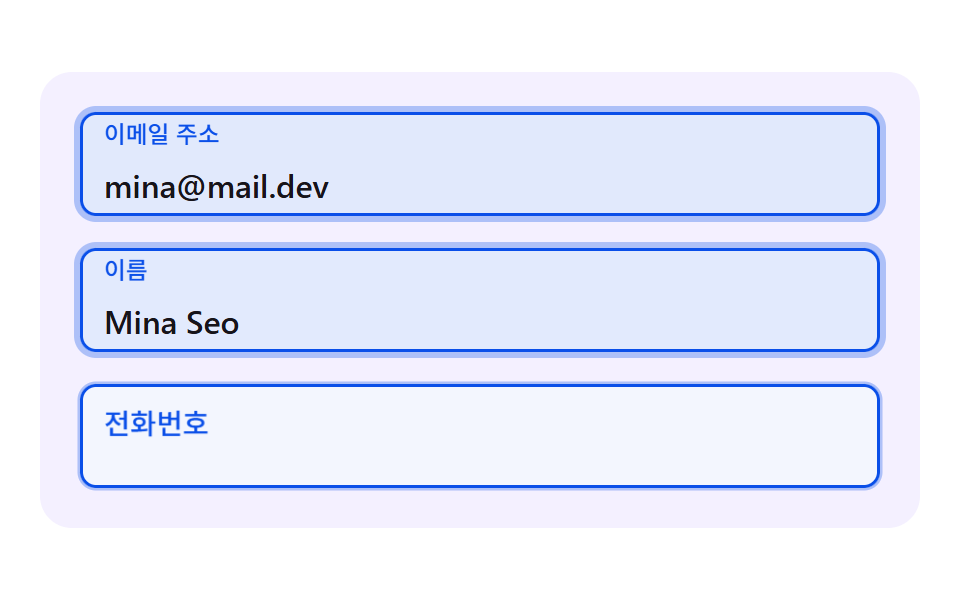 01 fl-spring-rise-label
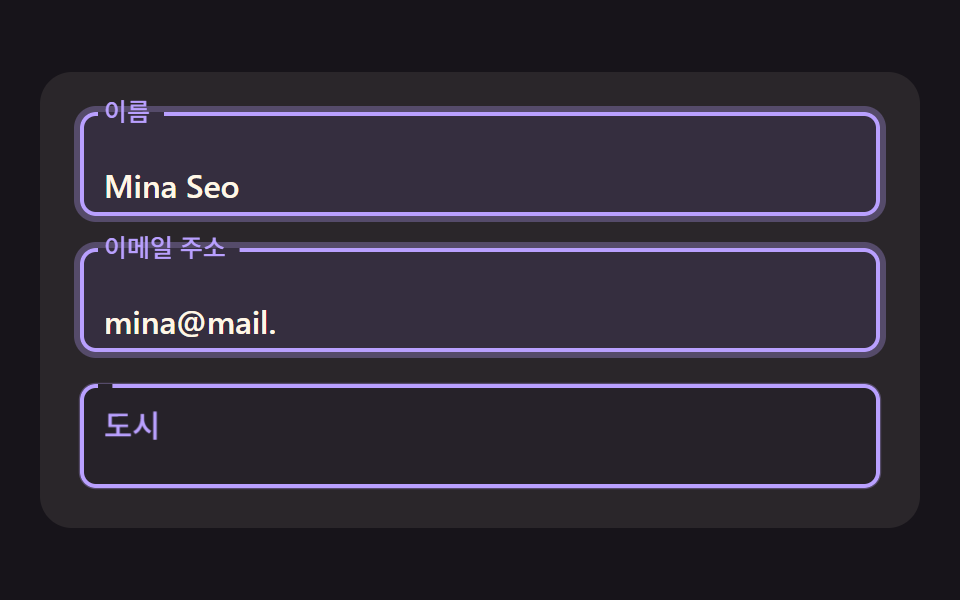 02 fl-outline-notch-gap
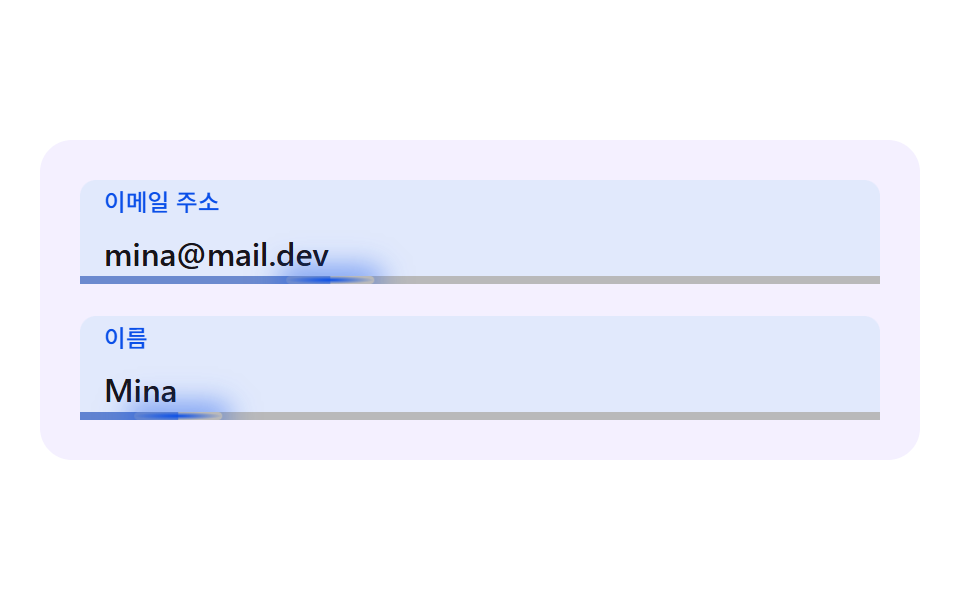 03 fl-inertia-caret-underline
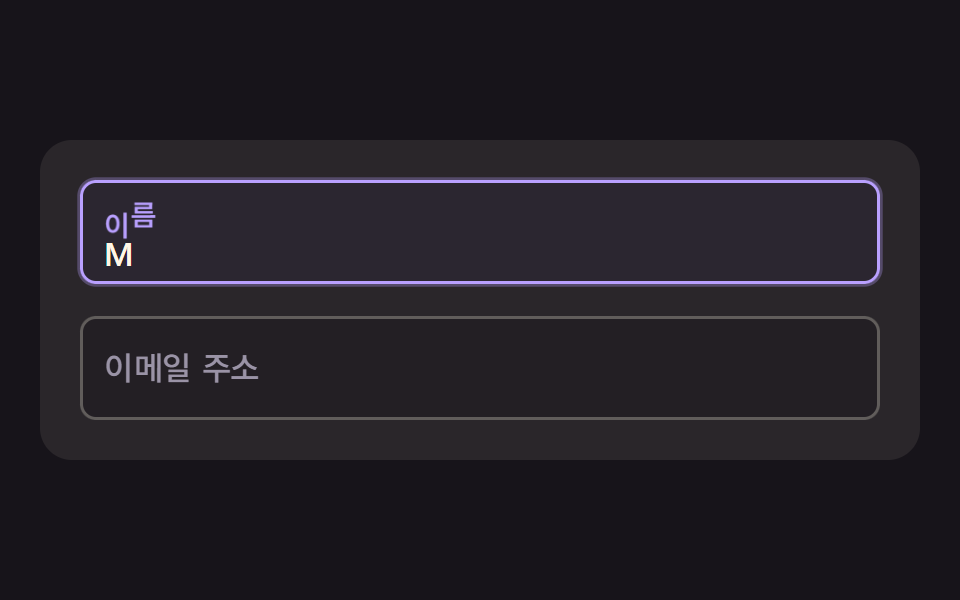 04 fl-char-wave-label
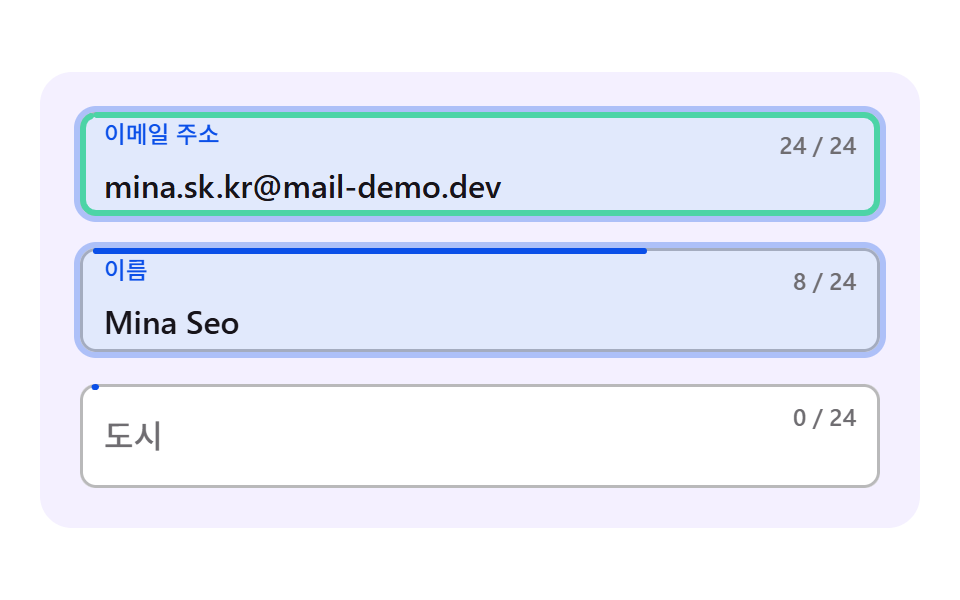 05 fl-fill-ring-progress
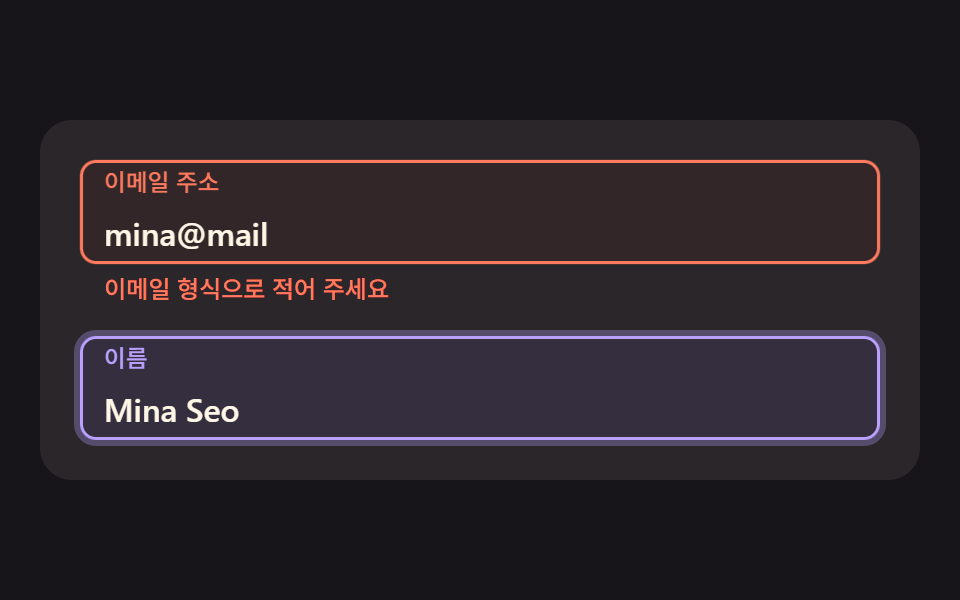 06 fl-error-damped-shake
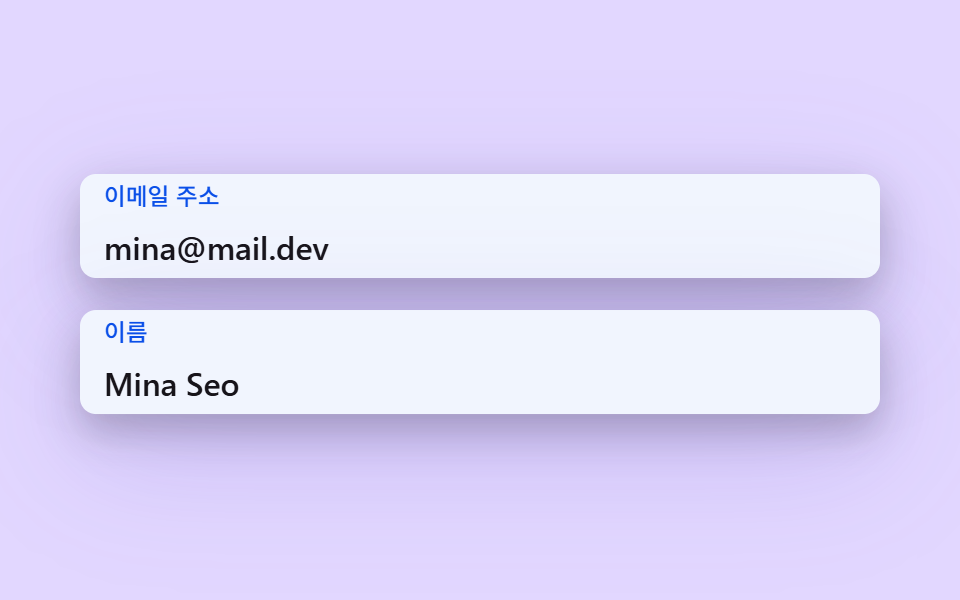 07 fl-shadow-elevation-lift
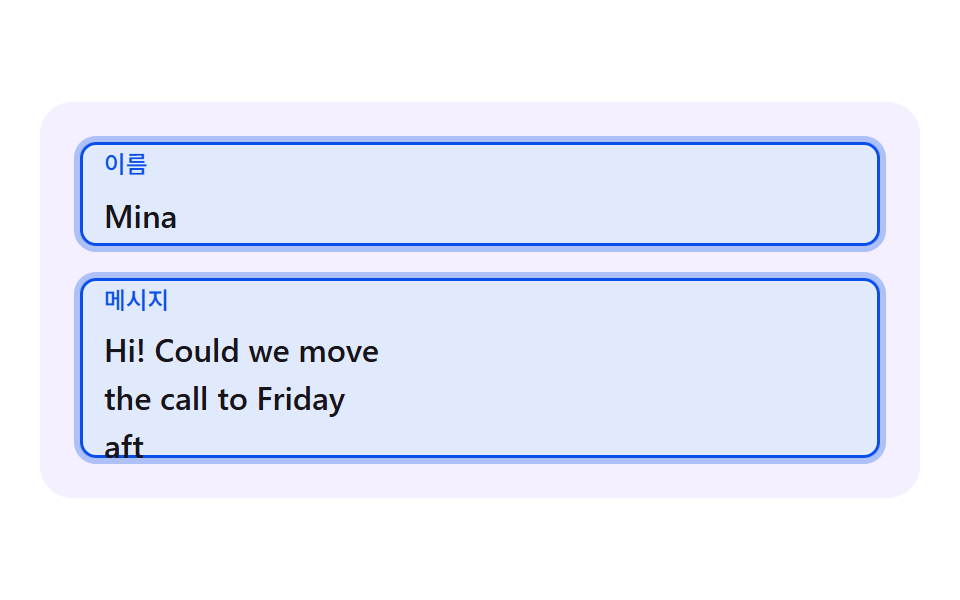 08 fl-textarea-grow-label
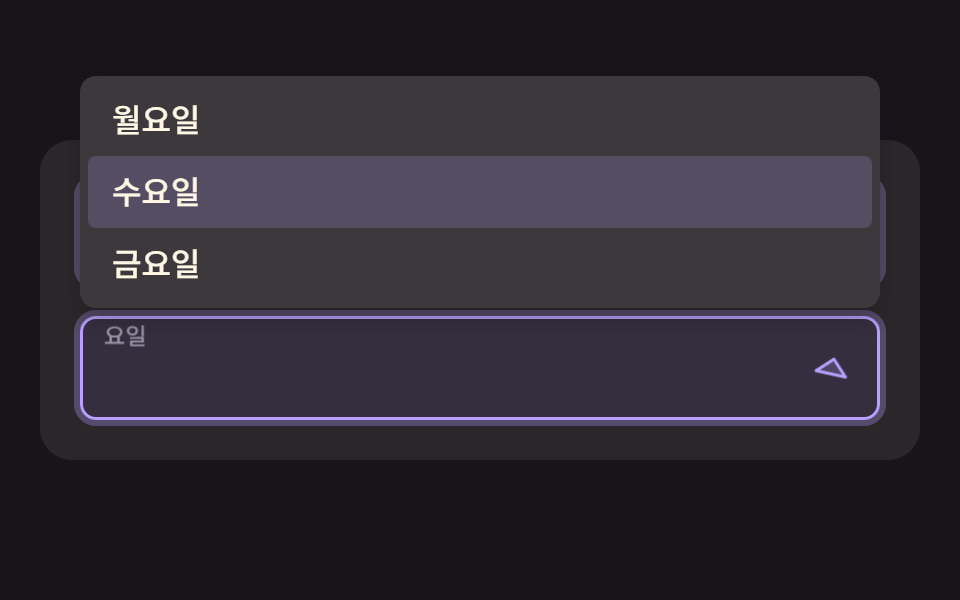 09 fl-select-chevron-float
자동 재생 · 눌러서 해당 항목으로 · 전부 한 zip
- 01 라벨이 감쇠 스프링으로 올라가며 살짝 넘쳤다 자리 잡는 라벨
- 02 윤곽선이 라벨 실측 폭만큼만 열리는 노치형 라벨
- 03 밑줄이 캐럿 위치를 관성으로 따라다니는 입력칸
- 04 라벨 글자가 해시 지연으로 한 글자씩 떠오르는 물결 라벨
- 05 입력 길이에 따라 윤곽선이 한 바퀴 채워지는 진행 링 칸
- 06 오류가 나면 감쇠 사인으로 흔들리고 라벨이 안내 색으로 바뀌는 칸
- 07 포커스하면 그림자 높이가 스프링으로 솟는 카드형 입력칸
- 08 줄 수에 따라 부드럽게 자라고 라벨은 칸 위쪽에 떠 있는 텍스트 영역
- 09 셰브런이 스프링으로 돌고 선택하면 라벨이 올라가는 셀렉트 칸
css floating label 9가지 — 스프링·측정·보간으로 라벨이 살아난다
장면 하나는 폭 최대 440px 의 카드에 입력칸 두세 개를 세로로 쌓은 모양이다. 칸 높이는 52px, 칸 사이는 16px, 카드 안쪽 여백은 20px 이라 칸이 셋인 장면은 카드 높이가 228px, 둘인 장면은 160px 이 된다. 480×300 무대에서는 카드가 가운데에 놓이고, 높이 250px 이하의 폰 화면에서는 3번째 칸(06 은 2번째 칸)을 숨긴다.
아홉 장면에는 CSS transition 도 @keyframes 도 하나도 없다. 라벨 이동·윤곽선 틈·그림자는 모두 requestAnimationFrame 안에서 계산한 값이고, 시연은 2초 주기의 계획표가 칸에 글자를 넣으며 첫 변화는 200ms 에 일어난다. 사람이 칸을 누르거나 Tab 으로 들어가 포커스가 오면 시연이 멈추고 진짜 포커스와 input 이벤트가 이어받는다.
순서는 라벨을 움직이는 힘이 어디서 나오느냐로 잡았다. 01·04·07·09 는 속도를 쥔 스프링이고, 02·03·05·08 은 목표를 향해 프레임마다 일정 비율씩 다가가는 지수 접근(approach)이다. 06 은 라벨이 지수 접근이고 흔들림만 진폭이 줄어드는 사인을 곧바로 계산한다. 라벨이 15px 올라가며 배율 0.74 로 줄어드는 기본 동작은 같고(02 만 26px·0.78), 그 위에 얹은 한 겹이 장면마다 다르다.
회원가입 폼이면 01 부터, 윤곽선 스타일 폼이면 02 부터, 검증 오류 피드백이 목적이면 06 부터 보면 된다. 입력칸 하나하나의 모양이 궁금하면 입력창 디자인 9가지 — 복붙하면 되는 폼 위젯을, 오류 문구를 언제 띄울지는 폼 유효성 검사 UI 9종 — 입력하는 순간 판정하는 오류 안내를 같이 열어 두면 좋다.
css floating label input 을 기법별 코드로 본다
코드는 장면마다 index.html 의 <script> 안에서 이어진 줄만 가져왔고 조각은 25줄 이하다. css floating label input 이라 부르는 움직임은 대부분 여기 실린 계산 위에 라벨 한 겹을 얹은 것이라, 값이 어디서 나오는지부터 읽으면 고칠 자리가 보인다.
01넘쳤다가 자리 잡는 감쇠 스프링 라벨
포커스가 가는 순간 라벨 위치를 스프링 방정식으로 적분하면 트윈 곡선 없이도 목표를 살짝 넘쳤다 돌아오는 움직임이 나온다. 라벨 높이와 크기가 같은 x 에서 나오므로 넘칠 때는 라벨이 더 높이 올라가며 더 작아지고, 이메일·이름 칸이 쌓이는 회원가입 폼에 맞다. 렌더 캡처에서 누적면적은 48.9%, 평균 강도는 76.0 이었고 23/23 프레임이 움직였다.
<main class="stage">
  <div class="fl is-demo" id="fl" data-demo="1">
    <div class="fl__field">
      <div class="fl__box" data-r="box">
        <input class="fl__input" id="f1" data-r="input" type="email" autocomplete="email">
        <label class="fl__label" for="f1" data-r="label">이메일 주소</label>
      </div>
    </div>
    <div class="fl__field">
      <div class="fl__box" data-r="box">
        <input class="fl__input" id="f2" data-r="input" type="text" autocomplete="name">
        <label class="fl__label" for="f2" data-r="label">이름</label>
      </div>
    </div>
    <div class="fl__field">
      <div class="fl__box" data-r="box">
        <input class="fl__input" id="f3" data-r="input" type="tel" autocomplete="tel">
        <label class="fl__label" for="f3" data-r="label">전화번호</label>
      </div>
    </div>
  </div>
</main>
@use "../../../../site/static/demo-tokens" as *;
// 핵심: 포커스 순간 라벨 위치를 감쇠 스프링으로 적분해 오버슛과 되돌림을 만든다. 라벨은 진짜 <label for> 이고 칸은 진짜 입력 요소다. 움직임 값은 JS 가 계산하고 CSS 는 모양만 맡는다.
@include stage($stage-paper);
$panel: mix($subject-lilac, $stage-paper, 16%);
$box-bg: $stage-paper;
$fg: $subject-ink;
$mute: mix($subject-ink, $stage-paper, 62%);
$line: mix($subject-ink, $stage-paper, 30%);
$accent: $subject-blue-deep;
$err: $error;
$menu-bg: $stage-paper;
$box-h: 52px;
.fl {
position: relative;
box-sizing: border-box;
width: min(100%, 440px);
padding: $sp-5;
display: flex;
flex-direction: column;
gap: $sp-4;
border-radius: $r-card;
background: $panel;
color: $fg;
font-size: 16px;
line-height: 24px;
font-weight: 500;
}
.fl__field { position: relative; }
.fl__box {
--ln: #{$line};
position: relative;
z-index: 1;
height: $box-h;
border-radius: $r-sm;
background: $box-bg;
box-shadow: inset 0 0 0 1.5px var(--ln), 0 0 0 calc(var(--p, 0) * 3px) rgba($accent, .3);
}
.fl__box[data-up] { --ln: #{$accent}; }
.fl__box::after {
content: "";
position: absolute;
inset: 0;
z-index: 0;
border-radius: inherit;
background: $accent;
opacity: calc(var(--p, 0) * .12);
pointer-events: none;
}
.fl__input {
position: relative;
z-index: 1;
box-sizing: border-box;
display: block;
width: 100%;
height: 100%;
margin: 0;
padding: $sp-6 $sp-3 $sp-1;
border: 0;
border-radius: inherit;
background: transparent;
color: $fg;
font-family: inherit;
font-size: 16px;
line-height: 24px;
font-weight: 500;
outline: none;
}
.fl__input:focus-visible { outline: 2px solid $accent; outline-offset: 2px; }
.fl__label {
position: absolute;
left: $sp-3;
top: 0;
z-index: 2;
line-height: $box-h;
font-size: 16px;
font-weight: 500;
color: $mute;
white-space: nowrap;
transform-origin: 0 50%;
pointer-events: none;
will-change: transform;
}
.fl__box[data-up] .fl__label { color: $accent; }
@media (max-height: 250px) {
.fl__field:nth-child(n + 3) { display: none; }
}
@media (prefers-reduced-motion: reduce) {
.fl__label, .fl__box { will-change: auto; }
}html, body {
margin: 0;
overflow: hidden;
}
.stage {
box-sizing: border-box;
min-height: 100vh;
display: grid;
place-items: center;
margin: 0;
background: #ffffff;
font-family: -apple-system, "Segoe UI", "Noto Sans KR", sans-serif;
padding: clamp(8px, 4vw, 24px);
}
.fl {
position: relative;
box-sizing: border-box;
width: min(100%, 440px);
padding: 20px;
display: flex;
flex-direction: column;
gap: 16px;
border-radius: 16px;
background: rgb(95.6078431373%, 94.0392156863%, 100%);
color: #17141a;
font-size: 16px;
line-height: 24px;
font-weight: 500;
}
.fl__field {
position: relative;
}
.fl__box {
--ln: rgb(72.7058823529%, 72.3529411765%, 73.0588235294%);
position: relative;
z-index: 1;
height: 52px;
border-radius: 8px;
background: #ffffff;
box-shadow: inset 0 0 0 1.5px var(--ln), 0 0 0 calc(var(--p, 0) * 3px) rgba(10, 79, 232, 0.3);
}
.fl__box[data-up] {
--ln: #0a4fe8;
}
.fl__box::after {
content: "";
position: absolute;
inset: 0;
z-index: 0;
border-radius: inherit;
background: #0a4fe8;
opacity: calc(var(--p, 0) * 0.12);
pointer-events: none;
}
.fl__input {
position: relative;
z-index: 1;
box-sizing: border-box;
display: block;
width: 100%;
height: 100%;
margin: 0;
padding: 24px 12px 4px;
border: 0;
border-radius: inherit;
background: transparent;
color: #17141a;
font-family: inherit;
font-size: 16px;
line-height: 24px;
font-weight: 500;
outline: none;
}
.fl__input:focus-visible {
outline: 2px solid #0a4fe8;
outline-offset: 2px;
}
.fl__label {
position: absolute;
left: 12px;
top: 0;
z-index: 2;
line-height: 52px;
font-size: 16px;
font-weight: 500;
color: rgb(43.5921568627%, 42.862745098%, 44.3215686275%);
white-space: nowrap;
transform-origin: 0 50%;
pointer-events: none;
will-change: transform;
}
.fl__box[data-up] .fl__label {
color: #0a4fe8;
}
@media (max-height: 250px) {
.fl__field:nth-child(n+3) {
display: none;
}
}
@media (prefers-reduced-motion: reduce) {
.fl__label, .fl__box {
will-change: auto;
}
}(function () {
const root = document.getElementById("fl");
const CLS = {};
const reduce = window.matchMedia("(prefers-reduced-motion: reduce)").matches;
let demo = !reduce;
let raf = 0;
let last = -1;
const offs = [];
function q(sel) {
return root.querySelector(sel);
}
function qa(sel) {
const list = Array.prototype.slice.call(root.querySelectorAll(sel));
return list;
}
function clamp(v, lo, hi) {
return Math.max(lo, Math.min(hi, v));
}
function on(el, type, fn) {
el.addEventListener(type, fn);
offs.push(function () {
el.removeEventListener(type, fn);
});
}
// 좌표 해시: 같은 입력이면 같은 값 0~1. 난수 함수를 쓰지 않고 사인의 소수부만 쓴다.
function hash(x) {
const s = Math.sin(x * 127.1 + 311.7) * 43758.5453;
return s - Math.floor(s);
}
// 지수 접근: 프레임당 비율 per 만큼 목표에 다가간다. f 는 60fps 기준 프레임 수(dt * 60)라 프레임률이 달라도 같은 속도다.
function approach(x, target, per, f) {
return x + (target - x) * (1 - Math.pow(1 - per, f));
}
// 스프링 한 칸: 가속도 = -k (x - 목표) - c v. 반암시적 오일러를 1/120초 이하 부분 스텝으로 쪼갠다.
    function springStep(s, target, k, c, dt) {
        let left = dt;
        while (left > 0) {
            const h = Math.min(left, 1 / 120);
            s.v += (-k * (s.x - target) - c * s.v) * h;
            s.x += s.v * h;
            left -= h;
        }
    }
// 값이 있으면 라벨은 올라가 있어야 한다. 브라우저 자동완성이 값을 채우면 input 이벤트가 없을 수 있어 :autofill 도 함께 본다.
function isFilled(el) {
if (el.value !== "") return true;
try {
return el.matches(":-webkit-autofill");
} catch (err) {
return false;
}
}
let leaveHook = null;
function stopDemo() {
if (!demo) return;
demo = false;
root.removeAttribute("data-demo");
root.classList.remove("is-demo");
resetFields();
}
function frame(ts) {
const dt = last < 0 ? 0.016 : Math.min(0.05, (ts - last) / 1000);
last = ts;
if (demo) script(ts);
step(dt, ts);
render();
raf = requestAnimationFrame(frame);
}
const ro = new ResizeObserver(function () {
relayout();
});
ro.observe(root);
if (document.fonts) {
document.fonts.ready.then(function () {
relayout();
});
}
// 시연 계획: 칸마다 포커스 구간(a~b), 타이핑 시작(s)·글자당 ms(rate)·글. 2초 주기로 되풀이하고 주기 첫머리엔 모두 비운다.
function runPlan(ts) {
const t = ts % 2000;
let changed = false;
for (let i = 0; i < PLAN.length; i += 1) {
const p = PLAN[i];
const f = fields[i];
const isOn = t >= p.a && t < p.b;
const n = t < p.s ? 0 : Math.min(p.text.length, Math.floor((t - p.s) / p.rate) + 1);
const v = p.text.slice(0, n);
if (f.input.value !== v) {
f.input.value = v;
changed = true;
}
if (f.focus !== isOn) {
f.focus = isOn;
changed = true;
if (!isOn && leaveHook) leaveHook(i);
}
}
if (changed) retarget();
}
function resetFields() {
for (let i = 0; i < fields.length; i += 1) {
fields[i].input.value = "";
fields[i].focus = false;
}
retarget();
}
function wire() {
fields.forEach(function (f, i) {
on(f.input, "focus", function () {
stopDemo();
f.focus = true;
retarget();
});
on(f.input, "blur", function () {
f.focus = false;
if (leaveHook) leaveHook(i);
retarget();
});
on(f.input, "input", function () {
retarget();
});
});
}
// 기법: 라벨 위치를 스프링 방정식으로 적분한다. 트윈 곡선이 없어도 오버슛과 되돌림이 생긴다.
const STIFFNESS = 170;
const DAMPING = 14;
const RISE_PX = 15;
const LABEL_SCALE = 0.74;
const fields = qa("[data-r=box]").map(function (box) {
return {
box: box,
input: box.querySelector("input"),
label: box.querySelector("label"),
focus: false, up: false, sp: { x: 0, v: 0 }
};
});
const PLAN = [
{ a: 200, b: 900, s: 380, rate: 55, text: "[email protected]" },
{ a: 900, b: 1500, s: 1000, rate: 70, text: "Mina Seo" },
{ a: 1500, b: 1950, s: 1600, rate: 60, text: "010 2222" }
];
function retarget() {
fields.forEach(function (f) {
f.up = f.focus || isFilled(f.input);
if (f.up) f.box.setAttribute("data-up", "");
else f.box.removeAttribute("data-up");
if (reduce) {
f.sp.x = f.up ? -RISE_PX : 0;
f.sp.v = 0;
}
});
if (reduce) render();
}
function relayout() {
retarget();
}
function script(ts) {
runPlan(ts);
}
function step(dt, ts) {
fields.forEach(function (f) {
springStep(f.sp, f.up ? -RISE_PX : 0, STIFFNESS, DAMPING, dt);
});
}
function render() {
fields.forEach(function (f) {
const y = f.sp.x;
const r = y / -RISE_PX;
const s = 1 - (1 - LABEL_SCALE) * r;
f.label.style.transform = "translate3d(0," + y.toFixed(2) + "px,0) scale(" + s.toFixed(3) + ")";
f.box.style.setProperty("--p", clamp(r, 0, 1).toFixed(3));
});
}
wire();
relayout();
if (reduce) {
render();
} else {
raf = requestAnimationFrame(frame);
}
})();// SpringRiseLabel - vanilla 판(01-fl-spring-rise-label) 의 React 포트. 같은 계산을 useEffect 안에서 돌린다.
import { useEffect, useRef } from "react";
import styles from "./SpringRiseLabel.module.scss";
type Spring = { x: number; v: number };
type Plan = { a: number; b: number; s: number; rate: number; text: string };
type Base = { input: HTMLInputElement | HTMLTextAreaElement; focus: boolean; up: boolean };
type F = Base & { box: HTMLElement; label: HTMLElement; sp: Spring };
export default function SpringRiseLabel() {
const rootRef = useRef<HTMLDivElement | null>(null);
useEffect(() => {
const rootEl = rootRef.current;
if (!rootEl) return;
const root: HTMLElement = rootEl;
const CLS = { };
const reduce = window.matchMedia("(prefers-reduced-motion: reduce)").matches;
let demo = !reduce;
let raf: number = 0;
let last: number = -1;
const offs: Array<() => void> = [];
function q(sel: string): HTMLElement {
return root.querySelector(sel) as HTMLElement;
}
function qa(sel: string): HTMLElement[] {
const list: HTMLElement[] = Array.prototype.slice.call(root.querySelectorAll(sel));
return list;
}
function clamp(v: number, lo: number, hi: number): number {
return Math.max(lo, Math.min(hi, v));
}
function on(el: EventTarget, type: string, fn: (e: any) => void): void {
el.addEventListener(type, fn);
offs.push(function (): void {
el.removeEventListener(type, fn);
});
}
// 좌표 해시: 같은 입력이면 같은 값 0~1. 난수 함수를 쓰지 않고 사인의 소수부만 쓴다.
function hash(x: number): number {
const s = Math.sin(x * 127.1 + 311.7) * 43758.5453;
return s - Math.floor(s);
}
// 지수 접근: 프레임당 비율 per 만큼 목표에 다가간다. f 는 60fps 기준 프레임 수(dt * 60)라 프레임률이 달라도 같은 속도다.
function approach(x: number, target: number, per: number, f: number): number {
return x + (target - x) * (1 - Math.pow(1 - per, f));
}
// 스프링 한 칸: 가속도 = -k (x - 목표) - c v. 반암시적 오일러를 1/120초 이하 부분 스텝으로 쪼갠다.
function springStep(s: Spring, target: number, k: number, c: number, dt: number): void {
let left = dt;
while (left > 0) {
const h = Math.min(left, 1 / 120);
s.v += (-k * (s.x - target) - c * s.v) * h;
s.x += s.v * h;
left -= h;
}
}
// 값이 있으면 라벨은 올라가 있어야 한다. 브라우저 자동완성이 값을 채우면 input 이벤트가 없을 수 있어 :autofill 도 함께 본다.
function isFilled(el: HTMLInputElement | HTMLTextAreaElement): boolean {
if (el.value !== "") return true;
try {
return el.matches(":-webkit-autofill");
} catch (err) {
return false;
}
}
let leaveHook: ((i: number) => void) | null = null;
function stopDemo(): void {
if (!demo) return;
demo = false;
root.removeAttribute("data-demo");
root.classList.remove("is-demo");
resetFields();
}
function frame(ts: number): void {
const dt = last < 0 ? 0.016 : Math.min(0.05, (ts - last) / 1000);
last = ts;
if (demo) script(ts);
step(dt, ts);
render();
raf = requestAnimationFrame(frame);
}
const ro = new ResizeObserver(function (): void {
relayout();
});
ro.observe(root);
if (document.fonts) {
document.fonts.ready.then(function (): void {
relayout();
});
}
// 시연 계획: 칸마다 포커스 구간(a~b), 타이핑 시작(s)·글자당 ms(rate)·글. 2초 주기로 되풀이하고 주기 첫머리엔 모두 비운다.
function runPlan(ts: number): void {
const t = ts % 2000;
let changed = false;
for (let i = 0; i < PLAN.length; i += 1) {
const p = PLAN[i];
const f = fields[i];
const isOn = t >= p.a && t < p.b;
const n = t < p.s ? 0 : Math.min(p.text.length, Math.floor((t - p.s) / p.rate) + 1);
const v = p.text.slice(0, n);
if (f.input.value !== v) {
f.input.value = v;
changed = true;
}
if (f.focus !== isOn) {
f.focus = isOn;
changed = true;
if (!isOn && leaveHook) leaveHook(i);
}
}
if (changed) retarget();
}
function resetFields(): void {
for (let i = 0; i < fields.length; i += 1) {
fields[i].input.value = "";
fields[i].focus = false;
}
retarget();
}
function wire(): void {
fields.forEach(function (f: F, i: number): void {
on(f.input, "focus", function (): void {
stopDemo();
f.focus = true;
retarget();
});
on(f.input, "blur", function (): void {
f.focus = false;
if (leaveHook) leaveHook(i);
retarget();
});
on(f.input, "input", function (): void {
retarget();
});
});
}
// 기법: 라벨 위치를 스프링 방정식으로 적분한다. 트윈 곡선이 없어도 오버슛과 되돌림이 생긴다.
const STIFFNESS = 170;
const DAMPING = 14;
const RISE_PX = 15;
const LABEL_SCALE = 0.74;
const fields: F[] = qa("[data-r=box]").map(function (box: HTMLElement): F {
return {
box: box,
input: box.querySelector("input") as HTMLInputElement,
label: box.querySelector("label") as HTMLElement,
focus: false, up: false, sp: { x: 0, v: 0 }
};
});
const PLAN: Plan[] = [
{ a: 200, b: 900, s: 380, rate: 55, text: "[email protected]" },
{ a: 900, b: 1500, s: 1000, rate: 70, text: "Mina Seo" },
{ a: 1500, b: 1950, s: 1600, rate: 60, text: "010 2222" }
];
function retarget(): void {
fields.forEach(function (f: F): void {
f.up = f.focus || isFilled(f.input);
if (f.up) f.box.setAttribute("data-up", "");
else f.box.removeAttribute("data-up");
if (reduce) {
f.sp.x = f.up ? -RISE_PX : 0;
f.sp.v = 0;
}
});
if (reduce) render();
}
function relayout(): void {
retarget();
}
function script(ts: number): void {
runPlan(ts);
}
function step(dt: number, ts: number): void {
fields.forEach(function (f: F): void {
springStep(f.sp, f.up ? -RISE_PX : 0, STIFFNESS, DAMPING, dt);
});
}
function render(): void {
fields.forEach(function (f: F): void {
const y = f.sp.x;
const r = y / -RISE_PX;
const s = 1 - (1 - LABEL_SCALE) * r;
f.label.style.transform = "translate3d(0," + y.toFixed(2) + "px,0) scale(" + s.toFixed(3) + ")";
f.box.style.setProperty("--p", clamp(r, 0, 1).toFixed(3));
});
}
wire();
relayout();
if (reduce) {
render();
} else {
raf = requestAnimationFrame(frame);
}
return () => {
cancelAnimationFrame(raf);
offs.forEach((f) => f());
ro.disconnect();
};
}, []);
return (
<main className={styles["stage"]}>
<div ref={rootRef} className={styles["fl"] + " is-demo"} data-demo="1">
<div className={styles["fl__field"]}>
<div className={styles["fl__box"]} data-r="box">
<input className={styles["fl__input"]} id="f1" data-r="input" type="email" autoComplete="email" />
<label className={styles["fl__label"]} htmlFor="f1" data-r="label">이메일 주소</label>
</div>
</div>
<div className={styles["fl__field"]}>
<div className={styles["fl__box"]} data-r="box">
<input className={styles["fl__input"]} id="f2" data-r="input" type="text" autoComplete="name" />
<label className={styles["fl__label"]} htmlFor="f2" data-r="label">이름</label>
</div>
</div>
<div className={styles["fl__field"]}>
<div className={styles["fl__box"]} data-r="box">
<input className={styles["fl__input"]} id="f3" data-r="input" type="tel" autoComplete="tel" />
<label className={styles["fl__label"]} htmlFor="f3" data-r="label">전화번호</label>
</div>
</div>
</div>
</main>
);
}01 · 라벨이 감쇠 스프링으로 올라가며 살짝 넘쳤다 자리 잡는 라벨 — 측정 누적면적 48.867% · 움직인 프레임 23/23GODRICH 원작 · zip 에 SCSS·React 포함 · 비밀번호 보기
function springStep(s, target, k, c, dt) {
let left = dt;
while (left > 0) {
const h = Math.min(left, 1 / 120);
s.v += (-k * (s.x - target) - c * s.v) * h;
s.x += s.v * h;
left -= h;
}
}
02윤곽선이 라벨 폭만큼만 열리는 노치 라벨
라벨을 getBoundingClientRect 로 재서 윤곽선 윗변의 틈을 그 폭에 맞추고 clip-path 로 잘라 내므로 글자가 길든 짧든 틈이 딱 맞는다. 틈 목표는 라벨 실측 폭에 0.78 을 곱하고 양쪽 여백 5px 씩을 더한 값이며, 머티리얼 느낌의 설정·프로필 폼에 어울린다. 누적면적 49.0%, 평균 강도 83.6 이고 프레임은 23/23 이 움직였다.
<main class="stage">
  <div class="fl is-demo" id="fl" data-demo="1">
    <div class="fl__field">
      <div class="fl__box" data-r="box">
        <i class="fl__outline" data-r="outline" aria-hidden="true"></i>
        <input class="fl__input" id="f1" data-r="input" type="text" autocomplete="name">
        <label class="fl__label" for="f1" data-r="label">이름</label>
      </div>
    </div>
    <div class="fl__field">
      <div class="fl__box" data-r="box">
        <i class="fl__outline" data-r="outline" aria-hidden="true"></i>
        <input class="fl__input" id="f2" data-r="input" type="email" autocomplete="email">
        <label class="fl__label" for="f2" data-r="label">이메일 주소</label>
      </div>
    </div>
    <div class="fl__field">
      <div class="fl__box" data-r="box">
        <i class="fl__outline" data-r="outline" aria-hidden="true"></i>
        <input class="fl__input" id="f3" data-r="input" type="text" autocomplete="off">
        <label class="fl__label" for="f3" data-r="label">도시</label>
      </div>
    </div>
  </div>
</main>@use "../../../../site/static/demo-tokens" as *;
// 핵심: 라벨의 실측 폭만큼만 윤곽선 윗변의 틈을 연다. 라벨은 진짜 <label for> 이고 칸은 진짜 입력 요소다. 움직임 값은 JS 가 계산하고 CSS 는 모양만 맡는다.
@include stage($stage-ink);
$panel: mix($subject-cream, $stage-ink, 8%);
$box-bg: mix($subject-cream, $stage-ink, 5%);
$fg: $subject-cream;
$mute: $tick-mute;
$line: mix($subject-cream, $stage-ink, 32%);
$accent: $subject-lilac;
$err: $tick-down;
$menu-bg: mix($subject-cream, $stage-ink, 16%);
$box-h: 52px;
.fl {
position: relative;
box-sizing: border-box;
width: min(100%, 440px);
padding: $sp-5;
display: flex;
flex-direction: column;
gap: $sp-4;
border-radius: $r-card;
background: $panel;
color: $fg;
font-size: 16px;
line-height: 24px;
font-weight: 500;
}
.fl__field { position: relative; }
.fl__box {
--ln: #{$line};
position: relative;
z-index: 1;
height: $box-h;
border-radius: $r-sm;
background: $box-bg;
box-shadow: inset 0 0 0 1.5px var(--ln), 0 0 0 calc(var(--p, 0) * 3px) rgba($accent, .3);
}
.fl__box[data-up] { --ln: #{$accent}; }
.fl__box::after {
content: "";
position: absolute;
inset: 0;
z-index: 0;
border-radius: inherit;
background: $accent;
opacity: calc(var(--p, 0) * .12);
pointer-events: none;
}
.fl__input {
position: relative;
z-index: 1;
box-sizing: border-box;
display: block;
width: 100%;
height: 100%;
margin: 0;
padding: $sp-6 $sp-3 $sp-1;
border: 0;
border-radius: inherit;
background: transparent;
color: $fg;
font-family: inherit;
font-size: 16px;
line-height: 24px;
font-weight: 500;
outline: none;
}
.fl__input:focus-visible { outline: 2px solid $accent; outline-offset: 2px; }
.fl__label {
position: absolute;
left: $sp-3;
top: 0;
z-index: 2;
line-height: $box-h;
font-size: 16px;
font-weight: 500;
color: $mute;
white-space: nowrap;
transform-origin: 0 50%;
pointer-events: none;
will-change: transform;
}
.fl__box[data-up] .fl__label { color: $accent; }
.fl__box { box-shadow: 0 0 0 calc(var(--p, 0) * 3px) rgba($accent, .3); }
.fl__outline {
position: absolute;
inset: 0;
z-index: 2;
box-sizing: border-box;
border: 2px solid var(--ln);
border-radius: $r-sm;
pointer-events: none;
}
.fl__label { z-index: 3; }
@media (max-height: 250px) {
.fl__field:nth-child(n + 3) { display: none; }
}
@media (prefers-reduced-motion: reduce) {
.fl__label, .fl__box { will-change: auto; }
}html, body {
margin: 0;
overflow: hidden;
}
.stage {
box-sizing: border-box;
min-height: 100vh;
display: grid;
place-items: center;
margin: 0;
background: #17141a;
font-family: -apple-system, "Segoe UI", "Noto Sans KR", sans-serif;
padding: clamp(8px, 4vw, 24px);
}
.fl {
position: relative;
box-sizing: border-box;
width: min(100%, 440px);
padding: 20px;
display: flex;
flex-direction: column;
gap: 16px;
border-radius: 16px;
background: rgb(16.2980392157%, 14.9647058824%, 16.5960784314%);
color: #fff7e6;
font-size: 16px;
line-height: 24px;
font-weight: 500;
}
.fl__field {
position: relative;
}
.fl__box {
--ln: rgb(38.1333333333%, 36.3294117647%, 35.7960784314%);
position: relative;
z-index: 1;
height: 52px;
border-radius: 8px;
background: rgb(13.568627451%, 12.2941176471%, 14.1960784314%);
box-shadow: inset 0 0 0 1.5px var(--ln), 0 0 0 calc(var(--p, 0) * 3px) rgba(185, 160, 255, 0.3);
}
.fl__box[data-up] {
--ln: #b9a0ff;
}
.fl__box::after {
content: "";
position: absolute;
inset: 0;
z-index: 0;
border-radius: inherit;
background: #b9a0ff;
opacity: calc(var(--p, 0) * 0.12);
pointer-events: none;
}
.fl__input {
position: relative;
z-index: 1;
box-sizing: border-box;
display: block;
width: 100%;
height: 100%;
margin: 0;
padding: 24px 12px 4px;
border: 0;
border-radius: inherit;
background: transparent;
color: #fff7e6;
font-family: inherit;
font-size: 16px;
line-height: 24px;
font-weight: 500;
outline: none;
}
.fl__input:focus-visible {
outline: 2px solid #b9a0ff;
outline-offset: 2px;
}
.fl__label {
position: absolute;
left: 12px;
top: 0;
z-index: 2;
line-height: 52px;
font-size: 16px;
font-weight: 500;
color: #9a93a6;
white-space: nowrap;
transform-origin: 0 50%;
pointer-events: none;
will-change: transform;
}
.fl__box[data-up] .fl__label {
color: #b9a0ff;
}
.fl__box {
box-shadow: 0 0 0 calc(var(--p, 0) * 3px) rgba(185, 160, 255, 0.3);
}
.fl__outline {
position: absolute;
inset: 0;
z-index: 2;
box-sizing: border-box;
border: 2px solid var(--ln);
border-radius: 8px;
pointer-events: none;
}
.fl__label {
z-index: 3;
}
@media (max-height: 250px) {
.fl__field:nth-child(n+3) {
display: none;
}
}
@media (prefers-reduced-motion: reduce) {
.fl__label, .fl__box {
will-change: auto;
}
}(function () {
const root = document.getElementById("fl");
const CLS = {};
const reduce = window.matchMedia("(prefers-reduced-motion: reduce)").matches;
let demo = !reduce;
let raf = 0;
let last = -1;
const offs = [];
function q(sel) {
return root.querySelector(sel);
}
function qa(sel) {
const list = Array.prototype.slice.call(root.querySelectorAll(sel));
return list;
}
function clamp(v, lo, hi) {
return Math.max(lo, Math.min(hi, v));
}
function on(el, type, fn) {
el.addEventListener(type, fn);
offs.push(function () {
el.removeEventListener(type, fn);
});
}
// 좌표 해시: 같은 입력이면 같은 값 0~1. 난수 함수를 쓰지 않고 사인의 소수부만 쓴다.
function hash(x) {
const s = Math.sin(x * 127.1 + 311.7) * 43758.5453;
return s - Math.floor(s);
}
// 지수 접근: 프레임당 비율 per 만큼 목표에 다가간다. f 는 60fps 기준 프레임 수(dt * 60)라 프레임률이 달라도 같은 속도다.
function approach(x, target, per, f) {
return x + (target - x) * (1 - Math.pow(1 - per, f));
}
// 스프링 한 칸: 가속도 = -k (x - 목표) - c v. 반암시적 오일러를 1/120초 이하 부분 스텝으로 쪼갠다.
function springStep(s, target, k, c, dt) {
let left = dt;
while (left > 0) {
const h = Math.min(left, 1 / 120);
s.v += (-k * (s.x - target) - c * s.v) * h;
s.x += s.v * h;
left -= h;
}
}
// 값이 있으면 라벨은 올라가 있어야 한다. 브라우저 자동완성이 값을 채우면 input 이벤트가 없을 수 있어 :autofill 도 함께 본다.
function isFilled(el) {
if (el.value !== "") return true;
try {
return el.matches(":-webkit-autofill");
} catch (err) {
return false;
}
}
let leaveHook = null;
function stopDemo() {
if (!demo) return;
demo = false;
root.removeAttribute("data-demo");
root.classList.remove("is-demo");
resetFields();
}
function frame(ts) {
const dt = last < 0 ? 0.016 : Math.min(0.05, (ts - last) / 1000);
last = ts;
if (demo) script(ts);
step(dt, ts);
render();
raf = requestAnimationFrame(frame);
}
const ro = new ResizeObserver(function () {
relayout();
});
ro.observe(root);
if (document.fonts) {
document.fonts.ready.then(function () {
relayout();
});
}
// 시연 계획: 칸마다 포커스 구간(a~b), 타이핑 시작(s)·글자당 ms(rate)·글. 2초 주기로 되풀이하고 주기 첫머리엔 모두 비운다.
function runPlan(ts) {
const t = ts % 2000;
let changed = false;
for (let i = 0; i < PLAN.length; i += 1) {
const p = PLAN[i];
const f = fields[i];
const isOn = t >= p.a && t < p.b;
const n = t < p.s ? 0 : Math.min(p.text.length, Math.floor((t - p.s) / p.rate) + 1);
const v = p.text.slice(0, n);
if (f.input.value !== v) {
f.input.value = v;
changed = true;
}
if (f.focus !== isOn) {
f.focus = isOn;
changed = true;
if (!isOn && leaveHook) leaveHook(i);
}
}
if (changed) retarget();
}
function resetFields() {
for (let i = 0; i < fields.length; i += 1) {
fields[i].input.value = "";
fields[i].focus = false;
}
retarget();
}
function wire() {
fields.forEach(function (f, i) {
on(f.input, "focus", function () {
stopDemo();
f.focus = true;
retarget();
});
on(f.input, "blur", function () {
f.focus = false;
if (leaveHook) leaveHook(i);
retarget();
});
on(f.input, "input", function () {
retarget();
});
});
}
// 기법: 라벨의 실측 폭을 getBoundingClientRect 로 재서 윗변 틈을 그 폭만큼만 보간해서 연다.
const NOTCH_PAD = 5;
const GAP_LERP = 0.22;
const RADIUS = 8;
const BORDER_W = 2;
const LABEL_X = 14;
const LABEL_SCALE = 0.78;
const LABEL_LERP = 0.2;
const RISE_PX = 26;
const fields = qa("[data-r=box]").map(function (box) {
const outline = box.querySelector("[data-r=outline]");
outline.style.borderRadius = RADIUS + "px";
outline.style.borderWidth = BORDER_W + "px";
return {
box: box,
input: box.querySelector("input"),
label: box.querySelector("label"),
outline: outline,
focus: false, up: false, p: 0, gap: 0, natW: 60
};
});
const PLAN = [
{ a: 200, b: 950, s: 420, rate: 60, text: "Mina Seo" },
{ a: 950, b: 1650, s: 1100, rate: 60, text: "[email protected]" },
{ a: 1650, b: 1980, s: 1750, rate: 60, text: "seoul" }
];
// 라벨 자연 폭 = 지금 그려진 폭 ÷ 지금 배율. 폰트가 늦게 들어오거나 창이 바뀌면 다시 잰다.
function measure() {
fields.forEach(function (f) {
const s = 1 - (1 - LABEL_SCALE) * f.p;
f.natW = f.label.getBoundingClientRect().width / s;
});
}
function targetGap(f) {
return f.up ? f.natW * LABEL_SCALE + 2 * NOTCH_PAD : 0;
}
function retarget() {
fields.forEach(function (f) {
f.up = f.focus || isFilled(f.input);
if (f.up) f.box.setAttribute("data-up", "");
else f.box.removeAttribute("data-up");
if (reduce) {
f.p = f.up ? 1 : 0;
f.gap = targetGap(f);
}
});
if (reduce) render();
}
function relayout() {
measure();
retarget();
}
function script(ts) {
runPlan(ts);
}
function step(dt, ts) {
const fr = dt * 60;
fields.forEach(function (f) {
f.p = approach(f.p, f.up ? 1 : 0, LABEL_LERP, fr);
f.gap = approach(f.gap, targetGap(f), GAP_LERP, fr);
});
}
    function render() {
        fields.forEach(function (f) {
            const s = 1 - (1 - LABEL_SCALE) * f.p;
            f.label.style.transform = "translate3d(0," + (-RISE_PX * f.p).toFixed(2) + "px,0) scale(" + s.toFixed(3) + ")";
            f.box.style.setProperty("--p", f.p.toFixed(3));
            const x0 = LABEL_X - NOTCH_PAD;
            const x1 = x0 + f.gap;
            const cut = f.gap > 0.5 ? "polygon(0 0," + x0.toFixed(1) + "px 0," + x0.toFixed(1) + "px " + (BORDER_W + 1) + "px," + x1.toFixed(1) + "px " + (BORDER_W + 1) + "px," + x1.toFixed(1) + "px 0,100% 0,100% 100%,0 100%)" : "none";
            f.outline.style.clipPath = cut;
        });
    }
wire();
relayout();
if (reduce) {
render();
} else {
raf = requestAnimationFrame(frame);
}
})();// OutlineNotchGap - vanilla 판(02-fl-outline-notch-gap) 의 React 포트. 같은 계산을 useEffect 안에서 돌린다.
import { useEffect, useRef } from "react";
import styles from "./OutlineNotchGap.module.scss";
type Spring = { x: number; v: number };
type Plan = { a: number; b: number; s: number; rate: number; text: string };
type Base = { input: HTMLInputElement | HTMLTextAreaElement; focus: boolean; up: boolean };
type F = Base & { box: HTMLElement; label: HTMLElement; outline: HTMLElement; p: number; gap: number; natW: number };
export default function OutlineNotchGap() {
const rootRef = useRef<HTMLDivElement | null>(null);
useEffect(() => {
const rootEl = rootRef.current;
if (!rootEl) return;
const root: HTMLElement = rootEl;
const CLS = { };
const reduce = window.matchMedia("(prefers-reduced-motion: reduce)").matches;
let demo = !reduce;
let raf: number = 0;
let last: number = -1;
const offs: Array<() => void> = [];
function q(sel: string): HTMLElement {
return root.querySelector(sel) as HTMLElement;
}
function qa(sel: string): HTMLElement[] {
const list: HTMLElement[] = Array.prototype.slice.call(root.querySelectorAll(sel));
return list;
}
function clamp(v: number, lo: number, hi: number): number {
return Math.max(lo, Math.min(hi, v));
}
function on(el: EventTarget, type: string, fn: (e: any) => void): void {
el.addEventListener(type, fn);
offs.push(function (): void {
el.removeEventListener(type, fn);
});
}
// 좌표 해시: 같은 입력이면 같은 값 0~1. 난수 함수를 쓰지 않고 사인의 소수부만 쓴다.
function hash(x: number): number {
const s = Math.sin(x * 127.1 + 311.7) * 43758.5453;
return s - Math.floor(s);
}
// 지수 접근: 프레임당 비율 per 만큼 목표에 다가간다. f 는 60fps 기준 프레임 수(dt * 60)라 프레임률이 달라도 같은 속도다.
function approach(x: number, target: number, per: number, f: number): number {
return x + (target - x) * (1 - Math.pow(1 - per, f));
}
// 스프링 한 칸: 가속도 = -k (x - 목표) - c v. 반암시적 오일러를 1/120초 이하 부분 스텝으로 쪼갠다.
function springStep(s: Spring, target: number, k: number, c: number, dt: number): void {
let left = dt;
while (left > 0) {
const h = Math.min(left, 1 / 120);
s.v += (-k * (s.x - target) - c * s.v) * h;
s.x += s.v * h;
left -= h;
}
}
// 값이 있으면 라벨은 올라가 있어야 한다. 브라우저 자동완성이 값을 채우면 input 이벤트가 없을 수 있어 :autofill 도 함께 본다.
function isFilled(el: HTMLInputElement | HTMLTextAreaElement): boolean {
if (el.value !== "") return true;
try {
return el.matches(":-webkit-autofill");
} catch (err) {
return false;
}
}
let leaveHook: ((i: number) => void) | null = null;
function stopDemo(): void {
if (!demo) return;
demo = false;
root.removeAttribute("data-demo");
root.classList.remove("is-demo");
resetFields();
}
function frame(ts: number): void {
const dt = last < 0 ? 0.016 : Math.min(0.05, (ts - last) / 1000);
last = ts;
if (demo) script(ts);
step(dt, ts);
render();
raf = requestAnimationFrame(frame);
}
const ro = new ResizeObserver(function (): void {
relayout();
});
ro.observe(root);
if (document.fonts) {
document.fonts.ready.then(function (): void {
relayout();
});
}
// 시연 계획: 칸마다 포커스 구간(a~b), 타이핑 시작(s)·글자당 ms(rate)·글. 2초 주기로 되풀이하고 주기 첫머리엔 모두 비운다.
function runPlan(ts: number): void {
const t = ts % 2000;
let changed = false;
for (let i = 0; i < PLAN.length; i += 1) {
const p = PLAN[i];
const f = fields[i];
const isOn = t >= p.a && t < p.b;
const n = t < p.s ? 0 : Math.min(p.text.length, Math.floor((t - p.s) / p.rate) + 1);
const v = p.text.slice(0, n);
if (f.input.value !== v) {
f.input.value = v;
changed = true;
}
if (f.focus !== isOn) {
f.focus = isOn;
changed = true;
if (!isOn && leaveHook) leaveHook(i);
}
}
if (changed) retarget();
}
function resetFields(): void {
for (let i = 0; i < fields.length; i += 1) {
fields[i].input.value = "";
fields[i].focus = false;
}
retarget();
}
function wire(): void {
fields.forEach(function (f: F, i: number): void {
on(f.input, "focus", function (): void {
stopDemo();
f.focus = true;
retarget();
});
on(f.input, "blur", function (): void {
f.focus = false;
if (leaveHook) leaveHook(i);
retarget();
});
on(f.input, "input", function (): void {
retarget();
});
});
}
// 기법: 라벨의 실측 폭을 getBoundingClientRect 로 재서 윗변 틈을 그 폭만큼만 보간해서 연다.
const NOTCH_PAD = 5;
const GAP_LERP = 0.22;
const RADIUS = 8;
const BORDER_W = 2;
const LABEL_X = 14;
const LABEL_SCALE = 0.78;
const LABEL_LERP = 0.2;
const RISE_PX = 26;
const fields: F[] = qa("[data-r=box]").map(function (box: HTMLElement): F {
const outline = box.querySelector("[data-r=outline]") as HTMLElement;
outline.style.borderRadius = RADIUS + "px";
outline.style.borderWidth = BORDER_W + "px";
return {
box: box,
input: box.querySelector("input") as HTMLInputElement,
label: box.querySelector("label") as HTMLElement,
outline: outline,
focus: false, up: false, p: 0, gap: 0, natW: 60
};
});
const PLAN: Plan[] = [
{ a: 200, b: 950, s: 420, rate: 60, text: "Mina Seo" },
{ a: 950, b: 1650, s: 1100, rate: 60, text: "[email protected]" },
{ a: 1650, b: 1980, s: 1750, rate: 60, text: "seoul" }
];
// 라벨 자연 폭 = 지금 그려진 폭 ÷ 지금 배율. 폰트가 늦게 들어오거나 창이 바뀌면 다시 잰다.
function measure(): void {
fields.forEach(function (f: F): void {
const s = 1 - (1 - LABEL_SCALE) * f.p;
f.natW = f.label.getBoundingClientRect().width / s;
});
}
function targetGap(f: F): number {
return f.up ? f.natW * LABEL_SCALE + 2 * NOTCH_PAD : 0;
}
function retarget(): void {
fields.forEach(function (f: F): void {
f.up = f.focus || isFilled(f.input);
if (f.up) f.box.setAttribute("data-up", "");
else f.box.removeAttribute("data-up");
if (reduce) {
f.p = f.up ? 1 : 0;
f.gap = targetGap(f);
}
});
if (reduce) render();
}
function relayout(): void {
measure();
retarget();
}
function script(ts: number): void {
runPlan(ts);
}
function step(dt: number, ts: number): void {
const fr = dt * 60;
fields.forEach(function (f: F): void {
f.p = approach(f.p, f.up ? 1 : 0, LABEL_LERP, fr);
f.gap = approach(f.gap, targetGap(f), GAP_LERP, fr);
});
}
function render(): void {
fields.forEach(function (f: F): void {
const s = 1 - (1 - LABEL_SCALE) * f.p;
f.label.style.transform = "translate3d(0," + (-RISE_PX * f.p).toFixed(2) + "px,0) scale(" + s.toFixed(3) + ")";
f.box.style.setProperty("--p", f.p.toFixed(3));
const x0 = LABEL_X - NOTCH_PAD;
const x1 = x0 + f.gap;
const cut = f.gap > 0.5 ? "polygon(0 0," + x0.toFixed(1) + "px 0," + x0.toFixed(1) + "px " + (BORDER_W + 1) + "px," + x1.toFixed(1) + "px " + (BORDER_W + 1) + "px," + x1.toFixed(1) + "px 0,100% 0,100% 100%,0 100%)" : "none";
f.outline.style.clipPath = cut;
});
}
wire();
relayout();
if (reduce) {
render();
} else {
raf = requestAnimationFrame(frame);
}
return () => {
cancelAnimationFrame(raf);
offs.forEach((f) => f());
ro.disconnect();
};
}, []);
return (
<main className={styles["stage"]}>
<div ref={rootRef} className={styles["fl"] + " is-demo"} data-demo="1">
<div className={styles["fl__field"]}>
<div className={styles["fl__box"]} data-r="box">
<i className={styles["fl__outline"]} data-r="outline" aria-hidden="true" />
<input className={styles["fl__input"]} id="f1" data-r="input" type="text" autoComplete="name" />
<label className={styles["fl__label"]} htmlFor="f1" data-r="label">이름</label>
</div>
</div>
<div className={styles["fl__field"]}>
<div className={styles["fl__box"]} data-r="box">
<i className={styles["fl__outline"]} data-r="outline" aria-hidden="true" />
<input className={styles["fl__input"]} id="f2" data-r="input" type="email" autoComplete="email" />
<label className={styles["fl__label"]} htmlFor="f2" data-r="label">이메일 주소</label>
</div>
</div>
<div className={styles["fl__field"]}>
<div className={styles["fl__box"]} data-r="box">
<i className={styles["fl__outline"]} data-r="outline" aria-hidden="true" />
<input className={styles["fl__input"]} id="f3" data-r="input" type="text" autoComplete="off" />
<label className={styles["fl__label"]} htmlFor="f3" data-r="label">도시</label>
</div>
</div>
</div>
</main>
);
}02 · 윤곽선이 라벨 실측 폭만큼만 열리는 노치형 라벨 — 측정 누적면적 48.998% · 움직인 프레임 23/23GODRICH 원작 · zip 에 SCSS·React 포함 · 비밀번호 보기
function render() {
fields.forEach(function (f) {
const s = 1 - (1 - LABEL_SCALE) * f.p;
f.label.style.transform = "translate3d(0," + (-RISE_PX * f.p).toFixed(2) + "px,0) scale(" + s.toFixed(3) + ")";
f.box.style.setProperty("--p", f.p.toFixed(3));
const x0 = LABEL_X - NOTCH_PAD;
const x1 = x0 + f.gap;
const cut = f.gap > 0.5 ? "polygon(0 0," + x0.toFixed(1) + "px 0," + x0.toFixed(1) + "px " + (BORDER_W + 1) + "px," + x1.toFixed(1) + "px " + (BORDER_W + 1) + "px," + x1.toFixed(1) + "px 0,100% 0,100% 100%,0 100%)" : "none";
f.outline.style.clipPath = cut;
});
}
03밑줄의 빛 점이 캐럿을 관성으로 따라간다
캐럿 앞 글자 폭을 숨은 거울 요소에 넣어 재고, 밑줄 위 빛 점이 그 x 좌표를 지수 감쇠로 따라가므로 타이핑이 빠를수록 점이 뒤처지는 것이 눈에 보인다. 점이 목표 위치에서 멀수록 밑줄 꼬리의 불투명도가 올라가도록 계산해서 검색창이나 한 줄 메모 입력에 얹기 좋다. 누적면적 27.3% 로 아홉 중 가장 작고 평균 강도는 43.0 이며 23/23 프레임에서 움직임이 잡혔다.
<main class="stage">
  <div class="fl is-demo" id="fl" data-demo="1">
    <div class="fl__field">
      <div class="fl__box" data-r="box">
        <input class="fl__input" id="f1" data-r="input" type="text" autocomplete="email" inputmode="email">
        <label class="fl__label" for="f1" data-r="label">이메일 주소</label>
        <span class="fl__mirror" data-r="mirror" aria-hidden="true"></span>
        <i class="fl__line" aria-hidden="true"></i>
        <i class="fl__trail" data-r="trail" aria-hidden="true"></i>
        <i class="fl__dot" data-r="dot" aria-hidden="true"></i>
      </div>
    </div>
    <div class="fl__field">
      <div class="fl__box" data-r="box">
        <input class="fl__input" id="f2" data-r="input" type="text" autocomplete="name">
        <label class="fl__label" for="f2" data-r="label">이름</label>
        <span class="fl__mirror" data-r="mirror" aria-hidden="true"></span>
        <i class="fl__line" aria-hidden="true"></i>
        <i class="fl__trail" data-r="trail" aria-hidden="true"></i>
        <i class="fl__dot" data-r="dot" aria-hidden="true"></i>
      </div>
    </div>
  </div>
</main>
@use "../../../../site/static/demo-tokens" as *;
// 핵심: 캐럿 앞 글자의 폭을 재서 밑줄 빛 점이 그 x 로 관성 있게 따라간다. 라벨은 진짜 <label for> 이고 칸은 진짜 입력 요소다. 움직임 값은 JS 가 계산하고 CSS 는 모양만 맡는다.
@include stage($stage-paper);
$panel: mix($subject-lilac, $stage-paper, 16%);
$box-bg: $stage-paper;
$fg: $subject-ink;
$mute: mix($subject-ink, $stage-paper, 62%);
$line: mix($subject-ink, $stage-paper, 30%);
$accent: $subject-blue-deep;
$err: $error;
$menu-bg: $stage-paper;
$box-h: 52px;
.fl {
position: relative;
box-sizing: border-box;
width: min(100%, 440px);
padding: $sp-5;
display: flex;
flex-direction: column;
gap: $sp-4;
border-radius: $r-card;
background: $panel;
color: $fg;
font-size: 16px;
line-height: 24px;
font-weight: 500;
}
.fl__field { position: relative; }
.fl__box {
--ln: #{$line};
position: relative;
z-index: 1;
height: $box-h;
border-radius: $r-sm;
background: $box-bg;
box-shadow: inset 0 0 0 1.5px var(--ln), 0 0 0 calc(var(--p, 0) * 3px) rgba($accent, .3);
}
.fl__box[data-up] { --ln: #{$accent}; }
.fl__box::after {
content: "";
position: absolute;
inset: 0;
z-index: 0;
border-radius: inherit;
background: $accent;
opacity: calc(var(--p, 0) * .12);
pointer-events: none;
}
.fl__input {
position: relative;
z-index: 1;
box-sizing: border-box;
display: block;
width: 100%;
height: 100%;
margin: 0;
padding: $sp-6 $sp-3 $sp-1;
border: 0;
border-radius: inherit;
background: transparent;
color: $fg;
font-family: inherit;
font-size: 16px;
line-height: 24px;
font-weight: 500;
outline: none;
}
.fl__input:focus-visible { outline: 2px solid $accent; outline-offset: 2px; }
.fl__label {
position: absolute;
left: $sp-3;
top: 0;
z-index: 2;
line-height: $box-h;
font-size: 16px;
font-weight: 500;
color: $mute;
white-space: nowrap;
transform-origin: 0 50%;
pointer-events: none;
will-change: transform;
}
.fl__box[data-up] .fl__label { color: $accent; }
.fl__box { box-shadow: none; border-radius: $r-sm $r-sm 0 0; overflow: hidden; }
.fl__line { position: absolute; left: 0; right: 0; bottom: 0; height: 4px; background: $line; z-index: 2; }
.fl__trail { position: absolute; left: 0; bottom: 0; width: 100%; height: 4px; background: $accent; z-index: 3; opacity: 0; transform: scaleX(0); transform-origin: 0 50%; will-change: transform; }
.fl__dot {
position: absolute;
left: 0;
bottom: 0;
width: 44px;
height: 4px;
z-index: 4;
border-radius: $r-pill;
background: radial-gradient(closest-side, $accent, rgba($accent, 0));
box-shadow: 0 0 14px 4px rgba($accent, .6);
opacity: 0;
will-change: transform;
}
.fl__mirror {
position: absolute;
left: 0;
top: 0;
visibility: hidden;
white-space: pre;
font-family: inherit;
font-size: 16px;
line-height: 24px;
font-weight: 500;
pointer-events: none;
}
@media (max-height: 250px) {
.fl__field:nth-child(n + 3) { display: none; }
}
@media (prefers-reduced-motion: reduce) {
.fl__label, .fl__box { will-change: auto; }
}html, body {
margin: 0;
overflow: hidden;
}
.stage {
box-sizing: border-box;
min-height: 100vh;
display: grid;
place-items: center;
margin: 0;
background: #ffffff;
font-family: -apple-system, "Segoe UI", "Noto Sans KR", sans-serif;
padding: clamp(8px, 4vw, 24px);
}
.fl {
position: relative;
box-sizing: border-box;
width: min(100%, 440px);
padding: 20px;
display: flex;
flex-direction: column;
gap: 16px;
border-radius: 16px;
background: rgb(95.6078431373%, 94.0392156863%, 100%);
color: #17141a;
font-size: 16px;
line-height: 24px;
font-weight: 500;
}
.fl__field {
position: relative;
}
.fl__box {
--ln: rgb(72.7058823529%, 72.3529411765%, 73.0588235294%);
position: relative;
z-index: 1;
height: 52px;
border-radius: 8px;
background: #ffffff;
box-shadow: inset 0 0 0 1.5px var(--ln), 0 0 0 calc(var(--p, 0) * 3px) rgba(10, 79, 232, 0.3);
}
.fl__box[data-up] {
--ln: #0a4fe8;
}
.fl__box::after {
content: "";
position: absolute;
inset: 0;
z-index: 0;
border-radius: inherit;
background: #0a4fe8;
opacity: calc(var(--p, 0) * 0.12);
pointer-events: none;
}
.fl__input {
position: relative;
z-index: 1;
box-sizing: border-box;
display: block;
width: 100%;
height: 100%;
margin: 0;
padding: 24px 12px 4px;
border: 0;
border-radius: inherit;
background: transparent;
color: #17141a;
font-family: inherit;
font-size: 16px;
line-height: 24px;
font-weight: 500;
outline: none;
}
.fl__input:focus-visible {
outline: 2px solid #0a4fe8;
outline-offset: 2px;
}
.fl__label {
position: absolute;
left: 12px;
top: 0;
z-index: 2;
line-height: 52px;
font-size: 16px;
font-weight: 500;
color: rgb(43.5921568627%, 42.862745098%, 44.3215686275%);
white-space: nowrap;
transform-origin: 0 50%;
pointer-events: none;
will-change: transform;
}
.fl__box[data-up] .fl__label {
color: #0a4fe8;
}
.fl__box {
box-shadow: none;
border-radius: 8px 8px 0 0;
overflow: hidden;
}
.fl__line {
position: absolute;
left: 0;
right: 0;
bottom: 0;
height: 4px;
background: rgb(72.7058823529%, 72.3529411765%, 73.0588235294%);
z-index: 2;
}
.fl__trail {
position: absolute;
left: 0;
bottom: 0;
width: 100%;
height: 4px;
background: #0a4fe8;
z-index: 3;
opacity: 0;
transform: scaleX(0);
transform-origin: 0 50%;
will-change: transform;
}
.fl__dot {
position: absolute;
left: 0;
bottom: 0;
width: 44px;
height: 4px;
z-index: 4;
border-radius: 999px;
background: radial-gradient(closest-side, #0a4fe8, rgba(10, 79, 232, 0));
box-shadow: 0 0 14px 4px rgba(10, 79, 232, 0.6);
opacity: 0;
will-change: transform;
}
.fl__mirror {
position: absolute;
left: 0;
top: 0;
visibility: hidden;
white-space: pre;
font-family: inherit;
font-size: 16px;
line-height: 24px;
font-weight: 500;
pointer-events: none;
}
@media (max-height: 250px) {
.fl__field:nth-child(n+3) {
display: none;
}
}
@media (prefers-reduced-motion: reduce) {
.fl__label, .fl__box {
will-change: auto;
}
}(function () {
const root = document.getElementById("fl");
const CLS = {};
const reduce = window.matchMedia("(prefers-reduced-motion: reduce)").matches;
let demo = !reduce;
let raf = 0;
let last = -1;
const offs = [];
function q(sel) {
return root.querySelector(sel);
}
function qa(sel) {
const list = Array.prototype.slice.call(root.querySelectorAll(sel));
return list;
}
function clamp(v, lo, hi) {
return Math.max(lo, Math.min(hi, v));
}
function on(el, type, fn) {
el.addEventListener(type, fn);
offs.push(function () {
el.removeEventListener(type, fn);
});
}
// 좌표 해시: 같은 입력이면 같은 값 0~1. 난수 함수를 쓰지 않고 사인의 소수부만 쓴다.
function hash(x) {
const s = Math.sin(x * 127.1 + 311.7) * 43758.5453;
return s - Math.floor(s);
}
// 지수 접근: 프레임당 비율 per 만큼 목표에 다가간다. f 는 60fps 기준 프레임 수(dt * 60)라 프레임률이 달라도 같은 속도다.
function approach(x, target, per, f) {
return x + (target - x) * (1 - Math.pow(1 - per, f));
}
// 스프링 한 칸: 가속도 = -k (x - 목표) - c v. 반암시적 오일러를 1/120초 이하 부분 스텝으로 쪼갠다.
function springStep(s, target, k, c, dt) {
let left = dt;
while (left > 0) {
const h = Math.min(left, 1 / 120);
s.v += (-k * (s.x - target) - c * s.v) * h;
s.x += s.v * h;
left -= h;
}
}
// 값이 있으면 라벨은 올라가 있어야 한다. 브라우저 자동완성이 값을 채우면 input 이벤트가 없을 수 있어 :autofill 도 함께 본다.
function isFilled(el) {
if (el.value !== "") return true;
try {
return el.matches(":-webkit-autofill");
} catch (err) {
return false;
}
}
let leaveHook = null;
function stopDemo() {
if (!demo) return;
demo = false;
root.removeAttribute("data-demo");
root.classList.remove("is-demo");
resetFields();
}
function frame(ts) {
const dt = last < 0 ? 0.016 : Math.min(0.05, (ts - last) / 1000);
last = ts;
if (demo) script(ts);
step(dt, ts);
render();
raf = requestAnimationFrame(frame);
}
const ro = new ResizeObserver(function () {
relayout();
});
ro.observe(root);
if (document.fonts) {
document.fonts.ready.then(function () {
relayout();
});
}
// 시연 계획: 칸마다 포커스 구간(a~b), 타이핑 시작(s)·글자당 ms(rate)·글. 2초 주기로 되풀이하고 주기 첫머리엔 모두 비운다.
function runPlan(ts) {
const t = ts % 2000;
let changed = false;
for (let i = 0; i < PLAN.length; i += 1) {
const p = PLAN[i];
const f = fields[i];
const isOn = t >= p.a && t < p.b;
const n = t < p.s ? 0 : Math.min(p.text.length, Math.floor((t - p.s) / p.rate) + 1);
const v = p.text.slice(0, n);
if (f.input.value !== v) {
f.input.value = v;
changed = true;
}
if (f.focus !== isOn) {
f.focus = isOn;
changed = true;
if (!isOn && leaveHook) leaveHook(i);
}
}
if (changed) retarget();
}
function resetFields() {
for (let i = 0; i < fields.length; i += 1) {
fields[i].input.value = "";
fields[i].focus = false;
}
retarget();
}
function wire() {
fields.forEach(function (f, i) {
on(f.input, "focus", function () {
stopDemo();
f.focus = true;
retarget();
});
on(f.input, "blur", function () {
f.focus = false;
if (leaveHook) leaveHook(i);
retarget();
});
on(f.input, "input", function () {
retarget();
});
});
}
// 기법: 캐럿 앞 글자의 폭을 거울 span 으로 재서 밑줄 빛 점이 그 x 로 지수 접근한다. 타이핑이 빠르면 점이 뒤처진다.
const LERP = 0.18;
const UNDERLINE_H = 4;
const CARET_OFFSET = 1;
const TRAIL_FADE = 0.45;
const INPUT_PAD = 12;
const RISE_PX = 15;
const LABEL_SCALE = 0.74;
const DOT_W = 44;
const fields = qa("[data-r=box]").map(function (box) {
const trail = box.querySelector("[data-r=trail]");
const dot = box.querySelector("[data-r=dot]");
trail.style.height = UNDERLINE_H + "px";
dot.style.height = UNDERLINE_H + "px";
dot.style.width = DOT_W + "px";
return {
box: box,
input: box.querySelector("input"),
label: box.querySelector("label"),
mirror: box.querySelector("[data-r=mirror]"),
trail: trail, dot: dot,
focus: false, up: false, p: 0, x: INPUT_PAD, tx: INPUT_PAD, w: 400
};
});
const PLAN = [
{ a: 200, b: 1150, s: 250, rate: 60, text: "[email protected]" },
{ a: 1150, b: 1980, s: 1250, rate: 90, text: "Mina Seo" }
];
// 주의: type="email" 칸은 selectionStart 가 null 이고 setSelectionRange 가 예외를 던진다. 그래서 이메일 칸도 type="text" + inputmode="email" 로 둔다.
// 캐럿 x = 안쪽 여백 + 캐럿 앞 글자 폭 + 보정. 글자 폭은 input 과 같은 글꼴의 거울 span 으로 잰다.
    function caretX(f) {
        const at = f.input.selectionStart;
        const n = at === null ? f.input.value.length : at;
        f.mirror.textContent = f.input.value.slice(0, n);
        return INPUT_PAD + f.mirror.getBoundingClientRect().width + CARET_OFFSET;
    }
function retarget() {
fields.forEach(function (f) {
f.up = f.focus || isFilled(f.input);
if (f.up) f.box.setAttribute("data-up", "");
else f.box.removeAttribute("data-up");
f.tx = caretX(f);
if (reduce) {
f.p = f.up ? 1 : 0;
f.x = f.tx;
}
});
if (reduce) render();
}
function relayout() {
fields.forEach(function (f) {
f.w = f.box.clientWidth;
});
retarget();
}
let jumped = false;
function script(ts) {
runPlan(ts);
const t = ts % 2000;
const f = fields[0];
const want = t >= 1040 && t < 1150;
if (want !== jumped) {
jumped = want;
const to = want ? 3 : f.input.value.length;
f.input.setSelectionRange(to, to);
retarget();
}
}
function step(dt, ts) {
const fr = dt * 60;
fields.forEach(function (f) {
f.p = approach(f.p, f.up ? 1 : 0, 0.22, fr);
f.x = approach(f.x, f.tx, LERP, fr);
});
}
function render() {
fields.forEach(function (f) {
const s = 1 - (1 - LABEL_SCALE) * f.p;
f.label.style.transform = "translate3d(0," + (-RISE_PX * f.p).toFixed(2) + "px,0) scale(" + s.toFixed(3) + ")";
f.box.style.setProperty("--p", f.p.toFixed(3));
const lag = Math.abs(f.tx - f.x);
const glow = clamp(TRAIL_FADE + lag / 80, 0, 1) * f.p;
f.trail.style.transform = "scaleX(" + clamp(f.x / f.w, 0, 1).toFixed(4) + ")";
f.trail.style.opacity = glow.toFixed(3);
f.dot.style.transform = "translate3d(" + (f.x - DOT_W / 2).toFixed(2) + "px,0,0)";
f.dot.style.opacity = f.p.toFixed(3);
});
}
wire();
relayout();
if (reduce) {
render();
} else {
raf = requestAnimationFrame(frame);
}
})();// InertiaCaretUnderline - vanilla 판(03-fl-inertia-caret-underline) 의 React 포트. 같은 계산을 useEffect 안에서 돌린다.
import { useEffect, useRef } from "react";
import styles from "./InertiaCaretUnderline.module.scss";
type Spring = { x: number; v: number };
type Plan = { a: number; b: number; s: number; rate: number; text: string };
type Base = { input: HTMLInputElement | HTMLTextAreaElement; focus: boolean; up: boolean };
type F = Base & { box: HTMLElement; label: HTMLElement; mirror: HTMLElement; trail: HTMLElement; dot: HTMLElement; p: number; x: number; tx: number; w: number };
export default function InertiaCaretUnderline() {
const rootRef = useRef<HTMLDivElement | null>(null);
useEffect(() => {
const rootEl = rootRef.current;
if (!rootEl) return;
const root: HTMLElement = rootEl;
const CLS = { };
const reduce = window.matchMedia("(prefers-reduced-motion: reduce)").matches;
let demo = !reduce;
let raf: number = 0;
let last: number = -1;
const offs: Array<() => void> = [];
function q(sel: string): HTMLElement {
return root.querySelector(sel) as HTMLElement;
}
function qa(sel: string): HTMLElement[] {
const list: HTMLElement[] = Array.prototype.slice.call(root.querySelectorAll(sel));
return list;
}
function clamp(v: number, lo: number, hi: number): number {
return Math.max(lo, Math.min(hi, v));
}
function on(el: EventTarget, type: string, fn: (e: any) => void): void {
el.addEventListener(type, fn);
offs.push(function (): void {
el.removeEventListener(type, fn);
});
}
// 좌표 해시: 같은 입력이면 같은 값 0~1. 난수 함수를 쓰지 않고 사인의 소수부만 쓴다.
function hash(x: number): number {
const s = Math.sin(x * 127.1 + 311.7) * 43758.5453;
return s - Math.floor(s);
}
// 지수 접근: 프레임당 비율 per 만큼 목표에 다가간다. f 는 60fps 기준 프레임 수(dt * 60)라 프레임률이 달라도 같은 속도다.
function approach(x: number, target: number, per: number, f: number): number {
return x + (target - x) * (1 - Math.pow(1 - per, f));
}
// 스프링 한 칸: 가속도 = -k (x - 목표) - c v. 반암시적 오일러를 1/120초 이하 부분 스텝으로 쪼갠다.
function springStep(s: Spring, target: number, k: number, c: number, dt: number): void {
let left = dt;
while (left > 0) {
const h = Math.min(left, 1 / 120);
s.v += (-k * (s.x - target) - c * s.v) * h;
s.x += s.v * h;
left -= h;
}
}
// 값이 있으면 라벨은 올라가 있어야 한다. 브라우저 자동완성이 값을 채우면 input 이벤트가 없을 수 있어 :autofill 도 함께 본다.
function isFilled(el: HTMLInputElement | HTMLTextAreaElement): boolean {
if (el.value !== "") return true;
try {
return el.matches(":-webkit-autofill");
} catch (err) {
return false;
}
}
let leaveHook: ((i: number) => void) | null = null;
function stopDemo(): void {
if (!demo) return;
demo = false;
root.removeAttribute("data-demo");
root.classList.remove("is-demo");
resetFields();
}
function frame(ts: number): void {
const dt = last < 0 ? 0.016 : Math.min(0.05, (ts - last) / 1000);
last = ts;
if (demo) script(ts);
step(dt, ts);
render();
raf = requestAnimationFrame(frame);
}
const ro = new ResizeObserver(function (): void {
relayout();
});
ro.observe(root);
if (document.fonts) {
document.fonts.ready.then(function (): void {
relayout();
});
}
// 시연 계획: 칸마다 포커스 구간(a~b), 타이핑 시작(s)·글자당 ms(rate)·글. 2초 주기로 되풀이하고 주기 첫머리엔 모두 비운다.
function runPlan(ts: number): void {
const t = ts % 2000;
let changed = false;
for (let i = 0; i < PLAN.length; i += 1) {
const p = PLAN[i];
const f = fields[i];
const isOn = t >= p.a && t < p.b;
const n = t < p.s ? 0 : Math.min(p.text.length, Math.floor((t - p.s) / p.rate) + 1);
const v = p.text.slice(0, n);
if (f.input.value !== v) {
f.input.value = v;
changed = true;
}
if (f.focus !== isOn) {
f.focus = isOn;
changed = true;
if (!isOn && leaveHook) leaveHook(i);
}
}
if (changed) retarget();
}
function resetFields(): void {
for (let i = 0; i < fields.length; i += 1) {
fields[i].input.value = "";
fields[i].focus = false;
}
retarget();
}
function wire(): void {
fields.forEach(function (f: F, i: number): void {
on(f.input, "focus", function (): void {
stopDemo();
f.focus = true;
retarget();
});
on(f.input, "blur", function (): void {
f.focus = false;
if (leaveHook) leaveHook(i);
retarget();
});
on(f.input, "input", function (): void {
retarget();
});
});
}
// 기법: 캐럿 앞 글자의 폭을 거울 span 으로 재서 밑줄 빛 점이 그 x 로 지수 접근한다. 타이핑이 빠르면 점이 뒤처진다.
const LERP = 0.18;
const UNDERLINE_H = 4;
const CARET_OFFSET = 1;
const TRAIL_FADE = 0.45;
const INPUT_PAD = 12;
const RISE_PX = 15;
const LABEL_SCALE = 0.74;
const DOT_W = 44;
const fields: F[] = qa("[data-r=box]").map(function (box: HTMLElement): F {
const trail = box.querySelector("[data-r=trail]") as HTMLElement;
const dot = box.querySelector("[data-r=dot]") as HTMLElement;
trail.style.height = UNDERLINE_H + "px";
dot.style.height = UNDERLINE_H + "px";
dot.style.width = DOT_W + "px";
return {
box: box,
input: box.querySelector("input") as HTMLInputElement,
label: box.querySelector("label") as HTMLElement,
mirror: box.querySelector("[data-r=mirror]") as HTMLElement,
trail: trail, dot: dot,
focus: false, up: false, p: 0, x: INPUT_PAD, tx: INPUT_PAD, w: 400
};
});
const PLAN: Plan[] = [
{ a: 200, b: 1150, s: 250, rate: 60, text: "[email protected]" },
{ a: 1150, b: 1980, s: 1250, rate: 90, text: "Mina Seo" }
];
// 주의: type="email" 칸은 selectionStart 가 null 이고 setSelectionRange 가 예외를 던진다. 그래서 이메일 칸도 type="text" + inputmode="email" 로 둔다.
// 캐럿 x = 안쪽 여백 + 캐럿 앞 글자 폭 + 보정. 글자 폭은 input 과 같은 글꼴의 거울 span 으로 잰다.
function caretX(f: F): number {
const at = f.input.selectionStart;
const n = at === null ? f.input.value.length : at;
f.mirror.textContent = f.input.value.slice(0, n);
return INPUT_PAD + f.mirror.getBoundingClientRect().width + CARET_OFFSET;
}
function retarget(): void {
fields.forEach(function (f: F): void {
f.up = f.focus || isFilled(f.input);
if (f.up) f.box.setAttribute("data-up", "");
else f.box.removeAttribute("data-up");
f.tx = caretX(f);
if (reduce) {
f.p = f.up ? 1 : 0;
f.x = f.tx;
}
});
if (reduce) render();
}
function relayout(): void {
fields.forEach(function (f: F): void {
f.w = f.box.clientWidth;
});
retarget();
}
let jumped = false;
function script(ts: number): void {
runPlan(ts);
const t = ts % 2000;
const f = fields[0];
const want = t >= 1040 && t < 1150;
if (want !== jumped) {
jumped = want;
const to = want ? 3 : f.input.value.length;
f.input.setSelectionRange(to, to);
retarget();
}
}
function step(dt: number, ts: number): void {
const fr = dt * 60;
fields.forEach(function (f: F): void {
f.p = approach(f.p, f.up ? 1 : 0, 0.22, fr);
f.x = approach(f.x, f.tx, LERP, fr);
});
}
function render(): void {
fields.forEach(function (f: F): void {
const s = 1 - (1 - LABEL_SCALE) * f.p;
f.label.style.transform = "translate3d(0," + (-RISE_PX * f.p).toFixed(2) + "px,0) scale(" + s.toFixed(3) + ")";
f.box.style.setProperty("--p", f.p.toFixed(3));
const lag = Math.abs(f.tx - f.x);
const glow = clamp(TRAIL_FADE + lag / 80, 0, 1) * f.p;
f.trail.style.transform = "scaleX(" + clamp(f.x / f.w, 0, 1).toFixed(4) + ")";
f.trail.style.opacity = glow.toFixed(3);
f.dot.style.transform = "translate3d(" + (f.x - DOT_W / 2).toFixed(2) + "px,0,0)";
f.dot.style.opacity = f.p.toFixed(3);
});
}
wire();
relayout();
if (reduce) {
render();
} else {
raf = requestAnimationFrame(frame);
}
return () => {
cancelAnimationFrame(raf);
offs.forEach((f) => f());
ro.disconnect();
};
}, []);
return (
<main className={styles["stage"]}>
<div ref={rootRef} className={styles["fl"] + " is-demo"} data-demo="1">
<div className={styles["fl__field"]}>
<div className={styles["fl__box"]} data-r="box">
<input className={styles["fl__input"]} id="f1" data-r="input" type="text" autoComplete="email" inputMode="email" />
<label className={styles["fl__label"]} htmlFor="f1" data-r="label">이메일 주소</label>
<span className={styles["fl__mirror"]} data-r="mirror" aria-hidden="true" />
<i className={styles["fl__line"]} aria-hidden="true" />
<i className={styles["fl__trail"]} data-r="trail" aria-hidden="true" />
<i className={styles["fl__dot"]} data-r="dot" aria-hidden="true" />
</div>
</div>
<div className={styles["fl__field"]}>
<div className={styles["fl__box"]} data-r="box">
<input className={styles["fl__input"]} id="f2" data-r="input" type="text" autoComplete="name" />
<label className={styles["fl__label"]} htmlFor="f2" data-r="label">이름</label>
<span className={styles["fl__mirror"]} data-r="mirror" aria-hidden="true" />
<i className={styles["fl__line"]} aria-hidden="true" />
<i className={styles["fl__trail"]} data-r="trail" aria-hidden="true" />
<i className={styles["fl__dot"]} data-r="dot" aria-hidden="true" />
</div>
</div>
</div>
</main>
);
}03 · 밑줄이 캐럿 위치를 관성으로 따라다니는 입력칸 — 측정 누적면적 27.345% · 움직인 프레임 23/23GODRICH 원작 · zip 에 SCSS·React 포함 · 비밀번호 보기
function caretX(f) {
const at = f.input.selectionStart;
const n = at === null ? f.input.value.length : at;
f.mirror.textContent = f.input.value.slice(0, n);
return INPUT_PAD + f.mirror.getBoundingClientRect().width + CARET_OFFSET;
}
04라벨 글자가 해시 지연으로 한 글자씩 떠오르는 물결
라벨을 글자별 <span> 으로 쪼개고 글자마다 hash(i × 17.3 + fi × 91.7 + 7) 로 만든 지연을 준 뒤 각자 스프링으로 올라가므로 라벨이 한 덩어리가 아니라 물결처럼 일어선다. 「이름」 두 글자는 239·186ms, 「이메일 주소」 여섯 글자는 255·127·180·86·54·179ms 에 출발하고, 라벨 요소 자체는 그대로 <label for> 라서 랜딩 페이지의 뉴스레터 구독 칸에 써도 이름은 한 문장으로 남는다. 누적면적 32.6%, 평균 강도 66.7, 움직인 프레임 23/23 이 잡혔다.
<main class="stage">
  <div class="fl is-demo" id="fl" data-demo="1">
    <div class="fl__field">
      <div class="fl__box" data-r="box">
        <input class="fl__input" id="f1" data-r="input" type="text" autocomplete="name">
        <label class="fl__label" for="f1" data-r="label">이름</label>
      </div>
    </div>
    <div class="fl__field">
      <div class="fl__box" data-r="box">
        <input class="fl__input" id="f2" data-r="input" type="email" autocomplete="email">
        <label class="fl__label" for="f2" data-r="label">이메일 주소</label>
      </div>
    </div>
  </div>
</main>
@use "../../../../site/static/demo-tokens" as *;
// 핵심: 글자마다 좌표 해시 지연과 스프링으로 라벨이 물결처럼 올라간다. 라벨은 진짜 <label for> 이고 칸은 진짜 입력 요소다. 움직임 값은 JS 가 계산하고 CSS 는 모양만 맡는다.
@include stage($stage-ink);
$panel: mix($subject-cream, $stage-ink, 8%);
$box-bg: mix($subject-cream, $stage-ink, 5%);
$fg: $subject-cream;
$mute: $tick-mute;
$line: mix($subject-cream, $stage-ink, 32%);
$accent: $subject-lilac;
$err: $tick-down;
$menu-bg: mix($subject-cream, $stage-ink, 16%);
$box-h: 52px;
.fl {
position: relative;
box-sizing: border-box;
width: min(100%, 440px);
padding: $sp-5;
display: flex;
flex-direction: column;
gap: $sp-4;
border-radius: $r-card;
background: $panel;
color: $fg;
font-size: 16px;
line-height: 24px;
font-weight: 500;
}
.fl__field { position: relative; }
.fl__box {
--ln: #{$line};
position: relative;
z-index: 1;
height: $box-h;
border-radius: $r-sm;
background: $box-bg;
box-shadow: inset 0 0 0 1.5px var(--ln), 0 0 0 calc(var(--p, 0) * 3px) rgba($accent, .3);
}
.fl__box[data-up] { --ln: #{$accent}; }
.fl__box::after {
content: "";
position: absolute;
inset: 0;
z-index: 0;
border-radius: inherit;
background: $accent;
opacity: calc(var(--p, 0) * .12);
pointer-events: none;
}
.fl__input {
position: relative;
z-index: 1;
box-sizing: border-box;
display: block;
width: 100%;
height: 100%;
margin: 0;
padding: $sp-6 $sp-3 $sp-1;
border: 0;
border-radius: inherit;
background: transparent;
color: $fg;
font-family: inherit;
font-size: 16px;
line-height: 24px;
font-weight: 500;
outline: none;
}
.fl__input:focus-visible { outline: 2px solid $accent; outline-offset: 2px; }
.fl__label {
position: absolute;
left: $sp-3;
top: 0;
z-index: 2;
line-height: $box-h;
font-size: 16px;
font-weight: 500;
color: $mute;
white-space: nowrap;
transform-origin: 0 50%;
pointer-events: none;
will-change: transform;
}
.fl__box[data-up] .fl__label { color: $accent; }
.fl__ch { display: inline-block; white-space: pre; will-change: transform; }
@media (max-height: 250px) {
.fl__field:nth-child(n + 3) { display: none; }
}
@media (prefers-reduced-motion: reduce) {
.fl__label, .fl__box { will-change: auto; }
}html, body {
margin: 0;
overflow: hidden;
}
.stage {
box-sizing: border-box;
min-height: 100vh;
display: grid;
place-items: center;
margin: 0;
background: #17141a;
font-family: -apple-system, "Segoe UI", "Noto Sans KR", sans-serif;
padding: clamp(8px, 4vw, 24px);
}
.fl {
position: relative;
box-sizing: border-box;
width: min(100%, 440px);
padding: 20px;
display: flex;
flex-direction: column;
gap: 16px;
border-radius: 16px;
background: rgb(16.2980392157%, 14.9647058824%, 16.5960784314%);
color: #fff7e6;
font-size: 16px;
line-height: 24px;
font-weight: 500;
}
.fl__field {
position: relative;
}
.fl__box {
--ln: rgb(38.1333333333%, 36.3294117647%, 35.7960784314%);
position: relative;
z-index: 1;
height: 52px;
border-radius: 8px;
background: rgb(13.568627451%, 12.2941176471%, 14.1960784314%);
box-shadow: inset 0 0 0 1.5px var(--ln), 0 0 0 calc(var(--p, 0) * 3px) rgba(185, 160, 255, 0.3);
}
.fl__box[data-up] {
--ln: #b9a0ff;
}
.fl__box::after {
content: "";
position: absolute;
inset: 0;
z-index: 0;
border-radius: inherit;
background: #b9a0ff;
opacity: calc(var(--p, 0) * 0.12);
pointer-events: none;
}
.fl__input {
position: relative;
z-index: 1;
box-sizing: border-box;
display: block;
width: 100%;
height: 100%;
margin: 0;
padding: 24px 12px 4px;
border: 0;
border-radius: inherit;
background: transparent;
color: #fff7e6;
font-family: inherit;
font-size: 16px;
line-height: 24px;
font-weight: 500;
outline: none;
}
.fl__input:focus-visible {
outline: 2px solid #b9a0ff;
outline-offset: 2px;
}
.fl__label {
position: absolute;
left: 12px;
top: 0;
z-index: 2;
line-height: 52px;
font-size: 16px;
font-weight: 500;
color: #9a93a6;
white-space: nowrap;
transform-origin: 0 50%;
pointer-events: none;
will-change: transform;
}
.fl__box[data-up] .fl__label {
color: #b9a0ff;
}
.fl__ch {
display: inline-block;
white-space: pre;
will-change: transform;
}
@media (max-height: 250px) {
.fl__field:nth-child(n+3) {
display: none;
}
}
@media (prefers-reduced-motion: reduce) {
.fl__label, .fl__box {
will-change: auto;
}
}(function () {
const root = document.getElementById("fl");
const CLS = { ch: "fl__ch" };
const reduce = window.matchMedia("(prefers-reduced-motion: reduce)").matches;
let demo = !reduce;
let raf = 0;
let last = -1;
const offs = [];
function q(sel) {
return root.querySelector(sel);
}
function qa(sel) {
const list = Array.prototype.slice.call(root.querySelectorAll(sel));
return list;
}
function clamp(v, lo, hi) {
return Math.max(lo, Math.min(hi, v));
}
function on(el, type, fn) {
el.addEventListener(type, fn);
offs.push(function () {
el.removeEventListener(type, fn);
});
}
// 좌표 해시: 같은 입력이면 같은 값 0~1. 난수 함수를 쓰지 않고 사인의 소수부만 쓴다.
function hash(x) {
const s = Math.sin(x * 127.1 + 311.7) * 43758.5453;
return s - Math.floor(s);
}
// 지수 접근: 프레임당 비율 per 만큼 목표에 다가간다. f 는 60fps 기준 프레임 수(dt * 60)라 프레임률이 달라도 같은 속도다.
function approach(x, target, per, f) {
return x + (target - x) * (1 - Math.pow(1 - per, f));
}
// 스프링 한 칸: 가속도 = -k (x - 목표) - c v. 반암시적 오일러를 1/120초 이하 부분 스텝으로 쪼갠다.
function springStep(s, target, k, c, dt) {
let left = dt;
while (left > 0) {
const h = Math.min(left, 1 / 120);
s.v += (-k * (s.x - target) - c * s.v) * h;
s.x += s.v * h;
left -= h;
}
}
// 값이 있으면 라벨은 올라가 있어야 한다. 브라우저 자동완성이 값을 채우면 input 이벤트가 없을 수 있어 :autofill 도 함께 본다.
function isFilled(el) {
if (el.value !== "") return true;
try {
return el.matches(":-webkit-autofill");
} catch (err) {
return false;
}
}
let leaveHook = null;
function stopDemo() {
if (!demo) return;
demo = false;
root.removeAttribute("data-demo");
root.classList.remove("is-demo");
resetFields();
}
function frame(ts) {
const dt = last < 0 ? 0.016 : Math.min(0.05, (ts - last) / 1000);
last = ts;
if (demo) script(ts);
step(dt, ts);
render();
raf = requestAnimationFrame(frame);
}
const ro = new ResizeObserver(function () {
relayout();
});
ro.observe(root);
if (document.fonts) {
document.fonts.ready.then(function () {
relayout();
});
}
// 시연 계획: 칸마다 포커스 구간(a~b), 타이핑 시작(s)·글자당 ms(rate)·글. 2초 주기로 되풀이하고 주기 첫머리엔 모두 비운다.
function runPlan(ts) {
const t = ts % 2000;
let changed = false;
for (let i = 0; i < PLAN.length; i += 1) {
const p = PLAN[i];
const f = fields[i];
const isOn = t >= p.a && t < p.b;
const n = t < p.s ? 0 : Math.min(p.text.length, Math.floor((t - p.s) / p.rate) + 1);
const v = p.text.slice(0, n);
if (f.input.value !== v) {
f.input.value = v;
changed = true;
}
if (f.focus !== isOn) {
f.focus = isOn;
changed = true;
if (!isOn && leaveHook) leaveHook(i);
}
}
if (changed) retarget();
}
function resetFields() {
for (let i = 0; i < fields.length; i += 1) {
fields[i].input.value = "";
fields[i].focus = false;
}
retarget();
}
function wire() {
fields.forEach(function (f, i) {
on(f.input, "focus", function () {
stopDemo();
f.focus = true;
retarget();
});
on(f.input, "blur", function () {
f.focus = false;
if (leaveHook) leaveHook(i);
retarget();
});
on(f.input, "input", function () {
retarget();
});
});
}
// 기법: 글자마다 좌표 해시로 출발 지연을 주고, 각자 스프링으로 올라간다. 라벨 전체가 아니라 글자 하나하나가 물결처럼 일어난다.
const STAGGER_MS = 260;
const WAVE_AMP = 90;
const NOISE_SEED = 7;
const SETTLE = 150;
const DAMP = 11;
const RISE_PX = 15;
const LABEL_SCALE = 0.74;
const fields = qa("[data-r=box]").map(function (box) {
const label = box.querySelector("label");
const text = label.textContent || "";
label.textContent = "";
const chars = [];
for (let i = 0; i < text.length; i += 1) {
const el = document.createElement("span");
el.className = CLS.ch;
el.textContent = text.charAt(i);
label.appendChild(el);
chars.push({ el: el, sp: { x: 0, v: 0 }, wait: 0, t: 0, fired: true, goal: 0 });
}
return { box: box, input: box.querySelector("input"), label: label, chars: chars, focus: false, up: false, dir: -1 };
});
const PLAN = [
{ a: 200, b: 950, s: 420, rate: 60, text: "Mina Seo" },
{ a: 950, b: 1700, s: 1050, rate: 60, text: "[email protected]" }
];
// 글자 i 의 출발 지연(초) = 좌표 해시 × STAGGER_MS. 같은 칸·같은 자리면 항상 같은 지연이라 되풀이해도 같은 물결이다.
function delayOf(fi, i) {
return hash(i * 17.3 + fi * 91.7 + NOISE_SEED) * STAGGER_MS / 1000;
}
function retarget() {
fields.forEach(function (f, fi) {
f.up = f.focus || isFilled(f.input);
if (f.up) f.box.setAttribute("data-up", "");
else f.box.removeAttribute("data-up");
const dir = f.up ? 1 : -1;
if (dir === f.dir) return;
f.dir = dir;
f.chars.forEach(function (c, i) {
c.wait = delayOf(fi, i);
c.t = 0;
c.fired = false;
if (reduce) {
c.sp.x = f.up ? -RISE_PX : 0;
c.sp.v = 0;
c.goal = c.sp.x;
c.fired = true;
}
});
});
if (reduce) render();
}
function relayout() {
retarget();
}
function script(ts) {
runPlan(ts);
}
    function step(dt, ts) {
        fields.forEach(function (f) {
            f.chars.forEach(function (c) {
                c.t += dt;
                if (!c.fired && c.t >= c.wait) {
                    c.fired = true;
                    c.goal = f.up ? -RISE_PX : 0;
                    c.sp.v += (f.up ? -1 : 1) * WAVE_AMP;
                }
                springStep(c.sp, c.goal, SETTLE, DAMP, dt);
            });
        });
    }
function render() {
fields.forEach(function (f) {
let mean = 0;
f.chars.forEach(function (c) {
c.el.style.transform = "translate3d(0," + c.sp.x.toFixed(2) + "px,0)";
mean += clamp(c.sp.x / -RISE_PX, 0, 1);
});
const r = mean / f.chars.length;
const s = 1 - (1 - LABEL_SCALE) * r;
f.label.style.transform = "scale(" + s.toFixed(3) + ")";
f.box.style.setProperty("--p", r.toFixed(3));
});
}
wire();
relayout();
if (reduce) {
render();
} else {
raf = requestAnimationFrame(frame);
}
})();// CharWaveLabel - vanilla 판(04-fl-char-wave-label) 의 React 포트. 같은 계산을 useEffect 안에서 돌린다.
import { useEffect, useRef } from "react";
import styles from "./CharWaveLabel.module.scss";
type Spring = { x: number; v: number };
type Plan = { a: number; b: number; s: number; rate: number; text: string };
type Base = { input: HTMLInputElement | HTMLTextAreaElement; focus: boolean; up: boolean };
type Ch = { el: HTMLElement; sp: Spring; wait: number; t: number; fired: boolean; goal: number };
type F = Base & { box: HTMLElement; label: HTMLElement; chars: Ch[]; dir: number };
export default function CharWaveLabel() {
const rootRef = useRef<HTMLDivElement | null>(null);
useEffect(() => {
const rootEl = rootRef.current;
if (!rootEl) return;
const root: HTMLElement = rootEl;
const CLS = { ch: styles["fl__ch"] };
const reduce = window.matchMedia("(prefers-reduced-motion: reduce)").matches;
let demo = !reduce;
let raf: number = 0;
let last: number = -1;
const offs: Array<() => void> = [];
function q(sel: string): HTMLElement {
return root.querySelector(sel) as HTMLElement;
}
function qa(sel: string): HTMLElement[] {
const list: HTMLElement[] = Array.prototype.slice.call(root.querySelectorAll(sel));
return list;
}
function clamp(v: number, lo: number, hi: number): number {
return Math.max(lo, Math.min(hi, v));
}
function on(el: EventTarget, type: string, fn: (e: any) => void): void {
el.addEventListener(type, fn);
offs.push(function (): void {
el.removeEventListener(type, fn);
});
}
// 좌표 해시: 같은 입력이면 같은 값 0~1. 난수 함수를 쓰지 않고 사인의 소수부만 쓴다.
function hash(x: number): number {
const s = Math.sin(x * 127.1 + 311.7) * 43758.5453;
return s - Math.floor(s);
}
// 지수 접근: 프레임당 비율 per 만큼 목표에 다가간다. f 는 60fps 기준 프레임 수(dt * 60)라 프레임률이 달라도 같은 속도다.
function approach(x: number, target: number, per: number, f: number): number {
return x + (target - x) * (1 - Math.pow(1 - per, f));
}
// 스프링 한 칸: 가속도 = -k (x - 목표) - c v. 반암시적 오일러를 1/120초 이하 부분 스텝으로 쪼갠다.
function springStep(s: Spring, target: number, k: number, c: number, dt: number): void {
let left = dt;
while (left > 0) {
const h = Math.min(left, 1 / 120);
s.v += (-k * (s.x - target) - c * s.v) * h;
s.x += s.v * h;
left -= h;
}
}
// 값이 있으면 라벨은 올라가 있어야 한다. 브라우저 자동완성이 값을 채우면 input 이벤트가 없을 수 있어 :autofill 도 함께 본다.
function isFilled(el: HTMLInputElement | HTMLTextAreaElement): boolean {
if (el.value !== "") return true;
try {
return el.matches(":-webkit-autofill");
} catch (err) {
return false;
}
}
let leaveHook: ((i: number) => void) | null = null;
function stopDemo(): void {
if (!demo) return;
demo = false;
root.removeAttribute("data-demo");
root.classList.remove("is-demo");
resetFields();
}
function frame(ts: number): void {
const dt = last < 0 ? 0.016 : Math.min(0.05, (ts - last) / 1000);
last = ts;
if (demo) script(ts);
step(dt, ts);
render();
raf = requestAnimationFrame(frame);
}
const ro = new ResizeObserver(function (): void {
relayout();
});
ro.observe(root);
if (document.fonts) {
document.fonts.ready.then(function (): void {
relayout();
});
}
// 시연 계획: 칸마다 포커스 구간(a~b), 타이핑 시작(s)·글자당 ms(rate)·글. 2초 주기로 되풀이하고 주기 첫머리엔 모두 비운다.
function runPlan(ts: number): void {
const t = ts % 2000;
let changed = false;
for (let i = 0; i < PLAN.length; i += 1) {
const p = PLAN[i];
const f = fields[i];
const isOn = t >= p.a && t < p.b;
const n = t < p.s ? 0 : Math.min(p.text.length, Math.floor((t - p.s) / p.rate) + 1);
const v = p.text.slice(0, n);
if (f.input.value !== v) {
f.input.value = v;
changed = true;
}
if (f.focus !== isOn) {
f.focus = isOn;
changed = true;
if (!isOn && leaveHook) leaveHook(i);
}
}
if (changed) retarget();
}
function resetFields(): void {
for (let i = 0; i < fields.length; i += 1) {
fields[i].input.value = "";
fields[i].focus = false;
}
retarget();
}
function wire(): void {
fields.forEach(function (f: F, i: number): void {
on(f.input, "focus", function (): void {
stopDemo();
f.focus = true;
retarget();
});
on(f.input, "blur", function (): void {
f.focus = false;
if (leaveHook) leaveHook(i);
retarget();
});
on(f.input, "input", function (): void {
retarget();
});
});
}
// 기법: 글자마다 좌표 해시로 출발 지연을 주고, 각자 스프링으로 올라간다. 라벨 전체가 아니라 글자 하나하나가 물결처럼 일어난다.
const STAGGER_MS = 260;
const WAVE_AMP = 90;
const NOISE_SEED = 7;
const SETTLE = 150;
const DAMP = 11;
const RISE_PX = 15;
const LABEL_SCALE = 0.74;
const fields: F[] = qa("[data-r=box]").map(function (box: HTMLElement): F {
const label = box.querySelector("label") as HTMLElement;
const text = label.textContent || "";
label.textContent = "";
const chars: Ch[] = [];
for (let i = 0; i < text.length; i += 1) {
const el = document.createElement("span");
el.className = CLS.ch;
el.textContent = text.charAt(i);
label.appendChild(el);
chars.push({ el: el, sp: { x: 0, v: 0 }, wait: 0, t: 0, fired: true, goal: 0 });
}
return { box: box, input: box.querySelector("input") as HTMLInputElement, label: label, chars: chars, focus: false, up: false, dir: -1 };
});
const PLAN: Plan[] = [
{ a: 200, b: 950, s: 420, rate: 60, text: "Mina Seo" },
{ a: 950, b: 1700, s: 1050, rate: 60, text: "[email protected]" }
];
// 글자 i 의 출발 지연(초) = 좌표 해시 × STAGGER_MS. 같은 칸·같은 자리면 항상 같은 지연이라 되풀이해도 같은 물결이다.
function delayOf(fi: number, i: number): number {
return hash(i * 17.3 + fi * 91.7 + NOISE_SEED) * STAGGER_MS / 1000;
}
function retarget(): void {
fields.forEach(function (f: F, fi: number): void {
f.up = f.focus || isFilled(f.input);
if (f.up) f.box.setAttribute("data-up", "");
else f.box.removeAttribute("data-up");
const dir = f.up ? 1 : -1;
if (dir === f.dir) return;
f.dir = dir;
f.chars.forEach(function (c: Ch, i: number): void {
c.wait = delayOf(fi, i);
c.t = 0;
c.fired = false;
if (reduce) {
c.sp.x = f.up ? -RISE_PX : 0;
c.sp.v = 0;
c.goal = c.sp.x;
c.fired = true;
}
});
});
if (reduce) render();
}
function relayout(): void {
retarget();
}
function script(ts: number): void {
runPlan(ts);
}
function step(dt: number, ts: number): void {
fields.forEach(function (f: F): void {
f.chars.forEach(function (c: Ch): void {
c.t += dt;
if (!c.fired && c.t >= c.wait) {
c.fired = true;
c.goal = f.up ? -RISE_PX : 0;
c.sp.v += (f.up ? -1 : 1) * WAVE_AMP;
}
springStep(c.sp, c.goal, SETTLE, DAMP, dt);
});
});
}
function render(): void {
fields.forEach(function (f: F): void {
let mean = 0;
f.chars.forEach(function (c: Ch): void {
c.el.style.transform = "translate3d(0," + c.sp.x.toFixed(2) + "px,0)";
mean += clamp(c.sp.x / -RISE_PX, 0, 1);
});
const r = mean / f.chars.length;
const s = 1 - (1 - LABEL_SCALE) * r;
f.label.style.transform = "scale(" + s.toFixed(3) + ")";
f.box.style.setProperty("--p", r.toFixed(3));
});
}
wire();
relayout();
if (reduce) {
render();
} else {
raf = requestAnimationFrame(frame);
}
return () => {
cancelAnimationFrame(raf);
offs.forEach((f) => f());
ro.disconnect();
};
}, []);
return (
<main className={styles["stage"]}>
<div ref={rootRef} className={styles["fl"] + " is-demo"} data-demo="1">
<div className={styles["fl__field"]}>
<div className={styles["fl__box"]} data-r="box">
<input className={styles["fl__input"]} id="f1" data-r="input" type="text" autoComplete="name" />
<label className={styles["fl__label"]} htmlFor="f1" data-r="label">이름</label>
</div>
</div>
<div className={styles["fl__field"]}>
<div className={styles["fl__box"]} data-r="box">
<input className={styles["fl__input"]} id="f2" data-r="input" type="email" autoComplete="email" />
<label className={styles["fl__label"]} htmlFor="f2" data-r="label">이메일 주소</label>
</div>
</div>
</div>
</main>
);
}04 · 라벨 글자가 해시 지연으로 한 글자씩 떠오르는 물결 라벨 — 측정 누적면적 32.578% · 움직인 프레임 23/23GODRICH 원작 · zip 에 SCSS·React 포함 · 비밀번호 보기
function step(dt, ts) {
fields.forEach(function (f) {
f.chars.forEach(function (c) {
c.t += dt;
if (!c.fired && c.t >= c.wait) {
c.fired = true;
c.goal = f.up ? -RISE_PX : 0;
c.sp.v += (f.up ? -1 : 1) * WAVE_AMP;
}
springStep(c.sp, c.goal, SETTLE, DAMP, dt);
});
});
}
05입력 길이만큼 윤곽선이 한 바퀴 채워지는 진행 링
<svg> 안 rect 의 둘레를 getTotalLength 로 재서 stroke-dashoffset 을 글자 수 비율로 보간하므로 최대 글자 수까지 얼마가 남았는지가 윤곽선 자체로 보인다. 칸 폭 400px 에서 둘레는 약 880.8px 이고 카드가 254px 로 줄면 약 589.6px 이 되며, 24자를 채우면 테두리가 민트로 바뀌어 닉네임·한 줄 소개처럼 글자 수 제한이 있는 칸에 맞다. 누적면적 48.7%, 평균 강도 102.0 으로 아홉 중 가장 세며 23/23 프레임이 움직였다.
<main class="stage">
  <div class="fl is-demo" id="fl" data-demo="1">
    <div class="fl__field">
      <div class="fl__box" data-r="box">
        <input class="fl__input" id="f1" data-r="input" type="email" autocomplete="email">
        <label class="fl__label" for="f1" data-r="label">이메일 주소</label>
        <svg class="fl__ring" data-r="ring" aria-hidden="true">
          <rect data-r="rect" />
        </svg>
        <span class="fl__count" data-r="count" aria-hidden="true">0 / 24</span>
      </div>
    </div>
    <div class="fl__field">
      <div class="fl__box" data-r="box">
        <input class="fl__input" id="f2" data-r="input" type="text" autocomplete="name">
        <label class="fl__label" for="f2" data-r="label">이름</label>
        <svg class="fl__ring" data-r="ring" aria-hidden="true">
          <rect data-r="rect" />
        </svg>
        <span class="fl__count" data-r="count" aria-hidden="true">0 / 24</span>
      </div>
    </div>
    <div class="fl__field">
      <div class="fl__box" data-r="box">
        <input class="fl__input" id="f3" data-r="input" type="text" autocomplete="off">
        <label class="fl__label" for="f3" data-r="label">도시</label>
        <svg class="fl__ring" data-r="ring" aria-hidden="true">
          <rect data-r="rect" />
        </svg>
        <span class="fl__count" data-r="count" aria-hidden="true">0 / 24</span>
      </div>
    </div>
  </div>
</main>@use "../../../../site/static/demo-tokens" as *;
// 핵심: 테두리 둘레를 재서 stroke-dashoffset 을 글자 수 비율로 보간한다. 라벨은 진짜 <label for> 이고 칸은 진짜 입력 요소다. 움직임 값은 JS 가 계산하고 CSS 는 모양만 맡는다.
@include stage($stage-paper);
$panel: mix($subject-lilac, $stage-paper, 16%);
$box-bg: $stage-paper;
$fg: $subject-ink;
$mute: mix($subject-ink, $stage-paper, 62%);
$line: mix($subject-ink, $stage-paper, 30%);
$accent: $subject-blue-deep;
$err: $error;
$menu-bg: $stage-paper;
$box-h: 52px;
.fl {
position: relative;
box-sizing: border-box;
width: min(100%, 440px);
padding: $sp-5;
display: flex;
flex-direction: column;
gap: $sp-4;
border-radius: $r-card;
background: $panel;
color: $fg;
font-size: 16px;
line-height: 24px;
font-weight: 500;
}
.fl__field { position: relative; }
.fl__box {
--ln: #{$line};
position: relative;
z-index: 1;
height: $box-h;
border-radius: $r-sm;
background: $box-bg;
box-shadow: inset 0 0 0 1.5px var(--ln), 0 0 0 calc(var(--p, 0) * 3px) rgba($accent, .3);
}
.fl__box[data-up] { --ln: #{$accent}; }
.fl__box::after {
content: "";
position: absolute;
inset: 0;
z-index: 0;
border-radius: inherit;
background: $accent;
opacity: calc(var(--p, 0) * .12);
pointer-events: none;
}
.fl__input {
position: relative;
z-index: 1;
box-sizing: border-box;
display: block;
width: 100%;
height: 100%;
margin: 0;
padding: $sp-6 $sp-3 $sp-1;
border: 0;
border-radius: inherit;
background: transparent;
color: $fg;
font-family: inherit;
font-size: 16px;
line-height: 24px;
font-weight: 500;
outline: none;
}
.fl__input:focus-visible { outline: 2px solid $accent; outline-offset: 2px; }
.fl__label {
position: absolute;
left: $sp-3;
top: 0;
z-index: 2;
line-height: $box-h;
font-size: 16px;
font-weight: 500;
color: $mute;
white-space: nowrap;
transform-origin: 0 50%;
pointer-events: none;
will-change: transform;
}
.fl__box[data-up] .fl__label { color: $accent; }
.fl__box[data-up] { --ln: #{$line}; }
.fl__input { padding-right: 64px; }
.fl__ring { position: absolute; inset: 0; z-index: 2; width: 100%; height: 100%; overflow: visible; pointer-events: none; }
.fl__ring rect { fill: none; stroke: $accent; stroke-linecap: round; }
.fl__box[data-full] .fl__ring rect { stroke: $subject-mint; }
.fl__count {
position: absolute;
right: $sp-3;
top: $sp-2;
z-index: 2;
font-size: 12px;
line-height: 16px;
color: $mute;
font-variant-numeric: tabular-nums;
pointer-events: none;
}
@media (max-height: 250px) {
.fl__field:nth-child(n + 3) { display: none; }
}
@media (prefers-reduced-motion: reduce) {
.fl__label, .fl__box { will-change: auto; }
}html, body {
margin: 0;
overflow: hidden;
}
.stage {
box-sizing: border-box;
min-height: 100vh;
display: grid;
place-items: center;
margin: 0;
background: #ffffff;
font-family: -apple-system, "Segoe UI", "Noto Sans KR", sans-serif;
padding: clamp(8px, 4vw, 24px);
}
.fl {
position: relative;
box-sizing: border-box;
width: min(100%, 440px);
padding: 20px;
display: flex;
flex-direction: column;
gap: 16px;
border-radius: 16px;
background: rgb(95.6078431373%, 94.0392156863%, 100%);
color: #17141a;
font-size: 16px;
line-height: 24px;
font-weight: 500;
}
.fl__field {
position: relative;
}
.fl__box {
--ln: rgb(72.7058823529%, 72.3529411765%, 73.0588235294%);
position: relative;
z-index: 1;
height: 52px;
border-radius: 8px;
background: #ffffff;
box-shadow: inset 0 0 0 1.5px var(--ln), 0 0 0 calc(var(--p, 0) * 3px) rgba(10, 79, 232, 0.3);
}
.fl__box[data-up] {
--ln: #0a4fe8;
}
.fl__box::after {
content: "";
position: absolute;
inset: 0;
z-index: 0;
border-radius: inherit;
background: #0a4fe8;
opacity: calc(var(--p, 0) * 0.12);
pointer-events: none;
}
.fl__input {
position: relative;
z-index: 1;
box-sizing: border-box;
display: block;
width: 100%;
height: 100%;
margin: 0;
padding: 24px 12px 4px;
border: 0;
border-radius: inherit;
background: transparent;
color: #17141a;
font-family: inherit;
font-size: 16px;
line-height: 24px;
font-weight: 500;
outline: none;
}
.fl__input:focus-visible {
outline: 2px solid #0a4fe8;
outline-offset: 2px;
}
.fl__label {
position: absolute;
left: 12px;
top: 0;
z-index: 2;
line-height: 52px;
font-size: 16px;
font-weight: 500;
color: rgb(43.5921568627%, 42.862745098%, 44.3215686275%);
white-space: nowrap;
transform-origin: 0 50%;
pointer-events: none;
will-change: transform;
}
.fl__box[data-up] .fl__label {
color: #0a4fe8;
}
.fl__box[data-up] {
--ln: rgb(72.7058823529%, 72.3529411765%, 73.0588235294%);
}
.fl__input {
padding-right: 64px;
}
.fl__ring {
position: absolute;
inset: 0;
z-index: 2;
width: 100%;
height: 100%;
overflow: visible;
pointer-events: none;
}
.fl__ring rect {
fill: none;
stroke: #0a4fe8;
stroke-linecap: round;
}
.fl__box[data-full] .fl__ring rect {
stroke: #4cd4a6;
}
.fl__count {
position: absolute;
right: 12px;
top: 8px;
z-index: 2;
font-size: 12px;
line-height: 16px;
color: rgb(43.5921568627%, 42.862745098%, 44.3215686275%);
font-variant-numeric: tabular-nums;
pointer-events: none;
}
@media (max-height: 250px) {
.fl__field:nth-child(n+3) {
display: none;
}
}
@media (prefers-reduced-motion: reduce) {
.fl__label, .fl__box {
will-change: auto;
}
}(function () {
const root = document.getElementById("fl");
const CLS = {};
const reduce = window.matchMedia("(prefers-reduced-motion: reduce)").matches;
let demo = !reduce;
let raf = 0;
let last = -1;
const offs = [];
function q(sel) {
return root.querySelector(sel);
}
function qa(sel) {
const list = Array.prototype.slice.call(root.querySelectorAll(sel));
return list;
}
function clamp(v, lo, hi) {
return Math.max(lo, Math.min(hi, v));
}
function on(el, type, fn) {
el.addEventListener(type, fn);
offs.push(function () {
el.removeEventListener(type, fn);
});
}
// 좌표 해시: 같은 입력이면 같은 값 0~1. 난수 함수를 쓰지 않고 사인의 소수부만 쓴다.
function hash(x) {
const s = Math.sin(x * 127.1 + 311.7) * 43758.5453;
return s - Math.floor(s);
}
// 지수 접근: 프레임당 비율 per 만큼 목표에 다가간다. f 는 60fps 기준 프레임 수(dt * 60)라 프레임률이 달라도 같은 속도다.
function approach(x, target, per, f) {
return x + (target - x) * (1 - Math.pow(1 - per, f));
}
// 스프링 한 칸: 가속도 = -k (x - 목표) - c v. 반암시적 오일러를 1/120초 이하 부분 스텝으로 쪼갠다.
function springStep(s, target, k, c, dt) {
let left = dt;
while (left > 0) {
const h = Math.min(left, 1 / 120);
s.v += (-k * (s.x - target) - c * s.v) * h;
s.x += s.v * h;
left -= h;
}
}
// 값이 있으면 라벨은 올라가 있어야 한다. 브라우저 자동완성이 값을 채우면 input 이벤트가 없을 수 있어 :autofill 도 함께 본다.
function isFilled(el) {
if (el.value !== "") return true;
try {
return el.matches(":-webkit-autofill");
} catch (err) {
return false;
}
}
let leaveHook = null;
function stopDemo() {
if (!demo) return;
demo = false;
root.removeAttribute("data-demo");
root.classList.remove("is-demo");
resetFields();
}
function frame(ts) {
const dt = last < 0 ? 0.016 : Math.min(0.05, (ts - last) / 1000);
last = ts;
if (demo) script(ts);
step(dt, ts);
render();
raf = requestAnimationFrame(frame);
}
const ro = new ResizeObserver(function () {
relayout();
});
ro.observe(root);
if (document.fonts) {
document.fonts.ready.then(function () {
relayout();
});
}
// 시연 계획: 칸마다 포커스 구간(a~b), 타이핑 시작(s)·글자당 ms(rate)·글. 2초 주기로 되풀이하고 주기 첫머리엔 모두 비운다.
function runPlan(ts) {
const t = ts % 2000;
let changed = false;
for (let i = 0; i < PLAN.length; i += 1) {
const p = PLAN[i];
const f = fields[i];
const isOn = t >= p.a && t < p.b;
const n = t < p.s ? 0 : Math.min(p.text.length, Math.floor((t - p.s) / p.rate) + 1);
const v = p.text.slice(0, n);
if (f.input.value !== v) {
f.input.value = v;
changed = true;
}
if (f.focus !== isOn) {
f.focus = isOn;
changed = true;
if (!isOn && leaveHook) leaveHook(i);
}
}
if (changed) retarget();
}
function resetFields() {
for (let i = 0; i < fields.length; i += 1) {
fields[i].input.value = "";
fields[i].focus = false;
}
retarget();
}
function wire() {
fields.forEach(function (f, i) {
on(f.input, "focus", function () {
stopDemo();
f.focus = true;
retarget();
});
on(f.input, "blur", function () {
f.focus = false;
if (leaveHook) leaveHook(i);
retarget();
});
on(f.input, "input", function () {
retarget();
});
});
}
// 기법: 테두리 사각형의 둘레를 getTotalLength 로 재서 stroke-dashoffset 을 글자 수 비율만큼 보간한다.
const MAX_LEN = 24;
const RING_LERP = 0.14;
const STROKE_W = 3;
const START_FILL = 0.06;
const RISE_PX = 15;
const LABEL_SCALE = 0.74;
const fields = qa("[data-r=box]").map(function (box) {
const input = box.querySelector("input");
input.maxLength = MAX_LEN;
return {
box: box, input: input,
label: box.querySelector("label"),
count: box.querySelector("[data-r=count]"),
rect: box.querySelector("[data-r=rect]"),
focus: false, up: false, p: 0, fill: 0, perimeter: 1
};
});
const PLAN = [
{ a: 200, b: 1000, s: 300, rate: 38, text: "[email protected]" },
{ a: 1000, b: 1700, s: 1100, rate: 55, text: "Mina Seo" },
{ a: 1700, b: 1990, s: 1750, rate: 60, text: "seoul" }
];
function fillTarget(f) {
const len = f.input.value.length;
if (len > 0) return clamp(len / MAX_LEN, START_FILL, 1);
return f.focus ? START_FILL : 0;
}
function retarget() {
fields.forEach(function (f) {
f.up = f.focus || isFilled(f.input);
if (f.up) f.box.setAttribute("data-up", "");
else f.box.removeAttribute("data-up");
f.count.textContent = f.input.value.length + " / " + MAX_LEN;
if (reduce) {
f.p = f.up ? 1 : 0;
f.fill = fillTarget(f);
}
});
if (reduce) render();
}
// 둘레는 테두리 사각형의 실제 크기에서 다시 잰다. 칸 폭이 바뀌면 dasharray 도 새 둘레로 간다.
function relayout() {
fields.forEach(function (f) {
const w = f.box.clientWidth;
const h = f.box.clientHeight;
const inset = STROKE_W / 2;
f.rect.setAttribute("x", String(inset));
f.rect.setAttribute("y", String(inset));
f.rect.setAttribute("width", String(Math.max(1, w - STROKE_W)));
f.rect.setAttribute("height", String(Math.max(1, h - STROKE_W)));
f.rect.setAttribute("rx", String(8 - inset));
f.rect.setAttribute("stroke-width", String(STROKE_W));
f.perimeter = f.rect.getTotalLength();
f.rect.style.strokeDasharray = f.perimeter.toFixed(2);
});
retarget();
}
function script(ts) {
runPlan(ts);
}
function step(dt, ts) {
const fr = dt * 60;
fields.forEach(function (f) {
f.p = approach(f.p, f.up ? 1 : 0, 0.22, fr);
f.fill = approach(f.fill, fillTarget(f), RING_LERP, fr);
});
}
    function render() {
        fields.forEach(function (f) {
            const s = 1 - (1 - LABEL_SCALE) * f.p;
            f.label.style.transform = "translate3d(0," + (-RISE_PX * f.p).toFixed(2) + "px,0) scale(" + s.toFixed(3) + ")";
            f.box.style.setProperty("--p", f.p.toFixed(3));
            f.rect.style.strokeDashoffset = (f.perimeter * (1 - f.fill)).toFixed(2);
            if (f.fill > 0.995) f.box.setAttribute("data-full", "");
            else f.box.removeAttribute("data-full");
        });
    }
wire();
relayout();
if (reduce) {
render();
} else {
raf = requestAnimationFrame(frame);
}
})();// FillRingProgress - vanilla 판(05-fl-fill-ring-progress) 의 React 포트. 같은 계산을 useEffect 안에서 돌린다.
import { useEffect, useRef } from "react";
import styles from "./FillRingProgress.module.scss";
type Spring = { x: number; v: number };
type Plan = { a: number; b: number; s: number; rate: number; text: string };
type Base = { input: HTMLInputElement | HTMLTextAreaElement; focus: boolean; up: boolean };
type F = Base & { box: HTMLElement; label: HTMLElement; count: HTMLElement; rect: SVGGeometryElement; p: number; fill: number; perimeter: number };
export default function FillRingProgress() {
const rootRef = useRef<HTMLDivElement | null>(null);
useEffect(() => {
const rootEl = rootRef.current;
if (!rootEl) return;
const root: HTMLElement = rootEl;
const CLS = { };
const reduce = window.matchMedia("(prefers-reduced-motion: reduce)").matches;
let demo = !reduce;
let raf: number = 0;
let last: number = -1;
const offs: Array<() => void> = [];
function q(sel: string): HTMLElement {
return root.querySelector(sel) as HTMLElement;
}
function qa(sel: string): HTMLElement[] {
const list: HTMLElement[] = Array.prototype.slice.call(root.querySelectorAll(sel));
return list;
}
function clamp(v: number, lo: number, hi: number): number {
return Math.max(lo, Math.min(hi, v));
}
function on(el: EventTarget, type: string, fn: (e: any) => void): void {
el.addEventListener(type, fn);
offs.push(function (): void {
el.removeEventListener(type, fn);
});
}
// 좌표 해시: 같은 입력이면 같은 값 0~1. 난수 함수를 쓰지 않고 사인의 소수부만 쓴다.
function hash(x: number): number {
const s = Math.sin(x * 127.1 + 311.7) * 43758.5453;
return s - Math.floor(s);
}
// 지수 접근: 프레임당 비율 per 만큼 목표에 다가간다. f 는 60fps 기준 프레임 수(dt * 60)라 프레임률이 달라도 같은 속도다.
function approach(x: number, target: number, per: number, f: number): number {
return x + (target - x) * (1 - Math.pow(1 - per, f));
}
// 스프링 한 칸: 가속도 = -k (x - 목표) - c v. 반암시적 오일러를 1/120초 이하 부분 스텝으로 쪼갠다.
function springStep(s: Spring, target: number, k: number, c: number, dt: number): void {
let left = dt;
while (left > 0) {
const h = Math.min(left, 1 / 120);
s.v += (-k * (s.x - target) - c * s.v) * h;
s.x += s.v * h;
left -= h;
}
}
// 값이 있으면 라벨은 올라가 있어야 한다. 브라우저 자동완성이 값을 채우면 input 이벤트가 없을 수 있어 :autofill 도 함께 본다.
function isFilled(el: HTMLInputElement | HTMLTextAreaElement): boolean {
if (el.value !== "") return true;
try {
return el.matches(":-webkit-autofill");
} catch (err) {
return false;
}
}
let leaveHook: ((i: number) => void) | null = null;
function stopDemo(): void {
if (!demo) return;
demo = false;
root.removeAttribute("data-demo");
root.classList.remove("is-demo");
resetFields();
}
function frame(ts: number): void {
const dt = last < 0 ? 0.016 : Math.min(0.05, (ts - last) / 1000);
last = ts;
if (demo) script(ts);
step(dt, ts);
render();
raf = requestAnimationFrame(frame);
}
const ro = new ResizeObserver(function (): void {
relayout();
});
ro.observe(root);
if (document.fonts) {
document.fonts.ready.then(function (): void {
relayout();
});
}
// 시연 계획: 칸마다 포커스 구간(a~b), 타이핑 시작(s)·글자당 ms(rate)·글. 2초 주기로 되풀이하고 주기 첫머리엔 모두 비운다.
function runPlan(ts: number): void {
const t = ts % 2000;
let changed = false;
for (let i = 0; i < PLAN.length; i += 1) {
const p = PLAN[i];
const f = fields[i];
const isOn = t >= p.a && t < p.b;
const n = t < p.s ? 0 : Math.min(p.text.length, Math.floor((t - p.s) / p.rate) + 1);
const v = p.text.slice(0, n);
if (f.input.value !== v) {
f.input.value = v;
changed = true;
}
if (f.focus !== isOn) {
f.focus = isOn;
changed = true;
if (!isOn && leaveHook) leaveHook(i);
}
}
if (changed) retarget();
}
function resetFields(): void {
for (let i = 0; i < fields.length; i += 1) {
fields[i].input.value = "";
fields[i].focus = false;
}
retarget();
}
function wire(): void {
fields.forEach(function (f: F, i: number): void {
on(f.input, "focus", function (): void {
stopDemo();
f.focus = true;
retarget();
});
on(f.input, "blur", function (): void {
f.focus = false;
if (leaveHook) leaveHook(i);
retarget();
});
on(f.input, "input", function (): void {
retarget();
});
});
}
// 기법: 테두리 사각형의 둘레를 getTotalLength 로 재서 stroke-dashoffset 을 글자 수 비율만큼 보간한다.
const MAX_LEN = 24;
const RING_LERP = 0.14;
const STROKE_W = 3;
const START_FILL = 0.06;
const RISE_PX = 15;
const LABEL_SCALE = 0.74;
const fields: F[] = qa("[data-r=box]").map(function (box: HTMLElement): F {
const input = box.querySelector("input") as HTMLInputElement;
input.maxLength = MAX_LEN;
return {
box: box, input: input,
label: box.querySelector("label") as HTMLElement,
count: box.querySelector("[data-r=count]") as HTMLElement,
rect: box.querySelector("[data-r=rect]") as unknown as SVGGeometryElement,
focus: false, up: false, p: 0, fill: 0, perimeter: 1
};
});
const PLAN: Plan[] = [
{ a: 200, b: 1000, s: 300, rate: 38, text: "[email protected]" },
{ a: 1000, b: 1700, s: 1100, rate: 55, text: "Mina Seo" },
{ a: 1700, b: 1990, s: 1750, rate: 60, text: "seoul" }
];
function fillTarget(f: F): number {
const len = f.input.value.length;
if (len > 0) return clamp(len / MAX_LEN, START_FILL, 1);
return f.focus ? START_FILL : 0;
}
function retarget(): void {
fields.forEach(function (f: F): void {
f.up = f.focus || isFilled(f.input);
if (f.up) f.box.setAttribute("data-up", "");
else f.box.removeAttribute("data-up");
f.count.textContent = f.input.value.length + " / " + MAX_LEN;
if (reduce) {
f.p = f.up ? 1 : 0;
f.fill = fillTarget(f);
}
});
if (reduce) render();
}
// 둘레는 테두리 사각형의 실제 크기에서 다시 잰다. 칸 폭이 바뀌면 dasharray 도 새 둘레로 간다.
function relayout(): void {
fields.forEach(function (f: F): void {
const w = f.box.clientWidth;
const h = f.box.clientHeight;
const inset = STROKE_W / 2;
f.rect.setAttribute("x", String(inset));
f.rect.setAttribute("y", String(inset));
f.rect.setAttribute("width", String(Math.max(1, w - STROKE_W)));
f.rect.setAttribute("height", String(Math.max(1, h - STROKE_W)));
f.rect.setAttribute("rx", String(8 - inset));
f.rect.setAttribute("stroke-width", String(STROKE_W));
f.perimeter = f.rect.getTotalLength();
f.rect.style.strokeDasharray = f.perimeter.toFixed(2);
});
retarget();
}
function script(ts: number): void {
runPlan(ts);
}
function step(dt: number, ts: number): void {
const fr = dt * 60;
fields.forEach(function (f: F): void {
f.p = approach(f.p, f.up ? 1 : 0, 0.22, fr);
f.fill = approach(f.fill, fillTarget(f), RING_LERP, fr);
});
}
function render(): void {
fields.forEach(function (f: F): void {
const s = 1 - (1 - LABEL_SCALE) * f.p;
f.label.style.transform = "translate3d(0," + (-RISE_PX * f.p).toFixed(2) + "px,0) scale(" + s.toFixed(3) + ")";
f.box.style.setProperty("--p", f.p.toFixed(3));
f.rect.style.strokeDashoffset = (f.perimeter * (1 - f.fill)).toFixed(2);
if (f.fill > 0.995) f.box.setAttribute("data-full", "");
else f.box.removeAttribute("data-full");
});
}
wire();
relayout();
if (reduce) {
render();
} else {
raf = requestAnimationFrame(frame);
}
return () => {
cancelAnimationFrame(raf);
offs.forEach((f) => f());
ro.disconnect();
};
}, []);
return (
<main className={styles["stage"]}>
<div ref={rootRef} className={styles["fl"] + " is-demo"} data-demo="1">
<div className={styles["fl__field"]}>
<div className={styles["fl__box"]} data-r="box">
<input className={styles["fl__input"]} id="f1" data-r="input" type="email" autoComplete="email" />
<label className={styles["fl__label"]} htmlFor="f1" data-r="label">이메일 주소</label>
<svg className={styles["fl__ring"]} data-r="ring" aria-hidden="true">
<rect data-r="rect" />
</svg>
<span className={styles["fl__count"]} data-r="count" aria-hidden="true">0 / 24</span>
</div>
</div>
<div className={styles["fl__field"]}>
<div className={styles["fl__box"]} data-r="box">
<input className={styles["fl__input"]} id="f2" data-r="input" type="text" autoComplete="name" />
<label className={styles["fl__label"]} htmlFor="f2" data-r="label">이름</label>
<svg className={styles["fl__ring"]} data-r="ring" aria-hidden="true">
<rect data-r="rect" />
</svg>
<span className={styles["fl__count"]} data-r="count" aria-hidden="true">0 / 24</span>
</div>
</div>
<div className={styles["fl__field"]}>
<div className={styles["fl__box"]} data-r="box">
<input className={styles["fl__input"]} id="f3" data-r="input" type="text" autoComplete="off" />
<label className={styles["fl__label"]} htmlFor="f3" data-r="label">도시</label>
<svg className={styles["fl__ring"]} data-r="ring" aria-hidden="true">
<rect data-r="rect" />
</svg>
<span className={styles["fl__count"]} data-r="count" aria-hidden="true">0 / 24</span>
</div>
</div>
</div>
</main>
);
}05 · 입력 길이에 따라 윤곽선이 한 바퀴 채워지는 진행 링 칸 — 측정 누적면적 48.748% · 움직인 프레임 23/23GODRICH 원작 · zip 에 SCSS·React 포함 · 비밀번호 보기
function render() {
fields.forEach(function (f) {
const s = 1 - (1 - LABEL_SCALE) * f.p;
f.label.style.transform = "translate3d(0," + (-RISE_PX * f.p).toFixed(2) + "px,0) scale(" + s.toFixed(3) + ")";
f.box.style.setProperty("--p", f.p.toFixed(3));
f.rect.style.strokeDashoffset = (f.perimeter * (1 - f.fill)).toFixed(2);
if (f.fill > 0.995) f.box.setAttribute("data-full", "");
else f.box.removeAttribute("data-full");
});
}
06오류가 나면 감쇠 사인으로 흔들리고 안내 색이 켜진다
칸을 떠날 때 값이 비어 있지 않고 이메일 모양이 아니면 aria-invalid 와 aria-describedby 를 걸고, 진폭 9px 사인 흔들림을 프레임마다 0.9 의 거듭제곱으로 줄여 한 번 거절된 느낌을 준다. 라벨 색과 오류 문구가 같은 순간에 바뀌고 올바르게 고치면 둘 다 빠지므로 로그인·결제 폼의 검증 피드백에 쓸 만하다. 누적면적 34.0%, 평균 강도 57.2 이고 움직인 프레임은 22/23 에 그쳤는데 이유는 확인하지 않았다.
<main class="stage">
  <div class="fl is-demo" id="fl" data-demo="1">
    <div class="fl__field">
      <div class="fl__box" data-r="box">
        <input class="fl__input" id="f1" data-r="input" type="email" autocomplete="email">
        <label class="fl__label" for="f1" data-r="label">이메일 주소</label>
      </div>
      <p class="fl__msg" id="m1" data-r="msg">이메일 형식으로 적어 주세요</p>
    </div>
    <div class="fl__field">
      <div class="fl__box" data-r="box">
        <input class="fl__input" id="f2" data-r="input" type="text" autocomplete="name">
        <label class="fl__label" for="f2" data-r="label">이름</label>
      </div>
    </div>
  </div>
</main>
@use "../../../../site/static/demo-tokens" as *;
// 핵심: 진폭이 지수로 줄어드는 감쇠 사인으로 칸을 흔들고 라벨 색을 바꾼다. 라벨은 진짜 <label for> 이고 칸은 진짜 입력 요소다. 움직임 값은 JS 가 계산하고 CSS 는 모양만 맡는다.
@include stage($stage-ink);
$panel: mix($subject-cream, $stage-ink, 8%);
$box-bg: mix($subject-cream, $stage-ink, 5%);
$fg: $subject-cream;
$mute: $tick-mute;
$line: mix($subject-cream, $stage-ink, 32%);
$accent: $subject-lilac;
$err: $tick-down;
$menu-bg: mix($subject-cream, $stage-ink, 16%);
$box-h: 52px;
.fl {
position: relative;
box-sizing: border-box;
width: min(100%, 440px);
padding: $sp-5;
display: flex;
flex-direction: column;
gap: $sp-4;
border-radius: $r-card;
background: $panel;
color: $fg;
font-size: 16px;
line-height: 24px;
font-weight: 500;
}
.fl__field { position: relative; }
.fl__box {
--ln: #{$line};
position: relative;
z-index: 1;
height: $box-h;
border-radius: $r-sm;
background: $box-bg;
box-shadow: inset 0 0 0 1.5px var(--ln), 0 0 0 calc(var(--p, 0) * 3px) rgba($accent, .3);
}
.fl__box[data-up] { --ln: #{$accent}; }
.fl__box::after {
content: "";
position: absolute;
inset: 0;
z-index: 0;
border-radius: inherit;
background: $accent;
opacity: calc(var(--p, 0) * .12);
pointer-events: none;
}
.fl__input {
position: relative;
z-index: 1;
box-sizing: border-box;
display: block;
width: 100%;
height: 100%;
margin: 0;
padding: $sp-6 $sp-3 $sp-1;
border: 0;
border-radius: inherit;
background: transparent;
color: $fg;
font-family: inherit;
font-size: 16px;
line-height: 24px;
font-weight: 500;
outline: none;
}
.fl__input:focus-visible { outline: 2px solid $accent; outline-offset: 2px; }
.fl__label {
position: absolute;
left: $sp-3;
top: 0;
z-index: 2;
line-height: $box-h;
font-size: 16px;
font-weight: 500;
color: $mute;
white-space: nowrap;
transform-origin: 0 50%;
pointer-events: none;
will-change: transform;
}
.fl__box[data-up] .fl__label { color: $accent; }
.fl__msg { margin: $sp-1 0 0; padding-left: $sp-3; font-size: 12px; line-height: 16px; color: $err; opacity: 0; }
.fl__field:has(.fl__box[data-err]) .fl__msg { opacity: 1; }
.fl__box { will-change: transform; }
.fl__box[data-err] { --ln: #{$err}; box-shadow: inset 0 0 0 1.5px var(--ln), 0 0 0 calc(var(--e, 0) * 4px) rgba($err, .3); }
.fl__box[data-err]::after { background: $err; opacity: calc(.06 + var(--e, 0) * .2); }
.fl__box[data-err] .fl__label { color: $err; }
@media (max-height: 250px) {
.fl__field:nth-child(n + 2) { display: none; }
}
@media (prefers-reduced-motion: reduce) {
.fl__label, .fl__box { will-change: auto; }
}html, body {
margin: 0;
overflow: hidden;
}
.stage {
box-sizing: border-box;
min-height: 100vh;
display: grid;
place-items: center;
margin: 0;
background: #17141a;
font-family: -apple-system, "Segoe UI", "Noto Sans KR", sans-serif;
padding: clamp(8px, 4vw, 24px);
}
.fl {
position: relative;
box-sizing: border-box;
width: min(100%, 440px);
padding: 20px;
display: flex;
flex-direction: column;
gap: 16px;
border-radius: 16px;
background: rgb(16.2980392157%, 14.9647058824%, 16.5960784314%);
color: #fff7e6;
font-size: 16px;
line-height: 24px;
font-weight: 500;
}
.fl__field {
position: relative;
}
.fl__box {
--ln: rgb(38.1333333333%, 36.3294117647%, 35.7960784314%);
position: relative;
z-index: 1;
height: 52px;
border-radius: 8px;
background: rgb(13.568627451%, 12.2941176471%, 14.1960784314%);
box-shadow: inset 0 0 0 1.5px var(--ln), 0 0 0 calc(var(--p, 0) * 3px) rgba(185, 160, 255, 0.3);
}
.fl__box[data-up] {
--ln: #b9a0ff;
}
.fl__box::after {
content: "";
position: absolute;
inset: 0;
z-index: 0;
border-radius: inherit;
background: #b9a0ff;
opacity: calc(var(--p, 0) * 0.12);
pointer-events: none;
}
.fl__input {
position: relative;
z-index: 1;
box-sizing: border-box;
display: block;
width: 100%;
height: 100%;
margin: 0;
padding: 24px 12px 4px;
border: 0;
border-radius: inherit;
background: transparent;
color: #fff7e6;
font-family: inherit;
font-size: 16px;
line-height: 24px;
font-weight: 500;
outline: none;
}
.fl__input:focus-visible {
outline: 2px solid #b9a0ff;
outline-offset: 2px;
}
.fl__label {
position: absolute;
left: 12px;
top: 0;
z-index: 2;
line-height: 52px;
font-size: 16px;
font-weight: 500;
color: #9a93a6;
white-space: nowrap;
transform-origin: 0 50%;
pointer-events: none;
will-change: transform;
}
.fl__box[data-up] .fl__label {
color: #b9a0ff;
}
.fl__msg {
margin: 4px 0 0;
padding-left: 12px;
font-size: 12px;
line-height: 16px;
color: #ff7a5e;
opacity: 0;
}
.fl__field:has(.fl__box[data-err]) .fl__msg {
opacity: 1;
}
.fl__box {
will-change: transform;
}
.fl__box[data-err] {
--ln: #ff7a5e;
box-shadow: inset 0 0 0 1.5px var(--ln), 0 0 0 calc(var(--e, 0) * 4px) rgba(255, 122, 94, 0.3);
}
.fl__box[data-err]::after {
background: #ff7a5e;
opacity: calc(0.06 + var(--e, 0) * 0.2);
}
.fl__box[data-err] .fl__label {
color: #ff7a5e;
}
@media (max-height: 250px) {
.fl__field:nth-child(n+2) {
display: none;
}
}
@media (prefers-reduced-motion: reduce) {
.fl__label, .fl__box {
will-change: auto;
}
}(function () {
const root = document.getElementById("fl");
const CLS = {};
const reduce = window.matchMedia("(prefers-reduced-motion: reduce)").matches;
let demo = !reduce;
let raf = 0;
let last = -1;
const offs = [];
function q(sel) {
return root.querySelector(sel);
}
function qa(sel) {
const list = Array.prototype.slice.call(root.querySelectorAll(sel));
return list;
}
function clamp(v, lo, hi) {
return Math.max(lo, Math.min(hi, v));
}
function on(el, type, fn) {
el.addEventListener(type, fn);
offs.push(function () {
el.removeEventListener(type, fn);
});
}
// 좌표 해시: 같은 입력이면 같은 값 0~1. 난수 함수를 쓰지 않고 사인의 소수부만 쓴다.
function hash(x) {
const s = Math.sin(x * 127.1 + 311.7) * 43758.5453;
return s - Math.floor(s);
}
// 지수 접근: 프레임당 비율 per 만큼 목표에 다가간다. f 는 60fps 기준 프레임 수(dt * 60)라 프레임률이 달라도 같은 속도다.
function approach(x, target, per, f) {
return x + (target - x) * (1 - Math.pow(1 - per, f));
}
// 스프링 한 칸: 가속도 = -k (x - 목표) - c v. 반암시적 오일러를 1/120초 이하 부분 스텝으로 쪼갠다.
function springStep(s, target, k, c, dt) {
let left = dt;
while (left > 0) {
const h = Math.min(left, 1 / 120);
s.v += (-k * (s.x - target) - c * s.v) * h;
s.x += s.v * h;
left -= h;
}
}
// 값이 있으면 라벨은 올라가 있어야 한다. 브라우저 자동완성이 값을 채우면 input 이벤트가 없을 수 있어 :autofill 도 함께 본다.
function isFilled(el) {
if (el.value !== "") return true;
try {
return el.matches(":-webkit-autofill");
} catch (err) {
return false;
}
}
let leaveHook = null;
function stopDemo() {
if (!demo) return;
demo = false;
root.removeAttribute("data-demo");
root.classList.remove("is-demo");
resetFields();
}
function frame(ts) {
const dt = last < 0 ? 0.016 : Math.min(0.05, (ts - last) / 1000);
last = ts;
if (demo) script(ts);
step(dt, ts);
render();
raf = requestAnimationFrame(frame);
}
const ro = new ResizeObserver(function () {
relayout();
});
ro.observe(root);
if (document.fonts) {
document.fonts.ready.then(function () {
relayout();
});
}
// 시연 계획: 칸마다 포커스 구간(a~b), 타이핑 시작(s)·글자당 ms(rate)·글. 2초 주기로 되풀이하고 주기 첫머리엔 모두 비운다.
function runPlan(ts) {
const t = ts % 2000;
let changed = false;
for (let i = 0; i < PLAN.length; i += 1) {
const p = PLAN[i];
const f = fields[i];
const isOn = t >= p.a && t < p.b;
const n = t < p.s ? 0 : Math.min(p.text.length, Math.floor((t - p.s) / p.rate) + 1);
const v = p.text.slice(0, n);
if (f.input.value !== v) {
f.input.value = v;
changed = true;
}
if (f.focus !== isOn) {
f.focus = isOn;
changed = true;
if (!isOn && leaveHook) leaveHook(i);
}
}
if (changed) retarget();
}
function resetFields() {
for (let i = 0; i < fields.length; i += 1) {
fields[i].input.value = "";
fields[i].focus = false;
}
retarget();
}
function wire() {
fields.forEach(function (f, i) {
on(f.input, "focus", function () {
stopDemo();
f.focus = true;
retarget();
});
on(f.input, "blur", function () {
f.focus = false;
if (leaveHook) leaveHook(i);
retarget();
});
on(f.input, "input", function () {
retarget();
});
});
}
// 기법: 흔들림 진폭에 프레임마다 SHAKE_DECAY 를 곱해 지수로 줄이고, 사인 위상을 SHAKE_FREQ 로 돌린다. 감쇠 사인 하나가 흔들림의 전부다.
const SHAKE_AMP = 9;
const SHAKE_DECAY = 0.9;
const SHAKE_FREQ = 52;
const ERR_HOLD = 0.9;
const RISE_PX = 15;
const LABEL_SCALE = 0.74;
const EMAIL = /^[^\s@]+@[^\s@]+\.[^\s@]+$/;
const fields = qa("[data-r=box]").map(function (box) {
return {
box: box,
input: box.querySelector("input"),
label: box.querySelector("label"),
msg: box.parentElement ? box.parentElement.querySelector("[data-r=msg]") : null,
focus: false, up: false, err: false, p: 0, amp: 0, phase: 0, x: 0, flash: 0
};
});
const PLAN = [
{ a: 200, b: 800, s: 260, rate: 60, text: "mina@mail" },
{ a: 1000, b: 1750, s: 1100, rate: 70, text: "Mina Seo" }
];
// 한 프레임의 흔들림: 진폭을 줄이고 위상을 돌려 가로 오프셋을 돌려준다. dt 는 초 단위 간격이다.
    function shakeStep(s, dt) {
        s.amp *= Math.pow(SHAKE_DECAY, dt * 60);
        s.phase += SHAKE_FREQ * dt;
        return s.amp * Math.sin(s.phase);
    }
    function setErr(f, bad) {
        if (f.err === bad) return;
        f.err = bad;
        if (bad) {
            f.amp = SHAKE_AMP;
            f.phase = 0;
            f.flash = 1;
            f.box.setAttribute("data-err", "");
            f.input.setAttribute("aria-invalid", "true");
            if (f.msg) f.input.setAttribute("aria-describedby", f.msg.id);
        } else {
            f.box.removeAttribute("data-err");
            f.input.removeAttribute("aria-invalid");
            f.input.removeAttribute("aria-describedby");
            f.flash = 0;
        }
        if (reduce) render();
    }
// 칸을 떠날 때 값이 비어 있지 않고 이메일 모양이 아니면 오류. 입력 중에는 올바르게 고쳐진 순간 오류를 거둔다.
leaveHook = function (i) {
const f = fields[i];
if (i === 0 && f.input.value !== "") setErr(f, !EMAIL.test(f.input.value));
};
function retarget() {
fields.forEach(function (f, i) {
f.up = f.focus || isFilled(f.input);
if (f.up) f.box.setAttribute("data-up", "");
else f.box.removeAttribute("data-up");
if (f.err && (i !== 0 || f.input.value === "" || EMAIL.test(f.input.value))) setErr(f, false);
if (reduce) f.p = f.up ? 1 : 0;
});
if (reduce) render();
}
function relayout() {
retarget();
}
function script(ts) {
runPlan(ts);
}
function step(dt, ts) {
const fr = dt * 60;
fields.forEach(function (f) {
f.p = approach(f.p, f.up ? 1 : 0, 0.22, fr);
f.x = f.err ? shakeStep(f, dt) : approach(f.x, 0, 0.3, fr);
f.flash = Math.max(0, f.flash - dt / ERR_HOLD);
});
}
function render() {
fields.forEach(function (f) {
const s = 1 - (1 - LABEL_SCALE) * f.p;
f.label.style.transform = "translate3d(0," + (-RISE_PX * f.p).toFixed(2) + "px,0) scale(" + s.toFixed(3) + ")";
f.box.style.setProperty("--p", f.p.toFixed(3));
f.box.style.setProperty("--e", f.flash.toFixed(3));
f.box.style.transform = "translate3d(" + (reduce ? 0 : f.x).toFixed(2) + "px,0,0)";
});
}
wire();
relayout();
if (reduce) {
render();
} else {
raf = requestAnimationFrame(frame);
}
})();// ErrorDampedShake - vanilla 판(06-fl-error-damped-shake) 의 React 포트. 같은 계산을 useEffect 안에서 돌린다.
import { useEffect, useRef } from "react";
import styles from "./ErrorDampedShake.module.scss";
type Spring = { x: number; v: number };
type Plan = { a: number; b: number; s: number; rate: number; text: string };
type Base = { input: HTMLInputElement | HTMLTextAreaElement; focus: boolean; up: boolean };
type F = Base & { box: HTMLElement; label: HTMLElement; msg: HTMLElement | null; err: boolean; p: number; amp: number; phase: number; x: number; flash: number };
export default function ErrorDampedShake() {
const rootRef = useRef<HTMLDivElement | null>(null);
useEffect(() => {
const rootEl = rootRef.current;
if (!rootEl) return;
const root: HTMLElement = rootEl;
const CLS = { };
const reduce = window.matchMedia("(prefers-reduced-motion: reduce)").matches;
let demo = !reduce;
let raf: number = 0;
let last: number = -1;
const offs: Array<() => void> = [];
function q(sel: string): HTMLElement {
return root.querySelector(sel) as HTMLElement;
}
function qa(sel: string): HTMLElement[] {
const list: HTMLElement[] = Array.prototype.slice.call(root.querySelectorAll(sel));
return list;
}
function clamp(v: number, lo: number, hi: number): number {
return Math.max(lo, Math.min(hi, v));
}
function on(el: EventTarget, type: string, fn: (e: any) => void): void {
el.addEventListener(type, fn);
offs.push(function (): void {
el.removeEventListener(type, fn);
});
}
// 좌표 해시: 같은 입력이면 같은 값 0~1. 난수 함수를 쓰지 않고 사인의 소수부만 쓴다.
function hash(x: number): number {
const s = Math.sin(x * 127.1 + 311.7) * 43758.5453;
return s - Math.floor(s);
}
// 지수 접근: 프레임당 비율 per 만큼 목표에 다가간다. f 는 60fps 기준 프레임 수(dt * 60)라 프레임률이 달라도 같은 속도다.
function approach(x: number, target: number, per: number, f: number): number {
return x + (target - x) * (1 - Math.pow(1 - per, f));
}
// 스프링 한 칸: 가속도 = -k (x - 목표) - c v. 반암시적 오일러를 1/120초 이하 부분 스텝으로 쪼갠다.
function springStep(s: Spring, target: number, k: number, c: number, dt: number): void {
let left = dt;
while (left > 0) {
const h = Math.min(left, 1 / 120);
s.v += (-k * (s.x - target) - c * s.v) * h;
s.x += s.v * h;
left -= h;
}
}
// 값이 있으면 라벨은 올라가 있어야 한다. 브라우저 자동완성이 값을 채우면 input 이벤트가 없을 수 있어 :autofill 도 함께 본다.
function isFilled(el: HTMLInputElement | HTMLTextAreaElement): boolean {
if (el.value !== "") return true;
try {
return el.matches(":-webkit-autofill");
} catch (err) {
return false;
}
}
let leaveHook: ((i: number) => void) | null = null;
function stopDemo(): void {
if (!demo) return;
demo = false;
root.removeAttribute("data-demo");
root.classList.remove("is-demo");
resetFields();
}
function frame(ts: number): void {
const dt = last < 0 ? 0.016 : Math.min(0.05, (ts - last) / 1000);
last = ts;
if (demo) script(ts);
step(dt, ts);
render();
raf = requestAnimationFrame(frame);
}
const ro = new ResizeObserver(function (): void {
relayout();
});
ro.observe(root);
if (document.fonts) {
document.fonts.ready.then(function (): void {
relayout();
});
}
// 시연 계획: 칸마다 포커스 구간(a~b), 타이핑 시작(s)·글자당 ms(rate)·글. 2초 주기로 되풀이하고 주기 첫머리엔 모두 비운다.
function runPlan(ts: number): void {
const t = ts % 2000;
let changed = false;
for (let i = 0; i < PLAN.length; i += 1) {
const p = PLAN[i];
const f = fields[i];
const isOn = t >= p.a && t < p.b;
const n = t < p.s ? 0 : Math.min(p.text.length, Math.floor((t - p.s) / p.rate) + 1);
const v = p.text.slice(0, n);
if (f.input.value !== v) {
f.input.value = v;
changed = true;
}
if (f.focus !== isOn) {
f.focus = isOn;
changed = true;
if (!isOn && leaveHook) leaveHook(i);
}
}
if (changed) retarget();
}
function resetFields(): void {
for (let i = 0; i < fields.length; i += 1) {
fields[i].input.value = "";
fields[i].focus = false;
}
retarget();
}
function wire(): void {
fields.forEach(function (f: F, i: number): void {
on(f.input, "focus", function (): void {
stopDemo();
f.focus = true;
retarget();
});
on(f.input, "blur", function (): void {
f.focus = false;
if (leaveHook) leaveHook(i);
retarget();
});
on(f.input, "input", function (): void {
retarget();
});
});
}
// 기법: 흔들림 진폭에 프레임마다 SHAKE_DECAY 를 곱해 지수로 줄이고, 사인 위상을 SHAKE_FREQ 로 돌린다. 감쇠 사인 하나가 흔들림의 전부다.
const SHAKE_AMP = 9;
const SHAKE_DECAY = 0.9;
const SHAKE_FREQ = 52;
const ERR_HOLD = 0.9;
const RISE_PX = 15;
const LABEL_SCALE = 0.74;
const EMAIL = /^[^\s@]+@[^\s@]+\.[^\s@]+$/;
const fields: F[] = qa("[data-r=box]").map(function (box: HTMLElement): F {
return {
box: box,
input: box.querySelector("input") as HTMLInputElement,
label: box.querySelector("label") as HTMLElement,
msg: box.parentElement ? box.parentElement.querySelector("[data-r=msg]") as HTMLElement | null : null,
focus: false, up: false, err: false, p: 0, amp: 0, phase: 0, x: 0, flash: 0
};
});
const PLAN: Plan[] = [
{ a: 200, b: 800, s: 260, rate: 60, text: "mina@mail" },
{ a: 1000, b: 1750, s: 1100, rate: 70, text: "Mina Seo" }
];
// 한 프레임의 흔들림: 진폭을 줄이고 위상을 돌려 가로 오프셋을 돌려준다. dt 는 초 단위 간격이다.
function shakeStep(s: { amp: number; phase: number }, dt: number): number {
s.amp *= Math.pow(SHAKE_DECAY, dt * 60);
s.phase += SHAKE_FREQ * dt;
return s.amp * Math.sin(s.phase);
}
function setErr(f: F, bad: boolean): void {
if (f.err === bad) return;
f.err = bad;
if (bad) {
f.amp = SHAKE_AMP;
f.phase = 0;
f.flash = 1;
f.box.setAttribute("data-err", "");
f.input.setAttribute("aria-invalid", "true");
if (f.msg) f.input.setAttribute("aria-describedby", f.msg.id);
} else {
f.box.removeAttribute("data-err");
f.input.removeAttribute("aria-invalid");
f.input.removeAttribute("aria-describedby");
f.flash = 0;
}
if (reduce) render();
}
// 칸을 떠날 때 값이 비어 있지 않고 이메일 모양이 아니면 오류. 입력 중에는 올바르게 고쳐진 순간 오류를 거둔다.
leaveHook = function (i: number): void {
const f = fields[i];
if (i === 0 && f.input.value !== "") setErr(f, !EMAIL.test(f.input.value));
};
function retarget(): void {
fields.forEach(function (f: F, i: number): void {
f.up = f.focus || isFilled(f.input);
if (f.up) f.box.setAttribute("data-up", "");
else f.box.removeAttribute("data-up");
if (f.err && (i !== 0 || f.input.value === "" || EMAIL.test(f.input.value))) setErr(f, false);
if (reduce) f.p = f.up ? 1 : 0;
});
if (reduce) render();
}
function relayout(): void {
retarget();
}
function script(ts: number): void {
runPlan(ts);
}
function step(dt: number, ts: number): void {
const fr = dt * 60;
fields.forEach(function (f: F): void {
f.p = approach(f.p, f.up ? 1 : 0, 0.22, fr);
f.x = f.err ? shakeStep(f, dt) : approach(f.x, 0, 0.3, fr);
f.flash = Math.max(0, f.flash - dt / ERR_HOLD);
});
}
function render(): void {
fields.forEach(function (f: F): void {
const s = 1 - (1 - LABEL_SCALE) * f.p;
f.label.style.transform = "translate3d(0," + (-RISE_PX * f.p).toFixed(2) + "px,0) scale(" + s.toFixed(3) + ")";
f.box.style.setProperty("--p", f.p.toFixed(3));
f.box.style.setProperty("--e", f.flash.toFixed(3));
f.box.style.transform = "translate3d(" + (reduce ? 0 : f.x).toFixed(2) + "px,0,0)";
});
}
wire();
relayout();
if (reduce) {
render();
} else {
raf = requestAnimationFrame(frame);
}
return () => {
cancelAnimationFrame(raf);
offs.forEach((f) => f());
ro.disconnect();
};
}, []);
return (
<main className={styles["stage"]}>
<div ref={rootRef} className={styles["fl"] + " is-demo"} data-demo="1">
<div className={styles["fl__field"]}>
<div className={styles["fl__box"]} data-r="box">
<input className={styles["fl__input"]} id="f1" data-r="input" type="email" autoComplete="email" />
<label className={styles["fl__label"]} htmlFor="f1" data-r="label">이메일 주소</label>
</div>
<p className={styles["fl__msg"]} id="m1" data-r="msg">이메일 형식으로 적어 주세요</p>
</div>
<div className={styles["fl__field"]}>
<div className={styles["fl__box"]} data-r="box">
<input className={styles["fl__input"]} id="f2" data-r="input" type="text" autoComplete="name" />
<label className={styles["fl__label"]} htmlFor="f2" data-r="label">이름</label>
</div>
</div>
</div>
</main>
);
}06 · 오류가 나면 감쇠 사인으로 흔들리고 라벨이 안내 색으로 바뀌는 칸 — 측정 누적면적 34.009% · 움직인 프레임 22/23GODRICH 원작 · zip 에 SCSS·React 포함 · 비밀번호 보기
function shakeStep(s, dt) {
s.amp *= Math.pow(SHAKE_DECAY, dt * 60);
s.phase += SHAKE_FREQ * dt;
return s.amp * Math.sin(s.phase);
}
function setErr(f, bad) {
if (f.err === bad) return;
f.err = bad;
if (bad) {
f.amp = SHAKE_AMP;
f.phase = 0;
f.flash = 1;
f.box.setAttribute("data-err", "");
f.input.setAttribute("aria-invalid", "true");
if (f.msg) f.input.setAttribute("aria-describedby", f.msg.id);
} else {
f.box.removeAttribute("data-err");
f.input.removeAttribute("aria-invalid");
f.input.removeAttribute("aria-describedby");
f.flash = 0;
}
if (reduce) render();
}
07포커스하면 그림자가 스프링으로 솟는 카드 칸
높이 값 e 하나로 두 겹 box-shadow 의 오프셋·번짐·불투명도를 함께 계산하고, 라벨 상승과 칸이 3px 위로 뜨는 양도 같은 e 에서 나온다. e 가 0 이면 1.0px/2.0px/0.10 한 겹(세로 오프셋·번짐·불투명도 순)이고 1 이면 8.2px/20.4px/0.26 에 18.0px/61.2px/0.224 를 더한 두 겹이라, 대시보드의 설정·필터 입력에 얹기 좋다. 측정값은 누적면적 45.4%, 평균 강도 54.7, 23/23 프레임이다.
<main class="stage">
  <div class="fl is-demo" id="fl" data-demo="1">
    <div class="fl__field">
      <div class="fl__box" data-r="box">
        <input class="fl__input" id="f1" data-r="input" type="email" autocomplete="email">
        <label class="fl__label" for="f1" data-r="label">이메일 주소</label>
      </div>
    </div>
    <div class="fl__field">
      <div class="fl__box" data-r="box">
        <input class="fl__input" id="f2" data-r="input" type="text" autocomplete="name">
        <label class="fl__label" for="f2" data-r="label">이름</label>
      </div>
    </div>
  </div>
</main>
@use "../../../../site/static/demo-tokens" as *;
// 핵심: 높이 값 하나로 두 겹 그림자의 오프셋·번짐·불투명도를 계산해 스프링으로 띄운다. 라벨은 진짜 <label for> 이고 칸은 진짜 입력 요소다. 움직임 값은 JS 가 계산하고 CSS 는 모양만 맡는다.
@include stage(mix($subject-lilac, $stage-paper, 42%));
$panel: transparent;
$box-bg: $stage-paper;
$fg: $subject-ink;
$mute: mix($subject-ink, $stage-paper, 62%);
$line: mix($subject-ink, $stage-paper, 30%);
$accent: $subject-blue-deep;
$err: $error;
$menu-bg: $stage-paper;
$box-h: 52px;
.fl {
position: relative;
box-sizing: border-box;
width: min(100%, 440px);
padding: $sp-5;
display: flex;
flex-direction: column;
gap: $sp-4;
border-radius: $r-card;
background: $panel;
color: $fg;
font-size: 16px;
line-height: 24px;
font-weight: 500;
}
.fl__field { position: relative; }
.fl__box {
--ln: #{$line};
position: relative;
z-index: 1;
height: $box-h;
border-radius: $r-sm;
background: $box-bg;
box-shadow: inset 0 0 0 1.5px var(--ln), 0 0 0 calc(var(--p, 0) * 3px) rgba($accent, .3);
}
.fl__box[data-up] { --ln: #{$accent}; }
.fl__box::after {
content: "";
position: absolute;
inset: 0;
z-index: 0;
border-radius: inherit;
background: $accent;
opacity: calc(var(--p, 0) * .12);
pointer-events: none;
}
.fl__input {
position: relative;
z-index: 1;
box-sizing: border-box;
display: block;
width: 100%;
height: 100%;
margin: 0;
padding: $sp-6 $sp-3 $sp-1;
border: 0;
border-radius: inherit;
background: transparent;
color: $fg;
font-family: inherit;
font-size: 16px;
line-height: 24px;
font-weight: 500;
outline: none;
}
.fl__input:focus-visible { outline: 2px solid $accent; outline-offset: 2px; }
.fl__label {
position: absolute;
left: $sp-3;
top: 0;
z-index: 2;
line-height: $box-h;
font-size: 16px;
font-weight: 500;
color: $mute;
white-space: nowrap;
transform-origin: 0 50%;
pointer-events: none;
will-change: transform;
}
.fl__box[data-up] .fl__label { color: $accent; }
.fl__box { box-shadow: 0 1px 2px rgba($subject-ink, .1); will-change: transform; }
.fl__box::after { opacity: calc(var(--p, 0) * .06); }
.fl__box[data-up] { --ln: #{$accent}; }
@media (max-height: 250px) {
.fl__field:nth-child(n + 3) { display: none; }
}
@media (prefers-reduced-motion: reduce) {
.fl__label, .fl__box { will-change: auto; }
}html, body {
margin: 0;
overflow: hidden;
}
.stage {
box-sizing: border-box;
min-height: 100vh;
display: grid;
place-items: center;
margin: 0;
background: rgb(88.4705882353%, 84.3529411765%, 100%);
font-family: -apple-system, "Segoe UI", "Noto Sans KR", sans-serif;
padding: clamp(8px, 4vw, 24px);
}
.fl {
position: relative;
box-sizing: border-box;
width: min(100%, 440px);
padding: 20px;
display: flex;
flex-direction: column;
gap: 16px;
border-radius: 16px;
background: transparent;
color: #17141a;
font-size: 16px;
line-height: 24px;
font-weight: 500;
}
.fl__field {
position: relative;
}
.fl__box {
--ln: rgb(72.7058823529%, 72.3529411765%, 73.0588235294%);
position: relative;
z-index: 1;
height: 52px;
border-radius: 8px;
background: #ffffff;
box-shadow: inset 0 0 0 1.5px var(--ln), 0 0 0 calc(var(--p, 0) * 3px) rgba(10, 79, 232, 0.3);
}
.fl__box[data-up] {
--ln: #0a4fe8;
}
.fl__box::after {
content: "";
position: absolute;
inset: 0;
z-index: 0;
border-radius: inherit;
background: #0a4fe8;
opacity: calc(var(--p, 0) * 0.12);
pointer-events: none;
}
.fl__input {
position: relative;
z-index: 1;
box-sizing: border-box;
display: block;
width: 100%;
height: 100%;
margin: 0;
padding: 24px 12px 4px;
border: 0;
border-radius: inherit;
background: transparent;
color: #17141a;
font-family: inherit;
font-size: 16px;
line-height: 24px;
font-weight: 500;
outline: none;
}
.fl__input:focus-visible {
outline: 2px solid #0a4fe8;
outline-offset: 2px;
}
.fl__label {
position: absolute;
left: 12px;
top: 0;
z-index: 2;
line-height: 52px;
font-size: 16px;
font-weight: 500;
color: rgb(43.5921568627%, 42.862745098%, 44.3215686275%);
white-space: nowrap;
transform-origin: 0 50%;
pointer-events: none;
will-change: transform;
}
.fl__box[data-up] .fl__label {
color: #0a4fe8;
}
.fl__box {
box-shadow: 0 1px 2px rgba(23, 20, 26, 0.1);
will-change: transform;
}
.fl__box::after {
opacity: calc(var(--p, 0) * 0.06);
}
.fl__box[data-up] {
--ln: #0a4fe8;
}
@media (max-height: 250px) {
.fl__field:nth-child(n+3) {
display: none;
}
}
@media (prefers-reduced-motion: reduce) {
.fl__label, .fl__box {
will-change: auto;
}
}(function () {
const root = document.getElementById("fl");
const CLS = {};
const reduce = window.matchMedia("(prefers-reduced-motion: reduce)").matches;
let demo = !reduce;
let raf = 0;
let last = -1;
const offs = [];
function q(sel) {
return root.querySelector(sel);
}
function qa(sel) {
const list = Array.prototype.slice.call(root.querySelectorAll(sel));
return list;
}
function clamp(v, lo, hi) {
return Math.max(lo, Math.min(hi, v));
}
function on(el, type, fn) {
el.addEventListener(type, fn);
offs.push(function () {
el.removeEventListener(type, fn);
});
}
// 좌표 해시: 같은 입력이면 같은 값 0~1. 난수 함수를 쓰지 않고 사인의 소수부만 쓴다.
function hash(x) {
const s = Math.sin(x * 127.1 + 311.7) * 43758.5453;
return s - Math.floor(s);
}
// 지수 접근: 프레임당 비율 per 만큼 목표에 다가간다. f 는 60fps 기준 프레임 수(dt * 60)라 프레임률이 달라도 같은 속도다.
function approach(x, target, per, f) {
return x + (target - x) * (1 - Math.pow(1 - per, f));
}
// 스프링 한 칸: 가속도 = -k (x - 목표) - c v. 반암시적 오일러를 1/120초 이하 부분 스텝으로 쪼갠다.
function springStep(s, target, k, c, dt) {
let left = dt;
while (left > 0) {
const h = Math.min(left, 1 / 120);
s.v += (-k * (s.x - target) - c * s.v) * h;
s.x += s.v * h;
left -= h;
}
}
// 값이 있으면 라벨은 올라가 있어야 한다. 브라우저 자동완성이 값을 채우면 input 이벤트가 없을 수 있어 :autofill 도 함께 본다.
function isFilled(el) {
if (el.value !== "") return true;
try {
return el.matches(":-webkit-autofill");
} catch (err) {
return false;
}
}
let leaveHook = null;
function stopDemo() {
if (!demo) return;
demo = false;
root.removeAttribute("data-demo");
root.classList.remove("is-demo");
resetFields();
}
function frame(ts) {
const dt = last < 0 ? 0.016 : Math.min(0.05, (ts - last) / 1000);
last = ts;
if (demo) script(ts);
step(dt, ts);
render();
raf = requestAnimationFrame(frame);
}
const ro = new ResizeObserver(function () {
relayout();
});
ro.observe(root);
if (document.fonts) {
document.fonts.ready.then(function () {
relayout();
});
}
// 시연 계획: 칸마다 포커스 구간(a~b), 타이핑 시작(s)·글자당 ms(rate)·글. 2초 주기로 되풀이하고 주기 첫머리엔 모두 비운다.
function runPlan(ts) {
const t = ts % 2000;
let changed = false;
for (let i = 0; i < PLAN.length; i += 1) {
const p = PLAN[i];
const f = fields[i];
const isOn = t >= p.a && t < p.b;
const n = t < p.s ? 0 : Math.min(p.text.length, Math.floor((t - p.s) / p.rate) + 1);
const v = p.text.slice(0, n);
if (f.input.value !== v) {
f.input.value = v;
changed = true;
}
if (f.focus !== isOn) {
f.focus = isOn;
changed = true;
if (!isOn && leaveHook) leaveHook(i);
}
}
if (changed) retarget();
}
function resetFields() {
for (let i = 0; i < fields.length; i += 1) {
fields[i].input.value = "";
fields[i].focus = false;
}
retarget();
}
function wire() {
fields.forEach(function (f, i) {
on(f.input, "focus", function () {
stopDemo();
f.focus = true;
retarget();
});
on(f.input, "blur", function () {
f.focus = false;
if (leaveHook) leaveHook(i);
retarget();
});
on(f.input, "input", function () {
retarget();
});
});
}
// 기법: 높이 값 e 하나로 두 겹 그림자의 오프셋·번짐·불투명도를 모두 계산하고, e 를 스프링으로 띄운다. 라벨 상승도 같은 e 에서 나온다.
const ELEVATION = 18;
const SHADOW_BLUR_K = 1.7;
const SPRING_K = 150;
const TINT_ALPHA = 0.16;
const SPRING_C = 15;
const RISE_PX = 15;
const LABEL_SCALE = 0.74;
const fields = qa("[data-r=box]").map(function (box) {
return {
box: box,
input: box.querySelector("input"),
label: box.querySelector("label"),
focus: false, up: false, sp: { x: 0, v: 0 }
};
});
const PLAN = [
{ a: 200, b: 1000, s: 420, rate: 60, text: "[email protected]" },
{ a: 1000, b: 1700, s: 1100, rate: 70, text: "Mina Seo" }
];
// 높이 e(0 이면 바닥, 1 이면 ELEVATION 만큼 뜸) 에서 그림자 두 겹을 만든다. 가까운 겹은 짧고 진하고, 먼 겹은 길고 흐리다.
    function shadowOf(e) {
        const h = clamp(e, 0, 1.4);
        const y1 = 1 + h * ELEVATION * 0.4;
        const b1 = 2 + h * ELEVATION * 0.6 * SHADOW_BLUR_K;
        const a1 = 0.1 + h * TINT_ALPHA;
        const y2 = h * ELEVATION;
        const b2 = h * ELEVATION * 2 * SHADOW_BLUR_K;
        const a2 = h * TINT_ALPHA * 1.4;
        return "0 " + y1.toFixed(1) + "px " + b1.toFixed(1) + "px rgba(23,20,26," + a1.toFixed(3) + "), 0 " + y2.toFixed(1) + "px " + b2.toFixed(1) + "px rgba(95,70,200," + a2.toFixed(3) + ")";
    }
function retarget() {
fields.forEach(function (f) {
f.up = f.focus || isFilled(f.input);
if (f.up) f.box.setAttribute("data-up", "");
else f.box.removeAttribute("data-up");
if (reduce) {
f.sp.x = f.up ? 1 : 0;
f.sp.v = 0;
}
});
if (reduce) render();
}
function relayout() {
retarget();
}
function script(ts) {
runPlan(ts);
}
function step(dt, ts) {
fields.forEach(function (f) {
springStep(f.sp, f.up ? 1 : 0, SPRING_K, SPRING_C, dt);
});
}
function render() {
fields.forEach(function (f) {
const e = f.sp.x;
const r = clamp(e, 0, 1.4);
const s = 1 - (1 - LABEL_SCALE) * r;
f.label.style.transform = "translate3d(0," + (-RISE_PX * r).toFixed(2) + "px,0) scale(" + s.toFixed(3) + ")";
f.box.style.setProperty("--p", clamp(r, 0, 1).toFixed(3));
f.box.style.boxShadow = shadowOf(e);
f.box.style.transform = "translate3d(0," + (-3 * r).toFixed(2) + "px,0)";
});
}
wire();
relayout();
if (reduce) {
render();
} else {
raf = requestAnimationFrame(frame);
}
})();// ShadowElevationLift - vanilla 판(07-fl-shadow-elevation-lift) 의 React 포트. 같은 계산을 useEffect 안에서 돌린다.
import { useEffect, useRef } from "react";
import styles from "./ShadowElevationLift.module.scss";
type Spring = { x: number; v: number };
type Plan = { a: number; b: number; s: number; rate: number; text: string };
type Base = { input: HTMLInputElement | HTMLTextAreaElement; focus: boolean; up: boolean };
type F = Base & { box: HTMLElement; label: HTMLElement; sp: Spring };
export default function ShadowElevationLift() {
const rootRef = useRef<HTMLDivElement | null>(null);
useEffect(() => {
const rootEl = rootRef.current;
if (!rootEl) return;
const root: HTMLElement = rootEl;
const CLS = { };
const reduce = window.matchMedia("(prefers-reduced-motion: reduce)").matches;
let demo = !reduce;
let raf: number = 0;
let last: number = -1;
const offs: Array<() => void> = [];
function q(sel: string): HTMLElement {
return root.querySelector(sel) as HTMLElement;
}
function qa(sel: string): HTMLElement[] {
const list: HTMLElement[] = Array.prototype.slice.call(root.querySelectorAll(sel));
return list;
}
function clamp(v: number, lo: number, hi: number): number {
return Math.max(lo, Math.min(hi, v));
}
function on(el: EventTarget, type: string, fn: (e: any) => void): void {
el.addEventListener(type, fn);
offs.push(function (): void {
el.removeEventListener(type, fn);
});
}
// 좌표 해시: 같은 입력이면 같은 값 0~1. 난수 함수를 쓰지 않고 사인의 소수부만 쓴다.
function hash(x: number): number {
const s = Math.sin(x * 127.1 + 311.7) * 43758.5453;
return s - Math.floor(s);
}
// 지수 접근: 프레임당 비율 per 만큼 목표에 다가간다. f 는 60fps 기준 프레임 수(dt * 60)라 프레임률이 달라도 같은 속도다.
function approach(x: number, target: number, per: number, f: number): number {
return x + (target - x) * (1 - Math.pow(1 - per, f));
}
// 스프링 한 칸: 가속도 = -k (x - 목표) - c v. 반암시적 오일러를 1/120초 이하 부분 스텝으로 쪼갠다.
function springStep(s: Spring, target: number, k: number, c: number, dt: number): void {
let left = dt;
while (left > 0) {
const h = Math.min(left, 1 / 120);
s.v += (-k * (s.x - target) - c * s.v) * h;
s.x += s.v * h;
left -= h;
}
}
// 값이 있으면 라벨은 올라가 있어야 한다. 브라우저 자동완성이 값을 채우면 input 이벤트가 없을 수 있어 :autofill 도 함께 본다.
function isFilled(el: HTMLInputElement | HTMLTextAreaElement): boolean {
if (el.value !== "") return true;
try {
return el.matches(":-webkit-autofill");
} catch (err) {
return false;
}
}
let leaveHook: ((i: number) => void) | null = null;
function stopDemo(): void {
if (!demo) return;
demo = false;
root.removeAttribute("data-demo");
root.classList.remove("is-demo");
resetFields();
}
function frame(ts: number): void {
const dt = last < 0 ? 0.016 : Math.min(0.05, (ts - last) / 1000);
last = ts;
if (demo) script(ts);
step(dt, ts);
render();
raf = requestAnimationFrame(frame);
}
const ro = new ResizeObserver(function (): void {
relayout();
});
ro.observe(root);
if (document.fonts) {
document.fonts.ready.then(function (): void {
relayout();
});
}
// 시연 계획: 칸마다 포커스 구간(a~b), 타이핑 시작(s)·글자당 ms(rate)·글. 2초 주기로 되풀이하고 주기 첫머리엔 모두 비운다.
function runPlan(ts: number): void {
const t = ts % 2000;
let changed = false;
for (let i = 0; i < PLAN.length; i += 1) {
const p = PLAN[i];
const f = fields[i];
const isOn = t >= p.a && t < p.b;
const n = t < p.s ? 0 : Math.min(p.text.length, Math.floor((t - p.s) / p.rate) + 1);
const v = p.text.slice(0, n);
if (f.input.value !== v) {
f.input.value = v;
changed = true;
}
if (f.focus !== isOn) {
f.focus = isOn;
changed = true;
if (!isOn && leaveHook) leaveHook(i);
}
}
if (changed) retarget();
}
function resetFields(): void {
for (let i = 0; i < fields.length; i += 1) {
fields[i].input.value = "";
fields[i].focus = false;
}
retarget();
}
function wire(): void {
fields.forEach(function (f: F, i: number): void {
on(f.input, "focus", function (): void {
stopDemo();
f.focus = true;
retarget();
});
on(f.input, "blur", function (): void {
f.focus = false;
if (leaveHook) leaveHook(i);
retarget();
});
on(f.input, "input", function (): void {
retarget();
});
});
}
// 기법: 높이 값 e 하나로 두 겹 그림자의 오프셋·번짐·불투명도를 모두 계산하고, e 를 스프링으로 띄운다. 라벨 상승도 같은 e 에서 나온다.
const ELEVATION = 18;
const SHADOW_BLUR_K = 1.7;
const SPRING_K = 150;
const TINT_ALPHA = 0.16;
const SPRING_C = 15;
const RISE_PX = 15;
const LABEL_SCALE = 0.74;
const fields: F[] = qa("[data-r=box]").map(function (box: HTMLElement): F {
return {
box: box,
input: box.querySelector("input") as HTMLInputElement,
label: box.querySelector("label") as HTMLElement,
focus: false, up: false, sp: { x: 0, v: 0 }
};
});
const PLAN: Plan[] = [
{ a: 200, b: 1000, s: 420, rate: 60, text: "[email protected]" },
{ a: 1000, b: 1700, s: 1100, rate: 70, text: "Mina Seo" }
];
// 높이 e(0 이면 바닥, 1 이면 ELEVATION 만큼 뜸) 에서 그림자 두 겹을 만든다. 가까운 겹은 짧고 진하고, 먼 겹은 길고 흐리다.
function shadowOf(e: number): string {
const h = clamp(e, 0, 1.4);
const y1 = 1 + h * ELEVATION * 0.4;
const b1 = 2 + h * ELEVATION * 0.6 * SHADOW_BLUR_K;
const a1 = 0.1 + h * TINT_ALPHA;
const y2 = h * ELEVATION;
const b2 = h * ELEVATION * 2 * SHADOW_BLUR_K;
const a2 = h * TINT_ALPHA * 1.4;
return "0 " + y1.toFixed(1) + "px " + b1.toFixed(1) + "px rgba(23,20,26," + a1.toFixed(3) + "), 0 " + y2.toFixed(1) + "px " + b2.toFixed(1) + "px rgba(95,70,200," + a2.toFixed(3) + ")";
}
function retarget(): void {
fields.forEach(function (f: F): void {
f.up = f.focus || isFilled(f.input);
if (f.up) f.box.setAttribute("data-up", "");
else f.box.removeAttribute("data-up");
if (reduce) {
f.sp.x = f.up ? 1 : 0;
f.sp.v = 0;
}
});
if (reduce) render();
}
function relayout(): void {
retarget();
}
function script(ts: number): void {
runPlan(ts);
}
function step(dt: number, ts: number): void {
fields.forEach(function (f: F): void {
springStep(f.sp, f.up ? 1 : 0, SPRING_K, SPRING_C, dt);
});
}
function render(): void {
fields.forEach(function (f: F): void {
const e = f.sp.x;
const r = clamp(e, 0, 1.4);
const s = 1 - (1 - LABEL_SCALE) * r;
f.label.style.transform = "translate3d(0," + (-RISE_PX * r).toFixed(2) + "px,0) scale(" + s.toFixed(3) + ")";
f.box.style.setProperty("--p", clamp(r, 0, 1).toFixed(3));
f.box.style.boxShadow = shadowOf(e);
f.box.style.transform = "translate3d(0," + (-3 * r).toFixed(2) + "px,0)";
});
}
wire();
relayout();
if (reduce) {
render();
} else {
raf = requestAnimationFrame(frame);
}
return () => {
cancelAnimationFrame(raf);
offs.forEach((f) => f());
ro.disconnect();
};
}, []);
return (
<main className={styles["stage"]}>
<div ref={rootRef} className={styles["fl"] + " is-demo"} data-demo="1">
<div className={styles["fl__field"]}>
<div className={styles["fl__box"]} data-r="box">
<input className={styles["fl__input"]} id="f1" data-r="input" type="email" autoComplete="email" />
<label className={styles["fl__label"]} htmlFor="f1" data-r="label">이메일 주소</label>
</div>
</div>
<div className={styles["fl__field"]}>
<div className={styles["fl__box"]} data-r="box">
<input className={styles["fl__input"]} id="f2" data-r="input" type="text" autoComplete="name" />
<label className={styles["fl__label"]} htmlFor="f2" data-r="label">이름</label>
</div>
</div>
</div>
</main>
);
}07 · 포커스하면 그림자 높이가 스프링으로 솟는 카드형 입력칸 — 측정 누적면적 45.378% · 움직인 프레임 23/23GODRICH 원작 · zip 에 SCSS·React 포함 · 비밀번호 보기
function shadowOf(e) {
const h = clamp(e, 0, 1.4);
const y1 = 1 + h * ELEVATION * 0.4;
const b1 = 2 + h * ELEVATION * 0.6 * SHADOW_BLUR_K;
const a1 = 0.1 + h * TINT_ALPHA;
const y2 = h * ELEVATION;
const b2 = h * ELEVATION * 2 * SHADOW_BLUR_K;
const a2 = h * TINT_ALPHA * 1.4;
return "0 " + y1.toFixed(1) + "px " + b1.toFixed(1) + "px rgba(23,20,26," + a1.toFixed(3) + "), 0 " + y2.toFixed(1) + "px " + b2.toFixed(1) + "px rgba(95,70,200," + a2.toFixed(3) + ")";
}
08줄이 늘면 부드럽게 자라고 라벨은 위에 떠 있는 텍스트 영역
scrollHeight 로 필요한 높이를 재서 목표를 정하고 현재 높이가 거기로 관성 보간되므로 줄이 늘어도 화면이 덜컥 뛰지 않는다. 박스는 52px 에서 4줄 한도인 124px 까지 자라고 그 위는 스크롤이 생기며, 문의하기·후기 작성 폼에 맞다. 누적면적은 59.7%, 평균 강도는 71.6 이고 프레임은 23/23 이 움직였다.
<main class="stage">
  <div class="fl is-demo" id="fl" data-demo="1">
    <div class="fl__field">
      <div class="fl__box" data-r="box">
        <input class="fl__input" id="f1" data-r="input" type="text" autocomplete="name">
        <label class="fl__label" for="f1" data-r="label">이름</label>
      </div>
    </div>
    <div class="fl__field">
      <div class="fl__box" data-r="box">
        <textarea class="fl__input fl__area" id="f2" data-r="input" rows="1" autocomplete="off"></textarea>
        <label class="fl__label" for="f2" data-r="label">메시지</label>
      </div>
    </div>
  </div>
</main>
@use "../../../../site/static/demo-tokens" as *;
// 핵심: scrollHeight 로 목표 높이를 재고 실제 높이를 관성 있게 따라가게 한다. 라벨은 진짜 <label for> 이고 칸은 진짜 입력 요소다. 움직임 값은 JS 가 계산하고 CSS 는 모양만 맡는다.
@include stage($stage-paper);
$panel: mix($subject-lilac, $stage-paper, 16%);
$box-bg: $stage-paper;
$fg: $subject-ink;
$mute: mix($subject-ink, $stage-paper, 62%);
$line: mix($subject-ink, $stage-paper, 30%);
$accent: $subject-blue-deep;
$err: $error;
$menu-bg: $stage-paper;
$box-h: 52px;
.fl {
position: relative;
box-sizing: border-box;
width: min(100%, 440px);
padding: $sp-5;
display: flex;
flex-direction: column;
gap: $sp-4;
border-radius: $r-card;
background: $panel;
color: $fg;
font-size: 16px;
line-height: 24px;
font-weight: 500;
}
.fl__field { position: relative; }
.fl__box {
--ln: #{$line};
position: relative;
z-index: 1;
height: $box-h;
border-radius: $r-sm;
background: $box-bg;
box-shadow: inset 0 0 0 1.5px var(--ln), 0 0 0 calc(var(--p, 0) * 3px) rgba($accent, .3);
}
.fl__box[data-up] { --ln: #{$accent}; }
.fl__box::after {
content: "";
position: absolute;
inset: 0;
z-index: 0;
border-radius: inherit;
background: $accent;
opacity: calc(var(--p, 0) * .12);
pointer-events: none;
}
.fl__input {
position: relative;
z-index: 1;
box-sizing: border-box;
display: block;
width: 100%;
height: 100%;
margin: 0;
padding: $sp-6 $sp-3 $sp-1;
border: 0;
border-radius: inherit;
background: transparent;
color: $fg;
font-family: inherit;
font-size: 16px;
line-height: 24px;
font-weight: 500;
outline: none;
}
.fl__input:focus-visible { outline: 2px solid $accent; outline-offset: 2px; }
.fl__label {
position: absolute;
left: $sp-3;
top: 0;
z-index: 2;
line-height: $box-h;
font-size: 16px;
font-weight: 500;
color: $mute;
white-space: nowrap;
transform-origin: 0 50%;
pointer-events: none;
will-change: transform;
}
.fl__box[data-up] .fl__label { color: $accent; }
.fl__area { resize: none; overflow: hidden; white-space: pre-wrap; }
.fl__box { min-height: $box-h; }
@media (max-height: 250px) {
.fl__field:nth-child(n + 3) { display: none; }
}
@media (prefers-reduced-motion: reduce) {
.fl__label, .fl__box { will-change: auto; }
}html, body {
margin: 0;
overflow: hidden;
}
.stage {
box-sizing: border-box;
min-height: 100vh;
display: grid;
place-items: center;
margin: 0;
background: #ffffff;
font-family: -apple-system, "Segoe UI", "Noto Sans KR", sans-serif;
padding: clamp(8px, 4vw, 24px);
}
.fl {
position: relative;
box-sizing: border-box;
width: min(100%, 440px);
padding: 20px;
display: flex;
flex-direction: column;
gap: 16px;
border-radius: 16px;
background: rgb(95.6078431373%, 94.0392156863%, 100%);
color: #17141a;
font-size: 16px;
line-height: 24px;
font-weight: 500;
}
.fl__field {
position: relative;
}
.fl__box {
--ln: rgb(72.7058823529%, 72.3529411765%, 73.0588235294%);
position: relative;
z-index: 1;
height: 52px;
border-radius: 8px;
background: #ffffff;
box-shadow: inset 0 0 0 1.5px var(--ln), 0 0 0 calc(var(--p, 0) * 3px) rgba(10, 79, 232, 0.3);
}
.fl__box[data-up] {
--ln: #0a4fe8;
}
.fl__box::after {
content: "";
position: absolute;
inset: 0;
z-index: 0;
border-radius: inherit;
background: #0a4fe8;
opacity: calc(var(--p, 0) * 0.12);
pointer-events: none;
}
.fl__input {
position: relative;
z-index: 1;
box-sizing: border-box;
display: block;
width: 100%;
height: 100%;
margin: 0;
padding: 24px 12px 4px;
border: 0;
border-radius: inherit;
background: transparent;
color: #17141a;
font-family: inherit;
font-size: 16px;
line-height: 24px;
font-weight: 500;
outline: none;
}
.fl__input:focus-visible {
outline: 2px solid #0a4fe8;
outline-offset: 2px;
}
.fl__label {
position: absolute;
left: 12px;
top: 0;
z-index: 2;
line-height: 52px;
font-size: 16px;
font-weight: 500;
color: rgb(43.5921568627%, 42.862745098%, 44.3215686275%);
white-space: nowrap;
transform-origin: 0 50%;
pointer-events: none;
will-change: transform;
}
.fl__box[data-up] .fl__label {
color: #0a4fe8;
}
.fl__area {
resize: none;
overflow: hidden;
white-space: pre-wrap;
}
.fl__box {
min-height: 52px;
}
@media (max-height: 250px) {
.fl__field:nth-child(n+3) {
display: none;
}
}
@media (prefers-reduced-motion: reduce) {
.fl__label, .fl__box {
will-change: auto;
}
}(function () {
const root = document.getElementById("fl");
const CLS = {};
const reduce = window.matchMedia("(prefers-reduced-motion: reduce)").matches;
let demo = !reduce;
let raf = 0;
let last = -1;
const offs = [];
function q(sel) {
return root.querySelector(sel);
}
function qa(sel) {
const list = Array.prototype.slice.call(root.querySelectorAll(sel));
return list;
}
function clamp(v, lo, hi) {
return Math.max(lo, Math.min(hi, v));
}
function on(el, type, fn) {
el.addEventListener(type, fn);
offs.push(function () {
el.removeEventListener(type, fn);
});
}
// 좌표 해시: 같은 입력이면 같은 값 0~1. 난수 함수를 쓰지 않고 사인의 소수부만 쓴다.
function hash(x) {
const s = Math.sin(x * 127.1 + 311.7) * 43758.5453;
return s - Math.floor(s);
}
// 지수 접근: 프레임당 비율 per 만큼 목표에 다가간다. f 는 60fps 기준 프레임 수(dt * 60)라 프레임률이 달라도 같은 속도다.
function approach(x, target, per, f) {
return x + (target - x) * (1 - Math.pow(1 - per, f));
}
// 스프링 한 칸: 가속도 = -k (x - 목표) - c v. 반암시적 오일러를 1/120초 이하 부분 스텝으로 쪼갠다.
function springStep(s, target, k, c, dt) {
let left = dt;
while (left > 0) {
const h = Math.min(left, 1 / 120);
s.v += (-k * (s.x - target) - c * s.v) * h;
s.x += s.v * h;
left -= h;
}
}
// 값이 있으면 라벨은 올라가 있어야 한다. 브라우저 자동완성이 값을 채우면 input 이벤트가 없을 수 있어 :autofill 도 함께 본다.
function isFilled(el) {
if (el.value !== "") return true;
try {
return el.matches(":-webkit-autofill");
} catch (err) {
return false;
}
}
let leaveHook = null;
function stopDemo() {
if (!demo) return;
demo = false;
root.removeAttribute("data-demo");
root.classList.remove("is-demo");
resetFields();
}
function frame(ts) {
const dt = last < 0 ? 0.016 : Math.min(0.05, (ts - last) / 1000);
last = ts;
if (demo) script(ts);
step(dt, ts);
render();
raf = requestAnimationFrame(frame);
}
const ro = new ResizeObserver(function () {
relayout();
});
ro.observe(root);
if (document.fonts) {
document.fonts.ready.then(function () {
relayout();
});
}
// 시연 계획: 칸마다 포커스 구간(a~b), 타이핑 시작(s)·글자당 ms(rate)·글. 2초 주기로 되풀이하고 주기 첫머리엔 모두 비운다.
function runPlan(ts) {
const t = ts % 2000;
let changed = false;
for (let i = 0; i < PLAN.length; i += 1) {
const p = PLAN[i];
const f = fields[i];
const isOn = t >= p.a && t < p.b;
const n = t < p.s ? 0 : Math.min(p.text.length, Math.floor((t - p.s) / p.rate) + 1);
const v = p.text.slice(0, n);
if (f.input.value !== v) {
f.input.value = v;
changed = true;
}
if (f.focus !== isOn) {
f.focus = isOn;
changed = true;
if (!isOn && leaveHook) leaveHook(i);
}
}
if (changed) retarget();
}
function resetFields() {
for (let i = 0; i < fields.length; i += 1) {
fields[i].input.value = "";
fields[i].focus = false;
}
retarget();
}
function wire() {
fields.forEach(function (f, i) {
on(f.input, "focus", function () {
stopDemo();
f.focus = true;
retarget();
});
on(f.input, "blur", function () {
f.focus = false;
if (leaveHook) leaveHook(i);
retarget();
});
on(f.input, "input", function () {
retarget();
});
});
}
// 기법: scrollHeight 로 글이 차지할 목표 높이를 재고, 칸의 실제 높이가 그 값으로 지수 접근한다. 줄이 늘 때 한 번에 튀지 않는다.
const MAX_ROWS = 4;
const GROW_LERP = 0.16;
const LINE_H = 24;
const PAD_TOP = 24;
const PAD_BOTTOM = 4;
const MIN_H = 52;
const RISE_PX = 15;
const LABEL_SCALE = 0.74;
const fields = qa("[data-r=box]").map(function (box) {
const input = box.querySelector("textarea") || box.querySelector("input");
const grow = input !== null && input.tagName === "TEXTAREA";
if (input === null) throw new Error("input missing");
if (grow) {
input.style.lineHeight = LINE_H + "px";
input.style.paddingTop = PAD_TOP + "px";
input.style.paddingBottom = PAD_BOTTOM + "px";
}
return {
box: box,
input: input,
label: box.querySelector("label"),
focus: false, up: false, p: 0, h: MIN_H, th: MIN_H, grow: grow
};
});
const PLAN = [
{ a: 200, b: 560, s: 250, rate: 60, text: "Mina" },
{ a: 560, b: 1990, s: 640, rate: 26, text: "Hi! Could we move\nthe call to Friday\nafternoon? Thanks\nMina" }
];
// 글을 끝까지 담는 데 필요한 높이: 높이를 0 으로 눌러 scrollHeight 를 읽는다. 입력이 있을 때와 칸 폭이 바뀔 때만 부른다.
    function wanted(f) {
        if (!f.grow) return MIN_H;
        const ta = f.input;
        ta.style.height = "0px";
        const need = ta.scrollHeight;
        ta.style.height = "";
        const cap = PAD_TOP + PAD_BOTTOM + MAX_ROWS * LINE_H;
        ta.style.overflowY = need > cap ? "auto" : "hidden";
        return clamp(need, MIN_H, cap);
    }
function retarget() {
fields.forEach(function (f) {
f.up = f.focus || isFilled(f.input);
if (f.up) f.box.setAttribute("data-up", "");
else f.box.removeAttribute("data-up");
f.th = wanted(f);
if (reduce) {
f.p = f.up ? 1 : 0;
f.h = f.th;
}
});
if (reduce) render();
}
function relayout() {
retarget();
}
function script(ts) {
runPlan(ts);
}
function step(dt, ts) {
const fr = dt * 60;
fields.forEach(function (f) {
f.p = approach(f.p, f.up ? 1 : 0, 0.22, fr);
f.h = approach(f.h, f.th, GROW_LERP, fr);
});
}
function render() {
fields.forEach(function (f) {
const s = 1 - (1 - LABEL_SCALE) * f.p;
f.label.style.transform = "translate3d(0," + (-RISE_PX * f.p).toFixed(2) + "px,0) scale(" + s.toFixed(3) + ")";
f.box.style.setProperty("--p", f.p.toFixed(3));
if (f.grow) f.box.style.height = f.h.toFixed(1) + "px";
});
}
wire();
relayout();
if (reduce) {
render();
} else {
raf = requestAnimationFrame(frame);
}
})();// TextareaGrowLabel - vanilla 판(08-fl-textarea-grow-label) 의 React 포트. 같은 계산을 useEffect 안에서 돌린다.
import { useEffect, useRef } from "react";
import styles from "./TextareaGrowLabel.module.scss";
type Spring = { x: number; v: number };
type Plan = { a: number; b: number; s: number; rate: number; text: string };
type Base = { input: HTMLInputElement | HTMLTextAreaElement; focus: boolean; up: boolean };
type F = Base & { box: HTMLElement; label: HTMLElement; p: number; h: number; th: number; grow: boolean };
export default function TextareaGrowLabel() {
const rootRef = useRef<HTMLDivElement | null>(null);
useEffect(() => {
const rootEl = rootRef.current;
if (!rootEl) return;
const root: HTMLElement = rootEl;
const CLS = { };
const reduce = window.matchMedia("(prefers-reduced-motion: reduce)").matches;
let demo = !reduce;
let raf: number = 0;
let last: number = -1;
const offs: Array<() => void> = [];
function q(sel: string): HTMLElement {
return root.querySelector(sel) as HTMLElement;
}
function qa(sel: string): HTMLElement[] {
const list: HTMLElement[] = Array.prototype.slice.call(root.querySelectorAll(sel));
return list;
}
function clamp(v: number, lo: number, hi: number): number {
return Math.max(lo, Math.min(hi, v));
}
function on(el: EventTarget, type: string, fn: (e: any) => void): void {
el.addEventListener(type, fn);
offs.push(function (): void {
el.removeEventListener(type, fn);
});
}
// 좌표 해시: 같은 입력이면 같은 값 0~1. 난수 함수를 쓰지 않고 사인의 소수부만 쓴다.
function hash(x: number): number {
const s = Math.sin(x * 127.1 + 311.7) * 43758.5453;
return s - Math.floor(s);
}
// 지수 접근: 프레임당 비율 per 만큼 목표에 다가간다. f 는 60fps 기준 프레임 수(dt * 60)라 프레임률이 달라도 같은 속도다.
function approach(x: number, target: number, per: number, f: number): number {
return x + (target - x) * (1 - Math.pow(1 - per, f));
}
// 스프링 한 칸: 가속도 = -k (x - 목표) - c v. 반암시적 오일러를 1/120초 이하 부분 스텝으로 쪼갠다.
function springStep(s: Spring, target: number, k: number, c: number, dt: number): void {
let left = dt;
while (left > 0) {
const h = Math.min(left, 1 / 120);
s.v += (-k * (s.x - target) - c * s.v) * h;
s.x += s.v * h;
left -= h;
}
}
// 값이 있으면 라벨은 올라가 있어야 한다. 브라우저 자동완성이 값을 채우면 input 이벤트가 없을 수 있어 :autofill 도 함께 본다.
function isFilled(el: HTMLInputElement | HTMLTextAreaElement): boolean {
if (el.value !== "") return true;
try {
return el.matches(":-webkit-autofill");
} catch (err) {
return false;
}
}
let leaveHook: ((i: number) => void) | null = null;
function stopDemo(): void {
if (!demo) return;
demo = false;
root.removeAttribute("data-demo");
root.classList.remove("is-demo");
resetFields();
}
function frame(ts: number): void {
const dt = last < 0 ? 0.016 : Math.min(0.05, (ts - last) / 1000);
last = ts;
if (demo) script(ts);
step(dt, ts);
render();
raf = requestAnimationFrame(frame);
}
const ro = new ResizeObserver(function (): void {
relayout();
});
ro.observe(root);
if (document.fonts) {
document.fonts.ready.then(function (): void {
relayout();
});
}
// 시연 계획: 칸마다 포커스 구간(a~b), 타이핑 시작(s)·글자당 ms(rate)·글. 2초 주기로 되풀이하고 주기 첫머리엔 모두 비운다.
function runPlan(ts: number): void {
const t = ts % 2000;
let changed = false;
for (let i = 0; i < PLAN.length; i += 1) {
const p = PLAN[i];
const f = fields[i];
const isOn = t >= p.a && t < p.b;
const n = t < p.s ? 0 : Math.min(p.text.length, Math.floor((t - p.s) / p.rate) + 1);
const v = p.text.slice(0, n);
if (f.input.value !== v) {
f.input.value = v;
changed = true;
}
if (f.focus !== isOn) {
f.focus = isOn;
changed = true;
if (!isOn && leaveHook) leaveHook(i);
}
}
if (changed) retarget();
}
function resetFields(): void {
for (let i = 0; i < fields.length; i += 1) {
fields[i].input.value = "";
fields[i].focus = false;
}
retarget();
}
function wire(): void {
fields.forEach(function (f: F, i: number): void {
on(f.input, "focus", function (): void {
stopDemo();
f.focus = true;
retarget();
});
on(f.input, "blur", function (): void {
f.focus = false;
if (leaveHook) leaveHook(i);
retarget();
});
on(f.input, "input", function (): void {
retarget();
});
});
}
// 기법: scrollHeight 로 글이 차지할 목표 높이를 재고, 칸의 실제 높이가 그 값으로 지수 접근한다. 줄이 늘 때 한 번에 튀지 않는다.
const MAX_ROWS = 4;
const GROW_LERP = 0.16;
const LINE_H = 24;
const PAD_TOP = 24;
const PAD_BOTTOM = 4;
const MIN_H = 52;
const RISE_PX = 15;
const LABEL_SCALE = 0.74;
const fields: F[] = qa("[data-r=box]").map(function (box: HTMLElement): F {
const input = box.querySelector("textarea") || box.querySelector("input");
const grow = input !== null && input.tagName === "TEXTAREA";
if (input === null) throw new Error("input missing");
if (grow) {
input.style.lineHeight = LINE_H + "px";
input.style.paddingTop = PAD_TOP + "px";
input.style.paddingBottom = PAD_BOTTOM + "px";
}
return {
box: box,
input: input,
label: box.querySelector("label") as HTMLElement,
focus: false, up: false, p: 0, h: MIN_H, th: MIN_H, grow: grow
};
});
const PLAN: Plan[] = [
{ a: 200, b: 560, s: 250, rate: 60, text: "Mina" },
{ a: 560, b: 1990, s: 640, rate: 26, text: "Hi! Could we move\nthe call to Friday\nafternoon? Thanks\nMina" }
];
// 글을 끝까지 담는 데 필요한 높이: 높이를 0 으로 눌러 scrollHeight 를 읽는다. 입력이 있을 때와 칸 폭이 바뀔 때만 부른다.
function wanted(f: F): number {
if (!f.grow) return MIN_H;
const ta = f.input;
ta.style.height = "0px";
const need = ta.scrollHeight;
ta.style.height = "";
const cap = PAD_TOP + PAD_BOTTOM + MAX_ROWS * LINE_H;
ta.style.overflowY = need > cap ? "auto" : "hidden";
return clamp(need, MIN_H, cap);
}
function retarget(): void {
fields.forEach(function (f: F): void {
f.up = f.focus || isFilled(f.input);
if (f.up) f.box.setAttribute("data-up", "");
else f.box.removeAttribute("data-up");
f.th = wanted(f);
if (reduce) {
f.p = f.up ? 1 : 0;
f.h = f.th;
}
});
if (reduce) render();
}
function relayout(): void {
retarget();
}
function script(ts: number): void {
runPlan(ts);
}
function step(dt: number, ts: number): void {
const fr = dt * 60;
fields.forEach(function (f: F): void {
f.p = approach(f.p, f.up ? 1 : 0, 0.22, fr);
f.h = approach(f.h, f.th, GROW_LERP, fr);
});
}
function render(): void {
fields.forEach(function (f: F): void {
const s = 1 - (1 - LABEL_SCALE) * f.p;
f.label.style.transform = "translate3d(0," + (-RISE_PX * f.p).toFixed(2) + "px,0) scale(" + s.toFixed(3) + ")";
f.box.style.setProperty("--p", f.p.toFixed(3));
if (f.grow) f.box.style.height = f.h.toFixed(1) + "px";
});
}
wire();
relayout();
if (reduce) {
render();
} else {
raf = requestAnimationFrame(frame);
}
return () => {
cancelAnimationFrame(raf);
offs.forEach((f) => f());
ro.disconnect();
};
}, []);
return (
<main className={styles["stage"]}>
<div ref={rootRef} className={styles["fl"] + " is-demo"} data-demo="1">
<div className={styles["fl__field"]}>
<div className={styles["fl__box"]} data-r="box">
<input className={styles["fl__input"]} id="f1" data-r="input" type="text" autoComplete="name" />
<label className={styles["fl__label"]} htmlFor="f1" data-r="label">이름</label>
</div>
</div>
<div className={styles["fl__field"]}>
<div className={styles["fl__box"]} data-r="box">
<textarea className={styles["fl__input"] + " " + styles["fl__area"]} id="f2" data-r="input" rows="1" autoComplete="off"></textarea>
<label className={styles["fl__label"]} htmlFor="f2" data-r="label">메시지</label>
</div>
</div>
</div>
</main>
);
}08 · 줄 수에 따라 부드럽게 자라고 라벨은 칸 위쪽에 떠 있는 텍스트 영역 — 측정 누적면적 59.731% · 움직인 프레임 23/23GODRICH 원작 · zip 에 SCSS·React 포함 · 비밀번호 보기
function wanted(f) {
if (!f.grow) return MIN_H;
const ta = f.input;
ta.style.height = "0px";
const need = ta.scrollHeight;
ta.style.height = "";
const cap = PAD_TOP + PAD_BOTTOM + MAX_ROWS * LINE_H;
ta.style.overflowY = need > cap ? "auto" : "hidden";
return clamp(need, MIN_H, cap);
}
09쉐브론이 스프링으로 돌고 값을 고르면 라벨이 올라가는 셀렉트
열림 정도 x 하나에서 쉐브론 각도·목록 높이·라벨 상승이 모두 파생되므로 열림·닫힘과 라벨이 한 상태로 맞물린다. 진짜 <select> 가 아니라 <button role="combobox"> 와 role="listbox" 목록이라 국가·직군 고르기 같은 선택 칸에 쓰고, 키보드는 방향키와 Escape 를 keydown 으로, Enter·Space 는 버튼 click 으로 받는다. 누적면적 62.6% 로 아홉 중 가장 넓고 평균 강도 44.0, 움직인 프레임은 21/23 이다.
<main class="stage">
  <div class="fl is-demo" id="fl" data-demo="1">
    <div class="fl__field">
      <div class="fl__box" data-r="box">
        <button class="fl__input fl__select" id="c1" data-r="btn" type="button" role="combobox" aria-haspopup="listbox" aria-expanded="false" aria-controls="m1">
          <span class="fl__val" data-r="val"></span>
        </button>
        <label class="fl__label" for="c1" id="l1" data-r="label">도시</label>
        <svg class="fl__chev" data-r="chev" aria-hidden="true" width="24" height="24" viewBox="0 0 256 256"><g fill="currentColor"><path d="m208 96l-80 80l-80-80Z" opacity=".2"/><path d="M215.39 92.94A8 8 0 0 0 208 88H48a8 8 0 0 0-5.66 13.66l80 80a8 8 0 0 0 11.32 0l80-80a8 8 0 0 0 1.73-8.72M128 164.69L67.31 104h121.38Z"/></g></svg>
        <ul class="fl__menu" id="m1" role="listbox" aria-labelledby="l1" data-r="menu">
          <li class="fl__opt" role="option" id="m1o0" data-r="opt" aria-selected="false">서울</li>
          <li class="fl__opt" role="option" id="m1o1" data-r="opt" aria-selected="false">부산</li>
          <li class="fl__opt" role="option" id="m1o2" data-r="opt" aria-selected="false">제주</li>
        </ul>
      </div>
    </div>
    <div class="fl__field">
      <div class="fl__box" data-r="box">
        <button class="fl__input fl__select" id="c2" data-r="btn" type="button" role="combobox" aria-haspopup="listbox" aria-expanded="false" aria-controls="m2">
          <span class="fl__val" data-r="val"></span>
        </button>
        <label class="fl__label" for="c2" id="l2" data-r="label">요일</label>
        <svg class="fl__chev" data-r="chev" aria-hidden="true" width="24" height="24" viewBox="0 0 256 256"><g fill="currentColor"><path d="m208 96l-80 80l-80-80Z" opacity=".2"/><path d="M215.39 92.94A8 8 0 0 0 208 88H48a8 8 0 0 0-5.66 13.66l80 80a8 8 0 0 0 11.32 0l80-80a8 8 0 0 0 1.73-8.72M128 164.69L67.31 104h121.38Z"/></g></svg>
        <ul class="fl__menu fl__menu--up" id="m2" role="listbox" aria-labelledby="l2" data-r="menu">
          <li class="fl__opt" role="option" id="m2o0" data-r="opt" aria-selected="false">월요일</li>
          <li class="fl__opt" role="option" id="m2o1" data-r="opt" aria-selected="false">수요일</li>
          <li class="fl__opt" role="option" id="m2o2" data-r="opt" aria-selected="false">금요일</li>
        </ul>
      </div>
    </div>
  </div>
</main>@use "../../../../site/static/demo-tokens" as *;
// 핵심: 열림 각도 스프링 하나에서 쉐브론·목록 높이·라벨 상승을 모두 파생한다. 라벨은 진짜 <label for> 이고 칸은 진짜 입력 요소다. 움직임 값은 JS 가 계산하고 CSS 는 모양만 맡는다.
@include stage($stage-ink);
$panel: mix($subject-cream, $stage-ink, 8%);
$box-bg: mix($subject-cream, $stage-ink, 5%);
$fg: $subject-cream;
$mute: $tick-mute;
$line: mix($subject-cream, $stage-ink, 32%);
$accent: $subject-lilac;
$err: $tick-down;
$menu-bg: mix($subject-cream, $stage-ink, 16%);
$box-h: 52px;
.fl {
position: relative;
box-sizing: border-box;
width: min(100%, 440px);
padding: $sp-5;
display: flex;
flex-direction: column;
gap: $sp-4;
border-radius: $r-card;
background: $panel;
color: $fg;
font-size: 16px;
line-height: 24px;
font-weight: 500;
}
.fl__field { position: relative; }
.fl__box {
--ln: #{$line};
position: relative;
z-index: 1;
height: $box-h;
border-radius: $r-sm;
background: $box-bg;
box-shadow: inset 0 0 0 1.5px var(--ln), 0 0 0 calc(var(--p, 0) * 3px) rgba($accent, .3);
}
.fl__box[data-up] { --ln: #{$accent}; }
.fl__box::after {
content: "";
position: absolute;
inset: 0;
z-index: 0;
border-radius: inherit;
background: $accent;
opacity: calc(var(--p, 0) * .12);
pointer-events: none;
}
.fl__input {
position: relative;
z-index: 1;
box-sizing: border-box;
display: block;
width: 100%;
height: 100%;
margin: 0;
padding: $sp-6 $sp-3 $sp-1;
border: 0;
border-radius: inherit;
background: transparent;
color: $fg;
font-family: inherit;
font-size: 16px;
line-height: 24px;
font-weight: 500;
outline: none;
}
.fl__input:focus-visible { outline: 2px solid $accent; outline-offset: 2px; }
.fl__label {
position: absolute;
left: $sp-3;
top: 0;
z-index: 2;
line-height: $box-h;
font-size: 16px;
font-weight: 500;
color: $mute;
white-space: nowrap;
transform-origin: 0 50%;
pointer-events: none;
will-change: transform;
}
.fl__box[data-up] .fl__label { color: $accent; }
.fl__box { --ln: #{$line}; }
.fl__box[data-open] { z-index: 6; --ln: #{$accent}; }
.fl__select { padding-right: 48px; text-align: left; cursor: pointer; }
.fl__val { display: block; white-space: nowrap; overflow: hidden; text-overflow: ellipsis; }
.fl__chev { position: absolute; right: $sp-3; top: calc(50% - #{$sp-3}); z-index: 2; width: 24px; height: 24px; color: $mute; pointer-events: none; will-change: transform; }
.fl__box[data-open] .fl__chev { color: $accent; }
.fl__menu {
position: absolute;
left: 0;
right: 0;
top: calc(100% + #{$sp-1});
z-index: 5;
box-sizing: border-box;
height: 0;
margin: 0;
padding: $sp-1;
overflow: hidden;
list-style: none;
border-radius: $r-sm;
background: $menu-bg;
box-shadow: $shadow-press;
opacity: 0;
visibility: hidden;
}
.fl__menu--up { top: auto; bottom: calc(100% + #{$sp-1}); }
.fl__opt {
box-sizing: border-box;
height: 36px;
padding: 0 $sp-3;
border-radius: $r-xs;
font-size: 16px;
line-height: 36px;
color: $fg;
cursor: pointer;
}
.fl__opt[data-hi] { background: rgba($accent, .2); }
.fl__opt[aria-selected="true"] { font-weight: 700; }
@media (max-height: 250px) {
.fl__field:nth-child(n + 3) { display: none; }
}
@media (prefers-reduced-motion: reduce) {
.fl__label, .fl__box { will-change: auto; }
}html, body {
margin: 0;
overflow: hidden;
}
.stage {
box-sizing: border-box;
min-height: 100vh;
display: grid;
place-items: center;
margin: 0;
background: #17141a;
font-family: -apple-system, "Segoe UI", "Noto Sans KR", sans-serif;
padding: clamp(8px, 4vw, 24px);
}
.fl {
position: relative;
box-sizing: border-box;
width: min(100%, 440px);
padding: 20px;
display: flex;
flex-direction: column;
gap: 16px;
border-radius: 16px;
background: rgb(16.2980392157%, 14.9647058824%, 16.5960784314%);
color: #fff7e6;
font-size: 16px;
line-height: 24px;
font-weight: 500;
}
.fl__field {
position: relative;
}
.fl__box {
--ln: rgb(38.1333333333%, 36.3294117647%, 35.7960784314%);
position: relative;
z-index: 1;
height: 52px;
border-radius: 8px;
background: rgb(13.568627451%, 12.2941176471%, 14.1960784314%);
box-shadow: inset 0 0 0 1.5px var(--ln), 0 0 0 calc(var(--p, 0) * 3px) rgba(185, 160, 255, 0.3);
}
.fl__box[data-up] {
--ln: #b9a0ff;
}
.fl__box::after {
content: "";
position: absolute;
inset: 0;
z-index: 0;
border-radius: inherit;
background: #b9a0ff;
opacity: calc(var(--p, 0) * 0.12);
pointer-events: none;
}
.fl__input {
position: relative;
z-index: 1;
box-sizing: border-box;
display: block;
width: 100%;
height: 100%;
margin: 0;
padding: 24px 12px 4px;
border: 0;
border-radius: inherit;
background: transparent;
color: #fff7e6;
font-family: inherit;
font-size: 16px;
line-height: 24px;
font-weight: 500;
outline: none;
}
.fl__input:focus-visible {
outline: 2px solid #b9a0ff;
outline-offset: 2px;
}
.fl__label {
position: absolute;
left: 12px;
top: 0;
z-index: 2;
line-height: 52px;
font-size: 16px;
font-weight: 500;
color: #9a93a6;
white-space: nowrap;
transform-origin: 0 50%;
pointer-events: none;
will-change: transform;
}
.fl__box[data-up] .fl__label {
color: #b9a0ff;
}
.fl__box {
--ln: rgb(38.1333333333%, 36.3294117647%, 35.7960784314%);
}
.fl__box[data-open] {
z-index: 6;
--ln: #b9a0ff;
}
.fl__select {
padding-right: 48px;
text-align: left;
cursor: pointer;
}
.fl__val {
display: block;
white-space: nowrap;
overflow: hidden;
text-overflow: ellipsis;
}
.fl__chev {
position: absolute;
right: 12px;
top: calc(50% - 12px);
z-index: 2;
width: 24px;
height: 24px;
color: #9a93a6;
pointer-events: none;
will-change: transform;
}
.fl__box[data-open] .fl__chev {
color: #b9a0ff;
}
.fl__menu {
position: absolute;
left: 0;
right: 0;
top: calc(100% + 4px);
z-index: 5;
box-sizing: border-box;
height: 0;
margin: 0;
padding: 4px;
overflow: hidden;
list-style: none;
border-radius: 8px;
background: rgb(23.5764705882%, 22.0862745098%, 22.9960784314%);
box-shadow: 0 6px 12px rgba(23, 20, 26, 0.32);
opacity: 0;
visibility: hidden;
}
.fl__menu--up {
top: auto;
bottom: calc(100% + 4px);
}
.fl__opt {
box-sizing: border-box;
height: 36px;
padding: 0 12px;
border-radius: 4px;
font-size: 16px;
line-height: 36px;
color: #fff7e6;
cursor: pointer;
}
.fl__opt[data-hi] {
background: rgba(185, 160, 255, 0.2);
}
.fl__opt[aria-selected=true] {
font-weight: 700;
}
@media (max-height: 250px) {
.fl__field:nth-child(n+3) {
display: none;
}
}
@media (prefers-reduced-motion: reduce) {
.fl__label, .fl__box {
will-change: auto;
}
}(function () {
const root = document.getElementById("fl");
const CLS = {};
const reduce = window.matchMedia("(prefers-reduced-motion: reduce)").matches;
let demo = !reduce;
let raf = 0;
let last = -1;
const offs = [];
function q(sel) {
return root.querySelector(sel);
}
function qa(sel) {
const list = Array.prototype.slice.call(root.querySelectorAll(sel));
return list;
}
function clamp(v, lo, hi) {
return Math.max(lo, Math.min(hi, v));
}
function on(el, type, fn) {
el.addEventListener(type, fn);
offs.push(function () {
el.removeEventListener(type, fn);
});
}
// 좌표 해시: 같은 입력이면 같은 값 0~1. 난수 함수를 쓰지 않고 사인의 소수부만 쓴다.
function hash(x) {
const s = Math.sin(x * 127.1 + 311.7) * 43758.5453;
return s - Math.floor(s);
}
// 지수 접근: 프레임당 비율 per 만큼 목표에 다가간다. f 는 60fps 기준 프레임 수(dt * 60)라 프레임률이 달라도 같은 속도다.
function approach(x, target, per, f) {
return x + (target - x) * (1 - Math.pow(1 - per, f));
}
// 스프링 한 칸: 가속도 = -k (x - 목표) - c v. 반암시적 오일러를 1/120초 이하 부분 스텝으로 쪼갠다.
function springStep(s, target, k, c, dt) {
let left = dt;
while (left > 0) {
const h = Math.min(left, 1 / 120);
s.v += (-k * (s.x - target) - c * s.v) * h;
s.x += s.v * h;
left -= h;
}
}
// 값이 있으면 라벨은 올라가 있어야 한다. 브라우저 자동완성이 값을 채우면 input 이벤트가 없을 수 있어 :autofill 도 함께 본다.
function isFilled(el) {
if (el.value !== "") return true;
try {
return el.matches(":-webkit-autofill");
} catch (err) {
return false;
}
}
let leaveHook = null;
function stopDemo() {
if (!demo) return;
demo = false;
root.removeAttribute("data-demo");
root.classList.remove("is-demo");
resetFields();
}
function frame(ts) {
const dt = last < 0 ? 0.016 : Math.min(0.05, (ts - last) / 1000);
last = ts;
if (demo) script(ts);
step(dt, ts);
render();
raf = requestAnimationFrame(frame);
}
const ro = new ResizeObserver(function () {
relayout();
});
ro.observe(root);
if (document.fonts) {
document.fonts.ready.then(function () {
relayout();
});
}
// 기법: 열림 정도 x 하나를 스프링으로 돌리고, 쉐브론 각도·목록 높이·라벨 상승을 전부 그 x 에서 파생한다. 값이 하나라 셋이 어긋날 수 없다.
const CHEV_STIFF = 160;
const CHEV_DAMP = 13;
const OPEN_DEG = 180;
const PICK_DELAY = 220;
const OPT_H = 36;
const MENU_PAD = 4;
const RISE_PX = 15;
const LABEL_SCALE = 0.74;
const fields = qa("[data-r=box]").map(function (box) {
const menu = box.querySelector("[data-r=menu]");
const opts = Array.prototype.slice.call(menu.querySelectorAll("[data-r=opt]"));
return {
box: box,
btn: box.querySelector("[data-r=btn]"),
val: box.querySelector("[data-r=val]"),
label: box.querySelector("[data-r=label]"),
chev: box.querySelector("[data-r=chev]"),
menu: menu, opts: opts,
open: false, hi: 0, sel: -1, sp: { x: 0, v: 0 }, closeIn: 0
};
});
// 이벤트 표: [시각(ms), 칸, 동작, 값]. 2초 주기로 되풀이한다.
const EVENTS = [
[200, 0, "open", 0],
[480, 0, "hi", 1],
[720, 0, "hi", 2],
[980, 0, "pick", 2],
[1250, 1, "open", 0],
[1500, 1, "hi", 1],
[1720, 1, "pick", 1]
];
let lastT = -1;
function syncAria(f) {
f.btn.setAttribute("aria-expanded", String(f.open));
if (f.open) {
f.btn.setAttribute("aria-activedescendant", f.opts[f.hi].id);
f.box.setAttribute("data-open", "");
} else {
f.btn.removeAttribute("aria-activedescendant");
f.box.removeAttribute("data-open");
}
f.opts.forEach(function (o, i) {
if (i === f.hi && f.open) o.setAttribute("data-hi", "");
else o.removeAttribute("data-hi");
o.setAttribute("aria-selected", String(i === f.sel));
});
f.val.textContent = f.sel >= 0 ? f.opts[f.sel].textContent : "";
if (reduce) {
f.sp.x = f.open ? 1 : 0;
f.sp.v = 0;
render();
}
}
function setOpen(f, v) {
f.open = v;
f.closeIn = 0;
if (v && f.sel >= 0) f.hi = f.sel;
syncAria(f);
}
function pick(f, idx) {
f.sel = idx;
f.hi = idx;
if (reduce) setOpen(f, false);
else {
f.closeIn = PICK_DELAY / 1000;
syncAria(f);
}
}
function move(f, to) {
f.hi = clamp(to, 0, f.opts.length - 1);
syncAria(f);
}
function resetFields() {
fields.forEach(function (f) {
f.sel = -1;
f.hi = 0;
setOpen(f, false);
});
}
function relayout() {
fields.forEach(syncAria);
}
function script(ts) {
const t = ts % 2000;
if (lastT < 0) lastT = t;
if (t < lastT) resetFields();
EVENTS.forEach(function (e) {
if (e[0] <= lastT || e[0] > t) return;
const f = fields[e[1]];
if (e[2] === "open") setOpen(f, true);
else if (e[2] === "hi") move(f, e[3]);
else pick(f, e[3]);
});
lastT = t;
}
function step(dt, ts) {
fields.forEach(function (f) {
springStep(f.sp, f.open ? 1 : 0, CHEV_STIFF, CHEV_DAMP, dt);
if (f.closeIn > 0) {
f.closeIn -= dt;
if (f.closeIn <= 0) setOpen(f, false);
}
});
}
    function render() {
        fields.forEach(function (f) {
            const x = f.sp.x;
            const o = clamp(x, 0, 1);
            const r = f.sel >= 0 ? Math.max(1, clamp(x, 0, 1.25)) : clamp(x, 0, 1.25);
            const s = 1 - (1 - LABEL_SCALE) * r;
            f.label.style.transform = "translate3d(0," + (-RISE_PX * r).toFixed(2) + "px,0) scale(" + s.toFixed(3) + ")";
            f.chev.style.transform = "rotate(" + (OPEN_DEG * x).toFixed(1) + "deg)";
            f.box.style.setProperty("--p", clamp(r, 0, 1).toFixed(3));
            const h = (OPT_H * f.opts.length + 2 * MENU_PAD) * o;
            f.menu.style.height = h.toFixed(1) + "px";
            f.menu.style.opacity = clamp(o * 1.6, 0, 1).toFixed(3);
            f.menu.style.visibility = h < 1 ? "hidden" : "visible";
        });
    }
fields.forEach(function (f) {
f.opts.forEach(function (o, k) {
on(o, "pointerenter", function () {
if (f.open) move(f, k);
});
on(o, "click", function () {
stopDemo();
pick(f, k);
});
});
// 목록을 누를 때 버튼이 포커스를 잃어 닫히지 않게 한다.
on(f.menu, "mousedown", function (e) {
e.preventDefault();
});
on(f.btn, "click", function (e) {
stopDemo();
if (e.detail === 0 && f.open) pick(f, f.hi);
else setOpen(f, !f.open);
});
on(f.btn, "keydown", function (e) {
if (e.key === "ArrowDown" || e.key === "ArrowUp") {
e.preventDefault();
stopDemo();
if (!f.open) setOpen(f, true);
else move(f, f.hi + (e.key === "ArrowDown" ? 1 : -1));
} else if (e.key === "Escape" && f.open) {
setOpen(f, false);
}
});
on(f.btn, "blur", function () {
if (f.open) setOpen(f, false);
});
});
on(document, "pointerdown", function (e) {
fields.forEach(function (f) {
if (f.open && !f.box.contains(e.target)) setOpen(f, false);
});
});
relayout();
if (reduce) {
render();
} else {
raf = requestAnimationFrame(frame);
}
})();// SelectChevronFloat - vanilla 판(09-fl-select-chevron-float) 의 React 포트. 같은 계산을 useEffect 안에서 돌린다.
import { useEffect, useRef } from "react";
import styles from "./SelectChevronFloat.module.scss";
type Spring = { x: number; v: number };
type Plan = { a: number; b: number; s: number; rate: number; text: string };
type Base = { input: HTMLInputElement | HTMLTextAreaElement; focus: boolean; up: boolean };
type F = { box: HTMLElement; btn: HTMLElement; val: HTMLElement; label: HTMLElement; chev: HTMLElement; menu: HTMLElement; opts: HTMLElement[]; open: boolean; hi: number; sel: number; sp: Spring; closeIn: number };
export default function SelectChevronFloat() {
const rootRef = useRef<HTMLDivElement | null>(null);
useEffect(() => {
const rootEl = rootRef.current;
if (!rootEl) return;
const root: HTMLElement = rootEl;
const CLS = { };
const reduce = window.matchMedia("(prefers-reduced-motion: reduce)").matches;
let demo = !reduce;
let raf: number = 0;
let last: number = -1;
const offs: Array<() => void> = [];
function q(sel: string): HTMLElement {
return root.querySelector(sel) as HTMLElement;
}
function qa(sel: string): HTMLElement[] {
const list: HTMLElement[] = Array.prototype.slice.call(root.querySelectorAll(sel));
return list;
}
function clamp(v: number, lo: number, hi: number): number {
return Math.max(lo, Math.min(hi, v));
}
function on(el: EventTarget, type: string, fn: (e: any) => void): void {
el.addEventListener(type, fn);
offs.push(function (): void {
el.removeEventListener(type, fn);
});
}
// 좌표 해시: 같은 입력이면 같은 값 0~1. 난수 함수를 쓰지 않고 사인의 소수부만 쓴다.
function hash(x: number): number {
const s = Math.sin(x * 127.1 + 311.7) * 43758.5453;
return s - Math.floor(s);
}
// 지수 접근: 프레임당 비율 per 만큼 목표에 다가간다. f 는 60fps 기준 프레임 수(dt * 60)라 프레임률이 달라도 같은 속도다.
function approach(x: number, target: number, per: number, f: number): number {
return x + (target - x) * (1 - Math.pow(1 - per, f));
}
// 스프링 한 칸: 가속도 = -k (x - 목표) - c v. 반암시적 오일러를 1/120초 이하 부분 스텝으로 쪼갠다.
function springStep(s: Spring, target: number, k: number, c: number, dt: number): void {
let left = dt;
while (left > 0) {
const h = Math.min(left, 1 / 120);
s.v += (-k * (s.x - target) - c * s.v) * h;
s.x += s.v * h;
left -= h;
}
}
// 값이 있으면 라벨은 올라가 있어야 한다. 브라우저 자동완성이 값을 채우면 input 이벤트가 없을 수 있어 :autofill 도 함께 본다.
function isFilled(el: HTMLInputElement | HTMLTextAreaElement): boolean {
if (el.value !== "") return true;
try {
return el.matches(":-webkit-autofill");
} catch (err) {
return false;
}
}
let leaveHook: ((i: number) => void) | null = null;
function stopDemo(): void {
if (!demo) return;
demo = false;
root.removeAttribute("data-demo");
root.classList.remove("is-demo");
resetFields();
}
function frame(ts: number): void {
const dt = last < 0 ? 0.016 : Math.min(0.05, (ts - last) / 1000);
last = ts;
if (demo) script(ts);
step(dt, ts);
render();
raf = requestAnimationFrame(frame);
}
const ro = new ResizeObserver(function (): void {
relayout();
});
ro.observe(root);
if (document.fonts) {
document.fonts.ready.then(function (): void {
relayout();
});
}
// 기법: 열림 정도 x 하나를 스프링으로 돌리고, 쉐브론 각도·목록 높이·라벨 상승을 전부 그 x 에서 파생한다. 값이 하나라 셋이 어긋날 수 없다.
const CHEV_STIFF = 160;
const CHEV_DAMP = 13;
const OPEN_DEG = 180;
const PICK_DELAY = 220;
const OPT_H = 36;
const MENU_PAD = 4;
const RISE_PX = 15;
const LABEL_SCALE = 0.74;
const fields: F[] = qa("[data-r=box]").map(function (box: HTMLElement): F {
const menu = box.querySelector("[data-r=menu]") as HTMLElement;
const opts: HTMLElement[] = Array.prototype.slice.call(menu.querySelectorAll("[data-r=opt]"));
return {
box: box,
btn: box.querySelector("[data-r=btn]") as HTMLElement,
val: box.querySelector("[data-r=val]") as HTMLElement,
label: box.querySelector("[data-r=label]") as HTMLElement,
chev: box.querySelector("[data-r=chev]") as HTMLElement,
menu: menu, opts: opts,
open: false, hi: 0, sel: -1, sp: { x: 0, v: 0 }, closeIn: 0
};
});
// 이벤트 표: [시각(ms), 칸, 동작, 값]. 2초 주기로 되풀이한다.
const EVENTS: Array<[number, number, string, number]> = [
[200, 0, "open", 0],
[480, 0, "hi", 1],
[720, 0, "hi", 2],
[980, 0, "pick", 2],
[1250, 1, "open", 0],
[1500, 1, "hi", 1],
[1720, 1, "pick", 1]
];
let lastT = -1;
function syncAria(f: F): void {
f.btn.setAttribute("aria-expanded", String(f.open));
if (f.open) {
f.btn.setAttribute("aria-activedescendant", f.opts[f.hi].id);
f.box.setAttribute("data-open", "");
} else {
f.btn.removeAttribute("aria-activedescendant");
f.box.removeAttribute("data-open");
}
f.opts.forEach(function (o: HTMLElement, i: number): void {
if (i === f.hi && f.open) o.setAttribute("data-hi", "");
else o.removeAttribute("data-hi");
o.setAttribute("aria-selected", String(i === f.sel));
});
f.val.textContent = f.sel >= 0 ? f.opts[f.sel].textContent : "";
if (reduce) {
f.sp.x = f.open ? 1 : 0;
f.sp.v = 0;
render();
}
}
function setOpen(f: F, v: boolean): void {
f.open = v;
f.closeIn = 0;
if (v && f.sel >= 0) f.hi = f.sel;
syncAria(f);
}
function pick(f: F, idx: number): void {
f.sel = idx;
f.hi = idx;
if (reduce) setOpen(f, false);
else {
f.closeIn = PICK_DELAY / 1000;
syncAria(f);
}
}
function move(f: F, to: number): void {
f.hi = clamp(to, 0, f.opts.length - 1);
syncAria(f);
}
function resetFields(): void {
fields.forEach(function (f: F): void {
f.sel = -1;
f.hi = 0;
setOpen(f, false);
});
}
function relayout(): void {
fields.forEach(syncAria);
}
function script(ts: number): void {
const t = ts % 2000;
if (lastT < 0) lastT = t;
if (t < lastT) resetFields();
EVENTS.forEach(function (e: [number, number, string, number]): void {
if (e[0] <= lastT || e[0] > t) return;
const f = fields[e[1]];
if (e[2] === "open") setOpen(f, true);
else if (e[2] === "hi") move(f, e[3]);
else pick(f, e[3]);
});
lastT = t;
}
function step(dt: number, ts: number): void {
fields.forEach(function (f: F): void {
springStep(f.sp, f.open ? 1 : 0, CHEV_STIFF, CHEV_DAMP, dt);
if (f.closeIn > 0) {
f.closeIn -= dt;
if (f.closeIn <= 0) setOpen(f, false);
}
});
}
function render(): void {
fields.forEach(function (f: F): void {
const x = f.sp.x;
const o = clamp(x, 0, 1);
const r = f.sel >= 0 ? Math.max(1, clamp(x, 0, 1.25)) : clamp(x, 0, 1.25);
const s = 1 - (1 - LABEL_SCALE) * r;
f.label.style.transform = "translate3d(0," + (-RISE_PX * r).toFixed(2) + "px,0) scale(" + s.toFixed(3) + ")";
f.chev.style.transform = "rotate(" + (OPEN_DEG * x).toFixed(1) + "deg)";
f.box.style.setProperty("--p", clamp(r, 0, 1).toFixed(3));
const h = (OPT_H * f.opts.length + 2 * MENU_PAD) * o;
f.menu.style.height = h.toFixed(1) + "px";
f.menu.style.opacity = clamp(o * 1.6, 0, 1).toFixed(3);
f.menu.style.visibility = h < 1 ? "hidden" : "visible";
});
}
fields.forEach(function (f: F): void {
f.opts.forEach(function (o: HTMLElement, k: number): void {
on(o, "pointerenter", function (): void {
if (f.open) move(f, k);
});
on(o, "click", function (): void {
stopDemo();
pick(f, k);
});
});
// 목록을 누를 때 버튼이 포커스를 잃어 닫히지 않게 한다.
on(f.menu, "mousedown", function (e: MouseEvent): void {
e.preventDefault();
});
on(f.btn, "click", function (e: MouseEvent): void {
stopDemo();
if (e.detail === 0 && f.open) pick(f, f.hi);
else setOpen(f, !f.open);
});
on(f.btn, "keydown", function (e: KeyboardEvent): void {
if (e.key === "ArrowDown" || e.key === "ArrowUp") {
e.preventDefault();
stopDemo();
if (!f.open) setOpen(f, true);
else move(f, f.hi + (e.key === "ArrowDown" ? 1 : -1));
} else if (e.key === "Escape" && f.open) {
setOpen(f, false);
}
});
on(f.btn, "blur", function (): void {
if (f.open) setOpen(f, false);
});
});
on(document, "pointerdown", function (e: PointerEvent): void {
fields.forEach(function (f: F): void {
if (f.open && !f.box.contains(e.target as Node)) setOpen(f, false);
});
});
relayout();
if (reduce) {
render();
} else {
raf = requestAnimationFrame(frame);
}
return () => {
cancelAnimationFrame(raf);
offs.forEach((f) => f());
ro.disconnect();
};
}, []);
return (
<main className={styles["stage"]}>
<div ref={rootRef} className={styles["fl"] + " is-demo"} data-demo="1">
<div className={styles["fl__field"]}>
<div className={styles["fl__box"]} data-r="box">
<button className={styles["fl__input"] + " " + styles["fl__select"]} id="c1" data-r="btn" type="button" role="combobox" aria-haspopup="listbox" aria-expanded="false" aria-controls="m1">
<span className={styles["fl__val"]} data-r="val" />
</button>
<label className={styles["fl__label"]} htmlFor="c1" id="l1" data-r="label">도시</label>
<svg className={styles["fl__chev"]} data-r="chev" aria-hidden="true" width="24" height="24" viewBox="0 0 256 256"><g fill="currentColor"><path d="m208 96l-80 80l-80-80Z" opacity=".2"/><path d="M215.39 92.94A8 8 0 0 0 208 88H48a8 8 0 0 0-5.66 13.66l80 80a8 8 0 0 0 11.32 0l80-80a8 8 0 0 0 1.73-8.72M128 164.69L67.31 104h121.38Z"/></g></svg>
<ul className={styles["fl__menu"]} id="m1" role="listbox" aria-labelledby="l1" data-r="menu">
<li className={styles["fl__opt"]} role="option" id="m1o0" data-r="opt" aria-selected="false">서울</li>
<li className={styles["fl__opt"]} role="option" id="m1o1" data-r="opt" aria-selected="false">부산</li>
<li className={styles["fl__opt"]} role="option" id="m1o2" data-r="opt" aria-selected="false">제주</li>
</ul>
</div>
</div>
<div className={styles["fl__field"]}>
<div className={styles["fl__box"]} data-r="box">
<button className={styles["fl__input"] + " " + styles["fl__select"]} id="c2" data-r="btn" type="button" role="combobox" aria-haspopup="listbox" aria-expanded="false" aria-controls="m2">
<span className={styles["fl__val"]} data-r="val" />
</button>
<label className={styles["fl__label"]} htmlFor="c2" id="l2" data-r="label">요일</label>
<svg className={styles["fl__chev"]} data-r="chev" aria-hidden="true" width="24" height="24" viewBox="0 0 256 256"><g fill="currentColor"><path d="m208 96l-80 80l-80-80Z" opacity=".2"/><path d="M215.39 92.94A8 8 0 0 0 208 88H48a8 8 0 0 0-5.66 13.66l80 80a8 8 0 0 0 11.32 0l80-80a8 8 0 0 0 1.73-8.72M128 164.69L67.31 104h121.38Z"/></g></svg>
<ul className={styles["fl__menu"] + " " + styles["fl__menu--up"]} id="m2" role="listbox" aria-labelledby="l2" data-r="menu">
<li className={styles["fl__opt"]} role="option" id="m2o0" data-r="opt" aria-selected="false">월요일</li>
<li className={styles["fl__opt"]} role="option" id="m2o1" data-r="opt" aria-selected="false">수요일</li>
<li className={styles["fl__opt"]} role="option" id="m2o2" data-r="opt" aria-selected="false">금요일</li>
</ul>
</div>
</div>
</div>
</main>
);
}09 · 셰브런이 스프링으로 돌고 선택하면 라벨이 올라가는 셀렉트 칸 — 측정 누적면적 62.578% · 움직인 프레임 21/23GODRICH 원작 · zip 에 SCSS·React 포함 · 비밀번호 보기
function render() {
fields.forEach(function (f) {
const x = f.sp.x;
const o = clamp(x, 0, 1);
const r = f.sel >= 0 ? Math.max(1, clamp(x, 0, 1.25)) : clamp(x, 0, 1.25);
const s = 1 - (1 - LABEL_SCALE) * r;
f.label.style.transform = "translate3d(0," + (-RISE_PX * r).toFixed(2) + "px,0) scale(" + s.toFixed(3) + ")";
f.chev.style.transform = "rotate(" + (OPEN_DEG * x).toFixed(1) + "deg)";
f.box.style.setProperty("--p", clamp(r, 0, 1).toFixed(3));
const h = (OPT_H * f.opts.length + 2 * MENU_PAD) * o;
f.menu.style.height = h.toFixed(1) + "px";
f.menu.style.opacity = clamp(o * 1.6, 0, 1).toFixed(3);
f.menu.style.visibility = h < 1 ? "hidden" : "visible";
});
}
값이 라벨의 인상을 바꾸는 곳 — 강성·감쇠·보간 비율
값 하나로 인상이 크게 달라지는 곳은 셋이다. 아래 숫자는 소스의 springStep·approach·shakeStep 를 노드에서 60fps 고정 스텝으로 직접 불러 센 값이라, 브라우저 렌더로 잰 표와는 구분한다.
강성을 올리면 빨라지는 대신 넘침이 두 배가 된다
01 의 STIFFNESS 를 170 에서 320 으로 올리면(감쇠 14 고정, 감쇠비 0.54 에서 0.39) 라벨이 15px 위에 처음 닿는 시각은 200ms 에서 117ms 로 앞당겨진다. 대신 넘침이 12.4%(최고점 16.9px)에서 25.1%(18.8px)로 커지고, 목표 0.3px 안에 머무는 시각은 약 433ms 에서 약 467ms 로 오히려 늦는다.
보간 비율을 낮추면 점의 꼬리가 길어진다
03 의 LERP 를 0.18 에서 0.06 으로 낮추면 120px 점프의 절반 지점은 67ms 에서 200ms, 1px 안에 들어오는 시각은 417ms 에서 1300ms 로 늘어난다. 빠르게 치면 점이 글자보다 한참 뒤처진다.
감쇠를 올리면 흔들림이 입력을 방해할 만큼 길어진다
06 의 SHAKE_DECAY 를 0.9 에서 0.97 로 올리면 진폭이 1px 아래로 내려오는 시각이 350ms 에서 1217ms, 1px 을 넘는 좌우 흔들림이 5번에서 19번으로 늘어난다. 거절된 느낌은 세지지만 그만큼 오래 남는다.
렌더 캡처로 잰 아홉 장면의 값은 이 표에 있다. 가장 작은 장면은 03 의 27.3% 이고 가장 큰 장면은 09 의 62.6% 다. 움직인 프레임이 23 에 못 미친 장면은 06 과 09 둘뿐이다.
| 항목 | 누적면적 | 평균 강도 | 움직인 프레임 |
|---|---|---|---|
| 01 스프링 라벨 | 48.9% | 76.0 | 23/23 |
| 02 노치 틈 | 49.0% | 83.6 | 23/23 |
| 03 캐럿 밑줄 | 27.3% | 43.0 | 23/23 |
| 04 글자 물결 | 32.6% | 66.7 | 23/23 |
| 05 진행 링 | 48.7% | 102.0 | 23/23 |
| 06 오류 흔들림 | 34.0% | 57.2 | 22/23 |
| 07 그림자 높이 | 45.4% | 54.7 | 23/23 |
| 08 자라는 영역 | 59.7% | 71.6 | 23/23 |
| 09 셀렉트 | 62.6% | 44.0 | 21/23 |
어디서 깨지는가 — 자동완성·긴 라벨·움직임 줄이기 설정
자동완성이 값을 채워도 라벨이 안 올라갈 수 있다
01~08 의 isFilled() 는 value 가 비었는지에 더해 :-webkit-autofill 선택자도 try/catch 로 확인한다. 소스 주석은 자동완성이 값을 채울 때 input 이벤트가 없을 수 있어서 함께 본다고 적는다. 09 에도 같은 함수가 정의돼 있지만 호출은 없고, 01~08 의 확인 시점은 포커스·입력·크기 변화로 retarget() 가 불릴 때이며 주기적 확인 코드는 없다. 값이 이벤트 없이 바뀌는 경로는 직접 열어 확인해 보는 것이 안전하다.
라벨이 길면 02 의 틈이 칸을 넘어간다
틈은 라벨 실측 폭 × 0.78 + 10px 이라 번역된 라벨이 길어지면 틈이 칸 폭을 넘어 윤곽선이 거의 사라진다. 글꼴이 늦게 들어오면 measure() 시점의 폭이 틀려지므로 document.fonts.ready 와 ResizeObserver 가 폭을 다시 잰다.
이메일 칸의 type 이 03 을 멈춘다
type="email" 칸은 selectionStart 가 null 이고 setSelectionRange 는 예외를 던진다. 처음 이메일 칸을 그렇게 두었더니 시연 루프가 1초 뒤 이 예외로 멈춰 움직인 프레임이 8/23 이었고, 지금은 type="text" 에 inputmode="email" 을 둔다. 캐럿 위치를 읽어야 하는 칸이면 같은 처방이 필요하다.
글자 수는 UTF-16 길이로 센다
05 의 채움은 value.length 로 센다. 소스로 확인한 것은 여기까지이고, 이 값이 UTF-16 코드 유닛 수라 이모지나 일부 한자가 둘로 세어진다는 것은 집필 때 정리한 조사 메모에서 가져온 설명이다. 조합 중인 글자도 value 에 들어가 있어 폭과 글자 수에 잡히고, 상한은 진짜 maxLength 속성이 맡는다.
움직임 줄이기에서는 색과 문구가 오류를 맡는다
06 은 prefers-reduced-motion 일 때 흔들림 오프셋만 0 으로 두고 data-err 와 aria-* 는 그대로 바꾼다. 색만으로 오류를 알리지 않도록 문구가 같이 바뀐다.
height 를 직접 보간하면 아래 칸이 밀린다
height 를 직접 보간하는 곳은 08 의 박스와 09 의 목록 둘이다. 08 은 카드가 160px 에서 232px 로 자라 아래가 밀리므로 scrollHeight 를 입력·폭 변화 때만 재고 그 사이 프레임은 숫자 계산만 하며, 09 의 목록은 position: absolute 라 아래를 밀지 않는다.
윗변에 걸친 라벨에는 오버슛이 새어 나간다
01 은 라벨이 최고 16.9px 까지 올라가도 위쪽 여백 24px 안에 머문다. 02 는 라벨이 윤곽선 윗변에 걸치는 구성이라 스프링의 오버슛이 선 밖으로 나가고, 그래서 지수 접근을 쓴다.
목록의 mousedown 을 막지 않으면 클릭이 닿지 않는다
09 는 목록 위 mousedown 의 preventDefault 를 빼면 버튼이 포커스를 잃어 blur 로 목록이 닫히고 클릭이 항목에 닿지 않는다. 아홉 파일 가운데 preventDefault 를 쓰는 곳은 09 뿐이다.
직접 고쳐 보며 경계를 확인하는 법
01 의 STIFFNESS, 03 의 LERP, 06 의 SHAKE_DECAY 를 하나씩 바꿔 보면 위 숫자가 어디서 바뀌는지 손으로 확인된다. 내려받는 압축 파일의 비밀번호는 f8c3a4n6 이고, 안에 아홉 장면의 HTML·SCSS 와 리액트 판이 들어 있다.
변형 세 가지와 접근성
| 이름 | 값 | 느낌 |
|---|---|---|
| 스프링 강성 바꾸기 | 01 STIFFNESS 170 → 320 | 처음 닿는 시각이 200ms 에서 117ms 로 빨라지지만 넘침이 12.4% 에서 25.1% 로 두 배가 된다. |
| 밑줄 보간 비율 바꾸기 | 03 LERP 0.18 → 0.06 | 1px 안에 들어오는 시각이 417ms 에서 1300ms 로 늘어 점이 글자를 한참 뒤따른다. |
| 흔들림 감쇠 바꾸기 | 06 SHAKE_DECAY 0.9 → 0.97 | 진폭 1px 아래까지 350ms 에서 1217ms 로, 1px 넘는 흔들림은 5번에서 19번으로 늘어난다. |
변형 표의 수치도 위 세 절과 같은 노드 호출에서 나왔다.
입력이 있는 01~08 은 진짜 <input>(08 은 <textarea>)이고 keydown 핸들러도 preventDefault 도 없어서 타이핑을 막는 키가 없다. 09 만 keydown 한 개가 ArrowDown·ArrowUp 에서만 preventDefault 를 부르고, aria-expanded·aria-activedescendant·aria-selected 도 09 에만 있다. 아홉 장면의 라벨은 모두 <label for> 로 칸에 이어지고 aria-live 는 어느 파일에도 없으며, 포커스 표시는 :focus-visible 로 2px 외곽선이 뜬다.
prefers-reduced-motion 이 켜져 있으면 아홉 장면 모두 requestAnimationFrame 루프를 시작하지 않고, 입력이 들어오면 보간 없이 목표 값을 곧바로 그린다. 09 는 x 를 0 과 1 로 바로 놓고 닫기도 즉시 한다.
pure css floating label 만으로 충분한가?
라벨이 비었을 때와 값이 있을 때 두 상태를 오가는 데 그치는 칸이면 이 편의 계산은 과하다. 아홉 장면이 CSS transition 과 @keyframes 를 0 개로 두고 JS 로 계산한 것은 길이를 재야 하거나 값 하나에서 여러 속성을 파생해야 해서다. 02 의 틈은 라벨 실측 폭이, 03 은 캐럿 앞 글자 폭이, 05 는 둘레 길이가, 08 은 scrollHeight 가 필요하다.
이 편 코드를 floating label css codepen 에서 찾은 조각과 견줄 때는 칸이 비었는지 판단하는 isFilled() 와 라벨을 옮기는 render() 가 갈라져 있는지를 보면 된다. 갈라져 있으면 오른쪽 계산만 바꿔 끼울 수 있다. 입력 글자 수를 세는 쪽이 목적이면 textarea 글자수 카운터 9가지 — 자소 단위로 세고 한도를 링으로 보여 주는 입력창이, 값 모양을 알리는 쪽이면 비밀번호 강도 UI 9종 — 강도 값이 계산되는 아홉 가지 방식이 이어진다.
css form floating label 을 가져다 쓰기 전에 자주 묻는 질문
css floating label input 의 라벨이 올라가는 높이와 크기는 어디서 바꾸나?
값은 장면마다 <script> 의 const 줄에 모여 있어 그 숫자만 바꾸면 된다. 올라가는 높이는 RISE_PX(02 만 26), 줄어드는 배율은 LABEL_SCALE 이고, 칩에 적힌 이름이 그 장면에서 바꿔 볼 값이다.
키보드나 움직임 줄이기 설정에서도 쓸 수 있나?
입력칸은 키 입력을 막지 않고 09 의 목록만 방향키·Escape·Enter·Space 로 움직인다. 움직임 줄이기가 켜지면 루프를 시작하지 않고 결과만 그리며, 06 의 오류는 색과 문구로 남는다.
라벨이 훨씬 길어지면 어떻게 되나?
02 는 틈이 라벨 폭을 따라 넓어지다가 칸 폭을 넘으면 윤곽선이 거의 사라지고, 04 는 글자 수만큼 지연이 생겨 물결이 길어진다. 번역 라벨을 쓸 계획이면 가장 긴 문구로 한 번 열어 보고 넣는다.
이런 글이랑 어울려요
 입력 UI계산기 디자인 9종 — 인풋 박스 디자인이 값을 그리는 방식
 입력 UI가상 조이스틱 9종 — 조이스틱 원리부터 드론 시점까지
 입력 UI폼 유효성 검사 UI 9종 — 입력하는 순간 판정하는 오류 안내
 입력 UI회원가입 단계 ui 9가지 — 갈라지고 이어서 쓰는 폼
 입력 UI장바구니 UI 9종 — 복붙하면 되는 수량·쿠폰·결제 코드
 입력 UIinput 자동완성 검색창 — 하이라이트·디바운스·편집거리 계산을 얹은 9종
 입력 UI숫자 스텝퍼 UI 패턴 9종 — 길게 누를수록 빨라지는 것부터 눈금에 붙는 것까지
 입력 UI비밀번호 강도 UI 9종 — 강도 값이 계산되는 아홉 가지 방식
 입력 UI카드 번호 입력 UI 9종 — 자릿수 값마다 반응이 달라지는 아홉 가지 방식
 입력 UI커스텀 체크박스 9종 — 체크 값으로 바뀌는 아홉 가지 방식