그래프 애니메이션 css 피커 9가지 — 값 하나로 다시 그리기
그래프 애니메이션 css 아홉 개를 나란히 두고 보면 막대를 픽셀 위치로만 옮기면 그래프가 실제 값과 어긋난다 — 그래서 값 하나로 히스토그램 막대 높이를 다시 계산하는 피커, 원호 길이를 채우는 게이지 피커, 지나온 값을 꺾은선으로 남기는 스파크라인 피커까지 아홉 가지를 본다.
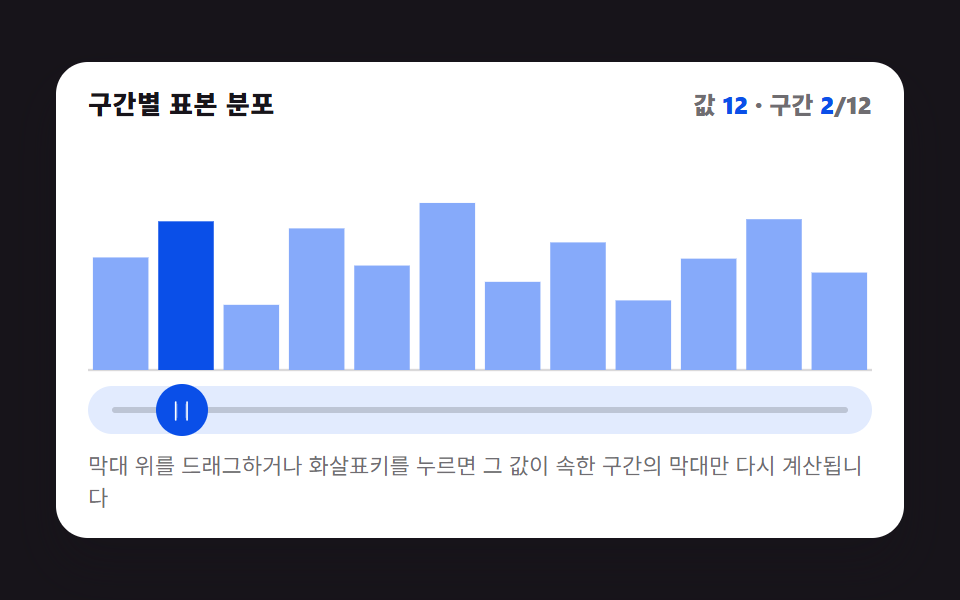 01 picker-graph-histogram-bars-live
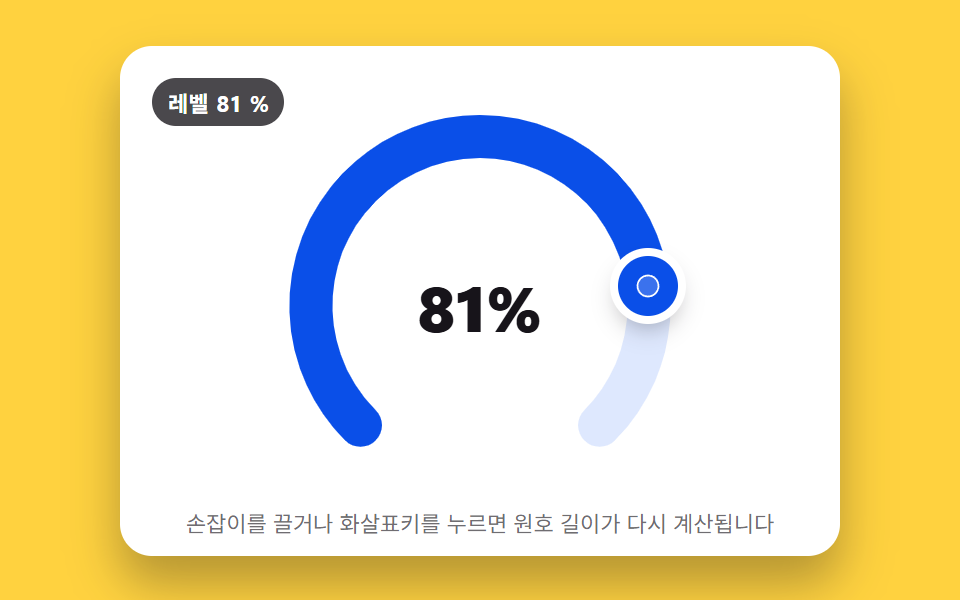 02 picker-graph-radial-gauge-arc-fill
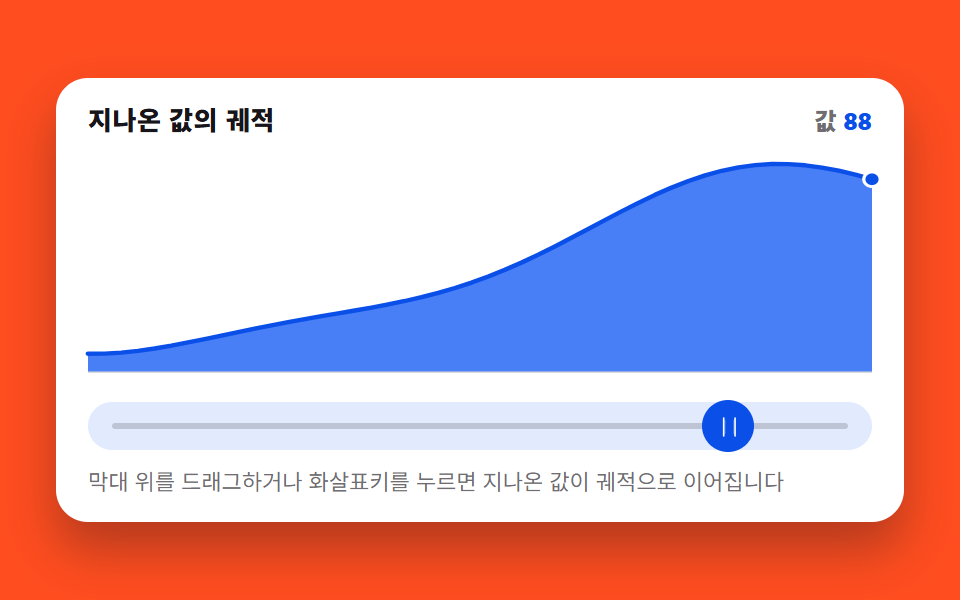 03 picker-graph-sparkline-trail-drag
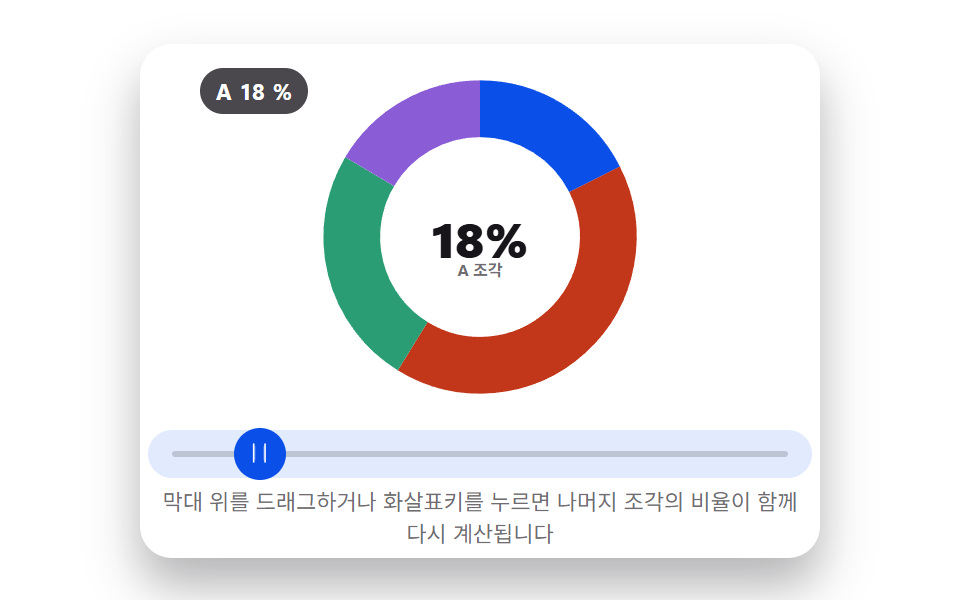 04 picker-graph-donut-segment-resize
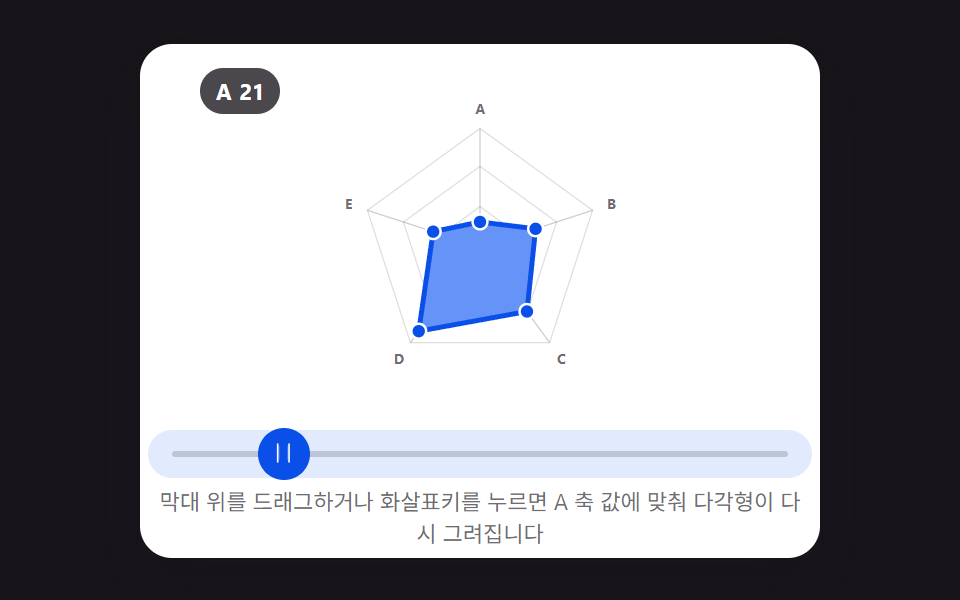 05 picker-graph-radar-multi-axis-drag
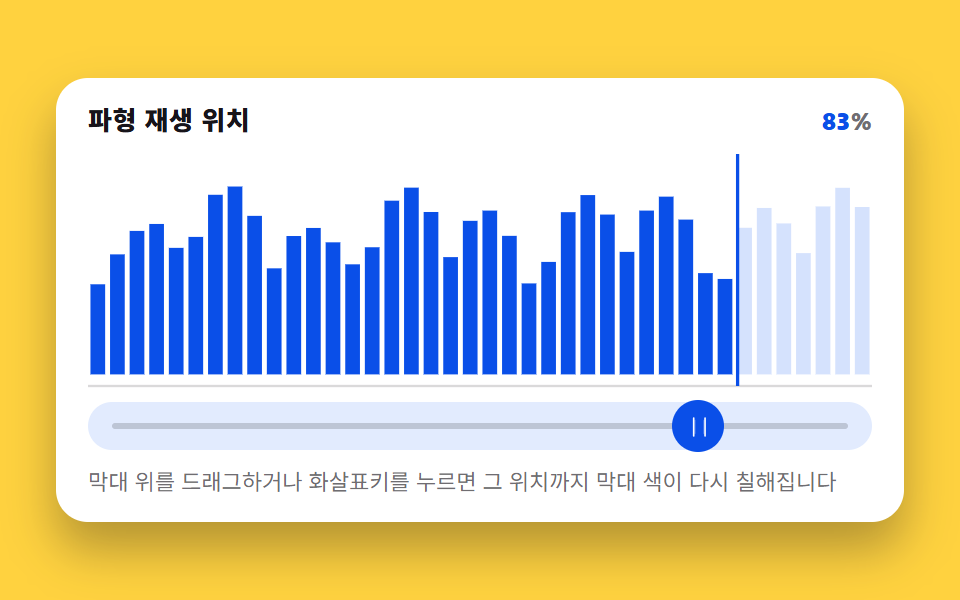 06 picker-graph-waveform-bar-scrub
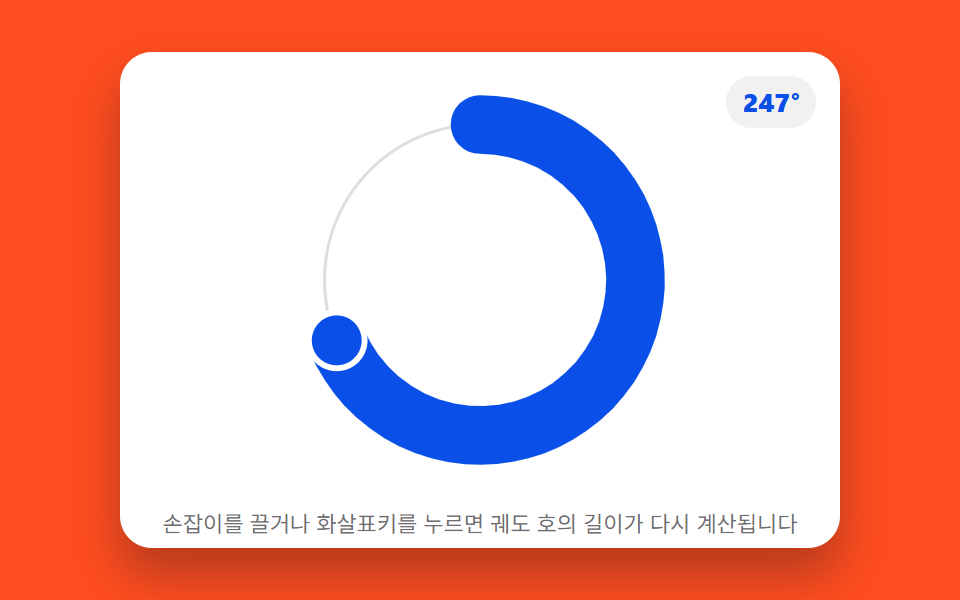 07 picker-graph-orbit-dial-arc-length
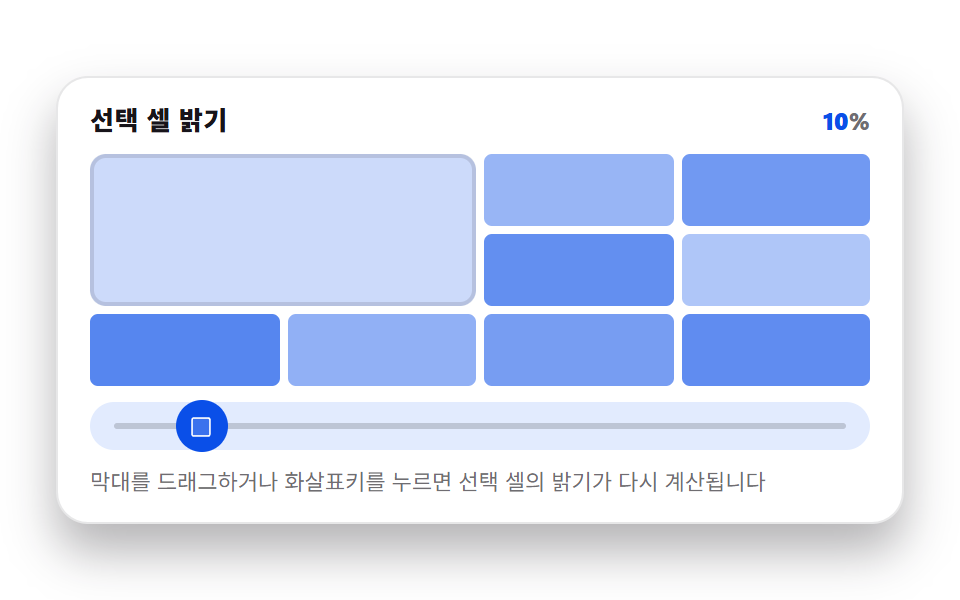 08 picker-graph-heatmap-cell-intensity
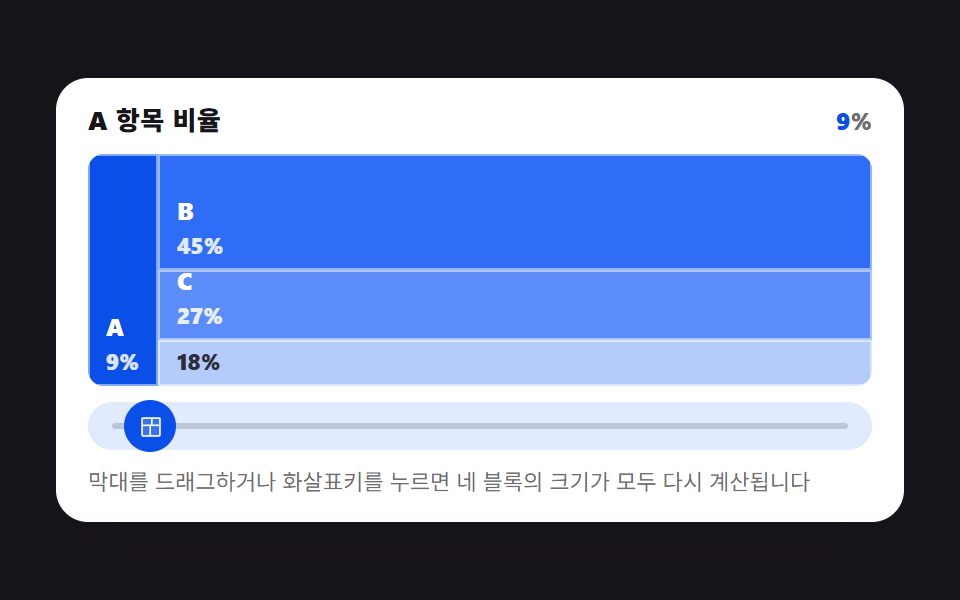 09 picker-graph-treemap-block-resize
자동 재생 · 눌러서 해당 항목으로 · 전부 한 zip
- 01 드래그할 때마다 막대 높이가 다시 계산되는 히스토그램 피커
- 02 값만큼 원호가 채워지는 방사형 게이지 피커
- 03 드래그 궤적이 꺾은선 그래프로 남는 스파크라인 피커
- 04 값 비율만큼 조각이 늘어나는 도넛 피커
- 05 축마다 점을 끌면 모양이 다시 그려지는 레이더 피커
- 06 스크럽한 위치까지 막대가 채워지는 파형 피커
- 07 값이 궤도를 도는 길이로 바뀌는 오빗 다이얼 피커
- 08 값이 셀 밝기로 바뀌는 히트맵 피커
- 09 값 크기만큼 블록이 다시 나뉘는 트리맵 피커
01드래그할 때마다 막대 높이가 다시 계산되는 히스토그램 피커
드래그로 값을 옮기면 그 값이 12개 구간 중 어디에 속하는지부터 계산합니다. 해당 구간(BUCKET_COUNT)의 막대만 기준 높이 위에 추가 높이(PEAK_BOOST)를 더해 올리고, 나머지 열한 개 막대는 기준 높이 그대로 둡니다. css 막대 그래프 애니메이션을 값 하나로 다시 계산해 그리는 대표적인 예입니다.
<main class="stage">
<figure class="hg is-demo" id="hg">
  <figcaption class="hg__head">
    <span class="hg__title">구간별 표본 분포</span>
    <span class="hg__stat" aria-hidden="true">값 <b class="hg__n" id="hg-val">50</b> · 구간 <b class="hg__n" id="hg-bucket">6</b>/12</span>
  </figcaption>

  <div class="hg__zone">
    <svg class="hg__chart" id="chart" viewBox="0 0 480 200" preserveAspectRatio="none" role="img" aria-label="구간 12개 표본 분포 막대그래프, 값이 속한 구간의 막대만 다시 계산되어 올라간다">
      <line class="hg__base" x1="0" y1="200" x2="480" y2="200"></line>
    </svg>
  </div>

  <div class="hg__track" id="track">
    <span class="hg__rail" aria-hidden="true"></span>
    <button class="hg__grab" id="grab" type="button" role="slider" aria-orientation="horizontal"
            aria-label="값 고르기" aria-valuemin="0" aria-valuemax="100"
            aria-valuenow="50" aria-valuetext="값 50, 구간 6/12">
      <svg class="hg__ic" viewBox="0 0 256 256" aria-hidden="true"><g fill="currentColor"><path d="M96 64v128a8 8 0 0 1-16 0V64a8 8 0 0 1 16 0m88 0v128a8 8 0 0 1-16 0V64a8 8 0 0 1 16 0" opacity=".2"/><path d="M188 32a8 8 0 0 0-8 8v176a8 8 0 0 0 16 0V40a8 8 0 0 0-8-8M76 32a8 8 0 0 0-8 8v176a8 8 0 0 0 16 0V40a8 8 0 0 0-8-8"/></g></svg>
    </button>
  </div>

  <p class="hg__hint">막대 위를 드래그하거나 화살표키를 누르면 그 값이 속한 구간의 막대만 다시 계산됩니다</p>

  <div class="sr">
    <span aria-live="polite" id="hg-live"></span>
    <table>
      <caption>구간별 기준 높이</caption>
      <thead><tr><th>구간</th><th>기준 높이</th></tr></thead>
      <tbody id="hg-table"></tbody>
    </table>
  </div>
</figure>
</main>@use "../../../../site/static/demo-tokens" as *;
// 히스토그램 피커 — 드래그·키보드로 값(0~100)을 정하면 그 값이 속한 구간 하나만
// 목표 높이를 다시 계산해 올리고 나머지 11개는 기준 높이로 낮춘다. 어느 구간이
// 활성인지는 매 순간 바뀌는 정수라 선언형 keyframes 로 표현할 수 없어 rAF 루프가
// 직접 SVG rect 의 y·height 를 계산해 찍는다(@keyframes 0개, 395 캔버스 선례와 같은 이유).
// picker-graph-histogram-bucket-count(JS, BUCKET_COUNT)가 구간 개수를 정한다 — 변형 01 의 조정 대상.
$duration: $dur-loop;
$easing: $ease-lerp-settle;
$color: $subject-blue;
@include stage($stage-ink);
.sr {
position: absolute; width: 1px; height: 1px; overflow: hidden;
clip-path: inset(50%); white-space: nowrap;
}
.hg {
box-sizing: border-box;
width: min(424px, 92vw);
margin: 0; padding: $sp-3;
display: flex; flex-direction: column; gap: $sp-2;
border-radius: $r-card;
background: $stage-paper;
box-shadow: $shadow-raised;
color: $subject-ink;
}
.hg__head { display: flex; align-items: baseline; justify-content: space-between; gap: $sp-2; padding: 0 $sp-1; }
.hg__title { font-size: 13px; line-height: 18px; font-weight: 800; letter-spacing: .02em; }
.hg__stat { font-size: 12px; line-height: 18px; font-weight: 800; font-variant-numeric: tabular-nums; color: rgba($subject-ink, .62); }
.hg__n { color: $subject-blue-deep; }
.hg__zone { padding: 0 $sp-1; }
.hg__chart { display: block; width: 100%; height: 116px; overflow: visible; }
.hg__base { stroke: rgba($subject-ink, .16); stroke-width: 2; }
.hg__bar {
fill: mix($subject-blue, $stage-paper, 58%);
transition: none;
}
.hg__bar.is-active { fill: $subject-blue-deep; }
.hg__track {
position: relative;
height: 24px;
margin: 0 $sp-1;
border-radius: $r-pill;
background: mix($subject-blue, $stage-paper, 14%);
}
.hg__rail {
position: absolute; left: $sp-3; right: $sp-3; top: 50%;
height: 3px; transform: translateY(-50%);
border-radius: $r-pill;
background: rgba($subject-ink, .18);
}
.hg__grab {
position: absolute; top: 50%; left: 50%;
width: 26px; height: 26px;
margin: 0; padding: 0; border: 0; border-radius: 50%;
display: grid; place-items: center;
background: $subject-blue-deep;
color: $stage-paper;
transform: translate(-50%, -50%);
cursor: ew-resize;
touch-action: none;
}
.hg__grab:focus-visible { outline: 2px solid $subject-blue-deep; outline-offset: 2px; }
.hg__ic { width: 13px; height: 13px; }
.hg__hint { margin: 0; padding: 0 $sp-1; font-size: 11px; line-height: 16px; color: rgba($subject-ink, .62); }
@media (max-width: 340px) {
.hg { padding: $sp-2; gap: $sp-1; }
.hg__hint { display: none; }
.hg__title { font-size: 12px; line-height: 16px; }
.hg__stat { font-size: 11px; line-height: 16px; }
.hg__chart { height: 108px; }
.hg__grab { width: 22px; height: 22px; }
}
// reduce — rAF 루프를 시작하지 않는다. 드래그·키 입력은 여전히 currentH=targetH 를
// 즉시 맞추고 paint() 를 그 자리에서 한 번 호출해 화면에 반영한다(관성 lerp만 생략).
@media (prefers-reduced-motion: reduce) {
.hg.is-still .hg__bar { transition: none !important; }
}html, body {
margin: 0;
overflow: hidden;
}
.stage {
box-sizing: border-box;
min-height: 100vh;
display: grid;
place-items: center;
margin: 0;
background: #17141a;
font-family: -apple-system, "Segoe UI", "Noto Sans KR", sans-serif;
padding: clamp(8px, 4vw, 24px);
}
.sr {
position: absolute;
width: 1px;
height: 1px;
overflow: hidden;
clip-path: inset(50%);
white-space: nowrap;
}
.hg {
box-sizing: border-box;
width: min(424px, 92vw);
margin: 0;
padding: 12px;
display: flex;
flex-direction: column;
gap: 8px;
border-radius: 16px;
background: #ffffff;
box-shadow: 0 14px 24px rgba(23, 20, 26, 0.32);
color: #17141a;
}
.hg__head {
display: flex;
align-items: baseline;
justify-content: space-between;
gap: 8px;
padding: 0 4px;
}
.hg__title {
font-size: 13px;
line-height: 18px;
font-weight: 800;
letter-spacing: 0.02em;
}
.hg__stat {
font-size: 12px;
line-height: 18px;
font-weight: 800;
font-variant-numeric: tabular-nums;
color: rgba(23, 20, 26, 0.62);
}
.hg__n {
color: #0a4fe8;
}
.hg__zone {
padding: 0 4px;
}
.hg__chart {
display: block;
width: 100%;
height: 116px;
overflow: visible;
}
.hg__base {
stroke: rgba(23, 20, 26, 0.16);
stroke-width: 2;
}
.hg__bar {
fill: rgb(52.6901960784%, 66.7921568627%, 97.9529411765%);
transition: none;
}
.hg__bar.is-active {
fill: #0a4fe8;
}
.hg__track {
position: relative;
height: 24px;
margin: 0 4px;
border-radius: 999px;
background: rgb(88.5803921569%, 91.9843137255%, 99.5058823529%);
}
.hg__rail {
position: absolute;
left: 12px;
right: 12px;
top: 50%;
height: 3px;
transform: translateY(-50%);
border-radius: 999px;
background: rgba(23, 20, 26, 0.18);
}
.hg__grab {
position: absolute;
top: 50%;
left: 50%;
width: 26px;
height: 26px;
margin: 0;
padding: 0;
border: 0;
border-radius: 50%;
display: grid;
place-items: center;
background: #0a4fe8;
color: #ffffff;
transform: translate(-50%, -50%);
cursor: ew-resize;
touch-action: none;
}
.hg__grab:focus-visible {
outline: 2px solid #0a4fe8;
outline-offset: 2px;
}
.hg__ic {
width: 13px;
height: 13px;
}
.hg__hint {
margin: 0;
padding: 0 4px;
font-size: 11px;
line-height: 16px;
color: rgba(23, 20, 26, 0.62);
}
@media (max-width: 340px) {
.hg {
padding: 8px;
gap: 4px;
}
.hg__hint {
display: none;
}
.hg__title {
font-size: 12px;
line-height: 16px;
}
.hg__stat {
font-size: 11px;
line-height: 16px;
}
.hg__chart {
height: 108px;
}
.hg__grab {
width: 22px;
height: 22px;
}
}
@media (prefers-reduced-motion: reduce) {
.hg.is-still .hg__bar {
transition: none !important;
}
}// 실제 동작: pointerdown/move/up 과 keydown(화살표·Home·End) 이 값(0~100)을 바꾸면
// 그 값이 속한 구간 하나만 목표 높이를 다시 계산해 올리고 나머지 11개는 기준 높이로 낮춘다.
// 매 프레임 rAF 루프가 현재 높이를 목표 높이로 관성 보간(lerp)한다 — CSS @keyframes 는
// 0개(어떤 구간이 지금 활성인지는 매 순간 바뀌는 정수라 선언형 keyframes 로 표현할 수 없다,
// 395 의 캔버스 rAF 선례와 같은 이유로 실시간 캡처 경로를 그대로 쓴다).
var root = document.getElementById('hg');
var chart = document.getElementById('chart');
var track = document.getElementById('track');
var grab = document.getElementById('grab');
var valEl = document.getElementById('hg-val');
var bucketEl = document.getElementById('hg-bucket');
var live = document.getElementById('hg-live');
var tableBody = document.getElementById('hg-table');
var BUCKET_COUNT = 12; // picker-graph-histogram-bucket-count — 변형 01 의 조정 대상
var BASE = [0.34, 0.52, 0.28, 0.61, 0.45, 0.72, 0.38, 0.55, 0.30, 0.48, 0.65, 0.42]; // 고정 표본(0~1, RNG 없음)
var PEAK_BOOST = 0.40; // 활성 구간에 더해지는 최대 여유 높이(0~1)
var LERP_RATE = 0.22; // 프레임마다 목표에 다가가는 비율 — 관성
var AUTO_PERIOD = 1.5; // 자동 시연 한 바퀴(초)
var STEP = 5; // 키보드 한 번에 움직이는 값
var CHART_H = 200;
var css = getComputedStyle(root);
function cssv(name) { return css.getPropertyValue(name).trim(); }
var currentH = BASE.slice();
var targetH = BASE.slice();
var value = 50;
var manual = false;
var autoT = 0;
var lastTs = 0;
var trackRect = null;
var rafId = 0;
function reduced() {
return window.matchMedia && window.matchMedia('(prefers-reduced-motion: reduce)').matches;
}
function bucketOf(v) {
  var idx = Math.floor(v / 100 * BUCKET_COUNT);
  return Math.max(0, Math.min(BUCKET_COUNT - 1, idx));
}

function fracIn(v, bucket) {
  var raw = v / 100 * BUCKET_COUNT - bucket;
  return Math.max(0, Math.min(1, raw));
}

// 구간 하나만 목표 높이를 다시 계산한다 — 나머지는 기준 높이 그대로
function recompute() {
  var b = bucketOf(value);
  var f = fracIn(value, b);
  for (var i = 0; i < BUCKET_COUNT; i++) {
    targetH[i] = BASE[i];
  }
  targetH[b] = Math.min(0.96, BASE[b] + PEAK_BOOST * (0.4 + 0.6 * f));
  return b;
}
function buildBars() {
var gap = 6;
var w = 480 / BUCKET_COUNT;
for (var i = 0; i < BUCKET_COUNT; i++) {
var r = document.createElementNS('http://www.w3.org/2000/svg', 'rect');
r.setAttribute('class', 'hg__bar');
r.setAttribute('x', String(i * w + gap / 2));
r.setAttribute('width', String(Math.max(1, w - gap)));
r.dataset.i = String(i);
chart.appendChild(r);
var tr = document.createElement('tr');
var th = document.createElement('th');
th.textContent = String(i + 1);
var td = document.createElement('td');
td.textContent = Math.round(BASE[i] * 100) + '%';
tr.appendChild(th); tr.appendChild(td);
tableBody.appendChild(tr);
}
}
function paint() {
var bars = chart.querySelectorAll('.hg__bar');
var activeIdx = bucketOf(value);
for (var i = 0; i < bars.length; i++) {
var h = currentH[i] * CHART_H;
bars[i].setAttribute('y', String(CHART_H - h));
bars[i].setAttribute('height', String(h));
bars[i].classList.toggle('is-active', i === activeIdx);
}
var rv = Math.round(value);
valEl.textContent = String(rv);
bucketEl.textContent = String(activeIdx + 1);
grab.style.left = value + '%';
grab.setAttribute('aria-valuenow', String(rv));
var text = '값 ' + rv + ', 구간 ' + (activeIdx + 1) + '/12';
grab.setAttribute('aria-valuetext', text);
}
function announce() {
var activeIdx = bucketOf(value);
live.textContent = '값 ' + Math.round(value) + ', 구간 ' + (activeIdx + 1) + '/12로 다시 계산됨';
}
function setValue(v, isManual) {
value = Math.max(0, Math.min(100, v));
if (isManual) {
manual = true;
root.classList.remove('is-demo');
}
recompute();
}
function fromPointer(clientX) {
if (!trackRect) trackRect = track.getBoundingClientRect();
var ratio = (clientX - trackRect.left) / trackRect.width;
setValue(ratio * 100, true);
}
function onDown(e) {
trackRect = track.getBoundingClientRect();
if (grab.setPointerCapture) { try { grab.setPointerCapture(e.pointerId); } catch (err) {} }
fromPointer(e.clientX);
if (reduced()) { currentH = targetH.slice(); paint(); announce(); }
}
function onMove(e) {
if (e.buttons === 0 && e.pointerType !== 'touch') { /* 버튼 안 눌렸으면 무시 */ }
fromPointer(e.clientX);
if (reduced()) { currentH = targetH.slice(); paint(); announce(); }
}
function onUp() { announce(); }
function onKey(e) {
var map = { ArrowLeft: -STEP, ArrowDown: -STEP, ArrowRight: STEP, ArrowUp: STEP };
if (e.key === 'Home') { setValue(0, true); e.preventDefault(); }
else if (e.key === 'End') { setValue(100, true); e.preventDefault(); }
else if (map[e.key] !== undefined) { setValue(value + map[e.key], true); e.preventDefault(); }
else { return; }
if (reduced()) { currentH = targetH.slice(); paint(); announce(); }
}
function onResize() {
trackRect = track.getBoundingClientRect();
if (reduced()) { paint(); }
}
function autoStep(dt) {
autoT += dt;
var omega = 2 * Math.PI / AUTO_PERIOD;
var v = 50 + 46 * Math.sin(autoT * omega);
value = v;
recompute();
}
function frame(ts) {
if (!lastTs) lastTs = ts;
var dt = Math.min(0.05, (ts - lastTs) / 1000);
lastTs = ts;
if (!manual) { autoStep(dt); }
for (var i = 0; i < BUCKET_COUNT; i++) {
currentH[i] += (targetH[i] - currentH[i]) * LERP_RATE;
}
paint();
rafId = requestAnimationFrame(frame);
}
buildBars();
recompute();
grab.addEventListener('pointerdown', onDown);
grab.addEventListener('pointermove', onMove);
grab.addEventListener('pointerup', onUp);
track.addEventListener('pointerdown', function (e) {
trackRect = track.getBoundingClientRect();
fromPointer(e.clientX);
if (reduced()) { currentH = targetH.slice(); paint(); announce(); }
});
grab.addEventListener('keydown', onKey);
window.addEventListener('resize', onResize);
if (reduced()) {
root.classList.add('is-still');
currentH = targetH.slice();
paint();
} else {
rafId = requestAnimationFrame(frame);
}// HistogramBarsLive — vanilla 판(run/398/demo/01-picker-graph-histogram-bars-live/index.html) 의 React 포트.
// 드래그·키보드로 값(0~100)을 정하면 그 값이 속한 구간 하나만 목표 높이를 다시 계산해 올리고
// 나머지 11개는 기준 높이로 낮춘다. 매 프레임 rAF 루프가 현재 높이를 목표 높이로 관성 보간(lerp)한다.
import { useEffect, useRef } from "react";
import styles from "./HistogramBarsLive.module.scss";
type Box<T> = { current: T };
type KeyEvt = { key: string; preventDefault(): void };
type PtrEvt = { clientX: number; clientY: number; pointerId: number; buttons?: number; pointerType?: string };
const BUCKET_COUNT = 12; // picker-graph-histogram-bucket-count — 변형 01 의 조정 대상
const BASE = [0.34, 0.52, 0.28, 0.61, 0.45, 0.72, 0.38, 0.55, 0.30, 0.48, 0.65, 0.42]; // 고정 표본(0~1, RNG 없음)
const PEAK_BOOST = 0.40;
const LERP_RATE = 0.22;
const AUTO_PERIOD = 1.5;
const STEP = 5;
const CHART_H = 200;
const GAP = 6;
const BAR_W = 480 / BUCKET_COUNT;
export default function HistogramBarsLive() {
const rootRef = useRef<HTMLElement | null>(null);
const chartRef = useRef<SVGSVGElement | null>(null);
const trackRef = useRef<HTMLDivElement | null>(null);
const grabRef = useRef<HTMLButtonElement | null>(null);
const valRef = useRef<HTMLElement | null>(null);
const bucketRef = useRef<HTMLElement | null>(null);
const liveRef = useRef<HTMLSpanElement | null>(null);
const barRefs = useRef(new Array(BUCKET_COUNT).fill(null)) as Box<(SVGRectElement | null)[]>;
const currentH = useRef(BASE.slice()) as Box<number[]>;
const targetH = useRef(BASE.slice()) as Box<number[]>;
const value = useRef(50) as Box<number>;
const manual = useRef(false) as Box<boolean>;
const autoT = useRef(0) as Box<number>;
const lastTs = useRef(0) as Box<number>;
const trackRect = useRef<DOMRect | null>(null) as Box<DOMRect | null>;
const rafId = useRef(0) as Box<number>;
function reduced(): boolean {
return window.matchMedia("(prefers-reduced-motion: reduce)").matches;
}
function bucketOf(v: number): number {
const idx = Math.floor((v / 100) * BUCKET_COUNT);
return Math.max(0, Math.min(BUCKET_COUNT - 1, idx));
}
function fracIn(v: number, bucket: number): number {
const raw = (v / 100) * BUCKET_COUNT - bucket;
return Math.max(0, Math.min(1, raw));
}
function recompute(): number {
const b = bucketOf(value.current);
const f = fracIn(value.current, b);
for (let i = 0; i < BUCKET_COUNT; i++) targetH.current[i] = BASE[i];
targetH.current[b] = Math.min(0.96, BASE[b] + PEAK_BOOST * (0.4 + 0.6 * f));
return b;
}
function paint(): void {
const activeIdx = bucketOf(value.current);
const bars = barRefs.current;
for (let i = 0; i < bars.length; i++) {
const r = bars[i];
if (!r) continue;
const h = currentH.current[i] * CHART_H;
r.setAttribute("y", String(CHART_H - h));
r.setAttribute("height", String(h));
r.classList.toggle("is-active", i === activeIdx);
}
const rv = Math.round(value.current);
if (valRef.current) valRef.current.textContent = String(rv);
if (bucketRef.current) bucketRef.current.textContent = String(activeIdx + 1);
const grab = grabRef.current;
if (grab) {
grab.style.left = value.current + "%";
grab.setAttribute("aria-valuenow", String(rv));
grab.setAttribute("aria-valuetext", "값 " + rv + ", 구간 " + (activeIdx + 1) + "/12");
}
}
function announce(): void {
const activeIdx = bucketOf(value.current);
if (liveRef.current) {
liveRef.current.textContent = "값 " + Math.round(value.current) + ", 구간 " + (activeIdx + 1) + "/12로 다시 계산됨";
}
}
function setValue(v: number, isManual: boolean): void {
value.current = Math.max(0, Math.min(100, v));
if (isManual) {
manual.current = true;
rootRef.current?.classList.remove("is-demo");
}
recompute();
}
function fromPointer(clientX: number): void {
if (!trackRect.current && trackRef.current) trackRect.current = trackRef.current.getBoundingClientRect();
const rect = trackRect.current;
if (!rect) return;
const ratio = (clientX - rect.left) / rect.width;
setValue(ratio * 100, true);
}
function reflectNow(): void {
currentH.current = targetH.current.slice();
paint();
announce();
}
function onDown(e: PtrEvt): void {
if (trackRef.current) trackRect.current = trackRef.current.getBoundingClientRect();
const grab = grabRef.current;
if (grab && typeof grab.setPointerCapture === "function") {
try { grab.setPointerCapture(e.pointerId); } catch { /* 캡처 실패는 치명적이지 않다 */ }
}
fromPointer(e.clientX);
if (reduced()) reflectNow();
}
function onMove(e: PtrEvt): void {
fromPointer(e.clientX);
if (reduced()) reflectNow();
}
function onUp(): void {
announce();
}
function onTrackDown(e: PtrEvt): void {
if (trackRef.current) trackRect.current = trackRef.current.getBoundingClientRect();
fromPointer(e.clientX);
if (reduced()) reflectNow();
}
function onKey(e: KeyEvt): void {
const map: Record<string, number> = { ArrowLeft: -STEP, ArrowDown: -STEP, ArrowRight: STEP, ArrowUp: STEP };
if (e.key === "Home") { setValue(0, true); e.preventDefault(); }
else if (e.key === "End") { setValue(100, true); e.preventDefault(); }
else if (map[e.key] !== undefined) { setValue(value.current + map[e.key], true); e.preventDefault(); }
else { return; }
if (reduced()) reflectNow();
}
function onResize(): void {
if (trackRef.current) trackRect.current = trackRef.current.getBoundingClientRect();
if (reduced()) paint();
}
function autoStep(dt: number): void {
autoT.current += dt;
const omega = (2 * Math.PI) / AUTO_PERIOD;
value.current = 50 + 46 * Math.sin(autoT.current * omega);
recompute();
}
function frame(ts: number): void {
if (!lastTs.current) lastTs.current = ts;
const dt = Math.min(0.05, (ts - lastTs.current) / 1000);
lastTs.current = ts;
if (!manual.current) autoStep(dt);
for (let i = 0; i < BUCKET_COUNT; i++) {
currentH.current[i] += (targetH.current[i] - currentH.current[i]) * LERP_RATE;
}
paint();
rafId.current = requestAnimationFrame(frame);
}
useEffect(() => {
recompute();
window.addEventListener("resize", onResize);
if (reduced()) {
rootRef.current?.classList.add("is-still");
reflectNow();
} else {
rafId.current = requestAnimationFrame(frame);
}
return () => {
window.removeEventListener("resize", onResize);
cancelAnimationFrame(rafId.current);
};
// eslint-disable-next-line react-hooks/exhaustive-deps
}, []);
return (
<main className={styles.stage}>
<figure className={styles.hg + " is-demo"} ref={rootRef}>
<figcaption className={styles.head}>
<span className={styles.title}>구간별 표본 분포</span>
<span className={styles.stat} aria-hidden="true">값 <b className={styles.n} ref={valRef}>50</b> · 구간 <b className={styles.n} ref={bucketRef}>6</b>/12</span>
</figcaption>
<div className={styles.zone}>
<svg
className={styles.chart}
ref={chartRef}
viewBox="0 0 480 200"
preserveAspectRatio="none"
role="img"
aria-label="구간 12개 표본 분포 막대그래프, 값이 속한 구간의 막대만 다시 계산되어 올라간다"
>
<line className={styles.base} x1="0" y1="200" x2="480" y2="200" />
{BASE.map((_, i) => (
<rect
key={i}
className={styles.bar}
ref={(el: SVGRectElement | null) => { barRefs.current[i] = el; }}
x={i * BAR_W + GAP / 2}
width={Math.max(1, BAR_W - GAP)}
/>
))}
</svg>
</div>
<div className={styles.track} ref={trackRef} onPointerDown={onTrackDown}>
<span className={styles.rail} aria-hidden="true" />
<button
className={styles.grab}
ref={grabRef}
type="button"
role="slider"
aria-orientation="horizontal"
aria-label="값 고르기"
aria-valuemin={0}
aria-valuemax={100}
aria-valuenow={50}
aria-valuetext="값 50, 구간 6/12"
onPointerDown={onDown}
onPointerMove={onMove}
onPointerUp={onUp}
onKeyDown={onKey}
>
<svg className={styles.ic} viewBox="0 0 256 256" aria-hidden="true"><g fill="currentColor"><path d="M96 64v128a8 8 0 0 1-16 0V64a8 8 0 0 1 16 0m88 0v128a8 8 0 0 1-16 0V64a8 8 0 0 1 16 0" opacity=".2" /><path d="M188 32a8 8 0 0 0-8 8v176a8 8 0 0 0 16 0V40a8 8 0 0 0-8-8M76 32a8 8 0 0 0-8 8v176a8 8 0 0 0 16 0V40a8 8 0 0 0-8-8" /></g></svg>
</button>
</div>
<p className={styles.hint}>막대 위를 드래그하거나 화살표키를 누르면 그 값이 속한 구간의 막대만 다시 계산됩니다</p>
<div className={styles.sr}>
<span aria-live="polite" ref={liveRef} />
<table>
<caption>구간별 기준 높이</caption>
<thead><tr><th>구간</th><th>기준 높이</th></tr></thead>
<tbody>
{BASE.map((b, i) => (
<tr key={i}><th>{i + 1}</th><td>{Math.round(b * 100)}%</td></tr>
))}
</tbody>
</table>
</div>
</figure>
</main>
);
}01 · 드래그할 때마다 막대 높이가 다시 계산되는 히스토그램 피커 — 측정 누적면적 23.203% · 움직인 프레임 23/23GODRICH 원작 · zip 에 SCSS·React 포함 · 비밀번호 보기
function bucketOf(v) {
var idx = Math.floor(v / 100 * BUCKET_COUNT);
return Math.max(0, Math.min(BUCKET_COUNT - 1, idx));
}
function fracIn(v, bucket) {
var raw = v / 100 * BUCKET_COUNT - bucket;
return Math.max(0, Math.min(1, raw));
}
// 구간 하나만 목표 높이를 다시 계산한다 — 나머지는 기준 높이 그대로
function recompute() {
var b = bucketOf(value);
var f = fracIn(value, b);
for (var i = 0; i < BUCKET_COUNT; i++) {
targetH[i] = BASE[i];
}
targetH[b] = Math.min(0.96, BASE[b] + PEAK_BOOST * (0.4 + 0.6 * f));
return b;
}
02값만큼 원호가 채워지는 방사형 게이지 피커
핸들을 원 둘레를 따라 돌리면 포인터 좌표를 중심 기준 각도(Math.atan2)로 바꾸고, 그 각도가 시작각(START)·끝각(END) 범위를 벗어나지 않도록 보정합니다. 보정된 각도까지 원호 하나를 새로 그려 값이 늘수록 호가 길어지고 줄면 짧아지도록 합니다. css 원형 그래프 애니메이션에서 흔한 방식이지만, 이 항목은 각도와 원호 경로(d 속성)를 매 프레임 직접 계산해 다시 그립니다.
<main class="stage">
<figure class="rg is-demo" id="rg">
  <div class="rg__zone" id="zone">
    <svg class="rg__chart" id="chart" viewBox="0 0 480 300" role="img" aria-label="값의 비율만큼 원호가 채워지는 방사형 게이지, 손잡이를 돌리면 원호가 매 순간 다시 그려진다">
      <path class="rg__track" id="track"></path>
      <path class="rg__fill" id="fill"></path>
      <text class="rg__num" id="num" x="240" y="170" text-anchor="middle" dominant-baseline="central">62%</text>
    </svg>
    <button class="rg__grab" id="grab" type="button" role="slider" aria-orientation="horizontal"
            aria-label="레벨 고르기" aria-valuemin="0" aria-valuemax="100"
            aria-valuenow="62" aria-valuetext="레벨 62%">
      <svg class="rg__ic" viewBox="0 0 256 256" aria-hidden="true"><g fill="currentColor"><circle cx="128" cy="128" r="96" opacity=".2"/><path d="M128 24a104 104 0 1 0 104 104A104.11 104.11 0 0 0 128 24m0 192a88 88 0 1 1 88-88 88.1 88.1 0 0 1-88 88"/></g></svg>
    </button>
    <b class="rg__badge" aria-hidden="true">레벨 <span id="rg-val">62</span>%</b>
  </div>

  <p class="rg__hint">손잡이를 끌거나 화살표키를 누르면 원호 길이가 다시 계산됩니다</p>

  <div class="sr">
    <span aria-live="polite" id="rg-live"></span>
  </div>
</figure>
</main>
@use "../../../../site/static/demo-tokens" as *;
// 방사형 게이지 피커 — 손잡이를 끌거나 화살표키로 값(0~100)을 정하면 원호 경로(d 속성)를
// 시작각→현재각으로 매 프레임 다시 그린다. 관성 lerp 로 값이 목표를 뒤따른다.
// CSS @keyframes 는 0개(각도가 매 순간 바뀌는 실수라 선언형으로 못 담는다, 398-01 과 같은 이유).
// picker-graph-gauge-radius(JS, R)가 게이지 반지름을 정한다.
$duration: $dur-loop;
$easing: $ease-lerp-settle;
$color: $subject-blue;
@include stage($stage-yellow);
.sr {
position: absolute; width: 1px; height: 1px; overflow: hidden;
clip-path: inset(50%); white-space: nowrap;
}
.rg {
box-sizing: border-box;
width: min(360px, 92vw);
margin: 0; padding: $sp-2;
display: flex; flex-direction: column; gap: $sp-2; align-items: center;
border-radius: $r-card;
background: $stage-paper;
box-shadow: $shadow-raised;
color: $subject-ink;
}
.rg__zone {
position: relative;
width: min(352px, 100%);
aspect-ratio: 480 / 300;
}
.rg__chart { display: block; width: 100%; height: 100%; overflow: visible; }
.rg__track {
fill: none;
stroke: mix($subject-blue, $stage-paper, 16%);
stroke-width: 30;
stroke-linecap: round;
}
.rg__fill {
fill: none;
stroke: $subject-blue-deep;
stroke-width: 30;
stroke-linecap: round;
}
.rg__num {
font-size: 44px;
font-weight: 800;
font-variant-numeric: tabular-nums;
fill: $subject-ink;
}
.rg__grab {
position: absolute; top: 0; left: 0;
width: 30px; height: 30px;
margin: 0; padding: 0; border: 0; border-radius: 50%;
display: grid; place-items: center;
background: $subject-blue-deep;
color: $stage-paper;
box-shadow: 0 0 0 4px $stage-paper, $shadow-press;
transform: translate(-50%, -50%);
cursor: grab;
touch-action: none;
}
.rg__grab:focus-visible { outline: 2px solid $subject-blue-deep; outline-offset: 3px; }
.rg__ic { width: 14px; height: 14px; }
.rg__badge {
position: absolute; left: $sp-2; top: $sp-2;
display: flex; align-items: baseline; gap: $sp-1;
padding: $sp-1 $sp-2; border-radius: $r-pill;
background: rgba($subject-ink, .78);
color: $stage-paper; font-weight: 700; font-size: 11px;
font-variant-numeric: tabular-nums;
}
.rg__hint { margin: 0; padding: 0 $sp-1; font-size: 11px; line-height: 16px; color: rgba($subject-ink, .62); text-align: center; }
@media (max-width: 340px) {
.rg { padding: $sp-2; gap: $sp-1; }
.rg__hint { display: none; }
.rg__zone { width: min(240px, 100%); }
.rg__num { font-size: 32px; }
.rg__track, .rg__fill { stroke-width: 16; }
.rg__grab { width: 24px; height: 24px; }
.rg__badge { font-size: 10px; padding: 0 $sp-1; }
}
// reduce — rAF 루프를 시작하지 않는다. 입력은 current=value 즉시 반영 후 paint() 1회.
@media (prefers-reduced-motion: reduce) {
.rg.is-still .rg__fill { transition: none !important; }
}html, body {
margin: 0;
overflow: hidden;
}
.stage {
box-sizing: border-box;
min-height: 100vh;
display: grid;
place-items: center;
margin: 0;
background: #ffd23f;
font-family: -apple-system, "Segoe UI", "Noto Sans KR", sans-serif;
padding: clamp(8px, 4vw, 24px);
}
.sr {
position: absolute;
width: 1px;
height: 1px;
overflow: hidden;
clip-path: inset(50%);
white-space: nowrap;
}
.rg {
box-sizing: border-box;
width: min(360px, 92vw);
margin: 0;
padding: 8px;
display: flex;
flex-direction: column;
gap: 8px;
align-items: center;
border-radius: 16px;
background: #ffffff;
box-shadow: 0 14px 24px rgba(23, 20, 26, 0.32);
color: #17141a;
}
.rg__zone {
position: relative;
width: min(352px, 100%);
aspect-ratio: 480/300;
}
.rg__chart {
display: block;
width: 100%;
height: 100%;
overflow: visible;
}
.rg__track {
fill: none;
stroke: rgb(86.9490196078%, 90.8392156863%, 99.4352941176%);
stroke-width: 30;
stroke-linecap: round;
}
.rg__fill {
fill: none;
stroke: #0a4fe8;
stroke-width: 30;
stroke-linecap: round;
}
.rg__num {
font-size: 44px;
font-weight: 800;
font-variant-numeric: tabular-nums;
fill: #17141a;
}
.rg__grab {
position: absolute;
top: 0;
left: 0;
width: 30px;
height: 30px;
margin: 0;
padding: 0;
border: 0;
border-radius: 50%;
display: grid;
place-items: center;
background: #0a4fe8;
color: #ffffff;
box-shadow: 0 0 0 4px #ffffff, 0 6px 12px rgba(23, 20, 26, 0.32);
transform: translate(-50%, -50%);
cursor: grab;
touch-action: none;
}
.rg__grab:focus-visible {
outline: 2px solid #0a4fe8;
outline-offset: 3px;
}
.rg__ic {
width: 14px;
height: 14px;
}
.rg__badge {
position: absolute;
left: 8px;
top: 8px;
display: flex;
align-items: baseline;
gap: 4px;
padding: 4px 8px;
border-radius: 999px;
background: rgba(23, 20, 26, 0.78);
color: #ffffff;
font-weight: 700;
font-size: 11px;
font-variant-numeric: tabular-nums;
}
.rg__hint {
margin: 0;
padding: 0 4px;
font-size: 11px;
line-height: 16px;
color: rgba(23, 20, 26, 0.62);
text-align: center;
}
@media (max-width: 340px) {
.rg {
padding: 8px;
gap: 4px;
}
.rg__hint {
display: none;
}
.rg__zone {
width: min(240px, 100%);
}
.rg__num {
font-size: 32px;
}
.rg__track, .rg__fill {
stroke-width: 16;
}
.rg__grab {
width: 24px;
height: 24px;
}
.rg__badge {
font-size: 10px;
padding: 0 4px;
}
}
@media (prefers-reduced-motion: reduce) {
.rg.is-still .rg__fill {
transition: none !important;
}
}// 실제 동작: pointerdown/move/up 과 keydown(화살표·Home·End) 이 값(0~100)을 바꾸면
// 손잡이 각도가 다시 계산되고, 원호 경로(d 속성)를 시작각→현재각으로 매 프레임 다시 그린다.
// 값은 매 프레임 목표값으로 관성 보간(lerp)된다 — CSS @keyframes 없음(어느 각도인지 매 순간
// 바뀌는 실수라 선언형으로 못 담는다, 395·398-01 과 같은 이유로 실시간 캡처 경로를 쓴다).
var root = document.getElementById('rg');
var zone = document.getElementById('zone');
var chart = document.getElementById('chart');
var track = document.getElementById('track');
var fill = document.getElementById('fill');
var numEl = document.getElementById('num');
var valEl = document.getElementById('rg-val');
var grab = document.getElementById('grab');
var live = document.getElementById('rg-live');
var CX = 240, CY = 170, R = 118; // picker-graph-gauge-radius — 게이지 반지름
var START = 135, SWEEP = 270; // 시작각(도)·전체 스윕각 — END = START + SWEEP
var END = START + SWEEP;
var LERP_RATE = 0.20;
var AUTO_PERIOD = 1.7;
var STEP = 5;
var value = 62;
var current = 62;
var manual = false;
var autoT = 0;
var lastTs = 0;
var zoneRect = null;
var rafId = 0;
function reduced() {
return window.matchMedia && window.matchMedia('(prefers-reduced-motion: reduce)').matches;
}
function polar(cx, cy, r, deg) {
var rad = deg * Math.PI / 180;
return { x: cx + r * Math.cos(rad), y: cy + r * Math.sin(rad) };
}
function arcPath(cx, cy, r, a0, a1) {
  if (Math.abs(a1 - a0) < 0.5) return '';
  var s = polar(cx, cy, r, a0), e = polar(cx, cy, r, a1);
  var large = (a1 - a0) > 180 ? 1 : 0;
  return 'M ' + s.x + ' ' + s.y + ' A ' + r + ' ' + r + ' 0 ' + large + ' 1 ' + e.x + ' ' + e.y;
}

function angleOf(v) { return START + (SWEEP * v) / 100; }

function paint() {
  track.setAttribute('d', arcPath(CX, CY, R, START, END));
  fill.setAttribute('d', arcPath(CX, CY, R, START, angleOf(current)));
  var p = polar(CX, CY, R, angleOf(current));
  grab.style.left = (p.x / 480 * 100) + '%';
  grab.style.top = (p.y / 300 * 100) + '%';
  var rv = Math.round(current);
  numEl.textContent = rv + '%';
  valEl.textContent = String(rv);
  grab.setAttribute('aria-valuenow', String(rv));
  grab.setAttribute('aria-valuetext', '레벨 ' + rv + '%');
}
function announce() {
live.textContent = '레벨 ' + Math.round(current) + '%로 다시 계산됨';
}
function setValue(v, isManual) {
value = Math.max(0, Math.min(100, v));
if (isManual) { manual = true; root.classList.remove('is-demo'); }
}
function angleFromPointer(clientX, clientY) {
if (!zoneRect) zoneRect = zone.getBoundingClientRect();
var cx = zoneRect.left + zoneRect.width * (CX / 480);
var cy = zoneRect.top + zoneRect.height * (CY / 300);
var deg = Math.atan2(clientY - cy, clientX - cx) * 180 / Math.PI;
while (deg < START) deg += 360;
while (deg > START + 360) deg -= 360;
if (deg > END) deg = (deg - END < START + 360 - deg) ? END : START;
return deg;
}
function fromPointer(clientX, clientY) {
var deg = angleFromPointer(clientX, clientY);
var v = (deg - START) / SWEEP * 100;
setValue(v, true);
}
function onDown(e) {
zoneRect = zone.getBoundingClientRect();
if (grab.setPointerCapture) { try { grab.setPointerCapture(e.pointerId); } catch (err) {} }
fromPointer(e.clientX, e.clientY);
if (reduced()) { current = value; paint(); announce(); }
}
function onMove(e) {
fromPointer(e.clientX, e.clientY);
if (reduced()) { current = value; paint(); announce(); }
}
function onUp() { announce(); }
function onZoneDown(e) {
zoneRect = zone.getBoundingClientRect();
fromPointer(e.clientX, e.clientY);
if (reduced()) { current = value; paint(); announce(); }
}
function onKey(e) {
var map = { ArrowLeft: -STEP, ArrowDown: -STEP, ArrowRight: STEP, ArrowUp: STEP };
if (e.key === 'Home') { setValue(0, true); e.preventDefault(); }
else if (e.key === 'End') { setValue(100, true); e.preventDefault(); }
else if (map[e.key] !== undefined) { setValue(value + map[e.key], true); e.preventDefault(); }
else { return; }
if (reduced()) { current = value; paint(); announce(); }
}
function onResize() {
zoneRect = zone.getBoundingClientRect();
if (reduced()) paint();
}
function autoStep(dt) {
autoT += dt;
var omega = 2 * Math.PI / AUTO_PERIOD;
value = 50 + 48 * Math.sin(autoT * omega);
}
function frame(ts) {
if (!lastTs) lastTs = ts;
var dt = Math.min(0.05, (ts - lastTs) / 1000);
lastTs = ts;
if (!manual) autoStep(dt);
current += (value - current) * LERP_RATE;
paint();
rafId = requestAnimationFrame(frame);
}
grab.addEventListener('pointerdown', onDown);
grab.addEventListener('pointermove', onMove);
grab.addEventListener('pointerup', onUp);
grab.addEventListener('keydown', onKey);
zone.addEventListener('pointerdown', onZoneDown);
window.addEventListener('resize', onResize);
if (reduced()) {
root.classList.add('is-still');
current = value;
paint();
} else {
paint();
rafId = requestAnimationFrame(frame);
}// RadialGaugeArcFill — vanilla 판(run/398/demo/02-picker-graph-radial-gauge-arc-fill/index.html) 의 React 포트.
// 손잡이를 끌거나 화살표키로 값(0~100)을 정하면 원호 경로(d 속성)를 시작각→현재각으로
// 매 프레임 다시 그린다. 값은 관성 lerp 로 목표를 뒤따른다. CSS @keyframes 는 0개(vanilla 와 같은 이유).
import { useEffect, useRef } from "react";
import styles from "./RadialGaugeArcFill.module.scss";
type Box<T> = { current: T };
type KeyEvt = { key: string; preventDefault(): void };
type PtrEvt = { clientX: number; clientY: number; pointerId: number };
const CX = 240, CY = 170, R = 118; // picker-graph-gauge-radius — 게이지 반지름
const START = 135, SWEEP = 270;
const END = START + SWEEP;
const LERP_RATE = 0.20;
const AUTO_PERIOD = 1.7;
const STEP = 5;
function polar(cx: number, cy: number, r: number, deg: number) {
const rad = (deg * Math.PI) / 180;
return { x: cx + r * Math.cos(rad), y: cy + r * Math.sin(rad) };
}
function arcPath(cx: number, cy: number, r: number, a0: number, a1: number): string {
if (Math.abs(a1 - a0) < 0.5) return "";
const s = polar(cx, cy, r, a0), e = polar(cx, cy, r, a1);
const large = a1 - a0 > 180 ? 1 : 0;
return "M " + s.x + " " + s.y + " A " + r + " " + r + " 0 " + large + " 1 " + e.x + " " + e.y;
}
function angleOf(v: number): number {
return START + (SWEEP * v) / 100;
}
export default function RadialGaugeArcFill() {
const rootRef = useRef<HTMLElement | null>(null);
const zoneRef = useRef<HTMLDivElement | null>(null);
const trackRef = useRef<SVGPathElement | null>(null);
const fillRef = useRef<SVGPathElement | null>(null);
const numRef = useRef<SVGTextElement | null>(null);
const grabRef = useRef<HTMLButtonElement | null>(null);
const valRef = useRef<HTMLElement | null>(null);
const liveRef = useRef<HTMLSpanElement | null>(null);
const value = useRef(62) as Box<number>;
const current = useRef(62) as Box<number>;
const manual = useRef(false) as Box<boolean>;
const autoT = useRef(0) as Box<number>;
const lastTs = useRef(0) as Box<number>;
const zoneRect = useRef<DOMRect | null>(null) as Box<DOMRect | null>;
const rafId = useRef(0) as Box<number>;
function reduced(): boolean {
return window.matchMedia("(prefers-reduced-motion: reduce)").matches;
}
function paint(): void {
trackRef.current?.setAttribute("d", arcPath(CX, CY, R, START, END));
fillRef.current?.setAttribute("d", arcPath(CX, CY, R, START, angleOf(current.current)));
const p = polar(CX, CY, R, angleOf(current.current));
const grab = grabRef.current;
if (grab) {
grab.style.left = (p.x / 480) * 100 + "%";
grab.style.top = (p.y / 300) * 100 + "%";
}
const rv = Math.round(current.current);
if (numRef.current) numRef.current.textContent = rv + "%";
if (valRef.current) valRef.current.textContent = String(rv);
if (grab) {
grab.setAttribute("aria-valuenow", String(rv));
grab.setAttribute("aria-valuetext", "레벨 " + rv + "%");
}
}
function announce(): void {
if (liveRef.current) liveRef.current.textContent = "레벨 " + Math.round(current.current) + "%로 다시 계산됨";
}
function setValue(v: number, isManual: boolean): void {
value.current = Math.max(0, Math.min(100, v));
if (isManual) {
manual.current = true;
rootRef.current?.classList.remove("is-demo");
}
}
function angleFromPointer(clientX: number, clientY: number): number {
if (!zoneRect.current && zoneRef.current) zoneRect.current = zoneRef.current.getBoundingClientRect();
const rect = zoneRect.current;
if (!rect) return START;
const cx = rect.left + rect.width * (CX / 480);
const cy = rect.top + rect.height * (CY / 300);
let deg = (Math.atan2(clientY - cy, clientX - cx) * 180) / Math.PI;
while (deg < START) deg += 360;
while (deg > START + 360) deg -= 360;
if (deg > END) deg = deg - END < START + 360 - deg ? END : START;
return deg;
}
function fromPointer(clientX: number, clientY: number): void {
const deg = angleFromPointer(clientX, clientY);
const v = ((deg - START) / SWEEP) * 100;
setValue(v, true);
}
function reflectNow(): void {
current.current = value.current;
paint();
announce();
}
function onDown(e: PtrEvt): void {
if (zoneRef.current) zoneRect.current = zoneRef.current.getBoundingClientRect();
const grab = grabRef.current;
if (grab && typeof grab.setPointerCapture === "function") {
try { grab.setPointerCapture(e.pointerId); } catch { /* 캡처 실패는 치명적이지 않다 */ }
}
fromPointer(e.clientX, e.clientY);
if (reduced()) reflectNow();
}
function onMove(e: PtrEvt): void {
fromPointer(e.clientX, e.clientY);
if (reduced()) reflectNow();
}
function onUp(): void {
announce();
}
function onZoneDown(e: PtrEvt): void {
if (zoneRef.current) zoneRect.current = zoneRef.current.getBoundingClientRect();
fromPointer(e.clientX, e.clientY);
if (reduced()) reflectNow();
}
function onKey(e: KeyEvt): void {
const map: Record<string, number> = { ArrowLeft: -STEP, ArrowDown: -STEP, ArrowRight: STEP, ArrowUp: STEP };
if (e.key === "Home") { setValue(0, true); e.preventDefault(); }
else if (e.key === "End") { setValue(100, true); e.preventDefault(); }
else if (map[e.key] !== undefined) { setValue(value.current + map[e.key], true); e.preventDefault(); }
else { return; }
if (reduced()) reflectNow();
}
function onResize(): void {
if (zoneRef.current) zoneRect.current = zoneRef.current.getBoundingClientRect();
if (reduced()) paint();
}
function autoStep(dt: number): void {
autoT.current += dt;
const omega = (2 * Math.PI) / AUTO_PERIOD;
value.current = 50 + 48 * Math.sin(autoT.current * omega);
}
function frame(ts: number): void {
if (!lastTs.current) lastTs.current = ts;
const dt = Math.min(0.05, (ts - lastTs.current) / 1000);
lastTs.current = ts;
if (!manual.current) autoStep(dt);
current.current += (value.current - current.current) * LERP_RATE;
paint();
rafId.current = requestAnimationFrame(frame);
}
useEffect(() => {
window.addEventListener("resize", onResize);
if (reduced()) {
rootRef.current?.classList.add("is-still");
reflectNow();
} else {
paint();
rafId.current = requestAnimationFrame(frame);
}
return () => {
window.removeEventListener("resize", onResize);
cancelAnimationFrame(rafId.current);
};
// eslint-disable-next-line react-hooks/exhaustive-deps
}, []);
return (
<main className={styles.stage}>
<figure className={styles.rg + " is-demo"} ref={rootRef}>
<div className={styles.zone} ref={zoneRef} onPointerDown={onZoneDown}>
<svg
className={styles.chart}
viewBox="0 0 480 300"
role="img"
aria-label="값의 비율만큼 원호가 채워지는 방사형 게이지, 손잡이를 돌리면 원호가 매 순간 다시 그려진다"
>
<path className={styles.track} ref={trackRef} />
<path className={styles.fill} ref={fillRef} />
<text className={styles.num} ref={numRef} x={240} y={170} textAnchor="middle" dominantBaseline="central">62%</text>
</svg>
<button
className={styles.grab}
ref={grabRef}
type="button"
role="slider"
aria-orientation="horizontal"
aria-label="레벨 고르기"
aria-valuemin={0}
aria-valuemax={100}
aria-valuenow={62}
aria-valuetext="레벨 62%"
onPointerDown={onDown}
onPointerMove={onMove}
onPointerUp={onUp}
onKeyDown={onKey}
>
<svg className={styles.ic} viewBox="0 0 256 256" aria-hidden="true"><g fill="currentColor"><circle cx="128" cy="128" r="96" opacity=".2" /><path d="M128 24a104 104 0 1 0 104 104A104.11 104.11 0 0 0 128 24m0 192a88 88 0 1 1 88-88 88.1 88.1 0 0 1-88 88" /></g></svg>
</button>
<b className={styles.badge} aria-hidden="true">레벨 <span ref={valRef}>62</span>%</b>
</div>
<p className={styles.hint}>손잡이를 끌거나 화살표키를 누르면 원호 길이가 다시 계산됩니다</p>
<div className={styles.sr}>
<span aria-live="polite" ref={liveRef} />
</div>
</figure>
</main>
);
}02 · 값만큼 원호가 채워지는 방사형 게이지 피커 — 측정 누적면적 9.973% · 움직인 프레임 23/23GODRICH 원작 · zip 에 SCSS·React 포함 · 비밀번호 보기
function arcPath(cx, cy, r, a0, a1) {
if (Math.abs(a1 - a0) < 0.5) return '';
var s = polar(cx, cy, r, a0), e = polar(cx, cy, r, a1);
var large = (a1 - a0) > 180 ? 1 : 0;
return 'M ' + s.x + ' ' + s.y + ' A ' + r + ' ' + r + ' 0 ' + large + ' 1 ' + e.x + ' ' + e.y;
}
function angleOf(v) { return START + (SWEEP * v) / 100; }
function paint() {
track.setAttribute('d', arcPath(CX, CY, R, START, END));
fill.setAttribute('d', arcPath(CX, CY, R, START, angleOf(current)));
var p = polar(CX, CY, R, angleOf(current));
grab.style.left = (p.x / 480 * 100) + '%';
grab.style.top = (p.y / 300 * 100) + '%';
var rv = Math.round(current);
numEl.textContent = rv + '%';
valEl.textContent = String(rv);
grab.setAttribute('aria-valuenow', String(rv));
grab.setAttribute('aria-valuetext', '레벨 ' + rv + '%');
}
03드래그 궤적이 꺾은선 그래프로 남는 스파크라인 피커
드래그하는 동안 지나온 값을 좌표 배열(TRAIL_LENGTH개)에 계속 쌓아 그 배열 전체를 하나의 꺾은선 경로로 다시 그립니다. 배열 길이가 고정돼 있어 새 값이 들어오면 가장 오래된 값이 밀려나며, 지금 값이 아니라 값이 움직여 온 궤적 전체가 갱신됩니다.
<main class="stage">
<figure class="spk is-demo" id="spk">
  <div class="spk__head">
    <span class="spk__title">지나온 값의 궤적</span>
    <span class="spk__stat" aria-hidden="true">값 <b class="spk__n" id="spk-val">50</b></span>
  </div>

  <div class="spk__zone">
    <svg class="spk__chart" id="chart" viewBox="0 0 480 160" preserveAspectRatio="none" role="img" aria-label="지나온 48개 값을 이은 꺾은선 그래프, 값이 바뀔 때마다 오래된 점은 왼쪽으로 밀려나고 새 점이 오른쪽에 더해진다">
      <line class="spk__base" x1="0" y1="150" x2="480" y2="150"></line>
      <path class="spk__area" id="area"></path>
      <path class="spk__line" id="line"></path>
      <circle class="spk__dot" id="dot" r="5"></circle>
    </svg>
  </div>

  <div class="spk__track" id="track">
    <span class="spk__rail" aria-hidden="true"></span>
    <button class="spk__grab" id="grab" type="button" role="slider" aria-orientation="horizontal"
            aria-label="값 고르기" aria-valuemin="0" aria-valuemax="100"
            aria-valuenow="50" aria-valuetext="값 50">
      <svg class="spk__ic" viewBox="0 0 256 256" aria-hidden="true"><g fill="currentColor"><path d="M96 64v128a8 8 0 0 1-16 0V64a8 8 0 0 1 16 0m88 0v128a8 8 0 0 1-16 0V64a8 8 0 0 1 16 0" opacity=".2"/><path d="M188 32a8 8 0 0 0-8 8v176a8 8 0 0 0 16 0V40a8 8 0 0 0-8-8M76 32a8 8 0 0 0-8 8v176a8 8 0 0 0 16 0V40a8 8 0 0 0-8-8"/></g></svg>
    </button>
  </div>

  <p class="spk__hint">막대 위를 드래그하거나 화살표키를 누르면 지나온 값이 궤적으로 이어집니다</p>

  <div class="sr">
    <span aria-live="polite" id="spk-live"></span>
  </div>
</figure>
</main>@use "../../../../site/static/demo-tokens" as *;
// 스파크라인 궤적 피커 — 드래그·키보드로 값(0~100)을 정하면 매 프레임 관성 보간된
// 현재값을 좌표 배열(trail) 끝에 쌓고 맨 앞 값을 버려 고정 길이(48)를 유지한 채
// 그 배열 전체를 꺾은선 경로(d 속성)로 다시 그린다. CSS @keyframes 는 0개
// (궤적이 매 프레임 배열 연산으로 바뀌는 실수라 선언형으로 못 담는다, 398-01/02 와 같은 이유).
// picker-graph-sparkline-trail-length(JS, TRAIL_LENGTH)가 궤적 점 개수를 정한다 — 변형 03 의 조정 대상.
$duration: $dur-loop;
$easing: $ease-lerp-settle;
$color: $subject-blue;
@include stage($stage-orange);
.sr {
position: absolute; width: 1px; height: 1px; overflow: hidden;
clip-path: inset(50%); white-space: nowrap;
}
.spk {
box-sizing: border-box;
width: min(424px, 92vw);
margin: 0; padding: $sp-3;
display: flex; flex-direction: column; gap: $sp-2;
border-radius: $r-card;
background: $stage-paper;
box-shadow: $shadow-raised;
color: $subject-ink;
}
.spk__head { display: flex; align-items: baseline; justify-content: space-between; gap: $sp-2; padding: 0 $sp-1; }
.spk__title { font-size: 13px; line-height: 18px; font-weight: 800; letter-spacing: .02em; }
.spk__stat { font-size: 12px; line-height: 18px; font-weight: 800; font-variant-numeric: tabular-nums; color: rgba($subject-ink, .62); }
.spk__n { color: $subject-blue-deep; }
.spk__zone { padding: 0 $sp-1; }
.spk__chart { display: block; width: 100%; height: 116px; overflow: visible; }
.spk__base { stroke: rgba($subject-ink, .16); stroke-width: 2; }
.spk__area { fill: mix($subject-blue, $stage-paper, 88%); stroke: none; }
.spk__line { fill: none; stroke: $subject-blue-deep; stroke-width: 3; stroke-linejoin: round; stroke-linecap: round; }
.spk__dot { fill: $subject-blue-deep; stroke: $stage-paper; stroke-width: 2; }
.spk__track {
position: relative;
height: 24px;
margin: 0 $sp-1;
border-radius: $r-pill;
background: mix($subject-blue, $stage-paper, 14%);
}
.spk__rail {
position: absolute; left: $sp-3; right: $sp-3; top: 50%;
height: 3px; transform: translateY(-50%);
border-radius: $r-pill;
background: rgba($subject-ink, .18);
}
.spk__grab {
position: absolute; top: 50%; left: 50%;
width: 26px; height: 26px;
margin: 0; padding: 0; border: 0; border-radius: 50%;
display: grid; place-items: center;
background: $subject-blue-deep;
color: $stage-paper;
transform: translate(-50%, -50%);
cursor: ew-resize;
touch-action: none;
}
.spk__grab:focus-visible { outline: 2px solid $subject-blue-deep; outline-offset: 2px; }
.spk__ic { width: 13px; height: 13px; }
.spk__hint { margin: 0; padding: 0 $sp-1; font-size: 11px; line-height: 16px; color: rgba($subject-ink, .62); }
@media (max-width: 340px) {
.spk { padding: $sp-2; gap: $sp-1; }
.spk__hint { display: none; }
.spk__title { font-size: 12px; line-height: 16px; }
.spk__stat { font-size: 11px; line-height: 16px; }
.spk__chart { height: 108px; }
.spk__grab { width: 22px; height: 22px; }
}
// reduce — rAF 루프를 시작하지 않는다. 드래그·키 입력은 current=value 를 즉시 맞추고
// trail 에 한 번 push 한 뒤 paint() 를 그 자리에서 호출해 화면에 반영한다.
@media (prefers-reduced-motion: reduce) {
.spk.is-still .spk__line { transition: none !important; }
}html, body {
margin: 0;
overflow: hidden;
}
.stage {
box-sizing: border-box;
min-height: 100vh;
display: grid;
place-items: center;
margin: 0;
background: #ff4d1f;
font-family: -apple-system, "Segoe UI", "Noto Sans KR", sans-serif;
padding: clamp(8px, 4vw, 24px);
}
.sr {
position: absolute;
width: 1px;
height: 1px;
overflow: hidden;
clip-path: inset(50%);
white-space: nowrap;
}
.spk {
box-sizing: border-box;
width: min(424px, 92vw);
margin: 0;
padding: 12px;
display: flex;
flex-direction: column;
gap: 8px;
border-radius: 16px;
background: #ffffff;
box-shadow: 0 14px 24px rgba(23, 20, 26, 0.32);
color: #17141a;
}
.spk__head {
display: flex;
align-items: baseline;
justify-content: space-between;
gap: 8px;
padding: 0 4px;
}
.spk__title {
font-size: 13px;
line-height: 18px;
font-weight: 800;
letter-spacing: 0.02em;
}
.spk__stat {
font-size: 12px;
line-height: 18px;
font-weight: 800;
font-variant-numeric: tabular-nums;
color: rgba(23, 20, 26, 0.62);
}
.spk__n {
color: #0a4fe8;
}
.spk__zone {
padding: 0 4px;
}
.spk__chart {
display: block;
width: 100%;
height: 116px;
overflow: visible;
}
.spk__base {
stroke: rgba(23, 20, 26, 0.16);
stroke-width: 2;
}
.spk__area {
fill: rgb(28.2196078431%, 49.6156862745%, 96.8941176471%);
stroke: none;
}
.spk__line {
fill: none;
stroke: #0a4fe8;
stroke-width: 3;
stroke-linejoin: round;
stroke-linecap: round;
}
.spk__dot {
fill: #0a4fe8;
stroke: #ffffff;
stroke-width: 2;
}
.spk__track {
position: relative;
height: 24px;
margin: 0 4px;
border-radius: 999px;
background: rgb(88.5803921569%, 91.9843137255%, 99.5058823529%);
}
.spk__rail {
position: absolute;
left: 12px;
right: 12px;
top: 50%;
height: 3px;
transform: translateY(-50%);
border-radius: 999px;
background: rgba(23, 20, 26, 0.18);
}
.spk__grab {
position: absolute;
top: 50%;
left: 50%;
width: 26px;
height: 26px;
margin: 0;
padding: 0;
border: 0;
border-radius: 50%;
display: grid;
place-items: center;
background: #0a4fe8;
color: #ffffff;
transform: translate(-50%, -50%);
cursor: ew-resize;
touch-action: none;
}
.spk__grab:focus-visible {
outline: 2px solid #0a4fe8;
outline-offset: 2px;
}
.spk__ic {
width: 13px;
height: 13px;
}
.spk__hint {
margin: 0;
padding: 0 4px;
font-size: 11px;
line-height: 16px;
color: rgba(23, 20, 26, 0.62);
}
@media (max-width: 340px) {
.spk {
padding: 8px;
gap: 4px;
}
.spk__hint {
display: none;
}
.spk__title {
font-size: 12px;
line-height: 16px;
}
.spk__stat {
font-size: 11px;
line-height: 16px;
}
.spk__chart {
height: 108px;
}
.spk__grab {
width: 22px;
height: 22px;
}
}
@media (prefers-reduced-motion: reduce) {
.spk.is-still .spk__line {
transition: none !important;
}
}// 실제 동작: pointerdown/move/up 과 keydown(화살표·Home·End) 이 값(0~100)을 바꾸면,
// 매 프레임 현재(관성 보간) 값을 좌표 배열(trail) 끝에 쌓고 맨 앞 값은 버려
// 고정 길이를 유지한 채 그 배열 전체를 꺾은선 경로(d 속성)로 다시 그린다.
// CSS @keyframes 없음(궤적이 매 프레임 배열 연산으로 바뀌는 실수라 선언형으로 못 담는다, 398-01/02 와 같은 이유).
var root = document.getElementById('spk');
var track = document.getElementById('track');
var grab = document.getElementById('grab');
var lineEl = document.getElementById('line');
var areaEl = document.getElementById('area');
var dotEl = document.getElementById('dot');
var valEl = document.getElementById('spk-val');
var live = document.getElementById('spk-live');
var TRAIL_LENGTH = 48; // picker-graph-sparkline-trail-length — 변형 03 의 조정 대상
var CHART_W = 480, CHART_H = 150;
var LERP_RATE = 0.24;
var AUTO_PERIOD = 1.3;
var STEP = 5;
var trail = [];
for (var i = 0; i < TRAIL_LENGTH; i++) trail.push(50);
var value = 50;
var current = 50;
var manual = false;
var autoT = 0;
var lastTs = 0;
var trackRect = null;
var rafId = 0;
function reduced() {
return window.matchMedia && window.matchMedia('(prefers-reduced-motion: reduce)').matches;
}
function yOf(v) { return CHART_H - (v / 100) * CHART_H; }
function buildPoints() {
  var step = CHART_W / (TRAIL_LENGTH - 1);
  var pts = [];
  for (var i = 0; i < TRAIL_LENGTH; i++) pts.push([i * step, yOf(trail[i])]);
  return pts;
}

function paint() {
  var pts = buildPoints();
  var d = 'M ' + pts[0][0] + ' ' + pts[0][1];
  for (var i = 1; i < pts.length; i++) d += ' L ' + pts[i][0] + ' ' + pts[i][1];
  lineEl.setAttribute('d', d);
  areaEl.setAttribute('d', d + ' L ' + pts[pts.length - 1][0] + ' ' + CHART_H + ' L ' + pts[0][0] + ' ' + CHART_H + ' Z');
  var last = pts[pts.length - 1];
  dotEl.setAttribute('cx', String(last[0]));
  dotEl.setAttribute('cy', String(last[1]));
  var rv = Math.round(current);
  valEl.textContent = String(rv);
  grab.style.left = value + '%';
  grab.setAttribute('aria-valuenow', String(Math.round(value)));
  grab.setAttribute('aria-valuetext', '값 ' + Math.round(value));
}
function announce() {
live.textContent = '값 ' + Math.round(current) + '이(가) 궤적에 더해짐';
}
function setValue(v, isManual) {
value = Math.max(0, Math.min(100, v));
if (isManual) { manual = true; root.classList.remove('is-demo'); }
}
function fromPointer(clientX) {
if (!trackRect) trackRect = track.getBoundingClientRect();
var ratio = (clientX - trackRect.left) / trackRect.width;
setValue(ratio * 100, true);
}
function pushTrail() {
trail.shift();
trail.push(current);
}
function reflectNow() {
current = value;
pushTrail();
paint();
announce();
}
function onDown(e) {
trackRect = track.getBoundingClientRect();
if (grab.setPointerCapture) { try { grab.setPointerCapture(e.pointerId); } catch (err) {} }
fromPointer(e.clientX);
if (reduced()) reflectNow();
}
function onMove(e) { fromPointer(e.clientX); if (reduced()) reflectNow(); }
function onUp() { announce(); }
function onTrackDown(e) { trackRect = track.getBoundingClientRect(); fromPointer(e.clientX); if (reduced()) reflectNow(); }
function onKey(e) {
var map = { ArrowLeft: -STEP, ArrowDown: -STEP, ArrowRight: STEP, ArrowUp: STEP };
if (e.key === 'Home') { setValue(0, true); e.preventDefault(); }
else if (e.key === 'End') { setValue(100, true); e.preventDefault(); }
else if (map[e.key] !== undefined) { setValue(value + map[e.key], true); e.preventDefault(); }
else { return; }
if (reduced()) reflectNow();
}
function onResize() { trackRect = track.getBoundingClientRect(); if (reduced()) paint(); }
function autoStep(dt) {
autoT += dt;
var omega = 2 * Math.PI / AUTO_PERIOD;
value = 50 + 42 * Math.sin(autoT * omega) + 8 * Math.sin(autoT * omega * 2.7);
}
function frame(ts) {
if (!lastTs) lastTs = ts;
var dt = Math.min(0.05, (ts - lastTs) / 1000);
lastTs = ts;
if (!manual) autoStep(dt);
current += (value - current) * LERP_RATE;
pushTrail();
paint();
rafId = requestAnimationFrame(frame);
}
grab.addEventListener('pointerdown', onDown);
grab.addEventListener('pointermove', onMove);
grab.addEventListener('pointerup', onUp);
grab.addEventListener('keydown', onKey);
track.addEventListener('pointerdown', onTrackDown);
window.addEventListener('resize', onResize);
if (reduced()) {
root.classList.add('is-still');
current = value;
paint();
} else {
paint();
rafId = requestAnimationFrame(frame);
}// SparklineTrailDrag — vanilla 판(run/398/demo/03-picker-graph-sparkline-trail-drag/index.html) 의 React 포트.
// 드래그·키보드로 값(0~100)을 정하면 매 프레임 관성 보간된 현재값을 좌표 배열(trail) 끝에
// 쌓고 맨 앞 값을 버려 고정 길이를 유지한 채 그 배열 전체를 꺾은선 경로로 다시 그린다.
import { useEffect, useRef } from "react";
import styles from "./SparklineTrailDrag.module.scss";
type Box<T> = { current: T };
type KeyEvt = { key: string; preventDefault(): void };
type PtrEvt = { clientX: number; clientY: number; pointerId: number };
const TRAIL_LENGTH = 48; // picker-graph-sparkline-trail-length — 변형 03 의 조정 대상
const CHART_W = 480, CHART_H = 150;
const LERP_RATE = 0.24;
const AUTO_PERIOD = 1.3;
const STEP = 5;
function yOf(v: number): number {
return CHART_H - (v / 100) * CHART_H;
}
export default function SparklineTrailDrag() {
const rootRef = useRef<HTMLElement | null>(null);
const trackRef = useRef<HTMLDivElement | null>(null);
const grabRef = useRef<HTMLButtonElement | null>(null);
const lineRef = useRef<SVGPathElement | null>(null);
const areaRef = useRef<SVGPathElement | null>(null);
const dotRef = useRef<SVGCircleElement | null>(null);
const valRef = useRef<HTMLElement | null>(null);
const liveRef = useRef<HTMLSpanElement | null>(null);
const trail = useRef(new Array(TRAIL_LENGTH).fill(50)) as Box<number[]>;
const value = useRef(50) as Box<number>;
const current = useRef(50) as Box<number>;
const manual = useRef(false) as Box<boolean>;
const autoT = useRef(0) as Box<number>;
const lastTs = useRef(0) as Box<number>;
const trackRect = useRef<DOMRect | null>(null) as Box<DOMRect | null>;
const rafId = useRef(0) as Box<number>;
function reduced(): boolean {
return window.matchMedia("(prefers-reduced-motion: reduce)").matches;
}
function buildPoints(): [number, number][] {
const step = CHART_W / (TRAIL_LENGTH - 1);
const pts: [number, number][] = [];
for (let i = 0; i < TRAIL_LENGTH; i++) pts.push([i * step, yOf(trail.current[i])]);
return pts;
}
function paint(): void {
const pts = buildPoints();
let d = "M " + pts[0][0] + " " + pts[0][1];
for (let i = 1; i < pts.length; i++) d += " L " + pts[i][0] + " " + pts[i][1];
lineRef.current?.setAttribute("d", d);
areaRef.current?.setAttribute(
"d",
d + " L " + pts[pts.length - 1][0] + " " + CHART_H + " L " + pts[0][0] + " " + CHART_H + " Z"
);
const last = pts[pts.length - 1];
dotRef.current?.setAttribute("cx", String(last[0]));
dotRef.current?.setAttribute("cy", String(last[1]));
const rv = Math.round(current.current);
if (valRef.current) valRef.current.textContent = String(rv);
const grab = grabRef.current;
if (grab) {
grab.style.left = value.current + "%";
grab.setAttribute("aria-valuenow", String(Math.round(value.current)));
grab.setAttribute("aria-valuetext", "값 " + Math.round(value.current));
}
}
function announce(): void {
if (liveRef.current) liveRef.current.textContent = "값 " + Math.round(current.current) + "이(가) 궤적에 더해짐";
}
function setValue(v: number, isManual: boolean): void {
value.current = Math.max(0, Math.min(100, v));
if (isManual) {
manual.current = true;
rootRef.current?.classList.remove("is-demo");
}
}
function fromPointer(clientX: number): void {
if (!trackRect.current && trackRef.current) trackRect.current = trackRef.current.getBoundingClientRect();
const rect = trackRect.current;
if (!rect) return;
const ratio = (clientX - rect.left) / rect.width;
setValue(ratio * 100, true);
}
function pushTrail(): void {
trail.current.shift();
trail.current.push(current.current);
}
function reflectNow(): void {
current.current = value.current;
pushTrail();
paint();
announce();
}
function onDown(e: PtrEvt): void {
if (trackRef.current) trackRect.current = trackRef.current.getBoundingClientRect();
const grab = grabRef.current;
if (grab && typeof grab.setPointerCapture === "function") {
try { grab.setPointerCapture(e.pointerId); } catch { /* 캡처 실패는 치명적이지 않다 */ }
}
fromPointer(e.clientX);
if (reduced()) reflectNow();
}
function onMove(e: PtrEvt): void {
fromPointer(e.clientX);
if (reduced()) reflectNow();
}
function onUp(): void {
announce();
}
function onTrackDown(e: PtrEvt): void {
if (trackRef.current) trackRect.current = trackRef.current.getBoundingClientRect();
fromPointer(e.clientX);
if (reduced()) reflectNow();
}
function onKey(e: KeyEvt): void {
const map: Record<string, number> = { ArrowLeft: -STEP, ArrowDown: -STEP, ArrowRight: STEP, ArrowUp: STEP };
if (e.key === "Home") { setValue(0, true); e.preventDefault(); }
else if (e.key === "End") { setValue(100, true); e.preventDefault(); }
else if (map[e.key] !== undefined) { setValue(value.current + map[e.key], true); e.preventDefault(); }
else { return; }
if (reduced()) reflectNow();
}
function onResize(): void {
if (trackRef.current) trackRect.current = trackRef.current.getBoundingClientRect();
if (reduced()) paint();
}
function autoStep(dt: number): void {
autoT.current += dt;
const omega = (2 * Math.PI) / AUTO_PERIOD;
value.current = 50 + 42 * Math.sin(autoT.current * omega) + 8 * Math.sin(autoT.current * omega * 2.7);
}
function frame(ts: number): void {
if (!lastTs.current) lastTs.current = ts;
const dt = Math.min(0.05, (ts - lastTs.current) / 1000);
lastTs.current = ts;
if (!manual.current) autoStep(dt);
current.current += (value.current - current.current) * LERP_RATE;
pushTrail();
paint();
rafId.current = requestAnimationFrame(frame);
}
useEffect(() => {
window.addEventListener("resize", onResize);
if (reduced()) {
rootRef.current?.classList.add("is-still");
reflectNow();
} else {
paint();
rafId.current = requestAnimationFrame(frame);
}
return () => {
window.removeEventListener("resize", onResize);
cancelAnimationFrame(rafId.current);
};
// eslint-disable-next-line react-hooks/exhaustive-deps
}, []);
return (
<main className={styles.stage}>
<figure className={styles.spk + " is-demo"} ref={rootRef}>
<div className={styles.head}>
<span className={styles.title}>지나온 값의 궤적</span>
<span className={styles.stat} aria-hidden="true">값 <b className={styles.n} ref={valRef}>50</b></span>
</div>
<div className={styles.zone}>
<svg
className={styles.chart}
viewBox="0 0 480 160"
preserveAspectRatio="none"
role="img"
aria-label="지나온 48개 값을 이은 꺾은선 그래프, 값이 바뀔 때마다 오래된 점은 왼쪽으로 밀려나고 새 점이 오른쪽에 더해진다"
>
<line className={styles.base} x1={0} y1={150} x2={480} y2={150} />
<path className={styles.area} ref={areaRef} />
<path className={styles.line} ref={lineRef} />
<circle className={styles.dot} ref={dotRef} r={5} />
</svg>
</div>
<div className={styles.track} ref={trackRef} onPointerDown={onTrackDown}>
<span className={styles.rail} aria-hidden="true" />
<button
className={styles.grab}
ref={grabRef}
type="button"
role="slider"
aria-orientation="horizontal"
aria-label="값 고르기"
aria-valuemin={0}
aria-valuemax={100}
aria-valuenow={50}
aria-valuetext="값 50"
onPointerDown={onDown}
onPointerMove={onMove}
onPointerUp={onUp}
onKeyDown={onKey}
>
<svg className={styles.ic} viewBox="0 0 256 256" aria-hidden="true"><g fill="currentColor"><path d="M96 64v128a8 8 0 0 1-16 0V64a8 8 0 0 1 16 0m88 0v128a8 8 0 0 1-16 0V64a8 8 0 0 1 16 0" opacity=".2" /><path d="M188 32a8 8 0 0 0-8 8v176a8 8 0 0 0 16 0V40a8 8 0 0 0-8-8M76 32a8 8 0 0 0-8 8v176a8 8 0 0 0 16 0V40a8 8 0 0 0-8-8" /></g></svg>
</button>
</div>
<p className={styles.hint}>막대 위를 드래그하거나 화살표키를 누르면 지나온 값이 궤적으로 이어집니다</p>
<div className={styles.sr}>
<span aria-live="polite" ref={liveRef} />
</div>
</figure>
</main>
);
}03 · 드래그 궤적이 꺾은선 그래프로 남는 스파크라인 피커 — 측정 누적면적 32.755% · 움직인 프레임 23/23GODRICH 원작 · zip 에 SCSS·React 포함 · 비밀번호 보기
function buildPoints() {
var step = CHART_W / (TRAIL_LENGTH - 1);
var pts = [];
for (var i = 0; i < TRAIL_LENGTH; i++) pts.push([i * step, yOf(trail[i])]);
return pts;
}
function paint() {
var pts = buildPoints();
var d = 'M ' + pts[0][0] + ' ' + pts[0][1];
for (var i = 1; i < pts.length; i++) d += ' L ' + pts[i][0] + ' ' + pts[i][1];
lineEl.setAttribute('d', d);
areaEl.setAttribute('d', d + ' L ' + pts[pts.length - 1][0] + ' ' + CHART_H + ' L ' + pts[0][0] + ' ' + CHART_H + ' Z');
var last = pts[pts.length - 1];
dotEl.setAttribute('cx', String(last[0]));
dotEl.setAttribute('cy', String(last[1]));
var rv = Math.round(current);
valEl.textContent = String(rv);
grab.style.left = value + '%';
grab.setAttribute('aria-valuenow', String(Math.round(value)));
grab.setAttribute('aria-valuetext', '값 ' + Math.round(value));
}
04값 비율만큼 조각이 늘어나는 도넛 피커
선택한 값을 전체 100에서 뺀 나머지를 고정 비율(OTHER_RATIO)로 나머지 세 조각에 배분한 뒤, 네 조각의 각도를 한 번에 다시 계산합니다. 한 조각이 커지면 나머지 세 조각이 정해진 비율을 유지한 채 함께 줄어들어, 원 전체는 항상 360도를 유지합니다.
<main class="stage">
<figure class="dn is-demo" id="dn">
  <div class="dn__zone" id="zone">
    <svg class="dn__chart" id="chart" viewBox="0 0 480 300" role="img" aria-label="네 조각으로 나뉜 도넛 그래프, 첫 조각의 비율을 조정하면 나머지 세 조각도 남는 비율에 맞춰 함께 다시 계산된다">
      <path class="dn__seg dn__seg--0" id="seg0"></path>
      <path class="dn__seg dn__seg--1" id="seg1"></path>
      <path class="dn__seg dn__seg--2" id="seg2"></path>
      <path class="dn__seg dn__seg--3" id="seg3"></path>
      <text class="dn__num" id="num" x="240" y="150" text-anchor="middle" dominant-baseline="central">40%</text>
      <text class="dn__cap" id="cap" x="240" y="176" text-anchor="middle" dominant-baseline="central">A 조각</text>
    </svg>
    <b class="dn__badge" aria-hidden="true">A <span id="dn-val">40</span>%</b>
  </div>

  <div class="dn__track" id="track">
    <span class="dn__rail" aria-hidden="true"></span>
    <button class="dn__grab" id="grab" type="button" role="slider" aria-orientation="horizontal"
            aria-label="A 조각 비율 고르기" aria-valuemin="10" aria-valuemax="70"
            aria-valuenow="40" aria-valuetext="A 조각 40%">
      <svg class="dn__ic" viewBox="0 0 256 256" aria-hidden="true"><g fill="currentColor"><path d="M96 64v128a8 8 0 0 1-16 0V64a8 8 0 0 1 16 0m88 0v128a8 8 0 0 1-16 0V64a8 8 0 0 1 16 0" opacity=".2"/><path d="M188 32a8 8 0 0 0-8 8v176a8 8 0 0 0 16 0V40a8 8 0 0 0-8-8M76 32a8 8 0 0 0-8 8v176a8 8 0 0 0 16 0V40a8 8 0 0 0-8-8"/></g></svg>
    </button>
  </div>

  <p class="dn__hint">막대 위를 드래그하거나 화살표키를 누르면 나머지 조각의 비율이 함께 다시 계산됩니다</p>

  <div class="sr">
    <span aria-live="polite" id="dn-live"></span>
    <table>
      <caption>조각별 비율</caption>
      <thead><tr><th>조각</th><th>비율</th></tr></thead>
      <tbody id="sr-body"></tbody>
    </table>
  </div>
</figure>
</main>@use "../../../../site/static/demo-tokens" as *;
// 도넛 세그먼트 피커 — 드래그·키보드로 A 조각 비율(10~70)을 정하면 남는 비율을
// B·C·D 조각이 고정 가중치로 나눠 갖고, 4개 조각의 시작각~끝각(path d 속성)을
// 매 프레임 다시 계산해 그린다. 관성 lerp 로 값이 목표를 뒤따른다.
// CSS @keyframes 는 0개(네 조각 모두 매 프레임 실수 각도로 바뀌어 선언형으로 못 담는다,
// 398-01/02/03 과 같은 이유).
// picker-graph-donut-radius(JS, R)가 도넛 반지름을 정한다.
$duration: $dur-loop;
$easing: $ease-lerp-settle;
$color: $subject-blue;
@include stage($stage-paper);
.sr {
position: absolute; width: 1px; height: 1px; overflow: hidden;
clip-path: inset(50%); white-space: nowrap;
}
.dn {
box-sizing: border-box;
width: min(340px, 92vw);
margin: 0; padding: $sp-1;
display: flex; flex-direction: column; gap: $sp-1; align-items: center;
border-radius: $r-card;
background: $stage-paper;
box-shadow: $shadow-raised;
color: $subject-ink;
}
.dn__zone {
position: relative;
width: min(296px, 100%);
aspect-ratio: 480 / 300;
}
.dn__chart { display: block; width: 100%; height: 100%; overflow: visible; }
.dn__seg { fill: none; stroke-width: 46; stroke-linecap: butt; }
.dn__seg--0 { stroke: $subject-blue-deep; }
.dn__seg--1 { stroke: $chart-2; }
.dn__seg--2 { stroke: $chart-3; }
.dn__seg--3 { stroke: $chart-4; }
.dn__num { font-size: 40px; font-weight: 800; font-variant-numeric: tabular-nums; fill: $subject-ink; }
.dn__cap { font-size: 13px; font-weight: 700; fill: rgba($subject-ink, .62); }
.dn__badge {
position: absolute; left: $sp-2; top: $sp-2;
display: flex; align-items: baseline; gap: $sp-1;
padding: $sp-1 $sp-2; border-radius: $r-pill;
background: rgba($subject-ink, .78);
color: $stage-paper; font-weight: 700; font-size: 11px;
font-variant-numeric: tabular-nums;
}
.dn__track {
position: relative;
width: 100%;
height: 24px;
margin: 0 $sp-1;
border-radius: $r-pill;
background: mix($subject-blue, $stage-paper, 14%);
}
.dn__rail {
position: absolute; left: $sp-3; right: $sp-3; top: 50%;
height: 3px; transform: translateY(-50%);
border-radius: $r-pill;
background: rgba($subject-ink, .18);
}
.dn__grab {
position: absolute; top: 50%; left: 50%;
width: 26px; height: 26px;
margin: 0; padding: 0; border: 0; border-radius: 50%;
display: grid; place-items: center;
background: $subject-blue-deep;
color: $stage-paper;
transform: translate(-50%, -50%);
cursor: ew-resize;
touch-action: none;
}
.dn__grab:focus-visible { outline: 2px solid $subject-blue-deep; outline-offset: 2px; }
.dn__ic { width: 13px; height: 13px; }
.dn__hint { margin: 0; padding: 0 $sp-1; font-size: 11px; line-height: 16px; color: rgba($subject-ink, .62); text-align: center; }
@media (max-width: 340px) {
.dn { padding: $sp-2; gap: $sp-1; }
.dn__hint { display: none; }
.dn__zone { width: min(200px, 100%); }
.dn__num { font-size: 30px; }
.dn__seg { stroke-width: 30; }
.dn__grab { width: 22px; height: 22px; }
.dn__badge { font-size: 10px; padding: 0 $sp-1; }
}
// reduce — rAF 루프를 시작하지 않는다. 입력은 current=value 즉시 반영 후 paint() 1회.
@media (prefers-reduced-motion: reduce) {
.dn.is-still .dn__seg { transition: none !important; }
}html, body {
margin: 0;
overflow: hidden;
}
.stage {
box-sizing: border-box;
min-height: 100vh;
display: grid;
place-items: center;
margin: 0;
background: #ffffff;
font-family: -apple-system, "Segoe UI", "Noto Sans KR", sans-serif;
padding: clamp(8px, 4vw, 24px);
}
.sr {
position: absolute;
width: 1px;
height: 1px;
overflow: hidden;
clip-path: inset(50%);
white-space: nowrap;
}
.dn {
box-sizing: border-box;
width: min(340px, 92vw);
margin: 0;
padding: 4px;
display: flex;
flex-direction: column;
gap: 4px;
align-items: center;
border-radius: 16px;
background: #ffffff;
box-shadow: 0 14px 24px rgba(23, 20, 26, 0.32);
color: #17141a;
}
.dn__zone {
position: relative;
width: min(296px, 100%);
aspect-ratio: 480/300;
}
.dn__chart {
display: block;
width: 100%;
height: 100%;
overflow: visible;
}
.dn__seg {
fill: none;
stroke-width: 46;
stroke-linecap: butt;
}
.dn__seg--0 {
stroke: #0a4fe8;
}
.dn__seg--1 {
stroke: #c2361a;
}
.dn__seg--2 {
stroke: #2b9d74;
}
.dn__seg--3 {
stroke: #8a5cd6;
}
.dn__num {
font-size: 40px;
font-weight: 800;
font-variant-numeric: tabular-nums;
fill: #17141a;
}
.dn__cap {
font-size: 13px;
font-weight: 700;
fill: rgba(23, 20, 26, 0.62);
}
.dn__badge {
position: absolute;
left: 8px;
top: 8px;
display: flex;
align-items: baseline;
gap: 4px;
padding: 4px 8px;
border-radius: 999px;
background: rgba(23, 20, 26, 0.78);
color: #ffffff;
font-weight: 700;
font-size: 11px;
font-variant-numeric: tabular-nums;
}
.dn__track {
position: relative;
width: 100%;
height: 24px;
margin: 0 4px;
border-radius: 999px;
background: rgb(88.5803921569%, 91.9843137255%, 99.5058823529%);
}
.dn__rail {
position: absolute;
left: 12px;
right: 12px;
top: 50%;
height: 3px;
transform: translateY(-50%);
border-radius: 999px;
background: rgba(23, 20, 26, 0.18);
}
.dn__grab {
position: absolute;
top: 50%;
left: 50%;
width: 26px;
height: 26px;
margin: 0;
padding: 0;
border: 0;
border-radius: 50%;
display: grid;
place-items: center;
background: #0a4fe8;
color: #ffffff;
transform: translate(-50%, -50%);
cursor: ew-resize;
touch-action: none;
}
.dn__grab:focus-visible {
outline: 2px solid #0a4fe8;
outline-offset: 2px;
}
.dn__ic {
width: 13px;
height: 13px;
}
.dn__hint {
margin: 0;
padding: 0 4px;
font-size: 11px;
line-height: 16px;
color: rgba(23, 20, 26, 0.62);
text-align: center;
}
@media (max-width: 340px) {
.dn {
padding: 8px;
gap: 4px;
}
.dn__hint {
display: none;
}
.dn__zone {
width: min(200px, 100%);
}
.dn__num {
font-size: 30px;
}
.dn__seg {
stroke-width: 30;
}
.dn__grab {
width: 22px;
height: 22px;
}
.dn__badge {
font-size: 10px;
padding: 0 4px;
}
}
@media (prefers-reduced-motion: reduce) {
.dn.is-still .dn__seg {
transition: none !important;
}
}// 실제 동작: pointerdown/move/up 과 keydown 이 A 조각 비율(10~70)을 바꾸면, 남는 비율
// (100-A)을 B·C·D 조각의 고정 가중치로 나눠 각 조각의 시작각~끝각을 다시 계산하고
// 4개 도넛 조각(path d 속성)을 매 프레임 새로 그린다. 값은 관성 lerp 로 목표를 뒤따른다.
// CSS @keyframes 없음(네 조각 모두가 매 프레임 실수 각도로 바뀌어 선언형으로 못 담는다,
// 398-01/02/03 과 같은 이유).
var root = document.getElementById('dn');
var zone = document.getElementById('zone');
var track = document.getElementById('track');
var grab = document.getElementById('grab');
var segEls = [document.getElementById('seg0'), document.getElementById('seg1'), document.getElementById('seg2'), document.getElementById('seg3')];
var numEl = document.getElementById('num');
var capEl = document.getElementById('cap');
var valEl = document.getElementById('dn-val');
var live = document.getElementById('dn-live');
var srBody = document.getElementById('sr-body');
var CX = 240, CY = 150, R = 104; // picker-graph-donut-radius — 도넛 반지름
var STROKE = 46;
var OTHER_RATIO = [0.5, 0.3, 0.2]; // B·C·D 가 남는 비율을 나누는 고정 가중치
var LABELS = ['A 조각', 'B 조각', 'C 조각', 'D 조각'];
var MIN_V = 10, MAX_V = 70;
var LERP_RATE = 0.20;
var AUTO_PERIOD = 1.8;
var STEP = 5;
var value = 40;
var current = 40;
var manual = false;
var autoT = 0;
var lastTs = 0;
var zoneRect = null;
var rafId = 0;
var pct = [40, 30, 18, 12];
function reduced() {
return window.matchMedia && window.matchMedia('(prefers-reduced-motion: reduce)').matches;
}
function polar(cx, cy, r, deg) {
var rad = deg * Math.PI / 180;
return { x: cx + r * Math.cos(rad), y: cy + r * Math.sin(rad) };
}
function arcPath(cx, cy, r, a0, a1) {
if (a1 - a0 < 0.6) return '';
var s = polar(cx, cy, r, a0), e = polar(cx, cy, r, a1);
var large = (a1 - a0) > 180 ? 1 : 0;
return 'M ' + s.x + ' ' + s.y + ' A ' + r + ' ' + r + ' 0 ' + large + ' 1 ' + e.x + ' ' + e.y;
}
function recompute(v) {
  var rest = 100 - v;
  pct = [v, rest * OTHER_RATIO[0], rest * OTHER_RATIO[1], rest * OTHER_RATIO[2]];
}

function paint() {
  recompute(current);
  var start = -90, a = start;
  for (var i = 0; i < 4; i++) {
    var sweep = pct[i] * 3.6;
    var a1 = a + sweep;
    segEls[i].setAttribute('d', arcPath(CX, CY, R, a, a1));
    a = a1;
  }
  var rv = Math.round(current);
  numEl.textContent = rv + '%';
  capEl.textContent = LABELS[0];
  valEl.textContent = String(rv);
  grab.style.left = ((value - MIN_V) / (MAX_V - MIN_V) * 100) + '%';
  grab.setAttribute('aria-valuenow', String(rv));
  grab.setAttribute('aria-valuetext', 'A 조각 ' + rv + '%');
  var rows = '';
  for (var j = 0; j < 4; j++) rows += '<tr><th>' + LABELS[j] + '</th><td>' + Math.round(pct[j]) + '%</td></tr>';
  srBody.innerHTML = rows;
}
function announce() {
live.textContent = 'A 조각 ' + Math.round(current) + '%로 다시 계산됨';
}
function setValue(v, isManual) {
value = Math.max(MIN_V, Math.min(MAX_V, v));
if (isManual) { manual = true; root.classList.remove('is-demo'); }
}
function fromPointer(clientX) {
if (!zoneRect) zoneRect = track.getBoundingClientRect();
var ratio = (clientX - zoneRect.left) / zoneRect.width;
setValue(MIN_V + ratio * (MAX_V - MIN_V), true);
}
function onDown(e) {
zoneRect = track.getBoundingClientRect();
if (grab.setPointerCapture) { try { grab.setPointerCapture(e.pointerId); } catch (err) {} }
fromPointer(e.clientX);
if (reduced()) { current = value; paint(); announce(); }
}
function onMove(e) { fromPointer(e.clientX); if (reduced()) { current = value; paint(); announce(); } }
function onUp() { announce(); }
function onTrackDown(e) { zoneRect = track.getBoundingClientRect(); fromPointer(e.clientX); if (reduced()) { current = value; paint(); announce(); } }
function onKey(e) {
var map = { ArrowLeft: -STEP, ArrowDown: -STEP, ArrowRight: STEP, ArrowUp: STEP };
if (e.key === 'Home') { setValue(MIN_V, true); e.preventDefault(); }
else if (e.key === 'End') { setValue(MAX_V, true); e.preventDefault(); }
else if (map[e.key] !== undefined) { setValue(value + map[e.key], true); e.preventDefault(); }
else { return; }
if (reduced()) { current = value; paint(); announce(); }
}
function onResize() { zoneRect = track.getBoundingClientRect(); if (reduced()) paint(); }
function autoStep(dt) {
autoT += dt;
var omega = 2 * Math.PI / AUTO_PERIOD;
value = 40 + 26 * Math.sin(autoT * omega);
}
function frame(ts) {
if (!lastTs) lastTs = ts;
var dt = Math.min(0.05, (ts - lastTs) / 1000);
lastTs = ts;
if (!manual) autoStep(dt);
current += (value - current) * LERP_RATE;
paint();
rafId = requestAnimationFrame(frame);
}
grab.addEventListener('pointerdown', onDown);
grab.addEventListener('pointermove', onMove);
grab.addEventListener('pointerup', onUp);
grab.addEventListener('keydown', onKey);
track.addEventListener('pointerdown', onTrackDown);
window.addEventListener('resize', onResize);
if (reduced()) {
root.classList.add('is-still');
current = value;
paint();
} else {
paint();
rafId = requestAnimationFrame(frame);
}// DonutSegmentResize — vanilla 판(run/398/demo/04-picker-graph-donut-segment-resize/index.html) 의 React 포트.
// A 조각 비율(10~70)을 드래그·키보드로 정하면 남는 비율을 B·C·D 조각이 고정 가중치로
// 나눠 갖고, 4개 조각의 시작각~끝각(path d 속성)을 매 프레임 다시 계산해 그린다.
import { useEffect, useRef } from "react";
import styles from "./DonutSegmentResize.module.scss";
type Box<T> = { current: T };
type KeyEvt = { key: string; preventDefault(): void };
type PtrEvt = { clientX: number; clientY: number; pointerId: number };
const CX = 240, CY = 150, R = 104; // picker-graph-donut-radius — 도넛 반지름
const OTHER_RATIO = [0.5, 0.3, 0.2];
const LABELS = ["A 조각", "B 조각", "C 조각", "D 조각"];
const MIN_V = 10, MAX_V = 70;
const LERP_RATE = 0.20;
const AUTO_PERIOD = 1.8;
const STEP = 5;
function polar(cx: number, cy: number, r: number, deg: number) {
const rad = (deg * Math.PI) / 180;
return { x: cx + r * Math.cos(rad), y: cy + r * Math.sin(rad) };
}
function arcPath(cx: number, cy: number, r: number, a0: number, a1: number): string {
if (a1 - a0 < 0.6) return "";
const s = polar(cx, cy, r, a0), e = polar(cx, cy, r, a1);
const large = a1 - a0 > 180 ? 1 : 0;
return "M " + s.x + " " + s.y + " A " + r + " " + r + " 0 " + large + " 1 " + e.x + " " + e.y;
}
export default function DonutSegmentResize() {
const rootRef = useRef<HTMLElement | null>(null);
const trackRef = useRef<HTMLDivElement | null>(null);
const grabRef = useRef<HTMLButtonElement | null>(null);
const segRefs = useRef(new Array(4).fill(null)) as Box<(SVGPathElement | null)[]>;
const numRef = useRef<SVGTextElement | null>(null);
const capRef = useRef<SVGTextElement | null>(null);
const valRef = useRef<HTMLElement | null>(null);
const liveRef = useRef<HTMLSpanElement | null>(null);
const srBodyRef = useRef<HTMLTableSectionElement | null>(null);
const value = useRef(40) as Box<number>;
const current = useRef(40) as Box<number>;
const manual = useRef(false) as Box<boolean>;
const autoT = useRef(0) as Box<number>;
const lastTs = useRef(0) as Box<number>;
const trackRect = useRef<DOMRect | null>(null) as Box<DOMRect | null>;
const rafId = useRef(0) as Box<number>;
const pct = useRef([40, 30, 18, 12]) as Box<number[]>;
function reduced(): boolean {
return window.matchMedia("(prefers-reduced-motion: reduce)").matches;
}
function recompute(v: number): void {
const rest = 100 - v;
pct.current = [v, rest * OTHER_RATIO[0], rest * OTHER_RATIO[1], rest * OTHER_RATIO[2]];
}
function paint(): void {
recompute(current.current);
const start = -90;
let a = start;
for (let i = 0; i < 4; i++) {
const sweep = pct.current[i] * 3.6;
const a1 = a + sweep;
segRefs.current[i]?.setAttribute("d", arcPath(CX, CY, R, a, a1));
a = a1;
}
const rv = Math.round(current.current);
if (numRef.current) numRef.current.textContent = rv + "%";
if (capRef.current) capRef.current.textContent = LABELS[0];
if (valRef.current) valRef.current.textContent = String(rv);
const grab = grabRef.current;
if (grab) {
grab.style.left = ((value.current - MIN_V) / (MAX_V - MIN_V)) * 100 + "%";
grab.setAttribute("aria-valuenow", String(rv));
grab.setAttribute("aria-valuetext", "A 조각 " + rv + "%");
}
if (srBodyRef.current) {
let rows = "";
for (let j = 0; j < 4; j++) rows += "<tr><th>" + LABELS[j] + "</th><td>" + Math.round(pct.current[j]) + "%</td></tr>";
srBodyRef.current.innerHTML = rows;
}
}
function announce(): void {
if (liveRef.current) liveRef.current.textContent = "A 조각 " + Math.round(current.current) + "%로 다시 계산됨";
}
function setValue(v: number, isManual: boolean): void {
value.current = Math.max(MIN_V, Math.min(MAX_V, v));
if (isManual) {
manual.current = true;
rootRef.current?.classList.remove("is-demo");
}
}
function fromPointer(clientX: number): void {
if (!trackRect.current && trackRef.current) trackRect.current = trackRef.current.getBoundingClientRect();
const rect = trackRect.current;
if (!rect) return;
const ratio = (clientX - rect.left) / rect.width;
setValue(MIN_V + ratio * (MAX_V - MIN_V), true);
}
function reflectNow(): void {
current.current = value.current;
paint();
announce();
}
function onDown(e: PtrEvt): void {
if (trackRef.current) trackRect.current = trackRef.current.getBoundingClientRect();
const grab = grabRef.current;
if (grab && typeof grab.setPointerCapture === "function") {
try { grab.setPointerCapture(e.pointerId); } catch { /* 캡처 실패는 치명적이지 않다 */ }
}
fromPointer(e.clientX);
if (reduced()) reflectNow();
}
function onMove(e: PtrEvt): void {
fromPointer(e.clientX);
if (reduced()) reflectNow();
}
function onUp(): void {
announce();
}
function onTrackDown(e: PtrEvt): void {
if (trackRef.current) trackRect.current = trackRef.current.getBoundingClientRect();
fromPointer(e.clientX);
if (reduced()) reflectNow();
}
function onKey(e: KeyEvt): void {
const map: Record<string, number> = { ArrowLeft: -STEP, ArrowDown: -STEP, ArrowRight: STEP, ArrowUp: STEP };
if (e.key === "Home") { setValue(MIN_V, true); e.preventDefault(); }
else if (e.key === "End") { setValue(MAX_V, true); e.preventDefault(); }
else if (map[e.key] !== undefined) { setValue(value.current + map[e.key], true); e.preventDefault(); }
else { return; }
if (reduced()) reflectNow();
}
function onResize(): void {
if (trackRef.current) trackRect.current = trackRef.current.getBoundingClientRect();
if (reduced()) paint();
}
function autoStep(dt: number): void {
autoT.current += dt;
const omega = (2 * Math.PI) / AUTO_PERIOD;
value.current = 40 + 26 * Math.sin(autoT.current * omega);
}
function frame(ts: number): void {
if (!lastTs.current) lastTs.current = ts;
const dt = Math.min(0.05, (ts - lastTs.current) / 1000);
lastTs.current = ts;
if (!manual.current) autoStep(dt);
current.current += (value.current - current.current) * LERP_RATE;
paint();
rafId.current = requestAnimationFrame(frame);
}
useEffect(() => {
window.addEventListener("resize", onResize);
if (reduced()) {
rootRef.current?.classList.add("is-still");
reflectNow();
} else {
paint();
rafId.current = requestAnimationFrame(frame);
}
return () => {
window.removeEventListener("resize", onResize);
cancelAnimationFrame(rafId.current);
};
// eslint-disable-next-line react-hooks/exhaustive-deps
}, []);
return (
<main className={styles.stage}>
<figure className={styles.dn + " is-demo"} ref={rootRef}>
<div className={styles.zone}>
<svg
className={styles.chart}
viewBox="0 0 480 300"
role="img"
aria-label="네 조각으로 나뉜 도넛 그래프, 첫 조각의 비율을 조정하면 나머지 세 조각도 남는 비율에 맞춰 함께 다시 계산된다"
>
{[0, 1, 2, 3].map((i) => (
<path
key={i}
className={styles.seg + " " + (styles as Record<string, string>)["seg" + i]}
ref={(el: SVGPathElement | null) => { segRefs.current[i] = el; }}
/>
))}
<text className={styles.num} ref={numRef} x={240} y={150} textAnchor="middle" dominantBaseline="central">40%</text>
<text className={styles.cap} ref={capRef} x={240} y={176} textAnchor="middle" dominantBaseline="central">A 조각</text>
</svg>
<b className={styles.badge} aria-hidden="true">A <span ref={valRef}>40</span>%</b>
</div>
<div className={styles.track} ref={trackRef} onPointerDown={onTrackDown}>
<span className={styles.rail} aria-hidden="true" />
<button
className={styles.grab}
ref={grabRef}
type="button"
role="slider"
aria-orientation="horizontal"
aria-label="A 조각 비율 고르기"
aria-valuemin={MIN_V}
aria-valuemax={MAX_V}
aria-valuenow={40}
aria-valuetext="A 조각 40%"
onPointerDown={onDown}
onPointerMove={onMove}
onPointerUp={onUp}
onKeyDown={onKey}
>
<svg className={styles.ic} viewBox="0 0 256 256" aria-hidden="true"><g fill="currentColor"><path d="M96 64v128a8 8 0 0 1-16 0V64a8 8 0 0 1 16 0m88 0v128a8 8 0 0 1-16 0V64a8 8 0 0 1 16 0" opacity=".2" /><path d="M188 32a8 8 0 0 0-8 8v176a8 8 0 0 0 16 0V40a8 8 0 0 0-8-8M76 32a8 8 0 0 0-8 8v176a8 8 0 0 0 16 0V40a8 8 0 0 0-8-8" /></g></svg>
</button>
</div>
<p className={styles.hint}>막대 위를 드래그하거나 화살표키를 누르면 나머지 조각의 비율이 함께 다시 계산됩니다</p>
<div className={styles.sr}>
<span aria-live="polite" ref={liveRef} />
<table>
<caption>조각별 비율</caption>
<thead><tr><th>조각</th><th>비율</th></tr></thead>
<tbody ref={srBodyRef} />
</table>
</div>
</figure>
</main>
);
}04 · 값 비율만큼 조각이 늘어나는 도넛 피커 — 측정 누적면적 12.204% · 움직인 프레임 23/23GODRICH 원작 · zip 에 SCSS·React 포함 · 비밀번호 보기
function recompute(v) {
var rest = 100 - v;
pct = [v, rest * OTHER_RATIO[0], rest * OTHER_RATIO[1], rest * OTHER_RATIO[2]];
}
function paint() {
recompute(current);
var start = -90, a = start;
for (var i = 0; i < 4; i++) {
var sweep = pct[i] * 3.6;
var a1 = a + sweep;
segEls[i].setAttribute('d', arcPath(CX, CY, R, a, a1));
a = a1;
}
var rv = Math.round(current);
numEl.textContent = rv + '%';
capEl.textContent = LABELS[0];
valEl.textContent = String(rv);
grab.style.left = ((value - MIN_V) / (MAX_V - MIN_V) * 100) + '%';
grab.setAttribute('aria-valuenow', String(rv));
grab.setAttribute('aria-valuetext', 'A 조각 ' + rv + '%');
var rows = '';
for (var j = 0; j < 4; j++) rows += '<tr><th>' + LABELS[j] + '</th><td>' + Math.round(pct[j]) + '%</td></tr>';
srBody.innerHTML = rows;
}
05축마다 점을 끌면 모양이 다시 그려지는 레이더 피커
다섯 축(AXIS_COUNT)의 값을 각도와 반지름으로 바꿔 극좌표 점을 찍고, 그 점을 순서대로 이은 다각형 경로를 값이 바뀔 때마다 다시 계산합니다. 드래그로 조정하는 축은 A 하나뿐이고 나머지 네 축은 서로 다른 주기(PERIODS)로 자동 진동해, 다각형이 끊임없이 모양을 바꿉니다.
<main class="stage">
<figure class="rd is-demo" id="rd">
  <div class="rd__zone" id="zone">
    <svg class="rd__chart" id="chart" viewBox="0 0 480 300" role="img" aria-label="다섯 축의 값을 이은 레이더 그래프, A 축 값을 조정하면 다각형 경로 전체가 다시 계산된다">
      <g class="rd__grid" id="grid"></g>
      <g class="rd__axes" id="axes"></g>
      <path class="rd__poly" id="poly"></path>
      <g class="rd__pts" id="pts"></g>
    </svg>
    <b class="rd__badge" aria-hidden="true">A <span id="rd-val">60</span></b>
  </div>

  <div class="rd__track" id="track">
    <span class="rd__rail" aria-hidden="true"></span>
    <button class="rd__grab" id="grab" type="button" role="slider" aria-orientation="horizontal"
            aria-label="A 축 값 고르기" aria-valuemin="5" aria-valuemax="100"
            aria-valuenow="60" aria-valuetext="A 축 60">
      <svg class="rd__ic" viewBox="0 0 256 256" aria-hidden="true"><g fill="currentColor"><path d="M96 64v128a8 8 0 0 1-16 0V64a8 8 0 0 1 16 0m88 0v128a8 8 0 0 1-16 0V64a8 8 0 0 1 16 0" opacity=".2"/><path d="M188 32a8 8 0 0 0-8 8v176a8 8 0 0 0 16 0V40a8 8 0 0 0-8-8M76 32a8 8 0 0 0-8 8v176a8 8 0 0 0 16 0V40a8 8 0 0 0-8-8"/></g></svg>
    </button>
  </div>

  <p class="rd__hint">막대 위를 드래그하거나 화살표키를 누르면 A 축 값에 맞춰 다각형이 다시 그려집니다</p>

  <div class="sr">
    <span aria-live="polite" id="rd-live"></span>
    <table>
      <caption>축별 값</caption>
      <thead><tr><th>축</th><th>값</th></tr></thead>
      <tbody id="sr-body"></tbody>
    </table>
  </div>
</figure>
</main>@use "../../../../site/static/demo-tokens" as *;
// 레이더 피커 — A 축 값(5~100)을 드래그·키보드로 정하면 B~E 축은 각자 독립된 사인 곡선으로
// 계속 움직이며, 5개 값을 극좌표 점으로 바꿔 이은 다각형 경로(path d 속성)를 매 프레임
// 다시 계산해 그린다. CSS @keyframes 는 0개(다섯 축 모두 매 프레임 실수 값으로 바뀌어
// 선언형으로 못 담는다, 398-01~04 와 같은 이유).
// picker-graph-radar-radius(JS, R)가 레이더 반지름을 정한다.
$duration: $dur-loop;
$easing: $ease-lerp-settle;
$color: $subject-blue;
@include stage($stage-ink);
.sr {
position: absolute; width: 1px; height: 1px; overflow: hidden;
clip-path: inset(50%); white-space: nowrap;
}
.rd {
box-sizing: border-box;
width: min(340px, 92vw);
margin: 0; padding: $sp-1;
display: flex; flex-direction: column; gap: $sp-1; align-items: center;
border-radius: $r-card;
background: $stage-paper;
box-shadow: $shadow-raised;
color: $subject-ink;
}
.rd__zone {
position: relative;
width: min(296px, 100%);
aspect-ratio: 480 / 300;
}
.rd__chart { display: block; width: 100%; height: 100%; overflow: visible; }
.rd__ring { fill: none; stroke: rgba($subject-ink, .14); stroke-width: 1; }
.rd__axis { stroke: rgba($subject-ink, .22); stroke-width: 1; }
.rd__label { font-size: 11px; font-weight: 700; fill: rgba($subject-ink, .62); }
.rd__poly { fill: mix($subject-blue, $stage-paper, 74%); stroke: $subject-blue-deep; stroke-width: 4; stroke-linejoin: round; }
.rd__pt { fill: $subject-blue-deep; stroke: $stage-paper; stroke-width: 2; r: 6; }
.rd__badge {
position: absolute; left: $sp-2; top: $sp-2;
display: flex; align-items: baseline; gap: $sp-1;
padding: $sp-1 $sp-2; border-radius: $r-pill;
background: rgba($subject-ink, .78);
color: $stage-paper; font-weight: 700; font-size: 11px;
font-variant-numeric: tabular-nums;
}
.rd__track {
position: relative;
width: 100%;
height: 24px;
margin: 0 $sp-1;
border-radius: $r-pill;
background: mix($subject-blue, $stage-paper, 14%);
}
.rd__rail {
position: absolute; left: $sp-3; right: $sp-3; top: 50%;
height: 3px; transform: translateY(-50%);
border-radius: $r-pill;
background: rgba($subject-ink, .18);
}
.rd__grab {
position: absolute; top: 50%; left: 50%;
width: 26px; height: 26px;
margin: 0; padding: 0; border: 0; border-radius: 50%;
display: grid; place-items: center;
background: $subject-blue-deep;
color: $stage-paper;
transform: translate(-50%, -50%);
cursor: ew-resize;
touch-action: none;
}
.rd__grab:focus-visible { outline: 2px solid $subject-blue-deep; outline-offset: 2px; }
.rd__ic { width: 13px; height: 13px; }
.rd__hint { margin: 0; padding: 0 $sp-1; font-size: 11px; line-height: 16px; color: rgba($subject-ink, .62); text-align: center; }
@media (max-width: 340px) {
.rd { padding: $sp-2; gap: $sp-1; }
.rd__hint { display: none; }
.rd__zone { width: min(200px, 100%); }
.rd__label { font-size: 9px; }
.rd__grab { width: 22px; height: 22px; }
.rd__badge { font-size: 10px; padding: 0 $sp-1; }
}
// reduce — rAF 루프를 시작하지 않는다. 입력은 current=value 즉시 반영 후 paint() 1회.
@media (prefers-reduced-motion: reduce) {
.rd.is-still .rd__poly { transition: none !important; }
}html, body {
margin: 0;
overflow: hidden;
}
.stage {
box-sizing: border-box;
min-height: 100vh;
display: grid;
place-items: center;
margin: 0;
background: #17141a;
font-family: -apple-system, "Segoe UI", "Noto Sans KR", sans-serif;
padding: clamp(8px, 4vw, 24px);
}
.sr {
position: absolute;
width: 1px;
height: 1px;
overflow: hidden;
clip-path: inset(50%);
white-space: nowrap;
}
.rd {
box-sizing: border-box;
width: min(340px, 92vw);
margin: 0;
padding: 4px;
display: flex;
flex-direction: column;
gap: 4px;
align-items: center;
border-radius: 16px;
background: #ffffff;
box-shadow: 0 14px 24px rgba(23, 20, 26, 0.32);
color: #17141a;
}
.rd__zone {
position: relative;
width: min(296px, 100%);
aspect-ratio: 480/300;
}
.rd__chart {
display: block;
width: 100%;
height: 100%;
overflow: visible;
}
.rd__ring {
fill: none;
stroke: rgba(23, 20, 26, 0.14);
stroke-width: 1;
}
.rd__axis {
stroke: rgba(23, 20, 26, 0.22);
stroke-width: 1;
}
.rd__label {
font-size: 11px;
font-weight: 700;
fill: rgba(23, 20, 26, 0.62);
}
.rd__poly {
fill: rgb(39.6392156863%, 57.631372549%, 97.3882352941%);
stroke: #0a4fe8;
stroke-width: 4;
stroke-linejoin: round;
}
.rd__pt {
fill: #0a4fe8;
stroke: #ffffff;
stroke-width: 2;
r: 6;
}
.rd__badge {
position: absolute;
left: 8px;
top: 8px;
display: flex;
align-items: baseline;
gap: 4px;
padding: 4px 8px;
border-radius: 999px;
background: rgba(23, 20, 26, 0.78);
color: #ffffff;
font-weight: 700;
font-size: 11px;
font-variant-numeric: tabular-nums;
}
.rd__track {
position: relative;
width: 100%;
height: 24px;
margin: 0 4px;
border-radius: 999px;
background: rgb(88.5803921569%, 91.9843137255%, 99.5058823529%);
}
.rd__rail {
position: absolute;
left: 12px;
right: 12px;
top: 50%;
height: 3px;
transform: translateY(-50%);
border-radius: 999px;
background: rgba(23, 20, 26, 0.18);
}
.rd__grab {
position: absolute;
top: 50%;
left: 50%;
width: 26px;
height: 26px;
margin: 0;
padding: 0;
border: 0;
border-radius: 50%;
display: grid;
place-items: center;
background: #0a4fe8;
color: #ffffff;
transform: translate(-50%, -50%);
cursor: ew-resize;
touch-action: none;
}
.rd__grab:focus-visible {
outline: 2px solid #0a4fe8;
outline-offset: 2px;
}
.rd__ic {
width: 13px;
height: 13px;
}
.rd__hint {
margin: 0;
padding: 0 4px;
font-size: 11px;
line-height: 16px;
color: rgba(23, 20, 26, 0.62);
text-align: center;
}
@media (max-width: 340px) {
.rd {
padding: 8px;
gap: 4px;
}
.rd__hint {
display: none;
}
.rd__zone {
width: min(200px, 100%);
}
.rd__label {
font-size: 9px;
}
.rd__grab {
width: 22px;
height: 22px;
}
.rd__badge {
font-size: 10px;
padding: 0 4px;
}
}
@media (prefers-reduced-motion: reduce) {
.rd.is-still .rd__poly {
transition: none !important;
}
}// 실제 동작: pointerdown/move/up 과 keydown 이 A 축 값(5~100)을 바꾸면, 나머지 B~E 축은
// 각자 독립된 사인 곡선으로 계속 움직이며, 5개 값 전부를 극좌표 점으로 바꿔 그 점들을
// 순서대로 이은 다각형 경로(path d 속성)를 매 프레임 다시 계산해 그린다.
// CSS @keyframes 없음(다섯 축 모두 매 프레임 실수 값으로 바뀌어 선언형으로 못 담는다,
// 398-01~04 와 같은 이유).
var root = document.getElementById('rd');
var zone = document.getElementById('zone');
var track = document.getElementById('track');
var grab = document.getElementById('grab');
var gridG = document.getElementById('grid');
var axesG = document.getElementById('axes');
var polyEl = document.getElementById('poly');
var ptsG = document.getElementById('pts');
var valEl = document.getElementById('rd-val');
var live = document.getElementById('rd-live');
var srBody = document.getElementById('sr-body');
var CX = 240, CY = 158, R = 96; // picker-graph-radar-radius — 레이더 반지름
var AXIS_COUNT = 5;
var LABELS = ['A', 'B', 'C', 'D', 'E'];
var MIN_V = 5, MAX_V = 100;
var LERP_RATE = 0.20;
var STEP = 5;
var PERIODS = [0, 1.5, 1.2, 1.8, 1.4];
var PHASES = [0, 1.1, 2.4, 0.4, 3.3];
var BASE_V = [55, 52, 55, 50, 52];
var AMP_V = [0, 44, 42, 44, 40];
var values = BASE_V.slice();
var current = BASE_V.slice();
var manual = false;
var autoT = 0;
var lastTs = 0;
var trackRect = null;
var rafId = 0;
var pointEls = [];
function reduced() {
return window.matchMedia && window.matchMedia('(prefers-reduced-motion: reduce)').matches;
}
function angleOf(i) { return -90 + (360 / AXIS_COUNT) * i; }
function polar(cx, cy, r, deg) {
var rad = deg * Math.PI / 180;
return { x: cx + r * Math.cos(rad), y: cy + r * Math.sin(rad) };
}
function buildStaticParts() {
var gridHtml = '';
[0.34, 0.68, 1].forEach(function (f) {
var d = '';
for (var i = 0; i < AXIS_COUNT; i++) {
var p = polar(CX, CY, R * f, angleOf(i));
d += (i === 0 ? 'M ' : 'L ') + p.x + ' ' + p.y;
}
gridHtml += '<path class="rd__ring" d="' + d + ' Z"></path>';
});
gridG.innerHTML = gridHtml;
var axesHtml = '';
for (var j = 0; j < AXIS_COUNT; j++) {
var e = polar(CX, CY, R, angleOf(j));
axesHtml += '<line class="rd__axis" x1="' + CX + '" y1="' + CY + '" x2="' + e.x + '" y2="' + e.y + '"></line>';
var lp = polar(CX, CY, R + 16, angleOf(j));
axesHtml += '<text class="rd__label" x="' + lp.x + '" y="' + lp.y + '" text-anchor="middle" dominant-baseline="central">' + LABELS[j] + '</text>';
}
axesG.innerHTML = axesHtml;
var ptsHtml = '';
for (var k = 0; k < AXIS_COUNT; k++) ptsHtml += '<circle class="rd__pt" id="pt' + k + '" r="5"></circle>';
ptsG.innerHTML = ptsHtml;
for (var m = 0; m < AXIS_COUNT; m++) pointEls.push(document.getElementById('pt' + m));
}
function paint() {
  var d = '';
  for (var i = 0; i < AXIS_COUNT; i++) {
    var p = polar(CX, CY, R * (current[i] / 100), angleOf(i));
    d += (i === 0 ? 'M ' : 'L ') + p.x + ' ' + p.y;
    pointEls[i].setAttribute('cx', String(p.x));
    pointEls[i].setAttribute('cy', String(p.y));
  }
  polyEl.setAttribute('d', d + ' Z');
  var rv = Math.round(current[0]);
  valEl.textContent = String(rv);
  grab.style.left = ((values[0] - MIN_V) / (MAX_V - MIN_V) * 100) + '%';
  grab.setAttribute('aria-valuenow', String(Math.round(values[0])));
  grab.setAttribute('aria-valuetext', 'A 축 ' + Math.round(values[0]));
  var rows = '';
  for (var j = 0; j < AXIS_COUNT; j++) rows += '<tr><th>' + LABELS[j] + '</th><td>' + Math.round(current[j]) + '</td></tr>';
  srBody.innerHTML = rows;
}
function announce() {
live.textContent = 'A 축 ' + Math.round(current[0]) + '로 다시 계산됨';
}
function setValue(v, isManual) {
values[0] = Math.max(MIN_V, Math.min(MAX_V, v));
if (isManual) { manual = true; root.classList.remove('is-demo'); }
}
function fromPointer(clientX) {
if (!trackRect) trackRect = track.getBoundingClientRect();
var ratio = (clientX - trackRect.left) / trackRect.width;
setValue(MIN_V + ratio * (MAX_V - MIN_V), true);
}
function reflectNow() {
current[0] = values[0];
paint();
announce();
}
function onDown(e) {
trackRect = track.getBoundingClientRect();
if (grab.setPointerCapture) { try { grab.setPointerCapture(e.pointerId); } catch (err) {} }
fromPointer(e.clientX);
if (reduced()) reflectNow();
}
function onMove(e) { fromPointer(e.clientX); if (reduced()) reflectNow(); }
function onUp() { announce(); }
function onTrackDown(e) { trackRect = track.getBoundingClientRect(); fromPointer(e.clientX); if (reduced()) reflectNow(); }
function onKey(e) {
var map = { ArrowLeft: -STEP, ArrowDown: -STEP, ArrowRight: STEP, ArrowUp: STEP };
if (e.key === 'Home') { setValue(MIN_V, true); e.preventDefault(); }
else if (e.key === 'End') { setValue(MAX_V, true); e.preventDefault(); }
else if (map[e.key] !== undefined) { setValue(values[0] + map[e.key], true); e.preventDefault(); }
else { return; }
if (reduced()) reflectNow();
}
function onResize() { trackRect = track.getBoundingClientRect(); if (reduced()) paint(); }
function autoStep(dt) {
autoT += dt;
if (!manual) {
var omega0 = 2 * Math.PI / 2.4;
values[0] = 55 + 40 * Math.sin(autoT * omega0);
}
for (var i = 1; i < AXIS_COUNT; i++) {
var omega = 2 * Math.PI / PERIODS[i];
values[i] = BASE_V[i] + AMP_V[i] * Math.sin(autoT * omega + PHASES[i]);
}
}
function frame(ts) {
if (!lastTs) lastTs = ts;
var dt = Math.min(0.05, (ts - lastTs) / 1000);
lastTs = ts;
autoStep(dt);
for (var i = 0; i < AXIS_COUNT; i++) current[i] += (values[i] - current[i]) * LERP_RATE;
paint();
rafId = requestAnimationFrame(frame);
}
buildStaticParts();
grab.addEventListener('pointerdown', onDown);
grab.addEventListener('pointermove', onMove);
grab.addEventListener('pointerup', onUp);
grab.addEventListener('keydown', onKey);
track.addEventListener('pointerdown', onTrackDown);
window.addEventListener('resize', onResize);
if (reduced()) {
root.classList.add('is-still');
current = values.slice();
paint();
} else {
paint();
rafId = requestAnimationFrame(frame);
}// RadarMultiAxisDrag — vanilla 판(run/398/demo/05-picker-graph-radar-multi-axis-drag/index.html) 의 React 포트.
// A 축 값(5~100)을 드래그·키보드로 정하면 B~E 축은 각자 독립된 사인 곡선으로 계속
// 움직이며, 5개 값을 극좌표 점으로 바꿔 이은 다각형 경로를 매 프레임 다시 계산해 그린다.
import { useEffect, useRef } from "react";
import styles from "./RadarMultiAxisDrag.module.scss";
type Box<T> = { current: T };
type KeyEvt = { key: string; preventDefault(): void };
type PtrEvt = { clientX: number; clientY: number; pointerId: number };
const CX = 240, CY = 158, R = 96; // picker-graph-radar-radius — 레이더 반지름
const AXIS_COUNT = 5;
const LABELS = ["A", "B", "C", "D", "E"];
const MIN_V = 5, MAX_V = 100;
const LERP_RATE = 0.20;
const STEP = 5;
const PERIODS = [0, 1.5, 1.2, 1.8, 1.4];
const PHASES = [0, 1.1, 2.4, 0.4, 3.3];
const BASE_V = [55, 52, 55, 50, 52];
const AMP_V = [0, 44, 42, 44, 40];
function angleOf(i: number): number {
return -90 + (360 / AXIS_COUNT) * i;
}
function polar(cx: number, cy: number, r: number, deg: number) {
const rad = (deg * Math.PI) / 180;
return { x: cx + r * Math.cos(rad), y: cy + r * Math.sin(rad) };
}
export default function RadarMultiAxisDrag() {
const rootRef = useRef<HTMLElement | null>(null);
const trackRef = useRef<HTMLDivElement | null>(null);
const grabRef = useRef<HTMLButtonElement | null>(null);
const polyRef = useRef<SVGPathElement | null>(null);
const ptRefs = useRef(new Array(AXIS_COUNT).fill(null)) as Box<(SVGCircleElement | null)[]>;
const valRef = useRef<HTMLElement | null>(null);
const liveRef = useRef<HTMLSpanElement | null>(null);
const srBodyRef = useRef<HTMLTableSectionElement | null>(null);
const values = useRef(BASE_V.slice()) as Box<number[]>;
const current = useRef(BASE_V.slice()) as Box<number[]>;
const manual = useRef(false) as Box<boolean>;
const autoT = useRef(0) as Box<number>;
const lastTs = useRef(0) as Box<number>;
const trackRect = useRef<DOMRect | null>(null) as Box<DOMRect | null>;
const rafId = useRef(0) as Box<number>;
function reduced(): boolean {
return window.matchMedia("(prefers-reduced-motion: reduce)").matches;
}
function paint(): void {
let d = "";
for (let i = 0; i < AXIS_COUNT; i++) {
const p = polar(CX, CY, R * (current.current[i] / 100), angleOf(i));
d += (i === 0 ? "M " : "L ") + p.x + " " + p.y;
ptRefs.current[i]?.setAttribute("cx", String(p.x));
ptRefs.current[i]?.setAttribute("cy", String(p.y));
}
polyRef.current?.setAttribute("d", d + " Z");
const rv = Math.round(current.current[0]);
if (valRef.current) valRef.current.textContent = String(rv);
const grab = grabRef.current;
if (grab) {
grab.style.left = ((values.current[0] - MIN_V) / (MAX_V - MIN_V)) * 100 + "%";
grab.setAttribute("aria-valuenow", String(Math.round(values.current[0])));
grab.setAttribute("aria-valuetext", "A 축 " + Math.round(values.current[0]));
}
if (srBodyRef.current) {
let rows = "";
for (let j = 0; j < AXIS_COUNT; j++) rows += "<tr><th>" + LABELS[j] + "</th><td>" + Math.round(current.current[j]) + "</td></tr>";
srBodyRef.current.innerHTML = rows;
}
}
function announce(): void {
if (liveRef.current) liveRef.current.textContent = "A 축 " + Math.round(current.current[0]) + "로 다시 계산됨";
}
function setValue(v: number, isManual: boolean): void {
values.current[0] = Math.max(MIN_V, Math.min(MAX_V, v));
if (isManual) {
manual.current = true;
rootRef.current?.classList.remove("is-demo");
}
}
function fromPointer(clientX: number): void {
if (!trackRect.current && trackRef.current) trackRect.current = trackRef.current.getBoundingClientRect();
const rect = trackRect.current;
if (!rect) return;
const ratio = (clientX - rect.left) / rect.width;
setValue(MIN_V + ratio * (MAX_V - MIN_V), true);
}
function reflectNow(): void {
current.current[0] = values.current[0];
paint();
announce();
}
function onDown(e: PtrEvt): void {
if (trackRef.current) trackRect.current = trackRef.current.getBoundingClientRect();
const grab = grabRef.current;
if (grab && typeof grab.setPointerCapture === "function") {
try { grab.setPointerCapture(e.pointerId); } catch { /* 캡처 실패는 치명적이지 않다 */ }
}
fromPointer(e.clientX);
if (reduced()) reflectNow();
}
function onMove(e: PtrEvt): void {
fromPointer(e.clientX);
if (reduced()) reflectNow();
}
function onUp(): void {
announce();
}
function onTrackDown(e: PtrEvt): void {
if (trackRef.current) trackRect.current = trackRef.current.getBoundingClientRect();
fromPointer(e.clientX);
if (reduced()) reflectNow();
}
function onKey(e: KeyEvt): void {
const map: Record<string, number> = { ArrowLeft: -STEP, ArrowDown: -STEP, ArrowRight: STEP, ArrowUp: STEP };
if (e.key === "Home") { setValue(MIN_V, true); e.preventDefault(); }
else if (e.key === "End") { setValue(MAX_V, true); e.preventDefault(); }
else if (map[e.key] !== undefined) { setValue(values.current[0] + map[e.key], true); e.preventDefault(); }
else { return; }
if (reduced()) reflectNow();
}
function onResize(): void {
if (trackRef.current) trackRect.current = trackRef.current.getBoundingClientRect();
if (reduced()) paint();
}
function autoStep(dt: number): void {
autoT.current += dt;
if (!manual.current) {
const omega0 = (2 * Math.PI) / 2.4;
values.current[0] = 55 + 40 * Math.sin(autoT.current * omega0);
}
for (let i = 1; i < AXIS_COUNT; i++) {
const omega = (2 * Math.PI) / PERIODS[i];
values.current[i] = BASE_V[i] + AMP_V[i] * Math.sin(autoT.current * omega + PHASES[i]);
}
}
function frame(ts: number): void {
if (!lastTs.current) lastTs.current = ts;
const dt = Math.min(0.05, (ts - lastTs.current) / 1000);
lastTs.current = ts;
autoStep(dt);
for (let i = 0; i < AXIS_COUNT; i++) current.current[i] += (values.current[i] - current.current[i]) * LERP_RATE;
paint();
rafId.current = requestAnimationFrame(frame);
}
useEffect(() => {
window.addEventListener("resize", onResize);
if (reduced()) {
rootRef.current?.classList.add("is-still");
current.current = values.current.slice();
paint();
} else {
paint();
rafId.current = requestAnimationFrame(frame);
}
return () => {
window.removeEventListener("resize", onResize);
cancelAnimationFrame(rafId.current);
};
// eslint-disable-next-line react-hooks/exhaustive-deps
}, []);
const rings = [0.34, 0.68, 1];
return (
<main className={styles.stage}>
<figure className={styles.rd + " is-demo"} ref={rootRef}>
<div className={styles.zone}>
<svg
className={styles.chart}
viewBox="0 0 480 300"
role="img"
aria-label="다섯 축의 값을 이은 레이더 그래프, A 축 값을 조정하면 다각형 경로 전체가 다시 계산된다"
>
<g>
{rings.map((f, ri) => {
let d = "";
for (let i = 0; i < AXIS_COUNT; i++) {
const p = polar(CX, CY, R * f, angleOf(i));
d += (i === 0 ? "M " : "L ") + p.x + " " + p.y;
}
return <path key={ri} className={styles.ring} d={d + " Z"} />;
})}
</g>
<g>
{Array.from({ length: AXIS_COUNT }).map((_, i) => {
const e = polar(CX, CY, R, angleOf(i));
const lp = polar(CX, CY, R + 16, angleOf(i));
return (
<g key={i}>
<line className={styles.axis} x1={CX} y1={CY} x2={e.x} y2={e.y} />
<text className={styles.label} x={lp.x} y={lp.y} textAnchor="middle" dominantBaseline="central">{LABELS[i]}</text>
</g>
);
})}
</g>
<path className={styles.poly} ref={polyRef} />
<g>
{Array.from({ length: AXIS_COUNT }).map((_, i) => (
<circle key={i} className={styles.pt} ref={(el: SVGCircleElement | null) => { ptRefs.current[i] = el; }} r={6} />
))}
</g>
</svg>
<b className={styles.badge} aria-hidden="true">A <span ref={valRef}>55</span></b>
</div>
<div className={styles.track} ref={trackRef} onPointerDown={onTrackDown}>
<span className={styles.rail} aria-hidden="true" />
<button
className={styles.grab}
ref={grabRef}
type="button"
role="slider"
aria-orientation="horizontal"
aria-label="A 축 값 고르기"
aria-valuemin={MIN_V}
aria-valuemax={MAX_V}
aria-valuenow={55}
aria-valuetext="A 축 55"
onPointerDown={onDown}
onPointerMove={onMove}
onPointerUp={onUp}
onKeyDown={onKey}
>
<svg className={styles.ic} viewBox="0 0 256 256" aria-hidden="true"><g fill="currentColor"><path d="M96 64v128a8 8 0 0 1-16 0V64a8 8 0 0 1 16 0m88 0v128a8 8 0 0 1-16 0V64a8 8 0 0 1 16 0" opacity=".2" /><path d="M188 32a8 8 0 0 0-8 8v176a8 8 0 0 0 16 0V40a8 8 0 0 0-8-8M76 32a8 8 0 0 0-8 8v176a8 8 0 0 0 16 0V40a8 8 0 0 0-8-8" /></g></svg>
</button>
</div>
<p className={styles.hint}>막대 위를 드래그하거나 화살표키를 누르면 A 축 값에 맞춰 다각형이 다시 그려집니다</p>
<div className={styles.sr}>
<span aria-live="polite" ref={liveRef} />
<table>
<caption>축별 값</caption>
<thead><tr><th>축</th><th>값</th></tr></thead>
<tbody ref={srBodyRef} />
</table>
</div>
</figure>
</main>
);
}05 · 축마다 점을 끌면 모양이 다시 그려지는 레이더 피커 — 측정 누적면적 9.604% · 움직인 프레임 23/23GODRICH 원작 · zip 에 SCSS·React 포함 · 비밀번호 보기
function paint() {
var d = '';
for (var i = 0; i < AXIS_COUNT; i++) {
var p = polar(CX, CY, R * (current[i] / 100), angleOf(i));
d += (i === 0 ? 'M ' : 'L ') + p.x + ' ' + p.y;
pointEls[i].setAttribute('cx', String(p.x));
pointEls[i].setAttribute('cy', String(p.y));
}
polyEl.setAttribute('d', d + ' Z');
var rv = Math.round(current[0]);
valEl.textContent = String(rv);
grab.style.left = ((values[0] - MIN_V) / (MAX_V - MIN_V) * 100) + '%';
grab.setAttribute('aria-valuenow', String(Math.round(values[0])));
grab.setAttribute('aria-valuetext', 'A 축 ' + Math.round(values[0]));
var rows = '';
for (var j = 0; j < AXIS_COUNT; j++) rows += '<tr><th>' + LABELS[j] + '</th><td>' + Math.round(current[j]) + '</td></tr>';
srBody.innerHTML = rows;
}
06스크럽한 위치까지 막대가 채워지는 파형 피커
가로 위치를 40개 막대 배열의 인덱스로 바꿔 그 인덱스 이전 막대는 채운 색으로, 이후 막대는 옅은 색으로 다시 칠합니다. 막대 높이(HEIGHTS) 자체는 고정값이라 바뀌지 않고, 어디까지 지나왔는지를 색 경계로만 표시합니다.
<main class="stage">
<figure class="wf is-demo" id="wf">
  <div class="wf__head">
    <span class="wf__title">파형 재생 위치</span>
    <span class="wf__stat" aria-hidden="true"><b class="wf__n" id="wf-val">50</b>%</span>
  </div>

  <div class="wf__zone">
    <svg class="wf__chart" id="chart" viewBox="0 0 480 200" preserveAspectRatio="none" role="img" aria-label="40개 막대로 그린 파형, 스크럽 위치 이전 막대는 채운 색 이후 막대는 옅은 색으로 다시 칠해진다">
      <line class="wf__base" x1="0" y1="200" x2="480" y2="200"></line>
      <g id="bars"></g>
      <line class="wf__head-line" id="headline" x1="0" y1="0" x2="0" y2="200"></line>
    </svg>
  </div>

  <div class="wf__track" id="track">
    <span class="wf__rail" aria-hidden="true"></span>
    <button class="wf__grab" id="grab" type="button" role="slider" aria-orientation="horizontal"
            aria-label="재생 위치 고르기" aria-valuemin="0" aria-valuemax="100"
            aria-valuenow="50" aria-valuetext="재생 위치 50%">
      <svg class="wf__ic" viewBox="0 0 256 256" aria-hidden="true"><g fill="currentColor"><path d="M96 64v128a8 8 0 0 1-16 0V64a8 8 0 0 1 16 0m88 0v128a8 8 0 0 1-16 0V64a8 8 0 0 1 16 0" opacity=".2"/><path d="M188 32a8 8 0 0 0-8 8v176a8 8 0 0 0 16 0V40a8 8 0 0 0-8-8M76 32a8 8 0 0 0-8 8v176a8 8 0 0 0 16 0V40a8 8 0 0 0-8-8"/></g></svg>
    </button>
  </div>

  <p class="wf__hint">막대 위를 드래그하거나 화살표키를 누르면 그 위치까지 막대 색이 다시 칠해집니다</p>

  <div class="sr">
    <span aria-live="polite" id="wf-live"></span>
  </div>
</figure>
</main>@use "../../../../site/static/demo-tokens" as *;
// 파형 스크럽 피커 — 재생 위치(0~100)를 드래그·키보드로 정하면 그 값을 인덱스로 바꿔
// 인덱스 이전 막대와 이후 막대를 서로 다른 색으로 매 프레임 다시 칠하고, 재생선(x 좌표)도
// 같은 값으로 다시 그린다. 값은 관성 lerp 로 목표를 뒤따른다.
// CSS @keyframes 는 0개(재생 위치가 매 프레임 실수로 바뀌어 선언형으로 못 담는다,
// 398-01~05 와 같은 이유).
// picker-graph-waveform-bar-count(JS, N)가 막대 개수를 정한다.
$duration: $dur-loop;
$easing: $ease-lerp-settle;
$color: $subject-blue;
@include stage($stage-yellow);
.sr {
position: absolute; width: 1px; height: 1px; overflow: hidden;
clip-path: inset(50%); white-space: nowrap;
}
.wf {
box-sizing: border-box;
width: min(424px, 92vw);
margin: 0; padding: $sp-3;
display: flex; flex-direction: column; gap: $sp-2;
border-radius: $r-card;
background: $stage-paper;
box-shadow: $shadow-raised;
color: $subject-ink;
}
.wf__head { display: flex; align-items: baseline; justify-content: flex-end; gap: $sp-2; padding: 0 $sp-1; }
.wf__title { font-size: 13px; line-height: 18px; font-weight: 800; letter-spacing: .02em; margin-right: auto; }
.wf__stat { font-size: 12px; line-height: 18px; font-weight: 800; font-variant-numeric: tabular-nums; color: rgba($subject-ink, .62); }
.wf__n { color: $subject-blue-deep; }
.wf__zone { padding: 0 $sp-1; }
.wf__chart { display: block; width: 100%; height: 116px; overflow: visible; }
.wf__base { stroke: rgba($subject-ink, .16); stroke-width: 2; }
.wf__head-line { stroke: $subject-blue-deep; stroke-width: 2; }
.wf__bar { fill: mix($subject-blue, $stage-paper, 20%); transition: none; }
.wf__bar.is-past { fill: $subject-blue-deep; }
.wf__track {
position: relative;
height: 24px;
margin: 0 $sp-1;
border-radius: $r-pill;
background: mix($subject-blue, $stage-paper, 14%);
}
.wf__rail {
position: absolute; left: $sp-3; right: $sp-3; top: 50%;
height: 3px; transform: translateY(-50%);
border-radius: $r-pill;
background: rgba($subject-ink, .18);
}
.wf__grab {
position: absolute; top: 50%; left: 50%;
width: 26px; height: 26px;
margin: 0; padding: 0; border: 0; border-radius: 50%;
display: grid; place-items: center;
background: $subject-blue-deep;
color: $stage-paper;
transform: translate(-50%, -50%);
cursor: ew-resize;
touch-action: none;
}
.wf__grab:focus-visible { outline: 2px solid $subject-blue-deep; outline-offset: 2px; }
.wf__ic { width: 13px; height: 13px; }
.wf__hint { margin: 0; padding: 0 $sp-1; font-size: 11px; line-height: 16px; color: rgba($subject-ink, .62); }
@media (max-width: 340px) {
.wf { padding: $sp-2; gap: $sp-1; }
.wf__hint { display: none; }
.wf__title { font-size: 12px; line-height: 16px; }
.wf__stat { font-size: 11px; line-height: 16px; }
.wf__chart { height: 108px; }
.wf__grab { width: 22px; height: 22px; }
}
@media (prefers-reduced-motion: reduce) {
.wf.is-still .wf__bar { transition: none !important; }
}html, body {
margin: 0;
overflow: hidden;
}
.stage {
box-sizing: border-box;
min-height: 100vh;
display: grid;
place-items: center;
margin: 0;
background: #ffd23f;
font-family: -apple-system, "Segoe UI", "Noto Sans KR", sans-serif;
padding: clamp(8px, 4vw, 24px);
}
.sr {
position: absolute;
width: 1px;
height: 1px;
overflow: hidden;
clip-path: inset(50%);
white-space: nowrap;
}
.wf {
box-sizing: border-box;
width: min(424px, 92vw);
margin: 0;
padding: 12px;
display: flex;
flex-direction: column;
gap: 8px;
border-radius: 16px;
background: #ffffff;
box-shadow: 0 14px 24px rgba(23, 20, 26, 0.32);
color: #17141a;
}
.wf__head {
display: flex;
align-items: baseline;
justify-content: flex-end;
gap: 8px;
padding: 0 4px;
}
.wf__title {
font-size: 13px;
line-height: 18px;
font-weight: 800;
letter-spacing: 0.02em;
margin-right: auto;
}
.wf__stat {
font-size: 12px;
line-height: 18px;
font-weight: 800;
font-variant-numeric: tabular-nums;
color: rgba(23, 20, 26, 0.62);
}
.wf__n {
color: #0a4fe8;
}
.wf__zone {
padding: 0 4px;
}
.wf__chart {
display: block;
width: 100%;
height: 116px;
overflow: visible;
}
.wf__base {
stroke: rgba(23, 20, 26, 0.16);
stroke-width: 2;
}
.wf__head-line {
stroke: #0a4fe8;
stroke-width: 2;
}
.wf__bar {
fill: rgb(83.6862745098%, 88.5490196078%, 99.2941176471%);
transition: none;
}
.wf__bar.is-past {
fill: #0a4fe8;
}
.wf__track {
position: relative;
height: 24px;
margin: 0 4px;
border-radius: 999px;
background: rgb(88.5803921569%, 91.9843137255%, 99.5058823529%);
}
.wf__rail {
position: absolute;
left: 12px;
right: 12px;
top: 50%;
height: 3px;
transform: translateY(-50%);
border-radius: 999px;
background: rgba(23, 20, 26, 0.18);
}
.wf__grab {
position: absolute;
top: 50%;
left: 50%;
width: 26px;
height: 26px;
margin: 0;
padding: 0;
border: 0;
border-radius: 50%;
display: grid;
place-items: center;
background: #0a4fe8;
color: #ffffff;
transform: translate(-50%, -50%);
cursor: ew-resize;
touch-action: none;
}
.wf__grab:focus-visible {
outline: 2px solid #0a4fe8;
outline-offset: 2px;
}
.wf__ic {
width: 13px;
height: 13px;
}
.wf__hint {
margin: 0;
padding: 0 4px;
font-size: 11px;
line-height: 16px;
color: rgba(23, 20, 26, 0.62);
}
@media (max-width: 340px) {
.wf {
padding: 8px;
gap: 4px;
}
.wf__hint {
display: none;
}
.wf__title {
font-size: 12px;
line-height: 16px;
}
.wf__stat {
font-size: 11px;
line-height: 16px;
}
.wf__chart {
height: 108px;
}
.wf__grab {
width: 22px;
height: 22px;
}
}
@media (prefers-reduced-motion: reduce) {
.wf.is-still .wf__bar {
transition: none !important;
}
}// 실제 동작: pointerdown/move/up 과 keydown 이 재생 위치(0~100)를 바꾸면, 그 값을 막대
// 배열의 인덱스로 바꿔 인덱스 이전 막대(fill class)와 이후 막대(pale)를 매 프레임 다시
// 칠하고, 재생선(x 좌표)도 같은 값으로 다시 그린다. 위치는 관성 lerp 로 목표를 뒤따른다.
// CSS @keyframes 없음(재생 위치가 매 프레임 실수로 바뀌어 선언형으로 못 담는다,
// 398-01~05 와 같은 이유).
var root = document.getElementById('wf');
var track = document.getElementById('track');
var grab = document.getElementById('grab');
var barsG = document.getElementById('bars');
var headline = document.getElementById('headline');
var valEl = document.getElementById('wf-val');
var live = document.getElementById('wf-live');
var N = 40; // picker-graph-waveform-bar-count — 막대 개수
var CHART_H = 190;
var LERP_RATE = 0.24;
var AUTO_PERIOD = 2.2;
var STEP = 5;
var BAR_W = 480 / N;
var GAP = 3;
var HEIGHTS = [];
for (var hi = 0; hi < N; hi++) {
var v = 0.30 + 0.32 * Math.abs(Math.sin(hi * 0.7)) + 0.24 * Math.abs(Math.cos(hi * 0.31 + 1.1));
HEIGHTS.push(Math.min(0.96, v));
}
var value = 50;
var current = 50;
var manual = false;
var autoT = 0;
var lastTs = 0;
var trackRect = null;
var rafId = 0;
var barEls = [];
function reduced() {
return window.matchMedia && window.matchMedia('(prefers-reduced-motion: reduce)').matches;
}
function buildBars() {
  var html = '';
  for (var i = 0; i < N; i++) {
    var h = HEIGHTS[i] * CHART_H;
    var x = i * BAR_W + GAP / 2;
    var w = Math.max(1, BAR_W - GAP);
    html += '<rect class="wf__bar" id="wb' + i + '" x="' + x + '" y="' + (CHART_H - h) + '" width="' + w + '" height="' + h + '"></rect>';
  }
  barsG.innerHTML = html;
  for (var j = 0; j < N; j++) barEls.push(document.getElementById('wb' + j));
}

function paint() {
  var activeIdx = Math.round((current / 100) * N);
  for (var i = 0; i < N; i++) barEls[i].classList.toggle('is-past', i < activeIdx);
  var x = (current / 100) * 480;
  headline.setAttribute('x1', String(x));
  headline.setAttribute('x2', String(x));
  var rv = Math.round(current);
  valEl.textContent = String(rv);
  grab.style.left = value + '%';
  grab.setAttribute('aria-valuenow', String(Math.round(value)));
  grab.setAttribute('aria-valuetext', '재생 위치 ' + Math.round(value) + '%');
}
function announce() {
live.textContent = '재생 위치 ' + Math.round(current) + '%로 다시 계산됨';
}
function setValue(v, isManual) {
value = Math.max(0, Math.min(100, v));
if (isManual) { manual = true; root.classList.remove('is-demo'); }
}
function fromPointer(clientX) {
if (!trackRect) trackRect = track.getBoundingClientRect();
var ratio = (clientX - trackRect.left) / trackRect.width;
setValue(ratio * 100, true);
}
function reflectNow() { current = value; paint(); announce(); }
function onDown(e) {
trackRect = track.getBoundingClientRect();
if (grab.setPointerCapture) { try { grab.setPointerCapture(e.pointerId); } catch (err) {} }
fromPointer(e.clientX);
if (reduced()) reflectNow();
}
function onMove(e) { fromPointer(e.clientX); if (reduced()) reflectNow(); }
function onUp() { announce(); }
function onTrackDown(e) { trackRect = track.getBoundingClientRect(); fromPointer(e.clientX); if (reduced()) reflectNow(); }
function onKey(e) {
var map = { ArrowLeft: -STEP, ArrowDown: -STEP, ArrowRight: STEP, ArrowUp: STEP };
if (e.key === 'Home') { setValue(0, true); e.preventDefault(); }
else if (e.key === 'End') { setValue(100, true); e.preventDefault(); }
else if (map[e.key] !== undefined) { setValue(value + map[e.key], true); e.preventDefault(); }
else { return; }
if (reduced()) reflectNow();
}
function onResize() { trackRect = track.getBoundingClientRect(); if (reduced()) paint(); }
function autoStep(dt) {
autoT += dt;
var omega = 2 * Math.PI / AUTO_PERIOD;
value = 50 + 48 * Math.sin(autoT * omega);
}
function frame(ts) {
if (!lastTs) lastTs = ts;
var dt = Math.min(0.05, (ts - lastTs) / 1000);
lastTs = ts;
if (!manual) autoStep(dt);
current += (value - current) * LERP_RATE;
paint();
rafId = requestAnimationFrame(frame);
}
buildBars();
grab.addEventListener('pointerdown', onDown);
grab.addEventListener('pointermove', onMove);
grab.addEventListener('pointerup', onUp);
grab.addEventListener('keydown', onKey);
track.addEventListener('pointerdown', onTrackDown);
window.addEventListener('resize', onResize);
if (reduced()) {
root.classList.add('is-still');
current = value;
paint();
} else {
paint();
rafId = requestAnimationFrame(frame);
}// WaveformBarScrub — vanilla 판(run/398/demo/06-picker-graph-waveform-bar-scrub/index.html) 의 React 포트.
// 재생 위치(0~100)를 드래그·키보드로 정하면 그 값을 인덱스로 바꿔 인덱스 이전 막대와
// 이후 막대를 서로 다른 색으로 매 프레임 다시 칠하고, 재생선도 같은 값으로 다시 그린다.
import { useEffect, useRef } from "react";
import styles from "./WaveformBarScrub.module.scss";
type Box<T> = { current: T };
type KeyEvt = { key: string; preventDefault(): void };
type PtrEvt = { clientX: number; clientY: number; pointerId: number };
const N = 40; // picker-graph-waveform-bar-count — 막대 개수
const CHART_H = 190;
const LERP_RATE = 0.24;
const AUTO_PERIOD = 2.2;
const STEP = 5;
const BAR_W = 480 / N;
const GAP = 3;
const HEIGHTS: number[] = [];
for (let hi = 0; hi < N; hi++) {
const v = 0.3 + 0.32 * Math.abs(Math.sin(hi * 0.7)) + 0.24 * Math.abs(Math.cos(hi * 0.31 + 1.1));
HEIGHTS.push(Math.min(0.96, v));
}
export default function WaveformBarScrub() {
const rootRef = useRef<HTMLElement | null>(null);
const trackRef = useRef<HTMLDivElement | null>(null);
const grabRef = useRef<HTMLButtonElement | null>(null);
const headlineRef = useRef<SVGLineElement | null>(null);
const valRef = useRef<HTMLElement | null>(null);
const liveRef = useRef<HTMLSpanElement | null>(null);
const barRefs = useRef(new Array(N).fill(null)) as Box<(SVGRectElement | null)[]>;
const value = useRef(50) as Box<number>;
const current = useRef(50) as Box<number>;
const manual = useRef(false) as Box<boolean>;
const autoT = useRef(0) as Box<number>;
const lastTs = useRef(0) as Box<number>;
const trackRect = useRef<DOMRect | null>(null) as Box<DOMRect | null>;
const rafId = useRef(0) as Box<number>;
function reduced(): boolean {
return window.matchMedia("(prefers-reduced-motion: reduce)").matches;
}
function paint(): void {
const activeIdx = Math.round((current.current / 100) * N);
const bars = barRefs.current;
for (let i = 0; i < bars.length; i++) bars[i]?.classList.toggle("is-past", i < activeIdx);
const x = (current.current / 100) * 480;
headlineRef.current?.setAttribute("x1", String(x));
headlineRef.current?.setAttribute("x2", String(x));
const rv = Math.round(current.current);
if (valRef.current) valRef.current.textContent = String(rv);
const grab = grabRef.current;
if (grab) {
grab.style.left = value.current + "%";
grab.setAttribute("aria-valuenow", String(Math.round(value.current)));
grab.setAttribute("aria-valuetext", "재생 위치 " + Math.round(value.current) + "%");
}
}
function announce(): void {
if (liveRef.current) liveRef.current.textContent = "재생 위치 " + Math.round(current.current) + "%로 다시 계산됨";
}
function setValue(v: number, isManual: boolean): void {
value.current = Math.max(0, Math.min(100, v));
if (isManual) {
manual.current = true;
rootRef.current?.classList.remove("is-demo");
}
}
function fromPointer(clientX: number): void {
if (!trackRect.current && trackRef.current) trackRect.current = trackRef.current.getBoundingClientRect();
const rect = trackRect.current;
if (!rect) return;
const ratio = (clientX - rect.left) / rect.width;
setValue(ratio * 100, true);
}
function reflectNow(): void {
current.current = value.current;
paint();
announce();
}
function onDown(e: PtrEvt): void {
if (trackRef.current) trackRect.current = trackRef.current.getBoundingClientRect();
const grab = grabRef.current;
if (grab && typeof grab.setPointerCapture === "function") {
try { grab.setPointerCapture(e.pointerId); } catch { /* 캡처 실패는 치명적이지 않다 */ }
}
fromPointer(e.clientX);
if (reduced()) reflectNow();
}
function onMove(e: PtrEvt): void {
fromPointer(e.clientX);
if (reduced()) reflectNow();
}
function onUp(): void {
announce();
}
function onTrackDown(e: PtrEvt): void {
if (trackRef.current) trackRect.current = trackRef.current.getBoundingClientRect();
fromPointer(e.clientX);
if (reduced()) reflectNow();
}
function onKey(e: KeyEvt): void {
const map: Record<string, number> = { ArrowLeft: -STEP, ArrowDown: -STEP, ArrowRight: STEP, ArrowUp: STEP };
if (e.key === "Home") { setValue(0, true); e.preventDefault(); }
else if (e.key === "End") { setValue(100, true); e.preventDefault(); }
else if (map[e.key] !== undefined) { setValue(value.current + map[e.key], true); e.preventDefault(); }
else { return; }
if (reduced()) reflectNow();
}
function onResize(): void {
if (trackRef.current) trackRect.current = trackRef.current.getBoundingClientRect();
if (reduced()) paint();
}
function autoStep(dt: number): void {
autoT.current += dt;
const omega = (2 * Math.PI) / AUTO_PERIOD;
value.current = 50 + 48 * Math.sin(autoT.current * omega);
}
function frame(ts: number): void {
if (!lastTs.current) lastTs.current = ts;
const dt = Math.min(0.05, (ts - lastTs.current) / 1000);
lastTs.current = ts;
if (!manual.current) autoStep(dt);
current.current += (value.current - current.current) * LERP_RATE;
paint();
rafId.current = requestAnimationFrame(frame);
}
useEffect(() => {
window.addEventListener("resize", onResize);
if (reduced()) {
rootRef.current?.classList.add("is-still");
reflectNow();
} else {
paint();
rafId.current = requestAnimationFrame(frame);
}
return () => {
window.removeEventListener("resize", onResize);
cancelAnimationFrame(rafId.current);
};
// eslint-disable-next-line react-hooks/exhaustive-deps
}, []);
return (
<main className={styles.stage}>
<figure className={styles.wf + " is-demo"} ref={rootRef}>
<div className={styles.head}>
<span className={styles.title}>파형 재생 위치</span>
<span className={styles.stat} aria-hidden="true"><b className={styles.n} ref={valRef}>50</b>%</span>
</div>
<div className={styles.zone}>
<svg
className={styles.chart}
viewBox="0 0 480 200"
preserveAspectRatio="none"
role="img"
aria-label="40개 막대로 그린 파형, 스크럽 위치 이전 막대는 채운 색 이후 막대는 옅은 색으로 다시 칠해진다"
>
<line className={styles.base} x1={0} y1={200} x2={480} y2={200} />
<g>
{HEIGHTS.map((h, i) => {
const height = h * CHART_H;
const x = i * BAR_W + GAP / 2;
const w = Math.max(1, BAR_W - GAP);
return (
<rect
key={i}
className={styles.bar}
ref={(el: SVGRectElement | null) => { barRefs.current[i] = el; }}
x={x}
y={CHART_H - height}
width={w}
height={height}
/>
);
})}
</g>
<line className={styles.headline} ref={headlineRef} x1={0} y1={0} x2={0} y2={200} />
</svg>
</div>
<div className={styles.track} ref={trackRef} onPointerDown={onTrackDown}>
<span className={styles.rail} aria-hidden="true" />
<button
className={styles.grab}
ref={grabRef}
type="button"
role="slider"
aria-orientation="horizontal"
aria-label="재생 위치 고르기"
aria-valuemin={0}
aria-valuemax={100}
aria-valuenow={50}
aria-valuetext="재생 위치 50%"
onPointerDown={onDown}
onPointerMove={onMove}
onPointerUp={onUp}
onKeyDown={onKey}
>
<svg className={styles.ic} viewBox="0 0 256 256" aria-hidden="true"><g fill="currentColor"><path d="M96 64v128a8 8 0 0 1-16 0V64a8 8 0 0 1 16 0m88 0v128a8 8 0 0 1-16 0V64a8 8 0 0 1 16 0" opacity=".2" /><path d="M188 32a8 8 0 0 0-8 8v176a8 8 0 0 0 16 0V40a8 8 0 0 0-8-8M76 32a8 8 0 0 0-8 8v176a8 8 0 0 0 16 0V40a8 8 0 0 0-8-8" /></g></svg>
</button>
</div>
<p className={styles.hint}>막대 위를 드래그하거나 화살표키를 누르면 그 위치까지 막대 색이 다시 칠해집니다</p>
<div className={styles.sr}>
<span aria-live="polite" ref={liveRef} />
</div>
</figure>
</main>
);
}06 · 스크럽한 위치까지 막대가 채워지는 파형 피커 — 측정 누적면적 23.116% · 움직인 프레임 23/23GODRICH 원작 · zip 에 SCSS·React 포함 · 비밀번호 보기
function buildBars() {
var html = '';
for (var i = 0; i < N; i++) {
var h = HEIGHTS[i] * CHART_H;
var x = i * BAR_W + GAP / 2;
var w = Math.max(1, BAR_W - GAP);
html += '<rect class="wf__bar" id="wb' + i + '" x="' + x + '" y="' + (CHART_H - h) + '" width="' + w + '" height="' + h + '"></rect>';
}
barsG.innerHTML = html;
for (var j = 0; j < N; j++) barEls.push(document.getElementById('wb' + j));
}
function paint() {
var activeIdx = Math.round((current / 100) * N);
for (var i = 0; i < N; i++) barEls[i].classList.toggle('is-past', i < activeIdx);
var x = (current / 100) * 480;
headline.setAttribute('x1', String(x));
headline.setAttribute('x2', String(x));
var rv = Math.round(current);
valEl.textContent = String(rv);
grab.style.left = value + '%';
grab.setAttribute('aria-valuenow', String(Math.round(value)));
grab.setAttribute('aria-valuetext', '재생 위치 ' + Math.round(value) + '%');
}
07값이 궤도를 도는 길이로 바뀌는 오빗 다이얼 피커
포인터 좌표를 중심 기준 각도(Math.atan2)로 바꾸고, 그 각도가 0~360도 범위를 벗어나면 보정합니다. 목표 각도로 곧장 뛰지 않고 매 프레임 현재 호 길이를 목표에 관성 계수(ARC_LERP)만큼 다가가게 해, 궤도를 도는 점이 부드럽게 따라오도록 합니다.
<main class="stage">
<figure class="od is-demo" id="od">
  <div class="od__zone" id="zone">
    <svg class="od__chart" id="chart" viewBox="0 0 480 300" role="img" aria-label="원 둘레를 도는 오빗 다이얼, 손잡이를 돌리면 시작점부터 점까지 이어진 궤도 호의 길이가 매 순간 다시 그려진다">
      <circle class="od__orbit" cx="240" cy="150" r="106"></circle>
      <path class="od__arc" id="arc"></path>
      <circle class="od__dot" id="dot" r="19"></circle>
    </svg>
    <button class="od__grab" id="grab" type="button" role="slider" aria-orientation="horizontal"
            aria-label="궤도 각도 고르기" aria-valuemin="1" aria-valuemax="99"
            aria-valuenow="35" aria-valuetext="궤도 126도">
      <svg class="od__ic" viewBox="0 0 256 256" aria-hidden="true"><g fill="currentColor"><circle cx="128" cy="128" r="96" opacity=".2"/><path d="M128 24a104 104 0 1 0 104 104A104.11 104.11 0 0 0 128 24m0 192a88 88 0 1 1 88-88 88.1 88.1 0 0 1-88 88"/></g></svg>
    </button>
    <b class="od__badge" aria-hidden="true"><span id="od-val">126</span>°</b>
  </div>

  <p class="od__hint">손잡이를 끌거나 화살표키를 누르면 궤도 호의 길이가 다시 계산됩니다</p>

  <div class="sr">
    <span aria-live="polite" id="od-live"></span>
  </div>
</figure>
</main>
@use "../../../../site/static/demo-tokens" as *;
// 오빗 다이얼 피커 — 손잡이를 돌린 각도(1~99, 도 단위)를 값으로 바꾸면, 원 둘레 위
// 점의 위치를 극좌표로 다시 계산하고 시작점(위쪽)부터 그 점까지 이어진 궤도 호의
// 길이(path d 속성)를 매 프레임 다시 그린다. 값은 관성 lerp(ARC_LERP)로 목표를 뒤따른다.
// CSS @keyframes 는 0개(각도가 매 프레임 실수로 바뀌어 선언형으로 못 담는다,
// 398-01~06 과 같은 이유).
// picker-graph-orbit-dial-arc-smoothing(JS, ARC_LERP)이 변형 07 의 조정 대상.
$duration: $dur-loop;
$easing: $ease-lerp-settle;
$color: $subject-blue;
@include stage($stage-orange);
.sr {
position: absolute; width: 1px; height: 1px; overflow: hidden;
clip-path: inset(50%); white-space: nowrap;
}
.od {
box-sizing: border-box;
width: min(360px, 92vw);
margin: 0; padding: $sp-1;
display: flex; flex-direction: column; align-items: center; gap: $sp-1;
border-radius: $r-card;
background: $stage-paper;
box-shadow: $shadow-raised;
color: $subject-ink;
}
.od__zone {
position: relative;
width: min(352px, 100%);
aspect-ratio: 480 / 300;
}
.od__chart { display: block; width: 100%; height: 100%; overflow: visible; }
.od__orbit { fill: none; stroke: rgba($subject-ink, .14); stroke-width: 2; }
.od__arc { fill: none; stroke: $subject-blue-deep; stroke-width: 40; stroke-linecap: round; }
.od__dot { fill: $subject-blue-deep; stroke: $stage-paper; stroke-width: 4; }
.od__grab {
position: absolute; top: 0; left: 0;
width: 30px; height: 30px;
margin: 0; padding: 0; border: 0; border-radius: 50%;
display: grid; place-items: center;
background: transparent;
color: $subject-blue-deep;
transform: translate(-50%, -50%);
cursor: grab;
touch-action: none;
}
.od__grab:active { cursor: grabbing; }
.od__grab:focus-visible { outline: 2px solid $subject-blue-deep; outline-offset: 2px; border-radius: 50%; }
.od__ic { width: 15px; height: 15px; opacity: 0; }
.od__badge {
position: absolute; top: $sp-2; right: $sp-2;
padding: $sp-1 $sp-2;
border-radius: $r-pill;
background: rgba($subject-ink, .06);
font-size: 13px; line-height: 18px; font-weight: 800;
font-variant-numeric: tabular-nums;
color: $subject-blue-deep;
pointer-events: none;
}
.od__hint { margin: 0; padding: 0 $sp-2; font-size: 11px; line-height: 16px; color: rgba($subject-ink, .62); text-align: center; }
@media (max-width: 340px) {
.od { padding: $sp-1; gap: $sp-1; }
.od__hint { display: none; }
.od__badge { font-size: 12px; }
.od__zone { width: min(210px, 100%); }
}
@media (prefers-reduced-motion: reduce) {
.od.is-still .od__arc,
.od.is-still .od__dot { transition: none !important; }
}html, body {
margin: 0;
overflow: hidden;
}
.stage {
box-sizing: border-box;
min-height: 100vh;
display: grid;
place-items: center;
margin: 0;
background: #ff4d1f;
font-family: -apple-system, "Segoe UI", "Noto Sans KR", sans-serif;
padding: clamp(8px, 4vw, 24px);
}
.sr {
position: absolute;
width: 1px;
height: 1px;
overflow: hidden;
clip-path: inset(50%);
white-space: nowrap;
}
.od {
box-sizing: border-box;
width: min(360px, 92vw);
margin: 0;
padding: 4px;
display: flex;
flex-direction: column;
align-items: center;
gap: 4px;
border-radius: 16px;
background: #ffffff;
box-shadow: 0 14px 24px rgba(23, 20, 26, 0.32);
color: #17141a;
}
.od__zone {
position: relative;
width: min(352px, 100%);
aspect-ratio: 480/300;
}
.od__chart {
display: block;
width: 100%;
height: 100%;
overflow: visible;
}
.od__orbit {
fill: none;
stroke: rgba(23, 20, 26, 0.14);
stroke-width: 2;
}
.od__arc {
fill: none;
stroke: #0a4fe8;
stroke-width: 40;
stroke-linecap: round;
}
.od__dot {
fill: #0a4fe8;
stroke: #ffffff;
stroke-width: 4;
}
.od__grab {
position: absolute;
top: 0;
left: 0;
width: 30px;
height: 30px;
margin: 0;
padding: 0;
border: 0;
border-radius: 50%;
display: grid;
place-items: center;
background: transparent;
color: #0a4fe8;
transform: translate(-50%, -50%);
cursor: grab;
touch-action: none;
}
.od__grab:active {
cursor: grabbing;
}
.od__grab:focus-visible {
outline: 2px solid #0a4fe8;
outline-offset: 2px;
border-radius: 50%;
}
.od__ic {
width: 15px;
height: 15px;
opacity: 0;
}
.od__badge {
position: absolute;
top: 8px;
right: 8px;
padding: 4px 8px;
border-radius: 999px;
background: rgba(23, 20, 26, 0.06);
font-size: 13px;
line-height: 18px;
font-weight: 800;
font-variant-numeric: tabular-nums;
color: #0a4fe8;
pointer-events: none;
}
.od__hint {
margin: 0;
padding: 0 8px;
font-size: 11px;
line-height: 16px;
color: rgba(23, 20, 26, 0.62);
text-align: center;
}
@media (max-width: 340px) {
.od {
padding: 4px;
gap: 4px;
}
.od__hint {
display: none;
}
.od__badge {
font-size: 12px;
}
.od__zone {
width: min(210px, 100%);
}
}
@media (prefers-reduced-motion: reduce) {
.od.is-still .od__arc,
.od.is-still .od__dot {
transition: none !important;
}
}// 실제 동작: pointerdown/move/up 과 keydown 이 각도값(1~99, 도 단위로 환산)을 바꾸면,
// 원 둘레 위 점의 위치를 극좌표로 다시 계산하고, 시작점(위쪽)부터 그 점까지 이어진
// 궤도 호의 길이(path d 속성)를 매 프레임 다시 그린다. 값은 관성 lerp(ARC_LERP)로
// 목표를 뒤따른다. CSS @keyframes 없음(각도가 매 프레임 실수로 바뀌어 선언형으로
// 못 담는다, 398-01~06 과 같은 이유).
var root = document.getElementById('od');
var zone = document.getElementById('zone');
var arcEl = document.getElementById('arc');
var dotEl = document.getElementById('dot');
var grab = document.getElementById('grab');
var valEl = document.getElementById('od-val');
var live = document.getElementById('od-live');
var CX = 240, CY = 150, R = 106; // picker-graph-orbit-radius — 궤도 반지름
var START = -90;
var MIN_V = 1, MAX_V = 99;
var ARC_LERP = 0.18; // picker-graph-orbit-dial-arc-smoothing — 변형 07 의 조정 대상
var AUTO_PERIOD = 1.5;
var STEP = 5;
var value = 35;
var current = 35;
var manual = false;
var autoT = 0;
var lastTs = 0;
var zoneRect = null;
var rafId = 0;
function reduced() {
return window.matchMedia && window.matchMedia('(prefers-reduced-motion: reduce)').matches;
}
function polar(cx, cy, r, deg) {
var rad = deg * Math.PI / 180;
return { x: cx + r * Math.cos(rad), y: cy + r * Math.sin(rad) };
}
function arcPath(cx, cy, r, a0, a1) {
if (a1 - a0 < 0.6) return '';
var s = polar(cx, cy, r, a0), e = polar(cx, cy, r, a1);
var large = (a1 - a0) > 180 ? 1 : 0;
return 'M ' + s.x + ' ' + s.y + ' A ' + r + ' ' + r + ' 0 ' + large + ' 1 ' + e.x + ' ' + e.y;
}
function angleOf(v) { return START + (v / 100) * 360; }
function paint() {
var deg = angleOf(current);
arcEl.setAttribute('d', arcPath(CX, CY, R, START, deg));
var p = polar(CX, CY, R, deg);
dotEl.setAttribute('cx', String(p.x));
dotEl.setAttribute('cy', String(p.y));
grab.style.left = (p.x / 480 * 100) + '%';
grab.style.top = (p.y / 300 * 100) + '%';
var rd = Math.round(deg - START);
valEl.textContent = String(rd);
grab.setAttribute('aria-valuenow', String(Math.round(current)));
grab.setAttribute('aria-valuetext', '궤도 ' + rd + '도');
}
function announce() {
live.textContent = '궤도 ' + Math.round(angleOf(current) - START) + '도로 다시 계산됨';
}
function setValue(v, isManual) {
value = Math.max(MIN_V, Math.min(MAX_V, v));
if (isManual) { manual = true; root.classList.remove('is-demo'); }
}
function angleFromPointer(clientX, clientY) {
if (!zoneRect) zoneRect = zone.getBoundingClientRect();
var cx = zoneRect.left + zoneRect.width * (CX / 480);
var cy = zoneRect.top + zoneRect.height * (CY / 300);
var deg = Math.atan2(clientY - cy, clientX - cx) * 180 / Math.PI;
while (deg < START) deg += 360;
while (deg >= START + 360) deg -= 360;
return deg;
}
function fromPointer(clientX, clientY) {
var deg = angleFromPointer(clientX, clientY);
var v = (deg - START) / 360 * 100;
setValue(v, true);
}
function onDown(e) {
zoneRect = zone.getBoundingClientRect();
if (grab.setPointerCapture) { try { grab.setPointerCapture(e.pointerId); } catch (err) {} }
fromPointer(e.clientX, e.clientY);
if (reduced()) { current = value; paint(); announce(); }
}
function onMove(e) { fromPointer(e.clientX, e.clientY); if (reduced()) { current = value; paint(); announce(); } }
function onUp() { announce(); }
function onZoneDown(e) {
zoneRect = zone.getBoundingClientRect();
fromPointer(e.clientX, e.clientY);
if (reduced()) { current = value; paint(); announce(); }
}
function onKey(e) {
var map = { ArrowLeft: -STEP, ArrowDown: -STEP, ArrowRight: STEP, ArrowUp: STEP };
if (e.key === 'Home') { setValue(MIN_V, true); e.preventDefault(); }
else if (e.key === 'End') { setValue(MAX_V, true); e.preventDefault(); }
else if (map[e.key] !== undefined) { setValue(value + map[e.key], true); e.preventDefault(); }
else { return; }
if (reduced()) { current = value; paint(); announce(); }
}
function onResize() { zoneRect = zone.getBoundingClientRect(); if (reduced()) paint(); }
function autoStep(dt) {
  autoT += dt;
  var omega = 2 * Math.PI / AUTO_PERIOD;
  value = 50 + 46 * Math.sin(autoT * omega);
}

function frame(ts) {
  if (!lastTs) lastTs = ts;
  var dt = Math.min(0.05, (ts - lastTs) / 1000);
  lastTs = ts;
  if (!manual) autoStep(dt);
  current += (value - current) * ARC_LERP;
  paint();
  rafId = requestAnimationFrame(frame);
}
grab.addEventListener('pointerdown', onDown);
grab.addEventListener('pointermove', onMove);
grab.addEventListener('pointerup', onUp);
grab.addEventListener('keydown', onKey);
zone.addEventListener('pointerdown', onZoneDown);
window.addEventListener('resize', onResize);
if (reduced()) {
root.classList.add('is-still');
current = value;
paint();
} else {
paint();
rafId = requestAnimationFrame(frame);
}// OrbitDialArcLength — vanilla 판(run/398/demo/07-picker-graph-orbit-dial-arc-length/index.html) 의
// React 포트. 손잡이를 돌린 각도를 값으로 바꾸면, 원 둘레 위 점의 위치를 극좌표로 다시
// 계산하고 시작점(위쪽)부터 그 점까지 이어진 궤도 호의 길이를 매 프레임 값에 맞춰 다시 그린다.
import { useEffect, useRef } from "react";
import styles from "./OrbitDialArcLength.module.scss";
type Box<T> = { current: T };
type KeyEvt = { key: string; preventDefault(): void };
type PtrEvt = { clientX: number; clientY: number; pointerId: number };
const CX = 240, CY = 150, R = 106; // picker-graph-orbit-radius — 궤도 반지름
const START = -90;
const MIN_V = 1, MAX_V = 99;
const ARC_LERP = 0.18; // picker-graph-orbit-dial-arc-smoothing — 변형 07 의 조정 대상
const AUTO_PERIOD = 1.5;
const STEP = 5;
function polar(cx: number, cy: number, r: number, deg: number): { x: number; y: number } {
const rad = (deg * Math.PI) / 180;
return { x: cx + r * Math.cos(rad), y: cy + r * Math.sin(rad) };
}
function arcPath(cx: number, cy: number, r: number, a0: number, a1: number): string {
if (a1 - a0 < 0.6) return "";
const s = polar(cx, cy, r, a0);
const e = polar(cx, cy, r, a1);
const large = a1 - a0 > 180 ? 1 : 0;
return "M " + s.x + " " + s.y + " A " + r + " " + r + " 0 " + large + " 1 " + e.x + " " + e.y;
}
function angleOf(v: number): number {
return START + (v / 100) * 360;
}
export default function OrbitDialArcLength() {
const rootRef = useRef<HTMLElement | null>(null);
const zoneRef = useRef<HTMLDivElement | null>(null);
const arcRef = useRef<SVGPathElement | null>(null);
const dotRef = useRef<SVGCircleElement | null>(null);
const grabRef = useRef<HTMLButtonElement | null>(null);
const valRef = useRef<HTMLElement | null>(null);
const liveRef = useRef<HTMLSpanElement | null>(null);
const value = useRef(35) as Box<number>;
const current = useRef(35) as Box<number>;
const manual = useRef(false) as Box<boolean>;
const autoT = useRef(0) as Box<number>;
const lastTs = useRef(0) as Box<number>;
const zoneRect = useRef<DOMRect | null>(null) as Box<DOMRect | null>;
const rafId = useRef(0) as Box<number>;
function reduced(): boolean {
return window.matchMedia("(prefers-reduced-motion: reduce)").matches;
}
function paint(): void {
const deg = angleOf(current.current);
arcRef.current?.setAttribute("d", arcPath(CX, CY, R, START, deg));
const p = polar(CX, CY, R, deg);
dotRef.current?.setAttribute("cx", String(p.x));
dotRef.current?.setAttribute("cy", String(p.y));
const grab = grabRef.current;
if (grab) {
grab.style.left = (p.x / 480) * 100 + "%";
grab.style.top = (p.y / 300) * 100 + "%";
grab.setAttribute("aria-valuenow", String(Math.round(current.current)));
grab.setAttribute("aria-valuetext", "궤도 " + Math.round(deg - START) + "도");
}
const rd = Math.round(deg - START);
if (valRef.current) valRef.current.textContent = String(rd);
}
function announce(): void {
if (liveRef.current) {
liveRef.current.textContent = "궤도 " + Math.round(angleOf(current.current) - START) + "도로 다시 계산됨";
}
}
function setValue(v: number, isManual: boolean): void {
value.current = Math.max(MIN_V, Math.min(MAX_V, v));
if (isManual) {
manual.current = true;
rootRef.current?.classList.remove("is-demo");
}
}
function angleFromPointer(clientX: number, clientY: number): number {
if (!zoneRect.current && zoneRef.current) zoneRect.current = zoneRef.current.getBoundingClientRect();
const rect = zoneRect.current;
if (!rect) return START;
const cx = rect.left + rect.width * (CX / 480);
const cy = rect.top + rect.height * (CY / 300);
let deg = (Math.atan2(clientY - cy, clientX - cx) * 180) / Math.PI;
while (deg < START) deg += 360;
while (deg >= START + 360) deg -= 360;
return deg;
}
function fromPointer(clientX: number, clientY: number): void {
const deg = angleFromPointer(clientX, clientY);
const v = ((deg - START) / 360) * 100;
setValue(v, true);
}
function reflectNow(): void {
current.current = value.current;
paint();
announce();
}
function onDown(e: PtrEvt): void {
if (zoneRef.current) zoneRect.current = zoneRef.current.getBoundingClientRect();
const grab = grabRef.current;
if (grab && typeof grab.setPointerCapture === "function") {
try { grab.setPointerCapture(e.pointerId); } catch { /* 캡처 실패는 치명적이지 않다 */ }
}
fromPointer(e.clientX, e.clientY);
if (reduced()) reflectNow();
}
function onMove(e: PtrEvt): void {
fromPointer(e.clientX, e.clientY);
if (reduced()) reflectNow();
}
function onUp(): void {
announce();
}
function onZoneDown(e: PtrEvt): void {
if (zoneRef.current) zoneRect.current = zoneRef.current.getBoundingClientRect();
fromPointer(e.clientX, e.clientY);
if (reduced()) reflectNow();
}
function onKey(e: KeyEvt): void {
const map: Record<string, number> = { ArrowLeft: -STEP, ArrowDown: -STEP, ArrowRight: STEP, ArrowUp: STEP };
if (e.key === "Home") { setValue(MIN_V, true); e.preventDefault(); }
else if (e.key === "End") { setValue(MAX_V, true); e.preventDefault(); }
else if (map[e.key] !== undefined) { setValue(value.current + map[e.key], true); e.preventDefault(); }
else { return; }
if (reduced()) reflectNow();
}
function onResize(): void {
if (zoneRef.current) zoneRect.current = zoneRef.current.getBoundingClientRect();
if (reduced()) paint();
}
function autoStep(dt: number): void {
autoT.current += dt;
const omega = (2 * Math.PI) / AUTO_PERIOD;
value.current = 50 + 46 * Math.sin(autoT.current * omega);
}
function frame(ts: number): void {
if (!lastTs.current) lastTs.current = ts;
const dt = Math.min(0.05, (ts - lastTs.current) / 1000);
lastTs.current = ts;
if (!manual.current) autoStep(dt);
current.current += (value.current - current.current) * ARC_LERP;
paint();
rafId.current = requestAnimationFrame(frame);
}
useEffect(() => {
window.addEventListener("resize", onResize);
if (reduced()) {
rootRef.current?.classList.add("is-still");
reflectNow();
} else {
paint();
rafId.current = requestAnimationFrame(frame);
}
return () => {
window.removeEventListener("resize", onResize);
cancelAnimationFrame(rafId.current);
};
// eslint-disable-next-line react-hooks/exhaustive-deps
}, []);
return (
<main className={styles.stage}>
<figure className={styles.od + " is-demo"} ref={rootRef}>
<div className={styles.zone} ref={zoneRef} onPointerDown={onZoneDown}>
<svg
className={styles.chart}
viewBox="0 0 480 300"
role="img"
aria-label="원 둘레를 도는 오빗 다이얼, 손잡이를 돌리면 시작점부터 점까지 이어진 궤도 호의 길이가 매 순간 다시 그려진다"
>
<circle className={styles.orbit} cx={CX} cy={CY} r={R} />
<path className={styles.arc} ref={arcRef} />
<circle className={styles.dot} ref={dotRef} r={19} />
</svg>
<button
className={styles.grab}
ref={grabRef}
type="button"
role="slider"
aria-orientation="horizontal"
aria-label="궤도 각도 고르기"
aria-valuemin={MIN_V}
aria-valuemax={MAX_V}
aria-valuenow={35}
aria-valuetext="궤도 126도"
onPointerDown={onDown}
onPointerMove={onMove}
onPointerUp={onUp}
onKeyDown={onKey}
>
<svg className={styles.ic} viewBox="0 0 256 256" aria-hidden="true">
<g fill="currentColor">
<circle cx={128} cy={128} r={96} opacity={0.2} />
<path d="M128 24a104 104 0 1 0 104 104A104.11 104.11 0 0 0 128 24m0 192a88 88 0 1 1 88-88 88.1 88.1 0 0 1-88 88" />
</g>
</svg>
</button>
<b className={styles.badge} aria-hidden="true"><span ref={valRef}>126</span>°</b>
</div>
<p className={styles.hint}>손잡이를 끌거나 화살표키를 누르면 궤도 호의 길이가 다시 계산됩니다</p>
<div className={styles.sr}>
<span aria-live="polite" ref={liveRef} />
</div>
</figure>
</main>
);
}07 · 값이 궤도를 도는 길이로 바뀌는 오빗 다이얼 피커 — 측정 누적면적 9.642% · 움직인 프레임 23/23GODRICH 원작 · zip 에 SCSS·React 포함 · 비밀번호 보기
function autoStep(dt) {
autoT += dt;
var omega = 2 * Math.PI / AUTO_PERIOD;
value = 50 + 46 * Math.sin(autoT * omega);
}
function frame(ts) {
if (!lastTs) lastTs = ts;
var dt = Math.min(0.05, (ts - lastTs) / 1000);
lastTs = ts;
if (!manual) autoStep(dt);
current += (value - current) * ARC_LERP;
paint();
rafId = requestAnimationFrame(frame);
}
08값이 셀 밝기로 바뀌는 히트맵 피커
선택한 값을 정해둔 최대값(MAX_V)으로 나눈 비율을 배경 투명도로 바꿔 대표 칸 하나만 밝기를 다시 칠합니다. 나머지 여덟 칸은 페이지가 열릴 때 한 번 정해진 고정 비율(RATIOS) 그대로 남아 있어, 지금 조작 중인 칸이 어디인지 밝기 대비로 바로 드러납니다.
<main class="stage">
<figure class="hm is-demo" id="hm">
  <div class="hm__head">
    <span class="hm__title">선택 셀 밝기</span>
    <span class="hm__stat" aria-hidden="true"><b class="hm__n" id="hm-val">62</b>%</span>
  </div>

  <div class="hm__zone">
    <div class="hm__grid" id="grid" role="img" aria-label="9칸 히트맵, 왼쪽 위 큰 칸이 선택 셀이고 값 비율만큼 밝기가 다시 계산된다. 나머지 8칸은 이전 비율 그대로 남는다">
      <div class="hm__cell hm__cell--hero" id="hero"></div>
    </div>
  </div>

  <div class="hm__track" id="track">
    <span class="hm__rail" aria-hidden="true"></span>
    <button class="hm__grab" id="grab" type="button" role="slider" aria-orientation="horizontal"
            aria-label="선택 셀 값 고르기" aria-valuemin="0" aria-valuemax="100"
            aria-valuenow="62" aria-valuetext="선택 셀 62%">
      <svg class="hm__ic" viewBox="0 0 256 256" aria-hidden="true"><g fill="currentColor"><rect x="40" y="40" width="176" height="176" rx="16" opacity=".2"/><path d="M200 32H56a24 24 0 0 0-24 24v144a24 24 0 0 0 24 24h144a24 24 0 0 0 24-24V56a24 24 0 0 0-24-24m8 168a8 8 0 0 1-8 8H56a8 8 0 0 1-8-8V56a8 8 0 0 1 8-8h144a8 8 0 0 1 8 8Z"/></g></svg>
    </button>
  </div>

  <p class="hm__hint">막대를 드래그하거나 화살표키를 누르면 선택 셀의 밝기가 다시 계산됩니다</p>

  <div class="sr">
    <span aria-live="polite" id="hm-live"></span>
    <ul id="hm-legend"></ul>
  </div>
</figure>
</main>@use "../../../../site/static/demo-tokens" as *;
// 히트맵 셀 밝기 피커 — 선택 셀 값(0~100)을 드래그·키보드로 정하면, 그 값을 정해둔
// 최대값(100)으로 나눈 비율을 배경색 알파(밝기)로 바꿔 선택 셀(왼쪽 위 큰 칸)만 매 프레임
// 다시 칠한다. 나머지 8칸은 고정 비율로 처음 한 번만 칠하고 이후 손대지 않는다. 값은
// 관성 lerp 로 목표를 뒤따른다.
// CSS @keyframes 는 0개(값이 매 프레임 실수로 바뀌어 선언형으로 못 담는다, 398-01~07 과 같은 이유).
// picker-graph-heatmap-cell-count(JS, N)가 고정 눈금 칸 수를, picker-graph-heatmap-max-value(JS, MAX_V)가
// 정해둔 최대값을 정한다.
$duration: $dur-loop;
$easing: $ease-lerp-settle;
$color: $subject-blue;
@include stage($stage-paper);
.sr {
position: absolute; width: 1px; height: 1px; overflow: hidden;
clip-path: inset(50%); white-space: nowrap;
}
.hm {
box-sizing: border-box;
width: min(424px, 92vw);
margin: 0; padding: $sp-3;
display: flex; flex-direction: column; gap: $sp-2;
border-radius: $r-card;
background: $stage-paper;
border: 1px solid rgba($subject-ink, .10);
box-shadow: $shadow-raised;
color: $subject-ink;
}
.hm__head { display: flex; align-items: baseline; justify-content: flex-end; gap: $sp-2; padding: 0 $sp-1; }
.hm__title { font-size: 13px; line-height: 18px; font-weight: 800; letter-spacing: .02em; margin-right: auto; }
.hm__stat { font-size: 12px; line-height: 18px; font-weight: 800; font-variant-numeric: tabular-nums; color: rgba($subject-ink, .62); }
.hm__n { color: $subject-blue-deep; }
.hm__zone { padding: 0 $sp-1; }
.hm__grid {
display: grid;
grid-template-columns: repeat(4, 1fr);
grid-template-rows: repeat(3, 1fr);
grid-auto-flow: dense;
gap: 4px;
height: 116px;
}
.hm__cell { border-radius: $r-xs; }
.hm__cell--hero {
grid-column: 1 / span 2;
grid-row: 1 / span 2;
border-radius: $r-sm;
box-shadow: inset 0 0 0 2px rgba($subject-ink, .12);
}
.hm__track {
position: relative;
height: 24px;
margin: 0 $sp-1;
border-radius: $r-pill;
background: mix($subject-blue, $stage-paper, 14%);
}
.hm__rail {
position: absolute; left: $sp-3; right: $sp-3; top: 50%;
height: 3px; transform: translateY(-50%);
border-radius: $r-pill;
background: rgba($subject-ink, .18);
}
.hm__grab {
position: absolute; top: 50%; left: 50%;
width: 26px; height: 26px;
margin: 0; padding: 0; border: 0; border-radius: 50%;
display: grid; place-items: center;
background: $subject-blue-deep;
color: $stage-paper;
transform: translate(-50%, -50%);
cursor: ew-resize;
touch-action: none;
}
.hm__grab:focus-visible { outline: 2px solid $subject-blue-deep; outline-offset: 2px; }
.hm__ic { width: 13px; height: 13px; }
.hm__hint { margin: 0; padding: 0 $sp-1; font-size: 11px; line-height: 16px; color: rgba($subject-ink, .62); }
@media (max-width: 340px) {
.hm { padding: $sp-2; gap: $sp-1; }
.hm__hint { display: none; }
.hm__title { font-size: 12px; line-height: 16px; }
.hm__stat { font-size: 11px; line-height: 16px; }
.hm__grid { height: 108px; }
.hm__grab { width: 22px; height: 22px; }
}
@media (prefers-reduced-motion: reduce) {
.hm.is-still .hm__cell--hero { transition: none !important; }
}html, body {
margin: 0;
overflow: hidden;
}
.stage {
box-sizing: border-box;
min-height: 100vh;
display: grid;
place-items: center;
margin: 0;
background: #ffffff;
font-family: -apple-system, "Segoe UI", "Noto Sans KR", sans-serif;
padding: clamp(8px, 4vw, 24px);
}
.sr {
position: absolute;
width: 1px;
height: 1px;
overflow: hidden;
clip-path: inset(50%);
white-space: nowrap;
}
.hm {
box-sizing: border-box;
width: min(424px, 92vw);
margin: 0;
padding: 12px;
display: flex;
flex-direction: column;
gap: 8px;
border-radius: 16px;
background: #ffffff;
border: 1px solid rgba(23, 20, 26, 0.1);
box-shadow: 0 14px 24px rgba(23, 20, 26, 0.32);
color: #17141a;
}
.hm__head {
display: flex;
align-items: baseline;
justify-content: flex-end;
gap: 8px;
padding: 0 4px;
}
.hm__title {
font-size: 13px;
line-height: 18px;
font-weight: 800;
letter-spacing: 0.02em;
margin-right: auto;
}
.hm__stat {
font-size: 12px;
line-height: 18px;
font-weight: 800;
font-variant-numeric: tabular-nums;
color: rgba(23, 20, 26, 0.62);
}
.hm__n {
color: #0a4fe8;
}
.hm__zone {
padding: 0 4px;
}
.hm__grid {
display: grid;
grid-template-columns: repeat(4, 1fr);
grid-template-rows: repeat(3, 1fr);
grid-auto-flow: dense;
gap: 4px;
height: 116px;
}
.hm__cell {
border-radius: 4px;
}
.hm__cell--hero {
grid-column: 1/span 2;
grid-row: 1/span 2;
border-radius: 8px;
box-shadow: inset 0 0 0 2px rgba(23, 20, 26, 0.12);
}
.hm__track {
position: relative;
height: 24px;
margin: 0 4px;
border-radius: 999px;
background: rgb(88.5803921569%, 91.9843137255%, 99.5058823529%);
}
.hm__rail {
position: absolute;
left: 12px;
right: 12px;
top: 50%;
height: 3px;
transform: translateY(-50%);
border-radius: 999px;
background: rgba(23, 20, 26, 0.18);
}
.hm__grab {
position: absolute;
top: 50%;
left: 50%;
width: 26px;
height: 26px;
margin: 0;
padding: 0;
border: 0;
border-radius: 50%;
display: grid;
place-items: center;
background: #0a4fe8;
color: #ffffff;
transform: translate(-50%, -50%);
cursor: ew-resize;
touch-action: none;
}
.hm__grab:focus-visible {
outline: 2px solid #0a4fe8;
outline-offset: 2px;
}
.hm__ic {
width: 13px;
height: 13px;
}
.hm__hint {
margin: 0;
padding: 0 4px;
font-size: 11px;
line-height: 16px;
color: rgba(23, 20, 26, 0.62);
}
@media (max-width: 340px) {
.hm {
padding: 8px;
gap: 4px;
}
.hm__hint {
display: none;
}
.hm__title {
font-size: 12px;
line-height: 16px;
}
.hm__stat {
font-size: 11px;
line-height: 16px;
}
.hm__grid {
height: 108px;
}
.hm__grab {
width: 22px;
height: 22px;
}
}
@media (prefers-reduced-motion: reduce) {
.hm.is-still .hm__cell--hero {
transition: none !important;
}
}// 실제 동작: pointerdown/move/up 과 keydown 이 선택 셀 값(0~100)을 바꾸면, 그 값을 정해둔
// 최대값(100)으로 나눈 비율을 배경색 알파(밝기)로 바꿔 선택 셀(왼쪽 위 큰 칸)만 매 프레임
// 다시 칠한다. 나머지 8칸은 고정 비율(RATIOS)로 처음 한 번만 칠하고 이후 손대지 않는다
// ("이전 비율 그대로 남는다"). CSS @keyframes 없음(값이 매 프레임 실수로 바뀌어 선언형으로
// 못 담는다, 398-01~07 과 같은 이유).
var root = document.getElementById('hm');
var track = document.getElementById('track');
var grab = document.getElementById('grab');
var grid = document.getElementById('grid');
var hero = document.getElementById('hero');
var valEl = document.getElementById('hm-val');
var live = document.getElementById('hm-live');
var legend = document.getElementById('hm-legend');
var N = 8; // picker-graph-heatmap-cell-count — 고정 눈금 칸 수
var MAX_V = 100; // picker-graph-heatmap-max-value — 정해둔 최대값
var LERP_RATE = 0.22;
var AUTO_PERIOD = 2.0;
var STEP = 5;
var R = 10, G = 79, B = 232; // $subject-blue-deep
var RATIOS = [];
for (var ri = 0; ri < N; ri++) {
RATIOS.push(Math.min(0.85, 0.15 + 0.55 * Math.abs(Math.sin(ri * 1.9 + 0.4))));
}
var value = 62;
var current = 62;
var manual = false;
var autoT = 0;
var lastTs = 0;
var trackRect = null;
var rafId = 0;
function reduced() {
return window.matchMedia && window.matchMedia('(prefers-reduced-motion: reduce)').matches;
}
function colorFor(ratio) {
var a = 0.12 + ratio * 0.82;
return 'rgba(' + R + ',' + G + ',' + B + ',' + a.toFixed(3) + ')';
}
function buildStatic() {
  var legendHtml = '';
  for (var i = 0; i < N; i++) {
    var cell = document.createElement('div');
    cell.className = 'hm__cell';
    cell.style.background = colorFor(RATIOS[i]);
    grid.appendChild(cell);
    legendHtml += '<li>고정 칸 ' + (i + 1) + ': ' + Math.round(RATIOS[i] * 100) + '%</li>';
  }
  legend.innerHTML = legendHtml;
}

function paint() {
  var ratio = current / MAX_V;
  hero.style.background = colorFor(ratio);
  var rv = Math.round(current);
  valEl.textContent = String(rv);
  grab.style.left = value + '%';
  grab.setAttribute('aria-valuenow', String(Math.round(value)));
  grab.setAttribute('aria-valuetext', '선택 셀 ' + Math.round(value) + '%');
}
function announce() {
live.textContent = '선택 셀 ' + Math.round(current) + '%로 다시 계산됨';
}
function setValue(v, isManual) {
value = Math.max(0, Math.min(MAX_V, v));
if (isManual) { manual = true; root.classList.remove('is-demo'); }
}
function fromPointer(clientX) {
if (!trackRect) trackRect = track.getBoundingClientRect();
var ratio = (clientX - trackRect.left) / trackRect.width;
setValue(ratio * MAX_V, true);
}
function reflectNow() { current = value; paint(); announce(); }
function onDown(e) {
trackRect = track.getBoundingClientRect();
if (grab.setPointerCapture) { try { grab.setPointerCapture(e.pointerId); } catch (err) {} }
fromPointer(e.clientX);
if (reduced()) reflectNow();
}
function onMove(e) { fromPointer(e.clientX); if (reduced()) reflectNow(); }
function onUp() { announce(); }
function onTrackDown(e) { trackRect = track.getBoundingClientRect(); fromPointer(e.clientX); if (reduced()) reflectNow(); }
function onKey(e) {
var map = { ArrowLeft: -STEP, ArrowDown: -STEP, ArrowRight: STEP, ArrowUp: STEP };
if (e.key === 'Home') { setValue(0, true); e.preventDefault(); }
else if (e.key === 'End') { setValue(MAX_V, true); e.preventDefault(); }
else if (map[e.key] !== undefined) { setValue(value + map[e.key], true); e.preventDefault(); }
else { return; }
if (reduced()) reflectNow();
}
function onResize() { trackRect = track.getBoundingClientRect(); if (reduced()) paint(); }
function autoStep(dt) {
autoT += dt;
var omega = 2 * Math.PI / AUTO_PERIOD;
value = 50 + 46 * Math.sin(autoT * omega);
}
function frame(ts) {
if (!lastTs) lastTs = ts;
var dt = Math.min(0.05, (ts - lastTs) / 1000);
lastTs = ts;
if (!manual) autoStep(dt);
current += (value - current) * LERP_RATE;
paint();
rafId = requestAnimationFrame(frame);
}
buildStatic();
grab.addEventListener('pointerdown', onDown);
grab.addEventListener('pointermove', onMove);
grab.addEventListener('pointerup', onUp);
grab.addEventListener('keydown', onKey);
track.addEventListener('pointerdown', onTrackDown);
window.addEventListener('resize', onResize);
if (reduced()) {
root.classList.add('is-still');
current = value;
paint();
} else {
paint();
rafId = requestAnimationFrame(frame);
}// HeatmapCellIntensity — vanilla 판(run/398/demo/08-picker-graph-heatmap-cell-intensity/index.html) 의
// React 포트. 선택 셀 값을 정해둔 최대값으로 나눈 비율을 배경색의 밝기로 바꿔, 선택 셀(왼쪽
// 위 큰 칸)만 매 프레임 다시 칠한다. 나머지 고정 칸은 처음 한 번만 칠하고 이후 손대지 않는다.
import { useEffect, useRef } from "react";
import styles from "./HeatmapCellIntensity.module.scss";
type Box<T> = { current: T };
type KeyEvt = { key: string; preventDefault(): void };
type PtrEvt = { clientX: number; pointerId: number };
const N = 8; // picker-graph-heatmap-cell-count — 고정 눈금 칸 수
const MAX_V = 100; // picker-graph-heatmap-max-value — 정해둔 최대값
const LERP_RATE = 0.22;
const AUTO_PERIOD = 2.0;
const STEP = 5;
const CR = 10, CG = 79, CB = 232; // $subject-blue-deep
const RATIOS: number[] = [];
for (let ri = 0; ri < N; ri++) {
RATIOS.push(Math.min(0.85, 0.15 + 0.55 * Math.abs(Math.sin(ri * 1.9 + 0.4))));
}
function colorFor(ratio: number): string {
const a = 0.12 + ratio * 0.82;
return "rgba(" + CR + "," + CG + "," + CB + "," + a.toFixed(3) + ")";
}
export default function HeatmapCellIntensity() {
const rootRef = useRef<HTMLElement | null>(null);
const trackRef = useRef<HTMLDivElement | null>(null);
const grabRef = useRef<HTMLButtonElement | null>(null);
const heroRef = useRef<HTMLDivElement | null>(null);
const valRef = useRef<HTMLElement | null>(null);
const liveRef = useRef<HTMLSpanElement | null>(null);
const value = useRef(62) as Box<number>;
const current = useRef(62) as Box<number>;
const manual = useRef(false) as Box<boolean>;
const autoT = useRef(0) as Box<number>;
const lastTs = useRef(0) as Box<number>;
const trackRect = useRef<DOMRect | null>(null) as Box<DOMRect | null>;
const rafId = useRef(0) as Box<number>;
function reduced(): boolean {
return window.matchMedia("(prefers-reduced-motion: reduce)").matches;
}
function paint(): void {
const ratio = current.current / MAX_V;
if (heroRef.current) heroRef.current.style.background = colorFor(ratio);
const rv = Math.round(current.current);
if (valRef.current) valRef.current.textContent = String(rv);
const grab = grabRef.current;
if (grab) {
grab.style.left = value.current + "%";
grab.setAttribute("aria-valuenow", String(Math.round(value.current)));
grab.setAttribute("aria-valuetext", "선택 셀 " + Math.round(value.current) + "%");
}
}
function announce(): void {
if (liveRef.current) liveRef.current.textContent = "선택 셀 " + Math.round(current.current) + "%로 다시 계산됨";
}
function setValue(v: number, isManual: boolean): void {
value.current = Math.max(0, Math.min(MAX_V, v));
if (isManual) {
manual.current = true;
rootRef.current?.classList.remove("is-demo");
}
}
function fromPointer(clientX: number): void {
if (!trackRect.current && trackRef.current) trackRect.current = trackRef.current.getBoundingClientRect();
const rect = trackRect.current;
if (!rect) return;
const ratio = (clientX - rect.left) / rect.width;
setValue(ratio * MAX_V, true);
}
function reflectNow(): void {
current.current = value.current;
paint();
announce();
}
function onDown(e: PtrEvt): void {
if (trackRef.current) trackRect.current = trackRef.current.getBoundingClientRect();
const grab = grabRef.current;
if (grab && typeof grab.setPointerCapture === "function") {
try { grab.setPointerCapture(e.pointerId); } catch { /* 캡처 실패는 치명적이지 않다 */ }
}
fromPointer(e.clientX);
if (reduced()) reflectNow();
}
function onMove(e: PtrEvt): void {
fromPointer(e.clientX);
if (reduced()) reflectNow();
}
function onUp(): void {
announce();
}
function onTrackDown(e: PtrEvt): void {
if (trackRef.current) trackRect.current = trackRef.current.getBoundingClientRect();
fromPointer(e.clientX);
if (reduced()) reflectNow();
}
function onKey(e: KeyEvt): void {
const map: Record<string, number> = { ArrowLeft: -STEP, ArrowDown: -STEP, ArrowRight: STEP, ArrowUp: STEP };
if (e.key === "Home") { setValue(0, true); e.preventDefault(); }
else if (e.key === "End") { setValue(MAX_V, true); e.preventDefault(); }
else if (map[e.key] !== undefined) { setValue(value.current + map[e.key], true); e.preventDefault(); }
else { return; }
if (reduced()) reflectNow();
}
function onResize(): void {
if (trackRef.current) trackRect.current = trackRef.current.getBoundingClientRect();
if (reduced()) paint();
}
function autoStep(dt: number): void {
autoT.current += dt;
const omega = (2 * Math.PI) / AUTO_PERIOD;
value.current = 50 + 46 * Math.sin(autoT.current * omega);
}
function frame(ts: number): void {
if (!lastTs.current) lastTs.current = ts;
const dt = Math.min(0.05, (ts - lastTs.current) / 1000);
lastTs.current = ts;
if (!manual.current) autoStep(dt);
current.current += (value.current - current.current) * LERP_RATE;
paint();
rafId.current = requestAnimationFrame(frame);
}
useEffect(() => {
window.addEventListener("resize", onResize);
if (reduced()) {
rootRef.current?.classList.add("is-still");
reflectNow();
} else {
paint();
rafId.current = requestAnimationFrame(frame);
}
return () => {
window.removeEventListener("resize", onResize);
cancelAnimationFrame(rafId.current);
};
// eslint-disable-next-line react-hooks/exhaustive-deps
}, []);
return (
<main className={styles.stage}>
<figure className={styles.hm + " is-demo"} ref={rootRef}>
<div className={styles.head}>
<span className={styles.title}>선택 셀 밝기</span>
<span className={styles.stat} aria-hidden="true"><b className={styles.n} ref={valRef}>62</b>%</span>
</div>
<div className={styles.zone}>
<div
className={styles.grid}
role="img"
aria-label="9칸 히트맵, 왼쪽 위 큰 칸이 선택 셀이고 값 비율만큼 밝기가 다시 계산된다. 나머지 8칸은 이전 비율 그대로 남는다"
>
<div className={styles.cell + " " + styles.hero} ref={heroRef} />
{RATIOS.map((r, i) => (
<div key={i} className={styles.cell} style={{ background: colorFor(r) }} />
))}
</div>
</div>
<div className={styles.track} ref={trackRef} onPointerDown={onTrackDown}>
<span className={styles.rail} aria-hidden="true" />
<button
className={styles.grab}
ref={grabRef}
type="button"
role="slider"
aria-orientation="horizontal"
aria-label="선택 셀 값 고르기"
aria-valuemin={0}
aria-valuemax={MAX_V}
aria-valuenow={62}
aria-valuetext="선택 셀 62%"
onPointerDown={onDown}
onPointerMove={onMove}
onPointerUp={onUp}
onKeyDown={onKey}
>
<svg className={styles.ic} viewBox="0 0 256 256" aria-hidden="true">
<g fill="currentColor">
<rect x={40} y={40} width={176} height={176} rx={16} opacity={0.2} />
<path d="M200 32H56a24 24 0 0 0-24 24v144a24 24 0 0 0 24 24h144a24 24 0 0 0 24-24V56a24 24 0 0 0-24-24m8 168a8 8 0 0 1-8 8H56a8 8 0 0 1-8-8V56a8 8 0 0 1 8-8h144a8 8 0 0 1 8 8Z" />
</g>
</svg>
</button>
</div>
<p className={styles.hint}>막대를 드래그하거나 화살표키를 누르면 선택 셀의 밝기가 다시 계산됩니다</p>
<div className={styles.sr}>
<span aria-live="polite" ref={liveRef} />
<ul>
{RATIOS.map((r, i) => (
<li key={i}>고정 칸 {i + 1}: {Math.round(r * 100)}%</li>
))}
</ul>
</div>
</figure>
</main>
);
}08 · 값이 셀 밝기로 바뀌는 히트맵 피커 — 측정 누적면적 15.633% · 움직인 프레임 23/23GODRICH 원작 · zip 에 SCSS·React 포함 · 비밀번호 보기
function buildStatic() {
var legendHtml = '';
for (var i = 0; i < N; i++) {
var cell = document.createElement('div');
cell.className = 'hm__cell';
cell.style.background = colorFor(RATIOS[i]);
grid.appendChild(cell);
legendHtml += '<li>고정 칸 ' + (i + 1) + ': ' + Math.round(RATIOS[i] * 100) + '%</li>';
}
legend.innerHTML = legendHtml;
}
function paint() {
var ratio = current / MAX_V;
hero.style.background = colorFor(ratio);
var rv = Math.round(current);
valEl.textContent = String(rv);
grab.style.left = value + '%';
grab.setAttribute('aria-valuenow', String(Math.round(value)));
grab.setAttribute('aria-valuetext', '선택 셀 ' + Math.round(value) + '%');
}
09값 크기만큼 블록이 다시 나뉘는 트리맵 피커
A 항목의 값을 조정하면 남는 값(100-A)을 고정 비율(OTHER_RATIO)로 B·C·D 세 블록에 다시 나누고, 네 블록의 너비·높이를 전부 다시 계산합니다. 달력 선택 UI 9종 — 복붙하면 되는 편의 트랙형 드래그 입력과 방식은 같지만, 이 항목은 값 하나가 아니라 사각형 넓이 네 개를 통째로 재배분하는 그래프입니다.
<main class="stage">
<figure class="tm is-demo" id="tm">
  <div class="tm__head">
    <span class="tm__title">A 항목 비율</span>
    <span class="tm__stat" aria-hidden="true"><b class="tm__n" id="tm-val">38</b>%</span>
  </div>

  <div class="tm__zone">
    <div class="tm__map" id="map" role="img" aria-label="4블록 트리맵, A 값을 조정할 때마다 A 블록과 나머지 세 블록(B·C·D)의 사각형 크기가 비율에 맞춰 전부 다시 계산된다">
      <div class="tm__block tm__block--a" id="blk-a"><b>A</b><span id="pct-a">38%</span></div>
      <div class="tm__block tm__block--b" id="blk-b"><b>B</b><span id="pct-b">31%</span></div>
      <div class="tm__block tm__block--c" id="blk-c"><b>C</b><span id="pct-c">19%</span></div>
      <div class="tm__block tm__block--d" id="blk-d"><b>D</b><span id="pct-d">12%</span></div>
    </div>
  </div>

  <div class="tm__track" id="track">
    <span class="tm__rail" aria-hidden="true"></span>
    <button class="tm__grab" id="grab" type="button" role="slider" aria-orientation="horizontal"
            aria-label="A 항목 값 고르기" aria-valuemin="5" aria-valuemax="70"
            aria-valuenow="38" aria-valuetext="A 항목 38%">
      <svg class="tm__ic" viewBox="0 0 256 256" aria-hidden="true"><g fill="currentColor"><rect x="32" y="32" width="192" height="192" rx="12" opacity=".2"/><path d="M208 32H48a16 16 0 0 0-16 16v160a16 16 0 0 0 16 16h160a16 16 0 0 0 16-16V48a16 16 0 0 0-16-16m0 16v56h-64V48Zm-80 0v56H48V48ZM48 120h64v88H48Zm80 88v-88h80v88Z"/></g></svg>
    </button>
  </div>

  <p class="tm__hint">막대를 드래그하거나 화살표키를 누르면 네 블록의 크기가 모두 다시 계산됩니다</p>

  <div class="sr">
    <span aria-live="polite" id="tm-live"></span>
  </div>
</figure>
</main>@use "../../../../site/static/demo-tokens" as *;
// 트리맵 블록 리사이즈 피커 — A 항목 값(5~70)을 드래그·키보드로 정하면, 나머지 값(100-A)을
// 고정 비율(OTHER_RATIO)로 B·C·D 에 나눈 뒤, 네 항목의 값을 전체 합(100)으로 나눈 비율을
// 사각형 넓이(왼쪽 A 열 너비 + 오른쪽 B/C/D 행 높이)로 바꿔 매 프레임 전부 다시 계산해
// 그린다. 값은 관성 lerp 로 목표를 뒤따른다.
// CSS @keyframes 는 0개(값이 매 프레임 실수로 바뀌어 선언형으로 못 담는다, 398-01~08 과 같은 이유).
// picker-graph-treemap-other-ratio(JS, OTHER_RATIO)가 B:C:D 고정 비율을 정한다.
$duration: $dur-loop;
$easing: $ease-lerp-settle;
$color: $subject-blue;
@include stage($stage-ink);
.sr {
position: absolute; width: 1px; height: 1px; overflow: hidden;
clip-path: inset(50%); white-space: nowrap;
}
.tm {
box-sizing: border-box;
width: min(424px, 92vw);
margin: 0; padding: $sp-3;
display: flex; flex-direction: column; gap: $sp-2;
border-radius: $r-card;
background: $stage-paper;
box-shadow: $shadow-raised;
color: $subject-ink;
}
.tm__head { display: flex; align-items: baseline; justify-content: flex-end; gap: $sp-2; padding: 0 $sp-1; }
.tm__title { font-size: 13px; line-height: 18px; font-weight: 800; letter-spacing: .02em; margin-right: auto; }
.tm__stat { font-size: 12px; line-height: 18px; font-weight: 800; font-variant-numeric: tabular-nums; color: rgba($subject-ink, .62); }
.tm__n { color: $subject-blue-deep; }
.tm__zone { padding: 0 $sp-1; }
.tm__map { position: relative; width: 100%; height: 116px; border-radius: $r-sm; overflow: hidden; }
.tm__block {
position: absolute;
box-sizing: border-box;
display: flex; flex-direction: column; align-items: flex-start; justify-content: flex-end;
gap: $sp-1;
padding: $sp-1 $sp-2;
overflow: hidden;
border: 1px solid rgba($stage-paper, .5);
color: $stage-paper;
font-size: 11px; line-height: 14px; font-weight: 800;
}
.tm__block b { font-size: 12px; }
.tm__block span { font-variant-numeric: tabular-nums; opacity: .86; }
.tm__block--a { background: $subject-blue-deep; }
.tm__block--b { background: $subject-blue; }
.tm__block--c { background: $subject-blue-light; }
.tm__block--d { background: mix($subject-blue-light, $stage-paper, 45%); color: $subject-ink; }
.tm__track {
position: relative;
height: 24px;
margin: 0 $sp-1;
border-radius: $r-pill;
background: mix($subject-blue, $stage-paper, 14%);
}
.tm__rail {
position: absolute; left: $sp-3; right: $sp-3; top: 50%;
height: 3px; transform: translateY(-50%);
border-radius: $r-pill;
background: rgba($subject-ink, .18);
}
.tm__grab {
position: absolute; top: 50%; left: 50%;
width: 26px; height: 26px;
margin: 0; padding: 0; border: 0; border-radius: 50%;
display: grid; place-items: center;
background: $subject-blue-deep;
color: $stage-paper;
transform: translate(-50%, -50%);
cursor: ew-resize;
touch-action: none;
}
.tm__grab:focus-visible { outline: 2px solid $subject-blue-deep; outline-offset: 2px; }
.tm__ic { width: 13px; height: 13px; }
.tm__hint { margin: 0; padding: 0 $sp-1; font-size: 11px; line-height: 16px; color: rgba($subject-ink, .62); }
@media (max-width: 340px) {
.tm { padding: $sp-2; gap: $sp-1; }
.tm__hint { display: none; }
.tm__title { font-size: 12px; line-height: 16px; }
.tm__stat { font-size: 11px; line-height: 16px; }
.tm__map { height: 108px; }
.tm__grab { width: 22px; height: 22px; }
}
@media (prefers-reduced-motion: reduce) {
.tm.is-still .tm__block { transition: none !important; }
}html, body {
margin: 0;
overflow: hidden;
}
.stage {
box-sizing: border-box;
min-height: 100vh;
display: grid;
place-items: center;
margin: 0;
background: #17141a;
font-family: -apple-system, "Segoe UI", "Noto Sans KR", sans-serif;
padding: clamp(8px, 4vw, 24px);
}
.sr {
position: absolute;
width: 1px;
height: 1px;
overflow: hidden;
clip-path: inset(50%);
white-space: nowrap;
}
.tm {
box-sizing: border-box;
width: min(424px, 92vw);
margin: 0;
padding: 12px;
display: flex;
flex-direction: column;
gap: 8px;
border-radius: 16px;
background: #ffffff;
box-shadow: 0 14px 24px rgba(23, 20, 26, 0.32);
color: #17141a;
}
.tm__head {
display: flex;
align-items: baseline;
justify-content: flex-end;
gap: 8px;
padding: 0 4px;
}
.tm__title {
font-size: 13px;
line-height: 18px;
font-weight: 800;
letter-spacing: 0.02em;
margin-right: auto;
}
.tm__stat {
font-size: 12px;
line-height: 18px;
font-weight: 800;
font-variant-numeric: tabular-nums;
color: rgba(23, 20, 26, 0.62);
}
.tm__n {
color: #0a4fe8;
}
.tm__zone {
padding: 0 4px;
}
.tm__map {
position: relative;
width: 100%;
height: 116px;
border-radius: 8px;
overflow: hidden;
}
.tm__block {
position: absolute;
box-sizing: border-box;
display: flex;
flex-direction: column;
align-items: flex-start;
justify-content: flex-end;
gap: 4px;
padding: 4px 8px;
overflow: hidden;
border: 1px solid rgba(255, 255, 255, 0.5);
color: #ffffff;
font-size: 11px;
line-height: 14px;
font-weight: 800;
}
.tm__block b {
font-size: 12px;
}
.tm__block span {
font-variant-numeric: tabular-nums;
opacity: 0.86;
}
.tm__block--a {
background: #0a4fe8;
}
.tm__block--b {
background: #2f6df6;
}
.tm__block--c {
background: #5b8cf8;
}
.tm__block--d {
background: rgb(71.0588235294%, 79.7058823529%, 98.7647058824%);
color: #17141a;
}
.tm__track {
position: relative;
height: 24px;
margin: 0 4px;
border-radius: 999px;
background: rgb(88.5803921569%, 91.9843137255%, 99.5058823529%);
}
.tm__rail {
position: absolute;
left: 12px;
right: 12px;
top: 50%;
height: 3px;
transform: translateY(-50%);
border-radius: 999px;
background: rgba(23, 20, 26, 0.18);
}
.tm__grab {
position: absolute;
top: 50%;
left: 50%;
width: 26px;
height: 26px;
margin: 0;
padding: 0;
border: 0;
border-radius: 50%;
display: grid;
place-items: center;
background: #0a4fe8;
color: #ffffff;
transform: translate(-50%, -50%);
cursor: ew-resize;
touch-action: none;
}
.tm__grab:focus-visible {
outline: 2px solid #0a4fe8;
outline-offset: 2px;
}
.tm__ic {
width: 13px;
height: 13px;
}
.tm__hint {
margin: 0;
padding: 0 4px;
font-size: 11px;
line-height: 16px;
color: rgba(23, 20, 26, 0.62);
}
@media (max-width: 340px) {
.tm {
padding: 8px;
gap: 4px;
}
.tm__hint {
display: none;
}
.tm__title {
font-size: 12px;
line-height: 16px;
}
.tm__stat {
font-size: 11px;
line-height: 16px;
}
.tm__map {
height: 108px;
}
.tm__grab {
width: 22px;
height: 22px;
}
}
@media (prefers-reduced-motion: reduce) {
.tm.is-still .tm__block {
transition: none !important;
}
}// 실제 동작: pointerdown/move/up 과 keydown 이 A 항목 값(5~70)을 바꾸면, 나머지 값
// (100-A)을 고정 비율(OTHER_RATIO)로 B·C·D 에 나눈 뒤, 네 항목의 값을 전체 합(100)으로
// 나눈 비율을 사각형 넓이(왼쪽 A 열 너비 + 오른쪽 B/C/D 행 높이)로 바꿔 매 프레임 전부
// 다시 계산해 그린다. 값은 관성 lerp 로 목표를 뒤따른다.
// CSS @keyframes 없음(값이 매 프레임 실수로 바뀌어 선언형으로 못 담는다, 398-01~08 과 같은 이유).
var root = document.getElementById('tm');
var track = document.getElementById('track');
var grab = document.getElementById('grab');
var blkA = document.getElementById('blk-a');
var blkB = document.getElementById('blk-b');
var blkC = document.getElementById('blk-c');
var blkD = document.getElementById('blk-d');
var pctA = document.getElementById('pct-a');
var pctB = document.getElementById('pct-b');
var pctC = document.getElementById('pct-c');
var pctD = document.getElementById('pct-d');
var valEl = document.getElementById('tm-val');
var live = document.getElementById('tm-live');
var MIN_V = 5, MAX_V = 70;
var OTHER_RATIO = [0.5, 0.3, 0.2]; // picker-graph-treemap-other-ratio — B:C:D 고정 비율
var LERP_RATE = 0.2;
var AUTO_PERIOD = 2.0;
var STEP = 5;
var value = 38;
var current = 38;
var manual = false;
var autoT = 0;
var lastTs = 0;
var trackRect = null;
var rafId = 0;
function reduced() {
return window.matchMedia && window.matchMedia('(prefers-reduced-motion: reduce)').matches;
}
function paint() {
var a = current;
  var rest = 100 - a;
  var b = rest * OTHER_RATIO[0];
  var c = rest * OTHER_RATIO[1];
  var d = rest * OTHER_RATIO[2];

  blkA.style.width = a + '%';
  blkA.style.height = '100%';
  blkA.style.left = '0%';
  blkA.style.top = '0%';

  var colW = 100 - a;
  var bH = rest > 0.001 ? (b / rest) * 100 : 0;
  var cH = rest > 0.001 ? (c / rest) * 100 : 0;

  blkB.style.left = a + '%';
  blkB.style.width = colW + '%';
  blkB.style.top = '0%';
  blkB.style.height = bH + '%';

  blkC.style.left = a + '%';
  blkC.style.width = colW + '%';
  blkC.style.top = bH + '%';
  blkC.style.height = cH + '%';

  blkD.style.left = a + '%';
blkD.style.width = colW + '%';
blkD.style.top = (bH + cH) + '%';
blkD.style.height = (100 - bH - cH) + '%';
pctA.textContent = Math.round(a) + '%';
pctB.textContent = Math.round(b) + '%';
pctC.textContent = Math.round(c) + '%';
pctD.textContent = Math.round(d) + '%';
var rv = Math.round(current);
valEl.textContent = String(rv);
grab.style.left = ((value - MIN_V) / (MAX_V - MIN_V) * 100) + '%';
grab.setAttribute('aria-valuenow', String(Math.round(value)));
grab.setAttribute('aria-valuetext', 'A 항목 ' + Math.round(value) + '%');
}
function announce() {
live.textContent = 'A 항목 ' + Math.round(current) + '%로 네 블록 모두 다시 계산됨';
}
function setValue(v, isManual) {
value = Math.max(MIN_V, Math.min(MAX_V, v));
if (isManual) { manual = true; root.classList.remove('is-demo'); }
}
function fromPointer(clientX) {
if (!trackRect) trackRect = track.getBoundingClientRect();
var ratio = (clientX - trackRect.left) / trackRect.width;
setValue(MIN_V + ratio * (MAX_V - MIN_V), true);
}
function reflectNow() { current = value; paint(); announce(); }
function onDown(e) {
trackRect = track.getBoundingClientRect();
if (grab.setPointerCapture) { try { grab.setPointerCapture(e.pointerId); } catch (err) {} }
fromPointer(e.clientX);
if (reduced()) reflectNow();
}
function onMove(e) { fromPointer(e.clientX); if (reduced()) reflectNow(); }
function onUp() { announce(); }
function onTrackDown(e) { trackRect = track.getBoundingClientRect(); fromPointer(e.clientX); if (reduced()) reflectNow(); }
function onKey(e) {
var map = { ArrowLeft: -STEP, ArrowDown: -STEP, ArrowRight: STEP, ArrowUp: STEP };
if (e.key === 'Home') { setValue(MIN_V, true); e.preventDefault(); }
else if (e.key === 'End') { setValue(MAX_V, true); e.preventDefault(); }
else if (map[e.key] !== undefined) { setValue(value + map[e.key], true); e.preventDefault(); }
else { return; }
if (reduced()) reflectNow();
}
function onResize() { trackRect = track.getBoundingClientRect(); if (reduced()) paint(); }
function autoStep(dt) {
autoT += dt;
var omega = 2 * Math.PI / AUTO_PERIOD;
var mid = (MIN_V + MAX_V) / 2;
var amp = (MAX_V - MIN_V) / 2 * 0.92;
value = mid + amp * Math.sin(autoT * omega);
}
function frame(ts) {
if (!lastTs) lastTs = ts;
var dt = Math.min(0.05, (ts - lastTs) / 1000);
lastTs = ts;
if (!manual) autoStep(dt);
current += (value - current) * LERP_RATE;
paint();
rafId = requestAnimationFrame(frame);
}
grab.addEventListener('pointerdown', onDown);
grab.addEventListener('pointermove', onMove);
grab.addEventListener('pointerup', onUp);
grab.addEventListener('keydown', onKey);
track.addEventListener('pointerdown', onTrackDown);
window.addEventListener('resize', onResize);
if (reduced()) {
root.classList.add('is-still');
current = value;
paint();
} else {
paint();
rafId = requestAnimationFrame(frame);
}// TreemapBlockResize — vanilla 판(run/398/demo/09-picker-graph-treemap-block-resize/index.html) 의
// React 포트. A 항목 값을 조정할 때마다 나머지 값(100-A)을 고정 비율로 B·C·D 에 나눈 뒤,
// 네 항목의 값을 전체 합(100)으로 나눈 비율을 사각형 넓이로 바꿔 매 프레임 전부 다시 계산해 그린다.
import { useEffect, useRef } from "react";
import styles from "./TreemapBlockResize.module.scss";
type Box<T> = { current: T };
type KeyEvt = { key: string; preventDefault(): void };
type PtrEvt = { clientX: number; pointerId: number };
const MIN_V = 5, MAX_V = 70;
const OTHER_RATIO = [0.5, 0.3, 0.2]; // picker-graph-treemap-other-ratio — B:C:D 고정 비율
const LERP_RATE = 0.2;
const AUTO_PERIOD = 2.0;
const STEP = 5;
export default function TreemapBlockResize() {
const rootRef = useRef<HTMLElement | null>(null);
const trackRef = useRef<HTMLDivElement | null>(null);
const grabRef = useRef<HTMLButtonElement | null>(null);
const blkARef = useRef<HTMLDivElement | null>(null);
const blkBRef = useRef<HTMLDivElement | null>(null);
const blkCRef = useRef<HTMLDivElement | null>(null);
const blkDRef = useRef<HTMLDivElement | null>(null);
const pctARef = useRef<HTMLElement | null>(null);
const pctBRef = useRef<HTMLElement | null>(null);
const pctCRef = useRef<HTMLElement | null>(null);
const pctDRef = useRef<HTMLElement | null>(null);
const valRef = useRef<HTMLElement | null>(null);
const liveRef = useRef<HTMLSpanElement | null>(null);
const value = useRef(38) as Box<number>;
const current = useRef(38) as Box<number>;
const manual = useRef(false) as Box<boolean>;
const autoT = useRef(0) as Box<number>;
const lastTs = useRef(0) as Box<number>;
const trackRect = useRef<DOMRect | null>(null) as Box<DOMRect | null>;
const rafId = useRef(0) as Box<number>;
function reduced(): boolean {
return window.matchMedia("(prefers-reduced-motion: reduce)").matches;
}
function paint(): void {
const a = current.current;
const rest = 100 - a;
const b = rest * OTHER_RATIO[0];
const c = rest * OTHER_RATIO[1];
const d = rest * OTHER_RATIO[2];
const colW = 100 - a;
const bH = rest > 0.001 ? (b / rest) * 100 : 0;
const cH = rest > 0.001 ? (c / rest) * 100 : 0;
const blkA = blkARef.current;
if (blkA) { blkA.style.left = "0%"; blkA.style.top = "0%"; blkA.style.width = a + "%"; blkA.style.height = "100%"; }
const blkB = blkBRef.current;
if (blkB) { blkB.style.left = a + "%"; blkB.style.top = "0%"; blkB.style.width = colW + "%"; blkB.style.height = bH + "%"; }
const blkC = blkCRef.current;
if (blkC) { blkC.style.left = a + "%"; blkC.style.top = bH + "%"; blkC.style.width = colW + "%"; blkC.style.height = cH + "%"; }
const blkD = blkDRef.current;
if (blkD) { blkD.style.left = a + "%"; blkD.style.top = bH + cH + "%"; blkD.style.width = colW + "%"; blkD.style.height = 100 - bH - cH + "%"; }
if (pctARef.current) pctARef.current.textContent = Math.round(a) + "%";
if (pctBRef.current) pctBRef.current.textContent = Math.round(b) + "%";
if (pctCRef.current) pctCRef.current.textContent = Math.round(c) + "%";
if (pctDRef.current) pctDRef.current.textContent = Math.round(d) + "%";
const rv = Math.round(current.current);
if (valRef.current) valRef.current.textContent = String(rv);
const grab = grabRef.current;
if (grab) {
grab.style.left = ((value.current - MIN_V) / (MAX_V - MIN_V)) * 100 + "%";
grab.setAttribute("aria-valuenow", String(Math.round(value.current)));
grab.setAttribute("aria-valuetext", "A 항목 " + Math.round(value.current) + "%");
}
}
function announce(): void {
if (liveRef.current) liveRef.current.textContent = "A 항목 " + Math.round(current.current) + "%로 네 블록 모두 다시 계산됨";
}
function setValue(v: number, isManual: boolean): void {
value.current = Math.max(MIN_V, Math.min(MAX_V, v));
if (isManual) {
manual.current = true;
rootRef.current?.classList.remove("is-demo");
}
}
function fromPointer(clientX: number): void {
if (!trackRect.current && trackRef.current) trackRect.current = trackRef.current.getBoundingClientRect();
const rect = trackRect.current;
if (!rect) return;
const ratio = (clientX - rect.left) / rect.width;
setValue(MIN_V + ratio * (MAX_V - MIN_V), true);
}
function reflectNow(): void {
current.current = value.current;
paint();
announce();
}
function onDown(e: PtrEvt): void {
if (trackRef.current) trackRect.current = trackRef.current.getBoundingClientRect();
const grab = grabRef.current;
if (grab && typeof grab.setPointerCapture === "function") {
try { grab.setPointerCapture(e.pointerId); } catch { /* 캡처 실패는 치명적이지 않다 */ }
}
fromPointer(e.clientX);
if (reduced()) reflectNow();
}
function onMove(e: PtrEvt): void {
fromPointer(e.clientX);
if (reduced()) reflectNow();
}
function onUp(): void {
announce();
}
function onTrackDown(e: PtrEvt): void {
if (trackRef.current) trackRect.current = trackRef.current.getBoundingClientRect();
fromPointer(e.clientX);
if (reduced()) reflectNow();
}
function onKey(e: KeyEvt): void {
const map: Record<string, number> = { ArrowLeft: -STEP, ArrowDown: -STEP, ArrowRight: STEP, ArrowUp: STEP };
if (e.key === "Home") { setValue(MIN_V, true); e.preventDefault(); }
else if (e.key === "End") { setValue(MAX_V, true); e.preventDefault(); }
else if (map[e.key] !== undefined) { setValue(value.current + map[e.key], true); e.preventDefault(); }
else { return; }
if (reduced()) reflectNow();
}
function onResize(): void {
if (trackRef.current) trackRect.current = trackRef.current.getBoundingClientRect();
if (reduced()) paint();
}
function autoStep(dt: number): void {
autoT.current += dt;
const omega = (2 * Math.PI) / AUTO_PERIOD;
const mid = (MIN_V + MAX_V) / 2;
const amp = ((MAX_V - MIN_V) / 2) * 0.92;
value.current = mid + amp * Math.sin(autoT.current * omega);
}
function frame(ts: number): void {
if (!lastTs.current) lastTs.current = ts;
const dt = Math.min(0.05, (ts - lastTs.current) / 1000);
lastTs.current = ts;
if (!manual.current) autoStep(dt);
current.current += (value.current - current.current) * LERP_RATE;
paint();
rafId.current = requestAnimationFrame(frame);
}
useEffect(() => {
window.addEventListener("resize", onResize);
if (reduced()) {
rootRef.current?.classList.add("is-still");
reflectNow();
} else {
paint();
rafId.current = requestAnimationFrame(frame);
}
return () => {
window.removeEventListener("resize", onResize);
cancelAnimationFrame(rafId.current);
};
// eslint-disable-next-line react-hooks/exhaustive-deps
}, []);
return (
<main className={styles.stage}>
<figure className={styles.tm + " is-demo"} ref={rootRef}>
<div className={styles.head}>
<span className={styles.title}>A 항목 비율</span>
<span className={styles.stat} aria-hidden="true"><b className={styles.n} ref={valRef}>38</b>%</span>
</div>
<div className={styles.zone}>
<div
className={styles.map}
role="img"
aria-label="4블록 트리맵, A 값을 조정할 때마다 A 블록과 나머지 세 블록(B·C·D)의 사각형 크기가 비율에 맞춰 전부 다시 계산된다"
>
<div className={styles.block + " " + styles.a} ref={blkARef}><b>A</b><span ref={pctARef}>38%</span></div>
<div className={styles.block + " " + styles.b} ref={blkBRef}><b>B</b><span ref={pctBRef}>31%</span></div>
<div className={styles.block + " " + styles.c} ref={blkCRef}><b>C</b><span ref={pctCRef}>19%</span></div>
<div className={styles.block + " " + styles.d} ref={blkDRef}><b>D</b><span ref={pctDRef}>12%</span></div>
</div>
</div>
<div className={styles.track} ref={trackRef} onPointerDown={onTrackDown}>
<span className={styles.rail} aria-hidden="true" />
<button
className={styles.grab}
ref={grabRef}
type="button"
role="slider"
aria-orientation="horizontal"
aria-label="A 항목 값 고르기"
aria-valuemin={MIN_V}
aria-valuemax={MAX_V}
aria-valuenow={38}
aria-valuetext="A 항목 38%"
onPointerDown={onDown}
onPointerMove={onMove}
onPointerUp={onUp}
onKeyDown={onKey}
>
<svg className={styles.ic} viewBox="0 0 256 256" aria-hidden="true">
<g fill="currentColor">
<rect x={32} y={32} width={192} height={192} rx={12} opacity={0.2} />
<path d="M208 32H48a16 16 0 0 0-16 16v160a16 16 0 0 0 16 16h160a16 16 0 0 0 16-16V48a16 16 0 0 0-16-16m0 16v56h-64V48Zm-80 0v56H48V48ZM48 120h64v88H48Zm80 88v-88h80v88Z" />
</g>
</svg>
</button>
</div>
<p className={styles.hint}>막대를 드래그하거나 화살표키를 누르면 네 블록의 크기가 모두 다시 계산됩니다</p>
<div className={styles.sr}>
<span aria-live="polite" ref={liveRef} />
</div>
</figure>
</main>
);
}09 · 값 크기만큼 블록이 다시 나뉘는 트리맵 피커 — 측정 누적면적 24.647% · 움직인 프레임 23/23GODRICH 원작 · zip 에 SCSS·React 포함 · 비밀번호 보기
var rest = 100 - a;
var b = rest * OTHER_RATIO[0];
var c = rest * OTHER_RATIO[1];
var d = rest * OTHER_RATIO[2];
blkA.style.width = a + '%';
blkA.style.height = '100%';
blkA.style.left = '0%';
blkA.style.top = '0%';
var colW = 100 - a;
var bH = rest > 0.001 ? (b / rest) * 100 : 0;
var cH = rest > 0.001 ? (c / rest) * 100 : 0;
blkB.style.left = a + '%';
blkB.style.width = colW + '%';
blkB.style.top = '0%';
blkB.style.height = bH + '%';
blkC.style.left = a + '%';
blkC.style.width = colW + '%';
blkC.style.top = bH + '%';
blkC.style.height = cH + '%';
blkD.style.left = a + '%';
그래프 애니메이션 사이트에서 본 예제를 대시보드 어디에 붙이나
관리자 대시보드의 필터 패널에는 01 의 히스토그램이 맞습니다. 가격대·나이대처럼 구간이 정해진 값을 고를 때 값이 속한 구간만 다시 계산해 올라가므로, 사용자가 지금 어느 구간을 고르고 있는지 막대 하나로 바로 보입니다.
시세·점수처럼 값이 계속 바뀌는 화면에는 03 의 스파크라인이 어울립니다. 지금 값만 보여주는 게이지와 달리 지나온 값을 궤적으로 남기기 때문에, 슬라이더를 움직이는 동안 값이 어떻게 변해왔는지가 그래프 자체에 기록됩니다.
예산·용량 배분 화면에는 09 의 트리맵이 맞습니다. 한 항목의 비중을 늘리면 나머지 항목이 자동으로 줄어드는 모습이 블록 넓이로 바로 드러나, 합이 항상 100을 유지한다는 사실을 숫자보다 면적으로 먼저 확인할 수 있습니다. 픽셀 좌표만 옮기는 예시가 많은 자리에 이 아홉 가지를 옮겨 붙이기 전에는 계산 축부터 확인해 두는 편이 낫습니다.
값이 픽셀이 아니라 계산으로 그려지는 이유
좌표를 드래그한 거리만큼만 옮기면 핸들 위치와 그래프가 보여주는 값이 어긋나기 쉽습니다. 트랙 너비가 바뀌거나 핸들을 화살표 키로 옮기면 픽셀 이동량과 값의 대응 관계가 깨지기 때문입니다. 아홉 항목은 전부 포인터·키보드 입력을 먼저 값(항목별 범위)으로 바꾼 뒤, 그 값을 막대 높이·원호 각도·조각 비율 같은 그래프 고유의 계산식에 넣어 매 프레임 다시 그립니다. resize 리스너는 아홉 항목 전부에 붙어 있어, 트랙 크기가 바뀌면 픽셀이 아니라 다시 계산한 값을 기준으로 그래프를 새로 그립니다.
아홉 항목이 화면에 남긴 면적과 프레임 수
| 항목 | 누적 면적 | 움직인 프레임 |
|---|---|---|
| 01 히스토그램 버킷 | 23.2% | 23/23 |
| 02 방사형 게이지 | 10.0% | 23/23 |
| 03 스파크라인 궤적 | 32.8% | 23/23 |
| 04 도넛 조각 | 12.2% | 23/23 |
| 05 레이더 다축 | 9.6% | 23/23 |
| 06 파형 스크럽 | 23.1% | 23/23 |
| 07 오빗 다이얼 | 9.6% | 23/23 |
| 08 히트맵 강도 | 15.6% | 23/23 |
| 09 트리맵 블록 | 24.6% | 23/23 |
아홉 항목 모두 23/23 이 나온 것은 자동 시연 루프가 매 프레임 값을 미세하게라도 바꾸기 때문입니다. 면적 차이는 그래프 형태에서 옵니다 — 05 와 07 처럼 얇은 선·점으로만 그려지는 항목은 채워지는 픽셀 자체가 적어 9%대에 머물고, 03 과 09 처럼 면 전체를 다시 칠하거나 나누는 항목은 32%대까지 올라갑니다. 01 과 06 처럼 막대 다수가 동시에 색이나 높이를 바꾸는 항목도 23% 안팎으로 중간에 자리합니다.
화살표 키가 먼저 반응해야 접근성이 완성됩니다
아홉 항목 모두 핸들에 role="slider"와 aria-valuenow·aria-valuetext를 붙이고, 값이 바뀔 때마다 aria-live 영역에 현재 값을 문장으로 알립니다. 화살표 키를 누르면 포인터 드래그와 똑같이 setValue를 거쳐 값이 바뀌므로 마우스 없이도 그래프 전체를 조작할 수 있습니다. prefers-reduced-motion이 감지되면 자동 시연 루프가 멈추는 것은 물론, 포인터·키보드로 값을 직접 바꿀 때도 관성 보간을 건너뛰고 목표 값으로 즉시 넘어가 화면이 계속 흔들리는 것을 막습니다.
세 값을 바꾸면 그래프가 계산하는 축이 달라집니다
| 항목 | 값 | 느낌 |
|---|---|---|
| 01 BUCKET_COUNT | 12 → 24 | 구간 개수 값을 12에서 24로 늘리면 막대 하나하나가 더 좁게 나뉘어 계산되는 히스토그램이 됩니다 — BUCKET_COUNT 상수만 바꾸면 되고 나머지 배분·보간 로직은 그대로 재사용됩니다. |
| 03 TRAIL_LENGTH | 48 → 96 | 궤적 길이 값을 48에서 96으로 늘리면 더 오래된 값까지 꺾은선에 남아 궤적이 두 배로 길어집니다 — TRAIL_LENGTH 상수만 바꾸면 되고 좌표 배열을 쌓고 미는 로직은 그대로입니다. |
| 07 ARC_LERP | 0.18 → 0.08 | 보간 계수 값을 0.18에서 0.08로 낮추면 호 길이가 목표 각도를 따라잡는 데 더 오래 걸려 뒤늦게 따라가는 동작이 됩니다 — ARC_LERP 상수만 바꾸면 되고 매 프레임 다가가는 lerp 로직은 그대로입니다. |
각도를 wrap 보정하지 않으면 게이지가 튕기는 함정
02 와 07 은 포인터 좌표를 Math.atan2()로 각도로 바꾸는데, 이 함수가 돌려주는 값은 -180~180도 범위입니다. 시작각(135도·-90도)을 기준으로 한 값 범위와 이 범위가 어긋나므로, while (deg < START) deg += 360; 같은 보정을 빼면 핸들이 시작각 부근을 지날 때 값이 100에서 0으로 순간 튀는 함정에 걸립니다.
spguctjy 09 도 비슷한 함정을 품고 있습니다. B·C·D 세 블록의 높이를 rest(100에서 A를 뺀 값)로 나눠 비율을 구하는데, A 가 100 에 가까워져 rest 가 0 에 근접하면 나눗셈이 불안정해집니다. 소스가 rest > 0.001 일 때만 나누고 그렇지 않으면 0 을 쓰는 이유가 여기 있습니다 — 이 방어 코드를 빼고 값을 옮기면 A 가 최대값 근처일 때 나머지 블록 높이가 NaN 이나 Infinity 로 깨집니다.
264 대시보드 편·224 피커 편과는 무엇이 다른가요?
대시보드 차트 디자인 인터랙션 9종 — 호버부터 드릴다운까지 편은 이미 그려진 그래프 위에서 호버·드릴다운처럼 보는 방식을 바꾸는 상호작용을 다룹니다. 그래프 자체의 좌표·비율 계산은 고정돼 있고, 사용자 입력은 어떤 값을 강조해 보여줄지만 바꿉니다.
달력 선택 UI 9종 — 복붙하면 되는 편은 반대로 피커이지만 그래프가 없습니다 — 값 하나를 고르면 그 값이 텍스트나 트랙 색으로만 반영됩니다. 이 편은 그 사이에 있습니다. 피커로 값을 바꾸면 그 값이 그래프의 형태(막대 높이·호 길이·조각 비율)를 다시 계산해 그리므로, 피커도 그래프도 매 프레임 같이 움직입니다.
세 편을 함께 보면 상호작용의 층이 다릅니다 — 264 는 이미 그려진 그래프의 보는 방식을 바꾸고, 224 는 값을 고르는 데서 끝나며, 이 편은 고른 값이 그래프 계산식 자체에 들어가 막대·호·조각의 모양을 새로 만듭니다. 셋 중 어느 쪽이 필요한지는 값이 바뀔 때 그래프의 좌표까지 다시 계산해야 하는지로 가르면 됩니다.
그래프 애니메이션 css 피커에 자주 나오는 질문
아홉 개 모두 requestAnimationFrame 으로 도나요, CSS transition 은 안 쓰나요?
네, 아홉 항목 모두 requestAnimationFrame 루프 하나가 값을 목표로 보간하고 매 프레임 paint()를 다시 부릅니다. 막대 rect·경로 d·블록 width·height 처럼 그래프 자체가 매 프레임 새 좌표로 다시 계산되는 값이라, 시작·끝 두 상태만 오가는 CSS transition 으로는 이 계산을 대신할 수 없습니다.
데이터를 실시간으로 받아오지 않는 이유는 무엇인가요?
아홉 항목의 표본 값은 전부 고정 배열이거나 고정 주기의 사인파로 만든 합성 값이라 Math.random·fetch·localStorage를 하나도 쓰지 않습니다. 같은 조작을 반복하면 항상 같은 그래프가 나오도록 만든 데모용 결정값이며, 실제 서비스에 옮길 때는 이 표본 배열 자리에 API 응답을 넣으면 됩니다.
다른 그래프 애니메이션 사이트 예제와 비교하려면 어떻게 하나요?
zip 안 index.html 아홉 개를 열어 보면 각 항목이 BUCKET_COUNT·TRAIL_LENGTH·ARC_LERP 같은 상수 몇 개와 paint() 함수 하나로 이뤄져 있어, 다른 그래프 애니메이션 사이트 예제와 나란히 놓고 계산 로직만 비교하기 쉽습니다.
이런 글이랑 어울려요
 선택 UI시간 선택 ui 9종 — 시각 하나가 아니라 구간까지
 선택 UI컬러 피커 직접 만들기 CSS+JS 9종 — 라이브러리 없이
 선택 UI날짜 선택 UI 9종 — 팝오버로 열고 접는 아홉 가지 방식
 선택 UI세그먼트 컨트롤 선택 UI 9종 — 복붙하면 되는
 선택 UI달력 선택 UI 9종 — 복붙하면 되는
 선택 UIcss 셀렉트박스 디자인 9종 — 진짜 열리는 드롭다운
 선택 UIcss 달력 만들기 9종 — 진짜 넘어가는 월간 캘린더
 선택 UIcss input range 슬라이더 — 관성·스냅 계산을 얹은 커스텀 9종
 선택 UI난이도 선택 ui 9종 — 드래그 각도로 값이 바뀌는 계산까지
 선택 UI탭 전환 애니메이션 9가지 패턴 — 코드 그대로