태그 입력 ui 9가지 — 칩 UI 코드로 만들기
태그 입력 UI 아홉 가지를 나란히 놓고 보면, 칩 목록 끝에 「+3」 표시가 뜨는 지점부터 본다 — 줄 너비 값이 칩 개수를 계산해 넘친 만큼 접고, 쉼표로 붙여넣은 문자열은 구분자 값으로 나눈 개수만큼 칩을 한 번에 만들며, 글자 수 값은 칩 너비를 계산해 늘어난다.
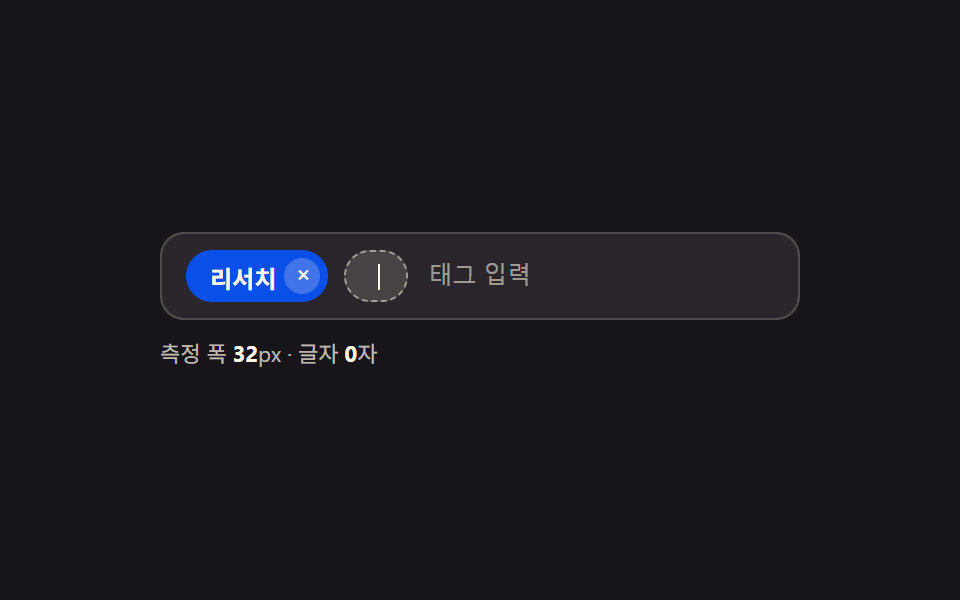 01 tag-input-chip-width-autosize
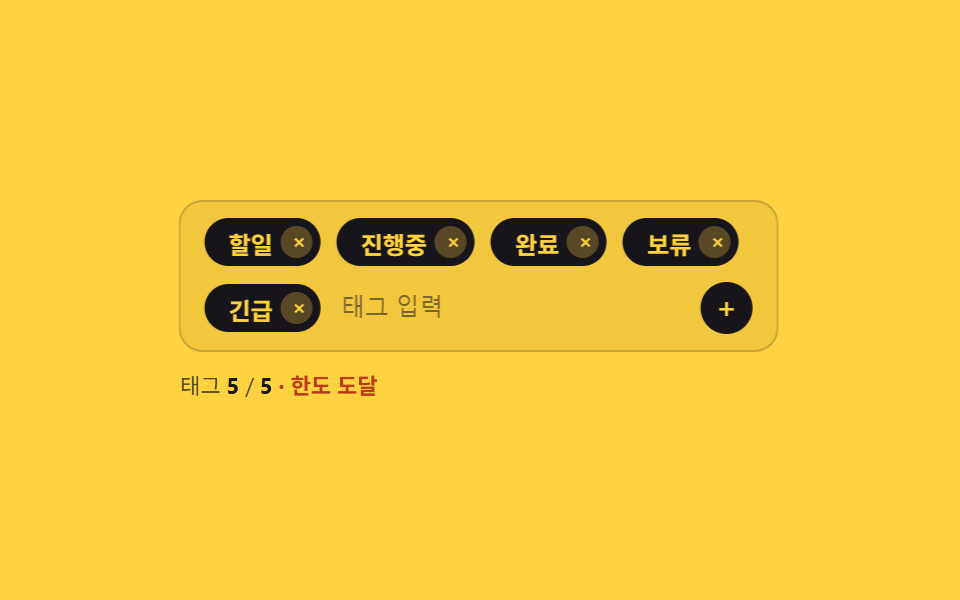 02 tag-input-max-count-shake-block
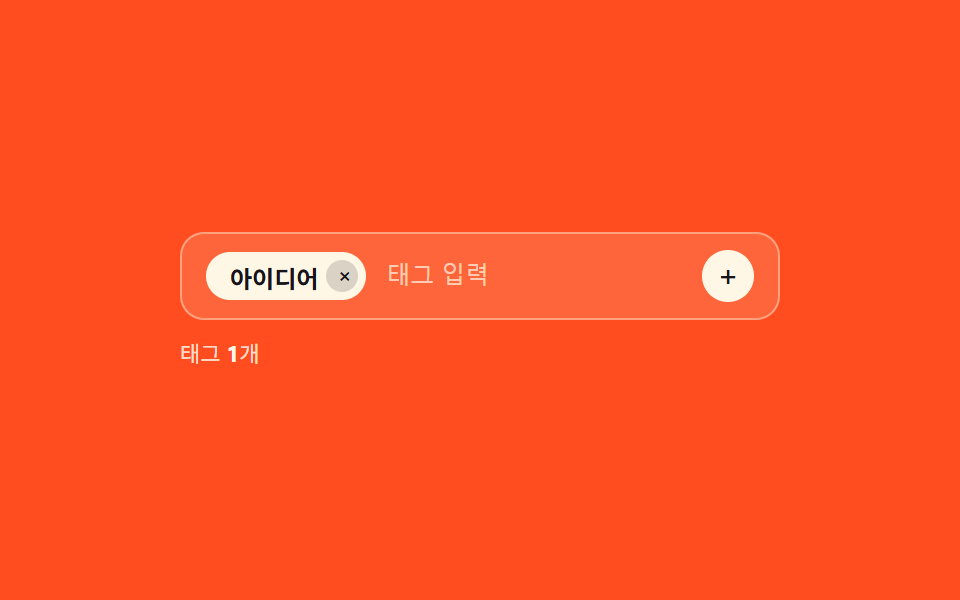 03 tag-input-duplicate-highlight-merge
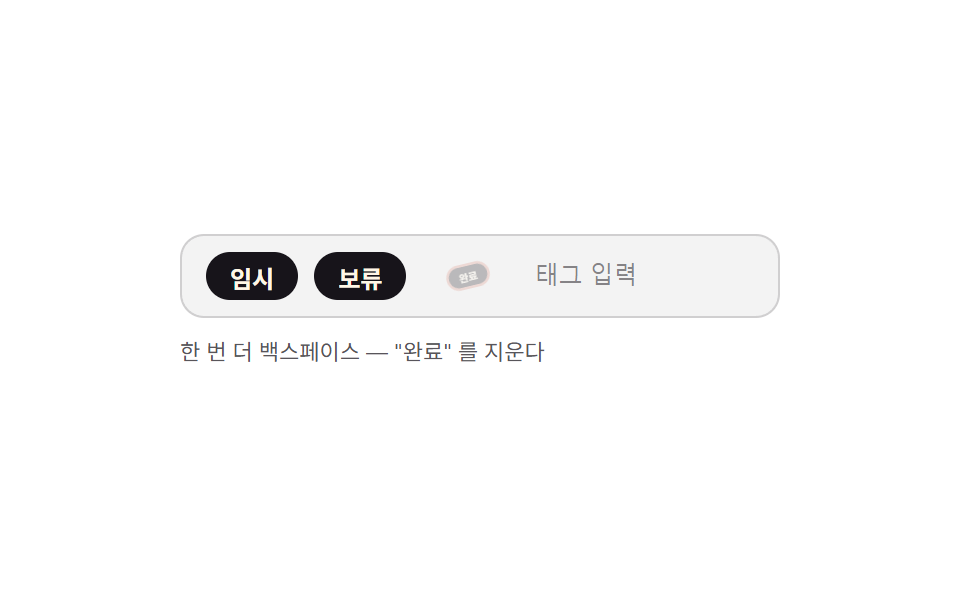 04 tag-input-keyboard-backspace-select-delete
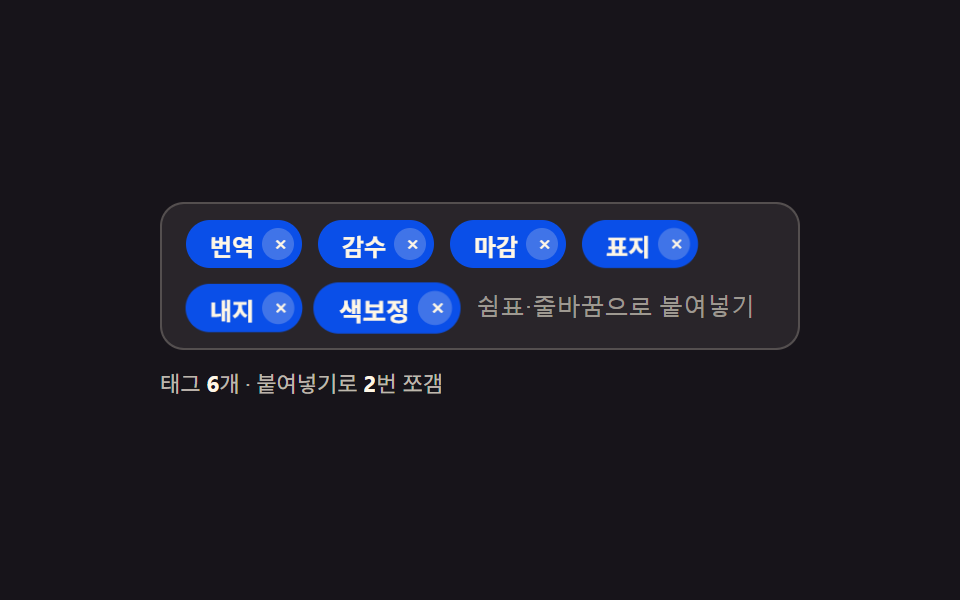 05 tag-input-paste-split-comma
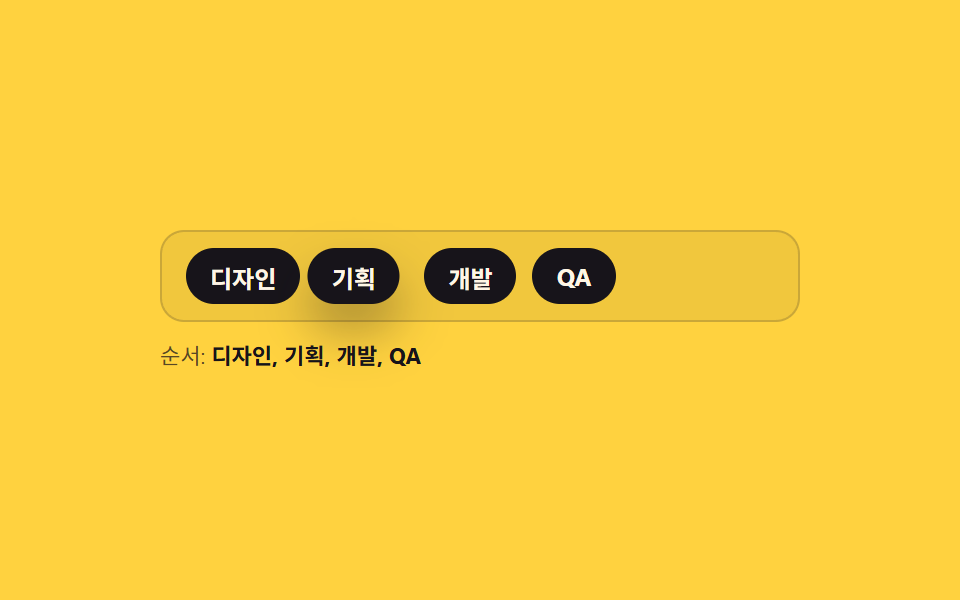 06 tag-input-drag-reorder-chip
 07 tag-input-color-random-hash
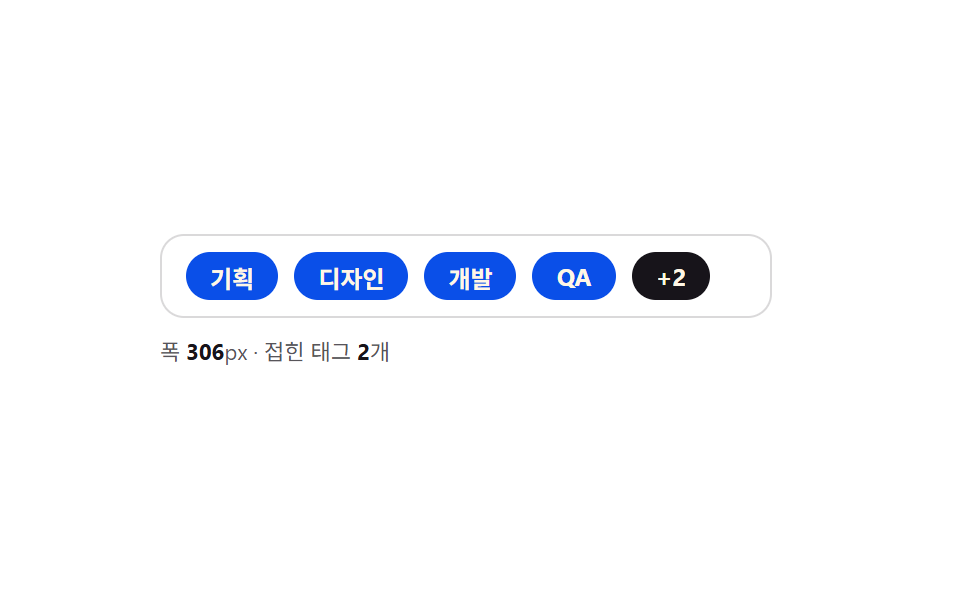 08 tag-input-overflow-row-collapse
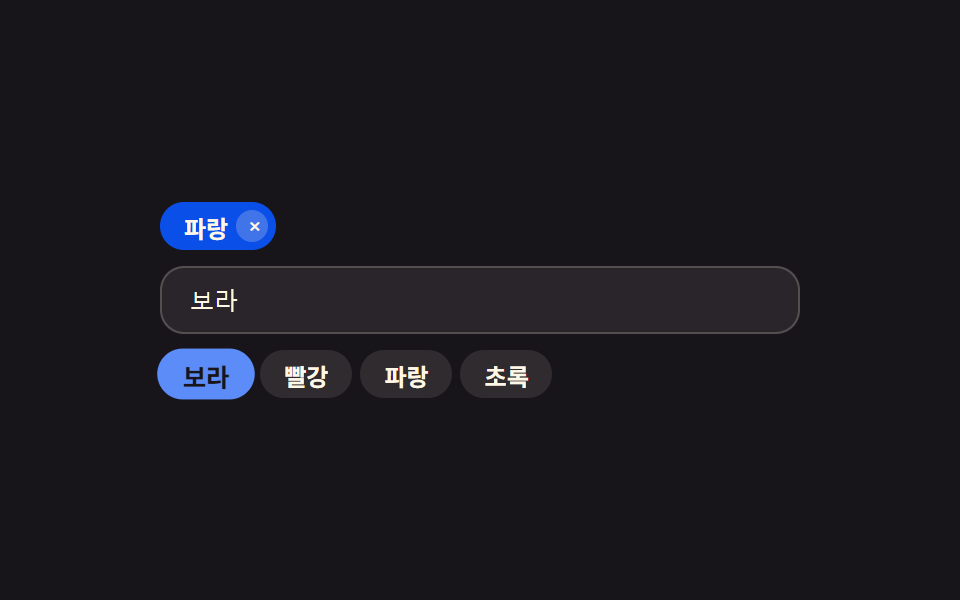 09 tag-input-autocomplete-suggest-chip
자동 재생 · 눌러서 해당 항목으로 · 전부 한 zip
- 01 입력한 글자 수만큼 폭이 늘어나는 칩 입력
- 02 개수 한도를 넘기면 흔들려 막는 칩 입력
- 03 같은 태그를 다시 넣으면 기존 칩이 깜빡이는 입력
- 04 백스페이스 두 번으로 지우는 칩 입력
- 05 붙여넣은 문장을 한 번에 칩으로 쪼개는 입력
- 06 드래그로 순서를 바꾸는 칩 입력
- 07 글자만으로 색이 정해지는 칩 입력
- 08 줄이 넘치면 「+N」으로 접는 칩 입력
- 09 입력값과 비슷한 순서로 후보를 보여주는 칩 입력
숫자 값 하나가 칩 아홉 개의 동작을 가릅니다
태그 입력 칩은 겉보기엔 다 비슷해 보이지만, 실제로 들여다보면 각자 다른 값 하나를 기준으로 움직입니다. 01은 글자 수, 02는 개수, 03은 중복 여부, 04는 선택 단계, 05는 구분자, 06은 좌표, 07은 해시값, 08은 남은 폭, 09는 점수 — 이 값이 바뀌는 순간마다 칩이 늘어나거나 접히거나 색이 정해집니다. 아래 아홉 개는 각각 그 값을 계산하는 함수와 그 값이 화면에 반영되는 지점까지 코드를 그대로 보여줍니다. 실무 화면에 직접 붙일 자리가 있다면 각 항목의 훅·리스너 구성을 먼저 확인하는 편이 재사용에 유리합니다.
01입력한 글자 수만큼 폭이 늘어나는 칩 입력
입력 칸에 글자를 넣을 때마다 그 글자 수만큼 안쪽 칩의 폭을 다시 재서 칩이 좁았다 넓었다 하지 않고 내용에 딱 맞게 늘어납니다. 처음 그리는 순간에는 WIDTH_PER_CHAR 어림값으로 먼저 폭을 잡고, 같은 흐름 안에서 syncFont()가 캔버스 컨텍스트의 폰트를 draft 요소의 계산 스타일과 맞춘 뒤 measureWidth()의 ctx.measureText() 실측값을 구해, 다음 프레임에 applyWidth()가 폭을 MAX_W 안에서 다시 반영합니다.
<main class="stage">
<div class="ti is-demo" id="ti">
  <div class="ti__row" id="tiRow">
    <span class="ti__chip" id="tiChip0"><span class="ti__chipText">리서치</span><button type="button" class="ti__chipX" aria-label="태그 삭제: 리서치">×</button></span>
    <span class="ti__draft" id="tiDraft" aria-hidden="true"><span class="ti__draftText" id="tiDraftText"></span><span class="ti__caret"></span></span>
    <input type="text" class="ti__input" id="tiInput" aria-label="태그 입력, 글자 수만큼 칩 폭이 늘어난다" placeholder="태그 입력">
  </div>
  <p class="ti__meta">측정 폭 <b id="tiW">0</b>px · 글자 <b id="tiN">0</b>자</p>
  <p class="ti__sr" role="status" aria-live="polite" id="tiLive"></p>
</div>
</main>
@use "../../../../site/static/demo-tokens" as *;
// 계산 겹: index.html applyWidth() 가 키 입력마다 두 단계로 폭을 정한다 — ① WIDTH_PER_CHAR 어림값을 즉시 적용해
// 입력이 끊기지 않게 하고 ② 다음 애니메이션 프레임에 canvas measureText 로 잰 실제 글리프 폭으로 보정한다.
// .ti__draft 의 width 전환만 애니메이션하고 레이아웃은 flex 로 흐른다.
@include stage($stage-ink);
.ti { width: min(100%, 320px); display: flex; flex-direction: column; gap: $sp-2; }
.ti__row {
display: flex; flex-wrap: wrap; align-items: center; gap: $sp-2;
background: rgba($subject-cream, .08); border: 1px solid rgba($subject-cream, .18);
border-radius: $r-control; padding: $sp-2 $sp-3;
}
.ti__chip {
display: inline-flex; align-items: center; gap: $sp-1; height: 26px; padding: 0 $sp-1 0 $sp-3;
background: $subject-blue-deep; color: $subject-cream; border-radius: $r-pill;
font-size: 12px; font-weight: 700; white-space: nowrap;
transform: scale(1); opacity: 1; transition: transform $dur-quick $ease-pop, opacity $dur-quick $ease-out;
}
.ti__chip--enter { transform: scale(.6); opacity: 0; }
.ti__chipX {
width: 18px; height: 18px; border: none; border-radius: 50%; background: rgba($subject-cream, .22);
color: $subject-cream; font-size: 12px; line-height: 1; cursor: pointer; display: grid; place-items: center;
}
.ti__chipX:focus-visible { outline: 2px solid $subject-cream; outline-offset: 2px; }
.ti__draft {
display: inline-flex; align-items: center; height: 26px; padding: 0 $sp-3; box-sizing: border-box;
background: rgba($subject-cream, .14); border: 1px dashed rgba($subject-cream, .5); border-radius: $r-pill;
color: $subject-cream; font-size: 12px; font-weight: 700; overflow: hidden;
width: 32px; transition: width $dur-quick $ease-out;
}
.ti__draftText { white-space: nowrap; }
.ti__caret { width: 1px; height: 13px; background: $subject-cream; margin-left: $sp-1; animation: tiBlink 1s steps(1, end) infinite; }
.ti__input {
flex: 1 1 80px; min-width: 60px; border: none; background: transparent; color: $subject-cream;
font-size: 12px; outline: none; caret-color: transparent;
}
.ti__input::placeholder { color: rgba($subject-cream, .55); }
.ti__meta { margin: 0; font-size: 11px; color: rgba($subject-cream, .72); }
.ti__meta b { color: $subject-cream; font-weight: 700; }
.ti__sr {
position: absolute; width: 1px; height: 1px; overflow: hidden; clip: rect(0 0 0 0); margin: -1px; padding: 0; border: 0;
}
@keyframes tiBlink { 0%, 50% { opacity: 1; } 50.01%, 100% { opacity: 0; } }
@media (max-width: 340px) {
.ti { width: 100%; }
.ti__row { padding: $sp-2; }
}
@media (prefers-reduced-motion: reduce) {
.ti__draft { transition: none; }
.ti__chip { transition: none; }
.ti__caret { animation: none; }
}html, body {
margin: 0;
overflow: hidden;
}
.stage {
box-sizing: border-box;
min-height: 100vh;
display: grid;
place-items: center;
margin: 0;
background: #17141a;
font-family: -apple-system, "Segoe UI", "Noto Sans KR", sans-serif;
padding: clamp(8px, 4vw, 24px);
}
.ti {
width: min(100%, 320px);
display: flex;
flex-direction: column;
gap: 8px;
}
.ti__row {
display: flex;
flex-wrap: wrap;
align-items: center;
gap: 8px;
background: rgba(255, 247, 230, 0.08);
border: 1px solid rgba(255, 247, 230, 0.18);
border-radius: 12px;
padding: 8px 12px;
}
.ti__chip {
display: inline-flex;
align-items: center;
gap: 4px;
height: 26px;
padding: 0 4px 0 12px;
background: #0a4fe8;
color: #fff7e6;
border-radius: 999px;
font-size: 12px;
font-weight: 700;
white-space: nowrap;
transform: scale(1);
opacity: 1;
transition: transform 220ms cubic-bezier(0.2, 1.4, 0.4, 1), opacity 220ms ease-out;
}
.ti__chip--enter {
transform: scale(0.6);
opacity: 0;
}
.ti__chipX {
width: 18px;
height: 18px;
border: none;
border-radius: 50%;
background: rgba(255, 247, 230, 0.22);
color: #fff7e6;
font-size: 12px;
line-height: 1;
cursor: pointer;
display: grid;
place-items: center;
}
.ti__chipX:focus-visible {
outline: 2px solid #fff7e6;
outline-offset: 2px;
}
.ti__draft {
display: inline-flex;
align-items: center;
height: 26px;
padding: 0 12px;
box-sizing: border-box;
background: rgba(255, 247, 230, 0.14);
border: 1px dashed rgba(255, 247, 230, 0.5);
border-radius: 999px;
color: #fff7e6;
font-size: 12px;
font-weight: 700;
overflow: hidden;
width: 32px;
transition: width 220ms ease-out;
}
.ti__draftText {
white-space: nowrap;
}
.ti__caret {
width: 1px;
height: 13px;
background: #fff7e6;
margin-left: 4px;
animation: tiBlink 1s steps(1, end) infinite;
}
.ti__input {
flex: 1 1 80px;
min-width: 60px;
border: none;
background: transparent;
color: #fff7e6;
font-size: 12px;
outline: none;
caret-color: transparent;
}
.ti__input::placeholder {
color: rgba(255, 247, 230, 0.55);
}
.ti__meta {
margin: 0;
font-size: 11px;
color: rgba(255, 247, 230, 0.72);
}
.ti__meta b {
color: #fff7e6;
font-weight: 700;
}
.ti__sr {
position: absolute;
width: 1px;
height: 1px;
overflow: hidden;
clip: rect(0 0 0 0);
margin: -1px;
padding: 0;
border: 0;
}
@keyframes tiBlink {
0%, 50% {
opacity: 1;
}
50.01%, 100% {
opacity: 0;
}
}
@media (max-width: 340px) {
.ti {
width: 100%;
}
.ti__row {
padding: 8px;
}
}
@media (prefers-reduced-motion: reduce) {
.ti__draft {
transition: none;
}
.ti__chip {
transition: none;
}
.ti__caret {
animation: none;
}
}(function () {
var WIDTH_PER_CHAR = 6.4; // 계산 겹 상수: 정밀 측정 전에 즉시 보여줄 어림 폭(글자당 px) — 다음 프레임에 canvas measureText 실측값으로 보정된다
var CH_PAD = 24; // 좌우 안쪽 여백 합
var MIN_W = 32, MAX_W = 208;
var WORDS = ['프로토타입', '와이어프레임', '초안'];
var TYPE_MS = 130, HOLD_MS = 560, GAP_MS = 420;
var reduce = window.matchMedia('(prefers-reduced-motion: reduce)').matches;
var root = document.getElementById('ti');
var draft = document.getElementById('tiDraft');
var draftText = document.getElementById('tiDraftText');
var input = document.getElementById('tiInput');
var wOut = document.getElementById('tiW');
var nOut = document.getElementById('tiN');
var live = document.getElementById('tiLive');
var row = document.getElementById('tiRow');
var chipSeq = 0;
var canvas = document.createElement('canvas');
var ctx = canvas.getContext('2d');
  function syncFont() {
    var cs = window.getComputedStyle(draftText);
    ctx.font = cs.fontWeight + ' ' + cs.fontSize + ' ' + cs.fontFamily;
  }
  function measureWidth(text) {
    // 계산 겹: canvas measureText 로 실제 글리프 폭을 잰다 — 글자 수 곱셈 추정이 아니다
    return ctx.measureText(text).width;
  }

  var target = '';
  function applyWidth(text, precise) {
    var guess = Math.min(MAX_W, Math.max(MIN_W, text.length * WIDTH_PER_CHAR + CH_PAD));
    draft.style.width = guess.toFixed(1) + 'px';
    if (precise) {
      syncFont();
      var real = Math.min(MAX_W, Math.max(MIN_W, measureWidth(text) + CH_PAD));
      requestAnimationFrame(function () {
        draft.style.width = real.toFixed(1) + 'px';
        wOut.textContent = Math.round(real);
      });
    } else {
      wOut.textContent = Math.round(guess);
    }
    nOut.textContent = text.length;
  }
function render() {
draftText.textContent = target;
applyWidth(target, true);
}
function commit(text) {
if (!text) return;
chipSeq++;
var chip = document.createElement('span');
chip.className = 'ti__chip ti__chip--enter';
chip.id = 'tiChip' + chipSeq;
var t = document.createElement('span');
t.className = 'ti__chipText';
t.textContent = text;
var x = document.createElement('button');
x.type = 'button';
x.className = 'ti__chipX';
x.setAttribute('aria-label', '태그 삭제: ' + text);
x.addEventListener('click', function () { human(); chip.remove(); announce(); });
chip.appendChild(t);
chip.appendChild(x);
row.insertBefore(chip, draft);
requestAnimationFrame(function () { chip.classList.remove('ti__chip--enter'); });
announce();
}
function announce() {
live.textContent = '태그 ' + row.querySelectorAll('.ti__chip').length + '개';
}
function human() {
if (root.classList.contains('is-demo')) { root.classList.remove('is-demo'); }
}
input.addEventListener('input', function () {
human();
target = input.value;
render();
});
input.addEventListener('keydown', function (e) {
if (e.key === 'Enter' && input.value.trim()) {
human();
commit(input.value.trim());
input.value = '';
target = '';
render();
}
});
var timer = 0;
function schedule(fn, ms) { timer = window.setTimeout(fn, ms); }
function typeLoop(wi, ci) {
if (!root.classList.contains('is-demo')) return;
var word = WORDS[wi % WORDS.length];
if (ci <= word.length) {
target = word.slice(0, ci);
render();
schedule(function () { typeLoop(wi, ci + 1); }, TYPE_MS);
} else {
schedule(function () {
if (!root.classList.contains('is-demo')) return;
commit(word);
target = '';
render();
schedule(function () { typeLoop(wi + 1, 0); }, GAP_MS);
}, HOLD_MS);
}
}
render();
announce();
if (!reduce) {
schedule(function () { typeLoop(0, 0); }, 320);
} else {
root.classList.remove('is-demo');
}
})();// TagChipWidthAutosize — vanilla 판(run/397/demo/01-tag-input-chip-width-autosize/index.html) 의 React 포트.
// applyWidth() 가 키 입력마다 WIDTH_PER_CHAR 어림값을 즉시 적용하고, 다음 프레임에 canvas measureText 로
// 잰 실제 글리프 폭으로 보정한다. reduce 에서도 input/keydown 은 render() 를 즉시 한 번 부른다.
import { useEffect, useRef, useState } from "react";
import styles from "./TagChipWidthAutosize.module.scss";
type Box<T> = { current: T };
type ChangeEvt = { target: { value: string } };
type KeyEvt = { key: string };
const WIDTH_PER_CHAR = 6.4; // 계산 겹 상수: 정밀 측정 전 즉시 보여줄 어림 폭(글자당 px)
const CH_PAD = 24;
const MIN_W = 32, MAX_W = 208;
const WORDS = ["프로토타입", "와이어프레임", "초안"];
const TYPE_MS = 130, HOLD_MS = 560, GAP_MS = 420;
type Chip = { id: number; text: string; entering: boolean };
export default function TagChipWidthAutosize() {
const rootRef = useRef(null) as unknown as Box<HTMLDivElement>;
const draftTextRef = useRef(null) as unknown as Box<HTMLSpanElement>;
const inputRef = useRef(null) as unknown as Box<HTMLInputElement>;
const canvasRef = useRef(null) as unknown as Box<HTMLCanvasElement | null>;
const timerRef = useRef(0) as unknown as Box<number>;
const seqRef = useRef(1) as unknown as Box<number>;
const isDemoRef = useRef(true) as unknown as Box<boolean>;
const [chips, setChips] = useState<Chip[]>([{ id: 0, text: "리서치", entering: false }]);
const [draft, setDraft] = useState("");
const [draftW, setDraftW] = useState(MIN_W);
const [measuredW, setMeasuredW] = useState(0);
const [isDemo, setIsDemo] = useState(true);
const [live, setLive] = useState("태그 1개");
function measureWidth(text: string): number {
if (!canvasRef.current) canvasRef.current = document.createElement("canvas");
const ctx = canvasRef.current.getContext("2d");
if (!ctx || !draftTextRef.current) return text.length * WIDTH_PER_CHAR;
const cs = window.getComputedStyle(draftTextRef.current);
ctx.font = cs.fontWeight + " " + cs.fontSize + " " + cs.fontFamily;
return ctx.measureText(text).width;
}
function render(text: string) {
const guess = Math.min(MAX_W, Math.max(MIN_W, text.length * WIDTH_PER_CHAR + CH_PAD));
setDraft(text);
setDraftW(guess);
setMeasuredW(Math.round(guess));
requestAnimationFrame(() => {
const real = Math.min(MAX_W, Math.max(MIN_W, measureWidth(text) + CH_PAD));
setDraftW(real);
setMeasuredW(Math.round(real));
});
}
function human() {
if (isDemoRef.current) { isDemoRef.current = false; setIsDemo(false); }
}
function commit(text: string) {
if (!text) return;
const id = seqRef.current++;
setChips((cs) => [...cs, { id, text, entering: true }]);
window.setTimeout(() => {
setChips((cs) => cs.map((c) => (c.id === id ? { ...c, entering: false } : c)));
}, 20);
}
useEffect(() => {
setLive("태그 " + chips.length + "개");
}, [chips.length]);
useEffect(() => {
const reduce = window.matchMedia("(prefers-reduced-motion: reduce)").matches;
function typeLoop(wi: number, ci: number) {
if (!isDemoRef.current) return;
const word = WORDS[wi % WORDS.length];
if (ci <= word.length) {
render(word.slice(0, ci));
timerRef.current = window.setTimeout(() => typeLoop(wi, ci + 1), TYPE_MS);
} else {
timerRef.current = window.setTimeout(() => {
if (!isDemoRef.current) return;
commit(word);
render("");
timerRef.current = window.setTimeout(() => typeLoop(wi + 1, 0), GAP_MS);
}, HOLD_MS);
}
}
if (!reduce) {
timerRef.current = window.setTimeout(() => typeLoop(0, 0), 320);
} else {
isDemoRef.current = false;
setIsDemo(false);
}
return () => window.clearTimeout(timerRef.current);
// eslint-disable-next-line react-hooks/exhaustive-deps
}, []);
function onInput(e: ChangeEvt) {
human();
render(e.target.value);
}
function onKeyDown(e: KeyEvt) {
if (e.key === "Enter" && draft.trim()) {
human();
commit(draft.trim());
render("");
}
}
function removeChip(id: number) {
human();
setChips((cs) => cs.filter((c) => c.id !== id));
}
return (
<main className={styles.stage}>
<div className={styles.ti + " " + (isDemo ? styles.isDemo : "")} ref={rootRef}>
<div className={styles.row}>
{chips.map((c) => (
<span key={c.id} className={styles.chip + (c.entering ? " " + styles.chipEnter : "")}>
<span className={styles.chipText}>{c.text}</span>
<button type="button" className={styles.chipX} aria-label={"태그 삭제: " + c.text} onClick={() => removeChip(c.id)}>×</button>
</span>
))}
<span className={styles.draft} style={{ width: draftW + "px" }} aria-hidden="true">
<span className={styles.draftText} ref={draftTextRef}>{draft}</span>
<span className={styles.caret} />
</span>
<input
type="text" className={styles.input} aria-label="태그 입력, 글자 수만큼 칩 폭이 늘어난다"
placeholder="태그 입력" ref={inputRef} value={draft} onChange={onInput} onKeyDown={onKeyDown}
/>
</div>
<p className={styles.meta}>측정 폭 <b>{measuredW}</b>px · 글자 <b>{draft.length}</b>자</p>
<p className={styles.sr} role="status" aria-live="polite">{live}</p>
</div>
</main>
);
}01 · 입력한 글자 수만큼 폭이 늘어나는 칩 입력 — 측정 누적면적 1.497% · 움직인 프레임 10/23GODRICH 원작 · zip 에 SCSS·React 포함 · 비밀번호 보기
function syncFont() {
var cs = window.getComputedStyle(draftText);
ctx.font = cs.fontWeight + ' ' + cs.fontSize + ' ' + cs.fontFamily;
}
function measureWidth(text) {
// 계산 겹: canvas measureText 로 실제 글리프 폭을 잰다 — 글자 수 곱셈 추정이 아니다
return ctx.measureText(text).width;
}
var target = '';
function applyWidth(text, precise) {
var guess = Math.min(MAX_W, Math.max(MIN_W, text.length * WIDTH_PER_CHAR + CH_PAD));
draft.style.width = guess.toFixed(1) + 'px';
if (precise) {
syncFont();
var real = Math.min(MAX_W, Math.max(MIN_W, measureWidth(text) + CH_PAD));
requestAnimationFrame(function () {
draft.style.width = real.toFixed(1) + 'px';
wOut.textContent = Math.round(real);
});
} else {
wOut.textContent = Math.round(guess);
}
nOut.textContent = text.length;
}
02개수 한도를 넘기면 흔들려 막는 칩 입력
칩 개수를 정해둔 한도와 매번 비교하다가 한도에 닿으면 새 칩을 만들지 않고 입력 칸 전체를 짧게 흔들어 더는 못 넣는다는 걸 보여줍니다. block()은 흔드는 클래스를 껐다 켜는 리플로우 트릭을 쓰고, reduced-motion이면 흔들지 않고 바로 렌더만 한 번 더 부릅니다.
<main class="stage">
<div class="tm is-demo" id="tm">
  <div class="tm__row" id="tmRow">
    <input type="text" class="tm__input" id="tmInput" aria-label="태그 입력, 한도에 닿으면 칸이 흔들린다" placeholder="태그 입력">
    <button type="button" class="tm__add" id="tmAdd" aria-label="태그 추가">+</button>
  </div>
  <p class="tm__meta">태그 <b id="tmCount">0</b> / <b id="tmMax">5</b><span class="tm__warn" id="tmWarn" hidden> · 한도 도달</span></p>
  <p class="tm__sr" role="alert" id="tmLive"></p>
</div>
</main>
@use "../../../../site/static/demo-tokens" as *;
// 계산 겹: block() 이 count() 를 MAX_COUNT 와 비교해 이미 한도면 칩을 만들지 않고
// .tm__row--shake 을 다시 건다(reflow 로 재생 보장). 진폭이 줄어드는 5단 스프링 오프셋으로
// 감쇠 진동을 흉내낸다 — 단순 좌우 2단 흔들림이 아니다.
@include stage($stage-yellow);
.tm { width: min(100%, 300px); display: flex; flex-direction: column; gap: $sp-2; }
.tm__row {
display: flex; flex-wrap: wrap; align-items: center; gap: $sp-2;
background: rgba($subject-ink, .06); border: 1px solid rgba($subject-ink, .18);
border-radius: $r-control; padding: $sp-2 $sp-3;
}
.tm__row--shake { animation: tmShake $dur-enter $ease-spring 1; }
.tm__input {
flex: 1 1 auto; min-width: 0; border: none; background: transparent; color: $subject-ink;
font-size: 12px; outline: none;
}
.tm__input::placeholder { color: rgba($subject-ink, .55); }
.tm__add {
flex: 0 0 auto; width: 26px; height: 26px; border: none; border-radius: 50%;
background: $subject-ink; color: $stage-yellow; font-size: 15px; line-height: 1; cursor: pointer;
display: grid; place-items: center; transition: transform $dur-instant $ease-out;
}
.tm__add:active { transform: scale(.88); }
.tm__add:focus-visible { outline: 2px solid $subject-ink; outline-offset: 2px; }
.tm__chip {
display: inline-flex; align-items: center; gap: $sp-1; height: 24px; padding: 0 $sp-1 0 $sp-3;
background: $subject-ink; color: $stage-yellow; border-radius: $r-pill;
font-size: 12px; font-weight: 700; white-space: nowrap;
transform: scale(1); opacity: 1; transition: transform $dur-quick $ease-pop, opacity $dur-quick $ease-out;
}
.tm__chip--enter { transform: scale(.6); opacity: 0; }
.tm__chipX {
width: 16px; height: 16px; border: none; border-radius: 50%; background: rgba($stage-yellow, .28);
color: $stage-yellow; font-size: 11px; line-height: 1; cursor: pointer; display: grid; place-items: center;
}
.tm__chipX:focus-visible { outline: 2px solid $subject-ink; outline-offset: 2px; }
.tm__meta { margin: 0; font-size: 11px; color: rgba($subject-ink, .72); }
.tm__meta b { color: $subject-ink; font-weight: 700; }
.tm__warn { color: $error; font-weight: 700; }
.tm__sr {
position: absolute; width: 1px; height: 1px; overflow: hidden; clip: rect(0 0 0 0); margin: -1px; padding: 0; border: 0;
}
// 감쇠 스프링: 진폭이 8→5→3→1→0px 로 줄며 좌우로 흔들린다(단순 2단 shake 가 아니다)
@keyframes tmShake {
0% { transform: translateX(0); }
8% { transform: translateX(-8px); }
18% { transform: translateX(7px); }
30% { transform: translateX(-5px); }
44% { transform: translateX(4px); }
58% { transform: translateX(-3px); }
72% { transform: translateX(2px); }
86% { transform: translateX(-1px); }
100% { transform: translateX(0); }
}
@media (max-width: 340px) {
.tm { width: 100%; }
.tm__row { padding: $sp-2; }
}
@media (prefers-reduced-motion: reduce) {
.tm__row--shake { animation: none; }
.tm__chip { transition: none; }
.tm__add { transition: none; }
}html, body {
margin: 0;
overflow: hidden;
}
.stage {
box-sizing: border-box;
min-height: 100vh;
display: grid;
place-items: center;
margin: 0;
background: #ffd23f;
font-family: -apple-system, "Segoe UI", "Noto Sans KR", sans-serif;
padding: clamp(8px, 4vw, 24px);
}
.tm {
width: min(100%, 300px);
display: flex;
flex-direction: column;
gap: 8px;
}
.tm__row {
display: flex;
flex-wrap: wrap;
align-items: center;
gap: 8px;
background: rgba(23, 20, 26, 0.06);
border: 1px solid rgba(23, 20, 26, 0.18);
border-radius: 12px;
padding: 8px 12px;
}
.tm__row--shake {
animation: tmShake 600ms cubic-bezier(0.2, 0.8, 0.2, 1) 1;
}
.tm__input {
flex: 1 1 auto;
min-width: 0;
border: none;
background: transparent;
color: #17141a;
font-size: 12px;
outline: none;
}
.tm__input::placeholder {
color: rgba(23, 20, 26, 0.55);
}
.tm__add {
flex: 0 0 auto;
width: 26px;
height: 26px;
border: none;
border-radius: 50%;
background: #17141a;
color: #ffd23f;
font-size: 15px;
line-height: 1;
cursor: pointer;
display: grid;
place-items: center;
transition: transform 140ms ease-out;
}
.tm__add:active {
transform: scale(0.88);
}
.tm__add:focus-visible {
outline: 2px solid #17141a;
outline-offset: 2px;
}
.tm__chip {
display: inline-flex;
align-items: center;
gap: 4px;
height: 24px;
padding: 0 4px 0 12px;
background: #17141a;
color: #ffd23f;
border-radius: 999px;
font-size: 12px;
font-weight: 700;
white-space: nowrap;
transform: scale(1);
opacity: 1;
transition: transform 220ms cubic-bezier(0.2, 1.4, 0.4, 1), opacity 220ms ease-out;
}
.tm__chip--enter {
transform: scale(0.6);
opacity: 0;
}
.tm__chipX {
width: 16px;
height: 16px;
border: none;
border-radius: 50%;
background: rgba(255, 210, 63, 0.28);
color: #ffd23f;
font-size: 11px;
line-height: 1;
cursor: pointer;
display: grid;
place-items: center;
}
.tm__chipX:focus-visible {
outline: 2px solid #17141a;
outline-offset: 2px;
}
.tm__meta {
margin: 0;
font-size: 11px;
color: rgba(23, 20, 26, 0.72);
}
.tm__meta b {
color: #17141a;
font-weight: 700;
}
.tm__warn {
color: #c2361a;
font-weight: 700;
}
.tm__sr {
position: absolute;
width: 1px;
height: 1px;
overflow: hidden;
clip: rect(0 0 0 0);
margin: -1px;
padding: 0;
border: 0;
}
@keyframes tmShake {
0% {
transform: translateX(0);
}
8% {
transform: translateX(-8px);
}
18% {
transform: translateX(7px);
}
30% {
transform: translateX(-5px);
}
44% {
transform: translateX(4px);
}
58% {
transform: translateX(-3px);
}
72% {
transform: translateX(2px);
}
86% {
transform: translateX(-1px);
}
100% {
transform: translateX(0);
}
}
@media (max-width: 340px) {
.tm {
width: 100%;
}
.tm__row {
padding: 8px;
}
}
@media (prefers-reduced-motion: reduce) {
.tm__row--shake {
animation: none;
}
.tm__chip {
transition: none;
}
.tm__add {
transition: none;
}
}(function () {
var MAX_COUNT = 5; // 계산 겹 상수: 이 개수와 매번 비교해 한도를 판정한다
var WORDS = ['할일', '진행중', '완료', '보류', '긴급'];
var OVER_WORD = '확인';
var ADD_MS = 180, PAUSE_MS = 900;
var reduce = window.matchMedia('(prefers-reduced-motion: reduce)').matches;
var root = document.getElementById('tm');
var row = document.getElementById('tmRow');
var input = document.getElementById('tmInput');
var addBtn = document.getElementById('tmAdd');
var countEl = document.getElementById('tmCount');
var warnEl = document.getElementById('tmWarn');
var live = document.getElementById('tmLive');
var seq = 0;
function count() { return row.querySelectorAll('.tm__chip').length; }
function render() {
countEl.textContent = count();
warnEl.hidden = count() < MAX_COUNT;
}
function human() { if (root.classList.contains('is-demo')) root.classList.remove('is-demo'); }
  function block() {
    // 계산 겹: 개수를 MAX_COUNT 와 비교해 이미 한도라면 칩을 만들지 않고 스프링 흔들림만 재생한다
    row.classList.remove('tm__row--shake');
    void row.offsetWidth; // 리플로우 — 같은 클래스를 다시 걸어도 애니메이션이 재생되게
    row.classList.add('tm__row--shake');
    live.textContent = '태그 ' + MAX_COUNT + '개 한도에 닿았다';
    if (reduce) render();
  }

  function add(text) {
    if (!text) return;
    if (count() >= MAX_COUNT) { block(); return; }
    seq++;
    var chip = document.createElement('span');
    chip.className = 'tm__chip tm__chip--enter';
    chip.id = 'tmChip' + seq;
    chip.innerHTML = '<span class="tm__chipText"></span><button type="button" class="tm__chipX">×</button>';
    chip.querySelector('.tm__chipText').textContent = text;
    chip.querySelector('.tm__chipX').setAttribute('aria-label', '태그 삭제: ' + text);
    chip.querySelector('.tm__chipX').addEventListener('click', function () { human(); chip.remove(); render(); });
    row.insertBefore(chip, input);
    requestAnimationFrame(function () { chip.classList.remove('tm__chip--enter'); });
    render();
    live.textContent = text + ' 추가 · 태그 ' + count() + '개';
  }
addBtn.addEventListener('click', function () { human(); add(input.value.trim()); input.value = ''; });
input.addEventListener('keydown', function (e) {
if (e.key === 'Enter' && input.value.trim()) { human(); add(input.value.trim()); input.value = ''; }
});
var timer = 0;
function schedule(fn, ms) { timer = window.setTimeout(fn, ms); }
function loop(i) {
if (!root.classList.contains('is-demo')) return;
if (i < WORDS.length) {
add(WORDS[i]);
schedule(function () { loop(i + 1); }, ADD_MS);
} else if (i === WORDS.length) {
add(OVER_WORD); // 한도에 닿아 block() 이 대신 실행된다
schedule(function () { loop(i + 1); }, PAUSE_MS);
} else {
row.querySelectorAll('.tm__chip').forEach(function (c) { c.remove(); });
render();
schedule(function () { loop(0); }, ADD_MS);
}
}
render();
if (!reduce) {
schedule(function () { loop(0); }, 320);
} else {
root.classList.remove('is-demo');
}
})();// TagMaxCountShakeBlock — vanilla 판(run/397/demo/02-tag-input-max-count-shake-block/index.html) 의 React 포트.
// block() 이 count 를 MAX_COUNT 와 비교해 이미 한도면 칩을 만들지 않고 감쇠 스프링 shake 클래스를 다시 건다
// (키를 바꿔 리마운트시켜 CSS 애니메이션이 매번 재생되게 한다 — reflow 트릭의 React 버전).
import { useEffect, useRef, useState } from "react";
import styles from "./TagMaxCountShakeBlock.module.scss";
type Box<T> = { current: T };
type ChangeEvt = { target: { value: string } };
type KeyEvt = { key: string };
const MAX_COUNT = 5; // 계산 겹 상수: 이 개수와 매번 비교해 한도를 판정한다
const WORDS = ["할일", "진행중", "완료", "보류", "긴급"];
const OVER_WORD = "확인";
const ADD_MS = 180, PAUSE_MS = 900;
type Chip = { id: number; text: string; entering: boolean };
export default function TagMaxCountShakeBlock() {
const timerRef = useRef(0) as unknown as Box<number>;
const seqRef = useRef(1) as unknown as Box<number>;
const shakeSeqRef = useRef(0) as unknown as Box<number>;
const isDemoRef = useRef(true) as unknown as Box<boolean>;
const [chips, setChips] = useState<Chip[]>([]);
const [draft, setDraft] = useState("");
const [shakeKey, setShakeKey] = useState(0);
const [warn, setWarn] = useState(false);
const [isDemo, setIsDemo] = useState(true);
const [live, setLive] = useState("");
function human() {
if (isDemoRef.current) { isDemoRef.current = false; setIsDemo(false); }
}
function block() {
// 계산 겹: 현재 개수를 MAX_COUNT 와 비교해 이미 한도라면 칩을 만들지 않고 스프링 흔들림만 재생한다
shakeSeqRef.current++;
setShakeKey(shakeSeqRef.current);
setLive("태그 " + MAX_COUNT + "개 한도에 닿았다");
}
function add(text: string) {
if (!text) return;
setChips((cs) => {
if (cs.length >= MAX_COUNT) { block(); return cs; }
const id = seqRef.current++;
setLive(text + " 추가 · 태그 " + (cs.length + 1) + "개");
window.setTimeout(() => {
setChips((cs2) => cs2.map((c) => (c.id === id ? { ...c, entering: false } : c)));
}, 20);
return [...cs, { id, text, entering: true }];
});
}
function removeChip(id: number) {
human();
setChips((cs) => cs.filter((c) => c.id !== id));
}
useEffect(() => {
setWarn(chips.length >= MAX_COUNT);
}, [chips.length]);
useEffect(() => {
const reduce = window.matchMedia("(prefers-reduced-motion: reduce)").matches;
function loop(i: number) {
if (!isDemoRef.current) return;
if (i < WORDS.length) {
add(WORDS[i]);
timerRef.current = window.setTimeout(() => loop(i + 1), ADD_MS);
} else if (i === WORDS.length) {
add(OVER_WORD);
timerRef.current = window.setTimeout(() => loop(i + 1), PAUSE_MS);
} else {
setChips([]);
timerRef.current = window.setTimeout(() => loop(0), ADD_MS);
}
}
if (!reduce) {
timerRef.current = window.setTimeout(() => loop(0), 320);
} else {
isDemoRef.current = false;
setIsDemo(false);
}
return () => window.clearTimeout(timerRef.current);
// eslint-disable-next-line react-hooks/exhaustive-deps
}, []);
function onAdd() { human(); add(draft.trim()); setDraft(""); }
function onInput(e: ChangeEvt) { setDraft(e.target.value); }
function onKeyDown(e: KeyEvt) {
if (e.key === "Enter" && draft.trim()) { human(); add(draft.trim()); setDraft(""); }
}
return (
<main className={styles.stage}>
<div className={styles.tm + " " + (isDemo ? styles.isDemo : "")}>
<div key={shakeKey} className={styles.row + (shakeKey ? " " + styles.rowShake : "")}>
{chips.map((c) => (
<span key={c.id} className={styles.chip + (c.entering ? " " + styles.chipEnter : "")}>
<span>{c.text}</span>
<button type="button" className={styles.chipX} aria-label={"태그 삭제: " + c.text} onClick={() => removeChip(c.id)}>×</button>
</span>
))}
<input
type="text" className={styles.input} aria-label="태그 입력, 한도에 닿으면 칸이 흔들린다"
placeholder="태그 입력" value={draft} onChange={onInput} onKeyDown={onKeyDown}
/>
<button type="button" className={styles.add} aria-label="태그 추가" onClick={onAdd}>+</button>
</div>
<p className={styles.meta}>
태그 <b>{chips.length}</b> / <b>{MAX_COUNT}</b>
{warn ? <span className={styles.warn}> · 한도 도달</span> : null}
</p>
<p className={styles.sr} role="alert">{live}</p>
</div>
</main>
);
}02 · 개수 한도를 넘기면 흔들려 막는 칩 입력 — 측정 누적면적 13.369% · 움직인 프레임 15/23GODRICH 원작 · zip 에 SCSS·React 포함 · 비밀번호 보기
function block() {
// 계산 겹: 개수를 MAX_COUNT 와 비교해 이미 한도라면 칩을 만들지 않고 스프링 흔들림만 재생한다
row.classList.remove('tm__row--shake');
void row.offsetWidth; // 리플로우 — 같은 클래스를 다시 걸어도 애니메이션이 재생되게
row.classList.add('tm__row--shake');
live.textContent = '태그 ' + MAX_COUNT + '개 한도에 닿았다';
if (reduce) render();
}
function add(text) {
if (!text) return;
if (count() >= MAX_COUNT) { block(); return; }
seq++;
var chip = document.createElement('span');
chip.className = 'tm__chip tm__chip--enter';
chip.id = 'tmChip' + seq;
chip.innerHTML = '<span class="tm__chipText"></span><button type="button" class="tm__chipX">×</button>';
chip.querySelector('.tm__chipText').textContent = text;
chip.querySelector('.tm__chipX').setAttribute('aria-label', '태그 삭제: ' + text);
chip.querySelector('.tm__chipX').addEventListener('click', function () { human(); chip.remove(); render(); });
row.insertBefore(chip, input);
requestAnimationFrame(function () { chip.classList.remove('tm__chip--enter'); });
render();
live.textContent = text + ' 추가 · 태그 ' + count() + '개';
}
03같은 태그를 다시 넣으면 기존 칩이 깜빡이는 입력
새로 입력한 글자를 이미 있는 칩들과 하나씩 비교해 같은 것이 있으면 새 칩을 만들지 않고 그 기존 칩만 잠깐 배경색을 밝혔다 되돌려 이미 있다는 걸 알려줍니다. findDup()가 정규화한 문자열로 선형 탐색을 하고, merge()가 찾은 칩의 펄스 클래스를 지웠다 다시 걸어 리플로우로 재생시킵니다.
<main class="stage">
<div class="td is-demo" id="td">
  <div class="td__row" id="tdRow">
    <input type="text" class="td__input" id="tdInput" aria-label="태그 입력, 이미 있으면 새로 만들지 않고 그 칩이 빛난다" placeholder="태그 입력">
    <button type="button" class="td__add" id="tdAdd" aria-label="태그 추가">+</button>
  </div>
  <p class="td__meta">태그 <b id="tdCount">0</b>개<span class="td__dup" id="tdDup" hidden> · 이미 있음</span></p>
  <p class="td__sr" role="status" aria-live="polite" id="tdLive"></p>
</div>
</main>
@use "../../../../site/static/demo-tokens" as *;
// 계산 겹: findDup() 이 입력 문자열을 정규화(trim+lowercase)해 기존 칩 전부와 견준다.
// 같은 게 있으면 새 칩을 만들지 않고 그 칩에 td__chip--merge 를 다시 걸어(reflow) 감쇠 펄스 +
// 링 글로우를 재생한다 — 병합은 "새로 안 만든다"이지 두 칩을 하나로 접는 연출이 아니다.
@include stage($stage-orange);
.td { width: min(100%, 300px); display: flex; flex-direction: column; gap: $sp-2; }
.td__row {
display: flex; flex-wrap: wrap; align-items: center; gap: $sp-2;
background: rgba($subject-cream, .14); border: 1px solid rgba($subject-cream, .4);
border-radius: $r-control; padding: $sp-2 $sp-3;
}
.td__input {
flex: 1 1 auto; min-width: 0; border: none; background: transparent; color: $subject-cream;
font-size: 12px; outline: none;
}
.td__input::placeholder { color: rgba($subject-cream, .7); }
.td__add {
flex: 0 0 auto; width: 26px; height: 26px; border: none; border-radius: 50%;
background: $subject-cream; color: $subject-ink; font-size: 15px; line-height: 1; cursor: pointer;
display: grid; place-items: center; transition: transform $dur-instant $ease-out;
}
.td__add:active { transform: scale(.88); }
.td__add:focus-visible { outline: 2px solid $subject-ink; outline-offset: 2px; }
.td__chip {
display: inline-flex; align-items: center; gap: $sp-1; height: 24px; padding: 0 $sp-1 0 $sp-3;
background: $subject-cream; color: $subject-ink; border-radius: $r-pill;
font-size: 12px; font-weight: 700; white-space: nowrap;
transform: scale(1); opacity: 1; transition: transform $dur-quick $ease-pop, opacity $dur-quick $ease-out;
}
.td__chip--enter { transform: scale(.6); opacity: 0; }
.td__chip--merge { animation: tdMerge $dur-enter $ease-spring 1; }
.td__chipX {
width: 16px; height: 16px; border: none; border-radius: 50%; background: rgba($subject-ink, .16);
color: $subject-ink; font-size: 11px; line-height: 1; cursor: pointer; display: grid; place-items: center;
}
.td__chipX:focus-visible { outline: 2px solid $subject-ink; outline-offset: 2px; }
.td__meta { margin: 0; font-size: 11px; color: rgba($subject-cream, .85); }
.td__meta b { color: $subject-cream; font-weight: 700; }
.td__dup { color: $subject-cream; font-weight: 700; }
.td__sr {
position: absolute; width: 1px; height: 1px; overflow: hidden; clip: rect(0 0 0 0); margin: -1px; padding: 0; border: 0;
}
// 감쇠 스프링 펄스 + 링 글로우: 크기가 1→1.16→0.95→1.05→1 로 오버슈트하며 그림자 링이 함께 사그라든다
@keyframes tdMerge {
0% { transform: scale(1); box-shadow: 0 0 0 0 rgba($subject-blue-deep, 0); }
14% { transform: scale(1.16); box-shadow: 0 0 0 6px rgba($subject-blue-deep, .45); }
32% { transform: scale(.95); box-shadow: 0 0 0 3px rgba($subject-blue-deep, .3); }
50% { transform: scale(1.05); box-shadow: 0 0 0 5px rgba($subject-blue-deep, .18); }
70% { transform: scale(.99); box-shadow: 0 0 0 2px rgba($subject-blue-deep, .1); }
100% { transform: scale(1); box-shadow: 0 0 0 0 rgba($subject-blue-deep, 0); }
}
@media (max-width: 340px) {
.td { width: 100%; }
.td__row { padding: $sp-2; }
}
@media (prefers-reduced-motion: reduce) {
.td__chip { transition: none; }
.td__chip--merge { animation: none; }
.td__add { transition: none; }
}html, body {
margin: 0;
overflow: hidden;
}
.stage {
box-sizing: border-box;
min-height: 100vh;
display: grid;
place-items: center;
margin: 0;
background: #ff4d1f;
font-family: -apple-system, "Segoe UI", "Noto Sans KR", sans-serif;
padding: clamp(8px, 4vw, 24px);
}
.td {
width: min(100%, 300px);
display: flex;
flex-direction: column;
gap: 8px;
}
.td__row {
display: flex;
flex-wrap: wrap;
align-items: center;
gap: 8px;
background: rgba(255, 247, 230, 0.14);
border: 1px solid rgba(255, 247, 230, 0.4);
border-radius: 12px;
padding: 8px 12px;
}
.td__input {
flex: 1 1 auto;
min-width: 0;
border: none;
background: transparent;
color: #fff7e6;
font-size: 12px;
outline: none;
}
.td__input::placeholder {
color: rgba(255, 247, 230, 0.7);
}
.td__add {
flex: 0 0 auto;
width: 26px;
height: 26px;
border: none;
border-radius: 50%;
background: #fff7e6;
color: #17141a;
font-size: 15px;
line-height: 1;
cursor: pointer;
display: grid;
place-items: center;
transition: transform 140ms ease-out;
}
.td__add:active {
transform: scale(0.88);
}
.td__add:focus-visible {
outline: 2px solid #17141a;
outline-offset: 2px;
}
.td__chip {
display: inline-flex;
align-items: center;
gap: 4px;
height: 24px;
padding: 0 4px 0 12px;
background: #fff7e6;
color: #17141a;
border-radius: 999px;
font-size: 12px;
font-weight: 700;
white-space: nowrap;
transform: scale(1);
opacity: 1;
transition: transform 220ms cubic-bezier(0.2, 1.4, 0.4, 1), opacity 220ms ease-out;
}
.td__chip--enter {
transform: scale(0.6);
opacity: 0;
}
.td__chip--merge {
animation: tdMerge 600ms cubic-bezier(0.2, 0.8, 0.2, 1) 1;
}
.td__chipX {
width: 16px;
height: 16px;
border: none;
border-radius: 50%;
background: rgba(23, 20, 26, 0.16);
color: #17141a;
font-size: 11px;
line-height: 1;
cursor: pointer;
display: grid;
place-items: center;
}
.td__chipX:focus-visible {
outline: 2px solid #17141a;
outline-offset: 2px;
}
.td__meta {
margin: 0;
font-size: 11px;
color: rgba(255, 247, 230, 0.85);
}
.td__meta b {
color: #fff7e6;
font-weight: 700;
}
.td__dup {
color: #fff7e6;
font-weight: 700;
}
.td__sr {
position: absolute;
width: 1px;
height: 1px;
overflow: hidden;
clip: rect(0 0 0 0);
margin: -1px;
padding: 0;
border: 0;
}
@keyframes tdMerge {
0% {
transform: scale(1);
box-shadow: 0 0 0 0 rgba(10, 79, 232, 0);
}
14% {
transform: scale(1.16);
box-shadow: 0 0 0 6px rgba(10, 79, 232, 0.45);
}
32% {
transform: scale(0.95);
box-shadow: 0 0 0 3px rgba(10, 79, 232, 0.3);
}
50% {
transform: scale(1.05);
box-shadow: 0 0 0 5px rgba(10, 79, 232, 0.18);
}
70% {
transform: scale(0.99);
box-shadow: 0 0 0 2px rgba(10, 79, 232, 0.1);
}
100% {
transform: scale(1);
box-shadow: 0 0 0 0 rgba(10, 79, 232, 0);
}
}
@media (max-width: 340px) {
.td {
width: 100%;
}
.td__row {
padding: 8px;
}
}
@media (prefers-reduced-motion: reduce) {
.td__chip {
transition: none;
}
.td__chip--merge {
animation: none;
}
.td__add {
transition: none;
}
}(function () {
var WORDS = ['아이디어', '초안', '아이디어', '검토'];
var ADD_MS = 620, PAUSE_MS = 900;
var reduce = window.matchMedia('(prefers-reduced-motion: reduce)').matches;
var root = document.getElementById('td');
var row = document.getElementById('tdRow');
var input = document.getElementById('tdInput');
var addBtn = document.getElementById('tdAdd');
var countEl = document.getElementById('tdCount');
var dupEl = document.getElementById('tdDup');
var live = document.getElementById('tdLive');
var seq = 0;
function norm(text) { return text.trim().toLowerCase(); }
function chips() { return Array.prototype.slice.call(row.querySelectorAll('.td__chip')); }
function render() { countEl.textContent = chips().length; }
function human() { if (root.classList.contains('is-demo')) root.classList.remove('is-demo'); }
  function findDup(text) {
    // 계산 겹: 정규화한 문자열을 기존 칩 전부와 견줘 같은 것을 찾는다 — 대소문자·앞뒤 공백은 다르게 치지 않는다
    var key = norm(text);
    var list = chips();
    for (var i = 0; i < list.length; i++) {
      if (norm(list[i].dataset.text) === key) return list[i];
    }
    return null;
  }

  function merge(chip) {
    // 계산 겹: 새 칩을 만들지 않고 이미 있는 칩에 감쇠 스프링 펄스를 다시 건다(reflow 로 재생 보장)
    chip.classList.remove('td__chip--merge');
    void chip.offsetWidth;
    chip.classList.add('td__chip--merge');
    dupEl.hidden = false;
    live.textContent = chip.dataset.text + ' 은 이미 있다';
    if (reduce) render();
  }
function add(text) {
if (!text) return;
var dup = findDup(text);
if (dup) { merge(dup); return; }
dupEl.hidden = true;
seq++;
var chip = document.createElement('span');
chip.className = 'td__chip td__chip--enter';
chip.id = 'tdChip' + seq;
chip.dataset.text = text;
chip.innerHTML = '<span class="td__chipText"></span><button type="button" class="td__chipX">×</button>';
chip.querySelector('.td__chipText').textContent = text;
chip.querySelector('.td__chipX').setAttribute('aria-label', '태그 삭제: ' + text);
chip.querySelector('.td__chipX').addEventListener('click', function () { human(); chip.remove(); render(); });
row.insertBefore(chip, input);
requestAnimationFrame(function () { chip.classList.remove('td__chip--enter'); });
render();
live.textContent = text + ' 추가 · 태그 ' + chips().length + '개';
}
addBtn.addEventListener('click', function () { human(); add(input.value.trim()); input.value = ''; });
input.addEventListener('keydown', function (e) {
if (e.key === 'Enter' && input.value.trim()) { human(); add(input.value.trim()); input.value = ''; }
});
var timer = 0;
function schedule(fn, ms) { timer = window.setTimeout(fn, ms); }
function loop(i) {
if (!root.classList.contains('is-demo')) return;
if (i < WORDS.length) {
add(WORDS[i]);
schedule(function () { loop(i + 1); }, ADD_MS);
} else {
chips().forEach(function (c) { c.remove(); });
dupEl.hidden = true;
render();
schedule(function () { loop(0); }, PAUSE_MS);
}
}
render();
if (!reduce) {
schedule(function () { loop(0); }, 260);
} else {
root.classList.remove('is-demo');
}
})();// TagDuplicateHighlightMerge — vanilla 판(run/397/demo/03-tag-input-duplicate-highlight-merge/index.html) 의 React 포트.
// findDup() 이 정규화(trim+lowercase)해 기존 칩과 견준다 — 같은 게 있으면 새로 안 만들고
// 그 칩의 merge key 를 올려 재생(리마운트)시켜 감쇠 펄스+글로우를 다시 건다.
import { useEffect, useRef, useState } from "react";
import styles from "./TagDuplicateHighlightMerge.module.scss";
type Box<T> = { current: T };
type ChangeEvt = { target: { value: string } };
type KeyEvt = { key: string };
const WORDS = ["아이디어", "초안", "아이디어", "검토"];
const ADD_MS = 620, PAUSE_MS = 900;
type Chip = { id: number; text: string; entering: boolean; mergeKey: number };
function norm(text: string): string {
return text.trim().toLowerCase();
}
export default function TagDuplicateHighlightMerge() {
const timerRef = useRef(0) as unknown as Box<number>;
const seqRef = useRef(1) as unknown as Box<number>;
const mergeSeqRef = useRef(0) as unknown as Box<number>;
const isDemoRef = useRef(true) as unknown as Box<boolean>;
const chipsRef = useRef<Chip[]>([]) as unknown as Box<Chip[]>;
const [chips, setChips] = useState<Chip[]>([]);
const [draft, setDraft] = useState("");
const [dup, setDup] = useState(false);
const [isDemo, setIsDemo] = useState(true);
const [live, setLive] = useState("");
useEffect(() => { chipsRef.current = chips; }, [chips]);
function human() {
if (isDemoRef.current) { isDemoRef.current = false; setIsDemo(false); }
}
function add(text: string) {
if (!text) return;
const key = norm(text);
const found = chipsRef.current.find((c) => norm(c.text) === key);
if (found) {
// 계산 겹: 새 칩을 만들지 않고 있는 칩의 mergeKey 만 올려 펄스를 다시 재생한다
mergeSeqRef.current++;
const mk = mergeSeqRef.current;
setChips((cs) => cs.map((c) => (c.id === found.id ? { ...c, mergeKey: mk } : c)));
setDup(true);
setLive(found.text + " 은 이미 있다");
return;
}
setDup(false);
const id = seqRef.current++;
setChips((cs) => [...cs, { id, text, entering: true, mergeKey: 0 }]);
setLive(text + " 추가 · 태그 " + (chipsRef.current.length + 1) + "개");
window.setTimeout(() => {
setChips((cs) => cs.map((c) => (c.id === id ? { ...c, entering: false } : c)));
}, 20);
}
function removeChip(id: number) {
human();
setChips((cs) => cs.filter((c) => c.id !== id));
}
useEffect(() => {
const reduce = window.matchMedia("(prefers-reduced-motion: reduce)").matches;
function loop(i: number) {
if (!isDemoRef.current) return;
if (i < WORDS.length) {
add(WORDS[i]);
timerRef.current = window.setTimeout(() => loop(i + 1), ADD_MS);
} else {
setChips([]);
setDup(false);
timerRef.current = window.setTimeout(() => loop(0), PAUSE_MS);
}
}
if (!reduce) {
timerRef.current = window.setTimeout(() => loop(0), 260);
} else {
isDemoRef.current = false;
setIsDemo(false);
}
return () => window.clearTimeout(timerRef.current);
// eslint-disable-next-line react-hooks/exhaustive-deps
}, []);
function onAdd() { human(); add(draft.trim()); setDraft(""); }
function onInput(e: ChangeEvt) { setDraft(e.target.value); }
function onKeyDown(e: KeyEvt) {
if (e.key === "Enter" && draft.trim()) { human(); add(draft.trim()); setDraft(""); }
}
return (
<main className={styles.stage}>
<div className={styles.td + " " + (isDemo ? styles.isDemo : "")}>
<div className={styles.row}>
{chips.map((c) => (
<span
key={c.id + "-" + c.mergeKey}
className={styles.chip + (c.entering ? " " + styles.chipEnter : "") + (c.mergeKey ? " " + styles.chipMerge : "")}
>
<span>{c.text}</span>
<button type="button" className={styles.chipX} aria-label={"태그 삭제: " + c.text} onClick={() => removeChip(c.id)}>×</button>
</span>
))}
<input
type="text" className={styles.input} aria-label="태그 입력, 이미 있으면 새로 만들지 않고 그 칩이 빛난다"
placeholder="태그 입력" value={draft} onChange={onInput} onKeyDown={onKeyDown}
/>
<button type="button" className={styles.add} aria-label="태그 추가" onClick={onAdd}>+</button>
</div>
<p className={styles.meta}>
태그 <b>{chips.length}</b>개
{dup ? <span className={styles.dup}> · 이미 있음</span> : null}
</p>
<p className={styles.sr} role="status">{live}</p>
</div>
</main>
);
}03 · 같은 태그를 다시 넣으면 기존 칩이 깜빡이는 입력 — 측정 누적면적 11.464% · 움직인 프레임 9/23GODRICH 원작 · zip 에 SCSS·React 포함 · 비밀번호 보기
function findDup(text) {
// 계산 겹: 정규화한 문자열을 기존 칩 전부와 견줘 같은 것을 찾는다 — 대소문자·앞뒤 공백은 다르게 치지 않는다
var key = norm(text);
var list = chips();
for (var i = 0; i < list.length; i++) {
if (norm(list[i].dataset.text) === key) return list[i];
}
return null;
}
function merge(chip) {
// 계산 겹: 새 칩을 만들지 않고 이미 있는 칩에 감쇠 스프링 펄스를 다시 건다(reflow 로 재생 보장)
chip.classList.remove('td__chip--merge');
void chip.offsetWidth;
chip.classList.add('td__chip--merge');
dupEl.hidden = false;
live.textContent = chip.dataset.text + ' 은 이미 있다';
if (reduce) render();
}
04백스페이스 두 번으로 지우는 칩 입력
입력 칸이 비어 있을 때 백스페이스를 누르면 맨 끝 칩을 먼저 선택 상태로 바꾸고, 그 상태에서 한 번 더 누를 때만 그 칩을 지워 실수로 지우는 걸 한 단계 막습니다. select()가 1단(표시만), remove()가 2단(퇴장 애니메이션 뒤 DOM 제거)을 맡고 backspaceStep()이 입력칸이 비었을 때만 이 둘 중 하나로 갈라 보냅니다.
<main class="stage">
<div class="tb is-demo" id="tb">
  <div class="tb__row" id="tbRow">
    <span class="tb__chip" id="tbChip0" data-text="임시"><span class="tb__chipText">임시</span></span>
    <span class="tb__chip" id="tbChip1" data-text="보류"><span class="tb__chipText">보류</span></span>
    <span class="tb__chip" id="tbChip2" data-text="완료"><span class="tb__chipText">완료</span></span>
    <input type="text" class="tb__input" id="tbInput" aria-label="태그 입력, 빈 칸에서 백스페이스를 두 번 누르면 마지막 칩이 지워진다" placeholder="태그 입력">
  </div>
  <p class="tb__meta" id="tbHint">빈 칸에서 백스페이스 — 첫 번째는 고른다</p>
  <p class="tb__sr" role="status" aria-live="polite" id="tbLive"></p>
</div>
</main>
@use "../../../../site/static/demo-tokens" as *;
// 계산 겹: backspaceStep() 이 입력이 비어 있을 때만 반응해 2단으로 나눈다 — ① 선택(고르기, 링 표시)
// ② 같은 칩에서 한 번 더 누르면 삭제(회전+수축 퇴장). 다른 키를 누르거나 글자를 입력하면 선택이 풀린다.
@include stage($stage-paper);
.tb { width: min(100%, 300px); display: flex; flex-direction: column; gap: $sp-2; }
.tb__row {
display: flex; flex-wrap: wrap; align-items: center; gap: $sp-2;
background: rgba($subject-ink, .05); border: 1px solid rgba($subject-ink, .16);
border-radius: $r-control; padding: $sp-2 $sp-3;
}
.tb__input {
flex: 1 1 60px; min-width: 40px; border: none; background: transparent; color: $subject-ink;
font-size: 12px; outline: none;
}
.tb__input::placeholder { color: rgba($subject-ink, .5); }
.tb__chip {
display: inline-flex; align-items: center; height: 24px; padding: 0 $sp-3;
background: $subject-ink; color: $subject-cream; border-radius: $r-pill;
font-size: 12px; font-weight: 700; white-space: nowrap;
box-shadow: 0 0 0 0 rgba($error, 0);
transform: scale(1) rotate(0deg); opacity: 1;
transition: box-shadow $dur-quick $ease-out, transform $dur-base $ease-spring, opacity $dur-base $ease-out;
}
.tb__chip--selected { box-shadow: 0 0 0 3px rgba($error, .55); }
.tb__chip--exit { transform: scale(.4) rotate(-14deg); opacity: 0; }
.tb__meta { margin: 0; font-size: 11px; color: rgba($subject-ink, .72); min-height: 14px; }
.tb__sr {
position: absolute; width: 1px; height: 1px; overflow: hidden; clip: rect(0 0 0 0); margin: -1px; padding: 0; border: 0;
}
@media (max-width: 340px) {
.tb { width: 100%; }
.tb__row { padding: $sp-2; }
}
@media (prefers-reduced-motion: reduce) {
.tb__chip { transition: none; }
}html, body {
margin: 0;
overflow: hidden;
}
.stage {
box-sizing: border-box;
min-height: 100vh;
display: grid;
place-items: center;
margin: 0;
background: #ffffff;
font-family: -apple-system, "Segoe UI", "Noto Sans KR", sans-serif;
padding: clamp(8px, 4vw, 24px);
}
.tb {
width: min(100%, 300px);
display: flex;
flex-direction: column;
gap: 8px;
}
.tb__row {
display: flex;
flex-wrap: wrap;
align-items: center;
gap: 8px;
background: rgba(23, 20, 26, 0.05);
border: 1px solid rgba(23, 20, 26, 0.16);
border-radius: 12px;
padding: 8px 12px;
}
.tb__input {
flex: 1 1 60px;
min-width: 40px;
border: none;
background: transparent;
color: #17141a;
font-size: 12px;
outline: none;
}
.tb__input::placeholder {
color: rgba(23, 20, 26, 0.5);
}
.tb__chip {
display: inline-flex;
align-items: center;
height: 24px;
padding: 0 12px;
background: #17141a;
color: #fff7e6;
border-radius: 999px;
font-size: 12px;
font-weight: 700;
white-space: nowrap;
box-shadow: 0 0 0 0 rgba(194, 54, 26, 0);
transform: scale(1) rotate(0deg);
opacity: 1;
transition: box-shadow 220ms ease-out, transform 300ms cubic-bezier(0.2, 0.8, 0.2, 1), opacity 300ms ease-out;
}
.tb__chip--selected {
box-shadow: 0 0 0 3px rgba(194, 54, 26, 0.55);
}
.tb__chip--exit {
transform: scale(0.4) rotate(-14deg);
opacity: 0;
}
.tb__meta {
margin: 0;
font-size: 11px;
color: rgba(23, 20, 26, 0.72);
min-height: 14px;
}
.tb__sr {
position: absolute;
width: 1px;
height: 1px;
overflow: hidden;
clip: rect(0 0 0 0);
margin: -1px;
padding: 0;
border: 0;
}
@media (max-width: 340px) {
.tb {
width: 100%;
}
.tb__row {
padding: 8px;
}
}
@media (prefers-reduced-motion: reduce) {
.tb__chip {
transition: none;
}
}(function () {
var HOLD_MS = 620, GAP_MS = 420, PAUSE_MS = 900;
var reduce = window.matchMedia('(prefers-reduced-motion: reduce)').matches;
var root = document.getElementById('tb');
var row = document.getElementById('tbRow');
var input = document.getElementById('tbInput');
var hint = document.getElementById('tbHint');
var live = document.getElementById('tbLive');
var selectedId = null;
var refillSeq = 0;
function chips() { return Array.prototype.slice.call(row.querySelectorAll('.tb__chip')); }
function lastChip() { var l = chips(); return l.length ? l[l.length - 1] : null; }
function human() { if (root.classList.contains('is-demo')) root.classList.remove('is-demo'); }
function clearSelect() {
if (selectedId) {
var el = document.getElementById(selectedId);
if (el) el.classList.remove('tb__chip--selected');
selectedId = null;
hint.textContent = '빈 칸에서 백스페이스 — 첫 번째는 고른다';
}
}
  function select(chip) {
    // 계산 겹 1단: 선택은 지우기 전 단계 — 어떤 칩이 지워질지 눈에 보이게 표시만 한다
    clearSelect();
    chip.classList.add('tb__chip--selected');
    selectedId = chip.id;
    hint.textContent = '한 번 더 백스페이스 — "' + chip.dataset.text + '" 를 지운다';
    live.textContent = chip.dataset.text + ' 선택됨';
  }

  function remove(chip) {
    // 계산 겹 2단: 선택된 칩에만 퇴장 애니메이션(회전+수축)을 걸고 끝난 뒤 DOM 에서 뗀다
    selectedId = null;
    chip.classList.add('tb__chip--exit');
    var text = chip.dataset.text;
    window.setTimeout(function () {
      chip.remove();
      hint.textContent = '빈 칸에서 백스페이스 — 첫 번째는 고른다';
      live.textContent = text + ' 삭제됨 · 태그 ' + chips().length + '개';
    }, reduce ? 0 : 320);
  }
function backspaceStep() {
// 계산 겹: 입력칸이 비어 있을 때만 반응한다 — 글자가 있으면 브라우저 기본 지우기에 맡긴다
if (input.value) return;
var last = lastChip();
if (!last) return;
if (selectedId === last.id) { remove(last); }
else { select(last); }
}
input.addEventListener('keydown', function (e) {
if (e.key === 'Backspace') { human(); backspaceStep(); }
else if (selectedId) { clearSelect(); }
});
input.addEventListener('input', function () { human(); if (input.value) clearSelect(); });
var timer = 0;
function schedule(fn, ms) { timer = window.setTimeout(fn, ms); }
function loop() {
if (!root.classList.contains('is-demo')) return;
if (lastChip()) {
backspaceStep();
schedule(function () {
if (!root.classList.contains('is-demo')) return;
if (lastChip() && selectedId) { backspaceStep(); }
schedule(loop, GAP_MS);
}, HOLD_MS);
} else {
schedule(function () {
var seed = ['임시', '보류', '완료'];
seed.forEach(function (t, i) {
var chip = document.createElement('span');
chip.className = 'tb__chip';
chip.id = 'tbChip' + (++refillSeq);
chip.dataset.text = t;
chip.innerHTML = '<span class="tb__chipText"></span>';
chip.querySelector('.tb__chipText').textContent = t;
row.insertBefore(chip, input);
});
schedule(loop, GAP_MS);
}, PAUSE_MS);
}
}
if (!reduce) {
schedule(loop, 280);
} else {
root.classList.remove('is-demo');
}
})();// TagBackspaceSelectDelete — vanilla 판(run/397/demo/04-tag-input-keyboard-backspace-select-delete/index.html) 의 React 포트.
// backspaceStep() 은 입력이 비어 있을 때만 반응한다 — ① 첫 백스페이스는 마지막 칩을 선택(링 표시)
// ② 선택된 채로 한 번 더 누르면 그 칩만 회전+수축 퇴장한다. 다른 키·글자 입력은 선택을 지운다.
import { useEffect, useRef, useState } from "react";
import styles from "./TagBackspaceSelectDelete.module.scss";
type Box<T> = { current: T };
type ChangeEvt = { target: { value: string } };
type KeyEvt = { key: string };
const HOLD_MS = 620, GAP_MS = 420, PAUSE_MS = 900;
const SEED = ["임시", "보류", "완료"];
type Chip = { id: number; text: string; exiting: boolean };
export default function TagBackspaceSelectDelete() {
const timerRef = useRef(0) as unknown as Box<number>;
const seqRef = useRef(1) as unknown as Box<number>;
const isDemoRef = useRef(true) as unknown as Box<boolean>;
const chipsRef = useRef<Chip[]>([]) as unknown as Box<Chip[]>;
const selectedRef = useRef<number | null>(null) as unknown as Box<number | null>;
const draftRef = useRef("") as unknown as Box<string>;
const [chips, setChips] = useState<Chip[]>(() =>
SEED.map((t) => ({ id: seqRef.current++, text: t, exiting: false }))
);
const [selected, setSelected] = useState<number | null>(null);
const [draft, setDraft] = useState("");
const [isDemo, setIsDemo] = useState(true);
const [hint, setHint] = useState('빈 칸에서 백스페이스 — 첫 번째는 고른다');
const [live, setLive] = useState("");
useEffect(() => { chipsRef.current = chips; }, [chips]);
useEffect(() => { selectedRef.current = selected; }, [selected]);
useEffect(() => { draftRef.current = draft; }, [draft]);
function human() {
if (isDemoRef.current) { isDemoRef.current = false; setIsDemo(false); }
}
function clearSelect() {
if (selectedRef.current !== null) {
setSelected(null);
setHint('빈 칸에서 백스페이스 — 첫 번째는 고른다');
}
}
function select(chip: Chip) {
// 계산 겹 1단: 선택은 지우기 전 단계 — 어떤 칩이 지워질지 링으로만 보여준다
setSelected(chip.id);
setHint('한 번 더 백스페이스 — "' + chip.text + '" 를 지운다');
setLive(chip.text + " 선택됨");
}
function remove(chip: Chip) {
// 계산 겹 2단: 선택된 칩에만 퇴장(회전+수축)을 걸고 끝난 뒤 목록에서 뗀다
setSelected(null);
setChips((cs) => cs.map((c) => (c.id === chip.id ? { ...c, exiting: true } : c)));
const reduce = window.matchMedia("(prefers-reduced-motion: reduce)").matches;
window.setTimeout(() => {
setChips((cs) => cs.filter((c) => c.id !== chip.id));
setHint('빈 칸에서 백스페이스 — 첫 번째는 고른다');
setLive(chip.text + " 삭제됨 · 태그 " + (chipsRef.current.length - 1) + "개");
}, reduce ? 0 : 320);
}
function backspaceStep() {
if (draftRef.current) return;
const list = chipsRef.current;
if (!list.length) return;
const last = list[list.length - 1];
if (selectedRef.current === last.id) remove(last);
else select(last);
}
function onKeyDown(e: KeyEvt) {
human();
if (e.key === "Backspace") backspaceStep();
else if (selectedRef.current !== null) clearSelect();
}
function onInput(e: ChangeEvt) {
human();
setDraft(e.target.value);
if (e.target.value) clearSelect();
}
useEffect(() => {
const reduce = window.matchMedia("(prefers-reduced-motion: reduce)").matches;
function loop() {
if (!isDemoRef.current) return;
if (chipsRef.current.length) {
backspaceStep();
timerRef.current = window.setTimeout(() => {
if (!isDemoRef.current) return;
if (chipsRef.current.length && selectedRef.current !== null) backspaceStep();
timerRef.current = window.setTimeout(loop, GAP_MS);
}, HOLD_MS);
} else {
timerRef.current = window.setTimeout(() => {
setChips(SEED.map((t) => ({ id: seqRef.current++, text: t, exiting: false })));
timerRef.current = window.setTimeout(loop, GAP_MS);
}, PAUSE_MS);
}
}
if (!reduce) {
timerRef.current = window.setTimeout(loop, 280);
} else {
isDemoRef.current = false;
setIsDemo(false);
}
return () => window.clearTimeout(timerRef.current);
// eslint-disable-next-line react-hooks/exhaustive-deps
}, []);
return (
<main className={styles.stage}>
<div className={styles.tb + " " + (isDemo ? styles.isDemo : "")}>
<div className={styles.row}>
{chips.map((c) => (
<span
key={c.id}
className={
styles.chip +
(selected === c.id ? " " + styles.chipSelected : "") +
(c.exiting ? " " + styles.chipExit : "")
}
>
{c.text}
</span>
))}
<input
type="text" className={styles.input} aria-label="태그 입력, 빈 칸에서 백스페이스를 두 번 누르면 마지막 칩이 지워진다"
placeholder="태그 입력" value={draft} onChange={onInput} onKeyDown={onKeyDown}
/>
</div>
<p className={styles.meta}>{hint}</p>
<p className={styles.sr} role="status">{live}</p>
</div>
</main>
);
}04 · 백스페이스 두 번으로 지우는 칩 입력 — 측정 누적면적 3.374% · 움직인 프레임 16/23GODRICH 원작 · zip 에 SCSS·React 포함 · 비밀번호 보기
function select(chip) {
// 계산 겹 1단: 선택은 지우기 전 단계 — 어떤 칩이 지워질지 눈에 보이게 표시만 한다
clearSelect();
chip.classList.add('tb__chip--selected');
selectedId = chip.id;
hint.textContent = '한 번 더 백스페이스 — "' + chip.dataset.text + '" 를 지운다';
live.textContent = chip.dataset.text + ' 선택됨';
}
function remove(chip) {
// 계산 겹 2단: 선택된 칩에만 퇴장 애니메이션(회전+수축)을 걸고 끝난 뒤 DOM 에서 뗀다
selectedId = null;
chip.classList.add('tb__chip--exit');
var text = chip.dataset.text;
window.setTimeout(function () {
chip.remove();
hint.textContent = '빈 칸에서 백스페이스 — 첫 번째는 고른다';
live.textContent = text + ' 삭제됨 · 태그 ' + chips().length + '개';
}, reduce ? 0 : 320);
}
05붙여넣은 문장을 한 번에 칩으로 쪼개는 입력
쉼표나 줄바꿈으로 이어진 문자열을 붙여넣으면 그 구분 문자를 기준으로 문자열을 나눠 빈 조각을 걸러내고 남은 조각 수만큼 칩을 한꺼번에 만듭니다. 여기서 실제로 쓰는 건 paste 이벤트와 e.clipboardData.getData('text/plain')뿐이고, 자동 재생 데모가 붙여넣기를 재현할 때도 navigator.clipboard API를 부르지 않고 합성 이벤트에 문자열을 실어 dispatchEvent로 넘깁니다 — e.isTrusted로 사람이 실제로 붙여넣었는지, 데모가 흉내 낸 건지만 가릅니다.
<main class="stage">
<div class="tp is-demo" id="tp">
  <div class="tp__row" id="tpRow">
    <input type="text" class="tp__input" id="tpInput" aria-label="태그 입력, 붙여넣으면 쉼표·줄바꿈으로 쪼갠다" placeholder="쉼표·줄바꿈으로 붙여넣기">
  </div>
  <p class="tp__meta">태그 <b id="tpCount">0</b>개 · 붙여넣기로 <b id="tpSplit">0</b>번 쪼갬</p>
  <p class="tp__sr" role="status" aria-live="polite" id="tpLive"></p>
</div>
</main>
@use "../../../../site/static/demo-tokens" as *;
// 계산 겹: handlePaste() 가 clipboardData 문자열을 DELIM_PATTERN(쉼표·줄바꿈)으로 쪼개 조각 수만큼
// 칩을 만든다. 각 칩은 자기 순번(--i)만큼 등장을 늦춰(stagger) "한 번에 쪼개졌다"는 파동이 보이게 한다 —
// 자동 데모는 navigator.clipboard 를 읽지 않고 DataTransfer 로 흉내낸 진짜 paste 이벤트를 쓴다.
@include stage($stage-ink);
.tp { width: min(100%, 320px); display: flex; flex-direction: column; gap: $sp-2; }
.tp__row {
display: flex; flex-wrap: wrap; align-items: center; gap: $sp-2;
background: rgba($subject-cream, .08); border: 1px solid rgba($subject-cream, .2);
border-radius: $r-control; padding: $sp-2 $sp-3;
}
.tp__input {
flex: 1 1 100px; min-width: 60px; border: none; background: transparent; color: $subject-cream;
font-size: 12px; outline: none;
}
.tp__input::placeholder { color: rgba($subject-cream, .55); }
.tp__chip {
display: inline-flex; align-items: center; gap: $sp-1; height: 24px; padding: 0 $sp-1 0 $sp-3;
background: $subject-blue-deep; color: $subject-cream; border-radius: $r-pill;
font-size: 12px; font-weight: 700; white-space: nowrap;
animation-duration: $dur-enter; animation-timing-function: $ease-spring; animation-fill-mode: both;
}
.tp__chip--enter { animation-name: tpChipIn; animation-delay: calc(var(--i, 0) * 90ms); }
.tp__chipX {
width: 16px; height: 16px; border: none; border-radius: 50%; background: rgba($subject-cream, .22);
color: $subject-cream; font-size: 11px; line-height: 1; cursor: pointer; display: grid; place-items: center;
}
.tp__chipX:focus-visible { outline: 2px solid $subject-cream; outline-offset: 2px; }
.tp__meta { margin: 0; font-size: 11px; color: rgba($subject-cream, .72); }
.tp__meta b { color: $subject-cream; font-weight: 700; }
.tp__sr {
position: absolute; width: 1px; height: 1px; overflow: hidden; clip: rect(0 0 0 0); margin: -1px; padding: 0; border: 0;
}
@keyframes tpChipIn {
0% { transform: scale(.4) translateY(6px); opacity: 0; }
60% { transform: scale(1.08) translateY(0); opacity: 1; }
100% { transform: scale(1) translateY(0); opacity: 1; }
}
@media (max-width: 340px) {
.tp { width: 100%; }
.tp__row { padding: $sp-2; }
}
@media (prefers-reduced-motion: reduce) {
.tp__chip--enter { animation: none; }
}html, body {
margin: 0;
overflow: hidden;
}
.stage {
box-sizing: border-box;
min-height: 100vh;
display: grid;
place-items: center;
margin: 0;
background: #17141a;
font-family: -apple-system, "Segoe UI", "Noto Sans KR", sans-serif;
padding: clamp(8px, 4vw, 24px);
}
.tp {
width: min(100%, 320px);
display: flex;
flex-direction: column;
gap: 8px;
}
.tp__row {
display: flex;
flex-wrap: wrap;
align-items: center;
gap: 8px;
background: rgba(255, 247, 230, 0.08);
border: 1px solid rgba(255, 247, 230, 0.2);
border-radius: 12px;
padding: 8px 12px;
}
.tp__input {
flex: 1 1 100px;
min-width: 60px;
border: none;
background: transparent;
color: #fff7e6;
font-size: 12px;
outline: none;
}
.tp__input::placeholder {
color: rgba(255, 247, 230, 0.55);
}
.tp__chip {
display: inline-flex;
align-items: center;
gap: 4px;
height: 24px;
padding: 0 4px 0 12px;
background: #0a4fe8;
color: #fff7e6;
border-radius: 999px;
font-size: 12px;
font-weight: 700;
white-space: nowrap;
animation-duration: 600ms;
animation-timing-function: cubic-bezier(0.2, 0.8, 0.2, 1);
animation-fill-mode: both;
}
.tp__chip--enter {
animation-name: tpChipIn;
animation-delay: calc(var(--i, 0) * 90ms);
}
.tp__chipX {
width: 16px;
height: 16px;
border: none;
border-radius: 50%;
background: rgba(255, 247, 230, 0.22);
color: #fff7e6;
font-size: 11px;
line-height: 1;
cursor: pointer;
display: grid;
place-items: center;
}
.tp__chipX:focus-visible {
outline: 2px solid #fff7e6;
outline-offset: 2px;
}
.tp__meta {
margin: 0;
font-size: 11px;
color: rgba(255, 247, 230, 0.72);
}
.tp__meta b {
color: #fff7e6;
font-weight: 700;
}
.tp__sr {
position: absolute;
width: 1px;
height: 1px;
overflow: hidden;
clip: rect(0 0 0 0);
margin: -1px;
padding: 0;
border: 0;
}
@keyframes tpChipIn {
0% {
transform: scale(0.4) translateY(6px);
opacity: 0;
}
60% {
transform: scale(1.08) translateY(0);
opacity: 1;
}
100% {
transform: scale(1) translateY(0);
opacity: 1;
}
}
@media (max-width: 340px) {
.tp {
width: 100%;
}
.tp__row {
padding: 8px;
}
}
@media (prefers-reduced-motion: reduce) {
.tp__chip--enter {
animation: none;
}
}(function () {
var DELIM_PATTERN = /[,\n]+/; // 계산 겹 상수: 쉼표·줄바꿈을 구분자로 삼아 붙여넣은 글을 쪼갠다
var PASTES = ['번역,감수\n마감', '표지,내지,색보정'];
var HOLD_MS = 1100, PAUSE_MS = 900;
var reduce = window.matchMedia('(prefers-reduced-motion: reduce)').matches;
var root = document.getElementById('tp');
var row = document.getElementById('tpRow');
var input = document.getElementById('tpInput');
var countEl = document.getElementById('tpCount');
var splitEl = document.getElementById('tpSplit');
var live = document.getElementById('tpLive');
var seq = 0, splitCount = 0;
function chips() { return row.querySelectorAll('.tp__chip').length; }
function render() { countEl.textContent = chips(); splitEl.textContent = splitCount; }
function human() { if (root.classList.contains('is-demo')) root.classList.remove('is-demo'); }
function addChip(text, stagger) {
seq++;
var chip = document.createElement('span');
chip.className = 'tp__chip tp__chip--enter';
chip.id = 'tpChip' + seq;
chip.style.setProperty('--i', stagger);
chip.innerHTML = '<span class="tp__chipText"></span><button type="button" class="tp__chipX">×</button>';
chip.querySelector('.tp__chipText').textContent = text;
chip.querySelector('.tp__chipX').setAttribute('aria-label', '태그 삭제: ' + text);
chip.querySelector('.tp__chipX').addEventListener('click', function () { human(); chip.remove(); render(); });
row.insertBefore(chip, input);
}
  function handlePaste(e) {
    // 계산 겹: paste 이벤트의 clipboardData 에서 글을 꺼내 구분자로 쪼갠다 — navigator.clipboard 를 읽지 않는다
    // e.isTrusted 로 진짜 사용자 붙여넣기와 자동 데모의 흉내 이벤트(dispatchEvent)를 가른다
    if (e.isTrusted) human();
    e.preventDefault();
    var text = e.clipboardData ? e.clipboardData.getData('text/plain') : '';
    var parts = text.split(DELIM_PATTERN).map(function (s) { return s.trim(); }).filter(Boolean);
    if (parts.length > 1) splitCount++;
    parts.forEach(function (p, i) { addChip(p, i); });
    input.value = '';
    render();
    live.textContent = parts.length + '개 태그로 쪼갬';
  }
input.addEventListener('paste', handlePaste);
input.addEventListener('keydown', function (e) {
if (e.key === 'Enter' && input.value.trim()) {
human();
addChip(input.value.trim(), 0);
input.value = '';
render();
}
});
function simulatePaste(text) {
// 자동 데모 전용: 실제 클립보드를 읽지 않고 DataTransfer 를 직접 만들어 진짜 paste 이벤트를 흉내낸다
// (human() 을 부르지 않는다 — 이건 사람의 입력이 아니라 자동 재생이다)
var dt = null;
try { dt = new DataTransfer(); dt.setData('text/plain', text); } catch (err) { dt = null; }
if (dt) {
var ev = new ClipboardEvent('paste', { clipboardData: dt, bubbles: true, cancelable: true });
input.dispatchEvent(ev);
} else {
handlePaste({ clipboardData: { getData: function () { return text; } }, preventDefault: function () {} });
}
}
var timer = 0;
function schedule(fn, ms) { timer = window.setTimeout(fn, ms); }
function loop(i) {
if (!root.classList.contains('is-demo')) return;
if (i < PASTES.length) {
simulatePaste(PASTES[i]);
schedule(function () { loop(i + 1); }, HOLD_MS);
} else {
row.querySelectorAll('.tp__chip').forEach(function (c) { c.remove(); });
splitCount = 0;
render();
schedule(function () { loop(0); }, PAUSE_MS);
}
}
render();
if (!reduce) {
schedule(function () { loop(0); }, 300);
} else {
root.classList.remove('is-demo');
}
})();// TagPasteSplitComma — vanilla 판(run/397/demo/05-tag-input-paste-split-comma/index.html) 의 React 포트.
// handlePaste() 는 브라우저가 주는 ClipboardEvent.clipboardData 만 읽는다(navigator.clipboard 는 안 쓴다).
// 자동 데모는 DataTransfer 로 진짜 paste 이벤트를 흉내내고, e.isTrusted 로 사람의 붙여넣기와 가른다.
import { useEffect, useRef, useState } from "react";
import styles from "./TagPasteSplitComma.module.scss";
type Box<T> = { current: T };
type KeyEvt = { key: string };
type ChangeEvt = { target: { value: string } };
type PasteEvt = { isTrusted?: boolean; clipboardData: { getData(t: string): string } | null; preventDefault(): void };
const DELIM_PATTERN = /[,\n]+/; // 계산 겹 상수: 쉼표·줄바꿈을 구분자로 삼아 붙여넣은 글을 쪼갠다
const PASTES = ["번역,감수\n마감", "표지,내지,색보정"];
const HOLD_MS = 1100, PAUSE_MS = 900;
type Chip = { id: number; text: string; i: number };
export default function TagPasteSplitComma() {
const timerRef = useRef(0) as unknown as Box<number>;
const seqRef = useRef(1) as unknown as Box<number>;
const isDemoRef = useRef(true) as unknown as Box<boolean>;
const inputRef = useRef(null) as unknown as Box<HTMLInputElement>;
const [chips, setChips] = useState<Chip[]>([]);
const [draft, setDraft] = useState("");
const [splitCount, setSplitCount] = useState(0);
const [isDemo, setIsDemo] = useState(true);
const [live, setLive] = useState("");
function human() {
if (isDemoRef.current) { isDemoRef.current = false; setIsDemo(false); }
}
function addParts(parts: string[]) {
setChips((cs) => {
let id = seqRef.current;
const added = parts.map((p, i) => ({ id: id++, text: p, i }));
seqRef.current = id;
return [...cs, ...added];
});
}
function handlePaste(e: PasteEvt) {
if (e.isTrusted) human();
e.preventDefault();
const text = e.clipboardData ? e.clipboardData.getData("text/plain") : "";
const parts = text.split(DELIM_PATTERN).map((s) => s.trim()).filter(Boolean);
if (parts.length > 1) setSplitCount((n) => n + 1);
addParts(parts);
setDraft("");
setLive(parts.length + "개 태그로 쪼갬");
}
function simulatePaste(text: string) {
// 자동 데모 전용: DataTransfer 로 흉내낸 진짜 paste 이벤트 — clipboard 를 읽지 않는다
const el = inputRef.current;
if (!el) return;
let dt: DataTransfer | null = null;
try { dt = new DataTransfer(); dt.setData("text/plain", text); } catch { dt = null; }
if (dt) {
const ev = new ClipboardEvent("paste", { clipboardData: dt, bubbles: true, cancelable: true });
el.dispatchEvent(ev);
} else {
handlePaste({ clipboardData: { getData: () => text }, preventDefault: () => {} });
}
}
function removeChip(id: number) {
human();
setChips((cs) => cs.filter((c) => c.id !== id));
}
function onKeyDown(e: KeyEvt) {
if (e.key === "Enter" && draft.trim()) {
human();
addParts([draft.trim()]);
setDraft("");
}
}
useEffect(() => {
const reduce = window.matchMedia("(prefers-reduced-motion: reduce)").matches;
function loop(i: number) {
if (!isDemoRef.current) return;
if (i < PASTES.length) {
simulatePaste(PASTES[i]);
timerRef.current = window.setTimeout(() => loop(i + 1), HOLD_MS);
} else {
setChips([]);
setSplitCount(0);
timerRef.current = window.setTimeout(() => loop(0), PAUSE_MS);
}
}
if (!reduce) {
timerRef.current = window.setTimeout(() => loop(0), 300);
} else {
isDemoRef.current = false;
setIsDemo(false);
}
return () => window.clearTimeout(timerRef.current);
// eslint-disable-next-line react-hooks/exhaustive-deps
}, []);
return (
<main className={styles.stage}>
<div className={styles.tp + " " + (isDemo ? styles.isDemo : "")}>
<div className={styles.row}>
{chips.map((c) => (
<span key={c.id} className={styles.chip} style={{ "--i": c.i } as any}>
<span>{c.text}</span>
<button type="button" className={styles.chipX} aria-label={"태그 삭제: " + c.text} onClick={() => removeChip(c.id)}>×</button>
</span>
))}
<input
type="text" className={styles.input} aria-label="태그 입력, 붙여넣으면 쉼표·줄바꿈으로 쪼갠다"
placeholder="쉼표·줄바꿈으로 붙여넣기" ref={inputRef} value={draft}
onChange={(e: ChangeEvt) => setDraft(e.target.value)} onKeyDown={onKeyDown} onPaste={handlePaste}
/>
</div>
<p className={styles.meta}>태그 <b>{chips.length}</b>개 · 붙여넣기로 <b>{splitCount}</b>번 쪼갬</p>
<p className={styles.sr} role="status">{live}</p>
</div>
</main>
);
}05 · 붙여넣은 문장을 한 번에 칩으로 쪼개는 입력 — 측정 누적면적 14.601% · 움직인 프레임 17/23GODRICH 원작 · zip 에 SCSS·React 포함 · 비밀번호 보기
function handlePaste(e) {
// 계산 겹: paste 이벤트의 clipboardData 에서 글을 꺼내 구분자로 쪼갠다 — navigator.clipboard 를 읽지 않는다
// e.isTrusted 로 진짜 사용자 붙여넣기와 자동 데모의 흉내 이벤트(dispatchEvent)를 가른다
if (e.isTrusted) human();
e.preventDefault();
var text = e.clipboardData ? e.clipboardData.getData('text/plain') : '';
var parts = text.split(DELIM_PATTERN).map(function (s) { return s.trim(); }).filter(Boolean);
if (parts.length > 1) splitCount++;
parts.forEach(function (p, i) { addChip(p, i); });
input.value = '';
render();
live.textContent = parts.length + '개 태그로 쪼갬';
}
06드래그로 순서를 바꾸는 칩 입력
잡은 칩의 가로 위치를 옆 칩들의 중심 위치와 계속 비교하다가 그 위치를 지나치면 두 칩의 순서를 그 자리에서 바꾸고 나머지 칩은 밀려나며 빈자리를 메웁니다. checkSwap()이 중심 좌표 비교를, doSwap()이 DOM 순서 변경과 swapCompensation 오프셋 누적을 맡습니다.
<main class="stage">
<div class="dr is-demo" id="dr">
  <ul class="dr__row" id="drRow" role="listbox" aria-label="태그 순서, 드래그로 바꾸기">
    <li class="dr__chip" id="drChip0" role="option" aria-selected="false" tabindex="0" data-word="기획">기획</li>
    <li class="dr__chip" id="drChip1" role="option" aria-selected="false" tabindex="0" data-word="디자인">디자인</li>
    <li class="dr__chip" id="drChip2" role="option" aria-selected="false" tabindex="0" data-word="개발">개발</li>
    <li class="dr__chip" id="drChip3" role="option" aria-selected="false" tabindex="0" data-word="QA">QA</li>
  </ul>
  <p class="dr__meta">순서: <b id="drOrder">기획, 디자인, 개발, QA</b></p>
  <p class="dr__sr" role="status" aria-live="polite" id="drLive"></p>
</div>
</main>
@use "../../../../site/static/demo-tokens" as *;
// 계산 겹: 잡은 칩의 화면 중심 x 를 이웃 칩들의 중심 x 와 pointermove 마다 비교해, 지나치는 순간에만
// DOM 순서를 바꾼다(checkSwap). 순서가 바뀔 때 생기는 레이아웃 이동만큼 translateX 를 보정(swapCompensation)해
// 커서 밑에서 칩이 끊기지 않고 이어진다.
@include stage($stage-yellow);
.dr { width: min(100%, 320px); display: flex; flex-direction: column; gap: $sp-2; }
.dr__row {
list-style: none; margin: 0; padding: $sp-2 $sp-3; display: flex; align-items: center; gap: $sp-2;
background: rgba($subject-ink, .06); border: 1px solid rgba($subject-ink, .18);
border-radius: $r-control;
}
.dr__chip {
display: inline-flex; align-items: center; height: 28px; padding: 0 $sp-3;
background: $subject-ink; color: $subject-cream; border-radius: $r-pill;
font-size: 12px; font-weight: 700; white-space: nowrap; cursor: grab;
touch-action: none; user-select: none;
box-shadow: 0 0 0 0 rgba($subject-ink, 0);
transition: box-shadow $dur-quick $ease-out;
}
.dr__chip:focus-visible { outline: 2px solid $subject-ink; outline-offset: 2px; }
.dr__chip--dragging {
cursor: grabbing; position: relative; z-index: 2;
box-shadow: $shadow-raised;
transition: none;
}
.dr__meta { margin: 0; font-size: 11px; color: rgba($subject-ink, .72); }
.dr__meta b { color: $subject-ink; font-weight: 700; }
.dr__sr {
position: absolute; width: 1px; height: 1px; overflow: hidden; clip: rect(0 0 0 0); margin: -1px; padding: 0; border: 0;
}
@media (max-width: 340px) {
.dr { width: 100%; }
.dr__row { padding: $sp-2; flex-wrap: wrap; }
}
@media (prefers-reduced-motion: reduce) {
.dr__chip { transition: none; }
}html, body {
margin: 0;
overflow: hidden;
}
.stage {
box-sizing: border-box;
min-height: 100vh;
display: grid;
place-items: center;
margin: 0;
background: #ffd23f;
font-family: -apple-system, "Segoe UI", "Noto Sans KR", sans-serif;
padding: clamp(8px, 4vw, 24px);
}
.dr {
width: min(100%, 320px);
display: flex;
flex-direction: column;
gap: 8px;
}
.dr__row {
list-style: none;
margin: 0;
padding: 8px 12px;
display: flex;
align-items: center;
gap: 8px;
background: rgba(23, 20, 26, 0.06);
border: 1px solid rgba(23, 20, 26, 0.18);
border-radius: 12px;
}
.dr__chip {
display: inline-flex;
align-items: center;
height: 28px;
padding: 0 12px;
background: #17141a;
color: #fff7e6;
border-radius: 999px;
font-size: 12px;
font-weight: 700;
white-space: nowrap;
cursor: grab;
touch-action: none;
user-select: none;
box-shadow: 0 0 0 0 rgba(23, 20, 26, 0);
transition: box-shadow 220ms ease-out;
}
.dr__chip:focus-visible {
outline: 2px solid #17141a;
outline-offset: 2px;
}
.dr__chip--dragging {
cursor: grabbing;
position: relative;
z-index: 2;
box-shadow: 0 14px 24px rgba(23, 20, 26, 0.32);
transition: none;
}
.dr__meta {
margin: 0;
font-size: 11px;
color: rgba(23, 20, 26, 0.72);
}
.dr__meta b {
color: #17141a;
font-weight: 700;
}
.dr__sr {
position: absolute;
width: 1px;
height: 1px;
overflow: hidden;
clip: rect(0 0 0 0);
margin: -1px;
padding: 0;
border: 0;
}
@media (max-width: 340px) {
.dr {
width: 100%;
}
.dr__row {
padding: 8px;
flex-wrap: wrap;
}
}
@media (prefers-reduced-motion: reduce) {
.dr__chip {
transition: none;
}
}(function () {
var HOLD_MS = 700, BACK_MS = 700, PAUSE_MS = 500;
var reduce = window.matchMedia('(prefers-reduced-motion: reduce)').matches;
var root = document.getElementById('dr');
var row = document.getElementById('drRow');
var orderEl = document.getElementById('drOrder');
var live = document.getElementById('drLive');
function human() { if (root.classList.contains('is-demo')) root.classList.remove('is-demo'); }
function orderText() {
return Array.prototype.map.call(row.children, function (c) { return c.dataset.word; }).join(', ');
}
function renderOrder() { orderEl.textContent = orderText(); }
var dragEl = null, startClientX = 0, swapCompensation = 0, lastDx = 0, dragging = false;
function applyTransform(dx) {
lastDx = dx;
dragEl.style.transform = 'translateX(' + (dx + swapCompensation) + 'px)';
}
// 계산 겹: 잡은 칩의 화면 중심 x 를 이웃 칩의 중심 x 와 계속 비교해, 지나치는 순간에만 DOM 순서를 바꾼다.
  function checkSwap() {
    var dr = dragEl.getBoundingClientRect();
    var dragCenter = dr.left + dr.width / 2;
    var prev = dragEl.previousElementSibling;
    if (prev) {
      var pr = prev.getBoundingClientRect();
      if (dragCenter < pr.left + pr.width / 2) { doSwap(prev, true); return; }
    }
    var next = dragEl.nextElementSibling;
    if (next) {
      var nr = next.getBoundingClientRect();
      if (dragCenter > nr.left + nr.width / 2) { doSwap(next, false); return; }
    }
  }

  function doSwap(sibling, moveBefore) {
    var oldLeft = dragEl.offsetLeft;
    if (moveBefore) { row.insertBefore(dragEl, sibling); }
    else { row.insertBefore(sibling, dragEl); }
    var newLeft = dragEl.offsetLeft;
    swapCompensation += (oldLeft - newLeft);
    applyTransform(lastDx);
    renderOrder();
    live.textContent = orderText();
  }
function onPointerMove(e) {
if (!dragging) return;
e.preventDefault();
applyTransform(e.clientX - startClientX);
checkSwap();
}
function onPointerUp() {
if (!dragging) return;
dragging = false;
dragEl.classList.remove('dr__chip--dragging');
dragEl.style.transform = '';
swapCompensation = 0;
document.removeEventListener('pointermove', onPointerMove);
document.removeEventListener('pointerup', onPointerUp);
dragEl = null;
}
function startDrag(chip, clientX, trusted) {
if (trusted) human();
dragging = true;
dragEl = chip;
startClientX = clientX;
swapCompensation = 0;
chip.classList.add('dr__chip--dragging');
document.addEventListener('pointermove', onPointerMove);
document.addEventListener('pointerup', onPointerUp);
}
Array.prototype.forEach.call(row.children, function (chip) {
chip.addEventListener('pointerdown', function (e) {
startDrag(chip, e.clientX, e.isTrusted);
});
chip.addEventListener('keydown', function (e) {
if (e.key !== 'ArrowLeft' && e.key !== 'ArrowRight') return;
human();
var sib = e.key === 'ArrowLeft' ? chip.previousElementSibling : chip.nextElementSibling;
if (!sib) return;
if (e.key === 'ArrowLeft') row.insertBefore(chip, sib); else row.insertBefore(sib, chip);
renderOrder();
live.textContent = orderText();
chip.focus({ preventScroll: true });
});
});
var timer = 0;
function schedule(fn, ms) { timer = window.setTimeout(fn, ms); }
function simFrom(chip, fromX, toX, ms, cb) {
var t0 = null;
function step(ts) {
if (!root.classList.contains('is-demo')) return;
if (t0 === null) t0 = ts;
var p = Math.min(1, (ts - t0) / ms);
var x = fromX + (toX - fromX) * p;
dragEl && onPointerMove({ clientX: x, preventDefault: function () {} });
if (p < 1) { requestAnimationFrame(step); } else { cb && cb(); }
}
requestAnimationFrame(step);
}
function loop() {
if (!root.classList.contains('is-demo')) return;
var chip = row.children[0];
var r0 = chip.getBoundingClientRect();
var startX = r0.left + r0.width / 2;
var endX = startX + 170;
startDrag(chip, startX, false);
simFrom(chip, startX, endX, HOLD_MS, function () {
onPointerUp();
schedule(function () {
if (!root.classList.contains('is-demo')) return;
var back = row.children[row.children.length - 1];
var rb = back.getBoundingClientRect();
var bStart = rb.left + rb.width / 2;
var bEnd = bStart - 170;
startDrag(back, bStart, false);
simFrom(back, bStart, bEnd, BACK_MS, function () {
onPointerUp();
schedule(loop, PAUSE_MS);
});
}, PAUSE_MS);
});
}
renderOrder();
if (!reduce) {
schedule(loop, 300);
} else {
root.classList.remove('is-demo');
}
})();// TagDragReorderChip — vanilla 판(run/397/demo/06-tag-input-drag-reorder-chip/index.html) 의 React 포트.
// 계산 겹(드래그 중심 x 대 이웃 중심 x 비교 + 순서 교체 시 위치 보정)은 vanilla 와 같은 값.
// 실사용 경로는 pointerdown/pointermove/pointerup — navigator.clipboard 등 금지 API 는 쓰지 않는다.
import { useEffect, useRef, useState } from "react";
import styles from "./TagDragReorderChip.module.scss";
type Box<T> = { current: T };
type PointerEvt = { clientX: number; isTrusted?: boolean; preventDefault(): void };
type KeyEvt = { key: string };
type Chip = { id: number; word: string };
const WORDS = ["기획", "디자인", "개발", "QA"];
const HOLD_MS = 700, BACK_MS = 700, PAUSE_MS = 500;
export default function TagDragReorderChip() {
const rowRef = useRef(null) as unknown as Box<HTMLUListElement>;
const chipRefs = useRef({} as { [id: number]: HTMLLIElement }) as unknown as Box<{ [id: number]: HTMLLIElement }>;
const orderRef = useRef(WORDS.map((w, i) => ({ id: i, word: w }))) as unknown as Box<Chip[]>;
const isDemoRef = useRef(true) as unknown as Box<boolean>;
const dragIdRef = useRef(-1) as unknown as Box<number>;
const startClientXRef = useRef(0) as unknown as Box<number>;
const swapCompRef = useRef(0) as unknown as Box<number>;
const lastDxRef = useRef(0) as unknown as Box<number>;
const timerRef = useRef(0) as unknown as Box<number>;
const [chips, setChips] = useState<Chip[]>(orderRef.current);
const [draggingId, setDraggingId] = useState(-1);
const [isDemo, setIsDemo] = useState(true);
const [live, setLive] = useState("");
function human() {
if (isDemoRef.current) { isDemoRef.current = false; setIsDemo(false); }
}
function orderText(list: Chip[]) { return list.map((c) => c.word).join(", "); }
function applyTransform(dx: number) {
lastDxRef.current = dx;
const el = chipRefs.current[dragIdRef.current];
if (el) el.style.transform = "translateX(" + (dx + swapCompRef.current) + "px)";
}
function checkSwap() {
const el = chipRefs.current[dragIdRef.current];
if (!el) return;
const dr = el.getBoundingClientRect();
const dragCenter = dr.left + dr.width / 2;
const list = orderRef.current;
const idx = list.findIndex((c) => c.id === dragIdRef.current);
if (idx > 0) {
const prevEl = chipRefs.current[list[idx - 1].id];
const pr = prevEl.getBoundingClientRect();
if (dragCenter < pr.left + pr.width / 2) { doSwap(idx, idx - 1); return; }
}
if (idx < list.length - 1) {
const nextEl = chipRefs.current[list[idx + 1].id];
const nr = nextEl.getBoundingClientRect();
if (dragCenter > nr.left + nr.width / 2) { doSwap(idx, idx + 1); return; }
}
}
function doSwap(a: number, b: number) {
const el = chipRefs.current[dragIdRef.current];
const oldLeft = el.offsetLeft;
const list = orderRef.current.slice();
const tmp = list[a]; list[a] = list[b]; list[b] = tmp;
orderRef.current = list;
setChips(list);
setLive(orderText(list));
// 레이아웃 반영 뒤(다음 tick) 위치 보정 — DOM 순서가 실제로 바뀐 뒤라야 offsetLeft 가 새 값이다
requestAnimationFrame(() => {
const newLeft = el.offsetLeft;
swapCompRef.current += oldLeft - newLeft;
applyTransform(lastDxRef.current);
});
}
function onPointerMove(e: PointerEvt) {
if (dragIdRef.current < 0) return;
e.preventDefault();
applyTransform(e.clientX - startClientXRef.current);
checkSwap();
}
function onPointerUp() {
if (dragIdRef.current < 0) return;
const el = chipRefs.current[dragIdRef.current];
if (el) el.style.transform = "";
dragIdRef.current = -1;
setDraggingId(-1);
swapCompRef.current = 0;
window.removeEventListener("pointermove", onPointerMove as unknown as EventListener);
window.removeEventListener("pointerup", onPointerUp as unknown as EventListener);
}
function startDrag(id: number, clientX: number, trusted: boolean) {
if (trusted) human();
dragIdRef.current = id;
setDraggingId(id);
startClientXRef.current = clientX;
swapCompRef.current = 0;
window.addEventListener("pointermove", onPointerMove as unknown as EventListener);
window.addEventListener("pointerup", onPointerUp as unknown as EventListener);
}
function onKeyDown(chip: Chip, e: KeyEvt) {
if (e.key !== "ArrowLeft" && e.key !== "ArrowRight") return;
human();
const list = orderRef.current;
const idx = list.findIndex((c) => c.id === chip.id);
const j = e.key === "ArrowLeft" ? idx - 1 : idx + 1;
if (j < 0 || j >= list.length) return;
const next = list.slice();
const tmp = next[idx]; next[idx] = next[j]; next[j] = tmp;
orderRef.current = next;
setChips(next);
setLive(orderText(next));
}
useEffect(() => {
const reduce = window.matchMedia("(prefers-reduced-motion: reduce)").matches;
function simFrom(id: number, fromX: number, toX: number, ms: number, cb: () => void) {
let t0 = 0;
function step(ts: number) {
if (!isDemoRef.current) return;
if (!t0) t0 = ts;
const p = Math.min(1, (ts - t0) / ms);
const x = fromX + (toX - fromX) * p;
onPointerMove({ clientX: x, isTrusted: false, preventDefault: () => {} });
if (p < 1) requestAnimationFrame(step); else cb();
}
requestAnimationFrame(step);
}
function loop() {
if (!isDemoRef.current) return;
const first = orderRef.current[0];
const el = chipRefs.current[first.id];
if (!el) return;
const r0 = el.getBoundingClientRect();
const startX = r0.left + r0.width / 2;
const endX = startX + 170;
startDrag(first.id, startX, false);
simFrom(first.id, startX, endX, HOLD_MS, () => {
onPointerUp();
timerRef.current = window.setTimeout(() => {
if (!isDemoRef.current) return;
const list = orderRef.current;
const last = list[list.length - 1];
const elB = chipRefs.current[last.id];
if (!elB) return;
const rb = elB.getBoundingClientRect();
const bStart = rb.left + rb.width / 2;
const bEnd = bStart - 170;
startDrag(last.id, bStart, false);
simFrom(last.id, bStart, bEnd, BACK_MS, () => {
onPointerUp();
timerRef.current = window.setTimeout(loop, PAUSE_MS);
});
}, PAUSE_MS);
});
}
if (!reduce) {
timerRef.current = window.setTimeout(loop, 300);
} else {
isDemoRef.current = false;
setIsDemo(false);
}
return () => {
window.clearTimeout(timerRef.current);
window.removeEventListener("pointermove", onPointerMove as unknown as EventListener);
window.removeEventListener("pointerup", onPointerUp as unknown as EventListener);
};
// eslint-disable-next-line react-hooks/exhaustive-deps
}, []);
return (
<main className={styles.stage}>
<div className={styles.dr + " " + (isDemo ? styles.isDemo : "")}>
<ul className={styles.row} ref={rowRef} role="listbox" aria-label="태그 순서, 드래그로 바꾸기">
{chips.map((c) => (
<li
key={c.id}
ref={(el: HTMLLIElement | null) => { if (el) chipRefs.current[c.id] = el; }}
className={styles.chip + " " + (draggingId === c.id ? styles.chipDragging : "")}
role="option" aria-selected="false" tabIndex={0}
onPointerDown={(e: PointerEvt) => startDrag(c.id, e.clientX, !!e.isTrusted)}
onKeyDown={(e: KeyEvt) => onKeyDown(c, e)}
>
{c.word}
</li>
))}
</ul>
<p className={styles.meta}>순서: <b>{orderText(chips)}</b></p>
<p className={styles.sr} role="status">{live}</p>
</div>
</main>
);
}06 · 드래그로 순서를 바꾸는 칩 입력 — 측정 누적면적 7.892% · 움직인 프레임 16/23GODRICH 원작 · zip 에 SCSS·React 포함 · 비밀번호 보기
function checkSwap() {
var dr = dragEl.getBoundingClientRect();
var dragCenter = dr.left + dr.width / 2;
var prev = dragEl.previousElementSibling;
if (prev) {
var pr = prev.getBoundingClientRect();
if (dragCenter < pr.left + pr.width / 2) { doSwap(prev, true); return; }
}
var next = dragEl.nextElementSibling;
if (next) {
var nr = next.getBoundingClientRect();
if (dragCenter > nr.left + nr.width / 2) { doSwap(next, false); return; }
}
}
function doSwap(sibling, moveBefore) {
var oldLeft = dragEl.offsetLeft;
if (moveBefore) { row.insertBefore(dragEl, sibling); }
else { row.insertBefore(sibling, dragEl); }
var newLeft = dragEl.offsetLeft;
swapCompensation += (oldLeft - newLeft);
applyTransform(lastDx);
renderOrder();
live.textContent = orderText();
}
07글자만으로 색이 정해지는 칩 입력
칩에 들어갈 글자를 숫자로 바꿔 더한 값을 정해둔 색 목록 개수로 나눈 나머지로 색을 골라, 같은 글자의 칩은 언제 다시 입력해도 항상 같은 색을 받습니다. hashIndex()는 Math.random을 쓰지 않고 글자 코드값에 자리 가중치를 곱해 더한 합을 PALETTE_LEN으로 나눈 나머지만 씁니다.
<main class="stage">
<div class="tc is-demo" id="tc">
  <div class="tc__row" id="tcRow">
    <input type="text" class="tc__input" id="tcInput" aria-label="태그 입력, 글자로 색이 정해진다" placeholder="태그 입력 후 Enter">
  </div>
  <p class="tc__meta"><b id="tcCount">0</b>개 · 같은 글자는 항상 같은 색</p>
  <p class="tc__sr" role="status" aria-live="polite" id="tcLive"></p>
</div>
</main>
@use "../../../../site/static/demo-tokens" as *;
// 계산 겹: hashIndex() 가 글자 코드값의 가중합을 팔레트 개수로 나눈 나머지를 골라 칩 색을 정한다.
// 팔레트는 이 항목 전용 값(6색, 파스텔) — 글자가 같으면 나머지도 같아 언제나 같은 색을 받는다.
@include stage($stage-orange);
$hash-c0: #d7e6ff;
$hash-c1: #ffd9ec;
$hash-c2: #d7f3df;
$hash-c3: #e8dcfa;
$hash-c4: #ffedbf;
$hash-c5: #cdf1ea;
.tc { width: min(100%, 320px); display: flex; flex-direction: column; gap: $sp-2; }
.tc__row {
display: flex; flex-wrap: wrap; align-items: center; gap: $sp-2;
background: rgba($subject-cream, .14); border: 1px solid rgba($subject-cream, .34);
border-radius: $r-control; padding: $sp-2 $sp-3;
}
.tc__input {
flex: 1 1 100px; min-width: 60px; border: none; background: transparent; color: $subject-cream;
font-size: 12px; outline: none;
}
.tc__input::placeholder { color: rgba($subject-cream, .68); }
.tc__chip {
display: inline-flex; align-items: center; gap: $sp-1; height: 24px; padding: 0 $sp-1 0 $sp-3;
color: $subject-ink; border-radius: $r-pill;
font-size: 12px; font-weight: 700; white-space: nowrap;
transform: scale(1); opacity: 1;
transition: transform $dur-enter $ease-spring, opacity $dur-base $ease-out;
}
.tc__chip--enter { transform: scale(.4); opacity: 0; }
.tc__chip--c0 { background: $hash-c0; }
.tc__chip--c1 { background: $hash-c1; }
.tc__chip--c2 { background: $hash-c2; }
.tc__chip--c3 { background: $hash-c3; }
.tc__chip--c4 { background: $hash-c4; }
.tc__chip--c5 { background: $hash-c5; }
.tc__chipX {
width: 16px; height: 16px; border: none; border-radius: 50%; background: rgba($subject-ink, .18);
color: $subject-ink; font-size: 11px; line-height: 1; cursor: pointer; display: grid; place-items: center;
}
.tc__chipX:focus-visible { outline: 2px solid $subject-ink; outline-offset: 2px; }
.tc__meta { margin: 0; font-size: 11px; color: rgba($subject-cream, .8); }
.tc__meta b { color: $subject-cream; font-weight: 700; }
.tc__sr {
position: absolute; width: 1px; height: 1px; overflow: hidden; clip: rect(0 0 0 0); margin: -1px; padding: 0; border: 0;
}
@media (max-width: 340px) {
.tc { width: 100%; }
.tc__row { padding: $sp-2; }
}
@media (prefers-reduced-motion: reduce) {
.tc__chip { transition: none; }
}html, body {
margin: 0;
overflow: hidden;
}
.stage {
box-sizing: border-box;
min-height: 100vh;
display: grid;
place-items: center;
margin: 0;
background: #ff4d1f;
font-family: -apple-system, "Segoe UI", "Noto Sans KR", sans-serif;
padding: clamp(8px, 4vw, 24px);
}
.tc {
width: min(100%, 320px);
display: flex;
flex-direction: column;
gap: 8px;
}
.tc__row {
display: flex;
flex-wrap: wrap;
align-items: center;
gap: 8px;
background: rgba(255, 247, 230, 0.14);
border: 1px solid rgba(255, 247, 230, 0.34);
border-radius: 12px;
padding: 8px 12px;
}
.tc__input {
flex: 1 1 100px;
min-width: 60px;
border: none;
background: transparent;
color: #fff7e6;
font-size: 12px;
outline: none;
}
.tc__input::placeholder {
color: rgba(255, 247, 230, 0.68);
}
.tc__chip {
display: inline-flex;
align-items: center;
gap: 4px;
height: 24px;
padding: 0 4px 0 12px;
color: #17141a;
border-radius: 999px;
font-size: 12px;
font-weight: 700;
white-space: nowrap;
transform: scale(1);
opacity: 1;
transition: transform 600ms cubic-bezier(0.2, 0.8, 0.2, 1), opacity 300ms ease-out;
}
.tc__chip--enter {
transform: scale(0.4);
opacity: 0;
}
.tc__chip--c0 {
background: #d7e6ff;
}
.tc__chip--c1 {
background: #ffd9ec;
}
.tc__chip--c2 {
background: #d7f3df;
}
.tc__chip--c3 {
background: #e8dcfa;
}
.tc__chip--c4 {
background: #ffedbf;
}
.tc__chip--c5 {
background: #cdf1ea;
}
.tc__chipX {
width: 16px;
height: 16px;
border: none;
border-radius: 50%;
background: rgba(23, 20, 26, 0.18);
color: #17141a;
font-size: 11px;
line-height: 1;
cursor: pointer;
display: grid;
place-items: center;
}
.tc__chipX:focus-visible {
outline: 2px solid #17141a;
outline-offset: 2px;
}
.tc__meta {
margin: 0;
font-size: 11px;
color: rgba(255, 247, 230, 0.8);
}
.tc__meta b {
color: #fff7e6;
font-weight: 700;
}
.tc__sr {
position: absolute;
width: 1px;
height: 1px;
overflow: hidden;
clip: rect(0 0 0 0);
margin: -1px;
padding: 0;
border: 0;
}
@media (max-width: 340px) {
.tc {
width: 100%;
}
.tc__row {
padding: 8px;
}
}
@media (prefers-reduced-motion: reduce) {
.tc__chip {
transition: none;
}
}(function () {
var PALETTE_LEN = 6; // 계산 겹 상수: 팔레트 색 개수 — 해시의 나머지 범위
var WORDS = ['카페', '노을', '바다', '카페'];
var TYPE_MS = 90, HOLD_MS = 600, PAUSE_MS = 900;
var reduce = window.matchMedia('(prefers-reduced-motion: reduce)').matches;
var root = document.getElementById('tc');
var row = document.getElementById('tcRow');
var input = document.getElementById('tcInput');
var countEl = document.getElementById('tcCount');
var live = document.getElementById('tcLive');
var seq = 0;
function human() { if (root.classList.contains('is-demo')) root.classList.remove('is-demo'); }
function chips() { return row.querySelectorAll('.tc__chip').length; }
function render() { countEl.textContent = chips(); }
  // 계산 겹: 글자 코드값을 더한 합을 팔레트 개수로 나눈 나머지로 색을 고른다 — 같은 글자는 언제나 같은 나머지다
  function hashIndex(text) {
    var h = 0;
    for (var i = 0; i < text.length; i++) { h += text.charCodeAt(i) * (i + 1); }
    return h % PALETTE_LEN;
  }

  function addChip(text) {
    seq++;
    var idx = hashIndex(text);
    var chip = document.createElement('span');
    chip.className = 'tc__chip tc__chip--enter tc__chip--c' + idx;
    chip.id = 'tcChip' + seq;
    chip.innerHTML = '<span class="tc__chipText"></span><button type="button" class="tc__chipX">×</button>';
    chip.querySelector('.tc__chipText').textContent = text;
    chip.querySelector('.tc__chipX').setAttribute('aria-label', '태그 삭제: ' + text);
    chip.querySelector('.tc__chipX').addEventListener('click', function () { human(); chip.remove(); render(); });
    row.insertBefore(chip, input);
    requestAnimationFrame(function () { chip.classList.remove('tc__chip--enter'); });
    render();
    live.textContent = text + ' 태그, ' + (idx + 1) + '번째 색';
  }
function addFromInput() {
var v = input.value.trim();
if (!v) return;
addChip(v);
input.value = '';
}
input.addEventListener('keydown', function (e) {
if (e.key === 'Enter' && input.value.trim()) { human(); addFromInput(); }
});
var timer = 0;
function schedule(fn, ms) { timer = window.setTimeout(fn, ms); }
function typeWord(word, i, cb) {
if (!root.classList.contains('is-demo')) return;
if (i <= word.length) {
input.value = word.slice(0, i);
schedule(function () { typeWord(word, i + 1, cb); }, TYPE_MS);
} else {
addFromInput();
schedule(cb, HOLD_MS);
}
}
function loop(i) {
if (!root.classList.contains('is-demo')) return;
if (i < WORDS.length) {
typeWord(WORDS[i], 0, function () { loop(i + 1); });
} else {
row.querySelectorAll('.tc__chip').forEach(function (c) { c.remove(); });
render();
schedule(function () { loop(0); }, PAUSE_MS);
}
}
render();
if (!reduce) {
schedule(function () { loop(0); }, 300);
} else {
root.classList.remove('is-demo');
}
})();// TagColorRandomHash — vanilla 판(run/397/demo/07-tag-input-color-random-hash/index.html) 의 React 포트.
// 계산 겹(hashIndex: 글자 코드값 가중합의 나머지로 팔레트 색 고르기)은 vanilla 와 같은 값.
import { useEffect, useRef, useState } from "react";
import styles from "./TagColorRandomHash.module.scss";
type Box<T> = { current: T };
type KeyEvt = { key: string };
type ChangeEvt = { target: { value: string } };
const PALETTE_LEN = 6; // 계산 겹 상수: 팔레트 색 개수 — 해시의 나머지 범위
const WORDS = ["카페", "노을", "바다", "카페"];
const TYPE_MS = 90, HOLD_MS = 600, PAUSE_MS = 900;
function hashIndex(text: string) {
let h = 0;
for (let i = 0; i < text.length; i++) h += text.charCodeAt(i) * (i + 1);
return h % PALETTE_LEN;
}
type Chip = { id: number; text: string; idx: number; enter: boolean };
export default function TagColorRandomHash() {
const timerRef = useRef(0) as unknown as Box<number>;
const seqRef = useRef(1) as unknown as Box<number>;
const isDemoRef = useRef(true) as unknown as Box<boolean>;
const [chips, setChips] = useState<Chip[]>([]);
const [draft, setDraft] = useState("");
const [isDemo, setIsDemo] = useState(true);
const [live, setLive] = useState("");
function human() {
if (isDemoRef.current) { isDemoRef.current = false; setIsDemo(false); }
}
function addChip(text: string) {
const idx = hashIndex(text);
const id = seqRef.current++;
setChips((cs) => [...cs, { id, text, idx, enter: true }]);
setLive(text + " 태그, " + (idx + 1) + "번째 색");
window.setTimeout(() => {
setChips((cs) => cs.map((c) => (c.id === id ? { ...c, enter: false } : c)));
}, 20);
}
function removeChip(id: number) {
human();
setChips((cs) => cs.filter((c) => c.id !== id));
}
function onKeyDown(e: KeyEvt) {
if (e.key === "Enter" && draft.trim()) {
human();
addChip(draft.trim());
setDraft("");
}
}
useEffect(() => {
const reduce = window.matchMedia("(prefers-reduced-motion: reduce)").matches;
function typeWord(word: string, i: number, cb: () => void) {
if (!isDemoRef.current) return;
if (i <= word.length) {
setDraft(word.slice(0, i));
timerRef.current = window.setTimeout(() => typeWord(word, i + 1, cb), TYPE_MS);
} else {
addChip(word);
setDraft("");
timerRef.current = window.setTimeout(cb, HOLD_MS);
}
}
function loop(i: number) {
if (!isDemoRef.current) return;
if (i < WORDS.length) {
typeWord(WORDS[i], 0, () => loop(i + 1));
} else {
setChips([]);
timerRef.current = window.setTimeout(() => loop(0), PAUSE_MS);
}
}
if (!reduce) {
timerRef.current = window.setTimeout(() => loop(0), 300);
} else {
isDemoRef.current = false;
setIsDemo(false);
}
return () => window.clearTimeout(timerRef.current);
// eslint-disable-next-line react-hooks/exhaustive-deps
}, []);
const palette = [styles.c0, styles.c1, styles.c2, styles.c3, styles.c4, styles.c5];
return (
<main className={styles.stage}>
<div className={styles.tc + " " + (isDemo ? styles.isDemo : "")}>
<div className={styles.row}>
{chips.map((c) => (
<span
key={c.id}
className={styles.chip + " " + palette[c.idx] + " " + (c.enter ? styles.chipEnter : "")}
>
<span>{c.text}</span>
<button type="button" className={styles.chipX} aria-label={"태그 삭제: " + c.text} onClick={() => removeChip(c.id)}>×</button>
</span>
))}
<input
type="text" className={styles.input} aria-label="태그 입력, 글자로 색이 정해진다"
placeholder="태그 입력 후 Enter" value={draft}
onChange={(e: ChangeEvt) => setDraft(e.target.value)} onKeyDown={onKeyDown}
/>
</div>
<p className={styles.meta}><b>{chips.length}</b>개 · 같은 글자는 항상 같은 색</p>
<p className={styles.sr} role="status">{live}</p>
</div>
</main>
);
}07 · 글자만으로 색이 정해지는 칩 입력 — 측정 누적면적 11.941% · 움직인 프레임 9/23GODRICH 원작 · zip 에 SCSS·React 포함 · 비밀번호 보기
// 계산 겹: 글자 코드값을 더한 합을 팔레트 개수로 나눈 나머지로 색을 고른다 — 같은 글자는 언제나 같은 나머지다
function hashIndex(text) {
var h = 0;
for (var i = 0; i < text.length; i++) { h += text.charCodeAt(i) * (i + 1); }
return h % PALETTE_LEN;
}
function addChip(text) {
seq++;
var idx = hashIndex(text);
var chip = document.createElement('span');
chip.className = 'tc__chip tc__chip--enter tc__chip--c' + idx;
chip.id = 'tcChip' + seq;
chip.innerHTML = '<span class="tc__chipText"></span><button type="button" class="tc__chipX">×</button>';
chip.querySelector('.tc__chipText').textContent = text;
chip.querySelector('.tc__chipX').setAttribute('aria-label', '태그 삭제: ' + text);
chip.querySelector('.tc__chipX').addEventListener('click', function () { human(); chip.remove(); render(); });
row.insertBefore(chip, input);
requestAnimationFrame(function () { chip.classList.remove('tc__chip--enter'); });
render();
live.textContent = text + ' 태그, ' + (idx + 1) + '번째 색';
}
08줄이 넘치면 「+N」으로 접는 칩 입력
한 줄에 들어갈 수 있는 폭을 칩들의 너비 합과 계속 비교하다가 넘치는 순간부터는 그 뒤 칩들을 감추고 감춘 개수를 세어 자리에 남긴 배지에 적습니다. relayout()은 배지 자리로 GAP + BADGE_RESERVE만큼을 미리 빼고 남은 폭 안에서만 칩을 셉니다.
<main class="stage">
<div class="ov is-demo" id="ov">
  <div class="ov__viewport" id="ovViewport">
    <div class="ov__row" id="ovRow" role="list" aria-label="태그 목록, 좁아지면 접힘">
      <span class="ov__chip" role="listitem">기획</span>
      <span class="ov__chip" role="listitem">디자인</span>
      <span class="ov__chip" role="listitem">개발</span>
      <span class="ov__chip" role="listitem">QA</span>
      <span class="ov__chip" role="listitem">마케팅</span>
      <span class="ov__chip" role="listitem">영업</span>
      <span class="ov__badge" id="ovBadge" role="listitem">+0</span>
    </div>
  </div>
  <p class="ov__meta">폭 <b id="ovWidth">0</b>px · 접힌 태그 <b id="ovHidden">0</b>개</p>
  <p class="ov__sr" role="status" aria-live="polite" id="ovLive"></p>
</div>
</main>
@use "../../../../site/static/demo-tokens" as *;
// 계산 겹: relayout() 이 뷰포트 폭을 칩 누적 너비합 + 배지 예약폭과 매 프레임(리사이즈 중) 비교해
// 넘치는 지점부터 칩을 감추고 감춘 개수를 배지에 적는다. 뷰포트는 max-width 로 좁아졌다 넓어졌다 한다.
@include stage($stage-paper);
.ov { width: min(100%, 320px); display: flex; flex-direction: column; gap: $sp-2; }
.ov__viewport {
max-width: 280px; overflow: hidden;
transition: max-width $dur-enter $ease-spring;
border: 1px solid rgba($subject-ink, .16); border-radius: $r-control;
padding: $sp-2 $sp-3; cursor: pointer;
}
.ov__viewport--narrow { max-width: 130px; }
.ov__row { display: flex; flex-wrap: nowrap; align-items: center; gap: $sp-2; }
.ov__chip {
flex: 0 0 auto;
display: inline-flex; align-items: center; height: 24px; padding: 0 $sp-3;
background: $subject-blue-deep; color: $subject-cream; border-radius: $r-pill;
font-size: 12px; font-weight: 700; white-space: nowrap;
}
.ov__badge {
flex: 0 0 auto;
display: inline-flex; align-items: center; height: 24px; padding: 0 $sp-3;
background: $subject-ink; color: $subject-cream; border-radius: $r-pill;
font-size: 12px; font-weight: 700; white-space: nowrap;
transform: scale(.4); opacity: 0;
transition: transform $dur-quick $ease-spring, opacity $dur-quick $ease-out;
}
.ov__badge--show { transform: scale(1); opacity: 1; }
.ov__meta { margin: 0; font-size: 11px; color: rgba($subject-ink, .72); }
.ov__meta b { color: $subject-ink; font-weight: 700; }
.ov__sr {
position: absolute; width: 1px; height: 1px; overflow: hidden; clip: rect(0 0 0 0); margin: -1px; padding: 0; border: 0;
}
@media (max-width: 340px) {
.ov { width: 100%; }
.ov__viewport { max-width: 100%; }
.ov__viewport--narrow { max-width: 130px; }
}
@media (prefers-reduced-motion: reduce) {
.ov__viewport { transition: none; }
.ov__badge { transition: none; }
}html, body {
margin: 0;
overflow: hidden;
}
.stage {
box-sizing: border-box;
min-height: 100vh;
display: grid;
place-items: center;
margin: 0;
background: #ffffff;
font-family: -apple-system, "Segoe UI", "Noto Sans KR", sans-serif;
padding: clamp(8px, 4vw, 24px);
}
.ov {
width: min(100%, 320px);
display: flex;
flex-direction: column;
gap: 8px;
}
.ov__viewport {
max-width: 280px;
overflow: hidden;
transition: max-width 600ms cubic-bezier(0.2, 0.8, 0.2, 1);
border: 1px solid rgba(23, 20, 26, 0.16);
border-radius: 12px;
padding: 8px 12px;
cursor: pointer;
}
.ov__viewport--narrow {
max-width: 130px;
}
.ov__row {
display: flex;
flex-wrap: nowrap;
align-items: center;
gap: 8px;
}
.ov__chip {
flex: 0 0 auto;
display: inline-flex;
align-items: center;
height: 24px;
padding: 0 12px;
background: #0a4fe8;
color: #fff7e6;
border-radius: 999px;
font-size: 12px;
font-weight: 700;
white-space: nowrap;
}
.ov__badge {
flex: 0 0 auto;
display: inline-flex;
align-items: center;
height: 24px;
padding: 0 12px;
background: #17141a;
color: #fff7e6;
border-radius: 999px;
font-size: 12px;
font-weight: 700;
white-space: nowrap;
transform: scale(0.4);
opacity: 0;
transition: transform 220ms cubic-bezier(0.2, 0.8, 0.2, 1), opacity 220ms ease-out;
}
.ov__badge--show {
transform: scale(1);
opacity: 1;
}
.ov__meta {
margin: 0;
font-size: 11px;
color: rgba(23, 20, 26, 0.72);
}
.ov__meta b {
color: #17141a;
font-weight: 700;
}
.ov__sr {
position: absolute;
width: 1px;
height: 1px;
overflow: hidden;
clip: rect(0 0 0 0);
margin: -1px;
padding: 0;
border: 0;
}
@media (max-width: 340px) {
.ov {
width: 100%;
}
.ov__viewport {
max-width: 100%;
}
.ov__viewport--narrow {
max-width: 130px;
}
}
@media (prefers-reduced-motion: reduce) {
.ov__viewport {
transition: none;
}
.ov__badge {
transition: none;
}
}(function () {
var BADGE_RESERVE = 34; // 계산 겹 상수: 배지 자리 예약폭(px) — 실측 렌더폭 기준 어림
var GAP = 8;
var WIDE_MS = 900, NARROW_MS = 900, PAUSE_MS = 500;
var reduce = window.matchMedia('(prefers-reduced-motion: reduce)').matches;
var root = document.getElementById('ov');
var viewport = document.getElementById('ovViewport');
var row = document.getElementById('ovRow');
var badge = document.getElementById('ovBadge');
var widthEl = document.getElementById('ovWidth');
var hiddenEl = document.getElementById('ovHidden');
var live = document.getElementById('ovLive');
function human() { if (root.classList.contains('is-demo')) root.classList.remove('is-demo'); }
// 계산 겹: 뷰포트 폭을 칩들의 누적 너비합과 계속 비교해, 다음 칩(+배지 자리)이 넘치는 지점부터 감춘다.
function relayout() {
var chips = Array.prototype.slice.call(row.querySelectorAll('.ov__chip'));
var containerWidth = viewport.getBoundingClientRect().width;
var sum = 0, shown = 0;
    for (var i = 0; i < chips.length; i++) {
      chips[i].style.display = '';
    }
    for (i = 0; i < chips.length; i++) {
      var w = chips[i].getBoundingClientRect().width;
      var addGap = shown > 0 ? GAP : 0;
      var withThis = sum + addGap + w;
      var remaining = chips.length - (i + 1);
      var reserve = remaining > 0 ? GAP + BADGE_RESERVE : 0;
      if (withThis + reserve <= containerWidth) { sum = withThis; shown++; }
      else { break; }
    }
    for (var j = shown; j < chips.length; j++) { chips[j].style.display = 'none'; }
var hidden = chips.length - shown;
if (hidden > 0) {
badge.textContent = '+' + hidden;
badge.classList.add('ov__badge--show');
} else {
badge.classList.remove('ov__badge--show');
}
widthEl.textContent = Math.round(containerWidth);
hiddenEl.textContent = hidden;
live.textContent = hidden > 0 ? hidden + '개 태그 접힘' : '전체 표시';
}
var ro = window.ResizeObserver ? new ResizeObserver(function () { relayout(); }) : null;
if (ro) ro.observe(viewport);
var timer = 0, rafId = 0;
function schedule(fn, ms) { timer = window.setTimeout(fn, ms); }
function pollDuring(ms, cb) {
var t0 = null;
function step(ts) {
if (!root.classList.contains('is-demo')) return;
if (t0 === null) t0 = ts;
relayout();
if (ts - t0 < ms) { rafId = requestAnimationFrame(step); } else { relayout(); cb(); }
}
rafId = requestAnimationFrame(step);
}
function loop() {
if (!root.classList.contains('is-demo')) return;
viewport.classList.add('ov__viewport--narrow');
pollDuring(NARROW_MS, function () {
schedule(function () {
if (!root.classList.contains('is-demo')) return;
viewport.classList.remove('ov__viewport--narrow');
pollDuring(WIDE_MS, function () { schedule(loop, PAUSE_MS); });
}, PAUSE_MS);
});
}
viewport.addEventListener('click', function () { human(); viewport.classList.toggle('ov__viewport--narrow'); relayout(); });
window.addEventListener('resize', relayout);
relayout();
if (!reduce) {
schedule(loop, 300);
} else {
root.classList.remove('is-demo');
}
})();// TagOverflowRowCollapse — vanilla 판(run/397/demo/08-tag-input-overflow-row-collapse/index.html) 의 React 포트.
// 계산 겹(뷰포트 폭 대 칩 누적 너비합 + 배지 예약폭 비교)은 vanilla 와 같은 값.
import { useEffect, useRef, useState } from "react";
import styles from "./TagOverflowRowCollapse.module.scss";
type Box<T> = { current: T };
const BADGE_RESERVE = 34; // 계산 겹 상수: 배지 자리 예약폭(px)
const GAP = 8;
const WORDS = ["기획", "디자인", "개발", "QA", "마케팅", "영업"];
const WIDE_MS = 900, NARROW_MS = 900, PAUSE_MS = 500;
export default function TagOverflowRowCollapse() {
const viewportRef = useRef(null) as unknown as Box<HTMLDivElement>;
const rowRef = useRef(null) as unknown as Box<HTMLDivElement>;
const isDemoRef = useRef(true) as unknown as Box<boolean>;
const timerRef = useRef(0) as unknown as Box<number>;
const rafRef = useRef(0) as unknown as Box<number>;
const [isDemo, setIsDemo] = useState(true);
const [narrow, setNarrow] = useState(false);
const [width, setWidth] = useState(0);
const [hidden, setHidden] = useState(0);
const [visibleCount, setVisibleCount] = useState(WORDS.length);
const [live, setLive] = useState("");
function human() {
if (isDemoRef.current) { isDemoRef.current = false; setIsDemo(false); }
}
function relayout() {
const viewport = viewportRef.current;
const row = rowRef.current;
if (!viewport || !row) return;
const chips = Array.prototype.slice.call(row.querySelectorAll("[data-chip]")) as HTMLElement[];
const containerWidth = viewport.getBoundingClientRect().width;
let sum = 0, shown = 0;
for (let i = 0; i < chips.length; i++) {
const w = chips[i].getBoundingClientRect().width;
const addGap = shown > 0 ? GAP : 0;
const withThis = sum + addGap + w;
const remaining = chips.length - (i + 1);
const reserve = remaining > 0 ? GAP + BADGE_RESERVE : 0;
if (withThis + reserve <= containerWidth) { sum = withThis; shown++; } else break;
}
setVisibleCount(shown);
setWidth(Math.round(containerWidth));
setHidden(chips.length - shown);
setLive(chips.length - shown > 0 ? (chips.length - shown) + "개 태그 접힘" : "전체 표시");
}
useEffect(() => {
relayout();
const ro = window.ResizeObserver ? new ResizeObserver(() => relayout()) : null;
if (ro && viewportRef.current) ro.observe(viewportRef.current);
window.addEventListener("resize", relayout);
return () => { if (ro) ro.disconnect(); window.removeEventListener("resize", relayout); };
}, [narrow]);
useEffect(() => {
const reduce = window.matchMedia("(prefers-reduced-motion: reduce)").matches;
function pollDuring(ms: number, cb: () => void) {
let t0 = 0;
function step(ts: number) {
if (!isDemoRef.current) return;
if (!t0) t0 = ts;
relayout();
if (ts - t0 < ms) { rafRef.current = requestAnimationFrame(step); } else { relayout(); cb(); }
}
rafRef.current = requestAnimationFrame(step);
}
function loop() {
if (!isDemoRef.current) return;
setNarrow(true);
pollDuring(NARROW_MS, () => {
timerRef.current = window.setTimeout(() => {
if (!isDemoRef.current) return;
setNarrow(false);
pollDuring(WIDE_MS, () => { timerRef.current = window.setTimeout(loop, PAUSE_MS); });
}, PAUSE_MS);
});
}
if (!reduce) {
timerRef.current = window.setTimeout(loop, 300);
} else {
isDemoRef.current = false;
setIsDemo(false);
}
return () => { window.clearTimeout(timerRef.current); cancelAnimationFrame(rafRef.current); };
// eslint-disable-next-line react-hooks/exhaustive-deps
}, []);
function onClick() {
human();
setNarrow((n) => !n);
}
return (
<main className={styles.stage}>
<div className={styles.ov + " " + (isDemo ? styles.isDemo : "")}>
<div
className={styles.viewport + " " + (narrow ? styles.viewportNarrow : "")}
ref={viewportRef} onClick={onClick}
>
<div className={styles.row} ref={rowRef} role="list" aria-label="태그 목록, 좁아지면 접힘">
{WORDS.map((w, i) => (
<span key={w + i} data-chip className={styles.chip + " " + (i >= visibleCount ? styles.chipHidden : "")} role="listitem">{w}</span>
))}
<span className={styles.badge + " " + (hidden > 0 ? styles.badgeShow : "")} role="listitem">{"+" + hidden}</span>
</div>
</div>
<p className={styles.meta}>폭 <b>{width}</b>px · 접힌 태그 <b>{hidden}</b>개</p>
<p className={styles.sr} role="status">{live}</p>
</div>
</main>
);
}08 · 줄이 넘치면 「+N」으로 접는 칩 입력 — 측정 누적면적 2.418% · 움직인 프레임 6/23GODRICH 원작 · zip 에 SCSS·React 포함 · 비밀번호 보기
for (var i = 0; i < chips.length; i++) {
chips[i].style.display = '';
}
for (i = 0; i < chips.length; i++) {
var w = chips[i].getBoundingClientRect().width;
var addGap = shown > 0 ? GAP : 0;
var withThis = sum + addGap + w;
var remaining = chips.length - (i + 1);
var reserve = remaining > 0 ? GAP + BADGE_RESERVE : 0;
if (withThis + reserve <= containerWidth) { sum = withThis; shown++; }
else { break; }
}
for (var j = shown; j < chips.length; j++) { chips[j].style.display = 'none'; }
09입력값과 비슷한 순서로 후보를 보여주는 칩 입력
입력한 글자와 후보 목록 각각을 겹치는 글자 수로 비교해 점수를 매기고, 점수가 높은 순서로 후보를 다시 늘어놓아 위쪽 후보를 클릭하면 그대로 칩이 됩니다. 후보 목록은 고정 배열 CANDIDATES이고 서버 요청 없이 score()가 매 입력마다 클라이언트에서 다시 계산합니다.
<main class="stage">
<div class="as is-demo" id="as">
  <div class="as__chips" id="asChips"></div>
  <div class="as__row">
    <input type="text" class="as__input" id="asInput" aria-label="태그 검색, 겹치는 글자 순 추천" placeholder="태그 검색">
  </div>
  <ul class="as__list" id="asList" role="listbox" aria-label="추천 태그"></ul>
  <p class="as__sr" role="status" aria-live="polite" id="asLive"></p>
</div>
</main>
@use "../../../../site/static/demo-tokens" as *;
// 계산 겹: score() 가 입력 글자 풀과 후보 글자를 하나씩 대조해 겹치는 개수를 점수로 매기고,
// renderList() 가 점수 내림차순으로 후보를 다시 늘어놓는다. 맨 위 후보를 클릭(또는 Enter)하면 칩이 된다.
@include stage($stage-ink);
.as { width: min(100%, 320px); display: flex; flex-direction: column; gap: $sp-2; }
.as__chips {
display: flex; flex-wrap: wrap; gap: $sp-1;
min-height: 24px;
}
.as__chip {
display: inline-flex; align-items: center; gap: $sp-1; height: 24px; padding: 0 $sp-1 0 $sp-3;
background: $subject-blue-deep; color: $subject-cream; border-radius: $r-pill;
font-size: 12px; font-weight: 700; white-space: nowrap;
transform: scale(1); opacity: 1;
transition: transform $dur-base $ease-spring, opacity $dur-base $ease-out;
}
.as__chip--enter { transform: scale(.4); opacity: 0; }
.as__chipX {
width: 16px; height: 16px; border: none; border-radius: 50%; background: rgba($subject-cream, .22);
color: $subject-cream; font-size: 11px; line-height: 1; cursor: pointer; display: grid; place-items: center;
}
.as__chipX:focus-visible { outline: 2px solid $subject-cream; outline-offset: 2px; }
.as__row {
display: flex; align-items: center;
background: rgba($subject-cream, .08); border: 1px solid rgba($subject-cream, .2);
border-radius: $r-control; padding: $sp-2 $sp-3;
}
.as__input {
flex: 1 1 auto; border: none; background: transparent; color: $subject-cream;
font-size: 12px; outline: none;
}
.as__input::placeholder { color: rgba($subject-cream, .55); }
.as__list {
list-style: none; margin: 0; padding: 0; display: flex; flex-wrap: wrap; gap: $sp-1;
}
.as__opt {
display: inline-flex; align-items: center; height: 24px; padding: 0 $sp-3;
background: rgba($subject-cream, .1); color: $subject-cream; border-radius: $r-pill;
font-size: 12px; font-weight: 600; cursor: pointer;
transition: transform $dur-quick $ease-spring, background $dur-quick $ease-out;
}
.as__opt:focus-visible { outline: 2px solid $subject-cream; outline-offset: 2px; }
.as__opt--lead {
background: $subject-blue-light; color: $subject-ink; font-weight: 700;
transform: scale(1.06);
}
.as__sr {
position: absolute; width: 1px; height: 1px; overflow: hidden; clip: rect(0 0 0 0); margin: -1px; padding: 0; border: 0;
}
@media (max-width: 340px) {
.as { width: 100%; }
.as__row { padding: $sp-2; }
}
@media (prefers-reduced-motion: reduce) {
.as__chip { transition: none; }
.as__opt { transition: none; }
}html, body {
margin: 0;
overflow: hidden;
}
.stage {
box-sizing: border-box;
min-height: 100vh;
display: grid;
place-items: center;
margin: 0;
background: #17141a;
font-family: -apple-system, "Segoe UI", "Noto Sans KR", sans-serif;
padding: clamp(8px, 4vw, 24px);
}
.as {
width: min(100%, 320px);
display: flex;
flex-direction: column;
gap: 8px;
}
.as__chips {
display: flex;
flex-wrap: wrap;
gap: 4px;
min-height: 24px;
}
.as__chip {
display: inline-flex;
align-items: center;
gap: 4px;
height: 24px;
padding: 0 4px 0 12px;
background: #0a4fe8;
color: #fff7e6;
border-radius: 999px;
font-size: 12px;
font-weight: 700;
white-space: nowrap;
transform: scale(1);
opacity: 1;
transition: transform 300ms cubic-bezier(0.2, 0.8, 0.2, 1), opacity 300ms ease-out;
}
.as__chip--enter {
transform: scale(0.4);
opacity: 0;
}
.as__chipX {
width: 16px;
height: 16px;
border: none;
border-radius: 50%;
background: rgba(255, 247, 230, 0.22);
color: #fff7e6;
font-size: 11px;
line-height: 1;
cursor: pointer;
display: grid;
place-items: center;
}
.as__chipX:focus-visible {
outline: 2px solid #fff7e6;
outline-offset: 2px;
}
.as__row {
display: flex;
align-items: center;
background: rgba(255, 247, 230, 0.08);
border: 1px solid rgba(255, 247, 230, 0.2);
border-radius: 12px;
padding: 8px 12px;
}
.as__input {
flex: 1 1 auto;
border: none;
background: transparent;
color: #fff7e6;
font-size: 12px;
outline: none;
}
.as__input::placeholder {
color: rgba(255, 247, 230, 0.55);
}
.as__list {
list-style: none;
margin: 0;
padding: 0;
display: flex;
flex-wrap: wrap;
gap: 4px;
}
.as__opt {
display: inline-flex;
align-items: center;
height: 24px;
padding: 0 12px;
background: rgba(255, 247, 230, 0.1);
color: #fff7e6;
border-radius: 999px;
font-size: 12px;
font-weight: 600;
cursor: pointer;
transition: transform 220ms cubic-bezier(0.2, 0.8, 0.2, 1), background 220ms ease-out;
}
.as__opt:focus-visible {
outline: 2px solid #fff7e6;
outline-offset: 2px;
}
.as__opt--lead {
background: #5b8cf8;
color: #17141a;
font-weight: 700;
transform: scale(1.06);
}
.as__sr {
position: absolute;
width: 1px;
height: 1px;
overflow: hidden;
clip: rect(0 0 0 0);
margin: -1px;
padding: 0;
border: 0;
}
@media (max-width: 340px) {
.as {
width: 100%;
}
.as__row {
padding: 8px;
}
}
@media (prefers-reduced-motion: reduce) {
.as__chip {
transition: none;
}
.as__opt {
transition: none;
}
}(function () {
var CANDIDATES = ['빨강', '파랑', '초록', '노랑', '보라', '주황', '하양', '검정'];
var TOP_N = 4;
var TYPE_SEQUENCE = ['파랑', '보라'];
var TYPE_MS = 130, HOLD_MS = 500, PAUSE_MS = 900;
var reduce = window.matchMedia('(prefers-reduced-motion: reduce)').matches;
var root = document.getElementById('as');
var chipsWrap = document.getElementById('asChips');
var input = document.getElementById('asInput');
var list = document.getElementById('asList');
var live = document.getElementById('asLive');
var seq = 0;
function human() { if (root.classList.contains('is-demo')) root.classList.remove('is-demo'); }
// 계산 겹: 입력 글자와 후보 글자를 하나씩 겹치는 개수로 세어 점수를 매기고, 점수 내림차순으로 다시 늘어놓는다.
function score(query, cand) {
if (!query) return 0;
var pool = {};
for (var i = 0; i < query.length; i++) { var c = query[i]; pool[c] = (pool[c] || 0) + 1; }
var s = 0;
for (var j = 0; j < cand.length; j++) {
var ch = cand[j];
if (pool[ch] > 0) { s++; pool[ch]--; }
}
return s;
}
function addChip(text) {
seq++;
var chip = document.createElement('span');
chip.className = 'as__chip as__chip--enter';
chip.id = 'asChip' + seq;
chip.innerHTML = '<span class="as__chipText"></span><button type="button" class="as__chipX">×</button>';
chip.querySelector('.as__chipText').textContent = text;
chip.querySelector('.as__chipX').setAttribute('aria-label', '태그 삭제: ' + text);
chip.querySelector('.as__chipX').addEventListener('click', function () { human(); chip.remove(); });
chipsWrap.appendChild(chip);
requestAnimationFrame(function () { chip.classList.remove('as__chip--enter'); });
}
function commit(text) {
addChip(text);
input.value = '';
renderList('');
live.textContent = text + ' 태그 추가';
}
  function renderList(query) {
    var scored = CANDIDATES.map(function (c) { return { text: c, score: score(query, c) }; });
    scored.sort(function (a, b) { return b.score - a.score; });
    var top = scored.slice(0, TOP_N);
    list.innerHTML = '';
    top.forEach(function (item, i) {
      var li = document.createElement('li');
      li.className = 'as__opt' + (i === 0 && item.score > 0 ? ' as__opt--lead' : '');
      li.setAttribute('role', 'option');
      li.setAttribute('tabindex', '0');
      li.textContent = item.text;
      li.addEventListener('click', function (e) { if (e.isTrusted) human(); commit(item.text); });
      li.addEventListener('keydown', function (e) { if (e.key === 'Enter') { human(); commit(item.text); } });
      list.appendChild(li);
    });
  }
input.addEventListener('input', function (e) { if (e.isTrusted) human(); renderList(input.value); });
input.addEventListener('keydown', function (e) {
if (e.key === 'Enter' && input.value.trim()) { human(); commit(input.value.trim()); }
});
var timer = 0;
function schedule(fn, ms) { timer = window.setTimeout(fn, ms); }
function setInputValue(v) {
input.value = v;
renderList(v);
}
function typeWord(word, i, cb) {
if (!root.classList.contains('is-demo')) return;
if (i <= word.length) {
setInputValue(word.slice(0, i));
schedule(function () { typeWord(word, i + 1, cb); }, TYPE_MS);
} else {
schedule(cb, HOLD_MS);
}
}
function loop(i) {
if (!root.classList.contains('is-demo')) return;
if (i < TYPE_SEQUENCE.length) {
typeWord(TYPE_SEQUENCE[i], 0, function () {
var lead = list.querySelector('.as__opt--lead');
var text = lead ? lead.textContent : TYPE_SEQUENCE[i];
commit(text);
schedule(function () { loop(i + 1); }, HOLD_MS);
});
} else {
chipsWrap.querySelectorAll('.as__chip').forEach(function (c) { c.remove(); });
schedule(function () { loop(0); }, PAUSE_MS);
}
}
renderList('');
if (!reduce) {
schedule(function () { loop(0); }, 300);
} else {
root.classList.remove('is-demo');
}
})();// TagAutocompleteSuggestChip — vanilla 판(run/397/demo/09-tag-input-autocomplete-suggest-chip/index.html) 의 React 포트.
// 계산 겹(score: 겹치는 글자 수 계산 → 점수 내림차순 재정렬)은 vanilla 와 같은 값.
import { useEffect, useRef, useState } from "react";
import styles from "./TagAutocompleteSuggestChip.module.scss";
type Box<T> = { current: T };
type KeyEvt = { key: string };
type ChangeEvt = { target: { value: string } };
type ClickEvt = { isTrusted?: boolean };
const CANDIDATES = ["빨강", "파랑", "초록", "노랑", "보라", "주황", "하양", "검정"];
const TOP_N = 4;
const TYPE_SEQUENCE = ["파랑", "보라"];
const TYPE_MS = 130, HOLD_MS = 500, PAUSE_MS = 900;
function score(query: string, cand: string) {
if (!query) return 0;
const pool: { [k: string]: number } = {};
for (let i = 0; i < query.length; i++) { const c = query[i]; pool[c] = (pool[c] || 0) + 1; }
let s = 0;
for (let j = 0; j < cand.length; j++) {
const ch = cand[j];
if (pool[ch] > 0) { s++; pool[ch]--; }
}
return s;
}
type Chip = { id: number; text: string; enter: boolean };
export default function TagAutocompleteSuggestChip() {
const timerRef = useRef(0) as unknown as Box<number>;
const seqRef = useRef(1) as unknown as Box<number>;
const isDemoRef = useRef(true) as unknown as Box<boolean>;
const queryRef = useRef("") as unknown as Box<string>;
const [chips, setChips] = useState<Chip[]>([]);
const [query, setQuery] = useState("");
const [isDemo, setIsDemo] = useState(true);
const [live, setLive] = useState("");
function human() {
if (isDemoRef.current) { isDemoRef.current = false; setIsDemo(false); }
}
const scored = CANDIDATES.map((c) => ({ text: c, score: score(query, c) }))
.sort((a, b) => b.score - a.score)
.slice(0, TOP_N);
function addChip(text: string) {
const id = seqRef.current++;
setChips((cs) => [...cs, { id, text, enter: true }]);
window.setTimeout(() => {
setChips((cs) => cs.map((c) => (c.id === id ? { ...c, enter: false } : c)));
}, 20);
}
function removeChip(id: number) {
human();
setChips((cs) => cs.filter((c) => c.id !== id));
}
function commit(text: string) {
addChip(text);
setQuery("");
queryRef.current = "";
setLive(text + " 태그 추가");
}
function onInputChange(e: ChangeEvt) {
human();
setQuery(e.target.value);
queryRef.current = e.target.value;
}
function onKeyDown(e: KeyEvt) {
if (e.key === "Enter" && query.trim()) { human(); commit(query.trim()); }
}
function onOptClick(text: string, e: ClickEvt) {
if (e.isTrusted) human();
commit(text);
}
useEffect(() => {
const reduce = window.matchMedia("(prefers-reduced-motion: reduce)").matches;
function setInputValue(v: string) {
queryRef.current = v;
setQuery(v);
}
function typeWord(word: string, i: number, cb: () => void) {
if (!isDemoRef.current) return;
if (i <= word.length) {
setInputValue(word.slice(0, i));
timerRef.current = window.setTimeout(() => typeWord(word, i + 1, cb), TYPE_MS);
} else {
timerRef.current = window.setTimeout(cb, HOLD_MS);
}
}
function loop(i: number) {
if (!isDemoRef.current) return;
if (i < TYPE_SEQUENCE.length) {
typeWord(TYPE_SEQUENCE[i], 0, () => {
const leadList = CANDIDATES.map((c) => ({ text: c, score: score(queryRef.current, c) }))
.sort((a, b) => b.score - a.score);
const lead = leadList[0] && leadList[0].score > 0 ? leadList[0].text : TYPE_SEQUENCE[i];
commit(lead);
timerRef.current = window.setTimeout(() => loop(i + 1), HOLD_MS);
});
} else {
setChips([]);
timerRef.current = window.setTimeout(() => loop(0), PAUSE_MS);
}
}
if (!reduce) {
timerRef.current = window.setTimeout(() => loop(0), 300);
} else {
isDemoRef.current = false;
setIsDemo(false);
}
return () => window.clearTimeout(timerRef.current);
// eslint-disable-next-line react-hooks/exhaustive-deps
}, []);
return (
<main className={styles.stage}>
<div className={styles.as + " " + (isDemo ? styles.isDemo : "")}>
<div className={styles.chips}>
{chips.map((c) => (
<span key={c.id} className={styles.chip + " " + (c.enter ? styles.chipEnter : "")}>
<span>{c.text}</span>
<button type="button" className={styles.chipX} aria-label={"태그 삭제: " + c.text} onClick={() => removeChip(c.id)}>×</button>
</span>
))}
</div>
<div className={styles.row}>
<input
type="text" className={styles.input} aria-label="태그 검색, 겹치는 글자 순 추천"
placeholder="태그 검색" value={query} onChange={onInputChange} onKeyDown={onKeyDown}
/>
</div>
<ul className={styles.list} role="listbox" aria-label="추천 태그">
{scored.map((item, i) => (
<li
key={item.text}
className={styles.opt + " " + (i === 0 && item.score > 0 ? styles.optLead : "")}
role="option" tabIndex={0}
onClick={(e: ClickEvt) => onOptClick(item.text, e)}
onKeyDown={(e: KeyEvt) => { if (e.key === "Enter") { human(); commit(item.text); } }}
>
{item.text}
</li>
))}
</ul>
<p className={styles.sr} role="status">{live}</p>
</div>
</main>
);
}09 · 입력값과 비슷한 순서로 후보를 보여주는 칩 입력 — 측정 누적면적 3.226% · 움직인 프레임 6/23GODRICH 원작 · zip 에 SCSS·React 포함 · 비밀번호 보기
function renderList(query) {
var scored = CANDIDATES.map(function (c) { return { text: c, score: score(query, c) }; });
scored.sort(function (a, b) { return b.score - a.score; });
var top = scored.slice(0, TOP_N);
list.innerHTML = '';
top.forEach(function (item, i) {
var li = document.createElement('li');
li.className = 'as__opt' + (i === 0 && item.score > 0 ? ' as__opt--lead' : '');
li.setAttribute('role', 'option');
li.setAttribute('tabindex', '0');
li.textContent = item.text;
li.addEventListener('click', function (e) { if (e.isTrusted) human(); commit(item.text); });
li.addEventListener('keydown', function (e) { if (e.key === 'Enter') { human(); commit(item.text); } });
list.appendChild(li);
});
}
백스페이스 두 번, aria-live 아홉 곳 — 접근성과 reduced-motion
아홉 항목 모두 role="status" 또는 role="alert" aria-live 영역을 하나씩 갖고 있어 총 아홉 곳에서 칩이 늘거나 줄 때마다 스크린리더에 읽어줄 문장을 올립니다. 04의 백스페이스 두 단계는 이 발표를 특히 많이 씁니다 — 첫 번째 백스페이스에서 select()가 "선택됨"을 알리고, 두 번째 백스페이스에서 remove()가 "삭제됨 · 태그 N개"를 알려 마우스 없이 키보드만으로도 지금 뭐가 지워지려 하는지, 실제로 지워졌는지를 따라갈 수 있습니다. prefers-reduced-motion이 참이면 흔들기·펄스·퇴장 트랜지션 같은 시간차 연출 없이 상태만 즉시 바꾸고 render()를 한 번 부르는 것으로 끝냅니다. 이 감지 조건은 MDN의 prefers-reduced-motion 문서를 기준으로 삼았고, 발표 영역 구성은 aria-live 속성 설명을 따랐습니다.
태그 ui 디자인에서 이 아홉 개를 실무 어디에 붙이나
블로그·문서 도구의 태그 편집창에는 02의 개수 제한과 03의 중복 병합을 같이 붙이는 조합이 흔합니다 — 태그를 무한정 늘리지 않으면서 같은 태그를 실수로 두 번 못 넣게 막는 구성입니다. 이력서·프로필 스킬 입력창처럼 붙여넣기가 잦은 자리에는 05의 구분자 분리가 맞고, 검색 필터 사이드바처럼 후보가 정해진 자리에는 09의 자동완성이 어울립니다. 07의 해시 색상은 프로젝트 관리 도구에서 라벨마다 같은 색을 계속 유지해야 할 때 어울리고, 06의 드래그 순서 바꾸기는 우선순위 태그를 앞으로 끌어와야 하는 화면에 붙습니다.
아홉 칩 입력의 실측값 — 누적 면적·강도·움직인 프레임
24프레임을 캡처해 이전 프레임과 비교한 값입니다. 움직인프레임은 24프레임 사이 23번의 비교 중 실제로 달라진 횟수입니다.
| 항목 | 누적면적% | 강도평균 | 움직인프레임 |
|---|---|---|---|
| 01 폭 자동 조절 | 1.497 | 93.0 | 10/23 |
| 02 개수 한도 흔들기 | 13.369 | 119.6 | 15/23 |
| 03 중복 하이라이트 병합 | 11.464 | 80.4 | 9/23 |
| 04 백스페이스 2단 삭제 | 3.374 | 81.3 | 16/23 |
| 05 붙여넣기 분리 | 14.601 | 66.1 | 17/23 |
| 06 드래그 순서 변경 | 7.892 | 99.7 | 16/23 |
| 07 해시 색상 | 11.941 | 114.5 | 9/23 |
| 08 오버플로우 접기 | 2.418 | 121.3 | 6/23 |
| 09 자동완성 추천 | 3.226 | 163.7 | 6/23 |
WIDTH_PER_CHAR·DELIM_PATTERN·BADGE_RESERVE, 값 하나씩 바꾼 결과
01의 WIDTH_PER_CHAR는 canvas measureText 실측이 오기 전 첫 프레임에 쓰는 어림 폭(글자당 px)입니다 — 6.4를 9.5로 올리면 칩이 처음 그려지는 순간 더 넓게 잡히고, 바로 다음 프레임에서 measureText 실측값으로 좁혀지는 보정은 그대로 남습니다. 05의 DELIM_PATTERN은 붙여넣은 글을 쪼개는 구분자 정규식으로, 쉼표·줄바꿈만 보던 /[,\n]+/에 세미콜론을 더해 /[,;\n]+/로 바꾸면 세미콜론으로 이어 붙인 글도 같은 붙여넣기 한 번에 여러 칩으로 쪼개집니다. 08의 BADGE_RESERVE는 relayout()이 「+N」 배지 자리로 미리 남겨 두는 폭(px)으로, 34에서 54로 올리면 같은 줄 폭에서 배지가 먹는 몫이 커져 그만큼 접히기 전에 보이는 칩 수가 줄고 배지가 더 일찍 뜹니다.
| 항목 | 상수 | 전 → 후 |
|---|---|---|
| 01 | WIDTH_PER_CHAR | 6.4 → 9.5 |
| 05 | DELIM_PATTERN | /[,\n]+/ → /[,;\n]+/ |
| 08 | BADGE_RESERVE | 34 → 54 |
폰트가 안 맞은 채로 재면 깨지는 함정
01은 syncFont()로 캔버스 컨텍스트의 폰트를 draft 요소의 계산 스타일과 맞춘 뒤에만 measureText()를 부릅니다. 이 순서를 건너뛰고 캔버스 기본 폰트로 먼저 재버리면, 실제 화면 폰트보다 좁거나 넓은 값이 나와 칩 폭이 한 프레임 동안 눈에 띄게 어긋났다가 다음 렌더에서 튕기듯 바뀝니다. 커스텀 웹폰트를 쓰는 화면에서는 폰트 로드가 늦게 끝나는 경우까지 감안해 syncFont() 호출 지점을 입력 이벤트마다 반복해야 첫 칩부터 폭이 맞습니다. 전체 동작을 코드 그대로 확인하려면 kq4849c2으로 아홉 개 데모의 HTML·SCSS·JS 원본을 열어 이 순서를 직접 비교해 보는 편이 빠릅니다.
입력창 디자인 210편, 셀렉트박스 237편과 무엇이 다른가요?
입력창 디자인 9가지 — 복붙하면 되는 폼 위젯은 단일 입력 칸 자체의 포커스·유효성 표현을 다루고, 이번 397편은 그 입력 칸 안에서 값이 칩이라는 독립된 단위로 쪼개지고 합쳐지는 과정을 다룹니다. css 셀렉트박스 디자인 9종 — 진짜 열리는 드롭다운은 정해진 목록에서 하나를 고르는 흐름이라 열림·닫힘 상태가 핵심이지만, 397편은 값을 계속 추가·삭제·재배열하는 다중 항목 흐름이라 상태보다 개수·순서·중복 판정 로직이 큽니다. input 자동완성 검색창 — 하이라이트·디바운스·편집거리 계산을 얹은 9종의 후보 추천 계산은 397편 09와 결이 비슷하지만, 335편은 검색 결과 하이라이트가 중심이고 397편 09는 고른 후보가 칩으로 확정되는 지점까지 이어집니다.
태그 입력 칩을 적용하기 전에 자주 나오는 질문
태그 선택 UI에서 05의 붙여넣기 분리는 실제 클립보드 API를 쓰나요?
아니요. 05는 paste 이벤트와 e.clipboardData.getData('text/plain')만 읽습니다. 사람이 직접 Ctrl+V로 붙여넣은 경우와 자동 재생 데모가 문자열을 합성해 넣는 경우를 e.isTrusted로만 구분할 뿐, navigator.clipboard.readText() 같은 클립보드 API 자체를 부르지는 않습니다.
태그 선택 UI를 만들 때 외부 라이브러리가 필요한가요?
필요 없습니다. 아홉 개 전부 외부 라이브러리나 CDN 없이 순수 JS와 CSS만으로 동작합니다. fetch나 서버 통신, localStorage 저장도 쓰지 않으며 09의 후보 목록도 고정 배열입니다.
04의 백스페이스 두 단계는 한 번만 눌러도 지워지게 바꿀 수 있나요?
가능하지만 그러면 select() 단계가 사라져 실수로 여러 칩을 연달아 지우기 쉬워집니다. backspaceStep()에서 selectedId === last.id 조건을 지우고 바로 remove(last)만 부르면 한 번에 지워지는데, 이때는 04가 원래 막으려던 실수 삭제 방지 목적이 없어집니다.
이런 글이랑 어울려요
 입력 UI인증번호 입력 UI 만들 때 겪는 9가지 상황 — 폼 검증까지 챙긴
 입력 UI입력창 디자인 9가지 — 복붙하면 되는 폼 위젯
 입력 UI회원가입 폼 디자인 입력창 9가지 — 붙이면 바로 되는 코드
 입력 UI회원가입 단계 ui 9가지 — 갈라지고 이어서 쓰는 폼
 입력 UI장바구니 UI 9종 — 복붙하면 되는 수량·쿠폰·결제 코드
 입력 UIinput 자동완성 검색창 — 하이라이트·디바운스·편집거리 계산을 얹은 9종
 입력 UI숫자 스텝퍼 UI 패턴 9종 — 길게 누를수록 빨라지는 것부터 눈금에 붙는 것까지
 입력 UI카드 번호 입력 UI 9종 — 자릿수 값마다 반응이 달라지는 아홉 가지 방식
 입력 UI커스텀 체크박스 9종 — 체크 값으로 바뀌는 아홉 가지 방식
 입력 UI범위 슬라이더 9종 — 핸들 두 개가 서로 못 넘어가는 계산까지