번쩍이는 Y2K 웹 디자인, 크롬·홀로그램 부품 9개
Y2K 웹 디자인은 2000년대 CD·홀로그램 포장지의 크롬 금속광과 무지개 반사를 다시 불러온 홈페이지 스타일입니다. CD 뒷면에 번지던 무지개가, 이번엔 버튼과 헤드라인 글자 안으로 들어왔습니다. 아홉 개 부품 중 하나는 카드가 아니라 회전하는 아바타 테두리에 이 반사를 씁니다.
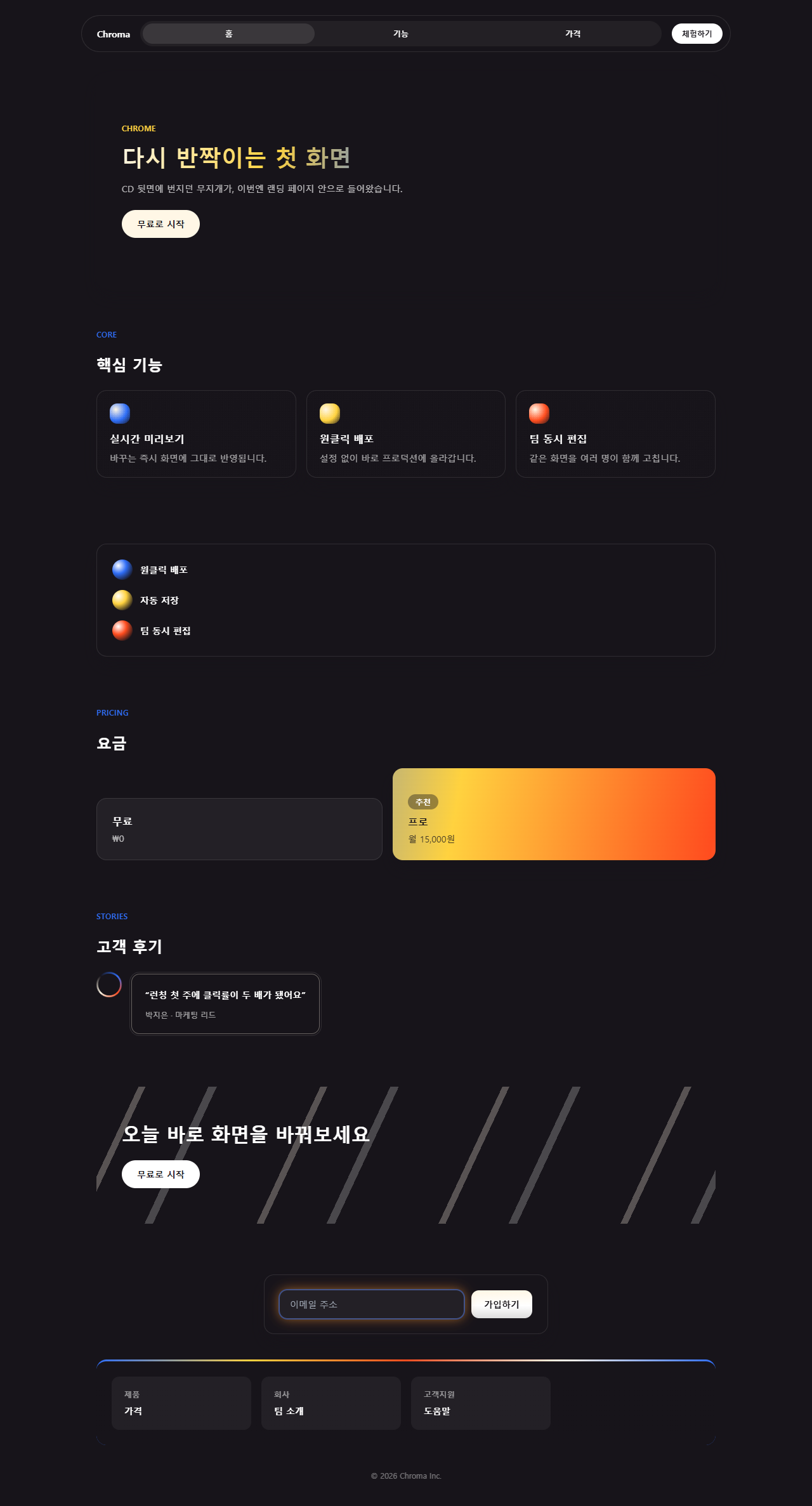
레트로 퓨처리즘 디자인이 한 화면에서 어떻게 맞물리는지, 아홉 개를 조립해 둔 아래 원페이지부터 보세요. 스크롤을 내리면서 크롬 헤드라인이 어디서 밝아지고 어디서 옅어지는지 먼저 눈으로 좇아 보시길 권합니다.

한 화면으로 보고 나면, 각 부품을 하나씩 분리해 격자로도 정리해 뒀습니다.
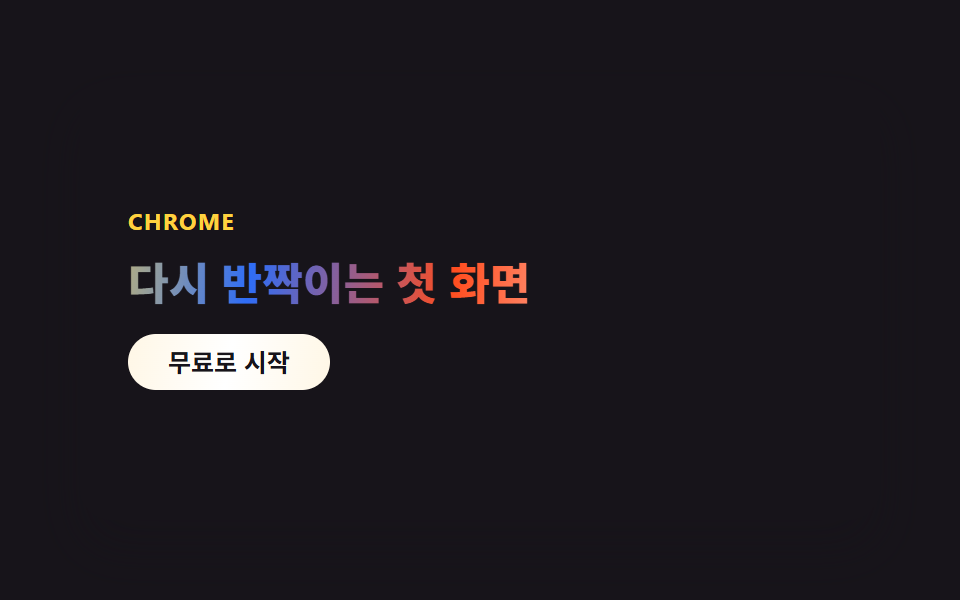 01 hero-chrome
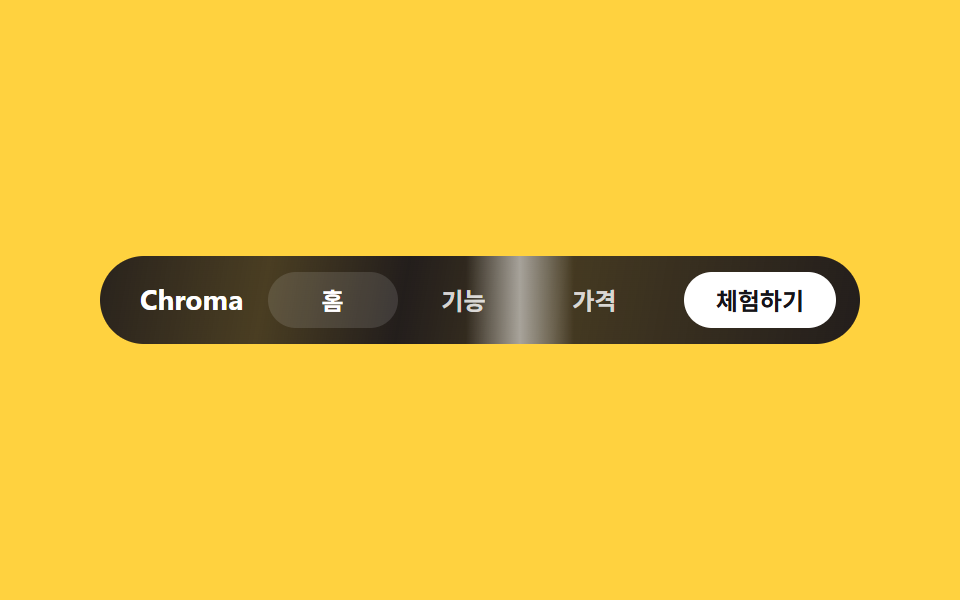 02 nav-chrome
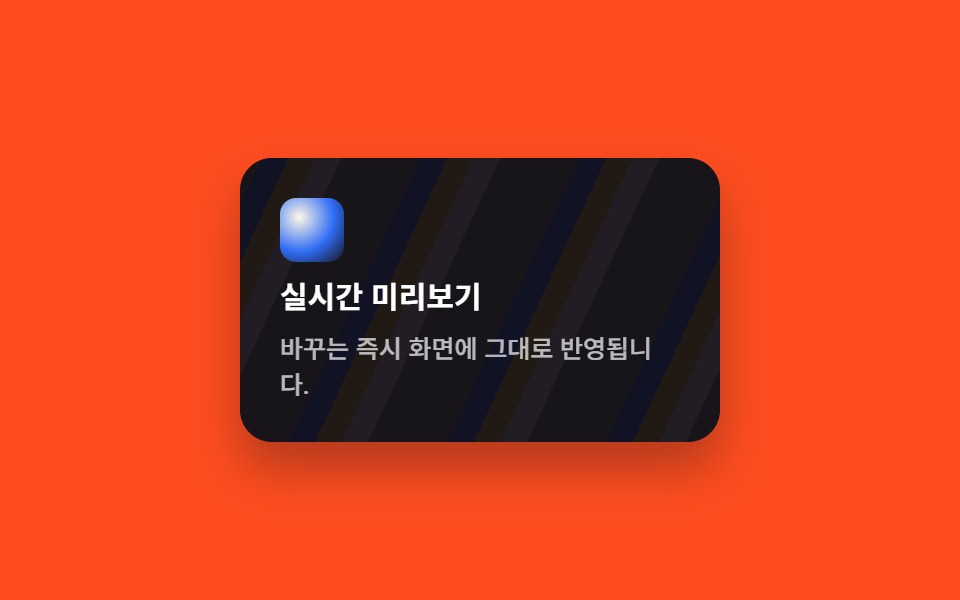 03 card-grid-chrome
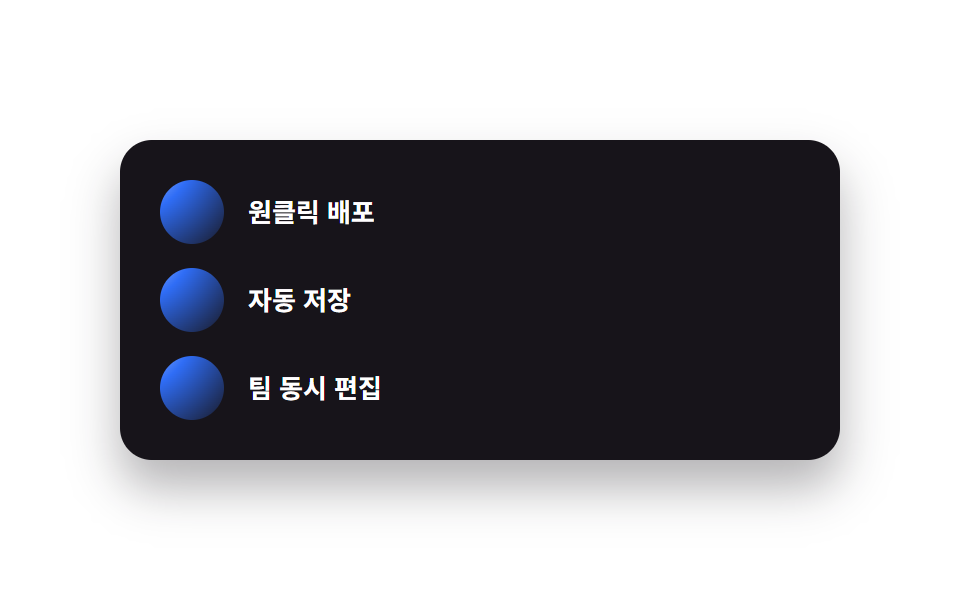 04 feature-list-chrome
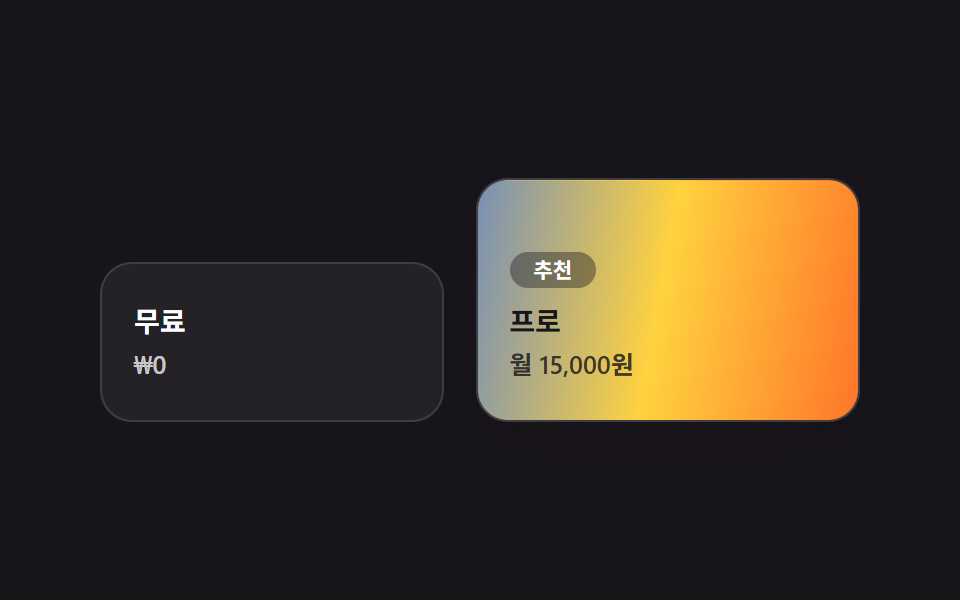 05 pricing-chrome
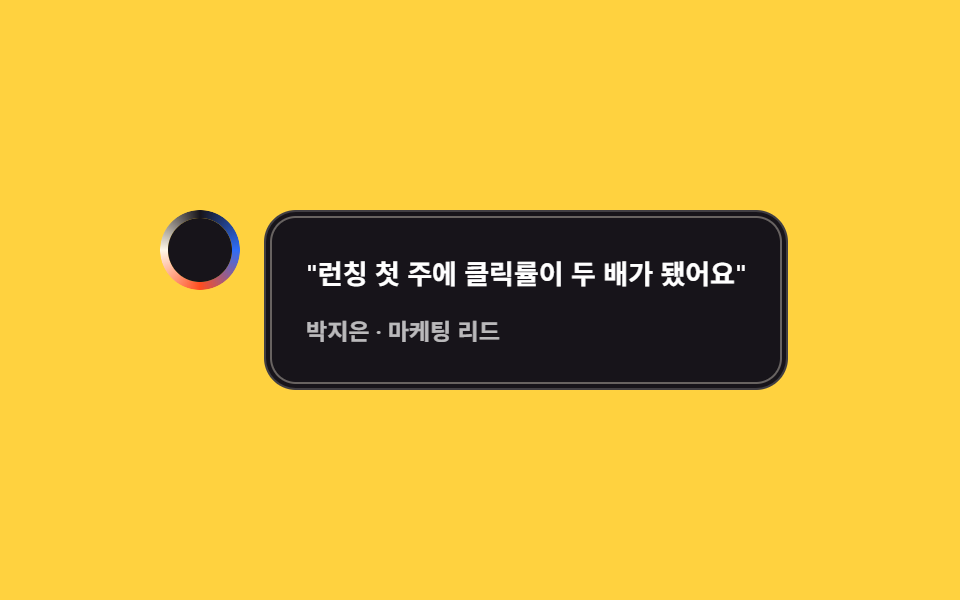 06 testimonial-chrome
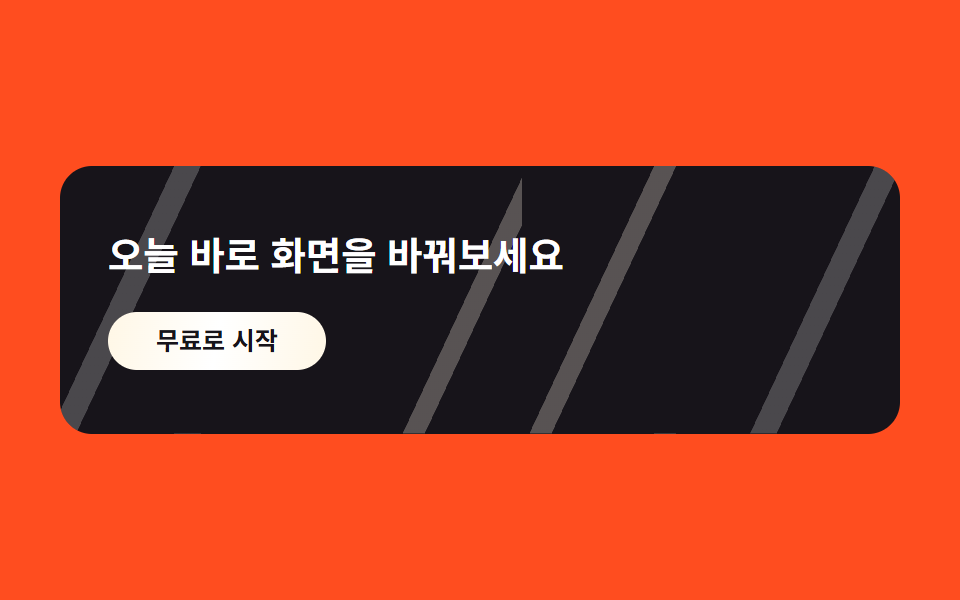 07 cta-band-chrome
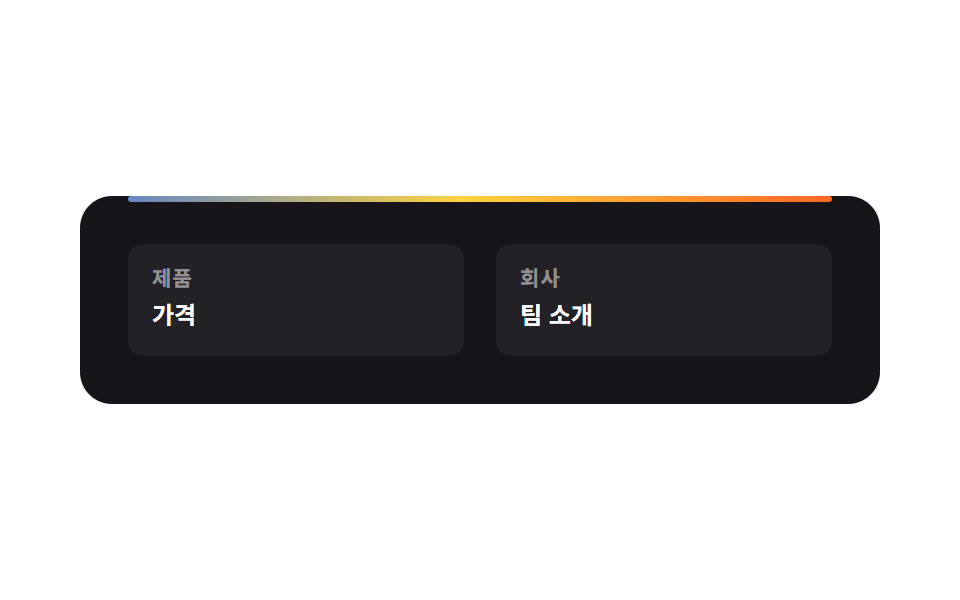 08 footer-chrome
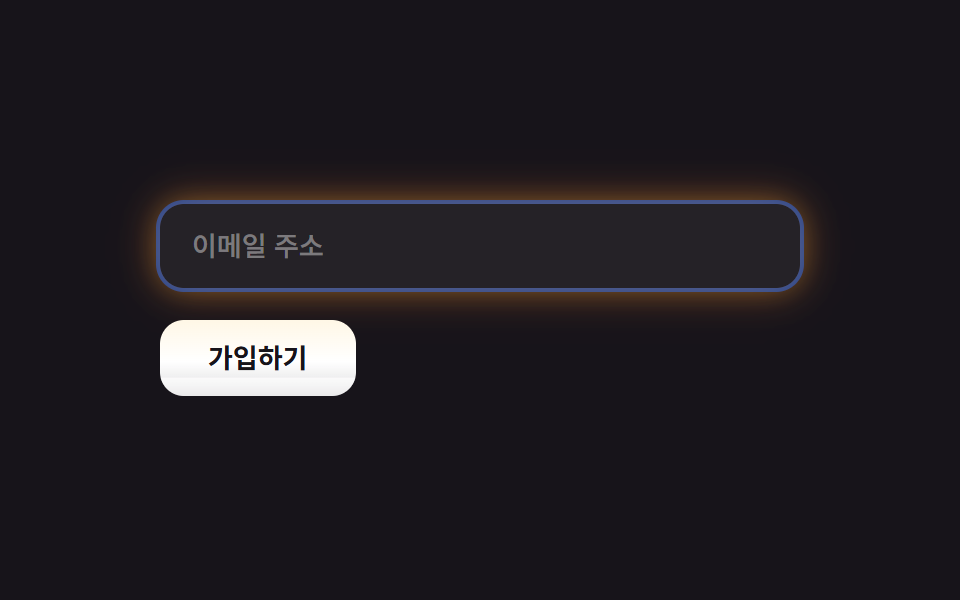 09 buttons-inputs-chrome
자동 재생 · 눌러서 해당 항목으로 · 전부 한 zip
- 01 크롬 헤드라인 히어로
- 02 브러시드 메탈 내비
- 03 홀로그램 포일 카드
- 04 크롬 구슬 아이콘
- 05 강조 플랜 홀로그램
- 06 CD 링 아바타 인용
- 07 브러시드 알루미늄 CTA 밴드
- 08 홀로그램 실선 푸터
- 09 크롬 버튼·홀로그램 포커스
카드 순서는 임의로 정하지 않았습니다. 눈에 띄고, 기능을 확인하고, 값을 보고, 다른 사람 후기를 읽고, 마지막에 버튼을 누르는 — 방문자가 실제로 거치는 다섯 단계를 그대로 따라갑니다. 같은 design 기둥에서 광택을 걷어 내고 직각 그림자만 남긴 쪽이 네오브루탈리즘 UI 랜딩 부품이고, 같은 금속 질감을 계기판 쪽으로 밀고 간 쪽이 HUD 랜딩 부품입니다.
01크롬 헤드라인 히어로
무엇이 움직이나
헤드라인 글자를 background-clip: text로 잘라내고, 그 안에서 흰색→크림→노랑→파랑→주황→흰색 순서의 6단 그라디언트가 background-position만 바뀌며 흐릅니다.
<main class="stage">
  <section class="hero-c">
    <p class="hero-c__eyebrow">CHROME</p>
    <h2 class="hero-c__title">다시 반짝이는 첫 화면</h2>
    <button class="hero-c__cta" type="button">무료로 시작</button>
  </section>
</main>
@use "../../../../site/static/demo-tokens" as *;
// ── 변수 3개 ──────────────────────────────────────────
$duration: $dur-loop; // 크롬 밴드가 한 바퀴 흐르는 시간
$easing: $ease-out;
$color: $subject-blue; // 그라디언트 안 포인트 색 하나
@include stage($stage-ink);
.hero-c {
position: relative;
overflow: hidden;
box-sizing: border-box;
width: clamp(260px, 86vw, 400px);
min-height: clamp(172px, 48vw, 220px);
border-radius: $r-card;
background: $stage-ink;
box-shadow: $shadow-raised;
padding: $sp-6;
display: flex;
flex-direction: column;
justify-content: center;
gap: $sp-3;
}
.hero-c__eyebrow {
position: relative;
z-index: 1;
margin: 0;
color: $stage-yellow;
font-weight: 700;
font-size: clamp(10px, 2.4vw, 12px);
line-height: 1;
letter-spacing: .06em;
text-transform: uppercase;
font-family: -apple-system, "Segoe UI", "Noto Sans KR", sans-serif;
}
// 헤드라인 — 크롬 그라디언트를 글자 모양으로 잘라내고, 그 안의 밝은 밴드가 background-position 만 바뀌며 흐른다 (유일한 애니메이션)
.hero-c__title {
position: relative;
z-index: 1;
margin: 0;
font-weight: 800;
font-size: clamp(18px, 4.6vw, 23px);
line-height: 1.2;
font-family: -apple-system, "Segoe UI", "Noto Sans KR", sans-serif;
background: linear-gradient(100deg,
$stage-paper 0%, rgba($stage-paper, .35) 14%, $subject-cream 28%,
$stage-yellow 40%, $color 52%, $stage-orange 64%,
$stage-paper 80%, rgba($stage-paper, .4) 100%);
background-size: 240% 100%;
-webkit-background-clip: text;
background-clip: text;
color: transparent;
animation: chromeFlow $duration $easing infinite;
}
.hero-c__cta {
position: relative;
z-index: 1;
align-self: flex-start;
border: 0;
border-radius: $r-pill;
background: linear-gradient(100deg, $subject-cream, $stage-paper, $subject-cream);
color: $stage-ink;
padding: $sp-2 $sp-5;
font-weight: 700;
font-size: clamp(11px, 2.6vw, 13px);
line-height: 1;
font-family: inherit;
}
@keyframes chromeFlow { 0% { background-position: 0% 50%; } 100% { background-position: 240% 50%; } }
@media (prefers-reduced-motion: reduce) {
.hero-c__title { animation: none; }
}html, body {
margin: 0;
overflow: hidden;
}
.stage {
box-sizing: border-box;
min-height: 100vh;
display: grid;
place-items: center;
margin: 0;
background: #17141a;
font-family: -apple-system, "Segoe UI", "Noto Sans KR", sans-serif;
padding: clamp(8px, 4vw, 24px);
}
.hero-c {
position: relative;
overflow: hidden;
box-sizing: border-box;
width: clamp(260px, 86vw, 400px);
min-height: clamp(172px, 48vw, 220px);
border-radius: 16px;
background: #17141a;
box-shadow: 0 14px 24px rgba(23, 20, 26, 0.32);
padding: 24px;
display: flex;
flex-direction: column;
justify-content: center;
gap: 12px;
}
.hero-c__eyebrow {
position: relative;
z-index: 1;
margin: 0;
color: #ffd23f;
font-weight: 700;
font-size: clamp(10px, 2.4vw, 12px);
line-height: 1;
letter-spacing: 0.06em;
text-transform: uppercase;
font-family: -apple-system, "Segoe UI", "Noto Sans KR", sans-serif;
}
.hero-c__title {
position: relative;
z-index: 1;
margin: 0;
font-weight: 800;
font-size: clamp(18px, 4.6vw, 23px);
line-height: 1.2;
font-family: -apple-system, "Segoe UI", "Noto Sans KR", sans-serif;
background: linear-gradient(100deg, #ffffff 0%, rgba(255, 255, 255, 0.35) 14%, #fff7e6 28%, #ffd23f 40%, #2f6df6 52%, #ff4d1f 64%, #ffffff 80%, rgba(255, 255, 255, 0.4) 100%);
background-size: 240% 100%;
-webkit-background-clip: text;
background-clip: text;
color: transparent;
animation: chromeFlow 2s ease-out infinite;
}
.hero-c__cta {
position: relative;
z-index: 1;
align-self: flex-start;
border: 0;
border-radius: 999px;
background: linear-gradient(100deg, #fff7e6, #ffffff, #fff7e6);
color: #17141a;
padding: 8px 20px;
font-weight: 700;
font-size: clamp(11px, 2.6vw, 13px);
line-height: 1;
font-family: inherit;
}
@keyframes chromeFlow {
0% {
background-position: 0% 50%;
}
100% {
background-position: 240% 50%;
}
}
@media (prefers-reduced-motion: reduce) {
.hero-c__title {
animation: none;
}
}import type { CSSProperties } from "react";
import styles from "./HeroChrome.module.scss";
export type HeroChromeProps = {
eyebrow?: string;
title?: string;
cta?: string;
/** 한 주기(기본 2000ms) */
duration?: number;
easing?: string;
color?: string;
};
type Vars = CSSProperties & { "--duration"?: string; "--easing"?: string; "--color"?: string };
export default function HeroChrome({
eyebrow = "CHROME",
title = "The first screen, shining again",
cta = "Start for free",
duration = 2000,
easing = "ease-out",
color = "#2f6df6",
}: HeroChromeProps) {
const vars: Vars = { "--duration": `${duration}ms`, "--easing": easing, "--color": color };
return (
<section className={styles.hero} style={vars}>
<p className={styles.eyebrow}>{eyebrow}</p>
<h2 className={styles.title}>{title}</h2>
<button type="button" className={styles.cta}>{cta}</button>
</section>
);
}01 · 크롬 헤드라인 히어로 — 측정 누적면적 1.539% · 움직인 프레임 23/23GODRICH 원작 · zip 에 SCSS·React 포함 · 비밀번호 보기
코드에서 볼 곳
글자 색을 직접 칠하지 않고 그라디언트를 글자 모양의 창으로만 씁니다.
.hero-c__title {
  background: linear-gradient(100deg,
    $stage-paper 0%, rgba($stage-paper, .35) 14%, $subject-cream 28%,
    $stage-yellow 40%, $color 52%, $stage-orange 64%,
    $stage-paper 80%, rgba($stage-paper, .4) 100%);
  background-size: 240% 100%;
  -webkit-background-clip: text;
  background-clip: text;
  color: transparent;
  animation: chromeFlow $duration $easing infinite;
}
@keyframes chromeFlow {
  0%   { background-position: 0% 50%; }
  100% { background-position: 240% 50%; }
}
02브러시드 메탈 내비
무엇이 움직이나
메뉴 바 배경은 잉크색 명암이 번갈아 도는 그라디언트로 브러시드 메탈 질감을 흉내 내고, 그 위로 가는 흰 빛줄기 하나가 left 값으로 좌에서 우로 지나갑니다.
<main class="stage">
  <nav class="nav-c">
    <span class="nav-c__brand">Chroma</span>
    <div class="nav-c__menu">
      <span class="nav-c__label nav-c__label--active">홈</span>
      <span class="nav-c__label">기능</span>
      <span class="nav-c__label">가격</span>
    </div>
    <button class="nav-c__cta" type="button">체험하기</button>
  </nav>
</main>
@use "../../../../site/static/demo-tokens" as *;
$duration: $dur-loop;
$easing: linear;
$color: $subject-blue;
@include stage($stage-yellow);
.nav-c {
position: relative;
overflow: hidden;
box-sizing: border-box;
display: flex;
align-items: center;
gap: $sp-3;
width: clamp(240px, 84vw, 380px);
padding: $sp-2 $sp-3;
border-radius: $r-pill;
background: linear-gradient(100deg, rgba($stage-ink, .92) 0%, rgba($stage-ink, .78) 22%, rgba($stage-ink, .95) 40%, rgba($stage-ink, .8) 60%, rgba($stage-ink, .95) 100%);
}
// 브러시드 메탈 하이라이트 — 가는 빛줄기가 바 전체를 좌우로 훑는다 (이 항목의 유일한 애니메이션)
.nav-c::after {
content: "";
position: absolute;
top: 0;
left: -20%;
width: 14%;
height: 100%;
background: linear-gradient(90deg, transparent, rgba($stage-paper, .55), transparent);
animation: glint $duration $easing infinite;
}
.nav-c__brand {
position: relative;
z-index: 1;
flex-shrink: 0;
white-space: nowrap;
padding-left: $sp-2;
color: $stage-paper;
font-weight: 700;
font-size: clamp(12px, 3vw, 14px);
line-height: 1;
font-family: -apple-system, "Segoe UI", "Noto Sans KR", sans-serif;
}
.nav-c__menu { position: relative; z-index: 1; min-width: 0; flex: 1; display: flex; }
.nav-c__label {
flex: 1;
white-space: nowrap;
text-align: center;
padding: $sp-2 0;
color: rgba($stage-paper, .8);
font-weight: 600;
font-size: clamp(10.5px, 2.6vw, 12px);
line-height: 1;
font-family: inherit;
}
.nav-c__label--active { color: $stage-paper; border-radius: $r-pill; background: rgba($stage-paper, .12); }
.nav-c__cta {
position: relative;
z-index: 1;
flex-shrink: 0;
white-space: nowrap;
border: 0;
border-radius: $r-pill;
background: $stage-paper;
color: $stage-ink;
padding: $sp-2 $sp-4;
font-weight: 700;
font-size: clamp(10.5px, 2.6vw, 12px);
line-height: 1;
font-family: inherit;
}
@keyframes glint { 0% { left: -20%; } 100% { left: 106%; } }
@media (prefers-reduced-motion: reduce) {
.nav-c::after { animation: none; opacity: 0; }
}html, body {
margin: 0;
overflow: hidden;
}
.stage {
box-sizing: border-box;
min-height: 100vh;
display: grid;
place-items: center;
margin: 0;
background: #ffd23f;
font-family: -apple-system, "Segoe UI", "Noto Sans KR", sans-serif;
padding: clamp(8px, 4vw, 24px);
}
.nav-c {
position: relative;
overflow: hidden;
box-sizing: border-box;
display: flex;
align-items: center;
gap: 12px;
width: clamp(240px, 84vw, 380px);
padding: 8px 12px;
border-radius: 999px;
background: linear-gradient(100deg, rgba(23, 20, 26, 0.92) 0%, rgba(23, 20, 26, 0.78) 22%, rgba(23, 20, 26, 0.95) 40%, rgba(23, 20, 26, 0.8) 60%, rgba(23, 20, 26, 0.95) 100%);
}
.nav-c::after {
content: "";
position: absolute;
top: 0;
left: -20%;
width: 14%;
height: 100%;
background: linear-gradient(90deg, transparent, rgba(255, 255, 255, 0.55), transparent);
animation: glint 2s linear infinite;
}
.nav-c__brand {
position: relative;
z-index: 1;
flex-shrink: 0;
white-space: nowrap;
padding-left: 8px;
color: #ffffff;
font-weight: 700;
font-size: clamp(12px, 3vw, 14px);
line-height: 1;
font-family: -apple-system, "Segoe UI", "Noto Sans KR", sans-serif;
}
.nav-c__menu {
position: relative;
z-index: 1;
min-width: 0;
flex: 1;
display: flex;
}
.nav-c__label {
flex: 1;
white-space: nowrap;
text-align: center;
padding: 8px 0;
color: rgba(255, 255, 255, 0.8);
font-weight: 600;
font-size: clamp(10.5px, 2.6vw, 12px);
line-height: 1;
font-family: inherit;
}
.nav-c__label--active {
color: #ffffff;
border-radius: 999px;
background: rgba(255, 255, 255, 0.12);
}
.nav-c__cta {
position: relative;
z-index: 1;
flex-shrink: 0;
white-space: nowrap;
border: 0;
border-radius: 999px;
background: #ffffff;
color: #17141a;
padding: 8px 16px;
font-weight: 700;
font-size: clamp(10.5px, 2.6vw, 12px);
line-height: 1;
font-family: inherit;
}
@keyframes glint {
0% {
left: -20%;
}
100% {
left: 106%;
}
}
@media (prefers-reduced-motion: reduce) {
.nav-c::after {
animation: none;
opacity: 0;
}
}import type { CSSProperties } from "react";
import styles from "./NavChrome.module.scss";
export type NavChromeProps = {
brand?: string;
links?: string[];
activeIndex?: number;
cta?: string;
/** 한 주기(기본 2000ms) */
duration?: number;
easing?: string;
color?: string;
};
type Vars = CSSProperties & { "--duration"?: string; "--easing"?: string; "--color"?: string };
export default function NavChrome({
brand = "Chroma",
links = ["Home", "Features", "Pricing"],
activeIndex = 0,
cta = "Try it free",
duration = 2000,
easing = "linear",
color = "#2f6df6",
}: NavChromeProps) {
const vars: Vars = { "--duration": `${duration}ms`, "--easing": easing, "--color": color };
return (
<nav className={styles.nav} style={vars}>
<span className={styles.brand}>{brand}</span>
<div className={styles.menu}>
{links.map((label, i) => (
<span key={label} className={i === activeIndex ? `${styles.label} ${styles.labelActive}` : styles.label}>
{label}
</span>
))}
</div>
<button type="button" className={styles.cta}>{cta}</button>
</nav>
);
}02 · 브러시드 메탈 내비 — 측정 누적면적 9.886% · 움직인 프레임 22/23GODRICH 원작 · zip 에 SCSS·React 포함 · 비밀번호 보기
코드에서 볼 곳
활성 메뉴는 배경만 옅게 표시할 뿐 따로 움직이지는 않습니다.
.nav-c::after {
  content: "";
  position: absolute;
  top: 0; left: -20%; width: 14%; height: 100%;
  background: linear-gradient(90deg, transparent, rgba($stage-paper, .55), transparent);
  animation: glint $duration linear infinite;
}
@keyframes glint { 0% { left: -20%; } 100% { left: 106%; } }
03홀로그램 포일 카드
무엇이 움직이나
카드 표면 위에 mix-blend-mode: overlay로 홀로그램 포일 띠를 얹고 background-position을 대각선으로 흘립니다.
<main class="stage">
  <article class="card-c">
    <span class="card-c__icon" aria-hidden="true"></span>
    <h3 class="card-c__title">실시간 미리보기</h3>
    <p class="card-c__desc">바꾸는 즉시 화면에 그대로 반영됩니다.</p>
  </article>
</main>
@use "../../../../site/static/demo-tokens" as *;
$duration: $dur-loop;
$easing: linear;
$color: $subject-blue;
@include stage($stage-orange);
.stage { padding: clamp(8px, 3vw, 20px); }
.card-c {
position: relative;
overflow: hidden;
box-sizing: border-box;
width: min(240px, 78vw);
border-radius: $r-card;
background: $stage-ink;
box-shadow: $shadow-raised;
padding: $sp-5;
display: flex;
flex-direction: column;
gap: $sp-2;
}
// 홀로그램 포일 띠 — mix-blend-mode 로 카드 표면 위에 얹혀 대각선으로 한 바퀴씩 지나간다 (유일한 애니메이션)
.card-c::after {
content: "";
position: absolute;
inset: -30% -10%;
pointer-events: none;
mix-blend-mode: overlay;
opacity: .8;
background: repeating-linear-gradient(115deg,
transparent 0 18px,
rgba($color, .55) 18px 30px,
rgba($stage-yellow, .55) 30px 42px,
rgba($subject-cream, .6) 42px 54px,
transparent 54px 72px);
background-size: 200% 200%;
animation: foilSweep $duration $easing infinite;
}
.card-c__icon { position: relative; z-index: 1; width: $sp-8; height: $sp-8; border-radius: $r-sm; background: radial-gradient(circle at 30% 30%, $subject-cream, $color 55%, $stage-ink 100%); }
.card-c__title {
position: relative;
z-index: 1;
margin: 0;
color: $stage-paper;
font-weight: 700;
font-size: clamp(13px, 3.2vw, 15px);
line-height: 1.3;
font-family: -apple-system, "Segoe UI", "Noto Sans KR", sans-serif;
}
.card-c__desc {
position: relative;
z-index: 1;
margin: 0;
color: rgba($stage-paper, .7);
font-weight: 500;
font-size: clamp(11px, 2.6vw, 12.5px);
line-height: 1.4;
font-family: inherit;
}
@keyframes foilSweep { 0% { background-position: 0% 0%; } 100% { background-position: -140% -140%; } }
@media (prefers-reduced-motion: reduce) {
.card-c::after { animation: none; }
}html, body {
margin: 0;
overflow: hidden;
}
.stage {
box-sizing: border-box;
min-height: 100vh;
display: grid;
place-items: center;
margin: 0;
background: #ff4d1f;
font-family: -apple-system, "Segoe UI", "Noto Sans KR", sans-serif;
padding: clamp(8px, 4vw, 24px);
}
.stage {
padding: clamp(8px, 3vw, 20px);
}
.card-c {
position: relative;
overflow: hidden;
box-sizing: border-box;
width: min(240px, 78vw);
border-radius: 16px;
background: #17141a;
box-shadow: 0 14px 24px rgba(23, 20, 26, 0.32);
padding: 20px;
display: flex;
flex-direction: column;
gap: 8px;
}
.card-c::after {
content: "";
position: absolute;
inset: -30% -10%;
pointer-events: none;
mix-blend-mode: overlay;
opacity: 0.8;
background: repeating-linear-gradient(115deg, transparent 0 18px, rgba(47, 109, 246, 0.55) 18px 30px, rgba(255, 210, 63, 0.55) 30px 42px, rgba(255, 247, 230, 0.6) 42px 54px, transparent 54px 72px);
background-size: 200% 200%;
animation: foilSweep 2s linear infinite;
}
.card-c__icon {
position: relative;
z-index: 1;
width: 32px;
height: 32px;
border-radius: 8px;
background: radial-gradient(circle at 30% 30%, #fff7e6, #2f6df6 55%, #17141a 100%);
}
.card-c__title {
position: relative;
z-index: 1;
margin: 0;
color: #ffffff;
font-weight: 700;
font-size: clamp(13px, 3.2vw, 15px);
line-height: 1.3;
font-family: -apple-system, "Segoe UI", "Noto Sans KR", sans-serif;
}
.card-c__desc {
position: relative;
z-index: 1;
margin: 0;
color: rgba(255, 255, 255, 0.7);
font-weight: 500;
font-size: clamp(11px, 2.6vw, 12.5px);
line-height: 1.4;
font-family: inherit;
}
@keyframes foilSweep {
0% {
background-position: 0% 0%;
}
100% {
background-position: -140% -140%;
}
}
@media (prefers-reduced-motion: reduce) {
.card-c::after {
animation: none;
}
}import type { CSSProperties } from "react";
import styles from "./CardGridChrome.module.scss";
export type CardGridChromeProps = {
title?: string;
desc?: string;
/** 한 주기(기본 2000ms) */
duration?: number;
easing?: string;
color?: string;
};
type Vars = CSSProperties & { "--duration"?: string; "--easing"?: string; "--color"?: string };
export default function CardGridChrome({
title = "Live preview",
desc = "Every change reflects on screen instantly.",
duration = 2000,
easing = "linear",
color = "#2f6df6",
}: CardGridChromeProps) {
const vars: Vars = { "--duration": `${duration}ms`, "--easing": easing, "--color": color };
return (
<article className={styles.card} style={vars}>
<span className={styles.icon} aria-hidden="true" />
<h3 className={styles.title}>{title}</h3>
<p className={styles.desc}>{desc}</p>
</article>
);
}03 · 홀로그램 포일 카드 — 측정 누적면적 10.607% · 움직인 프레임 23/23GODRICH 원작 · zip 에 SCSS·React 포함 · 비밀번호 보기
코드에서 볼 곳
실제 홀로그램 스티커를 손에 쥐고 기울일 때 보이는 반사를 흉내 낸 것으로, 카드 자체는 짙은 잉크색으로 고정해 반사가 도드라지게 했습니다.
.card-c::after {
  content: "";
  position: absolute;
  inset: -30% -10%;
  pointer-events: none;
  mix-blend-mode: overlay;
  opacity: .8;
  background: repeating-linear-gradient(115deg,
    transparent 0 18px,
    rgba($color, .55) 18px 30px,
    rgba($stage-yellow, .55) 30px 42px,
    rgba($subject-cream, .6) 42px 54px,
    transparent 54px 72px);
  background-size: 200% 200%;
  animation: foilSweep $duration linear infinite;
}
04크롬 구슬 아이콘
무엇이 움직이나
아이콘 배지마다 광원이 왼쪽 위에 고정된 것처럼 보이는 radial-gradient 구슬을 얹고, 그 하이라이트의 위치만 옮겨 광원이 표면을 도는 느낌을 냅니다.
<main class="stage">
  <ul class="feat-c">
    <li class="feat-c__row">
      <span class="feat-c__icon" aria-hidden="true"></span>
      <p class="feat-c__text">원클릭 배포</p>
    </li>
    <li class="feat-c__row">
      <span class="feat-c__icon" aria-hidden="true"></span>
      <p class="feat-c__text">자동 저장</p>
    </li>
    <li class="feat-c__row">
      <span class="feat-c__icon" aria-hidden="true"></span>
      <p class="feat-c__text">팀 동시 편집</p>
    </li>
  </ul>
</main>
@use "../../../../site/static/demo-tokens" as *;
$duration: $dur-loop;
$easing: steps(8, jump-none); // 부드러운 곡선은 프레임 간 변화가 너무 작아 강도 측정에 안 잡힌다
$color: $subject-blue;
@include stage($stage-paper);
.feat-c {
margin: 0;
list-style: none;
box-sizing: border-box;
display: flex;
flex-direction: column;
gap: $sp-3;
width: clamp(240px, 80vw, 360px);
padding: $sp-5;
border-radius: $r-card;
background: $stage-ink;
box-shadow: $shadow-raised;
}
.feat-c__row { margin: 0; display: flex; align-items: center; gap: $sp-3; }
// 크롬 구슬 — radial-gradient 하이라이트의 위치만 천천히 옮겨 광원이 표면을 도는 느낌을 낸다 (유일한 애니메이션)
.feat-c__icon {
flex: none;
width: $sp-8;
height: $sp-8;
border-radius: $r-pill;
background: radial-gradient(circle at 30% 30%, $stage-paper, $color 40%, $stage-ink 82%);
background-size: 280% 280%;
animation: ballShine $duration $easing infinite;
}
.feat-c__text {
margin: 0;
color: $stage-paper;
font-weight: 600;
font-size: clamp(11.5px, 2.8vw, 13px);
line-height: 1.4;
font-family: -apple-system, "Segoe UI", "Noto Sans KR", sans-serif;
}
@keyframes ballShine { 0% { background-position: 0% 0%; } 100% { background-position: 180% 180%; } }
@media (prefers-reduced-motion: reduce) {
.feat-c__icon { animation: none; }
}html, body {
margin: 0;
overflow: hidden;
}
.stage {
box-sizing: border-box;
min-height: 100vh;
display: grid;
place-items: center;
margin: 0;
background: #ffffff;
font-family: -apple-system, "Segoe UI", "Noto Sans KR", sans-serif;
padding: clamp(8px, 4vw, 24px);
}
.feat-c {
margin: 0;
list-style: none;
box-sizing: border-box;
display: flex;
flex-direction: column;
gap: 12px;
width: clamp(240px, 80vw, 360px);
padding: 20px;
border-radius: 16px;
background: #17141a;
box-shadow: 0 14px 24px rgba(23, 20, 26, 0.32);
}
.feat-c__row {
margin: 0;
display: flex;
align-items: center;
gap: 12px;
}
.feat-c__icon {
flex: none;
width: 32px;
height: 32px;
border-radius: 999px;
background: radial-gradient(circle at 30% 30%, #ffffff, #2f6df6 40%, #17141a 82%);
background-size: 280% 280%;
animation: ballShine 2s steps(8, jump-none) infinite;
}
.feat-c__text {
margin: 0;
color: #ffffff;
font-weight: 600;
font-size: clamp(11.5px, 2.8vw, 13px);
line-height: 1.4;
font-family: -apple-system, "Segoe UI", "Noto Sans KR", sans-serif;
}
@keyframes ballShine {
0% {
background-position: 0% 0%;
}
100% {
background-position: 180% 180%;
}
}
@media (prefers-reduced-motion: reduce) {
.feat-c__icon {
animation: none;
}
}import type { CSSProperties } from "react";
import styles from "./FeatureListChrome.module.scss";
export type FeatureListChromeProps = {
items?: string[];
/** 한 주기(기본 2000ms) */
duration?: number;
easing?: string;
color?: string;
};
type Vars = CSSProperties & { "--duration"?: string; "--easing"?: string; "--color"?: string };
export default function FeatureListChrome({
items = ["One-click deploy", "Auto save", "Live co-editing"],
duration = 2000,
easing = "steps(8, jump-none)",
color = "#2f6df6",
}: FeatureListChromeProps) {
const vars: Vars = { "--duration": `${duration}ms`, "--easing": easing, "--color": color };
return (
<ul className={styles.list} style={vars}>
{items.map((text) => (
<li key={text} className={styles.row}>
<span className={styles.icon} aria-hidden="true" />
<p className={styles.text}>{text}</p>
</li>
))}
</ul>
);
}04 · 크롬 구슬 아이콘 — 측정 누적면적 1.75% · 움직인 프레임 7/23GODRICH 원작 · zip 에 SCSS·React 포함 · 비밀번호 보기
코드에서 볼 곳
세 아이콘이 같은 애니메이션 하나를 공유합니다.
.feat-c__icon {
  background: radial-gradient(circle at 30% 30%, $stage-paper, $color 40%, $stage-ink 82%);
  background-size: 280% 280%;
  animation: ballShine $duration steps(8, jump-none) infinite;
}
@keyframes ballShine {
  0%   { background-position: 0% 0%; }
  100% { background-position: 180% 180%; }
}
05강조 플랜 홀로그램
무엇이 움직이나
추천 플랜 카드에만 5색 그라디언트 배경을 깔고 background-position을 흘려, 표 없이도 어느 플랜을 미는지 한눈에 보이게 했습니다.
<main class="stage">
  <section class="pricing-c">
    <div class="pricing-c__plan">
      <p class="pricing-c__name">무료</p>
      <p class="pricing-c__price">₩0</p>
    </div>
    <div class="pricing-c__plan pricing-c__plan--pro">
      <span class="pricing-c__badge">추천</span>
      <p class="pricing-c__name">프로</p>
      <p class="pricing-c__price">월 15,000원</p>
    </div>
  </section>
</main>
@use "../../../../site/static/demo-tokens" as *;
$duration: $dur-loop;
$easing: linear;
$color: $subject-blue;
@include stage($stage-ink);
.pricing-c { display: flex; align-items: flex-end; gap: $sp-4; width: clamp(240px, 82vw, 380px); }
.pricing-c__plan {
flex: 1;
border-radius: $r-card;
padding: $sp-5 $sp-4;
background: rgba($stage-paper, .06);
border: 1px solid rgba($stage-paper, .12);
}
.pricing-c__plan--pro {
position: relative;
overflow: hidden;
flex: 1.15;
padding-top: $sp-8;
box-shadow: $shadow-raised;
}
// 추천 플랜만 다색 홀로그램 그라디언트가 배경 위치를 흐르며 이동한다 (유일한 애니메이션). 무료 플랜은 무광 회색 그대로
.pricing-c__plan--pro::before {
content: "";
position: absolute;
inset: 0;
background: linear-gradient(100deg, $color, $stage-yellow, $stage-orange, $subject-cream, $color);
background-size: 320% 100%;
animation: holoShift $duration $easing infinite;
}
.pricing-c__badge {
position: relative;
z-index: 1;
display: inline-block;
margin-bottom: $sp-2;
border-radius: $r-pill;
background: rgba($stage-ink, .4);
color: $stage-paper;
padding: $sp-1 $sp-3;
font-weight: 700;
font-size: clamp(9.5px, 2.2vw, 11px);
line-height: 1;
font-family: -apple-system, "Segoe UI", "Noto Sans KR", sans-serif;
}
.pricing-c__name {
position: relative;
z-index: 1;
margin: 0 0 $sp-1;
color: $stage-paper;
font-weight: 700;
font-size: clamp(12px, 3vw, 14px);
line-height: 1.3;
font-family: -apple-system, "Segoe UI", "Noto Sans KR", sans-serif;
}
.pricing-c__price {
position: relative;
z-index: 1;
margin: 0;
color: rgba($stage-paper, .75);
font-weight: 600;
font-size: clamp(11px, 2.6vw, 12.5px);
line-height: 1.3;
font-family: inherit;
}
.pricing-c__plan--pro .pricing-c__name { color: $stage-ink; }
.pricing-c__plan--pro .pricing-c__price { color: rgba($stage-ink, .8); }
@keyframes holoShift { 0% { background-position: 0% 50%; } 100% { background-position: 320% 50%; } }
@media (prefers-reduced-motion: reduce) {
.pricing-c__plan--pro::before { animation: none; }
}html, body {
margin: 0;
overflow: hidden;
}
.stage {
box-sizing: border-box;
min-height: 100vh;
display: grid;
place-items: center;
margin: 0;
background: #17141a;
font-family: -apple-system, "Segoe UI", "Noto Sans KR", sans-serif;
padding: clamp(8px, 4vw, 24px);
}
.pricing-c {
display: flex;
align-items: flex-end;
gap: 16px;
width: clamp(240px, 82vw, 380px);
}
.pricing-c__plan {
flex: 1;
border-radius: 16px;
padding: 20px 16px;
background: rgba(255, 255, 255, 0.06);
border: 1px solid rgba(255, 255, 255, 0.12);
}
.pricing-c__plan--pro {
position: relative;
overflow: hidden;
flex: 1.15;
padding-top: 32px;
box-shadow: 0 14px 24px rgba(23, 20, 26, 0.32);
}
.pricing-c__plan--pro::before {
content: "";
position: absolute;
inset: 0;
background: linear-gradient(100deg, #2f6df6, #ffd23f, #ff4d1f, #fff7e6, #2f6df6);
background-size: 320% 100%;
animation: holoShift 2s linear infinite;
}
.pricing-c__badge {
position: relative;
z-index: 1;
display: inline-block;
margin-bottom: 8px;
border-radius: 999px;
background: rgba(23, 20, 26, 0.4);
color: #ffffff;
padding: 4px 12px;
font-weight: 700;
font-size: clamp(9.5px, 2.2vw, 11px);
line-height: 1;
font-family: -apple-system, "Segoe UI", "Noto Sans KR", sans-serif;
}
.pricing-c__name {
position: relative;
z-index: 1;
margin: 0 0 4px;
color: #ffffff;
font-weight: 700;
font-size: clamp(12px, 3vw, 14px);
line-height: 1.3;
font-family: -apple-system, "Segoe UI", "Noto Sans KR", sans-serif;
}
.pricing-c__price {
position: relative;
z-index: 1;
margin: 0;
color: rgba(255, 255, 255, 0.75);
font-weight: 600;
font-size: clamp(11px, 2.6vw, 12.5px);
line-height: 1.3;
font-family: inherit;
}
.pricing-c__plan--pro .pricing-c__name {
color: #17141a;
}
.pricing-c__plan--pro .pricing-c__price {
color: rgba(23, 20, 26, 0.8);
}
@keyframes holoShift {
0% {
background-position: 0% 50%;
}
100% {
background-position: 320% 50%;
}
}
@media (prefers-reduced-motion: reduce) {
.pricing-c__plan--pro::before {
animation: none;
}
}import type { CSSProperties } from "react";
import styles from "./PricingChrome.module.scss";
export type PricingChromeProps = {
freeName?: string;
freePrice?: string;
proName?: string;
proPrice?: string;
badge?: string;
/** 한 주기(기본 2000ms) */
duration?: number;
easing?: string;
color?: string;
};
type Vars = CSSProperties & { "--duration"?: string; "--easing"?: string; "--color"?: string };
export default function PricingChrome({
freeName = "Free",
freePrice = "$0",
proName = "Pro",
proPrice = "$15/mo",
badge = "Recommended",
duration = 2000,
easing = "linear",
color = "#2f6df6",
}: PricingChromeProps) {
const vars: Vars = { "--duration": `${duration}ms`, "--easing": easing, "--color": color };
return (
<section className={styles.pricing} style={vars}>
<div className={styles.plan}>
<p className={styles.name}>{freeName}</p>
<p className={styles.price}>{freePrice}</p>
</div>
<div className={`${styles.plan} ${styles.plaPro}`}>
<span className={styles.badge}>{badge}</span>
<p className={styles.name}>{proName}</p>
<p className={styles.price}>{proPrice}</p>
</div>
</section>
);
}05 · 강조 플랜 홀로그램 — 측정 누적면적 15.662% · 움직인 프레임 23/23GODRICH 원작 · zip 에 SCSS·React 포함 · 비밀번호 보기
코드에서 볼 곳
일반 플랜은 옅은 무광 회색 그대로 남겨 대비를 만듭니다.
.pricing-c__plan--pro::before {
  content: "";
  position: absolute;
  inset: 0;
  background: linear-gradient(100deg, $color, $stage-yellow, $stage-orange, $subject-cream, $color);
  background-size: 320% 100%;
  animation: holoShift $duration linear infinite;
}
.pricing-c__plan--pro .pricing-c__name { color: $stage-ink; }
06CD 링 아바타 인용
무엇이 움직이나
인용 카드 옆 아바타가 CD 테두리처럼 도는 conic-gradient 링 안에 앉습니다.
<main class="stage">
  <figure class="test-c">
    <div class="test-c__avatar" aria-hidden="true">
      <div class="test-c__avatar-fill"></div>
    </div>
    <blockquote class="test-c__card">
      <p class="test-c__quote">"런칭 첫 주에 클릭률이 두 배가 됐어요"</p>
      <figcaption class="test-c__name">박지은 · 마케팅 리드</figcaption>
    </blockquote>
  </figure>
</main>
@use "../../../../site/static/demo-tokens" as *;
$duration: $dur-loop;
$easing: linear;
$color: $subject-blue;
@include stage($stage-yellow);
.test-c {
margin: 0;
position: relative;
box-sizing: border-box;
width: clamp(240px, 82vw, 360px);
padding: $sp-5;
display: flex;
flex-direction: row;
align-items: flex-start;
gap: $sp-3;
}
.test-c__avatar { position: relative; flex-shrink: 0; width: $sp-10; height: $sp-10; border-radius: 50%; }
// CD 테두리처럼 도는 conic-gradient 링 — mask 로 링 모양만 남기고 회전만 시킨다 (유일한 애니메이션)
.test-c__avatar::before {
content: "";
position: absolute;
inset: 0;
border-radius: 50%;
padding: $sp-1;
background: conic-gradient($color, $stage-orange, $subject-cream, $stage-ink, $color);
-webkit-mask: linear-gradient(#000 0 0) content-box, linear-gradient(#000 0 0);
-webkit-mask-composite: xor;
mask-composite: exclude;
animation: cdSpin $duration $easing infinite;
}
.test-c__avatar-fill { position: absolute; inset: $sp-1; border-radius: 50%; background: $stage-ink; }
.test-c__card {
margin: 0;
min-width: 0;
position: relative;
border-radius: $r-card;
padding: $sp-5;
background: $stage-ink;
border: 1px solid rgba($stage-paper, .18);
outline: 1px solid rgba($subject-cream, .35);
outline-offset: -4px;
}
.test-c__quote {
margin: 0 0 $sp-3;
color: $stage-paper;
font-weight: 600;
font-size: clamp(12px, 3vw, 13.5px);
line-height: 1.5;
font-family: -apple-system, "Segoe UI", "Noto Sans KR", sans-serif;
}
.test-c__name {
margin: 0;
color: rgba($stage-paper, .7);
font-weight: 600;
font-size: clamp(10.5px, 2.4vw, 11.5px);
line-height: 1.3;
font-family: inherit;
}
@keyframes cdSpin { to { transform: rotate(360deg); } }
@media (prefers-reduced-motion: reduce) {
.test-c__avatar::before { animation: none; }
}html, body {
margin: 0;
overflow: hidden;
}
.stage {
box-sizing: border-box;
min-height: 100vh;
display: grid;
place-items: center;
margin: 0;
background: #ffd23f;
font-family: -apple-system, "Segoe UI", "Noto Sans KR", sans-serif;
padding: clamp(8px, 4vw, 24px);
}
.test-c {
margin: 0;
position: relative;
box-sizing: border-box;
width: clamp(240px, 82vw, 360px);
padding: 20px;
display: flex;
flex-direction: row;
align-items: flex-start;
gap: 12px;
}
.test-c__avatar {
position: relative;
flex-shrink: 0;
width: 40px;
height: 40px;
border-radius: 50%;
}
.test-c__avatar::before {
content: "";
position: absolute;
inset: 0;
border-radius: 50%;
padding: 4px;
background: conic-gradient(#2f6df6, #ff4d1f, #fff7e6, #17141a, #2f6df6);
-webkit-mask: linear-gradient(#000 0 0) content-box, linear-gradient(#000 0 0);
-webkit-mask-composite: xor;
mask-composite: exclude;
animation: cdSpin 2s linear infinite;
}
.test-c__avatar-fill {
position: absolute;
inset: 4px;
border-radius: 50%;
background: #17141a;
}
.test-c__card {
margin: 0;
min-width: 0;
position: relative;
border-radius: 16px;
padding: 20px;
background: #17141a;
border: 1px solid rgba(255, 255, 255, 0.18);
outline: 1px solid rgba(255, 247, 230, 0.35);
outline-offset: -4px;
}
.test-c__quote {
margin: 0 0 12px;
color: #ffffff;
font-weight: 600;
font-size: clamp(12px, 3vw, 13.5px);
line-height: 1.5;
font-family: -apple-system, "Segoe UI", "Noto Sans KR", sans-serif;
}
.test-c__name {
margin: 0;
color: rgba(255, 255, 255, 0.7);
font-weight: 600;
font-size: clamp(10.5px, 2.4vw, 11.5px);
line-height: 1.3;
font-family: inherit;
}
@keyframes cdSpin {
to {
transform: rotate(360deg);
}
}
@media (prefers-reduced-motion: reduce) {
.test-c__avatar::before {
animation: none;
}
}import type { CSSProperties } from "react";
import styles from "./TestimonialChrome.module.scss";
export type TestimonialChromeProps = {
quote?: string;
name?: string;
/** 한 주기(기본 2000ms) */
duration?: number;
easing?: string;
color?: string;
};
type Vars = CSSProperties & { "--duration"?: string; "--easing"?: string; "--color"?: string };
export default function TestimonialChrome({
quote = "Our click-through rate doubled in launch week.",
name = "Jieun Park · Marketing Lead",
duration = 2000,
easing = "linear",
color = "#2f6df6",
}: TestimonialChromeProps) {
const vars: Vars = { "--duration": `${duration}ms`, "--easing": easing, "--color": color };
return (
<figure className={styles.test} style={vars}>
<div className={styles.avatar} aria-hidden="true">
<div className={styles.avatarFill} />
</div>
<blockquote className={styles.card}>
<p className={styles.quote}>“{quote}”</p>
<figcaption className={styles.name}>{name}</figcaption>
</blockquote>
</figure>
);
}06 · CD 링 아바타 인용 — 측정 누적면적 0.397% · 움직인 프레임 23/23GODRICH 원작 · zip 에 SCSS·React 포함 · 비밀번호 보기
코드에서 볼 곳
링은 mask로 도넛 모양만 남기고 나머지는 가려, 안쪽 아바타 원과 자연스럽게 겹칩니다.
.test-c__avatar::before {
  content: "";
  position: absolute;
  inset: 0;
  border-radius: 50%;
  padding: 3px;
  background: conic-gradient($color, $stage-orange, $subject-cream, $stage-ink, $color);
  -webkit-mask: linear-gradient(#000 0 0) content-box, linear-gradient(#000 0 0);
  mask-composite: exclude;
  animation: cdSpin $duration linear infinite;
}
@keyframes cdSpin { to { transform: rotate(360deg); } }
07브러시드 알루미늄 CTA 밴드
무엇이 움직이나
화면 폭 전체를 덮는 밴드 위로, 반투명 크림·흰 대각선 줄무늬 두 세트가 background-position으로 흘러 브러시드 알루미늄이 빛을 받으며 지나가는 순간을 흉내 냅니다.
<main class="stage">
  <section class="cta-c">
    <h3 class="cta-c__title">오늘 바로 화면을 바꿔보세요</h3>
    <button class="cta-c__btn" type="button">무료로 시작</button>
  </section>
</main>
@use "../../../../site/static/demo-tokens" as *;
$duration: $dur-loop;
$easing: linear;
$color: $subject-cream;
@include stage($stage-orange);
.stage { padding: clamp(8px, 4vw, 24px); }
.cta-c {
position: relative;
overflow: hidden;
box-sizing: border-box;
width: clamp(260px, 90vw, 420px);
border-radius: $r-card;
padding: $sp-8 $sp-6;
background: $stage-ink;
}
// 브러시드 알루미늄 — 대각선 빛줄기 두 가닥이 천천히 흘러간다 (유일한 애니메이션)
.cta-c::before {
content: "";
position: absolute;
inset: 0;
background: repeating-linear-gradient(115deg,
rgba($stage-ink, 0) 0 60px,
rgba($color, .28) 60px 70px,
rgba($stage-ink, 0) 70px 160px,
rgba($stage-paper, .22) 160px 172px,
rgba($stage-ink, 0) 172px 260px);
background-size: 220% 100%;
animation: bandSweep $duration $easing infinite;
}
.cta-c__title {
position: relative;
z-index: 1;
margin: 0 0 $sp-4;
color: $stage-paper;
font-weight: 700;
font-size: clamp(16px, 4vw, 20px);
line-height: 1.3;
font-family: -apple-system, "Segoe UI", "Noto Sans KR", sans-serif;
}
.cta-c__btn {
position: relative;
z-index: 1;
border: 0;
border-radius: $r-pill;
background: linear-gradient(100deg, $color, $stage-paper, $color);
color: $stage-ink;
padding: $sp-2 $sp-6;
font-weight: 700;
font-size: clamp(11px, 2.6vw, 13px);
line-height: 1;
font-family: inherit;
}
@keyframes bandSweep { 0% { background-position: 0% 50%; } 100% { background-position: -220% 50%; } }
@media (prefers-reduced-motion: reduce) {
.cta-c::before { animation: none; }
}html, body {
margin: 0;
overflow: hidden;
}
.stage {
box-sizing: border-box;
min-height: 100vh;
display: grid;
place-items: center;
margin: 0;
background: #ff4d1f;
font-family: -apple-system, "Segoe UI", "Noto Sans KR", sans-serif;
padding: clamp(8px, 4vw, 24px);
}
.stage {
padding: clamp(8px, 4vw, 24px);
}
.cta-c {
position: relative;
overflow: hidden;
box-sizing: border-box;
width: clamp(260px, 90vw, 420px);
border-radius: 16px;
padding: 32px 24px;
background: #17141a;
}
.cta-c::before {
content: "";
position: absolute;
inset: 0;
background: repeating-linear-gradient(115deg, rgba(23, 20, 26, 0) 0 60px, rgba(255, 247, 230, 0.28) 60px 70px, rgba(23, 20, 26, 0) 70px 160px, rgba(255, 255, 255, 0.22) 160px 172px, rgba(23, 20, 26, 0) 172px 260px);
background-size: 220% 100%;
animation: bandSweep 2s linear infinite;
}
.cta-c__title {
position: relative;
z-index: 1;
margin: 0 0 16px;
color: #ffffff;
font-weight: 700;
font-size: clamp(16px, 4vw, 20px);
line-height: 1.3;
font-family: -apple-system, "Segoe UI", "Noto Sans KR", sans-serif;
}
.cta-c__btn {
position: relative;
z-index: 1;
border: 0;
border-radius: 999px;
background: linear-gradient(100deg, #fff7e6, #ffffff, #fff7e6);
color: #17141a;
padding: 8px 24px;
font-weight: 700;
font-size: clamp(11px, 2.6vw, 13px);
line-height: 1;
font-family: inherit;
}
@keyframes bandSweep {
0% {
background-position: 0% 50%;
}
100% {
background-position: -220% 50%;
}
}
@media (prefers-reduced-motion: reduce) {
.cta-c::before {
animation: none;
}
}import type { CSSProperties } from "react";
import styles from "./CtaBandChrome.module.scss";
export type CtaBandChromeProps = {
title?: string;
cta?: string;
/** 한 주기(기본 2000ms) */
duration?: number;
easing?: string;
color?: string;
};
type Vars = CSSProperties & { "--duration"?: string; "--easing"?: string; "--color"?: string };
export default function CtaBandChrome({
title = "Switch your screen today",
cta = "Start for free",
duration = 2000,
easing = "linear",
color = "#fff7e6",
}: CtaBandChromeProps) {
const vars: Vars = { "--duration": `${duration}ms`, "--easing": easing, "--color": color };
return (
<section className={styles.cta} style={vars}>
<h3 className={styles.title}>{title}</h3>
<button type="button" className={styles.btn}>{cta}</button>
</section>
);
}07 · 브러시드 알루미늄 CTA 밴드 — 측정 누적면적 36.008% · 움직인 프레임 23/23GODRICH 원작 · zip 에 SCSS·React 포함 · 비밀번호 보기
코드에서 볼 곳
밴드 전체가 피사체라 이 편에서 변한 픽셀의 면적(36.01%)이 가장 넓은 항목입니다.
.cta-c::before {
  content: "";
  position: absolute;
  inset: 0;
  background: repeating-linear-gradient(115deg,
    rgba($stage-ink, 0) 0 60px,
    rgba($color, .28) 60px 70px,
    rgba($stage-ink, 0) 70px 160px,
    rgba($stage-paper, .22) 160px 172px,
    rgba($stage-ink, 0) 172px 260px);
  background-size: 220% 100%;
  animation: bandSweep $duration linear infinite;
}
08홀로그램 실선 푸터
무엇이 움직이나
푸터 상단 경계에 3px짜리 실선을 긋고, 그 안에 4색 그라디언트를 깔아 background-position으로 흘립니다.
<main class="stage">
  <footer class="footer-c">
    <div class="footer-c__col">
      <p class="footer-c__label">제품</p>
      <p class="footer-c__link">가격</p>
    </div>
    <div class="footer-c__col">
      <p class="footer-c__label">회사</p>
      <p class="footer-c__link">팀 소개</p>
    </div>
  </footer>
</main>
@use "../../../../site/static/demo-tokens" as *;
$duration: $dur-loop;
$easing: linear;
$color: $subject-blue;
@include stage($stage-paper);
.footer-c {
position: relative;
box-sizing: border-box;
width: clamp(260px, 88vw, 400px);
border-radius: $r-card;
padding: $sp-6;
background: $stage-ink;
display: grid;
grid-template-columns: 1fr 1fr;
gap: $sp-4;
}
// 상단 경계의 홀로그램 실선 — 색이 자리를 옮기며 은은하게 반짝인다 (유일한 애니메이션)
.footer-c::before {
content: "";
position: absolute;
top: 0;
left: $sp-6;
right: $sp-6;
height: 3px;
border-radius: $r-pill;
background: linear-gradient(90deg, $color, $stage-yellow, $stage-orange, $subject-cream, $color);
background-size: 260% 100%;
animation: hairlineShift $duration $easing infinite;
}
.footer-c__col { position: relative; z-index: 1; border-radius: $r-sm; background: rgba($stage-paper, .05); padding: $sp-3; display: flex; flex-direction: column; gap: $sp-1; }
.footer-c__label {
margin: 0;
color: rgba($stage-paper, .5);
font-weight: 700;
font-size: clamp(9.5px, 2.2vw, 10.5px);
line-height: 1;
font-family: -apple-system, "Segoe UI", "Noto Sans KR", sans-serif;
text-transform: uppercase;
letter-spacing: .06em;
}
.footer-c__link {
margin: 0;
color: $stage-paper;
font-weight: 600;
font-size: clamp(11px, 2.6vw, 12px);
line-height: 1.4;
font-family: inherit;
}
@keyframes hairlineShift { 0% { background-position: 0% 50%; } 100% { background-position: 260% 50%; } }
@media (prefers-reduced-motion: reduce) {
.footer-c::before { animation: none; }
}html, body {
margin: 0;
overflow: hidden;
}
.stage {
box-sizing: border-box;
min-height: 100vh;
display: grid;
place-items: center;
margin: 0;
background: #ffffff;
font-family: -apple-system, "Segoe UI", "Noto Sans KR", sans-serif;
padding: clamp(8px, 4vw, 24px);
}
.footer-c {
position: relative;
box-sizing: border-box;
width: clamp(260px, 88vw, 400px);
border-radius: 16px;
padding: 24px;
background: #17141a;
display: grid;
grid-template-columns: 1fr 1fr;
gap: 16px;
}
.footer-c::before {
content: "";
position: absolute;
top: 0;
left: 24px;
right: 24px;
height: 3px;
border-radius: 999px;
background: linear-gradient(90deg, #2f6df6, #ffd23f, #ff4d1f, #fff7e6, #2f6df6);
background-size: 260% 100%;
animation: hairlineShift 2s linear infinite;
}
.footer-c__col {
position: relative;
z-index: 1;
border-radius: 8px;
background: rgba(255, 255, 255, 0.05);
padding: 12px;
display: flex;
flex-direction: column;
gap: 4px;
}
.footer-c__label {
margin: 0;
color: rgba(255, 255, 255, 0.5);
font-weight: 700;
font-size: clamp(9.5px, 2.2vw, 10.5px);
line-height: 1;
font-family: -apple-system, "Segoe UI", "Noto Sans KR", sans-serif;
text-transform: uppercase;
letter-spacing: 0.06em;
}
.footer-c__link {
margin: 0;
color: #ffffff;
font-weight: 600;
font-size: clamp(11px, 2.6vw, 12px);
line-height: 1.4;
font-family: inherit;
}
@keyframes hairlineShift {
0% {
background-position: 0% 50%;
}
100% {
background-position: 260% 50%;
}
}
@media (prefers-reduced-motion: reduce) {
.footer-c::before {
animation: none;
}
}import type { CSSProperties } from "react";
import styles from "./FooterChrome.module.scss";
export type FooterCol = { label: string; link: string };
export type FooterChromeProps = {
columns?: FooterCol[];
/** 한 주기(기본 2000ms) */
duration?: number;
easing?: string;
color?: string;
};
type Vars = CSSProperties & { "--duration"?: string; "--easing"?: string; "--color"?: string };
export default function FooterChrome({
columns = [
{ label: "Product", link: "Pricing" },
{ label: "Company", link: "About" },
],
duration = 2000,
easing = "linear",
color = "#2f6df6",
}: FooterChromeProps) {
const vars: Vars = { "--duration": `${duration}ms`, "--easing": easing, "--color": color };
return (
<footer className={styles.footer} style={vars}>
{columns.map((col) => (
<div key={col.label} className={styles.col}>
<p className={styles.label}>{col.label}</p>
<p className={styles.link}>{col.link}</p>
</div>
))}
</footer>
);
}08 · 홀로그램 실선 푸터 — 측정 누적면적 0.733% · 움직인 프레임 23/23GODRICH 원작 · zip 에 SCSS·React 포함 · 비밀번호 보기
코드에서 볼 곳
실선 하나뿐이라 변하는 픽셀 면적은 이 편에서 가장 작지만(0.73%), 색이 확실히 대비돼 눈에는 또렷이 반짝입니다.
.footer-c::before {
  content: "";
  position: absolute;
  top: 0; left: $sp-6; right: $sp-6; height: 3px;
  border-radius: $r-pill;
  background: linear-gradient(90deg, $color, $stage-yellow, $stage-orange, $subject-cream, $color);
  background-size: 260% 100%;
  animation: hairlineShift $duration linear infinite;
}
09크롬 버튼·홀로그램 포커스
무엇이 움직이나
버튼을 손으로 누르면 위에 있던 밝은 하이라이트가 아래로 뒤집히며 실제 금속이 눌리는 촉감을 흉내 냅니다.
<main class="stage">
  <form class="bi-c is-demo">
    <input class="bi-c__input" type="email" placeholder="이메일 주소" readonly>
    <button class="bi-c__btn" type="button">가입하기</button>
  </form>
</main>
@use "../../../../site/static/demo-tokens" as *;
$duration: $dur-loop;
$easing: $ease-out;
$color: $subject-cream;
@include stage($stage-ink);
.bi-c { display: flex; flex-direction: column; gap: $sp-4; width: clamp(220px, 78vw, 320px); }
.bi-c__input {
border: 0;
border-radius: $r-control;
padding: $sp-3 $sp-4;
background: rgba($stage-paper, .06);
color: $stage-paper;
font-weight: 500;
font-size: clamp(12px, 3vw, 13.5px);
line-height: 1.3;
font-family: -apple-system, "Segoe UI", "Noto Sans KR", sans-serif;
box-shadow: 0 0 0 2px rgba($subject-blue, .5), 0 0 16px rgba($stage-yellow, .4), 0 0 22px rgba($stage-orange, .3);
}
.bi-c__input::placeholder { color: rgba($stage-paper, .4); }
// 버튼 — 위에 있던 스펙큘러 하이라이트가 눌리면 아래로 뒤집힌다 (유일한 애니메이션, .is-demo 로 강제 발동)
.bi-c__btn {
position: relative;
overflow: hidden;
align-self: flex-start;
border: 0;
border-radius: $r-control;
padding: $sp-3 $sp-6;
color: $stage-ink;
font-weight: 700;
font-size: clamp(12px, 3vw, 13.5px);
line-height: 1;
font-family: inherit;
background: linear-gradient(180deg, $color, $stage-paper 55%, rgba($stage-paper, .85));
}
.bi-c__btn::after {
content: "";
position: absolute;
inset: 0;
background: linear-gradient(180deg, rgba($stage-paper, .9), transparent 55%);
}
.is-demo .bi-c__btn::after,
.bi-c__btn:hover::after,
.bi-c__btn:focus-visible::after {
animation: pressFlip $duration $easing infinite;
}
@keyframes pressFlip {
0%, 40% { transform: translateY(0); opacity: 1; }
50%, 60% { transform: translateY(100%); opacity: .7; }
70%, 100% { transform: translateY(0); opacity: 1; }
}
@media (prefers-reduced-motion: reduce) {
.is-demo .bi-c__btn::after, .bi-c__btn:hover::after, .bi-c__btn:focus-visible::after { animation: none; }
}html, body {
margin: 0;
overflow: hidden;
}
.stage {
box-sizing: border-box;
min-height: 100vh;
display: grid;
place-items: center;
margin: 0;
background: #17141a;
font-family: -apple-system, "Segoe UI", "Noto Sans KR", sans-serif;
padding: clamp(8px, 4vw, 24px);
}
.bi-c {
display: flex;
flex-direction: column;
gap: 16px;
width: clamp(220px, 78vw, 320px);
}
.bi-c__input {
border: 0;
border-radius: 12px;
padding: 12px 16px;
background: rgba(255, 255, 255, 0.06);
color: #ffffff;
font-weight: 500;
font-size: clamp(12px, 3vw, 13.5px);
line-height: 1.3;
font-family: -apple-system, "Segoe UI", "Noto Sans KR", sans-serif;
box-shadow: 0 0 0 2px rgba(47, 109, 246, 0.5), 0 0 16px rgba(255, 210, 63, 0.4), 0 0 22px rgba(255, 77, 31, 0.3);
}
.bi-c__input::placeholder {
color: rgba(255, 255, 255, 0.4);
}
.bi-c__btn {
position: relative;
overflow: hidden;
align-self: flex-start;
border: 0;
border-radius: 12px;
padding: 12px 24px;
color: #17141a;
font-weight: 700;
font-size: clamp(12px, 3vw, 13.5px);
line-height: 1;
font-family: inherit;
background: linear-gradient(180deg, #fff7e6, #ffffff 55%, rgba(255, 255, 255, 0.85));
}
.bi-c__btn::after {
content: "";
position: absolute;
inset: 0;
background: linear-gradient(180deg, rgba(255, 255, 255, 0.9), transparent 55%);
}
.is-demo .bi-c__btn::after,
.bi-c__btn:hover::after,
.bi-c__btn:focus-visible::after {
animation: pressFlip 2s ease-out infinite;
}
@keyframes pressFlip {
0%, 40% {
transform: translateY(0);
opacity: 1;
}
50%, 60% {
transform: translateY(100%);
opacity: 0.7;
}
70%, 100% {
transform: translateY(0);
opacity: 1;
}
}
@media (prefers-reduced-motion: reduce) {
.is-demo .bi-c__btn::after, .bi-c__btn:hover::after, .bi-c__btn:focus-visible::after {
animation: none;
}
}import type { CSSProperties } from "react";
import styles from "./ButtonsInputsChrome.module.scss";
export type ButtonsInputsChromeProps = {
placeholder?: string;
cta?: string;
/** 한 주기(기본 2000ms) */
duration?: number;
easing?: string;
color?: string;
};
type Vars = CSSProperties & { "--duration"?: string; "--easing"?: string; "--color"?: string };
export default function ButtonsInputsChrome({
placeholder = "Email address",
cta = "Sign up",
duration = 2000,
easing = "ease-out",
color = "#fff7e6",
}: ButtonsInputsChromeProps) {
const vars: Vars = { "--duration": `${duration}ms`, "--easing": easing, "--color": color };
return (
<form className={styles.form} style={vars}>
<input className={styles.input} type="email" placeholder={placeholder} readOnly />
<button type="button" className={styles.btn}>{cta}</button>
</form>
);
}09 · 크롬 버튼·홀로그램 포커스 — 측정 누적면적 1.061% · 움직인 프레임 6/23GODRICH 원작 · zip 에 SCSS·React 포함 · 비밀번호 보기
코드에서 볼 곳
입력창은 따로 움직이지 않고 파랑·노랑·주황 3색 box-shadow 글로우 링으로 늘 은은하게 빛납니다.
.bi-c__btn::after {
  content: "";
  position: absolute;
  inset: 0;
  background: linear-gradient(180deg, rgba($stage-paper, .9), transparent 55%);
}
.bi-c__btn:hover::after, .bi-c__btn:focus-visible::after {
  animation: pressFlip $duration $ease-out infinite;
}
.bi-c__input {
  box-shadow: 0 0 0 2px rgba($subject-blue, .5), 0 0 16px rgba($stage-yellow, .4), 0 0 22px rgba($stage-orange, .3);
}
tailwind.config 커스텀
아홉 개 부품이 공유하는 색·반경 값은 이 설정 하나뿐이라, 여기서 색을 바꾸면 전부 같이 따라옵니다 — 단 하나는 예외입니다. backgroundImage.chrome 유틸리티는 위 colors를 참조하지 않고 같은 hex 여섯 개를 리터럴로 다시 적어둔 상태라, colors만 고치면 이 유틸리티는 저절로 안 바뀝니다. 색을 바꿀 때마다 이 두 자리를 함께 손봐야 어긋나지 않습니다.
theme: {
  extend: {
    colors: {
      ink: "#17141a", cream: "#fff7e6", paper: "#ffffff",
      blue: "#2f6df6", yellow: "#ffd23f", orange: "#ff4d1f",
    },
    borderRadius: { tile: "16px", control: "12px", pill: "999px" },
    backgroundImage: {
      chrome: "linear-gradient(100deg, #ffffff, #fff7e6, #ffd23f, #2f6df6, #ff4d1f, #ffffff)",
    },
  },
},
바이브코딩 프롬프트
위 설정을 먼저 심어 두면, 그다음부터는 Claude Code나 Cursor에 아래 조각 하나만 넘겨도 화면이 이 스타일로 바뀝니다. 프롬프트 전문은 zip 속 prompt.md 파일 안에 있습니다.
헤드라인은 background-clip: text 로 글자 모양만 남기고, 흰→크림→노랑→파랑→주황→흰
순서의 6단 그라디언트를 background-position 애니메이션으로만 흐르게 한다.
카드 표면의 홀로그램 띠는 mix-blend-mode: overlay 로 ink 카드 위에만 얹는다.
버튼을 누르면 하이라이트가 위에서 아래로 뒤집히는 느낌을 준다.
이 조각을 page/index.html에 실제로 적용해 1280px 너비 화면을 통째로 캡처한 결과가 아래 스크린샷입니다.
어디서 깨지는가 — 함정
y2k 디자인, 어디서 깨지나요?
크롬·홀로그램 효과는 매끄러운 곡선으로 움직이면 오히려 안 움직이는 것처럼 측정됩니다. 04번 크롬 구슬 아이콘을 처음 만들었을 때 ease-out으로 위치를 왕복시켰더니 렌더 측정에서 변한 픽셀의 강도가 14.6으로, 통과 기준(15)에서 딱 0.4가 모자랐습니다. 타이밍을 8단 steps(8, jump-none)으로 바꾸고 이동 범위를 넓힌 뒤에야 강도 96.2로 넉넉히 넘어섰습니다 — 계단식으로 뚝뚝 끊어 보내야 프레임마다 차이가 뚜렷해진다는 뜻입니다. 06번 CD 링 아바타는 다른 종류의 함정이었습니다. 아바타와 인용 카드를 세로로 쌓았더니 폭 320px 화면에서 세로로 넘쳤습니다(측정값 그대로: 넘침 있음). 둘을 가로로 나란히 놓고서야 좁은 화면에서도 스크롤바 없이 들어갔습니다. 크롬 그라디언트를 메일 본문으로 옮기면 어디까지 살아남는지는 뉴스레터 디자인 쪽에서 따로 확인했습니다. 이번 편의 부품 아홉 개와 원페이지 전체 소스를 묶은 압축 파일은 열 때 비밀번호 hxqy3hr4를 넣어야 하고, 버튼을 누르면 바로 내려받습니다.
마지막 함정은 절제입니다. 아홉 개 부품에 전부 동시에 그라디언트·회전·글로우를 넣으면 화면이 번쩍이는 게 아니라 어지럽습니다. 한 화면 안에서 크롬 효과는 한두 자리에만 남기고 나머지는 잉크색 무광으로 눌러야 번쩍이는 자리가 도드라집니다.
접근성
챙긴 것
09번 버튼의 하이라이트 플립과 01·02·03·04·05·06·07·08번의 그라디언트 흐름·회전은 전부 MDN prefers-reduced-motion 문서가 정의한 미디어 쿼리로 감쌌고, 동작 줄이기를 켠 방문자에게는 정지된 그라디언트만 보입니다. 06번처럼 mask-composite로 링 모양을 잘라내는 항목은 MDN mask-composite 문서를 참고해 구형 사파리용 -webkit-mask-composite 값도 함께 넣었습니다. 헤드라인·버튼 글자는 그라디언트가 흐르는 동안에도 항상 잉크색 배경 위 밝은 색이나 밝은 배경 위 잉크색으로만 둬서 대비가 무너지지 않게 했습니다.
더 볼 곳
크롬 말고 다른 방향의 홈페이지 트렌드도 함께 둘러보고 싶다면 디자인 트렌드 카테고리에 나머지 편이 모여 있고, 이 사이트가 어떤 곳인지는 소개 페이지에 적어 뒀습니다.
FAQ
홀로그램 css 효과와 크롬 텍스트를 순수 CSS만으로 만들 수 있나요?
가능합니다. 아홉 개 부품 코드 어디에도 자바스크립트 줄은 없습니다. 09번 버튼의 눌림 반응조차 :hover·:focus-visible 두 의사 클래스만으로 짰고, 스크립트는 데모를 gif·mp4 로 캡처할 때 애니메이션을 강제로 돌리는 도구 쪽에서만 잠깐 등장합니다.
크롬 그라디언트 텍스트는 모든 브라우저에서 보이나요?
background-clip: text는 대부분의 최신 브라우저에서 지원하지만 여전히 -webkit-background-clip도 함께 써야 구형 사파리·일부 모바일 브라우저에서 안전합니다. 지원 범위는 caniuse에서 확인할 수 있고, 지원하지 않는 브라우저에서는 그라디언트 없이 흰 글자로만 보이도록 color 폴백을 함께 지정하는 편이 안전합니다.
홀로그램 카드 효과를 밝은 배경에도 쓸 수 있나요?
밝은 배경 위에서도 그라디언트 자체는 그대로 쓸 수 있지만, 이 편의 mix-blend-mode: overlay 포일 띠는 짙은 잉크색 배경을 기본값으로 삼아 대비를 만들었습니다. 밝은 배경에서는 혼합 모드를 multiply나 soft-light로 바꾸고 띠의 불투명도를 낮춰야 글자 대비가 무너지지 않습니다. 밝은 배경 위에 후기 카드를 얹는 형태만 따로 모은 편은 고객 후기 디자인 패턴입니다.
이런 글이랑 어울려요
 디자인 트렌드벤토 그리드 디자인 — 요즘 핀터레스트에서 유행하는 부품 9개
 디자인 트렌드다크 SaaS 랜딩에 스며든 리니어 디자인 시스템 9종
 디자인 트렌드키네틱 타이포그래피 랜딩페이지, 코드로 뜯어봤다
 디자인 트렌드클레이모피즘 랜딩 UI 키트, 통통한 섹션 9개
 디자인 트렌드그레인 얹은 오로라 그라디언트 랜딩 부품 9개
 디자인 트렌드네오브루탈리즘 UI 랜딩 부품 9개, 그림자는 안 번진다
 디자인 트렌드HUD 디자인, 화면이 나를 겨누는 랜딩 부품 9개
 디자인 트렌드뉴모피즘 디자인 랜딩 UI 키트, 그림자 두 겹 섹션 9개
 디자인 트렌드종이 질감 디자인 랜딩 키트, 오려 붙인 섹션 9개
 디자인 트렌드맥시멀리즘 디자인 랜딩 키트, 겹쳐 붙인 콜라주 9종