네오브루탈리즘 UI 랜딩 부품 9개, 그림자는 안 번진다
네오브루탈리즘 UI는 두꺼운 먹색 테두리와 번짐 없는 직각 그림자, 채도 높은 원색 블록으로 화면을 가감 없이 드러내는 디자인 스타일입니다.
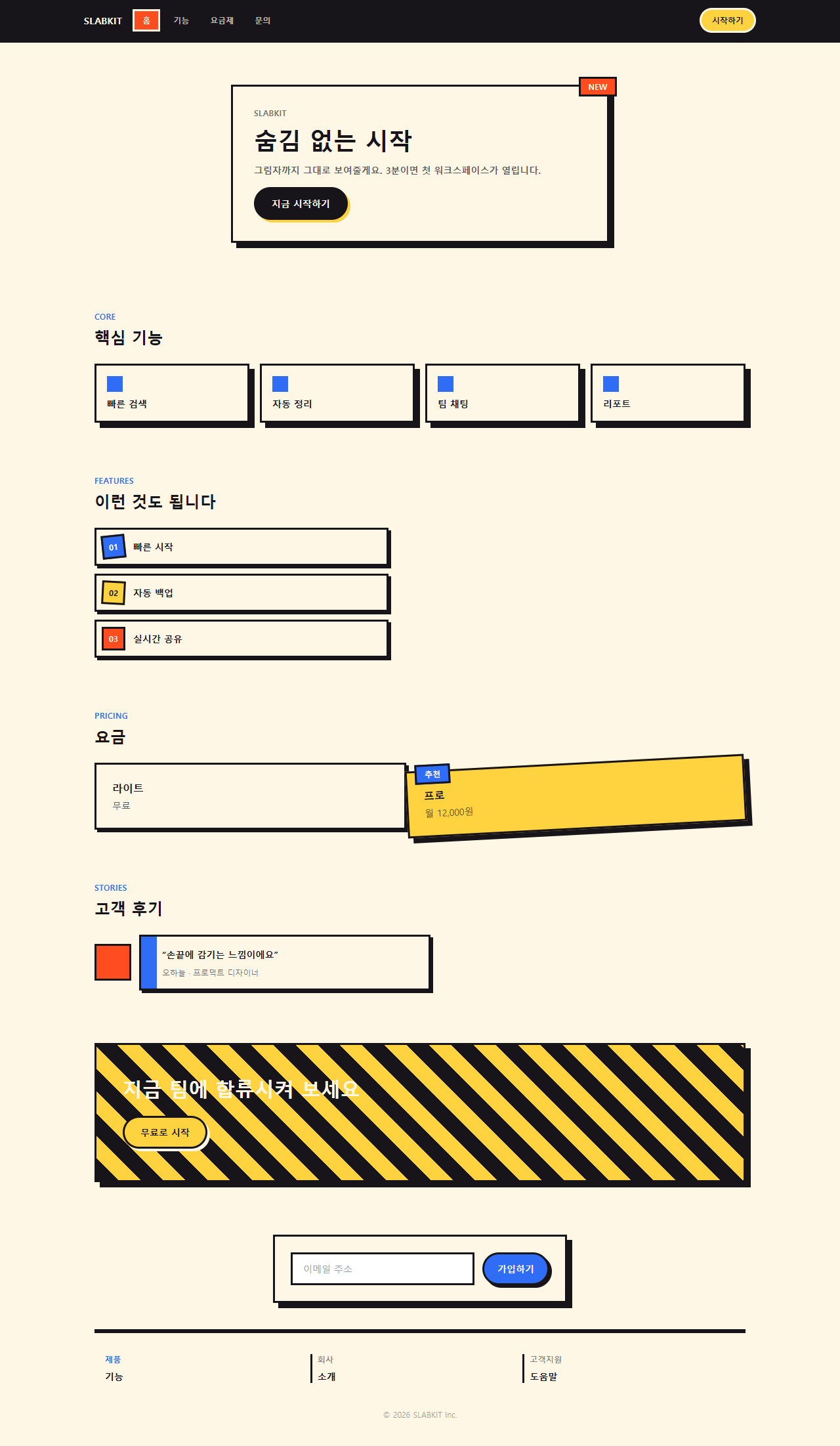
브루탈리즘 디자인의 거친 골격을 원색과 그림자로 다듬은 이 룩이 핀터레스트·드리블 저장 탭을 가장 많이 채웁니다. 직접 짠 원페이지를 먼저 붙였으니, 위 내비 바부터 아래 저작권 줄까지 화면을 한 번 내려보며 전체 톤을 눈에 담아 보십시오. 그림자에 블러가 없다는 것부터 걸릴 겁니다.

이 원페이지 하나를 아홉 조각으로 쪼개 아래 격자에 다시 늘어놓았습니다. 순서는 인기투표가 아니라 화면을 처음 여는 사람이 지나가는 동선—눈에 걸리기, 둘러보기, 값 확인하기, 믿을 근거 찾기, 등 떠밀리기, 등록하기—그대로입니다. 아홉 개 중 넷(히어로·번호 배지·요금·버튼)은 흔한 카드 나열이 아니라 회전이나 그림자 이동 같은 동작이 붙은 아이디어형입니다. 같은 design 기둥에서 이 직각 그림자와 정반대로 번짐을 끝까지 밀어붙인 쪽이 오로라 그라디언트 랜딩 부품이고, 같은 원색을 금속 광택으로 바꿔 놓은 쪽이 Y2K 크롬·홀로그램 부품입니다.
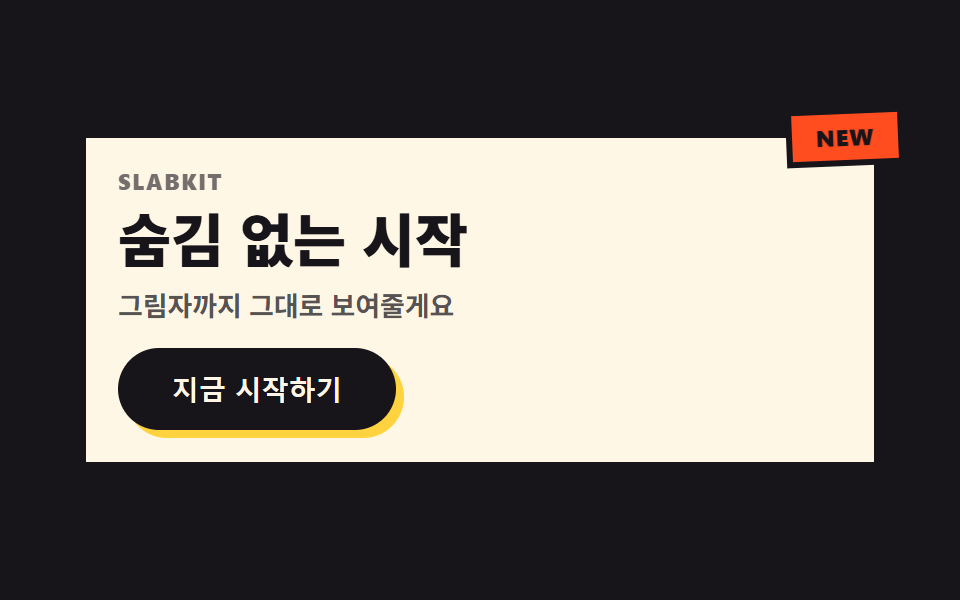 01 hero-brutalist
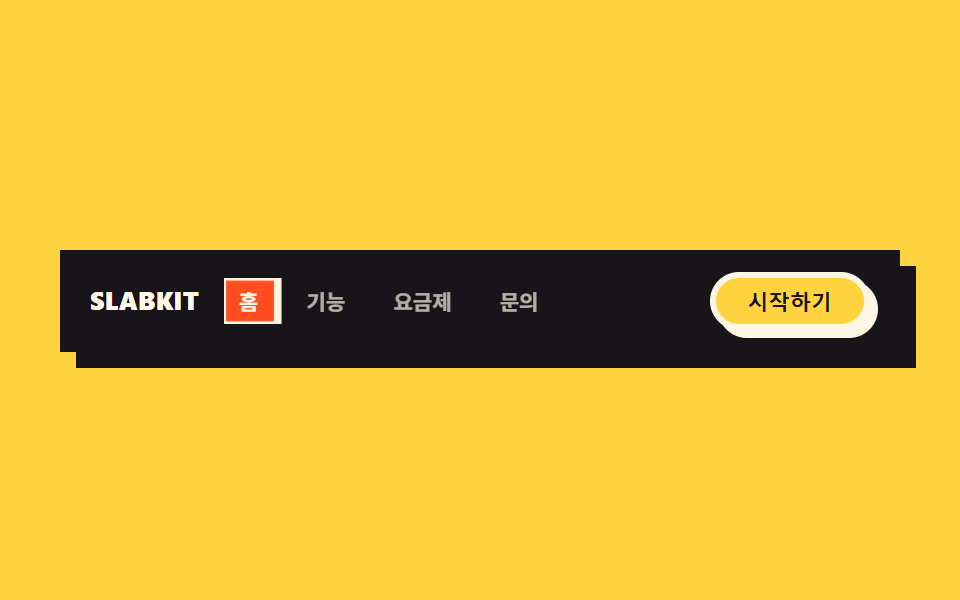 02 nav-brutalist
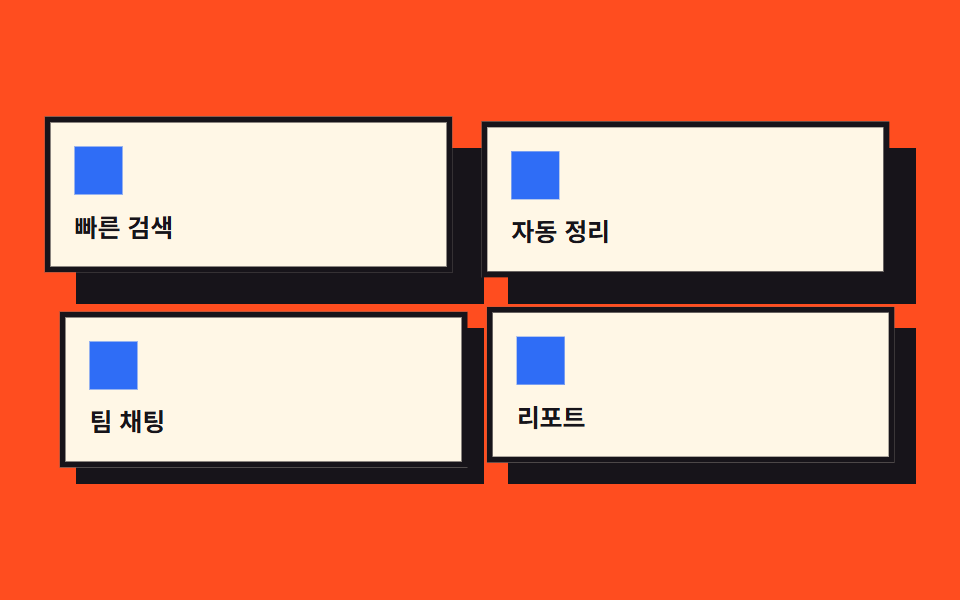 03 card-grid-brutalist
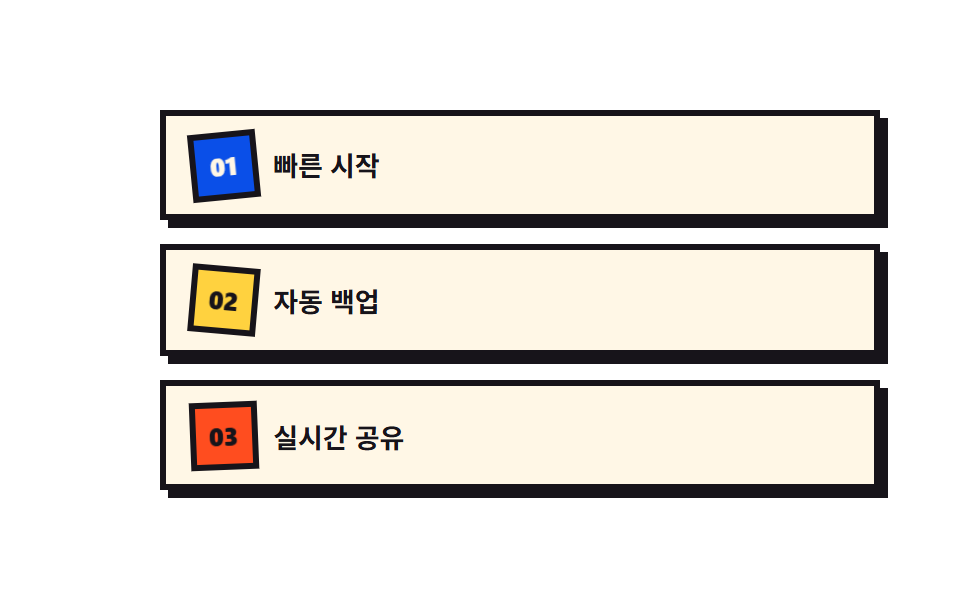 04 feature-list-brutalist
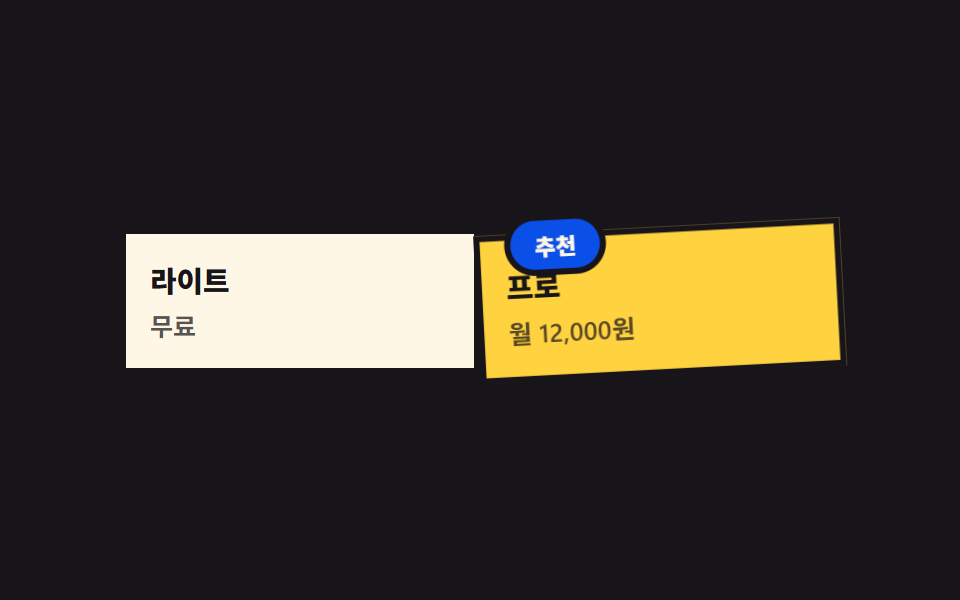 05 pricing-brutalist
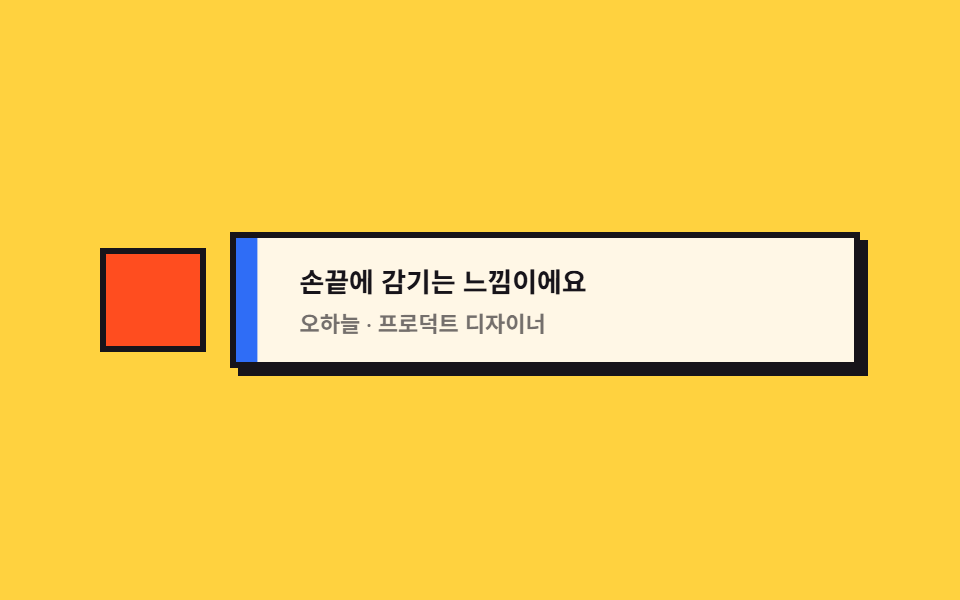 06 testimonial-brutalist
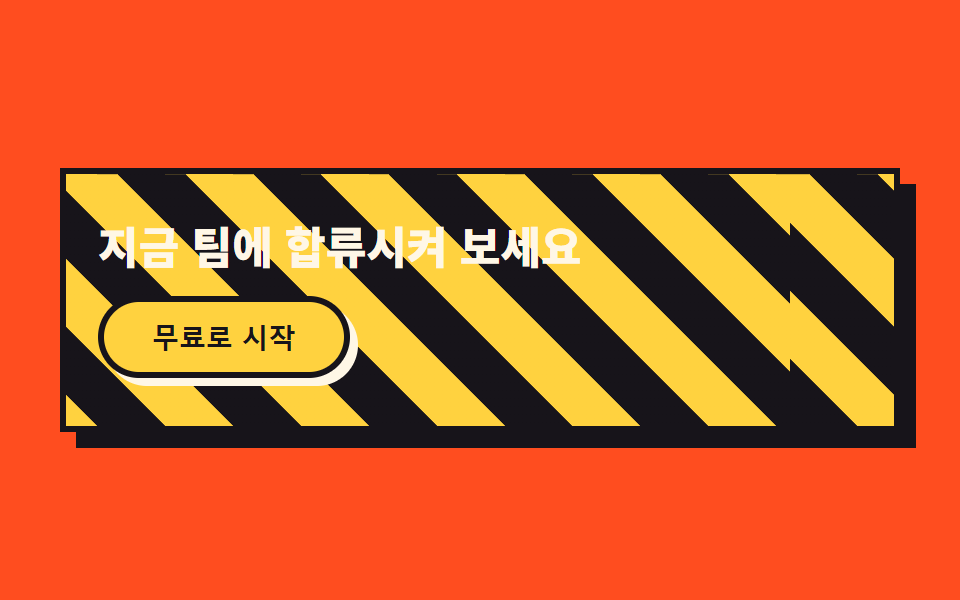 07 cta-band-brutalist
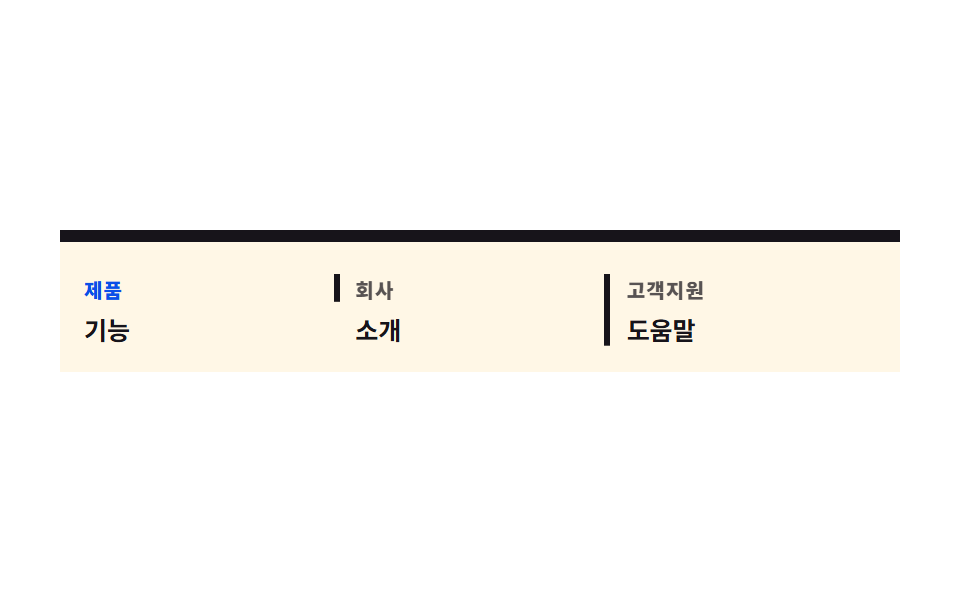 08 footer-brutalist
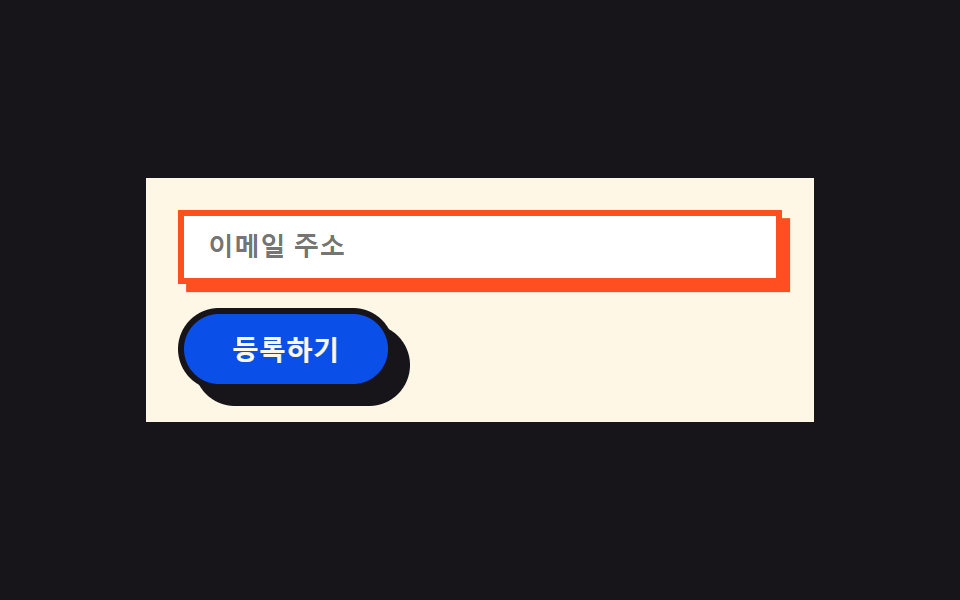 09 buttons-inputs-brutalist
자동 재생 · 눌러서 해당 항목으로 · 전부 한 zip
- 01 오프셋 그림자 히어로
- 02 스탬프 내비
- 03 그림자 분리 카드
- 04 비뚤어진 번호 배지
- 05 붙여놓은 요금 카드
- 06 블록 인용부호 후기
- 07 행진하는 사선 CTA
- 08 자로 그은 구분선 푸터
- 09 그림자 자리로 눌리는 버튼
01오프셋 그림자 히어로
무엇이 움직이나
제목 뒤에 깔린 노란 복제본이 인쇄가 살짝 밀린 것처럼 주기적으로 어긋났다 맞물립니다.
<main class="stage">
  <section class="hero">
    <span class="hero__badge is-demo" aria-hidden="true">NEW</span>
    <div class="hero__card is-demo">
      <p class="hero__eyebrow">SLABKIT</p>
      <h1 class="hero__title is-demo" data-text="숨김 없는 시작">숨김 없는 시작</h1>
      <p class="hero__desc">그림자까지 그대로 보여줄게요</p>
      <button class="hero__cta" type="button">지금 시작하기</button>
    </div>
  </section>
</main>
@use "../../../../site/static/demo-tokens" as *;
$duration: $dur-loop; // 어긋남↔맞물림 한 주기
$easing: $ease-spring; // 어긋나는 곡선
$color: $stage-yellow; // 오프셋 복제 색
$border: 3px;
@include stage($stage-ink);
.hero {
position: relative;
width: clamp(260px, 84vw, 400px);
}
.hero__card {
box-sizing: border-box;
position: relative;
display: flex;
flex-direction: column;
align-items: flex-start;
gap: $sp-2;
padding: $sp-4;
border: $border solid $subject-ink;
border-radius: 0;
background: $subject-cream;
box-shadow: $sp-2 $sp-2 0 $subject-ink;
}
.hero__badge {
box-sizing: border-box;
position: absolute;
top: -$sp-3;
right: -$sp-3;
z-index: 2;
border: $border solid $subject-ink;
border-radius: 0;
background: $stage-orange;
color: $subject-ink;
padding: $sp-1 $sp-3;
font-weight: 800;
font-size: clamp(10px, 2.4vw, 12px);
letter-spacing: .04em;
text-transform: uppercase;
animation: badgeSnap $duration $easing infinite;
}
.hero__eyebrow {
margin: 0;
color: $subject-ink;
opacity: .6;
font-weight: 800;
font-size: clamp(10px, 2.4vw, 11px);
line-height: 1;
letter-spacing: .08em;
text-transform: uppercase;
}
.hero__title {
position: relative;
margin: 0;
color: $subject-ink;
font-weight: 900;
font-size: clamp(22px, 6vw, 30px);
line-height: 1.1;
}
.hero__title::before {
content: attr(data-text);
position: absolute;
left: 0;
top: 0;
z-index: -1;
color: $color;
animation: ghostShift $duration $easing infinite;
}
.hero__desc {
margin: 0;
color: rgba($subject-ink, .72);
font-weight: 600;
font-size: clamp(12px, 2.8vw, 14px);
line-height: 1.4;
}
.hero__cta {
box-sizing: border-box;
margin-top: $sp-1;
border: $border solid $subject-ink;
border-radius: $r-pill;
background: $subject-ink;
color: $subject-cream;
padding: $sp-2 $sp-6;
font-weight: 800;
font-size: clamp(12px, 2.8vw, 14px);
box-shadow: $sp-1 $sp-1 0 $color;
}
// 데모: 제목 뒤 복제본이 인쇄 밀림처럼 어긋났다 맞물리고, 배지는 비뚤게 있다가 탁 소리 나듯 편다
@keyframes ghostShift {
0%, 100% { transform: translate($sp-1, $sp-1); }
50% { transform: translate(-$sp-1, -$sp-1); }
}
@keyframes badgeSnap {
0%, 55%, 100% { transform: rotate(-10deg); }
78% { transform: rotate(4deg); }
88% { transform: rotate(0deg); }
}
@media (prefers-reduced-motion: reduce) {
.hero__title::before, .hero__badge {
animation: none !important;
transform: none;
}
}html, body {
margin: 0;
overflow: hidden;
}
.stage {
box-sizing: border-box;
min-height: 100vh;
display: grid;
place-items: center;
margin: 0;
background: #17141a;
font-family: -apple-system, "Segoe UI", "Noto Sans KR", sans-serif;
padding: clamp(8px, 4vw, 24px);
}
.hero {
position: relative;
width: clamp(260px, 84vw, 400px);
}
.hero__card {
box-sizing: border-box;
position: relative;
display: flex;
flex-direction: column;
align-items: flex-start;
gap: 8px;
padding: 16px;
border: 3px solid #17141a;
border-radius: 0;
background: #fff7e6;
box-shadow: 8px 8px 0 #17141a;
}
.hero__badge {
box-sizing: border-box;
position: absolute;
top: -12px;
right: -12px;
z-index: 2;
border: 3px solid #17141a;
border-radius: 0;
background: #ff4d1f;
color: #17141a;
padding: 4px 12px;
font-weight: 800;
font-size: clamp(10px, 2.4vw, 12px);
letter-spacing: 0.04em;
text-transform: uppercase;
animation: badgeSnap 2s cubic-bezier(0.2, 0.8, 0.2, 1) infinite;
}
.hero__eyebrow {
margin: 0;
color: #17141a;
opacity: 0.6;
font-weight: 800;
font-size: clamp(10px, 2.4vw, 11px);
line-height: 1;
letter-spacing: 0.08em;
text-transform: uppercase;
}
.hero__title {
position: relative;
margin: 0;
color: #17141a;
font-weight: 900;
font-size: clamp(22px, 6vw, 30px);
line-height: 1.1;
}
.hero__title::before {
content: attr(data-text);
position: absolute;
left: 0;
top: 0;
z-index: -1;
color: #ffd23f;
animation: ghostShift 2s cubic-bezier(0.2, 0.8, 0.2, 1) infinite;
}
.hero__desc {
margin: 0;
color: rgba(23, 20, 26, 0.72);
font-weight: 600;
font-size: clamp(12px, 2.8vw, 14px);
line-height: 1.4;
}
.hero__cta {
box-sizing: border-box;
margin-top: 4px;
border: 3px solid #17141a;
border-radius: 999px;
background: #17141a;
color: #fff7e6;
padding: 8px 24px;
font-weight: 800;
font-size: clamp(12px, 2.8vw, 14px);
box-shadow: 4px 4px 0 #ffd23f;
}
@keyframes ghostShift {
0%, 100% {
transform: translate(4px, 4px);
}
50% {
transform: translate(-4px, -4px);
}
}
@keyframes badgeSnap {
0%, 55%, 100% {
transform: rotate(-10deg);
}
78% {
transform: rotate(4deg);
}
88% {
transform: rotate(0deg);
}
}
@media (prefers-reduced-motion: reduce) {
.hero__title::before, .hero__badge {
animation: none !important;
transform: none;
}
}import type { CSSProperties } from "react";
import styles from "./HeroBrutalist.module.scss";
export type HeroBrutalistProps = {
eyebrow?: string;
title?: string;
desc?: string;
cta?: string;
badge?: string;
/** 한 주기(기본 2000ms) */
duration?: number;
easing?: string;
color?: string;
};
type Vars = CSSProperties & { "--duration"?: string; "--easing"?: string; "--color"?: string };
export default function HeroBrutalist({
eyebrow = "SLABKIT",
title = "숨김 없는 시작",
desc = "그림자까지 그대로 보여줄게요",
cta = "지금 시작하기",
badge = "NEW",
duration = 2000,
easing = "cubic-bezier(.2,.8,.2,1)",
color = "#ffd23f",
}: HeroBrutalistProps) {
const vars: Vars = { "--duration": `${duration}ms`, "--easing": easing, "--color": color };
return (
<section className={styles.hero} style={vars}>
<span className={styles.badge} aria-hidden="true">{badge}</span>
<div className={styles.card}>
<p className={styles.eyebrow}>{eyebrow}</p>
<h1 className={styles.title} data-text={title}>{title}</h1>
<p className={styles.desc}>{desc}</p>
<button type="button" className={styles.cta}>{cta}</button>
</div>
</section>
);
}01 · 오프셋 그림자 히어로 — 측정 누적면적 0.671% · 움직인 프레임 10/23GODRICH 원작 · zip 에 SCSS·React 포함 · 비밀번호 보기
코드에서 볼 곳
모서리의 스티커 배지는 비뚤게 놓여 있다가 탁 소리 나듯 잠깐 편평해졌다 다시 기웁니다.
<div class="relative border-[3px] border-ink bg-cream p-8 shadow-brutal">
  <span class="absolute -right-3 -top-3 border-[3px] border-ink
               bg-orange px-3 py-1 text-xs font-black text-cream">NEW</span>
  <h1 class="relative font-display text-4xl font-black leading-tight">
    <span class="absolute -left-1 -top-1 -z-10 text-yellow"
          aria-hidden="true">숨김 없는 시작</span>
    숨김 없는 시작
  </h1>
  <button class="mt-3 rounded-full border-[3px] border-ink bg-ink
                 px-6 py-3 text-sm font-black text-cream
                 shadow-[4px_4px_0_#ffd23f]">지금 시작하기</button>
</div>
02스탬프 내비
무엇이 움직이나
현재 메뉴 칸이 도장을 찍듯 확 커졌다 제자리로 튕기며 색 블록으로 들어찹니다.
<main class="stage">
  <nav class="nav">
    <span class="nav__brand">SLABKIT</span>
    <div class="nav__links">
      <span class="nav__link nav__link--active is-demo">홈</span>
      <span class="nav__link">기능</span>
      <span class="nav__link">요금제</span>
      <span class="nav__link">문의</span>
    </div>
    <button class="nav__cta" type="button">시작하기</button>
  </nav>
</main>
@use "../../../../site/static/demo-tokens" as *;
$duration: $dur-loop; // 스탬프 한 번 찍히는 주기
$easing: $ease-pop; // 오버슈트 곡선
$color: $stage-orange; // 스탬프 블록 색
$border: 3px;
@include stage($stage-yellow);
.nav {
box-sizing: border-box;
display: flex;
align-items: center;
gap: $sp-3;
width: clamp(260px, 90vw, 420px);
padding: $sp-2 $sp-3;
border: $border solid $subject-ink;
border-radius: 0;
background: $subject-ink;
box-shadow: $sp-2 $sp-2 0 $subject-ink;
}
.nav__brand {
flex-shrink: 0;
white-space: nowrap;
color: $subject-cream;
font-weight: 900;
font-size: clamp(12px, 2.6vw, 14px);
letter-spacing: .02em;
text-transform: uppercase;
}
.nav__links {
min-width: 0;
flex: 1;
display: flex;
align-items: center;
gap: $sp-2;
overflow-x: auto;
scrollbar-width: none;
}
.nav__links::-webkit-scrollbar { display: none; }
.nav__link {
box-sizing: border-box;
position: relative;
flex: 0 0 auto;
white-space: nowrap;
color: rgba($subject-cream, .68);
font-weight: 700;
font-size: clamp(10px, 2.2vw, 12px);
padding: $sp-1 $sp-2;
z-index: 1;
}
.nav__link--active { color: $subject-cream; }
.nav__link--active::before {
content: "";
position: absolute;
inset: 0;
z-index: -1;
border: $border solid $subject-cream;
border-radius: 0;
background: $color;
animation: stamp $duration $easing infinite;
}
.nav__cta {
box-sizing: border-box;
flex-shrink: 0;
white-space: nowrap;
border: $border solid $subject-cream;
border-radius: $r-pill;
background: $stage-yellow;
color: $subject-ink;
padding: $sp-1 $sp-4;
font-weight: 800;
font-size: clamp(10px, 2.2vw, 12px);
box-shadow: $sp-1 $sp-1 0 $subject-cream;
}
// 데모: 현재 칸의 색 블록이 스탬프처럼 커졌다 튕기며 자리 잡는다. JS 0줄
@keyframes stamp {
0%, 40% { transform: scale(.75); opacity: 0; }
55% { transform: scale(1.18); opacity: 1; }
70% { transform: scale(.92); opacity: 1; }
85%, 100% { transform: scale(1); opacity: 1; }
}
@media (prefers-reduced-motion: reduce) {
.nav__link--active::before {
animation: none !important;
transform: scale(1);
opacity: 1;
}
}html, body {
margin: 0;
overflow: hidden;
}
.stage {
box-sizing: border-box;
min-height: 100vh;
display: grid;
place-items: center;
margin: 0;
background: #ffd23f;
font-family: -apple-system, "Segoe UI", "Noto Sans KR", sans-serif;
padding: clamp(8px, 4vw, 24px);
}
.nav {
box-sizing: border-box;
display: flex;
align-items: center;
gap: 12px;
width: clamp(260px, 90vw, 420px);
padding: 8px 12px;
border: 3px solid #17141a;
border-radius: 0;
background: #17141a;
box-shadow: 8px 8px 0 #17141a;
}
.nav__brand {
flex-shrink: 0;
white-space: nowrap;
color: #fff7e6;
font-weight: 900;
font-size: clamp(12px, 2.6vw, 14px);
letter-spacing: 0.02em;
text-transform: uppercase;
}
.nav__links {
min-width: 0;
flex: 1;
display: flex;
align-items: center;
gap: 8px;
overflow-x: auto;
scrollbar-width: none;
}
.nav__links::-webkit-scrollbar {
display: none;
}
.nav__link {
box-sizing: border-box;
position: relative;
flex: 0 0 auto;
white-space: nowrap;
color: rgba(255, 247, 230, 0.68);
font-weight: 700;
font-size: clamp(10px, 2.2vw, 12px);
padding: 4px 8px;
z-index: 1;
}
.nav__link--active {
color: #fff7e6;
}
.nav__link--active::before {
content: "";
position: absolute;
inset: 0;
z-index: -1;
border: 3px solid #fff7e6;
border-radius: 0;
background: #ff4d1f;
animation: stamp 2s cubic-bezier(0.2, 1.4, 0.4, 1) infinite;
}
.nav__cta {
box-sizing: border-box;
flex-shrink: 0;
white-space: nowrap;
border: 3px solid #fff7e6;
border-radius: 999px;
background: #ffd23f;
color: #17141a;
padding: 4px 16px;
font-weight: 800;
font-size: clamp(10px, 2.2vw, 12px);
box-shadow: 4px 4px 0 #fff7e6;
}
@keyframes stamp {
0%, 40% {
transform: scale(0.75);
opacity: 0;
}
55% {
transform: scale(1.18);
opacity: 1;
}
70% {
transform: scale(0.92);
opacity: 1;
}
85%, 100% {
transform: scale(1);
opacity: 1;
}
}
@media (prefers-reduced-motion: reduce) {
.nav__link--active::before {
animation: none !important;
transform: scale(1);
opacity: 1;
}
}import type { CSSProperties } from "react";
import styles from "./NavBrutalist.module.scss";
export type NavLink = { label: string; active?: boolean };
export type NavBrutalistProps = {
brand?: string;
links?: NavLink[];
cta?: string;
duration?: number;
easing?: string;
color?: string;
};
type Vars = CSSProperties & { "--duration"?: string; "--easing"?: string; "--color"?: string };
export default function NavBrutalist({
brand = "SLABKIT",
links = [
{ label: "홈", active: true },
{ label: "기능" },
{ label: "요금제" },
{ label: "문의" },
],
cta = "시작하기",
duration = 2000,
easing = "cubic-bezier(.2,1.4,.4,1)",
color = "#ff4d1f",
}: NavBrutalistProps) {
const vars: Vars = { "--duration": `${duration}ms`, "--easing": easing, "--color": color };
return (
<nav className={styles.nav} style={vars}>
<span className={styles.brand}>{brand}</span>
<div className={styles.links}>
{links.map((l) => (
<span key={l.label} className={`${styles.link} ${l.active ? styles.linkActive : ""}`}>
{l.label}
</span>
))}
</div>
<button type="button" className={styles.cta}>{cta}</button>
</nav>
);
}02 · 스탬프 내비 — 측정 누적면적 0.461% · 움직인 프레임 10/23GODRICH 원작 · zip 에 SCSS·React 포함 · 비밀번호 보기
코드에서 볼 곳
링크 글자는 화면이 좁아져도 줄바꿈 없이 한 줄로 남고, 넘치는 칸은 옆으로 밀립니다.
<nav class="flex items-center gap-4 border-[3px] border-ink bg-ink
            px-4 py-3">
  <span class="shrink-0 whitespace-nowrap font-black text-cream">SLABKIT</span>
  <div class="flex min-w-0 flex-1 gap-2 overflow-x-auto">
    <span class="shrink-0 whitespace-nowrap border-[3px] border-cream
                 bg-orange px-3 py-1.5 text-xs font-bold text-cream">홈</span>
    <span class="shrink-0 whitespace-nowrap px-3 py-1.5 text-xs
                 font-bold text-cream/70">기능</span>
  </div>
  <button class="shrink-0 whitespace-nowrap rounded-full border-[3px]
                 border-cream bg-yellow px-4 py-2 text-xs
                 font-black text-ink">시작하기</button>
</nav>
03그림자 분리 카드
무엇이 움직이나
카드마다 검정 그림자는 자리에 고정된 채 카드 몸통만 왼쪽 위로 움직여, 카드와 그림자 사이 빈틈이 늘었다 줄었다 합니다.
<main class="stage">
  <div class="grid">
    <div class="card is-demo">
      <div class="card__body">
        <span class="card__icon" aria-hidden="true"></span>
        <p class="card__label">빠른 검색</p>
      </div>
    </div>
    <div class="card is-demo">
      <div class="card__body">
        <span class="card__icon" aria-hidden="true"></span>
        <p class="card__label">자동 정리</p>
      </div>
    </div>
    <div class="card is-demo">
      <div class="card__body">
        <span class="card__icon" aria-hidden="true"></span>
        <p class="card__label">팀 채팅</p>
      </div>
    </div>
    <div class="card is-demo">
      <div class="card__body">
        <span class="card__icon" aria-hidden="true"></span>
        <p class="card__label">리포트</p>
      </div>
    </div>
  </div>
</main>@use "../../../../site/static/demo-tokens" as *;
$duration: $dur-loop; // 몸통이 그림자에서 멀어졌다 돌아오는 주기
$easing: $ease-spring;
$color: $subject-blue; // 아이콘 스와치 색
$border: 3px;
@include stage($stage-orange);
.grid {
display: grid;
grid-template-columns: repeat(2, 1fr);
gap: $sp-3;
width: clamp(260px, 88vw, 420px);
}
.card {
position: relative;
}
.card::before {
content: "";
position: absolute;
inset: 0;
z-index: 0;
background: $subject-ink;
transform: translate($sp-2, $sp-2);
}
.card__body {
box-sizing: border-box;
position: relative;
z-index: 1;
display: flex;
flex-direction: column;
gap: $sp-2;
padding: $sp-3;
border: $border solid $subject-ink;
border-radius: 0;
background: $subject-cream;
animation: floatAway $duration $easing infinite;
}
.card:nth-child(1) .card__body { animation-delay: 0s; }
.card:nth-child(2) .card__body { animation-delay: -.5s; }
.card:nth-child(3) .card__body { animation-delay: -1s; }
.card:nth-child(4) .card__body { animation-delay: -1.5s; }
.card__icon {
display: block;
width: clamp(18px, 5vw, 24px);
height: clamp(18px, 5vw, 24px);
background: $color;
border-radius: 0;
}
.card__label {
margin: 0;
color: $subject-ink;
font-weight: 700;
font-size: clamp(11px, 2.6vw, 13px);
line-height: 1.3;
}
// 데모: 그림자(::before)는 고정, 몸통(card__body)만 왼쪽 위로 떴다 돌아와 틈이 늘었다 줄었다 한다
@keyframes floatAway {
0%, 100% { transform: translate(0, 0); }
50% { transform: translate(-$sp-2, -$sp-2); }
}
@media (prefers-reduced-motion: reduce) {
.card__body {
animation: none !important;
transform: none;
}
}html, body {
margin: 0;
overflow: hidden;
}
.stage {
box-sizing: border-box;
min-height: 100vh;
display: grid;
place-items: center;
margin: 0;
background: #ff4d1f;
font-family: -apple-system, "Segoe UI", "Noto Sans KR", sans-serif;
padding: clamp(8px, 4vw, 24px);
}
.grid {
display: grid;
grid-template-columns: repeat(2, 1fr);
gap: 12px;
width: clamp(260px, 88vw, 420px);
}
.card {
position: relative;
}
.card::before {
content: "";
position: absolute;
inset: 0;
z-index: 0;
background: #17141a;
transform: translate(8px, 8px);
}
.card__body {
box-sizing: border-box;
position: relative;
z-index: 1;
display: flex;
flex-direction: column;
gap: 8px;
padding: 12px;
border: 3px solid #17141a;
border-radius: 0;
background: #fff7e6;
animation: floatAway 2s cubic-bezier(0.2, 0.8, 0.2, 1) infinite;
}
.card:nth-child(1) .card__body {
animation-delay: 0s;
}
.card:nth-child(2) .card__body {
animation-delay: -0.5s;
}
.card:nth-child(3) .card__body {
animation-delay: -1s;
}
.card:nth-child(4) .card__body {
animation-delay: -1.5s;
}
.card__icon {
display: block;
width: clamp(18px, 5vw, 24px);
height: clamp(18px, 5vw, 24px);
background: #2f6df6;
border-radius: 0;
}
.card__label {
margin: 0;
color: #17141a;
font-weight: 700;
font-size: clamp(11px, 2.6vw, 13px);
line-height: 1.3;
}
@keyframes floatAway {
0%, 100% {
transform: translate(0, 0);
}
50% {
transform: translate(-8px, -8px);
}
}
@media (prefers-reduced-motion: reduce) {
.card__body {
animation: none !important;
transform: none;
}
}import type { CSSProperties } from "react";
import styles from "./CardGridBrutalist.module.scss";
export type GridCard = { label: string };
export type CardGridBrutalistProps = {
cards?: GridCard[];
duration?: number;
easing?: string;
color?: string;
};
type Vars = CSSProperties & { "--duration"?: string; "--easing"?: string; "--color"?: string; "--delay"?: string };
const DELAYS = ["0s", "-.5s", "-1s", "-1.5s"];
export default function CardGridBrutalist({
cards = [
{ label: "빠른 검색" },
{ label: "자동 정리" },
{ label: "팀 채팅" },
{ label: "리포트" },
],
duration = 2000,
easing = "cubic-bezier(.2,.8,.2,1)",
color = "#2f6df6",
}: CardGridBrutalistProps) {
const base: Vars = { "--duration": `${duration}ms`, "--easing": easing, "--color": color };
return (
<div className={styles.grid} style={base}>
{cards.map((c, i) => {
const vars: Vars = { ...base, "--delay": DELAYS[i % DELAYS.length] };
return (
<div key={c.label} className={styles.card}>
<div className={styles.body} style={vars}>
<span className={styles.icon} aria-hidden="true" />
<p className={styles.label}>{c.label}</p>
</div>
</div>
);
})}
</div>
);
}03 · 그림자 분리 카드 — 측정 누적면적 20.788% · 움직인 프레임 23/23GODRICH 원작 · zip 에 SCSS·React 포함 · 비밀번호 보기
코드에서 볼 곳
네 칸은 시작 시각을 어긋내 파도처럼 순서대로 떴다 가라앉습니다.
<div class="relative">
  <div class="absolute inset-0 translate-x-2 translate-y-2 bg-ink"></div>
  <div class="relative flex flex-col gap-2 border-[3px] border-ink
              bg-cream p-4">
    <span class="block h-6 w-6 bg-blue"></span>
    <p class="text-sm font-bold">빠른 검색</p>
  </div>
</div>
04비뚤어진 번호 배지
무엇이 움직이나
항목 번호가 담긴 사각 배지가 전부 조금씩 다른 각도로 놓여 있다가, 순서대로 잠깐 똑바로 섰다가 다시 비뚤어집니다.
<main class="stage">
  <ul class="list">
    <li class="item is-demo">
      <span class="item__badge item__badge--a" aria-hidden="true">01</span>
      <span class="item__label">빠른 시작</span>
    </li>
    <li class="item is-demo">
      <span class="item__badge item__badge--b" aria-hidden="true">02</span>
      <span class="item__label">자동 백업</span>
    </li>
    <li class="item is-demo">
      <span class="item__badge item__badge--c" aria-hidden="true">03</span>
      <span class="item__label">실시간 공유</span>
    </li>
  </ul>
</main>
@use "../../../../site/static/demo-tokens" as *;
$duration: $dur-loop; // 배지가 똑바로 섰다 다시 비뚤어지는 주기
$easing: $ease-out;
$color: $subject-blue;
$border: 3px;
@include stage($stage-paper);
.stage { padding: clamp($sp-1, 3vw, $sp-4); }
.list {
display: flex;
flex-direction: column;
gap: clamp($sp-1, 3vw, $sp-3);
width: clamp(240px, 80vw, 360px);
}
.item {
box-sizing: border-box;
display: flex;
align-items: center;
gap: $sp-2;
padding: clamp($sp-1, 2vw, $sp-2) $sp-3;
border: $border solid $subject-ink;
border-radius: 0;
background: $subject-cream;
box-shadow: $sp-1 $sp-1 0 $subject-ink;
}
.item__badge {
box-sizing: border-box;
flex: 0 0 auto;
display: grid;
place-items: center;
width: clamp(24px, 7vw, 34px);
height: clamp(24px, 7vw, 34px);
border: $border solid $subject-ink;
border-radius: 0;
font-weight: 900;
font-size: clamp(10px, 2.6vw, 13px);
}
.item__badge--a { background: $subject-blue-deep; color: $subject-cream; transform: rotate(-6deg); animation: straightenA $duration $easing infinite; }
.item__badge--b { background: $stage-yellow; color: $subject-ink; transform: rotate(5deg); animation: straightenB $duration $easing infinite; animation-delay: -.7s; }
.item__badge--c { background: $stage-orange; color: $subject-ink; transform: rotate(-4deg); animation: straightenC $duration $easing infinite; animation-delay: -1.4s; }
.item__label {
margin: 0;
color: $subject-ink;
font-weight: 700;
font-size: clamp(12px, 2.8vw, 14px);
}
// 데모: 배지마다 제 각도로 쉬다가, 순서대로 잠깐 0deg 로 섰다가 다시 비뚤어진다
@keyframes straightenA { 0%, 60%, 100% { transform: rotate(-6deg); } 80% { transform: rotate(0deg); } }
@keyframes straightenB { 0%, 60%, 100% { transform: rotate(5deg); } 80% { transform: rotate(0deg); } }
@keyframes straightenC { 0%, 60%, 100% { transform: rotate(-4deg); } 80% { transform: rotate(0deg); } }
@media (prefers-reduced-motion: reduce) {
.item__badge--a, .item__badge--b, .item__badge--c {
animation: none !important;
transform: none;
}
}html, body {
margin: 0;
overflow: hidden;
}
.stage {
box-sizing: border-box;
min-height: 100vh;
display: grid;
place-items: center;
margin: 0;
background: #ffffff;
font-family: -apple-system, "Segoe UI", "Noto Sans KR", sans-serif;
padding: clamp(8px, 4vw, 24px);
}
.stage {
padding: clamp(4px, 3vw, 16px);
}
.list {
display: flex;
flex-direction: column;
gap: clamp(4px, 3vw, 12px);
width: clamp(240px, 80vw, 360px);
}
.item {
box-sizing: border-box;
display: flex;
align-items: center;
gap: 8px;
padding: clamp(4px, 2vw, 8px) 12px;
border: 3px solid #17141a;
border-radius: 0;
background: #fff7e6;
box-shadow: 4px 4px 0 #17141a;
}
.item__badge {
box-sizing: border-box;
flex: 0 0 auto;
display: grid;
place-items: center;
width: clamp(24px, 7vw, 34px);
height: clamp(24px, 7vw, 34px);
border: 3px solid #17141a;
border-radius: 0;
font-weight: 900;
font-size: clamp(10px, 2.6vw, 13px);
}
.item__badge--a {
background: #0a4fe8;
color: #fff7e6;
transform: rotate(-6deg);
animation: straightenA 2s ease-out infinite;
}
.item__badge--b {
background: #ffd23f;
color: #17141a;
transform: rotate(5deg);
animation: straightenB 2s ease-out infinite;
animation-delay: -0.7s;
}
.item__badge--c {
background: #ff4d1f;
color: #17141a;
transform: rotate(-4deg);
animation: straightenC 2s ease-out infinite;
animation-delay: -1.4s;
}
.item__label {
margin: 0;
color: #17141a;
font-weight: 700;
font-size: clamp(12px, 2.8vw, 14px);
}
@keyframes straightenA {
0%, 60%, 100% {
transform: rotate(-6deg);
}
80% {
transform: rotate(0deg);
}
}
@keyframes straightenB {
0%, 60%, 100% {
transform: rotate(5deg);
}
80% {
transform: rotate(0deg);
}
}
@keyframes straightenC {
0%, 60%, 100% {
transform: rotate(-4deg);
}
80% {
transform: rotate(0deg);
}
}
@media (prefers-reduced-motion: reduce) {
.item__badge--a, .item__badge--b, .item__badge--c {
animation: none !important;
transform: none;
}
}import type { CSSProperties } from "react";
import styles from "./FeatureListBrutalist.module.scss";
export type FeatureItem = { number: string; label: string };
export type FeatureListBrutalistProps = {
items?: FeatureItem[];
duration?: number;
easing?: string;
};
type Vars = CSSProperties & {
"--duration"?: string;
"--easing"?: string;
"--rest-rotate"?: string;
"--delay"?: string;
};
const BADGES = [
{ bg: "#0a4fe8", fg: "#fff7e6", rotate: "-6deg", delay: "0s" },
{ bg: "#ffd23f", fg: "#17141a", rotate: "5deg", delay: "-.7s" },
{ bg: "#ff4d1f", fg: "#17141a", rotate: "-4deg", delay: "-1.4s" },
];
export default function FeatureListBrutalist({
items = [
{ number: "01", label: "빠른 시작" },
{ number: "02", label: "자동 백업" },
{ number: "03", label: "실시간 공유" },
],
duration = 2000,
easing = "ease-out",
}: FeatureListBrutalistProps) {
return (
<ul className={styles.list}>
{items.map((it, i) => {
const b = BADGES[i % BADGES.length];
const vars: Vars = {
"--duration": `${duration}ms`,
"--easing": easing,
"--rest-rotate": b.rotate,
"--delay": b.delay,
background: b.bg,
color: b.fg,
};
return (
<li key={it.number} className={styles.item}>
<span className={styles.badge} style={vars} aria-hidden="true">{it.number}</span>
<span className={styles.label}>{it.label}</span>
</li>
);
})}
</ul>
);
}04 · 비뚤어진 번호 배지 — 측정 누적면적 0.738% · 움직인 프레임 22/23GODRICH 원작 · zip 에 SCSS·React 포함 · 비밀번호 보기
코드에서 볼 곳
각도가 서로 다르다 보니 셋이 동시에 정렬되는 순간이 없어 계속 살아 있는 느낌을 줍니다.
<li class="flex items-center gap-3 border-[3px] border-ink bg-cream
           p-2 pr-5 shadow-brutal-sm">
  <span class="grid h-9 w-9 flex-none -rotate-6 place-items-center
               border-[3px] border-ink bg-blue text-xs font-black
               text-cream">01</span>
  <span class="text-sm font-bold">빠른 시작</span>
</li>
05붙여놓은 요금 카드
무엇이 움직이나
추천 플랜 카드만 살짝 기울어진 채 다른 칸 위에 포스트잇처럼 얹히고, 나머지 카드는 완전히 수평이라 기울기 하나로 추천이 눈에 띕니다.
<main class="stage">
  <div class="pricing">
    <div class="plan">
      <p class="plan__name">라이트</p>
      <p class="plan__price">무료</p>
    </div>
    <div class="plan plan--pro is-demo">
      <span class="plan__badge" aria-hidden="true">추천</span>
      <p class="plan__name">프로</p>
      <p class="plan__price">월 12,000원</p>
    </div>
  </div>
</main>
@use "../../../../site/static/demo-tokens" as *;
$duration: $dur-loop;
$easing: $ease-pop;
$color: $subject-blue; // 추천 배지 색
$border: 3px;
@include stage($stage-ink);
.pricing {
display: flex;
align-items: center;
gap: $sp-2;
width: clamp(240px, 84vw, 360px);
}
.plan {
box-sizing: border-box;
flex: 1;
padding: $sp-3;
border: $border solid $subject-ink;
border-radius: 0;
background: $subject-cream;
box-shadow: $sp-1 $sp-1 0 $subject-ink;
}
.plan--pro {
position: relative;
z-index: 1;
margin-left: -$sp-2;
background: $stage-yellow;
box-shadow: $sp-2 $sp-2 0 $subject-ink;
transform: rotate(-3deg);
animation: breathe $duration $easing infinite;
}
.plan__badge {
box-sizing: border-box;
position: absolute;
top: -$sp-3;
left: $sp-3;
border: $border solid $subject-ink;
border-radius: $r-pill;
background: $subject-blue-deep;
color: $subject-cream;
padding: $sp-1 $sp-3;
font-weight: 800;
font-size: clamp(10px, 2.4vw, 11px);
text-transform: uppercase;
}
.plan__name {
margin: 0 0 $sp-1;
color: $subject-ink;
font-weight: 800;
font-size: clamp(13px, 3vw, 15px);
}
.plan__price {
margin: 0;
color: rgba($subject-ink, .72);
font-weight: 600;
font-size: clamp(11px, 2.6vw, 13px);
}
// 데모: 추천 카드만 -3deg 로 고정 기울고, 그 기울기를 유지한 채 살짝 부풀었다 가라앉는다(포스트잇처럼 붙어 있는 느낌)
@keyframes breathe {
0%, 100% { transform: rotate(-3deg) scale(1); }
50% { transform: rotate(-3deg) scale(1.035); }
}
@media (prefers-reduced-motion: reduce) {
.plan--pro {
animation: none !important;
transform: rotate(-3deg);
}
}html, body {
margin: 0;
overflow: hidden;
}
.stage {
box-sizing: border-box;
min-height: 100vh;
display: grid;
place-items: center;
margin: 0;
background: #17141a;
font-family: -apple-system, "Segoe UI", "Noto Sans KR", sans-serif;
padding: clamp(8px, 4vw, 24px);
}
.pricing {
display: flex;
align-items: center;
gap: 8px;
width: clamp(240px, 84vw, 360px);
}
.plan {
box-sizing: border-box;
flex: 1;
padding: 12px;
border: 3px solid #17141a;
border-radius: 0;
background: #fff7e6;
box-shadow: 4px 4px 0 #17141a;
}
.plan--pro {
position: relative;
z-index: 1;
margin-left: -8px;
background: #ffd23f;
box-shadow: 8px 8px 0 #17141a;
transform: rotate(-3deg);
animation: breathe 2s cubic-bezier(0.2, 1.4, 0.4, 1) infinite;
}
.plan__badge {
box-sizing: border-box;
position: absolute;
top: -12px;
left: 12px;
border: 3px solid #17141a;
border-radius: 999px;
background: #0a4fe8;
color: #fff7e6;
padding: 4px 12px;
font-weight: 800;
font-size: clamp(10px, 2.4vw, 11px);
text-transform: uppercase;
}
.plan__name {
margin: 0 0 4px;
color: #17141a;
font-weight: 800;
font-size: clamp(13px, 3vw, 15px);
}
.plan__price {
margin: 0;
color: rgba(23, 20, 26, 0.72);
font-weight: 600;
font-size: clamp(11px, 2.6vw, 13px);
}
@keyframes breathe {
0%, 100% {
transform: rotate(-3deg) scale(1);
}
50% {
transform: rotate(-3deg) scale(1.035);
}
}
@media (prefers-reduced-motion: reduce) {
.plan--pro {
animation: none !important;
transform: rotate(-3deg);
}
}import type { CSSProperties } from "react";
import styles from "./PricingBrutalist.module.scss";
export type PricingBrutalistProps = {
baseName?: string;
basePrice?: string;
proName?: string;
proPrice?: string;
badge?: string;
duration?: number;
easing?: string;
color?: string;
};
type Vars = CSSProperties & { "--duration"?: string; "--easing"?: string; "--color"?: string };
export default function PricingBrutalist({
baseName = "라이트",
basePrice = "무료",
proName = "프로",
proPrice = "월 12,000원",
badge = "추천",
duration = 2000,
easing = "cubic-bezier(.2,1.4,.4,1)",
color = "#0a4fe8",
}: PricingBrutalistProps) {
const vars: Vars = { "--duration": `${duration}ms`, "--easing": easing, "--color": color };
return (
<div className={styles.pricing} style={vars}>
<div className={styles.plan}>
<p className={styles.name}>{baseName}</p>
<p className={styles.price}>{basePrice}</p>
</div>
<div className={`${styles.plan} ${styles.pro}`}>
<span className={styles.badge} aria-hidden="true">{badge}</span>
<p className={styles.name}>{proName}</p>
<p className={styles.price}>{proPrice}</p>
</div>
</div>
);
}05 · 붙여놓은 요금 카드 — 측정 누적면적 3.044% · 움직인 프레임 10/23GODRICH 원작 · zip 에 SCSS·React 포함 · 비밀번호 보기
코드에서 볼 곳
기운 채로 숨을 쉬듯 살짝 부풀었다 가라앉아, 표 없이도 어느 쪽을 밀고 있는지 바로 압니다.
<div class="relative -ml-2 flex-[1.1] -rotate-3 border-[3px]
            border-ink bg-yellow p-6 shadow-brutal">
  <span class="absolute -top-3 left-3 border-[3px] border-ink
               bg-blue px-3 py-1 text-xs font-black text-cream">추천</span>
  <p class="font-black">프로</p>
  <p class="mt-1 text-sm text-ink/70">월 12,000원</p>
</div>
06블록 인용부호 후기
무엇이 움직이나
글자가 아니라 카드 왼쪽 한 뼘을 채우는 파란 색 블록이 텍스트 뒤 자기 레인 안에서만 미끄러져 들어왔다 나갑니다.
<main class="stage">
  <div class="testimonial">
    <span class="testimonial__avatar" aria-hidden="true"></span>
    <div class="testimonial__card">
      <span class="testimonial__quote is-demo" aria-hidden="true"></span>
      <p class="testimonial__text">손끝에 감기는 느낌이에요</p>
      <p class="testimonial__name">오하늘 · 프로덕트 디자이너</p>
    </div>
  </div>
</main>
@use "../../../../site/static/demo-tokens" as *;
$duration: $dur-loop;
$easing: $ease-spring;
$color: $subject-blue; // 블록 따옴표 색
$border: 3px;
@include stage($stage-yellow);
.testimonial {
display: flex;
align-items: center;
gap: $sp-3;
width: clamp(260px, 86vw, 380px);
}
.testimonial__avatar {
box-sizing: border-box;
flex: 0 0 auto;
width: clamp(44px, 11vw, 56px);
height: clamp(44px, 11vw, 56px);
border: $border solid $subject-ink;
border-radius: 0;
background: $stage-orange;
}
.testimonial__card {
box-sizing: border-box;
position: relative;
overflow: hidden;
flex: 1;
padding: $sp-3 $sp-3 $sp-3 $sp-8;
border: $border solid $subject-ink;
border-radius: 0;
background: $subject-cream;
box-shadow: $sp-1 $sp-1 0 $subject-ink;
}
.testimonial__quote {
position: absolute;
left: 0;
top: 0;
bottom: 0;
width: $sp-8;
z-index: 0;
background: $color;
transform: translateX(-100%);
animation: slideBlock $duration $easing infinite;
}
.testimonial__text {
position: relative;
z-index: 1;
margin: 0;
color: $subject-ink;
font-weight: 700;
font-size: clamp(12px, 2.8vw, 14px);
line-height: 1.4;
}
.testimonial__name {
position: relative;
z-index: 1;
margin: $sp-1 0 0;
color: rgba($subject-ink, .6);
font-weight: 600;
font-size: clamp(10px, 2.4vw, 11px);
}
// 데모: 글자가 아니라 색 블록이 카드 왼쪽 레인 안에서만 미끄러져 들어왔다 나간다 (텍스트와 안 겹침)
@keyframes slideBlock {
0%, 100% { transform: translateX(-100%); }
50% { transform: translateX(0%); }
}
@media (prefers-reduced-motion: reduce) {
.testimonial__quote {
animation: none !important;
transform: translateX(0%);
}
}html, body {
margin: 0;
overflow: hidden;
}
.stage {
box-sizing: border-box;
min-height: 100vh;
display: grid;
place-items: center;
margin: 0;
background: #ffd23f;
font-family: -apple-system, "Segoe UI", "Noto Sans KR", sans-serif;
padding: clamp(8px, 4vw, 24px);
}
.testimonial {
display: flex;
align-items: center;
gap: 12px;
width: clamp(260px, 86vw, 380px);
}
.testimonial__avatar {
box-sizing: border-box;
flex: 0 0 auto;
width: clamp(44px, 11vw, 56px);
height: clamp(44px, 11vw, 56px);
border: 3px solid #17141a;
border-radius: 0;
background: #ff4d1f;
}
.testimonial__card {
box-sizing: border-box;
position: relative;
overflow: hidden;
flex: 1;
padding: 12px 12px 12px 32px;
border: 3px solid #17141a;
border-radius: 0;
background: #fff7e6;
box-shadow: 4px 4px 0 #17141a;
}
.testimonial__quote {
position: absolute;
left: 0;
top: 0;
bottom: 0;
width: 32px;
z-index: 0;
background: #2f6df6;
transform: translateX(-100%);
animation: slideBlock 2s cubic-bezier(0.2, 0.8, 0.2, 1) infinite;
}
.testimonial__text {
position: relative;
z-index: 1;
margin: 0;
color: #17141a;
font-weight: 700;
font-size: clamp(12px, 2.8vw, 14px);
line-height: 1.4;
}
.testimonial__name {
position: relative;
z-index: 1;
margin: 4px 0 0;
color: rgba(23, 20, 26, 0.6);
font-weight: 600;
font-size: clamp(10px, 2.4vw, 11px);
}
@keyframes slideBlock {
0%, 100% {
transform: translateX(-100%);
}
50% {
transform: translateX(0%);
}
}
@media (prefers-reduced-motion: reduce) {
.testimonial__quote {
animation: none !important;
transform: translateX(0%);
}
}import type { CSSProperties } from "react";
import styles from "./TestimonialBrutalist.module.scss";
export type TestimonialBrutalistProps = {
quote?: string;
name?: string;
duration?: number;
easing?: string;
color?: string;
};
type Vars = CSSProperties & { "--duration"?: string; "--easing"?: string; "--color"?: string };
export default function TestimonialBrutalist({
quote = "손끝에 감기는 느낌이에요",
name = "오하늘 · 프로덕트 디자이너",
duration = 2000,
easing = "cubic-bezier(.2,.8,.2,1)",
color = "#2f6df6",
}: TestimonialBrutalistProps) {
const vars: Vars = { "--duration": `${duration}ms`, "--easing": easing, "--color": color };
return (
<div className={styles.testimonial} style={vars}>
<span className={styles.avatar} aria-hidden="true" />
<div className={styles.card}>
<span className={styles.quote} aria-hidden="true" />
<p className={styles.text}>{quote}</p>
<p className={styles.name}>{name}</p>
</div>
</div>
);
}06 · 블록 인용부호 후기 — 측정 누적면적 1.378% · 움직인 프레임 22/23GODRICH 원작 · zip 에 SCSS·React 포함 · 비밀번호 보기
코드에서 볼 곳
아바타는 원이 아니라 두꺼운 테두리를 두른 정사각 프레임에 앉아 카드와 같은 각진 어휘를 씁니다.
<div class="relative flex-1 overflow-hidden border-[3px] border-ink
            bg-cream py-4 pl-8 pr-4 shadow-brutal-sm">
  <span class="absolute inset-y-0 left-0 w-6 bg-blue"></span>
  <p class="relative text-sm font-bold">"손끝에 감기는 느낌이에요"</p>
  <p class="relative mt-2 text-xs text-ink/60">오하늘 · 프로덕트 디자이너</p>
</div>
07행진하는 사선 CTA
무엇이 움직이나
밴드 배경 전체에 하드 에지 사선 줄무늬가 깔리고, 배경 위치만 옮겨가며 끝없이 행진합니다.
<main class="stage">
  <div class="cta">
    <span class="cta__stripes is-demo" aria-hidden="true"></span>
    <h3 class="cta__title">지금 팀에 합류시켜 보세요</h3>
    <button class="cta__btn" type="button">무료로 시작</button>
  </div>
</main>
@use "../../../../site/static/demo-tokens" as *;
$duration: $dur-loop;
$easing: $ease-out; // 콘텐츠용(줄무늬 자체는 linear 로 고정 — 아래 주석)
$color: $stage-yellow; // 줄무늬·버튼 색
$border: 3px;
$stripe: $sp-6; // 줄무늬 한 칸 폭(24px), 두 칸 = 한 주기
@include stage($stage-orange);
.cta {
box-sizing: border-box;
position: relative;
overflow: hidden;
display: flex;
flex-direction: column;
align-items: flex-start;
gap: $sp-3;
width: clamp(260px, 90vw, 420px);
padding: $sp-6 $sp-4;
border: $border solid $subject-ink;
border-radius: 0;
background: $subject-ink;
box-shadow: $sp-2 $sp-2 0 $subject-ink;
}
.cta__stripes {
position: absolute;
inset: 0;
z-index: 0;
background-image: repeating-linear-gradient(45deg, $subject-ink 0 $stripe, $color $stripe $stripe * 2);
// 사선 줄무늬 하드 에지(블러 없음). background-position 이동 거리를 무늬 한 주기(칸×2)와 똑같이 둬야
// -50% 트랙 이음새 버그(BD15)처럼 매듭이 안 튄다 — 여긴 flex gap 이 아니라 배경 타일이라 애초에 그 문제가 없다
animation: marchStripes $duration linear infinite;
}
.cta__title {
position: relative;
z-index: 1;
margin: 0;
max-width: 80%;
color: $subject-cream;
font-weight: 900;
font-size: clamp(18px, 4.6vw, 24px);
line-height: 1.15;
}
.cta__btn {
box-sizing: border-box;
position: relative;
z-index: 1;
border: $border solid $subject-ink;
border-radius: $r-pill;
background: $color;
color: $subject-ink;
padding: $sp-2 $sp-6;
font-weight: 800;
font-size: clamp(12px, 2.8vw, 14px);
box-shadow: $sp-1 $sp-1 0 $subject-cream;
}
// 데모: 사선 줄무늬가 배경-위치만 옮겨가며 끝없이 행진한다(무늬 한 주기만큼 이동 → 이음새 없음)
@keyframes marchStripes {
from { background-position: 0 0; }
to { background-position: -($stripe * 2) -($stripe * 2); }
}
@media (prefers-reduced-motion: reduce) {
.cta__stripes {
animation: none !important;
background-position: 0 0;
}
}html, body {
margin: 0;
overflow: hidden;
}
.stage {
box-sizing: border-box;
min-height: 100vh;
display: grid;
place-items: center;
margin: 0;
background: #ff4d1f;
font-family: -apple-system, "Segoe UI", "Noto Sans KR", sans-serif;
padding: clamp(8px, 4vw, 24px);
}
.cta {
box-sizing: border-box;
position: relative;
overflow: hidden;
display: flex;
flex-direction: column;
align-items: flex-start;
gap: 12px;
width: clamp(260px, 90vw, 420px);
padding: 24px 16px;
border: 3px solid #17141a;
border-radius: 0;
background: #17141a;
box-shadow: 8px 8px 0 #17141a;
}
.cta__stripes {
position: absolute;
inset: 0;
z-index: 0;
background-image: repeating-linear-gradient(45deg, #17141a 0 24px, #ffd23f 24px 48px);
animation: marchStripes 2s linear infinite;
}
.cta__title {
position: relative;
z-index: 1;
margin: 0;
max-width: 80%;
color: #fff7e6;
font-weight: 900;
font-size: clamp(18px, 4.6vw, 24px);
line-height: 1.15;
}
.cta__btn {
box-sizing: border-box;
position: relative;
z-index: 1;
border: 3px solid #17141a;
border-radius: 999px;
background: #ffd23f;
color: #17141a;
padding: 8px 24px;
font-weight: 800;
font-size: clamp(12px, 2.8vw, 14px);
box-shadow: 4px 4px 0 #fff7e6;
}
@keyframes marchStripes {
from {
background-position: 0 0;
}
to {
background-position: -96px;
}
}
@media (prefers-reduced-motion: reduce) {
.cta__stripes {
animation: none !important;
background-position: 0 0;
}
}import type { CSSProperties } from "react";
import styles from "./CtaBandBrutalist.module.scss";
export type CtaBandBrutalistProps = {
title?: string;
cta?: string;
duration?: number;
color?: string;
};
type Vars = CSSProperties & { "--duration"?: string; "--color"?: string };
export default function CtaBandBrutalist({
title = "지금 팀에 합류시켜 보세요",
cta = "무료로 시작",
duration = 2000,
color = "#ffd23f",
}: CtaBandBrutalistProps) {
const vars: Vars = { "--duration": `${duration}ms`, "--color": color };
return (
<div className={styles.cta} style={vars}>
<span className={styles.stripes} aria-hidden="true" />
<h3 className={styles.title}>{title}</h3>
<button type="button" className={styles.btn}>{cta}</button>
</div>
);
}07 · 행진하는 사선 CTA — 측정 누적면적 31.335% · 움직인 프레임 23/23GODRICH 원작 · zip 에 SCSS·React 포함 · 비밀번호 보기
코드에서 볼 곳
버튼은 완전히 불투명한 배경을 얹어 줄무늬가 지나가는 자리에서도 글자가 묻히지 않습니다.
<div class="relative overflow-hidden border-[3px] border-ink bg-ink
            px-10 py-12 shadow-brutal">
  <span class="absolute inset-0" aria-hidden="true"
        style="background-image:repeating-linear-gradient(45deg,
               #17141a 0 24px,#ffd23f 24px 48px)"></span>
  <h3 class="relative font-display text-3xl font-black
             text-cream">지금 팀에 합류시켜 보세요</h3>
</div>
08자로 그은 구분선 푸터
무엇이 움직이나
칼럼 사이 굵은 세로선이 자로 긋듯 위에서 아래로 한 번씩 그려지며 나타나고, 오래 머물다 다음 바퀴를 위해 짧게 풀립니다.
<main class="stage">
  <footer class="footer">
    <div class="footer__col">
      <p class="footer__heading">제품</p>
      <p class="footer__link">기능</p>
    </div>
    <span class="footer__rule is-demo" aria-hidden="true"></span>
    <div class="footer__col">
      <p class="footer__heading">회사</p>
      <p class="footer__link">소개</p>
    </div>
    <span class="footer__rule footer__rule--b is-demo" aria-hidden="true"></span>
    <div class="footer__col">
      <p class="footer__heading">고객지원</p>
      <p class="footer__link">도움말</p>
    </div>
  </footer>
</main>
@use "../../../../site/static/demo-tokens" as *;
$duration: $dur-loop;
$easing: $ease-out;
$color: $subject-blue-deep; // 첫 칼럼 강조 색 (밝은 면 위 파란 글자는 진한 파랑)
$border: 3px;
@include stage($stage-paper);
.footer {
box-sizing: border-box;
display: flex;
align-items: stretch;
width: clamp(260px, 90vw, 420px);
padding: $sp-4 $sp-3 $sp-3;
border: 0;
border-top: $border * 2 solid $subject-ink;
border-radius: 0;
background: $subject-cream;
}
.footer__col {
box-sizing: border-box;
flex: 1;
min-width: 0;
padding: 0 $sp-2;
display: flex;
flex-direction: column;
gap: $sp-1;
}
.footer__col:first-child { padding-left: 0; }
.footer__heading {
margin: 0;
color: $subject-ink;
opacity: .72;
font-weight: 800;
font-size: clamp(9px, 2.2vw, 10px);
letter-spacing: .06em;
text-transform: uppercase;
}
.footer__col:first-child .footer__heading {
color: $color;
opacity: 1;
}
.footer__link {
margin: 0;
color: $subject-ink;
font-weight: 700;
font-size: clamp(11px, 2.6vw, 13px);
}
.footer__rule {
flex: 0 0 auto;
width: $border;
background: $subject-ink;
transform-origin: top; // 규칙8: 구분선 top에서 그어짐
transform: scaleY(0);
animation: drawLine $duration $easing infinite;
}
.footer__rule--b { animation-delay: -.6s; }
// 데모: 세로 구분선이 자로 긋듯 그려졌다 오래 머물고, 다음 바퀴를 위해 짧게 풀린다(이음새 없이 순환)
@keyframes drawLine {
0%, 100% { transform: scaleY(0); }
25%, 85% { transform: scaleY(1); }
}
@media (prefers-reduced-motion: reduce) {
.footer__rule {
animation: none !important;
transform: scaleY(1);
}
}html, body {
margin: 0;
overflow: hidden;
}
.stage {
box-sizing: border-box;
min-height: 100vh;
display: grid;
place-items: center;
margin: 0;
background: #ffffff;
font-family: -apple-system, "Segoe UI", "Noto Sans KR", sans-serif;
padding: clamp(8px, 4vw, 24px);
}
.footer {
box-sizing: border-box;
display: flex;
align-items: stretch;
width: clamp(260px, 90vw, 420px);
padding: 16px 12px 12px;
border: 0;
border-top: 6px solid #17141a;
border-radius: 0;
background: #fff7e6;
}
.footer__col {
box-sizing: border-box;
flex: 1;
min-width: 0;
padding: 0 8px;
display: flex;
flex-direction: column;
gap: 4px;
}
.footer__col:first-child {
padding-left: 0;
}
.footer__heading {
margin: 0;
color: #17141a;
opacity: 0.72;
font-weight: 800;
font-size: clamp(9px, 2.2vw, 10px);
letter-spacing: 0.06em;
text-transform: uppercase;
}
.footer__col:first-child .footer__heading {
color: #0a4fe8;
opacity: 1;
}
.footer__link {
margin: 0;
color: #17141a;
font-weight: 700;
font-size: clamp(11px, 2.6vw, 13px);
}
.footer__rule {
flex: 0 0 auto;
width: 3px;
background: #17141a;
transform-origin: top;
transform: scaleY(0);
animation: drawLine 2s ease-out infinite;
}
.footer__rule--b {
animation-delay: -0.6s;
}
@keyframes drawLine {
0%, 100% {
transform: scaleY(0);
}
25%, 85% {
transform: scaleY(1);
}
}
@media (prefers-reduced-motion: reduce) {
.footer__rule {
animation: none !important;
transform: scaleY(1);
}
}import React, { type CSSProperties } from "react";
import styles from "./FooterBrutalist.module.scss";
export type FooterCol = { heading: string; link: string };
export type FooterBrutalistProps = {
cols?: FooterCol[];
duration?: number;
easing?: string;
color?: string;
};
type Vars = CSSProperties & { "--duration"?: string; "--easing"?: string; "--color"?: string; "--delay"?: string };
export default function FooterBrutalist({
cols = [
{ heading: "제품", link: "기능" },
{ heading: "회사", link: "소개" },
{ heading: "고객지원", link: "도움말" },
],
duration = 2000,
easing = "ease-out",
color = "#0a4fe8",
}: FooterBrutalistProps) {
const base: Vars = { "--duration": `${duration}ms`, "--easing": easing, "--color": color };
return (
<footer className={styles.footer} style={base}>
{cols.map((c, i) => (
<React.Fragment key={c.heading}>
{i > 0 && (
<span
className={styles.rule}
style={{ ...base, "--delay": i === 1 ? "0s" : "-.6s" } as Vars}
aria-hidden="true"
/>
)}
<div className={styles.col}>
<p className={styles.heading}>{c.heading}</p>
<p className={styles.link}>{c.link}</p>
</div>
</React.Fragment>
))}
</footer>
);
}08 · 자로 그은 구분선 푸터 — 측정 누적면적 0.15% · 움직인 프레임 16/23GODRICH 원작 · zip 에 SCSS·React 포함 · 비밀번호 보기
코드에서 볼 곳
상단 테두리만 두껍고 나머지 모서리는 전부 직각을 지킵니다.
<footer class="flex items-stretch border-t-[6px] border-ink
               bg-cream px-4 pb-6 pt-8">
  <div class="flex-1 px-2">
    <p class="mb-2 text-xs font-black text-blue">제품</p>
    <p class="text-sm font-bold">기능</p>
  </div>
  <span class="w-[3px] flex-none bg-ink"></span>
  <div class="flex-1 px-2">
    <p class="mb-2 text-xs font-black text-ink/50">회사</p>
    <p class="text-sm font-bold">소개</p>
  </div>
</footer>
09그림자 자리로 눌리는 버튼
무엇이 움직이나
버튼을 누르면 그림자 오프셋만큼 몸체가 정확히 이동하고 그림자는 동시에 0으로 줄어, 버튼이 원래 그림자가 있던 자리로 파고드는 것처럼 보입니다.
<main class="stage">
  <form class="form">
    <label class="form__field">
      <input class="form__input is-demo" type="email" placeholder="이메일 주소" readonly>
    </label>
    <button class="form__btn is-demo" type="button">등록하기</button>
  </form>
</main>
@use "../../../../site/static/demo-tokens" as *;
$duration: $dur-loop;
$easing: $ease-pop;
$color: $subject-blue; // 버튼 색
$border: 3px;
@include stage($stage-ink);
.form {
box-sizing: border-box;
display: flex;
flex-direction: column;
gap: $sp-3;
width: clamp(240px, 82vw, 340px);
padding: $sp-4;
border: $border solid $subject-ink;
border-radius: 0;
background: $subject-cream;
box-shadow: $sp-2 $sp-2 0 $subject-ink;
}
.form__field { display: block; }
.form__input {
box-sizing: border-box;
width: 100%;
border: $border solid $subject-ink;
border-radius: 0;
background: $stage-paper;
padding: $sp-2 $sp-3;
color: $subject-ink;
font-weight: 600;
font-size: clamp(12px, 2.8vw, 13px);
box-shadow: 0 0 0 rgba($stage-orange, 0);
animation: focusPop $duration $easing infinite;
}
.form__btn {
box-sizing: border-box;
align-self: flex-start;
border: $border solid $subject-ink;
border-radius: $r-pill;
background: $subject-blue-deep;
color: $subject-cream;
padding: $sp-2 $sp-6;
font-weight: 800;
font-size: clamp(12px, 2.8vw, 14px);
box-shadow: $sp-2 $sp-2 0 $subject-ink;
animation: pressInto $duration $easing infinite;
animation-delay: -1s;
}
// 데모: 버튼은 그림자 오프셋만큼 정확히 이동하며 그림자가 동시에 0 으로 줄어 "그림자 자리로 파고드는" 느낌을 준다.
// 입력창은 초점 링이 0에서 뿅 나타났다 사라진다
@keyframes pressInto {
0%, 50%, 100% { transform: translate(0, 0); box-shadow: $sp-2 $sp-2 0 $subject-ink; }
70% { transform: translate($sp-2, $sp-2); box-shadow: 0 0 0 $subject-ink; }
}
@keyframes focusPop {
0%, 60%, 100% { box-shadow: 0 0 0 rgba($stage-orange, 0); border-color: $subject-ink; }
80% { box-shadow: $sp-1 $sp-1 0 $stage-orange; border-color: $stage-orange; }
}
@media (prefers-reduced-motion: reduce) {
.form__btn {
animation: none !important;
transform: none;
box-shadow: $sp-2 $sp-2 0 $subject-ink;
}
.form__input {
animation: none !important;
box-shadow: 0 0 0 rgba($stage-orange, 0);
border-color: $subject-ink;
}
}html, body {
margin: 0;
overflow: hidden;
}
.stage {
box-sizing: border-box;
min-height: 100vh;
display: grid;
place-items: center;
margin: 0;
background: #17141a;
font-family: -apple-system, "Segoe UI", "Noto Sans KR", sans-serif;
padding: clamp(8px, 4vw, 24px);
}
.form {
box-sizing: border-box;
display: flex;
flex-direction: column;
gap: 12px;
width: clamp(240px, 82vw, 340px);
padding: 16px;
border: 3px solid #17141a;
border-radius: 0;
background: #fff7e6;
box-shadow: 8px 8px 0 #17141a;
}
.form__field {
display: block;
}
.form__input {
box-sizing: border-box;
width: 100%;
border: 3px solid #17141a;
border-radius: 0;
background: #ffffff;
padding: 8px 12px;
color: #17141a;
font-weight: 600;
font-size: clamp(12px, 2.8vw, 13px);
box-shadow: 0 0 0 rgba(255, 77, 31, 0);
animation: focusPop 2s cubic-bezier(0.2, 1.4, 0.4, 1) infinite;
}
.form__btn {
box-sizing: border-box;
align-self: flex-start;
border: 3px solid #17141a;
border-radius: 999px;
background: #0a4fe8;
color: #fff7e6;
padding: 8px 24px;
font-weight: 800;
font-size: clamp(12px, 2.8vw, 14px);
box-shadow: 8px 8px 0 #17141a;
animation: pressInto 2s cubic-bezier(0.2, 1.4, 0.4, 1) infinite;
animation-delay: -1s;
}
@keyframes pressInto {
0%, 50%, 100% {
transform: translate(0, 0);
box-shadow: 8px 8px 0 #17141a;
}
70% {
transform: translate(8px, 8px);
box-shadow: 0 0 0 #17141a;
}
}
@keyframes focusPop {
0%, 60%, 100% {
box-shadow: 0 0 0 rgba(255, 77, 31, 0);
border-color: #17141a;
}
80% {
box-shadow: 4px 4px 0 #ff4d1f;
border-color: #ff4d1f;
}
}
@media (prefers-reduced-motion: reduce) {
.form__btn {
animation: none !important;
transform: none;
box-shadow: 8px 8px 0 #17141a;
}
.form__input {
animation: none !important;
box-shadow: 0 0 0 rgba(255, 77, 31, 0);
border-color: #17141a;
}
}import type { CSSProperties } from "react";
import styles from "./ButtonsInputsBrutalist.module.scss";
export type ButtonsInputsBrutalistProps = {
placeholder?: string;
cta?: string;
duration?: number;
easing?: string;
color?: string;
};
type Vars = CSSProperties & { "--duration"?: string; "--easing"?: string; "--color"?: string };
export default function ButtonsInputsBrutalist({
placeholder = "이메일 주소",
cta = "등록하기",
duration = 2000,
easing = "cubic-bezier(.2,1.4,.4,1)",
color = "#0a4fe8",
}: ButtonsInputsBrutalistProps) {
const vars: Vars = { "--duration": `${duration}ms`, "--easing": easing, "--color": color };
return (
<form className={styles.form} style={vars}>
<label className={styles.field}>
<input className={styles.input} type="email" placeholder={placeholder} readOnly />
</label>
<button type="button" className={styles.btn}>{cta}</button>
</form>
);
}09 · 그림자 자리로 눌리는 버튼 — 측정 누적면적 5.142% · 움직인 프레임 19/23GODRICH 원작 · zip 에 SCSS·React 포함 · 비밀번호 보기
코드에서 볼 곳
입력창은 포커스 시 그림자가 0에서 뿅 나타나 테두리 색과 함께 바뀝니다.
<form class="flex gap-3 border-[3px] border-ink bg-cream p-6
            shadow-brutal">
  <input class="flex-1 border-[3px] border-ink bg-paper px-4 py-3
                text-sm" type="email" placeholder="이메일 주소">
  <button class="rounded-full border-[3px] border-ink bg-blue
                 px-5 py-3 text-sm font-black text-cream">등록하기</button>
</form>
tailwind.config 커스텀
반경은 0 아니면 완전한 원(rounded-full) 두 값만 이 한 곳에서 정하고, 그림자는 흐림 없는 하드 오프셋 유틸리티 두 개(shadow-brutal·shadow-brutal-sm)로 묶어 뒀습니다. 색도 세 원색(blue·yellow·orange)과 바탕 cream 넷뿐이라, 아홉 부품과 원페이지가 전부 같은 팔레트를 벗어나지 않습니다.
theme: {
  extend: {
    colors: {
      cream: "#fff7e6",
      ink: "#17141a",
      blue: "#2f6df6",
      yellow: "#ffd23f",
      orange: "#ff4d1f",
    },
    boxShadow: {
      brutal: "8px 8px 0 #17141a",
      "brutal-sm": "4px 4px 0 #17141a",
    },
  },
},
바이브코딩 프롬프트
위 설정을 프로젝트에 붙여 넣고, Claude Code나 Cursor에는 아래처럼 규칙 몇 줄만 던지면 됩니다. 프롬프트 전문은 zip 안 prompt.md 파일에 들어 있습니다.
모든 카드·내비·버튼·입력창의 모서리는 완전히 직각(border-radius: 0)으로 통일한다.
예외는 실제로 누르는 버튼(button 태그)만 완전히 둥근 필로 둔다.
테두리는 굵게(3px 이상) ink 색 하나로 통일한다.
그림자는 흐림 없는 하드 오프셋 하나만 쓴다. box-shadow 에 blur 반경을 절대 넣지 않는다.
카드 하나를 강조하고 싶으면 색이나 크기보다 회전(-3deg 정도)을 우선 쓴다.
위 규칙 그대로 page/index.html을 다시 짜게 한 다음, 결과 화면을 1280px 너비로 처음부터 끝까지 캡처했습니다. 아래가 그 화면입니다.
어디서 깨지는가 — 함정
네오브루탈리즘 디자인, 어디서 깨지나요?
폭 320px에서 제일 먼저 문제가 났습니다. 번호 배지 목록 하나가 배지 최소 크기와 칸 사이 여백을 고정값에 가깝게 둔 탓에, 좁은 화면에서 실제 높이가 232px까지 나와 허용된 200px을 32px 넘겼습니다(Playwright로 scrollHeight 실측). 배지 크기와 여백을 더 낮은 하한을 가진 clamp()로 바꾸고 나서야 200px 안에 들어왔습니다.
다음으로 걸린 것
두 번째는 React 포트 쪽이었습니다. 구분선과 칼럼을 나란히 반환해야 하는 푸터 컴포넌트에서 import { Fragment } from "react"를 그대로 썼더니 타입 선언에 따라 "모듈에 그런 이름이 없다"는 오류가 났습니다. import React from "react" 뒤 React.Fragment로 감싸는 쪽이 어떤 설정에서도 막히지 않아 더 안전합니다.
마지막으로 걸린 것
사선 줄무늬 CTA는 background-position을 무늬 한 주기(칸 폭의 두 배)와 정확히 같은 거리만큼만 옮깁니다. 조금이라도 어긋난 거리로 움직이면 루프가 한 바퀴 돌 때마다 줄무늬가 눈에 띄게 튀어 보입니다. 번짐 없는 색 블록을 메일 본문으로 옮겼을 때 어디까지 살아남는지는 이메일 템플릿 디자인에서 따로 쟀습니다. 이 세 가지를 전부 고친 버전이 비밀번호 sfjr6qe2이 걸린 zip에 그대로 들어 있습니다.
아홉 개 데모는 동작을 줄이도록 설정한 방문자에게는 각자 다른 방식으로 멈춥니다 — 복제 텍스트·스탬프·카드 이동은 아예 멈추고, 추천 요금 카드는 MDN prefers-reduced-motion 문서가 권하는 대로 기울기(정보)는 남기고 숨쉬기(장식)만 끕니다.
접근성
챙긴 것
yellow(#ffd23f)는 배경 블록으로만 쓰고 그 위에 작은 글자를 얹지 않습니다 — 밝은 노랑 위 옅은 글자는 대비가 낮아지기 쉬워서, 작은 텍스트는 늘 ink나 cream 중 배경과 확실히 갈리는 색을 씁니다. 카드의 하드 섀도는 MDN box-shadow 문서가 설명하는 오프셋·색만 쓰고 흐림 반경은 0으로 둬, 저시력 사용자에게도 경계가 또렷하게 남습니다. 내비게이션의 브랜드·CTA에는 shrink-0 whitespace-nowrap을, 가운데 링크 묶음에는 min-w-0을 줘서 화면이 좁아져도 글자가 잘리거나 줄 중간에서 꺾이지 않습니다.
더 볼 곳
다른 유행 스타일은 디자인 트렌드 카테고리에서 볼 수 있고, 이 사이트가 뭘 다루는 곳인지는 소개 페이지에 적어 뒀습니다.
FAQ
네오브루탈리즘 스타일은 글래스모피즘·뉴모피즘과 뭐가 다른가요?
글래스모피즘은 반투명한 유리 느낌의 블러 배경을, 뉴모피즘은 배경과 거의 같은 색의 카드에 부드러운 이중 그림자를 씁니다. 네오브루탈리즘은 그 반대로 굵은 테두리와 흐림 없는 원색 블록을 그대로 드러내, 셋 중 가장 대비가 강하고 접근성 관점에서는 오히려 경계가 뚜렷해 유리합니다. 그림자 두 겹만으로 화면을 세우는 쪽은 뉴모피즘 랜딩 UI 키트에서 아홉 조각으로 따로 다뤘습니다.
그림자에 blur를 조금이라도 넣으면 안 되나요?
넣는 순간 이 스타일의 신호가 흐려집니다. box-shadow를 쓰는 자리는 전부 세 번째 값(흐림 반경)을 0으로 고정하고 오프셋과 색만 바꾸며, 그림자를 아예 고정된 색 블록(::before)으로 따로 그린 03번도 흐림 없는 하드 에지를 그대로 유지합니다.
다크 모드에서도 네오브루탈리즘이 어울리나요?
어울립니다. 다만 바탕을 ink로 뒤집고 카드는 cream이나 원색 블록을 그대로 유지해야 합니다. 그림자 색까지 밝게 바꾸면 테두리와 구분이 안 되므로, 그림자는 다크 모드에서도 ink(또는 그보다 더 짙은 색) 그대로 두는 편이 안전합니다.
이런 글이랑 어울려요
 디자인 트렌드벤토 그리드 디자인 — 요즘 핀터레스트에서 유행하는 부품 9개
 디자인 트렌드다크 SaaS 랜딩에 스며든 리니어 디자인 시스템 9종
 디자인 트렌드키네틱 타이포그래피 랜딩페이지, 코드로 뜯어봤다
 디자인 트렌드클레이모피즘 랜딩 UI 키트, 통통한 섹션 9개
 디자인 트렌드그레인 얹은 오로라 그라디언트 랜딩 부품 9개
 디자인 트렌드번쩍이는 Y2K 웹 디자인, 크롬·홀로그램 부품 9개
 디자인 트렌드HUD 디자인, 화면이 나를 겨누는 랜딩 부품 9개
 디자인 트렌드뉴모피즘 디자인 랜딩 UI 키트, 그림자 두 겹 섹션 9개
 디자인 트렌드종이 질감 디자인 랜딩 키트, 오려 붙인 섹션 9개
 디자인 트렌드맥시멀리즘 디자인 랜딩 키트, 겹쳐 붙인 콜라주 9종