벤토 그리드 디자인 — 요즘 핀터레스트에서 유행하는 부품 9개
벤토 그리드 디자인은 도시락 칸처럼 크기가 다른 사각형 타일을 한 격자에 채워 화면을 구성하는 방식으로, 핀터레스트·드리블에서 포트폴리오와 SaaS 랜딩 페이지를 중심으로 유행하고 있습니다. 특징은 다섯 가지입니다.
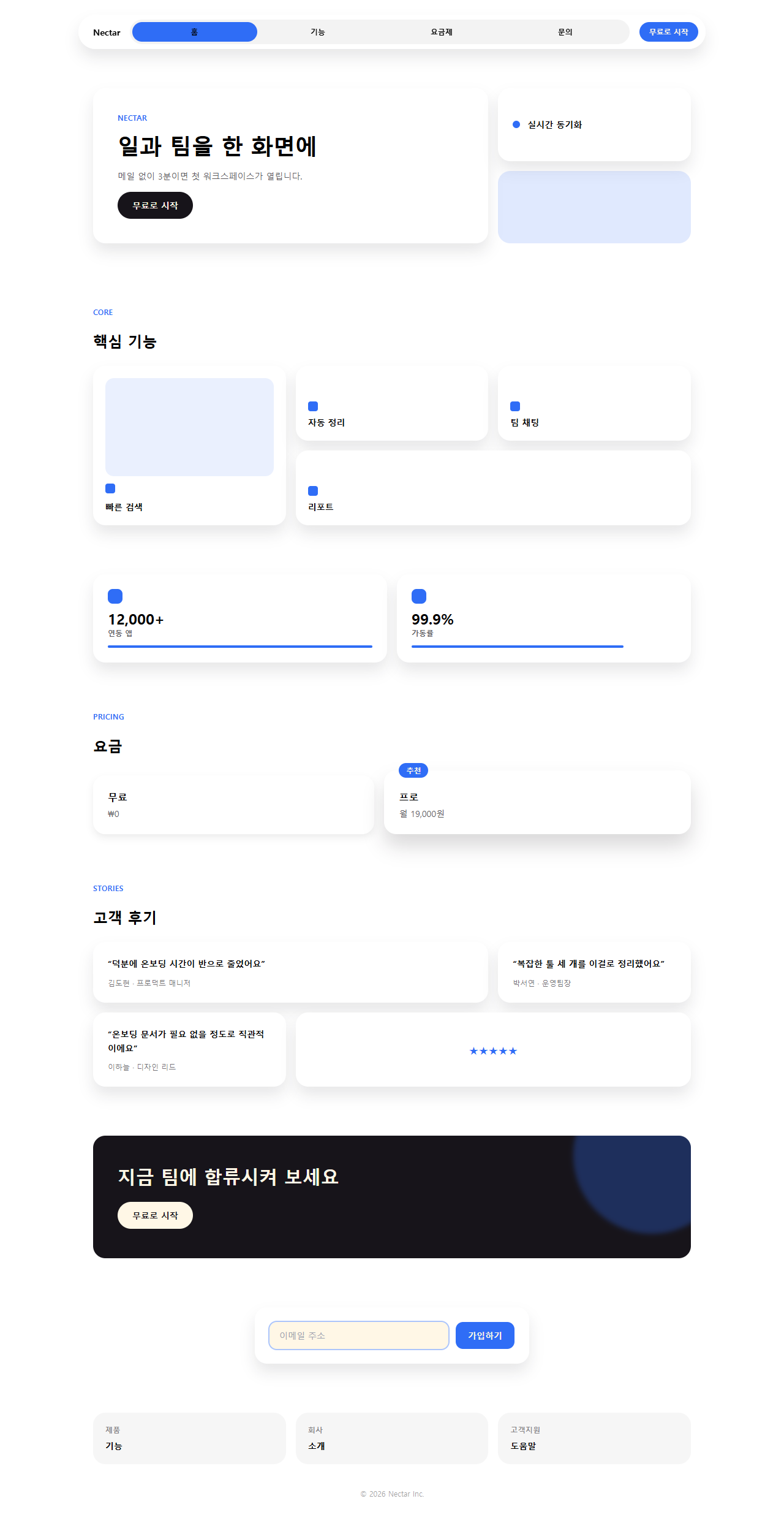
아래는 이 스타일로 실제로 만든 원페이지 랜딩입니다. 내비게이션부터 푸터까지 스크롤하면서 전체 흐름을 먼저 보십시오.

원페이지를 이루는 부품 아홉 개를 하나씩 뜯어서 격자로도 모아 뒀습니다. 각 부품은 히어로부터 시작해서 방문자가 실제로 페이지를 훑는 순서(눈에 띄기, 둘러보기, 값 확인, 신뢰, 행동, 가입)를 따라갑니다. 어두운 화면 쪽이 끌린다면 다크 SaaS 랜딩의 리니어 디자인 시스템이 같은 격자 감각을 검은 배경 위에 옮겨 놓았고, 타일 문구가 이메일로 흘러들어가야 하는 일이라면 뉴스레터 디자인 9종이 그 이어짐을 다룹니다.
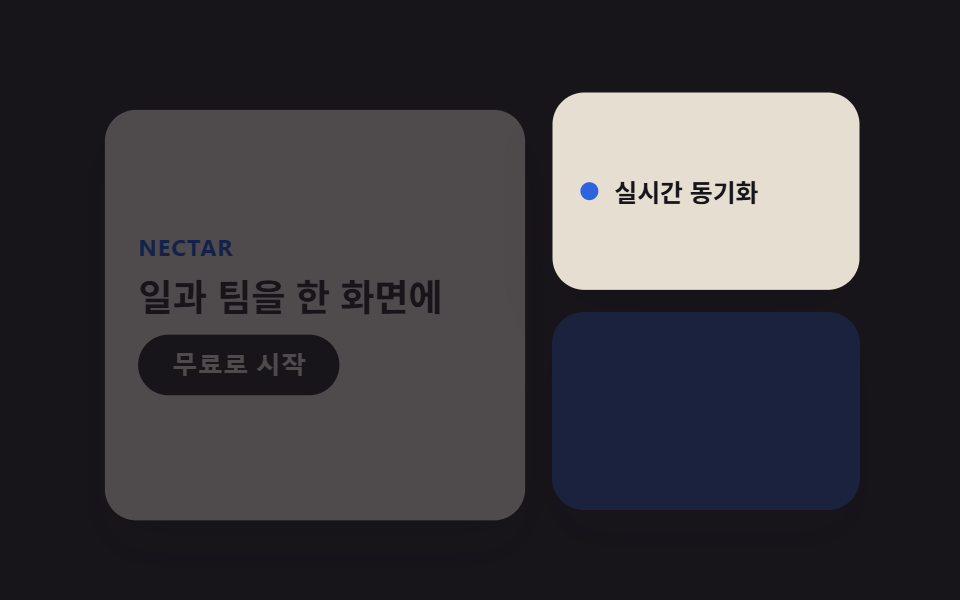 01 bento-grid-hero
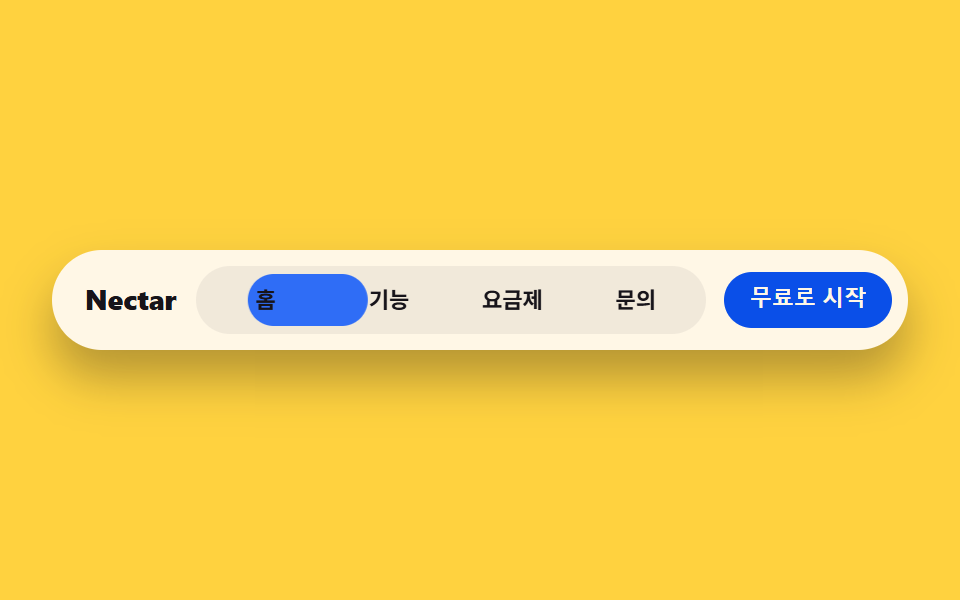 02 bento-grid-nav
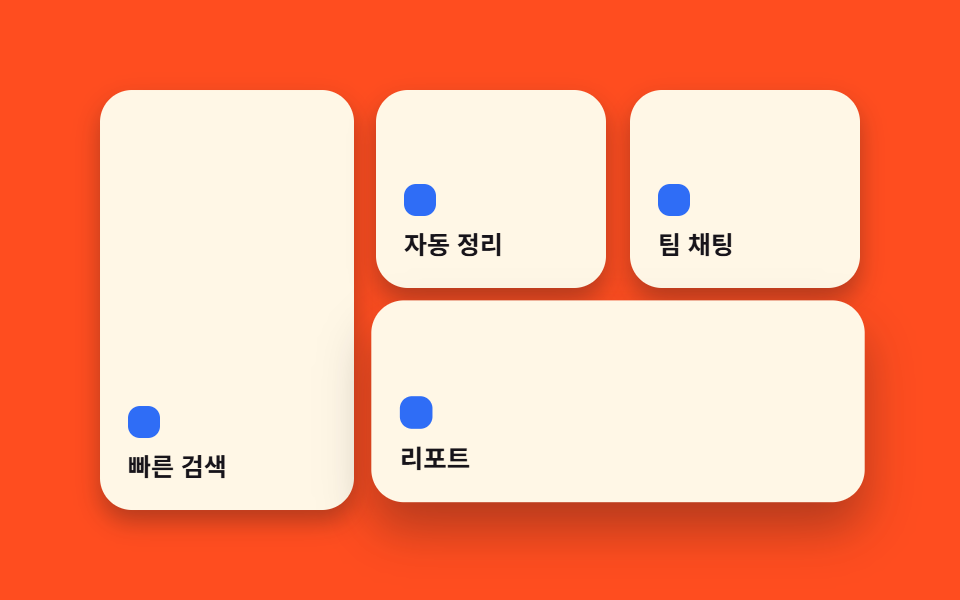 03 bento-grid-card-grid
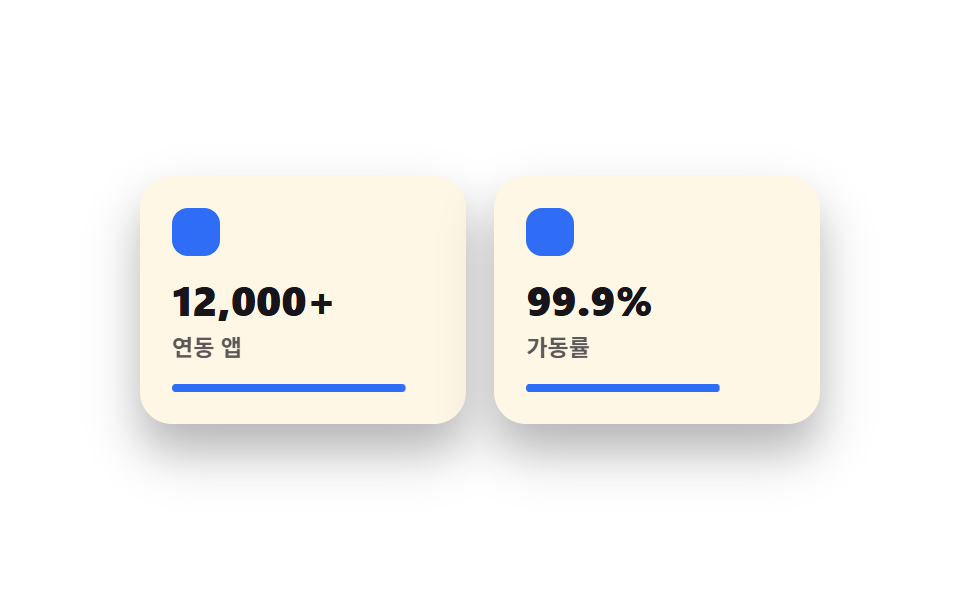 04 bento-grid-features
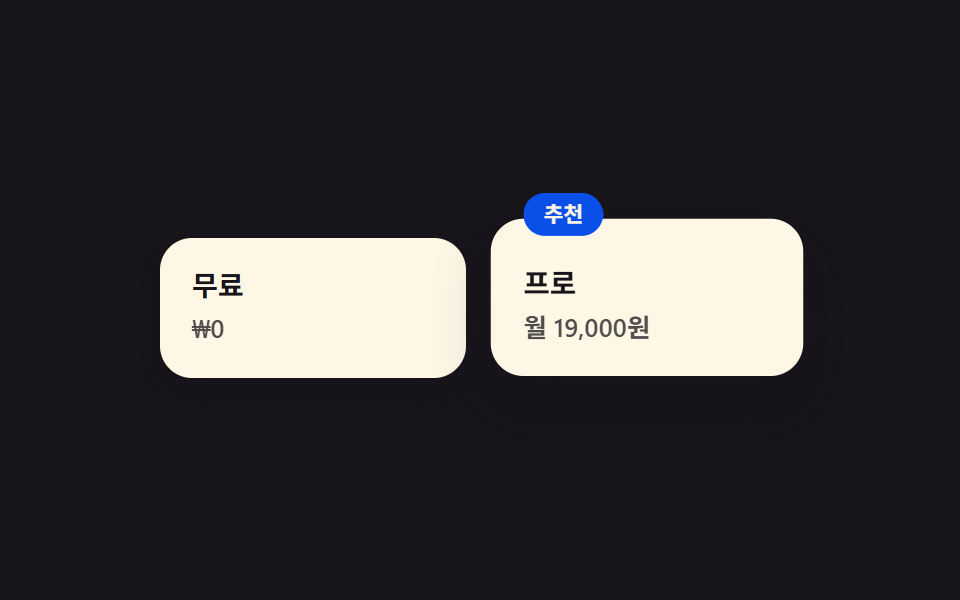 05 bento-grid-pricing
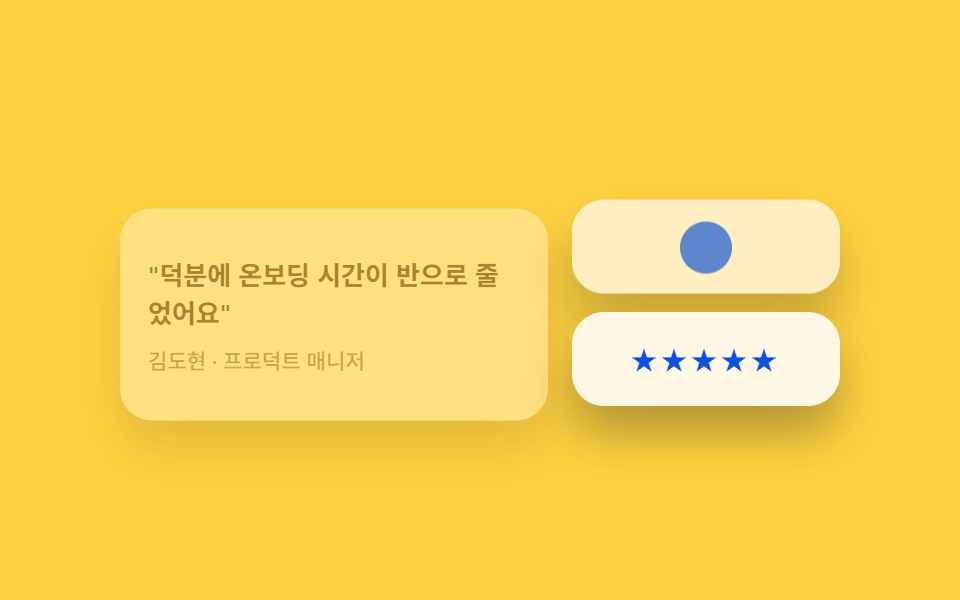 06 bento-grid-testimonials
 07 bento-grid-cta-band
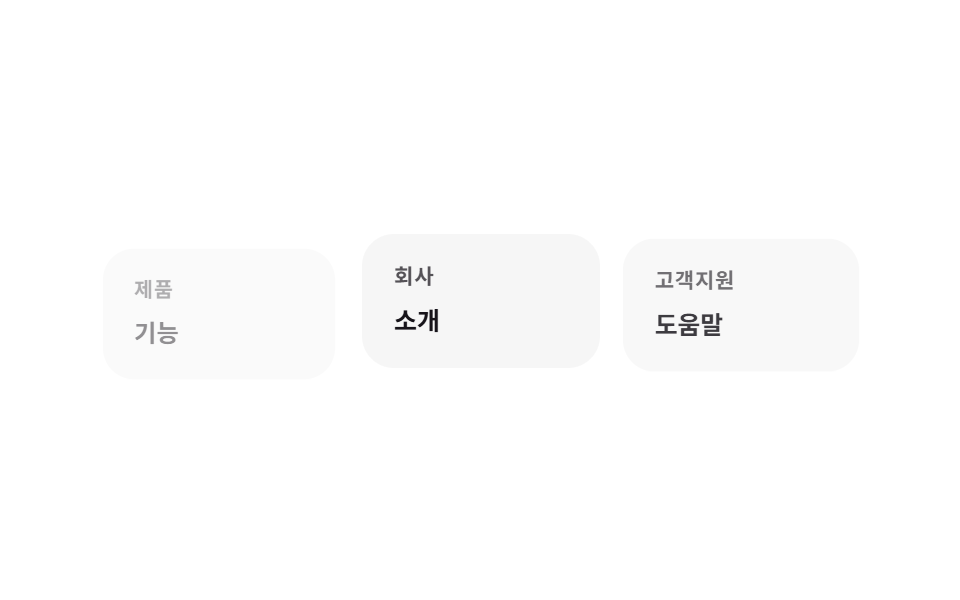 08 bento-grid-footer
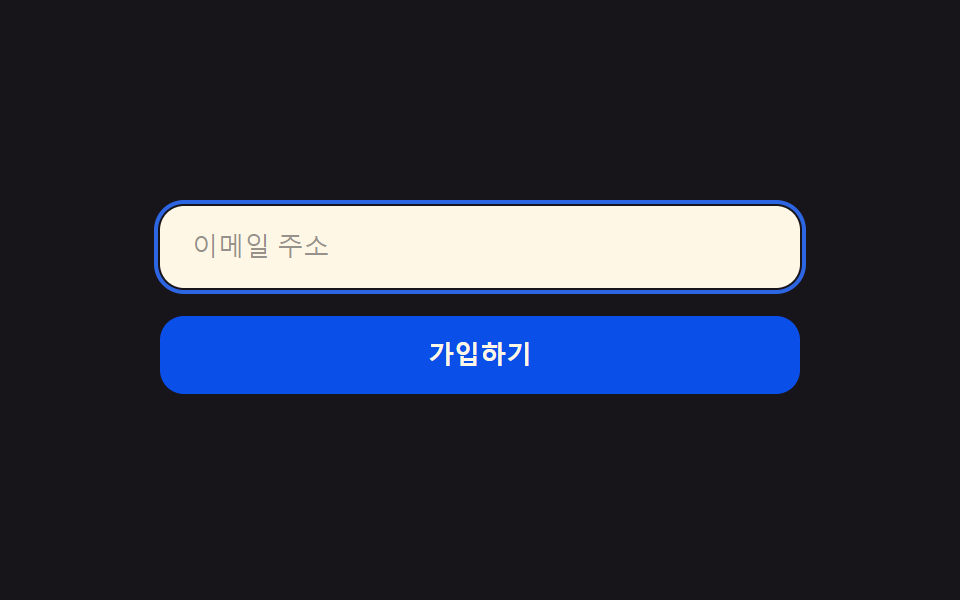 09 bento-grid-buttons-inputs
자동 재생 · 눌러서 해당 항목으로 · 전부 한 zip
- 01 벤토형 히어로 2×2
- 02 둥근 필 내비게이션
- 03 핵심 벤토 카드 격자
- 04 아이콘+숫자 기능 카드
- 05 크기로 차등화한 요금제
- 06 인용 카드 섞어 배치
- 07 가로로 긴 CTA 카드
- 08 링크 묶음을 칸으로
- 09 radius 12 필 버튼
01히어로
무엇이 보이나
히어로 영역을 하나의 큰 블록이 아니라 크기가 다른 타일 세 개로 쪼갭니다.
<main class="stage">
  <section class="hero">
    <div class="hero__tile hero__tile--main is-demo">
      <p class="hero__eyebrow">Nectar</p>
      <h2 class="hero__title">일과 팀을 한 화면에</h2>
      <button class="hero__cta" type="button">무료로 시작</button>
    </div>
    <div class="hero__tile hero__tile--stat is-demo">
      <span class="hero__dot" aria-hidden="true"></span>
      <span class="hero__stat-label">실시간 동기화</span>
    </div>
    <div class="hero__tile hero__tile--visual is-demo" aria-hidden="true"></div>
  </section>
</main>
@use "../../../../site/static/demo-tokens" as *;
$duration: $dur-loop; // 카드가 뜨고 지는 한 주기
$easing: $ease-spring; // 등장 곡선
$color: $subject-blue; // 강조 색
@include stage($stage-ink);
.hero {
width: clamp(240px, 82vw, 380px);
height: clamp(160px, 46vw, 210px);
display: grid;
grid-template-columns: 1.4fr 1fr;
grid-template-rows: 1fr 1fr;
gap: clamp(8px, 2.4vw, 12px);
}
.hero__tile {
border-radius: $r-card;
background: $subject-cream;
box-shadow: $shadow-raised;
animation: heroIn $duration $easing infinite;
}
.hero__tile--main {
grid-row: 1 / 3;
display: flex;
flex-direction: column;
justify-content: center;
gap: clamp(6px, 1.6vw, 10px);
padding: clamp(12px, 3.6vw, 18px);
animation-delay: 0s;
}
.hero__tile--stat {
display: flex;
align-items: center;
gap: 8px;
padding: clamp(10px, 3vw, 14px);
animation-delay: -0.5s;
}
.hero__tile--visual {
background: $color;
opacity: .16;
animation-name: heroInFaint;
animation-delay: -1s;
}
.hero__eyebrow {
margin: 0;
color: $subject-blue-deep; // 밝은 면 위 파란 글자 — AA 4.5 (blog-design 글자 대비)
font-weight: 700; font-size: clamp(10px, 2.6vw, 12px); line-height: 1;
letter-spacing: .04em;
text-transform: uppercase;
}
.hero__title {
margin: 0;
color: $subject-ink;
font-weight: 700; font-size: clamp(15px, 4vw, 19px); line-height: 1.25;
}
.hero__cta {
align-self: flex-start;
border: 0;
border-radius: $r-pill;
background: $subject-ink;
color: $subject-cream;
padding: clamp(7px, 2vw, 9px) clamp(14px, 3.6vw, 18px);
font-weight: 600; font-size: clamp(11px, 2.8vw, 13px); line-height: 1;
}
.hero__dot {
width: 9px;
height: 9px;
border-radius: 50%;
background: $color;
flex: none;
}
.hero__stat-label {
color: $subject-ink;
font-weight: 600; font-size: clamp(10.5px, 2.6vw, 12.5px); line-height: 1.3;
}
// 데모: 세 칸이 살짝 다른 박자로 떠올랐다 가라앉는다 (WAAPI 시계가 잡을 수 있게 keyframes)
@keyframes heroIn {
0% { opacity: 0; transform: translateY(10px) scale(.97); }
22% { opacity: 1; transform: translateY(0) scale(1); }
78% { opacity: 1; transform: translateY(0) scale(1); }
100% { opacity: 0; transform: translateY(10px) scale(.97); }
}
@keyframes heroInFaint {
0% { opacity: 0; transform: translateY(10px) scale(.97); }
22% { opacity: .16; transform: translateY(0) scale(1); }
78% { opacity: .16; transform: translateY(0) scale(1); }
100% { opacity: 0; transform: translateY(10px) scale(.97); }
}
@media (prefers-reduced-motion: reduce) {
.hero__tile {
animation: none !important;
opacity: 1;
transform: none;
}
.hero__tile--visual { opacity: .16; }
}html, body {
margin: 0;
overflow: hidden;
}
.stage {
box-sizing: border-box;
min-height: 100vh;
display: grid;
place-items: center;
margin: 0;
background: #17141a;
font-family: -apple-system, "Segoe UI", "Noto Sans KR", sans-serif;
padding: clamp(8px, 4vw, 24px);
}
.hero {
width: clamp(240px, 82vw, 380px);
height: clamp(160px, 46vw, 210px);
display: grid;
grid-template-columns: 1.4fr 1fr;
grid-template-rows: 1fr 1fr;
gap: clamp(8px, 2.4vw, 12px);
}
.hero__tile {
border-radius: 16px;
background: #fff7e6;
box-shadow: 0 14px 24px rgba(23, 20, 26, 0.32);
animation: heroIn 2s cubic-bezier(0.2, 0.8, 0.2, 1) infinite;
}
.hero__tile--main {
grid-row: 1/3;
display: flex;
flex-direction: column;
justify-content: center;
gap: clamp(6px, 1.6vw, 10px);
padding: clamp(12px, 3.6vw, 18px);
animation-delay: 0s;
}
.hero__tile--stat {
display: flex;
align-items: center;
gap: 8px;
padding: clamp(10px, 3vw, 14px);
animation-delay: -0.5s;
}
.hero__tile--visual {
background: #2f6df6;
opacity: 0.16;
animation-name: heroInFaint;
animation-delay: -1s;
}
.hero__eyebrow {
margin: 0;
color: #0a4fe8;
font-weight: 700;
font-size: clamp(10px, 2.6vw, 12px);
line-height: 1;
letter-spacing: 0.04em;
text-transform: uppercase;
}
.hero__title {
margin: 0;
color: #17141a;
font-weight: 700;
font-size: clamp(15px, 4vw, 19px);
line-height: 1.25;
}
.hero__cta {
align-self: flex-start;
border: 0;
border-radius: 999px;
background: #17141a;
color: #fff7e6;
padding: clamp(7px, 2vw, 9px) clamp(14px, 3.6vw, 18px);
font-weight: 600;
font-size: clamp(11px, 2.8vw, 13px);
line-height: 1;
}
.hero__dot {
width: 9px;
height: 9px;
border-radius: 50%;
background: #2f6df6;
flex: none;
}
.hero__stat-label {
color: #17141a;
font-weight: 600;
font-size: clamp(10.5px, 2.6vw, 12.5px);
line-height: 1.3;
}
@keyframes heroIn {
0% {
opacity: 0;
transform: translateY(10px) scale(0.97);
}
22% {
opacity: 1;
transform: translateY(0) scale(1);
}
78% {
opacity: 1;
transform: translateY(0) scale(1);
}
100% {
opacity: 0;
transform: translateY(10px) scale(0.97);
}
}
@keyframes heroInFaint {
0% {
opacity: 0;
transform: translateY(10px) scale(0.97);
}
22% {
opacity: 0.16;
transform: translateY(0) scale(1);
}
78% {
opacity: 0.16;
transform: translateY(0) scale(1);
}
100% {
opacity: 0;
transform: translateY(10px) scale(0.97);
}
}
@media (prefers-reduced-motion: reduce) {
.hero__tile {
animation: none !important;
opacity: 1;
transform: none;
}
.hero__tile--visual {
opacity: 0.16;
}
}import type { CSSProperties } from "react";
import styles from "./BentoHero.module.scss";
export type BentoHeroProps = {
eyebrow?: string;
title?: string;
cta?: string;
stat?: string;
/** 한 주기(기본 2000ms) */
duration?: number;
easing?: string;
color?: string;
};
type Vars = CSSProperties & { "--duration"?: string; "--easing"?: string; "--color"?: string };
export default function BentoHero({
eyebrow = "Nectar",
title = "Your work and team, one screen",
cta = "Start for free",
stat = "Real-time sync",
duration = 2000,
easing = "cubic-bezier(.2,.8,.2,1)",
color = "#2f6df6",
}: BentoHeroProps) {
const vars: Vars = { "--duration": `${duration}ms`, "--easing": easing, "--color": color };
return (
<section className={styles.hero} style={vars}>
<div className={`${styles.tile} ${styles.tileMain}`}>
<p className={styles.eyebrow}>{eyebrow}</p>
<h2 className={styles.title}>{title}</h2>
<button type="button" className={styles.cta}>{cta}</button>
</div>
<div className={`${styles.tile} ${styles.tileStat}`}>
<span className={styles.dot} aria-hidden="true" />
<span className={styles.statLabel}>{stat}</span>
</div>
<div className={`${styles.tile} ${styles.tileVisual}`} aria-hidden="true" />
</section>
);
}01 · 벤토형 히어로 2×2 — 측정 누적면적 53.267% · 움직인 프레임 16/23GODRICH 원작 · zip 에 SCSS·React 포함 · 비밀번호 보기
어디에 쓰나
가장 큰 타일에 헤드라인과 CTA 버튼을 넣고, 작은 두 칸에는 상태 배지와 색 블록 하나만 둡니다.
<div class="grid grid-cols-3 grid-rows-2 gap-4">
  <div class="col-span-2 row-span-2 flex flex-col justify-center gap-4
              rounded-tile bg-white p-10 shadow-bento">
    <h1 class="text-4xl font-extrabold">일과 팀을 한 화면에</h1>
    <button class="w-fit rounded-pill bg-ink px-6 py-3 text-sm font-bold text-cream">
      무료로 시작
    </button>
  </div>
  <div class="flex items-center gap-3 rounded-tile bg-white p-6 shadow-bento">
    <span class="h-3 w-3 rounded-full bg-accent"></span>
    <span class="text-sm font-semibold">실시간 동기화</span>
  </div>
</div>
02내비게이션
화면에서 일어나는 일
메뉴 전체가 알약 모양 하나에 담기고, 안쪽의 진한 칩이 현재 위치를 표시하며 항목 사이를 옮겨 다닙니다.
<main class="stage">
  <nav class="navbar">
    <span class="navbar__brand">Nectar</span>
    <div class="navbar__pill is-demo">
      <span class="navbar__indicator" aria-hidden="true"></span>
      <span class="navbar__item">홈</span>
      <span class="navbar__item">기능</span>
      <span class="navbar__item">요금제</span>
      <span class="navbar__item">문의</span>
    </div>
    <button class="navbar__cta" type="button">무료로 시작</button>
  </nav>
</main>
@use "../../../../site/static/demo-tokens" as *;
$duration: $dur-loop; // 표시등이 네 항목을 도는 한 주기
$easing: $ease-spring; // 이동 곡선
$color: $subject-blue; // 표시등 색
@include stage($stage-yellow);
.navbar {
width: clamp(260px, 84vw, 420px);
display: flex;
align-items: center;
gap: clamp(8px, 2vw, 14px);
background: $subject-cream;
border-radius: $r-pill;
padding: 8px 8px 8px 16px;
box-shadow: $shadow-raised;
}
.navbar__brand {
color: $subject-ink;
font-weight: 800; font-size: clamp(12px, 3vw, 14px); line-height: 1;
flex: none;
}
.navbar__pill {
position: relative;
flex: 1;
display: grid;
grid-template-columns: repeat(4, 1fr);
background: rgba($subject-ink, .06);
border-radius: $r-pill;
padding: 4px;
}
.navbar__indicator {
position: absolute;
inset: 4px auto 4px 4px;
width: calc(25% - 4px);
border-radius: $r-pill;
background: $color;
animation: navSlide $duration $easing infinite;
}
.navbar__item {
position: relative;
z-index: 1;
text-align: center;
color: $subject-ink;
font-weight: 600; font-size: clamp(9.5px, 2.3vw, 11.5px); line-height: 1;
padding: clamp(6px, 1.6vw, 8px) 2px;
}
.navbar__cta {
flex: none;
border: 0;
border-radius: $r-pill;
background: $subject-blue-deep;
color: $subject-cream;
padding: clamp(7px, 1.8vw, 9px) clamp(12px, 2.6vw, 15px);
font-weight: 700; font-size: clamp(9.5px, 2.3vw, 11.5px); line-height: 1;
}
// 데모: 표시등이 홈 → 기능 → 요금제 → 문의 순으로 옮겨간 뒤 처음으로 돌아온다
@keyframes navSlide {
0% { transform: translateX(0%); }
12% { transform: translateX(0%); }
25% { transform: translateX(100%); }
37% { transform: translateX(100%); }
50% { transform: translateX(200%); }
62% { transform: translateX(200%); }
75% { transform: translateX(300%); }
87% { transform: translateX(300%); }
100% { transform: translateX(0%); }
}
@media (prefers-reduced-motion: reduce) {
.navbar__indicator {
animation: none !important;
transform: translateX(0%);
}
}html, body {
margin: 0;
overflow: hidden;
}
.stage {
box-sizing: border-box;
min-height: 100vh;
display: grid;
place-items: center;
margin: 0;
background: #ffd23f;
font-family: -apple-system, "Segoe UI", "Noto Sans KR", sans-serif;
padding: clamp(8px, 4vw, 24px);
}
.navbar {
width: clamp(260px, 84vw, 420px);
display: flex;
align-items: center;
gap: clamp(8px, 2vw, 14px);
background: #fff7e6;
border-radius: 999px;
padding: 8px 8px 8px 16px;
box-shadow: 0 14px 24px rgba(23, 20, 26, 0.32);
}
.navbar__brand {
color: #17141a;
font-weight: 800;
font-size: clamp(12px, 3vw, 14px);
line-height: 1;
flex: none;
}
.navbar__pill {
position: relative;
flex: 1;
display: grid;
grid-template-columns: repeat(4, 1fr);
background: rgba(23, 20, 26, 0.06);
border-radius: 999px;
padding: 4px;
}
.navbar__indicator {
position: absolute;
inset: 4px auto 4px 4px;
width: calc(25% - 4px);
border-radius: 999px;
background: #2f6df6;
animation: navSlide 2s cubic-bezier(0.2, 0.8, 0.2, 1) infinite;
}
.navbar__item {
position: relative;
z-index: 1;
text-align: center;
color: #17141a;
font-weight: 600;
font-size: clamp(9.5px, 2.3vw, 11.5px);
line-height: 1;
padding: clamp(6px, 1.6vw, 8px) 2px;
}
.navbar__cta {
flex: none;
border: 0;
border-radius: 999px;
background: #0a4fe8;
color: #fff7e6;
padding: clamp(7px, 1.8vw, 9px) clamp(12px, 2.6vw, 15px);
font-weight: 700;
font-size: clamp(9.5px, 2.3vw, 11.5px);
line-height: 1;
}
@keyframes navSlide {
0% {
transform: translateX(0%);
}
12% {
transform: translateX(0%);
}
25% {
transform: translateX(100%);
}
37% {
transform: translateX(100%);
}
50% {
transform: translateX(200%);
}
62% {
transform: translateX(200%);
}
75% {
transform: translateX(300%);
}
87% {
transform: translateX(300%);
}
100% {
transform: translateX(0%);
}
}
@media (prefers-reduced-motion: reduce) {
.navbar__indicator {
animation: none !important;
transform: translateX(0%);
}
}import type { CSSProperties } from "react";
import styles from "./BentoNav.module.scss";
export type BentoNavProps = {
brand?: string;
items?: string[];
cta?: string;
duration?: number;
easing?: string;
color?: string;
};
type Vars = CSSProperties & { "--duration"?: string; "--easing"?: string; "--color"?: string };
export default function BentoNav({
brand = "Nectar",
items = ["Home", "Features", "Pricing", "Contact"],
cta = "Start for free",
duration = 2000,
easing = "cubic-bezier(.2,.8,.2,1)",
color = "#2f6df6",
}: BentoNavProps) {
const vars: Vars = { "--duration": `${duration}ms`, "--easing": easing, "--color": color };
return (
<nav className={styles.navbar} style={vars}>
<span className={styles.brand}>{brand}</span>
<div className={styles.pill}>
<span className={styles.indicator} aria-hidden="true" />
{items.map((label) => (
<span key={label} className={styles.item}>{label}</span>
))}
</div>
<button type="button" className={styles.cta}>{cta}</button>
</nav>
);
}02 · 둥근 필 내비게이션 — 측정 누적면적 4.193% · 움직인 프레임 15/23GODRICH 원작 · zip 에 SCSS·React 포함 · 비밀번호 보기
쓰는 자리
브랜드와 CTA 버튼은 알약 바깥 양 끝에 고정합니다.
<nav class="flex items-center gap-4 rounded-pill bg-white/80 backdrop-blur
            px-3 py-2 shadow-bento">
  <span class="pl-3 font-display font-extrabold text-sm">Nectar</span>
  <div class="relative flex flex-1 rounded-pill bg-ink/5 p-1">
    <span class="absolute inset-y-1 left-1 w-1/4 rounded-pill bg-accent"></span>
    <span class="relative z-10 flex-1 text-center text-xs font-semibold py-2">홈</span>
    <span class="relative z-10 flex-1 text-center text-xs font-semibold py-2">기능</span>
  </div>
  <button class="rounded-pill bg-accent px-4 py-2 text-xs font-bold text-cream">
    무료로 시작
  </button>
</nav>
03카드 격자
어떤 움직임인가
이 스타일의 몸통입니다.
<main class="stage">
  <section class="grid">
    <div class="grid__tile grid__tile--a is-demo">
      <span class="grid__dot" aria-hidden="true"></span>
      <p class="grid__label">빠른 검색</p>
    </div>
    <div class="grid__tile grid__tile--b is-demo">
      <span class="grid__dot" aria-hidden="true"></span>
      <p class="grid__label">자동 정리</p>
    </div>
    <div class="grid__tile grid__tile--c is-demo">
      <span class="grid__dot" aria-hidden="true"></span>
      <p class="grid__label">팀 채팅</p>
    </div>
    <div class="grid__tile grid__tile--d is-demo">
      <span class="grid__dot" aria-hidden="true"></span>
      <p class="grid__label">리포트</p>
    </div>
  </section>
</main>
@use "../../../../site/static/demo-tokens" as *;
$duration: $dur-loop; // 네 칸을 도는 한 주기
$easing: $ease-pop; // 살짝 튀는 곡선
$color: $subject-blue; // 점 강조 색
@include stage($stage-orange);
.grid {
width: clamp(240px, 82vw, 380px);
height: clamp(160px, 46vw, 210px);
display: grid;
grid-template-columns: 1.1fr 1fr 1fr;
grid-template-rows: 1fr 1fr;
gap: clamp(8px, 2.4vw, 12px);
}
.grid__tile {
border-radius: $r-card;
background: $subject-cream;
box-shadow: $shadow-press;
padding: clamp(10px, 3vw, 14px);
display: flex;
flex-direction: column;
justify-content: flex-end;
gap: 6px;
animation: tileWave $duration $easing infinite;
}
.grid__tile--a { grid-row: 1 / 3; animation-delay: 0s; }
.grid__tile--b { grid-column: 2; grid-row: 1; animation-delay: -0.5s; }
.grid__tile--c { grid-column: 3; grid-row: 1; animation-delay: -1s; }
.grid__tile--d { grid-column: 2 / 4; grid-row: 2; animation-delay: -1.5s; }
.grid__dot {
width: 16px;
height: 16px;
border-radius: 6px;
background: $color;
}
.grid__label {
margin: 0;
color: $subject-ink;
font-weight: 600; font-size: clamp(10.5px, 2.6vw, 12.5px); line-height: 1.3;
}
// 데모: 칸마다 살짝 떠올랐다 가라앉는 물결이 시차를 두고 지나간다
@keyframes tileWave {
0% { transform: translateY(0) scale(1); box-shadow: $shadow-press; }
15% { transform: translateY(-5px) scale(1.02); box-shadow: $shadow-raised; }
30% { transform: translateY(0) scale(1); box-shadow: $shadow-press; }
100% { transform: translateY(0) scale(1); box-shadow: $shadow-press; }
}
@media (prefers-reduced-motion: reduce) {
.grid__tile {
animation: none !important;
transform: none;
box-shadow: $shadow-press;
}
}html, body {
margin: 0;
overflow: hidden;
}
.stage {
box-sizing: border-box;
min-height: 100vh;
display: grid;
place-items: center;
margin: 0;
background: #ff4d1f;
font-family: -apple-system, "Segoe UI", "Noto Sans KR", sans-serif;
padding: clamp(8px, 4vw, 24px);
}
.grid {
width: clamp(240px, 82vw, 380px);
height: clamp(160px, 46vw, 210px);
display: grid;
grid-template-columns: 1.1fr 1fr 1fr;
grid-template-rows: 1fr 1fr;
gap: clamp(8px, 2.4vw, 12px);
}
.grid__tile {
border-radius: 16px;
background: #fff7e6;
box-shadow: 0 6px 12px rgba(23, 20, 26, 0.32);
padding: clamp(10px, 3vw, 14px);
display: flex;
flex-direction: column;
justify-content: flex-end;
gap: 6px;
animation: tileWave 2s cubic-bezier(0.2, 1.4, 0.4, 1) infinite;
}
.grid__tile--a {
grid-row: 1/3;
animation-delay: 0s;
}
.grid__tile--b {
grid-column: 2;
grid-row: 1;
animation-delay: -0.5s;
}
.grid__tile--c {
grid-column: 3;
grid-row: 1;
animation-delay: -1s;
}
.grid__tile--d {
grid-column: 2/4;
grid-row: 2;
animation-delay: -1.5s;
}
.grid__dot {
width: 16px;
height: 16px;
border-radius: 6px;
background: #2f6df6;
}
.grid__label {
margin: 0;
color: #17141a;
font-weight: 600;
font-size: clamp(10.5px, 2.6vw, 12.5px);
line-height: 1.3;
}
@keyframes tileWave {
0% {
transform: translateY(0) scale(1);
box-shadow: 0 6px 12px rgba(23, 20, 26, 0.32);
}
15% {
transform: translateY(-5px) scale(1.02);
box-shadow: 0 14px 24px rgba(23, 20, 26, 0.32);
}
30% {
transform: translateY(0) scale(1);
box-shadow: 0 6px 12px rgba(23, 20, 26, 0.32);
}
100% {
transform: translateY(0) scale(1);
box-shadow: 0 6px 12px rgba(23, 20, 26, 0.32);
}
}
@media (prefers-reduced-motion: reduce) {
.grid__tile {
animation: none !important;
transform: none;
box-shadow: 0 6px 12px rgba(23, 20, 26, 0.32);
}
}import type { CSSProperties } from "react";
import styles from "./BentoCardGrid.module.scss";
export type BentoCardGridProps = {
labels?: [string, string, string, string];
duration?: number;
easing?: string;
color?: string;
};
type Vars = CSSProperties & { "--duration"?: string; "--easing"?: string; "--color"?: string };
export default function BentoCardGrid({
labels = ["Instant search", "Auto-organize", "Team chat", "Reports"],
duration = 2000,
easing = "cubic-bezier(.2,1.4,.4,1)",
color = "#2f6df6",
}: BentoCardGridProps) {
const vars: Vars = { "--duration": `${duration}ms`, "--easing": easing, "--color": color };
const cls = [styles.tileA, styles.tileB, styles.tileC, styles.tileD];
return (
<section className={styles.grid} style={vars}>
{labels.map((label, i) => (
<div key={label} className={`${styles.tile} ${cls[i]}`}>
<span className={styles.dot} aria-hidden="true" />
<p className={styles.label}>{label}</p>
</div>
))}
</section>
);
}03 · 핵심 벤토 카드 격자 — 측정 누적면적 17.204% · 움직인 프레임 20/23GODRICH 원작 · zip 에 SCSS·React 포함 · 비밀번호 보기
벤토 그리드 레이아웃은 언제 쓰나
칸마다 열·행 폭이 달라 한눈에 훑을 때 시선이 가장 큰 칸부터 멈추고, 나머지 칸으로 차례로 흘러갑니다.
<div class="grid grid-cols-3 grid-rows-2 gap-4">
  <div class="row-span-2 flex flex-col justify-end gap-3 rounded-tile
              bg-white p-5 shadow-bento hover:shadow-bento-hover transition-shadow">
    <div class="flex-1 rounded-[14px] bg-accent/10"></div>
    <p class="text-sm font-semibold">빠른 검색</p>
  </div>
  <div class="rounded-tile bg-white p-5 shadow-bento">자동 정리</div>
  <div class="col-span-2 rounded-tile bg-white p-5 shadow-bento">리포트</div>
</div>
04기능 목록
무엇이 보이나
기능마다 아이콘 자리와 강조 숫자 하나를 카드 안에 크게 배치해 스캔하기 쉽게 합니다.
<main class="stage">
  <section class="feat">
    <div class="feat__card is-demo">
      <span class="feat__icon" aria-hidden="true"></span>
      <p class="feat__num">12,000+</p>
      <p class="feat__label">연동 앱</p>
      <span class="feat__bar" aria-hidden="true"></span>
    </div>
    <div class="feat__card feat__card--b is-demo">
      <span class="feat__icon" aria-hidden="true"></span>
      <p class="feat__num">99.9%</p>
      <p class="feat__label">가동률</p>
      <span class="feat__bar" aria-hidden="true"></span>
    </div>
  </section>
</main>
@use "../../../../site/static/demo-tokens" as *;
$duration: $dur-loop; // 두 카드가 채워지는 한 주기
$easing: $ease-out; // 채우는 곡선
$color: $subject-blue; // 아이콘·바 색
@include stage($stage-paper);
.feat {
width: clamp(220px, 76vw, 340px);
display: flex;
gap: clamp(10px, 3vw, 16px);
}
.feat__card {
flex: 1;
border-radius: $r-card;
background: $subject-cream;
box-shadow: $shadow-raised;
padding: clamp(12px, 3.4vw, 16px);
display: flex;
flex-direction: column;
gap: 6px;
}
.feat__icon {
width: 24px;
height: 24px;
border-radius: 8px;
background: $color;
margin-bottom: 4px;
}
.feat__num {
margin: 0;
color: $subject-ink;
font-weight: 800; font-size: clamp(17px, 4.6vw, 21px); line-height: 1.1;
}
.feat__label {
margin: 0;
color: $subject-ink;
opacity: .7;
font-weight: 600; font-size: clamp(10px, 2.4vw, 11.5px); line-height: 1.3;
}
.feat__bar {
display: block;
height: 4px;
border-radius: $r-pill;
background: $color;
margin-top: 4px;
transform-origin: left; // 규칙8: 왼쪽부터 차오르는 바
transform: scaleX(0);
animation: barFill $duration $easing infinite;
}
.feat__card--b .feat__bar { animation-delay: -1s; }
// 데모: 바가 왼쪽부터 차오르고, 다 차면 잠깐 머물다 비워진다
@keyframes barFill {
0% { transform: scaleX(0); }
40% { transform: scaleX(1); }
75% { transform: scaleX(1); }
100% { transform: scaleX(0); }
}
@media (prefers-reduced-motion: reduce) {
.feat__bar {
animation: none !important;
transform: scaleX(1);
}
}html, body {
margin: 0;
overflow: hidden;
}
.stage {
box-sizing: border-box;
min-height: 100vh;
display: grid;
place-items: center;
margin: 0;
background: #ffffff;
font-family: -apple-system, "Segoe UI", "Noto Sans KR", sans-serif;
padding: clamp(8px, 4vw, 24px);
}
.feat {
width: clamp(220px, 76vw, 340px);
display: flex;
gap: clamp(10px, 3vw, 16px);
}
.feat__card {
flex: 1;
border-radius: 16px;
background: #fff7e6;
box-shadow: 0 14px 24px rgba(23, 20, 26, 0.32);
padding: clamp(12px, 3.4vw, 16px);
display: flex;
flex-direction: column;
gap: 6px;
}
.feat__icon {
width: 24px;
height: 24px;
border-radius: 8px;
background: #2f6df6;
margin-bottom: 4px;
}
.feat__num {
margin: 0;
color: #17141a;
font-weight: 800;
font-size: clamp(17px, 4.6vw, 21px);
line-height: 1.1;
}
.feat__label {
margin: 0;
color: #17141a;
opacity: 0.7;
font-weight: 600;
font-size: clamp(10px, 2.4vw, 11.5px);
line-height: 1.3;
}
.feat__bar {
display: block;
height: 4px;
border-radius: 999px;
background: #2f6df6;
margin-top: 4px;
transform-origin: left;
transform: scaleX(0);
animation: barFill 2s ease-out infinite;
}
.feat__card--b .feat__bar {
animation-delay: -1s;
}
@keyframes barFill {
0% {
transform: scaleX(0);
}
40% {
transform: scaleX(1);
}
75% {
transform: scaleX(1);
}
100% {
transform: scaleX(0);
}
}
@media (prefers-reduced-motion: reduce) {
.feat__bar {
animation: none !important;
transform: scaleX(1);
}
}import type { CSSProperties } from "react";
import styles from "./BentoFeatures.module.scss";
export type BentoFeaturesProps = {
items?: { num: string; label: string }[];
duration?: number;
easing?: string;
color?: string;
};
type Vars = CSSProperties & { "--duration"?: string; "--easing"?: string; "--color"?: string };
export default function BentoFeatures({
items = [
{ num: "12,000+", label: "Connected apps" },
{ num: "99.9%", label: "Uptime" },
],
duration = 2000,
easing = "ease-out",
color = "#2f6df6",
}: BentoFeaturesProps) {
const vars: Vars = { "--duration": `${duration}ms`, "--easing": easing, "--color": color };
return (
<section className={styles.feat} style={vars}>
{items.map((it, i) => (
<div key={it.label} className={i === 1 ? `${styles.card} ${styles.cardB}` : styles.card}>
<span className={styles.icon} aria-hidden="true" />
<p className={styles.num}>{it.num}</p>
<p className={styles.label}>{it.label}</p>
<span className={styles.bar} aria-hidden="true" />
</div>
))}
</section>
);
}04 · 아이콘+숫자 기능 카드 — 측정 누적면적 0.728% · 움직인 프레임 23/23GODRICH 원작 · zip 에 SCSS·React 포함 · 비밀번호 보기
어디에 쓰나
숫자 아래 얇은 바는 그 값의 크기를 시각적으로 보여줍니다.
<div class="flex gap-4">
  <div class="flex-1 rounded-tile bg-white p-6 shadow-bento">
    <span class="mb-2 block h-6 w-6 rounded-lg bg-accent"></span>
    <p class="text-2xl font-extrabold">12,000+</p>
    <p class="text-xs font-semibold text-ink/70">연동 앱</p>
    <span class="mt-3 block h-1 w-full rounded-pill bg-accent"></span>
  </div>
</div>
05가격
화면에서 일어나는 일
추천 플랜만 칸을 1.1배 크게 잡고 배지를 얹어, 비교 표 없이도 어떤 플랜을 밀고 있는지 바로 보이게 합니다.
<main class="stage">
  <section class="pricing">
    <div class="pricing__tile pricing__tile--basic">
      <p class="pricing__plan">무료</p>
      <p class="pricing__price">₩0</p>
    </div>
    <div class="pricing__tile pricing__tile--pro is-demo">
      <span class="pricing__badge">추천</span>
      <p class="pricing__plan">프로</p>
      <p class="pricing__price">월 19,000원</p>
    </div>
  </section>
</main>
@use "../../../../site/static/demo-tokens" as *;
$duration: $dur-loop; // 추천 칸이 숨쉬는 한 주기
$easing: $ease-spring; // 배지가 튀는 곡선
$color: $subject-blue-deep; // 배지 색 (크림 글자가 얹히므로 진한 파랑)
@include stage($stage-ink);
.pricing {
width: clamp(220px, 76vw, 320px);
display: flex;
align-items: flex-end;
gap: clamp(10px, 3vw, 14px);
}
.pricing__tile {
flex: 1;
border-radius: $r-card;
padding: clamp(12px, 3.4vw, 16px);
display: flex;
flex-direction: column;
gap: 4px;
}
.pricing__tile--basic {
background: $subject-cream;
box-shadow: $shadow-press;
}
.pricing__tile--pro {
position: relative;
background: $subject-cream;
box-shadow: $shadow-raised;
padding-top: clamp(20px, 5vw, 26px);
transform-origin: bottom center; // 규칙8: 바닥 붙은 채 위로 숨쉼
animation: proBreathe $duration $easing infinite;
}
.pricing__badge {
position: absolute;
top: -10px;
left: clamp(12px, 3.4vw, 16px);
background: $color;
color: $subject-cream;
border-radius: $r-pill;
padding: 3px 10px;
font-weight: 700; font-size: clamp(9px, 2.2vw, 10.5px); line-height: 1.4;
animation: badgeBounce $duration $easing infinite;
}
.pricing__plan {
margin: 0;
color: $subject-ink;
font-weight: 700; font-size: clamp(12px, 3vw, 14px); line-height: 1.2;
}
.pricing__price {
margin: 0;
color: $subject-ink;
opacity: .75;
font-weight: 600; font-size: clamp(11px, 2.6vw, 12.5px); line-height: 1.3;
}
// 데모: 추천 칸이 살짝 커졌다 돌아오고, 배지는 그 위에서 한 번 더 튄다
@keyframes proBreathe {
0%, 100% { transform: scale(1); }
50% { transform: scale(1.035); }
}
@keyframes badgeBounce {
0%, 100% { transform: translateY(0); }
45% { transform: translateY(-4px); }
55% { transform: translateY(-4px); }
}
@media (prefers-reduced-motion: reduce) {
.pricing__tile--pro,
.pricing__badge {
animation: none !important;
transform: none;
}
}html, body {
margin: 0;
overflow: hidden;
}
.stage {
box-sizing: border-box;
min-height: 100vh;
display: grid;
place-items: center;
margin: 0;
background: #17141a;
font-family: -apple-system, "Segoe UI", "Noto Sans KR", sans-serif;
padding: clamp(8px, 4vw, 24px);
}
.pricing {
width: clamp(220px, 76vw, 320px);
display: flex;
align-items: flex-end;
gap: clamp(10px, 3vw, 14px);
}
.pricing__tile {
flex: 1;
border-radius: 16px;
padding: clamp(12px, 3.4vw, 16px);
display: flex;
flex-direction: column;
gap: 4px;
}
.pricing__tile--basic {
background: #fff7e6;
box-shadow: 0 6px 12px rgba(23, 20, 26, 0.32);
}
.pricing__tile--pro {
position: relative;
background: #fff7e6;
box-shadow: 0 14px 24px rgba(23, 20, 26, 0.32);
padding-top: clamp(20px, 5vw, 26px);
transform-origin: bottom center;
animation: proBreathe 2s cubic-bezier(0.2, 0.8, 0.2, 1) infinite;
}
.pricing__badge {
position: absolute;
top: -10px;
left: clamp(12px, 3.4vw, 16px);
background: #0a4fe8;
color: #fff7e6;
border-radius: 999px;
padding: 3px 10px;
font-weight: 700;
font-size: clamp(9px, 2.2vw, 10.5px);
line-height: 1.4;
animation: badgeBounce 2s cubic-bezier(0.2, 0.8, 0.2, 1) infinite;
}
.pricing__plan {
margin: 0;
color: #17141a;
font-weight: 700;
font-size: clamp(12px, 3vw, 14px);
line-height: 1.2;
}
.pricing__price {
margin: 0;
color: #17141a;
opacity: 0.75;
font-weight: 600;
font-size: clamp(11px, 2.6vw, 12.5px);
line-height: 1.3;
}
@keyframes proBreathe {
0%, 100% {
transform: scale(1);
}
50% {
transform: scale(1.035);
}
}
@keyframes badgeBounce {
0%, 100% {
transform: translateY(0);
}
45% {
transform: translateY(-4px);
}
55% {
transform: translateY(-4px);
}
}
@media (prefers-reduced-motion: reduce) {
.pricing__tile--pro,
.pricing__badge {
animation: none !important;
transform: none;
}
}import type { CSSProperties } from "react";
import styles from "./BentoPricing.module.scss";
export type BentoPricingProps = {
basicLabel?: string;
basicPrice?: string;
proLabel?: string;
proPrice?: string;
badge?: string;
duration?: number;
easing?: string;
color?: string;
};
type Vars = CSSProperties & { "--duration"?: string; "--easing"?: string; "--color"?: string };
export default function BentoPricing({
basicLabel = "Free",
basicPrice = "$0",
proLabel = "Pro",
proPrice = "$19/mo",
badge = "Recommended",
duration = 2000,
easing = "cubic-bezier(.2,.8,.2,1)",
color = "#0a4fe8",
}: BentoPricingProps) {
const vars: Vars = { "--duration": `${duration}ms`, "--easing": easing, "--color": color };
return (
<section className={styles.pricing} style={vars}>
<div className={`${styles.tile} ${styles.basic}`}>
<p className={styles.plan}>{basicLabel}</p>
<p className={styles.price}>{basicPrice}</p>
</div>
<div className={`${styles.tile} ${styles.pro}`}>
<span className={styles.badge}>{badge}</span>
<p className={styles.plan}>{proLabel}</p>
<p className={styles.price}>{proPrice}</p>
</div>
</section>
);
}05 · 크기로 차등화한 요금제 — 측정 누적면적 1.839% · 움직인 프레임 21/23GODRICH 원작 · zip 에 SCSS·React 포함 · 비밀번호 보기
쓰는 자리
나머지 플랜은 옅은 배경으로 물러납니다.
<div class="flex items-end gap-4">
  <div class="flex-1 rounded-tile bg-white/60 p-6">
    <p class="font-bold">무료</p>
  </div>
  <div class="relative flex-[1.1] rounded-tile bg-white pt-8 p-6 shadow-bento-hover">
    <span class="absolute -top-3 left-6 rounded-pill bg-accent px-3 py-1
                 text-xs font-bold text-cream">추천</span>
    <p class="font-bold">프로</p>
    <p class="mt-1 text-sm text-ink/70">월 19,000원</p>
  </div>
</div>
06후기
어떤 움직임인가
후기 카드를 격자 사이사이에 섞어 넣어 광고 캐러셀처럼 몰려 보이지 않게 합니다.
<main class="stage">
  <section class="testi">
    <div class="testi__tile testi__tile--quote is-demo">
      <p class="testi__text">"덕분에 온보딩 시간이 반으로 줄었어요"</p>
      <p class="testi__by">김도현 · 프로덕트 매니저</p>
    </div>
    <div class="testi__tile testi__tile--avatar is-demo" aria-hidden="true"></div>
    <div class="testi__tile testi__tile--stars is-demo" aria-hidden="true">★★★★★</div>
  </section>
</main>
@use "../../../../site/static/demo-tokens" as *;
$duration: $dur-loop; // 세 칸이 스치듯 들어오는 한 주기
$easing: $ease-spring; // 등장 곡선
$color: $subject-blue; // 별점 색
@include stage($stage-yellow);
.testi {
width: clamp(240px, 82vw, 360px);
display: grid;
grid-template-columns: 1.6fr 1fr;
grid-template-rows: 1fr 1fr;
gap: clamp(8px, 2.4vw, 12px);
}
.testi__tile {
border-radius: $r-card;
background: $subject-cream;
box-shadow: $shadow-raised;
padding: clamp(10px, 3vw, 14px);
animation: driftIn $duration $easing infinite;
}
.testi__tile--quote {
grid-row: 1 / 3;
display: flex;
flex-direction: column;
justify-content: center;
gap: 8px;
animation-delay: 0s;
}
.testi__tile--avatar {
position: relative;
animation-delay: -0.6s;
}
.testi__tile--avatar::before {
content: "";
position: absolute;
inset: 0;
margin: auto;
width: 26px;
height: 26px;
border-radius: 50%;
background: $color;
}
.testi__tile--stars {
display: grid;
place-items: center;
color: $subject-blue-deep; // 밝은 면 위 파란 글자 — AA 4.5 (blog-design 글자 대비)
letter-spacing: 2px;
font-size: clamp(11px, 2.8vw, 13px);
animation-delay: -1.2s;
}
.testi__text {
margin: 0;
color: $subject-ink;
font-weight: 600; font-size: clamp(11px, 2.8vw, 13px); line-height: 1.5;
}
.testi__by {
margin: 0;
color: $subject-ink;
opacity: .65;
font-weight: 500; font-size: clamp(9.5px, 2.2vw, 11px); line-height: 1.3;
}
// 데모: 세 칸이 아래서 살짝 미끄러져 들어왔다 멈췄다 사라진다 (시차)
@keyframes driftIn {
0% { opacity: 0; transform: translateY(12px); }
20% { opacity: 1; transform: translateY(0); }
70% { opacity: 1; transform: translateY(0); }
100% { opacity: 0; transform: translateY(12px); }
}
@media (prefers-reduced-motion: reduce) {
.testi__tile {
animation: none !important;
opacity: 1;
transform: none;
}
}html, body {
margin: 0;
overflow: hidden;
}
.stage {
box-sizing: border-box;
min-height: 100vh;
display: grid;
place-items: center;
margin: 0;
background: #ffd23f;
font-family: -apple-system, "Segoe UI", "Noto Sans KR", sans-serif;
padding: clamp(8px, 4vw, 24px);
}
.testi {
width: clamp(240px, 82vw, 360px);
display: grid;
grid-template-columns: 1.6fr 1fr;
grid-template-rows: 1fr 1fr;
gap: clamp(8px, 2.4vw, 12px);
}
.testi__tile {
border-radius: 16px;
background: #fff7e6;
box-shadow: 0 14px 24px rgba(23, 20, 26, 0.32);
padding: clamp(10px, 3vw, 14px);
animation: driftIn 2s cubic-bezier(0.2, 0.8, 0.2, 1) infinite;
}
.testi__tile--quote {
grid-row: 1/3;
display: flex;
flex-direction: column;
justify-content: center;
gap: 8px;
animation-delay: 0s;
}
.testi__tile--avatar {
position: relative;
animation-delay: -0.6s;
}
.testi__tile--avatar::before {
content: "";
position: absolute;
inset: 0;
margin: auto;
width: 26px;
height: 26px;
border-radius: 50%;
background: #2f6df6;
}
.testi__tile--stars {
display: grid;
place-items: center;
color: #0a4fe8;
letter-spacing: 2px;
font-size: clamp(11px, 2.8vw, 13px);
animation-delay: -1.2s;
}
.testi__text {
margin: 0;
color: #17141a;
font-weight: 600;
font-size: clamp(11px, 2.8vw, 13px);
line-height: 1.5;
}
.testi__by {
margin: 0;
color: #17141a;
opacity: 0.65;
font-weight: 500;
font-size: clamp(9.5px, 2.2vw, 11px);
line-height: 1.3;
}
@keyframes driftIn {
0% {
opacity: 0;
transform: translateY(12px);
}
20% {
opacity: 1;
transform: translateY(0);
}
70% {
opacity: 1;
transform: translateY(0);
}
100% {
opacity: 0;
transform: translateY(12px);
}
}
@media (prefers-reduced-motion: reduce) {
.testi__tile {
animation: none !important;
opacity: 1;
transform: none;
}
}import type { CSSProperties } from "react";
import styles from "./BentoTestimonials.module.scss";
export type BentoTestimonialsProps = {
quote?: string;
by?: string;
duration?: number;
easing?: string;
color?: string;
};
type Vars = CSSProperties & { "--duration"?: string; "--easing"?: string; "--color"?: string };
export default function BentoTestimonials({
quote = "Onboarding time dropped by half for us.",
by = "Kim Do-hyun · Product Manager",
duration = 2000,
easing = "cubic-bezier(.2,.8,.2,1)",
color = "#2f6df6",
}: BentoTestimonialsProps) {
const vars: Vars = { "--duration": `${duration}ms`, "--easing": easing, "--color": color };
return (
<section className={styles.testi} style={vars}>
<div className={`${styles.tile} ${styles.quote}`}>
<p className={styles.text}>“{quote}”</p>
<p className={styles.by}>{by}</p>
</div>
<div className={`${styles.tile} ${styles.avatar}`} aria-hidden="true" />
<div className={`${styles.tile} ${styles.stars}`} aria-hidden="true">★★★★★</div>
</section>
);
}06 · 인용 카드 섞어 배치 — 측정 누적면적 33.467% · 움직인 프레임 16/23GODRICH 원작 · zip 에 SCSS·React 포함 · 비밀번호 보기
언제 쓰나
별점 칸 하나를 더해 신뢰 신호를 시각적으로 한 번 더 반복합니다.
<div class="grid grid-cols-3 gap-4">
  <div class="col-span-2 rounded-tile bg-white p-6 shadow-bento">
    <p class="text-sm font-semibold">"덕분에 온보딩 시간이 반으로 줄었어요"</p>
    <p class="mt-3 text-xs text-ink/60">김도현 · 프로덕트 매니저</p>
  </div>
  <div class="rounded-tile bg-white p-6 shadow-bento">
    <p class="text-sm font-semibold">"복잡한 툴 세 개를 이걸로 정리했어요"</p>
  </div>
</div>
07CTA 띠
무엇이 보이나
격자 안에서 한 칸만 가로 전체를 차지하게 해 마지막으로 시선이 그 칸에 멈추게 합니다.
<main class="stage">
  <section class="cta">
    <span class="cta__glow is-demo" aria-hidden="true"></span>
    <h3 class="cta__title">지금 팀에 합류시켜 보세요</h3>
    <button class="cta__btn is-demo" type="button">무료로 시작</button>
  </section>
</main>
@use "../../../../site/static/demo-tokens" as *;
$duration: $dur-loop; // 은은한 빛이 숨쉬는 한 주기
$easing: $ease-out; // 번짐 곡선
$color: $subject-blue; // 강조 색
@include stage($stage-orange);
.cta {
position: relative;
width: clamp(260px, 86vw, 400px);
overflow: hidden;
border-radius: $r-card;
background: $subject-ink;
padding: clamp(20px, 5.6vw, 28px) clamp(16px, 5vw, 24px);
display: flex;
flex-direction: column;
align-items: flex-start;
gap: clamp(10px, 3vw, 14px);
}
.cta__glow {
position: absolute;
top: -40%;
right: -20%;
width: 60%;
aspect-ratio: 1;
border-radius: 50%;
background: $color;
filter: blur(2px);
opacity: .3;
animation: glowPulse $duration $easing infinite;
}
.cta__title {
position: relative;
margin: 0;
color: $subject-cream;
font-weight: 700; font-size: clamp(15px, 4vw, 19px); line-height: 1.35;
max-width: 80%;
}
.cta__btn {
position: relative;
border: 0;
border-radius: $r-pill;
background: $subject-cream;
color: $subject-ink;
padding: clamp(8px, 2.2vw, 10px) clamp(16px, 4vw, 20px);
font-weight: 700; font-size: clamp(11px, 2.8vw, 13px); line-height: 1;
animation: btnPulse $duration $easing infinite;
}
// 데모: 배경 빛이 커졌다 작아지고, 버튼이 그 박자에 맞춰 살짝 눌렸다 돌아온다
@keyframes glowPulse {
0%, 100% { transform: scale(1); opacity: .3; }
50% { transform: scale(1.25); opacity: .5; }
}
@keyframes btnPulse {
0%, 100% { transform: scale(1); }
50% { transform: scale(1.06); }
}
@media (prefers-reduced-motion: reduce) {
.cta__glow,
.cta__btn {
animation: none !important;
transform: none;
}
.cta__glow { opacity: .3; }
}html, body {
margin: 0;
overflow: hidden;
}
.stage {
box-sizing: border-box;
min-height: 100vh;
display: grid;
place-items: center;
margin: 0;
background: #ff4d1f;
font-family: -apple-system, "Segoe UI", "Noto Sans KR", sans-serif;
padding: clamp(8px, 4vw, 24px);
}
.cta {
position: relative;
width: clamp(260px, 86vw, 400px);
overflow: hidden;
border-radius: 16px;
background: #17141a;
padding: clamp(20px, 5.6vw, 28px) clamp(16px, 5vw, 24px);
display: flex;
flex-direction: column;
align-items: flex-start;
gap: clamp(10px, 3vw, 14px);
}
.cta__glow {
position: absolute;
top: -40%;
right: -20%;
width: 60%;
aspect-ratio: 1;
border-radius: 50%;
background: #2f6df6;
filter: blur(2px);
opacity: 0.3;
animation: glowPulse 2s ease-out infinite;
}
.cta__title {
position: relative;
margin: 0;
color: #fff7e6;
font-weight: 700;
font-size: clamp(15px, 4vw, 19px);
line-height: 1.35;
max-width: 80%;
}
.cta__btn {
position: relative;
border: 0;
border-radius: 999px;
background: #fff7e6;
color: #17141a;
padding: clamp(8px, 2.2vw, 10px) clamp(16px, 4vw, 20px);
font-weight: 700;
font-size: clamp(11px, 2.8vw, 13px);
line-height: 1;
animation: btnPulse 2s ease-out infinite;
}
@keyframes glowPulse {
0%, 100% {
transform: scale(1);
opacity: 0.3;
}
50% {
transform: scale(1.25);
opacity: 0.5;
}
}
@keyframes btnPulse {
0%, 100% {
transform: scale(1);
}
50% {
transform: scale(1.06);
}
}
@media (prefers-reduced-motion: reduce) {
.cta__glow,
.cta__btn {
animation: none !important;
transform: none;
}
.cta__glow {
opacity: 0.3;
}
}import type { CSSProperties } from "react";
import styles from "./BentoCtaBand.module.scss";
export type BentoCtaBandProps = {
title?: string;
cta?: string;
duration?: number;
easing?: string;
color?: string;
};
type Vars = CSSProperties & { "--duration"?: string; "--easing"?: string; "--color"?: string };
export default function BentoCtaBand({
title = "Bring your team in today",
cta = "Start for free",
duration = 2000,
easing = "ease-out",
color = "#2f6df6",
}: BentoCtaBandProps) {
const vars: Vars = { "--duration": `${duration}ms`, "--easing": easing, "--color": color };
return (
<section className={styles.cta} style={vars}>
<span className={styles.glow} aria-hidden="true" />
<h3 className={styles.title}>{title}</h3>
<button type="button" className={styles.btn}>{cta}</button>
</section>
);
}07 · 가로로 긴 CTA 카드 — 측정 누적면적 19.051% · 움직인 프레임 22/23GODRICH 원작 · zip 에 SCSS·React 포함 · 비밀번호 보기
어디에 쓰나
어두운 배경 위에 은은한 빛 하나를 얹어 CTA 버튼 쪽으로 무게를 실었습니다.
<div class="relative overflow-hidden rounded-tile bg-ink px-10 py-12">
  <span class="absolute -right-16 -top-24 h-64 w-64 rounded-full
               bg-accent opacity-30 blur-sm"></span>
  <h3 class="relative max-w-md text-3xl font-extrabold text-cream">
    지금 팀에 합류시켜 보세요
  </h3>
  <button class="relative mt-6 rounded-pill bg-cream px-6 py-3
                 text-sm font-bold text-ink">무료로 시작</button>
</div>
08푸터
화면에서 일어나는 일
푸터의 링크 묶음마다 옅은 칸 하나씩을 줘서 격자 스타일을 페이지 끝까지 끌고 갑니다.
<main class="stage">
  <footer class="footer">
    <div class="footer__tile is-demo">
      <p class="footer__head">제품</p>
      <p class="footer__link">기능</p>
    </div>
    <div class="footer__tile is-demo">
      <p class="footer__head">회사</p>
      <p class="footer__link">소개</p>
    </div>
    <div class="footer__tile is-demo">
      <p class="footer__head">고객지원</p>
      <p class="footer__link">도움말</p>
    </div>
  </footer>
</main>
@use "../../../../site/static/demo-tokens" as *;
$duration: $dur-loop; // 세 칸이 차례로 밝아지는 한 주기
$easing: $ease-out; // 등장 곡선
$color: $subject-blue; // 링크 강조 색
@include stage($stage-paper);
.footer {
width: clamp(240px, 84vw, 380px);
display: flex;
gap: clamp(8px, 2.4vw, 12px);
}
.footer__tile {
flex: 1;
border-radius: $r-card;
background: rgba($subject-ink, .04);
padding: clamp(12px, 3.4vw, 16px);
display: flex;
flex-direction: column;
gap: 8px;
animation: tileReveal $duration $easing infinite;
}
.footer__tile:nth-child(2) { animation-delay: -0.66s; }
.footer__tile:nth-child(3) { animation-delay: -1.33s; }
.footer__head {
margin: 0;
color: $subject-ink;
opacity: .72; // AA 4.5 (blog-design 글자 대비)
font-weight: 700; font-size: clamp(9.5px, 2.2vw, 11px); line-height: 1;
text-transform: uppercase;
letter-spacing: .04em;
}
.footer__link {
margin: 0;
color: $subject-ink;
font-weight: 600; font-size: clamp(11px, 2.6vw, 12.5px); line-height: 1.3;
}
// 데모: 칸마다 살짝 떠오르며 나타났다가 가라앉는다 — 세 칸이 순서대로 (시차)
@keyframes tileReveal {
0% { opacity: .35; transform: translateY(8px) scale(.97); }
35% { opacity: 1; transform: translateY(0) scale(1); }
65% { opacity: 1; transform: translateY(0) scale(1); }
100% { opacity: .35; transform: translateY(8px) scale(.97); }
}
@media (prefers-reduced-motion: reduce) {
.footer__tile {
animation: none !important;
opacity: 1;
transform: none;
}
}html, body {
margin: 0;
overflow: hidden;
}
.stage {
box-sizing: border-box;
min-height: 100vh;
display: grid;
place-items: center;
margin: 0;
background: #ffffff;
font-family: -apple-system, "Segoe UI", "Noto Sans KR", sans-serif;
padding: clamp(8px, 4vw, 24px);
}
.footer {
width: clamp(240px, 84vw, 380px);
display: flex;
gap: clamp(8px, 2.4vw, 12px);
}
.footer__tile {
flex: 1;
border-radius: 16px;
background: rgba(23, 20, 26, 0.04);
padding: clamp(12px, 3.4vw, 16px);
display: flex;
flex-direction: column;
gap: 8px;
animation: tileReveal 2s ease-out infinite;
}
.footer__tile:nth-child(2) {
animation-delay: -0.66s;
}
.footer__tile:nth-child(3) {
animation-delay: -1.33s;
}
.footer__head {
margin: 0;
color: #17141a;
opacity: 0.72;
font-weight: 700;
font-size: clamp(9.5px, 2.2vw, 11px);
line-height: 1;
text-transform: uppercase;
letter-spacing: 0.04em;
}
.footer__link {
margin: 0;
color: #17141a;
font-weight: 600;
font-size: clamp(11px, 2.6vw, 12.5px);
line-height: 1.3;
}
@keyframes tileReveal {
0% {
opacity: 0.35;
transform: translateY(8px) scale(0.97);
}
35% {
opacity: 1;
transform: translateY(0) scale(1);
}
65% {
opacity: 1;
transform: translateY(0) scale(1);
}
100% {
opacity: 0.35;
transform: translateY(8px) scale(0.97);
}
}
@media (prefers-reduced-motion: reduce) {
.footer__tile {
animation: none !important;
opacity: 1;
transform: none;
}
}import type { CSSProperties } from "react";
import styles from "./BentoFooter.module.scss";
export type BentoFooterProps = {
groups?: { head: string; link: string }[];
duration?: number;
easing?: string;
color?: string;
};
type Vars = CSSProperties & { "--duration"?: string; "--easing"?: string; "--color"?: string };
export default function BentoFooter({
groups = [
{ head: "Product", link: "Features" },
{ head: "Company", link: "About" },
{ head: "Support", link: "Help center" },
],
duration = 2000,
easing = "ease-out",
color = "#2f6df6",
}: BentoFooterProps) {
const vars: Vars = { "--duration": `${duration}ms`, "--easing": easing, "--color": color };
return (
<footer className={styles.footer} style={vars}>
{groups.map((g, i) => (
<div key={g.head} className={styles.tile} style={{ animationDelay: `${-i * 0.66}s` }}>
<p className={styles.head}>{g.head}</p>
<p className={styles.link}>{g.link}</p>
</div>
))}
</footer>
);
}08 · 링크 묶음을 칸으로 — 측정 누적면적 1.765% · 움직인 프레임 23/23GODRICH 원작 · zip 에 SCSS·React 포함 · 비밀번호 보기
쓰는 자리
구분선 대신 배경 톤 차이만으로 칸을 나눕니다.
<footer class="grid grid-cols-3 gap-4">
  <div class="rounded-tile bg-ink/[.04] p-5">
    <p class="mb-2 text-xs font-bold uppercase text-ink/50">제품</p>
    <p class="text-sm font-semibold">기능</p>
  </div>
  <div class="rounded-tile bg-ink/[.04] p-5">
    <p class="mb-2 text-xs font-bold uppercase text-ink/50">회사</p>
    <p class="text-sm font-semibold">소개</p>
  </div>
</footer>
09버튼·입력
어떤 움직임인가
버튼과 입력창의 모서리 반경을 카드와 같은 값으로 맞춰 화면 전체가 하나의 규격으로 보이게 합니다.
<main class="stage">
  <form class="form">
    <label class="form__field is-demo">
      <span class="form__ring" aria-hidden="true"></span>
      <input class="form__input" type="email" placeholder="이메일 주소" readonly>
    </label>
    <button class="form__btn is-demo" type="button">가입하기</button>
  </form>
</main>
@use "../../../../site/static/demo-tokens" as *;
$duration: $dur-loop; // 포커스 링과 버튼이 도는 한 주기
$easing: $ease-spring; // 눌리는 곡선
$color: $subject-blue; // 포커스 색
@include stage($stage-ink);
.form {
width: clamp(220px, 76vw, 320px);
display: flex;
flex-direction: column;
gap: clamp(10px, 3vw, 14px);
}
.form__field {
position: relative;
display: block;
border-radius: $r-control;
background: $subject-cream;
}
.form__ring {
position: absolute;
inset: -3px;
border-radius: calc(#{$r-control} + 3px);
border: 2px solid $color;
opacity: 0;
animation: ringPulse $duration $easing infinite;
}
.form__input {
width: 100%;
box-sizing: border-box;
border: 0;
border-radius: $r-control;
background: transparent;
padding: clamp(11px, 3vw, 13px) clamp(14px, 3.6vw, 16px);
color: $subject-ink;
font-weight: 500; font-size: clamp(11px, 2.8vw, 13px); line-height: 1;
}
.form__input::placeholder { color: rgba($subject-ink, .45); }
.form__btn {
border: 0;
border-radius: $r-control;
background: $subject-blue-deep;
color: $subject-cream;
padding: clamp(11px, 3vw, 13px);
font-weight: 700; font-size: clamp(11px, 2.8vw, 13px); line-height: 1;
animation: btnPress $duration $easing infinite;
}
// 데모: 입력창에 포커스 링이 떴다 사라지고, 이어서 버튼이 한 번 눌린다
@keyframes ringPulse {
0%, 20% { opacity: 0; }
32%, 55% { opacity: 1; }
68%, 100% { opacity: 0; }
}
@keyframes btnPress {
0%, 68% { transform: scale(1); }
78% { transform: scale(.96); }
88%, 100% { transform: scale(1); }
}
@media (prefers-reduced-motion: reduce) {
.form__ring,
.form__btn {
animation: none !important;
transform: none;
}
.form__ring { opacity: 0; }
}html, body {
margin: 0;
overflow: hidden;
}
.stage {
box-sizing: border-box;
min-height: 100vh;
display: grid;
place-items: center;
margin: 0;
background: #17141a;
font-family: -apple-system, "Segoe UI", "Noto Sans KR", sans-serif;
padding: clamp(8px, 4vw, 24px);
}
.form {
width: clamp(220px, 76vw, 320px);
display: flex;
flex-direction: column;
gap: clamp(10px, 3vw, 14px);
}
.form__field {
position: relative;
display: block;
border-radius: 12px;
background: #fff7e6;
}
.form__ring {
position: absolute;
inset: -3px;
border-radius: calc(12px + 3px);
border: 2px solid #2f6df6;
opacity: 0;
animation: ringPulse 2s cubic-bezier(0.2, 0.8, 0.2, 1) infinite;
}
.form__input {
width: 100%;
box-sizing: border-box;
border: 0;
border-radius: 12px;
background: transparent;
padding: clamp(11px, 3vw, 13px) clamp(14px, 3.6vw, 16px);
color: #17141a;
font-weight: 500;
font-size: clamp(11px, 2.8vw, 13px);
line-height: 1;
}
.form__input::placeholder {
color: rgba(23, 20, 26, 0.45);
}
.form__btn {
border: 0;
border-radius: 12px;
background: #0a4fe8;
color: #fff7e6;
padding: clamp(11px, 3vw, 13px);
font-weight: 700;
font-size: clamp(11px, 2.8vw, 13px);
line-height: 1;
animation: btnPress 2s cubic-bezier(0.2, 0.8, 0.2, 1) infinite;
}
@keyframes ringPulse {
0%, 20% {
opacity: 0;
}
32%, 55% {
opacity: 1;
}
68%, 100% {
opacity: 0;
}
}
@keyframes btnPress {
0%, 68% {
transform: scale(1);
}
78% {
transform: scale(0.96);
}
88%, 100% {
transform: scale(1);
}
}
@media (prefers-reduced-motion: reduce) {
.form__ring,
.form__btn {
animation: none !important;
transform: none;
}
.form__ring {
opacity: 0;
}
}import type { CSSProperties } from "react";
import styles from "./BentoButtonsInputs.module.scss";
export type BentoButtonsInputsProps = {
placeholder?: string;
cta?: string;
duration?: number;
easing?: string;
color?: string;
};
type Vars = CSSProperties & { "--duration"?: string; "--easing"?: string; "--color"?: string };
export default function BentoButtonsInputs({
placeholder = "Email address",
cta = "Sign up",
duration = 2000,
easing = "cubic-bezier(.2,.8,.2,1)",
color = "#2f6df6",
}: BentoButtonsInputsProps) {
const vars: Vars = { "--duration": `${duration}ms`, "--easing": easing, "--color": color };
return (
<form className={styles.form} style={vars}>
<label className={styles.field}>
<span className={styles.ring} aria-hidden="true" />
<input className={styles.input} type="email" placeholder={placeholder} readOnly />
</label>
<button type="button" className={styles.btn}>{cta}</button>
</form>
);
}09 · radius 12 필 버튼 — 측정 누적면적 2.1% · 움직인 프레임 10/23GODRICH 원작 · zip 에 SCSS·React 포함 · 비밀번호 보기
언제 쓰나
포커스 링도 카드 반경보다 살짝 더 둥글게 감쌉니다.
<form class="flex gap-3 rounded-tile bg-white p-6 shadow-bento">
  <label class="relative flex-1 rounded-[12px] bg-cream">
    <input class="w-full rounded-[12px] bg-transparent px-4 py-3 text-sm
                  outline-none ring-2 ring-accent/40" type="email"
           placeholder="이메일 주소">
  </label>
  <button class="rounded-[12px] bg-accent px-5 py-3 text-sm font-bold text-cream">
    가입하기
  </button>
</form>
tailwind.config 커스텀
원페이지와 부품 아홉 개가 전부 이 값 하나에서 나옵니다. 반경·그림자·간격을 여기서만 바꾸면 전체 페이지의 톤이 한 번에 바뀝니다.
theme: {
  extend: {
    colors: {
      cream: "#fff7e6",
      ink: "#17141a",
      accent: "#2f6df6",
      line: "rgba(23,20,26,.08)",
    },
    fontFamily: {
      display: ["'Plus Jakarta Sans'", "system-ui", "sans-serif"],
      body: ["'Inter'", "system-ui", "sans-serif"],
    },
    borderRadius: {
      tile: "20px",
      pill: "999px",
    },
    boxShadow: {
      bento: "0 14px 24px rgba(23,20,26,.10)",
      "bento-hover": "0 20px 32px rgba(23,20,26,.16)",
    },
    spacing: {
      gutter: "14px",
    },
  },
},
바이브코딩 프롬프트
이 config를 프로젝트에 넣고 Claude Code·Cursor에 아래 조각처럼 시키면 됩니다. 전체 프롬프트 원문은 zip의 prompt.md에 있습니다.
히어로는 하나의 큰 블록이 아니라 크기가 다른 타일 여러 개(2x2 비대칭 모자이크)로 나눈다.
모든 카드는 rounded-tile, shadow-bento 를 쓴다. 호버하면 shadow-bento-hover 로
그림자만 커진다 — 위치는 움직이지 않는다.
배경은 cream 하나. 강조가 필요한 곳에만 accent 를 쓰고 그라데이션으로 채우지 않는다.
위 프롬프트를 실제로 page/index.html에 적용해 나온 결과를 1280px 뷰포트에서 전체 페이지로 캡처했습니다.
어디서 깨지는가 — 함정
타일 크기와 좁은 화면
타일 크기를 세 가지 넘게 섞으면 격자가 아니라 콜라주가 됩니다. grid-template-areas로 큰 화면에서 짠 배치는 컨테이너 폭이 좁아지면 특정 칸이 다른 칸을 밀어내며 겹치기 쉬운데, MDN CSS Grid Layout 문서가 안내하는 대로 좁은 폭에서는 영역 이름을 아예 다시 선언하는 편이 안전합니다. 이 프로젝트도 처음엔 칸 넷을 그대로 세로로만 쌓았더니 큰 칸의 여백이 모바일 화면에서 절반 넘게 비어 보였고, 결국 폭 640px 아래에서는 큰 칸의 높이를 줄이는 규칙을 따로 추가했습니다. 그림자를 칸마다 다르게 주는 실수도 흔합니다. shadow-bento와 shadow-bento-hover 두 단계로 못을 박아 둔 것은, 칸마다 그림자 진하기가 달라지면 페이지가 아니라 서로 다른 사이트를 붙여 놓은 것처럼 보이기 때문입니다. 이 아홉 개 부품과 원페이지 소스가 담긴 zip의 압축 비밀번호는 j7zbg3ef이고, 아래 버튼으로 받을 수 있습니다.
강조색은 하나만
강조색을 두 개 이상 쓰는 것도 벤토 그리드 ui에서는 함정입니다. accent 하나로 시선을 모으는 게 이 스타일의 핵심이라, 두 번째 강조색이 들어오는 순간 어느 칸이 진짜 중요한 칸인지 알 수 없어집니다. 타일에 담은 안내 문구를 가입 뒤에 보낼 메일에도 그대로 살리려면 이메일 템플릿 디자인 9종이 그 문구의 다음 자리입니다.
접근성
대비와 동작 줄이기
ink(#17141a) 텍스트를 accent(#2f6df6) 배경 위에 올리는 배지·CTA 버튼은 대비가 낮은 편이라, 크기가 작은 배지 글자는 cream 배경 위로 옮기고 버튼처럼 큰 요소에만 accent 배경을 씁니다. 애니메이션이 들어간 09번 데모의 포커스 링·CTA 띠의 은은한 빛은 MDN prefers-reduced-motion 문서가 정의한 미디어 쿼리로 감쌌고, 동작 줄이기를 켠 방문자에게는 움직임 대신 정지된 상태만 보입니다. 원페이지의 CTA 버튼은 텍스트만으로도 뜻이 통하게 썼고, 색 블록으로 채운 자리는 나중에 실제 아이콘이나 이미지가 들어갈 때 alt를 채우도록 zip의 README에 적어 뒀습니다.
다른 트렌드는 디자인 트렌드 카테고리에 모아 뒀고, 사이트가 무엇을 다루는지는 소개 페이지에 정리했습니다.
FAQ
벤토 그리드는 CSS Grid로만 만들 수 있나요?
Flexbox로도 비슷하게 흉내는 낼 수 있지만, 칸마다 열·행을 몇 칸씩 차지할지 지정하려면 grid-column·grid-row를 쓰는 CSS Grid 쪽이 코드가 훨씬 짧습니다. 이 편의 부품 아홉 개도 격자가 필요한 03·06·08번은 Grid, 한 줄로 충분한 나머지는 Flexbox를 씁니다. 정지해 있던 이 타일에 마우스를 올릴 때의 움직임까지 신경 쓰고 싶다면 벤토 그리드 레이아웃 호버 애니메이션이 그 다음 단계입니다.
사진이나 일러스트 없이도 벤토 그리드가 어울리나요?
네, 오히려 색 블록만으로도 충분히 신뢰감 있게 보입니다. 이 편의 원페이지와 부품 데모 전부 사진 한 장 없이 accent 색 블록과 아이콘 자리만으로 채웠고, 실제 서비스 화면을 넣기 전 와이어프레임 단계에서 특히 유용합니다.
타일이 몇 개부터 벤토 그리드 스타일이라고 부를 수 있나요?
정해진 기준은 없지만 최소 네 칸은 있어야 크기 차이가 눈에 들어옵니다. 이 편의 03번 카드 격자처럼 큰 칸 하나와 작은 칸 셋을 섞는 4칸 구성이 가장 흔하고, 섹션이 넓다면 06번 후기처럼 6~8칸까지 늘려도 무리 없습니다.
이런 글이랑 어울려요
 디자인 트렌드다크 SaaS 랜딩에 스며든 리니어 디자인 시스템 9종
 디자인 트렌드키네틱 타이포그래피 랜딩페이지, 코드로 뜯어봤다
 디자인 트렌드클레이모피즘 랜딩 UI 키트, 통통한 섹션 9개
 디자인 트렌드그레인 얹은 오로라 그라디언트 랜딩 부품 9개
 디자인 트렌드네오브루탈리즘 UI 랜딩 부품 9개, 그림자는 안 번진다
 디자인 트렌드번쩍이는 Y2K 웹 디자인, 크롬·홀로그램 부품 9개
 디자인 트렌드HUD 디자인, 화면이 나를 겨누는 랜딩 부품 9개
 디자인 트렌드뉴모피즘 디자인 랜딩 UI 키트, 그림자 두 겹 섹션 9개
 디자인 트렌드종이 질감 디자인 랜딩 키트, 오려 붙인 섹션 9개
 디자인 트렌드맥시멀리즘 디자인 랜딩 키트, 겹쳐 붙인 콜라주 9종