그레인 얹은 오로라 그라디언트 랜딩 부품 9개
오로라 그라디언트는 어두운 배경 위에서 흐릿한 색 덩어리 여러 개가 오로라처럼 번지고, 그 위에 필름 그레인이 얹히는 랜딩 페이지 스타일입니다. AI가 만든 그래픽이 다 비슷하게 매끈해지자 디자이너들은 일부러 그레인을 남겨 사람 손이 닿았다는 티를 냅니다.
아래 원페이지는 이 아홉 개 부품을 실제로 이어 붙인 결과물입니다. 위에서부터 훑으면서 오로라가 어디서 진해지고 어디서 옅어지는지 먼저 확인하세요.

메쉬 그라디언트로 만든 아홉 개 부품 각각도 따로 뜯어 격자로 모았습니다. 순서는 인기순이 아니라 방문자가 실제로 화면을 훑는 흐름 — 시선을 끌고, 기능을 훑고, 가격을 보고, 후기로 믿고, 마지막에 누르는 순서 — 그대로입니다. 같은 부드러움을 덩어리로 빚으면 클레이모피즘 랜딩 키트가 되고, 반대로 경계를 날카롭게 세우면 네오브루탈리즘 랜딩 부품이 그 맞은편에 섭니다.
 01 hero-aurora
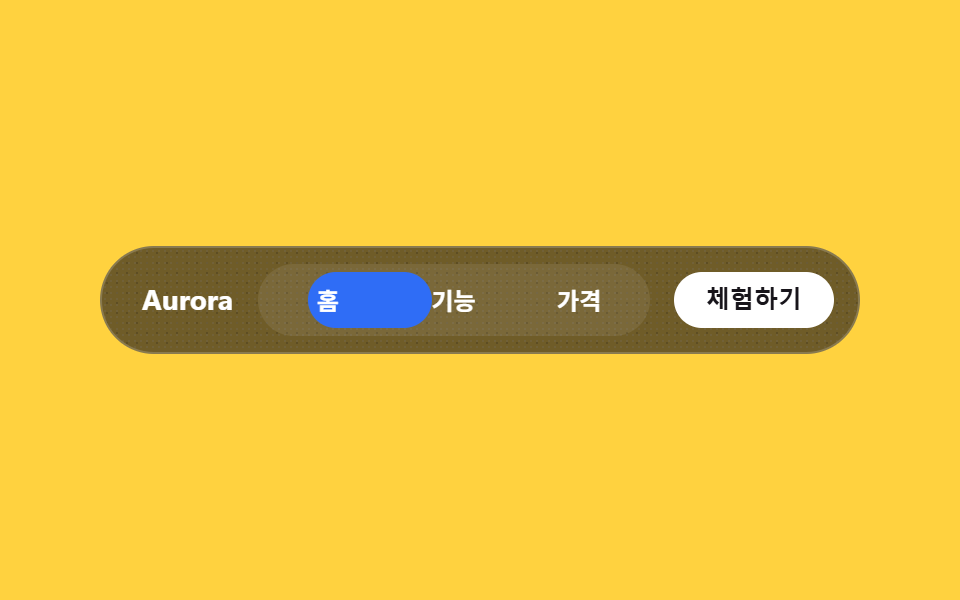 02 nav-aurora
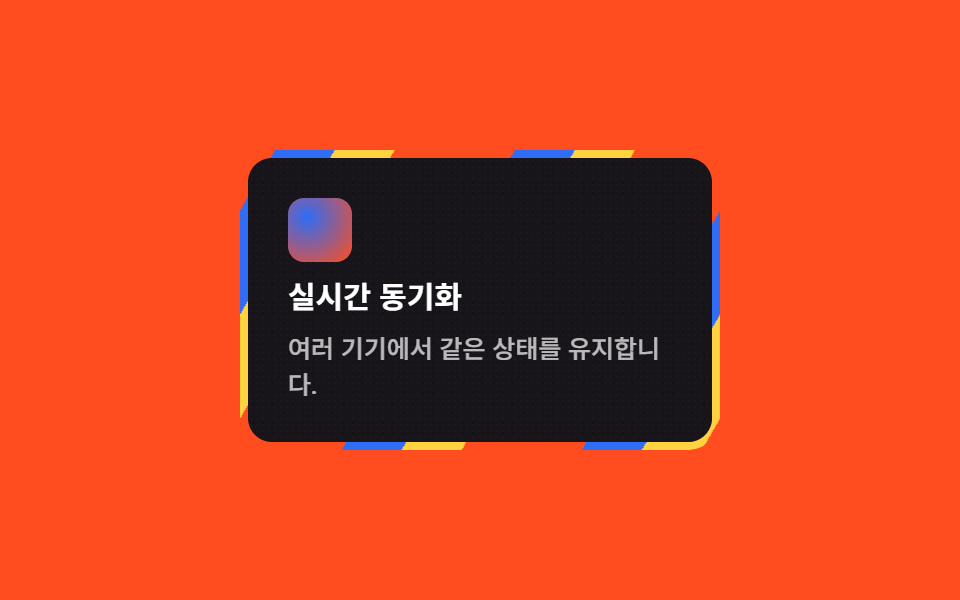 03 card-grid-aurora
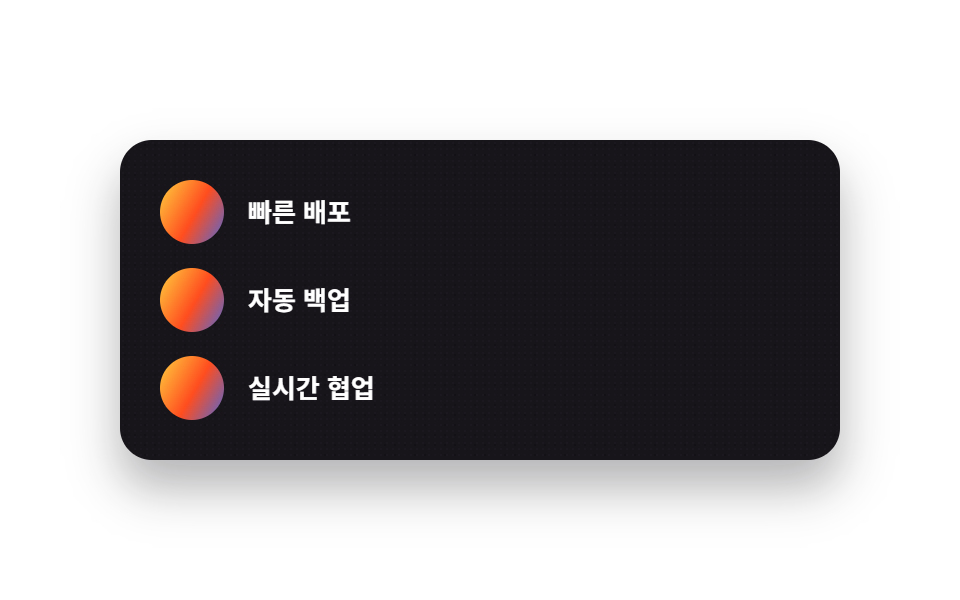 04 feature-list-aurora
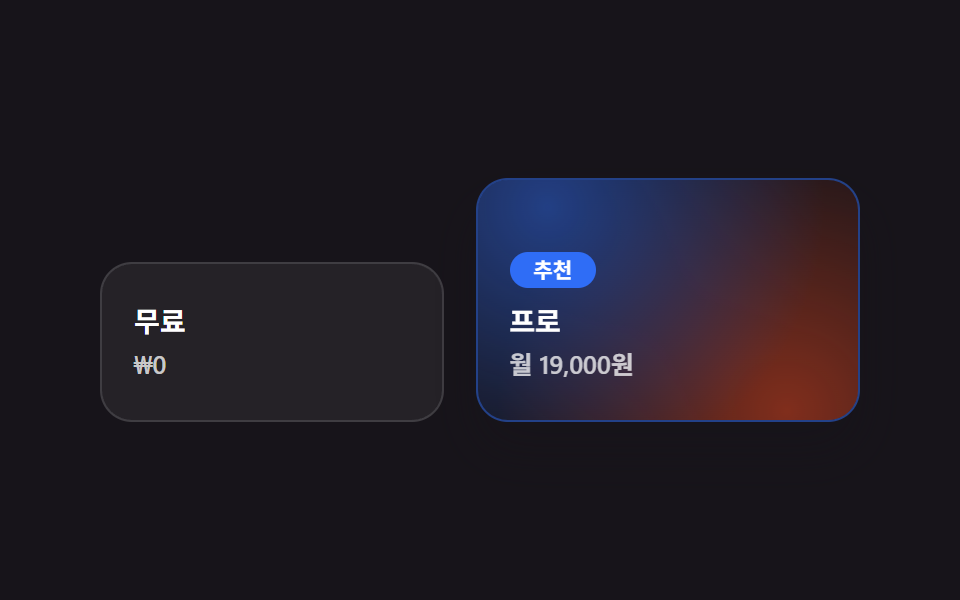 05 pricing-aurora
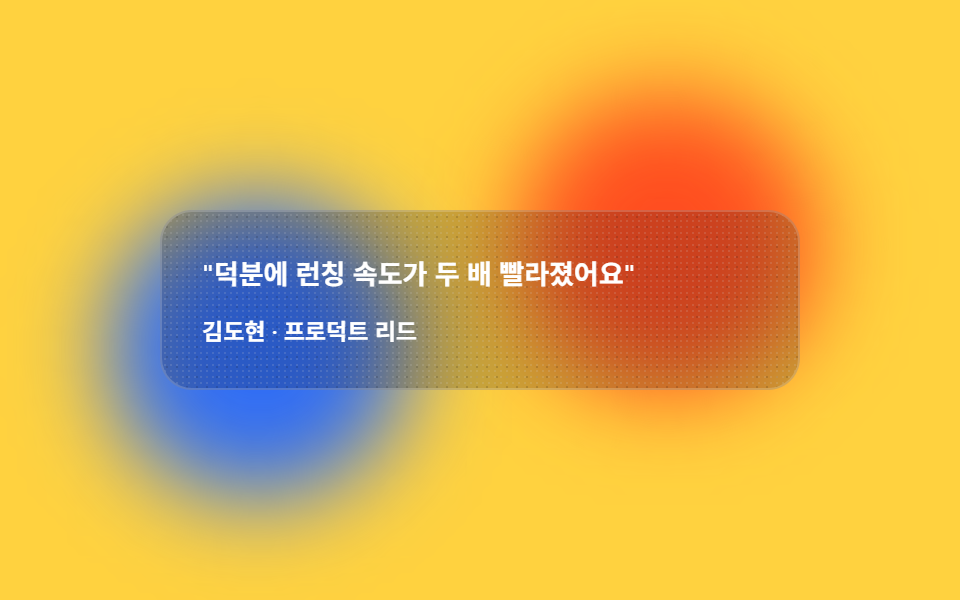 06 testimonial-aurora
 07 cta-band-aurora
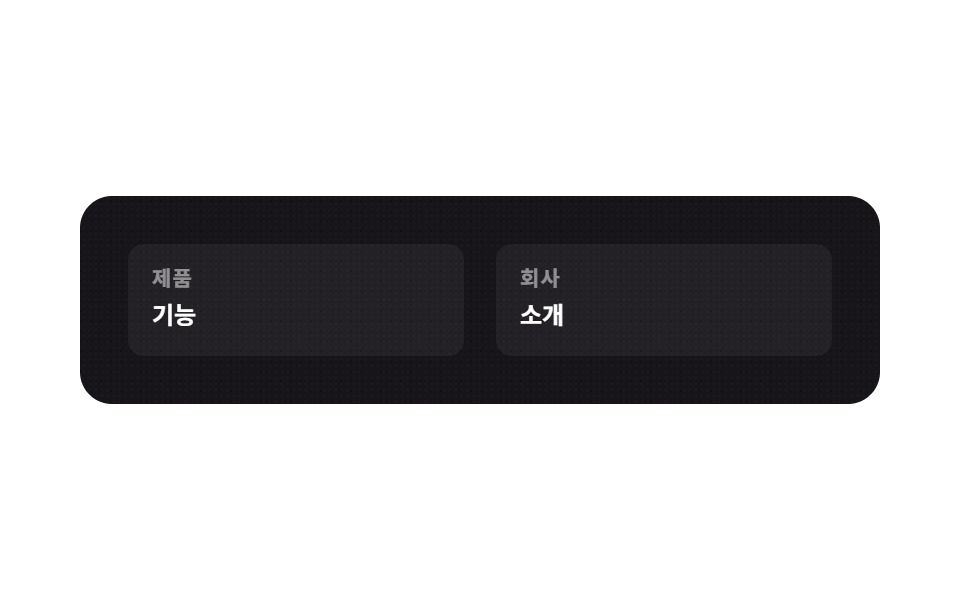 08 footer-aurora
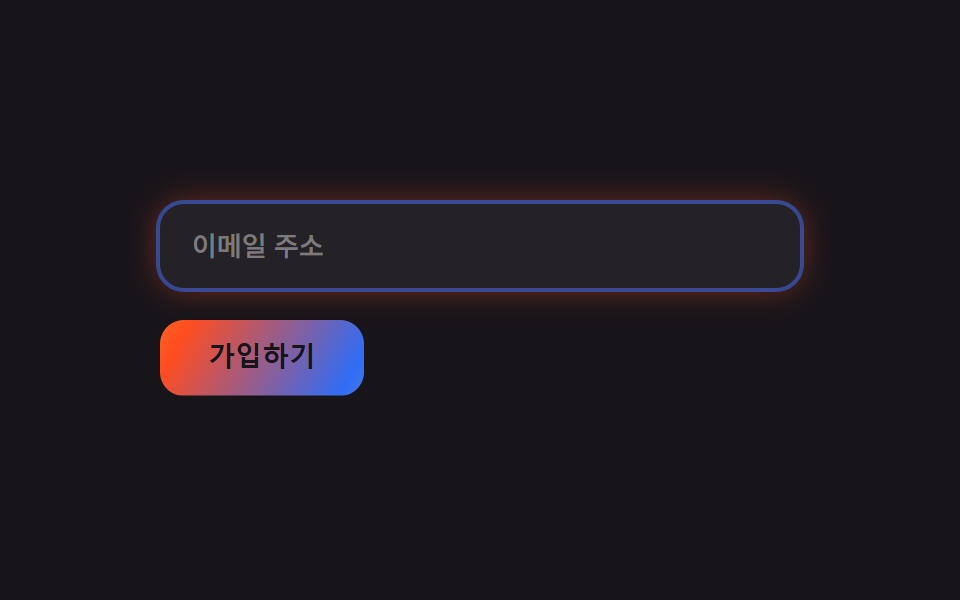 09 buttons-inputs-aurora
자동 재생 · 눌러서 해당 항목으로 · 전부 한 zip
- 01 움직이는 오브 배경 히어로
- 02 투명 내비
- 03 그라디언트 보더 카드
- 04 그라디언트 아이콘 리스트
- 05 강조 플랜 그라디언트
- 06 블러 배경 인용
- 07 전면 오로라 밴드
- 08 그레인 다크 푸터
- 09 그라디언트 버튼·글로우 포커스
01히어로
색 덩어리 세 개가 떠돈다
블러 처리한 색 덩어리 세 개가 헤드라인 뒤에서 서로 다른 박자로 떠돌며 겹칩니다.
<main class="stage">
  <section class="hero-a">
    <div class="hero-a__orb hero-a__orb--1" aria-hidden="true"></div>
    <div class="hero-a__orb hero-a__orb--2" aria-hidden="true"></div>
    <div class="hero-a__orb hero-a__orb--3" aria-hidden="true"></div>
    <p class="hero-a__eyebrow">AURORA</p>
    <h2 class="hero-a__title">구독자 관리, 한 화면에서</h2>
    <button class="hero-a__cta" type="button">무료로 시작</button>
  </section>
</main>
@use "../../../../site/static/demo-tokens" as *;
// ── 변수 3개 ──────────────────────────────────────────
$duration: $dur-loop; // 오브 세 개가 한 바퀴 도는 시간
$easing: steps(4, jump-none); // 부드러운 곡선은 블러 뒤에서 프레임 간 변화가 너무 작아 안 잡힌다
$color: $subject-blue; // 오브 색 하나
@include stage($stage-ink);
.hero-a {
position: relative;
overflow: hidden;
box-sizing: border-box;
width: clamp(260px, 84vw, 400px);
min-height: clamp(172px, 48vw, 220px);
border-radius: $r-card;
background: $stage-ink;
box-shadow: $shadow-raised;
padding: $sp-6;
display: flex;
flex-direction: column;
justify-content: center;
gap: $sp-3;
}
// filter: blur 로 흐린 오브를 겹치고, transform(translate·rotate)으로만 움직인다
.hero-a__orb {
position: absolute;
width: 46%;
aspect-ratio: 1;
border-radius: 50%;
filter: blur(28px);
opacity: .85;
}
.hero-a__orb--1 { background: radial-gradient($color 0%, $color 35%, transparent 68%); top: -10%; left: 4%; animation: driftA $duration $easing infinite; }
.hero-a__orb--2 { background: radial-gradient($stage-yellow 0%, $stage-yellow 35%, transparent 68%); bottom: -14%; right: 0%; animation: driftB $duration $easing infinite; animation-delay: -.6s; }
.hero-a__orb--3 { background: radial-gradient($stage-orange 0%, $stage-orange 35%, transparent 68%); top: 26%; right: 26%; animation: driftC $duration $easing infinite; animation-delay: -1.2s; }
// 그레인 — 정지 텍스처. 프레임마다 안 바뀐다 (움직이는 건 오브 하나)
.hero-a::after {
content: "";
position: absolute;
inset: 0;
pointer-events: none;
opacity: .35;
mix-blend-mode: overlay;
background-image:
radial-gradient(rgba($stage-paper, .6) .5px, transparent .5px),
radial-gradient(rgba($stage-ink, .6) .5px, transparent .5px);
background-size: 3px 3px, 5px 5px;
background-position: 0 0, 1px 2px;
border-radius: inherit;
}
.hero-a__eyebrow { position: relative; z-index: 1; margin: 0; color: $stage-yellow; font: 700 clamp(10px, 2.4vw, 12px)/1 -apple-system, "Segoe UI", "Noto Sans KR", sans-serif; letter-spacing: .06em; text-transform: uppercase; }
.hero-a__title { position: relative; z-index: 1; margin: 0; color: $stage-paper; font: 700 clamp(16px, 4.2vw, 20px)/1.25 -apple-system, "Segoe UI", "Noto Sans KR", sans-serif; }
.hero-a__cta { position: relative; z-index: 1; align-self: flex-start; border: 0; border-radius: $r-pill; background: $subject-cream; color: $stage-ink; padding: $sp-2 $sp-5; font-weight: 700; font-size: clamp(11px, 2.6vw, 13px); line-height: 1; }
@keyframes driftA { 0% { transform: translate(0,0) rotate(0deg); } 50% { transform: translate(22px, 16px) rotate(20deg); } 100% { transform: translate(0,0) rotate(0deg); } }
@keyframes driftB { 0% { transform: translate(0,0) rotate(0deg); } 50% { transform: translate(-24px, -14px) rotate(-18deg); } 100% { transform: translate(0,0) rotate(0deg); } }
@keyframes driftC { 0% { transform: translate(0,0) rotate(0deg); } 50% { transform: translate(18px, -20px) rotate(16deg); } 100% { transform: translate(0,0) rotate(0deg); } }
@media (prefers-reduced-motion: reduce) {
.hero-a__orb { animation: none; }
}html, body {
margin: 0;
overflow: hidden;
}
.stage {
box-sizing: border-box;
min-height: 100vh;
display: grid;
place-items: center;
margin: 0;
background: #17141a;
font-family: -apple-system, "Segoe UI", "Noto Sans KR", sans-serif;
padding: clamp(8px, 4vw, 24px);
}
.hero-a {
position: relative;
overflow: hidden;
box-sizing: border-box;
width: clamp(260px, 84vw, 400px);
min-height: clamp(172px, 48vw, 220px);
border-radius: 16px;
background: #17141a;
box-shadow: 0 14px 24px rgba(23, 20, 26, 0.32);
padding: 24px;
display: flex;
flex-direction: column;
justify-content: center;
gap: 12px;
}
.hero-a__orb {
position: absolute;
width: 46%;
aspect-ratio: 1;
border-radius: 50%;
filter: blur(28px);
opacity: 0.85;
}
.hero-a__orb--1 {
background: radial-gradient(#2f6df6 0%, #2f6df6 35%, transparent 68%);
top: -10%;
left: 4%;
animation: driftA 2s steps(4, jump-none) infinite;
}
.hero-a__orb--2 {
background: radial-gradient(#ffd23f 0%, #ffd23f 35%, transparent 68%);
bottom: -14%;
right: 0%;
animation: driftB 2s steps(4, jump-none) infinite;
animation-delay: -0.6s;
}
.hero-a__orb--3 {
background: radial-gradient(#ff4d1f 0%, #ff4d1f 35%, transparent 68%);
top: 26%;
right: 26%;
animation: driftC 2s steps(4, jump-none) infinite;
animation-delay: -1.2s;
}
.hero-a::after {
content: "";
position: absolute;
inset: 0;
pointer-events: none;
opacity: 0.35;
mix-blend-mode: overlay;
background-image: radial-gradient(rgba(255, 255, 255, 0.6) 0.5px, transparent 0.5px), radial-gradient(rgba(23, 20, 26, 0.6) 0.5px, transparent 0.5px);
background-size: 3px 3px, 5px 5px;
background-position: 0 0, 1px 2px;
border-radius: inherit;
}
.hero-a__eyebrow {
position: relative;
z-index: 1;
margin: 0;
color: #ffd23f;
font: 700 clamp(10px, 2.4vw, 12px)/1 -apple-system, "Segoe UI", "Noto Sans KR", sans-serif;
letter-spacing: 0.06em;
text-transform: uppercase;
}
.hero-a__title {
position: relative;
z-index: 1;
margin: 0;
color: #ffffff;
font: 700 clamp(16px, 4.2vw, 20px)/1.25 -apple-system, "Segoe UI", "Noto Sans KR", sans-serif;
}
.hero-a__cta {
position: relative;
z-index: 1;
align-self: flex-start;
border: 0;
border-radius: 999px;
background: #fff7e6;
color: #17141a;
padding: 8px 20px;
font-weight: 700;
font-size: clamp(11px, 2.6vw, 13px);
line-height: 1;
}
@keyframes driftA {
0% {
transform: translate(0, 0) rotate(0deg);
}
50% {
transform: translate(22px, 16px) rotate(20deg);
}
100% {
transform: translate(0, 0) rotate(0deg);
}
}
@keyframes driftB {
0% {
transform: translate(0, 0) rotate(0deg);
}
50% {
transform: translate(-24px, -14px) rotate(-18deg);
}
100% {
transform: translate(0, 0) rotate(0deg);
}
}
@keyframes driftC {
0% {
transform: translate(0, 0) rotate(0deg);
}
50% {
transform: translate(18px, -20px) rotate(16deg);
}
100% {
transform: translate(0, 0) rotate(0deg);
}
}
@media (prefers-reduced-motion: reduce) {
.hero-a__orb {
animation: none;
}
}import type { CSSProperties } from "react";
import styles from "./AuroraHero.module.scss";
export type AuroraHeroProps = {
eyebrow?: string;
title?: string;
cta?: string;
/** 한 주기(기본 2000ms) */
duration?: number;
easing?: string;
color?: string;
};
type Vars = CSSProperties & { "--duration"?: string; "--easing"?: string; "--color"?: string };
export default function AuroraHero({
eyebrow = "AURORA",
title = "Manage subscribers from one screen",
cta = "Start for free",
duration = 2000,
easing = "steps(4, jump-none)",
color = "#2f6df6",
}: AuroraHeroProps) {
const vars: Vars = { "--duration": `${duration}ms`, "--easing": easing, "--color": color };
return (
<section className={styles.hero} style={vars}>
<div className={`${styles.orb} ${styles.orb1}`} aria-hidden="true" />
<div className={`${styles.orb} ${styles.orb2}`} aria-hidden="true" />
<div className={`${styles.orb} ${styles.orb3}`} aria-hidden="true" />
<p className={styles.eyebrow}>{eyebrow}</p>
<h2 className={styles.title}>{title}</h2>
<button type="button" className={styles.cta}>{cta}</button>
</section>
);
}01 · 움직이는 오브 배경 히어로 — 측정 누적면적 38.218% · 움직인 프레임 18/23GODRICH 원작 · zip 에 SCSS·React 포함 · 비밀번호 보기
카드는 고정, 빛만 지나간다
카드 자체는 짙은 잉크색 고정, 오로라는 그 위를 지나가는 빛으로만 씁니다.
.hero-a__orb { position: absolute; width: 46%; aspect-ratio: 1;
  border-radius: 50%; filter: blur(28px); opacity: .85; }
.hero-a__orb--1 {
  background: radial-gradient($color 0%, $color 35%, transparent 68%);
  top: -10%; left: 4%;
  animation: driftA $duration steps(4, jump-none) infinite;
}
@keyframes driftA {
  0%   { transform: translate(0,0) rotate(0deg); }
  50%  { transform: translate(22px, 16px) rotate(20deg); }
  100% { transform: translate(0,0) rotate(0deg); }
}
02내비게이션
투명에 가까운 메뉴 배경
메뉴 배경이 완전히 투명에 가깝고, 안쪽에 반투명 잉크 유리 하나만 깔려 있습니다.
<main class="stage">
  <nav class="nav-a">
    <span class="nav-a__brand">Aurora</span>
    <div class="nav-a__menu">
      <span class="nav-a__pill" aria-hidden="true"></span>
      <span class="nav-a__label">홈</span>
      <span class="nav-a__label">기능</span>
      <span class="nav-a__label">가격</span>
    </div>
    <button class="nav-a__cta" type="button">체험하기</button>
  </nav>
</main>
@use "../../../../site/static/demo-tokens" as *;
$duration: $dur-loop;
$easing: $ease-spring;
$color: $subject-blue;
@include stage($stage-yellow);
.nav-a {
position: relative;
box-sizing: border-box;
display: flex;
align-items: center;
gap: $sp-3;
width: clamp(240px, 82vw, 380px);
padding: $sp-2 $sp-3;
border-radius: $r-pill;
background: rgba($stage-ink, .62); // .38 은 흰 글자가 2.98:1 이었다 — AA 4.5 (brand 6.49 · label 5.35)
backdrop-filter: blur(10px);
-webkit-backdrop-filter: blur(10px);
border: 1px solid rgba($stage-paper, .18);
overflow: hidden;
}
.nav-a::after {
content: "";
position: absolute;
inset: 0;
pointer-events: none;
opacity: .3;
mix-blend-mode: overlay;
background-image:
radial-gradient(rgba($stage-paper, .6) .5px, transparent .5px),
radial-gradient(rgba($stage-ink, .6) .5px, transparent .5px);
background-size: 3px 3px, 5px 5px;
border-radius: inherit;
}
.nav-a__brand { position: relative; z-index: 1; padding-left: $sp-2; color: $stage-paper; font: 700 clamp(12px, 3vw, 14px)/1 -apple-system, "Segoe UI", "Noto Sans KR", sans-serif; }
.nav-a__menu {
position: relative;
z-index: 1;
flex: 1;
display: flex;
background: rgba($stage-paper, .08);
border-radius: $r-pill;
padding: $sp-1;
}
// 인디케이터는 퍼센트 폭(항목 3등분)으로 움직인다 — 고정 px 짐작값 금지 (BD19)
.nav-a__pill {
position: absolute;
top: $sp-1;
bottom: $sp-1;
left: $sp-1;
width: calc((100% - #{$sp-1 * 2}) / 3);
border-radius: $r-pill;
background: $color;
animation: pillSlide $duration $easing infinite;
}
.nav-a__label { position: relative; z-index: 1; flex: 1; text-align: center; padding: $sp-2 0; color: $stage-paper; font-weight: 600; font-size: clamp(10.5px, 2.6vw, 12px); line-height: 1; }
.nav-a__cta { position: relative; z-index: 1; border: 0; border-radius: $r-pill; background: $stage-paper; color: $stage-ink; padding: $sp-2 $sp-4; font-weight: 700; font-size: clamp(10.5px, 2.6vw, 12px); line-height: 1; }
@keyframes pillSlide {
0%, 12% { transform: translateX(0%); }
38%, 50% { transform: translateX(100%); }
76%, 88% { transform: translateX(200%); }
100% { transform: translateX(0%); }
}
@media (prefers-reduced-motion: reduce) {
.nav-a__pill { animation: none; }
}html, body {
margin: 0;
overflow: hidden;
}
.stage {
box-sizing: border-box;
min-height: 100vh;
display: grid;
place-items: center;
margin: 0;
background: #ffd23f;
font-family: -apple-system, "Segoe UI", "Noto Sans KR", sans-serif;
padding: clamp(8px, 4vw, 24px);
}
.nav-a {
position: relative;
box-sizing: border-box;
display: flex;
align-items: center;
gap: 12px;
width: clamp(240px, 82vw, 380px);
padding: 8px 12px;
border-radius: 999px;
background: rgba(23, 20, 26, 0.62);
backdrop-filter: blur(10px);
-webkit-backdrop-filter: blur(10px);
border: 1px solid rgba(255, 255, 255, 0.18);
overflow: hidden;
}
.nav-a::after {
content: "";
position: absolute;
inset: 0;
pointer-events: none;
opacity: 0.3;
mix-blend-mode: overlay;
background-image: radial-gradient(rgba(255, 255, 255, 0.6) 0.5px, transparent 0.5px), radial-gradient(rgba(23, 20, 26, 0.6) 0.5px, transparent 0.5px);
background-size: 3px 3px, 5px 5px;
border-radius: inherit;
}
.nav-a__brand {
position: relative;
z-index: 1;
padding-left: 8px;
color: #ffffff;
font: 700 clamp(12px, 3vw, 14px)/1 -apple-system, "Segoe UI", "Noto Sans KR", sans-serif;
}
.nav-a__menu {
position: relative;
z-index: 1;
flex: 1;
display: flex;
background: rgba(255, 255, 255, 0.08);
border-radius: 999px;
padding: 4px;
}
.nav-a__pill {
position: absolute;
top: 4px;
bottom: 4px;
left: 4px;
width: calc((100% - 8px) / 3);
border-radius: 999px;
background: #2f6df6;
animation: pillSlide 2s cubic-bezier(0.2, 0.8, 0.2, 1) infinite;
}
.nav-a__label {
position: relative;
z-index: 1;
flex: 1;
text-align: center;
padding: 8px 0;
color: #ffffff;
font-weight: 600;
font-size: clamp(10.5px, 2.6vw, 12px);
line-height: 1;
}
.nav-a__cta {
position: relative;
z-index: 1;
border: 0;
border-radius: 999px;
background: #ffffff;
color: #17141a;
padding: 8px 16px;
font-weight: 700;
font-size: clamp(10.5px, 2.6vw, 12px);
line-height: 1;
}
@keyframes pillSlide {
0%, 12% {
transform: translateX(0%);
}
38%, 50% {
transform: translateX(100%);
}
76%, 88% {
transform: translateX(200%);
}
100% {
transform: translateX(0%);
}
}
@media (prefers-reduced-motion: reduce) {
.nav-a__pill {
animation: none;
}
}import type { CSSProperties } from "react";
import styles from "./AuroraNav.module.scss";
export type AuroraNavProps = {
brand?: string;
items?: string[];
cta?: string;
activeIndex?: number;
duration?: number;
easing?: string;
color?: string;
};
type Vars = CSSProperties & { "--duration"?: string; "--easing"?: string; "--color"?: string };
export default function AuroraNav({
brand = "Aurora",
items = ["Home", "Features", "Pricing"],
cta = "Try it free",
duration = 2000,
easing = "cubic-bezier(.2,.8,.2,1)",
color = "#2f6df6",
}: AuroraNavProps) {
const vars: Vars = { "--duration": `${duration}ms`, "--easing": easing, "--color": color };
return (
<nav className={styles.nav} style={vars}>
<span className={styles.brand}>{brand}</span>
<div className={styles.menu}>
<span className={styles.pill} aria-hidden="true" />
{items.map((label) => (
<span key={label} className={styles.label}>{label}</span>
))}
</div>
<button type="button" className={styles.cta}>{cta}</button>
</nav>
);
}02 · 투명 내비 — 측정 누적면적 3.459% · 움직인 프레임 15/23GODRICH 원작 · zip 에 SCSS·React 포함 · 비밀번호 보기
필을 3등분으로 옮긴다
활성 항목을 가리키는 필은 항목 세 개를 퍼센트로 3등분해 그 폭만큼만 옮겨 다닙니다.
.nav-a {
  background: rgba($stage-ink, .38);
  backdrop-filter: blur(10px);
  border: 1px solid rgba($stage-paper, .18);
}
.nav-a__pill {
  position: absolute; top: $sp-1; bottom: $sp-1; left: $sp-1;
  width: calc((100% - #{$sp-1 * 2}) / 3);
  border-radius: $r-pill; background: $color;
  animation: pillSlide $duration $ease-spring infinite;
}
03카드 격자
테두리에만 줄무늬를 남긴다
카드 테두리 자리에만 오로라 3색 줄무늬가 보이도록 잘라내고, 그 줄무늬를 계속 흘려보냅니다.
<main class="stage">
  <article class="card-a">
    <div class="card-a__body">
      <span class="card-a__icon" aria-hidden="true"></span>
      <h3 class="card-a__title">실시간 동기화</h3>
      <p class="card-a__desc">여러 기기에서 같은 상태를 유지합니다.</p>
    </div>
  </article>
</main>
@use "../../../../site/static/demo-tokens" as *;
$duration: $dur-loop;
$easing: linear;
$color: $subject-blue;
@include stage($stage-orange);
.stage { padding: clamp(8px, 3vw, 20px); }
// 테두리 자리에만 보이게 잘라낸 링 위에 오로라 3색 줄무늬를 흘려보낸다
.card-a {
position: relative;
box-sizing: border-box;
width: min(240px, 78vw);
border-radius: $r-card;
padding: $sp-1;
isolation: isolate;
}
.card-a::before {
content: "";
position: absolute;
inset: 0;
border-radius: $r-card;
padding: $sp-1;
background: repeating-linear-gradient(120deg, $color 0 26px, $stage-yellow 26px 52px, $stage-orange 52px 78px, transparent 78px 104px);
-webkit-mask: linear-gradient(#000 0 0) content-box, linear-gradient(#000 0 0);
-webkit-mask-composite: xor;
mask-composite: exclude;
animation: sweep $duration $easing infinite;
}
.card-a__body {
position: relative;
overflow: hidden;
border-radius: calc($r-card - $sp-1);
background: $stage-ink;
padding: $sp-5;
display: flex;
flex-direction: column;
gap: $sp-2;
}
.card-a__body::after {
content: "";
position: absolute;
inset: 0;
pointer-events: none;
opacity: .3;
mix-blend-mode: overlay;
background-image:
radial-gradient(rgba($stage-paper, .6) .5px, transparent .5px),
radial-gradient(rgba($stage-ink, .6) .5px, transparent .5px);
background-size: 3px 3px, 5px 5px;
}
.card-a__icon { position: relative; z-index: 1; width: $sp-8; height: $sp-8; border-radius: $r-sm; background: radial-gradient(circle at 30% 30%, $color, $stage-orange); }
.card-a__title { position: relative; z-index: 1; margin: 0; color: $stage-paper; font: 700 clamp(13px, 3.2vw, 15px)/1.3 -apple-system, "Segoe UI", "Noto Sans KR", sans-serif; }
.card-a__desc { position: relative; z-index: 1; margin: 0; color: rgba($stage-paper, .7); font-weight: 500; font-size: clamp(11px, 2.6vw, 12.5px); line-height: 1.4; }
@keyframes sweep { to { background-position: 208px 0; } }
@media (prefers-reduced-motion: reduce) {
.card-a::before { animation: none; }
}html, body {
margin: 0;
overflow: hidden;
}
.stage {
box-sizing: border-box;
min-height: 100vh;
display: grid;
place-items: center;
margin: 0;
background: #ff4d1f;
font-family: -apple-system, "Segoe UI", "Noto Sans KR", sans-serif;
padding: clamp(8px, 4vw, 24px);
}
.stage {
padding: clamp(8px, 3vw, 20px);
}
.card-a {
position: relative;
box-sizing: border-box;
width: min(240px, 78vw);
border-radius: 16px;
padding: 4px;
isolation: isolate;
}
.card-a::before {
content: "";
position: absolute;
inset: 0;
border-radius: 16px;
padding: 4px;
background: repeating-linear-gradient(120deg, #2f6df6 0 26px, #ffd23f 26px 52px, #ff4d1f 52px 78px, transparent 78px 104px);
-webkit-mask: linear-gradient(#000 0 0) content-box, linear-gradient(#000 0 0);
-webkit-mask-composite: xor;
mask-composite: exclude;
animation: sweep 2s linear infinite;
}
.card-a__body {
position: relative;
overflow: hidden;
border-radius: 12px;
background: #17141a;
padding: 20px;
display: flex;
flex-direction: column;
gap: 8px;
}
.card-a__body::after {
content: "";
position: absolute;
inset: 0;
pointer-events: none;
opacity: 0.3;
mix-blend-mode: overlay;
background-image: radial-gradient(rgba(255, 255, 255, 0.6) 0.5px, transparent 0.5px), radial-gradient(rgba(23, 20, 26, 0.6) 0.5px, transparent 0.5px);
background-size: 3px 3px, 5px 5px;
}
.card-a__icon {
position: relative;
z-index: 1;
width: 32px;
height: 32px;
border-radius: 8px;
background: radial-gradient(circle at 30% 30%, #2f6df6, #ff4d1f);
}
.card-a__title {
position: relative;
z-index: 1;
margin: 0;
color: #ffffff;
font: 700 clamp(13px, 3.2vw, 15px)/1.3 -apple-system, "Segoe UI", "Noto Sans KR", sans-serif;
}
.card-a__desc {
position: relative;
z-index: 1;
margin: 0;
color: rgba(255, 255, 255, 0.7);
font-weight: 500;
font-size: clamp(11px, 2.6vw, 12.5px);
line-height: 1.4;
}
@keyframes sweep {
to {
background-position: 208px 0;
}
}
@media (prefers-reduced-motion: reduce) {
.card-a::before {
animation: none;
}
}import type { CSSProperties } from "react";
import styles from "./AuroraCard.module.scss";
export type AuroraCardProps = {
title?: string;
desc?: string;
duration?: number;
easing?: string;
color?: string;
};
type Vars = CSSProperties & { "--duration"?: string; "--easing"?: string; "--color"?: string };
export default function AuroraCard({
title = "Real-time sync",
desc = "Stays in sync across every device.",
duration = 2000,
easing = "linear",
color = "#2f6df6",
}: AuroraCardProps) {
const vars: Vars = { "--duration": `${duration}ms`, "--easing": easing, "--color": color };
return (
<article className={styles.card} style={vars}>
<div className={styles.body}>
<span className={styles.icon} aria-hidden="true" />
<h3 className={styles.title}>{title}</h3>
<p className={styles.desc}>{desc}</p>
</div>
</article>
);
}03 · 그라디언트 보더 카드 — 측정 누적면적 2.081% · 움직인 프레임 23/23GODRICH 원작 · zip 에 SCSS·React 포함 · 비밀번호 보기
시선이 테두리에 머무는 이유
안쪽 카드는 짙은 잉크색으로 고정해 시선이 테두리에 머무릅니다.
.card-a::before {
  content: ""; position: absolute; inset: 0;
  border-radius: $r-card; padding: $sp-1;
  background: repeating-linear-gradient(120deg,
    $color 0 26px, $stage-yellow 26px 52px,
    $stage-orange 52px 78px, transparent 78px 104px);
  -webkit-mask: linear-gradient(#000 0 0) content-box, linear-gradient(#000 0 0);
  mask-composite: exclude;
  animation: sweep $duration linear infinite;
}
@keyframes sweep { to { background-position: 208px 0; } }
04기능 목록
원형 배지 하나만 흐른다
기능마다 원형 배지 하나씩을 두고, 배지 안 그라디언트만 좌우로 흐르게 합니다.
<main class="stage">
  <ul class="feat-a">
    <li class="feat-a__row">
      <span class="feat-a__icon" aria-hidden="true"></span>
      <p class="feat-a__text">빠른 배포</p>
    </li>
    <li class="feat-a__row">
      <span class="feat-a__icon" aria-hidden="true"></span>
      <p class="feat-a__text">자동 백업</p>
    </li>
    <li class="feat-a__row">
      <span class="feat-a__icon" aria-hidden="true"></span>
      <p class="feat-a__text">실시간 협업</p>
    </li>
  </ul>
</main>
@use "../../../../site/static/demo-tokens" as *;
$duration: $dur-loop;
$easing: $ease-out;
$color: $subject-blue;
@include stage($stage-paper);
.feat-a {
// 태그가 <ul> 이라 UA 기본 margin·padding(list-style)부터 지운다 — 안 지우면 320px 세로 넘침의 숨은 원인이 된다
margin: 0;
list-style: none;
position: relative;
overflow: hidden;
box-sizing: border-box;
display: flex;
flex-direction: column;
gap: $sp-3;
width: clamp(240px, 80vw, 360px);
padding: $sp-5;
border-radius: $r-card;
background: $stage-ink;
box-shadow: $shadow-raised;
}
.feat-a::after {
content: "";
position: absolute;
inset: 0;
pointer-events: none;
opacity: .3;
mix-blend-mode: overlay;
background-image:
radial-gradient(rgba($stage-paper, .6) .5px, transparent .5px),
radial-gradient(rgba($stage-ink, .6) .5px, transparent .5px);
background-size: 3px 3px, 5px 5px;
border-radius: inherit;
}
.feat-a__row { position: relative; z-index: 1; margin: 0; display: flex; align-items: center; gap: $sp-3; }
// 아이콘 배지 안 그라디언트가 좌우로 흐른다 (background-position 만 움직인다)
.feat-a__icon {
flex: none;
width: $sp-8;
height: $sp-8;
border-radius: $r-pill;
background: linear-gradient(120deg, $color, $stage-yellow, $stage-orange, $color);
background-size: 200% 100%;
animation: iconFlow $duration $easing infinite;
}
.feat-a__text { margin: 0; color: $stage-paper; font: 600 clamp(11.5px, 2.8vw, 13px)/1.4 -apple-system, "Segoe UI", "Noto Sans KR", sans-serif; }
@keyframes iconFlow { 0% { background-position: 0% 50%; } 50% { background-position: 100% 50%; } 100% { background-position: 0% 50%; } }
@media (prefers-reduced-motion: reduce) {
.feat-a__icon { animation: none; }
}html, body {
margin: 0;
overflow: hidden;
}
.stage {
box-sizing: border-box;
min-height: 100vh;
display: grid;
place-items: center;
margin: 0;
background: #ffffff;
font-family: -apple-system, "Segoe UI", "Noto Sans KR", sans-serif;
padding: clamp(8px, 4vw, 24px);
}
.feat-a {
margin: 0;
list-style: none;
position: relative;
overflow: hidden;
box-sizing: border-box;
display: flex;
flex-direction: column;
gap: 12px;
width: clamp(240px, 80vw, 360px);
padding: 20px;
border-radius: 16px;
background: #17141a;
box-shadow: 0 14px 24px rgba(23, 20, 26, 0.32);
}
.feat-a::after {
content: "";
position: absolute;
inset: 0;
pointer-events: none;
opacity: 0.3;
mix-blend-mode: overlay;
background-image: radial-gradient(rgba(255, 255, 255, 0.6) 0.5px, transparent 0.5px), radial-gradient(rgba(23, 20, 26, 0.6) 0.5px, transparent 0.5px);
background-size: 3px 3px, 5px 5px;
border-radius: inherit;
}
.feat-a__row {
position: relative;
z-index: 1;
margin: 0;
display: flex;
align-items: center;
gap: 12px;
}
.feat-a__icon {
flex: none;
width: 32px;
height: 32px;
border-radius: 999px;
background: linear-gradient(120deg, #2f6df6, #ffd23f, #ff4d1f, #2f6df6);
background-size: 200% 100%;
animation: iconFlow 2s ease-out infinite;
}
.feat-a__text {
margin: 0;
color: #ffffff;
font: 600 clamp(11.5px, 2.8vw, 13px)/1.4 -apple-system, "Segoe UI", "Noto Sans KR", sans-serif;
}
@keyframes iconFlow {
0% {
background-position: 0% 50%;
}
50% {
background-position: 100% 50%;
}
100% {
background-position: 0% 50%;
}
}
@media (prefers-reduced-motion: reduce) {
.feat-a__icon {
animation: none;
}
}import type { CSSProperties } from "react";
import styles from "./AuroraFeatureList.module.scss";
export type AuroraFeatureListProps = {
items?: string[];
duration?: number;
easing?: string;
color?: string;
};
type Vars = CSSProperties & { "--duration"?: string; "--easing"?: string; "--color"?: string };
export default function AuroraFeatureList({
items = ["Fast deploys", "Auto backups", "Real-time collaboration"],
duration = 2000,
easing = "ease-out",
color = "#2f6df6",
}: AuroraFeatureListProps) {
const vars: Vars = { "--duration": `${duration}ms`, "--easing": easing, "--color": color };
return (
<ul className={styles.list} style={vars}>
{items.map((text) => (
<li key={text} className={styles.row}>
<span className={styles.icon} aria-hidden="true" />
<p className={styles.text}>{text}</p>
</li>
))}
</ul>
);
}04 · 그라디언트 아이콘 리스트 — 측정 누적면적 1.75% · 움직인 프레임 19/23GODRICH 원작 · zip 에 SCSS·React 포함 · 비밀번호 보기
목록 전체를 움직이지 않는 이유
목록 전체가 움직이면 산만하지만 작은 점 하나만 흐르면 시선을 자연스럽게 붙잡습니다.
.feat-a__icon {
  width: $sp-8; height: $sp-8; border-radius: $r-pill;
  background: linear-gradient(120deg, $color, $stage-yellow, $stage-orange, $color);
  background-size: 200% 100%;
  animation: iconFlow $duration ease-out infinite;
}
@keyframes iconFlow {
  0%   { background-position: 0% 50%; }
  50%  { background-position: 100% 50%; }
  100% { background-position: 0% 50%; }
}
05가격
추천 플랜만 숨 쉰다
추천 플랜 카드에만 오로라 그라디언트가 숨 쉬듯 밝아졌다 옅어지고, 위치도 살짝 오갑니다.
<main class="stage">
  <section class="pricing-a">
    <div class="pricing-a__plan">
      <p class="pricing-a__name">무료</p>
      <p class="pricing-a__price">₩0</p>
    </div>
    <div class="pricing-a__plan pricing-a__plan--pro">
      <span class="pricing-a__badge">추천</span>
      <p class="pricing-a__name">프로</p>
      <p class="pricing-a__price">월 19,000원</p>
    </div>
  </section>
</main>
@use "../../../../site/static/demo-tokens" as *;
$duration: $dur-loop;
$easing: steps(4, jump-none); // 부드러운 곡선은 프레임 간 변화가 너무 작아 안 잡혀 큰 걸음으로 끊어 보낸다
$color: $subject-blue;
@include stage($stage-ink);
.pricing-a { display: flex; align-items: flex-end; gap: $sp-4; width: clamp(240px, 82vw, 380px); }
.pricing-a__plan {
flex: 1;
border-radius: $r-card;
padding: $sp-5 $sp-4;
background: rgba($stage-paper, .06);
border: 1px solid rgba($stage-paper, .12);
}
.pricing-a__plan--pro {
position: relative;
overflow: hidden;
flex: 1.15;
padding-top: $sp-8;
background: $stage-ink;
border-color: rgba($color, .5);
box-shadow: $shadow-raised;
}
// 추천 플랜만 오로라 그라디언트가 숨 쉬듯 밝기·위치를 오간다
.pricing-a__plan--pro::before {
content: "";
position: absolute;
inset: -20%;
background: radial-gradient(circle at 30% 20%, rgba($color, .9), transparent 60%),
radial-gradient(circle at 75% 80%, rgba($stage-orange, .85), transparent 60%);
animation: breathe $duration $easing infinite;
}
.pricing-a__badge { position: relative; z-index: 1; display: inline-block; margin-bottom: $sp-2; border-radius: $r-pill; background: $color; color: $stage-paper; padding: $sp-1 $sp-3; font: 700 clamp(9.5px, 2.2vw, 11px)/1 -apple-system, "Segoe UI", "Noto Sans KR", sans-serif; }
.pricing-a__name { position: relative; z-index: 1; margin: 0 0 $sp-1; color: $stage-paper; font: 700 clamp(12px, 3vw, 14px)/1.3 -apple-system, "Segoe UI", "Noto Sans KR", sans-serif; }
.pricing-a__price { position: relative; z-index: 1; margin: 0; color: rgba($stage-paper, .75); font-weight: 600; font-size: clamp(11px, 2.6vw, 12.5px); line-height: 1.3; }
@keyframes breathe { 0%, 100% { opacity: .3; transform: translate(0, 0); } 50% { opacity: 1; transform: translate(-8%, 8%); } }
@media (prefers-reduced-motion: reduce) {
.pricing-a__plan--pro::before { animation: none; opacity: .8; }
}html, body {
margin: 0;
overflow: hidden;
}
.stage {
box-sizing: border-box;
min-height: 100vh;
display: grid;
place-items: center;
margin: 0;
background: #17141a;
font-family: -apple-system, "Segoe UI", "Noto Sans KR", sans-serif;
padding: clamp(8px, 4vw, 24px);
}
.pricing-a {
display: flex;
align-items: flex-end;
gap: 16px;
width: clamp(240px, 82vw, 380px);
}
.pricing-a__plan {
flex: 1;
border-radius: 16px;
padding: 20px 16px;
background: rgba(255, 255, 255, 0.06);
border: 1px solid rgba(255, 255, 255, 0.12);
}
.pricing-a__plan--pro {
position: relative;
overflow: hidden;
flex: 1.15;
padding-top: 32px;
background: #17141a;
border-color: rgba(47, 109, 246, 0.5);
box-shadow: 0 14px 24px rgba(23, 20, 26, 0.32);
}
.pricing-a__plan--pro::before {
content: "";
position: absolute;
inset: -20%;
background: radial-gradient(circle at 30% 20%, rgba(47, 109, 246, 0.9), transparent 60%), radial-gradient(circle at 75% 80%, rgba(255, 77, 31, 0.85), transparent 60%);
animation: breathe 2s steps(4, jump-none) infinite;
}
.pricing-a__badge {
position: relative;
z-index: 1;
display: inline-block;
margin-bottom: 8px;
border-radius: 999px;
background: #2f6df6;
color: #ffffff;
padding: 4px 12px;
font: 700 clamp(9.5px, 2.2vw, 11px)/1 -apple-system, "Segoe UI", "Noto Sans KR", sans-serif;
}
.pricing-a__name {
position: relative;
z-index: 1;
margin: 0 0 4px;
color: #ffffff;
font: 700 clamp(12px, 3vw, 14px)/1.3 -apple-system, "Segoe UI", "Noto Sans KR", sans-serif;
}
.pricing-a__price {
position: relative;
z-index: 1;
margin: 0;
color: rgba(255, 255, 255, 0.75);
font-weight: 600;
font-size: clamp(11px, 2.6vw, 12.5px);
line-height: 1.3;
}
@keyframes breathe {
0%, 100% {
opacity: 0.3;
transform: translate(0, 0);
}
50% {
opacity: 1;
transform: translate(-8%, 8%);
}
}
@media (prefers-reduced-motion: reduce) {
.pricing-a__plan--pro::before {
animation: none;
opacity: 0.8;
}
}import type { CSSProperties } from "react";
import styles from "./AuroraPricing.module.scss";
export type AuroraPricingProps = {
freeName?: string;
freePrice?: string;
badge?: string;
proName?: string;
proPrice?: string;
duration?: number;
easing?: string;
color?: string;
};
type Vars = CSSProperties & { "--duration"?: string; "--easing"?: string; "--color"?: string };
export default function AuroraPricing({
freeName = "Free",
freePrice = "$0",
badge = "Recommended",
proName = "Pro",
proPrice = "$19/mo",
duration = 2000,
easing = "steps(4, jump-none)",
color = "#2f6df6",
}: AuroraPricingProps) {
const vars: Vars = { "--duration": `${duration}ms`, "--easing": easing, "--color": color };
return (
<section className={styles.pricing} style={vars}>
<div className={styles.plan}>
<p className={styles.name}>{freeName}</p>
<p className={styles.price}>{freePrice}</p>
</div>
<div className={`${styles.plan} ${styles.pro}`}>
<span className={styles.badge}>{badge}</span>
<p className={styles.name}>{proName}</p>
<p className={styles.price}>{proPrice}</p>
</div>
</section>
);
}05 · 강조 플랜 그라디언트 — 측정 누적면적 15.09% · 움직인 프레임 6/23GODRICH 원작 · zip 에 SCSS·React 포함 · 비밀번호 보기
옅은 유리 카드로 대비
일반 플랜은 옅은 유리 카드로 남겨 대비를 만듭니다.
.pricing-a__plan--pro::before {
  content: ""; position: absolute; inset: -20%;
  background:
    radial-gradient(circle at 30% 20%, rgba($color, .9), transparent 60%),
    radial-gradient(circle at 75% 80%, rgba($stage-orange, .85), transparent 60%);
  animation: breathe $duration steps(4, jump-none) infinite;
}
@keyframes breathe {
  0%, 100% { opacity: .3; transform: translate(0, 0); }
  50%      { opacity: 1;  transform: translate(-8%, 8%); }
}
06후기
유리 카드 뒤의 오로라
반투명 유리 인용 카드 뒤에서 블러 처리한 오로라 덩어리 두 개가 천천히 떠돕니다.
<main class="stage">
  <figure class="test-a">
    <div class="test-a__orb test-a__orb--1" aria-hidden="true"></div>
    <div class="test-a__orb test-a__orb--2" aria-hidden="true"></div>
    <blockquote class="test-a__card">
      <p class="test-a__quote">"덕분에 런칭 속도가 두 배 빨라졌어요"</p>
      <figcaption class="test-a__name">김도현 · 프로덕트 리드</figcaption>
    </blockquote>
  </figure>
</main>
@use "../../../../site/static/demo-tokens" as *;
$duration: $dur-loop;
$easing: steps(4, jump-none); // 부드러운 곡선은 블러 뒤에서 프레임 간 변화가 너무 작아 안 잡힌다
$color: $stage-orange;
@include stage($stage-yellow);
// 태그가 <figure> 라 UA 기본 margin(1em 40px)부터 지운다 — 안 지우면 320px 세로 넘침의 숨은 원인이 된다
.test-a { margin: 0; position: relative; box-sizing: border-box; width: clamp(240px, 82vw, 360px); padding: $sp-5; }
// 흐린 오로라 덩어리 두 개가 유리 카드 뒤에서 천천히 떠돈다
.test-a__orb { position: absolute; width: 50%; aspect-ratio: 1; border-radius: 50%; filter: blur(20px); opacity: 1; }
.test-a__orb--1 { background: radial-gradient($subject-blue 0%, $subject-blue 45%, transparent 72%); top: -8%; left: -8%; animation: floatA $duration $easing infinite; }
.test-a__orb--2 { background: radial-gradient($color 0%, $color 45%, transparent 72%); bottom: -8%; right: -6%; animation: floatB $duration $easing infinite; animation-delay: -1s; }
.test-a__card {
// <blockquote> 의 UA 기본 margin(1em 40px)도 지운다
margin: 0;
position: relative;
overflow: hidden;
border-radius: $r-card;
padding: $sp-5;
background: rgba($stage-ink, .22);
backdrop-filter: blur(4px);
-webkit-backdrop-filter: blur(4px);
border: 1px solid rgba($stage-paper, .18);
}
.test-a__card::after {
content: "";
position: absolute;
inset: 0;
pointer-events: none;
opacity: .25;
mix-blend-mode: overlay;
background-image:
radial-gradient(rgba($stage-paper, .6) .5px, transparent .5px),
radial-gradient(rgba($stage-ink, .6) .5px, transparent .5px);
background-size: 3px 3px, 5px 5px;
}
.test-a__quote { position: relative; z-index: 1; margin: 0 0 $sp-3; color: $stage-paper; font: 600 clamp(12px, 3vw, 13.5px)/1.5 -apple-system, "Segoe UI", "Noto Sans KR", sans-serif; }
.test-a__name { position: relative; z-index: 1; margin: 0; color: $stage-paper; font-weight: 600; font-size: clamp(10.5px, 2.4vw, 11.5px); line-height: 1.3; }
@keyframes floatA { 0%, 100% { transform: translate(0, 0); } 50% { transform: translate(24px, 28px); } }
@keyframes floatB { 0%, 100% { transform: translate(0, 0); } 50% { transform: translate(-28px, -20px); } }
@media (prefers-reduced-motion: reduce) {
.test-a__orb { animation: none; }
}html, body {
margin: 0;
overflow: hidden;
}
.stage {
box-sizing: border-box;
min-height: 100vh;
display: grid;
place-items: center;
margin: 0;
background: #ffd23f;
font-family: -apple-system, "Segoe UI", "Noto Sans KR", sans-serif;
padding: clamp(8px, 4vw, 24px);
}
.test-a {
margin: 0;
position: relative;
box-sizing: border-box;
width: clamp(240px, 82vw, 360px);
padding: 20px;
}
.test-a__orb {
position: absolute;
width: 50%;
aspect-ratio: 1;
border-radius: 50%;
filter: blur(20px);
opacity: 1;
}
.test-a__orb--1 {
background: radial-gradient(#2f6df6 0%, #2f6df6 45%, transparent 72%);
top: -8%;
left: -8%;
animation: floatA 2s steps(4, jump-none) infinite;
}
.test-a__orb--2 {
background: radial-gradient(#ff4d1f 0%, #ff4d1f 45%, transparent 72%);
bottom: -8%;
right: -6%;
animation: floatB 2s steps(4, jump-none) infinite;
animation-delay: -1s;
}
.test-a__card {
margin: 0;
position: relative;
overflow: hidden;
border-radius: 16px;
padding: 20px;
background: rgba(23, 20, 26, 0.22);
backdrop-filter: blur(4px);
-webkit-backdrop-filter: blur(4px);
border: 1px solid rgba(255, 255, 255, 0.18);
}
.test-a__card::after {
content: "";
position: absolute;
inset: 0;
pointer-events: none;
opacity: 0.25;
mix-blend-mode: overlay;
background-image: radial-gradient(rgba(255, 255, 255, 0.6) 0.5px, transparent 0.5px), radial-gradient(rgba(23, 20, 26, 0.6) 0.5px, transparent 0.5px);
background-size: 3px 3px, 5px 5px;
}
.test-a__quote {
position: relative;
z-index: 1;
margin: 0 0 12px;
color: #ffffff;
font: 600 clamp(12px, 3vw, 13.5px)/1.5 -apple-system, "Segoe UI", "Noto Sans KR", sans-serif;
}
.test-a__name {
position: relative;
z-index: 1;
margin: 0;
color: #ffffff;
font-weight: 600;
font-size: clamp(10.5px, 2.4vw, 11.5px);
line-height: 1.3;
}
@keyframes floatA {
0%, 100% {
transform: translate(0, 0);
}
50% {
transform: translate(24px, 28px);
}
}
@keyframes floatB {
0%, 100% {
transform: translate(0, 0);
}
50% {
transform: translate(-28px, -20px);
}
}
@media (prefers-reduced-motion: reduce) {
.test-a__orb {
animation: none;
}
}import type { CSSProperties } from "react";
import styles from "./AuroraTestimonial.module.scss";
export type AuroraTestimonialProps = {
quote?: string;
name?: string;
duration?: number;
easing?: string;
color?: string;
};
type Vars = CSSProperties & { "--duration"?: string; "--easing"?: string; "--color"?: string };
export default function AuroraTestimonial({
quote = "Our launch got twice as fast thanks to this.",
name = "Kim Do-hyun · Product Lead",
duration = 2000,
easing = "steps(4, jump-none)",
color = "#ff4d1f",
}: AuroraTestimonialProps) {
const vars: Vars = { "--duration": `${duration}ms`, "--easing": easing, "--color": color };
return (
<figure className={styles.wrap} style={vars}>
<div className={`${styles.orb} ${styles.orb1}`} aria-hidden="true" />
<div className={`${styles.orb} ${styles.orb2}`} aria-hidden="true" />
<blockquote className={styles.card}>
<p className={styles.quote}>“{quote}”</p>
<figcaption className={styles.name}>{name}</figcaption>
</blockquote>
</figure>
);
}06 · 블러 배경 인용 — 측정 누적면적 45.86% · 움직인 프레임 6/23GODRICH 원작 · zip 에 SCSS·React 포함 · 비밀번호 보기
글자는 또렷하게
카드 앞면은 흐림 처리를 살짝만 줘서 글자는 또렷하게, 배경만 은은하게 비칩니다.
.test-a__orb {
  position: absolute; width: 50%; aspect-ratio: 1;
  border-radius: 50%; filter: blur(20px);
}
.test-a__orb--1 {
  background: radial-gradient($subject-blue 0%, $subject-blue 45%, transparent 72%);
  top: -8%; left: -8%;
  animation: floatA $duration steps(4, jump-none) infinite;
}
.test-a__card {
  background: rgba($stage-ink, .22);
  backdrop-filter: blur(4px);
  border: 1px solid rgba($stage-paper, .18);
}
07CTA 띠
밴드 전체가 피사체
화면 폭 전체를 덮는 밴드 하나에 오로라 5색이 천천히 흘러가고, 그 위에 정지된 그레인이 얹혀 화면이 인쇄물처럼 보입니다.
<main class="stage">
  <section class="cta-a">
    <h3 class="cta-a__title">지금 바로 시작해 보세요</h3>
    <button class="cta-a__btn" type="button">무료로 시작</button>
  </section>
</main>
@use "../../../../site/static/demo-tokens" as *;
$duration: $dur-loop;
$easing: linear;
$color: $subject-blue;
@include stage($stage-orange);
.stage { padding: clamp(8px, 4vw, 24px); }
// 오로라 그라디언트가 화면 폭 전체를 흐르고, 그 위에 그레인이 얹힌다
.cta-a {
position: relative;
overflow: hidden;
box-sizing: border-box;
width: clamp(260px, 90vw, 420px);
border-radius: $r-card;
padding: $sp-8 $sp-6;
background: linear-gradient(120deg, $stage-ink, $color, $stage-orange, $stage-yellow, $stage-ink);
background-size: 300% 100%;
animation: flow $duration $easing infinite;
}
.cta-a::after {
content: "";
position: absolute;
inset: 0;
pointer-events: none;
opacity: .3;
mix-blend-mode: overlay;
background-image:
radial-gradient(rgba($stage-paper, .6) .5px, transparent .5px),
radial-gradient(rgba($stage-ink, .6) .5px, transparent .5px);
background-size: 3px 3px, 5px 5px;
}
.cta-a__title { position: relative; z-index: 1; margin: 0 0 $sp-4; color: $stage-paper; font: 700 clamp(16px, 4vw, 20px)/1.3 -apple-system, "Segoe UI", "Noto Sans KR", sans-serif; }
.cta-a__btn { position: relative; z-index: 1; border: 0; border-radius: $r-pill; background: $stage-paper; color: $stage-ink; padding: $sp-2 $sp-6; font-weight: 700; font-size: clamp(11px, 2.6vw, 13px); line-height: 1; }
@keyframes flow { 0% { background-position: 0% 50%; } 100% { background-position: 100% 50%; } }
@media (prefers-reduced-motion: reduce) {
.cta-a { animation: none; background-position: 0% 50%; }
}html, body {
margin: 0;
overflow: hidden;
}
.stage {
box-sizing: border-box;
min-height: 100vh;
display: grid;
place-items: center;
margin: 0;
background: #ff4d1f;
font-family: -apple-system, "Segoe UI", "Noto Sans KR", sans-serif;
padding: clamp(8px, 4vw, 24px);
}
.stage {
padding: clamp(8px, 4vw, 24px);
}
.cta-a {
position: relative;
overflow: hidden;
box-sizing: border-box;
width: clamp(260px, 90vw, 420px);
border-radius: 16px;
padding: 32px 24px;
background: linear-gradient(120deg, #17141a, #2f6df6, #ff4d1f, #ffd23f, #17141a);
background-size: 300% 100%;
animation: flow 2s linear infinite;
}
.cta-a::after {
content: "";
position: absolute;
inset: 0;
pointer-events: none;
opacity: 0.3;
mix-blend-mode: overlay;
background-image: radial-gradient(rgba(255, 255, 255, 0.6) 0.5px, transparent 0.5px), radial-gradient(rgba(23, 20, 26, 0.6) 0.5px, transparent 0.5px);
background-size: 3px 3px, 5px 5px;
}
.cta-a__title {
position: relative;
z-index: 1;
margin: 0 0 16px;
color: #ffffff;
font: 700 clamp(16px, 4vw, 20px)/1.3 -apple-system, "Segoe UI", "Noto Sans KR", sans-serif;
}
.cta-a__btn {
position: relative;
z-index: 1;
border: 0;
border-radius: 999px;
background: #ffffff;
color: #17141a;
padding: 8px 24px;
font-weight: 700;
font-size: clamp(11px, 2.6vw, 13px);
line-height: 1;
}
@keyframes flow {
0% {
background-position: 0% 50%;
}
100% {
background-position: 100% 50%;
}
}
@media (prefers-reduced-motion: reduce) {
.cta-a {
animation: none;
background-position: 0% 50%;
}
}import type { CSSProperties } from "react";
import styles from "./AuroraCtaBand.module.scss";
export type AuroraCtaBandProps = {
title?: string;
cta?: string;
duration?: number;
easing?: string;
color?: string;
};
type Vars = CSSProperties & { "--duration"?: string; "--easing"?: string; "--color"?: string };
export default function AuroraCtaBand({
title = "Start right now",
cta = "Start for free",
duration = 2000,
easing = "linear",
color = "#2f6df6",
}: AuroraCtaBandProps) {
const vars: Vars = { "--duration": `${duration}ms`, "--easing": easing, "--color": color };
return (
<section className={styles.band} style={vars}>
<h3 className={styles.title}>{title}</h3>
<button type="button" className={styles.btn}>{cta}</button>
</section>
);
}07 · 전면 오로라 밴드 — 측정 누적면적 36.246% · 움직인 프레임 23/23GODRICH 원작 · zip 에 SCSS·React 포함 · 비밀번호 보기
누적면적 9개 중 3위
밴드 전체가 피사체라 누적면적(변한 픽셀의 면적)이 9개 중 3위(36.97%)로 넓은 축에 듭니다.
.cta-a {
  background: linear-gradient(120deg,
    $stage-ink, $color, $stage-orange, $stage-yellow, $stage-ink);
  background-size: 300% 100%;
  animation: flow $duration linear infinite;
}
@keyframes flow {
  0%   { background-position: 0% 50%; }
  100% { background-position: 100% 50%; }
}
08푸터
css 그레인 효과는 어떻게 지지직거리나
필름 그레인을 프레임마다 다른 자리로 점프시켜 지지직거리는 질감을 만듭니다.
<main class="stage">
  <footer class="footer-a">
    <div class="footer-a__col">
      <p class="footer-a__label">제품</p>
      <p class="footer-a__link">기능</p>
    </div>
    <div class="footer-a__col">
      <p class="footer-a__label">회사</p>
      <p class="footer-a__link">소개</p>
    </div>
  </footer>
</main>
@use "../../../../site/static/demo-tokens" as *;
$duration: $dur-loop;
$easing: steps(6, jump-none); // 그레인이 부드럽게 흐르지 않고 프레임마다 뚝뚝 튄다
$color: $subject-cream;
@include stage($stage-paper);
.footer-a {
position: relative;
overflow: hidden;
box-sizing: border-box;
width: clamp(260px, 88vw, 400px);
border-radius: $r-card;
padding: $sp-6;
background: $stage-ink;
display: grid;
grid-template-columns: 1fr 1fr;
gap: $sp-4;
}
// 필름 그레인 — steps() 로 프레임마다 자리를 바꿔 지지직거리는 질감을 만든다 (이 항목의 유일한 애니메이션)
.footer-a::before {
content: "";
position: absolute;
inset: 0;
pointer-events: none;
opacity: .45;
mix-blend-mode: overlay;
background-image:
radial-gradient(rgba($color, .7) .6px, transparent .6px),
radial-gradient(rgba($stage-ink, .7) .6px, transparent .6px);
background-size: 3px 3px, 5px 5px;
animation: grainJump $duration $easing infinite;
}
.footer-a__col { position: relative; z-index: 1; border-radius: $r-sm; background: rgba($stage-paper, .05); padding: $sp-3; display: flex; flex-direction: column; gap: $sp-1; }
.footer-a__label { margin: 0; color: rgba($stage-paper, .5); font: 700 clamp(9.5px, 2.2vw, 10.5px)/1 -apple-system, "Segoe UI", "Noto Sans KR", sans-serif; text-transform: uppercase; letter-spacing: .06em; }
.footer-a__link { margin: 0; color: $stage-paper; font-weight: 600; font-size: clamp(11px, 2.6vw, 12px); line-height: 1.4; }
@keyframes grainJump {
0% { background-position: 0 0, 0 0; }
20% { background-position: -6px 4px, 3px -5px; }
40% { background-position: 5px -3px, -4px 6px; }
60% { background-position: -3px -6px, 6px 2px; }
80% { background-position: 4px 5px, -5px -3px; }
100% { background-position: 0 0, 0 0; }
}
@media (prefers-reduced-motion: reduce) {
.footer-a::before { animation: none; }
}html, body {
margin: 0;
overflow: hidden;
}
.stage {
box-sizing: border-box;
min-height: 100vh;
display: grid;
place-items: center;
margin: 0;
background: #ffffff;
font-family: -apple-system, "Segoe UI", "Noto Sans KR", sans-serif;
padding: clamp(8px, 4vw, 24px);
}
.footer-a {
position: relative;
overflow: hidden;
box-sizing: border-box;
width: clamp(260px, 88vw, 400px);
border-radius: 16px;
padding: 24px;
background: #17141a;
display: grid;
grid-template-columns: 1fr 1fr;
gap: 16px;
}
.footer-a::before {
content: "";
position: absolute;
inset: 0;
pointer-events: none;
opacity: 0.45;
mix-blend-mode: overlay;
background-image: radial-gradient(rgba(255, 247, 230, 0.7) 0.6px, transparent 0.6px), radial-gradient(rgba(23, 20, 26, 0.7) 0.6px, transparent 0.6px);
background-size: 3px 3px, 5px 5px;
animation: grainJump 2s steps(6, jump-none) infinite;
}
.footer-a__col {
position: relative;
z-index: 1;
border-radius: 8px;
background: rgba(255, 255, 255, 0.05);
padding: 12px;
display: flex;
flex-direction: column;
gap: 4px;
}
.footer-a__label {
margin: 0;
color: rgba(255, 255, 255, 0.5);
font: 700 clamp(9.5px, 2.2vw, 10.5px)/1 -apple-system, "Segoe UI", "Noto Sans KR", sans-serif;
text-transform: uppercase;
letter-spacing: 0.06em;
}
.footer-a__link {
margin: 0;
color: #ffffff;
font-weight: 600;
font-size: clamp(11px, 2.6vw, 12px);
line-height: 1.4;
}
@keyframes grainJump {
0% {
background-position: 0 0, 0 0;
}
20% {
background-position: -6px 4px, 3px -5px;
}
40% {
background-position: 5px -3px, -4px 6px;
}
60% {
background-position: -3px -6px, 6px 2px;
}
80% {
background-position: 4px 5px, -5px -3px;
}
100% {
background-position: 0 0, 0 0;
}
}
@media (prefers-reduced-motion: reduce) {
.footer-a::before {
animation: none;
}
}import type { CSSProperties } from "react";
import styles from "./AuroraFooter.module.scss";
export type AuroraFooterProps = {
columns?: { label: string; link: string }[];
duration?: number;
easing?: string;
color?: string;
};
type Vars = CSSProperties & { "--duration"?: string; "--easing"?: string; "--color"?: string };
export default function AuroraFooter({
columns = [
{ label: "Product", link: "Features" },
{ label: "Company", link: "About" },
],
duration = 2000,
easing = "steps(6, jump-none)",
color = "#fff7e6",
}: AuroraFooterProps) {
const vars: Vars = { "--duration": `${duration}ms`, "--easing": easing, "--color": color };
return (
<footer className={styles.footer} style={vars}>
{columns.map((col) => (
<div key={col.label} className={styles.col}>
<p className={styles.label}>{col.label}</p>
<p className={styles.link}>{col.link}</p>
</div>
))}
</footer>
);
}08 · 그레인 다크 푸터 — 측정 누적면적 0.78% · 움직인 프레임 17/23GODRICH 원작 · zip 에 SCSS·React 포함 · 비밀번호 보기
steps() 가 핵심
부드러운 곡선 대신 steps()를 쓴 게 핵심이라, 이 항목이 이 편에서 유일하게 그레인 자체가 애니메이션의 주인공입니다.
.footer-a::before {
  content: ""; position: absolute; inset: 0;
  opacity: .45; mix-blend-mode: overlay;
  background-image:
    radial-gradient(rgba($color, .7) .6px, transparent .6px),
    radial-gradient(rgba($stage-ink, .7) .6px, transparent .6px);
  background-size: 3px 3px, 5px 5px;
  animation: grainJump $duration steps(6, jump-none) infinite;
}
@keyframes grainJump {
  0%   { background-position: 0 0, 0 0; }
  40%  { background-position: 5px -3px, -4px 6px; }
  100% { background-position: 0 0, 0 0; }
}
09버튼·입력
호버로만 흐르는 그라디언트
버튼 안 그라디언트는 손을 올렸을 때만 흐르고, 입력창은 포커스 링 대신 이중 box-shadow 글로우로 늘 은은하게 빛납니다.
<main class="stage">
  <form class="bi-a is-demo">
    <input class="bi-a__input" type="email" placeholder="이메일 주소" readonly>
    <button class="bi-a__btn" type="button">가입하기</button>
  </form>
</main>
@use "../../../../site/static/demo-tokens" as *;
$duration: $dur-loop;
$easing: $ease-out;
$color: $stage-yellow;
@include stage($stage-ink);
.bi-a { display: flex; flex-direction: column; gap: $sp-4; width: clamp(220px, 78vw, 320px); }
.bi-a__input {
border: 0;
border-radius: $r-control;
padding: $sp-3 $sp-4;
background: rgba($stage-paper, .06);
color: $stage-paper;
font: 500 clamp(12px, 3vw, 13.5px)/1.3 -apple-system, "Segoe UI", "Noto Sans KR", sans-serif;
box-shadow: 0 0 0 2px rgba($subject-blue, .55), 0 0 16px rgba($stage-orange, .45);
}
.bi-a__input::placeholder { color: rgba($stage-paper, .4); }
// 버튼 안 그라디언트는 호버(.is-demo 로 강제 발동)에만 흐른다 — background-position 만 바뀐다
.bi-a__btn {
align-self: flex-start;
border: 0;
border-radius: $r-control;
padding: $sp-3 $sp-6;
color: $stage-ink;
font-weight: 700; font-size: clamp(12px, 3vw, 13.5px); line-height: 1;
background: linear-gradient(120deg, $color, $stage-orange, $subject-blue, $color);
background-size: 260% 100%;
background-position: 0% 50%;
}
.is-demo .bi-a__btn,
.bi-a__btn:hover,
.bi-a__btn:focus-visible {
animation: shift $duration $easing infinite;
}
@keyframes shift { 0% { background-position: 0% 50%; } 50% { background-position: 100% 50%; } 100% { background-position: 0% 50%; } }
@media (prefers-reduced-motion: reduce) {
.is-demo .bi-a__btn, .bi-a__btn:hover, .bi-a__btn:focus-visible { animation: none; }
}html, body {
margin: 0;
overflow: hidden;
}
.stage {
box-sizing: border-box;
min-height: 100vh;
display: grid;
place-items: center;
margin: 0;
background: #17141a;
font-family: -apple-system, "Segoe UI", "Noto Sans KR", sans-serif;
padding: clamp(8px, 4vw, 24px);
}
.bi-a {
display: flex;
flex-direction: column;
gap: 16px;
width: clamp(220px, 78vw, 320px);
}
.bi-a__input {
border: 0;
border-radius: 12px;
padding: 12px 16px;
background: rgba(255, 255, 255, 0.06);
color: #ffffff;
font: 500 clamp(12px, 3vw, 13.5px)/1.3 -apple-system, "Segoe UI", "Noto Sans KR", sans-serif;
box-shadow: 0 0 0 2px rgba(47, 109, 246, 0.55), 0 0 16px rgba(255, 77, 31, 0.45);
}
.bi-a__input::placeholder {
color: rgba(255, 255, 255, 0.4);
}
.bi-a__btn {
align-self: flex-start;
border: 0;
border-radius: 12px;
padding: 12px 24px;
color: #17141a;
font-weight: 700;
font-size: clamp(12px, 3vw, 13.5px);
line-height: 1;
background: linear-gradient(120deg, #ffd23f, #ff4d1f, #2f6df6, #ffd23f);
background-size: 260% 100%;
background-position: 0% 50%;
}
.is-demo .bi-a__btn,
.bi-a__btn:hover,
.bi-a__btn:focus-visible {
animation: shift 2s ease-out infinite;
}
@keyframes shift {
0% {
background-position: 0% 50%;
}
50% {
background-position: 100% 50%;
}
100% {
background-position: 0% 50%;
}
}
@media (prefers-reduced-motion: reduce) {
.is-demo .bi-a__btn, .bi-a__btn:hover, .bi-a__btn:focus-visible {
animation: none;
}
}import { useState } from "react";
import type { CSSProperties } from "react";
import styles from "./AuroraButtonsInputs.module.scss";
export type AuroraButtonsInputsProps = {
placeholder?: string;
cta?: string;
duration?: number;
easing?: string;
color?: string;
};
type Vars = CSSProperties & { "--duration"?: string; "--easing"?: string; "--color"?: string };
export default function AuroraButtonsInputs({
placeholder = "Email address",
cta = "Sign up",
duration = 2000,
easing = "ease-out",
color = "#ffd23f",
}: AuroraButtonsInputsProps) {
const vars: Vars = { "--duration": `${duration}ms`, "--easing": easing, "--color": color };
const [hover, setHover] = useState(false);
return (
<form className={styles.form} style={vars} onSubmit={(e: { preventDefault: () => void }) => e.preventDefault()}>
<input className={styles.input} type="email" placeholder={placeholder} />
<button
type="submit"
className={`${styles.btn} ${hover ? styles.active : ""}`}
onMouseEnter={() => setHover(true)}
onMouseLeave={() => setHover(false)}
>
{cta}
</button>
</form>
);
}09 · 그라디언트 버튼·글로우 포커스 — 측정 누적면적 2.579% · 움직인 프레임 20/23GODRICH 원작 · zip 에 SCSS·React 포함 · 비밀번호 보기
캡처할 때만 강제 재생
아홉 개 중 유일하게 호버로 발동하는 항목이라 캡처할 땐 is-demo 클래스로 강제로 재생시켰습니다.
.bi-a__btn {
  background: linear-gradient(120deg, $color, $stage-orange, $subject-blue, $color);
  background-size: 260% 100%;
}
.bi-a__btn:hover, .bi-a__btn:focus-visible {
  animation: shift $duration ease-out infinite;
}
.bi-a__input {
  box-shadow: 0 0 0 2px rgba($subject-blue, .55), 0 0 16px rgba($stage-orange, .45);
}
tailwind.config 커스텀
색과 반경은 이 설정 하나
아홉 개 부품이 재사용하는 색·반경 값은 이 설정 하나뿐이라, 오로라 세 색을 여기서 바꾸면 전부 같이 따라옵니다 — 단 두 가지는 예외입니다.
두 곳을 같이 고쳐야 한다
그레인 진하기는 이 파일에 없고 원페이지 빌드 자체의 <style> 블록에 opacity 값으로 박혀 있습니다. 그리고 bg-aurora 그라디언트 유틸리티는 위 colors를 참조하지 않고 같은 hex 세 개를 리터럴로 다시 적어둔 상태라, 색을 여기서 바꿔도 이 유틸리티는 저절로 안 바뀝니다 — 두 곳을 같이 고쳐야 합니다.
theme: {
  extend: {
    colors: {
      ink: "#17141a", cream: "#fff7e6", paper: "#ffffff",
      blue: "#2f6df6", yellow: "#ffd23f", orange: "#ff4d1f",
    },
    borderRadius: { tile: "16px", control: "12px", pill: "999px" },
    backgroundImage: {
      aurora: "linear-gradient(120deg, #17141a, #2f6df6, #ff4d1f, #ffd23f, #17141a)",
    },
  },
},
바이브코딩 프롬프트
조각만 던져도 된다
위 설정 값을 프로젝트에 붙여 넣은 뒤, Claude Code나 Cursor에는 아래 조각만 던져도 충분합니다. 조각을 이어붙인 전체 지시문은 zip 속 prompt.md에서 확인할 수 있습니다.
배경은 ink 하나. 강조할 자리에만 blur(40~60px) 처리한 blue·yellow·orange 덩어리
2~3개를 겹쳐 오로라처럼 번지게 한다. 배경 전체를 그라데이션으로 칠하지 않는다.
어두운 표면마다 옅은 그레인(radial-gradient 점 패턴, opacity .3 안팎)을 얹는다.
이미지 파일이 아니라 CSS 로만 만든다.
반영한 결과 화면
이 지시를 page/index.html에 그대로 반영한 다음 1280px 너비 화면 전체를 캡처한 것이 아래 스크린샷입니다. 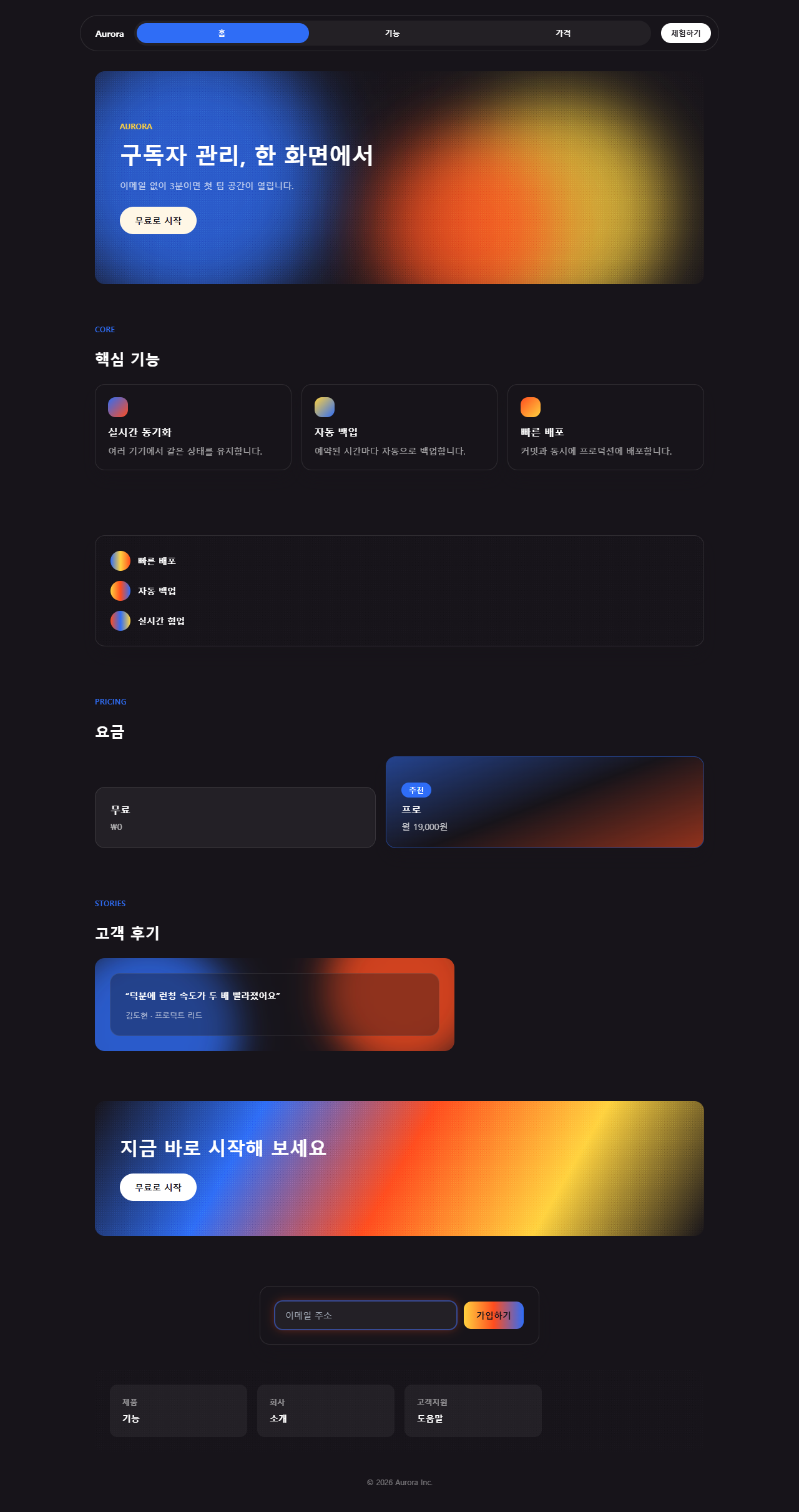
어디서 깨지는가 — 함정
부드러운 곡선은 안 잡힌다
오로라 덩어리를 부드러운 ease 곡선으로만 움직이면 블러 뒤에서 프레임 사이 변화가 너무 작아 애니메이션이 있어도 없는 것처럼 보이는 순간이 생깁니다. 05번 추천 플랜을 처음 만들었을 때 opacity를 .55에서 1로만 오가게 했더니 렌더 측정에서 변한 픽셀의 강도가 0으로 나왔고, 진폭을 .3에서 1로 넓히고 타이밍을 steps(4, jump-none)로 바꾸고서야 여섯 프레임 이상에서 잡혔습니다. <ul>이나 <figure>·<blockquote> 같은 시맨틱 태그를 그대로 쓰는 것도 함정입니다. 브라우저 기본 여백이 남아 있으면 320px 폭에서 세로로 넘치는데, 04번 기능 목록과 06번 후기 카드가 실제로 이 문제를 겪었고 margin: 0을 명시적으로 넣은 뒤에야 스크롤바가 사라졌습니다. 이번 편의 부품 아홉 개와 원페이지 전체 소스를 묶은 압축 파일은 비밀번호 u7eepwrp를 넣어야 열리며, 버튼을 누르면 바로 내려받습니다.
마지막 함정은 대비
마지막 함정은 대비입니다. 오로라 덩어리의 채도를 낮추거나 배경을 밝은 색으로 바꾸면 그레인과 겹쳐 글자 대비가 무너지기 쉬우므로, 글자가 올라가는 자리는 항상 잉크색 고정 배경 위에 두는 편이 안전합니다. 그레인을 얹은 큰 면이 통째로 이미지로 바뀌는 순간은 배경을 이미지로만 다룰 수 있는 뉴스레터 디자인 템플릿에서 이미 일상입니다.
접근성
동작 줄이기에서는 정지 상태로
09번 버튼의 그라디언트 흐름과 01·06·07·08번의 오브·CTA 흐름·그레인 점프는 전부 MDN prefers-reduced-motion 문서가 정의한 미디어 쿼리로 감쌌고, 동작 줄이기를 켠 방문자에게는 정지된 그라디언트와 정지된 그레인만 보입니다.
구형 사파리 대비
03번 카드 테두리처럼 mask-composite를 쓰는 항목은 MDN mask-composite 문서를 참고해 구형 사파리용 -webkit-mask-composite: xor도 함께 넣었습니다.
대비를 지키는 글자 배치
인용문·버튼 글자는 전부 잉크색 배경 위 흰 글자나 크림색 배경 위 잉크색 글자로만 써서 그라디언트가 흘러가는 동안에도 대비가 무너지지 않게 했습니다. 이 스타일 말고 다른 홈페이지 트렌드도 궁금하다면 디자인 트렌드 카테고리를 훑어보시고, 이 사이트 전반의 성격은 소개 페이지에서 확인할 수 있습니다.
FAQ
오로라 그라디언트는 CSS만으로 만들 수 있나요?
네, 이 편의 부품 아홉 개는 전부 JS 0줄입니다. 09번 버튼의 호버 반응도 :hover·:focus-visible 의사 클래스만으로 처리했고, 자바스크립트는 데모를 캡처할 때 강제로 애니메이션을 재생시키는 용도로만 잠깐 씁니다.
그레인 텍스처는 이미지 파일을 써야 하나요?
아니요. 이 편의 그레인은 아주 작은 반지름의 radial-gradient 점 두 개를 겹치고 background-size를 3~5px로 촘촘하게 반복하는 방식이라 이미지 요청이 한 번도 없습니다. 08번 푸터처럼 점의 위치를 프레임마다 옮기면 필름 그레인 특유의 지지직거리는 느낌도 CSS만으로 흉내 낼 수 있습니다.
어두운 배경이 아니어도 오로라 그라디언트를 쓸 수 있나요?
밝은 배경 위에서도 오로라 덩어리 자체는 그대로 쓸 수 있지만, 이 편의 아홉 개 부품은 전부 잉크색 짙은 배경을 기본값으로 삼았습니다. 밝은 배경에서는 덩어리의 투명도를 낮추고 그레인의 혼합 모드를 overlay 대신 multiply로 바꿔야 같은 정도의 질감이 유지됩니다. 같은 빛을 금속 질감으로 밀고 가면 Y2K 크롬 홀로그램 랜딩의 번쩍이는 면 처리가 됩니다.
이런 글이랑 어울려요
 디자인 트렌드벤토 그리드 디자인 — 요즘 핀터레스트에서 유행하는 부품 9개
 디자인 트렌드다크 SaaS 랜딩에 스며든 리니어 디자인 시스템 9종
 디자인 트렌드키네틱 타이포그래피 랜딩페이지, 코드로 뜯어봤다
 디자인 트렌드클레이모피즘 랜딩 UI 키트, 통통한 섹션 9개
 디자인 트렌드네오브루탈리즘 UI 랜딩 부품 9개, 그림자는 안 번진다
 디자인 트렌드번쩍이는 Y2K 웹 디자인, 크롬·홀로그램 부품 9개
 디자인 트렌드HUD 디자인, 화면이 나를 겨누는 랜딩 부품 9개
 디자인 트렌드뉴모피즘 디자인 랜딩 UI 키트, 그림자 두 겹 섹션 9개
 디자인 트렌드종이 질감 디자인 랜딩 키트, 오려 붙인 섹션 9개
 디자인 트렌드맥시멀리즘 디자인 랜딩 키트, 겹쳐 붙인 콜라주 9종