종이 질감 디자인 랜딩 키트, 오려 붙인 섹션 9개
종이 질감 디자인은 색종이를 가위로 오려 붙인 것처럼 면마다 흐림 없는 그림자로 두께를 주고, 색은 다섯 가지 안에서만 쓰는 스타일입니다. 종이 사진을 깔지 않고 그림자 값 하나만으로 종이처럼 보이게 만드는 것이 전부입니다.
핀터레스트에서 "paper cutout"으로 저장되는 화면들은 대부분 포토샵으로 만든 이미지라 웹으로 옮기면 무거워집니다. 여기서는 이미지를 한 장도 쓰지 않고 CSS 값만으로 같은 인상을 냈습니다. 아래 원페이지를 스크롤하면서 종이처럼 보이는 이유가 어디에 있는지 먼저 찾아보세요.

저 페이지를 이루는 부품 아홉 개를 하나씩 떼어내 아래 격자에 늘어놓았습니다. 순서는 인기순이 아니라 종이 질감 배경 위에서 종이 한 장이 겪는 차례를 따랐습니다. 오려서 올리고, 자리를 옮기고, 여러 장을 겹치고, 스티커로 찍고, 모서리를 접고, 테이프로 붙이고, 찢고, 흘려보내고, 마지막으로 눌립니다. 같은 키트 축에서 광택을 없애고 여백으로 믿음을 주는 쪽은 saas 랜딩페이지 신뢰감 디자인에, 반대로 질감을 더 쌓는 쪽은 맥시멀리즘 콜라주에 있습니다. 세 키트를 나란히 놓고 질감의 농도만 골라 쓰면 랜딩의 톤이 섞이지 않습니다. 그림자 방향을 한쪽으로 통일했기 때문에 섹션을 몇 개로 늘려도 종이가 한 장에서 나온 것처럼 보이고, 종이 두 장이 겹치는 곳마다 아래 쪽을 한 단계 어둡게 정하는 규칙까지 지켰습니다.
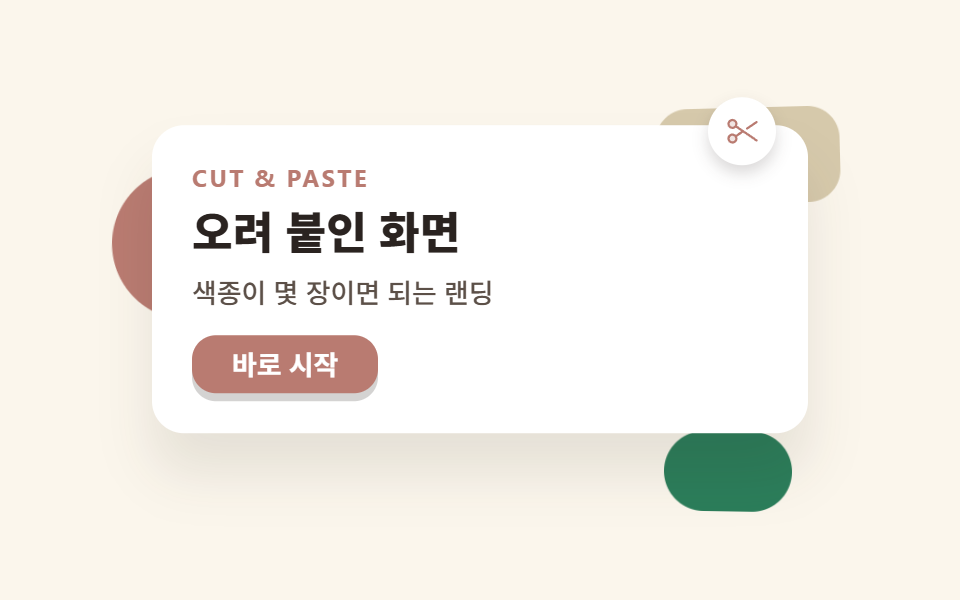 01 hero-paper
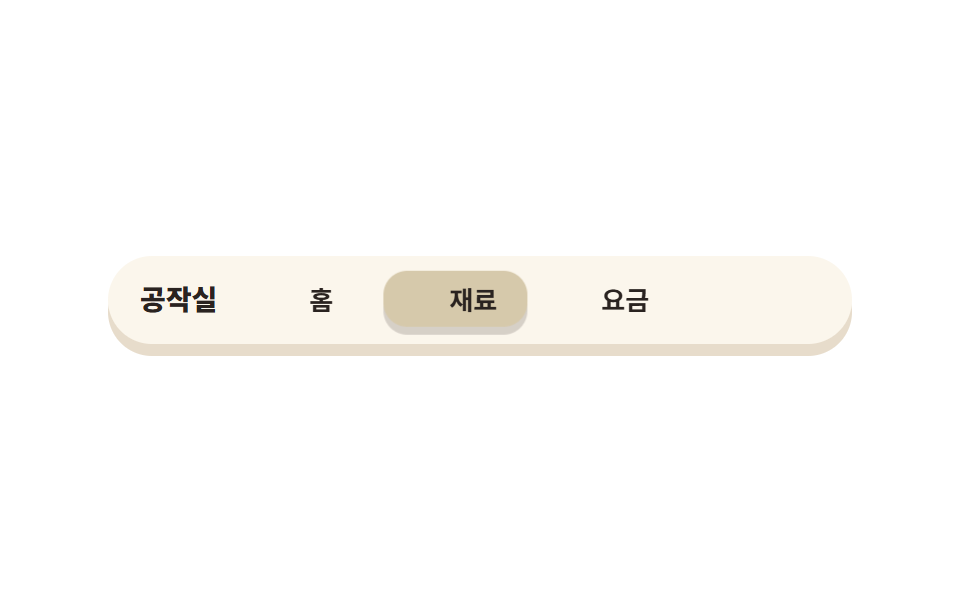 02 nav-paper
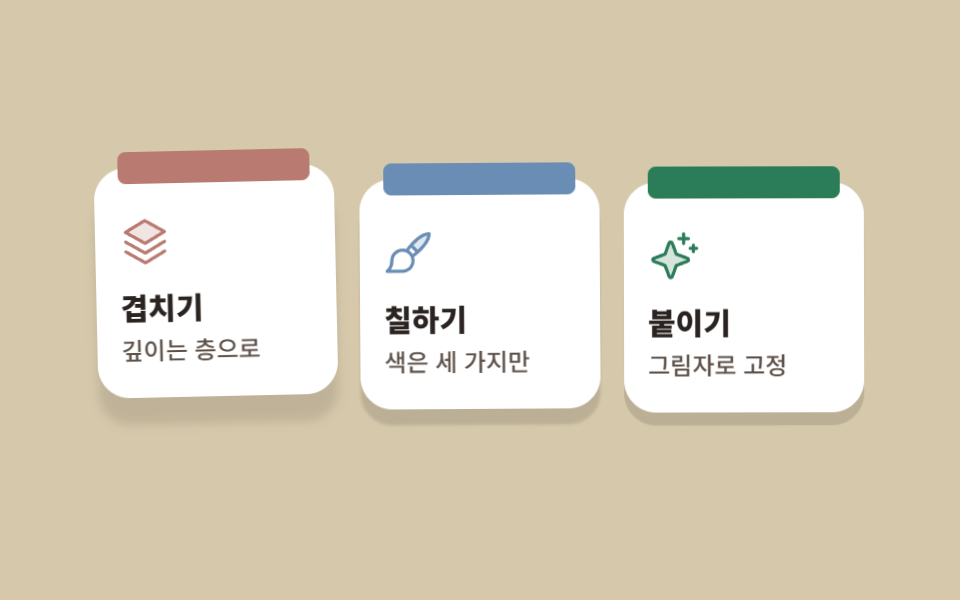 03 card-grid-paper
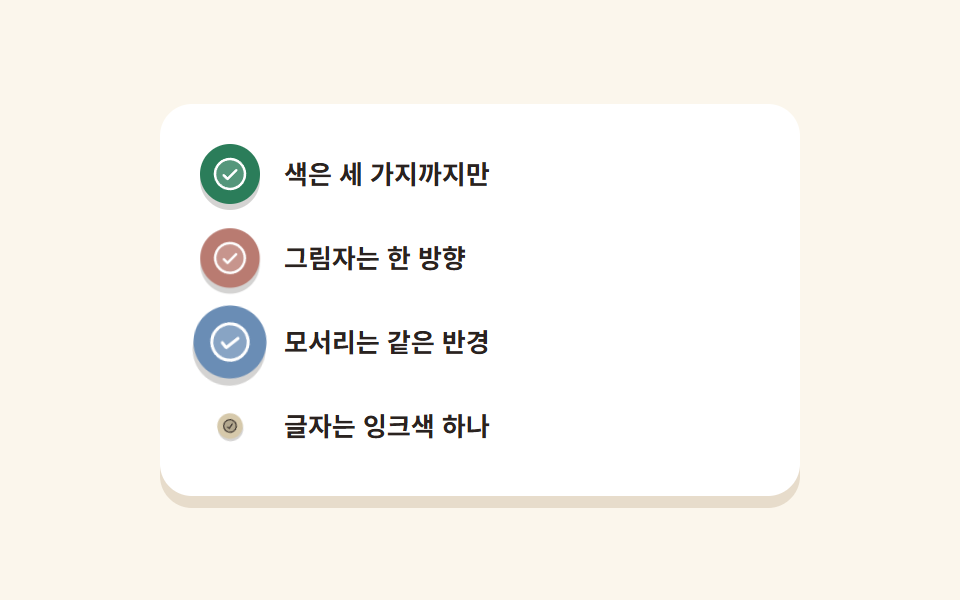 04 feature-list-paper
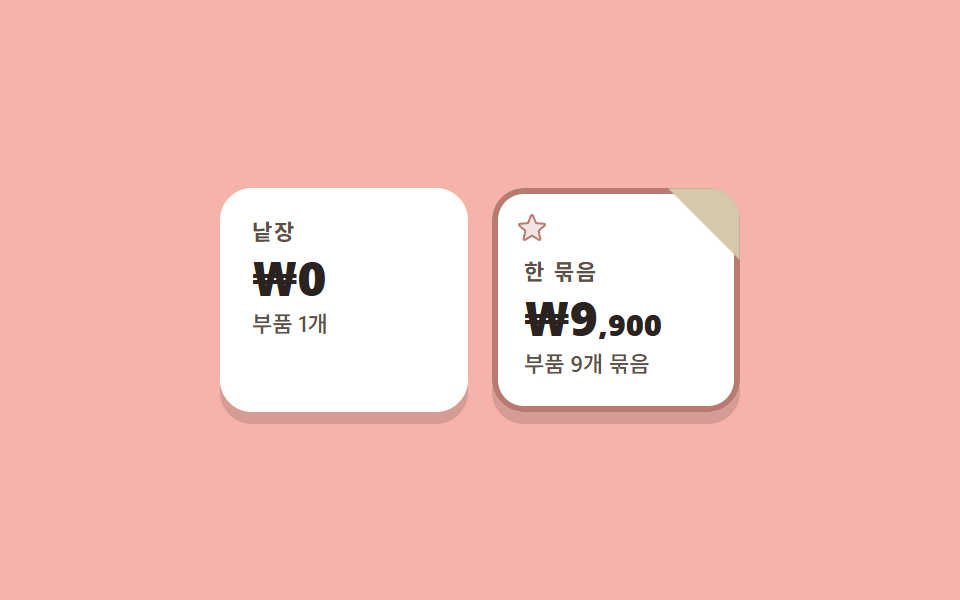 05 pricing-paper
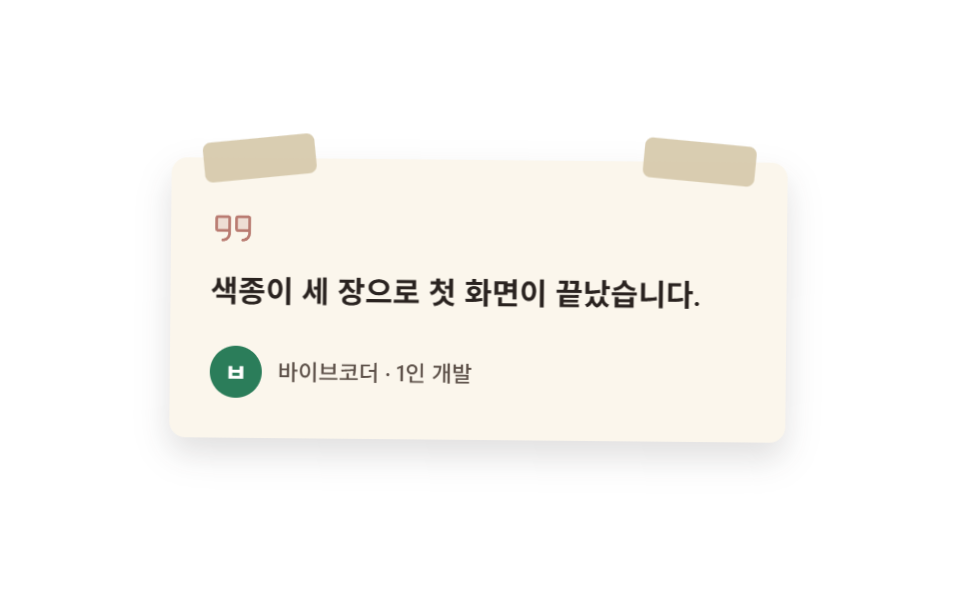 06 testimonial-paper
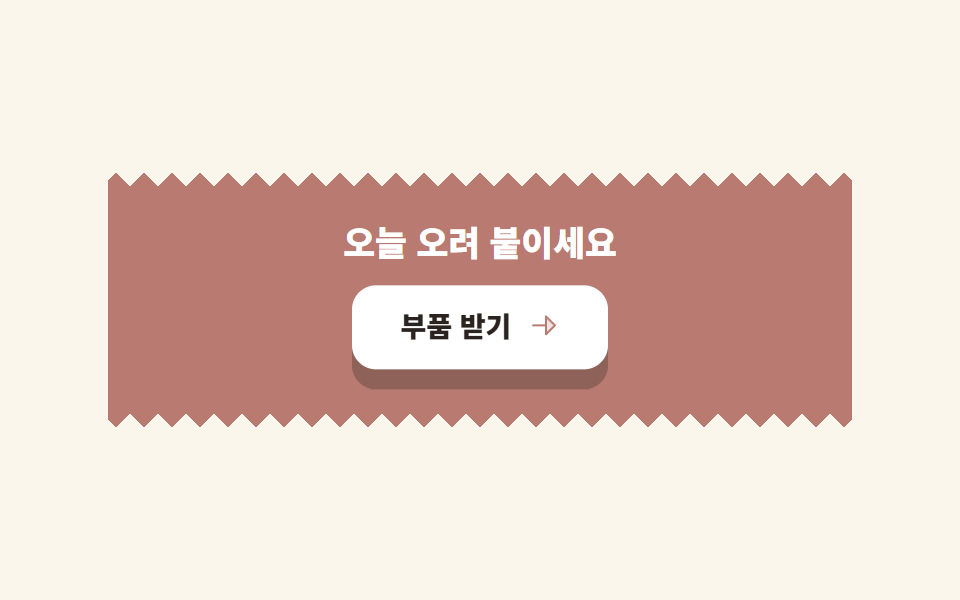 07 cta-band-paper
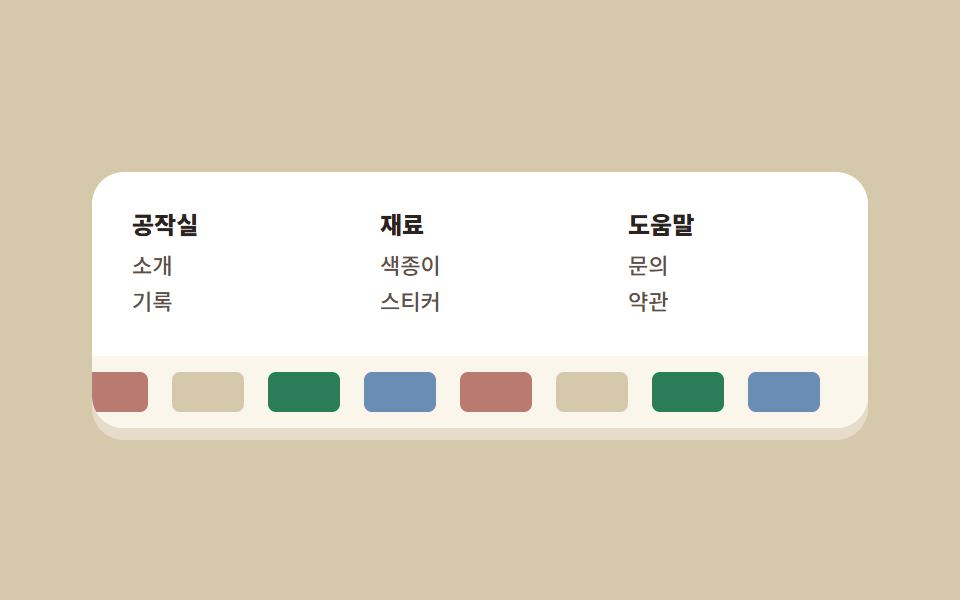 08 footer-paper
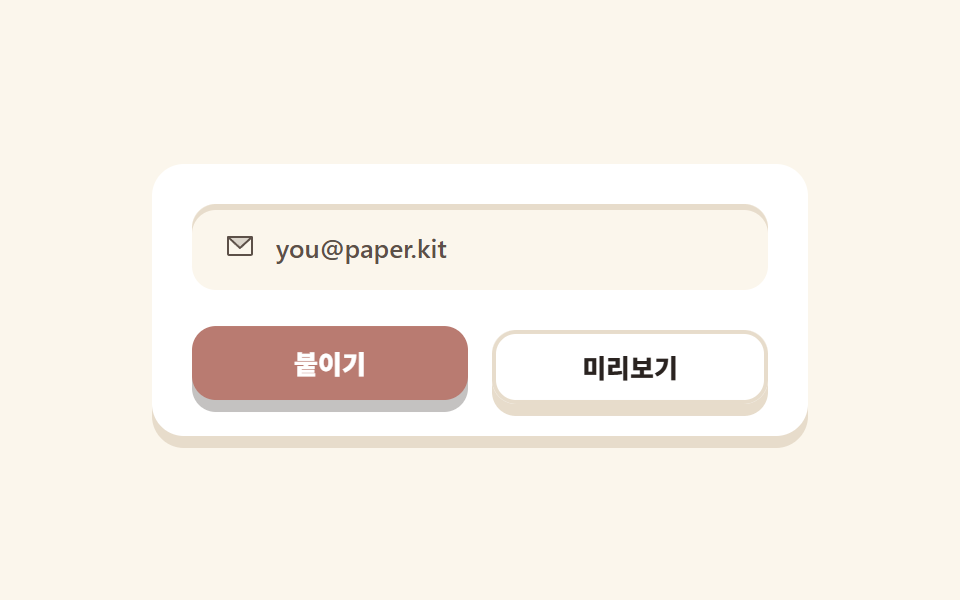 09 buttons-inputs-paper
자동 재생 · 눌러서 해당 항목으로 · 전부 한 zip
- 01 오려 붙인 종이 히어로
- 02 들리는 종이 탭 내비
- 03 색종이 머리띠 카드 격자
- 04 스티커 체크 기능 목록
- 05 모서리 접힌 요금제
- 06 테이프로 붙인 후기
- 07 찢은 가장자리 CTA 밴드
- 08 색종이 띠 푸터
- 09 종이 버튼·인풋
01오려 붙인 종이 히어로
페이퍼 디자인에서 무엇이 보이나
흰 종이 한 장이 떠오르는 동안 뒤에 깔린 색종이 세 조각은 반대로 내려앉습니다. 두 방향이 엇갈려야 겹친 층이 층으로 보입니다.
<main class="stage">
<section class="heropaper">
<span class="heropaper__scrap heropaper__scrap--coral" aria-hidden="true"></span>
<span class="heropaper__scrap heropaper__scrap--butter" aria-hidden="true"></span>
<span class="heropaper__scrap heropaper__scrap--leaf" aria-hidden="true"></span>
<div class="heropaper__sheet">
<span class="heropaper__badge" aria-hidden="true">
<svg xmlns="http://www.w3.org/2000/svg" width="1em" height="1em" viewBox="0 0 256 256"><g fill="currentColor"><path d="M40.2 95.8a28 28 0 1 1 39.6 0a28 28 0 0 1-39.6 0m0 64.4a28 28 0 1 0 39.6 0a28 28 0 0 0-39.6 0" opacity=".2"/><path d="M157.73 113.13a8 8 0 0 1 2.09-11.13l67.66-46.3a8 8 0 0 1 9 13.21l-67.67 46.3a7.9 7.9 0 0 1-4.51 1.4a8 8 0 0 1-6.57-3.48m80.87 85.09a8 8 0 0 1-11.12 2.08L136 137.7l-42.51 29.08a36 36 0 1 1-9-13.19L121.83 128l-37.39-25.59a35.86 35.86 0 1 1 9-13.19l143 97.87a8 8 0 0 1 2.16 11.13M80 180a20 20 0 1 0-5.86 14.14A19.85 19.85 0 0 0 80 180m-5.86-89.87a20 20 0 1 0-28.28 0a19.85 19.85 0 0 0 28.28 0"/></g></svg>
</span>
<p class="heropaper__eyebrow">Cut & paste</p>
<h1 class="heropaper__title">오려 붙인 화면</h1>
<p class="heropaper__desc">색종이 몇 장이면 되는 랜딩</p>
<button class="heropaper__cta" type="button">바로 시작</button>
</div>
</section>
</main>@use "../../../../site/static/demo-tokens" as *;
// 페이퍼컷 팔레트 — 따뜻한 오프화이트 두 장 + 오려낸 색종이 다섯 색.
// 대비 실측(WCAG 상대휘도 직접 계산): ink/paper 14.34:1 · stone/paper 7.23:1 · sheet/coral 4.93:1
$paper-base: #fbf6ec;
$paper-sheet: #ffffff;
$paper-ink: #2a2320;
$paper-stone: #5c5048;
$paper-coral: #b97b71;
$paper-sky: #6a8db5;
$paper-leaf: #2b7d5a;
$paper-butter: #d6c9ab;
$paper-edge: #e7dccb;
$duration: $dur-loop; // 종이 한 장이 들렸다 내려앉는 한 주기
$easing: $ease-out; // 종이는 튀지 않는다. 되돌아올 때도 같은 속도
$color: $paper-coral; // 오려낸 색종이 조각의 대표색
@include stage($paper-base);
.heropaper {
position: relative;
width: clamp(216px, 74vw, 328px);
isolation: isolate;
}
// 뒤에 깔리는 색종이 조각 — 각자 다른 각도로 오려 붙인 것처럼
.heropaper__scrap {
position: absolute;
z-index: 0;
animation: scrapDrift $duration $easing infinite;
}
.heropaper__scrap--coral {
left: -20px;
top: 4px;
width: 76px;
height: 76px;
border-radius: 50%;
background: $paper-coral;
}
.heropaper__scrap--butter {
right: -16px;
top: -20px;
width: 92px;
height: 48px;
border-radius: $r-card;
background: $paper-butter;
transform: rotate(-8deg);
animation-delay: -.66s;
}
.heropaper__scrap--leaf {
right: 8px;
bottom: -24px;
width: 64px;
height: 40px;
border-radius: $r-pill;
background: $paper-leaf;
animation-delay: -1.33s;
}
// 맨 위 흰 종이 — 들어올려지면 그림자가 같이 자란다
.heropaper__sheet {
position: relative;
z-index: 1;
box-sizing: border-box;
display: flex;
flex-direction: column;
align-items: flex-start;
gap: $sp-2;
padding: $sp-5;
border-radius: $r-card;
background: $paper-sheet;
box-shadow: 0 10px 18px rgba($paper-ink, .14);
animation: sheetLift $duration $easing infinite;
}
.heropaper__badge {
position: absolute;
top: -14px;
right: $sp-4;
width: 34px;
aspect-ratio: 1;
display: grid;
place-items: center;
border-radius: 50%;
background: $paper-sheet;
color: $paper-coral;
font-size: 18px;
box-shadow: 0 4px 8px rgba($paper-ink, .18);
}
.heropaper__eyebrow {
margin: 0;
color: $paper-coral;
font-weight: 700; font-size: clamp(10px, 2.6vw, 12px); line-height: 1;
font-family: inherit;
letter-spacing: .1em;
text-transform: uppercase;
}
.heropaper__title {
margin: 0;
color: $paper-ink;
font-weight: 800; font-size: clamp(18px, 4.6vw, 26px); line-height: 1.2;
font-family: inherit;
}
.heropaper__desc {
margin: 0;
color: $paper-stone;
font-weight: 500; font-size: clamp(12px, 2.8vw, 14px); line-height: 1.4;
font-family: inherit;
}
.heropaper__cta {
margin-top: $sp-1;
border: 0;
border-radius: $r-control;
background: $paper-coral;
color: $paper-sheet;
padding: $sp-2 $sp-5;
font-weight: 700; font-size: clamp(12px, 2.8vw, 14px); line-height: 1;
font-family: inherit;
box-shadow: 0 4px 0 rgba($paper-ink, .2);
}
.heropaper__cta:focus-visible {
outline: 3px solid $paper-sky;
outline-offset: 2px;
}
// 데모: 흰 종이가 올라가는 동안 뒤 색종이는 반대 위상으로 내려간다 — 겹친 층이 분리되는 게 보인다
@keyframes sheetLift {
0%, 100% { transform: translateY(0); box-shadow: 0 10px 18px rgba($paper-ink, .14); }
50% { transform: translateY(-12px); box-shadow: 0 22px 28px rgba($paper-ink, .1); }
}
@keyframes scrapDrift {
0%, 100% { transform: translateY(0) rotate(-2deg); }
50% { transform: translateY(8px) rotate(3deg); }
}
@media (max-width: 340px), (max-height: 220px) {
.heropaper { width: 200px; }
.heropaper__sheet { padding: $sp-3 $sp-4; gap: $sp-1; }
.heropaper__eyebrow { display: none; }
.heropaper__title { font-size: 16px; line-height: 1.15; }
.heropaper__desc { display: none; }
.heropaper__cta { padding: $sp-1 $sp-4; margin-top: 0; }
.heropaper__badge { width: 24px; font-size: 13px; top: -10px; right: $sp-2; }
.heropaper__scrap--coral { width: 48px; height: 48px; left: -12px; }
.heropaper__scrap--butter { width: 56px; height: 32px; right: -8px; top: -12px; }
.heropaper__scrap--leaf { width: 44px; height: 26px; bottom: -14px; }
}
@media (prefers-reduced-motion: reduce) {
.heropaper__sheet, .heropaper__scrap { animation: none !important; transform: none; }
}html, body {
margin: 0;
overflow: hidden;
}
.stage {
box-sizing: border-box;
min-height: 100vh;
display: grid;
place-items: center;
margin: 0;
background: #fbf6ec;
font-family: -apple-system, "Segoe UI", "Noto Sans KR", sans-serif;
padding: clamp(8px, 4vw, 24px);
}
.heropaper {
position: relative;
width: clamp(216px, 74vw, 328px);
isolation: isolate;
}
.heropaper__scrap {
position: absolute;
z-index: 0;
animation: scrapDrift 2s ease-out infinite;
}
.heropaper__scrap--coral {
left: -20px;
top: 4px;
width: 76px;
height: 76px;
border-radius: 50%;
background: #b97b71;
}
.heropaper__scrap--butter {
right: -16px;
top: -20px;
width: 92px;
height: 48px;
border-radius: 16px;
background: #d6c9ab;
transform: rotate(-8deg);
animation-delay: -0.66s;
}
.heropaper__scrap--leaf {
right: 8px;
bottom: -24px;
width: 64px;
height: 40px;
border-radius: 999px;
background: #2b7d5a;
animation-delay: -1.33s;
}
.heropaper__sheet {
position: relative;
z-index: 1;
box-sizing: border-box;
display: flex;
flex-direction: column;
align-items: flex-start;
gap: 8px;
padding: 20px;
border-radius: 16px;
background: #ffffff;
box-shadow: 0 10px 18px rgba(42, 35, 32, 0.14);
animation: sheetLift 2s ease-out infinite;
}
.heropaper__badge {
position: absolute;
top: -14px;
right: 16px;
width: 34px;
aspect-ratio: 1;
display: grid;
place-items: center;
border-radius: 50%;
background: #ffffff;
color: #b97b71;
font-size: 18px;
box-shadow: 0 4px 8px rgba(42, 35, 32, 0.18);
}
.heropaper__eyebrow {
margin: 0;
color: #b97b71;
font-weight: 700;
font-size: clamp(10px, 2.6vw, 12px);
line-height: 1;
font-family: inherit;
letter-spacing: 0.1em;
text-transform: uppercase;
}
.heropaper__title {
margin: 0;
color: #2a2320;
font-weight: 800;
font-size: clamp(18px, 4.6vw, 26px);
line-height: 1.2;
font-family: inherit;
}
.heropaper__desc {
margin: 0;
color: #5c5048;
font-weight: 500;
font-size: clamp(12px, 2.8vw, 14px);
line-height: 1.4;
font-family: inherit;
}
.heropaper__cta {
margin-top: 4px;
border: 0;
border-radius: 12px;
background: #b97b71;
color: #ffffff;
padding: 8px 20px;
font-weight: 700;
font-size: clamp(12px, 2.8vw, 14px);
line-height: 1;
font-family: inherit;
box-shadow: 0 4px 0 rgba(42, 35, 32, 0.2);
}
.heropaper__cta:focus-visible {
outline: 3px solid #6a8db5;
outline-offset: 2px;
}
@keyframes sheetLift {
0%, 100% {
transform: translateY(0);
box-shadow: 0 10px 18px rgba(42, 35, 32, 0.14);
}
50% {
transform: translateY(-12px);
box-shadow: 0 22px 28px rgba(42, 35, 32, 0.1);
}
}
@keyframes scrapDrift {
0%, 100% {
transform: translateY(0) rotate(-2deg);
}
50% {
transform: translateY(8px) rotate(3deg);
}
}
@media (max-width: 340px), (max-height: 220px) {
.heropaper {
width: 200px;
}
.heropaper__sheet {
padding: 12px 16px;
gap: 4px;
}
.heropaper__eyebrow {
display: none;
}
.heropaper__title {
font-size: 16px;
line-height: 1.15;
}
.heropaper__desc {
display: none;
}
.heropaper__cta {
padding: 4px 16px;
margin-top: 0;
}
.heropaper__badge {
width: 24px;
font-size: 13px;
top: -10px;
right: 8px;
}
.heropaper__scrap--coral {
width: 48px;
height: 48px;
left: -12px;
}
.heropaper__scrap--butter {
width: 56px;
height: 32px;
right: -8px;
top: -12px;
}
.heropaper__scrap--leaf {
width: 44px;
height: 26px;
bottom: -14px;
}
}
@media (prefers-reduced-motion: reduce) {
.heropaper__sheet, .heropaper__scrap {
animation: none !important;
transform: none;
}
}import type { CSSProperties } from "react";
import styles from "./HeroPaper.module.scss";
export type HeroPaperProps = {
eyebrow?: string;
title?: string;
desc?: string;
cta?: string;
/** 한 주기(기본 2000ms) */
duration?: number;
easing?: string;
color?: string;
};
type Vars = CSSProperties & { "--duration"?: string; "--easing"?: string; "--color"?: string };
export default function HeroPaper({
eyebrow = "Cut & paste",
title = "오려 붙인 화면",
desc = "색종이 몇 장이면 되는 랜딩",
cta = "바로 시작",
duration = 2000,
easing = "ease-out",
color = "#cc3d26",
}: HeroPaperProps) {
const vars: Vars = { "--duration": `${duration}ms`, "--easing": easing, "--color": color };
return (
<section className={styles.heropaper} style={vars}>
<span className={`${styles.scrap} ${styles.scrapCoral}`} aria-hidden="true" />
<span className={`${styles.scrap} ${styles.scrapButter}`} aria-hidden="true" />
<span className={`${styles.scrap} ${styles.scrapLeaf}`} aria-hidden="true" />
<div className={styles.sheet}>
<span className={styles.badge} aria-hidden="true">
<svg xmlns="http://www.w3.org/2000/svg" width="1em" height="1em" viewBox="0 0 256 256"><g fill="currentColor"><path d="M40.2 95.8a28 28 0 1 1 39.6 0a28 28 0 0 1-39.6 0m0 64.4a28 28 0 1 0 39.6 0a28 28 0 0 0-39.6 0" opacity=".2"/><path d="M157.73 113.13a8 8 0 0 1 2.09-11.13l67.66-46.3a8 8 0 0 1 9 13.21l-67.67 46.3a7.9 7.9 0 0 1-4.51 1.4a8 8 0 0 1-6.57-3.48m80.87 85.09a8 8 0 0 1-11.12 2.08L136 137.7l-42.51 29.08a36 36 0 1 1-9-13.19L121.83 128l-37.39-25.59a35.86 35.86 0 1 1 9-13.19l143 97.87a8 8 0 0 1 2.16 11.13M80 180a20 20 0 1 0-5.86 14.14A19.85 19.85 0 0 0 80 180m-5.86-89.87a20 20 0 1 0-28.28 0a19.85 19.85 0 0 0 28.28 0"/></g></svg>
</span>
<p className={styles.eyebrow}>{eyebrow}</p>
<h1 className={styles.title}>{title}</h1>
<p className={styles.desc}>{desc}</p>
<button type="button" className={styles.cta}>{cta}</button>
</div>
</section>
);
}01 · 오려 붙인 종이 히어로 — 측정 누적면적 14.784% · 움직인 프레임 23/23GODRICH 원작 · zip 에 SCSS·React 포함 · 비밀번호 보기
코드에서 볼 곳
그림자는 종이가 올라간 만큼 넓고 옅어집니다.
.heropaper__sheet {
  box-shadow: 0 10px 18px rgba(42, 35, 32, .14);
  animation: sheetLift 2s ease-out infinite;
}
.heropaper__scrap { animation: scrapDrift 2s ease-out infinite; }
.heropaper__scrap--butter { animation-delay: -.66s; }
.heropaper__scrap--leaf   { animation-delay: -1.33s; }

@keyframes sheetLift {
  0%, 100% { transform: translateY(0);      box-shadow: 0 10px 18px rgba(42, 35, 32, .14); }
  50%      { transform: translateY(-12px);  box-shadow: 0 22px 28px rgba(42, 35, 32, .1); }
}
@keyframes scrapDrift {
  0%, 100% { transform: translateY(0) rotate(-2deg); }
  50%      { transform: translateY(8px) rotate(3deg); }
}
02들리는 종이 탭 내비
화면에서 일어나는 일
밑줄 대신 노란 종이 조각이 탭 뒤에서 한 칸씩 뛰어 옮겨 갑니다.
<main class="stage">
  <nav class="navpaper" aria-label="데모 내비게이션">
    <span class="navpaper__brand">공작실</span>
    <div class="navpaper__tabs">
      <span class="navpaper__chip" aria-hidden="true"></span>
      <span class="navpaper__tab">홈</span>
      <span class="navpaper__tab">재료</span>
      <span class="navpaper__tab">요금</span>
    </div>
  </nav>
</main>
@use "../../../../site/static/demo-tokens" as *;
// 페이퍼컷 팔레트 (01 과 같은 값. zip 에서는 tokens.css 한 곳을 링크한다)
$paper-base: #fbf6ec;
$paper-sheet: #ffffff;
$paper-ink: #2a2320;
$paper-stone: #5c5048;
$paper-coral: #b97b71;
$paper-sky: #6a8db5;
$paper-leaf: #2b7d5a;
$paper-butter: #d6c9ab;
$paper-edge: #e7dccb;
$duration: $dur-loop; // 칩이 세 탭을 왕복하는 한 주기
$easing: $ease-spring; // 종이 조각이 자리에 앉는 느낌
$color: $paper-butter; // 들린 탭 종이의 색
$step: 76px; // 탭 하나 + 간격. 칩 이동량은 이 값의 배수뿐이다
@include stage($paper-sheet);
.navpaper {
box-sizing: border-box;
display: flex;
align-items: center;
gap: $sp-4;
width: clamp(268px, 82vw, 372px);
padding: $sp-3 $sp-4;
border-radius: $r-pill;
background: $paper-base;
box-shadow: 0 6px 0 $paper-edge;
}
.navpaper__brand {
flex: 0 0 auto;
color: $paper-ink;
font-weight: 800; font-size: 14px; line-height: 1;
font-family: inherit;
white-space: nowrap;
}
.navpaper__tabs {
position: relative;
display: flex;
gap: $sp-1;
--step: #{$step};
}
// 들린 종이 칩 — 탭 뒤에서 움직인다. 탭은 고정 폭이라 이동량과 실제 렌더 폭이 어긋나지 않는다 (BD19)
.navpaper__chip {
position: absolute;
left: 0;
top: -4px;
width: 72px;
height: calc(100% + 8px);
border-radius: $r-control;
background: $color;
box-shadow: 0 4px 0 rgba($paper-ink, .18);
animation: chipHop $duration $easing infinite;
}
.navpaper__tab {
position: relative;
z-index: 1;
flex: 0 0 72px;
text-align: center;
color: $paper-ink;
font-weight: 700; font-size: 13px; line-height: 1.6;
font-family: inherit;
white-space: nowrap;
}
// 데모: 0 → 1 → 2 → 1 → 0 으로 왕복한다. 끝에서 처음으로 순간이동하지 않는다
@keyframes chipHop {
0% { transform: translateX(0) translateY(0); }
12% { transform: translateX(0) translateY(-5px); }
25% { transform: translateX(var(--step)) translateY(0); }
37% { transform: translateX(var(--step)) translateY(-5px); }
50% { transform: translateX(calc(var(--step) * 2)) translateY(0); }
62% { transform: translateX(calc(var(--step) * 2)) translateY(-5px); }
75% { transform: translateX(var(--step)) translateY(0); }
87% { transform: translateX(var(--step)) translateY(-5px); }
100% { transform: translateX(0) translateY(0); }
}
@media (max-width: 340px), (max-height: 220px) {
.navpaper { width: 244px; gap: $sp-2; padding: $sp-2 $sp-3; }
.navpaper__brand { font-size: 12px; }
.navpaper__tabs { --step: 56px; }
.navpaper__chip { width: 52px; }
.navpaper__tab { flex: 0 0 52px; font-size: 11px; }
}
@media (prefers-reduced-motion: reduce) {
.navpaper__chip { animation: none !important; transform: none; }
}html, body {
margin: 0;
overflow: hidden;
}
.stage {
box-sizing: border-box;
min-height: 100vh;
display: grid;
place-items: center;
margin: 0;
background: #ffffff;
font-family: -apple-system, "Segoe UI", "Noto Sans KR", sans-serif;
padding: clamp(8px, 4vw, 24px);
}
.navpaper {
box-sizing: border-box;
display: flex;
align-items: center;
gap: 16px;
width: clamp(268px, 82vw, 372px);
padding: 12px 16px;
border-radius: 999px;
background: #fbf6ec;
box-shadow: 0 6px 0 #e7dccb;
}
.navpaper__brand {
flex: 0 0 auto;
color: #2a2320;
font-weight: 800;
font-size: 14px;
line-height: 1;
font-family: inherit;
white-space: nowrap;
}
.navpaper__tabs {
position: relative;
display: flex;
gap: 4px;
--step: 76px;
}
.navpaper__chip {
position: absolute;
left: 0;
top: -4px;
width: 72px;
height: calc(100% + 8px);
border-radius: 12px;
background: #d6c9ab;
box-shadow: 0 4px 0 rgba(42, 35, 32, 0.18);
animation: chipHop 2s cubic-bezier(0.2, 0.8, 0.2, 1) infinite;
}
.navpaper__tab {
position: relative;
z-index: 1;
flex: 0 0 72px;
text-align: center;
color: #2a2320;
font-weight: 700;
font-size: 13px;
line-height: 1.6;
font-family: inherit;
white-space: nowrap;
}
@keyframes chipHop {
0% {
transform: translateX(0) translateY(0);
}
12% {
transform: translateX(0) translateY(-5px);
}
25% {
transform: translateX(var(--step)) translateY(0);
}
37% {
transform: translateX(var(--step)) translateY(-5px);
}
50% {
transform: translateX(calc(var(--step) * 2)) translateY(0);
}
62% {
transform: translateX(calc(var(--step) * 2)) translateY(-5px);
}
75% {
transform: translateX(var(--step)) translateY(0);
}
87% {
transform: translateX(var(--step)) translateY(-5px);
}
100% {
transform: translateX(0) translateY(0);
}
}
@media (max-width: 340px), (max-height: 220px) {
.navpaper {
width: 244px;
gap: 8px;
padding: 8px 12px;
}
.navpaper__brand {
font-size: 12px;
}
.navpaper__tabs {
--step: 56px;
}
.navpaper__chip {
width: 52px;
}
.navpaper__tab {
flex: 0 0 52px;
font-size: 11px;
}
}
@media (prefers-reduced-motion: reduce) {
.navpaper__chip {
animation: none !important;
transform: none;
}
}import type { CSSProperties } from "react";
import styles from "./NavPaper.module.scss";
export type NavPaperProps = {
brand?: string;
/** 탭 이름 3개. 칩은 이 개수 안에서만 왕복한다 */
tabs?: string[];
/** 한 주기(기본 2000ms) */
duration?: number;
easing?: string;
color?: string;
/** 탭 하나 + 간격. 칩 이동량은 이 값의 배수뿐이다 */
step?: number;
};
type Vars = CSSProperties & {
"--duration"?: string; "--easing"?: string; "--color"?: string; "--step"?: string;
};
export default function NavPaper({
brand = "공작실",
tabs = ["홈", "재료", "요금"],
duration = 2000,
easing = "cubic-bezier(.2,.8,.2,1)",
color = "#f6c453",
step = 76,
}: NavPaperProps) {
const vars: Vars = {
"--duration": `${duration}ms`, "--easing": easing, "--color": color, "--step": `${step}px`,
};
return (
<nav className={styles.navpaper} style={vars} aria-label="데모 내비게이션">
<span className={styles.brand}>{brand}</span>
<div className={styles.tabs}>
<span className={styles.chip} aria-hidden="true" />
{tabs.map((t) => <span key={t} className={styles.tab}>{t}</span>)}
</div>
</nav>
);
}02 · 들리는 종이 탭 내비 — 측정 누적면적 5.53% · 움직인 프레임 23/23GODRICH 원작 · zip 에 SCSS·React 포함 · 비밀번호 보기
코드 읽는 법
칸을 옮길 때마다 5px 들렸다 앉기 때문에 미끄러지는 게 아니라 집어서 옮기는 것처럼 보입니다.
.navpaper__tabs { --step: 76px; }        // 탭 폭 72 + 간격 4
.navpaper__tab  { flex: 0 0 72px; }      // 고정 폭이라 이동량과 렌더 폭이 어긋나지 않는다
.navpaper__chip { animation: chipHop 2s cubic-bezier(.2, .8, .2, 1) infinite; }

@keyframes chipHop {
  0%   { transform: translateX(0) translateY(0); }
  12%  { transform: translateX(0) translateY(-5px); }
  25%  { transform: translateX(var(--step)) translateY(0); }
  50%  { transform: translateX(calc(var(--step) * 2)) translateY(0); }
  75%  { transform: translateX(var(--step)) translateY(0); }
  100% { transform: translateX(0) translateY(0); }
}
03색종이 머리띠 카드 격자
어떤 움직임인가
흰 카드 세 장의 위쪽 가장자리에 색종이 띠를 하나씩 얹었습니다. 카드 본체는 전부 흰색이고 색은 띠와 아이콘에만 들어갑니다.
<main class="stage">
  <section class="cardpaper">
    <article class="cardpaper__card cardpaper__card--coral">
      <span class="cardpaper__ic" aria-hidden="true">
        <svg xmlns="http://www.w3.org/2000/svg" width="1em" height="1em" viewBox="0 0 256 256"><g fill="currentColor"><path d="m224 80l-96 56l-96-56l96-56Z" opacity=".2"/><path d="M230.91 172a8 8 0 0 1-2.91 10.91l-96 56a8 8 0 0 1-8.06 0l-96-56A8 8 0 0 1 36 169.09l92 53.65l92-53.65a8 8 0 0 1 10.91 2.91M220 121.09l-92 53.65l-92-53.65a8 8 0 0 0-8 13.82l96 56a8 8 0 0 0 8.06 0l96-56a8 8 0 1 0-8.06-13.82M24 80a8 8 0 0 1 4-6.91l96-56a8 8 0 0 1 8.06 0l96 56a8 8 0 0 1 0 13.82l-96 56a8 8 0 0 1-8.06 0l-96-56A8 8 0 0 1 24 80m23.88 0L128 126.74L208.12 80L128 33.26Z"/></g></svg>
      </span>
      <h2 class="cardpaper__t">겹치기</h2>
      <p class="cardpaper__d">깊이는 층으로</p>
    </article>
    <article class="cardpaper__card cardpaper__card--sky">
      <span class="cardpaper__ic" aria-hidden="true">
        <svg xmlns="http://www.w3.org/2000/svg" width="1em" height="1em" viewBox="0 0 256 256"><g fill="currentColor"><path d="M224 32c0 32.81-31.64 67.43-58.64 91.05A84.4 84.4 0 0 0 133 90.64c23.57-27 58.19-58.64 91-58.64" opacity=".2"/><path d="M232 32a8 8 0 0 0-8-8c-44.08 0-89.31 49.71-114.43 82.63A60 60 0 0 0 32 164c0 30.88-19.54 44.73-20.47 45.37A8 8 0 0 0 16 224h76a60 60 0 0 0 57.37-77.57C182.3 121.31 232 76.08 232 32M92 208H34.63C41.38 198.41 48 183.92 48 164a44 44 0 1 1 44 44m32.42-94.45q5.14-6.66 10.09-12.55A76.2 76.2 0 0 1 155 121.49q-5.9 4.94-12.55 10.09a60.5 60.5 0 0 0-18.03-18.03m42.7-2.68a92.6 92.6 0 0 0-22-22c31.78-34.53 55.75-45 69.9-47.91c-2.85 14.16-13.37 38.13-47.9 69.91"/></g></svg>
      </span>
      <h2 class="cardpaper__t">칠하기</h2>
      <p class="cardpaper__d">색은 세 가지만</p>
    </article>
    <article class="cardpaper__card cardpaper__card--leaf">
      <span class="cardpaper__ic" aria-hidden="true">
        <svg xmlns="http://www.w3.org/2000/svg" width="1em" height="1em" viewBox="0 0 256 256"><g fill="currentColor"><path d="m194.82 151.43l-55.09 20.3l-20.3 55.09a7.92 7.92 0 0 1-14.86 0l-20.3-55.09l-55.09-20.3a7.92 7.92 0 0 1 0-14.86l55.09-20.3l20.3-55.09a7.92 7.92 0 0 1 14.86 0l20.3 55.09l55.09 20.3a7.92 7.92 0 0 1 0 14.86" opacity=".2"/><path d="M197.58 129.06L146 110l-19-51.62a15.92 15.92 0 0 0-29.88 0L78 110l-51.62 19a15.92 15.92 0 0 0 0 29.88L78 178l19 51.62a15.92 15.92 0 0 0 29.88 0L146 178l51.62-19a15.92 15.92 0 0 0 0-29.88ZM137 164.22a8 8 0 0 0-4.74 4.74L112 223.85L91.78 169a8 8 0 0 0-4.78-4.78L32.15 144L87 123.78a8 8 0 0 0 4.78-4.78L112 64.15L132.22 119a8 8 0 0 0 4.74 4.74L191.85 144ZM144 40a8 8 0 0 1 8-8h16V16a8 8 0 0 1 16 0v16h16a8 8 0 0 1 0 16h-16v16a8 8 0 0 1-16 0V48h-16a8 8 0 0 1-8-8m104 48a8 8 0 0 1-8 8h-8v8a8 8 0 0 1-16 0v-8h-8a8 8 0 0 1 0-16h8v-8a8 8 0 0 1 16 0v8h8a8 8 0 0 1 8 8"/></g></svg>
      </span>
      <h2 class="cardpaper__t">붙이기</h2>
      <p class="cardpaper__d">그림자로 고정</p>
    </article>
  </section>
</main>@use "../../../../site/static/demo-tokens" as *;
// 페이퍼컷 팔레트
$paper-base: #fbf6ec;
$paper-sheet: #ffffff;
$paper-ink: #2a2320;
$paper-stone: #5c5048;
$paper-coral: #b97b71;
$paper-sky: #6a8db5;
$paper-leaf: #2b7d5a;
$paper-butter: #d6c9ab;
$paper-edge: #e7dccb;
$duration: $dur-loop; // 카드 한 장이 들렸다 앉는 주기. 셋은 같은 주기를 시차로 나눠 쓴다
$easing: $ease-spring; // 위로 뜰 때만 살짝 탄력
$color: $paper-sheet; // 카드 본체는 흰 종이, 색은 머리띠에만
@include stage($paper-butter);
.cardpaper {
display: flex;
gap: $sp-3;
align-items: stretch; // 세 장의 높이를 맞춘다. flex-end 로 두면 글 길이만큼 아랫단이 어긋난다
}
.cardpaper__card {
box-sizing: border-box;
position: relative;
width: 120px;
padding: $sp-6 $sp-3 $sp-4;
border-radius: $r-card;
background: $color;
box-shadow: 0 6px 0 rgba($paper-ink, .16);
animation: cardPeel $duration $easing infinite;
}
// 카드 위 오려 붙인 머리띠 — 카드마다 다른 색종이
.cardpaper__card::before {
content: "";
position: absolute;
left: $sp-3;
right: $sp-3;
top: -8px;
height: $sp-4;
border-radius: $r-xs;
}
.cardpaper__card--coral::before { background: $paper-coral; }
.cardpaper__card--sky::before { background: $paper-sky; }
.cardpaper__card--leaf::before { background: $paper-leaf; }
.cardpaper__card--sky { animation-delay: -.22s; }
.cardpaper__card--leaf { animation-delay: -.44s; }
.cardpaper__ic {
display: block;
font-size: 26px;
line-height: 1;
margin-bottom: $sp-2;
}
.cardpaper__card--coral .cardpaper__ic { color: $paper-coral; }
.cardpaper__card--sky .cardpaper__ic { color: $paper-sky; }
.cardpaper__card--leaf .cardpaper__ic { color: $paper-leaf; }
.cardpaper__t {
margin: 0 0 $sp-1;
color: $paper-ink;
font-weight: 800; font-size: 15px; line-height: 1.2;
font-family: inherit;
}
.cardpaper__d {
margin: 0;
color: $paper-stone;
font-weight: 500; font-size: 12px; line-height: 1.35;
font-family: inherit;
}
// 데모: 세 장이 0.22초씩 어긋나 차례로 들린다 — 겹쳐 붙인 종이가 한 장씩 떨어지는 것처럼
@keyframes cardPeel {
0%, 100% { transform: translateY(0) rotate(0deg); box-shadow: 0 6px 0 rgba($paper-ink, .16); }
45% { transform: translateY(-14px) rotate(-2deg); box-shadow: 0 18px 8px rgba($paper-ink, .12); }
}
@media (max-width: 340px), (max-height: 220px) {
.cardpaper { gap: $sp-2; }
.cardpaper__card { width: 84px; padding: $sp-5 $sp-2 $sp-3; }
.cardpaper__ic { font-size: 20px; margin-bottom: $sp-1; }
.cardpaper__t { font-size: 13px; }
.cardpaper__d { display: none; }
}
@media (prefers-reduced-motion: reduce) {
.cardpaper__card { animation: none !important; transform: none; }
}html, body {
margin: 0;
overflow: hidden;
}
.stage {
box-sizing: border-box;
min-height: 100vh;
display: grid;
place-items: center;
margin: 0;
background: #d6c9ab;
font-family: -apple-system, "Segoe UI", "Noto Sans KR", sans-serif;
padding: clamp(8px, 4vw, 24px);
}
.cardpaper {
display: flex;
gap: 12px;
align-items: stretch;
}
.cardpaper__card {
box-sizing: border-box;
position: relative;
width: 120px;
padding: 24px 12px 16px;
border-radius: 16px;
background: #ffffff;
box-shadow: 0 6px 0 rgba(42, 35, 32, 0.16);
animation: cardPeel 2s cubic-bezier(0.2, 0.8, 0.2, 1) infinite;
}
.cardpaper__card::before {
content: "";
position: absolute;
left: 12px;
right: 12px;
top: -8px;
height: 16px;
border-radius: 4px;
}
.cardpaper__card--coral::before {
background: #b97b71;
}
.cardpaper__card--sky::before {
background: #6a8db5;
}
.cardpaper__card--leaf::before {
background: #2b7d5a;
}
.cardpaper__card--sky {
animation-delay: -0.22s;
}
.cardpaper__card--leaf {
animation-delay: -0.44s;
}
.cardpaper__ic {
display: block;
font-size: 26px;
line-height: 1;
margin-bottom: 8px;
}
.cardpaper__card--coral .cardpaper__ic {
color: #b97b71;
}
.cardpaper__card--sky .cardpaper__ic {
color: #6a8db5;
}
.cardpaper__card--leaf .cardpaper__ic {
color: #2b7d5a;
}
.cardpaper__t {
margin: 0 0 4px;
color: #2a2320;
font-weight: 800;
font-size: 15px;
line-height: 1.2;
font-family: inherit;
}
.cardpaper__d {
margin: 0;
color: #5c5048;
font-weight: 500;
font-size: 12px;
line-height: 1.35;
font-family: inherit;
}
@keyframes cardPeel {
0%, 100% {
transform: translateY(0) rotate(0deg);
box-shadow: 0 6px 0 rgba(42, 35, 32, 0.16);
}
45% {
transform: translateY(-14px) rotate(-2deg);
box-shadow: 0 18px 8px rgba(42, 35, 32, 0.12);
}
}
@media (max-width: 340px), (max-height: 220px) {
.cardpaper {
gap: 8px;
}
.cardpaper__card {
width: 84px;
padding: 20px 8px 12px;
}
.cardpaper__ic {
font-size: 20px;
margin-bottom: 4px;
}
.cardpaper__t {
font-size: 13px;
}
.cardpaper__d {
display: none;
}
}
@media (prefers-reduced-motion: reduce) {
.cardpaper__card {
animation: none !important;
transform: none;
}
}import type { CSSProperties, ReactNode } from "react";
import styles from "./CardGridPaper.module.scss";
export type PaperCard = { title: string; desc: string; band: "coral" | "sky" | "leaf"; icon: "stack" | "brush" | "sparkle" };
export type CardGridPaperProps = {
cards?: PaperCard[];
/** 한 주기(기본 2000ms) */
duration?: number;
easing?: string;
/** 카드 한 장이 늦게 들리는 간격(ms) */
stagger?: number;
};
type Vars = CSSProperties & { "--duration"?: string; "--easing"?: string; "--delay"?: string };
const ICON: Record<PaperCard["icon"], ReactNode> = {
stack: <svg xmlns="http://www.w3.org/2000/svg" width="1em" height="1em" viewBox="0 0 256 256"><g fill="currentColor"><path d="m224 80l-96 56l-96-56l96-56Z" opacity=".2"/><path d="M230.91 172a8 8 0 0 1-2.91 10.91l-96 56a8 8 0 0 1-8.06 0l-96-56A8 8 0 0 1 36 169.09l92 53.65l92-53.65a8 8 0 0 1 10.91 2.91M220 121.09l-92 53.65l-92-53.65a8 8 0 0 0-8 13.82l96 56a8 8 0 0 0 8.06 0l96-56a8 8 0 1 0-8.06-13.82M24 80a8 8 0 0 1 4-6.91l96-56a8 8 0 0 1 8.06 0l96 56a8 8 0 0 1 0 13.82l-96 56a8 8 0 0 1-8.06 0l-96-56A8 8 0 0 1 24 80m23.88 0L128 126.74L208.12 80L128 33.26Z"/></g></svg>,
brush: <svg xmlns="http://www.w3.org/2000/svg" width="1em" height="1em" viewBox="0 0 256 256"><g fill="currentColor"><path d="M224 32c0 32.81-31.64 67.43-58.64 91.05A84.4 84.4 0 0 0 133 90.64c23.57-27 58.19-58.64 91-58.64" opacity=".2"/><path d="M232 32a8 8 0 0 0-8-8c-44.08 0-89.31 49.71-114.43 82.63A60 60 0 0 0 32 164c0 30.88-19.54 44.73-20.47 45.37A8 8 0 0 0 16 224h76a60 60 0 0 0 57.37-77.57C182.3 121.31 232 76.08 232 32M92 208H34.63C41.38 198.41 48 183.92 48 164a44 44 0 1 1 44 44m32.42-94.45q5.14-6.66 10.09-12.55A76.2 76.2 0 0 1 155 121.49q-5.9 4.94-12.55 10.09a60.5 60.5 0 0 0-18.03-18.03m42.7-2.68a92.6 92.6 0 0 0-22-22c31.78-34.53 55.75-45 69.9-47.91c-2.85 14.16-13.37 38.13-47.9 69.91"/></g></svg>,
sparkle: <svg xmlns="http://www.w3.org/2000/svg" width="1em" height="1em" viewBox="0 0 256 256"><g fill="currentColor"><path d="m194.82 151.43l-55.09 20.3l-20.3 55.09a7.92 7.92 0 0 1-14.86 0l-20.3-55.09l-55.09-20.3a7.92 7.92 0 0 1 0-14.86l55.09-20.3l20.3-55.09a7.92 7.92 0 0 1 14.86 0l20.3 55.09l55.09 20.3a7.92 7.92 0 0 1 0 14.86" opacity=".2"/><path d="M197.58 129.06L146 110l-19-51.62a15.92 15.92 0 0 0-29.88 0L78 110l-51.62 19a15.92 15.92 0 0 0 0 29.88L78 178l19 51.62a15.92 15.92 0 0 0 29.88 0L146 178l51.62-19a15.92 15.92 0 0 0 0-29.88ZM137 164.22a8 8 0 0 0-4.74 4.74L112 223.85L91.78 169a8 8 0 0 0-4.78-4.78L32.15 144L87 123.78a8 8 0 0 0 4.78-4.78L112 64.15L132.22 119a8 8 0 0 0 4.74 4.74L191.85 144ZM144 40a8 8 0 0 1 8-8h16V16a8 8 0 0 1 16 0v16h16a8 8 0 0 1 0 16h-16v16a8 8 0 0 1-16 0V48h-16a8 8 0 0 1-8-8m104 48a8 8 0 0 1-8 8h-8v8a8 8 0 0 1-16 0v-8h-8a8 8 0 0 1 0-16h8v-8a8 8 0 0 1 16 0v8h8a8 8 0 0 1 8 8"/></g></svg>,
};
const BAND: Record<PaperCard["band"], string> = { coral: styles.bandCoral, sky: styles.bandSky, leaf: styles.bandLeaf };
export default function CardGridPaper({
cards = [
{ title: "겹치기", desc: "깊이는 층으로", band: "coral", icon: "stack" },
{ title: "칠하기", desc: "색은 세 가지만", band: "sky", icon: "brush" },
{ title: "붙이기", desc: "그림자로 고정", band: "leaf", icon: "sparkle" },
],
duration = 2000,
easing = "cubic-bezier(.2,.8,.2,1)",
stagger = 220,
}: CardGridPaperProps) {
return (
<section className={styles.cardpaper}>
{cards.map((c, i) => {
const vars: Vars = {
"--duration": `${duration}ms`, "--easing": easing, "--delay": `${-stagger * i}ms`,
};
return (
<article key={c.title} className={`${styles.card} ${BAND[c.band]}`} style={vars}>
<span className={styles.ic} aria-hidden="true">{ICON[c.icon]}</span>
<h2 className={styles.t}>{c.title}</h2>
<p className={styles.d}>{c.desc}</p>
</article>
);
})}
</section>
);
}03 · 색종이 머리띠 카드 격자 — 측정 누적면적 17.899% · 움직인 프레임 23/23GODRICH 원작 · zip 에 SCSS·React 포함 · 비밀번호 보기
어디를 바꾸면 되나
세 장이 0.22초씩 어긋나 차례로 들립니다.
.cardpaper { display: flex; gap: 12px; align-items: stretch; }
.cardpaper__card {
  box-shadow: 0 6px 0 rgba(42, 35, 32, .16);   // 흐림 0 = 종이 두께
  animation: cardPeel 2s cubic-bezier(.2, .8, .2, 1) infinite;
}
.cardpaper__card::before {                      // 위에 얹은 색종이 띠
  content: ""; position: absolute; left: 12px; right: 12px; top: -8px;
  height: 16px; border-radius: 4px;
}
.cardpaper__card--sky  { animation-delay: -.22s; }
.cardpaper__card--leaf { animation-delay: -.44s; }

@keyframes cardPeel {
  0%, 100% { transform: translateY(0);     box-shadow: 0 6px 0 rgba(42, 35, 32, .16); }
  45%      { transform: translateY(-14px) rotate(-2deg); box-shadow: 0 18px 8px rgba(42, 35, 32, .12); }
}
04스티커 체크 기능 목록
무엇이 보이나
동그란 스티커 네 장이 순서대로 찍힙니다. 0.45배까지 눌렸다가 1.18배로 튀어 오른 뒤 제자리로 돌아오는 세 단계가 도장 찍는 손맛을 만듭니다.
<main class="stage">
  <ul class="stickerlist">
    <li class="stickerlist__row">
      <span class="stickerlist__dot" aria-hidden="true">
        <svg xmlns="http://www.w3.org/2000/svg" width="1em" height="1em" viewBox="0 0 256 256"><g fill="currentColor"><path d="M224 128a96 96 0 1 1-96-96a96 96 0 0 1 96 96" opacity=".2"/><path d="M173.66 98.34a8 8 0 0 1 0 11.32l-56 56a8 8 0 0 1-11.32 0l-24-24a8 8 0 0 1 11.32-11.32L112 148.69l50.34-50.35a8 8 0 0 1 11.32 0M232 128A104 104 0 1 1 128 24a104.11 104.11 0 0 1 104 104m-16 0a88 88 0 1 0-88 88a88.1 88.1 0 0 0 88-88"/></g></svg>
      </span>
      <span class="stickerlist__label">색은 세 가지까지만</span>
    </li>
    <li class="stickerlist__row">
      <span class="stickerlist__dot" aria-hidden="true">
        <svg xmlns="http://www.w3.org/2000/svg" width="1em" height="1em" viewBox="0 0 256 256"><g fill="currentColor"><path d="M224 128a96 96 0 1 1-96-96a96 96 0 0 1 96 96" opacity=".2"/><path d="M173.66 98.34a8 8 0 0 1 0 11.32l-56 56a8 8 0 0 1-11.32 0l-24-24a8 8 0 0 1 11.32-11.32L112 148.69l50.34-50.35a8 8 0 0 1 11.32 0M232 128A104 104 0 1 1 128 24a104.11 104.11 0 0 1 104 104m-16 0a88 88 0 1 0-88 88a88.1 88.1 0 0 0 88-88"/></g></svg>
      </span>
      <span class="stickerlist__label">그림자는 한 방향</span>
    </li>
    <li class="stickerlist__row">
      <span class="stickerlist__dot" aria-hidden="true">
        <svg xmlns="http://www.w3.org/2000/svg" width="1em" height="1em" viewBox="0 0 256 256"><g fill="currentColor"><path d="M224 128a96 96 0 1 1-96-96a96 96 0 0 1 96 96" opacity=".2"/><path d="M173.66 98.34a8 8 0 0 1 0 11.32l-56 56a8 8 0 0 1-11.32 0l-24-24a8 8 0 0 1 11.32-11.32L112 148.69l50.34-50.35a8 8 0 0 1 11.32 0M232 128A104 104 0 1 1 128 24a104.11 104.11 0 0 1 104 104m-16 0a88 88 0 1 0-88 88a88.1 88.1 0 0 0 88-88"/></g></svg>
      </span>
      <span class="stickerlist__label">모서리는 같은 반경</span>
    </li>
    <li class="stickerlist__row">
      <span class="stickerlist__dot" aria-hidden="true">
        <svg xmlns="http://www.w3.org/2000/svg" width="1em" height="1em" viewBox="0 0 256 256"><g fill="currentColor"><path d="M224 128a96 96 0 1 1-96-96a96 96 0 0 1 96 96" opacity=".2"/><path d="M173.66 98.34a8 8 0 0 1 0 11.32l-56 56a8 8 0 0 1-11.32 0l-24-24a8 8 0 0 1 11.32-11.32L112 148.69l50.34-50.35a8 8 0 0 1 11.32 0M232 128A104 104 0 1 1 128 24a104.11 104.11 0 0 1 104 104m-16 0a88 88 0 1 0-88 88a88.1 88.1 0 0 0 88-88"/></g></svg>
      </span>
      <span class="stickerlist__label">글자는 잉크색 하나</span>
    </li>
  </ul>
</main>@use "../../../../site/static/demo-tokens" as *;
// 페이퍼컷 팔레트
$paper-base: #fbf6ec;
$paper-sheet: #ffffff;
$paper-ink: #2a2320;
$paper-stone: #5c5048;
$paper-coral: #b97b71;
$paper-sky: #6a8db5;
$paper-leaf: #2b7d5a;
$paper-butter: #d6c9ab;
$paper-edge: #e7dccb;
$duration: $dur-loop; // 스티커 네 장이 차례로 붙는 한 주기
$easing: $ease-pop; // 붙는 순간만 살짝 튄다
$color: $paper-leaf; // 스티커 바탕색
@include stage($paper-base);
.stickerlist {
margin: 0;
padding: $sp-5;
list-style: none;
width: clamp(232px, 76vw, 320px);
box-sizing: border-box;
border-radius: $r-card;
background: $paper-sheet;
box-shadow: 0 6px 0 $paper-edge;
}
.stickerlist__row {
display: flex;
align-items: center;
gap: $sp-3;
}
.stickerlist__row + .stickerlist__row { margin-top: $sp-3; }
// 동그란 스티커 — 네 장이 0.25초씩 어긋나 찍힌다
.stickerlist__dot {
flex: 0 0 auto;
width: 30px;
height: 30px;
display: grid;
place-items: center;
border-radius: 50%;
background: $color;
color: $paper-sheet;
font-size: 20px;
box-shadow: 0 3px 0 rgba($paper-ink, .2);
animation: stickerStamp $duration $easing infinite;
}
.stickerlist__row:nth-child(2) .stickerlist__dot { animation-delay: -1.75s; background: $paper-coral; }
.stickerlist__row:nth-child(3) .stickerlist__dot { animation-delay: -1.5s; background: $paper-sky; }
.stickerlist__row:nth-child(4) .stickerlist__dot { animation-delay: -1.25s; background: $paper-butter; color: $paper-ink; }
.stickerlist__label {
color: $paper-ink;
font-weight: 600; font-size: 13px; line-height: 1.4;
font-family: inherit;
}
// 데모: 스티커가 작게 눌렸다가 제자리로 — 네 장이 순서대로 찍힌다
@keyframes stickerStamp {
0%, 60%, 100% { transform: scale(1) rotate(0deg); }
10% { transform: scale(.45) rotate(-12deg); }
22% { transform: scale(1.18) rotate(6deg); }
34% { transform: scale(1) rotate(0deg); }
}
@media (max-width: 340px), (max-height: 220px) {
.stickerlist { padding: $sp-3; width: 248px; }
.stickerlist__row + .stickerlist__row { margin-top: $sp-2; }
.stickerlist__dot { width: 22px; height: 22px; font-size: 15px; }
.stickerlist__label { font-size: 11px; }
}
@media (prefers-reduced-motion: reduce) {
.stickerlist__dot { animation: none !important; transform: none; }
}html, body {
margin: 0;
overflow: hidden;
}
.stage {
box-sizing: border-box;
min-height: 100vh;
display: grid;
place-items: center;
margin: 0;
background: #fbf6ec;
font-family: -apple-system, "Segoe UI", "Noto Sans KR", sans-serif;
padding: clamp(8px, 4vw, 24px);
}
.stickerlist {
margin: 0;
padding: 20px;
list-style: none;
width: clamp(232px, 76vw, 320px);
box-sizing: border-box;
border-radius: 16px;
background: #ffffff;
box-shadow: 0 6px 0 #e7dccb;
}
.stickerlist__row {
display: flex;
align-items: center;
gap: 12px;
}
.stickerlist__row + .stickerlist__row {
margin-top: 12px;
}
.stickerlist__dot {
flex: 0 0 auto;
width: 30px;
height: 30px;
display: grid;
place-items: center;
border-radius: 50%;
background: #2b7d5a;
color: #ffffff;
font-size: 20px;
box-shadow: 0 3px 0 rgba(42, 35, 32, 0.2);
animation: stickerStamp 2s cubic-bezier(0.2, 1.4, 0.4, 1) infinite;
}
.stickerlist__row:nth-child(2) .stickerlist__dot {
animation-delay: -1.75s;
background: #b97b71;
}
.stickerlist__row:nth-child(3) .stickerlist__dot {
animation-delay: -1.5s;
background: #6a8db5;
}
.stickerlist__row:nth-child(4) .stickerlist__dot {
animation-delay: -1.25s;
background: #d6c9ab;
color: #2a2320;
}
.stickerlist__label {
color: #2a2320;
font-weight: 600;
font-size: 13px;
line-height: 1.4;
font-family: inherit;
}
@keyframes stickerStamp {
0%, 60%, 100% {
transform: scale(1) rotate(0deg);
}
10% {
transform: scale(0.45) rotate(-12deg);
}
22% {
transform: scale(1.18) rotate(6deg);
}
34% {
transform: scale(1) rotate(0deg);
}
}
@media (max-width: 340px), (max-height: 220px) {
.stickerlist {
padding: 12px;
width: 248px;
}
.stickerlist__row + .stickerlist__row {
margin-top: 8px;
}
.stickerlist__dot {
width: 22px;
height: 22px;
font-size: 15px;
}
.stickerlist__label {
font-size: 11px;
}
}
@media (prefers-reduced-motion: reduce) {
.stickerlist__dot {
animation: none !important;
transform: none;
}
}import type { CSSProperties } from "react";
import styles from "./StickerList.module.scss";
export type StickerListProps = {
items?: string[];
/** 한 주기(기본 2000ms) */
duration?: number;
easing?: string;
/** 스티커 색. 줄 순서대로 돈다 */
colors?: string[];
};
type Vars = CSSProperties & {
"--duration"?: string; "--easing"?: string; "--dot"?: string; "--delay"?: string; "--mark"?: string;
};
const CHECK = (
<svg xmlns="http://www.w3.org/2000/svg" width="1em" height="1em" viewBox="0 0 256 256"><g fill="currentColor"><path d="M224 128a96 96 0 1 1-96-96a96 96 0 0 1 96 96" opacity=".2"/><path d="M173.66 98.34a8 8 0 0 1 0 11.32l-56 56a8 8 0 0 1-11.32 0l-24-24a8 8 0 0 1 11.32-11.32L112 148.69l50.34-50.35a8 8 0 0 1 11.32 0M232 128A104 104 0 1 1 128 24a104.11 104.11 0 0 1 104 104m-16 0a88 88 0 1 0-88 88a88.1 88.1 0 0 0 88-88"/></g></svg>
);
export default function StickerList({
items = ["색은 세 가지까지만", "그림자는 한 방향", "모서리는 같은 반경", "글자는 잉크색 하나"],
duration = 2000,
easing = "cubic-bezier(.2,1.4,.4,1)",
colors = ["#2b7d5a", "#cc3d26", "#2f6fb8", "#f6c453"],
}: StickerListProps) {
return (
<ul className={styles.stickerlist}>
{items.map((label, i) => {
const dot = colors[i % colors.length];
const vars: Vars = {
"--duration": `${duration}ms`,
"--easing": easing,
"--dot": dot,
"--mark": dot === "#f6c453" ? "#2a2320" : "#fff",
"--delay": `${-duration + (duration / items.length) * i}ms`,
};
return (
<li key={label} className={styles.row}>
<span className={styles.dot} style={vars} aria-hidden="true">{CHECK}</span>
<span className={styles.label}>{label}</span>
</li>
);
})}
</ul>
);
}04 · 스티커 체크 기능 목록 — 측정 누적면적 3.438% · 움직인 프레임 18/23GODRICH 원작 · zip 에 SCSS·React 포함 · 비밀번호 보기
코드에서 볼 곳
스티커 색은 네 장이 하나씩 나눠 씁니다.
.stickerlist__dot {
  box-shadow: 0 3px 0 rgba(42, 35, 32, .2);
  animation: stickerStamp 2s cubic-bezier(.2, 1.4, .4, 1) infinite;
}
.stickerlist__row:nth-child(2) .stickerlist__dot { animation-delay: -1.75s; }
.stickerlist__row:nth-child(3) .stickerlist__dot { animation-delay: -1.5s; }
.stickerlist__row:nth-child(4) .stickerlist__dot { animation-delay: -1.25s; }

@keyframes stickerStamp {
  0%, 60%, 100% { transform: scale(1) rotate(0deg); }
  10%           { transform: scale(.45) rotate(-12deg); }
  22%           { transform: scale(1.18) rotate(6deg); }
  34%           { transform: scale(1) rotate(0deg); }
}
05모서리 접힌 요금제
화면에서 일어나는 일
추천 플랜의 오른쪽 위 모서리가 종이 뒷면 색으로 접혔다 펴집니다.
<main class="stage">
  <section class="dogear">
    <article class="dogear__plan">
      <p class="dogear__name">낱장</p>
      <p class="dogear__price">₩0</p>
      <p class="dogear__note">부품 1개</p>
    </article>
    <article class="dogear__plan dogear__plan--pick">
      <span class="dogear__fold" aria-hidden="true"></span>
      <span class="dogear__star" aria-hidden="true">
        <svg xmlns="http://www.w3.org/2000/svg" width="1em" height="1em" viewBox="0 0 256 256"><g fill="currentColor"><path d="m229.06 108.79l-48.7 42l14.88 62.79a8.4 8.4 0 0 1-12.52 9.17L128 189.09l-54.72 33.65a8.4 8.4 0 0 1-12.52-9.17l14.88-62.79l-48.7-42A8.46 8.46 0 0 1 31.73 94l63.91-5.2l24.62-59.6a8.36 8.36 0 0 1 15.48 0l24.62 59.6l63.91 5.2a8.46 8.46 0 0 1 4.79 14.79" opacity=".2"/><path d="M239.18 97.26A16.38 16.38 0 0 0 224.92 86l-59-4.76l-22.78-55.09a16.36 16.36 0 0 0-30.27 0L90.11 81.23L31.08 86a16.46 16.46 0 0 0-9.37 28.86l45 38.83L53 211.75a16.38 16.38 0 0 0 24.5 17.82l50.5-31.08l50.53 31.08A16.4 16.4 0 0 0 203 211.75l-13.76-58.07l45-38.83a16.43 16.43 0 0 0 4.94-17.59m-15.34 5.47l-48.7 42a8 8 0 0 0-2.56 7.91l14.88 62.8a.37.37 0 0 1-.17.48c-.18.14-.23.11-.38 0l-54.72-33.65a8 8 0 0 0-8.38 0l-54.72 33.67c-.15.09-.19.12-.38 0a.37.37 0 0 1-.17-.48l14.88-62.8a8 8 0 0 0-2.56-7.91l-48.7-42c-.12-.1-.23-.19-.13-.5s.18-.27.33-.29l63.92-5.16a8 8 0 0 0 6.72-4.94l24.62-59.61c.08-.17.11-.25.35-.25s.27.08.35.25L153 91.86a8 8 0 0 0 6.75 4.92l63.92 5.16c.15 0 .24 0 .33.29s0 .4-.16.5"/></g></svg>
      </span>
      <p class="dogear__name">한 묶음</p>
      <p class="dogear__price">₩9<span>,900</span></p>
      <p class="dogear__note">부품 9개 묶음</p>
    </article>
  </section>
</main>
@use "../../../../site/static/demo-tokens" as *;
// 페이퍼컷 팔레트
$paper-base: #fbf6ec;
$paper-sheet: #ffffff;
$paper-ink: #2a2320;
$paper-stone: #5c5048;
$paper-coral: #b97b71;
$paper-sky: #6a8db5;
$paper-leaf: #2b7d5a;
$paper-butter: #d6c9ab;
$paper-edge: #e7dccb;
$paper-blush: #f6b3ab;
$duration: $dur-loop; // 모서리가 접혔다 펴지는 한 주기
$easing: $ease-out; // 종이가 스스로 펴지는 속도
$color: $paper-butter; // 접힌 모서리 안쪽(뒷면) 색
@include stage($paper-blush);
.dogear {
display: flex;
gap: $sp-3;
align-items: stretch;
}
.dogear__plan {
box-sizing: border-box;
position: relative;
width: 124px;
padding: $sp-4;
border-radius: $r-card;
background: $paper-sheet;
box-shadow: 0 6px 0 rgba($paper-ink, .16);
overflow: hidden;
}
.dogear__plan--pick {
background: $paper-sheet;
outline: 3px solid $paper-coral;
outline-offset: -3px;
}
// 오른쪽 위 접힌 모서리 — 종이 뒷면이 드러나는 삼각형
.dogear__fold {
position: absolute;
top: 0;
right: 0;
width: 40px;
height: 40px;
background: $color;
clip-path: polygon(100% 0, 0 0, 100% 100%);
transform-origin: 100% 0; // 규칙8: dog-ear 코너 경첩
animation: cornerFold $duration $easing infinite;
}
.dogear__star {
position: absolute;
top: $sp-3;
left: $sp-3;
color: $paper-coral;
font-size: 16px;
line-height: 1;
}
.dogear__name {
margin: $sp-5 0 $sp-1;
color: $paper-stone;
font-weight: 700; font-size: 11px; line-height: 1;
font-family: inherit;
letter-spacing: .08em;
text-transform: uppercase;
}
.dogear__plan:not(.dogear__plan--pick) .dogear__name { margin-top: 0; }
.dogear__price {
margin: 0 0 $sp-1;
color: $paper-ink;
font-weight: 800; font-size: 24px; line-height: 1.1;
font-family: inherit;
}
.dogear__price span { font-size: 15px; }
.dogear__note {
margin: 0;
color: $paper-stone;
font-weight: 500; font-size: 11px; line-height: 1.35;
font-family: inherit;
}
// 데모: 모서리가 크게 접혔다가 거의 다 펴진다. 삼각형 크기가 변해 눈에 띈다
@keyframes cornerFold {
0%, 100% { transform: scale(1); }
50% { transform: scale(.28); }
}
@media (max-width: 340px), (max-height: 220px) {
.dogear { gap: $sp-2; }
.dogear__plan { width: 96px; padding: $sp-3; }
.dogear__fold { width: 28px; height: 28px; }
.dogear__star { font-size: 13px; top: $sp-2; left: $sp-2; }
.dogear__name { margin-top: $sp-4; font-size: 9px; }
.dogear__price { font-size: 18px; }
.dogear__price span { font-size: 12px; }
.dogear__note { display: none; }
}
@media (prefers-reduced-motion: reduce) {
.dogear__fold { animation: none !important; transform: none; }
}html, body {
margin: 0;
overflow: hidden;
}
.stage {
box-sizing: border-box;
min-height: 100vh;
display: grid;
place-items: center;
margin: 0;
background: #f6b3ab;
font-family: -apple-system, "Segoe UI", "Noto Sans KR", sans-serif;
padding: clamp(8px, 4vw, 24px);
}
.dogear {
display: flex;
gap: 12px;
align-items: stretch;
}
.dogear__plan {
box-sizing: border-box;
position: relative;
width: 124px;
padding: 16px;
border-radius: 16px;
background: #ffffff;
box-shadow: 0 6px 0 rgba(42, 35, 32, 0.16);
overflow: hidden;
}
.dogear__plan--pick {
background: #ffffff;
outline: 3px solid #b97b71;
outline-offset: -3px;
}
.dogear__fold {
position: absolute;
top: 0;
right: 0;
width: 40px;
height: 40px;
background: #d6c9ab;
clip-path: polygon(100% 0, 0 0, 100% 100%);
transform-origin: 100% 0;
animation: cornerFold 2s ease-out infinite;
}
.dogear__star {
position: absolute;
top: 12px;
left: 12px;
color: #b97b71;
font-size: 16px;
line-height: 1;
}
.dogear__name {
margin: 20px 0 4px;
color: #5c5048;
font-weight: 700;
font-size: 11px;
line-height: 1;
font-family: inherit;
letter-spacing: 0.08em;
text-transform: uppercase;
}
.dogear__plan:not(.dogear__plan--pick) .dogear__name {
margin-top: 0;
}
.dogear__price {
margin: 0 0 4px;
color: #2a2320;
font-weight: 800;
font-size: 24px;
line-height: 1.1;
font-family: inherit;
}
.dogear__price span {
font-size: 15px;
}
.dogear__note {
margin: 0;
color: #5c5048;
font-weight: 500;
font-size: 11px;
line-height: 1.35;
font-family: inherit;
}
@keyframes cornerFold {
0%, 100% {
transform: scale(1);
}
50% {
transform: scale(0.28);
}
}
@media (max-width: 340px), (max-height: 220px) {
.dogear {
gap: 8px;
}
.dogear__plan {
width: 96px;
padding: 12px;
}
.dogear__fold {
width: 28px;
height: 28px;
}
.dogear__star {
font-size: 13px;
top: 8px;
left: 8px;
}
.dogear__name {
margin-top: 16px;
font-size: 9px;
}
.dogear__price {
font-size: 18px;
}
.dogear__price span {
font-size: 12px;
}
.dogear__note {
display: none;
}
}
@media (prefers-reduced-motion: reduce) {
.dogear__fold {
animation: none !important;
transform: none;
}
}import type { CSSProperties } from "react";
import styles from "./DogEarPricing.module.scss";
export type PaperPlan = { name: string; price: string; sub?: string; note: string; pick?: boolean };
export type DogEarPricingProps = {
plans?: PaperPlan[];
/** 한 주기(기본 2000ms) */
duration?: number;
easing?: string;
/** 접힌 모서리(종이 뒷면) 색 */
color?: string;
};
type Vars = CSSProperties & { "--duration"?: string; "--easing"?: string; "--color"?: string };
const STAR = (
<svg xmlns="http://www.w3.org/2000/svg" width="1em" height="1em" viewBox="0 0 256 256"><g fill="currentColor"><path d="m229.06 108.79l-48.7 42l14.88 62.79a8.4 8.4 0 0 1-12.52 9.17L128 189.09l-54.72 33.65a8.4 8.4 0 0 1-12.52-9.17l14.88-62.79l-48.7-42A8.46 8.46 0 0 1 31.73 94l63.91-5.2l24.62-59.6a8.36 8.36 0 0 1 15.48 0l24.62 59.6l63.91 5.2a8.46 8.46 0 0 1 4.79 14.79" opacity=".2"/><path d="M239.18 97.26A16.38 16.38 0 0 0 224.92 86l-59-4.76l-22.78-55.09a16.36 16.36 0 0 0-30.27 0L90.11 81.23L31.08 86a16.46 16.46 0 0 0-9.37 28.86l45 38.83L53 211.75a16.38 16.38 0 0 0 24.5 17.82l50.5-31.08l50.53 31.08A16.4 16.4 0 0 0 203 211.75l-13.76-58.07l45-38.83a16.43 16.43 0 0 0 4.94-17.59m-15.34 5.47l-48.7 42a8 8 0 0 0-2.56 7.91l14.88 62.8a.37.37 0 0 1-.17.48c-.18.14-.23.11-.38 0l-54.72-33.65a8 8 0 0 0-8.38 0l-54.72 33.67c-.15.09-.19.12-.38 0a.37.37 0 0 1-.17-.48l14.88-62.8a8 8 0 0 0-2.56-7.91l-48.7-42c-.12-.1-.23-.19-.13-.5s.18-.27.33-.29l63.92-5.16a8 8 0 0 0 6.72-4.94l24.62-59.61c.08-.17.11-.25.35-.25s.27.08.35.25L153 91.86a8 8 0 0 0 6.75 4.92l63.92 5.16c.15 0 .24 0 .33.29s0 .4-.16.5"/></g></svg>
);
export default function DogEarPricing({
plans = [
{ name: "낱장", price: "₩0", note: "부품 1개" },
{ name: "한 묶음", price: "₩9", sub: ",900", note: "부품 9개 묶음", pick: true },
],
duration = 2000,
easing = "ease-out",
color = "#f6c453",
}: DogEarPricingProps) {
const vars: Vars = { "--duration": `${duration}ms`, "--easing": easing, "--color": color };
return (
<section className={styles.dogear} style={vars}>
{plans.map((p) => (
<article key={p.name} className={`${styles.plan} ${p.pick ? styles.pick : ""}`}>
{p.pick && <span className={styles.fold} aria-hidden="true" />}
{p.pick && <span className={styles.star} aria-hidden="true">{STAR}</span>}
<p className={styles.name}>{p.name}</p>
<p className={styles.price}>{p.price}{p.sub && <span>{p.sub}</span>}</p>
<p className={styles.note}>{p.note}</p>
</article>
))}
</section>
);
}05 · 모서리 접힌 요금제 — 측정 누적면적 0.525% · 움직인 프레임 23/23GODRICH 원작 · zip 에 SCSS·React 포함 · 비밀번호 보기
코드 읽는 법
삼각형은 clip-path 로 잘라 두고, 접히는 동작은 축을 모서리 꼭짓점에 둔 scale 하나로 끝냅니다.
.dogear__plan { position: relative; overflow: hidden; }
.dogear__fold {
  position: absolute; top: 0; right: 0; width: 40px; height: 40px;
  background: #f6c453;                          // 종이 뒷면 색
  clip-path: polygon(100% 0, 0 0, 100% 100%);
  transform-origin: 100% 0;                     // 꼭짓점을 축으로 접는다
  animation: cornerFold 2s ease-out infinite;
}
@keyframes cornerFold {
  0%, 100% { transform: scale(1); }
  50%      { transform: scale(.28); }
}
06테이프로 붙인 후기
어떤 움직임인가
메모지 위쪽 두 귀퉁이를 마스킹 테이프로 눌러 붙였습니다.
<main class="stage">
  <figure class="tapenote">
    <span class="tapenote__tape tapenote__tape--l" aria-hidden="true"></span>
    <span class="tapenote__tape tapenote__tape--r" aria-hidden="true"></span>
    <span class="tapenote__q" aria-hidden="true">
      <svg xmlns="http://www.w3.org/2000/svg" width="1em" height="1em" viewBox="0 0 256 256"><g fill="currentColor"><path d="M108 72v72H40a8 8 0 0 1-8-8V72a8 8 0 0 1 8-8h60a8 8 0 0 1 8 8m108-8h-60a8 8 0 0 0-8 8v64a8 8 0 0 0 8 8h68V72a8 8 0 0 0-8-8" opacity=".2"/><path d="M100 56H40a16 16 0 0 0-16 16v64a16 16 0 0 0 16 16h60v8a32 32 0 0 1-32 32a8 8 0 0 0 0 16a48.05 48.05 0 0 0 48-48V72a16 16 0 0 0-16-16m0 80H40V72h60Zm116-80h-60a16 16 0 0 0-16 16v64a16 16 0 0 0 16 16h60v8a32 32 0 0 1-32 32a8 8 0 0 0 0 16a48.05 48.05 0 0 0 48-48V72a16 16 0 0 0-16-16m0 80h-60V72h60Z"/></g></svg>
    </span>
    <blockquote class="tapenote__body">색종이 세 장으로 첫 화면이 끝났습니다.</blockquote>
    <figcaption class="tapenote__by">
      <span class="tapenote__ava" aria-hidden="true">ㅂ</span>
      <span class="tapenote__who">바이브코더 · 1인 개발</span>
    </figcaption>
  </figure>
</main>
@use "../../../../site/static/demo-tokens" as *;
// 페이퍼컷 팔레트
$paper-base: #fbf6ec;
$paper-sheet: #ffffff;
$paper-ink: #2a2320;
$paper-stone: #5c5048;
$paper-coral: #b97b71;
$paper-sky: #6a8db5;
$paper-leaf: #2b7d5a;
$paper-butter: #d6c9ab;
$paper-edge: #e7dccb;
$duration: $dur-loop; // 메모가 좌우로 한 번 흔들리는 주기
$easing: $ease-spring; // 테이프에 매달린 종이의 감쇠
$color: $paper-butter; // 마스킹 테이프 색
@include stage($paper-sheet);
.tapenote {
box-sizing: border-box;
position: relative;
margin: 0;
width: clamp(224px, 74vw, 308px);
padding: $sp-6 $sp-5 $sp-5;
border-radius: $r-sm;
background: $paper-base;
box-shadow: 0 8px 16px rgba($paper-ink, .14);
transform-origin: 50% -12px; // 규칙8: 종이 밖 축 흔들림(테이프)
animation: noteSway $duration $easing infinite;
}
// 위쪽 두 귀퉁이를 눌러 붙인 마스킹 테이프
.tapenote__tape {
position: absolute;
top: -10px;
width: 56px;
height: $sp-5;
background: $color;
opacity: .92;
border-radius: $r-xs;
}
.tapenote__tape--l { left: $sp-4; transform: rotate(-6deg); }
.tapenote__tape--r { right: $sp-4; transform: rotate(5deg); }
.tapenote__q {
display: block;
color: $paper-coral;
font-size: 22px;
line-height: 1;
margin-bottom: $sp-2;
}
.tapenote__body {
margin: 0 0 $sp-4;
color: $paper-ink;
font-weight: 600; font-size: 15px; line-height: 1.45;
font-family: inherit;
}
.tapenote__by {
display: flex;
align-items: center;
gap: $sp-2;
}
.tapenote__ava {
width: 26px;
height: 26px;
display: grid;
place-items: center;
border-radius: 50%;
background: $paper-leaf;
color: $paper-sheet;
font-weight: 700; font-size: 12px; line-height: 1;
font-family: inherit;
}
.tapenote__who {
color: $paper-stone;
font-weight: 500; font-size: 11px; line-height: 1;
font-family: inherit;
}
// 데모: 테이프 위쪽을 축으로 좌우로 흔들린다. 축이 종이 밖(-12px)이라 아래쪽이 크게 움직인다
@keyframes noteSway {
0%, 100% { transform: rotate(-1.6deg); }
50% { transform: rotate(1.6deg); }
}
@media (max-width: 340px), (max-height: 220px) {
.tapenote { width: 232px; padding: $sp-5 $sp-3 $sp-3; }
.tapenote__tape { width: 40px; height: $sp-4; top: -8px; }
.tapenote__q { font-size: 16px; margin-bottom: $sp-1; }
.tapenote__body { font-size: 12px; margin-bottom: $sp-2; }
.tapenote__ava { width: 20px; height: 20px; font-size: 10px; }
.tapenote__who { font-size: 10px; }
}
@media (prefers-reduced-motion: reduce) {
.tapenote { animation: none !important; transform: none; }
}html, body {
margin: 0;
overflow: hidden;
}
.stage {
box-sizing: border-box;
min-height: 100vh;
display: grid;
place-items: center;
margin: 0;
background: #ffffff;
font-family: -apple-system, "Segoe UI", "Noto Sans KR", sans-serif;
padding: clamp(8px, 4vw, 24px);
}
.tapenote {
box-sizing: border-box;
position: relative;
margin: 0;
width: clamp(224px, 74vw, 308px);
padding: 24px 20px 20px;
border-radius: 8px;
background: #fbf6ec;
box-shadow: 0 8px 16px rgba(42, 35, 32, 0.14);
transform-origin: 50% -12px;
animation: noteSway 2s cubic-bezier(0.2, 0.8, 0.2, 1) infinite;
}
.tapenote__tape {
position: absolute;
top: -10px;
width: 56px;
height: 20px;
background: #d6c9ab;
opacity: 0.92;
border-radius: 4px;
}
.tapenote__tape--l {
left: 16px;
transform: rotate(-6deg);
}
.tapenote__tape--r {
right: 16px;
transform: rotate(5deg);
}
.tapenote__q {
display: block;
color: #b97b71;
font-size: 22px;
line-height: 1;
margin-bottom: 8px;
}
.tapenote__body {
margin: 0 0 16px;
color: #2a2320;
font-weight: 600;
font-size: 15px;
line-height: 1.45;
font-family: inherit;
}
.tapenote__by {
display: flex;
align-items: center;
gap: 8px;
}
.tapenote__ava {
width: 26px;
height: 26px;
display: grid;
place-items: center;
border-radius: 50%;
background: #2b7d5a;
color: #ffffff;
font-weight: 700;
font-size: 12px;
line-height: 1;
font-family: inherit;
}
.tapenote__who {
color: #5c5048;
font-weight: 500;
font-size: 11px;
line-height: 1;
font-family: inherit;
}
@keyframes noteSway {
0%, 100% {
transform: rotate(-1.6deg);
}
50% {
transform: rotate(1.6deg);
}
}
@media (max-width: 340px), (max-height: 220px) {
.tapenote {
width: 232px;
padding: 20px 12px 12px;
}
.tapenote__tape {
width: 40px;
height: 16px;
top: -8px;
}
.tapenote__q {
font-size: 16px;
margin-bottom: 4px;
}
.tapenote__body {
font-size: 12px;
margin-bottom: 8px;
}
.tapenote__ava {
width: 20px;
height: 20px;
font-size: 10px;
}
.tapenote__who {
font-size: 10px;
}
}
@media (prefers-reduced-motion: reduce) {
.tapenote {
animation: none !important;
transform: none;
}
}import type { CSSProperties } from "react";
import styles from "./TapeNote.module.scss";
export type TapeNoteProps = {
quote?: string;
initial?: string;
who?: string;
/** 한 주기(기본 2000ms) */
duration?: number;
easing?: string;
/** 마스킹 테이프 색 */
color?: string;
/** 좌우로 기우는 각도(deg) */
tilt?: number;
};
type Vars = CSSProperties & {
"--duration"?: string; "--easing"?: string; "--color"?: string; "--tilt"?: string;
};
const QUOTES = (
<svg xmlns="http://www.w3.org/2000/svg" width="1em" height="1em" viewBox="0 0 256 256"><g fill="currentColor"><path d="M108 72v72H40a8 8 0 0 1-8-8V72a8 8 0 0 1 8-8h60a8 8 0 0 1 8 8m108-8h-60a8 8 0 0 0-8 8v64a8 8 0 0 0 8 8h68V72a8 8 0 0 0-8-8" opacity=".2"/><path d="M100 56H40a16 16 0 0 0-16 16v64a16 16 0 0 0 16 16h60v8a32 32 0 0 1-32 32a8 8 0 0 0 0 16a48.05 48.05 0 0 0 48-48V72a16 16 0 0 0-16-16m0 80H40V72h60Zm116-80h-60a16 16 0 0 0-16 16v64a16 16 0 0 0 16 16h60v8a32 32 0 0 1-32 32a8 8 0 0 0 0 16a48.05 48.05 0 0 0 48-48V72a16 16 0 0 0-16-16m0 80h-60V72h60Z"/></g></svg>
);
export default function TapeNote({
quote = "색종이 세 장으로 첫 화면이 끝났습니다.",
initial = "ㅂ",
who = "바이브코더 · 1인 개발",
duration = 2000,
easing = "cubic-bezier(.2,.8,.2,1)",
color = "#f6c453",
tilt = 1.6,
}: TapeNoteProps) {
const vars: Vars = {
"--duration": `${duration}ms`, "--easing": easing, "--color": color, "--tilt": `${tilt}deg`,
};
return (
<figure className={styles.tapenote} style={vars}>
<span className={`${styles.tape} ${styles.tapeL}`} aria-hidden="true" />
<span className={`${styles.tape} ${styles.tapeR}`} aria-hidden="true" />
<span className={styles.q} aria-hidden="true">{QUOTES}</span>
<blockquote className={styles.body}>{quote}</blockquote>
<figcaption className={styles.by}>
<span className={styles.ava} aria-hidden="true">{initial}</span>
<span className={styles.who}>{who}</span>
</figcaption>
</figure>
);
}06 · 테이프로 붙인 후기 — 측정 누적면적 6.52% · 움직인 프레임 18/23GODRICH 원작 · zip 에 SCSS·React 포함 · 비밀번호 보기
어디를 바꾸면 되나
회전축을 종이 바깥 12px 위에 두면 같은 각도라도 아래쪽이 훨씬 크게 흔들려, 테이프에 매달린 무게가 느껴집니다.
.tapenote {
  transform-origin: 50% -12px;                  // 축이 종이 밖 — 아래쪽이 크게 움직인다
  animation: noteSway 2s cubic-bezier(.2, .8, .2, 1) infinite;
}
.tapenote__tape   { position: absolute; top: -10px; width: 56px; height: 20px; opacity: .92; }
.tapenote__tape--l { left: 16px;  transform: rotate(-6deg); }
.tapenote__tape--r { right: 16px; transform: rotate(5deg); }

@keyframes noteSway {
  0%, 100% { transform: rotate(-1.6deg); }
  50%      { transform: rotate(1.6deg); }
}
07찢은 가장자리 CTA 밴드
무엇이 보이나
위아래를 지그재그로 찢은 띠입니다. 톱니는 이미지가 아니라 마스크 세 겹으로, 위아래를 깎아 내는 conic-gradient 둘에 본체를 남기는 linear-gradient 하나입니다.
<main class="stage">
  <section class="tornband">
    <div class="tornband__in">
      <p class="tornband__t">오늘 오려 붙이세요</p>
      <button class="tornband__btn" type="button">
        <span>부품 받기</span>
        <span class="tornband__ic" aria-hidden="true">
          <svg xmlns="http://www.w3.org/2000/svg" width="1em" height="1em" viewBox="0 0 256 256"><g fill="currentColor"><path d="m216 128l-72 72V56Z" opacity=".2"/><path d="m221.66 122.34l-72-72A8 8 0 0 0 136 56v64H40a8 8 0 0 0 0 16h96v64a8 8 0 0 0 13.66 5.66l72-72a8 8 0 0 0 0-11.32M152 180.69V75.31L204.69 128Z"/></g></svg>
        </span>
      </button>
    </div>
  </section>
</main>
@use "../../../../site/static/demo-tokens" as *;
// 페이퍼컷 팔레트
$paper-base: #fbf6ec;
$paper-sheet: #ffffff;
$paper-ink: #2a2320;
$paper-stone: #5c5048;
$paper-coral: #b97b71;
$paper-sky: #6a8db5;
$paper-leaf: #2b7d5a;
$paper-butter: #d6c9ab;
$paper-edge: #e7dccb;
$duration: $dur-loop; // 버튼이 떴다 눌리는 한 주기
$easing: $ease-spring; // 종이가 바닥에 닿을 때만 탄력
$color: $paper-coral; // 띠의 색종이 색. 흰 글자 대비 4.93:1
@include stage($paper-base);
.tornband {
box-sizing: border-box;
width: clamp(252px, 84vw, 372px);
padding: $sp-6 $sp-5;
background: $color;
// 위아래를 지그재그로 찢어낸 가장자리 — 마스크 세 겹을 겹쳐 만든다 (애니메이션 대상 아님)
-webkit-mask:
conic-gradient(from -45deg at bottom, #0000, #000 1deg 89deg, #0000 90deg) bottom / 14px 7px repeat-x,
conic-gradient(from 135deg at top, #0000, #000 1deg 89deg, #0000 90deg) top / 14px 7px repeat-x,
linear-gradient(#000 0 0) center / 100% calc(100% - 14px) no-repeat;
mask:
conic-gradient(from -45deg at bottom, #0000, #000 1deg 89deg, #0000 90deg) bottom / 14px 7px repeat-x,
conic-gradient(from 135deg at top, #0000, #000 1deg 89deg, #0000 90deg) top / 14px 7px repeat-x,
linear-gradient(#000 0 0) center / 100% calc(100% - 14px) no-repeat;
}
.tornband__in {
display: flex;
flex-direction: column;
align-items: center;
gap: $sp-4;
}
.tornband__t {
margin: 0;
color: $paper-sheet;
font-weight: 800; font-size: clamp(15px, 3.6vw, 19px); line-height: 1.25;
font-family: inherit;
text-align: center;
}
// 종이 버튼 — 그림자가 두께다. 눌리면 두께가 사라진다
.tornband__btn {
display: inline-flex;
align-items: center;
gap: $sp-2;
border: 0;
border-radius: $r-control;
background: $paper-sheet;
color: $paper-ink;
padding: $sp-3 $sp-6;
font-weight: 800; font-size: 14px; line-height: 1;
font-family: inherit;
box-shadow: 0 6px 0 rgba($paper-ink, .3);
animation: paperPress $duration $easing infinite;
}
.tornband__ic { font-size: 16px; line-height: 1; color: $color; }
.tornband__btn:focus-visible { outline: 3px solid $paper-sheet; outline-offset: 3px; }
// 데모: 버튼이 8px 떠올랐다가 바닥에 붙는다. 그림자 두께가 6px→0 으로 같이 줄어든다
@keyframes paperPress {
0%, 100% { transform: translateY(-8px); box-shadow: 0 14px 0 rgba($paper-ink, .3); }
50% { transform: translateY(0); box-shadow: 0 2px 0 rgba($paper-ink, .3); }
}
@media (max-width: 340px), (max-height: 220px) {
.tornband { width: 268px; padding: $sp-5 $sp-3; }
.tornband__in { gap: $sp-3; }
.tornband__t { font-size: 13px; }
.tornband__btn { padding: $sp-2 $sp-4; font-size: 12px; }
.tornband__ic { font-size: 13px; }
}
@media (prefers-reduced-motion: reduce) {
.tornband__btn { animation: none !important; transform: none; }
}html, body {
margin: 0;
overflow: hidden;
}
.stage {
box-sizing: border-box;
min-height: 100vh;
display: grid;
place-items: center;
margin: 0;
background: #fbf6ec;
font-family: -apple-system, "Segoe UI", "Noto Sans KR", sans-serif;
padding: clamp(8px, 4vw, 24px);
}
.tornband {
box-sizing: border-box;
width: clamp(252px, 84vw, 372px);
padding: 24px 20px;
background: #b97b71;
-webkit-mask: conic-gradient(from -45deg at bottom, rgba(0, 0, 0, 0), #000 1deg 89deg, rgba(0, 0, 0, 0) 90deg) bottom/14px 7px repeat-x, conic-gradient(from 135deg at top, rgba(0, 0, 0, 0), #000 1deg 89deg, rgba(0, 0, 0, 0) 90deg) top/14px 7px repeat-x, linear-gradient(#000 0 0) center/100% calc(100% - 14px) no-repeat;
mask: conic-gradient(from -45deg at bottom, rgba(0, 0, 0, 0), #000 1deg 89deg, rgba(0, 0, 0, 0) 90deg) bottom/14px 7px repeat-x, conic-gradient(from 135deg at top, rgba(0, 0, 0, 0), #000 1deg 89deg, rgba(0, 0, 0, 0) 90deg) top/14px 7px repeat-x, linear-gradient(#000 0 0) center/100% calc(100% - 14px) no-repeat;
}
.tornband__in {
display: flex;
flex-direction: column;
align-items: center;
gap: 16px;
}
.tornband__t {
margin: 0;
color: #ffffff;
font-weight: 800;
font-size: clamp(15px, 3.6vw, 19px);
line-height: 1.25;
font-family: inherit;
text-align: center;
}
.tornband__btn {
display: inline-flex;
align-items: center;
gap: 8px;
border: 0;
border-radius: 12px;
background: #ffffff;
color: #2a2320;
padding: 12px 24px;
font-weight: 800;
font-size: 14px;
line-height: 1;
font-family: inherit;
box-shadow: 0 6px 0 rgba(42, 35, 32, 0.3);
animation: paperPress 2s cubic-bezier(0.2, 0.8, 0.2, 1) infinite;
}
.tornband__ic {
font-size: 16px;
line-height: 1;
color: #b97b71;
}
.tornband__btn:focus-visible {
outline: 3px solid #ffffff;
outline-offset: 3px;
}
@keyframes paperPress {
0%, 100% {
transform: translateY(-8px);
box-shadow: 0 14px 0 rgba(42, 35, 32, 0.3);
}
50% {
transform: translateY(0);
box-shadow: 0 2px 0 rgba(42, 35, 32, 0.3);
}
}
@media (max-width: 340px), (max-height: 220px) {
.tornband {
width: 268px;
padding: 20px 12px;
}
.tornband__in {
gap: 12px;
}
.tornband__t {
font-size: 13px;
}
.tornband__btn {
padding: 8px 16px;
font-size: 12px;
}
.tornband__ic {
font-size: 13px;
}
}
@media (prefers-reduced-motion: reduce) {
.tornband__btn {
animation: none !important;
transform: none;
}
}import type { CSSProperties } from "react";
import styles from "./TornBand.module.scss";
export type TornBandProps = {
title?: string;
cta?: string;
/** 한 주기(기본 2000ms) */
duration?: number;
easing?: string;
/** 띠의 색종이 색. 흰 글자와 4.5:1 이상이어야 한다 */
color?: string;
};
type Vars = CSSProperties & { "--duration"?: string; "--easing"?: string; "--color"?: string };
const ARROW = (
<svg xmlns="http://www.w3.org/2000/svg" width="1em" height="1em" viewBox="0 0 256 256"><g fill="currentColor"><path d="m216 128l-72 72V56Z" opacity=".2"/><path d="m221.66 122.34l-72-72A8 8 0 0 0 136 56v64H40a8 8 0 0 0 0 16h96v64a8 8 0 0 0 13.66 5.66l72-72a8 8 0 0 0 0-11.32M152 180.69V75.31L204.69 128Z"/></g></svg>
);
export default function TornBand({
title = "오늘 오려 붙이세요",
cta = "부품 받기",
duration = 2000,
easing = "cubic-bezier(.2,.8,.2,1)",
color = "#cc3d26",
}: TornBandProps) {
const vars: Vars = { "--duration": `${duration}ms`, "--easing": easing, "--color": color };
return (
<section className={styles.tornband} style={vars}>
<div className={styles.in}>
<p className={styles.t}>{title}</p>
<button className={styles.btn} type="button">
<span>{cta}</span>
<span className={styles.ic} aria-hidden="true">{ARROW}</span>
</button>
</div>
</section>
);
}07 · 찢은 가장자리 CTA 밴드 — 측정 누적면적 2.563% · 움직인 프레임 21/23GODRICH 원작 · zip 에 SCSS·React 포함 · 비밀번호 보기
코드에서 볼 곳
움직이는 것은 버튼 하나뿐이고, 버튼이 내려앉는 만큼 그림자 두께도 줄어듭니다.
.tornband {
  mask:
    conic-gradient(from -45deg at bottom, #0000, #000 1deg 89deg, #0000 90deg) bottom / 14px 7px repeat-x,
    conic-gradient(from 135deg at top,    #0000, #000 1deg 89deg, #0000 90deg) top    / 14px 7px repeat-x,
    linear-gradient(#000 0 0) center / 100% calc(100% - 14px) no-repeat;
}
.tornband__btn { animation: paperPress 2s cubic-bezier(.2, .8, .2, 1) infinite; }

@keyframes paperPress {
  0%, 100% { transform: translateY(-8px); box-shadow: 0 14px 0 rgba(42, 35, 32, .3); }
  50%      { transform: translateY(0);    box-shadow: 0 2px 0 rgba(42, 35, 32, .3); }
}
08색종이 띠 푸터
화면에서 일어나는 일
맨 아래 띠에 네 색 조각을 두 벌 깔고 한 벌만큼만 밉니다. 한 바퀴가 끝난 순간이 첫 프레임과 픽셀 단위로 같아지므로 이음매가 없습니다.
<main class="stage">
  <footer class="pfoot">
    <div class="pfoot__cols">
      <div class="pfoot__col">
        <p class="pfoot__h">공작실</p>
        <p class="pfoot__l">소개</p>
        <p class="pfoot__l">기록</p>
      </div>
      <div class="pfoot__col">
        <p class="pfoot__h">재료</p>
        <p class="pfoot__l">색종이</p>
        <p class="pfoot__l">스티커</p>
      </div>
      <div class="pfoot__col">
        <p class="pfoot__h">도움말</p>
        <p class="pfoot__l">문의</p>
        <p class="pfoot__l">약관</p>
      </div>
    </div>
    <div class="pfoot__strip" aria-hidden="true">
      <div class="pfoot__track">
        <span class="pfoot__bit pfoot__bit--coral"></span>
        <span class="pfoot__bit pfoot__bit--butter"></span>
        <span class="pfoot__bit pfoot__bit--leaf"></span>
        <span class="pfoot__bit pfoot__bit--sky"></span>
        <span class="pfoot__bit pfoot__bit--coral"></span>
        <span class="pfoot__bit pfoot__bit--butter"></span>
        <span class="pfoot__bit pfoot__bit--leaf"></span>
        <span class="pfoot__bit pfoot__bit--sky"></span>
      </div>
    </div>
  </footer>
</main>@use "../../../../site/static/demo-tokens" as *;
// 페이퍼컷 팔레트
$paper-base: #fbf6ec;
$paper-sheet: #ffffff;
$paper-ink: #2a2320;
$paper-stone: #5c5048;
$paper-coral: #b97b71;
$paper-sky: #6a8db5;
$paper-leaf: #2b7d5a;
$paper-butter: #d6c9ab;
$paper-edge: #e7dccb;
$duration: $dur-loop; // 색종이 띠가 한 벌만큼 흘러가는 주기
$easing: linear; // 흐름은 일정 속도라야 이음매가 안 보인다
$color: $paper-edge; // 푸터 종이의 아래 두께
@include stage($paper-butter);
.pfoot {
box-sizing: border-box;
width: clamp(264px, 86vw, 388px);
padding: $sp-5 $sp-5 0;
border-radius: $r-card;
background: $paper-sheet;
box-shadow: 0 6px 0 $color;
overflow: hidden;
}
.pfoot__cols {
display: flex;
gap: $sp-6;
margin-bottom: $sp-4;
}
.pfoot__col { flex: 1 1 0; }
.pfoot__h {
margin: 0 0 $sp-2;
color: $paper-ink;
font-weight: 800; font-size: 12px; line-height: 1;
font-family: inherit;
}
.pfoot__l {
margin: 0 0 $sp-1;
color: $paper-stone;
font-weight: 500; font-size: 11px; line-height: 1.3;
font-family: inherit;
}
// 아래 색종이 띠 — 같은 네 조각을 두 벌 넣고 한 벌만큼(-50%) 민다. 끝에서 처음으로 튀는 순간이 없다
.pfoot__strip {
overflow: hidden;
margin: 0 #{-$sp-5};
padding: $sp-2 0;
background: $paper-base;
}
.pfoot__track {
display: flex;
width: max-content;
animation: stripFlow $duration $easing infinite;
}
.pfoot__bit {
flex: 0 0 auto;
width: 36px;
height: $sp-5;
margin-right: $sp-3; // 간격은 gap 이 아니라 margin — 2N 조각 사이 gap 은 2N-1 개라 -50% 가 어긋난다
border-radius: $r-xs;
}
.pfoot__bit--coral { background: $paper-coral; }
.pfoot__bit--butter { background: $paper-butter; }
.pfoot__bit--leaf { background: $paper-leaf; }
.pfoot__bit--sky { background: $paper-sky; }
// 데모: 트랙 전체가 정확히 한 벌(=전체 폭의 50%)만큼 왼쪽으로 흐른 뒤 처음 상태와 완전히 같아진다
@keyframes stripFlow {
from { transform: translateX(0); }
to { transform: translateX(-50%); }
}
@media (max-width: 340px), (max-height: 220px) {
.pfoot { width: 276px; padding: $sp-3 $sp-3 0; }
.pfoot__cols { gap: $sp-3; margin-bottom: $sp-2; }
.pfoot__h { font-size: 10px; margin-bottom: $sp-1; }
.pfoot__l { font-size: 9px; }
.pfoot__strip { margin: 0 #{-$sp-3}; padding: $sp-1 0; }
.pfoot__bit { width: 24px; height: $sp-4; margin-right: $sp-2; }
}
@media (prefers-reduced-motion: reduce) {
.pfoot__track { animation: none !important; transform: none; }
}html, body {
margin: 0;
overflow: hidden;
}
.stage {
box-sizing: border-box;
min-height: 100vh;
display: grid;
place-items: center;
margin: 0;
background: #d6c9ab;
font-family: -apple-system, "Segoe UI", "Noto Sans KR", sans-serif;
padding: clamp(8px, 4vw, 24px);
}
.pfoot {
box-sizing: border-box;
width: clamp(264px, 86vw, 388px);
padding: 20px 20px 0;
border-radius: 16px;
background: #ffffff;
box-shadow: 0 6px 0 #e7dccb;
overflow: hidden;
}
.pfoot__cols {
display: flex;
gap: 24px;
margin-bottom: 16px;
}
.pfoot__col {
flex: 1 1 0;
}
.pfoot__h {
margin: 0 0 8px;
color: #2a2320;
font-weight: 800;
font-size: 12px;
line-height: 1;
font-family: inherit;
}
.pfoot__l {
margin: 0 0 4px;
color: #5c5048;
font-weight: 500;
font-size: 11px;
line-height: 1.3;
font-family: inherit;
}
.pfoot__strip {
overflow: hidden;
margin: 0 -20px;
padding: 8px 0;
background: #fbf6ec;
}
.pfoot__track {
display: flex;
width: max-content;
animation: stripFlow 2s linear infinite;
}
.pfoot__bit {
flex: 0 0 auto;
width: 36px;
height: 20px;
margin-right: 12px;
border-radius: 4px;
}
.pfoot__bit--coral {
background: #b97b71;
}
.pfoot__bit--butter {
background: #d6c9ab;
}
.pfoot__bit--leaf {
background: #2b7d5a;
}
.pfoot__bit--sky {
background: #6a8db5;
}
@keyframes stripFlow {
from {
transform: translateX(0);
}
to {
transform: translateX(-50%);
}
}
@media (max-width: 340px), (max-height: 220px) {
.pfoot {
width: 276px;
padding: 12px 12px 0;
}
.pfoot__cols {
gap: 12px;
margin-bottom: 8px;
}
.pfoot__h {
font-size: 10px;
margin-bottom: 4px;
}
.pfoot__l {
font-size: 9px;
}
.pfoot__strip {
margin: 0 -12px;
padding: 4px 0;
}
.pfoot__bit {
width: 24px;
height: 16px;
margin-right: 8px;
}
}
@media (prefers-reduced-motion: reduce) {
.pfoot__track {
animation: none !important;
transform: none;
}
}import type { CSSProperties } from "react";
import styles from "./PaperFooter.module.scss";
export type FooterColumn = { head: string; links: string[] };
export type PaperFooterProps = {
columns?: FooterColumn[];
/** 띠에 놓을 색종이 색 한 벌. 컴포넌트가 두 벌로 복제한다 */
chips?: string[];
/** 한 벌만큼 흐르는 시간(기본 2000ms) */
duration?: number;
};
type Vars = CSSProperties & { "--duration"?: string };
export default function PaperFooter({
columns = [
{ head: "공작실", links: ["소개", "기록"] },
{ head: "재료", links: ["색종이", "스티커"] },
{ head: "도움말", links: ["문의", "약관"] },
],
chips = ["#cc3d26", "#f6c453", "#2b7d5a", "#2f6fb8"],
duration = 2000,
}: PaperFooterProps) {
const vars: Vars = { "--duration": `${duration}ms` };
// 한 벌을 그대로 두 번 깔아야 -50% 지점이 첫 프레임과 완전히 같아진다 (이음매 없음)
const track = [...chips, ...chips];
return (
<footer className={styles.pfoot} style={vars}>
<div className={styles.cols}>
{columns.map((c) => (
<div key={c.head} className={styles.col}>
<p className={styles.h}>{c.head}</p>
{c.links.map((l) => <p key={l} className={styles.l}>{l}</p>)}
</div>
))}
</div>
<div className={styles.strip} aria-hidden="true">
<div className={styles.track}>
{track.map((c, i) => <span key={`${c}-${i}`} className={styles.bit} style={{ background: c }} />)}
</div>
</div>
</footer>
);
}08 · 색종이 띠 푸터 — 측정 누적면적 5.163% · 움직인 프레임 23/23GODRICH 원작 · zip 에 SCSS·React 포함 · 비밀번호 보기
코드 읽는 법
간격을 gap 으로 주면 이 계산이 깨집니다.
.pfoot__track {
  display: flex;
  width: max-content;
  animation: stripFlow 2s linear infinite;
}
.pfoot__bit {
  width: 36px; height: 20px;
  margin-right: 12px;        // gap 은 2N 조각 사이에 2N-1 개뿐이라 -50% 가 어긋난다
  border-radius: 4px;
}
@keyframes stripFlow {
  from { transform: translateX(0); }
  to   { transform: translateX(-50%); }
}
09종이 버튼·인풋
어떤 움직임인가
버튼 두 개가 반 주기씩 어긋나 6px 내려앉습니다. 그림자 6px 이 종이 두께였으니, 눌리면 두께가 사라지는 것이 물리적으로 맞습니다.
<main class="stage">
  <section class="paperui">
    <label class="paperui__field">
      <span class="paperui__ic" aria-hidden="true">
        <svg xmlns="http://www.w3.org/2000/svg" width="1em" height="1em" viewBox="0 0 256 256"><g fill="currentColor"><path d="m224 56l-96 88l-96-88Z" opacity=".2"/><path d="M224 48H32a8 8 0 0 0-8 8v136a16 16 0 0 0 16 16h176a16 16 0 0 0 16-16V56a8 8 0 0 0-8-8m-20.57 16L128 133.15L52.57 64ZM216 192H40V74.19l82.59 75.71a8 8 0 0 0 10.82 0L216 74.19z"/></g></svg>
      </span>
      <input class="paperui__input" type="email" placeholder="[email protected]" aria-label="이메일">
    </label>
    <div class="paperui__row">
      <button class="paperui__btn paperui__btn--solid" type="button">붙이기</button>
      <button class="paperui__btn paperui__btn--ghost" type="button">미리보기</button>
    </div>
  </section>
</main>
@use "../../../../site/static/demo-tokens" as *;
// 페이퍼컷 팔레트
$paper-base: #fbf6ec;
$paper-sheet: #ffffff;
$paper-ink: #2a2320;
$paper-stone: #5c5048;
$paper-coral: #b97b71;
$paper-sky: #6a8db5;
$paper-leaf: #2b7d5a;
$paper-butter: #d6c9ab;
$paper-edge: #e7dccb;
$duration: $dur-loop; // 두 버튼이 번갈아 눌리는 한 주기
$easing: $ease-spring; // 종이가 바닥에 닿을 때만 탄력
$color: $paper-coral; // 채운 버튼의 종이색
@include stage($paper-base);
.paperui {
box-sizing: border-box;
width: clamp(240px, 78vw, 328px);
display: flex;
flex-direction: column;
gap: $sp-4;
padding: $sp-5;
border-radius: $r-card;
background: $paper-sheet;
box-shadow: 0 6px 0 $paper-edge;
}
// 인풋 — 종이에 홈을 판 것처럼 안쪽 그림자
.paperui__field {
display: flex;
align-items: center;
gap: $sp-2;
padding: $sp-3 $sp-4;
border-radius: $r-control;
background: $paper-base;
box-shadow: inset 0 3px 0 $paper-edge;
}
.paperui__ic { color: $paper-stone; font-size: 16px; line-height: 1; }
.paperui__input {
flex: 1 1 auto;
min-width: 0;
border: 0;
background: transparent;
color: $paper-ink;
font-weight: 500; font-size: 13px; line-height: 1;
font-family: inherit;
}
.paperui__input::placeholder { color: $paper-stone; }
.paperui__input:focus-visible { outline: 2px solid $paper-sky; outline-offset: 4px; }
.paperui__row { display: flex; gap: $sp-3; }
.paperui__btn {
flex: 1 1 0;
border: 0;
border-radius: $r-control;
padding: $sp-3 $sp-4;
font-weight: 800; font-size: 13px; line-height: 1;
font-family: inherit;
animation: btnPress $duration $easing infinite;
}
.paperui__btn--solid {
background: $color;
color: $paper-sheet;
box-shadow: 0 6px 0 rgba($paper-ink, .28);
}
.paperui__btn--ghost {
background: $paper-sheet;
color: $paper-ink;
box-shadow: 0 6px 0 $paper-edge, inset 0 0 0 2px $paper-edge;
animation-delay: -1s; // 반 주기 뒤 — 둘이 번갈아 눌린다
}
.paperui__btn:focus-visible { outline: 3px solid $paper-sky; outline-offset: 3px; }
// 데모: 버튼이 종이 두께(그림자 6px)만큼 내려앉았다가 되돌아온다
@keyframes btnPress {
0%, 100% { transform: translateY(0); }
50% { transform: translateY(6px); }
}
@media (max-width: 340px), (max-height: 220px) {
.paperui { width: 256px; padding: $sp-3; gap: $sp-3; }
.paperui__field { padding: $sp-2 $sp-3; }
.paperui__ic { font-size: 13px; }
.paperui__input { font-size: 11px; }
.paperui__row { gap: $sp-2; }
.paperui__btn { padding: $sp-2 $sp-3; font-size: 11px; }
}
@media (prefers-reduced-motion: reduce) {
.paperui__btn { animation: none !important; transform: none; }
}html, body {
margin: 0;
overflow: hidden;
}
.stage {
box-sizing: border-box;
min-height: 100vh;
display: grid;
place-items: center;
margin: 0;
background: #fbf6ec;
font-family: -apple-system, "Segoe UI", "Noto Sans KR", sans-serif;
padding: clamp(8px, 4vw, 24px);
}
.paperui {
box-sizing: border-box;
width: clamp(240px, 78vw, 328px);
display: flex;
flex-direction: column;
gap: 16px;
padding: 20px;
border-radius: 16px;
background: #ffffff;
box-shadow: 0 6px 0 #e7dccb;
}
.paperui__field {
display: flex;
align-items: center;
gap: 8px;
padding: 12px 16px;
border-radius: 12px;
background: #fbf6ec;
box-shadow: inset 0 3px 0 #e7dccb;
}
.paperui__ic {
color: #5c5048;
font-size: 16px;
line-height: 1;
}
.paperui__input {
flex: 1 1 auto;
min-width: 0;
border: 0;
background: transparent;
color: #2a2320;
font-weight: 500;
font-size: 13px;
line-height: 1;
font-family: inherit;
}
.paperui__input::placeholder {
color: #5c5048;
}
.paperui__input:focus-visible {
outline: 2px solid #6a8db5;
outline-offset: 4px;
}
.paperui__row {
display: flex;
gap: 12px;
}
.paperui__btn {
flex: 1 1 0;
border: 0;
border-radius: 12px;
padding: 12px 16px;
font-weight: 800;
font-size: 13px;
line-height: 1;
font-family: inherit;
animation: btnPress 2s cubic-bezier(0.2, 0.8, 0.2, 1) infinite;
}
.paperui__btn--solid {
background: #b97b71;
color: #ffffff;
box-shadow: 0 6px 0 rgba(42, 35, 32, 0.28);
}
.paperui__btn--ghost {
background: #ffffff;
color: #2a2320;
box-shadow: 0 6px 0 #e7dccb, inset 0 0 0 2px #e7dccb;
animation-delay: -1s;
}
.paperui__btn:focus-visible {
outline: 3px solid #6a8db5;
outline-offset: 3px;
}
@keyframes btnPress {
0%, 100% {
transform: translateY(0);
}
50% {
transform: translateY(6px);
}
}
@media (max-width: 340px), (max-height: 220px) {
.paperui {
width: 256px;
padding: 12px;
gap: 12px;
}
.paperui__field {
padding: 8px 12px;
}
.paperui__ic {
font-size: 13px;
}
.paperui__input {
font-size: 11px;
}
.paperui__row {
gap: 8px;
}
.paperui__btn {
padding: 8px 12px;
font-size: 11px;
}
}
@media (prefers-reduced-motion: reduce) {
.paperui__btn {
animation: none !important;
transform: none;
}
}import type { CSSProperties } from "react";
import styles from "./PaperUI.module.scss";
export type PaperUIProps = {
placeholder?: string;
solidLabel?: string;
ghostLabel?: string;
/** 한 주기(기본 2000ms) */
duration?: number;
easing?: string;
/** 채운 버튼의 종이색 */
color?: string;
};
type Vars = CSSProperties & { "--duration"?: string; "--easing"?: string; "--color"?: string };
const MAIL = (
<svg xmlns="http://www.w3.org/2000/svg" width="1em" height="1em" viewBox="0 0 256 256"><g fill="currentColor"><path d="m224 56l-96 88l-96-88Z" opacity=".2"/><path d="M224 48H32a8 8 0 0 0-8 8v136a16 16 0 0 0 16 16h176a16 16 0 0 0 16-16V56a8 8 0 0 0-8-8m-20.57 16L128 133.15L52.57 64ZM216 192H40V74.19l82.59 75.71a8 8 0 0 0 10.82 0L216 74.19z"/></g></svg>
);
export default function PaperUI({
placeholder = "[email protected]",
solidLabel = "붙이기",
ghostLabel = "미리보기",
duration = 2000,
easing = "cubic-bezier(.2,.8,.2,1)",
color = "#cc3d26",
}: PaperUIProps) {
const vars: Vars = { "--duration": `${duration}ms`, "--easing": easing, "--color": color };
return (
<section className={styles.paperui} style={vars}>
<label className={styles.field}>
<span className={styles.ic} aria-hidden="true">{MAIL}</span>
<input className={styles.input} type="email" placeholder={placeholder} aria-label="이메일" />
</label>
<div className={styles.row}>
<button className={`${styles.btn} ${styles.solid}`} type="button">{solidLabel}</button>
<button className={`${styles.btn} ${styles.ghost}`} type="button">{ghostLabel}</button>
</div>
</section>
);
}09 · 종이 버튼·인풋 — 측정 누적면적 4.483% · 움직인 프레임 16/23GODRICH 원작 · zip 에 SCSS·React 포함 · 비밀번호 보기
어디를 바꾸면 되나
입력칸은 반대로 안쪽 그림자를 써서 파낸 홈이 됩니다.
.paperui__field {
  box-shadow: inset 0 3px 0 #e7dccb;            // 파낸 홈 — 바깥 그림자를 같이 주지 않는다
}
.paperui__btn--solid { box-shadow: 0 6px 0 rgba(42, 35, 32, .28); }
.paperui__btn--ghost {
  box-shadow: 0 6px 0 #e7dccb, inset 0 0 0 2px #e7dccb;
  animation-delay: -1s;                          // 반 주기 뒤 — 둘이 번갈아 눌린다
}
@keyframes btnPress {
  0%, 100% { transform: translateY(0); }
  50%      { transform: translateY(6px); }
}
tailwind.config 커스텀
이 스타일에서 값을 한 곳에 모아야 하는 이유는 색이 아니라 그림자입니다. 바닥에 붙은 종이의 두께(shadow-paper)와 들어올렸을 때의 흐린 그림자(shadow-lift)를 섞어 쓰면 종이로 안 보이기 때문에, 둘을 이름부터 갈라 둡니다.
theme: {
  extend: {
    colors: {
      paper: "#fbf6ec", sheet: "#ffffff", ink: "#2a2320", stone: "#5c5048",
      coral: "#cc3d26", sky: "#2f6fb8", leaf: "#2b7d5a",
      butter: "#f6c453", blush: "#f6b3ab", edge: "#e7dccb",
    },
    borderRadius: { card: "16px", control: "12px", chip: "4px", pill: "999px" },
    boxShadow: {
      paper: "0 6px 0 rgba(42,35,32,.16)",      // 바닥에 붙은 종이 = 두께
      "paper-edge": "0 6px 0 #e7dccb",
      lift: "0 18px 8px rgba(42,35,32,.12)",    // 들어올렸을 때만
      "lift-high": "0 22px 28px rgba(42,35,32,.1)",
      groove: "inset 0 3px 0 #e7dccb",          // 파낸 홈
    },
  },
},
| 역할 | 토큰 | 언제 |
|---|---|---|
| 종이 두께 | shadow-paper |
카드·버튼이 바닥에 붙어 있을 때 |
| 들어올림 | shadow-lift |
호버·활성 상태에서만 |
| 파낸 홈 | shadow-groove |
입력칸 안쪽 |
바이브코딩 프롬프트
설정을 넣어 뒀다면 Claude Code나 Cursor에 넘길 지시는 아래 한 덩어리면 충분합니다. 색 목록보다 그림자 규칙이 먼저 오는 순서가 중요합니다. 줄이지 않은 원문은 zip 안의 prompt.md 에 있습니다.
바닥에 붙은 종이의 그림자는 흐림을 0 으로 준다: 0 6px 0 rgba(42,35,32,.16). 이 6px 이
종이 두께이고 화면 전체에서 같은 값이다. 들어올릴 때만 0 18px 8px 로 흐린 그림자로
바꾼다. 배경은 paper(#fbf6ec) 한 톤, 면은 sheet(#ffffff) 한 톤. 색종이는 다섯 가지고
한 화면에 셋까지만 쓴다. 흰 글자는 coral·sky·leaf 위에만 얹는다. 찢은 가장자리는
이미지가 아니라 conic-gradient 마스크로 만든다.
이 지시대로 page/index.html 을 만든 뒤 1280px 뷰포트에서 전체 페이지를 찍은 것이 아래 그림입니다.
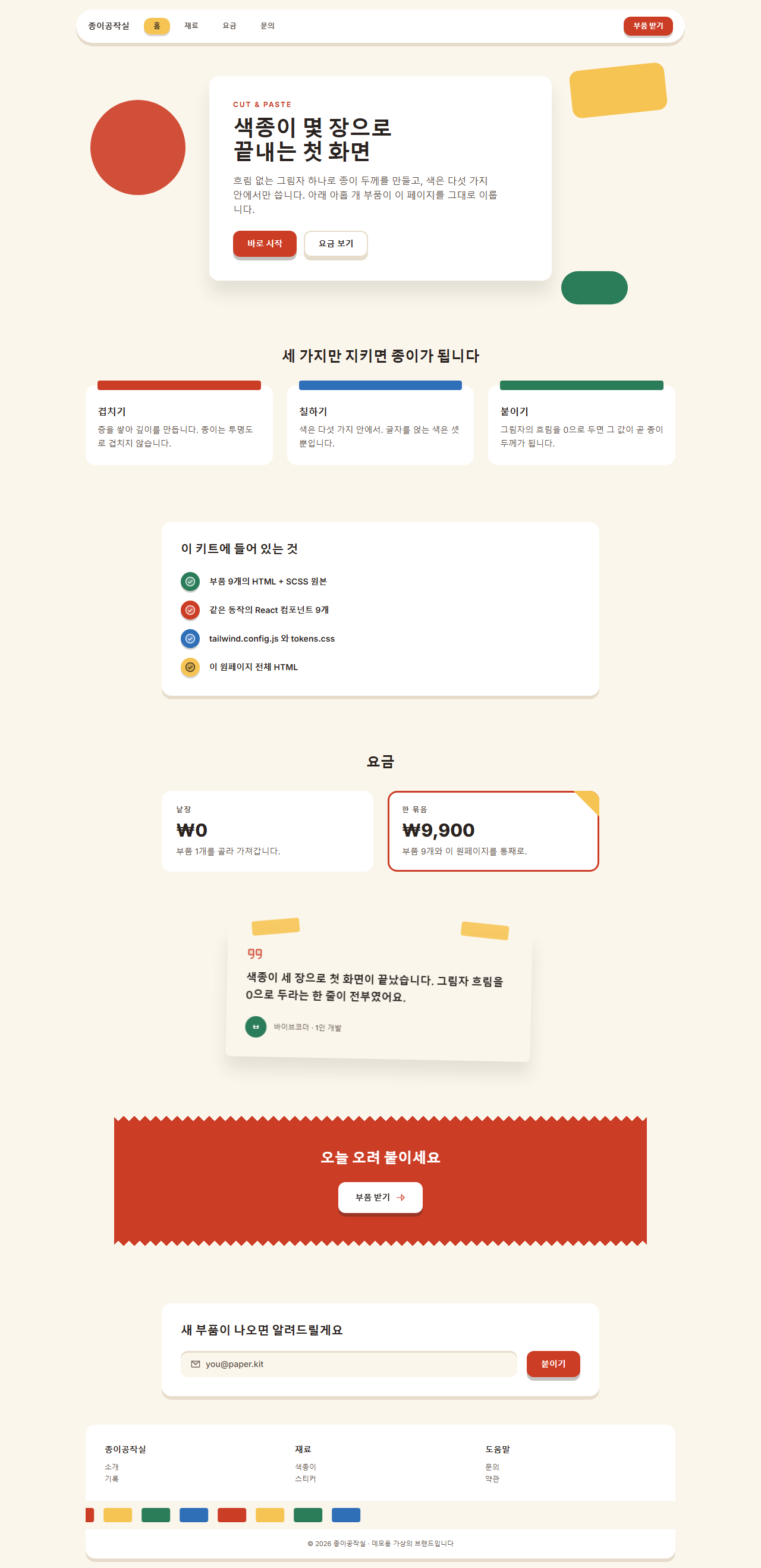
어디서 깨지는가 — 함정
가장 오래 못 찾은 것은 글자 크기였습니다. 부품 아홉 개의 스타일에 font: 800 24px/1.1; 처럼 한 줄로 크기와 굵기를 몰아 쓰고 바로 아랫줄에 font-family: inherit; 을 뒀는데, 렌더된 화면에서 요금 숫자가 제목보다 작아 보였습니다. Playwright로 계산값(computed style)을 직접 찍어 보니 그 숫자는 24px이 아니라 16px/400, 히어로 제목은 의도한 22px이 아니라 브라우저 기본값인 32px/700 이었습니다. font 단축 속성은 마지막 자리에 font-family 가 반드시 있어야 하고, 비어 있으면 선언 전체가 버려집니다. 아홉 개 파일에 퍼진 21곳을 font-weight·font-size·line-height 낱개 속성으로 풀고 나서야 잰 값과 쓴 값이 같아졌습니다.
두 번째는 원페이지 쪽이었습니다. Tailwind 플레이 CDN을 쓰면서 평범한 <style> 안에 body { background: theme('colors.paper') } 를 적었는데, 화면은 그냥 흰색이었고 요금제 카드의 접힌 모서리는 아예 보이지 않았습니다. 계산된 배경색을 찍으니 둘 다 rgba(0, 0, 0, 0) — 플레이 CDN은 type="text/tailwindcss" 가 붙은 style 만 컴파일하고, 그 밖의 <style> 안에 있는 theme() 는 무효로 버립니다. 오려 낸 자국을 살리는 그림자 쌓기는 메일 화면으로 옮겨도 그대로 돌아가는데 이메일 템플릿 디자인이 클라이언트 호환 기준까지 짚어 둡니다. 이 두 가지를 다 손본 완성본은 압축 비밀번호 rysqfgwr 으로 열리는 zip 안에 그대로 들어 있습니다.
접근성
밝은 종이 톤은 대비를 계산하기 쉬운 편이지만, 색종이 위에 흰 글자를 얹는 순간 기준선에 걸립니다. WCAG 2.1 최소 대비 기준의 상대 휘도 공식으로 직접 계산해 보면 잉크(#2a2320)는 종이 바탕(#fbf6ec)에서 14.34:1, 보조 글자 스톤(#5c5048)은 7.23:1로 본문 기준 4.5:1을 넉넉히 넘습니다. 문제는 강조색이었습니다. 처음 고른 산호색 #d6452f는 흰 글자와 4.42:1로 기준선 아래였고, #cc3d26까지 어둡게 내려서야 4.93:1이 나왔습니다. 같은 방식으로 하늘색(#2f6fb8) 5.14:1, 잎색(#2b7d5a) 5.02:1을 확보했고, 버터(#f6c453)와 블러시(#f6b3ab)는 너무 밝아 흰 글자로는 기준을 맞출 수 없어서, 잉크 글자만 얹도록(각각 9.52:1, 8.79:1) 코드에서 제한했습니다.
움직임 쪽은 MDN prefers-reduced-motion 문서의 미디어 쿼리를 아홉 개 전부에 넣어, 동작 줄이기를 켠 방문자에게는 종이가 뜨거나 띠가 흐르는 움직임 없이 정지 상태만 보이게 했습니다. 이때도 MDN box-shadow 문서대로 그린 두께 그림자는 그대로 남으므로 층 구조는 읽힙니다. 찢은 가장자리에 쓴 MDN mask 문서의 마스크는 장식이라 지원하지 않는 브라우저에서는 네모난 띠로 보일 뿐 내용은 그대로입니다.
다른 홈페이지 유행이 궁금하면 디자인 트렌드 카테고리를 둘러보시고, 이 블로그가 뭘 주는 곳인지는 소개 페이지에 적어 뒀습니다.
FAQ
구겨진 종이 질감 배경 이미지를 깔면 더 그럴듯하지 않나요?
질감 사진을 깔면 파일이 무거워지고 배경색을 바꿀 때마다 이미지를 다시 만들어야 합니다. 이 키트가 종이처럼 보이는 이유는 질감이 아니라 흐림이 0 인 그림자와 한 방향으로 통일된 두께입니다. 종이 사진 없이도 층이 보이면 그때부터 질감은 선택 사항이 됩니다. 점과 물결로 같은 손맛을 내는 이웃 축은 멤피스 디자인 패턴 랜딩 키트입니다.
그림자 두께를 요소마다 다르게 줘도 되나요?
한 화면에서는 같은 값을 쓰는 편이 안전합니다. 두께가 제각각이면 보는 사람은 그것을 "종이 두께 차이"가 아니라 "정렬 실수"로 읽습니다. 두께를 바꾸고 싶다면 요소마다 다른 값을 흩뿌리지 말고 6px에서 3px 또는 10px로 화면 전체를 한 번에 옮기세요.
어두운 배경에서도 이 스타일이 되나요?
두께 그림자가 배경보다 어두워야 층이 보이는데, 어두운 배경에서는 그 여지가 없어집니다. 굳이 쓴다면 그림자를 어둡게 하는 대신 각 종이 위쪽에 밝은 테두리 한 줄(inset 0 1px 0)을 얹어 빛을 받는 면을 만드는 쪽이 낫습니다. 다만 그 순간 이 스타일의 밝고 가벼운 인상은 사라집니다.
이런 글이랑 어울려요
 디자인 트렌드벤토 그리드 디자인 — 요즘 핀터레스트에서 유행하는 부품 9개
 디자인 트렌드다크 SaaS 랜딩에 스며든 리니어 디자인 시스템 9종
 디자인 트렌드키네틱 타이포그래피 랜딩페이지, 코드로 뜯어봤다
 디자인 트렌드클레이모피즘 랜딩 UI 키트, 통통한 섹션 9개
 디자인 트렌드그레인 얹은 오로라 그라디언트 랜딩 부품 9개
 디자인 트렌드네오브루탈리즘 UI 랜딩 부품 9개, 그림자는 안 번진다
 디자인 트렌드번쩍이는 Y2K 웹 디자인, 크롬·홀로그램 부품 9개
 디자인 트렌드HUD 디자인, 화면이 나를 겨누는 랜딩 부품 9개
 디자인 트렌드뉴모피즘 디자인 랜딩 UI 키트, 그림자 두 겹 섹션 9개
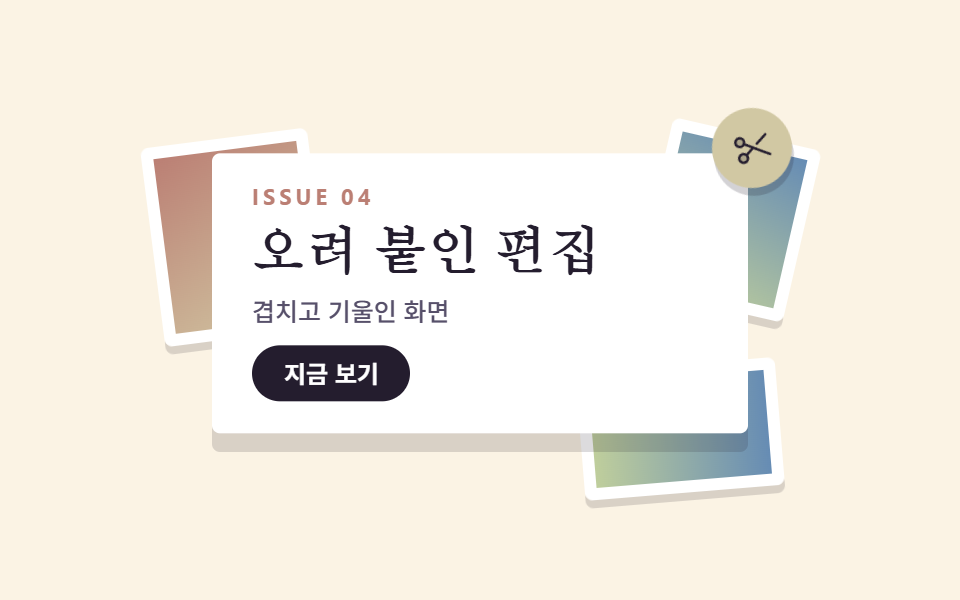 디자인 트렌드맥시멀리즘 디자인 랜딩 키트, 겹쳐 붙인 콜라주 9종