CSS Reset: 9 Patterns From Basics to Safe-Area
Nine css reset patterns: one recalculates padding for the safe area, one shrinks transition duration near zero when motion reduces, one turns sharp corners
 01 reset
 02 box-model
 03 text-wrap
 04 media-block
 05 form-inherit
 06 focus-visible
 07 safe-area
 08 reduced-motion
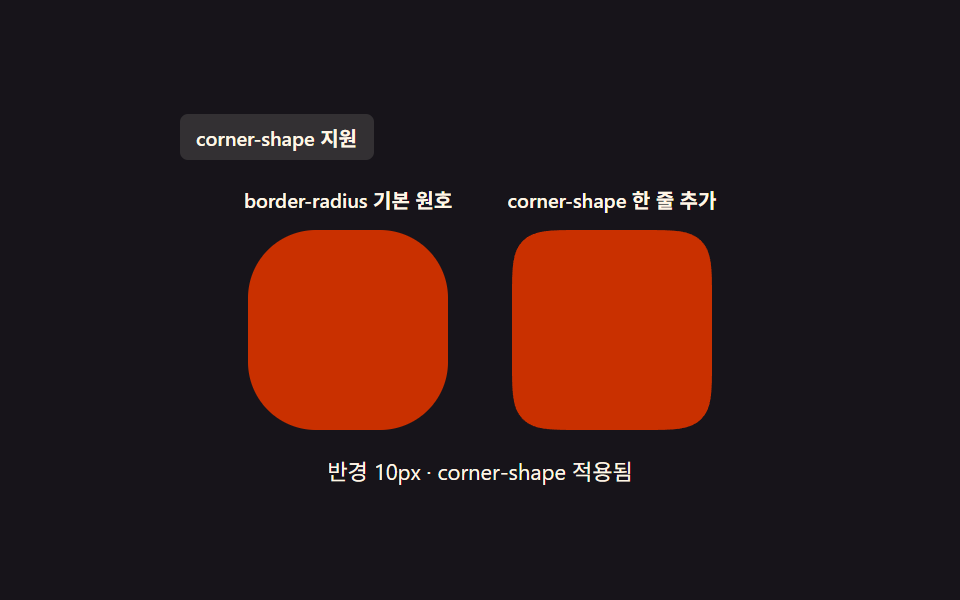 09 corner-shape
Auto-plays · click a tile to jump to its section · all nine in one zip
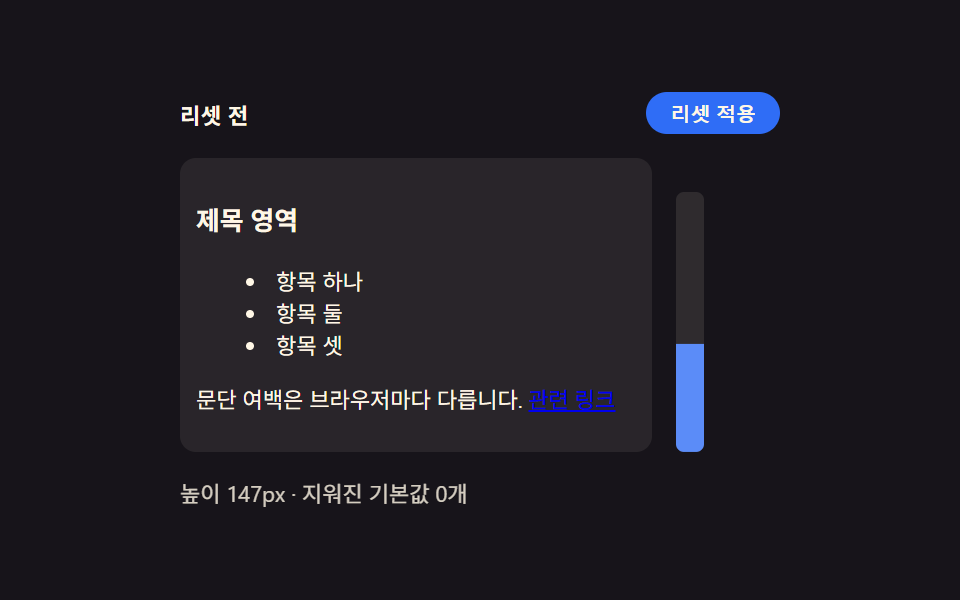
- 01 Browser default reset — a starting point that unifies inconsistent spacing and list markers
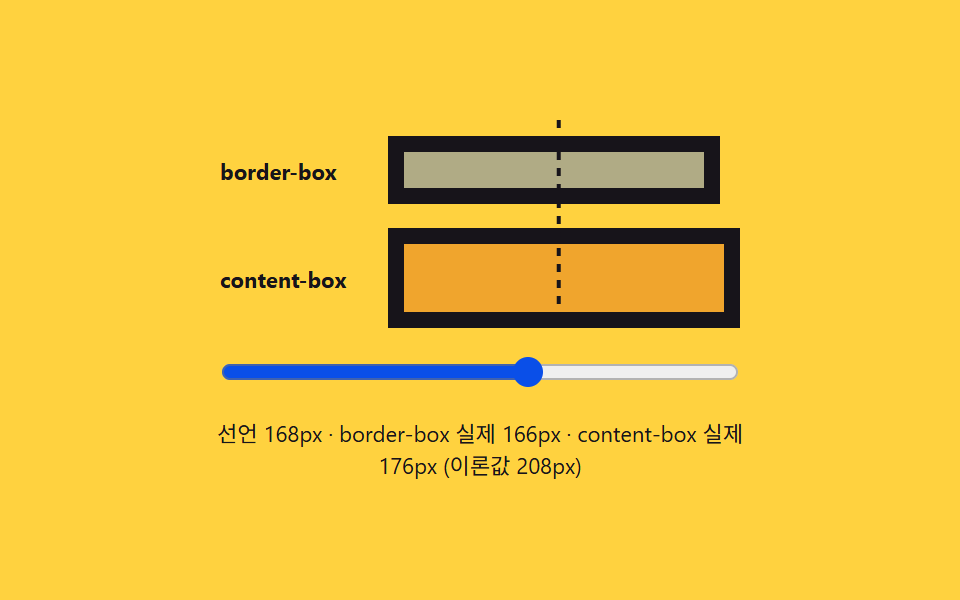
- 02 Box model comparison — a card that shows whether border and padding count toward its size
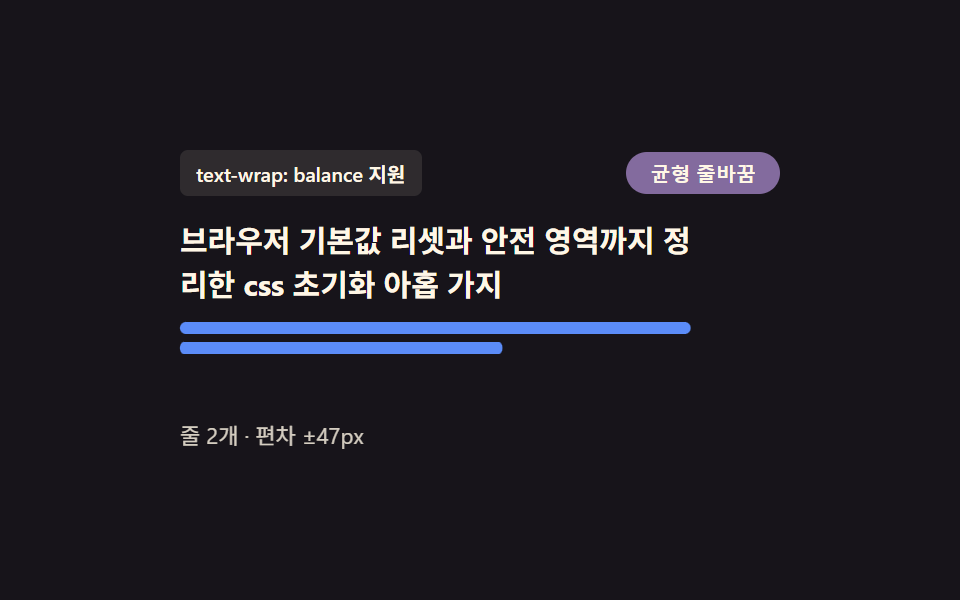
- 03 Heading line-wrap balance — a paragraph that keeps a lone word off the last line
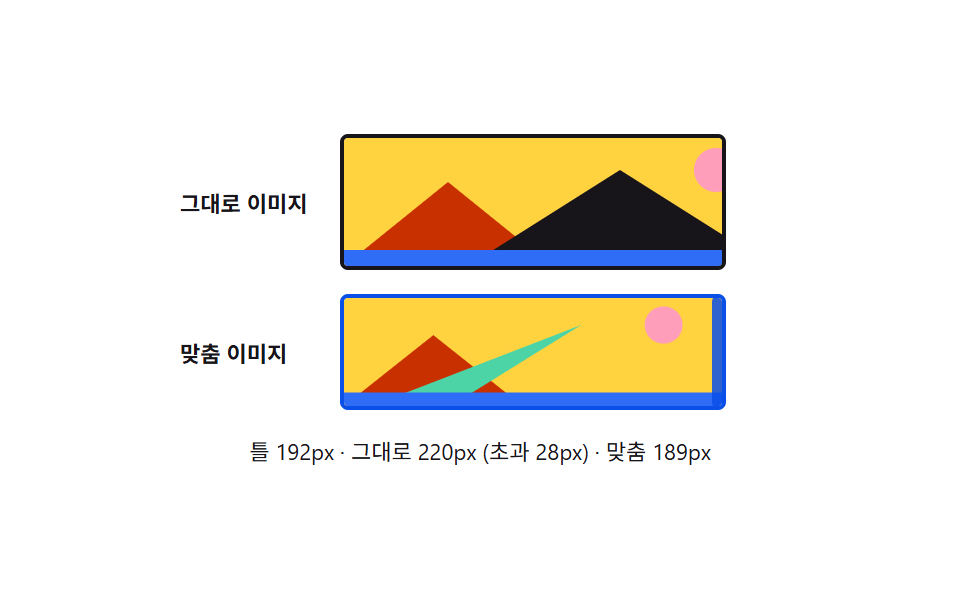
- 04 Media block baseline — a frame that keeps images and video from overflowing their parent
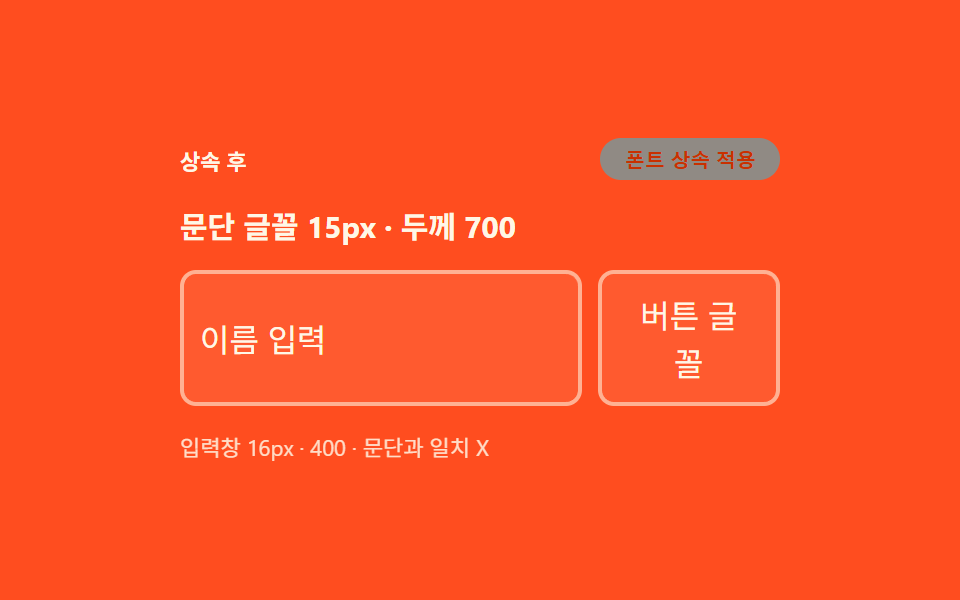
- 05 Form element font inheritance — a rule that matches buttons and inputs to surrounding text
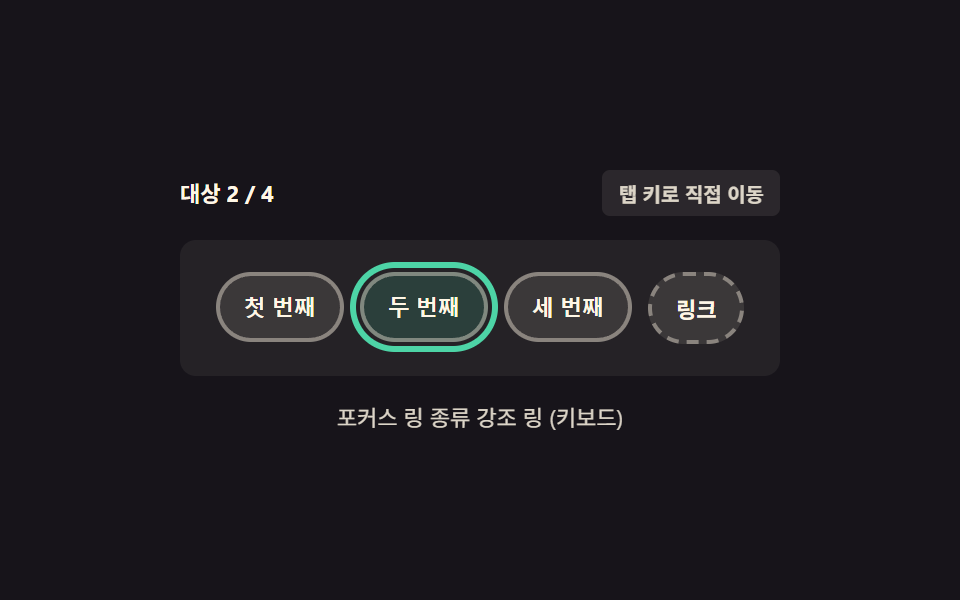
- 06 Keyboard focus ring — a border that appears for keyboard navigation but not mouse clicks
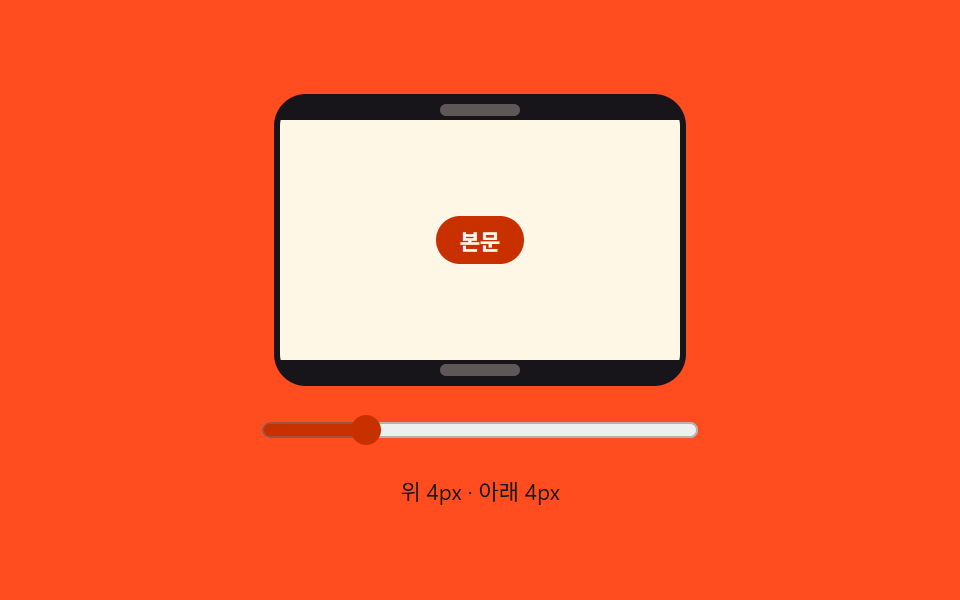
- 07 Notch safe-area padding — margin that pushes content clear of a screen's cut-out edges
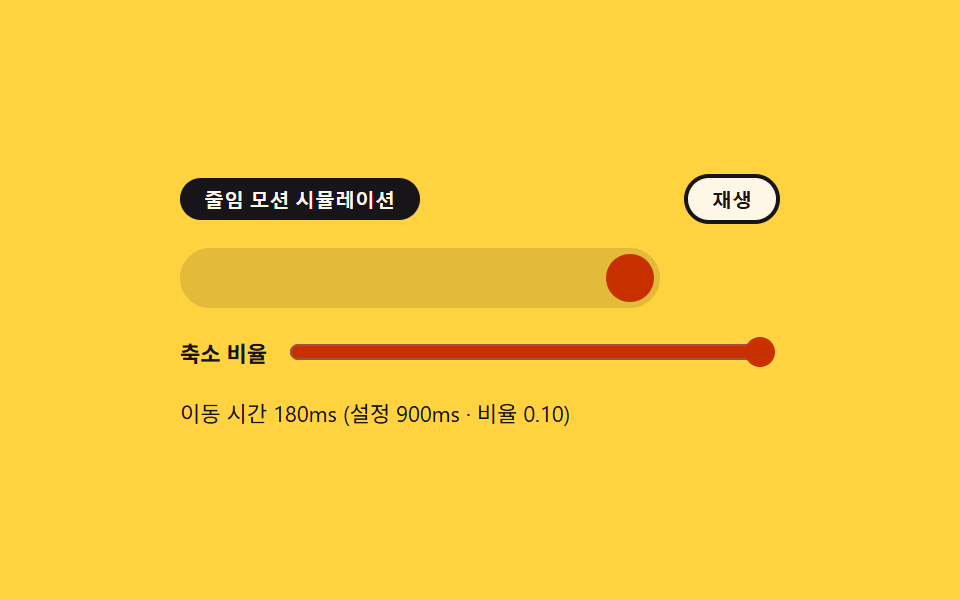
- 08 Reduced-motion response — a transition that nearly stops animating based on system settings
- 09 Rounded corner comparison — a card placing a circular-arc corner next to a smooth squircle corner
None of the nine patterns below detect a browser by name. Each one either swaps which unconditional rule wins once a class or pseudo-class flips, recalculates a measured value the moment a constant or an input changes, or asks a direct feature-support question before choosing a path. Every demo starts on its own once the page settles and hands control back on the first pointer, keyboard, or input event, and every one of the nine keeps working with prefers-reduced-motion: reduce set.
Demo
Drag, focus, type, and toggle each panel below — the measurement line under each one updates live, so a change is never just a guess.
Why this order
Grouping the nine this way is the fastest way to see what a plain css reset actually costs to write: sometimes it's a class name, sometimes a number, and sometimes a single supports() question asked once.
| Pattern | Mechanism | Moved frames (of 23) | Cumulative area | Avg. intensity |
|---|---|---|---|---|
| 01 Browser default reset | rule-swap | 12 | 19.15% | 104.5 |
| 02 Box model comparison | recalculation | 22 | 2.36% | 122.3 |
| 03 Heading line-wrap balance | feature-check | 23 | 3.253% | 139.6 |
| 04 Media block baseline | recalculation | 18 | 11.703% | 137.6 |
| 05 Form element font inheritance | rule-swap | 22 | 13.463% | 95.8 |
| 06 Keyboard focus ring | rule-swap | 15 | 6.39% | 94.2 |
| 07 Notch safe-area padding | recalculation | 23 | 1.788% | 110.3 |
| 08 Reduced-motion response | recalculation | 13 | 5.87% | 122.2 |
| 09 Rounded corner comparison | feature-check | 9 | 1.044% | 118.6 |
Cluster A — a class or pseudo-class decides which rule wins
Three patterns (01, 05, 06) never touch a number. Flipping RESET_SCOPE, toggling a .inherited class, or simply reaching a button by keyboard instead of a mouse decides which of two plain rules applies — the cascade does the rest. Pattern 01 covers the widest cumulative area of the set at 19.15%, because clearing spacing and list markers changes almost the whole demo panel at once.
Cluster B — a named constant decides what gets recalculated
Four patterns (02, 04, 07, 08) read a live input — a slider, a drag, a switch — and recompute a measured value against a named constant every time it changes. None of the four depend on detecting an environment; they depend on BORDER_PX, MAX_FRAME_PX, SAFE_AREA_SCALE, and REDUCED_MOTION_SCALE.
Cluster C — a supports() check picks the branch, once
Two patterns (03, 09) ask CSS.supports() a direct yes/no question and branch on the answer instead of comparing rendered rectangles over time. Pattern 03 moved in the most frames of any pattern in the set (23 of 23, tied with 07), because every rebalanced line redraws the bar chart underneath it.
Per-item code
Each fence below is a continuous slice of the demo's actual css reset code, comments translated into English, identifiers left exactly as they render.
01Browser default reset — a starting point that unifies inconsistent spacing and list markers
The default spacing and list markers that vary by browser are all cleared, so every element starts from the same baseline; a RESET_SCOPE toggle adds link-decoration removal on top of that once it's set to 'full'. Across 24 sampled frames it moved in 12, covering the largest cumulative area of the nine (19.15%) at an average intensity of 104.5. A click on the scope button counts as the first interaction.
<main class="stage">
<div class="wrap is-demo" id="wrap">
  <div class="head">
    <span class="stateLabel" id="stateLabel">Before reset</span>
    <button class="toggleBtn" id="toggleBtn" type="button" aria-pressed="false">Reset applied</button>
  </div>
  <div class="body">
    <div class="panel" id="panel">
      <h3 class="demoHeading">Heading area</h3>
      <ul class="demoList">
        <li>Item one</li>
        <li>Item two</li>
        <li>Item three</li>
      </ul>
      <p class="demoPara">Paragraph margins differ by browser. <a href="#" class="demoLink" id="demoLink">Related link</a></p>
    </div>
    <div class="ruler" id="ruler">
      <div class="rulerFill" id="rulerFill"></div>
    </div>
  </div>
  <div class="readout" id="readout">Height —px · defaults cleared —</div>
</div>
</main>
@use "../../../../site/static/demo-tokens" as *;
// 계산 겹은 index.html 의 measure() 에 있다 — 패널의 실제 렌더 높이(getBoundingClientRect)를 매 프레임
// 다시 재서 룰러 막대의 scaleY 와 "높이 Npx" 문구에 그대로 반영한다. 여기는 리셋 전/후 두 규칙 집합과
// 룰러 모양만 맡는다.
@include stage($stage-ink);
.wrap {
width: 300px;
display: flex;
flex-direction: column;
gap: $sp-3;
}
.head {
display: flex;
align-items: center;
justify-content: space-between;
gap: $sp-2;
}
.stateLabel {
color: $subject-cream;
font-size: 11px;
font-weight: 700;
letter-spacing: .02em;
}
.toggleBtn {
appearance: none;
border: none;
border-radius: $r-pill;
background: $subject-blue;
color: $subject-cream;
padding: $sp-1 $sp-3;
font-size: 10px;
font-weight: 600;
cursor: pointer;
transition: background $dur-instant $ease-out, transform $dur-instant $ease-out;
&:hover { background: $subject-blue-light; }
&:active { transform: scale(.96); }
&[aria-pressed="true"] { background: $subject-orange-deep; }
&:focus-visible { outline: 2px solid $subject-blue-light; outline-offset: 2px; }
}
.body {
display: flex;
align-items: flex-start;
gap: $sp-3;
}
// 패널은 일부러 우리 스타일을 씌우지 않는다 — .reset 이 없는 기본 상태가 곧 브라우저 기본값이다.
// font-size 를 11px 로 낮춰 h3·ul·p 의 em 기반 기본 여백을 실제 비율 그대로 작게 줄인다(값을 지어내지
// 않는다 — UA 스타일시트의 em 마진이 그대로 이 기준을 따라간다).
.panel {
width: 220px;
font-size: 11px;
background: rgba($subject-cream, .08);
border-radius: $r-sm;
padding: $sp-2;
transition: padding $dur-base $ease-out;
}
.demoHeading,
.demoPara,
.demoList {
color: $subject-cream;
transition: margin $dur-base $ease-out;
}
.demoList {
transition: margin $dur-base $ease-out, padding $dur-base $ease-out;
}
.demoList li { color: $subject-cream; }
.demoLink {
transition: color $dur-base $ease-out;
}
.panel.reset {
  .demoHeading, .demoPara, .demoList { margin: 0 0 $sp-2; }
  .demoList { padding: 0; list-style: none; }
  .demoList li { padding: $sp-1 0; }
}

.panel.reset.full .demoLink {
  color: $subject-blue-light;
  text-decoration: none;
}
.ruler {
position: relative;
width: 14px;
height: 130px;
border-radius: $r-xs;
background: rgba($subject-cream, .1);
align-self: flex-end;
overflow: hidden;
}
.rulerFill {
position: absolute;
left: 0;
bottom: 0;
width: 100%;
height: 100%;
transform-origin: bottom;
transform: scaleY(0);
background: $subject-blue-light;
transition: transform $dur-base $ease-out;
}
.readout {
color: $subject-cream;
font-size: 11px;
opacity: .82;
}
@media (max-width: 340px) {
.wrap { width: 260px; gap: $sp-2; }
.panel { width: 190px; padding: $sp-1; font-size: 9px; }
.body { gap: $sp-2; }
.ruler { height: 80px; }
.demoList li:nth-child(3) { display: none; }
}
@media (prefers-reduced-motion: reduce) {
// reduce: 전환의 완만함만 지운다 — 상태 자체는 계속 바뀐다(모션이 아니라 값 전환이라 유지)
.panel, .demoHeading, .demoPara, .demoList, .demoBtn, .rulerFill, .toggleBtn { transition: none; }
}html, body {
margin: 0;
overflow: hidden;
}
.stage {
box-sizing: border-box;
min-height: 100vh;
display: grid;
place-items: center;
margin: 0;
background: #17141a;
font-family: -apple-system, "Segoe UI", "Noto Sans KR", sans-serif;
padding: clamp(8px, 4vw, 24px);
}
.wrap {
width: 300px;
display: flex;
flex-direction: column;
gap: 12px;
}
.head {
display: flex;
align-items: center;
justify-content: space-between;
gap: 8px;
}
.stateLabel {
color: #fff7e6;
font-size: 11px;
font-weight: 700;
letter-spacing: 0.02em;
}
.toggleBtn {
appearance: none;
border: none;
border-radius: 999px;
background: #2f6df6;
color: #fff7e6;
padding: 4px 12px;
font-size: 10px;
font-weight: 600;
cursor: pointer;
transition: background 140ms ease-out, transform 140ms ease-out;
}
.toggleBtn:hover {
background: #5b8cf8;
}
.toggleBtn:active {
transform: scale(0.96);
}
.toggleBtn[aria-pressed=true] {
background: #c93000;
}
.toggleBtn:focus-visible {
outline: 2px solid #5b8cf8;
outline-offset: 2px;
}
.body {
display: flex;
align-items: flex-start;
gap: 12px;
}
.panel {
width: 220px;
font-size: 11px;
background: rgba(255, 247, 230, 0.08);
border-radius: 8px;
padding: 8px;
transition: padding 300ms ease-out;
}
.demoHeading,
.demoPara,
.demoList {
color: #fff7e6;
transition: margin 300ms ease-out;
}
.demoList {
transition: margin 300ms ease-out, padding 300ms ease-out;
}
.demoList li {
color: #fff7e6;
}
.demoLink {
transition: color 300ms ease-out;
}
.panel.reset .demoHeading, .panel.reset .demoPara, .panel.reset .demoList {
margin: 0 0 8px;
}
.panel.reset .demoList {
padding: 0;
list-style: none;
}
.panel.reset .demoList li {
padding: 4px 0;
}
.panel.reset.full .demoLink {
color: #5b8cf8;
text-decoration: none;
}
.ruler {
position: relative;
width: 14px;
height: 130px;
border-radius: 4px;
background: rgba(255, 247, 230, 0.1);
align-self: flex-end;
overflow: hidden;
}
.rulerFill {
position: absolute;
left: 0;
bottom: 0;
width: 100%;
height: 100%;
transform-origin: bottom;
transform: scaleY(0);
background: #5b8cf8;
transition: transform 300ms ease-out;
}
.readout {
color: #fff7e6;
font-size: 11px;
opacity: 0.82;
}
@media (max-width: 340px) {
.wrap {
width: 260px;
gap: 8px;
}
.panel {
width: 190px;
padding: 4px;
font-size: 9px;
}
.body {
gap: 8px;
}
.ruler {
height: 80px;
}
.demoList li:nth-child(3) {
display: none;
}
}
@media (prefers-reduced-motion: reduce) {
.panel, .demoHeading, .demoPara, .demoList, .demoBtn, .rulerFill, .toggleBtn {
transition: none;
}
}(function () {
// 변형 상수 — minimal 은 목록·여백만, full 은 버튼 겉모습까지 지운다 (D 뒤 확정)
var RESET_SCOPE = 'minimal';
var STEP_MS = 320;
// 지워지는 기본값 카테고리 — 실제로 화면에 세어 보여주는 목록이라 죽은 상수가 아니다
var CLEARED_MINIMAL = ['heading-margin', 'paragraph-margin', 'list-style'];
var CLEARED_FULL = CLEARED_MINIMAL.concat(['link-decoration']);
var MAX_HEIGHT_PX = 130; // 룰러 눈금의 기준 최대 Height — 이 값을 넘는 초과분은 눈금 밖으로 잘린다
var reduce = window.matchMedia('(prefers-reduced-motion: reduce)').matches;
var wrap = document.getElementById('wrap');
var panel = document.getElementById('panel');
var toggleBtn = document.getElementById('toggleBtn');
var stateLabel = document.getElementById('stateLabel');
var readout = document.getElementById('readout');
var rulerFill = document.getElementById('rulerFill');
var isDemo = true;
var on = false;
function clearedList() { return RESET_SCOPE === 'full' ? CLEARED_FULL : CLEARED_MINIMAL; }
function measure() {
// 실측 — 패널의 실제 렌더 높이를 매 프레임 다시 잰다. 값을 미리 정해두지 않는다
var h = panel.getBoundingClientRect().height;
var ratio = Math.min(1, h / MAX_HEIGHT_PX);
rulerFill.style.transform = 'scaleY(' + ratio.toFixed(3) + ')';
readout.textContent = 'Height ' + Math.round(h) + 'px · defaults cleared ' + (on ? clearedList().length : 0) + ' ';
}
function apply(next) {
on = next;
panel.classList.toggle('reset', on);
panel.classList.toggle('full', on && RESET_SCOPE === 'full');
stateLabel.textContent = on ? 'After reset' : 'Before reset';
toggleBtn.setAttribute('aria-pressed', String(on));
}
function human() { if (isDemo) { wrap.classList.remove('is-demo'); isDemo = false; } }
toggleBtn.addEventListener('click', function () { human(); apply(!on); });
document.getElementById('demoLink').addEventListener('click', function (e) { human(); e.preventDefault(); });
var last = 0;
function loop(ts) {
if (!last) last = ts;
if (isDemo && !reduce && ts - last >= STEP_MS) { last = ts; apply(!on); }
measure();
requestAnimationFrame(loop);
}
requestAnimationFrame(loop);
})();// Reset — vanilla 판(run/376/demo/01-reset/index.html) 의 React 포트.
// 패널에 .reset 클래스를 토글해 브라우저 기본값(h3·ul·p 여백)이 지워지는 전후를 보여주고,
// 룰러 막대는 실제 렌더 높이(getBoundingClientRect)를 매 프레임 다시 재 채운다.
import { useEffect, useRef } from "react";
import styles from "./Reset.module.scss";
type Box<T> = { current: T };
const RESET_SCOPE: "minimal" | "full" = "minimal";
const STEP_MS = 320;
const CLEARED_MINIMAL = ["heading-margin", "paragraph-margin", "list-style"];
const CLEARED_FULL = CLEARED_MINIMAL.concat(["link-decoration"]);
const MAX_HEIGHT_PX = 130;
export default function Reset() {
const wrapRef = useRef(null) as unknown as Box<HTMLDivElement>;
const panelRef = useRef(null) as unknown as Box<HTMLDivElement>;
const toggleBtnRef = useRef(null) as unknown as Box<HTMLButtonElement>;
const stateLabelRef = useRef(null) as unknown as Box<HTMLSpanElement>;
const readoutRef = useRef(null) as unknown as Box<HTMLDivElement>;
const rulerFillRef = useRef(null) as unknown as Box<HTMLDivElement>;
const demoLinkRef = useRef(null) as unknown as Box<HTMLAnchorElement>;
const rafRef = useRef(0) as unknown as Box<number>;
useEffect(() => {
const reduce = window.matchMedia("(prefers-reduced-motion: reduce)").matches;
const wrap = wrapRef.current;
const panel = panelRef.current;
const toggleBtn = toggleBtnRef.current;
const stateLabel = stateLabelRef.current;
const readout = readoutRef.current;
const rulerFill = rulerFillRef.current;
const demoLink = demoLinkRef.current;
if (!wrap || !panel || !toggleBtn || !stateLabel || !readout || !rulerFill || !demoLink) return;
let isDemo = true;
let on = false;
function clearedList() {
return RESET_SCOPE === "full" ? CLEARED_FULL : CLEARED_MINIMAL;
}
function measure() {
const h = panel!.getBoundingClientRect().height;
const ratio = Math.min(1, h / MAX_HEIGHT_PX);
rulerFill!.style.transform = "scaleY(" + ratio.toFixed(3) + ")";
readout!.textContent = "높이 " + Math.round(h) + "px · 지워진 기본값 " + (on ? clearedList().length : 0) + "개";
}
function apply(next: boolean) {
on = next;
panel!.classList.toggle(styles.reset, on);
panel!.classList.toggle(styles.full, on && RESET_SCOPE === "full");
stateLabel!.textContent = on ? "리셋 후" : "리셋 전";
toggleBtn!.setAttribute("aria-pressed", String(on));
}
function human() { if (isDemo) { wrap!.classList.remove(styles.isDemo); isDemo = false; } }
function onToggleClick() { human(); apply(!on); }
function onLinkClick(e: MouseEvent) { human(); e.preventDefault(); }
toggleBtn.addEventListener("click", onToggleClick);
demoLink.addEventListener("click", onLinkClick);
let last = 0;
function loop(ts: number) {
if (!last) last = ts;
if (isDemo && !reduce && ts - last >= STEP_MS) { last = ts; apply(!on); }
measure();
rafRef.current = requestAnimationFrame(loop);
}
rafRef.current = requestAnimationFrame(loop);
return () => {
toggleBtn!.removeEventListener("click", onToggleClick);
demoLink!.removeEventListener("click", onLinkClick);
cancelAnimationFrame(rafRef.current);
};
}, []);
return (
<main className={styles.stage}>
<div className={styles.wrap + " " + styles.isDemo} ref={wrapRef}>
<div className={styles.head}>
<span className={styles.stateLabel} ref={stateLabelRef}>리셋 전</span>
<button className={styles.toggleBtn} ref={toggleBtnRef} type="button" aria-pressed="false">리셋 적용</button>
</div>
<div className={styles.body}>
<div className={styles.panel} ref={panelRef}>
<h3 className={styles.demoHeading}>제목 영역</h3>
<ul className={styles.demoList}>
<li>항목 하나</li>
<li>항목 둘</li>
<li>항목 셋</li>
</ul>
<p className={styles.demoPara}>문단 여백은 브라우저마다 다릅니다. <a href="#" className={styles.demoLink} ref={demoLinkRef}>관련 링크</a></p>
</div>
<div className={styles.ruler}>
<div className={styles.rulerFill} ref={rulerFillRef}></div>
</div>
</div>
<div className={styles.readout} ref={readoutRef}>높이 —px · 지워진 기본값 —개</div>
</div>
</main>
);
}01 · Browser default reset — a starting point that unifies inconsistent spacing and list markers — Measured area 19.15% · moving frames 12/23Original by GODRICH · SCSS and React ship in the zip · See the password
.panel.reset {
.demoHeading, .demoPara, .demoList { margin: 0 0 $sp-2; }
.demoList { padding: 0; list-style: none; }
.demoList li { padding: $sp-1 0; }
}
.panel.reset.full .demoLink {
color: $subject-blue-light;
text-decoration: none;
}
02Box model comparison — a card that shows whether border and padding count toward its size
Switching between two sizing modes compares, side by side, how the same width value produces a different actual card size depending on whether border and padding are included. The card re-measures its own border-box and content-box rects on every slider move — it moved in 22 of 23 frames at an average intensity of 122.3, covering 2.36% cumulative area. Dragging the width slider or pressing the pointer down on it both count as interaction.
<main class="stage">
<div class="wrap is-demo" id="wrap">
  <div class="track" id="track">
    <div class="guide" id="guide"></div>
    <div class="row">
      <span class="rowLabel">border-box</span>
      <div class="box borderBox" id="borderBox"></div>
    </div>
    <div class="row">
      <span class="rowLabel">content-box</span>
      <div class="box contentBox" id="contentBox"></div>
    </div>
  </div>
  <input class="widthRange" id="widthRange" type="range" min="120" max="200" value="140" aria-label="Declared width">
  <div class="readout" id="readout">Declared width —px</div>
</div>
</main>
@use "../../../../site/static/demo-tokens" as *;
// 계산 겹은 index.html 의 apply() 에 있다 — 선언 너비를 실제 style.width 로 넣고
// getBoundingClientRect 로 다시 잰 실제 렌더 너비를 이론값(선언+테두리·패딩)과 나란히 보여준다.
// 여기는 두 박스의 테두리·패딩 값과 안내선 모양만 맡는다.
@include stage($stage-yellow);
$border-w: 8px;
$pad-w: 12px;
.wrap {
width: 280px;
display: flex;
flex-direction: column;
gap: $sp-3;
align-items: center;
}
.track {
position: relative;
width: 260px;
display: flex;
flex-direction: column;
gap: $sp-3;
padding-top: $sp-2;
}
.guide {
position: absolute;
top: 0;
left: 0;
width: 2px;
height: 100%;
background: repeating-linear-gradient($subject-ink, $subject-ink 4px, transparent 4px, transparent 8px);
transform: translateX(140px);
}
.row {
display: flex;
align-items: center;
gap: $sp-2;
}
.rowLabel {
width: 76px;
flex: 0 0 auto;
color: $subject-ink;
font-size: 11px;
font-weight: 700;
}
.box {
height: 34px;
border: $border-w solid $subject-ink;
padding: 0 $pad-w;
background: rgba($subject-blue, .38);
transition: width $dur-base $ease-out;
box-sizing: content-box;
}
.contentBox {
box-sizing: content-box;
background: rgba($subject-orange-deep, .28);
}
.borderBox {
box-sizing: border-box;
}
.widthRange {
width: 260px;
accent-color: $subject-blue-deep;
}
.readout {
color: $subject-ink;
font-size: 11px;
text-align: center;
}
@media (max-width: 340px) {
.wrap { width: 230px; gap: $sp-2; }
.track, .widthRange { width: 210px; gap: $sp-2; }
.rowLabel { width: 64px; font-size: 10px; }
.box { height: 28px; }
}
@media (prefers-reduced-motion: reduce) {
// reduce: 자동 루프의 사인 진동만 멈춘다(슬라이더로 하는 실사용 조작은 그대로 즉시 반영)
.box { transition: none; }
}html, body {
margin: 0;
overflow: hidden;
}
.stage {
box-sizing: border-box;
min-height: 100vh;
display: grid;
place-items: center;
margin: 0;
background: #ffd23f;
font-family: -apple-system, "Segoe UI", "Noto Sans KR", sans-serif;
padding: clamp(8px, 4vw, 24px);
}
.wrap {
width: 280px;
display: flex;
flex-direction: column;
gap: 12px;
align-items: center;
}
.track {
position: relative;
width: 260px;
display: flex;
flex-direction: column;
gap: 12px;
padding-top: 8px;
}
.guide {
position: absolute;
top: 0;
left: 0;
width: 2px;
height: 100%;
background: repeating-linear-gradient(#17141a, #17141a 4px, transparent 4px, transparent 8px);
transform: translateX(140px);
}
.row {
display: flex;
align-items: center;
gap: 8px;
}
.rowLabel {
width: 76px;
flex: 0 0 auto;
color: #17141a;
font-size: 11px;
font-weight: 700;
}
.box {
height: 34px;
border: 8px solid #17141a;
padding: 0 12px;
background: rgba(47, 109, 246, 0.38);
transition: width 300ms ease-out;
box-sizing: content-box;
}
.contentBox {
box-sizing: content-box;
background: rgba(201, 48, 0, 0.28);
}
.borderBox {
box-sizing: border-box;
}
.widthRange {
width: 260px;
accent-color: #0a4fe8;
}
.readout {
color: #17141a;
font-size: 11px;
text-align: center;
}
@media (max-width: 340px) {
.wrap {
width: 230px;
gap: 8px;
}
.track, .widthRange {
width: 210px;
gap: 8px;
}
.rowLabel {
width: 64px;
font-size: 10px;
}
.box {
height: 28px;
}
}
@media (prefers-reduced-motion: reduce) {
.box {
transition: none;
}
}(function () {
var BORDER_PX = 8;
var PADDING_PX = 12;
var reduce = window.matchMedia('(prefers-reduced-motion: reduce)').matches;
var wrap = document.getElementById('wrap');
var track = document.getElementById('track');
var guide = document.getElementById('guide');
var borderBox = document.getElementById('borderBox');
var contentBox = document.getElementById('contentBox');
var widthRange = document.getElementById('widthRange');
var readout = document.getElementById('readout');
var isDemo = true;
var declared = 140;
function human() { if (isDemo) { wrap.classList.remove('is-demo'); isDemo = false; } }
widthRange.addEventListener('input', function () {
human();
declared = Number(widthRange.value);
});
widthRange.addEventListener('pointerdown', human);
function apply() {
borderBox.style.width = declared + 'px';
contentBox.style.width = declared + 'px';
// 실측 — 계산값을 가정하지 않고 실제 렌더 결과를 다시 잰다
var bRect = borderBox.getBoundingClientRect();
var cRect = contentBox.getBoundingClientRect();
guide.style.transform = 'translateX(' + declared + 'px)';
widthRange.value = String(Math.round(declared));
// 이론값 = Declared width + 테두리·패딩 두 변 — 실측(getBoundingClientRect)과 맞는지 함께 보여준다
var theory = declared + 2 * (BORDER_PX + PADDING_PX);
readout.textContent = 'Declared ' + Math.round(declared) + 'px · border-box actual ' +
Math.round(bRect.width) + 'px · content-box actual ' + Math.round(cRect.width) +
'px (theoretical ' + Math.round(theory) + 'px)';
}
var start = 0;
function loop(ts) {
if (!start) start = ts;
if (isDemo && !reduce) {
declared = 160 + 38 * Math.sin((ts - start) / 900);
}
apply();
requestAnimationFrame(loop);
}
requestAnimationFrame(loop);
})();// BoxModel — vanilla 판(run/376/demo/02-box-model/index.html) 의 React 포트.
// 슬라이더로 선언 너비를 바꾸면 border-box·content-box 두 박스에 같은 width 를 넣고,
// 실제 렌더 결과(getBoundingClientRect)를 이론값(선언+테두리·패딩)과 나란히 보여준다.
import { useEffect, useRef } from "react";
import styles from "./BoxModel.module.scss";
type Box<T> = { current: T };
const BORDER_PX = 8;
const PADDING_PX = 12;
export default function BoxModel() {
const wrapRef = useRef(null) as unknown as Box<HTMLDivElement>;
const guideRef = useRef(null) as unknown as Box<HTMLDivElement>;
const borderBoxRef = useRef(null) as unknown as Box<HTMLDivElement>;
const contentBoxRef = useRef(null) as unknown as Box<HTMLDivElement>;
const widthRangeRef = useRef(null) as unknown as Box<HTMLInputElement>;
const readoutRef = useRef(null) as unknown as Box<HTMLDivElement>;
const rafRef = useRef(0) as unknown as Box<number>;
useEffect(() => {
const reduce = window.matchMedia("(prefers-reduced-motion: reduce)").matches;
const wrap = wrapRef.current;
const guide = guideRef.current;
const borderBox = borderBoxRef.current;
const contentBox = contentBoxRef.current;
const widthRange = widthRangeRef.current;
const readout = readoutRef.current;
if (!wrap || !guide || !borderBox || !contentBox || !widthRange || !readout) return;
let isDemo = true;
let declared = 140;
function human() { if (isDemo) { wrap!.classList.remove(styles.isDemo); isDemo = false; } }
function onInput() { human(); declared = Number(widthRange!.value); }
function onPointerDown() { human(); }
widthRange.addEventListener("input", onInput);
widthRange.addEventListener("pointerdown", onPointerDown);
function apply() {
borderBox!.style.width = declared + "px";
contentBox!.style.width = declared + "px";
const bRect = borderBox!.getBoundingClientRect();
const cRect = contentBox!.getBoundingClientRect();
guide!.style.transform = "translateX(" + declared + "px)";
widthRange!.value = String(Math.round(declared));
const theory = declared + 2 * (BORDER_PX + PADDING_PX);
readout!.textContent = "선언 " + Math.round(declared) + "px · border-box 실제 " +
Math.round(bRect.width) + "px · content-box 실제 " + Math.round(cRect.width) +
"px (이론값 " + Math.round(theory) + "px)";
}
let start = 0;
function loop(ts: number) {
if (!start) start = ts;
if (isDemo && !reduce) { declared = 160 + 38 * Math.sin((ts - start) / 900); }
apply();
rafRef.current = requestAnimationFrame(loop);
}
rafRef.current = requestAnimationFrame(loop);
return () => {
widthRange!.removeEventListener("input", onInput);
widthRange!.removeEventListener("pointerdown", onPointerDown);
cancelAnimationFrame(rafRef.current);
};
}, []);
return (
<main className={styles.stage}>
<div className={styles.wrap + " " + styles.isDemo} ref={wrapRef}>
<div className={styles.track}>
<div className={styles.guide} ref={guideRef}></div>
<div className={styles.row}>
<span className={styles.rowLabel}>border-box</span>
<div className={styles.box + " " + styles.borderBox} ref={borderBoxRef}></div>
</div>
<div className={styles.row}>
<span className={styles.rowLabel}>content-box</span>
<div className={styles.box + " " + styles.contentBox} ref={contentBoxRef}></div>
</div>
</div>
<input className={styles.widthRange} ref={widthRangeRef} type="range" min="120" max="200" defaultValue="140" aria-label="선언 너비" />
<div className={styles.readout} ref={readoutRef}>선언 너비 —px</div>
</div>
</main>
);
}02 · Box model comparison — a card that shows whether border and padding count toward its size — Measured area 2.36% · moving frames 22/23Original by GODRICH · SCSS and React ship in the zip · See the password
  function apply() {
    borderBox.style.width = declared + 'px';
    contentBox.style.width = declared + 'px';
    // Measured — recompute the actual render result instead of assuming the calculated value
    var bRect = borderBox.getBoundingClientRect();
    var cRect = contentBox.getBoundingClientRect();
    guide.style.transform = 'translateX(' + declared + 'px)';
    widthRange.value = String(Math.round(declared));
    // Theoretical = declared width + border and padding on both sides — shown alongside the measurement (getBoundingClientRect) for comparison
    var theory = declared + 2 * (BORDER_PX + PADDING_PX);
    readout.textContent = 'Declared ' + Math.round(declared) + 'px · border-box actual ' +
      Math.round(bRect.width) + 'px · content-box actual ' + Math.round(cRect.width) +
      'px (theoretical ' + Math.round(theory) + 'px)';
  }
03Heading line-wrap balance — a paragraph that keeps a lone word off the last line
When a long heading wraps across lines, each line's character count balances evenly, preventing a single orphan word from being stranded on the last line. It checks CSS.supports('text-wrap', 'balance') once and only rebalances in a supporting environment; across 24 sampled frames it moved in 23 — tied for the most of any pattern here — at an average intensity of 139.6, the highest of the nine. A click on the toggle counts as the first interaction.
<main class="stage">
<div class="wrap is-demo" id="wrap">
  <div class="head">
    <span class="supportBadge" id="supportBadge">Checking</span>
    <button class="toggleBtn" id="toggleBtn" type="button" aria-pressed="false">Balanced line-wrap</button>
  </div>
  <div class="frame">
    <h3 class="heading" id="heading">Nine CSS reset techniques covering browser defaults through safe-area padding</h3>
    <div class="bars" id="bars"></div>
  </div>
  <div class="readout" id="readout">Lines — · deviation —px</div>
</div>
</main>
@use "../../../../site/static/demo-tokens" as *;
// 계산 겹은 index.html 의 render() 에 있다 — Range.getClientRects() 로 줄마다 실제 렌더 폭을
// 다시 재고, 표준편차(stdDev)를 문구로 보여준다. 여기는 줄 막대의 모양과 균형 전환만 맡는다.
@include stage($stage-ink);
.wrap {
width: 300px;
display: flex;
flex-direction: column;
gap: $sp-3;
}
.head {
display: flex;
align-items: center;
justify-content: space-between;
gap: $sp-2;
}
.supportBadge {
color: $subject-cream;
font-size: 10px;
font-weight: 600;
background: rgba($subject-cream, .1);
border-radius: $r-xs;
padding: $sp-1 $sp-2;
&.fallback { background: rgba($subject-orange-deep, .45); }
}
.toggleBtn {
appearance: none;
border: none;
border-radius: $r-pill;
background: $subject-orange-deep;
color: $subject-cream;
padding: $sp-1 $sp-3;
font-size: 10px;
font-weight: 600;
cursor: pointer;
transition: background $dur-instant $ease-out, transform $dur-instant $ease-out;
&:hover { background: $subject-orange-deep; filter: brightness(1.2); }
&:active { transform: scale(.96); }
&[aria-pressed="true"] { background: $subject-blue-light; }
&:focus-visible { outline: 2px solid $subject-blue-light; outline-offset: 2px; }
}
.frame {
display: flex;
flex-direction: column;
gap: $sp-2;
}
.heading {
margin: 0;
color: $subject-cream;
font-size: 15px;
font-weight: 700;
line-height: 1.45;
width: 260px;
}
.bars {
display: flex;
flex-direction: column;
gap: $sp-1;
}
.bar {
height: 6px;
width: 260px;
border-radius: $r-xs;
background: $subject-blue-light;
transform-origin: left;
}
.readout {
color: $subject-cream;
font-size: 11px;
opacity: .82;
}
@media (max-width: 340px) {
.wrap { width: 260px; }
.heading, .bar { width: 230px; }
}
@media (prefers-reduced-motion: reduce) {
// reduce: 자동 루프 토글만 멈춘다(버튼으로 하는 실사용 전환은 즉시 상태만 바뀌면 된다)
.toggleBtn { transition: none; }
}html, body {
margin: 0;
overflow: hidden;
}
.stage {
box-sizing: border-box;
min-height: 100vh;
display: grid;
place-items: center;
margin: 0;
background: #17141a;
font-family: -apple-system, "Segoe UI", "Noto Sans KR", sans-serif;
padding: clamp(8px, 4vw, 24px);
}
.wrap {
width: 300px;
display: flex;
flex-direction: column;
gap: 12px;
}
.head {
display: flex;
align-items: center;
justify-content: space-between;
gap: 8px;
}
.supportBadge {
color: #fff7e6;
font-size: 10px;
font-weight: 600;
background: rgba(255, 247, 230, 0.1);
border-radius: 4px;
padding: 4px 8px;
}
.supportBadge.fallback {
background: rgba(201, 48, 0, 0.45);
}
.toggleBtn {
appearance: none;
border: none;
border-radius: 999px;
background: #c93000;
color: #fff7e6;
padding: 4px 12px;
font-size: 10px;
font-weight: 600;
cursor: pointer;
transition: background 140ms ease-out, transform 140ms ease-out;
}
.toggleBtn:hover {
background: #c93000;
filter: brightness(1.2);
}
.toggleBtn:active {
transform: scale(0.96);
}
.toggleBtn[aria-pressed=true] {
background: #5b8cf8;
}
.toggleBtn:focus-visible {
outline: 2px solid #5b8cf8;
outline-offset: 2px;
}
.frame {
display: flex;
flex-direction: column;
gap: 8px;
}
.heading {
margin: 0;
color: #fff7e6;
font-size: 15px;
font-weight: 700;
line-height: 1.45;
width: 260px;
}
.bars {
display: flex;
flex-direction: column;
gap: 4px;
}
.bar {
height: 6px;
width: 260px;
border-radius: 4px;
background: #5b8cf8;
transform-origin: left;
}
.readout {
color: #fff7e6;
font-size: 11px;
opacity: 0.82;
}
@media (max-width: 340px) {
.wrap {
width: 260px;
}
.heading, .bar {
width: 230px;
}
}
@media (prefers-reduced-motion: reduce) {
.toggleBtn {
transition: none;
}
}(function () {
var STEP_MS = 220;
var MAX_BARS = 4;
var reduce = window.matchMedia('(prefers-reduced-motion: reduce)').matches;
var supported = typeof CSS !== 'undefined' && CSS.supports && CSS.supports('text-wrap', 'balance');
var wrap = document.getElementById('wrap');
var heading = document.getElementById('heading');
var toggleBtn = document.getElementById('toggleBtn');
var supportBadge = document.getElementById('supportBadge');
var bars = document.getElementById('bars');
var readout = document.getElementById('readout');
var isDemo = true;
var on = false;
supportBadge.textContent = supported ? 'text-wrap: balance supported' : 'Not supported — fallback (no balancing)';
supportBadge.classList.toggle('fallback', !supported);
function lineWidths() {
var range = document.createRange();
range.selectNodeContents(heading);
var rects = range.getClientRects();
var out = [];
for (var i = 0; i < rects.length; i++) out.push(rects[i].width);
return out;
}
function stdDev(vals) {
if (vals.length < 2) return 0;
var mean = vals.reduce(function (a, b) { return a + b; }, 0) / vals.length;
var variance = vals.reduce(function (a, b) { return a + (b - mean) * (b - mean); }, 0) / vals.length;
return Math.sqrt(variance);
}
  function render() {
    var widths = lineWidths();
    var maxW = heading.getBoundingClientRect().width || 1;
    var html = '';
    for (var i = 0; i < MAX_BARS; i++) {
      var w = widths[i] || 0;
      html += '<div class="bar" style="transform: scaleX(' + (w / maxW).toFixed(3) + '); opacity: ' + (widths[i] ? 1 : 0) + '"></div>';
    }
    bars.innerHTML = html;
    readout.textContent = 'Lines ' + widths.length + ' · deviation ±' + Math.round(stdDev(widths)) + 'px';
  }

  function apply(next) {
    on = next && supported;
    heading.style.textWrap = on ? 'balance' : 'wrap';
    toggleBtn.setAttribute('aria-pressed', String(on));
    render();
  }
function human() { if (isDemo) { wrap.classList.remove('is-demo'); isDemo = false; } }
toggleBtn.addEventListener('click', function () { human(); apply(!on); });
var last = 0;
function loop(ts) {
if (!last) last = ts;
if (isDemo && !reduce && supported && ts - last >= STEP_MS) { last = ts; apply(!on); }
requestAnimationFrame(loop);
}
apply(false);
requestAnimationFrame(loop);
})();// TextWrap — vanilla 판(run/376/demo/03-text-wrap/index.html) 의 React 포트.
// Range.getClientRects() 로 실제 렌더된 줄마다의 폭을 재고, text-wrap: balance 켜짐/꺼짐에
// 따른 줄 수·너비 편차(표준편차)를 계산해 막대와 문구로 보여준다.
import { useEffect, useRef } from "react";
import styles from "./TextWrap.module.scss";
type Box<T> = { current: T };
const STEP_MS = 220;
const MAX_BARS = 4;
export default function TextWrap() {
const wrapRef = useRef(null) as unknown as Box<HTMLDivElement>;
const headingRef = useRef(null) as unknown as Box<HTMLHeadingElement>;
const toggleBtnRef = useRef(null) as unknown as Box<HTMLButtonElement>;
const supportBadgeRef = useRef(null) as unknown as Box<HTMLSpanElement>;
const barsRef = useRef(null) as unknown as Box<HTMLDivElement>;
const readoutRef = useRef(null) as unknown as Box<HTMLDivElement>;
const rafRef = useRef(0) as unknown as Box<number>;
useEffect(() => {
const reduce = window.matchMedia("(prefers-reduced-motion: reduce)").matches;
const wrap = wrapRef.current;
const heading = headingRef.current;
const toggleBtn = toggleBtnRef.current;
const supportBadge = supportBadgeRef.current;
const bars = barsRef.current;
const readout = readoutRef.current;
if (!wrap || !heading || !toggleBtn || !supportBadge || !bars || !readout) return;
const supported = typeof CSS !== "undefined" && !!CSS.supports && CSS.supports("text-wrap", "balance");
let isDemo = true;
let on = false;
supportBadge.textContent = supported ? "text-wrap: balance 지원" : "미지원 — 폴백(균형 없음)";
supportBadge.classList.toggle(styles.fallback, !supported);
function lineWidths(): number[] {
const range = document.createRange();
range.selectNodeContents(heading!);
const rects = range.getClientRects();
const out: number[] = [];
for (let i = 0; i < rects.length; i++) out.push(rects[i].width);
return out;
}
function stdDev(vals: number[]): number {
if (vals.length < 2) return 0;
const mean = vals.reduce(function (a, b) { return a + b; }, 0) / vals.length;
const variance = vals.reduce(function (a, b) { return a + (b - mean) * (b - mean); }, 0) / vals.length;
return Math.sqrt(variance);
}
function render() {
const widths = lineWidths();
const maxW = heading!.getBoundingClientRect().width || 1;
let html = "";
for (let i = 0; i < MAX_BARS; i++) {
const w = widths[i] || 0;
html += '<div class="' + styles.bar + '" style="transform: scaleX(' + (w / maxW).toFixed(3) + '); opacity: ' + (widths[i] ? 1 : 0) + '"></div>';
}
bars!.innerHTML = html;
readout!.textContent = "줄 " + widths.length + "개 · 편차 ±" + Math.round(stdDev(widths)) + "px";
}
function apply(next: boolean) {
on = next && supported;
heading!.style.setProperty("text-wrap", on ? "balance" : "wrap");
toggleBtn!.setAttribute("aria-pressed", String(on));
render();
}
function human() { if (isDemo) { wrap!.classList.remove(styles.isDemo); isDemo = false; } }
function onToggleClick() { human(); apply(!on); }
toggleBtn.addEventListener("click", onToggleClick);
let last = 0;
function loop(ts: number) {
if (!last) last = ts;
if (isDemo && !reduce && supported && ts - last >= STEP_MS) { last = ts; apply(!on); }
rafRef.current = requestAnimationFrame(loop);
}
apply(false);
rafRef.current = requestAnimationFrame(loop);
return () => {
toggleBtn!.removeEventListener("click", onToggleClick);
cancelAnimationFrame(rafRef.current);
};
}, []);
return (
<main className={styles.stage}>
<div className={styles.wrap + " " + styles.isDemo} ref={wrapRef}>
<div className={styles.head}>
<span className={styles.supportBadge} ref={supportBadgeRef}>확인 중</span>
<button className={styles.toggleBtn} ref={toggleBtnRef} type="button" aria-pressed="false">균형 줄바꿈</button>
</div>
<div className={styles.frame}>
<h3 className={styles.heading} ref={headingRef}>브라우저 기본값 리셋과 안전 영역까지 정리한 css 초기화 아홉 가지</h3>
<div className={styles.bars} ref={barsRef}></div>
</div>
<div className={styles.readout} ref={readoutRef}>줄 —개 · 편차 —px</div>
</div>
</main>
);
}03 · Heading line-wrap balance — a paragraph that keeps a lone word off the last line — Measured area 3.253% · moving frames 23/23Original by GODRICH · SCSS and React ship in the zip · See the password
function render() {
var widths = lineWidths();
var maxW = heading.getBoundingClientRect().width || 1;
var html = '';
for (var i = 0; i < MAX_BARS; i++) {
var w = widths[i] || 0;
html += '<div class="bar" style="transform: scaleX(' + (w / maxW).toFixed(3) + '); opacity: ' + (widths[i] ? 1 : 0) + '"></div>';
}
bars.innerHTML = html;
readout.textContent = 'Lines ' + widths.length + ' · deviation ±' + Math.round(stdDev(widths)) + 'px';
}
function apply(next) {
on = next && supported;
heading.style.textWrap = on ? 'balance' : 'wrap';
toggleBtn.setAttribute('aria-pressed', String(on));
render();
}
04Media block baseline — a frame that keeps images and video from overflowing their parent
Images and video, normally treated like inline text with stray gaps beneath them, are set to fill their parent's width while keeping their original aspect ratio, with no overflow. Dragging the frame handle between its minimum and maximum width re-measures both the raw and the fitted image's actual rendered width every frame; it moved in 18 of 23 frames, covering 11.703% cumulative area at an average intensity of 137.6. Pressing down, moving, and releasing the pointer on the handle all count as interaction.
<main class="stage">
<div class="wrap is-demo" id="wrap">
  <div class="row">
    <span class="rowLabel">Image as-is</span>
    <div class="frame rawFrame" id="rawFrame">
      <img class="rawImg" id="rawImg" alt="Sample landscape image" src="data:image/svg+xml;utf8,<svg xmlns='http://www.w3.org/2000/svg' width='220' height='64'><rect width='220' height='64' fill='%23ffd23f'/><circle cx='186' cy='16' r='11' fill='%23ff9ebb'/><polygon points='0,64 52,22 104,64' fill='%23c93000'/><polygon points='62,64 138,16 214,64' fill='%2317141a'/><rect y='56' width='220' height='8' fill='%232f6df6'/></svg>">
    </div>
  </div>
  <div class="row">
    <span class="rowLabel">Fitted image</span>
    <div class="frame fitFrame" id="fitFrame">
      <img class="fitImg" id="fitImg" alt="Sample landscape image" src="data:image/svg+xml;utf8,<svg xmlns='http://www.w3.org/2000/svg' width='220' height='64'><rect width='220' height='64' fill='%23ffd23f'/><circle cx='186' cy='16' r='11' fill='%23ff9ebb'/><polygon points='0,64 52,22 104,64' fill='%23c93000'/><polygon points='62,64 138,16 16,64' fill='%234cd4a6'/><rect y='56' width='220' height='8' fill='%232f6df6'/></svg>">
      <div class="handle" id="handle" role="separator" aria-label="Adjust frame width"></div>
    </div>
  </div>
  <div class="readout" id="readout">Frame —px</div>
</div>
</main>
@use "../../../../site/static/demo-tokens" as *;
// 계산 겹은 index.html 의 apply() 에 있다 — 틀 너비가 실시간으로 줄어들 때 그대로 이미지는
// 자연 폭(220px)을 지키다 틀 밖으로 삐져나가고(초과 px 를 문구로 세준다), 맞춤 이미지는
// max-width: 100% 로 틀 안으로 줄어든다. 실측은 getBoundingClientRect 로 매 프레임 다시.
@include stage($stage-paper);
.wrap {
width: 300px;
display: flex;
flex-direction: column;
gap: $sp-3;
}
.row {
display: flex;
align-items: center;
gap: $sp-2;
}
.rowLabel {
width: 72px;
flex: 0 0 auto;
color: $subject-ink;
font-size: 11px;
font-weight: 700;
}
.frame {
position: relative;
border: 2px solid $subject-ink;
border-radius: $r-xs;
overflow: hidden;
transition: width $dur-base $ease-out;
}
.fitFrame { border-color: $subject-blue-deep; }
// 리셋 항목의 주인공 — img { max-width: 100%; } 를 .fitImg 에만 걸어 나란히 비교한다
.fitImg {
display: block;
max-width: 100%;
height: auto;
}
.rawImg {
display: block;
}
.handle {
position: absolute;
top: -2px;
right: -9px;
width: 14px;
height: calc(100% + 4px);
border-radius: $r-xs;
background: $subject-blue-deep;
cursor: ew-resize;
opacity: .85;
transition: opacity $dur-instant $ease-out;
&::after {
content: "";
position: absolute;
top: 50%;
left: 50%;
width: 2px;
height: 14px;
border-radius: $r-xs;
background: $subject-cream;
transform: translate(-50%, -50%);
}
&:hover { opacity: 1; }
}
.readout {
color: $subject-ink;
font-size: 11px;
text-align: center;
}
@media (max-width: 340px) {
.wrap { width: 260px; }
.rowLabel { width: 60px; font-size: 10px; }
}
@media (prefers-reduced-motion: reduce) {
// reduce: 자동 루프의 사인 진동만 멈춘다(핸들로 하는 실사용 조절은 즉시 반영)
.frame { transition: none; }
}html, body {
margin: 0;
overflow: hidden;
}
.stage {
box-sizing: border-box;
min-height: 100vh;
display: grid;
place-items: center;
margin: 0;
background: #ffffff;
font-family: -apple-system, "Segoe UI", "Noto Sans KR", sans-serif;
padding: clamp(8px, 4vw, 24px);
}
.wrap {
width: 300px;
display: flex;
flex-direction: column;
gap: 12px;
}
.row {
display: flex;
align-items: center;
gap: 8px;
}
.rowLabel {
width: 72px;
flex: 0 0 auto;
color: #17141a;
font-size: 11px;
font-weight: 700;
}
.frame {
position: relative;
border: 2px solid #17141a;
border-radius: 4px;
overflow: hidden;
transition: width 300ms ease-out;
}
.fitFrame {
border-color: #0a4fe8;
}
.fitImg {
display: block;
max-width: 100%;
height: auto;
}
.rawImg {
display: block;
}
.handle {
position: absolute;
top: -2px;
right: -9px;
width: 14px;
height: calc(100% + 4px);
border-radius: 4px;
background: #0a4fe8;
cursor: ew-resize;
opacity: 0.85;
transition: opacity 140ms ease-out;
}
.handle::after {
content: "";
position: absolute;
top: 50%;
left: 50%;
width: 2px;
height: 14px;
border-radius: 4px;
background: #fff7e6;
transform: translate(-50%, -50%);
}
.handle:hover {
opacity: 1;
}
.readout {
color: #17141a;
font-size: 11px;
text-align: center;
}
@media (max-width: 340px) {
.wrap {
width: 260px;
}
.rowLabel {
width: 60px;
font-size: 10px;
}
}
@media (prefers-reduced-motion: reduce) {
.frame {
transition: none;
}
}(function () {
var MIN_FRAME_PX = 130;
var MAX_FRAME_PX = 230;
var reduce = window.matchMedia('(prefers-reduced-motion: reduce)').matches;
var wrap = document.getElementById('wrap');
var rawFrame = document.getElementById('rawFrame');
var rawImg = document.getElementById('rawImg');
var fitFrame = document.getElementById('fitFrame');
var fitImg = document.getElementById('fitImg');
var handle = document.getElementById('handle');
var readout = document.getElementById('readout');
var isDemo = true;
var frameW = 180;
function apply() {
rawFrame.style.width = frameW + 'px';
fitFrame.style.width = frameW + 'px';
// 실측 — 두 이미지의 실제 렌더 폭을 매 프레임 다시 잰다 (자연 폭 220px 는 svg width 에서 온다)
var fitW = fitImg.getBoundingClientRect().width;
var rawW = rawImg.getBoundingClientRect().width;
var over = Math.max(0, Math.round(rawW - frameW));
readout.textContent = 'Frame ' + Math.round(frameW) + 'px · as-is ' + Math.round(rawW) +
'px (overflow ' + over + 'px) · fitted ' + Math.round(fitW) + 'px';
}
var start = 0;
function loop(ts) {
if (!start) start = ts;
if (isDemo && !reduce) { frameW = 180 + 50 * Math.sin((ts - start) / 900); }
apply();
requestAnimationFrame(loop);
}
function human() { if (isDemo) { wrap.classList.remove('is-demo'); isDemo = false; } }
function onMove(e) {
var rect = fitFrame.getBoundingClientRect();
frameW = Math.min(MAX_FRAME_PX, Math.max(MIN_FRAME_PX, e.clientX - rect.left));
}
function onUp() {
window.removeEventListener('pointermove', onMove);
window.removeEventListener('pointerup', onUp);
}
handle.addEventListener('pointerdown', function (e) {
human();
e.preventDefault();
onMove(e);
window.addEventListener('pointermove', onMove);
window.addEventListener('pointerup', onUp);
});
requestAnimationFrame(loop);
})();// MediaBlock — vanilla 판(run/376/demo/04-media-block/index.html) 의 React 포트.
// 틀 너비를 핸들로 끌면 두 이미지의 실제 렌더 폭(getBoundingClientRect)을 다시 재
// "그대로 이미지" 는 자연 폭을 지키다 넘치고 "맞춤 이미지" 는 max-width:100% 로 줄어드는
// 차이를 초과 px 문구로 보여준다.
import { useEffect, useRef } from "react";
import styles from "./MediaBlock.module.scss";
type Box<T> = { current: T };
const MIN_FRAME_PX = 130;
const MAX_FRAME_PX = 230;
const SAMPLE_SVG =
"data:image/svg+xml;utf8,<svg xmlns='http://www.w3.org/2000/svg' width='220' height='64'><rect width='220' height='64' fill='%23ffd23f'/><circle cx='186' cy='16' r='11' fill='%23ff9ebb'/><polygon points='0,64 52,22 104,64' fill='%23c93000'/><polygon points='62,64 138,16 214,64' fill='%2317141a'/><rect y='56' width='220' height='8' fill='%232f6df6'/></svg>";
export default function MediaBlock() {
const wrapRef = useRef(null) as unknown as Box<HTMLDivElement>;
const rawFrameRef = useRef(null) as unknown as Box<HTMLDivElement>;
const rawImgRef = useRef(null) as unknown as Box<HTMLImageElement>;
const fitFrameRef = useRef(null) as unknown as Box<HTMLDivElement>;
const fitImgRef = useRef(null) as unknown as Box<HTMLImageElement>;
const handleRef = useRef(null) as unknown as Box<HTMLDivElement>;
const readoutRef = useRef(null) as unknown as Box<HTMLDivElement>;
const rafRef = useRef(0) as unknown as Box<number>;
useEffect(() => {
const reduce = window.matchMedia("(prefers-reduced-motion: reduce)").matches;
const wrap = wrapRef.current;
const rawFrame = rawFrameRef.current;
const rawImg = rawImgRef.current;
const fitFrame = fitFrameRef.current;
const fitImg = fitImgRef.current;
const handle = handleRef.current;
const readout = readoutRef.current;
if (!wrap || !rawFrame || !rawImg || !fitFrame || !fitImg || !handle || !readout) return;
let isDemo = true;
let frameW = 180;
function apply() {
rawFrame!.style.width = frameW + "px";
fitFrame!.style.width = frameW + "px";
const fitW = fitImg!.getBoundingClientRect().width;
const rawW = rawImg!.getBoundingClientRect().width;
const over = Math.max(0, Math.round(rawW - frameW));
readout!.textContent = "틀 " + Math.round(frameW) + "px · 그대로 " + Math.round(rawW) +
"px (초과 " + over + "px) · 맞춤 " + Math.round(fitW) + "px";
}
let start = 0;
function loop(ts: number) {
if (!start) start = ts;
if (isDemo && !reduce) { frameW = 180 + 50 * Math.sin((ts - start) / 900); }
apply();
rafRef.current = requestAnimationFrame(loop);
}
function human() { if (isDemo) { wrap!.classList.remove(styles.isDemo); isDemo = false; } }
function onMove(e: PointerEvent) {
const rect = fitFrame!.getBoundingClientRect();
frameW = Math.min(MAX_FRAME_PX, Math.max(MIN_FRAME_PX, e.clientX - rect.left));
}
function onUp() {
window.removeEventListener("pointermove", onMove);
window.removeEventListener("pointerup", onUp);
}
function onDown(e: PointerEvent) {
human();
e.preventDefault();
onMove(e);
window.addEventListener("pointermove", onMove);
window.addEventListener("pointerup", onUp);
}
handle.addEventListener("pointerdown", onDown as unknown as EventListener);
rafRef.current = requestAnimationFrame(loop);
return () => {
handle!.removeEventListener("pointerdown", onDown as unknown as EventListener);
window.removeEventListener("pointermove", onMove);
window.removeEventListener("pointerup", onUp);
cancelAnimationFrame(rafRef.current);
};
}, []);
return (
<main className={styles.stage}>
<div className={styles.wrap + " " + styles.isDemo} ref={wrapRef}>
<div className={styles.row}>
<span className={styles.rowLabel}>그대로 이미지</span>
<div className={styles.frame + " " + styles.rawFrame} ref={rawFrameRef}>
<img className={styles.rawImg} ref={rawImgRef} alt="풍경 샘플 이미지" src={SAMPLE_SVG} />
</div>
</div>
<div className={styles.row}>
<span className={styles.rowLabel}>맞춤 이미지</span>
<div className={styles.frame + " " + styles.fitFrame} ref={fitFrameRef}>
<img className={styles.fitImg} ref={fitImgRef} alt="풍경 샘플 이미지" src={SAMPLE_SVG} />
<div className={styles.handle} ref={handleRef} role="separator" aria-label="틀 너비 조절"></div>
</div>
</div>
<div className={styles.readout} ref={readoutRef}>틀 —px</div>
</div>
</main>
);
}04 · Media block baseline — a frame that keeps images and video from overflowing their parent — Measured area 11.703% · moving frames 18/23Original by GODRICH · SCSS and React ship in the zip · See the password
  function apply() {
    rawFrame.style.width = frameW + 'px';
    fitFrame.style.width = frameW + 'px';
    // Measured — recompute both images' actual rendered width every frame (the natural 220px width comes from the svg's own width)
    var fitW = fitImg.getBoundingClientRect().width;
    var rawW = rawImg.getBoundingClientRect().width;
    var over = Math.max(0, Math.round(rawW - frameW));
    readout.textContent = 'Frame ' + Math.round(frameW) + 'px · as-is ' + Math.round(rawW) +
      'px (overflow ' + over + 'px) · fitted ' + Math.round(fitW) + 'px';
  }

  var start = 0;
  function loop(ts) {
    if (!start) start = ts;
    if (isDemo && !reduce) { frameW = 180 + 50 * Math.sin((ts - start) / 900); }
    apply();
    requestAnimationFrame(loop);
  }
05Form element font inheritance — a rule that matches buttons and inputs to surrounding text
The separate font family and size that browsers assign to buttons and inputs by default are cleared, so they inherit the exact same typeface, size, and color as the surrounding paragraph. The rule itself is the plainest css reset style in this set — three properties, each set to inherit, and nothing else changes; it moved in 22 of 23 frames, covering 13.463% cumulative area at an average intensity of 95.8. Clicking the toggle, focusing the input, or typing into it all count as interaction.
<main class="stage">
<div class="wrap is-demo" id="wrap">
  <div class="head">
    <span class="stateLabel" id="stateLabel">Before inheritance</span>
    <button class="toggleBtn" id="toggleBtn" type="button" aria-pressed="false">Font inheritance applied</button>
  </div>
  <p class="sample" id="sample">Paragraph font 15px · weight 700</p>
  <div class="fieldRow">
    <input class="field inheritField" id="fieldA" type="text" value="Enter name" aria-label="Input example">
    <button class="ghostBtn" id="ghostBtn" type="button">Button font</button>
  </div>
  <div class="readout" id="readout">Input —px · matches paragraph —</div>
</div>
</main>
@use "../../../../site/static/demo-tokens" as *;
// 계산 겹은 index.html 의 measure() 에 있다 — 문단과 입력창의 실제 렌더 font-size·font-weight
// 를 getComputedStyle 로 다시 잡아 두 값이 같은지를 문구로 판정한다. 여기는 상속 전(브라우저
// 기본 13.33px · 400)과 상속 후(inherit) 두 규칙과 화면 구성만 맡는다.
@include stage($stage-orange);
.wrap {
width: 300px;
display: flex;
flex-direction: column;
gap: $sp-3;
}
.head {
display: flex;
align-items: center;
justify-content: space-between;
gap: $sp-2;
}
.stateLabel {
color: $subject-cream;
font-size: 11px;
font-weight: 700;
}
.toggleBtn {
appearance: none;
border: none;
border-radius: $r-pill;
background: $subject-ink;
color: $subject-cream;
padding: $sp-1 $sp-3;
font-size: 10px;
font-weight: 600;
cursor: pointer;
transition: background $dur-instant $ease-out, transform $dur-instant $ease-out;
&:hover { background: $subject-blue-deep; }
&:active { transform: scale(.96); }
&[aria-pressed="true"] { background: $subject-cream; color: $subject-orange-deep; }
&:focus-visible { outline: 2px solid $subject-cream; outline-offset: 2px; }
}
// 문단 기준 — 이 폰트로 입력창·버튼이 맞춰지는지가 주제다
.sample {
margin: 0;
color: $subject-cream;
font-size: 15px;
font-weight: 700;
}
.fieldRow {
display: flex;
gap: $sp-2;
align-items: stretch;
}
.field {
flex: 1 1 auto;
min-width: 0;
border: 2px solid rgba($subject-cream, .55);
border-radius: $r-sm;
background: rgba($subject-cream, .08);
padding: $sp-2;
color: $subject-cream;
transition: color $dur-base $ease-out, border-color $dur-base $ease-out;
}
.ghostBtn {
appearance: none;
border: 2px solid rgba($subject-cream, .55);
border-radius: $r-sm;
background: rgba($subject-cream, .08);
padding: $sp-2 $sp-3;
color: $subject-cream;
cursor: pointer;
transition: color $dur-base $ease-out;
}
// 리셋의 주인공 — font: inherit 계열을 토글로 비교한다
.wrap.inherited {
.field, .ghostBtn { font-size: inherit; font-weight: inherit; font-family: inherit; color: $subject-cream; }
}
.readout {
color: $subject-cream;
font-size: 11px;
opacity: .85;
}
@media (max-width: 340px) {
.wrap { width: 260px; }
.ghostBtn { padding: $sp-2; }
}
@media (prefers-reduced-motion: reduce) {
// reduce: 전환의 완만함만 지운다 — 상태 자체는 토글로 계속 바뀐다(값 전환이라 유지)
.toggleBtn, .field, .ghostBtn { transition: none; }
}html, body {
margin: 0;
overflow: hidden;
}
.stage {
box-sizing: border-box;
min-height: 100vh;
display: grid;
place-items: center;
margin: 0;
background: #ff4d1f;
font-family: -apple-system, "Segoe UI", "Noto Sans KR", sans-serif;
padding: clamp(8px, 4vw, 24px);
}
.wrap {
width: 300px;
display: flex;
flex-direction: column;
gap: 12px;
}
.head {
display: flex;
align-items: center;
justify-content: space-between;
gap: 8px;
}
.stateLabel {
color: #fff7e6;
font-size: 11px;
font-weight: 700;
}
.toggleBtn {
appearance: none;
border: none;
border-radius: 999px;
background: #17141a;
color: #fff7e6;
padding: 4px 12px;
font-size: 10px;
font-weight: 600;
cursor: pointer;
transition: background 140ms ease-out, transform 140ms ease-out;
}
.toggleBtn:hover {
background: #0a4fe8;
}
.toggleBtn:active {
transform: scale(0.96);
}
.toggleBtn[aria-pressed=true] {
background: #fff7e6;
color: #c93000;
}
.toggleBtn:focus-visible {
outline: 2px solid #fff7e6;
outline-offset: 2px;
}
.sample {
margin: 0;
color: #fff7e6;
font-size: 15px;
font-weight: 700;
}
.fieldRow {
display: flex;
gap: 8px;
align-items: stretch;
}
.field {
flex: 1 1 auto;
min-width: 0;
border: 2px solid rgba(255, 247, 230, 0.55);
border-radius: 8px;
background: rgba(255, 247, 230, 0.08);
padding: 8px;
color: #fff7e6;
transition: color 300ms ease-out, border-color 300ms ease-out;
}
.ghostBtn {
appearance: none;
border: 2px solid rgba(255, 247, 230, 0.55);
border-radius: 8px;
background: rgba(255, 247, 230, 0.08);
padding: 8px 12px;
color: #fff7e6;
cursor: pointer;
transition: color 300ms ease-out;
}
.wrap.inherited .field, .wrap.inherited .ghostBtn {
font-size: inherit;
font-weight: inherit;
font-family: inherit;
color: #fff7e6;
}
.readout {
color: #fff7e6;
font-size: 11px;
opacity: 0.85;
}
@media (max-width: 340px) {
.wrap {
width: 260px;
}
.ghostBtn {
padding: 8px;
}
}
@media (prefers-reduced-motion: reduce) {
.toggleBtn, .field, .ghostBtn {
transition: none;
}
}(function () {
var STEP_MS = 260;
var reduce = window.matchMedia('(prefers-reduced-motion: reduce)').matches;
var wrap = document.getElementById('wrap');
var toggleBtn = document.getElementById('toggleBtn');
var ghostBtn = document.getElementById('ghostBtn');
var stateLabel = document.getElementById('stateLabel');
var sample = document.getElementById('sample');
var fieldA = document.getElementById('fieldA');
var readout = document.getElementById('readout');
var isDemo = true;
var on = false;
function measure() {
// 실측 — 문단과 입력창의 렌더 글꼴 크기를 getComputedStyle 로 매 토글 뒤 다시 잰다
var ps = getComputedStyle(sample).fontSize;
var fs = getComputedStyle(fieldA).fontSize;
var pw = getComputedStyle(sample).fontWeight;
var fw = getComputedStyle(fieldA).fontWeight;
var match = ps === fs && pw === fw;
readout.textContent = 'Input ' + fs + ' · ' + fw + ' · matches paragraph ' + (match ? 'O' : 'X');
}
function apply(next) {
on = next;
wrap.classList.toggle('inherited', on);
stateLabel.textContent = on ? 'After inheritance' : 'Before inheritance';
toggleBtn.setAttribute('aria-pressed', String(on));
measure();
}
function human() { if (isDemo) { wrap.classList.remove('is-demo'); isDemo = false; } }
toggleBtn.addEventListener('click', function () { human(); apply(!on); });
ghostBtn.addEventListener('click', human);
fieldA.addEventListener('input', human);
fieldA.addEventListener('focus', human);
var last = 0;
function loop(ts) {
if (!last) last = ts;
if (isDemo && !reduce && ts - last >= STEP_MS) { last = ts; apply(!on); }
requestAnimationFrame(loop);
}
apply(false);
requestAnimationFrame(loop);
})();// FormInherit — vanilla 판(run/376/demo/05-form-inherit/index.html) 의 React 포트.
// 상속 전/후를 토글해 입력창·버튼의 렌더 font-size·font-weight 를 getComputedStyle 로 다시 재
// 문단 값과 일치하는지 판정한다.
import { useEffect, useRef } from "react";
import styles from "./FormInherit.module.scss";
type Box<T> = { current: T };
const STEP_MS = 260;
export default function FormInherit() {
const wrapRef = useRef(null) as unknown as Box<HTMLDivElement>;
const toggleBtnRef = useRef(null) as unknown as Box<HTMLButtonElement>;
const ghostBtnRef = useRef(null) as unknown as Box<HTMLButtonElement>;
const stateLabelRef = useRef(null) as unknown as Box<HTMLSpanElement>;
const sampleRef = useRef(null) as unknown as Box<HTMLParagraphElement>;
const fieldARef = useRef(null) as unknown as Box<HTMLInputElement>;
const readoutRef = useRef(null) as unknown as Box<HTMLDivElement>;
const rafRef = useRef(0) as unknown as Box<number>;
useEffect(() => {
const reduce = window.matchMedia("(prefers-reduced-motion: reduce)").matches;
const wrap = wrapRef.current;
const toggleBtn = toggleBtnRef.current;
const ghostBtn = ghostBtnRef.current;
const stateLabel = stateLabelRef.current;
const sample = sampleRef.current;
const fieldA = fieldARef.current;
const readout = readoutRef.current;
if (!wrap || !toggleBtn || !ghostBtn || !stateLabel || !sample || !fieldA || !readout) return;
let isDemo = true;
let on = false;
function measure() {
const ps = getComputedStyle(sample!).fontSize;
const fs = getComputedStyle(fieldA!).fontSize;
const pw = getComputedStyle(sample!).fontWeight;
const fw = getComputedStyle(fieldA!).fontWeight;
const match = ps === fs && pw === fw;
readout!.textContent = "입력창 " + fs + " · " + fw + " · 문단과 일치 " + (match ? "O" : "X");
}
function apply(next: boolean) {
on = next;
wrap!.classList.toggle(styles.inherited, on);
stateLabel!.textContent = on ? "상속 후" : "상속 전";
toggleBtn!.setAttribute("aria-pressed", String(on));
measure();
}
function human() { if (isDemo) { wrap!.classList.remove(styles.isDemo); isDemo = false; } }
function onToggleClick() { human(); apply(!on); }
function onGhostClick() { human(); }
function onFieldEvent() { human(); }
toggleBtn.addEventListener("click", onToggleClick);
ghostBtn.addEventListener("click", onGhostClick);
fieldA.addEventListener("input", onFieldEvent);
fieldA.addEventListener("focus", onFieldEvent);
let last = 0;
function loop(ts: number) {
if (!last) last = ts;
if (isDemo && !reduce && ts - last >= STEP_MS) { last = ts; apply(!on); }
rafRef.current = requestAnimationFrame(loop);
}
apply(false);
rafRef.current = requestAnimationFrame(loop);
return () => {
toggleBtn!.removeEventListener("click", onToggleClick);
ghostBtn!.removeEventListener("click", onGhostClick);
fieldA!.removeEventListener("input", onFieldEvent);
fieldA!.removeEventListener("focus", onFieldEvent);
cancelAnimationFrame(rafRef.current);
};
}, []);
return (
<main className={styles.stage}>
<div className={styles.wrap + " " + styles.isDemo} ref={wrapRef}>
<div className={styles.head}>
<span className={styles.stateLabel} ref={stateLabelRef}>상속 전</span>
<button className={styles.toggleBtn} ref={toggleBtnRef} type="button" aria-pressed="false">폰트 상속 적용</button>
</div>
<p className={styles.sample} ref={sampleRef}>문단 글꼴 15px · 두께 700</p>
<div className={styles.fieldRow}>
<input className={styles.field + " " + styles.inheritField} ref={fieldARef} type="text" defaultValue="이름 입력" aria-label="입력창 예시" />
<button className={styles.ghostBtn} ref={ghostBtnRef} type="button">버튼 글꼴</button>
</div>
<div className={styles.readout} ref={readoutRef}>입력창 —px · 문단과 일치 —</div>
</div>
</main>
);
}05 · Form element font inheritance — a rule that matches buttons and inputs to surrounding text — Measured area 13.463% · moving frames 22/23Original by GODRICH · SCSS and React ship in the zip · See the password
// The reset's main event — toggling compares the font: inherit family of properties
.wrap.inherited {
  .field, .ghostBtn { font-size: inherit; font-weight: inherit; font-family: inherit; color: $subject-cream; }
}

.readout {
  color: $subject-cream;
  font-size: 11px;
  opacity: .85;
}
06Keyboard focus ring — a border that appears for keyboard navigation but not mouse clicks
The same button shows no border when clicked with a mouse, but a clear focus ring appears when it is reached by pressing Tab, balancing accessibility with visual tidiness. :focus-visible and :focus:not(:focus-visible) split the two input methods without any script reading which device is in use; it moved in 15 of 23 frames — the fewest of the rule-swap cluster — covering 6.39% cumulative area at an average intensity of 94.2. A click, a focus event, or a keydown all count as interaction.
<main class="stage">
<div class="wrap is-demo" id="wrap">
  <div class="head">
    <span class="stateLabel" id="stateLabel">Target —</span>
    <span class="howBadge">Move directly with the Tab key</span>
  </div>
  <div class="pad">
    <button class="padBtn" id="padBtn1" type="button" data-idx="1">First</button>
    <button class="padBtn" id="padBtn2" type="button" data-idx="2">Second</button>
    <button class="padBtn" id="padBtn3" type="button" data-idx="3">Third</button>
    <a class="padLink" id="padLink" href="#" data-idx="4">Link</a>
  </div>
  <div class="readout" id="readout">Focus ring type —</div>
</div>
</main>
@use "../../../../site/static/demo-tokens" as *;
// 계산 겹은 index.html 의 describe() 에 있다 — 실제 focus 를 옮기며 브라우저가 결정한
// matches(':focus-visible') 값을 그대로 읽어 링 종류를 판정한다. 여기는 링의 두 모습
// (키보드 진입 = 진한 링 / 마우스 클릭 = 링 없음)만 담당한다.
@include stage($stage-ink);
.wrap {
width: 300px;
display: flex;
flex-direction: column;
gap: $sp-3;
}
.head {
display: flex;
align-items: center;
justify-content: space-between;
gap: $sp-2;
}
.stateLabel {
color: $subject-cream;
font-size: 11px;
font-weight: 700;
}
.howBadge {
color: $subject-cream;
font-size: 10px;
font-weight: 600;
background: rgba($subject-cream, .1);
border-radius: $r-xs;
padding: $sp-1 $sp-2;
opacity: .85;
}
.pad {
display: flex;
gap: $sp-2;
justify-content: center;
align-items: center;
padding: $sp-4 $sp-2;
background: rgba($subject-cream, .06);
border-radius: $r-sm;
}
.padBtn,
.padLink {
appearance: none;
border: 2px solid rgba($subject-cream, .4);
border-radius: $r-pill;
background: rgba($subject-cream, .1);
color: $subject-cream;
padding: $sp-2 $sp-3;
font-size: 11px;
font-weight: 600;
cursor: pointer;
text-decoration: none;
transition: transform $dur-instant $ease-out, background $dur-instant $ease-out, outline-color $dur-instant $ease-out;
}
.padLink { border-style: dashed; }
// 주인공 — :focus-visible 은 키보드 진입에만 링을 준다. 마우스 클릭의 :focus 에는 없다.
// outline 색 전환을 부드럽게 하되 링의 생김/사라짐 자체는 즉시다.
.padBtn:focus-visible,
.padLink:focus-visible {
outline: 3px solid $subject-mint;
outline-offset: 2px;
background: rgba($subject-mint, .16);
}
.padBtn:focus:not(:focus-visible),
.padLink:focus:not(:focus-visible) {
outline: none;
}
// 시연 게이트 전용 — 자동 루프(.is-demo) 동안 키보드 진입과 같은 링 모양을 재현하는 클래스.
// 실사용(human() 호출 뒤) 에는 절대 붙지 않고 진짜 :focus-visible 규칙만 작동한다.
.padBtn.demoFocus,
.padLink.demoFocus {
outline: 3px solid $subject-mint;
outline-offset: 2px;
background: rgba($subject-mint, .16);
}
.readout {
color: $subject-cream;
font-size: 11px;
text-align: center;
opacity: .85;
}
@media (max-width: 340px) {
.wrap { width: 260px; }
.pad { flex-wrap: wrap; }
.padBtn, .padLink { padding: $sp-1 $sp-2; font-size: 10px; }
}
@media (prefers-reduced-motion: reduce) {
// reduce: 자동 루프의 포커스 순회만 멈춘다(탭 키·클릭으로 하는 실사용 포커스 이동은 그대로)
.padBtn, .padLink { transition: none; }
}html, body {
margin: 0;
overflow: hidden;
}
.stage {
box-sizing: border-box;
min-height: 100vh;
display: grid;
place-items: center;
margin: 0;
background: #17141a;
font-family: -apple-system, "Segoe UI", "Noto Sans KR", sans-serif;
padding: clamp(8px, 4vw, 24px);
}
.wrap {
width: 300px;
display: flex;
flex-direction: column;
gap: 12px;
}
.head {
display: flex;
align-items: center;
justify-content: space-between;
gap: 8px;
}
.stateLabel {
color: #fff7e6;
font-size: 11px;
font-weight: 700;
}
.howBadge {
color: #fff7e6;
font-size: 10px;
font-weight: 600;
background: rgba(255, 247, 230, 0.1);
border-radius: 4px;
padding: 4px 8px;
opacity: 0.85;
}
.pad {
display: flex;
gap: 8px;
justify-content: center;
align-items: center;
padding: 16px 8px;
background: rgba(255, 247, 230, 0.06);
border-radius: 8px;
}
.padBtn,
.padLink {
appearance: none;
border: 2px solid rgba(255, 247, 230, 0.4);
border-radius: 999px;
background: rgba(255, 247, 230, 0.1);
color: #fff7e6;
padding: 8px 12px;
font-size: 11px;
font-weight: 600;
cursor: pointer;
text-decoration: none;
transition: transform 140ms ease-out, background 140ms ease-out, outline-color 140ms ease-out;
}
.padLink {
border-style: dashed;
}
.padBtn:focus-visible,
.padLink:focus-visible {
outline: 3px solid #4cd4a6;
outline-offset: 2px;
background: rgba(76, 212, 166, 0.16);
}
.padBtn:focus:not(:focus-visible),
.padLink:focus:not(:focus-visible) {
outline: none;
}
.padBtn.demoFocus,
.padLink.demoFocus {
outline: 3px solid #4cd4a6;
outline-offset: 2px;
background: rgba(76, 212, 166, 0.16);
}
.readout {
color: #fff7e6;
font-size: 11px;
text-align: center;
opacity: 0.85;
}
@media (max-width: 340px) {
.wrap {
width: 260px;
}
.pad {
flex-wrap: wrap;
}
.padBtn, .padLink {
padding: 4px 8px;
font-size: 10px;
}
}
@media (prefers-reduced-motion: reduce) {
.padBtn, .padLink {
transition: none;
}
}(function () {
var STEP_MS = 320;
var reduce = window.matchMedia('(prefers-reduced-motion: reduce)').matches;
var wrap = document.getElementById('wrap');
var stateLabel = document.getElementById('stateLabel');
var readout = document.getElementById('readout');
var order = ['padBtn1', 'padBtn2', 'padBtn3', 'padLink'];
var isDemo = true;
var cursor = 0;
// 실측 — 이 데모는 focus({preventScroll:true}) 로 실제 포커스를 옮기고
// document.activeElement 와 matches(':focus-visible') 로 링 종류를 판정한다 (BD18 준수)
// 단 스크립트가 부른 focus() 는 :focus-visible 로 판정되지 않는다(브라우저는 마지막 입력이
// 키보드일 때만 이 상태를 켠다). 그래서 자동 루프(.is-demo) 동안에만 같은 모양의 링을
// demoFocus 클래스로 재현한다 — 시연 게이트 전용이고, 사람이 조작하면(human()) 루프가
// 멈추고 진짜 :focus-visible 판정(matches) 만을 읽는다.
function focusAt(idx) {
cursor = idx;
for (var j = 0; j < order.length; j++) {
document.getElementById(order[j]).classList.remove('demoFocus');
}
var el = document.getElementById(order[idx]);
el.focus({ preventScroll: true });
if (isDemo) { el.classList.add('demoFocus'); }
}
function describe() {
var el = document.activeElement;
if (!el || !el.id || order.indexOf(el.id) < 0) {
stateLabel.textContent = 'Target —';
readout.textContent = 'Focus ring type —';
return;
}
var idx = order.indexOf(el.id);
stateLabel.textContent = 'Target ' + (idx + 1) + ' / ' + order.length;
// 실측 — 브라우저가 스스로 결정한 :focus-visible 상태를 그대로 읽는다 (추측 아님)
// 자동 루프 동안에는 키보드 진입 상황을 시연 중이므로 시연 상태로 말한다
var viaKeyboard = isDemo ? true : el.matches(':focus-visible');
readout.textContent = 'Focus ring type ' + (viaKeyboard ? 'Visible ring (keyboard)' : 'None (mouse)');
}
function human() {
if (isDemo) {
wrap.classList.remove('is-demo');
isDemo = false;
// 자동 루프가 요소를 붙잡고 있으니 실사용 모드로 넘어갈 때 포커스를 돌려놓는다
if (document.activeElement && document.activeElement.blur) { document.activeElement.blur(); }
describe();
}
}
for (var i = 0; i < order.length; i++) {
(function (id) {
var el = document.getElementById(id);
// focus 이벤트는 스크립트가 부른 것도 사람이 부른 것도 똑같이 울리므로 human() 을
// 여기서 걸면 자동 루프의 focusAt() 자체가 매번 사람 조작으로 오인된다.
// 사람이 실제로 한 입력(click·keydown)만 human() 을 부른다 — describe() 만 갱신
el.addEventListener('focus', describe);
el.addEventListener('click', function () { human(); describe(); });
})(order[i]);
}
document.addEventListener('keydown', function (e) {
human();
if (e.key === 'Tab') {
e.preventDefault();
// 실제 탭 순서를 그대로 순환한다 — Link·버튼이 섞인 그대로
var next = (cursor + (e.shiftKey ? -1 : 1) + order.length) % order.length;
focusAt(next);
describe();
}
});
var last = 0;
function loop(ts) {
if (!last) last = ts;
if (isDemo && !reduce && ts - last >= STEP_MS) {
last = ts;
cursor = (cursor + 1) % order.length;
focusAt(cursor);
describe();
}
requestAnimationFrame(loop);
}
requestAnimationFrame(loop);
})();// FocusVisible — vanilla 판(run/376/demo/06-focus-visible/index.html) 의 React 포트.
// focus({preventScroll:true}) 로 실제 포커스를 옮기고 matches(':focus-visible') 로 브라우저가
// 스스로 결정한 링 종류를 읽는다. 자동 루프 동안만 demoFocus 클래스로 같은 링을 시연한다
// (스크립트가 부른 focus() 는 :focus-visible 로 판정되지 않기 때문).
import { useEffect, useRef } from "react";
import styles from "./FocusVisible.module.scss";
type Box<T> = { current: T };
const STEP_MS = 320;
const ORDER = ["padBtn1", "padBtn2", "padBtn3", "padLink"];
export default function FocusVisible() {
const wrapRef = useRef(null) as unknown as Box<HTMLDivElement>;
const stateLabelRef = useRef(null) as unknown as Box<HTMLSpanElement>;
const readoutRef = useRef(null) as unknown as Box<HTMLDivElement>;
const rafRef = useRef(0) as unknown as Box<number>;
useEffect(() => {
const reduce = window.matchMedia("(prefers-reduced-motion: reduce)").matches;
const wrap = wrapRef.current;
const stateLabel = stateLabelRef.current;
const readout = readoutRef.current;
if (!wrap || !stateLabel || !readout) return;
let isDemo = true;
let cursor = 0;
function elFor(id: string): HTMLElement | null {
return wrap!.querySelector<HTMLElement>("#" + id);
}
function describe() {
const el = document.activeElement as HTMLElement | null;
if (!el || !el.id || ORDER.indexOf(el.id) < 0) {
stateLabel!.textContent = "대상 —";
readout!.textContent = "포커스 링 종류 —";
return;
}
const idx = ORDER.indexOf(el.id);
stateLabel!.textContent = "대상 " + (idx + 1) + " / " + ORDER.length;
const viaKeyboard = isDemo ? true : el.matches(":focus-visible");
readout!.textContent = "포커스 링 종류 " + (viaKeyboard ? "강조 링 (키보드)" : "없음 (마우스)");
}
function focusAt(idx: number) {
cursor = idx;
for (let j = 0; j < ORDER.length; j++) {
const el = elFor(ORDER[j]);
if (el) el.classList.remove(styles.demoFocus);
}
const el = elFor(ORDER[idx]);
if (!el) return;
el.focus({ preventScroll: true });
if (isDemo) el.classList.add(styles.demoFocus);
}
function human() {
if (isDemo) {
wrap!.classList.remove(styles.isDemo);
isDemo = false;
if (document.activeElement && (document.activeElement as HTMLElement).blur) {
(document.activeElement as HTMLElement).blur();
}
describe();
}
}
const cleanups: (() => void)[] = [];
for (let i = 0; i < ORDER.length; i++) {
const el = elFor(ORDER[i]);
if (!el) continue;
const onFocus = () => describe();
const onClick = () => { human(); describe(); };
el.addEventListener("focus", onFocus);
el.addEventListener("click", onClick);
cleanups.push(function () {
el.removeEventListener("focus", onFocus);
el.removeEventListener("click", onClick);
});
}
function onKeyDown(e: KeyboardEvent) {
human();
if (e.key === "Tab") {
e.preventDefault();
const next = (cursor + (e.shiftKey ? -1 : 1) + ORDER.length) % ORDER.length;
focusAt(next);
describe();
}
}
document.addEventListener("keydown", onKeyDown);
let last = 0;
function loop(ts: number) {
if (!last) last = ts;
if (isDemo && !reduce && ts - last >= STEP_MS) {
last = ts;
cursor = (cursor + 1) % ORDER.length;
focusAt(cursor);
describe();
}
rafRef.current = requestAnimationFrame(loop);
}
rafRef.current = requestAnimationFrame(loop);
return () => {
cleanups.forEach(function (fn) { fn(); });
document.removeEventListener("keydown", onKeyDown);
cancelAnimationFrame(rafRef.current);
};
}, []);
return (
<main className={styles.stage}>
<div className={styles.wrap + " " + styles.isDemo} ref={wrapRef}>
<div className={styles.head}>
<span className={styles.stateLabel} ref={stateLabelRef}>대상 —</span>
<span className={styles.howBadge}>탭 키로 직접 이동</span>
</div>
<div className={styles.pad}>
<button className={styles.padBtn} id="padBtn1" type="button">첫 번째</button>
<button className={styles.padBtn} id="padBtn2" type="button">두 번째</button>
<button className={styles.padBtn} id="padBtn3" type="button">세 번째</button>
<a className={styles.padLink} id="padLink" href="#">링크</a>
</div>
<div className={styles.readout} ref={readoutRef}>포커스 링 종류 —</div>
</div>
</main>
);
}06 · Keyboard focus ring — a border that appears for keyboard navigation but not mouse clicks — Measured area 6.39% · moving frames 15/23Original by GODRICH · SCSS and React ship in the zip · See the password
// The main event — :focus-visible only gives a ring for keyboard entry. A mouse-click :focus gets none.
// The outline color transition is smooth, but the ring itself appears and disappears instantly.
.padBtn:focus-visible,
.padLink:focus-visible {
  outline: 3px solid $subject-mint;
  outline-offset: 2px;
  background: rgba($subject-mint, .16);
}

.padBtn:focus:not(:focus-visible),
.padLink:focus:not(:focus-visible) {
  outline: none;
}
07Notch safe-area padding — margin that pushes content clear of a screen's cut-out edges
Inside a frame simulating a screen with a notch and bottom bar, the content's bottom padding automatically grows to match that cut-out area, so no button is ever hidden behind it. A SAFE_AREA_SCALE constant multiplies the simulated inset before it's read back with getComputedStyle; it moved in 23 of 23 frames — tied for the most of any pattern here — covering 1.788% cumulative area at an average intensity of 110.3. Dragging the slider or pressing the pointer down on it both count as interaction.
<main class="stage">
<div class="wrap is-demo" id="wrap">
  <div class="frameOuter">
    <div class="notchTop" id="notchTop"></div>
    <div class="frameInner">
      <div class="content" id="content">
        <span class="pill" id="pill">Content</span>
      </div>
    </div>
    <div class="notchBottom" id="notchBottom"></div>
  </div>
  <input class="slider" id="slider" type="range" min="0" max="100" value="0" aria-label="Safe area simulation">
  <div class="readout" id="readout">Top —px · bottom —px</div>
</div>
</main>
@use "../../../../site/static/demo-tokens" as *;
// 계산 겹은 index.html 의 apply() 에 있다 — 슬라이더 진행률(t)로 --safe-top/--safe-bottom
// 커스텀 프로퍼티를 실측 px 로 채우고 getComputedStyle 로 실제 렌더된 padding 을 다시 잰다.
// 실사용 코드는 env(safe-area-inset-*) 를 그대로 쓰고, 데스크톱은 그 값이 항상 0px 이라
// 시뮬레이션용 --safe-top/--safe-bottom 을 max() 로 겹쳐 잰다(데모 전용 값이지 대체가 아니다).
@include stage($stage-orange);
.wrap {
width: 300px;
display: flex;
flex-direction: column;
gap: $sp-3;
align-items: center;
}
.frameOuter {
width: 200px;
border-radius: $r-card;
border: 3px solid $subject-ink;
overflow: hidden;
background: $subject-ink;
}
.notchTop,
.notchBottom {
height: 10px;
background: rgba($subject-ink, .9);
display: flex;
justify-content: center;
&::after {
content: "";
width: 40px;
height: 6px;
border-radius: $r-pill;
background: $subject-cream;
opacity: .3;
align-self: center;
}
}
.frameInner {
background: $subject-cream;
min-height: 120px;
display: flex;
align-items: stretch;
}
.content {
flex: 1 1 auto;
display: flex;
align-items: center;
justify-content: center;
// 실사용 규칙 — 실제 기기 안전 영역과 시뮬레이션 값 중 큰 쪽을 쓴다
padding-top: max(var(--safe-top, 0px), env(safe-area-inset-top));
padding-bottom: max(var(--safe-bottom, 0px), env(safe-area-inset-bottom));
padding-left: $sp-3;
padding-right: $sp-3;
transition: padding $dur-base $ease-out;
}
.pill {
border-radius: $r-pill;
background: $subject-orange-deep;
color: $subject-cream;
padding: $sp-1 $sp-3;
font-size: 11px;
font-weight: 700;
}
.slider {
width: 220px;
accent-color: $subject-orange-deep;
}
.readout {
color: $subject-ink;
font-size: 11px;
}
@media (max-width: 340px) {
.wrap { width: 260px; gap: $sp-2; }
.frameOuter, .slider { width: 170px; }
.frameInner { min-height: 84px; }
.notchTop, .notchBottom { height: 8px; }
}
@media (prefers-reduced-motion: reduce) {
// reduce: 자동 루프의 오가는 진행만 멈춘다(슬라이더 실사용 조작은 즉시 반영)
.content { transition: none; }
}html, body {
margin: 0;
overflow: hidden;
}
.stage {
box-sizing: border-box;
min-height: 100vh;
display: grid;
place-items: center;
margin: 0;
background: #ff4d1f;
font-family: -apple-system, "Segoe UI", "Noto Sans KR", sans-serif;
padding: clamp(8px, 4vw, 24px);
}
.wrap {
width: 300px;
display: flex;
flex-direction: column;
gap: 12px;
align-items: center;
}
.frameOuter {
width: 200px;
border-radius: 16px;
border: 3px solid #17141a;
overflow: hidden;
background: #17141a;
}
.notchTop,
.notchBottom {
height: 10px;
background: rgba(23, 20, 26, 0.9);
display: flex;
justify-content: center;
}
.notchTop::after,
.notchBottom::after {
content: "";
width: 40px;
height: 6px;
border-radius: 999px;
background: #fff7e6;
opacity: 0.3;
align-self: center;
}
.frameInner {
background: #fff7e6;
min-height: 120px;
display: flex;
align-items: stretch;
}
.content {
flex: 1 1 auto;
display: flex;
align-items: center;
justify-content: center;
padding-top: max(var(--safe-top, 0px), env(safe-area-inset-top));
padding-bottom: max(var(--safe-bottom, 0px), env(safe-area-inset-bottom));
padding-left: 12px;
padding-right: 12px;
transition: padding 300ms ease-out;
}
.pill {
border-radius: 999px;
background: #c93000;
color: #fff7e6;
padding: 4px 12px;
font-size: 11px;
font-weight: 700;
}
.slider {
width: 220px;
accent-color: #c93000;
}
.readout {
color: #17141a;
font-size: 11px;
}
@media (max-width: 340px) {
.wrap {
width: 260px;
gap: 8px;
}
.frameOuter, .slider {
width: 170px;
}
.frameInner {
min-height: 84px;
}
.notchTop, .notchBottom {
height: 8px;
}
}
@media (prefers-reduced-motion: reduce) {
.content {
transition: none;
}
}(function () {
var SAFE_AREA_SCALE = 1.0;
var STEP_MS_TOTAL = 2000;
var MAX_INSET_PX = 24;
var reduce = window.matchMedia('(prefers-reduced-motion: reduce)').matches;
var wrap = document.getElementById('wrap');
var root = document.documentElement;
var slider = document.getElementById('slider');
var content = document.getElementById('content');
var readout = document.getElementById('readout');
var isDemo = true;
function apply(t) {
// t: 0~1, 시뮬레이션한 기기 안전 영역 진행률 — env() 변수를 실측 CSS 커스텀 프로퍼티로 대입한다
var top = Math.round(MAX_INSET_PX * t * SAFE_AREA_SCALE);
var bottom = Math.round(MAX_INSET_PX * t);
root.style.setProperty('--safe-top', top + 'px');
root.style.setProperty('--safe-bottom', bottom + 'px');
slider.value = String(Math.round(t * 100));
// 실측 — padding-top 이 실제로 몇 px 렌더됐는지 getComputedStyle 로 다시 잰다
var cs = getComputedStyle(content);
readout.textContent = 'Top ' + parseFloat(cs.paddingTop).toFixed(0) + 'px · bottom ' + parseFloat(cs.paddingBottom).toFixed(0) + 'px';
}
function human() { if (isDemo) { wrap.classList.remove('is-demo'); isDemo = false; } }
slider.addEventListener('input', function () {
human();
apply(Number(slider.value) / 100);
});
slider.addEventListener('pointerdown', human);
var start = 0;
function loop(ts) {
if (!start) start = ts;
if (isDemo && !reduce) {
var phase = ((ts - start) % STEP_MS_TOTAL) / STEP_MS_TOTAL;
var t = phase < 0.5 ? phase * 2 : (1 - phase) * 2;
apply(t);
}
requestAnimationFrame(loop);
}
requestAnimationFrame(loop);
})();// SafeArea — vanilla 판(run/376/demo/07-safe-area/index.html) 의 React 포트.
// 슬라이더 진행률(t)로 --safe-top/--safe-bottom 커스텀 프로퍼티를 실측 px 로 채우고
// getComputedStyle 로 실제 렌더된 padding 을 다시 잰다. 실사용 padding 규칙은 CSS 의
// env(safe-area-inset-*) 를 그대로 쓰고 --safe-top/--safe-bottom 은 데모 시뮬레이션 값이다.
import { useEffect, useRef } from "react";
import styles from "./SafeArea.module.scss";
type Box<T> = { current: T };
const SAFE_AREA_SCALE = 1.0;
const STEP_MS_TOTAL = 2000;
const MAX_INSET_PX = 24;
export default function SafeArea() {
const wrapRef = useRef(null) as unknown as Box<HTMLDivElement>;
const sliderRef = useRef(null) as unknown as Box<HTMLInputElement>;
const contentRef = useRef(null) as unknown as Box<HTMLDivElement>;
const readoutRef = useRef(null) as unknown as Box<HTMLDivElement>;
const rafRef = useRef(0) as unknown as Box<number>;
useEffect(() => {
const reduce = window.matchMedia("(prefers-reduced-motion: reduce)").matches;
const wrap = wrapRef.current;
const slider = sliderRef.current;
const content = contentRef.current;
const readout = readoutRef.current;
if (!wrap || !slider || !content || !readout) return;
const root = document.documentElement;
let isDemo = true;
function apply(t: number) {
const top = Math.round(MAX_INSET_PX * t * SAFE_AREA_SCALE);
const bottom = Math.round(MAX_INSET_PX * t);
root.style.setProperty("--safe-top", top + "px");
root.style.setProperty("--safe-bottom", bottom + "px");
slider!.value = String(Math.round(t * 100));
const cs = getComputedStyle(content!);
readout!.textContent =
"위 " + parseFloat(cs.paddingTop).toFixed(0) + "px · 아래 " + parseFloat(cs.paddingBottom).toFixed(0) + "px";
}
function human() {
if (isDemo) { wrap!.classList.remove(styles.isDemo); isDemo = false; }
}
function onInput() { human(); apply(Number(slider!.value) / 100); }
slider.addEventListener("input", onInput);
slider.addEventListener("pointerdown", human);
let start = 0;
function loop(ts: number) {
if (!start) start = ts;
if (isDemo && !reduce) {
const phase = ((ts - start) % STEP_MS_TOTAL) / STEP_MS_TOTAL;
const t = phase < 0.5 ? phase * 2 : (1 - phase) * 2;
apply(t);
}
rafRef.current = requestAnimationFrame(loop);
}
rafRef.current = requestAnimationFrame(loop);
return () => {
slider!.removeEventListener("input", onInput);
slider!.removeEventListener("pointerdown", human);
cancelAnimationFrame(rafRef.current);
root.style.setProperty("--safe-top", "0px");
root.style.setProperty("--safe-bottom", "0px");
};
}, []);
return (
<main className={styles.stage}>
<div className={styles.wrap + " " + styles.isDemo} ref={wrapRef}>
<div className={styles.frameOuter}>
<div className={styles.notchTop}></div>
<div className={styles.frameInner}>
<div className={styles.content} ref={contentRef}>
<span className={styles.pill}>본문</span>
</div>
</div>
<div className={styles.notchBottom}></div>
</div>
<input
className={styles.slider}
ref={sliderRef}
type="range"
min={0}
max={100}
defaultValue={0}
aria-label="안전 영역 시뮬레이션"
/>
<div className={styles.readout} ref={readoutRef}>위 —px · 아래 —px</div>
</div>
</main>
);
}07 · Notch safe-area padding — margin that pushes content clear of a screen's cut-out edges — Measured area 1.788% · moving frames 23/23Original by GODRICH · SCSS and React ship in the zip · See the password
  function apply(t) {
    // t: 0 to 1, the simulated device's safe-area progress — assigned to the same CSS custom property the real env() variable would set
    var top = Math.round(MAX_INSET_PX * t * SAFE_AREA_SCALE);
    var bottom = Math.round(MAX_INSET_PX * t);
    root.style.setProperty('--safe-top', top + 'px');
    root.style.setProperty('--safe-bottom', bottom + 'px');
    slider.value = String(Math.round(t * 100));
    // Measured — re-reads how many px padding-top actually rendered, via getComputedStyle
    var cs = getComputedStyle(content);
    readout.textContent = 'Top ' + parseFloat(cs.paddingTop).toFixed(0) + 'px · bottom ' + parseFloat(cs.paddingBottom).toFixed(0) + 'px';
  }
08Reduced-motion response — a transition that nearly stops animating based on system settings
Flipping a switch that simulates an environment set to reduce motion changes the same card transition from an elaborate slide-and-fade into something that appears almost instantly. REDUCED_MOTION_SCALE multiplies the base duration down to a tenth when the simulation is on, and a forced reflow makes sure the reset-to-origin state paints before the move starts; it moved in 13 of 23 frames at an average intensity of 122.2, covering 5.87% cumulative area. Clicking the play button, flipping the simulate switch, dragging its slider, and the transition ending all count as interaction.
<main class="stage">
<div class="wrap is-demo" id="wrap">
  <div class="head">
    <button class="simBtn" id="simBtn" type="button" aria-pressed="false">Reduced motion simulation</button>
    <button class="playBtn" id="playBtn" type="button">Play</button>
  </div>
  <div class="track" id="track">
    <div class="dot" id="dot"></div>
  </div>
  <div class="scaleRow">
    <label class="scaleLabel" for="scaleRange">Scale ratio</label>
    <input class="scaleRange" id="scaleRange" type="range" min="0.02" max="0.1" step="0.01" value="0.1" aria-label="Reduced-motion duration ratio">
  </div>
  <div class="readout" id="readout">Move duration —ms</div>
</div>
</main>
@use "../../../../site/static/demo-tokens" as *;
// 계산 겹은 index.html 에 있다 — performance.now() 로 transitionend 까지 실제 걸린 ms 를
// 다시 재 설정값과 나란히 보여준다. 여기는 트랙·점 모양과 두 겹의 줄임 모션 규칙만 맡는다.
@include stage($stage-yellow);
.wrap {
width: 300px;
display: flex;
flex-direction: column;
gap: $sp-3;
}
.head {
display: flex;
align-items: center;
justify-content: space-between;
gap: $sp-2;
}
.simBtn,
.playBtn {
appearance: none;
border: none;
border-radius: $r-pill;
padding: $sp-1 $sp-3;
font-size: 10px;
font-weight: 700;
cursor: pointer;
transition: background $dur-instant $ease-out, transform $dur-instant $ease-out;
&:active { transform: scale(.96); }
&:focus-visible { outline: 2px solid $subject-ink; outline-offset: 2px; }
}
.simBtn {
background: $subject-ink;
color: $subject-cream;
&[aria-pressed="true"] { background: $subject-blue-deep; }
}
.playBtn {
background: $subject-cream;
color: $subject-ink;
border: 2px solid $subject-ink;
}
.track {
position: relative;
width: 240px;
height: 30px;
border-radius: $r-pill;
background: rgba($subject-ink, .12);
}
.dot {
position: absolute;
top: 3px;
left: 3px;
width: 24px;
height: 24px;
border-radius: $r-pill;
background: $subject-orange-deep;
transform: translateX(0);
transition-property: transform;
transition-timing-function: $ease-out;
&.at-end { transform: translateX(210px); }
}
.scaleRow {
display: flex;
align-items: center;
gap: $sp-2;
}
.scaleLabel {
color: $subject-ink;
font-size: 11px;
font-weight: 700;
}
.scaleRange {
flex: 1 1 auto;
accent-color: $subject-orange-deep;
}
.readout {
color: $subject-ink;
font-size: 11px;
}
// 시연 스위치 — 화면 안에서 "줄임 모션이 켜지면" 을 흉내 낸다(진짜 media query 는 아래)
.wrap.reduceSim .track {
outline: 2px dashed $subject-blue-deep;
outline-offset: 3px;
}
@media (max-width: 340px) {
.wrap { width: 260px; }
.track, .scaleRange { width: 200px; }
}
@media (prefers-reduced-motion: reduce) {
// 실사용 경로 — 진짜 OS/브라우저 설정이 켜지면 JS 가 무슨 배율을 넣었든 이동은 거의 즉시다.
// !important 로 인라인 transitionDuration 보다 우선하게 만든다(이 블록만 실사용에 실제로 영향).
.dot { transition-duration: 90ms !important; }
.simBtn, .playBtn { transition: none; }
}html, body {
margin: 0;
overflow: hidden;
}
.stage {
box-sizing: border-box;
min-height: 100vh;
display: grid;
place-items: center;
margin: 0;
background: #ffd23f;
font-family: -apple-system, "Segoe UI", "Noto Sans KR", sans-serif;
padding: clamp(8px, 4vw, 24px);
}
.wrap {
width: 300px;
display: flex;
flex-direction: column;
gap: 12px;
}
.head {
display: flex;
align-items: center;
justify-content: space-between;
gap: 8px;
}
.simBtn,
.playBtn {
appearance: none;
border: none;
border-radius: 999px;
padding: 4px 12px;
font-size: 10px;
font-weight: 700;
cursor: pointer;
transition: background 140ms ease-out, transform 140ms ease-out;
}
.simBtn:active,
.playBtn:active {
transform: scale(0.96);
}
.simBtn:focus-visible,
.playBtn:focus-visible {
outline: 2px solid #17141a;
outline-offset: 2px;
}
.simBtn {
background: #17141a;
color: #fff7e6;
}
.simBtn[aria-pressed=true] {
background: #0a4fe8;
}
.playBtn {
background: #fff7e6;
color: #17141a;
border: 2px solid #17141a;
}
.track {
position: relative;
width: 240px;
height: 30px;
border-radius: 999px;
background: rgba(23, 20, 26, 0.12);
}
.dot {
position: absolute;
top: 3px;
left: 3px;
width: 24px;
height: 24px;
border-radius: 999px;
background: #c93000;
transform: translateX(0);
transition-property: transform;
transition-timing-function: ease-out;
}
.dot.at-end {
transform: translateX(210px);
}
.scaleRow {
display: flex;
align-items: center;
gap: 8px;
}
.scaleLabel {
color: #17141a;
font-size: 11px;
font-weight: 700;
}
.scaleRange {
flex: 1 1 auto;
accent-color: #c93000;
}
.readout {
color: #17141a;
font-size: 11px;
}
.wrap.reduceSim .track {
outline: 2px dashed #0a4fe8;
outline-offset: 3px;
}
@media (max-width: 340px) {
.wrap {
width: 260px;
}
.track, .scaleRange {
width: 200px;
}
}
@media (prefers-reduced-motion: reduce) {
.dot {
transition-duration: 90ms !important;
}
.simBtn, .playBtn {
transition: none;
}
}(function () {
var BASE_DURATION_MS = 900;
var REDUCED_MOTION_SCALE = 0.1;
var STEP_MS = 1400;
// 실제 OS/브라우저 줄임 모션 설정 — 이건 자동 루프를 멈추는 데만 쓴다(시연 게이트 전용 판단).
// reduceSim(아래) 은 이 데모가 "줄임 모션이 켜지면 무슨 일이 일어나는지" 를 보여주기 위해
// 화면 안에서 흉내 내는 스위치로, 실사용에서는 진짜 media query 가 이 스위치 없이도 똑같이 동작한다.
var reduce = window.matchMedia('(prefers-reduced-motion: reduce)').matches;
var wrap = document.getElementById('wrap');
var track = document.getElementById('track');
var dot = document.getElementById('dot');
var simBtn = document.getElementById('simBtn');
var playBtn = document.getElementById('playBtn');
var scaleRange = document.getElementById('scaleRange');
var readout = document.getElementById('readout');
var isDemo = true;
var reduceSim = false;
var runStart = 0;
var running = false;
function currentDurationMs() {
return reduceSim ? Math.round(BASE_DURATION_MS * REDUCED_MOTION_SCALE) : BASE_DURATION_MS;
}
function applyDuration() {
dot.style.transitionDuration = currentDurationMs() + 'ms';
}
function play() {
if (running) return;
running = true;
applyDuration();
dot.classList.remove('at-end');
// 강제 리플로 — 위치를 원점으로 되돌린 상태를 화면에 반영한 뒤에 이동을 건다
void dot.offsetWidth;
runStart = performance.now();
dot.classList.add('at-end');
}
dot.addEventListener('transitionend', function () {
// 실측 — 실제로 걸린 시간을 performance.now() 로 다시 잰다(계산값을 미리 적지 않는다)
var elapsed = Math.round(performance.now() - runStart);
readout.textContent = 'Move duration ' + elapsed + 'ms (set ' + currentDurationMs() + 'ms · ratio ' + REDUCED_MOTION_SCALE.toFixed(2) + ')';
running = false;
});
function human() { if (isDemo) { wrap.classList.remove('is-demo'); isDemo = false; } }
simBtn.addEventListener('click', function () {
human();
reduceSim = !reduceSim;
wrap.classList.toggle('reduceSim', reduceSim);
simBtn.setAttribute('aria-pressed', String(reduceSim));
applyDuration();
});
playBtn.addEventListener('click', function () { human(); play(); });
scaleRange.addEventListener('input', function () {
human();
REDUCED_MOTION_SCALE = Number(scaleRange.value);
applyDuration();
});
scaleRange.addEventListener('pointerdown', human);
var last = 0;
function loop(ts) {
if (!last) last = ts;
if (isDemo && !reduce && ts - last >= STEP_MS) {
last = ts;
reduceSim = !reduceSim;
wrap.classList.toggle('reduceSim', reduceSim);
simBtn.setAttribute('aria-pressed', String(reduceSim));
play();
}
requestAnimationFrame(loop);
}
applyDuration();
// 첫 재생은 즉시(느린 900ms 쪽)로 걸어 캡처 구간 안에 이동이 충분히 퍼지게 한다 —
// 루프가 STEP_MS 를 기다렸다 시작하면 First 재생이 하필 짧은 줄임 모션(90ms) 이 되어
// 2초 구간 안에 움직임이 한두 프레임 만에 끝나 버린다(실측 2026-09-22)
play();
requestAnimationFrame(loop);
})();// ReducedMotion — vanilla 판(run/376/demo/08-reduced-motion/index.html) 의 React 포트.
// performance.now() 로 transitionend 까지 실제 걸린 ms 를 다시 재 설정값과 나란히 보여준다.
// reduceSim(JS 스위치, 시연 게이트 전용)과 실제 OS/브라우저 prefers-reduced-motion(reduce,
// 자동 루프를 멈추는 데만 쓴다)은 서로 다른 것 — !important 실사용 규칙은 .module.scss 에 있다.
import { useEffect, useRef } from "react";
import styles from "./ReducedMotion.module.scss";
type Box<T> = { current: T };
const BASE_DURATION_MS = 900;
const STEP_MS = 1400;
export default function ReducedMotion() {
const wrapRef = useRef(null) as unknown as Box<HTMLDivElement>;
const dotRef = useRef(null) as unknown as Box<HTMLDivElement>;
const simBtnRef = useRef(null) as unknown as Box<HTMLButtonElement>;
const playBtnRef = useRef(null) as unknown as Box<HTMLButtonElement>;
const scaleRangeRef = useRef(null) as unknown as Box<HTMLInputElement>;
const readoutRef = useRef(null) as unknown as Box<HTMLDivElement>;
const rafRef = useRef(0) as unknown as Box<number>;
useEffect(() => {
const reduce = window.matchMedia("(prefers-reduced-motion: reduce)").matches;
const wrap = wrapRef.current;
const dot = dotRef.current;
const simBtn = simBtnRef.current;
const playBtn = playBtnRef.current;
const scaleRange = scaleRangeRef.current;
const readout = readoutRef.current;
if (!wrap || !dot || !simBtn || !playBtn || !scaleRange || !readout) return;
let isDemo = true;
let reduceSim = false;
let runStart = 0;
let running = false;
let reducedMotionScale = 0.1;
function currentDurationMs() {
return reduceSim ? Math.round(BASE_DURATION_MS * reducedMotionScale) : BASE_DURATION_MS;
}
function applyDuration() {
dot!.style.transitionDuration = currentDurationMs() + "ms";
}
function play() {
if (running) return;
running = true;
applyDuration();
dot!.classList.remove(styles.atEnd);
void dot!.offsetWidth;
runStart = performance.now();
dot!.classList.add(styles.atEnd);
}
function onTransitionEnd() {
const elapsed = Math.round(performance.now() - runStart);
readout!.textContent =
"이동 시간 " + elapsed + "ms (설정 " + currentDurationMs() + "ms · 비율 " + reducedMotionScale.toFixed(2) + ")";
running = false;
}
dot.addEventListener("transitionend", onTransitionEnd);
function human() { if (isDemo) { wrap!.classList.remove(styles.isDemo); isDemo = false; } }
function onSimClick() {
human();
reduceSim = !reduceSim;
wrap!.classList.toggle(styles.reduceSim, reduceSim);
simBtn!.setAttribute("aria-pressed", String(reduceSim));
applyDuration();
}
function onPlayClick() { human(); play(); }
function onScaleInput() {
human();
reducedMotionScale = Number(scaleRange!.value);
applyDuration();
}
simBtn.addEventListener("click", onSimClick);
playBtn.addEventListener("click", onPlayClick);
scaleRange.addEventListener("input", onScaleInput);
scaleRange.addEventListener("pointerdown", human);
let last = 0;
function loop(ts: number) {
if (!last) last = ts;
if (isDemo && !reduce && ts - last >= STEP_MS) {
last = ts;
reduceSim = !reduceSim;
wrap!.classList.toggle(styles.reduceSim, reduceSim);
simBtn!.setAttribute("aria-pressed", String(reduceSim));
play();
}
rafRef.current = requestAnimationFrame(loop);
}
applyDuration();
// 첫 재생은 즉시(느린 900ms 쪽)로 걸어 캡처 구간 안에 이동이 충분히 퍼지게 한다
play();
rafRef.current = requestAnimationFrame(loop);
return () => {
dot!.removeEventListener("transitionend", onTransitionEnd);
simBtn!.removeEventListener("click", onSimClick);
playBtn!.removeEventListener("click", onPlayClick);
scaleRange!.removeEventListener("input", onScaleInput);
scaleRange!.removeEventListener("pointerdown", human);
cancelAnimationFrame(rafRef.current);
};
}, []);
return (
<main className={styles.stage}>
<div className={styles.wrap + " " + styles.isDemo} ref={wrapRef}>
<div className={styles.head}>
<button className={styles.simBtn} ref={simBtnRef} type="button" aria-pressed="false">줄임 모션 시뮬레이션</button>
<button className={styles.playBtn} ref={playBtnRef} type="button">재생</button>
</div>
<div className={styles.track}>
<div className={styles.dot} ref={dotRef}></div>
</div>
<div className={styles.scaleRow}>
<label className={styles.scaleLabel} htmlFor="scaleRange08">축소 비율</label>
<input
className={styles.scaleRange}
ref={scaleRangeRef}
id="scaleRange08"
type="range"
min={0.02}
max={0.1}
step={0.01}
defaultValue={0.1}
aria-label="줄임 모션 지속시간 비율"
/>
</div>
<div className={styles.readout} ref={readoutRef}>이동 시간 —ms</div>
</div>
</main>
);
}08 · Reduced-motion response — a transition that nearly stops animating based on system settings — Measured area 5.87% · moving frames 13/23Original by GODRICH · SCSS and React ship in the zip · See the password
  function currentDurationMs() {
    return reduceSim ? Math.round(BASE_DURATION_MS * REDUCED_MOTION_SCALE) : BASE_DURATION_MS;
  }

  function applyDuration() {
    dot.style.transitionDuration = currentDurationMs() + 'ms';
  }

  function play() {
    if (running) return;
    running = true;
    applyDuration();
    dot.classList.remove('at-end');
    // Force a reflow — flush the reset-to-origin state to the screen before starting the move
    void dot.offsetWidth;
    runStart = performance.now();
    dot.classList.add('at-end');
  }
09Rounded corner comparison — a card placing a circular-arc corner next to a smooth squircle corner
Given the same radius value, a card places the default corner that bends sharply along a circular arc right next to one whose curvature changes gradually, making the difference visible at a glance. CSS.supports('corner-shape', 'squircle') gates a single extra rule that layers on top of the shared border-radius both cards already carry; it moved in the fewest frames of any pattern here (9 of 23) at an average intensity of 118.6, covering the smallest cumulative area of the nine (1.044%). A click on the toggle counts as interaction.
<main class="stage">
<div class="wrap is-demo" id="wrap">
  <span class="supportBadge" id="supportBadge">Checking</span>
  <div class="cards">
    <div class="cardCol">
      <span class="colLabel">border-radius default arc</span>
      <div class="card cardRadius" id="cardRadius"></div>
    </div>
    <div class="cardCol">
      <span class="colLabel">One line added: corner-shape</span>
      <div class="card cardShape" id="cardShape"></div>
    </div>
  </div>
  <div class="readout" id="readout">Radius —px</div>
</div>
</main>
@use "../../../../site/static/demo-tokens" as *;
// 계산 겹은 index.html 의 apply() 에 있다 — 클릭·자동 루프가 같은 반경 값을 두 카드에 동시에
// 넣고 getComputedStyle 로 실제 렌더 결과를 다시 읽는다. corner-shape 는 여기 CSS 한 줄로만
// 오른쪽 카드에 더해진다 — @supports 안에 있어 미지원 환경은 자동으로 원호 폴백이다.
@include stage($stage-ink);
.wrap {
width: 300px;
display: flex;
flex-direction: column;
gap: $sp-3;
align-items: center;
}
.supportBadge {
align-self: flex-start;
color: $subject-cream;
font-size: 10px;
font-weight: 600;
background: rgba($subject-cream, .12);
border-radius: $r-xs;
padding: $sp-1 $sp-2;
&.fallback { background: rgba($subject-orange-deep, .5); }
}
.cards {
display: flex;
gap: $sp-3;
}
.cardCol {
display: flex;
flex-direction: column;
align-items: center;
gap: $sp-2;
}
.colLabel {
color: $subject-cream;
font-size: 10px;
font-weight: 600;
text-align: center;
width: 120px;
}
.card {
width: 100px;
height: 100px;
background: $subject-orange-deep;
cursor: pointer;
transition: border-radius $dur-base $ease-out;
}
// 주인공 — border-radius 는 두 카드에 똑같이 JS 로 들어간다. corner-shape 만 오른쪽에 한 줄 더 얹는다.
@supports (corner-shape: squircle) {
.cardShape {
corner-shape: squircle;
}
}
.readout {
color: $subject-cream;
font-size: 11px;
}
@media (max-width: 340px) {
.wrap { width: 260px; gap: $sp-2; }
.cards { gap: $sp-2; }
.card { width: 72px; height: 72px; }
.colLabel { width: 90px; }
}
@media (prefers-reduced-motion: reduce) {
// reduce: 자동 루프·클릭 전환의 완만함만 지운다(반경 값 자체는 그대로 바뀐다)
.card { transition: none; }
}html, body {
margin: 0;
overflow: hidden;
}
.stage {
box-sizing: border-box;
min-height: 100vh;
display: grid;
place-items: center;
margin: 0;
background: #17141a;
font-family: -apple-system, "Segoe UI", "Noto Sans KR", sans-serif;
padding: clamp(8px, 4vw, 24px);
}
.wrap {
width: 300px;
display: flex;
flex-direction: column;
gap: 12px;
align-items: center;
}
.supportBadge {
align-self: flex-start;
color: #fff7e6;
font-size: 10px;
font-weight: 600;
background: rgba(255, 247, 230, 0.12);
border-radius: 4px;
padding: 4px 8px;
}
.supportBadge.fallback {
background: rgba(201, 48, 0, 0.5);
}
.cards {
display: flex;
gap: 12px;
}
.cardCol {
display: flex;
flex-direction: column;
align-items: center;
gap: 8px;
}
.colLabel {
color: #fff7e6;
font-size: 10px;
font-weight: 600;
text-align: center;
width: 120px;
}
.card {
width: 100px;
height: 100px;
background: #c93000;
cursor: pointer;
transition: border-radius 300ms ease-out;
}
@supports (corner-shape: squircle) {
.cardShape {
corner-shape: squircle;
}
}
.readout {
color: #fff7e6;
font-size: 11px;
}
@media (max-width: 340px) {
.wrap {
width: 260px;
gap: 8px;
}
.cards {
gap: 8px;
}
.card {
width: 72px;
height: 72px;
}
.colLabel {
width: 90px;
}
}
@media (prefers-reduced-motion: reduce) {
.card {
transition: none;
}
}(function () {
var STEP_MS = 900;
var MIN_R = 10;
var MAX_R = 34;
var reduce = window.matchMedia('(prefers-reduced-motion: reduce)').matches;
// corner-shape 는 border-radius 옆에 한 줄만 더하면 되는 값이라 실제로 그렇게 확인한다(추측 금지)
var supported = typeof CSS !== 'undefined' && CSS.supports && CSS.supports('corner-shape', 'squircle');
var wrap = document.getElementById('wrap');
var supportBadge = document.getElementById('supportBadge');
var cardRadius = document.getElementById('cardRadius');
var cardShape = document.getElementById('cardShape');
var readout = document.getElementById('readout');
var isDemo = true;
var r = MIN_R;
supportBadge.textContent = supported ? 'corner-shape supported' : 'Not supported — right side falls back to an arc automatically';
supportBadge.classList.toggle('fallback', !supported);
function apply() {
var px = Math.round(r) + 'px';
cardRadius.style.borderRadius = px;
cardShape.style.borderRadius = px;
// 실측 — 실제로 렌더된 border-radius 를 getComputedStyle 로 다시 읽는다
var rendered = getComputedStyle(cardRadius).borderTopLeftRadius;
readout.textContent = 'Radius ' + rendered + ' · corner-shape ' + (supported ? 'applied' : 'not supported (fallback)');
}
function human() { if (isDemo) { wrap.classList.remove('is-demo'); isDemo = false; } }
cardRadius.addEventListener('click', function () { human(); r = r === MIN_R ? MAX_R : MIN_R; apply(); });
cardShape.addEventListener('click', function () { human(); r = r === MIN_R ? MAX_R : MIN_R; apply(); });
var last = 0;
function loop(ts) {
if (!last) last = ts;
if (isDemo && !reduce && ts - last >= STEP_MS) {
last = ts;
r = r === MIN_R ? MAX_R : MIN_R;
apply();
}
requestAnimationFrame(loop);
}
apply();
requestAnimationFrame(loop);
})();// CornerShape — vanilla 판(run/376/demo/09-corner-shape/index.html) 의 React 포트.
// 클릭·자동 루프가 같은 반경 값을 두 카드에 동시에 넣고 getComputedStyle 로 실제 렌더 결과를
// 다시 읽는다. corner-shape 지원 여부는 CSS.supports 로 실측하고(추측 금지), 미지원 환경은
// @supports 블록이 자동으로 원호 폴백을 남긴다.
import { useEffect, useRef } from "react";
import styles from "./CornerShape.module.scss";
type Box<T> = { current: T };
const STEP_MS = 900;
const MIN_R = 10;
const MAX_R = 34;
export default function CornerShape() {
const wrapRef = useRef(null) as unknown as Box<HTMLDivElement>;
const supportBadgeRef = useRef(null) as unknown as Box<HTMLSpanElement>;
const cardRadiusRef = useRef(null) as unknown as Box<HTMLDivElement>;
const cardShapeRef = useRef(null) as unknown as Box<HTMLDivElement>;
const readoutRef = useRef(null) as unknown as Box<HTMLDivElement>;
const rafRef = useRef(0) as unknown as Box<number>;
useEffect(() => {
const reduce = window.matchMedia("(prefers-reduced-motion: reduce)").matches;
const wrap = wrapRef.current;
const supportBadge = supportBadgeRef.current;
const cardRadius = cardRadiusRef.current;
const cardShape = cardShapeRef.current;
const readout = readoutRef.current;
if (!wrap || !supportBadge || !cardRadius || !cardShape || !readout) return;
const supported =
typeof CSS !== "undefined" && !!CSS.supports && CSS.supports("corner-shape", "squircle");
let isDemo = true;
let r = MIN_R;
supportBadge.textContent = supported ? "corner-shape 지원" : "미지원 환경 — 오른쪽은 원호로 자동 대체";
supportBadge.classList.toggle(styles.fallback, !supported);
function apply() {
const px = Math.round(r) + "px";
cardRadius!.style.borderRadius = px;
cardShape!.style.borderRadius = px;
const rendered = getComputedStyle(cardRadius!).borderTopLeftRadius;
readout!.textContent = "반경 " + rendered + " · corner-shape " + (supported ? "적용됨" : "미지원(폴백)");
}
function human() { if (isDemo) { wrap!.classList.remove(styles.isDemo); isDemo = false; } }
function onCardClick() { human(); r = r === MIN_R ? MAX_R : MIN_R; apply(); }
cardRadius.addEventListener("click", onCardClick);
cardShape.addEventListener("click", onCardClick);
let last = 0;
function loop(ts: number) {
if (!last) last = ts;
if (isDemo && !reduce && ts - last >= STEP_MS) {
last = ts;
r = r === MIN_R ? MAX_R : MIN_R;
apply();
}
rafRef.current = requestAnimationFrame(loop);
}
apply();
rafRef.current = requestAnimationFrame(loop);
return () => {
cardRadius!.removeEventListener("click", onCardClick);
cardShape!.removeEventListener("click", onCardClick);
cancelAnimationFrame(rafRef.current);
};
}, []);
return (
<main className={styles.stage}>
<div className={styles.wrap + " " + styles.isDemo} ref={wrapRef}>
<span className={styles.supportBadge} ref={supportBadgeRef}>확인 중</span>
<div className={styles.cards}>
<div className={styles.cardCol}>
<span className={styles.colLabel}>border-radius 기본 원호</span>
<div className={styles.card + " " + styles.cardRadius} ref={cardRadiusRef}></div>
</div>
<div className={styles.cardCol}>
<span className={styles.colLabel}>corner-shape 한 줄 추가</span>
<div className={styles.card + " " + styles.cardShape} ref={cardShapeRef}></div>
</div>
</div>
<div className={styles.readout} ref={readoutRef}>반경 —px</div>
</div>
</main>
);
}09 · Rounded corner comparison — a card placing a circular-arc corner next to a smooth squircle corner — Measured area 1.044% · moving frames 9/23Original by GODRICH · SCSS and React ship in the zip · See the password
// The main event — border-radius is set identically on both cards from script. Only corner-shape adds one extra line on the right card.
@supports (corner-shape: squircle) {
  .cardShape {
    corner-shape: squircle;
  }
}
How far does a plain css reset go without a framework?
A css reset stylesheet like this one only closes gaps between what environments already do differently by default — it can't add a feature nothing supports, and it can't make a design choice the page itself never made. Pattern 09 makes the boundary concrete: the shared border-radius value is what actually rounds the corner everywhere, and the corner-shape rule only refines how that already-rounded corner curves where it's supported — take the base rule away and there's no fallback left to refine. A reset's whole job ends at "start from the same, known baseline"; what gets built on that baseline is a separate decision every time.
Where it breaks — the trap
The easiest way to break pattern 01 isn't a missing rule, it's the opposite direction: widening RESET_SCOPE to 'full' also strips the underline off every link, and unlike spacing or a list marker, an underline is often the only visual signal that a piece of text is clickable at all. Nothing in this reset adds a replacement affordance back automatically, so a wider scope should ship together with a new link treatment — a border, a color shift, an icon — never on its own, and never assumed "safe" just because the demo panel still reads fine without one.
What reduced motion leaves behind
Three patterns (01, 05, 06) cut only the CSS transition itself under prefers-reduced-motion: reduce; the underlying state — which scope is active, whether the font inherits, which control has focus — still changes exactly as before, it just changes without easing. Pattern 03 is different: reduce stops its own auto-demo loop from re-triggering, but the balance toggle still works the instant you click it. Four patterns (02, 04, 07, 09) never had a transition to remove in the first place — a slider position, a drag position, and a supports() check are all static values, not motion. Pattern 08 is the one exception worth naming directly: reduced motion is what it demonstrates, not a side effect of it, so its matchMedia read and its simulate switch exist specifically to make that duration change visible on demand.
Three variants and accessibility
All nine patterns in this reset live in one zip archive behind a single password, 6tfe57vw, so nothing needs unlocking pattern by pattern.
| Variant | Changed value | Effect |
|---|---|---|
| Widen the reset scope | 01 RESET_SCOPE minimal → full |
Setting RESET_SCOPE to full makes clearedList() return CLEARED_FULL (CLEARED_MINIMAL plus link-decoration), so the reset clears four defaults instead of three and link underlines disappear too |
| Increase the safe-area padding multiplier | 07 SAFE_AREA_SCALE 1.0 → 1.5 |
Raising SAFE_AREA_SCALE to 1.5 multiplies top = MAX_INSET_PX × t × SAFE_AREA_SCALE, so the same slider value pushes the safe-area padding 1.5× wider and the content sits further in |
| Slow the reduced-motion transition further | 08 REDUCED_MOTION_SCALE 0.1 → 0.02 |
Lowering REDUCED_MOTION_SCALE to 0.02 makes currentDurationMs() return BASE_DURATION_MS × 0.02, so under the reduced-motion simulation the transition shrinks from 1/10 to 1/50 of its length and ends almost instantly |
Nine buttons across the set expose their state through aria-pressed rather than color alone, five carry an aria-label for context a sighted label wouldn't otherwise give, and five declare their own :focus-visible outline beyond pattern 06's dedicated one — so a css reset button styles change is announced as a state, not only shown as one. Pair that with what the reduced-motion section above already established, and every one of the nine stays legible to someone who never sees the transition run at all.
FAQ
Is this collection meant to be copied whole, or one item at a time?
Both, in the sense that matters: each of the nine addresses one place environments disagree on their own, un-prefixed defaults, and together they cover spacing, sizing, typography, media, motion, and shape — but nothing stops you from taking just the one pattern you need. Every fence above is copy-paste-ready on its own.
Why do the demos start moving without me touching anything?
Each of the nine runs its own requestAnimationFrame loop guarded by an is-demo class and a live prefers-reduced-motion check, so it animates on its own until you interact with that specific panel — the first pointer, keyboard, or input event on it removes the class and hands control to you alone.
Can I copy just one item's css reset code without the archive?
Yes — every code fence above is already a complete, continuous slice of that item's real source, so pasting one block into a new file reproduces exactly what the live demo does, with no missing setup step hidden anywhere else.
Sources: the all shorthand property, the box-sizing property, the text-wrap property, the prefers-reduced-motion media feature, and the :focus-visible pseudo-class.
Related reading: for more type-focused defaults with nothing extra to load, see CSS Typography Playground: 9 Demos, No Webfonts. Pattern 09 above only compares one radius value across a circular-arc corner and a squircle inside this reset's own context; for nine separate corner-cutting combinations covering that same axis in depth, see CSS corner-shape: 9 Corner Cutting Patterns. And for nine more places environments disagree on their own defaults, see CSS Browser Compatibility: 9 Practical Fallbacks.
You might also like
 baseCSS corner-shape: 9 Corner Cutting Patterns
 Landing sectionsBlockquote CSS: 9 Quote Box Designs (Copy-Paste)
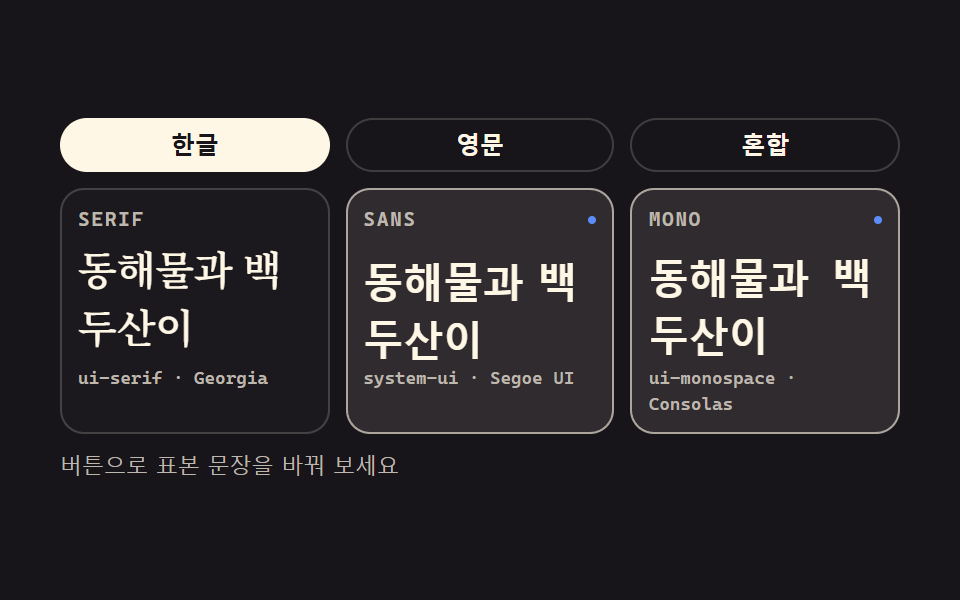 baseCSS Typography Playground: 9 Demos, No Webfonts
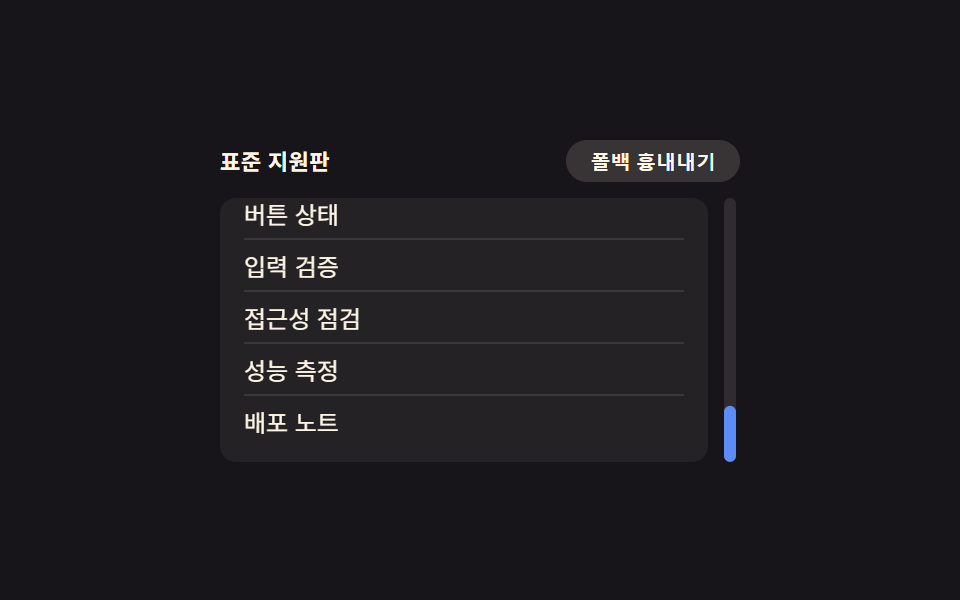 compatCSS Browser Compatibility: 9 Practical Fallbacks
 Feedback9 CSS Tooltip Bubbles — one line, copy-paste
 Feedback9 CSS Input Focus Animations: One Line, Copy-Paste
 GalleriesPortfolio Gallery HTML CSS: 9 UI Patterns
 Landing sectionsCSS Card Design Examples — 9 Content Card Types
 Dashboard UIWord Cloud JavaScript: 9 Scenes, Spiral to 3D
 Dashboard UITreemap Chart: 9 Canvas Layout Scenes