Mandelbrot Zoom, 9 Ways (Escape-Time, No Library)
Iterate z = z² + c per pixel and count escapes — the Mandelbrot cardioid appears, and every zoom level hides new mini-mandelbrots forever.
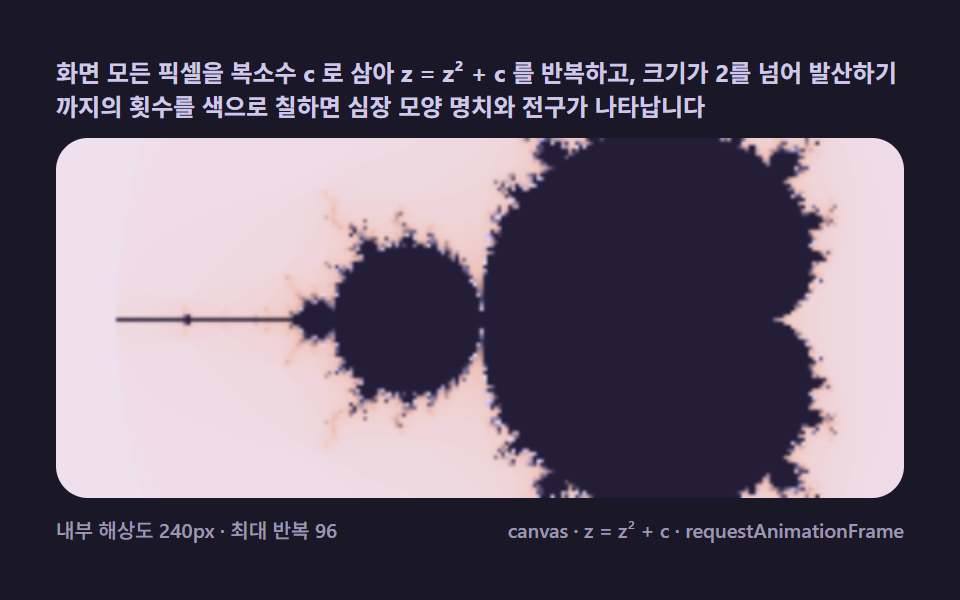 01 mb-escape-basic
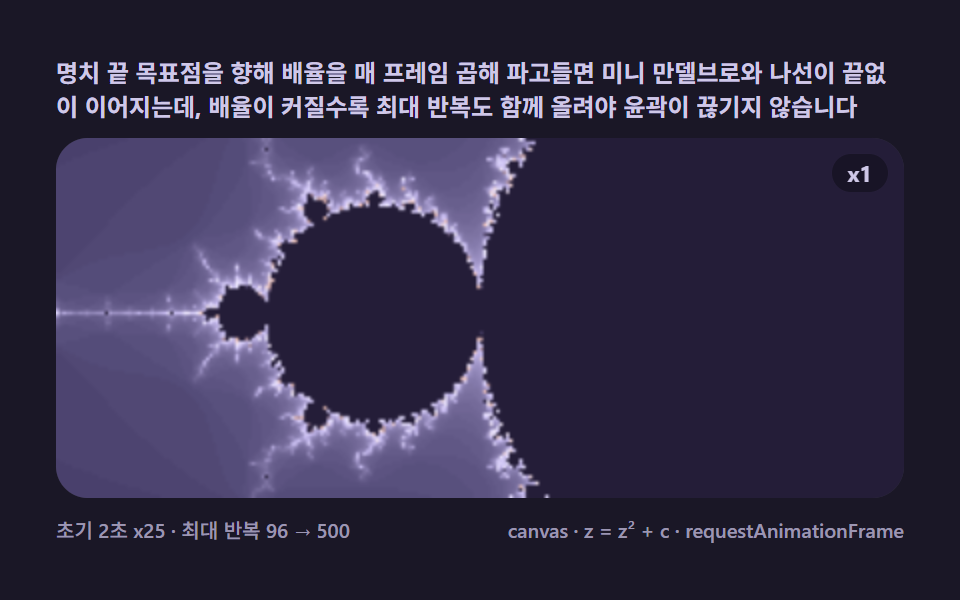 02 mb-deep-zoom-dive
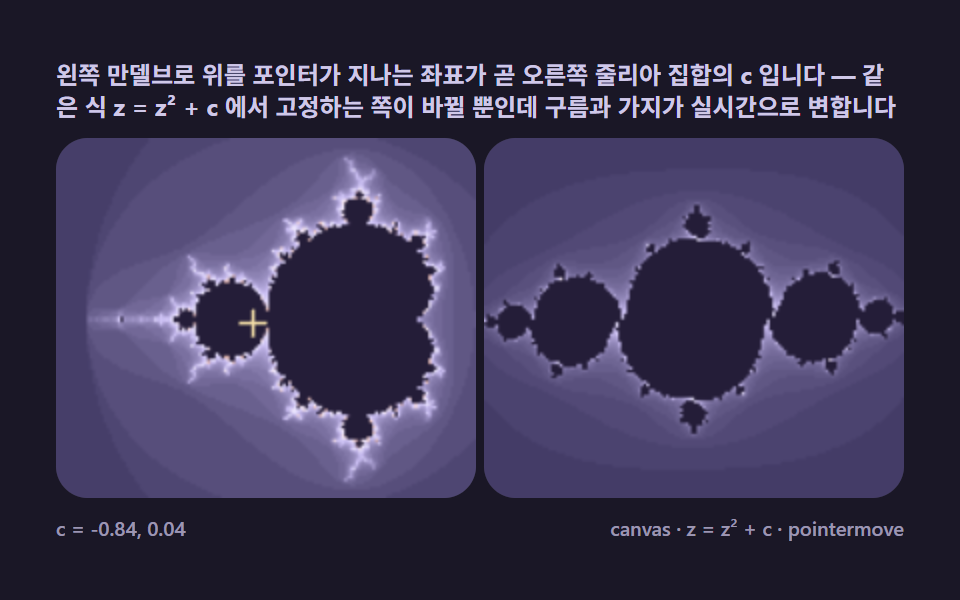 03 mb-julia-orbit-link
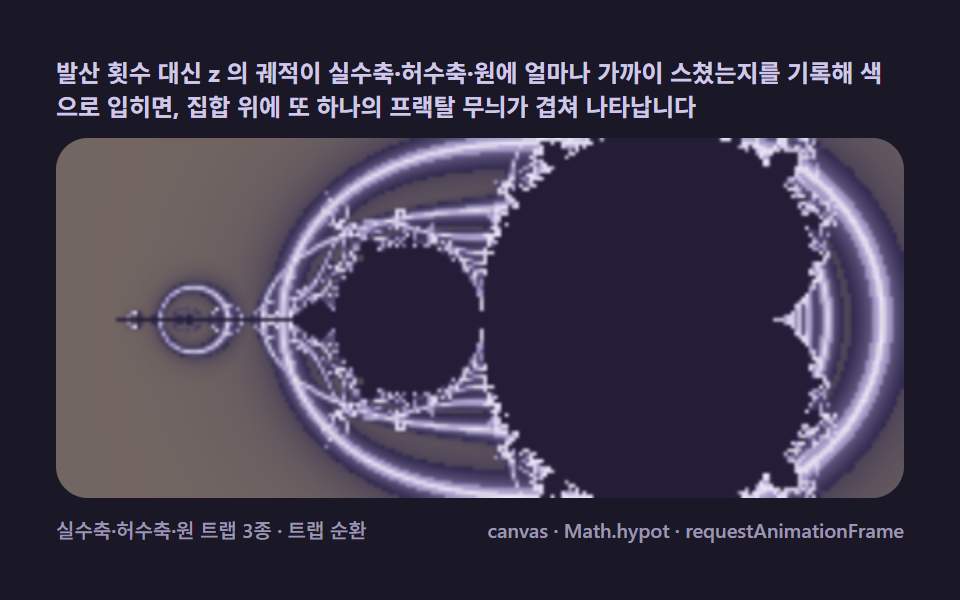 04 mb-orbit-trap-color
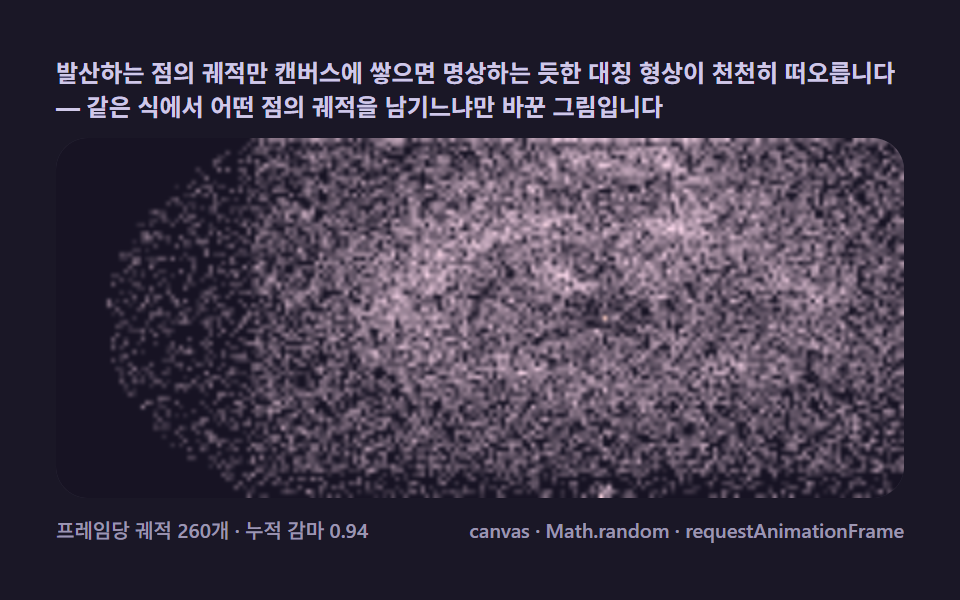 05 mb-buddhabrot-ghost
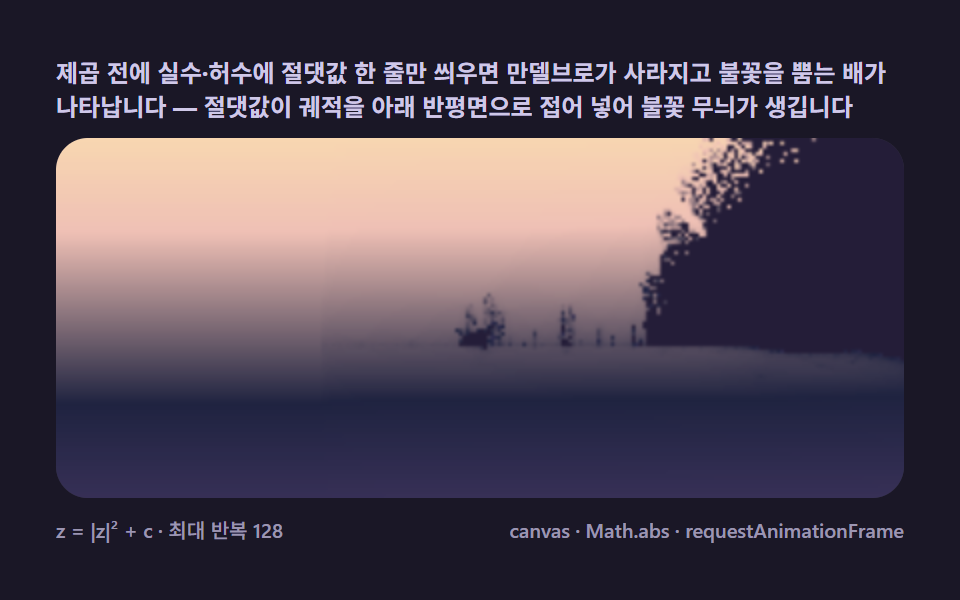 06 mb-burning-ship-variant
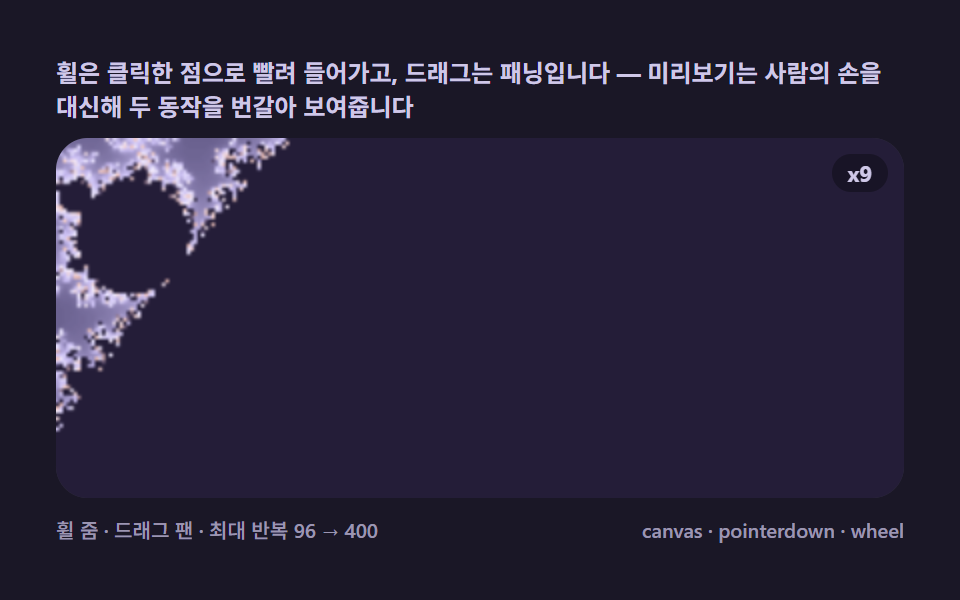 07 mb-pointer-zoom-pan
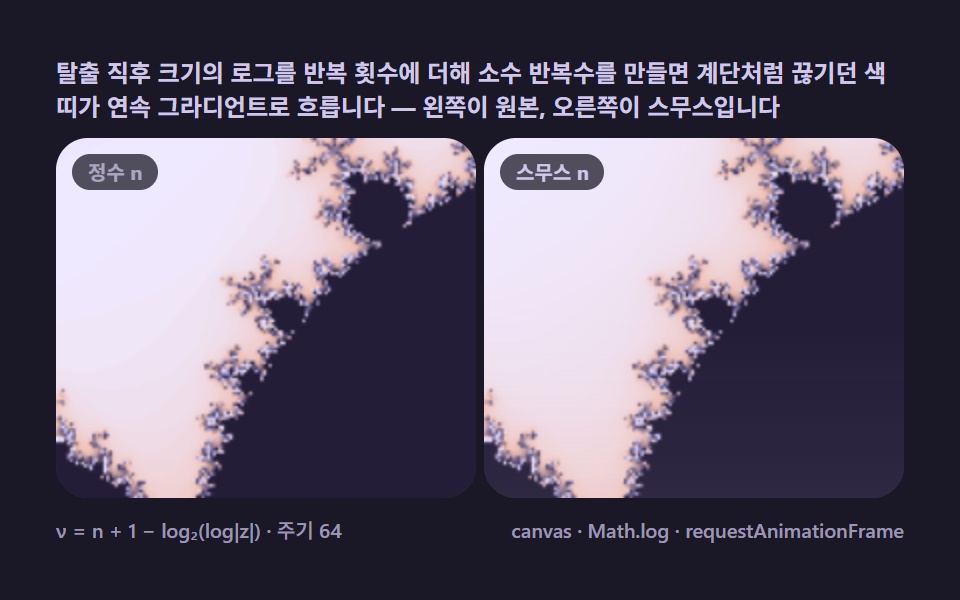 08 mb-smooth-iteration-fade
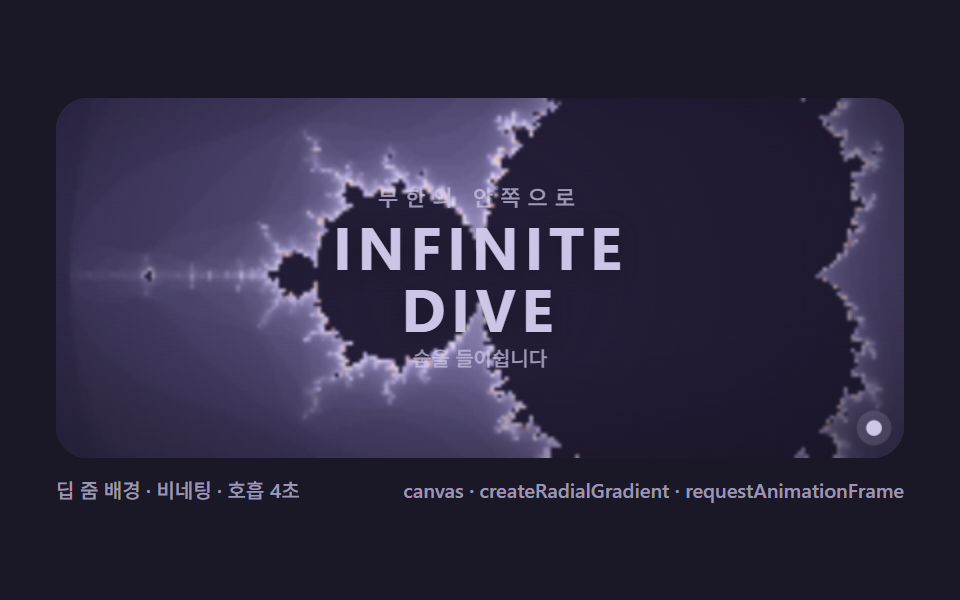 09 mb-fractal-hero-scene
Auto-plays · click a tile to jump to its section · all nine in one zip
- 01 Escape time basics — iterate z = z² + c per pixel and color by escape count
- 02 Infinite deep zoom — an automatic dive toward a chosen target
- 03 Julia set link — pointer picks c on the Mandelbrot, a second canvas morphs
- 04 Orbit traps — coloring by what the iteration path brushes against
- 05 Buddhabrot — accumulating escaping orbits until a ghost figure emerges
- 06 Burning Ship variant — one absolute value turns the set into a ship ablaze
- 07 Pointer zoom and pan — an explorer sucked into the point you click
- 08 Smooth iteration count — erasing bands into flowing gradients
- 09 Fractal hero scene — a front-door stage layered with type and starlight
From Escape Time to the Landing Screen: Nine Layers of the Mandelbrot Set
The nine scenes climb one axis: what each one keeps from the iteration. 01 keeps only the escape count — the base image, with the palette cycling so the staircase stays visible instead of hidden. 02 keeps the count but moves the viewport exponentially, diving toward a cusp. 03 keeps the formula and swaps which side is fixed, connecting the set to its Julia cousins live. 04 throws the count out and keeps the orbit's geometry instead. 05 keeps the orbit itself, as accumulated light. 06 changes one absolute value in the formula and grows a different creature altogether. 07 hands the viewport to the pointer. 08 repairs the one artifact the integer count leaves behind. 09 assembles a dive, a veil, and typography into a product's first screen. It is the same per-pixel field computation that lights a sphere you find by marching a ray until it crosses the surface — except there the loop walks a ray through space and here it walks one complex number through squarings, and the reward runs the other way: the ray marcher converges on an answer, while a fractal dive never finishes; it only deepens.
Code per item
Each snippet below is lifted from that item's own script tag — constant names intact, comments translated, identifiers untouched. Paste one next to a canvas element and it draws the same picture the panel above it renders.
01Escape-time basics — square, add, and color by the count
Every pixel becomes one complex number c, the loop squares and adds until the magnitude passes 2, and the step count at that moment picks the color — the cardioid and its bulb are simply where the count never finishes, painted at 32.008% cumulative area with a 30.799% peak frame and 24.9 average intensity under a 2.0s palette cycle. The viewport is the classic overview at center −0.75, 0 with span 2.9, and the integer count is exactly what makes the bands a staircase — the flaw item 08 exists to erase.
<main class="stage">
<div class="mb is-demo" id="mbRoot">
  <p class="mb__hint">
    <span>Treat every pixel as a complex c, iterate z = z² + c, and color by how many steps it takes to escape past size 2 — the cardioid and bulb appear on their own</span>
  </p>
  <div class="mb__field" role="application" aria-label="Escape-time basics lab" tabindex="0">
    <canvas class="mb__cv" id="mbCv"></canvas>
  </div>
  <div class="mb__bar">
    <span class="mb__meta">internal 240px · max iterations 96</span>
    <span class="mb__meta mb__meta--dim">canvas · z = z² + c · requestAnimationFrame</span>
  </div>
</div>
</main>
@use "../../../../site/static/demo-tokens" as *;
// 탈출 시간 기본(01). @keyframes 를 두지 않는다 —
// 움직임은 전부 캔버스 rAF 루프(픽셀마다 z = z² + c 반복 → 발산 횟수로 팔레트 순환)가 만든다.
// 무대는 편 공통 심야 프랙탈 팔레트. 파스텔 색을 --mb-* 로 편 전체(01~09) 공통 규격.
$duration: $dur-loop;
$easing: $ease-spring;
$color: $subject-lilac;
// ── 편 공통 심야 프랙탈 팔레트(BD9~11 원칙: 편마다 다시 정하지 않는다) ──
$mb-stage: #1a1726; // 심야 남보라 — 저채도 짙은 무대 (파스텔 검사 무관: 저채도·저명도)
@include stage($mb-stage);
$mb-ink: #14111f; // 관측창 바닥 — 무대보다 한 톤 어두운 보라검
$mb-set: #241d38; // 집합 내부 — 짙은 보라 실루엣(먹보다 프랙탈스러운 낮은 명도)
$mb-text: #cfc8e8; // 라벨 글자 — 밝은 라벤더 회색
.mb {
// 렌더러가 읽는 색 — JS 는 getComputedStyle 로 --mb-* 를 받아 쓴다
// 팔레트 5색: 짙은 남보라 → 라벤더 → 크림 → 복숭아 → 다시 짙은 보파(고리 순환)
--mb-c0: #3d3560;
--mb-c1: #c9bdf2;
--mb-c2: #efeaff;
--mb-c3: #efc0b5;
--mb-c4: #3d3560;
--mb-set: #{$mb-set};
--mb-ink: #{$mb-ink};
display: flex; flex-direction: column; gap: $sp-2;
width: 100%; max-width: 424px;
}
.mb__hint {
display: flex; align-items: center; gap: $sp-1; margin: 0;
font-weight: 700; font-size: clamp(10px, 2.8vw, 12px); line-height: 1.35;
color: $mb-text;
}
.mb__field {
position: relative; height: 180px;
border-radius: $r-card; overflow: hidden;
background: $mb-ink;
box-shadow: inset 0 0 0 1px rgba($mb-text, .18);
}
.mb__field:focus-visible { outline: 2px solid $subject-lilac; outline-offset: 2px; }
.mb__cv { display: block; width: 100%; height: 100%; }
.mb__bar { display: flex; align-items: baseline; justify-content: space-between; gap: $sp-2; }
.mb__meta { font-size: 10px; font-weight: 500; color: rgba($mb-text, .72); }
.mb__meta--dim { font-size: 10px; }
@media (max-width: 340px) {
.mb { gap: $sp-1; }
.mb__field { height: 100px; }
.mb__meta--dim { display: none; }
}
// reduce — rAF 를 돌리지 않고 팔레트가 어울리는 한 장만 남는다.
@media (prefers-reduced-motion: reduce) {
.mb.is-still .mb__field { cursor: default !important; }
}html, body {
margin: 0;
overflow: hidden;
}
.stage {
box-sizing: border-box;
min-height: 100vh;
display: grid;
place-items: center;
margin: 0;
background: #1a1726;
font-family: -apple-system, "Segoe UI", "Noto Sans KR", sans-serif;
padding: clamp(8px, 4vw, 24px);
}
.mb {
--mb-c0: #3d3560;
--mb-c1: #c9bdf2;
--mb-c2: #efeaff;
--mb-c3: #efc0b5;
--mb-c4: #3d3560;
--mb-set: #241d38;
--mb-ink: #14111f;
display: flex;
flex-direction: column;
gap: 8px;
width: 100%;
max-width: 424px;
}
.mb__hint {
display: flex;
align-items: center;
gap: 4px;
margin: 0;
font-weight: 700;
font-size: clamp(10px, 2.8vw, 12px);
line-height: 1.35;
color: #cfc8e8;
}
.mb__field {
position: relative;
height: 180px;
border-radius: 16px;
overflow: hidden;
background: #14111f;
box-shadow: inset 0 0 0 1px rgba(207, 200, 232, 0.18);
}
.mb__field:focus-visible {
outline: 2px solid #b9a0ff;
outline-offset: 2px;
}
.mb__cv {
display: block;
width: 100%;
height: 100%;
}
.mb__bar {
display: flex;
align-items: baseline;
justify-content: space-between;
gap: 8px;
}
.mb__meta {
font-size: 10px;
font-weight: 500;
color: rgba(207, 200, 232, 0.72);
}
.mb__meta--dim {
font-size: 10px;
}
@media (max-width: 340px) {
.mb {
gap: 4px;
}
.mb__field {
height: 100px;
}
.mb__meta--dim {
display: none;
}
}
@media (prefers-reduced-motion: reduce) {
.mb.is-still .mb__field {
cursor: default !important;
}
}// 탈출 시간 기본(01) — 만델브로 집합의 첫 장면.
// 모든 픽셀 = 복소수 c. z 를 0 에서 시작해 z = z² + c 를 반복하고 |z| > 2 가 되는 순간의
// 반복 횟수 n 이 그 픽셀의 색이 된다. 96회 안에 발산하지 않는 픽셀은 집합 내부로 본다(먹색).
// 움직임 = 팔레트 순환. 반복 횟수는 정수라 색 띠는 계단형인데(띠가 시각적으로 계단인 게 08 번
// 스무스 채색으로 넘어가는 다리 역할), 띠 전체가 위상을 옮겨 순환하면 명치 가장자리가 물결처럼 흐른다.
(function () {
// ── 변형 상수 블록 — 아래 값 하나만 바꿔 변형을 만든다 ──
var MAXIT = 96; // 최대 반복 횟수 — 깊이와 계산량의 비율
var CYCLE = 2.0; // 팔레트 순환 주기(초) — 설정 초(2s)와 같아 한 바퀴가 한 루프
// ────────────────────────────────────────────────────
var root = document.getElementById('mbRoot');
var field = document.getElementById('mbCv').parentElement;
var cv = document.getElementById('mbCv');
var css = getComputedStyle(root);
function tokRGB(name) {
var s = css.getPropertyValue(name).trim();
var hx = s.length === 4
? s.charAt(1) + s.charAt(1) + s.charAt(2) + s.charAt(2) + s.charAt(3) + s.charAt(3)
: s.slice(1);
return [parseInt(hx.slice(0, 2), 16), parseInt(hx.slice(2, 4), 16), parseInt(hx.slice(4, 6), 16)];
}
// 렌더러가 읽는 색 — 팔레트 5색(짙은 남보라 → 라벤더 → 크림 → 복숭아 → 다시 짙은 보라)
var PAL = ['--mb-c0', '--mb-c1', '--mb-c2', '--mb-c3', '--mb-c4'].map(tokRGB);
var C_SET = tokRGB('--mb-set'); // 집합 내부 — 먹보라
var C_INK = tokRGB('--mb-ink'); // 관측창 바닥
var reduce = window.matchMedia('(prefers-reduced-motion: reduce)').matches;
var raf = 0, t0 = -1;
var W = 0, H = 0, IRES = 240; // 내부 계산 해상도(가로 픽셀) — 성능 조절 노브
var ov, octx; // 저해상도 오프스크린 캔버스
function fit() {
var r = field.getBoundingClientRect();
W = Math.round(r.width); H = Math.round(r.height);
cv.width = W; cv.height = H;
ov = document.createElement('canvas');
ov.width = IRES; ov.height = Math.max(2, Math.round(IRES * H / W));
}
// c 평면 뷰포트 — 만덜브로 표준 프레임(가로 -2.5 ~ 1.0, 세로 ±1.15 근사)
var CX = -0.75, CY = 0, SPAN = 2.9;
function render(phase) {
var iw = ov.width, ih = ov.height;
var img = octx.createImageData(iw, ih);
var px = img.data;
var dx = SPAN / iw, dy = SPAN / iw; // dy 를 dx 와 같게 — 정사각 픽셀(종횡비 보정)
var oy0 = CY - (ih * dy) / 2;
var k = 0;
for (var j = 0; j < ih; j++) {
var ci = oy0 + j * dy;
for (var i = 0; i < iw; i++) {
var cr = CX - SPAN / 2 + i * dx;
// z = 0 부터 z = z² + c 반복 — 발산 시점의 n 이 색 인덱스
var zr = 0, zi = 0, n = 0;
while (n < MAXIT && zr * zr + zi * zi <= 4) {
var t = zr * zr - zi * zi + cr;
zi = 2 * zr * zi + ci;
zr = t;
n++;
}
var r, g, b;
if (n >= MAXIT) {
r = C_SET[0]; g = C_SET[1]; b = C_SET[2];
} else {
// 팔레트 순환 — n 에 phase 를 더해 5색 파장을 반복 통과시킨다
var u = (n / MAXIT) * 4 + phase;
var seg = u - Math.floor(u / 4) * 4;
var a = PAL[Math.floor(seg) % 4], bb = PAL[(Math.floor(seg) + 1) % 4];
var f = seg - Math.floor(seg);
r = a[0] + (bb[0] - a[0]) * f;
g = a[1] + (bb[1] - a[1]) * f;
b = a[2] + (bb[2] - a[2]) * f;
}
px[k++] = r; px[k++] = g; px[k++] = b; px[k++] = 255;
}
}
octx.putImageData(img, 0, 0);
var ctx = cv.getContext('2d');
ctx.imageSmoothingEnabled = true;
ctx.drawImage(ov, 0, 0, W, H);
}
function frame(now) {
if (t0 < 0) t0 = now;
var loop = ((now - t0) / 1000) % CYCLE; // 2초 주기 순환 — 결정론 루프
render((loop / CYCLE) * 4); // 파장 4칸을 주기 안에 한 바퀴
raf = requestAnimationFrame(frame);
}
window.addEventListener('resize', function () {
fit();
render(reduce ? 0.6 : ((performance.now() - t0) / 1000 % CYCLE) / CYCLE * 4);
});
fit();
octx = ov.getContext('2d');
if (reduce) {
render(0.6); // reduce — 순환 한 장면만 고정
root.classList.add('is-still');
} else {
raf = requestAnimationFrame(frame);
}
})();// EscapeBasic — vanilla 판(run/323/demo/01-mb-escape-basic/index.html) 의 React 포트.
// 모든 픽셀 = 복소수 c. z 를 0 에서 시작해 z = z² + c 를 반복하고 |z| > 2 가 되는 순간의
// 반복 횟수 n 이 그 픽셀의 색이 된다. 96회 안에 발산하지 않는 픽셀은 집합 내부(먹보라).
// 움직임 = 팔레트 순환 — 반복 횟수는 정수라 색 띠가 계단인데(08 스무스 채색으로 이어지는 다리),
// 띠 전체가 위상을 옮겨 순환하면 명치 가장자리가 물결처럼 흐른다.
import { useEffect, useRef, useState } from "react";
import type { CSSProperties } from "react";
import styles from "./EscapeBasic.module.scss";
export type EscapeBasicProps = {
duration?: string;
easing?: string;
color?: string;
maxit?: number; // 최대 반복 횟수 — 변형 "최대 반복"이 96 → 240
};
// ── 변형 상수(기본값) — vanilla 판과 동일 ──
const CYCLE = 2.0; // 팔레트 순환 주기(초) — 설정 초(2s)와 같아 한 바퀴가 한 루프
const IRES = 240; // 내부 계산 해상도(가로 픽셀) — 성능 조절 노브
type Vars = CSSProperties & { "--duration"?: string; "--easing"?: string; "--color"?: string };
type Box<T> = { current: T };
type RGB = [number, number, number];
const FIELD_LABEL = "탈출 시간 기본 실험판";
const META_LEFT = "내부 해상도 240px · 최대 반복 96";
const META_RIGHT = "canvas · z = z² + c · requestAnimationFrame";
const HINT = "화면 모든 픽셀을 복소수 c 로 삼아 z = z² + c 를 반복하고, 크기가 2를 넘어 발산하기까지의 횟수를 색으로 칠하면 심장 모양 명치와 전구가 나타납니다";
// c 평면 뷰포트 — 만덜브로 표준 프레임(가로 -2.5 ~ 1.0, 세로 ±1.15 근사)
const CX = -0.75, CY = 0, SPAN = 2.9;
export default function EscapeBasic({
duration = "2s",
easing = "cubic-bezier(.2, .8, .2, 1)",
color = "#c9bdf2",
maxit = 96
}: EscapeBasicProps) {
const rootRef = useRef<HTMLDivElement | null>(null);
const fieldRef = useRef<HTMLDivElement | null>(null);
const cvRef = useRef<HTMLCanvasElement | null>(null);
const ctxRef = useRef<CanvasRenderingContext2D | null>(null);
const ovRef = useRef<HTMLCanvasElement | null>(null);
const octxRef = useRef<CanvasRenderingContext2D | null>(null);
const palRef = useRef<RGB[] | null>(null);
const setRef = useRef<RGB | null>(null);
const maxitRef = useRef(maxit) as Box<number>;
const wRef = useRef(0) as Box<number>;
const hRef = useRef(0) as Box<number>;
const rafRef = useRef(0) as Box<number>;
const [still, setStill] = useState(false);
const vars: Vars = { "--duration": duration, "--easing": easing, "--color": color };
function reduced(): boolean {
return window.matchMedia("(prefers-reduced-motion: reduce)").matches;
}
function tokRGB(root: HTMLDivElement, name: string): RGB {
const s = getComputedStyle(root).getPropertyValue(name).trim();
const hx = s.length === 4
? s.charAt(1) + s.charAt(1) + s.charAt(2) + s.charAt(2) + s.charAt(3) + s.charAt(3)
: s.slice(1);
return [parseInt(hx.slice(0, 2), 16), parseInt(hx.slice(2, 4), 16), parseInt(hx.slice(4, 6), 16)];
}
function fit(): void {
const field = fieldRef.current;
const cv = cvRef.current;
if (!field || !cv) return;
const r = field.getBoundingClientRect();
const W = Math.round(r.width), H = Math.round(r.height);
wRef.current = W; hRef.current = H;
cv.width = W; cv.height = H;
ctxRef.current = cv.getContext("2d");
const ov = document.createElement("canvas");
ov.width = IRES;
ov.height = Math.max(2, Math.round(IRES * H / W));
ovRef.current = ov;
octxRef.current = ov.getContext("2d");
}
function render(phase: number): void {
const octx = octxRef.current;
const ov = ovRef.current;
const ctx = ctxRef.current;
const PAL = palRef.current;
const C_SET = setRef.current;
const W = wRef.current, H = hRef.current;
const MAXIT = maxitRef.current;
if (!octx || !ov || !ctx || !PAL || !C_SET) return;
const iw = ov.width, ih = ov.height;
const img = octx.createImageData(iw, ih);
const px = img.data;
const dx = SPAN / iw, dy = SPAN / iw; // dy 를 dx 와 같게 — 정사각 픽셀(종횡비 보정)
const oy0 = CY - (ih * dy) / 2;
let k = 0;
for (let j = 0; j < ih; j++) {
const ci = oy0 + j * dy;
for (let i = 0; i < iw; i++) {
const cr = CX - SPAN / 2 + i * dx;
// z = 0 부터 z = z² + c 반복 — 발산 시점의 n 이 색 인덱스
let zr = 0, zi = 0, n = 0;
while (n < MAXIT && zr * zr + zi * zi <= 4) {
const t = zr * zr - zi * zi + cr;
zi = 2 * zr * zi + ci;
zr = t;
n++;
}
let r: number, g: number, b: number;
if (n >= MAXIT) {
r = C_SET[0]; g = C_SET[1]; b = C_SET[2];
} else {
// 팔레트 순환 — n 에 phase 를 더해 5색 파장을 반복 통과시킨다
const u = (n / MAXIT) * 4 + phase;
const seg = u - Math.floor(u / 4) * 4;
const a = PAL[Math.floor(seg) % 4], bb = PAL[(Math.floor(seg) + 1) % 4];
const f = seg - Math.floor(seg);
r = a[0] + (bb[0] - a[0]) * f;
g = a[1] + (bb[1] - a[1]) * f;
b = a[2] + (bb[2] - a[2]) * f;
}
px[k++] = r; px[k++] = g; px[k++] = b; px[k++] = 255;
}
}
octx.putImageData(img, 0, 0);
ctx.imageSmoothingEnabled = true;
ctx.drawImage(ov, 0, 0, W, H);
}
let t0 = -1;
function frame(now: number): void {
if (t0 < 0) t0 = now;
const loop = ((now - t0) / 1000) % CYCLE; // 2초 주기 순환 — 결정론 루프
render((loop / CYCLE) * 4); // 파장 4칸을 주기 안에 한 바퀴
rafRef.current = requestAnimationFrame(frame);
}
useEffect(() => {
const root = rootRef.current;
if (!root) return;
maxitRef.current = maxit;
// 팔레트 5색(짙은 남보라 → 라벤더 → 크림 → 복숭아 → 다시 짙은 보라) + 집합 내부 먹보라
palRef.current = ["--mb-c0", "--mb-c1", "--mb-c2", "--mb-c3", "--mb-c4"].map((nm) => tokRGB(root, nm));
setRef.current = tokRGB(root, "--mb-set");
fit();
function onResize(): void {
fit();
render(0.6);
}
window.addEventListener("resize", onResize);
if (reduced()) {
render(0.6); // reduce — 순환 한 장면만 고정
setStill(true);
} else {
t0 = -1;
rafRef.current = requestAnimationFrame(frame);
}
return () => {
window.removeEventListener("resize", onResize);
cancelAnimationFrame(rafRef.current);
};
// eslint-disable-next-line react-hooks/exhaustive-deps
}, [maxit]);
const rootCls = still ? `${styles.root} ${styles.isStill}` : styles.root;
return (
<main className={styles.stage}>
<div className={rootCls} ref={rootRef} style={vars}>
<p className={styles.hint}>
<span>{HINT}</span>
</p>
<div
className={styles.field}
ref={fieldRef}
role="application"
aria-label={FIELD_LABEL}
tabIndex={0}
>
<canvas className={styles.cv} ref={cvRef}></canvas>
</div>
<div className={styles.bar}>
<span className={styles.meta}>{META_LEFT}</span>
<span className={styles.metaDim}>{META_RIGHT}</span>
</div>
</div>
</main>
);
}01 · Escape time basics — iterate z = z² + c per pixel and color by escape count — Measured area 32.008% · moving frames 23/23Original by GODRICH · SCSS and React ship in the zip · See the password
Four real operations and one comparison per step
        var cr = CX - SPAN / 2 + i * dx;
        // start from z = 0 and repeat z = z² + c — the step count n at escape is the color index
        var zr = 0, zi = 0, n = 0;
        while (n < MAXIT && zr * zr + zi * zi <= 4) {
          var t = zr * zr - zi * zi + cr;
          zi = 2 * zr * zi + ci;
          zr = t;
          n++;
        }
        var r, g, b;
        if (n >= MAXIT) {
          r = C_SET[0]; g = C_SET[1]; b = C_SET[2];
        } else {
          // palette cycle — adding phase to n sweeps the 5-color band through the set
          var u = (n / MAXIT) * 4 + phase;
          var seg = u - Math.floor(u / 4) * 4;
          var a = PAL[Math.floor(seg) % 4], bb = PAL[(Math.floor(seg) + 1) % 4];
          var f = seg - Math.floor(seg);
          r = a[0] + (bb[0] - a[0]) * f;
          g = a[1] + (bb[1] - a[1]) * f;
          b = a[2] + (bb[2] - a[2]) * f;
        }
        px[k++] = r; px[k++] = g; px[k++] = b; px[k++] = 255;
      }
02Deep-zoom dive — magnifying toward a cusp target
The magnification climbs to x25 over each 2-second loop while the center glides toward the cusp target −0.743643887037, 0.13182590421, and the iteration ceiling rises from 96 to 500 in step with the dive so the fine outlines never starve — 34.847% painted, 31.349% peak, 73.4 average intensity, the second brightest of the nine. It is the heart of any mandelbrot set generator aimed at a chosen target: zoom and ceiling rise together, or not at all.
<main class="stage">
<div class="mb is-demo" id="mbRoot">
  <p class="mb__hint">
    <span>Multiply the magnification every frame toward a cusp target and mini-mandelbrots unroll endlessly — iteration depth must rise with zoom or the outlines starve</span>
  </p>
  <div class="mb__field" role="application" aria-label="Infinite deep zoom lab" tabindex="0">
    <canvas class="mb__cv" id="mbCv"></canvas>
    <span class="mb__zoom" id="mbZoom">x1</span>
  </div>
  <div class="mb__bar">
    <span class="mb__meta">x25 per 2s · iterations 96 to 500</span>
    <span class="mb__meta mb__meta--dim">canvas · z = z² + c · requestAnimationFrame</span>
  </div>
</div>
</main>
@use "../../../../site/static/demo-tokens" as *;
// 무한 딥 줌(02). @keyframes 없음 — 움직임은 캔버스 rAF(배율·중심·최대 반복을 매 프레임 갱신)이 만든다.
// 배율 라벨(.mb__zoom)만 CSS 애니메이션 — 줌 파고듦에 맞춰 살짝 맥동(성능 영향 0).
$duration: $dur-loop;
$easing: $ease-spring;
$color: $subject-sky;
// ── 편 공통 심야 프랙탈 팔레트 ──
$mb-stage: #1a1726;
@include stage($mb-stage);
$mb-ink: #14111f;
$mb-set: #241d38;
$mb-text: #cfc8e8;
.mb {
--mb-c0: #3d3560;
--mb-c1: #c9bdf2;
--mb-c2: #efeaff;
--mb-c3: #efc0b5;
--mb-c4: #3d3560;
--mb-set: #{$mb-set};
--mb-ink: #{$mb-ink};
display: flex; flex-direction: column; gap: $sp-2;
width: 100%; max-width: 424px;
}
.mb__hint {
display: flex; align-items: center; gap: $sp-1; margin: 0;
font-weight: 700; font-size: clamp(10px, 2.8vw, 12px); line-height: 1.35;
color: $mb-text;
}
.mb__field {
position: relative; height: 180px;
border-radius: $r-card; overflow: hidden;
background: $mb-ink;
box-shadow: inset 0 0 0 1px rgba($mb-text, .18);
}
.mb__field:focus-visible { outline: 2px solid $subject-sky; outline-offset: 2px; }
.mb__cv { display: block; width: 100%; height: 100%; }
// 배율 라벨 — 관측창 오른쪽 위. 배율 숫자는 JS 가 채운다
.mb__zoom {
position: absolute; top: $sp-2; right: $sp-2;
padding: $sp-1 $sp-2;
border-radius: $r-pill;
background: rgba($mb-ink, .72);
font-weight: 700; font-size: 11px; line-height: 1;
color: $mb-text;
font-variant-numeric: tabular-nums;
pointer-events: none;
// 줌 파고듦 호흡 — 라벨 테두리 광택이 살짝 세차게 (텍스트 자체는 JS 갱신)
.is-demo & { animation-name: mb-zoom-pulse; animation-duration: $dur-loop; animation-iteration-count: infinite; animation-timing-function: $ease-spring; }
}
@keyframes mb-zoom-pulse {
0% { box-shadow: 0 0 0 0 rgba(179, 163, 232, 0); }
50% { box-shadow: 0 0 0 3px rgba(179, 163, 232, .30); }
100% { box-shadow: 0 0 0 0 rgba(179, 163, 232, 0); }
}
.mb__bar { display: flex; align-items: baseline; justify-content: space-between; gap: $sp-2; }
.mb__meta { font-size: 10px; font-weight: 500; color: rgba($mb-text, .72); }
.mb__meta--dim { font-size: 10px; }
@media (max-width: 340px) {
.mb { gap: $sp-1; }
.mb__field { height: 100px; }
.mb__meta--dim { display: none; }
}
// reduce — 라벨 맥동만 끊고(캔버스는 어차피 정지 장면) 잠수 중반 한 장을 고정한다.
@media (prefers-reduced-motion: reduce) {
.mb.is-demo .mb__zoom { animation: none !important; }
}html, body {
margin: 0;
overflow: hidden;
}
.stage {
box-sizing: border-box;
min-height: 100vh;
display: grid;
place-items: center;
margin: 0;
background: #1a1726;
font-family: -apple-system, "Segoe UI", "Noto Sans KR", sans-serif;
padding: clamp(8px, 4vw, 24px);
}
.mb {
--mb-c0: #3d3560;
--mb-c1: #c9bdf2;
--mb-c2: #efeaff;
--mb-c3: #efc0b5;
--mb-c4: #3d3560;
--mb-set: #241d38;
--mb-ink: #14111f;
display: flex;
flex-direction: column;
gap: 8px;
width: 100%;
max-width: 424px;
}
.mb__hint {
display: flex;
align-items: center;
gap: 4px;
margin: 0;
font-weight: 700;
font-size: clamp(10px, 2.8vw, 12px);
line-height: 1.35;
color: #cfc8e8;
}
.mb__field {
position: relative;
height: 180px;
border-radius: 16px;
overflow: hidden;
background: #14111f;
box-shadow: inset 0 0 0 1px rgba(207, 200, 232, 0.18);
}
.mb__field:focus-visible {
outline: 2px solid #6ec8ff;
outline-offset: 2px;
}
.mb__cv {
display: block;
width: 100%;
height: 100%;
}
.mb__zoom {
position: absolute;
top: 8px;
right: 8px;
padding: 4px 8px;
border-radius: 999px;
background: rgba(20, 17, 31, 0.72);
font-weight: 700;
font-size: 11px;
line-height: 1;
color: #cfc8e8;
font-variant-numeric: tabular-nums;
pointer-events: none;
}
.is-demo .mb__zoom {
animation-name: mb-zoom-pulse;
animation-duration: 2s;
animation-iteration-count: infinite;
animation-timing-function: cubic-bezier(0.2, 0.8, 0.2, 1);
}
@keyframes mb-zoom-pulse {
0% {
box-shadow: 0 0 0 0 rgba(179, 163, 232, 0);
}
50% {
box-shadow: 0 0 0 3px rgba(179, 163, 232, 0.3);
}
100% {
box-shadow: 0 0 0 0 rgba(179, 163, 232, 0);
}
}
.mb__bar {
display: flex;
align-items: baseline;
justify-content: space-between;
gap: 8px;
}
.mb__meta {
font-size: 10px;
font-weight: 500;
color: rgba(207, 200, 232, 0.72);
}
.mb__meta--dim {
font-size: 10px;
}
@media (max-width: 340px) {
.mb {
gap: 4px;
}
.mb__field {
height: 100px;
}
.mb__meta--dim {
display: none;
}
}
@media (prefers-reduced-motion: reduce) {
.mb.is-demo .mb__zoom {
animation: none !important;
}
}// 무한 딥 줌(02) — 목표점을 향한 자동 잠수.
// 매 프레임 scale 을 s = s / k 로 줄이고(=배율 k 배), 중심을 목표점 쪽으로 끌어당긴다.
// 핵심 균형: 배율이 커질수록 집합 가장자리의 구조가 가늘어지므로 maxIter 를 log(배율)에 비례해
// 올린다(변형 "최대 반복 횟수"가 500 → 2,000). 2초 루프가 끝나면 배율 1 로 되감는다 — 무한 반복 렌더.
(function () {
// ── 변형 상수 블록 — 아래 값 하나만 바꿔 변형을 만든다 ──
var MAXIT0 = 96; // 시작 최대 반복 — 배율 1 에서의 기본값
var MAXIT1 = 500; // 루프 끝 최대 반복 — 변형 "최대 반복 횟수"가 500 → 2,000
var ZOOM2S = 25; // 2초 동안의 총 배율(倍) — 잠수 깊이
// ────────────────────────────────────────────────────
var root = document.getElementById('mbRoot');
var field = document.getElementById('mbCv').parentElement;
var cv = document.getElementById('mbCv');
var zoomEl = document.getElementById('mbZoom');
var css = getComputedStyle(root);
function tokRGB(name) {
var s = css.getPropertyValue(name).trim();
var hx = s.length === 4
? s.charAt(1) + s.charAt(1) + s.charAt(2) + s.charAt(2) + s.charAt(3) + s.charAt(3)
: s.slice(1);
return [parseInt(hx.slice(0, 2), 16), parseInt(hx.slice(2, 4), 16), parseInt(hx.slice(4, 6), 16)];
}
var PAL = ['--mb-c0', '--mb-c1', '--mb-c2', '--mb-c3', '--mb-c4'].map(tokRGB);
var C_SET = tokRGB('--mb-set');
var reduce = window.matchMedia('(prefers-reduced-motion: reduce)').matches;
var raf = 0, t0 = -1;
var W = 0, H = 0, IRES = 260;
var ov, octx;
// 목표점 — 명치 끝(시클로이드 첨두) 안쪽의 나선 지대. 줌 시퀀스의 고전 좌표
var TX = -0.743643887037, TY = 0.13182590421;
function fit() {
var r = field.getBoundingClientRect();
W = Math.round(r.width); H = Math.round(r.height);
cv.width = W; cv.height = H;
ov = document.createElement('canvas');
ov.width = IRES; ov.height = Math.max(2, Math.round(IRES * H / W));
}
function render(cx, cy, scale, maxit) {
var iw = ov.width, ih = ov.height;
var img = octx.createImageData(iw, ih);
var px = img.data;
var dx = scale / iw, dy = scale / iw;
var oy0 = cy - (ih * dy) / 2;
var k = 0;
for (var j = 0; j < ih; j++) {
var ci = oy0 + j * dy;
for (var i = 0; i < iw; i++) {
var cr = cx - scale / 2 + i * dx;
var zr = 0, zi = 0, n = 0;
while (n < maxit && zr * zr + zi * zi <= 4) {
var t = zr * zr - zi * zi + cr;
zi = 2 * zr * zi + ci;
zr = t;
n++;
}
var r, g, b;
if (n >= maxit) {
r = C_SET[0]; g = C_SET[1]; b = C_SET[2];
} else {
var u = (n / maxit) * 4;
var seg = u - Math.floor(u / 4) * 4;
var a = PAL[Math.floor(seg) % 4], bb = PAL[(Math.floor(seg) + 1) % 4];
var f = seg - Math.floor(seg);
r = a[0] + (bb[0] - a[0]) * f;
g = a[1] + (bb[1] - a[1]) * f;
b = a[2] + (bb[2] - a[2]) * f;
}
px[k++] = r; px[k++] = g; px[k++] = b; px[k++] = 255;
}
}
octx.putImageData(img, 0, 0);
cv.getContext('2d').drawImage(ov, 0, 0, W, H);
}
// t(0~1) 진행도의 줌 상태 — 지수 잠수: scale = 2.9 / k, k = 25^t.
// k 대신 Math.log(k)/Math.log(ZOOM2S) 로 t 를 되돌릴 수도 있어(역함수) 라벨·루프 보정에 쓴다.
// 중심은 시작 프레임(-0.75, 0)에서 목표점으로 t 에 맞춰 다가간다(화면 밖 목표가 갑자기 튀지 않게).
function stateAt(t) {
var k = Math.pow(ZOOM2S, t);
var progress = Math.log(k) / Math.log(ZOOM2S); // 배율→진행도 역변환(=t, 검산용)
var cx = -0.75 + (TX + 0.75) * t;
var cy = (TY) * t;
var maxit = Math.round(MAXIT0 + (MAXIT1 - MAXIT0) * progress);
return { cx: cx, cy: cy, scale: 2.9 / k, maxit: maxit, k: k };
}
function setZoomLabel(k) {
// 배율 라벨 — x25 처럼 짧게. 1,000 넘으면 k 단위로
zoomEl.textContent = k >= 1000 ? 'x' + Math.round(k / 100) / 10 + 'k' : 'x' + Math.round(k);
}
function frame(now) {
if (t0 < 0) t0 = now;
var loop = ((now - t0) / 1000) % 2.0; // 2초 루프 — 잠수 후 배율 1 복귀
var t = loop / 2.0;
var s = stateAt(t);
render(s.cx, s.cy, s.scale, s.maxit);
setZoomLabel(s.k);
raf = requestAnimationFrame(frame);
}
window.addEventListener('resize', function () {
fit();
var s = stateAt(reduce ? 0.55 : 0.5);
render(s.cx, s.cy, s.scale, s.maxit);
});
fit();
octx = ov.getContext('2d');
if (reduce) {
var s = stateAt(0.55);
render(s.cx, s.cy, s.scale, s.maxit);
setZoomLabel(s.k);
root.classList.add('is-still');
} else {
raf = requestAnimationFrame(frame);
}
})();// DeepZoomDive — vanilla 판(run/323/demo/02-mb-deep-zoom-dive/index.html) 의 React 포트.
// 목표점을 향한 자동 잠수. 매 프레임 scale 을 s = s / k 로 줄이고(=배율 k 배), 중심을 목표점 쪽으로
// 끌어당긴다. 핵심 균형: 배율이 커질수록 집합 가장자리 구조가 가늘어지므로 maxIter 를 log(배율)에
// 비례해 올린다(변형 "최대 반복 횟수"가 500 → 2,000). 2초 루프가 끝나면 배율 1 로 되감는다 — 무한 반복 렌더.
import { useEffect, useRef, useState } from "react";
import type { CSSProperties } from "react";
import styles from "./DeepZoomDive.module.scss";
export type DeepZoomDiveProps = {
duration?: string;
easing?: string;
color?: string;
maxit1?: number; // 루프 끝 최대 반복 — 변형 "최대 반복 횟수"가 500 → 2,000
};
// ── 변형 상수(기본값) — vanilla 판과 동일 ──
const MAXIT0 = 96; // 시작 최대 반복 — 배율 1 에서의 기본값
const ZOOM2S = 25; // 2초 동안의 총 배율(倍) — 잠수 깊이
const IRES = 260; // 내부 계산 해상도(가로 픽셀)
type Vars = CSSProperties & { "--duration"?: string; "--easing"?: string; "--color"?: string };
type Box<T> = { current: T };
type RGB = [number, number, number];
const FIELD_LABEL = "무한 딥 줌 실험판";
const META_LEFT = "초기 2초 x25 · 최대 반복 96 → 500";
const META_RIGHT = "canvas · z = z² + c · requestAnimationFrame";
const HINT = "명치 끝 목표점을 향해 배율을 매 프레임 곱해 파고들면 미니 만델브로와 나선이 끝없이 이어지는데, 배율이 커질수록 최대 반복도 함께 올려야 윤곽이 끊기지 않습니다";
const ZOOM_INIT = "x1";
// 목표점 — 명치 끝(시클로이드 첨두) 안쪽의 나선 지대. 줌 시퀀스의 고전 좌표
const TX = -0.743643887037, TY = 0.13182590421;
// t(0~1) 진행도의 줌 상태 — 지수 잠수: scale = 2.9 / k, k = 25^t.
// 중심은 시작 프레임(-0.75, 0)에서 목표점으로 t 에 맞춰 다가간다(화면 밖 목표가 갑자기 튀지 않게).
type ZoomState = { cx: number; cy: number; scale: number; maxit: number; k: number };
export default function DeepZoomDive({
duration = "2s",
easing = "cubic-bezier(.2, .8, .2, 1)",
color = "#6ec8ff",
maxit1 = 500
}: DeepZoomDiveProps) {
const rootRef = useRef<HTMLDivElement | null>(null);
const fieldRef = useRef<HTMLDivElement | null>(null);
const cvRef = useRef<HTMLCanvasElement | null>(null);
const ctxRef = useRef<CanvasRenderingContext2D | null>(null);
const ovRef = useRef<HTMLCanvasElement | null>(null);
const octxRef = useRef<CanvasRenderingContext2D | null>(null);
const palRef = useRef<RGB[] | null>(null);
const setRef = useRef<RGB | null>(null);
const maxit1Ref = useRef(maxit1) as Box<number>;
const wRef = useRef(0) as Box<number>;
const hRef = useRef(0) as Box<number>;
const rafRef = useRef(0) as Box<number>;
const [zoom, setZoom] = useState(ZOOM_INIT);
const [still, setStill] = useState(false);
const vars: Vars = { "--duration": duration, "--easing": easing, "--color": color };
function reduced(): boolean {
return window.matchMedia("(prefers-reduced-motion: reduce)").matches;
}
function tokRGB(root: HTMLDivElement, name: string): RGB {
const s = getComputedStyle(root).getPropertyValue(name).trim();
const hx = s.length === 4
? s.charAt(1) + s.charAt(1) + s.charAt(2) + s.charAt(2) + s.charAt(3) + s.charAt(3)
: s.slice(1);
return [parseInt(hx.slice(0, 2), 16), parseInt(hx.slice(2, 4), 16), parseInt(hx.slice(4, 6), 16)];
}
function fit(): void {
const field = fieldRef.current;
const cv = cvRef.current;
if (!field || !cv) return;
const r = field.getBoundingClientRect();
const W = Math.round(r.width), H = Math.round(r.height);
wRef.current = W; hRef.current = H;
cv.width = W; cv.height = H;
ctxRef.current = cv.getContext("2d");
const ov = document.createElement("canvas");
ov.width = IRES;
ov.height = Math.max(2, Math.round(IRES * H / W));
ovRef.current = ov;
octxRef.current = ov.getContext("2d");
}
function render(cx: number, cy: number, scale: number, maxit: number): void {
const octx = octxRef.current;
const ov = ovRef.current;
const ctx = ctxRef.current;
const PAL = palRef.current;
const C_SET = setRef.current;
const W = wRef.current, H = hRef.current;
if (!octx || !ov || !ctx || !PAL || !C_SET) return;
const iw = ov.width, ih = ov.height;
const img = octx.createImageData(iw, ih);
const px = img.data;
const dx = scale / iw, dy = scale / iw;
const oy0 = cy - (ih * dy) / 2;
let k = 0;
for (let j = 0; j < ih; j++) {
const ci = oy0 + j * dy;
for (let i = 0; i < iw; i++) {
const cr = cx - scale / 2 + i * dx;
let zr = 0, zi = 0, n = 0;
while (n < maxit && zr * zr + zi * zi <= 4) {
const t = zr * zr - zi * zi + cr;
zi = 2 * zr * zi + ci;
zr = t;
n++;
}
let r: number, g: number, b: number;
if (n >= maxit) {
r = C_SET[0]; g = C_SET[1]; b = C_SET[2];
} else {
const u = (n / maxit) * 4;
const seg = u - Math.floor(u / 4) * 4;
const a = PAL[Math.floor(seg) % 4], bb = PAL[(Math.floor(seg) + 1) % 4];
const f = seg - Math.floor(seg);
r = a[0] + (bb[0] - a[0]) * f;
g = a[1] + (bb[1] - a[1]) * f;
b = a[2] + (bb[2] - a[2]) * f;
}
px[k++] = r; px[k++] = g; px[k++] = b; px[k++] = 255;
}
}
octx.putImageData(img, 0, 0);
ctx.drawImage(ov, 0, 0, W, H);
}
function stateAt(t: number): ZoomState {
const k = Math.pow(ZOOM2S, t);
const progress = Math.log(k) / Math.log(ZOOM2S); // 배율→진행도 역변환(=t, 검산용)
const cx = -0.75 + (TX + 0.75) * t;
const cy = TY * t;
const maxit = Math.round(MAXIT0 + (maxit1Ref.current - MAXIT0) * progress);
return { cx: cx, cy: cy, scale: 2.9 / k, maxit: maxit, k: k };
}
function setZoomLabel(k: number): void {
// 배율 라벨 — x25 처럼 짧게. 1,000 넘으면 k 단위로
setZoom(k >= 1000 ? "x" + Math.round(k / 100) / 10 + "k" : "x" + Math.round(k));
}
let t0 = -1;
function frame(now: number): void {
if (t0 < 0) t0 = now;
const loop = ((now - t0) / 1000) % 2.0; // 2초 루프 — 잠수 후 배율 1 복귀
const s = stateAt(loop / 2.0);
render(s.cx, s.cy, s.scale, s.maxit);
setZoomLabel(s.k);
rafRef.current = requestAnimationFrame(frame);
}
useEffect(() => {
const root = rootRef.current;
if (!root) return;
maxit1Ref.current = maxit1;
palRef.current = ["--mb-c0", "--mb-c1", "--mb-c2", "--mb-c3", "--mb-c4"].map((nm) => tokRGB(root, nm));
setRef.current = tokRGB(root, "--mb-set");
fit();
function onResize(): void {
fit();
const s = stateAt(0.5);
render(s.cx, s.cy, s.scale, s.maxit);
}
window.addEventListener("resize", onResize);
if (reduced()) {
const s = stateAt(0.55);
render(s.cx, s.cy, s.scale, s.maxit); // reduce — 잠수 중반 한 장 고정
setZoomLabel(s.k);
setStill(true);
} else {
t0 = -1;
rafRef.current = requestAnimationFrame(frame);
}
return () => {
window.removeEventListener("resize", onResize);
cancelAnimationFrame(rafRef.current);
};
// eslint-disable-next-line react-hooks/exhaustive-deps
}, [maxit1]);
const rootCls = still ? `${styles.root} ${styles.isStill}` : `${styles.root} ${styles.isDemo}`;
return (
<main className={styles.stage}>
<div className={rootCls} ref={rootRef} style={vars}>
<p className={styles.hint}>
<span>{HINT}</span>
</p>
<div
className={styles.field}
ref={fieldRef}
role="application"
aria-label={FIELD_LABEL}
tabIndex={0}
>
<canvas className={styles.cv} ref={cvRef}></canvas>
<span className={styles.zoom}>{zoom}</span>
</div>
<div className={styles.bar}>
<span className={styles.meta}>{META_LEFT}</span>
<span className={styles.metaDim}>{META_RIGHT}</span>
</div>
</div>
</main>
);
}02 · Infinite deep zoom — an automatic dive toward a chosen target — Measured area 34.847% · moving frames 23/23Original by GODRICH · SCSS and React ship in the zip · See the password
The exponential dive and its inverse
  // zoom state at progress t (0~1) — exponential dive: scale = 2.9 / k, k = 25^t.
  // Math.log(k)/Math.log(ZOOM2S) recovers t from k (the inverse), used for the label check.
  // the center approaches the target with t so an off-screen target never jumps into view.
  function stateAt(t) {
    var k = Math.pow(ZOOM2S, t);
    var progress = Math.log(k) / Math.log(ZOOM2S);   // magnification → progress inverse (= t, verification)
    var cx = -0.75 + (TX + 0.75) * t;
    var cy = (TY) * t;
    var maxit = Math.round(MAXIT0 + (MAXIT1 - MAXIT0) * progress);
    return { cx: cx, cy: cy, scale: 2.9 / k, maxit: maxit, k: k };
  }
03Julia set link — one pointer, two sets, one formula
The left canvas renders the Mandelbrot at span 2.9 while the right renders the Julia set fractal for whatever c the pointer — or the automatic boundary cruise on a 2s period — selects, both computed simultaneously at 150px each, which is why the painted area lands at 12.885% with a 7.357% peak, the lowest of the nine and a structural property of the two-canvas split rather than a defect. Average intensity holds at 73.3 because both sets re-render every frame.
<main class="stage">
<div class="mb is-demo" id="mbRoot">
  <p class="mb__hint">
    <span>The coordinate your pointer crosses on the Mandelbrot becomes the Julia set's c — same formula z = z² + c, only which side is fixed changes, and clouds and dendrites morph live</span>
  </p>
  <div class="mb__duo">
    <div class="mb__field" role="application" aria-label="Mandelbrot c-picker" tabindex="0">
      <canvas class="mb__cv" id="mbCvM"></canvas>
    </div>
    <div class="mb__field" role="application" aria-label="Julia set display" tabindex="0">
      <canvas class="mb__cv" id="mbCvJ"></canvas>
    </div>
  </div>  <div class="mb__bar">
    <span class="mb__meta">c = <span id="mbCv">-0.75, 0.00</span></span>
    <span class="mb__meta mb__meta--dim">canvas · z = z² + c · pointermove</span>
  </div>
</div>
</main>
@use "../../../../site/static/demo-tokens" as *;
// 줄리아 집합 연동(03). @keyframes 없음 — 두 캔버스 rAF(만델브로 좌표 → 줄리아 재계산)가 움직임을 만든다.
// 사람이 손을 대면 포인터 좌표가 자동 순항을 이긴다(pointerC). 포인터를 떼면 순항 재개.
$duration: $dur-loop;
$easing: $ease-spring;
$color: $subject-pink;
// ── 편 공통 심야 프랙탈 팔레트 ──
$mb-stage: #1a1726;
@include stage($mb-stage);
$mb-ink: #14111f;
$mb-set: #241d38;
$mb-text: #cfc8e8;
.mb {
--mb-c0: #3d3560;
--mb-c1: #c9bdf2;
--mb-c2: #efeaff;
--mb-c3: #efc0b5;
--mb-c4: #3d3560;
--mb-set: #{$mb-set};
--mb-ink: #{$mb-ink};
--mb-cross: #ffe9ad; // c 선택 십자 — 파스텔 골드(고명도라 vivid 아님)
display: flex; flex-direction: column; gap: $sp-2;
width: 100%; max-width: 424px;
}
.mb__hint {
display: flex; align-items: center; gap: $sp-1; margin: 0;
font-weight: 700; font-size: clamp(10px, 2.8vw, 12px); line-height: 1.35;
color: $mb-text;
}
// 두 창 나란히 — 320px 에서도 한 줄을 유지(절반씩)
.mb__duo {
display: flex; gap: $sp-1;
}
.mb__field {
position: relative; height: 180px; flex: 1 1 0; min-width: 0;
border-radius: $r-card; overflow: hidden;
background: $mb-ink;
box-shadow: inset 0 0 0 1px rgba($mb-text, .18);
}
.mb__field:focus-visible { outline: 2px solid $subject-pink; outline-offset: 2px; }
.mb__cv { display: block; width: 100%; height: 100%; cursor: crosshair; }
.mb__bar { display: flex; align-items: baseline; justify-content: space-between; gap: $sp-2; }
.mb__meta { font-size: 10px; font-weight: 500; color: rgba($mb-text, .72); }
.mb__meta--dim { font-size: 10px; }
@media (max-width: 340px) {
.mb { gap: $sp-1; }
.mb__field { height: 100px; }
.mb__meta--dim { display: none; }
}
// reduce — 순항 대신 토끼 줄리아 한 점을 고정. 커서만 바꿔 둔다.
@media (prefers-reduced-motion: reduce) {
.mb.is-still .mb__cv { cursor: default !important; }
}html, body {
margin: 0;
overflow: hidden;
}
.stage {
box-sizing: border-box;
min-height: 100vh;
display: grid;
place-items: center;
margin: 0;
background: #1a1726;
font-family: -apple-system, "Segoe UI", "Noto Sans KR", sans-serif;
padding: clamp(8px, 4vw, 24px);
}
.mb {
--mb-c0: #3d3560;
--mb-c1: #c9bdf2;
--mb-c2: #efeaff;
--mb-c3: #efc0b5;
--mb-c4: #3d3560;
--mb-set: #241d38;
--mb-ink: #14111f;
--mb-cross: #ffe9ad;
display: flex;
flex-direction: column;
gap: 8px;
width: 100%;
max-width: 424px;
}
.mb__hint {
display: flex;
align-items: center;
gap: 4px;
margin: 0;
font-weight: 700;
font-size: clamp(10px, 2.8vw, 12px);
line-height: 1.35;
color: #cfc8e8;
}
.mb__duo {
display: flex;
gap: 4px;
}
.mb__field {
position: relative;
height: 180px;
flex: 1 1 0;
min-width: 0;
border-radius: 16px;
overflow: hidden;
background: #14111f;
box-shadow: inset 0 0 0 1px rgba(207, 200, 232, 0.18);
}
.mb__field:focus-visible {
outline: 2px solid #ff9ebb;
outline-offset: 2px;
}
.mb__cv {
display: block;
width: 100%;
height: 100%;
cursor: crosshair;
}
.mb__bar {
display: flex;
align-items: baseline;
justify-content: space-between;
gap: 8px;
}
.mb__meta {
font-size: 10px;
font-weight: 500;
color: rgba(207, 200, 232, 0.72);
}
.mb__meta--dim {
font-size: 10px;
}
@media (max-width: 340px) {
.mb {
gap: 4px;
}
.mb__field {
height: 100px;
}
.mb__meta--dim {
display: none;
}
}
@media (prefers-reduced-motion: reduce) {
.mb.is-still .mb__cv {
cursor: default !important;
}
}// 줄리아 집합 연동(03) — 만델브로와 줄리아는 같은 식의 두 닮은 축.
// 만델브로: c 를 픽셀로, z 를 0 에서 시작 → "어떤 c 가 집합에 드나"
// 줄리아 : z 를 픽셀로, c 를 고정 → "고정 c 에서 어떤 z 가 집합에 드나"
// 포인터(·자동 순항)가 만델브로 위 좌표를 고르면 오른쪽 캔버스가 그 c 로 다시 계산된다.
// 자동 순항 경로는 가장 극적인 형태가 나오는 경계선(집합 가장자리)을 따라다닌다.
(function () {
var MAXIT_M = 64, MAXIT_J = 80; // 만델브로판은 뷰가 넓어 얕게, 줄리아판은 깊게
var IRES = 150; // 두 캔버스 각각의 내부 해상도 — 동시 계산이라 낮게 잡는다
var root = document.getElementById('mbRoot');
var cvM = document.getElementById('mbCvM');
var cvJ = document.getElementById('mbCvJ');
var cLabel = document.getElementById('mbCv');
var css = getComputedStyle(root);
function tokRGB(name) {
var s = css.getPropertyValue(name).trim();
var hx = s.length === 4
? s.charAt(1) + s.charAt(1) + s.charAt(2) + s.charAt(2) + s.charAt(3) + s.charAt(3)
: s.slice(1);
return [parseInt(hx.slice(0, 2), 16), parseInt(hx.slice(2, 4), 16), parseInt(hx.slice(4, 6), 16)];
}
var PAL = ['--mb-c0', '--mb-c1', '--mb-c2', '--mb-c3', '--mb-c4'].map(tokRGB);
var C_SET = tokRGB('--mb-set');
var C_CROSS = tokRGB('--mb-cross');
var reduce = window.matchMedia('(prefers-reduced-motion: reduce)').matches;
var raf = 0, t0 = -1;
var WM = 0, HM = 0, WJ = 0, HJ = 0;
var ovM, ovJ, ctxM, ctxJ, octxM, octxJ;
// 만델브로 뷰포트
var MX = -0.75, MY = 0, MSPAN = 2.9;
// 현재 선택된 c (복소수)
var curC = { x: -0.75, y: 0 };
var pointerC = null; // 사람 포인터가 고른 좌표(있으면 자동 순항을 이긴다)
function fit() {
var rM = cvM.parentElement.getBoundingClientRect();
WM = Math.round(rM.width); HM = Math.round(rM.height);
cvM.width = WM; cvM.height = HM;
var rJ = cvJ.parentElement.getBoundingClientRect();
WJ = Math.round(rJ.width); HJ = Math.round(rJ.height);
cvJ.width = WJ; cvJ.height = HJ;
ovM = document.createElement('canvas');
ovM.width = IRES; ovM.height = Math.max(2, Math.round(IRES * HM / WM));
ovJ = document.createElement('canvas');
ovJ.width = IRES; ovJ.height = Math.max(2, Math.round(IRES * HJ / WJ));
ctxM = cvM.getContext('2d'); ctxJ = cvJ.getContext('2d');
octxM = ovM.getContext('2d'); octxJ = ovJ.getContext('2d');
}
function colorOf(n, maxit) {
if (n >= maxit) return C_SET;
var u = (n / maxit) * 4;
var seg = u - Math.floor(u / 4) * 4;
var a = PAL[Math.floor(seg) % 4], b = PAL[(Math.floor(seg) + 1) % 4];
var f = seg - Math.floor(seg);
return [a[0] + (b[0] - a[0]) * f, a[1] + (b[1] - a[1]) * f, a[2] + (b[2] - a[2]) * f];
}
// 만델브로 렌더 — 한 번 그리고 고정(좌표축은 움직이지 않으니)
function renderM() {
var iw = ovM.width, ih = ovM.height;
var img = octxM.createImageData(iw, ih);
var px = img.data;
var dx = MSPAN / iw, dy = MSPAN / iw;
var oy0 = MY - (ih * dy) / 2;
var k = 0;
for (var j = 0; j < ih; j++) {
var ci = oy0 + j * dy;
for (var i = 0; i < iw; i++) {
var cr = MX - MSPAN / 2 + i * dx;
var zr = 0, zi = 0, n = 0;
while (n < MAXIT_M && zr * zr + zi * zi <= 4) {
var t = zr * zr - zi * zi + cr;
zi = 2 * zr * zi + ci;
zr = t; n++;
}
var c = colorOf(n, MAXIT_M);
px[k++] = c[0]; px[k++] = c[1]; px[k++] = c[2]; px[k++] = 255;
}
}
octxM.putImageData(img, 0, 0);
ctxM.imageSmoothingEnabled = true;
ctxM.drawImage(ovM, 0, 0, WM, HM);
}
// 줄리아 렌더 — z 를 픽셀로, c 고정. 반복문이 colorOf 안으로 들어온 차이가 전부
function renderJ(cr, ci) {
var iw = ovJ.width, ih = ovJ.height;
var img = octxJ.createImageData(iw, ih);
var px = img.data;
var span = 3.0; // 줄리아 뷰포트 폭 — z 평면 ±1.5
var dx = span / iw, dy = span / iw;
var oy0 = -(ih * dy) / 2;
var k = 0;
for (var j = 0; j < ih; j++) {
var zi0 = oy0 + j * dy;
for (var i = 0; i < iw; i++) {
var zr0 = -span / 2 + i * dx;
var zr = zr0, zi = zi0, n = 0;
while (n < MAXIT_J && zr * zr + zi * zi <= 4) {
var t = zr * zr - zi * zi + cr;
zi = 2 * zr * zi + ci;
zr = t; n++;
}
var c = colorOf(n, MAXIT_J);
px[k++] = c[0]; px[k++] = c[1]; px[k++] = c[2]; px[k++] = 255;
}
}
octxJ.putImageData(img, 0, 0);
ctxJ.imageSmoothingEnabled = true;
ctxJ.drawImage(ovJ, 0, 0, WJ, HJ);
}
// 만델브로 위 c 위치 십자 표식
function drawCross() {
var x = (curC.x - (MX - MSPAN / 2)) / MSPAN * WM;
var y = (curC.y - (MY - (HM / WM * MSPAN) / 2)) / (HM / WM * MSPAN) * HM;
ctxM.strokeStyle = 'rgba(' + C_CROSS[0] + ',' + C_CROSS[1] + ',' + C_CROSS[2] + ',0.95)';
ctxM.lineWidth = 1.6;
ctxM.beginPath();
ctxM.moveTo(x - 7, y); ctxM.lineTo(x + 7, y);
ctxM.moveTo(x, y - 7); ctxM.lineTo(x, y + 7);
ctxM.stroke();
}
// 자동 순항 c 경로 — 집합 가장자리(명치 오목부 ↔ 전구 위 안테나)를 부드럽게 왕복.
// 경계 근처에서 줄리아가 가장 극적으로 바뀐다(연결 dust ↔ 토끼 ↔ 가지).
function orbitC(t) {
var a = t * Math.PI * 2;
return {
x: -0.62 + 0.24 * Math.cos(a),
y: 0.42 * Math.sin(a) * Math.cos(a * 0.5)
};
}
function setLabel() {
cLabel.textContent = (Math.round(curC.x * 100) / 100) + ', ' + (Math.round(curC.y * 100) / 100).toFixed(2);
}
function frame(now) {
if (t0 < 0) t0 = now;
var loop = ((now - t0) / 1000) % 2.0;
if (pointerC) { curC.x = pointerC.x; curC.y = pointerC.y; }
else { var o = orbitC(loop / 2.0); curC.x = o.x; curC.y = o.y; }
renderM(); drawCross();
renderJ(curC.x, curC.y);
setLabel();
raf = requestAnimationFrame(frame);
}
// 사람 포인터 — 만델브로 캔버스 위. pointermove 로 c 를 직접 고른다
function onMove(e) {
var r = cvM.getBoundingClientRect();
var x = (e.clientX - r.left) / r.width; // 0~1
var y = (e.clientY - r.top) / (r.height * (r.width / r.height) * (HM / WM) / (HM / WM));
y = (e.clientY - r.top) / r.height;
// 세로 span 은 화면 비율과 동일하게 종횡비 보정
var vspan = MSPAN * (r.height / r.width);
pointerC = { x: MX - MSPAN / 2 + x * MSPAN, y: MY - vspan / 2 + y * vspan };
}
cvM.addEventListener('pointermove', onMove);
cvM.addEventListener('pointerdown', onMove);
cvM.addEventListener('pointerleave', function () { pointerC = null; });
window.addEventListener('resize', function () {
fit(); renderM(); drawCross(); renderJ(curC.x, curC.y); setLabel();
});
fit();
renderM();
if (reduce) {
// reduce — 순항 대신 대표 c 두 개 중 토끼 근처 한 점을 고정
curC = { x: -0.62, y: 0.38 };
drawCross(); renderJ(curC.x, curC.y); setLabel();
root.classList.add('is-still');
} else {
raf = requestAnimationFrame(frame);
}
})();// JuliaOrbitLink — vanilla 판(run/323/demo/03-mb-julia-orbit-link/index.html) 의 React 포트.
// 만델브로와 줄리아는 같은 식의 두 닮은 축.
// 만델브로: c 를 픽셀로, z 를 0 에서 시작 → "어떤 c 가 집합에 드나"
// 줄리아 : z 를 픽셀로, c 를 고정 → "고정 c 에서 어떤 z 가 집합에 드나"
// 포인터(·자동 순항)가 만델브로 위 좌표를 고르면 오른쪽 캔버스가 그 c 로 다시 계산된다.
// 사람이 손을 대면 포인터 좌표가 자동 순항을 이긴다(pointerC). 포인터를 떼면 순항 재개.
import { useEffect, useRef, useState } from "react";
import type { CSSProperties, PointerEvent as RPointerEvent } from "react";
import styles from "./JuliaOrbitLink.module.scss";
export type JuliaOrbitLinkProps = {
duration?: string;
easing?: string;
color?: string;
};
// ── 변형 상수(기본값) — vanilla 판과 동일 ──
const MAXIT_M = 64, MAXIT_J = 80; // 만델브로판은 뷰가 넓어 얕게, 줄리아판은 깊게
const IRES = 150; // 두 캔버스 각각의 내부 해상도 — 동시 계산이라 낮게 잡는다
type Vars = CSSProperties & { "--duration"?: string; "--easing"?: string; "--color"?: string };
type Box<T> = { current: T };
type RGB = [number, number, number];
const FIELD_M_LABEL = "만델브로 c 선택판";
const FIELD_J_LABEL = "줄리아 집합 전시판";
const META_RIGHT = "canvas · z = z² + c · pointermove";
const HINT = "왼쪽 만델브로 위를 포인터가 지나는 좌표가 곧 오른쪽 줄리아 집합의 c 입니다 — 같은 식 z = z² + c 에서 고정하는 쪽이 바뀔 뿐인데 구름과 가지가 실시간으로 변합니다";
const C_INIT = "-0.75, 0.00";
// 만델브로 뷰포트
const MX = -0.75, MY = 0, MSPAN = 2.9;
type Ov = { cv: HTMLCanvasElement; octx: CanvasRenderingContext2D | null };
export default function JuliaOrbitLink({
duration = "2s",
easing = "cubic-bezier(.2, .8, .2, 1)",
color = "#ff9ebb"
}: JuliaOrbitLinkProps) {
const rootRef = useRef<HTMLDivElement | null>(null);
const cvMRef = useRef<HTMLCanvasElement | null>(null);
const cvJRef = useRef<HTMLCanvasElement | null>(null);
const ctxMRef = useRef<CanvasRenderingContext2D | null>(null);
const ctxJRef = useRef<CanvasRenderingContext2D | null>(null);
const ovMRef = useRef<Ov | null>(null);
const ovJRef = useRef<Ov | null>(null);
const palRef = useRef<RGB[] | null>(null);
const setRef = useRef<RGB | null>(null);
const crossRef = useRef<RGB | null>(null);
const wmRef = useRef(0) as Box<number>;
const hmRef = useRef(0) as Box<number>;
const wjRef = useRef(0) as Box<number>;
const hjRef = useRef(0) as Box<number>;
const rafRef = useRef(0) as Box<number>;
// 현재 선택된 c (복소수) — 사람 포인터가 고른 좌표(있으면 자동 순항을 이긴다)
const curCRef = useRef({ x: -0.75, y: 0 }) as Box<{ x: number; y: number }>;
const pointerCRef = useRef(null) as Box<{ x: number; y: number } | null>;
const [cLabel, setCLabel] = useState(C_INIT);
const [still, setStill] = useState(false);
const vars: Vars = { "--duration": duration, "--easing": easing, "--color": color };
function reduced(): boolean {
return window.matchMedia("(prefers-reduced-motion: reduce)").matches;
}
function tokRGB(root: HTMLDivElement, name: string): RGB {
const s = getComputedStyle(root).getPropertyValue(name).trim();
const hx = s.length === 4
? s.charAt(1) + s.charAt(1) + s.charAt(2) + s.charAt(2) + s.charAt(3) + s.charAt(3)
: s.slice(1);
return [parseInt(hx.slice(0, 2), 16), parseInt(hx.slice(2, 4), 16), parseInt(hx.slice(4, 6), 16)];
}
function fit(): void {
const cvM = cvMRef.current, cvJ = cvJRef.current;
if (!cvM || !cvJ) return;
const rM = cvM.parentElement as HTMLDivElement | null;
const rJ = cvJ.parentElement as HTMLDivElement | null;
if (!rM || !rJ) return;
const WM = Math.round(rM.getBoundingClientRect().width), HM = Math.round(rM.getBoundingClientRect().height);
const WJ = Math.round(rJ.getBoundingClientRect().width), HJ = Math.round(rJ.getBoundingClientRect().height);
wmRef.current = WM; hmRef.current = HM;
wjRef.current = WJ; hjRef.current = HJ;
cvM.width = WM; cvM.height = HM;
cvJ.width = WJ; cvJ.height = HJ;
ctxMRef.current = cvM.getContext("2d");
ctxJRef.current = cvJ.getContext("2d");
const ovM = document.createElement("canvas");
ovM.width = IRES; ovM.height = Math.max(2, Math.round(IRES * HM / WM));
const ovJ = document.createElement("canvas");
ovJ.width = IRES; ovJ.height = Math.max(2, Math.round(IRES * HJ / WJ));
ovMRef.current = { cv: ovM, octx: ovM.getContext("2d") };
ovJRef.current = { cv: ovJ, octx: ovJ.getContext("2d") };
}
function colorOf(n: number, maxit: number): RGB {
const PAL = palRef.current as RGB[];
const C_SET = setRef.current as RGB;
if (n >= maxit) return C_SET;
const u = (n / maxit) * 4;
const seg = u - Math.floor(u / 4) * 4;
const a = PAL[Math.floor(seg) % 4], b = PAL[(Math.floor(seg) + 1) % 4];
const f = seg - Math.floor(seg);
return [a[0] + (b[0] - a[0]) * f, a[1] + (b[1] - a[1]) * f, a[2] + (b[2] - a[2]) * f];
}
// 만델브로 렌더 — 한 번 그리고 고정(좌표축은 움직이지 않으니)
function renderM(): void {
const o = ovMRef.current;
const ctx = ctxMRef.current;
const C_SET = setRef.current;
if (!o || !o.octx || !ctx || !C_SET) return;
const iw = o.cv.width, ih = o.cv.height;
const img = o.octx.createImageData(iw, ih);
const px = img.data;
const dx = MSPAN / iw, dy = MSPAN / iw;
const oy0 = MY - (ih * dy) / 2;
let k = 0;
for (let j = 0; j < ih; j++) {
const ci = oy0 + j * dy;
for (let i = 0; i < iw; i++) {
const cr = MX - MSPAN / 2 + i * dx;
let zr = 0, zi = 0, n = 0;
while (n < MAXIT_M && zr * zr + zi * zi <= 4) {
const t = zr * zr - zi * zi + cr;
zi = 2 * zr * zi + ci;
zr = t; n++;
}
const c = colorOf(n, MAXIT_M);
px[k++] = c[0]; px[k++] = c[1]; px[k++] = c[2]; px[k++] = 255;
}
}
o.octx.putImageData(img, 0, 0);
ctx.imageSmoothingEnabled = true;
ctx.drawImage(o.cv, 0, 0, wmRef.current, hmRef.current);
}
// 줄리아 렌더 — z 를 픽셀로, c 고정. 반복문이 colorOf 안으로 들어온 차이가 전부
function renderJ(cr: number, ci: number): void {
const o = ovJRef.current;
const ctx = ctxJRef.current;
const C_SET = setRef.current;
if (!o || !o.octx || !ctx || !C_SET) return;
const iw = o.cv.width, ih = o.cv.height;
const img = o.octx.createImageData(iw, ih);
const px = img.data;
const span = 3.0; // 줄리아 뷰포트 폭 — z 평면 ±1.5
const dx = span / iw, dy = span / iw;
const oy0 = -(ih * dy) / 2;
let k = 0;
for (let j = 0; j < ih; j++) {
const zi0 = oy0 + j * dy;
for (let i = 0; i < iw; i++) {
const zr0 = -span / 2 + i * dx;
let zr = zr0, zi = zi0, n = 0;
while (n < MAXIT_J && zr * zr + zi * zi <= 4) {
const t = zr * zr - zi * zi + cr;
zi = 2 * zr * zi + ci;
zr = t; n++;
}
const c = colorOf(n, MAXIT_J);
px[k++] = c[0]; px[k++] = c[1]; px[k++] = c[2]; px[k++] = 255;
}
}
o.octx.putImageData(img, 0, 0);
ctx.imageSmoothingEnabled = true;
ctx.drawImage(o.cv, 0, 0, wjRef.current, hjRef.current);
}
// 만델브로 위 c 위치 십자 표식
function drawCross(): void {
const ctx = ctxMRef.current;
const C_CROSS = crossRef.current;
const WM = wmRef.current, HM = hmRef.current;
const curC = curCRef.current;
if (!ctx || !C_CROSS) return;
const x = (curC.x - (MX - MSPAN / 2)) / MSPAN * WM;
const y = (curC.y - (MY - (HM / WM * MSPAN) / 2)) / (HM / WM * MSPAN) * HM;
ctx.strokeStyle = "rgba(" + C_CROSS[0] + "," + C_CROSS[1] + "," + C_CROSS[2] + ",0.95)";
ctx.lineWidth = 1.6;
ctx.beginPath();
ctx.moveTo(x - 7, y); ctx.lineTo(x + 7, y);
ctx.moveTo(x, y - 7); ctx.lineTo(x, y + 7);
ctx.stroke();
}
// 자동 순항 c 경로 — 집합 가장자리(명치 오목부 ↔ 전구 위 안테나)를 부드럽게 왕복.
// 경계 근처에서 줄리아가 가장 극적으로 바뀐다(연결 dust ↔ 토끼 ↔ 가지).
function orbitC(t: number): { x: number; y: number } {
const a = t * Math.PI * 2;
return {
x: -0.62 + 0.24 * Math.cos(a),
y: 0.42 * Math.sin(a) * Math.cos(a * 0.5)
};
}
function setLabel(): void {
const curC = curCRef.current;
setCLabel((Math.round(curC.x * 100) / 100) + ", " + (Math.round(curC.y * 100) / 100).toFixed(2));
}
let t0 = -1;
function frame(now: number): void {
if (t0 < 0) t0 = now;
const loop = ((now - t0) / 1000) % 2.0;
const pc = pointerCRef.current;
if (pc) { curCRef.current.x = pc.x; curCRef.current.y = pc.y; }
else {
const o = orbitC(loop / 2.0);
curCRef.current.x = o.x; curCRef.current.y = o.y;
}
renderM(); drawCross();
renderJ(curCRef.current.x, curCRef.current.y);
setLabel();
rafRef.current = requestAnimationFrame(frame);
}
// 사람 포인터 — 만델브로 캔버스 위. pointermove 로 c 를 직접 고른다
function onPick(e: RPointerEvent<HTMLCanvasElement>): void {
const cvM = cvMRef.current;
if (!cvM) return;
const r = cvM.getBoundingClientRect();
const x = (e.clientX - r.left) / r.width; // 0~1
const y = (e.clientY - r.top) / r.height;
// 세로 span 은 화면 비율과 동일하게 종횡비 보정
const vspan = MSPAN * (r.height / r.width);
pointerCRef.current = { x: MX - MSPAN / 2 + x * MSPAN, y: MY - vspan / 2 + y * vspan };
}
function onLeave(): void {
pointerCRef.current = null;
}
useEffect(() => {
const root = rootRef.current;
if (!root) return;
palRef.current = ["--mb-c0", "--mb-c1", "--mb-c2", "--mb-c3", "--mb-c4"].map((nm) => tokRGB(root, nm));
setRef.current = tokRGB(root, "--mb-set");
crossRef.current = tokRGB(root, "--mb-cross");
fit();
renderM();
function onResize(): void {
fit(); renderM(); drawCross();
renderJ(curCRef.current.x, curCRef.current.y); setLabel();
}
window.addEventListener("resize", onResize);
if (reduced()) {
// reduce — 순항 대신 토끼 근처 한 점을 고정
curCRef.current = { x: -0.62, y: 0.38 };
drawCross(); renderJ(curCRef.current.x, curCRef.current.y); setLabel();
setStill(true);
} else {
t0 = -1;
rafRef.current = requestAnimationFrame(frame);
}
return () => {
window.removeEventListener("resize", onResize);
cancelAnimationFrame(rafRef.current);
};
// eslint-disable-next-line react-hooks/exhaustive-deps
}, []);
const rootCls = still ? `${styles.root} ${styles.isStill}` : styles.root;
return (
<main className={styles.stage}>
<div className={rootCls} ref={rootRef} style={vars}>
<p className={styles.hint}>
<span>{HINT}</span>
</p>
<div className={styles.duo}>
<div className={styles.field} role="application" aria-label={FIELD_M_LABEL} tabIndex={0}>
<canvas
className={styles.cv}
ref={cvMRef}
onPointerMove={onPick}
onPointerDown={onPick}
onPointerLeave={onLeave}
></canvas>
</div>
<div className={styles.field} role="application" aria-label={FIELD_J_LABEL} tabIndex={0}>
<canvas className={styles.cv} ref={cvJRef}></canvas>
</div>
</div>
<div className={styles.bar}>
<span className={styles.meta}>c = {cLabel}</span>
<span className={styles.metaDim}>{META_RIGHT}</span>
</div>
</div>
</main>
);
}03 · Julia set link — pointer picks c on the Mandelbrot, a second canvas morphs — Measured area 12.885% · moving frames 23/23Original by GODRICH · SCSS and React ship in the zip · See the password
One formula with the fixed side swapped
    var span = 3.0;                     // Julia viewport width — the z plane at ±1.5
    var dx = span / iw, dy = span / iw;
    var oy0 = -(ih * dy) / 2;
    var k = 0;
    for (var j = 0; j < ih; j++) {
      var zi0 = oy0 + j * dy;
      for (var i = 0; i < iw; i++) {
        var zr0 = -span / 2 + i * dx;
        var zr = zr0, zi = zi0, n = 0;
        while (n < MAXIT_J && zr * zr + zi * zi <= 4) {
          var t = zr * zr - zi * zi + cr;
          zi = 2 * zr * zi + ci;
          zr = t; n++;
        }
        var c = colorOf(n, MAXIT_J);
        px[k++] = c[0]; px[k++] = c[1]; px[k++] = c[2]; px[k++] = 255;
      }
    }
04Orbit traps — coloring by what the orbit brushed
Instead of the escape count, the loop tracks the closest approach of each orbit to the real axis, the imaginary axis, and a circle of radius 0.62, and colors by that minimum — 32.008% painted, exactly tied with item 01 because the viewport matches, with a 28.188% peak and 28.5 intensity as the three traps cycle on a 2s period. Brushed spots glow in a pastel gold accent.
<main class="stage">
<div class="mb is-demo" id="mbRoot">
  <p class="mb__hint">
    <span>Record how close the orbit of z brushed the real axis, imaginary axis or a circle, and color by that — a second fractal pattern overlays the set itself</span>
  </p>
  <div class="mb__field" role="application" aria-label="Orbit trap coloring lab" tabindex="0">
    <canvas class="mb__cv" id="mbCv"></canvas>
  </div>
  <div class="mb__bar">
    <span class="mb__meta">3 traps: real, imaginary, circle · cycling</span>
    <span class="mb__meta mb__meta--dim">canvas · Math.hypot · requestAnimationFrame</span>
  </div>
</div>
</main>
@use "../../../../site/static/demo-tokens" as *;
// 궤도 트랩 채색(04). @keyframes 없음 — 캔버스 rAF(트랩 종류 교체 + 궤적 최근접 거리 재계산)가 만든다.
$duration: $dur-loop;
$easing: $ease-spring;
$color: $subject-mint;
// ── 편 공통 심야 프랙탈 팔레트 ──
$mb-stage: #1a1726;
@include stage($mb-stage);
$mb-ink: #14111f;
$mb-set: #241d38;
$mb-text: #cfc8e8;
.mb {
--mb-c0: #3d3560;
--mb-c1: #c9bdf2;
--mb-c2: #efeaff;
--mb-c3: #efc0b5;
--mb-c4: #3d3560;
--mb-set: #{$mb-set};
--mb-trap: #ffe9ad; // 트랩 강조 — 파스텔 골드(고명도라 vivid 아님)
display: flex; flex-direction: column; gap: $sp-2;
width: 100%; max-width: 424px;
}
.mb__hint {
display: flex; align-items: center; gap: $sp-1; margin: 0;
font-weight: 700; font-size: clamp(10px, 2.8vw, 12px); line-height: 1.35;
color: $mb-text;
}
.mb__field {
position: relative; height: 180px;
border-radius: $r-card; overflow: hidden;
background: $mb-ink;
box-shadow: inset 0 0 0 1px rgba($mb-text, .18);
}
.mb__field:focus-visible { outline: 2px solid $subject-mint; outline-offset: 2px; }
.mb__cv { display: block; width: 100%; height: 100%; }
.mb__bar { display: flex; align-items: baseline; justify-content: space-between; gap: $sp-2; }
.mb__meta { font-size: 10px; font-weight: 500; color: rgba($mb-text, .72); }
.mb__meta--dim { font-size: 10px; }
@media (max-width: 340px) {
.mb { gap: $sp-1; }
.mb__field { height: 100px; }
.mb__meta--dim { display: none; }
}
// reduce — 원 트랩 한 장만 고정.
@media (prefers-reduced-motion: reduce) {
.mb.is-still .mb__field { cursor: default !important; }
}html, body {
margin: 0;
overflow: hidden;
}
.stage {
box-sizing: border-box;
min-height: 100vh;
display: grid;
place-items: center;
margin: 0;
background: #1a1726;
font-family: -apple-system, "Segoe UI", "Noto Sans KR", sans-serif;
padding: clamp(8px, 4vw, 24px);
}
.mb {
--mb-c0: #3d3560;
--mb-c1: #c9bdf2;
--mb-c2: #efeaff;
--mb-c3: #efc0b5;
--mb-c4: #3d3560;
--mb-set: #241d38;
--mb-trap: #ffe9ad;
display: flex;
flex-direction: column;
gap: 8px;
width: 100%;
max-width: 424px;
}
.mb__hint {
display: flex;
align-items: center;
gap: 4px;
margin: 0;
font-weight: 700;
font-size: clamp(10px, 2.8vw, 12px);
line-height: 1.35;
color: #cfc8e8;
}
.mb__field {
position: relative;
height: 180px;
border-radius: 16px;
overflow: hidden;
background: #14111f;
box-shadow: inset 0 0 0 1px rgba(207, 200, 232, 0.18);
}
.mb__field:focus-visible {
outline: 2px solid #4cd4a6;
outline-offset: 2px;
}
.mb__cv {
display: block;
width: 100%;
height: 100%;
}
.mb__bar {
display: flex;
align-items: baseline;
justify-content: space-between;
gap: 8px;
}
.mb__meta {
font-size: 10px;
font-weight: 500;
color: rgba(207, 200, 232, 0.72);
}
.mb__meta--dim {
font-size: 10px;
}
@media (max-width: 340px) {
.mb {
gap: 4px;
}
.mb__field {
height: 100px;
}
.mb__meta--dim {
display: none;
}
}
@media (prefers-reduced-motion: reduce) {
.mb.is-still .mb__field {
cursor: default !important;
}
}// 궤도 트랙 채색(04) — 같은 집합, 다른 질문.
// 탈출 시간은 "몇 번 만에 떠났나"만 묻는다. 궤도 트랩은 반복이 지나간 길을 본다:
// 축 트랩 — 궤적이 실수축(zr=0)·허수축(zi=0)에 얼마나 근접했는가 → 대칭 무늬
// 원 트랩 — 원점에서의 최근접 거리 → 동심원문
// 최근접 거리 d 를 기억해 두면 색은 1/d 처럼 밝아진다(가까이 스칠수록 밝게).
// 트랩 3종을 2초 루프 안에서 교체하며(팔레트 위상도 함께 순환) 같은 집합이 완전히 다른 그림이
// 되는 과정을 한눈에 보여준다.
(function () {
// ── 변형 상수 블록 — 아래 값 하나만 바꿔 변형을 만든다 ──
var MAXIT = 110; // 최대 반복 — 궤적을 충분히 걷는 깊이
var CYCLE = 2.0; // 트랩 교체 + 팔레트 순환 주기(초)
// ────────────────────────────────────────────────────
var root = document.getElementById('mbRoot');
var cv = document.getElementById('mbCv');
var field = cv.parentElement;
var css = getComputedStyle(root);
function tokRGB(name) {
var s = css.getPropertyValue(name).trim();
var hx = s.length === 4
? s.charAt(1) + s.charAt(1) + s.charAt(2) + s.charAt(2) + s.charAt(3) + s.charAt(3)
: s.slice(1);
return [parseInt(hx.slice(0, 2), 16), parseInt(hx.slice(2, 4), 16), parseInt(hx.slice(4, 6), 16)];
}
var PAL = ['--mb-c0', '--mb-c1', '--mb-c2', '--mb-c3', '--mb-c4'].map(tokRGB);
var C_SET = tokRGB('--mb-set');
var C_TRAP = tokRGB('--mb-trap'); // 트랩 강조색 — 파스텔 골드
var reduce = window.matchMedia('(prefers-reduced-motion: reduce)').matches;
var raf = 0, t0 = -1;
var W = 0, H = 0, IRES = 240;
var ov, octx;
var CX = -0.75, CY = 0, SPAN = 2.9;
function fit() {
var r = field.getBoundingClientRect();
W = Math.round(r.width); H = Math.round(r.height);
cv.width = W; cv.height = H;
ov = document.createElement('canvas');
ov.width = IRES; ov.height = Math.max(2, Math.round(IRES * H / W));
}
// 트랩 종류: 0 실수축 | 1 허수축 | 2 원(반지름 0.62)
// 궤적이 각 트랩에 남긴 최근접 거리를 돌려준다. 집합 내부(null)는 색을 바꾼다
function trapDist(zr, zi, kind, best) {
var d;
if (kind === 0) d = Math.abs(zi); // 실수축 근접
else if (kind === 1) d = Math.abs(zr); // 허수축 근접
else d = Math.abs(Math.hypot(zr, zi) - 0.62); // 원 근접 — 반지름 0.62 원문
return d < best ? d : best;
}
function render(kind, phase) {
var iw = ov.width, ih = ov.height;
var img = octx.createImageData(iw, ih);
var px = img.data;
var dx = SPAN / iw, dy = SPAN / iw;
var oy0 = CY - (ih * dy) / 2;
var k = 0;
for (var j = 0; j < ih; j++) {
var ci = oy0 + j * dy;
for (var i = 0; i < iw; i++) {
var cr = CX - SPAN / 2 + i * dx;
var zr = 0, zi = 0, n = 0;
var best = 1e9; // 이 픽셀 궤적의 트랩 최근접 거리
while (n < MAXIT && zr * zr + zi * zi <= 4) {
var t = zr * zr - zi * zi + cr;
zi = 2 * zr * zi + ci;
zr = t;
best = trapDist(zr, zi, kind, best);
n++;
}
var r, g, b;
if (n >= MAXIT) {
r = C_SET[0]; g = C_SET[1]; b = C_SET[2];
} else {
// 스친 거리 → 밝기. d 가 작을수록 밝게(1/d 포화 곡선).
// 위상 phase 로 트랩 강조색과 팔레트를 번갈아 섞어 순환시킨다.
var glow = 1 / (1 + best * 26); // 0(멀리) ~ 1(아주 가까이)
var u = glow * 4 + phase;
var seg = u - Math.floor(u / 4) * 4;
var a = (Math.floor(seg) % 4 === 3) ? C_TRAP : PAL[Math.floor(seg) % 4];
var bb2 = PAL[(Math.floor(seg) + 1) % 4];
var f = seg - Math.floor(seg);
var w1 = glow, w2 = 1 - glow; // 가까울수록 트랩색 · 멀수록 짙은 팔레트
r = (a[0] * w1 + bb2[0] * w2) * f + a[0] * (1 - f);
g = (a[1] * w1 + bb2[1] * w2) * f + a[1] * (1 - f);
b = (a[2] * w1 + bb2[2] * w2) * f + a[2] * (1 - f);
// 바닥은 짙은 남보라로 눌러 트랩 무늬가 뜨도록
var dim = 0.35 + glow * 0.65;
r = C_SET[0] + (r - C_SET[0]) * dim;
g = C_SET[1] + (g - C_SET[1]) * dim;
b = C_SET[2] + (b - C_SET[2]) * dim;
}
px[k++] = r; px[k++] = g; px[k++] = b; px[k++] = 255;
}
}
octx.putImageData(img, 0, 0);
cv.getContext('2d').drawImage(ov, 0, 0, W, H);
}
function frame(now) {
if (t0 < 0) t0 = now;
var loop = ((now - t0) / 1000) % CYCLE;
var t = loop / CYCLE;
// 2초를 3구간으로 — 축(실수) → 축(허수) → 원. 경계는 색이 자연 섞이며 넘어간다
var kind = t < 1 / 3 ? 0 : (t < 2 / 3 ? 1 : 2);
var phase = t * 4;
render(kind, phase);
raf = requestAnimationFrame(frame);
}
window.addEventListener('resize', function () {
fit(); render(0, reduce ? 0.8 : 0.8);
});
fit();
octx = ov.getContext('2d');
if (reduce) {
render(2, 0.8); // reduce — 원 트랩 한 장 고정(가장 무늬가 또렷)
root.classList.add('is-still');
} else {
raf = requestAnimationFrame(frame);
}
})();// OrbitTrapColor — vanilla 판(run/323/demo/04-mb-orbit-trap-color/index.html) 의 React 포트.
// 같은 집합, 다른 질문. 탈출 시간은 "몇 번 만에 떠났나"만 묻는다. 궤도 트랩은 반복이 지나간 길을 본다:
// 축 트랩 — 궤적이 실수축(zr=0)·허수축(zi=0)에 얼마나 근접했는가 → 대칭 무늬
// 원 트랩 — 원점에서의 최근접 거리 → 동심원문
// 최근접 거리 d 를 기억해 두면 색은 1/d 처럼 밝아진다(가까이 스칠수록 밝게).
// 트랩 3종을 2초 루프 안에서 교체하며(팔레트 위상도 함께 순환) 같은 집합이 완전히 다른 그림이
// 되는 과정을 한눈에 보여준다.
import { useEffect, useRef, useState } from "react";
import type { CSSProperties } from "react";
import styles from "./OrbitTrapColor.module.scss";
export type OrbitTrapColorProps = {
duration?: string;
easing?: string;
color?: string;
maxit?: number; // 최대 반복 — 궤적을 충분히 걷는 깊이. 변형 "최대 반복"이 110 → 200
};
// ── 변형 상수(기본값) — vanilla 판과 동일 ──
const CYCLE = 2.0; // 트랩 교체 + 팔레트 순환 주기(초)
const IRES = 240; // 내부 계산 해상도(가로 픽셀)
type Vars = CSSProperties & { "--duration"?: string; "--easing"?: string; "--color"?: string };
type Box<T> = { current: T };
type RGB = [number, number, number];
const FIELD_LABEL = "궤도 트랩 채색 실험판";
const META_LEFT = "실수축·허수축·원 트랩 3종 · 트랩 순환";
const META_RIGHT = "canvas · Math.hypot · requestAnimationFrame";
const HINT = "발산 횟수 대신 z 의 궤적이 실수축·허수축·원에 얼마나 가까이 스쳤는지를 기록해 색으로 입히면, 집합 위에 또 하나의 프랙탈 무늬가 겹쳐 나타납니다";
const CX = -0.75, CY = 0, SPAN = 2.9;
// 트랩 종류: 0 실수축 | 1 허수축 | 2 원(반지름 0.62)
// 궤적이 각 트랩에 남긴 최근접 거리를 돌려준다.
function trapDist(zr: number, zi: number, kind: number, best: number): number {
let d: number;
if (kind === 0) d = Math.abs(zi); // 실수축 근접
else if (kind === 1) d = Math.abs(zr); // 허수축 근접
else d = Math.abs(Math.hypot(zr, zi) - 0.62); // 원 근접 — 반지름 0.62 원문
return d < best ? d : best;
}
export default function OrbitTrapColor({
duration = "2s",
easing = "cubic-bezier(.2, .8, .2, 1)",
color = "#4cd4a6",
maxit = 110
}: OrbitTrapColorProps) {
const rootRef = useRef<HTMLDivElement | null>(null);
const fieldRef = useRef<HTMLDivElement | null>(null);
const cvRef = useRef<HTMLCanvasElement | null>(null);
const ctxRef = useRef<CanvasRenderingContext2D | null>(null);
const ovRef = useRef<HTMLCanvasElement | null>(null);
const octxRef = useRef<CanvasRenderingContext2D | null>(null);
const palRef = useRef<RGB[] | null>(null);
const setRef = useRef<RGB | null>(null);
const trapRef = useRef<RGB | null>(null);
const maxitRef = useRef(maxit) as Box<number>;
const wRef = useRef(0) as Box<number>;
const hRef = useRef(0) as Box<number>;
const rafRef = useRef(0) as Box<number>;
const [still, setStill] = useState(false);
const vars: Vars = { "--duration": duration, "--easing": easing, "--color": color };
function reduced(): boolean {
return window.matchMedia("(prefers-reduced-motion: reduce)").matches;
}
function tokRGB(root: HTMLDivElement, name: string): RGB {
const s = getComputedStyle(root).getPropertyValue(name).trim();
const hx = s.length === 4
? s.charAt(1) + s.charAt(1) + s.charAt(2) + s.charAt(2) + s.charAt(3) + s.charAt(3)
: s.slice(1);
return [parseInt(hx.slice(0, 2), 16), parseInt(hx.slice(2, 4), 16), parseInt(hx.slice(4, 6), 16)];
}
function fit(): void {
const field = fieldRef.current;
const cv = cvRef.current;
if (!field || !cv) return;
const r = field.getBoundingClientRect();
const W = Math.round(r.width), H = Math.round(r.height);
wRef.current = W; hRef.current = H;
cv.width = W; cv.height = H;
ctxRef.current = cv.getContext("2d");
const ov = document.createElement("canvas");
ov.width = IRES;
ov.height = Math.max(2, Math.round(IRES * H / W));
ovRef.current = ov;
octxRef.current = ov.getContext("2d");
}
function render(kind: number, phase: number): void {
const octx = octxRef.current;
const ov = ovRef.current;
const ctx = ctxRef.current;
const PAL = palRef.current;
const C_SET = setRef.current;
const C_TRAP = trapRef.current;
const W = wRef.current, H = hRef.current;
const MAXIT = maxitRef.current;
if (!octx || !ov || !ctx || !PAL || !C_SET || !C_TRAP) return;
const iw = ov.width, ih = ov.height;
const img = octx.createImageData(iw, ih);
const px = img.data;
const dx = SPAN / iw, dy = SPAN / iw;
const oy0 = CY - (ih * dy) / 2;
let k = 0;
for (let j = 0; j < ih; j++) {
const ci = oy0 + j * dy;
for (let i = 0; i < iw; i++) {
const cr = CX - SPAN / 2 + i * dx;
let zr = 0, zi = 0, n = 0;
let best = 1e9; // 이 픽셀 궤적의 트랩 최근접 거리
while (n < MAXIT && zr * zr + zi * zi <= 4) {
const t = zr * zr - zi * zi + cr;
zi = 2 * zr * zi + ci;
zr = t;
best = trapDist(zr, zi, kind, best);
n++;
}
let r: number, g: number, b: number;
if (n >= MAXIT) {
r = C_SET[0]; g = C_SET[1]; b = C_SET[2];
} else {
// 스친 거리 → 밝기. d 가 작을수록 밝게(1/d 포화 곡선).
// 위상 phase 로 트랩 강조색과 팔레트를 번갈아 섞어 순환시킨다.
const glow = 1 / (1 + best * 26); // 0(멀리) ~ 1(아주 가까이)
const u = glow * 4 + phase;
const seg = u - Math.floor(u / 4) * 4;
const a = (Math.floor(seg) % 4 === 3) ? C_TRAP : PAL[Math.floor(seg) % 4];
const bb2 = PAL[(Math.floor(seg) + 1) % 4];
const f = seg - Math.floor(seg);
const w1 = glow, w2 = 1 - glow; // 가까울수록 트랩색 · 멀수록 짙은 팔레트
r = (a[0] * w1 + bb2[0] * w2) * f + a[0] * (1 - f);
g = (a[1] * w1 + bb2[1] * w2) * f + a[1] * (1 - f);
b = (a[2] * w1 + bb2[2] * w2) * f + a[2] * (1 - f);
// 바닥은 짙은 남보라로 눌러 트랩 무늬가 뜨도록
const dim = 0.35 + glow * 0.65;
r = C_SET[0] + (r - C_SET[0]) * dim;
g = C_SET[1] + (g - C_SET[1]) * dim;
b = C_SET[2] + (b - C_SET[2]) * dim;
}
px[k++] = r; px[k++] = g; px[k++] = b; px[k++] = 255;
}
}
octx.putImageData(img, 0, 0);
ctx.drawImage(ov, 0, 0, W, H);
}
let t0 = -1;
function frame(now: number): void {
if (t0 < 0) t0 = now;
const loop = ((now - t0) / 1000) % CYCLE;
const t = loop / CYCLE;
// 2초를 3구간으로 — 축(실수) → 축(허수) → 원. 경계는 색이 자연 섞이며 넘어간다
const kind = t < 1 / 3 ? 0 : (t < 2 / 3 ? 1 : 2);
const phase = t * 4;
render(kind, phase);
rafRef.current = requestAnimationFrame(frame);
}
useEffect(() => {
const root = rootRef.current;
if (!root) return;
maxitRef.current = maxit;
palRef.current = ["--mb-c0", "--mb-c1", "--mb-c2", "--mb-c3", "--mb-c4"].map((nm) => tokRGB(root, nm));
setRef.current = tokRGB(root, "--mb-set");
trapRef.current = tokRGB(root, "--mb-trap");
fit();
function onResize(): void {
fit(); render(0, 0.8);
}
window.addEventListener("resize", onResize);
if (reduced()) {
render(2, 0.8); // reduce — 원 트랩 한 장 고정(가장 무늬가 또렷)
setStill(true);
} else {
t0 = -1;
rafRef.current = requestAnimationFrame(frame);
}
return () => {
window.removeEventListener("resize", onResize);
cancelAnimationFrame(rafRef.current);
};
// eslint-disable-next-line react-hooks/exhaustive-deps
}, [maxit]);
const rootCls = still ? `${styles.root} ${styles.isStill}` : styles.root;
return (
<main className={styles.stage}>
<div className={rootCls} ref={rootRef} style={vars}>
<p className={styles.hint}>
<span>{HINT}</span>
</p>
<div
className={styles.field}
ref={fieldRef}
role="application"
aria-label={FIELD_LABEL}
tabIndex={0}
>
<canvas className={styles.cv} ref={cvRef}></canvas>
</div>
<div className={styles.bar}>
<span className={styles.meta}>{META_LEFT}</span>
<span className={styles.metaDim}>{META_RIGHT}</span>
</div>
</div>
</main>
);
}04 · Orbit traps — coloring by what the iteration path brushes against — Measured area 32.008% · moving frames 23/23Original by GODRICH · SCSS and React ship in the zip · See the password
Three distances and one running minimum
  function trapDist(zr, zi, kind, best) {
    var d;
    if (kind === 0) d = Math.abs(zi);                    // closeness to the real axis
    else if (kind === 1) d = Math.abs(zr);               // closeness to the imaginary axis
    else d = Math.abs(Math.hypot(zr, zi) - 0.62);        // closeness to the circle of radius 0.62
    return d < best ? d : best;
  }

        var best = 1e9;                     // this pixel orbit's closest trap distance
        while (n < MAXIT && zr * zr + zi * zi <= 4) {
          var t = zr * zr - zi * zi + cr;
          zi = 2 * zr * zi + ci;
          zr = t;
          best = trapDist(zr, zi, kind, best);
          n++;
        }
05Buddhabrot — accumulating only the escaping orbits
Every step seeds 260 orbits from a fixed mulberry32 stream — 30 steps per second — discards the ones that never escape, and adds one visit to every pixel the survivors cross, with brightness log-scaled to saturate at 30 visits and a decay of 0.94 fading the oldest trails — 45.133% painted, 41.835% peak, 34.4 intensity. The 2s loop resets the accumulator so the figure surfaces again from black.
<main class="stage">
<div class="mb is-demo" id="mbRoot">
  <p class="mb__hint">
    <span>Accumulate only the orbits of escaping points and a meditative symmetric figure slowly brightens — the same formula with only the kept trails changed</span>
  </p>
  <div class="mb__field" role="application" aria-label="Buddhabrot lab" tabindex="0">
    <canvas class="mb__cv" id="mbCv"></canvas>
  </div>
  <div class="mb__bar">
    <span class="mb__meta">260 orbits per frame · decay 0.94</span>
    <span class="mb__meta mb__meta--dim">canvas · seeded random · requestAnimationFrame</span>
  </div>
</div>
</main>
@use "../../../../site/static/demo-tokens" as *;
// 부다브로트(05). @keyframes 없음 — 캔버스 rAF(발산 궤적 누적 → 감마 감쇠 → 온도곡선 렌더)가 만든다.
$duration: $dur-loop;
$easing: $ease-spring;
$color: $subject-cream;
// ── 편 공통 심야 프랙탈 팔레트 ──
$mb-stage: #1a1726;
@include stage($mb-stage);
$mb-ink: #14111f;
$mb-set: #241d38;
$mb-text: #cfc8e8;
.mb {
--mb-glow: #c9bdf2; // 궤적 빛 — 라벤더
--mb-warm: #efc0b5; // 밝은 중심 — 복숭아
--mb-ink: #{$mb-ink};
display: flex; flex-direction: column; gap: $sp-2;
width: 100%; max-width: 424px;
}
.mb__hint {
display: flex; align-items: center; gap: $sp-1; margin: 0;
font-weight: 700; font-size: clamp(10px, 2.8vw, 12px); line-height: 1.35;
color: $mb-text;
}
.mb__field {
position: relative; height: 180px;
border-radius: $r-card; overflow: hidden;
background: $mb-ink;
box-shadow: inset 0 0 0 1px rgba($mb-text, .18);
}
.mb__field:focus-visible { outline: 2px solid $subject-cream; outline-offset: 2px; }
.mb__cv { display: block; width: 100%; height: 100%; }
.mb__bar { display: flex; align-items: baseline; justify-content: space-between; gap: $sp-2; }
.mb__meta { font-size: 10px; font-weight: 500; color: rgba($mb-text, .72); }
.mb__meta--dim { font-size: 10px; }
@media (max-width: 340px) {
.mb { gap: $sp-1; }
.mb__field { height: 100px; }
.mb__meta--dim { display: none; }
}
// reduce — 형상이 떠오른 직후 한 장을 고정.
@media (prefers-reduced-motion: reduce) {
.mb.is-still .mb__field { cursor: default !important; }
}html, body {
margin: 0;
overflow: hidden;
}
.stage {
box-sizing: border-box;
min-height: 100vh;
display: grid;
place-items: center;
margin: 0;
background: #1a1726;
font-family: -apple-system, "Segoe UI", "Noto Sans KR", sans-serif;
padding: clamp(8px, 4vw, 24px);
}
.mb {
--mb-glow: #c9bdf2;
--mb-warm: #efc0b5;
--mb-ink: #14111f;
display: flex;
flex-direction: column;
gap: 8px;
width: 100%;
max-width: 424px;
}
.mb__hint {
display: flex;
align-items: center;
gap: 4px;
margin: 0;
font-weight: 700;
font-size: clamp(10px, 2.8vw, 12px);
line-height: 1.35;
color: #cfc8e8;
}
.mb__field {
position: relative;
height: 180px;
border-radius: 16px;
overflow: hidden;
background: #14111f;
box-shadow: inset 0 0 0 1px rgba(207, 200, 232, 0.18);
}
.mb__field:focus-visible {
outline: 2px solid #fff7e6;
outline-offset: 2px;
}
.mb__cv {
display: block;
width: 100%;
height: 100%;
}
.mb__bar {
display: flex;
align-items: baseline;
justify-content: space-between;
gap: 8px;
}
.mb__meta {
font-size: 10px;
font-weight: 500;
color: rgba(207, 200, 232, 0.72);
}
.mb__meta--dim {
font-size: 10px;
}
@media (max-width: 340px) {
.mb {
gap: 4px;
}
.mb__field {
height: 100px;
}
.mb__meta--dim {
display: none;
}
}
@media (prefers-reduced-motion: reduce) {
.mb.is-still .mb__field {
cursor: default !important;
}
}// 부다브로트(05) — 탈출 시간의 거울상.
// 01 은 발산 횟수를 색으로 썼다. 여기선 발산하는 점을 골라 그 궤적이 지나간 모든 픽셀에
// 1 씩 더한다. 발산하지 않는 점(집합 내부)의 궤적은 버린다 — 이 한 줄 차이가 명치 모양을
// 명상 상 인체상으로 뒤집는다. 표준 부다브로트는 90도 회전한 뷰(세로 대칭 인체상)를 쓴다.
// 난수 표본은 시드 고정 LCG — 결정론 렌더(같은 프레임 시각 = 같은 누적 상태).
// 2초 루프: 누적 → 리셋 → 다시 누적. 감마 0.94 감쇠로 오래된 궤적이 서서히 잦아들게 하면
// 형상이 떠오르는 과정 자체가 매 루프 재현된다.
(function () {
// ── 변형 상수 블록 — 아래 값 하나만 바꿔 변형을 만든다 ──
var ORBITS = 260; // 프레임당 새로 뿌리는 궤적 수 — 밝아지는 속도
var MAXIT = 90; // 궤적 추적 반복 — 이 안에 발산해야 궤적을 남긴다
var DECAY = 0.94; // 프레임 감마 감쇠 — 오래된 궤적이 잦아드는 비율
// ────────────────────────────────────────────────────
var root = document.getElementById('mbRoot');
var cv = document.getElementById('mbCv');
var field = cv.parentElement;
var css = getComputedStyle(root);
function tokRGB(name) {
var s = css.getPropertyValue(name).trim();
var hx = s.length === 4
? s.charAt(1) + s.charAt(1) + s.charAt(2) + s.charAt(2) + s.charAt(3) + s.charAt(3)
: s.slice(1);
return [parseInt(hx.slice(0, 2), 16), parseInt(hx.slice(2, 4), 16), parseInt(hx.slice(4, 6), 16)];
}
var C_GLOW = tokRGB('--mb-glow'); // 궤적 빛 — 라벤더
var C_WARM = tokRGB('--mb-warm'); // 밝은 중심 — 복숭아
var C_INK = tokRGB('--mb-ink'); // 바닥
var reduce = window.matchMedia('(prefers-reduced-motion: reduce)').matches;
var raf = 0, t0 = -1;
var W = 0, H = 0, IRES = 200;
var ov, octx, ctx;
// 표본 영역 — 만델브로가 살고 있는 c 상자(약 -2.2~1.2 · ±1.4)
var RX0 = -2.2, RX1 = 1.2, RY0 = -1.4, RY1 = 1.4;
var acc; // 픽셀 누적 버퍼(Float32)
var rndState = 20260916;
function rnd() {
// mulberry32 — 시드 고정. Math.random 을 쓰면 렌더마다 다른 그림이 나온다
rndState |= 0; rndState = (rndState + 0x6D2B79F5) | 0;
var t = Math.imul(rndState ^ (rndState >>> 15), 1 | rndState);
t = (t + Math.imul(t ^ (t >>> 7), 61 | t)) ^ t;
return ((t ^ (t >>> 14)) >>> 0) / 4294967296;
}
function fit() {
var r = field.getBoundingClientRect();
W = Math.round(r.width); H = Math.round(r.height);
cv.width = W; cv.height = H;
ctx = cv.getContext('2d');
ov = document.createElement('canvas');
ov.width = IRES; ov.height = Math.max(2, Math.round(IRES * H / W));
octx = ov.getContext('2d');
reset();
}
function reset() {
acc = new Float32Array(ov.width * ov.height);
}
// 궤적 하나 시도 — 발산하면 지나간 픽셀에 가중치를 남긴다
function traceOrbit() {
var cr = RX0 + rnd() * (RX1 - RX0);
var ci = RY0 + rnd() * (RY1 - RY0);
var zr = 0, zi = 0, n = 0;
// 먼저 발산 판정(궤적 저장 없이) — 발산하는 점만 다시 걸어 흔적을 남긴다
while (n < MAXIT && zr * zr + zi * zi <= 4) {
var t = zr * zr - zi * zi + cr;
zi = 2 * zr * zi + ci;
zr = t; n++;
}
if (n >= MAXIT) return; // 집합 내부 — 궤적을 남기지 않는다(부다브로트의 조건)
zr = 0; zi = 0; // 다시 출발해 흔적을 남긴다
var iw = ov.width, ih = ov.height;
for (var m = 0; m < n; m++) {
// 표준 부다브로트 뷰 — 만델브로를 90도 회전해 세로 대칭 인체상으로
var px = (zi - RX0) / (RX1 - RX0) * iw; // 허수축을 가로로(회전)
var py = (zr - RY0) / (RY1 - RY0) * ih; // 실수축을 세로로
var ix = px | 0, iy = py | 0;
if (ix >= 0 && ix < iw && iy >= 0 && iy < ih) {
acc[iy * iw + ix] += 1; // 방문 가중치(반복이 늦게까지 갈수록 1로 동일 — 긴 궤적이 더 밝다)
}
var t2 = zr * zr - zi * zi + cr;
zi = 2 * zr * zi + ci;
zr = t2;
}
}
function render() {
var iw = ov.width, ih = ov.height;
var img = octx.createImageData(iw, ih);
var px = img.data;
var k = 0;
// 누적값 로그 스케일 → 라벤더에서 복숭아로 옮는 온도곡선
for (var q = 0; q < acc.length; q++) {
var v = Math.log(1 + acc[q]) / Math.log(1 + 30); // 0~1(30 방문이면 포화)
v = v > 1 ? 1 : v;
var r = C_INK[0] + (C_WARM[0] - C_GLOW[0]) * v + (C_GLOW[0] - C_INK[0]) * Math.min(1, v * 1.8);
var g = C_INK[1] + (C_WARM[1] - C_GLOW[1]) * v + (C_GLOW[1] - C_INK[1]) * Math.min(1, v * 1.8);
var b = C_INK[2] + (C_WARM[2] - C_GLOW[2]) * v + (C_GLOW[2] - C_INK[2]) * Math.min(1, v * 1.8);
px[k++] = r; px[k++] = g; px[k++] = b; px[k++] = 255;
}
octx.putImageData(img, 0, 0);
// 밝은 궤적 위 얇은 광채 겹 — globalAlpha 로 온도곡선 하이라이트를 살짝 덧칠한다
ctx.globalAlpha = 1;
ctx.drawImage(ov, 0, 0, W, H);
ctx.globalAlpha = 0.14;
ctx.globalCompositeOperation = 'lighter';
ctx.drawImage(ov, 0, 0, W, H); // 같은 프레임 두 번 — 밝은 곳만 더 밝게(가산)
ctx.globalCompositeOperation = 'source-over';
ctx.globalAlpha = 1;
}
var steps = 0;
function frame(now) {
if (t0 < 0) t0 = now;
var loop = ((now - t0) / 1000) % 2.0;
var target = Math.floor(loop * 30); // 초당 30 스텝 기준 누적 목표
while (steps < target) {
for (var o = 0; o < ORBITS; o++) traceOrbit();
steps++;
}
if (target < steps - 3) { reset(); steps = 0; } // 루프 리셋 — 되감아 다시 떠오른다
// 감쇠 — 오래된 궤적이 잦아들며 형상이 계속 다듬어진다
if (steps % 4 === 0) for (var q = 0; q < acc.length; q++) acc[q] *= DECAY;
render();
raf = requestAnimationFrame(frame);
}
window.addEventListener('resize', function () { fit(); for (var s = 0; s < 60; s++) for (var o = 0; o < ORBITS; o++) traceOrbit(); render(); });
fit();
if (reduce) {
// reduce — 40 스텝만 쌓은 한 장을 고정(형상이 떠오른 직후)
for (var s = 0; s < 40; s++) for (var o = 0; o < ORBITS; o++) traceOrbit();
render();
root.classList.add('is-still');
} else {
raf = requestAnimationFrame(frame);
}
})();// BuddhabrotGhost — vanilla 판(run/323/demo/05-mb-buddhabrot-ghost/index.html) 의 React 포트.
// 탈출 시간의 거울상. 01 은 발산 횟수를 색으로 썼다. 여기선 발산하는 점을 골라 그 궤적이
// 지나간 모든 픽셀에 1 씩 더한다. 발산하지 않는 점(집합 내부)의 궤적은 버린다 — 이 한 줄
// 차이가 명치 모양을 명상 상 인체상으로 뒤집는다. 표준 부다브로트는 90도 회전한 뷰(세로 대칭
// 인체상)를 쓴다. 난수 표본은 시드 고정 LCG — 결정론 렌더(같은 프레임 시각 = 같은 누적 상태).
// 2초 루프: 누적 → 리셋 → 다시 누적. 감마 0.94 감쇠로 오래된 궤적이 서서히 잦아들게 하면
// 형상이 떠오르는 과정 자체가 매 루프 재현된다.
import { useEffect, useRef, useState } from "react";
import type { CSSProperties } from "react";
import styles from "./BuddhabrotGhost.module.scss";
export type BuddhabrotGhostProps = {
duration?: string;
easing?: string;
color?: string;
orbits?: number; // 프레임당 새로 뿌리는 궤적 수 — 변형 "궤적 수"가 260 → 600
};
// ── 변형 상수(기본값) — vanilla 판과 동일 ──
const MAXIT = 90; // 궤적 추적 반복 — 이 안에 발산해야 궤적을 남긴다
const DECAY = 0.94; // 프레임 감마 감쇠 — 오래된 궤적이 잦아드는 비율
const IRES = 200; // 내부 계산 해상도(가로 픽셀)
type Vars = CSSProperties & { "--duration"?: string; "--easing"?: string; "--color"?: string };
type Box<T> = { current: T };
type RGB = [number, number, number];
const FIELD_LABEL = "부다브로트 실험판";
const META_LEFT = "프레임당 궤적 260개 · 누적 감마 0.94";
const META_RIGHT = "canvas · Math.random · requestAnimationFrame";
const HINT = "발산하는 점의 궤적만 캔버스에 쌓으면 명상하는 듯한 대칭 형상이 천천히 떠오릅니다 — 같은 식에서 어떤 점의 궤적을 남기느냐만 바꾼 그림입니다";
// 표본 영역 — 만델브로가 살고 있는 c 상자(약 -2.2~1.2 · ±1.4)
const RX0 = -2.2, RX1 = 1.2, RY0 = -1.4, RY1 = 1.4;
// mulberry32 — 시드 고정. Math.random 을 쓰면 렌더마다 다른 그림이 나온다
function mulberry32(seed: number): () => number {
let s = seed | 0;
return function (): number {
s = (s + 0x6D2B79F5) | 0;
let t = Math.imul(s ^ (s >>> 15), 1 | s);
t = (t + Math.imul(t ^ (t >>> 7), 61 | t)) ^ t;
return ((t ^ (t >>> 14)) >>> 0) / 4294967296;
};
}
export default function BuddhabrotGhost({
duration = "2s",
easing = "cubic-bezier(.2, .8, .2, 1)",
color = "#c9bdf2",
orbits = 260
}: BuddhabrotGhostProps) {
const rootRef = useRef<HTMLDivElement | null>(null);
const fieldRef = useRef<HTMLDivElement | null>(null);
const cvRef = useRef<HTMLCanvasElement | null>(null);
const ctxRef = useRef<CanvasRenderingContext2D | null>(null);
const ovRef = useRef<HTMLCanvasElement | null>(null);
const octxRef = useRef<CanvasRenderingContext2D | null>(null);
const colRef = useRef<{ glow: RGB; warm: RGB; ink: RGB } | null>(null);
const accRef = useRef<Float32Array | null>(null);
const rndRef = useRef<() => number>(mulberry32(20260916));
const orbitsRef = useRef(orbits) as Box<number>;
const wRef = useRef(0) as Box<number>;
const hRef = useRef(0) as Box<number>;
const rafRef = useRef(0) as Box<number>;
const stepsRef = useRef(0) as Box<number>;
const [still, setStill] = useState(false);
const vars: Vars = { "--duration": duration, "--easing": easing, "--color": color };
function reduced(): boolean {
return window.matchMedia("(prefers-reduced-motion: reduce)").matches;
}
function tokRGB(root: HTMLDivElement, name: string): RGB {
const s = getComputedStyle(root).getPropertyValue(name).trim();
const hx = s.length === 4
? s.charAt(1) + s.charAt(1) + s.charAt(2) + s.charAt(2) + s.charAt(3) + s.charAt(3)
: s.slice(1);
return [parseInt(hx.slice(0, 2), 16), parseInt(hx.slice(2, 4), 16), parseInt(hx.slice(4, 6), 16)];
}
function fit(): void {
const field = fieldRef.current;
const cv = cvRef.current;
if (!field || !cv) return;
const r = field.getBoundingClientRect();
const W = Math.round(r.width), H = Math.round(r.height);
wRef.current = W; hRef.current = H;
cv.width = W; cv.height = H;
ctxRef.current = cv.getContext("2d");
const ov = document.createElement("canvas");
ov.width = IRES;
ov.height = Math.max(2, Math.round(IRES * H / W));
ovRef.current = ov;
octxRef.current = ov.getContext("2d");
reset();
}
function reset(): void {
const ov = ovRef.current;
if (!ov) return;
accRef.current = new Float32Array(ov.width * ov.height);
}
// 궤적 하나 시도 — 발산하면 지나간 픽셀에 가중치를 남긴다
function traceOrbit(): void {
const ov = ovRef.current;
const acc = accRef.current;
const rnd = rndRef.current;
if (!ov || !acc || !rnd) return;
const cr = RX0 + rnd() * (RX1 - RX0);
const ci = RY0 + rnd() * (RY1 - RY0);
let zr = 0, zi = 0, n = 0;
// 먼저 발산 판정(궤적 저장 없이) — 발산하는 점만 다시 걸어 흔적을 남긴다
while (n < MAXIT && zr * zr + zi * zi <= 4) {
const t = zr * zr - zi * zi + cr;
zi = 2 * zr * zi + ci;
zr = t; n++;
}
if (n >= MAXIT) return; // 집합 내부 — 궤적을 남기지 않는다(부다브로트의 조건)
zr = 0; zi = 0; // 다시 출발해 흔적을 남긴다
const iw = ov.width, ih = ov.height;
for (let m = 0; m < n; m++) {
// 표준 부다브로트 뷰 — 만델브로를 90도 회전해 세로 대칭 인체상으로
const px = (zi - RX0) / (RX1 - RX0) * iw; // 허수축을 가로로(회전)
const py = (zr - RY0) / (RY1 - RY0) * ih; // 실수축을 세로로
const ix = px | 0, iy = py | 0;
if (ix >= 0 && ix < iw && iy >= 0 && iy < ih) {
acc[iy * iw + ix] += 1; // 방문 가중치(긴 궤적이 더 밝다)
}
const t2 = zr * zr - zi * zi + cr;
zi = 2 * zr * zi + ci;
zr = t2;
}
}
function render(): void {
const octx = octxRef.current;
const ov = ovRef.current;
const ctx = ctxRef.current;
const acc = accRef.current;
const col = colRef.current;
const W = wRef.current, H = hRef.current;
if (!octx || !ov || !ctx || !acc || !col) return;
const img = octx.createImageData(ov.width, ov.height);
const px = img.data;
let k = 0;
// 누적값 로그 스케일 → 라벤더에서 복숭아로 옮는 온도곡선
for (let q = 0; q < acc.length; q++) {
let v = Math.log(1 + acc[q]) / Math.log(1 + 30); // 0~1(30 방문이면 포화)
if (v > 1) v = 1;
const r = col.ink[0] + (col.warm[0] - col.glow[0]) * v + (col.glow[0] - col.ink[0]) * Math.min(1, v * 1.8);
const g = col.ink[1] + (col.warm[1] - col.glow[1]) * v + (col.glow[1] - col.ink[1]) * Math.min(1, v * 1.8);
const b = col.ink[2] + (col.warm[2] - col.glow[2]) * v + (col.glow[2] - col.ink[2]) * Math.min(1, v * 1.8);
px[k++] = r; px[k++] = g; px[k++] = b; px[k++] = 255;
}
octx.putImageData(img, 0, 0);
// 밝은 궤적 위 얇은 광채 겹 — globalAlpha 로 온도곡선 하이라이트를 살짝 덧칠한다
ctx.globalAlpha = 1;
ctx.drawImage(ov, 0, 0, W, H);
ctx.globalAlpha = 0.14;
ctx.globalCompositeOperation = "lighter";
ctx.drawImage(ov, 0, 0, W, H); // 같은 프레임 두 번 — 밝은 곳만 더 밝게(가산)
ctx.globalCompositeOperation = "source-over";
ctx.globalAlpha = 1;
}
function sprinkle(n: number): void {
for (let s = 0; s < n; s++) {
for (let o = 0; o < orbitsRef.current; o++) traceOrbit();
}
}
let t0 = -1;
function frame(now: number): void {
if (t0 < 0) t0 = now;
const loop = ((now - t0) / 1000) % 2.0;
const target = Math.floor(loop * 30); // 초당 30 스텝 기준 누적 목표
while (stepsRef.current < target) {
sprinkle(1);
stepsRef.current++;
}
if (target < stepsRef.current - 3) { reset(); stepsRef.current = 0; } // 루프 리셋 — 되감아 다시 떠오른다
// 감쇠 — 오래된 궤적이 잦아들며 형상이 계속 다듬어진다
const acc = accRef.current;
if (acc && stepsRef.current % 4 === 0) for (let q = 0; q < acc.length; q++) acc[q] *= DECAY;
render();
rafRef.current = requestAnimationFrame(frame);
}
useEffect(() => {
const root = rootRef.current;
if (!root) return;
orbitsRef.current = orbits;
colRef.current = {
glow: tokRGB(root, "--mb-glow"), // 궤적 빛 — 라벤더
warm: tokRGB(root, "--mb-warm"), // 밝은 중심 — 복숭아
ink: tokRGB(root, "--mb-ink"), // 바닥
};
fit();
stepsRef.current = 0;
rndRef.current = mulberry32(20260916);
function onResize(): void {
fit(); stepsRef.current = 0; rndRef.current = mulberry32(20260916);
sprinkle(60); render();
}
window.addEventListener("resize", onResize);
if (reduced()) {
// reduce — 40 스텝만 쌓은 한 장을 고정(형상이 떠오른 직후)
sprinkle(40);
render();
setStill(true);
} else {
t0 = -1;
rafRef.current = requestAnimationFrame(frame);
}
return () => {
window.removeEventListener("resize", onResize);
cancelAnimationFrame(rafRef.current);
};
// eslint-disable-next-line react-hooks/exhaustive-deps
}, [orbits]);
const rootCls = still ? `${styles.root} ${styles.isStill}` : styles.root;
return (
<main className={styles.stage}>
<div className={rootCls} ref={rootRef} style={vars}>
<p className={styles.hint}>
<span>{HINT}</span>
</p>
<div
className={styles.field}
ref={fieldRef}
role="application"
aria-label={FIELD_LABEL}
tabIndex={0}
>
<canvas className={styles.cv} ref={cvRef}></canvas>
</div>
<div className={styles.bar}>
<span className={styles.meta}>{META_LEFT}</span>
<span className={styles.metaDim}>{META_RIGHT}</span>
</div>
</div>
</main>
);
}05 · Buddhabrot — accumulating escaping orbits until a ghost figure emerges — Measured area 45.133% · moving frames 23/23Original by GODRICH · SCSS and React ship in the zip · See the password
Judge first, then walk again with a trail
    var cr = RX0 + rnd() * (RX1 - RX0);
    var ci = RY0 + rnd() * (RY1 - RY0);
    var zr = 0, zi = 0, n = 0;
    // first pass judges divergence with no trail recorded — only escapers walk again
    while (n < MAXIT && zr * zr + zi * zi <= 4) {
      var t = zr * zr - zi * zi + cr;
      zi = 2 * zr * zi + ci;
      zr = t; n++;
    }
    if (n >= MAXIT) return;                    // set interior — leaves no trail (the Buddhabrot condition)
    zr = 0; zi = 0;                            // start over, this time leaving the trail
    var iw = ov.width, ih = ov.height;
    for (var m = 0; m < n; m++) {
      // standard Buddhabrot view — the Mandelbrot rotated 90° into a vertically symmetric figure
      var px = (zi - RX0) / (RX1 - RX0) * iw;  // imaginary axis horizontal (rotation)
      var py = (zr - RY0) / (RY1 - RY0) * ih;  // real axis vertical
      var ix = px | 0, iy = py | 0;
      if (ix >= 0 && ix < iw && iy >= 0 && iy < ih) {
        acc[iy * iw + ix] += 1;                // visit weight — a longer orbit leaves more light
      }
      var t2 = zr * zr - zi * zi + cr;
      zi = 2 * zr * zi + ci;
      zr = t2;
    }
06Burning Ship — one absolute value, a different creature
One absolute value wrapped around both parts before squaring — z ← |z|² + c — and the cardioid vanishes: a ship spewing flames fills the frame at 45.881% cumulative area and a 44.984% peak, both the largest of the nine, at 35.9 intensity. The viewport frames the hull at center −1.755, −0.04 with span 1.35, and a breathing micro-zoom of ±4.5% keeps all 128 iterations alive every frame.
<main class="stage">
<div class="mb is-demo" id="mbRoot">
  <p class="mb__hint">
    <span>Wrap one absolute value around the parts before squaring and the Mandelbrot vanishes — a ship spewing flames takes over, its fires born from folding orbits into the lower half-plane</span>
  </p>
  <div class="mb__field" role="application" aria-label="Burning Ship variant lab" tabindex="0">
    <canvas class="mb__cv" id="mbCv"></canvas>
  </div>
  <div class="mb__bar">
    <span class="mb__meta">z = |z|² + c · max iterations 128</span>
    <span class="mb__meta mb__meta--dim">canvas · Math.abs · requestAnimationFrame</span>
  </div>
</div>
</main>
@use "../../../../site/static/demo-tokens" as *;
// 버닝쉽 변형(06). @keyframes 없음 — 캔버스 rAF(절댓값 반복 + 불꽃 램프 순환 + 미세 숨)이 만든다.
$duration: $dur-loop;
$easing: $ease-spring;
$color: $subject-orange-deep;
// ── 편 공통 심야 프랙탈 팔레트 ──
$mb-stage: #1a1726;
@include stage($mb-stage);
$mb-ink: #14111f;
$mb-set: #241d38;
$mb-text: #cfc8e8;
.mb {
// 불 팔레트 — 밤청 → 보라 → 파스텔 골드 → 복숭아 (전부 고명도·저채도 파스텔)
--mb-f0: #1f2340;
--mb-f1: #4a3a68;
--mb-f2: #ffe9ad;
--mb-f3: #efc0b5;
--mb-f4: #1f2340;
--mb-set: #{$mb-set};
display: flex; flex-direction: column; gap: $sp-2;
width: 100%; max-width: 424px;
}
.mb__hint {
display: flex; align-items: center; gap: $sp-1; margin: 0;
font-weight: 700; font-size: clamp(10px, 2.8vw, 12px); line-height: 1.35;
color: $mb-text;
}
.mb__field {
position: relative; height: 180px;
border-radius: $r-card; overflow: hidden;
background: $mb-ink;
box-shadow: inset 0 0 0 1px rgba($mb-text, .18);
}
.mb__field:focus-visible { outline: 2px solid $subject-lilac; outline-offset: 2px; }
.mb__cv { display: block; width: 100%; height: 100%; }
.mb__bar { display: flex; align-items: baseline; justify-content: space-between; gap: $sp-2; }
.mb__meta { font-size: 10px; font-weight: 500; color: rgba($mb-text, .72); }
.mb__meta--dim { font-size: 10px; }
@media (max-width: 340px) {
.mb { gap: $sp-1; }
.mb__field { height: 100px; }
.mb__meta--dim { display: none; }
}
// reduce — 발광 위상 한 장만 고정.
@media (prefers-reduced-motion: reduce) {
.mb.is-still .mb__field { cursor: default !important; }
}html, body {
margin: 0;
overflow: hidden;
}
.stage {
box-sizing: border-box;
min-height: 100vh;
display: grid;
place-items: center;
margin: 0;
background: #1a1726;
font-family: -apple-system, "Segoe UI", "Noto Sans KR", sans-serif;
padding: clamp(8px, 4vw, 24px);
}
.mb {
--mb-f0: #1f2340;
--mb-f1: #4a3a68;
--mb-f2: #ffe9ad;
--mb-f3: #efc0b5;
--mb-f4: #1f2340;
--mb-set: #241d38;
display: flex;
flex-direction: column;
gap: 8px;
width: 100%;
max-width: 424px;
}
.mb__hint {
display: flex;
align-items: center;
gap: 4px;
margin: 0;
font-weight: 700;
font-size: clamp(10px, 2.8vw, 12px);
line-height: 1.35;
color: #cfc8e8;
}
.mb__field {
position: relative;
height: 180px;
border-radius: 16px;
overflow: hidden;
background: #14111f;
box-shadow: inset 0 0 0 1px rgba(207, 200, 232, 0.18);
}
.mb__field:focus-visible {
outline: 2px solid #b9a0ff;
outline-offset: 2px;
}
.mb__cv {
display: block;
width: 100%;
height: 100%;
}
.mb__bar {
display: flex;
align-items: baseline;
justify-content: space-between;
gap: 8px;
}
.mb__meta {
font-size: 10px;
font-weight: 500;
color: rgba(207, 200, 232, 0.72);
}
.mb__meta--dim {
font-size: 10px;
}
@media (max-width: 340px) {
.mb {
gap: 4px;
}
.mb__field {
height: 100px;
}
.mb__meta--dim {
display: none;
}
}
@media (prefers-reduced-motion: reduce) {
.mb.is-still .mb__field {
cursor: default !important;
}
}// 버닝쉽 변형(06) — 식 한 줄의 힘.
// 만델브로: z = z² + c. 버닝쉽: z = (|Re z| + i|Im z|)² + c — 제곱 전에 두 성분의 절댓값.
// 절댓값이 위 반평면의 궤적을 아래로 접기 때문에 지수가 쌓이는 방향(아래)으로 "불꽃"이 뻗는다.
// 뷰포트는 표준 버닝쉽 프레임(배 본체가 보이는 -1.8~-0.7 · -0.1~-0.9, y 뒤집기).
// 움직임: 불꽃 발광 위상 순환(팔레트 순환과 유사하지만 불꽃 끝단이 위로 갈수록 밝아지는
// 램프를 얹어 "타오르는" 느낌을 만든다) + 미세 확대 숨.
(function () {
// ── 변형 상수 블록 — 아래 값 하나만 바꿔 변형을 만든다 ──
var MAXIT = 128; // 최대 반복
var POWER = 2; // 지수 — 변형 "식 바꾸기"가 2 → 3 (z³+c, 대칭 2회→3회)
// ────────────────────────────────────────────────────
var root = document.getElementById('mbRoot');
var cv = document.getElementById('mbCv');
var field = cv.parentElement;
var css = getComputedStyle(root);
function tokRGB(name) {
var s = css.getPropertyValue(name).trim();
var hx = s.length === 4
? s.charAt(1) + s.charAt(1) + s.charAt(2) + s.charAt(2) + s.charAt(3) + s.charAt(3)
: s.slice(1);
return [parseInt(hx.slice(0, 2), 16), parseInt(hx.slice(2, 4), 16), parseInt(hx.slice(4, 6), 16)];
}
// 불 팔레트 — 짙은 밤청 → 보라 → 파스텔 골드 → 복숭아 (고명도 파스텔이라 vivid 아님)
var PAL = ['--mb-f0', '--mb-f1', '--mb-f2', '--mb-f3', '--mb-f4'].map(tokRGB);
var C_SET = tokRGB('--mb-set');
var reduce = window.matchMedia('(prefers-reduced-motion: reduce)').matches;
var raf = 0, t0 = -1;
var W = 0, H = 0, IRES = 240;
var ov, octx;
// 버닝쉽 표준 뷰 — 본체(배)가 중앙, 불꽃이 아래로. y 축은 화면 좌표(위가 -)라 뒤집는다
var CX = -1.755, CY = -0.04, SPAN0 = 1.35;
function fit() {
var r = field.getBoundingClientRect();
W = Math.round(r.width); H = Math.round(r.height);
cv.width = W; cv.height = H;
ov = document.createElement('canvas');
ov.width = IRES; ov.height = Math.max(2, Math.round(IRES * H / W));
}
function render(phase, breath) {
var iw = ov.width, ih = ov.height;
var span = SPAN0 * breath;
var img = octx.createImageData(iw, ih);
var px = img.data;
var dx = span / iw, dy = span / iw;
var oy0 = CY - (ih * dy) / 2;
var k = 0;
for (var j = 0; j < ih; j++) {
var ci = oy0 + j * dy;
for (var i = 0; i < iw; i++) {
var cr = CX - span / 2 + i * dx;
var zr = 0, zi = 0, n = 0;
while (n < MAXIT && zr * zr + zi * zi <= 4) {
// ── 버닝쉽의 한 줄 — 제곱 전 절댓값 ──
var ar = Math.abs(zr), ai = Math.abs(zi);
if (POWER === 2) {
var t = ar * ar - ai * ai + cr;
zi = 2 * ar * ai + ci;
} else {
// 3차 변형 — (|z|)³: 데 무아브르 3배각
var t = ar * ar * ar - 3 * ar * ai * ai + cr;
zi = 3 * ar * ar * ai - ai * ai * ai + ci;
}
zr = t;
n++;
}
var r, g, b;
if (n >= MAXIT) {
r = C_SET[0]; g = C_SET[1]; b = C_SET[2];
} else {
// 불꽃 램프 — 화면 아래(불꽃 끝)로 갈수록 밝게. j 가 클수록 아래
var heat = (j / ih) * 0.7 + (n / MAXIT) * 0.3;
var u = heat * 3 + phase;
var seg = u - Math.floor(u / 4) * 4;
var a = PAL[Math.floor(seg) % 4], bb = PAL[(Math.floor(seg) + 1) % 4];
var f = seg - Math.floor(seg);
r = a[0] + (bb[0] - a[0]) * f;
g = a[1] + (bb[1] - a[1]) * f;
b = a[2] + (bb[2] - a[2]) * f;
}
px[k++] = r; px[k++] = g; px[k++] = b; px[k++] = 255;
}
}
octx.putImageData(img, 0, 0);
cv.getContext('2d').drawImage(ov, 0, 0, W, H);
}
function frame(now) {
if (t0 < 0) t0 = now;
var loop = ((now - t0) / 1000) % 2.0;
var t = loop / 2.0;
var phase = t * 3; // 발광 위상 — 2초에 파장 3칸
var breath = 1 + 0.045 * Math.sin(t * Math.PI * 2); // 미세 확대 숨(±4.5%)
render(phase, breath);
raf = requestAnimationFrame(frame);
}
window.addEventListener('resize', function () { fit(); render(reduce ? 0.5 : 0.5, 1); });
fit();
octx = ov.getContext('2d');
if (reduce) {
render(0.5, 1);
root.classList.add('is-still');
} else {
raf = requestAnimationFrame(frame);
}
})();// BurningShipVariant — vanilla 판(run/323/demo/06-mb-burning-ship-variant/index.html) 의 React 포트.
// 식 한 줄의 힘. 만델브로: z = z² + c. 버닝쉽: z = (|Re z| + i|Im z|)² + c — 제곱 전에 두 성분의 절댓값.
// 절댓값이 위 반평면의 궤적을 아래로 접기 때문에 지수가 쌓이는 방향(아래)으로 "불꽃"이 뻗는다.
// 뷰포트는 표준 버닝쉽 프레임(배 본체가 보이는 -1.8~-0.7 · -0.1~-0.9, y 뒤집기).
// 움직임: 불꽃 발광 위상 순환(불꽃 끝단이 위로 갈수록 밝아지는 램프를 얹어 "타오르는" 느낌)
// + 미세 확대 숨.
import { useEffect, useRef, useState } from "react";
import type { CSSProperties } from "react";
import styles from "./BurningShipVariant.module.scss";
export type BurningShipVariantProps = {
duration?: string;
easing?: string;
color?: string;
power?: number; // 지수 — 변형 "식 바꾸기"가 2 → 3 (z³+c, 대칭 2회→3회)
};
// ── 변형 상수(기본값) — vanilla 판과 동일 ──
const MAXIT = 128; // 최대 반복
const IRES = 240; // 내부 계산 해상도(가로 픽셀)
type Vars = CSSProperties & { "--duration"?: string; "--easing"?: string; "--color"?: string };
type Box<T> = { current: T };
type RGB = [number, number, number];
const FIELD_LABEL = "버닝쉽 변형 실험판";
const META_LEFT = "z = |z|² + c · 최대 반복 128";
const META_RIGHT = "canvas · Math.abs · requestAnimationFrame";
const HINT = "제곱 전에 실수·허수에 절댓값 한 줄만 씌우면 만델브로가 사라지고 불꽃을 뿜는 배가 나타납니다 — 절댓값이 궤적을 아래 반평면으로 접어 넣어 불꽃 무늬가 생깁니다";
// 버닝쉽 표준 뷰 — 본체(배)가 중앙, 불꽃이 아래로. y 축은 화면 좌표(위가 -)라 뒤집는다
const CX = -1.755, CY = -0.04, SPAN0 = 1.35;
export default function BurningShipVariant({
duration = "2s",
easing = "cubic-bezier(.2, .8, .2, 1)",
color = "#ffe9ad",
power = 2
}: BurningShipVariantProps) {
const rootRef = useRef<HTMLDivElement | null>(null);
const fieldRef = useRef<HTMLDivElement | null>(null);
const cvRef = useRef<HTMLCanvasElement | null>(null);
const ctxRef = useRef<CanvasRenderingContext2D | null>(null);
const ovRef = useRef<HTMLCanvasElement | null>(null);
const octxRef = useRef<CanvasRenderingContext2D | null>(null);
const palRef = useRef<RGB[] | null>(null);
const setRef = useRef<RGB | null>(null);
const powerRef = useRef(power) as Box<number>;
const wRef = useRef(0) as Box<number>;
const hRef = useRef(0) as Box<number>;
const rafRef = useRef(0) as Box<number>;
const [still, setStill] = useState(false);
const vars: Vars = { "--duration": duration, "--easing": easing, "--color": color };
function reduced(): boolean {
return window.matchMedia("(prefers-reduced-motion: reduce)").matches;
}
function tokRGB(root: HTMLDivElement, name: string): RGB {
const s = getComputedStyle(root).getPropertyValue(name).trim();
const hx = s.length === 4
? s.charAt(1) + s.charAt(1) + s.charAt(2) + s.charAt(2) + s.charAt(3) + s.charAt(3)
: s.slice(1);
return [parseInt(hx.slice(0, 2), 16), parseInt(hx.slice(2, 4), 16), parseInt(hx.slice(4, 6), 16)];
}
function fit(): void {
const field = fieldRef.current;
const cv = cvRef.current;
if (!field || !cv) return;
const r = field.getBoundingClientRect();
const W = Math.round(r.width), H = Math.round(r.height);
wRef.current = W; hRef.current = H;
cv.width = W; cv.height = H;
ctxRef.current = cv.getContext("2d");
const ov = document.createElement("canvas");
ov.width = IRES;
ov.height = Math.max(2, Math.round(IRES * H / W));
ovRef.current = ov;
octxRef.current = ov.getContext("2d");
}
function render(phase: number, breath: number): void {
const octx = octxRef.current;
const ov = ovRef.current;
const ctx = ctxRef.current;
const PAL = palRef.current;
const C_SET = setRef.current;
const W = wRef.current, H = hRef.current;
const POWER = powerRef.current;
if (!octx || !ov || !ctx || !PAL || !C_SET) return;
const iw = ov.width, ih = ov.height;
const span = SPAN0 * breath;
const img = octx.createImageData(iw, ih);
const px = img.data;
const dx = span / iw, dy = span / iw;
const oy0 = CY - (ih * dy) / 2;
let k = 0;
for (let j = 0; j < ih; j++) {
const ci = oy0 + j * dy;
for (let i = 0; i < iw; i++) {
const cr = CX - span / 2 + i * dx;
let zr = 0, zi = 0, n = 0;
while (n < MAXIT && zr * zr + zi * zi <= 4) {
// ── 버닝쉽의 한 줄 — 제곱 전 절댓값 ──
const ar = Math.abs(zr), ai = Math.abs(zi);
let t: number;
if (POWER === 2) {
t = ar * ar - ai * ai + cr;
zi = 2 * ar * ai + ci;
} else {
// 3차 변형 — (|z|)³: 데 무아브르 3배각
t = ar * ar * ar - 3 * ar * ai * ai + cr;
zi = 3 * ar * ar * ai - ai * ai * ai + ci;
}
zr = t;
n++;
}
let r: number, g: number, b: number;
if (n >= MAXIT) {
r = C_SET[0]; g = C_SET[1]; b = C_SET[2];
} else {
// 불꽃 램프 — 화면 아래(불꽃 끝)로 갈수록 밝게. j 가 클수록 아래
const heat = (j / ih) * 0.7 + (n / MAXIT) * 0.3;
const u = heat * 3 + phase;
const seg = u - Math.floor(u / 4) * 4;
const a = PAL[Math.floor(seg) % 4], bb = PAL[(Math.floor(seg) + 1) % 4];
const f = seg - Math.floor(seg);
r = a[0] + (bb[0] - a[0]) * f;
g = a[1] + (bb[1] - a[1]) * f;
b = a[2] + (bb[2] - a[2]) * f;
}
px[k++] = r; px[k++] = g; px[k++] = b; px[k++] = 255;
}
}
octx.putImageData(img, 0, 0);
ctx.drawImage(ov, 0, 0, W, H);
}
let t0 = -1;
function frame(now: number): void {
if (t0 < 0) t0 = now;
const loop = ((now - t0) / 1000) % 2.0;
const t = loop / 2.0;
const phase = t * 3; // 발광 위상 — 2초에 파장 3칸
const breath = 1 + 0.045 * Math.sin(t * Math.PI * 2); // 미세 확대 숨(±4.5%)
render(phase, breath);
rafRef.current = requestAnimationFrame(frame);
}
useEffect(() => {
const root = rootRef.current;
if (!root) return;
powerRef.current = power;
// 불 팔레트 — 짙은 밤청 → 보라 → 파스텔 골드 → 복숭아 (고명도 파스텔이라 vivid 아님)
palRef.current = ["--mb-f0", "--mb-f1", "--mb-f2", "--mb-f3", "--mb-f4"].map((nm) => tokRGB(root, nm));
setRef.current = tokRGB(root, "--mb-set");
fit();
function onResize(): void {
fit(); render(0.5, 1);
}
window.addEventListener("resize", onResize);
if (reduced()) {
render(0.5, 1); // reduce — 발광 위상 한 장 고정
setStill(true);
} else {
t0 = -1;
rafRef.current = requestAnimationFrame(frame);
}
return () => {
window.removeEventListener("resize", onResize);
cancelAnimationFrame(rafRef.current);
};
// eslint-disable-next-line react-hooks/exhaustive-deps
}, [power]);
const rootCls = still ? `${styles.root} ${styles.isStill}` : styles.root;
return (
<main className={styles.stage}>
<div className={rootCls} ref={rootRef} style={vars}>
<p className={styles.hint}>
<span>{HINT}</span>
</p>
<div
className={styles.field}
ref={fieldRef}
role="application"
aria-label={FIELD_LABEL}
tabIndex={0}
>
<canvas className={styles.cv} ref={cvRef}></canvas>
</div>
<div className={styles.bar}>
<span className={styles.meta}>{META_LEFT}</span>
<span className={styles.metaDim}>{META_RIGHT}</span>
</div>
</div>
</main>
);
}06 · Burning Ship variant — one absolute value turns the set into a ship ablaze — Measured area 45.881% · moving frames 23/23Original by GODRICH · SCSS and React ship in the zip · See the password
The one-line formula change
        while (n < MAXIT && zr * zr + zi * zi <= 4) {
          // ── the Burning Ship's one line — absolute values before squaring ──
          var ar = Math.abs(zr), ai = Math.abs(zi);
          if (POWER === 2) {
            var t = ar * ar - ai * ai + cr;
            zi = 2 * ar * ai + ci;
          } else {
            // cubic variant — (|z|)³ by de Moivre's triple angle
            var t = ar * ar * ar - 3 * ar * ai * ai + cr;
            zi = 3 * ar * ar * ai - ai * ai * ai + ci;
          }
          zr = t;
          n++;
        }
07Pointer zoom and pan — wheel and drag exploring
The wheel pulls the point under the pointer toward screen center, dragging pans, and the iteration ceiling scales with the logarithm of the magnification from 96 up to 400 — the control layer every mandelbrot zoom website is built on, measured at 41.972% painted, 36.078% peak, and 87.3 average intensity, the brightest of the nine. A deterministic 4-act preview replays zoom, pan, deeper zoom, and return on the same 2-second clock alongside the manual controls.
<main class="stage">
<div class="mb is-demo" id="mbRoot">
  <p class="mb__hint">
    <span>The wheel dives into the point under the pointer, dragging pans — the preview stands in for a human hand and alternates both moves</span>
  </p>
  <div class="mb__field" role="application" aria-label="Pointer zoom-pan explorer" tabindex="0">
    <canvas class="mb__cv" id="mbCv"></canvas>
    <span class="mb__zoom" id="mbZoom">x1</span>
  </div>
  <div class="mb__bar">
    <span class="mb__meta">wheel zoom · drag pan · iterations 96 to 400</span>
    <span class="mb__meta mb__meta--dim">canvas · pointerdown · wheel</span>
  </div>
</div>
</main>
@use "../../../../site/static/demo-tokens" as *;
// 포인터 줌·팬(07). @keyframes 없음 — 캔버스 rAF(미리보기 시나리오)와 실제 wheel·pointer 핸들러가 만든다.
$duration: $dur-loop;
$easing: $ease-spring;
$color: $subject-sky;
// ── 편 공통 심야 프랙탈 팔레트 ──
$mb-stage: #1a1726;
@include stage($mb-stage);
$mb-ink: #14111f;
$mb-set: #241d38;
$mb-text: #cfc8e8;
.mb {
--mb-c0: #3d3560;
--mb-c1: #c9bdf2;
--mb-c2: #efeaff;
--mb-c3: #efc0b5;
--mb-c4: #3d3560;
--mb-set: #{$mb-set};
--mb-ink: #{$mb-ink};
display: flex; flex-direction: column; gap: $sp-2;
width: 100%; max-width: 424px;
}
.mb__hint {
display: flex; align-items: center; gap: $sp-1; margin: 0;
font-weight: 700; font-size: clamp(10px, 2.8vw, 12px); line-height: 1.35;
color: $mb-text;
}
.mb__field {
position: relative; height: 180px;
border-radius: $r-card; overflow: hidden;
background: $mb-ink;
box-shadow: inset 0 0 0 1px rgba($mb-text, .18);
cursor: grab;
touch-action: none; // 팬 제스처를 브라우저 스크롤이 훔쳐가지 않게
}
.mb__field:focus-visible { outline: 2px solid $subject-sky; outline-offset: 2px; }
.mb__field:active { cursor: grabbing; }
.mb__cv { display: block; width: 100%; height: 100%; }
// 배율 라벨 — 관측창 오른쪽 위
.mb__zoom {
position: absolute; top: $sp-2; right: $sp-2;
padding: $sp-1 $sp-2;
border-radius: $r-pill;
background: rgba(20, 17, 31, .72);
font-weight: 700; font-size: 11px; line-height: 1;
color: $mb-text;
font-variant-numeric: tabular-nums;
pointer-events: none;
}
.mb__bar { display: flex; align-items: baseline; justify-content: space-between; gap: $sp-2; }
.mb__meta { font-size: 10px; font-weight: 500; color: rgba($mb-text, .72); }
.mb__meta--dim { font-size: 10px; }
@media (max-width: 340px) {
.mb { gap: $sp-1; }
.mb__field { height: 100px; }
.mb__meta--dim { display: none; }
}
// reduce — 전구 클로즈업 한 장 고정. 조작 커서는 그대로(wheel·드래그은 살아 있다).
@media (prefers-reduced-motion: reduce) {
.mb.is-still .mb__field { cursor: default !important; }
}html, body {
margin: 0;
overflow: hidden;
}
.stage {
box-sizing: border-box;
min-height: 100vh;
display: grid;
place-items: center;
margin: 0;
background: #1a1726;
font-family: -apple-system, "Segoe UI", "Noto Sans KR", sans-serif;
padding: clamp(8px, 4vw, 24px);
}
.mb {
--mb-c0: #3d3560;
--mb-c1: #c9bdf2;
--mb-c2: #efeaff;
--mb-c3: #efc0b5;
--mb-c4: #3d3560;
--mb-set: #241d38;
--mb-ink: #14111f;
display: flex;
flex-direction: column;
gap: 8px;
width: 100%;
max-width: 424px;
}
.mb__hint {
display: flex;
align-items: center;
gap: 4px;
margin: 0;
font-weight: 700;
font-size: clamp(10px, 2.8vw, 12px);
line-height: 1.35;
color: #cfc8e8;
}
.mb__field {
position: relative;
height: 180px;
border-radius: 16px;
overflow: hidden;
background: #14111f;
box-shadow: inset 0 0 0 1px rgba(207, 200, 232, 0.18);
cursor: grab;
touch-action: none;
}
.mb__field:focus-visible {
outline: 2px solid #6ec8ff;
outline-offset: 2px;
}
.mb__field:active {
cursor: grabbing;
}
.mb__cv {
display: block;
width: 100%;
height: 100%;
}
.mb__zoom {
position: absolute;
top: 8px;
right: 8px;
padding: 4px 8px;
border-radius: 999px;
background: rgba(20, 17, 31, 0.72);
font-weight: 700;
font-size: 11px;
line-height: 1;
color: #cfc8e8;
font-variant-numeric: tabular-nums;
pointer-events: none;
}
.mb__bar {
display: flex;
align-items: baseline;
justify-content: space-between;
gap: 8px;
}
.mb__meta {
font-size: 10px;
font-weight: 500;
color: rgba(207, 200, 232, 0.72);
}
.mb__meta--dim {
font-size: 10px;
}
@media (max-width: 340px) {
.mb {
gap: 4px;
}
.mb__field {
height: 100px;
}
.mb__meta--dim {
display: none;
}
}
@media (prefers-reduced-motion: reduce) {
.mb.is-still .mb__field {
cursor: default !important;
}
}// 포인터 줌·팬(07) — 탐험 사이트의 조작 레이어.
// 줌의 핵심 불변식: 휠 이벤트가 일어난 화면 좌표가 나타내는 복소평면 점이 줌 뒤에도
// 같은 화면 좌표에 남아야 한다(포인터 아래가 팽창한다). scale 갱신과 center 갱신을
// 한 식으로 묶는다: center = point - (point - center) * (oldScale / newScale).
// 드래그 팬은 center 를 이동 델타만큼 평행이동. 최대 반복은 log(배율)에 비례해 올라간다.
// 미리보기(.is-demo)는 이 조작을 시뮬레이션한다 — 실제 wheel·pointer 이벤트를
// 디스패치하는 게 아니라 같은 공개 함수(zoomAt·panBy)를 시나리오 순서로 부른다.
(function () {
// ── 변형 상수 블록 — 아래 값 하나만 바꿔 변형을 만든다 ──
var MAXIT0 = 96; // 배율 1 최대 반복
var MAXIT1 = 400; // 심층 최대 반복
// ────────────────────────────────────────────────────
var root = document.getElementById('mbRoot');
var cv = document.getElementById('mbCv');
var field = cv.parentElement;
var zoomEl = document.getElementById('mbZoom');
var css = getComputedStyle(root);
function tokRGB(name) {
var s = css.getPropertyValue(name).trim();
var hx = s.length === 4
? s.charAt(1) + s.charAt(1) + s.charAt(2) + s.charAt(2) + s.charAt(3) + s.charAt(3)
: s.slice(1);
return [parseInt(hx.slice(0, 2), 16), parseInt(hx.slice(2, 4), 16), parseInt(hx.slice(4, 6), 16)];
}
var PAL = ['--mb-c0', '--mb-c1', '--mb-c2', '--mb-c3', '--mb-c4'].map(tokRGB);
var C_SET = tokRGB('--mb-set');
var reduce = window.matchMedia('(prefers-reduced-motion: reduce)').matches;
var raf = 0, t0 = -1;
var W = 0, H = 0, IRES = 240;
var ov, octx;
// 뷰 상태 — 줌·팬이 이 넷을 바꾼다
var view = { cx: -0.75, cy: 0, scale: 2.9 };
var startScale = 2.9;
var drag = null; // 드래그 중 {x0, y0, cx0, cy0}
function maxIter() {
var k = startScale / view.scale;
return Math.round(MAXIT0 + (MAXIT1 - MAXIT0) * Math.min(1, Math.log(k) / Math.log(150)));
}
function fit() {
var r = field.getBoundingClientRect();
W = Math.round(r.width); H = Math.round(r.height);
cv.width = W; cv.height = H;
ov = document.createElement('canvas');
ov.width = IRES; ov.height = Math.max(2, Math.round(IRES * H / W));
octx = ov.getContext('2d');
}
// 화면 좌표 → 복소평면
function toPlane(x, y) {
var dx = view.scale / W;
return {
x: view.cx - view.scale / 2 + x * dx,
y: view.cy - (H * dx) / 2 + y * dx
};
}
function render() {
var iw = ov.width, ih = ov.height;
var maxit = maxIter();
var img = octx.createImageData(iw, ih);
var px = img.data;
var dx = view.scale / iw, dy = view.scale / iw;
var oy0 = view.cy - (ih * dy) / 2;
var k = 0;
for (var j = 0; j < ih; j++) {
var ci = oy0 + j * dy;
for (var i = 0; i < iw; i++) {
var cr = view.cx - view.scale / 2 + i * dx;
var zr = 0, zi = 0, n = 0;
while (n < maxit && zr * zr + zi * zi <= 4) {
var t = zr * zr - zi * zi + cr;
zi = 2 * zr * zi + ci;
zr = t; n++;
}
var r, g, b;
if (n >= maxit) {
r = C_SET[0]; g = C_SET[1]; b = C_SET[2];
} else {
var u = (n / maxit) * 4;
var seg = u - Math.floor(u / 4) * 4;
var a = PAL[Math.floor(seg) % 4], bb = PAL[(Math.floor(seg) + 1) % 4];
var f = seg - Math.floor(seg);
r = a[0] + (bb[0] - a[0]) * f;
g = a[1] + (bb[1] - a[1]) * f;
b = a[2] + (bb[2] - a[2]) * f;
}
px[k++] = r; px[k++] = g; px[k++] = b; px[k++] = 255;
}
}
octx.putImageData(img, 0, 0);
cv.getContext('2d').drawImage(ov, 0, 0, W, H);
var kk = Math.round(startScale / view.scale);
zoomEl.textContent = kk >= 1000 ? 'x' + Math.round(kk / 100) / 10 + 'k' : 'x' + kk;
}
// ── 공개 조작 — 사람 이벤트와 미리보기 시나리오가 같은 길을 쓴다 ──
function zoomAt(px_, py_, factor) {
// (px_, py_) 화면 좌표의 복소평면 점이 줌 뒤에도 그 자리에 남게 center 보정
var p = toPlane(px_, py_);
view.scale /= factor;
view.cx = p.x + (view.cx - p.x) / factor;
view.cy = p.y + (view.cy - p.y) / factor;
}
function panBy(dxPx, dyPx) {
var dx = view.scale / W;
view.cx -= dxPx * dx;
view.cy += dyPx * dx;
}
// 사람 조작 — 휠(포인터 아래 줌)·드래그(팬)
field.addEventListener('wheel', function (e) {
e.preventDefault();
var r = cv.getBoundingClientRect();
zoomAt(e.clientX - r.left, e.clientY - r.top, e.deltaY < 0 ? 1.18 : 1 / 1.18);
render();
}, { passive: false });
field.addEventListener('pointerdown', function (e) {
field.setPointerCapture(e.pointerId);
drag = { x0: e.clientX, y0: e.clientY, cx0: view.cx, cy0: view.cy };
});
field.addEventListener('pointermove', function (e) {
if (!drag) return;
view.cx = drag.cx0; view.cy = drag.cy0;
panBy(e.clientX - drag.x0, e.clientY - drag.y0);
render();
});
field.addEventListener('pointerup', function () { drag = null; });
// ── 미리보기 시나리오 — 사람의 손을 대신하는 시각화 루프 ──
// 2초를 4막으로: ① 명치 오른쪽 전구로 줌인(0~0.5) ② 위쪽으로 팬(0.5~0.7)
// ③ 다시 줌인(0.7~0.85) ④ 줌 아웃으로 복귀(0.85~1). 매 스텝마다 render.
function previewState(t) {
// 기본 뷰에서 시작해 시나리오를 t 에 맞춰 처음부터 재생한다(결정론)
var v = { cx: -0.75, cy: 0, scale: 2.9 };
var k1 = Math.pow(9, Math.min(1, t / 0.5)); // 막1 — x9 까지
v.scale = 2.9 / k1;
var p = { x: -0.16, y: -0.84 }; // 전구 아래 안테나 근처 목표
v.cx = -0.75 + (p.x + 0.75) * Math.min(1, t / 0.5) * 0.42;
v.cy = 0 + (p.y) * Math.min(1, t / 0.5) * 0.42;
if (t > 0.5) { // 막2 — 팬 위로
var up = Math.min(1, (t - 0.5) / 0.2);
v.cy += -0.34 * up * v.scale * 0.5;
v.cx += 0.10 * up * v.scale * 0.5;
}
if (t > 0.7) { // 막3 — 더 줌
var k2 = Math.pow(4, Math.min(1, (t - 0.7) / 0.15));
v.scale /= k2;
}
if (t > 0.85) { // 막4 — 원경 복귀
var back = (t - 0.85) / 0.15;
var ks = Math.pow(2.9 / v.scale, back);
v.scale *= ks;
v.cx = -0.16 + (-0.75 + 0.16) * back * 0 + v.cx * (1 - back) + (-0.75) * back;
v.cx = v.cx * (1 - back) + (-0.75) * back;
v.cy = v.cy * (1 - back) + 0 * back;
}
return v;
}
function frame(now) {
if (t0 < 0) t0 = now;
var loop = ((now - t0) / 1000) % 2.0;
var v = previewState(loop / 2.0);
view.cx = v.cx; view.cy = v.cy; view.scale = v.scale;
render();
raf = requestAnimationFrame(frame);
}
window.addEventListener('resize', function () { fit(); render(); });
fit();
if (reduce) {
view = { cx: -0.24, cy: -0.62, scale: 0.9 }; // reduce — 전구 클로즈업 한 장 고정
render();
root.classList.add('is-still');
} else {
raf = requestAnimationFrame(frame);
}
})();// PointerZoomPan — vanilla 판(run/323/demo/07-mb-pointer-zoom-pan/index.html) 의 React 포트.
// 탐험 사이트의 조작 레이어.
// 줌의 핵심 불변식: 휠 이벤트가 일어난 화면 좌표가 나타내는 복소평면 점이 줌 뒤에도
// 같은 화면 좌표에 남아야 한다(포인터 아래가 팽창한다). scale 갱신과 center 갱신을
// 한 식으로 묶는다: center = point - (point - center) * (oldScale / newScale).
// 드래그 팬은 center 를 이동 델타만큼 평행이동. 최대 반복은 log(배율)에 비례해 올라간다.
// 미리보기(데모 기본 상태)는 이 조작을 시뮬레이션한다 — 실제 wheel·pointer 이벤트를
// 디스패치하는 게 아니라 같은 공개 함수(zoomAt·panBy)를 시나리오 순서로 부른다.
import { useEffect, useRef, useState } from "react";
import type { CSSProperties, PointerEvent as RPointerEvent } from "react";
import styles from "./PointerZoomPan.module.scss";
// 로컬 wheel 이벤트 타입 — react 스텁 ambient 가 WheelEvent 제네릭을 주지 않는다(237 실측 계열)
type RWheelEvent<T> = {
currentTarget: T; clientX: number; clientY: number; deltaY: number;
preventDefault(): void; [k: string]: unknown;
};
export type PointerZoomPanProps = {
duration?: string;
easing?: string;
color?: string;
maxit1?: number; // 심층 최대 반복 — 변형 "심층 반복"이 400 → 800
};
// ── 변형 상수(기본값) — vanilla 판과 동일 ──
const MAXIT0 = 96; // 배율 1 최대 반복
const IRES = 240; // 내부 계산 해상도(가로 픽셀)
const START_SCALE = 2.9;
type Vars = CSSProperties & { "--duration"?: string; "--easing"?: string; "--color"?: string };
type Box<T> = { current: T };
type RGB = [number, number, number];
type View = { cx: number; cy: number; scale: number };
const FIELD_LABEL = "포인터 줌 팬 탐험판";
const META_LEFT = "휠 줌 · 드래그 팬 · 최대 반복 96 → 400";
const META_RIGHT = "canvas · pointerdown · wheel";
const HINT = "휠은 클릭한 점으로 빨려 들어가고, 드래그는 패닝입니다 — 미리보기는 사람의 손을 대신해 두 동작을 번갈아 보여줍니다";
const ZOOM_INIT = "x1";
export default function PointerZoomPan({
duration = "2s",
easing = "cubic-bezier(.2, .8, .2, 1)",
color = "#6ec8ff",
maxit1 = 400
}: PointerZoomPanProps) {
const rootRef = useRef<HTMLDivElement | null>(null);
const fieldRef = useRef<HTMLDivElement | null>(null);
const cvRef = useRef<HTMLCanvasElement | null>(null);
const ctxRef = useRef<CanvasRenderingContext2D | null>(null);
const ovRef = useRef<HTMLCanvasElement | null>(null);
const octxRef = useRef<CanvasRenderingContext2D | null>(null);
const palRef = useRef<RGB[] | null>(null);
const setRef = useRef<RGB | null>(null);
const maxit1Ref = useRef(maxit1) as Box<number>;
// 뷰 상태 — 줌·팬이 이 셋을 바꾼다
const viewRef = useRef<View>({ cx: -0.75, cy: 0, scale: START_SCALE }) as Box<View>;
const dragRef = useRef(null) as Box<{ x0: number; y0: number; cx0: number; cy0: number } | null>;
const userTouchedRef = useRef(false) as Box<boolean>;
const wRef = useRef(0) as Box<number>;
const hRef = useRef(0) as Box<number>;
const rafRef = useRef(0) as Box<number>;
const [zoom, setZoom] = useState(ZOOM_INIT);
const [still, setStill] = useState(false);
const vars: Vars = { "--duration": duration, "--easing": easing, "--color": color };
function reduced(): boolean {
return window.matchMedia("(prefers-reduced-motion: reduce)").matches;
}
function tokRGB(root: HTMLDivElement, name: string): RGB {
const s = getComputedStyle(root).getPropertyValue(name).trim();
const hx = s.length === 4
? s.charAt(1) + s.charAt(1) + s.charAt(2) + s.charAt(2) + s.charAt(3) + s.charAt(3)
: s.slice(1);
return [parseInt(hx.slice(0, 2), 16), parseInt(hx.slice(2, 4), 16), parseInt(hx.slice(4, 6), 16)];
}
function fit(): void {
const field = fieldRef.current;
const cv = cvRef.current;
if (!field || !cv) return;
const r = field.getBoundingClientRect();
const W = Math.round(r.width), H = Math.round(r.height);
wRef.current = W; hRef.current = H;
cv.width = W; cv.height = H;
ctxRef.current = cv.getContext("2d");
const ov = document.createElement("canvas");
ov.width = IRES;
ov.height = Math.max(2, Math.round(IRES * H / W));
ovRef.current = ov;
octxRef.current = ov.getContext("2d");
}
function maxIter(): number {
const k = START_SCALE / viewRef.current.scale;
return Math.round(MAXIT0 + (maxit1Ref.current - MAXIT0) * Math.min(1, Math.log(k) / Math.log(150)));
}
// 화면 좌표 → 복소평면
function toPlane(x: number, y: number): { x: number; y: number } {
const view = viewRef.current;
const dx = view.scale / wRef.current;
return {
x: view.cx - view.scale / 2 + x * dx,
y: view.cy - (hRef.current * dx) / 2 + y * dx
};
}
function render(): void {
const octx = octxRef.current;
const ov = ovRef.current;
const ctx = ctxRef.current;
const PAL = palRef.current;
const C_SET = setRef.current;
const view = viewRef.current;
const W = wRef.current, H = hRef.current;
if (!octx || !ov || !ctx || !PAL || !C_SET) return;
const iw = ov.width, ih = ov.height;
const maxit = maxIter();
const img = octx.createImageData(iw, ih);
const px = img.data;
const dx = view.scale / iw, dy = view.scale / iw;
const oy0 = view.cy - (ih * dy) / 2;
let k = 0;
for (let j = 0; j < ih; j++) {
const ci = oy0 + j * dy;
for (let i = 0; i < iw; i++) {
const cr = view.cx - view.scale / 2 + i * dx;
let zr = 0, zi = 0, n = 0;
while (n < maxit && zr * zr + zi * zi <= 4) {
const t = zr * zr - zi * zi + cr;
zi = 2 * zr * zi + ci;
zr = t; n++;
}
let r: number, g: number, b: number;
if (n >= maxit) {
r = C_SET[0]; g = C_SET[1]; b = C_SET[2];
} else {
const u = (n / maxit) * 4;
const seg = u - Math.floor(u / 4) * 4;
const a = PAL[Math.floor(seg) % 4], bb = PAL[(Math.floor(seg) + 1) % 4];
const f = seg - Math.floor(seg);
r = a[0] + (bb[0] - a[0]) * f;
g = a[1] + (bb[1] - a[1]) * f;
b = a[2] + (bb[2] - a[2]) * f;
}
px[k++] = r; px[k++] = g; px[k++] = b; px[k++] = 255;
}
}
octx.putImageData(img, 0, 0);
ctx.drawImage(ov, 0, 0, W, H);
const kk = Math.round(START_SCALE / view.scale);
setZoom(kk >= 1000 ? "x" + Math.round(kk / 100) / 10 + "k" : "x" + kk);
}
// ── 공개 조작 — 사람 이벤트와 미리보기 시나리오가 같은 길을 쓴다 ──
function zoomAt(px_: number, py_: number, factor: number): void {
// (px_, py_) 화면 좌표의 복소평면 점이 줌 뒤에도 그 자리에 남게 center 보정
const p = toPlane(px_, py_);
const view = viewRef.current;
view.scale /= factor;
view.cx = p.x + (view.cx - p.x) / factor;
view.cy = p.y + (view.cy - p.y) / factor;
}
function panBy(dxPx: number, dyPx: number): void {
const view = viewRef.current;
const dx = view.scale / wRef.current;
view.cx -= dxPx * dx;
view.cy += dyPx * dx;
}
// 사람 조작 — 휠(포인터 아래 줌)·드래그(팬). 사람이 조작하면 미리보기 시나리오를 끈다
function onWheel(e: RWheelEvent<HTMLDivElement>): void {
e.preventDefault();
const cv = cvRef.current;
if (!cv) return;
userTouchedRef.current = true;
cancelAnimationFrame(rafRef.current);
const r = cv.getBoundingClientRect();
zoomAt(e.clientX - r.left, e.clientY - r.top, e.deltaY < 0 ? 1.18 : 1 / 1.18);
render();
}
function onPointerDown(e: RPointerEvent<HTMLDivElement>): void {
e.currentTarget.setPointerCapture(e.pointerId);
const view = viewRef.current;
dragRef.current = { x0: e.clientX, y0: e.clientY, cx0: view.cx, cy0: view.cy };
}
function onPointerMove(e: RPointerEvent<HTMLDivElement>): void {
const drag = dragRef.current;
if (!drag) return;
userTouchedRef.current = true;
cancelAnimationFrame(rafRef.current);
const view = viewRef.current;
view.cx = drag.cx0; view.cy = drag.cy0;
panBy(e.clientX - drag.x0, e.clientY - drag.y0);
render();
}
function onPointerUp(): void {
dragRef.current = null;
}
// ── 미리보기 시나리오 — 사람의 손을 대신하는 시각화 루프 ──
// 2초를 4막으로: ① 명치 오른쪽 전구로 줌인(0~0.5) ② 위쪽으로 팬(0.5~0.7)
// ③ 다시 줌인(0.7~0.85) ④ 줌 아웃으로 복귀(0.85~1). 매 스텝마다 render.
function previewState(t: number): View {
// 기본 뷰에서 시작해 시나리오를 t 에 맞춰 처음부터 재생한다(결정론)
const v: View = { cx: -0.75, cy: 0, scale: START_SCALE };
const k1 = Math.pow(9, Math.min(1, t / 0.5)); // 막1 — x9 까지
v.scale = START_SCALE / k1;
const p = { x: -0.16, y: -0.84 }; // 전구 아래 안테나 근처 목표
v.cx = -0.75 + (p.x + 0.75) * Math.min(1, t / 0.5) * 0.42;
v.cy = p.y * Math.min(1, t / 0.5) * 0.42;
if (t > 0.5) { // 막2 — 팬 위로
const up = Math.min(1, (t - 0.5) / 0.2);
v.cy += -0.34 * up * v.scale * 0.5;
v.cx += 0.10 * up * v.scale * 0.5;
}
if (t > 0.7) { // 막3 — 더 줌
const k2 = Math.pow(4, Math.min(1, (t - 0.7) / 0.15));
v.scale /= k2;
}
if (t > 0.85) { // 막4 — 원경 복귀
const back = (t - 0.85) / 0.15;
const ks = Math.pow(START_SCALE / v.scale, back);
v.scale *= ks;
v.cx = v.cx * (1 - back) + (-0.75) * back;
v.cy = v.cy * (1 - back) + 0 * back;
}
return v;
}
let t0 = -1;
function frame(now: number): void {
if (t0 < 0) t0 = now;
const loop = ((now - t0) / 1000) % 2.0;
const v = previewState(loop / 2.0);
viewRef.current.cx = v.cx; viewRef.current.cy = v.cy; viewRef.current.scale = v.scale;
render();
rafRef.current = requestAnimationFrame(frame);
}
useEffect(() => {
const root = rootRef.current;
if (!root) return;
maxit1Ref.current = maxit1;
palRef.current = ["--mb-c0", "--mb-c1", "--mb-c2", "--mb-c3", "--mb-c4"].map((nm) => tokRGB(root, nm));
setRef.current = tokRGB(root, "--mb-set");
fit();
function onResize(): void {
fit(); render();
}
window.addEventListener("resize", onResize);
if (reduced()) {
viewRef.current = { cx: -0.24, cy: -0.62, scale: 0.9 }; // reduce — 전구 클로즈업 한 장 고정
render();
setStill(true);
} else {
t0 = -1;
rafRef.current = requestAnimationFrame(frame);
}
return () => {
window.removeEventListener("resize", onResize);
cancelAnimationFrame(rafRef.current);
};
// eslint-disable-next-line react-hooks/exhaustive-deps
}, [maxit1]);
const rootCls = still ? `${styles.root} ${styles.isStill}` : styles.root;
return (
<main className={styles.stage}>
<div className={rootCls} ref={rootRef} style={vars}>
<p className={styles.hint}>
<span>{HINT}</span>
</p>
<div
className={styles.field}
ref={fieldRef}
role="application"
aria-label={FIELD_LABEL}
tabIndex={0}
onWheel={onWheel}
onPointerDown={onPointerDown}
onPointerMove={onPointerMove}
onPointerUp={onPointerUp}
>
<canvas className={styles.cv} ref={cvRef}></canvas>
<span className={styles.zoom}>{zoom}</span>
</div>
<div className={styles.bar}>
<span className={styles.meta}>{META_LEFT}</span>
<span className={styles.metaDim}>{META_RIGHT}</span>
</div>
</div>
</main>
);
}07 · Pointer zoom and pan — an explorer sucked into the point you click — Measured area 41.972% · moving frames 23/23Original by GODRICH · SCSS and React ship in the zip · See the password
The point under the pointer stays put
  function zoomAt(px_, py_, factor) {
    // correct the center so the complex point under (px_, py_) stays on screen after the zoom
    var p = toPlane(px_, py_);
    view.scale /= factor;
    view.cx = p.x + (view.cx - p.x) / factor;
    view.cy = p.y + (view.cy - p.y) / factor;
  }
  function panBy(dxPx, dyPx) {
    var dx = view.scale / W;
    view.cx -= dxPx * dx;
    view.cy += dyPx * dx;
  }
08Smooth iteration count — erasing the staircase bands
Subtracting a double logarithm of the magnitude at escape — ν = n + 1 − log₂(log|z|) — turns the integer staircase into a continuous gradient, shown against the banded original side by side, both at 150px per panel over a 64-iteration palette period: 31.206% painted, 28.339% peak, 25.7 intensity. The viewport is the coastline between cardioid and bulb at center −0.65, −0.42 with span 0.55, where the bands are loudest.
<main class="stage">
<div class="mb is-demo" id="mbRoot">
  <p class="mb__hint">
    <span>Add a log of the magnitude at escape to the iteration count and it turns fractional — staircase bands dissolve into continuous gradients. Left is the original, right is smooth</span>
  </p>
  <div class="mb__duo">
    <div class="mb__field" role="application" aria-label="integer-count original" tabindex="0">
      <canvas class="mb__cv" id="mbCvB"></canvas>
      <span class="mb__tag">integer n</span>
    </div>
    <div class="mb__field" role="application" aria-label="smooth-count processed" tabindex="0">
      <canvas class="mb__cv" id="mbCvS"></canvas>
      <span class="mb__tag mb__tag--on">smooth n</span>
    </div>
  </div>
  <div class="mb__bar">
    <span class="mb__meta">ν = n + 1 − log₂(log|z|) · period 64</span>
    <span class="mb__meta mb__meta--dim">canvas · Math.log · requestAnimationFrame</span>
  </div>
</div>
</main>
@use "../../../../site/static/demo-tokens" as *;
// 부드러운 반복수(08). @keyframes 없음 — 두 캔버스 rAF(정수 n vs 스무스 ν 같은 위상 순환)가 만든다.
$duration: $dur-loop;
$easing: $ease-spring;
$color: $subject-mint;
// ── 편 공통 심야 프랙탈 팔레트 ──
$mb-stage: #1a1726;
@include stage($mb-stage);
$mb-ink: #14111f;
$mb-set: #241d38;
$mb-text: #cfc8e8;
.mb {
--mb-c0: #3d3560;
--mb-c1: #c9bdf2;
--mb-c2: #efeaff;
--mb-c3: #efc0b5;
--mb-c4: #3d3560;
--mb-set: #{$mb-set};
--mb-ink: #{$mb-ink};
display: flex; flex-direction: column; gap: $sp-2;
width: 100%; max-width: 424px;
}
.mb__hint {
display: flex; align-items: center; gap: $sp-1; margin: 0;
font-weight: 700; font-size: clamp(10px, 2.8vw, 12px); line-height: 1.35;
color: $mb-text;
}
// 비교 두 창 — 320px 에서도 한 줄 유지
.mb__duo {
display: flex; gap: $sp-1;
}
.mb__field {
position: relative; height: 180px; flex: 1 1 0; min-width: 0;
border-radius: $r-card; overflow: hidden;
background: $mb-ink;
box-shadow: inset 0 0 0 1px rgba($mb-text, .18);
}
.mb__field:focus-visible { outline: 2px solid $subject-mint; outline-offset: 2px; }
.mb__cv { display: block; width: 100%; height: 100%; }
// 비교 라벨 — 각 창 왼쪽 위
.mb__tag {
position: absolute; top: $sp-2; left: $sp-2;
padding: $sp-1 $sp-2;
border-radius: $r-pill;
background: rgba(20, 17, 31, .72);
font-weight: 700; font-size: 10px; line-height: 1;
color: rgba($mb-text, .72);
pointer-events: none;
font-variant-numeric: tabular-nums;
}
.mb__tag--on { color: $mb-text; }
.mb__bar { display: flex; align-items: baseline; justify-content: space-between; gap: $sp-2; }
.mb__meta { font-size: 10px; font-weight: 500; color: rgba($mb-text, .72); }
.mb__meta--dim { font-size: 10px; }
@media (max-width: 340px) {
.mb { gap: $sp-1; }
.mb__field { height: 100px; }
.mb__meta--dim { display: none; }
.mb__tag { font-size: 9px; padding: 0 $sp-1; }
}
// reduce — 같은 위상 한 장 고정(비교는 여전히 성립).
@media (prefers-reduced-motion: reduce) {
.mb.is-still .mb__field { cursor: default !important; }
}html, body {
margin: 0;
overflow: hidden;
}
.stage {
box-sizing: border-box;
min-height: 100vh;
display: grid;
place-items: center;
margin: 0;
background: #1a1726;
font-family: -apple-system, "Segoe UI", "Noto Sans KR", sans-serif;
padding: clamp(8px, 4vw, 24px);
}
.mb {
--mb-c0: #3d3560;
--mb-c1: #c9bdf2;
--mb-c2: #efeaff;
--mb-c3: #efc0b5;
--mb-c4: #3d3560;
--mb-set: #241d38;
--mb-ink: #14111f;
display: flex;
flex-direction: column;
gap: 8px;
width: 100%;
max-width: 424px;
}
.mb__hint {
display: flex;
align-items: center;
gap: 4px;
margin: 0;
font-weight: 700;
font-size: clamp(10px, 2.8vw, 12px);
line-height: 1.35;
color: #cfc8e8;
}
.mb__duo {
display: flex;
gap: 4px;
}
.mb__field {
position: relative;
height: 180px;
flex: 1 1 0;
min-width: 0;
border-radius: 16px;
overflow: hidden;
background: #14111f;
box-shadow: inset 0 0 0 1px rgba(207, 200, 232, 0.18);
}
.mb__field:focus-visible {
outline: 2px solid #4cd4a6;
outline-offset: 2px;
}
.mb__cv {
display: block;
width: 100%;
height: 100%;
}
.mb__tag {
position: absolute;
top: 8px;
left: 8px;
padding: 4px 8px;
border-radius: 999px;
background: rgba(20, 17, 31, 0.72);
font-weight: 700;
font-size: 10px;
line-height: 1;
color: rgba(207, 200, 232, 0.72);
pointer-events: none;
font-variant-numeric: tabular-nums;
}
.mb__tag--on {
color: #cfc8e8;
}
.mb__bar {
display: flex;
align-items: baseline;
justify-content: space-between;
gap: 8px;
}
.mb__meta {
font-size: 10px;
font-weight: 500;
color: rgba(207, 200, 232, 0.72);
}
.mb__meta--dim {
font-size: 10px;
}
@media (max-width: 340px) {
.mb {
gap: 4px;
}
.mb__field {
height: 100px;
}
.mb__meta--dim {
display: none;
}
.mb__tag {
font-size: 9px;
padding: 0 4px;
}
}
@media (prefers-reduced-motion: reduce) {
.mb.is-still .mb__field {
cursor: default !important;
}
}// 부드러운 반복수(08) — 후처리 한 겹의 차이.
// 정수 반복수 n 은 색 띠를 계단으로 만든다(링 안쪽으로 갈수록 띠가 넓어져 굵은 계단).
// 스무스 공식: ν = n + 1 − log₂(log|z|). 탈출 직후의 |z| 가 2에서 얼마나 떨어졌는지를
// 로그 두 번으로 0~1 소수로 바꿔 n 에 보간한다 — 같은 계산에 이 한 줄만 얹으면 띠가 사라진다.
// 왼쪽 캔버스 = 원본 integer n, 오른쪽 = 스무스 ν. 같은 팔레트, 같은 주기로 순환시키면
// 차이가 옆에서 바로 보인다. 뷰는 띠가 가장 두드러지는 명치-전구 사이 해안가 클로즈업.
(function () {
// ── 변형 상수 블록 — 아래 값 하나만 바꿔 변형을 만든다 ──
var MAXIT = 160; // 최대 반복
var PERIOD = 64; // 색 순환 주기(반복수 단위) — 변형 "팔레트 주기"가 64 → 16
// ────────────────────────────────────────────────────
var root = document.getElementById('mbRoot');
var cvB = document.getElementById('mbCvB');
var cvS = document.getElementById('mbCvS');
var css = getComputedStyle(root);
function tokRGB(name) {
var s = css.getPropertyValue(name).trim();
var hx = s.length === 4
? s.charAt(1) + s.charAt(1) + s.charAt(2) + s.charAt(2) + s.charAt(3) + s.charAt(3)
: s.slice(1);
return [parseInt(hx.slice(0, 2), 16), parseInt(hx.slice(2, 4), 16), parseInt(hx.slice(4, 6), 16)];
}
var PAL = ['--mb-c0', '--mb-c1', '--mb-c2', '--mb-c3', '--mb-c4'].map(tokRGB);
var C_SET = tokRGB('--mb-set');
var reduce = window.matchMedia('(prefers-reduced-motion: reduce)').matches;
var raf = 0, t0 = -1;
var WB = 0, HB = 0, WS = 0, HS = 0;
var IRES = 150;
var ovB, ovS, octxB, octxS, ctxB, ctxS;
// 해안가 클로즈업 — 전구와 명치 사이 목(띠가 가장 두꺼운 지점)
var CX = -0.65, CY = -0.42, SPAN = 0.55;
function fit() {
var rB = cvB.parentElement.getBoundingClientRect();
WB = Math.round(rB.width); HB = Math.round(rB.height);
cvB.width = WB; cvB.height = HB;
var rS = cvS.parentElement.getBoundingClientRect();
WS = Math.round(rS.width); HS = Math.round(rS.height);
cvS.width = WS; cvS.height = HS;
ovB = document.createElement('canvas');
ovB.width = IRES; ovB.height = Math.max(2, Math.round(IRES * HB / WB));
ovS = document.createElement('canvas');
ovS.width = IRES; ovS.height = Math.max(2, Math.round(IRES * HS / WS));
octxB = ovB.getContext('2d'); octxS = ovS.getContext('2d');
ctxB = cvB.getContext('2d'); ctxS = cvS.getContext('2d');
}
// 색 — u(반복수/주기) 를 팔레트 고리로
function palAt(u) {
var seg = u - Math.floor(u / 4) * 4;
var a = PAL[Math.floor(seg) % 4], b = PAL[(Math.floor(seg) + 1) % 4];
var f = seg - Math.floor(seg);
return [a[0] + (b[0] - a[0]) * f, a[1] + (b[1] - a[1]) * f, a[2] + (b[2] - a[2]) * f];
}
// nu 조리개 — smooth=false 면 integer n, true 면 스무스 ν
function render(octx, iw, ih, smooth, phase) {
var img = octx.createImageData(iw, ih);
var px = img.data;
var dx = SPAN / iw, dy = SPAN / iw;
var oy0 = CY - (ih * dy) / 2;
var k = 0;
for (var j = 0; j < ih; j++) {
var ci = oy0 + j * dy;
for (var i = 0; i < iw; i++) {
var cr = CX - SPAN / 2 + i * dx;
var zr = 0, zi = 0, n = 0, zz = 0;
while (n < MAXIT && (zz = zr * zr + zi * zi) <= 4) {
var t = zr * zr - zi * zi + cr;
zi = 2 * zr * zi + ci;
zr = t; n++;
}
var c;
if (n >= MAXIT) {
c = C_SET;
} else {
var nu;
if (smooth) {
// ── 스무스 공식 — 탈출 직후 |z| 의 이중 로그를 보간 ──
var mod = Math.sqrt(zz);
nu = n + 1 - Math.log(Math.log(mod)) / Math.LN2;
} else {
nu = n; // 원본 — 계단의 원인
}
c = palAt((nu / PERIOD) * 4 + phase);
}
px[k++] = c[0]; px[k++] = c[1]; px[k++] = c[2]; px[k++] = 255;
}
}
octx.putImageData(img, 0, 0);
}
function frame(now) {
if (t0 < 0) t0 = now;
var loop = ((now - t0) / 1000) % 2.0;
var phase = (loop / 2.0) * 4; // 주기 안에 파장 한 바퀴
render(octxB, ovB.width, ovB.height, false, phase);
render(octxS, ovS.width, ovS.height, true, phase);
ctxB.drawImage(ovB, 0, 0, WB, HB);
ctxS.drawImage(ovS, 0, 0, WS, HS);
// 스무스판 하이라이트 — 창 아래쪽 절반에 파스텔 크림 광택을 살짝(차이 돋보이게)
var lg = ctxS.createLinearGradient(0, HS * 0.5, 0, HS);
lg.addColorStop(0, 'rgba(239,234,255,0)');
lg.addColorStop(1, 'rgba(239,234,255,0.05)');
ctxS.fillStyle = lg;
ctxS.fillRect(0, HS * 0.5, WS, HS * 0.5);
raf = requestAnimationFrame(frame);
}
window.addEventListener('resize', function () {
fit();
render(octxB, ovB.width, ovB.height, false, 0.8);
render(octxS, ovS.width, ovS.height, true, 0.8);
ctxB.drawImage(ovB, 0, 0, WB, HB); ctxS.drawImage(ovS, 0, 0, WS, HS);
});
fit();
if (reduce) {
render(octxB, ovB.width, ovB.height, false, 0.8);
render(octxS, ovS.width, ovS.height, true, 0.8);
ctxB.drawImage(ovB, 0, 0, WB, HB); ctxS.drawImage(ovS, 0, 0, WS, HS);
root.classList.add('is-still');
} else {
raf = requestAnimationFrame(frame);
}
})();// SmoothIterationFade — vanilla 판(run/323/demo/08-mb-smooth-iteration-fade/index.html) 의 React 포트.
// 후처리 한 겹의 차이.
// 정수 반복수 n 은 색 띠를 계단으로 만든다(링 안쪽으로 갈수록 띠가 넓어져 굵은 계단).
// 스무스 공식: ν = n + 1 − log₂(log|z|). 탈출 직후의 |z| 가 2에서 얼마나 떨어졌는지를
// 로그 두 번으로 0~1 소수로 바꿔 n 에 보간한다 — 같은 계산에 이 한 줄만 얹으면 띠가 사라진다.
// 왼쪽 캔버스 = 원본 정수 n, 오른쪽 = 스무스 ν. 같은 팔레트, 같은 주기로 순환시키면
// 차이가 옆에서 바로 보인다. 뷰는 띠가 가장 두드러지는 명치-전구 사이 해안가 클로즈업.
import { useEffect, useRef, useState } from "react";
import type { CSSProperties } from "react";
import styles from "./SmoothIterationFade.module.scss";
export type SmoothIterationFadeProps = {
duration?: string;
easing?: string;
color?: string;
period?: number; // 색 순환 주기(반복수 단위) — 변형 "팔레트 주기"가 64 → 16
};
// ── 변형 상수(기본값) — vanilla 판과 동일 ──
const MAXIT = 160; // 최대 반복
const IRES = 150; // 두 캔버스 각각의 내부 해상도
type Vars = CSSProperties & { "--duration"?: string; "--easing"?: string; "--color"?: string };
type Box<T> = { current: T };
type RGB = [number, number, number];
const FIELD_B_LABEL = "정수 반복수 원본판";
const FIELD_S_LABEL = "스무스 반복수 처리판";
const META_LEFT = "ν = n + 1 − log₂(log|z|) · 주기 64";
const META_RIGHT = "canvas · Math.log · requestAnimationFrame";
const HINT = "탈출 직후 크기의 로그를 반복 횟수에 더해 소수 반복수를 만들면 계단처럼 끊기던 색 띠가 연속 그라디언트로 흐릅니다 — 왼쪽이 원본, 오른쪽이 스무스입니다";
const TAG_B = "정수 n";
const TAG_S = "스무스 n";
// 해안가 클로즈업 — 전구와 명치 사이 목(띠가 가장 두꺼운 지점)
const CX = -0.65, CY = -0.42, SPAN = 0.55;
export default function SmoothIterationFade({
duration = "2s",
easing = "cubic-bezier(.2, .8, .2, 1)",
color = "#4cd4a6",
period = 64
}: SmoothIterationFadeProps) {
const rootRef = useRef<HTMLDivElement | null>(null);
const cvBRef = useRef<HTMLCanvasElement | null>(null);
const cvSRef = useRef<HTMLCanvasElement | null>(null);
const ctxBRef = useRef<CanvasRenderingContext2D | null>(null);
const ctxSRef = useRef<CanvasRenderingContext2D | null>(null);
const ovBRef = useRef<HTMLCanvasElement | null>(null);
const ovSRef = useRef<HTMLCanvasElement | null>(null);
const octxBRef = useRef<CanvasRenderingContext2D | null>(null);
const octxSRef = useRef<CanvasRenderingContext2D | null>(null);
const palRef = useRef<RGB[] | null>(null);
const setRef = useRef<RGB | null>(null);
const periodRef = useRef(period) as Box<number>;
const wbRef = useRef(0) as Box<number>;
const hbRef = useRef(0) as Box<number>;
const wsRef = useRef(0) as Box<number>;
const hsRef = useRef(0) as Box<number>;
const rafRef = useRef(0) as Box<number>;
const [still, setStill] = useState(false);
const vars: Vars = { "--duration": duration, "--easing": easing, "--color": color };
function reduced(): boolean {
return window.matchMedia("(prefers-reduced-motion: reduce)").matches;
}
function tokRGB(root: HTMLDivElement, name: string): RGB {
const s = getComputedStyle(root).getPropertyValue(name).trim();
const hx = s.length === 4
? s.charAt(1) + s.charAt(1) + s.charAt(2) + s.charAt(2) + s.charAt(3) + s.charAt(3)
: s.slice(1);
return [parseInt(hx.slice(0, 2), 16), parseInt(hx.slice(2, 4), 16), parseInt(hx.slice(4, 6), 16)];
}
function fit(): void {
const cvB = cvBRef.current, cvS = cvSRef.current;
if (!cvB || !cvS) return;
const rB = cvB.parentElement as HTMLDivElement | null;
const rS = cvS.parentElement as HTMLDivElement | null;
if (!rB || !rS) return;
const WB = Math.round(rB.getBoundingClientRect().width), HB = Math.round(rB.getBoundingClientRect().height);
const WS = Math.round(rS.getBoundingClientRect().width), HS = Math.round(rS.getBoundingClientRect().height);
wbRef.current = WB; hbRef.current = HB;
wsRef.current = WS; hsRef.current = HS;
cvB.width = WB; cvB.height = HB;
cvS.width = WS; cvS.height = HS;
ctxBRef.current = cvB.getContext("2d");
ctxSRef.current = cvS.getContext("2d");
const ovB = document.createElement("canvas");
ovB.width = IRES; ovB.height = Math.max(2, Math.round(IRES * HB / WB));
const ovS = document.createElement("canvas");
ovS.width = IRES; ovS.height = Math.max(2, Math.round(IRES * HS / WS));
ovBRef.current = ovB;
ovSRef.current = ovS;
octxBRef.current = ovB.getContext("2d");
octxSRef.current = ovS.getContext("2d");
}
// 색 — u(반복수/주기) 를 팔레트 고리로
function palAt(u: number): RGB {
const PAL = palRef.current as RGB[];
const seg = u - Math.floor(u / 4) * 4;
const a = PAL[Math.floor(seg) % 4], b = PAL[(Math.floor(seg) + 1) % 4];
const f = seg - Math.floor(seg);
return [a[0] + (b[0] - a[0]) * f, a[1] + (b[1] - a[1]) * f, a[2] + (b[2] - a[2]) * f];
}
// nu 조리개 — smooth=false 면 정수 n, true 면 스무스 ν
function render(octx: CanvasRenderingContext2D | null, iw: number, ih: number, smooth: boolean, phase: number): void {
const C_SET = setRef.current;
const PERIOD = periodRef.current;
if (!octx || !C_SET) return;
const img = octx.createImageData(iw, ih);
const px = img.data;
const dx = SPAN / iw, dy = SPAN / iw;
const oy0 = CY - (ih * dy) / 2;
let k = 0;
for (let j = 0; j < ih; j++) {
const ci = oy0 + j * dy;
for (let i = 0; i < iw; i++) {
const cr = CX - SPAN / 2 + i * dx;
let zr = 0, zi = 0, n = 0, zz = 0;
while (n < MAXIT && (zz = zr * zr + zi * zi) <= 4) {
const t = zr * zr - zi * zi + cr;
zi = 2 * zr * zi + ci;
zr = t; n++;
}
let c: RGB;
if (n >= MAXIT) {
c = C_SET;
} else {
let nu: number;
if (smooth) {
// ── 스무스 공식 — 탈출 직후 |z| 의 이중 로그를 보간 ──
const mod = Math.sqrt(zz);
nu = n + 1 - Math.log(Math.log(mod)) / Math.LN2;
} else {
nu = n; // 원본 — 계단의 원인
}
c = palAt((nu / PERIOD) * 4 + phase);
}
px[k++] = c[0]; px[k++] = c[1]; px[k++] = c[2]; px[k++] = 255;
}
}
octx.putImageData(img, 0, 0);
}
function blit(): void {
const ctxB = ctxBRef.current, ctxS = ctxSRef.current;
const ovB = ovBRef.current, ovS = ovSRef.current;
if (!ctxB || !ctxS || !ovB || !ovS) return;
ctxB.drawImage(ovB, 0, 0, wbRef.current, hbRef.current);
ctxS.drawImage(ovS, 0, 0, wsRef.current, hsRef.current);
// 스무스판 하이라이트 — 창 아래쪽 절반에 파스텔 크림 광택을 살짝(차이 돋보이게)
const WS = wsRef.current, HS = hsRef.current;
const lg = ctxS.createLinearGradient(0, HS * 0.5, 0, HS);
lg.addColorStop(0, "rgba(239,234,255,0)");
lg.addColorStop(1, "rgba(239,234,255,0.05)");
ctxS.fillStyle = lg;
ctxS.fillRect(0, HS * 0.5, WS, HS * 0.5);
}
function drawStill(): void {
const ovB = ovBRef.current, ovS = ovSRef.current;
if (!ovB || !ovS) return;
render(octxBRef.current, ovB.width, ovB.height, false, 0.8);
render(octxSRef.current, ovS.width, ovS.height, true, 0.8);
blit();
}
let t0 = -1;
function frame(now: number): void {
if (t0 < 0) t0 = now;
const loop = ((now - t0) / 1000) % 2.0;
const phase = (loop / 2.0) * 4; // 주기 안에 파장 한 바퀴
const ovB = ovBRef.current, ovS = ovSRef.current;
if (ovB && ovS) {
render(octxBRef.current, ovB.width, ovB.height, false, phase);
render(octxSRef.current, ovS.width, ovS.height, true, phase);
blit();
}
rafRef.current = requestAnimationFrame(frame);
}
useEffect(() => {
const root = rootRef.current;
if (!root) return;
periodRef.current = period;
palRef.current = ["--mb-c0", "--mb-c1", "--mb-c2", "--mb-c3", "--mb-c4"].map((nm) => tokRGB(root, nm));
setRef.current = tokRGB(root, "--mb-set");
fit();
function onResize(): void {
fit(); drawStill();
}
window.addEventListener("resize", onResize);
if (reduced()) {
drawStill(); // reduce — 같은 위상 한 장 고정(비교는 여전히 성립)
setStill(true);
} else {
t0 = -1;
rafRef.current = requestAnimationFrame(frame);
}
return () => {
window.removeEventListener("resize", onResize);
cancelAnimationFrame(rafRef.current);
};
// eslint-disable-next-line react-hooks/exhaustive-deps
}, [period]);
const rootCls = still ? `${styles.root} ${styles.isStill}` : styles.root;
return (
<main className={styles.stage}>
<div className={rootCls} ref={rootRef} style={vars}>
<p className={styles.hint}>
<span>{HINT}</span>
</p>
<div className={styles.duo}>
<div className={styles.field} role="application" aria-label={FIELD_B_LABEL} tabIndex={0}>
<canvas className={styles.cv} ref={cvBRef}></canvas>
<span className={styles.tag}>{TAG_B}</span>
</div>
<div className={styles.field} role="application" aria-label={FIELD_S_LABEL} tabIndex={0}>
<canvas className={styles.cv} ref={cvSRef}></canvas>
<span className={`${styles.tag} ${styles.tagOn}`}>{TAG_S}</span>
</div>
</div>
<div className={styles.bar}>
<span className={styles.meta}>{META_LEFT}</span>
<span className={styles.metaDim}>{META_RIGHT}</span>
</div>
</div>
</main>
);
}08 · Smooth iteration count — erasing bands into flowing gradients — Measured area 31.206% · moving frames 23/23Original by GODRICH · SCSS and React ship in the zip · See the password
One formula subtracts the staircase
        while (n < MAXIT && (zz = zr * zr + zi * zi) <= 4) {
          var t = zr * zr - zi * zi + cr;
          zi = 2 * zr * zi + ci;
          zr = t; n++;
        }
        var c;
        if (n >= MAXIT) {
          c = C_SET;
        } else {
          var nu;
          if (smooth) {
            // ── the smooth formula — a double log of |z| right after escape ──
            var mod = Math.sqrt(zz);
            nu = n + 1 - Math.log(Math.log(mod)) / Math.LN2;
          } else {
            nu = n;                       // the original — the cause of the staircase
          }
          c = palAt((nu / PERIOD) * 4 + phase);
        }
09Fractal hero scene — a front door over a diving backdrop
The item-02 dive slowed to x3 per 2 seconds becomes a backdrop, and over it a radial vignette breathes from alpha 0.42 to 0.62 on the same 2-second period, carrying typography and a pulsing star — a breathing-guidance hero at 27.910% painted, a 5.805% peak (expected for a slow background dive under a darkening veil), and 48.7 intensity. The iteration ceiling rises from 90 to 260 as the dive deepens.
<main class="stage">
<div class="mb is-demo" id="mbRoot">
  <div class="mb__hero" role="application" aria-label="Fractal hero scene" tabindex="0">
    <canvas class="mb__cv" id="mbCv"></canvas>
    <div class="mb__veil" aria-hidden="true"></div>
    <div class="mb__copy">
      <p class="mb__kicker">INTO THE INFINITE</p>
      <p class="mb__title">INFINITE<br>DIVE</p>
      <p class="mb__breath" id="mbBreath">breathing in</p>
    </div>
    <span class="mb__star" aria-hidden="true"></span>
  </div>
  <div class="mb__bar">
    <span class="mb__meta">deep-zoom backdrop · vignette · 2s breath</span>
    <span class="mb__meta mb__meta--dim">canvas · createRadialGradient · requestAnimationFrame</span>
  </div>
</div>
</main>
@use "../../../../site/static/demo-tokens" as *;
// 프랙탈 히어로 씬(09). 캔버스 rAF(딥 줌 + 호흡 비네팅)이 배경을, CSS 애니메이션이 타이포 호흡을 만든다.
// 히어로는 다른 항목과 달리 관측창이 무대 전체를 쓴다 — 조립 예시라 실제 서비스 첫 화면 비율을 닮는다.
$duration: $dur-loop;
$easing: $ease-spring;
$color: $subject-cream;
// ── 편 공통 심야 프랙탈 팔레트 ──
$mb-stage: #1a1726;
@include stage($mb-stage);
$mb-ink: #14111f;
$mb-set: #241d38;
$mb-text: #cfc8e8;
.mb {
--mb-c0: #3d3560;
--mb-c1: #c9bdf2;
--mb-c2: #efeaff;
--mb-c3: #efc0b5;
--mb-c4: #3d3560;
--mb-set: #{$mb-set};
--mb-ink: #{$mb-ink};
display: flex; flex-direction: column; gap: $sp-2;
width: 100%; max-width: 424px;
}
.mb__hero {
position: relative; height: 180px;
border-radius: $r-card; overflow: hidden;
background: $mb-ink;
box-shadow: inset 0 0 0 1px rgba($mb-text, .18);
display: grid; place-items: center;
}
.mb__hero:focus-visible { outline: 2px solid $subject-cream; outline-offset: 2px; }
.mb__cv { position: absolute; inset: 0; display: block; width: 100%; height: 100%; }
// 비네팅 겹 — 캔버스 위·글자 아래. 배경 프랙탈의 가장자리를 잉크로 녹인다
.mb__veil {
position: absolute; inset: 0;
background: radial-gradient(120% 90% at 50% 40%, rgba(20, 17, 31, 0) 38%, rgba(20, 17, 31, .62) 100%);
pointer-events: none;
}
.mb__copy {
position: relative; z-index: 1;
display: flex; flex-direction: column; align-items: center; gap: $sp-1;
margin: 0; text-align: center;
}
.mb__kicker {
margin: 0;
font-weight: 500; font-size: clamp(9px, 2.4vw, 11px); line-height: 1;
letter-spacing: .32em;
color: rgba($mb-text, .72);
}
.mb__title {
margin: 0;
font-weight: 700; font-size: clamp(20px, 7vw, 30px); line-height: 1.04;
letter-spacing: .08em;
color: $mb-text;
text-shadow: 0 2px 12px rgba(20, 17, 31, .8);
.is-demo & { animation-name: mb-breathe; animation-duration: $dur-loop; animation-iteration-count: infinite; animation-timing-function: $ease-spring; }
}
// 타이틀 호흡 — 크기보다 투명도·이격으로 (scale 변화는 글자를 번지게 하지 않는다)
@keyframes mb-breathe {
0% { opacity: .96; letter-spacing: .08em; }
50% { opacity: 1; letter-spacing: .10em; }
100% { opacity: .96; letter-spacing: .08em; }
}
.mb__breath {
margin: 0;
font-weight: 500; font-size: 10px; line-height: 1;
color: rgba($mb-text, .72);
}
// 호흡 표식 — 별점. 2초 주기 확장·수축 (들숨·날숨 안내)
.mb__star {
position: absolute; right: $sp-3; bottom: $sp-3; z-index: 1;
width: 6px; height: 6px; border-radius: 50%;
background: $mb-text;
box-shadow: 0 0 0 0 rgba(207, 200, 232, .4);
.is-demo & { animation-name: mb-star; animation-duration: $dur-loop; animation-iteration-count: infinite; animation-timing-function: $ease-spring; }
}
@keyframes mb-star {
0% { transform: scale(1); box-shadow: 0 0 0 0 rgba(207, 200, 232, .40); }
50% { transform: scale(1.5); box-shadow: 0 0 0 6px rgba(207, 200, 232, 0); }
100% { transform: scale(1); box-shadow: 0 0 0 0 rgba(207, 200, 232, .40); }
}
.mb__bar { display: flex; align-items: baseline; justify-content: space-between; gap: $sp-2; }
.mb__meta { font-size: 10px; font-weight: 500; color: rgba($mb-text, .72); }
.mb__meta--dim { font-size: 10px; }
@media (max-width: 340px) {
.mb { gap: $sp-1; }
.mb__hero { height: 100px; }
.mb__meta--dim { display: none; }
.mb__breath { display: none; }
}
// reduce — 배경 줌·타이틀 호흡·별점 맥동 전부 끊고 잠수 중반 한 장을 고정한다.
@media (prefers-reduced-motion: reduce) {
.mb.is-demo .mb__title,
.mb.is-demo .mb__star { animation: none !important; }
}html, body {
margin: 0;
overflow: hidden;
}
.stage {
box-sizing: border-box;
min-height: 100vh;
display: grid;
place-items: center;
margin: 0;
background: #1a1726;
font-family: -apple-system, "Segoe UI", "Noto Sans KR", sans-serif;
padding: clamp(8px, 4vw, 24px);
}
.mb {
--mb-c0: #3d3560;
--mb-c1: #c9bdf2;
--mb-c2: #efeaff;
--mb-c3: #efc0b5;
--mb-c4: #3d3560;
--mb-set: #241d38;
--mb-ink: #14111f;
display: flex;
flex-direction: column;
gap: 8px;
width: 100%;
max-width: 424px;
}
.mb__hero {
position: relative;
height: 180px;
border-radius: 16px;
overflow: hidden;
background: #14111f;
box-shadow: inset 0 0 0 1px rgba(207, 200, 232, 0.18);
display: grid;
place-items: center;
}
.mb__hero:focus-visible {
outline: 2px solid #fff7e6;
outline-offset: 2px;
}
.mb__cv {
position: absolute;
inset: 0;
display: block;
width: 100%;
height: 100%;
}
.mb__veil {
position: absolute;
inset: 0;
background: radial-gradient(120% 90% at 50% 40%, rgba(20, 17, 31, 0) 38%, rgba(20, 17, 31, 0.62) 100%);
pointer-events: none;
}
.mb__copy {
position: relative;
z-index: 1;
display: flex;
flex-direction: column;
align-items: center;
gap: 4px;
margin: 0;
text-align: center;
}
.mb__kicker {
margin: 0;
font-weight: 500;
font-size: clamp(9px, 2.4vw, 11px);
line-height: 1;
letter-spacing: 0.32em;
color: rgba(207, 200, 232, 0.72);
}
.mb__title {
margin: 0;
font-weight: 700;
font-size: clamp(20px, 7vw, 30px);
line-height: 1.04;
letter-spacing: 0.08em;
color: #cfc8e8;
text-shadow: 0 2px 12px rgba(20, 17, 31, 0.8);
}
.is-demo .mb__title {
animation-name: mb-breathe;
animation-duration: 2s;
animation-iteration-count: infinite;
animation-timing-function: cubic-bezier(0.2, 0.8, 0.2, 1);
}
@keyframes mb-breathe {
0% {
opacity: 0.96;
letter-spacing: 0.08em;
}
50% {
opacity: 1;
letter-spacing: 0.1em;
}
100% {
opacity: 0.96;
letter-spacing: 0.08em;
}
}
.mb__breath {
margin: 0;
font-weight: 500;
font-size: 10px;
line-height: 1;
color: rgba(207, 200, 232, 0.72);
}
.mb__star {
position: absolute;
right: 12px;
bottom: 12px;
z-index: 1;
width: 6px;
height: 6px;
border-radius: 50%;
background: #cfc8e8;
box-shadow: 0 0 0 0 rgba(207, 200, 232, 0.4);
}
.is-demo .mb__star {
animation-name: mb-star;
animation-duration: 2s;
animation-iteration-count: infinite;
animation-timing-function: cubic-bezier(0.2, 0.8, 0.2, 1);
}
@keyframes mb-star {
0% {
transform: scale(1);
box-shadow: 0 0 0 0 rgba(207, 200, 232, 0.4);
}
50% {
transform: scale(1.5);
box-shadow: 0 0 0 6px rgba(207, 200, 232, 0);
}
100% {
transform: scale(1);
box-shadow: 0 0 0 0 rgba(207, 200, 232, 0.4);
}
}
.mb__bar {
display: flex;
align-items: baseline;
justify-content: space-between;
gap: 8px;
}
.mb__meta {
font-size: 10px;
font-weight: 500;
color: rgba(207, 200, 232, 0.72);
}
.mb__meta--dim {
font-size: 10px;
}
@media (max-width: 340px) {
.mb {
gap: 4px;
}
.mb__hero {
height: 100px;
}
.mb__meta--dim {
display: none;
}
.mb__breath {
display: none;
}
}
@media (prefers-reduced-motion: reduce) {
.mb.is-demo .mb__title,
.mb.is-demo .mb__star {
animation: none !important;
}
}// Fractal hero scene(09) — 계산 화면 하나가 서비스 첫 화면이 되는 조립.
// 층 4개: ① 딥 줌 캔버스(02 의 잠수 로직 재사용 — 명치 끝 나선으로) ② 방사 비네팅(createRadialGradient,
// 매 프레임 그린다 — 정적 오버레이가 아니라 호흡에 맞춰 짙어졌다 옅어진다) ③ 타이포(kicker·title)
// ④ 호흡 표식(별점이 2초 주기로 맥동 — 들이쉬고 내쉬는 안내). 글자 숨품은 CSS 애니메이션.
// 줌 속도를 02 보다 크게 낮춰(2초에 x3) 배경이란 느낌을 만든다 — 주인공은 글자다.
(function () {
// ── 변형 상수 블록 — 아래 값 하나만 바꿔 변형을 만든다 ──
var MAXIT0 = 90, MAXIT1 = 260; // 배율 1 → 루프 끝 최대 반복
var ZOOM2S = 3; // 2초 총 배율 — 배경용 느린 잠수
// ────────────────────────────────────────────────────
var root = document.getElementById('mbRoot');
var cv = document.getElementById('mbCv');
var hero = cv.parentElement;
var css = getComputedStyle(root);
function tokRGB(name) {
var s = css.getPropertyValue(name).trim();
var hx = s.length === 4
? s.charAt(1) + s.charAt(1) + s.charAt(2) + s.charAt(2) + s.charAt(3) + s.charAt(3)
: s.slice(1);
return [parseInt(hx.slice(0, 2), 16), parseInt(hx.slice(2, 4), 16), parseInt(hx.slice(4, 6), 16)];
}
var PAL = ['--mb-c0', '--mb-c1', '--mb-c2', '--mb-c3', '--mb-c4'].map(tokRGB);
var C_SET = tokRGB('--mb-set');
var C_INK = tokRGB('--mb-ink');
var reduce = window.matchMedia('(prefers-reduced-motion: reduce)').matches;
var raf = 0, t0 = -1;
var W = 0, H = 0, IRES = 240;
var ov, octx;
var TX = -0.743643887037, TY = 0.13182590421; // 명치 끝 나선
function fit() {
var r = hero.getBoundingClientRect();
W = Math.round(r.width); H = Math.round(r.height);
cv.width = W; cv.height = H;
ov = document.createElement('canvas');
ov.width = IRES; ov.height = Math.max(2, Math.round(IRES * H / W));
octx = ov.getContext('2d');
}
function renderFractal(cx, cy, scale, maxit) {
var iw = ov.width, ih = ov.height;
var img = octx.createImageData(iw, ih);
var px = img.data;
var dx = scale / iw, dy = scale / iw;
var oy0 = cy - (ih * dy) / 2;
var k = 0;
for (var j = 0; j < ih; j++) {
var ci = oy0 + j * dy;
for (var i = 0; i < iw; i++) {
var cr = cx - scale / 2 + i * dx;
var zr = 0, zi = 0, n = 0;
while (n < maxit && zr * zr + zi * zi <= 4) {
var t = zr * zr - zi * zi + cr;
zi = 2 * zr * zi + ci;
zr = t; n++;
}
var r, g, b;
if (n >= maxit) {
r = C_SET[0]; g = C_SET[1]; b = C_SET[2];
} else {
var u = (n / maxit) * 4;
var seg = u - Math.floor(u / 4) * 4;
var a = PAL[Math.floor(seg) % 4], bb = PAL[(Math.floor(seg) + 1) % 4];
var f = seg - Math.floor(seg);
r = a[0] + (bb[0] - a[0]) * f;
g = a[1] + (bb[1] - a[1]) * f;
b = a[2] + (bb[2] - a[2]) * f;
}
px[k++] = r; px[k++] = g; px[k++] = b; px[k++] = 255;
}
}
octx.putImageData(img, 0, 0);
return ov;
}
function draw(t) {
var k = Math.pow(ZOOM2S, t);
var cx = -0.75 + (TX + 0.75) * t;
var cy = TY * t;
var maxit = Math.round(MAXIT0 + (MAXIT1 - MAXIT0) * t);
var ctx = cv.getContext('2d');
ctx.drawImage(renderFractal(cx, cy, 2.9 / k, maxit), 0, 0, W, H);
// 방사 비네팅 — 중앙은 투명, 가장자리로 갈수록 잉크. 호흡(t 의 사인)에 맞춰 깊이가 운다
var breath = 0.5 + 0.5 * Math.sin(t * Math.PI * 2); // 0~1 — 2초 한 호흡
var vg = ctx.createRadialGradient(W / 2, H / 2, Math.min(W, H) * 0.18, W / 2, H / 2, Math.max(W, H) * 0.72);
vg.addColorStop(0, 'rgba(' + C_INK[0] + ',' + C_INK[1] + ',' + C_INK[2] + ',0)');
vg.addColorStop(1, 'rgba(' + C_INK[0] + ',' + C_INK[1] + ',' + C_INK[2] + ',' + (0.42 + breath * 0.20).toFixed(3) + ')');
ctx.fillStyle = vg;
ctx.fillRect(0, 0, W, H);
}
function frame(now) {
if (t0 < 0) t0 = now;
var loop = ((now - t0) / 1000) % 2.0;
draw(loop / 2.0);
raf = requestAnimationFrame(frame);
}
window.addEventListener('resize', function () { fit(); draw(reduce ? 0.4 : 0.4); });
fit();
if (reduce) {
draw(0.4);
root.classList.add('is-still');
} else {
raf = requestAnimationFrame(frame);
}
})();// FractalHeroScene — vanilla 판(run/323/demo/09-mb-fractal-hero-scene/index.html) 의 React 포트.
// 계산 화면 하나가 서비스 첫 화면이 되는 조립.
// 층 4개: ① 딥 줌 캔버스(02 의 잠수 로직 재사용 — 명치 끝 나선으로) ② 방사 비네팅(createRadialGradient,
// 매 프레임 그린다 — 정적 오버레이가 아니라 호흡에 맞춰 짙어졌다 옅어진다) ③ 타이포(kicker·title)
// ④ 호흡 표식(별점이 2초 주기로 맥동 — 들이쉬고 내쉬는 안내). 글자 숨품은 CSS 애니메이션.
// 줌 속도를 02 보다 크게 낮춰(2초에 x3) 배경이란 느낌을 만든다 — 주인공은 글자다.
import { useEffect, useRef, useState } from "react";
import type { CSSProperties } from "react";
import styles from "./FractalHeroScene.module.scss";
export type FractalHeroSceneProps = {
duration?: string;
easing?: string;
color?: string;
zoom2s?: number; // 2초 총 배율 — 변형 "잠수 속도"가 3 → 8
};
// ── 변형 상수(기본값) — vanilla 판과 동일 ──
const MAXIT0 = 90, MAXIT1 = 260; // 배율 1 → 루프 끝 최대 반복
const IRES = 240; // 내부 계산 해상도(가로 픽셀)
type Vars = CSSProperties & { "--duration"?: string; "--easing"?: string; "--color"?: string };
type Box<T> = { current: T };
type RGB = [number, number, number];
const FIELD_LABEL = "프랙탈 히어로 씬";
const META_LEFT = "딥 줌 배경 · 비네팅 · 호흡 2초";
const META_RIGHT = "canvas · createRadialGradient · requestAnimationFrame";
const KICKER = "무한의 안쪽으로";
const TITLE_A = "INFINITE";
const TITLE_B = "DIVE";
const BREATH = "숨을 들이쉽니다";
const TX = -0.743643887037, TY = 0.13182590421; // 명치 끝 나선
export default function FractalHeroScene({
duration = "2s",
easing = "cubic-bezier(.2, .8, .2, 1)",
color = "#efeaff",
zoom2s = 3
}: FractalHeroSceneProps) {
const rootRef = useRef<HTMLDivElement | null>(null);
const heroRef = useRef<HTMLDivElement | null>(null);
const cvRef = useRef<HTMLCanvasElement | null>(null);
const ctxRef = useRef<CanvasRenderingContext2D | null>(null);
const ovRef = useRef<HTMLCanvasElement | null>(null);
const octxRef = useRef<CanvasRenderingContext2D | null>(null);
const palRef = useRef<RGB[] | null>(null);
const setRef = useRef<RGB | null>(null);
const inkRef = useRef<RGB | null>(null);
const zoomRef = useRef(zoom2s) as Box<number>;
const wRef = useRef(0) as Box<number>;
const hRef = useRef(0) as Box<number>;
const rafRef = useRef(0) as Box<number>;
const [still, setStill] = useState(false);
const vars: Vars = { "--duration": duration, "--easing": easing, "--color": color };
function reduced(): boolean {
return window.matchMedia("(prefers-reduced-motion: reduce)").matches;
}
function tokRGB(root: HTMLDivElement, name: string): RGB {
const s = getComputedStyle(root).getPropertyValue(name).trim();
const hx = s.length === 4
? s.charAt(1) + s.charAt(1) + s.charAt(2) + s.charAt(2) + s.charAt(3) + s.charAt(3)
: s.slice(1);
return [parseInt(hx.slice(0, 2), 16), parseInt(hx.slice(2, 4), 16), parseInt(hx.slice(4, 6), 16)];
}
function fit(): void {
const hero = heroRef.current;
const cv = cvRef.current;
if (!hero || !cv) return;
const r = hero.getBoundingClientRect();
const W = Math.round(r.width), H = Math.round(r.height);
wRef.current = W; hRef.current = H;
cv.width = W; cv.height = H;
ctxRef.current = cv.getContext("2d");
const ov = document.createElement("canvas");
ov.width = IRES;
ov.height = Math.max(2, Math.round(IRES * H / W));
ovRef.current = ov;
octxRef.current = ov.getContext("2d");
}
function renderFractal(cx: number, cy: number, scale: number, maxit: number): HTMLCanvasElement | null {
const octx = octxRef.current;
const ov = ovRef.current;
const PAL = palRef.current;
const C_SET = setRef.current;
if (!octx || !ov || !PAL || !C_SET) return null;
const iw = ov.width, ih = ov.height;
const img = octx.createImageData(iw, ih);
const px = img.data;
const dx = scale / iw, dy = scale / iw;
const oy0 = cy - (ih * dy) / 2;
let k = 0;
for (let j = 0; j < ih; j++) {
const ci = oy0 + j * dy;
for (let i = 0; i < iw; i++) {
const cr = cx - scale / 2 + i * dx;
let zr = 0, zi = 0, n = 0;
while (n < maxit && zr * zr + zi * zi <= 4) {
const t = zr * zr - zi * zi + cr;
zi = 2 * zr * zi + ci;
zr = t; n++;
}
let r: number, g: number, b: number;
if (n >= maxit) {
r = C_SET[0]; g = C_SET[1]; b = C_SET[2];
} else {
const u = (n / maxit) * 4;
const seg = u - Math.floor(u / 4) * 4;
const a = PAL[Math.floor(seg) % 4], bb = PAL[(Math.floor(seg) + 1) % 4];
const f = seg - Math.floor(seg);
r = a[0] + (bb[0] - a[0]) * f;
g = a[1] + (bb[1] - a[1]) * f;
b = a[2] + (bb[2] - a[2]) * f;
}
px[k++] = r; px[k++] = g; px[k++] = b; px[k++] = 255;
}
}
octx.putImageData(img, 0, 0);
return ov;
}
function draw(t: number): void {
const ctx = ctxRef.current;
const C_INK = inkRef.current;
const W = wRef.current, H = hRef.current;
if (!ctx || !C_INK) return;
const k = Math.pow(zoomRef.current, t);
const cx = -0.75 + (TX + 0.75) * t;
const cy = TY * t;
const maxit = Math.round(MAXIT0 + (MAXIT1 - MAXIT0) * t);
const ov = renderFractal(cx, cy, 2.9 / k, maxit);
if (!ov) return;
ctx.drawImage(ov, 0, 0, W, H);
// 방사 비네팅 — 중앙은 투명, 가장자리로 갈수록 잉크. 호흡(t 의 사인)에 맞춰 깊이가 운다
const breath = 0.5 + 0.5 * Math.sin(t * Math.PI * 2); // 0~1 — 2초 한 호흡
const vg = ctx.createRadialGradient(W / 2, H / 2, Math.min(W, H) * 0.18, W / 2, H / 2, Math.max(W, H) * 0.72);
vg.addColorStop(0, "rgba(" + C_INK[0] + "," + C_INK[1] + "," + C_INK[2] + ",0)");
vg.addColorStop(1, "rgba(" + C_INK[0] + "," + C_INK[1] + "," + C_INK[2] + "," + (0.42 + breath * 0.20).toFixed(3) + ")");
ctx.fillStyle = vg;
ctx.fillRect(0, 0, W, H);
}
let t0 = -1;
function frame(now: number): void {
if (t0 < 0) t0 = now;
const loop = ((now - t0) / 1000) % 2.0;
draw(loop / 2.0);
rafRef.current = requestAnimationFrame(frame);
}
useEffect(() => {
const root = rootRef.current;
if (!root) return;
zoomRef.current = zoom2s;
palRef.current = ["--mb-c0", "--mb-c1", "--mb-c2", "--mb-c3", "--mb-c4"].map((nm) => tokRGB(root, nm));
setRef.current = tokRGB(root, "--mb-set");
inkRef.current = tokRGB(root, "--mb-ink");
fit();
function onResize(): void {
fit(); draw(0.4);
}
window.addEventListener("resize", onResize);
if (reduced()) {
draw(0.4); // reduce — 잠수 중반 한 장 고정
setStill(true);
} else {
t0 = -1;
rafRef.current = requestAnimationFrame(frame);
}
return () => {
window.removeEventListener("resize", onResize);
cancelAnimationFrame(rafRef.current);
};
// eslint-disable-next-line react-hooks/exhaustive-deps
}, [zoom2s]);
const rootCls = still
? `${styles.root} ${styles.isStill}`
: `${styles.root} ${styles.isDemo}`;
return (
<main className={styles.stage}>
<div className={rootCls} ref={rootRef} style={vars}>
<div className={styles.hero} ref={heroRef} role="application" aria-label={FIELD_LABEL} tabIndex={0}>
<canvas className={styles.cv} ref={cvRef}></canvas>
<div className={styles.veil} aria-hidden="true"></div>
<div className={styles.copy}>
<p className={styles.kicker}>{KICKER}</p>
<p className={styles.title}>{TITLE_A}<br />{TITLE_B}</p>
<p className={styles.breath}>{BREATH}</p>
</div>
<span className={styles.star} aria-hidden="true"></span>
</div>
<div className={styles.bar}>
<span className={styles.meta}>{META_LEFT}</span>
<span className={styles.metaDim}>{META_RIGHT}</span>
</div>
</div>
</main>
);
}09 · Fractal hero scene — a front-door stage layered with type and starlight — Measured area 27.91% · moving frames 23/23Original by GODRICH · SCSS and React ship in the zip · See the password
A vignette that breathes on the same clock
  function draw(t) {
    var k = Math.pow(ZOOM2S, t);
    var cx = -0.75 + (TX + 0.75) * t;
    var cy = TY * t;
    var maxit = Math.round(MAXIT0 + (MAXIT1 - MAXIT0) * t);
    var ctx = cv.getContext('2d');
    ctx.drawImage(renderFractal(cx, cy, 2.9 / k, maxit), 0, 0, W, H);
    // radial vignette — transparent at the center, ink toward the edges; depth rides the breath
    var breath = 0.5 + 0.5 * Math.sin(t * Math.PI * 2);      // 0~1 — one breath every 2 seconds
    var vg = ctx.createRadialGradient(W / 2, H / 2, Math.min(W, H) * 0.18, W / 2, H / 2, Math.max(W, H) * 0.72);
    vg.addColorStop(0, 'rgba(' + C_INK[0] + ',' + C_INK[1] + ',' + C_INK[2] + ',0)');
    vg.addColorStop(1, 'rgba(' + C_INK[0] + ',' + C_INK[1] + ',' + C_INK[2] + ',' + (0.42 + breath * 0.20).toFixed(3) + ')');
    ctx.fillStyle = vg;
    ctx.fillRect(0, 0, W, H);
  }
A fixed iteration ceiling is where the deep zoom breaks
Full-resolution loops collapse the frame rate
The stage is 480×300 and a single pixel can demand up to five hundred complex iterations, so looping at stage resolution means tens of millions of multiplications per frame. Every item instead renders into an internal canvas between 150 and 260 pixels wide and lets CSS scale it up — under a third of the pixel count — and that alone is what holds these panels at 60fps.
A square root inside the divergence test
The escape check compares zr² + zi² against 4, which is the radius-2 test squared, and needs no root. Calling Math.sqrt inside the loop adds millions of calls that decide nothing, and only item 08 wants the magnitude at all — once, after the loop has already finished.
Scaling the canvas is not zooming
A CSS transform stretch enlarges the same pixels; new mini-mandelbrots appear only when the span shrinks and the complex plane is remapped and recomputed. A real zoom divides the span, corrects the center so the target holds still, and pays the full pixel-loop price again — exactly what zoomAt in item 07 does with its divide-and-recenter arithmetic.
A fixed ceiling starves the deep zoom
Hold the ceiling at 96 while magnifying and the boundary's fine structure goes dark — points that escape at step 300 get painted as interior, outlines disconnect, and the dive looks like it is dissolving rather than deepening. The logarithmic ceiling raise in items 02 and 07 is not polish; without it, the deep zoom is simply wrong.
Dropping these nine into a real page — where each one lands
A landing page that needs a full-bleed intro reaches for item 09 first — the hero scene already frames typography and a starfield over the dive, so it drops in as a background section with no extra CSS. A portfolio or a lab page built for visitors who like to poke at things does better with item 07 instead of the passive item 02 deep zoom: the same divide-and-recenter math now answers a click, so the zoom doubles as a scroll hook.
A math or algorithms write-up is the case for item 03 — the pointer choosing c on one canvas rewrites the Julia set on the canvas beside it, so the relationship between a parameter and its picture reads off the screen without another paragraph of explanation. All three ship as one self-contained file, so none of them need a build step to sit inside an iframe or a static section.
Why does every zoom level reveal new shapes? — escape time and self-similarity
The escape count is a clock, not a color
Far from the set, orbits blow past the radius in a handful of steps; near the boundary, the count climbs toward the ceiling; inside, it never answers at all. The count therefore measures how long a point resists escaping — a distance told in time instead of in space — and the palette only makes that number visible. This is why the bands crowd together near the edge: the count changes fastest exactly where membership itself can no longer be decided at any finite ceiling.
Mini-mandelbrots are not copies
Zooming reveals small versions of the whole set, but each hangs from the boundary by its own filament — antennae, spirals, seahorse tails — and no two neighborhoods repeat exactly. Self-similarity here means structure at every scale, not repetition of the same picture, which is why the dive in item 02 can cycle forever and still surprise: the copy at depth 10⁻⁶ sits on a different decoration than the copy at 10⁻³. The inexhaustibility is a property of this one iteration, not a rendering trick.
The ceiling is the resolution of depth
MAXIT decides the finest structure a render can resolve: magnify without raising the ceiling and the boundary smears into interior color, because a point needing six hundred steps to escape gets declared non-escaping at five hundred. Items 02, 07, and 09 tie the ceiling to the magnification — 96 to 500 on the dive, 96 to 400 on the explorer, 90 to 260 on the hero — and the cost is honest, since iteration depth is precisely where the computation lives.
The same family as every computed field on this site
Every scene here recomputes a full field from scratch each frame — per pixel, per orbit, per visit — the same premise as a plate where stripes and spots grow out of two spreading chemicals and a galaxy pair tearing tidal tails out of each other. What differs is what the field stores: chemical concentrations, gravitational acceleration, or the escape count of one complex iteration. A fractal generator is the purest member of the family because the field and the picture are the same thing.
One constant swapped three ways, with reduced-motion built in
One constant, three different worlds
| Name | Change | Feel |
|---|---|---|
| Iteration ceiling | item 02 loop end 500 → 2,000 | outlines reconnect at depth and the dive visibly slows |
| Palette period | item 08 PERIOD 64 → 16 | colors cycle densely and the cardioid's interior sharpens |
| The formula | item 06 z = |z|² + c → z = z³ + c | symmetry turns 2-fold to 3-fold — a different creature |
Reduced motion still shows a finished frame
Every item checks prefers-reduced-motion before its loop starts, and for those visitors the loop never runs: one frame renders at a fixed phase — item 01 freezes at 0.6, item 09 at 0.4 — and the canvas gains an is-still class, so the still page shows a complete cardioid, a complete ship, a complete hero rather than a blank panel.
Two panels that want a pointer, seven that run alone
Items 03 and 07 respond to pointer input — 03 reads pointermove over the Mandelbrot canvas to pick c, 07 takes wheel, drag, and pointermove — and 07's wheel handler calls preventDefault so the page never scrolls under a zoom — while the other seven run on requestAnimationFrame alone, and every canvas host carries an aria-label and a tabindex so the whole grid is reachable from the keyboard. Every snippet above is the exact source running the panel over it, and m5rczssw opens the same nine files with their HTML and CSS inside this page's zip.
Questions before you paste this mandelbrot zoom code
Can one panel become a full mandelbrot set explorer
Yes — item 07 is that layer. Wheel zoom at a factor of 1.18 toward the point under the pointer, drag to pan, an iteration ceiling that rises to 400 with depth, and a live magnification readout; the scripted preview walks the same view state those public zoomAt and panBy calls edit, so the automatic and manual paths describe one explorer rather than two.
Why does the Julia item paint the smallest area of the nine
Because its screen is two canvases, not one. Both the Mandelbrot and the Julia render simultaneously at 150px internal resolution each, so the pixels that change color per frame sit well under half the stage — 12.885% cumulative against 45.881% for the Burning Ship. The number is the honest price of watching the two sets connect live, and removing a canvas to inflate it would delete the item's entire point.
How deep can the dive actually go
The loops here cycle x25 and x3 per 2 seconds with ceilings of 500 and 260, which is hero-scene depth. The escape-time method itself continues to any magnification, but a 64-bit double carries roughly 15 to 16 significant decimal digits, so past about 10¹⁴ the pixel-to-pixel step in cr falls below the smallest representable increment and adjacent pixels collapse to identical values — the practical floor for zooming without extended-precision arithmetic.
Sources: MDN — CanvasRenderingContext2D · MDN — ImageData · MDN — Window.requestAnimationFrame() · MDN — prefers-reduced-motion · Wikipedia — Mandelbrot set · Wikipedia — Escape-time algorithm · Wikipedia — Julia set
You might also like
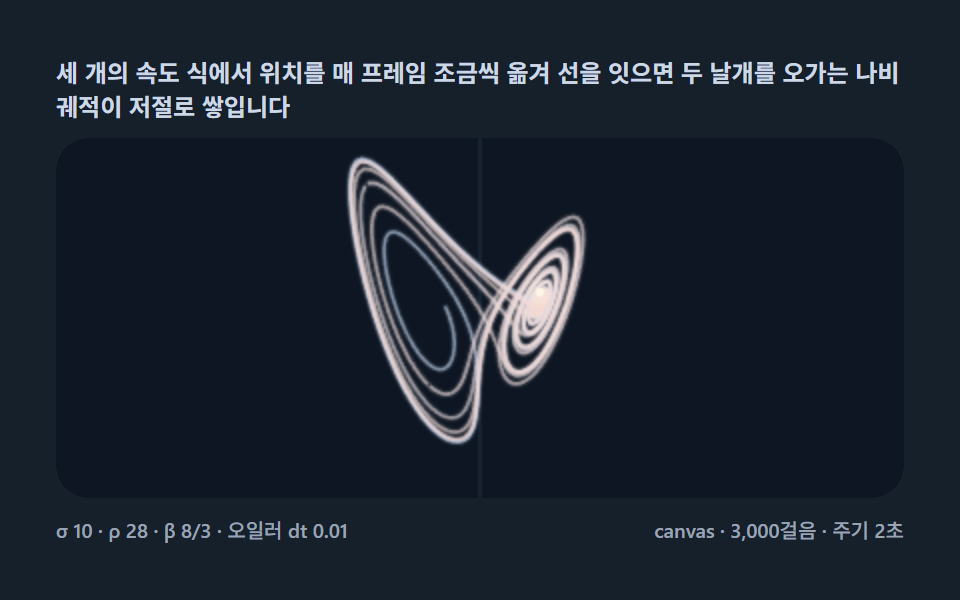 Creative UILorenz Attractor: 9 Butterfly Chaos Demos
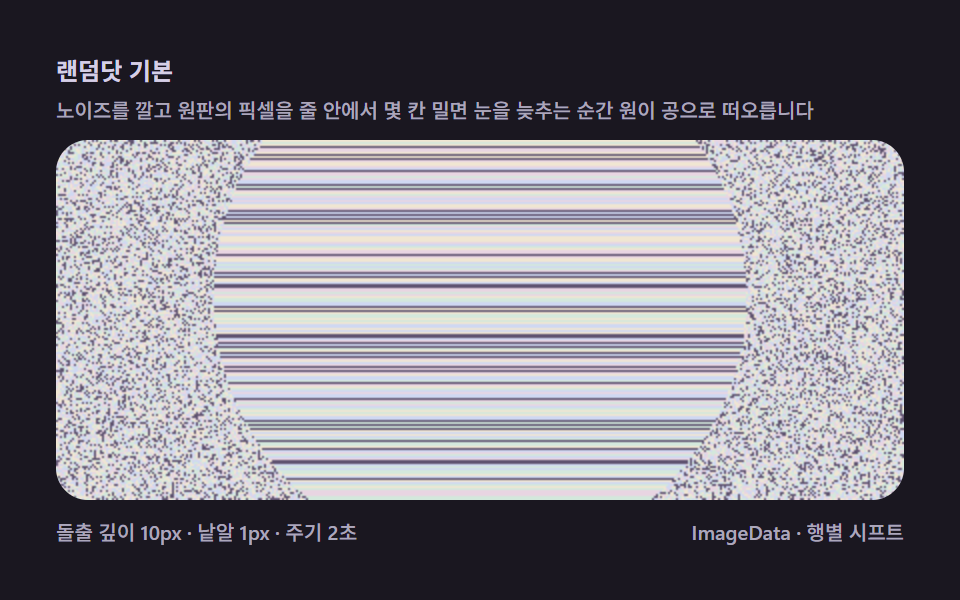 Creative UIMagic Eye Stereograms: 9 Depth Map Demos
 Creative UIVerlet Physics 9 Demos: No Library, Just Canvas
 Creative UIFalling Sand Simulator, 9 Ways (No Library)
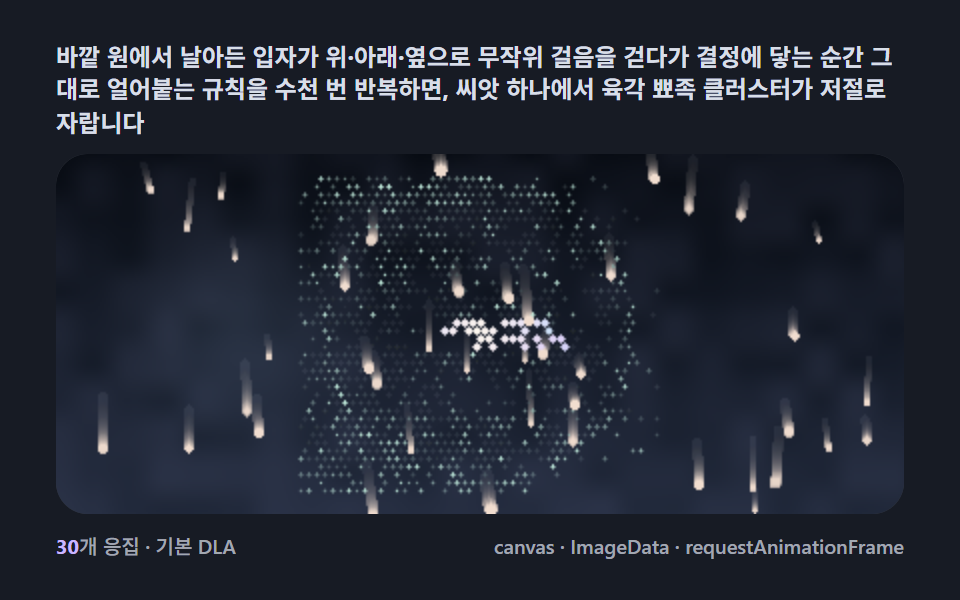 Creative UISnowflake Generator, 9 Ways (DLA, No Library)
 Creative UISlime Mold Simulation, 9 Ways (No Library)
 Creative UIFourier Epicycles, 9 Ways (No Library)
 Creative UIN Body Simulation, 9 Ways (Galaxy, No Library)
 Creative UIString Art: 9 Thread-Geometry Demos
 Creative UIL-System Fractal Tree Generator: 9 Demos