n8n ai agent node Tool Loop: 9 Scenes
An agent answers in a loop: call a tool, read the result, think again. A reuse penalty drops re-selection as e^-delta/T, and a guard branches iteration five
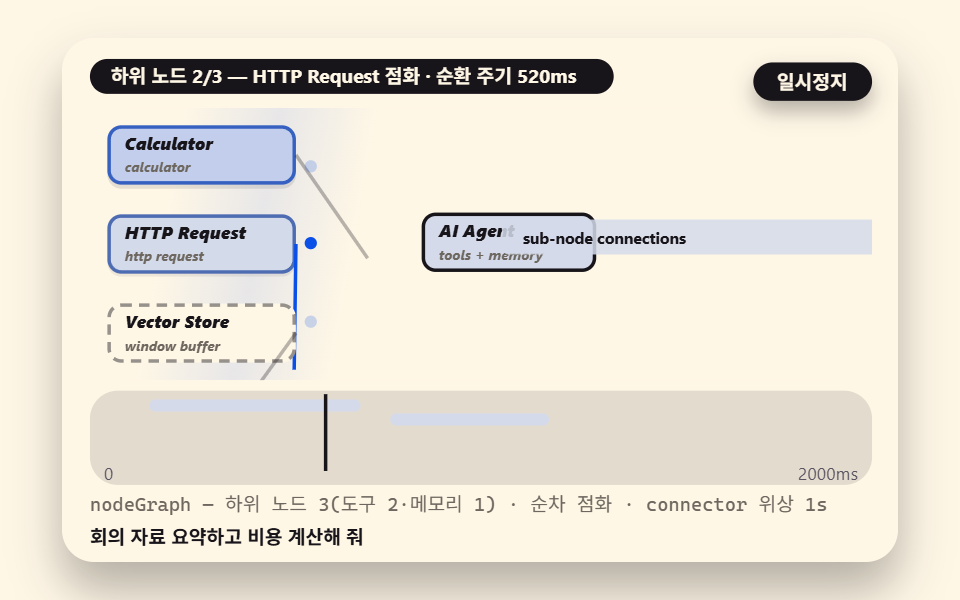 01 graph-connector-view
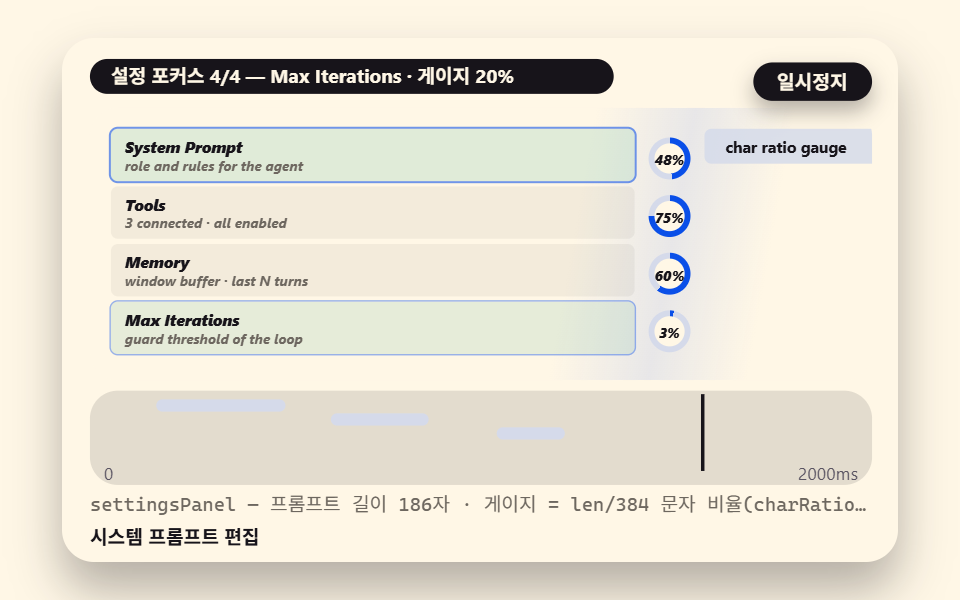 02 system-prompt-focus
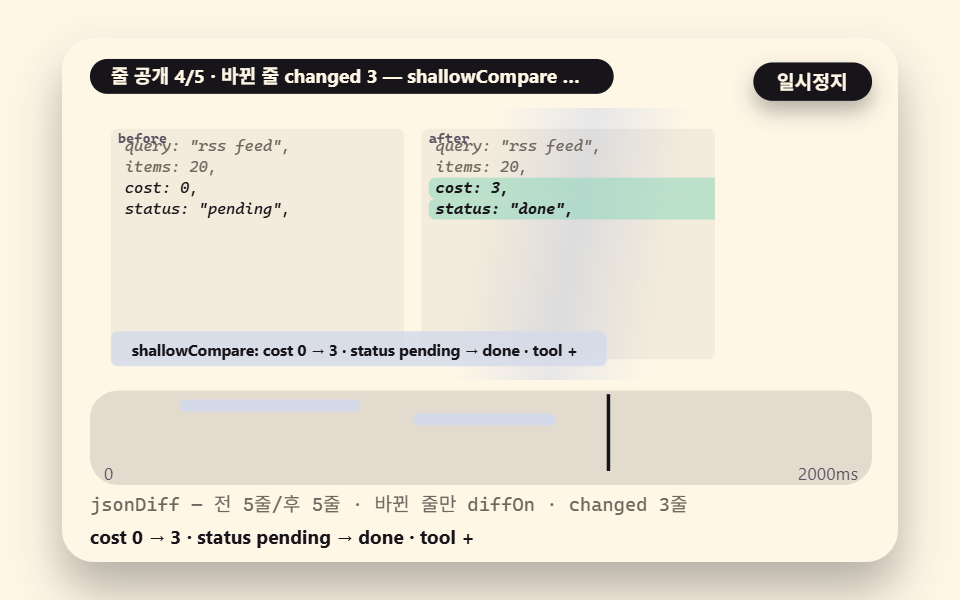 03 data-before-after
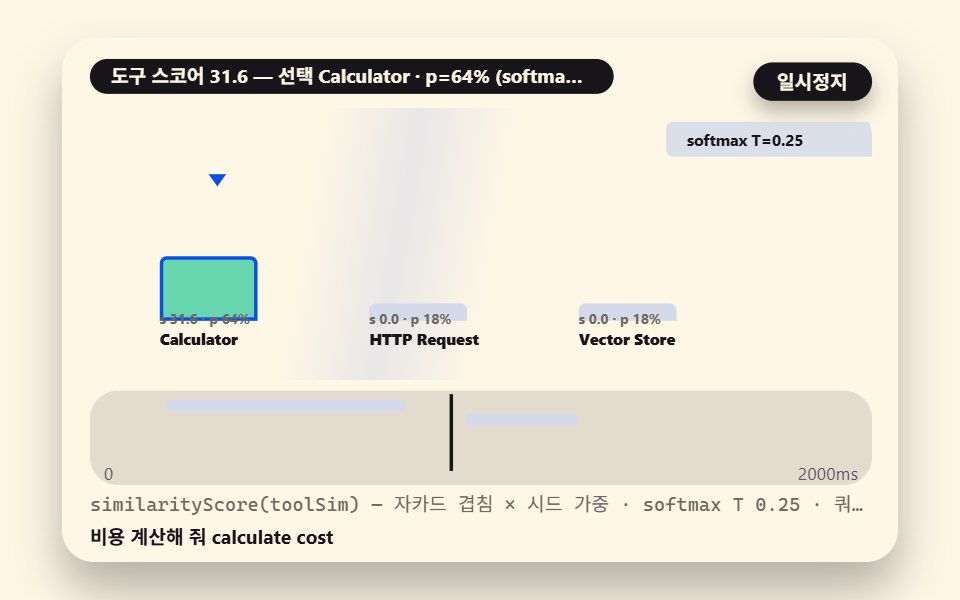 04 tool-select-score
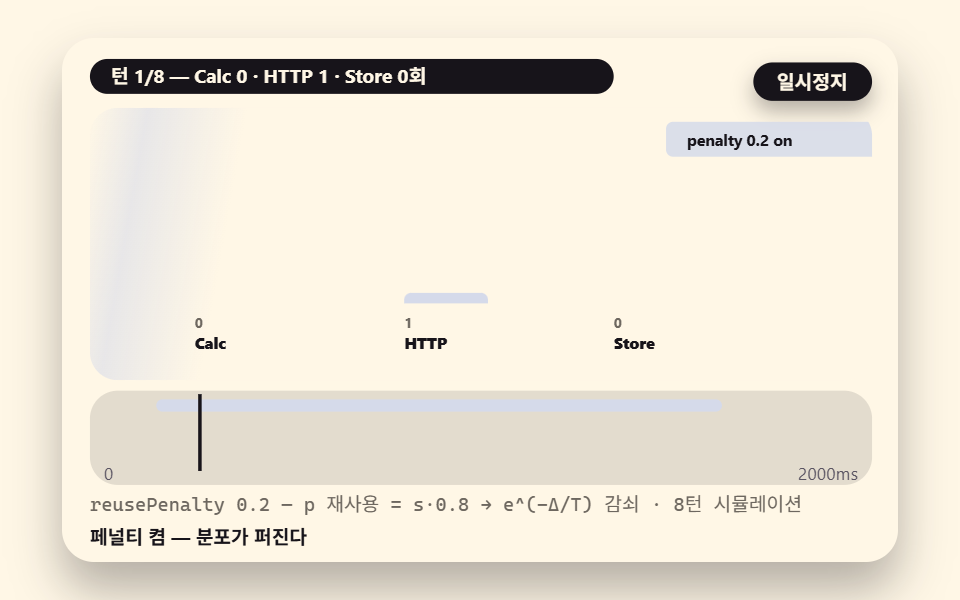 05 tool-reuse-penalty
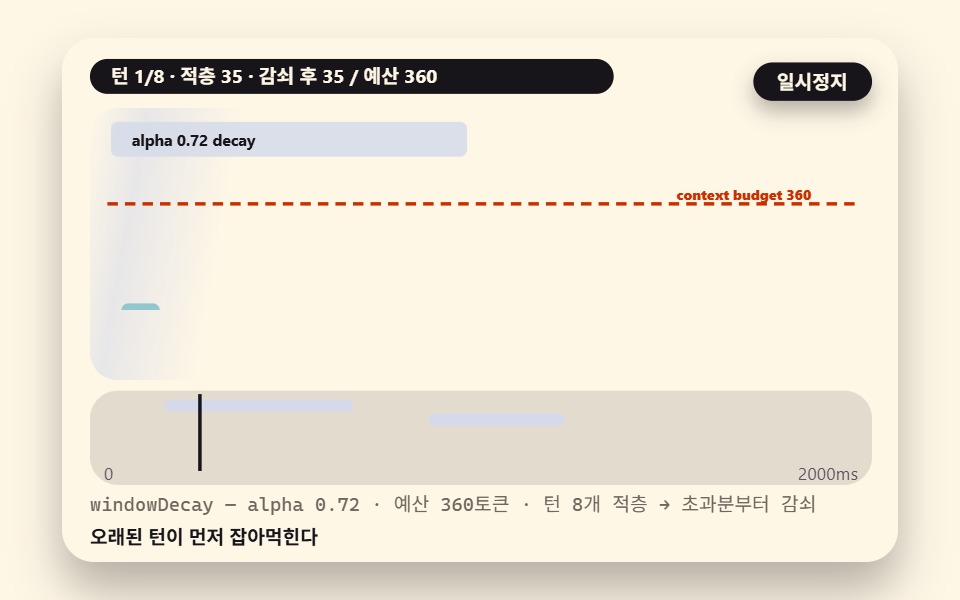 06 memory-window-decay
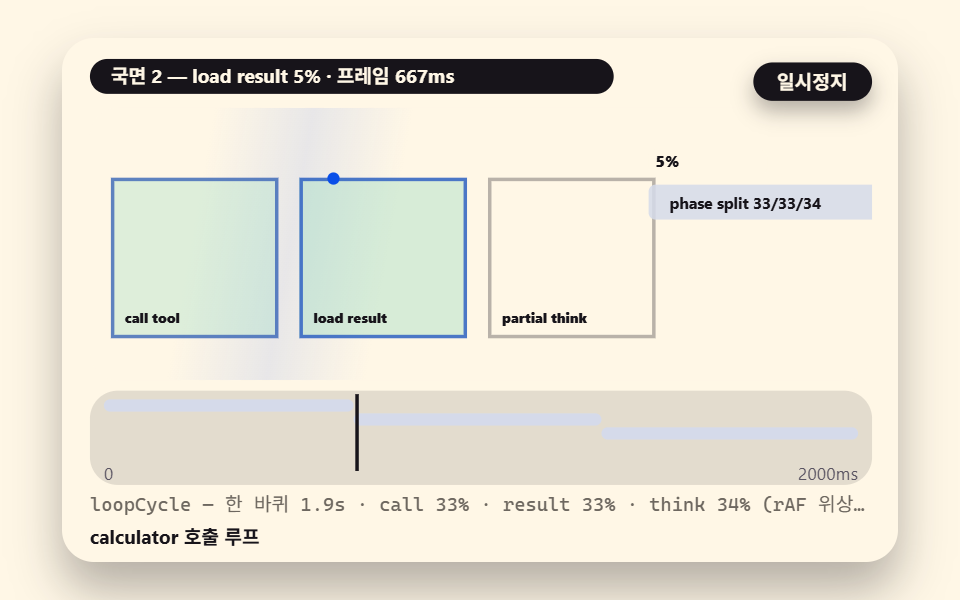 07 loop-cycle-rounds
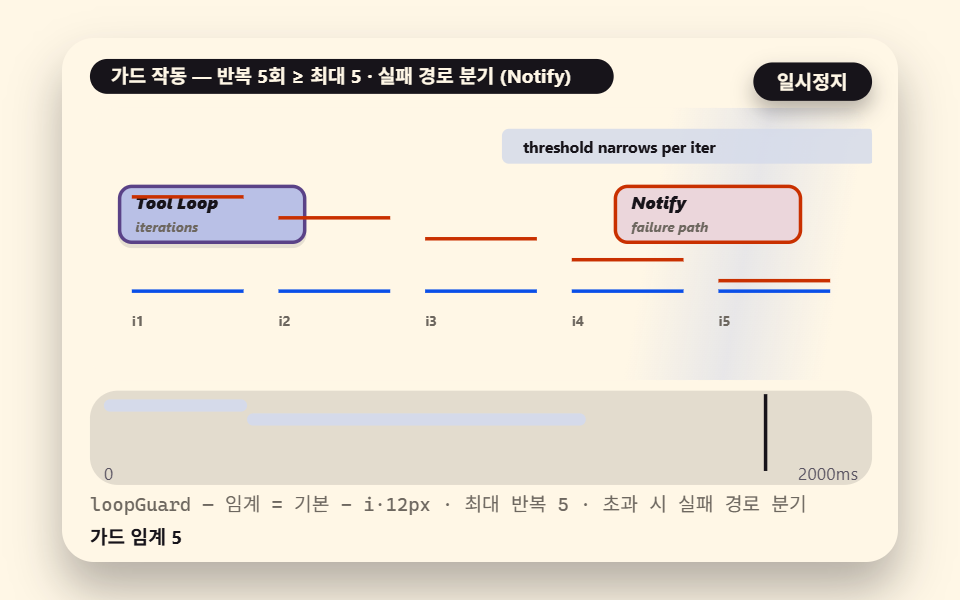 08 guard-threshold-break
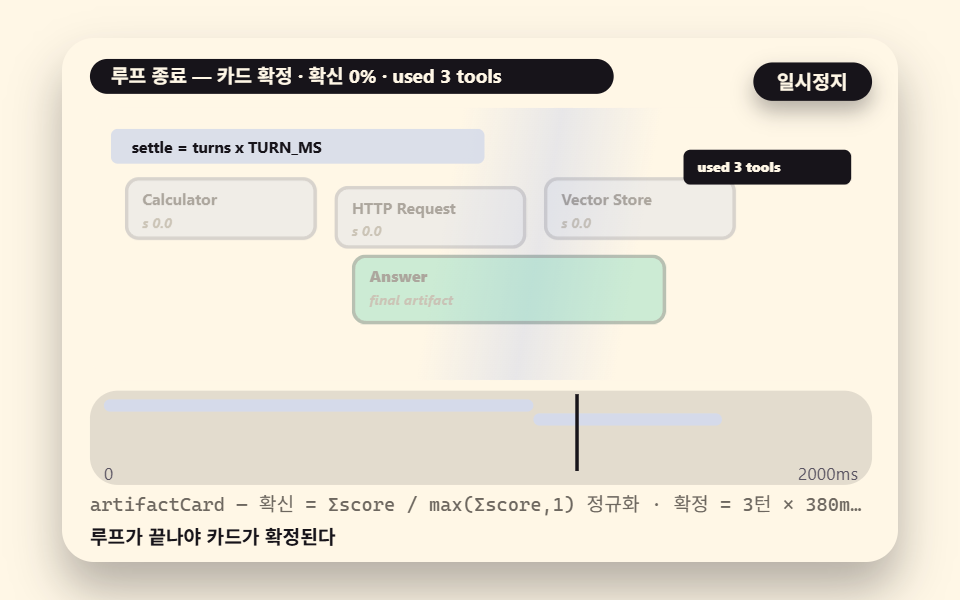 09 final-artifact-clear
- 01 The AI Agent Node Wired to Tool and Memory Sub-Nodes
- 02 The System Prompt Panel Cycling Through Focus
- 03 The JSON Diff Before and After a Tool Call
- 04 Tool Selection as a Keyword-Similarity Score
- 05 Dedupe: The Same-Tool Reselection Penalty
- 06 Memory Window: The Context Budget Decaying per Turn
- 07 The Tool Loop Cycle: Call, Result, Partial Thinking in a Round
- 08 Loop Guard: Crossing the Iteration Threshold into the Failure Path
- 09 The Final Artifact: The Answer Card Settled After the Loop
What the n8n AI Agent node is: prompt, tools, and memory turning in one loop
One engine layer drives all nine scenes
None of the nine scenes draws its own rhythm. They stand on one shared core — a two-second, 24-frame clock driven through WAAPI with pause, rebuild and reduced-motion branches; a seedHash function that turns a seed into fixed random values so every replay rebuilds the same run, with no Math.random anywhere — and above that sit this episode's four lead calculations: toolSim, which scores the overlap between a query and each tool's description; softmaxT, which normalizes scores into probabilities at temperature T; penalized, which discounts the tool used one turn ago; and memDecay, which holds the context inside its budget. Tool choice, dedupe, memory decay and the loop guard all fall out of these four, so the whole loop runs with zero external LLM calls.
    // ── lead calculations — tool-similarity score, softmax, reuse penalty, memory decay
    // TOOL_SIM — Jaccard overlap (intersection / union) of query and tool-description
    //   tokens, weighted by a fixed seed factor
    function toolSim(qtok, desc, seed) {
        const dt = tokens(desc);
        let hit = 0;
        for (let i = 0; i < qtok.length; i += 1) {
            if (dt.indexOf(qtok[i]) >= 0) { hit += 1; }
        }
        const uni = qtok.length + dt.length - hit;
        return uni > 0 ? (hit / uni) * (0.82 + 0.36 * seedHash(qtok.length, seed)) : 0.04 * seedHash(1, seed);
    }
    // SOFTMAX_T — normalize a score array at temperature T. Low T lets the tallest
    //   peak dominate
    function softmaxT(scores, T) {
        let mx = -Infinity;
        for (let i = 0; i < scores.length; i += 1) { if (scores[i] > mx) { mx = scores[i]; } }
        const ex = scores.map(function (s) { return Math.exp((s - mx) / T); });
        let sm = 0;
        for (let i = 0; i < ex.length; i += 1) { sm += ex[i]; }
        return ex.map(function (e) { return e / sm; });
    }
penalized multiplies the last-used tool's score by (1 − 0.2) and feeds the result back through the softmax; memDecay walks the turn heights oldest-first applying powers of alpha once the total crosses the budget. Both arithmetics are checked line by line in scenes 05 and 06 below.
    // PENALTY_P — discount the last-used tool by REUSE_PENALTY before the softmax.
    //   The reselection probability falls off as e^(-delta/T) — scene 05's lead math
    const REUSE_PENALTY = 0.2;
    function penalized(scores, lastIdx, T) {
        const s2 = scores.slice();
        if (lastIdx >= 0) {
            s2[lastIdx] = s2[lastIdx] * (1 - REUSE_PENALTY);
        }
        return softmaxT(s2, T);
    }
The demo is a rule-based approximation, not an n8n execution
Draw the boundary first, because the whole page stands on it: the tool choices and loop progress in these demos are not measured from a running n8n instance. They are an injected demonstration — deterministic rule math written to imitate the agent behavior that n8n's official documentation describes, for teaching. What is real: the AI Agent node takes a prompt and builds its answer by calling tools repeatedly — call, result, reasoning, call again — and that repetition is exactly what people call the tool loop (understanding agents). The node names used throughout — AI Agent, Window Buffer Memory, Calculator, HTTP Request, Vector Store — are real n8n nodes. What is ours: the Jaccard similarity and the softmax that decide which tool each turn uses. In a live n8n workflow those decisions are made by the connected chat model reading the prompt context, not by these functions, and the numbers here can differ from any real run.
Where model values end and measured values begin
Two kinds of numbers appear in this article. Model figures are computed or hand-checked against the source constants: temperature T 0.25, reuse penalty 0.2, memory budget 360, decay alpha 0.72, and scene 09's settle time of 1,140ms (3 turns × 380ms). Measured figures are produced by the renderer, which freezes each two-second cycle into twenty-four stills and diffs neighboring pairs — twenty-three comparisons per scene: cumulative area is the share of pixels that changed at least once inside the cycle window, and intensity is the mean brightness-and-color difference of changed pixels on a 0–255 scale, which jitters about ±0.1 with render noise.
The measured answer sheet
Each of the nine scenes was rendered through one injected demonstration cycle; a background sweep that carries the progress value left-to-right across the scene backdrop supplies most of the area, and no scene held a still frame anywhere in the window.
| Scene | Cumulative area | Frames moved | Mean intensity |
|---|---|---|---|
| 01 graph connector view | 34.8% | 23/23 | 96.8 |
| 02 settings panel focus | 36.0% | 23/23 | 101.5 |
| 03 data before/after | 34.5% | 23/23 | 117.1 |
| 04 tool selection score | 35.8% | 23/23 | 89.0 |
| 05 reuse penalty | 36.2% | 23/23 | 95.6 |
| 06 memory window decay | 35.7% | 23/23 | 107.3 |
| 07 loop cycle | 36.4% | 23/23 | 102.0 |
| 08 guard threshold branch | 35.8% | 23/23 | 118.8 |
| 09 final artifact | 36.1% | 23/23 | 108.5 |
The widest area is scene 07 at 36.4% and the narrowest is scene 03 at 34.5% — a spread of 1.9 percentage points, the signature of the background sweep pushing most canvas pixels past the threshold every frame. Intensity peaks in scene 08 at 118.8 because the guard-branch frame swaps the whole loop box to its failure state in one cut, and bottoms in scene 04 at 89.0, where the bars climb the gentlest axis of the set. Instantaneous peak area — counting only each element's own motion — runs 12.4% in 09, 10.6% in 02 and 10.3% in 07, in that order. Overflow past the canvas, past the 320px width, and per-locale string overflow all measured zero across the nine scenes, and the React builds passed nine TypeScript compiles and nine standalone SCSS compiles.
Why these nine scenes in this order
The order follows the way you actually work an n8n ai agent node. You open the canvas and see the graph first (01), click the node and pin its settings (02), check in data what a tool call changed (03), then watch how one tool gets chosen (04) — and meet the pathologies: the same tool hogging the loop (05) and the context filling up (06). The structure of one round (07) and the guard that cuts an infinite loop (08) lead into the artifact the loop exists to produce (09). Where the first n8n collection, 9 workflow examples, covered receiving, running, merging and splitting data, this episode opens the inside of the agent that rides on top of that data — with the same node-graph grammar.
01How the AI Agent node connects to sub-nodes in the graph viewer
A central AI Agent node carries its tool set (Calculator, HTTP Request, Vector Store) and its memory (Window Buffer Memory) on connector lines, and a traveling dot rides the line of whichever sub-node this turn uses, lighting it up. The scene copies the real canvas directly — in n8n, the lines dropping below an agent node into its sub-nodes are the structure itself — and a waveform with its own phase flows along each line, so which line is alive reads as flow, not as color.
<main class="stage">
<div class="ez is-demo" id="ez">
  <div class="ez__in" data-role="inner">
    <div class="ez__pad" data-role="pad" tabindex="0" role="application" aria-label="Demo stage: Space or Enter pauses, R restarts, left and right arrows pick another value">
      <div class="ez__scene" data-role="scene" role="img" aria-label="Tool and memory sub-nodes wire into the AI agent node while a traveling dot lights this turn's sub-node"></div>
      <div class="ez__probe" data-role="probe" aria-hidden="true"></div>
      <div class="ez__chart" data-role="chart" aria-hidden="true"></div>
      <p class="ez__status" data-role="status" aria-live="off">Scene ready</p>
      <p class="ez__reada" data-role="reada" aria-hidden="true"></p>
      <p class="ez__readb" data-role="readb" aria-hidden="true"></p>
      <div class="ez__ctrl">
        <button class="ez__pause" data-role="pause" type="button" aria-pressed="false">Pause</button>
… (총 18줄 — 아래 「전체 코드」에서 원문 전체)
// 532 공통 — n8n AI 에이전트 도구 루프 (529 base.scss 계승: 채팅 버블 대신 노드 그래프·설정 패널 요소로)
@use "../../../../site/static/demo-tokens" as *;
@include stage($subject-cream);
$panel: mix($subject-cream, $subject-ink, 88%);
$dim: #6d675f; // mix(cream,ink,45%)#7f7a76 은 크림 위 3.98:1 로 미달 — 한 단계 내려 5.25:1
// 파스텔 액센트 — vivid 토큰 대신 (BD26)
$stroke-blue: #d5daea;
$stroke-rose: #ebd6db;
$stroke-mint: #8fd8bd;
$stroke-lilac: #c9b8f2;
… (총 518줄 — 아래 「전체 코드」에서 원문 전체)html, body {
margin: 0;
overflow: hidden;
}
.stage {
box-sizing: border-box;
min-height: 100vh;
display: grid;
place-items: center;
margin: 0;
background: #fff7e6;
… (총 672줄 — 아래 「전체 코드」에서 원문 전체)(function () {
const rootEl = document.getElementById("ez");
if (!rootEl) return;
main(rootEl);
function cx(s) { return s; }
function main(root) {
// ── 532 공통 엔진 — 529 run() 시계 계승 (WAAPI 시계읽기·pause·rebuild·reduced 분기)
const W = 480;
const CX0 = 8;
const CW = 432;
function clamp(v, lo, hi) { return v < lo ? lo : (v > hi ? hi : v); }
function lerp(a, b, k) { return a + (b - a) * k; }
… (총 306줄 — 아래 「전체 코드」에서 원문 전체)// GraphConnectorView - 같은 항목 vanilla index.html 의 React 판. 같은 계산을 useEffect 안에서 돌린다
import { useEffect, useRef } from "react";
import styles from "./GraphConnectorView.module.scss";
const cx = (s: string): string => s.split(" ").map((n) => styles[n] ?? n).join(" ");
function main(root: HTMLElement): (() => void) | undefined {
const rootEl: HTMLElement | null = document.getElementById("ez");
if (!rootEl) return;
main(rootEl);
const cx = (s: string): string => s.split(" ").map((n) => styles[n] ?? n).join(" ");
… (총 339줄 — 아래 「전체 코드」에서 원문 전체)01 · The AI Agent Node Wired to Tool and Memory Sub-Nodes — Measured area 34.845% · moving frames 23/23Original by GODRICH · SCSS and React ship in the zip · See the password
The connector angles join the arithmetic
The connectors are drawn as rotated div bars rather than SVG strokes so that the coordinate math lives in the same layer as the rest of the scene's calculations — to adapt a copy, swap the TOOLS01 array and the sub-labels for your own tool names and the graph becomes a picture of your own workflow, with the same grammar on the data side in the n8n no-code automation episode.
    const pos = [[10, 10], [10, 61], [10, 112]];
    const roles = ['tool', 'tool', 'mem'];
    const subs = ['calculator', 'http request', 'window buffer'];
    for (let k = 0; k < 3; k += 1) {
        const nd = make('div', 'nd nd--' + roles[k], scWrap);
        nd.innerHTML = '<i class="' + cx('nd__t') + '">' + TOOLS01[k] + '</i><i class="' + cx('nd__s') + '">' + subs[k] + '</i>';
        put(nd, pos[k][0], pos[k][1], 108, 34);
        nodes01.push(nd);
        const ln = make('i', 'cn', scWrap);
        put(ln, 118, pos[k][1] + 16, 0, 0);
        ln.style.width = '72px';
        ln.style.transform = 'rotate(' + (Math.atan2(72, 60 + 17 - (pos[k][1] + 17)) * 180 / Math.PI) + 'deg)';
02What the settings panel pins down: system prompt, max iterations, tool permissions
Four settings — System Prompt, Tools, Memory, Max Iterations — fill circular gauges while a focus ring walks among them, the prompt's gauge splitting the string and filling by character ratio (len/384) with no embedding involved: the panel's claim is that settings are a budget, so a longer system prompt leaves less room for tool descriptions to be read, and the loop spends from the same account either way.
<main class="stage">
<div class="ez is-demo" id="ez">
  <div class="ez__in" data-role="inner">
    <div class="ez__pad" data-role="pad" tabindex="0" role="application" aria-label="Demo stage: Space or Enter pauses, R restarts, left and right arrows pick another value">
      <div class="ez__scene" data-role="scene" role="img" aria-label="Four settings gauges fill by character ratio while a focus ring cycles between them"></div>
      <div class="ez__probe" data-role="probe" aria-hidden="true"></div>
      <div class="ez__chart" data-role="chart" aria-hidden="true"></div>
      <p class="ez__status" data-role="status" aria-live="off">Scene ready</p>
      <p class="ez__reada" data-role="reada" aria-hidden="true"></p>
      <p class="ez__readb" data-role="readb" aria-hidden="true"></p>
      <div class="ez__ctrl">
        <button class="ez__pause" data-role="pause" type="button" aria-pressed="false">Pause</button>
… (총 18줄 — 아래 「전체 코드」에서 원문 전체)
// 532 공통 — n8n AI 에이전트 도구 루프 (529 base.scss 계승: 채팅 버블 대신 노드 그래프·설정 패널 요소로)
@use "../../../../site/static/demo-tokens" as *;
@include stage($subject-cream);
$panel: mix($subject-cream, $subject-ink, 88%);
$dim: #6d675f; // mix(cream,ink,45%)#7f7a76 은 크림 위 3.98:1 로 미달 — 한 단계 내려 5.25:1
// 파스텔 액센트 — vivid 토큰 대신 (BD26)
$stroke-blue: #d5daea;
$stroke-rose: #ebd6db;
$stroke-mint: #8fd8bd;
$stroke-lilac: #c9b8f2;
… (총 518줄 — 아래 「전체 코드」에서 원문 전체)html, body {
margin: 0;
overflow: hidden;
}
.stage {
box-sizing: border-box;
min-height: 100vh;
display: grid;
place-items: center;
margin: 0;
background: #fff7e6;
… (총 672줄 — 아래 「전체 코드」에서 원문 전체)(function () {
const rootEl = document.getElementById("ez");
if (!rootEl) return;
main(rootEl);
function cx(s) { return s; }
function main(root) {
// ── 532 공통 엔진 — 529 run() 시계 계승 (WAAPI 시계읽기·pause·rebuild·reduced 분기)
const W = 480;
const CX0 = 8;
const CW = 432;
function clamp(v, lo, hi) { return v < lo ? lo : (v > hi ? hi : v); }
function lerp(a, b, k) { return a + (b - a) * k; }
… (총 305줄 — 아래 「전체 코드」에서 원문 전체)// SystemPromptFocus - 같은 항목 vanilla index.html 의 React 판. 같은 계산을 useEffect 안에서 돌린다
import { useEffect, useRef } from "react";
import styles from "./SystemPromptFocus.module.scss";
const cx = (s: string): string => s.split(" ").map((n) => styles[n] ?? n).join(" ");
function main(root: HTMLElement): (() => void) | undefined {
const rootEl: HTMLElement | null = document.getElementById("ez");
if (!rootEl) return;
main(rootEl);
const cx = (s: string): string => s.split(" ").map((n) => styles[n] ?? n).join(" ");
… (총 338줄 — 아래 「전체 코드」에서 원문 전체)02 · The System Prompt Panel Cycling Through Focus — Measured area 36.029% · moving frames 23/23Original by GODRICH · SCSS and React ship in the zip · See the password
Gauges and focus share one clock
Each gauge converges on its own target ratio while the focus lands on the phase of the cycle divided by four, and all four of these settings exist on the real node — Max Iterations among them, the actual iteration cap that scene 08's guard threshold mirrors exactly, which is why this panel, not the canvas, is where a loop's character is first decided.
    function frame(t) {
        const ph = demoT(t) / 2000;
        const focus = Math.floor(ph * 4) % 4;
        const ratios = [0.48, 0.75, 0.6, 0.2];
        for (let k = 0; k < 4; k += 1) {
            rows02[k].classList.toggle(cx('srow--on'), k === focus);
            const target = ratios[k];
            const v = clamp((ph * 4 - k) , 0, 1) * target;
            fills02[k].style.background = 'conic-gradient(#0a4fe8 0turn ' + f0(v * 360) + 'deg, #d5daea ' + f0(v * 360) + 'deg 360deg)';
            nums02[k].textContent = f0(v * 100) + '%';
        }
03The JSON diff before and after a tool call
A before panel and an after panel scroll side by side while only the changed lines light up — cost: 0 becoming cost: 3, status: 'pending' becoming 'done' — and untouched lines stay dimmed. The effect of a tool call shows as a data difference rather than as prose, and the three presets you can flip with the arrow keys are a clean completion, a partial change, and a failure case where status: 'error' arrives with timeout 30s.
<main class="stage">
<div class="ez is-demo" id="ez">
  <div class="ez__in" data-role="inner">
    <div class="ez__pad" data-role="pad" tabindex="0" role="application" aria-label="Demo stage: Space or Enter pauses, R restarts, left and right arrows pick another value">
      <div class="ez__scene" data-role="scene" role="img" aria-label="Before and after JSON flow past while only changed lines light up"></div>
      <div class="ez__probe" data-role="probe" aria-hidden="true"></div>
      <div class="ez__chart" data-role="chart" aria-hidden="true"></div>
      <p class="ez__status" data-role="status" aria-live="off">Scene ready</p>
      <p class="ez__reada" data-role="reada" aria-hidden="true"></p>
      <p class="ez__readb" data-role="readb" aria-hidden="true"></p>
      <div class="ez__ctrl">
        <button class="ez__pause" data-role="pause" type="button" aria-pressed="false">Pause</button>
… (총 18줄 — 아래 「전체 코드」에서 원문 전체)
// 532 공통 — n8n AI 에이전트 도구 루프 (529 base.scss 계승: 채팅 버블 대신 노드 그래프·설정 패널 요소로)
@use "../../../../site/static/demo-tokens" as *;
@include stage($subject-cream);
$panel: mix($subject-cream, $subject-ink, 88%);
$dim: #6d675f; // mix(cream,ink,45%)#7f7a76 은 크림 위 3.98:1 로 미달 — 한 단계 내려 5.25:1
// 파스텔 액센트 — vivid 토큰 대신 (BD26)
$stroke-blue: #d5daea;
$stroke-rose: #ebd6db;
$stroke-mint: #8fd8bd;
$stroke-lilac: #c9b8f2;
… (총 518줄 — 아래 「전체 코드」에서 원문 전체)html, body {
margin: 0;
overflow: hidden;
}
.stage {
box-sizing: border-box;
min-height: 100vh;
display: grid;
place-items: center;
margin: 0;
background: #fff7e6;
… (총 672줄 — 아래 「전체 코드」에서 원문 전체)(function () {
const rootEl = document.getElementById("ez");
if (!rootEl) return;
main(rootEl);
function cx(s) { return s; }
function main(root) {
// ── 532 공통 엔진 — 529 run() 시계 계승 (WAAPI 시계읽기·pause·rebuild·reduced 분기)
const W = 480;
const CX0 = 8;
const CW = 432;
function clamp(v, lo, hi) { return v < lo ? lo : (v > hi ? hi : v); }
function lerp(a, b, k) { return a + (b - a) * k; }
… (총 316줄 — 아래 「전체 코드」에서 원문 전체)// DataBeforeAfter - 같은 항목 vanilla index.html 의 React 판. 같은 계산을 useEffect 안에서 돌린다
import { useEffect, useRef } from "react";
import styles from "./DataBeforeAfter.module.scss";
const cx = (s: string): string => s.split(" ").map((n) => styles[n] ?? n).join(" ");
function main(root: HTMLElement): (() => void) | undefined {
const rootEl: HTMLElement | null = document.getElementById("ez");
if (!rootEl) return;
main(rootEl);
const cx = (s: string): string => s.split(" ").map((n) => styles[n] ?? n).join(" ");
… (총 349줄 — 아래 「전체 코드」에서 원문 전체)03 · The JSON Diff Before and After a Tool Call — Measured area 34.46% · moving frames 23/23Original by GODRICH · SCSS and React ship in the zip · See the password
The changed-line verdict is one line of code
A key-by-key JSON serialization comparison decides each line, and adapting a copy means replacing the BEFORE03 and AFTER03 constants with your tool's real input and output — for nested objects, wrap this shallow comparison in one recursive layer.
    const BEFORE03 = { query: 'rss feed', items: 20, cost: 0, status: 'pending' };
    const AFTER03  = { query: 'rss feed', items: 20, cost: 3, status: 'done', tool: 'HTTP Request' };
        for (let k = 0; k < keys.length; k += 1) {
            const key = keys[k];
            const ln = make('i', 'jl', col);
            const val = objs[c][key] === undefined ? '—' : JSON.stringify(objs[c][key]);
            const inB = key in objs[0];
            const inA = key in objs[1];
            const changed = !inB || !inA || JSON.stringify(objs[0][key]) !== JSON.stringify(objs[1][key]);
            if (c === 1 && changed) { diffset03.push(k); }
            ln.textContent = '  ' + key + ': ' + val + (k < keys.length - 1 ? ',' : '}');
            if (c === 1 && changed) { ln.className = cx('jl') + ' ' + cx('jl--diff'); }
04How a tool is chosen: keyword-similarity scores and a softmax approximation
The query is tokenized, each tool description is scored by Jaccard overlap — intersection over union — the three bars rise in proportion, and a softmax at temperature T 0.25 normalizes them so the selection arrow bends to the tallest peak. No embedding is involved; keyword overlap alone decides which tool gets called, and the property that close scores make the choice waver at low temperature is reproduced by the same rule math.
<main class="stage">
<div class="ez is-demo" id="ez">
  <div class="ez__in" data-role="inner">
    <div class="ez__pad" data-role="pad" tabindex="0" role="application" aria-label="Demo stage: Space or Enter pauses, R restarts, left and right arrows pick another value">
      <div class="ez__scene" data-role="scene" role="img" aria-label="Overlap scores rise as bars and after softmax normalization the arrow bends to the tallest peak"></div>
      <div class="ez__probe" data-role="probe" aria-hidden="true"></div>
      <div class="ez__chart" data-role="chart" aria-hidden="true"></div>
      <p class="ez__status" data-role="status" aria-live="off">Scene ready</p>
      <p class="ez__reada" data-role="reada" aria-hidden="true"></p>
      <p class="ez__readb" data-role="readb" aria-hidden="true"></p>
      <div class="ez__ctrl">
        <button class="ez__pause" data-role="pause" type="button" aria-pressed="false">Pause</button>
… (총 18줄 — 아래 「전체 코드」에서 원문 전체)
// 532 공통 — n8n AI 에이전트 도구 루프 (529 base.scss 계승: 채팅 버블 대신 노드 그래프·설정 패널 요소로)
@use "../../../../site/static/demo-tokens" as *;
@include stage($subject-cream);
$panel: mix($subject-cream, $subject-ink, 88%);
$dim: #6d675f; // mix(cream,ink,45%)#7f7a76 은 크림 위 3.98:1 로 미달 — 한 단계 내려 5.25:1
// 파스텔 액센트 — vivid 토큰 대신 (BD26)
$stroke-blue: #d5daea;
$stroke-rose: #ebd6db;
$stroke-mint: #8fd8bd;
$stroke-lilac: #c9b8f2;
… (총 518줄 — 아래 「전체 코드」에서 원문 전체)html, body {
margin: 0;
overflow: hidden;
}
.stage {
box-sizing: border-box;
min-height: 100vh;
display: grid;
place-items: center;
margin: 0;
background: #fff7e6;
… (총 672줄 — 아래 「전체 코드」에서 원문 전체)(function () {
const rootEl = document.getElementById("ez");
if (!rootEl) return;
main(rootEl);
function cx(s) { return s; }
function main(root) {
// ── 532 공통 엔진 — 529 run() 시계 계승 (WAAPI 시계읽기·pause·rebuild·reduced 분기)
const W = 480;
const CX0 = 8;
const CW = 432;
function clamp(v, lo, hi) { return v < lo ? lo : (v > hi ? hi : v); }
function lerp(a, b, k) { return a + (b - a) * k; }
… (총 313줄 — 아래 「전체 코드」에서 원문 전체)// ToolSelectScore - 같은 항목 vanilla index.html 의 React 판. 같은 계산을 useEffect 안에서 돌린다
import { useEffect, useRef } from "react";
import styles from "./ToolSelectScore.module.scss";
const cx = (s: string): string => s.split(" ").map((n) => styles[n] ?? n).join(" ");
function main(root: HTMLElement): (() => void) | undefined {
const rootEl: HTMLElement | null = document.getElementById("ez");
if (!rootEl) return;
main(rootEl);
const cx = (s: string): string => s.split(" ").map((n) => styles[n] ?? n).join(" ");
… (총 346줄 — 아래 「전체 코드」에서 원문 전체)04 · Tool Selection as a Keyword-Similarity Score — Measured area 35.798% · moving frames 23/23Original by GODRICH · SCSS and React ship in the zip · See the password
The arithmetic from Jaccard to the arrow
Take the query tokens [비용, 계산해, calculate, cost] — the Korean query "비용 계산해 줘 calculate cost" split on non-word characters — against the Calculator description [math, calculate, sum, cost, numbers]: the intersection {calculate, cost} holds 2 tokens against a union of 7, so the Jaccard is 2/7 ≈ 0.286, times the seed weight (≈1.0) gives about 0.29, while HTTP Request intersects on nothing and scores exactly zero (the 0.04 · seedHash floor fires only when the union itself is empty), and at softmax T 0.25 the Calculator lands near 60–70% probability — exactly the number the selection arrow points to; the production lesson runs the same direction, because writing synonyms into an n8n ai agent tool description raises the model's hit rate as the real selector reads the same overlap in its own way.
    const TOOLS04 = [
        ['Calculator', 'math calculate sum cost numbers'],
        ['HTTP Request', 'fetch http page url request api'],
        ['Vector Store', 'memory search recall past conversation']
    ];
    function frame(t) {
        const ph = clamp(demoT(t) / 1500, 0, 1);
        const T = 0.25;
        const probs = softmaxT(scores04, T);
        let mx = 0;
        for (let k = 1; k < 3; k += 1) { if (probs[k] > probs[mx]) { mx = k; } }
        for (let k = 0; k < 3; k += 1) {
            const h = clamp(ph * probs[k] * 200, 0, 92);
            bars04[k].style.height = h + 'px';
05Why partial thinking causes duplicate calls: the same-tool reselection penalty
An eight-turn simulation stacks its picks into a vertical histogram while the last-used tool's score is discounted by REUSE_PENALTY 0.2, and the presets flip the penalty off and on: with it off, the most-drawn tool ends up holding 4 of the 8 turns — and under these fixed seeds the picks land the same either way, because the penalty reshapes the probabilities of each draw, not the seed draws themselves. That off-state is the same shape real agents fall into when they re-call a tool they already got an answer from, burning turn budget without new information.
<main class="stage">
<div class="ez is-demo" id="ez">
  <div class="ez__in" data-role="inner">
    <div class="ez__pad" data-role="pad" tabindex="0" role="application" aria-label="Demo stage: Space or Enter pauses, R restarts, left and right arrows pick another value">
      <div class="ez__scene" data-role="scene" role="img" aria-label="With the reuse penalty the histogram spreads; without it one tool occupies the loop"></div>
      <div class="ez__probe" data-role="probe" aria-hidden="true"></div>
      <div class="ez__chart" data-role="chart" aria-hidden="true"></div>
      <p class="ez__status" data-role="status" aria-live="off">Scene ready</p>
      <p class="ez__reada" data-role="reada" aria-hidden="true"></p>
      <p class="ez__readb" data-role="readb" aria-hidden="true"></p>
      <div class="ez__ctrl">
        <button class="ez__pause" data-role="pause" type="button" aria-pressed="false">Pause</button>
… (총 18줄 — 아래 「전체 코드」에서 원문 전체)
// 532 공통 — n8n AI 에이전트 도구 루프 (529 base.scss 계승: 채팅 버블 대신 노드 그래프·설정 패널 요소로)
@use "../../../../site/static/demo-tokens" as *;
@include stage($subject-cream);
$panel: mix($subject-cream, $subject-ink, 88%);
$dim: #6d675f; // mix(cream,ink,45%)#7f7a76 은 크림 위 3.98:1 로 미달 — 한 단계 내려 5.25:1
// 파스텔 액센트 — vivid 토큰 대신 (BD26)
$stroke-blue: #d5daea;
$stroke-rose: #ebd6db;
$stroke-mint: #8fd8bd;
$stroke-lilac: #c9b8f2;
… (총 518줄 — 아래 「전체 코드」에서 원문 전체)html, body {
margin: 0;
overflow: hidden;
}
.stage {
box-sizing: border-box;
min-height: 100vh;
display: grid;
place-items: center;
margin: 0;
background: #fff7e6;
… (총 672줄 — 아래 「전체 코드」에서 원문 전체)(function () {
const rootEl = document.getElementById("ez");
if (!rootEl) return;
main(rootEl);
function cx(s) { return s; }
function main(root) {
// ── 532 공통 엔진 — 529 run() 시계 계승 (WAAPI 시계읽기·pause·rebuild·reduced 분기)
const W = 480;
const CX0 = 8;
const CW = 432;
function clamp(v, lo, hi) { return v < lo ? lo : (v > hi ? hi : v); }
function lerp(a, b, k) { return a + (b - a) * k; }
… (총 309줄 — 아래 「전체 코드」에서 원문 전체)// ToolReusePenalty - 같은 항목 vanilla index.html 의 React 판. 같은 계산을 useEffect 안에서 돌린다
import { useEffect, useRef } from "react";
import styles from "./ToolReusePenalty.module.scss";
const cx = (s: string): string => s.split(" ").map((n) => styles[n] ?? n).join(" ");
function main(root: HTMLElement): (() => void) | undefined {
const rootEl: HTMLElement | null = document.getElementById("ez");
if (!rootEl) return;
main(rootEl);
const cx = (s: string): string => s.split(" ").map((n) => styles[n] ?? n).join(" ");
… (총 342줄 — 아래 「전체 코드」에서 원문 전체)05 · Dedupe: The Same-Tool Reselection Penalty — Measured area 36.226% · moving frames 23/23Original by GODRICH · SCSS and React ship in the zip · See the password
The check: probability falls off as e^(-Δ/T)
The penalty creates a score drop Δ = 0.2·s, and after the softmax is re-run the reselection ratio falls by e^(−Δ/T) — with s = 0.4 and T = 0.25, Δ = 0.08, so e^(−0.32) ≈ 0.73 for about a 27% cut, and raising the penalty to 0.45 makes it e^(−0.72) ≈ 0.49, cutting the reselection roughly in half.
    function build(i) {
        const useP = i !== 2; // preset 3 disables the penalty (the contrast case)
        turns05 = [];
        let last = -1;
        for (let s = 0; s < 8; s += 1) {
            const sc = [0.3 + 0.2 * seedHash(s, 11), 0.28 + 0.2 * seedHash(s, 22), 0.25 + 0.2 * seedHash(s, 33)];
            const p = useP ? penalized(sc, last, 0.2) : softmaxT(sc, 0.2);
            let r = seedHash(s, 44);
            let pick = 0;
            let acc = 0;
            for (let k = 0; k < 3; k += 1) { acc += p[k]; if (r < acc) { pick = k; break; } }
            turns05.push(pick);
            last = pick;
        }
06How the memory window shrinks: context budget decaying every turn
Each turn's token count stacks as a vertical bar; the moment the total height crosses the budget of 360, the oldest turns decay exponentially at alpha 0.72, and a forgotten turn loses its fill and keeps only a dashed outline. The recomputed total is checked after every decay step so the stack never crosses the budget line, and n8n's Window Buffer Memory node — which keeps the last N turns of conversation — is the real-world original of this window.
<main class="stage">
<div class="ez is-demo" id="ez">
  <div class="ez__in" data-role="inner">
    <div class="ez__pad" data-role="pad" tabindex="0" role="application" aria-label="Demo stage: Space or Enter pauses, R restarts, left and right arrows pick another value">
      <div class="ez__scene" data-role="scene" role="img" aria-label="Turn tokens stack until the budget is crossed, then the oldest turns decay away exponentially"></div>
      <div class="ez__probe" data-role="probe" aria-hidden="true"></div>
      <div class="ez__chart" data-role="chart" aria-hidden="true"></div>
      <p class="ez__status" data-role="status" aria-live="off">Scene ready</p>
      <p class="ez__reada" data-role="reada" aria-hidden="true"></p>
      <p class="ez__readb" data-role="readb" aria-hidden="true"></p>
      <div class="ez__ctrl">
        <button class="ez__pause" data-role="pause" type="button" aria-pressed="false">Pause</button>
… (총 18줄 — 아래 「전체 코드」에서 원문 전체)
// 532 공통 — n8n AI 에이전트 도구 루프 (529 base.scss 계승: 채팅 버블 대신 노드 그래프·설정 패널 요소로)
@use "../../../../site/static/demo-tokens" as *;
@include stage($subject-cream);
$panel: mix($subject-cream, $subject-ink, 88%);
$dim: #6d675f; // mix(cream,ink,45%)#7f7a76 은 크림 위 3.98:1 로 미달 — 한 단계 내려 5.25:1
// 파스텔 액센트 — vivid 토큰 대신 (BD26)
$stroke-blue: #d5daea;
$stroke-rose: #ebd6db;
$stroke-mint: #8fd8bd;
$stroke-lilac: #c9b8f2;
… (총 518줄 — 아래 「전체 코드」에서 원문 전체)html, body {
margin: 0;
overflow: hidden;
}
.stage {
box-sizing: border-box;
min-height: 100vh;
display: grid;
place-items: center;
margin: 0;
background: #fff7e6;
… (총 672줄 — 아래 「전체 코드」에서 원문 전체)(function () {
const rootEl = document.getElementById("ez");
if (!rootEl) return;
main(rootEl);
function cx(s) { return s; }
function main(root) {
// ── 532 공통 엔진 — 529 run() 시계 계승 (WAAPI 시계읽기·pause·rebuild·reduced 분기)
const W = 480;
const CX0 = 8;
const CW = 432;
function clamp(v, lo, hi) { return v < lo ? lo : (v > hi ? hi : v); }
function lerp(a, b, k) { return a + (b - a) * k; }
… (총 319줄 — 아래 「전체 코드」에서 원문 전체)// MemoryWindowDecay - 같은 항목 vanilla index.html 의 React 판. 같은 계산을 useEffect 안에서 돌린다
import { useEffect, useRef } from "react";
import styles from "./MemoryWindowDecay.module.scss";
const cx = (s: string): string => s.split(" ").map((n) => styles[n] ?? n).join(" ");
function main(root: HTMLElement): (() => void) | undefined {
const rootEl: HTMLElement | null = document.getElementById("ez");
if (!rootEl) return;
main(rootEl);
const cx = (s: string): string => s.split(" ").map((n) => styles[n] ?? n).join(" ");
… (총 352줄 — 아래 「전체 코드」에서 원문 전체)06 · Memory Window: The Context Budget Decaying per Turn — Measured area 35.669% · moving frames 23/23Original by GODRICH · SCSS and React ship in the zip · See the password
The check: two old turns get eaten
Heights [50, 40, 60, 55, 70, 60, 45] total 380, over the 360 budget: the first turn drops to 50 × 0.72 = 36 for a total of 366 — still over — then the second turn drops to 40 × 0.72² = 20.7 for 346.7 ≤ 360, where it stops, having absorbed two turns; because the k-th decay applies alpha^k, a very old turn converges to effectively zero, and to adapt a copy you point BUDGET06 at your model's context window.
    // MEM_DECAY — decay oldest turn heights by alpha^k once the total passes the
    //   budget (scene 06's lead calculation)
    function memDecay(heights, budget, alpha) {
        let total = 0;
        for (let i = 0; i < heights.length; i += 1) { total += heights[i]; }
        const out = heights.slice();
        let k = 0;
        let idx = 0;
        while (total > budget && idx < out.length) {
            out[idx] = heights[idx] * Math.pow(alpha, k + 1);
            total = 0;
            for (let i = 0; i < out.length; i += 1) { total += out[i]; }
            k += 1;
            idx += 1;
        }
        return out;
    }
07The tool loop cycle: call, result, partial thinking in one round
A 1.9-second frame splits into three phases — call tool 33%, load result 33%, partial think 34% — and a dot cruises a rounded-square petal path while the current phase's petal fills in its own color and the thinking phase carries a percent counter. Phase boundaries come from measuring the phase with rAF, so clock drift never smears one phase into the next.
<main class="stage">
<div class="ez is-demo" id="ez">
  <div class="ez__in" data-role="inner">
    <div class="ez__pad" data-role="pad" tabindex="0" role="application" aria-label="Demo stage: Space or Enter pauses, R restarts, left and right arrows pick another value">
      <div class="ez__scene" data-role="scene" role="img" aria-label="One loop round splits into three phases; a dot cruises the petals and a counter reads the phase"></div>
      <div class="ez__probe" data-role="probe" aria-hidden="true"></div>
      <div class="ez__chart" data-role="chart" aria-hidden="true"></div>
      <p class="ez__status" data-role="status" aria-live="off">Scene ready</p>
      <p class="ez__reada" data-role="reada" aria-hidden="true"></p>
      <p class="ez__readb" data-role="readb" aria-hidden="true"></p>
      <div class="ez__ctrl">
        <button class="ez__pause" data-role="pause" type="button" aria-pressed="false">Pause</button>
… (총 18줄 — 아래 「전체 코드」에서 원문 전체)
// 532 공통 — n8n AI 에이전트 도구 루프 (529 base.scss 계승: 채팅 버블 대신 노드 그래프·설정 패널 요소로)
@use "../../../../site/static/demo-tokens" as *;
@include stage($subject-cream);
$panel: mix($subject-cream, $subject-ink, 88%);
$dim: #6d675f; // mix(cream,ink,45%)#7f7a76 은 크림 위 3.98:1 로 미달 — 한 단계 내려 5.25:1
// 파스텔 액센트 — vivid 토큰 대신 (BD26)
$stroke-blue: #d5daea;
$stroke-rose: #ebd6db;
$stroke-mint: #8fd8bd;
$stroke-lilac: #c9b8f2;
… (총 518줄 — 아래 「전체 코드」에서 원문 전체)html, body {
margin: 0;
overflow: hidden;
}
.stage {
box-sizing: border-box;
min-height: 100vh;
display: grid;
place-items: center;
margin: 0;
background: #fff7e6;
… (총 672줄 — 아래 「전체 코드」에서 원문 전체)(function () {
const rootEl = document.getElementById("ez");
if (!rootEl) return;
main(rootEl);
function cx(s) { return s; }
function main(root) {
// ── 532 공통 엔진 — 529 run() 시계 계승 (WAAPI 시계읽기·pause·rebuild·reduced 분기)
const W = 480;
const CX0 = 8;
const CW = 432;
function clamp(v, lo, hi) { return v < lo ? lo : (v > hi ? hi : v); }
function lerp(a, b, k) { return a + (b - a) * k; }
… (총 310줄 — 아래 「전체 코드」에서 원문 전체)// LoopCycleRounds - 같은 항목 vanilla index.html 의 React 판. 같은 계산을 useEffect 안에서 돌린다
import { useEffect, useRef } from "react";
import styles from "./LoopCycleRounds.module.scss";
const cx = (s: string): string => s.split(" ").map((n) => styles[n] ?? n).join(" ");
function main(root: HTMLElement): (() => void) | undefined {
const rootEl: HTMLElement | null = document.getElementById("ez");
if (!rootEl) return;
main(rootEl);
const cx = (s: string): string => s.split(" ").map((n) => styles[n] ?? n).join(" ");
… (총 343줄 — 아래 「전체 코드」에서 원문 전체)07 · The Tool Loop Cycle: Call, Result, Partial Thinking in a Round — Measured area 36.444% · moving frames 23/23Original by GODRICH · SCSS and React ship in the zip · See the password
The three phases are the shape of a real turn
The loop n8n's documentation describes is prompt → tool call → result received → next decision, repeated, and the split above says where a turn's time goes — roughly two thirds of a round is calling and waiting and reading, so when a workflow feels slow, tool response times are the first thing to look at, before the model.
const PHASES07 = [['call tool', 0.33], ['load result', 0.33], ['partial think', 0.34]];
    function frame(t) {
        const ph = (t % 1900) / 1900;
        let acc = 0;
        let cur = 0;
        for (let k = 0; k < 3; k += 1) {
            acc += PHASES07[k][1];
            if (ph < acc) { cur = k; break; }
            cur = k;
        }
        for (let k = 0; k < 3; k += 1) {
            petals07[k].classList.toggle(cx('phasepet--on'), k === cur);
        }
08Where the infinite loop is cut: iteration thresholds and the failure branch
Every time the left-hand tool loop repeats, the threshold curve tightens upward by 12px until the fifth iteration touches it — and on that frame the loop box locks into its failure state and the Notify node rises on the failure path above. The trip time is arithmetic, 340ms × 5 = 1,700ms, so it lands on the same frame every cycle, and this guard is the exact counterpart of the real AI Agent node's Max Iterations setting cutting a runaway loop.
<main class="stage">
<div class="ez is-demo" id="ez">
  <div class="ez__in" data-role="inner">
    <div class="ez__pad" data-role="pad" tabindex="0" role="application" aria-label="Demo stage: Space or Enter pauses, R restarts, left and right arrows pick another value">
      <div class="ez__scene" data-role="scene" role="img" aria-label="Each iteration tightens the threshold curve until the fifth trips the loop into the failure path"></div>
      <div class="ez__probe" data-role="probe" aria-hidden="true"></div>
      <div class="ez__chart" data-role="chart" aria-hidden="true"></div>
      <p class="ez__status" data-role="status" aria-live="off">Scene ready</p>
      <p class="ez__reada" data-role="reada" aria-hidden="true"></p>
      <p class="ez__readb" data-role="readb" aria-hidden="true"></p>
      <div class="ez__ctrl">
        <button class="ez__pause" data-role="pause" type="button" aria-pressed="false">Pause</button>
… (총 18줄 — 아래 「전체 코드」에서 원문 전체)
// 532 공통 — n8n AI 에이전트 도구 루프 (529 base.scss 계승: 채팅 버블 대신 노드 그래프·설정 패널 요소로)
@use "../../../../site/static/demo-tokens" as *;
@include stage($subject-cream);
$panel: mix($subject-cream, $subject-ink, 88%);
$dim: #6d675f; // mix(cream,ink,45%)#7f7a76 은 크림 위 3.98:1 로 미달 — 한 단계 내려 5.25:1
// 파스텔 액센트 — vivid 토큰 대신 (BD26)
$stroke-blue: #d5daea;
$stroke-rose: #ebd6db;
$stroke-mint: #8fd8bd;
$stroke-lilac: #c9b8f2;
… (총 518줄 — 아래 「전체 코드」에서 원문 전체)html, body {
margin: 0;
overflow: hidden;
}
.stage {
box-sizing: border-box;
min-height: 100vh;
display: grid;
place-items: center;
margin: 0;
background: #fff7e6;
… (총 672줄 — 아래 「전체 코드」에서 원문 전체)(function () {
const rootEl = document.getElementById("ez");
if (!rootEl) return;
main(rootEl);
function cx(s) { return s; }
function main(root) {
// ── 532 공통 엔진 — 529 run() 시계 계승 (WAAPI 시계읽기·pause·rebuild·reduced 분기)
const W = 480;
const CX0 = 8;
const CW = 432;
function clamp(v, lo, hi) { return v < lo ? lo : (v > hi ? hi : v); }
function lerp(a, b, k) { return a + (b - a) * k; }
… (총 309줄 — 아래 「전체 코드」에서 원문 전체)// GuardThresholdBreak - 같은 항목 vanilla index.html 의 React 판. 같은 계산을 useEffect 안에서 돌린다
import { useEffect, useRef } from "react";
import styles from "./GuardThresholdBreak.module.scss";
const cx = (s: string): string => s.split(" ").map((n) => styles[n] ?? n).join(" ");
function main(root: HTMLElement): (() => void) | undefined {
const rootEl: HTMLElement | null = document.getElementById("ez");
if (!rootEl) return;
main(rootEl);
const cx = (s: string): string => s.split(" ").map((n) => styles[n] ?? n).join(" ");
… (총 342줄 — 아래 「전체 코드」에서 원문 전체)08 · Loop Guard: Crossing the Iteration Threshold into the Failure Path — Measured area 35.812% · moving frames 23/23Original by GODRICH · SCSS and React ship in the zip · See the password
The guard is arithmetic, not probability
Each frame asks one question — has the iteration index reached the cap — and on the first yes, one branch flips the state; drop MAX_ITER08 to 3 and the branch fires at 340 × 3 = 1,020ms, on the third iteration, and the failure path becomes the protagonist of the scene.
    // 08 guard — the threshold curve narrows per iteration until the loop touches it
    //   (loopGuard) and branches to the failure path (failBranch: notification node)
    const MAX_ITER08 = 5;
    function frame(t) {
        const seg = 340;
        const it = clamp(Math.floor(demoT(t) / seg), 0, 5);
        const maxIter = lpsegs08.length;
        const broke = it >= maxIter;
        for (let k = 0; k < maxIter; k += 1) {
            const on = k < it;
            lpsegs08[k].style.opacity = on ? '1' : '0.25';
            thsegs08[k].style.opacity = '1';
        }
        loopbox08.classList.toggle(cx('nd--on'), !broke);
        loopbox08.classList.toggle(cx('nd--fail'), broke);
        notify08.style.opacity = broke ? '1' : '0';
09When does the final artifact settle — the answer card after the loop ends
When the loop ends, the tool cards that climbed during it fold down into a stack and the final answer card rises, with the settle moment computed as turns × TURN_MS — 3 × 380 = 1,140ms — and the confidence bar drawn as the tool-score sum normalized by Σscore / max(Σscore, 1), clamped so it never exceeds 1. A used-3-tools badge stays on the card as the visible trace that the loop really ran.
<main class="stage">
<div class="ez is-demo" id="ez">
  <div class="ez__in" data-role="inner">
    <div class="ez__pad" data-role="pad" tabindex="0" role="application" aria-label="Demo stage: Space or Enter pauses, R restarts, left and right arrows pick another value">
      <div class="ez__scene" data-role="scene" role="img" aria-label="When the loop ends the tool cards fold into a stack and the confidence-filled answer card settles"></div>
      <div class="ez__probe" data-role="probe" aria-hidden="true"></div>
      <div class="ez__chart" data-role="chart" aria-hidden="true"></div>
      <p class="ez__status" data-role="status" aria-live="off">Scene ready</p>
      <p class="ez__reada" data-role="reada" aria-hidden="true"></p>
      <p class="ez__readb" data-role="readb" aria-hidden="true"></p>
      <div class="ez__ctrl">
        <button class="ez__pause" data-role="pause" type="button" aria-pressed="false">Pause</button>
… (총 18줄 — 아래 「전체 코드」에서 원문 전체)
// 532 공통 — n8n AI 에이전트 도구 루프 (529 base.scss 계승: 채팅 버블 대신 노드 그래프·설정 패널 요소로)
@use "../../../../site/static/demo-tokens" as *;
@include stage($subject-cream);
$panel: mix($subject-cream, $subject-ink, 88%);
$dim: #6d675f; // mix(cream,ink,45%)#7f7a76 은 크림 위 3.98:1 로 미달 — 한 단계 내려 5.25:1
// 파스텔 액센트 — vivid 토큰 대신 (BD26)
$stroke-blue: #d5daea;
$stroke-rose: #ebd6db;
$stroke-mint: #8fd8bd;
$stroke-lilac: #c9b8f2;
… (총 518줄 — 아래 「전체 코드」에서 원문 전체)html, body {
margin: 0;
overflow: hidden;
}
.stage {
box-sizing: border-box;
min-height: 100vh;
display: grid;
place-items: center;
margin: 0;
background: #fff7e6;
… (총 672줄 — 아래 「전체 코드」에서 원문 전체)(function () {
const rootEl = document.getElementById("ez");
if (!rootEl) return;
main(rootEl);
function cx(s) { return s; }
function main(root) {
// ── 532 공통 엔진 — 529 run() 시계 계승 (WAAPI 시계읽기·pause·rebuild·reduced 분기)
const W = 480;
const CX0 = 8;
const CW = 432;
function clamp(v, lo, hi) { return v < lo ? lo : (v > hi ? hi : v); }
function lerp(a, b, k) { return a + (b - a) * k; }
… (총 322줄 — 아래 「전체 코드」에서 원문 전체)// FinalArtifactClear - 같은 항목 vanilla index.html 의 React 판. 같은 계산을 useEffect 안에서 돌린다
import { useEffect, useRef } from "react";
import styles from "./FinalArtifactClear.module.scss";
const cx = (s: string): string => s.split(" ").map((n) => styles[n] ?? n).join(" ");
function main(root: HTMLElement): (() => void) | undefined {
const rootEl: HTMLElement | null = document.getElementById("ez");
if (!rootEl) return;
main(rootEl);
const cx = (s: string): string => s.split(" ").map((n) => styles[n] ?? n).join(" ");
… (총 355줄 — 아래 「전체 코드」에서 원문 전체)09 · The Final Artifact: The Answer Card Settled After the Loop — Measured area 36.059% · moving frames 23/23Original by GODRICH · SCSS and React ship in the zip · See the password
The settle verdict is arithmetic too
One comparison — has time passed turns × TURN_MS — and one state change when it flips, with the confidence normalization clamping at 1 so adding more tools fills the bar without overflowing it.
    // 09 artifact — after the loop ends (turns × TURN_MS), the tool cards fold into a
    //   stack and the answer card (artifactCard) rises. Confidence bar is the
    //   normalized score sum (scoreNormalize)
    const TURN_MS09 = 380;
    function frame(t) {
        const settle = 3 * TURN_MS09;
        const done = demoT(t) >= settle;
        const shown = clamp(Math.floor(demoT(t) / TURN_MS09), 0, 3);
        for (let k = 0; k < 3; k += 1) {
            const c = cards09[k];
            if (k < shown && !done) {
                c.style.opacity = '1';
                c.style.transform = 'translateY(0)';
            }
            else if (done) {
                c.style.opacity = '1';
                c.style.transform = 'translateY(' + (k % 2 === 0 ? 44 : 58) + 'px)';
Where tool-loop demos break: instant completion, unguarded branching, unbounded memory
Instant completion is not an agent
Show an answer card with no trace of the loop and nothing explains what produced the answer — the reader cannot tell an agent from a template. Scene 09 computes its settle time (3 × 380ms) so the fold and the rise land on one frame, and the used-3-tools badge records the turn count. Carried into product UI, the same principle splits loading and answer into two states of one slot, which pairs naturally with the skeleton placeholder episode collecting that loading axis.
An unguarded branch erases the reason it stopped
Branch on the fifth iteration with no threshold curve and the failure becomes an accident instead of an event. The narrowing arithmetic — 12px per iteration — is what makes the failure time (340 × 5 = 1,700ms) predictable, and it is the same reason Max Iterations ships on by default in production. The node you would actually wire into the failure path is a notification, and the failure-notice section of the schedule automation episode works the same branch on the scheduling axis.
Unbounded memory returns as a cost spike
Stack turns in scene 06 with no decay and the context crosses its budget — cost and latency climb with it. Window decay is the first line of defense in a real system; n8n's Window Buffer Memory keeping only the last N turns is the same defense. If you prefer a hard cut — dropping the oldest N turns outright — replace the while loop in memDecay with a single slice.
Duplicate calls kill exploration
In scene 05's no-penalty preset, one tool occupies 4 of the 8 turns — a full half of the loop spent re-calling tools that fetch nothing new. The password that opens this zip is fgsdq75n, and unzipping it yields all nine scenes' index.html, style.scss and style.css plus the React builds, unchanged. The n8n node exposes no setting that maps to a reselection penalty, so the production answer is a system prompt instruction — do not request results you already have — and if you do tune REUSE_PENALTY, 0.45 suppresses duplicates harder but starts suppressing legitimate retries too, so it belongs somewhere between 0.2 and 0.45. One more time, the boundary from the top of this article: node names and loop structure follow the official documentation, but the Jaccard, softmax and decay values are this demo's own arithmetic — an educational approximation of the n8n ai agent node tutorial material, not an n8n execution.
The screens that need a tool-loop view: dashboards, debuggers, teaching material
Three real homes for these nine scenes. First, agent operations dashboards: scene 01's graph plus scene 08's guard state puts which sub-node ran this turn and how close the loop sits to its threshold on one screen. Second, debuggers: scene 03's before/after diff answers what a tool changed, and scene 05's histogram catches the same-tool-looping failure mode at a glance. Third, teaching material: scene 07's cycle and scene 06's decay explain how an agent runs before any code is shown. A service whose failure path actually lands somewhere — an admin notification system, say — connects scene 08's Notify branch to the result report in the spreadsheet automation episode as its natural next step.
Moving into production means replacing string constants with real values: scene 01's preset queries become chat input, scene 03's before/after become tool execution logs, scene 04's scores become the tool-call probabilities your model returns, if it returns them — the calculation skeleton stays, the data turns real. If you lift a diagram for n8n ai agent node documentation of your own, the first edit is fitting scene 07's phase split to your service's actual ratios (long external calls push the call phase toward 0.5). Loop state is verifiable in place — Space pauses, R rewinds, the arrow keys flip presets — so the scene doubles as a flow check before anything goes on a real canvas.
Turn three values and the loop changes character
Three single-constant swaps this time — the math stays, and only the time axis, the penalty, or the threshold moves.
| Name | Value swapped | What changes |
|---|---|---|
| Faster loop | s07 phase period 1900 → 950 (the t % 1900 literal) | One round of call-result-think takes half the time and the loop spins twice as fast — the score and guard math hold, so the shape of the flow survives while the time axis compresses |
| Harder dedupe | core REUSE_PENALTY 0.2 → 0.45 | The reselection cut steepens from e^(−0.32) ≈ 0.73 to e^(−0.72) ≈ 0.49 — near a halving, so a just-used tool needs a much taller score lead to win the next turn back |
| Lower guard | s08 MAX_ITER 5 → 3 | The third iteration (340 × 3 = 1,020ms) branches straight into the failure path — the threshold curve pulls left and the guard's intervention point arrives visibly sooner |
The first value governs the loop's time axis, the second the selection distribution, the third the moment of failure. Move them together and you can no longer tell which change caused what, so when you are hunting a cause, move one at a time. The source marks every line worth editing with a comment right above it.
Screen readers and reduced motion: the accessibility of the loop
Loop state is never carried by color alone. The running phase and the failure branch are distinguished by label and shape as well — petal fill, the loop box's border, the Notify node's appearance — and the status line keeps aria-live off so a screen reader is not spammed with tool names dozens of times a second; only step-completion sentences are announced, through role="status". Pause is a real <button> operable from the keyboard, and Space, R and the arrow keys genuinely work.
@media (prefers-reduced-motion: reduce) {
  .ez * { animation: none !important; transition: none !important; }
  .ez__pause { transition: none !important; }
}
Under reduced motion the loop is switched off and one finished frame remains — the answer card and the used-3-tools badge sit in the still, so the reader who opted out of motion loses no information. prefers-reduced-motion has shipped in Chrome since version 74, Firefox since 63 and Safari since 10.1, so every browser still receiving updates honors it. The palette is a pastel set over a cream ground, and all twenty-nine measured contrast rows — axis labels included — clear the 4.5:1 normal-text threshold, the lowest of them at 5.35:1.
Questions to settle before wiring a tool loop
Can an MCP server connect to this n8n ai agent tool demo?
This demo is a closed injected demonstration with zero external calls, so it never reaches an MCP server itself. Rename scene 01's tools after your MCP tools and fill scene 03's before/after with MCP response logs, and the picture keeps working. The real connection happens on the n8n canvas, attaching MCP tools to the AI Agent node as sub-nodes — this scene exists to preview how that wiring will look inside the loop.
Does this zip's code paste into an n8n workflow?
No — the zip holds HTML/SCSS scenes and their React builds, not n8n workflow JSON. For importable JSON, use the zip from 9 n8n workflow examples; keep this one beside it as the material for understanding and visualizing the agent loop.
Are the probabilities, penalty, and guard the same as real n8n?
No. In a live n8n agent the connected chat model makes tool choices from prompt context; this demo's Jaccard similarity and softmax are an educational approximation of that decision, and its values can differ from a real run. The directions hold — lower temperature concentrates the choice, a penalty cuts reselection, and the guard's real counterpart, Max Iterations, genuinely exists on the node and cuts infinite loops just by being on.
The next episodes on the ai agent column continue with prompt input autocomplete and the skeleton placeholder collection already cited above, and the data side of actually running an agent starts at 9 n8n workflow examples.
You might also like
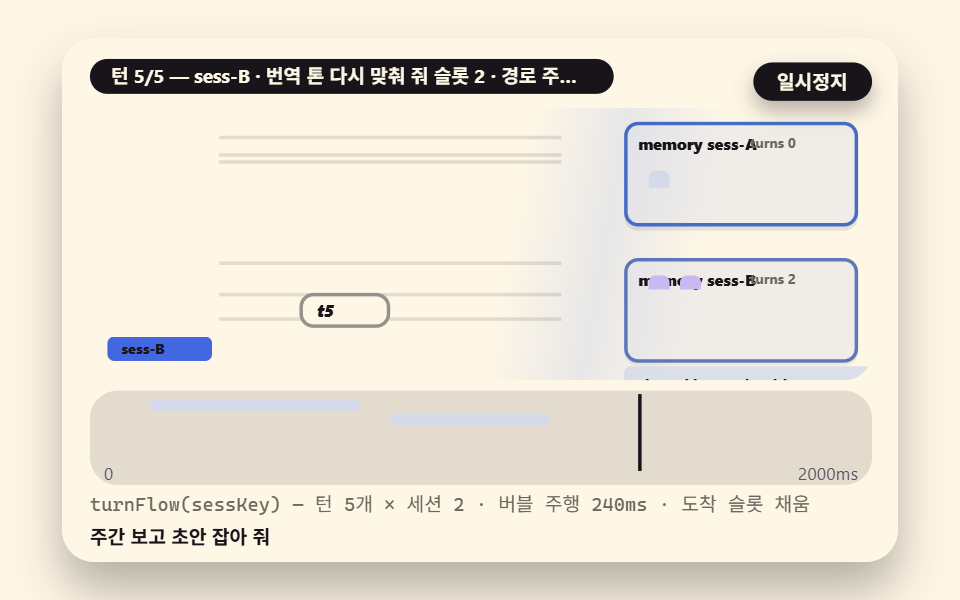 ai-agentn8n ai agent memory 9 scenes — slots, long-term
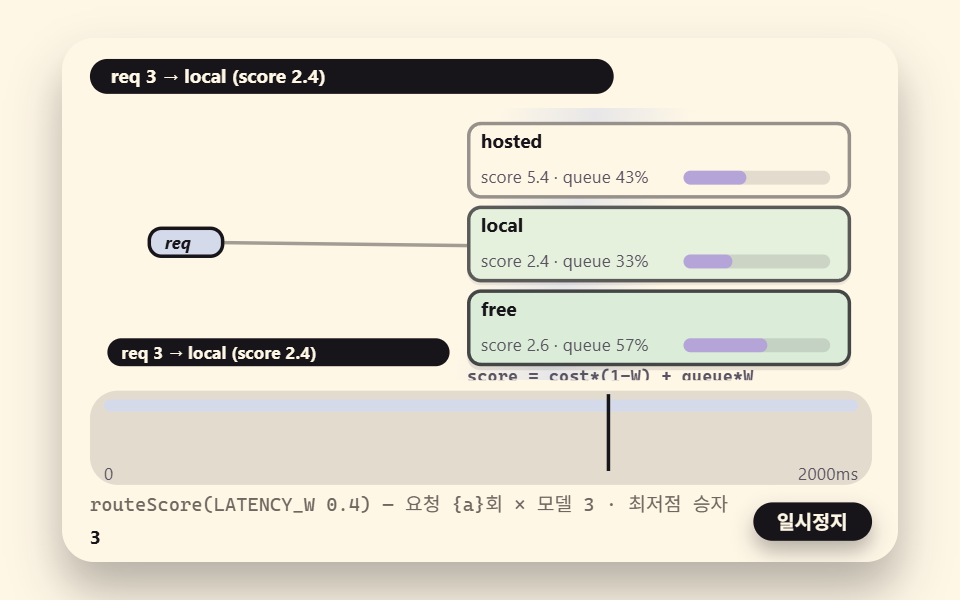 ai-agentn8n ai agent model: 8 scenes, router to fallback
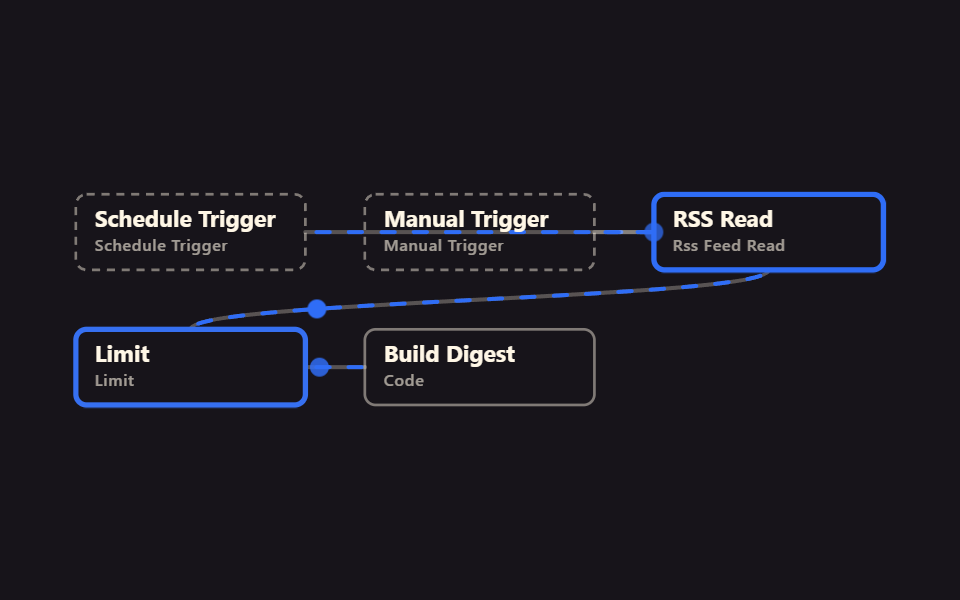 n8n basics9 n8n Workflow Examples, Zero Accounts Needed
 RSS & newsMarketing Automation Basics: 9 News Workflows
 Webhooks & HTTPn8n No Code Automation: 9 Workflows to Import
 Schedules & reportsAutomate Repetitive Tasks in n8n, No Account First
 Files & dataExcel Automation Examples Using n8n, No Code
 HTML email9 Transactional Email Templates You Can Copy-Paste
 GalleriesPortfolio Gallery HTML CSS: 9 UI Patterns
 Embeds9 Social Share Button Design Embed Widgets