Code Block CSS: 9 UI Scenes
A code block is math, not a box: 02 counts digit widths before the gutter fits, 03 sets token spans before color lands exactly, and 05 measures line count
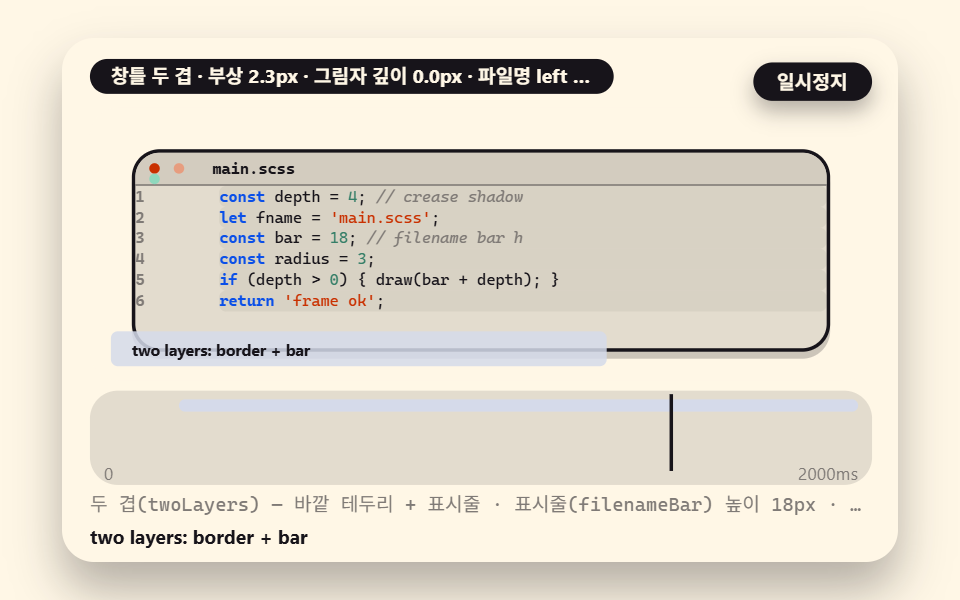 01 cb-window-frame-filename
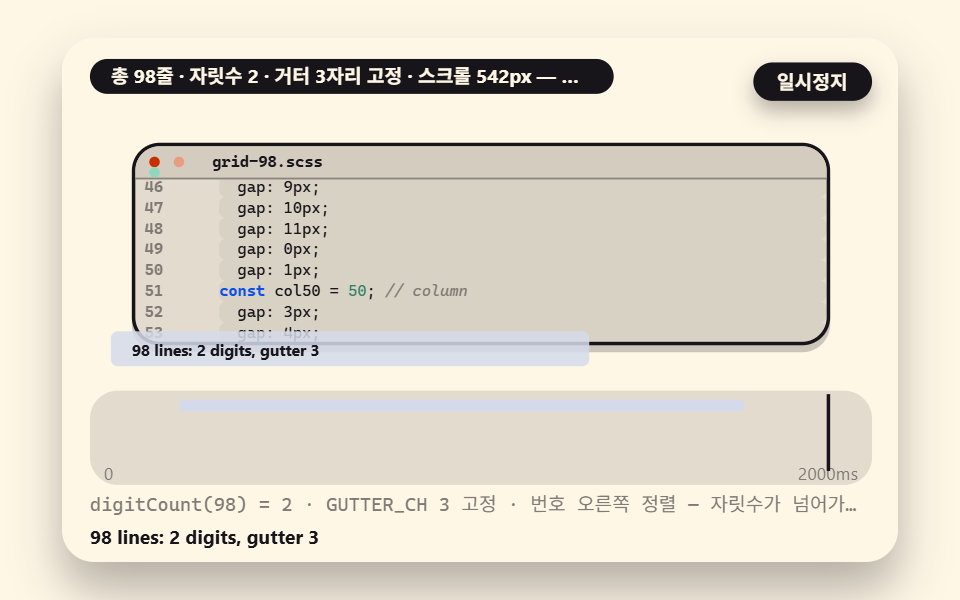 02 cb-gutter-digit-width
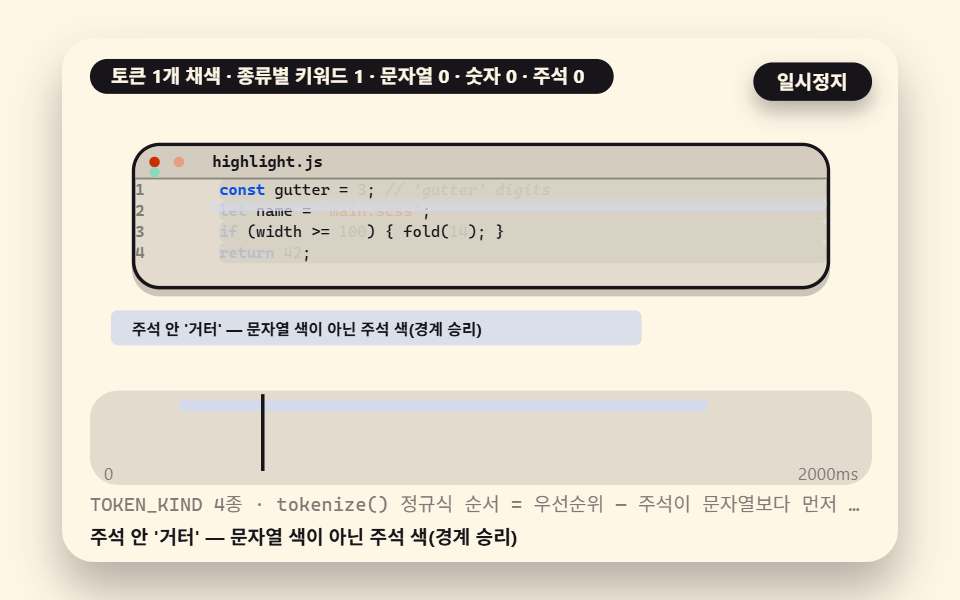 03 cb-token-span-highlight
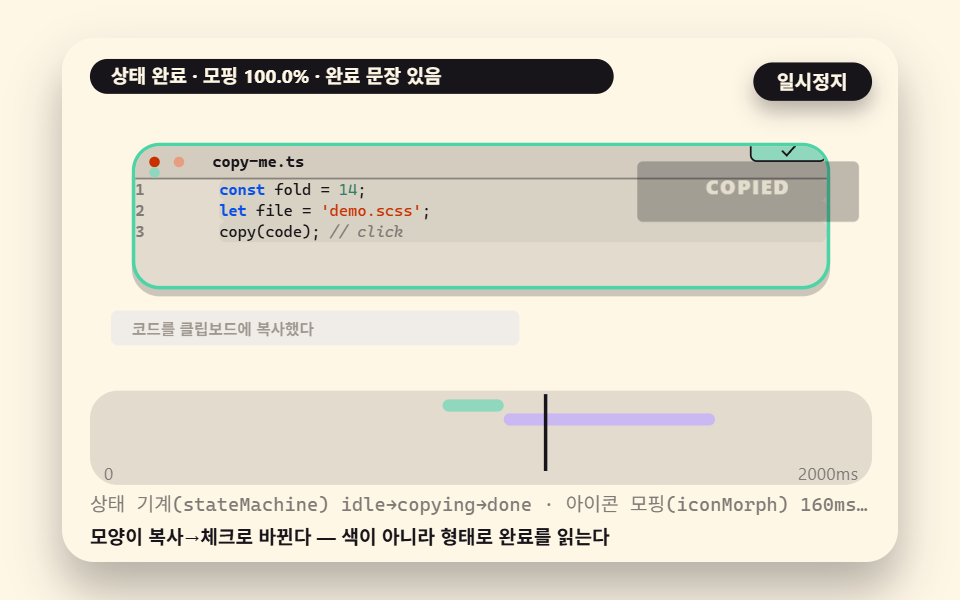 04 cb-copy-state-morph
 05 cb-fold-height-clamp
 06 cb-diff-add-remove-bg
 07 cb-row-hover-track
 08 cb-language-tab-crossfade
 09 cb-terminal-cursor-mix
- 01 A Basic Window Frame With a Filename Bar and Traffic Lights
- 02 A Line-Number Gutter That Counts Digits to Set Its Width
- 03 A Highlight That Maps Colors Onto Token Spans
- 04 A Copy Button Whose Icon Morphs on Press
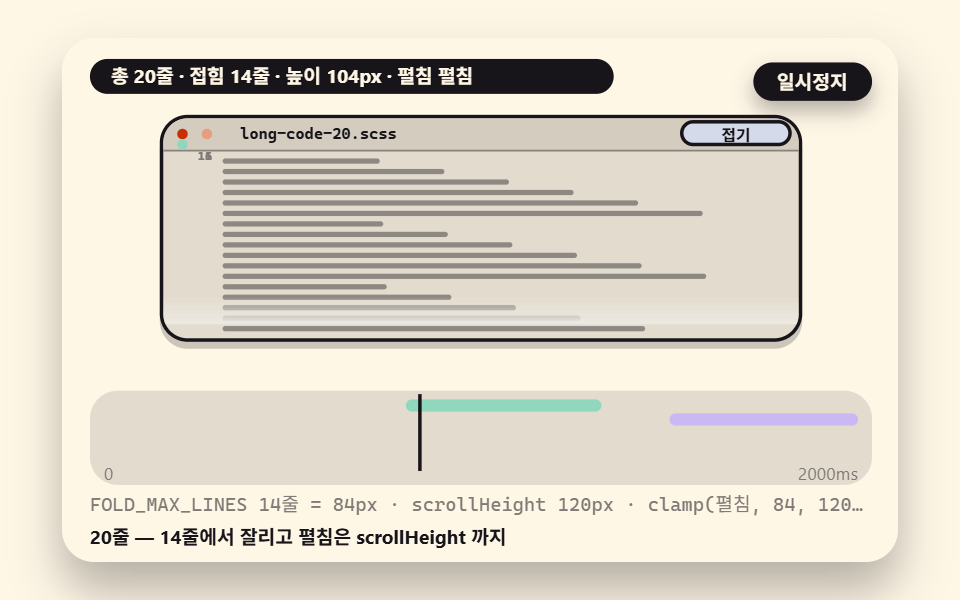
- 05 A Fold That Measures Line Count to Set Its Height
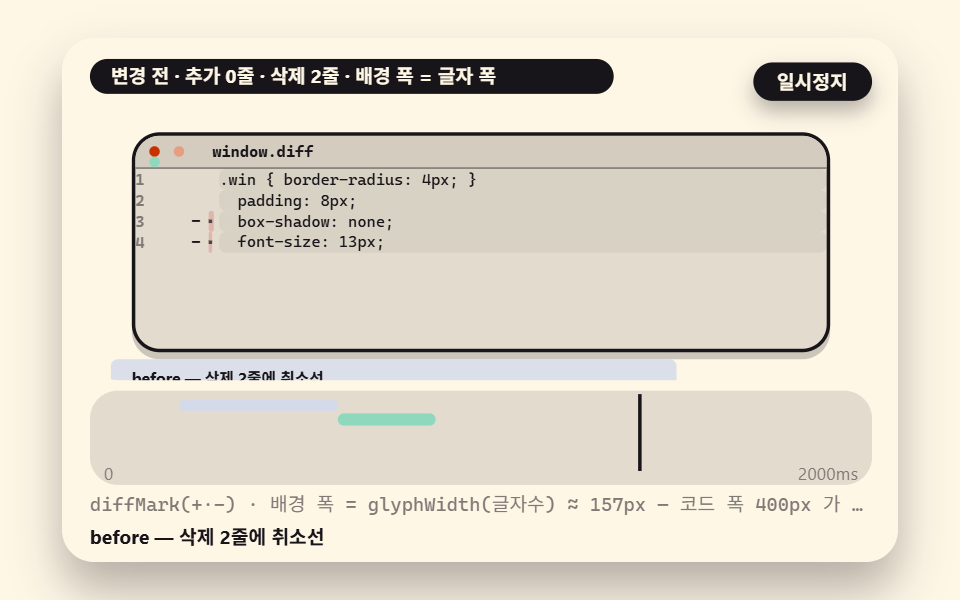
- 06 A Diff Block Whose Added and Removed Lines Have Computed Backgrounds
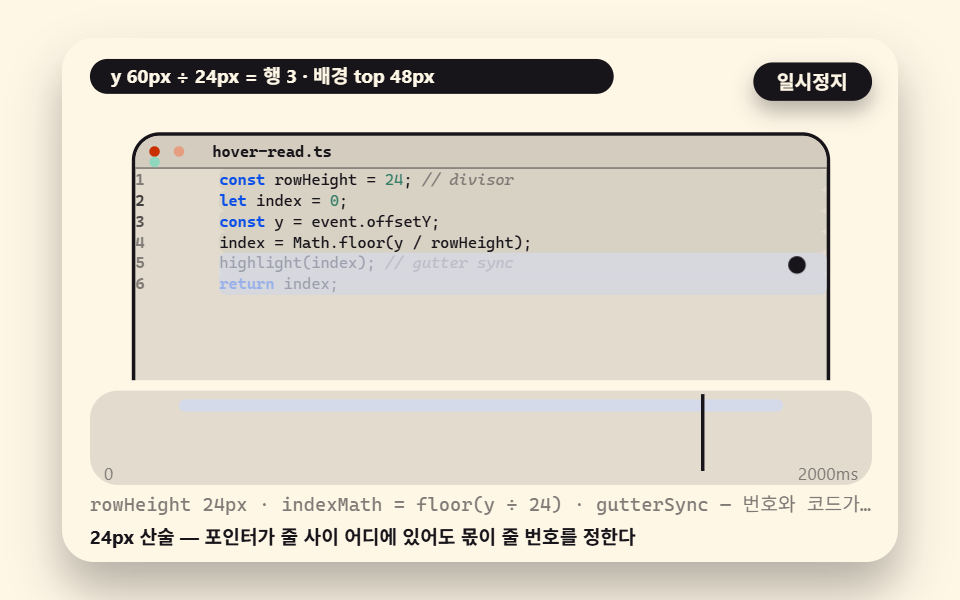
- 07 A Row Highlight That Tracks the Pointer
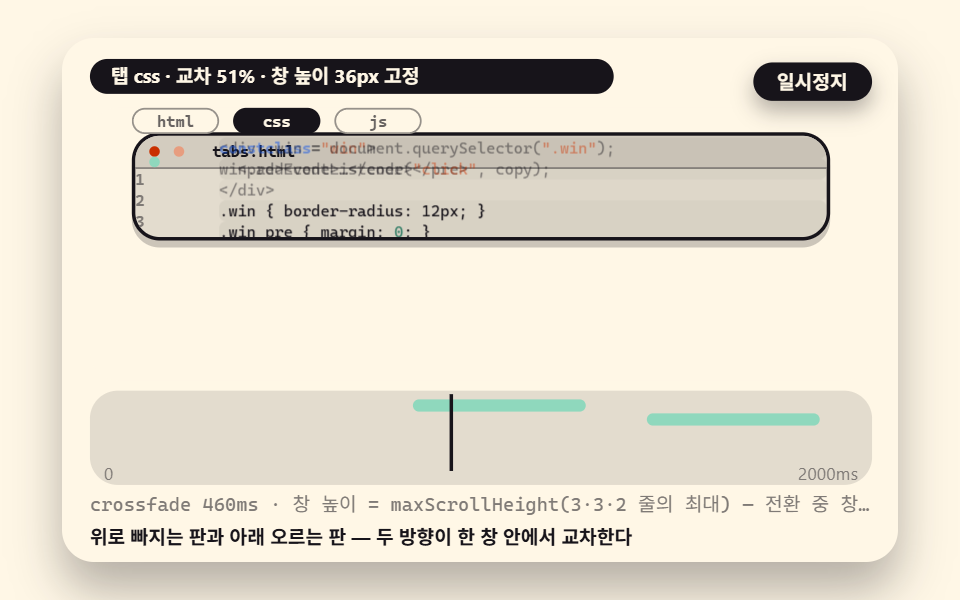
- 08 Code That Cross-Fades When the Language Tab Changes
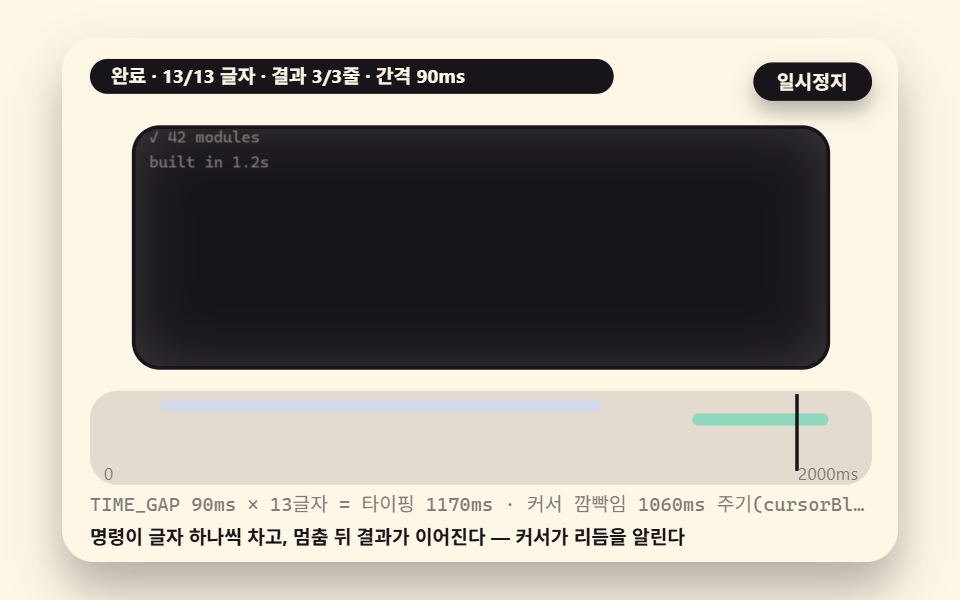
- 09 A Terminal Hybrid Block Where a Cursor Blinks and Replays Typing
Code Block CSS: 9 Scenes — Window Frames, Line Numbers, Highlights, Copy, Fold, Diff, Row Hover, Tabs, a Terminal
Why this order, first. 01 the frame and 02 the line numbers are the skeleton — once the code sits in a window and the numbers are on, it already looks like someone else's blog. 03 the highlight and 04 the copy button give that face color and behavior. 05 folding handles length, 06 diff handles change, 07 row hover handles explanation, 08 language tabs handle document structure, and 09 the terminal handles the running scene. Earlier numbers feed later ones — without 02's gutter, 06's diff marks have nowhere to stand, and without 03's tokens, 09's command colors don't exist.
The measurements come first. The numbers are render measurements taken by 도구/demo.py: 24 frames shot inside a 480×300 box, motion read from the 23 deltas between neighboring frames, measured at 2026-11-17 05:03 and 05:07. The motion in the nine scenes is an injected autoplay the page runs by itself, not a human hand — though your pointermove and clicks run the same verdict functions directly.
| Scene | What it shows | Accumulated area | Intensity | Moving frames |
|---|---|---|---|---|
| 01 | Basic window frame | 10.5% | 66.5 | 23/23 |
| 02 | Line-number gutter | 6.3% | 91.0 | 23/23 |
| 03 | Token highlight | 13.7% | 65.5 | 23/23 |
| 04 | Copy state button | 10.1% | 121.8 | 23/23 |
| 05 | Fold and unfold | 14.4% | 94.5 | 23/23 |
| 06 | Diff block | 4.6% | 78.8 | 23/23 |
| 07 | Row hover | 20.3% | 87.5 | 23/23 |
| 08 | Language tab | 10.8% | 83.9 | 23/23 |
| 09 | Terminal cursor | 7.6% | 124.2 | 23/23 |
Scene 07 measures largest because its row-highlight background travels the full width of the stage; 05 comes next because the fold height stretches and shrinks the whole window. That 06 diff is the smallest at 4.6% is the point, not a flaw — filling the added and removed backgrounds to the actual glyph width instead of the full code width is this scene's computational claim, and inflating the background would break the claim. The gutter (02, 6.3%) and the terminal (09, 7.6%) sit under 10% for the same reason. Accumulated area is the share of pixels that changed between frames, intensity is the average color distance among those pixels (0–255), and moving frames counts frames that differ from the one before. All nine move on 23/23, so something changes every frame — these are capture-box motion figures, not a page performance metric.
01A Basic Window Frame With a Filename Bar and Traffic Lights
The frame for a blog's first code block. Two layers — an outer border and a title bar — wrap the pre, the bar's three dots are three circles of one 3px radius set at even spacing, and the filename sits 44px from the left.
<main class="stage">
<div class="ez is-demo" id="ez">
  <div class="ez__in" data-role="inner">
    <div class="ez__pad" data-role="pad" tabindex="0" role="application" aria-label="Demo stage: Space or Enter pauses, R restarts, left and right arrows pick another value">
      <div class="ez__scene" data-role="scene" role="img" aria-label="In a two-layer frame of border and filename bar, three lights sit at one radius while a crease shadow computes the window's depth"></div>
      <div class="ez__probe" data-role="probe" aria-hidden="true"></div>
      <div class="ez__chart" data-role="chart" aria-hidden="true"></div>
      <p class="ez__status" data-role="status" aria-live="off">Scene ready</p>
      <p class="ez__reada" data-role="reada" aria-hidden="true"></p>
      <p class="ez__readb" data-role="readb" aria-hidden="true"></p>
      <div class="ez__ctrl">
        <button class="ez__pause" data-role="pause" type="button" aria-pressed="false">Pause</button>
… (총 18줄 — 아래 「전체 코드」에서 원문 전체)
// 528 공통 — 코드 블록 UI (527 base.scss 계승, 시트 요소를 코드 창·토큰·거터로)
@use "../../../../site/static/demo-tokens" as *;
@include stage($subject-cream);
$panel: mix($subject-cream, $subject-ink, 88%);
$dim: mix($subject-cream, $subject-ink, 45%);
// 파스텔 액센트 — vivid 토큰 대신 (BD26)
$stroke-blue: #d5daea;
$stroke-rose: #ebd6db;
$stroke-mint: #8fd8bd;
$stroke-lilac: #c9b8f2;
… (총 519줄 — 아래 「전체 코드」에서 원문 전체)html, body {
margin: 0;
overflow: hidden;
}
.stage {
box-sizing: border-box;
min-height: 100vh;
display: grid;
place-items: center;
margin: 0;
background: #fff7e6;
… (총 611줄 — 아래 「전체 코드」에서 원문 전체)(function () {
const rootEl = document.getElementById("ez");
if (!rootEl) return;
main(rootEl);
function cx(s) { return s; }
function main(root) {
// ── 528 코드 블록 공통 — 무대 좌표·문구 틀·요소 조립·토크나이저 엔진 (527 core.ts 계승)
const W = 480;
const CX0 = 8;
const CW = 432;
function clamp(v, lo, hi) { return v < lo ? lo : (v > hi ? hi : v); }
function lerp(a, b, k) { return a + (b - a) * k; }
… (총 383줄 — 아래 「전체 코드」에서 원문 전체)// CbWindowFrameFilename - 같은 항목 vanilla index.html 의 React 판. 같은 계산을 useEffect 안에서 돌린다
import { useEffect, useRef } from "react";
import styles from "./CbWindowFrameFilename.module.scss";
const cx = (s: string): string => s.split(" ").map((n) => styles[n] ?? n).join(" ");
function main(root: HTMLElement): () => void {
// ── 528 코드 블록 공통 — 무대 좌표·문구 틀·요소 조립·토크나이저 엔진 (527 core.ts 계승)
const W = 480;
const CX0 = 8;
const CW = 432;
function clamp(v: number, lo: number, hi: number): number { return v < lo ? lo : (v > hi ? hi : v); }
… (총 373줄 — 아래 「전체 코드」에서 원문 전체)01 · A Basic Window Frame With a Filename Bar and Traffic Lights — Measured area 10.489% · moving frames 23/23Original by GODRICH · SCSS and React ship in the zip · See the password
During the cycle the window rises 0→4px while the shadow deepens 0→4px; the two share one sine curve, so the breathing never drifts out of phase.
        // the window's lift and the shadow depth share one sine curve — a matched pair
        const s = Math.sin(Math.PI * 2 * clamp(t / DEPTH_MS, 0, 1));
        lift01 = t < 200 ? 0 : (1 - Math.cos(Math.PI * 2 * clamp((t - 200) / (DEPTH_MS - 200), 0, 1))) * 2;
        depth01 = t < 200 ? 0 : 4 * (0.5 + 0.5 * s);
        w01.el.style.transform = 'translateY(-' + f1(lift01) + 'px)';
        w01.el.style.boxShadow = '0 ' + f1(4 + depth01) + 'px 0 rgba(23,20,26,0.22)';
How the Window Frame Is Drawn: the Layout Math of a Filename Bar and Traffic Lights
Drawn in DOM, a window frame takes under ten lines. One outer shell, one title bar inside it, three dots and a filename inside the bar — the layout is the spacing math of these four parts.
    function mkWin() {
        const el = make('div', 'win', scWrap);
        const b = make('div', 'cb-bar', el);
        const lights = make('i', 'cb-lights', b);
        for (let k = 0; k < 3; k += 1) {
            make('i', 'cb-dot', lights);
        }
        const fname = make('b', 'cb-fname', b);
        fname.textContent = 'main.scss';
        const code = make('div', 'cb-code', el);
        const gutter = make('div', 'cb-gutter', code);
This mkWin() is the shared assembly function all nine scenes call, so editing the frame style in one place changes all nine code blocks at once. The same holds in production — a code block UI is built once as a component and reused per post. Keeping the three lights at one 3px radius is also a decision: give the dots different sizes and the eye snags on the bar instead of dropping into the code. The crease shadow where the bar meets the code area is what computes the window's depth, and note that the filename changes per preset — main.scss → tokens/_map.scss → build-20261117.js — a habit of letting the filename announce the code's language that carries into the 09 terminal.
02A Line-Number Gutter That Counts Digits to Set Its Width
Misaligned line numbers are a common sight, and the cause is an unfixed gutter width. This scene counts the digit count of the total lines with digitCount as the raw material, then fixes the gutter at GUTTER_CH 3 digits regardless of that count.
<main class="stage">
<div class="ez is-demo" id="ez">
  <div class="ez__in" data-role="inner">
    <div class="ez__pad" data-role="pad" tabindex="0" role="application" aria-label="Demo stage: Space or Enter pauses, R restarts, left and right arrows pick another value">
      <div class="ez__scene" data-role="scene" role="img" aria-label="The digit count of the total lines fixes the gutter at three digits with every number right-aligned, so crossing from nine lines to a hundred never moves the code column by a pixel"></div>
      <div class="ez__probe" data-role="probe" aria-hidden="true"></div>
      <div class="ez__chart" data-role="chart" aria-hidden="true"></div>
      <p class="ez__status" data-role="status" aria-live="off">Scene ready</p>
      <p class="ez__reada" data-role="reada" aria-hidden="true"></p>
      <p class="ez__readb" data-role="readb" aria-hidden="true"></p>
      <div class="ez__ctrl">
        <button class="ez__pause" data-role="pause" type="button" aria-pressed="false">Pause</button>
… (총 18줄 — 아래 「전체 코드」에서 원문 전체)
// 528 공통 — 코드 블록 UI (527 base.scss 계승, 시트 요소를 코드 창·토큰·거터로)
@use "../../../../site/static/demo-tokens" as *;
@include stage($subject-cream);
$panel: mix($subject-cream, $subject-ink, 88%);
$dim: mix($subject-cream, $subject-ink, 45%);
// 파스텔 액센트 — vivid 토큰 대신 (BD26)
$stroke-blue: #d5daea;
$stroke-rose: #ebd6db;
$stroke-mint: #8fd8bd;
$stroke-lilac: #c9b8f2;
… (총 519줄 — 아래 「전체 코드」에서 원문 전체)html, body {
margin: 0;
overflow: hidden;
}
.stage {
box-sizing: border-box;
min-height: 100vh;
display: grid;
place-items: center;
margin: 0;
background: #fff7e6;
… (총 611줄 — 아래 「전체 코드」에서 원문 전체)(function () {
const rootEl = document.getElementById("ez");
if (!rootEl) return;
main(rootEl);
function cx(s) { return s; }
function main(root) {
// ── 528 코드 블록 공통 — 무대 좌표·문구 틀·요소 조립·토크나이저 엔진 (527 core.ts 계승)
const W = 480;
const CX0 = 8;
const CW = 432;
function clamp(v, lo, hi) { return v < lo ? lo : (v > hi ? hi : v); }
function lerp(a, b, k) { return a + (b - a) * k; }
… (총 383줄 — 아래 「전체 코드」에서 원문 전체)// CbGutterDigitWidth - 같은 항목 vanilla index.html 의 React 판. 같은 계산을 useEffect 안에서 돌린다
import { useEffect, useRef } from "react";
import styles from "./CbGutterDigitWidth.module.scss";
const cx = (s: string): string => s.split(" ").map((n) => styles[n] ?? n).join(" ");
function main(root: HTMLElement): () => void {
// ── 528 코드 블록 공통 — 무대 좌표·문구 틀·요소 조립·토크나이저 엔진 (527 core.ts 계승)
const W = 480;
const CX0 = 8;
const CW = 432;
function clamp(v: number, lo: number, hi: number): number { return v < lo ? lo : (v > hi ? hi : v); }
… (총 374줄 — 아래 「전체 코드」에서 원문 전체)02 · A Line-Number Gutter That Counts Digits to Set Its Width — Measured area 6.313% · moving frames 23/23Original by GODRICH · SCSS and React ship in the zip · See the password
The proof is that all three presets — 98 lines (2 digits), 9 lines (1 digit), 100 lines (3 digits) — cross the screen without the code's start column moving a single pixel.
    function digitCount(n) {
        let d = 1;
        let v = n;
        while (v >= 10) {
            v = Math.floor(v / 10);
            d += 1;
        }
        return d;
    }
Why Line Numbers Drift: the Gutter-Width Arithmetic That Counts Digits
Counting digits takes two divisions — 98 divides by 10 twice, so 2 digits; 100 needs three divisions, so 3 digits. The practical question is which unit fixes the gutter width, and in a monospaced font the ch unit is exact — 1ch is the width of one zero, so a GUTTER_CH-digit gutter declared as width: 3ch makes digit count and glyph width agree at once. Hardcode pixels and the next font change breaks the alignment. Checked on caniuse on 2026-11-17, the ch unit sits at 98.7% global · Chrome 26+ · Firefox 1+ · Safari 7+.
Right alignment is the remaining calculation. Pad the front with spaces (fmt2) so every number ends on the same column, and 1 and 100 stand in one column. Placing the gutter and the code lines as separate absolute elements drifts apart on scroll and wrap, so these nine scenes keep them as siblings in one container sharing one translateY — the layout guarantees the alignment. When lines flow under the title bar, numbers and code ride the same transform, so there is no gap for misalignment to enter. For the wider story of numbering UI, line number interface patterns collects other plates of this calculation.
03A Highlight That Maps Colors Onto Token Spans
The underside of a block where strings, numbers and comments each own a color is token splitting. This scene's mini highlighter splits a line of code into typed spans and maps TOKEN_KIND 4 kinds — keyword, string, number, comment — one-to-one onto colors.
<main class="stage">
<div class="ez is-demo" id="ez">
  <div class="ez__in" data-role="inner">
    <div class="ez__pad" data-role="pad" tabindex="0" role="application" aria-label="Demo stage: Space or Enter pauses, R restarts, left and right arrows pick another value">
      <div class="ez__scene" data-role="scene" role="img" aria-label="Tokens split into typed spans with four colors mapped one-to-one, where a string inside a comment keeps the comment color — the boundary verdict"></div>
      <div class="ez__probe" data-role="probe" aria-hidden="true"></div>
      <div class="ez__chart" data-role="chart" aria-hidden="true"></div>
      <p class="ez__status" data-role="status" aria-live="off">Scene ready</p>
      <p class="ez__reada" data-role="reada" aria-hidden="true"></p>
      <p class="ez__readb" data-role="readb" aria-hidden="true"></p>
      <div class="ez__ctrl">
        <button class="ez__pause" data-role="pause" type="button" aria-pressed="false">Pause</button>
… (총 18줄 — 아래 「전체 코드」에서 원문 전체)
// 528 공통 — 코드 블록 UI (527 base.scss 계승, 시트 요소를 코드 창·토큰·거터로)
@use "../../../../site/static/demo-tokens" as *;
@include stage($subject-cream);
$panel: mix($subject-cream, $subject-ink, 88%);
$dim: mix($subject-cream, $subject-ink, 45%);
// 파스텔 액센트 — vivid 토큰 대신 (BD26)
$stroke-blue: #d5daea;
$stroke-rose: #ebd6db;
$stroke-mint: #8fd8bd;
$stroke-lilac: #c9b8f2;
… (총 519줄 — 아래 「전체 코드」에서 원문 전체)html, body {
margin: 0;
overflow: hidden;
}
.stage {
box-sizing: border-box;
min-height: 100vh;
display: grid;
place-items: center;
margin: 0;
background: #fff7e6;
… (총 611줄 — 아래 「전체 코드」에서 원문 전체)(function () {
const rootEl = document.getElementById("ez");
if (!rootEl) return;
main(rootEl);
function cx(s) { return s; }
function main(root) {
// ── 528 코드 블록 공통 — 무대 좌표·문구 틀·요소 조립·토크나이저 엔진 (527 core.ts 계승)
const W = 480;
const CX0 = 8;
const CW = 432;
function clamp(v, lo, hi) { return v < lo ? lo : (v > hi ? hi : v); }
function lerp(a, b, k) { return a + (b - a) * k; }
… (총 402줄 — 아래 「전체 코드」에서 원문 전체)// CbTokenSpanHighlight - 같은 항목 vanilla index.html 의 React 판. 같은 계산을 useEffect 안에서 돌린다
import { useEffect, useRef } from "react";
import styles from "./CbTokenSpanHighlight.module.scss";
const cx = (s: string): string => s.split(" ").map((n) => styles[n] ?? n).join(" ");
function main(root: HTMLElement): () => void {
// ── 528 코드 블록 공통 — 무대 좌표·문구 틀·요소 조립·토크나이저 엔진 (527 core.ts 계승)
const W = 480;
const CX0 = 8;
const CW = 432;
function clamp(v: number, lo: number, hi: number): number { return v < lo ? lo : (v > hi ? hi : v); }
… (총 388줄 — 아래 「전체 코드」에서 원문 전체)03 · A Highlight That Maps Colors Onto Token Spans — Measured area 13.706% · moving frames 23/23Original by GODRICH · SCSS and React ship in the zip · See the password
The core is that the regex order is the priority: because the comment rule claims its range before the string rule, the 'gutter' inside a comment never gets painted in string color.
    const RE_COMMENT = /(^|\s)\/\/[^\n]*/y;
    const RE_STR = /'[^'\n]*'|"[^"\n]*"/y;
    const RE_NUM = /\b\d+(\.\d+)?\b/y;
    const RE_KW = /\b(const|let|function|return|if|else|for|while|import|from|export|var|new|class)\b/y;
    // tokenize — split one source line into token ranges (Tok[]). Deciding which token
    //   a single punctuation mark belongs to (the boundary) is what decides how exact the highlight is
    function tokenize(line) {
        const out = [];
        const rules = [[RE_COMMENT, 3], [RE_STR, 1], [RE_KW, 0], [RE_NUM, 2]];
Where Highlight Colors Come From: Defining Token Spans and Mapping Colors Onto Them
The color sweep passes top to bottom, fills the 13 tokens of the 4 demo lines in order, and leaves the 'gutter' inside the comment in comment color — that is the boundary evidence. One rule completes the highlighter: a range claimed by an earlier regex is never re-examined by a later one. Up to here is the direct implementation; when you need precision beyond what you have verified, that is the moment to evaluate a library.
One distinction to keep: TOKEN_KIND is not a property of the highlight scene's source but a constant of the shared engine all nine scenes use. The gutter's numbering assembler and the terminal's command colors reference the same mapping, so changing this value recolors the tokens of all nine scenes at once — the 7-kind raise in the variations section below is this same shared constant. The color assignment is an array as long as the kind count: more kinds read closer to an editor, and fewer kinds sharpen the contrast so the code pops from the prose. Which way is right is a decision your blog's prose tone makes, not a number with a correct answer. The same rules run unchanged over dozens of real lines — keep the kind count and the rule order, and the line count stops mattering.
04A Copy Button Whose Icon Morphs on Press
Announcing "copied" by color alone is invisible to some color visions. This button holds three states — idle, copying, done — morphs the copy icon's path into a check at the click, and surfaces a completion sentence alongside.
<main class="stage">
<div class="ez is-demo" id="ez">
  <div class="ez__in" data-role="inner">
    <div class="ez__pad" data-role="pad" tabindex="0" role="application" aria-label="Demo stage: Space or Enter pauses, R restarts, left and right arrows pick another value">
      <div class="ez__scene" data-role="scene" role="img" aria-label="At the press the copy icon's path morphs into a check and a short sentence announces the done state"></div>
      <div class="ez__probe" data-role="probe" aria-hidden="true"></div>
      <div class="ez__chart" data-role="chart" aria-hidden="true"></div>
      <p class="ez__status" data-role="status" aria-live="off">Scene ready</p>
      <p class="ez__reada" data-role="reada" aria-hidden="true"></p>
      <p class="ez__readb" data-role="readb" aria-hidden="true"></p>
      <div class="ez__ctrl">
        <button class="ez__pause" data-role="pause" type="button" aria-pressed="false">Pause</button>
… (총 18줄 — 아래 「전체 코드」에서 원문 전체)
// 528 공통 — 코드 블록 UI (527 base.scss 계승, 시트 요소를 코드 창·토큰·거터로)
@use "../../../../site/static/demo-tokens" as *;
@include stage($subject-cream);
$panel: mix($subject-cream, $subject-ink, 88%);
$dim: mix($subject-cream, $subject-ink, 45%);
// 파스텔 액센트 — vivid 토큰 대신 (BD26)
$stroke-blue: #d5daea;
$stroke-rose: #ebd6db;
$stroke-mint: #8fd8bd;
$stroke-lilac: #c9b8f2;
… (총 519줄 — 아래 「전체 코드」에서 원문 전체)html, body {
margin: 0;
overflow: hidden;
}
.stage {
box-sizing: border-box;
min-height: 100vh;
display: grid;
place-items: center;
margin: 0;
background: #fff7e6;
… (총 611줄 — 아래 「전체 코드」에서 원문 전체)(function () {
const rootEl = document.getElementById("ez");
if (!rootEl) return;
main(rootEl);
function cx(s) { return s; }
function main(root) {
// ── 528 코드 블록 공통 — 무대 좌표·문구 틀·요소 조립·토크나이저 엔진 (527 core.ts 계승)
const W = 480;
const CX0 = 8;
const CW = 432;
function clamp(v, lo, hi) { return v < lo ? lo : (v > hi ? hi : v); }
function lerp(a, b, k) { return a + (b - a) * k; }
… (총 491줄 — 아래 「전체 코드」에서 원문 전체)// CbCopyStateMorph - 같은 항목 vanilla index.html 의 React 판. 같은 계산을 useEffect 안에서 돌린다
import { useEffect, useRef } from "react";
import styles from "./CbCopyStateMorph.module.scss";
const cx = (s: string): string => s.split(" ").map((n) => styles[n] ?? n).join(" ");
function main(root: HTMLElement): () => void {
// ── 528 코드 블록 공통 — 무대 좌표·문구 틀·요소 조립·토크나이저 엔진 (527 core.ts 계승)
const W = 480;
const CX0 = 8;
const CW = 432;
function clamp(v: number, lo: number, hi: number): number { return v < lo ? lo : (v > hi ? hi : v); }
… (총 462줄 — 아래 「전체 코드」에서 원문 전체)04 · A Copy Button Whose Icon Morphs on Press — Measured area 10.143% · moving frames 23/23Original by GODRICH · SCSS and React ship in the zip · See the password
The done badge slides down under the button and the window border flushes mint #4cd4a6 once — four layers of feedback in all.
            const k = clamp((t - tc) / COPY_MS, 0, 1);
            svg04.setAttribute('d', k < 0.5 ? ICON_COPY : ICON_CHECK);
            svg04.setAttribute('stroke-dasharray', f1(k * 24));
        }
        else if (t < tc + COPY_MS + DONE_MS) {
            st04 = 'done';
            svg04.setAttribute('d', ICON_CHECK);
            svg04.setAttribute('stroke-dasharray', '24');
            btn04.classList.add('is-done');
            live04.style.opacity = '1';
            live04.textContent = 'The code was copied to the clipboard';
            // the done badge slides down under the button — the state change reads from a distance
            badge04.style.transform = 'translateY(0) scale(1)';
            badge04.style.opacity = '1';
            // at completion the window border flushes mint once — state feedback spreading through the whole window
            if (w04) {
                w04.el.style.borderColor = '#4cd4a6';
            }
How a Copy Button Earns Trust: Icon Morphing and the State Change of Done Feedback
The completion sentence "Copied the code to the clipboard" reads through role="status" aria-live="polite" and disappears on its own after DONE_MS 560ms, returning the button to idle. Wiring the actual copy on a real page is one line of navigator.clipboard.writeText, and the button is a real <button>, so the keyboard reaches it too.
Why a button that announces completion by shape earns trust deserves one more pass. A button whose "copied" text flashes in a corner of the screen gets read from across the interface, while a button whose icon flips reads right beside the finger that clicked — confirming the result without moving the eyes is what builds trust in the operation. Fixing the state count at three is also a decision: an error state would need a fourth slot for clipboard permission denial. In practice denials are rare, so start with three and add the fourth when errors are actually observed. When a person presses the button in this demo, the same state machine fires instantly, regardless of the autoplay schedule.
05A Fold That Measures Line Count to Set Its Height
When code gets long, it eats the page, not the window. This scene measures the code's real line count, clamps the height at FOLD_MAX_LINES 14 lines, and transitions the unfold toward the full height.
<main class="stage">
<div class="ez is-demo" id="ez">
  <div class="ez__in" data-role="inner">
    <div class="ez__pad" data-role="pad" tabindex="0" role="application" aria-label="Demo stage: Space or Enter pauses, R restarts, left and right arrows pick another value">
      <div class="ez__scene" data-role="scene" role="img" aria-label="The real line count clamps the block at fourteen lines, expanding toward the scrollHeight, while code under the threshold never gets a fold button at all"></div>
      <div class="ez__probe" data-role="probe" aria-hidden="true"></div>
      <div class="ez__chart" data-role="chart" aria-hidden="true"></div>
      <p class="ez__status" data-role="status" aria-live="off">Scene ready</p>
      <p class="ez__reada" data-role="reada" aria-hidden="true"></p>
      <p class="ez__readb" data-role="readb" aria-hidden="true"></p>
      <div class="ez__ctrl">
        <button class="ez__pause" data-role="pause" type="button" aria-pressed="false">Pause</button>
… (총 18줄 — 아래 「전체 코드」에서 원문 전체)
// 528 공통 — 코드 블록 UI (527 base.scss 계승, 시트 요소를 코드 창·토큰·거터로)
@use "../../../../site/static/demo-tokens" as *;
@include stage($subject-cream);
$panel: mix($subject-cream, $subject-ink, 88%);
$dim: mix($subject-cream, $subject-ink, 45%);
// 파스텔 액센트 — vivid 토큰 대신 (BD26)
$stroke-blue: #d5daea;
$stroke-rose: #ebd6db;
$stroke-mint: #8fd8bd;
$stroke-lilac: #c9b8f2;
… (총 519줄 — 아래 「전체 코드」에서 원문 전체)html, body {
margin: 0;
overflow: hidden;
}
.stage {
box-sizing: border-box;
min-height: 100vh;
display: grid;
place-items: center;
margin: 0;
background: #fff7e6;
… (총 611줄 — 아래 「전체 코드」에서 원문 전체)(function () {
const rootEl = document.getElementById("ez");
if (!rootEl) return;
main(rootEl);
function cx(s) { return s; }
function main(root) {
// ── 528 코드 블록 공통 — 무대 좌표·문구 틀·요소 조립·토크나이저 엔진 (527 core.ts 계승)
const W = 480;
const CX0 = 8;
const CW = 432;
function clamp(v, lo, hi) { return v < lo ? lo : (v > hi ? hi : v); }
function lerp(a, b, k) { return a + (b - a) * k; }
… (총 431줄 — 아래 「전체 코드」에서 원문 전체)// CbFoldHeightClamp - 같은 항목 vanilla index.html 의 React 판. 같은 계산을 useEffect 안에서 돌린다
import { useEffect, useRef } from "react";
import styles from "./CbFoldHeightClamp.module.scss";
const cx = (s: string): string => s.split(" ").map((n) => styles[n] ?? n).join(" ");
function main(root: HTMLElement): () => void {
// ── 528 코드 블록 공통 — 무대 좌표·문구 틀·요소 조립·토크나이저 엔진 (527 core.ts 계승)
const W = 480;
const CX0 = 8;
const CW = 432;
function clamp(v: number, lo: number, hi: number): number { return v < lo ? lo : (v > hi ? hi : v); }
… (총 415줄 — 아래 「전체 코드」에서 원문 전체)05 · A Fold That Measures Line Count to Set Its Height — Measured area 14.366% · moving frames 23/23Original by GODRICH · SCSS and React ship in the zip · See the password
A 20-line block clips at the 14-line height (84px) and grows to 120px on unfold; on the 10-line plate the count is under the threshold, so the fold button never appears at all.
        // 200ms button appears → 800ms unfold → 1500ms fold again — the height eases every frame
        tgtH05 = t < 800 ? FOLD_MAX_LINES * ROW_PX : (t < 1500 ? total * ROW_PX : FOLD_MAX_LINES * ROW_PX);
        // inertial easing (lerp 0.18) — travels smoothly between the clamp height (14 lines) and scrollHeight (20 lines)
        curH05 = lerp(curH05, tgtH05, 0.18);
        w05.code.style.height = f0(curH05) + 'px';
        // the frame grows with the height — folded height and window height move as one body
        w05.el.style.height = f0(18 + curH05 + 8) + 'px';
        // bottom fade — the fold mask marking the cut point (vanishes the moment it unfolds)
How Long Code Folds: Measuring Line Count to Set the Clamp Height
The cut point wears a fade mask that vanishes the moment the block unfolds — that mask is the face of the folded state. The fold button is a real <button> at the right of the title bar, announcing its state with aria-expanded and operable by keyboard — the part worth copying into production verbatim is this button's attribute set, and a human pressing it in the demo hits the same clamp calculation regardless of the schedule.
Long code has two treatments, and this scene picks folding. Horizontal scroll preserves lines but forces the hand to shuttle back and forth; folding compresses vertically while keeping the whole text — the clipped 14 lines let the reader guess the content like a table of contents, and unfold opens the full text. A practical rule for the threshold: the first screen must not let the code push the prose out, so start around half the viewport height — 12 to 16 lines is safe — and place the lines that carry explanation inside the threshold before fixing it; this demo's 14 was set exactly that way. The button label ("Fold") changing with the state completes the piece.
06A Diff Block Whose Added and Removed Lines Have Computed Backgrounds
The block that shows before and after in code review. Each line wears a + or − mark, the added and removed backgrounds fill the actual glyph width rather than the full code width, and removed lines add a strikethrough — the background's width becomes the change's size.
<main class="stage">
<div class="ez is-demo" id="ez">
  <div class="ez__in" data-role="inner">
    <div class="ez__pad" data-role="pad" tabindex="0" role="application" aria-label="Demo stage: Space or Enter pauses, R restarts, left and right arrows pick another value">
      <div class="ez__scene" data-role="scene" role="img" aria-label="Added and removed backgrounds fill only the actual glyph width, not the whole code width, and removed lines add a strike so the width itself becomes the amount of change"></div>
      <div class="ez__probe" data-role="probe" aria-hidden="true"></div>
      <div class="ez__chart" data-role="chart" aria-hidden="true"></div>
      <p class="ez__status" data-role="status" aria-live="off">Scene ready</p>
      <p class="ez__reada" data-role="reada" aria-hidden="true"></p>
      <p class="ez__readb" data-role="readb" aria-hidden="true"></p>
      <div class="ez__ctrl">
        <button class="ez__pause" data-role="pause" type="button" aria-pressed="false">Pause</button>
… (총 18줄 — 아래 「전체 코드」에서 원문 전체)
// 528 공통 — 코드 블록 UI (527 base.scss 계승, 시트 요소를 코드 창·토큰·거터로)
@use "../../../../site/static/demo-tokens" as *;
@include stage($subject-cream);
$panel: mix($subject-cream, $subject-ink, 88%);
$dim: mix($subject-cream, $subject-ink, 45%);
// 파스텔 액센트 — vivid 토큰 대신 (BD26)
$stroke-blue: #d5daea;
$stroke-rose: #ebd6db;
$stroke-mint: #8fd8bd;
$stroke-lilac: #c9b8f2;
… (총 519줄 — 아래 「전체 코드」에서 원문 전체)html, body {
margin: 0;
overflow: hidden;
}
.stage {
box-sizing: border-box;
min-height: 100vh;
display: grid;
place-items: center;
margin: 0;
background: #fff7e6;
… (총 611줄 — 아래 「전체 코드」에서 원문 전체)(function () {
const rootEl = document.getElementById("ez");
if (!rootEl) return;
main(rootEl);
function cx(s) { return s; }
function main(root) {
// ── 528 코드 블록 공통 — 무대 좌표·문구 틀·요소 조립·토크나이저 엔진 (527 core.ts 계승)
const W = 480;
const CX0 = 8;
const CW = 432;
function clamp(v, lo, hi) { return v < lo ? lo : (v > hi ? hi : v); }
function lerp(a, b, k) { return a + (b - a) * k; }
… (총 431줄 — 아래 「전체 코드」에서 원문 전체)// CbDiffAddRemoveBg - 같은 항목 vanilla index.html 의 React 판. 같은 계산을 useEffect 안에서 돌린다
import { useEffect, useRef } from "react";
import styles from "./CbDiffAddRemoveBg.module.scss";
const cx = (s: string): string => s.split(" ").map((n) => styles[n] ?? n).join(" ");
function main(root: HTMLElement): () => void {
// ── 528 코드 블록 공통 — 무대 좌표·문구 틀·요소 조립·토크나이저 엔진 (527 core.ts 계승)
const W = 480;
const CX0 = 8;
const CW = 432;
function clamp(v: number, lo: number, hi: number): number { return v < lo ? lo : (v > hi ? hi : v); }
… (총 418줄 — 아래 「전체 코드」에서 원문 전체)06 · A Diff Block Whose Added and Removed Lines Have Computed Backgrounds — Measured area 4.613% · moving frames 23/23Original by GODRICH · SCSS and React ship in the zip · See the password
The 4-line before and 5-line after switch twice at 620ms intervals, and after each switch the background grows from 0 to the glyph width over 800ms — painting the whole line would hide where a short line's change ends and would turn half the screen into color bands until the code disappears, so capping the width at the glyph count is the readability answer.
        // background and strikethrough fill only the glyph width — after the switch the background grows from 0 to the glyph width over 800ms
        for (let k = 0; k < bg06.length; k += 1) {
            bg06[k].style.opacity = '1';
            const rowTxt = rows06[k % rows06.length] ? rows06[k % rows06.length].text : '';
            bg06[k].style.width = f0(rowTxt.length * 5.4 * clamp((t - t0) / 800, 0, 1)) + 'px';
        }
Where Code Blocks Break: Horizontal Scroll Fighting Wrap, and tab-size Across Browsers
Seven points this code block UI actually hit while being built, with reproductions and fixes.
First, without white-space: pre the line breaks collapse. A pre element looks like it guards breaks by itself, but CSS can undo it — set normal and consecutive spaces squash into one, the indentation vanishes, and every gutter number drifts off its code. This demo's .cb-code guards it with white-space: pre. Checked on caniuse on 2026-11-17, white-space: pre stands at 99.99% global — effectively infinite support, so the risk is not support but a missing declaration.
Second, the browser default of tab-size differs everywhere. Chrome 8, Firefox 4, Safari 8 — leave tab-indented code as is and the indent width differs per browser, shaking the gutter alignment. This demo fixes tab-size: 2 and uses space indentation from the start. On caniuse, tab-size sits at 96.4% global · Chrome 21+ · Edge 79+ · Firefox 4+ · Safari 21+ (2023) — below Safari 20 the tab width can't be pinned, so space indentation is the only escape.
Third, turning on horizontal scroll and wrap at once creates double scrolling. overflow-x: auto (pre) and white-space: pre-wrap are mutually exclusive — wrap folds the long lines and breaks the gutter-to-line correspondence; no wrap sends the code flowing out of the window. This demo dodges both by keeping the code around 40 characters. If you choose wrap on a narrow screen, remember the gutter attaches only to each line's first fragment.
Fourth, pinning the gutter width to a margin guess misaligns at 100 lines. Pin it at, say, 40px and a 3-digit number slides under the code. The digit-counting math of 02 — a fixed ch width plus right alignment — is the only safe path.
Fifth, max-height breaks the fold transition. max-height must be set larger than the real height, and the larger the value, the later the transition starts — it reads as lag. Measuring the real line count and computing the clamp height and the target height directly is 05's approach.
Sixth, a wrong regex order flips the colors. Put the string rule before the comment rule and the 'text' inside a comment paints in string color. Comment → string → keyword → number is the answer, and not re-examining claimed ranges completes the rule (03 shows it).
Seventh, not fixing the height before a language tab switch makes the window jump. Different line counts per tab shrink and stretch the window at the switch. Pre-fixing to the larger of the two scrollHeights is 08's calculation.
What Changing One Constant Does
Each variation is a single constant flip you can watch in that scene.
| Name | Value | Effect |
|---|---|---|
| Lower the fold height | 05 FOLD_MAX_LINES 14 → 8 | The 20-line block clips at 8 lines (48px) instead of 14 — a compact index at a glance; the clamp drops 84px→48px and the unfold target stays the full height |
| Raise the highlight kind count | 03 TOKEN_KIND 4 → 7 | Functions, properties and operators join keywords, strings, numbers and comments — closer to an editor; this constant lives in the shared engine, so all nine scenes recolor together |
| Widen the gutter | 02 GUTTER_CH 3 → 4 | Even a hundred-line block keeps the numbers off the code — a breathing margin; the value stays fixed regardless of digit count, so 100 lines (3 digits) keep one digit of room |
All three variation values sit as comments in the source constant blocks, so opening the zip and changing one character is all it takes. The archive with every scene's source and the React version is in the box below, and the password to open it is 6n8b8hr6. You can see with your own eyes how few lines the gutter, token, and fold math take, without a single library.
07A Row Highlight That Tracks the Pointer
The scene for reading code aloud in an explanation. Divide the y coordinate by the row height ROW_H 24px and drop the remainder — the row index falls out, the background moves to that row's top, and the gutter number deepens with it, so the pointed row reads in number and code at once.
<main class="stage">
<div class="ez is-demo" id="ez">
  <div class="ez__in" data-role="inner">
    <div class="ez__pad" data-role="pad" tabindex="0" role="application" aria-label="Demo stage: Space or Enter pauses, R restarts, left and right arrows pick another value">
      <div class="ez__scene" data-role="scene" role="img" aria-label="The pointer's y divided by the row height computes the row, moves the background there, and brightens the gutter number at the same time"></div>
      <div class="ez__probe" data-role="probe" aria-hidden="true"></div>
      <div class="ez__chart" data-role="chart" aria-hidden="true"></div>
      <p class="ez__status" data-role="status" aria-live="off">Scene ready</p>
      <p class="ez__reada" data-role="reada" aria-hidden="true"></p>
      <p class="ez__readb" data-role="readb" aria-hidden="true"></p>
      <div class="ez__ctrl">
        <button class="ez__pause" data-role="pause" type="button" aria-pressed="false">Pause</button>
… (총 18줄 — 아래 「전체 코드」에서 원문 전체)
// 528 공통 — 코드 블록 UI (527 base.scss 계승, 시트 요소를 코드 창·토큰·거터로)
@use "../../../../site/static/demo-tokens" as *;
@include stage($subject-cream);
$panel: mix($subject-cream, $subject-ink, 88%);
$dim: mix($subject-cream, $subject-ink, 45%);
// 파스텔 액센트 — vivid 토큰 대신 (BD26)
$stroke-blue: #d5daea;
$stroke-rose: #ebd6db;
$stroke-mint: #8fd8bd;
$stroke-lilac: #c9b8f2;
… (총 519줄 — 아래 「전체 코드」에서 원문 전체)html, body {
margin: 0;
overflow: hidden;
}
.stage {
box-sizing: border-box;
min-height: 100vh;
display: grid;
place-items: center;
margin: 0;
background: #fff7e6;
… (총 611줄 — 아래 「전체 코드」에서 원문 전체)(function () {
const rootEl = document.getElementById("ez");
if (!rootEl) return;
main(rootEl);
function cx(s) { return s; }
function main(root) {
// ── 528 코드 블록 공통 — 무대 좌표·문구 틀·요소 조립·토크나이저 엔진 (527 core.ts 계승)
const W = 480;
const CX0 = 8;
const CW = 432;
function clamp(v, lo, hi) { return v < lo ? lo : (v > hi ? hi : v); }
function lerp(a, b, k) { return a + (b - a) * k; }
… (총 412줄 — 아래 「전체 코드」에서 원문 전체)// CbRowHoverTrack - 같은 항목 vanilla index.html 의 React 판. 같은 계산을 useEffect 안에서 돌린다
import { useEffect, useRef } from "react";
import styles from "./CbRowHoverTrack.module.scss";
const cx = (s: string): string => s.split(" ").map((n) => styles[n] ?? n).join(" ");
function main(root: HTMLElement): () => void {
// ── 528 코드 블록 공통 — 무대 좌표·문구 틀·요소 조립·토크나이저 엔진 (527 core.ts 계승)
const W = 480;
const CX0 = 8;
const CW = 432;
function clamp(v: number, lo: number, hi: number): number { return v < lo ? lo : (v > hi ? hi : v); }
… (총 400줄 — 아래 「전체 코드」에서 원문 전체)07 · A Row Highlight That Tracks the Pointer — Measured area 20.278% · moving frames 23/23Original by GODRICH · SCSS and React ship in the zip · See the password
ROW_H is the divisor, so it must be pinned exactly — let line-height and the row height drift apart and the highlight lags a row the moment the pointer sits between two lines, while in the autoplay the pointer rides a sine from y 40→176px and a human's pointermove yields the same quotient after stage-coordinate conversion.
        // indexMath — compute the row index with floor(y / ROW_H) (0-based)
        idx07 = Math.floor(y07 / ROW_H);
        const top = idx07 * ROW_H;
        hi07.style.transform = 'translateY(' + f0(top) + 'px)';
        ptr07.style.transform = 'translateY(' + f0(y07 - 5) + 'px)';
        for (let k = 0; k < nos07.length; k += 1) {
            nos07[k].style.color = k === idx07 ? '#17141a' : '';
            nos07[k].style.fontWeight = k === idx07 ? '700' : '';
        }
08Code That Cross-Fades When the Language Tab Changes
The document plate that shows one feature split into html, css and js. On a tab change the old code exits upward while the new one rises from below — two opposite directions overlapping — and because the window height is pre-fixed to the larger of the scrollHeights, the window never jumps mid-transition.
<main class="stage">
<div class="ez is-demo" id="ez">
  <div class="ez__in" data-role="inner">
    <div class="ez__pad" data-role="pad" tabindex="0" role="application" aria-label="Demo stage: Space or Enter pauses, R restarts, left and right arrows pick another value">
      <div class="ez__scene" data-role="scene" role="img" aria-label="On a tab change the old code exits upward and the new one rises from below, while the window height, set in advance to the larger one, never jumps"></div>
      <div class="ez__probe" data-role="probe" aria-hidden="true"></div>
      <div class="ez__chart" data-role="chart" aria-hidden="true"></div>
      <p class="ez__status" data-role="status" aria-live="off">Scene ready</p>
      <p class="ez__reada" data-role="reada" aria-hidden="true"></p>
      <p class="ez__readb" data-role="readb" aria-hidden="true"></p>
      <div class="ez__ctrl">
        <button class="ez__pause" data-role="pause" type="button" aria-pressed="false">Pause</button>
… (총 18줄 — 아래 「전체 코드」에서 원문 전체)
// 528 공통 — 코드 블록 UI (527 base.scss 계승, 시트 요소를 코드 창·토큰·거터로)
@use "../../../../site/static/demo-tokens" as *;
@include stage($subject-cream);
$panel: mix($subject-cream, $subject-ink, 88%);
$dim: mix($subject-cream, $subject-ink, 45%);
// 파스텔 액센트 — vivid 토큰 대신 (BD26)
$stroke-blue: #d5daea;
$stroke-rose: #ebd6db;
$stroke-mint: #8fd8bd;
$stroke-lilac: #c9b8f2;
… (총 519줄 — 아래 「전체 코드」에서 원문 전체)html, body {
margin: 0;
overflow: hidden;
}
.stage {
box-sizing: border-box;
min-height: 100vh;
display: grid;
place-items: center;
margin: 0;
background: #fff7e6;
… (총 611줄 — 아래 「전체 코드」에서 원문 전체)(function () {
const rootEl = document.getElementById("ez");
if (!rootEl) return;
main(rootEl);
function cx(s) { return s; }
function main(root) {
// ── 528 코드 블록 공통 — 무대 좌표·문구 틀·요소 조립·토크나이저 엔진 (527 core.ts 계승)
const W = 480;
const CX0 = 8;
const CW = 432;
function clamp(v, lo, hi) { return v < lo ? lo : (v > hi ? hi : v); }
function lerp(a, b, k) { return a + (b - a) * k; }
… (총 431줄 — 아래 「전체 코드」에서 원문 전체)// CbLanguageTabCrossfade - 같은 항목 vanilla index.html 의 React 판. 같은 계산을 useEffect 안에서 돌린다
import { useEffect, useRef } from "react";
import styles from "./CbLanguageTabCrossfade.module.scss";
const cx = (s: string): string => s.split(" ").map((n) => styles[n] ?? n).join(" ");
function main(root: HTMLElement): () => void {
// ── 528 코드 블록 공통 — 무대 좌표·문구 틀·요소 조립·토크나이저 엔진 (527 core.ts 계승)
const W = 480;
const CX0 = 8;
const CW = 432;
function clamp(v: number, lo: number, hi: number): number { return v < lo ? lo : (v > hi ? hi : v); }
… (총 410줄 — 아래 「전체 코드」에서 원문 전체)08 · Code That Cross-Fades When the Language Tab Changes — Measured area 10.799% · moving frames 23/23Original by GODRICH · SCSS and React ship in the zip · See the password
A few lines lay a cubic ease over the crossfade progress and move the two panels in opposite directions, and the tabs are real buttons with role="tab" and aria-selected, so the keyboard walks them too.
        // crossfade — the exit upward overlapping the rise from below (a smooth k)
        const e = 1 - Math.pow(1 - k, 3);
        for (let j = 0; j < 3; j += 1) {
            if (j === li) {
                panels08[j].style.opacity = '1';
                panels08[j].style.transform = 'translateY(' + f0((1 - e) * h08) + 'px)';
            }
            else {
                panels08[j].style.opacity = k < 0.5 ? f2(1 - e) : '0';
                panels08[j].style.transform = 'translateY(' + f0(-e * h08) + 'px)';
09A Terminal Hybrid Block Where a Cursor Blinks and Replays Typing
The tutorial plate that shows command and result in one window. Prompt, command, cursor and result share the frame; the command npm run build fills in one character at a time as typing replay at TIME_GAP 90ms, then after a 240ms pause the three result lines follow at 120ms intervals.
<main class="stage">
<div class="ez is-demo" id="ez">
  <div class="ez__in" data-role="inner">
    <div class="ez__pad" data-role="pad" tabindex="0" role="application" aria-label="Demo stage: Space or Enter pauses, R restarts, left and right arrows pick another value">
      <div class="ez__scene" data-role="scene" role="img" aria-label="The command fills one glyph at a time in 90ms typing replay, the result follows the pause, and the cursor's blink signals stopping and resuming"></div>
      <div class="ez__probe" data-role="probe" aria-hidden="true"></div>
      <div class="ez__chart" data-role="chart" aria-hidden="true"></div>
      <p class="ez__status" data-role="status" aria-live="off">Scene ready</p>
      <p class="ez__reada" data-role="reada" aria-hidden="true"></p>
      <p class="ez__readb" data-role="readb" aria-hidden="true"></p>
      <div class="ez__ctrl">
        <button class="ez__pause" data-role="pause" type="button" aria-pressed="false">Pause</button>
… (총 18줄 — 아래 「전체 코드」에서 원문 전체)
// 528 공통 — 코드 블록 UI (527 base.scss 계승, 시트 요소를 코드 창·토큰·거터로)
@use "../../../../site/static/demo-tokens" as *;
@include stage($subject-cream);
$panel: mix($subject-cream, $subject-ink, 88%);
$dim: mix($subject-cream, $subject-ink, 45%);
// 파스텔 액센트 — vivid 토큰 대신 (BD26)
$stroke-blue: #d5daea;
$stroke-rose: #ebd6db;
$stroke-mint: #8fd8bd;
$stroke-lilac: #c9b8f2;
… (총 519줄 — 아래 「전체 코드」에서 원문 전체)html, body {
margin: 0;
overflow: hidden;
}
.stage {
box-sizing: border-box;
min-height: 100vh;
display: grid;
place-items: center;
margin: 0;
background: #fff7e6;
… (총 611줄 — 아래 「전체 코드」에서 원문 전체)(function () {
const rootEl = document.getElementById("ez");
if (!rootEl) return;
main(rootEl);
function cx(s) { return s; }
function main(root) {
// ── 528 코드 블록 공통 — 무대 좌표·문구 틀·요소 조립·토크나이저 엔진 (527 core.ts 계승)
const W = 480;
const CX0 = 8;
const CW = 432;
function clamp(v, lo, hi) { return v < lo ? lo : (v > hi ? hi : v); }
function lerp(a, b, k) { return a + (b - a) * k; }
… (총 415줄 — 아래 「전체 코드」에서 원문 전체)// CbTerminalCursorMix - 같은 항목 vanilla index.html 의 React 판. 같은 계산을 useEffect 안에서 돌린다
import { useEffect, useRef } from "react";
import styles from "./CbTerminalCursorMix.module.scss";
const cx = (s: string): string => s.split(" ").map((n) => styles[n] ?? n).join(" ");
function main(root: HTMLElement): () => void {
// ── 528 코드 블록 공통 — 무대 좌표·문구 틀·요소 조립·토크나이저 엔진 (527 core.ts 계승)
const W = 480;
const CX0 = 8;
const CW = 432;
function clamp(v: number, lo: number, hi: number): number { return v < lo ? lo : (v > hi ? hi : v); }
… (총 401줄 — 아래 「전체 코드」에서 원문 전체)09 · A Terminal Hybrid Block Where a Cursor Blinks and Replays Typing — Measured area 7.556% · moving frames 23/23Original by GODRICH · SCSS and React ship in the zip · See the password
The whole run is 150 + 13×90 + 240 + 3×120 = 1,920ms, inside the 2-second cycle, and the cursor blinks on a 1,060ms period, announcing both the pause and the resume of input.
        // typing replay — typed = floor((t-T0)/TIME_GAP) characters (deterministic)
        typed09 = clamp(Math.floor((t - T0) / TIME_GAP), 0, CMD.length);
        cmd09.textContent = CMD.slice(0, typed09);
        const typing = typed09 < CMD.length && t >= T0;
        // the cursor sits behind the last character — caret x = prompt width + glyph width
        const cx = 24 + typed09 * 5.4;
        caret09.style.left = f1(cx) + 'px';
        caret09.style.opacity = typing ? '1' : '0';
        // result — one line at a time after the command completes + PAUSE
        const r0 = T0 + CMD.length * TIME_GAP + PAUSE;
Where Code Block UI Is Used: Blogs, Docs and Tutorials
The people searching code block css example mostly gather in three places: body code on tech blogs (01·02·03), examples in product and API docs (05·06·08), and CLI tutorials with setup guides (09). All three sit on this post's same skeleton — frame, gutter, white-space — and as the requirements grow, copy state (04) and row hover (07) get layered on one at a time.
One working judgment for blogs: the prose density decides the highlight kind count. In a short post where code is the main act, raise the token colors (to the variation's 7) so the code reads like an editor; in a long post, lower them (to 4) and sharpen the contrast between prose and code. More colors is not better — the criterion is how far the code reads on the screen.
On the docs and tutorial side, 08 and 09 meet most often. A document splitting one feature into html, css and js switches tabs constantly, so the height jump is the defect users feel first; a CLI guide reduces drop-off by replaying the command instead of making the reader type it. If your blog writes in markdown, markdown code block css is styling these same elements in the end — the arithmetic of these nine scenes applies as is.
Keyboard Operation and Reduced Motion — Accessibility
Every state change in the scenes is reachable by keyboard. The fold button, the tabs, and the copy button are real <button>s that Tab moves to and Enter and Space operate; tabs announce with aria-selected, folding with aria-expanded. The copy result reads as the sentence "Copied the code to the clipboard" through role="status" aria-live="polite", so a reader who can't see the color still receives the completion as a sentence. Space pauses, R restarts, and ←→ changes presets. The demo's code blocks are text inside the scene, so they state their language by filename and wording rather than a lang attribute — on a real page, the habit of writing the language in a lang attribute on the code element does the same job.
When prefers-reduced-motion is on, the morphing, typing and crossfade draw as one finished frame — input still renders the completed state instantly, so the screen never goes unresponsive. Checked on caniuse on 2026-11-17, prefers-reduced-motion works in Chrome 74+ · Firefox 63+ · Safari 10.1+ — a basic fallback to carry along:
@media (prefers-reduced-motion: reduce) {
  .cb-code { transition: none; }
  .tcaret { animation: none; }
}
Related posts continue in browser code editor UI · embed code UI patterns · SVG line drawing animation. Sources: MDN white-space · MDN tab-size · MDN pre · MDN prefers-reduced-motion
Code Block UI Questions — How Far CSS Goes, Drifting Numbers, Hand-Rolled Highlights
How far can code block css go with CSS alone?
Color and layout — the frame, line numbers, fold height, diff backgrounds, and row hover — are CSS's share, but the fold verdict that measures line count, the highlight that splits tokens, the copy state machine, and the tab-switch height fixing are JavaScript's. The division across this post's nine scenes, CSS drawing the skeleton and JS laying the math on top, is the real-world split as is.
My line numbers drift from the code — why?
Most likely the gutter width was pinned to a pixel guess, or the gutter and the code move separately on scroll. Fix the gutter width in ch units for the digit count, right-align the numbers (scene 02), and move the gutter and the line group with one shared transform — that catches it. A missing white-space: pre collapsing the indentation shows the same symptom.
Can I hand-roll the highlight colors?
Yes — scene 03 of this post is a direct implementation that splits tokens with four regexes. Keep the rule order (comment → string → keyword → number) and the accident of a string inside a comment painting in string color never happens. When the code's languages multiply and the boundaries get complex, that is the point to bring in a proven highlighter — your rules come first, not the library.
You might also like
 Embeds9 Activity Feed UI Widgets — Sidebar-Ready Lists
 EmbedsWeather Widget Design — 9 Widgets, No Library
 Embeds9 Social Share Button Design Embed Widgets
 Embeds9 Code Block UI Patterns — No Highlighter Library
 EmbedsTerminal UI Design: 9 Copy-Paste CLI Parts
 EmbedsCode Editor JavaScript: 9 UI Parts, No Library
 EmbedsPDF Viewer Implementation: 9 UI Patterns
 Dashboard UICSS Countdown Timer: 9 Clocks That Drain and Flip
 Embeds9 Custom Video Player CSS Controls, No Video File
 Dashboard UIStock Ticker UI: 9 Live Price Widgets, No API Key