Bottom Sheet CSS: 9 Snap Point Scenes
A bottom sheet stops at steps by distance math, not magic — 01 finds the nearest snap point from the released height and 02 carries a hard fling past a px/ms
 01 bs-snap-nearest-distance
 02 bs-fling-velocity-threshold
 03 bs-handle-drag-zone
 04 bs-backdrop-dim-interp
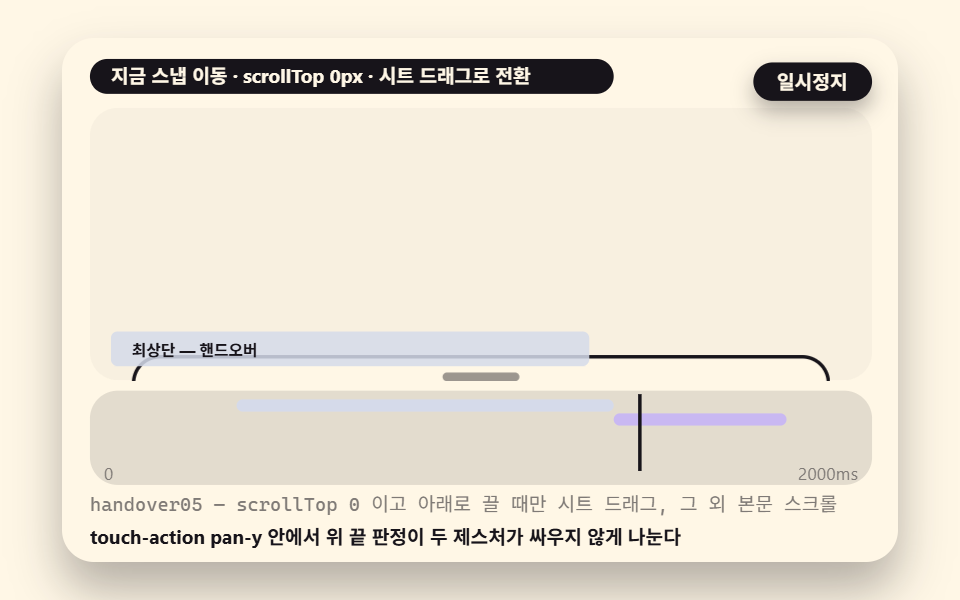 05 bs-inner-scroll-boundary
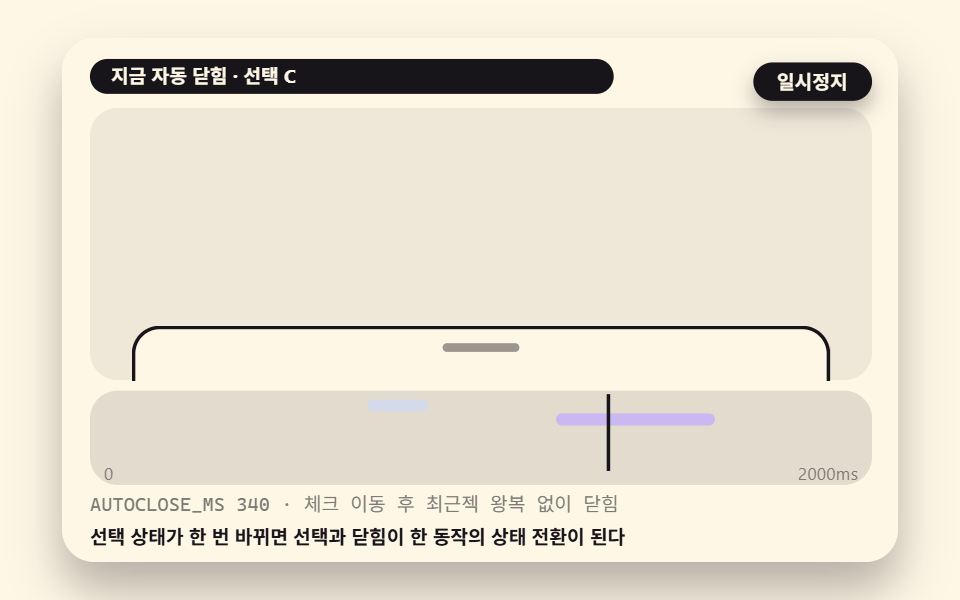 06 bs-options-select-close
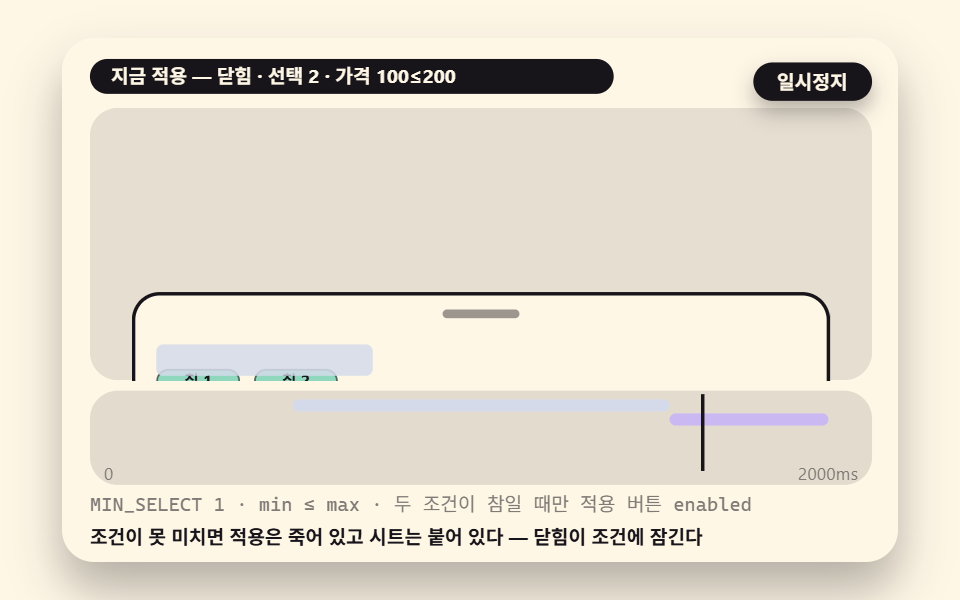 07 bs-filter-apply-gate
 08 bs-swipe-delete-gesture-priority
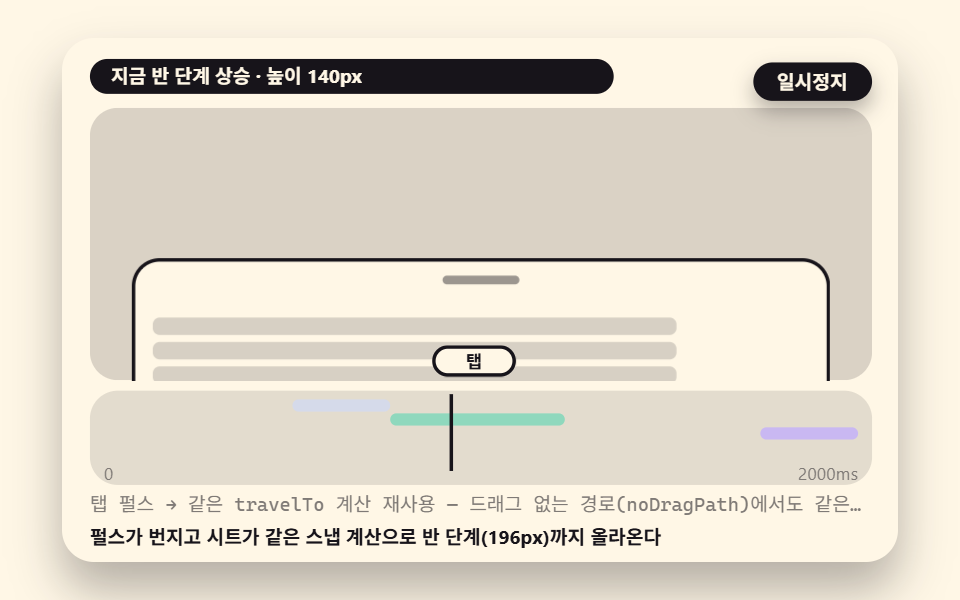 09 bs-tab-pulse-open
- 01 A Three-Step Snap That Stops at the Nearest Step from Where the Finger Let Go
- 02 A Fling Verdict That Carries a Hard Throw to the Next Step
- 03 A Drag Zone Verdict Where Only the Header and Handle Grab
- 04 A Backdrop That Dims by the Step Ratio
- 05 An Inner Scroll Boundary That Hands Over Only at the Top Edge
- 06 An Options Sheet Where the Check Moves and It Closes on Pick
- 07 A Filter Sheet Whose Apply Button Lives Only When Conditions Are Met
- 08 A Delete List Inside That Splits Horizontal and Vertical Gesture Priority
- 09 An Out-of-Touch Path That Opens With a Single Tab Pulse
The order of the nine follows the verdicts a sheet meets during a single drag. First comes the nearest snap for the released height, then the fling velocity threshold, the drag-zone test that decides who owns the gesture, the backdrop dim interpolation, the inner scroll boundary, close-on-pick for an options sheet, the filter gate that holds a sheet open, the axis lock that splits horizontal delete from vertical drag, and finally the tab pulse that opens a sheet with no drag at all. The first five are the engine; the last four are the screens those verdicts land on.
One disclosure belongs before any number in this article. Each scene plays back as an injected demo: a deterministic coordinate sequence feeds the same verdict functions a real pointer would hit, so the logic is identical to hand operation while the motion you watch is scripted. The measurement table, the gif, and the poster below are all results of that injected playback, and nowhere in this article are they presented as hand-driven field measurements.
Nine scenes of a bottom sheet — a three-step snap, a fling verdict, a handle-only drag zone, a backdrop interpolation, an inner scroll boundary, an options sheet, a filter sheet, a swipe-to-delete list and a tab pulse opener
How the table was produced, before you read it. The renderer drew each scene inside a 480×300 capture box for two seconds at 24 frames and measured the 23 deltas between neighboring frames; the run is timestamped 2026-11-17 04:28. Cumulative area is the share of pixels that differ from the first frame at least once, intensity is the mean color distance of those pixels on a 0–255 scale, and moved frames counts the frames that changed at all.
| Scene | What it shows | Area | Intensity | Moved frames |
|---|---|---|---|---|
| 01 | three-step nearest snap | 30.4% | 76.4 | 23/23 |
| 02 | fling velocity verdict | 30.6% | 76.6 | 23/23 |
| 03 | handle drag zone | 31.7% | 81.8 | 23/23 |
| 04 | backdrop interpolation | 36.1% | 65.6 | 23/23 |
| 05 | inner scroll boundary | 37.7% | 95.3 | 23/23 |
| 06 | options close-on-pick | 37.4% | 121.5 | 23/23 |
| 07 | filter gate | 33.5% | 123.6 | 23/23 |
| 08 | axis-locked delete list | 4.6% | 117.6 | 23/23 |
| 09 | tab pulse opener | 37.4% | 87.1 | 23/23 |
Eight of the nine clear a 30 percent cumulative area, and the reason is structural: a snap never moves the sheet alone, because the backdrop dims in proportion to the step ratio at the same instant. Scene 08 sitting at 4.6 percent is expected rather than a defect. A single row sliding 120 pixels sideways is the whole show there, a component-scale scene judged on its precision layer — the 8px axis lock that decides the gesture in the first few pixels of travel — instead of on screen area. These are screen-change figures measured inside the capture box, and they say nothing about the performance of the page you are reading.
Where does the sheet go when the finger lets go — measuring the distance to each snap point to judge the nearest step
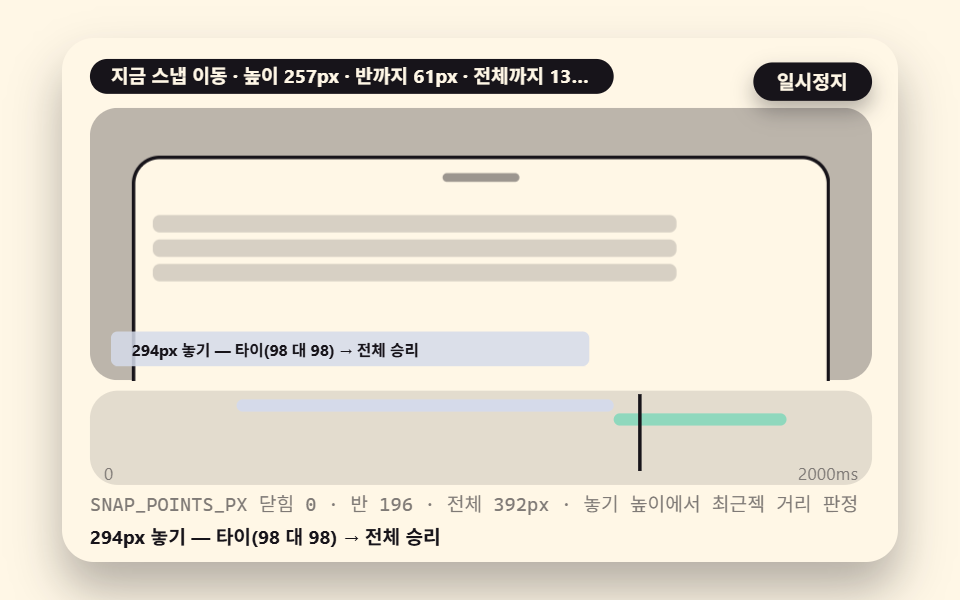
The first decision in any bottom sheet html css build is how many snap points to keep. This demo keeps three: closed at 0px, half at 196px and full at 392px, all in a virtual viewport height that the stage draws at half scale. The verdict itself is one expression — for the released height h, measure the absolute distance |h − p| to every point and move to the smallest. Release at 120px and the gap to half is 76px against 272px to full, so the sheet drops to half without ambiguity.
Ties are where an unwritten rule turns into a bug. Release at 294px — the exact midpoint between half and full — and the two distances both come out to 98px. The winner is decided by nothing but the comparison operator and the order of the array. The code below compares with <, so the point examined earlier keeps the tie and the later equal candidate never replaces it. Write <= instead and the later point wins every tie, which flips the destination of that same 294px release. Either rule is defensible; what breaks sheets in the wild is leaving the rule implicit, because then the same gesture lands on a different step depending on which code path happened to run.
    function nearestSnap(h, pts) {
        let best = pts[0];
        let bestD = Infinity;
        for (let i = 0; i < pts.length; i += 1) {
            const distance = Math.abs(h - pts[i]); // distance to each snap point
            if (distance < bestD) {
                bestD = distance;
                best = pts[i];
            } // no equality sign = on a tie, the point examined first keeps the win
        }
        return best;
    }
01A Three-Step Snap That Stops at the Nearest Step from Where the Finger Let Go
Two presets alternate releases at 294px and 120px; the destination is fixed once at release and travel's ease-out cubic covers the remaining 460ms.
Demo and Explanation
<main class="stage">
<div class="ez is-demo" id="ez">
  <div class="ez__in" data-role="inner">
    <div class="ez__pad" data-role="pad" tabindex="0" role="application" aria-label="Demo stage: Space or Enter pauses, R restarts, left and right arrows pick another value">
      <div class="ez__scene" data-role="scene" role="img" aria-label="Distances to the three snap points are measured for the nearest verdict, and at 294px an equal 98px tie is won by the full step"></div>
      <div class="ez__probe" data-role="probe" aria-hidden="true"></div>
      <div class="ez__chart" data-role="chart" aria-hidden="true"></div>
      <p class="ez__status" data-role="status" aria-live="off">Scene ready</p>
      <p class="ez__reada" data-role="reada" aria-hidden="true"></p>
      <p class="ez__readb" data-role="readb" aria-hidden="true"></p>
      <div class="ez__ctrl">
        <button class="ez__pause" data-role="pause" type="button" aria-pressed="false">Pause</button>
… (총 18줄 — 아래 「전체 코드」에서 원문 전체)
// 527 공통 — 바텀 시트 (526 base.scss 계승, 당김 요소를 시트·백드랍·옵션 요소로)
@use "../../../../site/static/demo-tokens" as *;
@include stage($subject-cream);
$panel: mix($subject-cream, $subject-ink, 88%);
$dim: mix($subject-cream, $subject-ink, 45%);
// 파스텔 액센트 — vivid 토큰 대신 (BD26)
$stroke-blue: #d5daea;
$stroke-rose: #ebd6db;
$stroke-mint: #8fd8bd;
$stroke-lilac: #c9b8f2;
… (총 424줄 — 아래 「전체 코드」에서 원문 전체)html, body {
margin: 0;
overflow: hidden;
}
.stage {
box-sizing: border-box;
min-height: 100vh;
display: grid;
place-items: center;
margin: 0;
background: #fff7e6;
… (총 483줄 — 아래 「전체 코드」에서 원문 전체)(function () {
const rootEl = document.getElementById("ez");
if (!rootEl) return;
main(rootEl);
function cx(s) { return s; }
function main(root) {
// ── 527 바텀 시트 공통 — 무대 좌표·문구 틀·요소 조립·스냅/던짐/보간 엔진 (526 core.ts 계승)
const W = 480;
const CX0 = 8;
const CW = 432;
function clamp(v, lo, hi) { return v < lo ? lo : (v > hi ? hi : v); }
function lerp(a, b, k) { return a + (b - a) * k; }
… (총 435줄 — 아래 「전체 코드」에서 원문 전체)// BsSnapNearestDistance - 같은 항목 vanilla index.html 의 React 판. 같은 계산을 useEffect 안에서 돌린다
import { useEffect, useRef } from "react";
import styles from "./BsSnapNearestDistance.module.scss";
const cx = (s: string): string => s.split(" ").map((n) => styles[n] ?? n).join(" ");
function main(root: HTMLElement): () => void {
// ── 527 바텀 시트 공통 — 무대 좌표·문구 틀·요소 조립·스냅/던짐/보간 엔진 (526 core.ts 계승)
const W = 480;
const CX0 = 8;
const CW = 432;
function clamp(v: number, lo: number, hi: number): number { return v < lo ? lo : (v > hi ? hi : v); }
… (총 412줄 — 아래 「전체 코드」에서 원문 전체)01 · A Three-Step Snap That Stops at the Nearest Step from Where the Finger Let Go — Measured area 30.438% · moving frames 23/23Original by GODRICH · SCSS and React ship in the zip · See the password
Where to Look in the Code
The verdict runs exactly once, on the release frame — nearestSnap(rh, SNAP_POINTS_PX) is called a single time, never per frame, which is why the tie rule cannot wobble mid-travel.
        else {
            // release: snap travel (travel) by the nearest-distance verdict. The verdict runs once, at release
            h = travel(t, rh, nearestSnap(rh, SNAP_POINTS_PX), RELEASE1_AT, SNAP_MS);
            ph = t < RELEASE1_AT + SNAP_MS ? 'Snap travel' : 'Arrived';
        }
        putSheet(sh01, h);
        setDim(bd01, h, 1.0, 0.44);
        dA01 = Math.abs(h - 196);
        dB01 = Math.abs(h - 392);
The velocity threshold that carries a hard fling to the next step — px/ms math over a short window of the last four points
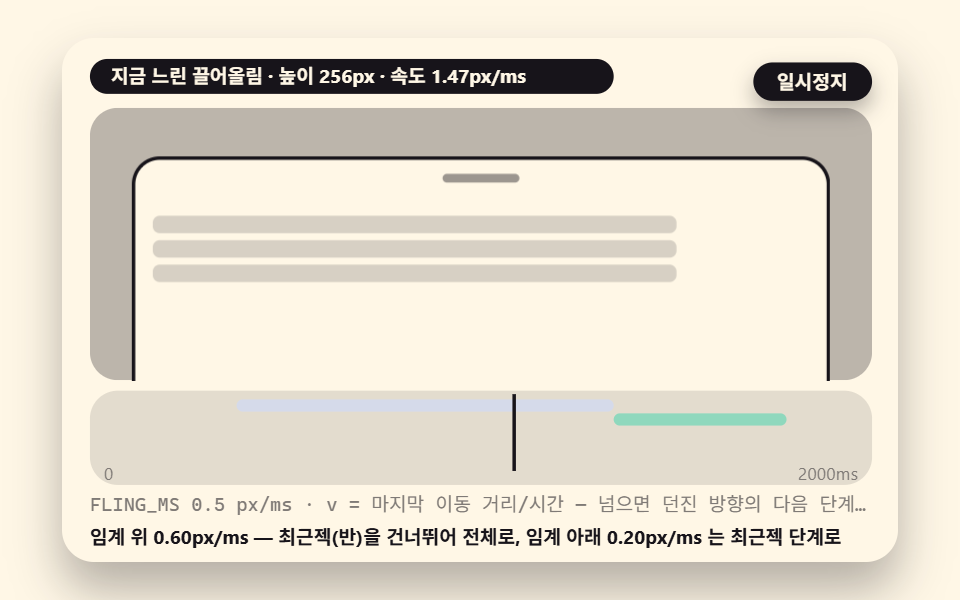
Distance alone leaves a real frustration. Flick upward just above the half step, and a nearest-only sheet falls back as if you never threw it — the gesture said "more" and the math answered "nearest". Scene 02 resolves that by measuring the release velocity v in px/ms and, when it passes the FLING_MS threshold of 0.5, overriding the nearest rule entirely: the sheet is carried to the next step in the thrown direction. An upward throw lands on the step above even when the nearest step is below, and a downward throw does the mirror. Direction takes priority over proximity, and that priority is the whole personality of a sheet that feels right under a thumb.
How the velocity is measured is half the work, and it is where most hand-rolled sheets fail. Take the difference between the last coordinate and the one just before it, and a single frame of render jitter can push a slow drag past the threshold or drag a hard fling under it. The real-input path in this demo spans the last four points of the pointer history: (b.y − a.y) times 2, divided by the time gap, is vMs. The ×2 converts screen pixels back into the sheet's virtual height, since the stage draws the sheet at half scale. The fence below is that entire window calculation followed by the destination verdict.
        const a = hist02[hist02.length - 1];
        const b = hist02[Math.max(0, hist02.length - 4)];
        const dt = Math.max(1, a.t - b.t);
        const vMs = ((b.y - a.y) * 2) / dt; // pulling up reads positive (px/ms)
        const threshold = FLING_MS; // threshold: the velocity threshold (px/ms)
        let h = 196;
        for (let k = 0; k < hist02.length; k += 1) {
            h = clamp(196 + (hist02[0].y - hist02[k].y) * 2, 0, 392);
        }
        const dest = flingSnap(h, vMs, SNAP_POINTS_PX, FLING_MS);
02A Fling Verdict That Carries a Hard Throw to the Next Step
Two hand motions release from the same height: preset 0 accelerates through the last stretch, preset 1 is an eased rise whose speed dies at the end.
Demo and Explanation
<main class="stage">
<div class="ez is-demo" id="ez">
  <div class="ez__in" data-role="inner">
    <div class="ez__pad" data-role="pad" tabindex="0" role="application" aria-label="Demo stage: Space or Enter pauses, R restarts, left and right arrows pick another value">
      <div class="ez__scene" data-role="scene" role="img" aria-label="When the release speed crosses the threshold, the sheet skips the nearest point and is carried to the next step in the thrown direction"></div>
      <div class="ez__probe" data-role="probe" aria-hidden="true"></div>
      <div class="ez__chart" data-role="chart" aria-hidden="true"></div>
      <p class="ez__status" data-role="status" aria-live="off">Scene ready</p>
      <p class="ez__reada" data-role="reada" aria-hidden="true"></p>
      <p class="ez__readb" data-role="readb" aria-hidden="true"></p>
      <div class="ez__ctrl">
        <button class="ez__pause" data-role="pause" type="button" aria-pressed="false">Pause</button>
… (총 18줄 — 아래 「전체 코드」에서 원문 전체)
// 527 공통 — 바텀 시트 (526 base.scss 계승, 당김 요소를 시트·백드랍·옵션 요소로)
@use "../../../../site/static/demo-tokens" as *;
@include stage($subject-cream);
$panel: mix($subject-cream, $subject-ink, 88%);
$dim: mix($subject-cream, $subject-ink, 45%);
// 파스텔 액센트 — vivid 토큰 대신 (BD26)
$stroke-blue: #d5daea;
$stroke-rose: #ebd6db;
$stroke-mint: #8fd8bd;
$stroke-lilac: #c9b8f2;
… (총 424줄 — 아래 「전체 코드」에서 원문 전체)html, body {
margin: 0;
overflow: hidden;
}
.stage {
box-sizing: border-box;
min-height: 100vh;
display: grid;
place-items: center;
margin: 0;
background: #fff7e6;
… (총 483줄 — 아래 「전체 코드」에서 원문 전체)(function () {
const rootEl = document.getElementById("ez");
if (!rootEl) return;
main(rootEl);
function cx(s) { return s; }
function main(root) {
// ── 527 바텀 시트 공통 — 무대 좌표·문구 틀·요소 조립·스냅/던짐/보간 엔진 (526 core.ts 계승)
const W = 480;
const CX0 = 8;
const CW = 432;
function clamp(v, lo, hi) { return v < lo ? lo : (v > hi ? hi : v); }
function lerp(a, b, k) { return a + (b - a) * k; }
… (총 438줄 — 아래 「전체 코드」에서 원문 전체)// BsFlingVelocityThreshold - 같은 항목 vanilla index.html 의 React 판. 같은 계산을 useEffect 안에서 돌린다
import { useEffect, useRef } from "react";
import styles from "./BsFlingVelocityThreshold.module.scss";
const cx = (s: string): string => s.split(" ").map((n) => styles[n] ?? n).join(" ");
function main(root: HTMLElement): () => void {
// ── 527 바텀 시트 공통 — 무대 좌표·문구 틀·요소 조립·스냅/던짐/보간 엔진 (526 core.ts 계승)
const W = 480;
const CX0 = 8;
const CW = 432;
function clamp(v: number, lo: number, hi: number): number { return v < lo ? lo : (v > hi ? hi : v); }
… (총 409줄 — 아래 「전체 코드」에서 원문 전체)02 · A Fling Verdict That Carries a Hard Throw to the Next Step — Measured area 30.645% · moving frames 23/23Original by GODRICH · SCSS and React ship in the zip · See the password
Where to Look in the Code
The injected path measures release velocity as a 40ms window difference, and preset 0's release speed of 0.24px/ms falls short of the 0.5 threshold — both presets therefore drop to the nearest step, and the fork where a faster throw skips half and lands on full is flingSnap's direction branch (the 0.60 and 0.20px/ms labels shown in the scene are illustrative values).
    function flingSnap(h, vMs, pts, thr) {
        if (Math.abs(vMs) >= thr) {
            const up = vMs > 0;
            const hi = pts.filter(function (p) { return p > h; });
            const lo = pts.filter(function (p) { return p < h; });
            if (up && hi.length) {
                return hi[0];
            }
            if (!up && lo.length) {
                return lo[lo.length - 1];
            }
        }
        return nearestSnap(h, pts);
    }
Why the sheet tracks the finger exactly while dragging — a follow ratio of 1.0 and a zone that decides who owns the gesture
The sheet sticks to the fingertip because the follow ratio is exactly 1. On every pointermove the height is recomputed as the start height plus (baseY − current y) × 2 × DRAG_FOLLOW, where the ×2 maps finger travel back to the virtual height and DRAG_FOLLOW 1.0 applies the movement as-is, undamped. Lower the constant to 0.55 and only 55 percent of each movement is applied: the sheet trails the finger by half a beat and suddenly reads as a weighted panel rather than paper (the variant table near the end returns to this).
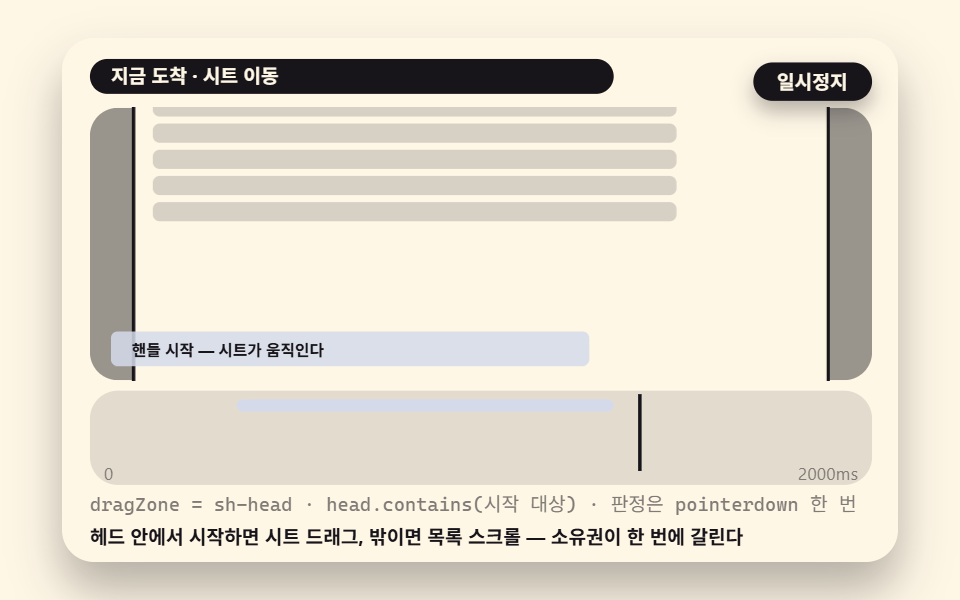
But a sheet whose entire surface accepts the drag is a sheet whose list is broken. The moment a finger can start a drag on the body text, the list can never scroll, because every touch is claimed by the sheet. So a second verdict decides where grabbing is allowed. When pointerdown arrives, a single containment test asks whether the start target sits inside the header — the .sh-head element that wraps the handle and the title. Inside, ownership goes to the sheet drag; outside, the gesture is left to the body scroll. The verdict happens once at the start and is never re-flipped mid-drag, which is what keeps a drag that began on the handle from suddenly scrolling the list when the finger drifts over the body.
03A Drag Zone Verdict Where Only the Header and Handle Grab
The same motion starts from two spots — on the handle the sheet climbs between half and full, on the body the sheet stays put and the list scrolls 46px.
Demo and Explanation
<main class="stage">
<div class="ez is-demo" id="ez">
  <div class="ez__in" data-role="inner">
    <div class="ez__pad" data-role="pad" tabindex="0" role="application" aria-label="Demo stage: Space or Enter pauses, R restarts, left and right arrows pick another value">
      <div class="ez__scene" data-role="scene" role="img" aria-label="Only a finger starting on the handle or header drags the sheet; one starting over the body stays with the list scroll"></div>
      <div class="ez__probe" data-role="probe" aria-hidden="true"></div>
      <div class="ez__chart" data-role="chart" aria-hidden="true"></div>
      <p class="ez__status" data-role="status" aria-live="off">Scene ready</p>
      <p class="ez__reada" data-role="reada" aria-hidden="true"></p>
      <p class="ez__readb" data-role="readb" aria-hidden="true"></p>
      <div class="ez__ctrl">
        <button class="ez__pause" data-role="pause" type="button" aria-pressed="false">Pause</button>
… (총 18줄 — 아래 「전체 코드」에서 원문 전체)
// 527 공통 — 바텀 시트 (526 base.scss 계승, 당김 요소를 시트·백드랍·옵션 요소로)
@use "../../../../site/static/demo-tokens" as *;
@include stage($subject-cream);
$panel: mix($subject-cream, $subject-ink, 88%);
$dim: mix($subject-cream, $subject-ink, 45%);
// 파스텔 액센트 — vivid 토큰 대신 (BD26)
$stroke-blue: #d5daea;
$stroke-rose: #ebd6db;
$stroke-mint: #8fd8bd;
$stroke-lilac: #c9b8f2;
… (총 424줄 — 아래 「전체 코드」에서 원문 전체)html, body {
margin: 0;
overflow: hidden;
}
.stage {
box-sizing: border-box;
min-height: 100vh;
display: grid;
place-items: center;
margin: 0;
background: #fff7e6;
… (총 483줄 — 아래 「전체 코드」에서 원문 전체)(function () {
const rootEl = document.getElementById("ez");
if (!rootEl) return;
main(rootEl);
function cx(s) { return s; }
function main(root) {
// ── 527 바텀 시트 공통 — 무대 좌표·문구 틀·요소 조립·스냅/던짐/보간 엔진 (526 core.ts 계승)
const W = 480;
const CX0 = 8;
const CW = 432;
function clamp(v, lo, hi) { return v < lo ? lo : (v > hi ? hi : v); }
function lerp(a, b, k) { return a + (b - a) * k; }
… (총 420줄 — 아래 「전체 코드」에서 원문 전체)// BsHandleDragZone - 같은 항목 vanilla index.html 의 React 판. 같은 계산을 useEffect 안에서 돌린다
import { useEffect, useRef } from "react";
import styles from "./BsHandleDragZone.module.scss";
const cx = (s: string): string => s.split(" ").map((n) => styles[n] ?? n).join(" ");
function main(root: HTMLElement): () => void {
// ── 527 바텀 시트 공통 — 무대 좌표·문구 틀·요소 조립·스냅/던짐/보간 엔진 (526 core.ts 계승)
const W = 480;
const CX0 = 8;
const CW = 432;
function clamp(v: number, lo: number, hi: number): number { return v < lo ? lo : (v > hi ? hi : v); }
… (총 397줄 — 아래 「전체 코드」에서 원문 전체)03 · A Drag Zone Verdict Where Only the Header and Handle Grab — Measured area 31.67% · moving frames 23/23Original by GODRICH · SCSS and React ship in the zip · See the password
Where to Look in the Code
head.contains(ev.target) is the entire ownership verdict: one DOM containment call, no geometry, no thresholds.
        const inHead = sh03.head.contains(ev.target);
        owner03 = inHead ? 'sheet' : 'body';
        if (inHead) {
            down03 = true;
            baseY03 = stagePoint(ev).y;
            ev.preventDefault();
        }
    });
    sceneEl.addEventListener('pointermove', function (ev) {
        if (down03 && sh03) {
            const h = clamp(196 + (baseY03 - stagePoint(ev).y) * 2, 0, 392);
            putSheet(sh03, h);
Why does the background dim change per step — a backdrop interpolation that bends the step ratio with an exponent
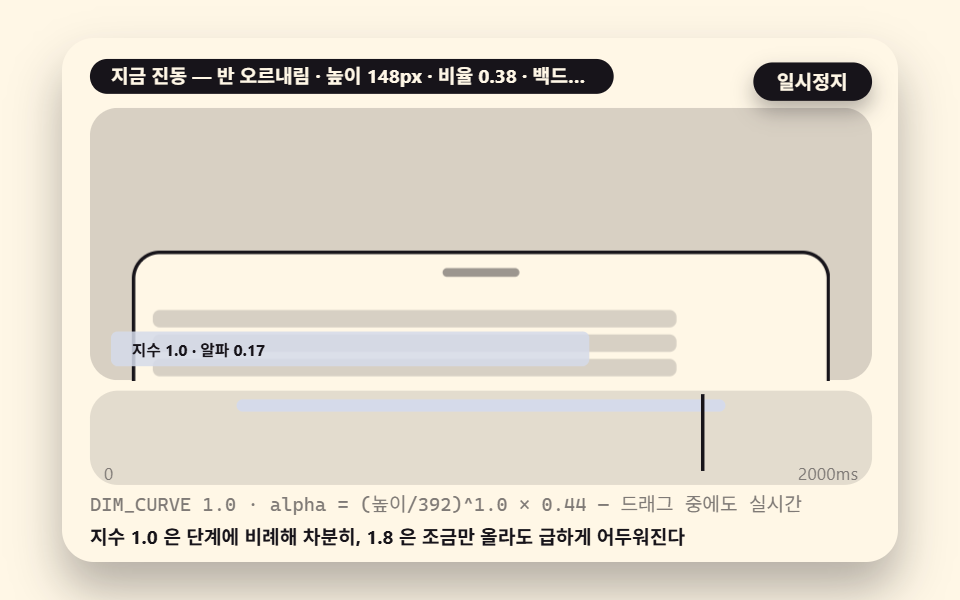
The backdrop of a well-built sheet does not fade in on a timer. Its alpha is computed live from the sheet position, every frame, as alpha = (h ÷ 392)^DIM_CURVE × 0.44. The current height divided by the maximum gives a ratio from 0 to 1; the DIM_CURVE exponent bends that ratio; the result multiplies the 0.44 ceiling. An exponent of 1.0 is the neutral case — dimness rises in calm proportion to height. Raise it to 1.8 and the ratio is suppressed in the low range, so the backdrop stays light while the sheet barely peeks and then darkens sharply through the middle of the climb. Evaluate it at h=148: the ratio is 0.378, alpha comes to 0.166 at exponent 1.0 and 0.077 at 1.8 — nearly a twofold difference in dimness at the very same height, purely from one exponent.
That the interpolation is continuous rather than step-tinted is half the design. A backdrop that only changes alpha at snap points jumps in stairs while the finger drags, and each stair reads as a glitch. Here setDim recomputes the ratio on every frame, so the dim glides without steps from 0.00 at closed to 0.44 at full while the sheet is still in motion under the finger.
04A Backdrop That Dims by the Step Ratio
The sheet oscillates between 46 and 346px around the half step, and the two presets repaint the same motion at exponent 1.0 and 1.8.
Demo and Explanation
<main class="stage">
<div class="ez is-demo" id="ez">
  <div class="ez__in" data-role="inner">
    <div class="ez__pad" data-role="pad" tabindex="0" role="application" aria-label="Demo stage: Space or Enter pauses, R restarts, left and right arrows pick another value">
      <div class="ez__scene" data-role="scene" role="img" aria-label="The sheet's height ratio, bent by an exponent, flows live into the backdrop alpha and dims without steps"></div>
      <div class="ez__probe" data-role="probe" aria-hidden="true"></div>
      <div class="ez__chart" data-role="chart" aria-hidden="true"></div>
      <p class="ez__status" data-role="status" aria-live="off">Scene ready</p>
      <p class="ez__reada" data-role="reada" aria-hidden="true"></p>
      <p class="ez__readb" data-role="readb" aria-hidden="true"></p>
      <div class="ez__ctrl">
        <button class="ez__pause" data-role="pause" type="button" aria-pressed="false">Pause</button>
… (총 18줄 — 아래 「전체 코드」에서 원문 전체)
// 527 공통 — 바텀 시트 (526 base.scss 계승, 당김 요소를 시트·백드랍·옵션 요소로)
@use "../../../../site/static/demo-tokens" as *;
@include stage($subject-cream);
$panel: mix($subject-cream, $subject-ink, 88%);
$dim: mix($subject-cream, $subject-ink, 45%);
// 파스텔 액센트 — vivid 토큰 대신 (BD26)
$stroke-blue: #d5daea;
$stroke-rose: #ebd6db;
$stroke-mint: #8fd8bd;
$stroke-lilac: #c9b8f2;
… (총 424줄 — 아래 「전체 코드」에서 원문 전체)html, body {
margin: 0;
overflow: hidden;
}
.stage {
box-sizing: border-box;
min-height: 100vh;
display: grid;
place-items: center;
margin: 0;
background: #fff7e6;
… (총 483줄 — 아래 「전체 코드」에서 원문 전체)(function () {
const rootEl = document.getElementById("ez");
if (!rootEl) return;
main(rootEl);
function cx(s) { return s; }
function main(root) {
// ── 527 바텀 시트 공통 — 무대 좌표·문구 틀·요소 조립·스냅/던짐/보간 엔진 (526 core.ts 계승)
const W = 480;
const CX0 = 8;
const CW = 432;
function clamp(v, lo, hi) { return v < lo ? lo : (v > hi ? hi : v); }
function lerp(a, b, k) { return a + (b - a) * k; }
… (총 385줄 — 아래 「전체 코드」에서 원문 전체)// BsBackdropDimInterp - 같은 항목 vanilla index.html 의 React 판. 같은 계산을 useEffect 안에서 돌린다
import { useEffect, useRef } from "react";
import styles from "./BsBackdropDimInterp.module.scss";
const cx = (s: string): string => s.split(" ").map((n) => styles[n] ?? n).join(" ");
function main(root: HTMLElement): () => void {
// ── 527 바텀 시트 공통 — 무대 좌표·문구 틀·요소 조립·스냅/던짐/보간 엔진 (526 core.ts 계승)
const W = 480;
const CX0 = 8;
const CW = 432;
function clamp(v: number, lo: number, hi: number): number { return v < lo ? lo : (v > hi ? hi : v); }
… (총 372줄 — 아래 「전체 코드」에서 원문 전체)04 · A Backdrop That Dims by the Step Ratio — Measured area 36.067% · moving frames 23/23Original by GODRICH · SCSS and React ship in the zip · See the password
Where to Look in the Code
How the character of the dim changes under identical motion is the whole scene.
    function setDim(bd, h, curve, maxA) {
        if (!bd) {
            return;
        }
        const ratio = clamp(h / 392, 0, 1);
        const interp = Math.pow(ratio, curve); // interpolated value: ratio^DIM_CURVE
        const alpha = interp * maxA;
        bd.style.opacity = f2(alpha);
    }
Why does an inner scroll fight the drag — a top-edge handover verdict and the touch-action trap
Put a scrolling list inside a sheet and two gestures compete for the same finger: the list wants to scroll, the sheet wants to drag, and a naive handler lets them fight for the whole touch. Scene 05's boundary verdict settles it once, on the first direction. When the finger first moves more than 4px, the handler checks one condition: pulling up keeps the gesture with the body scroll, while pulling down hands it to the sheet drag only if the body is sitting at the scroll top — scrollTop === 0. Any other case stays with the scroll. Once the mode is set it does not change until the finger lifts, which is what prevents the classic failure where a list, having reached its end mid-gesture, suddenly yanks the sheet down with the same finger.
05An Inner Scroll Boundary That Hands Over Only at the Top Edge
<main class="stage">
<div class="ez is-demo" id="ez">
  <div class="ez__in" data-role="inner">
    <div class="ez__pad" data-role="pad" tabindex="0" role="application" aria-label="Demo stage: Space or Enter pauses, R restarts, left and right arrows pick another value">
      <div class="ez__scene" data-role="scene" role="img" aria-label="Only a downward pull with the body at the scroll top hands over to the sheet drag; everything else stays with the list scroll"></div>
      <div class="ez__probe" data-role="probe" aria-hidden="true"></div>
      <div class="ez__chart" data-role="chart" aria-hidden="true"></div>
      <p class="ez__status" data-role="status" aria-live="off">Scene ready</p>
      <p class="ez__reada" data-role="reada" aria-hidden="true"></p>
      <p class="ez__readb" data-role="readb" aria-hidden="true"></p>
      <div class="ez__ctrl">
        <button class="ez__pause" data-role="pause" type="button" aria-pressed="false">Pause</button>
… (총 18줄 — 아래 「전체 코드」에서 원문 전체)
// 527 공통 — 바텀 시트 (526 base.scss 계승, 당김 요소를 시트·백드랍·옵션 요소로)
@use "../../../../site/static/demo-tokens" as *;
@include stage($subject-cream);
$panel: mix($subject-cream, $subject-ink, 88%);
$dim: mix($subject-cream, $subject-ink, 45%);
// 파스텔 액센트 — vivid 토큰 대신 (BD26)
$stroke-blue: #d5daea;
$stroke-rose: #ebd6db;
$stroke-mint: #8fd8bd;
$stroke-lilac: #c9b8f2;
… (총 424줄 — 아래 「전체 코드」에서 원문 전체)html, body {
margin: 0;
overflow: hidden;
}
.stage {
box-sizing: border-box;
min-height: 100vh;
display: grid;
place-items: center;
margin: 0;
background: #fff7e6;
… (총 483줄 — 아래 「전체 코드」에서 원문 전체)(function () {
const rootEl = document.getElementById("ez");
if (!rootEl) return;
main(rootEl);
function cx(s) { return s; }
function main(root) {
// ── 527 바텀 시트 공통 — 무대 좌표·문구 틀·요소 조립·스냅/던짐/보간 엔진 (526 core.ts 계승)
const W = 480;
const CX0 = 8;
const CW = 432;
function clamp(v, lo, hi) { return v < lo ? lo : (v > hi ? hi : v); }
function lerp(a, b, k) { return a + (b - a) * k; }
… (총 438줄 — 아래 「전체 코드」에서 원문 전체)// BsInnerScrollBoundary - 같은 항목 vanilla index.html 의 React 판. 같은 계산을 useEffect 안에서 돌린다
import { useEffect, useRef } from "react";
import styles from "./BsInnerScrollBoundary.module.scss";
const cx = (s: string): string => s.split(" ").map((n) => styles[n] ?? n).join(" ");
function main(root: HTMLElement): () => void {
// ── 527 바텀 시트 공통 — 무대 좌표·문구 틀·요소 조립·스냅/던짐/보간 엔진 (526 core.ts 계승)
const W = 480;
const CX0 = 8;
const CW = 432;
function clamp(v: number, lo: number, hi: number): number { return v < lo ? lo : (v > hi ? hi : v); }
… (총 400줄 — 아래 「전체 코드」에서 원문 전체)05 · An Inner Scroll Boundary That Hands Over Only at the Top Edge — Measured area 37.705% · moving frames 23/23Original by GODRICH · SCSS and React ship in the zip · See the password
Where to Look in the Code
        if (mode05 === null) {
            // first-direction verdict: not at the scroll top means always body; only scroll top plus a downward pull becomes the sheet
            if (dy < -4) {
                mode05 = (sc05.scrollTop === 0) ? 'sheet' : 'body';
            }
            else if (dy > 4) {
                mode05 = 'body';
            }
        }
        if (mode05 === 'sheet') {
            const h = clamp(196 + dy * 2, 0, 392);
            putSheet(sh05, h);
            setDim(bd05, h, 1.0, 0.44);
        }
For this verdict to survive contact with a real browser, the CSS side has to agree with it. The sheet body keeps touch-action: pan-y, so the browser still owns the vertical pan and JavaScript only claims the drag verdict; the header is none, so inside the header the scroll is severed and the drag always wins — the pair that makes scene 03's containment verdict meaningful. The two presets sit on either side of the boundary: with the list at its top, a downward pull drags the sheet down toward closed; from mid-list, the same hand motion ends as 60px of ordinary list scroll.
An options sheet that closes on pick, and a filter sheet whose close is gated
The options sheet runs on a contract: picked means closed. Choosing an item moves the check off the old choice and onto the new one, dwells 340ms — AUTOCLOSE_MS — and then lowers the sheet straight to the closed step over 420ms of travel. The trap springs the moment you reuse the snap engine without thinking: hand the destination to nearestSnap and the sheet travels to whichever step is near, half usually, instead of closing. The pick is made, the sheet is still open, and the contract reads as broken — two actions where the user performed one. So the verdict is skipped on purpose; the state flips to close and the sheet heads down without consulting any snap point.
06An Options Sheet Where the Check Moves and It Closes on Pick
Check move, dwell and close chain into one state transition — 160ms, 340ms and 420ms compressed into a single cycle.
Demo and Explanation
<main class="stage">
<div class="ez is-demo" id="ez">
  <div class="ez__in" data-role="inner">
    <div class="ez__pad" data-role="pad" tabindex="0" role="application" aria-label="Demo stage: Space or Enter pauses, R restarts, left and right arrows pick another value">
      <div class="ez__scene" data-role="scene" role="img" aria-label="Picking an item moves the check to the new seat and the sheet drops straight to the closed step with no nearest round trip"></div>
      <div class="ez__probe" data-role="probe" aria-hidden="true"></div>
      <div class="ez__chart" data-role="chart" aria-hidden="true"></div>
      <p class="ez__status" data-role="status" aria-live="off">Scene ready</p>
      <p class="ez__reada" data-role="reada" aria-hidden="true"></p>
      <p class="ez__readb" data-role="readb" aria-hidden="true"></p>
      <div class="ez__ctrl">
        <button class="ez__pause" data-role="pause" type="button" aria-pressed="false">Pause</button>
… (총 18줄 — 아래 「전체 코드」에서 원문 전체)
// 527 공통 — 바텀 시트 (526 base.scss 계승, 당김 요소를 시트·백드랍·옵션 요소로)
@use "../../../../site/static/demo-tokens" as *;
@include stage($subject-cream);
$panel: mix($subject-cream, $subject-ink, 88%);
$dim: mix($subject-cream, $subject-ink, 45%);
// 파스텔 액센트 — vivid 토큰 대신 (BD26)
$stroke-blue: #d5daea;
$stroke-rose: #ebd6db;
$stroke-mint: #8fd8bd;
$stroke-lilac: #c9b8f2;
… (총 424줄 — 아래 「전체 코드」에서 원문 전체)html, body {
margin: 0;
overflow: hidden;
}
.stage {
box-sizing: border-box;
min-height: 100vh;
display: grid;
place-items: center;
margin: 0;
background: #fff7e6;
… (총 483줄 — 아래 「전체 코드」에서 원문 전체)(function () {
const rootEl = document.getElementById("ez");
if (!rootEl) return;
main(rootEl);
function cx(s) { return s; }
function main(root) {
// ── 527 바텀 시트 공통 — 무대 좌표·문구 틀·요소 조립·스냅/던짐/보간 엔진 (526 core.ts 계승)
const W = 480;
const CX0 = 8;
const CW = 432;
function clamp(v, lo, hi) { return v < lo ? lo : (v > hi ? hi : v); }
function lerp(a, b, k) { return a + (b - a) * k; }
… (총 424줄 — 아래 「전체 코드」에서 원문 전체)// BsOptionsSelectClose - 같은 항목 vanilla index.html 의 React 판. 같은 계산을 useEffect 안에서 돌린다
import { useEffect, useRef } from "react";
import styles from "./BsOptionsSelectClose.module.scss";
const cx = (s: string): string => s.split(" ").map((n) => styles[n] ?? n).join(" ");
function main(root: HTMLElement): () => void {
// ── 527 바텀 시트 공통 — 무대 좌표·문구 틀·요소 조립·스냅/던짐/보간 엔진 (526 core.ts 계승)
const W = 480;
const CX0 = 8;
const CW = 432;
function clamp(v: number, lo: number, hi: number): number { return v < lo ? lo : (v > hi ? hi : v); }
… (총 397줄 — 아래 「전체 코드」에서 원문 전체)06 · An Options Sheet Where the Check Moves and It Closes on Pick — Measured area 37.363% · moving frames 23/23Original by GODRICH · SCSS and React ship in the zip · See the password
Where to Look in the Code
        else if (t < pickAt + 160 + AUTOCLOSE_MS) {
            h = 196;
            ph = 'Auto-close';
            state06 = autoClose ? 'close' : 'pick';
        }
        else {
            h = travel(t, 196, 0, pickAt + 160 + AUTOCLOSE_MS, CLOSE_MS);
            ph = t < pickAt + 160 + AUTOCLOSE_MS + CLOSE_MS ? 'Auto-close' : 'Closing';
        }
        putSheet(sh06, h);
        setDim(bd06, h, 1.0, 0.44);
The filter sheet holds the opposite contract. Its minimum pick count — one — and its price order, min at or below max, are re-tested through applyGate on every single input; only while both hold does the apply button come alive, and until then closing is blocked and the sheet stays stuck open no matter how the user swipes at it.
07A Filter Sheet Whose Apply Button Lives Only When Conditions Are Met
The scene walks from violation, nothing picked and 900 above 200, to repair, a pick made and 100 below 200, and the button announces its state through aria-disabled.
Demo and Explanation
<main class="stage">
<div class="ez is-demo" id="ez">
  <div class="ez__in" data-role="inner">
    <div class="ez__pad" data-role="pad" tabindex="0" role="application" aria-label="Demo stage: Space or Enter pauses, R restarts, left and right arrows pick another value">
      <div class="ez__scene" data-role="scene" role="img" aria-label="The minimum pick and the price order are tested on every input, and only when both hold does the apply button come alive and the sheet close"></div>
      <div class="ez__probe" data-role="probe" aria-hidden="true"></div>
      <div class="ez__chart" data-role="chart" aria-hidden="true"></div>
      <p class="ez__status" data-role="status" aria-live="off">Scene ready</p>
      <p class="ez__reada" data-role="reada" aria-hidden="true"></p>
      <p class="ez__readb" data-role="readb" aria-hidden="true"></p>
      <div class="ez__ctrl">
        <button class="ez__pause" data-role="pause" type="button" aria-pressed="false">Pause</button>
… (총 18줄 — 아래 「전체 코드」에서 원문 전체)
// 527 공통 — 바텀 시트 (526 base.scss 계승, 당김 요소를 시트·백드랍·옵션 요소로)
@use "../../../../site/static/demo-tokens" as *;
@include stage($subject-cream);
$panel: mix($subject-cream, $subject-ink, 88%);
$dim: mix($subject-cream, $subject-ink, 45%);
// 파스텔 액센트 — vivid 토큰 대신 (BD26)
$stroke-blue: #d5daea;
$stroke-rose: #ebd6db;
$stroke-mint: #8fd8bd;
$stroke-lilac: #c9b8f2;
… (총 424줄 — 아래 「전체 코드」에서 원문 전체)html, body {
margin: 0;
overflow: hidden;
}
.stage {
box-sizing: border-box;
min-height: 100vh;
display: grid;
place-items: center;
margin: 0;
background: #fff7e6;
… (총 483줄 — 아래 「전체 코드」에서 원문 전체)(function () {
const rootEl = document.getElementById("ez");
if (!rootEl) return;
main(rootEl);
function cx(s) { return s; }
function main(root) {
// ── 527 바텀 시트 공통 — 무대 좌표·문구 틀·요소 조립·스냅/던짐/보간 엔진 (526 core.ts 계승)
const W = 480;
const CX0 = 8;
const CW = 432;
function clamp(v, lo, hi) { return v < lo ? lo : (v > hi ? hi : v); }
function lerp(a, b, k) { return a + (b - a) * k; }
… (총 446줄 — 아래 「전체 코드」에서 원문 전체)// BsFilterApplyGate - 같은 항목 vanilla index.html 의 React 판. 같은 계산을 useEffect 안에서 돌린다
import { useEffect, useRef } from "react";
import styles from "./BsFilterApplyGate.module.scss";
const cx = (s: string): string => s.split(" ").map((n) => styles[n] ?? n).join(" ");
function main(root: HTMLElement): () => void {
// ── 527 바텀 시트 공통 — 무대 좌표·문구 틀·요소 조립·스냅/던짐/보간 엔진 (526 core.ts 계승)
const W = 480;
const CX0 = 8;
const CW = 432;
function clamp(v: number, lo: number, hi: number): number { return v < lo ? lo : (v > hi ? hi : v); }
… (총 416줄 — 아래 「전체 코드」에서 원문 전체)07 · A Filter Sheet Whose Apply Button Lives Only When Conditions Are Met — Measured area 33.546% · moving frames 23/23Original by GODRICH · SCSS and React ship in the zip · See the password
Where to Look in the Code
    function applyGate07() {
        const chipOn = chips07.filter(function (c) { return c.getAttribute('aria-pressed') === 'true'; }).length;
        const ok = chipOn >= MIN_SELECT;
        if (btn07) {
            btn07.setAttribute('aria-disabled', ok ? 'false' : 'true');
            btn07.className = cx(ok ? 'applybtn is-enabled' : 'applybtn');
        }
        return ok;
    }
Where horizontal and vertical gestures split inside a sheet's list
For horizontal swipe-to-delete and vertical sheet drag to coexist in one list, the axis has to be decided fast and then never revisited. The first 8px of travel — AXIS_LOCK_PX — locks the axis once from the ratio of horizontal to vertical movement: when |dx| exceeds |dy| the x axis wins and the row slides toward the delete zone; otherwise the y axis wins and the sheet drags. A locked axis never changes until pointerup, so a finger that starts sideways and curves vertical cannot accidentally begin dragging the sheet halfway through a delete.
08A Delete List Inside That Splits Horizontal and Vertical Gesture Priority
Preset 0 slides a row sideways through its first 8px and out to 120px — DEL_W — with a cubic ease-out, and the row vanishes; preset 1 locks vertical from the same start and the sheet climbs from half to full.
Demo and Explanation
<main class="stage">
<div class="ez is-demo" id="ez">
  <div class="ez__in" data-role="inner">
    <div class="ez__pad" data-role="pad" tabindex="0" role="application" aria-label="Demo stage: Space or Enter pauses, R restarts, left and right arrows pick another value">
      <div class="ez__scene" data-role="scene" role="img" aria-label="The first 8px of travel locks the axis once: sideways slides the item toward delete, vertical drags the sheet"></div>
      <div class="ez__probe" data-role="probe" aria-hidden="true"></div>
      <div class="ez__chart" data-role="chart" aria-hidden="true"></div>
      <p class="ez__status" data-role="status" aria-live="off">Scene ready</p>
      <p class="ez__reada" data-role="reada" aria-hidden="true"></p>
      <p class="ez__readb" data-role="readb" aria-hidden="true"></p>
      <div class="ez__ctrl">
        <button class="ez__pause" data-role="pause" type="button" aria-pressed="false">Pause</button>
… (총 18줄 — 아래 「전체 코드」에서 원문 전체)
// 527 공통 — 바텀 시트 (526 base.scss 계승, 당김 요소를 시트·백드랍·옵션 요소로)
@use "../../../../site/static/demo-tokens" as *;
@include stage($subject-cream);
$panel: mix($subject-cream, $subject-ink, 88%);
$dim: mix($subject-cream, $subject-ink, 45%);
// 파스텔 액센트 — vivid 토큰 대신 (BD26)
$stroke-blue: #d5daea;
$stroke-rose: #ebd6db;
$stroke-mint: #8fd8bd;
$stroke-lilac: #c9b8f2;
… (총 424줄 — 아래 「전체 코드」에서 원문 전체)html, body {
margin: 0;
overflow: hidden;
}
.stage {
box-sizing: border-box;
min-height: 100vh;
display: grid;
place-items: center;
margin: 0;
background: #fff7e6;
… (총 483줄 — 아래 「전체 코드」에서 원문 전체)(function () {
const rootEl = document.getElementById("ez");
if (!rootEl) return;
main(rootEl);
function cx(s) { return s; }
function main(root) {
// ── 527 바텀 시트 공통 — 무대 좌표·문구 틀·요소 조립·스냅/던짐/보간 엔진 (526 core.ts 계승)
const W = 480;
const CX0 = 8;
const CW = 432;
function clamp(v, lo, hi) { return v < lo ? lo : (v > hi ? hi : v); }
function lerp(a, b, k) { return a + (b - a) * k; }
… (총 473줄 — 아래 「전체 코드」에서 원문 전체)// BsSwipeDeleteGesturePriority - 같은 항목 vanilla index.html 의 React 판. 같은 계산을 useEffect 안에서 돌린다
import { useEffect, useRef } from "react";
import styles from "./BsSwipeDeleteGesturePriority.module.scss";
const cx = (s: string): string => s.split(" ").map((n) => styles[n] ?? n).join(" ");
function main(root: HTMLElement): () => void {
// ── 527 바텀 시트 공통 — 무대 좌표·문구 틀·요소 조립·스냅/던짐/보간 엔진 (526 core.ts 계승)
const W = 480;
const CX0 = 8;
const CW = 432;
function clamp(v: number, lo: number, hi: number): number { return v < lo ? lo : (v > hi ? hi : v); }
… (총 417줄 — 아래 「전체 코드」에서 원문 전체)08 · A Delete List Inside That Splits Horizontal and Vertical Gesture Priority — Measured area 4.619% · moving frames 23/23Original by GODRICH · SCSS and React ship in the zip · See the password
Where to Look in the Code
    function axisLock(dx, dy) {
        if (Math.abs(dx) < AXIS_LOCK_PX && Math.abs(dy) < AXIS_LOCK_PX) {
            return null;
        }
        return Math.abs(dx) > Math.abs(dy) ? 'x' : 'y';
    }
    const priority = 'x>delete,y>sheet'; // priority: horizontal means delete, vertical means sheet
    function swipeDelete(w) {
        if (del08) {
            del08.style.opacity = w > 40 ? '1' : '0';
        }
    }
09An Out-of-Touch Path That Opens With a Single Tab Pulse
A sheet also needs a path in that uses no drag at all: pressing the bottom tab sends out a pulse ring for 260ms — PULSE_MS, scaling from 0.4 to 2.0 — and the sheet rises to the half step through the same arrival math a drag ends with, dwells, and closes. Because travel's arrival calculation is reused verbatim with no drag verdict in the way, the button, the keyboard and the finger all reach the identical step math, which is the point of the scene.
Demo and Explanation
<main class="stage">
<div class="ez is-demo" id="ez">
  <div class="ez__in" data-role="inner">
    <div class="ez__pad" data-role="pad" tabindex="0" role="application" aria-label="Demo stage: Space or Enter pauses, R restarts, left and right arrows pick another value">
      <div class="ez__scene" data-role="scene" role="img" aria-label="The bottom tab's pulse spreads, and on a drag-free path the same arrival math lifts the sheet to the half step"></div>
      <div class="ez__probe" data-role="probe" aria-hidden="true"></div>
      <div class="ez__chart" data-role="chart" aria-hidden="true"></div>
      <p class="ez__status" data-role="status" aria-live="off">Scene ready</p>
      <p class="ez__reada" data-role="reada" aria-hidden="true"></p>
      <p class="ez__readb" data-role="readb" aria-hidden="true"></p>
      <div class="ez__ctrl">
        <button class="ez__pause" data-role="pause" type="button" aria-pressed="false">Pause</button>
… (총 18줄 — 아래 「전체 코드」에서 원문 전체)
// 527 공통 — 바텀 시트 (526 base.scss 계승, 당김 요소를 시트·백드랍·옵션 요소로)
@use "../../../../site/static/demo-tokens" as *;
@include stage($subject-cream);
$panel: mix($subject-cream, $subject-ink, 88%);
$dim: mix($subject-cream, $subject-ink, 45%);
// 파스텔 액센트 — vivid 토큰 대신 (BD26)
$stroke-blue: #d5daea;
$stroke-rose: #ebd6db;
$stroke-mint: #8fd8bd;
$stroke-lilac: #c9b8f2;
… (총 424줄 — 아래 「전체 코드」에서 원문 전체)html, body {
margin: 0;
overflow: hidden;
}
.stage {
box-sizing: border-box;
min-height: 100vh;
display: grid;
place-items: center;
margin: 0;
background: #fff7e6;
… (총 483줄 — 아래 「전체 코드」에서 원문 전체)(function () {
const rootEl = document.getElementById("ez");
if (!rootEl) return;
main(rootEl);
function cx(s) { return s; }
function main(root) {
// ── 527 바텀 시트 공통 — 무대 좌표·문구 틀·요소 조립·스냅/던짐/보간 엔진 (526 core.ts 계승)
const W = 480;
const CX0 = 8;
const CW = 432;
function clamp(v, lo, hi) { return v < lo ? lo : (v > hi ? hi : v); }
function lerp(a, b, k) { return a + (b - a) * k; }
… (총 427줄 — 아래 「전체 코드」에서 원문 전체)// BsTabPulseOpen - 같은 항목 vanilla index.html 의 React 판. 같은 계산을 useEffect 안에서 돌린다
import { useEffect, useRef } from "react";
import styles from "./BsTabPulseOpen.module.scss";
const cx = (s: string): string => s.split(" ").map((n) => styles[n] ?? n).join(" ");
function main(root: HTMLElement): () => void {
// ── 527 바텀 시트 공통 — 무대 좌표·문구 틀·요소 조립·스냅/던짐/보간 엔진 (526 core.ts 계승)
const W = 480;
const CX0 = 8;
const CW = 432;
function clamp(v: number, lo: number, hi: number): number { return v < lo ? lo : (v > hi ? hi : v); }
… (총 394줄 — 아래 「전체 코드」에서 원문 전체)09 · An Out-of-Touch Path That Opens With a Single Tab Pulse — Measured area 37.403% · moving frames 23/23Original by GODRICH · SCSS and React ship in the zip · See the password
Where to Look in the Code
                const k = clamp((now - tabT09) / RISE_MS, 0, 1);
                putSheet(sh09, 196 * (1 - Math.pow(1 - k, 3)));
                setDim(bd09, 196 * (1 - Math.pow(1 - k, 3)), 1.0, 0.44);
                if (ring09) {
                    const pk = clamp((now - tabT09) / PULSE_MS, 0, 1);
                    ring09.style.opacity = pk < 1 ? f2(1 - pk) : '0';
                    ring09.style.transform = 'scale(' + f2(0.4 + pk * 1.6) + ')';
                }
The screens these verdicts belong on
People searching bottom sheet html css js are almost always building one of four screens. The map app's lower panel that lifts a place detail to half the display runs on the nearest snap and the handle zone, scenes 01 and 03. The list toolbar that holds filters and sort options without ever closing runs on the scroll boundary and the gate, scenes 05 and 07. The quick chooser that closes the instant an option is picked is scene 06's contract. And the admin list whose rows swipe away is scene 08's axis lock. All four sit on this page's verdict functions, and as a product's needs grow, the velocity threshold and the axis lock are the layers added next, one at a time.
A field judgment on snap points is worth keeping, because it decides whether the sheet feels native or arbitrary. Snap points come from content height, not from design taste: if five list rows already fit inside the half step, half and full lose their meaning and users get two steps that show the same thing. Compute the half step's real height from how many of the first rows actually occupy it in pixels, and put that measured value — 196px in this demo — into the snap array. The same honesty applies to the backdrop ceiling. A maximum alpha of 0.44 keeps the content behind readable while the sheet is up; push toward 1 only when the sheet must fully cover what is behind it, the way a blocking options sheet does. Whether the styling layer is bottom sheet tailwind css utilities or plain CSS, none of these verdicts change — the math sits below the styling, and that separation is exactly what makes the sheet portable between stacks.
Where it breaks — touch-action, the tie rule, the velocity window, pointercancel, the close round trip and the safe area
Six places this build actually fell, each with a reproduction and a repair.
First, touch-action: none on the whole sheet kills the inner scroll. This demo's stage keeps pan-y on the sheet body so the vertical pan stays with the browser, and only the drag verdict is claimed in JavaScript; the header alone is none, because inside the header the scroll must be severed for the drag to win. The moment the whole sheet goes none, scene 05's list scroll is swallowed by the browser before the events ever reach the handler — the list simply refuses to move. Support for touch-action, checked on caniuse on 2026-11-17, stands at 94.65% globally including 0.05% partial: Chrome from 36, Edge from 12, Firefox from 52, iOS Safari from 13, while desktop Safari does not support it in any version — there the fallback is preventDefault on touchmove.
Second, leaving the tie rule undefined flips verdicts between code paths, as scene 01 shows. The 294px release produces the 98-against-98 tie; which step wins is decided solely by the comparison operator and the array order, and swapping < for <= reverses the winner. Write the rule down once, in a comment next to the loop, so the same gesture lands on the same step every time.
Third, release velocity is a short-window difference, not the last single coordinate — scene 02's lesson. The real-input path measures vMs from the last four points of the history, roughly a 40ms window; using only the previous frame lets one dropped or doubled render frame push a slow drag past the 0.5px/ms threshold. The opposite error is just as real: stretch the window too long and a genuinely hard throw averages out below the threshold and dies at the nearest step.
Fourth, leaving pointercancel out of the release handling freezes the sheet at a half height. When the finger slides off the screen edge or a system gesture intercepts the touch, pointerup never arrives — the drag simply ends without a verdict, and the sheet stays wherever it was. Scenes 01, 02, 03, 05 and 08 therefore all keep a pointercancel listener that routes into the same cleanup path as a release, so an interrupted gesture still lands on a step.
Fifth, routing close-on-pick through the nearest-snap round trip splits one action into two, the trap scene 06 was built around. Hand the destination to nearestSnap and the sheet travels to the nearby step instead of closing — the pick is confirmed but the sheet lingers, and the options contract reads as broken. Close goes straight through travel with no verdict in between.
Sixth, ignoring the bottom safe area hides the handle under the home bar. A production sheet needs padding-bottom: env(safe-area-inset-bottom); this demo renders on a desktop stage, so it is not applied here, but on a real device it is mandatory — a handle the user cannot see is a sheet the user cannot close. Setting the sheet max-height in dvh also keeps the half step from shifting when the mobile address bar collapses: dvh support, checked on caniuse on 2026-11-17, is 96.07% globally with Chrome from 108 and Safari from 15.4, and below that a vh fallback holds the same spot.
The differences from changing one constant at a time come down to three values.
| Name | Changed value | Feel |
|---|---|---|
| Lower the follow ratio | 01 DRAG_FOLLOW 1.0 → 0.55 | Only 55% of the movement is applied, so the sheet trails the finger by half a beat — paper glued to the fingertip becomes a weighted panel |
| Raise the fling threshold | 02 FLING_MS 0.5 → 1.2 | A light flick no longer crosses the step: a loose sheet that respects where the finger left it, while the stock 0.5 steps forward at a graze |
| A steeper backdrop dim | 04 DIM_CURVE 1.0 → 1.8 | The alpha at h=148 drops from 0.17 to 0.077, under half — the low range darkens sharply and the sheet becomes the main actor |
The zip bundling the nine scene sources and the React version sits in the box below — the password to open it is njaks48e, and the code shows at a glance how few lines the snap verdict, the velocity window, the interpolation, and the axis lock take, with no library in between.
Can a bottom sheet be used with a keyboard alone — the tab pulse opener and the reduced-motion accessibility path
Scene 09 is the short answer. The bottom tab is a role=button element whose aria-pressed state announces the press, and a click — Enter and Space included, since the keydown handler routes into the same click path — rides the same travel arrival math a finger drag ends with. Scene 06's options announce the choice through role=radio plus aria-checked; scene 07's chips are role=button with aria-pressed, and its apply button carries aria-disabled to say whether it is alive. Each scene holds role=img with the key phrase in its aria-label, and the status line keeps aria-live off for most of the cycle, promoting only the finished sentence to role=status — reading the height number out on every frame would bury the narration in digits.
Under reduced motion the snap travel becomes an instant switch, and the measured motion of the table above no longer applies. Each scene reads prefers-reduced-motion, skips the loop, draws one finished frame — a single frame(1e9) call — and announces the step as a sentence instead. On the CSS side, .ez * { animation: none !important; transition: none !important } stops the clock and the pulse. Support, checked on caniuse on 2026-11-17: prefers-reduced-motion is available from Chrome 74, Firefox 63 and Safari 10.1, and Pointer Events stands at 97.57% globally — effectively every browser in use. One boundary should be stated plainly, because this article measures demos rather than shipping products: the keyboard focus trap — role=dialog on the sheet, Tab fenced inside it, Esc to close, focus returning to the opener — is a technique for wiring a sheet into a real service, and the nine scenes here demonstrate each verdict calculation rather than that integration, so the two are kept distinct in this section instead of being conflated.
Here are the two lines that belong under any of this code.
@media (prefers-reduced-motion: reduce) {
  .sheet { transition: none; }
}
Related reading continues with CSS Modal Popup Animations, CSS Sidebar Drawer Slide and Mobile Touch Gestures. Sources: MDN Pointer events, MDN touch-action, MDN dialog role, caniuse dvh.
Bottom sheet questions before you wire one in — modal vs sheet, inner scroll, the home bar and fling detection
How is a bottom sheet different from a modal in design?
A modal floats in the center, demands attention and blocks everything else until it closes; a bottom sheet rises from below, dwells at a step and keeps working alongside the content behind it. At the half step the list behind is still visible, and at the closed step the sheet simply is not there — which is why a sheet's backdrop uses the alpha interpolation of scene 04, proportional to the step, instead of a modal's opaque curtain.
What happens when I pull down while the list is not at the top?
The list scrolls, and only the list. Scene 05's handover passes the gesture to the sheet only when scrollTop is 0 and the finger pulls down; every other case stays with the body scroll, and because the verdict runs once on the first direction, the same hand motion does not jump to the sheet after the list reaches its end.
What do I do when the iPhone home bar covers the handle?
Give the sheet padding-bottom: env(safe-area-inset-bottom) so the handle clears the bar. Keep the sheet max-height in dvh as well, so the half step does not shift when the address bar collapses; on Safari below 15.4 a vh fallback holds the same spot.
You might also like
 Interactions9 Breadcrumb UI Patterns That Survive Deep Paths
 InteractionsKeyboard Shortcuts UI Design: 9 Working Parts
 InteractionsKiosk UI Design: 9 Finger-Sized Order Screens
 InteractionsMascot Animation: 9 CSS Parts from Wave to Sleep
 Interactions9 Copy Button CSS UI Patterns (Copy to Clipboard)
 InteractionsMicro Interactions: 9 Essential UI Patterns
 InteractionsCSS Popover: 9 Ways to Anchor, Flip and Spring
 InteractionsSocial Share Buttons: 9 Copy-Paste UI Patterns
 InteractionsCard Swipe UI: 9 Physics-Based Deck Patterns
 InteractionsCSS Fireworks: 9 Bursts, Trails and Reflections