Pull to Refresh JavaScript 9 — Threshold & Elastic
Pull to refresh javascript in nine builds: drag follows 1:1, then bends into an elastic resistance curve; crossing the threshold snaps the icon armed, and
 01 ptr-threshold-fire-basic
 02 ptr-elastic-resistance-curve
 03 ptr-icon-progress-rotation
 04 ptr-release-two-way-verdict
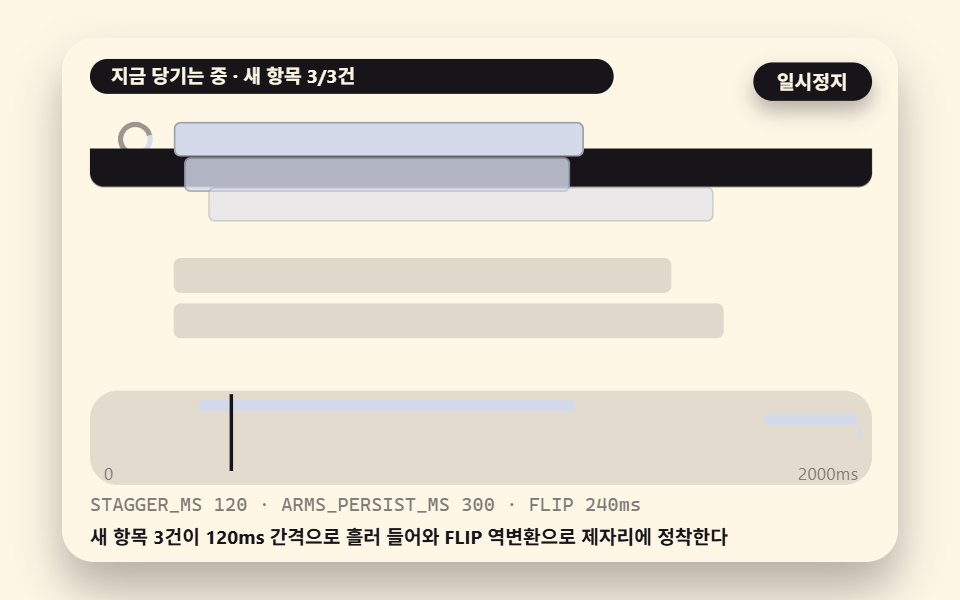 05 ptr-feed-sequential-update
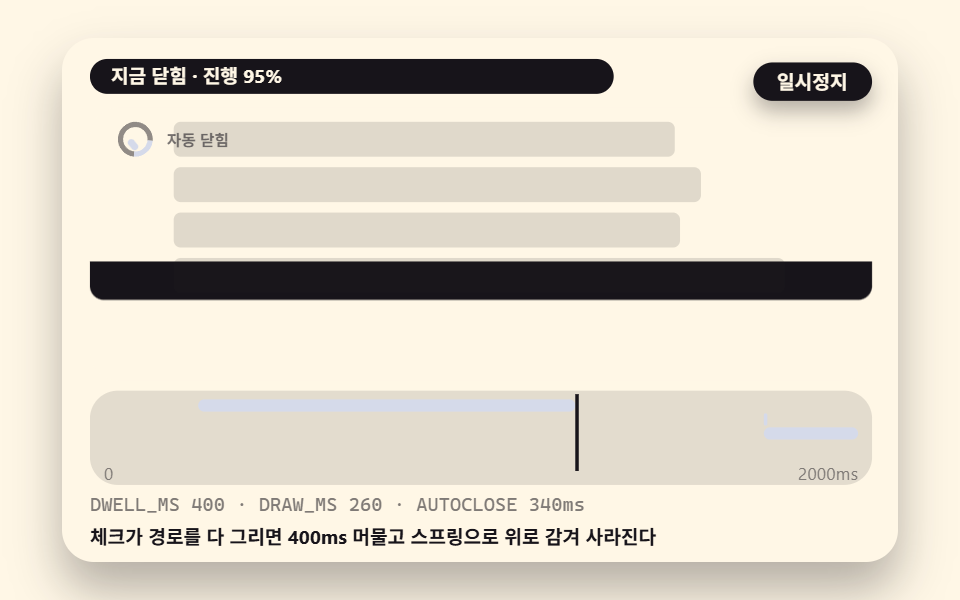 06 ptr-done-check-autoclose
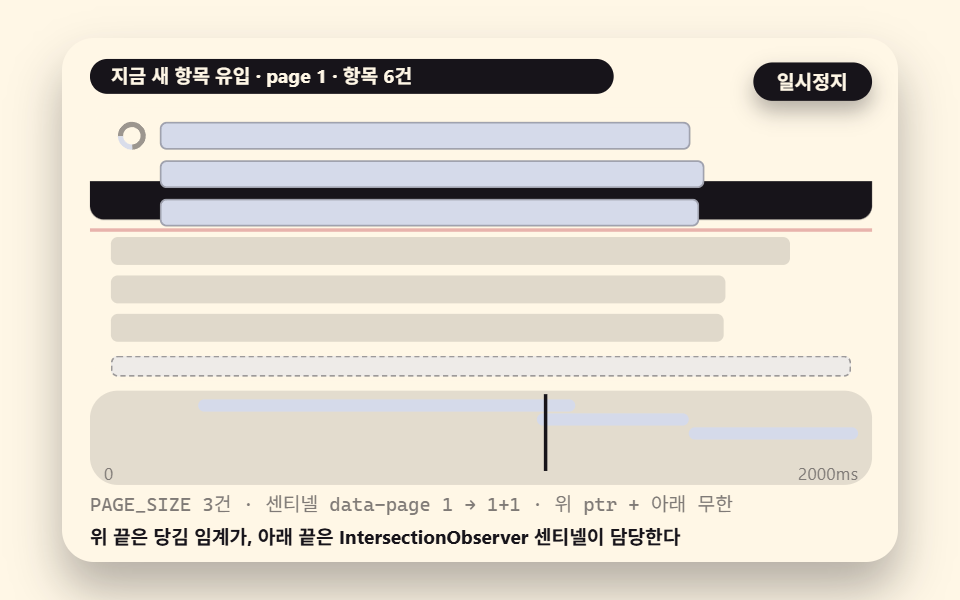 07 ptr-lazy-list-append-integration
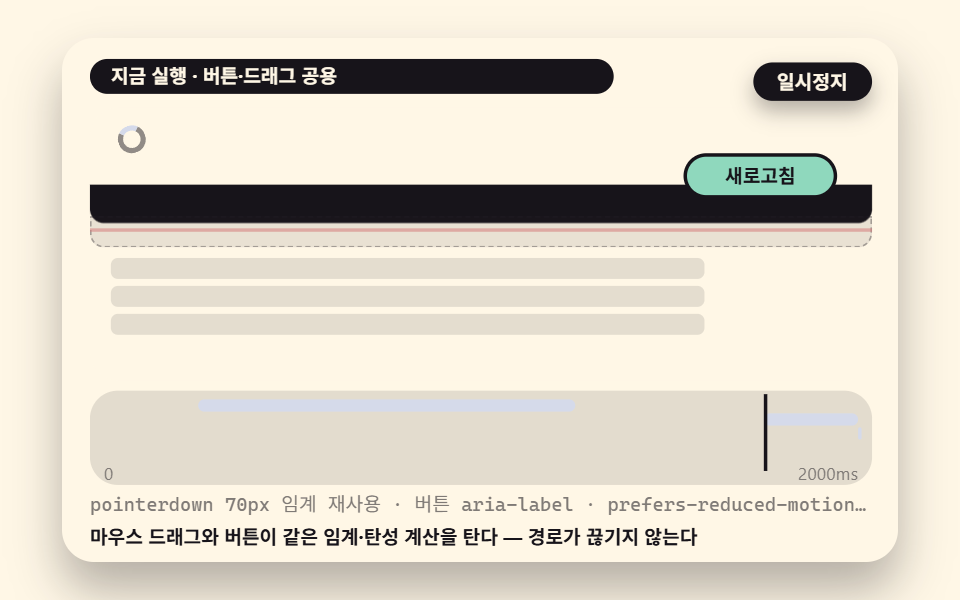 08 ptr-desktop-button-fallback
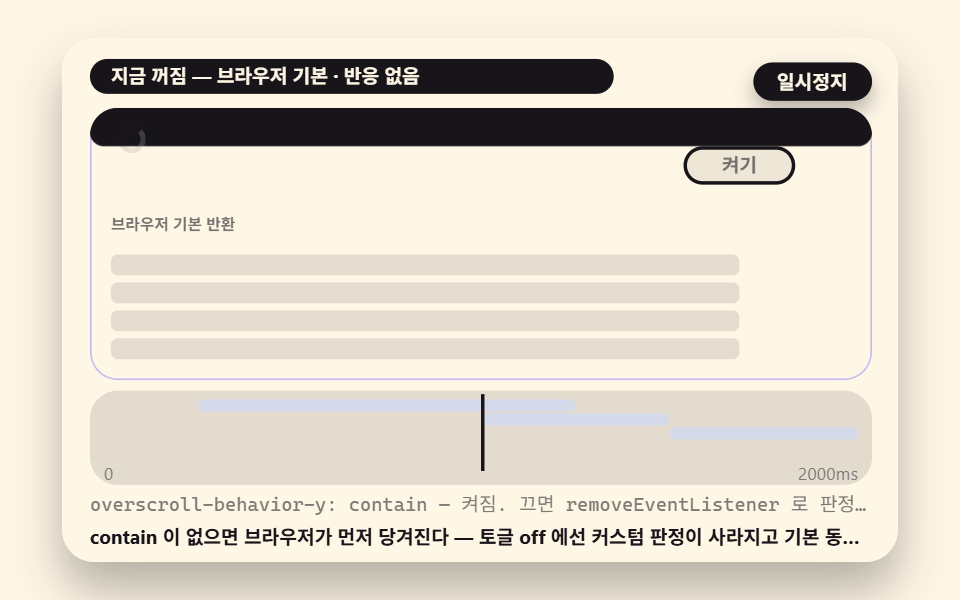 09 ptr-disable-toggle-overscroll
- 01 Basic Verdict That Fires When Accumulated Pull Distance Crosses the Threshold
- 02 Elastic Resistance Curve Bending Distance From 1:1 Into 1:0.5 Saturation
- 03 Progress Icon Mapping Pull Distance to Rotation Angle, Snapping at the Threshold
- 04 Two-Way Release Verdict Splitting Into a Sub-Threshold Return Spring and a Committed Run
- 05 Running Feed Update Where New Items Stream In Sequentially
- 06 Finish That Morphs Into a Done Check Then Auto-Closes on a Timer
- 07 List Rotation Wired to Lazy Loading at the Far End
- 08 Desktop Path Offering Both a Mouse-Drag Alternative and a Button Fallback
- 09 Overscroll Toggle That Breaks the Collision With the Browser's Native Pull — and Switches Off
The nine scenes follow the order you would build them in. 01 accumulates pull distance and fires past a threshold, 02 bends raw distance into a saturated display value, 03 maps progress onto a rotating icon, 04 splits the release verdict in two, 05 streams new items in during the run, 06 closes the cycle with a drawn check, 07 wires lazy loading to the far end, 08 keeps the input alive on desktop, and 09 switches the whole thing off. One thing to state up front: the autoplay in every scene is an injected demonstration, not hand-measured motion — each scene feeds a deterministic coordinate sequence into the very same verdict functions that a real pointerdown, pointermove, and pointerup chain would hit, so the logic is identical but every number, gif, and poster below comes from that injection, not from hand operation. Each demo also keeps its real pointer listeners attached at the bottom of the stage, so you can verify the same code path yourself.
When does the verdict wake — only when the scroll sits pinned at the very top
Pull to refresh is conditional input: it only comes alive while the list is scrolled all the way to the top. A downward swipe in the middle of a feed has to stay a scroll, so the first check is always scrollTop === 0. Drop that check and every vertical drag becomes a fire candidate, which is how a refresh goes off while someone is quietly reading item forty.
The verdict compresses into four steps. Confirm the top, accumulate raw distance only while the drag heads downward, map raw into an elastic display value, then re-judge at release whether the display crossed the threshold. Scene 01 runs all four steps on one stage, and the remaining eight each zoom in on one of them.
Whether to listen for touch events or pointer events is decided here too. These demos listen for pointerdown, pointermove, and pointerup — touch and mouse arrive through the same events, so the desktop fallback in 08 continues with no extra code. The touchstart and touchmove mentions that survive in the source are comments only, for browsers too old for Pointer Events.
The nine scenes and what the render actually measured
The numbers below come from 도구/demo.py capturing 24 stills inside a 480×300 box and counting the 23 deltas between neighbors; the render timestamps are 2026-11-17 03:49, with 01 re-rendered at 03:54. Accumulated area is the share of pixels that changed, intensity is the average color distance of those pixels on a 0–255 scale, and frames moved is how many of the 23 captures differ from the one before. All values are from the injected demonstration stated above.
| Item | Scene | Accumulated area | Intensity | Frames moved |
|---|---|---|---|---|
| 01 | Basic pull and fire | 24.5% | 154.9 | 23/23 |
| 02 | Elastic resistance curve | 38.7% | 128.3 | 23/23 |
| 03 | Progress icon rotation | 4.8% | 105.3 | 23/23 |
| 04 | Release two-way verdict | 21.1% | 168.2 | 23/23 |
| 05 | Sequential feed update | 28.5% | 151.0 | 23/23 |
| 06 | Done check auto-close | 28.0% | 159.9 | 23/23 |
| 07 | Lazy-load integration | 34.6% | 138.0 | 23/23 |
| 08 | Desktop button fallback | 23.6% | 152.9 | 23/23 |
| 09 | Off toggle | 20.7% | 157.2 | 23/23 |
All nine scenes moved in every one of the 23 captured frames, so the stages stay alive for the full two-second window. Scene 02 tops the table because its ghost bar and solid bar travel together across the whole stage, and 07 moves at both ends of its list. Scene 03 measures 4.8% because a ring, an angle, and a progress bar are a small component by nature — the precision there is the normalized value propagating into two channels at once, not area.
How far before it fires — the release threshold is a pixel distance, and it decides half the feel
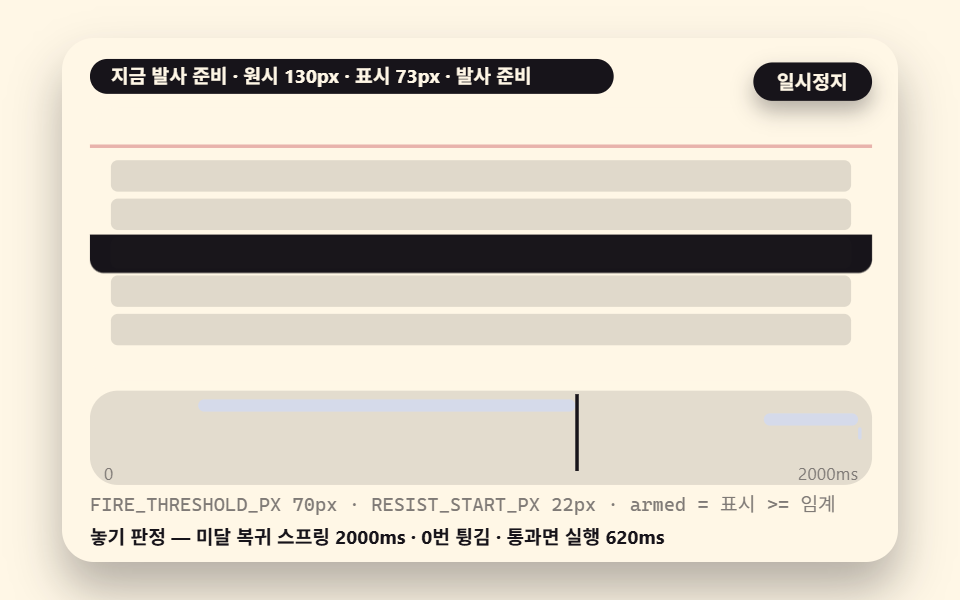
The threshold FIRE_THRESHOLD_PX sits at 70px, and it is a display value, not the raw finger distance. The elastic map has already bent the drag by the time the comparison happens, so a raw pull of 130px reads as roughly 73px on screen and barely clears 70px. That margin is the design: a pull that just barely fires is a pull the finger meant.
The number has a physical anchor. A display of 70px is about one thumb-knuckle of travel, while reaching it raw takes about 130px, so a grazing accidental drag never gets there. Lower the value and refreshes fire on timid pulls but also misfire; raise it and every refresh demands a deliberate long drag. That trade is the first row of the variation table near the end.
Armed is re-evaluated every tick, not latched once. Cross the threshold and fall back below it, and the armed state dissolves — only the value at the moment of release survives to the final verdict, no matter how many times the drag wobbled across the line.
01A Basic Verdict That Fires When Accumulated Pull Distance Crosses the Threshold
Demo and Explanation
Fetching new items at the top of a feed — the raw pull passes through the elastic map and is compared against 70px every tick, the release verdict decides, and a pass runs a 620ms indicator before 3 new items appear at the head of the list.
<main class="stage">
<div class="ez is-demo" id="ez">
  <div class="ez__in" data-role="inner">
    <div class="ez__pad" data-role="pad" tabindex="0" role="application" aria-label="Demo stage: Space or Enter pauses, R restarts, left and right arrows pick another value">
      <div class="ez__scene" data-role="scene" role="img" aria-label="A downward drag past the top check accumulates distance, snaps into armed past the threshold, and runs on release"></div>
      <div class="ez__probe" data-role="probe" aria-hidden="true"></div>
      <div class="ez__chart" data-role="chart" aria-hidden="true"></div>
      <p class="ez__status" data-role="status" aria-live="off">Scene ready</p>
      <p class="ez__reada" data-role="reada" aria-hidden="true"></p>
      <p class="ez__readb" data-role="readb" aria-hidden="true"></p>
      <div class="ez__ctrl">
        <button class="ez__pause" data-role="pause" type="button" aria-pressed="false">Pause</button>
… (총 18줄 — 아래 「전체 코드」에서 원문 전체)
// 526 공통 — 당겨서 새로고침 (524 base.scss 계승, 잉크 광원 → 크림 시트 위 잉크 목록으로)
@use "../../../../site/static/demo-tokens" as *;
@include stage($subject-cream);
$panel: mix($subject-cream, $subject-ink, 88%);
$dim: mix($subject-cream, $subject-ink, 45%);
// 파스텔 액센트 — vivid 토큰 대신 (BD26)
$stroke-blue: #d5daea;
$stroke-rose: #ebd6db;
$stroke-mint: #8fd8bd;
$stroke-lilac: #c9b8f2;
… (총 393줄 — 아래 「전체 코드」에서 원문 전체)html, body {
margin: 0;
overflow: hidden;
}
.stage {
box-sizing: border-box;
min-height: 100vh;
display: grid;
place-items: center;
margin: 0;
background: #fff7e6;
… (총 486줄 — 아래 「전체 코드」에서 원문 전체)(function () {
const rootEl = document.getElementById("ez");
if (!rootEl) return;
main(rootEl);
function cx(s) { return s; }
function main(root) {
// ── 526 당겨서 Refresh 공통 — 무대 좌표·문구 틀·요소 조립·ptr 드래그 엔진 (524 core.ts 계승)
const W = 480;
const CX0 = 8;
const CW = 432;
function clamp(v, lo, hi) { return v < lo ? lo : (v > hi ? hi : v); }
function lerp(a, b, k) { return a + (b - a) * k; }
… (총 448줄 — 아래 「전체 코드」에서 원문 전체)// PtrThresholdFireBasic - 같은 항목 vanilla index.html 의 React 판. 같은 계산을 useEffect 안에서 돌린다
import { useEffect, useRef } from "react";
import styles from "./PtrThresholdFireBasic.module.scss";
const cx = (s: string): string => s.split(" ").map((n) => styles[n] ?? n).join(" ");
function main(root: HTMLElement): () => void {
// ── 526 당겨서 새로고침 공통 — 무대 좌표·문구 틀·요소 조립·ptr 드래그 엔진 (524 core.ts 계승)
const W = 480;
const CX0 = 8;
const CW = 432;
function clamp(v: number, lo: number, hi: number): number { return v < lo ? lo : (v > hi ? hi : v); }
… (총 398줄 — 아래 「전체 코드」에서 원문 전체)01 · Basic Verdict That Fires When Accumulated Pull Distance Crosses the Threshold — Measured area 24.501% · moving frames 23/23Original by GODRICH · SCSS and React ship in the zip · See the password
Where to Look in the Code
The verdict body is the four lines of apply01; the top comment marks the check that becomes your first line in production.
    function apply01(raw) {
        // scrollY === 0 (same value as scrollTop) already holds on this demo's fixed stage — in production, test this first
        p01.raw = Math.max(0, raw);
        p01.disp = elasticMap(p01.raw, RESIST_START_PX, ELASTIC_SATURATE, RESIST_K);
        p01.armed = p01.disp >= FIRE_THRESHOLD_PX;
        if (bar01) {
            bar01.style.transform = 'translateY(' + f1(p01.disp) + 'px)';
        }
    }
The release side verdict01 commits the run only when pointerup lands while armed is true, and it clears armed immediately so a second release cannot double-fire.
Why it gets harder to pull — the elastic curve bends 1:1 distance into a 1:0.5 saturation ratio
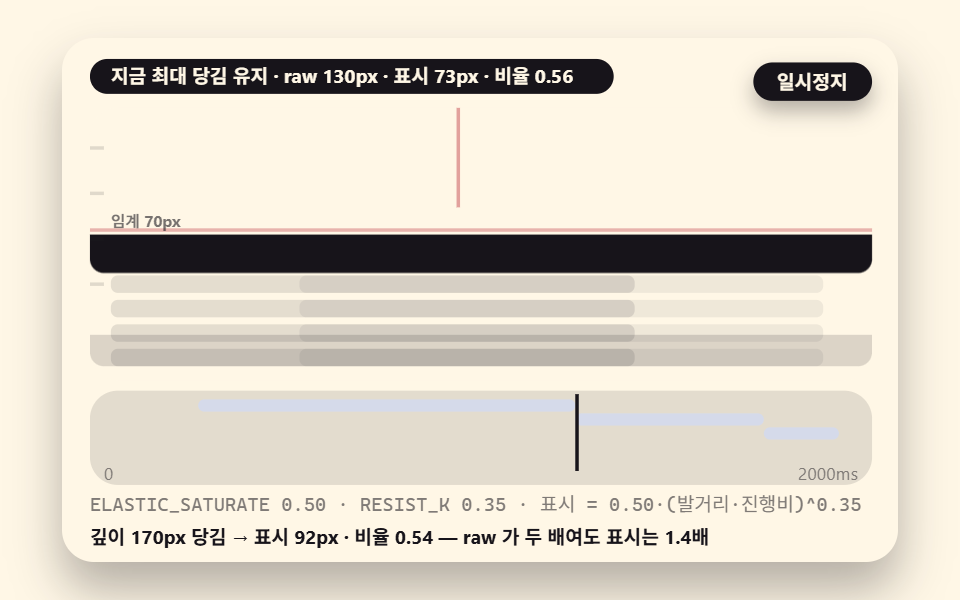
The feel of iOS rubber-banding is resistance. The screen tracks the finger exactly for a short distance, and then the same finger travel produces visibly less movement. One function compresses all of it: elasticMap passes raw distance through untouched up to RESIST_START_PX 22px, and above that multiplies the excess by a progress term raised to the 0.35 power and a saturation ratio ELASTIC_SATURATE of 0.5.
    function elasticMap(raw, resPx, sat, k) {
        if (raw <= resPx) {
            return raw;
        }
        const prog = 1 - resPx / Math.max(raw, 1);
        return resPx + (raw - resPx) * sat * Math.pow(clamp(prog, 0.05, 1), k);
    }
Run the arithmetic. A raw 130px displays as 22 + 108 × 0.5 × 0.938 ≈ 72.7px, a ratio of 0.56, and a raw 170px displays as ≈ 92.5px, a ratio of 0.54. The raw drag grew 30% while the display grew only 28% — that convergence is the saturation, and it is why no amount of force stretches the page without limit. The pull to refresh animation a user remembers lives in this one ratio.
02An Elastic Resistance Curve Bending Distance From 1:1 Into 1:0.5 Saturation
Demo and Explanation
The starting point for tuning pull feel — a translucent ghost bar follows the raw finger distance, a solid bar follows the elastic display value, and a connecting line shows, in real time, the gap that the resistance consumed.
<main class="stage">
<div class="ez is-demo" id="ez">
  <div class="ez__in" data-role="inner">
    <div class="ez__pad" data-role="pad" tabindex="0" role="application" aria-label="Demo stage: Space or Enter pauses, R restarts, left and right arrows pick another value">
      <div class="ez__scene" data-role="scene" role="img" aria-label="The finger's raw distance and the curved display offset pull apart, so deeper pulls descend less"></div>
      <div class="ez__probe" data-role="probe" aria-hidden="true"></div>
      <div class="ez__chart" data-role="chart" aria-hidden="true"></div>
      <p class="ez__status" data-role="status" aria-live="off">Scene ready</p>
      <p class="ez__reada" data-role="reada" aria-hidden="true"></p>
      <p class="ez__readb" data-role="readb" aria-hidden="true"></p>
      <div class="ez__ctrl">
        <button class="ez__pause" data-role="pause" type="button" aria-pressed="false">Pause</button>
… (총 18줄 — 아래 「전체 코드」에서 원문 전체)
// 526 공통 — 당겨서 새로고침 (524 base.scss 계승, 잉크 광원 → 크림 시트 위 잉크 목록으로)
@use "../../../../site/static/demo-tokens" as *;
@include stage($subject-cream);
$panel: mix($subject-cream, $subject-ink, 88%);
$dim: mix($subject-cream, $subject-ink, 45%);
// 파스텔 액센트 — vivid 토큰 대신 (BD26)
$stroke-blue: #d5daea;
$stroke-rose: #ebd6db;
$stroke-mint: #8fd8bd;
$stroke-lilac: #c9b8f2;
… (총 393줄 — 아래 「전체 코드」에서 원문 전체)html, body {
margin: 0;
overflow: hidden;
}
.stage {
box-sizing: border-box;
min-height: 100vh;
display: grid;
place-items: center;
margin: 0;
background: #fff7e6;
… (총 486줄 — 아래 「전체 코드」에서 원문 전체)(function () {
const rootEl = document.getElementById("ez");
if (!rootEl) return;
main(rootEl);
function cx(s) { return s; }
function main(root) {
// ── 526 당겨서 Refresh 공통 — 무대 좌표·문구 틀·요소 조립·ptr 드래그 엔진 (524 core.ts 계승)
const W = 480;
const CX0 = 8;
const CW = 432;
function clamp(v, lo, hi) { return v < lo ? lo : (v > hi ? hi : v); }
function lerp(a, b, k) { return a + (b - a) * k; }
… (총 394줄 — 아래 「전체 코드」에서 원문 전체)// PtrElasticResistanceCurve - 같은 항목 vanilla index.html 의 React 판. 같은 계산을 useEffect 안에서 돌린다
import { useEffect, useRef } from "react";
import styles from "./PtrElasticResistanceCurve.module.scss";
const cx = (s: string): string => s.split(" ").map((n) => styles[n] ?? n).join(" ");
function main(root: HTMLElement): () => void {
// ── 526 당겨서 새로고침 공통 — 무대 좌표·문구 틀·요소 조립·ptr 드래그 엔진 (524 core.ts 계승)
const W = 480;
const CX0 = 8;
const CW = 432;
function clamp(v: number, lo: number, hi: number): number { return v < lo ? lo : (v > hi ? hi : v); }
… (총 365줄 — 아래 「전체 코드」에서 원문 전체)02 · Elastic Resistance Curve Bending Distance From 1:1 Into 1:0.5 Saturation — Measured area 38.701% · moving frames 23/23Original by GODRICH · SCSS and React ship in the zip · See the password
The climax arrives in the deep-pull segment (raw 170px), where the gap between ghost and solid reaches its widest and the ratio readout converges toward 0.54; dragging with a mouse runs the identical elasticMap through pointermove, so the curve is not touch-only.
Where to Look in the Code
    sceneEl.addEventListener('pointermove', function (ev) {
        if (down02 && flt02) {
            const raw = Math.max(0, stagePoint(ev).y - 40 - base02);
            flt02.style.transform = 'translateY(' + f1(elasticMap(raw, RESIST_START_PX, ELASTIC_SATURATE, RESIST_K)) + 'px)';
        }
    });
What happens past the threshold — angle, color, and snap trade places inside one frame
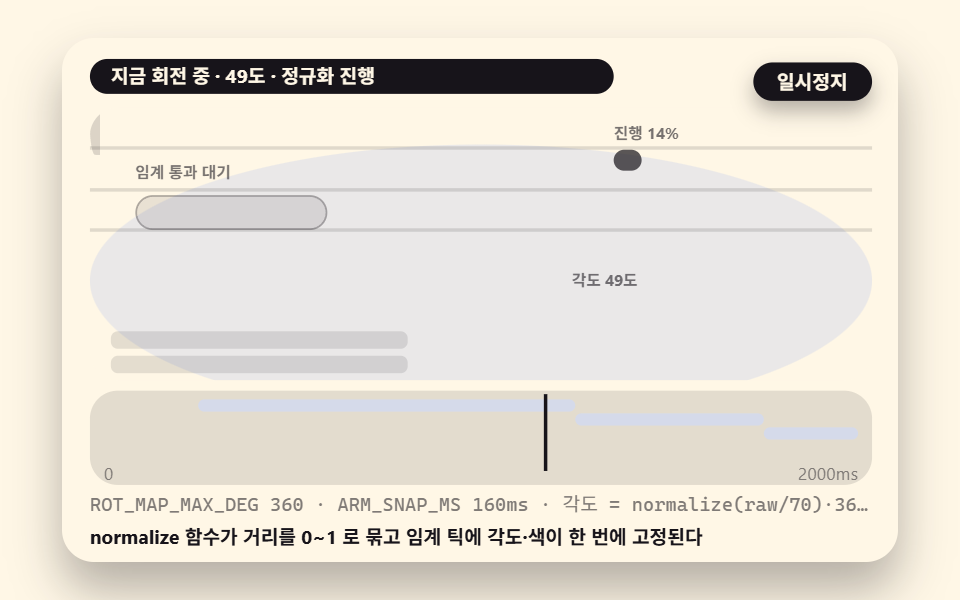
The standard way to make the crossing visible is a progress icon. Pull distance is normalized through normalize(raw/70) into 0 to 1, and multiplying by ROT_MAP_MAX_DEG 360 feeds the fill angle of a conic-gradient, so the ring charges as you drag and the moment it completes is the moment the threshold passes. The same normalized value spreads into a progress bar's width, so even a small icon reads its progress by area — the pull to refresh icon logic in one paragraph.
03A Progress Icon Mapping Pull Distance to Rotation Angle, Snapping at the Threshold
Demo and Explanation
The spinner slot that shows pull progress — the ring fills from 0 to 360 degrees, the tick where the normalized value touches 1 snaps armed, and a 160ms transition (ARM_SNAP_MS) makes the angle-and-color handover read as a snap instead of a blink.
<main class="stage">
<div class="ez is-demo" id="ez">
  <div class="ez__in" data-role="inner">
    <div class="ez__pad" data-role="pad" tabindex="0" role="application" aria-label="Demo stage: Space or Enter pauses, R restarts, left and right arrows pick another value">
      <div class="ez__scene" data-role="scene" role="img" aria-label="Pull distance normalizes into a 0 to 360 degree rotation that fills the ring, then locks angle and color in one frame at the threshold"></div>
      <div class="ez__probe" data-role="probe" aria-hidden="true"></div>
      <div class="ez__chart" data-role="chart" aria-hidden="true"></div>
      <p class="ez__status" data-role="status" aria-live="off">Scene ready</p>
      <p class="ez__reada" data-role="reada" aria-hidden="true"></p>
      <p class="ez__readb" data-role="readb" aria-hidden="true"></p>
      <div class="ez__ctrl">
        <button class="ez__pause" data-role="pause" type="button" aria-pressed="false">Pause</button>
… (총 18줄 — 아래 「전체 코드」에서 원문 전체)
// 526 공통 — 당겨서 새로고침 (524 base.scss 계승, 잉크 광원 → 크림 시트 위 잉크 목록으로)
@use "../../../../site/static/demo-tokens" as *;
@include stage($subject-cream);
$panel: mix($subject-cream, $subject-ink, 88%);
$dim: mix($subject-cream, $subject-ink, 45%);
// 파스텔 액센트 — vivid 토큰 대신 (BD26)
$stroke-blue: #d5daea;
$stroke-rose: #ebd6db;
$stroke-mint: #8fd8bd;
$stroke-lilac: #c9b8f2;
… (총 393줄 — 아래 「전체 코드」에서 원문 전체)html, body {
margin: 0;
overflow: hidden;
}
.stage {
box-sizing: border-box;
min-height: 100vh;
display: grid;
place-items: center;
margin: 0;
background: #fff7e6;
… (총 486줄 — 아래 「전체 코드」에서 원문 전체)(function () {
const rootEl = document.getElementById("ez");
if (!rootEl) return;
main(rootEl);
function cx(s) { return s; }
function main(root) {
// ── 526 당겨서 Refresh 공통 — 무대 좌표·문구 틀·요소 조립·ptr 드래그 엔진 (524 core.ts 계승)
const W = 480;
const CX0 = 8;
const CW = 432;
function clamp(v, lo, hi) { return v < lo ? lo : (v > hi ? hi : v); }
function lerp(a, b, k) { return a + (b - a) * k; }
… (총 420줄 — 아래 「전체 코드」에서 원문 전체)// PtrIconProgressRotation - 같은 항목 vanilla index.html 의 React 판. 같은 계산을 useEffect 안에서 돌린다
import { useEffect, useRef } from "react";
import styles from "./PtrIconProgressRotation.module.scss";
const cx = (s: string): string => s.split(" ").map((n) => styles[n] ?? n).join(" ");
function main(root: HTMLElement): () => void {
// ── 526 당겨서 새로고침 공통 — 무대 좌표·문구 틀·요소 조립·ptr 드래그 엔진 (524 core.ts 계승)
const W = 480;
const CX0 = 8;
const CW = 432;
function clamp(v: number, lo: number, hi: number): number { return v < lo ? lo : (v > hi ? hi : v); }
… (총 384줄 — 아래 「전체 코드」에서 원문 전체)03 · Progress Icon Mapping Pull Distance to Rotation Angle, Snapping at the Threshold — Measured area 4.813% · moving frames 23/23Original by GODRICH · SCSS and React ship in the zip · See the password
Where to Look in the Code
Three lines carry the mapping from distance to angle, and the same value feeds the bar width:
    function apply03(raw) {
        p03.raw = Math.max(0, raw);
        const n = clamp(p03.raw / FIRE_THRESHOLD_PX, 0, 1); // normalize — binds the value into 0~1
        p03.rot = n * ROT_MAP_MAX_DEG;
        p03.armed = n >= 1;
        if (ndl03) {
            ndl03.style.background = 'conic-gradient(' + f0(p03.rot) + 'deg, ' + f0(p03.rot) + 'deg, rgba(255,255,255,0) 0deg)';
        }
Remove the transition and the armed snap collapses into a single-frame blink — that failure is the fifth trap below.
What happens on release — the verdict splits into a return spring and a committed run
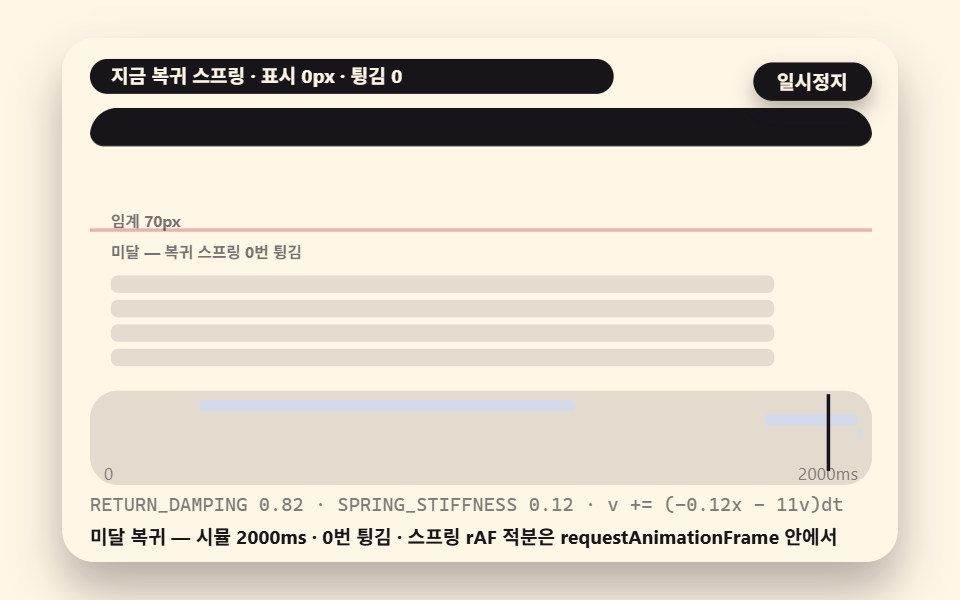
Release is the last fork. Display above the threshold commits the run and pins the icon at the top; below it, a damped spring coils the bar back to rest. The spring is two lines integrating v += (−0.12x − 11v)dt per frame — the stiffness SPRING_STIFFNESS of 0.12 pulls, the damping of 11 grabs, the same physical layer the 077 canvas episodes use.
Why a spring instead of a single snap-back? Failure should ride the same physics as success. A committed run pins; a missed pull could simply retract in one motion, but a bar that bounces twice while it settles hands the finger a tactile memory of "not yet" that a linear return never delivers.
04A Two-Way Release Verdict Splitting Into a Sub-Threshold Return Spring and a Committed Run
Demo and Explanation
Making accidental pulls retract harmlessly — release at display 55px, under the 70px threshold, and the spring coils back while a counter logs the bounces; release past the threshold on the same stage and the state commits instead.
<main class="stage">
<div class="ez is-demo" id="ez">
  <div class="ez__in" data-role="inner">
    <div class="ez__pad" data-role="pad" tabindex="0" role="application" aria-label="Demo stage: Space or Enter pauses, R restarts, left and right arrows pick another value">
      <div class="ez__scene" data-role="scene" role="img" aria-label="The instant of release re-verdicts, splitting into a sub-threshold return spring and a committed run"></div>
      <div class="ez__probe" data-role="probe" aria-hidden="true"></div>
      <div class="ez__chart" data-role="chart" aria-hidden="true"></div>
      <p class="ez__status" data-role="status" aria-live="off">Scene ready</p>
      <p class="ez__reada" data-role="reada" aria-hidden="true"></p>
      <p class="ez__readb" data-role="readb" aria-hidden="true"></p>
      <div class="ez__ctrl">
        <button class="ez__pause" data-role="pause" type="button" aria-pressed="false">Pause</button>
… (총 18줄 — 아래 「전체 코드」에서 원문 전체)
// 526 공통 — 당겨서 새로고침 (524 base.scss 계승, 잉크 광원 → 크림 시트 위 잉크 목록으로)
@use "../../../../site/static/demo-tokens" as *;
@include stage($subject-cream);
$panel: mix($subject-cream, $subject-ink, 88%);
$dim: mix($subject-cream, $subject-ink, 45%);
// 파스텔 액센트 — vivid 토큰 대신 (BD26)
$stroke-blue: #d5daea;
$stroke-rose: #ebd6db;
$stroke-mint: #8fd8bd;
$stroke-lilac: #c9b8f2;
… (총 393줄 — 아래 「전체 코드」에서 원문 전체)html, body {
margin: 0;
overflow: hidden;
}
.stage {
box-sizing: border-box;
min-height: 100vh;
display: grid;
place-items: center;
margin: 0;
background: #fff7e6;
… (총 486줄 — 아래 「전체 코드」에서 원문 전체)(function () {
const rootEl = document.getElementById("ez");
if (!rootEl) return;
main(rootEl);
function cx(s) { return s; }
function main(root) {
// ── 526 당겨서 Refresh 공통 — 무대 좌표·문구 틀·요소 조립·ptr 드래그 엔진 (524 core.ts 계승)
const W = 480;
const CX0 = 8;
const CW = 432;
function clamp(v, lo, hi) { return v < lo ? lo : (v > hi ? hi : v); }
function lerp(a, b, k) { return a + (b - a) * k; }
… (총 412줄 — 아래 「전체 코드」에서 원문 전체)// PtrReleaseTwoWayVerdict - 같은 항목 vanilla index.html 의 React 판. 같은 계산을 useEffect 안에서 돌린다
import { useEffect, useRef } from "react";
import styles from "./PtrReleaseTwoWayVerdict.module.scss";
const cx = (s: string): string => s.split(" ").map((n) => styles[n] ?? n).join(" ");
function main(root: HTMLElement): () => void {
// ── 526 당겨서 새로고침 공통 — 무대 좌표·문구 틀·요소 조립·ptr 드래그 엔진 (524 core.ts 계승)
const W = 480;
const CX0 = 8;
const CW = 432;
function clamp(v: number, lo: number, hi: number): number { return v < lo ? lo : (v > hi ? hi : v); }
… (총 379줄 — 아래 「전체 코드」에서 원문 전체)04 · Two-Way Release Verdict Splitting Into a Sub-Threshold Return Spring and a Committed Run — Measured area 21.115% · moving frames 23/23Original by GODRICH · SCSS and React ship in the zip · See the password
Where to Look in the Code
The spring integration and the bounce tally are the body of the fork:
    function springStep(sp, stiff, damp, dtms) {
        const dt = dtms / 1000;
        sp.v += (-stiff * sp.x - damp * sp.v) * dt;
        sp.x += sp.v * dt;
    }
        if (mode04 === 'spring') {
            // sub-threshold return — a damped spring integrated on every requestAnimationFrame tick
            springStep(sp04, SPRING_STIFFNESS, 11, 1000 / 60);
            if (lastV04 !== 0 && sp04.v * lastV04 < 0) {
                bounces04 += 1;
            }
            if (sp04.v !== 0) {
                lastV04 = sp04.v;
            }
            disp = Math.max(0, sp04.x);
The bounce counter needs no separate physics: it counts sign changes of velocity, an output the integration already produces.
05A Running Feed Update Where New Items Stream In Sequentially
Demo and Explanation
Pulling new items into a notification or news feed — after the fire, the pinned spinner holds through ARMS_PERSIST_MS 300ms, then 3 new items arrive 120ms apart (STAGGER_MS) at fire+300, 420, and 540ms, each settling into place from 18px up and 0.85 scale through a FLIP invert, so the update reads like a stream.
<main class="stage">
<div class="ez is-demo" id="ez">
  <div class="ez__in" data-role="inner">
    <div class="ez__pad" data-role="pad" tabindex="0" role="application" aria-label="Demo stage: Space or Enter pauses, R restarts, left and right arrows pick another value">
      <div class="ez__scene" data-role="scene" role="img" aria-label="New items with staggered arrival times stream in beneath the pinned spinner and settle into place"></div>
      <div class="ez__probe" data-role="probe" aria-hidden="true"></div>
      <div class="ez__chart" data-role="chart" aria-hidden="true"></div>
      <p class="ez__status" data-role="status" aria-live="off">Scene ready</p>
      <p class="ez__reada" data-role="reada" aria-hidden="true"></p>
      <p class="ez__readb" data-role="readb" aria-hidden="true"></p>
      <div class="ez__ctrl">
        <button class="ez__pause" data-role="pause" type="button" aria-pressed="false">Pause</button>
… (총 18줄 — 아래 「전체 코드」에서 원문 전체)
// 526 공통 — 당겨서 새로고침 (524 base.scss 계승, 잉크 광원 → 크림 시트 위 잉크 목록으로)
@use "../../../../site/static/demo-tokens" as *;
@include stage($subject-cream);
$panel: mix($subject-cream, $subject-ink, 88%);
$dim: mix($subject-cream, $subject-ink, 45%);
// 파스텔 액센트 — vivid 토큰 대신 (BD26)
$stroke-blue: #d5daea;
$stroke-rose: #ebd6db;
$stroke-mint: #8fd8bd;
$stroke-lilac: #c9b8f2;
… (총 393줄 — 아래 「전체 코드」에서 원문 전체)html, body {
margin: 0;
overflow: hidden;
}
.stage {
box-sizing: border-box;
min-height: 100vh;
display: grid;
place-items: center;
margin: 0;
background: #fff7e6;
… (총 486줄 — 아래 「전체 코드」에서 원문 전체)(function () {
const rootEl = document.getElementById("ez");
if (!rootEl) return;
main(rootEl);
function cx(s) { return s; }
function main(root) {
// ── 526 당겨서 Refresh 공통 — 무대 좌표·문구 틀·요소 조립·ptr 드래그 엔진 (524 core.ts 계승)
const W = 480;
const CX0 = 8;
const CW = 432;
function clamp(v, lo, hi) { return v < lo ? lo : (v > hi ? hi : v); }
function lerp(a, b, k) { return a + (b - a) * k; }
… (총 407줄 — 아래 「전체 코드」에서 원문 전체)// PtrFeedSequentialUpdate - 같은 항목 vanilla index.html 의 React 판. 같은 계산을 useEffect 안에서 돌린다
import { useEffect, useRef } from "react";
import styles from "./PtrFeedSequentialUpdate.module.scss";
const cx = (s: string): string => s.split(" ").map((n) => styles[n] ?? n).join(" ");
function main(root: HTMLElement): () => void {
// ── 526 당겨서 새로고침 공통 — 무대 좌표·문구 틀·요소 조립·ptr 드래그 엔진 (524 core.ts 계승)
const W = 480;
const CX0 = 8;
const CW = 432;
function clamp(v: number, lo: number, hi: number): number { return v < lo ? lo : (v > hi ? hi : v); }
… (총 380줄 — 아래 「전체 코드」에서 원문 전체)05 · Running Feed Update Where New Items Stream In Sequentially — Measured area 28.51% · moving frames 23/23Original by GODRICH · SCSS and React ship in the zip · See the password
Where to Look in the Code
Arrival judging and the FLIP interpolation share one loop:
        for (let k = 0; k < NEW_N; k += 1) {
            const born = fire + ARMS_PERSIST_MS + k * STAGGER_MS - 2000;
            const it = items05[k];
            if (t >= born && it.born !== born) {
                it.born = born;
                // FLIP invert — on first appearance each row settles from an 18px-up invert toward its target slot (at)
                it.el.className = cx('row row--new');
                it.el.style.transform = 'translateY(' + (it.at - 18 - 8 - k * 26) + 'px) scaleX(0.85)';
                it.el.style.opacity = '0.4';
            }
The completion notice is a role="status" paragraph that announces the arrival sentence once, when the mode changes, so a screen reader is never fed a number on every arrival frame.
06A Finish That Morphs Into a Done Check Then Auto-Closes on a Timer
Demo and Explanation
Signaling refresh completion at a glance — the spinner becomes a check, stroke-dashoffset draws the path from 40 to 0 over 260ms, a 400ms dwell holds the bar still, and a 340ms close with cubic-bezier(0.22, 1, 0.36, 1) coils it upward, closing the cycle.
<main class="stage">
<div class="ez is-demo" id="ez">
  <div class="ez__in" data-role="inner">
    <div class="ez__pad" data-role="pad" tabindex="0" role="application" aria-label="Demo stage: Space or Enter pauses, R restarts, left and right arrows pick another value">
      <div class="ez__scene" data-role="scene" role="img" aria-label="When the run ends the spinner morphs into a check that draws itself, dwells, then coils away"></div>
      <div class="ez__probe" data-role="probe" aria-hidden="true"></div>
      <div class="ez__chart" data-role="chart" aria-hidden="true"></div>
      <p class="ez__status" data-role="status" aria-live="off">Scene ready</p>
      <p class="ez__reada" data-role="reada" aria-hidden="true"></p>
      <p class="ez__readb" data-role="readb" aria-hidden="true"></p>
      <div class="ez__ctrl">
        <button class="ez__pause" data-role="pause" type="button" aria-pressed="false">Pause</button>
… (총 18줄 — 아래 「전체 코드」에서 원문 전체)
// 526 공통 — 당겨서 새로고침 (524 base.scss 계승, 잉크 광원 → 크림 시트 위 잉크 목록으로)
@use "../../../../site/static/demo-tokens" as *;
@include stage($subject-cream);
$panel: mix($subject-cream, $subject-ink, 88%);
$dim: mix($subject-cream, $subject-ink, 45%);
// 파스텔 액센트 — vivid 토큰 대신 (BD26)
$stroke-blue: #d5daea;
$stroke-rose: #ebd6db;
$stroke-mint: #8fd8bd;
$stroke-lilac: #c9b8f2;
… (총 393줄 — 아래 「전체 코드」에서 원문 전체)html, body {
margin: 0;
overflow: hidden;
}
.stage {
box-sizing: border-box;
min-height: 100vh;
display: grid;
place-items: center;
margin: 0;
background: #fff7e6;
… (총 486줄 — 아래 「전체 코드」에서 원문 전체)(function () {
const rootEl = document.getElementById("ez");
if (!rootEl) return;
main(rootEl);
function cx(s) { return s; }
function main(root) {
// ── 526 당겨서 Refresh 공통 — 무대 좌표·문구 틀·요소 조립·ptr 드래그 엔진 (524 core.ts 계승)
const W = 480;
const CX0 = 8;
const CW = 432;
function clamp(v, lo, hi) { return v < lo ? lo : (v > hi ? hi : v); }
function lerp(a, b, k) { return a + (b - a) * k; }
… (총 407줄 — 아래 「전체 코드」에서 원문 전체)// PtrDoneCheckAutoclose - 같은 항목 vanilla index.html 의 React 판. 같은 계산을 useEffect 안에서 돌린다
import { useEffect, useRef } from "react";
import styles from "./PtrDoneCheckAutoclose.module.scss";
const cx = (s: string): string => s.split(" ").map((n) => styles[n] ?? n).join(" ");
function main(root: HTMLElement): () => void {
// ── 526 당겨서 새로고침 공통 — 무대 좌표·문구 틀·요소 조립·ptr 드래그 엔진 (524 core.ts 계승)
const W = 480;
const CX0 = 8;
const CW = 432;
function clamp(v: number, lo: number, hi: number): number { return v < lo ? lo : (v > hi ? hi : v); }
… (총 383줄 — 아래 「전체 코드」에서 원문 전체)06 · Finish That Morphs Into a Done Check Then Auto-Closes on a Timer — Measured area 27.983% · moving frames 23/23Original by GODRICH · SCSS and React ship in the zip · See the password
Where to Look in the Code
Drawing and closing split by time inside one block:
        if (check06) {
            if (t >= drawStart && t < closeStart + AUTOCLOSE_MS) {
                check06.style.opacity = '1';
                const u = clamp((t - drawStart) / DRAW_MS, 0, 1);
                // stroke-dashoffset 40 → 0 — the path fills in as it is drawn
                check06.style.strokeDashoffset = f1(40 * (1 - u));
                const cl = clamp((t - closeStart) / AUTOCLOSE_MS, 0, 1);
                check06.style.transition = 'transform ' + AUTOCLOSE_MS + 'ms ' + AUTOCLOSE_EASE;
                check06.style.transform = 'translateY(' + f1(-48 * cl) + 'px)';
            }
With stroke-dasharray at 40 and the offset running from 40 down to 0, the path draws in constant time regardless of how many pixels the check occupies — three timings (draw, dwell, close) as three named constants.
07A List Rotation Wired to Lazy Loading at the Far End
Demo and Explanation
Infinite scroll coexisting with pull to refresh — the top end is the pull threshold fetching new items, the bottom end is an IntersectionObserver sentinel fetching the next batch of PAGE_SIZE 3, both ends bound into one list state while the sentinel's data-page attribute climbs from 1 to 3 and the fetched batches connect like a ring.
<main class="stage">
<div class="ez is-demo" id="ez">
  <div class="ez__in" data-role="inner">
    <div class="ez__pad" data-role="pad" tabindex="0" role="application" aria-label="Demo stage: Space or Enter pauses, R restarts, left and right arrows pick another value">
      <div class="ez__scene" data-role="scene" role="img" aria-label="The pull threshold at the top and the sentinel at the bottom share one list state, so batches connect at both ends"></div>
      <div class="ez__probe" data-role="probe" aria-hidden="true"></div>
      <div class="ez__chart" data-role="chart" aria-hidden="true"></div>
      <p class="ez__status" data-role="status" aria-live="off">Scene ready</p>
      <p class="ez__reada" data-role="reada" aria-hidden="true"></p>
      <p class="ez__readb" data-role="readb" aria-hidden="true"></p>
      <div class="ez__ctrl">
        <button class="ez__pause" data-role="pause" type="button" aria-pressed="false">Pause</button>
… (총 18줄 — 아래 「전체 코드」에서 원문 전체)
// 526 공통 — 당겨서 새로고침 (524 base.scss 계승, 잉크 광원 → 크림 시트 위 잉크 목록으로)
@use "../../../../site/static/demo-tokens" as *;
@include stage($subject-cream);
$panel: mix($subject-cream, $subject-ink, 88%);
$dim: mix($subject-cream, $subject-ink, 45%);
// 파스텔 액센트 — vivid 토큰 대신 (BD26)
$stroke-blue: #d5daea;
$stroke-rose: #ebd6db;
$stroke-mint: #8fd8bd;
$stroke-lilac: #c9b8f2;
… (총 393줄 — 아래 「전체 코드」에서 원문 전체)html, body {
margin: 0;
overflow: hidden;
}
.stage {
box-sizing: border-box;
min-height: 100vh;
display: grid;
place-items: center;
margin: 0;
background: #fff7e6;
… (총 486줄 — 아래 「전체 코드」에서 원문 전체)(function () {
const rootEl = document.getElementById("ez");
if (!rootEl) return;
main(rootEl);
function cx(s) { return s; }
function main(root) {
// ── 526 당겨서 Refresh 공통 — 무대 좌표·문구 틀·요소 조립·ptr 드래그 엔진 (524 core.ts 계승)
const W = 480;
const CX0 = 8;
const CW = 432;
function clamp(v, lo, hi) { return v < lo ? lo : (v > hi ? hi : v); }
function lerp(a, b, k) { return a + (b - a) * k; }
… (총 459줄 — 아래 「전체 코드」에서 원문 전체)// PtrLazyListAppendIntegration - 같은 항목 vanilla index.html 의 React 판. 같은 계산을 useEffect 안에서 돌린다
import { useEffect, useRef } from "react";
import styles from "./PtrLazyListAppendIntegration.module.scss";
const cx = (s: string): string => s.split(" ").map((n) => styles[n] ?? n).join(" ");
function main(root: HTMLElement): () => void {
// ── 526 당겨서 새로고침 공통 — 무대 좌표·문구 틀·요소 조립·ptr 드래그 엔진 (524 core.ts 계승)
const W = 480;
const CX0 = 8;
const CW = 432;
function clamp(v: number, lo: number, hi: number): number { return v < lo ? lo : (v > hi ? hi : v); }
… (총 420줄 — 아래 「전체 코드」에서 원문 전체)07 · List Rotation Wired to Lazy Loading at the Far End — Measured area 34.561% · moving frames 23/23Original by GODRICH · SCSS and React ship in the zip · See the password
Where to Look in the Code
Pointing the observer's root at the scene element is what the sixth trap below is about, and each fetched batch settles with a 220ms FLIP:
    let io07 = null;
    function startIO() {
        // IntersectionObserver — appendPage when the sentinel reaches the bottom of the scene. The real
        // screen and the demo (forced scroll) share this one observer
        io07 = new IntersectionObserver(function (ents) {
            for (let i = 0; i < ents.length; i += 1) {
                if (ents[i].isIntersecting && page07 < 3) {
                    appendPage();
                }
            }
        }, { root: sceneEl, threshold: 0.6 });
        if (sent07) {
            io07.observe(sent07);
        }
    }
On desktop — the mouse borrows the same math, and a button keeps the path unbroken
Two things keep this input alive where no finger exists. First, a vertical drag inside the container arrives as pointerdown and reuses the identical elasticMap and 70px threshold — pointer events mean the mouse rides the same code as touch with nothing added. Second, a refresh button with an aria-label stays permanently visible for the places where dragging feels wrong, and it fires on click, Enter, or Space alike. Under prefers-reduced-motion the button still runs instantly, because a motion-reducing setting must never disable the function itself.
08A Desktop Path Offering Both a Mouse-Drag Alternative and a Button Fallback
Demo and Explanation
A surface shared by desktop, trackpad, and assistive tech — the drag-to-threshold path and the button path meet at the same fire08, and a keyboard press of the button fires the run with the animation stripped.
<main class="stage">
<div class="ez is-demo" id="ez">
  <div class="ez__in" data-role="inner">
    <div class="ez__pad" data-role="pad" tabindex="0" role="application" aria-label="Demo stage: Space or Enter pauses, R restarts, left and right arrows pick another value">
      <div class="ez__scene" data-role="scene" role="img" aria-label="A mouse drag rides the same threshold and elastic math while an always-visible button leads to the same run"></div>
      <div class="ez__probe" data-role="probe" aria-hidden="true"></div>
      <div class="ez__chart" data-role="chart" aria-hidden="true"></div>
      <p class="ez__status" data-role="status" aria-live="off">Scene ready</p>
      <p class="ez__reada" data-role="reada" aria-hidden="true"></p>
      <p class="ez__readb" data-role="readb" aria-hidden="true"></p>
      <div class="ez__ctrl">
        <button class="ez__pause" data-role="pause" type="button" aria-pressed="false">Pause</button>
… (총 18줄 — 아래 「전체 코드」에서 원문 전체)
// 526 공통 — 당겨서 새로고침 (524 base.scss 계승, 잉크 광원 → 크림 시트 위 잉크 목록으로)
@use "../../../../site/static/demo-tokens" as *;
@include stage($subject-cream);
$panel: mix($subject-cream, $subject-ink, 88%);
$dim: mix($subject-cream, $subject-ink, 45%);
// 파스텔 액센트 — vivid 토큰 대신 (BD26)
$stroke-blue: #d5daea;
$stroke-rose: #ebd6db;
$stroke-mint: #8fd8bd;
$stroke-lilac: #c9b8f2;
… (총 393줄 — 아래 「전체 코드」에서 원문 전체)html, body {
margin: 0;
overflow: hidden;
}
.stage {
box-sizing: border-box;
min-height: 100vh;
display: grid;
place-items: center;
margin: 0;
background: #fff7e6;
… (총 486줄 — 아래 「전체 코드」에서 원문 전체)(function () {
const rootEl = document.getElementById("ez");
if (!rootEl) return;
main(rootEl);
function cx(s) { return s; }
function main(root) {
// ── 526 당겨서 Refresh 공통 — 무대 좌표·문구 틀·요소 조립·ptr 드래그 엔진 (524 core.ts 계승)
const W = 480;
const CX0 = 8;
const CW = 432;
function clamp(v, lo, hi) { return v < lo ? lo : (v > hi ? hi : v); }
function lerp(a, b, k) { return a + (b - a) * k; }
… (총 430줄 — 아래 「전체 코드」에서 원문 전체)// PtrDesktopButtonFallback - 같은 항목 vanilla index.html 의 React 판. 같은 계산을 useEffect 안에서 돌린다
import { useEffect, useRef } from "react";
import styles from "./PtrDesktopButtonFallback.module.scss";
const cx = (s: string): string => s.split(" ").map((n) => styles[n] ?? n).join(" ");
function main(root: HTMLElement): () => void {
// ── 526 당겨서 새로고침 공통 — 무대 좌표·문구 틀·요소 조립·ptr 드래그 엔진 (524 core.ts 계승)
const W = 480;
const CX0 = 8;
const CW = 432;
function clamp(v: number, lo: number, hi: number): number { return v < lo ? lo : (v > hi ? hi : v); }
… (총 391줄 — 아래 「전체 코드」에서 원문 전체)08 · Desktop Path Offering Both a Mouse-Drag Alternative and a Button Fallback — Measured area 23.585% · moving frames 23/23Original by GODRICH · SCSS and React ship in the zip · See the password
Where to Look in the Code
The drag-end verdict shows the threshold reuse directly, with a plain reset on a miss:
    function endDrag08() {
        if (!down08 || !bar08) {
            down08 = false;
            return;
        }
        down08 = false;
        const ty = parseFloat(bar08.style.transform.replace('translateY(', '').replace('px)', '')) || 0;
        if (ty >= FIRE_THRESHOLD_PX) {
            fire08();
        }
        else {
            bar08.style.transform = 'translateY(0)';
        }
    }
09An Overscroll Toggle That Breaks the Collision With the Browser's Native Pull — and Switches Off
Demo and Explanation
Answering the demand to disable pull to refresh — inside a container where overscroll-behavior-y: contain blocks Chrome's native gesture, flipping the toggle off detaches the threshold verdict and both listeners via removeEventListener, and the browser default comes back; the first cycle (0 to 1s) shows a full pull-to-fire while armed, then the 1s cut leaves only a 6px gauge-needle wobble in the second cycle, with no bar following.
<main class="stage">
<div class="ez is-demo" id="ez">
  <div class="ez__in" data-role="inner">
    <div class="ez__pad" data-role="pad" tabindex="0" role="application" aria-label="Demo stage: Space or Enter pauses, R restarts, left and right arrows pick another value">
      <div class="ez__scene" data-role="scene" role="img" aria-label="Inside a container where contain blocks the browser's native pull, flipping the toggle off removes the verdict and the default returns"></div>
      <div class="ez__probe" data-role="probe" aria-hidden="true"></div>
      <div class="ez__chart" data-role="chart" aria-hidden="true"></div>
      <p class="ez__status" data-role="status" aria-live="off">Scene ready</p>
      <p class="ez__reada" data-role="reada" aria-hidden="true"></p>
      <p class="ez__readb" data-role="readb" aria-hidden="true"></p>
      <div class="ez__ctrl">
        <button class="ez__pause" data-role="pause" type="button" aria-pressed="false">Pause</button>
… (총 18줄 — 아래 「전체 코드」에서 원문 전체)
// 526 공통 — 당겨서 새로고침 (524 base.scss 계승, 잉크 광원 → 크림 시트 위 잉크 목록으로)
@use "../../../../site/static/demo-tokens" as *;
@include stage($subject-cream);
$panel: mix($subject-cream, $subject-ink, 88%);
$dim: mix($subject-cream, $subject-ink, 45%);
// 파스텔 액센트 — vivid 토큰 대신 (BD26)
$stroke-blue: #d5daea;
$stroke-rose: #ebd6db;
$stroke-mint: #8fd8bd;
$stroke-lilac: #c9b8f2;
… (총 393줄 — 아래 「전체 코드」에서 원문 전체)html, body {
margin: 0;
overflow: hidden;
}
.stage {
box-sizing: border-box;
min-height: 100vh;
display: grid;
place-items: center;
margin: 0;
background: #fff7e6;
… (총 486줄 — 아래 「전체 코드」에서 원문 전체)(function () {
const rootEl = document.getElementById("ez");
if (!rootEl) return;
main(rootEl);
function cx(s) { return s; }
function main(root) {
// ── 526 당겨서 Refresh 공통 — 무대 좌표·문구 틀·요소 조립·ptr 드래그 엔진 (524 core.ts 계승)
const W = 480;
const CX0 = 8;
const CW = 432;
function clamp(v, lo, hi) { return v < lo ? lo : (v > hi ? hi : v); }
function lerp(a, b, k) { return a + (b - a) * k; }
… (총 432줄 — 아래 「전체 코드」에서 원문 전체)// PtrDisableToggleOverscroll - 같은 항목 vanilla index.html 의 React 판. 같은 계산을 useEffect 안에서 돌린다
import { useEffect, useRef } from "react";
import styles from "./PtrDisableToggleOverscroll.module.scss";
const cx = (s: string): string => s.split(" ").map((n) => styles[n] ?? n).join(" ");
function main(root: HTMLElement): () => void {
// ── 526 당겨서 새로고침 공통 — 무대 좌표·문구 틀·요소 조립·ptr 드래그 엔진 (524 core.ts 계승)
const W = 480;
const CX0 = 8;
const CW = 432;
function clamp(v: number, lo: number, hi: number): number { return v < lo ? lo : (v > hi ? hi : v); }
… (총 389줄 — 아래 「전체 코드」에서 원문 전체)09 · Overscroll Toggle That Breaks the Collision With the Browser's Native Pull — and Switches Off — Measured area 20.667% · moving frames 23/23Original by GODRICH · SCSS and React ship in the zip · See the password
Where to Look in the Code
The off branch actually removes the listeners and the on branch re-attaches them, with the toggle state carried on the button's aria-pressed:
    function toggle09() {
        on09 = !on09;
        if (tg09) {
            tg09.textContent = on09 ? 'Turn off' : 'Turn on';
            tg09.setAttribute('aria-pressed', on09 ? 'true' : 'false');
            tg09.className = cx(on09 ? 'tg09 is-on' : 'tg09 is-off');
        }
        if (cap09) {
            cap09.textContent = on09 ? 'Custom pull active' : 'Browser default returned';
        }
The premise that makes the on state work is that pair of CSS lines on the container, and the first two traps below are exactly what happens when they are missing.
The screens this gesture actually lives on
Where does a pull to refresh ui belong? Four places cover most of it: notification and message inboxes (01, 05), news and social feeds (02, 06), infinite-scroll lists (07), and dashboards or admin screens (08). On a phone the top of the feed effectively becomes the refresh button, so what to show at the head of the list and how to refresh are the same decision.
Two production judgments. First, the running state: after a fire, always show a fetching indicator the way 05 and 06 do — even a moment of network silence without one invites a second pull, and a second pull mid-fetch is where double-fetch bugs are born. Second, the failure path: when a fetch errors, close with a notice instead of the check. Drawing the completion check over a failed refresh tells the user the data is fresh when it is not.
If your audience is mostly desktop, as with admin screens, make 08 the default rather than the fallback. A mouse drag down a list is an unfamiliar gesture next to a button, and for a keyboard user the button is not the alternative path — it is the only one.
Where it breaks — the browser pulls first, the scroll wins the race, and six more failures we hit
Seven failures from building these scenes, each with its reproduction and its fix.
First, without overscroll-behavior-y: contain the browser pulls first. Chrome on Android fires its own refresh the moment a downward drag starts at the very top of a page — your custom verdict never even gets its turn, because the native gesture consumed the input. That single line leads the scss of all nine scenes here. Checking caniuse on 2026-11-17: global support 97.17%, Chrome 65+, Firefox 59+, Safari 16+ — but Safari 15 and older ignore contain (14.1 through 15.6 are partial with it off by default), so the fix there is a separate touchmove preventDefault assist.
Second, touchmove racing vertical scroll. Leave touch-action: none off the container and scroll wins before pointermove ever arrives — the accumulated pull distance hovers near zero while the list slides instead. When 09's toggle switches off it also restores touch-action, because the two lines are a pair: reverting only one leaves the browser default only half restored.
Third, skipping the top check. Without the scrollTop === 0 test, every downward swipe mid-list becomes a fire candidate. Scene 01 keeps a fixed stage yet still names this check in its first comment, because in production the test is the first line of the whole gesture.
Fourth, judging release on pointerup alone. A drag that ends with the finger sliding off the screen or interrupted by a browser gesture finishes as pointercancel, and a verdict that ignores it leaves that pull "in progress" forever. Scenes 01, 04, 05, 07, and 08 all register pointercancel listeners and route them through the same release path.
Fifth, arming without a transition. Strip 03's ARM_SNAP_MS 160ms and the angle-and-color handover becomes a one-frame jump — it reads as a flicker, not a snap. Giving a state change a short time is the minimum for the change to be legible, not decoration.
Sixth, leaving IntersectionObserver rootless. In 07 the sentinel lives inside the scene element; with no root the observer judges against the page viewport and reacts to scrolls outside the demo. root: sceneEl, threshold: 0.6 is the entire fix.
Seventh, resetting state on every tick. Scene 01 resets its new-items flag only during the pull window (t < 1750ms) — resetting after the fire would erase the completion display before anyone reads it, and the measurement would report "0 new items." The next cycle's first pull should be the only thing that clears the previous result.
What changing one value does
Each variation swaps a single constant, and the arrow keys step through before and after on the live stage.
| Name | Value changed | Effect |
|---|---|---|
| Adjust the release threshold | 01 FIRE_THRESHOLD_PX 70 → 110 | Demands a deeper pull on the display scale — the display for a raw 130px drag is ≈73px, so a pull that used to fire no longer reaches 110. One value separates a confident refresh from an accidental one |
| Adjust the elastic saturation ratio | 02 ELASTIC_SATURATE 0.5 → 0.25 | The display for raw 130px drops from 72.7px to 47.3px, taut like rubber, and reaching the 70px threshold now needs a raw pull of about 222px — the same threshold, but a far deeper drag to reach it |
| Adjust the return spring damping | 04 RETURN_DAMPING 0.82 → 0.55 | A lower coefficient against the fixed damping constant adds bounces and stretches the settle — the difference between one quick recoil and a rubber band coming to rest |
The zip in the box below bundles the full source of all nine scenes plus the React version, and the password to open it is una94pe4. Check with your own eyes how few lines the threshold verdict, the elastic map, and the spring integration actually take — there is no library anywhere in the bundle.
Accessibility — the drag is the bonus path, the button and the sentences are the main road
Pull to refresh is an input a fingerless session cannot use, so the alternative routes are the real product. The refresh button in 08 is an actual <button> carrying the aria-label "Refresh now"; it fires on Enter and Space keydowns, and it still runs instantly under prefers-reduced-motion — a setting that reduces motion must not switch off the function. The 09 toggle likewise reports its state through aria-pressed on the button.
Status has to reach sound as well as sight. In 05 and 06 a role="status" paragraph announces only the completion sentence, while the running status line keeps aria-live off so per-tick numbers are never read aloud. Every stage carries an aria-label summarizing what its verdict does, so a scene never communicates by picture alone.
With reduced motion on, none of the nine scenes loops — each draws a single completed frame instead, showing the verdict's result while cutting the process. The button in 08 stays immediate. Per caniuse on 2026-11-17, Pointer Events sit at 97.49% global (Chrome 55+, Safari 13+ with iOS 13.2+), and the verdict math itself is plain arithmetic that runs in every browser without fallback. If you want one block to paste into your own stylesheet first, it is this:
@media (prefers-reduced-motion: reduce) {
  .pull-pad { transition: none; }
  .pull-indicator { animation: none; }
}
Related reading continues with Pull to Refresh Loading UI Patterns, Scroll Momentum Physics Patterns, and List Swipe Pagination UI Patterns. Sources: MDN Touch events, MDN overscroll-behavior, MDN Pointer events, MDN touch-action.
Pull to refresh questions people actually ask — overlap with Chrome, desktop, the threshold value, announcing completion
How do I disable pull to refresh javascript when it overlaps Chrome's own gesture?
Put overscroll-behavior-y: contain on the scrolling container — that blocks Chrome's native pull and leaves only your verdict. Keep the scrollTop === 0 check beside it so mid-list drags never enter the verdict at all, and remember that Safari 15 and older ignore contain, so a touchmove preventDefault assist covers the gap there. The first, second, and third traps above are this whole story in three lines.
What does pull to refresh mean on desktop — does a mouse work too?
This works, because pointer events deliver mouse drags through the same handlers as touch, so the threshold and elastic math are reused verbatim. That said, a vertical mouse drag down a list is an awkward gesture, so the honest pattern is the one in 08: keep the drag if you like, but keep a visible refresh button beside it, and treat that button as the primary path for keyboard users.
What threshold value should I use, and how do I announce completion?
This demo uses 70px of display distance — about one thumb-knuckle of travel, below the reach of an accidental graze, with a raw pull of roughly 130px needed to get there. Lower values fire lightly and misfire often; higher values demand conviction. Just do not mistake the 70px for a raw finger distance, since the elastic map has already halved the drag by comparison time. For completion, pair the threshold with the 06 pattern — a check that draws, dwells, and closes on a timer, with a status sentence for screen readers.
You might also like
 Lists & tables9 Swipe to Delete List UI Patterns (Copy-Paste)
 Lists & tables9 Accordion List UI Patterns (Copy-Paste)
 Lists & tables9 Data Table UI Patterns — Drag, Resize, Select
 Lists & tablesTodo List UI: 9 Patterns From Ring Gauge to Rewind
 Lists & tablesInfinite Scroll Implementation — 9 List UI Basics
 Lists & tables9 Empty State UI Design Cards Drawn in Pure CSS
 Lists & tables9 File Tree CSS Views — Folders That Really Open
 Lists & tablesLeaderboard UI Design: 9 Rank-Change List Patterns
 Lists & tablesCSS Receipt: 9 Thermal Print and Tear-Off Scenes
 InteractionsMicro Interactions: 9 Essential UI Patterns